#first layer
1 messages · Page 1 of 1 (latest)
 slim capeBOT
AI Help
It sounds like you have already tackled some common issues that can cause poor first layer adhesion. Since you've verified that your bed is level and clean, and your temperatures are correct, you may want to double-check your bed surface for any damage or wear that could be affecting adhesion. Additionally, adjusting your initial layer height or trying a different adhesive such as glue stick or specialized bed adhesion sprays may help improve bed adhesion. If all else fails, you may need to look into calibrating your extruder steps or rechecking your filament quality.
WARNING: This response is AI generated and may contain errors.
 gloomy crow
more informations are always helpful printer, slicer, mods etc.
 stark remnant
Slicer is cura, on a ender 3 with a spider 3 extruder and pei bed
Temps are 195 and 55
I am also printing 3 objects at a time but the first 2 don't have good first layer but the last one is perfect
slim capeBOT
Leveling Your Printer
Here is a handy infographic that will help with levelling your printer.
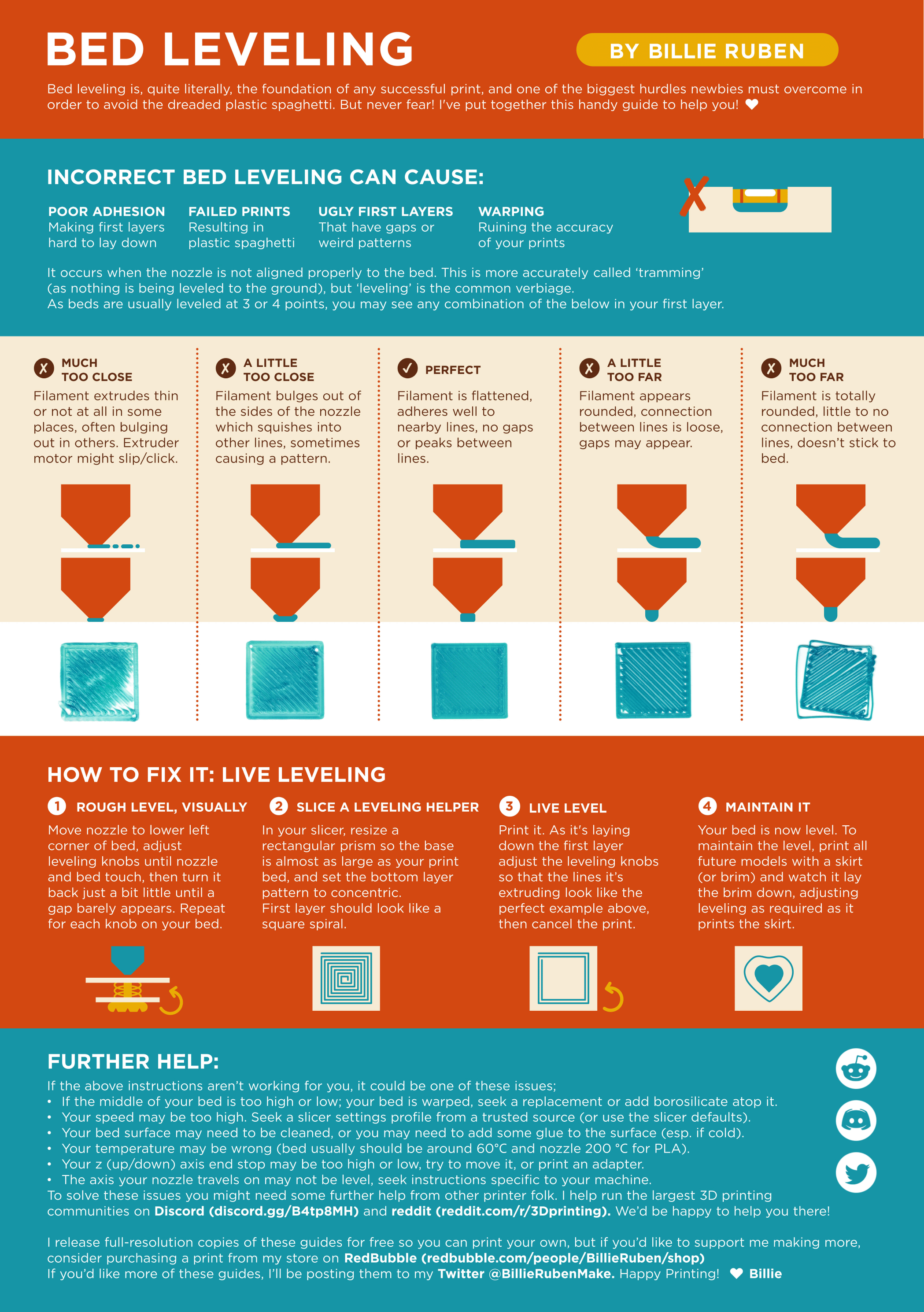
?leveling requested by: nitoflasche#0
gloomy crow
Basically i do suggest to level it again just to be sure and lower the printing speed for the first layer to 5-25 mm/s.
stark remnant
I leveled it at least 5 times and the speed is already pretty low
gloomy crow
I also work with a pei bed just so you know each time you take it of and place it back in a slightly different position you most likely need to level it again
stark remnant
Yeah I do that and if I touch it to much I wash it
gloomy crow
whats your fan seting for the first layer/s?
slim capeBOT
There is very little good information on what correct belt tension is, and virtually nothing on empirically setting belt tension. Gates, t...
gloomy crow
ignore that
stark remnant
its at 0 until layer 4
gloomy crow
ok that can't be it
basically another common issue is bed woble you got a ender 3 so i would try to move the bed by hand to the left and right does it woble/move (same with the head)
stark remnant
I got it to print right now. I tightened the eccentric nut on the bed and that seemed to do it
gloomy crow
i am getting tired, the method i described above isn't belt tension it's solved by exactly what you did so perfect
so good night
stark remnant
night