#v4.5.0 Stable Branch - Feedback
1 messages · Page 1 of 1 (latest)

 inner creek

 crude ledge
how do you update 
 ashen hatch
crude ledge
how do you update <:susge:832958483007668225>
ashen hatch
crude ledge
how do you update <:susge:832958483007668225>
You should get prompted in Wootility, or you can manually update using the download links in the changelog
 weary hedge
By pressing the update button in the settings for normal full version releases
inner creek
hold on, needs a few minutes
weary hedge
Then restart the program
crude ledge
alright ill wait, gonna be pretty cool to set per layer rgb 
 hot patio
crude ledge
alright ill wait, gonna be pretty cool to set per layer rgb <:thonkytho:80527569...
hot patio
crude ledge
alright ill wait, gonna be pretty cool to set per layer rgb <:thonkytho:80527569...
been on beta for a bit, it’s actually essential for me now
inner creek
@here Web build is live now. Press Ctrl + Shift + R to refresh the cache if you still don't see version v4.5.0
 knotty oasis
Any extra steps I need to take to switch from the Beta to Stable?
ashen hatch
knotty oasis
Any extra steps I need to take to switch from the Beta to Stable?
If you have any inactive profiles you may need to share the code and import them into the stable version. Other than that, everything should carry over (except like theme setting and language)
knotty oasis
ashen hatch
If you have any inactive profiles you may need to share the code and import them...
Sweet, thanks.
 grizzled bough
@ashen hatch I recently updated to newest firmware. Should i switch to stable version Wootility v4.4.13, now ?
sorry 4.5.0. it got updated.
ashen hatch
Yeah you should switch to the stable, unless you want to continue on beta (I'll be moving alpha -> beta soon)
grizzled bough
ashen hatch
Yeah you should switch to the stable, unless you want to continue on beta (I'll ...
I moved to stable for now but will gladly participate in next beta
So when the new wootility beta is available i'm gonna download it. As for now i uninstalled the wootility beta since two wootilitys on dekstop are not worth it lol
 atomic plume
v4.5.0 Stable Branch - Feedback
 opal marten
i update to the new wootility and i see little thing about the french translation nothing problematic but maybe you don't see cause it's not the universal language

"impr écran" significate print screen i think remap or something like this is the right title
knotty oasis
After using the 60HE & Wootility for a week, here's a list of things that I've wanted to do but can't from what I can tell:
- Set lighting fx per layer. The Touch lighting effect is utilitarian but only accessible on Layer 1.
- Set performance options per layer. My gaming profile has custom per key actuation, but when I go to access a different layer with totally different binds I can't change actuation.
Toggle a layer with a single press. Seems like something you'd be able to do with Advanced Keys, but Fn keys don't play nice with Dynamic Keystroke or Toggle Key.- Store key calibration settings with manual recalibration options. This would bypass boot time due to initial calibration + per switch calibration which requires every key on the board to be bottomed out individually per boot.
Not sure if all of these wants are technically possible, but thought I'd share based on my experience thus far.
knotty oasis
knotty oasis
After using the 60HE & Wootility for a week, here's a list of things that I've w...
Forgot one:
5) Copy and paste individual layers between profiles. I sometimes have identical layers on different profiles, the ability to copy and paste them between layers would save a lot of time.
 umbral hull
Somehow weird to upgrade a W1 from firmware 3.x to 2.x. 😝
 remote plover
Does Wooting need help in any further translations? Is there currently a need for Hungarian translation?
knotty oasis
knotty oasis
After using the 60HE & Wootility for a week, here's a list of things that I've w...
Solved number 3, see my original thread regarding this issue here:
https://discord.com/channels/167181566978555904/1083115350327037973
knotty oasis
knotty oasis
After using the 60HE & Wootility for a week, here's a list of things that I've w...
- Switch to last used profile without a bias to the digital profile. So a key like mode but it takes you to the last used profile regardless of if it was analog or digital.
 fluid plover
I had some issues with latency in the past(they happen very occasionally and only for a short time) I hope this one fixes them
Are gamepad features not being worked on currently? It's been quite some time since the last change there
hot patio
i have an issue with the rgb on my caps lock key


the activated colour is set to red
yet when i hit capslock
its the default white
inner creek
hot patio
i have an issue with the rgb on my caps lock key
can you share this profile code with us?
 ashen hatch
hot patio
https://i.saddest.org/c6d.png
ashen hatch
hot patio
https://i.saddest.org/c6d.png
It looks like you have a Mod Tap key that has both an Fn Key and Caps lock? It's probably setting the colour of the Fn lock rather than caps lock, you can workaround this by binding Caps lock onto another layer then setting the colour just for it
ashen hatch
fluid plover
I had some issues with latency in the past(they happen very occasionally and onl...
The current focus is on getting a more stable foundation, the next update is also focused around that. Gamepad isn't the priority atm (although we did fix up Snappy Joystick in this release), but me and @inner creek have got plenty of ideas on improvements we can make to the gamepad system :)
ashen hatch
knotty oasis
Forgot one:
5) Copy and paste individual layers between profiles. I sometimes ha...
This is a solid one, this has been on my mind for a while, so I defo want to get it in there as well 😁
ashen hatch
knotty oasis
After using the 60HE & Wootility for a week, here's a list of things that I've w...
I think 1,2,4 would be good ones to share on https://github.com/WootingKb/wootility-issues/issues They're all viable I think, but would potentially only be possible on ARM based boards. If you post on github then we can keep the idea around and not lose it/get more discussion around it :)
GitHub
A place to report issues with the Wootility and help with feedback on existing issues - Issues · WootingKb/wootility-issues
ashen hatch
knotty oasis
6) Switch to last used profile without a bias to the digital profile. So a key l...
This is also a good one to share on github
hot patio
ashen hatch
It looks like you have a Mod Tap key that has both an Fn Key and Caps lock? It's...
will that effect the caps lock colour on my actual caps lock
ashen hatch
hot patio
will that effect the caps lock colour on my actual caps lock
Yeah it should still light up your main caps Lock, if not, then just remove the new binding
hot patio
ashen hatch
Yeah it should still light up your main caps Lock, if not, then just remove the ...
this fixed it, thank you
you should make it so you can edit both without doing that though
if possible
 silent blaze
@ashen hatch - prodding with regards to translation access on Crowdin, for Norwegian translation. Once you're done with this vacation-thing I hear you're on.
ashen hatch
silent blaze
<@178235161857490944> - prodding with regards to translation access on Crowdin, ...
Jeg har ledig tid nå, så jeg kan fikse det nå :)
silent blaze
Flotte greier. Trenger du epostadressen jeg registrerte meg med? 😉
ashen hatch
silent blaze
Flotte greier. Trenger du epostadressen jeg registrerte meg med? 😉
Nei, det går bra, jeg kan legge til norsk på crowdin og så gi deg tilgang
@silent blaze det burde være i orden nå 😁
silent blaze
Takker, da skal jeg begynne på jobben. 😉
inner creek

 abstract kite
Hey I think this would be the right channel to post in since its more generl feedback (I am also not sure what version I am on since I just use whatever is curently in the repositorys) [Plus sorry for spelling is Dyslexic] {plus plus I hope I don't sound like an ass but I might swy}
That said While I am quiet happy with Wootility I have a few Things I am personally missing. So I thought I voice em just in case.
-
I would very much like too map every singel posibel standard key function too any key. To clarify I want these "() {} !@#$%" etc.
mappabel to any key by itself if I so desire. -
these too please öäü etc. (if posibel)
-
I would like a function that lets you map multibel keys to the same key pressed at once. To give an example I use cntrl and C at the same time as a copy hotkey. Not the inteded function for me but if I start explaining my short cuts ..........
-
If we have clicking mouse buttons can we also have moving the mouse cursor by chance?
-
may doby have a 4th layer?
umbral hull
1 & 2 are not possible by the keyboard. This depends on the used keyboard layout of your OS. You would need to create your own keyboard layout to archive that. The keyboard just send which key is pressed, the OS transfers these into characters.
For 3 can be archived in a limited way via DKS, otherwise you should use macros. AutoHotKey is recommended for created powerful stuff. Wooting itself also offers a simple macro tool. https://next.wooting.io/wootomation
The thing you want with 4 can be archived by third party tools. Like Steam offers the possibility to control the mouse on the desktop via a controller. So if you set it up correctly it will work with the emulated controller of the Wooting too.
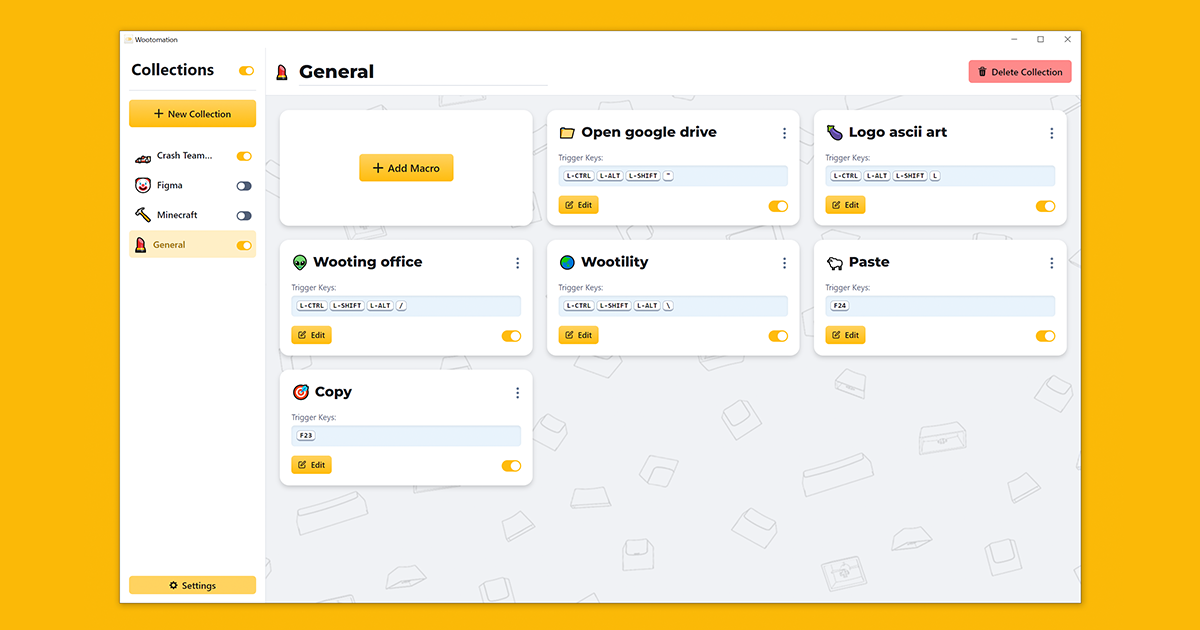
Open source macro application that is easy to use, powerful and low on pc resources. Available for Windows and Linux.
atomic plume
ashen hatch
Nei, det går bra, jeg kan legge til norsk på crowdin og så gi deg tilgang
bork bork bork!
Anyway tiny request time.
Add a override for key lock LEDs even if brightness is at 0% (maybe a separate slider for "lock key override brightness", so you can do 0% brightness but still see when Caps Lock etc.. is active 😄
It might also be worth adding a link here to a quick little article that explains OS language vs. keyboard output for accent keys, umlauts and symbols. It is a VERY popular question/point of confusion that people can't find modifier layered keys like ~ € and such on the list itself.
 grizzled bough
Override Hold Duration is not working if I put my FN1 button on Caps Lock on Hold.
@ashen hatch
Here is my profile to check it out:
a14901ff01db91504aaebde80585641b6c77
Ahh i recently read the description.... Nevermind.
 frozen canopy
I would love to see further DKS enhancements like being able to set more than 4 keys, custom actuation points and not just 3.6mm down/up (in DKS settings). Is 4 keys limitation just a software one?
Or something like spam key feature where I can make it spam 1 key every 0.1mm down and up
Or let us just program entire key travel by ourselves xD add scripts we can assign to a key and define actions for every actuation point up and down
DKS has so much potential it could turn in basically hardware macros that work everywhere
 devout fulcrum
all i want at this point is to be able to change the 3.6mm in dks and i'll be so happy
frozen canopy
devout fulcrum
all i want at this point is to be able to change the 3.6mm in dks and i'll be so...
yeah I'm pretty sure it's possible wioth hardware we have it's juist a software limitation at this point
also more than 4 keys would be nice
 frosty wedge
New Feature Idea for strafing left and right
A game I played called battlefield Heroes had this built into the engine
If you hold down A to strafe left as soon as you clicked D it would override A and strafe right
So you just hold down the A key and modulate your strafe by Clicking D
This is huge because I've been using rapid trigger and my strafe has been getting cancelled because I had both keys pressed briefly
Also it means that you are always moving left or right with no down time there is never a moment where you have both keys pressed or no keys pressed allowing you to have the fastest strafe possible
Code;
If keyPressed(D):
setKey(A) = off
Or vise versa
Just ignore the opposite strafe key when the priority strafe key is pressed
This feature seems very easy to implement and would make this keyboard even more perfect
This way of strafing is actually superior to having to lift your fingers off and on which you can never do perfectly


Holy shit I thought of another way of doing it
If both A and D is pressed the keyboard checks which key is pressed more and then only that key is sent
umbral hull
frosty wedge
If both A and D is pressed the keyboard checks which key is pressed more and the...
Such a feature is implemented for the analog mode. For a digital mode this is maybe to specific and so error prone.
frosty wedge
Its basically a filter function that takes A and D and just outputs only one key
frosty wedge
umbral hull
Such a feature is implemented for the analog mode. For a digital mode this is ma...
Yeah the issue is with digital mode I just want some feature that doesn't let both keys to be pressed
This is obviously a gaming feature not for everyday use
umbral hull
What you want is basically already implemented as the snappy feature for the controller emulation.

So it's not new. This is just not used for the digital keys.
frosty wedge
umbral hull
So it's not new. This is just not used for the digital keys.
So could they add it to the digital keys?
umbral hull
It would provide the same advantage. But for digital keys it's much more error prone.
umbral hull
Recommendations are better placed here: https://github.com/WootingKb/wootility-issues/issues
Such things typically are forgotten quickly in Discord.
GitHub
A place to report issues with the Wootility and help with feedback on existing issues - Issues · WootingKb/wootility-issues
frosty wedge
umbral hull
Recommendations are better placed here: https://github.com/WootingKb/wootility-i...
Ok
umbral hull
Again, the things you describe are already implemented but only for the emulated controller sticks.
The bigger analog value decides the direction or if both are equal (like when bottomed out) the later pressed is used.
frosty wedge
umbral hull
Again, the things you describe are already implemented but only for the emulated...
That means it should be easy to implement

umbral hull
So you basically want the Snappy joystick function for digital keys.
The problem here is how to configure this. Like there should be a way to say create a group for keys for this. Like A & D, because some users maybe use S & F, or a limited person maybe use other keys.
Also such a setting can easily cause issues if you aren't aware that this is on. So the UI should account for this.
umbral hull
frosty wedge
That means it should be easy to implement
I don't think so. There is maybe a start but the handling of the controller is still different than for the joystick. Also as mentioned the UI is more complicated. For the joystick it's clear because of the bindings of the axis.
frosty wedge
umbral hull
Also such a setting can easily cause issues if you aren't aware that this is on....
It should be in performance option
Like a gaming setting
That is offered to people
You right it can be used for arrow keys and up down
umbral hull
It still should be visible in the keyboard layout preview which keys belong together and aren't independent anymore.
 dim topaz
After updating my rapid trigger sensitivity got changed from 0.1mm to 0.15mm and there is no way to set 0.1mm anymore. But I can still use 0.1mm for the actuation point. Why is that? why can't we use 0.1mm anymore? And why are the rapid trigger steps 0.05mm now instead of 0.1mm?
umbral hull
dim topaz
After updating my rapid trigger sensitivity got changed from 0.1mm to 0.15mm and...
Please read the patch notes, it's mentioned there.
 dark rover
I love that we can now color the keys per function layer, makes finding the keys much easier.
However, if you have any RGB effects on the main layer (I use Trail on my main layer of my typing profile) when switching to the Fn layer it uses the Brightness setting for the intensity.
Problem is, that Brightness setting is for the effect, in the case of the Trail effect it's the brightness of the keys when PRESSED, not the Idle Brightness which is for the keys at rest.
Because the effect brightness is much higher, when you switch to the function layer the keys get overly bright and it's quite jarring, ideally it should use the Idle Brightness setting.
Hope that makes sense.
frosty wedge
dark rover
I love that we can now color the keys per function layer, makes finding the keys...
My Fn layer effect wasn't working

dim topaz
umbral hull
Please read the patch notes, it's mentioned there.
I did read the patch notes but I didn't see that, were is it mentioned?
dark rover
@dim topaz here:
"Rapid Trigger sensitivity slider now works in strict 0.05mm increments to provide more consistent settings and make every step visible. The minimum will now also show as 0.15mm which is actually the same minimum, just a more accurate rounding."