#🤖│community_dev
1 messages · Page 21 of 1
 placid ledge
placid ledge
placid ledge
Make sure you have the beta wootility installed so you have the SDK installed: https://discordapp.com/channels/167181566978555904/344031355803271179/620602676735901696 or run the installer from the github releases
I've never used qtcreator
but this might help: https://doc.qt.io/qtcreator/creator-project-qmake-libraries.html
If you need to link the library statically, here's the static lib version. It'll be included automatically in the sdk release next version
placid ledge
You'll probably need wooting-analog-wrapper.h and wooting-analog-common.h from the wrapper/includes directory of the tar
 icy needle
ok
icy needle
trying^to understand
noever wanted a nodejs
idk what inm doing tbh
i got the wootility beta
placid ledge
The wootility beta will make sure you have the analog SDK installed on your system. The wrapper dll that you're trying to include in your project just connects to the actual SDK, so if there are any updates or a new keyboard is added or something, you won't need to update your stuff
placid ledge

Stack Overflow
May i load external library in my library project? If yes. How i can do this.
With Qlibrary? or typically include in pro file LIBS += -L /lib -lmylib and add *.h file to project?
Sorry for my Engl...
this might also be helpful
Kinda guessing at this point as I'm unfamiliar with Qt
icy needle
me too, like we just use it in class so that's the reason i have it unstalled on my computer¨
placid ledge
Hmmm, What are you trying to make?
icy needle
nothing for now, i just want to play a bit with it to see what i could do
placid ledge
Ah, fair
 quiet root
does the wooting_analog_wrapper.dll depend on any other dlls in windows?
placid ledge
It shouldn't, no
afaik
If you're using the static lib you may need this at the top of the header file:
#pragma comment(lib, "userenv.lib")
#pragma comment(lib, "ws2_32.lib")
using the dll but node-ffi cant link it and errors with 126 which is module not found
placid ledge
Have you got it in the same directory?
quiet root
nope but its def pointing the right path
if i cahnge the path i get an i/o error
ah wait
i just noticed it fails to load the sdk
prob cause wootility alpha is like 10years behind beta and stable
my bad
placid ledge
ye, prob wanna install the beta so you have the sdk installed in your system
quiet root
na just gonna use the msi
placid ledge
Fair, fair
placid ledge
you may need to restart that environment you're using
as the sdk will be added to the path
and you need to refresh the environment vars for it to see it
quiet root
ah right vscode didnt listen to the windows events for path updates
forgot

so what does this mean
placid ledge
Hmmm, that shouldn't be happening. I'll have a look into it, just delete Program Files/WootingAnalogPlugins/wooting-test-plugin for now
quiet root
ok will do when im back home
or does it happen cause i have aurora running with the old sdk
placid ledge
Nop
quiet root
i mean it is constantly sending rgb stuff so idk if that influences it
quiet root
?
placid ledge
Actually, no
nvm
You can ignore the error
The -1999 is a successful intializse
as it is 'NoDevices'
Do you have your kb plugged in?
placid ledge
There's a minor issue we've got atm where it sometimes doesn't detect the keyboard on initialize and picks it up shortly after
So set the device_event_cb and you should be able to see if it shows up as connected
quiet root
ok so i know the nodejs wrapper is working tho
placid ledge
Ye, looks like it
quiet root
now justvneed to check if all is implemented correctly
especially the callback stuff
and some of the stuff that has buffer arguments
will we get smth similar for rgb btw
nice central rgb sdk that detects multiple kbds
placid ledge
It's planned to revamp the rgb sdk ye, no estimate of when tho
Still polishing analog sdk, getting some game engine integrations going
icy needle
installing the beta put my keyboard into iso mode and i can't switch back to ansi
placid ledge
Ummm, that's very weird @hybrid lake
quiet root
i mean one can always reinstall the firmware
through the troubleshooting steps
@placid ledge giess ill stay with nodejs lel... one day ill master rust fully
icy needle
wait
no, still doesn't word
k
put me into ansi mode sorry
cant trevert to iso
the button doesn't work
placid ledge
what button?
placid ledge
try resetting the firmware in settings
 lofty hare
I also get the -1999 NoDevices that TinyDutchAFK reported above on initialize, how do I proceed?
 wet knot
lofty hare
wet knot
lofty hare
the nondetected keyboard happily reports analog values though, they're just all 1.0
this is with the wooting one and the newest sdk
(modified) python wrapper
quiet root
1.0 would be fully pressed
and for me reading analog from -1999 returns -1999
@lofty hare
quiet root


why does the double deref crash it when accessing the variable
so confused rn
it just silently crashes
 chilly oar
I bet device_info isn't a string or can't be used as a string.
quiet root
na structs can be logged
and it would just print an error
but it silent crashes
its as if for some reason it cant deref it anymore after the first deref

single deref works fine
even shows that its only a single pointer by then
but the next deref fucks it
chilly oar
I'm not familiar with node or JavaScript. But I would guess that device_info_result is a pointer from a pointer, so you can only dereferering it it once.
quiet root
its a ptr to a ptr yes but node-ffi lets u deref it twice to get data usually
normal pointers to pointers deref fine twice
chilly oar
It's even in you code, there is only once refering: const device_info_result = ref.alloc(...). So maybe there is a problem with the ptr_ptr.
quiet root
i think theres a problem with node-ffi actually
or well
ref-struct in this case
cause normal ref types like uint, ushort etc work fine
chilly oar
Just debug it and look at the value for the device_info variable.
quiet root
<Buffer@0x000001716D6476B0 eb 03 02 ff 71 01 00 00, type: Function { indirection: 2, name: 'StructType*' }>
it should be able to reduce indirections via .deref() until its 1
but it doesnt
thats a single deref
<Buffer@0x0000022CEF2E4D90 e0 99 07 ef 2c 02 00 00, type: Function { indirection: 3, name: 'StructType**' }>
no deref
note this is all in nodejs
so the StructType** means nothing except a visual indicator of what its state is
chilly oar
This is what I found:
var buf = ref.alloc('int', 6);

var val = ref.deref(buf);
console.log(val);
6
I don't know anything about this, but I would assume that the second deref isn't maybe a function on the object and you must use it like the code above.
quiet root
the way you define a pointer to a pointer is
const exampleType = ref.types.uint;
const exampleType_Ptr = ref.refType(exampleType);
const exampleType_Ptr_Ptr = ref.refType(exampleType_Ptr);
and then you just do
const actualVariableWithType = ref.alloc(exampleType_Ptr_Ptr);
do smth to fill the buffer obviously and deref
chilly oar
But I don't found an example like this so far: bar.deref()
quiet root
its the same
const buf = ref.alloc(ref.refType(ref.types.float));
console.log(buf.deref())
console.log(ref.deref(buf))
<Buffer@0x0000000000000000 type: { size: 4, indirection: 1, get: [Function: get], set: [Function: set], alignment: 4, name: 'float', ffi_type: <Buffer@0x00007FF86CC8B460 name: 'float'> }>
<Buffer@0x0000000000000000 type: { size: 4, indirection: 1, get: [Function: get], set: [Function: set], alignment: 4, name: 'float', ffi_type: <Buffer@0x00007FF86CC8B460 name: 'float'> }>
@placid ledge whats the vendor_id that the wrapper returns?
@chilly oar think i fixed it
chilly oar
And what was the problem?
quiet root
idk i passed a normal pointer even tho the header has a pointer to a pointer in it
chilly oar
If you want to know the vendor ID of the Wooitng One & Two it is 0x03EB.
quiet root
ok wrapper works then as far as getting device info is
int wooting_analog_get_connected_devices_info(WootingAnalog_DeviceInfo **buffer,
                                              unsigned int len);
thats the header
but actually passing a pointer to a pointer doesnt work
chilly oar
Sounds like the problem was what I had expected.
https://discordapp.com/channels/167181566978555904/453072453435129856/630154062247231499
quiet root
na i can deref pointer from pointers fine with any other type
i tried with float, uint etc
they derefed fine over multiple derefs
i think the header might just be wrong
doesnt **buffer mean i have to pass a pointer to a pointer
not just a pinter to a buffer

see derefs fine twice
ah wait
im dumb
ref.alloc is already a new ref isnt it
ref.alloc returns a pointer to the value
ok ya it works now
just need to check that the callback function actually works
quiet root
welp callback is somewhat working
it fires once and then it gets garbage collected
if i fix that the wrapper is functional
gonna publish it for now and fix callbacks tomorrow
quiet root
fixed callbacks aswell

GitHub
Contribute to BigBrainAFK/node-wooting-analog-wrapper development by creating an account on GitHub.
for anyone interested
ill just see if i can do something about the ffi errors when the callback is called too frequently
altho thats probably smth node.ffi has to fix
quiet root
@placid ledge ```
thread 'Timer thread' panicked at 'called Option::unwrap() on a None value', src\libcore\option.rs:347:21
stack backtrace:
0: plugin_create
4: plugin_create
6: rust_eh_personality
7: rust_eh_personality
8: <unknown>
9: plugin_create
10: plugin_create
11: plugin_create
12: plugin_create
13: plugin_create
15: plugin_create
16: BaseThreadInitThunk
17: RtlUserThreadStart
doesnt seem to come from node-ffi
this happened when i tested the callback and unplugged the keyboard rather quickly
obviously also plugging it back in
placid ledge
Hmmmmm, are you able to replicate it with the RUST_LOG environment var = 'trace' and RUST_BACKTRACE=1?
@quiet root
quiet root
ill document the nodejs wrapper nicely and generate some nice documentation
need to write some examples aswell
@placid ledge uh can do when im home in an hour
placid ledge
Alright
quiet root
@placid ledge https://pastebin.com/K9SVsRED

entire log
basically im just unplugging and plugging it it constantly
at some point that happens
placid ledge
Hmmm, thank you
Wish it had the debug symbols so I knew the lines it was erroring on, but should hopefully not be too hard to track down
Is everything else besides that working?
quiet root
still writing tests will tell you when im done
placid ledge
Alright, I've tried to replicate it without success, but am on Linux so could be a Windows only ting
quiet root
they are?
if i pass a pointer to a char to the deviceInfo thingy for example in the callback
i get 1 letter
no more no less
if i pass a pointer to a char array
placid ledge
 quiet root
(more than 1 char)
placid ledge
Wait what
quiet root
i also get some garbled mess
placid ledge
can you give me an exact example of what you're doing?
 placid ledge
What are you passing where?
 placid ledge
Is this defining the struct for the ffi to use in node?
quiet root
yes
but ffi has a char type
and also char arrays
which dont work tho
passing a pointer to it (as the header specifies) crashes node-ffi actually
placid ledge
Well, it's likely to be something on the node ffi end, as I've never had any issues reading those strings from the device info struct. They are null terminated strings, does what you're using take that into account?
the const char* is equivalent to a char array
quiet root
yes
placid ledge
as arrays are just pointers to a block of memory for the array
quiet root
and a char array return garbage, a single char returns W
if i pass an actual pointer (which node-ffi also marks as char*) to the func it returns 87
so either node-ffi doesnt like cpp
or smth else
placid ledge
How are you reading this? Is it something node ffi does internally automatically with that given definition?
doesn't like cpp? This is all c
quiet root
well c/cpp is the same for node-ffi
well i can either log deviceInfo from the callback which shows me the buffer and its contents
this includes the type of the value i logged
ngl this could be down to node-ffi aswell
placid ledge
node-ffi's whole goal is to use C abi isn't it? So it should work for this, as there isn't anything special being used, it's just plain c abi
Also, why have you got the sdk dll's in your repo?
quiet root
ya and thats what confuses me
i just extracted the wrapper tar balls
they come with the sdk dlls and the test plugin
idk if they are necessary for anything or not
placid ledge
Umm, well they're included so they could be installed manually, for your purposes all you need are the wooting_analog_wrapper libraries
placid ledge
yeah, all you need is the wooting_analog_wrapper ones
you don't need the includes or the sdks

GitHub
I have a sample C code: #include <string.h> #include <stdio.h> int test(char* str, int len) { char str1[]="sample str\0"; strcpy(str, str1); return siz...
Have a look at this for the string issue
quiet root
i dont deref the string anywhere
and the last comment about ref.refType(ref.types.char) thats what returns garbage for me
he also mentioned he fixed the string type
quiet root
indeed
i mean its working now so im happy and the deviceid is actually reading correctly now
placid ledge
With the C# wrapper I wrote, it is able to handle those strings in the struct without issue, so I'm guessing it must be something with node-ffi
noice
quiet root
node-ffi doesnt like calling functions that use hid it seems
placid ledge
Could you elaborate?
quiet root
// Creating a callback function with 2 arguments
const callback = (eventType, deviceInfo) => {
    console.log(eventType === 1 ? 'Connected' : 'Disconnected');

    console.log("Beginning of device info");
    console.log(deviceInfo.toJSON());
    console.log("End of device info");

    if (eventType === DeviceEventType.Connected) {
        // Set Keycode Type to current layout
        wooting_analog.set_keycode_mode(KeycodeType.VirtualKeyTranslate);

        console.log(wooting_analog.read_analog_device(0x51, 1));
    }
};
basically
thats the callback, and if the callback event is a connect i want to read the value for Q
but instead it just kills the entire wrapper it seems cause disconnecting the kbd doesnt produce any code (not even the first console log of the eventType)
placid ledge
Ummm, might have something to do with you calling sdk functions inside the callback, I feel like that has the potential to cause some issues
As the callbacks are being called in a different thread, which is also the thread that reads the buffer, so if you call read while it's still in the middle of calling the callback it's prob gonna lock up
quiet root
ya
would be nice to have small functionallity in the callback tho
especially for langs like nodejs where you usually put all your shit in there
like me setting up keymode and doing a test read
placid ledge
Well, looking at the code again, what I said isn't completely the case, but it's likely to cause issues. You should be fine changing the keycode mode in the callback, but actually doing reads is a bit dodge
quiet root
i mean there is ways around this i guess like https://discordjs.moe/T🐡3V🐟PrE.png

which works but is kinda ugly
placid ledge
I could see about setting up the callbacks so they are non-blocking which theoretically would allow you to do normal calls to the sdk in it
I've got some ideas to cleanup the whole callback situation anyway, so I could try do it in that
Other than that, have you got any ideas on the overall design? Are there parts that you feel like don't make sense or could be improved?
quiet root
seems good to me except the small callback thing which is fixable with a small setImmediate so it runs after the callback finished
otherwise it also works nice (except the weird unwrap error on windows which might just be node-ffi)
placid ledge
Cool, yeah, that unwrap errror is strange, I'm gonna try and debug what's going on with that, am about to switch over to windows
quiet root
i think its node-ffi cause ref was ported to node12 and i think i remember having read that some null/none values are handled wrong
placid ledge
Hmmm, I'll give it a play around anyway to see if I can replicate it, if not then it may indicate an issue with node-ffi
quiet root
cool
placid ledge
Just tried on Windows, running the test app that's in the sdk repo, repeated plugging in and unplugging isn't getting that error :/
quiet root
so its node-ffi
placid ledge
Maybe, I wouldn't fully pin it on that atm
You mentioned before that you have rgb running a lot?
Is that running when you're getting this
quiet root
i killed aurora to exclude it
placid ledge
Hmmm
Are you able to easily run the test app? to see if you can replicate it on there as well, I can package it up for you if ye want
just need to install .net core if you haven't got it
 placid ledge
Could you run that with RUST_BACKTRACE=1 please? Should give me more info about where it's actually happening
quiet root
any way to add env vars to vs2019?
placid ledge
You got the csproj open? Should be able to set it in the build configuration
quiet root
already figured it out
thx tho for the answer
that should be with RUST_BACKTRACE=1
placid ledge
Hmmm, appears to be using the system sdk dll so there's no debug information on it, so is the same as before
I wish I could replicate it 😩
But I think I may be able to narrow it down tho
quiet root
i mean what does wooting_analog_sdk use
placid ledge
What do you mean? What does it use to build?
placid ledge
Idk, would have to check what it links to, as rust does that automatically, so I wouldn't immediately know
How easy is it for you to replicate it?
quiet root
happens after 4-8 connects/disconnects
mostly when previous events havent finished yet
placid ledge
I managed to get it, but even with debug symbols it doesn't really give much information as to where it is happening
placid ledge
that's good
It appears that the issue is in the wooting plugin for the sdk, so at least you don't have to worry about it now, is just a matter of me getting to the bottom of it
Could you create an issue for it on here please? https://github.com/WootingKb/wooting-analog-plugin I could create it myself, but makes more sense if you do as you found the issue

GitHub
Contribute to WootingKb/wooting-analog-plugin development by creating an account on GitHub.
placid ledge
Awesome! Thank you
I'll hopefully be able to get to the bottom of it, I've been able to exclude code that it definitely couldn't be part of, so hopefully should narrow down the possible culprits
quiet root
👌
quiet root
welp im done now
all examples work correctly and are commented
error handling
gonna chill now till simon goes berserk on the analog api and changes or adds smth
placid ledge
😄
Hopefully shouldn't be drastic api changes at this point
Should all be fairly minor
quiet root
GitHub
Contribute to BigBrainAFK/node-wooting-analog-wrapper development by creating an account on GitHub.
for anyone interested in the examples
lofty hare
do I have to unplug my normal keyboard for the SDK to return proper values or something?
lofty hare
nothing changed since you responded to me on friday
-1999 on initialize, so NoDevices
then just 1.0 on any key
quiet root
u said modified python lib right
lofty hare
yeah
lofty hare
I mean it's a wrapper

GitHub
Wooting RGB control and Analog Reader Wrapper for Python 3 - BattleCisco/pyWooting
I just changed the function calls to reflect the names in the new SDK version
quiet root
then its cause it didnt get initilized
lofty hare
yeah I patched the init call in there
a dev responded and said -1999 means initialize was successful
quiet root
what does the init call return
quiet root
initilize should return 1
lofty hare
keyboard is plugged in and working, is also recognized by Wootility

 lofty hare
quiet root
lofty hare
quiet root
i mean i literally just checked with the wrapper
altho no wait
-1999 returns if the sdk initilized but no kbd is found
id say do a while loop and make its statement
wooting_analog_get_connected_devices_info(deviceInfoBuffer, lengthOfBuffer) == 0
that way it stalls till the sdk finds your kbd
sometimes it takes a while for it to find it
lofty hare
I have to pass wooting_analog_get_connected_devices_info() a buffer though right
lofty hare
okay I got that running, but wooting_analog_get_connected_devices_info() just returns 0 forever
quiet root
thats bad means ur sdk doesnt detect the kbd
as in its not just delayed
what os are you using?
lofty hare
windows 10, since that's what I'm building the script for too
quiet root
hm
maybe try reinstalling the sdk via the msi installer from the repo
fully uninstall and install again
will be afk for a few
in the mean time
accept my friend request and dm me the modified wrapper you have as a zip imma check on my machine
lofty hare
thanks, I'll have to sort that a bit first though
quiet root
am back
 slim gust
does anybody know if the 'FN' key got a HID code, as on normal keyboards that's not the case but this sending analogue values...
quiet root
the analog values are send like an xbox controller
so it doesnt need an scan code
unless the keyboard firmware reacts to some certain non used scan codes for those
slim gust
the "old" sdk on the dev.wooting.io would allow it as you could readout by column and row
and the fn key is listed
 quiet root
maybe ask @placid ledge
quiet root
i can tell you right away that fn doesnt have a scan code
the firmware fo the kbd only sends the keypress that the combination is supposed to do
placid ledge
@slim gust Fn key currently has code 0x301 iirc, needs to be documented, anything not in standard hid codes like fn are gonna start with 0x3 or above
Need to properly document it, but is easy to see if you run read full buffer and press fn and see what code it is
placid ledge
In what way does it not work?
quiet root
its working fine
chilly oar
@slim gust This isn't a real Saleae logic analyzer or? Looks like a China clone or is it an old one?
slim gust
old and china i ain't got that much money but still does work quite well, even with high speed usb and alike
@quiet root i assume you mean the simple_full_buffer_readout example?
chilly oar
I assuming you are using the original Saleae software with it. Did you have any recommendations about aggregating the data.
Like to summarize the bytes to single messages with the package number, the direction and so on.
slim gust
@chilly oar never done usb so this was the first time and i am quite glad i didn't had to do much reading as @placid ledge responded so quickly
but i've used it with the original software for I²C and MIDI debug
chilly oar
For the main stuff I can recommend just to use Wireshark, much less data and everything is already aggregated.
slim gust
@quiet root when i run the example it just stops when i press a key, no error nothing
chilly oar
The only problem is that you can only see packages if there is a driver applied to the device.
slim gust
thats what i've noticed once i've got the data, but when u got the tools everything looks like a nail
and just to give a reason for all this fuss, i am trying to add more functions to the FN key, like controlling VoiceMeeter and other APIs
@quiet root and the same happens with the callback example, i assume the function is supposed to be called when a key is pressed but for me it does nothing
slim gust
https://github.com/RustAudio/cpal/pull/244 might this help?

GitHub
I have encountered the panic described in #231 (but different test case). The cause is that IAudioCaptureClient::GetBuffer method may return AUDCLNT_S_BUFFER_EMPTY, which is success HRESULT, and ma...
if you read through it, the usb device returns an empty buffer which causes Rust to fail
quiet root
na its not the usb device
slim gust
and as the error is reported by ffi, it could be a case in the api that ffi cant handle
i am just doing uneducated guesses and hope it helps in some ways, as i am more of a hardware guy
quiet root
i just manually allocated a buffer with some size and set the type afterwards basically what ffi does
now it seems to somewhat work
slim gust
so node isnt the problem here, i've just realized...
quiet root
ya its prob the rust wrapper dll
 quiet root
pushed a fix
basically just checking that we dont pass null values into the function
so it actually has smth to fill
not sure why ffi wouldnt be able to pass the buffers correctly tho
slim gust
btw got my voicemeeter-wooting bridge somewhat working
quiet root
anyway buffer filling now works
slim gust
thx
quiet root
i will prob make the lib easier to use so you dont have to setup all these types etc yourself
but only pass maybe a size or smth if necessary
quiet root
@slim gust Theres now a scancode enum if youre interested
slim gust
thanks a lot
quiet root
includes the fn key aswell
slim gust
yup, now i just need to find the rgb stuff out
quiet root
thats still the old
quiet root
GitHub
Customize colors on Wooting Keyboard #WootDev. Contribute to WootingKb/wooting-rgb-sdk development by creating an account on GitHub.
aurora uses the same dll
just a bit modified
slim gust
so here the old one works?
quiet root
i bet the old analog also works
just the new analog sdk is better
cause multi kbd support
slim gust
for me it didn't, couldn't find the keyboard
quiet root
w2?
slim gust
yes
quiet root
thats the problem
the old dlls dont work
youd have to use the repos from GottZ
he and me added a fix
quiet root

GitHub
Customize colors on Wooting Keyboard #WootDev. Contribute to GottZ/wooting-rgb-sdk development by creating an account on GitHub.
compile that and itll work
also contains a fix so the sdk sets colors to look like set through wootility
otherwise the colors are off a bit
slim gust
k, now i've got something todo for the next few days
and at the end it will use tons of CPU and RAM and i'll abandon it
quiet root
sometimes it gotta be like that
 faint vapor
So uhm
what a coindidence actually
I was just gonna ask if https://github.com/WootingKb/wooting-rgb-sdk/pull/10 will ever be merged or if there's updates
GitHub
also ensures the wooting one does not receive the numpad rgb values over usb.
this will prefer the wooting one over the wooting two when loading though.
we should come up with multi keyboard suppor...
placid ledge
soonTM
quiet root
hopefully very soon
 green nacelle
Hopefully chroma integration will be comming after some point, even though the chances are next to zero rn
You should really let razer know that chroma isnt coming soon
 strong siren
just use aurora 4Head
chilly oar
As far as I know they stopped the project because than a service is needed and they don't want this.
But you should be able to use it via the Aurora project, if you are using a W2 you need the latest dev / beta built.
green nacelle
I heard they stopped it, however every so often razer announces wooting one as their chroma compatible thing
I may try that
strong siren
i play OW with the effects on my wooting one pretty regularly
green nacelle
Though i am happy with the rgb as it is
Its quite pleasant set to like 30%, with jelly and blue/red
chilly oar
It's because Wooting has talked with Razer and so Razer provided the implementation details how it can be integrated.
strong siren
i don't know if you know this, but that razer integration program limits devices to 5 zones iirc
so even if that was out already aurora's solution is better ( it also is harder to setup, to be fair)
chilly oar
This was an additional drawback.
green nacelle
Oh well, no chroma for the wicked..
chilly oar
But to have it with only 5 zones is better than nothing...
green nacelle
Its funny how i used to lover razer stuff, when i got my pc i bought a wooting, and probably a logitech mouse soon, nothing razer in sight (except headphones)
strong siren
i never liked the whole razer aesthetic tbh
quiet root
well they make nice neon pink headphones
green nacelle
Oh yea, my case is razer... how can i forget
It has rgb i dont use
Was it worth it
Probably not
 weary hull
Razer demonstrated exceptional restraint with their razer core X, which didn't have a lick of RGB on it.
Shame they couldn't just keep the core X chroma on the same level 😆
 crude sky
Are the HyperX double shot PBT keycaps compatible with the wooting 2 keyboard and the black switches?
 hybrid lake
Yep @crude sky
 cold shell
anything with an mx stem is
slim gust
for some stupid reason it took me some time, but i now got the rgb sdk working, thx
slim gust
wuuhuu it is working, took me some time and it still is quite crude but i can finally control voicemeeter from any program using a "second layer" on my keyboard toggled by the fn key
 pastel iron
can i do something where if i press a key it will activate lets say v and when i let go it will activate v again
 little monolith
that’s what we should ask you
strong siren
The newest aurora version released today has official ™ support for the wooting two finally if anyone wants to try it out :)
placid ledge
official™
strong siren
Non-prerelease if you want to call it that
placid ledge
Stable™
placid ledge
It's just using the wooting 2 version of the current rgb sdk
placid ledge
new rgb sdk soon™
 placid ledge
Not sure when we're doing it tbh
 fathom garnet
soon™
quiet root
imma ready a prepared node wrapper in my projects already dw
quiet root
getting analog sdk solid
watches as it crashes on full buffer readouts
placid ledge
👀
placid ledge
🤔
placid ledge
How were you trying to fill up this buffer?
placid ledge
The fact that the buffer is 8gb shouldn't matter in normal circumstances
quiet root

normal buffer alloc for 8gb worth of bits
some node-ffi type setting so it knows those are to be passed as pointers
placid ledge
😄
quiet root
i thought of trying it on the 512gb server at work
but i doubt it will go well
even if it worked
placid ledge
I'm guessing it's something to do with the size of the length param you're giving it
As the argument on the sdk side takes in a uint, which 8gb would be too large for
Not entirely sure why that would cause it to crash tho as I wouldn't guessed that it would just loop round and you'd just end up with only a small part of the array being used
Which doesn't really matter anyway because you can't really get more than like 30
placid ledge
what error?
 placid ledge
rip
quiet root
returning on > 1
on a function thats expected to return values greater than 1
now works
placid ledge
oof
placid ledge
does not sound very fun
quiet root
welp new build published in npm
i mean did u see my util files
lol
GitHub
Contribute to BigBrainAFK/node-wooting-analog-wrapper development by creating an account on GitHub.
scraped the net for scan codes and stole vk codes from ur file
 dense token
So, I'm encountering a NoDevices issue with the wooting analog sdk (specifically, the wrapper). I can see in the discord msg logs that others have encountered this before, but I can't tell how they managed to resolve it. Problem is:
wooting_analog_initialise()
returns -1999. From what I understand, this means the SDK initialized successfully but my keyboard was not detected. Additionally:
- my kb (WootingTwo) is plugged in. I'm using that to code

- wooting rgb correctly detects my kb as connected (I am using both dlls), specifically
wooting_rgb_kbd_connected()
returns true.
- I've tried setting a callback on wooting_analog_set_device_event_cb, no dice after ~1 min.
code in cpp
mainly I'm wondering how you guys were able to resolve this? Or am I missing something obvious?
hybrid lake
Have you updated to the beta firmware in #archived_wootility_beta_feedback @dense token ?
dense token
Shiny! So I was missing something obvious. Thanks, the return result is OK now.
quiet root
@hybrid lake Oh? Analog SDK doesnt work without beta firmware?
placid ledge
Yeah, you need the beta firmware from the Wootility beta
Providing you update to the Wootility beta and update the firmware then everything should be perfect for using the sdk
quiet root
i thought it uses the old firmwares stuff for analog
placid ledge
The analog usage page was updated in the firmware for the new sdk, the format of the report had to change slightly
slim gust
will it at one point be possible to disable certain keys using the api
chilly oar
@slim gust Why do you want this feature, I don't get it?
You can disable keys within the Wootility for the analog profiles via DKS and the application which uses the API should handle it itself.
slim gust
i want to use the already great API to control other programs in the background but dont want to send a keystroke to the current application, for example if i press the FN key and "7" then i dont want to send a 7 but want the API to get called
i am trying to use the FN key to add a secondary function overlay to the keyboard
chilly oar
I don't see a problem, I think you may misunderstood the whole API thing.
The API is like for game developers who want the RAW analog values for inputs, then they need to ignore the normal digital inputs.
This behaviour applying to your use case where a service is running in the background would mean that you need to disable the keys on the keyboard side.
So the firmware of the Wooting isn't capable of detecting a special key combiantion like Fn + 7 to only reject this alone, this has nothing to do with the API.
slim gust
I do know the indented use of this API, i am just abusing it,. Have a service running in the background telling the keyboard to disable a certain keys once i press the FN key
like have it handled similar to how the RGB API does it currently
chilly oar
This function would needed to be implemented in the firmware first and because there are much more feature which are more importat I don't would think this will come anytime.
slim gust
yeah, i do know. Just wanted to throw it into the room or get some idea how to do it another way
chilly oar
What you want is possible today, with a workaround.
I would suggest to you this workaround:
- As soon as your service is running it should select an analog profile with no digital keys enabled and if the service is shutdown, it should select a profile with digital keys enabled or enable them.
- Your app should handle all the keys, so if you detect a keypress your app should send the pressed keys to the OS. So you can detect the ``Fn`` key and then don't send any key to the OS.
Or you can just disable the 7 key and let your app send this key as long Fn isn't pressed. So you don't need to handle all the other keys.
slim gust
wait, the API can switch profiles... now i feel dumb
chilly oar
I don't know if the analog API for the RAW input can do it, I guess not because this isn't the rigth task for it, but the RGB API can do it.
slim gust
ah, that might explain why i didn't find anything... but that would make it quite easy. Thanks
chilly oar
I wrote a simple test app for changing the current profile:
https://github.com/Rocky04/Wooting-ProfileChanger

GitHub
Changes the active profile to the given id. Contribute to Rocky04/Wooting-ProfileChanger development by creating an account on GitHub.
For using the RGB SDK you would either run the Reset_All_Commands at first to leave the RGB mode or don't send the WOOTING_COLOR_INIT_COMMAND after the keyboard is found.
You can find the known command list here: https://discordapp.com/channels/167181566978555904/453072453435129856/498500381509419030
slim gust
k, thanks now the whole thing does seem quite feasible
 brisk gate
Am I correct in assuming the current RGB SDK (as is) doesn't work for the wooting two?
tried it yesterday and couldn't get a connection. then I saw the PR for wooting two support
chilly oar
@brisk gate I think yes... If you can code you can just add it yourself or just use a fork.
brisk gate
Thanks! I definitely can, so I will, just wanted to check before I started hacking at it
chilly oar
GitHub
Customize colors on Wooting Keyboard #WootDev. Contribute to WootingKb/wooting-rgb-sdk development by creating an account on GitHub.
brisk gate
Yeah, I did compile it and bind to it from a testing application, but it didn't seem to make a connection at all.
It isn't really stated in the repo or on the site that it would only work for W1, and the keyboard matrix is obviously a W2, so I got a little confused.
chilly oar
I used this for a little project:
https://github.com/Rocky04/Wooting-ProfileChanger/blob/7d6c8ad3b4f79129a8b43a30b89fd4f0e12958d4/src/wooting-usb.c#L68
GitHub
Changes the active profile to the given id. Contribute to Rocky04/Wooting-ProfileChanger development by creating an account on GitHub.
brisk gate
oh, that's perfect
chilly oar
But I don't have modifyed the matrix stuff because I was only interested in the commands, I don't even have a W2. So maybe it's worth to look at a fork like from Gottz.
brisk gate
def. will
when I get off work 😅
I'm trying to make some integrations with my desktop
with notifications and color theme sync
will post some results when I have them I guess
strong siren
In Aurora we use a dll from a pull request that supports the wooting two
GitHub
also ensures the wooting one does not receive the numpad rgb values over usb.
this will prefer the wooting one over the wooting two when loading though.
we should come up with multi keyboard suppor...
 cyan saddle
Alright, I am kinda confused.
I can't seem to set the colors of the numpad?
With the HID stuff at least.
Also I seem to have found some "extra" keys.
The code is essentually:
for(int i = 0; i < 255; i++){
 setRGB(i, 255, 0, 255);
 sleep(100000);
}
resetRGB();
Does it just not support the direct thing?
That is the impression I am getting from looking at a packet capture.
chilly oar
@cyan saddle The RGB SDK doesn't support the W2. By adding the PID it can detect it but can't access the num pad. Try to use a fork like from GottZ.
cyan saddle
I guess I can look at that.
cyan saddle
Im trying to make a new API because I'm crazy like that.
Right now it's pretty rough and janky but I'm going to make it less so.
Might throw in a couple different wrappers too.
quiet root
"making a new api" no you arent
the max youd do it a wrapper
because you will end up implementing the same functions as the current rgb sdk
since well to make a new api with a complete redesign ud need access to the firmware source code
and a way to flash it
cyan saddle
There are multiple abstraction layers with there own APIs.
For example my API works with the USB API and the one the keyboard uses.
cyan saddle
Just better.
 cerulean agate
Hey DEVs I have couple questions in #archived_questions_answers the answer will helps me a lot!
 knotty night
Hi all, I am trying to have a play with the new WootingAnalogSDK in C#, but cannot seem to get it to work, any help?
https://i.imgur.com/bW7hKWK.png
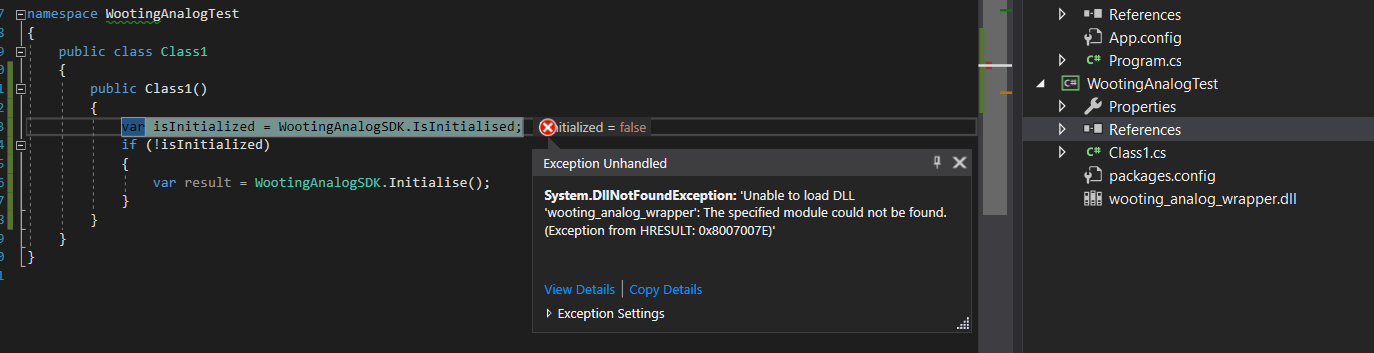
When I added the wrapper nuget package, it added the wooting_analog_wrapper.dll to the project, but it cannot seem to find it
Adding a reference and pointing it to that file does not seem to work
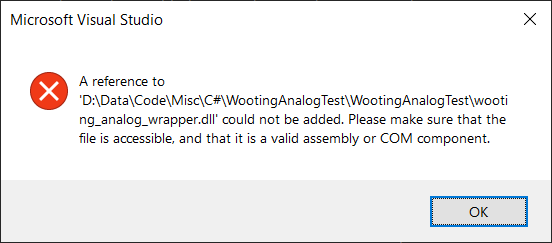
Copying the DLL into the debug folder of my test app seems to yield a different error:
https://i.imgur.com/C2XMb62.png
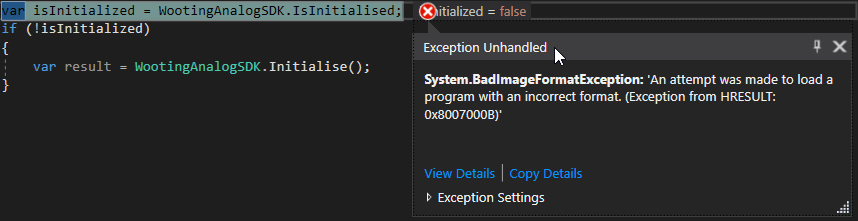
Ah, it seems that I need to set the project to x64 - does the SDK not support AnyCPU?
knotty night
Even then, it doesn't seem to work. IsInitialized is true, even before I initialize, and if I try to initialize, I get NoDevices
quiet root
not sure about the is initlilised thing but the nodevice thing someone also had that
and i think they fixed it by doing a clean device reinstall
knotty night
What, you mean uninstall wootility and reinstall?
hybrid lake
@placid ledge can you check this out?
placid ledge
The 'NoDevice' is either a case of the firmware with beta wootility required for the analog SDK to work not being installed or the SDK not finding the device immediately, in which case you may need to register for the device event callback and see when it sees the device @knotty night @quiet root . For the AnyCPU issue there's my reply on the GitHub issue https://github.com/WootingKb/wooting-analog-wrappers/issues/2
GitHub
I cannot seem to get the .NET SDK to work with AnyCPU or x86 wooting_analog_wrapper.dll seems to be x64 only Any help?
Also, I'll have a look into the isInitialised being true when it shouldn't be
knotty night
@placid ledge
https://i.imgur.com/S4PE6qk.png
Dunno if this is the latest version or not.
FWIW, I have 3 devices appearing in joy.cpl, maybe that is something to do with it?


 knotty night
OK, getting some life from it now, although IsInitialized is still starting off as true
placid ledge
Cool, that's weird. Do you wanna throw up an issue on the main analog-sdk repo for it? Just so we have some tracking for the issue. I don't have time to look into it right now unfortunately
knotty night
GitHub
Using this code, IsInitialized starts off true, is this intentional? namespace TestApp { class Program { static void Main(string[] args) { var isInitialized = WootingAnalogSDK.IsInitialised; } } }
I have had success reading analog values though, so thanks for that
placid ledge
Cool, thank you
knotty night
What's with this? public static (List<(short, float)>, WootingAnalogResult) ReadFullBuffer(uint length, ulong deviceID = 0);
Why (List...) ?
knotty night
I can understand List<T>, but why (List<T>) ?
quiet root
cause it returns a list and wootinganalogresult
its (List<(T1, T2)>, WootingAnalogResult)
knotty night
List<short, float> vs (List<short, float>)
quiet root
u got it wrong
the list can only have 1 type
so it does (T1, T2) so its technically 1 element with 2 different types inside

Represents a strongly typed list of objects that can be accessed by index. Provides methods to search, sort, and manipulate lists.
knotty night
AH Ok, got it working
Is it intentional that in KeycodeType.ScanCode1 mode, Right Alt gives a code of -8136?
I thought for extended ScanCodes, the design was to add 256?
So Right Alt should be 312?
The SDK also never seems to report a value of 0
Here is what gets reported when I press and release a key
(2, 1)
(2, 1)
(2, 1)
all those worked fine for me ¯_(ツ)_/¯
knotty night
Sometimes I get like (2, 0.6635295), but I never, ever see a value of 0
quiet root
id say actually try running my node examples and see if they produce the same result
so we know if its your setup or the .net lib
knotty night
How do I do that?
quiet root
i mean do u have nodejs?
knotty night
No
quiet root
well shite then
dont really wanna make u install smth ull never use again just to test
mind sending me ur VS project as zip?
imma test it when im home in 1.5hrs or so
knotty night
quiet root
will try when im home
knotty night
Out of curiosity, does having the new Wootility / SDK installed break the old Analog API?
quiet root
yes
knotty night
Bummer 😦
quiet root
new one is better tho
knotty night
Something defo seems wrong with the initialization - sometimes WootingAnalogSDK.GetConnectedDevicesInfo(); gets two devices, when I only have one
Also sometimes I get this on startup
[2019-12-06T16:02:22Z ERROR wooting_analog_test_plugin] Error : OpenFileMappingA failed with 2
[2019-12-06T16:02:22Z ERROR wooting_analog_test_plugin] Failed to open SharedMem...
I still need to clear out devices I think tho
Ah, now I am starting to see a value of 0 reported on release, not sure why tho
Ah, it maybe seems to be an issue with ReadFullBuffer
placid ledge
The not getting a value of 0 is a slight quirk with the the implementation of read full buffer as it just returns the processed hid report (which only reports keys that are actually pressed) so you don't get any entry for the one that is no longer pressed. However, in the next sdk version it'll keep track of pressed keys so that on the next call after a key is no longer pressed it'll report that it now has a value of 0
Also it's really strange that you're sometimes getting 2 devices, have never come across that before. And those errors (which you can ignore as TinyDutchAFK said will be moved to warnings(and will have more informative descriptions) in the next version, so you shouldn't see them anymore
 turbid barn
Is there a way to read out the raw values in MATLAB? I feel like it should be relatively easy but I can't figure it out... It's apparently not possible to execute a JavaScript file in MATLAB.
hybrid lake
@turbid barn
- Install the beta from #archived_wootility_beta_feedback and update the firmware
- Download the latest tar file of wooting-analog-sdk release here: https://github.com/WootingKb/wooting-analog-sdk/releases
- Extract the files and look for a file called "wooting-analog-wrapper.dll", place this file in your Matlab folder
- Load the analog wrapper file in your Matlab code with this: https://www.mathworks.com/help/matlab/ref/loadlibrary.html
- Call the initialise function: https://github.com/WootingKb/wooting-analog-sdk/blob/master/SDK_USAGE.md#initialise
- If that's OK, read the analog value of a key: https://github.com/WootingKb/wooting-analog-sdk/blob/master/SDK_USAGE.md#read-analog
quiet root
oh cool matlab can just use the lib TIL
turbid barn
@hybrid lake Thank you so much! I'll try this
 thick osprey
Hey guys, I'm going to integrate the Wooting SDK with RGB.NET (https://github.com/DarthAffe/RGB.NET) this weekend, looking forward to it
hybrid lake
Alright, good luck! We have @placid ledge from Wooting.NET on discord so you can ask him questions directly
thick osprey
I'll probably use the C lib directly or base it on Wooting.NET, but looking at the SDK I see there's an open PR for Wooting Two support, should I compile that myself or is there an up-to-date binairy available?
hybrid lake
Yes best to compile that one. There's some added features in that PR that we probably don't need, but it does add Wooting Two support
thick osprey
wooting_rgb_kbd_is_wooting_one and wooting_rgb_kbd_is_wooting_two are going to be useful but it seems that won't scale very well if the lineup increases
It'll be nice to differentiate between the Lekker Edition too, because the editor shows a preview of the keyboard
thick osprey
There's no such thing in the RGB SDK as far as I can tell
thick osprey
I see, we'll use the hardware ID then
thick osprey
Hi, does this mean ANSI and ISO physical layouts share the same PID? I need a way to determine which physical layout is used, is there another way to do this?
chilly oar
Maybe with GetNumberOfKeys you can determin it.
https://discordapp.com/channels/167181566978555904/453072453435129856/498500381509419030
The computer didn't but the keyboard itself knows it.
thick osprey
Hmm that could be worth a shot, I don't have both layouts though so I'd need someone with ISO to test it
chilly oar
Just restore the keyboard with the other layout.
The firmware is the same fot both and only the type from the restoring decides which you have. But you can have problems with analog values, like phantom values, because of that.
Because if you are using the wrong firmware, the keyboard will scan a key which isn't present (populated).
thick osprey
GitHub
Customize colors on Wooting Keyboard #WootDev. Contribute to WootingKb/wooting-rgb-sdk development by creating an account on GitHub.
Hmm it seems the keyboard might also return false if you try to set an ISO-specific key on an ANSI keyboard
 flint cedar
is this error on npm install anything to worry about?
Looks like it is because i can't run the example. I'm more familiar with .js but I'd rather write python. Is it worth using python?
I want to help with or create a version of MIDI keyboard, I'd assume C would be best for performance. I've only written 101 level C++.
quiet root
@flint cedar theres one

GitHub
Proof of concept virtual MIDI keyboard for Wooting One mechanical keyboard with velocity and aftertouch - simon-wh/WootingPiano
@flint cedar
 ocean heart
New to Discord. Just got a Wooting Two and tried it out with Dishonored 2. I'm amazed! It's like a whole new way to play PC games! Scratching my head over which curve is best for a first timer. I've found Instant works best but that's an odd name and wasn't what I expected "instant" to be like.
chilly oar
@ocean heart This depends on the game and your preferences. Each game can has an unique handling, maybe not all handle controller input in a linear way.
For Dishonored slow is maybe better, so you have better control for sneaking.
Instant is used for hard steps, so it will cut off the analog experience. You should use that if you don't need an analog range but want to walk as fast as possible but without making noises. Like with CS you can walk as fast as possible without making steps sounds and equally regardless of the active used weapon, normally different weapons have different walking speeds.
ocean heart
I tried setting a curve that always walks slow because I find no reason to run in this game, other than sprint. Unfortunately now I can't select between Corvo or Emily when I start a new game because it won't detect a A or D input.
chilly oar
@ocean heart Because you have disabled the digital key I guess. It's not recommended to disable the digital keys. You should either raise the actuaction point to the highest value or unbind these key in the game so they don't cause actions.
ocean heart
It seems that because I didn't set A or D to 100% on the curve the game can't detect if the key is pressed. Had to change the curve to at the every end it goes to 100%
I've got a new problem. 98% of the time I boot Windows 7 it freezes on the loading screen while the Wooting Two is plugged in. This doesn't happen with other keyboards. I have to hit the restart button on my chassis and skip Windows repair.
chilly oar
This channel is related to topics about programming apps for a Wooting not discussions about problems.
 grizzled wolf
hi can you implement a feature so you can activate 2 different functions on one key? Like: If stage 1 triggers up then x is pressed, but if stage 2 triggers down then y is pressed but stage 1 up is not triggered anymore.
because right now you will always trigger stage 1 up regardless of stage 2
chilly oar
@grizzled wolf I don't understand what you mean, but yes with DKS you can have multiple actions on one key. Like X when you press the key partial and Y when you press it fully down.
With the analog SDK you can implement what you want, if you can code.
grizzled wolf
In your example X will always fire, but I want X only to be activated if Y wasn't activated
chilly oar
@grizzled wolf I still don't understand what you want to archive and I guess the other users have the same problem, because no-one else has answered you so far.
So unless you give a fully example, we can't help you.
On this example you have three different key presses on one single key without any overlap and which key is registered depends on the state of the key press (partial press -> fully press -> partial lift-up).
**Or this, there one key is on a partial press and another on a fully press **, like I mentioned above!
The current limit is three stages in a linear way (example 1) and only two in a bidirectional way (example 2).
grizzled wolf
if a key is pressed full I want "2" to be send, but if the same key is pressed only half way I want "1" to be send. But I don't want 1 to be sent if the key is fully pressed. Thats not possible with the wootilit. Because 1 will always be send regardless weather the key was pressed only half or full.
chilly oar
@grizzled wolf You are kidding me! Did you even had looked at my examples? For sure you haven't tried them!
Both examples do exactly what you have described / drawn, just with a third part which you didn't had specified at all.
So because you did't had specified, what should happen when you partial release the key from a fully press, it's unclear what you want there.
You can have a third key there (example 1), the first again (example 2), still the second or nothing.
chilly oar
In the unusual way what you only want one single key registrated at all on the whole key travel you should know that this would be impossible. It's impossible to have "2" registrated without that "1" has be send at least for a very short time (from my examples).
 drowsy mist
It could be possible. It's called "hipfire" in the steam configurator triggers and it'd introduce a slight delay to the 1 output so it'll only output 2.
If you want to do it in a game, it's fairly doable since the keys can function as a trigger, but you can't do it with the wootility I suppose.
grizzled wolf
yeah are you going to implement it in the wootilty? All you had to do, was to wait for either full press or complete release to decide which keycode should be sent.
chilly oar
😔 🙄
I think this feature would take a long time until you can expect it for the Wooting.
Having such a feature would need a handling layer which is on top of the normal key registration in another dimension (time). For now not even DKS is working fine and in a global way.
grizzled wolf
you don't need time you just have to wait until the key is all the way up before you decide which keycode to send. Like: if(Stage2Down) {send x;} if(Stage1Up&& Stage2NeverReached) {send y;}
chilly oar
@grizzled wolf No you need time, otherwise the action can be hold forever, which isn't a good behaviour.
The pseudo code you have mentioned make no sense.
grizzled wolf
just think about it, you don't need time
chilly oar
If you don't have time involved you can hold the key at a point forever without sending any of the actions and this is bad, very bad in my option.
Because from the things you had wrote the action is only send on a fully press and on a lift-up from a partial press.
So if you don't press the key fully down but also don't lift it fully up, no action is send ever as long as you are in this state.
By this you wouldn't be able to use auto fire, because then you would be limited to single fire only.
The action would delayed as long as you don't change the state. Yes, this can be implemented in an easy way but this isn't intuitive at all, because the decision happens at the end of the key press and not at the beginning or at least in a reasonable time. Besides you can't control how long the pratial key should be handled as pressed.
chilly oar
This is how the code can look like:
static int state = NO_PRESS;


if (get_current_keystate() == FULLY_PRESSED)
{
    state = FULLY_PRESSED;

    send_key_down('x');

    // Adding the up event here too makes no sense because then the user wouldn't be able to control the duration
}
else if (get_current_keystate() == PARTIAL_PRESS && state != FULLY_PRESSED)
{
    state = PARTIAL_PRESS;
}
else if (get_current_keystate() == NO_PRESS && state != NO_PRESS) // The second condition is optional and is just present for optimisation
{
    switch (state)
    {
    case PARTIAL_PRESS:
        send_key_down('y');
        wait(DELAY);            // Ensue that the key is hold for this period => not good because it's fixed and the user can't control the durationit in any way
        send_key_up('y');
        break;
    case FULLY_PRESSED:
        send_key_up('x');
        break;
    default:
        // This case should never be reached
        break;
    }

    // Reset state
    state = NO_PRESS;
}

// Possible livelock if state is neither NO_PRESS nor FULLY_PRESSED
But it would be very useful for instance you have 2 weapon slots and you want to select either of them depending on how far you press the button down
fathom garnet
in that case it would work just fine, as there isn't really an issue if you first select a then b if you want b
fathom garnet
^
grizzled wolf
K this sounds like a solution
But if you play a survival game and food is slot1 and water is slot2 but you only want to take either of them then you will have to consume both in one scenario
or you play a MMORPG and you only want to cast one spell you would end up casting both
 sweet sparrow
Is the RGB SDK not compatible with the wooting two yet?
fathom garnet
hmm no that should work just fine
sweet sparrow
wooting_rgb_kbd_connected just returns false for me :/
fathom garnet
https://github.com/WootingKb/wooting-rgb-sdk/pull/10 did you use this?
GitHub
also ensures the wooting one does not receive the numpad rgb values over usb.
this will prefer the wooting one over the wooting two when loading though.
we should come up with multi keyboard suppor...
sweet sparrow
I saw that one, haven't tried it yet
That's why I figured it might already be documented somewhere that currently it only works for wooting one
The matrix image shows the numpad though so presumably it should work with the v2 already
So perhaps I'm messing something up, I dunno.
fathom garnet
I think it might be an issue from before simon reworked and cleaned up the sdk's. not sure. think after lekker is out jeroen will work on it more when more macro support and such comes to wootility
sweet sparrow
Hm this suggests that it indeed doesn't have the HID device ID for the two :/ https://github.com/WootingKb/wooting-rgb-sdk/pull/9/commits/776ace3bb1b081f29ee749a3e9da75e61a7d0ba0
placid ledge
You'll need to use that Wooting Two PR for now. I'm going to be sorting out the RGB SDK soon
fathom garnet
and yes @grizzled wolf i guess there you would need something like rocky's solution or see what AHK can do. but my guess it that advanced dks features might be able to do that in wootility once they get more features
sweet sparrow
Ah damn okay
chilly oar
@fathom garnet The code wasn't my approach, it was Kims one, I just only created a pseudo code for the behavior he is wanted.
Having two independent actions on one key is not very useful in my option. I can get a hip fire thing where on a slow press you aim and fire on a fully press or instand fire, if the press was fast but not something like drinking water or eat something. This is a keyboard, so you have plenty of keys you can use without the need of stacking them.
 clear hedge
@quiet root thank fuck XD
fathom garnet
yea I don't think it would really make sense either, but it would work if really wanted, didn't look too closely so I just assumed you had made something working haha
quiet root
@clear hedge ikr
clear hedge
@quiet root means I might have to add some more changes to my game detector XD
I JUST UPDATED THAT
quiet root
ill help u dont u worry
chilly oar
The problem is not that the code is not working, it's that the behavior where the decision how the press is registered is at the end is bad in my opinion.
clear hedge
@quiet root oh I also did implement a fix the bricking the keyboard that you mentioned before
So that was fun testing 😂
chilly oar
So Ed you are back, like Arni?
chilly oar
Nice... 
chilly oar
I'm looking forward off all the discussions about the changes, and these are a lot.
quiet root
wait cop was woothelp
fathom garnet
he always was, even replied to my mail recently :p
clear hedge
@quiet root yeah, have been for months XD @fathom garnet and yeah 😂 I know 😂
#BestSupportMember
😜
quiet root
somehow didnt notice
clear hedge
I keep it on the downlow (though it was in a blog post soo 🤔 ) 😂
chilly oar
If you mean the e-mail support, that was on stream too, so it's public information.
Besides I guess you always has answered in your own name.
placid ledge
@quiet root Don't get too excited just yet. A full new RGB SDK will be coming at some point, but for now we're just going to be updating the current one so it supports everything we need it to at the moment. A full overhaul will happen when it is fully needed
placid ledge
👀 Well, I'd be happy to do it, but there are other things with a higher priority at the moment
quiet root
ure right macros are way more important
placid ledge
GitHub
Customize colors on Wooting Keyboard #WootDev. Contribute to WootingKb/wooting-rgb-sdk development by creating an account on GitHub.
faint vapor
Hey, I just randomly discovered this link while reading up on WebUSB:
http://www.linux-usb.org/usb.ids
I found the Wooting 2, but not the 1. Wouldn't it make sense to get the 1 listed here too? (please @ when replying)
quiet root


no thats wireless missile launcher
literally not in usb.ids


thats the website of the usb.ids file that linux uses
as you can see
no wootingone under atmel
fathom garnet
tino says thats the id, tony says its not there, you aren't disagreeing
 glacial horizon
Wooting one is ff01, two is ff02
faint vapor
🚀
glacial horizon
Ahh forgot
 restive vine
can someone help me? Trying to configure DarrenVs' analog keyboard overlay to no avail
https://github.com/DarrenVs/analog_keyboard_overlay gitHub link for it

GitHub
Browser overlay for OBS:. Contribute to DarrenVs/analog_keyboard_overlay development by creating an account on GitHub.
strong siren
the link in the readme is wrong apparently
try this instead:
https://darrenvs.github.io/analog_keyboard_overlay/
sweet sparrow
Why is wooting_rgb_array_set_full so incredibly slow?
Or rather, wooting_rgb_array_update_keyboard, I suppose
Hm, looks like hid_write is just blocking hard
So I guess best case is to just run the API in a separate thread :/
hybrid lake
@placid ledge
strong siren
for what it's worth, aurora takes around 50ms to set the colors of a wooting one, and has taken that long since support for it was added as far as i know
 glass radish
@strong siren updated the link in the readme ty ❤️
sweet sparrow
@strong siren Aurora?
Either way I think it would be really cool if the SDK had a built-in secondary thread just for hid writing
So that we don't have to mess with making our own thread
Actually, I'll make a github issue for it 🙂
strong siren
aurora is this https://github.com/antonpup/Aurora

GitHub
Unified lighting effects across multiple brands and various games. - antonpup/Aurora
sweet sparrow
Ah nice
quiet root
a seperate thread wouldnt really fix it
cause hid write would still block
so
sending multiple fast rgb sets will still need to queue up
i mean there will prob be a new rgb sdk soon anyway that will prob be rust based
maybe that already fixes it
 lofty thistle
So how is it with Analog SDK? Is old one completely dead?
I am fairly sure I had implemented native pressure sensitivity for all actions in GTA SA but now it reportedly doesn't work
placid ledge
@lofty thistle Old analog sdk has been fully replaced by a new one: http://github.com/WootingKb/wooting-analog-sdk https://dev.wooting.nl/wooting-analog-sdk-guide/introduction/
GitHub
Native support for Analog Keyboards #WootDev. Contribute to WootingKb/wooting-analog-sdk development by creating an account on GitHub.
lofty thistle
I realize, but does it mean applications using the old SDK don't work anymore?
placid ledge
Only if their keyboard firmware has been updated, as we changed the keyboard interface for the new version which isn't backwards compatible
the interface is very similar to the old one, so should be pretty trivial to update to it
lofty thistle
No visualiser/emulator for the new API though I guess
placid ledge
only real difference code wise is that it now uses standard keycode sets like hid/scan code set 1 rather than the arbitrary ids being used before
there is an emulator, I wrote one
lofty thistle
oh!
placid ledge
There is a windows build of it, but it might be slightly outdated
lofty thistle
All I care about is being able to dev this without the keyboard
back in the day I used Wooting Visualiser from the code it contest but it's probably as dead as my integration
placid ledge
I'm not aware of it being updated to the new interface
I assume you're on windows? I can make sure the virtual analog keyboard is built up to date so you can use it
lofty thistle
yeah I am on Windows
old simulator just provided custom analog/rgb sdk dlls, how is it done with your version?
placid ledge
The new SDK uses plugins to provide support for devices, the virtual keyboard communicates with a plugin using shared memory which provides the analog keys to the sdk. So you do not need to change any dlls
lofty thistle
That's very nice
I guess I can dust off GInput's Wooting branch and update it easily then
Same applies to RGB SDK?
lofty thistle
Cool, I'll follow up on that
I checked the code and yeah it should work in a fully analog fashion, so SDK breaking down is probably the reason
it'd also explain why the user experienced the game acting as if gamepad was used - native wooting handling probably didn't kick in and instead xinput emulation was used
quiet root
@lofty thistle if u want audio visualizer use aurora
lofty thistle
audio visualiser?
quiet root
didnt u say visualizer
lofty thistle
yes, because wooting visualiser was the "emulator"
I think, maybe I misremembered the name
little monolith
@lofty thistle it's pretty dead yeah lol
i wanted to rewrite it to be much nicer at some point but ended up forgetting about it
whatever, there is an official tool now so ¯_(ツ)_/¯
lofty thistle
yeah, that's nice
I'll probably get to it on Friday or something
I really need to start using Trello lol
or anything which will give me a Kanban board I can share with others really
sweet sparrow
@quiet root Yeah, it would still block, but it wouldn't block the thread you call update() on, which is my priority here - if it just takes the last update() frame that the SDK received that's good for me
placid ledge
@lofty thistle I've just thrown up an updated build for the virtual keyboard. For it to work the analog sdk has to be already running https://github.com/WootingKb/wooting-analog-sdk/releases/tag/v0.4.0
GitHub
Native support for Analog Keyboards #WootDev. Contribute to WootingKb/wooting-analog-sdk development by creating an account on GitHub.
It's the "virtual.keyboard.0.4.0.win.x64.zip" download
lofty thistle
👍
placid ledge
also, you'll need to install the beta wootility to get the updated firmware and the analog sdk installed automatically
lofty thistle
so standalone analog sdk isn't going to be enough?
lofty thistle
https://www.pcgamingwiki.com/wiki/Grand_Theft_Auto:_San_Andreas#Ginput_for_Wooting_by_Silent
Apparently somebody featured it there too
hybrid lake
Huh that's cool, wonder who
little monolith
lol that’s exactly what i noticed when i was trying to fix gta sa crashing before reaching main menu
faint vapor
Hey dudes, just updated my RGB SDK to the 1.1 version and I noticed wooting_rgb_device_info doesn't seem to get populated for me
I get connected: false and 0 rows and cols even though the keyboard is connected (wooting_rgb_kbd_connected() == true) and whatnot
{
  connected: false,
  model: null,
  max_rows: 0,
  max_columns: 0,
  led_index_max: 0,
  device_type: 0
}
(please @ me if you reply)
faint vapor
ohhh, it seems I didn't map the model (char*) value correctly.
I use NodeJS and map the DLLs functions with node-ffi and I used CString for model and thought it worked, but using that creates this whole situation 
quiet root
i mean
there is a preexisting wrapper
oh wait rgb
as in the old one
somehow was on analog
altho i thought there was a node rgb wrapper aswell
faint vapor
I can't get that model value mapped tho
no matter what I do, I either get null, an empty Buffer or similar
connected only is true if I stop the struct declaration after connected as the wrong model type seems to mess up the rest
types.WOOTING_USB_META = StructType({
    connected: types.bool,
    model: '???',
    max_rows: types.uint8,

    max_columns: types.uint8,
    led_index_max: types.uint8,
    device_type: types.WOOTING_DEVICE_TYPE
})
why dont you declare it as an actual char ref
char* model; should just be straight ref(char)
faint vapor
that doesn't work, gives me 0
quiet root
what does it return
faint vapor
0
quiet root
do you have a repo?
faint vapor
not up to date
quiet root
mind sending me a zip real quick
faint vapor
I'm working on making it work with 1.1
hold on
clone branch wip, run npm i and look at file lib/wooting.js
https://gitlab.com/metaa/wooting-games/-/tree/wip
Lines 17 and 57 are relevant:
https://gitlab.com/metaa/wooting-games/-/blob/wip/lib/wooting.js#L17
https://gitlab.com/metaa/wooting-games/-/blob/wip/lib/wooting.js#L57
quiet root
how to test
faint vapor
run node .
quiet root
in main dir?
quiet root
should run yarn install first