#🤖│community_dev
1 messages · Page 16 of 1
 limpid bear
 wet knot
i guess if its fine on your laptop its something my end
F
Hmm
i wonder actually
do you think using a usb hub fucks it up?\
limpid bear
should be alright, it's detecting my headset through a hub
wet knot
ok
limpid bear
laptop
wet knot
i dont even get unknown lol
limpid bear
still nothing when you run the script in the console??
wet knot
np 😄
 winged nexus
@limpid bear does this require chrome beta?
wet knot
nah it works just something had to be toggled
winged nexus
i didnt have the option
wet knot
chrome://flags/#new-usb-backend
winged nexus
yes i tried that
wet knot
did you restart chrome
winged nexus
...
there is no "new-usb-backend" option
thats what im saying
even if i search for usb
no options come up
nothing under unavailable either
 balmy iron
Based on the text rendering that doesn't look like Windows, and that flag is Windows only right now
winged nexus
ok so windows only
i am using os x atm
interesting because the window still pops up
wtf is going on with discord
limpid bear
yea idk why the thing shows up but doesnt actually work unless you enable the flag
it confused me too
you should only have to bring up the dialog once tho. Once I get everything up and running, it should be able to auto-reconnect
limpid bear
Now that I think about it I think chrome OS supports it
limpid bear
does someone wanna do me a favour and run this again: https://mexican-man.github.io/wooting-analog-js-api/
I should have all the bugs ironed out now. This should tell me if the driver for the wooting is gonna let us communicate or no
limpid bear
rip in peace lol
 fathom garnet
it also blew my GPU up, this looks like a different gpu now, I totally had a titan rtx there, pls refund
limpid bear
Oof in peace
Either means I didn't wrong or wooting has blocking driver 😢
or maybe I'm looking at it wrong
how does the wooting one show up under device manager?
limpid bear
and when the driver is installed, does it show up under Universal Serial Bus devices, or HID or something else?
wet knot
If the driver isn't installed it shows up as a Wooting one
Thing is it was showing in my devices and it connected
Paired
wet knot
No I mean wooting one itself shows up in devices when using his thing
limpid bear
it'll show the device as paired
getting "paired" is a mystery
chrome kinda just keeps track of it
the problem is that when you run .open() on the keyboard, IF windows is blocking it, you can't read from it, which is probably what happened
I know next to nothing about how drivers are made/work, but lots of microsoft documentation make references to needing winusb.sys for something somewhere
 little monolith
you never-ever-ever need to interact with drivers directly
limpid bear
chrome is making me do that lol
little monolith
then you're choosing the wrong approach
limpid bear
the goal was to read input DIRECTLY from the keyboard, like with bits
little monolith
the wrongest approach, in fact
limpid bear
do you know of any ways I could do it without doing that?
little monolith
i only know that you never should interact with drivers directly
limpid bear
the only other way to do it would be have some sort of integration with wootility
but I have no idea if that's possible either
granted that would be way better than what I have now
okay so it looks like the only way would be if wootility could run a small localhost connection that would take in and run functions in a certain format
imagine sending {type:"get",function:1} and getting {data:[0,200,...]}
the upside to that is that it would serve as an easy way for higher level programs to communicate with the wooting
limpid bear
I could actually make that run as a separate thing, I guess 🤔
limpid bear
would a profile switcher work if you built wootility in electron?
 hybrid lake
Depends on how you implement it. It's pretty easy to interface with other programs from node
limpid bear
I'm really new to the concept of native web apps. Can you run node on electron? I assumed it was just html, css and js
hybrid lake
It is, but node is the “backend”
limpid bear
ahaaa I see
 wide nymph
@limpid bear thought this might be useful for you

Google Developers
The WebUSB API makes USB safer and easier to use by bringing it to the Web.
limpid bear
That's the one I was using :P
I'm waiting for the twooting before I start messing for drivers
 celest horizon
So uh just a quick question, does the RGB API Write to the Chip, then show it or does it apply directly? As in, will multiple writes using the API be harmful to the chip? An animation, for example?
 hybrid lake
It just shows directly, there's no writing to the EEPROM from the SDK
So you can go crazy with the animations
little monolith
writing to the eeprom would be slow as, wouldn't it?
hybrid lake
Yes it, and it has limited read/write cycles
celest horizon
Thanks
 knotty night
Hi, does anyone have a .NET wrapper for the analog API?
Ie just the imports etc so I can call it from C#
Looking into implementing native support for wooting into UCR
fathom garnet
check the pins
knotty night
Nice, NuGet FTW
knotty night
Just ordered my W2
Once I get it, will look into adding a custom wooting provider to UCR, which will enable for example you to remap analog wooting keys to xbox LS, and mouse movement to xbox RS
Ie full analog input and the game is using pure XInput
Or for example emulate DualShock4
 noble delta
How's it going guys
I have a question
Who designed the wooting one and what software was it designed in?
hybrid lake
By designing so you mean the keyboard firmware?
If so it’s an xmega chip which is programmed in C
noble delta
ok thanks
one more question
i know the exterior of the wooting one is very simple but how was it designed
in what 3D modelling software or what was the procces
how come c was used and not c++
I know arduinos are programed in c++
did you use a arduino at the beginig of the project?
i use Solidworks to design my stuff btw
knotty night
Out of curiosity, does the Wooting Analog API support multiple wooting keyboards, or only one?
I don't see any evidence of it supporting more than one
 pliant carbon
No it doesn't
knotty night
I take it that it is technically feasible? What happens if, for example, you release a standalone numpad? You could not use some analog keys on a W1, plus some analog keys from the numpad
Might be an idea to make the API capable of handling multiple devices, before too much depends on it?
Also, does the wootility have any functionality to strobe a key in order to achieve "analog" input for keyboard only games?
 grizzled wolf
Hi there! I am working on a project and i want to measure the pressure applied when typing. In the context of my project, the user will always fully press the keys in order to type, just with different pressure depending on the situation. Can i do this with analog wooting one?
celest horizon
You could turn off digital input, then write an interpreter for your use cases
knotty night
Surely you do not need to block the digital input?
He's just collecting data, not altering anything
hybrid lake
@grizzled wolf If you're just interested in the pressure it will be hard to measure. The only thing our keyboard measures is the distance it is pressed. The only information that might be of interest to your project is the speed which a key is pressed with, is that information you could use?
celest horizon
@knotty night thats what i thought he was planning to do
hybrid lake
@knotty night It doesn't, at least not yet. I need to make a different design for the analog SDK to be able to easily extend it to both firmware developers and application developers
 civic light
Pressure could be partly measured by comparing the analogue value with the pressure characteristics of the switch.
hybrid lake
I'll try to make a description / design later and share it here with who ever is interested
civic light
@hybrid lake when you say firmware developers, do you mean other people making analogue keyboards?
celest horizon
What is wooting's stance on competition anyway?
civic light
When we made the Wooting one we have always envisioned two things:

1. Make analog keyboards the industry standard
2. Make a platform that people can customize.
neat
grizzled wolf
@hybrid lake yeah i want to measure speed as well. I was just hoping i could measure pressure, as it is main part of my idea. @civic light so there's still hope
knotty night
Surely pressure is a function of how far the key moves? If you apply n pressure (Where n is <100% of the pressure needed to fully depress the key), surely the key would not move any more unless you applied more pressure?
so if you took a pressure guage and applied it to the key, you could work out how many ?newtons? of pressure was required to fully press it?
knotty night
ah right, yeah
You can fit another sensor in there, right? 😅
@grizzled wolf actually, could you not put a pressure-sensitive pad under the keyboard?
surely you would only bottom out and generate data for one key at a time...
ie any pressure seen after a key hits max deflection, but before another key changes deflection, is the pressure applied to that key
You could call the variable MAX_Q, then you get to feel like a rocket scientist
grizzled wolf
@knotty night that's a good idea, i'm just thinking that the pad under the keyboard may not be sensitive enough in order to measure the differences when typing. I have to check it out. Anyway, thank you all for your answers 😃
knotty night
What is with the "Scan Codes" in the Wooting analog API? They do not seem to bear any relation to real Scan Code values for the equivalent keys
I am guessing that the devs wanted one single number to represent all keys? There's already a somewhat accepted method to do that though - for extended scan codes, add 256
AutoHotkey and Interception both use this technique
User32.dll even has an enpoint which will let you get locale-specific keynames
        [DllImport("user32", SetLastError = true, CharSet = CharSet.Unicode)]
        public static extern int GetKeyNameTextW(uint lParam, StringBuilder lpString, int nSize);
            var i = 123 // Scan code 0...512
            uint lParam;
            if (i > 255)
            {
                i -= 256;
                lParam = (0x100 | ((uint)i + 1 & 0xff)) << 16;
            }
            else
            {
                lParam = (uint)(i + 1) << 16;
            }

            var sb = new StringBuilder(260);
            if (ManagedWrapper.GetKeyNameTextW(lParam, sb, 260) == 0)
            {
                return null;
            }
            var keyName = sb.ToString().Trim();
            if (keyName == "") return null;
Wondering how Wooting devices work wrt different layouts?
eg on a normal system, for UK QWERTY layout, SC 0x10 is q, but for french AZERTY, SC 0x10 is a
How does this work on wooting devices? Same "Scan Code" for all layouts?
knotty night

ie does this change when using a non-QWERTY layout?
In an AZERTY layout - is A still "Row 3, column 1", or does it change to "Row 2, column 1"?
@hybrid lake ^^ Is this one of the reasons you need to make a new SDK?
hybrid lake
Yes it is. When we started with SDK development we initially combined it with the RGB SDK, but later we realised that we need to split it so the analog SDK can grow into its own thing
So that's where the 2D array layout comes from, because it makes sense for RGB
But like you said, for the analog SDK it's better to follow the standard scan codes, since that's what our keyboard uses anyway
So I think we need to deprecate the index based functions and add the HID scan code ones
knotty night
Yeah, I kind of suspected it was to do with RGB
Is this rewrite something that has been started yet?
I would like to start on adding support for analog keys to my UCR app, but it's not worth starting with the current version of the API
So if there's something to play with by mid-Feb, that would be great
Happy to pitch in, but I don't really do unmanaged
knotty night

GitHub
Universal Control Remapper [Alpha]. Contribute to Snoothy/UCR development by creating an account on GitHub.
It's a GUIfied Input / Output remapping application
Extensible on the back-end through "Providers" (Adds support for new IO APIs such as Wooting) and on the front-end through Plugins (The "Axis Splitter" in the image is a plugin)
We have providers for DirectInput, XInput, Interception (Keyboard / Mouse), vJoy, ViGEm (Xb360, DS4 emulation etc), Tobii Eye Tracker, MIDI, Titan One (Output to consoles), SpaceMouse
Planned support for Wooting, RC models (via Arduinos), Elgato StreamDeck and anything else I can lay my hands on 😛
 hoary fractal
☝ UCR is a must for me when I use the Wooting. I like to combine a bunch of different peripherals, and only UCR makes that hassle free with any game. I haven't turned on Wooting's xinput since the first month I had it.
 woeful eagle
I just wrote the following under #archived_feed_us_back, but now I realize I should have written it under #🤖│community_dev:
It might be nice if there was an option to show caps lock status by toggling the color of one of the upper right keys such as Prt Sc, or Pause.
Saying this because on other keyboards I really got used to there being a light that tells me caps lock is on. But my hand is always over the left side of the keyboard. So I can't see the caps lock status unless I move my hand to look.
The Wooting keyboards don't have those dedicated caps lock LED this could be a nice way of doing that.
If this can be done via the SDK somehow please let me know and I will work on it.
woeful eagle
I actually do when I'm coding because I type my comments in all caps.
So transposing between //THIS IS A COMMENT and lowercase throws me off sometimes.
It just also became second nature for me to be aware of the caps lock light in the upper right of other keyboards.
Like if I'm playing a shooter, I use caps for run/sprint.
Then when I get out of the game the caps is still on sometimes.
Just really used to that dedicated caps lock LED in the upper right and will work on it via the SDK if it is possible.
woeful eagle
Thanks
I agree it sounds weird. When I was younger I always thought those LEDs were pointless. I still think num lock and scroll lock are pointless because I don't use those keys. But because I use caps lock a lot when coding and in the zone I got used to seeing that LED out of the corner of my eye.
 placid ledge
@woeful eagle You could use Aurora to do that. It allows you to control the effects and set the colour of certain keys depending on the state of caps lock
 strong siren
you can also do that with aurora :p
 waxen kelp
Anyone know how to bind discord notifications to esc
 humble garden
@glass radish
Some feedback on your OBS overlay now that I have a Wooting Two here to actually try it out on.
First up, can you please update the link for your project here as it has changed: https://dev.wooting.io/spotlight/analog-keyboard-overlay-for-twitch-streams-etc-by-darrenvs/
On first page load, only the W and S keys reacted to key presses. The A and D keys did not. I'm assuming that the default settings are looking for gamepad bindings different from what I used. I managed to get A and D working by changing the axis number, although the directional arrows in the circle still did not react to the A and D keys and the circle does not appear to allow you to change the axis bindings.
Can I add additional keys apart from the four that are there? There doesn't appear to be a way to add more than the four keys presently, which is a shame since you allow customisation of the key name and axis.
Right clicking keys to edit them doesn't always work - sometimes you have to right click twice for it to show. Just a minor gripe.
Finally, I assume there is no way to save the changes/customisations. Would become too much trouble if it needed to be customised before every use

 glass radish
@humble garden
I have to revisit the project, currently it's indeed limited to thumbstick axis and controller buttons only
the reason for the limitation is due to it using browser tab with canvas element to animate the overlay while keep it low usage & high refresh rate. While having no background application/client requirement (just loading a web page, no other downloadables)
I did start working on a client that uses the SDK to get full access to the analog values, but haven't given myself the time to work on it as it had a low priority
but actually hearing back from this project does inspire me to work on it again, thanks for the feedback!
Next version:
- Checks analog SDK data instead of virtual controller axis values
- Allows to show any key on the keyboard, no longer restricting it to controller buttons/axis only
- Will have a simple client running to register the SDK to make above possible
- The ability to save & load profiles by name
- Better UI control
for the wooting page, I cannot edit it, but the links should work again:
Repo: https://github.com/DarrenVs/analog_keyboard_overlay
Overlay: https://darrenvs.github.io/analog_keyboard_overlay/
humble garden
Very cool. Personally, for my interests, controller axis are good enough. You only really need to go full analogue with every key on the keyboard if you're playing a game that supports the Wooting natively, otherwise everything of interest will be bound via XInput axis. Mostly I just want more buttons because in space sims we want to represent 6 axis, rather than just 2.
Save/load profiles and more UI control can only be a good thing though!
glass radish
I might start with just controller inputs for the beginning of the overlay redo, and make the downloadable client optional for those who need more control
grizzled wolf
Hi there. I have not yet received my Wooting Two, but I'm curious how I will be able to make use of it. How will I be able to interface with it? Using default Linux character devices? Somehow through this Wootility thing? Some other way?
glass radish
I think most of that info can be found here https://dev.wooting.io/ 
but besides the geeky part of it, it's just a regular USB keyboard, works on any device that supports a USB keyboard
grizzled wolf
Oh, must have missed that one, thanks!
grizzled wolf
I'm actually mainly interested in the Linux side of things. Should the SDK work there out of the box? I guess I could also use HIDAPI directly.
celest horizon
@grizzled wolf https://github.com/WootingKb/wooting-rgb-sdk

GitHub
Customize colors on Wooting Keyboard #WootDev. Contribute to WootingKb/wooting-rgb-sdk development by creating an account on GitHub.
SDK works but you're gonna have to apply my PR / rebase and apply the other one
grizzled wolf
Thanks a lot! I don't really care about the LEDs for now, but it's probably similar for the other SDK.
celest horizon
Yeah they're pretty similar. Couldn't get it to run for me though, what probably is my fault in one way or another so 🤷
celest horizon
Nvm i got it to work
 trail latch
Hmm, when directly reading the analog buffer from the HID interface my keyboard is reporting key 88 as being pressed and reporting analog values around ~40 when not being pressed. Is this a bug in the hardware perhaps?
I can't even find a key with the scan index of 88 so it's not a direct issue but it's still in the buffer somehow
trail latch
Also my keyboard keeps waking up my computer from sleep, I wonder if it is somehow related.
 glacial horizon
Turn off 'wake pc via keyboard' in your bios😉
Also to fix your hardware issue, could you change the switch with a spare one and see if it still occurs?
 cyan saddle
Did the API change much since last year?
wide nymph
It’s undergone a couple improvements but not “since 2019” started
We have a taken another critical look at the SDK and know where to make improvements, which direction to@take it
But honestly
We are incredibly short handed
 smoky vortex
Anyway we can help out @wide nymph ?
wide nymph
I believe so, but I’d need Jeroen to go over it again and then we can perhaps make a proposal here
smoky vortex
Alright, well if you guys need a hand with anything just ask. Completely down to help out you guys and ultimately the rest of us users/devs
cyan saddle
Pretty much the same thing here. I've got some ideas for it that should make it more future proof.
 ebon niche
I was reading your blog entry about the prototype design from years ago ( https://blog.wooting.nl/the-wooting-one-prototype-keyboard-v0-3/ ). Have you ever design something less appealing to the "gamers" for the wooting , like you know something like a norbaforce/norbatouch (https://cdn.shopify.com/s/files/1/1571/5135/products/Norbatouch_2_of_27_2048x2048.jpg?v=1532808609 ? I totally understand why the actual design exist and it works well for your target audience but I keep thinking of a cool CNC alu case or even plastic case for that keeb. I was even thinking of asking keyboardbelle (https://keyboardbelle.com/) to make a 3d print prototype for the wooting one... maybe someday when I have more cash 🤔
hybrid lake
Idea boils down to: SDK will instead be a background application / service that manages connection to analog devices
DLL will just be an interface to that application
Probably interface with sockets or something, I'm not sure what would be best here
Because right now either multiple devices or multiple applications is not possible at the same time (big oversight)
It's just an idea for now, so any input on tech choices is very welcome
Also will switch to HID keycodes instead of the scan/array indexing we use now
Not sure yet how to do custom keys though, will probably need to have something that makes it possible to add custom keys (Like mode key, FN key)
grizzled wolf
I think background applications tend to work differently on different operating systems. Don't you have some kind of identifier to distinguish different devices (e.g two Wooting Twos)?
From what I saw the current SDK is pretty minimal anyway and if HIDAPI served you well so far I'd look at whether it can provide what you need.
I suggest to document the wooting two and what changed from the first one so we can figure something out, build something that works for our needs.
hybrid lake
It's not about distinguishing, rather about managing connections and state
With the DLL the application is directly responsibly for the USB connection
As for OS I think we'll have to focus on (trigger warning) Windows and leave other OS up to community implementations, because of the differences you mention
With a spec definition of the USB interface
grizzled wolf
When I skimmed over the SDK code it seems there is nothing specific to the Wooting safe for the key definition and how you process the read buffer, right?
And the state seems to be little more than whether the device is connected or not.
At least speaking of the analog-sdk, because I don't care about fancy lights.
One issue that arises with a background process is: where does it come from and who manages it? The application(s)? The wootility? It suddenly becomes more complicated than including a tiny library.
grizzled wolf
As long as I get the spec I can (and have to, by the looks of it) write it myself however I want to. Hope I can get started when I get my Wooting Two in a week or so :]
If it were to be a dedicated application, background or not, it would kind of suck that you'd need to have it running so that your application could talk to the keyboard.
cyan saddle
@hybrid lake
You can use any code you want from my simulator. It uses IPC on Windows. I still think something like Corsair's API would be good, a way to get the keys and positions on the keyboard. The funny keys like return might be an issue however.
When I get some free time I can write a header for one way to do it.
cyan saddle
Very basic idea for the interface.
typedef enum{
    WOOTING_ONE = 0,
    WOOTING_TWO,
    WOOTING_UNKNOWN = -1
} WootingModel;

typedef enum{
    WOOTING_SUCCESS = 0,
    WOOTING_IO = -1
} WootingError;

typedef struct{
    uint16_8 scanCode;
    float x;
    float y;
    float width;
    float height;
    const char* label;
} WootingKey;

typedef struct{
    WootingModel model;
    int keyCount;
    WootingKey* keys;
} WootingKeyboard;

typedef struct{
    uint8_t r;
    uint8_t g;
    uint8_t b;
} WootingRGB;

typefef struct WootingInstance;

WootingError wootingInit(WootingInstance** instance);
void wootingClose(WootingInstance* instance);
WootingError wootingGetKeyboardCount(WootingInstance* instance, int* count);
WootingError wootingGetKeyboard(WootingInstance* instance, int index, WootingKeyboard** keyboard);
WootingError wootingGetRGB(WootingInstance* instance, int index, WootingRGB* rgb);
WootingError wootingGetRGBs(WootingInstance* instance, int index, int size, WootingRGB* rgb);
WootingError wootingSetRGB(WootingInstance* instance, int index, WootingRGB* rgb);
WootingError wootingSetRGBs(WootingInstance* instance, int index, int size, WootingRGB* rgb);
WootingError wootingGetAnalog(WootingInstance* instance, int index, float* value);
WootingError wootingGetAnalogs(WootingInstance* instance, int index, int size, float* value);
Any comments on why this is stupid are more than welcome.
Oh, frogot API versioning.
NICE
Very basic idea for the interface.
typedef struct{
    uint8_t major;
    uint8_t minor;
    uint8_t micro;
    uint8_t nano;
    uint32_t build;
} WootingApiVersion;

typedef enum{
    WOOTING_ONE = 0,
    WOOTING_TWO,
    WOOTING_UNKNOWN = -1
} WootingModel;

typedef enum{
    WOOTING_SUCCESS = 0,
    WOOTING_IO = -1
} WootingError;

typedef struct{
    uint16_8 scanCode;
    float x;
    float y;
    float width;
    float height;
    const char* label;
} WootingKey;

typedef struct{
    WootingModel model;
    int keyCount;
    WootingKey* keys;
} WootingKeyboard;

typedef struct{
    uint8_t r;
    uint8_t g;
    uint8_t b;
} WootingRGB;

typefef struct WootingInstance;

WootingApiVersion wootingApiVersion(void);
WootingError wootingInit(WootingInstance** instance);
void wootingClose(WootingInstance* instance);
WootingError wootingGetKeyboardCount(WootingInstance* instance, int* count);
WootingError wootingGetKeyboard(WootingInstance* instance, int index, WootingKeyboard** keyboard);
WootingError wootingGetRGB(WootingInstance* instance, int index, WootingRGB* rgb);
WootingError wootingGetRGBs(WootingInstance* instance, int index, int size, WootingRGB* rgb);
WootingError wootingSetRGB(WootingInstance* instance, int index, WootingRGB* rgb);
WootingError wootingSetRGBs(WootingInstance* instance, int index, int size, WootingRGB* rgb);
WootingError wootingGetAnalog(WootingInstance* instance, int index, float* value);
WootingError wootingGetAnalogs(WootingInstance* instance, int index, int size, float* value);
const char* wootingStrerr(WootingError error);
v2
smoky vortex
Will there be a Web Assembly component for the API so that Web Devs can use it in the browser through the JavaScript API?
@cyan saddle isn't WOOTING_TWO in WootingModel missing a value assignment of 1?
cyan saddle
Nope, C enums will auto increment based on the last value.
trail latch
@smoky vortex Unless the browser exposes the keyboard through the WebAssembly context there won't be a way to interact with the keyboard
smoky vortex
@cyan saddle ahh okay, wasn't aware of that
@trail latch right. I'll mess around with it this week and see what I can get working
trail latch
@smoky vortex This might be of use for you https://developer.chrome.com/apps/hid
Looks like you might be able to directly talk to the keyboard through that HID api. You would have to rewrite a bit of the SDK in Javascript or WASM however.
 manic junco
anyone have a CSGO profile? i just got my wooting today and want to test it out
im not entirely sure how to setup a profile properly yet
smoky vortex
@trail latch sounds good. I'm primarily a JS dev so that will be fine
wide nymph
@ebon niche Not confirming it but just saying it. Wait until we release a PCB made for DIY projects.
ebon niche
nice
I will also wait for a flaretech tactile switch 🙂
civic light
Needing a service to communicate with the keyboard is a bad idea in my opinion.
Wouldn't a custom HID protocol work well enough?
 quiet root
so how do u send shit to 2 keyboards
grizzled wolf
Every OS can deal with multiple USB devices by default.
knotty night
@quiet root define "shit". What kind of "shit" would you want to send to the keyboard?
Surely in most cases, it would only be RGB that is sent to the keyboard?
@cyan saddle Great to see that you are also thinking about multiple wooting support now 😃
In terms of differentiation, I would guess it would be VID/PID/Instance?
This is what I do with interception for multiple identical keyboards
As long as the enumeration order remains consistent across boots that is 😛
One would imagine though that it may be tricky to support multiple wootings - eg with the XI controller, the 2nd keyboard would need to spin up a controller with PlayerIndex of two surely?
WRT to the ideas about the SDK being accessed via a service or something - that would potentially be interesting if there were API endpoints to manipulate the virtual joystick.
This would potentially allow, for example, mouse input to be remapped to the wooting stick, without having to resort to emulating a stick yourself
quiet root
@knotty night well was shit as in anything the keyboard accepts. rn if u have 2 wootings u can prob only communicate with one in terms of reading analog and sending rgb/profiles
knotty night
Currently, yes, but there is nothing stopping it from being possible AFAIK
You can communicate with two identical HID devices separately
grizzled wolf
You can't rely on enumeration order being identical across reboots. At least not on Linux, don't know about other OSes. The keyboards should have a serial number or somesuch to distinguish them.
knotty night
From my experience, as long as you do not switch USB ports, enumeration order should remain consistent
grizzled wolf
Not on Linux. It's a bad idea to rely on such things if you have unique identifiers.
knotty night
IIRC I managed to do it with HidLibrary, which is x-platform
grizzled wolf
From the bit of HIDAPI example code I saw you can get the serial number through it.
Provided the Wootings have them of course, which I don't know.
knotty night
I don't have any experience of HID devices with SNs
OK, looks like it maybe is different on windows
Some interesting info here: https://github.com/spiliot/USBHid#usb-discovery-and-device-instantiation-in-windows

GitHub
Handle multiple USB HID compatible devices in C#. Contribute to spiliot/USBHid development by creating an account on GitHub.
Differentiating the Manufacturer/Product description strings to include a unique identifier will not suffice as these strings are read after identifying a device by VID/PID/SERIAL. The uniqueness of the VID/PID/SERIAL is not formally enforced in a hard way (i.e. "duplicate" devices being somehow rejected from the bus when connected), so you can get away with it and some other means to identify duplicate devices is needed. Finally when no SERIAL is used, 0 is assumed, so technically the serial is used all the times.
To solve this problem, windows will generate a unique device instance path string for each USB device found. It also takes the REV (revision) number into account and for those that are found to share the same VID/PID(/REV)/SERIAL a random, unique string, is inserted in each device's instance path. For HID devices it would look like \\?\hid#vid_16c0&pid_27d9#7&62250e9&0&0000#{4d1e55b2-f16f-11cf-88cb-001111000030} in code and HID\VID_16C0&PID_27D9\3&62250E9&0&0000 in device manager.
This string contains a "random" part (in this example above 62250E9) that is probably derived from a hash of the USB hub/port number the device is connected on, because it remains the same when you reconnect the device in the same port, but changes when you connect it in a different port. Thus you can't expect to persistently identify devices between ports, computers or maybe even restarts with it. It should be only used to differentiate each device at runtime.
grizzled wolf
HIDAPI example code: http://www.signal11.us/oss/hidapi/
knotty night
Huh, I never new Instance Paths were windows-specific
grizzled wolf
Will have to look at the details later. On Linux udev handles this and also assigns UIDs, but not sure how it handles devices that it can't really distinguish due to lack of serial number. Gotta run. 👋
knotty night
ciao
cyan saddle
The idea behind a small service is to handle multiple programs and potential changes in future protocol changes. The only thing this would really cause is a smidge more CPU time because of IPC. Programs using it would be a little smaller.
And because of how the keyboard firmware was designed we don't need a driver component, arbitrary code execution in the service doesn't mean much.
grizzled wolf
What's the issue with multiple programs currently?
cyan saddle
Imagine if two are trying to set the same keys, it would likely flicker.
Plus I'm sure some HID implementations would do exclusive opens.
And protocol updates require everything to update the library and ship updates.
hybrid lake
Thanks for the suggestions, I'll take more time to look through it later. First remark I have it that first focus is just analog. Reason for this is that analog SDK should be able to used by different vendors too and thus should focus on soly this
quiet root
the problem rn is also kinda accessing multiple wootings at the same time on some OSs
hybrid lake
@cyan saddle
RGB should ideally be part of a seperate special wooting config interface. This could be a slow one
quiet root
i mean this grew way faster than u guys thought im sure
cyan saddle
Alright.
Just my 2 cents.
You'd still need the key layout stuff in my opinion, just not as detailed.
hybrid lake
For RGB part for sure, since your RGB effects can be mapping dependant
I'm not sure if for analog you need it. I can't really think of a case where the application would want to know the keyboard mapping. If it's just HID codes from the API the keyboard will be responsible for all the mapping part, which is has to do for normal functioning anyway
I like the model part. Can you think of something that can make it less vendor specific and perhaps easy for vendors to add models?
@knotty night Xinput issues have been the biggest motivation for a analog service. It would allow feeders apps for VIGEM to just hook in and easily support multiple devices, without having to do any enumeration tricks. Xinput in USB devices sucks
Plus like you said, also other feeder apps that could output mouse, keyboard
knotty night
I am still not quite sure of the reasoning on the service though - even if it is vigem handling the virtual controllers, only one process can acquire a vigem device at a time anyway
hmm, mind you, I spose two processes, each owning a vigem device, and each one reading from a separate wooting...
it's pretty edge-casey tho
If the process can remap one wooting, unlikely you will need two instances of that process to remap two wootings
eg UCR could do both from one process
cyan saddle
@hybrid lake
Could do UUIDs for models and still use the wooting "namespace".
There would ideally be a way to map scan codes to analog channels.
hybrid lake
Yeah maybe a service is not required. I'm just afraid that if there's no background application taking care of the USB stuff, the game/app that is using the SDK will be responsible (through the SDK) for opening/closing the USB device
So right now we've had some reports of the SDK either not giving the expected values or causing performance hits in games
I still need to figure out what exactly the cause is, could just be the SDK design that sucks
At least the SDK should be split in two parts:
- One for the game developer. Should just be a dumb interface, no updating required
- One for the user to install. Should take care of the USB and be easily updateable
So when it comes to the updating part, there's another issue when it's not a background application. Then it will either have to update on launch, or another application need to update it (i.e. Wootility).
For the on launch: I'm not sure if that will work, because the game that launches the SDK will then also be responsible for the updating. It would have to wait for it to be ready or update on close.
For the Wootility to do it is possible, but then there's a direct connection between the analog SDK and the Wootility, which is bad for adoption.
knotty night
I suppose I had not considered the scenario of a game wanting to access the wooting whilst a remapping app accesses the wooting
AFAIK tho, I don't see why there needs to be exclusive access
For example, I have an Elgato StreamDeck (Box with Buttons with screens in them)
cyan saddle
There does not need to be, but some HID implementations might be setup to only alloy exclusive access.
knotty night
I can use a HID API to read/write to that, and the manufacturer's software can also communicate with the device at the same time
one is unaware of the other, but there does not seem to be a problem with concurrent two-way access
hybrid lake
Yeah I wonder about that too. I just tested multiple terminals using the sdk
And it worked for a little bit with three
But then it stopped
I need to dig more into it
knotty night
If you have HID questions, I am pretty friendly with Nefarius of Vigem fame, I could maybe get you some answers. He's not a keyboard expert tho
hybrid lake
Yeah I talked with him before, he’s a cool guy
His project is amazing, I really want to use it for wooting
cyan saddle
With LInux support you can configure everything, so exclusive HID might be a problem.
knotty night
you saying pure HID would be bad for linux? I would have thought the opposite
cyan saddle
Nonono.
Just that a system might be configured so multiple programs can't have handles to the same endpoints at once.
Just something to think about.
knotty night
which seems to grow by the day
cyan saddle
Vigem?
knotty night
But at least it's not just him now
Mega pitching in a bunch with Fire/WireShock, Snoothy and I helping with ViGem Bus and HidGuardian
The new HG is gonna rock
pure witchcraft
will allow you to read a physical xbox controller ID 1, spin up a ViGEm controller with ID 1, and when the game asks for state, it gets the vigem controller
cyan saddle
Like I said, WIndows has hooks. :-P
knotty night
some unholy user-land kernel-land interop going on a-la Interception
cyan saddle
I have used that API before.
All I managed to do was make inputs take like 5 seconds to register. Not sure what I did wrong.
quiet root
might i inquire why the wootility isnt open source?
knotty night
There is a stable version of v1, it's entirely possible you got a broken one or the install instructions were'nt that clear
cyan saddle
I meant I used the WIndows API itself.
knotty night
Oh you mean windows hooks
cyan saddle
Yeap.
knotty night
Yeah, they're OK - these days I use Interception instead as it can differentiate devices
It can be done with a godawful combo of Hooks + RawInput, but it's a right pain
cyan saddle
I was just doing KB stuff.
knotty night
I meant differentiate between keyboards
so eg allow you to even remap an extra button on a mouse, by capturing the key sent by it's keyboard and blocking it
so you don't need to do silly tricks like using F13-F24
grizzled wolf
I don't understand why an application needs to open/close the USB device, isn't that kind of thing done by the kernel driver (e.g. mod usbhid)?
If it's just open/close similar to e.g. a file then that's not much of a responsibility, nothing unusual for sure.
cyan saddle
On Linux it's a file and a device, but not sure on Winderps.
grizzled wolf
Then I don't see the issue. Opening and closing files (or equivalent) is something that applications are responsible for all the time.
knotty night
Does the wootility have anything built in for emulating analog input via keys (ie strobing the keys at varying rates)?
If not, has anyone else had a stab at it? I have had one or two stabs, but it can get technically quite tricky, esp when you factor in stuff like many games needing keys to be held for 20-50ms for them to see them
cyan saddle
I like the approach of "mod the game". :^)
Plus some games take multiple consecutive inputs as a different inputs.
grizzled wolf
I don't understand the issue. Don't games need to make use of the SDK to handle the 'analog' input? Doesn't that make it the game dev's problem?
knotty night
I am talking about making it compatible with any game that only uses keyboard
Pulse encoded digital
grizzled wolf
Oh, now I understand. Interesting idea, and I see how that's a challenge.
hybrid lake
I have this autohotkey script from a user, it's from a long time ago, so I don't remember exactly who it was
It uses directinput
For the varying rates idea
Oh I see you already got it, was it you?
knotty night
Hmm, that looks very primitive
for example, at 100% deflection, the key is never fully held
It will also not work with many games, as it holds keys for too little time
The Sleep 1 will sleep for min timer granularity (~15ms), so keys will only ever get held that long
It also spams up events for keys that were not held
(W S A D release gets fired once every 15ms regardless)
knotty night
I had a quick stab at some logic which, given an axis input percentage 0..100, will work out how long to press and release a key to give an analog effect, within constraints:
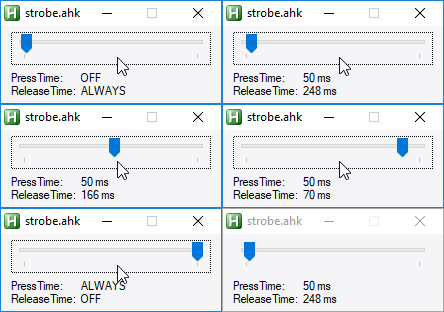
The slider simulates the axis
#SingleInstance force

Gui, Add, Slider, w200 gSliderChange vSliderValue
Gui, Add, Text, xm w65 R2, PressTime:`nReleaseTime:
Gui, Add, Text, x+5 w130 R2 hwndhOutput
Gui, Show
GoSub, SliderChange
return

/*
0 => 0 (Never pressed)
1 => 250
50 => 150
99 => 50
100 => -1 (Always pressed)
*/

SliderChange:
    Gui, Submit, Nohide
    t := GetTime(SliderValue)
    if (t == -1){
        str := "ALWAYS`nOFF"
    } else if (t == 0){
        str := "OFF`nALWAYS"
    } else {
        str := "50 ms`n" t " ms"
    }
    GuiControl, , % hOutput, % str
    return

; Given value as an integer percentage for the input...
; Returns the number of ms that keys should be pressed / unpressed
; Return value of 0 means "Always released"
; Return value of -1 means "Always pressed"
GetTime(value){
    static longestPress := 250
    static shortestPress := 50
    static scaleFactor := (longestPress - shortestPress) / 98
    if (value == 0)
        return 0
    if (value == 100)
        return -1
    a := 99 - value
    t := Round(shortestPress + (a * scaleFactor))
    return t
}

^Esc::
GuiClose:
    ExitApp
Min Time is set to 50ms in this example, which is what many games like
Max Time is set to 250ms, as I thought it tapping a key 4 times a second would be about as slow as you would want to go
So at 0%, key is always released, at 100%, key is always held, and it varies the release time in-between that.
The tricky part comes in working out how to transition from one timing to another
Lots of stopping / restarting timers etc
knotty night
OK, here goes - POC for an Analog to Digital converter:
knotty night
Not had a chance to test it with a real stick yet, but I have lots of debugging in there, logs look legit:
[17620] AHK| INPUT CHANGED TO: 0
[17620] AHK| FULL RELEASE @ 18050484
[17620] AHK| INPUT CHANGED TO: 1
[17620] AHK| CHANGE TIMING TO 250 @ 18052062(0 already elapsed) Scheduling next in 250ms
[17620] AHK| CONTINUE TAP @ 18052312 Scheduling next in 250ms
[17620] AHK| CONTINUE TAP @ 18053562 Scheduling next in 250ms
[17620] AHK| CONTINUE TAP @ 18053828 Scheduling next in 250ms
[17620] AHK| INPUT CHANGED TO: 15
[17620] AHK| CHANGE TIMING TO 221 @ 18053859(31 already elapsed) Scheduling next in 190ms
[17620] AHK| CONTINUE TAP @ 18054062 Scheduling next in 221ms
[17620] AHK| CONTINUE TAP @ 18054312 Scheduling next in 221ms
[17620] AHK| CONTINUE TAP @ 18055265 Scheduling next in 221ms
[17620] AHK| CONTINUE TAP @ 18055500 Scheduling next in 221ms
[17620] AHK| INPUT CHANGED TO: 28
[17620] AHK| CHANGE TIMING TO 195 @ 18055718 - Already elapsed enough, Sending now
[17620] AHK| CONTINUE TAP @ 18055718 Scheduling next in 195ms
[17620] AHK| CONTINUE TAP @ 18055921 Scheduling next in 195ms
[17620] AHK| CONTINUE TAP @ 18056734 Scheduling next in 195ms
[17620] AHK| INPUT CHANGED TO: 100
[17620] AHK| FULL PRESS @ 18056906
[17620] AHK| INPUT CHANGED TO: 99
[17620] AHK| CHANGE TIMING TO 50 @ 18058734(0 already elapsed) Scheduling next in 50ms
[17620] AHK| CONTINUE TAP @ 18058796 Scheduling next in 50ms
[17620] AHK| CONTINUE TAP @ 18058859 Scheduling next in 50ms
[17620] AHK| CONTINUE TAP @ 18060875 Scheduling next in 50ms
[17620] AHK| INPUT CHANGED TO: 60
[17620] AHK| CHANGE TIMING TO 130 @ 18060937(62 already elapsed) Scheduling next in 68ms
[17620] AHK| CONTINUE TAP @ 18061015 Scheduling next in 130ms
[17620] AHK| CONTINUE TAP @ 18061156 Scheduling next in 130ms
[17620] AHK| CONTINUE TAP @ 18061859 Scheduling next in 130ms
[17620] AHK| CONTINUE TAP @ 18062000 Scheduling next in 130ms
[17620] AHK| INPUT CHANGED TO: 0
[17620] AHK| FULL RELEASE @ 18062015
(Some lines omitted for brevity)
knotty night
Holy shit I got it working
v5 - Tested and working
It maybe needs some tweaking, but it seems like a goer
grizzled wolf
Is the functionality that the Wootility uses but that's absent from the SDK documented somewhere?
little monolith
in the pinned messages
grizzled wolf
Thanks. Neat, someone already made a MIDI piano.
knotty night
UCR supports DirectInput to MIDI
Tinkering with ideas for a next-gen version of UCR, playing with this cool Node Network library...
Got this POC going, would be kind of useful for the Wooting
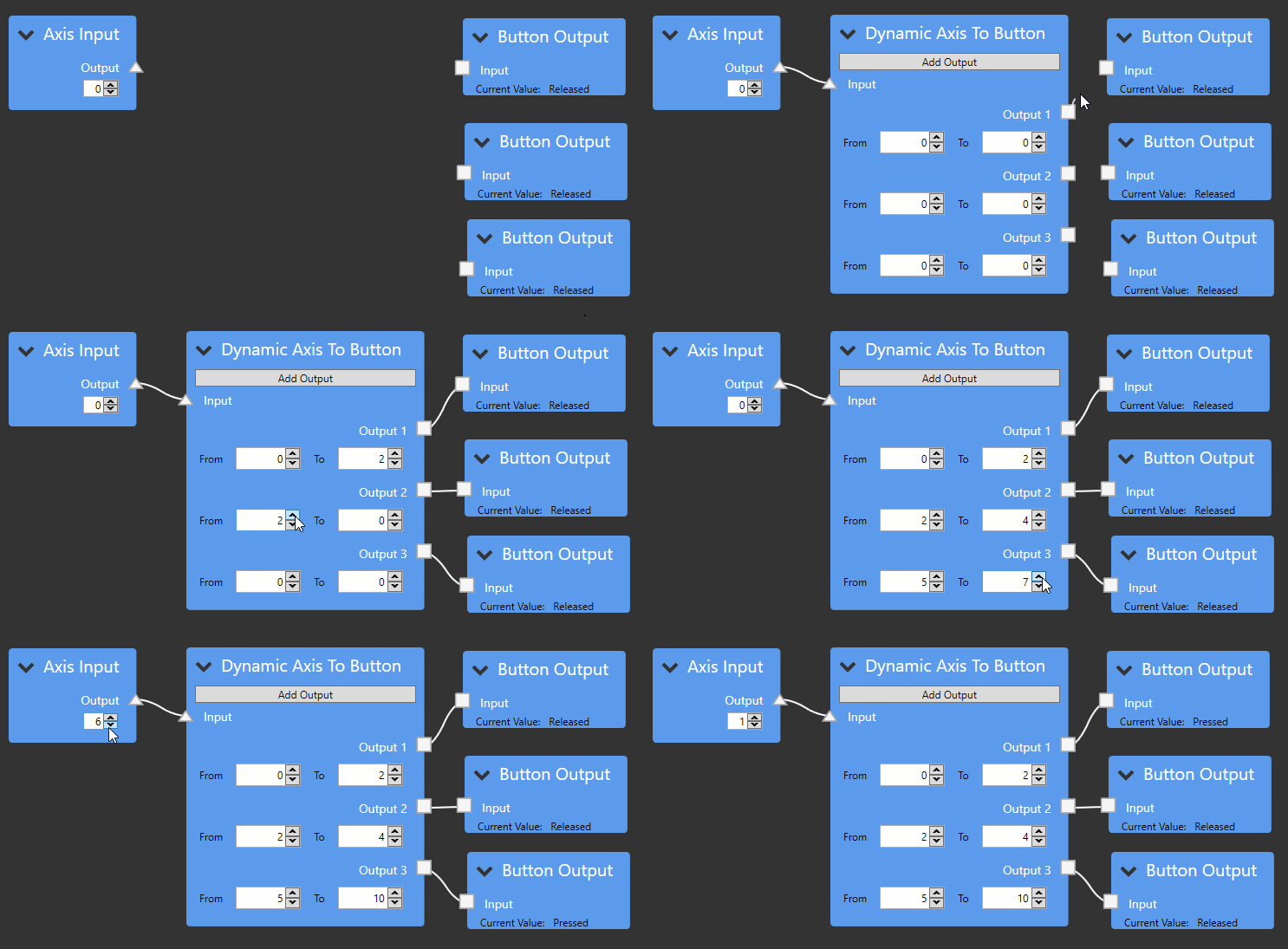 wet knot
oh my
knotty night
Got most of the basic node types implemented now
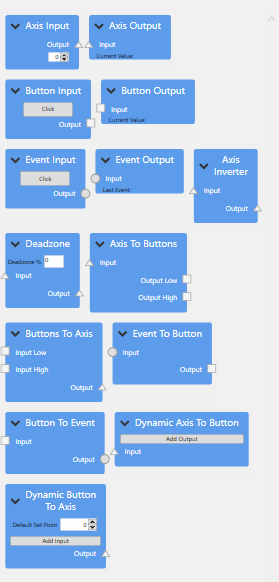
But no actual IO - just playing with UI
 carmine jetty
oh my indeed
knotty night
New version of my Pulse Modulation script for emulating analog input using keyboard. Fixed issues with switching direction
knotty night
Version that varies press time as well as release time
May be less jerky at low deflections?
cyan saddle
Would it be okay if I just used the code from the SDK in my own lib without using a so/dll/whatever the Mac version is?
cyan saddle
@wide nymph
grizzled wolf
GitHub
Easy access to Wooting keyboard analog values #WootDev - WootingKb/wooting-analog-sdk
cyan saddle
So yes.
smoky vortex
Yes, but you must then make your lib open source too
grizzled wolf
There should be charts around indicating with which licenses it is compatible.
Or you could write your own thing, as the SDK isn't doing that much. HIDAPI is available also under a BSD license.
wide nymph
@cyan saddle That'd be a yes. and ^
wide nymph
Next week we'll start working on setting up an open project for the Analog SDK, so that anybody can hop on and help make it what it's supposed to become. We made it so it's easier for anybody on manufacturing side to make a link to PC and software side to make a link to keyboard.
We made the Analog SDK with ^ in mind *
cyan saddle
Eh, all I'm doing right now is a super lame mod for a game.
wide nymph
Which is good
cyan saddle
How do you guys do the response slope thing in the util? Kinda want to copy that.
wide nymph
Any contribution is a good contribution. The scale of it will and is for now niche and smaller in either case. The more people add to it, the more valuable and accepted it can become.
Unfortunately, I'm not the technical guy, you'd need Jeroen for that.
and Erik for the visuals
cyan saddle
I'll probably have it working tomorrow, hopefully released as well.
 vale tundra
will the sdk finally be proper multi platform?
please don't push code unless it works on at least linux/windows and macos. The code will just become worse as time goes by if it aint multi platform to begin with.
quiet root
thats probably a goal for it being more open
grizzled wolf
Someone said here a while ago he got the SDK to build on Linux. It's not doing much and the HIDAPI it is based on is cross platform, so I'm not too worried.
On the flipside Jeroen said he can only work on the Windows version. https://discordapp.com/channels/167181566978555904/453072453435129856/544460638827577344
vale tundra
Well, the previous sdk's did not work due to the HIDAPI lib didnt work the same on linux as in windows. Thats why development has to be tested on all platforms at once which I guess wont happen 😦 . We will just get a bad SDK again because of this.. I find it interesting that the wootility works on linux which means that they don't even eat their own dogfood there, the sdk libraries should be good enough to be used within their own keyboard editor or else it's simply not good enough for anyone..
grizzled wolf
I think for the wootility they use https://github.com/node-hid/node-hid, which in turn uses HIDAPI.
grizzled wolf
If there are Linux specific differences in HIDAPI for Linux I suppose that piece of wrapper code handles it.
knotty night
So I did a bunch more work on my variable rate key spammer last night and had a eureka moment
If a game polls for input @50hz, there is zero point spamming a key @60hz
There's only any point in spamming at multiples of 50hz
I am wondering if I can use something such as a GSync API to find out when the game engine ticks
grizzled wolf
Wouldn't that mean only fractions of 50 Hz matter?
I don't think Gsync would help you any. Input poll rate doesn't need to be display rate. I'd guess that those two are often unrelated.
Maybe there is a low-level, and by that I mean OS level or input library, way to see how often the input is actually polled. Short of that I can only think of reading the source.
knotty night
No, only multiples of 50hz would matter
If you send a key at t-0 and game polls at t+10, then it will see it then
if you Send at t+20, game will not see it change state until t+60
(When it next polls)
grizzled wolf
If you are sending at twice the poll rate you can send two input events until the game polls again, correct? So I suppose the game will only see the later?
knotty night
If you press and release a key within one poll, it's as if nothing happened
state did not change between one poll and next
(well it did, but it changed back)
The game decides once per poll, "Is this key pressed or released"
Can't be both
grizzled wolf
I see, thanks, I was thinking 'last observed state' for some reason.
But still, it doesn't matter if your send rate is higher than the games sampling rate, right?
Case without your software: You hold the key, the game reads at say 50 Hz and the key is seen as down all the time.
Case with your software: You hold the key, your software omits sending every other key down event. So it's seen as on-off, potentially slowing down whatever is bound to that key.
knotty night
It's quite simple, but it still took me a while to work that out for myself 😛
grizzled wolf
In the 100 Hz case the key would just remain down as well.
But maybe I'm confused again.
knotty night
not if you do 50 on / 50 off
even if out of sync with game poll, if game poll is at same rate, it will always cross a poll threshold
50 on / 100 off would give a 1/2 movement rate
50 on / 150 off would give 1/3
actually, that's wrong
50 / 100 is 1/3 move rate
50 / 50 is 1/2
50 / 150 is 1/4
grizzled wolf
I got to think about this. Question is: do you get key up/down or do you get is_pressed/is_released or both?
knotty night
eh?
grizzled wolf
I think you are dealing with is_up/is_down using a fixed rate polling model, which I think is what the keyboard firmware needs to do, but everything above that could use callbacks. No clue whether it does.
Anyway, especially assuming fixed rate polling setting states any faster than they are polled is pointless. I think this is an unexpected encounter with the sampling theorem.
knotty night
It seems to largely be how games read keyboard input - they tend to use polling, not events it seems
Which would make sense I guess? You would not want a keyboard event coming in while you are rendering?
grizzled wolf
Sure they can come in, doesn't mean they need to be processed that instant. Example from the framework I'm most familiar with: https://love2d.org/wiki/love.run
- Events are polled (I think at least in part from SDL, only glanced at this: https://bitbucket.org/rude/love/src/825682216bf4d94220dbd9c25d0c394178627aa0/src/modules/event/sdl/Event.cpp?at=default&fileviewer=file-view-default) and callbacks executed. That may include input callbacks (e.g. https://love2d.org/wiki/love.keypressed)
- Game processing happens in update(), that may include input poll (e.g. https://love2d.org/wiki/love.keyboard.isDown).
- If it's time to draw already, draw code is executed.
In this case I guess the question comes down to what SDL does.
I think this is the current SDL keyboard event code. https://hg.libsdl.org/SDL/file/8c5251cbf63c/src/events/SDL_keyboard.c but honestly I don't feel like diving any deeper here right now.
Two things are of note in love.run
- The processing rate may be significantly faster than the render rate.
- The processing rate may vary (not by much usually, but still).
knotty night
@grizzled wolf what would a game gain from processing multiple events for the same key for one "tick" of the game engine?
If the key was both pressed and unpressed for that frame, what should it do?
move the character or not?
grizzled wolf
I don't think that happens usually, but I didn't look at the event code closely enough to see where or if it is prevented. General processing, including events, happens pretty frequently, usually much more often than rendering (assuming common 60 Hz).
If it were to happen, for example keypressed() and keyreleased() called during the same processing cycle, it would depend entirely on the game code.
You wouldn't usually use key events for movement because you don't have access to dt (delta time from previous calculation step which is used to 'scale' the movement).
You'd take the polling approach (https://love2d.org/wiki/love.keyboard.isDown) from within update(dt). In that case the key is either down or not.
Simple example that uses only the 'polling' approach: https://love2d.org/wiki/Tutorial:Baseline_2D_Platformer
cyan saddle
Side note.
I'm only doing this stuff on Linux.
So all my development and testing is for Linux.
Some engines only grab key states once per frame. Some do it less than that. You really only need to grab the state as often as your engine updates.
grizzled wolf
I personally only care about Linux as well. Want to get the Wooting to work with love2d games. Natively if possible.
In case of love2d the key state is grabbed (and calculations performed) more often (at least by default). I'd assume that's the same for most engines, but I might be wrong.
cyan saddle
I know Minecraft only updates inputs at 20hz, or less if it can't keep up.
grizzled wolf
So can/does it miss input events?
cyan saddle
If the button is pressed and released within 0.05s maybe, haven't looked into that part. I know it uses the event queue so it shouldn't.
grizzled wolf
I guess in that case it can be fine. You could do it less frequent in love2d as well, simply by supplying your own love.run(). Just by default it happens at every processing step. Not sure what the benefit of rate limiting it would be, aside from saving some cycles.
cyan saddle
No idea really, haven't done much with super fast stuff.
grizzled wolf
Are you experienced with C/C++?
I think it would be great if SDL could natively handle the functionality of the analog SDK.
knotty night
But as I said tho, surely even if using an event queue, it can't really do anything with a press and a release in the queue
grizzled wolf
I think in the worst case some sort of mapping to a joystick API would have to do, but being able to read the analog values of all keys would be nice. XInput especially seems to be a very limited API.
knotty night
assuming current state is released that is, surely both a press and release in the queue would cancel each other out
unless it records delta time between them, it could not logically represent what happened anyway?
ie if it were pressed for 1ms but released for 50ms, how can it represent that? To do so accurately would require moving you at 1/50th speed
This seems borne out by the fact that if sending keys to a game, you typically have to hold the key for <poll time> for the game to recognize it at all
The majority of PC games behave like that in my experience
eg in AHK, Send {a} often will do nothing (Or work VERY intermittently). You need to add SetKeyDelay, 0, 50 to make it work
Which ensures all Send commands hold keys for at least 50ms
grizzled wolf
Pretty sure the event queue in love2d (and probably by extension SDL) makes no timing information available whatsoever, just the order. In addition, what happens at the keydown and keyup event can be entirely unrelated.
So for every case where you need timing information, like movement, you using the polling version.
Which means that in the more or less regular update(dt) callback you check whether the button is pressed or not and scale your movement by dt
knotty night
Yeah, that's another point - it's a very common support question in the AHK forums "Why can the script not send keys to the game normally, but when I open a chat box, I see the keys being sent"
The answer is the chatbox uses events, the game uses polling
So no key delay means the script can only send to the chat box
If the game had an event buffer, surely this would not be the case
So one would assume that most game's poll loops don't have buffers
grizzled wolf
I guess it depends on how that event buffer is filled.
cyan saddle
@grizzled wolf
I know C and C++, not that experienced with C++. I mainly use it like C.
Going to be gone for a bit though.
grizzled wolf
Nice. I hope we'll manage to build something to make the Wooting work nicely on Linux.
cyan saddle
Hrm.
wooting_kbd_connected is returning 0.
I wonder...
No TWO support in this version.
That would do it.
[14:09:26] [main/INFO]: [STDOUT]: A Wooting is connected!
There we go.
 proven bloom
Calling Wooting one via sdk from Matlab, every ms. Only get an updated value about every 10ms. Does the keyboard really run at 1000Hz? Any ideas why I'm seeing a much slower sample rate?
glacial horizon
Im not familiar with programming, but i think 1000hz polling rate doesn't necessarily mean that it gives feedback every ms, thats where tachyon comes in and disables everything but functionality.
knotty night
@hybrid lake What OS is this on? How are you getting millisecond timers?
oops, wrong target
@proven bloom What OS is this on? How are you getting millisecond timers?
ie if in .Net and using Thread.Sleep(1), you are not sleeping for 1ms
Windows timers have a min granularity
Dunno if MatLab does anything different tho
hybrid lake
Polling rate of the analog interface is lower, I'll increase it for the next update
quiet root
@proven bloom the 1000hz is before the usb controller and before the os
pmuch directly what the controller does not what the os sees
hybrid lake
It's 125 if I remember correctly
proven bloom
@hybrid lake 125 sounds about right @knotty night It's on windoze, in a simple loop, poll the keyboard and the system clock, wait 1ms. Time between clocks shows as 1ms, keyboard value updates every 8-10 cycles - it isn't quite consistent.
knotty night
Print out the tick count in each iteration of the loop
Unless you are using something like QPX, you are not sleeping for 1ms 😉
I think maybe the WinApi Sleep function maybe does?
1ms granularity timers on windoze without excessive CPU usage is hard. If anyone knows a decent solution, lemme know
I did have one but i think it got broken by some win10 update
proven bloom
@knotty night I do print it out (well, I store it, then print after the fact). That's why I know it changes by .001 between each cycle.
cyan saddle
Because of the nature of multitasking OSes like Windows and Linux you can't have reliable timing at all.
grizzled wolf
This article looks relatively good (Linux focused with some general info) http://btorpey.github.io/blog/2014/02/18/clock-sources-in-linux/
How to accurately measure latency on Linux
Sounds like ms accuracy is no issue (depending on ...)
 chilly oar
@hybrid lake So in the Dinput interface (#5) in the HID Report you define the simulation controls for Throttle, Elevator, Accelerator, Rudder and Trigger. But the control for the Rudder is missing in the Wootility to assign it. What is the reason behind that, are there problems with that, can it be activated in the future?
The other thing was, on https://html5gamepad.com/ the 6 axis don't show up for the Dinput interface from the W1, but for my old joystick it does. So I asked myself why... The Report looks fine and so far I read the HID stuff it is within the specs. I only found a few things on the internet, so maybe only linux based systems have some problems with that, but can't tell. But I noticed that my other old controller have two additional values in it for "Physical Minimum" and "Physical Maximum". Maybe this additional definitions values can help, or some systems have problems with the wide range of 2 byte. Unfortunately I don't know how to change the Report and don't know how to write drivers for myself at the moment, to test it.
knotty night
It only looks to be a 6-axis stick? Seems to be missing SL0 and SL1
16-bit reporting for axes is fine for DI
Not aware of any sticks which are actually 16-bit internally, highest I know of is 15-bit
But they seem to report as 16-bit
(In fact, if memory serves, all DI axes normalized to 16-bit?)
That may explain why Physical Min/Max missing might break it
chilly oar
What is SL0 and SL1?
The Dinput controllers support 6 axis, 12 buttons and 5 trigger.
The normal behaviour is that when the physical values are missing they would intern set to the logical value, but maybe not all programms do that.
You can read that on book page 37 (47 on PDF) in https://www.usb.org/sites/default/files/documents/hid1_11.pdf
knotty night
This is the old DI spec
DI supports up to 8 axis, 128 buttons, 4 POVs
Well, I dunno where you got 5 triggers from
See vJoy
Joy.cpl showing 8 axes:
chilly oar
It is the current spec that I found on www.usb.org so I guess it is the newest one.
Dinput supports more than the Wooting One offers, but I don't talk about general Dipunt controllers, I talk about the Dinput controller from the Wooting One.
I don't get why you mention vJoy, what have vJoy to do with the Wooting One?
knotty night
No it is not
Newest spec is as I said
6 axis limit is the WinMM compatible spec
vJoy proves that DI sticks can be 8 axis, 128 button, 4 POV
Seeing as Wooting Two has 122 axes, they should not be using the old spec
Also, USB.org is surely not gonna have DI specs
It's gonna have HID specs
HID does not place a limit on the number of axes per device
Well, not in the ~8 range
maybe 65k or something silly
chilly oar
Why you mention the Windows Multimedia API? What have this do to with that?
Again, I don't talk about what is possible with Dinput.
knotty night
The previous 6-axis limit in DI was to maintain backwards compatibility with the previous API - WinMM
chilly oar
So why you don't just provide a Dinput spec instead? So I can read about it...
knotty night
Seeing if I can find it..
some info there, can't find the table I remember seeing at one point
Found it!
<@&375234916776017933> It seems that the wooting DI device only supports the old 6-Axis spec. Is this intentional? Can we get an upgrade to the extended 8-axis spec?
chilly oar
This is for using it per code, but where is the corresponding HID Report Decriptor for it?
knotty night
I would imagine that if the HID device properly lists axes SL0 and SL1, they will be present
The SS you posted does not have them
It must be those axes AFAIK
not just any old 8 axes
chilly oar
Again what is SL0 and SL1???
knotty night
X, y, Z, Rx, Ry, Rz, SL0, SL1
Slider / Dial 0 and 1
See the joy.cpl SS
last 2 axes
LONG rglVSlider[2];
Ahh, I think I maybe see what your issue is
"Trigger" is not a DI axis
chilly oar
??? A Trigger is not a axis, right.
chilly oar
Right, a Trigger is a simulation control.
knotty night
I dunno too much about the DI spec, but I know that only the usages X, Y, Z, Rx, Ry, Rz, SL0 and SL1 show up via DI
chilly oar
The Problem is with the Dinput from the W1 that the four of the five simulation controls that are configurable in the wootility and the 12 buttons show up on https://html5gamepad.com/ so I guess there is no problem with that.
But the 6 axis are missing.
knotty night
I am really not sure what that API does
I think it maybe uses pure HID
I have seen it show stuff not visible by DI before
But if you use it to view a vJoy stick set to 8 axes, it reads them all fine
If you want to see what DI sees, use DIView
Leo Bodnar : Utilities & Configuration Software - Loadcell Amplifiers Cables Video Signal Input Lag Tester Universal USB Interface Boards Model Aircraft Accessories Race Simulator Specific Products Buttons, Encoders & Switches SimSteering FFB System Enclosures Potentiometers ...
It's not his utility, AFAIK it was written by Logitech
chilly oar
Right, I assume too that is the reason all the controlls are show correct under the windows game controller panel, because that is what microsoft sees. But maybe some programms (DOTA2) don't use the mircosoft Dinput API and just use the HID stuff.
knotty night
But that shows what DI and RI see
Is DOTA2 DI + XI, XI only or what?
XI devices appear in a modified form thru DI
Trigger axes are merged
chilly oar
DOTA2 has a bug with the Dinput interface from the W1.
Since you switch to Dinput and start pressing a button the hero selection is spinging araound.
knotty night
That sounds like the game is thinking it is reading from an XI stick, when it is DI
chilly oar
No I don't think so. When I disable al other interfaces it still has problems.
knotty night
XI sticks have axes that sit at non mid-point, so many games seeing a 6-axis DI stick and interpreting it as XI will think that you are deflecting an axis when you aren't
Or maybe for example the stick is only presenting 5 axes, and the game sees an empty axis as value 0 (Full deflection)
chilly oar
Please don't use shortcuts, I don't know what you mean, I'm new to the stuff.
chilly oar
yes
knotty night
XI = XInput API
DI = DirectInput
(Xinput = xbox controllers)
As far as I can tell, DOTA2 does not support DI
chilly oar
A far as I know Steam still support Dinput. I can't imagine that it is possible to mix up the two interfaces. Normaly when a problen see a Xinput interface it ignores the coresponding Dinput interface, beacuse all Xinput interfaces have an Dinput interface due to backward campatibility.
knotty night
Judging by this SS of a config for a DS4 device for DOTA2
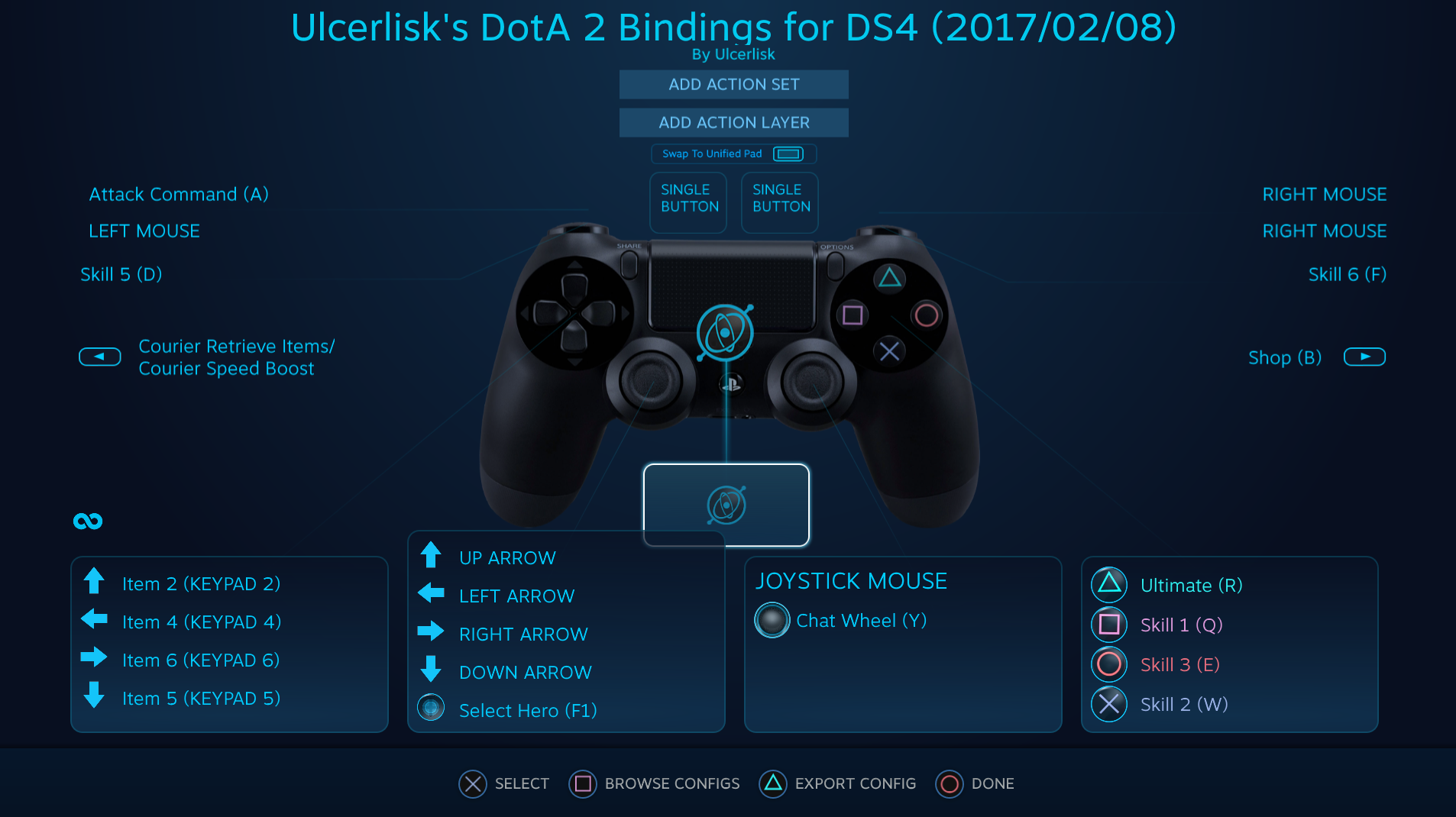


STEAM supports it
thats massively different from the game supporting it
chilly oar
DOTA2 support Dinput, I can use my old controller (joystick) just fine.
knotty night
Steam does XInput emulaion
chilly oar
But https://html5gamepad.com/ not...
knotty night
Steam can also fully access many non-DI compliant or partially-compliant devices
Such as the DS4, which is full HID, but has too many axes for DI
chilly oar
Maybe the two things are not related but maybe they do.
knotty night
16 axes on a DS4 controller I think?
chilly oar
No, that the 6 axis of the W1 don't show up on https://html5gamepad.com/
knotty night
If you check "Show Raw" in DIView, it shows you what RawInput (HID) sees
So eg you get pre-calibration / pre-normalization values
chilly oar
Hmm, the DIView sees all the axis and buttons but only Throttle from the simulator controlls and not Elevator, Accelerator & the Trigger.
Exactly the same like under the windwos gamecontroller panel.
knotty night
That is what I would expect, yeah
I like HTML5, but I just can't trust what it is telling me for anything other than XI sticks, I just don't know how it is getting it's info
I got a response from Nefarius, apparently missing Physical Min/Max is not gonna stop an axis showing up via DI
So it seems more and more likely that it is because the usage for that axis is not a valid usage for DI
knotty night
Yeah, I only see X, Y, Z, Rz
chilly oar
But remember this is a joystick, the W1 is a gamepad.
chilly oar
nowadays...
knotty night
Even something that is physically shaped like a console controller, if it is a DI device, it is no different to a flight stick
It can still only have the same 8 axes
ALL DI devices on PC can only have the same 8 axes
OK, DOTA2 uses the source engine, which is indeed DI compatible
You need to add a joystick.cfg to make it work tho apparently
Hmm, hang on, not so sure it is DI, looks like it may even be WinMM
Article "Configuring a Joystick or Gamepad for Source"
It refers to axes X, Y, Z, R, U, V which are the WinMM axis names
R = Rx, U = Ry, V = Rz
So DOTA2 only appears to support 6 axes
Confirmed
HELP ME!!!
The game crashes 3-4 times when I play.
Imma attach a crash dump file
http://s000.tinyupload.com/?file_id=64085245035779988556
Hope it helps... I can share the dump via other ways if neccesary.
Thx!
winmm.dll C:\Windows\System32\winmm.dll 10.0.10586.0
Hmm, but it also loads dinput.dll
dinput8.dll C:\Windows\System32\dinput8.dll 10.0.10586.0
chilly oar
And this are exactly the axis that the W1 support, so it should be fine.
knotty night
It also seems to load XInput
chilly oar
By the way, HID only support these 6 axis too...
knotty night
no
The DS4 is a pure HID compliant device and has 16
And that's clearly not true, as all DI devices are HID, and there are DI devices with >8 axes
oops, with >6 axes
knotty night
Touchpad x + Y, Gyro X/Y/, Accelerometer X/Y/Z
chilly oar
Vendor defined, so you need special drivers.
knotty night
Yeah, but that does not mean that it is not possible to make a HID device with >6 axes. Nefarius is writing a filter driver for the DS4 that does exactly that
Exposes them all as non vendor-defined axes
but we have to split DS4s into multiple devices to make them work natively thru DI
cos too many axes
chilly oar
You can do that ever you want with HID, but for generic drivers you are limided.
knotty night
not to 6 axes you arent
chilly oar
For generic support you are, overwise you need special drivers to communicate with them.
knotty night
As I said, my joy.cpl screenshot proves that cannot possibly be correct
how could you have 8 axes showing in DI if HID devices are limited to 6>
?
DI is a layer on top of HID
Why would DI have entries in the struct for 8 axes if that were the case?
Hmm, I think I maybe see your angle. Can I think of a DI device with >6 axes that works without a driver? No
chilly oar
knotty night
I dunno, I forget how many axes are exposed with a DS4 without a driver
chilly oar
As I say, for generic you are limited (no driver!).
generic driver = no additional driver, just the basic OS driver
And because the W1 don't want to use special drivers and rely only on generic ones, it should behave as any other generic gamepad.
knotty night
Ah, hold on, no, I DO have a DI device that has 8 axes and needs no driver
I forgot about that, I have one of these: http://www.leobodnar.com/products/BU0836/
Precision USB joystick controller
  Specifications
8 analog inputs with 10-bit (1024 steps) resolution each

   Features
Natively supported by Windows 7/Vista/XP/2000 and Mac OS X
Forget drivers - just plug it in and it's ready to go.
Can you provide the HID Report Describtor?
knotty night
At work at the moment, so no
chilly oar
Would be great if you can when you back at home, just hint my name, so I get a notice.
chilly oar
I don't know when you back 😉
chilly oar
In 6 hours...
knotty night
I swear I only remember that thing only havin 6 axes tho
Maybe there was an older rev?
Whatever, will check when I get home
chilly oar
The HID support Vx, Vy, Vz, Vbrx, Vbry & Vbrx (2 times Vbrx but not Vbrz) too for generic desktop, so it is possible.
knotty night
Actually, I strongly suspect you can get the report you desire from vJoy
I don't think vJoy uses a custom driver for reading
Be sure to use Shaul vJoy, yeah, not that Headsoft crap
Open the "Configure vJoy" utility, set it to 8 axes
Oh right, yeah, that reminds me, I think you are right insofar as it is not just those usual 8. There do seem to be 1 or 2 exceptions - such as "Wheel" axis
but for all DI stuff where I have worked with wheels, I have just been reading X I think?
chilly oar
knotty night
yup, looks good
chilly oar
Yeah, it uses slider not axis. And yes because it is a virtual device it don't show up on my USB tree so I can't get the report.
knotty night
ah I see
bummer, worth a try
The report must be accessible somewhere tho. I seem to remember using some HID library and being able to read them
chilly oar
@knotty night It would be great if you can name the tool. Did you know a tool to easily change the Report Descripbtor of an already installed device too?
knotty night
Not possible without a driver AFAIK
Nefarius and co would be the people to ask there
I would link their discord, but I got a warning for doing it last time 😦
HidSharp was the library that I was talking about: https://www.zer7.com/software/hidsharp
2.0 (April 9, 2018):
Vastly improved the report descriptor parsing functionality.
You can now decode (nearly) any HID device's reports, on all platforms!
Note that it reconstructs them, and it does not seem perfect - so don't take it as gospel!
I think Nefarius has one of his unholy kernel-mode/user-mode interop things which can pull the actual reports
chilly oar
On linux only Elevator and Trigger isn't working.
winged nexus
how are you guys interfacing with the rgb api on linux/mac?
npm install fails for me with the wooting-rgb-example repo
@hybrid lake is there something special i need to do on a mac
ffi seems to be the problem
chilly oar
@craggy wave This is a report of the full device of the Wooting One
interface usage page usage usb endpoints function
0 1 5 0x81, 0x02 Xinput Xbox Controller
1 1 6 0x83 Keyboard 6KRO for Boot
2 4919 1 0x85, 0x04 Configuration & RGB
3 1 6 0x86 Keyboard nKRO
4 12 1 0x87 Media Keys
5 1 5 0x88 Dinput Game Controller
6 65535 1 0x89 Analog Reader for RAW data
 craggy wave
I see
chilly oar
@craggy wave So maybe you are more interested in this:
https://www.techpowerup.com/reviews/Wooting/One/4.html
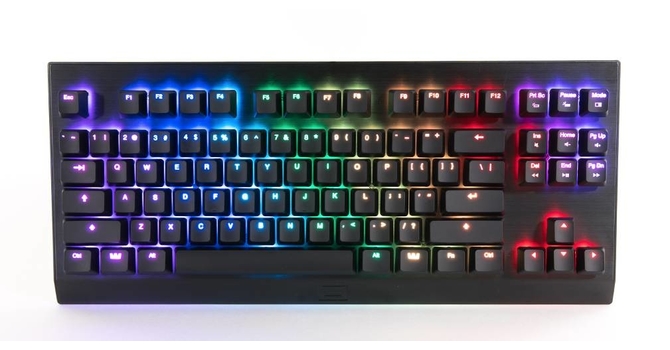
TechPowerUp
The Wooting One is a long-anticipated keyboard that promised a lot and delivers on every single item. It features analog control over travel distance for two different optical switch designs, per-key RGB backlighting, a software driver allowing customization of digital and an...
craggy wave
Where are the firmware blobs?
craggy wave
Basically, my end goal is to write some program I can invoke to modify the keyboard settings
Or flash the firmware or whatever
chilly oar
All the information I gave you are basicly on your computer. I would assume if you are experienced enough you have got this information on your own. I just got the most information by just look into it, and my experience is farly limited. But if you are not really shure, maybe it would be a terrible idea to change the firmware. Because they don't want it to be open source.
If you just want to know how you can change the settings on you own, just look into the wootility and the traffic. I pinned the command list for the RGB interface (which is the control interface too), for the start.
craggy wave
They explicitly do not wish to make the source open?
chilly oar
There are no plans right now, not for the firmware and as far as I know not for the Wootility, but they plan to have a external interface or something else for plugins later on. But who knows, at the moment they don't have time for this...
craggy wave
Yeah, maybe it's not worth my time then
Probably best not to give people any reasons to buy something from a company that has the consumer put out the effort to polish their product
What happened was I got tricked by this line -> "With this developer portal we want to embrace a spirit of community and sharing. This means that all our development tools will be open source and open for contribution."
chilly oar
Yeah, they give you access to the device (the DLLs) and this is open source. The main reason behind that is at the moment you have access to the RAW input from the device and you can change the RGB stuff on your own.
But with that and the command list you can do anything on your own that the wootility can do right now.
craggy wave
Wootility can't do what I need anyway
chilly oar
But you can't add new basic features to the keyboard.
grizzled wolf
You can look at the source of the wootility if you want to.
chilly oar
But not on the firmware.
grizzled wolf
But it's not under a free software license AFAIK
Yeah, no clue about the firmware.
craggy wave
I don't care much about licenses
Since I'm just interested in fixing stuff
It's pretty specific code anyway
Not sure why someone would want to use it in another project
chilly oar
I don't know how it is on the new version of the wootility, but the old one was kind of open souce (in meaning that you can see it, but not allowed to copy it).
Because the old wootility is just JavaScript...
I got the command list from it. 😃
chilly oar
So they don't change it 😄
fathom garnet
iirc Its not them not wanting it, but it requiring more time to maintain and they currently dont have much on hand. Could always just @ jeroen if you want to know for sure
chilly oar
There was a discussion on it on a twich stream. They want it in some way, but limited. Because they don't want to be copied.
craggy wave
Hahahaha
chilly oar
So at the moment they stopped to plan to open it at the moment. They are undecided at the moment about it.
Because the Wootility is open source in a way, so if they give the source from the fimware too the whole product can easily copied from other companies.
craggy wave
Other companies don't care
If they cared enough to use existing code, the world would have a lot less crappy code
And if they really cared, they would just pay a guy to re-create the code from the firmware
In reality, they don't care, and they just pay people to write new stuff every time
Until they build up some horrible in-house codebase
Then all the employees are forced to use that
Rocky_4: How do you remap keys?
chilly oar
I don't... As far as I know you only can remap the keys by changing some windows registry keys.
chilly oar
Not on the hardware level, right...
grizzled wolf
Pretty sure there's one or two layers in Linux where that's usually done.
chilly oar
Year, I know it would be a relatively easy task on the firmware to change the codes...
craggy wave
Yeah, but the point is that you're not doing some configuration dance
Plug it into a new machine and it works
grizzled wolf
I'm pretty sure remapping is usually done in software
chilly oar
But I guess they have problems with the memory, so they want to same every byte.
craggy wave
If you're using a single machine you can do something like changing the kernel's translation table for some stuff
Though this only applies to operating systems where you can do this
grizzled wolf
Pretty sure it's usually done in userspace.
chilly oar
Yes, but only because you can't do it in the hardware itself.
craggy wave
And different libraries use different methods
So what works in one program will suddenly not work in another
I noticed this especially with games
grizzled wolf
Well, it works everywhere for me, unless I read out scancodes.
grizzled wolf
I haven't had any issue with English layout on a German keyboard, even with games. If they read scan codes then yes, they'd get it wrong.
craggy wave
But either way, it doesn't help if you haven't sat down and gotten the stuff set up with any given machine
Sir_Diealot: They have copies of the different layouts I believe
It's all pretty crazy
If you're using something like linux, you can use setkeycodes
grizzled wolf
If you want to shoot yourself in the foot you can do that.
grizzled wolf
I think I used xkbmap for that.
craggy wave
I ended up just using setkeycodes
Because some stuff doesn't remap correctly
I re-mapped right-alt to period, but apparently some stuff still ignores it
grizzled wolf
`setxkbmap -option compose:caps' is what I use
craggy wave
Yeah, I used to use that
It worked most of the time
escape:caps or something
Windows machines are even worse
grizzled wolf
ESC might be hard coded in some applications, yeh....
craggy wave
Then you use some other operating system and you have no idea what will happen
wide nymph
@craggy wave the goal of the Analog SDK is to make it easier for analog input keyboard to be useful on the PC. The simplest example being a bridge between keyboard and application without using “tricks” such as D or Xinput
It’s not limited to Wooting keyboards
That’s why it’s open source and we encourage/want any anlog input keyboard going forward to support it
When it comes to the Wooting firmware and Wootility software. There’s a couple things:
- We don’t hire a guy to make additions, we do that ourselves.
- We have reworked both the firmware and Wootility on multiple occasions to offload “coding debt”. Jeroen is quite serious about this.
At the moment, we believe it’s more effective and in our best interest to not open source both the firmware and Wootility. Because:
- The overhead that comes with it (documentation, management and recruitment)
- The extremely limited usefulness all alround... it doesn’t solve a problem. unlike something such as QMK.
- It doesn’t add any value to the general user
We re-evaluate the open source standpoint multiple times a year.
This is why we created the SDK instead. The entry barrier is much lower and the possibility to make something useful much higher. Plus it doesn’t depend on our keyboards only.
craggy wave
This is like saying legos have limited usefulness compared to a toy model
Just having the code accessible means people are able to make contributions
If you find a bug and have the code, you can fix it
Or if you have some unforeseen circumstance that limits the usefulness of the original implementation
When code is available, people can find the bugs, which incrementally increases the quality of the code
And 10 years from now they still are still able to rely on being able to fix bugs they encounter
Or modify the implementation to meet circumstance
wide nymph
@craggy wave i can understand your viewpoint, especially if you’re an end user and you have the knowledge/ability to do so.
However, it’s not that type of simple.
“Circumstances that limits the usefulness of the original implemention”
You can look into QMK, the user experience, the branches and the real end users.
It tailors to a different group of people for good reasons. But that doesn’t mean it’s also a good idea all across.
Essentially the firmware and Wootility are big part of what creates value. The overhead on open sourcing is better spent on creating more accessibility and tools for creators. Because no matter how you spin it, firmware work is tedious and only few people can really do something with it. Better to have a solid core then a core that’s dissected from every end because “it can be done better”
For keyboard makers that use QMK it’s convenient, since now you don’t need to make your own and you rely on your hardware sales anyway.
If we would otherwise outsource the firmware/software work, open sourcing would in fact be a cost saver for us and worth the overheard that it presents.
We might as well of had built everything we have on top of QMK.
Focus on what creates value for the end user is the key point in the end.
craggy wave
Better to have a solid core then a core that’s dissected from every end because “it can be done better”
wide nymph
Perhaps 5 years from now, the position we are is entirely different. The value of the firmware at that point is non-relevant (which I believe it will be) and we open source it
craggy wave
This is where the assumption falls
It's not about doing it better
But about doing it correctly
And doing it correctly is hard
wide nymph
There’s a fine line there
why do we have so many hardware standards and programming languages.
wide nymph
Yes, and it’s human nature. It’s similar to asking the logic of effectiveness of certain cultures.
craggy wave
Not exactly
wide nymph
Everybody has their own situation and standpoint to what is better
craggy wave
Yeah, that's the problem
wide nymph
There’s no such thing is universally accepted unless it’s forced down your throat
craggy wave
People get too distracted debating the merits of syntactic sugar
So most languages are more or less very similar
Just with a different theme
wide nymph
Alright, in either case it will come down to the same problem
Heck look at crypto currency
craggy wave
Crypto-currency is sad
wide nymph
This is just not that type of project.
craggy wave
Essentially the firmware and Wootility are big part of what creates value.
No
The value is in the keyboard
The firmware is a means to an end
The hardware is quite nice
Good hardware is hard to find
But good code is nearly impossible
For example, I'm currently using a das ultimate I bought around 8 years ago
Even though it's missing the period key
Finding good hardware is just hard
I still haven't found a good mouse
wide nymph
Firmware, yes it’s a means to an end, but it wasn’t made to work on other or any keyboard.
Right now there’s a lot of value in there. You’d be surprised how big of an entry barrier firmware is for the majority of keyboard manufacturers.
craggy wave
They could just use QMK
wide nymph
Yes, which is great
craggy wave
Firmware is not significant in comparison to the design of the hardware
wide nymph
In our case it is
craggy wave
I mean
There's no competition
Thus no value
Code is everywhere
Anyone can write firmware
wide nymph
That's where you are wrong
wide nymph
yes, and then use open-source firmware or a variation of it
or just make it "work"
Doesn't mean it's good
craggy wave
Firmware's not hard to do in a nice way
And if anyone cared to try to copy someone else's firmware they wouldn't use the source
They recreate it from the binary because that hides the fact that it was based on something else
In either case, it's not worth the time
craggy wave
Done
wide nymph
All their firmware comes installed on the chip they bought from the hardware manufacturer. Firmware was very low value.
craggy wave
It's all garbage though
wide nymph
Now comes a long a keyboard with entirely different requirements. You can't use your standard chip nor the firmware installed on it.
What are you going to do as one of those cheap keyboard manufacturers
craggy wave
Nothing, because most people buying the stuff don't care
As long as it looks similar enough on the surface, that's all that matters
This is why nearly all mice use the same crappy switches
Inertia adds cost to change
wide nymph
Alright, let me rephrase. Now comes a long a keyboard with entirely different requirements. It's very popular on the market, the hardware for it is available and the firmware can be stripped. What are you going to do as one of those manufacturers.
craggy wave
Make something that looks like it
Because the margin doing that is better for them than to actually make something comparable
wide nymph
We can't and don't want to compete in hardware. We can't reach those economies of scale and still need runway to grow.
wide nymph
In either case, the argument against open-source isn't about above. It's related, but it's rather to point out that Firmware most definitely has value for us.
craggy wave
The only value the firmware has is the value to the people with the keyboard
wide nymph
That's speaking for yourself. An average gamer doesn't even acknowledge the firmware
As long as it works exactly as expected
craggy wave
The average gamer only cares that the keyboard says "GAMER XL KEYBOARD FASSSSST"
So I'm not sure that argument works
craggy wave
Recently I learned they sell LED RAM modules
For gamers
They're just lights
No memory
wide nymph
You don't see gamers complaining on forums that they can't tweak the logitech or razer firmware.
craggy wave
Because they can tweak it
When you become popular enough someone reverse engineers it
Then people use that information to modify it
wide nymph
That's a general argument and still doesn't represent what an average gamer is asking for.
complaining about*
craggy wave
Yeah, but the average gamer doesn't know enough to make a rational decision either way