#🔌│tech
1 messages · Page 799 of 1
 zenith sonnet
Also clocks...
GN's did 4.4something GHz single thread
L1tech's seemed to do 4.75GHz?
That's a huge gap
Weirdly, the latter only compared it with OCed intel CPUs and a 3900
A 9900KS at 5.2, and a 7980XE at 4.8 GHz
 ashen spindle
bc thats what they are using, l1 isn't your average tech review channel for that stuff
zenith sonnet
Well, it didn't surprise in any negative way, at least
So that's a good sign so far :p
Power consumption in particular stands out
It does run 32 threads using the same power as the 3900X, at higher clocks even
ashen spindle
what
zenith sonnet
Under all core load, the 3950X draws just as much power as the 3900X, even though it runs more cores, at a higher frequency even
ashen spindle
no it draws more?
zenith sonnet
Not in the reviews I've seen?
ashen spindle
yes you notice its better binned and lowers the power per core but not total power
 zenith sonnet
3900X > 146W
3950X > 144W
Seems to be in line with what I've seen elsewhere
Weirdly, the charts are different
3900X lists core and un-core
3950X lists core and package
ashen spindle
yes but look at the power consumption for individual cores for 2-8
so the lower power comes from the cores doing less
so the only reason they consume less power is because each core works less in comparison
which, is kinda real world, but not really 12vs 16 cores power consumption
it gets a bit messy
since if you up the cooling the 16 core obviously draws more, since PBO2 is basically a gpu-like boosting
which is why the boost frequencies are basically never hit lul
zenith sonnet
Charts don't include frequency, but the 3950X runs at about 3.9GHz under 16C load
It's not going less per core than the 3900X
ashen spindle
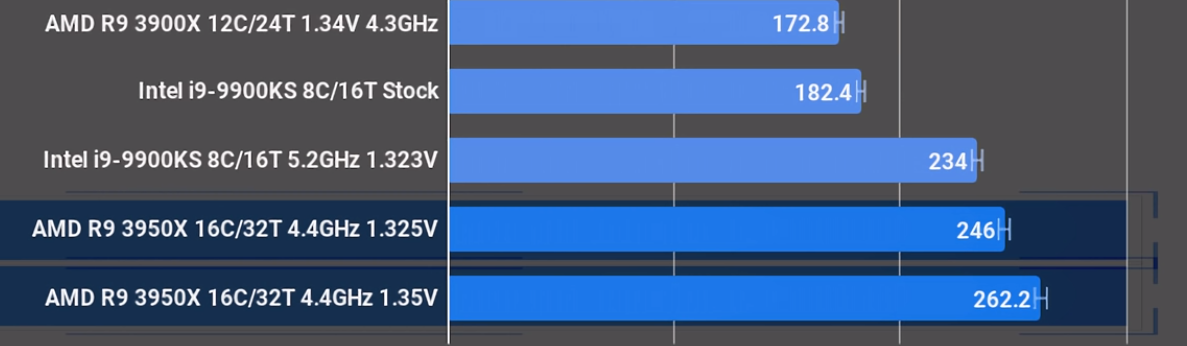
here is a comparison between the two at (basically) the same speed on all cores https://i.gyazo.com/46d0b060825effdfddd533e8ec0dcf76.png

170 vs 250 watt if you just set a fixed multiplier
but its not like this is how they work if you dont touch them, new pbo makes it harder to have a "correct" test
this might sound like I have an issue with it, I don't it just makes it harder to compare stuff
the new boost numbers are obv becoming memes if you hit it for seconds only
but the only thing I don't like is amd's TDP really
zenith sonnet
I'd like to see something like Cinebench numbers at stock settings for both, not sure where to find them
Which would give both a power budget of about 145W
ashen spindle
GN has blender power and time charts
think for cinebench too but not in the video iirc
ashen spindle

Intel unveils the node architecture of the Aurora Supercomputer; the system will feature Intel's first Xe GPGPU for HPC, 7nm Ponte Vecchio.
site is a bit slow right now, but has some nice points about the keynote, there will probably be more detailed articles out tomorrow
but this stuff is interresting
https://www.anandtech.com/show/15123/raja-koduri-at-intel-hpc-devcon-keynote-live-blog-4pm-mt-11pm-utc keynote liveticker, prob best before we get a full article

 fair gull
the oneAPI looks so dope
 fickle ore
Use USB
it's a new thing
you have literally 0 benefit from PS/2
wat
usb stack what?
whats your issue with usb drivers?
I'm guessing high dpc or isr latency?
which latency?
DPC can be reduced to 0 via message signaled mode on USB 3
PS/2 will cause both dpc and isr tho
you can reduce dpc to 0 on USB 3
😉
google messagesignaledinterrupts
or MSI

guru3D Forums
... or another attempt to improve latencies
Little bit of theory:
From "Windows Internals" by Mark Russinovich, David A. Solomon, Alex...
USB 3 on Ryzen has the benefit even further via straight PCI-E link to CPU
no motherboard between or multiplexers etc
or pCH
USB 3 also reduces USB stack latency vs USB 2
XHCI vs EHCI
you have no USB 1.1, your motherboard likely has 2.0, which then can work with 1.1 MCU's
"Just because data rate of a mouse is very low and can be handled by USB 1.x does not mean it can't benefit from being plugging into a faster controller.
There are a number of factors in play here:
USB 3.0 controllers support backward compatibility by performing enumeration in a way that is compatible with USB 1.x and 2.0 devices, and exposing a logical EHCI controller as part of the register map.

The mouse will identify itself as a USB full-speed device regardless of the port and controller it is connected to. This will cause the mouse to appear logically connected to the EHCI controller (sometimes even OHCI/UHCI).

Having a logical EHCI controller does not mean that the device is attached to a USB 2.0 circuit. The connection between system and USB 3.0 host controller will be higher speed, probably multi-lane PCIe. It's also much less likely to go through a PCIe-PCI bridge, which causes buffering and slight additional latency.

Besides the host-side connection, the transistors driving the USB pins will also have a higher switching rate, and instead of passive components for noise filtering, the bus will use digital switches in the filter network, to allow it to be removed and not slow down USB SuperSpeed devices. (This was probably a bigger deal for the jump between USB 1.x and 2.0)
The passive filter components present in the mouse should dominate. Still, rise and fall times could be a few nanoseconds faster.
The registers of the EHCI controller also are implemented on the same die as the USB 3.0 UHCI logic, so the clock rate and digital performance will be higher.
Of these effects, the PCIe differences have the greatest impact on performance, especially compared to a USB 2.0 host controller connected via a PCIe-PCI bridge.
In summary, a USB 3.0 host controller with a full-speed or high-speed USB 2.0 device is not the same circuit as the same device attached to a USB 2.0 host controller, and the timing will not be identical.
However, any latency improvement will be at most a couple microseconds. I suppose it's possible that with some probability this would cause the mouse input to be relayed to the server in time to be processed one frame earlier; the probability is extremely low (well under 1%)"
No probs
DPC latency has annoyed me to no end. Thankfully MSI mode gets rid of most devices DPC latency if your motherboard isn't 10 years old
ISR (interrupt latency) is not something you can get rid of though
WTB real time OS for gaming F_F
 safe patrol
why would you waste $$ on RTOS for gaming?
FreeRTOS
Portable operating system interfaces (POSIX) for FreeRTOS

IntervalZero RTOS Platform
Windows is a general purpose operating system ideal for a wide range of activities. However, to ensure that every service, application, task, thread and message...
Windows RTOS
it will be a waste of time because games will not RTOS imo
ashen spindle

fair gull
because why change a working system
ashen spindle
iGPU
the term APU was coined by amd 2006 so its not like they dont have them on am3
 crude cipher
@proud nacelle you do realize that most current AMD motherboards support both standard Ryzen and Ryzen G?
fickle ore
@proud nacelle so did you manage to set MSI mode and what happened to your USB DPC latency?
zenith sonnet
I thought these issues were sorted out...

TechPowerUp
MATLAB is a popular math computing environment in use by engineering firms, universities, and other research institutes. Some of its operations can be made to leverage Intel MKL (Math Kernel Library), which is poorly optimized for, and notoriously slow on AMD Ryzen processors...
 old marlin
for the clock and to safe bios settings
 pale sigil
"Razer Analog switches"  https://www.razer.com/gb-en/gaming-keyboards-keypads/razer-tartarus-pro

Razer
Featuring Razer Analog Optical Switches that allow for a more measured and nuanced form of control in every gameplay.
Literally AimPad tech
old marlin
is it?
pale sigil
ye
pale sigil
really sad to see a channel fall so rapidly https://www.youtube.com/user/razethew0rld

YouTube
Crit is an amalgamation of tech enthusiasts and gamers. We are dedicated to bringing you the highest quality content, on-location footage, and the latest new...
2-6k
Its well deserved
 reef patrol
Whaddya mean?
reef patrol
Not always.
I see a lot of videos with below 10k
More competition, worse algorithm et cetera.
pale sigil
No
Not at all
sec
I cant seem to go bakc
Back in 2016
i mean youtube stats
Basically
Logan went on a im better than you all situation, never paid Wendell back ever for using his own money to fund stuff, Logan took hostage the entire forums etc because he was pissed and removed Wendell, Logans GF also took control of other stuff.
Wendell was co owner btw
and when speaking about it logan was like
IM THE STEVE JOBS OF THIS CHANNEL
Also
reef patrol
But... 90% of viewers don't give a toss about such things.
pale sigil
Pateron funds were not going towards the channel
instead Wendell was using his own money
Mansen it used to be a lot better
400k+ views
to 2-5k
So ye....
reef patrol
My point is - That drama can't be the sole reason.
reef patrol
I can't believe that 😄
reef patrol
In other news - And because I am too lazy to re-upload an MP4 to show it on Discord...


Finally got my NAS up and running again - And with a much needed upgraded from its old 2nd gen Intel i5 to a Ryzen 2200G.
Gotta go fast! https://t.co/mCFFiqMmsX
 Twitter
pale sigil
Twitter
pale sigil
They also tried to rebrand to avoid it

xD
i got it wrong , here is the exact quote
Ye
Literally
reef patrol
10-12MB/s transfer speeds.
REEEEEE-
I need dat cabled connection at home. Wifi is pain.
pale sigil
I used to love watching them but when Wendell left it was never the same

YouTube
We are passionate about technology and how it shapes our world. We create videos to share our knowledge about tech, science and design. + Business Inquiries/...
he went onto a pretty decent channel instead
pale sigil
What happened was ugh
Wendell owned the original URL
So YouTube swapped over the urls
for each channel
Wait no
sorry
im wrong
teksyndicate used to be their secondary channel
razethew0rld was the main
Wendell owned the secondary
and used it for level1
Either way, asshole + wendell leaving = tank
Oh and another member left too
No one liked Wendell 2.0
Well deserved karma
tbh
 ashen spindle

safe patrol
LEWD
reef patrol
I - HATE - Linux so much right now 😄
Can't get FreeNAS and Plex to work together at all.
 crimson wigeon
FreeNAS isn't Linux tho
reef patrol
Same bs approach to permissions 😛
zenith sonnet
Still can't preorder 3950X'
 halcyon moss
and the story continues
Will Xeanoa ever buy a new cpu? Will he ever reach peak performace? See it here, next time on #🔌│tech
old marlin
I just imagined 3 episodes of his current CPU screaming while it gets more powerful
reef patrol

 old marlin
rip
reef patrol
Oh lawd... This is so hilariously backwards.
To fix the permission issues with my FreeNAS powered...NAS and Plex (aka. letting Plex access my SMB share, which is where all of my stuff is), I have to use WINDOWS to set permissions to ALL WRITE 😄
Yes - I could have done this in terminal, no I don't care to learn how. This may take forever file by file, but it works.
I'd need to figure out what the damn folder is in the storage pool. This worked. Plex is finally scanning files 😄
Yeah baby, yeah!
halcyon moss
@reef patrol you're encountering samba permission dualirty
reef patrol

ashen spindle

 latent mural
not sure if i have adware or microsoft is recording all my keyboard data, but i mentioned security cams in hexchat irc, edge 3 minutes later
https://imgur.com/a/HB2RYop
i didn't search or anything related to this before, 100% sure
 ashen spindle
well, on what website is that ad
latent mural
music web site
ashen spindle
hm
reef patrol
This is pain. I need cable so badly xD
 fallow bison
i think this is internal
reef patrol
That's... on my local network
fallow bison
so its not that fast
reef patrol
Wifi to router, cable to NAS. 
fallow bison
F
 fallow bison
it surely does not look okay
zenith sonnet
Tried swapping the modules around
But the D14 is just too fat
Or is it a D15?
Might actually be a D15
Think I sold the D14
 plush summit
zenith sonnet
plush summit
zenith sonnet
If it burns, it burns
Too bad, won't boot
Hmm
How many issues can a dead cmos battery cause? Surely not BSODs and general instability of a running sytem...
fallow bison
it just wouldnt boot
it would drain all last bits of data stored in RAM making windows unable to boot IIRC
and not system ram ofc, static ram
zenith sonnet
It should be fine as long as the PSU is connected to the mains
which seems to have been the case so far
Hrm
Removed the angled stick and still stuck on error code 53 🤔
Thought so
Anyway, seems like I don't have incompatible memory or bad IMCs, just a bad mobo :(
Black slots seemed to not work at all
Put a stick in grey and bam
pale sigil
old or new?
zenith sonnet
Old
Also found out what permanently forced XMP on, overriding BIOS settings...
A switch on the mobo
Either black or grey should work
I wonder why the black one didn't work
None of the black alots worked when I put in just a single stick
Of the grey ones, there seems to be one with issues, too :(
Means I'm left with 3 working DIMM slots?
Or maybe it works?
Just have a single stick in, running prime on it
old marlin
slot is mangeled either way now
reef patrol

old marlin
intel 14nm supply is still decreasing
zenith sonnet
The slot is fine, lol
Needed 4 attempts to get into Windows after BIOS reset
At least it shows 16 GiB now
zenith sonnet
Seems prime stable, when I run settings to test RAM
halcyon moss
woah, this is not a new cpu, are we on a side story in Xeanoa's saga?
zenith sonnet
Same ol', same ol'
pale sigil
Turns out destiny 2 is a bandwidth whore
Well I guess this is common news to everyone, now I’m just thinking welp
Good job I don’t worry about caps
Backups
It counts local bandwidth to my NAS lol
latent mural
does anyone know a very small mATX case? where an average size video card and some pci-e cards would fit?
fair gull
isnt that like easeus todo backup or what the shit is called
was a really nice program in the win7/8 era
sadly its not what we like to use anymore thx to it having failed us a few times when trying to restore win10 machines
so we went back to drive snapshot and hdclone
reef patrol
Isn't mATX case standards pretty lax in general, @fair gull ? Your biggest concern is GPU length, which isn't exactly a known standard. I think most? cases do something like 300mm'
reef patrol
Because... I pinged the wrong person 😄
fair gull
lel
old marlin
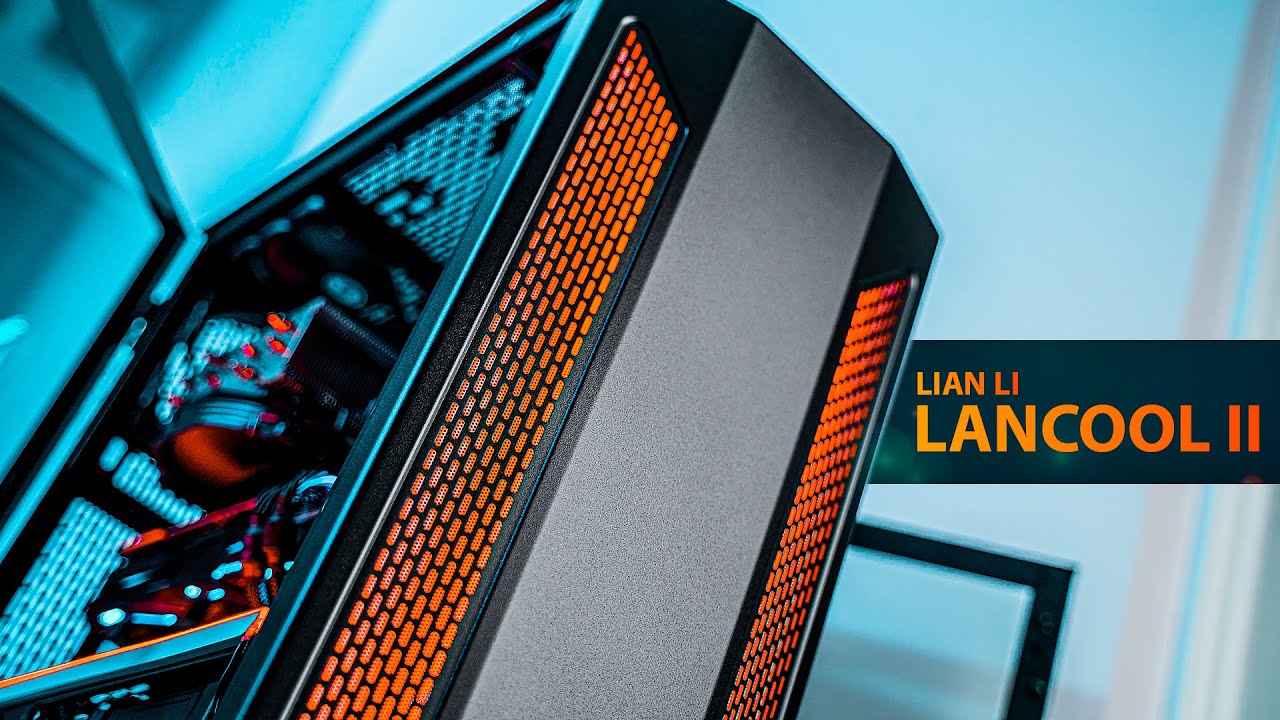
The Lancool II is one of the best PC cases we've seen in 2019 and it has a price of just $90. It has great airflow and handy touches to help you build a gami...
damn
a beast for that price
latent mural
@reef patrol yeah but maybe someone knows the smallest one so i dont have to look for it heh
reef patrol
Don't like that case - not at all. Especially the weird back room metal holders.
Those have a way of causing more grief and pain than just cable tying cables outright.
fair gull
the real question is does the Lancool II also cool my Lan?
old marlin
yes
fair gull
cool
old marlin
lan
fair gull
so i wont buy it
old marlin
rip lan
overheats now
no honestly
besides looks, which are subjective, there isn't a lot below 100$ that can cahllenge it
meshify c would be the big one
crude cipher
@proud nacelle password rules are useless because they don't measure the bits of information
protein is less secure than Password0 only barely
fair gull
cant really compare password below 10chars immo
with 16characters u wouldnt need to worry about it being cracked before one dies
im basing this of alphanumeric and special chars
aka 95 characters or so
95^16
well ya ure gonna crack a while

gl trying all those combinations
thats 1.4trilion years with 1trillion hashes per second
gg
 pale sigil
Im making my friend a ryzen build
any other than highest frequency possible for ram i should know
reef patrol
Needs a GPU to POST unless a G
Make sure the motherboard already supports the CPU.
I.e. B350 or X370 for a 1000 series, B450, X470 for 2000 or B450 (with a clear label or mention it has been pre-flashed) or B450 MAX, X570 for 3000 series
reef patrol
Fun fact : I bought a B350 the other day, and it had been flashed to 2000 AND 3000 series support seperately.
ashen spindle
not highest frequency possible, 3800 max for zen2
reef patrol
I'd aim for 3000-3200 personally.
Beyond that you're paying more than its worth.
Focus on low CL instead.
pale sigil
oh we are going for 3600
or 3600x, if sales are good maybe 3700x
its his choice really
but my suggestions so far are
16gb 3200-3400 min
Ryzen 3600, x or 3700
GPU: Upgrade next year
M2 SSD 1TB
new case
ashen spindle
get a seasonic psu, for good quality 🙂
pale sigil
As for PSU
We might just keep using his current
if its any decent
idk till i inspect it
ashen spindle
sata ssd is still very good and usually cheaper
reef patrol
Honestly you might as well grab a cheap NVME at this point. Price difference is silly small now for 250GB
reef patrol
But if you DO go M.2 go NVME, skip SATA. Waste of slots.
pale sigil
tis what i meant
reef patrol
Oh - Also don't buy a 2200G come to think of it. Or anything like it. They have limited PCI-E slot bandwidth which matters for GPUs.
pale sigil
the prices are pretty good during black friday week
reef patrol
The 660P that I tend to buy from Intel is like 115? pounds normally here in DK. For 1TB
ashen spindle
true the intel one is quite good for cheap ssd's
personally im usually going for samsung ones but they are not the budget options unless you go for QLC
reef patrol
My "new" NAS is Ryzen 😄
reef patrol
And I built a gaming PC for my friend a few weeks ago. 3600X and a 2070S? I think it was.
reef patrol
It was honestly only possible since I could buy board and CPU at cost. The 6TB drive, PSU and Case were freebies from before.
zenith sonnet
Why's there such a huge price gap between the 970 Evo and the Pro models?
reef patrol
Because the Pro are overengineered for ... well pro usage 😄
Evo are for consumers.
They shortened the warrranty on Pro models, because they figure datacenters will be using them a lot and wear them down hard.
 timid chasm
https://www.humblebundle.com/store/serial-cleaner-free-game
Free for 2.5 more days

Humble Bundle
For a limited time, get Serial Cleaner for free and keep it forever, courtesy of Humble Bundle! While supplies last.
reef patrol
The visuals annoy my eyes 😄
ashen spindle
Crucial is micron owned
So those are prob micron revision E
Very easy to push that to 3800 from that base
pale sigil
welp
pale sigil

CCL Computers
Great value SSD with a capacity of 1TB and super Rapid 1800Mbps read speed and amazingly Rapid 1800Mbps write speed., Mfg Code: SSDPEKNW010T8X1
halcyon moss
@pale sigil im looking at that same monitor right now 😮
ashen spindle
B450 tomhawak or gaming+
Just check that it has enough USB ports bc they don’t have a lot iirc
ashen spindle
Ye
It’s a rebrand of the original with a bios for the zen2 chips so you don’t need to do it
pale sigil
ye i can see that
idk what case he wants
which might be an issue
but i think he's going for micro atx
does it support nvme
i mean it has an m.2
ashen spindle
Think there is a small form factor version of the gaming +
pale sigil
but say sata
Supports PCIe 3.0 x4 ye
@ashen spindle gaming +?

Ebuyer.com
Get a great deal on a Adata XPG SX8200 Pro M.2 1TB SSD as well as thousands of products at Ebuyer!
if i had the money id get this lol
fair gull

The GitHub Arctic Code Vault is a data repository preserved in the Arctic World Archive (AWA), a very-long-term archival facility 250 meters deep in the perm...
sick af
upload some cracks etc to github before 2.2.2020
and then have them archive it for forever

pale sigil
im in trouble
fair gull
i didnt know theres 27" tvs in big
halcyon moss
no need to be mean :p
fair gull
why tho
its a 27" tv but small
unlike the 27" tv but big this one is actually only 27"...
ashen spindle
? Gaming plus is another msi board
timid chasm
Imma new a clearer larger profile picture. Can't tell anything with that one

 reef patrol

zenith sonnet
No troubles yesterday, at all
Shut it down normally
Pressed the power button today
reef patrol
There WAS a windows update with a prompt yesterday. Maybe it did it anyway for you?
zenith sonnet
And get greeted with BSODs during startup
Didn't even make it to dasktop
Nah, no updates for me
Had to try various configurations of RAM sticks until finally one worked
Now I'm down to 8 GiB
reef patrol

zenith sonnet
I think 4 of 8 RAM slots are dead, and the other 4 are seriously unstable
But once they work, they're prime stable
But not through gaming and normal usage...
reef patrol
Could be the CPU as well 😮
zenith sonnet
Could be...
pale sigil
Usually i troll or tease at moments like this
reef patrol
Some of those pins control memory controllers. I have seen a few very rare cases where one bent pin caused 1-2 RAM slots to outright not work.
pale sigil
but i really hope you sort it out
i went through so much shit when i kept having issues for months
in my case it was my cpu
zenith sonnet
I'm just waiting for Monday now
Neither a new X99 board nor a new X99 CPU are worth spending money on
When even a B450 and a Ryzen 3600 would be a huge upgrade, and probably cheaper
reef patrol
Yeah... X99 has burned me every time I've touched it. Personally or professionally.
We had a customer a while back that wanted X99 for video editing. We ended up having to order three different motherboards (one is STILL on the shelf) and 2 different RAM kits, because we just couldn't get 64GB to work
zenith sonnet
This rig was good for the first year and a half
After that, it was just regrets
Do we have good Black Friday/Cyber Monday deals in central Europe?
Last years I haven't seen much that was really interesting
Need now everything :p
zenith sonnet
How are the m.2 slots on X570 boards usually organised? How many are connected directly to the CPU?
reef patrol
https://www.google.com/amp/s/www.tomshardware.com/amp/news/amd-x570-x470-chipset-pcie-4.0,39651.html

Tom's Hardware
What is X570? AMD's X570 chipset will have up to 16 PCIe 4.0 lanes and a more flexible I/O, but it’s no X470 killer.
fickle ore
@old marlin you know how doppler effect is continous, rather than frame based image capturing (opticals), so 3399 (viper ultimate wireless) is taking images based on framerate (20k cap) but it's not actually sending the counts, but rather calculates a velocity based on the frames captured and compares it to the time between SPI reads from the sensor, and that is the movement amount
old marlin
Ye let's move it here
Got sources you are allowed to cite?
I know it is SOME modified pixart sensor
But that sounds a lot different
fickle ore
3389 is different from 3399
old marlin
Yea ik
I just got word from an razer employee definetley confirming that it is a modiciation of an existing pixart sensor
Didn't mention which
I mean, so is the hero
fickle ore
disclaimer and acknowledgement: Razer_TheFiend from Razer R&D contacted me and sent me this mouse for free for testing. disclaimer 2: over the
it's pretty long if you care
old marlin
Np
I wonder what their next one will do
But will likely take a while until it releases
fickle ore
whose?
old marlin
Razers
The fiend confirmed that they are working on another one, obviously
But if they announce that publically it most be decently far in the works
Also people in that ocn thread talk shit about logitech wireless
It still has less input delay than most wired gaming mice
fickle ore
I wouldnt read comments, just the OP
zenith sonnet
@reef patrol
Just as I thought, seems only 1 slot will be directly connected to the CPU
I was wondering if I should go with 2 SSDs (smaller one for a separate C: drive) or a single larger SSD. Larger SSDs usually have better price/GB and peak speed
Currently considering the X570 Taichi or the Aorus Master. Auros Xtreme looks sweet, but I doubt I'll benefit from anything it offers over the Master yet, and the price is steep
reef patrol
It's hard to go wrong with the Taichi boards in general. I've had them for both Z270 and Z390 and they were solid.
As for bandwidth - I can't really tell if I am using my NVME or my two SSDs for games or content.
But admittedly I don't exactly scrub through Adobe Premiere a lot 😄
zenith sonnet
Thing is... extremely few programs are designed to benefit from faster storage
Most are still designed to handle slower storage better, but at a cost
zenith sonnet
Damn, RAM is cheap nowadays
pale sigil
Welp
friend spent 700 quid
CPU Ryzen 3600x
RAM Crucial Ballistix Sport
PSU EVGA SuperNOVA 750 G3
Storage ADATA XPG SX8200
Motherboard MSI B450 TOMAHAWK
Case H500I
reef patrol
I told you not to invest in dragon dildos in 2019
ashen spindle
Smh not a seasonic Psu?
Can’t believe you are not supporting the official wooting partner
pale sigil
Because Seasonic is gay
ashen spindle
WTF 
reef patrol
zenith sonnet
@reef patrol What RAM would you get?
reef patrol
Pffffft... It's more about what's inside the sticks than the brand these days. Gotta get that good binning.
I'm an RGB whore, so I went with the Royals
3600 best CL I could get... 14 or 16?
Find Samsung B-Die DDR 4 memory kits on Amazon, Newegg and many more.
zenith sonnet
Just took a look at the Royals
They're like twice the price of Ripjaws, at same or worse default timings 🤔
reef patrol
DAT ARR DEE BEE
zenith sonnet
Guess my current Ripjaws V kit isn't B-die
reef patrol
Nothing - They honestly make some of the best PSUs on the market.
pale sigil
Nothing wrong
zenith sonnet
F4-3200C16Q-16GVK
pale sigil
i just think they are overatted
reef patrol
You can't overrate quality. Their brand is pretty understated.
It's like calling Noctua overrated 😄
zenith sonnet
Or maybe they are, but not on the list because EOL?
Well, doesn't matter
Is B-die really that much better than E-die?
ashen spindle
Depends on what you want
Both are great for OC both habe different sub timings they exceed at
zenith sonnet

reddit
SUMMARY UPFRONT: Windows and Ryzen Master are both correct when identifying the fastest CPU core. The performance ranking of the cores is...
old marlin
lol wtf
ashen spindle
what
there is no such thing as a liquid metal pad
because..
liquid metal
is
liquid?

zenith sonnet

Coollaboratory
The Coollaboratory Liquid MetalPad ist the first heat conduction pad, which is composed of 100% metal and melts with just less heating (BurnIn-process), then it confects its superior heat transfer.…
ashen spindle
wait whats the point if it just melts and becomes normal liquid metal?
ashen spindle
unlike carbon pads you cant reuse them and I dont think it can have a higher thermal conductivity to normal LM
zenith sonnet
Ever use LM?
ashen spindle
yes
zenith sonnet
It's a pita to apply...
zenith sonnet
I guess I'll stick to Kryonaut
ashen spindle
I still dont see if this is supposed to be for direct die, or on a IHS or below it...
zenith sonnet
It's for anywhere you'd use regular LM
It's supposed to melt once you heat it up enough
And give a similar result
ashen spindle
but you are comparing it to kryonaut
so you wanted to put is between ihs and the cooler?
zenith sonnet
Yes
ashen spindle
ew no I would never risk that
ashen spindle
well yeah, if it gets out it can short your stuff since its metal
also no need for it there since that isn't the bottleneck of heat transfer
and a pita to clean as you said
reef patrol
Keyword here is LIQUID. And conductive. Unlike most thermal compounds, this stuff will bridge connections if it touches two or more.
Aka. It leaks out into the board from between
zenith sonnet
There's not really any other place to put it
ashen spindle
yes, you put liquid metal between cpu die and IHS
zenith sonnet
🤷
ashen spindle
you dont put it above the ihs
zenith sonnet
I don't buy un-soldered CPUs
ashen spindle
then you have no need for LM
zenith sonnet
Could put it in the VII then :p
Anyway, Kryonaut is so good, there's barely any place for LM
Best you get is 3°C less
ashen spindle
thats because you don't use them for the same thing...
zenith sonnet
You can use Kryonaut under the IHS just as well
And it's non-conductive
Easier to apply
Unless those 3°C really matter to you
ashen spindle
I guess, but its just not something people really do? @reef patrol might have more idea on that one
zenith sonnet
That IC Graphite pad looks interesting, though
Didn't they use those on the VII's?
Paste is a little more difficult to use there, because the HBM isn't flush with the die
ashen spindle
ooof
buddy is back from america, luggage still MIA
had a 2700x, 3800x, rtx4000 and a threadripper in there

zenith sonnet
Someone needed new hardware, I guess
zenith sonnet
G.SKILL F4-3800C14Q-32GTZN
Well, that would've been too easy
Might be not launched yet
F4-3600C16D-32GTZN
These look about right, I guess?
ashen spindle
idk I dont like rgb on ram lol just a waste imo
reef patrol
I've seen people use LM instead of thermal paste before, yes. But the common use is under the IHS in delidded CPUs or Laptops/GPU
ashen spindle
no I mean did you see anyone use something like kryonaut under the ihs
LN2 oc and direct die stuff dont count
zenith sonnet
Don't see a reason not to use it anywhere
It's by far the best performing conventional paste, and almost closes the gap to metal pastes
ashen spindle
but "convential" paste doesn't really fit if you are already doing the unconvential and delid your cpu
zenith sonnet
Plus non-conductive, thus safe, easy to apply and doesn't bake in
LM hardens over time, and you need sandpaper or steelwool to grind it off
Direct on die it's a one-way road
zenith sonnet
@reef patrol Know anything about that 3800 C14 Trident Z kit?
reef patrol
Nope. RAM ain't my thing 😄
ashen spindle
it'll work fine
not like you can get much of a difference anyway between 3800 and another 3800
zenith sonnet
It'll probably be north of 600€ 🤔
pale sigil
I just spent half an hour removing a fucking gateron switch that was trapped inside my hoover
reef patrol

zenith sonnet
2 sticks, dual rank, or 4 sticks, single rank
How do I find out what's better for me?
ashen spindle
zen2? doesnt really matter
because you can get 3800 on pretty much anything decent
https://www.youtube.com/watch?v=tgFXVhsK1ok if you want to get a ramble about it

AHOC Patreon/Shirts/Junkyard:http://cxzoid.blogspot.co.uk/p/support-fail.html The Twitch:https://www.twitch.tv/buildzoid The Facebook: https://www.facebook.c...
zenith sonnet
So, it's essentially the same
At the end he starts talking about Ryzen and how much better single rank is
Too bad it's from Jan and doesn't tell anything about Zen 2
fickle ore
dual channel dual rank 3800 is best afaik if u can get it
fickle ore
yea will see about zen3
zenith sonnet
Well, if max speed drops from 4600 to 4000, it truly wouldn't matter
ashen spindle
well I dont see them ditching infinity fabric for zen3, the core architechture will be different so I expect the memory to work basically the same
zenith sonnet
I wish there was an E-die finder like the B-die finder
zenith sonnet
B-die only goes to 8 Gbit
Are there 16 Gbit rev.E chips?
ashen spindle
idk not really keeping track of stuff that doesn't even affect ln2 oc really lmao
ashen spindle
aside from the "hey look we got max number here" it really isnt worthing keeping track of all the stuff
especially with ddr5 coming in a year or two
fickle ore
dual rank 3800 is best possible config atm
zenith sonnet
So, 4 sticks, 8 GiB
ashen spindle
get 2 and you can upgrade easier in the future
zenith sonnet
Well, when am I gonna need 64 GiB of memory?
32 is already generous
ashen spindle
m8 that is not coming from you whos waiting for a 3950x for god knows what lmao
zenith sonnet
I'm still sane, I swear
ashen spindle
nah because then zen3 high core count would release later, just like the 3950x comes out later
fickle ore
you always adopt early, or you wait for next year, that's how you maximize usage of money
ashen spindle
so you'd just wait longer again
zenith sonnet
Zen 3 is probably gonna be nice and all, but when are we gonna see them? What am I gonna use in the meantime? It's probably not worth the trouble
3200 C14, 3600 C16, 3733 C17, 3866 C18, are the all the same in the end?
zenith sonnet
My current PC needs replacing asap
fickle ore
why
zenith sonnet
Cause that shit's broke
reef patrol
What's the goal? Gaming? RENDURRS?
zenith sonnet
Either the CPU or the board is broke
fickle ore
I'm getting like 100+fps in modern games, never gonna replace my 2011 pc
zenith sonnet
Of course gaming, and a bunch of other stuff, like hosting things
Streaming would be nice, I'd like to try, but I don't think I'm the guy for it
reef patrol
For just gaming I'd go with either 3600(X) or the 9600K (or 9700K depending on price difference). Anything more is just "because you can" for "I might stream professionally some day"
zenith sonnet
I do believe getting at least 8C/16T makes sense nowadays
There's already a few games that benefit, particularly if you have a bunch of stuff running in the background, not a clean reviewer's system
If you're on a budget, sure, the 3600 takes the crown, by a mile
reef patrol
To each their own. I will at most have Discord, Chrome and Spotify running while gaming.
It's not going to be a rather noticeable FPS loss there.
zenith sonnet
Stupid RAM kits, there too freaking many
There also seems to be a huge break where many cost ~300€ for 32 GiB, and then everything better is suddenly 500-600€ for the same capacity
 zenith sonnet
Think I found my kit
Seems there's probably the same chips in 3200 C14, 3600 C16, 3733 C17, etc... Just different XMP profiles
ashen spindle
mostly the same yes
down to luck how far up you can push the clocks/down the timings
ashen spindle
it wont matter, just get what looks nice and be done
zenith sonnet
'nuff for today, need to be rested to continue tomorrow :p
 fair gull
inb4 callum plugs in space heaters at full heatage
inb4 house burns down
inb4 27" tv but small burns down aswell
well he did buy a 27" tv but small
so id say he might be stupid
LOL
tmw mage isnt in on the inside memes
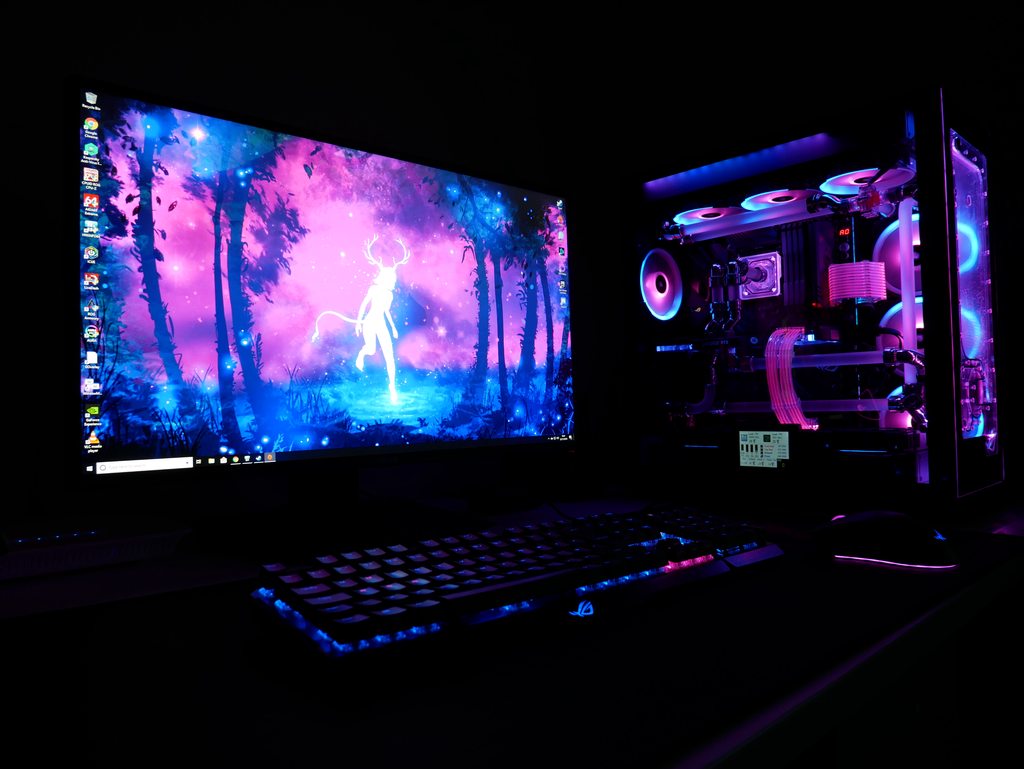
 pale sigil
Anyway...
spent the last 5 hours cleaning my room up
and moving stuff around
still feels shite
ill sned a pic when im finished
pale sigil
 pale sigil
ye lol
halcyon moss
I also have the same keyboard!
pale sigil
@digital cliff irs because the phone focused on the monitors
Still borrowing a shitty iPhone
zenith sonnet
Damn it
Can't find any reason to pick one over the other between the Aorus Master and the Taichi
Aorus has 2x LAN, 2 more USB on the back, looks better in my opinion (although the Aorus Xtreme looks best of the bunch), and has a built-in DAC that the Taichi doesn't seem to have?, so I guess that's that... Taichi might have a slightly better BIOS, but I dunno
Yup
Aorus Master I guess
reef patrol
Yeah it seems like an obvious choice there.
I'm using a MEG Z390 from MSI atm, but only because I effed up the pins on my Z370 Taichi
Reviewer privileges 
zenith sonnet
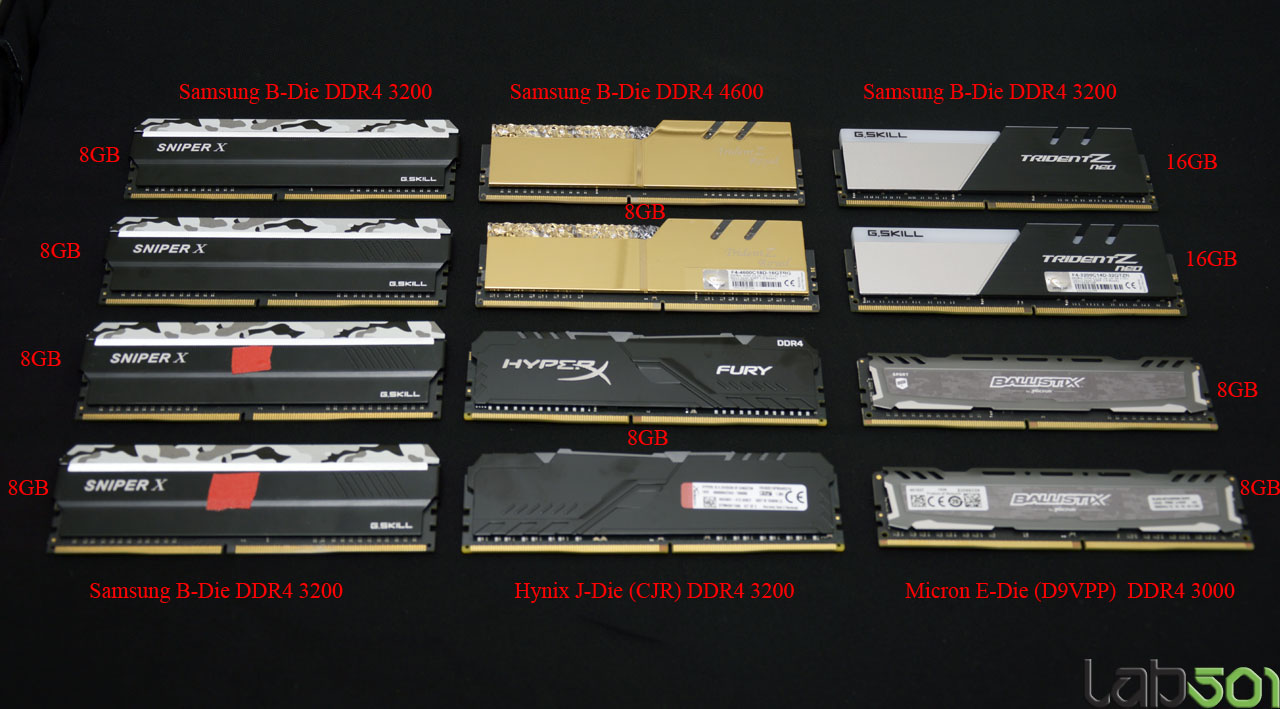
lab501
2 x 16GB Samsung B-Die Using a dual-rank B-Die memory kit, such as GSkill TridentZ Neo DDR4 3200 CL14 2 x 16GB, we get higher performance than 4 single-rank B-Die sticks. We also stopped at DDR4 4000 18-18-18-39, but we were able to run DDR4 3800 1:1 with 16-16-16-36 2T, w...
reef patrol
Good to know.
zenith sonnet
2x8 GiB results are also verz interesting
reef patrol
Either honestly. I've had both but ended up with the Black one, because it fitted my cyberpunk theme better ultimately.
zenith sonnet
Hmm
White will be more reflective of case lighting , black might look cleaner in a not so bright environment?
Now for PSUs...
reef patrol
Be Quiet or Seasonic are my goto by default.
zenith sonnet
This was the first I clicked
https://www.jonnyguru.com/blog/2018/07/03/seasonic-prime-ultra-750-titanium-power-supply/

Already like it
And the price is decent, too
 thick elk
I tend to just do my research and buy what happens to be the best fit for me.
Right now I have an XFX one.
Though both be quiet and seasonic make good power supplies seasonic is often a bit expensive for the specs and be-quiet just isn't always the best bet.
reef patrol
And to further muddy the waters. Seasonic makes PSUs that are rebranded as other makes.,
thick elk
Most "Manufacturers" just order from the few big supplies, sometimes copying their models sometimes customizing them so yea.
Seasonic is pretty much the only one of the real manufacturers that actually sells a lot under their own brand.
ashen spindle
I like seasonic becuase they often have a nice overhead in the psu incase something does go wrong and you do draw more watt that you should
also just good quality of the whole package
reef patrol
There's a guy over on the NZXT Discord who knows far too much about PSU tech and comparisons to be considered sane.
He has a chart somewhere, but I couldn't find the link just now.
thick elk
I have seen a few of those as well.
zenith sonnet
Damn, that'd be awesome
thick elk
Ultimately while doing your research can be fun and interesting, getting a decently rated known brand psu which fits your requirements easily will generally be just fine.
Sure you may get a bit worse specs or pay a bit more but it will work
ashen spindle
oh no that would be far to easy to be acceptable for him to do
reef patrol

Google Docs
General Information
Written and compiled by: PSUGuru,Basic information
Note* This information is correct to the best of my knowledge. That being said, there may possibly be incorrections,Why should you choose a quality PSU? A solid power supply will help ensure your PCs long...
zenith sonnet
 reef patrol
There it was - I take NO responsibility for bad info 😄
ashen spindle
oh wow, I checked how much I payed for my previous SSD's
170 for 256 gb, then 150 for 512 gb now im looking at 150ish for 1 TB
zenith sonnet
I'm thinking of just dropping in a 970 Evo PLus 500 GB
And waiting for the 980 models to come out
My first one was 280€ for 128 GB
ashen spindle
im just waiting for any decent samsung ssd to drop during black friday then grab one
I just need more space, not need for high speeds
though I guess I should look if I have enough cables for another sata one lol
reef patrol
I dug out a 64! GB SSD out of my NAS the other day.
That's barely enough for Win10 these days 😄
reef patrol
But I used to boot the NAS OS from a USB thumbdrive previously so... yeah... it doesn't need a lot 😄
zenith sonnet
Anything else wouldn't be an upgrade from my RM1000i :p
ashen spindle
ok looks like it will be a m.2 I'll be looking for
I do have a 3rd ssd slot but cant get the cable that way
ashen spindle
its not becoming my main drive anyway
and it depends whatever will be on sale this week
although maybe I should make the new one my C drive... the current one is already running for a long time
26.000 hours on power lol
zenith sonnet
Ugh, those things have poor availability
That's nothing
I've drives with over 60000 hours :p
Caseking, Mindfactory, Alternate don't seem to list them at all
old marlin
which?
old marlin
wattage?

Preisvergleich und Bewertungen für Netzteile mit Hersteller: Seasonic, 80 PLUS (115V): ab 80 PLUS Titanium
wtf
only very small stores have them
zenith sonnet
I'd go with 850W, I guess
Dunno what's up there...
Maybe stock will come soon
@reef patrol Wanna help me pick parts for a custom loop? What do I need, pump, reservoir, CPU block, GPU block, Rad(s), tubes, fittings, coolant?
reef patrol
https://www.ekwb.com/custom-loop-configurator/
If you're really set on it, EK has a good configurator wizard that helps you pick parts. When you have done that, you can swap with alternatives. 🙂
zenith sonnet
👌
reef patrol
But uh... expect to pay something in the range of 5-700€ in total
That's for both CPU and GPU*
zenith sonnet
Would I want 1 or 2 rads?
reef patrol
One for each component you want to cool - Or more (More cooling surface, the less your fans have to work to keep it chill, so it's more quiet)
2-3 rads, so you can run those fans at below 1000RPM at all times for your ears sake 😄
zenith sonnet
What about this thing?
O11D Distro-Plate G1
Seems a bit steep in price for what it does?
reef patrol
It's basically a fancier looking replacement for your pump and reservoir.
zenith sonnet
Oh wow, it's large
reef patrol
Yeah they generally cover the entire front or in this case side mount.
reef patrol
Yup.
reef patrol
Pump is in bottom left.
old marlin
why would you need more than 2 360 rads?
reef patrol
Honestly not 100% about rad room with it installed.
Looks like top and bottom is definitely doable.
old marlin
that isn't the O11-D
zenith sonnet
@old marlin iirc Ryzen's boost clocks are rated at max. 50°C
reef patrol

old marlin
that is the O11D XL
reef patrol
Well feck.
old marlin
USB ports at the bottom and a 120mm slot at the back
reef patrol
One sec. Gonna snap mine real fast.
zenith sonnet
Actually, I was probably going with the XL
zenith sonnet
This one fits the XL
reef patrol
zenith sonnet
reef patrol
In going to say. no. Don't expect top 240mm radiator with the plate side mounted.:)
reef patrol
🙂
zenith sonnet
You need to do a little bit of dusting :p
reef patrol
Open case.
Can't close it till I get the last screws and bits for a pump I am beta testing for EK.
Gotta fix this before I redo the loop again, and then dust off the PC and close it back up.
zenith sonnet
Any advantages of hard tubes, other than a cleaner look?
Seen a built that used soldered copper pipes like you'd use in contruction
Looked pretty good, too
zenith sonnet
Clear pipes and coloured coolant, or matte black pipes?
reef patrol
Entire matter of taste. Softtube is generally a lot easier to do and maintain.
Hardtube "looks better", but it's also more leak prone.
zenith sonnet
Yeah, looked up some stuff
Gonna stick to soft
Although that Distribution plate would make hard a lot easier to deal with, since you'd pretty much only have straight lines
But yeah, soft it is
ashen spindle
oh I need to check if I have to change my cables for an m2 ssd
bc using a m2 slot disables a sata port
reef patrol
A couple of 45 or 90 degree angled fittings can help keep tubing straighter. Or closer to a perfect 90" curve.
reef patrol
Metal ones are more sturdy. Plexi can crack if you screw the fittings in too hard.
Also never, ever use isopropyl alcohols on plexi. It will weaken it or crack it 😄
Gonna hop off for a bit to clean mah home office. The folks over on the EKWB Discord are super helpful. 🙂
zenith sonnet
I've only got acetone and wiping benzine
ashen spindle
phew dont need to change my cables, past me was smart enough to think about choosing the right sata ports
reef patrol

zenith sonnet
I'll check out that discord
halcyon moss
its all feels so much... better, even at ~60fps
pale sigil
i dont get the fuss for hdr
just makes the screen darker
nvm
d2 requires full screen
oh my
halcyon moss
diablo 2 has HDR support? I did not know descent 2 had that
pale sigil
pleb
zenith sonnet
I think I wanna go with the distro plate after all, though
Too bad it's out of stock until 13th Dezember
That configurator has very limited options
Like no way to pick a third rad
reef patrol
Just two for the rads you've got in that config.
zenith sonnet
reef patrol
The GPU has four openings and some rads have 4-8, which you block off as needed
zenith sonnet
I wondered, EK's best pump does 300-something litre/min, but the distro plate is listed at 500
Is that just running at higher RPM?
reef patrol
Looks good.
-
Definitely swap those Vardars with something like Noctua. I've had two of my Vardars start making some gnarly sounds over summer. They're just not high end.
-
You went with the plexi based CPU block after all, but went matte metal for GPU?
-
I'd add another box of tubing but halve the coolant. You definitely won't need 4 liters worth of coolant for this right away.
reef patrol
The D5 is their "best" pump. It's quieter and uses less RPM to get similar performance. The DDC style ones are a bit "worse" but perfectly usable. My loop uses a DDC at like 50% and I can't hear it at all.
reef patrol
DDC are much more common. The D5 is mostly for really large loops and BECAUSE I CAN enthusiasts as I recall.
zenith sonnet
Add a third rad and that sounds like a large loop
Not sure about that, though
Might make sense
reef patrol
Ask the folks over on the EK Discord. I am definitely no expert, and I have never had that much loop to deal with. My 360 rad is a really thick one, so it has more obstruction. 🙂
zenith sonnet
I could just put a REALLY thick rad on the bottom
@reef patrol Was going with the black GPU block because it'd kinda look silly with the transparent block unless I was going out of my way to mount it vertically
reef patrol
I never really noticed with my plexi GPU block that's mounted flat.
 reef patrol
Naw. I meant in the case proper 😄
zenith sonnet
I know :p
reef patrol
Y' never know 😄
reef patrol
You might also want to consider a drain valve, so you can simply turn on that to drain the loop, without having to unscrew or cut tubing (like I do - The lazy git)
zenith sonnet
Seriously wonder what difference the pump would make
One's 6W, the other 23W, that's a massive difference
Damn, those Noctua fans are more expensive than the rads will be
410€ for 18 fans 🥺
halcyon moss
uhh.. 18 fans? wtf?
reef patrol
AND I accidentally tore the wires on two of them when I re-did the loop recently. So... yeah. Fun
zenith sonnet
Don't think Noctua have RGB yet
It's a massive step forward that they now have black fans with coloured vibration pads xD
@halcyon moss 2 loops with 3 rads each
Can't find any of the EK parts on there, so that's probably the best I can do for now
https://de.pcpartpicker.com/list/hPDYgJ
zenith sonnet
@reef patrol You don't happen to know if the Swedish shop 'Inet' ships to Germany? Can't find anything on their site
OK UK have them, too, but they want 92 GPB shipping ._.
The case, I mean
That's a big no, lol
They even ask the same price in pounds you'd normally pay in Euros
reef patrol

zenith sonnet
I think the only way is to use a standalone reservoir+pump combo, or the distro plate and a standalone pump, and cut the DDC from the loop
reef patrol
Pretty sure the plate won't work properly then.
It's designed around the pump moving the liquid.
I'd just go pumpRes and no plate, if you're not going to use the plate as a pump. Put that bling money elsewhere.
zenith sonnet
A third rad 😂
reef patrol

zenith sonnet
https://i.imgur.com/eeEQI58.jpg
Just found this
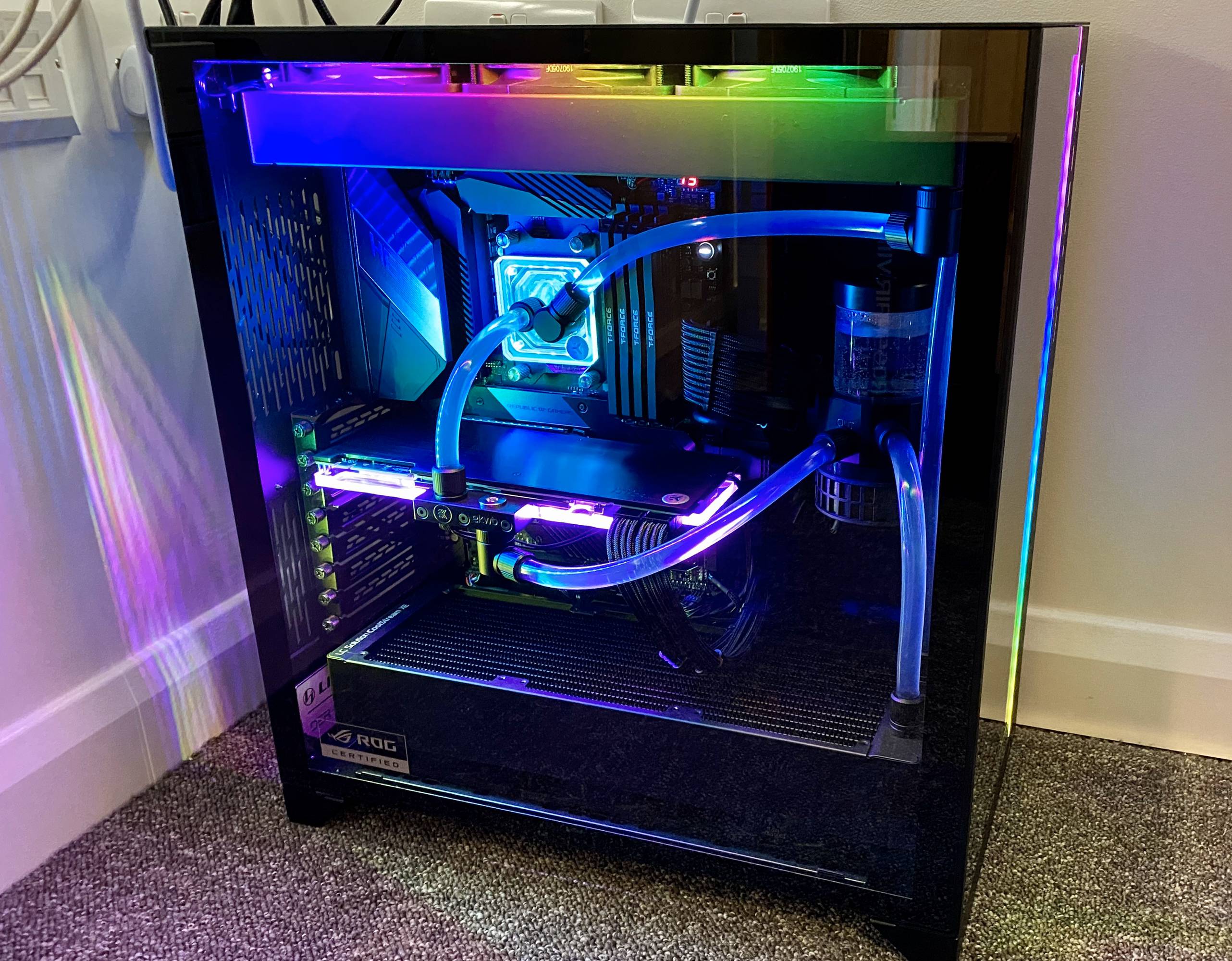
Is probably very similar to what I was gonna build
https://imgur.com/gallery/xDNXxmP
I also quite like the look with hard tubes and fittings at every corner
 zenith sonnet
Either you use Ryzen Balanced or 1usmus Ryzen Universal
Win 1909
Make sure C-states, C&Q, whatever is enabled in BIOS, PBO should be off
pale sigil
@zenith sonnet more details plez
zenith sonnet
Sure, on what?
zenith sonnet
Ryzen Balanced gets recommended by AMD
1usmus Ryzen Universal is a power plan made by someone over at TPU
Supposedly does some additional minor tweaks. Like, Default seems to be that Windows 'may' use the best cores, and he sets it that Windows must use the best cores
zenith sonnet
Win 1909 comes with improvements to the Windows Thread Scheduler particularly for interesting for Ryzen
ashen spindle
Go to his Twitter he has his stuff linked there
zenith sonnet
And lastly, some BIOS's come with poor default settings
You also may wanna check it's up to date (AGESA 1004B)
E.g. some have PBO enabled by default, or C-states disabled
pale sigil
true dat
zenith sonnet
Other than change sockets every other gen
old marlin
well, "change"
pale sigil

PCMAG
The credit card company now requires merchants to get a cardholder's approval, via text or email, at the end of a trial before they start billing.
 sudden glacier
I like how that link still worked anyways
pale sigil
Oh god
reef patrol
pale sigil
dont think i can ever go back to 60fps....
zenith sonnet
Who'd ever want to?
pale sigil
My friend had a shitty experience building his first proper build
kinda feel bad for him
ashen spindle
did he drop the gpu or what
pale sigil
its so annoying how blury 1080p is for me now lol
@ashen spindle He snapped his gpu fan wire (its his older gpu), having issues with temps and ryzen stuff, windows is bugged af etc
pale sigil
@proud nacelle i really wish i could stop using it
But i play d2 to much
and the anti cheat gets triggered
😦
When using Linux
cos of pvp
its a good anti cheat tbh
since steam release there were the odd few hacers
hackers
very rare
before it was once in a blue moon
i think people are exploiting the steam overlay somehow
cos nothing could be injected and you couldn't even use overlays
and its their ow
and invasive
ugh ok thanks



 burnt dragon
So will the lekker be faster than the apex pro OmniPoint or B930 keyboard
old marlin
what exactly do you mean with faster?
lower input delay? yes
even the normal wootings are faster
the fastest on the market in fact
 feral jolt
I've been kicked by EAC errors more times than I can count in squad
 zenith mirage
Oh man, I feel like every time that game gets an update, I have another problem with EAC
But hey, at least helis are neat
old marlin
10980XE
zenith sonnet
Barely holds its ground against the 3950X, as expected
Meanwhile AMD announced the 3990X
reef patrol
The prices though.
I swear - If I hadn't gotten my 9900K prototype for free (well lent to be exact), I would have never had anything remotely similar. I would still be on my 8700K (which was a cheap upgrade from a 7700K)
zenith sonnet
I'm gonna roll with the 3600 after all :lul-2:
burnt dragon
@old marlin no their isnt
zenith sonnet
Wait, why won't it convert that emoticon?
old marlin
@burnt dragon wdym
burnt dragon
The lekker switch isn’t the fastest
old marlin
what do you mean with fastest
activation point?
it can be wherever you want
on lekker
wootings have the lowest input delay though
burnt dragon
What is lekker input delay
zenith sonnet
Is there anything I could/should get? Are their mousepads good enough? Or should I order Artisan? 🤔
old marlin
don't order artisan lol