#classic-doom-maps-mods
1 messages · Page 97 of 1
 light prism
well that comes down to aesthetic, doesnt it
some people like a grungier pixelly look
ive never looked at it ingame and thought 'ew look at that blur/artefacting'
 haughty flower
that look still doesn't fit with the rest of textures
it's not about viewing it in vacuum - it's about matching it up to the rest of aesthetic
ugh, still doesns't fit
🤔
haughty flower
almost got it. this is intermediate result with flattened transitions. i only need to properly edit color
haughty flower

or this even
@light prism check it
latest one actually looks closer to steampunk...hm. let me see if amiga palette can be used
and by that i mean one from chaos engine
nevermind
light prism
they all just kinda look like washed out re-levelled versions of the original tbh
haughty flower
yeah i know
tho last 3 feature higher edge sharpness
which is still not enough tbh, i need to find something else to throw at it
 dry ore
this one looks the nicest imo
haughty flower
right one you mean
yeah, that was one most closely matched to the original
just with more detail
haughty flower
well use it then 😛
dry ore
im going to if i find a fitting place for that texture
dry ore
ok im pissed off.... was making nice progress on a hell map, hit ctrl-s, suddenly an error message flashes for a split second and the entire program closes
i ddin't even have time to read it
progress lost :(
dry ore
thankfully i did attempt to save at the very start so i only have a few platforms done
i do save often
let me look for the error log
yeah not sure where it is...
i am curious to know what happened tho
dry ore
it's not in the folder either
dry ore
is there a way to select every sector at once?
i messed up and now every floor is a harming floor
dry ore
???
i shifted it and suddenly the entire texture changes
all i did was move one vertice
dry ore
please help... i cannot do shit without this happening
haughty flower
@dry ore yo , you should ping me if you need help.
GZDoom Builder actually backups your wads, and so does Slade
dry ore
oh? where are the backups?
haughty flower
in the same folder as your wad
they have something like .backup at the end of the filename
just remove that and it'll become a normal wad
yes, there's a way to select every sector at once, select S for Sector Mode, hold your cursor and drag it across all the sectors you wanna select
alternatively - if you hold the middle mouse button you will select or diselect every cursor your mouse touches
so that's faster and more convenient than spamming click to select a bunch of sectors close to each other
also, is that latter problem of yours still happening?
dry ore
nah, i let it do that and then i altered the floor back to the way it used to be
dry ore
yeah, i know that
dry ore
i have a switch that won't pull
basically, it was functional before i decided to move it to a different linedef
and now it won't let me use it
I'm dumb... it was facing inwards
dry ore
zdoom won't let me snap screenshots for some reason but these pillars don't appear in the game:
the highlighted one and the one on the other side
they don't even appear as HOM, they just turn into the sky texture for some reason
haughty flower
@dry ore are they deleted sectors or did you lower the ceiling to the floor?
dry ore
sector view of the entrance
and those are the pillars that keep disappearing
wait nope...
...nevermind yeah those are the pillars lol
they reach up all the way to the ceiling
haughty flower
If so, then you can delete their sector
then they'll become just walls that go up to the ceiling
there's no reason to keep them as sectors
that could fix your problem.
Don't tell me all the walls in your wad are sectors that go up to the ceiling...?
That's unnecessary and could probably cause a lot of problems.
dry ore
not all, but i deleted all those that are
most are just raised platforms
oh that fixed it!
a screenshot of my efforts
i'll upload the file here once it's done, crits will be very appreciated since this is my first ever pwad
haughty flower
That looks pretty good.
haughty flower
I cant test the map I made in doom builder 2. It says "your test program is not set for the current game configuration. Would you like to set up your test program now?"
Problem is I dont know what to select while setting it up
Select your sourceport, of course @haughty flower
dry ore
though it probably won't run on windows 10 anyway, at least it didn't for me
haughty flower
I got it running
haughty flower
I already selected the source when I started making the level
@dry ore I never had problems with sourceports on Windows 10.
Not with the main, most popular ones, anyways
I had a problem with launching the sourceport for testing on GZDB tho. It couldn't find the DOOM2.wad. But I fixed that with a bit of manual handling. Is that the same problem you're having?
I will send a picture of what I'm doing so I can get more help
sure.
dry ore
the sourceports aren't the problem, the map editors are for me
they don't wanna run the sourceports for testing for some reason
haughty flower
Do they display any error messages?
dry ore
yeah, if that was directed towards me
dry ore
let me try zdoom as a sourceport, i haven't tried that yet
haughty flower
Sorry for the bad quality. Only so much a phone can do
haughty flower
I'm using zdoom with ultimate btw
dry ore
i tried chocolate doom and it didn't work
haughty flower
Is that the sourceport's .exe? @haughty flower
dry ore
are you able to take screenshots?
haughty flower
I dont use discord on my pc
haughty flower
I think you selected Ultimate Doom's .wad...
You gotta select ZDoom's .exe application.
Now it's acting wierd
I selected everything I wanted and it reverted back when I said ok
Got it!
Now I have to enter a command? Is that normal?
what's asking you for a command, and for what?
I selected zdoom's .exe, then started the test. Now, I see the doom startup screen, but with a lot of text in the bottom left
I can only enter commands right now
I think you selected DOSBox...?
I dont think I did?
haughty flower
It's working now
haughty flower
some window work
probably need better texture, support looks off
You need a better floor texture.
nah, floor texture is fine
Well if you change your mind maybe this one could work better.
haughty flower
@haughty flower i dunno
same room from other side
The floor looks quite bland compared to everything else.
Also, you sure you wanna use only a bunch of low tiers spread around that little area? Why not Revenants, a Mancubi or/and some Hell Knights?
Because it's just a start of the map
third room
additionally - overdetailing is not always good. do you know what detail compression is?
basically amount of detail present on screen compresses with distance and memory, there is only so much mental real eastate for player to concentrate onto before details become mental noise
case in point - return to saturn map 15
great detailing - completely fucks flow up because all rooms end up feeling the same due to poor detail compression and use of same textures over and over
so you end up hugging automap all the time
rule of detail compression works universally. case in point on individual objects - some of armored core designs are complete dogshit because it's just noise on top of noise
Yeah, I know all that.
Not saying you should add anything to the floor, just that the currently used texture looks bland compared to the rest of the room, to me.
But I agree with all that on detailing.
Lack of detailing itself is a form of detailing.
floor will be riddled with corpses anyway lol
light prism
im king of the wooooorldlddddd
 gaunt lagoon
 haughty flower
next thing you know iceberg wields a rocket launcher, is flying and screams loudly
whack
light prism
i do recall seeing plans for the titanic having just one huge floor covering most of the middle
gaunt lagoon
the middle?
gaunt lagoon
ah, do you mean for example a deck was just a big open space with sod all in it?
 hushed oasis
graytall
there's a whole MegaWAD that uses only that texture (along with FIREBLU and DOORTRAK)
haughty flower
i know it is graytall, it's just ugly, and i am aware it is 50 shades of graytall
i dont remember seeing this one in doom2
but well 50 shades of graytall did well on using it for kind of a joke
That floor texture is also ugly as hell. Looks like something from Wolfenstein 3D.
It's never a good idea to use.
 vocal crypt
Pssh
3D only had gradients/solid colours for floor texturing
The game not the engine
haughty flower
I know. It's still lower quality than the rest of the textures.
So it reminds me of Wolfenstein 3D.
hushed oasis
either way, this whole room reeks of Alpha
the alphas were bland as hell in texture choice
haughty flower
Relax, i just started to shape the room and i was browsing
haughty flower
uac ♂ next ♂ door
 abstract sonnet
13- only
haughty flower
:boomer:
 mystic chasm
working on a vanilla map... holy crap why do people still map like this

haughty flower
map like what
mystic chasm
in vanilla format
haughty flower
cause some people like it really old school i guess
espi did some nice maps in vanilla format
mystic chasm
I've never mapped in boom format, but it looks like atleast they have some more line specials to use
haughty flower
I prefer limitations.
Some of the best maps ever are vanilla/Boom. If not most.
Are you respecting vanilla's limitations or only using the format, while ignoring the visplane/drawsegs/texture limitations etc.?
@mystic chasm
mystic chasm
vanilla format, limit removing
havent actually bothered to run the map in chocodoom to see if it plays
haughty flower
Oh. Then I don't see why you're so bothered. Personally I found Doom 2 had all the linedef actions I need.
mystic chasm
Jadwick Last Friday at 7:54 PM f*ck it im just gonna do a vanilla speedmap for the hell of it
haughty flower
But I also respect vanilla's limitations. You could try using the Visplane Explorer to get an idea if it runs or not.
If there's no red squares in playable areas, that means it's probably fine.
vocal crypt
Used to UDMF,not moving floor/ceiling textures and not having coloured lighting is painful
haughty flower
That's just decoration/detailing. Not really needed or necessary.
mystic chasm
i started doom in hexen mapping like 15 years ago and never went back to vanilla
then udmf came out
i like scripting too
hacky stuff like using multiple linedefs to trigger stuff can just be done in a script
but
this was a experiment is all
i have a few days off work
thought i might try to finish something by then
im also using slade for mapping so...
afaik no visplane tester
haughty flower
ah, the visplane explorer is a nice tool
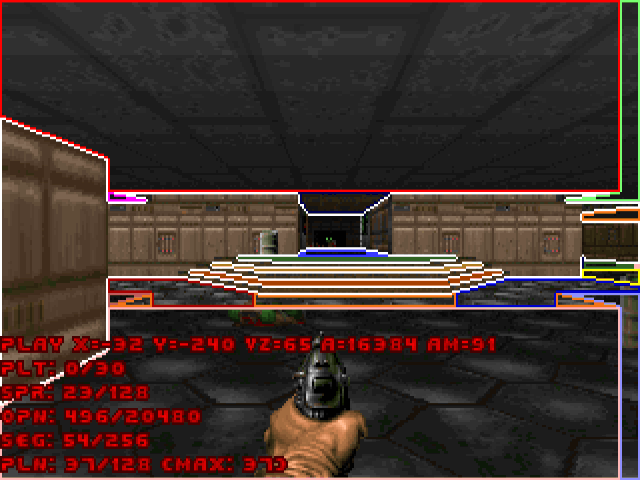
there is also this if you are not using visplane explorer on doombuilder
haughty flower
didnt think mapping would take quite some time but there...im "almost" done doing the design
Looks very empty.
havent finished this one yet, and i havent placed the things yet in almost any of the rooms
tho feels great that im finally working on the map after a hiatus
dry ore
can someone explain how to change which sky texture appears in which map?
mystic chasm
...for zdoom?
dry ore
i figured it out actually, but is there a way to make map01 and map02 skies different?
mystic chasm
...for zdoom?
if your mapping for vanilla you're kind of stuck on which sky appears in which map
boom MBF has a line special that can set the sky texture, and zdoom can use mapinfo
mystic chasm
(if you are using zdoom, make a lump in your wad/pk3 called MAPINFO and put something like this in it:)
sky1 = "SKYTEXTURENAME", 0
}
map MAP02 "My Second Map" {
sky1 = "DIFFERENTSKYTEXTURENAME", 0
}```
<https://zdoom.org/wiki/MAPINFO/Map_definition>Sky1 = "<texture>", [scrollspeed]
<texture> is the name of the texture to use for the sky. [scrollspeed] is the rate at which the sky moves left or right (useful for clouds on windy maps). To keep the sky from moving, use a value of 0.0 or omit this parameter; to move it left, use a positive value; and to move it right, use a negative value. This is the number of steps that the sky moves each tic.
the important bit
mystic chasm
if you only have a map editor you'll need another utility to add/change resources to an archive
Most people use SLADE for resources, and some form of doombuilder for mapping
here's slade's website: http://slade.mancubus.net/
dry ore
i have slade, yeah
dry ore
wad
mystic chasm
Archive -> New -> New Entry
will make an empty lump
call it MAPINFO
then edit it as text
dry ore
ok
mystic chasm
you'll also want to make sure that the MAPINFO lump is outside any markers
mystic chasm
👍
dry ore
in this part map MAP01 "My First Map"do i name the maps in the quotation marks?
mystic chasm
everything in quotes there can be whatever you want
mystic chasm
in that line:
map is a keyword for the mapinfo parser
MAP01 is the designator for which map's properties you are changing
"My First Map" is the map's "nice name" which, in zdoom, will change the intermission screen title and the automap title
dry ore
alright
mystic chasm
if you do not use zdoom, the easiest way to change the map's name would be to change the graphics
afaik anyway (that's how I used to do it) I'm not that famillar actually with all the vanilla-y and boom ports
dry ore
amazing, everything works perfectly
thanks!
another thing tho, i like the doom skies better, any way to replace the doom2 skies with doom skies?
mystic chasm
Yes, but since Doom's textures are still copyrighted you're not allowed to distribute them
You can make your wad require both doom.wad and doom2.wad and use the textures from both
more generally you can import a texture and use mapinfo to change the sky to whatever texture you want it to be
dry ore
i have uploaded doom's sky textures but simply using their name still makes doom2 skies appear
haughty flower
@dry ore you add the texture you want to use as sky and rename it to RSKY1. Put it between the P_START and P_END entries, add it to patch table and texturex, and that will replace the sky for Doom 2's first episode.
for the second episode you use RSKY2, for the next one you can already guess.
dry ore
ok
dry ore
yeah i got that
i've decided to make this pwad for zdoom
my next one will be for vanilla, if i ever get that far
haughty flower
If it's using the Doom 2 format, it'll still run in Crispy Doom/Prboom+/other limit removing sourceports
they just won't recognize mapinfo and ignore it
dry ore
it does, but i don't know if the skies will load correctly
and also, ANY port other than zdoom displays doom textures incorrectly for some reason
let me show you what i mean...
haughty flower
Hmmm. Tutti-frutti is a vanilla-only thing. About all limit-removing sourceports ignore and fix the glitch. So I wonder what it is.
dry ore
nevermind there's some error preventing it from running on prboom+...
haughty flower
🤔 what is it?
dry ore
that one only appeared on vanilla yeah, but prboom+ had a different texture bug
this is what it appears like on zdoom, as intended
crappy ms paint edit but this is what it looks like on any other port:
haughty flower
Ahh, I get it.
haughty flower
Probably conflicting texture names.
haughty flower
Huh, did you do anything to the sky textures?
dry ore
i renamed the doom1 skies in the resources from SKY1/2/3 to RSKY1/2/3
they display correctly in zdoom but i think that's because it's the only port that doesn't give a shit and ignores any errors lol
haughty flower
Did you put them between the P entries?
dry ore
uhh i just kept them in the old P entry
the one that holds the rest of the doom1 textures
is that bad?
haughty flower
Oh, that's just what I meant for you to do.
I don't get what's causing the error.
Oh waiiit
I do
you added the SKY1-3 textures to the patch/texturex, right?
So their properties n stuff are still in them, but the textures themselves aren't being recognized by the game because you renamed them.
dry ore
yeah, i did, i think
haughty flower
So maybe a quick fix would be to copy and paste the sky textures again in the P entries.
Or maybe delete the SKY1-3 definitions in the patch table and texturex lumps
If you'd want to bother.
haughty flower
yeah that might work.
If not, then you open the texturex lump and delete the SKY1-3 entries there
dry ore
it works, but the sky remains the same throughout ep1 unlike in zdoom (well i was warned about this lol)
and here's the texture error in prboom+
comparison
dry ore
prboom+ is limit-removing though isn't it
haughty flower
Yeah.
dry ore
guess i'll just stick to zdoom for this wad then
i'll be more aware of the limitations by the time i've finished this pwad
dry ore
the program crashed again.... after i spent like 15 minutes aligning the wall textures -.-
where are the backups stores again
found them but they were all created min. half an hour ago so i think i've lost a good amount of progress...
this time i caught the error message, it occurred when i hit save, was something along the lines of "could not save; program being used by an external application, click retry" or something,, i should've screenshotted
however when i clicked retry, it just closed
i hate this damn program
mystic chasm
you can't have SLADE and boombuilder open with the same wad at the same time
dry ore
i didn't
i had nothing open besides gzdoom builder
in fact, when modifying contents in one of them, i make sure to close the other application just in case
mystic chasm
oh, well, that's what I thought it was
dry ore
i always figure it's safer to reopen the program later
so i have absolutely no idea what could've caused it
next time it happens i'll take a screenshot
didn't think i needed to, thought i'd just click retry and it would either display the error message again or save successfully
this program is so unstable with its errors
dry ore
the name is just gzdoom builder
dry ore
i don't even remember where i downloaded it from tbh
but i'll look for the bugfix version later
mystic chasm
...db-bugfix is dead too it seems:
https://forum.zdoom.org/viewtopic.php?f=45&t=32392&start=5610
here you go

GitHub
a fork of CodeImp's Doom Builder 2 ( http://www.doombuilder.com/ ) - anotak/doombuilderx

GitHub
Comprehensive map editor for Doom, Heretic, Hexen and Strife based games mainly geared towards GZDoom source port. Based on Doom Builder 2 by CodeImp (http://www.doombuilder.com/). - jewalky/GZDoom...
haughty flower
GZDoom Builder-Bugfix is still getting updated.
mystic chasm
y'all could just use slade too
haughty flower
They should
dry ore
if anyone here knows please share!
it would help me decide which teleporter is more appropriate for certain locations
mystic chasm
they are just different designs so that you can differentiate multiple teleports in a map
afaik
haughty flower
Using doom builder 2, can I spawn enemies that are already dead?
mystic chasm
depending on what you're mapping for you can script enemies to spawn
Spawn that are already dead? I don't understand
vocal crypt
do you mean corpses
haughty flower
Yes
mystic chasm
Not as far as I'm aware with only Doom Builder
haughty flower
Well, it's not a necessity so that's not too bad I guess
mystic chasm
if you're using doom in hexen or UDMF you can script it to remove a corpse and spawn a monster
vocal crypt
I mean, you might be able to ACS spawn one of the decorative Things
But that's very limited
haughty flower
I'm using doom with zdoom
So I don't think I'd download extra stuff just for one area
mystic chasm
otherwise, depending on what you want to do you have DECORATE or Zscript
haughty flower
I cant find shit on the teleporter textures
Maybe im not looking on the right page
Can only guess they based on sigils from the lesser key of solomon which most sigils also look like the ones used in doom 3
dry ore
so... does this mean i can't shoot something to lower a floor?
mystic chasm
not in vanilla
dry ore
oh i see
haughty flower
@haughty flower the only way to revive dead enemies (without scripting) is by using an Archvile, which is an enemy that does just exactly that...
you can teleport enemies to somewhere specific tho.
light prism
@dry ore all of them are either full or partial pentagrams
 gaunt lagoon

Made a quick video to show progress, better than throwing screenshots around everywhere
mystic chasm
neat
 solemn pawn
Looks a bit like ghostship
dry ore
damn
haughty flower
i made this wad. its better than any of my others and it includes a custom hud and some metal to listen to while blowing demons up
First try.
You ought to revise the criticisms I provided your previous wads. This wasn't much of an improvement.
Play popular wads and compare them with your maps.
haughty flower
i need some tips on dealing with visplane overflow, althou i have an idea what can cause a visplane overflow on doom more or less, im just having a bit of trouble on one area where it is kinda empty more than other areas where i've drawn more
im not sure if it is because i should do it more square or so, if anyone has any clue and help out, would thank ya
haughty flower
ok i guess im being a little dumb but i playtested it so it doesnt crash so far, but i still would like to know if you got some way to deal around these kind of things
Yeah. Try lowering the number of lines here. @haughty flower
Maybe that'd work.
And patterns like this make for easy visplane overflows.
alright, and damn
does crash when i noclip but still not a good sign so im gonna try that
do irregular patterns can cause more visplanes than square patterns?
and yeah i just made it 2 big areas instead of 4 so that helped, thanks
mystic chasm
no, it's not based on shape, just how many unique visible ceiling and floors are visible
and not nessicarrily "visible" to you but how many are drawn according to the bsp
haughty flower
Depending on the nodebuilder, you might get different results for visplanes.
 visual cipher
Does anyone have a folder with all of the graphics from Doom 1?
dry ore
i do, but i was told that those cannot directly be used as a resource pack
there IS also a resource pack if your intention is to use them in doom2 mapping
or do you specifically want the folder?
haughty flower
Well, you can open Doom 1's wad and copy the resources you want from it into your wad. @visual cipher
But Doom 2 already has all the graphics from Doom 1 except some textures, I'm pretty sure.
If you want exactly that, you can find a texture pack with all the Doom 1 textures that are missing from Doom 2 on Realm667.
 surreal meteor
anyone know what the easiest midi program is to use for editing already existing midis?
 misty cedar
@surreal meteor Someone pointed me to Anvil Studio before so maybe that's worth a try, but it's not like I've tried many so no idea on what would be the best
surreal meteor
thanks!
haughty flower
hmm. how do i make particle fountain out of sprites? i need a vertical engine effect for some props
mystic chasm
Thing effected by gravity then use acs or zScript to ThrustThingZ? DECORATE or zscript https://zdoom.org/wiki/A_ChangeVelocity
Two thing types actually, one for the spawner and one for the particles themselves
Since each of the "particles" is a Thing though be careful how many you use
haughty flower
a thing or a projectile tho?
actor PEFlames 22581
{
    +CLIENTSIDEONLY
    +NOBLOCKMAP
    +NOGRAVITY
    States
    {
    Spawn:
        TENT A 1 A_CustomMissile("OrangeFire",0, 0, random(0,360), 0, random(-90,-85))
        loop
    }
}
ACTOR OrangeFire
{
    Radius 1
    Height 1
    Speed 1
    Damage 0
    Renderstyle Translucent
    Alpha 0.75
    Scale 1
    PROJECTILE
    +NOTELEPORT
    +DONTSPLASH
    +FORCEXYBILLBOARD
    +CLIENTSIDEONLY
    +NOINTERACTION
    +NOCLIP
    States
    {
        Spawn:
        TNT1 A 0
        //TNT1 A 0 A_JumpIf(ACS_ExecuteWithResult(304) == 1, "Toaster")
        FIR1 ABCDEFGHIJKL 2 Bright A_FadeOut
        Stop
    }
}``` this doesn't seem to do anythingYou'll be making two separate things, the spawner, that on spawn will start making child things which are the Sprite particles
They dont need to be projectiles but I dont see why they couldn't be.
IM not home or I'd throw something together
My idea was to have the spawner just spawn the particles, not fire them as a projectile, then when the particles spawn they thrust themselves upwards
I'd guess you'd also want them to travel laterally in a random direction too
haughty flower
ech. i mean i guess i can make just a huge sprite...or render some particles and shittify them
it's just for a static effect
but it would be nice if i could make them actually spit randomly
mystic chasm
It's doable all with changeVelocity
What's it supposed to be like a fire or something?
Cuz I was think some sort of water fountain until I saw your code
For fire I would think you would want the smoke particles to go up and in towards the center unless it's for something else
haughty flower
@mystic chasm closer to water fountain tbh, but with fire particles. basically a vertical hell engine effect which will be used atop of a nozzle
mystic chasm
So like a fire jet?
mystic chasm
"a fire jet but maybe more stupid"
probably the best way to describe something
dry ore
lmao
mystic chasm
@haughty flower
pardon the bad art and stuff
this can all be done with DECORATE or zscript
depending on what ports you want it to work on
(zandro doesn't support zscript yet)
mystic chasm
did you need it for zandro?
haughty flower
yep
mystic chasm
oh, well i wrote it in zscript
haughty flower
it couldn't be that distant from decorate, no?
mystic chasm
i used some custom actor functions
it's doable in DECORATE for sure
you just have to take a different approach
haughty flower
give me zscript then, i'll take a peek
mystic chasm
haughty flower
@mystic chasm this works :V actor PEFlames 22581 { +CLIENTSIDEONLY +NOBLOCKMAP +NOGRAVITY States { Spawn: FIR1 ABCDEFGHIJKL 2 Bright A_SpawnItemEx("OrangeFire",0, 0, 0, random(-5,5), random(-5,5), random(25,55), 0) loop } } ACTOR OrangeFire { Radius 1 Height 1 Speed 1 Damage 0 Renderstyle Translucent Alpha 0.75 Scale 1 +NOTELEPORT +DONTSPLASH +FORCEXYBILLBOARD +CLIENTSIDEONLY +NOINTERACTION +NOCLIP States { Spawn: TNT1 A 0 //TNT1 A 0 A_JumpIf(ACS_ExecuteWithResult(304) == 1, "Toaster") FIR1 ABCDEFGHIJKL 2 Bright A_FadeOut Stop } } cheers m8
mystic chasm
👍
haughty flower
not sure why it didn't spawwn as projectile but oh well. if it works it works
haughty flower
yeah boi
gonna need to edit it a bit, probably use different sprite but you see how it suppose to be
mystic chasm
that looks nice
haughty flower
tho i really wish we had more dynamic skybox viewporting. with parralax-like offsetting (1/16 of player map position reflected per client side on skybox viewport position offset)
light prism
imo spriteparticle spawners tend to be overkill
though they do add randomness you don't get with a single sprite loop
mystic chasm
look at it, it looks nice
light prism
also you can skybox parallax by creating a new skyboxviewpoint-inherited actor and then scripting it to move fractionally
mystic chasm
per player though?
light prism
+clientside
would fix that

this is a moving skybox camera
actually its a skybox inside a skybox even
which is then projected on a camtex lul
haughty flower
@light prism what if i'm aiming at zandronum? part of the reason i am making the damn thing so i can get complex doom/death and decay running with it either
haughty flower
Yes but what about fractional movement of clientside thing?
mystic chasm
if camera is clientside, you can run a script per player
light prism
well clientside is PURELY zandro
and the math is irrelevant
to what version of whatever
haughty flower
would that be an acs thing then?
light prism
yes
light prism
if you know Tribeam, he has done this stuff extensively
most lately for the Lexicon pack
which is def. zandro
mystic chasm
it's an enter Script
and you can get the script activator (which is the player) and then get his coords
and scale it on that
light prism
yeah, basically.
you'd probably want to add constraints to the skybox construct to ensure it doesnt get too far awya
but yeah
haughty flower
sweet
mystic chasm
need to extend that class with a clientside only one
then the rest we've already got figured out
light prism
oh yeah and it needs uhhh
it has that flag that disconnects it from the sector
NOSECTOR?
so you need to remove that
otherwise it can't move
haughty flower
.....Fucking bots
light prism
i know, its overkill
haughty flower
+clientside or +clientsideonly?
ok so basically ACTOR SkyViewpointOffsets : SkyViewpoint 23000 { +CLIENTSIDEONLY }
and add nosector to there either
light prism
yeah
mystic chasm
-NOSECTOR
haughty flower
@mystic chasm acs join or acs enter?
haughty flower
oof zdaemon. that one pesky port which refused to grow up
Okay, and that will be strictly per-map acs then...unless i specify a fixed TID for that thing?
mystic chasm
#library "relcam"
#include "zcommon.acs"
script "relativeCamera" ENTER clientside {
    while(true) {
        //1 being the TID of the camera
        SetActorPos(1, (GetActorX(0) / 16), (GetActorY(0) / 16), (GetActorZ(0) / 16), 0);
        delay(1);
    }
}```then when you want a moving camera per map
#import relcam.acs
haughty flower
oh no i rather do it more per-map than this since i'll need to setup skybox positioning either
Z in SetActorPosition is relative to the floor or absolute?
mystic chasm
i mean you can copy that top script on every map if you want
SetActorPosition is in map coordinates
SetActorPosition(1, 0, 0, 0, 0); Would set TID 1 to 0, 0, 0 on the map
that last 0 is for teleport fog
OH
those are fixed point numbers
#include "zcommon.acs"
script "relativeCamera" ENTER clientside {
    while(true) {
        //1 being the TID of the camera
        SetActorPos(1, FixedDiv(GetActorX(0), 16), FixedDiv(GetActorY(0), 16),
            FixedDiv(GetActorZ(0), 16), 0);
        delay(1);
    }
}```yes but we have 2 types of z which are not very consistent - absolute Z which is sector floor independent and relative Z which is sector floor z + whatever you put innit
mystic chasm
it's all map coords, nothing is relative in SetActorPos
light prism
z is absolute.
its impossible for the camera to be above or below the ceiling anyway
i mean above the ceiling or below the floor
mystic chasm
NOSECTOR is just a flag, its for the bsp
light prism
yeah, all the 'non actors' have +NOSECTOR
like dynamic lights, actor enters sector, etc
mystic chasm
NOSECTOR Object is not linked into the sector. This makes it invisible and excludes it from certain physics checks. It is recommended not to use this flag due to its side effects. There are better ways to make an actor invisible, e.g. the INVISIBLE flag.
mystic chasm
...if you are using powers of 2 you can also just bitshift the pos which would probably be faster than FixedDiv
haughty flower
i'll worry about optimizing that insignificant when i really blow shit out of proportion. have to remember - it will most definitely have complex doom running on top. and that sack of shit has its own slew of problems all over
mystic chasm
🤷
the option is there
GetActorX(0) >> 4
is the same as
FixedDiv(GetActorX(0), 16.0)
haughty flower
question. can i cast string onto fixed point so i can output a debug log in a single line?
haughty flower
hm. i guess this? str test = (tidx>>16)+" "+(tidy>>16)+(tidz>>16);
nope, that doesn't do anything
mystic chasm
acs doesn't have support for strings afaik
haughty flower
sigh
piece of shit, why you people couldn't just use quakec at the near post-boom times
would've saved so much trouble
mystic chasm
ah
strparam
also just log() will do?
log(f: tidx);
log(f: (tidx>>16), s: " ", f: (tidy>>16)+(tidz>>16));
anything bitshifted 16 times though is likely to be zero
haughty flower
oh
Print(s:test);```that worked
also you goofed. you only need to use fixeddiv if you divide fixed point onto fixed point
fixed point onto integer works fine
haughty flower
lol yeah
ok another question. how do i set the sky to newly created SkyViewpointOffsets?
without using skypickers
from script i mean
or rather how do i set it globally as if that thing had tid 0 (standard behavior)
mystic chasm
change it in an OPEN script i think woukld do it
map initialized , then open scripts are run
haughty flower
change what to what
mystic chasm
If, when the map is initialized, its TID is zero, it will replace the sky everywhere in the map. If its TID is not zero at that time, then corresponding SkyPickers with the same TID must be placed in the sectors where the sky is to be replaced by the one in the skybox. If the TID changes after map initialization, the skies are not affected.
haughty flower
yes but how do i change the TID of the object if it's zero? from acs i mean
mystic chasm
ok well there is a way to do it i can think of off the top of my head
let me see if there is a better solution...
haughty flower
@light prism puts some catfood into a bowl help?
mystic chasm
why not add a spawn state to the extended camera class?
and have it change it's TID on spawn?
camera actor:
{
    +CLIENTSIDEONLY
    -NOSECTOR

    states {
        Spawn:
            TNT1 A 0 ACS_NamedExecute("changeTID", 0)
            stop;
    }
}```chngtid compiled acs lib:
#library "chngtid"
#include "zcommon.acs"
script "changetid" (void) {
    Thing_ChangeTID(0, 420);
}```then LOADACS
chngtid
and your per map script:
    while(true) {
        //420 being the TID of the camera
        SetActorPos(420, (GetActorX(0) >> 4), (GetActorY(0) >> 4), GetActorZ(420), 0);
        delay(1);
    }
}```@mystic chasm loadacs?
haughty flower
it says something about markers
mystic chasm
basically loads any library you want on every map
haughty flower
what if i'm using folder currently?
haughty flower
yes i got that part. now what?
mystic chasm
LOADACS is just a text file basically
haughty flower
yes do i put it into the root of the folder?
mystic chasm
yep
haughty flower
hmm
mystic chasm
the relative camera script might need some more work
haughty flower
doesn't seem to work
haughty flower
it appears to me that thing changed ID before engine assigned it global skybox
light prism
uhhhh
you know you can Thing_ChangeTid directly from the actor, right
you don't need to run a script, that's just abstraction right there
mystic chasm
i didnt
light prism
well now you do
mystic chasm
from DECORATE?
light prism
yes, DECORATE supports all action specials
mystic chasm
well yeah scrap all that LOADACS cruft
mystic chasm
extened camera class needs a non-zero tid to be moved, but we want the camera to have a tid of zero on map load so that all the skies don't have to have a sky picker
light prism
it shouldnt change anything functionally, just that you dont need a script to changetid
haughty flower
{
    +CLIENTSIDEONLY
    -NOSECTOR
    States {
        Spawn:
            TNT1 A 0 Thing_ChangeTid(0, 9000)
            stop
    }
}```that won't work becuase it's on the first frame of the actor
no actions can be run on the first frame
{
    +CLIENTSIDEONLY
    -NOSECTOR
    States {
        Spawn:
       TNT1 A 0
            TNT1 A 0 Thing_ChangeTid(0, 9000)
            stop
    }
}```will work
haughty flower
nope
light prism
and also be pointless because its a 0 length actor that stops before it even exists for 1tic
haughty flower
or maybe it did but scripts didn't pick it up now
light prism
i dont think the whole viewpoint tid thing will pan out, i have always just used it with a tid
haughty flower
ok wait
light prism
even if it was 0 to start with and then you changed it, that might just result in the skypicker failing
s\might\most likely
of course, you could forgo tids entirely and just have it warp offset to AAPTR_PLAYER1 << consoleplayernumber
but that means the offsets would be statically set in DECORATE
not sure if that method is 100% zandro compat though
haughty flower
script "relativeCamera" ENTER CLIENTSIDE
{
    while(true)
    {
        //1 being the TID of the camera
        int tidx=448.0+(GetActorX(0)-384.0)/256;
        int tidy=1600.0+(GetActorY(0)-960.0)/ 256;
        int tidz=11.0+(GetActorZ(0)+128.0)/256;
        str test = StrParam(f:tidx, s:", ", f:tidy, s:", ", f:tidz );
        //Print(s:test, s:", t9000 pos is ",f:GetActorX(9000), s:", ", f:GetActorY(9000), s:", ", f:GetActorZ(9000));
        SetActorPosition(9000, tidx, tidy, tidz, 0);
        Print(s:test, s:", t9000 pos is ",f:GetActorX(9000), s:", ", f:GetActorY(9000), s:", ", f:GetActorZ(9000));
        delay(1);

    }

}
i'm getting progressively confused
{
    +CLIENTSIDEONLY
    -NOSECTOR
    States {
        Spawn:
            TNT1 A 0
            TNT1 A 0 Thing_ChangeTid(0, 9000)
            stop
    }
}```actually let me switch first line to 1 tic
haughty flower
nope
{
    +CLIENTSIDEONLY
    -NOSECTOR
    States {
        Spawn:
            TNT1 A 1
            TNT1 A 0 Thing_ChangeTid(0, 9000)
            stop
    }
}```still nothing
light prism
it exists for 1 tic and then stops existing
haughty flower
...OH
mystic chasm
working now?
haughty flower
yep
light prism
time to smoke weed
then
'press allow to continue' sure why not this is my first time on the internet
mystic chasm
@haughty flower last thing you need is to have original player/camera positions in variables so you aren't using magic numbers
haughty flower
@mystic chasm look at the code. i already did offsets
@mystic chasm @light prism and it looks nice https://youtu.be/0VTM0niuMBg

effect is subtle, but good enough to notify the player there is shitshow going in the distance and the distance is more than just static crap
mystic chasm
        int tidy=1600.0+(GetActorY(0)-960.0)/ 256;
        int tidz=11.0+(GetActorZ(0)+128.0)/256;```
yeah these?yeah
mystic chasm
all your player starts are at the same spot?
haughty flower
that spot is for the specific window position
light prism
oh geez
haughty flower
so it's irrelevant if players start in different spots
light prism
not optimal if you're gonna have heaps of viewpoints
light prism
5 is heaps
mystic chasm
there is a MUCH better way
haughty flower
it will offset properly, don't worry about it
light prism
i'll offset you properly
mystic chasm
god damnit
haughty flower
position is divided by 64 anyway, and i am planning to match offset to the map itself
so that silver tunnel would be visible from the tram departing station as a long tramway
light prism
i would definitely up the texture scale of everything
haughty flower
yeah, you right there, i should
light prism
thats the prob with skybox constructs
you can tell their size by the relative texture sizes
haughty flower
light prism
better
mystic chasm
#include "zcommon.acs"
script "relativeCamera" ENTER CLIENTSIDE
{
    int origCam[3] = {GetActorX(9000), GetActorY(9000), GetActorZ(9000)};
    int origPlayer[3] = {GetActorX(0), GetActorY(0), GetActorZ(0)};
    while(true)
    {
        int tidx = origCam[0] + (GetActorX(0) + origPlayer[0]) / 256;
        int tidy = origCam[1] + (GetActorY(0) + origPlayer[1]) / 256;
        int tidz = origCam[2] + (GetActorZ(0) + origPlayer[2]) / 256;
        SetActorPosition(9000, tidx, tidy, tidz, 0);
        delay(1);
    }
}```uhh i dont think regular ACS lets you define arrays inside a script
mystic chasm
fucking shit ass terrible language
light prism
GDCC is much better.
haughty flower
does zandronum GDCC? does gzdoom builder bugfix?
light prism
yes and yes

Pac-Man written by me using GDCC by DavidPH A nice little example project of how flexible GDCC is over ACS. GDCC Builds available at: https://www.dropbox.com...
^ gdcc, runs under zandro
haughty flower
I've seen some autism in my day. this is "starcraft 1-based platformer" level stuff
light prism
well yeah, basically with gdcc you have full c library so you can go ahead and write your own engine on top of doom 😛
haughty flower
christ almighty
light prism
also I'm not autistic you piece of shit
haughty flower
I am not saying you are - but this thing certainly is
light prism
I will find you, and I will Thing_Destroy(you)
haughty flower
learn your bisch-ass basic bantz, scrub
@light prism ok here's the question. is gdcc global? i don't think it uses map script space
light prism
it is indeed
but you can override that in various ways
such as using CheckLevelInfo
haughty flower
i see
light prism
to be fair though, I've never actually tried compiling to a BEHAVIOR lump and dumping it in a map
it might work?
haughty flower
no idea
light prism
i wasnt asking you, i was asking the weed gods
haughty flower
cat you sound progressively more and more annoyed at me like you're a little girl which has a crush. do you want some dick?
if not then cut that shit out lol.
light prism
no, i just give you the japes and jibes
haughty flower
okay, fair
 haughty flower
cute
light prism
rendered blender particle system with shader overlaid
very obvious loop frame unfortunately 😦
haughty flower
it's not noticeable until you look at it closely
which nobody will do
that's one of the golden rules of gamedev - the tiny mistakes and irritants you notice - are usually not noticeable by player
as long as the gameplay distracts them
haughty flower
oh god. it seems that SetActorPosition Z is relative to the floor after all
check this shit out
@mystic chasm @light prism
sigh right. how do i get actor's sector floor height?
light prism
its not relative to the floor, it will only ever be able to set you to the floor height though
GetActorFloorZ
remember that because of the way sectors work there is literally nothing 'underneath' the floor
so any actor with physics won't be able to have its height set to that, and will 'push' to the floor height
example: you wouldn't get that visual jump from your video if the camera was NOSECTOR, but also it wouldnt be able to move anyway 😛
mystic chasm
set your camera z pos to a static number
light prism
+NOCLIP doesn't count as it only clips horizontally
haughty flower
fml
light prism
i think he wants it to bob slightly when he jumps though
haughty flower
yeah that too
mystic chasm
ok, set a lower limit then
mystic chasm
I'm sorry your magic number offsets are still giving me PTSD
haughty flower
Almost there
i just need to know if i can disable clipping on 3d floors now xD
tho i don't think i need this effect, i'll just stretch tonnel start a bit
so it catches up with the view a bit later
mystic chasm
that scaling code i wrote with the arrays was wrong anyway
haughty flower
the reason why it's a tunnel and not a rail is because i want the second map to be tram-hopping thing, kind like doom barracks zone level 2, but since there is apparent destination - and map is player-exitable i need the rails to run indefinitely
mystic chasm
yo
#include "zcommon.acs"
script "relativeCamera" ENTER CLIENTSIDE
{
    while(!ThingCount(T_NONE, 9000))
        delay(1);
    int origCamX = GetActorX(9000);
    int origCamY = GetActorY(9000);
    int origCamZ = GetActorZ(9000);
    int origPlayerX = GetActorX(0);
    int origPlayerY = GetActorY(0);
    int origPlayerZ = GetActorZ(0);
    while(true)
    {
        int tidx = origCamX + (GetActorX(0) - origPlayerX) / SCALEFACTOR;
        int tidy = origCamY + (GetActorY(0) - origPlayerY) / SCALEFACTOR;
        int tidz = origCamZ + (GetActorZ(0) - origPlayerZ) / SCALEFACTOR;
        if(tidz < origCamZ)
            tidz = origCamZ;
        SetActorPosition(9000, tidx, tidy, tidz, 0);
        delay(1);
    }
}```there u go
mystic chasm
there are still possible problems with the camera going out of bounds
light prism
haughty flower
composite departure scene with level exit being edge at 3d doors on both sides
haughty flower
Reminds me of the ending of UAC_DEAD.
That floor texture and the bathroom tile texture look pretty bad.
Both are bathroom floor textures actually.
haughty flower
nothing there indicates it's a batheroom texture
light prism
well it is tile mosaic
which is a common bathroom theme
that one CEMENT texture looks way more like bathroom tiles though
haughty flower
I never saw a bathroom with brown mosaic texture
white - sure. Green - sure. baby blue - sure. not brown one
light prism
ill make your bathroom brown
haughty flower
haughty flower
you know. i am looking at released sprites right now. This is ain't goddamn m16 like some mods would make you to believe. this is goddamn https://en.wikipedia.org/wiki/SA80

The SA80 is a British family of 5.56×45mm NATO small arms, all of which are selective fire, gas-operated assault rifles. The L85 Rifle variant has been the standard issue service rifle of the British Armed Forces since 1987, replacing the L1A1 variant of the FN FAL. The firs...
vocal crypt
Or or
Just maybe
It's some generic ass rifle that was never used by the player in the final released
But it was a sprite used by the zombie.
And was generic future bullet rifle.
haughty flower
@vocal crypt Most of them are iterations and based on things. This one looks like bulkier sa80 with m16 carry handle, Thompson smg forward grip and cheekrest atop of stock
haughty flower
I wouldnt even know they were bathroom textures
Where do you see a bathroom in doom?
haughty flower
there aren't any.
dry ore
allows mappers to get creative
light prism
a lot of doom textures are ambiguous
 bold sage
Can any1 tell me anything they hate in doom maps bc I’m just starting and need advice
haughty flower
Why don't you play and see for yourself?
light prism
getting stuck on detail
switches that activate stuff that you can easily miss/not notice
haughty flower
There's a lot of things people hate that others find cool.
light prism
maps that are overall too homogenous / everything looks the same
haughty flower
And then there's bad design decisions that are just plain out bad like blind switch-hunting as MisterCat mentioned.
haughty flower
Cool architecture requires nearly no 'detailing'.
light prism
shitty monster placement
ie just having phalanxes all blocking the only corridor to proceed down
bold sage
Thx
light prism
theres nothing wrong with detailing unless a) it actively impedes game flow/movement or b) it's ugly
haughty flower
excessive detail is saturating
make every connected room in the same height, as in all in the same floor height, even some slight height difference can make the flow not boring
showing big parts of other rooms that you cannot access at all
not secrets, just as a decoration in general
haughty flower
@bold sage I have another input. and i think @light prism and @mystic chasm could agree. Maps which are too dark so you need to keep your gamma to 1.2-1.5. A lot of creators think it's cute to make you unable to see jack and shit. That leads to poor gameplay. Contrast to og doom and quake where most of the maps lit properly so you know where are you going
bold sage
Thanks
haughty flower
@bold sage And one which is most important one. You don't need to have detail. You can have 128 height rooms with some very rudimentary garnishing. What matters the most - is flow. Your gameplay needs to flow forward. And be on a curve.
High adrenaline encounter then small rest, rinze and repeat, then get the high point, and then release (with probable bump at the end). Gauging such engagement, within doom means giving player clear objective and throwing properly designed encounters at him with difficulty progressively getting higher. And not just monster quantity wise. Monster positioning and using good enemy combos within said encounters adds up
Case in point - very basic dancing in a medium-sized room between a few pinkies (melee) and some imps/hell knights or cacos (ranged) - lets player pick priority.
bold sage
Ok
light prism
theres nothing wrong with dark if there is contrasting, say, lighting that borders the room, monsters that have brightmaps or dynlight fireballs etc etc
fi a map is just flat level-64 lighting or something then yes, thats dumb
haughty flower
Yeah
dry ore
i'm late but i personally hate it when they make a map too single-colored, usually too brown/grey
the original doom maps were colorful and i loved them for it
haughty flower
i have a question, does block sound on linedef prevent monsters from waking up? or is it to mute sound from another sector?
haughty flower
It's to prevent monsters from waking up.
It's tricky to use, tho. I can only get it working half of the time.
Iirc, you have to use two linedefs with that action for it to actually work.
oh
so i guess im better sticking with "deaf" on things if i dont want them to wake them up by firing?
haughty flower
Yeah? The name is Ambush Players for the formats I use.
With that they only wake up when they see the player.
mystic chasm
block sound can be used to make more intersting flanks from monsters rather than making the monsters just deaf sometimes
course, if you're using anything mroe advanced than boom you can just script it in
haughty flower
I just realized this little area I made is made almost entirely of textures I hate.
Scrapped.
haughty flower
bruh
I was trying to make a room that reminded me of Vile Flesh.
Really need better ideas though.
Vile Flesh has very unusual texture choices.
i have mixed opinions on vile flesh after taking a quick look
Did you play it?
on the design part, i havent played it, just watched a video to see how it looks like
Do you wanna play it? I can host a server. @haughty flower
Oh nvm, you don't wanna get Hamachi.
i can't anyways, because im working tomorrow, i'll get hamachi later
The level design and monster placement is at least 9/10 to me, for the most part. The Cathedral level really made me ragequit tho.
im also busy finishing the last touches of my map, kinda excited that its almost done
it would probably be better if either hosted peer to peer connection instead of a server
but ill bother with that later
 sullen raptor
Im new to doom modding to my first mod will be a custom punch called otter punch
Just an oshawott punch
As i have an odd upsecion with that pokemon,he's just so adorable
light prism
that is the worst spelling of obsession i have ever seen in my entire life
haughty flower
I had to read the message three times.
light prism
reminds me of

A glimpse into the wonderful world of Yahoo! Answers. Song is Curley Shirley by Otto Sieben. Twitch channel is still underway, just been having some technica...
sullen raptor
Spelling? More like 
light prism
are u prefnat
sullen raptor
I just made a shitty doom sound font thing and i hate it but ill share it anyway
light prism
and he was never heard from again
sullen raptor
Sorry forgot
 pearl pawn
Are there any good wads with spooky atmosphere? Kind of like doom 64.
hushed oasis
Come Eat the Mapwich has a PSX Doom style map in it, and Threshold of Pain is a good PSX Doom inspired mapset
 short dock
Next map
 spring creek
Hello all! I'm working on a deathmatch map and I wanted to incorporate rain in the outdoor areas. I'm not sure how to go about making it. If anyone has some pointers, I'd be thankful!
mystic chasm
@light prism might have a suggestion
but zandronum doesn't support Zscript, so we're limited to ACS/DECORATE
so we need:
- A system of marking the "outdoors" so it doesn't rain inside
2. Rain particles, which means as low-impact Things as we can make since we can't make real particles - A system of spawning the rain in a radius around the player
spring creek
I have found JonnyFive's weatherFX. It has documentation, but I don't understand how it works.
it's a pk3 if that helps?
It looks like it uses DECORATE
mystic chasm
link it
spring creek
light prism
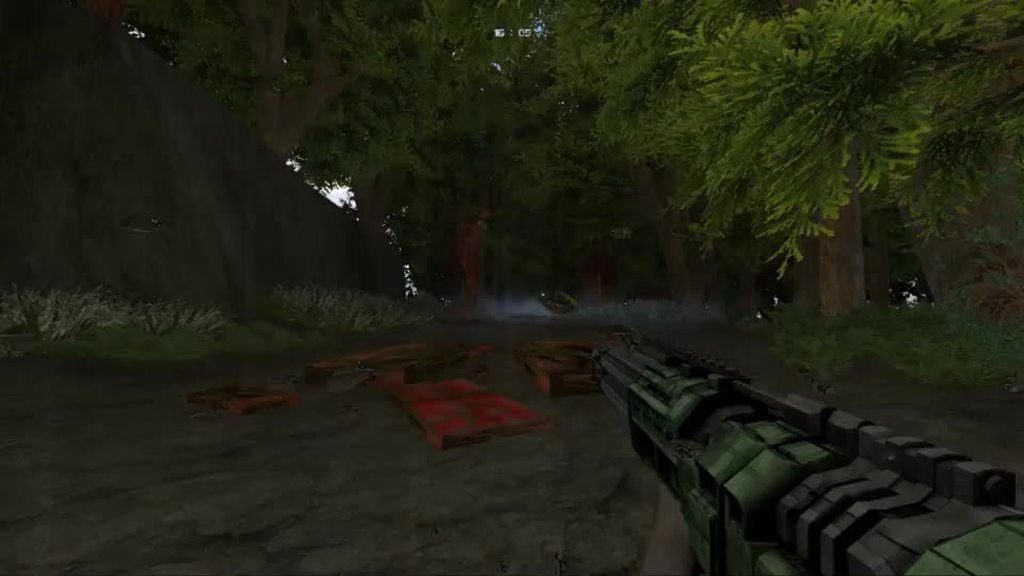 mystic chasm
still ammuses me thats in gzdoom
spring creek
yeah, something like that.
mystic chasm
that weatherfx zip tells you how to use it...
and you can copy+paste everything in there to your own pk3, the autor even gives permission
spring creek
Would I use SLADE?
mystic chasm
yeah open it in slade
light prism
im at work so no real help here
mystic chasm
if you look at the included maps it also shows you how to place the new mapspots
spring creek
I could never get the included maps to work (Nevermind, got it working)
light prism
honestly theres no way to do rain that isnt overkill/laggy
spring creek
Using the example map, I got it working
I guess on to my next question.
So I know how to do 3D Floors
how can I do multiple 3D Floors on top of one another?
Kind of like an apartment
or hotel
light prism
yes.
just make another control sector with the same actual sector tagged
or in UDMF, you can apply multiple tags to a sector.
haughty flower
My ever first normal map i do
For vanilla Doom, so i recommend playing it on Chocolate or Crispy Doom
light prism
im going to pacifist run
 true lion
Is there a way to apply damage over time?
Say, each plasma glob that hits an enemy applies a stack of damage over time, and additional globs will add additional stacks, resulting in more damage over time?
spring creek
(Fixed the picture) 3D Floors aren't quite working, anyone know how to fix it?
haughty flower
Damn, I recorded an entire playthrough of your map but I don't think the demo saved for whatever reason. I can't find it in my folder. @haughty flower
That was really good. The part with the imps gets dull fast, though. The ending is also anti-climatic.
It seems you tried following Romero's rules?
After the Archviles and Barons teleported back to one of the first rooms, they blocked the door because there was a 'Block Monsters' linedef stopping them from getting in the room.
So that was anti-climatic too.
I love the atmosphere, the map looks good and simple, and plays well for the most part. I really hate the midi choice, I've heard that midi a million times before, and it's from Skulltag.
You should do an episode with this theme btw.
Oh thanks for playing it, rip demo
Yeah part of it was following romeros rules on design, and also making it a dark map with highlights used around
I have to rework the archviles bit, it seems it wasnt menacing enough, and the exit as well
There are many ways to make it so an enemy only teleports after you go through a section a couple of times. I think it'd be cool to have one of the Archviles and/or Barons to teleport right next to the player after he goes back to one of the rooms.
It's always cool.
Because you never expect that in a vanilla map.
I went through this section before, how did this enemy teleport in right now?
I used to ask myself that.
Sounds a little complicated to set up but sounds like a nice idea
Nah it's really easy.
Have the linedef that is supposed to open the door in the dummy sector so the monsters can teleport to 'Walk Repeatable' (WR), but also have a ceiling next to it lowered to the same level as the door
So when the door tries to open, it'll just stay in place
...unless the ceiling raises to the highest ceiling
then the door will be able to open 'normally'
looks like this to me.
You'll understand what I told you soon enough if you try to implement the idea.
Yes, i understand now, would try that when i get the chance and see if it works
Makes for some nice surprising encounter
Thanks
mystic chasm
@true lion Today at 11:01 AM Is there a way to apply damage over time? Say, each plasma glob that hits an enemy applies a stack of damage over time, and additional globs will add additional stacks, resulting in more damage over time?
There is a way to do practically anything you want with ZScript anymore, but if you are aiming for a multiplayer port (zandronum) you're stuck with ACS & DECORATE (for the time being) which are much more limiting
mystic chasm
That being said, I think you could make a projectile give a CustomInventory item to any monster it hits, then if the CustomInventory item has the +INVENTORY.AUTOACTIVATE flag set it could run a script in it's USE state, which would be called by the monster itself
then it's just a matter of writing an ACS script to count how many of the inventory items it has and deal damage
true lion
@mystic chasm Interesting. This helps a bunch, thanks!
mystic chasm
i was thinking some more about this
jast making a projectile also an inventory item
and using A_SpawnItemEx to fire it from a weapon
mystic chasm
and make it not pickable by players
true lion
Whereas if a damaging projectile did it, I could make chances to proc
I might be able to do that with the custom powerup as well, I guess?
I need to experiment with it a bit
mystic chasm
well the thing is, it seems to me very difficult to get the actor a projectile HITS
with DECORATE
which of course would be the actor you want to affect
true lion
Also making a stacking effect
mystic chasm
nah, that's all pretty easy in ACS
true lion
Guess I could just make a bunch of jumps based on inventory
short dock
How is it going? In a moment I pass the map. first I have to do some things in slade
short dock
haughty flower
You ought to tell for what Doom game your wad is and with what format or compatibility you tested it with. @short dock
Sigil.wad e5m1.png?
Nope. E1M1.
For Doom 1.
What's with the long elevator trip...?
Are monsters supposed to be teleporting in?
Honestly, that felt like a worse, easier version of a Sigil map.
The areas were very small and had little space to move, it was quite grindy to kill those Barons, and easy, so some rockets would maybe be nice.
You ought to try taller ceiling heights, to make rooms feel and look more grandiose. They don't have to be so small.
Sigil has pretty bad design so I wouldn't recommend looking at that as reference for what makes good maps.
 obsidian spade


 late spoke
I mean, I like Romero and what he's created, but @haughty flower is right, his map design does need a bit of work in terms of Sigil.
haughty flower
ok i played that map, most rooms feel dull since they connect very similar with little floor/height difference, they feel like corridors and have not much contrast in brightness
of course, outside areas that are decorative do have different lightning but i mean more in the sections you are in
yeh, some maps are good on sigil, others just dont do it
haughty flower
what are good hell themed maps you've seen in wads?
bold sage
what software is good to make midis
short dock
@haughty flower So it would be like the e5m1 but poor version xd
haughty flower
Yeah. Sorry.
mystic chasm
@bold sage
LMMS https://lmms.io/
Anvil Studio https://www.anvilstudio.com/
Aria Maestosa https://ariamaestosa.github.io/ariamaestosa/docs/index.html
bold sage
Thanks!
light prism
whats up nuggets
haughty flower
🌭
light prism
thats a hoot doog