#classic-doom-maps-mods
1 messages · Page 79 of 1
 prisma saddle
PBR lumpy Cacodemon.
 haughty flower
I'm getting big cpu spikes in gzdoom 3.3.0 when playing doom rpg. doesn't happen with 3.2.5. I think it's related HudMessages. Anybody else noticed odd performance with their games?
 light prism
hmmm
well my pacman mod is entirely hudmessages and im not getting any noticeable drops
 real hatch
was that caco made in sculptgl or something
light prism
 wary zealot
Hm, is that bumpmaps or normalmaps? I don't know the difference between the two. Looks neat, anyways!
prisma saddle
@wary zealot Bump maps are a greyscale image that stores height information, while Normal maps are full colour and store angle information instead.
As a result, there's no actual height data stored in a normal map.
It just fakes it with angles and such.
That's sorta the basic gist of the differences between bump maps and height maps,
 timber bridge
jeez, this floor looks fucking nice, forget the demons i'm staring at this
 remote coral
what's specular map then?
 shadow bone
Specular and PBR are separate rendering methods.
Specular mapping is the older, easier version
PBR is the more modern and realistic but harder to pull off version.
 modern mason
I could listen to a class on this all day
shadow bone

This course provides a brief introduction to the physics and mathematics of shading. Speakers from film and game studios share examples of how physically bas...
modern mason
T h a n k y o u
 hexed sky
timber bridge
hexed sky
timber bridge
those are some nice pellets
 lavish hollow
how exactly does the ammo work
timber bridge
you just throw em and when they go fast enough they hurt
lavish hollow
box of likely hundreds of individual pellets
ammo: 60
take an entire handful of them and throw them
ammo: 59
wot
timber bridge
MAGIC
lavish hollow
how does one MEASURE A HANDFUL
 surreal meteor
@real hatch yes my downy caco was made in sculpt gl
I have a wad and a shit map with him in it if you want
real hatch
i personally think that smedis2's sculptgl caco was better, but probably because that was a very shitposty wad
surreal meteor
thanks
real hatch
but yeah yours does have much more detail put into it
this is smedis's caco that he used in seancon.wad
timber bridge
pinacle of enemy design
real hatch
you probably saw seancon.wad played by joel
it was SEAN CONNERY GETS A WRENCH STUCK UP HIS ANAL HOLE: THE MOVIE: THE GAME
contrary to its name, it's not a terry wad
modern mason
I saw a streamer play that one and burst out laughing at just the title.
real hatch
yeah that was probably joel
modern mason
Bingo
surreal meteor
@real hatch i submitted 2 maps for the new contest and my brother subbed 1
real hatch
i submitted a map too
surreal meteor
1 is a jokewad that probably wont get played tho
real hatch
it's been over a month since the contest ended
real hatch
one of my friends was telling me to submit a terry wad
surreal meteor
My two are called "Autismus wrath" and "My First wad" and my brothers is "an uac adventures"
real hatch
but i wanted to make something serious for once
surreal meteor
lol
he has people test them before he plays them though i thinkg
think*
so my joke wad probably isnt going to be played because of "graphic nudity"
real hatch
i'll keep my terry stuff out of this discord, don't worry
real hatch
i bet there's gonna be a terrible joke wad filled with FLEENTSTONES EXPAND DONG GRAND DAD HET (nyet)
modern mason
I had an idea for a wad but I didn't finish it in time.
It was styled similar to that one teleporter level in the first Doom
surreal meteor
@modern mason put it in chat?
modern mason
Oh, I don't have it anymore. That wad is looong gone
light prism
i wonder if hud models can be affected by pbr
light prism
prisma saddle
Maybe, maybe. I'm more interested in sprites being affected by PBR though.
haughty flower
Delicious.
prisma saddle
Pretty.
hexed sky
shiny
 vivid slate
yummy
prisma saddle
Now I want to see Cubemaps in GZDooM.
light prism
well there is primitive environment mapping already
prisma saddle
Does it affect the PBR stuff?
light prism
no, only mirrors i think
hexed sky
I suggested cubemaps long before PBR was a thing, maybe it's time to suggest it again
wary zealot
this reminds me of something, though.
Gzdoom has all of these crazy (for doom sourceport standards) graphical effects. Everything from normalmapping, bloom, lens flare, to ugly texture filters and... Well, whatever tonemaps are.
AND YET.
We don't have support for proper decals on ceilings and floors!
Just flatsprites! Or flat models, if you're a weirdo that hates optimization.
It really doesn't make sense to me, seriously.
We have the aforementioned stuff, and 3d models, and fake voxels, and dynamic lights with DYNAMIC SHADOWS (through shadowmaps). But, somehow, we can't put a decal on a floor or ceiling. Meaning you'll have to substitute it with a flat sprite, and if that flat sprite is big enough that it goes off an edge, welp, you're fucked then. It won't cut itself off or even wrap around the edge, like a decal.
prisma saddle
There's plenty of things that GZDooM doesn't have that it probably should.
Though, implementing them properly would sacrifice DooM compatibility.
hexed sky
flatsprites have broken depth sorting though
also
the shadowmaps are 1d
meaning they just get cast on a circular area around the light
and ignore height differences and stuff
they're not even aware of the height of closed doors, so lights will just go through them still
prisma saddle
Shadowmaps also can't effect 3D floors, though that's because 3D floors aren't really treated by the engine as proper GEO I guess.
hexed sky
no, it's because shadowmaps only care about lines that are one-sided
prisma saddle
Ah.
shadow bone
I have faith that dpJesus will grace us with 3D shadowmaps someday soon
 vocal crypt
who
shadow bone
dpJudas, one of the programmers working on the graphical side of things lately
vocal crypt
oh.
 golden drum
Fuckin' better be. /s
surreal meteor
"Tf when nobody's posting beginner WADs to criticise"
golden drum
bruh twas a joke
surreal meteor
ik lol
thats my brothers btw
play it nibba
he wants to know what you thinlk
he wants your approval
golden drum
so this might be a weird question
but how long does it take for your brother to beat this map?
and how many attempts?
@surreal meteor
surreal meteor
usually about 10 minutes and 2-3 tries
golden drum
without quicksaves?
surreal meteor
yea
golden drum
tf
surreal meteor
and about 40 hours at the end
golden drum
ah
surreal meteor
ill put video on YT of him beating it
golden drum
with the horde of cyber demons?
golden drum
but he prolly has a strategy where he makes sure he always have an invuln sphere right?
surreal meteor
yeah there are 5 invulns around the end
he knows where they are lol
how many secrets did you get anyway lol theyre almost mandatory
golden drum
back
finished
uhhhh I forgot to look
kek
I found 9% I think
The bloody room in the lab with the megasphere
but yeah imo he should just put a few savage bosses in the last blood pit place and like one invuln
then instead of either finding the invulns and holding left click with bfg win or not finding them and facing literally impossible odds, it should just be a regular boss battle
with the enemy spam it's either so easy it's boring or so hard it's anger-enducing
also the teleport thing at the end is just annoying
but really he doesn't need 500 enemies in one room to make an interesting map
it would be funner if it wasn't reliant on invulns
the map leading up to that is pretty good tho
I like the maze
(the toxic waste sewers)
I mean it's not great but it's enjoyable.
I think maybe cut down on the number of hitscan enemies in the room with the portal
then it's possible to avoid damage
with hitscan enemies the name of the game is line of sight and there isn't much cover to play that game well
but yeah he can make a savage map fine, Team TNT did it in plutonia, but just make sure the players is adequately armed for these enconters instead of forcing the player to restart and restart to find the items
like pretty much make the bare minimum easy to find but everything else a secret
tho in this case the bare minimum includes megaspheres and invulns
I think just in general make it so the player doesn't have to RELY on invulns and piles of megaspheres
surreal meteor
I was going for big battle at end, demons versus human type deal but did not know how to change former humans to friendly. Next map I am making is going to be different. this was a learning experience for me. This was submitted for the current DOOM map contest hosted by vargskelethor. -deadzombie935
golden drum
oh ye I did something similar one time
one sec
he's using gzdoom buldier right?
Show him this
anyway IMO the whole 500 monster thing is holding the map back from it's potential
If he wanted he could also script up a sequence where you fight waves of bosses and are re-equipped before every boss
have the level crumbling away and items and bosses teleporting in
and after the last boss the floor with the switch crumbles in a way that you can go up or something
if he wants to have a big boss battle
idk I've been playing too much half-life kek
anyway imma go eat
surreal meteor
that is what i wanted to do but neither me or my brother know scripting. -deadzombie935
golden drum
Search some tutorials, there are some good ones on youtube
 unkempt wadi
yknow he's not wrong
light prism
where the weed at @unkempt wadi
unkempt wadi
not here
light prism
lame
 zinc egret
Totally random messages
haughty flower
is this good for a beginner script? (i started like 10 mins ago)
light prism
sure
you might want to look into tabbing though
like for every bracketed section, tab one inward, its just easier to read
that speed setting is going to go wrong once the script is run more than once though
since you're using the current speed in the equation
if you want your player to always be at 60% of normal speed it might be better to make a playerclass with a set movespeed
light prism
That's what I mean, make a player class in DECORATE that sets the speed to an absolute value, rather than setting it via script
haughty flower
will do :D
also, i think i know what you mean would break
essentially, rerunning the script would literally add on to the speed decrease, essentially becoming useless
 vernal topaz
anotak posted in his Doombuilder X thread a disclaimer saying that there are some doom programs that collect information from your computer including your IP address and computer hardware. Danfun asked about it but no answer.
Does anyone know what the fuck he's talking about?
 past cradle
gzdoom has a hardware surveyor thing that is implemented in the latest release
haughty flower
doom programs? does he mean wads or fakey source ports?
past cradle
it's silly that i need to do this, but another major doom related program is planning to implement some code that will report the user's IP address and hardware information to the owners of that project. their intentions seem good. however, i believe that this is wrong, regardless of intent. taking into account the date they seem to be referring to gzdoom
there was a big ruckus about it when it was revealed
it eventually lead to it being opt-in in the final release
vernal topaz
where? On zdoom forums?
past cradle
yea
vernal topaz
I've been thinking about updating GZDoom builder recently too
glad i opted out of the auto-update thing
vernal topaz
Is there a thread I can read that discusses it in more detail?
I'm looking at this thread but i cant find anyone is talking about it: https://forum.zdoom.org/viewtopic.php?f=44&t=54957&start=750
Discussion about ZDoom
where anyone is*
oh wait you said GZDoom, I thought you said GZDoom builder
GZDoombuilder doesn't collect your IP address or hardware information or anything right?
past cradle
you're welcome 😄
haughty flower
is ok?
50% normal speed, 200 health at the beginning, but can only have a maximum of 175 if damaged, disability to run of health is below 70, its got a rocket launcher with 8 ammo and a shotgun with 20 ammo
i designed it as a tank type of class
OOOOO
i will change amount of ammo too
vernal topaz
Idk what you're doing exactly, but 200 health seems low for a tank. For reference, a pinky demon has 150 health and a revenant has 300
haughty flower
i should make the start health 350 and max health 300
i also have to modify the hud now to display the new ammo in place of the old one
lavish hollow
tank
same amount of health as a pile of boners
light prism
@vernal topaz you should update gzdb.
vernal topaz
probs
i dont think i updated since maxed bailed
has the texture viewer gotten better?
texture browser*
light prism
everything has got better
vernal topaz
ok good. because my version still shows me the STEP1 and STEP2 flats when I want to pick the STEP1 and STEP2 textures
even when im mapping in standard Doom 2 format
light prism
the category browser lets you pick what type
vernal topaz
Also when the browser comes up, I used to just be able to start typing the name of the texture and it would start filtering all the textures
light prism
yeah, that works
vernal topaz
like I would type STAR and and all the startans would come up, but I have to click on the search field first before it does anything
and that takes too long :p
 sudden umbra
I finished the 0th installment of Prime DOOM
At least, I think it's ready for playtesting.
It's only 18 KB, so I'm just going to post it here
The DOOM 2 IWAD is needed to play this
light prism
iwad, youwad, we all wad for doom2.wad
light prism
you kiss your mother on the mouth
vocal crypt
The lower one.
 livid hearth
Hey, I am trying to figure out how to shift the perspective to over the shoulder cameras, does anyone have an idea on how one might start to go about that?
light prism
@livid hearth there is 'chasecam' in zdoom, but to do over the shoulder perspective you would really need to create some new sprites, because regardless of the angle, the marine sprites will always look the same
some people have done it by having the player sprites as a 'weapon'
livid hearth
I know
I know that people have fake 3rd person perspective
But I would like to have true over the shoulder
light prism
well the other option is to have a 3d model player and do some trigonometry using an offset point around the shoulder area
livid hearth
Mhmm
light prism
so do that
livid hearth
Hmm chasecam options is a thing
I wonder if there is a way to manipulate those via scripting
 inner fulcrum
Forgot to put more secrets on this map. Anyway, something I've did back in 2013, but abandoned sometime later. I've gotten back back to it
 dusk terrace
are language.enu files broken or something because the text isnt changed at all
sudden umbra
I've completed the first map for Prime DOOM 1
But I feel like there's something missing
Would anybody like to playtest it?
surreal meteor
Hey if i wanted to use a different sky texture via a MAPINFO lump what would the syntax be?
i think
sky1 SKY3 right
something like that
light prism
@sudden umbra you never linked yoru wad
surreal meteor
@light prism I get "Script error, "Wyatts 2nd map.wad:MAPINFO" line 1:
sky1: Unknown top level keyword
light prism
all definition lumps go in the root of a pk3 or outside of any markers within a wad
vernal topaz
here's a question you might know the answer to TMC, since i dont really know a whole lot about ZDoom
surreal meteor
My map info lump keeps getting turned into the map itseld
vernal topaz
^ actually this problem seems more immediate
light prism
i have to go to work in like 8 minutes
so ask
@surreal meteor , screenshot your lumps
vernal topaz
suppose im a vanilla mapper that knows people are going to play my maps in GZDoom
If i were to put a mapinfo lump in my wad
what should i put in there to make sure people don't break any rules with zdoomisms
like jumping, crouching, etc.
thats complicated though, you gotta get to work. I'll remind you another time
light prism
so you want it to play vanilla style under gzdoom?
vernal topaz
yeah jumping and crouching are one thing
I think ive heard you can block gameplay mods too (though that sounds a little too strict)
light prism
NoJump, NoCrouch, NoFreelook
surreal meteor
light prism
blocking gameplay mods? I think the only way you can do that is via scripting, and that is technically a dick move
vernal topaz
oh ok
surreal meteor
theres spaces now
 red peak
No jump and no crouch can be circumvented
light prism
@surreal meteor - remove the MAP01 marker, move the MAPINFO underneath ENDMAP
remove the MAP01 marker that is 0 byttes
red peak
with sv_allowcrouch 1 and sv_allowjump 1
vernal topaz
Maddog: the lump order of the maps are important for running the map, because mapinfo is between all those other lumps, its gonna screw up the map
light prism
like I said, definition lumps have to exist outside of any markers
the marker range there starts at MAP01 and ends at ENDMAP
vernal topaz
you're gonna want to put MAPINFO after the ENDMAP lump
surreal meteor
It runs now. Thanks for the help guys!
vernal topaz
Tootsybowl: good point, thats ok though. I'm ok with people entering a command in order to cheat
light prism
worktime
 ripe pumice
I'm new to doom programming in general, and i will need help. How do I load a MAP wad I made to test it out
light prism
wat
surreal meteor
@unique fern you're mom gay
 unique fern
No you.
light prism
take your bullshit elsewhere plox
 languid crypt
QQ: in GZDoom editor, is it possible to use doom/doom 2 enemies in strife? like to import them into strife
light prism
you would need a wad file with all the sprites and decorate
also i dont know what doomed numbers strife actors use, they may or may not replace them
not to mention, strife also uses a different palette so the doom sprites would need to be converted to that palette or to RGB
there are probably projects out there that do this but i dont know what they're called
languid crypt
Ah I see, thanks
languid crypt
Are the strife enemies just reskins or are they a bit more complex? I know some are definitely unique such as the ceiling spiders but are there enemies that are just straight sprite swaps?
light prism
their code is entirely different
what you could do
is extract all the sprites from doom, convert them to rgb format and plonk them in a wad
if you're running strife through g/zdoom, thats all that should be necessary, from there you can 'summon shotgunguy' or whatever and it should work
if you want to REPLACE the enemies in strife, that's a different story
languid crypt
I wouldn't say replace I'd say have both in the same wad tbh.
Would need to take some code and mush it into strife I suppose
light prism
actually no
the native code for all games is always available
like in doom you can do 'summon barrel' and it will summon heretics barrel, you just wont see it because the graphics are unavailable
so all you need are the sprites and audio
 cerulean frigate
Can someone explain to me what exactly brightmaps are supposed to do?
I understand normal and spec maps
light prism
they are greyscale images that represent a level of brightness applied to the sprite, relative to its current brightness
where black is 'no change' and white is 'fully lit'
cerulean frigate
What is it useful for then?
cerulean frigate
I would use an emission map for that
light prism
errr do we have those?
cerulean frigate
Let me check
light prism
i dont think so
cerulean frigate
I thought I saw it mentioned somewhere
light prism
the only way to emit light is via dynamic lights
cerulean frigate
I'm still playing around with the new PBR system
light prism
oh
if you want to incorporate a brightmap into pbr textures its kind of a pain
you have to have transparent areas on all other maps where you want the brightmap to show
otherwise its effect will be massively diminished by the other layers
cerulean frigate
I can't find mention of the emission map, so I guess I was thinking of something else
And thanks for letting me know
I'll keep that in mind
 unreal oyster
bright maps are basically the same as emission maps, just unlike in an engine like Unity, they don't really act as a light source
well actually, they're like an emission map in Unity with Global Illumination set to None
light prism
Global Illuminati
cerulean frigate
Of course
light prism
oh right, i was going to check if its possible to use the warp effect on a normal map
heeeeh
unreal oyster
also, TMC, brightmaps aren't necessarily greyscale, they can be coloured
which tints the light
(according to the wiki anyhow)
cerulean frigate
Did they update the wiki on how to use the PBR system?
I've just been going off the zdoom forum page
unreal oyster
i don't think so, but there's this guide https://forum.zdoom.org/viewtopic.php?f=39&t=59473, unless that's what you're talking about when you see "zdoom forum page"
Discussion about ZDoom
cerulean frigate
Yes that is the one
light prism
btw
you have to define in that specific order
or you will get 'missing texture' errors
cerulean frigate
I'll remember that thanks
 abstract yarrow
Any masters of zdoom acs in doom builder 2 and/or gzdoom builder?
unreal oyster
i can probably help, what's the problem?
abstract yarrow
Not much for now, but just checking if i can rely on this server in the case of any problems
Thanks for the offer ^_^ also I'm still remembering what i forgot through online tutorials
cerulean frigate
Are the lights from things like torches and lamps in vanilla doom made into dynamic lights by default when you enable the option in gzdoom?
I saw it work on a model I made with PBR
I can't get it to show up on a texture I made
Edited I should say
light prism
i believe you need to autoload lights.pk3
oh, if its ticked in the options it should load, yes
cerulean frigate
It loads, just not with the textures I just made
light prism
as far as your texture is concerned, check the console for any 'missing' errors
cerulean frigate
No errors regarding the textures I want to load
I am trying to make PBR for the highres textures
I did everything I learned I was supposed to do the last time I tried to figure this out
cerulean frigate
gldefs just says #include "materials.gl"
cerulean frigate
The materialdefs says this
material texture sw1dirt.png {
brightmap brightmaps/sw1dirtbrt.png
}
material texture textures/sw1dirt.png {
normal normal/sw1dirtnrm.png
metallic metal/sw1dirtmetal.png
roughness rough/sw1dirtrough.png
ao ao/sw1dirtao.png
specularlevel 0.5
}
material texture textures/startan3.png {
normal normal/startan3nrm.png
metallic metal/startan3metal.png
roughness rough/startan3rough.png
ao ao/startan3ao.png
specularlevel 0.5
}
material texture textures/Sword_11_Base_Color.png {
normal normal/Sword_11_Normal.png
metallic metal/Sword_11_Metallic.png
roughness rough/Sword_11_Roughness.png
ao ao/Sword_11_ao.png
specularlevel 0.5
}
cerulean frigate
I copied it from the example files the forums gave, and made the needed edits
cerulean frigate
cerulean frigate
Where?
I make sure all paths match completely
Just from the materialdefs to the files
light prism
for whatever surface you want that texture to appear on
reference the full path/file name
cerulean frigate
I wonder if it's because I removed the regular texture from the hires folder and placed it in textures
light prism
i wonder if its because youre not following my instructions
cerulean frigate
You mean in the level editor when I assign the textures I need to use textures/startan3.png here
light prism
yes
cerulean frigate
Lol I've never been told instructions about the editor like that before
Wasn't sure what you meant
It worked
I might need to redo the path and let it grab the diffuse from the highres folder
Everything was stored in there for the hd mod
ripe pumice
Needs some help with some basic stuff for a wad im working on. its my first one so im very new to all this
abstract yarrow
I might be of help
ripe pumice
cool
okay, so i have two issure right ny im trying to figure out
first, how do i reduce the visibility/range the player can view, like reducing the max visual range
i need the map im makiing to be dark
abstract yarrow
Dark? You could just lower the brightness of the rooms
ripe pumice
Well, yeah, but i also need the floor to be visible, as the map is like an arena suspended above a lava pit
the player needs to be able to see the edge and the are they're walking on
abstract yarrow
Well you could make it so that the path is a low brightness area
While the lava one is a higher brightness area
ripe pumice
hmm. i think i can do that. okay
ripe pumice
which is?
abstract yarrow
But make sure not to have any lava areas connected directly to walls ad they would be lighten up
light prism
UDMF is a map format
lava will only lighten walls if you have gldefs 'glowing flats' defined
ripe pumice
Ok, that seems rather straight forward. my other question i am more confused about. idk if this chat is also for weapon sprites but i have a problem with one
light prism
this channel is for anything development related
ripe pumice
cool. I've made first person sprite replacements for the plasma gun and have successfully implemented them into the game. However, the sprite that is used to show you holding the gun and not shooting it doesnt go away when the gun fires, and hangs out under the firing animations. when you stop firing however, the sprite goes away, and only the sprite for the pause between bursts appears, as it should.
what exactly causes this, and houw do i fix it
light prism
you probably have some infinite frame lengths or states that haven't been terminated or routed with 'goto'
patse your decorate
(use pastebin or something)
ripe pumice
i dont know what that is
light prism
you dont know what decorate is?
light prism
wait, you just replaced the sprites? you didnt change any code?
ripe pumice
i only replaced the sprites, then i packaged the new sprites into an archive and then into a wad. I didn't change any acutal code
light prism
ok
that's pretty weird then
graphical behaviour shouldnt be changed
hmm, all the filenames are the exact same then?
i would imagine so
ripe pumice
yep
this is the tutorial i used

GameBanana
A Doom (DOOM) Tutorial in the Other/Misc category, submitted by ThatDoomGuy
idk if i did something wrong or formatted it wrong
light prism
i dont need to see the tutorial, but i might need to see the sprites
ripe pumice
sure thing. hang on
they're very low quality but eh
its a start
and if you need the actual wad
i can do that too
light prism
hrmmm
oh right
youre using the Flash state as the firing animation
Flash is an overlay graphic (hence why you see the ready underneath it)
thing with the plasma rifle is that it uses the same frame for its 'ready' AND its 'fire'
if you made code which removed the Flash state and replaced the frames in the Fire state, it would work, hopefully
hold on
light prism

removing the 'Flash' state entirely, there is no need for an overlay
so you'd want to copypaste that code into a DECORATE lump in your wad
ripe pumice
let me try that
light prism
also this affects how you get the weapon
you'll need to 'give WeirdHandWeapon' in console
because having been defined as a new actor its no longer a default on doomguy's weapon list
ripe pumice
So it's its own thing. okay. um, im very new at this, how do i create a decorate lump?
light prism
you're using SLADE?
ripe pumice
yes
light prism
i think its archive-new entry
that should be enough, just name it DECORATE and paste the stuff in there
ripe pumice
okay thats done, lets try it out
light prism
oh also make sure the decorate lump isn't inside the S_START/END markers
ripe pumice
yeah i was about to say it was undefined ill change that
"Script error, "Doom Daggers Base Build:ddplsreplacment.wad:DECORATE" line 1:
Expected '{' but got ':' instead."
light prism
oops
hold on
my syntax luls
change the top line
ACTOR WeirdHandWeapon : DoomWeapon replaces PlasmaRifle
ripe pumice
all right, it worked! thanks
light prism
now you can learn some decorate and make tweaks as necessary
ripe pumice
yeah this was a cool little lesson, and i have a point of reference for this now
i appreciate it
light prism
the zdoom wiki is filled with everything you need
ripe pumice
just bookmarked it
ripe pumice
is there a text lun that changes starting inventory or do i hjust have to make one with an assortment of take and give commands
light prism
its a bit complex
there are a few different methods
the most common is to create a new playerclass that has your weapon in its defined weapon list
another is to have Weapon.SlotNumber in your weapon
but you'd still need to modify the player class to have it in your starting inventory
ripe pumice
so my best bet is to create a new player class
let me see if i can use the zdoomw iki here
ripe pumice
the new player class page says hwo to make a class but doesnt delve into the specifics on changing that classes basicsd
ripe pumice
so just edit what i need from there, seems simple
does this all need to beunder the same decorate lump, like, can there only be one lump in the wad
light prism
welllll
yes and no
under a wad file you can only have 8 character long filenames
under a pk3 you can do stuff like
DECORATE.MyMonster1.txt
DECORATE.LightSources.txt
etc
and INSIDE a decorate file you can do #include "directory/extradecoratefile.txt"
pk3's are a lot better regarding file structure
ripe pumice
dont think im quite that bridge yet. or, idk
light prism
well yes, for now you can just dump everything into the one file
ripe pumice
and i i need to clean it up later or reorginize into a pk3, i can do that
light prism
yeah, its possible
btw a pk3 is just a zip file
with a specific file/directory structure
ripe pumice
what would i put in Player.StartItem"" to give cell ammo?
light prism
its just Cell i think
ripe pumice
yeah i found it, cell or cellbox
light prism
Cell is the base ammo type
ripe pumice
defining access is a bit tricky. other than this gameinfo strandm what do i need
GameInfo
{
PlayerClasses = "MyPlayer"
}
light prism
i think that works, there used to be an older method but that should work
ripe pumice
Script error, "Doom Daggers Base Build:ddplsreplacment.wad:DECORATE" line 4:
gameinfo does not define any animation frames
not quite sure what "animation" it is referring to
light prism
oh gameinfo is its own lump
ripe pumice
ok
ripe pumice
Do i make thta drom a new entry as well
light prism
yes
ripe pumice
Is there a way to pick the class in the menu or is it chosen automatically
light prism
if youve only listed one class, then obviously
if theres more than one it will auto show a menu like hexen does
ripe pumice
fair enough
come to think of it zdoom is based off the hexen code right? so that makes sense
light prism
sure
ripe pumice
basically what im trying to do is create a remake/fan recreation of Devil dagger sin the doom engine. so onehit point, one weapon, and infinite ammo (which i still need to figure out)
if its even possible
cerulean frigate
@light prism Thanks for the help
Pardon my being slow, I was told to modify a part of the editor I'd never touched before
Confused me for a minute
ripe pumice
@light prism thanks for the help, thats good for now
 covert plover
im having an issue with the sky textures in zandronum
it looks fine in gzdoom but its all fucked up in zandronum
light prism
right side is gzdoom?
er zandro?
are you running in software rendering mode in zandro per chance?
light prism
oh i see, the offset is all messed up
surreal meteor
hard drive just crapped out on itself and i didnt have any .wad backups... 😦
light prism
aw
has happened to me in the past too
thats why i keep all my bigger projects on dropbox/cloud storage
haughty flower
@covert plover Is it opengl rendered?
ripe pumice
im not quite tehnical with this stuff but ill try to help how i can
may i see the wad?
dusk terrace
in what way see
ripe pumice
like put it to discord so i can open it in slade
actually
where exactly is the error occuring in the wad? in a text lump called language?
dusk terrace
yes
im just trying to define obituary strings in it
after i added some more it just started doing this
ripe pumice
and are you retreving the obituary in decorate
ripe pumice
Like I said im not very technical with this stuff so im using the ZDoom wiki and what I know. It says on the Language section that strings defined in language can be retreived, or taken from for use i suppose, in decorate
It says that the obituary itself is defined in the actor's code in decorate,though I assume that's not what your're trying to do. It sounds like your're trying to create an obituary seperately.
light prism
you've probably just forgotten a ; terminator at the end of one of your definitions
light prism
how are my lovely little devverkins doing today
timber bridge
dats a nice rock
hexed sky
it's very rocky
timber bridge
100% rock yes
light prism
just experimenting with blender stuff
trying to find the best way to make a repeating displacement map
light prism
that screenshot one i had to touch up with photoshop offset->clone
having some issues with more pronounced crackles
how do repeatses
vernal topaz
hmmmmm
light prism
haughty flower
These flat textures look like 3d
unreal oyster
yep, that's the point of a normal map 😉
timber bridge
it looks cool and good
haughty flower
Is this gzdoom?
red peak
+1 graphics
shadow bone
@haughty flower Yes, GZDoom
haughty flower
How do you assign these normal maps in gzdoom builder or slade?
shadow bone
Via the GLDEFs lump, or putting them in the /materials folder of your PK3
Also, this is cool as hell (not mine) https://streamable.com/5z0f7
 red peak
We Source engine now
haughty flower
Does Zandronum support it?
cerulean frigate
Ok so I had to set the texture in the map editor to the path for the diffuse texture to get it to show up with my PBR mats
I am trying to see if I can mod one of the hd texture packs to use PBR
How can I set it to use the right texture without having to go into the editor and set a unique path for each and every single assigned texture?
light prism
you can use the auto/ folders as long as the texture has a short name
of course doing this means you cant modify the spec/gloss values
cerulean frigate
Alright ty
light prism
whatever you're typing the answer is probably no
unique fern
@theMisterCat @golden drum I believe I have fixed most issues on my map now. Added some new lighting and redid the big monster battle at the end of the map. I changed a few enemies locations and added some in different areas. was going to put it on here but map size is to big.
golden drum
oh ye just upload it to mega or soemthing
light prism
anything other than mega
golden drum
whys that?
unique fern
I have to delete some of the custom monster files that I am not using.
light prism
iunno i dont like mega
trying to force its service on me
with its weird direct downloader thing as backup
unique fern
light prism
if it was 'An United Aerospace Corporation Adventure' thats fine
actually even then no
the same hard Y
fuckin' english
uhhh i think you need to move your player start to the actual map start
golden drum
I'm on minecraft. I'm in the late game. Not sure what to do now.
Only one option.
Giant iron dick statue!
light prism
high on minecraft
golden drum
so the player start is screwed up?
light prism
i think so
surreal meteor
@unique fern your map is awful.
golden drum
Yeah the player start's broken @unique fern
light prism
so youre saying the player is supposed to pistol start with strong enemies around him
in a dark area that is not the original spawn from this map
unique fern
Player start is now fixed, and now has a more suitable name.
unique fern
The ending is not what i had in mind. My little brother(Maddog McTannon) helped make the end for the 2018 map contest.
I had envisioned a fake good ending. The player is teleported to earth. Where after roaming around for a couple seconds you find a mysterious button. After pressing the button all the walls and buildings slide down to show a twisted hellish city.
Then after seeing a bunch of cacodemons flying towards you the game ends.
red peak
I'm waiting for someone to remake the entirety of Half-Life 1 within GzDoom
surreal meteor
@unique fern thats very stupid. you're stupid.
unique fern
@theMisterCat how does one make friendly marine NPCs stay still and defend a certain spot on a map? I have ten of them and want them all to stay in the same place but not move from that one spot.
golden drum
@unique fern It should be the stand still option in your thing settings
unique fern
I have that selected for all ten of them. and some of them still end up moving.
golden drum
if they're on a raised platform or something, you could just make the lines impassible
unique fern
They were on the no platforms and the floor is barely raised higher than the rest of the map. I am resorting to making boxes around each of them and then making the lines impassible.
light prism
zdoom wiki on stand still flag:
'It is used to prevent inactive monsters from walking around without having something to attack.'
golden drum
Fuck it. Time to get back into mapping
light prism
you could make your own 'standstillmarine' that has no A_Chase
or rather, uses the flag in A_Chase that prevents actually moving
light prism
@unique fern - https://zdoom.org/wiki/A_Chase
you want A_Chase with the flag 'CHF_DONTMOVE'
this means he can still enter his attack states but won't actually move to chase a target
unique fern
this is going to be fun doing this scripting.
light prism
well really all you need to do is copy an existing definition of ScriptedMarine and modify the one line that says A_Chase
surreal meteor
but now how do you make the marines attack any demon that comes into their fov?
light prism
if they are +FRIENDLY then as long as they are A_Look'ing they should get targets
A_Look in their Spawn state
cerulean frigate
Ok so all my mats are named correctly, in the right folders, the materials.gl defines all of them right, and I set the diffuse texture to the right path in my test map in gzdoom builder
The PBR mats still won't show up
I want to figure out the problem, but I am also afraid the answer will make me feel like an idiot
vernal topaz
dude we're all an idiot at something
cerulean frigate
Yes but I feel like I am being an idiot at this one particular thing for the fifth time in a row
vernal topaz
thats ok, but it would be better if I knew how to help you :X
cerulean frigate
No problem
I am still trying to figure out how to properly set up the PBR
The diffuse texture is showing up, but not the PBR effects
unreal oyster
might be a simple question, but do you actually have dynamic lights in the scene?
cerulean frigate
Yes I do
I am using the same map I used the last time I tested this out
And it was working
light prism
no errors in console?
cerulean frigate
None
light prism
all images referenced are 8bit RGB?
cerulean frigate
Let me double check that
I saved a new set of textures out from a different app this time
cerulean frigate
Yes they are 8bit
light prism
yeah
they need to all be RGB8
i'm at work so i cant look at the files directly but uhhhh
pastebin your gldefs
cerulean frigate
material texture textures/startan3.png {
normal normal/startan3nrm.png
metallic metal/startan3metal.png
roughness rough/startan3rough.png
ao ao/startan3ao.png
specularlevel 0.5
}
light prism
and you are referencing textures/startan3.png in your map?
not just 'startan3'?
brb smoke break
cerulean frigate
Yes I am
light prism
are you absolutely sure there are no errors
so they will be near the top
of the console
they dont show up on map load, they show up on game load
light prism
the error is something like 'texture 'blah' not found in texture 'blah''
the only other thing i can think is that a) youre not using dynamic lights near the textured wall or b) the normal map is either the wrong format or is extremely weak and unnoticeable
cerulean frigate
Ok I found one error, but it was only for the ambient occlusion map not being found
light prism
well without ao its not going to reflect light properly
cerulean frigate
If one texture isn't found does it mess up the loading of all the others?
light prism
yes
well you can live without a brightmap and a metalmap i think
but it wont work properly without the others
cerulean frigate
Something seriously isn't right, Slade keeps crashing when I click on the ao map
light prism
you might have accidentally reformatted it under slade
cerulean frigate
Ok now I see the problem
light prism
and now its trying to open as one thing but is actually another
cerulean frigate
Somehow the ao map was saved out as 16bit
The others were automatically exported as 8bit from the same app
cerulean frigate
It's gotten the job done for me so far
I knew Doom wouldn't read 16bit, but I didn't know it made Slade crash just from clicking on it
light prism
mm, i didnt think it would either
but i dont use slade except for sprite offsets nowadays
easier to just not have to launch any application to manage lumps
and just run your project from a folder
light prism
 true lion
Hey guys, quick question: in decorate, how would I stop a weapon from automatically switching when it is out of ammo? I'm using +WEAPON.NO_AUTO_SWITCH, but it doesn't seem to stop the weapon from swapping
light prism
you'd need WEAPON.AMMO_OPTIONAL and an extra check to prevent it from firing when fire button pressed
true lion
Alrighty, I'm making an A_Jumpifinventory check:
Fire:
PRXL A 0 bright A_JumpIfInventory("Proxy",1,7)
Goto Ready
PRXL A 0 bright A_PlaySound("Weapons/ProxFire")
PRXL A 0 A_Recoil(5)
PRXL B 4 bright A_FireCustomMissile("ProxProj", 0, 1, 0, 0)
PRXL B 5
PRXL A 24
PRXL A 1 A_ReFire
Goto Ready
light prism
there's A_JumpIfNoAmmo
light prism
I would suggest leaving at least 1 tic to prevent a potential infinite loop too
(i know its not technically infinite but the game may count it as runaway)
you could, say, jump to a new state that plays a 'click' sound
true lion
I'll give that a shot
Thanks for the help, btw. I've been away from the modding scene for about 5 years, still shaking off some of the rust.
Works perfectly. Much obliged.
light prism
congratulations
true lion
I need fire entities that extinguish once they hit a water texture or a swimmable sector. Is there anything in decorate that I can do to accomplish this?
shadow bone
ehhhhh.... not sure. I haven't touched ACS / DECORATE in a while
shadow bone
No prob. Good luck 👍
true lion
Although I might just say its some sort of awesome super future fire that can work underwater
light prism
A_JumpIf(waterlevel > 0, "UnderWaterState")
is probably more generalized than checking floor textures
 main lichen
what would be a good game engine that would run well on a bunch of shit, could handle NUTS 3 levels of shit on screen, and can handle open world stuff
thats not unity
fuck unity lol
 wet rover
if you want today levels of graphic fidelity, probably none
main lichen
performance is my main thing
hell if i have to use sprites for shit even thats fine as long as it can run well
wet rover
i can't think of anything off the top of my head
main lichen
oof
light prism
unreal oyster
Your description is too vague for me to be able to give an answer, you'll need to elaborate on "shit"
Is that non-moving static models
light prism
yeah atm
unreal oyster
Or enemies with basic AI
light prism
just messing with blenders tree generator
unreal oyster
Or enemies with complex AI
light prism
oh 😛
unreal oyster
If it's the latter, probably no engine can do that
light prism
i would hope one would optimize that shit
unreal oyster
I know that Unreal can handle lots and lots of static meshes via instancing
light prism
have anything with AI work from a simplified version if out of range, only have complex AI for active instances tracking the player, etc
have 'tiered resolution' for pathfinding
unreal oyster
https://m.youtube.com/watch?v=oMIbV2rQO4k like, here you can see tons of the same mesh being rendered fluidly, that's due to instancing (which the video is a tutorial on)

Download assets: http://cbr.sh/od53nz Learn how to render millions of polygons with Hierarchical Instanced Static Mesh in Unreal Engine 4. Optimize draw call...
By a ton, I mean 35000
All with different rotations, translations and scales - the caveat is, due to the way that's done, they are limited in functionality
Like, you couldn't use this to have 35000 individual enemies
But - thats not unity
https://youtu.be/yvcUKJ3WrGU
:)
 prisma saddle
One thing that's nice about UE4 is a fun fandangled thing called material instancing.
light prism
hexed sky
upscaling filters
light prism

stress test
dips to still above 50 in the heaviest psosible areas
in 1024 units range, the model is 6k poly w/ 512x1024 texture, 1024-2600 it's 1.6k w/ 256x512, 2600+ it's a sprite
unreal oyster
what exactly is "faux" about it, btw?
light prism
it's state controlled
ie decorate
would it be possible to create some kind of generalized decoration actor that you could inherit in zscript?
rather than having to create an a_jumpifcloser chain
for every decoration
unreal oyster
provided we're just talking about simple one-model decorations, it'd be very possible, yeah
more complex stuff like actors with anims would be trickier to create a nice interface for
light prism
i have done it
you just use a bunch of "####" A-Z A_JumpIf(condition, "ChangeBaseSpriteName")
for animated loops that can be changed
unreal oyster
yeah, notice that i said "nice interface" 😛
unreal oyster
in what way?
light prism
well, so it's just not.. doing anything unnecessary
i mean atm they have to act like basic monsters
A_Look for the player so they can target him, and A_JumpIfCloser
this does mean the effect would be broken with multiple players i guess
unreal oyster
well, this is gonna be a singleplayer only thing even in ZScript, it'd have to be engine side to get around that
unreal oyster
class LODLevel {
    static LODLevel create(double minDistance, SpriteID sprite) {
        LODLevel ret = new("LODLevel");
        ret.minDistance = minDistance;
        ret.sprite = sprite;
        return ret;
    }

    double minDistance;
    SpriteID sprite;
}

class LODActor : Actor {
    private Array<LODLevel> lodLevels;

    void addLODLevel(double minDistance, SpriteID sprite) {
        LODLevel newLevel = LODLevel.create(minDistance, sprite);
        if (lodLevels.size() == 0) {
            lodLevels.push(newLevel);
            return;
        }
        else {
            for (int i = 0; i < lodLevels.size(); i++) {
                if (lodLevels[i].minDistance > minDistance) {
                    lodLevels.insert(i, newLevel);
                    return;
                }
            }
            lodLevels.push(newLevel);
        }
    }

    override void tick() {
        double distanceToPlayer = distance3D(players[consoleplayer].mo);
        for (int i = lodLevels.size() - 1; i >= 0; i--) {
            if (lodLevels[i].minDistance < distanceToPlayer) {
                sprite = lodLevels[i].sprite;
                break;
            }
        }
        Super.tick();
    }
}

class LODTest : LODActor {
    override void postBeginPlay() {
        addLODLevel(0, getSpriteIndex("TROO"));
        addLODLevel(256, getSpriteIndex("SARG"));
        addLODLevel(128, getSpriteIndex("PLAY"));

        Super.postBeginPlay();
    }

    states {
    spawn:
        #### A 1;
        loop;
    }
}
@light prism that's how i'd do this "neatly" in ZScript
from line 43 onwards is my test class to show the API
note that for use in an actor that doesn't just use built in sprites, you'd need to do something like this:
class LODTest : LODActor {
    override void postBeginPlay() {
        addLODLevel(0, getSpriteIndex("LODH"));
        addLODLevel(128, getSpriteIndex("LODM"));
        addLODLevel(256, getSpriteIndex("LODL"));

        Super.postBeginPlay();
    }

    states {
    registerSprites:
        LODH A 0; LODM A 0; LODL A 0;
    spawn:
        #### A 1;
        loop;
    }
}
(specifically, the registerSprites state)
that's not a built in state or anything, it's just there because zdoom needs to "know" that the sprite exists for getSpriteIndex to work
it's a weird and pretty obscure detail but it needs to be done
also now that i think about it, i guess you could use this for more complex actors, provided you can fit all the necessary frames on the 26 (or a few more, with the extra characters) letters of the alphabet

just to show that it works, heh
dusk terrace
in what folder should i put flats in pk3 because i have the flats in the textures and flats folder at the same time and i have the pk3 in gzdoom builders resources and the flats do not pop up at all in the browse flats window
unreal oyster
if you're using a pk3, there's no reason to use flats anyway, just stick them all in textures
you can put textures on the floor in gzdoom
dusk terrace
but i have the texture in the textures folder and still it does not popup on the browse flats or whatever thing window
light prism
very nice gutawer
but its like 1am here so ill have to take a look tomorrow
at implementing
btw extreme stress test
dusk terrace
here
timber bridge
huh, so you could make a fake cyberdemon?
timber bridge
like, put ten cyberdemons, but when you come closer, april fools they're just zombiemens
unreal oyster
well yes but that's not really the point of this
light prism
a bit more complex than that, since the cyber and zombieman's frame names wouldnt all match up
you'd get a glitch ass cyberdemon unless you set it up specifically for that situation
unreal oyster
yeah, that's true as well
timber bridge
or hide monsters as health kits? like a serious sam trick? 🤔
light prism
the base example is purely for making LOD levels
for simple decorations, or anything that shares the same animation range over different sprite names
timber bridge
just put a friggin blue potion and it's actually a shotgun guy
unreal oyster
you'd probably want a system that takes all the players into account for that (i.e. finds the distance to the nearest player rather than just the host as my code does)
timber bridge
just thinking out loud, i don't know anything about making stuff in doom
unreal oyster
which is easy, but my code doesn't do that because it's intended for LOD stuff in singleplayer
light prism
i tried removing the pbr on medium level details but the lighting difference is starkly obvious
timber bridge
that would still be a devilish and hard to predict trap me thinks
light prism
it would be easier to just make a mob that has a spawn state of one monster but when it sees you the other states are another monster
which you could do by copypasta direct from the wiki
@unreal oyster , do you think you could extend it to accept multiple frame name remaps for each lod level?
in case an actor has more than 26 frames
unreal oyster
probably, but how would you say the interface for that should work
light prism
the same but just with an extra remapping definition under the LOD distance
oh right, but the state is "####"... hrm
can you use variables for states?
i mean, state frames
unreal oyster
i'm not quite sure i get what you mean, but i'm fairly sure the answer is no 😛
oh, and it's not "####", in ZScript you don't need the quotes 😛
dusk terrace
what about the textures or other flats
unreal oyster
i can't really help you with that without some screenshot of your pk3 or something
are you sure you're actually loading the pk3 as a resource file?
dusk terrace
yes
do i have to make some text file or something in the root that contains the flats or textures and all that
ill try defining it in TEXTURES lump maybe it will work
still does not work
just changed the name under the texture and does not show up in gzdoom builder but in game works
timber bridge
mmm, asphalt
 edgy glacier
currently working on a doom 2 map ill post the map when its half way done to get feedback
 royal wave
@dusk terrace Do you have the wad/pk3 properly loaded in as an asset GZDB can read from?
edgy glacier
I think so i will have to double check im using GZdoom builder to make the wad
edgy glacier
OK
how do i check cause i usually dont look to see if is loaded in as an assset
asset
all i can see is that i put it in doom 2 (hexen format)
light prism
oh it might be that by using that format you can't see/have access to full file name textures
so stuff inside a pk3/textures might not show
that's just a guess though
unique fern
@light prism @golden drum
you guys know what would be a good prop to put as a good starting room.
light prism
I'm at work
but I was just gonna say
I noticed last night with PBR
while making those trees
that PBR only works properly if the normals are facing the wrong way
on models
otherwise light looks as if it is shining on the 'inside' of surfaces
unique fern
or just something I can put that would be a good prop to look at after the Player starts? Want to put a spaceship like vehicle for the intro.
light prism
sorry man i cant look at your wad right now
unique fern
I understand.
light prism
@unreal oyster - sweet, I implemented your method, but I had to 'pre initialize' for MODELDEF to work properly, it needs a definitive sprite name otherwise it throws 'actor has no frames'
also linked it to distance cvars
unreal oyster
What do you mean by pre-initialise? Good that you got it working though
light prism
something about how models work, their definition won't apply properly unless the actors first frame on spawn is defined
like starting on #### won't work
or if the sprite referenced doesn't actually exist it will do the same
light prism
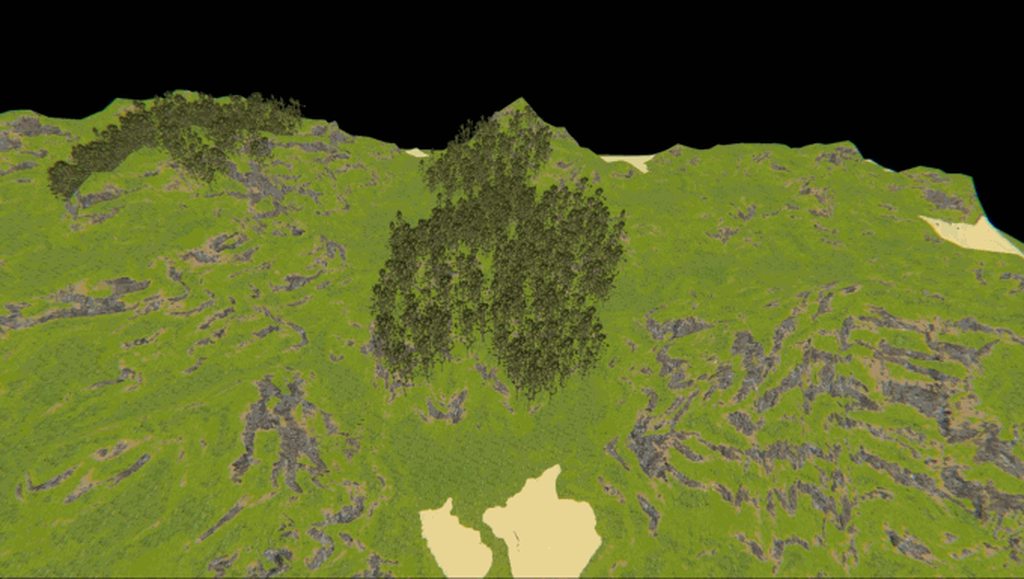 timber bridge
oof, trees!
hexed sky
LOD meshes in doom?
prisma saddle
Oooo, neat.
hexed sky
maybe you could make the meshes fade instead of pop up?
that's the only problem I see with this
light prism
mmm
i dont know if that would really work
fading models tends to result in them looking pretty weird
also each tree is a singular actor, you can't really blend frames
i think the best compromise is to make extra lod levels and have them look as close as possible to the previous
whereas my tree sprites are a bit too different, the popping is a bit more obvious
unreal oyster
    override void tick() {
        double distanceToPlayerSquared = distance3DSquared(players[consoleplayer].mo);
        for (int i = lodLevels.size() - 1; i >= 0; i--) {
            double minDistance = lodLevels[i].minDistance;
            if (minDistance * minDistance < distanceToPlayerSquared) {
                sprite = lodLevels[i].sprite;
                break;
            }
        }
        Super.tick();
    }
@light prism i realised that this should be a fair bit faster than what the code's doing currently, it saves on a square root for any actor
which, given the amount of trees there, could offer a substantial speedup