#classic-doom-maps-mods
1 messages · Page 51 of 1
 royal wave
{
inventory.pickupmessage "_"
inventory.icon "TNT1A0"
inventory.amount 1
inventory.maxamount 1
-INVENTORY.INVBAR
States
{
Spawn:
TNT1 A 6
loop
}
}``` vocal crypt
oh
well the rev thing works
except on like the last frame before going to the fire state, it goes down like it's deselected
same with the revving down part
royal wave
did you put the jump or goto like we told you?
vocal crypt
Goto Ready.RevUp+7
royal wave
you're telling it to jump over that state entirely
did you count the states, not frames, states
vocal crypt
oh it's counting in states then
royal wave
it's not # of lines, it's number of states you don't always have 1 state per line think about ABCD EF 1 that's 2 states in one line
vocal crypt
so +3 then
 haughty flower
so, how can I get started with modding?
vocal crypt
Delete system32
haughty flower
ok
royal wave
@haughty flower Find a tutorial on something simple to do and work yuor way up
royal wave
haughty flower
zdoom wiki
 warped rampart
You choose one of the formats, but you'll need to import from a base archive resource iirc
haughty flower
@warped rampart which format?
warped rampart
@haughty flower Are you using Doom textures or Strife textures?
haughty flower
Doom
warped rampart
Then leave it selected as "Doom (TEXTURE1 + PNAMES)"
haughty flower
Should I use zdoom or doom though
warped rampart
I think they both have the same textures
haughty flower
what's the difference between though
 weak lodge
strain's MAP18 music has good fucking music
haughty flower
it says PNames and then it just says textures
@warped rampart so how do I import custom textures now?
I have this but now what
warped rampart
Then save it
haughty flower
and it will just work?
 cinder moon
vocal crypt
cinder moon
vocal crypt
@royal wave sorry to ping you, but the revving thing does work, however it appears to display the rev up frames when not pressing the mouse button to well, fire.
royal wave
let me see your decorate
 trim falcon
what is revving ?
royal wave
spinup
vocal crypt
{
Weapon.AmmoType "Clip"
Weapon.AmmoGive 20
Weapon.AmmoUse 1
Inventory.PickupSound "misc/w_pkup"
Inventory.PickupMessage "Picked up a minigun!"
Obituary "%o was shredded by %k's minigun."
AttackSound "weapons/minigunfire"
States
{
Spawn:
MNGN A -1
Loop
Ready:
MNGG A 1 A_JumpIfInventory("MiniGunDummy",1,"Ready.RevUp")
Ready.RevUp:
MNGG A 1 A_WeaponReady
MNGG B 17
MNGG A 14
MNGG B 11
MNGG A 8
MNGG B 5
MNGG A 2
Goto Ready.RevUp+8
Deselect:
MNGG A 1 A_Lower
Loop
Select:
MNGG A 1 A_Raise
Loop
Fire:
MNGG A 0 A_GunFlash
MNGG A 1 A_FireBullets(5, 1, 1, 5)
MNGG B 1 A_FireBullets(5, 1, 1, 5)
MNGG B 0 A_ReFire
MNGG B 2
MNGG A 5
MNGG B 8
MNGG A 11
MNGG B 14
MNGG A 17
goto Ready
Flash:
MNGF A 3 BRIGHT A_Light1
MNGF B 3 BRIGHT A_Light0
Stop
}
}```ah you have a fallthrough
okay at your ready state
there's nothing at the end of it telling it where to go if the jump isn't true
you need to put a loop or goto at the end of it
if there's nothing to instruct it where to go, it just keeps going, which is known as fallthrough
vocal crypt
so I'll need to make a new state where there is no rev or somethin?
royal wave
no
change this: Ready: MNGG A 1 A_JumpIfInventory("MiniGunDummy",1,"Ready.RevUp") to Ready: MNGG A 1 A_JumpIfInventory("MiniGunDummy",1,"Ready.RevUp") loop
and you might want to make it an anonymous function so when pressing fire it'll spin up
vocal crypt
an anonymous function..?
royal wave
MNGG A 1 {
   A_JumpIfInventory("MiniGunDummy",1,"Ready.RevUp");
   A_WeaponReady;
}
loop```an anonymous function in decorate means multiple functions in one state
vocal crypt
Oh
royal wave
so instead of twelve billion TNT1 A 0's all over the place, it's a lot cleaner
vocal crypt
Invalid state parameter {```MNGG A 1 {
A_JumpIfInventory("MiniGunDummy",1,"Ready.RevUp")
A_WeaponReady;
}
loop```oh
wait
I forgot a ;
royal wave
yup, lol
royal wave
what version of GZDoom are you using?
royal wave
That's your problem then, I don't think it supports anonymous functions
vocal crypt
well fuk
royal wave
you can easily swap it out with a TNT1 A 0, no big deal
but you want that loop part at the end of it, and you sure as hell want a A_WeaponReady
Why Zand if I may ask?
vocal crypt
Look at the name of the pk3.
royal wave
Oh
vocal crypt
Script error, "DoomFortress2016.pk3:actors/weapons.txt" line 87:
Sprite names must be exactly 4 characters
MNGG A 1 A_JumpIfInventory ("MiniGunDummy",1,"Ready.RevUp");
TNT1 A 0 A_WeaponReady;
Loop```remove the semi-colons
vocal crypt
oh
royal wave
yeah if it's not an anon function, the semi-colons will break it
vocal crypt
oh
should I add a giveinventory code in the fire state?
because it fires with no revving up
or the ready state now I think about it
royal wave
you can easily copy the frames to the fire state
vocal crypt
see, I think I tried that
but it only shot two bullets
and then going through the revving frames
over
and over
because well
there's two a_firebullets
Monsieur Kevan?
royal wave
I'm thinking
There's a way to make it rev up and only loop the fire animation
Okay I think I got it
you're going to need three fire states
something along these lines:
hang on give me a sec
you will need to make a second dummy item, which will check if the player is still holding down the fire button
    MNGG A 0 A_JumpIfInventory ("MiniGunDummy",1,"Fire.Shoot")
    MNGG A 0 A_JumpIfInventory ("MiniGunIsShooting",1,"Fire.Shoot") //Intentional Fall Through
Fire.RevUp:
    MNGG A 1
    MNGG B 17
    MNGG A 14
    MNGG B 11
    MNGG A 8
    MNGG B 5
    MNGG A 2
    MNGG A 0 A_GiveInventory("MiniGunIsShooting", 1) //Intentional Fall Through
Fire.Shoot:
    MNGG A 0 A_GunFlash
    MNGG A 1 A_FireBullets(5, 1, 1, 5)
    MNGG B 1 A_FireBullets(5, 1, 1, 5)
    MNGG B 0 A_ReFire
    MNGG B 0 A_TakeInventory("MiniGunIsShooting", 1)
    MNGG B 2
    MNGG A 5
    MNGG B 8
    MNGG A 11
    MNGG B 14
    MNGG A 17
Goto Ready```@vocal crypt
vocal crypt
I see.
royal wave
that should produce what you're looking for
Oh uh mind the semi-colons, forgot to remove them
vocal crypt
is there any code to check if the player is holding the fire button or somethin?
royal wave
okay so see the A_Refire bit?
vocal crypt
mmhmm
royal wave
that's exactly what that does
vocal crypt
ah
royal wave
and since you gave the player that second dummy item
vocal crypt
so use A_ReFire in the MiniGunIsShooting dummy?
royal wave
MNGG A 0 A_JumpIfInventory ("MiniGunIsShooting",1,"Fire.Shoot") ```That bit there is what forces a jump when A_ReFire is called
the only way to get that item is to let the gun rev up, and the only way to lose it is to let go of the fire button
vocal crypt
ah
well apparently that stuff makes Zand crash
I don't mean the fatal error kind of crash
royal wave
fucking zand
vocal crypt
so what now?
well it works on GZDoom
...and it still only fires two bullets
you thinking again Kevan?
@royal wave I hate pinging you maee
*mate
wtf
"maee"
royal wave
yeah I'm here
sorry, you can ping me for stuff like this, I tend to forget things
I'm not sure how to accomplish this in zandronum
vocal crypt
either way, if it didn't crash in Zand, it still only fire two bullets
also, tbf Kevan, 3.0 is still either Alpha or Beta
royal wave
You should seriously avoid developing on an alpha/beta build
vocal crypt
well the non alpha-beta build doesn't have teh updated code for my achieveings or something.
royal wave
There's way too many one time features that G/ZDoom implemented that only existed on like 3 Dev build updates before being nixed
You'll probably find better look on a Zand forum/server. Lot of us here avoid using zand due to it's limitations
 unreal oyster
zandronum 3.0 isn't really like a gzdoom dev build, it's quite stable actually
it's also stagnating a shitton of course
i have my doubts that zand 3.0 will even exist at all in finished form
royal wave
that's still valid reason not to use it until everything is finalized
Zand devs should really scrap everything and just fucking adopt gzdoom and work in the net code from there
unreal oyster
i think there have been talks to do something like that, actually
royal wave
like it doesn't have to be merged in with the main branch, but the otherway around would work
unreal oyster
there has been some talk of implementing C/S into gzdoom
so we'll see how that goes
royal wave
or develop a .pk3 that runs a special .dll or SOMETHING
I will admit that I am not familiar with GZDoom or Zands source code
but I have yet to see a valid reason why they can't merge other than "The branches are too different."
Okay yes, that is a valid reason, but why has no one put in any effort to fix that?
unreal oyster
because nobody on either side is interested in putting in the work to do so
royal wave
Let's work on ZGZDoom :^)
vocal crypt
GZZDoom*
royal wave
GZandronum
vocal crypt
no no
unreal oyster
honestly, the easiest way to get proper MP in GZdoom at this point is just to say "fuck zandronum" and write new C/S code
vocal crypt
IIRC, GZDoom is just ZDoom with OpenGL(?) capabilities?
also IIRC, GZDoom does have multiplayer
royal wave
yup
vocal crypt
but it isn't the scheme of Zandronum
unreal oyster
it was that, until ZDoom died
vocal crypt
and if any custom mods are applied, bye bye syncing
royal wave
Which is why it won out between ZDoom because you can implement better effects and better efficiency with hardware rendering
unreal oyster
but now GZdoom is Zdoom with OpenGL + a ton of new features (most notably ZScript)
but yeah, merging Zandronum and GZdoom would not be as simple as it may sound, especially thanks to ZScript
unreal oyster
ZScript code is actually run using a VM, and that VM would have to be made to work with C/S networking
probably because of bloat
i guess it follows gzdoom's example that the base pk3 for the engine should really only contain things necessary to support the base iwads
(+ some extra things that need support for historical reasons, like the dogs, sparks, particle fountains, etc)
warped rampart
Export it as a PNG
haughty flower
@warped rampart how
I tried saving it as .png
and this happened
@warped rampart
unreal oyster
when you do that, you are exporting it as Doom GFX but saving it with png extension
there is a dedicated export to png button
haughty flower
Where that be
warped rampart
@haughty flower
haughty flower
Sorry I'm new and I should know about file corruption since I used to program (I'm probably just tired as all hell)
thanks
@warped rampart thanks
I can deal with That
warped rampart
You're better off Googling the title screen
warped rampart
You can get it off the wiki at its original resolution
warped rampart
@haughty flower Here
unreal oyster
depends, if it's for zdoom you don't really need to
haughty flower
its for zandronum
unreal oyster
yeah okay there's no need to then
haughty flower
okay
unreal oyster
just use it as a png
warped rampart
I myself prefer to because I like the Doom palette ¯_(ツ)_/¯
haughty flower
which is the first track?
warped rampart
Search D_MAP01, I think
haughty flower
thanks
unreal oyster
DoomWiki.org
 torn timber
I think the problems from earlier stem from not using the Doom Palette when converting

That dropdown menu on the bottom right is your friend
The Palette dropdown menu on the top of SLADE's GUI is for viewing all images in the viewer with a certain palette, by the way
torn timber
it tells it what palette to be converted to
Existing/Global will just end up being greyscale when you're converting to PNG
torn timber
by probably changing the offsets of the image so that it appears where it needs to
haughty flower
okk
haughty flower
thanks man it fixed it!
torn timber
If you look at the head sprites in DOOM.wad, you can see each one has a slight offset
to center them in I think what is a 35x31 box
haughty flower
cool
warped rampart
Just about any apart from m4a
haughty flower
ok
haughty flower
I want to have projectiles come out of my gun /shrug
trim falcon
A_FireCustomMissile
haughty flower
how do you edit the gun files?
 shadow bone
More generally, DECORATE overall: https://zdoom.org/wiki/DECORATE
I'd recommend ZScript but the documentation still leaves a lot to be desired if you're only starting out
warped rampart
Now that I think about it, I should actually add a drawback to the Margrave
It's literally a shotgun that pumps out more bullets while using 1 shell
haughty flower
@shadow bone so, I should delete the default weapons?
shadow bone
.... from where?
torn timber
you don't delete anything
shadow bone
Yes
shadow bone
All you should be doing is adding what you want to change.
torn timber
when you make a new mod, you're adding content to be loaded over top of Doom 2 or whatever IWAD you're using
shadow bone
For example, if you want to change the Shotgun, create a new actor that inherits from the original shotgun and change what you want.
torn timber
ACTOR SomeOtherShotgun : Shotgun replaces Shotgun {
shadow bone
Or something like this: StrongImp : DoomImp replaces DoomImp { Health 100 }
That creates an imp which basically copies and replaces the default DoomImp, but has 100 health.
shadow bone
It'd be even nicer if you used .pk3 files 😉
shadow bone
🤔 That doesn't make sense... weird
haughty flower
^
torn timber
well were you trying to reorganize what was essentially a copy of your Doom IWAD into pk3 format or something?
or starting fresh?
trim falcon
is it in DECORATE.txt ?
haughty flower
:?
warped rampart
DECORATE.txt is where your programming is
haughty flower
Oh
torn timber
If you want to separate your DECORATE code, you can do so by having a main DECORATE file in your mod that links to the other files by using #include "FilePathInQuotesHere.txt"
example:
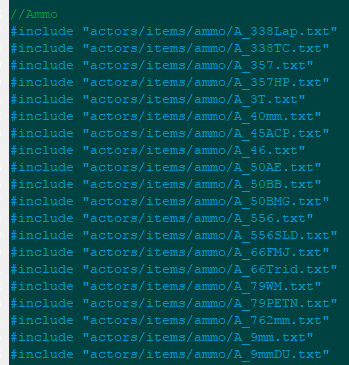
This would be in DECORATE.txt
vocal crypt
...or just have seperate txt files for your actors
torn timber
then all of those files would be loaded as DECORATE as well
vocal crypt
for weapons, classes, monsters
torn timber
that's exactly what I was explaining
torn timber
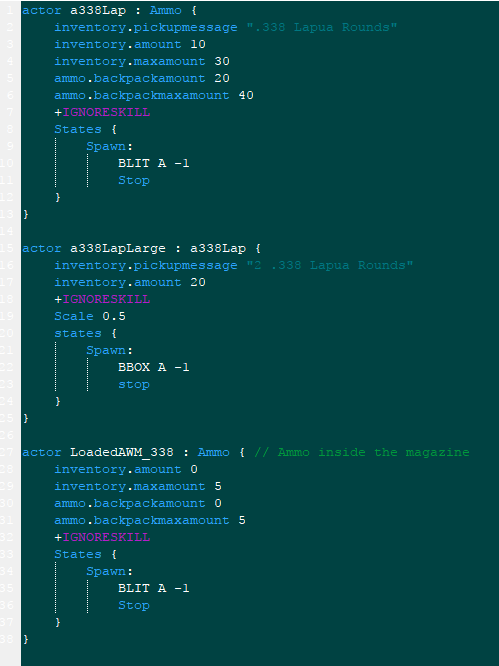
They're not individual actors in those files
when you have about 34 different types of ammo and all of their various pickups to look through, it's a lot faster to separate them
than have 1300 line file to scroll through
vocal crypt
why would I be fine with the latter though
not a question
or rather
it's a rhetorical one
torn timber
Who would be 😛
torn timber
You want to scroll through thousand line files and/or have to use the text search regularly?
vocal crypt
I scroll through hundreds with my DoomFortress mod
torn timber
Doesn't mean it's good practice to not sort stuff
torn timber
There's a certain need for breaking down the categories even more when all of my weapon code together would equal to exactly 10,174 lines altogether though
torn timber
The amount of organization someone sets up is all going to depend on the size of the mod that someone's working with. If they're just going to make a single weapon, then no, there's probably no need to have more than a single DECORATE file
haughty flower
Back
vocal crypt
ello mofo
haughty flower
;-;
@torn timber so do I put the whereabouts of custom textures in decorate aswell?
torn timber
textures are not handled by DECORATE
In WAD format:
Sprites should be located between S_START and S_END markers. SS_START and SS_END are usually used for user WAD files. Similarly flats are F_START and F_END (again FF_START and FF_END in user WAD files).

Patches are not required to have any markers. Some lump management utilities require P_START and P_END, but not ZDoom.

ZDoom adds TX_START and TX_END for textures, as well as HI_START and HI_END for scaled textures.```

In PK3 format based on usual folder setup:
```New textures go into the textures folder, flats in the flats folder, patches in the patches folder, and high res textures into the hires folder.```You can reference the Doom IWAD to see how wad format markers are done


here's an example of PK3
you'll have to generate a TEXTURES file in either format as well I believe

I believe that's done here if I remember right
the TEXTURES lump would eventually contain the list of all of your added textures
// on Thu Mar 20 22:10:07 2014

Texture FCSCRN01, 32, 32
{
    Patch FCSCRN01, 0, 0
}

// End of texture definitions
it'll look like this for that one texture in my screenshot above
if you're just overwriting Doom's textures though, I don't think you'll need that TEXTURES lump, you'd just need to have the sprite match the name of the one in Doom that you're trying to replace
Note that the textures being referenced here are for the textures used by the map's geometry
not the sprites for enemies
or other actors
in wad format those fall between the S_START and S_END markers or in pk3 format, they just go in the "sprites" folder
royal wave
How are flats treated differently than textures?
torn timber
they're treated differently in vanilla, not really important to make the distinction in ZDoom in most cases
flats would be for floors and ceilings, "textures" for sidedefs
royal wave
right
torn timber
also to note, if you end up running more than one mod that has conflicting texture names, the "flat" will have priority over a "texture" with the same name, so the flat will be the one that actually appears
torn timber
namespace
royal wave
hmm
haughty flower
@torn timber thanks for all this info!
Guess I'm moving to pk3!
Doom2 mods cant have a episode selection right?
vocal crypt
    MNGG A 0 A_JumpIfInventory ("MiniGunDummy",1,"Fire.Shoot")
    MNGG A 0 A_JumpIfInventory ("MiniGunIsShooting",1,"Fire.Shoot") //Intentional Fall Through
Fire.RevUp:
    MNGG A 1
    MNGG B 17
    MNGG A 14
    MNGG B 11
    MNGG A 8
    MNGG B 5
    MNGG A 2
    MNGG A 0 A_GiveInventory("MiniGunIsShooting", 1) //Intentional Fall Through
Fire.Shoot:
    MNGG A 0 A_GunFlash
    MNGG A 1 A_FireBullets(5, 1, 1, 5)
    MNGG B 1 A_FireBullets(5, 1, 1, 5)
    MNGG B 0 A_ReFire
    MNGG B 0 A_TakeInventory("MiniGunIsShooting", 1)
    MNGG B 2
    MNGG A 5
    MNGG B 8
    MNGG A 11
    MNGG B 14
    MNGG A 17
    Goto Ready
goto Ready``` @shadow bonekevin did the fire.revup and that stuff, I'll not take credit for that or somethin...
kinda sounds like I stole it when you think about it
vocal crypt
lol
warped rampart
Ban squared
shadow bone
So A_Refire is probably jumping back to the Fire: state. Look on the wiki for how a Hold:state works
That's probably what you want
haughty flower
@shadow bone any updates on your receiver mod yet? i'd love to see something like picking up magazines so i can finally play it with oblige or something
😄
shadow bone
It's getting there, slowly-but-surely. You can reload existing mags as long as you're picking up "clip" (bullets) ammo, if it helps
At most you'll be able to carry six mags, so get used to refilling the ones you have lol
shadow bone
This links to the latest build of the master branch. Be warned, here be bugs: https://github.com/caligari87/tranquility/archive/master.zip
Mag reloading is a separate "weapon" on the 2 slot with the pistol
haughty flower
you're doing a great job with this though
good luck with newer updates 😛
haughty flower
Can someone link me to a custom weapon tutorial?
unreal oyster

PLATFORM: ZDoom 2.5.0 or later PROGRAMS NEEDED: Slade 3.0 or later So you want to make your first new weapon. You've probably got some ...
haughty flower
Ty
haughty flower
how would I make this a pk3
warped rampart
Maybe look around at the bar at the top of Slade's UI
haughty flower
How do you import maps into a pk3
royal wave
@Epitoaster#3472 https://zdoom.org/wiki/Using_ZIPs_as_WAD_replacement
royal wave
Separate each map into its own individual wad. Then place it in the maps folder. Be sure to rename them to the map you want to replace
So the first map should be MAP01 for Doom 2, or E1M1 for Doom
haughty flower
where do I put the pain sound
I put it in sounds and added it but I cant add it to the patch table and it didn't show up in game
unreal oyster
there's a button for it, "Create Entry"
unreal oyster
so give it the name SNDINFO, and press "view as text" and type something
that will make SLADE recognise it as a text file
torn timber
you don't use patch tables for sounds
haughty flower
how would I make DSPLPAIN louder?
royal wave
that probably would have to be edited through a program
the only way I know you can change sound volume is through ACS
and you probably don't want to do that
unreal oyster
you can't put a sound over 1 volume, you'll need to edit it externally
you can make sounds quieter but not louder
btw, $alias isn't really how you should be doing that, ideally you'd want something like this:
soundtype/soundname LUMPNAME
so if i had a lump PSTLFIRE for my pistol firing, i'd do this:
weapons/pistolfire PSTLFIRE
and then in any sound-related function i'd use the name weapons/pistolfire
unreal oyster
$alias is for taking a logical name (such as weapon/pistolfire) and giving it another logical name
if you want to give a sound a logical name, like weapon/pistolfire you don't use $alias
haughty flower
I understood the first better lol
(sorry I'm an idiot to this type of modding I'm new)
unreal oyster
weapon/pistolfire PSTLFIRE
$alias weapon/pistolfire2 weapon/pistolfire
that's what $alias is for
if you were to then play weapon/pistolfire2 and weapon/pistolfire, they'd be the same sound
haughty flower
okay
warped rampart
I think so, yeah
unreal oyster
no it's not that
you have 2 lumps called M_NMARE in the graphics folder
get rid of one of them
haughty flower
ohhhh
funnily enough
I deleted those cause I was messing with difficulties and didn't even know lol
@unreal oyster thanks
 ashen saddle
How would I go about disabling jumping and crouching in my mapset?
warped rampart
Does the QBeam sharing ammo with the Plasma Rifle seem fair? http://www.strawpoll.me/13122422

Straw Poll
Vote Now! [Yes] [No]
What are the recommended sizes for custom crosshairs?
Obviously, one big, one small, but is there a recommended size for each?
royal wave
Whatever conveys what it's pointed at is how the gun is going to hit it
haughty flower
@ashen saddle dunno, I'm wondering the same question.
ashen saddle
GZDoom's MAPINFO lets you do it apparently
defaultmap
{
    par=0
    nojump
    nocrouch
}```This is what I ended up with but I'm not sure it works
It doesn't seem to me like it's doing anything
haughty flower
strange
ashen saddle
The guys in the ZDoom Discord said I was dumb for wanting to do it
"Just let 'em cheat, man"
Jumping isn't cheating, but it's a vanilla-compatible mapset and I don't want to design around jumping
I don't want it on by default
haughty flower
@ashen saddle there is a zdoom discord?
ashen saddle
Yeah
haughty flower
send an invite to me
ashen saddle
Sure
haughty flower
ok
ashen saddle
The forum post is public so https://forum.zdoom.org/viewtopic.php?f=12&t=54921
royal wave
okay phew
ashen saddle
Were you worried about an unofficial one
royal wave
Yes there's a second one that's the laughing stock of all doom discords
vocal crypt
Z-Discord?
ashen saddle
Lol
 prisma saddle
What's Z-Discord?
vocal crypt
ask your mother
haughty flower
this is how you do it right?
how remove/change?
under hell on earth it shows a blank episode (Mine)
In doom builder its fine but in game uhh
(sorry for posting so many questions)
trim falcon
weird
ashen saddle
Are you loading a wad that replaces your texture or something
That incorrect texture looks like it's been modified
haughty flower
@ashen saddle its uhh a pk3
its in the texture lump
in doom builder its fine but
¯_(ツ)_/¯
not in GZdoom for some reason
floor and skybox work
@ashen saddle do you got any clue of what is going on?
¯_(ツ)_/¯
anybody?
royal wave
How are you telling the pk3 to load the texture?
haughty flower
@royal wave Through the texture lump
OH I JUST FIGURED IT OUT
OH NO
MY LUMP GOT CORRUPTED
ashen saddle
:y
royal wave
Are you trying to replace the textures or just use custom ones?
Because you don't need to replace anything
royal wave
Just make sure they have unique names and stick them in the TEXTURES folder
Then in doom builder, when you open your map, add the .pk3 as a resource
haughty flower
@royal wave I have that
royal wave
okay really simple
haughty flower
I have the music I want I just don't know how to play it
royal wave
in the SNDINFO lump, for each line, just type the name twice
so it should look like song001 song001
royal wave
it should
haughty flower
did I do good?
royal wave
then when you have that saved, in the MAPINFO lump, go to your specific map where it;s defined
Yes that will work
in the block, put this tag music = ""
in the quotes will be the name of your song
royal wave
The music needs to be defined per level
haughty flower
@royal wave uhh
royal wave
?
haughty flower
how do I do that
royal wave
{
    levelnum = 1
    next = "MAP02"
    music = ""
}```I don't think you can.
royal wave
let me see your episode definition
haughty flower
oh
okay
@royal wave I had a pic I added it later but I just want to remove the doom thing
royal wave
Oh uh... hmm
got it
add clearepisodes before you define any episodes
it doesn't have to be in a block or anything, just on it's own @haughty flower
royal wave
that I do not know
haughty flower
I see allot of wads use a long strip instead of each indivigual letter
oh wait
its an actual font
instead of
idk
haughty flower
¯_(ツ)_/¯
if anyone knows
help
please
I want there to be no ceiling and just a skybox instead
how do?
 compact island
you use F_SKY1
compact island
yeah it shows up as a sky in game
haughty flower
how big can sky textures be @compact island
compact island
depends, is this for zdoom or no?
compact island
then any size you want
compact island
np man
compact island
also personally id recommend using GZDoom Builder (Bugfix) rather than regualr old Doom Builder 2
compact island
not really, but yeah its more used and just better in pretty much everyway imo
haughty flower
So yes ok
royal wave
you can but I don't know how you would enforce that
afaik there's no way to delete saves
or force a save to adopt a variable
compact island
yeah im not super good with acs as i usually just make boom maps
haughty flower
@compact island boom?
@royal wave oh rip
I guess my wad wont have lives then lol
compact island
boom is an old source port that most modern ports are based off of
Doom Wiki
so basically vanilla with a little more features
haughty flower
Ohok
warped rampart
They can be either, but they won't look pretty
 dusk terrace
ok
haughty flower
@dusk terrace they can be but you need a pk3 with a hires folder
Golden souls and another mod abused that shit
haughty flower
My main menu images fit fine in gzdoom but they're fucked in zandronum, help.
haughty flower
Is there a zand discord?
haughty flower
How would I make it so the pistol and hands are replaced with a custom weapon
haughty flower
Nvm someone on zdoom helped
With acs is it possible to make a name appear when you hover your crosshair over an actor you made
Actor/npc
shadow bone
It is, and there's an example somewhere on the forums. Try searching stuff like "acs actor info overlay" and such
shadow bone
Basically the idea is, you compare the player's position with the actor's position (GetActorX/Y/Z + some math), make sure the actor is in the player's FOV (GetActorAngle + some math), do some more math (likely trigonometry with the players FOV and screen resolution) to project the proper screen position, and put the desired info on the screen (HudMessage).
Ah, search the ZDoom wiki for "HudMessageOnActor" https://zdoom.org/wiki/hudmessageonactor
That's the generalized version.
unreal oyster
or you could do it in ZScript and not have to fuck around with all that 😛
vocal crypt
or only a minority uses ZScript apparently
shadow bone
True, but he said ACS
unreal oyster
it isn't
shadow bone
I'd love to recommend ZScript to every freshfaced modder, but the documentation isn't there yet, nor the Zand support (which a lot of people still need/want)
vocal crypt
that and the fact I don't see it in Slade
shadow bone
Eh, that's not important
haughty flower
I cant use it rip
shadow bone
That's just the highlighting, and for now DECORATE is close enough
haughty flower
Idek if zandronum can be used with gzdoom builder I just realized...
shadow bone
It can.
haughty flower
@shadow bone how well does it work?
shadow bone
GZDoomBuilder just makes levels, and levels are mostly cross-compatible
unreal oyster



 unreal oyster
you are probably using the slade beta anyway tbh lol
unreal oyster
it's the first download at the slade page, stable is underneath
shadow bone
Yeah, if GZDB doesn't already have a setting for Zandronum, just use the ZDoom/GZDoom profile
unreal oyster
it does have a setting for zand
shadow bone
Under the hood they're mostly the same, Zand is just a few several versions behind GZDoom
unreal oyster
bugfix is here https://devbuilds.drdteam.org/gzdbbf/
vocal crypt
aren't they trying to catch up to GZDoom a bit with 3.0?
unreal oyster
a bit, sure
vocal crypt
which I think will be DNF and be in development hell
unreal oyster
they are still FARRRR behind
and yeah i doubt Zand 3.0 will ever release, how long's it been a thing for now?
vocal crypt
which means unfortunately I think I'm gonna have to can my Doom Fortress Remake
haughty flower
vocal crypt
wasn't even "original"
haughty flower
@vocal crypt what is your doom fortress remake?
haughty flower
Oh
vocal crypt
anyway, the minigun for teh Heavy crashes on Zand
haughty flower
What is doom fortress
haughty flower
Which team fortress
vocal crypt
I never really thought of a particular Team Fortress
but no grenades, so maybe TF2?
either way it's probably gonna have to be scrapped.
haughty flower
Oh...why?
vocal crypt
well for one thing, the minigun part of teh Heavy crashes, and the fact most of it was done in DECORATE
not ZScript
second is the fact it'll probably use old code style
like ACS
for the more complicated classes like Engie Spy and Medic
haughty flower
¯_(ツ)_/¯
vocal crypt
plus it seems ambiguous
haughty flower
Sounds like it
haughty flower
I mean for my first mod I'm remaking something easy to remake.
Ik this isn't your first mod proll
y
But its a bit ambitious for TF in a doom mod
Its possible
But idk
compact island
the first level editor i used was DeePsea which is a peice of shit
i wish i started when GZDB existed
haughty flower
@compact island what is deepsea
compact island
an old level editor
haughty flower
Is it like
shadow bone
My first editor was DoomCAD.
compact island
yep
shadow bone
I think
vocal crypt
wonder how the lawsuits went
compact island
there was a free version too, but it had restrictions
also it never built the nodes right
compact island
dude, do you have over 100 notifications?
shadow bone
The level editor isn't the game, so it doesn't violate copyright. A legal defense would be that it's a 2D line-drawing program with the ability to generate BSP nodes.
compact island
shadow bone
Doombuilder uses the Doom name, so that would be harder to defend in court
haughty flower
@compact island yeah
compact island
mute some servers lol
haughty flower
I'm in over 97 discords and about to hit the limit soon
They're all muted @compact island
compact island
oh
vocal crypt
either way that TF remake seems redundant
shadow bone
... I have 10, four of which are muted and only three I regularly visit.
vocal crypt
considering the mod that was being remade works on Zan 3.0
compact island
but now to a different subject, ive been making WADs since like 2009 but only released like 3
ive been a heavy lurker in the community
shadow bone
I only released a proper map a couple months ago, and I've been modding since 2002
Joined ZDF in 2004
haughty flower
And I hope its gonna be good cause I'm pouring like allot of myself into it
compact island
im good at making maps look nice, but thats it, they're usually very linear and not fun
shadow bone
Level flow is the worst for me
vocal crypt
but yeah
compact island
here have a screenshot for a map that ill never realease
vocal crypt
my TF Remake shall be scrapped.
compact island
i have a shit ton of old screenshots from forgotten maps
vocal crypt
now IDK what mod to do
compact island
yeah same because i dont mess with g/zdoom stuff ever, i usually just make vanilla stuff
vocal crypt
I kept having ideas of a Wolfenstein adventure wad
compact island
remake Wolfenstein RPG
haughty flower
Ooo interesting
vocal crypt
how do you remake the turn base though
unless you mean remake it Doom stlye
or in this case
compact island
im sure its possible
vocal crypt
Wolfenstein styl
e
also
IDK how Wolfenstein RPG went
so uh
probably a gun toting BJ
compact island
yeah i never played it, but i played both Doom RPG games
haughty flower
So I'm making a full blown remake of faceball and I still don't know how to make the graphics...
Is this cartoony or realish?
vocal crypt
what are you going for
haughty flower
Cartoonyish
vocal crypt
it does look cartoony
haughty flower
Okay
Good
I still don't know what color it should be
I cant decide between grey, purple or blue
Rip me
haughty flower
What @vocal crypt
vocal crypt
you said rip you
vocal crypt
Either way, I'll release what I've gotten so far. Note the minigun Heavy has will crash when shooting on Zandronum. Also the majority of the guns are from Realm667 and belong to their respectful owners.
the Doom Fortress thing
anyonew
*anyone
but who knows
maybe I'll just make some MVM shit.
doom style of course.
either way, dunno what mod to do next
some invasion?
WW2 style invasion?
ooh, maybe Doom Zombies or something
 inner sleet
Just for future reference, is this a good place to post if I'm looking to test a SnapMap? The looking-to-play channel seems relatively dead.
compact island
hey me and my friend are making a stupid graphics mod that lets you play as Punchy from Animal Crossing
so far all there is the hud face and the fists
vocal crypt
I don't know about mod ideas anyway
but
maybe
Wolf 3D style co-op fighting doom demons?
hell, maybe the boss is a resurrected Hitler Mecha
haughty flower
@compact island amazing
compact island
thanks, my friend is the one doing the actually art, im just the one actually making it work in game
vocal crypt
"Episode 2: Schicksal der Dämonen"
"Episode 3: Essen Führer und sterben, mein Führer!"```heh heh
trim falcon
what this
vocal crypt
episode names, though not really episodes
more like one level standoffs
some weird idea
haughty flower
¯_(ツ)_/¯
vocal crypt
I keep thinkin some Wolfenstein theme soldiers cooperating to fight off Doom monsters
ala invasion gameplay
and the final boss in episode 3 is none other than the resurrrected mecha Hitler
probably not serious
like the tone of Saints Row 3?
vocal crypt
who sid we was gonna make it goofy
besides
it's not making a existing property denser and wackier now, is it
but really
@trim falcon
elaboratae on the goofy part
because I think I don't get it.
vocal crypt
well if it was Saints Row 2 toned, I'd probably go for serious
but since it's SR3 toned, it's probably a funny death scene
trim falcon
early wolfenstein have deathcam
vocal crypt
kinda hard to do that with co-op multiplayer invasion style
vocal crypt
uh, seems possible for singleplayer but not multi...
trim falcon
r u sure about that ?
haughty flower
Ditching SnapMap because it's utter shit and am officially starting to mod with Doom 2
SnapMap's logic is confusing as shit and it's like snapping lego together
boring and unimaginative
royal wave
Welcome to the cool side of custom doom content. A lot of us here are well versed in classic modding
shadow bone
For what it's worth, SnapMap is the best you're going to do without 4-6 years training in 3D asset creation and a multi-server renderfarm
shadow bone
I mean for Doom2016. A lot of people bash on SnapMap but it really is the best option for that engine.
haughty flower
I guess
ashen saddle
I tried a thing but it looks bad
This uses the warp function, but I think it would be better to just animate the textures instead
royal wave
you'll learn :P
ashen saddle
If I knew how to write any kind of code, I would write something that could basically apply the warp effect to the textures at 35fps and extract the warped textures that way
shadow bone
The warp effect already applies at your current framerate, why would you do that?
It'd just make your mod huge and wouldn't look any better. Might actually look worse
vocal crypt
huge filesize?
shadow bone
Yeah
ashen saddle
This is just a tweak I'm not planning to release
File size is not an issue here
And it would look better to me, so I want to do it
Or at least explore the possibility
shadow bone
How would it look better?
vocal crypt
so that's why the warp thing wasn't used much in the doom wads
shadow bone
....
ashen saddle
It would mean I could make the textures above totally seamless
shadow bone
Warp wasn't available in 1994
shadow bone
The warping would still look exactly the same. It's already seamless
ashen saddle
No it isn't, don't you see those bits of tan and red in places they're clearly not supposed to be
shadow bone
And you'll get the exact same thing if you apply the warp to the texture outside of the game
ashen saddle
Yes but outside of the game I can edit and fix it
It would be tedious, sure, and it wouldn't animate at 60fps, sure, but it would look fixed
ashen saddle
Okay but I want to apply this to existing maps, like original Doom for example, not remake the maps with the new texture
If this was just for a map I was making that would be fine but unfortunately it's not that simple
Like, I want to be able to apply this to any mapset without manually tweaking every wad
shadow bone
Then you're out of luck. The way the effect applies wraps the textures around at their edges. The only way to solve that is apply the warp to one big texture.
Whether you do that in TEXTURES or a graphics program, it has to be that way.
There's no way to edit the original textures, in their original size, in a way that will tile as intended AND warp correctly.
vocal crypt
@unreal oyster can you do most DECORATE functions in ZScript?
making actors and all of that?
also, apparently I can't pickup my gun
shadow bone
Yes, ZScript can use pretty much all of the built-in DECORATE functionality I think.
shadow bone
Also, since ZScript is parsed first. if you define an actor and functions in ZScript it can be referenced in DECORATE. It doesn't work backwards though, you can't reference new DECORATE code in ZScript.
vocal crypt
so you think that's the reason Cali?
Or is that just for the DECORATE-ZScript thing
@shadow bone
sorry to ping ya
shadow bone
I was just talking about the ZScript-DECORATE thing. Not sure about the gun pickup unless you post some code.
vocal crypt
hang on
shadow bone
But I'm also at work so I can't help much.
vocal crypt
{
Weapon.AmmoUse 1
Weapon.AmmoGive 30
Weapon.AmmoType "Clip"
Weapon.SlotNumber 2
Inventory.PickUpMessage "$GOTMP40" // "You got the MP40! BEKOMMEN! BEKOMMEN!"
Obituary "$OB_MPMP40" // "%o was shot up by %k's MP40."
Tag "$TAG_MP40"
States
{
Ready:
MP40 A 1 A_WeaponReady
Loop
DeSelect:
MP40 A 1 A_Lower
Loop
Select:
MP40 A 1 A_Raise
loop
Fire:
MP40 A 1
MP40 B 1 A_FireBullets(1.5,0,1,3,"Bulletpuff")
MP40 B 0 A_Refire
goto Ready
Spawn:
MGUN A -1
Stop
}
}```ey Kevans, can you help with the gun pickup thing?
@royal wave Sorry to do the ping you.
royal wave
what's going on
vocal crypt
I can spawn the actor and everything, but I can't pick it up
and yes I know the spawn frame is the chaingun's spawn frame
I needed a placeholder
so
royal wave
I'm not sure tbh
vocal crypt
ah creip.
royal wave
it might be getting it's pickup position from the sprite, I suggest assigning it a proper one
vocal crypt
fine, guess I'll borrow the spawn sprtie from the MP40 on Realm667 then
Seems your theory is correct Kevans
haughty flower
Is zandronum dying?
vocal crypt
They're apparently trying to merge with GZDoom
so
it depends on youe meaning
if you mean they're shutting down ala Skulltag then no
vocal crypt
Hopefully they get proper MP
haughty flower
^
vocal crypt
because rn, GZDoom's netcode is rubbish
vocal crypt
incase you had some thought in the back of your head I was full of rubbish
also, fuck you, I'll still use british slang even though I'm american.
haughty flower
Why fuck me