#classic-doom-maps-mods
1 messages · Page 35 of 1
 haughty flower
 torn timber
First thing you need to understand is that Doom maps are actually flat.
you point and click to draw your rooms
then you alter the height of the rooms afterward
haughty flower
i dint even have idas for doom maps yet i just wanan learn how to do this first then get ideas
torn timber
start by making a single room
use linedef mode with the L key
and make four points that form a square
your first and last point should connect
you can switch between the 2D and 3D modes by pressing I believe, Q by default
there's also buttons along the sides for these things
you can click and drag sectors, lines, points in 2D mode
haughty flower
1x1x0triangle.wad
torn timber
you can use your mousewheel in 3D mode to alter floor and ceiling heights
just experiment, you won't really hurt much with a test map
haughty flower
you can also just use right click with vector tool @haughty flower
or grab box tool
xd
ho do i make my sector smaller after maing a big one?
change the distance of vertices
torn timber
you usually don't need to bother with right clicking vectors unless you're trying to edit the exact location of a coordinate
torn timber
I'd recommend using Linedef mode with L to resize rooms
torn timber
it ultimately depends on what you need to do
 unreal oyster
@haughty flower instead of making all these jokewads that aren't funny, i seriously wonder - why don't you make something worthwhile, good looking and fun to play?
unreal oyster
or at least try, a bad real map is better than what you are currently making.
and if you want to make a jokewad, fine by me, but there's a good way to do a jokewad - https://forum.zdoom.org/viewtopic.php?f=19&t=53399
and then there's what you do, the bad way
(although i will admit i'm biased towards that mod i posted because i have contributed code to it 😛 )
but still, i wouldn't have wanted to help if it was just a shitty memewad
haughty flower
no u
i made a wad where it was an actual map but
you had a fingergun, an usp
and also an invisible shotgun
with quality sounds
Gutawer
unreal oyster
yep
haughty flower
voice?
unreal oyster
er, which format did you end up choosing?
haughty flower
idk.....
i got confused on how yall told me
im using wad file n zandroum
if that counts
i know how to do sectors n trying to undertsnad that
now i need to understand a door
torn timber
In 2D mode when you right click linedefs and sectors (Linedef mode = L, Sector mode = S), you can access various properties
for a basic door that opens and closes on it's own,
make sure you have two separate sectors first, and a door sector between them for this test
I'll post a screenshot
unreal oyster
@haughty flower press F2 for me and screenshot the window that comes up?
that'll tell me which format you are using
haughty flower
bnnothing happen
torn timber
do you have your focus on Doom Builder when you press F2?
haughty flower
i did that i just wanna know how to make a door
unreal oyster
yes but to teach you i need to know the map format 😛
it changes based on the format
haughty flower
im using doom 2
i can do hawllway instead of door
or telportors
lookk
press print screen
and then CTRL V here
i press s nothing happen
press print screen button
prnt scr
now right clcik on the red
and print screen again
what red?
the enmies?
unreal oyster
yes
haughty flower
unreal oyster
alright, looks like doom format to me then
gotta admit, not amazingly knowledgeable in doom format so @torn timber wanna be a guide? lol
torn timber
I haven't done much with it in forever either, but I'll go along with it
unreal oyster
oh, mkay
haughty flower
i can just make long hallway or not very long n just terlporters instead
i just dont see where the doors r
torn timber
Doors are not a "Thing"
they're linedef and sector actions
I'm making a 4 panel tutorial for you
almost done
haughty flower
wait how do i do exit?
torn timber
The exit is also done with the linedef properties
any action you try to have the map do is done by linedef and sector properties
unreal oyster
@weak lodge yes it is, we will have a playtest this saturday 😃
 weak lodge
woo
torn timber
you'd have to scroll through Action the list to see all of them in the editor with this engine setup
weak lodge
playtest it in duel
unreal oyster
i have played it quickly which i'll be doing for every map to make sure nobody submits HDoom under the name "Mr_Awesome's_Cool_DM_Map.pk3"
lol
ur, well the event is supposed to be for a very large amount of people so i'm not sure if duel will work that well
torn timber
@haughty flower on the action menu, "D" is for door action, "R" is for repeatable action, "S" is for switch action, "W" is for walkable action, "G" is for gunfire action.
also check out the image above if you haven't yet
torn timber
You just select the linedefs, change the action to the door one
make sure the lines are facing right way too
if they're not, @haughty flower, you can flip them with the "F" key
just hover over them and press that
what does your doorway area look like?
can you screenshot that?
haughty flower
ummmmmmm i made room filled with doors lol
torn timber
okay, can you take a screenshot so I could maybe see what's going wrong with it?
torn timber
um
did you actually lower the door sector to the floor?
you shouldn't be walking through anything
you should definately be hitting your door if you made it look like there's a door there
unless you ended up just giving the linedef a door texture as a "Middle Texture"
you don't want to use the Middle Texture for this
Just "Upper Texture"
@haughty flower screenshot this please, in order for us to actually help you properly
haughty flower
idk how i can screenshot it where u can help me like where u want me to screenshot it
the room that all the walls r doors
torn timber
just press the "print screen" button and then "ctrl+v" here like you did earlier
that's a screenshot
haughty flower
i know but im asking where
torn timber
here
haughty flower
in th doom buidler porgram
haughty flower
torn timber
what about the properties tab?
also you need to flip one of those linedefs
the ticks on the lines need to be facing outward
the sides of the door that the player would be interacting with
(The top line)
@haughty flower
@haughty flower
haughty flower
torn timber
okay, so what does it look like in the 3D view?
Also fix that linedef orientation
I also see you're using Doom Builder 2 instead of GZDoom Builder
that's probably why we had issues with you pressing F2 earlier to get the map options
haughty flower
torn timber
welp.
You put the door texture on the sides of the door there
also like I said
you need to lower the door sector down to the floor
the ceiling has to be the same height as the floor
haughty flower
idk how that what i been trying to do
torn timber
you can't open your door if it's already open
I put it on the image I made for you
you can use the scroll wheel in 3D view
or you can right click in 2D or 3D mode on the ceiling of that sector and then change the Ceiling Height to match the Floor Height
haughty flower
huh?
torn timber
What's confusing about it?
haughty flower
im just not good at this sort of this stuff i do like to make maps n such but using the program i just get confused everywhere
torn timber
What are you confused about right now for the instructions of lowering the ceiling to the floor?
You've gotta start somewhere
haughty flower
of how to put the door im thinign of fuck it i can use telporters and long hallway
torn timber
do you understand that you can lower and raise the ceilings and floors of sectors?
teleporters are even harder
haughty flower
yea i think i did it beofre but i messed up the whole room
torn timber
you can always undo anything you mess up
just press ctrl-z to undo
just hover over the ceiling of the door sector
and scroll your mouse wheel down
haughty flower
ok thern what?
torn timber
that's it
you lower it to the floor
just keep scrolling the thing down till it's the same height as the floor
you should be able to see your door and interact with it now
haughty flower
what about the back side?
torn timber
it's all one sector
when you lower the whole sector down, that's it
front and back are included
torn timber
are you getting a Hall of Mirrors effect?
haughty flower
yea
torn timber
well
did you flip that linedef I told you about twice earlier?
using the F key
so the little tick mark is pointing outward from the door?
if you did that
then check the textures of the door
make sure the frontside texture has the door texture
haughty flower
alright thank you what about an exit?
unreal oyster
an exit is just an action as well, it'd be called something like "S1 Exit Normal"
haughty flower
so the same with the door?
torn timber
why with the same door?
you can't have 2 actions on the same linedef
you'd have the exit be somewhere else
unreal oyster
well, you technically can have actions that look like they are on the same linedef with boom features
you can put a bunch of S1 lines very close to each other and there's some way to make the actions all trigger at the same time
torn timber
just use the "11 - S1 Exit Level" action
haughty flower
yea i did but how do i like put a swtich......nvm
unreal oyster
you give the wall a switch texture
torn timber
you just use a switch texture
unreal oyster
the engine does everything else for you
torn timber
the rest is done by the linedef action
haughty flower
wel i can make a wall full with swticthes
unreal oyster
you can also use a rudimentary kinda-scripting type thing with scrolling floors and the boom scrolling actions but that's kinda advanced
torn timber
add in more vertices
unreal oyster
allowing you to do semi-scripting in boom format
haughty flower
there like 8 switches on thath one wall lol
torn timber
a switch texture is usually 64 map units across
so if you add in 2 vertices to your wall 64 map units apart, you can add your texture to just that one section
haughty flower
i wander what switch i should hit so many lol
torn timber
if you made the whole long wall have the switch action, then it doesn't matter where you are along the wall, it'll do the action
you'll have to segment a small area of the wall for a single switch
then remove the action from the rest of the wall
haughty flower
i know im just trying figure out how to put one switch
torn timber
Add 2 vertices
press the "V" key
and then right click on the spots on the line you want them
you can space them apart 64 units (A number should pop up on the cent of the lines being moved) when you move the vertices around with a right click and hold
haughty flower
nothing happen with i hit v
torn timber
are you in 2D mode?
cause you can only modify the location of verticies, lines, and sectors in 2D mode
haughty flower
im confused after i hit v
haughty flower
yes
torn timber
you can now right-click on a line to add a vertex
a vertex is all those blue squares you see on corners and such that you've been drawing
in this mode, you can move those around and add more or remove them
torn timber
haughty flower
i know but if i move them thats adding or removing the wall
torn timber
you can just press the delete key on a vertex to delete it and the adjacent walls will move to adjust
you shouldn't be adding more walls
you don't need to move your walls around for this
just add in 2 vertices to where you want your switch
haughty flower
but the is going to be two one up n one down
haughty flower
haughty flower
yes
torn timber
you're applying a small texture to a tall wall
the wall is 128 units high
your texture is only 64 units high
so you may want to use a different texture
or rework the ceiling height around your switch
There's plenty of switch textures that are 64x128 in size
haughty flower
or he ca n just make a custom 128x128 texture for a switch
or 64x128
yes
or that too
@haughty flower or you can make a small room with 64 tall nstead of 128
torn timber
I'm not going to have him start getting into making custom textures
torn timber
that's why I said to make the area around the switch lower, you can separate it with another line to segment the room
haughty flower
torn timber
and there you go
if you want to fix that texture at the top of the middle section,
right click on it and then check off "Upper Unpegged"
or
just hover over it and press the "U" key
while in 3D mode
"L" on a texture in 3D mode does "Lower Unpegged", which you'll mostly use for door tracks
haughty flower
alright did i got everything to try to make a wad of 32 levels i believse/30 levels?
unreal oyster
you do, yes. but i wouldn't go for a megawad as your first project, just saying 😛
start small, y'know
 royal wave
Yeah megawads are really huge projects
haughty flower
mgawads?
unreal oyster
32-map wad
torn timber
very much so
unreal oyster
every mapper starts off really slow, once you gain experience you will speed up significantly but building a megawad as your first project will likely be really fatigueing
torn timber
unreal oyster
and most importantly you won't be able to gain criticism until you realise it
whereas with your first map you can get feedback as soon as it is done
which is a significantly shorter amount of time and will help you get better quickly
haughty flower
fine ill make one map
but if i do im still sending yall teh whole doom2 wad with the other 31 levels in it
unreal oyster
the current thing i'm "working on" (procrastinating, more like) has already tired me out and it's just one zdoom map
oh, that's not how it works
you don't need to edit the original wad
you can create a wad with just 1 map in it and it will only override what it needs to
torn timber
don't send the Doom 2 wad, just your one that you saved
on that note, DO NOT edit your Doom 2 wad
unreal oyster
sending the doom 2 wad would be illegal anyway
and i would have to remove it from the server
or any mod, it really doesn't matter
haughty flower
but idk how to send my map then
and oops
i did edit it
well my first messed up level will be the best 😃
torn timber
you wrecked your original file then
haughty flower
u wanan go room that look like doors my level 😃
unreal oyster
you create a wad with only one map in it. when you load both with the engine, the engine will only override what it needs to
torn timber
you just save it as a .wad file
haughty flower
idk how
torn timber
when you open your editor
don't load your doom 2 wad
just click new
and then make a new one
make your level in that
and then save that
haughty flower
i ddi but its overirght my doom 2 wad as well
torn timber
this is the same concept as every program that allows you to make and save files
unreal oyster
it wouldn't have overwritten your doom 2 wad unless you told it too
mind sending your wad file over? i'll check if you've done it right. if it is the doom2 wad file i'll have to remove it but whatever
@haughty flower
haughty flower
when i load it in my zandrounm after te first level its the second level in doom 2
torn timber
yes, that's because you're using Doom2 as your IWAD of choice to run the game
not necessarily because it's a part of your custom file
if you didn't want it to load that stuff, you'd have to look into editing the wad file with Slade and adding a MAPINFO lump to it, but I wouldn't worry about that
not right now
haughty flower
oh ok so if i fully make a map would yall play it?
torn timber
I'm sure people are up for most any kind of new content if you make it playable
unreal oyster
yeah, i'm always happy to give new mappers advice. i'm not particularly great myself but i know how to criticise lol
haughty flower
im sure yall dont wnana play this shitty map that been me trying to do a door
royal wave
the worlds first doom mod was a dude who made a door
haughty flower
there were no map editors back then
only doomed
and it wasnt out
so that guy did it by hand
 tardy hawk
Thats imptessive
 frank basin
@unreal oyster I would like that role please
unreal oyster
there ya go
frank basin
thanks
 dawn saffron
@unreal oyster do i qualify
unreal oyster
you have made snapmaps so yes
frank basin
oh and it's purple, my favorite color!
frank basin
I'm purple on every server I own 😄
unreal oyster
purple was the only other color we don't use that wasn't yellow lol
frank basin
wait, you slightly changed the shade !!!
unreal oyster
and i didn't think yellow looked particularly good
frank basin
:o
frank basin
Well it increased the contrast
unreal oyster
yeah, making it more readable imo
if people like the old shade better i can change it back heh
frank basin
I prefer it because it's cooler looking :p
unreal oyster
mkay heh
frank basin
ya
unreal oyster
eh, even after turning my BD theme off i still feel the newer one has more contrast and is therefore more readable
either of you on light theme?
frank basin
No
unreal oyster
hmm well ok, whatever. both of you said it looks cooler anyway and it's such a trivial thing lol
frank basin
cool
So, was that supposed to mean you're going to switch it back, or that you'll keep the current color?
frank basin
Ok, I see 😄
torn timber
@unreal oyster Can you throw the role on me please?
The proof I map and mod - here's the last public release I did, in the credits for MAP52. I'm also the creator of Skullbag (video from @static ice also featuring @wooden portal who also mods):
http://forum.zdoom.org/viewtopic.php?p=889167
https://dl.dropboxusercontent.com/u/15225510/Doom Screenshots/Screenshot_Doom_20160315_153237 - Copy.png
https://www.youtube.com/watch?v=rF3Zrm4gjUw

 unreal oyster
oh i knew you did modding lol
you don't need to have released anything for the role
just need to be at least knowledgable
and able to give mapping advice
torn timber
yep yep
I'm terrible when it comes to getting public releases out
Tagged Shadowlink223 cause I didn't know if he'd want the role too or not
@torpid summit is also a modder, he's been my co-programmer for years
 wooden portal
I made Monster Mixer for Samsara and had a map included in DUMP 2
I know a fair amount about getting stuff to function in maps, I'm just not a good designer
So the bulk of my DUMP 2 map was just scripting shit :V
unreal oyster
@torn timber unless @torpid summit tells me they want the role i won't give it 😛 just in case they don't actually want the role
 wooden portal
This guy made a map that had so much shit it lagged the engine
3D floors, relfections, etc.
unreal oyster
it's not overly detailed if it looks good and doesn't hinder gameplay
wooden portal
It looked really neat though
unreal oyster
lots of detail != overly detailed
so "Knee Deep in ZDoom" is overly detailed
what you posted @torn timber could be overly detailed but if it isn't getting in the players way then it isn't
torn timber
I try to optimize it
it's just when I do something like this
https://dl.dropboxusercontent.com/u/15225510/VCHQ/Screenshot_Doom_20110726_223041.png
https://dl.dropboxusercontent.com/u/15225510/VCHQ/Screenshot_Doom_20110726_223058.png


and then I decide to do something stupid like add slight reflectiveness to the tiles on the floor
WHOOP THERE GOES MY FRAME RATE
torn timber
It was just 6 hours of work, not really planned out
2nd room I was pushing what I could do with 3D floors
unreal oyster
yeah. if it were me i'd tone the wall and ceiling extrustions down a bit
my brain is having trouble comprehending what this even is 😛
torn timber
looks odd from that angle
unreal oyster
yeah it certainly does 😛

 steel onyx
Looks like one of those illusion things
torn timber
can kinda see it there
Geez, did I really do this 5 years ago
was Zandronum even a thing yet?
I think the switch from Skulltag to Zandro was in 2012
unreal oyster
i think around there is where i would draw the detail line kinda
torn timber
I don't make maps like this if I expect them to be playable
unreal oyster
although you do say 5 years ago so it obviously means nothing now heh
torn timber
that's more of an eye candy thing
frank basin
I can't imagine doing that level of detail in the doom engine, so much work
unreal oyster
it really isn't a huge amount of work. just takes time and eventually turns into diminishing returns
towards a certain point adding more detail makes practically no difference and sometimes makes things worse
like adding 7 million layers of detailing to the floor
never detail the floor.
unless it's textures
detailing the floor with height difference just fucks with the players movements
 prisma saddle
Or models.
frank basin
I mean, doing all those linedefs and sectors
And then you can't move them
@prisma saddle true
prisma saddle
Models make detailing far easier.
unreal oyster
if you want to do immense amounts of detailing to props, voxels or models are the easiest way
just pick up blender instead of having 9 million linedefs everywhere
torn timber
as long as your detailing is consistent in quality, and it doesn't get in the way of actually playing, it's usually okay
bordering is usually a must if you want to get away from a bland looking room
frank basin
I'll have to look into models
unreal oyster
coughkneedeepinzdoomcough
frank basin
Most of my maps require GZDoom anyways
torn timber
https://dl.dropboxusercontent.com/u/15225510/Doom Screenshots/Screenshot_Doom_20121031_104140.png
https://dl.dropboxusercontent.com/u/15225510/Doom Screenshots/Screenshot_Doom_20121031_104231.png


I kinda like working with sloped terrain,
but doing it too much just wrecks performance
steel onyx
I haven't even made a proper map before :,)
unreal oyster
as long as you avoid sloping the floor. at all costs.
zdoom slope physics are bad.
so just never do it.
frank basin
ouh yeah
unreal oyster
it's not worth it
torn timber
that's the thing, making more realistic terrain requires sloping
frank basin
Hate maps that do that
unreal oyster
if you want realistic terrain - go look for other engines
torn timber
if you do it, just do it on a very small area
unreal oyster
doom is the engine for abstract terrain
torn timber
like I've seen some do it nicely like say, sloping in a cave for the floors/ceilings to meet the walls
steel onyx
What would I even use to make maps?
unreal oyster
GZDoom Builder
torn timber
^
unreal oyster
and perhaps SLADE if you get into more advanced stuff
yeah sloping the ceiling is relatively harmless
just never the floor
steel onyx
Where would I start anyways? XD
frank basin

Eevee
Part 1: the basics · Part 2: design · Part 3: cheating I love Doom. Or, well, I love Doom 2, which is the game we actually had when I was nostalgia years old. I love the aesthetic — pixely in a 3D(ish) environment, and consistent in a way that meshes together really well. The classic levels are abstract (occasionally too abstract), but still detailed enough to feel like they could represent real places as long as you don’t think about it too hard. The environment is surprisingly dynamic: there are switches ...
unreal oyster
@steel onyx i'd actually recommend you watch a tutorial series like this https://www.youtube.com/watch?v=UAFg_mr5uao

made by @sharp bear in this chat 😛
steel onyx
Pmmmm me iiiiit
unreal oyster
sure
frank basin
That does look better >.>
wooden portal
Is the map editor in SLADE still as crash prone?
unreal oyster
not sure about crash prone, just really slow and annoying to use when compared to GZDB
torn timber
you can always just open your map with a version of Doom Builder from within SLADE now anyway
unreal oyster
it follows a quite windows-y control scheme for doing everything
which doesn't work for map editing
having to press INSERT to do the most common thing you'll be doing when map editing is just awkward
 plush sapphire
Having to press INSERT ever is just awkward.
unreal oyster
GZDB has it on right click, always one quick away
instead of having to reach over for a key nobody ever uses
torn timber
GZDB uses insert as well by default doesn't it? Or just right click
frank basin
Sometimes you do need to use insert in GZDB
unreal oyster
GZDB is right click but INSERT is possible, yes
torn timber
I use an MMO mouse anyway with extra keybinds, so I've got insert set to one of my priority buttons
and then switching modes and all that on some others
frank basin
Right click and insert do different things sometimes in GZDB @unreal oyster
torn timber
so I never really have to move my hands from the wasd area
unreal oyster
i know that
unreal oyster
but i find myself using it very little
if i did use it a lot, i'd rebind it
to like MOUSE4 or 5
frank basin
Sometimes I feel like the only person who likes having lots of different buttons
plush sapphire
You're not
unreal oyster
i like hotkeys, i use them all the time
plush sapphire
I love my Razer Naga Epic with 12 buttons on the side.
I found that I really struggle to play Doom effectively without it.
unreal oyster
i just don't like it when my most used key is to the right of my fingers where i never touch 😛
plush sapphire
That weapon wheel is handy, but damn is it ever obsolete when they're all on your thumb already.
frank basin
I browse r/mechanicalkeyboards, and they love their tiny most keys removed layouts
steel onyx
I need a better mooouuuse
frank basin
I want a 122 key Model F
unreal oyster
the numpad is ridiculously useful if you use AHK
wooden portal
the ones that merge arrow keys into other keys
plush sapphire
That sounds a little counter productive.
frank basin
So many programs I use need the special keys
unreal oyster
my keyboard (Corsair K70 LUX) hasn't got a single function modifier
media keys, brightness control, windows key lock, volume wheel, etc. is all an actual button
which is how i like it
wooden portal
I miss my dedicated media buttons
steel onyx
Gimme a good mouse pls
plush sapphire
Mine has a function key sadly... but I do prefer them dedicated buttons.
steel onyx
Free obvs
frank basin
^
torn timber
It's about time to be replacing the mouse switches in my mouse
unreal oyster
it's also not made of plastic, which is awesome
plush sapphire
This is mine
unreal oyster
anodized aluminium ftw
frank basin
Checking in http://www.360tech.com/images/434820-002.jpg
 unreal oyster
YEAH BOIIIIII
frank basin
My keyboard is possibly older than I am, and it still works great
unreal oyster
well actually, this is technically my KB if i wanna be pedantic
since mine is ISO layout
quite obvious because of the big enter key and AltGr key
frank basin
Yeah I use ISO as well
unreal oyster
europe needs a lot of accents, so we have a dedicated key for it
it kinda just spread to britain
and tbh i'm grateful for it because of that big enter key
which i really like for some reason
it's such a used key so having it be bigger works for me
frank basin
Too bad iso doesn't have a little o above the letter accent key
steel onyx
Guys pls
frank basin
hrm, that's annoying, HPs iso and non-iso keyboards have the same model number
frank basin
👍
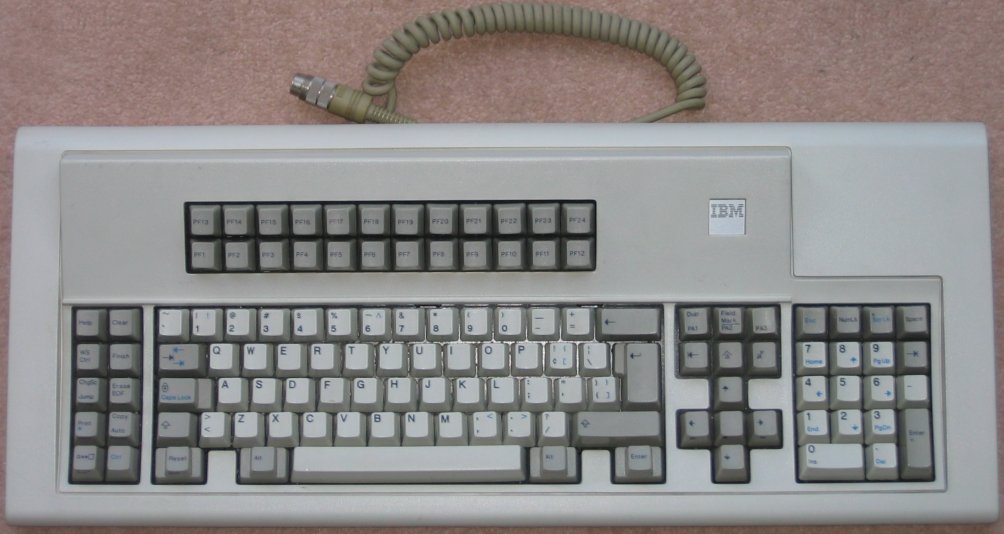
Here's a real keyboard http://www.seasip.info/VintagePC/Images/6110344.jpg

24 F keys
plush sapphire
Fuck yeah
tardy hawk
24 F keys
tardy hawk
Do you really need 24 possible shortcuts
frank basin
yes
unreal oyster
if it's all remappable, the function row is easier to reach than the numpad
which has 10 "free" keys itself
frank basin
Unicomp actaully sells clones of these http://www.pckeyboard.com/page/category/PC122
Only difference is that they use buckling spring instead of capacitive buckling spring
unreal oyster
i'm pretty sure it's not that they sell clones, i think unicomp actually own the rights
wooden portal
tfw have an IBM model M for my older comps
unreal oyster
an IBM model M is totally respectable
wooden portal
muh loud clicky
unreal oyster
¯_(ツ)_/¯
frank basin
@unreal oyster They don't have the capacitive buckling spring rights or tooling I don't think
frank basin
The model M ones are pretty true
frank basin
These guys are selling real capacitive buckling spring ones, but they only have compact models https://www.modelfkeyboards.com/
$160,000.00+ so far in orders (11/23/16)! Please have your orders in by 11/30/2016! Subscribe to project updates: Place order
unreal oyster
this K70 i have is still quite new now but it's a mech so it'll last me years with no degradation in quality
wooden portal
I'm actually considering on getting one of those ^
unreal oyster
highly recommended 👍
wooden portal
looks neat and comes in Cherry Blue
steel onyx
What are the types again? xD
unreal oyster
the only real complaint i have is that i think the font on the keycaps could do with being a little less "aggressive"
torn timber
torn timber
That's what my controls switch to when I open any Doom Builder program
haughty flower
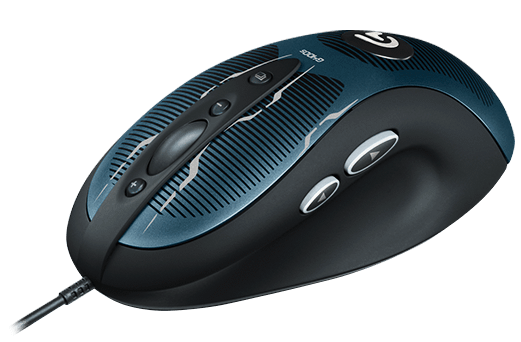
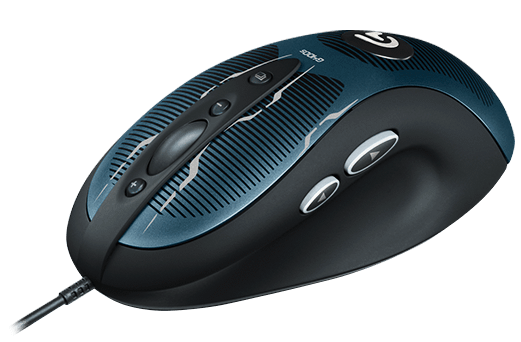
Aye @torn timber you have the same mouse as I do.
unreal oyster
my mouse is only 3 button at the side, which is how i like it. too many buttons and i feel it starts to lose ergonomics
torn timber
I've had it for a good 3-4 years now
plush sapphire
Mine
torn timber
main problem most people have with the G600 seems to be that it's too big for their hands
meanwhile I hate using smaller ones
steel onyx
What makes the types diff?
unreal oyster
the arc is great and the curve on the side buttons is awesome
frank basin
I have a Razer Deathadder, would not recommend
 frank basin
@steel onyx types? you talking about the key switches?
steel onyx
Yee
unreal oyster
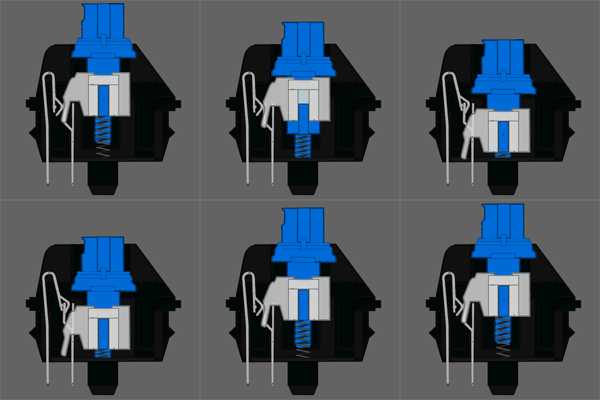
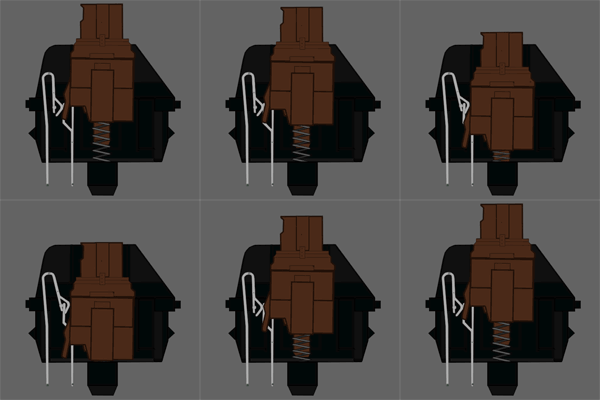
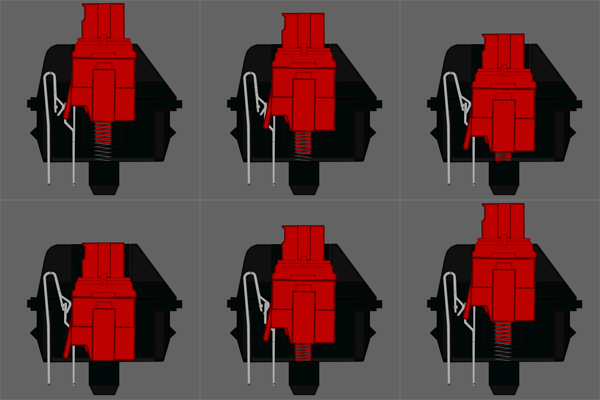
http://www.keyboardco.com/blog/wp-content/uploads/2012/10/Blue.gif http://www.keyboardco.com/blog/wp-content/uploads/2012/10/Brown.gif http://www.keyboardco.com/blog/wp-content/uploads/2012/10/Red.gif


 steel onyx
All you people and your fancy mouses
unreal oyster
that is the difference, in gif form
the switch essentially goes down in a different way
frank basin
Here's a force graph http://cdn.overclock.net/1/1f/1f97fde6_15d03bfd30acf34543b0e6446077f82c.gif
 plush sapphire
Brown and red look the same to me.
unreal oyster
when blue hits the "actuation point" (when the key is "pressed"), a slider drops down to the bottom of the switch, making a loud "click"
when brown hits the actuation point, you feel it but no click is made
frank basin
@plush sapphire notice the bump on the brown one
unreal oyster
with red, you don't feel anything and no click is made
unreal oyster
for this reason - blue is the "typing" one, brown is the "all-rounder" one and red is the "gaming" one
wooden portal
MUH. CLICKY.
unreal oyster
although it actually varies per person
i love blues for gaming myself
and typing
plush sapphire
I have green switches in this keyboard.
They're nice and clicky.
That's about all I know lol
unreal oyster
greens are blues but with even more force
steel onyx
What're greeeens aaaaaaaaaaaaaaaaaaaaaa
unreal oyster
from 60g to 80g
haughty flower
I've honestly havent gone pass membranne keyboards
I dont know what would work for me
any recomendations?
frank basin
I'm gonna make the switch once my membrane kb stops working
haughty flower
my has gone through hell and back no pun intended
but i was stupid enough to buy anothetr membrane one recently
unreal oyster
it's not something you can just "recommend" since all humans are different
so instead you should buy that thing that i posted and test for yourself
plush sapphire
My keyboard came with an extra key that's totally separate. I put it on my keychain for my car keys lol.
haughty flower
Thanks @unreal oyster . I'll look into getting that.
plush sapphire
People think I'm fancy and have a clicky button to unlock my doors.
haughty flower
let me guess it's ten key less
unreal oyster
https://www.amazon.com/Mechanical-keyboards-Switch-keyboard-Sampler/dp/B01G3BJOHO/ or you could get one of these and save a bit of money at the expense of not being able to test the Cherry MX Clear and Green @haughty flower
which are some of the least popular anyway
haughty flower
like thats going to matter for me
unreal oyster
yeah heh
they're both Cherry MX so the actually switch is 100% the exact same
that's the good thing about Cherry leading the switch industry
you know you're getting a quality product that goes under rigorous testing
unreal oyster
@weak lodge i remember you posted a dm map in this chat, do you want the Mappers/Modders role?
weak lodge
yes please
unreal oyster
alright, done 😃
 vivid forum
@unreal oyster what do you mean by role?
unreal oyster
It would mean that you would get a purple name and would be in that list of Mappers/Modders to the side
Do you want it? I know you map so no proof would be needed
vivid forum
Sure
My Nova III map is lookin dang good, but I need to tie it all together, right now it seems a little disjointed
Not sure how to go about it though.
unreal oyster
Hmm, on mobile I can't seem to do it
vivid forum
Whenever, no rush from me
unreal oyster
@royal wave @steel onyx either of you mind giving @vivid forum mappers/modders role?
Can't do it because mobile
Oh nvm I found the setting
There we go
Alright gonna go sleep now
See y'all
vivid forum
'nite
royal wave
heh
 torpid summit
Wow, that took me way too long to figure out what notified me. :V
And yes, I've been doing neat-modding shit with Min for over half a decade.
haughty flower
@sharp bear so, i'm currently working on it
and if you have a PC or laptop you can use, i can DM you a joinme if it's allowed
back to main subject
unreal oyster
@haughty flower you can use GetPlayerInput for that
unreal oyster
Yeah, only limitation is you need a binding in KEYCONF first
So that the player can rebind the control if they want to
haughty flower
but but that's gonna take more work
i don't mind but
i want it to be specific and useful controls
unreal oyster
It's the only way to do it
haughty flower
well okay
unreal oyster
There's no way to get the direct input
haughty flower
kay
so keyconf is only for putting it into the binds menu right?
gotta read the wiki
 sharp bear
From the keyconf yeah I think thats how it works
In ACS though you'd have to use acs_execute
unreal oyster
You can either puke it or run GetPlayerInput in a while loop
unreal oyster
Just puke 10
sharp bear
^ yeah
unreal oyster
But seriously though you shouldnt be using numbered scripts for a keybinding
Use named scripts instead
To avoid conflict
haughty flower
ugh
sharp bear
I need to start using named scripts more I'm so used to numbers for some reason 👀
haughty flower
i'll name my next script
unreal oyster
I've been using named scripts since very early on
So much easier to organise everything
sharp bear
Also gives much more compatibility 👍
unreal oyster
Oh @sharp bear and @torpid summit you want the Mappers/Modders role?
unreal oyster
Mappers/modders is one role, though if you're talking about youtubers/streamers you can have both but mappers/modders overrides youtubers/streamers in the sidebar
haughty flower
addkeysection "MapBinds" Binds addmenukey "Select +" Select alias my_newbind "puke 6" defaultbind , my_newbind
is that good
unreal oyster
Better to test than ask
haughty flower
well it says that "Select2" doesn't exist
addmenukey "Select -" Select2 alias my_newbind2 "puke 7" defaultbind . my_newbind2
got it
haughty flower
now it auto selects/deselects stuff using keybinds
unreal oyster
@lazor999 I was wondering, how exactly does this system work? I assume the map geometry is all static but rises and lowers to allow the user to create a level?
haughty flower
okay so
i started off simple, by changing all the map textures to different presets with switches
i tagged the sectors you can (de)select and move
moving being heights
i made them move when you pressed certain switches using ACS
but now because of your help gutawer i can use keybinds making life easier
@unreal oyster if you want i can send you a laggy join.me so you can see what's happening
if allowed
unreal oyster
I'm not at home right now but I'll tell you when I can
haughty flower
cool
so apparently the 3D floor is a bit buggy
@unreal oyster it won't lower the dummy floor ceiling
it just lowers the floor
nevermind, manually did it
currently 34 customizable things
which of at least half is just a lot of cubes
53 tags, which of most is just a base
is there any way to mass create unique tags?
haughty flower
found it in controls
i had to tag all of this, but there's a wide selection now
like, really wide
torpid summit
@unreal oyster Sure, I would be cool possibly being useful outside my other modding circle.
 inner fulcrum
Have any good tips for adding gameplay for wads?
inner fulcrum
It's in HeXen normally. In there, it's a floating sparkle
Everywhere else outside of HeXen, it's GROSS HACK
unreal oyster
what, the bridge Thing?
pretty sure it shows up fine in Doom 2 Hexen & UDMF format
although it's not recommended, in favour of 3d floors
unreal oyster
why total chaos uses bridge things baffles me though
i get that it needs to use models for higher detail
but why not use an invisible 3d floor for that purpose
wooden portal
Bridge things were only good for those days before software 3D floors were a thing
haughty flower
wtf is a bridge tho
royal wave
I did look at the maps via slade, and it's surprisingly very minimal
haughty flower
what is bridge tho
unreal oyster
@sharp smelt zdoom bridge thing
 sharp smeltBOT
unreal oyster
sharp smeltBOT
unreal oyster
you'd be new to the concept of any 3d geometry, considering you seem to want to stick to doom format
unreal oyster
it's not meant to be visible
royal wave
bridges are very not doom
haughty flower
idk how 2 bridg
unreal oyster
you need to fuck around with midtextures
to get a bridge thing working in doom format
haughty flower
how'd they do this
unreal oyster
if you want bridges get out of doom format
haughty flower
oh
unreal oyster
using midtextures
haughty flower
with midtexture
o
why are they visible in game th
and why is the normal bridge 3 spinning sparkles instead of just a normal sparkle
unreal oyster
idk, probably to discourage use of them
they were implemented in hexen and probably don't play nice in doom format
inner fulcrum
Probably in the ZDoom PK3 afaik
royal wave
I would like to see 3D ramps instead of slopes
royal wave
They have
haughty flower
port the new DOOM4 classic maps, that is just a port from original doom to doom4
change the entities
code a 2D-sprite angles thingy
unreal oyster
3d ramps are possible though
royal wave
Yeah possible, but idk how to do it 😛
unreal oyster
it's the same as a normal 3d floor, just with some extra steps
royal wave
I remeber in GZDB you could raise indivisual vertexes
unreal oyster
they don't get much use because zdoom slope physics are hot aids
sharp bear
I just had an odd idea, but something decent, but it'd be cool to see a mod where you could see your own legs, like in some other FPS games, I think what could be done is cut half of the player sprites, then just attach it to the player somehow? I don't have enough knowledge to make it possible, but I'm pretty sure it is
inner fulcrum
https://www.dropbox.com/s/3e750ve39mro1od/WintCity.zip?dl=1 Gotten done with my first Christmas themed wad
dawn saffron
i like testing out not-published wads and either streaming it or recording it and posting on youtube
but not at 5am
so hmu tomorrow when you're awake and i'll stream it for you
@inner fulcrum
if you want, of course
inner fulcrum
That'd be great. Soon to upload to /idgames
Hopefully I've added enough gameplay. That's the tricky bit for me
 restive glade
quick question
If i want to make a map for zandronum, what engine would oblige need to be under for it to work
dawn saffron
if i understood your question correctly, you can't go wrong with prboom
wooden portal
I'm willing to bet you won't have any issues using GZDoom as the engine
I don't recall having problems but I haven't used oblige in quite awhile
Speaking of oblige
I should generate a megawad to play HD with
low monster count
wooden portal
@restive glade if you're using oblige to generate maps for Zandybam, GZDoom seems to work just fine
torpid summit
@sharp bear That's actually a pretty doable idea. gimme a second to dig up an old headshot actor thread
royal wave
how owuld that be accomplished?
haughty flower
@sharp bear that would be impossible, since you would be seeing it from up, and the sprites are 2D, so you would not see the sprite
torpid summit
http://forum.zdoom.org/viewtopic.php?f=3&t=13182 You'd have to do a few things differently of course
haughty flower
and
royal wave
Milo i wouldn't tell a dude with the modder rank that it's impossible
royal wave
one you probably won't ever earn
haughty flower
stop sexually harrasing me
torpid summit
- You'd have the spawned actor actually generate a sprite which is pretty easy
haughty flower
we can also make a md3 of doomguy's feet
so you can actually see your legs in 3d
instead of sprite
torpid summit
and 2) you'd have to inject that spot of code into a copy of player decorate instead of a zombieman :V
torpid summit
The only thing that'd make it a pain is making variations
haughty flower
since it's 2D and the sprite is vertical
woudln't it be impossible to see the legs
royal wave
Wouldn't that cause billboard issues @torpid summit
torpid summit
Yeah, just have the actor spawn a few units directly behind the player
royal wave
No like based on players settings
haughty flower
brb
royal wave
the sprite will either look flat or look like the edge of cardboard
torpid summit
Oh right right right... I forget some people like to not force their sprites to render flat
haughty flower
use the 5-angle-sprites to make a md3 of his feet and voala
then just detect if he's crouching nshit
and *stuff
brb
royal wave
said this was impossible like two minutes ago
prisma saddle
Who is Miloteza?
 elder ridgeBOT
Miloteza is a memer and a DOOM (93') mapper who likes using the default map textures. He also has no idea about DECORATE and he can't make ACS work. But he can make meh-quality sprites only to insult himself after making them. He also needs help every 5 minutes.
prisma saddle
@royal wave
royal wave
okay?
haughty flower
@prisma saddle i wrote that myself, just saying
prisma saddle
Oh.
haughty flower
told ghostface to add it to VEGA's "Who is...?"
ghostface woudln't add any random definitions or his own definitions to people
unless that person allows him to
except for
Who is John Romero?
elder ridgeBOT
Alfonso John Romero (born October 28, 1967) is an American director, designer, programmer, and developer in the video game industry. He is best known as a co-founder of id Software and designer for many of their games, including Wolfenstein 3D, Dangerous Dave, Hexen, Doom and Quake. His game designs and development tools, along with new programming techniques created and implemented by id Software's lead programmer John D. Carmack, led to a mass popularization of the first person shooter, or FPS, in the 1990s. He is credited with coining the FPS multiplayer term "deathmatch".
haughty flower
etc
prisma saddle
Okiedoki,
prisma saddle
If anyone wants art for their mod or something, I'm willing to help.
I've got nothing better to do anyway.
prisma saddle
No,
prisma saddle
Art from scratch ;3
 prisma saddle
I kinda regret saying that now...
royal wave
pfff haha
haughty flower
wat
also yeah the extended arms are just pain, you can just cut these off
they're not supposed to be visible
royal wave
I don't think he wants to help anymore, is what he's saying
haughty flower
ynot
royal wave
idk, but something happened
haughty flower
ok
prisma saddle
Sorry about that,
haughty flower
probably my image looking like crap
prisma saddle
No,
It's just the idea that I might get dozens of people asking for help every second.
haughty flower
yeah sure, at 10 am
how about you say
"1 request at once"
"don't be an annoying piece of shit"



 prisma saddle
I'll probably just hope no one scrolls up ;3
royal wave
I wish I could say "Don't be an annoying piece of shit" to a lot of people
well i don't wish, i do
wooden portal
I'm sure a lot of retail workers wish they could say that
royal wave
just really passive aggressive
but as a mod I can't do it as much
I have to pretend I'm not biased
haughty flower
@prisma saddle can u do mine though
unreal oyster
[9:25 AM] Miloteza: then just detect if he's crouching nshit```you can't detect if the player is crouching
that's not a thing
you can use ugly hacks but other than that
unreal oyster
because it's compact
haughty flower
maps and mods
 shadow bone
Anyone want to try out a little mod for me?
unreal oyster
sure
shadow bone
"Realism" mod
It's a mod for the pistol (so far) and a few other things to make it feel more "realistic"
Very early, very WIP
Just want to get some general feedback
Mostly on the aiming and general feel
GZDoom stable (2.2.0) recommended
shadow bone
No, that looks normal
Ignore the numbers, just debugging
Forgot to dummy it out lol
unreal oyster
oh i see, for whatever reason i assumed the scope should be on the gun
but i guess it's a crosshair then?
shadow bone
Yep
haughty flower
oh god
is this the dark souls: doom edition mod
im making a custom hud
@shadow bone "sprite names must be exactly 4 chars"
in your pk3
shadow bone
What are you using to play? Should work fine on GZDoom stable (maybe Dev editions)
haughty flower
fuck
shadow bone
Sorry 😦
shadow bone
What's wrong with the newer ones? Lotsa new features and bugfixes
haughty flower
no that's gay
installing dev version on a diff. folder
and testing out your pk3
unreal oyster
miloteza, may i remind you
haughty flower
yeah yeah warnings stuff things