Z2OnTheRoad#8872 has been warned
#〉bugs-reports
2 messages · Page 120 of 1
 dire yarrowBOT
Z2OnTheRoad#8872 has been warned
dire yarrowBOT
Z2OnTheRoad#8872 has been warned
 marble quest
Did you try using the <@&id> format of the mention, which you can get by following below
dire yarrowBOT
Using ID
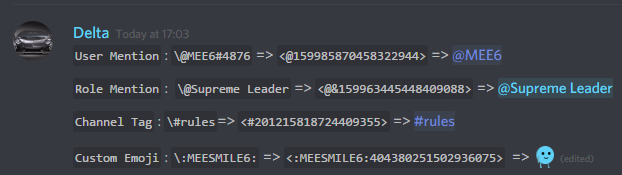
To use channel tags, emojis, role tags and user mentions in custom commands, level up messages and the welcome plugin use the following formats:
https://cdn.mee6.xyz/s/id.png
https://cdn.discordapp.com/attachments/496805066292854784/872060983370195024/Finding_RoleID.gif


 frail dragon
Doesn't really count as a bug, but pointing it out
I made a custom command related to the !reportcc way, but when someone uses that command in a blacklisted channel the report still comes into the reports channel, anyway to fix?
 long dawn
I think if you add the Bannel Channel then mee6 won’t do the commands in that channel
frail dragon
It says user, this command is not allowed in this channel smth similar to thag
But then the command gets transferred to the report channel
long dawn
Hmm then look at the settings of the dashboard and see which channels is on there
<@&892137271430627330> another scam link
frail dragon
long dawn
Hmm then look at the settings of the dashboard and see which channels is on ther...
Like I said Vicki, only one channel is allowed there, when someone uses the command in a blacklisted channel it gets blocked, however it still goes through and sends the message in the report channel
 shrewd scaffold
frail dragon
Like I said Vicki, only one channel is allowed there, when someone uses the comm...
shrewd scaffold
frail dragon
Like I said Vicki, only one channel is allowed there, when someone uses the comm...
Blacklisted channels are where the bot should send responses like...
dire yarrowBOT
 spooky waffle ヘ(。□°)ヘ, that command is disabled in this channel.
shrewd scaffold
Something like this ^
frail dragon
Yes, but that doesn't help my point
It shows that when the command is used, but the report is still sent
shrewd scaffold
Imma try and see if i can reproduce it
 magic ravine
guys we need a way for the bot to remember your role for example if you get a mute role all you need is leave the server and come back and you will get reseted and be able to pick a role after accepting the rules.
 quaint agate
magic ravine
guys we need a way for the bot to remember your role for example if you get a mu...
quaint agate
magic ravine
guys we need a way for the bot to remember your role for example if you get a mu...
the muted role should be persistant... or is that what your reporting
magic ravine
quaint agate
the muted role should be persistant... or is that what your reporting
yes exactly
i mean it could be a bugg but also a sugestion
 sonic mauve
I have found a bug
(Idk if that's intentional or just a bug)
The bug I've found is that if I do !rank
And then do !rank again a min later (more than a min works but less than a min doesn't) it automatically adds 20 exp points to the exp bar
quaint agate
sonic mauve
The bug I've found is that if I do !rank
And then do !rank again a min later (mo...
its becasue you are getting xp
not a bug
sonic mauve
But 20 exp for a single message
And the bug part is
If I do !rank within a min time
It doesn't add the exp
dire yarrowBOT
 sonic mauve
Interesting
dire yarrowBOT
 _.Original._#5761 has been warned
Reason: Bad word usage
 velvet eagle


 rapid obsidian
Quiet chat
dire yarrowBOT
 1mpactψ#2023 has been warned
Reason: Bad word usage
 MMS Energy#3686 has been warned
Reason: Bad word usage
 𝓖𝓱𝓞𝓼𝓽 - 𝖂𝕺𝖑𝖋#2994 has been warned
Reason: Bad word usage
 crude mesa


 toxic thicket
 marble quest
toxic thicket
marble quest
toxic thicket
What's the bug you are trying to show exactly?
toxic thicket
just the emoji?-
marble quest
Is it a slash command?
toxic thicket
no the xmark
toxic thicket
its :MEEXMARK6:
toxic thicket
marble quest
Was that message from a slash command or ! Command
/
marble quest
@ everyone needs permission to use external emojis for emojis to show in slash commands
toxic thicket
we do
marble quest
It's something annoying with discord, same as webhooks work
Then it's denied on that channel for @ everyone
toxic thicket
yea, there is a way to fix it tho
toxic thicket
marble quest
Then it's denied on that channel for @ everyone
no its not
marble quest
Permissions on slash commands relies on @ everyone
toxic thicket
ik
toxic thicket
kk
marble quest
!rank
dire yarrowBOT
John Green, that command is disabled in this channel.
marble quest
As you can see here it works
 grizzled adder
JOIN
dire yarrowBOT
 Saul Goodman#3970 has been warned
Reason: Bad word usage
 supperfangamm3#5895 has been warned
Reason: Bad word usage
dire yarrowBOT
 Blue Dark-SwordMan#1757 has been warned
Reason: Bad word usage
dire yarrowBOT
 dwutakt#1443 has been warned
Reason: Bad word usage
dire yarrowBOT
 Monkee toe#2627 has been warned
Reason: Bad word usage
dire yarrowBOT
 ninj1234z#8711 has been warned
Reason: Bad word usage
 LodgedMite#4699 has been warned
Reason: Bad word usage
 casual Panko enjoyer#4900 has been warned
Reason: Bad word usage
 Spinny#1175 has been warned
Reason: Bad word usage
 𝗟𝗘𝗫𝗧𝗛𝗢𝗚🎗#5065 has been warned
Reason: Bad word usage
 cryptic#8193 has been warned
Reason: Bad word usage
 restive mortar
marble quest
Did you try using the <@&id> format of the mention, which you can get by followi...
restive mortar
marble quest
Did you try using the <@&id> format of the mention, which you can get by followi...
I did. is not work
marble quest
restive mortar
I did. is not work
What does it show as in the server? When the message sends?
 burnt yarrow
its a scam
restive mortar
@marble quest like this
 marble quest
Are you editing the message again after changing it to the <@&id> format?
marble quest
The dashboard is super annoying with mentions, so after you set the mention, don't edit the message and see if it works
restive mortar
oh...gat cha
dire yarrowBOT
 deadpoolplayz6#4179 has been warned
Reason: Bad word usage
dire yarrowBOT
 bhavesh#9798 has been warned
Reason: Bad word usage
 인생은 노잼#1968 has been warned
Reason: Bad word usage
marble quest
<@&892137271430627330> scam
dire yarrowBOT
 dkhoi ko ngu#7553 has been warned
Reason: Bad word usage
shrewd scaffold
<@&892137271430627330> nitro scammer
 eager elk
lol this one  above me
 hearty igloo
@visual temple Here
 visual temple
yes yes
 buoyant moon
Banned the raiders
buoyant moon
👌 User `446429291539071006` has been banned.
 Created
·
eager elk
Created
·
eager elk
Rem again
dire yarrowBOT
 V1P3R#7193 has been warned
Reason: Bad word usage
 Parsa-𝐗𝐛𝐢𝐨ツ#7180 has been warned
Reason: Bad word usage
 Alexxx#6421 has been warned
Reason: Bad word usage
 『ツ』! ℂ𝕒𝕘𝕖𝕐𝕋#6607 has been warned
Reason: Bad word usage
 SyntheticLegit#3751 has been warned
Reason: Bad word usage
 lunar hound
<@&892137271430627330>
 silver harness
What is sus
 merry fjord
!rank
dire yarrowBOT
DIABLOS NOS, that command is disabled in this channel.
dire yarrowBOT
 Wonderfull#8369 has been warned
Reason: Bad word usage
 turbid gulch
the Bot on my Server is infinity loading and never starts playing a song
i did / play 10 mins ago, it´s still loading
 solid steeple
turbid gulch
the Bot on my Server is infinity loading and never starts playing a song
solid steeple
turbid gulch
the Bot on my Server is infinity loading and never starts playing a song
I would recommend using /join, /add, and then /play when you're done with adding songs to the queue. (Could decrease the possibility of happening such issues.)
You can still use /add while MEE6 is playing by the way.
turbid gulch
i did / play only one time, and he is still thinking
solid steeple
turbid gulch
i did / play only one time, and he is still thinking
Please try what I've told you above and see if that method works.
turbid gulch
i made him stop and play a different song, but he won´t play, just loading
solid steeple
turbid gulch
i made him stop and play a different song, but he won´t play, just loading
Could you please also try the legacy prefix (!) and see if it keeps happening?
I can confirm it's delayed somehow, but for me it's adding the requested track to the queue without any problems.
turbid gulch
with ! its playing all perfect
solid steeple
turbid gulch
with `!` its playing all perfect
Yeah, having some issues with Slash Commands. If you see they're not working properly, try to use the legacy prefix.
turbid gulch

 quick walrus
<@&892137271430627330> scam link ^^
buoyant moon
deleted
 buoyant flame
<@&892137271430627330> here
dire yarrowBOT
 Kei#7876 has been warned
Reason: Bad word usage
 heady pine
<@&892137524783349781> is there a way to fix the billing issue i am having
shrewd scaffold
heady pine
<@&892137524783349781> is there a way to fix the billing issue i am having
You will need to specify your issue so that someone will help you out.
heady pine
shrewd scaffold
You will need to specify your issue so that someone will help you out.
gladly, i paid for premium and was billed. the charge is on my credit card but it's not registering it on the dashboard.
shrewd scaffold
heady pine
gladly, i paid for premium and was billed. the charge is on my credit card but i...
So you aren't getting your premium benefits for your server?
heady pine
i can't access anything premium. it tells me to upgrade
shrewd scaffold
Can i have your server id?
heady pine
wonderland gameing
shrewd scaffold
Meanwhile also check by running a command .checkpremium in #〉commands
shrewd scaffold
heady pine
wonderland gameing
I need your server id
dire yarrowBOT
Getting your server ID
Go to your server and use !dashboard then copy this link and give to staff.
Or if that didn't work: open Server Settings in your Discord Server. Select Widget and press Copy ID next to Server ID.
You can also use Developer Mode as an alternative method.
shrewd scaffold
Ping support with your server id mentioning your issue and someone will pass it on to staff, as i may fall asleep.
heady pine
<@&892137524783349781> https://mee6.xyz/dashboard/850428019171393586 is my server link, i have no access to premium even though i have been billed for it.
Install our Discord bot to set up leveling, moderation, music, Twitch, YouTube, and Reddit notifications for your Discord server.
dire yarrowBOT
 🌸⬷𝒩𝒶𝓉𝒽𝒦𝓏⤐🌸#3312 has been warned
Reason: Bad word usage
 cursive hemlock
a channel i use has MEE6 and in the channel #bot-commands i type !rank and then i get a message saying not to post messages in #bot-commands
like a ping message not on the channel in my DMs
quaint agate
cursive hemlock
a channel i use has MEE6 and in the channel #bot-commands i type !rank and then ...
if lsash commands are inabled you will need to use /rank
because it no longer "recognizes" ! as a prefix but will still respond to it
cursive hemlock
nah its !rank coz it comes up with my rank card
i don't think / commands are enabled
oh wait it is thx
quaint agate
Np
heady pine
Still waiting to find out why I can’t use my premium even though I paid for it
 wooden mountain
on the MEE6 website, click on your name/avatar top right then billing
does it show the subscription there?
if not, the payment might have failed. in that case the money will get back to you in a couple hours/days
dire yarrowBOT
 Hello Kitty#2843 has been warned
Reason: Bad word usage
 ZombieFighterTX#2780 has been warned
Reason: Bad word usage
 tonyshark1384#0451 has been warned
Reason: Bad word usage
 carmine pier

 limber knoll
@carmine pier got text?
carmine pier
@drwafu My member
limber knoll
and that error code in text please
carmine pier
limber knoll
and that error code in text please
😴 Something went wrong in MEE6 land! Contact our support team for instructions if this keeps happening.
code: 88d4c57baca241b8a6e49c0442a455bb
limber knoll
ty
carmine pier
And I already try by myself. It works
limber knoll
I'll look into 88d4c57baca241b8a6e49c0442a455bb
@carmine pierwill pass that on to be looked at
 livid cave
Hi
 sharp burrow

The Instagram subscriber numbers have been changing again and again for a few days, although there are no subscriber changes on our Instagram account.
dire yarrowBOT
 pandorol#5010 has been warned
Reason: Bad word usage
 Delfinek_Debilek#0971 has been warned
Reason: Bad word usage
 Speedster#3165 has been warned
Reason: Bad word usage
 frigid owl
How do you fix this?
limber knoll
why not <@id> ?
magic ravine
that's a bad word tho 😂
frigid owl
o h
limber knoll
doesn't need { }
quaint agate
pings dont work in embed titles
dire yarrowBOT
polyamide, that command is disabled in this channel.
eager elk
please use the command at #〉commands
 sand fractal
Yeah sorry my bad
Not wearing glasses
Partners
want to partner with MEE6?
your server needs:
- at least 10k members with enough of them coming online on a weekly bases. We do not meet this requirement..
- MEE6 has to be in the server
- you have to follow both the Discordapp ToS and the Discorapp code of conduct for partners
you get: - advertised in the MEE6 server
- faster support
- others?
buoyant moon
lol
 coarse plank
:SLEEP6: Something went wrong in MEE6 land! Contact our support team for instructions if this keeps happening.
code: f83ab1d8c52641abb49d5d6226236e5c
 stray sluice
What command did you use to get that error code?
eager elk
coarse plank
:SLEEP6: Something went wrong in MEE6 land! Contact our support team for instruc...
music command?
 full garnet
The statistics on my server are broken
There show our 505 people but we are only 503
It this normal ?
shrewd scaffold
full garnet
The statistics on my server are broken
There show our 505 people but we are only...
most likely, the channel isnt updated yet
wait for some time and let it update itself
dire yarrowBOT
 LittleB1gMan#5712 has been warned
Reason: Bad word usage
coarse plank
eager elk
music command?
No delete command
eager elk
coarse plank
No delete command
oh and it pop out this 
dire yarrowBOT
 𝙲𝚕𝚎𝚘 ˢᵗᵃʳʳ#1096 has been warned
Reason: Bad word usage
 Madoonna#1798 has been warned
Reason: Bad word usage
 LoVeR#4034 has been warned
Reason: Bad word usage
 Izanagi#1307 has been warned
Reason: Bad word usage
full garnet
shrewd scaffold
wait for some time and let it update itself
It was 1 week it like this
 static ocean
Hi. There is an error when using “/rank”
 quaint agate
static ocean
Hi. There is an error when using “/rank”
quaint agate
static ocean
Hi. There is an error when using “/rank”
@everyone needs external emoji perms
static ocean
They do tho
static ocean
It works when you use “!rank” but not “/rank”
quaint agate
/rank uses everyone role’s perms, don’t ask why that’s just how discord works
dire yarrowBOT
 not jerry#1624 has been warned
Reason: Bad word usage
dire yarrowBOT
 ᴘκ┆cнᴇɴԍxᴅ⚡⚡#8665 has been warned
Reason: Bad word usage
 ☆♡Cosmic Cookie♡☆#1943 has been warned
Reason: Bad word usage
 ocean#6700 has been warned
Reason: Bad word usage
 LazyLuke16#5411 has been warned
Reason: Bad word usage
 radiant carbon
marble quest
radiant carbon
marble quest
when using araibic for the dashboard langauge, it doesn't show the option to buy pro

 prisma socket
marble quest
when using araibic for the dashboard langauge, it doesn't show the option to buy...
prisma socket
marble quest
when using araibic for the dashboard langauge, it doesn't show the option to buy...
تم تغيير اللغة الخاصة بالبوت ولكن لا يعمل ايضا
marble quest
i don't speak arabic, but, change the langauge of the dashboard to enlglish and then you'll see an option to buy it
prisma socket
هل تقصد اللغة الخاصة بالبوت او اللغة الخاصة بالجهاز
marble quest
 prisma socket
يوجد خلل بالاحصئيات ايضا هذا الذي تم تحديده قديم ولا يمكن حذفه
 marble quest
restart your discord app
 marble quest
as i said, you need to get pro in order to change your personal rank card. premium only lets you change the default one for a server
prisma socket
ارجو التوضح (محترف) هل هو اشتراك اخر
marble quest
MEE6 Premium is a server based subscription which gives you the option to use a bunch of premium features in your server, including the option to specify the default server rank card.
MEE6 Pro gives you the option to customize your Personal rank card and gives you a slight xp boost
prisma socket
هل هذا لا يكفي ان احصل على MEE6 Pro
 marble quest
that's premium
prisma socket
هذا ما تم شرائه سابقا
 prisma socket
marble quest
that's premium
prisma socket
marble quest
that's premium
هل هذا لا يكفي
marble quest
this is pro
 prisma socket
هههههههههههههههه هذا لا يليق بسمعتكم تم شراء بوت 90$ وتطلبو المزيد 2$
marble quest
it's a different subscription. premium does not and has never included the personal rank card
prisma socket
وايضا لايتوفردعم باللغة العربية 😂
هههههههههههههههه اشكركم سأرضى ببعض العيوب ولكن لا أنصح بهذا الأمر
ارجوا اصلاحه تسبب روم لا يمكن حذفه من ارتفاع خاطئ للاعضاء داخل السيرفر

 still dew
Something went wrong in MEE6 land! Contact our support team for instructions if this keeps happening.
code: 56a3b971e84f43f6a2a51f89d0a841f1
 gilded yacht
Channel hopped
 tame copper
Hello, my mee6 bot will not automatically kick, ban, or mute anyone. I have admin permission, how do I fix this.
dire yarrowBOT
 NotZachh#0801 has been warned
Reason: Bad word usage
 steel spindle
mee6 does not understand what a commands is
solid steeple
steel spindle
mee6 does not understand what a commands is
What do you mean? Doesn't MEE6 respond to commands as it's supposed to?
steel spindle
i made a setting in my bot commands channel should only be used for commands but when i do a command for another bot it says that channel should only be used for commads
solid steeple
steel spindle
i made a setting in my bot commands channel should only be used for commands but...
Commands-only restricted channels just cover MEE6 commands.
steel spindle
oh that's why
solid steeple
Yeah.
 torpid cobalt
i
buoyant moon
torpid cobalt
i
Any bug reports?
 sharp wraith
Maybe this is not a bug, but maybe can fix it with \
 quaint agate
sharp wraith
Maybe this is not a bug, but maybe can fix it with `\<:MEECHECK6:404380242522931...
quaint agate
sharp wraith
Maybe this is not a bug, but maybe can fix it with `\<:MEECHECK6:404380242522931...
Give everyone perms to use external emojis
sharp wraith
quaint agate
Give everyone perms to use external emojis
Oh i see ty
quaint agate
No Problem
dire yarrowBOT
 Zafiro#3098 has been warned
Reason: Posted an invite
 Mihail_Woodley#9812 has been warned
Reason: Bad word usage
Mihail_Woodley#9812 has been warned
Reason: Bad word usage
Mihail_Woodley#9812 has been banned
Reason: Too many infractions
 dry mesa
is mee6 facing a problem? because my uploads can't be detected.
 dire yarrowBOT
 I love Anime Naruto 🇧🇬❤😍🤩#5026 has been warned
Reason: Bad word usage
shrewd scaffold
embeds are bugged
 ancient lynx
The / commands for the economy don't work. Have to use ! instead.
 warped turtle
Please help with embeds! Uploading any pics/gifs doesn't work
shrewd scaffold
ancient lynx
The / commands for the economy don't work. Have to use ! instead.
what does it do when you use / commands?
for the economy plugin
ancient lynx
Nothing
It literally doesn't prompt anything. The ! command does however function with all the economy based commands.
shrewd scaffold
when you enter a / can you see the list of commands?
perhaps something like this box
 shrewd scaffold
can you try renabling the slash commands option from your db
ancient lynx
You mean primarily the economy slash commands? Or slash commands as a whole? If the latter I'll need to know where on the dashboard to do so. I've tried already to turn off the Economy and then back on and it doesn't fix the issue.
shrewd scaffold
there is one common option in settings to enable slash commands for all the plugins
buoyant moon
Custom Command not save the update
shrewd scaffold
you cant individually enable for plugins
shrewd scaffold
no problem
marble quest
shrewd scaffold
you cant individually enable for plugins
disabling and enabling the plugin or command will do it for that single plugin/command
shrewd scaffold
?
slash command option in settings enables it for all the plugins, as long as the command/plugin is enabled
right?
marble quest
yes, but it's not a good idea to recreate all the slash commands as it's more likely you will react the 200 slash commands created per day per server (throughout all bots)
shrewd scaffold
yeah thats another issue but there is no alt solution to fix it, is there?
marble quest
easiest is to just disable and re-enable commands or plugins that aren't showing up
shrewd scaffold
marble quest
easiest is to just disable and re-enable commands or plugins that aren't showing...
oh yeah right that can be used as well...!!!
i never thought about that
marble quest
marble quest
disabling and enabling the plugin or command will do it for that single plugin/c...
thats what i said here
shrewd scaffold
ok , gotcha
 brittle torrent
Is the bot down? He doesn't answer my commands and I can't get into the dashboard
 wide rapids
Yes the bot is undergoing issues in several places Please be patient The Server may be on Lockdown (Meaning you cant send any messages) But it should shutdown and come up The channel #〉status-updates Will be updating with the process of bring the bot back
brittle torrent
wide rapids
Yes the bot is undergoing issues in several places Please be patient The Server ...
Ok, thank you!
wide rapids
And discord is also having issues on their side with Embeds and are currently investigating
 quaint zinc
Privet
It means hello
Ive been in a coma for 3 years, its good to be back
Alot has changed in discord
visual temple
Server is in lockdown due to many error reports. The problem is with Discord. Please hold until they have fixed the problem:
See: https://discordstatus.com/
Welcome to Discord's home for real-time and historical data on system performance.
visual temple

 heady spruce
Some Economy commands are making it through to other channels even though Mee6 is set not to. I do see that it says "Players won't be able to play economy games in these channels" So if you could make it so that ALL Economy commands are disallowed in specific channels that would be very helpful. Thank you.

 visual temple
Bot Offline
We are aware of the bot being offline in some servers. We are currently investigating the problem and will keep you updated via #〉status-updates
 formal umbra
One message removed from a suspended account.
wooden mountain
@visual temple if you think the above is important, could you inform the devs?
quaint agate
Bot Offline
The bot may be offline in your server, we are investigating the issue and will provide updates in #〉status-updates when we get them
you are not muted the server is just locked down
 Bot Online
 regal seal
give-exp I can't use this command
quaint agate
its !give-xp

 spice oriole
Hello, we are receiving server join/left notifications for people who have not joined/left our server or any server that is associated with any of our moderation team. Is this related to the issues that Discord was having earlier?
buoyant moon
spice oriole
Hello, we are receiving server join/left notifications for people who have not j...
I swear that happened for me also in my server.
spice oriole
Glad we're not going crazy then. We couldn't figure out who they were or how they got around the 2FA.
 thorny stone
✌️
wide rapids
The bot in this server will not play a sound
reload/leave wont work
Multiple songs
Only this server since all my other servers work
 compact surge
dire yarrowBOT
compact surge
dire yarrowBOT
 HỒ VIÊN QUỐC 🇻🇳🇻🇳🇻🇳🇻🇳#5786 has been warned
Reason: Bad word usage
 upbeat tartan
Hello
 true plank
Whenever I go into the official mee6 site, It says there are no mee6 in some of my servers even though there are. I'm also connected to my account that I am in those servers. How can I fix this? Thank you
Is this only for mods?
dire yarrowBOT
Dashboard Access
You need Administrator permission or Bot master role to access the Mee6 dashboard.
How to add Bot master role can be found below:
https://cdn.discordapp.com/attachments/776560882796724244/864337041160273960/AdditionalBotMasterRoles.png
Premium required
 true plank
Ah ok, thank you
dire yarrowBOT
 Jaffar Asimov#4892 has been warned
Reason: Bad word usage
 Anjo#5702 has been warned
Reason: Bad word usage
 rancid geode
 eager basalt
Hi, I have a problem with the rolereact on mee6 the reactions don't give the roles anymore when before it worked very well, it's strange 🤔
buoyant moon
Hi. Can I get some help please?
solid steeple
buoyant moon
Hi. Can I get some help please?
Hello there,
What do you need help with?
 dire yarrowBOT
:timer: Timers :timer:
• You can currently only add 10 timers per channel
• MEE6 has an anti-flood system. So messages need to be sent between a timer and another in order to keep timers being sent
Note: In case you can't see any text channels when selecting the place to announce, it probably means you're logged in the wrong account.
buoyant moon
solid steeple
Hello there,
What do you need help with?
I was listening to music in a voice channel with mee6 and when I added a song, it stated that the queue was empty and it didn't play the song.
 cloud heath
dire yarrow
:timer: **Timers** :timer:
• You can currently only add **10** timers **per ch...
cloud heath
dire yarrow
:timer: **Timers** :timer:
• You can currently only add **10** timers **per ch...
Sorry I did not knew thanks
solid steeple
cloud heath
Sorry I did not knew thanks
You're welcome.
solid steeple
buoyant moon
I was listening to music in a voice channel with mee6 and when I added a song, i...
Music is expected to be buggy sometimes, please try !leave and then !join.
Adding songs to the queue using !add would do better than !play according to my experience.
buoyant moon
I have but it still doesn't work
solid steeple
Can you send me an invite to your server in DMs?
buoyant moon
mhm.
 visual temple
 quartz lily
https://i.imgur.com/umgHTYX.png
quartz lily
https://i.imgur.com/umgHTYX.png

Will pass it on to the devs! Thanks for letting us know.
 nimble bloom
Hello, I have a problem on my discord with the statistics, here are the images below

 marble quest
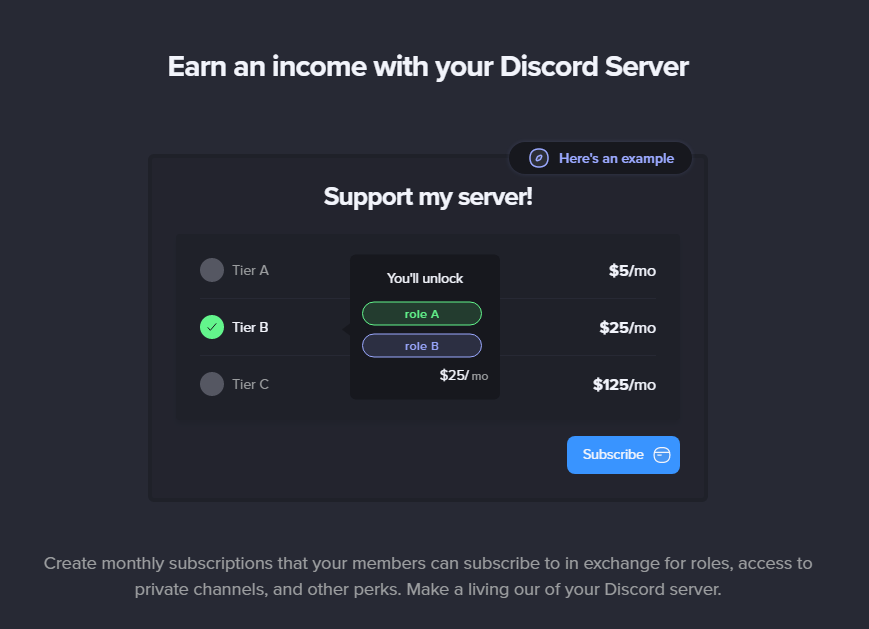
if you click on a plan to edit it, and then click "connect my bank account", it brings you to the main page and then keeps spinning

works fine if you refresh the page and click the button right from the main page though
and console error (which shows up randomly during other things too btw)

 upbeat badger
Music channel only plays through right speaker. I have to turn on mono audio for it to play through both.
 noble ingot
Welcome page embeds are down again
 dusk lotus
When it's night time the bot don't work for the music
dire yarrowBOT
[FR]Alexis6199, that command is disabled in this channel.
 serene raven
 noble sable
embed footer image not working...
dire yarrowBOT
MEE6[√Bot], that command is disabled in this channel.
buoyant moon
Try using it in #〉commands 
frail dragon
Logs being sent about 3 hours late, here's a screenshot explanation


the user joined at 9:50, while it's logged at 12:01
we didnt give the role manually, because mee6 gives those role when a user joins the server
 keen barn
Not sure if this has been reported, forgot to take a screenshot if it as well, but the mee6 warn command shows a broken  emoji when used types in
 :CHECK6: instead of the correct code
frail dragon
keen barn
Not sure if this has been reported, forgot to take a screenshot if it as well, b...
Did you use a slash command when it showed up like that?
keen barn
yeh
frail dragon
The everyone role is lacking external emojis permission then
keen barn
I see
 shrewd torrent
Why does it say "Install"?, your not really installing it
 shrewd scaffold
the emoji search option isnt working
on the dashboard
when i try to search for an emoji, it wont do anything (even if i press enter)
magic ravine
I'm not sure but 95% . only enable command on a channel won't let user do birthday setup and rank with another prefix then the regular. maybe we could enable those basic things
dire yarrowBOT
 •VINI GAMER YT DUBS •#9061 has been warned
Reason: Bad word usage
 dense sand
Add Instagram to this table (https://mee6.xyz/premium?s=header)

Install our Discord bot to set up leveling, moderation, music, Twitch, YouTube, and Reddit notifications for your Discord server.
 dusky veldt
✅ Cleared 0 songs from the queue!
🚫 Cannot queue loading a track, queue is full.
Any idea how to fix this stop and play doesn't work
wide rapids
What prefix are you using? Slash command or legacy?
dusky veldt
.. !play !stop etcc
 tight barn
Hello,
Why does it turn off my embedded welcome message?
So the situation is that I have set this and saved it. As soon as a new user comes on the server it is off again.
But why?
Before it did that for quite a while too.
Thanks a lot for your help.
 solemn anchor
help pls. tag me
 radiant carbon
solemn anchor
help pls. tag me
radiant carbon
solemn anchor
help pls. tag me
Channel hop
quaint agate
solemn anchor
help pls. tag me
Channel hop
 ancient lodge
Hello, think you may have a font issue going on with rank cards, the username and discriminator are now in times new roman. Not sure if it's got anything to do with it but i was made aware earlier that google have depreciated some older webfonts.
quaint agate
ancient lodge
Hello, think you may have a font issue going on with rank cards, the username an...
yep
 alpine kettle
Some translation issues on the website.

 little prawn
Hey Mee6, on our server we are using the Twitch plugin where if someone goes live they get the auto-role & then when they are not live it is removed, had an issue though where one of our members went live on YouTube, this somehow triggered the role to be added & then removed every 3 minutes from 11:52am until 14:09 when he stopped streaming, in total pinging roughly 83 times, assuming its a bug.

 river silo
The reaction Roles Footer image doesnt work, if i loade up the picture and klick save it does nothing. Until today it worked.
After i add a new roll the Footer image removed and i cant get another
 unreal robin
Not letting me make a membership on mee6 I need a live link
 wooden mountain
<@&892137271430627330>
 vocal yew

eager elk
ask any bug report here is unlocked now 😀
 south heron
hey my friend got this dm awhile back and they havent joined any nsfw servers and got this do anyone know why?
 quaint agate
south heron
hey my friend got this dm awhile back and they havent joined any nsfw servers an...
quaint agate
south heron
hey my friend got this dm awhile back and they havent joined any nsfw servers an...
Welcome message probably
south heron
oh ok thanks
quaint agate
No Problem
marble quest
<@&892137271430627330> scams
dire yarrowBOT
 COSI24®✔#8933 has been warned
Reason: Bad word usage
 keen cobalt
Timer is bugging, no longer shows images on the timer notification
dire yarrowBOT
 RockEt#5908 has been warned
Reason: Bad word usage
buoyant moon
5
crude mesa
the mention in the welcome does not work
 stray sluice
Are you using the variable {user}
limber knoll
@keen cobalt unfortunately images need to be redone
keen cobalt
limber knoll
<@378277772084379664> unfortunately images need to be redone
Do I need to remake the whole timer
limber knoll
should be just just the content
so the time and channel should be fine just the content is not working
 coral bramble
mrank
radiant carbon
coral bramble
mrank
?
coral bramble
radiant carbon
?
I'm sleepy
radiant carbon
We can’t help you there
 gusty forge
anybody in here?
limber knoll
no
eager elk
lockey why you not helping?
limber knoll
@eager elkexcuse me? I'm busy with another user
limber knoll
Temporary channels
custom bot: yes
bot kicks admins and allowed roles from the hub and doesn't create another channel for the users despite having the correct permissions and the users with allowed roles, no banned roles and ownership and voice active is only 1 minute after last user leaves
have used synch to category, synch to voice channels and no synch to see and administrator roles are still not able to create a channel upon joining.
server id 293247452092301312
eager elk
?
buoyant moon
Bonjour je n'arrive pas a supprimé des warn
 worthy quarry
<@&892137271430627330> TRY TO MAKE ME BUY PREMIUM
dire yarrowBOT
 nvd123#1150 has been warned
Reason: Capital letters
radiant carbon
worthy quarry
<@&892137271430627330> TRY TO MAKE ME BUY PREMIUM
Let’s not ping mods for that
dire yarrowBOT
 casual gamer#7299 has been warned
Reason: Bad word usage
shrewd scaffold
buoyant moon
Bonjour je n'arrive pas a supprimé des warn
salut tu peux faire !infractions et supprimez individuellement chaque avertissement, ou faites !clear-all-infractions supprimer toutes les infractions
vous pouvez également supprimer toutes les infractions en utilisant !infractions commande aussi
dire yarrowBOT
 AR#9780 has been warned
Reason: Bad word usage
buoyant moon
hello
 naive dust
I have setup euro as a currency in membership but when I create any membership tier in mee6 dashboard it shows $ as the price per month, also setting a bank account is a bit messy ( page is blinking, reloading many times )
dire yarrowBOT
 o黒o#6387 has been warned
Reason: Bad word usage
radiant carbon
buoyant moon
hello
What’s your bug
buoyant moon
shrewd scaffold
salut tu peux faire `!infractions` et supprimez individuellement chaque avertiss...

Ca me fais ça
dire yarrowBOT
 mikey,#7689 has been warned
Reason: Bad word usage
shrewd scaffold
buoyant moon
C'est parce que vous n'avez peut-être pas accès au tableau de bord
Dashboard*
buoyant moon
Salut j'ai suprimé les niveaux d' xp comment les remettre svp urgent
radiant carbon
#〉commands and it’s .
buoyant moon
Can you try to give the command again?
radiant carbon
buoyant moon
Can you try to give the command again?
?
 faint dome
buoyant moon
Salut j'ai suprimé les niveaux d' xp comment les remettre svp urgent
faint dome
buoyant moon
Salut j'ai suprimé les niveaux d' xp comment les remettre svp urgent
Impossible, c’est explicitement marqué quand tu le reset d’ailleurs
Mais si tu as l’abonnement premium tu peux utiliser la commande !give-xp pour redonner de l’xp à chaque membre un par un
dire yarrowBOT
 Rimuwu#0504 has been warned
Reason: Bad word usage
 ZeŪs・Aniket_epic#1118 has been warned
Reason: Bad word usage
dire yarrowBOT
 Skill#6420 has been warned
Reason: Bad word usage
dire yarrowBOT
 SSAT.SukSaoAThit (Ter)#4583 has been warned
Reason: Bad word usage
dire yarrowBOT
 JreidFilms#5714 has been warned
Reason: Bad word usage
buoyant moon
Question: I am trying to get my Premium Mee6 to auto assign a 'Currently Streaming' role to users live on twitch but the feature doesnt seem to be functioning. Any help would be appreciated
Edit: The bot is notifying the proper channel that my members are live, just not assigning them the temporary role.
buoyant moon
i can damn see nothing when i use the commands, other server members can but not me as the owner
why
dire yarrowBOT
 midzo#9475 has been warned
Reason: Bad word usage
shrewd scaffold
buoyant moon
i can damn see nothing when i use the commands, other server members can but not...
which command were you trying to use?
dire yarrowBOT
yaoi-is-a-bliss, that command is disabled in this channel.
 visual ember
!rank
dire yarrowBOT
柚希, that command is disabled in this channel.
 summer coral
visual ember
!rank
summer coral
visual ember
!rank
#〉commands !!!
visual ember
summer coral
<#280870279746420736> !!!
OK
summer coral
Sure thing bro
dire yarrowBOT
 Sheepy#9999 has been warned
Reason: Bad word usage
dire yarrowBOT
 DaaRen#3124 has been warned
Reason: Bad word usage
buoyant moon
 quaint agate
buoyant moon
quaint agate
buoyant moon
Just couldn’t load the text, when that happens just try again
dire yarrowBOT
 Linon_Trafka#7285 has been warned
Reason: Bad word usage
 Drift King#1998 has been warned
Reason: Bad word usage
dire yarrowBOT
 J.O.Z.S#5059 has been warned
Reason: Bad word usage
 dawn walrus
/clear:member doesn’t work and comes out with an error

 acoustic verge
any chance you can copy paste that code to this chat for staff to look up
radiant carbon
acoustic verge
any chance you can copy paste that code to this chat for staff to look up
He’s being help In #〉volunteer-support
acoustic verge
radiant carbon
He’s being help In <#176559797888352256>
ahh
dawn walrus
acoustic verge
any chance you can copy paste that code to this chat for staff to look up
/clear member:@dawn walrus
and
code: 155e23877aa146eab4974690c9d26570
radiant carbon
dawn walrus
/clear member:<@444921750455713795>
and
code: 155e23877aa146eab4974690c9d26570
Rem told you he will let the developers know
acoustic verge
dawn walrus
/clear member:<@444921750455713795>
and
code: 155e23877aa146eab4974690c9d26570
my mistake mate
 uneven matrix
Miren el mee6 se quedó en Rick roll pa siempre

 west sun
When creating a role reaction (embedded) message, things break when #️⃣ is involved. It has strange behavior in the message field, and when it attempts to post the reaction, the message crashes and deletes itself, or stays there and doesn't add the #️⃣ or anything after it.
 sinful thunder
When create a embedded role reaction,don't work to put my gif on "image" category.Say "file extension denied"
marble quest
sinful thunder
When create a embedded role reaction,don't work to put my gif on "image" categor...
can you send the image here please?
dire yarrowBOT
 blackNwhite#6959 has been warned
Reason: Bad word usage
dire yarrowBOT
 abaxx#0660 has been warned
Reason: Bad word usage
dire yarrowBOT
 Not Monika#5911 has been warned
Reason: Bad word usage
 trim badge
Rank card is idk
#〉commands message
quaint agate
trim badge
Rank card is idk
https://discord.com/channels/159962941502783488/28087027974642...
Use the command again should fix itself
 winged panther
hey
 ionic crown
shrewd scaffold
which command were you trying to use?
ionic crown
shrewd scaffold
which command were you trying to use?
K
shrewd scaffold
?
dire yarrowBOT
xandreamea, that command is disabled in this channel.
 opal path
Images on Embed messages either dont show or only show a "s*it" emoji
acoustic verge
opal path
Images on Embed messages either dont show or only show a "s*it" emoji
hi there there was an error a few days back you will need to reupload the image in the Embed editor sorry for the inconvenience
opal path
acoustic verge
hi there there was an error a few days back you will need to reupload the image ...
thanks for the update but the image on the embed messages doesnt show, are we allowed to send a screenshot here?
acoustic verge
ofc mate
opal path

as you can see there is no image on the embed message that it is lacking so cant upload new one to replace, i need to re do them all
acoustic verge
yea i think thats your only option apologies for the inconvenience
 sand oracle
Fix connect my bank account in membership future
dire yarrowBOT
 chemical head#1401 has been warned
Reason: Bad word usage
 Jona#9520 has been warned
Reason: Bad word usage
 bastoni#2191 has been warned
Reason: Bad word usage
acoustic verge
ty
dire yarrowBOT
 Jxst#7574 has been warned
Reason: Bad word usage
 znagwa ღ#0007 has been warned
Reason: Posted an invite
znagwa ღ#0007 has been banned
Reason: Too many infractions
 waxen sparrow
Hi there. In the « economy » mode that we use on root-me, there is a bug with the « richest » function. When displaying it, the « server total » doesn’t show the real total amount of coins in the server, but instead the sum of the 10 richests only
dire yarrowBOT
 K1NG-_-IDK#7745 has been warned
Reason: Bad word usage
 rough swallow
This is about mee6 birthday plugin. The bot assigns the role but it never announces the birthday. It has only announce a birthday once and has never again. I hope this can get fix soon 🙏
dire yarrowBOT
 Philippst900#8749 has been warned
Reason: Bad word usage
 M4NT4S#6906 has been warned
Reason: Bad word usage
 ashen kayak
Statistics showed double, but in mee6 I only have (count) once
 dire yarrowBOT
 Moon Doge#0423 has been warned
Reason: Bad word usage
dire yarrowBOT
 Asterix#0557 has been warned
Reason: Bad word usage
 CHAKRAVOZ#3391 has been warned
Reason: Bad word usage
buoyant moon
There’s been a issue with MEE6
I can’t really edit a welcome gif photo
It said something about a web page failure
dire yarrowBOT
 pateik7392#9165 has been warned
Reason: Bad word usage
marble quest
<@&892137271430627330> scam
dire yarrowBOT
 Ruslan#5657 has been warned
Reason: Bad word usage
 Lotus#6987 has been warned
Reason: Bad word usage
 rex(렉스)#2830 has been warned
Reason: Bad word usage
 Plut#5909 has been warned
Reason: Bad word usage
 low mango
d
dire yarrowBOT
 e-chan#3748 has been warned
Reason: Bad word usage
 6Kayoz9🇻🇳#5228 has been warned
Reason: Bad word usage
 NFP_neee2eevd#6939 has been warned
Reason: Bad word usage
 left talon
I don't know if its just me with this problem but when I try to edit MEE6 like trying to do custom commands or anything on the website it just takes me to a blank white screen and I hadn't been able to edit the bot for some time. If I could have a suggestion to what to do that would be nice because I been trying to update my discord sever with MEE6 and I hadn't been able to do so.
faint dome
left talon
I don't know if its just me with this problem but when I try to edit MEE6 like t...
Hey, check the 3rd pinned message here for the fix steps
left talon
Found out it was computer health issues but I got it working now but still thank you for the help.
 dusk blade
how to level up
gilded yacht
channel hopped
dire yarrowBOT
supermercato45#5504 has been warned
Reason: Bad word usage
dire yarrowBOT
supermercato45#5504 has been warned
Reason: Bad word usage
eager elk
 novel quiver
halp
novel quiver
halp
?
 stuck aspen
Any body can help with this bug?
I'm sure there is a counter mistake for my server...
Orang Tua Asuh = 6 (correct) --> 7 (false)
Server Booster = 5 (correct)
Anak Asuh - Pro = 2 (correct) --> 2 (false)
Anak Asuh - Expert = 1 (correct)
Anak Asuh - Newbie = 15 (correct) --> 16 (false)
 stuck aspen
Any body can help with this bug?
I'm sure there is a counter mistake for my se...
stuck aspen
stuck aspen
Any body can help with this bug?
I'm sure there is a counter mistake for my se...
 stuck aspen
Any body can help with this bug?
I'm sure there is a counter mistake for my se...
stuck aspen
stuck aspen
Any body can help with this bug?
I'm sure there is a counter mistake for my se...
 stuck aspen
Any body can help with this bug?
I'm sure there is a counter mistake for my se...
stuck aspen
stuck aspen
Any body can help with this bug?
I'm sure there is a counter mistake for my se...

 oblique blade
Hi!
Is this timer stuff working? I set to test one with 1 minute time frame, but had only one timer message. What did I wrong?


(I am testing now with 5 Minutes)
dire yarrowBOT
 JustCoolPPL#8607 has been warned
Reason: Bad word usage
JustCoolPPL#8607 has been warned
Reason: Bad word usage
oblique blade
It is not working with 5 Minutes either....not a single message came from the bot.
Can somebody please check? 🙂
dire yarrowBOT
 Приключения Лунтика#2605 has been warned
Reason: Bad word usage
dire yarrowBOT
:timer: Timers :timer:
• You can currently only add 10 timers per channel
• MEE6 has an anti-flood system. So messages need to be sent between a timer and another in order to keep timers being sent
Note: In case you can't see any text channels when selecting the place to announce, it probably means you're logged in the wrong account.
buoyant moon
👌 User `671780185372229652` has been banned.
Created
·
dire yarrowBOT
supermercato45#5504 has been warned
Reason: Bad word usage
 cosmic helm
👀
dire yarrowBOT
 Simar#9456 has been warned
Reason: Bad word usage
 炸蝦好吃#5187 has been warned
Reason: Bad word usage
 [AZS] Max Dragon#0004 has been warned
Reason: Bad word usage
 waswas#2600 has been warned
Reason: Bad word usage
 - 丂υмι_ㄩωㄩ -#3623 has been warned
Reason: Bad word usage
 matixsas#3175 has been warned
Reason: Bad word usage
 Bubba#8888 has been warned
Reason: Bad word usage
dense sand
I don't think it's very important bug but Instagram isn't in this table and it should be (https://mee6.xyz/premium?s=header)

Install our Discord bot to set up leveling, moderation, music, Twitch, YouTube, and Reddit notifications for your Discord server.
dire yarrowBOT
 Mileena <3.#2142 has been warned
Reason: Bad word usage
 Depress _WasTaken#5201 has been warned
Reason: Bad word usage
 blazing eagle
why his written i'm connected with good aacount
 dire yarrowBOT
MEE6 says I have no servers, but that's not true...
Well, that can be caused by:
‣ You don't own any servers
‣ You don't have Administrator permissions or a bot master role on any server you're on
‣ You're logged on with a wrong account (the most common problem)
Third one can be fixed by following these steps:
1. Logout from Discord in your browser (not installed client or mobile app)
1.1 Open https://discordapp.com/app in your browser
1.2 Click on \⚙ icon (User Settings)
1.3 Scroll down, click Log Out and confirm action
2. Logout from MEE6 website
2.1 Open https://mee6.xyz in the same browser
2.2 Click on avatar icon in upper right corner
2.3 Click Logout
3. Login using correct account
3.1 Open https://mee6.xyz and click Login button in upper right corner
3.2 In new window login to Discord. After that you will be redirected back to MEE6 website
3.3 That's all! Now you're using correct account and MEE6 website lists servers where you can modify his settings
P.S. If you're on mobile and some elements are not visible, enable Desktop site mode or switch screen to Landscape (vertical) mode.
dire yarrowBOT
 ! PerpOL#7132 has been warned
Reason: Bad word usage
 wheat flame
how to join servrr
radiant carbon
wheat flame
how to join servrr
Not a bug
dire yarrowBOT
 ☨DΣᄂΣƬΣD VIBΣƧ☨#9887 has been warned
Reason: Bad word usage
dire yarrowBOT
 elite_crunch67#7716 has been warned
Reason: Bad word usage
restive mortar
I can't mention roles in 
buoyant moon
Try using role ID ...
dire yarrowBOT
Using ID
To use channel tags, emojis, role tags and user mentions in custom commands, level up messages and the welcome plugin use the following formats:
https://cdn-longterm.mee6.xyz/s/id.png
https://cdn.discordapp.com/attachments/496805066292854784/872060983370195024/Finding_RoleID.gif
 restive mortar
buoyant moon
Try using role ID ...
restive mortar
buoyant moon
Try using role ID ...
gatcha
dire yarrowBOT
 FezSky#2665 has been warned
Reason: Bad word usage
 fierce needle
Music?
radiant carbon
fierce needle
Music?
What’s wrong with it
buoyant moon
hi
radiant carbon
buoyant moon
hi
 radiant carbon
Can you copy the code
buoyant moon
fd1722f1b1e0479ebd56f3973e66a46b
buoyant moon
 radiant carbon
That does not help
buoyant moon
what do you mean
radiant carbon
Can you tell me what Comamd did you try
buoyant moon
custom command
 swift stag
is it possible to loop music with mee6?
limber knoll
swift stag
is it possible to loop music with mee6?
premium feature
@buoyant moon will look into it when I'm at a pc
limber knoll
see dm
shrewd scaffold
not sure if its a bug or if its intended to be that way but for {server.joined_at} variable, it keeps giving me the same response
Server Join
2021-08-28T16:18:06.084077+00:00

and yes the time zone for the bot is set as per my time zone so it shouldnt be different
shrewd scaffold
do not click this
eager elk

oblique blade
shrewd scaffold
<@139838392102944768> ^
I have only one timer. Channel could be selected. Time is 5 Minutes. Bot has access to the channel. What else should I check? But I am afraid, I set everything correctly.
 naive olive

shrewd scaffold
oblique blade
I have only one timer. Channel could be selected. Time is 5 Minutes. Bot has acc...
you need to have atleast one human message between two timers
oblique blade
Hm....
shrewd scaffold
so if i have set the timer to be sent every hour, i must have atleast one human message after the previous timer is sent
so that the bot can send the next timer
its an anti spam feature of MEE6 and sadly, you cannot disable it
oblique blade
Ok...then the timer could be not used on announcement channels. As there will be no human texts.
shrewd scaffold
nope it cant
incase you want to make the bot make announcements
you can either try the embeds plugin (limited mssges though) or you can make a custom command
if i make a command called !say
i can use it as !say xyz and the response will be sent directly in the announcement channel
oblique blade
But then I have to send the announcement manually. I would like to have timed announcement, like "Today I will have a stream"...I thought timers would be for this perfect! 🙂
shrewd scaffold
you can use the twitch plugin incase you stream on twitch
oblique blade
...but I can send for sure this into some other channel.
oblique blade
shrewd scaffold
you can use the twitch plugin incase you stream on twitch
I use, but this is only a notification when I am live already. Not like 5 hours before I go live automatically. 🙂
shrewd scaffold
ah i see
so you are trying to use MEE6 to send notifications before you go live, am i correct?
shrewd scaffold
sadly, due to MEE6's anti flood system you cannot use the timer plugin in announcement channels
oblique blade
No problem! I can set a different channel. But good to know that this is how it works. Maybe this information should be
However...this is a bit then missleading:
 shrewd scaffold
yes they can be used as reminder but in channels where ppl chat (like general channel)
so it will be sent after regular intervals in the channel
oblique blade
Maybe this restriction should be turned off for longer timers like 1 hour +. Idk. If it will be reworked, I will set timer for fix times and days. Really like a reminder.
And for smaller Discord servers this restriction is not the best. Should work the opposite side. Somebody should come and check news according to the notification of the server (because a new timer message were sent) and not just get the reminder, if he wrote at least one line.
shrewd scaffold
you can suggest that through #〉suggestions
oblique blade

Thank you for the help!
But still...something is wrong. It is not working for me. 😦

No timer entry:
 oblique blade
Sorry 🙂
naive olive
XD
oblique blade
I think, that the problem is there, that I changed the channel, but Mee6 does not changed in the server side. Now I entered one text to the old (announce) channel, and in the newly set channel the timer entry arrived.
oblique blade
Ok...now I got tested 🙂 So, to reproduce (most likely):
- I created a timer in channel A
- I think the bot sent a message to the Channel A once and no more (because of no new message in channel A)
- I updated the timer and the message should go to channel B
- I entered some messages in channel B. No new timer entry
- I entered one message to channel A --> timer message went to channel B !
- After this, channel B is monitored by the bot for messages not channel A.
I hope it helps! 🙂 Thank you for the help again!
dire yarrowBOT
 frost#3769 has been warned
Reason: Bad word usage
 Wonderfulstone#6207 has been warned
Reason: Bad word usage
buoyant moon
👌 User `475970529569013781` has been banned.
Created
·
dire yarrowBOT
 IfUaaaaa#9641 has been warned
Reason: Bad word usage
 SOSĪIĪbeasT#4961 has been warned
Reason: Bad word usage
dire yarrowBOT
 LEGENDSSNIPERLIVE#9484 has been warned
Reason: Bad word usage
 new822#2147 has been warned
Reason: Bad word usage
 moe_aa#0001 has been warned
Reason: Bad word usage
sand fractal
@dire yarrow lost acces to premium support channels
dire yarrowBOT
 MagmaPlay12#5334 has been warned
Reason: Bad word usage
 loud reef
!rank
dire yarrowBOT
michael_love, that command is disabled in this channel.
dire yarrowBOT
 alfistaboy75#3202 has been warned
Reason: Bad word usage
 pochi#0956 has been warned
Reason: Bad word usage
dire yarrowBOT
 ♓💙kaluza💛♍♌♈#8202 has been warned
Reason: Bad word usage
 Qu33nHarl3y#2242 has been warned
Reason: Bad word usage
 icydragon 334_yt#9025 has been warned
Reason: Bad word usage
dire yarrowBOT
 Xx𝔗𝔶𝔰𝔴𝔞𝔤619xX#5202 has been warned
Reason: Bad word usage
 !D̶A̶R̶K̶Z̶O̶N̶E̶ ヅ#2873 has been warned
Reason: Bad word usage
noble sable
is embed down rn?? <@&892137524783349781>
dire yarrowBOT
 SithMarvelous#5568 has been warned
Reason: Bad word usage
 stray summit
dire yarrowBOT
stray summit
dire yarrowBOT
 Ajwad565#5946 has been warned
Reason: Bad word usage
 123OVI123#5449 has been warned
Reason: Bad word usage
dire yarrowBOT
 IoanM#9752 has been warned
Reason: Bad word usage
dire yarrowBOT
 Blaxe#0315 has been warned
Reason: Bad word usage
 _Air99⭕⃤🦂_#4151 has been warned
Reason: Bad word usage
 little trail
 quaint agate
Discord issue
 mossy current
 modest hinge
Hello! For some reason I cant play music in my server, everytime it says "MEE6 is thinking." But for some reason I cant get him to actually play a song, any suggestions? <@&892137524783349781>
 weary dagger
Hello!, i'm using custom commands of Mee6
it suddenly hasnt worked about 3days ago looks like this capture TT
where i can check about this prob?

 royal pecan
Not currently able to add music, either by command or through the dashboard
 restive perch
royal pecan
Not currently able to add music, either by command or through the dashboard
restive perch
royal pecan
Not currently able to add music, either by command or through the dashboard
I second this.
royal pecan
Hmm, works here in this server
 verbal mulch
royal pecan
Not currently able to add music, either by command or through the dashboard
verbal mulch
royal pecan
Not currently able to add music, either by command or through the dashboard
i'm also having this problem
royal pecan
Seems to be fixed
dire yarrowBOT
 Annie/HushKilIer#5970 has been warned
Reason: Bad word usage
 strong snow
the bot goes offline and cannot perform any of its functions
strong snow
yes, what can I do?
limber knoll
kick and reinvite it should resynch mee6 with your server
strong snow
thanks i will try to have it if it works ...
dire yarrowBOT
 RUSSO#7884 has been warned
Reason: Bad word usage
dire yarrowBOT
 死//MK#0167 has been warned
Reason: Bad word usage
buoyant moon
👌 User `712638495310479442` has been banned.
Created
·
 indigo bear
automatic action when x refraction not working
dire yarrowBOT
 hecker monke man ඞ#8803 has been warned
Reason: Bad word usage
hecker monke man ඞ#8803 has been warned
Reason: Bad word usage
hecker monke man ඞ#8803 has been warned
Reason: Bad word usage
hecker monke man ඞ#8803 has been banned
Reason: Too many infractions
 tough drum
Social posts are being duplicated, actually triplicated & quadruplicating in some cases.
wide rapids
tough drum
Social posts are being duplicated, actually triplicated & quadruplicating in som...
Are they instagram Posts?
buoyant moon
Gonna ask the same lol
tough drum
wide rapids
Are they instagram Posts?
Yes but also twitter posts ☹️
wide rapids
alright I will pass that onto staff. The instagram one is a known issue but not twitter
tough drum
For context, we do use custom bot feature. I haven’t tried nuking them all & recreating yet.
wide rapids
Please Give some time for staff to respond
tough drum
wide rapids
Please Give some time for staff to respond
Sure thing!
I thought our social teams were making edits, deleting mistake posts, & re-uploading! Good to know it’s a known bug now. 🙂
I was also curious if there were any workarounds? Like “auto-delete links that have already been posted” I could be missing.
wide rapids
Im not sure and will leave it to Staff
 lavish crag
Hey. My friend have a problem with raid helper for world of warcraft. When he try to tag for event the bot don’t send him the message for choose his spec then he can’t tag on event. Can someone help us. (Sorry for ma english)
 merry vector
my bots bad word filter is not working
acoustic verge
tough drum
Social posts are being duplicated, actually triplicated & quadruplicating in som...
is it the instagram plugin?
wide rapids
That i already helped
tough drum
acoustic verge
is it the instagram plugin?
Yes lol
acoustic verge
tough drum
Yes lol
devs are aware but im going to pass this on can i get your server id please
merry vector
bad word filter is not working
wide rapids
acoustic verge
devs are aware but im going to pass this on can i get your server id please
I already did
acoustic verge
merry vector
bad word filter is not working
dont channel hop please 
merry vector
when i say bad words it is not deleting
wide rapids
wide rapids
I already did
I sent it to a Staff member through DMs
wide rapids
lavish crag
Hey. My friend have a problem with raid helper for world of warcraft. When he tr...

lol
dire yarrowBOT
Auto-Moderator is not working! This can be because of many different reasons.
Main Problems
Make sure Moderator <
447824844919406592> is enabled.
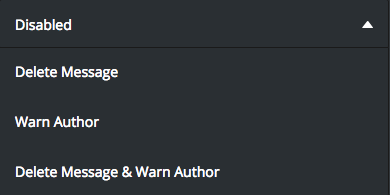
Make sure the sanction option is selected (Warn Author, Delete Message or Warn Author and Delete Message)
https://cdn-longterm.mee6.xyz/s/automodhelp.png .
Make sure MEE6 has:
-> Read Messages
-> Send Messages
-> Mange Messages(if Delete Message is selected).
* MEE6 does not warn Owner, Admins, Bot Masters or Moderator Role Holders.
 buoyant moon
merry vector
when i say bad words it is not deleting
buoyant moon
merry vector
when i say bad words it is not deleting
☝️
merry vector
i know
buoyant moon
merry vector
i know
Are the above setup properly?
 honest ledge
@short condor ?
dire yarrowBOT
Need help with MEE6? Describe the problem/question you have and ping <@&892137524783349781> role in the same message.
Someone breaking our rules? ping <@&892137271430627330>.
Only ping staff directly if you are in a conversation with them or only that one single staff member can help you.
 short condor
honest ledge
short condor
honest ledge
dire yarrowBOT
 Nic6578#5810 has been warned
Reason: Bad word usage
 Chanel#6004 has been warned
Reason: Bad word usage
 lunar wagon
Hello , i have a bug i think , so i created few days ago Membership roles , and today when i checked the site they are gone , and i cannot create a new one , after i try to create a new it will just disappear , saying that i have no membership tiers yet.
(the memberships were working first day when i setted them , but now they are gone for some reason, please help?)
quaint agate
lunar wagon
Hello , i have a bug i think , so i created few days ago Membership roles , and ...
Server I’d please
lunar wagon
You mean the link to my server?
lunar wagon
802853799109853215
buoyant moon
Hi, I need help with the mee6 premium thing. I bought the one for life but a friend jokingly deleted the server where he had hosted the premium. is there any way to transfer it to another discord server or get my money back?
quaint agate
lunar wagon
802853799109853215
Devs are investigating 
quaint agate
buoyant moon
Hi, I need help with the mee6 premium thing. I bought the one for life but a fri...
Yep
dire yarrowBOT
To transfer your premium to another server, use https://mee6.xyz/premium-transfer.
quaint agate
lunar wagon
802853799109853215
Should be fixed
lunar wagon
quaint agate
Should be fixed
Thanks , works now.
 uncut olive
I genuinely have no clue what do to, as me and the other admins in my server also just as confused as i am with this problem. As it's logging things and sending those logs in another server. I'm not sure if this counts as a bug or not but i think i kinda does
limber knoll
fixed
 fallen pumice
Suddenly the option to add banner pictures at the very bottom of the embeds we have created has disappeared. This has messed up most of the previous embeds that was created in one of my servers. You cannot re-add them inside the dashboard.

 fleet saddle
acoustic verge
is it the instagram plugin?
fleet saddle
acoustic verge
is it the instagram plugin?
I had deactivated the instagram plugin and it was still posting multiple post but now it's 5-10 duplicates.
limber knoll
deactivated plug-ins will keep posting
fleet saddle
limber knoll
deactivated plug-ins will keep posting
Hmm okay. Thanks for the info.
 bitter owl
 Dear members
Discord just went through a severe outage. Due to the high flow of members complaining and the lack of enough stability and team members to keep the server in good terms we have temporarily locked this server.
We will keep you updated and as soon as discord gets back to normal, we will unlock the server.
PS. Most likely that the MEE6 on your server might misbehave during this time. Thus, we appreciate your patience and understanding
MEE6 Mod Team
All good,
It seems that discord is back to normal now.
Server will be unlocked but keep in mind that the connection might still not be on its best shape.
Allow MEE6 30 to 60 minutes to fully self heal, please
Appreciate everyone's patience
 gaunt glade
!clear 0 is a thing
 marsh bough
!clear 0
dire yarrowBOT
Mr. Hacker, you can't use that.
marsh bough
Ik
dire yarrowBOT
kecik, that command is disabled in this channel.
eager elk
Please use all of the command at #〉commands
 robust tree
So I like the new option for instagram, but there's something still wrong... it posts the insta-posts up to 5 times in the discord channel... is that normal
limber knoll
no, can you message me the server id or dashboard link please
dire yarrowBOT
 AYAYAYAYA#4463 has been warned
Reason: Bad word usage
eager elk
do not click sram link above
dire yarrowBOT
 𝔸𝔾 𝔾𝔸𝕄𝔼ℝ 乛ᵇᵒˡᵗ#7401 has been warned
Reason: Bad word usage
dire yarrowBOT
 Arbion12#8130 has been warned
Reason: Bad word usage
 Gardian_1#6529 has been warned
Reason: Bad word usage
 AltF4xiv#5285 has been warned
Reason: Bad word usage
dire yarrowBOT
 xU-FAiLx_3#8788 has been warned
Reason: Bad word usage
 sweex#0538 has been warned
Reason: Bad word usage
 milanoldemonnikhof#6272 has been warned
Reason: Bad word usage
dire yarrowBOT
 B̵l̸u̶e̵_̸T̷o̶g̷a̸#7641 has been warned
Reason: Bad word usage
dire yarrowBOT
 _happypei_#5722 has been warned
Reason: Bad word usage
dire yarrowBOT
 bogamer08#9300 has been warned
Reason: Bad word usage
 M3rcilessLord#1420 has been warned
Reason: Bad word usage
 colombus#4200 has been warned
Reason: Bad word usage
eager elk
wow so many warn here
dire yarrowBOT
 ! Cʀᴀᴢʏ Bᴏʏ ᴥ#8597 has been warned
Reason: Bad word usage
 Deteriorate#0577 has been warned
Reason: Bad word usage
 Drain {Uchiha}ᴿʷॱ#1088 has been warned
Reason: Bad word usage
dire yarrowBOT
 OWZY#6006 has been warned
Reason: Bad word usage
 AnyDark Playz#0083 has been warned
Reason: Bad word usage
 !Mega Knight 🎃#2025 has been warned
Reason: Bad word usage
 1amMonkey#2642 has been warned
Reason: Bad word usage
 Vivi1985#4387 has been warned
Reason: Bad word usage
 (Jimmy) </3#8127 has been warned
Reason: Bad word usage
 RWonline1#1681 has been warned
Reason: Bad word usage
 Mathemath.TV#2708 has been warned
Reason: Bad word usage
robust tree
limber knoll
no, can you message me the server id or dashboard link please
Yes i can, where do i find it?
dire yarrowBOT
Getting your server ID
Go to your server and use !dashboard then copy this link and give to staff.
Or if that didn't work: open Server Settings in your Discord Server. Select Widget and press Copy ID next to Server ID.
You can also use Developer Mode as an alternative method.
buoyant moon
@robust tree ☝️
robust tree
limber knoll
no, can you message me the server id or dashboard link please
I've send you my dashboardlink and server id
stray sluice
 faint oxide
I don’t see you doing a job in my server
faint oxide
I don’t see you doing a job in my server
What do you mean by “doing a job” exactly?
limber knoll
@faint oxide?
oh that server
bot has manage messages in the channel or administrator permissions?
and also ensure the bot can see the channel and send messages
 raw sand
Not sure if this is an issue, but the sound seems to be constantly cutting out today, is there an issue with the servers?
faint oxide
Ok , I’ll go check
There are no issues on the server but it doesn’t have administrator permissions . How do i turn it on
dire yarrowBOT
 Professeur Koro#3658 has been warned
Reason: Bad word usage
limber knoll
faint oxide
There are no issues on the server but it doesn’t have administrator permissions ...
in server settings > roles > mee6 role > scroll to the bottom administrator permission
@buoyant moonknown
 neat pilot
music stoped working
 winged yarrow
same for me
 acoustic dagger
yeah music doesn't work for me either
dire yarrowBOT
 Fadey Pants#0418 has been warned
Reason: Bad word usage
buoyant moon
yo i cant use mee6 music

dis bug?
oh god did youtube crack down again
smh
greedy a holes
 latent monolith
think its yt cause this is happening to many
 wintry schooner
i can’t use mee6 music either ?? anyone else.
buoyant moon
FUUUUU
dire yarrowBOT
Fadey Pants#0418 has been warned
Reason: Capital letters
limber knoll
@buoyant moonnothing like that
buoyant moon
nope its susan
 cunning mulch
It's stuck on searching lol
faint oxide
Turned it on , still the same
wintry schooner
yea same lol
limber knoll
@wintry schooner@latent monolith@buoyant moonmusic is down only on mee6 side
cunning mulch
 buoyant moon
limber knoll
<@!767750448685383720><@!715016129285849188><@456226577798135808>music is down o...
buoyant moon
limber knoll
<@!767750448685383720><@!715016129285849188><@456226577798135808>music is down o...
but why
bro
buoyant moon
groovy and rythm got shut down
limber knoll
just the bot forgetting how to connect to your voice server
latent monolith
limber knoll
just the bot forgetting how to connect to your voice server
any way to fix it?
faint oxide
I turned on it , it still doesn’t work
limber knoll
not your side
buoyant moon
how can he forget?!?!?!? its a literal bot
limber knoll
it happens Fadey
wintry schooner
how do we fix it ??
limber knoll
@faint oxidedm invite please
wintry schooner
does it fix by itself ??
quaint agate
~~**Server in Lockdown
**due to a music outage, Devs are aware and are looking into the issue.
we apologise for any inconvenience this has caused.
keep upto date with this small outage in #〉status-updates~~
Unlocked
dire yarrowBOT
 Truesurvivor#1334 has been warned
Reason: Bad word usage
dire yarrowBOT
 <3 .#0721 has been warned
Reason: Bad word usage
 Lis Roarr~#8105 has been warned
Reason: Bad word usage
 🍺🧁DaRk DeMoN🧁🍺#5915 has been warned
Reason: Bad word usage
dire yarrowBOT
 Lexx#8008 has been warned
Reason: Bad word usage
 novel ridge
AHAHAHHA
 worn vapor
The !give-xp command ain’t workin
radiant carbon
worn vapor
The !give-xp command ain’t workin
Do you have premium
limber knoll
@worn vaporpremium command feature
buoyant moon
:SLEEP6: Something went wrong in MEE6 land! Contact our support team for instructions if this keeps happening.
code: b8e3f527b4c74364805b5a640c45fc53
this code i need help
quaint agate
channel hop
also there is no need to send it in every channel, please keep it to one channel
 jaunty fox
 buoyant moon
Can you please help me why the mee6 website looks like this?
 dire yarrowBOT
 Kirito Kun#9143 has been warned
Reason: Bad word usage
hearty igloo
buoyant moon
Can you please help me why the mee6 website looks like this?
Try again using this link
https://mee6.xyz/dashboard
Install our Discord bot to set up leveling, moderation, music, Twitch, YouTube, and Reddit notifications for your Discord server.
quaint agate
buoyant moon
Can you please help me why the mee6 website looks like this?
If I had a guess you where on slow internet and your browser couldn’t load the css
buoyant moon
okayy ty
 empty peak
?
 solar hollow
I'm setting up memberships and not getting the ability to see Paypal in my payout options.
Setup explanation states this:
https://cdn.discordapp.com/attachments/894646841860309003/899350696179154984/unknown.png
But when you go to set up Payouts you get this: https://cdn.discordapp.com/attachments/894646841860309003/899350783882047558/unknown.png
Appears no matter how you connect Paypal it doesn't show as an option.


 jagged nimbus
I tried to play a video with my mee6 bot and it just stopped working and keep on giving me "something went wrong in mee6 land" and I also got this code 759f7d98057c46ca9ac4023855171cf7
quaint agate
solar hollow
I'm setting up memberships and not getting the ability to see Paypal in my payou...
PayPal is soon™️
dire yarrowBOT
 Chad Craft45#4481 has been warned
Reason: Bad word usage
 (主)Vooshil/HC666yyc(副)#3444 has been warned
Reason: Bad word usage
 dįgbøÿ1996#9140 has been warned
Reason: Bad word usage
limber knoll
@solar hollow not supported completely
@buoyant moon administrator permissions in those servers?
limber knoll
make sure the correct account is showing top right
and that in server settings > roles the administrator permissions are on
 eager drum
i put nyan cat but then he rickroll me
 last orchid
Question, the IG plug-in does post the amount of numbers related to the images posted from an account on IG. Would it be possible to just have one post instead of more?
 wide rapids
so is the IG posts Duplicating?
last orchid
It does post as many times as the IG account has images related to their post. For example, the IG user does upload 3 images to one post and the bot does post 3 times the same link
Our users are complaining about it due to spam
 boreal nova
I am still getting social post twice in Discord
I reported this earlier as well.
It used to be instagram initially, now i am getting this for reddit too
any update on when this will be fixed?
last orchid
limber knoll
<@423217106465849345> dm me the server id please
Dm send
boreal nova
 dire yarrowBOT
 urs#3579 has been warned
Reason: Bad word usage
 Chaosmatthi#2974 has been warned
Reason: Bad word usage
 AndreiGr811#6495 has been warned
Reason: Bad word usage
 Adham Moamen#1111 has been warned
Reason: Bad word usage
 BlackWidow1591#7842 has been warned
Reason: Bad word usage
 RoseyKun#2191 has been warned
Reason: Bad word usage
 wispy seal
Mee i have a issue i cant put u in my server i have one but its not showing up
 frail mortar
Yesterday i´ve setted up my membership but today everything seems to be deleted. Wahts the matter?
dire yarrowBOT
 BloodyVort#3660 has been warned
Reason: Bad word usage
 Yera D.#6873 has been warned
Reason: Bad word usage
 yaku daisuke#2430 has been warned
Reason: Bad word usage
 Kaila#9052 has been warned
Reason: Bad word usage
 CalledBat455#4555 has been warned
Reason: Bad word usage
 rich kernel
dire yarrowBOT
rich kernel
dire yarrowBOT
 aid#5111 has been warned
Reason: Bad word usage
 beluga#0597 has been warned
Reason: Bad word usage
 czechhalloween#2160 has been warned
Reason: Bad word usage
 zineOwO_28#8514 has been warned
Reason: Bad word usage
 Monkisbg#0241 has been warned
Reason: Bad word usage
 ThePhoenix#9400 has been warned
Reason: Bad word usage
ThePhoenix#9400 has been warned
Reason: Bad word usage
 broken fulcrum
i blocked mee6
dire yarrowBOT
 ilkkab#0341 has been warned
Reason: Bad word usage
 Wolfie#0703 has been warned
Reason: Bad word usage
dire yarrowBOT
 khaza_tasin#1696 has been warned
Reason: Bad word usage
dire yarrowBOT
 Huyy Thuầnn#1176 has been warned
Reason: Bad word usage
 Dragnarok#6028 has been warned
Reason: Bad word usage
dire yarrowBOT
 KiriChu#6158 has been warned
Reason: Bad word usage
 Samoon#9337 has been warned
Reason: Bad word usage
 an random guy#6232 has been warned
Reason: Bad word usage
 Spooky_Johnny#3381 has been warned
Reason: Bad word usage
Spooky_Johnny#3381 has been banned
Reason: Too many infractions
dire yarrowBOT
 Cilaria 🥦#5308 has been warned
Reason: Bad word usage
acoustic verge
Server in Lockdown due to a Raid
will be back open shortly. Apologies for the inconvenience
dire yarrowBOT
 General Sleasdogg#6451 has been warned
Reason: Bad word usage
 Pavan de bruyne#4222 has been warned
Reason: Bad word usage
acoustic verge
Server in Lockdown due to a Raid
will be back open after we have dealt with it. Apologies for any inconvenience caused.
 valid wedge
#787724541702045756
dire yarrowBOT
 ミ★ 𝘔𝘳. 𝘏𝘰𝘱𝘱𝘴 (𝘮𝘦) ★彡#0816 has been warned
Reason: Bad word usage
 safe patrol
i have a bot in my server, and i just put a music channel in my server
the "play" command is broken! pls help!!!!
 austere hamlet
 unkempt veldt
bye noobs
dire yarrowBOT
 crisgame#4428 has been warned
Reason: Bad word usage
 fading kettle
hello
 mint compass
🙋♂️
dire yarrowBOT
🍋NotAnTeddy🍋 (Epic guy), that command is disabled in this channel.
 dire yarrowBOT
 Angel Heart#0576 has been warned
Reason: Bad word usage
dire yarrowBOT
 Zeus,The Lightning Preadator#6914 has been warned
Reason: Bad word usage
 plush adder
yes
dire yarrowBOT
 Esp.rite#0983 has been warned
Reason: Bad word usage
plush adder
limber knoll
<@!893779605687779340>can take a bit to load
No im wait it for 10m
limber knoll
chrome up to date?
dire yarrowBOT
 🌹🍒𝘾𝙝𝙚𝙧𝙧𝙮🍒🌹#1968 has been warned
Reason: Bad word usage
 Ash-#1293 has been warned
Reason: Bad word usage
 SedcodFB#5780 has been warned
Reason: Bad word usage
 GamezyGames#5537 has been warned
Reason: Bad word usage
plush adder
yes
plush adder
limber knoll
chrome up to date?
chome up to date
limber knoll
try incognito, does that work?
limber knoll
incognito is a chrome freature
dire yarrowBOT
 Hanky#2494 has been warned
Reason: Bad word usage
dire yarrowBOT
 𝕯𝖆_𝕬𝖘𝖚𝖗𝖆#9284 has been warned
Reason: Bad word usage
 devout echo
Bug Report: when adding a playlist the bot randomly stops playing. When using the /skip command is says there are no tracks available. When selecting /play it starts playing the playlist again. This is a bit frustrating. link to the message in support: #〉volunteer-support message