#〉bugs-reports
2 messages · Page 106 of 1
 digital dagger
 radiant carbon
Ah I don't have a bug report but how did mee6 say that
 distant prairie
using !say
 stiff field
Sadly that command could be used by only mee6 staff
 safe kayak
MY Mee6 Bot just removed myself and all of my friends from our main roll in discord.. The Bot did this every hour.. now we finally kicked the bot.. what can i do?
 long dawn
Make sure there isn’t any roles in the birthday plugin @safe kayak
You’re like the 10th person to report this btw
safe kayak
so i have to clear the rolls in the "BIRTHDAY ROLES TO GIVE" field?
long dawn
Yes
 dire yarrowBOT
 EsterMoonster#7924 has been warned
Reason: Capital letters
safe kayak
long dawn
Yes
thanks
 thin prawn
my mee6 bot does not leave the voice channel.even though i put !stop it doesnt leave it don't even play music it just gets stuck
 tranquil wing
thin prawn
my mee6 bot does not leave the voice channel.even though i put !stop it doesnt l...
tranquil wing
thin prawn
my mee6 bot does not leave the voice channel.even though i put !stop it doesnt l...
<@&193123929701875712> sorry for the multiple pings, this is happing with a server im in, mee6 wont leave voice chat
thin prawn
i also put !leave nothing rlly works if it joins it can't do anything you have to delete the channel
<@&193123929701875712>
 full tiger
I have the same problem
mee6 doesn't respond to commands
 storm grove
🙂
 stable flare
<@&193123929701875712>
Check the error: I have 4 moderators on the server and 2 senior moderators on the server. And your bot shows 5 moderators and 3 senior moderators
 bitter zenith
role member counts are being investigated @stable flare
stable flare
Okey
 dense sparrow
Don’t know if it’s for everyone (hopefully I’m putting this in the right channel!) but the music quiz isn’t working! The bot joins our voice channel but doesn’t give any music and after a while shows the leaderboard. Is it just my server or is it for everyone?
 teal lodge
<@&193123929701875712> premium user here
 tired meteor
teal lodge
<@&193123929701875712> premium user here
tired meteor
teal lodge
<@&193123929701875712> premium user here
change the server voice region and try again, if that does not help then please wait until the devs fixes it
 regal pier
!rank
dire yarrowBOT
 ChomikStef, that command is disabled in this channel.
regal pier
!levels
dire yarrowBOT
ChomikStef, that command is disabled in this channel.
regal pier
oo
 blissful orbit
Try it in #〉commands
 brazen estuary
Hey guys, I found a wrong translation:
Englisch: "duplicated text"
Current translation for german: "Dublizierter Text"
Correct translation for german: "Duplizierter Text"
teal lodge
dire yarrow
<:XMARK6:403540169992568833> **ChomikStef**, that command is disabled in this ch...
how to make this again?
I forget how to do this
dire yarrowBOT
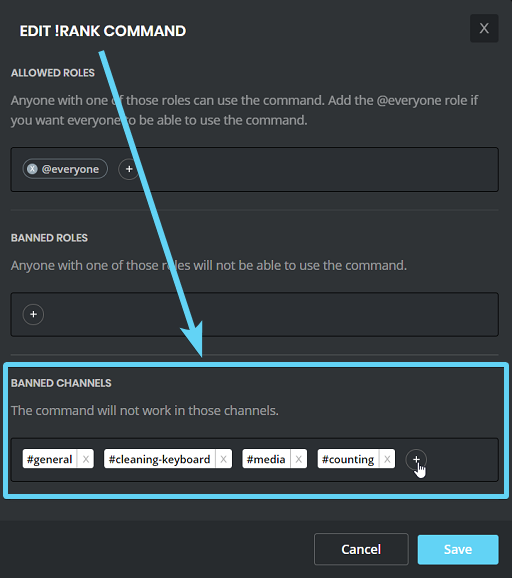
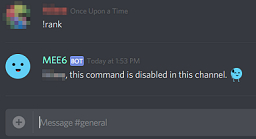
Want to limit usage of bot commands to a certain channel? each command on dashboard has a Banned Channels option.
Go https://mee6.xyz/dashboard → Select your server → Respective plugin → click on EDIT button next to the command and add the channel(s) you don't want the command to work in on Banned Channels
https://i.imgur.com/onfMfps.png https://i.imgur.com/BTae12h.png
 dire yarrowBOT
papierkowy, that command is disabled in this channel.
 atomic sedge
<@&193123929701875712> it cant find my server
dire yarrowBOT
It appears that you may be on the wrong account, or something went wrong since the time you logged into my website.
-Please navigate to https://discordapp.com/login and select the gear :gear: in the bottom left, then press Logout.
-After that, please navigate to https://mee6.xyz/logout to disconnect from my website.
-Once finished, select "Add to Discord" again, and follow the instructions to access my dashboard again.
https://cdn.mee6.xyz/s/logout.png

 candid valve
@atomic sedge try that 
atomic sedge
ok
 buoyant moon
the music quiz doesnt work <@&193123929701875712>
 deep carbon
I had my twitter plugin enabled and already working on my server but last night it stopped working and itsnt posting when i tweet out sumn
 wooden mountain
@deep carbon can you link me that twitter account pls
deep carbon
wooden mountain
<@!376788801105952778> can you link me that twitter account pls
I sent it through dms
wooden mountain
yep, i'm checking it
 kind fulcrum
Hello, how´re you guys?
Well, I come today home I find our bot doing that.🥺
http://prntscr.com/10hcwfh
 wooden mountain
i can't read that
is it removing roles?
make sure thsoe roles are not set as birthday roles
kind fulcrum
wooden mountain
is it removing roles?
Yes
wooden mountain
check your config, it's most likely streamer or birthday roles
wooden mountain
deep carbon
I had my twitter plugin enabled and already working on my server but last night ...
should work now
kind fulcrum
Now I have to set the roles manually, or can bots do that?
Il find this http://prntscr.com/10hd3x0
 kind fulcrum
🥺 ok
wooden mountain
those are the roles MEE6 will give to everyone on there birthday
AND REMOVE FROM EVERYONE NOT CELEBRATING THERE BIRTHDAY
kind fulcrum
I didn't add anything here, bots did it alone, alone added these roles.
deep carbon
wooden mountain
should work now
ty
wooden mountain
kind fulcrum
I didn't add anything here, bots did it alone, alone added these roles.
impossible, the bot can't edit the settings
only read them
the only thing that can edit settings is the dashboard
 sly gale
Hello?
Am I allowed to talk?
The animal crossing tybalt bot says I'm first in line but does not give me the dodo code where would I find a dodo code?
kind fulcrum
wooden mountain
the only thing that can edit settings is the dashboard
No one have access at bot🥺
Thanks, I'll be more careful in the future, where can I see the history of bots editing? 
 boreal totemBOT
Audit logs
Have a page on the website where changes made by bot masters on the website are logged.
Show plugin enable/disable, plugin and command settings changed, level resets and all other actions that can be done on the website.
Option to send to a discord channel? Not sure
Category
Website
[Jump to suggestion](#┃upvote-suggestions message)
 MEE6 suggestions
·
wooden mountain
MEE6 suggestions
·
wooden mountain
i keep asking for that but no luck so far
sly gale
Is anybody reading this?
kind fulcrum
Thanks Guys 🫂
wooden mountain
sly gale
The animal crossing tybalt bot says I'm first in line but does not give me the d...
go ask the support of that bot, we don't know anything about that bot
kind fulcrum
sly gale
Is anybody reading this?
YES, for support you can ask your question here #〉volunteer-support or #463809001273032715
Because here´s only about bugs.
sly gale
Ok
 feral steeple
Hi, idk why, but my MEE6 (incl. Premium) sometimes removes my top role, which is bound to admin rights - I am the server owner so that it doesnt effect that much, but there shouldnt be any commands for removing my role or anything like that. Can someone help me? The removing is totally random at some times...
wooden mountain
role rewards?
feral steeple
Yes, but that is a hidden role for me specially...
I guess I have to exclude myself and everybody with admin rights from the role reward system?
wooden mountain
yes
feral steeple
Okay, thanks a lot, very good support ☺️
 cloud shore
Translation Report/Add - Limited Channels (Send a message to the author on message deletion)
English
dedicated to {limited}. You are not allowed to post anything else.```
__**German**__
```{user.idname}, deine Nachricht wurde entfernt. Der Channel {channel} ist
ausschließlich für {limited} limitiert. Du bist nicht berechtigt, etwas anderes zu schreiben.```
*images = Bilder*
*videos = Videos*
*commands = Befehle*
I know it's not a bug report, but no translation has been added yet so I wanted to put one in here in case there isn't one yet. wary mist
When using the restricted channels feature ... it deletes other messages from other bots
atomic sedge
candid valve
<@728210325408710726> try that <:THIS6:494673739032690708>
DUDE it finds 2 of my servers but it cant find the 3rd on wich is not mine but i have premit
bitter zenith
Administrator only
atomic sedge
?
 hollow wasp
sometimes when playing music, the music dosent play
 brisk tiger
fix this bug 🐛
 lethal ravine
what bug
 indigo prawn
brisk tiger
fix this bug 🐛
indigo prawn
brisk tiger
fix this bug 🐛
lol
 buoyant moon
bot zostaniesz ze mna
dire yarrowBOT
 Denis(A-OСКОТтИ)#4862 has been warned
Reason: Posted an invite
 scarlet plank
hollow wasp
sometimes when playing music, the music dosent play
scarlet plank
hollow wasp
sometimes when playing music, the music dosent play
Yep, that's been happening for quite a while now. The devs are currently trying to fix it to my knowledge
wooden mountain
if it's always the same song that doesn't play, then that song won't work (use a yt link to another vid of that song then)
scarlet plank
^
But if it seems like a random song every time, that's a bug
In fact it literally just happened right now on my server for the 4th time today lol
 deep nacelle
Bug report: Users can't locally or globally opt out of xp notifications if they don't care about them. They're annoying and serve little to no purpose on most servers that have the xp thing turned on.
 gilded yacht
That is not a bug
The purpose is to notify you that you leveled up
If you don't like it block the bot
I already talked to you
deep nacelle
Right, I asked if there was a way to disable it, you said no. As a user this feels like a bug. Servers use MEE6 to do intro messages and other stuff so if I block the bot I could miss other useful messages, your work around feels insufficient. You wanna reject the bug that's your business, doesn't make it less of one to me.
bitter zenith
it's not a bug
it's intended behavior
I'll handle this kate
if you would like to leave a suggestion about how to improve the leveling feature, then by all means. please leave one.
deep nacelle
Alright, so I should post this as a suggestion? That's the issue?
 lucid seal
Hello got a problem.
radiant carbon
What's up
lucid seal
On one of my friends server with mee6 bot.
 spice kernel
I have premium, some people were recording a podcast in the server, they used the "stop recording" and they never got a download link sent to them. I saw the bot in the voice channel, so I'm not sure what's going on... Anybody got some more info on this?
 terse monolith
<@&193123929701875712> I'm a premium user, and really like your bot Here's my positive contribution to help with the development of the quality (I'm not a grammar naz... who said "no soup 4u" ... :just helping 🙂

 fallow horizon
Any update on the role counter bug?
 spare relic
fallow horizon
Any update on the role counter bug?
spare relic
fallow horizon
Any update on the role counter bug?
Kick and reinvite the bot
 honest orbit
<@&193123929701875712>

 faint dome
Try again.
faint dome
Then it was just a render issue. As we use a really quick rendering system, sometimes that kind of things happen
honest orbit
faint dome
Then it was just a render issue. As we use a really quick rendering system, some...
I got it, thank you for your help, I will recommend it to my friends.
 wide whale
Hey, there is a little mistake in the Statistic Module!
Picture -> https://prnt.sc/10iu560

 brisk patio
dire yarrowBOT
brisk patio
dire yarrowBOT
 ! Soriente#5192 has been warned
Reason: Bad word usage
 wary nest
on the website once i add mee6 and try to go to the dash board my screen just stays on a gray screen and never loads
 fleet oyster
Same dude
 slim umbra
i added mee6 bot in my server but !clear comand is not working can anyone help?
wooden mountain
channel hopper
 plain current
cant "clear" messages :c
 sick jolt
enable the Moderator plugin on the dashboard and run !clear
dire yarrowBOT
!clear [@name] [messages to remove]
!clear xto clear the last x messages (!clear 10)!clear @nameto clear all the messages of@name(!clear @MEE6)!clear @name xto clear the last x messages of@name(!clear @MEE6 10)
- I need Manage Messages and View Message History permissions
- Moderator plugin and !clear command should to be enabled
- Only users with Allowed roles can use the command, don't forget to add their roles in command's settings!
dire yarrowBOT
 Roblox Clan#3458 has been warned
Reason: Posted an invite
buoyant moon
@.balenciaga_:Scammerrr
@.balenciaga_:Scammerrr
@.balenciaga_:Scammerrr
@.balenciaga_:Scammerrr
buoyant moon
No sry
Its my Channel i will all join he please
I will have a bot in my Channel please
I will have a bot in my Channel please
I will have a bot in my Channel please
I will have a bot in my Channel please
I will have a bot in my Channel please
I will have a bot in my Channel please
dire yarrowBOT
Roblox Clan#3458 has been warned
Reason: Posted an invite
long dawn
<@&732153669344165989> spammer above ^
radiant carbon
Yeah
 novel field
Ye
radiant carbon
novel field
Ye
Do you have a bug report
novel field
No I’m just agreeing
 neon hare
 strange loom
Oh boy
dire yarrowBOT
 luiscervantes30#7953 has been warned
Reason: Bad word usage
indigo prawn
good mrng
 tribal quarry
YouTube plugin stuck in loading loop:
I enabled the YouTube plugin this afternoon. Everything seemed fine. Looks just like the twitch plugin interface. Anyway, I filled out everything and went to save but it got stuck. It never saved and I waited around 20 minutes before refreshing the page. Now I’m in a loop. The three dot loading animation never stops so I cannot access the plugin.

I tried to disable and enable it too. Still doesn’t work 🤔. Halp 🙏🏼
 limber knoll
answered
tribal quarry
@limber knoll it works again. Thank you again for the help!!!
 torpid trellis
I know this is a known bug but I really really want it to be fixed.
The glitch where the og bot will send new followers and the custom bot won’t
 wanton breach
!play saturno
dire yarrowBOT
moijoh🍜, that command is disabled in this channel.
Hani, that command is disabled in this channel.
 magic mango
Hi, i tried to add the bot to my sever but it says that i have no severs.....halp pls
bitter zenith
@magic mango do you own the server or have full Administrator permissions?
 leaden kestrel
Yo fix the emojis associated with changing pages plz
buoyant moon
Why isnt my bot changing the roles when somone joins or when you react?
 modest ore
@dire yarrow
 torn silo
!urban !
dire yarrowBOT
goatoush, that command is disabled in this channel.
 woven vector
i have very important thing to say
none of those singers work
 woven vector
but sometimes there are more than +4 artists and you can type 1
 hexed girder
Someone in my server joined and mee6 was spamming he said he joined alot when he joined once

 marble quest
considering that those are between multiple days, it's unlikely they only joined once
if you use !user-info <@&453610540686639115> mentioning them, you can see their last join date which should be the 10th. I would also recomend enabling audit logs to show when users leave as well which can be found in the moderator plugin -> audit logs. (you also need to enable the moderator plugin to use the !user-info command) @hexed girder
hexed girder
ok thanks
buoyant moon
mee6 broke now its swearing
limber knoll
@buoyant moon well neither server you have has mee6 in it
 stable oak
Unable to use the Mee6 youtube plugin (yes I've paid for premium)
faint dome
pls provide more info
 hardy crystal
im with a german server ( im german ) and say "gut" this is of english "good" and then say MEE6 im must banned for infinity but there have not enough permissions
dire yarrowBOT
 tiziankingTY#3119 has been warned
Reason: Posted an invite
buoyant moon
hardy crystal
im with a german server ( im german ) and say "gut" this is of english "good" an...
I think that’s simply your server admins trolling with you
Not MEE6’s problem
dire yarrowBOT
 Oğuz#0301 has been warned
Reason: Bad word usage
Oğuz#0301 has been banned
Reason: Too many infractions
 misty leaf
mee6 has been muting people in my server without any command usages
i use a custom bot
i’m owner and mee6 is the only bot i have
audit logs show it was mee6 and i don’t have admins
misty leaf
no
wooden mountain
server name?
misty leaf
a role i gave mee6 also got deleted
wooden mountain
smae?
according to your config, it should give the members role to new people (but it doens't have the permission to do this)
other then that, nothing is set up to give or remove roles
misty leaf
mee6 gave himself a role below the others
deleted the role i gave him
and is muting people even though i can’t command him to
what is going on
buoyant moon
@misty leaf I’m honestly curious now. Are your audit logs showing that MEE6 is actively doing this? Your staff?
buoyant moon
Maybe kick the bot and re-invite?
Only possibility is that either this is truly a bug, or maybe a staff member is trolling in a separate channel by muting everyone
I’ve had moderators who would (for fun) mute people by going to separate channel and delete the mute command message instantly ¯_(ツ)_/¯

 ancient root
Twitch Alerts do not work currently
 quaint agate
mhm
 misty solstice
Music support is down atm
quaint agate
apears so yes
 languid sluice
website is also down atm
we are in good hands. i'm sure it will be back up shortly
 burnt wind
mee6 music not working rn
quaint agate
yea
novel field
 quaint agate
music?
quaint agate
yea known issue
 feral falcon
2f06445ea33c4562b980593c3a04bd99
quaint agate
music?
feral falcon
yeah
buoyant moon
*MEE6 Premium
code: 55cae54d6ed949d79f2fca8d482f6e29
radiant carbon
What command
buoyant moon
!play
buoyant moon

 white torrent
Oh Ig we need to wait till it's back up then?
quaint agate
buoyant moon
discord client modifications are agianst tos
buoyant moon
quaint agate
~~discord client modifications are agianst tos~~
psssss xD
 scarlet oasis
quaint agate
~~discord client modifications are agianst tos~~
scarlet oasis
quaint agate
~~discord client modifications are agianst tos~~
Exposed
candid valve
Reporting
hexed girder
i went to test out a custom command i made but it said the wrong thing and i was confused

wut

 rancid plover
 dire yarrowBOT
MEE6 says I have no servers, but that's not true...
Well, that can be caused by:
‣ You don't own any servers
‣ You don't have Administrator permissions or a bot master role on any server you're on
‣ You're logged on with a wrong account (the most common problem)
Third one can be fixed by following these steps:
1. Logout from Discord in your browser (not installed client or mobile app)
1.1 Open https://discordapp.com/app in your browser
1.2 Click on \⚙ icon (User Settings)
1.3 Scroll down, click Log Out and confirm action
2. Logout from MEE6 website
2.1 Open https://mee6.xyz in the same browser
2.2 Click on avatar icon in upper right corner
2.3 Click Logout
3. Login using correct account
3.1 Open https://mee6.xyz and click Login button in upper right corner
3.2 In new window login to Discord. After that you will be redirected back to MEE6 website
3.3 That's all! Now you're using correct account and MEE6 website lists servers where you can modify his settings
P.S. If you're on mobile and some elements are not visible, enable Desktop site mode or switch screen to Landscape (vertical) mode.
hexed girder
can u answer my bug mee6?
wooden mountain
it's a question from an hour ago that has no meaningfull information
why are you even replying to that?
buoyant moon
not sure why but the mee6 website shows a white screen for me
 wooden mountain
is there an adblocker?
buoyant moon
wooden mountain
is there an adblocker?
nope
hold on I fixed it, had to close the other tab

 rain panther
mee6 starts swearing when we ran !logs
 blissful orbit
That’s probably a custom command that one of your admins added
rain panther
oh thanks
wooden mountain
that's 💯 % a custom command
rain panther
thanks so much
 deep isle
I added the reaction role once, now I want to delete it and add a new one. I want to change the channel without deleting it. It doesn't work.
 vocal hawk
Twitch live notifications seem to be down
 wintry inlet
hello
radiant carbon
wintry inlet
hello
Hello do you have a bug report
wintry inlet
why the quiz are disable
 brisk portal
Yes, Twitch Live Notifications have been down all day in the UK.
 surreal glade
My twitch notifications haven't been working since around 8:30a.m. Central Time this morning. Another server I'm on his seem to have worked at 11:50 a.m. so it's stopped completely for me and sporadic for others. I don't want to say I'm glad to see others post the same issue but good to know I'm not the only one
 ivory blaze
brisk portal
Yes, Twitch Live Notifications have been down all day in the UK.
ivory blaze
brisk portal
Yes, Twitch Live Notifications have been down all day in the UK.
known issue and being looked into
buoyant moon
Hey, I know this guy. He tried to do art with different squares, but it warned him even though he was a moderator and it wasn't zalgo. It said "Zalgo Usage" in his warning.
 scenic schooner
Hey Guys, until now I used mee6 to send a message to my discord to let my community know that I´m online on twitch. But since now it doesn´t work. What can be the problem?
 obtuse prawn
if you see the message from vitamin water that is a known issue and they are working on fixing it
scenic schooner
Thanks @obtuse prawn I checked in my backoffice and deactived twitch to reactivate, but know the message appears, that the Twitch notification is for premium users only?!?
obtuse prawn
scenic schooner
Thanks <@!348252178495963136> I checked in my backoffice and deactived twitch to...
The Twitch feature was made premium only around the 2nd week of January. The reason you were still able to use it is because you have a grandfathered server which means that you get the Twitch feature for free. Because you disabled it, you lost the feature. You should ping @support with you server ID and they might be able to give you the Twich feature again.
scenic schooner
Thank you for this information!
obtuse prawn
Yep
scenic schooner
<@&193123929701875712> Dear Support Team, as I mentioned three messages above, I got the problem, that I disabled the Twitch feature due to the actual issue/bug with Twitch but now I´m unable to activate it again because I´m not a premium user. Maybe you can active it for me again please? My Discord Server ID is 720785359016820827 - Thank you very much for your help 
stiff field
<@&732153669344165989> ads ☝️
dire yarrowBOT
 villain deku#3248 has been warned
Reason: no ads
radiant carbon
Lol that ad is not a bug report
buoyant moon
rain panther
mee6 starts swearing when we ran !logs
LMFAO
 plain glen
I tried using the MEE6 music playback feature to access and run my Tidal playlist, but it errors out due to the audio format being incompatible with the system. I'd greatly appreciate it if your team could look into adding Tidal support to the music player, and I think many others would very much agree that they'd like to see it at some point. Thanks. 🙂
limber knoll
plain glen
I tried using the MEE6 music playback feature to access and run my Tidal playlist, but it errors out due to the audio format being incompatible with the system. I'd greatly appreciate it if your team could look into adding Tidal support to the music player, and I think many others would very much agree that they'd like to see it at some point. Thanks. 🙂 #〉suggestions #┃upvote-suggestions
@limber knoll thanks for the tag
limber knoll
was meant to show you to use suggestions to suggest it
 alpine cape
!rank
dire yarrowBOT
가네 키 1216q, that command is disabled in this channel.
dire yarrowBOT
naj_kanal, that command is disabled in this channel.
blissful orbit
Try it in #〉commands
radiant carbon
?
 acoustic coral
Hi
spare relic
radiant carbon
Lol that ad is not a bug report
The ad is already deleted my friend
 raven lantern
???
stiff field
 cinder oyster
Hi, my dashboard bug . there is a white screen
cinder oyster
Hi, my dashboard bug . there is a white screen
I would suggest you to refresh the dashboard. If it’s still not working then try using incognito on crome
cinder oyster
ok Ty
dire yarrowBOT
 roblox#8539 has been warned
Reason: Bad word usage
buoyant moon
Hey, I don't know if this a bug, or a suggestion, or both, but here is the deal:
I warned an user 3x times for brealing rules. Then he got mad and left the server. When he re-joined and I typed !infractions <hisname>, all 3 infractions were gone (luckily I remember who he was thats why I checked).
The thing is, I can't remember every single user that gets warned, on top of that, if they exit and re-enter Discord their infractions get removed.
So my bot is currently set to Auto-Kick after 5x warnings. But yeah even if they get kicked, they can re-join the Discord and start "a new life", there is no way I can see their previous warnings since once they get kicked or they leave, all the infractions get removed.
Is there a way to keep track of infractions even when the user is gone? So when I type !infractions <name> and I see like 20 warnings I can say "ok this guy got kicked 4 times, now I think a ban its needed".
If they keep exiting and re-entering the Discord its basically an exploit, and the only logical solution would be to replace the kick with the ban after 5 warnings, but I dont want to be that harsh.
wooden mountain
buoyant moon
Hey, I don't know if this a bug, or a suggestion, or both, but here is the deal:...
hi, can you give me the mee6 dashbaord link for that server?
as it's not suppsoed to forget infractions like that
buoyant moon
In PM? @wooden mountain
buoyant moon
I would prefer PM Im paranoid if you dont mind ...
adn we can continue talking here ofc
wooden mountain
sure
buoyant moon
Thats correct, the auto kick doesnt remove the infractions, let me do the exit-reenter thing without being kicked
wooden mountain
i told you it was the remove-all-infractions
buoyant moon
Ok, same thing, its working as intended. So how do that happen on that user?
Did I really do the !clear-all-infractions command without mentioning anyone after the command?
wooden mountain
yep
buoyant moon
Oh ok, what a bad memory, I'm so glad its working as intended then
wooden mountain
or you did 2 spaces between command and mention
or did a name instead of a mention
wooden mountain
yesterday evening
quaint agate
I thought clear all clears everyone regardless of mention
Interesting
Well they shuld add a warning
Because tagt sounds dangerous
buoyant moon
Thank you again Sil for your time and patience, keep it up the good work!
quaint agate
A simple double space and no one has any fractions anymore
quaint agate


I would like if you removed 60+ infractions
So what else was changed with the new update
obtuse prawn
!infractions and !rank take ID's now
quaint agate
Ik that
 gilded walrus
I remember in the past, I am allowed to listen to use the MOO6 plugin to play music in a voice channel with only 1 person allowed. Now I cannot do that. What should I do?
wooden mountain
me no understand
quaint agate
wooden mountain
and peak online statistic
What is this
gilded walrus
@wooden mountain Here's the steps
- Create a voice channel that has a user limit of one
- Connect to that voice channel and call the !play command
- I hear nothing
obtuse prawn
quaint agate
What is this
displays the highest number of users that have ever been online in your server
 quaint agate
gilded walrus
<@!136777781005647872> Here's the steps
1. Create a voice channel that has a use...
quaint agate
gilded walrus
<@!136777781005647872> Here's the steps
1. Create a voice channel that has a use...
That’s because the bot can’t join
The change is limited to 1 member
What did you expect to happen?
obtuse prawn
quaint agate
The change is limited to 1 member
channel
buoyant moon
Oh now I undertstand! I was using CLEAR all infractions instead of REMOVE all infractions
gilded walrus
Ok thank you @quaint agate . I expect to hear a song being played in a voice channel with a user limit of 1 member
buoyant moon
so no matter the name after the command, I was clearing the whole server
quaint agate
Yea that dosent happen
buoyant moon
but I don't find the Remove check, is that a Premium feature?
buoyant moon
I didnt read carefully the description so I was clearing the whole server
I wanted to clean a single user and I ended up removing infrations on everyone, so now I disabled !clear-all-infrations since it doesnt even need an argument.
wooden mountain
it didn't used to accept an argument
now it accepts one (since yesterday)
but it's optional
there is also
dire yarrowBOT
 quaint agate
You shuld add a confirmation to that
It’s to easy to accidentally clear the whole server infractions
On the confirmation it shuld also say if your clearing a spicific user or if you are clearing everyone
obtuse prawn
So would !remove-all-infractions @Waffle_Weirdo#4312 remove all my infractions and !remove-all-infractions would clear the servers infractions?
wooden mountain
yes
obtuse prawn
okay I got it now, thanks
buoyant moon
I don't find the command on my dashboard "Remove all Infractions" and the command doesnt work. But yeah I will just type !infractions and then click the bottom link for convenience
buoyant moon
Aye got it, sad I lost all my server warnings but w/e my fault for not reading the descruiption with accuracy, apologize! 🙂
 clever rune
once i got to dashboard it shows a white screen
 brittle comet
Im server Owner and i cant send anything else in channels image-only mode (im SERVER OWNER)
 ivory blaze
brittle comet
Im server Owner and i cant send anything else in channels image-only mode (im **...
ivory blaze
brittle comet
Im server Owner and i cant send anything else in channels image-only mode (im **...
Intended
 uncut tangle
For some reason i cannot add the bot to my newest server i also waited 2 hours and still cant do it
 dire yarrowBOT
It appears that you may be on the wrong account, or something went wrong since the time you logged into my website.
-Please navigate to https://discordapp.com/login and select the gear :gear: in the bottom left, then press Logout.
-After that, please navigate to https://mee6.xyz/logout to disconnect from my website.
-Once finished, select "Add to Discord" again, and follow the instructions to access my dashboard again.
https://cdn.mee6.xyz/s/logout.png
 wooden mountain
it's to fast
it takes time to render the image
and if it sends the image before it finished rendering, some parts can be missing
but at the same time, we don't want the command to be really slow
 honest ledge
ohhhhh that makes sense!! ty sil
radiant carbon
Sil
:SLEEP6: Something went wrong in MEE6 land! Contact our support team for instructions if this keeps happening.
code: fb03871a3dfb42029e5e6c44b89b5f35
wooden mountain
no
radiant carbon
Yeah sorry
wooden mountain
at least say what command
wooden mountain
and don't focus on me, the whole team has the same resources
radiant carbon
Sorey
wooden mountain
missing manage channel permission
 midnight bison
mee6 gave a role to a new member that is not programmed to give, and that member was new to discord and messed with settings. What gives?
 brisk arrow
I was playing the music quiz with some friends when suddenly mee6 stopped playing music and didn't respond to any commands.
 weary marten
brisk arrow
I was playing the music quiz with some friends when suddenly mee6 stopped playin...
weary marten
brisk arrow
I was playing the music quiz with some friends when suddenly mee6 stopped playin...
mines been doing that aswell

 buoyant moon
buoyant moon
buoyant moon
429 Too Many requre
pls patch now
long dawn
 spiral sequoia
how did you make that
spiral sequoia
how did you make that
It’s Inspect Elements
 onyx holly
it always switches itselfs off when i try to turn on the option for sending a message to a textchannel when someone leaves. what can i do?
blissful orbit
Helped in #〉volunteer-support
 sudden kraken
For some reason I gave it admin but I Still can't give roles!!!!!
blissful orbit
Is one of the bots roles higher then the role your trying to give out in the hierarchy?
 flat rampart
Hello, I wanted to know why the experience on the servers does not suit me, the experience does not upload and I am caught
blissful orbit
Helped elsewhere
 wooden mountain
leaderboard link? @pallid idol
 pallid idol
That was an old mee6 !rank sc
Wait
1 mo

Manage your Discord server with leveling, moderation, Twitch, Youtube and Reddit notifications.
This affected everyone on the server
Except the moderator
wooden mountain
you are not an admin of that server so i can not give you that information. pls contact an admin of that server
 signal fjord
@wooden mountain Angad requested that you needed something...
pallid idol
Yes this is the admin
 glass shell
e
 carmine sail
<@&193123929701875712> MEE6's RNG is broken and I can statistically prove it

 vivid brook
@terse stratus Hey, I dare you to say 3 curses in a row
Please tell them, if you do, something very funny will happen
say a rude 3 times
you have to say it 3 times in a row
in less than 1 minute
do it
please
 terse stratus
No
dire yarrowBOT
 IceFreeze237#6089 has been warned
Reason: encouraging users to break rules
IceFreeze237#6089 has been warned
Reason: encouraging users to break rules
IceFreeze237#6089 has been warned
Reason: encouraging users to break rules
IceFreeze237#6089 has been banned
Reason: Too many infractions
Member not found
IceFreeze237#6089 has been warned
Reason: encouraging users to break rules
IceFreeze237#6089 has been banned
Reason: Too many infractions
IceFreeze237#6089 has been banned
Reason: Too many infractions
Member not found
 worldly tendon
The function of notifying the member when he cannot post text in image of texts is with problems in the translation.

 wary stratus
dire yarrowBOT
wary stratus
dire yarrowBOT
afklolheheden, that command is disabled in this channel.
 jovial bronze
I cant use the !help or any of the birthday commands

 marble quest
go to user settings -> text and images -> enable "show website preview from links posted into chat"

 uneven moat
@jovial bronze this bug by your phone memory
 pure obsidian
@jovial bronze it seems like you have link previews disabled, go to user settings => text & images and make sure this option is enabled
 obtuse prawn
terse stratus
obtuse prawn
terse stratus
Sorry for such a late answer on this but I believe this happens because mee6 sends the message before it is fully rendered. From what I remember sil (one of the staff) said that mee6 doesn’t want the user to have to wait a super long time for the rank card to render. So sometimes it sends it too quickly and that happens
 humble jungle
Hello, I enabled "delete server invites" before it was a premium feature. After it become a premium feature, I've added some new channels to my server. Though, MEE6 deletes the server invites on the old channels but not the new ones.
faint dome
there's a bug with that feature, we know. Not related to channels sadly
buoyant moon
!rank
dire yarrowBOT
M_cioch, that command is disabled in this channel.
terse stratus
obtuse prawn
Sorry for such a late answer on this but I believe this happens because mee6 sen...
thanks for answering. I always wanted to know what that meant 
 sly junco
!rank
dire yarrowBOT
turbochcáč, that command is disabled in this channel.
 astral tendon
!rank
dire yarrowBOT
Alonsyto, that command is disabled in this channel.
 light gull
I set a status for my Custom Bot so it says he is live on twitch. It works for a few day but after some time it still says he is streaming but Discord wont show the field you can click to join the stream.
before

after

sorry its German but you get the problem right?
 fossil hill
Did you include a steam link?
 fossil hill
hm ok.
woven vector
ok so i don't think it should be like that
 wooden mountain
does it?
note to self, remove all songs with names under certain lenght from music quiz
now = snow
 blazing merlin
I can't run the command !rank
It says "SLEEP6 Something went wrong in MEE6 land! Contact our support team for instructions if this keeps happening.
code: fa9a7af5dce44e59b7a8038236c14336" in my server
 frank saddle
SLEEP6 Something went wrong in MEE6 land! Contact our support team for instructions if this keeps happening.
code: e8b1af9434fe4004b04c0727eb36c0d8
!rank cant run
gilded yacht
that is not down
 outer zephyr
Mee6 is down, he wrote that: "Something went wrong in MEE6 land! Contact our support team for instructions if this keeps happening.
code: 710d27cfd82f4485a90f50d70da871a1
I cant !rank
buoyant moon
mee6 is down i got this code: 3b982aa2cbda43ee82e8cd7d391d4b45
gilded yacht
you guys what the heck
mee6 is not down if you are getting an error
@buoyant moon what command gave you that
 humble kettle
!rank
dire yarrowBOT
JB for 3!, that command is disabled in this channel.
outer zephyr
gilded yacht
mee6 is not down if you are getting an error
we are all getting errors
gilded yacht
yes I see that
humble kettle
!rank is messed up
 vale vortex
enter this link
gilded yacht
no
gilded yacht
@vale vortex go away please
 gusty ember
!rank doent work
buoyant moon
yep
 forest nymph
gusty ember
!rank doent work
forest nymph
gusty ember
!rank doent work
Yes
gilded yacht
Ok everyone I get it, !rank is not working for you
forest nymph
I have joined the server because it...
humble kettle
<@&193123929701875712>
gusty ember
same
humble kettle
gilded yacht
all y'all with rank problems
yes
forest nymph
Sorry, but I'm not English...
blazing merlin
forest nymph
I have joined the server because it...
I did too
 lament spear
code: ccf13e5a1f82436788baba93773b9fdb
blissful orbit
lament spear
code: ccf13e5a1f82436788baba93773b9fdb
If you’re experiencing issues with the !rank card please be patient 
 jolly zinc
hello, mee6 is bugging, i got this code: 36ff4181801f489daf2eb3eba35fcb8a
 delicate vale
c174a0d032aa4db591def444c8538930
humble kettle
blazing merlin
I did too
yeah same
blissful orbit
If you’re experiencing issues with the !rank card please be patient
jolly zinc
blissful orbit
If you’re experiencing issues with the !rank card please be patient <a:agreensi...
okay!! thanks
 raw grotto
I found a bug using the command !rank in the premium version of the bot: 6a682890bee3452eb68cd41d0836125f
 pale birch
i got a code: 215806f01f9848269409dee452d9869d
forest nymph
d2d99a94dc1d4f1bab83b0de975717f3
blazing merlin
fa9a7af5dce44e59b7a8038236c14336
forest nymph
gilded yacht
<@!521306608144482315> <@!801109613637795870> <@!763337508175216641> read up
What message?
gilded yacht
blazing merlin
It's fixed
buoyant moon
its good
 magic jungle
14c90e5e86414e629e773eab6f049bf1
gilded yacht
what command gave you that
 round trench
buoyant moon
round trench
buoyant moon
mee6 dashboard is offline atm?
marble quest
buoyant moon
mee6 dashboard is offline atm?
is it still not working for you?
buoyant moon
@marble quest nope since an hour just white screen
marble quest
what browser and device are you using?
buoyant moon
tried with opera und edge
marble quest
on edge, can you open the console by pressing ctrl + shift + j and then take a screenshot of what you see there. (do this on the white screen)
buoyant moon
 marble quest
press ctrl + shift + r
if that doesn't work, try going to https://mee6.xyz/dashboard @buoyant moon
Manage your Discord server with leveling, moderation, Twitch, Youtube and Reddit notifications.
buoyant moon
dosent work. tried with a friend he got the same issue
marble quest
what's the exact page you are on (if it's not the one above)
marble quest
@buoyant moon disable an adblocker if you have one
dire yarrowBOT
Dashboard Access
You need Administrator permission or Bot master role to access the Mee6 dashboard.
How to add Bot master role can be found below:
https://cdn.mee6.xyz/s/bot_master.png
Premium required
 faint dome
Well that’s not what discord is telling us
 spark hinge
Is the 3rd time in this week that MEE6 put's me back into level 1 
obtuse prawn
mee6 wont do that, someone is resetting your rank
spark hinge
obtuse prawn
mee6 wont do that, someone is resetting your rank
how? :-:
dire yarrowBOT
To reset levels, you need to have the Administrator perm (which grants you the ability to access the servers dashboard). The leaderboard can be found by doing !levels or https://mee6.xyz/leaderboard/SERVERID where SERVERID is the server's ID
https://cdn.mee6.xyz/s/reset_xp2.png
 spark hinge
dire yarrow
To reset levels, you need to have the `Administrator` perm (which grants you the...
spark hinge
dire yarrow
To reset levels, you need to have the `Administrator` perm (which grants you the...
The admin of the server doesn't do that :/, who apart from the Admin can do that if all the roles except admin and mod (I'm the mod) has admin perms ):
candid valve
!giverolea
dire yarrowBOT
- I must have a role higher than the role you are trying to give in your Discord Server Settings.
https://cdn.mee6.xyz/s/give_roles.png

How to give role with me:
1. Go to your server settings ⚙.
1.1 Go to the roles part and create a new role.
1.2 Put one of my role role above that role to
http://rebrand.ly/mee6givesrole1
2. Go to your dashboard.
2.1 Go to the Custom Commands plugin  .
.
2.2 Create a new Custom Command and add the action GIVES ROLE.
2.3 Select the role to give.
http://rebrand.ly/mee6givesrole2
3. Save the command.
⚠ You can't do !command @user.


 mystic geyser
all my progress got reset on the sever and i dont know how to get it back an someone plz help
bitter zenith
Well. Only admins can reset rank
@mystic geyser and you can only get it back if it's a premium server by the !give-xp command
Or by earning it again
bitter zenith
No it would have to be used by admins
Unless you have a role that was added with permission
mystic geyser
ya i do
bitter zenith
Premium server?
mystic geyser
no
bitter zenith
Bad luck then
mystic geyser
oh well thxs anyways
indigo prawn
if i am searching my rank some times background is not avilable
 muted canyon
The rank check command is stuck
brittle comet
fix the server owner can send normal messages in channel with enable youtube video -only mode
brittle comet
no?
spare relic
Server owner have no limitations at all
brittle comet
oh ok ,sorry
spare relic
Ok
misty solstice
When will the Switch Plan option be re enabled?
 white kernel
audit logs are 5 to 10 minutes delyed in my discord server
dire yarrowBOT
:stopwatch: No ETA :stopwatch:
• MEE6 Staff does not give any ETA (Estimated Time Of Arrival) for any features.
• We appreciate your patience
Note: Soon™ does not represent any time in the past present or future. We do not guarantee that Soon™ will be here before the end of time.
white kernel
dire yarrow
:stopwatch: **No ETA** :stopwatch:
• MEE6 Staff does not give any ETA (Estimat...
is this for me or everyone wtf xD
gilded yacht
that message was probably directed to @misty solstice
 trim palm
mee6 está mandando mensagens em vez de embeds, exemplo a seção de moderação
 woeful hearth
Hello ! For some reason, the bot unmutes me after a maximum of 2 minutes but doesn't do it with others. I have no role with permissions
candid valve
trim palm
mee6 está mandando mensagens em vez de embeds, exemplo a seção de moderação
Take a screenshot pls
to help u

 candid valve
Uh
dire yarrowBOT
Full List of my Permissions that I use...
• Read Messages, Read Message History, Send Messages is always needed.
• Manage Messages is needed for !clear, !slowmode and AutoMod Functions.
• Manage Roles is needed for Role Rewards in the Levels Module, !mute, !tempmute commands, Auto-role in Welcome Module, as well as Give/Remove Roles in Custom Commands.
• Manage Channels is needed for the !mute, !tempmute and slowmode commands
• Kick Members is needed for the !kick @user command
• Ban Members is needed for the !ban, !tempban commands
• Attach Files is needed for !rank command to show Rank card (otherwise will be shown embed version)
• Embedded Links is needed for the Streamer notification embeds and !rank Command to show Rank cards (otherwise will be shown text version)
• Add Reactions is needed for music-quiz plugin
• Use External Emojis is needed for correct displaying of MEE6 emojis in MEE6 messages
• Connect and Speak is needed for Music , Music Quiz and Record Modules (plugins)
candid valve
@trim palm make sure that mee6 have all these permissions
 quaint thunder
dire yarrowBOT
 Sargento🇲🇽#2788 has been warned
Reason: Posted an invite
 neat hemlock

 civic plaza
(╯°□°)╯︵ ┻━┻
radiant carbon
What command
radiant carbon
civic plaza
(╯°□°)╯︵ ┻━┻
Do you have a bug report
civic plaza
No xd
candid valve
i can help him ,i think he speak spanish
candid valve
civic plaza
(╯°□°)╯︵ ┻━┻
¿Necesitas ayuda?
civic plaza
candid valve
¿Necesitas ayuda?
No gracias :3
civic plaza
Ok
neat hemlock
candid valve
¿Necesitas ayuda?
soy yo el que necesitaba ayuda
candid valve
neat hemlock
soy yo el que necesitaba ayuda
Que necesitas?
neat hemlock
neat hemlock
@candid valve tengo un comando personalizado que es !verificado que da a los nuevos usuarios un rol User cuando ejecutan el comando.
he subido antes la imagen, pero no entiendo si el problema es mio o del bot
candid valve
neat hemlock
he subido antes la imagen, pero no entiendo si el problema es mio o del bot
me podrias pasar una captura de pantalla del comando en el dashboard?
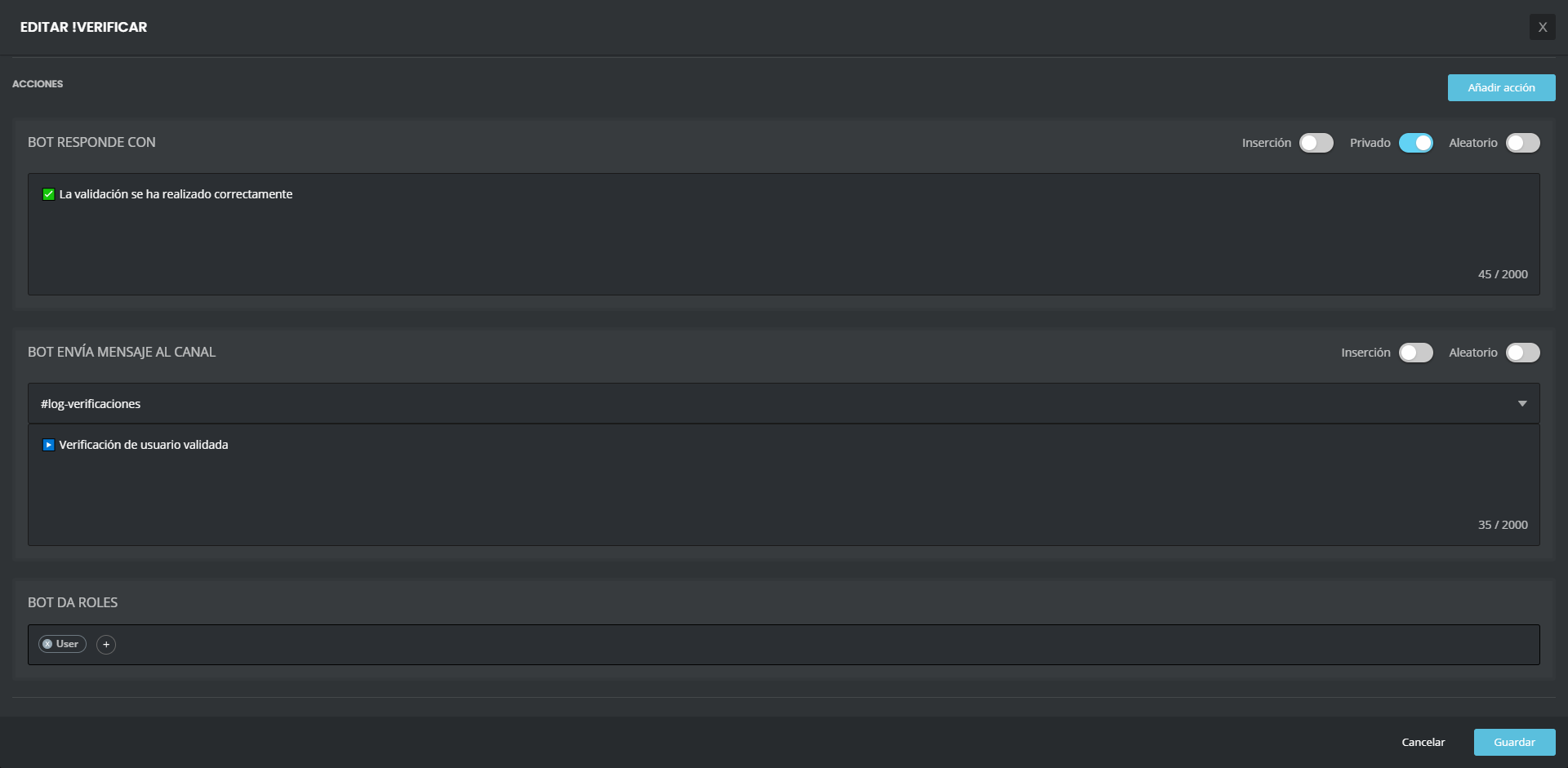 neat hemlock
candid valve
ok ,y cual es el problema <@!280334313667559425>
neat hemlock
candid valve
ok ,y cual es el problema <@!280334313667559425>
este:
 dire yarrowBOT
Full List of my Permissions that I use...
• Read Messages, Read Message History, Send Messages is always needed.
• Manage Messages is needed for !clear, !slowmode and AutoMod Functions.
• Manage Roles is needed for Role Rewards in the Levels Module, !mute, !tempmute commands, Auto-role in Welcome Module, as well as Give/Remove Roles in Custom Commands.
• Manage Channels is needed for the !mute, !tempmute and slowmode commands
• Kick Members is needed for the !kick @user command
• Ban Members is needed for the !ban, !tempban commands
• Attach Files is needed for !rank command to show Rank card (otherwise will be shown embed version)
• Embedded Links is needed for the Streamer notification embeds and !rank Command to show Rank cards (otherwise will be shown text version)
• Add Reactions is needed for music-quiz plugin
• Use External Emojis is needed for correct displaying of MEE6 emojis in MEE6 messages
• Connect and Speak is needed for Music , Music Quiz and Record Modules (plugins)
candid valve
Si no tiene el permiso ,dale el permiso
neat hemlock
si los tiene
candid valve
Segur@? porque ese es un error común
neat hemlock
aunque tenga el bot los permisos de admin?
neat hemlock
mira, hace un minuto ha hecho el log correctamente pero hace 5 no funcionaba. Va a ratos
candid valve
candid valve
?
responde a esto
candid valve
Recuerda que tienes que darle permisos a tu custom bot también y no solo a mee6
también si deseas puedes kickear a mee6
neat hemlock
tiene los permisos
 latent onyx
MEE6 is super slow in my server
candid valve
Mmm ,bueno ahí si no se como ayudarte ,si el problema persiste escribe lo que te pasa en ingles en cualquier parte ,te sugiero que lo escribas en #〉premium-chat
Y dale ping al @ support
candid valve
latent onyx
MEE6 is super slow in my server
they are testing a new system to prevent logs from going missing. this delays logs from being sent for a bit and sends multiple at once. but sadly it isn't always working Shrug6
buoyant moon
latent onyx
MEE6 is super slow in my server
Same!
latent onyx
MEE6 Is not updating audit
need this to go back quickly
i use MEE6 4 audit logging in a big server
so its important
tired meteor
hi, can you give me the server name or id?
 brave bone
audit logging is lagging or not working
tired meteor
whats the server name or id
brave bone
455051734222635017
tired meteor
give us a moment and we will fix it 
 misty fern
brave bone
audit logging is lagging or not working <:MEESAD6:404380250894761984>
misty fern
brave bone
audit logging is lagging or not working <:MEESAD6:404380250894761984>
I have the same issue
I have an issue of audit logs not working properly
tired meteor
whats the server name or id?
misty fern
681605397387280458
tired meteor
alright, give us a moment and we will fix it
misty fern

 shadow cliff
The save option no longer works on custom orders
 latent matrix
Is it not possible to build an embed with extra fields stacked 2 per row instead of forcing either 1 or 3?
I'm trying to make two columns, but every time I make the first row of two, when I try to move to the next row of two it wants to force the first on the second row to become the third on the first row. lol
marble quest
discord basically looks that any three consecutive inline fields show side by side, and that isn't something mee6 can give an option for.
one option is to make the third field use the _ _ (blue) thing i showed you earlier, or have a big space, but also using the _ _ for a blank field (red)

@latent matrix 
latent matrix
No that works, at least as a workaround. I wish it wouldn't actually kill that space. Part of the goal was to make two wider columns as opposed to 3 slimmer ones.
marble quest
then the red option is better for you
latent matrix
So the blue option is using the blank space for the third column fields, but the red option is using a blank space for a single field across a whole row?
marble quest
yes
latent matrix
Okay, so I tested with a mix. The top row has the 3rd column blanked out, the second row is a single field blanked out, and the third row has the 2nd column blanked out so the two columns have a bit of separation.
I think of these, the third row might be best.
 marble quest
yeah, and it might look weird with a small amount of text, but when you fill out stuff, the blank row looks much better
buoyant moon
@dire yarrow My report is i cant authorize you in my server its cuz i cant scroll down and authorize
limber knoll
@buoyant moon not even zoom out?
limber knoll
mobile?
limber knoll
cool gives me a better idea of how to help you
on the authorize box hold ctrl and scroll down to zoom out
buoyant moon
thx
 median sorrel
Hey... Mee6 is updating audit very slow
the log is important for my server bc the server is kinda big
the server id: 756078135447126096
bitter zenith
median sorrel
Hey... Mee6 is updating audit very slow
known issue, sorry for the inconvenience, being investigated
dire yarrowBOT
turbochcáč, that command is disabled in this channel.
median sorrel
bitter zenith
known issue, sorry for the inconvenience, being investigated
okay. Do u already know when i'll be fixed?
bitter zenith
median sorrel
okay. Do u already know when i'll be fixed?
as soon as possible, but no ETAs
median sorrel
okay. Thanks
buoyant moon

 orchid walrus
logs are really laggy/not working at all in my server :/
quaint agate
yep
resent update delayed them by 1+ min even though they shouldent take longer then a min
 jagged birch
I have a channel where MEE6 puts in all the updates like member joining, member leaving and role changes etc.
Normally when I remove a role. It immediately gets shown in that channel. Since the day before yesterday the Bot takes like over 10 minutes to react and put the role change into that channel.
The bot reacts normal for the rest. Just that logging channel works slow out of nowhere
jagged birch
Sorry, I did not understand
The logs are now slower than over 60+ min, I just checked on a change I did an hour ago. It is still not logged
quaint agate
Ok
buoyant moon
Hello, Im on a CPS chromebook on school, because I cant use my tablet, so this keep popping up :/ (Its a geust account)

!help
quaint agate
Discord is probably blocked by your firewall
gilded yacht
Yes as Jerry said discord will have been blocked @buoyant moon but if you get on your phone and open a hotspot you can connect to that WiFi network with the Chromebook and probably avoid the block
quaint agate
Smh
gilded yacht
👀
dire yarrowBOT
 Léo#5577 has been warned
Reason: Posted an invite
 thick dawn
check this bug
 radiant carbon
thick dawn
check this bug
radiant carbon
thick dawn
check this bug
Its not a mee6 bug
quaint agate
Relating to mee6
thick dawn
ok sorry
buoyant moon
<@&193123929701875712> I need some help ! My moderators cannot use the commands to manage the server anymore (mute tempmute ban tempban ...)
quaint agate
Dontbchannel hop
 waxen beacon
<@&193123929701875712> Restricted channels, Set-up image-only channel.... you can't post a image with capital letter extension. All files with capital letter extension rejected. It works with f.e. *.gif, *.jpg, *.jpeg ..... but it doesn't work with *.GIF, *.JPG, *.JPEG and so on.....
buoyant moon
<@&193123929701875712> Hey so I need some help, I'm having problems, i don't know maybe its in the bot scripts or something, but my muted role, its not like, its not working, I've tried everything, I've tried resetting all the roles, and removed the auto-roles. and also did the muted too not talk in the perms
dire yarrowBOT
Having problems muting someone/they aren't muted? Check the following
Prerequisites:
- Moderator plugin is enabled
!mutecommand isn't disabled- Bot has role with Manage Roles and Manage Channels permissions
- Muted role is under MEE6 role
- You're trying to mute someone using
!mute @mention reason, otherwise it will not work
If user got Muted role but still can talk means there's issue with your channel permissions
Go to Channel Settings -> Permissions
- If that's public channel that can be accessed by anyone:
- Set

Send Messagesfor all roles except Muted - Set

Send Messagesfor Muted role
- If that's secret channel that requires *special* role to access it:
- Set
Send Messages
Read Messagesfor special role - Set
Send Messages Read Messagesfor Muted role - Set
Send Messages Read Messagesfor@everyonerole
blissful orbit
@buoyant moon
 round orchid
when you gonna fix hero pass ...it's only 3000 and now I have 3600 no diamonds no nothing !!!!
gilded yacht
What are you talking about
radiant carbon
 amber pumice
hello
amber pumice
hello
Hey do you have a bug report
dire yarrowBOT
fanscop, that command is disabled in this channel.
 quaint belfry
rip
waxen beacon
waxen beacon
<@&193123929701875712> Restricted channels, Set-up image-only channel.... you ca...
Has this error/bug been noted?
dire yarrowBOT
 Zaes#2146 has been warned
Reason: Bad word usage
Zaes#2146 has been warned
Reason: Bad word usage
 twin socket
Hey,
there is a problem with the german translation.
Modul:
Restricted Channels
 faint dome
Just not completely translated. It’ll come later
 keen kestrel
We have mee6 Premium and we can not ban other guys with !tempban or !ban in the last 3-5 days can u help me?
wooden mountain
the bot doens't have the permissions required or the "other guys" have a moderator role
or the command isn't eabled
 spare trail
Hey Guys, i bought Premium for my Server and now, i tried to use the recording function. But it is terrible, it stucks and brakes all the time. Is it possible to fix?
quaint agate
It’s been broken
And probably will not be fixed
It was broken since they sat they added it
Just with the scale of the bot and how discord sends voice packets it’s just not good
@spare trail 
spare trail
Ohh okay, thanks for your answer.
quaint agate
Np
dire yarrowBOT
 hfjsncundundjnfh#5185 has been warned
Reason: Capital letters
 opal path
Embed messages - When amending current ones, there seems to be a time after setting the original that any changes made wont save. Result is you have to make a new one before deleting the old embed message.
 random zenith
Hi what's your rank?
buoyant moon
Is anyone else having a problem with their mee6 and the moderation messages being out of time / not posting them all?
wooden mountain
how long ago did the thing happened of wich you are searching the logs?
buoyant moon
It started just under a week ago
 lucid sierra
same happening for a lot of people myself included
wooden mountain
can you 2 provide me the MEE6 dashboard links for those servers?
lucid sierra
the bot does it's job but takes a lot of time to do so, with audit logs, autoroles, etc
lucid sierra
Manage your Discord server with leveling, moderation, Twitch, Youtube and Reddit notifications.
buoyant moon
Manage your Discord server with leveling, moderation, Twitch, Youtube and Reddit notifications.
lucid sierra
wooden mountain
> autoroles
what plugin do you mean?
i have set the bot to give a role after a person accepts the rules of the server, but after they do so, mee6 takes a lot of time to give that role
wooden mountain
and what type of event was not logged?
wooden mountain
lucid sierra
i have set the bot to give a role after a person accepts the rules of the server...
accept rules as the discord thing, or a reaction roles?
lucid sierra
wooden mountain
accept rules as the discord thing, or a reaction roles?
discord thing
wooden mountain
are you sure it's a long time between them accepting and MEE6 giving?
and not them joining and them selecting?
lucid sierra
wooden mountain
and what type of event was not logged?
for me, no events are missing but they take from 1-7 mins to post them
wooden mountain
that's normal... ish
buoyant moon
For me it takes a while for it to actually log any action (people selecting roles, joining vc etc)
lucid sierra
wooden mountain
are you sure it's a long time between them accepting and MEE6 giving?
long time between accepting and giving
lucid sierra
wooden mountain
that's normal... ish
it used to be instantaneous but like a week ago delays started
wooden mountain
otherwise we fail to send some logs
yes, and a week ago, in servers as big as this one, a lot of logs where not send because we are limited in teh amuont of messages we can send in each channel each minute
and now we send multiple embeds in 1 message to get around that
but we need enough to send in 1 so it waits a bit so it has multiple to send
lucid sierra
so it is like a workaround for that limit
wooden mountain
yes
lucid sierra
I'm cool with that, the only thing that is problematic is the role giving thing i commented before
 near basin
Embeds being premium when u can just use webhooks
dire yarrowBOT
 OTHMEENxd#2605 has been warned
Reason: Bad word usage
 hybrid quail
Tabon
dire yarrowBOT
 CetremGameplays YT#1474 has been warned
Reason: Posted an invite
 long dawn
It only works for the person using the command.
 next warren
I used the command tho
 solid kite
N
waxen beacon
waxen beacon
<@&193123929701875712> Restricted channels, Set-up image-only channel.... you ca...
Has this major and essential error/bug been noted?
wooden mountain
as long as discord adds an embed under the message, it shouldn't delete them
 stark raven
wooden mountain
as long as discord adds an embed under the message, it shouldn't delete them
stark raven
wooden mountain
as long as discord adds an embed under the message, it shouldn't delete them
i'd guess mee6 handles that under message_create though, not message_update (where the embeds are added asynchronously)
wooden mountain
if it's a link, it waits for a message update to occour
or the waiting times out and then it deletes them
that's why deleting messages with links is slower then deleting messages without link
latent onyx
MEE6 is too slow.... I will de-commission it from my server if it cant keep up
spare relic
It's not that slow tbh, you're over exaggerating
 ember rain
Adding a +1 to the lag issue; I don't think it's a huge deal, but it is a noticeable change. Might need a backend restart in the near future or something. But as long as y'all know about it.
spare relic
ember rain
Adding a +1 to the lag issue; I don't think it's a huge deal, but it is a notice...
Yeah it's understandable
wooden mountain
what lagg do you both mean exactly?
slow responses to commands?
music?
@spare relic @ember rain
ember rain
on one of my servers we have Mee6 set up to catch message edits and report on them; up until, to my knowledge, very recently this happened almost instantaneously, but as of today is taking between one and two minutes to show up in the log channel. Again, not a huge deal, but this is what's happening.
wooden mountain
intented
in the past we had a lot of problems with logs not being send as we exceeded the limit of messages a minute in 1 channel
so now logs are queued up and send with multiple embeds in 1 message
that does make it slower, but slow logs is better then missing logs
however
it shouldn't be more then a minute, the fact that it waits that long is a bug and is already fixed in the code but not yet deployed
wooden mountain
no, i got to go now
 zealous fulcrum
Ok
 finite wasp
Anyone else's MEE6 not sending DMs anymore?
quaint agate
finite wasp
Anyone else's MEE6 not sending DMs anymore?
Custom bot? Or normal mee6
finite wasp
Normal MEE6
Replies with the response in channel but then gives 'something wrong in MEE6 land' straight after when it's supposed to send DM to command user
finite wasp
Only seems to be certain commands misbehaving
 plain garden
Twitter posts no longer working.
Premium (Lifetime) account.
Was working fine.
I have changed nothing in the server or on the bot (or changed how i post on twitter etc) No longer posting anything.
I have just done a test post, nothing is working.
Commands and everything else is working fine Any help would be great x-x
bitter zenith
Server id please
plain garden
bitter zenith
Server id please
795959740777365514
bitter zenith
plain garden
795959740777365514
I'll get back to you about that
plain garden
bitter zenith
I'll get back to you about that
ok  Thank you
bitter zenith
.isprem 321055243465130002
boreal totemBOT
bitter zenith
.isprem 321055243465130002
Found premium guilds managed by @plain garden.
<@&494618336638795777> role has been issued.
Took 1.29s
finite wasp
That reminds me, still waiting on my Premium tag please, lifetime purchase
bitter zenith
.isprem 721798700560678994
boreal totemBOT
bitter zenith
.isprem 721798700560678994
Found premium guilds managed by @finite wasp.
<@&494618336638795777> role has been issued.
Took 1.05s
finite wasp
Cheers
bitter zenith

 tacit jasper
hey guys, i got a premium account and started getting my youtube plugin enabled. halfway through making custom messages, it froze and i reloaded the page and now i cant get into the youtube section of my dashboard at all. its perpetually loading and i cant interact with it at all. plz help
bitter zenith
@tacit jasper YouTube rate limits have been hitting us pretty hard recently
.isprem 750851562607214734
boreal totemBOT
bitter zenith
.isprem 750851562607214734
Found premium guilds managed by @tacit jasper.
<@&494618336638795777> role has been issued.
Took 0.88s
bitter zenith
try it again in 5 hours
tacit jasper
thank
bitter zenith
no problem
tacit jasper
thanks*
 severe jay
Is it a bug if MEE6 logs only kicks and bans with the actual command !kick or !ban ?
If we kick/ban someone by the manual way on discord, it wont get logged
quaint agate
majick reported it eairly
severe jay
Oh I didnt see it sry
buoyant moon
hn
waxen beacon
waxen beacon
<@&193123929701875712> Restricted channels, Set-up image-only channel.... you ca...
Did the devs noted this bug?
It would be nice if we could get feedback.
quaint agate
you cant use yhay command
quaint agate
wait for staff
 velvet flame
alright
waxen beacon
Is there a better or alternative way to report bugs? The developer support is terrible here.
I'm Premium and I feel ignored.
tired meteor
waxen beacon
Is there a better or alternative way to report bugs? The developer support is t...
hi, i'm very sorry that you didn't get a responds, if the devs don't know it already then i will notify them about it
waxen beacon
tired meteor
hi, i'm very sorry that you didn't get a responds, if the devs don't know it alr...
Thank you.
 quaint agate
Yea tahts a known one I belive
next warren
theyre trying to fix it or?
quaint agate
I belive so
 gleaming nest
Hello
severe jay
When I turn on the log about emojis update on the server, It randomly log that emojis has been updated even if its not... (There's an integration with a twitch account for subs roles and emojis maybe its the cause of that?)
marble quest
Discord refreshes twitch emojis every hour
 ripe zealot
no bugs
 soft bridge
Hi, i Dont know if Its bug or im just dumb. Whenever i set timer to repeat something every 24 Hours, it Will be sent at midnight, and repeat it every midnight, but i can send it in different time. Ill try it maybe 10 times.
marble quest
timers are currently based on utc timing, meaning 24 hour timers send at 0:00 utc. you can upvote this suggestion though #┃upvote-suggestions message
soft bridge
Ok, thank you for answer. In czech it sound with different meaning.
buoyant moon
excuse me
I dont know if this is a bug but i got blocked and i am still able to edit my messages
buoyant moon
Can someone help me
 drowsy dragon
when i go onto dashboard and select my server, im stuck on a white screen
buoyant moon
maybe its your internet?
 fallow marsh
Custom bot, automatically change the status. From streams to games
 vivid haven

 torn canopy

 crimson mango
Anyone else experiencing issues with log events only being logged by MEE6 a fraction of the time? Deleted messages, new members, new roles, etc. Seems to be happening with all events I have set up to be logged.
wooden mountain
will be prio this week 👍
the devs
quaint agate
Epic
 brittle dagger
@dire yarrow is no longer putting user joins in my mod logs channel, even though that setting was never changed.
obtuse prawn
look a few messages above yours
crimson mango
thx dudes/dudesses
 kindred iris
Hi, I noticed that Mee6 has a long reaction time for logs. It takes several seconds to send information, sometimes it never comes.
What can I do ?
here is an example
 obtuse prawn
look above your message #〉bugs-reports message
severe jay
Hello i got automod for too Many emojis set to 7 but someone got warned for using only 3 emojis
wooden mountain
most likely a complex emoji existing out of several emoji's
for example 👨👨👦👦 is a total of 7 emoji's on it's own
mail glue female glue son glue doughter
 azure ingot
... but it’s only 1 emoji
next warren
are the devs trying to fix the problem with the song queue or theyre planning it for the future
round orchid


 wooden mountain
I see 9
Shrug glue female shrug glue female shrug glue female
That are the 9 emojis in there
🤷 => 1 emoji
🤷♀️ => 3 emojis => this is a combination of 🤷 a linking symbol and 👩
dire yarrowBOT
 Saku#7449 has been warned
Reason: Bad word usage
severe jay
F*** Unicode then
wooden mountain
Pls do all your mini-modding in #mini-modding and nowhere else


 dire yarrowBOT
!clear [@name] [messages to remove]
!clear xto clear the last x messages (!clear 10)!clear @nameto clear all the messages of@name(!clear @MEE6)!clear @name xto clear the last x messages of@name(!clear @MEE6 10)
- I need Manage Messages and View Message History permissions
- Moderator plugin and !clear command should to be enabled
- Only users with Allowed roles can use the command, don't forget to add their roles in command's settings!
 naive ginkgo
haii i have a little bit trouble with mee6 :(
spare relic
Just expain it
naive ginkgo
why isnt- mee6 working for the moderator thing
dire yarrowBOT
Modular
I am currently a modular bot. Nothing will be enabled by default and must be enabled in each plugin manually.
So to enable the plugins, go to https://mee6.xyz/dashboard and select your server.

 naive ginkgo
like when I put some bad words
mee6 isnt telling others not to swear and stuff :(
huh.
spare relic
Make sure mee6 has permissions to read messages on tha specific channel
naive ginkgo
yeah. i swear i check all the things mee6 can do in the mee6 roles
o-O
:(
:{
huhhhh..
helpp.p.p.
pure obsidian
@naive ginkgo what is your server's name?
naive ginkgo
pure obsidian
<@!670687216774938664> what is your server's name?
so it's Sakura Flowerville
pure obsidian
does the member testing bad words filter have any of these roles?

those are roles in your server with administrator permission btw
pure obsidian
what is that member's username?
naive ginkgo
pure obsidian
what is that member's username?
chuuya><#3508
pure obsidian
one moment
pure obsidian
ok looks good so far
can you DM me a screenshot of how are they even using the bad words?
naive ginkgo
i deleted it T-T
pure obsidian
you don't have a bot that logs deleted messages?
pure obsidian
well, I'm gonna need little more insight than that.
naive ginkgo
huhhh-
naive ginkgo
pure obsidian
well, I'm gonna need little more insight than that.
0ok
pure obsidian
because looking at your setup and the settings and roles that member has, it should work.
pure obsidian
if it happens again, return to us with a screenshot.
naive ginkgo
okiii