#〉bugs-reports
2 messages · Page 99 of 1
 marble quest
 dire yarrowBOT
Role hierarchy is important for me to give out roles. Oh and also Manage Roles perm:
https://cdn.mee6.xyz/s/fix_hierarchy.gif

 elfin brook
 olive nest
<@&193123929701875712> mee6 bot stops playing music in the music bot channel...the timeline shows the music SHOULD still be playing but sound stops after about 10 songs.
 clever sentinel
MEE6 says: Put my role above all roles
But I have the role above
 long dawn
Is it at the very top?
clever sentinel
Yes
long dawn
And does it have Manage Role permission?
clever sentinel
Yes
long dawn
May i see a screenshot of what mee6 is saying?
long dawn
Sooo confusing can’t you screenshot it?
 honest ledge
not sure if this is intentional, but when editing an embed, it clears some of the fields. i was making an embed so that i could see how it looks with each text style n stuff, and when i went to edit it (to see if it would send a second one or just edit the original), it ended up removing all but the content text box, and changed the embed color from the default blue to black (which is my role color in that server)
long dawn
I clicked on it and saved it to my note it shows this
clever sentinel
Whoops, it looks like I can't give one of the roles listed here. Please fix that by putting my role above all the roles listed here
And it doesnt even show the "MEE6" role
long dawn
Wait you don’t have a MEE6 role?
clever sentinel
long dawn
So try this:
https://cdn.mee6.xyz/s/fix_hierarchy.gif
Reaction roles
thingy
 limber knoll
your discord server or emoji server?
clever sentinel
Discord Server Announcements
It works on my default server and my emoji server but not that server
 quaint agate
!unmute @ user
dire yarrowBOT
Invalid command usage, try using it like:
!unmute [member]
Arguments:
member: User mention (@User)
quaint agate
Then mute again
 tribal moss
tx
 warm girder
Mee isn’t giving roles to people as they level up 😦
 blissful orbit
Is mee6 above the role you want to give
warm girder
Yes, it’s been working fine up until this morning
blissful orbit
Have you gone and checked the dashboard to see if someone has changed something
warm girder
Seems to have started working now - idk 🤷🏼♂️ settings seemed fine in dash
blissful orbit
Odd might just have been a bit slow
quaint agate
i am in a voice channel just ran !play mee6 responds with ! i feel like this is wrong
 brisk haven
 mortal dust
Is that normal?
I played some songs
the queue was empty
then I typed !play
and this embed with a ! appears
@quaint agate Oh you have the same bug
I felt like why the bot is doing that
 sour harness
mortal dust
Is that normal?
I played some songs
the queue was empty
then I typed !play
and ...
sour harness
mortal dust
Is that normal?
I played some songs
the queue was empty
then I typed !play
and ...
aren't you supposed to type the name of the song you want to play after !play?
as in !play (songname)?
quaint agate
yes but it shouldent be doing that
 hollow frost
Issue with the dashboard
quaint agate
ok
hollow frost
gonna post in #〉suggestions instead
 calm summit
With the new embed feature for Custom commands, whenever you add multiple actions with multiple embeds, all the embeds are sync'd together.
 junior fulcrum
Ok, first, I am far from familiar with all of Discord's capabilities, and even less familiar with MEE6 or even discord bots in general. That being said, I've been searching for ways to make an alerts channel on my server that reposts tweets from a specified twitter account. I stumbled upon MEE6 when I was googling ways that I could accomplish this and went through all the steps to set this up. When I noticed that it was not working as I had hoped it could, I came here, and a brief search has shown me that MEE6 cannot post retweets. This is problematic in that the alerts that I'm trying to access are NFL injury alerts, and by nature are typically aggregated from multiple sources (local media personnel from each team, each with their own individual Twitter handle) and thus, can only really exist in one account in the form of retweets. So, my question is; Is there something that I am missing with MEE6's capabilities, or will I have to look elsewhere to achieve my goal here?
 bitter zenith
for that you would need to use a different bot. either one that already exists, or one you'd have to create yourself
MEE6 won't announce retweets at all
junior fulcrum
ok, thanks for the prompt reply
bitter zenith
sure no problem
 scenic junco
!clear1000
 uncut lily
No.
 fierce finch
We want Free premium for 15 days Plz
 buoyant moon
What is premium
dire yarrowBOT
 MEE6 Premium
What do I get?
• Full music plugin, with volume command and Music Controller
• Record plugin
• Music Quiz plugin
• Leaderboard background for your server
• Server custom rank cards
• Role rewards for levels
• Additional Bot Master Roles
• Faster support in MEE6 server with a cool role
• More YouTube, Twitch, Reddit, Mixer and Twitter channels
• Advanced custom commands
• Message edition/deletion logs
• Custom welcome card
Note: When joining MEE6 Support Server you get automatically the Premium role 
 wooden mountain
that's so outdated
fierce finch
wooden mountain
way to much
🥲
 hard socket
That’s a bug with upgrading to Premium, and attempting to get the Premium role in this server...
 tired meteor
hard socket
That’s a bug with upgrading to Premium, and attempting to get the Premium role i...
tired meteor
hard socket
That’s a bug with upgrading to Premium, and attempting to get the Premium role i...
what browser are you using?
quaint agate
gaf i think that user went through the "i want it" button which atm dosent work
tired meteor
ah
quaint agate
yea i was talking with them earlier
tired meteor
alright
 dull heath
What is premium
dire yarrowBOT
MEE6 Premium
What do I get?
• Full music plugin, with volume command and Music Controller
• Record plugin
• Music Quiz plugin
• Leaderboard background for your server
• Server custom rank cards
• Role rewards for levels
• Additional Bot Master Roles
• Faster support in MEE6 server with a cool role
• More YouTube, Twitch, Reddit, Mixer and Twitter channels
• Advanced custom commands
• Message edition/deletion logs
• Custom welcome card
Note: When joining MEE6 Support Server you get automatically the Premium role
long dawn
Sil said that’s outdated
blissful orbit
Still helpful
long dawn
Truee
 wind bear
hard socket
quaint agate
is it a her?
wind bear
hard socket
quaint agate
is it a her?
I’m a girl...
 ivory forge
so i am trying to make a discord bot but for some reason the server that i made doesn't show up?
also sorry if this is in the wrong place
quaint agate
hard socket
I’m a girl...
thought so
dire yarrowBOT
It appears that you may be on the wrong account, or something went wrong since the time you logged into my website.
-Please navigate to https://discordapp.com/login and select the gear :gear: in the bottom left, then press Logout.
-After that, please navigate to https://mee6.xyz/logout to disconnect from my website.
-Once finished, select "Add to Discord" again, and follow the instructions to access my dashboard again.
https://cdn.mee6.xyz/s/logout.png
 quaint agate
@ivory forge ^
hard socket
quaint agate
thought so
And make sure you turn off the mentions on your replies, thanks
quaint agate
hard socket
And make sure you turn off the mentions on your replies, thanks
ok.... and do you need help with anything?
hard socket
Not at the moment, pretty much every module I have enabled is self explanatory in what it does
quaint agate
ok
ivory forge
Thankyou
 covert hill
Hello , idk if this is a bug but i have mod power in a server but when i go to the mee6 dashboard i cant see the server , i want to add auto roles but i cany even see the server .... Please help
honest ledge
what browser are you using to access the dash?
honest ledge
try an incognito tab, that might work
covert hill
Still doesnt work
Only shows my own server but not the server which i have manage server perms
 cyan creek
Um Um Um . . .
covert hill
@stiff field
 inner moat
Hi
dire yarrowBOT
 Jaseelplays#2769 has been warned
Reason: Bad word usage
Jaseelplays#2769 has been warned
Reason: Bad word usage
Jaseelplays#2769 has been warned
Reason: Bad word usage
Jaseelplays#2769 has been banned
Reason: Too many infractions
 ivory blaze
Bye
 wheat patio
.!rank and !levels doesn't work on my server
quaint agate
are they enabled
wheat patio
yes
quaint agate
is mee6 online
 prime wave
yea
quaint agate
<@&732153669344165989> random files
 native laurel
<@&732153669344165989> hi
wheat patio
it is online
quaint agate
ok can you go to the dashboard of that server
prime wave
sorry for multiple messages
wheat patio
It is
buoyant moon
IMPORTANT BUG: I cant unlock MEE6 premium free please help me
 lofty spire
2 bugs I encountered today:
1.) Regarding embed DM welcome messages: Whenever I edit it and click "Save" it reverts to the old message I set up before the embed update came. When I exit the plugin and go back in I see the change. So it looks like the old message is cached somewhere or anything like that because the old message keeps showing up when I hit "Save" even when I make multiple edits after one another.
2.) Regarding embed normal welcome messages: Since enabling and disabling embed messages here the welcome card editor is grayed out, I can't edit anything there. When I disable and re-enable the welcome card function it works
 opal flare
Hello the Mee6 bot to open the configuration page does not work its open the page but the screen displays the gray page and we cannot configure please answer me I need help for this question?
 stiff field
What browser are you using Mathieu
 cold flume
When we translate the bot into Turkish, when capital letters are used, English says the reason for the warning.
bitter zenith
cold flume
When we translate the bot into Turkish, when capital letters are used, English s...
thank you I'll forward this
 fluid tiger
!play my face when
dire yarrowBOT
 datboi, that command is disabled in this channel.
buoyant moon
dire yarrowBOT
 ThisGuy#1044 has been warned
Reason: Bad word usage
ThisGuy#1044 has been warned
Reason: Bad word usage
 hazy lance
Oop
In my server MEE6 started posting videos in the chat I didn't set it and it has custom profile pic and username I am very confused
buoyant moon
admin must've set it, or it's a fake bot
hollow frost
looks like a webhook to me
hazy lance
It's still default tho in the side bar
And it's not even in the server
It's still default on the server
And it's not even in the server
hollow frost
webhook
hazy lance
What?
hollow frost
server settings -> integrations -> webhooks
hazy lance
Nothing
wooden mountain
@hazy lance you are following a channel from another server
hollow frost
forgot that's a thing now
hazy lance
What?
wooden mountain
The channel youtube uploads from the funky server server
Should show in integrations
hazy lance
It's not in integrations
hollow frost
you see how you can follow #〉status-updates or #〉announcements :
https://i.imgur.com/E4WHA1i.png
 hazy lance
Hold up
hollow frost
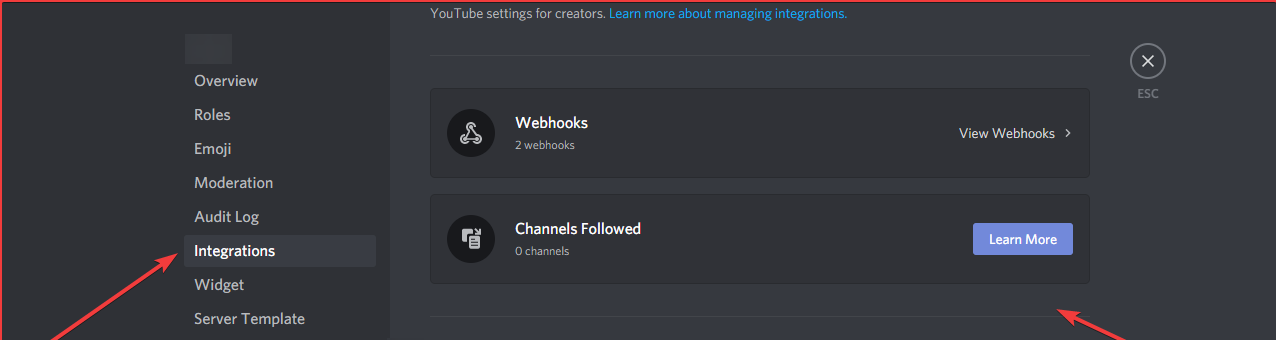 dire yarrowBOT
ThisGuy#1044 has been warned
dire yarrowBOT
ThisGuy#1044 has been warned
Reason: Bad word usage
hollow frost
...
 west talon
I can not even make an timer because when i try to write something,IT ALWAYS GOES DOWN!This way i can not see what i am typing,and to make it even worse,IT IS NOW WRITING BACKWARDS!!!!!!
 gilded yacht
?
dire yarrowBOT
 s16899#9730 has been warned
Reason: Capital letters
quaint agate
and what part are you looking for
where you can restrict the command from some users?
you are premium?
then you wont be able to do that (unless you are a grandfathered server)
Np
dire yarrowBOT
Verification system using Reaction Roles [1]
 I see you're looking to create a verification system, here's what you need to do: Giving and Removing roles
1. You will need 2 roles called "verified" and "not verified" so when people react to the message, they become verified.
You'll need to add the "not verified" role as an auto-role for when people join the server, which you can do in the welcome plugin:
https://help.mee6.xyz/en/article/give-a-role-to-new-members-autorole-1irdljy/
2. Go to your channel settings. :gear: > permissions >
Deny the read messages permission  for the "not verified" role, for each channel so they can't see the channels.
Allow the read messages permission  for the "verified" role, for each channel so they are able to see the server.
3. Create a channel called #Verification and allow the "not verified" role to read messages here in the channel permissions.
4. Go to your MEE6 dashboard https://mee6.xyz/dashboard and select your server, then the Reaction Roles plugin. 
In the template provided, select the #Verification channel, and edit the reaction message to your liking.
5. Add some reactions for MEE6 to give by selecting an emoji, then click on the + to assign the roles (verified and not verified), also disable the setting "Allow members to pick up multiple roles" then click “Save”
MEE6 should have now posted your reaction message in your verification channel.
6. Finally go to the message and remove the "not verified" reaction by clicking the 3 dots on the message > reactions > click the X on the not verified reaction, to make things look clean
https://gyazo.com/2f4fd5e7e5bcefd76251857ce0c3cbef
Do not change the
send messagespermission. This should be left at
 gilded yacht
@buoyant moon I suggest this
 left stag
Hello, something happened on my server. The levels were reset (or at least the highest levels)
long dawn
Maybe an admin reseted your levels mind checking the Levels in the dashboard @left stag?
buoyant moon
When MEE6 sends embedded messages, it shows invalid user or a long 22578899866544 Id format. Same goes for welcome messages when they are embedded
 faint dome
buoyant moon
When MEE6 sends embedded messages, it shows invalid user or a long 2257889986654...
faint dome
buoyant moon
When MEE6 sends embedded messages, it shows invalid user or a long 2257889986654...
That’s when discord doesn’t have that user in cache. It’s a discord feature, nothing related to us
And that’s exactly why we also specify the user name and ID
 humble ermine
So is Mee6 supposed to be sending server invites in dms
long dawn
Lexi look at my screenshot in chat. Does your dashboard set to that?
faint dome
Can also be a setting from another server
We are not responsible for what people do with our bot
 vocal willow
Patient is key
wooden mountain
@acoustic brook for what server? Can you give the dashboard link pls?
 acoustic brook
wooden mountain
<@452309417690398728> for what server? Can you give the dashboard link pls?
acoustic brook
wooden mountain
<@452309417690398728> for what server? Can you give the dashboard link pls?
Please guide me
wooden mountain
Use ! dashboard in your server and copy the link
 I didn't ask invite...
I will refund it when I get to my pc
acoustic brook
I forgot to turn off payments for the new month. Can I get a refund?
acoustic brook
wooden mountain
> I will refund it when I get to my pc
Please guide me
 hearty token
My card doesn't have the stats visible. (it's not edited, i swear)
faint dome
try again?
faint dome
yeah, known one
we could fix it but that would mean a wayyyy higher response time, so not worth it
hearty token
yeah it's not that important
 torn oak
faint dome
torn oak
faint dome
Probably not yet translate, you’d have to wait a bit more
buoyant moon
faint dome
That’s when discord doesn’t have that user in cache. It’s a discord feature, not...
It works 100% when it's a non embedded message but becomes a Discord issue when it's embedded? That makes no sense
buoyant moon
No it doesn't
faint dome
your app fetches the user when his mention is in a message, or when you see a message from him, or when you see him in a list, not otherwise
buoyant moon
It's a mention in both embedded and not
faint dome
I'm speaking about how discord works, not how they format their mentions
and afaik it's been like that for years
buoyant moon
Is this a serious conversation? I build my bots in scala and Marvin for years it's the same mention code
faint dome
can you pls read my message again?
I'm speaking about how discord works, not how they format their mentions
and if you don't trust me, feel free to open a ticket in their support website
buoyant moon
It hasn't been like that for years
faint dome

buoyant moon
That's correct
faint dome
I remember having that issue when I started discord in 2017
iirc on mobile they were displaying the ID, and on desktop only invalid-user, that was pretty confusing
now their user fetch is way more efficient, still not really accurate (to avoid api spam)
buoyant moon
I have never seen it happen untill the API received an update on presence intent
faint dome
you're lucky then x)
but users are not affected by presence intents, so that's just randomness
buoyant moon
It definitely does something if every bot had to change away their announcement and timed messages are executed
faint dome
I think you missed a major point here, tell me if I'm wrong
I am speaking about the discord app code and how you, as a discord user, use it
not about the discord api and how bots use it
buoyant moon
You are missing the point here, are you by any chance part of Discord Testers Server? Since intent update the bots are acting weird when pulling cached users from discord thus why majority of bots have changed how they operate , some have already fixed the user pull issue
faint dome
yeah I know, I'm myself a dev of several bots so I'm well aware of that change 
buoyant moon
faint dome
So yeah, back to technical things
When you see a mention in your nice discord app, you should know that the raw text looks like @barren marsh or sometimes @barren marsh
And then, your discord client (ie the application) has a user ID and need to find its username (or member nick) from that
• If the user is already in the cache, no issue, display and skip
• But if the user is not already in the client cache, two things can happen:
- if that mention is in a message, the client sends a request to the Discord API, and grab the needed info from that, then add the user in its cache
- else (for like embeds, channels descriptions and other things), they will just don't bother sending a request and instead display an
@invalid-useror the raw mention
quaint agate
oof Z
faint dome
bruh, thanks discord for the random mentions
quaint agate
hate when that happens, i have the message the ping dosent show hit enter sudonly it pings some random joe with that name and its like EEEE
 hearty igloo
faint dome
So yeah, back to technical things
When you see a mention in your nice discord ap...
hearty igloo
faint dome
So yeah, back to technical things
When you see a mention in your nice discord ap...
About that invalid user on embeds
I've seen a lot of embeds that just show invalid user lately and I couldn't figure out why...
Thanks for shinning so light on that for me as well
It's also mee6 embed related 😭 in one of my friends servers it shows invalid user
(In Audit logs)
buoyant moon
 quaint agate
Slime ez helping him in support
faint dome
oh ok
quaint agate
Alime was*
faint dome
^ why you shouldn't be in 2 channels at the same time
now please follow Alime directives
quaint agate
gotta love autocorrect
dire yarrowBOT
 Dugo#7791 has been warned
Reason: Duplicated text
Dugo#7791 has been warned
Reason: Duplicated text
Dugo#7791 has been warned
Reason: Duplicated text
Dugo#7791 has been banned
Reason: Too many infractions
opal flare
stiff field
What browser are you using Mathieu
A computer
I don't understand I can't access Mee6
 hot sleet
I don't think custom Server Rank Cards are allowing me to upload a custom image. I have tried with multiple images on different days.
wooden mountain
and diffrent browser?
opal flare
wooden mountain
and diffrent browser?
You talk to me?
 raven bolt
MEE6 doesn't delete messages all at once, lags and deletes messages in pieces.
wooden mountain
raven bolt
MEE6 doesn't delete messages all at once, lags and deletes messages in pieces.
that's not MEE6, that's discord there bulk clear behavior
every bot will have that
raven bolt
Oh then
 hybrid jungle
customize bot not working
limber knoll
intents enabled?
hybrid jungle
it's not doing anything
limber knoll
in the developer portal in your bot application is your intents enabled?
hybrid jungle
yeah
limber knoll
dm invite please
hybrid jungle
yeah
 hushed willow
i think this is a bug but mee6 is acting weird im not doing anything..
it says im doing "caps" but im not.
long dawn
Looks like one of your staff made a Custom Command for that @hushed willow
hushed willow
yeah my friend did get mad at me for no reason
long dawn
Well there you go. Just tell that person not to do it anymore
dire yarrowBOT
 McM#7407 has been warned
Reason: Capital letters
hushed willow
im getting hackeddd
pls
im geting hacked by @F2#5128
help he is cursing at everyone!!!!!!
pls help im not lieing
wooden mountain
this one is legit to many caps
@hushed willow that screenshot you gave, what server is that? the leaderboard link pls
hushed willow
this guy is hacking me pls help
he deleted all my servers
sorry for the cursing i had a rough day today
help pls
wooden mountain
enable 2FA on your account
hushed willow
well he said he would give me nitro and for me i am stupid and trusted him
wooden mountain
enable 2FA
then he gets kicked out
enabling 2FA (or disabling it for that matter) logs out all your sessions
hushed willow
i did
i asked him to stop i spent 5 hours making a logo for him and he just do that make me sad
but he has my email
buoyant moon
thats a webhook
 untold tide
buoyant moon
untold tide
buoyant moon
fix the ban communication between mee6 and discord because i have to switch accounts now because of it saying im unbanned but discord thinking im still banned.
dire yarrowBOT
Having problems muting someone/they aren't muted? Check the following
Prerequisites:
- Moderator plugin is enabled
!mutecommand isn't disabled- Bot has role with Manage Roles and Manage Channels permissions
- Muted role is under MEE6 role
- You're trying to mute someone using
!mute @mention reason, otherwise it will not work
If user got Muted role but still can talk means there's issue with your channel permissions
Go to Channel Settings -> Permissions
- If that's public channel that can be accessed by anyone:
- Set

Send Messagesfor all roles except Muted - Set
Send Messagesfor Muted role
- If that's secret channel that requires *special* role to access it:
- Set
Send Messages Read Messagesfor special role - Set
Send Messages Read Messagesfor Muted role - Set
Send Messages Read Messagesfor@everyonerole
faint dome
Check your roles perms 
faint dome
buoyant moon
fix the ban communication between mee6 and discord because i have to switch acco...
Check the banslist in the server settings. If you are there, pls send a screenshot and the server/user IDs. Else, blame discord
buoyant moon
we did check who is banned(not in there), tried unbanning me using ip didnt work etc
@faint dome
faint dome
buoyant moon
we did check who is banned(not in there), tried unbanning me using ip didnt work...
That’s not answering my question
Are you in the server bans list or not?
faint dome
Did you try to reload your app? (Ctrl R on Windows)
And do you have any alt/account using your network in that list?
buoyant moon
mccarn1 is an old account i signed out of a long time a go
so no
and my phone, chromebook and everything says the same thign
i can try it tho
faint dome
Well you probably know that discord bans by IP, so that account is still an option
I’d suggest to unban it and try again
Else, you would have to contact discord support
buoyant moon
ive emailed them lemme check if they repsonded
no responce yet @faint dome
soooo im just going to merge to another accoun thank you for your time.
@faint dome
faint dome
Yw
 digital tangle
I initially chalked it up to the device i was using at the time (Chromebook with touchpad) but i seem to be unable to use the scroll wheel on the new embed plugin and so i was just using the up and down keys on the keyboard but when i jumped over to my pc and was using the mouse i noticed that i still could not use the scroll wheel <@&193123929701875712> <@&403768316105064458> (hope it's okay to ping these roles, might i suggest setting up a pingable bug reports role for this kind of thing)
quaint agate
why u pinging suggestions for a bug report?
digital tangle
for the suggestion at the end of my msg
quaint agate
al server sugestions will be denied
 haughty chasm
The reaction roles are not currently working for me. I add a message and create reactions and assign them roles. When I click save the message posts to the correct channel with the correct message and reactions, however none of the roles are assigned when reacting and have been removed from the reaction role dashboard.
 stuck hollow
<@&193123929701875712> I am having a similar issue as @haughty chasm except mine refuse to save and post period. And this is something that I NEED to get posted tonight. Should have been done before now. I've tried setting up this reaction role 4 times now. Every time after I click save it just disappears and nothing posts. I even tried editing an existing reaction role I already have up in the channel and it did the same thing. Nothing changed. Yes, I've refreshed the page. Logged in and out. Is there some kind of limit on how many RR can be in a single channel? Or that we can have period that I'm unaware of? This is going to cause a fair bit of mess and agitation not being able to have this done. Please figure this out.
buoyant moon
I have the same issue
 iron whale
почему я не могу просто над вами поржать?
 queen imp
hearty igloo
queen imp
hearty igloo
 cerulean bloom
I'm
 void ocean
Yo, Randomly a non mod, was able to the !ban command. People on the server randomly type !ban for memes. But this time mee6 responded. I haven’t changed anything either.
I’ve disabled the moderation module for now
blissful orbit
Check if one of his roles were in the allowed roles
void ocean
None were. Only admin and mod roles. He only had a colour role + member role. I went through each of commands to check whitelisted role. None of them were on.
So I think it bugged
Here’s proof
Note, one screen shot is from me, and one from the dude. We in different time zones
void ocean
Yea he didn’t actually ban someone. But mee6 still responded to him.
So are you saying that even if someone will type it. Mee6 will respond as a help guide ? But not actually ban ?
dire yarrowBOT
vrooooomtex (lunch gang) 🇬🇧, you can't use that.
blissful orbit
Huh possibly not
void ocean
Ok can you do. Just !ban Daksh... don’t at me
blissful orbit
!ban Daksh
dire yarrowBOT
Invalid command usage, try using it like:
!ban [member] (optional reason)
Arguments:
member: User mention (@User) or user ID (159985870458322944)
reason: Text (may include spaces)
blissful orbit
Aha
blissful orbit
No problem sorry for the confusion
void ocean
Is there a way of disabling it tho ? I don’t want mee6 to reposed to normal members ?
blissful orbit
Not currently
void ocean
Do I have to blacklist ?
void ocean
blissful orbit
Not currently
Hmm ok
bitter zenith
it's being fixed
blissful orbit
Refresh the dashboard
 dense lake
Custom bots won't work at all right now
dense lake
I tested on a friends server too his didnt work so I assumed all
bitter zenith
probably just got caught in the same group tbh
buoyant moon
it's not responding to anything?? 
are the plugins and commands enabled?
yes
can mee6 read and write in the channel?
mee6 has administrator perms

wooden mountain
@buoyant moon try
@dire yarrow prefix
buoyant moon
no response from the bot 
wooden mountain
interesting, what is the dashboard link for that server?
(it won't load but just give the link)
buoyant moon
like the leaderboard link thing?!? or?
wooden mountain
good enough
buoyant moon

Manage your Discord server with leveling, moderation, Twitch, Youtube and Reddit notifications.
 compact matrix
custom bot not working
buoyant moon
I'm not sure if it has something to do with disabling the custom bot, since our custom bot for the server stopped working earlier, so I disabled it hoping that we can continue to use the MEE6 bot instead of the custom
wooden mountain
@buoyant moon bot seems to be working fine in your server, you are sure he can see that channel right?
buoyant moon
yes
wooden mountain
then try again now pls
buoyant moon
still no response from the bot
bitter zenith
they're investigating this issue further
buoyant moon
It's working now, thank you!
compact matrix
yup its working
 pure obsidian
handled
 shrewd nexus
thanks
 prime sable
 celest shale
dire yarrowBOT
celest shale
dire yarrowBOT
 Zombie Pirata#6532 has been warned
Reason: Bad word usage
Zombie Pirata#6532 has been warned
Reason: Bad word usage
buoyant moon
Reaction roles not working for custom bot
quaint agate
explain "not working"
 boreal wren
Yes explain
blissful orbit
@clever island do you need any help
 lost void
Hi my bot also is not responding
It's been 2 weeks now
I also can't get in the dashboard
blissful orbit
Not responding to any commands ? @lost void
 clever island
And when i do in visual code : node . Its not starting in terminal. The terminal says: node . Is not a valide command
clever island
Oooooh ok
pure obsidian
@lost void Hello, what is your server's name? nevermind, I found your server ID from past messages
did your server have premium and had custom bot enabled at some point?
lost void
pure obsidian
did your server have premium and had custom bot enabled at some point?
yeah i had premium but not sure about the custom bot but i dont think we have one
pure obsidian
there apparently was a custom bot
we fixed it
I gave your premium role back while I was at it
be advised (and please instruct other bot masters to) to disable custom bot properly they should do it on CUSTOMIZE tab over dashboard
lost void
pure obsidian
be advised (and please instruct other bot masters to) to disable custom bot prop...
ok i will this to the admin
 daring birch
Now that I think of it, I have a question. After MEE6 sends a timer message and the chat remains dead, the message doesn't reappear until a few seconds after someone does chat in it
I am terrible at explaining lol
pure obsidian
timers won't spam inactive channels
there needs to be messages sent by human users between
that's intended behavior
lost void
pure obsidian
we fixed it
okay i just check that the bots is working right now and i can get inside the dashboard
Thank you so much for your help❤️
pure obsidian

 hollow nacelle
There's a bug that anyone can exploit.
I just realised that there's a new plugin called embeds. In order to post more than one embed you need to purchase the premium version of MEE6.
But if you don't have premium version you can also do this to post multiple embeds:
Give permissions to MEE6 bot so that it can post embeds in that channel.
Post the embed you want.
Deny permissions to MEE6 bot from accessing that channel.
Go to dashboard and delete the embed. (The embed won't be deleted from the discord server as MEE6 no longer has permissions to even see that post.)
Give MEE6 permissions once again.
Post another embed.
Drawbacks
You can't edit your embeds.
I wonder why I am posting this bug without exploiting it first myself. 
marble quest
posting multiple embeds can be done with custom commands or timers anyways. they key about the embed plugin is that the messages are editable at any time, without having to resend it.
bitter zenith
can not be done
hollow nacelle
Okay I assume that this is not bug or error and no one will be suffering from any consequences for doing this.
marble quest
@bitter zenith what can't be done?
bitter zenith
you forgot the word not in your message
 muted bronze
hi
marble quest
you can send embeds with custom commands and timers though?
bitter zenith
not multiple
muted bronze
majick6 can u dm me i have something to tell the staff
bitter zenith
maybe with custom commands in separate responses
but each response can only contain a single embed
marble quest
well, their message was about sending multiple embeds (as in more than one without the premium limits), by removing mee6's perms
but you can do the same thing by making an embed in cc, changing it, and resending it
bitter zenith
oh yeah or in timers
marble quest
so in relation to what they were saying, it can be done. not sending multiple embeds in the same message
bitter zenith
I use timers for that
marble quest
i mentioned timers above too
bitter zenith
you can manipulate those better I think
I missed the context
I was just filling in a word x)
dire yarrowBOT
 ☯ᗪᖇ᙭ᑭՏℚᗩᑌᗪ☯ ✔𝐕𝐄𝐑𝐈𝐅𝐈𝐄𝐃#1833 has been warned
Reason: Duplicated text
☯ᗪᖇ᙭ᑭՏℚᗩᑌᗪ☯ ✔𝐕𝐄𝐑𝐈𝐅𝐈𝐄𝐃#1833 has been warned
Reason: Bad word usage
☯ᗪᖇ᙭ᑭՏℚᗩᑌᗪ☯ ✔𝐕𝐄𝐑𝐈𝐅𝐈𝐄𝐃#1833 has been warned
Reason: Bad word usage
 bitter owl
 Google Outage
Due to a Google.com outage some of our services are down
Please, wait while they fixed their issue
Affected services: YouTube Plugin | Music Plugin | Music Quiz Plugin | And more
We appreciate your patience, MEE6 Staff
bitter owl
 Google Outage [Update]
Google went down worldwide along its services. This have deeply affected discord and consequently @dire yarrow
- Be calm while the problem is fixed by Discord Team
- Keep in mind that we will get our bot back to normal as soon as Discord is fixed
- Do not DM or send friend request to MEE6 Team Members

https://media.discordapp.net/attachments/343169356374474762/788054804680933416/image0.png
Apologies in name of MEE6 

 spare sequoia
i can no longer edit the embedded message for my reaction role, is this normal?
faint dome
do you use a custom bot in your server?
spare sequoia
yes
faint dome
yeah that's why
none of them are working rn, a dev is restarting them to fix it
spare sequoia
ok cool
 bold heath
buoyant moon
bold heath
buoyant moon
 timid crystal
MEE6's dashboard website is broken. Even though I have a strong Wi-Fi connection, the website won't load!
faint dome
hard refresh your page, and clear cache if needed
timid crystal
faint dome
hard refresh your page, and clear cache if needed
Ok?
 versed drum
Reposting here as it appears to be a bug. I enabled custom bot yesterday on my server and I noticed that the audit log is still showing up as MEE6 and not the custom bot. All other actions by the bot show up as custom.
 twin tendon
It's known
timid crystal
faint dome
hard refresh your page, and clear cache if needed
Did clear some unnecessary cookie and cache and its still not working
*cookies
 pure quiver
same pal
timid crystal
Actually its working now
Thx
I just had to clear some cached up images and files
 low abyss
All my server timers gone after what happened hours ago, I had like 10 timers but rip sad
low abyss
Huh? My server is fine, it's the bot problem..the timers were working fine for a whole year but they are gone because discord broke
 last lion
i tried to set up more then one timer last night and i could only get one to work
dire yarrowBOT
 Koda#6666 has been warned
Reason: Posted an invite
Koda#6666 has been warned
Reason: Posted an invite
 indigo kernel
!give-xp
dire yarrowBOT
Invalid command usage, try using it like:
!give-xp [member] [amount]
Arguments:
member: User mention (@User)
amount: Positive integer
 paper trail
i think there is a bug with the twitter plugin, it was working last night just fine and now nothing
 graceful minnow
Is the website down? I can load a server page, but when I open a open slot in the server moderation it's blank.
marble quest
what browser and device are you using?
graceful minnow
Internet Explorer | Laptop.
marble quest
internet explorer is not supported like at all, i would use chrome or firefox instead
graceful minnow
also i think bc of the flash thing
they did for internet explorer
understandable
thanks!
marble quest
it's definetly the browser
graceful minnow
i agree
marble quest
as internet explore doesn't work for me either, chrome does
 tulip sigil
graceful minnow
tulip sigil
graceful minnow
#〉commands @tulip sigil
 gilded walrus
marble quest
as internet explore doesn't work for me either, chrome does
gilded walrus
marble quest
as internet explore doesn't work for me either, chrome does
Firefox and Microsoft Edge work too.
Just to be safe, use the latest browsers.
hollow frost
Mee6 is returning me the correct arguments to do any command when I don't have permission
!ban
dire yarrowBOT
Invalid command usage, try using it like:
!ban [member] (optional reason)
Arguments:
member: User mention (@User) or user ID (159985870458322944)
reason: Text (may include spaces)
hollow frost
^^^^
bitter zenith
we know
hollow frost

dire yarrowBOT
 AceTheScytheMaster#6700 has been warned
Reason: Mass emoji
 safe burrow
limber knoll
did you enable logging 1st? <@!475437782039265330>
safe burrow
limber knoll
did you enable logging 1st? <@!475437782039265330>
yes
limber knoll
@safe burrow neither server saved the logging channel
 ancient vault
Is there any reason why the Timer function only works if you are active in that chat channel? Like if I make a channel for Reminders and set the timer to send them there.. if I don't actually talk in the chat as well, it will stop sending them after the allotted time asked has passed 1-2 times?
dire yarrowBOT
 Timers
• You can currently only add 10 timers per channel
• MEE6 has an anti-flood system. So messages need to be sent between a timer and another in order to keep timers being sent
Note: In case you can't see any text channels when selecting the place to announce, it probably means you're logged in the wrong account.
ancient vault
Can you turn off the anti-flood system ?
blissful orbit
No
ancient vault
Damn.. ok.
 pale fable
Not a bug with the bot, but on the site. The 12 month calculation is incorrect
2.92*12=35.04
marble quest
That’s because the actual price is 3.59/month, but you probably got it a while ago when it was lower
As it used to be 2.92/month
bitter zenith
which is why it says "active" for that
 fringe swift
MEE6 is lagging for me. If I ask "!rank" command, it delays it
fringe swift
thanks
pale fable
marble quest
That’s because the actual price is 3.59/month, but you probably got it a while a...
ah ok, that makes sense then
 quasi hazel
sometimes @dire yarrow not online on my server idk what its for
 storm idol
Can anyone help me because mee6 bot is not showing my server so I cant add this bot
@dire yarrow
dire yarrowBOT
It appears that you may be on the wrong account, or something went wrong since the time you logged into my website.
-Please navigate to https://discordapp.com/login and select the gear :gear: in the bottom left, then press Logout.
-After that, please navigate to https://mee6.xyz/logout to disconnect from my website.
-Once finished, select "Add to Discord" again, and follow the instructions to access my dashboard again.
https://cdn.mee6.xyz/s/logout.png
quaint agate
Np
quaint agate
ok are you sure you have admin premissions
storm idol
Yeah
quaint agate
can you go to your role in the role hiarchy and screen shot the top bit of it
@storm idol
storm idol
quaint agate
not that
go to the server settings then the roles
go to your admin role there
and screen shot wht you see
 frank pendant
Neel my man does your role have this permission set to ON? If yes then you are a mod if no then you aren’t
quaint agate
@frank pendant speed my man can you not inturupt others cases
stiff field
I’m talking about the embeds thing, and not sure has this issue been reported before. I was trying to put some variables in the Author Name using custom commands plugin. I used {1} and {server}, but it looks like the variables don’t exist for the author name
marble quest
@stiff field that is an issue still, but mentions don't work in that field, only "fields" (which mee6 doesn't supprot yet) and descriptions (discord limits)
dire yarrowBOT
 🎄Christmas 🎄#6950 has been warned
Reason: Posted an invite
stiff field
Yeah, I saw it hasn’t any support. But not every field does support for any variable. The only content text fields might work that I just moved these variables from the author name to there
 remote bolt
dont realy a bug, but why does the bot sends you invite links in private messages?
long dawn
Probably someone added that as a custom command
quaint agate
its not
unless you ran the custom command
the only ways where 1 you joined a server
2 you leveld up
that i can remember atm lol
 scarlet spear
I pay for the premium and use me for youtube and tweet alerts, I have started experiencing and issue were two of a list of 7 will not display a tweet in a channel and when I look on the dashboard it says the channel I chose was deleted, but it clearly wasn't. I've tried unfollowing and refollowing the user just now and I reselected the channel.. any suggestions?
daring birch
I have MEE6 in my server. It shows it's online, i've double-checked the dashboard and everything, but somehow it doesn't detect the F-word anymore despite the fact that I put it in the list of bad words
bitter zenith
Is it exact match? And does the person have a moderator role or admin?
bitter zenith
Sure no problem
 chilly lichen
why i cant get mee6 in other server i can get other bots but not mee6
quaint agate
what does it say / do
bitter zenith
something about not being admin
chilly lichen
its says they didnt find my servers and then tell me to join this one
dire yarrowBOT
It appears that you may be on the wrong account, or something went wrong since the time you logged into my website.
-Please navigate to https://discordapp.com/login and select the gear :gear: in the bottom left, then press Logout.
-After that, please navigate to https://mee6.xyz/logout to disconnect from my website.
-Once finished, select "Add to Discord" again, and follow the instructions to access my dashboard again.
https://cdn.mee6.xyz/s/logout.png
chilly lichen
but for the other bots it works
quaint agate
Np
 vivid scroll
Why wont my !help moderator and !help commands work in my own discord server
marble quest
Does mee6 just not respond at all?
vivid scroll
its a bot
marble quest
Hmm?
stiff field
Ok... here is a new report. When I am editing a custom command, the dashboard starts to crash. Many times I have seen this, "Oops, an Error occured!" 👀
 pallid sinew
May be ignorance on my part, but i remember using the command ! Clear ### to clear chats back a year or two ago. I just made a test server a few weeks back. I added Mee6 and the clear command doesn't work. Is this broken, removed, or premium now?
Feel free to @ me in replies. Thanks for your time and consideration with this issue.
buoyant moon
@pallid sinew 
dire yarrowBOT
!clear [@name] [messages to remove]
!clear xto clear the last x messages (!clear 10)!clear @nameto clear all the messages of@name(!clear @MEE6)!clear @name xto clear the last x messages of@name(!clear @MEE6 10)
- I need Manage Messages and View Message History permissions
- Moderator plugin and !clear command should to be enabled
- Only users with Allowed roles can use the command, don't forget to add their roles in command's settings!
pallid sinew
Idk what that is. A cursory search of google makes me wonder how it would help? I only want mee6 to clear messages tbh...i have price bots for the game.
But it is a moderator and server administrator with permissions. So, it should be allowed to function. I assume.
buoyant moon
You need to go to the dashboard first
dire yarrowBOT
You can access my dashboard at https://mee6.xyz/dashboard, and login with your Discord Account.
or you can use !dashboard in your server for a direct link
pallid sinew
Copy that. I guess it just seems like it was more automatic in my memory. But, memory is fallible.
Thanks again!
 clever lintel
for some reason, despite having MEE6 set to delete and warn members, it will only warn.
I've tried shifting to delete only which didnt work either and shifting back had no effect.
marble quest
if manually deleting it didn't work, that means that the message wsas deleted, but your client still had it in it's cache for some reason
restart the discord app/refresh the page and check again
buoyant moon
The "!clear 10" command doesn't work on my Server?
clever lintel
I did not try to manually delete the messages when MEE6 didn't. I thought that maybe I was still seeing since I'm a moderator but the other users on the server are still seeing the messages that should have been deleted
marble quest
sorry, misread what you said, check to make sure mee6 has perms to manage messages @clever lintel
@buoyant moon did you enable the moderator plugin?
buoyant moon
Oh thank you...
clever lintel
no problem. mee6 does have that permission
marble quest
Can you make sure mee6 has it on that specific channel
clever lintel
oh it needs both?
marble quest
Only if another role mee6 has is blocking that perm
clever lintel
okay, thanks for the help. guess that was more of a support issue than bug. my bad
 fading hatch
Reverse reaction roles wont save, it adds it, then deletes it
marble quest
@fading hatch do you mean the role just goes away? refresh the dashboard and add it again
fading hatch
the entire card doesnt save
it adds to my server then deletes itself
i fixed it by limiting to 20 roles between all cards
there seems to be a max cap
even if its seperate cards they are cumulative
 fallow briar
I have a transparent background in my avatar but it dosent show a background color. My guess is that it is because my avatar is being saved as jpeg and not png.
spare sequoia
just had a troll user try to join my server, he started spamming 'mentions' 'here' constantly.. but the bot didnt kick in
i have it set on the dashboard to deal with spam mentions
spare sequoia
not sure i follow.. it was basically
@every1
@every1
@every1
one after the other in a single message
each
 wraith patrol
sounds like mass mentioning
spare sequoia
so the bot doesn't detect spam atm then
spare sequoia
thank you
 hearty oriole
i have a server with administrator permission in it but i cant access the dashboard
 finite heath
idk if its a bug or nog
but when i try to add mee6 to my server it says that i dont have any servers
even tough i made one o fmy own
<@&193123929701875712>
dire yarrowBOT
It appears that you may be on the wrong account, or something went wrong since the time you logged into my website.
-Please navigate to https://discordapp.com/login and select the gear :gear: in the bottom left, then press Logout.
-After that, please navigate to https://mee6.xyz/logout to disconnect from my website.
-Once finished, select "Add to Discord" again, and follow the instructions to access my dashboard again.
https://cdn.mee6.xyz/s/logout.png
finite heath
thank you, this worked
 fleet marten
there is a small bug with this function.
My message is deleted but the mee6 still sends the warn into the chat
see here
bitter owl
fleet marten
see here
You are mistaking Custom Command and Moderator plugins
dire yarrowBOT
Modular
I am currently a modular bot. Nothing will be enabled by default and must be enabled in each plugin manually.
So to enable the plugins, go to https://mee6.xyz/dashboard and select your server.
 bitter owl
☝️
The  custom command does not warn anyone
But  Moderator does.
Your first screenshot is custom command. Second screenshot shows moderator plugin in action
Go to https://mee6.xyz/dashboard -> Moderator -> Turn off auto moderator
fleet marten
But i am using Moderator
see here or do i understand something wrong ? @bitter owl
bitter owl
@fleet marten Oh sorry couldn't identify properly with the zoom in (too sleepy)
fleet marten
No problem haha 😄
bitter owl
That function is broken (doesn't work as intended).
I recommend you warning them in a private channel
Pretend to mention their names on public channel.. press space to complete the mention. Then cut and paste on command in a private channel !warn PasteMention
I can create an example once I wake up
fleet marten
No Stress my friend no stress 😄
 waxen wind
not working payment
 slim compass
Custom Bot not saving settings for Reaction Role. I have tried incognito mode , regular chrome and Edge
buoyant moon
the bot don't play song like corona now gucci gang and other
uncut lily
waxen wind
not working payment
Hi there! Sorry for the late response! can you try incognito mode? also what browser? 
dire yarrowBOT
 RZ | Tweex#0777 has been warned
Reason: Capital letters
 regal orchid
Hi
blissful orbit
Hey do you need any help
 somber bison
Sa agam
buoyant moon
Hey
buoyant moon
<@&193123929701875712> (how do I fix !rank so the score card starts popping back up?) my bot is online but no one can check their ranking
scarlet spear
<@&193123929701875712> I am still having issues with mee6 not sharing tweets when a tweet is sent by someone. When they share a tweet, the following occurs and the tweet doesn't go into the channel. It says the channel is deleted, but it's not. My server ID is 749522885105811527. I am going to try replacing the channel with a new one.
wooden mountain
@scarlet spear the bot was unable to find the channel/send message in the channel/send an embed in the channel. make sure the bot has the required permissions
@buoyant moon what server?
just the name pls
scarlet spear
Ty Sil, I will make sure mee gets permission in those channels
buoyant moon
Daily Stock Talk+ Options @wooden mountain
I’ve been trying to get it fixed all day and can’t <@&193123929701875712>
I’ve been posting in chat rooms on here trying to get help
@scarlet spear @wooden mountain
Can you help me?
quaint agate
dont go pinging people
1 that fan club guy probably has no idea what the issue is 2 sil will respond when he sees the message
buoyant moon
Okay thx
buoyant moon
Everything else works but the Rankings! Still welcomes people @wooden mountain
 open gate
hi, i have a issue with my level, i dont know why my levels was reseted and im level 0 now
 jade orchid
someone probs reset your rank @open gate
they gotta be admin or have permission to !remove-xp if your server has premium
open gate
nono, no one have premium
jade orchid
ok then an admin reset it
open gate
the bot send a mensage or something when your rank is reseted?
cuz everybody is level 14 or something and im level 0 from yesterday
jade orchid
no the bot doesnt send a message
it warns the person resetting it that resetting it is permanent
dire yarrowBOT
Reset Leaderboard
• You cannot “accidentally” reset a users xp/level, as it must be confirmed from a menu window.
• Whoever did this was fully aware that this action is permanent, and cannot be undone.
• Only Owner, users with Bot Master or Admin Perms can reset the xp/levels
 open gate
but a no premium, ¿can take xp from me,
or reset only my levels?
 desert vault
!rank
dire yarrowBOT
ben_xhail, that command is disabled in this channel.
jade orchid
if the server does not have premium, some admin has reset your level
 wide hazel
I've got premium, but I'm really struggling with making the bot custom. It seems to keep rejecting the token? (It'll take it, then not 5 seconds later go back to default and demand it again)
bitter zenith
did you enable both privileged intents and regen the token?
wide hazel
Also on a probably unrelated note, the dashboard keeps crashing back out of it
I'll try adding the intents, hold on
Ah, that mustve been it. Thanks!
bitter zenith
anytime
wide hazel
Still not sure why the website dashboard keeps sending me back saying it struggled to retrieve it, but I can always just go back in after so shrug
wide hazel
Okay, cool. BTW, does default mee6 need to stay in with a custom mee6, or can I boot the original and just keep the custom?
bitter zenith
you can oust it
bitter zenith
night for me, and same to you
 old wren

dire yarrowBOT
 ⛩MIT-Mincho⛩#2298 has been warned
Reason: bad word usage
 wheat flicker
<@&193123929701875712> the embed function in Custom Command needs to save the 2nd time in order for it to be registered, the first save will usually have the data missing
 glass tangle
Trying to setup sbureddit feed on my server, and in the dashboard when I want to select a channel from the drop-down list, nothing happens no matter on which channel I click nothing gets selected (there are only 2). Is there something that I am not doing correctly or?

This is the behavior I'm having
wooden mountain
Disable adblock/pop up blockers
glass tangle
Already did sir
wooden mountain
Try a different browser
glass tangle
tried that too same behavior
wooden mountain
Can you give MEE6 admin permissions in your server and try again?
glass tangle
Alrighty! Thank you
I tried to do it on my phone as well using mobile data so not even on my network, and still doesn't work. Same behavior
wooden mountain
I will check when I can, but can you give the dashboard link?
glass tangle
Manage your Discord server with leveling, moderation, Twitch, Youtube and Reddit notifications.
also, it works if I select a different server, which is a bit weird considering it's the exact same thing both servers are practically bare-bone. Removing and re-inviting the bot didn't change a thing
buoyant moon
<@&193123929701875712>
dire yarrowBOT
COLD PING
Pinging without question???
• Only mention support with the question before or in the message of the mention...
• As stated in support channel's topics you should not ping this role unnecessarily!
Note: Seriously, if you are going to ping the whole support team can you at least state the problem?
buoyant moon
i just joined sorry
when i go on mee6 dashboard i klick moderation and i have black screen
<@&193123929701875712>
bitter owl
buoyant moon
when i go on mee6 dashboard i klick moderation and i have black screen
<@&19312...
Are you on Google Chrome and computer? If so, do you have any vpn and/or adblocker?
 grave edge
the links for reaction roles don't seem to work for mobile only on my mac
bitter owl
grave edge
the links for reaction roles don't seem to work for mobile only on my mac
Sorry, what links? Do you mind screenshooting it?
bitter owl
@grave edge ☝️
On the Author and Tittle you type the Keyword
On the black toggle you paste the link
grave edge
right
bitter owl
grave edge
it doesnt work on mobile
bitter owl
On mobile ☝️
grave edge
only my laptop
grave edge
ios
bitter owl
Ok, go to https://mee6.xyz/dashboard and click on Aa
It will allow you to zoom out
bitter owl
All the same
grave edge
i can click the link
bitter owl
What matters is the final result
grave edge
but not on my phone
bitter owl
Just showing you that it is working on mobile
wooden mountain
@bitter owl not all options are visible by default?
bitter owl
If you configure the link on mobile and and click on laptop, it will work as usual
bitter owl
wooden mountain
<@158951303697924096> not all options are visible by default?
With zoom in
bitter owl
@grave edge Please:
If you configure it from mobile or laptop. It does not matter. You will make it work on discord anyway
grave edge
lol okay
bitter owl
If you feel comfortable using mobile, then zoom out gives you a better experience.
If you want to use laptop, that's perfect too
The final result (An embed on discord channel) will behave as configured
@wooden mountain
It's different
Should work, but the zoom out gives computer perspective (both are working here)
grave edge
wait you have to type the link into the content text box ?
and do you need a thumnail? can you just have text and the link?
grave edge
it took me a really long time but it worked
 jagged mortar
music plugin 24/7 mode is hardly 2h straight mode, I have to type play every serveral times a day to keep the radio playing 
bitter owl
jagged mortar
music plugin 24/7 mode is hardly 2h straight mode, I have to type play every ser...
Hello there, we're really sorry in hearing about this. It's a known issue and we're currently investigating. Do you mind sharing the link of the exact song that stopped your loop mode?
jagged mortar
bitter owl
Hello there, we're really sorry in hearing about this. It's a known issue and we...
any song, there isn't one specific... every 30min i join the vc to check if it's playing music sometimes it is but most times it isnt
the bot remains in the channel, but no music
bitter owl
jagged mortar
any song, there isn't one specific... every 30min i join the vc to check if it's...
Seems there are some specific songs forcing the playlist to stop the music. We're not sure if it's a region restriction
jagged mortar
bitter owl
Seems there are some specific songs forcing the playlist to stop the music. We'r...
oO
bitter owl
If you could stay or ask someone to stay listening to the music and then tell us what exact track forced the playlist to stop it would help us a lot
jagged mortar
our playlist is huge, I really wouldn't be able to tell which ones
bitter owl
One of them is: https://www.youtube.com/watch?v=6JnGBs88sL0
This song for some reason is breaking the loop mode, for instance
 bitter owl
Well no worries, we will keep investigating
Nah, I've turned off embed manually

REMASTERED IN HD!
Music video by Nelly Furtado performing Say It Right. (C) 2006 Geffen Records
#NellyFurtado #SayItRight #Remastered #Pop #OfficialMusicVideo
Old habits https://www.youtube.com/watch?v=6JnGBs88sL0
 tacit quartz
marble quest
tacit quartz
marble quest
responding in #〉volunteer-support
 primal vault
yes
 merry cypress
I can't add the bot on the server, inform that
bitter zenith
that error is usually temporary
haven't quite figured out what's causing that I don't think
@merry cypress have you tried clearing your cache or using incognito mode?
merry cypress
bitter zenith
<@!767881204204044309> have you tried clearing your cache or using incognito mod...
can I put the bot on if it was banned?
bitter zenith
shouldn't matter, that was updated a couple - few months ago
 lucid rock
Majick6 That error i could fix just by refreshing page
Not sure if mine was caused by the same thing
wooden mountain
basicly the bto can't see the server, or the dashboard can't talk to the bot
both cause that error
and it's usually time that fixes it
 scenic current
Same
 silk condor

 silent grotto
Tried to edit one of the moderator commands and it's stuck in an infinite loop
Reloading fixed it but it was still annoying af
 north inlet
how come i am not leveling up in my own server? i have levels enabled and i see other people leveling up but not me
limber knoll
answered
 merry ridge

 terse patrol

 karmic wren
Dont know if this is known but age-restricted videos won't play. Think this is to do with YouTube more than MEE6
 midnight solstice
Bot errors out and gives random members the Streaming role when it’s restricted specifically to one role
bitter zenith
I'm seeing 2
 nimble sand
idk what happened but when i got o mee6 dashboard, it says uhh i cant go there idk is it a bug ro not
or*
 sick jolt
 elder narwhal
Hey, is there support-talk or something?
 radiant carbon
Yes
elder narwhal
Or, perhaps it doesn't matter. I'll try this way:
radiant carbon
elder narwhal
I want to add reaction roles to my discord and while I can add an emojy, with wich the user is supposed to react to recieve the role in question, I cannot add the actual role.
I cannot say: React with golden_armor to recieve role Minecraft
I can add golden_armor but not role Minecraft.
There is no square or anything where I could chose one of my many roled
s
elder narwhal
Nope, sadly not
 buoyant aurora
elder narwhal
Nope, sadly not
buoyant aurora
elder narwhal
Nope, sadly not
Can you send a screenshot of what your reaction roles looks like?
elder narwhal
Well it does say: Add new reaction but not new role
buoyant aurora
Click Add new reaction, then add the emote you want to be used
Then you should see a + next to the given emote, and that is where you add the role
elder narwhal
Oh my god
As if it was so easy
God I‘ve been stupid
Sorry xD
For bothering you
buoyant aurora
You are fine lol, glad I could help
 stiff wagon
<@&193123929701875712> Hello, I believe I'm not getting the proper amount of xp. I first noticed when I was chatting consistently for an hour in a server, and only got 120xp. So I conducted a few tests in that server. I should be getting 15-25xp per minute of chatting, but with 10 straight minutes of chatting multiple times per minute across several channels (where the bot is definitely monitoring messages), I only received 70xp.
stiff wagon
I wasn't aware that could be changed. Is there a way the server owner can check what the rate is?
wooden mountain
use !dashboard => click link => click on levels
OR
use !levels => click link => it shows the xp per minute there
stiff wagon
Yeah when we do the !levels command, it says "15-25xp per minute" under the "how it works" section
wooden mountain
czn you give me the link?
stiff wagon
Manage your Discord server with leveling, moderation, Twitch, Youtube and Reddit notifications.
wooden mountain
and you are talking in channels that are not these ?
stiff wagon
oh, I didn't know those channels were blacklisted
that would explain it, thank you, sorry to waste your time lol
buoyant moon
How i can delete all message past 2 weeks? Sorry for ping: <@&193123929701875712>
buoyant moon
In the embed section when writing it goes further than where it says the character limit and it looks weird, I don't know if it's an error or not.
 umbral fog
i can toggle xp commands without premium
long dawn
Maybe your server have Premium @umbral fog
pure obsidian
you cannot mention roles in dms, neither can bots
umbral fog
long dawn
Maybe your server have Premium <@593919476563705866>
It doesn’t. I check other premium features and it blocks me
bitter zenith
there's way more than 2
buoyant moon
xD
bitter zenith
best thing you can do is to report the ones you find
dire yarrowBOT
Reporting an Issue
If you were raided or something against Discord (ToS - Term Of Services) is going on in your server, use the following link to send your report to discord:
buoyant moon
thx
buoyant moon
rdfgrd
buoyant moon
buoyant moon
rdfgrd
That not a bug my commie
karmic wren
Hes telling us that he is bugging out
 spare dew
Creper with two e is a banned Word its from MINECRAFT
blissful orbit
Correct
spare dew
Why
blissful orbit
Because members of staff believe it should be
 old wren
so ban says it works with id, as kick says it doesnt
but when you kick someone with id
they did actually get kicked
faint dome
well not by MEE6 then
old wren
oh
faint dome
as MEE6 indeed can't kick by ID
old wren
wait let me check audit
oh
sorry, it was another bot
i didnt realize another one had the same prefix
im dumb
faint dome
np
 digital sparrow
I used !imgur feature and it shows this code: e163d96aa48945fcb082248b86fce762
 rich ice
i cant add mee6 to my server
dire yarrowBOT
Dashboard Access
You need Administrator permission or Bot master role to access the Mee6 dashboard.
How to add Bot master role can be found below:
https://cdn.mee6.xyz/s/bot_master.png
Premium required
 limber knoll
@rich ice need administrator permissions or server owner to manage mee6
rich ice
ok
 fiery hatch
i cant connect my twitter account for notifications
 hoary escarp
I found a new bug!
And if you go to Plugins> Own commands
If you want to create your own command with embeds and add your own smiley to a server, only e.g. test: is displayed instead of the smiley!
PS: This problem also existed with the normal Embeds plugin and has been fixed!
 brave bone
4th time today
wooden mountain
discord being onky bonky today
quaint agate
thats a new one
 keen burrow
Hello,
I found a French translation error (I am French):
In the management of the moderation plugin: the Unban command does not say "Bannit un utilisateur du serveur" but rather "Débannit un utilisateur du serveur" (it's a small detail). (Ps: sorry for the mistakes of this message)
faint dome
I was sure I fixed it 
dire yarrowBOT
 Thomas te aniquila#1959 has been warned
Reason: Bad word usage
Thomas te aniquila#1959 has been warned
Reason: Bad word usage
 somber wind
Hello !
I have a bug since 10/2020
I can't use my own bot to replace mee6.
When i'm giving the Token,
the save button appear and disappear instantly !
I tried to kick him and invite back, it didn't work :/
What should I do ?
Thanks 🍉
marble quest
@somber wind did you enable the proper intents https://mee6.xyz/tutorials/how-to-enable-intents-on-your-custom-bot
Manage your Discord server with leveling, moderation, Twitch, Youtube and Reddit notifications.
somber wind
Thanks a lot, I'm stupid. Everything is ok now 🍉 !
marble quest
No you aren’t; no problem 
scarlet spear
I would like to thank Sil for his assistance, my issue is now resolved thanks to your insight.
buoyant moon
Lol
long dawn
scarlet spear
I would like to thank Sil for his assistance, my issue is now resolved thanks to...
🤨


