#〉bugs-reports
2 messages · Page 70 of 1
 buoyant moon
 vale summit
Got the same issue
 faint dome
expected
 limber knoll
@vale summit @buoyant moon should be fixed
buoyant moon
zizi
 glad goblet
?
vale summit
@lockey#7479 Thanks!
 jagged moat
?
 cloud crown
my mee6 won't clear the amount of messages i tell them to. For some reason, he keeps clearing only 1 message. Is there a way to fix this?
 onyx widget
can you please double check if the messages he is trying to clear over 2 weeks old?
since it is not possible for mee6 to delete messages over 2 weeks
onyx widget
yeah thats why
cloud crown
oh ok
onyx widget
you'll have to delete them manually
 tired meteor
@glad goblet mee6 needs to be above the role he is giving out, and have manage role perm
 dire yarrowBOT
Role hierarchy is important for me to give out roles. Oh and also Manage Roles perm:
https://cdn.mee6.xyz/s/fix_hierarchy.gif
 tired meteor
Its like this 
glad goblet
Oh
 hexed silo
Hey the option menu is not opening on MEE6.xyz
 fathom monolith
I cant choose a channel and idk why
dire yarrowBOT
It appears that you may be on the wrong account, or something went wrong since the time you logged into my website.
-Please navigate to https://discordapp.com/login and select the gear :gear: in the bottom left, then press Logout.
-After that, please navigate to https://mee6.xyz/logout to disconnect from my website.
-Once finished, select "Add to Discord" again, and follow the instructions to access my dashboard again.
https://cdn.mee6.xyz/s/logout.png

 barren fjord
try that
fathom monolith
ok
limber knoll
hmmm
 jovial osprey
I can't use mee6 on my server. The website isn't working for my server at all. So i opened another discord server to check if the problem is just for my computer. But it works for the other server. My server ID - 644922193234624542. mee6 is in my server, but when I go to the settings it tells me to invite mee6 again
limber knoll
kick and reinvite mee6 please @jovial osprey
jovial osprey
I did it
limber knoll
seems to play have you tried !leave then !join or !play? @glacial hamlet
 glacial hamlet
Yea it started working again. Just bugging out earlier
limber knoll
ah ok
buoyant moon
!help
 stiff field
Need help? Or are you trying to use!help command? Use #〉commands
 summer bay
Mee6 now dms you when you use !help in the server. Try it yourself
dire yarrowBOT
 SpectraRazer#5325 has been warned
Reason: Posted an invite
 gusty quail
!help
 cyan moth
Why do you think this will happen?
limber knoll
@cyan moth dm invite please
cyan moth
Still have no clue what’s happing
 long dawn
@cyan moth the problem is you didn’t add an s on the end of levels
 fallen field
May I please be attended to some help with my MEE6 bot? Heres my problem: I am trying to edit my plugins and I am not able to see them once I have logged in on the Discord website. I want to edit the welcome message and have tried everything to change it, but I can’t. May I please grab some help from someone?
 magic panther
Answered in #〉volunteer-support
 timid kite
İs this normal?
dire yarrowBOT
Role hierarchy is important for me to give out roles. Oh and also Manage Roles perm:
https://cdn.mee6.xyz/s/fix_hierarchy.gif
timid kite
Oof
long dawn
Also @jovial osprey don’t be rude
 cold bear
leave it to mods vicki
 desert crescent
I hope I'm posting this in the right spot. I've got 5 servers that I use the bot on. I can load all but one into my web control panel. One of my servers just hangs at the loading dots for infinity. I've tried different browsers, logging and booting the bot from the problem server but the issue persists. If someone needs me to do something to troubleshoot, just let me know.
barren fjord
have you tried kicking and reinviting the bot?
desert crescent
I just did that again and it's working. Very sorry for the false alarm and thanks for the help!
barren fjord
np
 bronze ocean
hey mee6 is having a bit of delay?
bronze ocean
Discord works fine for me, no delay, but saw discord status so ye, kk thx
 frank steppe
is this going to be fixed soon?
 burnt hazel
@frank steppeis it working now?
frank steppe
@burnt hazel No not yet 😦
limber knoll
@frank steppe which browser?
frank steppe
Chrome
limber knoll
can i have your dashboard link in dms please
frank steppe
Sent
 timid hill
the command !clear (#) does not work said to contact mee6 land
hello
@steady scaffold
faint dome
Probably a problem related to the recent discord outage.
If you are 200% sure MEE6 has the right perms, then please wait while our devs are investigating 
Also no need to ping random people
timid hill
?
faint dome
Sorry, ? does not represent a valid question
timid hill
timid hill
If you are 200% sure MEE6 has the right perms, then please wait while our devs are investigating what
If you are 200% sure MEE6 has the right perms, then please wait while our devs are investigating?
faint dome
Indeed
timid hill
i just joined what odes it mean
faint dome
- check if MEE6 has « Manage Messages » permission
- check if MEE6 has « Read message history » permission
- check if your messages aren’t older than 14 days
If all those requirements are good, then just wait
timid hill
ok i will try
thx Wizard
hey did the (mee6) role get changed to manager?
did mee6 original command role get changed to manager?
@maiden vine
long dawn
Pinged the wrong user. It’s actually @ support and it shouldn’t change that
limber knoll
@timid hill administrator permissions to access the dashboard
 fickle musk
No idea if I’m in the right chat for this, and I apologise if I’m not. I’ve recently installed MEE6 onto one of my servers, but the ban, tempban, mute, tempmute, kick and warn commands don’t seem to be functioning properly. I have checked all of the permissions, and the role that I have assigned as the moderator role should be able to do these things. Any way I can troubleshoot this??
I know this is rather vague, but any help would be very much appreciated. Thank you. <@&193123929701875712>
limber knoll
@fickle musk is the moderator role inside the command in the allowed roles
fickle musk
@limber knoll Yes, it is
limber knoll
@fickle musk dm invite please
 robust monolith
Hi, I’ve had auto messages from a YouTube account for about a year now and they’ve always worked fine, although today its text was:
“Hey, youtube account just posted a new video! {youtube_video}?
YT link”
The {youtube_video}? part has never been there before
limber knoll
@robust monolith looks changed
robust monolith
What?
robust monolith
@limber knoll Thank you you’re completely right I’m not sure how in the world that got there. My apologies not a bug 100% my fault
limber knoll
@robust monolith might not have been you, possible it was someone else or something had changed
jovial osprey
Hi bro, mee6 has a lot of delay in my server.
Every time i run a comment, it takes 10 seconds to be complete.
Is it just on my server, or its a problem that everyone dealing with? @limber knoll
faint dome
Seems to work fine here 
Oh well, looks like we may have a little outage lol
@jovial osprey server ID?
jovial osprey
644922193234624542
faint dome
Hmm this server shouldn’t be impacted atm
Wait a few minutes and tell us if it’s fixed please
faint dome

jovial osprey
why the hell I got a delay of 20 seconds??? 644922193234624542
again
<@&193123929701875712>

 vital wyvern
I noticed that when a user joins and MEE6 gives automatic role, for some weird reason it didn't give the role i set it to. But then it worked without me changing any perms.
After I left the server and rejoined
faint dome
Can be because of the recent discord outage
Some servers were ignored for a few minutes
But according to our logs it’s all good now
 gilded tulip
Good morning everyone, I have the problem that I can't access my bot since yesterday. Does anyone have an idea what this could be, or does anyone have a solution?
limber knoll
@gilded tulip does it respond to !help?
gilded tulip
no reaction
limber knoll
kick and reinvite mee6 please @gilded tulip
dashboard settings and exp is saved just not discord permissions
limber knoll
fr?
buoyant moon
Oui
limber knoll
probleme?
limber knoll
what is the problem? @buoyant moon
buoyant moon
Je ne ses pas dans le qu'elle salon et mee6 est est j'ai tout essayé les commandes marche pas ex : !youtube
 slim socket
!help
 jade orchid
Do it in #〉commands
buoyant moon
Bad english on !clear command... if you have no messages in a channel and try to clear it... it says I have cleared 0 message rather than 0 messages
<@&193123929701875712> ⬆️
buoyant moon
I’m an admin of a server called Club Fluff, and for some odd reason, MEE6 automatically bans me whenever I leave. We’ve tried everything to get the bot to unban me, but then it states, “The user is not banned, or does not exist!” I’ve also tried contacting Discord in an attempt to get this resolved, but they recommend I come here instead.
faint dome
Did you check in your server logs to see who banned you?
In your server settings > audit logs
buoyant moon
@faint dome Only admins and the owner can see the audit logs, and the owner is rarely on, plus not exactly “there”, if you know what I mean. I’ve given all of the staff instructions, and done everything I can to get myself unbanned, I don’t know if it’s just not working, or if they’re not doing it right.
faint dome
Well actually anyone with « view audit logs » perm can see them...
But anyway, if mee6 tells that you aren’t banned, then you probably not are, as it directly ask the banned members list to discord
Do you have an alt account, by any luck? As your ip may be banned due to a test account or idk what. Maybe check with another WiFi connection
buoyant moon
Hey, the !clear command doesn't work. Can you guys fix it?
 rose frost
discord API is lagging, therefore its causing issues for mee6
buoyant moon
Oh so that's the reason why deleting messages by me takes too long
 tender wadi
anyone else getting this?
rose frost
tender wadi
mk
buoyant moon
@tender wadi Me too
 reef edge
@tender wadi me
buoyant moon
Even NotSoBot's .purge doesn't work-
burnt hazel
Clear command not working
Discord is having some Latency & API issues currently.
Once this is resolved the clear command will function as normal.
Unfortunately this is nothing we can fix, you have to wait for Discord to resolve their issue, then we'll be back to normal.
Keep updated here: https://status.discordapp.com/
Welcome to Discord's home for real-time and historical data on system performance.
 glad hazel
I Have A Bug,\
everytime i try to login in with discord for mee6, it saids {"error":{"message":"state not found"},"status_code":400}, can anyone help me?
 violet scaffold
My MEE6 isnt responding
rose frost
discord is lagging, causing mee6 to play up, please be patience for discord to fix itself so mee6 can run smoothly
glad hazel
can anyone help me?
rose frost
see my message above?
glad hazel
oh,
burnt hazel
@glad hazel follow the steps below and try again pls
dire yarrowBOT
It appears that you may be on the wrong account, or something went wrong since the time you logged into my website.
-Please navigate to https://discordapp.com/login and select the gear :gear: in the bottom left, then press Logout.
-After that, please navigate to https://mee6.xyz/logout to disconnect from my website.
-Once finished, select "Add to Discord" again, and follow the instructions to access my dashboard again.
https://cdn.mee6.xyz/s/logout.png
glad hazel
did not work.
burnt hazel
What device are you using?
Mobile or PC? @glad hazel
glad hazel
pc,
burnt hazel
Do you use any adblockers or VPN
And did you log out from the WEBSITE not the Desktop app for step 1
glad hazel
i use the site and i use 2 adblockers
burnt hazel
Pls disable the adblockers and try again by refreshing the page
glad hazel
ok.
burnt hazel
The website doesn't like adblockers for some reason
glad hazel
oh
the adblockers are off is now its not working
@burnt hazel now its not working again
burnt hazel
 are the adblockers still off or did they turn themselves back on?
Also is it the same screen you run into?
glad hazel
still off and yes
burnt hazel
Can you show me a screenshot
reef edge
who haven't logged in?
glad hazel
@burnt hazel
burnt hazel
glad hazel
waiting.realtime
burnt hazel
Can you try again in about 20-30 minutes, since Discord says they've just resolved the API issue, I have a feeling it's not fully resolved yet as others are still having issues.
glad hazel
ok
burnt hazel

buoyant moon
It's still going for ne
buoyant moon
somethings up with MEE6. I made a reddit post on a subreddit I’m tracking with MEE6 and it didn’t show up in the channel until 25 minutes after
it’s very important that the webhook works for us
 wooden mountain
it's currently a bit behind but it usually gets up really quickly
buoyant moon
alright, thank you
 woven ibex
<@&193123929701875712> Hello, I'm premium and I can't start a music. I have this message,: XMARK6: Error: Nothing found. @wooden mountain
magic panther
 compact tapir
Hi guys, when I use the !add button it says there is nothing to add
:XMARK6: Error: Nothing found
tried severall youtube url's
 naive ledge
i have the same issue
compact tapir
and if I use !stop, the bot leaves the channel
buoyant moon
my mee6 is offline
 drifting karma
Ah just reported add me to the list 🙂
 knotty rose
@buoyant moon What is your server name?
knotty rose
@buoyant moon Will check
Can you try kicking then inviting MEE6 back?
Everything will be saved
knotty rose
Np 
dire yarrowBOT
 Steph#6529 has been warned
Reason: Bad word usage
 pure obsidian
that's not a bug
that's on end of the way bot master of the server setup commands
ask an administrator to fix it
 dark thistle
I used to mute someone, he get renamed but they dont get muted and i dont know even why the bot no ask "missing permision" . What to do?
dire yarrowBOT
Having problems muting someone/they aren't muted? Check the following
Prerequisites:
- Moderator plugin is enabled
!mutecommand isn't disabled- Bot has role with Manage Roles and Manage Channels permissions
- Muted role is under MEE6 role
- You're trying to mute someone using
!mute @mention reason, otherwise it will not work
If user got Muted role but still can talk means there's issue with your channel permissions
Go to Channel Settings -> Permissions
- If that's public channel that can be accessed by anyone:
- Set

Send Messagesfor all roles except Muted - Set

Send Messagesfor Muted role
- If that's secret channel that requires *special* role to access it:
- Set
Send Messages
Read Messagesfor special role - Set
Send Messages Read Messagesfor Muted role - Set
Send Messages Read Messagesfor@everyonerole
 teal forum
Mee6 is ignoring my !add commands for music, or has a long delay on it when it does finally respond to others. currently its not responding to !add at all in my own discord
limber knoll
@teal forum thanks for the report
teal forum
i did some testing lockey
limber knoll
@teal forum seems to work
teal forum
shure thing
limber knoll
I'll pass it onto the devs
 arctic portal
Не могу взойти голосовой чат! Исправьте пожалуйста....
buoyant moon
hello
 subtle moon
 twilit yarrow
magic panther
twilit yarrow
magic panther
Does mee6 have the perms required for the custom commands
magic panther
Don’t think this is a mee6 problem but still putting it in “bug reports” if it happens to be one
Online member count isn’t showing correctly
Please ping to let me know if anything
wooden mountain
@magic panther https://www.youtube.com/watch?v=RY_2gElt3SA

Sometimes, numbers on sites like YouTube and Twitter jump up and down; subscriber counts lag, like-counts bounce all over the place. Why is it so hard for computers to count? To answer that, we need to talk about threading, eventual consistency, and caching.
Thanks to my pro...
magic panther

 sullen prawn
-Lorsqu’on édit un message pour le remplacer par une invit, Mee6 ne le supprime pas
 viscid umbra
Let me use google translate
Translation:
-When editing a message to replace it with an invite, Mee6 does not delete it
oMg
THE SACRED texts!
magic panther
Search in #┃upvote-suggestions to upvote it
(Can’t find right now because I’m on phone/it doesn’t allow me)
 onyx wraith
guys... what is this?
this =
this is the bot that is saying the weird stuff
ping me when someone gets this
or DM me
pure obsidian
@onyx wraith a bot master did it using custom commands.
wooden mountain
@onyx wraith  what is the name of that server?
do you have the leaderboard link for that server?
 fresh relic
@pure obsidian My custom command won't work in my server
Ping me if you know what is the problem
limber knoll
@fresh relic looks like Mee6 is below the role it's giving
limber knoll
or it's giving a role to a person above it
try it with an alt account or get someone in that server to test
or dm invite me
limber knoll
@fresh relic dm invite please
fresh relic
K
 open wigeon
Mee6 not sending message with warn for invite
magic panther
Does mee6 have correct permissions
 sour lagoon
is the website down?
 odd kayak
hello good afternoon Mee6 administration, I have problems with the dashboard site where my problem is: whenever I go into some kind of configuration the screen goes gray. I would like you to solve this problem. Sincerely, Mr. Vain
 obsidian rose
<@&193123929701875712> our Streamer notifications aren't working' the page wont load
limber knoll
@sour lagoon try chrome incognito
@obsidian rose twitch?
@odd kayak try refreshing your cache or incognito on chrome
sour lagoon
no its fine lol they announced it was down then
 north stump
@limber knoll I have the same problem like Gaxy with Twitch message notification
limber knoll
@north stump dm invite please
north stump
dm?
 reef escarp
Mee6 bot keeps posting everyone joining and leaving calls in my disc its annoying how do i stop this?
 livid anchor
Got the same problem as him ^
 shell flame
I have disabled these two options but I am still getting status updates from the bot
burnt hazel
@shell flame In the logging channel or in the channel where you use the command?
shell flame
in the logging channel
burnt hazel

shell flame
also it doesn't show the correct message when people mute or deafen
burnt hazel
what does it show?
shell flame
this is what it shows when i mute myself
same message when i unmute, deafen, undeafen
burnt hazel
ok, I believe we're aware of that, it was reported
shell flame
ah ok
burnt hazel
I'll nudge the devs again, and let them know about the updating statuses after it gets disabled
shell flame
i like the new features though. i'd like to know who joins and leaves voice chat lol
 solemn iron
True
Imee6 logging stuff like all the vc stuff
When someone leaves joins etc
But it is pretty cool
Do iff it's a new feature to mee6 or not but still
limber knoll
https://twitter.com/VenCorbin/status/1209674259414564865 go to https://mee6.xyz/dashboard  plugin and follow the Twitter instructions

@mee6bot what is up with this? it wasnt posting anything like this before now my entire chat is flooded. Contact seems to be broken, can i get help here?

 Twitter
@solemn iron☝️
shell flame
i was also wondering if we'll get an update when the mute/deafen thing will be fixed
limber knoll
@shell flame how do you mean?
if you mean logs its under moderation
if you mean the mute permissions this is under the channel permissions
shell flame
it doesn't stop the notifications
it still sends them
i guess what i mean is: are we getting an update if the logs are fixed
or an ETA
 azure kite
Mee6 is blank for me bruh.
limber knoll
@shell flame work in progress
shell flame
alright. thanks
limber knoll
@azure kite dm invite please
azure kite
Uh, i don't understand because i got the IQ of a 7 year old.
limber knoll
@azure kite private message me an invite to your server
azure kite
NO NO
dire yarrowBOT
 ♡𝙎𝙪𝙜𝙖𝙨𝙝𝙞#7761 has been warned
Reason: Capital letters
limber knoll
@shell flame thanks we thought to give a new feature along with some fixes, unfortunately we had unexpected results despite doing tests beforehand
solemn iron
@limber knoll thank you
dire yarrowBOT
 The King👑#5316 has been warned
Reason: Bad word usage
 tribal oak
So do we need to do something specific to stop the notifications of individuals leaving/going into a voice chat? I had a hard time following what we should do in the support channel. however it seemed to stop on its own and I’m wondering if you disabled the feature. @limber knoll (I apologize for @ ing you on a holiday.)
buoyant moon
i can't invite mee6 to the server i just started making, i go to the invite site, and it just goes to a black screen
 naive urchin
LOL Your last favourited website 😂
tired meteor
@buoyant moon can you try logging on the website?
 fringe plume
Excuse me, but I think there a problem with @dire yarrow
Someone got in and out for a few times and then mee6 muted him.
for no reason
can someone know wut's going on?
 earnest copper
maybe it's the stupid carl tho
fringe plume
no, the audit log said it's it
fringe plume
<@&193123929701875712>
limber knoll
@fringe plume dm invite please
 heavy ice
Thank you for teaching me
 forest prawn
pure obsidian
forest prawn
pure obsidian
@upbeat olive server name?
 upbeat olive
Fruity Peeples🍋
pure obsidian
ill dm you direct invite link
upbeat olive
ok ty
pure obsidian
@forest prawn since MEE6 is already in your server (from what I see) use !dashboard command in your server and use the link Mee6 gives you.
 runic viper
When I try to get Mee6 into my server the pick a server area doesn't load in.
https://gyazo.com/4e584e12e5220bc122b2dccdecf381c7

 carmine sail
<@&193123929701875712> is this a bug?
limber knoll
@Sheev Palpatine#7741 work around is using !dashboard in the server you want to access that dashboard
@buoyant moon welcome plugin?
pure obsidian
@pallid marlin #〉commands please
 pallid marlin
ah sorry
 whole stone
Hi, a friend of mine just logged in a another account, and cant change it back to his main account, can you help?
dire yarrowBOT
It appears that you may be on the wrong account, or something went wrong since the time you logged into my website.
-Please navigate to https://discordapp.com/login and select the gear :gear: in the bottom left, then press Logout.
-After that, please navigate to https://mee6.xyz/logout to disconnect from my website.
-Once finished, select "Add to Discord" again, and follow the instructions to access my dashboard again.
https://cdn.mee6.xyz/s/logout.png
dire yarrowBOT
It appears that you may be on the wrong account, or something went wrong since the time you logged into my website.
-Please navigate to https://discordapp.com/login and select the gear :gear: in the bottom left, then press Logout.
-After that, please navigate to https://mee6.xyz/logout to disconnect from my website.
-Once finished, select "Add to Discord" again, and follow the instructions to access my dashboard again.
https://cdn.mee6.xyz/s/logout.png
whole stone
he says it doesn't works
 ivory blaze
then he is not doing what is mentioned above
 cold iron
Guys
is mee6 broken?
because if i click add to dsicord then this stands....
and then its just like that frozen
Guys
is mee6 broken?
because if i click add to dsicord then this stands....
and then its just like that frozen
ITs frozen
if i want add
limber knoll
@-=Ollie=-#3542 are you inviting mee6 or trying to access your servers dashboard?
 icy geode
mee6 is not searching for channels in the Youtube plugin
limber knoll
@icy geode rate limit reached
icy geode
what?
buoyant moon
same thing as the above bugs, mee6 page won't load when i click add to server
and i am trying to add it to my server, not access the dashboard
limber knoll
@buoyant moon is mee6 in the server?
@icy geode bots have a certain amount of request per time if it goes over we have to wait till a reset
buoyant moon
@limber knoll mee6 is not in the server
buoyant moon
ok
 patent prairie
Help my YouTube Desk isnt loading
Its loading forever when i click on the youtube plugin can anyone help me?
limber knoll
answered
 cunning hedge
 glossy elk
Ayuda no puedo crear comandos personalizados
limber knoll
tratar !dashboard
 opaque marsh
Mee6 is lagging so much on my server
icy geode
thanks
icy geode
it is
 potent isle
dire yarrowBOT
potent isle
dire yarrowBOT
It appears that you may be on the wrong account, or something went wrong since the time you logged into my website.
-Please navigate to https://discordapp.com/login and select the gear :gear: in the bottom left, then press Logout.
-After that, please navigate to https://mee6.xyz/logout to disconnect from my website.
-Once finished, select "Add to Discord" again, and follow the instructions to access my dashboard again.
https://cdn.mee6.xyz/s/logout.png
 winged chasm
The site is not loading
limber knoll
@winged chasm try !dashboard in the server if mee6 is in it
winged chasm
thanks
dire yarrowBOT
You can access my dashboard at https://mee6.xyz/dashboard, and login with your Discord Account.
or you can use !dashboard in your server for a direct link
buoyant moon
its not loading for me too
winged chasm
Write the command !dashboard on the server with mee6 @buoyant moon
 winged venture
Mee purchase page doesn’t let you purchase
cold bear
if you're on mobile -> try pc
if using adblock or privacy tools like privacy badger -> add webpage to whitelist (temporally) and reload
if using vpn -> disable it
winged venture
Ok
cold bear
reinvite bot
press ctrl shift j and show what console says
did you kicked bot before reinviting?
press ctrl+shift+r
it loads fine for me, which can mean or you use wrong account or you don't have perms to edit that server dashboard
dire yarrowBOT
It appears that you may be on the wrong account, or something went wrong since the time you logged into my website.
-Please navigate to https://discordapp.com/login and select the gear :gear: in the bottom left, then press Logout.
-After that, please navigate to https://mee6.xyz/logout to disconnect from my website.
-Once finished, select "Add to Discord" again, and follow the instructions to access my dashboard again.
https://cdn.mee6.xyz/s/logout.png
 loud wasp
it doesnt let me notify my server with the youtube and it doesnt even load when i push something
limber knoll
@loud wasp how is it written, did you add the channel or having issues with it?
loud wasp
its having issues
its just blank doesnt load at all when i try clcking like welcome button
so i cant do anything to it
it just wont let me do a plugin
loud wasp
no
limber knoll
@loud wasp dm invite please
loud wasp
k
 storm stump
I can't seem to invite mee6 to my server says I own no server =O
limber knoll
@storm stump try incognito?
limber knoll
just means possible account desync with discord and mee6
storm stump
yeah i had them all due to early backers but now wants me to repay =o maybe more of that desync thing happened once before and had to get fixed ages ago
limber knoll
music quiz wasn't available for backers, but I can check about record
can I get the server id?
buoyant moon
i cant buy rank cards for 3.99?
limber knoll
@buoyant moon what's the issue?
buoyant moon
i want to get the rank card upgrade so i can use a custom card background but it always says card cancelled but its not out of balance
limber knoll
I'll dm
dire yarrowBOT
in order for Mee6 to find your YouTube channel, you need:
- 3 or more videos
- your the most viewed video needs to have sufficient views
- it takes some time (up to couple days) for YouTube to index your channel
only once YouTube has indexed your channel, we will be able to find it.
onyx widget
@buoyant moon
 karmic stag
I have the mute option enabled but when muting someone he can still talk to general chat and roles has been setup and permissions aswell and the mute role is top of every role untill I remove the @member role (The role you get when you join) then you are muted. but it need to be manually done now frowning
dire yarrowBOT
Having problems muting someone/they aren't muted? Check the following
Prerequisites:
- Moderator plugin is enabled
!mutecommand isn't disabled- Bot has role with Manage Roles and Manage Channels permissions
- Muted role is under MEE6 role
- You're trying to mute someone using
!mute @mention reason, otherwise it will not work
If user got Muted role but still can talk means there's issue with your channel permissions
Go to Channel Settings -> Permissions
- If that's public channel that can be accessed by anyone:
- Set
Send Messagesfor all roles except Muted - Set
Send Messagesfor Muted role
- If that's secret channel that requires *special* role to access it:
- Set
Send Messages Read Messagesfor special role - Set
Send Messages Read Messagesfor Muted role - Set
Send Messages Read Messagesfor@everyonerole
karmic stag
Done everything said above.
People still talk through mute role!
limber knoll
@karmic stag that's because one of their roles possible it's the everyone role had a ✅ on send messages
karmic stag
I'll be re doing all permissions but if still does not work after that I need to change bot.
pure obsidian
literally all bots with a mute function follow the same algorithm, it's actually on your end, if channel permissions are not setup correctly mute role permission overwrite will naturally fail.
 pallid tiger
Non-premium servers that activated Message updated, Message deleted and Invite posted on the moderator plugin will still be activated even though they shouldn't work.
ivory blaze
intended
dire yarrowBOT
 TheCoolFish2019#3672 has been warned
Reason: Posted an invite
 twin turtle
I can not use custom commands to add roles but my friend it can then it has not mee6 premium ... I do not understand.
 orchid moth
!youtube is not working.
dire yarrowBOT
 D e r m a t o l o g i s t, this command is disabled in this channel
faint dome
@orchid moth answered in #〉volunteer-support
orchid moth
What did you say?
twin turtle
@faint dome Tu es français ?
faint dome
@twin turtle probably that servers which already used them before the change can have it for free currently
oui
faint dome
ce serait de l'injustice si des personnes les ayant eu pendant des années devraient soudain payer
twin turtle
Oui mais moi sa fait pas 1 minutes que j’utilise mee6 sa fait 1 ans , j’ai cree un nouveau serveur quête et puis la...
faint dome
oui je comprend, c'est extrêmement rageant. Mais là en tant que staff on n'y peut rien malheureusement :/
espérons qu'ils fassent machine arrière plus tard, je crois que ce n'est qu'un test pour le moment
twin turtle
Ouais après tout c’est comme ça mais bon j’ai trouver un moyen.
 lapis eagle
'
burnt hazel
Thanks
magic panther

burnt hazel
It's been fixed now @magic panther
magic panther

 burnt valley
limber knoll
burnt valley
limber knoll
@burnt valley adblockers off?
wooden mountain
I think alime fixed it already
limber knoll
cool
 vagrant moat
Hello, the last few days my mee6 bot will spam whenever someone goes live on twitch. It is usually 3 to 5 times instead of once.
 trim path
I have a problem. Mee6 ejected half of the people from my server and added new roles. I checked and no player did. He still wrote it (in Polish): @Imp1kamil Witaj została dodana Polska wersja Mee6 jeżeli chcecie mnie użytkować możecie napisać komendę w języku Polskim bądź angielskim a ja wam odpowiem po polsku zmianę języku można ustawić na Mee6 Discords bot : )
magic panther
MEE6#4876 This mee6?
wooden mountain
yes
trim path
Yes.
 twilit summit
Mee6 "youtube" plugin doesn't load the channel listing. This use to work fine. My server: 637075986726518794.
All I get is the 3 animated dot and the page never fully load. The other plugin seems to work fine.
 worthy surge
^that happened to me...u have to get someone to force plugin
 gusty sail
So I enabled MEE6’s auto moderator and enabled the “bad words” option so that it would remove and warn the member, but it doesn’t work. It also doesn’t do custom bad words. Am I missing something or why can’t it work?
buoyant moon
It stopped sending the announcements of the videos from YouTube Channels I put in. And when I try to open it in browser - it doesn't want to open (I have to wait forever for it). Others don't have this problem
 hoary bay
@buoyant moon i have the same probleme 😦
buoyant moon
Oh thank god, I am not the only one
 raw geyser
youtube plugin not searching for chanels
(channels)
i have two problems with youtube plugin
<@&193123929701875712> youtube plugin not searching for chanels
youtube plugin not searching for channels
pure obsidian
@raw geyser @buoyant moon @twilit summit we reached api quota but our developer just fixed the issue, do try a Ctrl + Shift + R or clear browser cache before trying again, sorry for inconvenience.
@gusty sail are you testing bad words on yourself? that won't work, mee6 won't moderate those with power... more specifically 
dire yarrowBOT
Hey  ! MEE6 won't sanction the following people:
• The Owner of the server;
• People with Administrator permission;
• People with Bot Master permission;
• And the role(s) you set as moderator on the dashboard.
Note: MEE6 think moderators are responsible people, like the police  . So he doesn't want to blame your police
buoyant moon
Do I have to push CTRL + Shift + R in the discord? Or in browser?
ivory blaze
@raw geyser fixed
raw geyser
@pure obsidian Thank you it worked.
gusty sail
Right thank you that helped
gusty sail
Is there a way to make it so that people with that permission still get filtered or is that not possible? @pure obsidian
 odd heart
hello
help please , i have an issue
when i try to go to dashboard
i see a blank page
and if i tried to refresh page , i see this error message
please help
ivory blaze
!android
dire yarrowBOT
 odd heart
oh thank you
 pastel jasper
tired meteor
pastel jasper
tired meteor
is mee6 role above the muted role?
buoyant moon
avant je pourais
Speak English
no
Sorry
??
Hmm
It's not the same server
dire yarrowBOT
 TEAM AKVEN#0196 has been warned
Reason: Capital letters
burnt hazel
@buoyant moon New servers need MEE6 premium for this change, Old servers do not.
This is a recent change and we're listening closely to feedback on this change.
tired meteor
i don't know if this is known or not, but i don't think it looks good with the text going out of the box
long dawn
Is that a recent update?
burnt hazel
We're aware mobile doesnt look nice at the moment.
We'll fix it soon @tired meteor
tired meteor
long dawn
Ah the updates have a few bugs in them. @burnt hazel should this be fixed?
burnt hazel
@spare gust Admins and mods don't bypass the cooldown, never have.
@long dawn
You can upvote this suggestion:
https://discordapp.com/channels/159962941502783488/534041825694973952/537836852774830080
long dawn
Oh I already did a long time ago and totally forgot all about it thanks friend!
 spare gust
eh that probably should be a feature, ill upvote i guess
pure obsidian
@gusty sail sorry for late response, no unfortunately it's not.
gusty sail
It’s ok, it just in pretty sure I have that ONE GUY who’d do it so I was wondering if it was possible it’s fine though I can take care of it
 dusk yew
Hey, why's the bot misbehaving?
dire yarrowBOT
Popsus, you can't use that
cold bear
so, how bot misbehaved
dusk yew
Mee6 is sending texts like, wjneenyrdherysmiquws .
Then deleting it.
Not showing in mod logs, audit logs either.
Too fast in order to screenshot it.
cold bear
well it should appear in discord audit logs as they log everything now
dusk yew
I'll screenrecord and screenshot it for you guys.
cold bear
you also can invite me to server so i can check by my own
 torpid viper
When I go to the MEE6 website and try to load the YouTube plugin page, it wont load at all. Everything else seems to load fine
 odd mantle
Is the bot down cuz it won't post my times messages anymore was doing find 2 days ago
<@&193123929701875712>
cold bear
try re-add timers
also check if bot has read messages permission
also channel must be an active, with messages sent by other users
 north parcel
Is the YouTube Plugin not working right now? Seemed fine earlier today, but I just keep getting this screen now:
 pale fable
I've just been trying that as well. Probably related to the YouTube rate limit they mentioned in support channels.
 wooden inlet
buoyant moon
wooden inlet
buoyant moon
I still can’t add YouTube Channels to YouTube Plugin section. It worked before, I tried CTRL + SHIft + R - didn’t work
limber knoll
@buoyant moon YouTube rate limits affect that
@wooden inlet mee6 is below the muted role
@pale fable @north parcel correct this is YouTube rate limits being reached
 pale zinc
On the mee6.xyz website why can I not press on the premium to purchase it?
 hazy hazel
I am trying to access the Youtube plugin thing and it just loads and loads but never actually loads.
buoyant moon
Bro same
 loud surge
@wooden mountain we need some help
 heady pelican
same
limber knoll
@loud surge @buoyant moon @hazy hazel i answered you, it is YouTube rate limits
@heady pelican which part of the site?
if it's YouTube see above
heady pelican
when i search my yt channel its not show up
limber knoll
@heady pelican ok in that case YouTube rate limit reached
heady pelican
what does that mean @limber knoll
limber knoll
bots have a quota or rate limit of how often they can access information, when it's reached in Mee6's case it stops the YouTube channel loading, and it won't be able to find channels

Stack Overflow
Does anyone have any information on the times in which the quota limits/rate limits reset for the following Google APIs? Most of the APIs above have daily quotas mentioning that the quotas reset th...
hazy hazel
Sorry I missed your message Lockey I am glad you answered back and it's working just fine again. Thank you for your help. 😄
limber knoll
np
 lean depot
it's not a bug but there was only 4 boosts and this server has a banner and a url that could be edited
summer bay
this server is verified
 scenic ice
So when I try to purchase premium for my bot, well it won’t let me. When I tap the option I want to buy nothing happens.
Any one know what’s wrong?
 vapid bear
¯\_(ツ)_/¯
buoyant moon
I can't delete a message
 broken ember
urban commands hasn't been working for days
dire yarrowBOT
Gafseet | 🇳🇴, you can't use that
tired meteor
nvm, i just saw now that you where talking about urban and not unban, so just ignore my messages
cold bear
@broken ember check if not has embed links permission in channel
cold bear
known issue
 drowsy dock
dire yarrowBOT
drowsy dock
dire yarrowBOT
KevGamer, this command is disabled in this channel
cold bear
bug report channel
buoyant moon
how should i do?
cold bear
wait
buoyant moon
ok
dusk yew
@cold bear

"Misbehaving".
We have no commands or tags which led the bot to do so.
It's doing it by itself.
cold bear
go to timers
dusk yew
Is it in the website menu?
dusk yew
I hope not.
cold bear
I'm sure yes
cold bear
no ghosts or bugs, glitches, ai, just bored staff with silly jokes for support to solve the mystery
dusk yew
I'm on it.
Don't know who did this but i'm about to end that man's career.
Thank you Developer.
cold bear
you're welcome and good luck
dusk yew
Can I find out who?
cold bear
no
dusk yew
Alright.
cold bear
but this is someone with admin or bot manager role
cold bear
it only shows who created but if you not the one they probably the culprit
dusk yew
I found it so, no.
cold bear
just punish everyone problem solved
 cold bear
happy new year 
dusk yew

 kind fulcrum
.
Anyone?
I can´t change the rank, why?
http://prntscr.com/qi0fkm
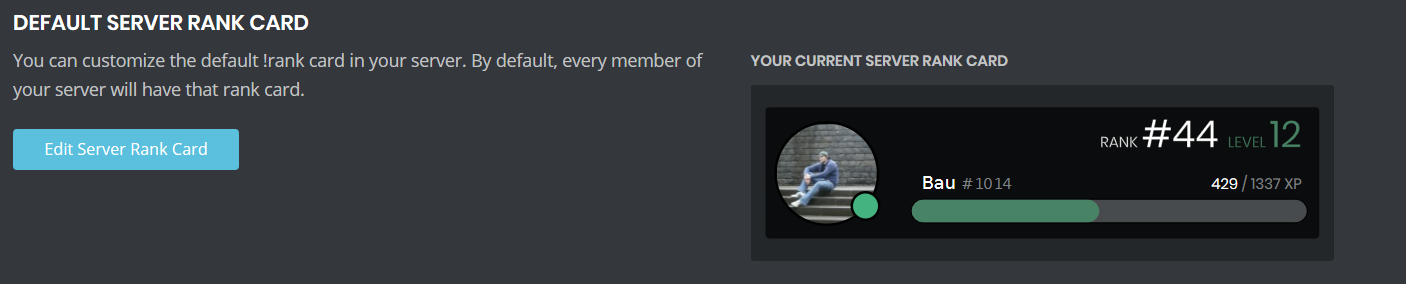
The pic of rank
cold bear
you mean rank card?
kind fulcrum
YES
cold bear
what happens after you click on edit rank card button?
kind fulcrum
 cold bear
press crop

 cold bear
console
kind fulcrum
And?!
cold bear
show it
kind fulcrum
oh, right
cold bear
yeah I wrote all steps above
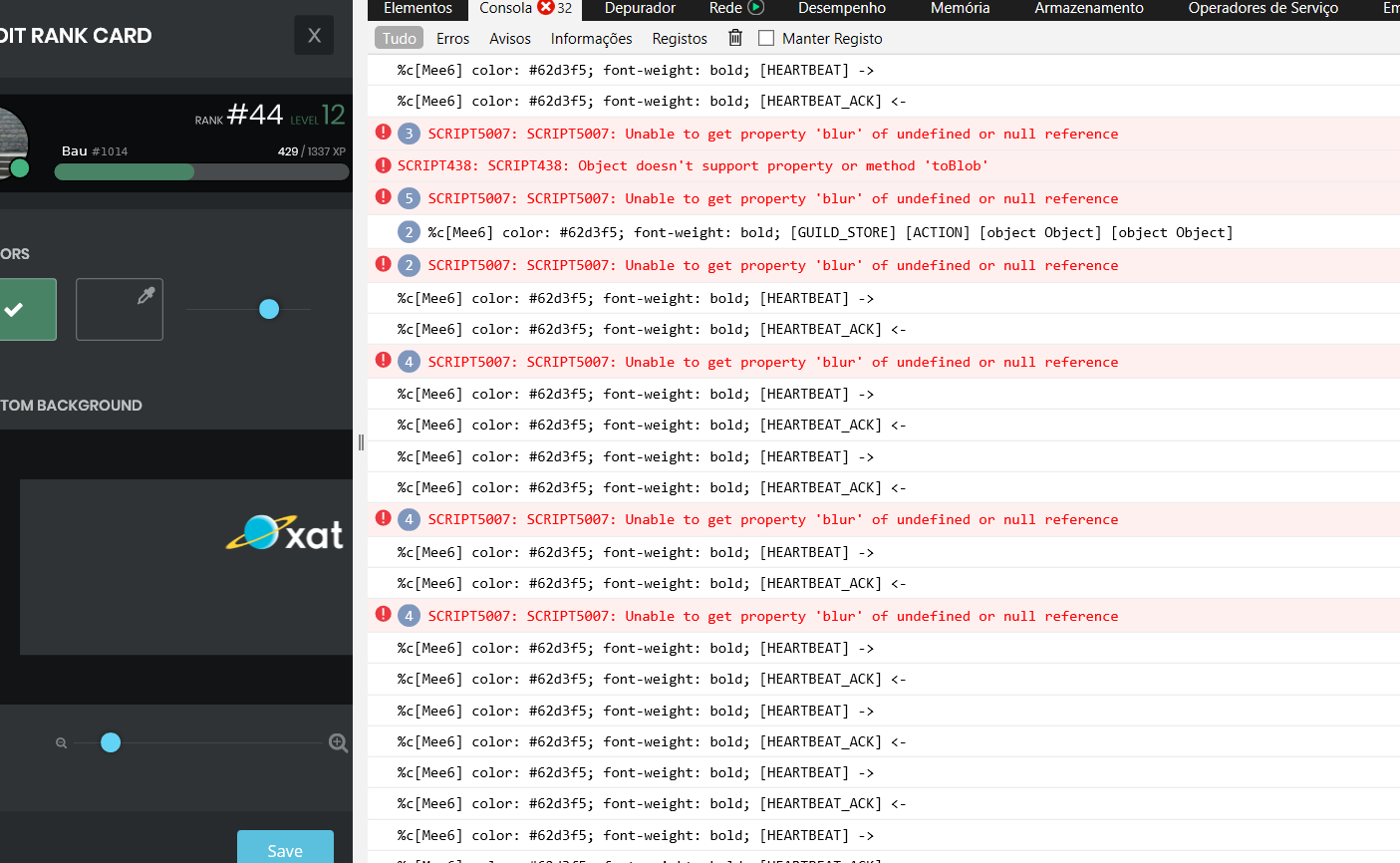 cold bear
try different image
broken ember
it can @cold bear
cold bear
try disable enable command in search plugin
 golden hearth
my discord desktop app has crashed for 2 days.pls fix it
knotty rose
Uhh... It's better if you contact Discord support about that instead of us
Or you can email them at support@discordapp.com
 thorn abyss
faint dome
thorn abyss
faint dome
@thorn abyss maybe you can consider to ask it?
buoyant moon
When I try to access the bot to the website, my login doesn’t work. It’s connected to my other alt account even when I log in from my main account
I can’t invite the bot
dire yarrowBOT
It appears that you may be on the wrong account, or something went wrong since the time you logged into my website.
-Please navigate to https://discordapp.com/login and select the gear :gear: in the bottom left, then press Logout.
-After that, please navigate to https://mee6.xyz/logout to disconnect from my website.
-Once finished, select "Add to Discord" again, and follow the instructions to access my dashboard again.
https://cdn.mee6.xyz/s/logout.png
buoyant moon
Alright
 spice ravine
I am trying to invite mee6 bot to one of my servers, I am clicking setup mee6 but it's not working. Is it just a bug in my device?
 stone lodge

 narrow bramble
I don't know if this would be considered a bug, i think it might? But i'm not sure. It might be a discord thing and not a Mee6 thing but i figured i would join and ask anyway. I'm trying to have Mee6 added to a server i am in, but when i click my drop down menu (there should and is one server available to connect it to) it seems as if the drop-down menu just... cuts off?
 dire yarrowBOT
It appears that you may be on the wrong account, or something went wrong since the time you logged into my website.
-Please navigate to https://discordapp.com/login and select the gear :gear: in the bottom left, then press Logout.
-After that, please navigate to https://mee6.xyz/logout to disconnect from my website.
-Once finished, select "Add to Discord" again, and follow the instructions to access my dashboard again.
https://cdn.mee6.xyz/s/logout.png
wooden mountain
@narrow bramble ^^ can you logout of discordapp.com IN YOUR BROWSER please?
narrow bramble
Thanks so much!
limber knoll
@buoyant moon need help?
buoyant moon
Tempmute doesn't work
burnt hazel
@buoyant moon Can they still talk after being muted?
buoyant moon
I do tempmute and nothing happens
burnt hazel
Is the command enabled on the dashboard?
burnt hazel
@buoyant moon Are you owner or Administrator or Bot Master of the server?
buoyant moon
I have fixed the issue from help on support
 dreamy lily
I noticed with the welcome messages is it custom or what because it counts members on welcome and i notice instead of it sayin 1st it says 1th and its only suffix is th
limber knoll
@dreamy lily it's just a number and the variable is {server.member_count}
 ebon mauve
a friend of mine has been getting this gif nsfw uncensored pics of a girl by mee6 pls help fast cause his only 11 and he is seeing nsfw gif of a girl
limber knoll
@ebon mauve guessing it's on a server they are in?
 mighty mauve
Can anyone tell me why the timer feature isn't accurate
 leaden pine
<@&193123929701875712> or someone pls tell me.
Auto moderate function run unexpectedly when invite URL which made by own server has posted.
Normally it works only when the posted URL depending on external server. isn't it?
burnt hazel
@mighty mauve Timers are set in UTC time
And only trigger when the channel is active with people talking in it.
burnt hazel
@leaden pine That shouldn't happen if it's the same server the invite is from...
Can you invite me please to the server
leaden pine
@burnt hazel Yes, it shouldnt. I send invite URL.
BTW, now it's restored.
I operated these actions but it didn't worked.
- Kick and re-invite MEE6
- Re-apply auto moderate configure
Restoralation observed suddenly.
 undone cobalt
I go to my dashboard and when I click on command pessonalised sela shows me a gray screen. I refreshed the page but sela did nothing
cold bear
@undone cobalt can you please stay in same channel instead of jumping between them?
you didn't even answer my additional question in #〉volunteer-support
undone cobalt
ok
 bright rover
Bugs with the response messages. Commands work fine besides !warn not giving a warning.
limber knoll
@bright rover dm invite please
 whole thorn
Im getting that message too
limber knoll
@whole thorn giving roles?
limber knoll
did it give the role?
whole thorn
Uhm
limber knoll
if not means mee6's role was below the role its giving
dire yarrowBOT
Role hierarchy is important for me to give out roles. Oh and also Manage Roles perm:
https://cdn.mee6.xyz/s/fix_hierarchy.gif
whole thorn
Ah nvm
dire yarrowBOT
 Rylock#1234 has been warned
Reason: Bad word usage
whole thorn
my mod is dumb
 random swan
Whenever someone gets auto muted they can still talk because when they get muted, they keep their role. Make it so that when someone gets muted they loose their role then when their unmuted they get their role back
Because this guy warlock was auto muted for saying bad words but he could still talk because he had a role that allowed him to talk
dire yarrowBOT
Having problems muting someone/they aren't muted? Check the following
Prerequisites:
- Moderator plugin is enabled
!mutecommand isn't disabled- Bot has role with Manage Roles and Manage Channels permissions
- Muted role is under MEE6 role
- You're trying to mute someone using
!mute @mention reason, otherwise it will not work
If user got Muted role but still can talk means there's issue with your channel permissions
Go to Channel Settings -> Permissions
- If that's public channel that can be accessed by anyone:
- Set
Send Messagesfor all roles except Muted - Set
Send Messagesfor Muted role
- If that's secret channel that requires *special* role to access it:
- Set
Send Messages Read Messagesfor special role - Set
Send Messages Read Messagesfor Muted role - Set
Send Messages Read Messagesfor@everyonerole
tired meteor
@random swan this will make it so they can't talk when they get the role
random swan
thank u so much i love u
dire yarrowBOT
 vašek#9627 has been warned
Reason: Bad word usage
 lavish hemlock
under my server on dashboard in the youtube tab...it wont load...works on other servers and modules tho
 stuck saddle
Why Not Is Here So More Admins?
buoyant moon
YT plugin is bugging. Just keep getting three dots over and over when I try to open it
ivory blaze
has something to do with youtube api quota
buoyant moon
i have no idea what api quota is tbh. lol
dire yarrowBOT
 Ethan DA BEST#9154 has been warned
Reason: Bad word usage
Ethan DA BEST#9154 has been warned
Reason: Bad word usage
 inland flicker
hi
timid hill
This is what happens when I authorize**{"error":{"message":"state not found"},"status_code":400}**
 lone fossil
jade orchid
lone fossil
jade orchid
Hey Guys. Apparently the YouTube plugin isnt allowing people to add channels in there Regardless of whether it’s the direct link or channel name. When they type it, it doesnt show any previews and when they click off to choose the channel, it disappears. This is occurring in both Desktop and Mobile. It’s also the first channel, so the premium multiple channel thing does not matter.
ivory blaze
Youtube api difficulties
 karmic spoke
On MEE6.xyz I cant log in to my new discord account and it keeps showing up with my old discord on the authorization page and it cant change it
dire yarrowBOT
It appears that you may be on the wrong account, or something went wrong since the time you logged into my website.
-Please navigate to https://discordapp.com/login and select the gear :gear: in the bottom left, then press Logout.
-After that, please navigate to https://mee6.xyz/logout to disconnect from my website.
-Once finished, select "Add to Discord" again, and follow the instructions to access my dashboard again.
https://cdn.mee6.xyz/s/logout.png
 wind berry
my xp has been reset in my server and only mine has been reset. no one have role for it. is it bug or somethibg like that? and how can we fix that?
<@&193123929701875712>
summer bay
Sure no one has the permission to do that?
Anyone with a role with "Admin" permission and/or Bot Master role can reset your xp
wind berry
they didnt do that im sure
 plush shell
So I set a timer to go off and it’s not going off...
I just added it as a new timer and I’ll see if it works
buoyant moon
It keeps loading forever, I have a good Internet but keeps loading.
cold bear
try again later, it seems mee6 hit youtube quota again, nothing we can do but wait
 frozen elm
on the mee6 site the youtube plugin loads endlessly(
faint dome
read above lmao
frozen elm
sorry😶
buoyant moon
Same bug for me
faint dome
same bug for everyone actually
 rich silo
i didnt have that problem though
 dusk jacinth
I am trying to make announcements for every time I upload a YT video, but it won't let me add my channel
 tardy beacon
gfds
dire yarrowBOT
 Introduce Farhad#2984 has been warned
Reason: Duplicated text
 vague surge
@forest tusk YouTube pluggin has been doing...
-logged out and in
-kicked bot
still not resolved
vague surge
@past bane as me?
 past bane
yea it isnt loading...
vague surge
I tried it on my second server and it wont even load the youtube channel. So strange
past bane
maybe server problems
past bane
yea
vague surge
Do you know how to enable !code. The thing they use to prevent spam bots
past bane
no
vague surge
this feature is a must
tired meteor
well i know how to something simular
dire yarrowBOT
I assume you want some kind of verification system for your server, so here's what you need to do:
1. Create a role named "Verified" and "Not Verified" for example.
2. Go to your channel settings. :gear: > Permissions > Deny the read messages permission for the "Not Verified" role, so they can't see the channels.
3. Create a channel called #Verification and allow the "Not Verified" role to read messages here.
4. Go to your MEE6 dashboard https://mee6.xyz/dashboard and select your server, then the Welcome plugin  Scroll to the bottom and add a role to give to a user when they join the server. (The "Not Verified" role).
5. Go to the Custom Commands plugin  and create one called "!Verify" then add the actions "Give Role" and "Remove Role".
• Select the "Verified" role to be given.
• Select the "Not Verified" role to be removed.
• Scroll to the bottom and select "Clear command invocation" then save the command.
vague surge
@dire yarrow I assume you need the premium version to do this (auto role)?
jade orchid
Auto role is in the welcome plugin which I believe has no premium restrictions @vague surge
dire yarrowBOT
You can now give members a role on join through the welcome plugin https://cdn.mee6.xyz/s/autorole.png

 fresh pier
so i was recently in a server when my xp got stuck at level 8 393, is there a fix?
fresh pier
i also spent an hour talking to people and still didn't gain xp .-.
vague surge
@jade orchid correct, you can give a role to a new user, however, when the user types !code (or any verification code), the code auto assigns a new role, and removes the previous role.
jade orchid
Oh my bad. I thought u were talking about welcome roles. The custom command area should give you an option to remove roles as well @vague surge
Just remove the old role and add the “code” role
jade orchid
Ah it’s premium for you. You’re gonna need premium to do actions like those
If u added mee6 before this change auto roles are free. Forgot about that
jade orchid
No sorry
 rotund charm
@dire yarrow <@&193123929701875712>
I've got YouTube and Twitch plug-ins Add streamer There is no list
 obsidian meadow
mute bug
jade orchid
Answered in sup channel @obsidian meadow. Also please state ur question in only one channel
tired meteor
try logout and in
dire yarrowBOT
It appears that you may be on the wrong account, or something went wrong since the time you logged into my website.
-Please navigate to https://discordapp.com/login and select the gear :gear: in the bottom left, then press Logout.
-After that, please navigate to https://mee6.xyz/logout to disconnect from my website.
-Once finished, select "Add to Discord" again, and follow the instructions to access my dashboard again.
https://cdn.mee6.xyz/s/logout.png
tired meteor
well then i don't know how to fix that, pls wait for someone that know how to fix that
 quartz ridge
ok...
 placid apex
Ehmm Dashboard doesn’t work on custom command and welcome <@&193123929701875712>
 nova junco
can't play music
faint dome
try with url instead of words
buoyant moon
<@&193123929701875712> when i try to use music quiz or listen to music i get problem in mee6 land
faint dome
we are fixing that
buoyant moon
Thank you
 echo ivy
guys, got a problem with the bot in my server
the music plugin doesn't work
"Something went wrong in MEE6 land! Contact our support team for instructions if this keeps happening."
and i got the premium
faint dome
read above plz
faint dome
nope, because of this stupid rate limit
echo ivy
ah, ok ahha
faint dome
you need to wait a few hours for using youtube plugin, or music search feature
echo ivy
thanks dude and happy new year
 echo ivy
uh, gonna try
faint dome
and quiz too, and yt plugins also
echo ivy
awesome dude! thanks from italy btw! ^^
 quaint kelp
on the yt dashboard it wont load or show anything about the channel or configure menu
buoyant moon
Same^^
quaint kelp
edit:also the announcements on my server didnt come up till a couple minutes ago when the live stream started hours ago
 stray kindle
<@&193123929701875712> icant choose audit channel
 quasi gust
I cannot access the welcome message area to make a custom message. it just shows a grey screen everytime i click it. pls help !!!
 tired star

onyx widget
can you please clear all cookies and cache then refresh the dashboard please
buoyant moon
@onyx widget sorry for the ping but there is a bug i keep encountering. If i were to add, say, auto-mod, if i were to click on the widget, it brings me to a gray screen. What should I do to fix this?
onyx widget
server id please
buoyant moon
the server id is 662437191456391178
onyx widget
clear all cookies and cache then refresh the dashboard
buoyant moon
@onyx widget i tried, but it still doesn't work.
onyx widget
try incognito chrome please
buoyant moon
it works. Thank you for helping me.
onyx widget
np
 steel bluff
Why u ping me
cold bear
set custom dns https://1.1.1.1/dns/

✌️✌️ Browse a faster, more private internet.
also don't mention random users, they don't have to help you just because you told them
cold bear
that's fine, follow the instructions on the website
buoyant moon
Why the site doesn't work
cold bear
your ips has outdated dns records, it's responsible for converting mee6.xyz to 11.22.33.44 ip address so browser can connect, it's usually fixed with setting custom dns address
buoyant moon
Yo there iss a new bot going around
Dm everyone?
I don't know if it's legit or nah
dire yarrowBOT
Reporting an Issue
If you were raided or something against Discord (ToS - Term Of Services) is going on in your server, use the following link to send your report to discord:
steel bluff
Have a lovely day
 modern zealot
A friend of me got raided by @dire yarrow (we are sure it's the real one, and not a fake MEE6)
 jade perch
First thing I'd check for is the Bot's tag. Hhe four digit number after it's name.
Make sure that number matches the one in this server.
#4876 is the tag.
modern zealot
#4876 too
knotty rose
Copy the user ID and paste it here
modern zealot
159985870458322944
knotty rose
Check audit logs. There is no way MEE6 could raid you on its own. Someone who has permissions used MEE6 to raid the server
modern zealot
Ok I'll see it tomorrow I'm tired
 bronze falcon
YouTube channels showing up on a paywall
burnt hazel
Answered
lavish hemlock
for some reason mee6 wont mute people and warn...it might be roles but i doubt it as it would have told me then im pretty sure...instead it just says theres a error in mee6 land pr whatever
nvm they did get muted even tho the message came
still thats weird
faint dome
May happens if MEE6 can’t send logs in the modlogs channel
 wind sluice
Hey the mee6 is having some issues? I tried to make the bot join the chat, which worked fine, but it somehow won't let me request song, or anything. the !add !play command does not work at all, no response from the bot
cold bear
try using direct links as search feature is currently broken due to youtube ratelimit
wind sluice
I used !add <url> however, the bot doesn't respond at all. no error message or anything.
I also checked if the bot's command is enabled or not, and yes they are all enabled.
no response whatsoever, it only responded to !join and !leave command
 pliant comet
 warm path
same for my server 😮
cold bear
soon will be fixed
 lime hound
Hi, i just got the bot to my server but the dashboard on the site is in infinite loading
buoyant moon
@lime hound your connection is good ?
lime hound
yes, everyother aspect of the site works fine besides the dashboard
buoyant moon
because if you don't have connection is it a probleme
cold bear
can you try kick and invite bot back
lime hound
tried, didnt work
lime hound
cold bear
using vpn?
lime hound
nope
cold bear
any script/ad blockers?
cold bear
can you give me the link?
lime hound

Manage your Discord server with leveling, moderation, Twitch, Youtube and Reddit notifications.
cold bear
loads fine for me, could be broken browser cache or something with resolving addresses.
try clearing it, relogin to both discord and mee6, maybe even set custom dns.
lime hound
ok il try, thank you
buoyant moon
I'm having dashboard issues as well as a friend of mine.
limber knoll
@buoyant moon using chrome?
buoyant moon
Bing and chrome.
limber knoll
chrome up to date and no vpn or adblockers running?
buoyant moon
Yep
limber knoll
tried another device?
buoyant moon
Both mobile and pc.
limber knoll
you'll have to try again later, sometimes resetting the modem helps but not if it's from the isp
 gusty sorrel
i had tried to edit the youtube plugin on one of my servers, but it isnt loading. i looked at the plugin on other servers and it works perfectly normal, but just for the one it isnt loading. is there any way to fix this?
buoyant moon
 jovial kayak
When trying to setup the youtube plugin. It wont search for a youtube channel. It just deletes what i typed. Cant fix it. Any ideas?
 thick zenith
 crimson canopy
bot is no longer posting in one server but is in every other server I am in. I'm not sure if this is a bug or what? any ideas?
 abstract ginkgo
we didnt get a welcome message from mee6 today- or a good bye and you cant do !rank in our server either..
faint dome
Hmm I see two possibilities:
- commands and things aren’t enabled, or mee6 can’t see/send messages
- your server is victim of a desync issue, so kicking and inviting it back should fix it
abstract ginkgo
we had mee6 for years..
so to me it sounds like a hick-up
and I cant see mee6-webpage as its not loading
faint dome
Then definitely a desync issue
Please kick and invite back
Sadly this is a common problem with big bots, due to how discord manage connection with them
dire yarrowBOT
Bot doesn't react on commands!!!
That usually happens because:
- Plugin is disabled -> Go to https://mee6.xyz/dashboard and enable the plugin with needed command!
- Permission is missing -> Ask your server's owner to go to https://mee6.xyz/dashboard -> Settings -> Bot master -> Add your role
- Command is disabled -> Go to https://mee6.xyz/dashboard, open plugin settings and enable the command!
- Do not reply to command option is enabled -> Go to https://mee6.xyz/dashboard, open plugin settings, click [Edit] button, scroll down and disable the option!-
You're using command in wrong way! -> Moderator commands like !mute !kick !ban etc. need the user to be mentioned. Example: !kick @user annoying
buoyant moon
Andkdje
dire yarrowBOT
 Alpha#3008 has been warned
Reason: Mass emoji
dire yarrowBOT
Richard the Wolf, you can't use that
 devout cloud


 faint dome
#〉commands pls