#〉bugs-reports
2 messages · Page 43 of 1
 buoyant moon
the youtube Plug-in doesnt work
 burnt hazel
Known issue, apologies @buoyant moon
The devs are working hard to fix it and should be resolved soon-ish
buoyant moon
Okay
 dire yarrowBOT
Alright, @buoyant moon has been warned because 'Posted an invite'.
 quick edge
! tempmute doesn’t work
burnt hazel
Do the users get the mute role? @quick edge
quick edge
yeah
dire yarrowBOT
Having problems muting someone/they aren't muted? Check the following
Prerequisites:
- Moderator plugin is enabled
!mutecommand isn't disabled- Bot has role with Manage Roles and Manage Channels permissions
- Muted role is under MEE6 role
- You're trying to mute someone using
!mute @mention reason, otherwise it will not work
If user got Muted role but still can talk means there's issue with your channel permissions
Go to Channel Settings -> Permissions
- If that's public channel that can be accessed by anyone:
- Set

Send Messagesfor all roles except Muted - Set

Send Messagesfor Muted role
- If that's secret channel that requires *special* role to access it:
- Set
Send Messages
Read Messagesfor special role - Set
Send Messages Read Messagesfor Muted role - Set
Send Messages Read Messagesfor@everyonerole
burnt hazel
Can you make sure your channel permissions are set up like above. 
Make sure to add the MEE6 Muted role to the channel overrides
 signal light
Hi, is it normal that my notification twitch is not working ?
dire yarrowBOT
Our team of developers is aware of the situation with the Twitch plugin that is not working properly, but are unable to give an ETA on the fix.
Technical stuff/explanation:
This is down to us trying to avoid ratelimits on Twitch's old API, which is taking a long time and causes delayed/no announcements. We can't move to their new API until they raise ratelimits for us
buoyant moon
the custom commands are not working
 limber knoll
@buoyant moon error given?
buoyant moon
thx
 cobalt wind
hello. custom commands for roles stopped working. it worked when i first added the bot.
 dense fox
Is mee6 role above the role he’s giving?
dire yarrowBOT
Role hierarchy is important for me to give out roles. Oh and also Manage Roles perm:
https://cdn.discordapp.com/attachments/302245580673908740/479426065668898826/81d15f9a.gif
 cobalt wind
thank you so much!
dense fox
No problem
 timber night
Hi 😉 can some1 help me. Why Muted role does not automaticly set channel overrides?
When Mee6 mute some1, he got new role Muted, but role not work 😭 he can speak, chat and enter to voice channel.
 split roost
Im mot staff but
I think u need to change the role
Muted
Go to the roles then pick muted
Then dont give it permission to text or join vc
buoyant moon
It has a bug on Music Quiz !pass command
 faint dome
Yup, we know. Devs too 
buoyant moon
k
limber knoll
bit more then just pass sadly
timber night
@split roost i'll tried 😭 not working 4 me.
limber knoll
@timber night dm invite please
 dire yarrowBOT
Alright, @split roost has been warned because 'only talk or leave comments in #〉chat or #〉commands | Keep all the other channels free pls'.
limber knoll
@ornate dome dm invite please
 ornate dome
Ok
faint dome
@buoyant moon this is the pp of timers mee6, not the real bot. We have thus 2 possibilities : a fake bot, or a timer
buoyant moon
oki
buoyant moon
report for where !unwarn
 pure obsidian
@buoyant moon That would be clearing infractions feature that has been suggested and is in ideas list already.
pure obsidian
Yes, it's already planned so no worries.
buoyant moon
@pure obsidian Thank you so much
 misty heron
In the Twitch stream plugin, it keeps re-adding @‘everyone’ into the announcement message, though only to a few random users at a time.
Is this a known bug?
dire yarrowBOT
Alright, @crude badger has been warned because 'Capital letters'.
Alright, @crude badger has been warned because 'Capital letters'.
 glacial lintel
yesterday i couldn't access any of the website for mee6 or mee6 itself as it left the server
dire yarrowBOT
psix! got kicked for bad language! 
burnt hazel
@glacial lintel Is MEE6 online in your server now?
 stray olive
When are the youtube notifications going to work?
I have the plugin on for 4 days with youtubers set but i don't get any notifications at all
glacial lintel
yes
burnt hazel
The devs are aware and are working on fixing the issues with the YouTube plugin @stray olive
theres no ETA but it should be soon-ish fixed
stray olive
Ok good to know that 😛
burnt hazel
@glacial lintel We had some downtime yesterday due to discord and a few other things #〉announcements 
glacial lintel
k
 dull thicket
Vive la France
 sterile sandal
Good to know that youtube notifications will be working soon, keep up the great work!  @burnt hazel
limber knoll
@gray mortar try removing the webhook for the timer, and deleting the timer at the dashboard end and remake it
 gray mortar
Sorry.. Very much new to discord and Bot.. No idea what webhook is.. Am using discord in mobile
@limber knoll
limber knoll
Ah needs chrome browser in desktop mode logged into discord
Tbh its a long way round
gray mortar
Oh
limber knoll
Then server settings and webhooks
Basically only way to view audit and webhooks and a few others on the stable discord version
Alpha can view audit logs i think but its buggy
Not sure if the webhooks show up there
gray mortar
Thanks for your time.. Will disable it for time being till i get it on my laptop.. Its a one time process right?
limber knoll
Unfortunately could be many
Currently if the bot has to restart it plays havoc with the timers
This can sometimes be caused to discord outages as well
gray mortar
The bot changes its timezone according to the timezone of the members in the server?
Or only the admin’s
Because the interval it keeps posting differs
 gaunt scarab
faint dome
gaunt scarab
faint dome
C’est à dire ?
dire yarrowBOT
Alright, @gaunt scarab has been warned because 'Bad word usage'.
faint dome
La liste des « bads words » est différente pour chaque serveur, parce que chaque proprio définit la sienne
 green lily
Hey team..having problems again with music not being played through bot, been couple of days now. Any word on how long on a fix?
 cold bear
do !next till it say nothing to !play
then !leave, wait 30s, !join !add something, !play
 blissful vortex
hello
 strong path
Have a bug to report?
 sour moat
Дарова
dire yarrowBOT
Alright, @novel coral has been warned because 'do not massively mention other users'.
 novel coral
@dire yarrow Чего
 ocean wind
@novel coral ты в курсе что тут все не русские?
 hearty nexus
Почти все
dire yarrowBOT
Alright, @crude stratus has been warned because 'Posted an invite'.
 humble hound
@dire yarrow je ne peux pas accéder à la personnalisation des commandes
 mild spear
Mee6 does not obey my orders, do not! Clear 1000
burnt hazel
Being helped ^
 vestal quest
<@&193123929701875712> when i upload youtube video mee6 dont post it on my server. in mee6 dashboard its enable
 bitter owl
@vestal quest Plugin is under maintenance so won't work
vestal quest
ok when every thing will short out?
bitter owl
No ETA for the fix
vestal quest
ok
 light hornet
<@&193123929701875712> i do a custom command for m'y Channel but IS not work
bitter owl
@light hornet check if you didn’t put banned channels or that mee6 has the correct permissions
light hornet
Ok thx
bitter owl
First tell me; does this command is meant to do anything special? Like giving roles?
light hornet
Giving roles
bitter owl
Ok so you need to follow next leads
dire yarrowBOT
Role hierarchy is important for me to give out roles. Oh and also Manage Roles perm:
https://cdn.discordapp.com/attachments/302245580673908740/479426065668898826/81d15f9a.gif
light hornet
Ok
bitter owl
☝ this will make possible to command giving roles work
dire yarrowBOT
Alright, @buoyant moon has been warned because 'Duplicated text'.
 sly cypress
Why does mee6 ignore commands from other staff members than owner?
strong path
You mean that they can't use like the ban command?
sly cypress
My friend is not owner but has staff role. Staff role is allowed to kick. But when he writes !kick name reason it doesnt respon
When I = it does
strong path
It is !kick @user reason
strong path
But it doesn't respond to your staff friend?
sly cypress
Yes
sly cypress
+1 @strong path
helped
strong path
You can ping suppprt with your question/problem if you need help later too
dire yarrowBOT
Oops, something went wrong in MEE6 land!  This error has been reported to our Team. We'll work hard to fix it.
If this happens when using:
Custom commands:
‣ Bot tries to give the role that higher than his own. To fix that, move the bot's role above the role he tries to give.
‣ User don't have all roles bot tries to remove, that's known bug.
‣ Missing Manage roles permission. Go to Server Settings -> Roles -> Bot role -> Manage Roles permission
Moderator commands:
‣ Muted role is above Mee6's role. Bot can't give roles that higher than his own. Move it down.
‣ Missing Manage roles permission. Go to Server Settings -> Roles -> Bot role -> Manage Roles permission
bitter owl
👆
bitter owl
Someone could have changed some permissions/configurations/etc
Make sure mee6 have manage messages and the message is not older than 2 weeks
 white sandal
@sour moat дарова
 last rivet
When I assign 2 reward roles for level 5 it only gives 1 ?!?🤔
Same for level 10
I have like 40 level roles but... it should work ? No ?
limber knoll
@last rivet are the rewards set to stack?
last rivet
@limber knoll no why ?
limber knoll
If they are set to stack it will give both
last rivet
Yeah but I need both without stack
limber knoll
Currently you have it where it gives both for say lvl 5 but the 1st role for lvl 5 would get removed
limber knoll
Np

 vague sage
buoyant moon
vague sage
buoyant moon
Anime is not working
strong path
^ fixed btw, by hurdle
 cobalt rose
The bot is banning random people.
 wooden mountain
and you are sure that it is not a moderator using the !ban command?
and those people don't have to many warnings
buoyant moon
@wooden mountain <@&193123929701875712> mee6 doesnt seem to ban people with infraction counts. my server rule says
but theres this one guy already received 5 infractions in 30 days but wasnt automatijcally banned
we had to manually do it
is this a bug
 strong path
Planned
 mint belfry
How to unban someone because when I banned someone I can’t seem to unban them even though I did through the discord server?
strong path
Yeah use the ID of the user you banned to unban
dire yarrowBOT
Alright, @amber stone has been warned because 'Posted an invite'.
Developer Mode
1. Go to User Settings by clicking on the :gear:
2. Click on Appearance and enable Developer Mode
3. Right click on channels/usernames/roles/conversations/etc and click on Copy ID
Using Android
- Go to User Settings (Close to your name in the left menu).
- Click on Behavior and enable Developer Mode.
- Long pressing (If necessary scroll down) and Copy ID
Note: You cannot use iOS devices to complete those task yet
strong path
Please read mee6's message above @mint belfry
mint belfry
Ok
mint belfry
It says I’m unbanned but cant join
 charred cove
I bought the music quiz plugin yesterday and I like it. But it does have this bug where it just stops playing songs and you'll have to stop the quiz and start a new one to make it work again. Is this a known bug and is there someway to fix it? It's very annoying when you've listened to like 8 songs and it just stops out of nowhere. No messages, no audio.
wooden mountain
that is a new one, we did not have that in our testing
can i have a invite pls to check it
@charred cove
charred cove
yes I'll DM it
strong path
Please keep the support channels for serious help only
mint belfry
@strong path it says I’m unbanned but still doesn’t let me join
limber knoll
@mint belfry tell them to refresh their client
limber knoll
Accept invite on another device?
mint belfry
Tried that aswell
They used their phone iPad and laptop
All said invalid
And it’s only that person
limber knoll
Check your bans list again
mint belfry
I did it says no one is in it
limber knoll
Hmm dm invite?
mint belfry
Like said you it?
Or I send him it
Because I’ve already dmed him invite aswell
And it’s only that one person
limber knoll
Send to me and we'll see if it's a discord issue or just a bad cache
mint belfry
Is it just discord?
wooden mountain
@mint belfry tell him to restart his discord, close the app and open it again
limber knoll
@wooden mountain he did
Including a discord reinstall, using discord on at least 2 separate devices
And all failed
wooden mountain
home or bussiness network?
limber knoll
And including an invite i sent them
Thinking home
Not suggested router
Oh and the person was removed from bans list
wooden mountain
can't be the router, it is a cache somewhere and a router doesn't cache normally
https://dis.gd/contact => help & support
limber knoll
@mint belfry👆
wooden mountain
email address of the user who is having the problem, not yours
just give that link to him
also include server ID in the description
and all the steps taken
- 2 devices
- restart and re-install
etc...
 forest turtle
I'm trying to add the bot to my new server but it only gives me my other 4 servers to choose frommmmm
 ionic meteor
are you sure you have Manage Server permission in the server you want to add the bot to? 😃
forest turtle
yeah, i created the server
ionic meteor
hmm, how long ago?
ionic meteor
does the mee6 dashboard show the same name/profile picture as you're using right now?
forest turtle
yeah
ionic meteor
that's pretty weird 🤔
forest turtle
maybe a discord glitch then?
forest turtle
how do you get the server id?
ionic meteor
Server Settings -> Widget -> it should be listed there
forest turtle
496064447689785364
ionic meteor
Can you try adding mee6 through the invite link mee6 will send? And see if it shows up on the dashboard then?
dire yarrowBOT
forest turtle
still dosnt show up
ionic meteor
hmm, neither can mee6 find your guild. can you dm me an invite?
forest turtle
ok
 bronze arch
This is probably well known but the bot's chat filter won't catch stuff if you put it in quotes
 dusty apex
@bitter owl ^
 viscid crypt
I'm here to report a lamp when missing in the map I thing it's a bug or should I say moth
faint dome
@viscid crypt wrong server ?
buoyant moon
Bug report : If you edit a message, it bypasses the automod
faint dome
That’s not a bug but a non-planned feature ^^
 ocean depot
i dont get any xp but my mates get it
dire yarrowBOT
If I appear to be denying your hard earned experience, or !rank and !levels aren't working properly...
- Make sure Levels is Enabled.
- Check that you do not have a banned role in the levels configuration, and that you aren't in a banned channel either.
- Make sure that I can see the channel you are talking in with "Read Messages" and send messages with "Send Messages".
 leaden osprey
@ocean depot ^^
ocean depot
everything is correct but it doesn't give me xp
dense fox
@ocean depot Any banned roles that you have?
buoyant moon
how do i fix this b0i
dense fox
@buoyant moon I answered you in #〉volunteer-support
buoyant moon
i still cant use the command
strong path
Which command?
buoyant moon
an custom one
strong path
Give role?
buoyant moon
yup
strong path
!hierarchy
dire yarrowBOT
Role hierarchy is important for me to give out roles. Oh and also Manage Roles perm:
https://cdn.discordapp.com/attachments/302245580673908740/479426065668898826/81d15f9a.gif
strong path
that above could help
buoyant moon
!rank
dire yarrowBOT
xCookiezx, this command is disabled in this channel. 
buoyant moon
hadi beee
burnt hazel
commands in #〉commands
buoyant moon
!rank
dire yarrowBOT
xCookiezx, this command is disabled in this channel.
buoyant moon
!levels
dire yarrowBOT
xCookiezx, this command is disabled in this channel.
dire yarrowBOT
Role hierarchy is important for me to give out roles. Oh and also Manage Roles perm:
https://cdn.discordapp.com/attachments/302245580673908740/479426065668898826/81d15f9a.gif
Alright, @buoyant moon has been warned because 'commands go to #〉commands , listen to staff'.
 gusty merlin
is the dashboard running slow for anyone else?
buoyant moon
yes the page does not charge and keeps loading
 void basin
Hey, mee6 isn't responding and the website isn't loading when I go to it
burnt hazel
Try refreshing the dashboard now
void basin
Yay
 little nimbus
I still got the website problem
 winter lance
Website doesn't respond!
strong path
Dashboard issues and MEE6 slow
We are aware that the dashboard is experiencing some issues and MEE6 is running slow in some servers, please be patient whilst the devs work to fix the issue.
 icy rose
Hi, I haven't looked back through the list to see if this is already reported, but I have the level up announcement set to disabled, but it's still messaging users in DMs with a message when they level up.
winter lance
Thanks !
dire yarrowBOT
TRICANNON, this command is disabled in this channel.
winter lance
My command doesn't work
strong path
What command?
winter lance
@buoyant moon
strong path
give role command? @winter lance
winter lance
@strong path yes
 glass aurora
why though
strong path
welp
winter lance
@glass aurora wait xD
buoyant moon
;-;
strong path
bot just went unresponsive here so rip... :(
strong path
Dashboard issues and MEE6 slow
We are aware that the dashboard is experiencing some issues and MEE6 is running slow in some servers, please be patient whilst the devs work to fix the issue.
winter lance

buoyant moon

strong path
Guys, please don't post random emotes here
buoyant moon
sure^^
glass aurora
bec i want to work on him
buoyant moon
I can stop
 shrewd aurora
Why does the bot not warn me
dense fox
@shrewd aurora Are you the owner of the server?
shrewd aurora
Nope
dense fox
Have a moderator role?
shrewd aurora
Of my own server yea
dense fox
Hey ! MEE6 doesn't sanction the following people:
• The Owner of the server;
• People with Administrator permission;
• People with Manage Server permission;
• And the role(s) you set as Moderator on the website (aka dashboard).
He thinks Moderators are responsibles, like the police  . So he doesn't want to blame your police
  .
.
^^^
dense fox
No problem.
 nocturne forge
dashboard is dead. I'm sure y'all know, just re stating
dire yarrowBOT
Alright, @buoyant moon has been warned because 'Posted an invite'.
dusty apex
@spice pewter pls just hang tight
 spice pewter
ok
buoyant moon
is the mee6 issue fixed yet
bitter owl
Which one?
gusty merlin
website is slow again
buoyant moon
dashboard
bitter owl
Being restarted while we speak
 obtuse shell
Command doesn't work / Dashboard too
bitter owl
Bot being restarted, please be patient
obtuse shell
Np just here to say, ty for that 😊
 woeful plume
oh
The only reason I joined was to say the dashboard wasnt loading xD
Is there any estimation as to when it will be online?
bitter owl
Less than one hour
woeful plume
MK, thx
 cosmic mauve
The dashboard is not working
 onyx widget
Look above @cosmic mauve
gusty merlin
yea theres lots of problems
burnt hazel
@abstract turret Is the Dashboard still loading for you?
burnt hazel
can you try refreshing it now?
 abstract turret
Same thing.
burnt hazel
what is your server ID?
burnt hazel
thx
burnt hazel
They both load fine for me, can you try clearing your cache, disable any ad-blockers/VPN and refresh the site again.
burnt hazel
theyre both working fine for me, maybe it could be your connection.
make sure you have a good connection to the internet otherwise it can take a long time to load
dire yarrowBOT
Alright, @buoyant moon has been warned because 'Bad word usage'.
Alright, @buoyant moon has been warned because 'Bad word usage'.
Alright, @buoyant moon has been warned because 'Bad word usage'.
 cloud dagger
umm hey in my channel the youtube notifications thing dosent works only the twitch one works
onyx widget
Known bug. Dev are working on it. Be patient.
buoyant moon
I role some certain roles as moderators and MEE6 won’t do the commands told by the moderators.
bitter owl
@buoyant moon need to add their roles to each commands in allowed roles section
That section only give immunity to the role, which means: they won’t be affected by moderator commands from mee6
If you want them to perform the command, go to https://mee6.xyz/dashboard -> moderator -> Scroll down and allow their role feature by feature
 woeful lily
Already mentioned it in support2 channel but maybe here someone can help me. Music plugin stops playing music after every song. There are 5 normal songs in playlist and when I type !play bot starts to play 1st song. But when it ends bot falls silent. If I type !play again he sing one more song. As I know it shouldn't work like this and bot should stops only when playlist ends, right?
<@&193123929701875712> ↑
wooden mountain
songs from yt (using normal search) or from a other site using a link?
woeful lily
I just type !add and name of song, so I guess it's youtube
wooden mountain
thanks, i will test it now
woeful lily
Thank you
wooden mountain
testing in progress.... if only it would listen
woeful lily
Hm, it's funny that he can play 10h versions)
 autumn scaffold
Pet™dnes v 19:23
!tempmute @VencaCZKiller 1m Test
[!] KravičkaMilkaBOTdnes v 19:23
Oops, something went wrong in MEE6 land! :SAD6: This error has been reported to our Team. We'll work hard to fix it.
Please fix this error
burnt hazel
Can you make sure MEE6 has manage roles permission, and MEE6's role is above your muted role @autumn scaffold
dire yarrowBOT
Role hierarchy is important for me to give out roles. Oh and also Manage Roles perm:
https://cdn.discordapp.com/attachments/302245580673908740/479426065668898826/81d15f9a.gif
autumn scaffold
Okay, thanks i try this
woeful lily
@wooden mountain any success with tests? Can you at least confirm this bug?)
wooden mountain
it is a bug
i started a song, then went to go eat and when i returned i could use !play to start another song
wich would not be the case if he would have continued
@woeful lily
wooden mountain
we have notified the developers, i hope they will fix it soon
woeful lily
Ok, thank you very much)
woeful lily
@wooden mountain Just FYI, problem is solved)
 fathom yacht
Hi hi hi hi
dense fox
Found a bug?
 dense fox
No worries
 indigo hamlet
idk if this is a bug or not, but it happened in a server im in
wooden mountain
Network lagg + spam
buoyant moon
Hello, I noticed a small problem very not important but I say it anyway, I selected the automatic removal of !levels command but on computer, it remains displayed and I can not delete it, whereas if Discord Mobile, the command is not displayed. This is not the first time this has happened to me. Is it coming from me or Mee6 ?
buoyant moon
Okay, I'll try, thanks
dire yarrowBOT
Alright, @vapid rune has been warned because 'Posted an invite'.
 woven prawn
Hello everytime when I want to change mee6 commands I enabled it but when I type the command it don't work did I miss something or no?
I am doing the custom command
No it says about your self
Like, hello {player} your the {rank} and have fun in the server!
dire yarrowBOT
A full list of variables you can use in Mee6 commands and other functions can be found here: https://github.com/Mee6/Mee6-documentation/blob/master/docs/commands_variables.md
There's also random variables that can be used:
Random variables:
{random:x:y} picks a random number between x and y. Values must be pre-entered. Example: 8 would pick a random number between 1 and 10
{random:x} picks a random number between 0 and x. Values must be pre-entered. Example: {random:10} would pick a random number between 0 and 10
9 picks a random number between 0 and 10
Random variables with arguments:
{random:{1}:{2}} picks a random number between what you specify in a command. Example: !pick 1 10 would pick a random number between 0 and 10
{random:{1}} picks a random number between 0 and {1}. Example: !pick 20 would pick a random number between 0 and 20
Only non-decimal numbers can be used, letters and symbols will not
woven prawn
I know but the command doesn't work
burnt hazel
use {user} not player if you are using custom commands @woven prawn
woven prawn
I know but WHEN I type the command name it doesn't Work
buoyant moon
A moderator
Cause your profile is imitating Mee6
I recommend you to change your username and profile picture in 10 minutes please
woven prawn
WHY when I CHANGE MEE6 SETTINGS IT doesn't WORK WHY????
buoyant moon
Did you ask support?
woven prawn
No
buoyant moon
Then I recommend that
burnt hazel
@woven prawn What settings are you changing and doesnt work?
woven prawn
The custom command
burnt hazel
What does the custom command do exactly?
woven prawn
You can add your command
burnt hazel
Can you show me a screenshot of the command please
burnt hazel
You want to give a role to yourself yes?
woven prawn
No
burnt hazel
a rank in the mee6 levels system?
woven prawn
You can see in the first picture
burnt hazel
Yes but do you mean you want to join a role, or you want to give yourself a rank, or you want to check your current rank in the levels?
burnt hazel
hey @burnt hazel your the {rank}
burnt hazel
{rank} doesnt work in custom commands, if you want to check your current rank you can use !rank in the levels plugin.
burnt hazel
yes {rank} does not work in custom commands
Make sure MEE6 has permissions to send messages in the channel where youre using the command also 
 winged hatch
The Bot got admin permission and cant change the roles under it self....? Why?
Yeh i know
I sayed under it
And not above ^^
Yes... It should work but i just got an error that its goin to report to u guys...
Yep
Also the channel permission is ok
K
winged hatch
Problem solved ^°^
 pale pelican
I cant doe !warn or else
limber knoll
@pale pelican make sure command is enabled and mee6's role is above the roles it's managing in server settings > roles
buoyant moon
yt plugin Page problem: everytime i enable yt plug in in dashboard website, the page will load for couple of second, the just show me blank screen of dash board background. no nothing, refresh the page still repeating same thing. i have to click back twice and then refresh page to back to main dashboard page. provided that i need to disable the plugin, i have to click the page and click the disable button as fast as possible before the page blank. anyone can help? <@&193123929701875712>
faint dome
Yt plugin is under maintenance since a few weeks ^^
buoyant moon
@faint dome but my other discord account using the mee6 works no problem
just to load the page only. my other account load the page like normal when it is enabled
wooden mountain
@buoyant moon can you dm me a invite to your server? one of the yt channels you had listed got removed from yt and the website can't handled that
so i need to fix it manually
invite in dm pls
 molten tulip
Salut les français xd
buoyant moon
@wooden mountain i think is more related to the web dashboard. is it needed that you join my server?.
wooden mountain
@buoyant moon you can also just give the dashboard link for your dashboard
buoyant moon
i dm you
 atomic pewter
mee6 timers not working..
bitter owl
@atomic pewter need to have an active chat to trigger timers
Which means, messages between each timer message
Also, if you changed the interval you need to delete previous timer and add new one with new interval
atomic pewter
Ah ok thanks
dire yarrowBOT
Dan, this command is disabled in this channel.
burnt hazel
@buoyant moon Commands in #〉commands
 sleek siren
Any update to youtube notifications? Mine still not working.
wooden mountain
we have send another request to yt to ask if they can up our limit..... because there was no responds last time
 grizzled pasture
i saw a bug
dense fox
Real bug or mee6 bug?
grizzled pasture
mee6 bug
grizzled pasture
when i use command !clear appear for a second a mention why?
 feral sinew
related to that. not sure if its a bug or its ment to be but when you use the clear command with a large number it automatically clears the !clear command but with small numbers it tends to leave it and when i try to manually delete it it dosent work
burnt hazel
Thats discord lagging, you need to refresh your client and it will go away
feral sinew
oh ok 😅 , thanks!
 vivid pollen
Mee6 prefix is not working
strong path
How so? It is ! btw
strong path
What commands? Like !help?
strong path
ok, you know about the dashboard?
vivid pollen
where is
dire yarrowBOT
You can access my dashboard at https://mee6.xyz/dashboard, and login with your Discord Account.
vivid pollen
🤦
vivid pollen
thanks
 rotund hatch
🤔
strong path
Go to #〉commands for commands, please. @rotund hatch
 viscid glade
dire yarrowBOT
viscid glade
dire yarrowBOT
It appears that you may be on the wrong account, or something went wrong since the last time you logged into the website.
- Please navigate to https://mee6.xyz/dashboard to logout from our website. Click on your profile picture and press Logout https://rebrand.ly/LogoutMEE6.
- Then navigate to https://discordapp.com/channels/@me and select the gear in the bottom left, then press Logout.
- Log into the account you want to use on the Discord website
- Once done, select "Add to Discord" again, and select the server dashboard you want to access
 pearl aspen
Read this
 brittle zodiac
On the page where you add mee6, im trying to add custom commands and it keeps on deleting the text, this might be a mobile problem.
 prime blaze
@brittle zodiac The Text Dissapears But if you go to your server it will still say the command
(If this doesn’t work then idk)
 spiral canopy
Hey guys! Apparently reddit implemented this quarantine mechanic, and sadly, my dear mee6 can no longer pull posts from these... controversial subreddits, let's say.
Not sure, if this can be considered a bug, or not, but I did not manage to find anything on this server related to the said topic, so I just wanted to make sure, it's known.
Thanks for everything so far!
wooden mountain
@spiral canopy hey, can you give me a example of such quarantined subreddit? so we can test it and investigate this issue
in DM pls
buoyant moon
help the mee6 chat log thingy which you can see deleted messages and edited ones does not work
 valid star
MEE6 don't goes well
 rapid sparrow
I tried to invite MEE6 to another one of my servers. The 'select server's list only let's me choose a server that MEE6 is already in. I am the owner of both the server he is already in and the one that I want to invite it in but doesn't show up.
dire yarrowBOT
It appears that you may be on the wrong account, or something went wrong since the last time you logged into the website.
- Please navigate to https://mee6.xyz/dashboard to logout from our website. Click on your profile picture and press Logout https://rebrand.ly/LogoutMEE6.
- Then navigate to https://discordapp.com/channels/@me and select the gear in the bottom left, then press Logout.
- Log into the account you want to use on the Discord website
- Once done, select "Add to Discord" again, and select the server dashboard you want to access
wooden mountain
just try that pls @rapid sparrow even if you think you are on teh right account
rapid sparrow
Oh, I just remember now that you mentioned it. My app account is this one but my chrome browser discord is on another one. That must be why.
Yeah, now it works. I switched to my main acc on chrome browser.
valid star
I wanted to mute a member in my server but it goes error
 halcyon robin
When a youtuber uploads a video mee6 isnt telling me that they uploaded
wooden mountain
we are currently testing a fix for that
halcyon robin
oh ok
valid star
Ok thanks
wooden mountain
so should be working in the next couple days/weeks
@valid star what error? (that other responds was for fire owl)
valid star
Oops, something went wrong in MEE6 land! :SAD6: This error has been reported to our Team. We'll work hard to fix it. This
wooden mountain
!oops
dire yarrowBOT
Oops, something went wrong in MEE6 land! This error has been reported to our Team. We'll work hard to fix it.
If this happens when using:
Custom commands:
‣ Bot tries to give the role that higher than his own. To fix that, move the bot's role above the role he tries to give.
‣ User don't have all roles bot tries to remove, that's known bug.
‣ Missing Manage roles permission. Go to Server Settings -> Roles -> Bot role -> Manage Roles permission
Moderator commands:
‣ Muted role is above Mee6's role. Bot can't give roles that higher than his own. Move it down.
‣ Missing Manage roles permission. Go to Server Settings -> Roles -> Bot role -> Manage Roles permission
halcyon robin
can you !oops the youtuber thing as well
wooden mountain
nope
halcyon robin
oh ok
last rivet
I know it's a bug cuz it shouldn't work lol
THE YT PLUGIN WORKS !?!
valid star
That was the error, thanks a lot :D
halcyon robin
what?
wooden mountain
yes yt plugin works.... sometimes
we are testing a fix that should have it working always
halcyon robin
good
wooden mountain
see the diffrence
halcyon robin
oh ya also mee6 doesnt appear in the webhooks thing in server settings
wooden mountain
what do you mea?
halcyon robin
shouldnt you be able to see him under the webhooks bar?
valid star
But when I mute someone he can talks too WTF
dire yarrowBOT
Having problems muting someone/they aren't muted? Check the following
Prerequisites:
- Moderator plugin is enabled
!mutecommand isn't disabled- Bot has role with Manage Roles and Manage Channels permissions
- Muted role is under MEE6 role
- You're trying to mute someone using
!mute @mention reason, otherwise it will not work
If user got Muted role but still can talk means there's issue with your channel permissions
Go to Channel Settings -> Permissions
- If that's public channel that can be accessed by anyone:
- Set
Send Messagesfor all roles except Muted - Set
Send Messagesfor Muted role
- If that's secret channel that requires *special* role to access it:
- Set
Send Messages Read Messagesfor special role - Set
Send Messages Read Messagesfor Muted role - Set
Send Messages Read Messagesfor@everyonerole
wooden mountain
@valid star ^^
 quaint coyote
my custom command isnt working!
burnt hazel
@quaint coyote What does your custom command do?
quaint coyote
adds a rank
wooden mountain
!oops
dire yarrowBOT
Oops, something went wrong in MEE6 land! This error has been reported to our Team. We'll work hard to fix it.
If this happens when using:
Custom commands:
‣ Bot tries to give the role that higher than his own. To fix that, move the bot's role above the role he tries to give.
‣ User don't have all roles bot tries to remove, that's known bug.
‣ Missing Manage roles permission. Go to Server Settings -> Roles -> Bot role -> Manage Roles permission
Moderator commands:
‣ Muted role is above Mee6's role. Bot can't give roles that higher than his own. Move it down.
‣ Missing Manage roles permission. Go to Server Settings -> Roles -> Bot role -> Manage Roles permission
 river arrow
It wont let us warn this player
burnt hazel
@river arrow Have you tried mentioning them in the warn?
 cyan hatch
hello, mee6 has not updated the positions with exp ranks on all members of my discord, what can i do?
wooden mountain
can you say that in a diffrent way? i don't quite understeand
cyan hatch
I set up positions for xp
but not all received, even if it fit the established exp
dire yarrowBOT
Role Rewards are available via my Leveling Plugin. You gain XP and Levels as you are active and can be used to give active members special perks in your servers.
- I must have "Manage Roles" and a role that is higher in the Discord Settings list then the role you are trying to add with me -> https://its.mee6.xyz/i300v5r1zx.png
- I do not add roles instantly, I only check when changes are made or someone levels up.
 wooden mountain
just refresh
 ivory swan
but I have that remains
wooden mountain
then ignore the fact that all your servers show
only click on the once that you are a admin in
(not that you will be able to see the config in the others)
ivory swan
okay
wooden mountain
^^ a bit being a hour while some parts of the bot are restarting
buoyant moon
I have the same problem
 warm peak
read the staff response @buoyant moon
buoyant moon
"^^ a bit being a hour while some parts of the bot are restarting"?
wooden mountain
yep
warm peak
yeah, wait some time
buoyant moon
I read it...
warm peak
🤦 also digest it
wooden mountain
oooo, you need to digest that.... i didn't know
last rivet
Guys, the Yt plugin works 100% perfectly... no need to get an other patch for it 😅 @wooden mountain
buoyant moon
...
buoyant moon
<@&193123929701875712>
 normal kite
i though i fked up smth on my srv 
buoyant moon
!rank
dire yarrowBOT
Alex Sosa, this command is disabled in this channel.
buoyant moon
hm
working there
ik
i know
just testing
myb u denied perms
to bot
or something like that
burnt hazel
MEE6 is restarting in all servers, you will need to wait for MEE6 to come back @buoyant moon
normal kite
sanq 
 haughty radish
@burnt hazel how long will it be, or u dont know
burnt hazel
unknown but it can be a while as MEE6 is in a lot of servers
just keep trying the dashboard every now and again refreshing it
 peak stream
<@&193123929701875712>
burnt hazel
@peak stream
dire yarrowBOT
@peak stream ERR: 404 question not found
peak stream
<@&193123929701875712> how to reset bot
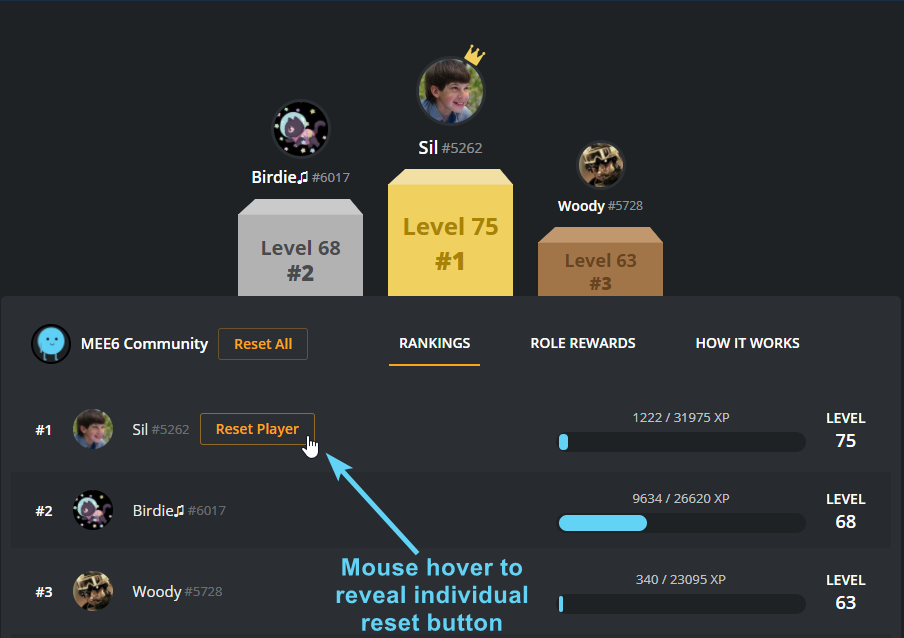
dire yarrowBOT
To reset levels, you need to have the Manage Server perm (which grants you the ability to access the servers dashboard). The leaderboard can be found by doing !levels or https://mee6.xyz/leaderboard/SERVERID where SERVERID is the server's ID
https://i.imgur.com/q36HjaC.png
 peak stream
<@&193123929701875712> how to refresh statistics?
burnt hazel
this is known, better moderation about editing message is planned
buoyant moon
burnt hazel
@peak stream how to refresh MEE6 bot all together?
burnt hazel
Not possible, you have to manually reset everything and disable commands plugins etc
peak stream
ok thanks 😄
buoyant moon
<@&193123929701875712> it denies my card?
burnt hazel
We are aware and it has been reported, apologies.
We'll get back to you when we know more
buoyant moon
ok ty
 velvet jungle
Our shard is online but not responding.
burnt hazel
MEE6 is restarting in all servers, please be patient as this can take a while for MEE6 to work everywhere
 bitter glacier
It's not loading I have restarted it still nothing
It's not loading I have restarted it still nothing
burnt hazel
Try refreshing now @bitter glacier
bitter glacier
Still waiting
 heady thorn
why my rankcard do not show the color?
bitter owl
@heady thorn try in another server please
heady thorn
here?
bitter owl
Could be in #〉commands
Your server owner probably bought server rankcard premium and changed everyone rank
heady thorn
nope
bitter owl
You can’t undo that by going to your rankcard -> visibility -> enable it to the server that is off
So follow next steps
dire yarrowBOT
Rank Cards is my new way of showing off your levels via !rank in style. You can customize this by selecting your name in the top right of https://mee6.xyz/dashboard and selecting "Edit Rank Card"
If you are having trouble uploading a image, try using another browser such as Chrome or Firefox.
buoyant moon
dashboard down?
burnt hazel
@buoyant moon Can you try refreshing
heady thorn
i dont know what to do
burnt hazel
then MEE6 is still restarting in servers it seems :(
You will have to wait just a little longer  @buoyant moon
buoyant moon
aight
burnt hazel
@heady thorn can you show me a screenshot of what it looks like please
burnt hazel
ok
buoyant moon
bitter glacier
Bro give an a announcement when MEE6 is restarting
buoyant moon
burnt hazel
MEE6 is restarting in some servers still, this will affect the dashboard, please be patient
buoyant moon
Ok tanks
heady thorn
i can see the dashboard
burnt hazel
MEE6 just received a premium update 
so this is why MEE6 needs to restart everywhere, once you have access again you will see
heady thorn
i have the screenshots
burnt hazel
Ok please send
buoyant moon
OwO
bitter owl
Click on visibility please
heady thorn
k
bitter owl
If there's a server toggled off, you must turn on again
heady thorn
my internet died
bitter owl
That's sad
heady thorn
i know
buoyant moon
is mee6.xyz/dashboard offline?
burnt hazel
MEE6 is still restarting in places it seems, please be patient and try refreshing
buoyant moon

 finite depot
dont know if its just me but im not getting twitch streamer announcements
dire yarrowBOT
Our team of developers is aware of the situation with the Twitch plugin that is not working properly, but are unable to give an ETA on the fix.
Technical stuff/explanation:
This is down to us trying to avoid ratelimits on Twitch's old API, which is taking a long time and causes delayed/no announcements. We can't move to their new API until they raise ratelimits for us
bitter owl
☝
finite depot
thx
 graceful trout
It does not stop charging, and my connection is good! @bitter owl
bitter owl
@graceful trout We're still updating mee6 so need to be patient :)
graceful trout
Thanks! @bitter owl
 unique fable
ohhh ok.
 sleek ruin
😦
bitter owl
@sleek ruin Need assistance?
buoyant moon
!s sell frog
viscid glade
Everytime I login into Mee6 Dashboard, the login page (at least now) always show an error 404
 sage monolith
I have Mee6 set up to post videos and it was doing it but just stopped
bitter owl
 Bot being updated
Mee6 is being updated in order to provide you guys more features and stability...
 Please be patient, No Panic
sage monolith
It stop before this current upgrade, was that already being addressed in this update
 small chasm
for me the setup of the bot doesnt work
when i go to mee6.xyz then click invite, the page never loads
for my phone and pc
 balmy vale
it is updating
small chasm
okay thanks dude
small chasm
lol
 bitter latch
Hey Mee6 for some reason when I try to add your bot to my channel on mee6.xyz It just constantly loads
bitter owl
@bitter latch We're updating so it may not work
bitter owl
Thanks ;)
bitter latch
Side question if I have purchased Mee6 can I use it on a new channel ? My friend was (not a friend) and locked me out of editing or using my old server.
So i created a new one
bitter owl
I’ll dm you
 bitter owl
Mee6 is restarting right now since it’s taking too long to back to normal
unique fable
Ah ok.
bitter owl
We ask 1 hour to be completely back to normal
unique fable
Oh.
dire yarrowBOT
Alright, @onyx totem has been warned because 'emoji spam'.
burnt hazel
Why, you say sorry but you are not sorry for spam?
 onyx totem
I new here
viscid glade
Been like this for 10 MINUTES
burnt hazel
Please read #〉announcements
viscid glade
Ok thx
viscid glade
It has been 1h45m now
viscid glade
eXcUsE mE wHaT tHe fRiCk
bitter owl
I'm kidding, it supposed to be fixed
The problem is that the front-end is not responding
Which depends on Devs awake to fix. It's 2 am where they live so we will need to wait
 thorn tendon
Ahh so ppl have same problem as me
buoyant moon
So it turns out the website's not communicating with the rank card?
dire yarrowBOT
Rank Cards is my new way of showing off your levels via !rank in style. You can customize this by selecting your name in the top right of https://mee6.xyz/dashboard and selecting "Edit Rank Card"
If you are having trouble uploading a image, try using another browser such as Chrome or Firefox.
bitter owl
@buoyant moon ☝ use this to change your cards pls
buoyant moon
I did
bitter owl
@heavy berry use #〉chat or #〉commands to share your thoughts please
buoyant moon
@bitter owl I did
 heavy berry
I was forced here
buoyant moon
But my current rank card is correct on the website.
It's the default in Discord
e.g. see this
!rank
dire yarrowBOT
Banana, this command is disabled in this channel.
 bitter owl
Test it in #〉commands
bitter owl
What’s wrong?
Go to leaderboard and rankcard -> visibility -> turn on for this server
Seems you can edit it
bitter owl
You need to pay to choose background
buoyant moon
yee ik
buoyant moon
What if Mee6 joins a server we both share?
Will the setting be updated retroactively?
buoyant moon
with visibillity though
buoyant moon
but by default it's off
bitter owl
So your visibility is automatically disabled
But you can go there and override your personal rank card
bitter owl
@jaunty pollen like?
buoyant moon
ohhh
 jaunty pollen
I go to my dashboard
Change it to diffrent color
Check it with !rank command
And it's same as previous
Probably needs some time to update?
bitter owl
Make sure if visibility is enabled @jaunty pollen
jaunty pollen
Okayyy
bitter owl

 bold granite
wtf
buoyant moon
but then how do I set it to a person's rank card?
jaunty pollen
Oh well another problem now, it doesn't load for me
bold granite
wtffffffff
jaunty pollen
bitter owl
@bold granite excuse me, what’s wrong?
jaunty pollen
^ this for few minutes already
bitter owl
@jaunty pollen hm it may be affected by #〉announcements
jaunty pollen
Well then i'll wait
buoyant moon
but then how do I set it to a person's rank card?
buoyant moon
therefore turning visibility on?
for the end user?
bitter owl
@buoyant moon no, in https://mee6.xyz/dashboard -> Levels -> Server Rank Card
buoyant moon
that's in my server
bitter owl
It will make default for the server
dire yarrowBOT
√TECHNICAL IRFAN®(ADMIN), this command is disabled in this channel.
buoyant moon
what if you want the default to be the user's card?
bitter owl
Not possible
buoyant moon
hmmst
Anyone here who's not American?
So I can see if anyone can reproduce this bug?
or at least doesn't use USD, CAD or AUD as their currency
bitter owl
What are you talking about
bitter owl
It is turned into your currency in the moment of the purchase
buoyant moon
should it not be your currency as you view it?
bitter owl
I will suggest it to devs
 rustic stratus
Probably already been reported, but, it seems that the site won't work, whenever I go into it, it just stays on the loading screen
bitter owl
#〉announcements <----------
buoyant moon
MEE6's Leaderboard is not loading
wooden mountain
try again
 pallid heart
Everyone's getting active V for no reason.
wooden mountain
@pallid heart that is because of a role reward that someone has set
pallid heart
I checked the role reward, nothing changed
wooden mountain
@pallid heart i can see 2 changes, one to add that role as a reward and one to remove it again
halcyon robin
thanks anywayy
buoyant moon
Lorque l'on met un message et qu'on le modifie,on peut mettre de la pub
 quick ravine
In my friends server i done the ! rank command and the rank cards colors weren’t the same as we put them and it just showed blue instead of the colors we set them to be
wooden mountain
go to that servers dashbaord and change this switch over
*leaderboard
go to it's leaderboard, not dashboard
quick ravine
okedoke
wooden mountain
the link you get with !levels
buoyant moon
Does Mee6 still not support other languages?
For example: Chinese
wooden mountain
@quick ravine click the edit your rank card then on visability (it takes a while to load)
@buoyant moon it should work now, we fixed that yesterday
buoyant moon
OK
wooden mountain
😄
buoyant moon
Um...
Just tested does not support other languages
 ionic lava
the site does not load, and I'm waiting minutes ago ;-;
wooden mountain
ios?
ionic lava
Samsung
buoyant moon
He seems to be Android
wooden mountain
are you using chrome or that fake browser from samsung?
ionic lava
I'm using google
wooden mountain
then it should work
buoyant moon
hope the level card can display other languages~
ionic lava
;-;
wooden mountain
@ionic lava can you give me the link you are currently on
ionic lava
Okay

Skill up and manage your Discord server with automations, commands and awesome plugins!
wooden mountain
the home page? really
buoyant moon
!rank
dire yarrowBOT
ᵛᵉʳᶦᶠᶦᵉᵈ™, this command is disabled in this channel.
ionic lava
Yes, I enter the site, and it does not load
wooden mountain
i'm trying to find the exact issue, could you tell me what type of device it is
something in that line
wooden mountain
in settings => about phone (last option) => model number
wooden mountain
i'm having issues finding it because my internet is so damn slow
wooden mountain
@ionic lava i can see 6 errors that people with your type of phone had in the alst 15 minutes, they all point towards outdated browser or you are having a mix of the old and the new website
try updating google chrome or completly restarting your device
wooden mountain
then try a diffrent device
 stiff spade
So on the site I have my rank card set as purple for the exp but when I do rank it comes up as blue
 austere ember
!rankcardgone
dire yarrowBOT
go to https://mee6.xyz/#rank-card
click on visablity
wait for it to load
select what servers you want this rank card in
 stark raven
Also currently doesn’t tell you if you’re not in a voice channep
warm peak
^
And doesn't have !join and !leave in the same plugin
so you have to have music enabled
wooden mountain
join and leave are not needed
warm peak
Hm
wooden mountain
the start and stop commands do this automaticly
buoyant moon
JDDJDJDHD
wooden mountain
those are neglectable (according to the devs but not too me)
warm peak
huh?
dense fox
@buoyant moon Here to report a bug?
buoyant moon
Nvm
 lavish vessel


 gaunt sorrel
Salut
wooden mountain
yes, tell me
warm peak
should be affected