#〉bugs-reports
2 messages · Page 41 of 1
 buoyant moon
 pearl iron
Found a bug
maybe
the massage of the timer plugin hase a auther face
opps
other

see?
 ruby folio
pearl iron
ruby folio
pearl iron
oh ok

 slim drift
When does !rank work again?
 austere ember
Soon hopefully
No eta
 pearl shoal
Bug !rank m'y serveur
buoyant moon
bug the mee6 is not working
 dense fox
Yes, we are aware
We hear your cries. Mee6 is currently experiencing some issues including the website. Developers are working on it. Please read before saying that Mee6 is offline. Please be patient and thank you for your cooperation.
 potent blaze
Yeah, I have the same problem. Hopefully you get this fixed soon! Thanks!
 odd latch
Fixed!
 agile marsh
Punctuation can be used to avoid the chat filter
 keen linden
Known, it's a wip
 velvet jungle
The dashboard seems to reload every 1 - 2 minute(s).
This is annoying, I lose progress I was making on a custom command.
 toxic palm
notifictation youtube non reçu
 bitter owl
@LES_TEMPLIERS#3580 youtube is bugged
 jade gyro
I tried to use the help command but didn't work???????? He is online I checked lol help pls
 dire yarrowBOT
I am currently a modular bot. Nothing will be enabled by default and must be enabled in each plugin manually.
https://i.imgur.com/V93V8Dg.png
to enable the plugins, go to http://mee6.xyz/dashboard and select your server.
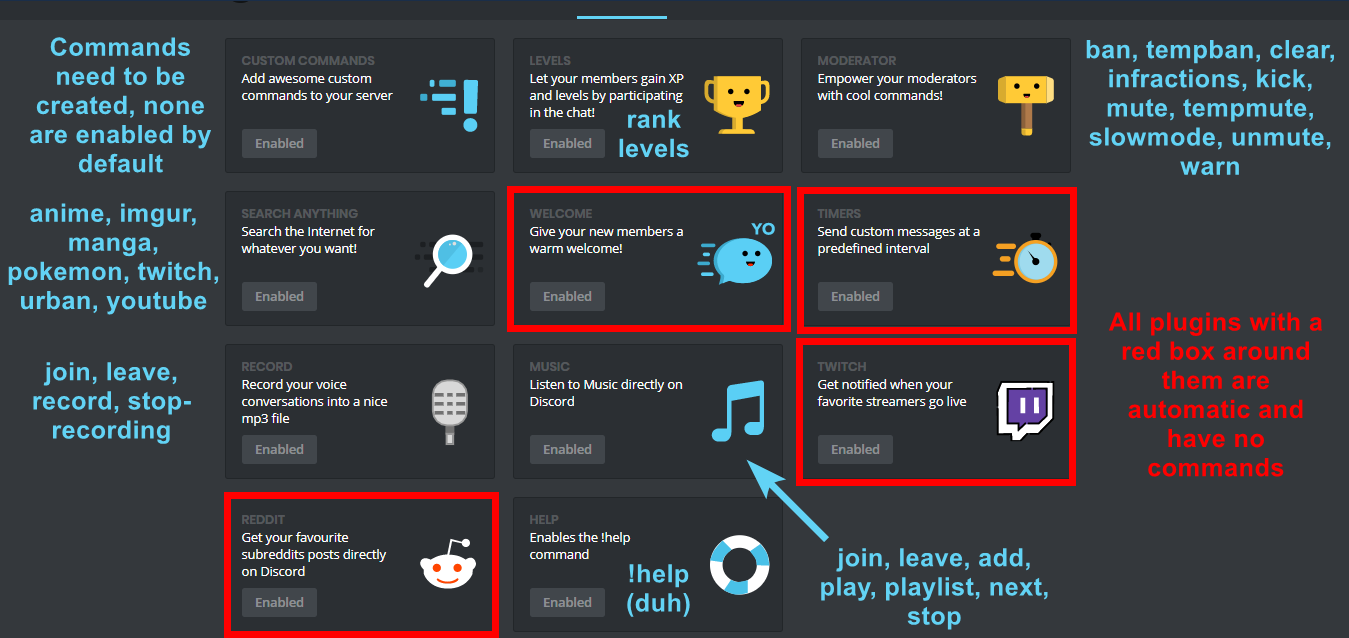
 strong path
Please read mee6's message above @jade gyro
 regal obsidian
I think I understand
 drifting tulip
The Youtuber notifications don't work. I have set them up in multiple different servers for my friend, but in none of them did MEE6 send the notifications. I don't know if I did anything wrong or if this is just a bug MEE6 has.
buoyant moon
YouTube plugin is bugged.
buoyant moon
Damn
buoyant moon
Very laggy
bitter owl
Give me your server id please @buoyant moon
dire yarrowBOT
Open Server Settings in your Discord Server. Select Widget and press Copy ID next to Server ID.
You can also use Developer Mode as an alternative method.
 vocal glen
Same here, can't play music
buoyant moon
😦
buoyant moon
Yes
 wooden mountain
or more stutering
vocal glen
Oops, something went wrong in MEE6 land! :SAD6: This error has been reported to our Team. We'll work hard to fix it.
buoyant moon
Stuttering
buoyant moon
Okay
wooden mountain
or try a diffrent server region
buoyant moon
1min ill check
wooden mountain
@vocal glen on what command?
vocal glen
!play
dire yarrowBOT
Roguesmania, this command is disabled in this channel. 
buoyant moon
Oops, something went wrong in MEE6 land! :SAD6: This error has been reported to our Team. We'll work hard to fix it.
Did this
:/
 wooden mountain
try using a link to a song
yt had a update that broke part of teh music bot
we are waiting on a fix in the library we use
vocal glen
ok cool
buoyant moon
okay bro
 wooden mountain

GitHub
Make sure you are using the latest version: run youtube-dl --version and ensure your version is 2018.09.01. If it's not, read this FAQ entry and update. Issues with outdated version will be rej...
no yt
try other media
that does NOT requires you to have a account
buoyant moon
😦
wooden mountain
as soon as that lib update we will update it and you will be able to use yt again
wooden mountain
change server region then
the bot is not overloaded but we know that discord voice servers are often overloaded
buoyant moon
which is the best?
wooden mountain
changes
buoyant moon
ah
wooden mountain
the once with the least users on currently is the best
bitter owl
Youtube is under maintenance @fading agate won’t work properly
 fading agate
Received, thank you for your reply
 hollow thunder
unban commands description is bugged
bitter owl
Screenshot please? @hollow thunder
bitter owl
Seems pretty ok here
hollow thunder
says this for me PLUGIN_MODERATOR_COMMAND_UNBAN_DESCRIPTION
bitter owl
Oh I was on mobile sorry
hollow thunder
lol
hollow thunder
haha
buoyant moon
YouTube uploads don’t work, please tag me for a response.
bitter owl
@buoyant moon Youtube is under maintenance so it will not work properly, we're sorry
buoyant moon
How long do you recon it will take?
dense fox
No Estimated Time of Arrival (ETA).
dire yarrowBOT
Alright, @buoyant moon has been warned because 'Posted an invite'.
 lime cedar
The bots and the servers are sometimes bugged
Sometimes it won’t let me go to the dashboard
It’s keeps on showing the loading screen
 devout imp
i can't connect to my real discord
dire yarrowBOT
It appears that you may be on the wrong account, or something went wrong since the last time you logged into the website.
- Please navigate to https://mee6.xyz/dashboard to logout from our website. Click on your profile picture and press Logout https://rebrand.ly/LogoutMEE6.
- Then navigate to https://discordapp.com/channels/@me and select the gear in the bottom left, then press Logout.
- Log into the account you want to use on the Discord website
- Once done, select "Add to Discord" again, and select the server dashboard you want to access
wooden mountain
or use incognito
dire yarrowBOT
It appears that you may be on the wrong account, or something went wrong since the last time you logged into the website.
- Please navigate to https://mee6.xyz/dashboard to logout from our website. Click on your profile picture and press Logout https://rebrand.ly/LogoutMEE6.
- Then navigate to https://discordapp.com/channels/@me and select the gear in the bottom left, then press Logout.
- Log into the account you want to use on the Discord website
- Once done, select "Add to Discord" again, and select the server dashboard you want to access
wooden mountain
why?
 elfin forum
mee6 is running slow af on our server, and going commands doesnt always work
dense fox
Yes mee6 is a bit slow right now.
 iron oak
was just gonna ask this lol
buoyant moon
mee6 dont notify anyone . stream on yt twitch... no. 0 notification
buoyant moon
but not working
buoyant moon
i wonder when developer will fix dat
wooden mountain
when they have time
buoyant moon
never?
wooden mountain
soon™
wooden mountain
interesting
i will investigate
@buoyant moon can i have a invite that that server to see what is goign wrong?
in DM
 viral heart
hi
 wicked portal
wooden mountain
wicked portal
wooden mountain
we knw
 vital scarab
dire yarrowBOT
vital scarab
dire yarrowBOT
Having problems muting someone/they aren't muted? Check the following
Prerequisites:
- Moderator plugin is enabled
!mutecommand isn't disabled- Bot has role with Manage Roles and Manage Channels permissions
- Muted role is under MEE6 role
- You're trying to mute someone using
!mute @mention reason, otherwise it will not work
If user got Muted role but still can talk means there's issue with your channel permissions
Go to Channel Settings -> Permissions
- If that's public channel that can be accessed by anyone:
- Set

Send Messagesfor all roles except Muted - Set

Send Messagesfor Muted role
- If that's secret channel that requires *special* role to access it:
- Set
Send Messages
Read Messagesfor special role - Set
Send Messages Read Messagesfor Muted role - Set
Send Messages Read Messagesfor@everyonerole
 pure obsidian
@vital scarab ^need to sort channel permissions as well
 visual timber
<@&193123929701875712> i can't play music on my discord server, it was working fine a few days ago and now it won't work
 cold bear
@visual timber no need to repost message, that's known issue caused by changes in youtube. will be fixed soon.
visual timber
ok thx
 limber knoll
@visual timber add music by links
bitter owl
@buoyant moon First it won't censor your own staff
Second of all mee6 need correct perms
dire yarrowBOT
Full List of my Permissions that I use...
https://i.imgur.com/3Wd5wKZ.png
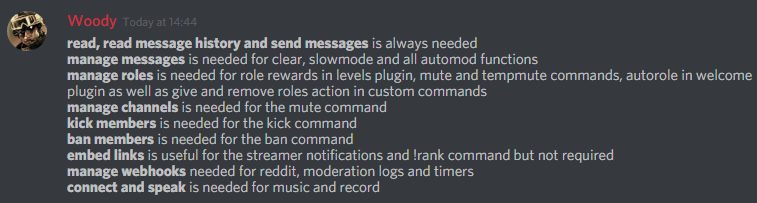 dire yarrowBOT
Alright, @strange edge has been warned because 'Bad word usage'.
 strange edge
@limber knoll Why did I pay $30 for this service if I have to use the YT links directly? Wouldn't it have been easier to just use YT instead of paying for this?
limber knoll
@strange edge we're looking into it but no eta on fix
strange edge
Okay. I appreciate the response, and I whole heartily am sorry for my snarky question and attitude behind it.
limber knoll
It happens, doesn't help youtube changed their api as well which could be the issue with it as well
@strange edge👆
strong path
Only serious mee6 bug reports here please @fast sparrow
 fast sparrow
Ok
strong path
try chrome or firefox
 low glade
Ok
 woven atlas
There's an user who keeps getting tempmuted in my server for being vulgar, but they can still chat in server, what is the purpose of tempmute/mute?
dire yarrowBOT
Having problems muting someone/they aren't muted? Check the following
Prerequisites:
- Moderator plugin is enabled
!mutecommand isn't disabled- Bot has role with Manage Roles and Manage Channels permissions
- Muted role is under MEE6 role
- You're trying to mute someone using
!mute @mention reason, otherwise it will not work
If user got Muted role but still can talk means there's issue with your channel permissions
Go to Channel Settings -> Permissions
- If that's public channel that can be accessed by anyone:
- Set
Send Messagesfor all roles except Muted - Set
Send Messagesfor Muted role
- If that's secret channel that requires *special* role to access it:
- Set
Send Messages Read Messagesfor special role - Set
Send Messages Read Messagesfor Muted role - Set
Send Messages Read Messagesfor@everyonerole
 knotty rose
@woven atlas /\
woven atlas
Thank you! I will take a look.
dire yarrowBOT
Alright, @pliant hedge has been warned because 'Posted an invite'.
 pliant hedge
i cannot stop the hellos in mee6 controlls from getting in certian servers so ima mut mee6
or disable hellos😩

pliant hedge
i cannot direct the hellos in my channels bec all meh channels are getting spammed
when someone joins
limber knoll
Dm invite please
pliant hedge
cant it warns me
limber knoll
Your server owner?
pliant hedge
and + i deleted the hellos and im the server owner
dire yarrowBOT
Alright, @pliant hedge has been warned because 'Posted an invite'.
limber knoll
I got it
dire yarrowBOT
Alright, @pliant hedge has been warned because 'Posted an invite'.
 eager swift
Any word on the timer?
limber knoll
Unsure, if you mean 1 min timers they work fine
Its the longer oners that seem out of synch
eager swift
Well I don't need a 1min timer lol I need my 4 and 12hr ones back
Kinda sucks that it isn't working
 acoustic delta
the youtube plugin does not work
strong path
YouTube plugin is bugged. Sorry about that.
buoyant moon
when ever someone joins my server it doesnt welcome them and everytime i turn welcome on it goes off
 burnt hazel
@cold kelp Make sure MEE6 has send messages permission, in the channel you want him to announce to
 quaint raven
Timer messages are posted every 2 hours even when its set to 4 hours.
strong path
timers are bugged
quaint raven
Okay!
wooden mountain
@quaint raven can you try to go in the settings for that channel and delete all the webhooks made by Mee6
then delete and recreate the timers
and in a couple hours pls tell me if that fixes it or not
i'm trying to find why this happens
buoyant moon
This speaks for itself
https://i.imgur.com/iOdfKEr.png
 wooden mountain
is fixed but not yet pushed to the server
buoyant moon
Ahh alright
@wooden mountain this was just made right?
Because saw this command before lel
 steel marsh
@dire yarrow is not notifying when youtubers upload video i had also linked it
austere ember
Yt is bugged sorry
steel marsh
Can't understand what you are trying to say @austere ember
austere ember
Yt is not working with mee6 right now. So you may be experiencing some problems using that plugin.
steel marsh
Ok got it @austere ember thankyou
austere ember
Yeah no problem
 finite coyote
Is the YouTube plugin working yet?
austere ember
Sorry, no
finite coyote
😥
 sacred tulip
buoyant moon
sacred tulip
buoyant moon
Wtf
dire yarrowBOT
Alright, @buoyant moon has been warned because 'Bad word usage'.
 dense fox
User settings
buoyant moon
I did it
wooden mountain
wait a hour
wooden mountain
you can only change it every so often
buoyant moon
ok
 maiden quarry
on the dashboard for !unban for the description it says PLUGIN_MODERATOR_COMMAND_UNBAN_DESCRIPTION
wooden mountain
is fixed in the code, just not pushed to the server yet
buoyant moon
Tu es Français ?
 craggy cloud
oui
 craggy cloud
oui c'est moi le chef
buoyant moon
Tu as combien de compte Discord ?
buoyant moon
@ripe rivet Alors pour ma suggestion elle est bien ?
et j'ai une question ?le créateur du bot c'est qui et il est Français ?
craggy cloud
merci pour votre aide les gars !!
buoyant moon
ok vu comme il y a eu déjà plein de problème sur ça surtout les Bot qui Bot même si il y a des Anti Raid
Nan je codais un peux des bot il vaut juste un générateur de question et mettre la bonne réponse mais je le fais en JS
 minor quest
@pastel wasp WTF ?
Vous pouvez pas ban un mec avec une croi gamée et un nom un peu bizzard s'il vous plait ?
 modern granite
@ripe rivet tu est c'est bien parler français ou pas
Ah ok
Est ce que tu sais si il y a une panne général avec le bot
Ah ok bon parce que y a un bug qui faisais que quand je voulais tempmute quelqu'un ça ne marchait pas mais le message apparaissait
Mais lui pouvais continuer d'écrire dans les salon
Bah pourtant si ont avait vérifier à deux
 grave horizon
Em music commands 
potent blaze
Every time I try adding a new command it doesn't save it.
look
Yeah I did
I didn't
When I reload the page it doesn't save the command
After I hit the save button several times
windows
wooden mountain
hey, @potent blaze
can you DM me a invite pls, i want to see if it is the website doing wrong or just the bot

 ebon vine
MEE6 is not posting when someone upload a new video.
wooden mountain
we are currently collecting data so we can investigate this issue

 tame cove
hey guys, i can't add new songs to the playlist. it always says "Oops, something went wrong in MEE6 land! :SAD6: This error has been reported to our Team. We'll work hard to fix it."
additional help: songs already played can still be queued again
you just can't add new songs
Merci
and since you're looking at the code, could you check how to use spotify and/or soundcloud. because docs say it's there, but it's not working
 dusty apex
@tame cove only youtube works for now sorry
 novel timber
tame cove
novel timber
tame cove
@dusty apex is there any idea when the rest will work again, because i've bought it for spotify mostly
 azure patio
!mute@tame cove
strong path
... Please don't try mod commands, and also don't cold ping
azure patio
!mute@strong path
 onyx widget
Please stop using mod commands
strong path
And cold pinging users, or I'll mute you myself
 azure blaze
@strong path
strong path
@azure blaze Please read #〉announcements
strong path
@azure blaze Please read #〉announcements
azure blaze
K
 white notch
limber knoll
white notch
limber knoll
 clear oracle
i muted a user
whn i went to unmute
he said he was already unmuted
but he was not
strong path
You don't have 2 muted roles by any chance, right?
clear oracle
no
strong path
You sure?
clear oracle
yes
strong path
DM me an invite
clear oracle
done
buoyant moon
<@&193123929701875712> can u tell me why mee6 not auto uploading YouTube videos ?
strong path
@buoyant moon YouTube plugin is bugged. Sorry about that.
buoyant moon
@strong path ok thanks but when it's gonna be free with bugs
strong path
We don't know
buoyant moon
<@&193123929701875712> The bot sometimes goes offline and so I can’t use the cmds
wooden mountain
is he currently offline?
buoyant moon
And by that I mean like weeks ago it was also happening
 signal hinge
i have a command to take away a role. i tested it today and it was ok. but since 4h i just get an error message.
austere ember
Are you trying to use it on other users? @signal hinge
 austere ember
Oh ok then
signal hinge
but still thank you :)
austere ember
Yeah np
dire yarrowBOT
Alright, @buoyant moon has been warned because 'Posted an invite'.
 slim viper
Our server keeps having problems with removing and assigning roles with commands. we have 6 commands all set up exactly the same way just with different roles (but same permissions) and it only works about 25% of the time. If anyone knows what may be the issue that would be extremely helpful if it could be fixed!!
austere ember
are you trying to assign the person a role and are the commands named all the same?
cold bear
!hierarchy
dire yarrowBOT
Role hierarchy is important for me to give out roles. Oh and also Manage Roles perm:
https://cdn.discordapp.com/attachments/302245580673908740/479426065668898826/81d15f9a.gif
 cold bear
please check and make sure bot role is above these roles, order matters
austere ember
thats known. they are fixing that last i heard
buoyant moon
👍 sounds good
 viscid oar
i have a problem withg mee i can't doing a custom messege it's buged
austere ember
explain please
viscid oar
i want to create a messege that the user read a rulers and the custom messege don't show in the channel select
austere ember
did you give it the action send?
viscid oar
yes
and don't happened nothing
i setup when the messege show and don't happened nothing
austere ember
may i see sc of the command being used? and in the pluging itself
viscid oar
one momet
 neat root
 austere ember
oh you mean timers arent working?
viscid oar
this error
austere ember
hmmmm
viscid oar
yes and i can't doing nothin
austere ember
try google chrome?
austere ember
one sec
viscid oar
ok thanks
austere ember
try google chrome and see if that works
austere ember
does it work now?
viscid oar
0ù
buoyant moon
@neat root whats you prob
cold bear
that error usually means you hit 10 channels cap
viscid oar
ah
cold bear
remove the ones you don't need and try again
austere ember
@buoyant moon
that person earlier had a different message with a bug emoji and saying something about lag
so  chrono edited their msg
 viscid oar
thanks
buoyant moon
Mee 6 back yupi
buoyant moon
Server leaderboard page not loading.
buoyant moon
Latest Firefox on PC, Windows 10. Gonna try latest Opera in a minute and report.
bitter owl
Please, try Google Chrome
In case you be still stuff in that screen let me know because I am going to ask you for a console screenshot (which I can teach you in 2 steps how to get it)
buoyant moon
Chrome is worst browser of them all, my friend.
Leaderboard on Opera working as intended.
Sorry for the wait.
bitter owl
Hm depends on computer specs and we avoid to discuss personal opinion, just advise users. If opera works good for you: great 
buoyant moon
Of course.
 robust plover
In my server, at the start you must put a command called !join to get the member role. I set it up and told my friend to try it and it didn't work. I then checked to make sure it was on and it was. I'm confused because I've been at it for an hour and I just keep getting the message "uh oh it's not working" or something.
strong path
!hierarchy
dire yarrowBOT
Role hierarchy is important for me to give out roles. Oh and also Manage Roles perm:
https://cdn.discordapp.com/attachments/302245580673908740/479426065668898826/81d15f9a.gif
strong path
Please read mee6's message above @robust plover
buoyant moon
Anyone need help ?
bitter owl
@buoyant moon Please don't ask people if they need help :)
Only if that's the case of someone asking. Otherwise wait them to arrive and keep talking in #〉chat or/and #〉commands please
buoyant moon
I need help
strong path
What's the problem? @buoyant moon
buoyant moon
So im trying to access the mee6 dashboard website . like the area to edit the bot settings on my server. But when i click on my server on "select a server", it just reloads the page
it does that over and over
 grave wraith
@buoyant moon https://mee6.xyz/dashboard

MEE6 connects people to the communities they love.
buoyant moon
yea I tried doing it that way
grave wraith
It doesn’t work ?
buoyant moon
no 😦
grave wraith
Invite me to your server
strong path
No
grave wraith
Let’s talk there
strong path
If you're gonna give him perms, do know we aren't responsible for what he does to your server @buoyant moon
buoyant moon
yea i was thinking that
grave wraith
You don’t need to give me perms
buoyant moon
its nothing with my server though. its done this before on other servers
grave wraith
I own 25 other servers and are mods and admins in others
buoyant moon
on my other servers
grave wraith
I own my own bot
limber knoll
@buoyant moon which browser is that?
buoyant moon
chrome
limber knoll
tried logging out and back in?
buoyant moon
yea
buoyant moon
ok il try
 candid ether
strong path
candid ether
strong path
Answered
 fringe heron
“!warn” wouldn’t work mee6 is under admin on the server I help run and it’s enabled what’s missing link
strong path
!warn @user reason here is how you use it
fringe heron
I did
strong path
did you enable the moderator plugin?
dire yarrowBOT
You can access my dashboard at https://mee6.xyz/dashboard, and login with your Discord Account.
dire yarrowBOT
fringe heron
Oki I’ll try that
 sullen venture
 fervent stone
 wraith forum
Bot is offline in my server but not in my friend's server. I kicked it but now I can't invite it anymore although there's my server configuration in the site...
Oh, problem solved, but it's offline yet.
dire yarrowBOT
 lyric turtle
hi guys anybody know why mee6 doesn't announce when somebody goes live anymore ? 👀
<@&193123929701875712>
dense fox
:/
lyric turtle
welp
 steel oriole
check #〉announcements ....been outages since morning
buoyant moon
!rank command doesn’t work.
lyric turtle
if that was a response for me bot didn't announce streams for over a week now @steel oriole
 thorn pumice
i trying to open the settings for my server and this happands. i need a verification and when ive done the verification it load and then back to the first screen. pleace help.
 steel oriole
nah it wasn't for u actually
lyric turtle
ah fairs soz then
buoyant moon
bot is offline lol
dense fox
Yes it is
thorn pumice
when will it go live?
buoyant moon
I try to get into the features of the mee6, but it always takes me back, and does not let me in.
 leaden osprey
what browser?
 spiral token
Mee6 is offline
buoyant moon
chrome
leaden osprey
@buoyant moon try clearing your cache / cookies
buoyant moon
how i do it?
leaden osprey
@spiral token does it appear offline in your memberlist?
buoyant moon
XD
leaden osprey
uh google it
dire yarrowBOT
Our team of developers is aware of the situation with the Twitch plugin that is not working properly, but are unable to give an ETA on the fix.
Technical stuff/explanation:
This is down to us trying to avoid ratelimits on Twitch's old API, which is taking a long time and causes delayed/no announcements. We can't move to their new API until they raise ratelimits for us
 lilac garden
Works for me 😉
buoyant moon
why is mee6 offline so much lately?
lilac garden
^
wooden mountain
now it was network failure (something we had no control over)
we are also having problems with a bug in the discord api that only effects big bots. because of this the bot can go offline in random servers without us even knowing about it
and to fix that we need to restart the bot (more downtime)
both we as discord are working on fixing everything that causes communication issues
buoyant moon
ok
why in other servers like doggo world with only 110 members mee6 is offline but in my server it isnt?
wooden mountain
can you give me the id of that server where he is offline
(that is the bug on discord there side where they just stop sending us events from a random server)
dire yarrowBOT
Open Server Settings in your Discord Server. Select Widget and press Copy ID next to Server ID.
You can also use Developer Mode as an alternative method.
wooden mountain
can you dm me a invite?
buoyant moon
yes
wooden mountain
or the link to your dashboard/leaderboard
 outer oar
bot is offline
 plucky cove
is the bot working?
outer oar
(for me)
dusty apex
PLS HOLD
mee6 is down in some servers
outer oar
k thx
plucky cove
thx
buoyant moon
hey my mee6 bot disappeared from my server. gone without a trace. it's in my friends server and when I try to add it to my server from the website it just goes to plug-ins like it is already added
help?
bitter owl
Check in Server Settings -> Logs please @buoyant moon
buoyant moon
ok
bitter owl
You need to look for banned users and check if mee6 was kicked/banned and by who
bitter owl

buoyant moon
nope. no bans
bitter owl
So type mee6 in search please
If you can see mee6 in your server it means mee6 can’t read the text channel
Grant read messages in text channel’s permissions
buoyant moon
is that a must have?
I turned that off to prevent it from sending messages in the wrong chats.
bitter owl
... it’s discord syntax
If you do not let user’s / bot’s read channel they will not be shown in sidebar
bitter owl
Enjoy it
buoyant moon
I will
 narrow palm
o meu bot anda a fincar off e nao ando a ter acesso ao painel
dire yarrowBOT
Open Server Settings in your Discord Server. Select Widget and press Copy ID next to Server ID.
You can also use Developer Mode as an alternative method.
narrow palm
mas isto n deixa
dire yarrowBOT
Alright, @narrow palm has been warned because 'Posted an invite'.
dire yarrowBOT
kramos_Official, this command is disabled in this channel.
bitter owl
Ta no pc?
narrow palm
sim
bitter owl
Sabe ir nas configurações do seu servidor?
narrow palm
sim
 rain lantern
<@&193123929701875712> YT function does not work
bitter owl
Your english is fine
And it’s already in our list of to do so will not be put behind ;)
rain lantern
i use translator
bitter owl
Looking for the best of user’s experience
rain lantern
;]
 signal geyser
@bitter owl
dire yarrowBOT
! ™s 💜Yiğit, this command is disabled in this channel.
bitter owl
@signal geyser what report do you have to give us, please? Also do not perform commands outside #〉commands
buoyant moon
Cazzo
bitter owl
@buoyant moon não
buoyant moon
Cosa
bitter owl
Para de vacilo
buoyant moon
Io Sono italiano
dire yarrowBOT
CD - I mathew#9279 (458943692498010112) is muted for 1 day because of 'swearing in foreign language', boss.
bitter owl
Plus, bypassing bad words filter
 rain apex
No reaction on Youtube chain URL adding . is there a specific format for the URL string ?
strong path
@rain apex YouTube plugin is bugged. Sorry about that.
rain apex
Ok, sorry too .. no idea of a future updated plugin ?
strong path
No idea, sorry
rain apex
Thx, please consider working on this topic, please.
And not displaying the module as active in the online board ..
burnt hazel
The plugin works for some users and not for others, so theres no need to remove it for everyone.
The devs are looking into whats causing the issue for the other proportion of users. sorry about this.
rain apex
Lina Inverse is dead, Discord.RSS is limited in number of URL ( or must pay for some little more ). So, please consider youtube videos managing as a very important subject, and a real advantage for Mee6.
@burnt hazel Thx 😃
burnt hazel
No worries 
rain apex
Plz , get me noticed about any changes about 😃
( sorry 4 my froggy english, i'm frenchie )
 bright hemlock
Cc
 sonic juniper
Cc
 mystic tiger
firefox
 faint dome
@burnt hazel my dashboard seems to have some latency too. Maybe that's the problem
@mystic tiger tu parle du plugin ou de la liste ?
burnt hazel
Thanks for the report
dire yarrowBOT
Zibi Game, this command is disabled in this channel.
faint dome
donc la liste. Ok
faint dome
tu peux me copier le numéro final stp ?
(qui se trouve être l'identifiant du serveur, au passage)
mystic tiger
421707896766595073
faint dome
je suppose que ça vient de chez toi, moi avec Firefox tout fonctionne 
https://screenshots.firefox.com/l59mc1ab9aW6V2sK/mee6.xyz
 mystic tiger
bah alors pk meme sur mon tel alors que c'est chrome sa marche pas ? ._.
burnt hazel
Clear cache maybe, also i see adblocker in top right @faint dome
mystic tiger
non ...
faint dome
essaie de passer en navigation privée, et/ou désactive ton bloqueur de pub
mystic tiger
mais c'est bizarre que sa marche pus d'un coup alors qu'adblock etait toujours activé
burnt hazel
les bloqueurs d'adb n'aiment pas le site MEE6 pour une raison quelconque, même s'il n'y a pas d'annonces là-bas 
 meager hamlet
Is Mee6 being slow for anyone else or is it my wifi?
faint dome
nope, it's a general new issue
 tacit ivy
This is currently what i'm seeing for the mee6 website
burnt hazel
We are aware MEE6 is running slow, the developers are looking into it and should be resolved swiftly.
Small downtime, sorry about that, website should be back up shortly.
meager hamlet
Tried to log in to the mee6 site and got a 503
burnt hazel
We are aware, sorry about that. MEE6 and the Dashboard will be back with you soon. 
Should be back online now, try refreshing the dashboard
tacit ivy
Thank you!!
meager hamlet
Tried to test the Record plugin, got this msg because the bot isn't connected, but I don't think this is right...
"MEE6BOTToday at 1:48 PM
RECORD_BOT_NOT_CONNECTED"
burnt hazel
@meager hamlet You need to make sure MEE6 is in a voice channel when you use the command.
meager hamlet
I know, but I don't think "RECORD_BOT_NOT_CONNECTED" is supposed to be the error msg
That looks like a placeholder
burnt hazel
Ok, thanks for that. the team will see it and make fixes for this. 
 unreal acorn
In my server people that enters dont see the welcome message:c minutes later it appears but i need them to see the rules and some things (the message explain it) pls help
 dusk badge
That's not a MEE6 issue, discord is slow today
dire yarrowBOT
Alright, @buoyant moon has been warned because 'Posted an invite'.
unreal acorn
Thanks!
 lapis stone
@lapis stone
austere ember
Hi, do you need help? @lapis stone
austere ember
Yt is under maintenance right now. Sorry.
buoyant moon
ok
 sullen shore
the give role command doesn't work
austere ember
are you using it on others?
austere ember
if your using it on yourself, it should work. Not on others though. That is planned.
Also mee6 has to be higher then the role it is giving.
and manage roles
 small crystal
How can i activate mee6 bot
dire yarrowBOT
You can access my dashboard at https://mee6.xyz/dashboard, and login with your Discord Account.
small crystal
Mee6 is not showing on my discord
cold bear
go to server settings -> members and make sure he's there
dire yarrowBOT
 topaz horizon
!clear don't work
dire yarrowBOT
The clear command allows you to clear the last xx amount of message or to clear one user without clearing anyone else.
Use !clear 1-1000 to clear the last xx messages (example !clear 10)
or !clear @name to clear all the message of @name in the last 2 weeks
+ I need manage messages permission
+ I need view message history permission (otherwise I will respond with -1 messages cleared)
+ you need to enable the plugin on the website
+ you need to check the checkmark next to clear on the plugin page.
+ you need to set your role as moderator (located at the top of the plugin page in the moderator tab)```@topaz horizon try above^
topaz horizon
Ok
 lone spade
How do I Add in a server music bots?
dire yarrowBOT
You can access my dashboard at https://mee6.xyz/dashboard, and login with your Discord Account.
wooden mountain
then music => buy it => enable it
dire yarrowBOT
Enter a voice channel and type !join, this will add me to the voice channel.
To add music, type !add <TrackName or URL> and then simply type !play.
You can also use !next, !playlist, !stop, and !leave to control me a bit more.
Please note, searching by "TrackName" is from YouTube only.
lone spade
Oh.
 thorn flower
The timed messages are spamming my server...
strong path
try deleting your webhook
thorn flower
Okay thanks..
 amber dust
ehm it seems like our youtube upload notification is broken
wooden mountain
🤔 i think that we are kind of aware of this
amber dust
okay just thought id notify ya all if you didnt know 😄
dire yarrowBOT
Alright, @mint rapids has been warned because 'Advertising'.
burnt hazel
Thx
buoyant moon
np
 cold willow
Hello
buoyant moon
@cold willow please use #〉chat for chit chat suggestions go here
MEE6 dashboard down again?
 oblique bay
Yeah dashboard deaded
burnt hazel
 We are aware, please be patient. the Dashboard and MEE6 will be back with you soon ™
buoyant moon
Dashboard is back up
dense fox
@buoyant moon Please dont channel hop with the same message. Support have already said to people that it is fixed.
buoyant moon
ok
 fallen void
have yall fixed !clear yet?
dense fox
Not yet
fallen void
ok
dense fox
Devs are looking into it
 deep pebble
mhm
faint dome
my bot works, so it's not a Discord outage
deep pebble
i can't use three separate bots in my shard.
buoyant moon
and dashboard down again?
faint dome
yup
buoyant moon
My clear command does not work
dense fox
Being fixed atm.
 fathom urchin
deep pebble
fathom urchin
deep pebble
fixed for me btw.
the clear command at least.
and the dashboard is fine for me as well.
everything is fine for me.
dense fox
Everything is fixed now. Thank your for your patience.
 mellow radish
Everything... except for the YouTube notifier right?
 rose grove
Whoop
mellow radish
Funny, I only got rid of the "Now Live" bot the other day because I realised that Mee6 could do the same job for what I needed.
And it's only done that job twice out of the 8 times. 🤷
strong path
Yeah... You should get that bot back cos mee6's youtube ain't stable yet
 proven tendon
MEE6 isn't working in one server.
dense fox
In your server?
buoyant moon
Can you add !role @evryone and that give all the roles in the serv with the higest and the lowwest
Plz
strong path
Wrong channel? Did you mean to post that in #〉suggestions ?
buoyant moon
Ah yeah XD srx for that
 arctic meadow
Meebot is not showing me my 'server' on the website. but it's still giving out some notifications on my discord. but it says I have no servers and idk what to do.
strong path
Open your browser(like Chrome or Firefox for example) > go to https://discordapp.com/channels/@me > user settings ⚙ > logout then login into your correct account @arctic meadow
 strong path
yw
 silver osprey
New user, just downloaded Mee6, clear command is not working for me. Looks like there was an error but has been fixed. So maybe something I am doing wrong? I di dread, granted Manage Messages, I am server owner. Thanks
dire yarrowBOT
The clear command allows you to clear the last xx amount of message or to clear one user without clearing anyone else.
Use !clear 1-1000 to clear the last xx messages (example !clear 10)
or !clear @name to clear all the message of @name in the last 2 weeks
+ I need manage messages permission
+ I need view message history permission (otherwise I will respond with -1 messages cleared)
+ you need to enable the plugin on the website
+ you need to check the checkmark next to clear on the plugin page.
+ you need to set your role as moderator (located at the top of the plugin page in the moderator tab)``` wheat zodiac
Hello, not sure if this is the correct chat for my issue. Not sure it's an actual bug. But I will just leave it here and see if someone might know the answer for my specific issue....
I have activated the YouTube function. When i set it up, it actually worked and caught when a YouTube vid is uploaded on a channel I have mee6 relaying vids for. But lately I have noticed mee6 is starting to miss sharing videos when they are uploaded into the chat I have it set up in.
It has missed 2 videos so far. Anyone might know why that is happening? Permissions haven't changed so I hardly doubt it is anything on my end being the reason why.
burnt hazel
The YouTube plugin is currently bugged and theres no ETA on when it will be fixed currently.
The developers are working hard on this though. @wheat zodiac
wheat zodiac
Got it thanks! @burnt hazel
pliant hedge
lol
 full dome
Hi
we´ve got al lot of custom commands on our server.
Until yesterday everything was fine.
Now the bot is "online" but no command is working :(
Any issues today???
limber knoll
@full dome hi can i have a server invite to your server in private message?
full dome
Great support - thanks a lot from me and my buddies @limber knoll 👍 💪 😀
limber knoll
Np
buoyant moon
None of my commands work, not even !clear
 thin matrix
yeah, lot of command and function didnt work on my server :/
like welcome message, and other
burnt hazel
@buoyant moon Hey  Are you still having issues with clear?
@thin matrix Is your welcome message working now?
buoyant moon
I don't think so the bot gave me a response 5 minutes after I used the command.
wooden mountain
we are investigating delays atm
lilac garden
Nothing is working..
bitter owl
Under maintenance, being restarted to apply changes
lilac garden
Oh oki
 lone sinew
hey, do your "roles to give at new users" is working ?
it's not working on my server :/
lone sinew
k
lilac garden
sure
burnt hazel
Ok 
tacit ivy
The YouTube announcement feature is not working for me
austere ember
Yt is under maintenance @tacit ivy
wooden mountain
can you try !clear 2 and not !clear 02
silver osprey
Thanks, I had tried that previously. It does appear to work now. I had tried using 02 before because syntax was !clear xx
wooden mountain
strange
the last error i see from the clear command is from 8 hours ago
something broke in the error logging
buoyant moon
I guess this would be considered a bug. We have welcome set up for our server. It sets new members as a guest rank so they can read the rules then click a reaction to become a member. Today we noticed half the people joining have no rank, the other half are assigned a guest rank. It varies. Never had an issue with this in the past.
 silent mason
hey, the bot @dire yarrow I remove the lvl to a participant of my server, what can I do?
 foggy urchin
You do !levels
Go to the link
Click their name
And do reset
To get rid of all levels
silent mason
ok, i try this thanks
foggy urchin
Np 😁
silent mason
no, I want to return the level to the participant
wooden mountain
You can't
There is a warning when you reset someone that you can't undo the reset
 signal trout
silent mason
signal trout
silent mason
yes is a bug :c
 ornate flame
https://i.imgur.com/eui0UG5.png Sometimes level up messages will duplicate.
From some testing it seems to do this while a user is being rate limited in discord, though im not sure why this would ever cause mee6 to duplicate its message.
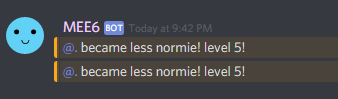
 tired flower
Im not up D:
 hidden needle
f
 frozen swan
Mee6 won't make an announcement when i upload
Because i set it up to make an announcement when i upload a YouTube Video
 gray niche
@frozen swan the plugin is bugged atm
gray niche
it's been bugged for a while
frozen swan
oh ok
 rotund sparrow
I'm having issues with the reminder bot. I want to set a reminder during an event that tells people to go from the current activity room they are in to the next room. I have two problems. The first, I can't turn off flood control to let the bot just post in the room by itself, someone has to constantly be watching it and type some message otherwise it won't post a second message. If we could disable the flood control that'd be great. (the room it is in is made just for reminders, so posting a message after it is creating a needless second step.) Second, it's set to send the message every ten minutes but sometimes it is 6 minutes, sometimes it's 3... which defeats the purpose of being a timer at all. Not sure if anyone can help with that.
bitter owl
Delete previous timer and add again
We pushed an update and it requires user to delete and add again
Do not forget to copy content before deleting
rotund sparrow
Ah, I've done that and deleted the webhook about 4 times tonight, but I can do it again.
bitter owl
So make sure the chat you're pointing the timer is active please
Since mee6 has an anti-flood tool
That cannot be turned off
rotund sparrow
I've been manually entering a message after it yeah
bitter owl
Hm
Could you invite me to your server in my DM please?
So I can investigate a bit more
rotund sparrow
Sure, I'm going to remake it and then I'll invite. and if it is like technology usually is it will probably work perfectly when being watched
bitter owl
Or give me your server id so I can take a look (In case you don't want to grant me powers)
rotund sparrow
Thank you for the help !
bitter owl
Glad you made it
dire yarrowBOT
Alright, @quasi raptor has been warned because 'Posted an invite'.
 final plaza
Help
strong path
What's the problem?
final plaza
Okay my commande !help
dire yarrowBOT
I am currently a modular bot. Nothing will be enabled by default and must be enabled in each plugin manually.
https://i.imgur.com/V93V8Dg.png
to enable the plugins, go to http://mee6.xyz/dashboard and select your server.
strong path
Please read mee6's message above @final plaza
final plaza
Can a go mee6
strong path
Link to the dashboard right above
final plaza
Sorry bro it impossible because im french sorry😭
 ornate dome
I need help
dense fox
Whats the problem?
ornate dome
My mee6 won't delete when warned
I put the mee6 to delete and warn but it doesn't delete
dense fox
Mee6 needs manage messages perm
ornate dome
I did give
buoyant moon
Good afternoon. I set the bot to give the role through a command. It continually gives me error. How can I, or can you solve?
the message is: Oops, something went wrong in MEE6 land! This error has been reported to our Team. We'll work hard to fix it.
dire yarrowBOT
Role hierarchy is important for me to give out roles. Oh and also Manage Roles perm:
https://cdn.discordapp.com/attachments/302245580673908740/479426065668898826/81d15f9a.gif
dense fox
@buoyant moon ^^^
dense fox
Hmm
ornate dome
😭
bitter owl
Server ID please @ornate dome
ornate dome
What is that
buoyant moon
@dense fox ???
ornate dome
Server I'd???
dense fox
Mee6 needs a role above the roles hes giving
buoyant moon
mmmh i'm not idiot 😉
dire yarrowBOT
Open Server Settings in your Discord Server. Select Widget and press Copy ID next to Server ID.
You can also use Developer Mode as an alternative method.
bitter owl
☝
ornate dome
On thanks
 summer bay
Where do we execute the commands?
ornate dome
Ok
buoyant moon
help i can't add bad words
bitter owl
Press enter after typing and then ok @buoyant moon
bitter owl
Waiting yeet
ornate dome
I think I MAY know the prob
buoyant moon
ty
ornate dome
Let me try
 gaunt zephyr
Hi, I have a problem and it is that without wanting to erase the welcome of a player and that the name of the player is put or when a player leaves the name does not leave who went to if I would like to reset the bot of my group because I have many problems
ornate dome
Wait it works
I logged in and out now it works
So discord glitch then
Cos I also couldn't delete msgs
Thanks anyways
dense fox
@gaunt zephyr What? I dont understand...
gaunt zephyr
is that when someone joins my server should leave @ such a person is his name but his original name does not come out and every time someone leaves the person does not go, I want to reset my bot from my group
Right now I am using a translator because I do not know English
dense fox
What is your first language?
dense fox
@bitter owl Can you speak Spanish?
dense fox
Nvm.. sorry. They left :/
bitter owl
Lol ok
 sharp wren
I have a problem with a command on my server :/
This command is supposed to give the role "Member"
dire yarrowBOT
Role hierarchy is important for me to give out roles. Oh and also Manage Roles perm:
https://cdn.discordapp.com/attachments/302245580673908740/479426065668898826/81d15f9a.gif
dense fox
^^^
dense fox
No problem
 swift island
!tempmute doesn't work!
The person gets the "Muted"-role, but he can still send messages and join into voice channels.
dire yarrowBOT
Having problems muting someone/they aren't muted? Check the following
Prerequisites:
- Moderator plugin is enabled
!mutecommand isn't disabled- Bot has role with Manage Roles and Manage Channels permissions
- Muted role is under MEE6 role
- You're trying to mute someone using
!mute @mention reason, otherwise it will not work
If user got Muted role but still can talk means there's issue with your channel permissions
Go to Channel Settings -> Permissions
- If that's public channel that can be accessed by anyone:
- Set
Send Messagesfor all roles except Muted - Set
Send Messagesfor Muted role
- If that's secret channel that requires *special* role to access it:
- Set
Send Messages Read Messagesfor special role - Set
Send Messages Read Messagesfor Muted role - Set
Send Messages Read Messagesfor@everyonerole
dense fox
^^^
swift island
Still doesn't work. 😕
cold bear
can you show permissions for everyone and muted role for channel where mute "doesn't work"
if there other roles that allow that in current channel mute will not work
that's why it says "+ Set Send Messages for all roles except Muted"
 final mist
why isnt the dashboard working?
bitter owl
 Website under maintenance
We are applying some maintenance in our website so your dashboard may not work properly
 Please be patient, No Panic
final mist
Ohh
 strong trellis


 left void
The bot is not DMing me any messages for the custom command I have setup
bitter owl
Check if you have Privacy -> Allow DM from this server enabled
left void
yes that is enabled, still not sending dm
bitter owl
Give me your server ID please
dire yarrowBOT
Open Server Settings in your Discord Server. Select Widget and press Copy ID next to Server ID.
You can also use Developer Mode as an alternative method.
bitter owl
So I can check that more easily
left void
I got it up and running, thanks
bitter owl
Thanks for letting us know 
 primal forge
On my server it's says I have a 4 bots but I only have 3?!? and Why is that happening??
primal forge
ohh......
dire yarrowBOT
Alright, @warm flicker has been warned because 'Posted an invite'.
buoyant moon
Youtube plug-in stills bugged?
bitter owl
It's under maintenance :)
 versed fossil
The channel stopped showing who entered the channel and who left. Also, through personal messages, you can not send an invitation. What could be the problem?
Since Tuesday, I stopped working.
bitter owl
Make sure mee6 can still read and send messages in the channel you reserved to be the entrance log please @versed fossil
Also, through personal messages, you can not send an invitation. What could be the problem? Since Tuesday, I stopped working.
What do you mean by this, please
 mortal lantern
@dire yarrow
 frail raft
How did I classify myself?
buoyant moon
@bitter owl
bitter owl
@buoyant moon
bitter owl
Which plugin? Custom command?
dire yarrowBOT
Alright, @buoyant moon has been warned because 'Bad word usage'.
dire yarrowBOT
Alright, @buoyant moon has been warned because 'Posted an invite'.
buoyant moon
@bitter owl
faint dome
It's not really a bug, it is a not-added feature 🙃