#〉bugs-reports
2 messages · Page 40 of 1
 dusty apex
 harsh vigil
🤔
dusty apex
@harsh vigil did you remove the webhook?
dusty apex
edit channel -> webhooks @harsh vigil
harsh vigil
also
my twitch wont work too
ima check webhooks in 1 sec
ye
there are webhooks
dusty apex
remove the one for youtube
harsh vigil
i removed all the webhooks
im about to re add all of them
im actually streaming rn
so can i do this after stream?
dusty apex
@harsh vigil twitch is buggy atm so 🤷
dusty apex
btw the closed youtube channel make the website crash is known bug too 😃
dusty apex
no ETA sorry
 dire yarrowBOT
Our team of developers is aware of the situation with the Twitch plugin that is not working properly, but are unable to give an ETA on the fix.
Technical stuff/explanation:
This is down to us trying to avoid ratelimits on Twitch's old API, which is taking a long time and causes delayed/no announcements. We can't move to their new API until they raise ratelimits for us
dusty apex
no since there will be ALOT of people asking for that
dusty apex
😃
dusty apex
hence buggy not broken
dusty apex
🤷
harsh vigil
🤷
 buoyant moon
Bonjour ou puis je faire un rapport pour tentative de hacking ??
 burnt hazel
Son très improbable MEE6 a été piraté, pouvez-vous poster une capture d'écran s'il vous plaît.
@buoyant moon
 ornate grove
I have a bug that when I put a link in my server does not leave me, that happened when I configured the bot so that it will not allow to place the links and now it does not let us place links of youtube, only to the admins
 strong path
You're saying that mee6 prevents you, the owner, from putting links in your own server?
ornate grove
Nooo
the members
the admins can put links in my server
for example a youtube video we can but they can´t
<@&193123929701875712>
ornate grove
The plugin is disable
strong path
the moderator plugin?
strong path
Can I have an invite in DMs please?
ornate grove
My server is in spanish but yes i can
wow is so many members in this server
I can't find you
strong path
I guess it's that mobile thing, try pinging me
ornate grove
Thanks for your help, you are the best
strong path
You're welcome
 barren sequoia
Notice the level increase does not work
dire yarrowBOT
If I appear to be denying your hard earned experience, or !rank and !levels aren't working properly...
- Make sure Levels is Enabled.
- Check that you do not have a banned role in the levels configuration, and that you aren't in a banned channel either.
- Make sure that I can see the channel you are talking in with "Read Messages" and send messages with "Send Messages".
 river aurora
 elfin forum
Adding timers is still broken
{"message":"The server encountered an internal error and was unable to complete your request. Either the server is overloaded or there is an error in the application.","status_code":500}
tag me if theres a fix
buoyant moon
@burnt hazel
 limber knoll
@elfin forum any webhooks you have?
limber knoll
Mee6 has perms to create webhooks?
limber knoll
Doesn't need admin
elfin forum
it has manage webhooks
limber knoll
Mind dm invite me? I'm not home but will be soonish
elfin forum
done
 scarlet dust
buoyant moon
scarlet dust
buoyant moon
😂 😂 😂 👌
 nimble stirrup
The YouTube notifier thing isn’t working for my server. Idk why
burnt hazel
YouTube plugin is buggy at the moment, sorry about that. The devs are looking into the issue.
No ETA on a fix. @nimble stirrup
 short lintel
is this supposed to be a thing?
https://cdn.discordapp.com/attachments/297938676925726730/483980100195450880/unknown.png
(from someone on my server)

 analog jolt
How?
 cold bear
@short lintel that's how rounding bumbers work
0.00003 -> 0.0
analog jolt
 white notch
analog jolt
white notch
analog jolt
I waited 2 min
dusty apex
That doesn't look like chrome
dusty apex
You need to use chrome
cold bear
^ or firefox
google app isn't ok because it uses default browser
 runic quest
how can i do that the bot will active only in 1 chat?
 dense fox
Make mee6 role in channel perms: Read Messages  but in all the other channels
runic quest
ty
dense fox
No problem.
runic quest
there is a way to do that MEE6 will auto clear chat?
dense fox
Nope.
 quartz spruce
 green stone
yt notif are dead?
strong path
YouTube plugin is bugged. Sorry about that.
green stone
no problem
buoyant moon
can someone tell me how to make a server leaderboard with the bot?
<@&193123929701875712>
@buoyant moon Wrong channel
 kindred pelican
How goes fixing all the bugs?
kindred pelican
What are all the bugs right now, I'm sure someone's keeping track?
dusty apex
Staff is keeping track
 royal charm
i tired to change what he said every 2 minutes but it still does the same word
kindred pelican
There was a known bugs channel, dunno what happened to that, would be real helpful rn
dusty apex
@royal charm pls remove the webhook and make it again
@kindred pelican it is removed and gone for now
royal charm
what is webook
kindred pelican
Yeah I can see it's gone xD
dusty apex
😃
kindred pelican
That's why I'm asking what all the Devs have to be working on rn
dusty apex
I think they keep it secret
kindred pelican
Gives me an idea of their load, and whether whatever issue I had many months ago will ever be fixed xD
 worn wren
 wide schooner
Yeah, very very slow, and when we want to mute peoples, I have this message:
"Oops, something went wrong in MEE6 land! SAD6 This error has been reported to our Team. We'll work hard to fix it."
strong path
!hierarchy
dire yarrowBOT
Role hierarchy is important for me to give out roles. Oh and also Manage Roles perm:
https://cdn.discordapp.com/attachments/302245580673908740/479426065668898826/81d15f9a.gif
 strong path
Please read mee6's message above @wide schooner
wide schooner
Okay, thanks for your reactivity and your response. Have a nice day! (Or good night^^)
 celest cliff
All temp stuff (temp ban and temp mute) are broken (they're permanent) and where the duration is supposed to be in messages all i get is **
strong path
Well mee6 is having some delay right now so that could be affecting the unmute/unbanning
As for your second thing, what do you mean?
 hard spindle
you can't make variables in custom commands 😦
strong path
wdym?
limber knoll
@kindred pelican your issue is on the list
kindred pelican
I should hope so, but that ain't what I was asking xD
limber knoll
I know what your wanting, but i was pointing out your issue wasn't forgotten, and it will be up to other staff to decide weather users can see it or not
 honest pollen
youtube plug-in doesn't work 😦
 pure obsidian
known bug
honest pollen
ok thx
dire yarrowBOT
Alright, @vernal pond has been warned because 'Bad word usage'.
 sick gull
{OhNo}
buoyant moon
Guys.....i have a serious problem atm. I tried to remove and re add mee6 into my server, but the website doesn't recognize me and thinks i have no servers even tho i logged in.....Does anyone know how to fix this and fast?
 plain aurora
perfection 👌
pure obsidian
That's a fail in your:
- Channel permissions (mute);
- Role hierarchy (kick);
!hierarchy
dire yarrowBOT
Role hierarchy is important for me to give out roles. Oh and also Manage Roles perm:
https://cdn.discordapp.com/attachments/302245580673908740/479426065668898826/81d15f9a.gif
Having problems muting someone/they aren't muted? Check the following
Prerequisites:
- Moderator plugin is enabled
!mutecommand isn't disabled- Bot has role with Manage Roles and Manage Channels permissions
- Muted role is under MEE6 role
- You're trying to mute someone using
!mute @mention reason, otherwise it will not work
If user got Muted role but still can talk means there's issue with your channel permissions
Go to Channel Settings -> Permissions
- If that's public channel that can be accessed by anyone:
- Set

Send Messagesfor all roles except Muted - Set
Send Messagesfor Muted role
- If that's secret channel that requires *special* role to access it:
- Set
Send Messages Read Messagesfor special role - Set
Send Messages Read Messagesfor Muted role - Set
Send Messages Read Messagesfor@everyonerole
pure obsidian
☝🏽 This will answer both of your issues
pure obsidian
Make sure they don't have a role with send messages perm set to on channel settings -> permissions
also Muted role has the send messages perm set to
since bot doesn't setup that automatically
https://cdn.discordapp.com/attachments/302245580673908740/433026975670730771/2018-04-10_01-13-56.gif

 median harness
meebot is posting twitch announcements double now
burnt hazel
@median harness You might have 2 Twitch webhooks linked to that channel.
Can you open your channel settings by pressing the ⚙ next to the channel > webhooks > remove some of the MEE6 webhooks.
It might be best to rename some webhooks in the process so in the future you know what its used for.
median harness
no I don't and its on other servers as well
burnt hazel
@median harness Can you try removing the streamer from the Twitch plugin then re-adding them, also make sure you havent added the channel twice inside the plugin.
median harness
k will try.
dire yarrowBOT
Alright, @sick zenith has been warned because 'Duplicated text'.
Alright, @sick zenith has been warned because 'Duplicated text'.
Alright, @sick zenith has been warned because 'Duplicated text'.
 fallow silo
dire yarrowBOT
fallow silo
dire yarrowBOT
Our team of developers is aware of the situation with the Twitch plugin that is not working properly, but are unable to give an ETA on the fix.
Technical stuff/explanation:
This is down to us trying to avoid ratelimits on Twitch's old API, which is taking a long time and causes delayed/no announcements. We can't move to their new API until they raise ratelimits for us
burnt hazel
Yes, Twitch is bugged and wont announce for some users, for other users it can work normally. @fallow silo
 low glade
When i go to the website and choose a plug in it just shows a gray screen the same thing happened in google chrome and others
 amber wave
Hi I would like to report a rather big problem with Mee6.
burnt hazel
@low glade Can you try clearing your cache, disabling any adblockers and disabling any VPN's please.
What is the issue? @amber wave 
amber wave
Less than an hour ago, a server was raided by the MEE6 bot. I'm trying to get screenshots to prove it to you (I have the server IP that the raid was publishing)
burnt hazel
Timers are currently bugged, sorry about that. 
 lavish vessel
Okay
amber wave
We're trying to figure out how, but I want you to know so you can see what happened.
burnt hazel
@amber wave MEE6 cannot raid servers, screenshots would be helpful so i can understand whats happened better. 
burnt hazel
No, just the screenshots please. 
 compact kite
When i'm using MEE6 for youtube notifications it doesn't show the notifications on the youtube section of my group!
burnt hazel
Are you sure it wasnt a timed message? @amber wave Can you go into your server dashboard > Timers  and see if you have any set up with the text that was being spammed please.
We are aware the YouTube plugin is currently buggy, sorry about that @compact kite 
 versed thunder
hey, i have a problem with muted role, if i remove permissions to write in a category, it doesn't work, i have to change permissions on every channel
 opal briar
problem, the bot expel everyone
burnt hazel
MEE6 does not ban people without reason, can you check your logs to see who banned your users @opal briar
cold bear
check audit logs
looks like someone pruned server
bot just says that user left, not more
opal briar
ok thanks
buoyant moon
- !tempban and !kick not working
buoyant moon
no is not offline
dense fox
Hmm Is the command enabled?
buoyant moon
everything is started simply does not go orders
dense fox
So there are no allowed roles?
buoyant moon
I have roles for each command I have all the commands on but I do not go orders I was told that unfortunately did not go
letting creators see what they have
cold bear
are you sure you're using it correctly
you have to mention user you're trying to ban @user#1234
duration should be valid if temporal action is user 1h20m etc
bot role should be higher than role of user he tries to kick/ban
bot needs Ban and Kick member perms as well
!oops
@buoyant moon ^
dire yarrowBOT
YandereLoli, it doesn't look like you can use that. 
dire yarrowBOT
[insert-name-here], it doesn't look like you can use that.
dense fox
Please dont use commands here -> #〉commands.
lavish vessel
Yep i know but he try to kick someone and i try to warn him
dense fox
No, you cant use mod commands in this server unless you're staff.
 high veldt
 supple scarab
dense fox
supple scarab
dense fox
Yes?
 golden leaf
<@&193123929701875712>
burnt hazel
Is this a command that gives a role?
golden leaf
yes
dire yarrowBOT
Role hierarchy is important for me to give out roles. Oh and also Manage Roles perm:
https://cdn.discordapp.com/attachments/302245580673908740/479426065668898826/81d15f9a.gif
burnt hazel
Can you follow the image on the right and make sure MEE6 has manage roles permission
 glass badge
help mee ? {"message":"The server encountered an internal error and was unable to complete your request. Either the server is overloaded or there is an error in the application.","status_code":500}
golden leaf
it's good for me thanks @burnt hazel bye
burnt hazel
No worries
cold bear
@glass badge when adding timer?
reddit or youtube?
if yes go to channel settings -> webhooks and remove the ones you don't need or use
glass badge
in fact I put 3 timer on the same channel and he tells me that
cold bear
means there's 10 webhooks in channel so you hit channel limit
do steps described in message above
 worldly sphinx
Je peux pas être support
dire yarrowBOT
@worldly sphinx did 'joined again and keeps doing it' and got the ban hammer! 
 jolly widget
Sorry
dire yarrowBOT
Alright, @buoyant moon has been warned because 'Capital letters'.
buoyant moon
@buoyant moon
dire yarrowBOT
Alright, @buoyant moon has been warned because 'Bad word usage'.
buoyant moon
..
strong path
What's the problem? @buoyant moon
buoyant moon
u know that bot command
that says
!ped
and it does like
likes girls
!ped
likes girls
I need that link
strong path
You make that custom command yourself
strong path
The link for what?
strong path
that's just a custom command
 native wind
Earlier today I was working on my group, and I had a bunch of roles, and for SOME REASON some of my roles were not appearing when I needed them, like this for example I had a role called "Cheese" and "Biscuit" and for some reason they wouldn't appear in the MEE6 settings. hope I can get help.
strong path
tried reloading?
strong path
could it be your role hierarchy I guess?
native wind
yeah
Idk
this is the first time it happened
so idk what broke it
or in case a glitch I did
I have 25+ roles
idk if that has effect to anything to do with this
strong path
What browser you're using btw?
strong path
Mobile or PC?
native wind
PC
strong path
Can you try ctrl-f5?
native wind
nothing is happening
nevermind it refreshed
it's still broken
and I promise you That I still have the roles

 mossy breach
Hi! Youtube still doesn't work in my server. Is it still broken? Just asking because the last announcement
strong path
Yes it is still broken
mossy breach
oh ok. Thanks
 dim heron
Ped is that you from durin?
dire yarrowBOT
Alright, @buoyant moon has been warned because 'Posted an invite'.
 pearl atlas
When Translate site witch google and save changes - write "ERROR 404" or just clear screen in browser
limber knoll
@pearl atlas is this using translate in dashboard?
limber knoll
Ok, dashboard doesn't translate well sorry
pearl atlas
no dashboard perfect translate but lag and don't save chenges
cold bear
try without translator
 pulsar otter
Mon bot marche pas !!
 brittle jungle
О русский
 frosty sinew
when i use my sever's command they error
pure obsidian
@frosty sinew What kind of error?
frosty sinew
when i text it
it text this
Oops, something went wrong in MEE6 land! :SAD6: This error has been reported to our Team. We'll work hard to fix it.
pure obsidian
!oops
dire yarrowBOT
Oops, something went wrong in MEE6 land! This error has been reported to our Team. We'll work hard to fix it.
If this happens when using:
Custom commands:
‣ Bot tries to give the role that higher than his own. To fix that, move the bot's role above the role he tries to give.
‣ User don't have all roles bot tries to remove, that's known bug.
‣ Missing Manage roles permission. Go to Server Settings -> Roles -> Bot role -> Manage Roles permission
Moderator commands:
‣ Muted role is above Mee6's role. Bot can't give roles that higher than his own. Move it down.
‣ Missing Manage roles permission. Go to Server Settings -> Roles -> Bot role -> Manage Roles permission
pure obsidian
I'm guessing Custom commands is for you
frosty sinew
:V
buoyant moon
!oops
dire yarrowBOT
Oops, something went wrong in MEE6 land! This error has been reported to our Team. We'll work hard to fix it.
If this happens when using:
Custom commands:
‣ Bot tries to give the role that higher than his own. To fix that, move the bot's role above the role he tries to give.
‣ User don't have all roles bot tries to remove, that's known bug.
‣ Missing Manage roles permission. Go to Server Settings -> Roles -> Bot role -> Manage Roles permission
Moderator commands:
‣ Muted role is above Mee6's role. Bot can't give roles that higher than his own. Move it down.
‣ Missing Manage roles permission. Go to Server Settings -> Roles -> Bot role -> Manage Roles permission
dense fox
Please use commands in #〉commands.
buoyant moon
ok
 red furnace
@brittle jungle @pearl atlas О русские) 😄
 hollow lily
heads up the youtube linking where it posts in your discord when a video goes up on your youtube hasn't worked for me since. 08/17/2018
 hoary stream
@hollow lily A current known bug. Still working on repairs. Thank you though.
hollow lily
😃
 languid ibex
HOLA
 austere ember
Hi do u need help? @languid ibex
 gentle sigil
<@&193123929701875712> how do i disable mee6 in a certain channel
dire yarrowBOT
Want me to only be able to access certain channels? Make sure that you remove "Administrator" permissions from me, if I have them.
- Give me a Role that has "Read Message" and "Send Messages" denied in the channels you do not want me to view.
- Give me a Role that has "Read Message" and "Send Messages" allowed in channels you always want me to view.
burnt hazel
@gentle sigil 
burnt hazel
Remove admin permission from MEE6's role then deny MEE6's read messages permission in the channels you dont want him to view.
gentle sigil
k
gentle sigil
@burnt hazel
how do i disable in a specific channel
the option dont show up
@burnt hazel
burnt hazel
No need to ping multiple times 
gentle sigil
ok sorry
burnt hazel
Can you go to MEE6's role in your server and remove the administrator permission.
Then you need to open your channel settings by pressing ⚙ next to the channel you want to edit, then from here Add the MEE6 role and select for read messages for the channels you dont want MEE6 to see. @gentle sigil
gentle sigil
Kk ty
 echo blaze
@dire yarrowI love you
 amber falcon
 dusk spade
Heyo, I am unable to use the custom commands in my discord server, it says that it's an error, any reason why this happened (multiple times).
 hybrid carbon
same here. i've seen similar commands on other servers that are currently working fine, but mine don't
dire yarrowBOT
Oops, something went wrong in MEE6 land! This error has been reported to our Team. We'll work hard to fix it.
If this happens when using:
Custom commands:
‣ Bot tries to give the role that higher than his own. To fix that, move the bot's role above the role he tries to give.
‣ User don't have all roles bot tries to remove, that's known bug.
‣ Missing Manage roles permission. Go to Server Settings -> Roles -> Bot role -> Manage Roles permission
Moderator commands:
‣ Muted role is above Mee6's role. Bot can't give roles that higher than his own. Move it down.
‣ Missing Manage roles permission. Go to Server Settings -> Roles -> Bot role -> Manage Roles permission
limber knoll
👆 @hybrid carbon @dusk spade
dire yarrowBOT
Alright, @frosty sinew has been warned because 'Posted an invite'.
frosty sinew
ok
limber knoll
@buoyant moon ?
buoyant moon
yes
dire yarrowBOT
Role hierarchy is important for me to give out roles. Oh and also Manage Roles perm:
https://cdn.discordapp.com/attachments/302245580673908740/479426065668898826/81d15f9a.gif
limber knoll
Right pic? @buoyant moon
buoyant moon
ok
limber knoll
Mee6 above roles given
buoyant moon
ok
limber knoll
Perferred language?
buoyant moon
uhh k
 nova frost
Hi, I noticed in different channels that the bot is giving the wrong link to my twitch? I talked about it with the person who installed it and they can't change it. The name is correct BelgianMonster_ but the link is only BelgianMonster without the _ is it possible to fix that somehow??
lol it didn't even write it here
BelgianMonster_ so with underscore
So the name is correct but it links to a page without the underscore
limber knoll
Getting more info no eta on reply @nova frost
nova frost
I'll try that, thanks
 minor yarrow
pure obsidian
minor yarrow
pure obsidian
That's not a bug, it's a custom command.
Either the owner or a user with manage server or admin perm made such custom command and triggered it.
reason why you shouldn't give bots admin perm and neither allow them to mention @everyone or @here
dire yarrowBOT
Alright, @buoyant moon has been warned because 'Posted an invite'.
Alright, @buoyant moon has been warned because 'Posted an invite'.
Alright, @buoyant moon has been warned because 'Posted an invite'.
buoyant moon
mee6 music isnt working. when i type a song it says found, then i write play. nothing. when i write playlist it says that it is empty. (happened in here)
bug
pure obsidian
@buoyant moon Only the enqueued songs are shown in !playlist not the ones that are currently playing, that's an intended behaviour.
buoyant moon
how to start them then?
pure obsidian
!play will start playing the songs you enqueued, don't use it while playing otherwise that will skip the songs
dire yarrowBOT
Alright, @crude zealot has been warned because 'Posted an invite'.
dire yarrowBOT
Alright, @balmy junco has been warned because 'Posted an invite'.
dire yarrowBOT
Alright, @buoyant moon has been warned because 'Bad word usage'.
 visual night
Hello I would like to have it because I have a problem I have the MEE6 bot but this one does not want to post my video youtube I unintaller and handed it does not change anything please help me
dense fox
Yt is bugged.
visual night
I am myself on discord youtubeur server and they have no bug how is it that MEE6 refuses to post my videos?
dense fox
They might be using a different bot or webhook.
 wheat python
Mute doesn't work for me.
dire yarrowBOT
Having problems muting someone/they aren't muted? Check the following
Prerequisites:
- Moderator plugin is enabled
!mutecommand isn't disabled- Bot has role with Manage Roles and Manage Channels permissions
- Muted role is under MEE6 role
- You're trying to mute someone using
!mute @mention reason, otherwise it will not work
If user got Muted role but still can talk means there's issue with your channel permissions
Go to Channel Settings -> Permissions
- If that's public channel that can be accessed by anyone:
- Set
Send Messagesfor all roles except Muted - Set
Send Messagesfor Muted role
- If that's secret channel that requires *special* role to access it:
- Set
Send Messages Read Messagesfor special role - Set
Send Messages Read Messagesfor Muted role - Set
Send Messages Read Messagesfor@everyonerole
dense fox
No problem.
dense fox
No.
wheat python
I thought it needed to be enabled
dense fox
It needs to be enabled
dense fox
Then mee6 cant give it out.
 tender wraith
Something I encountered just now: went to https://mee6.xyz/ to enable MEE6 on a new server. After selecting a server and starting to select permissions, I got sidetracked on another tab. When I returned, it was asking me to choose a server again, but now I can't.
cold bear
bot is offline on some servers, we're working on fixing the issue, have some patience
tender wraith
Ah, that's a good sign. Much better than a rough bug on the bot setup page.
cold bear
do you mean it doesn't show your server in list? @tender wraith
tender wraith
It shows my server in the list, but when I click on one, nothing happens. I reloaded the page, i went back and reloaded the first landing page. Still can't select a server.
Oh, just started working again
cold bear
good
tender wraith
must have to do with the other issues
 crystal niche
dense fox
crystal niche
dense fox
Not here please -> #〉commands for commands. FYI that command does not exist.
buoyant moon
I can not put a command to gain a charge
dense fox
Gain a charge?
buoyant moon
It's google translator, I'm sorry.
dire yarrowBOT
If I appear to be denying your hard earned experience, or !rank and !levels aren't working properly...
- Make sure Levels is Enabled.
- Check that you do not have a banned role in the levels configuration, and that you aren't in a banned channel either.
- Make sure that I can see the channel you are talking in with "Read Messages" and send messages with "Send Messages".
dense fox
This? ^
buoyant moon
maybe
dense fox
I mean
dire yarrowBOT
You cannot, and will never, be able to modify the levels plugin or XP at any time.
Reasons?
- We want to avoid bias in our system.
- It's easily abused by admins.
- Not worth the time to add.
- Because we don't want that being a feature.
buoyant moon
ok
limber knoll
@oblique lion bad words works fine on Android just not ios
limber knoll
Np
 oblique lion
When I try to make a custom command with the action Give role why doesn’t it work.
 errant marsh
try to put a - or _ in bettween
oblique lion
Does the custom command works only on yourself?
dusty apex
@oblique lion yes it only works on the person using the command
oblique lion
Facepalm
errant marsh
???: MEE6BOTToday at 3:43 PM
Oops, something went wrong in MEE6 land! :SAD6: This error has been reported to our Team. We'll work hard to fix it.
dire yarrowBOT
Oops, something went wrong in MEE6 land! This error has been reported to our Team. We'll work hard to fix it.
If this happens when using:
Custom commands:
‣ Bot tries to give the role that higher than his own. To fix that, move the bot's role above the role he tries to give.
‣ User don't have all roles bot tries to remove, that's known bug.
‣ Missing Manage roles permission. Go to Server Settings -> Roles -> Bot role -> Manage Roles permission
Moderator commands:
‣ Muted role is above Mee6's role. Bot can't give roles that higher than his own. Move it down.
‣ Missing Manage roles permission. Go to Server Settings -> Roles -> Bot role -> Manage Roles permission
limber knoll
@errant marsh👆
errant marsh
i did !role-info
 austere bobcat

languid ibex
hola a todos perras voy a aser un directo ahora
 tepid remnant
eso no es un bug,
frosty sinew

austere ember
Hi need help @frosty sinew
austere ember
Sorry i meant do u need help*
 tacit sinew
pure obsidian
tacit sinew
pure obsidian
what stops you from inviting him?
dire yarrowBOT
It appears that you may be on the wrong account, or something went wrong since the last time you logged into the website.
- Please navigate to https://mee6.xyz/dashboard to logout from our website. Click on your profile picture and press Logout https://rebrand.ly/LogoutMEE6.
- Then navigate to https://discordapp.com/channels/@me and select the gear in the bottom left, then press Logout.
- Log into the account you want to use on the Discord website
- Once done, select "Add to Discord" again, and select the server dashboard you want to access
limber knoll
Adblockers or vpns block it
 torpid tinsel
#FixMute
dire yarrowBOT
Having problems muting someone/they aren't muted? Check the following
Prerequisites:
- Moderator plugin is enabled
!mutecommand isn't disabled- Bot has role with Manage Roles and Manage Channels permissions
- Muted role is under MEE6 role
- You're trying to mute someone using
!mute @mention reason, otherwise it will not work
If user got Muted role but still can talk means there's issue with your channel permissions
Go to Channel Settings -> Permissions
- If that's public channel that can be accessed by anyone:
- Set
Send Messagesfor all roles except Muted - Set
Send Messagesfor Muted role
- If that's secret channel that requires *special* role to access it:
- Set
Send Messages Read Messagesfor special role - Set
Send Messages Read Messagesfor Muted role - Set
Send Messages Read Messagesfor@everyonerole
torpid tinsel
ok thanks
buoyant moon
Bot badly notifies.
The correct name Twitch - coopstin_
The bot gives - coopstin
"418907897699762196" my id mee6
dense fox
Did you use {streamer}?
buoyant moon
Yes
dense fox
Is it the name problem or a link problem?
If it doesnt register the _ then you can just put the real name without the variable
buoyant moon
Everything is behind the attached picture.
The name entered well, and gives something else in the link.
dense fox
Link gives a different streamer?
buoyant moon
Yes
cold bear
add `` around `{streamer}` => {streamer}
that's discord side, _ is user for making text italic
buoyant moon
Thank you ❤
cold bear
 np
np
 whole dune
qq
Мы создали кастомку
не хватает 5 человек
можешь помочь запустить?
и выйдешь
pubg10manbattle
название кастомки
 steady echo
why it get erased?
dire yarrowBOT
To reset levels, you need to have the manage server perm (which grants you the ability to access the servers dashboard). The leaderboard can be found by doing !levels or https://mee6.xyz/leaderboard/SERVERID where SERVERID is the servers ID
https://i.imgur.com/q36HjaC.png
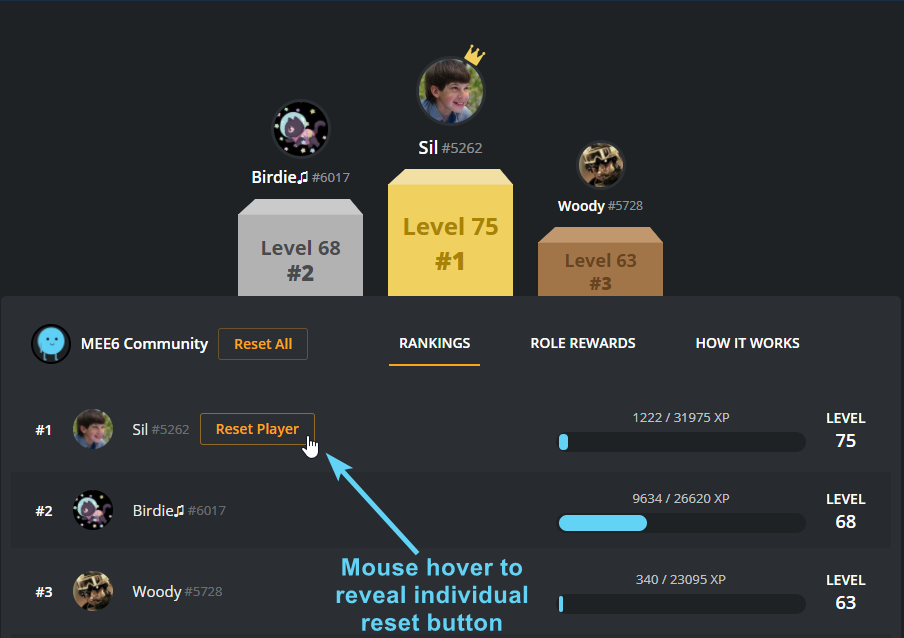 steady echo
ok, but I wonder why his stuff got erased. @vestal topaz did you used that command?
 vestal topaz
Hmm
Thats wht i wonder that when i went to leaderboard nothin came back just my server name
dense fox
Then maybe one of your moderators clicked reset all.
buoyant moon
When you mute someone and unmute them, it removes the mute from their infractions.
 cosmic lion
would it be possible to activate the command! mute?
dire yarrowBOT
You can access my dashboard at https://mee6.xyz/dashboard, and login with your Discord Account.
I am currently a modular bot. Nothing will be enabled by default and must be enabled in each plugin manually.
https://i.imgur.com/V93V8Dg.png
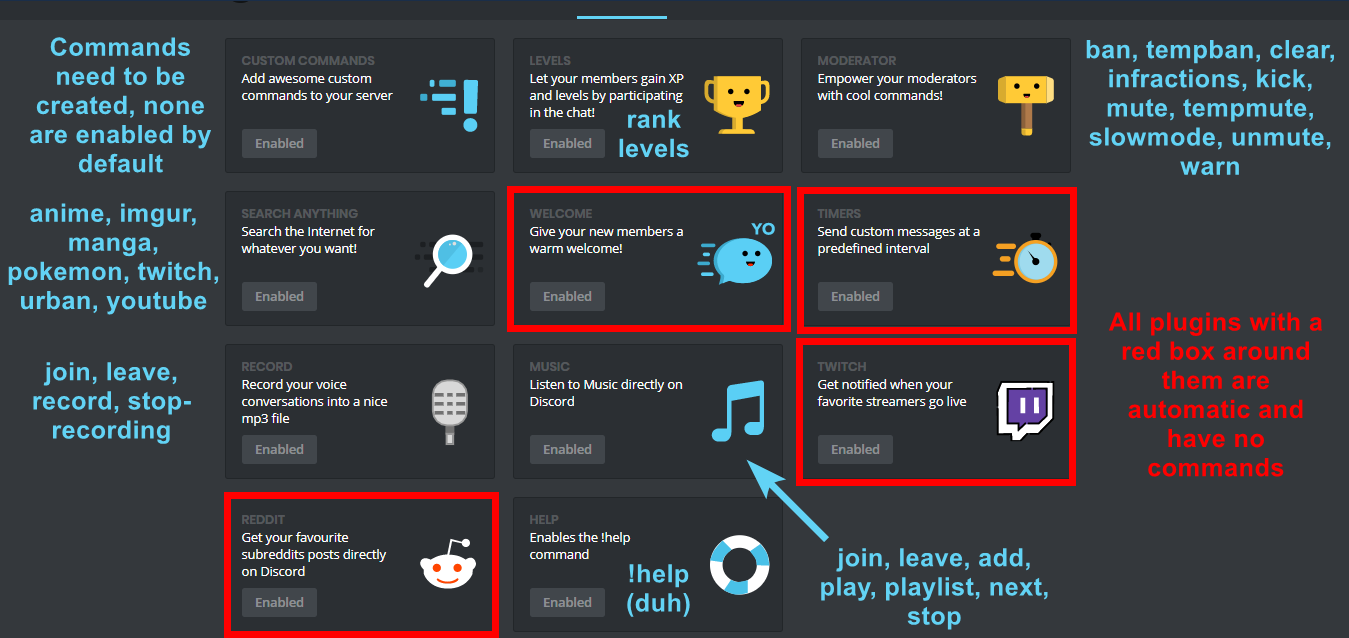 cosmic lion
Yes but I did !mute @... And this person are not muted
dense fox
Did mee6 give the role?
cosmic lion
Yes : muted
dense fox
Does it give the role upon mute command.?
cosmic lion
I do not undersand (I'am french)
dense fox
Est-ce que mee6 donne le rôle lorsque vous désactivez un utilisateur?
cosmic lion
Oui
dire yarrowBOT
Alright, @sweet gust has been warned because 'Posted an invite'.
dense fox
Ensuite, il pourrait s'agir d'une erreur de permission dans les paramètres de canal.
https://cdn.discordapp.com/attachments/302245580673908740/479691288103616512/2018-04-10_01-13-56.gif
 dire yarrowBOT
Alright, @weak viper has been warned because 'Duplicated text'.
cosmic lion
Oui c'est ça ! Mais il faut faire ça sur tous les salons ?
dense fox
Oui.
cosmic lion
Ah ça va être long mais merci !
dense fox

 brave wing
well my 1 custom command doesn't work...
buoyant moon
it isn't a bug
brave wing
yes ir is
dire yarrowBOT
Alright, @full relic has been warned because 'Bad word usage'.
Alright, @full relic has been warned because 'Mass emoji'.
 maiden rapids
Niquer vos mère vous êtes que des fils de pute qui savent rien à rien
 wicked portal
Heyo! I have the MEE6 Recording Feature but everytime I hit !record it automatically ends the recording but I never did !stop-recording
cold bear
investigating atm
wicked portal
@cold bear any update?
wicked portal
doesn't work 😭 @cold bear
cold bear
ok, that can take some time.
 tulip fjord
hello, I have a problem with plagin TIMERS
austere ember
Whats wrong with the timers @tulip fjord
tulip fjord
he sends the message once
tulip fjord
Thank you
austere ember
Yeah np
dire yarrowBOT
Alright, @hollow lintel has been warned because 'Duplicated text'.
 hollow lintel
what the
 hot hill
@dire yarrow When I try to get you into my server it shows this page
And it dose t let me click anything
dire yarrowBOT
You can access my dashboard at https://mee6.xyz/dashboard, and login with your Discord Account.
limber knoll
@hot hill in there make sure your adblocker is disabled
and that your not on any vpn
hot hill
Thank you sry much I now have mee6
 pine owl
!levels
dire yarrowBOT
! ananizm ∞ Ahmet Azder 🎃[LΛ], this command is disabled in this channel.
pine owl
selam ben ahmet azder benim sunucumda bir kişi oto rol vermeye yönetici yetkisi ekledi bunu nasıl yapa bilir fark etmeseydim tüm sunucum silinecekti ?
 hybrid echo
Mee6 is acting up with playing songs, takes a bit before playing a song and when the song does play after a few seconds, its audio keeps skipping, its like the bot pulls out scratched vinyl records and uses those. The quality is alright, just skips every like two seconds
 granite thistle
Yesterday all ranks were reseted in one of my servers. Do you know what could have caused it?
 north juniper
Why isn’t Mee6 working? I’m trying to use a custom command to give myself a role and he glitched every time I attempt to use it
buoyant moon
i think its bugged it didnt work for me too
north juniper
Well I need it fixed by 6 AM
I have a deadline to get something done and it requires using Mee6 to help
buoyant moon
sorry im not the owner of MEE6
north juniper
DAMN IT
ugh the one time I have a solid plan the big it needs breaks down in the heat of the moment
 keen linden
@north juniper you likely just set it up wrong.
north juniper
I just deleted Bot reply’s with and replaced it with Gives role
Does he need the reply part?
limber knoll
Yes he does
limber knoll
!hierarchy
dire yarrowBOT
Role hierarchy is important for me to give out roles. Oh and also Manage Roles perm:
https://cdn.discordapp.com/attachments/302245580673908740/479426065668898826/81d15f9a.gif
limber knoll
Right pic move mee6 role above roles given
north juniper
Hes way above every other role
north juniper
Oh wait nvm he can’t give it if it’s above him
buoyant moon
@limber knoll what command is for that gif im trying to help out people and i need all commands
keen linden
bingo @north juniper
 sage citrus
@buoyant moon its right above it... ```
LockeyYesterday at 11:13 PM
!hierarchy
also use !index for all commands
buoyant moon
advaith i dont have !index
sage citrus
works for me
did you do it in #〉commands
also this is not a bug report so #〉chat pls
granite thistle
Yesterday the leader board in one of my server was reset
Do anyone know what could have caused it?
dense fox
!reset
dire yarrowBOT
To reset levels, you need to have the manage server perm (which grants you the ability to access the servers dashboard). The leaderboard can be found by doing !levels or https://mee6.xyz/leaderboard/SERVERID where SERVERID is the servers ID
https://i.imgur.com/q36HjaC.png
dense fox
That might've been the problem.
dense fox
No problem.
granite thistle
Is there any way to undo it?
dense fox
Nope
granite thistle
Ohk, thanks anyway
dense fox
No problem.
 crimson hound
!rank
dire yarrowBOT
(dronIFO), this command is disabled in this channel.
burnt hazel
Test commands out in #〉commands

 buoyant moon
Don't spam
 silver lagoon
Oke
buoyant moon
When you mute someone and unmute them, it removes the mute from their infractions.
 mossy wasp
I'm currently unable to use the Record plugin:
- !join and !leave commands appear to be working
- Calling !record without calling !join yields the "RECORD_BOT_NOT_CONNECTED" message
- Calling !record or !stop-recording after calling !join does nothing
- After calling !join, a message "Connecting to CHANNEL" is displayed
- Tested on two different different servers. I own both the Record and the Music plugin on both of them.
dire yarrowBOT
Alright, @buoyant moon has been warned because 'Capital letters'.
buoyant moon
the bot
 vale copper
k
hot hill
MEE6
dire yarrowBOT
Alright, @hot hill has been warned because 'Duplicated text'.
hot hill
No
 wanton spear
when i go too a plugin, the page is empty
hot hill
@dire yarrow I need the link to your controls c:
dire yarrowBOT
You can access my dashboard at https://mee6.xyz/dashboard, and login with your Discord Account.
 spark ridge
Custom Messages Intervals aren't working properly
 velvet wind
!rank
dire yarrowBOT
Gods ReOn, this command is disabled in this channel.
 weak vapor
🔥
dire yarrowBOT
Alright, @weak vapor has been warned because 'Mass emoji'.
 toxic talon
!leave
dire yarrowBOT
frankichuy, this command is disabled in this channel.
frankichuy, this command is disabled in this channel.
wicked portal
Any update on the !record feature
 wooden mountain
What problems are you having?
buoyant moon
I saw a rat in this server
wooden mountain
a saw a real one a hour ago
 worldly halo
I've been having problems with my mod role
I have to give my mod role each perm individually while the admin gets them automatically when I register it.
cold bear
people with admin and manage perm are mods by default because they can access dashbaord and configure it by their own
 faint pasture
Hi I'm having problems with the autorole
it sends this everytime
Oops, something went wrong in MEE6 land! :SAD6: This error has been reported to our Team. We'll work hard to fix it.
dire yarrowBOT
Oops, something went wrong in MEE6 land! This error has been reported to our Team. We'll work hard to fix it.
If this happens when using:
Custom commands:
‣ Bot tries to give the role that higher than his own. To fix that, move the bot's role above the role he tries to give.
‣ User don't have all roles bot tries to remove, that's known bug.
‣ Missing Manage roles permission. Go to Server Settings -> Roles -> Bot role -> Manage Roles permission
Moderator commands:
‣ Muted role is above Mee6's role. Bot can't give roles that higher than his own. Move it down.
‣ Missing Manage roles permission. Go to Server Settings -> Roles -> Bot role -> Manage Roles permission
dire yarrowBOT
Alright, @rigid relic has been warned because 'Mass emoji spam'.
buoyant moon
Hi! help me please
hoary stream
@buoyant moon Do you need assistance? It's easier to help you out in #〉volunteer-support
pure obsidian
Let's stick to one channel please.
buoyant moon
dire yarrowBOT
Petervh1, it doesn't look like you can use that.
 zealous lake
can some1 tell me is youtube revived for servers ?
austere ember
No, yt is still bugged.
 fickle dragon
Why doesn't !help work?
austere ember
Do you have it enabled in the help module in the dashboard and have you enabled any modules on the dashboard?
fickle dragon
Oh, nvm its set to dm me
 shadow briar
dense fox
shadow briar
dense fox
#〉commands for random emotes please and not here
 dawn arrow
has the YouTube Plugin and Record Plugin been fixed by chance yet?
dense fox
Yt is still bugged.
dawn arrow
ok thank you
 humble crane
I just invited MEE6 to my server
And when i went to bot commands
I typed !rank
And nothing happened
Why
dire yarrowBOT
If I appear to be denying your hard earned experience, or !rank and !levels aren't working properly...
- Make sure Levels is Enabled.
- Check that you do not have a banned role in the levels configuration, and that you aren't in a banned channel either.
- Make sure that I can see the channel you are talking in with "Read Messages" and send messages with "Send Messages".
dense fox
@humble crane ^^^
humble crane
Ok
 dry glen
What error @rocky lotus ??
 rocky lotus
It just says there is a problem in mee6 land fixing it ASAP
It’s been like this for a day
dry glen
!oops
dire yarrowBOT
Oops, something went wrong in MEE6 land! This error has been reported to our Team. We'll work hard to fix it.
If this happens when using:
Custom commands:
‣ Bot tries to give the role that higher than his own. To fix that, move the bot's role above the role he tries to give.
‣ User don't have all roles bot tries to remove, that's known bug.
‣ Missing Manage roles permission. Go to Server Settings -> Roles -> Bot role -> Manage Roles permission
Moderator commands:
‣ Muted role is above Mee6's role. Bot can't give roles that higher than his own. Move it down.
‣ Missing Manage roles permission. Go to Server Settings -> Roles -> Bot role -> Manage Roles permission
dry glen
Check that out
rocky lotus
Aight ty
dry glen
Np
dry glen
That’s good 😃
 urban matrix
 hazy ore
错误的评论空间
 topaz horizon
2 h
buoyant moon
Mee6 site not working :(
 leaden osprey
what browser?
buoyant moon
limber knoll
use chrome please
@buoyant moon 👆
@buoyant moon also it's https://mee6.xyz/dashboard
buoyant moon
Ok thanks
 rigid nimbus
!help
austere ember
#〉commands for commands @rigid nimbus
cold bear
сказали же #〉commands
 glacial magnet
Hi, so I'm having this issue where the music and record section are enabled for me but I haven't even purchased it and it still says "unlock", however, I'm still able to use all those features on my discord...
 manic summit
 deep phoenix

burnt hazel
Emotes go to #〉commands pls
buoyant moon
thanos car
wooden mountain
@glacial magnet hi, this is because of a bug we had in the past. i can disable the commands inside those plugins if you want
you only need to give the link to your dashboard
dusty apex
@glacial magnet it wont matter so if you want privacy do it in dm to HIM if you dont care as the link wont alow others to access anyway you can just put it Here
wooden mountain
@glacial magnet de plugins will still show as enabled but won't work anymore 😉
burnt hazel
@buoyant moon MEE6 no longer uses coins to purchase plugins, they are now direct purchase.
glacial magnet
Ok thank you
 coral summit
Spelling error in default !help
!mute [member] (optional reason)
Mutes a member in the whole sever
burnt hazel
Also in the help command !tempmute command description says "Temporarly" instead of "Temporarily"
buoyant moon
Suite
dire yarrowBOT
Alright, @buoyant moon has been warned because 'Duplicated text'.
Alright, @buoyant moon has been warned because 'Duplicated text'.
coral summit
as well as in the command !tempban command description says "Temporarly" instead of "Temporarily"
buoyant moon
:ablobsweats:
 eager swift
Mee6 timers aren't working
The bot has full access and control but not making the timed posts at all
austere ember
Known @eager swift
austere ember
No eta
dire yarrowBOT
Alright, @buoyant moon has been warned because 'Posted an invite'.
 spring galleon
 fossil topaz
Okay so I’ve had this problem for a while now. Basically I’ve been trying to give a role to people as soon as the join my server using MEE6 and the same message keeps popping up. I gave the MEE6 Role administrator and literally nothing. Any idea on how I can fix this?
dusty apex
@fossil topaz is the role you trying to give above the role called MEE6?
fossil topaz
Yes I’ve given it administrator and everything
dusty apex
no....
dusty apex
can you show a image of the roles?
dusty apex
@fossil topaz you have the move the role called MEE6 above jessica the basic
fossil topaz
Literally above it? I thought it meant as in power
dusty apex
np
 ancient rose
hi
dire yarrowBOT
Alright, @ancient rose has been warned because 'Posted an invite'.
ancient rose
ok sry
buoyant moon
Hi.
ancient rose
hi
 lament kelp
TIMERS on 12h are buged
got 2 timer messages on 12h interverls and on differente days of the week. They are still being sent on the original timer that the were created
I guess the updates are not wroking
limber knoll
btw editing timers is broken must be a fresh timer
but it still posts late
and in some cases early
dire yarrowBOT
Alright, @smoky roost has been warned because 'Duplicated text'.
 novel juniper
 strong rivet
First mee6 posted every video i uploaded now it dont post it
@dense fox
dense fox
Yt is a bit bugged atm.
strong rivet
First it posted after half hour after upload now it haven't posted my last 3 videos
 supple torrent
Why bot is offline on my server ? @burnt hazel
burnt hazel
Can i have an invite to your server please.
buoyant moon
!rank
dire yarrowBOT
Apple Juice, this command is disabled in this channel.
limber knoll
@buoyant moon server id?
 buoyant fox
The Mee6 bot is offline on our server too (server ID: 377571876580622356)
 granite nebula
Hey just joined to ask a question. The YouTube part of the mee6 bot doesn't seem to be working at all (rarely it does work) for several servers I'm in. The one where you get notified when your favorite youtubers post a video
Does anyone else have this issue and/or will it get fixed?
buoyant fox
Good to know, thanks!
granite nebula
Alrighty. It's funny, I enabled it months ago and it just suddenly out of nowhere worked for 1 video haha
Thanks for the quick response! Wasn't it expecting it that fast lol
dense fox
@buoyant fox Can you try kick and re-inviting mee6 please?
buoyant moon
@limber knoll i fixed it i just kick out the bot and re invited him
buoyant fox
That fixed it! Thanks @dense fox
dense fox
No problem.
limber knoll
@buoyant moon np
 gray summit
limber knoll
gray summit
limber knoll
!hierarchy
dire yarrowBOT
Role hierarchy is important for me to give out roles. Oh and also Manage Roles perm:
https://cdn.discordapp.com/attachments/302245580673908740/479426065668898826/81d15f9a.gif
limber knoll
@gray summit move mee6 role up like on right pic
gray summit
@limber knoll okay thanks
limber knoll
Separate your admin/manager roles from members so admins top and members below
gray summit
@limber knoll Done ✅
 weary depot
/manager
buoyant moon
austere ember
What is the custom command supposed to be doing? @buoyant moon
buoyant moon
well
hold on
the remove role also didnt work due to it being empty, i guess it was not working like that?
so i had to get the role there again
austere ember
Does the bot have manage roles?
buoyant moon
what that one
i added the sonic fans role and did this again
didnt save
actually
now its not working forever
austere ember
Hmmm wierd
dire yarrowBOT
Alright, @austere ember has been warned because 'Bad word usage'.
austere ember
One sec**
The mee6 role needs to be above sonic fans
Not the admin bot
But the actual bot role itself
austere ember
dire yarrowBOT
Alright, @buoyant moon has been warned because 'Duplicated text'.
buoyant moon
say "ohhhhhhhhhhhhhhhh" would just do that
this is what i just saw in the role
it just had no admin permissions
austere ember
You need to have manage role perm on if not admin
buoyant moon
oh
austere ember
And mee6 has to be higher then sonic fans
buoyant moon
austere ember
Ok
 )
austere ember
)
austere ember
Ok....
Does it work?
 fresh vector
Abi selam
 rustic field
!play gg
dire yarrowBOT
Ciberblaz, this command is disabled in this channel.
Alright, @rustic field has been warned because 'Capital letters'.
buoyant moon
I had a bug! I used the command !rank in one of my groups and it brung up numbers. You know what you see on videos with hackers? Those green code numbers were on my PFP and my Rank, Levle, and status bar. The same thing happened to everyone else who used the command. One of them got hacked! Please fix this!
wooden mountain
@buoyant moon that is quite a big claim you make there, can you pls give some proof about that? printscreens or so?
buoyant moon
I will try to get it back up I deleted them so did my fellow USA ppl. I will get one.
buoyant moon
when people arrive on my server normally mee6 should give them saf member status that he does not do
Help me please
dire yarrowBOT
You can now give members a role on join through the welcome plugin https://i.imgur.com/mhT5oVF.png
 rocky lotus
Found the biggest bug ever lel
I can’t do !rank
Others can
In the same channel
And others can’t do rank @me
Lol
Weird
dire yarrowBOT
If I appear to be denying your hard earned experience, or !rank and !levels aren't working properly...
- Make sure Levels is Enabled.
- Check that you do not have a banned role in the levels configuration, and that you aren't in a banned channel either.
- Make sure that I can see the channel you are talking in with "Read Messages" and send messages with "Send Messages".
rocky lotus
Well idk if I have a banned role but the rest is fine
I’m a member in a server lol
Because everyoen else can even when they have the same roles as me
wooden mountain
@rocky lotus can you give me the !levels link for that server?
strong path
@shadow meteor post that one more time and you're muted
 acoustic vessel
I type !clear 10 on my server and it only clears 2 or 3 messages
 brave crow
@acoustic vessel do you have more than 2or3 messages?
 bitter owl
@acoustic vessel the message can’t be older than 2 weeks
acoustic vessel
Ohhh
 spiral sonnet
The rank up promote thing dosent work
strong path
does mee6 appear offline for ya?
spiral sonnet
No
 stark dragon
i have 2 servers and a principal server appear offline and the second is online LUL
strong path
ok, in server settings > roles make sure that mee6 has a role above the leveled roles and that it has the manage roles perm @spiral sonnet
spiral sonnet
Ok
 fleet dawn
No anda el bot aparese como si estuviese desconectado
 tropic vine
down for anyone else?
strong path
Yes
 queen shadow
mee6 is down, plx fix
austere ember
 rigid ermine
Its offline 
strong path
 cedar cape
some utf issues?
wicked portal
.
Can someone ping me if theres any update on the !record feature
it been 5 days now
buoyant moon
offline offline offline 😭 @dire yarrow
 sand echo
Bot is offline and the Youtube upload recognition has never worked for me on my channel
bitter owl
@sand echo read #〉announcements and youtube is under maintenance, but thanks for letting us know your opinion anyway
 midnight topaz
My mee6 isnt working on my server
bitter owl
#〉announcements <-> @midnight topaz
 harsh tundra
HELP j'ai le bot MEE6 sur mon discord (hors ligne) et ne veut plus faire aucune commande. pourquoi ?? HELP
bitter owl
mee6 est offline et sera de retour dès que les développeurs l'auront mis en online. Sois patient s'il te plait @harsh tundra
 unique oracle
The Bot is down
harsh tundra
d'accord je ne savais pas je te remercie, j'ai cru avoir lieu a un bug désolé bonne journée
 scenic zephyr
mee6 isnt working on my sever
leaden osprey
@scenic zephyr read #〉announcements
 honest lake
No me deja agregar a MEE6 me sale como desconectado el bot ¿por que??
 brittle steppe
hi <@&193123929701875712> mee6 doesnt work in one of my servers
but works in my other servers
 mild lagoon
brittle steppe
mild lagoon
brittle steppe
ok thanks
 violet ether
strong path
violet ether
strong path
?
buoyant moon
The bot is offline, check #〉announcements
wooden mountain
and read your pings, like wtf
violet ether
!rank command is not working
 iron condor
violet ether
iron condor
violet ether
ok
buoyant moon
my bot is acting wierd
 modest mirage
Dashboard can't load
buoyant moon
!rank
dire yarrowBOT
Alv 053, this command is disabled in this channel.
buoyant moon
Lul
 worthy raven
!rank
dire yarrowBOT
DerPony, this command is disabled in this channel.
 onyx widget
please don't use commands here go to #〉commands
 wicked quail
Hi <@&255513346428764161> i have a problem when i sign on your page it says this error: {"message":"The server encountered an internal error and was unable to complete your request. Either the server is overloaded or there is an error in the application.","status_code":500}
ok thanks !
 violet kernel
mee6 isnt working right
gray summit
?!!!
gray summit
Ok
buoyant moon
Same here
 copper vortex
Same here
buoyant moon
same here
 whole gorge
copper vortex
whole gorge
copper vortex
Everything went down again
whole gorge
OOOF
copper vortex
What an username xD
dense fox
Devs are aware the website isn't loading and bot is slow/not working, please be patient.
onyx widget
The mods/devs are well aware about this and I suggest you to change your name @whole gorge
whole gorge
sorry for a diff server
 wet fox
Came in to report same issue as reeee. Looks like things are under control!
buoyant moon
just read the msg above :3
 wanton karma
Is !rank no longer working?
 safe shale


 manic moat
server website gone down?