#〉bugs-reports
2 messages · Page 37 of 1
 native anvil
do you have everything set up the way it's written in the box with yellow text?
native anvil
is your role listed as a moderator role in the dashboard moderator plugin
 fathom pumice
Lemme check
 turbid sentinel
There's tons of bugs here
 dire yarrowBOT
So... @turbid sentinel, I've decided you should be level 3.
Don't get too excited, mmk.
turbid sentinel
I'm in Spain atm and the practically rule the country
fathom pumice
No
Wow this is so weird
The clear command doesn't work in this one channel but works in rest
native anvil
go into the settings of the clear command in the plugin and check if the channel that it does not work in is listed in the banned channels section
fathom pumice
Nope
 rugged kettle
Rip
 cold bear
open server settings -> roles -> mee6 role -> check  manage messages and view message history
open settings of channel you're trying to purge -> permissions. make sure there's no role has manage messages and view message history marked with 
@fathom pumice ^
fathom pumice
cold bear
do things i said
that caused by missing permissions. it works for me so should work for others as well
fathom pumice
I have multiple admins on my server and one of them must of have changed mee6 to not be admin
Thank you it works now
cold bear
👌 told ya
 lilac mortar
I imagine a lot of people reported that YouTube notifications are broken, it also happens to me
 dusty apex
@lilac mortar been known for about 1-2 weeks 😃
native anvil
more like a month iirc now
 mighty vine
rip i just joined to report the same youtube thing
 bitter owl
@bleach#8008 hi there, how’s going? Sorry saying this but we had no progress. And still no ETA. Thanks for passing by, hope this problem can be fixed soon. Cheers
dire yarrowBOT
Alright, @sudden fractal has been warned because 'Posted an invite'.
dire yarrowBOT
Alright, @wraith herald has been warned because 'Duplicated text'.
 faint dome
@buoyant moon supprime ça tout de suite stp
 buoyant moon
Oki
faint dome
Tu sais que c’est du fake ?
buoyant moon
T français ??
faint dome
Oui
buoyant moon
A cool NN je savais p c pour sa je vous pas perdre mon compte discorde
faint dome
Si le créateur de Discord voulait annoncer quelque chose d’aussi important, il n’aurait pas juste fait passer un message comme ça xD
Surtout qu’il n’y a pas qu’un seul créateur
dire yarrowBOT
So... @buoyant moon, I've decided you should be level 1.
Don't get too excited, mmk.
buoyant moon
@faint dome t la
faint dome
Oui ? (Rip #baguette)
buoyant moon
Ok gestion jais été mute ou p sur le général t modo stp
faint dome
Avant il y avait un salon spécial français, car le créateur de mee6 est français. Mais on arrête là
(Hey @bitter owl , a little clear ?)
buoyant moon
On doit arrêter de parlée ?
faint dome
On est dans #〉bugs-reports lol
buoyant moon
Ahh
 crystal oar
i love when spam detection goes down...
 deft grail
I have an issue that mee6 is not posting youtube videos when a new one is uploaded
 limber knoll
Its bugged sorry
 cosmic robin
hello the twitch link of my wife finished with a "" and mee6 can not display the "" in the link of the notification
 strong path
try putting it like **{link}**?
 stuck aurora
 buoyant moon
hola xD
 molten yacht
There’s a weird thing happened where if I set multiple timers to the same channel, only one of them works but it send the message right after someone else sends a message even though I set it to only do the timer every hour
strong path
Try removing then re-adding the timer. Since editing is bugged.
molten yacht
I see
dire yarrowBOT
So... @molten yacht, I've decided you should be level 1.
Don't get too excited, mmk.
 fierce laurel
When i click on the server i want to add MEE6 to, nothing happens. Someone removed MEE6 from the server, is that the reason?
strong path
Can you double check that he's in your server by going to server settings > members?
oh well, dj helping him in #〉volunteer-support
fierce laurel
Didn’t really help me much, he isn’t a member
 ionic loom
Hey my MEE6 bot wasnt puting the videos i put and make them a discord but he hasnt been doing it plz halp
strong path
YouTube is bugged.
 full kayak
L'anti spam ne fonctionne pas
 flat spindle
Mais ta requete en anglais @full kayak
buoyant moon
server dashboard not loading on firefox
(IRONY-) Question: How does this server effort the Mee6-Music-addon?
dusty apex
@buoyant moon dev enabled it
buoyant moon
Bro i'm trying to find some help
I'm sorry for asking for help.
I'll just use another bot.
buoyant moon
Lmao same
It's just that
I jsut reached 900 members
And
I want it to look nice for new guests
My frined is moaning at my head like"get a other bot" 😂
strong path
lol
strong path
OH WAIT
Lemme think... 🤔
I think it doesn't count bots?
Can you also do !server-info and show me a screenshot of the response?
dire yarrowBOT
MeškisLTU, it doesn't look like you can use that. 
strong path
I meant in his server <_<
 finite coyote
For some reason in my server mee6 won't post any YouTube videos that I tell him to post when they upload
dusty apex
@finite coyote buggy atm
finite coyote
Dang
 dusty orbit
hey I just wanted to let you know of something, I am a moderator on a discord channel and someone has reported to me that every time they join the server 3/4 accounts automatically send a discord link to another server. On this issue I banned the users from the server and it longer happened. I think they make there own bots so they can do this but I am not sure. If you could get back to me I would be very pleased , thank you .
 tender harbor
Mee6 won't give my members the rank role awards
dusty apex
@dusty orbit are those users have the bot tag?
@tender harbor did you just updated the role rewards?
dusty apex
@tender harbor you need to wait till THE person level up
dusty orbit
no
dusty apex
@dusty orbit i will suggest you report those user to discord under trust and safety since self-botting is not allowed
dusty orbit
do i do this directly from discord ?
dusty apex
@dusty orbit pls read here https://support.discordapp.com/hc/en-us/articles/360000291932-How-to-Properly-Report-Issues-to-Trust-Safety

Discord
In order to investigate issues which have been reported to us, we require the following information in the report:
User ID: The 17 or 18-digit ID of the user you are reporting, which is not the D...
dusty orbit
thank you
 coral lichen
My custom commands to set roles aren't working and its saying its something in MEE6 Land and that command just isn't working
 wind windBOT
Make sure that MEE6's role is above the role it's trying to give and that it has the manage roles perm
https://mee6-is.such-a-me.me/sohrrlvHC.gif
 strong path
!!tag giveroles
coral lichen
It worked thank you!
strong path
np
buoyant moon
can someone please dm me when the youtube pluging for mee6 is working?
dusty apex
@buoyant moon sorry no because too many people are asking for that
and once we do one TOO many will be saying the same thing
buoyant moon
oh ok
 main burrow
Uhh, I keep tryna use a command for teams, but MEE6 Doesn't work
And then In My Friends DC Server, it works
I want MEE6 To give roles, but it says "Oops"
wind windBOT
Make sure that MEE6's role is above the role it's trying to give and that it has the manage roles perm
https://mee6-is.such-a-me.me/sohrrlvHC.gif
dire yarrowBOT
ROBLOX, this command is disabled in this channel.
 bleak stratus
@sharp marsh no here. In #〉commands
strong path
You could be logged into the wrong account
dire yarrowBOT
It appears that you may be on the wrong account, or something went wrong since the time you logged into my website.
Please navigate to https://discordapp.com/channels/@me and select the gear in the bottom left, then press Logout.
After that, please navigate to https://mee6.xyz/logout to disconnect from our website.
Once finished, select "Add to Discord" again, and follow the instructions to access my dashboard again.
 spice prawn
YouTube allerts still bugged...
strong path
Yes
spice prawn
When will it be fixed?
strong path
We don't know
 balmy fulcrum
@strong path when i logged out my mee6 is just appearing the wront account
To login
dire yarrowBOT
It appears that you may be on the wrong account, or something went wrong since the time you logged into my website.
Please navigate to https://discordapp.com/channels/@me and select the gear in the bottom left, then press Logout.
After that, please navigate to https://mee6.xyz/logout to disconnect from our website.
Once finished, select "Add to Discord" again, and follow the instructions to access my dashboard again.
 sage citrus
@balmy fulcrum ^
dire yarrowBOT
jedi | 素晴らしいジェダイ, it doesn't look like you can use that.
balmy fulcrum
Didnt worked
dire yarrowBOT
So... @balmy fulcrum, I've decided you should be level 1.
Don't get too excited, mmk.
cold bear
because you did it wrong
balmy fulcrum
But i think that is becouse i am att mobile
cold bear
you need to logout in your browser
balmy fulcrum
I've tried
cold bear
!!tag logout2
wind windBOT
If you keep failing to logout from MEE6 website, these steps can help you:
Chrome:
1. Open https://mee6.xyz
2. Click on lock icon in address bar
3. Click on \🍪 Cookies
4. Pick mee6.xyz from the list and click Remove
5. Click Done
6. Repeat same steps for https://discordapp.com but pick discordapp.com in cookies list instead
Firefox:
1. Click the menu button ≡ and choose \⚙ Preferences
2. Click on \🔒 Privacy & Security and go to Cookies and Site Data section
3. Click on Manage Data...
4. Search for mee6.xyz and discordapp.com sites. Remove them if found
Chrome Mobile:
1. Open https://mee6.xyz
2. Tap on \🔒 icon in address bar
3. Tap on Site settings button
4. Tap on \🗑 icon under Usage and tap Clear all
5. Repeat same steps for https://discordapp.com
Firefox Mobile:
Sadly, but Firefox Mobile doesn't allow to clear cookies for certain website, only clearing them for all websites. If you're ok with that:
1. Tap menu mutton ⋮
2. Tap Settings
3. Tap Clear Data
4. In appeared menu check Cookies & active logins
5. Tap CLEAR DATA
cold bear
^ try this
balmy fulcrum
Ok thanks
cold bear
steps for mobile chrome
balmy fulcrum
Ok
 misty forum
I can't add it on this account because it won't let me log on to my new one😭😭
bitter owl
@misty forum Screenshot please?
bitter owl
@nova mica try to scroll down
 nova mica
Im an idiot. Thank you for your fast respons!
balmy fulcrum
@nova mica is the same problem i had
bitter owl
buoyant moon
Hello.. How do I remove the ''{user} Please'' message after MEE6 Sends a warning to the user or private message.
 dry glen
Wym?
dry glen
Like what you mean by remove it say more??? But not in here like go to #463809001273032715
 fast gorge
Hello everybody
and I have the following problem:
The mee6 Bot does not send automatic notifications anymore when a Youtuber uploads a video, even though he has all rights ...
Can someone help?
 wooden mountain
did it work before?
what youtuber is it?
(we are currently searching why it is not working and need more info)
@fast gorge
 viral sand
!variables
dire yarrowBOT
A full list of variables you can use in Mee6 commands and other functions can be found here: https://github.com/Mee6/Mee6-documentation/blob/master/docs/commands_variables.md
There's also random variables that can be used:
Random variables:
{random:x:y} picks a random number between x and y. Values must be pre-entered. Example: 10 would pick a random number between 1 and 10
{random:x} picks a random number between 0 and x. Values must be pre-entered. Example: {random:10} would pick a random number between 0 and 10
6 picks a random number between 0 and 10
Random variables with arguments:
{random:{1}:{2}} picks a random number between what you specify in a command. Example: !pick 1 10 would pick a random number between 0 and 10
{random:{1}} picks a random number between 0 and {1}. Example: !pick 20 would pick a random number between 0 and 20
Only non-decimal numbers can be used, letters and symbols will not
buoyant moon
Why command !clear no work
dire yarrowBOT
The clear command allows you to clear the last xx amount of message or to clear one user without clearing anyone else.
Use !clear 1-1000 to clear the last xx messages (example !clear 10)
or !clear @name to clear all the message of @name in the last 2 weeks
+ I need manage messages permission
+ I need view message history permission (otherwise I will respond with -1 messages cleared)
+ you need to enable the plugin on the website
+ you need to check the checkmark next to clear on the plugin page.
+ you need to set your role as moderator (located at the top of the plugin page in the moderator tab)```I say !clear 300
And see
Oops, something went wrong in MEE6 land! SAD6 This error has been reported to our Team. We'll work hard to fix it.
No work
strong path
Mee6's message above shows why it wouldn't work
buoyant moon
Can I send you ss
strong path
sure
strong path
but make sure to follow the instructions posted above by mee6
buoyant moon
What the instructions
dire yarrowBOT
The clear command allows you to clear the last xx amount of message or to clear one user without clearing anyone else.
Use !clear 1-1000 to clear the last xx messages (example !clear 10)
or !clear @name to clear all the message of @name in the last 2 weeks
+ I need manage messages permission
+ I need view message history permission (otherwise I will respond with -1 messages cleared)
+ you need to enable the plugin on the website
+ you need to check the checkmark next to clear on the plugin page.
+ you need to set your role as moderator (located at the top of the plugin page in the moderator tab)```those above
buoyant moon
Man that commands no work
 white notch
Bot is restarting , please wait
 sage prairie
ok
 astral dove
 white notch
points to above messages (server issue with bot)
sage prairie
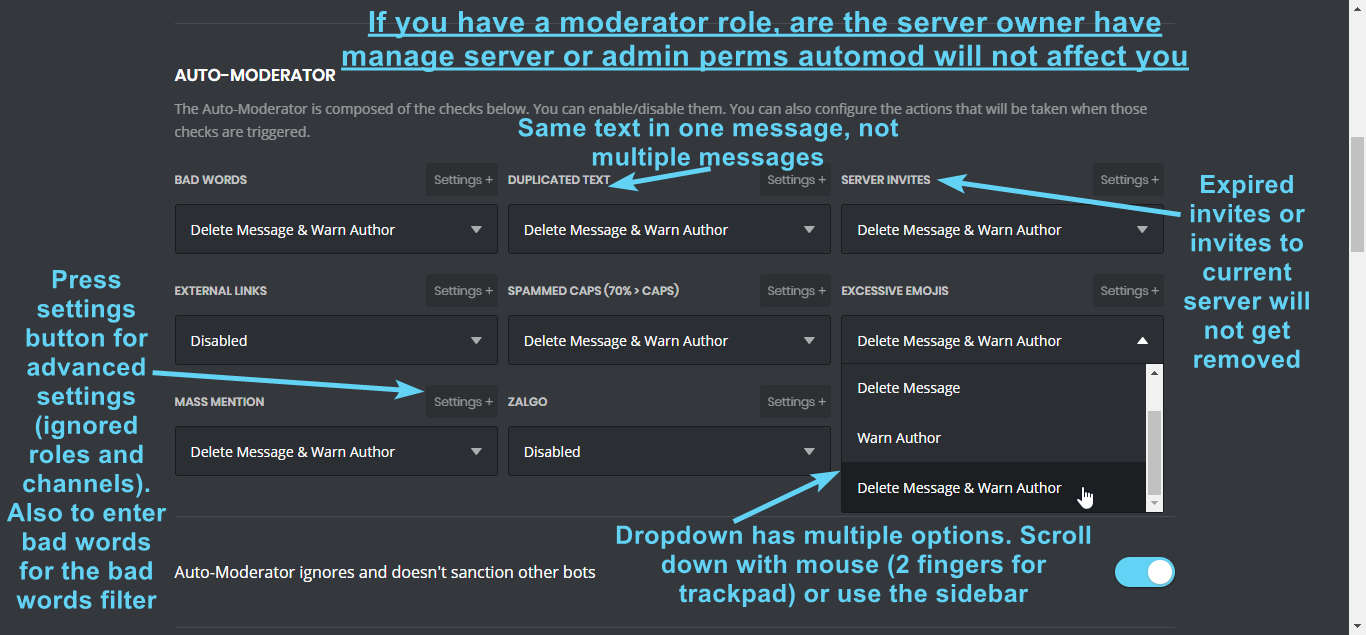
user send message DUPLICATED TEXT but bot not working why?
dire yarrowBOT
Information about our automod feature (located in the moderator plugin) condensed in a pic for you 
https://i.imgur.com/JVJ9JwL.png
 white notch
also could just take a while to be back to full speed
 vernal canyon
I can vouch that it's not permission problems with the bot
I've had Mee6 running perfectly fine until tonight, and now it also gives me the same error message
white notch
 deep pebble
just a quick bug report, i read announcements, so i know y'all fixing it.
Whenever i try to click on one of my servers, dash doesn't actually load it, just moves me back to server chooser. So rip.
strong path
Yeah you're not the first one with that problem <.<
It has to do with the bot currently bugging out now
strong path
Like 2 hours ago?
 molten oasis
Still to this day Mee6 is posting streams twice, even after I've: removed, reset, deleted original channel.
I'm at my wits end.
dire yarrowBOT
So... @molten oasis, I've decided you should be level 1.
Don't get too excited, mmk.
molten oasis
Both "hey streamer has started stream"
limber knoll
Just trying to get more information, is there any differences in link or the times posted at? Or any other minor/major clues your end?
Just so we can try pinpoint your issue
molten oasis
Only difference is like, view count
This started around the API and cosmetic shifts.
I've only must turned back on the streamer plugin
limber knoll
Ok thanks I hope this will enable us to find the issue, sorry for the inconvenience
@molten oasis can I also get your server id?
 clear peak
Why does all my Custom Commands keep on going wrong and not working? (All are on Give Roles) @limber knoll
strong path
!hierarchy
dire yarrowBOT
Role hierarchy is important for me to give out roles. Oh and also Manage Roles perm:
https://mee6-is.such-a-me.me/sohrrlvHC.gif
clear peak
Yes that's happening to me but it's on my custom commands
buoyant moon
It's for the leaderboard.
limber knoll
and his roles need to be above the roles
no
it's for everything role related
right pic
white notch
wrong user maybe?
limber knoll
!oops
dire yarrowBOT
Oops, something went wrong in MEE6 land!  This error has been reported to our Team. We'll work hard to fix it.
If this happens when using:
Custom commands:
‣ Bot tries to give the role that higher than his own. To fix that, move the bot's role above the role he tries to give.
‣ User don't have all roles bot tries to remove, that's known bug.
‣ Missing Manage roles permission. Go to Server Settings -> Roles -> Bot role -> Manage Roles permission
Moderator commands:
‣ Muted role is above Mee6's role. Bot can't give roles that higher than his own. Move it down.
‣ Missing Manage roles permission. Go to Server Settings -> Roles -> Bot role -> Manage Roles permission
clear peak
white notch
manage roles doesn't effect !rank
limber knoll
my fault :S
white notch
yeah it was a wrong ping, that is all
limber knoll
sorry users for my mistaken identity
@molten oasis twitches end that's double streaming, other services been reporting it unfortuntely
clear peak
dire yarrowBOT
So... @clear peak, I've decided you should be level 1.
Don't get too excited, mmk.
clear peak
It works now thanks!!!
 still prawn
in two servers im in tempmute isnt working properly. mee6 mutes just fine but doesnt unmute in the allotted time
bitter owl
We know, tempmute over 1 hour is bugged. Sorry
still prawn
from what i saw, it was also under 1h tempmutes
dire yarrowBOT
So... @still prawn, I've decided you should be level 1.
Don't get too excited, mmk.
bitter owl
Hm less than 1h can bug or work. higher than 1h will definitely broke
still prawn
alright. wasnt sure if you guys were aware so i was bringing it up. but seems you guys are on it 😃 have a nice one
bitter owl
We are, thanks a bunch for your consideration
buoyant moon
Delete song does'nt exist :/
 viral sinew
!rank
dire yarrowBOT
★☢HUmA|-|☢★, this command is disabled in this channel.
 dense fox
 blissful spire
bleak stratus
blissful spire
bleak stratus
It appears that you may be on the wrong account, or something went wrong since the time you logged into your website.
Please navigate to https://discordapp.com/channels/@me and select the gear in the bottom left, then press Logout.
After that, please navigate to https://mee6.xyz/logout to disconnect from our website.
Once finished, select "Add to Discord" again, and follow the instructions to access my dashboard again.
@blissful spire
bitter owl
@bleak stratus !logout
dire yarrowBOT
Dan | 🇹🇩, it doesn't look like you can use that.
bitter owl
Trying to fix this
bleak stratus
Okay
 faint arrow
im not sure if this is a bug but
whenever i tried to add mee6 to my server, i have to log in
bitter owl
No
faint arrow
but it always automatically logs my alternate account
dire yarrowBOT
It appears that you may be on the wrong account, or something went wrong since the time you logged into my website.
Please navigate to https://discordapp.com/channels/@me and select the gear in the bottom left, then press Logout.
After that, please navigate to https://mee6.xyz/logout to disconnect from our website.
Once finished, select "Add to Discord" again, and follow the instructions to access my dashboard again.
bitter owl
Log out from both discord and mee6 websites
faint arrow
ill try
bitter owl

dense fox
XD
bitter owl
Good luck
 cold skiff
What is happining to my surver
My bot is cussin me out
Wtf
First my surver gets raided then my bot cussed me out
bitter owl
@cold skiff go to https://mee6.xyz/dashboard -> Timers
cold skiff
I’m scared
bitter owl
Do not be
cold skiff
Can I just uninstall discord
cold skiff
ok
bitter owl
But messages will remain there
bitter owl
So good luck
 slate gazelle
Just kick him
slate gazelle
PM me an invite to your server and give me permission to kick
 stark raven
if a user gets autopunished and you unpunish them yourself when their punishment runs out it unpunishes them again, its just annoying in my logs channel? Not very well explained, sorry
dense fox
Yeah its a bug im pretty sure.
stark raven
kk
buoyant moon
i want to change the personal message of welcome but the bot cant save the changes, it keep loading...
dusty apex
@buoyant moon im trying to help you in #〉volunteer-support
 slim spade
There is a bug (I presume) when trying to buy the background for the rank card
 marble sequoia
Hey the website spells evrifing backwards
limber knoll
Thanks gives us something to work with.
limber knoll
@marble sequoia created a new timer from scratch?
marble sequoia
Yes
limber knoll
Just wanted to find out also can i have your server id?
marble sequoia
K
dire yarrowBOT
So... @marble sequoia, I've decided you should be level 1.
Don't get too excited, mmk.
slim spade
dire yarrowBOT
Open Server Settings in your Discord Server. Select Widget and press Copy ID next to Server ID.
You can also use Developer Mode as an alternative method.
limber knoll
@slim spade dm me please
dire yarrowBOT
Alright, @marble sequoia has been warned because 'Posted an invite'.
limber knoll
I'll go find that
marble sequoia
I cant find it becose im not on PC im on Andriod
limber knoll
Its your server settings
marble sequoia
Ok
limber knoll
You right click your server
marble sequoia
Ok god
limber knoll
Lol np
marble sequoia
Stil cant find it
limber knoll
Got it btw
marble sequoia
How?
dire yarrowBOT
@shut spire did 'dm advertising to staff read #〉rules of any future server, we do not allow advertising and it is against discords tos to advertise and can result in your account being disabled.' and got the ban hammer for 310 days! 
marble sequoia
Yes
limber knoll
Sorry forgot to reply @marble sequoia
In user settings> behaviour dev mode @marble sequoia
 eager gyro
!help
dense fox
#〉commands for commands.
molten yacht
How does everyone mess that up
 stray olive
The server is not that big
buoyant moon
My "!clear" doesnt seem to work.
Have I not enabled something? Do I have to but something?
dense fox
Is moderator plugin enabled?
dense fox
Are there any banned roles?
dense fox
Oh.
dense fox
Np.
buoyant moon
it dosen't load my dashboard
dire yarrowBOT
Alright, @karmic merlin has been warned because 'Posted an invite'.
 vital ridge
it said: you join ok now you ask me to roles you
Oops, something went wrong in MEE6 land! :SAD6: This error has been reported to our Team. We'll work hard to fix it.
strong path
Need help with a give role command?
vital ridge
what
 urban hinge
wanted to say that timer is broken
dire yarrowBOT
So... @urban hinge, I've decided you should be level 2.
Don't get too excited, mmk.
strong path
It is, known
 quaint wind
halp
dire yarrowBOT
So... @quaint wind, I've decided you should be level 1.
Don't get too excited, mmk.
quaint wind
i need halp.
dire yarrowBOT
The clear command allows you to clear the last xx amount of message or to clear one user without clearing anyone else.
Use !clear 1-1000 to clear the last xx messages (example !clear 10)
or !clear @name to clear all the message of @name in the last 2 weeks
+ I need manage messages permission
+ I need view message history permission (otherwise I will respond with -1 messages cleared)
+ you need to enable the plugin on the website
+ you need to check the checkmark next to clear on the plugin page.
+ you need to set your role as moderator (located at the top of the plugin page in the moderator tab)```did you read the WHOLE message?
 uneven coral
is the Twitch live notifs down again? Just curious
dire yarrowBOT
Alright, @karmic merlin has been warned because 'Posted an invite'.
Our team of developers is aware of the situation with the Twitch plugin that is not working properly, but are unable to give an ETA on the fix.
Technical stuff/explanation:
This is down to us trying to avoid ratelimits on Twitch's old API, which is taking a long time and causes delayed/no announcements. We can't move to their new API until they raise ratelimits for us
 wise spire
@dire yarrow can you tell us about the Youtube plugin bug ?
bleak stratus
Hi @wise spire. YouTube is bugged. Staff members know about this problem and try to solve it. No ETA.
wise spire
okey thank you a lot :=)
bleak stratus
Yw
 fringe bear
@dire yarrow It does not send movies when it appears
strong path
twitch is bugged
 blazing thorn
MEE6 doesn't auto-unmute ppl who are temp muted for 1m...
buoyant moon
Tempmute is bugged rn.
blazing thorn
Ok
 silk bone
!timers
dire yarrowBOT
Bloodrave120, it doesn't look like you can use that.
 slate pike
tempban dont working
dense fox
Tempmute/tempban are bugged
 alpine viper
!rank right now keep saying i have no rank even tho me n my friends chat a lot :\
dire yarrowBOT
If I appear to be denying your hard earned experience, or !rank and !levels aren't working properly...
- Make sure Levels is Enabled.
- Check that you do not have a banned role in the levels configuration, and that you aren't in a banned channel either.
- Make sure that I can see the channel you are talking in with "Read Messages" and send messages with "Send Messages".
buoyant moon
I wanted to add MEE6 to my server ... But as soon as I log in, it connects me with another profile from which I am not connected ... How should I do?
dire yarrowBOT
It appears that you may be on the wrong account, or something went wrong since the time you logged into my website.
Please navigate to https://discordapp.com/channels/@me and select the gear in the bottom left, then press Logout.
After that, please navigate to https://mee6.xyz/logout to disconnect from our website.
Once finished, select "Add to Discord" again, and follow the instructions to access my dashboard again.
buoyant moon
Nothing, I count on connecting that account ... I do not know what to do ..
 idle jetty
Is it your current amount you logged into you want to connect?
Check of you're logged in to the same account in your browser
Use #〉volunteer-support or #463809001273032715 if you are
buoyant moon
I resolved, calm
 urban hinge
so @dense fox the time works but only after like 7 hours
dense fox
Oh ok
urban hinge
yeah
but it doesnt send in my set intraval
its literally 7 hours apart from eachother
 broken trench
 dense fox
Not here ---> #〉chat / #〉commands for commands and random emotes.
buoyant moon
Halp.. I can't mute my village idiot.
dire yarrowBOT
Having problems muting someone/they aren't muted? Check the following
Prerequisites:
- Moderator plugin is enabled
!mutecommand isn't disabled- Bot has role with Manage Roles and Manage Channels permissions
- Muted role is under MEE6 role
- You're trying to mute someone using
!mute @mention reason, otherwise it will not work
If user got Muted role but still can talk means there's issue with your channel permissions
Go to Channel Settings -> Permissions
- If that's public channel that can be accessed by anyone:
- Set

Send Messagesfor all roles except Muted - Set
Send Messagesfor Muted role
- If that's secret channel that requires *special* role to access it:
- Set
Send Messages Read Messagesfor special role - Set
Send Messages Read Messagesfor Muted role - Set
Send Messages Read Messagesfor@everyonerole
 winter berry
timer is not running
 potent fable
can't access the server mee6 is in and the dashboard just loads
bleak stratus
@potent fable what browser do you use?
potent fable
chrome
bleak stratus
Hm. Try to refresh the page
bleak stratus
Hm. Try with Opera Browser
potent fable
ok it works thanks!
bleak stratus
You're welcome.
bleak stratus
YouTube is bugged. @earnest wasp
 earnest wasp
Ok How do I get it to handle the rols?
bleak stratus
Go to #〉volunteer-support and someone is helping you. I can not help you right now. @earnest wasp
earnest wasp
Ok
 left birch
timer is not running
dense fox
Timers are bugged.
 median phoenix
<@&193123929701875712> im having a problem where the bot were it is not posting twitch notifications or timer notifications but the welcome message are working.
dire yarrowBOT
Our team of developers is aware of the situation with the Twitch plugin that is not working properly, but are unable to give an ETA on the fix.
Technical stuff/explanation:
This is down to us trying to avoid ratelimits on Twitch's old API, which is taking a long time and causes delayed/no announcements. We can't move to their new API until they raise ratelimits for us
dense fox
Timers are bugged.
 neon arrow
when ever i try and add a word to the bad words filters it dosent let me
bitter owl
I see. As we have some incompatibilities with Apple. Could you try using chrome
Oh, yeah. Safari will refuses to work
neon arrow
ok, thanks for your help!
bitter owl
At any moment
 tulip wraith
the timers,search and moderator plugins aren't working in my server[
bitter owl
@tulip wraith sabemos, desculpe e os timers irão voltar a qualquer momento
You are brazilian right?
Also, search need to be used correctly and moderator too as well
!search
!searchinfo
Hm
!!tag search
wind windBOT
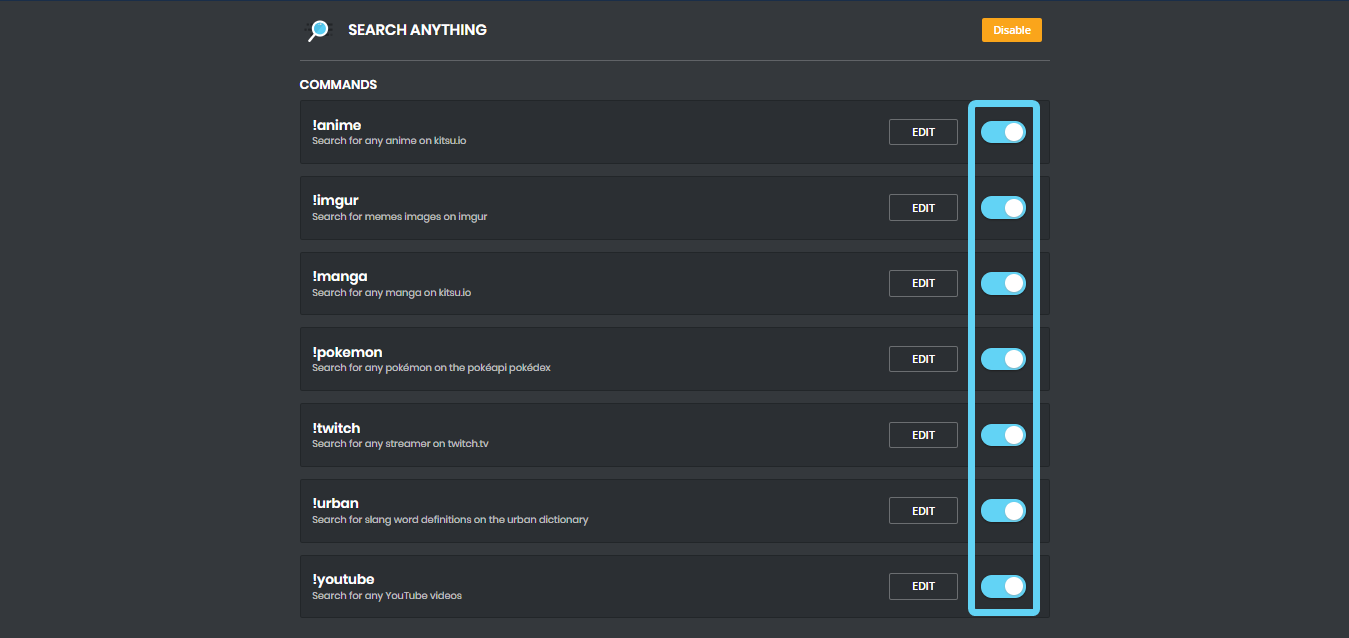
Search Commands
Please Note: You can't search nothing. If google can't allow you to search nothing, the bot won't give any results either. So you need to specify something. It also takes first search result, so you may need to be specific with searching. The following are examples:
!anime naruto !imgur cats !manga blame! !pokemon pikachu !twitch Squirrel !urban Mee6 !youtube nyan cat
https://i.imgur.com/XwAC6JY.png
 marble python
No twitch alerts in server.
Re-connect bot
All access
dire yarrowBOT
So... @marble python, I've decided you should be level 2.
Don't get too excited, mmk.
Our team of developers is aware of the situation with the Twitch plugin that is not working properly, but are unable to give an ETA on the fix.
Technical stuff/explanation:
This is down to us trying to avoid ratelimits on Twitch's old API, which is taking a long time and causes delayed/no announcements. We can't move to their new API until they raise ratelimits for us
dry glen
@marble python 👆🏻
marble python
Thank you!
dry glen
Np
 past bronze
Can i get some help?
 austere ember
Whats problem
past bronze
Welp What happened was i accidently banned the mee6 bot and it still thinks on the website that its still on my server
So im trying to reinvite him
austere ember
Oh
Have u unbanned him from the server?
austere ember
Oh
Look up mee6 bot discord
One of the searches should come up as invite to server for mee6
past bronze
may i screenshare with you?
austere ember
Yeah np!
 harsh mesa
My ! role-info is not working (yes I know the space shouldnt be there)
bitter owl
@harsh mesa check if it’s really enabled and edit it for look for any banned roles or channels, please
 bitter owl
No worries, we guide you
dire yarrowBOT
Alright, @buoyant moon has been warned because 'Posted an invite'.
 vital hill
My live's annoucements and YouTube's annoucements are not working but I'm sure it's enable !
strong path
both are bugged
vital hill
Sûre ?
strong path
Yes
vital hill
Okay thanks 😘
strong path
np
 empty birch
hi
bitter owl
@empty birch need help?
 wild horizon
when i do the! rank there is not my profile picture
dire yarrowBOT
So... @wild horizon, I've decided you should be level 2.
Don't get too excited, mmk.
 burnt hazel
@wild horizon What does it look like? Does it look like a text embed instead of an image?
wild horizon
when i do the! rank there is not my profile picture
burnt hazel
Is it a black circle or another picture? @wild horizon
wild horizon
black circle
burnt hazel
Have you tried changing it to something else then changing it back? MEE6 might need to refresh your profile  Might take a little time to update on the rank card.
wild horizon
ok
dire yarrowBOT
Alright, @robust lion has been warned because 'Posted an invite'.
dense fox
Stop.
deep pebble
It's having a bit of an issue unmuting, one of my staff used it for a ten min mute and it still didn't unmute 20 mins later.
Rn we're using a replacement, also yes the bots role is over everything related to non-staff roles.
strong path
Yes, known
deep pebble
Kk cya, I just woke up to multiple pings and dms about it
dire yarrowBOT
Alright, @buoyant moon has been warned because 'Posted an invite'.
buoyant moon
I turned on twitch i selected the channel and the streamer but i dont get a notification i've the streamer is livestreaming how can i fix that?
strong path
twitch plugin is bugged
buoyant moon
Okay thx for the info when is it fixed?
strong path
We don't know
buoyant moon
Okay thx
strong path
np
 tardy vault
Hey none of my Commands work
 hollow mist
Did you enable them in the dashboars
strong path
!hierarchy
dire yarrowBOT
Role hierarchy is important for me to give out roles. Oh and also Manage Roles perm:
https://mee6-is.such-a-me.me/sohrrlvHC.gif
tardy vault
strong path
read mee6's message above
strong path
Yeah
tardy vault
But I’m on my phone
strong path
I think you hold on a role and drag it
 solid grotto
I can confirm that it is how you do it.
tardy vault
It just says
Hey I’m MEE6
Alright I fixed the Hey thingy
Now how do I give the role?
??
strong path
^ getting helped in #〉volunteer-support
 broken sleet
There is a problem with the command tempmute.
strong path
not unmuting, known
broken sleet
This will be settled when?
strong path
We don't know
strong path
@strange arch
broken sleet
Ok but he mute 7 day max....
strong path
oh
 buoyant moon
Try vortex
dire yarrowBOT
So... @broken sleet, I've decided you should be level 1.
Don't get too excited, mmk.
buoyant moon
Np 
 fervent violet

 plush sail
Why the notifications of Twitch don't work?
austere ember
Bugged
plush sail
What can I do?
austere ember
And rate limits
Twitch wont raise rate limits
Our team of developers is aware of the situation with the Twitch plugin that is not working properly, but are unable to give an ETA on the fix.
Technical stuff/explanation:
This is down to us trying to avoid ratelimits on Twitch's old API, which is taking a long time and causes delayed/no announcements. We can't move to their new API until they raise ratelimits for us
plush sail
So... What can I do?
austere ember
Nothing u can do
sorry
plush sail
And they will never work?
bleak stratus
@austere ember next time try !twitch
austere ember
Ah thank u Dan
bleak stratus
Np
austere ember
Rn nope
It be twitches fault
dire yarrowBOT
Our team of developers is aware of the situation with the Twitch plugin that is not working properly, but are unable to give an ETA on the fix.
Technical stuff/explanation:
This is down to us trying to avoid ratelimits on Twitch's old API, which is taking a long time and causes delayed/no announcements. We can't move to their new API until they raise ratelimits for us
plush sail
And what are you saying me with this message?
dire yarrowBOT
So... @plush sail, I've decided you should be level 1.
Don't get too excited, mmk.
austere ember
The bot cant use it in a million servers becuase twitch wont give us higher rate limits
 hoary stream
Not never. We are waiting for them to hopefully raise the ratelimits so that we can have the twitch plugin working again. But we have no ETA
 floral jolt
^
plush sail
OK, I hope you can solve the issue of Twitch notifications
austere ember
Same here
 wanton nacelle
jais un problème avec mee6
 sick mango
un francais tien
wanton nacelle
je parle fr
limber knoll
@wanton nacelle probleme?
wanton nacelle
jais fais et il a supprimé tout les level et je vous demande comment on re mais les level ?
limber knoll
In !levels
wanton nacelle
oui
limber knoll
And confirm
limber knoll
Yes
wanton nacelle
?
limber knoll
Oui
wanton nacelle
je vous demande ?
limber knoll
xp par minute un message est envoyé
limber knoll
Np
wanton nacelle
?
limber knoll
@livid phoenix i suggest you refrain from posting jokes
 cold bear
bot doesn't do it by himself, this is not skynet or ai, someone messes with his settings on server
wanton nacelle
ok
 livid phoenix
The owner of a server can create his own joke?
cold bear
anyone with manage server or admin permission
livid phoenix
Hmmm, ok thank i will see with the owner of the server for delete this,
cold bear
ok
wanton nacelle
et ce que un jour mee6 pouré parlé comme véxera ?
dire yarrowBOT
So... @wanton nacelle, I've decided you should be level 2.
Don't get too excited, mmk.
 untold geyser
the bot isnt notifying my chat that I (or others) are going live. im sure someone already said this tho
dire yarrowBOT
Our team of developers is aware of the situation with the Twitch plugin that is not working properly, but are unable to give an ETA on the fix.
Technical stuff/explanation:
This is down to us trying to avoid ratelimits on Twitch's old API, which is taking a long time and causes delayed/no announcements. We can't move to their new API until they raise ratelimits for us
austere ember
@untold geyser
if your talking about twitch read above please
dire yarrowBOT
Alright, @robust lion has been warned because 'Posted an invite'.
buoyant moon
heyyy um im on the Mee6 website and im trying to change the welcome message but its talking a really long time, what do i do
austere ember
what do you mean?
buoyant moon
like when i edit the Welcome message it takes really long to actually save changes


 native anvil
@buoyant moon what browser are you using?
buoyant moon
chrome
and i tried microsoft edge to see if it was my browser but same thing
should i remove the bot and put it back in
buoyant moon
The "authorize" button does not respond when I try to add a bot to the server or login
austere ember
@ripe snow
are the channel permissions allowing it to send msgs?
and is the !Help permission trying to dm you?
 lavish trench
@ripe snow the bot is working for me
austere ember
that is !warn
lavish trench
molten yacht
Turn off your light theme
austere ember
hey honesty please dont cut in on my case
thank you for trying to help tho
lavish trench
why do i need to @molten yacht ? and sorry @austere ember
austere ember
hey @ripe snow
let me know if it works
molten yacht
Idk I’m trying to be funny, I’ll see myself out -3-
lavish trench
x3
 ripe snow
still npt working
ripe snow
let me check
austere ember
ok
ripe snow
wait do you think he is just loading or something cause i just added link 50 "bad words" to his bad word list
like 5m ago
ripe snow
yes
austere ember
i think so yes
but idk for sure
i have never encountered this problem before
ripe snow
no
austere ember
whats bug
ripe snow
how about i wait like 10m and if its still not working i tell you
austere ember
ok let me know if it works @ripe snow
ripe snow
ok
 toxic marlin
I Can't level up! i writing on my server and still nothing! this same xp everytime
ripe snow
thx for every thing so far
austere ember
yeah np redorca
toxic marlin
when i was going to my rank card there's shows i have 12 level
austere ember
im confused
are you a english speaker or another langauge that you would prefer to speak?
toxic marlin
im from Poland
austere ember
would you like to speak that instead?
i can try to translate to the best of my ability
toxic marlin
sure
austere ember
yes it is
Hmmmm
Więc co próbujesz powiedzieć? Przepraszam, jeśli źle tłumaczę. @toxic marlin
toxic marlin
Próbuję powiedzieć, ponieważ gdy próbuje wbijać level na moim discordzie to EXP nie idzie w górę lecz gdy poszedłem na Rank card to pisze że mam 12 level, ale gdy wpisuje !rank to wciąż pokazuje że mam level 10 :/
austere ember
Czy masz bota nie wysyłać rankingu msg, gdy rangujesz?
toxic marlin
oh zapomniałem wspomnieć że mój znajomy może rangować i mu idzie exp w górę
dire yarrowBOT
So... @toxic marlin, I've decided you should be level 1.
Don't get too excited, mmk.
ripe snow
wait if i kick mee6 from my server and invite him back in will he still have all the plugins
dire yarrowBOT
So... @ripe snow, I've decided you should be level 2.
Don't get too excited, mmk.
austere ember
yes @ripe snow
ripe snow
ok i will try that
austere ember
oh .... um nie jestem wtedy pewien .... @toxic marlin
Czy mogę dostać zaproszenie na twój serwer i zobaczyć?
dm me it if you say yes
austere ember

toxic marlin
oh poczekaj
toxic marlin
za chwilę ci dam
austere ember
ok
toxic marlin
gdzie wysłać zaproszenie?
austere ember
Osobiste wyślij mi zaproszenie
 visual orbit
I wanted to talk about people being muted but still can talk is that a bug?
austere ember
nope
dire yarrowBOT
!mute @CoolGuysNameHere You have been too cool.
!tempmute @SecondLameGuyHere 3h Too lame.
- I must have "Manage Channels", and "Manage Roles" for my permissions.
- I must have a role above the "Muted" role I create.
If there are problems, please check that the Muted Role does not have send messages globally or per channel.
austere ember
@visual orbit read above please
limber knoll
@austere ember helped in another channel...
austere ember
oh ok thanks!
 sour timber
Hello stream notifications no longer works
austere ember
@sour timber
twitch is bugged that we know
dire yarrowBOT
Our team of developers is aware of the situation with the Twitch plugin that is not working properly, but are unable to give an ETA on the fix.
Technical stuff/explanation:
This is down to us trying to avoid ratelimits on Twitch's old API, which is taking a long time and causes delayed/no announcements. We can't move to their new API until they raise ratelimits for us
strong path
bugged
bitter owl
It is not bugged. Youtube and timers (as long as durations features) are bugged. Twitch is being restricted by Twitch Company guys
Not our fault!
austere ember
therefore external bug
bitter owl
It's not bug at all!!!
sour timber
@austere ember
Thank you very much for your effective response
bitter owl
It's about ratelimits
austere ember
true dj
yeah np reg
strong path
Alright, noted, dj
sour timber
@austere ember Will there be a waiting time ?
sour timber
@austere ember
and why else bot discord still works with notifications ?
bitter owl
They are small we are huge
To make twitch communicate with mee6 there's something we call API
austere ember
^^
bitter owl
This api has a limit of times you can use it...
When a bot with 20.000 users use it. It's fine..
When our bot with 1.200.000 approximately uses it.. well...
Twitch need to raise this limit of usage for us
Which they don't even bothered to reply (our request) until now
austere ember
😭
sour timber
@austere ember
Luckily I know how to develop a little bit to do a backup thing to announce twitch
dire yarrowBOT
So... @sour timber, I've decided you should be level 1.
Don't get too excited, mmk.
sour timber
Or maybe you do not know how to exploit twitch API 😃
austere ember
thats cool
bitter owl
@buoyant moon wth?
austere ember
?
bitter owl
Do not perform commands out of #〉commands unless helping someone
sour timber
On this past a good day or a good evening 😎
austere ember
thank you!
bitter owl
You too
austere ember
you too!
dire yarrowBOT
Alright, @stuck abyss has been warned because 'Posted an invite'.
 versed tusk
<@&193123929701875712> how do you change the prefix for mee6?
dire yarrowBOT
Hey! My prefix is currently ! and cannot be changed, but don't sweat. It will be in the future sometime!
versed tusk
Oh...
limber knoll
Planned
versed tusk
Thanks.
 jaunty ether
<@&193123929701875712> how do you change the prefix for mee6?
dire yarrowBOT
Alright, @covert pier has been warned because 'Posted an invite'.
strong path
can't yet @jaunty ether
dire yarrowBOT
Alright, @covert pier has been warned because 'stop spamming and listen to staff to stop'.
@covert pier did 'swearing to staff in russian after be warned to stop spamming' and got the ban hammer!
dire yarrowBOT
@rapid cosmos did 'cursing for no reason' and got the ban hammer for 14 days!
 woven path
<@&193123929701875712> can someone please tell me how to mention when they leave? i tried using {user} but shows GetRektByNoob#5272 isnt of @woven path ...
also in the welcome message the {user}
work just fine
dire yarrowBOT
So... @woven path, I've decided you should be level 1.
Don't get too excited, mmk.
woven path
in {}?
limber knoll
Yes
woven path
thanks 😁
woven path
<@&193123929701875712> it didnt work ;/ i just tried it and its not working ... i want it to mention the player not to type his name
 mortal oxide
!variables
dire yarrowBOT
A full list of variables you can use in Mee6 commands and other functions can be found here: https://github.com/Mee6/Mee6-documentation/blob/master/docs/commands_variables.md
There's also random variables that can be used:
Random variables:
{random:x:y} picks a random number between x and y. Values must be pre-entered. Example: 8 would pick a random number between 1 and 10
{random:x} picks a random number between 0 and x. Values must be pre-entered. Example: {random:10} would pick a random number between 0 and 10
2 picks a random number between 0 and 10
Random variables with arguments:
{random:{1}:{2}} picks a random number between what you specify in a command. Example: !pick 1 10 would pick a random number between 0 and 10
{random:{1}} picks a random number between 0 and {1}. Example: !pick 20 would pick a random number between 0 and 20
Only non-decimal numbers can be used, letters and symbols will not
woven path
what is this xD?
mortal oxide
@woven path just click on the link .
woven path
found it
mortal oxide
:+1:
woven path
i will try it now thanks! {user.mention}
mortal oxide
Np
 soft wagon
I can not find my YouTube Channel / Adden
 obtuse adder
the youtube channel feature doesn't seem to be working . A channel i have associated on the plugin posted something new and the bot never told anyone
austere ember
@obtuse adder
yt is bugged rn, known
obtuse adder
@austere ember okay thank you
austere ember
yeah np
 rocky sphinx
its not working nothing is working i did no swear mod thing and i test it and its not working
burnt hazel
@rocky sphinx Make sure MEE6 has manage messages permission on his role
rocky sphinx
let look
burnt hazel
Hey ! MEE6 doesn't sanction the following people:
• The Owner of the server;
• People with Administrator permission;
• People with Manage Server permission;
• And the role(s) you set as Moderator on the website (aka dashboard).
He thinks Moderators are responsible, like the police  . So he doesn't want to blame your police
  .
.
rocky sphinx
i know
dire yarrowBOT
Alright, @frank falcon has been warned because 'Posted an invite'.
dire yarrowBOT
KILIÇ ARMY#7039 (449425871024029716) is now muted for '** Spam random numbers.**', alright? 
dire yarrowBOT
Alright, @buoyant moon has been warned because 'dont post randomly in support channels'.
 atomic jay
not sure if its been brought up before but i think something is wrong with the timing of infractions....
austere ember
@atomic jay did you use tempmute?
atomic jay
yea
austere ember
tempmute and tempban is bugged rn, no eta on the fix
atomic jay
ahh okay thanks ^^
austere ember
yeah np
atomic jay
back to using timers XD
austere ember
that is also bugged rn
faint dome
@mortal oxide ⤴
 deft flax
He can read that?
dire yarrowBOT
Alright, @queen hull has been warned because 'Advertisement.'.
deft flax
o
 exotic prairie
bot is not posting the twitch alerts when a channel goes live, at least since last thursday
 knotty ibex
was just about to post that
dire yarrowBOT
Our team of developers is aware of the situation with the Twitch plugin that is not working properly, but are unable to give an ETA on the fix.
Technical stuff/explanation:
This is down to us trying to avoid ratelimits on Twitch's old API, which is taking a long time and causes delayed/no announcements. We can't move to their new API until they raise ratelimits for us
austere ember
@knotty ibex @exotic prairie please read above
knotty ibex
kden
 latent reef
hi
 restive junco
Users temporarily muted via auto-mod are not unmuted after the specified time interval
austere ember
Known bug
restive junco
No problem. Good to know
austere ember
Yep
limber knoll
@restive juncomute under 1 hr unmutes up to 3 days currently and over an hour no guarantee of unmute
 unkempt turtle
 sorry i need some bug spray, earlier today i made a cyan color role command using mee6 and it said that there was a problem
strong path
give role?
strong path
!hierarchy
dire yarrowBOT
Role hierarchy is important for me to give out roles. Oh and also Manage Roles perm:
https://mee6-is.such-a-me.me/sohrrlvHC.gif
strong path
read above
unkempt turtle
ooooooooooohhhhhhhhhhhhhhhhhhhhhhhhhhhh yeaaaaaaaah
:/
sorry to say but i think i did it using notsobot instead... btw that should be a banned word here
 wooden stone
MEE6 wont display youtubers and twitch streamers when the streams and vids come out help meh :3
dire yarrowBOT
Our team of developers is aware of the situation with the Twitch plugin that is not working properly, but are unable to give an ETA on the fix.
Technical stuff/explanation:
This is down to us trying to avoid ratelimits on Twitch's old API, which is taking a long time and causes delayed/no announcements. We can't move to their new API until they raise ratelimits for us
wooden stone
ah okay
burnt hazel
@wooden stone The same issue for YouTube, the plugin seems to be a little buggy at the moment so there is nothing you can do but wait for a fix to come out.
The devs are aware and are trying to fix the issues.
Sorry about the inconvenience.
wooden stone
its k 😉
dire yarrowBOT
Aidan, this command is disabled in this channel.
bitter owl
@turbid raft do it in #〉commands please
 slow ether
MEE6 has only just announced my stream... I started 3 hours ago and pretty much finished when it did announce.... Is this a known issue at the moment?
strong path
Yes, it is
 upper tide
Afternoon, is there a known issue with the twitch plugin?
strong path
Yes, there is
upper tide
I just scrolled up for a while, and now only noticing it is merely 9 posts above mine, apologies!
strong path
No worries
buoyant moon
on my server I put the MEE6, I put the command to find videos and other things, but, this command don't Work!
strong path
Are you talking about the YouTube plugin?
buoyant moon
yes
strong path
YouTube plugin is bugged.
buoyant moon
oh
 dusty wave
The stream function does not work anymore
Please help
dire yarrowBOT
Our team of developers is aware of the situation with the Twitch plugin that is not working properly, but are unable to give an ETA on the fix.
Technical stuff/explanation:
This is down to us trying to avoid ratelimits on Twitch's old API, which is taking a long time and causes delayed/no announcements. We can't move to their new API until they raise ratelimits for us
austere ember
read that please ^^
dusty wave
Thanks, I know 😄
dire yarrowBOT
So... @dusty wave, I've decided you should be level 1.
Don't get too excited, mmk.
buoyant moon
The youtube does not work anymore
austere ember
yt is bugged, known
buoyant moon
;n;
dusty wave
On one of my servers, the stream function works fine and not on the other
LOL xD
buoyant moon
Woah
strong path
YouTube plugin is bugged.
 edgy abyss
ah ok
 barren sail
Timed Messages are not contained within the specified times, messaging at random and more often than they should. Pictures incoming for reference/proof:

 austere ember
Timers are bugged, known
buoyant moon
mee6 doesnt post my video when I upload. Is this known?
strong path
Yes, it is
 mighty obsidian
Mee6 seems to have a difficulty with assigning and removing roles in my discord, but can do it just fine for people joining. Is there a thing I have to do to fix this?
strong path
!hierarchy
dire yarrowBOT
Role hierarchy is important for me to give out roles. Oh and also Manage Roles perm:
https://mee6-is.such-a-me.me/sohrrlvHC.gif
 woeful cargo
So dose copy and paste also part of XP ( like when I copy a message from somewhere than I paste in this group will it be counted as XP) ???
austere ember
yes
 sleek laurel
eta on youtube bug? (mee6 rocks, btw!!!)
austere ember
no eta rn sorry
sleek laurel
thx m8
austere ember

restive junco
Auto-mad spam cap doesn't count messages w/ < 10 letters
So an all-caps, 9-letter word won't get caught
bitter owl
@restive junco Need to be 70% of CAPS or more
restive junco
If 100% of 9 letters are all caps
dire yarrowBOT
So... @restive junco, I've decided you should be level 3.
Don't get too excited, mmk.
restive junco
That's 100% all caps
But it won't count if the total letters (caps or not) is less than 10
E.g. the message ABCDEF won't get caught
Even though it is 100% caps
bitter owl
I don't know exactly the minimum letters to trigger bot. Wait a second while I test it please
buoyant moon
I put not to put too many emojis, my friend tested and put a 7 emojis and MEE6 not notice, can you help me?
or Fix?

 eager sparrow
Hi
blazing thorn
@bitter owl @restive junco It is at least a total of 10 characters that MEE6 starts checking if over 70% is caps, I tried it before 😄
it is meant to be like that (I think) as
- it is weird to count 70% of 9 characters
- why would 9 characters of caps be regarded as spammed caps? lol
bitter owl
Yeah I just noticed: hidden stuff devs doesn’t tell us Appreciate your help @blazing thorn
bitter owl
Yup, my testing server is mental of so many thing I’ve done trying to crash mee6. But for further small talking let’s move to #〉chat please lol
blazing thorn
okay
blazing thorn
sometimes MEE6 bugs on the user mute/unmute logging message
strong path
What do you mean?
blazing thorn
Note: user is still in the server
strong path
The auto-unmuting part is known. But I don't get the part about the logging message
oh
blazing thorn
a ! is missing
strong path
Yeah I regularly get those issues
 regal sinew
Note: hi
blazing thorn
that doesn't bug out every time
dire yarrowBOT
@regal sinew did 'ignoring staff advice didn't want to read #〉rules, gave ample opportunity to comply' and got the ban hammer!
cold bear
known bug
slate pike
I would like to explain
dire yarrowBOT
So... @slate pike, I've decided you should be level 1.
Don't get too excited, mmk.
buoyant moon
When I do a command !lonely on my server which basically tells everyone that someone is lonely it then gives them the rank Lonely so people can find who it is, and then !lonelyremove to get rid of the rank, this always worked until now, when I try both they dont work, but every other command I use works, !lonely and !lonelyremove are custom commands
strong path
So it's a give role command?
buoyant moon
and text
broadcasts everyone, using @, a player is lonely, check the lonely rank section to see who it is and gives them the rank
strong path
But the problem is that it isn't giving them the role, right?
buoyant moon
its doing nothing
not even the message
or giving the rank
when I type it the Mee6 bot says : Oops, something went wrong in MEE6 land! :SAD6: This error has been reported to our Team. We'll work hard to fix it.
dire yarrowBOT
Role hierarchy is important for me to give out roles. Oh and also Manage Roles perm:
https://mee6-is.such-a-me.me/sohrrlvHC.gif
strong path
read above
 coarse spoke
Hello guys,idk probably im wrong but when i type a personal command mee6 reply whit this: Oops, something went wrong in MEE6 land! :SAD6: This error has been reported to our Team. We'll work hard to fix it.
strong path
if it's a give role command then read above you
buoyant moon
AHA now works
buoyant moon
thanks 😃 @strong path
strong path
np
 shadow briar
@dire yarrow stopped announcing when YouTubers have released new videos! 😦