#〉bugs-reports
2 messages · Page 31 of 1
 buoyant moon
 faint dome
The emoji in the prefix custom command doesn't work
 dire yarrowBOT
Hey! My prefix is currently ! and cannot be changed, but don't sweat. It will be in the future sometime! < 404380250894761984>
 shut aspen
buoyant moon
shut aspen
buoyant moon
:,D deleted
shut aspen
this is the only bug
 sour berry
@flint quiver I have the same problem.
 dry glen
just wait and try again later
 leaden osprey
nop
buoyant moon
okay
leaden osprey
some people just leave their pc on for too long
buoyant moon
He prob forgot to change his playing
/ shutdown his computer/laptop and closed discord
lol
 native anvil
It only shows a playing status when discord can see the software running, if you go on mobile the status goes away
buoyant moon
aham.. thank you the advice :,D
dry glen
i wish they don’t
buoyant moon
i wanna see the next 2 days what doing this guys 😂
 flint quiver
<@&193123929701875712> YouTube plugin doesn't work for me and @sour berry
flint quiver
why then don't they say it in #known-bugs?
flint quiver
why
leaden osprey
blame cookie’s decision actually
 worthy hound

 dry glen
If the message is over and over again it’s considered spam
 obtuse ferry
self mentions count as spam mentions*
dry glen
Yes even mentions is spam
 eternal sun
why i cannot add the youtube channel?
dry glen
Np
 graceful nebula
are YT notifs workign yet?
buoyant moon
They should be, @graceful nebula
buoyant moon
Hello there, so I believe this is a bug. In my server, I set up the bad word thingy. I also set it so once a member gets 3 infractions, they get kicked. But once they join back, and they say one of the filtered words, they don’t get any warning at all. Just a kick.
 wild flame
YouTube notifications not.working lol for my server
buoyant moon
!help
dire yarrowBOT
Alright, @onyx palm has been warned because 'Mass emoji'.
 limber knoll
@buoyant moon #〉commands
 narrow silo
yo is there a commands list for this or anything
buoyant moon
@narrow silo use !help in #〉commands
narrow silo
ok
limber knoll
Ok
 lusty creek
Doing !playlist gives a link to something that doesnt work anymore
lusty creek
reeee
I think a channel that has all the known bugs listed in it would be swell
I think you should call it #known-bugs
limber knoll
Lol you mean suggestions right?
buoyant moon
he means #known-bugs it was there before the server was updated
limber knoll
No i meant in suggestions to suggest "bring back #known-bugs"
 orchid shoal
Help
limber knoll
@orchid shoal ?
orchid shoal
Before when i mute someone the mute role will still in them even if they rejoin the server
But now the mute role is gone when they just rejoin the server
dire yarrowBOT
So... @orchid shoal, I've decided you should be level 2.
Don't get too excited, mmk.
orchid shoal
Did you guys change it
dire yarrowBOT
!mute @CoolGuysNameHere You have been too cool.
!tempmute @SecondLameGuyHere 3h Too lame.
- I must have "Manage Channels", and "Manage Roles" for my permissions.
- I must have a role above the "Muted" role I create.
If there are problems, please check that the Muted Role does not have send messages globally or per channel.
orchid shoal
...
orchid shoal
Idk
limber knoll
@orchid shoal give me 30 mins i need to get home then i can help you
dire yarrowBOT
Alright, @amber widget has been warned because 'Posted an invite'.
buoyant moon
lol
orchid shoal
Ok
 floral zealot
The !help command only shows first 25 commands now, instead of all of them. Is this intended? Can't find any option to bypass it.
faint dome
Intended yeah
floral zealot
Ok
limber knoll
@orchid shoal back
limber knoll
Guess your afk
orchid shoal
...
 strong path
@limber knoll 👆 :)
limber knoll
@orchid shoal wb
 cold bear
be more specific
 rough mauve
When the slowmode is on and the send private response is disabled... We are still receiving DMs from MEE6 @cold bear
 flint plaza
What are all of the MEE6 commands
dire yarrowBOT
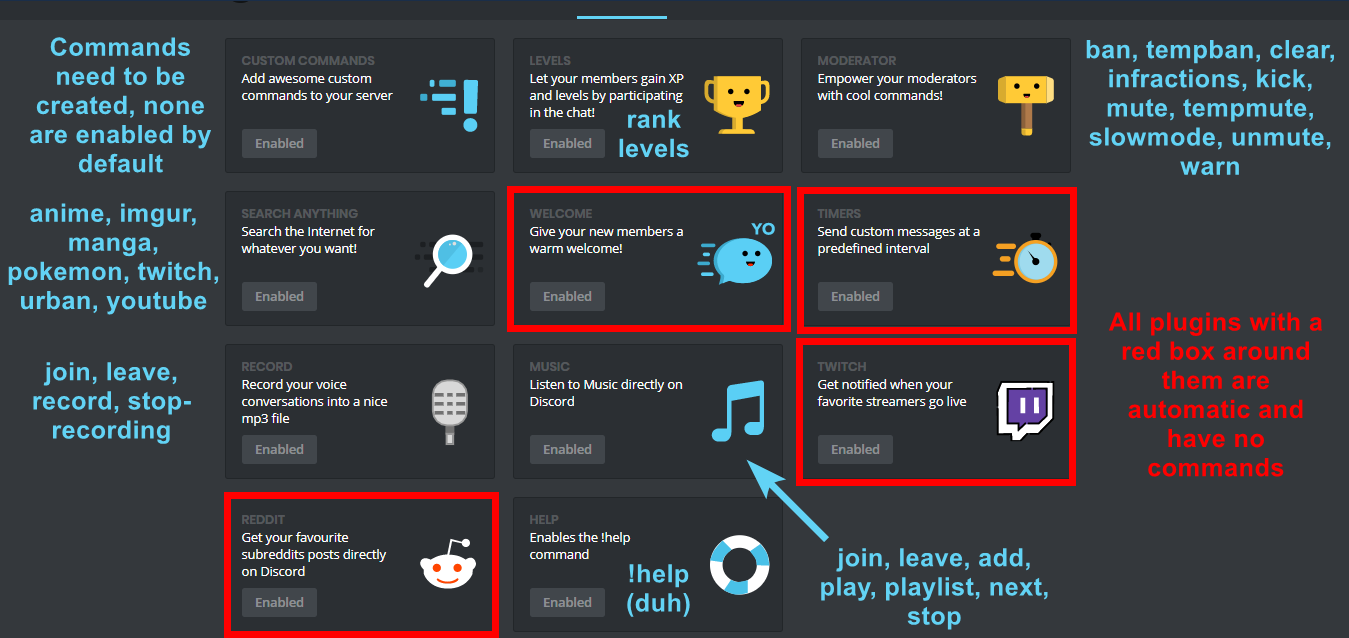
I am currently a modular bot. Nothing will be enabled by default and must be enabled in each plugin manually.
https://i.imgur.com/V93V8Dg.png
 flint plaza
where can i do that?
dire yarrowBOT
You can access my dashboard at https://mee6.xyz/dashboard, and login with your Discord Account.
flint plaza
thank you
buoyant moon
After a certain amount of time than I'm on the dashboard I'm getting back to the mainpage although I'm not doing anything
strong path
Hmmm... Lemme check something
Alright, seems like a known issue. But a dev may have a better answer
 wooden mountain
@buoyant moon we know, thanks for reporting anyway
buoyant moon
@wooden mountain yw
 waxen lagoon
Guys, why does not this option work for me? MEE6 just doesnt respond to the request
wooden mountain
are you saying what it sould search
waxen lagoon
he must respond to requests !youtube and !anime but he doesnt do anything (sry for my eng :c)
wooden mountain
!youtube music mix
dire yarrowBOT

Summer Music Mix 2018 - Kygo, Ed Sheeran, Camila Cabello, Calvin Harris, Selena Gomez - Chill Out Artists Featured on Mix Nation: David Guetta, Afrojack, Mat...
wooden mountain
!anime test
dire yarrowBOT

The story centers around Akihisa Yoshii, the "baka" of the title. His academy rigidly divides up the student body into classes based on the results of tests. The prodigies are in the A class with reclining seats complete with air conditioning, but Akihisa is in F class, the lowest rung of the school ladder which is furnished only with low, decrepit tables and worn-out straw tatami mats. A girl named Mizuki Himeji is actually one of the smartest girls in Akihisa's sophomore year, but she had a fever on test day and was pigeonholed into the F class. Besides Mizuki (who Akihisa secretly adores), the F class also has Yuuji Sakamoto, the class president who has been Akihisa's friend and partner-in-crime since the freshman year.
The school happens to have developed experiments to summon fantasy creatures, and Akihisa decides to rally F class to take on the higher-tiered classes and seize their perks. The F class uses the summoned creatures in an all-out battle for school supremacy.
⏳ Status
finished
🗂 Type
TV
➡️ Genres
Comedy, Super Power, School, Romance.
🗓 Aired
from 2010-01-07 to 2010-04-01
💽 Total Episodes
13
⏱ Duration
24 mn
⭐ Average Rating
77.01/100
🏆 Rank
TOP 944
wooden mountain
you need to specify what you want to search @waxen lagoon
waxen lagoon
he started working
dire yarrowBOT
So... @waxen lagoon, I've decided you should be level 1.
Don't get too excited, mmk.
cold bear
nvm
waxen lagoon
thanks very much for your help :3
buoyant moon

 distant dove
Bug: @keen linden is staff
 sage citrus
Bug: @distant dove isn't banned
buoyant moon
@distant dove this isn't bug Certified Admin is his nickname and he has admin perms too
 stoic pendant
Not sure if this has been reported, there used to be a "known reports channel" not sure where it went....but my YouTube mee6 announcements aren't sending through.
<@&193123929701875712> ^
 bitter owl
We are experiencing problems with youtube plugin and dev is working on a fix @stoic pendant
stoic pendant
ok ty!
strong path
!!tag clearinfo
 wind windBOT
The clear command allows you to clear the last xx amount of message or to clear one user without clearing anyone else.
Use !clear 1-1000 to clear the last xx messages (example !clear 10)
or !clear @name to clear all the message of @name in the last 100 messages
+ I need manage messages permission
+ I need view message history permission (otherwise I will respond with -1 messages cleared)
+ you need to check the checkmark next to clear on the plugin page.
+ you need to set your role as moderator (located at the top of the plugin page in the moderator tab)``` lime juniper
the !clear command isnt doing anything at all when i try to use it
dire yarrowBOT
So... @lime juniper, I've decided you should be level 1.
Don't get too excited, mmk.
strong path
Read top's message completely please
lime juniper
i did
 barren night
The timer time is not working properly right? Like when you edit the interval it'll keep posting at the original interval regardless of what you change it too correct?
strong path
Yeah, it's known
create a new one
Have you enabled the moderator plugin? @lime juniper
lime juniper
the command has worked before when ive used it in my server
strong path
Answer me please...
dire yarrowBOT
You can access my dashboard at https://mee6.xyz/dashboard, and login with your Discord Account.
lime juniper
i was trying to get it to work
strong path
Cooperate with me, did you enable the moderator plugin? Is it enabled?
lime juniper
also i managed to fix it
strong path
Alright
lime juniper
ty for the help tho
strong path
No problem 😄
 west crag
Mee6 didn't send the video announcements even it's been admitted in the right channel
strong path
Yeah it's bugged for now, they're working on it
west crag
but why other servers work?
strong path
It's working fine for some and not for others then apparently
west crag
😦
buoyant moon
Hello! having a problem with live announcements for twitch. It seems that if the user announced for have _ at the end of their username the bot just cuts that out of the link. Never had that problem before.
buoyant moon
okey, going to see if i can find that in the settings somewhere...
alright, hoping this works, thank you
dire yarrowBOT
Alright, @buoyant moon has been warned because 'Rude our #〉rules please. Next time, go to #〉commands for use bots commands.'.
buoyant moon
I have a Problem: I did reset all XP and there are no more XP coming for Members but they are writing
bitter owl
!!tag noxp
wind windBOT
If Mee6 isn't giving you xp, or either !rank or !levels is not working it is one of the following:
Reason 1: The levels plugins isn't enabled on the dashboard
Reason 2: You have a banned role on you (in which case you should remove it. Having a banned role also prevents !rank or !levels from working)
Reason 3: Bot can't read messages in that channel (for not gaining xp) or can't send (for !rank and !levels)
Reason 4: Rank cooldown. This used to be bugged, but in a recent update it got fixed. So if you have the rank cooldown set super high, set it lower so that the !rank command work
In case you don't know about banned roles, this pic shows->http://bit.ly/2F9Wflq
 limber knoll
Ss?
@worthy current why the random pings?
I meant your between here and support and not pinging it right
strong path
Don't channel hop ffs
limber knoll
Some staff get annoyed with that
strong path
smh
limber knoll
!invite
dire yarrowBOT
Lets spice this up a bit! https://discord.gg/mee6
If you want to invite the bot instead... https://mee6.xyz/dashboard
buoyant moon
Hi i have a problem , how can i go on the command panel on the website of Mee6 plz
limber knoll
Use that bottom link
buoyant moon
limber knoll
Yes
buoyant moon
k thanks ^^
limber knoll
Does invite and dashboard
 worthy current
Sorry
limber knoll
Keeps it simple
strong path
Green moved to #〉volunteer-support btw
 tough bluff
!nvite
limber knoll
Screenshot
buoyant moon
i'm not english*
tough bluff
eu sou br
 limber plover
I dont have other servers in the mee6 website
buoyant moon
You see ?
limber knoll
You only have one server
buoyant moon
no i have 2
dire yarrowBOT
So... @buoyant moon, I've decided you should be level 1.
Don't get too excited, mmk.
limber knoll
Owner of both?
limber knoll
Owner or admin perms?
limber knoll
Only if they are owner, have admin or manage server perms
dire yarrowBOT
So... @limber plover, I've decided you should be level 1.
Don't get too excited, mmk.
limber knoll
@limber plover not currently only way is for an admin or owner to give you manage server or admin perms
Or make your own Server
 upper ferry
The YouTube Plugin dont work !
 sick mango
X) jai di pareil mais pas dans le meme salon
upper ferry
AH
strong path
give role?
 blissful turtle
oui
blissful turtle
yes it is...
strong path
Make sure that MEE6's role is above the role it's trying to give and that it has the manage roles perm
https://birb.is-a-me.me/81d15f9a.gif
 blissful turtle
thanks I hope it'll works
dire yarrowBOT
It appears that you may be on the wrong account, or something went wrong since the time you logged into my website.
Please navigate to https://discordapp.com/channels/@me and select the gear in the bottom left, then press Logout.
After that, please navigate to https://mee6.xyz/logout to disconnect from our website.
Once finished, select "Add to Discord" again, and follow the instructions to access my dashboard again.
blissful turtle
et merci celia mais ne t'inquites pas, je parle plutot bien anglais 😃
strong path
read mee6's message @manic stone
 manic stone
Okay thanks
strong path
video, did it work?
blissful turtle
I'm trying, wait 1MN
strong path
kyuk
manic stone
Bah
strong path
she's logged into the wrong account
 raw scroll
ik
blissful turtle
thanks, it works
manic stone
Si j'ai un serveur. Mais il est déjà dans mon serveur mais j'arrive plus à l'avoir pour configurer des trucs.
@raw scroll
strong path
Can you translate for me, kyuk?
manic stone
Bah non...
raw scroll
If I have a server. But it is already in my server but I can not get it to configure stuff anymore.
manic stone
Je n'arrive pas à comprendre.
Help me.
raw scroll
@strong path
blissful turtle
but i've clicked on "delete the command message" but the message stay... is it normal?
dire yarrowBOT
So... @blissful turtle, I've decided you should be level 1.
Don't get too excited, mmk.
strong path
Did she not follow the steps in there?
strong path
It deletes the command invocation message @blissful turtle
manic stone
Traduis vite fait en français les étapes s'il te plait.
En tout cas je me suis deco et reco mais ça le mets toujours ce message.
dire yarrowBOT
So... @manic stone, I've decided you should be level 4.
Don't get too excited, mmk.
raw scroll
She does not understand English x) @strong path
blissful turtle
thanks for you're help
strong path
Alright, translate the following to her
dire yarrowBOT
It appears that you may be on the wrong account, or something went wrong since the time you logged into my website.
Please navigate to https://discordapp.com/channels/@me and select the gear in the bottom left, then press Logout.
After that, please navigate to https://mee6.xyz/logout to disconnect from our website.
Once finished, select "Add to Discord" again, and follow the instructions to access my dashboard again.
blissful turtle
your*
strong path
Doesn't have to be word-for-word
manic stone
;-;...
strong path
Just give her the gist
raw scroll
Il semble que vous soyez sur le mauvais compte, ou quelque chose s'est mal passé depuis votre connexion à mon site Web.
Accédez à https://discordapp.com/channels/@me et sélectionnez l'engrenage en haut à droite, puis appuyez sur Déconnexion.
Après cela, naviguez jusqu'à https://mee6.xyz/logout pour vous déconnecter de notre site Web.
Une fois terminé, sélectionnez à nouveau "Ajouter à Discord" et suivez les instructions pour accéder à nouveau à votre tableau de bord.

Discord
Step up your game with a modern voice & text chat app. Crystal clear voice, multiple server and channel support, mobile apps, and more. Get your free server now!
@manic stone
manic stone
MERCIIII
strong path
did you use google translator? <.<
blissful turtle
😉
strong path
Welp, hope she understands at least
raw scroll
yes
strong path
Did it work for her?
raw scroll
https://discordapp.com/ ouvre discord par navigateur
Discord
Step up your game with a modern voice & text chat app. Crystal clear voice, multiple server and channel support, mobile apps, and more.
strong path
Tell her to log on into the correct account on Discord on the browser
manic stone
Ok...
raw scroll
ouvre discord par navigateur
manic stone
Oui.
raw scroll
apres
selectionne l'engrenage en bas a gauche
et deconnecte toi
et maintenant connecte toi au bon compte
et quitte le site de mee6
upper ferry
The tempmute is bugged
raw scroll
et reouvre le
strong path
They can still talk, right? @upper ferry
upper ferry
Nop they can't talk
dire yarrowBOT
So... @upper ferry, I've decided you should be level 1.
Don't get too excited, mmk.
 glass silo
!clear 1
dire yarrowBOT
İTV-ismail a., it doesn't look like you can use that. 
raw scroll
bad word in turk
strong path
I seriously have zero patience right now, do you need help or not? @glass silo
upper ferry
I tempmute 1m, they can't talk,
Even after 1 minute
dire yarrowBOT
Alright, @glass silo has been warned because 'Bad word usage'.
raw scroll
@strong path he insulted in Turkish
upper ferry
Ok
upper ferry
!tempmute @Player#0000 1m
strong path
try 5 minutes real quick
upper ferry
Hmm
raw scroll
she is not there...
strong path
Let's wait
raw scroll
yeah
 lavish horizon
dire yarrowBOT
lavish horizon
dire yarrowBOT
NifixD, this command is disabled in this channel.
strong path
Make sure that MEE6's role is above the role it's trying to give and that it has the manage roles perm
https://birb.is-a-me.me/81d15f9a.gif
 faint bison
@buoyant moon thats caused by what ped is explaining
buoyant moon
the rôle is thefirst
faint bison
mee6 needs to be at the top
buoyant moon
Ooooh
faint bison
not the role
faint bison

buoyant moon
And , How can we get an infraction to someone ?
strong path
!infractions @user
buoyant moon
And after ?
cold bear
wait?
cold bear
!warn @user reason
buoyant moon
yes but i think it's just like a mention like : <@&453610540686639115>e
fock i really mention...
cold bear
you always could try to check
dire yarrowBOT
OfficialShamericaYT, this command is disabled in this channel.
OfficialShamericaYT, this command is disabled in this channel.
cold bear
!help
faint dome
dire yarrowBOT
Alright, @toxic oyster has been warned because 'Posted an invite'.
buoyant moon
everytime I try to open my server leaderboards, the screen is just grey
strong path
What browser?
strong path
try incognito mode
buoyant moon
explorer
strong path
np
dire yarrowBOT
Alright, @frank merlin has been warned because 'Bad word usage'.
dire yarrowBOT
Alright, @torpid perch has been warned because 'Posted an invite'.
 rigid veldt
la commande clear fonctionne plus chez moi une solution ?
clear command doesnt work you have a solution ?
sick mango
Vérifie quel est activer et que tu a l’es permission pour l’utiliser
dire yarrowBOT
So... @sick mango, I've decided you should be level 1.
Don't get too excited, mmk.
 fringe marsh
J'ai toujour le bug du chargement infinie sur le site internet
buoyant moon
Hi there
So
I have the automatic give role thingy on
And I have a role selected
But when one my of friends joins the server it doesnt give it to him
 hoary stream
Make sure the autorole perms are correct @buoyant moon
Mee6 needs to have Manage Roles and Mee6's role has to be above the one it is giving
dire yarrowBOT
Alright, @tiny spoke has been warned because 'Posted an invite'.
 sterile basin
Sometimes when i use the !clear Command The message isn't deleted immediately and stucked/Can't be deleted manually or anyway.
sterile basin
Maybe my internet isn't that good when it happens?
wooden mountain
Mee6 deletes teh message before you received it again
small bug in discord when a message get's deleted really fast after sending it
 elfin lodge
youtube notification is not working
limber knoll
@elfin lodge known
elfin lodge
ok
 polar spire
Hi yes when i enter the youtube plugin it wont show thw screen it would only show a black screen
The**
buoyant moon
Yt plugins are not stable yet...
 potent ether
Got the biggest bug ever
Once i send an invite link it automatically gets deleted because links are disabled, (video 1)

But when i send a message, edit the message and put the link in there it stays. (video 2)

<@&193123929701875712>
bitter owl
@potent ether Links can be disabled but you are still with Server Invites turned on
dire yarrowBOT
You can access my dashboard at https://mee6.xyz/dashboard, and login with your Discord Account.
bitter owl
☝ go there in moderator  -> automod -> Invites -> Turn off
faint dome
I think DjGoogle hasn't really understood.
Your bug is the fact that invites are not deleted when editing a message, right ?
@potent ether
 mortal oxide
MEE6 doesn't check edited messages.
Like the most part of bot.
I know one or two bots who do that.
dire yarrowBOT
Alright, @tepid raptor has been warned because 'Duplicated text'.
@tepid raptor did 'no ads here, especially using everyone tag' and got the ban hammer! 
 pale turtle
Ку
 harsh smelt
I find several bugs: when we make an order and we do not have permission to do it here or we are in cooldown the message does not come off and the same for mute / ban
leaden osprey
maybe interpunction would let me understand
 weary fern
I am having a problom
strong path
state said problem
weary fern
ok it doesn't let me switch discord acc
cold bear
https://discordapp.com/channels/@me <- go there and logout
then logout on mee6 website
 civic pine
youtube plugin isnt working anymore
 tropic spindle
@civic pine i think it's a known issue - in another channel recently:
How long does it take mee6 to post a YouTube video that was recently uploaded to a channel ?

Certified Uncreativity ✓ - Today at 4:20 PM
It usually shouldn't take long, however currently youtube is bugged```So... @tropic spindle, I've decided you should be level 1.
Don't get too excited, mmk.
buoyant moon
the mee6 in my server has an error with verifying people
 unborn rapids
What is happening with the youtube plugin
unborn rapids
Like it won’t upload regularly
Like youtubers in my discord post and it isn’t posted
leaden osprey
youtube plugin is bugged, known bug
 brave patrol
do you know when the youtube feature will be fixxed?
buoyant moon
No ETA on bug fixes/
brave patrol
ok ty
buoyant moon
@brave patrol
brave patrol
?
buoyant moon
I ment
Can U PLEASE Fix This Each Time I Say "!rank" I My Server mee6 says "seems you have not been ranked yet MEEHEHE6" and I was the owner so why and how will I ever we my rank @buoyant moon
can someone teach me how to use the bot?
@buoyant moon type in !help silly
 narrow cosmos
!help
brave patrol
!rank
dire yarrowBOT
Oscar, this command is disabled in this channel.
buoyant moon
I can't mute bois in my server
Pls help
papa bless
I used the website to activate commands n such
to mute folks
bitter owl
This is probably because mee6 doesn’t have admin nor manage role to give to that person muted role
buoyant moon
i gave it admin
lemme see
@bitter owl the mute command worked minutes ago, now it won't
bitter owl
Check if any changes were applied @buoyant moon
buoyant moon
mkay
dire yarrowBOT
!mute @CoolGuysNameHere You have been too cool.
!tempmute @SecondLameGuyHere 3h Too lame.
- I must have "Manage Channels", and "Manage Roles" for my permissions.
- I must have a role above the "Muted" role I create.
If there are problems, please check that the Muted Role does not have send messages globally or per channel.
bitter owl
☝
dire yarrowBOT
@buoyant moon did 'offensive' and got the ban hammer!
 deep pebble
Doesn't actually do the emojis or pings the role.
also it's extremely late to post the announcement.
but better late then never.
bitter owl
You need emoji’s id
deep pebble
Oh and variables don't show up in the plugin.
bitter owl
Use \ in front of :rosey: emoji. Copy the numbers and everything else in the message
Post in the message and it will be reproduced
deep pebble
and do :(id):?
bitter owl
Also, youtube is a little bit bugged yet
deep pebble
would i do :(id): in the plugin?
bitter owl
ie: #〉volunteer-support -> \#support -> [#〉volunteer-support](/guild/159962941502783488/channel/176559797888352256/)
bitter owl
But with emoji
buoyant moon
This has been mentioned in #〉volunteer-support the other day however it's now happening to a user in a server I help with. He's been getting direct messages whenever he levels up however I have the level up message set to Current Channel. It's a reoccurring bug.
buoyant moon
If you add a YT channel and press many times the add button it duplicates the channel as many times as you click it.
@bitter owl have you tried that one?
bitter owl
Yes we are aware of that
buoyant moon
i need to admit it makes my life easy but it may cause issues
dire yarrowBOT
So... @buoyant moon, I've decided you should be level 3.
Don't get too excited, mmk.
west crag
hi?
I want to ask that why this is an Duplicated text?
even this guy only posts once
 prisma wharf
A guy messing with another bot in a discord i moderate in got warned for duplicated text even though i don't really see any duplicated text in it
limber knoll
Hmm looks duplicated text
More around pokemon id and the command
@prisma wharf👆
And the word pokemon shows a few times
west crag
We would see that when the common messages are sending many times by a person at the moment, the bot will consider it duplicated text
dire yarrowBOT
So... @west crag, I've decided you should be level 3.
Don't get too excited, mmk.
 pulsar fox
New Bug:
Developers have yet to delete the Mee6 Bot.
sage citrus
@WHASonYT#0735 smh
strong path
banned
 sterile elbow
Hey I've got some issue using the timer feature.
-It doesn't actually uses the 12 hour gap (it appeared within 5 hours)
-Even though I used a unique name for the Bot it still appears as MEE6?
Suggestions:
Would there be able to set a specific timezone for timer? (it seems a bit random at the moment)
Could there also be a setting of 24hours. So it only appears once a day? or a more flexible timer. that could shows up at specific times.
<@&193123929701875712>
limber knoll
@sterile elbow confirming that you have not updated the timers timing?
As in you have not updated an existing timer time settings
sterile elbow
No this was set up last night around 11pm UK time.
So it showed up 1am in the UK time morning, and then 6am again
but i've set it to be 12 hours
limber knoll
Ok can i get your server id please
Other thing is timers are user activity dependant
But that shouldn't explain the every 6hr posting
sterile elbow
436651834241843202
here you go
so when you say user activity dependant. Does that mean I have to be online for the bot to perform?
pale turtle
Они топы
sterile basin
Please type your message in english so we/they can understand it clearly.
sterile elbow
@limber knoll hey, the message popped up again at 11:01am……any way I can track this support and the progress on this? This seem way too frequent for a 12 hour setting. And it doesn’t seem to follow that setting either
limber knoll
Ok
Remove the timer and readd it with 12 hours maybe it. Will fix itself otherwise just ping support here.
 icy sigil
I can't access the website at https://mee6.xyz/ and no other similar links can be reached I get the message "mee6.xyz’s server IP address could not be found." @limber knoll
limber knoll
icy sigil
I sadly can not reach that either
limber knoll
Pc?
icy sigil
yeah, I also tried it on Internet explorer so it should not be Chromes fault
limber knoll
Ok windows?
icy sigil
Yep, Windows 10, should be up to date
icy sigil
okay
dire yarrowBOT
You can access my dashboard at https://mee6.xyz/dashboard, and login with your Discord Account.
icy sigil
I did it, a tab popped up and then went away and when I tried to access the site it still says "mee6.xyz’s server IP address could not be found."
I will try restarting
icy sigil
I have it will try, thanks for the help :)
dire yarrowBOT
So... @icy sigil, I've decided you should be level 1.
Don't get too excited, mmk.
limber knoll
Np
icy sigil
I have disabled adblock as in disabled the extension in the extensions menu, it still does not work though, do you think I have to remove it completely @limber knoll
icy sigil
still gets the same message, I will try it on another device
It's my wi-fi that's blocked, thanks for the help once again :)
limber knoll
Np
wind windBOT
Make sure that MEE6's role is above the role it's trying to give and that it has the manage roles perm
https://birb.is-a-me.me/81d15f9a.gif
limber knoll
@obsidian chasm 👆
 obsidian chasm
Ok! thanks
 spice prawn
No !rank cards in my server....
strong path
Make sure the bot has attach files perm
spice prawn
Thx!
 forest badger
!rank
dire yarrowBOT
David da cool kid, this command is disabled in this channel.
forest badger
Oopsi sorry
sterile elbow
@limber knoll hey, what about the naming part? Would I be able to change that or?
 misty dragon
I cant use more MEE6 in my discord channel... 😦
strong path
Elaborate, please
misty dragon
in my discord channel, created by me, when i go to the web page to use the MEE6, my server says that i dont have permission :I
strong path
You're the owner?
strong path
Make sure you are logged into the correct account
dire yarrowBOT
It appears that you may be on the wrong account, or something went wrong since the time you logged into my website.
Please navigate to https://discordapp.com/channels/@me and select the gear in the bottom left, then press Logout.
After that, please navigate to https://mee6.xyz/logout to disconnect from our website.
Once finished, select "Add to Discord" again, and follow the instructions to access my dashboard again.
misty dragon
yes i am, because all the servers i am and i have permission, i can use the commands, and are my friends servers, people i know in real live...
ill try MEE6 message
ok thanks Mee6, i can use commands in my channel 😃
sorry wasting your time
 kindred pelican
mee6 still ignoring bots?
harsh smelt
the plugin Moderator lag ! can you fix please ?
cold bear
@kindred pelican yes
@harsh smelt what lag?
strong path
birdie, he's talking about automod btw(miss)
sage citrus
This looks like someone reported a bug in #〉suggestions
harsh smelt
it's very low when I click for add banned channel or role 😦
 viral comet
#channelname not working
sage citrus
^ they mean in the Welcome plugin they can't link to a channel, if they use the ID then it won't save and if they just type/select the name it doesn't link
strong path
dire yarrowBOT
Alright, @buoyant moon has been warned because 'Posted an invite'.
Alright, @buoyant moon has been warned because 'Posted an invite'.
buoyant moon
.
dire yarrowBOT
Alright, @buoyant moon has been warned because 'Bad word usage'.
buoyant moon
WHY
dire yarrowBOT
Alright, @buoyant moon has been warned because 'Capital letters'.
buoyant moon
..
dire yarrowBOT
Alright, @buoyant moon has been warned because 'Bad word usage'.
 fast ledge
haha
 arctic lava
..
 dire nebula
what is panel link
sterile elbow
Hi there, @limber knoll , I don't think the amendment worked. I saved the timer at 1 minute and then changed back to 12 hours. Yet it still just showed up now. Some help please? Also this is in a different channel too.
dire yarrowBOT
So... @sterile elbow, I've decided you should be level 2.
Don't get too excited, mmk.
limber knoll
@sterile elbow updating timers will fail it needs to be a fresh timer
Can i get your server id again also please
 glad mortar
!!tag timer
sterile elbow
@limber knoll I see! got you. Yeah my ID is 436651834241843200
I'll give it another go
em..so there's a new error that doens't seem to allow me to add a new one?
sterile elbow
Tried again,..still failed
sage citrus
@sterile elbow Make sure there are not 10 webhooks in the channel
sterile elbow
I also noticed that setting background to transparent only worked when I use my rank card but nobody elses? Is this a bug or?
sage citrus
that's intended
sterile elbow
@sage citrus there are currently 6
sage citrus
changing your rank card changes it for you for all servers
sterile elbow
but not everybody elses ?
sage citrus
yeah, everyone sets their own rank card
sterile elbow
latest chrome on mac
sage citrus
hmm
sterile elbow
oh this is interesting
it worked for other channel
but not for a specific channel I wanted to set it to
sage citrus
and you're sure the channel doesn't have 10 webhooks?
buoyant moon
Hello im the helper
sage citrus
what
sterile elbow
@sage citrus it had more than 10 lol. I'll recreate them again
sage citrus
lol
 left aurora
hello guys
i want to report something
on my server i nicknamed the bot
to welcomer
but the commands and features of the bot when he does any of em he type in the name of mee6
i know its ur right and all but could u not make like that plz
bitter owl
That’s not a bug. That’s probably your discord cache experiencing problems. And if you chose timer, it’s not mee6 but a webhook just pretending to be the bot
@left aurora
left aurora
I chose the timber y
That means it wont get fixed ?
Itll keep showing like that ?
Timer *
 pure obsidian
Inside the moderator plugin on dashboard, scroll down to commands
pure obsidian
 summer hornet
Oh okay I think is was removed thanks
 torn shard
And we have a bug..
dire yarrowBOT
So... @torn shard, I've decided you should be level 2.
Don't get too excited, mmk.
torn shard
Won't let me temp mute
pure obsidian
How are you using the command?
 fallow crystal
Is it normal that the bot doesn't post uploads from the added channels
sage citrus
the YouTube plugin is broken
kindred pelican
Any progress in fixing mee6 not automodding other bots?
limber knoll
It was programmed not to listen to bots to prevent abuse
kindred pelican
No, it has a toggle that's broken
This is a known issue, I'm requesting an update on a fix
limber knoll
Not seen any new news on it just had a look
kindred pelican
I feel like it's never gonna get fixed because I seem to be the only person who used mee6 for this :/
limber knoll
@strong path they wants an update
strong path
I thought that you didn't know what he's talking about, sorry
limber knoll
Nah i clicked soon after they showed me and went hunting
 shell yew
 mortal oxide
You don't start with 0 xp. But you start with nothing.
dire nebula
what is panel link
dire yarrowBOT
So... @dire nebula, I've decided you should be level 1.
Don't get too excited, mmk.
dire nebula
?
dire yarrowBOT
You can access my dashboard at https://mee6.xyz/dashboard, and login with your Discord Account.
 somber gulch
Are the timers still bugged?
buoyant moon
Hello. MEE6 used to always work. I own 6 servers and the bot has shut down or something?
strong path
What's the problem?
 ornate dome
pure obsidian
ornate dome
pure obsidian
Does Mee6 have permission to kick (in his role) and is his role above the role of the user he is trying to kick after exceeding specified number of infractions?
strong path
ok?
 pale parcel
i set the timers for every 12 hours but they keep going of evey 2 so ive had to disable them all
 spring skiff
layin down the law
 tidal verge
dire yarrowBOT
tidal verge
dire yarrowBOT
Alright, @magic geode has been warned because 'Posted an invite'.
buoyant moon
i seem to be having a problem with setting up the bad words plugin, when i type in the words an update button doesnt appear and when i press ok and then save changes the words just dissapear, am i doing something wrong?
dire yarrowBOT
 strong path
np
 robust star
it was working an hour ago but now it's not working 🤔
strong path
give role command?
robust star
yes
dire yarrowBOT
So... @robust star, I've decided you should be level 2.
Don't get too excited, mmk.
buoyant moon
hello
 untold edge
I think there is an issue with the YouTube plugin. I set it up to post in my general channel when I upload a new video. I exported a video from Twitch and there was no post made.
strong path
Youtube is bugged for now
robust star
what about give role
strong path
oh sorry, I forgot about you 😅
robust star
😃
strong path
Make sure that MEE6's role is above the role it's trying to give and that it has the manage roles perm
https://birb.is-a-me.me/81d15f9a.gif
robust star
thank you 👍
actually that didn't work too. the problem is about mee6 i think bc it was working like an hour ago
cold bear
do that command remove other roles?
cold bear
doesn't matter if it worked before
if you don't have roles mee6 tries to remove, you will get error message ,that's known bug
robust star
but it was giving one role and removing the other one before
now it's just deleting the role that's the thing confuses me
wind windBOT
 OfficialShamericaYT#4140 was banned
wind windBOT
SAIF_D4_KING#2478 was banned
 earnest oasis
😭
sage citrus
@earnest oasis MEE6 does not have permission to give the user their role
- make sure it has the Manage Roles permission
- make sure its role is above the notifications role: https://birb.is-a-me.me/81d15f9a.gif
sage citrus
its the same thing
earnest oasis
Ok look...
 sage citrus
yw
strong path
You mean the invite?
earnest oasis
😭
harsh smelt
@wind wind
 lyric pine
Mee6 isn't assigning the role reward I set up :\
leaden osprey
@lyric pine is mee6’s role above the level rewards?
and does it have manage roles permissions
sage citrus
@earnest oasis do you have the role(s) the command should remove?
sage citrus
@earnest oasis do you have those roles
sage citrus
hm interesting
<@&193123929701875712> Jerome has an issue where his custom command to remove roles gives an error. The bot has permissions and is above the roles that should e removed, and he has the roles that should be removed.
 tired patio
oh french discord server
 muted pecan
Bad words not working as desired
bitter owl
@muted pecan Bad words won't be filtered if you can control mee6 (or anyone else)
bitter owl
If you have access to mee6 dashboard, you can not be censored by the bot
You need to use a friend to test
muted pecan
Hah. Thanks
bitter owl
Or an alt account
muted pecan
I appreciate you sir. Gave a good one
bitter owl
You are most welcome
 lilac path
Can I get some help with this error I'm getting when trying to set a timer in one of my channels? Appreciate it
strong path
How many webhooks do you have?
lilac path
None
I've deleted them all
since i got this message
UNless i didnt delete correctly
strong path
Are they still in your server? In server settings > webhooks
 heavy trail
i have a problem when I type a command the bot tells me "Oops, something went wrong in MEE6 land!"you can help me to repair this error?
pure obsidian
@heavy trail What command?
heavy trail
a custom command
pure obsidian
what is the custom command intended to do?
heavy trail
this command give a role
pure obsidian
make sure:
- Mee6's role is above the role its trying to give or remove
- Mee6 has manage roles permission
pure obsidian
and is Mee6's role above the role he is trying to give?
heavy trail
no
dire yarrowBOT
So... @heavy trail, I've decided you should be level 1.
Don't get too excited, mmk.
pure obsidian
Then put Mee6's role above that role.
pure obsidian
👍🏽
 winter wasp
Same bug with a custom command. Mee6 have to remove the user's role and give him an other one.
But the answer is :
"Oops, something went wrong in MEE6 land! SAD6 This error has been reported to our Team. We'll work hard to fix it."
pure obsidian
Not a bug, reiterating what I said to the previous user above, make sure:
- Mee6's role is above the role its trying to give or remove
- Mee6 has manage roles permission
winter wasp
I did it
pure obsidian
Are you sure? can you double check?
winter wasp
It doesn't work
pure obsidian
Okay then, alternative solution:
dire yarrowBOT
Hey! You may have a integrated role, from when you added me. If you have http://i.imgur.com/CysWAv0.png above my role, try kicking me and re-inviting me to your server.
However, make sure that you uncheck everything in the default permissions list. This also gives you one less role to deal with that you can't delete! :)

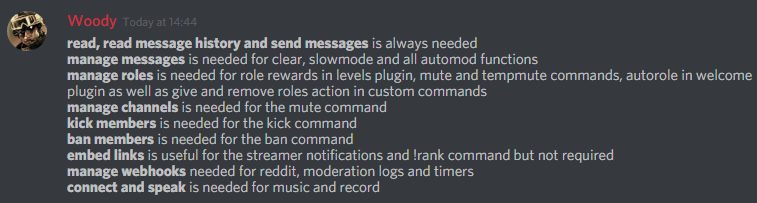
Full List of my Permissions that I use...
https://i.imgur.com/3Wd5wKZ.png
 pure obsidian
@winter wasp get rid of the buggy integrated role and make sure to assign Mee6 a role with the necessary perms
winter wasp
Ok thanks
pure obsidian
Please test it, and let me know of the results..
winter wasp
Always doesn't work
pure obsidian
can you screenshot me the custom command? and how are you using it?
winter wasp
Ok
dire yarrowBOT
So... @winter wasp, I've decided you should be level 1.
Don't get too excited, mmk.
pure obsidian
@winter wasp Can we also have a screenshot confirming mee6 has manage roles perm and is above those roles trying to give and remove?

^level rewards, but same applies to custom commands that give or remove roles
pure obsidian
let me run a few quick tests and come back to you
winter wasp
Ok
pure obsidian
nope, I got nothing...this is beyond weird, you should let a support staff check your server.
<@&193123929701875712> 👆🏽 can you help please? tried almost all solutions and role give/remove custom commands still fail
 ionic meteor
gotta get something real quick, then Ill check it out
winter wasp
Ok
ionic meteor
@winter wasp can you DM me an invite please?
 haughty topaz
I can not clear chat in wtf
strong path
!!tag clearinfo
wind windBOT
The clear command allows you to clear the last xx amount of message or to clear one user without clearing anyone else.
Use !clear 1-1000 to clear the last xx messages (example !clear 10)
or !clear @name to clear all the message of @name in the last 100 messages
+ I need manage messages permission
+ I need view message history permission (otherwise I will respond with -1 messages cleared)
+ you need to check the checkmark next to clear on the plugin page.
+ you need to set your role as moderator (located at the top of the plugin page in the moderator tab)```Please read the information above your message (by @wind wind)
 finite forge
I have a custom command for removing a role and it won't work
I gave myself the role with another custom command
!!help
viral comet
the youtube notifier cant mention user and role
strong path
!!tag id
wind windBOT
To use some stuff in custom command or any other text from Mee6 you need to use the ID:
First get the ID of that object by typing it in your server with a\ in front:
Emoji:  ➡ <230340006219087873>
Mention: <@&435889630408081408> ➡ @dire yarrow
Channel: #〉announcements ➡ [#〉announcements](/guild/159962941502783488/channel/159962941502783488/)
Then copy that ID(with the < > and everything in between),
Now paste that in your custom command, welcome message, stream announcement, etc...
https://cdn.discordapp.com/attachments/235378515866812417/269195258640728075/2017-01-12_22-05-03.gif

 torn mural
 sterile token
sage citrus
sterile token
sage citrus
@winter wasp did your issue get resolved?
 fervent wasp
hello one thing the bot does not place the muted well
 upbeat yoke
!rank
dire yarrowBOT
Meliodasdragonsin, this command is disabled in this channel.
 mystic galleon
a
 edgy halo
So, today in a server that I’m an admin in, the Mee6 bot went a bit crazy. He started to randomly @ everyone with a few different messages he would use each time, and he would say something related to the Bee Movie. He has currently stopped the @s but I tested to see if he was working properly with a simple”!help” command and it appeared like normal, though the first thing he said was the Bee Movie thing. I have screenshots if needed.
I’m getting new information from someone who was ther when it happened ( I was offline ) and they said that the Mee6 was a different user.” The user had the Mee6 profile picture, thiugh the mouth was open like the icon of thhis server, but it had no profile, or user number. The odd this is is that is still had the “BOT” thing by it’s name and did the same commands as the normal Mee6.
The Mee6 I tested the “!help” command on the was the good Mee6, so I don’t understand why it’s acting like the other.
 half sable
In my server, I enabled a command where MEE6 uploads videos from a specific YouTube channel, which is my channel. When I uploaded 3 videos, not one single video was posted. I enabled all of MEE6's permissions and checked my server dashboard and MEE6 is allowed to post my YouTube videos on my Discord server. The odd thing is that it does the same commands as the normal MEE6. Is there any help?
edgy halo
No
 dusty apex
@half sable currently the youtube plugin is broken but we are hoping it will be fixed soon
buoyant moon
it was never fixed soon
half sable
@dusty apex Ah... okay. Thanks!
 lean sphinx
@half sable yeah, for some reason, some youtube channels do not get announce. We are working on it 👌
half sable
@lean sphinx Alright thanks!
sage citrus
@edgy halo someone with the Manage Server permission was abusing  Timers
 nimble nacelle
My mee6 wont give me cookies
sage citrus
its a webhook which is what the Timer system uses
edgy halo
Hmm ok thank you
dire yarrowBOT
So... @edgy halo, I've decided you should be level 1.
Don't get too excited, mmk.
 exotic grail
hello, i would like to report a level glitch. so, when i put the creator role to the no XP roles, it keeps on giving me the level 0 role. could u guys fix this?
native anvil
Do you want zero xp or no?
buoyant moon
The server i created
When i wanna mute someone it wont
It will give them a role called muted
native anvil
If anyone has a no-xp role, they won't gain xp. It overrides the gain-xp roles
So... You are level zero, with no xp in it. Which is what you want, right? @exotic grail
exotic grail
i just want my creator role to have no level roles.
dry glen
Xp*
native anvil
Which it has, since you set it as a no-xp role
exotic grail
okie. srry to bother u
native anvil
Just not sure what you meant by bug is all
exotic grail
yea. i guess..
 unkempt flint
Oh hey, just saw this happen in one of the Discord servers that I hang out on, might want to have someone take a look at that. (And I know it's a server-side issue rather than a client-side issue such as fonts on my computer, because the text is baked into the image file before it's even sent through Discord...)
dry glen
It’s his name
unkempt flint
Probably just need to use a version of the font with cyrillic characters in it, if I had to guess.
dry glen
Well some names won’t show in the card so yeah
unkempt flint
Still, at least it looks like something relatively simple to fix, just a little work on the font it uses to generate the card (or a different font that already has that character set, I suppose).
mortal oxide
We currently Support for !rank-card alphabetical characters and whole numbers (1; 2; 3 supported π isn't). We also don't support Russian, arabic, korean alphabets etc.
Same for emoji obviously.
sage citrus
@buoyant moon you mean the person can still send messages when the have the muted role?
kindred pelican
At what sort of rate do issues with the bot get fixed? Like is it just one guy or?
dire yarrowBOT
So... @winter wasp, I've decided you should be level 2.
Don't get too excited, mmk.
 gilded knot
Hey, live notification from youtube doesn't work very well can you fix it ?
strong path
Yeah they're working on it
gilded knot
Ho cool ! Any date ?
strong path
No, sorry
dire yarrowBOT
Tech Support Scammer, this command is disabled in this channel.
strong path
 rugged cypress
MEE6 doesn't send notification anymore for youtube vids that have been uploaded, is this a common bug or am I the only one with this problem?
faint bison
bugged
rugged cypress
alright thanks
buoyant moon
<@&193123929701875712> Mute is not working.... even tho muted person is not admin
wind windBOT
It's because there's another role allowing people to write, which overrides MEE6's muted role
So instead of giving (write -  ) perms to another roles and (
@everyone -  ) in text channel,
The ideal to make everything work good is: (@everyone -  ), (unwanted roles and muted {from MEE6} - )
 buoyant moon
ok thanks
 dusky mirage


 strong path
What's the problem?
buoyant moon
it didnt work >.<
<@&193123929701875712> i did that but it didnt work
<@&193123929701875712> ? T_T
buoyant moon
yes they got it
cold bear
!!tag mutehelp
wind windBOT
Prerequisites:
- Moderator plugin is enabled
!mutecommand isn't disabled- Bot has role with Manage Role permission
- Muted role is under MEE6 role
- You're trying to mute someone using
@mention, not justusername
If user got Muted role but still can talk means there's issue with your channel permissions
Go to Channel Settings -> Permissions
- If that's public channel that can be accessed by anyone:
- Set
Send Messagesfor all roles except Muted - Set
Send Messagesfor Muted role
- If that's secret channel that requires *special* role to access it:
- Set
Send Messages Read Messagesfor for special role - Set
Send Messages Read Messagesfor Muted role - Set
Send Messages Read Messagesfor@everyonerole
cold bear
set your perms correctly, this is not bot issue
 fervent cairn
Sa
 warm raft
!next
dire yarrowBOT
Alérian, this command is disabled in this channel.
buoyant moon
Mee6 on my server seems to take a while to post my videos
It still hasn't done it today
dusty apex
is it youtube?
dusty apex
the plugin is rn broken
buoyant moon
Okay, that answers that question
dusty apex
np 😃
buoyant moon
How long will it be down?