#〉bugs-reports
2 messages · Page 28 of 1
 strong path
 white notch
use Chrome instead
strong path
Sil's post got deleted?
white notch
yes, but Safari is still a browser not supported by the website
strong path
ah, ok
 broken stirrup
strong path
broken stirrup
strong path
!logout
 dire yarrowBOT
oops, it looks like you are on the wrong account, you need an account with 'manage server' permissions.
You have to log out from discordapp.com in that browser and then log back in again.
- log out of discordapp site https://discordapp.com/channels/@me and follow the steps in the gif below
- go to http://mee6.xyz/logout and click the 'add to discord' button
https://i.imgur.com/7829TNS.gifv
 strong path
could be this
strong path
np
strong path
Huh?
 bitter owl
@pastel mango Dev is fixing and testing stuff
But not fixed yet #425409486820474881
Only going to be officially fixed when it's not in this channel anymore
But thanks for feedback
 pastel mango
ok thank you!
 torn tide
Seems the reddit plugin is working now
bitter owl
Under tests @torn tide not officially fixed
torn tide
Well it works on my server ^-^
bitter owl
But if it stops working don't yell at us please
Since it is being tested by the main dev
 buoyant moon
When a link is posted to reddit, on mobile mee6 only shows the url of the article, not to the Reddit comments.
Ideally it would be better to have a url to the community comments.
 wheat tangle
Mee6 doesn't stop spamming reddit posts even tho I disabled it
someone help, its anoying af
white notch
Delete the webhook for the channel
white notch

 lone creek
@Delta#5728
 violet harness
Can't sign into the dashboard
 safe musk
MEE6BOT - Today at 12:30 PM
Oops, something went wrong in MEE6 land! :SAD6: This error has been reported to our Team. We'll work hard to fix it.
violet harness
That too
 faint bison
dashboard should be up now
dire yarrowBOT
https://mee6.xyz/dashboard press add to Discord, then select your server
 lime ocean
at the website if i want to log in or add the bot to a server
 dense fox
Its up refresh
 hoary scroll
The Site is again or still down 
dense fox
Up now
buoyant moon
Why ?
strong path
Sheesh
buoyant moon
@wooden mountain Why??
strong path
Just think about why things in life need maintance sometimes
And don't ping him for that 😑
dense fox
Pointless
 scarlet sinew
Lol
buoyant moon
Ok and he his back at what time ?
scarlet sinew
Is mee6 gonna be restored by today
dense fox
The website and bot are undergoing a 10 minute maintenance, please wait until it is finished.
scarlet sinew
Ok thanks toxic
buoyant moon
My bot isnt working
dense fox
The website and bot are undergoing a 10 minute maintenance, please wait until it is finished.
strong path
@dense fox ok stop 😅
buoyant moon
Still under mainentrance?
dense fox
Yes
buoyant moon

 wooden mountain
maintence, pls wait
and don't dm staff
 pulsar kettle
hai
 honest flint
Mee6 seems to be back up (on our server at least). Everything looks to be working okay except for one strange issue that just cropped up...
We use a custom command to welcome new (approved) members. It sends a message to a channel starting with @everyone. This has worked fine for the last week, including last night. But now after today's maintenance, it's inserting a space like @ everyone which breaks the mention. I've double-checked in the dashboard that there is no space in there. Any thoughts?
wooden mountain
intended behavior
honest flint
This just broke today, and there have been no new #425409486820474881 for 5 days
Intended behavior... Did this change today? So we can no longer use Mee6 to @everyone?
honest flint
Alright -- I guess I can live with that. What I'm saying is that this was definitely working yesterday, so it seems to be a change.
buoyant moon
Is "!role-info" in development still?
wooden mountain
!role-info developers
dire yarrowBOT
Role Name
Developers
RoleID
400016048952442890
Users in Role
5
Mentionable
No
Hoisted
No
Color
#d32929
Server Name: MEE6 Community | ServerID: 159962941502783488
wooden mountain
no
strong path
I was about to share a screenshot xD
buoyant moon
Ooooooohhhhhhhhh. So you have to have the role name after it....ooohhh. I'm retarded......
wooden mountain
how else are you going to tell the bot what role you want the info for?
buoyant moon
Yeah, I didn't think of that, I'm slow asf today 😂
 cold bear
check bad words list in mee6 settings
if you used some kind of bad words list it apparently contained phrases with a, an, in, at, on, etc words
 silk phoenix
It was in this server
cold bear
everyone is added as bad word cuz alot of people trying to use it to bring attention
pathetic cuz it's obviously disabled on big servers
 sterile flare
Mee6 no longer seems to announce when any channels go live using the Twitch plugin on my server, yet another server with the exact same Twitch channel being announced works fine...
 leaden osprey
@sterile flare known bug #425409486820474881
sterile flare
Oh rip
 fervent shell
The timers are working at my server since a few minutes 😉
thanks you for fixing that
bitter owl
Well final tests are being made. So they can stop working at any moment. When they back again will be fixed for good. So be aware of. Thx for feedback @fervent shell
honest flint
When using Mee6 to send random responses, emoji / emotes don't complete (see screenshot). It does work with other types of responses using built-in, custom, and external emoji.
dire yarrowBOT
So... @honest flint, I've decided you should be level 1.
Don't get too excited, mmk.
honest flint
Clarification -- emoji at the END of the message don't complete
dire yarrowBOT
to use some stuff in custom command or any other text from Mee6 you need to use the ID:
first get the ID of that object by typing it in your server with a \ in front:
emoji: \ ➡ !soontm
animated emoji: \ ➡ !baguette_spin
mention: \@dire yarrow ➡ @dire yarrow
role: \<@&325291851106091019> ➡ <@&325291851106091019>
channel: \#announcements➡ #announcements
then copy that ID(with the < > and everything in between),
now paste that in your custom command, welcome message, stream announcement, etc...
https://cdn.discordapp.com/attachments/235378515866812417/269195258640728075/2017-01-12_22-05-03.gif
 honest flint
Okay, thanks. Just pointing it out as an inconsistency, then -- because the "raw" emotes like :youtried: do work elsewhere in Mee6 commands.
bitter owl
It's discord syntax
 faint dome
Twitch seems broken again
white notch
known
buoyant moon
Timer plugin is broken\
dense fox
Its fixed
strong path
No wait
dense fox
Delta said it is
dense fox
Ok sorry
strong path
No worries
buoyant moon
hey
dire yarrowBOT
So... @buoyant moon, I've decided you should be level 1.
Don't get too excited, mmk.
white notch
or you guys can be more helpful and ask why it's not working
buoyant moon
lol
strong path
That's what I would've done... <.<
white notch
@buoyant moon so how exactly are timers broken for you?
buoyant moon
i set it for 1min then changed it for 12 hours still does 1 min
white notch
try deleting the timer and re adding it
strong path
He's afk for a bit, just wait a little bit
buoyant moon
lol
buoyant moon
hey ped
 dapper pebble
Been attempting to set up a message on a timer of 8 hours, over 3 days the message never came up once. When I set up a new message on a 5 minute timer to test it, it worked. When I changed that message to 8 hours with the content I wanted it to have, it kept on with the 5 minute intrevals even after I deleted the timer, and only stopped when I disabled the plugin.
buoyant moon
@dapper pebble This is a #425409486820474881 as of now, the developers are trying their very best to fix this. Along with Twitch, which is suffering the same problem as well.
dapper pebble
Big oof I didn't even check
white notch
fun fact: it's not listed in there
buoyant moon
Well they still having issues with timers, so I don't know.
dapper pebble
Bigger oof
buoyant moon
lol
 jade pine
 thin merlin
put the Mee6 role in settings of server above the role it is trying to give
mee6 will not mention @ everyone or @ here
oh nvm is know
 spice quail
Hi there,
Can't create Timers
this is the error....
cold bear
@spice quail means channel already have 10 webhooks. go to channel settings and remove the ones you don't need
 inner trellis
Hey
i can't modify role rewards, maybe beacuse i have too much
yeah, maybe
wooden mountain
what server? just the name is enough
wooden mountain
seems fine to me
https://mee6.xyz/dashboard/378621289654386694/levels this one right?
wooden mountain
wich one are you trying to change?
wooden mountain
is it? i can't see that as my internet is always shit
dire yarrowBOT
Alright, @rough kestrel has been warned because 'Posted an invite'.
Alright, @rough kestrel has been warned because 'Posted an invite'.
Alright, @rough kestrel has been warned because 'Posted an invite'.
spice quail
@cold bear i will ckeck that....Thanks
 chrome haven
hey, i already added the mee6 bot, everytime i try to open the dashboard, i have to add the server again and if i do that (after i confirmed that i'm not a bot) the page refreshes and i have to add the server again.. is this a known issue? does someone know how to fix that?
wooden mountain
@chrome haven Mee6 did not see himself join that server, can you kick him and try again
strong path
Hey Sil what library does mee6 the bot uses 😇
wooden mountain
custom made one
strong path
oh
wooden mountain
you won't be able to find it
strong path
Yeah
wooden mountain
strong path
That's the old one's lib?
chrome haven
k
wooden mountain
no, that is the lib we use
strong path
ah, but tinkered with a bit
... I may understanding this correctly? 😅
I think you made a customised version of that lib that is closed?
wooden mountain
we completly made that lib
strong path
oh
 crimson shell
 worldly bough
dire yarrowBOT
worldly bough
dire yarrowBOT
Me Maria ♡, this command is disabled in this channel. 
 limber knoll
@crimson shell can't help if you don't ask
dire yarrowBOT
Alright, @buoyant moon has been warned because 'Posted an invite'.
Alright, @crimson shell has been warned because 'Capital letters'.
limber knoll
@crimson shell go to #〉volunteer-support if your going to state your issue or go to #〉chat
 vast glacier
the command is supposed to give a role named optin
but whenever we try that happens
white notch
means bot doesn't have manage roles perm, or has a role above the role being given
vast glacier
so i would have to move the role it's trying to give, to under the mee6 role?
vast glacier
i don't feel welcomed 😢
vast glacier
yo thanks @ Delta#5728
buoyant moon
Idk if its the server but the levels and stuff dont pop up but it works for everyone else
white notch
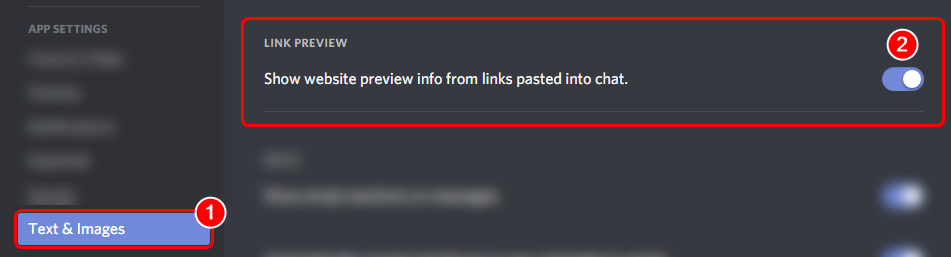
!RANK-EMBED
dire yarrowBOT
 white notch
this is in your user settings
buoyant moon
Oh ok it works for my friend now Thnxs
dire yarrowBOT
So... @buoyant moon, I've decided you should be level 1.
Don't get too excited, mmk.
dire yarrowBOT
Alright, @buoyant moon has been warned because 'Posted an invite'.
 burnt hazel
When on the dashboard in custom commands, if you go to edit a command then move off of the window/browser the dashboard bugs out and you are able to access the other commands behind the edit popup.
dire yarrowBOT
mxsim sorokin#5985 (355330427403370497) is now muted for 'spam', alright? 
 minor current
The mute command is not working, I mute them and they have the muted role but they still can write
but they can still write*
faint dome
@minor current just change permissions of the role to prevent writing
 rancid eagle
For the past 8 days my mee6 bot isnt displaying any persons going live with the twitch plug in
any help would be amazing
faint dome
known bug, just not listed 🙃
rancid eagle
just leave it be for now?
faint dome
actually... wait 2s
rancid eagle
okie dokie
faint dome
can you check your permissions ? http://bit.ly/2J4nDmc
 minor current
ignore the 2nd screen
now I cant even mute them
earlier I could
but nothing happened anyways
faint dome
(nice wallpaper) check if the "muted" role can't speak in channel. And if mee6 role is above muted role
dire yarrowBOT
!mute @user - gives mentioned user the muted role
Requirements:
+ Manage Roles perm
+ Manage Channels perm
+ I must have a role above the muted role
+ User being muted must not have a role that has a green tick next to the send message perm in channel settings->permissions as this will override the muted role. They must also not have a user perm override on that channel
P.S. You can't mute people who have the permission to mute others, this includes: owner, other moderator or members with Administrator or Manage Server permissions!!!
https://cdn.discordapp.com/attachments/302245580673908740/433026975670730771/2018-04-10_01-13-56.gif
 faint dome
!twitch @rancid eagle
dire yarrowBOT
if you notice that Streamers are not being announced:
 - Delete the streamers and hand type them; Sometimes you will pick up a extra invisible character that breaks the searches.
 - Make sure Mee6 can send messages in the selected channel.
 - It can take some time (up to 15 minutes) for Mee6 see a streamer going live, so be patient.

 [!] All else fails, Contact Support with a Mention to <@&193123929701875712>
Error: Nothing found. 
rancid eagle
I'll take a look thank you
minor current
faint dome
"User being muted must not have a role that has a green tick next to the send message perm in channel settings->permissions as this will override the muted role. They must also not have a user perm override on that channel"
I guess this is your issue
faint dome
and in the permissions of the channel ?
rancid eagle
I believe i have fixed it! Thank you @faint dome
faint dome
and for "muted" ? @minor current
minor current
just the line too, but the role doesnt have the permission to speak so it must not take the line in count
I think
faint dome
but is it  or
or  ?
?
minor current
first
faint dome
yeah, so you need to put it on
dire yarrowBOT
So... @minor current, I've decided you should be level 2.
Don't get too excited, mmk.
minor current
it worked
faint dome
👌
 severe jewel
mee6 tempmute does not unmute - bug. Was working for weeks/months, but now does not unmute after invoking !tempmute @buoyant moon 1m reason


 mint void
When run Timer again?
strong path
!user-info
dire yarrowBOT
No, it doesn't look like you can use that.
faint dome

dire yarrowBOT
So... @faint dome, I've decided you should be level 28.
Don't get too excited, mmk.
dire yarrowBOT
Chinese_Marc, this command is disabled in this channel.
Alright, @obtuse ferry has been warned because 'Bad word usage'.
 signal oriole
Mee6 isn't displaying any person going live on Twitch... Worked on Monday, but seems like it broke again, I say again because we had the same problem last week
 glass crag
^ i noticed this the last few days, I have mee6 in 2 servers and on 1 server it showed the person going live, but in the other it did not. Any information on this?
faint bison
!twitch
dire yarrowBOT
if you notice that Streamers are not being announced:
 - Delete the streamers and hand type them; Sometimes you will pick up a extra invisible character that breaks the searches.
 - Make sure Mee6 can send messages in the selected channel.
 - It can take some time (up to 15 minutes) for Mee6 see a streamer going live, so be patient.

 [!] All else fails, Contact Support with a Mention to <@&193123929701875712>
that's new bug, here's temporal fix @glass crag @signal oriole
https://birb.is-a-me.me/92d117aa.gif
 cold bear
one sec
faint bison
im so confused
cold bear
open it in browser
glass crag
Thanks, Ill try that and see if it works
cold bear
@faint bison that caused by using admin permission override
mee6 had similar problem before
signal oriole
Tempory fix seems to have worked, thanks!
cold bear
yay
buoyant moon
Well idk if it’s a bug, I feel like it is
Anyways
So I just made a server and I’m trying to filter some curse words. The website for Mee6’s commands won’t let me though.
faint bison
browser?
buoyant moon
Safari
faint bison
!browser
dire yarrowBOT
Internet Explorer? Edge? Safari? Ew... :nauseated_face: It's time to use REAL BROWSER!!!
Firefox: https://www.mozilla.org/firefox
Chrome: https://www.google.com/chrome/browser/desktop/index.html
Opera: https://www.opera.com/
faint bison
yes
faint bison
website works best with them
buoyant moon
Aight
faint bison
others arent really that compatible
dire yarrowBOT
So... @buoyant moon, I've decided you should be level 1.
Don't get too excited, mmk.
faint bison
oh youre on phone
faint bison
yeah its broke on phone especially ios
faint bison
!mobile
dire yarrowBOT
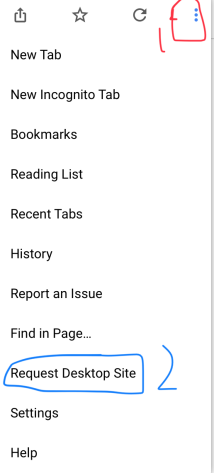
Due to the recent update, the website does not work properly on mobile. You can either use the Google Chrome app and request desktop version (for Android users) or use a PC (for iOS users) https://i.imgur.com/kyt5Akd.png
 faint bison
np
buoyant moon
Oh dang it worked many thanks
 potent dove
Hi ! Tempmute doesn't work on my discord. The mute is for always
faint bison
!duration
dire yarrowBOT
For the tempmute and tempban commands, use the following formats for muting/banning users for a certain time period:
s for seconds
m for minutes
h for hours
d for days
Examples:
!tempmute @user 10m timeout
!tempban @user 3d annoying
faint bison
make sure you're doing it like this
if you are and it's still permanent then the bug is back and we're all sad
potent dove
The bug is back :(
buoyant moon
 Is it known that MEE6 will not link a channel if there's a character at the end of the channel name? https://i.imgur.com/NSMm6mc.png

Doing <#channel ID> won't let me save the changes.
 sonic sentinel
.
 hasty basin
Hey is any one else having issues with the going live announcement not showing up
 static helm
Yep same and many Twitch Streamers have same issue. nothing on twitter than bot restart. that happens from past few days.
white notch

 slim pawn
ку
 strong cairn
sa
 brave hazel
I can't access the dashboard... I'm stuck at the "Please select a server" screen. When I click on my server, it loads for a second or two, then shows the same thing again
brave hazel
Did a few refresh, wouldn't call it spam though...
brave hazel
updating...
bitter owl
Greaaat
brave hazel
Same 😦
brave hazel
Takes me to https://mee6.xyz/
I'm able to see my XP leaderboard, but I don't think that checks for any credentials...
Let me try through my home PC
brave hazel
Hmmm, it works at home...
bitter owl
Only mobile not working?
brave hazel
Nah, work PC
bitter owl
Even worst
brave hazel
Might be something with firewall or VPN
bitter owl
Try F12
And click on console
If there are no red lines it's your internet
In case there are red lines, gimme the screenshot pls
brave hazel
That's how I roll!
brave hazel
brave hazel
It's when I click to select my server
wooden mountain
ooo, Ctrl + shift + R
brave hazel
Same
wooden mountain
invite to that server pls
brave hazel
I'm able to connect fine on my home PC, so it's probably just some weird stuff on my work network
 languid ether
i love this bot
dire yarrowBOT
Alright, @languid ether has been warned because 'Posted an invite'.
 frank lintel
Twitch alerts doesn't work
wooden mountain
give Mee6 ✅ for send messages on that channel (he is currently ignoring his admin perms)
buoyant moon
Hello the auto mute is not working on my server, please help me
faint dome
(I'm answering in #175714280648343552 )
 scenic reef
when i use the tempmute command, the bot does not @mention (keeps usser #) and there are a lot of numbers
white notch
to basically output who's muted without pinging them
plus the numbers is the ID of the user
 grand sinew
why can't I add a curse word to block for auto moderation.
strong path
Are you the one testing it?
grand sinew
what u mean?
strong path
Is the one using the bad words a mod/admin/owner?
strong path

grand sinew
no i want to add a bad word for Mee6 to block
white notch
@grand sinew what device are you on and what browser?
grand sinew
my computer and i use microsoft edge
dire yarrowBOT
Internet Explorer? Edge? Safari? Ew... :nauseated_face: It's time to use REAL BROWSER!!!
Firefox: https://www.mozilla.org/firefox
Chrome: https://www.google.com/chrome/browser/desktop/index.html
Opera: https://www.opera.com/
grand sinew
oh ok thx
 wispy cliff
The command !play acts like !skip and !skip does nothing.
 harsh obsidian
o thats gonna annoy me so much
 paper shoal
It has annoyed me for months 
scenic reef
mute does not work
strong path
does it give them the role?
scenic reef
yes
dire yarrowBOT
!mute @user - gives mentioned user the muted role
Requirements:
+ Manage Roles perm
+ Manage Channels perm
+ I must have a role above the muted role
+ User being muted must not have a role that has a green tick next to the send message perm in channel settings->permissions as this will override the muted role. They must also not have a user perm override on that channel
P.S. You can't mute people who have the permission to mute others, this includes: owner, other moderator or members with Administrator or Manage Server permissions!!!
https://cdn.discordapp.com/attachments/302245580673908740/433026975670730771/2018-04-10_01-13-56.gif
 marble oxide
on Auto-Moderator, I was whitelisting this as an external link https://steamuserimages-a.akamaihd.net/ and when i do, this is what happens to it:
https://i.gyazo.com/eeba21f61cc040de4214b72e1d11b757.mp4
is it assuming taht after the a. the link finished or after the "-"?
it does seem to have the rest of the link there, but the letters turned into spaces?
dire yarrowBOT
So... @marble oxide, I've decided you should be level 3.
Don't get too excited, mmk.
 junior goblet
 keen linden
Have you ctrl + r'd?
keen linden
kk
 soft mesa
It appears that !rank doesn’t like small caps
keen linden
@lean sphinx :^)
 tall kettle
guys look at
Oops, something went wrong in MEE6 land! SAD6 This error has been reported to our Team. We'll work hard to fix it.
what is going on?
 timid rose
strong path
timid rose
strong path
What command are you trying to use?
timid rose
mee6 is a admin on my server
 sage citrus
hm
timid rose
oh maybe this is why
tall kettle
just me it's happened
dire yarrowBOT
So... @timid rose, I've decided you should be level 5.
Don't get too excited, mmk.
timid rose
its not showing my profile pic so there might be a error
 waxen glen
About the new YouTube announcement feature, i cant edit any of the text or even type anything in 'Please enter a YouTube channel name'
 frail kraken
^
timid rose
wait what i didnt know that was a feature
waxen glen
its new, just added.
 hasty cradle
yeah also cant edit
 outer bobcat
Can't click on the "Unlock" button under "Edit Rank Card"
Just exits the window, and nothing
timid rose
true for both
waxen glen
<@&193123929701875712> <@&424994160387293184> ^^^
dire yarrowBOT
So... @waxen glen, I've decided you should be level 2.
Don't get too excited, mmk.
 lean sphinx
@outer bobcat Hi, wat's your browser?
outer bobcat
Firefox
lean sphinx
do you have the little hannd when you click?
outer bobcat
lemme check the version
yes
Firefox Quantum
59.0.2 (64-bit)
i'm updating to 60.0.0 now since i noticed the Updates button XD
lean sphinx
thanks, checking that 😄
 weak imp
Cookie please help me
timid rose
i cant click update either and i use fully updated chrome
weak imp
NONE of the text boxes are working on the website @lean sphinx
hasty cradle
^
 orchid summit
Repeating Command Response
The bot will repeat the output twice even three times.
 bold edge
Ya
outer bobcat
i don't think it's a great idea to ping cookie XD
 lapis plover
similar glitch
weak imp
I dont care it says to not hesitate to report anything so I will report the bugs
waxen glen
you can ping people your talking to it says in the rules
outer bobcat
Only once for me. Albeit a bit slow
 low night
Almost all text stuff is broke..
weak imp
Are they trying to fix this or what like should I just never use this bot is it bad?
outer bobcat
@lean sphinx Sorry for the ping. Checked fully updated, Still nothing 😄
timid rose
same
outer bobcat
btw, i must commend you on the beautiful images you chose 😄
white notch
@weak imp he's working on it
 buoyant moon
for example
if u got 2 instances and do !rank
you get your rank card 2 times
unless the above is some other bug/glitch
(where it gave 2 rank cards)
outer bobcat
Just gonna mention. Slider works perfectly for me.
 vocal quartz
[8:07 PM] DraXion: Oh, did you happen to fix the problem with the !clear command getting reset every time you (the developer) restart the bot?
[8:07 PM] Jef: Wdym?
[8:07 PM] DraXion: If not, I suggest doing that.
[8:07 PM] DraXion: Well, every time the Mee6 bot gets reset, I have to go back onto the Mee6 website and re-enable the command.
[8:08 PM] DraXion: Since I manage 3 servers and I use this bot on all 3 servers, it gets kind of annoying.
[8:08 PM] Jef: I haven't heard of this issue before, make sure it's reported in #bug-reports
[8:08 PM] DraXion: ok```@white notch Ok thanks :)
outer bobcat
it's a gif card?
timid rose
oh im a idiot the unlock button doesnt work cause i dont have coins
im a freaking idiot
tall kettle
help me some one
 charred plover
It's not technically a bug but I am very disappointed with the cards because they don't show total Exp and that is a BIG deal for me. If this could be added, I'd be very happy with the updates. Not looked on website yet because it's too late.
white notch
@outer bobcat no the image is a gif
white notch
that's not what is should be doing
charred plover
@tall kettle What do you need help with?
tall kettle
look
charred plover
Oh right
white notch
upload files
timid rose
i have the same problem and mee6 has admin perm on my server
tall kettle
Oops, something went wrong in MEE6 land! :SAD6: This error has been reported to our Team. We'll work hard to fix it.
white notch
yeah I know the error message
charred plover
@tall kettle @timid rose just make sure the role has upload files just incase
white notch
let me test
charred plover
It worked on the servers I tried
outer bobcat
delta, just so you're aware. It does work on some browsers (I'm guessing it's browser related) (gif)
 cursive robin
your but loged
white notch
Delta - Today at 13:14
let me test
@timid rose how about channel permissions? Maybe it's a bug where if the channel blocks it then the entire thing doesn't work?
tall kettle
Ok
timid rose
lemme check
charred plover
timid rose
nope still not working
charred plover

 dry glen
Is this a bug because I can’t add a channel when I try to edit the text
charred plover
@timid rose did you change the card design on the website? The servers I tested it on are default so that could be something  🤔
🤔
dire yarrowBOT
So... @charred plover, I've decided you should be level 1.
Don't get too excited, mmk.
charred plover
Lol "mmk"
timid rose
no
 charred plover
I'm not a support person but I tried my best 😅
keen linden
timid rose
you should be premoted @charred plover
 minor light
Hey Guys, whenever I enable the "Youtube channel" Plugin I have to exit the page and reopen it because:
- wont let me enter a youtube channel name
- If I go to custoom commands and hit "Add Command" It won't let me type in what I want the command to be!
white notch
@minor light #425409486820474881
charred plover
Haha nah, I'm alright. I have been here for a couple months but literally just got Level 1 @timid rose 😂 Kind of you to say though.
strong path
And dumb xD
minor light
@white notch thanks
dire yarrowBOT
So... @minor light, I've decided you should be level 3.
Don't get too excited, mmk.
charred plover

charred plover
Repeat message because it's important to me:
It's not technically a bug but I am very disappointed with the cards because they don't show total Exp and that is a BIG deal for me. If this could be added, I'd be very happy with the updates. Not looked on website yet because it's too late.
I'm off to bed now. Good night everyone, have a wonderful day/night.
keen linden
We tried to find a way to add total xp and we couldn't find a good way, yet.
We're working on that for the future. @charred plover
tall kettle
How much time will it spend?
dire yarrowBOT
So... @tall kettle, I've decided you should be level 2.
Don't get too excited, mmk.
white notch
until I can replicate and find the bug
charred plover
@keen linden thank you  It really is important to me so tag everyone in #〉announcements If you can. Goodnight Quality Assurance Jef 😉
strong path
tag everyone again
kek no xD
buoyant moon
youtube plugin won't let me add a youtube channel
white notch
known bug, fix being deployed
buoyant moon
thanks
buoyant moon
Can your bot send a image? @cinder salmon Its an image now so If It doesnt have attach files on, It cant send it
 cinder salmon
Uhh lemme check
buoyant moon
Some people give the bots role admin so it never has any sending problems
cinder salmon
It has admin
buoyant moon
Yeah, Give it to the Mee6 Role itself.
 lapis plover
what is it?
lapis plover
ya i think it's webhooks problem
lapis plover
oof
ah, does that bot have another role added which is higher and has disabled permissions?
cinder salmon
No
dire yarrowBOT
So... @cinder salmon, I've decided you should be level 4.
Don't get too excited, mmk.
white notch
I'm aware this is a rare bug, give me time to try and replicate it
lapis plover
^
cinder salmon
I’ll use the website for now
lapis plover
may i join your server and see what's the problem?
it it's mee6 bot than i can't do anything 
cinder salmon
Uhh
white notch
I would prefer if you didn't
lapis plover
hm..
white notch
sorry
 waxen glen
when i add a channel to the new YouTube thing it adds it multiple times, this doesn't affect me since I can just delete them after it does the bug but thought I would report it to you anyway.
dire yarrowBOT
lockey, this command is disabled in this channel.
bitter owl
@waxen glen It's not a bug, you just need to press add one time. If you press twice or more it will add multiple ones
waxen glen
i must have been clicking twice by accident then, sorry.
 indigo hollow
just wondering is there a problem with timers? the bot is admin and is set on a 1 minute interval yet it has only posted twice in 2 days.
buoyant moon
i have the same problem
 untold blade
same with me
 leaden venture
Still gray screen :/
frank lintel
@wooden mountain ok thx
wooden mountain
Woops, looks like we forgot to install that font
 tacit raven
!dc
 zenith dagger
cold bear
zenith dagger
cold bear
used font doesn't have glyphs for these characters apparently
 mental silo
Mee6 is working very slow on my server...
faint dome
Like everywhere. Devs are working on this latency @mental silo
mental silo
Okay, I didnt know that. thanks
 dark crater
<@&193123929701875712> The bot slows down
white notch
we know
dark crater
What do?
white notch
wait
dark crater
Because of what
white notch
the dev to fix it
buoyant moon
@white notch what did u dio to it?
white notch
idk
dark crater
What do you mean dev?
white notch
developer
dark crater
Who is developer?
keen linden
Someone we already notified.
white notch
Cookie#1337
dark crater
Thank you!
dire yarrowBOT
[LHR]KiRouHaX, this command is disabled in this channel.
 unreal rover
Ho,Sorry Mister MEE6
 kind charm
Mee6 isn’t working at all in my server
kind charm
Oh okay
kind charm
I kicked the bot and now I can't get it back ugh
 dense zephyr
|Here are some bugs I found while testing on my server
**1. If the person have been given role, the muted role doesn't work
2.The Bot's reaction to rule breaking is really slow
3.The repeated / spam control did not work for some reason
- The infractions rule (like if you have 3 infractions muted for 30 minutes) don't work properly,
the person who's muted will be muted for infinite times**
 untold karma
when I say !rank it's really slow to respond
white notch
Were aware
@dense zephyr
- Not a bug, that’s your channel perms where a user has a role with the send message perm set to
 . Set it to
 - Known, told the dev
- If you mean duplicated text, that’s in one message not multiple. Could also be the recent lag
- Mute is infinite, tempmute is what you want for a mute for a period of time
dense zephyr
@white notch for no.4 I am referring to the mee6 dashboard, for the tempmute
white notch
Could be the recent lag. Otherwise, known
dense zephyr
I see, interesting
So, I should just change the permission of the role right?
for no.1?
white notch
Yes
buoyant moon
So I went to Moderators Plug-in and turned on BAD WORDS - DELETE MESSAGE AND WARN AUTHOR... and I sweared just for a test I don’t swear tho I’m a kid.. anyways but it didn’t work it didn’t delete or warned me?
faint dome
Mee6 doesn't check messages from moderators @buoyant moon
 coral minnow
Guys The MEE6 New !rank plug in is slow as Hell
white notch
We know
coral minnow
Any fixes coming anytime soon?
buoyant moon
oh...
white notch
Not sure
buoyant moon
Thank You!
coral minnow
Thanks, I would suggest pls improve it, as for my server its pretty slow and like people are saying to removed MEE6 due to that but I don't want to remove it
white notch
That’s what we intend to do
 lone elbow
Bug
lone elbow
😣
lone elbow
Mh....
cold bear
@buoyant moon don't get the problem. explain please
buoyant moon
Let's me make a gif ^^
buoyant moon
You need to use ping, no?
lapis plover
that's my friend's id aswell
buoyant moon
So, this is the probelm on Firefox Quantum 60.0.1 (64 bits)
 marble tapir
Guys this is not exactly a bug but MEE6 needs to stop yelling, I was kicked and he was so mean
Also we need better Moderators
They aren’t doing anything about abusing
I was Severley Abused
buoyant moon
Sorry but if you was kicking somewhere, this is by a mod, maybe with MEE6, but not by MEE6 Team
cold bear
it says that custom background are paid
buoyant moon
MEE6 can't do anything anyway 
cold bear
blame people you gave perms to manage server, there's nothing do with bot
marble tapir
Hey there was someone in that server that was abusing way more and they weren’t even kicked
lapis plover
^
marble tapir
They kept cursing
lapis plover
@cold bear btw why it isn't showing few people's rank?
marble tapir
DO SOMETHING NOW DISCORD TEAM!!!!!!!!!
lapis plover
that's not our problem, or even mee6 team
buoyant moon
contact T&S with https://dis.gd/request
This is how report someone: https://support.discordapp.com/hc/en-us/articles/360000291932-How-to-Properly-Report-Issues-to-Trust-Safety

Discord
In order to investigate issues which have been reported to us, we require the following information in the report:
User ID: The 17 or 18-digit ID of the user you are reporting, which is not the D...
buoyant moon
so, Discord can't do anything. No one can do anything, this have no relation with Mee6 anyway
marble tapir
Watch your back
 cerulean rover
bot not working
cold bear
@cerulean rover #〉announcements
cerulean rover
thnx
buoyant moon
I feel like the bot's having trouble making the cards
cold bear
RobloxStarDev, if you don't like bot -> kick him, if you still get timer messages -> remove webhooks in server settings. there's nothing on our side, if you gave someone perms to manage bot he can set anything he want. that's not our problem if you gave perms to wrong people or even to everyone role.move drama somewhere else
cerulean rover
where can add rank cards?
 crude jewel
 west haven
same on my end. not possible to click the add button. the button stays grey. no way to save the settings.
 thick epoch
 rose halo
Check the role order that you're trying to apply.
MEE6 role has to be upside that role.
buoyant moon
So one of the mods told me that other mods can’t get warning then I went to normal and still didn’t get warned for swearing and I would like a smart moderator to answer.
cold bear
@crude jewel @west haven we hit the youtube request quota so it can be kinda brown, looking for solutions atm
@buoyant moon go to server settings -> webhooks and remove mee6 ones
@buoyant moon if you own server you count as user that has admin perm, ypu don't need mod roles to use mod commands because you assimed as user with admin permission role
buoyant moon
I’m not the owner...
dire yarrowBOT
So... @buoyant moon, I've decided you should be level 2.
Don't get too excited, mmk.
buoyant moon
I don’t own the server.
buoyant moon
@wooden mountain Yes I Have.
leaden osprey
YouTube plugin doesn't work: When I type in a channel name no channels pop up
buoyant moon
But then I didn’t.. and still didn’t warn me or delete the message..
 pure obsidian
It was working few hours ago, now we cant add channels anymore
leaden osprey
:/ ight
 sullen venture
Proably broken API?
waxen glen
when i click on the new youtube feature it just stays loading
sullen venture
Rank card slider is either slow/ulgy
wooden mountain
@buoyant moon i'm back, can i ahve a invite pls
buoyant moon
@wooden mountain should I send an invite or message you?
wooden mountain
it's the same for me
dire yarrowBOT
Alright, @buoyant moon has been warned because 'Posted an invite'.
wooden mountain
thanks, got it
buoyant moon
I got warned...
wooden mountain
yep
buoyant moon
Did you Fix it?
wooden mountain
so.... what exactly is the problem on your server again?
buoyant moon
It’s that when someone swears it doesn’t delete and give warn..
wooden mountain
is it meant to do that then?
buoyant moon
Hey! I am in a discord server called Modest Pelican Gaming and MEE6 has completely left from the server
completely gone
wooden mountain
a admin probably kicked the bot then
wooden mountain
did you press save?
wooden mountain
i think he found the issue
buoyant moon
Do I turn this off auto-moderator ignores and doesn’t sanction other bots?
wooden mountain
depends on if you want it or not
wooden mountain
or you fix it yoruself
buoyant moon
Well idk how..????????
 neat dew
hello
dire yarrowBOT
Alright, @winter jay has been warned because 'Bad word usage'.
 knotty dust
Hey I just wanted to let you know that Mee6 still responds slow even without the Rank Cards!
(Yes I know you are working hard on it, you may have noticed that as well, but I just wanted to let you know that. I am sure Mee6 will be soon fixed you are good at developing! I mean like seriously! 😄 )
 wheat gate
Most of the commands are still not working.
cold bear
bot is still recovering. sorry for the inconvenience
 wicked condor
 lilac mulch
when i do! help it does not respond normal?
wheat gate
@lilac mulch see 3 Messages above
lilac mulch
tu parle français ?
keen linden
It's broken for the next day, #〉announcements
 last steeple
keen linden
last steeple
keen linden
Known issue.
 barren lynx
I'm unable to log into Mee6 from this account. When I click on the login button it only connects to my alt discord account. I can't figure out why it's doing that.
strong path
!logout
dire yarrowBOT
oops, it looks like you are on the wrong account, you need an account with 'manage server' permissions.
You have to log out from discordapp.com in that browser and then log back in again.
- log out of discordapp site https://discordapp.com/channels/@me and follow the steps in the gif below
- go to http://mee6.xyz/logout and click the 'add to discord' button
https://i.imgur.com/7829TNS.gifv
barren lynx
Thanks!
 cedar vigil
sage citrus
dire yarrowBOT
cedar vigil
sage citrus
dire yarrowBOT
Alright, @snow summit has been warned because 'Bad word usage'.
 snow summit
Um, ok... I can't really demonstrate it, then. I will give one more screenshot, though.
Sorry for the bad words, I just recently figured it out and that word was blocked on that server I was in, I didn't know to make a whole new word for the test.
 terse zinc
I'm having trouble with timers, some messages are not reaching the specified channel ...
strong path
Explain it further to them
terse zinc
Sample
The timers do not arrive in the specified channel, I put the automatic message, but at the time it's for him to send it will not go
strong path
So some messages do, some don't, right?
terse zinc
Ya
dire yarrowBOT
So... @terse zinc, I've decided you should be level 2.
Don't get too excited, mmk.
strong path
Yeah sure I guess
 sinful trout
There is a bug with the auto mod where when someone post a message then edit. The message will stay and no warning is given
🤔


 👌
👌  👌
👌  👌
👌
Example
 sinful bay
 frank raptor
great idea but ....
 native anvil
🔹 bug report
when in the text box of Youtube channel in the youtube plugin, pressing enter while in the box reloads the page (changes to login link, verifies and takes you to the youtube plugin), regardless if info is entered in the box or not
frank raptor
Ok thanks
buoyant moon
Mee6 responds with an error message when trying !rank. Please fix it. It’s so problematic...

 strong path
Make sure that the bot's role is above the role it's trying to give
strong path
np
 mental stirrup
I have try to use the soluce just up but it's deosn't works. (sorry for my English I'm french)
strong path
read #425409486820474881
 runic bough
After adding YouTube channels to the YouTube dashboard and revisiting the YouTube dashboard, the dashboard doesn't load.
 iron gazelle
Injoker Gamer
dire yarrowBOT
Alright, @iron gazelle has been warned because 'Posted an invite'.
runic bough
ah, thank you @strong path
buoyant moon
The Bot was lagging yesterday
cold bear
we know
inner trellis
The card don't say properly my name https://cdn.discordapp.com/attachments/378621290116022273/452447898081427456/card.png

 mortal oxide
@inner trellis doesn't support zalgo (may be soon).
sullen venture
YouTube plugin: Ingridients autofill does not work
 formal mulch
Until now, it is loading.
buoyant moon
my too
 west crag
mortal oxide
west crag
mortal oxide
Please be patient.
wooden mountain
don't reply means: "do not reply if a command is disabled in this channel or the user is not allowed to use this command"
!rnak
!rank
so that message ^^
(waiting on the delay)
 unborn rapids
But before, mee6 didn’t reply when the command was used
 calm steppe


 cold bear
cold bear
cold bear
also no need to send that in multiple channels
dire yarrowBOT
Sil, this command is disabled in this channel.
wooden mountain
🤣
buoyant moon
i would like to report a bug with the youtube post features. it wont add
pure obsidian
@buoyant moon They know --> #425409486820474881
cold bear
@near hound did you try this?
 near hound
Yes.
cold bear
so os there any red error messages?
 fiery basalt
and agian the custom commands dont work on the server an on dashboard from mee 6 its says its enabled
cold bear
slow means super slow
fiery basalt
its 8 minutesnow that i send the thing and its not showing thats not slow thats not working
or you wanna say its gonna take 20 minutes
and this is 5 time in the week that something not working with mee 6
when it would be fixed teh command
 lime sun
my music bot is not working can someone please help
near hound
Does the website work on microsoft edge?
wooden mountain
1 hour later
faint bison
basically use opera chrome or firefox
near hound
They would make it work on Microsoft Edge because soon it's going to be the biggest browser in the world.
near hound
It's coming to mobile.
wooden mountain
edge does not implement a lot of javascript and css correct
a lot of sites have a completly diffrent version for edge just because edge does not parse the normal version correct
so, no
near hound
xd
wooden mountain
once microsoft fixes there stuff then it will work
near hound
You could put a message on the website what would be helpful.
Please use "crome or firefox" etc.
lime sun
ok
 harsh gulch
the website keeps kicking everybody. You guys probably already know that
wooden mountain
yep
buoyant moon
<@&193123929701875712> <@&424994160387293184> I'm trying to add the bots permissions to the server and as i do it, it keeps sending back to dashboard with out me doing anything?
bitter owl
@buoyant moon What command are you performing? Giving roles?
sage citrus
lol they wont get it
bitter owl
Now I see that it’s all locked damn haha
buoyant moon
The YouTube plugin does not allow me to add youtube channels.
strong path
buoyant moon
I don't see it there. Nevermind
been getting this error
The command removes a role and gives a role
thats all it does
white notch
does it actually give/remove the roles?
buoyant moon
It does not, however I'm gonna try this.
white notch
 sterile basin
I've been getting this erorr, In the custom commands when i try to give a role using the custom command it doesn't work.
strong path
one sec
sterile basin
buoyant moon
Seems like everyone Custom Commands arent working either, thats why I was about to post about the same issue........
dire yarrowBOT
So... @buoyant moon, I've decided you should be level 3.
Don't get too excited, mmk.
strong path
@buoyant moon is your command supposed to give a role too?
buoyant moon
No, my custom commands keep getting deleted..
strong path
@sterile basin
Make sure that MEE6's role is above the role it's trying to give and that it has the manage roles perm
https://birb.is-a-me.me/81d15f9a.gif

 buoyant moon
I make it, I try to use the command on the server of mine, and then I go back to the Mee6 website, and the commands gone
strong path
It seems like you have a rogue admin
buoyant moon
On my server?
strong path
Yeah
buoyant moon
Cant be, im the only person who has Admin access
sterile basin
I gave Mee6 all the permissions. And The bots role are the 2nd highest role next to my role, i was about to give a lower role.