#〉bugs-reports
2 messages · Page 17 of 1
 rough bough
 cold bear
@rough bough so you just ignored that copypasta above
rough bough
no
cold bear
logout from dashboard and discord ib your browser and login again
not mee6 nor discordapp will not check is you logined under right account in each other website
 white sigil
Hm
 obtuse lintel
Mee6 won't clear messages from this morning. I got the mee6 response of that it can't delete messages older than 2 weeks without cloning the channel
I have the clear command enabled
And set mee6 as able to manage messages
 white notch
Does !clear 1 work?
white notch
!clearinfo
 dire yarrowBOT
the clear command allows you to clear the last xx amount of message.
or to clear that anoying spammer without clearing anyone else
just use !clear 1-1000 to clear the last xx messages(example !clear 10),
or use !clear @ name to clear all the message of @name in the last 100 messages
+ i need manage messages permission
+ i need view message history permission (otherwise i will respond with -1 messages cleared)
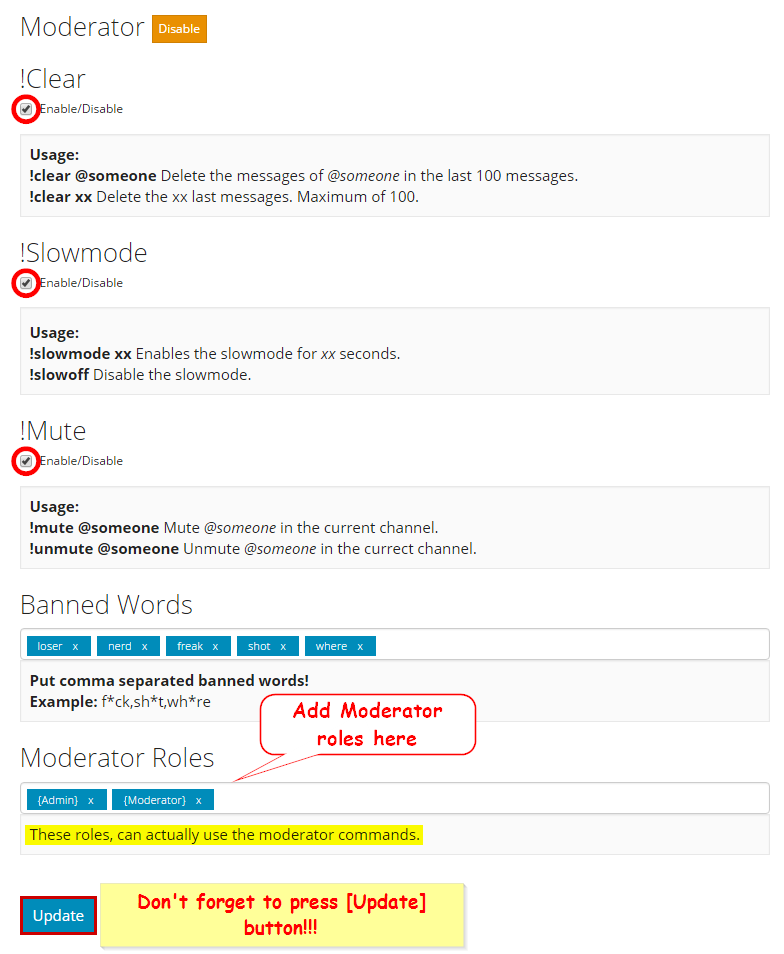
+ you need to check the checkmark next to clear on the plugin page.
+ you need to set your role as moderator (located at the bottom of the plugin page in the moderator tab)
!!tag moderator
 wind windBOT
 white notch
Double check all of that
dire yarrowBOT
GG @obtuse lintel, you just advanced to level 1 !
obtuse lintel
Now it works
My settings checked out fine, I went back to my server and the messages were miraculously deleted
Must have been a lag?
Didn't even have to type the clear command again
Strange
 primal arch
i can't use the bot the token is good but it doesn't worked ;((((
cold bear
what are you talking about?
 lapis pebble
what is the zatsu bot real name
 finite terrace
I take it you guys are aware of @ here (and maybe @ everyone) in a reddit thread notifies everyone on the server?
 buoyant moon
Just set "mention everyone" to off in #261311113340256267 like this:
cold bear
this is not working for webhooks
 bitter zenith
finite terrace
bitter zenith
finite terrace
But Mee6 can be exploited to spam something like that, so it's tangently a Mee6 issue, and needs a bandaid or something to fix in the meantime,imo
cold bear
restart page
 azure thorn
My commands on my discord server as in the timer keep disabling
white notch
!!tag timers
wind windBOT
You're limited to 5 timers per guild, with the message interval being in minutes. If nobody posts a message after the timer has been sent, the channel is considered "non active" and so the next timer will not be sent. The bot needs the MANAGE_WEBHOOKS perm otherwise it'll auto disable if the channel isn't found or it can't create webhook
azure thorn
how can I allow that?
azure thorn
thanks
 crimson obsidian
the bot isnt playing music. It says added, but then doesnt play after !play or !next
 mortal oxide
@crimson obsidian try to !leave and !join. Tell me if that works please 😄
crimson obsidian
yeah, thanks man. it worked 😃
mortal oxide
:+1:
 topaz dune
The "Timers" function of the bot doesn*t work... After I enable it and reload the page it says "Disabled".. Is this only on my server, or does anybody has the same problem?
 wooden mountain
give Mee6 the "manage webhooks" permission and then enable it again
 wispy turtle
Hello ! How to connect to your Mee site on another discord account? because I'm stuck on when I want to invite him to my discord mee but it's another account instead of mine please
wooden mountain
!logout
dire yarrowBOT
oops, it looks like you are on the wrong account, you need an account with 'manage server' permissions.
You have to log out from discordapp.com in that browser and then log back in again.
- log out of discordapp site https://discordapp.com/login and follow the steps in the gif below
- go to http://mee6.xyz/logout and click the 'add to discord' button
https://i.imgur.com/7829TNS.gifv
 wispy turtle
Thank you 😄
 marble sonnet
wooden mountain
marble sonnet
wooden mountain
pls explain
 plucky badge
<@&193123929701875712>
I have this on the Web Site of Mee6 when I try to Update what I change in "levels" 😢
wooden mountain
http://mee6.xyz/servers and start again from there (your settings should be saved)
plucky badge
Ok thanks
 vagrant jewel
So every time I add a role with a space, for example @UGH Boy in the Custom Commands, it won't appear as clickable, but when I do @UGH Boy and find the code. I paste into the Custom Command and it appears as it should. But when I edit the Custom Command, I have to constantly replace all the <codes> over and over. Please patch this. ;-;
wooden mountain
we are aware of this issue, but not many servers ahve roles with spaces and most people don't edit there custom commands often
vagrant jewel
Ah.
wooden mountain
in other words, not a priority right now
wooden mountain
in time
vagrant jewel
It's REALLY annoying and monotonous
 whole zephyr
The mee6 website is stuck on my old account so I can't add it to my new one
white notch
!logout
dire yarrowBOT
oops, it looks like you are on the wrong account, you need an account with 'manage server' permissions.
You have to log out from discordapp.com in that browser and then log back in again.
- log out of discordapp site https://discordapp.com/login and follow the steps in the gif below
- go to http://mee6.xyz/logout and click the 'add to discord' button
https://i.imgur.com/7829TNS.gifv
whole zephyr
Thanks
buoyant moon
I keep getting an error called "Forbidden" everytime I try and make a new command. <@&193123929701875712>
wooden mountain
do not open the website in 2 tabs at the same time
buoyant moon
okay thxs @wooden mountain
buoyant moon
Hey. Basically I run a server with a vetting channel that requires you to answer some questions before you can access all the main chats. I decided to clone the channel, rename the original and make it non-public because some people occassionally try to use previously used answers to get in. I didn't want to delete the original so I still have access to it.
I wanted to change it so Mee6 sents the welcome messages/bye messages in the new version of the channel, the cloned version. So I went onto the Mee6 dashboard and tried to do this, but I'm getting the message "Internal Server Error" when I try to access the page that allows you to edit welcome messages/bye messages and which channel they're sent in. <@&193123929701875712>
white notch
Refresh the page
white notch

 lean dagger
hi, um, when I enable the rewarding role and xp thing, it doesn't do anything
white notch
!role-rewards
dire yarrowBOT
role rewards will give a role as reward for active users in chat.
you gain xp by talking in chat. when you gain enough ex you get a level.
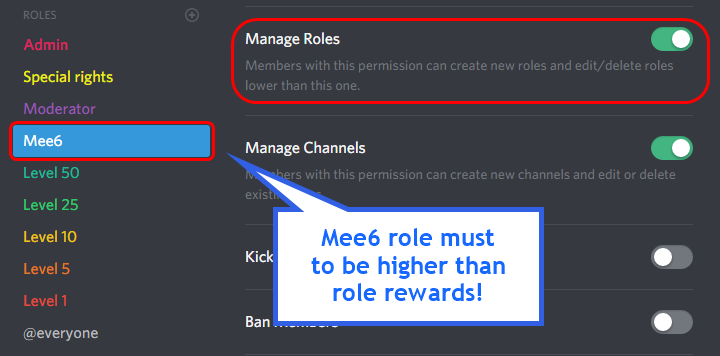
in order to let me give role rewards i need :
+ manage roles permission
- at least one of my roles needs to be ABOVE the reward roles(bots can't give roles that are higher than their own role)
! I will only check for role rewards to be updated when someone levels up... so if you added role rewards a bit late then wait till someone levels again before complaining that I am not doing my job.
DISCLAIMER: roles will stack up, if you remove a low level role from someone then that person will just get it back over time.
http://i.imgur.com/aPubLMp.png
 buoyant moon
sorry wrong chat
mortal oxide
No problem
white notch
!mute
dire yarrowBOT
!mute @mention - mutes mentioned user in current channel
Requirements:
- Manage Channels
P.S. You can't mute people who have the permission to mute others, this include: owner, other moderator or members with Administrator or Manage Server permissions!!!
!!tag moderator
wind windBOT
 soft marsh
ok so the support don't existe
 gentle belfry
excuse me
I think I'm having a problem with mee6
in our server
in doesn't update the role anymore
and idk why
white notch
!role-rewards
dire yarrowBOT
role rewards will give a role as reward for active users in chat.
you gain xp by talking in chat. when you gain enough ex you get a level.
in order to let me give role rewards i need :
+ manage roles permission
- at least one of my roles needs to be ABOVE the reward roles(bots can't give roles that are higher than their own role)
! I will only check for role rewards to be updated when someone levels up... so if you added role rewards a bit late then wait till someone levels again before complaining that I am not doing my job.
DISCLAIMER: roles will stack up, if you remove a low level role from someone then that person will just get it back over time.
http://i.imgur.com/aPubLMp.png
gentle belfry
THanks
 wispy skiff
It appears that !rank doesn't work one one server I'm running
Permissions should be fine, command is activated in the dashboard
wooden mountain
rank cooldown
wispy skiff
Oh, is it enabled now?
wispy skiff
Oh cool!
Cheers, did check the channel but must have missed it, thank you for the help
dire yarrowBOT
GG @wispy skiff, you just advanced to level 1 !
 wheat valley
back
let me repost
Mee6 gave channel override perks to a random user for no reason
my way of punishments in putting people in the rank "timeout" but this prevented them from not being able to talk in the_chat during the state
dire yarrowBOT
GG @wheat valley, you just advanced to level 3 !
wooden mountain
the only part of Mee6 that can do channel permission overrides is the !mute and !unmute commands
nothing else is capabel of doing this
in other words, a admin is muting people
wheat valley
but mee6 did do this
wheat valley
I could on PC and mobile can zoom in
wheat valley
rip
 lean sphinx
channel override is for !mute
wooden mountain
i can't even see what permission override it is
lean sphinx
yeah we can't read lol @wheat valley Could you provide us a bigger screenshot please 😄
wooden mountain
someone did !unmute @mac dat .....
wheat valley
ok
 lethal vale
I’m having an issue with the Twitch announcer disabling itself in the browser ui. I enable it and within 2-3 minutes it’s disabled again. I’m using Chrome browser. Any ideas?
white notch
bot can't send messages in the channel you specified
lethal vale
Any idea on how to fix that? I’m very new to Discord 😊
white notch
you on PC or a mobile device?
white notch
ok so when you're in the channel click on the channel name at the top of the screen->permissions and add the bot with the following setting
lethal vale
Awesome! I’ve done that and I’ll test it out!
lethal vale
It’s fixed 👍 thank you
 barren carbon
Rank command isn't working when doing !rank @mention
cold bear
!rank @barren carbon
dire yarrowBOT
 BlaCoiso
Rank
22/32451
Lvl.
19
Exp.
1325/2855 (tot. 22320)
 Mee6.xyz
cold bear
Mee6.xyz
cold bear
go away
barren carbon
🤔
cold bear
check rank cooldown
wooden mountain
keep cooldown in mine @barren carbon
barren carbon
What
wooden mountain
rank cooldown
you can not ask the rank of a person twice withing the cooldown time
cold bear
users with banned xp roles can't use rank command
@barren carbon @barren carbon @barren carbon @barren carbon @barren carbon @barren carbon
barren carbon
!rank is working but !rank @someone isn't
wooden mountain
only 1 space between !rank and the mention
barren carbon
Yes
wooden mountain
(mobile tends to add a second space for some reason)
barren carbon
Mentioning me works, mentioning someone else gives no response
wooden mountain
inivte pls
 sudden juniper
@wooden mountain @wooden mountain @wooden mountain
wooden mountain
@sudden juniper @sudden juniper @sudden juniper
 round shoal
I'm having trouble with the Twitch announcement. It's pretty much default except I replaced the @everyone with a custom role for twitch announcements @twitchsub . It will ping the everyone but not the custom role.
white notch
!id
dire yarrowBOT
to use some stuff in custom command or any other text from Mee6 you need to use the ID:
first get the ID of that object by typing it in your server with a \ in front:
emoji: \ ➡ !soontm
mention: \@dire yarrow ➡ @dire yarrow
role: \<@&325291851106091019> ➡ <@&325291851106091019>
channel: \#〉announcements ➡ [#〉announcements](/guild/159962941502783488/channel/159962941502783488/)
then copy that ID(with the < > and everything in between),
now paste that in your custom command, welcome message, stream announcement, etz...
https://cdn.discordapp.com/attachments/235378515866812417/269195258640728075/2017-01-12_22-05-03.gif
 round shoal
Thanks!
 proud slate
Mee6 is unresponsive I did !rank and nothing happened.
white notch
!!tag noxp
wind windBOT
If Mee6 isn't giving you xp, or either !rank or !levels is not working it is one of the following:
- The levels plugins isn't enabled on the dashboard
- You have a banned role on you (in which case you should remove it. Having a banned role also prevents
!rankor!levelsfrom working) - Bot can't read messages in that channel (for not gaining xp) or can't send (for
!rankand!levels)
In case you don't know about banned roles, this pic shows-> http://bit.ly/2ynUQGk
 proud slate
I own the server shouldn’t it respond?
proud slate
Ok that explains it.
wooden mountain
@buoyant moon sorry , that is because of netwerk lagg
buoyant moon
Is at me or at your servers?
wooden mountain
you
dire yarrowBOT
the clear command allows you to clear the last xx amount of message.
or to clear that anoying spammer without clearing anyone else
just use !clear 1-1000 to clear the last xx messages(example !clear 10),
or use !clear @ name to clear all the message of @name in the last 100 messages
+ i need manage messages permission
+ i need view message history permission (otherwise i will respond with -1 messages cleared)
+ you need to check the checkmark next to clear on the plugin page.
+ you need to set your role as moderator (located at the bottom of the plugin page in the moderator tab)
make sure it is enabled on the dashboard
 tulip gorge
hello, our bot is a bit laggy
wooden mountain
switch server region
tulip gorge
your a 🌟
dire yarrowBOT
GG @tulip gorge, you just advanced to level 2 !
 serene shore
wooden mountain
serene shore
wooden mountain
change server region
buoyant moon
hey, I've encountered a problem with the music function. It used to work fine when we first enabled it, but for the last few days, 9/10 times when it plays a normal length song (3-10 mins) off of Youtube, it sounds really chopped up mixed with some static noise (unlistenable, basically).
Longer stuff like full albums still mostly play without problem. Already tried changing the server region and the channel's bitrate multiple times, but to no avail
 thorny igloo
Quelqu' un parlé francais
lean sphinx
investigating that @buoyant moon
buoyant moon
alright, thanks! I really dig the music plugin, so I hope this can be resolved soon
white notch
woops (sorry Cookie)
buoyant moon
sent it in DMs, Cookie
dire yarrowBOT
@manic cove, It seems like you are not ranked. Start talking in the chat to get ranked :wink:.
 solid gorge
I am doing !rank in my server but it is not working. Is it because i just turned on levels for myself?
wooden mountain
!!tag noxp
wind windBOT
If Mee6 isn't giving you xp, or either !rank or !levels is not working it is one of the following:
Reason 1: The levels plugins isn't enabled on the dashboard
Reason 2: You have a banned role on you (in which case you should remove it. Having a banned role also prevents !rank or !levels from working)
Reason 3: Bot can't read messages in that channel (for not gaining xp) or can't send (for !rank and !levels)
Reason 4: Rank cooldown. This used to be bugged, but in a recent update it got fixed. So if you have the rank cooldown set super high, set it lower so that the !rank command work
In case you don't know about banned roles, this pic shows-> http://bit.ly/2ynUQGk
wooden mountain
@solid gorge
 cursive hearth
one of my discord members pointed out that the music plays slower on mee6 then it does on youtube, anyone else have this problem ?
 wooden grove
hello! I noticed a problem with adding some names to the twitch bot. if someone has a name like lealaxkhaos_ <----it wont recongize the symbol at the end :/ it will only include the lealaxkhaos in the link without the symbol. which cause it to link somewhere totally different
wooden grove
ah i see. I'll try it now 😃 Thank you!
 wicked coral
can anybody please explain why this happened to mee6 on my server? it started to randomly spam weird stuff 😐
I tried kicking mee6 and putted him back but keeps saying same s***, how do I stop this?
they never used ! cmd
cold bear
this is webhook
someone who has manage webhook permission exploits it
also check timers
wicked coral
ok, I'll try disabling webhook perm
cold bear
that will not help. remove & disable all timers you have
then delete all webhooks made by mee6
wicked coral
how also I saw 3 mee6's on webhook settings
deleted
okay, he's no longer spamming. I have no idea who did my admin(s) add silly message on timer interval, so I deleted 'em
thanks for your help btw
wicked coral
lol
cold bear
really
80% of weird things that happened on server and you don't know why caused bu your friends
find better ones
wicked coral
I will tell admin not to do it again
cold bear
😏
wicked coral
😛
buoyant moon
New Bugreport: when someone upload a YouTube Video, then you aren’t see from @dire yarrow a notification in a channel that is uploaded
buoyant moon
I say a false thing
 wind raft
Ehm, i used !slowmode 200 on a server and it didn't stop after 200 seconds, it was going for about a day or more, it was really weird and I don't know how it happened
 devout talon
Whenever I enable timers in the settings they always turn themselves off, any idea why?
white notch
!!tag timers
wind windBOT
You're limited to 5 timers per guild, with the message interval being in minutes. If nobody posts a message after the timer has been sent, the channel is considered "non active" and so the next timer will not be sent. The bot needs the MANAGE_WEBHOOKS perm otherwise it'll auto disable if the channel isn't found or it can't create webhook
devout talon
It has all perms turned on though
white notch
Enable the perm individually
devout talon
It has them all on anyway
wind windBOT
To make role rewards work for Mee6, do the following (note all config is saved so nothing gets lost)
- Kick the bot
- Reinvite it
- There wil be an authorization screen that lets you set perms for the bot
- Uncheck all boxes so that no perms are selected
- Do Captcha
- Create a role/use an existing one for the bot with the correct perms and on the hierarchy
- Give the bot the role
- ???
- Profit 😛
devout talon
I'll try that
dire yarrowBOT
GG @devout talon, you just advanced to level 1 !
devout talon
Thanks for that. I've got it working now :)
white notch
 weak wigeon
Music plug in is not transitioning to the next song properly, Its cutting out the last part of the song then jump right in to the next one
lean sphinx
@weak wigeon Hi man, could you send me a link to a song that bugs like that please?
wooden mountain
(or just the !add command you used)
weak wigeon
@lean sphinx i think its an issue with discord, coz I just tried it with our other bots, its doing the same thing.
lean sphinx
it shouldn't be, it's maybe the same issue with mee6 and that other bot
weak wigeon
well you can try this as a sample, https://www.youtube.com/watch?v=-XpDMtn3f3A

Thanks for watching :) LYRICS: Light Song kimi no kage wo terashite (Light Song) kimi no sugata sagasu no (Light Song) tsunaida te ha hodokete (Light Song......
lean sphinx
thanks
weak wigeon
then try add another one on queue. Right after at the very last 10 seconds it skips to the next song right away.
lean sphinx
@weak wigeon I see some errors in my logs.
It's youtube servers that are not actually closing correctly the connection
I'll wait a little bit to see if it'll get fixed, if not, i'll try to find a work around of some sort, hopefully 😄
weak wigeon
@lean sphinx Thanks 😃
dire yarrowBOT
GG @weak wigeon, you just advanced to level 1 !
 half flint
There is a way to avoid the anti dc links in the main chat: you can avoif it by using one http shortener
white notch
Tell that to the Dyno people, not us
dire yarrowBOT
GG @azure cedar, you just advanced to level 1 !
half flint
ok?
 sharp thorn
um i cant add mee6 to my server
cold bear
!logout
dire yarrowBOT
oops, it looks like you are on the wrong account, you need an account with 'manage server' permissions.
You have to log out from discordapp.com in that browser and then log back in again.
- log out of discordapp site https://discordapp.com/login and follow the steps in the gif below
- go to http://mee6.xyz/logout and click the 'add to discord' button
https://i.imgur.com/7829TNS.gifv
cold bear
read this message ^^^
sharp thorn
thx i found out why it wasn't woring
buoyant moon
Why got I banned/muted?
wooden mountain
who messed with channel permissions.....
everyone should be muted untill the bot is back onlien
buoyant moon
Ok...
 smoky drum
I have a problem. mee6 is on my server has all rights and can also write in community. only I write z.b. Help for my command only there is nothing
wooden mountain
Mee6 is still busy restarting, pls wait
 keen rain
ok
gentle belfry
is mee6 down?
white notch
Read #〉announcements and #238889207827922944
 bitter rivet
😦
gentle belfry
@white notch thanks.
devout talon
I've just enabled !rank but it doesn't come up when types in chat
white notch
Read #〉announcements and #238889207827922944
bitter rivet
disc is back up so should the bot
white notch
He did say 30-45 minutes
bitter rivet
😃
 ebon summit
sorry and thanks
half flint
xd
buoyant moon
@ebon summit discord is down dont have connections with bots wait till fix
wooden mountain
@buoyant moon that was 12 hours ago.... wut?
buoyant moon
Mine still not work.....😂
dire yarrowBOT
GG @buoyant moon, you just advanced to level 2 !
buoyant moon
Just got connection just needed to reset discord in debug
 fallen cypress
I have a friend streaming called kongro_. Bot picks up on his stream fine, and the embed works, but the url in the message misses the _. Just makes everything italic from the "is"
Hey! Kongro _is now live on https://www.twitch.tv/kongro_ !

something like that
fallen cypress
kl, will do. Thanks
How sure you that will work? Also, why is it necessary? Surely the bot should do this by default as it knows the streamers name
white notch
because of the Discord markdown system
and yes, it will work. If I didn't know it would work, I wouldn't tell you to do it otherwise
fallen cypress
yeah, but the bot knows the full name. Why isn't is putting the backticks in by default
fallen cypress
I know that. But why doesn't the bot do this automatically. It knows his name. It knows I don't want his name italic (that's never a thing)
I'm not typing this myself, its the list of streamers in the bot setting
white notch
because it was never coded this way
fallen cypress
I argue it's still a bug then :/
white notch
and I'm tellling you the way to prevent it using a method that works and works for over 100 people who still have the same issue
fallen cypress
Just because there's an arbitrary work around doesn't mean it's not a bug...
I'm glad there's a work around, and I've made the change
still a bug
white notch
because the issue is with Discord, not us
fallen cypress
but it's fixable by us!
white notch
_text_=text
that's how Discord works with the markdown system, we can't really do much about it
fallen cypress
I'm just saying, why not automatically write: Hey! Kongro_ is now live on https://www.twitch.tv/kongro_ ! Go check it out 😉!
dire yarrowBOT
GG @fallen cypress, you just advanced to level 1 !
white notch
idk, I'm not a python dev. maybe coding limitations?
wooden mountain
because people choice how they want there message, and also WAIT FOR UPDATE
 sick ivy
The bot should not be able to respond to other bots.
 trim beacon
I don't receive exp anymore, !rank showes me, but something is bugged. (3449/3620) don't move, seems to be a clone of me in mees system (didn't receive a lvl up msg to 1-3)
wooden mountain
only music and moderator commands responds to other bots
in case you want a mod to use clear but not mute @sick ivy
@trim beacon can in have a invite to that server?
sick ivy
Well, anyone can mute anyone in that server. lol
wooden mountain
but Mee6 moderator listens to bots for when you have a other bto that you use to have the permissions more specific
trim beacon
uffz. gave it another try to not waste your time and now i got some points 😦 🤔 🤗
fallen cypress
Can confirm adding backticks to his name breaks the bot detecting his stream altogether
adding the name kongro_ to the streamer list doesn't work adding it with backticks doesn't work
is there no way for the bot so sucessfully report him starting his stream?
cold bear

we meant add `{streamer}` to announment message and adding his name to streamers list
with backsticks
because this is part of markdown formatting
@fallen cypress ^
what?
fallen cypress
I am not a smart man
 lyric acorn
Mee6 is crashing server while using music plugin
wooden mountain
😕
lyric acorn
been going on for past 2-3days randomly
wooden mountain
be more precise
 kindred radish
For the welcomes and good byes I had someone join my server and the bot did not let me know
wooden mountain
can you check if Mee6 can send messages in that channel (use a command in there)
kindred radish
@wooden mountain Well it can because it was yesterday
wooden mountain
wut?
 winter meadow
Please make my suffering stop I can't stop this servers music GAAAAAAAH
ANYONE PLZ
 mossy flare
@winter meadow ??
winter meadow
In the music channels MUSIC. CAN'T. STOP.!!!
mossy flare
nothing is playing
winter meadow
for me 🎵 ➿
mossy flare
you arent even in the channel
winter meadow
i know thats the bug
cold bear
are you using chrome?
winter meadow
no i am using discord like the app on laptop
cold bear
problem is on your side
winter meadow
what and why
winter meadow
no
cold bear
if yes, what yours says?
winter meadow
i am not connected
winter meadow
oh i see but once I disconnect ➿
cold bear
🤔
winter meadow
😕
cold bear
what do you mean?
winter meadow
I am confused why when i disconnect from Mee6 Music Box it stays their on loop
cold bear
why should it leave?
winter meadow
because for example when you wanna watch videos and music interupts... yeah thats what
winter meadow
Its not working
winter meadow
panicing!!!!!!!!!
 narrow drift
Ever since the Discord server issue the other day Mee6 is not posting when I go live on Twitch, suggestions?
wind windBOT
 Malek#0151 has been muted.
cold bear
same
buoyant moon
Thanks for adding me to your discord server Discord Amazon :tada: :smile: . This line,
It's Discord, not discord
Next,
In order for me to work in your server, you have to enable **plugins** in your **server dashboard** Capitalize Plugins and Server Dashboard, as it is in t.
cold bear
@lean sphinx ^
 high smelt
LOOK! Someone's server said this:
wooden mountain
@lean sphinx ^^
high smelt
Again?
dire yarrowBOT
GG @high smelt, you just advanced to level 3 !
wooden mountain
might be because of some invisable character in the {user}
can you try to type it again?
buoyant moon
The bot on my server seems to randomly have stopped working? It's still online but unresponsive
wooden mountain
kick and add the bot back @buoyant moon
buoyant moon
won't that reset any of the ranks or settings?
wooden mountain
nope
buoyant moon
Okay thank you
It reacts to (!)help now but no other commands
I should probably in support btw, sorry
wooden mountain
the commands that it show in the help message don't work?
buoyant moon
nope
dire yarrowBOT
GG @buoyant moon, you just advanced to level 1 !
wind windBOT
If Mee6 isn't giving you xp, or either !rank or !levels is not working it is one of the following:
Reason 1: The levels plugins isn't enabled on the dashboard
Reason 2: You have a banned role on you (in which case you should remove it. Having a banned role also prevents !rank or !levels from working)
Reason 3: Bot can't read messages in that channel (for not gaining xp) or can't send (for !rank and !levels)
Reason 4: Rank cooldown. This used to be bugged, but in a recent update it got fixed. So if you have the rank cooldown set super high, set it lower so that the !rank command work
In case you don't know about banned roles, this pic shows-> http://bit.ly/2ynUQGk
 raven kite
Seems like the I can't edit a command. I make the changes and hit save but it defaults back to the same.
wooden mountain
Ctrl + F5 and try again
raven kite
didn''t seem to work. here is the problem I'm having. I have "@tagname" that is not tagging anymore so I wanted to switch it to the "<@&299200687638577152> " id. I deleted the command and setup it up again but the defaulting to "@tagname"
dire yarrowBOT
GG @raven kite, you just advanced to level 4 !
wooden mountain
Mee6 auto converts it
well.... then website does when showing
it is stored with <@id> but it shows the name of teh person/role
it should work
@raven kite
 nocturne crypt
 dusk belfry
Hey The website says i got no server but i do
white notch
!logout
dire yarrowBOT
oops, it looks like you are on the wrong account, you need an account with 'manage server' permissions.
You have to log out from discordapp.com in that browser and then log back in again.
- log out of discordapp site https://discordapp.com/login and follow the steps in the gif below
- go to http://mee6.xyz/logout and click the 'add to discord' button
https://i.imgur.com/7829TNS.gifv
dusk belfry
Did not work
white notch
screenshot me what you have at the Mee6 servers page
dusk belfry
white notch
wrong account
dusk belfry
??
dusk belfry
Well i'm pretty sure thats my account since thats my account i do not have any other accounts
white notch
it has a blank avatar, how can that be you?
dusk belfry
idk
white notch
yeah. That's why you follow the instructions from before
if you're logged in on the right account on the Discord browser version, it will not change to a different account on the Mee6 website
white notch
dusk belfry
dire yarrowBOT
GG @dusk belfry, you just advanced to level 1 !
 hardy arch
I'm trying too add Mee6 to my discord server but when I go to mee6.xyz it logs into my phone's account.How do I make it log into this one, DJPlayz_?
white notch
!logout
dire yarrowBOT
oops, it looks like you are on the wrong account, you need an account with 'manage server' permissions.
You have to log out from discordapp.com in that browser and then log back in again.
- log out of discordapp site https://discordapp.com/login and follow the steps in the gif below
- go to http://mee6.xyz/logout and click the 'add to discord' button
https://i.imgur.com/7829TNS.gifv
 keen yarrow
timer messages broken? have tried twice, waited required time and still no msg. When i go back it says not enabled
keen yarrow
thank you, have given it that now 😃
 ivory sigil
not sure if anyone else has problems but mee6's site is constantly down for me and idk what is happening
white notch
@ivory sigil works fine for me
 sterile lion
why isnt the bot automatically assigning roles to ppl who achieve certain lvl?
wooden mountain
est !rank function?
wooden mountain
!!tag noxp
wind windBOT
If Mee6 isn't giving you xp, or either !rank or !levels is not working it is one of the following:
Reason 1: The levels plugins isn't enabled on the dashboard
Reason 2: You have a banned role on you (in which case you should remove it. Having a banned role also prevents !rank or !levels from working)
Reason 3: Bot can't read messages in that channel (for not gaining xp) or can't send (for !rank and !levels)
Reason 4: Rank cooldown. This used to be bugged, but in a recent update it got fixed. So if you have the rank cooldown set super high, set it lower so that the !rank command work
In case you don't know about banned roles, this pic shows-> http://bit.ly/2ynUQGk
mortal oxide
@wooden mountain do you want I keep on going?
wooden mountain
yes pls
mortal oxide

@winged dune Bonjour, j'ai crus comprendre que votre plugin "levels" rencontre des problèmes, est-ce bien cela ? Mon ami Sil à exécuter une commande expliquant possiblement pourquoi, comprenez vous le texte de la commande ?
 winged dune
euuuu je vais regarder sur google traduction XD
mortal oxide
@winged dune je peux traduire si vous le souhaitez
winged dune
ok je veux bien s'il vous plait
mortal oxide
Très bien, alors :
Raison 1 : le plugin n'est pas activé. Allez sur le dashboard (https://mee6.xyz/servers) pour l'activer.
Raison 2 : vous avez un "banned rôle" vous devez donc le supprimer, il empêche l'exécution de !rank et !levels.
Raison 3 : le bot ne peux pas lire les messages dans le dit salon. Ou bien il ne peux pas écrire/envoyer de messages.
Raison 4 : le CoolDown
@winged dune ^
winged dune
raison 1 deja activer
raison 2 corriger
raison 3 c'est pas ça
raison 4 5 seconde
merci c'est bon 🙃
mortal oxide
winged dune
mais c'est bizarre
mortal oxide
?
winged dune
j'ai un role dj qui est tres bas dans la liste des roles et que j'ai dans mes role
dire yarrowBOT
GG @winged dune, you just advanced to level 1 !
winged dune
je l'avais bannis des roles a xp et du coup ça m'avais enlever l'xp a moi aussi
mortal oxide
Vous ne pouvez pas être "reset" par Mee6 seul, un membre avec la permission "Gérer le serveur" à reset votre level
Ou avec la permission "Administrateur"
winged dune
oui mais je croit que vous avez pas trop compris XD
mortal oxide
Vouliez vous dire que vous ne pouviez plus gagner d'XP ?
winged dune
oui juste pour le role dj que j'avais bannis
mortal oxide
D'accord, très bien.
mortal oxide
Je transmettrai le message au développeur.
👌
winged dune
ok bonne continuation
mortal oxide
@buoyant moon @winged dune #〉chat / #175714280648343552 pls
 tough quarry
so, this might not actually be a bug and might have a solution, but so, on a server, I tried to get Mee6 to mention a role, yet it didn't ping, and i copies the role letter to letter. Yet it used @ everyone before this change. Any sort of known way to fix this? Feedback would be appreciated.
wooden mountain
!id
dire yarrowBOT
to use some stuff in custom command or any other text from Mee6 you need to use the ID:
first get the ID of that object by typing it in your server with a \ in front:
emoji: \ ➡ !soontm
mention: \@dire yarrow ➡ @dire yarrow
role: \<@&325291851106091019> ➡ <@&325291851106091019>
channel: \#〉announcements ➡ [#〉announcements](/guild/159962941502783488/channel/159962941502783488/)
then copy that ID(with the < > and everything in between),
now paste that in your custom command, welcome message, stream announcement, etz...
https://cdn.discordapp.com/attachments/235378515866812417/269195258640728075/2017-01-12_22-05-03.gif
wooden mountain
read #255286916872667147 and enable commands
wooden mountain
did you make a command? (on mobile, scroll down)
 vague dock
How to make one?
wooden mountain
you enter a name for the command and the text it should respond
custom commands are PLAIN TEXT RESPONSES only, this can be used to save links or huge blocks of text (take the !id command a bit higher in this chat as example)
vague dock
Ok tysm
 magic venture
ups.. Hello. I found a problem in the Twitch & co announcement. Mee6 has removed the underline from the link of the live. See the printscreen.
Link is twitch.tv/massaro_
But the bot sent twitch.tv/massaro
Another information..
buoyant moon
i have a bug
magic venture
@wooden mountain it seems that the bot is creating the link on "announcement message" with the name of the streamer... The name of the streamer is massaro but the Twitch link that I registered in the Mee6 panel is massaro_
 royal scroll
That's a known issue. A way to fix it is by surrounding {streamer} and {link} with "`" (graveticks).
Example:`{streamer}` just went live! You can check them out at `{link}`!
wind windBOT
certified retard#5409 has been muted.
magic venture
@royal scroll thanks
dire yarrowBOT
GG @magic venture, you just advanced to level 1 !
 stiff needle
Not sure if this is a bug or not but when I use the reddit function it still updates my channel with reddit feeds that I deleted
buoyant moon
@dire yarrow when i use my custom commands it does not work
 gritty thicket
mee6 dont work for lvls on my server but i'v activate lvl on mee6.xyz
 nova kelp
@dire yarrow There is a you running around in my discord server spamming “Sonic is EZ” every three minutes. He even has the bot tag and has been doing it all day. Is there anyway you can help?
But I have mee6 set as friendly bot on my disord
cold bear
website
nova kelp
Thank you soo much @cold bear
 grave anvil
Why there are two dyno bot in this server ? @strange arch @wind wind
cold bear
original and premium version
dire yarrowBOT
GG @visual pilot, you just advanced to level 1 !
 ebon briar
It seems the mee6calc xyz site is broken/redirecting to spam.
cold bear
use that second link, original author doesn't hold that domain anymore
dire yarrowBOT
GG @cold bear, you just advanced to level 65 !
cold bear
aaaaaaa
ebon briar
Ah. You should probably remove it from the documentation then. Also congrats ^^
cold bear
mee6 isn't based on redbot
also your friend is banned
for impersonating
if he's really cookie let he unban himself
cookie is much older
also cookie is owner of this server
so that you're saying makes no sense
so please stop
mossy flare
If they really are Cookie, then tell him to contact the staff in the server
 prime olive
the {user.created_at} variable doesn't seem to work correctly. someone who created his account in 2017 shortly before joining my server has his date for the user account creation shown as 2016
prime olive
wooden mountain
@prime olive we give thé time and date that discord gives us (UTC Timezone)
cold bear
describe it
 onyx escarp
ok
someone banned mee6 on my server, i want to get it back. when i log into your "add him" page, im in as my 2nd account, i need to switch onto my 1st. i dont know how to do that on your website
whenever i click "log in" i click authorize, and im in as my 2nd account
any ideas?
cold bear
!logout
dire yarrowBOT
oops, it looks like you are on the wrong account, you need an account with 'manage server' permissions.
You have to log out from discordapp.com in that browser and then log back in again.
- log out of discordapp site https://discordapp.com/login and follow the steps in the gif below
- go to http://mee6.xyz/logout and click the 'add to discord' button
https://i.imgur.com/7829TNS.gifv
cold bear
@onyx escarp read this ^
cold bear
onyx escarp
no luck
dire yarrowBOT
GG @onyx escarp, you just advanced to level 1 !
onyx escarp
i might be doing something wrong, idk
OH
i got it
wait what
caps?
TEST
ok well thank you so much for helping me, and i guess ill be on my way back to run my server. bye guys 😁 👋
cold bear
bye
 fiery wadi
On some Discord chats I am in the levels thing is not working properly. For example, two times I got to level 7 and then I went back to level 1 without doing anything. Thanks
cold bear
double level up mention happens. and in second case ine of your friends reset your level @fiery wadi
cold bear
2.5 hours ago
cold bear
cold bear
id please
cold bear
put \ before mention and copypaste number in <>
fiery wadi
/Feliz NerdyDad🎄❄<5995> Lke this? lol
cold bear
\@🎄DiamondXDigger🎄#9113 => @fiery wadi
dire yarrowBOT
GG @fiery wadi, you just advanced to level 1 !
fiery wadi
wait
cold bear
on your server
 summer lance
Hello! So, for whatever reason, Mee6 is being choosy about who it's announcing is live in our Discord. Not sure why. It alerts for some but not all. Any solutions to this?
cold bear
make sure you put username correctly
summer lance
Triple-checked that one.
cold bear
also there can be delay up to 15 mins
summer lance
I had a name entered correctly, added them to the alert list a week ago, and they've gone live multiple times within the week with no alerts, while other streamers on our list have gone live with no issue.
royal scroll
What are you trying to do?
fiery wadi
Find out what happened to my friends levels
cold bear
are you on pc?
fiery wadi
Yep
fiery wadi
ok...
fiery wadi
Oh
cold bear
2.5 hours ago too
cold bear
don't worry, could be worse
fiery wadi
lol
dire yarrowBOT
GG @fiery wadi, you just advanced to level 2 !
 royal ermine
Hi everyone
I just wanna say that I have added other timers to Mee6 in the past and they work, but I added one just a few hours ago and the bot doesn't send the timer
Any ideas?
cold bear
!!tag roles
wind windBOT
To make role rewards work for Mee6, do the following (note all config is saved so nothing gets lost)
- Kick the bot
- Reinvite it
- There wil be an authorization screen that lets you set perms for the bot
- Uncheck all boxes so that no perms are selected
- Do Captcha
- Create a role/use an existing one for the bot with the correct perms and on the hierarchy
- Give the bot the role
- ???
- Profit 😛
cold bear
remove all webhooks, do this ^^ and give me id of your server @royal ermine
wind windBOT
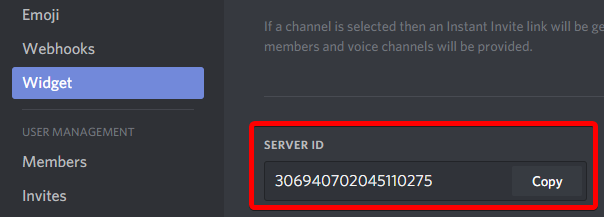
Go to Server Settings ⚙ -> Widget and copy Server ID
http://i.imgur.com/Qqbrwf1.png
 cold bear
do that role thing too
royal ermine
Done
cold bear
now give it some time
royal ermine
Ok 😃
dire yarrowBOT
GG @royal ermine, you just advanced to level 1 !
 terse kernel
Same problem here
royal ermine
Already solved my problem from yesterday, thx to the admin @cold bear !
cold bear
👀 np
buoyant moon
Hello guys i donated to mee6 cause i think its a very nice bot but the music playback is somehow quite bad. Its always lagging and gets stuck sometimes. Is this a known problem?
wooden mountain
@buoyant moon in discord => server settings => change voice region
buoyant moon
Hello. I want to add mee6 to my server but im logged in to the wrong acc. when i try signing out and logging in to the right acc i get sent to the autorize section. Can someone tell me how do i fix that ?
(idk if thats a bug, just wanted some help)
cold bear
!logout
dire yarrowBOT
oops, it looks like you are on the wrong account, you need an account with 'manage server' permissions.
You have to log out from discordapp.com in that browser and then log back in again.
- log out of discordapp site https://discordapp.com/login and follow the steps in the gif below
- go to http://mee6.xyz/logout and click the 'add to discord' button
https://i.imgur.com/7829TNS.gifv
cold bear
@buoyant moon ^
buoyant moon
thank you
cold bear
buoyant moon
I added the bot to my server then tested the set messages later on it started randomly posting them I don't know if this is happening on other servers
don't ask about my profile pic
mortal oxide
@buoyant moon by "set messages" do you mean timers?
 keen snow
I can't seem to get the timers to actually post
white notch
!!tag timers
wind windBOT
You're limited to 5 timers per guild, with the message interval being in minutes. If nobody posts a message after the timer has been sent, the channel is considered "non active" and so the next timer will not be sent. The bot needs the MANAGE_WEBHOOKS perm otherwise it'll auto disable if the channel isn't found or it can't create webhook
wind windBOT
!!!!!!!!!Świąteczna Meghan#7537 has been warned.
 sullen venture
Noted, that commands can run twice (Custom + Plugin-based):
buoyant moon
@mortal oxide sorry but yes, it took a while to notice
buoyant moon
When I try to add Mee6 bot, when it asks to authorize it, it says it for my other account. And I cant get it to go to my main account (THIS)
wooden mountain
!logout
dire yarrowBOT
oops, it looks like you are on the wrong account, you need an account with 'manage server' permissions.
You have to log out from discordapp.com in that browser and then log back in again.
- log out of discordapp site https://discordapp.com/login and follow the steps in the gif below
- go to http://mee6.xyz/logout and click the 'add to discord' button
https://i.imgur.com/7829TNS.gifv
mossy flare
@unborn glen Please use commands in #〉commands
 unborn glen
oh ok srry
 dawn sluice
When I try to log in to the Mee6 website, It's trying to gain access from another user with the same name of me, which means I can't modify the bot on my server. Is there anything I can do about it?
mossy flare
!logout
dire yarrowBOT
oops, it looks like you are on the wrong account, you need an account with 'manage server' permissions.
You have to log out from discordapp.com in that browser and then log back in again.
- log out of discordapp site https://discordapp.com/login and follow the steps in the gif below
- go to http://mee6.xyz/logout and click the 'add to discord' button
https://i.imgur.com/7829TNS.gifv
mossy flare
@dawn sluice Follow this
dawn sluice
oh ok
mossy flare
So you followed all of the steps?
dawn sluice
yes I have
mossy flare

dawn sluice
So I decided to log on by smartphone and I logged in without issues
dire yarrowBOT
GG @dawn sluice, you just advanced to level 1 !
mossy flare
Did you sign out of the discord client or discord website
dawn sluice
Client
mossy flare
You need to sign out of the website
dawn sluice
Got it. Thanks for the advice
 restive frigate
white notch
restive frigate
white notch
What commands are you trying?
keen snow
I have tried following the instructions given the other day, the bot has access to create webhooks and has done so for other plugins, but no matter what I do, including giving the bot administrator access, it won't make interval posts.
with the timers plugin
 primal topaz
@keen snow Can we have your server ID please?
 willow ridge
Hey there guys
Been having issues with getting Timer messages to work on my server, what info do you need from me?
@primal topaz
I have webhooks enabled, and channels are active with messages posted
With timers, If I for example put a 60 minute timer on a message and enabled it, should the message post straight away for it's first running, or does it take 60 mins?
<@&193123929701875712>
cold bear
try create another one with 2 mins cooldown
willow ridge
just to test @cold bear
dire yarrowBOT
GG @willow ridge, you just advanced to level 1 !
willow ridge
?
cold bear
yes
willow ridge
ok, added.
Nothing as of yet.
I've got my hour glass handy
@cold bear the 2m timer message did not work
cold bear
did you edit any of them? like changing nickname or setting avatar?
wooden mountain
there is currently a problem with timers not starting up correctly, we are aware and this will be fixed soon-ish
willow ridge
Haven't tried the avatar yet
keen snow
@primal topaz I woke up to it working so maybe just a delay before it created the webhook
willow ridge
The avatar isn't even available for me to change
wooden mountain
@willow ridge changing the name/avatar of the webhook does not do anything
@keen snow timers?
keen snow
Yeah
wooden mountain
there is currently a problem with timers not starting up correctly, we are aware and this will be fixed soon-ish
keen snow
Oh ok 👌 thx for the info
 gusty igloo
! commands dont work for urban dictionary or pokemon
white notch
Thanks for leaving
 dense ivy
Hi I have a problem with mee6 in my server, he doesn't work
cold bear
describe doesn't work
buoyant moon
,He do noting😣😣
buoyant moon
I am his friend
buoyant moon
!rank
dire yarrowBOT
 Mister Mettaton
Rank
13863/35025
Lvl.
0
Exp.
62/100 (tot. 62)
Mee6.xyz
sullen venture
It's not a bug - Enable plugin
cold bear
!dashboard
dire yarrowBOT
Dashboard: https://mee6.xyz/servers and select your server image
cold bear
also read #255286916872667147
before asking just try to check channels before
there high probability that your question was already answered
buoyant moon
The commande does't work
dire yarrowBOT
GG @buoyant moon, you just advanced to level 1 !
buoyant moon
I am Frenche,Who is French?
cold bear
@buoyant moon read what i said
buoyant moon
Are you French?
sullen venture
@buoyant moon just read what @cold bear did say
buoyant moon
I Don't Understand Engilsh sorry
cold bear
ask in #175714280648343552 then
buoyant moon
@cold bear Thaank you mery much😄
cold bear
👍
cold bear
that's not a word
buoyant moon
But They Don't antwork me
dire yarrowBOT
Dashboard: https://mee6.xyz/servers and select your server image
cold bear
go to mee6 dashboard and enable them
buoyant moon
But THE Commandes don'y work in my serveur😣😣
cold bear
you need to enable them @buoyant moon
buoyant moon
But How??
 mighty viper
I confirm, Mee6's commands don't work in his server, and their Admin already say that he enabled
dire yarrowBOT
GG @buoyant moon, you just advanced to level 1 !
cold bear
ok, gimme your server ids
dense ivy
@cold bear the commands are enable
buoyant moon
I don't know Our Id
dire yarrowBOT
GG @buoyant moon, you just advanced to level 2 !
wind windBOT
Go to Server Settings ⚙ -> Widget and copy Server ID
http://i.imgur.com/Qqbrwf1.png
cold bear
@mighty viper can you do this ^
mighty viper
I've said to their Admin how to found their id
buoyant moon
Wait please one minute
sullen venture
I use developer mode to grab Server ID's
dense ivy
@cold bear here's the ID 376162219697897473
cold bear
will be fixed soon
buoyant moon
You're Welcom😃
dense ivy
thanks for the help ^^
dire yarrowBOT
GG @dense ivy, you just advanced to level 1 !
dense ivy
we have to wait now
wooden mountain
Mee6 is restarting, pls wait
he should be back online within a hour
read #〉announcements for more info
you will be able to talk here when all of Mee6 is back online
 main comet
Why I can't put lvl on my server ?
wooden mountain
!!tag givexp
wind windBOT
You cannot give xp to users This picture explains why 👇 http://bit.ly/2xRAfbQ
 dense ivy
@cold bear hi birdie I want just an help, how do we attribute a role in the start?
cold bear
what do you mean?
dense ivy
When we arrived in a server can we have a role in the start without level?
Without doing it myself
cold bear
oh that, mee6 can't do that atm, you need another bot like @strange arch or etc
@dense ivy ^
main comet
someone speak french ?
 radiant hull
dense ivy
radiant hull
dense ivy
@cold bear oh ok thanks ^^
 gleaming fog
yo
my MEE6 aint working smh
white notch
quite vague, be more specific please
buoyant moon
@lean sphinx <@&193123929701875712> i just went on mee6 the web and the music plugin shows enabled and its orange i have not paid for it yet plz help me
with proof
wooden mountain
that again.... lol
mortal oxide
@buoyant moon You should pay for use it.
wooden mountain
^^ indeed, won't work if you don't pay
mortal oxide
Wow rofl changed
wooden mountain
indeed it did (on android alpha)
buoyant moon
@mortal oxide i know but there is enabeld
mortal oxide
Seems like a bug I think
wooden mountain
ignore it, we know about it
buoyant moon
@wooden mountain ok just checked its fixed
buoyant moon
The mute command isnt working
cold bear
@buoyant moon no need to write about this in more than one channel. you need to enable that command in the settings
!!tag moderator
wind windBOT
buoyant moon
@cold bear the command is enable, its why im asking t everyone here
white notch
!mute
dire yarrowBOT
!mute @mention - mutes mentioned user in current channel
Requirements:
- Manage Channels
P.S. You can't mute people who have the permission to mute others, this include: owner, other moderator or members with Administrator or Manage Server permissions!!!
Thx @white notch 😓 But its not working on my sevrer
Ooh no, sry 😓 😭
i cant mute people who have the permission to mute others
-_-
Its sad
 tulip gull
Hi music is not playing if music is aready added
wind windBOT
AHM™#4701 has been warned.
 magic thorn
Hey, my level is currently stopped at 307/2180 xp at lvl 16 anyone know why it has stopped increasing, it would help a lot.
white notch
!!tag noxp
wind windBOT
If Mee6 isn't giving you xp, or either !rank or !levels is not working it is one of the following:
Reason 1: The levels plugins isn't enabled on the dashboard
Reason 2: You have a banned role on you (in which case you should remove it. Having a banned role also prevents !rank or !levels from working)
Reason 3: Bot can't read messages in that channel (for not gaining xp) or can't send (for !rank and !levels)
Reason 4: Rank cooldown. This used to be bugged, but in a recent update it got fixed. So if you have the rank cooldown set super high, set it lower so that the !rank command work
In case you don't know about banned roles, this pic shows-> http://bit.ly/2ynUQGk
buoyant moon
I'm not sure if this is a bug but Mee6 keep sending this message https://gyazo.com/d29648519dff92add625343b16a89778?token=2c584bb5a73bef8a89a1d3187fddacf0

Like it won't stop
white notch
timer message
buoyant moon
Can I disable it?
 placid cove
Mee6 spamming me smh. Maybe it's because I called him mean names
wooden mountain
network lagg
 potent trench
More of it
 deft flax
Ye it’s network lag
potent trench
Ok
 mighty topaz
Why i cant use !music on my server?
buoyant moon
Hello! I was just using mee6 music and mee6 left me. now either the bot hates the foo fighters, or something wrong. 😂
wooden mountain
the latter I think, just use !join again @buoyant moon
wooden mountain
seems like the connection between Mee6 and Discord is bad
 umbral adder
I activated the commands but the Mee6 bot still does not work
wooden mountain
did you MAKE commands
umbral adder
Yes,i'have did !help
wooden mountain
@umbral adder did you make commands?
if you are on mobile you need to SCROLL DOWN
when are mobile people ever going to learn that a site is usualy bigger then it seems
 solid pendant
It seems you don’t gain exp when talking
wooden mountain
https://twitter.com/mee6bot/status/943511358666092544 @solid pendant

[LEVELS MAINTENANCE] We disabled gaining xp. !rank and !levels work. We have to tweak 2 or 3 things before enabling back xp gaining 👌 . More info soon.
 Twitter
solid pendant
Twitter
solid pendant
Oh sorry
 ionic panther
wooden mountain
ionic panther
wooden mountain
read above tweet
 rugged basalt
Is it just me or is mee6bot.com down? It's not responding whatsoever.
May be me, but also not on incognito..
 faint dome
You're right, and it happens several times a day right now 🤔
rugged basalt
That sucks...
Mee6 also doesn't seem to be responding to commands.
In any server.
<@&193123929701875712> Excuse me?
 dense crag
yee for a minet mine bot doesn't respondet to my commands
wooden mountain
@spice runehh1#3794 @faint dome mee6bot.com should only redirect you to mee6.xyz, and in the last couple days it has indeed gone down a couple times, but everything (except levels plugin) should be working just fine now
@dense crag did you enable commands
sorry DM#5989
dense crag
yes i enabled but now he stil dosn't response
faint dome
When the site does not work, generally mee6 takes longer to respond
 wooden mountain
and what does !help give you?
faint dome
How did you activate the timers plugin? I can't make it 😄
wooden mountain
@faint dome site always works, but if it is to slow to responds (same reason bot is slow) then your browser says that it doesn't work
so then it is normal that it is at the same moments
 wooden mountain
then those commands should all work
dense crag
yes but when i wrote ! rank he dosn't response
wooden mountain
levels is currently broken, that is why they are not in the help message
dense crag
ou okey
 brittle plank
Thanks for the assistance, I was also having that issue.
Any ETA on when they will not be broken?
wooden mountain
we are the dev is working on it, but can't say when it will be fixed
brittle plank
Thanks again.
wooden mountain
everyone's
buoyant moon
Rip
 fading mulch


 buoyant moon
Ranks down agian? They were up not working anymore
white notch
dire yarrowBOT
i would like to help you but if you don't tell us what your problem is then i can't help, pls tell us what your problem is and not that you have one.
buoyant moon
So the site mee6bot.com is giving an error in the Levels command, what is happening?
white notch
broken levels plugin, see #238889207827922944 and #〉announcements
buoyant moon
Oh, alright, thank you.
white notch
read #〉announcements
white notch
and what time is it for you now?
because I can tell you now unless you see anything new in #238889207827922944 or #〉announcements it's broken
buoyant moon
Right now it’s 9 and for me the announcement was at 5 but at 7 I could see my rank
white notch
would have been a brief on-off moment of working
nothing has been said about it fully working since
 median scaffold
.-.
mossy flare
Before you complain about Mee6 being down, please read #〉announcements
buoyant moon
Bonjour, mon mee6 ne veut plus fonctionné sur mon serveur ? Je tape mes commandes mais rien n’y fait....