#〉bugs-reports
2 messages · Page 16 of 1
 uncut badge
 devout chasm
mee6 didnt delete the embed then
uncut badge
One of my guy found out that manage message is the ome causing it
 white notch
yes because that is the perm that allows a user/bot to delete messages other than their own. There are only 3 ways Mee6 can delete messages:
- Banned words (usually accompanied by a mention and the words
LANGUAGE) - Slowmode (enabled by doing
!slowmode xx. Turned off by doing!slowoff) - One of the mods did
!clear xx. Unlikely, but still possible
There is no auto embed delete, so do the following:
Check you banned words and see if there are any words to do with the embed
Disable slowmode by doing!slowoff
uncut badge
Thanks
 wooden mountain
i don't think slowmode effects other bots....
 cold bear
@gentle roost wrong channel. use #〉commands next time 😉
 solid axle
When I login it gets the wrong username and friend code Example #9999
 mossy flare
!logout
 dire yarrowBOT
oops, it looks like you are on the wrong account, you need an account with 'manage server' permissions.
You have to log out and back in again.
- log out of discordapp site https://discordapp.com/login and follow the steps in the gif below
- go to http://mee6.xyz/logout and click the 'add to discord' button
https://i.imgur.com/7829TNS.gifv
 mossy flare
@solid axle follow this
 hollow patio
So I'm using the reward a role at this level feature and it works for me (the server owner) but not anyone else! What's going on?
mossy flare
@hollow patio you are the only one getting the roles?
hollow patio
Yes.
As of now. Only one other person has gotten to the level but it didn't work!
They don't have any staff
And I'm owner
Would that have something to do with it?
mossy flare
!role-rewards
dire yarrowBOT
role rewards will give a role as reward for active users in chat.
you gain xp by talking in chat. when you gain enough ex you get a level.
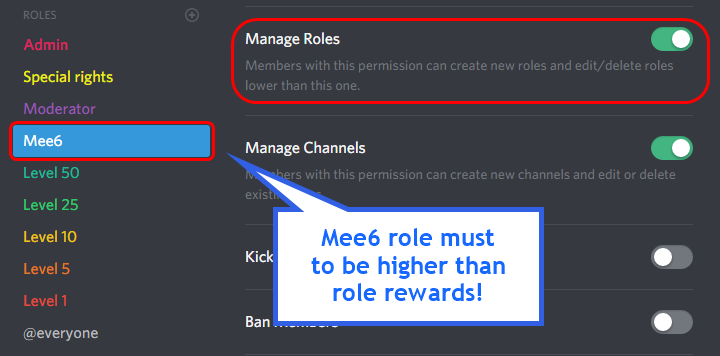
in order to let me give role rewards i need :
+ manage roles permission
+ at least one of my roles needs to be ABOVE the reward roles(bots can't give roles that are higher than their own role)
! I will only check for role rewards to be updated when someone levels up... so if you added role rewards a bit late then wait till someone levels again before complaining that I am not doing my job.
DISCLAIMER: roles will stack up, if you remove a low level role from someone then that person will just get it back over time.
http://i.imgur.com/aPubLMp.png
 mossy flare
everything here is being followed?
hollow patio
Oh I figured it out
The first role was above
My friend must've moved it, thank you
 plush iron
Hi there! I'm having issues getting the !Timer feature to work. I enable it, but a couple minutes later it's disabled again. And, I've never seen it post anything to a channel.
mossy flare
!!tag timers
 wind windBOT
You're limited to 5 timers per guild, with the message interval being in minutes. If nobody posts a message after the timer has been sent, the channel is considered "non active" and so the next timer will not be sent. The bot needs the MANAGE_WEBHOOKS perm otherwise it'll auto disable if the channel isn't found or it can't create webhook
mossy flare
@plush iron
hollow patio
I'm having more issues with the give this role at this level feature
dire yarrowBOT
GG @hollow patio, you just advanced to level 1 !
hollow patio
I'm following everything, but someone got level six and didn't get the level six role.
cold bear
kick bot from server and invite again without permissions
create custom role, give it permissions, put it higher than other roles
don't worry, the levels will stay
hollow patio
Ok
devout chasm
lol who mentioned me
devout chasm
ah ok so here was a mention?
devout chasm
ooh ok
 rocky folio
Hello I programmed mee6bot on my server discord but when a member passes level 5 he should receive a rank and the problem is that he does not receive him the same when he passes level 1 or 15 I would like to have help on top as on the timers I program comle it must but as soon as I leave the page mee6bot.com the program is uninstalled I would like help on top too Thank you (I am French and I do not master English very well)
wooden mountain
@lean sphinx ^^ (french and could maybe be the role problem)
 lean sphinx
Salut @rocky folio . Jsuis à toi dans 5 minutes
rocky folio
J'attend toujours 😂
 dim sinew
Admin My dont do !help right
 civic girder
 honest warren
A bug I am running into at the moment is in the reddit plugin, it is continuing to post threads from subreddits I deleted from my list. Any ideas? I have tried disabling, and reenabling, still nothing.
 mortal oxide
@rocky folio hey ! Pour que Mee6 donne un "roles-rewards" il faut que l'un au moins des rôles de Mee6 soit au-dessus de ceux ci. Pour le plugin "Timer" as-tu cliqué sur "Add" ?
@honest warren after removed, have you clicked on "Update"?
 turbid crystal
It appears that adding a timer with a zero time will cause an internal server error page
turbid crystal
Sorry, can't reproduce it anymore, must've been me and my friend browsing the dashboard at the same time.
wooden mountain
internal server error:
- having the dashboard open in 2 tabs at the same time (only the last refreshed tab is valid)
- connection issues
but setting a timer on 0 should just not add the timer
and being active with 2 people also won't give internal server error
rocky folio
Ok merci @mortal oxide j'ai compris pour les rôle mais pour les timer je sais pas
 buoyant moon
ok
mortal oxide
@rocky folio quel est ton pb avec les Timers ? S'il te plaît, mentionne moi demain dans #175714280648343552 pour que je m'occupe de toi :')
rocky folio
Dacc
buoyant moon
french people fights back
honest warren
@mortal oxide Yes I did. I even pressed it multiple times. It tells me that it has updated the configurations, but the old subreddits seem to still get sent. Not sure if it just takes a really long time to update, or if it just isn't updating at all?
 hard kiln
Mee6 my website makes it so it only uses my brother's account not mine #Pleasefixed
mossy flare
@hard kiln Make sure that you are signed into the correct account on discordapp.com, thats where mee6.xyz checks for the account
hard kiln
K thanks for the help @mossy flare
mortal oxide
@honest warren can you invite me to your server please and give me admin rights (invite in dm).
buoyant moon
c
 somber panther
having trouble adding moderator roles in the moderator plug in section
and cant add twitch channels not sure what im doing wrong
buoyant moon
when i set a cooldown timer for !rank, !rank is completely unuseable for no reason.
 gray niche
not possible
it was your banned role
@somber panther Mod roles-Type in the role name then select from the list
Twitch-Just type in the channel name
buoyant moon
ik, bit you said it was the cooldown asell, so i thought i would report that 😄
somber panther
no roles except @ everyone appear
buoyant moon
ill show myself out
gray niche
@somber panther have you made any other roles on your server?
cold bear
if role called moderator => write moderator, not @moderator
gray niche
cold bear
^^
gray niche
👍
dire yarrowBOT
GG @somber panther, you just advanced to level 1 !
cold bear
!mute
dire yarrowBOT
!mute @mention - mutes mentioned user in current channel
Requirements:
- Manage Channels
P.S. You can't mute people who have the permission to mute others, this include: owner, other moderator or members with Administrator or Manage Server permissions!!!
not !Mute
somber panther
i tried both
cold bear
you can't mute moderator
or anyone who have access to dashboard
aka admin or someone with manage server permission
somber panther
i tried muting a non mod or admin
and im owner
do i count as an admin or do i need the owner role?
cold bear
 owner already has admin permissions.
check permissions again
- Manage Channels
mee6 role must have it
 shadow cargo
i tried renaming mee6 and it rendered in the member list but when mee6 said som ething it still said mee6
is this a bug or am i an idiot i cant tell
honest warren
@mortal oxide It seems that the issue has resolved itself. Since the last time I messaged you the subreddits I have deleted have slowly stopped popping up. I can't say for sure, but it seems like it takes the bot a long time to recognize when a subreddit has been deleted from the list, and it just keeps posting them in the meantime. I can still invite you if you wish to take a closer look?
dire yarrowBOT
GG @honest warren, you just advanced to level 1 !
mortal oxide
@honest warren good, if you prefer for be sure yes invite me, else no :^)
honest warren
@mortal oxide I tried DM'ing you but it says that the message wasnt delivered D:
mortal oxide
@honest warren oops, I closed it ^^ try again now :') shall work
buoyant moon
Alright I got one here
Once I joined a server and the bot PM'd me welcoming me to the server
(I believe that) since then no discord bots have recognised me as being in a server apart from the one I joined
mossy flare
@buoyant moon that isnt really a mee6 problem
buoyant moon
@mossy flare yeah it's the same with every other boy but I was wondering if it was because of the PM sent to me
 tidal warren
On my Server mee6 isn't working well. In The sitebar He is online, but when you write a Command, He doesn't do anything ... What is the Matter? What Can i do?
wind windBOT
 Tylerhehe#6158 was banned!
white notch
@tidal warren check that you enable commands in plugins, and that the bot can send messages
tidal warren
I Made All Things Like The intruduction sais...
It is the second time that the bot is somehow half down. Somehow he came back and did everything as before
tidal warren
that was yesterday today he is again "gone"
buoyant moon
Im Mr Meeseeks! Look at me!
 tight citrus
there's a problem with the lvls on mee6 because usually when i set them with meey, they would set the roles at certain lvls but now it wony do it! It wont set the damn ranks and its getting on my nerves...Can someone like fix this?
mossy flare
!role-rewards
dire yarrowBOT
role rewards will give a role as reward for active users in chat.
you gain xp by talking in chat. when you gain enough ex you get a level.
in order to let me give role rewards i need :
+ manage roles permission
+ at least one of my roles needs to be ABOVE the reward roles(bots can't give roles that are higher than their own role)
! I will only check for role rewards to be updated when someone levels up... so if you added role rewards a bit late then wait till someone levels again before complaining that I am not doing my job.
DISCLAIMER: roles will stack up, if you remove a low level role from someone then that person will just get it back over time.
http://i.imgur.com/aPubLMp.png
mossy flare
So all of what is being said in that command is being followed?
mossy flare
Can you invite me to the server and give me admin?
tight citrus
yes
 faint bear
Mee6 stops working in some channals to fix must kick then add back to server
BIG bug there
 whole hearth
Mee6 Can not Clean Messages
gray niche
did you follow everything that was provided to you in #〉volunteer-support ?
 frail trail
i noticed that the bot changes the "send message" permission to "Allow" instead of resetting it to what it was when using the !unmute <member> command
in certain cases this conflicts with role settings
wooden mountain
intended behaviar
can be used to let certain people talk in a "read only" channel
 hard flume
I'm using Mee6 and it appears the "Rank Command Cooldown" doesn't work. Despite setting it to 60 seconds, I can spam it so fast that Mee6 posts it multiple times in the same post. Already known?
 versed gate
i found a bug it was on my floor
it was the size of a keyboard key
pls
get
it
out
wooden mountain
🐛
 brisk gale
You can fix that bug by simply buying the premium 🦎 @versed gate
versed gate
You have solved my daily issues
brisk gale
YW. Vote The Legend for Support 2017
mossy flare

 simple sigil
I used Mee6's music function to play music, I added music (!add {song}) Then I typed !play but instead of playing the music the bot said: 'No songs added'. Is that an issue or just my network problems...?
 wooden mountain
every time you do !play it goes to the nex song
so you just skipped all the songs
 edgy inlet
HI
simple sigil
Thanks @wooden mountain
buoyant moon
When I try to log out of the link in mee6 it dosent let me
wooden mountain
!logout
dire yarrowBOT
oops, it looks like you are on the wrong account, you need an account with 'manage server' permissions.
You have to log out and back in again.
- log out of discordapp site https://discordapp.com/login and follow the steps in the gif below
- go to http://mee6.xyz/logout and click the 'add to discord' button
https://i.imgur.com/7829TNS.gifv
 high quail
anyone else had problems with mee6 deleting music from your play list?
i added like 50 songs and theres only like 11 when you do !playlist
wooden mountain
the playlist is a "listen later" list, as soon as a song start playing it get removed from the list
wooden mountain
#〉commands for bot commands
buoyant moon
I Joined to a other fırat animations and I can't change my account
wooden mountain
@teal hill ENOUGH, use #〉commands for bto commands
@buoyant moon ^^ the gif above , the one send by Mee6
buoyant moon
I can't doit 😭
Nvm
It work now
I really like to eat potatoes and gringos are ugly: 3
what
sgesagesauhsea
he's is so stupid
omg
that brazilians...
wooden mountain
#〉commands for bot commands
buoyant moon
I wrote a welcome message to be sent as a private message, i saved and then it reseted to another thing
wooden mountain
try again
 grizzled hornet
Cooldown !rank it's not working on my server.
grizzled hornet
Okay :C
 west spindle
When mee6 links to a twitch channel ending in an underscore '' . although it logs it correctly on the mee6.xyz control panel, it does not announce the channel name correctly. It instead ommits the underscore '' .
 static bison
mee6 is offline in my server
cold bear
try !shard? command
 desert abyss
my bot doenst work on my server '-'
 spare wind
how do i egt mee6 bot in my uhh sever?
mossy flare
@spare wind #255286916872667147
buoyant moon
@white notch yo my rank reward dont work on my bot help plzzzzz
mossy flare
!role-rewards
dire yarrowBOT
role rewards will give a role as reward for active users in chat.
you gain xp by talking in chat. when you gain enough ex you get a level.
in order to let me give role rewards i need :
+ manage roles permission
- at least one of my roles needs to be ABOVE the reward roles(bots can't give roles that are higher than their own role)
! I will only check for role rewards to be updated when someone levels up... so if you added role rewards a bit late then wait till someone levels again before complaining that I am not doing my job.
DISCLAIMER: roles will stack up, if you remove a low level role from someone then that person will just get it back over time.
http://i.imgur.com/aPubLMp.png
mossy flare
@buoyant moon is all of this being followed?
 floral anvil
everytime im trying to update mee6's welcome and gudbye messages even the level up message i cant save this message always appears
cold bear
@floral anvil go to mee6 main screen and start again
floral anvil
ok
 upbeat trellis
Mee6's bad word detection can be circumvented by adding punctuation to the end of the word
EG: badword would be removed, but badword, and badword? wouldn't
gray niche
Because it uses an exact match system. This is known
 analog monolith
hey im having problem with the Mee6 bot not handing out levels to people who level up.
wooden mountain
!role-rewards
dire yarrowBOT
role rewards will give a role as reward for active users in chat.
you gain xp by talking in chat. when you gain enough ex you get a level.
in order to let me give role rewards i need :
+ manage roles permission
- at least one of my roles needs to be ABOVE the reward roles(bots can't give roles that are higher than their own role)
! I will only check for role rewards to be updated when someone levels up... so if you added role rewards a bit late then wait till someone levels again before complaining that I am not doing my job.
DISCLAIMER: roles will stack up, if you remove a low level role from someone then that person will just get it back over time.
http://i.imgur.com/aPubLMp.png
wooden mountain
^ @analog monolith ^^ try that
analog monolith
ya i did try it and one of my people leveled up but no role was given to them
wooden mountain
invite pls
 worthy fog
any movement on switching hitbox support to smashcast support?
wooden mountain
not a priority
 grizzled thorn
just a quick bug report, seems like the bot is omitting _ from usernames when announcing live streams
grizzled thorn
ah okay
 lost quest
The timer feature is not working. I tried disabling and re enabling, I tried editing and remaking the timers, and I made sure I was posting in the specified channels. All of it was to no avail.
I can't post invites here but the server is called FSA High School.
mossy flare
!!tag timers
wind windBOT
You're limited to 5 timers per guild, with the message interval being in minutes. If nobody posts a message after the timer has been sent, the channel is considered "non active" and so the next timer will not be sent. The bot needs the MANAGE_WEBHOOKS perm otherwise it'll auto disable if the channel isn't found or it can't create webhook
mossy flare
@lost quest 
lost quest
Ah I see. I will check if the manage webhooks permission is on.
The thing is, no timers were ever sent.
YES it worked thank you!
dire yarrowBOT
GG @lost quest, you just advanced to level 1 !
buoyant moon
Hi
I got a bug problem with Mee6 in my server
I have settled all the things for Mee6 in my server dashboard, but Mee6 is not saying the welcome message and is not saying any other messages when i do Mee6 commands
Why?!
gray niche
Your either:
- Haven't enabled commands that's are individually enabled inside the plugin
- Bot can't send messages in that channel
buoyant moon
No, the action from the bot command is done but Mee6 doesnt say anything
gray niche
What command are you trying to use and does the bot have permission to send messages in that channel?
buoyant moon
For example, when i do !clear 5 Mee6 does the action but does not say the message that he did it
Oh wait, i see whats wrong now
I just realised someone in my server did not give the bots permission to send messages, i think thats the reason why.
dire yarrowBOT
GG @buoyant moon, you just advanced to level 1 !
buoyant moon
Hey there, my message welcome isn't working, but it's enabled
mortal oxide
@velvet crow Mee6 can send messages in the welcome channel?
 oak herald
Hello, im having trouble with the xp system on mee6, people are levels 2,3 and not getting the level 1 role even through i set it to level 1 that role?
gray niche
!role-rewards
dire yarrowBOT
role rewards will give a role as reward for active users in chat.
you gain xp by talking in chat. when you gain enough ex you get a level.
in order to let me give role rewards i need :
+ manage roles permission
- at least one of my roles needs to be ABOVE the reward roles(bots can't give roles that are higher than their own role)
! I will only check for role rewards to be updated when someone levels up... so if you added role rewards a bit late then wait till someone levels again before complaining that I am not doing my job.
DISCLAIMER: roles will stack up, if you remove a low level role from someone then that person will just get it back over time.
http://i.imgur.com/aPubLMp.png
 white acorn
I cant log to my primary discord account in the website
wooden mountain
!logout
dire yarrowBOT
oops, it looks like you are on the wrong account, you need an account with 'manage server' permissions.
You have to log out from discordapp.com in that browser and then log back in again.
- log out of discordapp site https://discordapp.com/login and follow the steps in the gif below
- go to http://mee6.xyz/logout and click the 'add to discord' button
https://i.imgur.com/7829TNS.gifv
white acorn
Thx
buoyant moon
posso ser adimim
 clear gulch
Hello - the !mute and !unmute commands are not working on my server.
I have assigned the specific roles in my server to the moderator roles on mee6 bot page.
and the bot has correct permissions for the server
 runic steeple
So idk what I'm doing wrong or if the bot is messed up, but it's not giving the roles rewards in my server
It has the perms, and it's role is set above the roles its awarding
buoyant moon
I've discovered on a server I'm on someone is gaming the leaderboard by sending a single character message in a channel people don't pay much attention to and then immediately deleting it, and repeating that every minute. Not sure if this has been reported, but it shouldn't be too difficult to fix to be honest and is a pretty big problem with the leaderboard, if whoever actively works on the bot would rather not do the work I can try and throw some code together to do message deletion tracking for the last few messages or something like that.
wooden mountain
@buoyant moon we are not going to block that, if you see them doing such thing then just give them a banned role
on the levels plugin page => banned roles
buoyant moon
the issue is that on a server with more than a few channels it may be pretty difficult to see as long as they're clever about it, and a lot of server mods might not even know to look out for it at all. But thanks for the response, might just make my own bot to look out for repeat deletions, thats probably a better solution 😃
 bitter zenith
if you're gonna do it that way, you might make that bot assign people who do that a banned role automatically anyway
kill 2 birds
although, I'm sure you might not have thought about this... but if it's affecting the leaderboard, you could just assign the false leaders a banned role and then reset their levels?
buoyant moon
well yeah, the issue is sneaky mfs who will do it while mods are afk or in-game, the main thing im interested in is preventing it entirely, or KNOWING its happening, I'll make the bot throw them into a banned role
bitter zenith
you know, this simple solution that I mentioned about resetting levels would cut out hours of development
just saying
buoyant moon
yeah but the issue is knowing they are doing it without having to pay close attention to how much everyone is chatting to get an idea of where levels SHOULD be
is there any easier way to know people are doing it then having a bot monitor for repeat deletions and alert someone or throw them into a banned role? seems pretty simple to me
bitter zenith
you don't have to pay close attention to how much they're chatting tho
doesn't matter about the deletions, you just check the leaderboard
if said person goes up way too fast, then they're cheating. they get a banned role. they get reset. 0 levels
buoyant moon
yeah, I know what you mean, but its a pretty simple bot to build and would let me know for sure, I'd just prefer it
bitter zenith
the mods can easily review chat logs by searching for messages sent by user with the search function
if messages were chronically deleted there wouldn't be many
like this
3
dire yarrowBOT
GG @buoyant moon, you just advanced to level 1 !
buoyant moon
oops
bitter zenith
alternatively, you could also just prevent Mee6 from reading messages in said channels where users are being crafty and they wouldn't gain experience in those channels and would have to try to be crafty in public channels everybody is active in
there's always a snitch somewhere
I'm not running out of ideas
buoyant moon
I already have enough bots similar that I can throw it together pretty quickly, overall i feel like it will save time not looking into STUFF too much xD the guy I just saw doing it is in a pretty decent size server and seems to have been doing it for about a day or so with no one realizing at all, he wasn't doing it so much it was obvious on the leaderboard, so I dunno, its just made me a little paranoid and a simple bot will fix that.. and give me another random thing to work on 😂
also, Mee6 is dope and I appreciate its creation, so props to everyone involved 😃
bitter zenith
well if you're really hurting for something to do go for it lol
I won't tell you how to spend your time, just how to save it x)
money on the other hand, I'll encourage you to spend
buoyant moon
on whiskey?
buoyant moon
haven't tried scotch tbh, big fan of bourbon though
bitter zenith
if you like bourbon, you'll like a good scotch
don't expect it to be as nice tho
it burns all the way, best served cold
just like revenge
buoyant moon
lmao
buoyant moon
Hiya, great bot, one bug that causes me some issue is. You enter a command with exactly 15 characters (The maximum and it works, but if you edit this command it says command too long, (I believe it counts the "!" as an extra character so makes it 16). Thanks
bitter zenith
yeah I'm pretty sure it's designed that way
buoyant moon
Is it not seen as a problem?
bitter zenith
why would it be?
buoyant moon
I meant for example i enter the comand netplay4android which is 15 characters, and it is saved
then i make changes to the command and click edit, it says command too long
bitter zenith
does it work if you don't edit it?
buoyant moon
yes
bitter zenith
so basically you can create a working command that has the ! and an additional 15 characters, but once created you are unable to edit the command at all
buoyant moon
yeah so i am currently copy and pasting the message, deleting the message and recreating the command
dire yarrowBOT
GG @buoyant moon, you just advanced to level 1 !
bitter zenith
ok well, that's interesting, and I'll have to look into it
but for now
crazy thought... change the command
buoyant moon
haha i can do that
bitter zenith
will have to update the character parsing
@lean sphinx slight logical error in that
 hoary stream
@buoyant moon That is a custom command, that means it only works in this server. You have to enable the other commands or add custom commands for that to work.
buoyant moon
how i do this?
hoary stream
Read #255286916872667147 @buoyant moon
buoyant moon
sorry disturb, i found how
hoary stream
Nice
 junior quest
Lol
 hazy jolt
hoary stream
hazy jolt
hoary stream
@hazy jolt You first have to enable "Moderator" commands on the Mee6 dashboard and make sure that Mee6 has manage messages permissions
 brittle hamlet
what happoning here
buoyant moon
didnt know you get xp for a welcome message https://gyazo.com/55b10e7867a71e3a6ae4d58c38b81b0e
 white notch
because it considers you as the user sending it
if you get a desktop notification with that message, it's shown as the user sending it
 winged orchid
On the website its logging me in as my cousin... Can't log out please help
white notch
!logout
dire yarrowBOT
oops, it looks like you are on the wrong account, you need an account with 'manage server' permissions.
You have to log out from discordapp.com in that browser and then log back in again.
- log out of discordapp site https://discordapp.com/login and follow the steps in the gif below
- go to http://mee6.xyz/logout and click the 'add to discord' button
https://i.imgur.com/7829TNS.gifv
wooden mountain
- is levels plugin enabled on the dashboard (website)
- do you have a banned role
wooden mountain
!dashbaord
dire yarrowBOT
Dashboard: https://mee6.xyz/servers and select your server image
 hallow cargo
It works for some people the !rank command and doesnt work for some pople like me.why?
wooden mountain
banned role
wooden mountain
🤦
invite pls
i said invite, not friend request
you can send it here or in DM
hallow cargo
Ow on
dire yarrowBOT
GG @hallow cargo, you just advanced to level 1 !
wooden mountain
thanks
hallow cargo
😃
hallow cargo
!dashboard
dire yarrowBOT
Dashboard: https://mee6.xyz/servers and select your server image
hoary stream
Please do bot commands in #〉commands @hallow cargo
hallow cargo
sorry
buoyant moon
"!rank command cooldown" is not working, users at my server keep spam the command sadly
hoary stream
Currently still something not fixed.
 red drum
cold bear
red drum
cold bear
did he work before?
 half hull
Gateway down?
wooden mountain
#〉commands for bot commands
 rancid sundial
hey i wannt to reprot a bug
@flint cypressers
@flint cypress
<@&193123929701875712> i want help
mossy flare
Just report it
rancid sundial
how
white notch
!!tag timers
wind windBOT
You're limited to 5 timers per guild, with the message interval being in minutes. If nobody posts a message after the timer has been sent, the channel is considered "non active" and so the next timer will not be sent. The bot needs the MANAGE_WEBHOOKS perm otherwise it'll auto disable if the channel isn't found or it can't create webhook
white notch
mod command only matey
rancid sundial
?
white notch
only those with the Support role can use that command
white notch
you do realise you are meant to read that message
The bot needs the MANAGE_WEBHOOKS perm otherwise it'll auto disable if the channel isn't found or it can't create webhook
The bot needs the MANAGE_WEBHOOKS perm otherwise it'll auto disable if the channel isn't found or it can't create webhook
The bot needs the MANAGE_WEBHOOKS perm otherwise it'll auto disable if the channel isn't found or it can't create webhook
The bot needs the MANAGE_WEBHOOKS perm otherwise it'll auto disable if the channel isn't found or it can't create webhook
 white notch
yeah because of what I posted 4 times
The bot needs the MANAGE_WEBHOOKS perm otherwise it'll auto disable if the channel isn't found or it can't create webhook
reeeeeeeeeeeeeeeeaaaaaaaaaaaaaaaaaaaadddddddddddddddddddddddd
dire yarrowBOT
GG @rancid sundial, you just advanced to level 2 !
white notch
!mute
dire yarrowBOT
!mute @mention - mutes mentioned user in current channel
Requirements:
- Manage Channels
P.S. You can't mute people who have the permission to mute others, this include: owner, other moderator or members with Administrator or Manage Server permissions!!!
!!tag moderator
wind windBOT
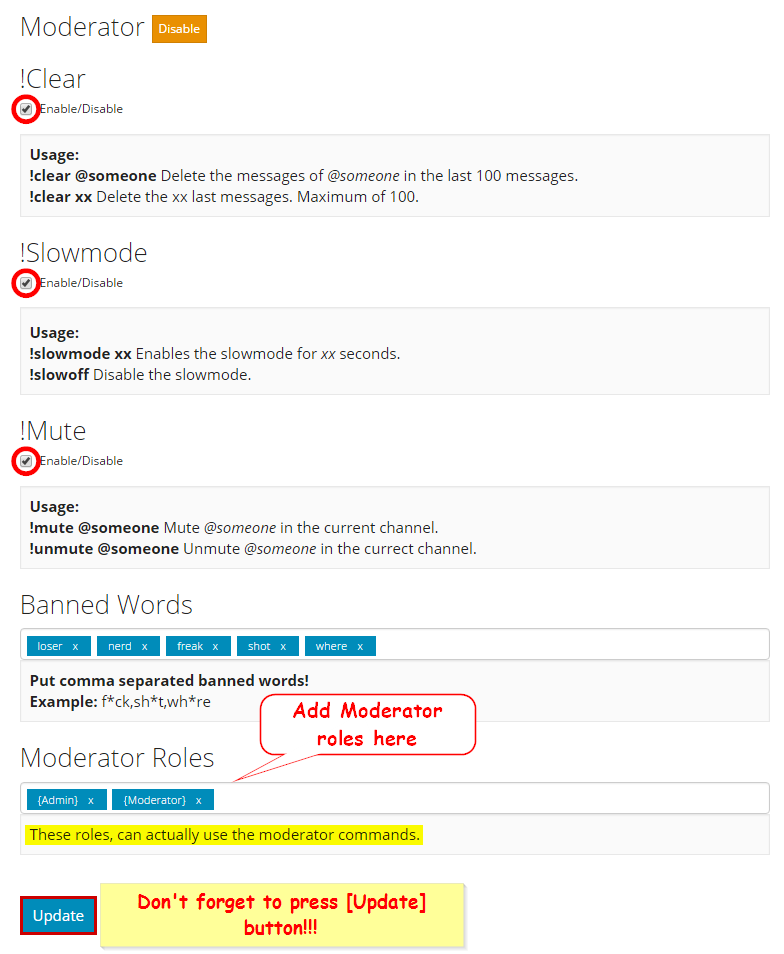 white notch
P.S. You can't mute people who have the permission to mute others, this include: owner, other moderator or members with Administrator or Manage Server permissions!!!
bitter zenith
basically, moderators are immune to moderation
mossy flare

white notch
!mute
dire yarrowBOT
!mute @mention - mutes mentioned user in current channel
Requirements:
- Manage Channels
P.S. You can't mute people who have the permission to mute others, this include: owner, other moderator or members with Administrator or Manage Server permissions!!!
!!tag moderator
wind windBOT
white notch
including a moderator role being set?
 maiden ledge
im having a problem with my mee6 bot. it seems to have deleted all the commands i put in it except 3 on its own, and the "!rank" system and commands arent working even though they are turned on
im confused xD
white notch
so you enabled the levels plugin?
maiden ledge
white notch
please tell me that the role that is in the banned roles section you do not have on you on that server
if you have that banned role, get rid of it
maiden ledge
you mean on myself?
white notch
yes
maiden ledge
no that role is only assigne dto this one annoying kid
white notch
!levels
dire yarrowBOT
Go check Mee6 The Bot's leaderboard: http://mee6.xyz/levels/159962941502783488 :wink:
white notch
does that work?
maiden ledge
thanks for the help got it under control. my second issue is my mee6bot stopped auto posting from its reddit feed it was following, how would i reset that and get it going again?
white notch
dire yarrowBOT
the reddit plugin will post all new posts from your favorite subreddits.
+ Mee6 needs MANAGE WEBHOOK permission, either on the channel you choose or server wide
- you can not nickname the reddit posting webhook, changing the webhook does not effect anything
- the reddit plugin will automaticly disable itself over time if Mee6 does not have the manage webhook permission
so remove the reddit plugin and add it again?
white notch
yes that can work
rancid sundial
lolv
 viral sable
I do not work the timer module. I think it has bugged
white notch
!!tag timers
wind windBOT
You're limited to 5 timers per guild, with the message interval being in minutes. If nobody posts a message after the timer has been sent, the channel is considered "non active" and so the next timer will not be sent. The bot needs the MANAGE_WEBHOOKS perm otherwise it'll auto disable if the channel isn't found or it can't create webhook
viral sable
was running and has stopped working. mee6 is not responding
dire yarrowBOT
GG @viral sable, you just advanced to level 1 !
viral sable
My bot does not create webhooks. Before it worked, but this, tomorrow has stopped working. I test on another server and if it works
 azure sparrow
Hello, on my server, the bot is supposed to give the role "i'm random" to a player when he reach the lvl 1.
The bot has the good perm, the settings are set but he isn't promoting :c
hoary stream
!role-rewards
dire yarrowBOT
role rewards will give a role as reward for active users in chat.
you gain xp by talking in chat. when you gain enough ex you get a level.
in order to let me give role rewards i need :
+ manage roles permission
- at least one of my roles needs to be ABOVE the reward roles(bots can't give roles that are higher than their own role)
! I will only check for role rewards to be updated when someone levels up... so if you added role rewards a bit late then wait till someone levels again before complaining that I am not doing my job.
DISCLAIMER: roles will stack up, if you remove a low level role from someone then that person will just get it back over time.
http://i.imgur.com/aPubLMp.png
hoary stream
@azure sparrow
bitter zenith
@mortal oxide I don't spek french
mortal oxide
@buoyant moon c'est à dire ?
@bitter zenith no problem, I get it
Avec quelle commande ?
Invite moi s'il te plaît (en mp)
une invitation pour ton serveur
Non ici c'est #〉bugs-reports
Envoie moi en Message Privé (MP) une invitation pour ton serveur
 vocal pond
Hi there
I want to report a bug
my Twitch name is a__jey
(with 2 underscores)
I added my name correctly on mee-settings
but when the announcement pops out on my server it looks like this:
the displayed channel is correct, but the link above got totally weird
I guess mee got problems with the 2 underscores
mossy flare
@vocal pond make is so {streamer} looks like this
vocal pond
I got it this way:
{streamer} is now live on Twitch! {link}
mossy flare
yes, now make it so you put a ` on each side of it
the underscores trigger the markdown
 late bolt
Hi, My Mee6 i had purchased a lifetime music plugin, but now it actually asking me to buy 3000 Potion again to enable music plugin for my server.
bitter zenith
the same one?
late bolt
yep
late bolt
how to check
bitter zenith
well, used to be that the general channel had the same id as the server, so as long as that channel hasn't been deleted should still be able to use \#channel
apparently you can delete those now
late bolt
arh i delete the default channel
white notch
this is under server settings
bitter zenith
why isn't that in the "overview" section?
white notch
¯_(ツ)_/¯
bitter zenith
I hate these people so much
late bolt
oh sorry i think i found out what happen =p
i have 3 discord server
and i actually changed it onto another server
so i thought all the default setting i done, was all resetted
can i ask 1 question?
if lets say i want my mee6 to be able to use music on both server. so i need to purchase the 3000 potion twice. am i right?
white notch
yes
late bolt
so both channel can use mee6 music together?
white notch
yes you need to buy it twice
late bolt
ya buy twice, but all function can be used on both server concurrently?
dire yarrowBOT
GG @late bolt, you just advanced to level 2 !
late bolt
or 1 server is using music, the another server's can't until server 1 finish using it?
white notch
the features of the music plugin are the same for every server that pays for it
each server is separate of each other
late bolt
so which means, by using 1 discord account, i can purchase 2 mee6 music package for 2 different channel, am i right?
white notch
yes
late bolt
arh i got it. thanks
white notch
you can buy as many music plugins as you want for an account
late bolt
can i check, currently does u guys having any music bot what enable drag and play, like directly playing music on discord from our local computer?
dire yarrowBOT
The music plugin support these sites: BBC |Patreon |ABC7News |SoundCloud IMDB |ABC News |Facebook |YouTube NHL |Dropbox |SchoolTV |PBS and Member Stations Twitch(livestreams and recorded streams) and much more.
DISCLAIMER: Mee6 can not play music from spotify of other sites where you have to log in.
And search is still youtube only
late bolt
oh i c
 reef vortex
The subreddit feature is not working on my text channel
white notch
dire yarrowBOT
the reddit plugin will post all new posts from your favorite subreddits.
+ Mee6 needs MANAGE WEBHOOK permission, either on the channel you choose or server wide
- you can not nickname the reddit posting webhook, changing the webhook does not effect anything
- the reddit plugin will automaticly disable itself over time if Mee6 does not have the manage webhook permission
He haves the permission
white notch
has a webhook been created?
reef vortex
?
reef vortex
Yup
white notch
right what subreddit did you enter in the reddit plugin?
white notch
and has there been a post on those subreddits recently?
reef vortex
Yep
white notch
hmm. Try deleting and readding the subreddits, and then disabling and re enabling the plugin
white notch
 nimble pivot
yo, so mee6 didnt give me the role-reward when i reached the specific level (Level 20 to get mod role on this discord server) https://cdn.discordapp.com/attachments/347235866512719879/361877815462723584/unknown.png
 white notch
!role-rewards
dire yarrowBOT
role rewards will give a role as reward for active users in chat.
you gain xp by talking in chat. when you gain enough ex you get a level.
in order to let me give role rewards i need :
+ manage roles permission
- at least one of my roles needs to be ABOVE the reward roles(bots can't give roles that are higher than their own role)
! I will only check for role rewards to be updated when someone levels up... so if you added role rewards a bit late then wait till someone levels again before complaining that I am not doing my job.
DISCLAIMER: roles will stack up, if you remove a low level role from someone then that person will just get it back over time.
http://i.imgur.com/aPubLMp.png
nimble pivot
mm okay thanks xd
 tulip rock
 empty wraith
Mee doesnt post level up in chat nor PM
dire yarrowBOT
Dashboard: https://mee6.xyz/servers and select your server image
bitter zenith
@empty wraith does Mee6 post any other messages?
empty wraith
let me check
bitter zenith
@mortal oxide sil vous plais, contester le Francais
bitter zenith
are there any banned roles?
bitter zenith
could you double check that for me real quick, and send me a screenshot of your levels plugin?
empty wraith
 mortal oxide
@buoyant moon c'est normal, le role est supprimé
bitter zenith
that's your server settings
empty wraith
yes
empty wraith
oki
mortal oxide
@bitter zenith also, done ^^^
bitter zenith
thank you :)
empty wraith
 bitter zenith
ok, now inside
mortal oxide
no problem
 bitter zenith
it sends them in private messgaes
AND
the role "join"
nobody with that role will get xp or level
empty wraith
yes thats true
bitter zenith
who's got that role?
empty wraith
it is a temporary role for ppl who join the chat
dire yarrowBOT
GG @empty wraith, you just advanced to level 2 !
empty wraith
then after they added roles it deletes from them
bitter zenith
go in to your server's role settings and select that role, and double check to make sure that your members don't have it
you could filter on members by selecting the role in member settings
empty wraith
yeah i dont and only 1 other person
bitter zenith
so only you and one other person will gain xp
which means nobody will be getting level ups
bitter zenith
alright. send me an invite here, it'll be deleted but I'll get it anyway, I'll join. remove the role from me and I'll chat until I hit level 1
bitter zenith
just right here is fine
 royal scroll
Don't worry about it - we can see it in the logs.
mortal oxide
@buoyant moon parce que ^^
bitter zenith
problem solved
 hexed whale
bitter zenith
hexed whale
bitter zenith
usez !help en #〉commands
mortal oxide
@bitter zenith use !help in #〉commands = utilisez/utilises !help dans #〉commands ^^^
gray niche
Check the levels plugin is enabled and that you don’t have a banned role
wooden mountain
read #255286916872667147
bitter zenith
all of the above
 pseudo mason
Wait Nevermind my friend got it thanks
 midnight acorn
HELP. I can't use the music plugin, I'll have to pay to use it (I'm an early backer and is supposed to have it for life)
white notch
it's per server
unless the system is different for those who donated before the potions feature
midnight acorn
I have been able to use it on multiple servers before
midnight acorn
thx
 heady juniper
mee6 doesnt Give people who reach a certain level a role
white notch
!role-rewards
dire yarrowBOT
role rewards will give a role as reward for active users in chat.
you gain xp by talking in chat. when you gain enough ex you get a level.
in order to let me give role rewards i need :
+ manage roles permission
- at least one of my roles needs to be ABOVE the reward roles(bots can't give roles that are higher than their own role)
! I will only check for role rewards to be updated when someone levels up... so if you added role rewards a bit late then wait till someone levels again before complaining that I am not doing my job.
DISCLAIMER: roles will stack up, if you remove a low level role from someone then that person will just get it back over time.
http://i.imgur.com/aPubLMp.png
 scenic jasper
when i was trying to use a chat in one of my channels, the message kept on being deleted. I banned mee6 and it was fine but then he dissapeared
wooden mountain
sounds like banned words
under moderator plugin you can set words that Mee6 should delete
scenic jasper
where do i find moderater plugin
wooden mountain
!dashboard
dire yarrowBOT
Dashboard: https://mee6.xyz/servers and select your server image
wooden mountain
then moderator in the list on the left
 naive notch
I tried to make a donation and at the same time get 500 points, but PayPal simply goes back to the bot's homepage, what do I do?
buoyant moon
did you try turning mee6 of then on?
buoyant moon
@buoyant moon They did a reboot #〉announcements
 waxen bay
Its won't let me login in my account
white notch
!logout
dire yarrowBOT
oops, it looks like you are on the wrong account, you need an account with 'manage server' permissions.
You have to log out from discordapp.com in that browser and then log back in again.
- log out of discordapp site https://discordapp.com/login and follow the steps in the gif below
- go to http://mee6.xyz/logout and click the 'add to discord' button
https://i.imgur.com/7829TNS.gifv
waxen bay
Thanks
 restive cloud
can you turn off flood prevention?
white notch
!slowmode
dire yarrowBOT
So, you are interested in slowmode? Here is everything I can tell you.
🐌 Slowmode automatically deletes messages given between a XX second interval of the users last sent message.
📁 Usages:
   -- !slowmode xx : Enabled Slowmode : xx=Message Cooldown Per User
   -- !slowoff : Disables Slowmode : No Params
Did you enable the !help command?
wooden mountain
stopped responding or did you just add him to your server?
 pearl ice
I just added him
wooden mountain
then read #255286916872667147
pearl ice
ok thx
 weary hull
im trying to add it to my server
then its adding it to a server that i dont own and a one that i dont know
hoary stream
You should read #255286916872667147 @weary hull
Or you might be signed into the wrong account
hoary stream
!logout
dire yarrowBOT
oops, it looks like you are on the wrong account, you need an account with 'manage server' permissions.
You have to log out from discordapp.com in that browser and then log back in again.
- log out of discordapp site https://discordapp.com/login and follow the steps in the gif below
- go to http://mee6.xyz/logout and click the 'add to discord' button
https://i.imgur.com/7829TNS.gifv
weary hull
!logout
dire yarrowBOT
oops, it looks like you are on the wrong account, you need an account with 'manage server' permissions.
You have to log out from discordapp.com in that browser and then log back in again.
- log out of discordapp site https://discordapp.com/login and follow the steps in the gif below
- go to http://mee6.xyz/logout and click the 'add to discord' button
https://i.imgur.com/7829TNS.gifv
hoary stream
... I already showed the gif, no need to say the command twice. You have to manually log out, follow the steps
dire yarrowBOT
GG @weary hull, you just advanced to level 1 !
weary hull
i figured it out
hoary stream
Both discord and mee6
weary hull
i was on the app, not the actual browser version
 bitter sinew
theres 2 of me
hoary stream
Idk if alts are allowed, should probably remove one from the server
 indigo cosmos
When you disable a Role from gaining XP in the Levels plugin, it will not allow anyone in that role to do !levels.
mossy flare
@indigo cosmos As intended
mossy flare
Banned roles dont allow you do participate with anything in the Levels plugin
cold bear
make sure mee6 role is higher than role rewards
bot can't give roles that higher than his own roles
 fading dune
The effect is not retroactive? Because the person is still not Mixers
cold bear
!role-rewards
dire yarrowBOT
role rewards will give a role as reward for active users in chat.
you gain xp by talking in chat. when you gain enough ex you get a level.
in order to let me give role rewards i need :
+ manage roles permission
- at least one of my roles needs to be ABOVE the reward roles(bots can't give roles that are higher than their own role)
! I will only check for role rewards to be updated when someone levels up... so if you added role rewards a bit late then wait till someone levels again before complaining that I am not doing my job.
DISCLAIMER: roles will stack up, if you remove a low level role from someone then that person will just get it back over time.
http://i.imgur.com/aPubLMp.png
fading dune
😮 ok he needs to level up
dire yarrowBOT
GG @fading dune, you just advanced to level 1 !
fading dune
Sorry, me and english ... 😛
cold bear
i assume 😛 means i just teasing you with pseudo bad english
fading dune
Thank you 😃
cold bear
np
 short lintel
QUICK EROR!, the leveling doesnt automaticaly give ranks anymore.
wooden mountain
!role-rewards
dire yarrowBOT
role rewards will give a role as reward for active users in chat.
you gain xp by talking in chat. when you gain enough ex you get a level.
in order to let me give role rewards i need :
+ manage roles permission
- at least one of my roles needs to be ABOVE the reward roles(bots can't give roles that are higher than their own role)
! I will only check for role rewards to be updated when someone levels up... so if you added role rewards a bit late then wait till someone levels again before complaining that I am not doing my job.
DISCLAIMER: roles will stack up, if you remove a low level role from someone then that person will just get it back over time.
http://i.imgur.com/aPubLMp.png
 flint jasper
I have a question about the twitch integration
when i go to input the link my twitch is hobogames_
when i go live it dosent show the correct link
and it only shows hobogames
so does the bot not recognize the _ or what?
white notch
Already answered
mossy flare
@flint jasper does the bot recognize what?
white notch
mossy flare
well nvm
 grand nest
Joined a server and immediately got the rank for their level 10's XD
Anybody know about this bug?
 wide mauve
Maybe they had it set up that way by mistake
grand nest
nah don't think so
mossy flare
@grand nest so you got the role rght after you joined?
@pallid plover #〉commands for commands
 warped willow
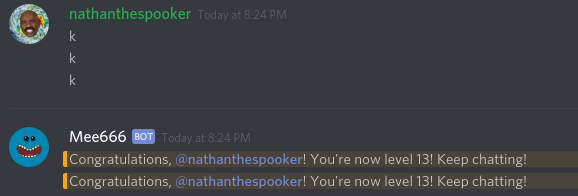
Typing more than 1 message really fast can yield this effect
http://i.imgur.com/JUL2ZUS.png
 grand nest
Squishy I was wrong a moderator gave me the rank however now on the server somebody reached the desired level and Mee6 did not give them the rank....
white notch
!role-rewards
dire yarrowBOT
role rewards will give a role as reward for active users in chat.
you gain xp by talking in chat. when you gain enough ex you get a level.
in order to let me give role rewards i need :
+ manage roles permission
- at least one of my roles needs to be ABOVE the reward roles(bots can't give roles that are higher than their own role)
! I will only check for role rewards to be updated when someone levels up... so if you added role rewards a bit late then wait till someone levels again before complaining that I am not doing my job.
DISCLAIMER: roles will stack up, if you remove a low level role from someone then that person will just get it back over time.
http://i.imgur.com/aPubLMp.png
buoyant moon
Someone is using a command to get leveled up quick
".prune 1 or something like that
white notch
- That’s the same as posting messages to get xp
.pruneis with a different bot
buoyant moon
Why is he getting 100 per minutes? 😮
wind windBOT
 buoyant moon
I am level 13 with 9k xp and he is catching up, literally was level 2 30 minutes ago
white notch
So what level is he now?
buoyant moon
He is level 8
white notch
Think that’s possible. 2 secs
You’re counting wrong then
It takes at least 116 minutes to reach level 8
buoyant moon
It is like ..prune 1
white notch
That doesn’t effect anything
Posts a message->counts as xp->can spam all they want/delete all the want, that first message still counts as xp and the 1 minute cooldown still takes effect
 calm shoal
white notch
calm shoal
white notch
@calm shoal check that the levels plugin is enabled and that you have 0 banned roles on you
Oh and it’s !levels not !level
dire yarrowBOT
GG @calm shoal, you just advanced to level 1 !
 torn edge
Hello, I am Havin a Problem with Mee6 Deleting Messages. The Roles that can use Mod Commands are Not Affected, But Everyone Else is
<@&193123929701875712>
wooden mountain
!slowmode
dire yarrowBOT
So, you are interested in slowmode? Here is everything I can tell you.
🐌 Slowmode automatically deletes messages given between a XX second interval of the users last sent message.
📁 Usages:
   -- !slowmode xx : Enabled Slowmode : xx=Message Cooldown Per User
   -- !slowoff : Disables Slowmode : No Params
type !slowoff to disable
wooden mountain
invite me
buoyant moon
not sure if bug or intentional, but if i add a command for example "!test" and write "!testwhatever" or "!testthiscommanddoesnotexist" it still does what the "!test" command should do. if you have multiple commands that are similar like "!test1" and "!test12" and type in "!test12" it does both commands at once.
 tepid monolith
Hello good afternoon.
I come to report this strange bug, when I put it in my server !isela comes out well I should say, but at the moment of putting !isela2, it shows the message that is, but prints the message of !isela2 and the same happens to !isa_hyu !isa_hyu2.
Regards to all :D
lean sphinx
@buoyant moon @tepid monolith Thanks for the report. It should be fixed. I'm deploying a fix version right now. Should take 30 minutes max.
 vital crest
hmm
i need help
when i setup my mee6 bot on my server
i cant accessthe dashboard
wooden mountain
we are aware and working on a fix
vital crest
oh oki ty
wooden mountain
Mee6 offline, internal server error on the website
we are aware of these issues and are working on a fix
lean sphinx
it's back now 👍
 fresh sentinel
anyone else having problems with the twitch announcements thinggy? every time i enable it, it becomes disabled within like half an hour
bitter zenith
do you have manage webhooks perms on your bot?
bitter zenith
oh reddit's the one
white notch
I've heard this bug happen before, but never really heard of a fix 
wooden mountain
if twitch plugin disbales itself it is because he does not have the "send message" permission in the selected channel @fresh sentinel
@white notch ^^
white notch
thanks
wooden mountain
same for all other plugins
if he does not ahve the permission he is eitehr going to say it in chat or disable himself
(only exception is send messages permission on custom commands and levels plugin)
buoyant moon
commands are not working atm
bitter zenith
!hi
dire yarrowBOT
Hi, I'm Mr. Mee6, look at me!
I am a :robot: that will make your Discord server a better place! :space_invader:
buoyant moon
the custom ones
bitter zenith
you made them right?
bitter zenith
lol sure
 queen comet
it's been like this since yesterday. i wanted to update some of the commands for my server but apparently I couldn't access Mee6. I've tried turning on and off firewall, resetting google, and the most possible ways I can but it still didn't work. any help?
 lean dagger
 lean marlin
My !rank command doesnt work, it works when others do it but when i do !rank it doesn't work i dont earn XP neither, anyone able to solve this?
white notch
@lean marlin check you don't have any banned roles
white notch
are you 100% sure?
buoyant moon
Huh?
WOT
What am I saying
<@&193123929701875712> I am having trouble typing my report
the bot just keeps telling me to watch my language
I am confused
I am not cursing or saying anything bad
I will try one last time
bloody hell
Hello, I am reporting a bug I found when I press "reset" in the levels section of the dashboard, this little message to confirm the reset pops up. The message is not only spelt wrong but it is also slightly s-xist
dire yarrowBOT
GG @buoyant moon, you just advanced to level 2 !
buoyant moon
there, finally
I had to sencer S-xist for some reason
why the hell is that not allowed
that aint even a curse
lol
devout chasm
s-xist?
wooden mountain
his level
 spare solstice
It happend to me also.
tepid monolith
Hello, good evening, everyone.
I come to report this bug, I have this word in Banned Words so they do not let any user say it, and what happened is that the bot did not say "Language" as it commonly says. This just happened 2-5 minutes ago.
Greetings from Mexico.
wooden mountain
banned words ar (currently) case sensitve
tepid monolith
Look friend 😦
white notch
yeah, that's why I said ok maybe i was wrong
because I tried it and the bot deleted what I wrote
wooden mountain
also no spaces, it says "banned WORDS" not sentences
ooo.... it is not case sensitve
that is good to know
when did that happen ?
 versed ermine
help
mortal oxide
What's your problem? @versed ermine
 weary fog
Hitbox.tv's announcement plugin doesn't work due to hitbox.tv changing their name to smashcast.tv
buoyant moon
<@&193123929701875712> I appear to get a few 'Internal Server Error's when accessing the website
royal scroll
@buoyant moon, try a different browser or turn on incognito mode.
buoyant moon
sounds like with the server itself
wooden mountain
go back to http://mee6.xyz/servers and start from there again
 tulip flume
i also get internal server error randomly
wooden mountain
(we know, don't worry about it)
 remote oasis

 long otter
?
wind windBOT
XxKelpoxX#4941 has been warned.
long otter
Wow
white notch
if you really think a server like this is gonna let normal users do @here, you have it oh so wrong
long otter
There happy
dire yarrowBOT
!mute @mention - mutes mentioned user in current channel
Requirements:
- Manage Channels
P.S. You can't mute people who have the permission to mute others, this include: owner, other moderator or members with Administrator or Manage Server permissions!!!
 gentle fossil
Are we having network issues currently?
wooden mountain
music? just change discord server regeion
mortal oxide
@buoyant moon strange, Je vais regarder
 polar basin
hey guys I have a report
white notch
access to someone elses bot?
polar basin
ye
white notch
(I saw the deleted message)
polar basin
k
white notch
then you have the manage server perm
white notch
depends if you are actually meant to have it
white notch
as a normal user: no
Staff member : depends on staff position
white notch
talk to the owner then
white notch
I'm not a dev
polar basin
oh
can I advertise a server to you? (I saw some stuff about peeps getting banned for non allowed dm advertises so I'm asking before I do it.)
mossy flare
Only in #〉commands
white notch
yes you can
polar basin
oh ok
dire yarrowBOT
Hey, I DM'ed you the list of commands for this server.
If you want me to work in your server then read #255286916872667147 to see how to let me do stuff in other servers. 😉
 last dune
Thought I had, thanks 😄
 hasty ocean
A streamer has a underscor at the end of his name on twitch and when the bot annouces him live it removes the _
white notch
@hasty ocean Discord markdown. Surround {Streamer} with `
 chrome loom
Hello, I have a problem. I have a second Discord account created and me stop at Mee6 now I have the one account with which I have logged off the e-mail and the password forgotten. But he still exists. He is still there still on the Mee6 site online and I can not change my account via mobile phone.
mossy flare
@chrome loom You are signed into the wrong acocunt on the discordapp.com website
That is where Mee6 checks for the acocunt
!logout
dire yarrowBOT
oops, it looks like you are on the wrong account, you need an account with 'manage server' permissions.
You have to log out from discordapp.com in that browser and then log back in again.
- log out of discordapp site https://discordapp.com/login and follow the steps in the gif below
- go to http://mee6.xyz/logout and click the 'add to discord' button
https://i.imgur.com/7829TNS.gifv
mossy flare
You can follow this
chrome loom
I can do it on the phone, because I do not have a computer
mossy flare
It works on phone also
 lunar torrent
Forbidden
You don't have the permission to access the requested resource. It is either read-protected or not readable by the server.
getting that when I try to add a timer
buoyant moon
Hey Noluyor
 scarlet laurel
is there anyone who can help me with mee6 bot i wanted to knw sth
wooden mountain
yes? @nova lavagerHam#0757
devout chasm
this is a bug-report channel
use #〉volunteer-support
 west lynx
Someone join my group it randomly deletes
devout chasm
i said do !slowoff
west lynx
Im trying
devout chasm
and..?
west lynx
...
Are u joking me. I dont know which mod but that on. But they will die... jks. Also thanks alot. I was getting super triggered. I tried unmuting. Muting then unmuting. Kicking Mee6 Kicking them. Remove there warnings. Thankssss
dire yarrowBOT
GG @west lynx, you just advanced to level 1 !
west lynx
@devout chasm ^^
 viral arch


 elder shadow
nooooooooo! mee6 is ded
 loud saddle
ded lol
 mild finch
Is mee6 down? It still announces when someone levels up in my channel but no longer announces when someone goes live.
wooden mountain
sorry about that, we are aware
should get back to working soon-ish
@mild finch apperently it should be working again
if the streamers goes back live it should announce now
 rain birch
mee6 seems to be un-responsive inb our server
dire yarrowBOT
GG @rain birch, you just advanced to level 1 !
 south copper
you can mention everyone with the !urban command
mossy flare
@south copper Already known
south copper
oh
 acoustic hull
I can't use !clean on mee6 . is it bugged ?
white notch
!clearinfo
dire yarrowBOT
the clear command allows you to clear the last xx amount of message.
or to clear that anoying spammer without clearing anyone else
just use !clear 1-1000 to clear the last xx messages(example !clear 10),
or use !clear @ name to clear all the message of @name in the last 100 messages
+ i need manage messages permission
+ i need view message history permission (otherwise i will respond with -1 messages cleared)
+ you need to check the checkmark next to clear on the plugin page.
+ you need to set your role as moderator (located at the bottom of the plugin page in the moderator tab)
 rough bough
i was found bug at mee6 autorization, when i wanted to connect mee6 to my server it was logged to my over account (with no servers) and i cant log into this account (PsnMalinka)
cold bear
!logout
dire yarrowBOT
oops, it looks like you are on the wrong account, you need an account with 'manage server' permissions.
You have to log out from discordapp.com in that browser and then log back in again.
- log out of discordapp site https://discordapp.com/login and follow the steps in the gif below
- go to http://mee6.xyz/logout and click the 'add to discord' button
https://i.imgur.com/7829TNS.gifv
cold bear
this is fully on your side because you're logged with wrong account