#helpdesk-selive
1 messages · Page 167 of 1
 boreal whale
 raven crescent
Holy shit, I just figured out my issue and I feel so relieved. I had added a mediarequest to my BRB scene overlay and forgotten to set that overlay to control audio via obs and it wasn't set to shutdown when not visible. So I just ran myself fucking ragged for two hours over that. Sigh.... some days...
 cyan yoke
My Media Request is not showing in OBS
 steel bladeBOT
@cyan yoke StreamElements menu, on top of OBS > Logout > Login
cyan yoke
I tried it but still not working, then my pc shut down itself 
 plain mason
@cyan yoke show us a screenshot of your OBS, please
steel bladeBOT
@boreal whale 1) Restart OBS
2) Start your stream/recording for about 30 seconds. Make sure you replicate any issues as best you can, which means having any games/apps open and captured, etc.
3) Stop your stream/recording.
4) Select Help > Log Files > Upload Current Log File. Copy the URL and paste the link here.
Note: If you do not see an obsproject.com URL, you will need to update OBS Studio to version 22+.
plain mason
@raven crescent please, show us a screenshot of your Advanced Audio Properties window - click with the right mouse button on the Audio Mixer and select the option Advanced Audio Properties..
@thorny breach overlays you have to edit it on Overlay Editor page - https://streamelements.com/dashboard/overlays
But, OBS sources, you will edit it in you OBS ...
cyan yoke
plain mason
@cyan yoke did you click on "show on stream" button?
plain mason
@cyan yoke and are you playing the video?
when you take the URL of the Overlay with Media Request widget and open it in Google Chrome, can you see the video image?
cyan yoke
Is it Preview the Overlay?
 thorny breach
i figured it out on my own, i had to unlock the preview to able to move the camera in my overlay (within OBS)
but thank you to those who did help me, its much appreciated
raven crescent
I would like to have Media Request in sync with my own vocal audio. My vocal mix from my mic input has a significant 500ms delay due to my filtering to add denoising and gating and vocal compressiion on my mic input before it reaches OBS. I don't want to change that because the quality is rock solid across all of my apps that need mic input including discord, which I use to talk to friends while I stream. So I have added a 500ms
delay on my game streams and everything lines up.
What doesn't line up is the music video on MR. The video and the music are in sync fine, but if I find myself singing along, my vocals are completel;y out of sync in the stream/recording.
I'd like to be able to add a proper delay to the rendering and the audio of MR as it hits my stream BUT I don't want to to hear that delay myself while I'm monitoring my overlay so I can listen to MR.
This is frustrating me.
Is there a way to monitor an audio channel pre-filter?
cyan yoke
when you take the URL of the Overlay with Media Request widget and open it in Google Chrome, can you see the video image?
@plain mason No video, only music
 coarse canopy
obs livce wont pikup my desctop sound it will pikup my mike but not desctop im runing on the latest update and would love some suport
fixed it
 valid oasis
OBS for some reason keeps losing Barotrauma?
Like it picks it up fine till I finish a mission and then it just doesn't pick up the game's view
boreal whale
@boreal whale 1) Restart OBS
2) Start your stream/recording for about 30 seconds. Make sure you replicate any issues as best you can, which means having any games/apps open and captured, etc.
3) Stop your stream/recording.
4) Select Help > Log Files > Upload Current Log File. Copy the URL and paste the link here.Note: If you do not see an obsproject.com URL, you will need to update OBS Studio to version 22+.
@steel blade https://obsproject.com/logs/-HKGSYThtYRm0PGZ
 oak cove
Can anyone help with a capture card issue? I use streamelements through an elgato on PS4 and I’ve been using 1080i resolution due to having an old tv but I’ve upgraded and now I’ve tried to switch over to 1080p but when I do so there’s no video output on my streamelements any more just a black screen? Anybody any ideas?
 rugged quail
Hello please could someone tell me where the stream settings bit has gone? I can acces it via activity feed however theres no seperate bit where i can change the hashtags on my stream anymore?
it was a separate square where you could change the name of your stream, change the game and add tags?
I think it was called stream information
 midnight plover
Hello, im having issues with getting my audio from my capture card to come through to OBS. Ive tried switching the audio output mode and enabling 'use custom audio device' and still nothing. Any ideas?
steel bladeBOT
@midnight plover If you are having issues with Elgato hardware or software, we recommend reaching out to their support here: https://e.lga.to/help
midnight plover
It isnt an elgato product, and also I had it working in StreamLabsOBS no problem i just cant get it working in OBS Studio
 copper tide
I am in need of support, who has advanced knowledge can help me?
steel bladeBOT
@copper tide Welcome to the helpdesk! Please let us know how we can assist you today and a support volunteer or staff member will assist you as soon as they are available. Thank you for your patience.
rugged quail
i'm having a little trouble with editing my stream like the name and game
the obs just start the stream i already have logged out and it just dont let me edit
copper tide
I'm having problems with my alerts and overlays, I set it right on the streamelements website but it doesn't appear in the program, it even runs the audios, but the image doesn't come out.
steel bladeBOT
@copper tide To add your overlays to OBS, add a new browser source in your scene. Paste your overlay URL in the browser source properties, set the dimensions to 1920x1080 (unless you changed them on the website) and check Shutdown source when not visible. https://youtu.be/KDvLynUqXI4
@copper tide The default resolution for StreamElements overlays (theme and custom) is 1920x1080. Please add them in OBS at their full resolution and use CTRL+F to fit to screen if necessary. You can then downscale your stream in OBS settings > Video if you'd like https://i.imgur.com/6bWXxjR.png

@rugged quail Please provide a proper screenshot with the issue visible. If not sure how to take a screenshot, you can check here: https://www.take-a-screenshot.org/
copper tide
my problem is with the font that uses browser, the rest is working correctly
 tulip hamlet
@rugged quail There is no edit prompt when starting to stream to Twitch.
You need to edit before or during your stream on your own.
tulip hamlet
Twitch dashboard. StreamElements dashboard. OBS.Live, in the menu in the top left of the activity feed.
copper tide
I'm going to work, tomorrow I'm looking for support again, thank you!
 golden plume
hello, badly need your help guys. My obs live activity feed and fb live chat is not working. It used to work when i started, then after a while activity feed are not up to date and live chat says go to dashboard everytime i go live. 😦 please help
steel bladeBOT
@golden plume StreamElements menu, on top of OBS > Logout > Login
golden plume
yes i did log out. Still the same 😦 thanks for the response.
i logged out and logged in my account, but the activity feed still is not updated.
steel bladeBOT
@golden plume Please provide a proper screenshot with the issue visible. If not sure how to take a screenshot, you can check here: https://www.take-a-screenshot.org/
 karmic sleet
My fonts aren't working. I set them as one thing and they show up right in the editor but in obs they are a different font even after I've made sure to save
steel bladeBOT
@karmic sleet Google Fonts
More than 900 google fonts are supported at this time. You can preview them here: https://fonts.google.com/
Custom Fonts
Steps:
- Install the font on the streaming PC or choose a pre-installed windows font.
- In the overlay widget settings, select Text Settings
- Click on Enable Custom Font
- Type the name of the font as it appears in the windows font directory (This is usually
C:\Windows\Fonts)
Note: After installing fonts, the browser and OBS must be restarted for the font to appear.
 errant rose
Is there a way to make a hotkey and when I click it, it pops something up on stream that says "Like and Follow" or whatever.
tulip hamlet
Not without significant custom coding.
errant rose
Dang, what can I do to substitute that then? I am trying to stream on FB more
tulip hamlet
The asset rotator widget can be used to display images or videos at a set interval.
errant rose
Ohhh, where can I download that at
steel bladeBOT
@errant rose We've released our new Overlay Editor revamp. You can check out the changes and how to work with it here: https://youtu.be/X5VzXjqAsjk
Check out our blog post as well: https://blog.streamelements.com/streamelements-overlay-editor-just-got-even-better-c22cb5b4853e
boreal whale
https://obsproject.com/logs/8eIQxJ5r-o0DHg-A for being choppy
 frail lintel
is the server having problems logging in is slow and none of my stream elemetns browser sources are working
its like nothing is working with the website
boreal whale
also ive noticed, when im in game, the stream is choppy, but when i press the windows key and click on a window outside of the game (browser, OBS, anything else) there is 0 lag and everything works fine
 whole bison
I used to have a dock where I could edit the stream title/see amount of viewers etc in obs live but it's gone all of a sudden, how do I re-enable it? (for twitch)
 round igloo
@whole bison Click on StreamElements up top in OBS and click on Activity Feed
whole bison
its not the activity feed
but I guess I can do just do it from the activity feed 🙂
it would also show how many clips were created during stream
 sleek nacelle
I created an overlay in streamelements. How do I get this into my Streamlabs OBS
steel bladeBOT
@sleek nacelle We're not able to troubleshoot issues with using our overlays in StreamLabs OBS (SLOBS) as we don't have the tools to support their software. We recommend using OBS Studio or OBS Studio with our plugin OBS.Live.
@sleek nacelle To add your overlays to OBS, add a new browser source in your scene. Paste your overlay URL in the browser source properties, set the dimensions to 1920x1080 (unless you changed them on the website) and check Shutdown source when not visible. https://youtu.be/KDvLynUqXI4
 late harbor
this white lines
steel bladeBOT
Please follow these steps:
- Close OBS
- Open the NVIDIA Control Panel
- In the left menu select Manage 3D settings and then under the list of options (right panel) press Restore default settings
- Start OBS
whole bison
I used to have a dock where I could edit the stream title/see amount of viewers/clips made/session length etc in obs live but it's gone all of a sudden, how do I re-enable it? it (for twitch) I had an error when I started up OBS Live today, something about a timeout.
steel bladeBOT
@whole bison If you are not seeing the OBS Twitch integrations and have OBS.Live installed, please follow these steps:
- Make sure you are on the latest and greatest version of OBS.Live
- Exit OBS (make sure OBS is not running)
- Delete
%appdata%\obs-studio\plugin_config\obs-browser\obs_profile_cookies - Start OBS.Live
- Settings > Stream > Disconnect > Connect
copper tide
Good Morning
My problem is with the alerts, they run, but the image does not appear black
 shy mountain
That seems to be the streamlabs alert box
contact their support as we are not able to troubleshoot their things
copper tide
Follows the image of the problem, the alert emulates normal on the site, however in OBS it does not work.
shy mountain
This is Streamelements discord
not streamlabs
We cannot help you if you have issues with their stuff
copper tide
this alert as an example with elements the same thing is happening
O
if you want I can do the example with the elements tools, but it will be the same.
shy mountain
Right, so you are trying to emulate an alert with Streamlabs in hopes that it will emulate with our system?
Please be more clear on what you've setup here and what you are trying to do
copper tide
I will emulate with elements just a moment.
shy mountain
If you attempt to simulate an alert from Streamlabs, it will NOT show up with an alert widget with us.
Same thing applies the other way around.
copper tide
I believe that now I was clear!
steel bladeBOT
@copper tide The default resolution for StreamElements overlays (theme and custom) is 1920x1080. Please add them in OBS at their full resolution and use CTRL+F to fit to screen if necessary. You can then downscale your stream in OBS settings > Video if you'd like https://i.imgur.com/6bWXxjR.png
copper tide
at the moment I am more interested in solving the problem, if necessary then I configure it again.
so in theory if I adjust the resolution it will work, ok?
I'm still having the same problem.
 foggy wren
how do you get alerts (sound) working
shy mountain
@foggy wren can you elaborate maybe?
steel bladeBOT
@copper tide Please provide your account ID found at the top of this page: https://streamelements.com/dashboard/account/channels This ID is public info and safe to share here.
foggy wren
my viewers can hear it but i cant when streaming
steel bladeBOT
@foggy wren If you are not hearing your alerts and/or Media Request, you are most likely using the Control Audio via OBS option in your browser source properties.
To make sure you hear the alerts and the stream also hears them, follow along the screenshot bellow.
https://cdn.discordapp.com/attachments/199460642975907840/685371800456134686/unknown.png
 foggy wren
thanks
steel bladeBOT
@copper tide OBS > Settings > Advanced > Scroll down > Enable or disable Browser Source Hardware Acceleration, depending on its current state > Restart OBS (This does not apply for OBS on Mac)
https://i.imgur.com/ggMe9ZE.png
 shy mountain
@delicate thistle check your streamkey
 delicate thistle
ty will try
 pallid parrot
@delicate thistle and relogin on both Twitch/SE websites
steel bladeBOT
@copper tide Not all staff are able to assist with support issues. Please refrain from pinging them or sending them DMs unless asked to.
copper tide
OK sorry ! regarding the procedure that was passed, I already did it and it had no effect!
delicate thistle
I only see Service and Server there o-o in stream
shy mountain
@delicate thistle if you see a disconnect button - click that and then connect again
@copper tide so from enabled to disabled or disabled to enabled?
delicate thistle
yes it is working thank you so much ❤️
owo/ much love
@shy mountain @pallid parrot
 deft raft
Hi everyone. I'm having problems with game capture. It's going black. How do you get on with this?
copper tide
already tested the 2 ways
steel bladeBOT
@deft raft For the best OBS support, please join their Official Discord @ discord.gg/obsproject
rugged quail
heyya i was in the settings for my cam and idk what i did but it just zoomed my whole obs display in so i cant even stream now any tips?
deft raft
thanks
shy mountain
@copper tide I just tested the overlay in my OBS and its working just fine
I'm even getting the events you are sending
@rugged quail screenshot of what you see
copper tide
Exactly, I also did this test, on another computer it works, but not mine.
copper tide
Every time you suggest something new to me, I make a new browser window to test.
rugged quail
copper tide
And the problem seems to be in the browser function, I can't import any layouts from the site too, it goes black.
rugged quail
it used to fit befor
shy mountain
@rugged quail Settings -> video -> canvas
its set to a different resolution
@copper tide is it with only this particular overlay?
also this overlay does not have any other elements
then the alert widget
copper tide
I did not understand
rugged quail
heck yes thx a lot fam ❤️
 fossil whale
why does my obslive only wanna stream to my yt but im logged in on twitch and wanna stream on twitch
steel bladeBOT
@fossil whale StreamElements menu, on top of OBS > Logout > Login
fossil whale
ok ill try that
shy mountain
@copper tide if you try to add a different overlay, that actually has other assets in it, does it load into your OBS?
copper tide
no, everything related to the browser does not work animation.
in the chrome browser normal overlays and alerts work, I only have a problem inside the obs
shy mountain
my last suggestion at this point would be to reinstall OBS
if there is an issue with the browser source part of OBS, then a reinstall may help
copper tide
I have already regulated the obs, I have also tested it with other software, and yesterday I formatted windows!
before formatting the machine, I installed a separate browser plugin, but also without success!
already updated windows, already updated the program, already updated the video card and even then the problem continues.
This problem appeared a week ago, I've seen hours of tutorials with basically these procedures that you tried, but still it didn't solve. My last hope is that you can solve my problem.
 edgy osprey
For some reason when I try to stream today i am getting 65% frame drops (on any game) and there is also weird stream delay but I didn't put any delay on my Twitch or OBS and this never happened to me before (I stream daily with no fps drops or stream delay). Also even though my internet speed is good for streaming the OBS is stuck on 740kbps - 2000Kbps
steel bladeBOT
@edgy osprey Please provide a log from your last stream. To do this, in OBS go to Help > Log Files > Upload Last Log File and paste the link to the log file here.
 nimble wagon
I am having problems signing into facebook through OBS.LIVE because the pop window is to small. I can adjust a pop up window on OBS STUDIOS. Can anybody help me with this!
 fathom cobalt
no need to ping random staff members
steel bladeBOT
Not all staff are able to assist with support issues. Please refrain from pinging them or sending them DMs unless asked to.
 mossy willow
@fathom cobalt can you help me ??
fathom cobalt
i dont know what you need
mossy willow
@fathom cobalt i don't know how to do alerts i saw the vid but still didn't understand \
?
could you help me
fathom cobalt
please be patient!
mossy willow
ok
fathom cobalt
- Go to https://streamelements.com/dashboard/overlays
- Click to "Create blank overlay"
fathom cobalt
- Overlay resolution to 1080p and Start
no
- Click to "+" and select "Alertbox"
https://i.imgur.com/FmI602O.jpg
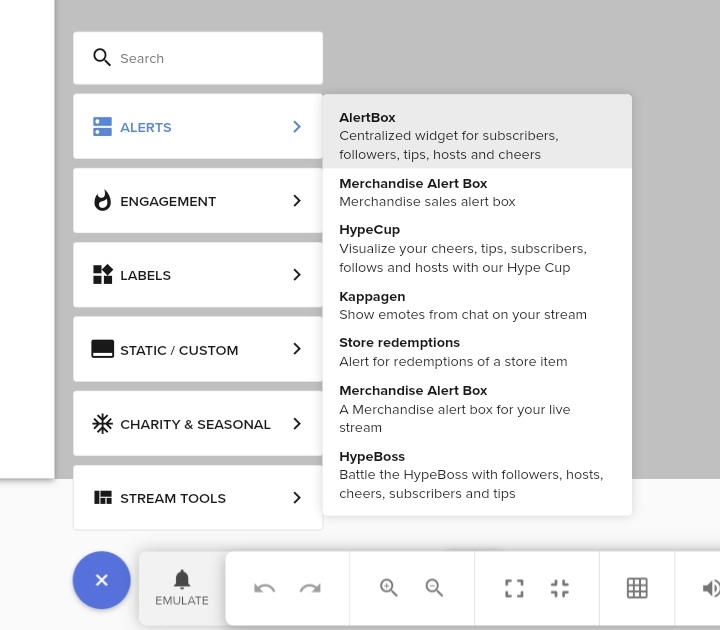
- CLick to "Copy overlay URL"
steel bladeBOT
To add your overlays to OBS, add a new browser source in your scene. Paste your overlay URL in the browser source properties, set the dimensions to 1920x1080 (unless you changed them on the website) and check Shutdown source when not visible. https://youtu.be/KDvLynUqXI4
fathom cobalt
@mossy willow 👆
steel bladeBOT
@edgy osprey Speed tests mean very little with regards to streaming and your choice of bitrate. They measure your raw upload speed to a server that's near you (likely run by your local ISP), instead of your stable upload speed to a streaming server. Your stable speed will determine the bitrate you can comfortably stream at.
https://www.speedtest.net/
The stable speed can be estimated as roughly 70-85% of the speed test result in a lot of cases, however this is by no means a perfect estimate. In reality, it may end up being much worse if there's problems between your ISP and the streaming service.
@edgy osprey Use the Twitch Bandwidth Test to find the best Twitch server to stream to. Set Duration to Medium. You can uncheck any regions you're not near.
After the test completes, click the Share Result button to upload a screenshot, which can then be copied and pasted here.
Get Twitch Test from https://r1ch.net/projects/twitchtest.
pallid parrot
@edgy osprey As from what I see it is your connection issue, so maybe switching to another server from a list of twitchtest may be helpfl for you
edgy osprey
Okay I will do that but I also want you to know that I had the same internet last week when my streams were fine like perfect
getting back to you with screenshot
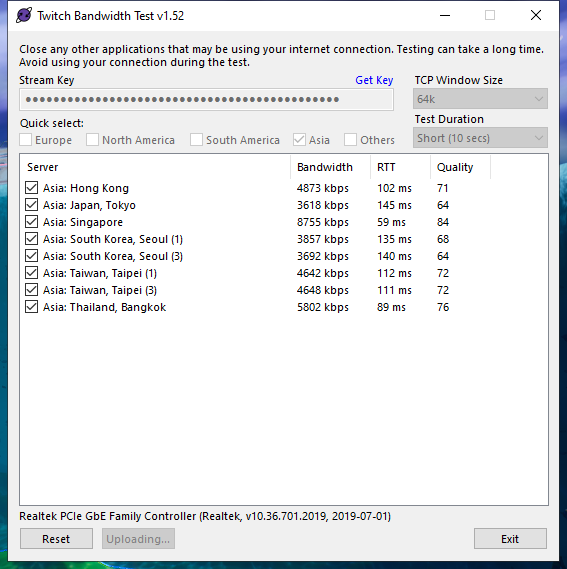 pallid parrot
@edgy osprey As you can se, the best is to have bitrate ~5000 and using Singapore server. The rest of them seems to be lower quality for you.
edgy osprey
yeah
so what should I do now?
I contacted my internet provider he will fix the slow speed as it should be 10mbps
boreal whale
One last try before i uninstall and try to start over, my OBS is lagging...not even during a stream, just the preview window lags even if im not streaming
but when i do stream, it ofcourse lags because OBS is capturing game all lagged in the first place
coarse canopy
i have a problem were if i show the muisc request on streem from obs live it echos on streem anyone know the fix?
boreal whale
@coarse canopy i dont know but i like that profile pic my man
 frosty plume
Okay huge question how would I go about using gameplay clips as my starting soon screen?
 tough frost
I have the problem where my camera keeps freezing and I have to deactivate it then reactivate it 😦
 atomic bison
hvaing isssues switching from streamlabs to you guys
i need to import scene from slobs
 open vortex
Sup guys o/
 primal phoenix
My iverlay will not show in obs I don't know what im doing wrong. I did the browser source right. My capture card and web cam show up i put the oveelay at the top and it still won't work
open vortex
Mxssy dumb question did u try copy n paste?🤣
primal phoenix
*overlay
steel bladeBOT
@primal phoenix OBS > Settings > Advanced > Scroll down > Enable or disable Browser Source Hardware Acceleration, depending on its current state > Restart OBS (This does not apply for OBS on Mac)
https://i.imgur.com/ggMe9ZE.png
primal phoenix
Omg it worked thank you

 cinder sonnet
Hi i have almost the same question from Mr_Misanthropy66 but for OBS streamlabs, does it work the same?
steel bladeBOT
@cinder sonnet We're not able to troubleshoot issues with using our overlays in StreamLabs OBS (SLOBS) as we don't have the tools to support their software. We recommend using OBS Studio or OBS Studio with our plugin OBS.Live.
cinder sonnet
Thanks!
 sharp turret

primal phoenix
Why would obs tell me there is an encoder overload and how do I fix it
And my sound should be coming from my headset plugged into my Playstation 4 but its showing no sound from my capture card going to obs
 weary mango
So I have been streaming for 3 months straight no issue at all. Then last week my obs kbs begins to fluctuate like crazy and the green goes to orange and green for a while. Any idea why this is happening?
sharp turret
Are you get dropped frames?
primal phoenix
Who?
sharp turret
@weary mango ^
weary mango
Yes crazy amount of dropped frames. I'm hard wired in, have made the output to 720 and then 640 and still the same issue persists.
steel bladeBOT
@weary mango Dropped Frames means that you have a bad connection between your device and the streaming platform and most likely something related to your ISP not handling the connection properly.
Speed tests usually cannot help solve this problem and its best to use this guide: https://obsproject.com/wiki/Dropped-Frames-and-General-Connection-Issues
If you stream to twitch, use the !twitchtest command and do a connection test to your regional servers.
weary mango
I'll give it a go. I stream kn FB 🥺
I have given this article a go last week and still having issues
rugged quail
Hello! I am a YouTuber using StreamElements for the first time. I have sat up one of my scenes and added a source, but it is showing this screen instead of the source I added
 terse pendant
Heyo, I've just started using StreamElements and I'm trying to use the game capture source, but it doesn't seem to work, it captures audio but nothing on the screen.
steel bladeBOT
@terse pendant For the best OBS support, please join their Official Discord @ discord.gg/obsproject
primal phoenix
In preview it shows cpu usage at 46% and 30 fps but as soon as I start streaming the fps goes to 14 but cpu usage stays about the same what can i do to find the problem?
terse pendant
Cool! thank you very much!
 past jetty
I am about start my first stream on this service and every time I try to go live there is this screen that pops up and it is blank but at the top it says start streaming to mixer can anyone help
steel bladeBOT
@past jetty StreamElements menu, on top of OBS > Logout > Login
 delicate pasture
I’m having a super weird problem and I’ve reached a block with fixing it.
About an hour into stream, the audio I’m hearing is delayed by about 2 seconds. I deleted and reinstalled the drivers for my capture card, tested before I went live and all seemed well until an hour and a half in. On the stream itself when watching, the audio is perfectly synced.
I tried different headphones as well.
I turned off my stream, closed and reopened OBS and my sound is proper.
Capture card: avermedia LGX 2
PlayStation 4
OBS with streamelements.
steel bladeBOT
@delicate pasture For the best OBS support, please join their Official Discord @ discord.gg/obsproject
 mild pecan
while streaming, my logitech c920 will delay for no reason and isn't synced up with my voice. A quick exit/reopen from the logitech camera settings will fix the problem for awhile, then it'll happen again. Any suggestions?
 lunar crater
I recently hit affiliate on twitch and was wondering if you knew if there was a widget or a set up to incorporate the option to run mid roll ads in obs live?
 bitter wing
Anyone know why my stream setup (like where I put the game and title and such) is missing? i never removed it and I can't find it to add it back to obs
 torpid scaffold
@bitter wing in obs.live, look under the tab that says streamelements, click activity feed. If you already have the activity feed widget, click the cog and it’ll have the settings to change stream title and category there
 snow agate
hi, OBS.live randomly re-sets at least once during my streams, it's never the same, it can be 10 mins in or 80mins in, it's completely random
Is it something I'm doing?
torpid scaffold
no problem bud 🙂
 burnt patrol
im trying to set up my capture card so i can have an overlay on my stream but the instructions it game with are so small i can't see them. does anyone know how to help?
 tidal coral
Hi, so I signed out of my account in my OBS, and now when I reconnect it, it keeps just saying "network error. You have no stream activity" in the side bar?
steel bladeBOT
@tidal coral StreamElements menu, on top of OBS > Logout > Login
burnt patrol
Hi,im trying to set up my capture card so i can have an overlay on my stream but the instructions it game with are so small i can't see them. does anyone know how to help?
steel bladeBOT
@burnt patrol For the best OBS support, please join their Official Discord @ discord.gg/obsproject
 rare shale
I havent streamed in a while, but im not able to get any of my activity feed to show my alerts from FB
steel bladeBOT
@rare shale StreamElements menu, on top of OBS > Logout > Login
rare shale
Thank you so much
 tawny bone
I'm trying to do a browser import into OBS, but the full screen doesn't load, only about a quarter of it shows, but the widgets are intact. Any suggestions?
I know it's the height and width settings that are messed up, I just don't know what to adjust them to.
steel bladeBOT
@tawny bone To add your overlays to OBS, add a new browser source in your scene. Paste your overlay URL in the browser source properties, set the dimensions to 1920x1080 (unless you changed them on the website) and check Shutdown source when not visible. https://youtu.be/KDvLynUqXI4
primal phoenix
I am capturing from my Playstation 4 but I am not getting and sound from my capture. My mic comes from my headset plugged into my Playstation 4 controller. How do I get that to show in obs so I can stream?
 radiant steppe
Has anyone here been using the new NVIDIA Broadcast system that might be able to help me?
 tired totem
I am having trouble with stream elements obs chat system, it times people out, and prevents them from commenting further. Also having trouble finding the setting for stream elements obs chat. Currently test streaming to figure out, any help would be greatly appreciated.
rugged quail
can smoeone help me? obs makes my mic sonud awful.
steel bladeBOT
@rugged quail For the best OBS support, please join their Official Discord @ discord.gg/obsproject
 cold surge
Can someone help me please? Everytime I try and open OBS, it says "Woops, OBS has crashed!" Would you like to copy the crash log to the clip board?" I have uninstalled and re-installed and restarted my computer. Nothing has worked.
pallid parrot
@cold surge You can backup and clear this directory: %AppData%\obs-studio\, also after you uninstall OBS you can clear the OBS directory as there could be some leftover files.
 dry quartz
hey i want to install a super theme but i don't want the web cam area, is there any way to select only parts of a super theme ? Many thanks
round igloo
Are there any Beta programs going on that I could join? :)
sharp turret

StreamElements
The Ultimate All in One Platform for Streamers
This is currently what i know.
round igloo
Is there a way to manually install this update as it keeps failing when its trying to update itself
 pulsar storm
I have a problem I made a donation of 100 euros with my credit card to a youtuber but it confirms that nothing has arrived
fathom cobalt
in one chanel, please
steel bladeBOT
@boreal arch To add your overlays to OBS, add a new browser source in your scene. Paste your overlay URL in the browser source properties, set the dimensions to 1920x1080 (unless you changed them on the website) and check Shutdown source when not visible. https://youtu.be/KDvLynUqXI4
 boreal arch
@steel blade that doesn't work. nothing shows up when i select the scene.
I went in to the overlay editor and clicked save and then the instructions say to click "launch overlay" but i don't have a launch button on the website.
I load the link on the site
sharp turret
@boreal arch
fathom cobalt
sharp turret
Copy the overlay url then in obs create browser source and paste there
And set dimensions to 1920x1080
@boreal arch
 civic ice
Hello! StreamElements doesn't seem to update for me, is there a download link for the new StreamElements update somewhere?
boreal arch
@sharp turret yes I did that
it doesn't show up.
do i have to be live streaming in order to see it? because in my previous overlays, i can pull it without it being live
steel bladeBOT
@boreal arch OBS > Settings > Advanced > Scroll down > Enable or disable Browser Source Hardware Acceleration, depending on its current state > Restart OBS (This does not apply for OBS on Mac)
https://i.imgur.com/ggMe9ZE.png
sharp turret
Try that
sharp turret
Disable it and restart obs.
boreal arch
ok
here's a screen shot of the source created and the screen is still black.
ah that did it
disabling hardware acceleration made it show up.
thank you.
sharp turret
boreal arch
how is that going to affect my streaming since i always had it on from the getgo?
will it change anything?
performance wise.
sharp turret
Your stream will not effect, but OBS use more cpu i think.
boreal arch
ok
@sharp turret is adding alerts the same way?
add a browser and then link the alert box
steel bladeBOT
@boreal arch To add your overlays to OBS, add a new browser source in your scene. Paste your overlay URL in the browser source properties, set the dimensions to 1920x1080 (unless you changed them on the website) and check Shutdown source when not visible. https://youtu.be/KDvLynUqXI4
sharp turret
Same for alert box
boreal arch
and then make the alert the top layer, then the overlay and then the game capture/second display?
sharp turret
Yes the alert box in top
And game or display capture is below/down from other sources.
boreal arch
when using an animated overlay, is it ok to still use game capture or would it better to use display capture as the source for the game?
sharp turret
Up to you, if you stream games and you don't want to see other things your desktop etc.. it is good use game capture.
boreal arch
Ok, i was just thinking since the hardware acceleration was turned off and you said it would use more CPU, if it would help at all to change it to display capture.
thanks for all the help
 boreal arch
👍
 fossil lake
so what exactly is virtual camera?
 tawdry dawn
can we revert a update ? 😄
my 4 window screen is fucked up now thnx to this update 😄
cannot shrink that preview like it was before
this is how it is supposed to be
why u break my shit ! 😄
steel bladeBOT
@tawdry dawn For the best OBS support, please join their Official Discord @ discord.gg/obsproject
 void cairn
french service ?
sharp turret
@void cairn ▶️ #🇫🇷︱français
 placid cliff
How do i fix this ?
https://thecynicalkitty.com/s/20202931912.png

Update 26.0 OBS an then trying to reinstall OBS.live
rugged quail
Anyone got this since the new obs update?
 placid cliff
Same
rugged quail
save us admins
placid cliff

rugged quail

placid cliff
in B4 the channels ends up flooded with those requests xD
 wary dew
I had no issues at all with updating
 rigid parrot
I just downloaded OBS 26 and that worked updating OBS, but now SE is giving me this error message
Rebooting helped me on that one ^
snow agate
hi, OBS.live randomly re-sets at least once during my streams, it's never the same, it can be 10 mins in or 80mins in, it's completely random
Is it something I'm doing?
Can anyone help with this?
rugged quail
Hey I Just updated obs and it wont show my chat and stream info is that a bug?
 vernal drum
@rugged quail try logging out then back in. Also streamelements tab at top, and make sure chat and activity feed are checked
rugged quail
like log out of obs alrigth
i dont see where i log out where will it be
if i dissconnect will it log me out?
 prisma seal
@placid cliff I had this. solution for me was to re-install obs.live ver 25 then go through the update prompts again. failing that you could rename the dll to .old and see if it lets you update then.
placid cliff
renaming that DLL gives me this error when trying to install 😦 :/
https://thecynicalkitty.com/s/20202922402.png
Sooo nope doesnt work @prisma seal

i'll wait for 26.0 to get an official update i guess
As its either https://thecynicalkitty.com/s/20202931912.png or the one above as a error
prisma seal
@placid cliff Sorry that didn't work for you mate. Hopefully someone from SE will drop in and see this.
rugged quail
how do i log out of my obs is it 'dissconnect'
 thick whale
how do i get my chat bot to work if it shows that it is and it isnt
no chat commands are working in my stream
but they were wroking just yesterday
on my dashboard it shows the bot is working
on my actual stream it isnt doing anything at all
steel bladeBOT
@thick whale If your commands recently stopped working and you're using OBS.Live and a custom bot name do the following:
- In OBS.Live, click on the hamburger menu (three stripes) at the top left of your activity feed
- Click on Stream Settings > Custom bot name
- In the Custom bot name field select Set custom bot name, not your already existing username (with capital letters). Note: If you already connected an account that way, the third entry will show as the account name (see image https://i.imgur.com/sO7fWOX.png).
- Scroll a bit down and click on the purple Connect Custom Bot Account button
- Log in as usual and Authorize the custom bot name
- Back in the Activity feed, click on the Send Test Message button and check if your custom bot name starts working again
 rugged quail
Hey, My OBS Isnt working My Chat wont show up and niether will my webcam is this new because i just updated it and it just happend
rugged quail
It Still Is Not Working
steel bladeBOT
@rugged quail Please provide a proper screenshot with the issue visible. If not sure how to take a screenshot, you can check here: https://www.take-a-screenshot.org/
rugged quail
My Webcam is On and my chat wont show up
steel bladeBOT
@rugged quail For the best OBS support, please join their Official Discord @ discord.gg/obsproject
 vagrant saddle
Hello! sorry to interrupt. So, I just updated to OBS 26 and my OBS.Live updated as well. I usually use it on a portrait monitor; in window mode. I couldn't help but notice that I'm unable to change the size of my chat anymore, or the preview window size either while I'm in window mode. Even if I disable the preview.
tulip hamlet
OBS.Live is not updated to support OBS 26 yet. It was literally released today.
 gleaming quiver
So basically dont update to obs 26 till obslive gets an update is what your saying @tulip hamlet I'm assuming?
tulip hamlet
Would be a smart move.
gleaming quiver
Will do, been seeing way too many problems with people updating
tulip hamlet
It should be a rule of thumb to wait at least a week before updating your software to allow plugins to catch up and for any major bugs to be caught and patched.
gleaming quiver
^true
 latent lark
can anyone help iv just done the update for obslive and now it wont let me go live it even crashed my elgato wave link software too
steel bladeBOT
@latent lark For the best OBS support, please join their Official Discord @ discord.gg/obsproject
 blissful musk
Hello! My StreamElements Chat Stats says, 404 - Page Not Found. Can anyone help me fix it please?
My previous twitch name was: OfficialDPRRD5
Now : RaphFlavier
 copper oyster
Anyone have any quick answer to why my chat does not appear on my layer ? its at the top of the list and i have followed all instructions, also noticed that my chatbot has stopped saying "Welcome to the stream" message, thought they could be related ? i have not changed anything
steel bladeBOT
@copper oyster Please provide a proper screenshot with the issue visible. If not sure how to take a screenshot, you can check here: https://www.take-a-screenshot.org/
copper oyster
steel bladeBOT
@copper oyster The default resolution for StreamElements overlays (theme and custom) is 1920x1080. Please add them in OBS at their full resolution and use CTRL+F to fit to screen if necessary. You can then downscale your stream in OBS settings > Video if you'd like https://i.imgur.com/6bWXxjR.png
copper oyster
its not showing at all even at that resolution
steel bladeBOT
@copper oyster OBS > Settings > Advanced > Scroll down > Enable or disable Browser Source Hardware Acceleration, depending on its current state > Restart OBS (This does not apply for OBS on Mac)
https://i.imgur.com/ggMe9ZE.png
copper oyster
i have tried that and still same
 dim raven
Can somebody help me set up obs live?
steel bladeBOT
@dim raven New to StreamElements?
Check out our YouTube channel https://www.youtube.com/c/streamelements/videos
with tutorial videos from setting up the basics, to in depth details on how to use our product.
New to OBS? Here is a 4 step quickstart guide
https://obsproject.com/wiki/OBS-Studio-Quickstart
Want to learn even more? Here is an in-depth overview
https://obsproject.com/wiki/OBS-Studio-Overview
copper oyster
Anyone ?
 rugged fulcrum
Hello, I have another issue, just relaunched OBS and all of my overlays have disappeard. my profile is logged in and the links to the overlays are correct. I have tried to re create the browser source and it does not work
tulip hamlet
@rugged fulcrum Recopy your overlay URLs anyway.
rugged fulcrum
I have done this. no luck @tulip hamlet
tulip hamlet
@rugged fulcrum I can confirm your overlays are working fine.
rugged fulcrum
they just do not display in OBS, i have disconnected and reconnected my account, it jsut displays the streamelements homepage instead of my overlays.
tulip hamlet
Relogging doesn't do anything regarding displaying your overlays.
Please recopy your overlay URLs again.
rugged fulcrum
okay
tulip hamlet
The only reason the homepage appears is if it's an invalid URL.
rugged fulcrum
re copied. no luck.
is correct in the browser source, but never displays in the preview
tulip hamlet
Do not display your overlay URL anywhere.
rugged fulcrum
sorry
tulip hamlet
Since it's displaying in the preview properly, that's not the one you're having a problem with.
Check your other browser sources, higher in the source list.
tulip hamlet
It sounds like you clicked this without knowing what it does.
rugged fulcrum
thank you for helping
possibbly
i was trying to prevent my ex mod from ever entering the dashboard again, because he was somehow modding bot commands while i was live, when he had to access.
copper oyster
😩
 limpid nest
Where did my stream elements tab go?
boreal arch
@limpid nest i think you need to close it and reopen or rerun the obs.live install. It should restore it. There was a recent update to obs.studio which may have not incorporated the obs.live update
tulip hamlet
OBS.Live doesn't have support for OBS 26 yet. It was only just released today.
 rare nebula
hi my obs keeps crashing i even tried to uninstall and reinstall
steel bladeBOT
@rare nebula A crash log is required to investigate the cause of your issue. Please upload the last crash log.
- In OBS, click the Help menu
- Select Crash Reports and then Upload Last Crash Report
- Copy the URL and paste it to the chat here.
Note: If you are not able to follow the above steps, open your file explorer and go here: %appdata%\obs-studio\crashes and provide the last listed file.
rare nebula
Crash report
steel bladeBOT
@rare nebula 1) Uninstall OBS.Live and OBS Studio completely, but leave this unchecked https://i.imgur.com/LBaHgM1.png
2) Download and install OBS Studio from https://obsproject.com/
3) If it doesn't crash, install OBS.Live too.
-
It's fixed? Nice!
-
It crashes again?
- Repeat steps 1 and 2
- Duplicate the current "Scene Collection" at the very top of OBS, call it something like "Backup" and remove all browser sources in that backup
- Install OBS.Live and see if it still crashes
- If yes, repeat steps 1 and 2, leave OBS.Live uninstalled, tell us that it didn't work and use your old default scene collection again.
 rare nebula
Thank You
 sullen salmon
Um don’t know if this is only me, but obs/stream elements updated and ever since it did whenever I go live voicemod stops working. Anybody else have this problem?
steel bladeBOT
@sullen salmon For the best OBS support, please join their Official Discord @ discord.gg/obsproject
 nimble nebula
the streamelements bot has stopped working for my stream. I am using custom bot names in obs.live with twitch. I have tried removing the custom bot account and re-authing on the account. But, still no go. The bot will respond when not using the custom bot name. I can also login as the custom bot name and chat manually - but StreamElements bot can't seem to use it. Any ideas?
primal phoenix
What could be the reason when I start streaming my fps goes from 30 down to 15 and my bit rate drops along with my cpu usage rising sharply to 50-60%?
steel bladeBOT
@primal phoenix Please provide a log from your last stream. To do this, in OBS go to Help > Log Files > Upload Last Log File and paste the link to the log file here.
@nimble nebula If your commands recently stopped working and you're using OBS.Live and a custom bot name do the following:
- In OBS.Live, click on the hamburger menu (three stripes) at the top left of your activity feed
- Click on Stream Settings > Custom bot name
- In the Custom bot name field select Set custom bot name, not your already existing username (with capital letters). Note: If you already connected an account that way, the third entry will show as the account name (see image https://i.imgur.com/sO7fWOX.png).
- Scroll a bit down and click on the purple Connect Custom Bot Account button
- Log in as usual and Authorize the custom bot name
- Back in the Activity feed, click on the Send Test Message button and check if your custom bot name starts working again
 steady escarp
My overlays/widgets in OBS will either stop working or disappear in mid stream on Twitch. I am using the Sparkle Simplicity overlay. Thank you
steel bladeBOT
@steady escarp OBS > Settings > Advanced > Scroll down > Enable or disable Browser Source Hardware Acceleration, depending on its current state > Restart OBS (This does not apply for OBS on Mac)
https://i.imgur.com/ggMe9ZE.png
steady escarp
thats already checked and im still having this issue
shy mountain
@steady escarp lets keep your issue here.
Uncheck the option in that case
as the bot text says to enable OR disable
steady escarp
everything then disappears and goes black
primal phoenix
shy mountain
primal phoenix
thank you i guess i need a new pc 😦
copper oyster
anyone help me out please, my streamelements welcome message has stopped working and also my chat overlay has stopped working too, it was working fine till around a week ago and stopped, i have not changed anything and cant understand why, any ideas
raven crescent
I just installed the OBS and OBS.Live updates from today. My output setting are all reset to simple and the defaults. I want to change them but I'm unable to select the dropdown for simple/advanced. ANyone else run into this?
copper oyster
Sorry, i mean the chatbot for streamelements, it would post a message when i went live and then would post a message everytime someone came into the channel, now i dont get anything apart from the standard welcome to the chat and its the standard message, my chat layout is from streamlabs and is only a browser window
shy mountain
@raven crescent check and disable the virtual camera
steel bladeBOT
@copper oyster If your commands recently stopped working and you're using OBS.Live and a custom bot name do the following:
- In OBS.Live, click on the hamburger menu (three stripes) at the top left of your activity feed
- Click on Stream Settings > Custom bot name
- In the Custom bot name field select Set custom bot name, not your already existing username (with capital letters). Note: If you already connected an account that way, the third entry will show as the account name (see image https://i.imgur.com/sO7fWOX.png).
- Scroll a bit down and click on the purple Connect Custom Bot Account button
- Log in as usual and Authorize the custom bot name
- Back in the Activity feed, click on the Send Test Message button and check if your custom bot name starts working again
raven crescent
NOt sure why my settings reverted to default but my issue above was that I had my NDI outputs enabled.
NVM. I'm good now
copper oyster
tried the above last night too still nothing
steel bladeBOT
@copper oyster 1) Right click on your OBS desktop shortcut and open the Properties
2) In the Target field, add the following to the very end: --remote-debugging-port=40404
3) Open OBS (or restart if it was open)
4) Open your web browser and type in: localhost:40404
5) Click on StreamElements - Activity feed
6) Navigate to the Console tab
7) Type the following into the console and hit enter: store.customBot.removeCustomBotIntegration()
8) Try setting the custom bot name
9) Remove the additional flag in step 2 from your shortcut properties.
copper oyster
still nothing
shy mountain
Mod the custom name
copper oyster
tried changing it to the streamelements name and my name
 real thunder
A noob question 🙂 how do I link my social media to my overlay. I tried to change the name in the settings but didn't do anything just changed the name in the overlay. So no link or anything...
 polar dawn
Morning guys, I got Affiliate, and then increased my bitrate from 2500 to 6000 for I want 1080p stream, my upload speed is 100 Mbs Fibre, but when I go live i drop frames 70% , feels like the affiliate did not lift the CAP on my bandwith and it still caps me on 2500
shy mountain
It doesn't matter if you are an affiliate or partner or non-partner
6000 bitrate is the cap for everyone
steel bladeBOT
@polar dawn Dropped Frames means that you have a bad connection between your device and the streaming platform and most likely something related to your ISP not handling the connection properly.
Speed tests usually cannot help solve this problem and its best to use this guide: https://obsproject.com/wiki/Dropped-Frames-and-General-Connection-Issues
If you stream to twitch, use the !twitchtest command and do a connection test to your regional servers.
real thunder
I saved the new layer and when I open it I just see my name and nothing else happens...
polar dawn
!twitchtest
steel bladeBOT
Use the Twitch Bandwidth Test to find the best Twitch server to stream to. Set Duration to Medium. You can uncheck any regions you're not near.
After the test completes, click the Share Result button to upload a screenshot, which can then be copied and pasted here.
Get Twitch Test from https://r1ch.net/projects/twitchtest.
shy mountain
Well that suggests your ISP cannot connect to the twitch servers
polar dawn
it gives an error, failed to parse twitch ingest list
 strong lance
My obslive keeps asking me to save when I change something in stream settings even though I've clicked save. Then it doesn't update my game to twitch if someone shouts me out it says I was playing Among Us but I was playing World of Warcraft or Just chatting.
shy mountain
Its a known issue for the save button
steel bladeBOT
@raw wave SE.PAY is available for streamers who are at least 18 years old, with bank account under their name in one of the following countries and have at least 101 follower (Twitch) / 101 subscribers (YouTube):
Austria, Belgium, Czech Republic, Denmark, Finland, France, Germany, Ireland , Italy, Netherlands, Poland, Portugal, Slovakia, Spain, Sweden, Switzerland, United Kingdom, United States.
If you meet these criteria and don’t see SE.Pay, let us know.
For information on SE.Pay payment methods, their fees and settlement times see https://streamelements.com/dashboard/tipping/fees.
real thunder
So what do I have to type in the message when I edit the social media widget to have the link up and working?
shy mountain
Link up?
overlays are not clickable
meaning that viewers won't be able to open your social account via a link shown on the stream
real thunder
Okey so It's just meant to be used to let them know your youtube name... you can't put up a direct link to twitter/youtube/instagram . Okey now I understand 🙂
latent lark
im trying to uninstall obs.live to reinstall but the unistaller is not allowing it
latent lark
i do
shy mountain
is it v26?
latent lark
its aborting near the end and yeah ever since the update i cant go live
 fossil shuttle
hi guys! since the new update I can't get my elgato-Audio linked to the desktop-audio even with the right audio settings. The weird thing is, that I get the audio on my headphones when I am using the 4K Utility of Elgato. Does anyone have an idea to fix this problem?
steel bladeBOT
@fossil shuttle For the best OBS support, please join their Official Discord @ discord.gg/obsproject
fossil shuttle
im in there but dont get any tip att all xD
shy mountain
!obslive
steel bladeBOT
OBS.Live is a Plugin for OBS created by StreamElements. You can download OBS.Live here: https://streamelements.com/obslive
Please make sure you have the latest version of OBS installed, Current Version: 25.0.8. You can install OBS here: https://obsproject.com/
shy mountain
done what?
OBS.Live is a plugin for OBS STudio
meaning that you are having issues with OBS Studio so its best to ask in the OBS discord
OR
!elgato
steel bladeBOT
If you are having issues with Elgato hardware or software, we recommend reaching out to their support here: https://e.lga.to/help
 smoky smelt
My media request was working fine but now when the box comes up in OBS its blank. How can I fix this?
steel bladeBOT
@smoky smelt StreamElements menu, on top of OBS > Logout > Login
smoky smelt
Thank you I didnt know I could do that
copper oyster
Still looking for help with my issue if anyone can help, added a browser window on my brb page displaying the chat from my twitch (through the streamlabs chat link) everything was working great until a week ago and it suddenly stopped working, not sure if its related but i also noticed that my streamelements chatbot stopped greeting people and stopped posting when i went live, i havent touched anything, i have tried logging out and back in, i have also changed my bot name to my name and also tried the streamelements name and nothing, i cant understand why its just stopped working, anyone with any ideas ?
shy mountain
The custom bot name you've used is not a mod in your channel
As for the chat widget, logout from our website and log back in
and see if that helps
 vagrant iris
Hello. I just got a new twitch package and I am trying to setup my new screens like Starting Soon, Live Chat, BRB, Stream Ending etc. They are too big for the SE cloud so I am trying to do them in SE obs, do I just put them in as a media source? If I do that they appear fine, but how do I fill in the boxes for like recent subscriber etc
rugged quail
Is anyone else failing to download the software update package at all?
vagrant iris
If you're talking about the most recent update, mine downloaded just fine
 lilac ocean
try closing all your instances of OBS in your task manager and try again @rugged quail
if that still doesnt work, I'll ask around for you
rugged quail
I've tried everything even a clean install it just doesn't want to download
lilac ocean
ive set the question out for you, can you include a screenshot of a error you are getting in here?
vagrant iris
I'm sure someone other than SE staff knows how to make texts for recent subs and stuff appear... can anyone help?
I don't wanna go back to slobs because I am too dumb to figure it out myself 😄
rugged quail
vagrant iris
You could just download the latest edition from the website no?
rugged quail
That was the latest download, this was the clean install
vagrant iris
Are you running it as administrator? Maybe windows defender or firewall/anti virus are blocking the download?
Just throwing stuff out there while I wait for help myself haha
rugged quail
It's fine! I'm running through all options, right but it's never had a problem updating before
vagrant iris
I did have a similar problem a long time ago and I had no choice but to just wait until a later update
steel bladeBOT
@vagrant iris New to StreamElements?
Check out our YouTube channel https://www.youtube.com/c/streamelements/videos
with tutorial videos from setting up the basics, to in depth details on how to use our product.
New to OBS? Here is a 4 step quickstart guide
https://obsproject.com/wiki/OBS-Studio-Quickstart
Want to learn even more? Here is an in-depth overview
https://obsproject.com/wiki/OBS-Studio-Overview
 vernal dust
Did anyone recently run into an issue where their SL ground control panel disappears from OBS once they update? if so how do i get it back in here? i checked settings and didnt see it anywhere
additionally it looks like i can no longer access my custom bot since updating as well
polar dawn
I want to select an Relay server on OBS Live but cant seem to find where???
 kindred fox
@vernal dust Click StreamElements in the menu bar >> Activity Feed
@polar dawn Settings >> Stream >> Custom
round igloo
@rugged quail Did you manage to update it? I've got the same issue.
vagrant iris
So I am putting my brand new alerts on stream elements in my theme. I chose the center over image setting but the words are not showing up over the alert. Any ideas?
This might make more sense than my explanation
round igloo
You have to adjust text margins
rugged quail
@round igloo nope still not updating
round igloo
dang
vagrant iris
What do you mean text margins?
rugged quail
However, I am low key glad its not just me so its an actual problem and not me being silly haha
round igloo
@vagrant iris Go to alerts, select the alert that you want to modify and go to text settings and then advanced
vagrant iris
Ah, thank you!
round igloo
@rugged quail Yeah i tried a clean install and everything yesterday but couldn't get it to work...hopefully they fix it soon. I'm also glad I'm not alone.
rugged quail
Same here!
round igloo
@vagrant iris Yes!
vagrant iris
hmm... I do not see position, size and style
vagrant iris
oh derp
I had to get out of the alertbox settings
Sorry for the 500 questions, how do I make my alert smaller? I tried making the alert Box smaller but that didn't change the size of the actual alert
nevermind!
 magic quartz
When i pick Siege in game capture it just gives me blackscreen on the preview
can someone help?
vagrant iris
are you running the game in borderless windowed?
Try using Window Capture instead of game capture
 warped lava
I installed OBS live and it asked which platform, I choose facebook but I stream on both and now I can't get it to stop asking me to to live on facebook when I am trying to stream to twitch. How do I fix this?
vagrant iris
could just pick one and use restream.io ?
warped lava
restream causes a bigger delay then there already is. I would hope there is a better fix then using a 3rd party app though
I appreciate the idea though
vagrant iris
True.
warped lava
any staff or anything on that know how to fix this issue?
cause as of right now the only fix I can see is to uninstall Streamelements and not use it because its locking me to one thing
magic quartz
on window capture it shows the game but freezing at the first picture the mouse is moving but the game isn't
 raw wave
Does anybody know why when I press fit to screen the size goes like this and none of them scale properly? I also tried stretch to screen and for some odd reason these features are not working now.What can I do about it?
magic quartz
Weird
vagrant iris
@raw wave The alert window doesn't matter what size, you can just move it to where you want it to appear
If you're talking about your entire theme browser page
magic quartz
Mine still doesn't work
I have tried reinstalling but doesn't work
I've also tried using regular obs studio and streamlabs but nothing works
vagrant iris
what game?
Does anyone know how to make a media source begin AFTER your transition ends?
 shrewd stag
how do i unlink my youtube account from streamelements?
 frail pewter
Good Morning, I recently started to have my folower alerts not display or any alerts. Follower, sub, raid etc. They show up or dont show up on the screen
steel bladeBOT
@frail pewter To add your overlays to OBS, add a new browser source in your scene. Paste your overlay URL in the browser source properties, set the dimensions to 1920x1080 (unless you changed them on the website) and check Shutdown source when not visible. https://youtu.be/KDvLynUqXI4
 hidden wing
so the new update wont install..... HELP
magic quartz
what game?
@vagrant iris It's Rainbow SIx Siege
vagrant iris
Are you running it in borderless windowed?
rugged quail
Hey guys cane soemone help me with the Boost goal thing its not showing the /??? it stops the goal at my 40 ive tried it all but cant get it right please dm if you have a fix for this
 high ingot
hey guy's I'm trying to setup the media request but i cant, it doesn't show the widget on the elemnts website and i dont find any way to add it, help 🥺
sharp turret
@high ingot
magic quartz
Are you running it in borderless windowed?
@vagrant iris I tried but the picture froze i could only move the mouse
high ingot
ooOOoooOOooOOoooh yes I am, that explain, cheers mate!
 coarse pike
obs live doesnt update game title
sharp turret
In activity feed?
Or you try command?
Sometimes that happen twitch issue try in website or twitch dashboard.
 hardy ridge
can anyone help me? My OBS keeps cutting out,and this is what it comes up with while trying to update the streamelements
and yes I have uninstalled and reinstalled OBS
 fickle idol
how do i set up my virtual camera?
steel bladeBOT
@fickle idol For the best OBS support, please join their Official Discord @ discord.gg/obsproject
hardy ridge
ah ok thank you 🙂
smoky smelt
How can I fix media share not showing on stream?
 dry jacinth
how can i setup my obs i already connected it to twitch but i want to know how to enable the overlay ! is there a guide or something
steel bladeBOT
@dry jacinth New to StreamElements?
Check out our YouTube channel https://www.youtube.com/c/streamelements/videos
with tutorial videos from setting up the basics, to in depth details on how to use our product.
New to OBS? Here is a 4 step quickstart guide
https://obsproject.com/wiki/OBS-Studio-Quickstart
Want to learn even more? Here is an in-depth overview
https://obsproject.com/wiki/OBS-Studio-Overview
rugged quail
Guys, I just downloaded (after paying an arm and a leg) an animated premium overlay file from OWN3D. Anybody have experience with this websites overlays?? Their tutorial videos make the install seem so simple but i cannot for the life of me get the scene collections to import into SLOBS, OBSLive, or Streamelements. Can anybody offer some step by step guidance? I'm losing my mind and screaming at my monitor
errant rose
I swaped from FB Live to Twitch and linked my account. When I click stream, it goes to FB live again. How can I make it not do that.
steel bladeBOT
@errant rose StreamElements menu, on top of OBS > Logout > Login
vagrant iris
How do I fill this with the proper text?
Ok so I managed to figure out recent follower, and scrolling text is on, but it's not scrolling in OBS (I did click save on streamelements.com)
Any ideas?
ok nevermind it's working now, and I haven't done anything lol guess it just took some time
 round cypress
anyone else having problems with updating obs live?
 quiet folio
can anyone help?
steel bladeBOT
@quiet folio Welcome to the helpdesk! Please let us know how we can assist you today and a support volunteer or staff member will assist you as soon as they are available. Thank you for your patience.
quiet folio
when i stream fortnite my game keep crashing. but when i stream valorant or seige it dossent crash
steel bladeBOT
@quiet folio For the best OBS support, please join their Official Discord @ discord.gg/obsproject
 soft oasis
Hello my screen when i stream refreshes only when i move my cursor how do i fix it>
steel bladeBOT
@soft oasis For the best OBS support, please join their Official Discord @ discord.gg/obsproject
 tough swallow
Since OBS Studio just got the v26 update, will there be an OBS Live package update to update Studio to 26 as well as ensure Live compatability?
tough swallow
Awesome. Thanks!
 loud nexus
ok so this may sound a bit strange, my obs is up to date, its an exception in my antivirus, im able to stream everything besides cod and it is not to do with capture, for some reason my bit rate seems to just drop straight to 0 when i enter a game of it, this is in every mode by the way.
it is only cod in which this happens and i checked my task manager to see if i was throttling somewhere but i am not, does anyone have any idea what it could be?
steel bladeBOT
@loud nexus For the best OBS support, please join their Official Discord @ discord.gg/obsproject
 wooden flare
Heyo, do you know if it's possible to stream to both Facebook and Youtube using obslive?
tulip hamlet
StreamElements does not have multistreaming support.
 waxen spruce
Is this where I post about OBS lagging via NDI?
steel bladeBOT
@waxen spruce For the best OBS support, please join their Official Discord @ discord.gg/obsproject
 floral heart
Hey, I want to know, am I the only one not to be able to install the lastest update of OBS.Live after updating OBS itself ? can't write in "obs-streamelements.dll"
tulip hamlet
OBS.Live is not updated to support OBS 26 yet. It was only released yesterday.
floral heart
oh !Thanks !
 plain lagoon
hi, so i just updated my obs and my obs.live and now my program will not capture any of my sounds being played, it was working fine yesterday before i updated my program but now its not working and i cant seem to fix it myself
tulip hamlet
Look two messages above your own.
plain lagoon
so how do i fix this then?
tulip hamlet
Going back to the previous version would be a good place to start.
plain lagoon
how would one do that?
tulip hamlet
OBS (Open Broadcaster Software) is free and open source software for video recording and live streaming. Stream to Twitch, YouTube and many other providers or record your own videos with high quality H264 / AAC encoding.
And click Previous Releases.
plain lagoon
which release works with obs.live right now?
tulip hamlet
25.0.8
tulip hamlet
OBS.Live didn't update. It just tried to reapply itself.
plain lagoon
oh okay
 versed smelt
does anyone have a couple minutes to slide into my dm's regarding the use of websockets and parameters to swap scenes via commands? I would be forever in your debt.
versed smelt
yo thanks
 zinc flicker
my alerts re not popping up on obs anymore i got a donation and it didn't show an alert i haven't changed anything
steel bladeBOT
@zinc flicker OBS > Settings > Advanced > Scroll down > Enable or disable Browser Source Hardware Acceleration, depending on its current state > Restart OBS (This does not apply for OBS on Mac)
https://i.imgur.com/ggMe9ZE.png
 wide notch
Hi, can i change the alerts image/video to a gif? When I upload a gif it seems to only show a still image and not a moving gif
I moved my alerts over from streamlabs, and the gif works but I can't seem to replace it with a working gif.
tulip hamlet
Gifs are accepted just fine and there's nothing stopping you from using a gif when choosing an image for your alert.
 tulip garden
I'm not sure why my Custom Bot Account doesnt work anymore
steel bladeBOT
@tulip garden If your commands recently stopped working and you're using OBS.Live and a custom bot name do the following:
- In OBS.Live, click on the hamburger menu (three stripes) at the top left of your activity feed
- Click on Stream Settings > Custom bot name
- In the Custom bot name field select Set custom bot name, not your already existing username (with capital letters). Note: If you already connected an account that way, the third entry will show as the account name (see image https://i.imgur.com/sO7fWOX.png).
- Scroll a bit down and click on the purple Connect Custom Bot Account button
- Log in as usual and Authorize the custom bot name
- Back in the Activity feed, click on the Send Test Message button and check if your custom bot name starts working again
tulip garden
After those steps is still doesn't connect
steel bladeBOT
@tulip garden Please provide a proper screenshot with the issue visible. If not sure how to take a screenshot, you can check here: https://www.take-a-screenshot.org/
steel bladeBOT
@tulip garden 1) Right click on your OBS desktop shortcut and open the Properties
2) In the Target field, add the following to the very end: --remote-debugging-port=40404
3) Open OBS (or restart if it was open)
4) Open your web browser and type in: localhost:40404
5) Click on StreamElements - Activity feed
6) Navigate to the Console tab
7) Type the following into the console and hit enter: store.customBot.removeCustomBotIntegration()
8) Try setting the custom bot name
9) Remove the additional flag in step 2 from your shortcut properties.
 bold trench
I cant uninstall Stream elements for some reason it gets to 80% and says installation aborted even though I'm trying to unistall
tulip garden
ok I finally got it Thank you so much!
tulip hamlet
@bold trench OBS.Live is heavily dependent on there being a valid installation of OBS Studio. Uninstall OBS.Live BEFORE uninstalling OBS Studio.
If you uninstalled OBS Studio first, you will need to reinstall it, then uninstall OBS.Live.
bold trench
@tulip hamlet I noticed that so I reinstalled it and the same thing popped up
tulip hamlet
You need to have the same version as you had installed.
bold trench
I installed the newest of both and same thing is happening
tulip hamlet
Please reread the last message I sent.
bold trench
How do I get an older version of obs that matches that stream elements
tulip hamlet
OBS (Open Broadcaster Software) is free and open source software for video recording and live streaming. Stream to Twitch, YouTube and many other providers or record your own videos with high quality H264 / AAC encoding.
And click "Previous Versions"
 devout haven
obs falla cuando estas jugado en la nueva actualizacion y ni siquiera estoy grabando 😦
lo juegos se congelan y se traban asi como tambien se dejan de escuchar
steel bladeBOT
@devout haven Welcome to the helpdesk! The regular helpdesk channels are in English but we do provide multi-language support in the following channels: #🇩🇪︱deutsch | #🇫🇷︱français | #🇪🇸︱español | #🇵🇹︱português | #🇳🇱︱nederlands | #🇮🇹︱italiano | #🇵🇱︱polski | #🇨🇳︱中文語言服務區-chinese | #🇯🇵︱日本語-japanese | #🇭🇺︱magyar | #🇰🇷︱한국어-korean | #🇹🇭︱ไทย-thai | #🇷🇺︱русский | #🇺🇦︱українська | #🇨🇿︱czech
bold trench
@tulip hamlet it worked thank you
devout haven
thanks 🙂
 fallow drum
how do I change the bot name? i only have 3 options and 2 of them are my twitch name
Also is there a reason specifically RAID alerts aren't being recognized right now?
steel bladeBOT
@fallow drum Currently renaming the bot fully works with OBS.Live.
You can follow this video guide to set it up: https://discordapp.com/channels/141203863863558144/494513233416421386/561516184718278676
If you don't want to use OBS.Live and want to stick with Ground Control, please let us know your Twitch username.
 warm jungle
hey, i'm super new to streamelements so this might be a really dumb question... but i made an overlay "alertbox" following a tutorial, and now i don't know how to resize the canvas so i can make it a full size overlay. how do i do that?
alternatively, can i nest existing overlay into a new overlay?
alternatively, can i make the alertbox settings a "default" and just start a new overlay?
steel bladeBOT
@warm jungle To add your overlays to OBS, add a new browser source in your scene. Paste your overlay URL in the browser source properties, set the dimensions to 1920x1080 (unless you changed them on the website) and check Shutdown source when not visible. https://youtu.be/KDvLynUqXI4
kindred fox
You don’t need to nest overlays
All your widgets are added to an overlay which is then added as a single source to obs
Saves resources
Also you can duplicate an alert box widget to a second overlay using the duplicate widget button
round igloo
Shutdown source when not visible
Does that actually help with performance or something? Aren't sources suspended if the scene is not active?
kindred fox
No they are not. They’re loaded into RAM to be displayed when switching scenes
Each browser source is essentially a chrome tab
round igloo
So they're preloaded in RAM, but don't actually use the CPU?
kindred fox
They do because they’re a chrome tab
You’ve seen the memes
Chrome is bad no matter what.
round igloo
Gotcha, thanks. I know what they are, but wasn't sure if they used the CPU or not
So I should technically shut down every source when not active?
kindred fox
Yeah, they do. Unfortunately it’s the nature of the beast. Be glad SE widgets can be loaded into a single overlay instead of having to load multiple sources for a single scene 😉
Browser sources yes. Other sources not so much
Webcams, audio, games
Those are only active in the active scene
round igloo
Yeah I meant browser sources specifically :)
round igloo
Is there a way to use an already customized alertbox in other overlays or do I have to duplicate the existing overlay with those alerts? Right now I have an overlay specifically made for alerts that I put over other overlays in OBS
kindred fox
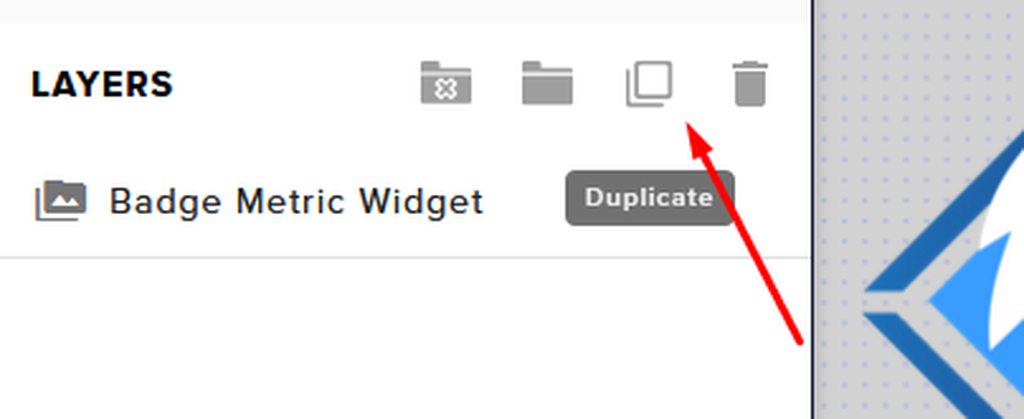
You can actually select the alert box from the layers list and duplicate it to another overlay
steel bladeBOT
@round igloo To duplicate or copy your widget to a new or existing overlay, select the widget and use the Duplicate button. https://imgur.com/a/Ng4uhRU
 round igloo
Ahh you're right! I never tried that! Thanks!
kindred fox
Yep yep
fallow drum
anyword on the bot name?
round igloo
@fallow drum Have you set up your tipping page and overlays?
it should appear under activity feed settings in obs live after you set up overlays and tipping page
fallow drum
yup
 loud osprey
does stream elements work with streamlabs
fallow drum
i can even change the name of the bot, but only to my user name, I don't see where i can customize it @round igloo
kindred fox
@loud osprey what do you mean?
steel bladeBOT
@fallow drum Currently renaming the bot fully works with OBS.Live.
You can follow this video guide to set it up: https://discordapp.com/channels/141203863863558144/494513233416421386/561516184718278676
If you don't want to use OBS.Live and want to stick with Ground Control, please let us know your Twitch username.
round igloo
Yes you need to create another Twitch account that will be used as a bot account
BalusaurBot for example
fallow drum
@round igloo does that mean I have to have a seperate streamelements too?
round igloo
@fallow drum Nope! Just another Twitch account that you will link to your current streamelements as the bot account
fallow drum
@round igloo how do i link it?
round igloo
There should be an option to link it under the custom bot name settings
I currently have an option to unlink my bot account, so there should be an option there to link it if it's not linked
fallow drum
@round igloo thanks so much! i guess i just wasnt understanding it properly. and they don't really explain the two account thing in obs.live
@round igloo do you happen to know why raid notifications have stopped going through to alerts?
steel bladeBOT
@fallow drum Due to changes to Twitch API, we have filtered out hosts and will only show these ones on your activity feed:
- All hosts coming from an online channel with at least 1+ viewer
- Auto host events with at least 1 viewer - only from a channel that just went offline
Note: If you see X channel has hosted you with no viewers on the back, that is considered an offline host or a host with 0 viewers, we do not show these.
fallow drum
doesn't answer my question Bot
 tame summit
Hi, im having an issue where my obs launches without the stream elements tab, i have streamelements obs live downloaded but it just launchers regualr obs without the tab
shy mountain
@tame summit do you see "Streamelements" on top of OBS as a menu button?
 rich nebula
hey guys, so I have been creating alert box on StreamElements, and I wanted to import it to my obs studio using the browser source, but it didn't show anything just a blank. Is it a common thing ? Will it pop-up after I get a real alert ?
 merry urchin
Hey All, are we recommending to upgrade to OBS 26 or hold off until OBSLive is updated?
rich nebula
@shy mountain thanks a lot
 flint smelt
how do i keep my stream elements overlays from being cut in halfr
steel bladeBOT
@flint smelt The default resolution for StreamElements overlays (theme and custom) is 1920x1080. Please add them in OBS at their full resolution and use CTRL+F to fit to screen if necessary. You can then downscale your stream in OBS settings > Video if you'd like https://i.imgur.com/6bWXxjR.png
dry jacinth
hey guys i started streaming yesterday but it seems my stream was stuttering alot as if it has fps drops ! any idea why ? here is a video of the stutter https://www.twitch.tv/whispersofheart/clip/SleepyTentativeWaterTBTacoRight
 steel bladeBOT
@dry jacinth Please provide a log from your last stream. To do this, in OBS go to Help > Log Files > Upload Last Log File and paste the link to the log file here.
dry jacinth
shy mountain
dry jacinth
alot of Critical issues
 unique lodge
Hello everyone!
Im fairly new to obs.live and was looking to use overlays from Stream Elements, however I dont know how to get them off the web page and onto the obs.live application. Hovering over StreamElements in the app only has an option to "Activate Overlays" but that just send me to the web page. What am I missing?
 cursive glacier
Hello, I'm trying to apply to MTG creator program and for some reason there is an EU application there and I live in NA....Cant apply can you help?
shy mountain
- This channel is for OBS.Live issues
- There is a drop down you can choose between EU and NA
@cursive glacier
steel bladeBOT
@unique lodge To add your overlays to OBS, add a new browser source in your scene. Paste your overlay URL in the browser source properties, set the dimensions to 1920x1080 (unless you changed them on the website) and check Shutdown source when not visible. https://youtu.be/KDvLynUqXI4
 echo urchin
hey, so I use OBs and my capture card freezes whenevr I start streaming
It works good for roughly 5 minutes then It stops
I have the HD 60 which I understand is kinda old, but I still think it should be working fine
also when I chooose "video capture device" and then pick my elgato OBS just crashes
 long bobcat
Are you using specifically OBS.Live @echo urchin ?
 left sphinx
Need help wondering how long it takes to be reviewed enough to get into the program
I'm coming from slobs and I have leveled up past gold and my application for gathering program has been in review for 3 days
rugged quail
I have been trying to set up my alerts but it doesn't change to the colour I want to and keeps resetting it default blue
round igloo
@rugged quail Reload the page, sometimes the settings don't update/save until you reload everything.
rugged quail
I reloaded and reopened it a few times but it doesn't update it
It just goes back to blue
round igloo
copy the source url and open it in another tab and trigger the alert and see if the color is different
or look in OBS if you've already added the source URL to it
rugged quail
round igloo
hmmm
rugged quail
I've been trying for a while now with some friends but all of us don't get why it doesn't change
round igloo
When you load the editor for that overlay, which color shows up? the new one or the default one?
rugged quail
When I load it it resets itself to blue
I try to save the colour change immediately afterwards but it doesn't seem to save
round igloo
Just tried on my end and it changes with no issues, maybe try a different browser
plain mason
@rugged quail check the Variations Settings for your alert.
round igloo
Oh yeah that's a good idea
disable alert variations and see if it works
because it might be triggering a different version of that alert that has the default color
rugged quail
I did removed the variations from cheers already and made new ones for subscribers
I didn't want to trouble too many people so I got that one going for me from a youtube video
I also changed all the colours of variations that I made but it doesn't update the color
round igloo
Try creating a new Overlay and change the color of the alerts there
If it works, just duplicate those alerts to your current overlay
left sphinx
Possible to get a viewer count like slobs has on chat
rugged quail
It doesn't work with a new overlay
Thanks for all the trouble tho!
I think I will give up and accept that it can't be helped at this point.
round igloo
Have you tried a different browser though?
rugged quail
Yea I just used firefox on my laptop
round igloo
So you can customize everything but the color?
rugged quail
Yep
It isn't the worst but it would be nice to be able to change it, but if not possible it's also fine ~
left sphinx
Anyone available to help
round igloo
@left sphinx Do you need a viewer count or you want a viewer count similar to the one on slobs?
steel bladeBOT
@rugged quail Our Dashboard and Overlay Editor are Chromium Optimized. We strongly recommend using Chrome. Opera GX and the new Microsoft Edge Chromium might work closest to Chrome as its also Chromium built. Firefox also works, but some things might look a bit different or not work. We do not recommend using Internet Explorer with our Dashboard as it does not support functions.
If the website doesn’t work on chrome, be sure none of your plugins are blocking our website or clear your cookies. You can try if the website works in a incognito tab.
left sphinx
Need one @round igloo just for me to keep track
round igloo
@left sphinx There's a viewer count on the activity feed
left sphinx
I don't see it
round igloo
bottom right corner of the activity feed, streamelements activity feed
and you could also use the Twitch stats panel in OBS
left sphinx
Do I have to activate it or / I stream on Facebook gaming not twitch
round igloo
@left sphinx
rugged quail
I will try again, thank you ~
round igloo
@left sphinx If the FB dashboard has stats or activity popout or something, you could plug that into OBS as a dock
left sphinx
@Slopz thanks I will try
 red wind
Where would I be able to get some help trouble shooting media requests que issues?
 cold cape
Obs not showing notification
raw wave
Is there any way you can delay an alert from the streamelements editor?
 pearl blade
how do you turn off the virtual camera plug in? it keeps telling me my output is active while it is not
 patent jewel
how do i fix obs live disconnecet and reconnect i have 200mps download and 30 upload i dont know whats wrong
 lime basin
Hello
patent jewel
Hello
steel bladeBOT
@patent jewel For the best OBS support, please join their Official Discord @ discord.gg/obsproject
rugged quail
my media request is no longer working and i don't know why

 charred shard
Me and my girlfriend want to both use OBS.live for our respective streams. is there a way that we can easily change between her stream and mine? we´re using the same computer and we dont wanna change all the settings all the time.
waxen spruce
I'm trying to uninstall to fix an issue and the uninstall keeps aborting....
tulip hamlet
You must uninstall OBS.Live before uninstalling OBS Studio.
It is heavily dependent on OBS Studio.
waxen spruce
I am - I've navigated to OBS.live via CCleaner, Windows add/removal, and the uninstall.exe in the folder.
tulip hamlet
There's no need to use CCleaner to uninstall it.
And if you updated to OBS 26, you will need to reinstall 25.0.8 before trying again, because OBS.Live is not updated to work with OBS 26.
waxen spruce
Well nothing is working. It just aborts. I've tried three ways to remove it
tulip hamlet
Do you have OBS Studio installed?
waxen spruce
yes
tulip hamlet
Did you update it to OBS 26?
tulip hamlet
Then uninstall it, reinstall OBS 25.0.8, then uninstall OBS.Live.
 woeful glacier
I have a little problem with my alerts animations if someone could help me :D
So I made a little animation for my alerts and when I upload it in the stream elements overlay editor, it looks fluid but when I set the source in obs, the alert is a bit laggy
steel bladeBOT
@woeful glacier OBS > Settings > Advanced > Scroll down > Enable or disable Browser Source Hardware Acceleration, depending on its current state > Restart OBS (This does not apply for OBS on Mac)
https://i.imgur.com/ggMe9ZE.png
woeful glacier
already done
 fleet brook
Who do I go to for help on here?
steel bladeBOT
@fleet brook Welcome to the helpdesk! Please let us know how we can assist you today and a support volunteer or staff member will assist you as soon as they are available. Thank you for your patience.
fleet brook
I need help trying to get my audio to be heard on my stream
 rigid furnace
Hello. I have a problem. I created an overlay on the website for 1080p, but OBS automatically creates an 800 by 600 window and the overlay is not visible. How to be? I'm sorry for my english, I used a translator
steel bladeBOT
@rigid furnace The default resolution for StreamElements overlays (theme and custom) is 1920x1080. Please add them in OBS at their full resolution and use CTRL+F to fit to screen if necessary. You can then downscale your stream in OBS settings > Video if you'd like https://i.imgur.com/6bWXxjR.png
rigid furnace
no :)
fleet brook
@wary dew can you help me with my issue or do I need to wait still?
rigid furnace
thank u
wary dew
@wary dew can you help me with my issue or do I need to wait still?
@fleet brook you haven't really given any information on your setup 😛
fleet brook
sorry, didn't know how it works here haha.
I am streaming via capture card from my xbox. I have everything set up except my voice audio is not being broadcast. My mic is plugged in directly to my xbox so I don't have the ability to plug it in to my capture card.
On streamlabs I am able to get my audio to be heard, but I haven't figured it out on OBS 26.0
rugged quail
I think OBS 26.0 is messing a couple of people around because I had to uninstall and use what ever OBS is working with elements
fleet brook
I thought OBS 26.0 was the go to for Elements?
steel bladeBOT
@fleet brook For the best OBS support, please join their Official Discord @ discord.gg/obsproject
wary dew
I thought OBS 26.0 was the go to for Elements?
@fleet brook our plugin OBS.Live hasn't yet been optimized for OBS 26
fleet brook
Gotcha. I'm still new to all of this so I really don't know what the difference is
 sleek wyvern
hey oh so ive got a quick question can you add a camera in the Overlay editing portion? or can you only add the camera through OBS?
 cedar rock
for every song there's just this error message: "This Video is not available in your country." Please advise 🥺
tulip hamlet
@sleek wyvern Camera is only added in OBS.
steel bladeBOT
@cedar rock StreamElements menu, on top of OBS > Logout > Login
cedar rock
now I'm getting the no active widgets detected for media request. After watching this video it seemed automated. Apologies for the hassle

StreamElements OBS.Live add-on for OBS studio, making stream management easy.
Direct download: http://p.strms.net/obslivemryt / Learn more: http://p.strms.net/obsliveytlm
With OBS.Live Media Request integration you can increase your revenue and viewer engagement by letting t...
rugged quail
Cant delete my account says invalid username?
cedar rock
this is what I'm getting, it's not showing up in sources. please advise
 sharp latch
Any advice please, can't seem to detect Fallout 3 when setting the game capture to fallout3.exe
steel bladeBOT
@sharp latch For the best OBS support, please join their Official Discord @ discord.gg/obsproject
@cedar rock To add your overlays to OBS, add a new browser source in your scene. Paste your overlay URL in the browser source properties, set the dimensions to 1920x1080 (unless you changed them on the website) and check Shutdown source when not visible. https://youtu.be/KDvLynUqXI4
cedar rock
I'm trying to add the media request midget. I assumed it was integrated as shown in the video.
tulip hamlet
It does not do it for you. Widgets are components of overlays. You must add the widget to an overlay yourself.
cedar rock
Ah okay, I'll go tyr and figure it out, thanks for pointing me in the right direction, apologies for the disturbance
 charred sleet
Has anyone done alpha masking before for the life of me I can't get my camera cropped into these perfect cause the shape and I can't find a shape to alpha mask this
tulip hamlet
You don't need to.
You put the camera on a lower layer than the overlay.
It's transparent.
charred sleet
Ya know that's actually a lot easier LMAO! Thank you @tulip hamlet
steel bladeBOT
@rugged quail Welcome to the helpdesk! Please let us know how we can assist you today and a support volunteer or staff member will assist you as soon as they are available. Thank you for your patience.
@rugged quail Please ask your question in one helpdesk channel only. A support volunteer or StreamElements staff member will assist you as soon as they are available. Asking in multiple places will only result in confusion, not faster answers. Thank you for your patience.
rugged quail
problems with new obslive update
tulip hamlet
OBS Studio updated to version 26 two days ago. OBS.Live has not been updated to support it yet.
cedar rock
I can't seem to figure out where to find the widget. From all the videos I've watched you can just add the media request player to obs. I've done that but I can't hear anything and I just see this
 noble viper
Hey dear StreamElements Community, i cant find the StreamElements OBS.live App for my Elgato Stream Deck. It does not show up when i search for it.
steel bladeBOT
@cedar rock We've released our new Overlay Editor revamp. You can check out the changes and how to work with it here: https://youtu.be/X5VzXjqAsjk
Check out our blog post as well: https://blog.streamelements.com/streamelements-overlay-editor-just-got-even-better-c22cb5b4853e
cedar rock
I'm trying here and I'm still not getting it, added the source and still nothing. still getting this
tulip hamlet
Go to the overlay editor.
Add the widget to your overlay.
Add the overlay to OBS.
cedar rock
I've done this
the player doesn't seem to be playing anything even though the play button is hit
steel bladeBOT
@cedar rock StreamElements menu, on top of OBS > Logout > Login
tulip hamlet
OBS.Live is not updated to work with OBS 26 yet.
cedar rock
Ah so it just won't work, I'll have to wait or would you suggest to roll back OBS?
tulip hamlet
I would recommend rolling it back.
cedar rock
ty ty, sorry to be a bother
I was going mental here, losing marbles. such a relief, felt like a right twat 🤣 ( I mean I still am but fucking hell that was hard work for my noggin)
 silk gale


 steel bladeBOT
@silk gale For the best OBS support, please join their Official Discord @ discord.gg/obsproject
oak cove
Hi, i am currently attempting to stream and after 2-3 minutes my streamelements just pops up saying an error occurred while streaming and the broadcast ends. Urgent advice needed 😭
This has never happened before for context and I haven’t made any changes to my stream whatsoever
steel bladeBOT
@oak cove Please provide a log from your last stream. To do this, in OBS go to Help > Log Files > Upload Last Log File and paste the link to the log file here.
 vivid slate
Hello, I changed my username on here from bbluejacket to bearscruff and my obs isn't recognizing me as the owner of the channel and it's not recognizing any commands in chat I type to change things. Help?
oak cove
It’s saying critical 83.4% encoder overload but I don’t understand why it worked fine the other day but now won’t?
It says I can try switching my encoder to help but I’m only on a basic laptop so my only options are hardware (QSV) which is what it’s already set to or software (x264) would the switch help?
 hasty lance
I was wondering when obs.live is going to upgrade to obs v.26? the new twitch soundtrack feature only works with v.26
oak cove
here is the full link!
tulip hamlet
@oak cove Encoder overload means your CPU is being overworked. https://obsproject.com/analyzer/?url=https%3A%2F%2Fobsproject.com%2Flogs%2F4M5HMcvtDjf2LXiS
@hasty lance Probably not until 26.0.1.
hasty lance
ah that is fair. i'll wait
oak cove
yeah but i've been streaming since july with no problems at all using the exact same equipment so i'm unsure as to why this has become an issue now?
tulip hamlet
@oak cove It's still dependent on what you're running on your computer, what settings you're using, etc. Anything can be overworked.
placid cliff
thanks need there help with Twitch Soundtracks Beta Plugin xD
hasty lance
are you using obs.live @placid cliff
placid cliff
Yes and No xD Right now OBS.live is disabled as theres no 26.0 official support and mine wont install the 25.6 version along side the 26 update
My issue is the Twitch APP wont route audio to the twitchapp plugin on OBS
Seemless routing my ass xD
https://thecynicalkitty.com/s/20200230054.png

 hasty lance
interesting. i just switched to live so i won't be going back just for soundtrack, but looks like you found an interesting bug
placid cliff
iv just a mad set up though to be fair
hasty lance
i'm just wondering how they are gonna make it so you can hear it but it still gets taken out
this isn't really the place for this conversation though i think
placid cliff
its on a seperate track and im assume its 2 streaming lanes being sent over then being overlapped.
hasty lance
ah makes sense
placid cliff
Just a hazard guess is all 🙂
oak cove
Hi sorry me again, streamelements crashed entirely and closed so I reopened and started stream and this time it got 23 minutes in before an issue?? I’m now even more confused as it clearly is able to run the stream but is still just giving me the same error 😭
 novel pelican
I bought the arcade pop overlay set and noticed that the alerts overlay isn't centered. I'm not really familiar yet with the settings but would love to get help or be linked to a resource that can help me customize it properly.
tulip hamlet
You will need to contact the creator of that package.
novel pelican
Gahd, what was I thinking. 🤦♂️ Thanks @tulip hamlet!
placid cliff
if the artist wont help @ me @novel pelican ill assist where i can 🙂
round igloo
Is there an ETA for OBS.Live 26.0.0 update? :)
tulip hamlet
Somewhere around 26.0.1
 gloomy zealot
Hello everyone! I started streaming using OBS.LIVE and I've noticed that the StreamElements chatbot keeps saying the wrong game that I'm currently playing (like I was playing Warzone and the chatbot was saying that I was playing Spelunky 2). Plus in the Activity Feed, when I'm editing my stream details (game / chatbot name) It seems like I'm unable to save. Only the popup text asking if I want to leave without saving works. Anyone knows a fix to this? It's really annoying and I really love the streamelements bot...
shy mountain
Go to our dashboard, part the bot from your channel, logout and then login again and then join it again
This means also relog in OBS.live as well
steel bladeBOT
StreamElements menu, on top of OBS > Logout > Login
shy mountain
!relog
Afterwards, make sure to change the game via the !setgame command or via the twitch dashboard
if the activity feed is giving you too much trouble saving the game
gloomy zealot
I think I solved the issue... I disconnected from StreamLabs
And the bot started saying the correct game again
 summer prism
anybody help with why my obs wont connect to any servers on twitch when I try to go live?
round igloo
Is it possible to have seperate alerts such as follow alert, sub alert and donation alert be triggered at the same time? I can make it work by creating seperate overlays for each but I was wondering if it's possible to do it within the same overlay
Like If I create 3 seperate alert boxes with only those 3 alerts enabled, they should be able to be triggered on their own at the same time...idk how to explain it better
 crystal apex
Could anyone here help me resolve an issue with my alerts? I have my overlay in OBS as a browser source with the address I copied from my StreamElements overlay editor. I can test the alerts on the editor and they work just fine; but when viewers in chat follow me or host me, the alerts do not trigger.
 mint sluice
using 8600k on 4.8ghz and gtx 1080 get extremley low fps in apex while streaming and weird fps drops in csgo sometimes.And sometime only the game lags and the streams works perefctly while the edge is open in background or using a second monitor
shy mountain
@summer prism can you elaborate?
@round igloo You will need to have different overlays with each alert widget, as they share a queue if they are in the same overlay
@crystal apex Do you have OBS open right now?
steel bladeBOT
@mint sluice For the best OBS support, please join their Official Discord @ discord.gg/obsproject
summer prism
NVM @shy mountain thanks anyway
shy mountain
@crystal apex I just followed and saw that the alert show up
round igloo
@round igloo You will need to have different overlays with each alert widget, as they share a queue if they are in the same overlay
@shy mountain Yeah that's what I've been doing up until now...having separate overlays would technically increase system load, right?
shy mountain
not necessarily
round igloo
@shy mountain I don't know how any of this works but I'm wondering if overlays are being rendered on StreamElement's side or is SE just providing the host for the assets and they're being locally rendered on the machine?
shy mountain
Well, how do you "render" a normal website?
round igloo
Locally, right?
round igloo
I thought maybe SE rendered a video of the overlay or something
shy mountain
there are certain back end shenanigans that are handled server side
like handling of events and then sending that event towards the alert widget which is loaded in the overlay
that is being locally loaded by the browser source in OBS
well its a graphic asset that has a link in the server
but visually its rendered on your machine
on OBS or your browser
round igloo
Gotcha, so it won't really matter if my alerts have separate overlays as it's still going to render them like it usually would if they were a single overlay
shy mountain
yes
round igloo
I thought that there was maybe some kind of an overhead with each browser source/overlay and that it was always better to have a single overlay but I guess that's not really a thing
Thank you!