#helpdesk-selive
1 messages · Page 163 of 1
 late furnace
follow the bot
 steel bladeBOT
@rugged quail Please provide a log from your last stream. To do this, in OBS go to Help > Log Files > Upload Last Log File and paste the link to the log file here.
late furnace
follow instructions
 rugged quail
ummmmmmmmmmmmmmmmmmmmmmmm
ok
idk what thsi stuff means
Warning
Integrated GPU
Mismatched Sample RatesWarning
huh?
late furnace
instuctions are in your results
rugged quail
oh ok
late furnace
there are below just scroll down
rugged quail
OBS is running on an Intel iGPU. This hardware is generally not powerful enough to be used for both gaming and running obs. Situations where only sources from e.g. cameras and capture cards are used might work.
this stuff?
late furnace
everything that is yeller
late furnace
igpu is where you can run a gpu with cpu at the same time if your motherboard supports it
late furnace
GPU is an graphics card like a 1050ti oc and a motherboard is what makes your pc function inside your pc
 steel mural
The problem is, that your laptop is too slow to run OBS. It would be the best to get a more powerful, recent desktop PC.
late furnace
there is nothing you can do with the intergrated cpu, its simply not strong enough
what are you running anyways?
steel mural
And that's the problem. It's not made for creating YT vids, more like watching them, doing some office stuff etc.
rugged quail
oof ok then
 pallid parrot
Also - if you want to create YT videos, the better way to do is to record your camera only without capturing anything else, then putting it together with video manipulation software like Premiere.
 tough basin
Is there a way to have a text source on screen that is automatically updated when !deathcount is updated in chat?
pallid parrot
@tough basin
 hard marsh
hello i hope im in the right place for some help. but i seem to be not able to sign in for twitch in obs. for some reason when i hit the connect account button. a black screen comes up?
pallid parrot
Shut your OBS down and then clear this directory: %AppData%\obs-studio\plugin_config\obs-browser\Cache
pallid parrot
Yes. This one was for you
hard marsh
thanks. am i going into programs to look for this?
pallid parrot
Press win key + R combination and paste this path there
hard marsh
thank you , you do the lords work
wow so like all of this?!?!
that did change anything. i still get a black srceen when i try to sign in??
pallid parrot
Hmmm. That is absolutely odd. I think I would do a fresh OBS install as some of the libs may be broken somehow.
 dense relic
My "You are blocked" error from earlier was resolved. Thank you to the kind soul who was looking into it for me!
 rugged fulcrum
Has anybody had issues with the Totals and Aggregates tabs displaying incorrect values for Session Data? I have tried resetting and clearing everything, then updating manually but it is still incorrect.
 sturdy crater
Anyone able to assist wit why my chat box isn't appearing in OBS? I've created it, and pasted the URL like all other items...
steel bladeBOT
@sturdy crater StreamElements on top of OBS > Logout > Login
 nocturne perch
does anyone know why when I try to download obs the set-up tells me to close the set-up to continue the set-up? makes no freaking sense wow
pallid parrot
@sturdy crater also make sure that your browser source is the same dimensions as your overlay (usually 1920x1080) as OBS defaults to 800x600
sturdy crater
@pallid parrot That would be the properties of the chat box source within OBS, Correct?
pallid parrot
Correct
sturdy crater
@pallid parrot Thank you ! Box has appeared and I'll be testing it out later today.
 atomic cradle
i need some help i only have a video of streamelements playing in obs and it wont go away
 kindred fox
@atomic cradle were you trying to add an overlay?
atomic cradle
i have my overlay added but the video is stying over it
kindred fox
can you take a screenshot of what you're seeing?
odds are you have a source in your scene that doesn't need to be there.
atomic cradle
on the right side
kindred fox
Yes. You added your "overlay" as https://streamelements.com and not the actual overlay URL
atomic cradle
@kindred fox and where do i get the right one?
kindred fox
This is a really good guide on overlays. The URL is added via the overlay editor or by clicking on the elipsis on the overlay you want to use and clicking "Copy URL"
https://www.youtube.com/watch?v=X7XrDdRE7Fk

Check out the new Overlay manager guide: https://youtu.be/LwAfMIR3Cj0
Create an amazing overlay with StreamElements, watch our video guide to learn how.
Tipping page setup: https://youtu.be/eLzxRkq7tJo
Add KappaGen to your overlay: https://youtu.be/Mlz3pj_gkBM
Overlay...
The interface has changed since this video was made, but the concepts are similar
Overlay URL locations
atomic cradle
i copied it like this
kindred fox
delete the top source in your scene
atomic cradle
ah now thank you
kindred fox
👍
 haughty haven
Good morning everyone! I would like to set it up so that whenever someone cheers the bot gives a message in chat with how many bits they have used in my channel so far. Is this possible, and if so how can I set it up?
rugged quail
Having issues with text blur near a video. When the text is behind the video webcam border it is crisp, as soon as i bring the layer forward, on top of the border, it blurs. Is there a way to stop this? Would really appreciate any help.
Can anyone help me? My little stats bar at the bottom of my stream elements has disappeared. How do I get it back?
haughty haven
Okay, I just (finally) found where to go to do what I need. My follow up question now is what is the variable I need to use to have the bot say how many total bits the person has given to my channel?
 craggy cobalt
Hello, is there a way to output sound in such a way that I hear it but stream doesn't? I have OBS capturing my desktop sounds currently.
I need to to hear the music from spotify, sounds from games, etc, but there I have a browser source that outputs sound and I would like it to only be heard by me. Any way to do that?
Thanks in advance
pallid parrot
This could be done with voicemeeter software and having some of your overlays to play sound only on specified audio card (audio monitoring device)
craggy cobalt
Something like VB-Audio Software?
pallid parrot
Yes.
craggy cobalt
Alright, I will look into it. Thank you! 
 dense ice
Hi !
I have a small problem, I have been streaming for a while and something today just snapped, I can't hear the capture device through my own Headphones but the stream can't and I did put on on Monitor and Output
dense ice
but the stream can*
 teal sandal
Anyone know why my stream start to get choppy unless i tick Vsync in my games ?
here's my rendering settings
 wet void
my overlay canvas in streamelements doesn't seem to match with my obs canvas. Anyone can help me figure it out?
steel mural
@teal sandal That's normal, because OBS needs some resources too. If you don't use VSync the game takes 100% if the GPU, leaving no room for OBS.
steel bladeBOT
@wet void Please provide a log from your last stream. To do this, in OBS go to Help > Log Files > Upload Last Log File and paste the link to the log file here.
teal sandal
I'm using a 2080Ti @steel mural
steel mural
Doesn't matter.
teal sandal
there's no game using my 11GB of VRAM fully yet
steel mural
VRAM has nothing to do with the GPU processor. It's like comparing CPU usage with RAM
teal sandal
Well i didn't had the issue before
steel mural
Start OBS as admin. This will give OBS a higher priority and maybe fixes the issue. But like I said, if the game utilizes 100% of your GPU, OBS gets bottlenecked.
teal sandal
and as I said, my GPU barely reach 30% usage anyway
highest was 50%
running SC all maxed out, i'm at 40%
steel mural
Did you restart OBS since your last stream?
teal sandal
I do everytime I stream
steel mural
I need a log, that's why I'm asking.
Did you restart OBS since your last stream? Yes or no?
teal sandal
yes
steel mural
More than once?
teal sandal
only once, I was tweaking my scenes
steel bladeBOT
@teal sandal Please provide a log from your last stream. To do this, in OBS go to Help > Log Files > Upload Last Log File and paste the link to the log file here.
teal sandal
would be irrelevant as my last stream wasn't choppy (was playing an emulated game) no ?
steel mural
I'd need a log from a session that was laggy. You can select "Show logfiles" instead and drag one in here from when you know you had problems.
wet void
why do you need a log file to tell me how to fix my canvas?
steel mural
Because it will show me your OBS settings
teal sandal
he's talking to me @wet void
 wary dew
Well, since you don't give any information about your canvas or your overlay resolution, we need to figure it out on our own. And it's mentioned in the log 😛
It's super simple with questions: 0 input = 0 output
teal sandal
wtf I have no log before 28th of august, and i streamed all august
steel mural
Logs get generated per start of OBS. Only 10 logs get saved to save space.
teal sandal
well it's gone then
steel mural
You can also do a test stream with a game you know it causes the issue
 chilly basalt
is there anyway duplicate a overlay such as alerts to a different channel? (like duplicate a overlay from your twitch channel, to your facebook channel)
wary dew
 barren bay
Why is it when i put my custom overlay the preview looks good but the overlay on obs is halfway cut off???
 sharp turret
@barren bay The default resolution for StreamElements overlays (theme and custom) is 1920x1080. Please add them in OBS at their full resolution and use CTRL+F to fit to screen if necessary.
You can then downscale your stream in OBS settings > Video if you'd like https://i.imgur.com/6bWXxjR.png
 barren bay
TYSM
 noble atlas
Hey Guys i got a massive problem with my OBS.live. when want to start up my stream, and clicked the "start streaming" button i instantly drop frames up to 50%, and the icon goes in RED after a few sec, this is very weird as i have been streaming perfectly with no problems for weeks and it just randomly happened. i have the same settings as ive always had on obs.live, i have tried to reinstall the software and pc / router multiple times but nothing seems to work. any help is highly appreciated
 feral parrot
Do you use obs or slobs? @noble atlas
steel bladeBOT
@noble atlas Please provide a log from your last stream. To do this, in OBS go to Help > Log Files > Upload Last Log File and paste the link to the log file here.
 tulip hamlet
noble atlas
tulip hamlet
noble atlas
^ so it says its caused by my internet or hardware.
tulip hamlet
I'd recommend first reading the second part.
noble atlas
here is my internet speed currently
tulip hamlet
Speed tests are not accurate examples of a direct connection as they connect to multiple servers to give a best case scenario.
noble atlas
oh ok
 plain sonnet
internet connection , not internet speed.
also turn off IP binding
noble atlas
The OBS log analyzer told me to put "bind to IP" on default
ive had it on default forever, as i said all the settings have worked perfectly for months, this problem started yesterday out of nowhere
plain sonnet
you had IP set to binding
21:44:41.468: [rtmp stream: 'adv_stream'] Binding to IPv4```

default means no binding (off)Run this for an accurate test of your connection to the Twitch ingest servers: https://r1ch.net/projects/twitchtest
Test your upload bandwidth and connection quality to Twitch
 spiral rune
I have created some overlays but when adding them to my scenes on the OBS app it looks like the whole overlay is not in the scene. just parts
steel bladeBOT
@spiral rune The default resolution for StreamElements overlays (theme and custom) is 1920x1080. Please add them in OBS at their full resolution and use CTRL+F to fit to screen if necessary. You can then downscale your stream in OBS settings > Video if you'd like https://i.imgur.com/6bWXxjR.png
@noble atlas Use the Twitch Bandwidth Test to find the best Twitch server to stream to. Set Duration to Medium. You can uncheck any regions you're not near.
After the test completes, click the Share Result button to upload a screenshot, which can then be copied and pasted here.
Get Twitch Test from https://r1ch.net/projects/twitchtest.
noble atlas
@tulip hamlet will try it now
tulip hamlet
Then you'll need to contact your ISP.
noble atlas
ISP? whats that
tulip hamlet
Internet Service Provider.
noble atlas
oh okay, anything particular i should tell em ?
tulip hamlet
Tell them what you're trying to do.
noble atlas
okay i will try
 dusty marlin
i have 3 total screens to switch between. im using very simple transitions but for some reason when switching to 2 out of the 3 screens there is a black screen delay in between, meanwhile when i switch to the main screen which is where ill be showing the game, it cuts to it right away
i am so confused as to why this happens
steel bladeBOT
@dusty marlin Check out this tutorial for OBS’ studio mode which allows you to preload scenes before transitioning. https://www.youtube.com/watch?v=W8iWsD2Lq3U
dusty marlin
@steel blade thanks bot
 fluid girder
Hello, I wonder if there is any possibility to merge twitch and youtube follows/subs in one alert box?
tulip hamlet
StreamElements does not have support for multistreaming. All channel data is separate.
 lost lintel
Trying to use NDI to use a second PC to stream, i have it installed on both PC's and the streaming PC sees the gaming PC but when i select it i just get a black screen.
also on the streaming PC when i select Display Capture it doesn't show the display, its also just a black screen. If i select Window display it works fine, and webcam is fine as well
im not sure why Display capture and NDI Source arent working
steel bladeBOT
@lost lintel For the best OBS support, please join their Official Discord @ discord.gg/obsproject
 pastel sail
How to use API in OBS ?
 pliant ether
Can someone tell me how to change the raffle amount on streamelements? Sorry if this is the wrong place.
tulip hamlet
Type it with the command. i.e. !raffle 5000
 buoyant brook
hey so does stream elements not really work on mac?
tulip hamlet
There is no OBS.Live version for Mac, but you can still use our overlays with the Mac version of OBS Studio.
rugged quail
where would be the best place to look for overlay help?
buoyant brook
oh sweet so just download obs studio and then what? sorry very new to this and streamlabs was not very user friendly but streamelements is just confused because im on a mac
steel bladeBOT
@buoyant brook New to StreamElements?
Check out our YouTube channel https://www.youtube.com/c/streamelements/videos
with tutorial videos from setting up the basics, to in depth details on how to use our product.
New to OBS? Here is a 4 step quickstart guide
https://obsproject.com/wiki/OBS-Studio-Quickstart
Want to learn even more? Here is an in-depth overview
https://obsproject.com/wiki/OBS-Studio-Overview
 umbral cosmos
@tulip hamlet I was about to ask the same thing. I am trying to follow the simple setup tutorial but nothing looks the same on my dashboard as in the video
I can't find "launch overlay" anywhere and I am just generally confused.
tulip hamlet
That's the "Preview" button.
steel bladeBOT
@rugged quail Welcome to the helpdesk! Please let us know how we can assist you today and a support volunteer or staff member will assist you as soon as they are available. Thank you for your patience.
rugged quail
I neeed help adding something to my overlay
steel bladeBOT
@rugged quail Welcome to the helpdesk! Please let us know how we can assist you today and a support volunteer or staff member will assist you as soon as they are available. Thank you for your patience.
rugged quail
what do i do?? i confuion
umbral cosmos
preview brings up a blank window and even the back browser button is not highlighted
buoyant brook
@tulip hamlet thanks for the OBS tip so next i just download the overlays and import them into OBS Studio for mac? and I already have the elements bot and tip jar setup so I think I'm set after that!
steel bladeBOT
@buoyant brook To add your overlays to OBS, add a new browser source in your scene. Paste your overlay URL in the browser source properties, set the dimensions to 1920x1080 (unless you changed them on the website) and check Shutdown source when not visible. https://youtu.be/KDvLynUqXI4
tulip hamlet
@umbral cosmos If you're only using an alertbox, which doesn't appear until an alert is actually playing, yes, it'll appear "blank"
umbral cosmos
How do I upload my existing scenes/sources from OBS?
rugged quail
Sorry my bad, I Want to add something to my overlay but it looks odd unlike the others, I Made A Discord Image and want to put it on the fall guys overlay but the fall guys one is all normal and then the icon is like a bit bigger than the image itself
tulip hamlet
@umbral cosmos There is no import/upload option for entire scenes. You need to create a custom overlay, add widgets, and if the widget needs something like a video, image, sound, etc., the widget settings will allow you to import those assets.
@rugged quail I don't understand the question.
rugged quail
@tulip hamlet Nevermind Then
buoyant brook
Okay i think i got the overlays imported but on a mac I can't seem to add my display capture... Im in "properties for display capture" adding it to a scene but it says "no properties available"
As well as when I edited my overlays text for different socials it didn't seem to update
tulip hamlet
You're likely editing the layer name, not the actual text. Make sure you open the Settings menu on the left and edit the text field there.
buoyant brook
okey dokey
and i figured out the display capture issue, I set it to crop to window, specifically minecraft for me... that means when i tab out on a monitor to view google chrome etc viewers won't accidentally see that will they?
tulip hamlet
Display capture captures whatever is on your display. Window capture captures a specific window.
buoyant brook
can i capture a full screen game? Minecraft shows up when windowed but not when full screen
tulip hamlet
You can try using Game capture.
buoyant brook
im not seeing that option under sources
dusty marlin
Alright so for transitions screen 1 and 2 switch instantly between eachother. When switching from 1 to 3 or 2 to 3 it’s also instant. But when I switch from 3 to 1 or 3 to 2 it’s a black screen delay still
steel bladeBOT
@dusty marlin For the best OBS support, please join their Official Discord @ discord.gg/obsproject
spiral rune
I am transitioning over to OBS from console streaming...how do I get my voice into my streams. Ran a little test and my voice was not there.
steel bladeBOT
@spiral rune Consoles do not have native support for overlays. You would need a capture card, PS4 remote play or Xbox companion app and a PC with OBS in order to have overlays over your console gameplay.
We have an blog post about how to setup console streaming with our essential tools: https://blog.streamelements.com/how-to-stream-on-console-7b620b1c46c3
spiral rune
I have a capture card
I am transitioning over to OBS from console streaming with a capture card...how do I get my voice into my streams. Ran a little test and my voice was not there.
steel bladeBOT
@spiral rune For the best OBS support, please join their Official Discord @ discord.gg/obsproject
 oak snow
Hey all, just wondering if it’s possible to use an alert box as an image mask/blend filter? I’ve tried it in obs.live but doesn’t have the option to select a browser source for the filter. Would prefer to do it in the overlays editor of SE if possible. Maybe there’s a widget or plugin that can achieve this that I haven’t found?
 mortal mulch
when i press "Go Live" it doesnt give me an option to fill in the title, description or name of the game, it just goes live onto my facebook page. how can i fix this?
 stark patio
hello, for some reason when i play music through media request i can hear the audio twice?
steel bladeBOT
@mortal mulch StreamElements on top of OBS > Logout > Login
@stark patio Make sure to ☑️ “Shutdown source when not visible” for all browser sources (all OBS scenes). If using studio mode, uncheck “Swap Preview/Output Scenes After Transitioning.” Also keep in mind that sound can play from any overlay loaded in the browser (editor or launched). https://i.imgur.com/6bWXxjR.png https://i.imgur.com/yY0wcFl.png

 polar horizon
My OBSlive chat isn't working
steel bladeBOT
@polar horizon StreamElements on top of OBS > Logout > Login
 jagged pewter
does anyone have any experience with slight audio delays in obs while streaming from a ps4 to an internal elgato 4k HD60?
 vernal ermine
so my mic is very patchy in obs but it is fine in everything else
steel bladeBOT
@jagged pewter If you are having issues with Elgato hardware or software, we recommend reaching out to their support here: https://e.lga.to/help
@vernal ermine For the best OBS support, please join their Official Discord @ discord.gg/obsproject
rugged quail
Hello, I'm trying to get the audio of the video source and the mic in obs live and it doesn't work
steel bladeBOT
@rugged quail For the best OBS support, please join their Official Discord @ discord.gg/obsproject
 wild night
Hello everyone. I just started the stream and realized I do not have the media player dock any longer, when I check under view it is missing from there. Is this no longer available?
tulip hamlet
StreamElements does not have support for multistreaming.
wild night
So it is, it is blank at the moment Nethyr any quick fix? And thank you for helping me find it.
steel bladeBOT
@wild night StreamElements on top of OBS > Logout > Login
 magic merlin
do you know of a way using restream.io
wild night
Thank you all!
magic merlin
or no support offered on the matter?
tulip hamlet
Using Restream would not make our services work for multiple channels simultaneously. Data is not shared between channels at all.
magic merlin
ok
 stiff wadi
hello my camera is always frozen when i boot up obs.live my camera is a sony a6000 i have 0 issues when i use slobs this is my only reasoning for not using obs.live and would really love to use it i have tried turning camera off and on / installing and uninstalling
 sharp hull
so I downloaded the stream elements obs live plug in and I think it's amazing because I can have chat and my recent followers list on obs itself but when I scroll off or move my mouse the chat and followers tab become so blurry that I can't read it . was wondering if I was doing something wrong ?
tulip hamlet
Haven't had to use this one for a while.
steel bladeBOT
@sharp hull Please follow these steps:
- Close OBS
- Open the NVIDIA Control Panel
- In the left menu select Manage 3D settings and then under the list of options (right panel) press Restore default settings
- Start OBS
sharp hull
thank you so much 👏
 peak hearth
Streamelements completely breaks my audio and I cannot view youtube videos until I restart my PC.
peak hearth
I solved the problem by using the option for Desktop Audio 2
haughty haven
Good evening everyone! I have been trying to figure out how I can get the bot to say how many total bits someone has given to my channel. What is the the variable I need to use for this?
rugged quail
How do I exit studio mode?
tulip hamlet
The Studio Mode button in the corner.
rugged quail
Oh dear... thanks!
 oak atlas
Hello. So, I've been having a problem recently. Whenever I stream, my mic just stops working. It'll be fine for a few seconds to minutes, but then it will just not pick up anything. The only way I've been able to have the mic pick up something is to go to audio properties, switch it to one thing, then switch it back. I do thag but then it stops working after a few seconds. I have a video if I need to send it. Any suggestions?
steel bladeBOT
@oak atlas For the best OBS support, please join their Official Discord @ discord.gg/obsproject
 robust minnow
like it works fine when I send a test from the alert box but when I press the buttons on the app it doesn't work
kindred fox
So you’re using obs.live to broadcast and streamlabs for alerts?
robust minnow
no I'm using streamlabs entirely
kindred fox
This is streamelements
robust minnow
streamelements obs
kindred fox
There is no streamelements obs. There is OBS.Live which is a plug-in for OBS Studio, and streamLABS OBS which is an entirely different discord for support
Is your broadcasting software green?
robust minnow
the green bubble with a person in the middle?
robust minnow
ok I'm dumb yes I'm using streamlabs for alerts
kindred fox
Then you will need to go ask in their discord for support
robust minnow
could you link it to me?
kindred fox
Discord.gg/streamlabs I think
robust minnow
ok
kindred fox
Pretty sure there’s also a link on their homepage
 fathom cobalt
kindred fox
fathom cobalt
kindred fox
Thanks @fathom cobalt
rugged quail
My alerts have been just showing the name of the person and not the action: follow/ sub etc.. how do I fix that?
steel bladeBOT
@rugged quail Right click on the BrowserSource > Properties > Scroll down a bit > Refresh cache of current page
 jovial gazelle
Hi I’ve been having some problems for the last week my gameplay is covering the widgets how do I fix this can someone plz dm me and help me
rugged quail
Thank you!!
 daring glade
So my stream like to work for a little bit and the bitrate will be fine with 0 dropped frames, and some days I will have a flawless stream
Then my stream will drop constantly some days
steel bladeBOT
@daring glade Please provide a log from your last stream. To do this, in OBS go to Help > Log Files > Upload Last Log File and paste the link to the log file here.
daring glade
 shy mountain
 marsh kettle
hi guys im new to using overlays and i just downloaded one but it just gave me links ?
where do i plug them in ?
 smoky birch
hey guys my buddy is having trouble getting obs.live the webpage won;t load
pallid parrot
They can download it from this link: https://cdn.streamelements.com/obs/dist/obs-streamelements-installer-wrapper/windows/latest/obs-streamelements-setup-latest.exe
pallid parrot
@marsh kettle You add links as browser sources into OBS with 1920x1080 dimensions
marsh kettle
@marsh kettle You add links as browser sources into OBS with 1920x1080 dimensions
@pallid parrot thank you very much.
stiff wadi
hello my camera is always frozen when i boot up obs.live my camera is a sony a6000 i have 0 issues when i use slobs this is my only reasoning for not using obs.live and would really love to use it i have tried turning camera off and on / installing and uninstalling
steel bladeBOT
@stiff wadi For the best OBS support, please join their Official Discord @ discord.gg/obsproject
 toxic fern
That's an obs issue as our addon does not interact with that part of obs.
 narrow elm
how do i add my overlays to obs with obs live?
steel bladeBOT
@narrow elm To add your overlays to OBS, add a new browser source in your scene. Paste your overlay URL in the browser source properties, set the dimensions to 1920x1080 (unless you changed them on the website) and check Shutdown source when not visible. https://youtu.be/KDvLynUqXI4
 cyan crystal
PLS HEEELPPP how in the world do i get my latest dono and folower to appear in text form (static) not talkin overlay alerts just so the stream can see the last follower and dono ??? hope i explained it right .. thank you
kindred fox
Add the label widget for the text items you want to display
 fringe swift
@kindred fox is there a way to download into txt form?
kindred fox
Idk what you’re referring to.
 cold venture
My Alerts wont show on obs, but everything else from the overlay does
plays sound on streamelements, but not on OBS
 lunar ferry
im trying to stream to dlive but it keeps going straight to youtube
 raw sky
Hey I need help!
 ocean orchid
Wondering if it's possible to use StreamElements without the Facebook Gaming account as the streams I am running (with OBS) aren't gaming related, but live stream to Facebook Live and YouTube.
 coarse glacier
sorry guys, I have only this option
 fathom shale
Whenever I add my overlay to obs it doesnt show, any fixes?
coarse glacier
Wait i cant send screen?
OK here
I just have only this panel option
but for example there isnt information of the stream
so i cant change stream title
I just tried to uninstall and re install
NVM idk how but it fixed itselves
cyan crystal
@fringe swift @kindred fox were you refering to the 3d alert box ? i want just plan teext showing latest follow dono sub ect
kindred fox
Label > latest follower/tip/sub labels
cyan crystal
@kindred fox thank you for your help and i greatly appreciate it having trouble finding this label you are talking about
widget data then labels
but how do i get that to display on stream ???
rugged quail
Someone tipped on August 24 using SE Pay and it still hasn't been approved. Any news on this?
steel bladeBOT
@rugged quail Please contact us via email for support with SE.Pay. You can use our contact form here: https://streamelements.com/contact Thank you.
kindred fox
@cyan crystal in the overlay editor, add a widget, select labels and add the label you want
 minor ridge
hello, I bought a new pc, I installed obs streamelements how do I pause at the normal rec? Thank you
plain sonnet
To enable "Pause Recordings", do the following:
- In Settings -> Output -> Recording, make sure "Encoder" is not set to "(same as stream)"
- If you want, set a Pause hotkey in Settings -> Hotkeys
- Start Recording. While recording, you should see a ⏸️ icon next to the Stop Recording button.
minor ridge
@plain sonnet but put the temporary pause
cyan crystal
@kindred fox thank you i greatly appreciate it i had no idea to create a blank and make it that way
kindred fox
@cyan crystal if you already have an overlay you should be able to add the widget to your existing overlay
 swift meteor
This is strange, but I'm hearing an echo through OBS even when my mic is muted. All audio sources are set to 'Monitor Off' and I don't have my stream up anywhere but I'm still having this echo problem. Any suggestions?
fathom shale
Whenever I add my overlay to obs it doesn't show. There's a blank striped box but that's all, any fixes?
 charred lava
as can not set up my tiping page and till i have do that bit
 bleak sinew
Attempting to setup my gaming pc and my streaming pc with a capture card... OBS recognizes the elgato capture card on my streaming PC, but its just a black screen... even though on my gaming PC, I have everything setup correctly (atleast I think). Display is duplicated and all... anyone help?
 gritty mulch
my overlay wont load
?
idk why
idk why it will not load
it loads under the game
idk how to fix that
nv
mm
i fixed it im dumb
sry
lol
 limpid pendant
Hi! my overlay wont show , it does sound , but no matter what i do the pictures do not appear on the obs or the live stream . only on the edit on streamlabs dashboard
steel bladeBOT
@limpid pendant OBS > Settings > Advanced > Scroll down > Enable or disable Browser Source Hardware Acceleration, depending on its current state > Restart OBS (This does not apply for OBS on Mac)
https://i.imgur.com/ggMe9ZE.png
 steel bladeBOT
@limpid pendant The default resolution for StreamElements overlays (theme and custom) is 1920x1080. Please add them in OBS at their full resolution and use CTRL+F to fit to screen if necessary. You can then downscale your stream in OBS settings > Video if you'd like https://i.imgur.com/6bWXxjR.png
limpid pendant
it worked thank you so much
 rough canopy
Hello, I'm having some trouble getting my stream elements overlays to show up in obs. I'm doing browser sources and pasting the link from the overlay, but I can't get it to actually show up on the preview or on stream
steel bladeBOT
@rough canopy OBS > Settings > Advanced > Scroll down > Enable or disable Browser Source Hardware Acceleration, depending on its current state > Restart OBS (This does not apply for OBS on Mac)
https://i.imgur.com/ggMe9ZE.png
 echo moth
umm whats making my chat blurry?
 austere creek
Hello! I purchased a complete animated package from OWN3D.tv and I am struggling to set up my overlays and alerts. SEND HELP!!
 little robin
Hi, I would like to make a youtube Superchat Goal Widget overlay to add to my obs live stream. Thanks
 sonic knot
Hello, I'm having troubles with connecting to my streaming platform server any tips? I have no activity feed. I've redownloaded and retyped stream key/server.
 gritty willow
need help to understand why my stream crashed today https://obsproject.com/logs/KPhakP14Ul8O-OUw
late furnace
log is empty, we can not do anything with that
steel bladeBOT
- Restart OBS
- Start your stream/recording for about 30 seconds. Make sure you replicate any issues as best you can, which means having any games/apps open and captured, etc.
- Stop your stream/recording.
- Select Help > Log Files > Upload Current Log File. Copy the URL and paste the link here.
Note: If you do not see an obsproject.com URL, you will need to update OBS Studio to version 22+.
 grave dove
Hello! This has been happening to me for quite some time. After like, a good night's sleep, when I open OBS, my alertboxes, and sometimes my other image/media sources seem to have moved on their own. I already have them locked in the sources, as well as locked preview, but for some reason they just keep on moving on their own. Any idea what could be causing this?
steel bladeBOT
@grave dove For the best OBS support, please join their Official Discord @ discord.gg/obsproject
 last mason
I'm trying to upload a custom alert to the stream element alert custom overlay, but every time I test the alert, I can never get the text to show above the pic/video. I have the far left setting for "text over layout". Have there been any fixes for this already found?
shy mountain
!margins
steel bladeBOT
Text not showing up over your alerts? Go to the Advanced Text Settings and set the top margin to 50, you can work your way to the right position from there.
 fading haven
Hi, thanks for add, I have a problem on streamelements, when i switch the text like "Youtube" to "BR9" on the overlay, there is nothing changed.. Thank's for you help
pallid parrot
@fading haven Probably you are editing label names not label text. Click "Settings" on the bottom of left panel to edit text
fading haven
Thanks a lot, i found it !
rugged quail
hey just wondering how i change my bots name? thanks
steel bladeBOT
@rugged quail Currently renaming the bot fully works with OBS.Live.
You can follow this video guide to set it up: https://discordapp.com/channels/141203863863558144/494513233416421386/561516184718278676
If you don't want to use OBS.Live and want to stick with Ground Control, please let us know your Twitch username.
 drowsy basalt
der chat in OBS ist jetzt kein Dark Mode sonder das Weiße wie änder ich das?
steel bladeBOT
@drowsy basalt Welcome to the helpdesk! The regular helpdesk channels are in English but we do provide multi-language support in the following channels: #🇩🇪︱deutsch | #🇫🇷︱français | #🇪🇸︱español | #🇵🇹︱português | #🇳🇱︱nederlands | #🇮🇹︱italiano | #🇵🇱︱polski | #🇨🇳︱中文語言服務區-chinese | #🇯🇵︱日本語-japanese | #🇭🇺︱magyar | #🇰🇷︱한국어-korean | #🇹🇭︱ไทย-thai | #🇷🇺︱русский | #🇺🇦︱українська | #🇨🇿︱czech
drowsy basalt
my chat in obs live is white but i want it in darkmode
 odd kraken
Check the pinned messages.
drowsy basalt
@odd kraken it is for obs liver
odd kraken
yes. It is described in the first pinned message in this channel.
 shrewd trail
having trouble streaming my xbox via obs live. I can hear my mic via stream but no game sound can anyone help please?
steel bladeBOT
@shrewd trail For the best OBS support, please join their Official Discord @ discord.gg/obsproject
 gentle sigil
How do you download obs live
steel bladeBOT
@gentle sigil OBS.Live is a Plugin for OBS created by StreamElements. You can download OBS.Live here: https://streamelements.com/obslive
Please make sure you have the latest version of OBS installed, Current Version: 25.0.8. You can install OBS here: https://obsproject.com/
 torn herald
HEy! my subs, followers, bitz etc are not showing up on my stream, i can hear the sound but not the image? anyone got the answer? pls help it has anoyed me for so long!!!!
steel bladeBOT
@torn herald To add your overlays to OBS, add a new browser source in your scene. Paste your overlay URL in the browser source properties, set the dimensions to 1920x1080 (unless you changed them on the website) and check Shutdown source when not visible. https://youtu.be/KDvLynUqXI4
@torn herald OBS > Settings > Advanced > Scroll down > Enable or disable Browser Source Hardware Acceleration, depending on its current state > Restart OBS (This does not apply for OBS on Mac)
https://i.imgur.com/ggMe9ZE.png
torn herald
Thanks allot! it wokred!
 coarse stag
i suppose there is still no ingame chat overlay?
steel bladeBOT
@coarse stag If you have one monitor and/or would like the chat overlay on screen, please look at the link below.
Please note this is not a plugin for OBS and not maintained by SE.
https://github.com/baffler/Transparent-Twitch-Chat-Overlay
coarse stag
thank you, i know youre just a bot, but thank you uwu
steel bladeBOT
@coarse stag I am just a simple bot, doing what the amazing support team tells me to do! They are the real MVP's here!
coarse stag
:3 im aware, but still
 green talon
My OBS.Live has been stuck at importing alerts (2/2) 50% for over 30 minutes now. Is something wrong?
 turbid warren
hey guys. i picked out a overlay but i dont know how to enable it?
 wintry rampart
Hi, my activity feed is not synced with my twitch feed. This is causing my streamlabels to be incorrect also. I've tried removing and re-adding my account
steel bladeBOT
@turbid warren To add your overlays to OBS, add a new browser source in your scene. Paste your overlay URL in the browser source properties, set the dimensions to 1920x1080 (unless you changed them on the website) and check Shutdown source when not visible. https://youtu.be/KDvLynUqXI4
turbid warren
thanks !!!
minor ridge
hello, I just finished the live fortnite, the audio was only heard in the live and in the game no how can I do?
uso obs sstreamelements e ps remote control
 gusty mesa
Hi, When i switch scenes the music from the media request starts playing the song double
steel bladeBOT
@gusty mesa Make sure to ☑️ “Shutdown source when not visible” for all browser sources (all OBS scenes). If using studio mode, uncheck “Swap Preview/Output Scenes After Transitioning.” Also keep in mind that sound can play from any overlay loaded in the browser (editor or launched). https://i.imgur.com/6bWXxjR.png https://i.imgur.com/yY0wcFl.png
 undone tundra
i try to stream with an another twitch account and it didnt change
how can i stream with another account
 zinc hamlet
Hello everyone. Quick question: whenever I raid someone, OBS.Live pops out a new chat window for their channel. Any way I can disable this feature? It started several months ago, but never got round to contacting support.
 ionic bramble
Hello good, I get a log error, I have always been recorded and streamed with the processor, now I see that the option of the graph comes out but with this error, it is a GT 1030
 gray egret
can i get some help wit something?
steel bladeBOT
@gray egret Welcome to the helpdesk! Please let us know how we can assist you today and a support volunteer or staff member will assist you as soon as they are available. Thank you for your patience.
gray egret
my stream elements bot isnt working and idk y
last mason
Is the only way to adjust text on an alert to just play it over and over and over and slowly adjust it while the alert remains on screen?
for stream elements overlay ^
 unkempt nimbus
yo ive undocked the streamelements docks from obs. and i cant get them back up. any help?
they dont show up in docks
coarse stag
the overlay only works when your game is in borderless window mode
unkempt nimbus
no as in the deafult ones that show up when you install obslive (the activity feed and chat) when there side by side in obs
 honest echo
@unkempt nimbus
steel bladeBOT
@unkempt nimbus StreamElements on top of OBS > Logout > Login
green talon
How do I edit my YT channel member goal on my streamelements overlay? I want to have a daily goal of 5, which i set. However, it keeps 191 of 5. I have 191 total members, but want it to start at 0 each stream. How would I do this?
steel bladeBOT
@green talon To reset goals:
- from the Overlay Editor > Session data on top right (monitor symbol) > Goals tab > reset progress of desired goal
- from the Dashboard > Activity feed on the left > Widget data on the right > Goals tab -> reset progress of desired goal
Note: Goal widgets (progress) only counts up and doesn't go down automatically, if you loose followers/subs.
green talon
Thanks!
 kindred fable
I just changed my name on twitch and the chat services on obs live isn't woirking
steel bladeBOT
@kindred fable If you changed your name on Twitch, please follow these steps:
- Visit https://streamelements.com/logout and then log in again by connecting with Twitch.
- On the right side of the dashboard page that opens, select Join under bot settings. If it says Part select that and then select Join to send the bot to the chat. Don't forget to mod the bot by typing
/mod streamelementsin your channel if you have not already. - Post your old and your new name here so that we can update your channel's chatstats tracking (must be done by staff).
@kindred fable StreamElements on top of OBS > Logout > Login
honest echo
@kindred fable any older username?
kindred fable
and it's still not working. The whole chat services osn't loading, I can't type not check any users in chat
uh try heyyyitsleoniie
nono heyyitsleoniie I think LMFAO it's like 18 months old
honest echo
@kindred fable did you relog in OBS?
StreamElements on top of OBS > Logout > Login
green talon
I put in my Recent Members scrolling list of names in my intro using the overlay tool, I set it to scroll -- which it does -- but it doesn't start scrolling for a solid 5 seconds.
How do I fix it to make sure it doesn't do that?
steel bladeBOT
@green talon Right click on the BrowserSource > Properties > Scroll down a bit > Refresh cache of current page
green talon
I tried that earlier! It did not work!
Nvm I fixed it by just using Streamlabs Labels
 high adder
Help crashing!!!
https://obsproject.com/logs/BqRSSXz1QLVTx85i
 fossil forum
Does anyone know if my scenes and data is stored on streamelements servers? If I install OBS.live on another machine, will my information port over like SLOBS?
 thick hemlock
@fossil forum I'm not with StreamElements, but the basic answer is yes. This is why I switched to SE/OBS.live in the first place. My understanding is that as long as you have your overlays created as browser sources in StreamElements on their cloud, AND you have uploaded the media that you use into their platform (such as uploading your GIFs, MP4s, audio, etc. using their uploader) - then you can get another PC, set it up, log into StreamElements and all your data can be used on your new machine with no issue. ¯_(ツ)_/¯
 fringe flume
Hey, I scrolled through a bit but didn't see anything much relating to elgato-- but mine isnt' detecting my Nintendo Switch with StreamElements. It does for Streamlabs, so I'm wondering what the fix would be.
Wait never mind I think I fixed it. gg
 signal prawn
My stream fps is fine until I add my camera, it makes everying drop to 30 and be super choppy, any tips?
steel bladeBOT
@signal prawn For the best OBS support, please join their Official Discord @ discord.gg/obsproject
 round smelt
hey guys, i previously had SE OBS.live installed and i remember the shortcut was an orange icon
but i just installed it again, and i've only got the OBS Studio icon
am i missing components
honest echo
@round smelt obs.live its an add-on for OBS Studio if you see the "StreamElements" menu on the top that means that everything is ok
round smelt
thanks, just confused as to why the icons have changed 😂
rugged quail
hello, i don't see the "stream information" dock anymore
 lunar otter
hi guys. my overlays show up as a black screen. i tried to refresh the overlays on the activity feed but it didn't work. it didn't even show up on the interact section of obs
 foggy fern
Hello, how do I change the logged in Chat user for YouTube in the OBS.live YouTube chat window? I have a branded account but only my main YouTube account seems to be able to chat
 plain mason
@rugged quail do you see this dock on the OBS > View menu > Docks tab ?
@lunar otter are you using OBS Studio or OBS.live?
lunar otter
@plain mason obs.live
steel bladeBOT
@lunar otter The default resolution for StreamElements overlays (theme and custom) is 1920x1080. Please add them in OBS at their full resolution and use CTRL+F to fit to screen if necessary. You can then downscale your stream in OBS settings > Video if you'd like https://i.imgur.com/6bWXxjR.png
plain mason
please, firstly, check if you set the Resolution in the Properties window of your Overlays ...
magic merlin
hello every1
im using an overlay from streamelements in my obs as a countdown timer .. but i cant seem to reset it
its stuck at 00:00
can anyone help?

countdown stuck at 0
nevermind.. figured it out
lunar otter
@plain mason the resolution is fine. i haven't changed anything at all. this is the second time that my overlays are busted and i had to start over from scratch. the editor shows that they are fine but the obs does not show them. they were fine wednesday.
now obs keeps crashing on me. i uninstalled and reinstalled it wednesday and used it fine today minus the overlay issue.
steel bladeBOT
@lunar otter OBS > Settings > Advanced > Scroll down > Enable or disable Browser Source Hardware Acceleration, depending on its current state > Restart OBS (This does not apply for OBS on Mac)
https://i.imgur.com/ggMe9ZE.png
 azure stirrup
Hello everyone, I installed OBS Live plugin and as soon as I did so I lost the ability to use ios app "OBS camera." I previously used the usb set up in the app but you still have to download the NDI plug for it to work. I already had NDI installed so I installed it a second time and still no camera option or NDI source.
steel bladeBOT
@azure stirrup For the best OBS support, please join their Official Discord @ discord.gg/obsproject
 tough quarry
Hey guys im not sure if this is the correct channel to go to (pls direct me to the correct place), But i'm not sure how to improve my stream quality to be above 480p
steel bladeBOT
@tough quarry There are no "best settings".
Please understand that every setup will be very different.
Any guides or videos that claim otherwise are misinforming. Your best option is to start with a base and adjust as necessary.
You can run the OBS auto-configuration tool. To use the auto-config, click on the Tools menu in OBS, select Auto-Configuration Wizard and then just follow the on-screen directions.
You can use this tool to get baseline settings for your hardware and adjust as necessary from there.
Test, test, and test again. We are happy to offer suggestions for any issues you may be having afterwards, but not a list of settings.
Thank you 
gusty mesa
Is there a way to make the title of the song in media request scroll horizontal?
pallid parrot
You can do that via this widget:
 solar geyser
I think it go here
 wicked willow
how to add rtx greenscreen to obs?
steel bladeBOT
@wicked willow For the best OBS support, please join their Official Discord @ discord.gg/obsproject
 sudden flint
hi all, not sure which channel to ask. but a question, my friend has followed me, but the alert doesn't pop up on my stream. but the test alert from the streamelement overlays works. i'm using OBS with the SE plugin.
late furnace
did you hear the sound from obs?
sudden flint
yeah
late furnace
ok try this
steel bladeBOT
The default resolution for StreamElements overlays (theme and custom) is 1920x1080. Please add them in OBS at their full resolution and use CTRL+F to fit to screen if necessary. You can then downscale your stream in OBS settings > Video if you'd like https://i.imgur.com/6bWXxjR.png
sudden flint
yep that's set correctly. i do have another question which is slightly related and might actually answer the first. is there a thing in twitch and SE which stops it showing if the same person unfollows and then follows?
as my friend watching the stream can see and hear the test alerts, but not when he does it.
late furnace
ok since we rule that out try this
steel bladeBOT
OBS > Settings > Advanced > Scroll down > Enable or disable Browser Source Hardware Acceleration, depending on its current state > Restart OBS (This does not apply for OBS on Mac)
https://i.imgur.com/ggMe9ZE.png
late furnace
to stop them from spamming the re-follow you wanna add the name to the list thru your tip settings found here https://streamelements.com/dashboard/tipping-settings
then they cant spam it and wont show up when they try 🙂
sudden flint
ok, i disabled the browser source hardware acceleration (it was enabled) but his follow still didn't work, but the test still did. atm i'm no where big enough to worry about blocking spammers, but curious to know why when he unfollows and follows it doesn't show up. just concerned that if someone did follow me, i might miss it
late furnace
restart obs to take affects
sudden flint
yep i did
sudden flint
should i try enabling it now?
ok
i think it might be because he's already followed me in the past, as he appears in the previous follow list on the SE website.
under 'activity feed'
sudden flint
if that's the case then that's fine, i was more concerned that it wasn't working totally
yeah, thank for your assistance anyway 🙂

 clever berry
This may sound like an odd question, but does anyone know what the size of the bounding box on labels are?
I'm trying to make the overlay in Photoshop as accurate to how it will look in the SE overlay editor as possible
clever berry
Yes, but the bounding box around text widgets in the overlay editor?
late furnace
F12 an see if you can pull the size there?
or ctrl shift i
to inspect the widget
ah discord acting up
i forgot the actual size of it, but i do know a few support team mates know the size by heart, just not around for the moment
 burnt yoke
So right now, if I get a donation, my stream essential animated donation alert will work as intended. But the streamlabs recent donation label will not update. If I change my donation link to streamlabs, the recent donation label updates, but the animated donation alert through stream essentials doesn't appear anymore. My problem is, I can't get my animated donation alert to work with streamlabs, as it appears to only accept still images. What am I missing here??? I found this on steamessentials articles but can't seem to find it in practice.
wary dew
Our system doesn't work with streamlabs and theirs doesn't work with StreamElements
for donations you have to pick one of the two and use it for alerts and labels
burnt yoke
So the following snippet shows the steam labels but like I said, it doesn't work how I want. So how and or where do I go to have these labels update solely through streamelements because that's what I'm searching for
steel bladeBOT
@burnt yoke We've released our new Overlay Editor revamp. You can check out the changes and how to work with it here: https://youtu.be/X5VzXjqAsjk
Check out our blog post as well: https://blog.streamelements.com/streamelements-overlay-editor-just-got-even-better-c22cb5b4853e
burnt yoke
Wow, and just like that I have what I want. Thank you!
 river vortex
Hewllo
someone can help me?
Pastebin
Pastebin.com is the number one paste tool since 2002. Pastebin is a website where you can store text online for a set period of time.
 vale magnet
i am getting lag while streaming from streamelements can u reason why it is happening
steel bladeBOT
@vale magnet Please provide a log from your last stream. To do this, in OBS go to Help > Log Files > Upload Last Log File and paste the link to the log file here.
vale magnet
please solve my problem i am going to do live right now so plz solve my problem
i am getting lagged while doing stream in youtube .while i am playing i am not getting lagged but in stream while watching it is getting lagged
odd kraken
 rain timber
For the past few weeks my chat has been telling me that my stream audio has abruptly gotten bad during a stream. I've changed my stream PC out thinking it could have been a hardware issue there. Still happened. Then discovered my GOXLR was basically resetting every 30 seconds which their support team suggested I try a different USB port which has fixed that issue.
Last night when this issue happened, I pulled the power on the GoXLR while streaming and also closed all of the GoXLR apps which did not improve upon relaunching them. I stopped the stream an exited the app. Relaunched the app, started the stream and the audio was magically good again.
Using StreamElements OBS Live 25.0.8 64bit. No updates available. I also have noticed that I can't edit the stream information in the app nor view the stream stats showing number of subscribers, viewers, broadcast time, etc. as they are not there. They were on my old stream rig.
 karmic bloom
 blissful notch
trying to find stream elements chat overlay. Launching stream elements opens OBS.live instead.
 maiden egret
is it possible to restart the obs live tour?
 minor cargo
How do i get the widgets from the website to the actual application?
 spring hull
Can someone point me to the proper area to discuss editing overlays?
 mystic valley
Quick question is it possible to intergrate discord and streamelements like SLOBS , so when a streamer goes live it announces it in the specific server?
 lament garnet
Why does the Activity Feed settings not change the twitch feed like it used to? (ie: current game). I've attempted to change it several times, however it does not appear to change while watching my vods.
 elder jasper
How do you put the overlay from stream elements into OBS Live
steel bladeBOT
@elder jasper To add your overlays to OBS, add a new browser source in your scene. Paste your overlay URL in the browser source properties, set the dimensions to 1920x1080 (unless you changed them on the website) and check Shutdown source when not visible. https://youtu.be/KDvLynUqXI4
odd kraken
@mystic valley This is nothing we offer at this time. But there are other possibilities out there, which can do that for you.
@spring hull Discuss?
If you need any assistance, feel free to ask in here.
steel bladeBOT
@minor cargo To add your overlays to OBS, add a new browser source in your scene. Paste your overlay URL in the browser source properties, set the dimensions to 1920x1080 (unless you changed them on the website) and check Shutdown source when not visible. https://youtu.be/KDvLynUqXI4
@blissful notch New to StreamElements?
Check out our YouTube channel https://www.youtube.com/c/streamelements/videos
with tutorial videos from setting up the basics, to in depth details on how to use our product.
New to OBS? Here is a 4 step quickstart guide
https://obsproject.com/wiki/OBS-Studio-Quickstart
Want to learn even more? Here is an in-depth overview
https://obsproject.com/wiki/OBS-Studio-Overview
rugged quail
After about a month of perfect streaming, nothing going wrong, these past few days, I've had consistent drop in frames and low bitrates. Is there any reason for this or could I get some help possibly figuring out why this is happening?
spring hull
@odd kraken The overlay I found has a place for cheers and tips, which I understand is aimed towards Twitch. I am using facebook gaming and was wondering if there is a way to make those fields populate stars instead of tips and cheers
odd kraken
Where did you find the overlay?
spring hull
@odd kraken one of the super themes on streamelements
odd kraken
@spring hull Please do not share overlay urls in public.
If you are logged in to the correct platform and create the overlay, the alertbox settings should match the platform.
spring hull
@odd kraken I'm sorry. I logged into the facebook platform on streamelements, but the stars do no populate. I didn't know if there was a place to edit where the fields populate from
odd kraken
If you are logged in to FB and create an overlay, then the alertbox should have the proper FB settings and not cheers for example.
spring hull
I would show you screenshots to show how i'm logged in and what it's showing on the overlay, but i don't want to break any rules. I double-checked, I'm logged into facebook. And I was logged into facebook when I found that overlay.
odd kraken
What overlay name is that exactly from the gallery?
odd kraken
Animated or static?
What scene is it then exactly? Or is it in all of them?
spring hull
Animated. It is all of the streams. At the bottom, there a places for cheers, donations, subs, etc.
all of the scenes*
There are no cheers on FB Gaming, so i want to make the cheers field populate stars
odd kraken
Thank you for the report. I will forward that internally.
spring hull
thank you
odd kraken
You can easy customize the labels and delete and readd the correct widget via the plus in the editor.
spring hull
@odd kraken I just found that. Thank you so much for the help
 grave wave
How would i go about having new followers/donators/subs names be more centered? It seems to reset position or something whenever i get a new one and not sure if there is a way to "fix it"
odd kraken
There is a center option in the text settings of the widgets.
grave wave
Having trouble finding it, any chance you could give me a screenshot of placement @odd kraken ?
odd kraken
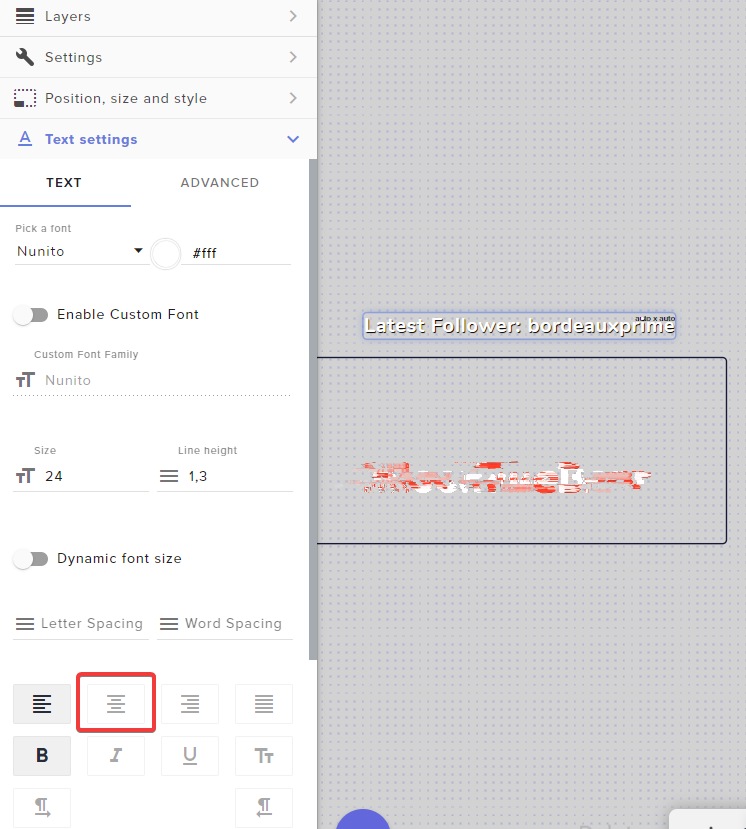 grave wave
Ahh i'm blind, thanks!
 limpid compass
Anyone know how I can log out of the twitch account connected to the activity feed in the OBS so I can log into a different account?
steel bladeBOT
@limpid compass StreamElements on top of OBS > Logout > Login
 magic hatch
Hello I need help moving a live overlay from Stream elements to Streamlabs obs.
steel bladeBOT
@magic hatch We're not able to troubleshoot issues with using our overlays in StreamLabs OBS (SLOBS) as we don't have the tools to support their software. We recommend using OBS Studio or OBS Studio with our plugin OBS.Live.
magic hatch
Could you guide me how to do it there then
steel bladeBOT
@magic hatch To add your overlays to OBS, add a new browser source in your scene. Paste your overlay URL in the browser source properties, set the dimensions to 1920x1080 (unless you changed them on the website) and check Shutdown source when not visible. https://youtu.be/KDvLynUqXI4
magic hatch
ok thx
 wanton basalt
hi ive been trying to get my obs live to record desktop audio for about a week now evry fix online doesnt work please help....
hello?
 pallid inlet
how do i add stinger transition?
 stray sorrel
@pallid inlet right in between the Audio Mixer and The Controls should be a Scene Transitions section. Select stinger transition from the drop down menu and add your stinger
wanton basalt
nvrm i figured it out after tinkering for 30 mins.
stray sorrel
HI I am having Trouble updating my obs live
Every time I hit the update button it gives me this
 gentle tangle
I have a question about scrolling text overlays. I can add the overlay and I have set the text to scroll in the overlay, but if I make any changes and save it, it stops scrolling. Need help. thanks
rugged quail
My Overlays will animate when follows/subs etc but the graphic wont fully display out.
steel bladeBOT
@rugged quail The default resolution for StreamElements overlays (theme and custom) is 1920x1080. Please add them in OBS at their full resolution and use CTRL+F to fit to screen if necessary. You can then downscale your stream in OBS settings > Video if you'd like https://i.imgur.com/6bWXxjR.png
rugged quail
TY!!!
 fiery parrot
I have noticed that when i use the obs.live plugin with obs the webm video files that i have for some of my scenes is very choppy on stream versus when i am not using the obs.live plugin
steel bladeBOT
@fiery parrot Please provide a log from your last stream. To do this, in OBS go to Help > Log Files > Upload Last Log File and paste the link to the log file here.
 long bobcat
This should be done after replicating that choppiness you referred to
 rocky yacht
i don't know if this is the right channel, but how do i use the super theme overlays in obs?
fiery parrot
i quite literally just did a short stream on twitch where the choppiness is being shown
steel bladeBOT
@rocky yacht To add your overlays to OBS, add a new browser source in your scene. Paste your overlay URL in the browser source properties, set the dimensions to 1920x1080 (unless you changed them on the website) and check Shutdown source when not visible. https://youtu.be/KDvLynUqXI4
long bobcat
 shadow sandal
I have some overlays made in streamelements how do I get them into obslive?
steel bladeBOT
@shadow sandal New to StreamElements?
Check out our YouTube channel https://www.youtube.com/c/streamelements/videos
with tutorial videos from setting up the basics, to in depth details on how to use our product.
New to OBS? Here is a 4 step quickstart guide
https://obsproject.com/wiki/OBS-Studio-Quickstart
Want to learn even more? Here is an in-depth overview
https://obsproject.com/wiki/OBS-Studio-Overview
fiery parrot
it was doing that even before i put that display capture scene in
i only just added that today for doing a video i uploaded to youtube
not to mention it is in my live scene where i have the display capture. the scenes where it is choppy are the talking scene, starting, and streamend
the brb scene is running straight from my pc
i will upload another log later today just to prove that it is not on my end
long bobcat
 Rarely I see a stuttering stream due to SE issues but alright! Just place the log here and describe your issue
 tawdry plaza
Hello all! 👋 I'm having issues, adding the media request to my stream. Whenever I start the tour in obs.live it won't let me add any youtube link at all. I've already tried everything, but nothing seems to work. Someone got any solution for me?
pallid parrot
Try to use !songrequest your video
Or are you referring about backup playlist url? Then https://streamelements.com/dashboard/mediarequest/settings
tawdry plaza
hey @pallid parrot thank you for your reply. But my question was, how can I setup the media request, using the tour mode. I want my audio mixer setup right, so I have an additional audio line to control the media request loudness.
pallid parrot
Oh. If you have it within OBS it will have no separate audio track but same as whole OBS (like alerts)
So the best way is to use a web browser that will use this audio track and have your mediarequest running there
tawdry plaza
but it shows up as seen on the official streamelements youtube tutorial.
pallid parrot
I may not be updated about that. I have to check.
tawdry plaza
but when I try to do the "tour" mode I got stuck at adding my "first" youtube video. It's not letting me add a link to my playlist within the tour
tawdry plaza
no I'm not talking about adding playlists at all. Just regular videos
pallid parrot
Can you post a screenshot of what does it seem like?
tawdry plaza
I could, but first problem is, this is all in german language. Second problem now is, i accidentaly quit the tour mode and now it won't let me get back into it. 🙄
 ivory flume
I apologize if this has been discussed before. I tried searching the channel for it and could not find the answer I was looking for. On the SE website, is there a way to permanently show the alert you are working on, instead on constantly emulating the action? I could've sworn there was an option to constantly preview the alerts for ease of resizing.
rugged quail
My overlays arent working any way ti fix it?
long bobcat
@ivory flume I don't think that there is. You emulate > make changes > save > emulate
perpetual cycle of alert testing 😉
@rugged quail were they working before?
rugged quail
No they have never worked
 eager flicker
hello my game capture doesnt work... how can i fix it
ivory flume
@long bobcat Ughhhhh, that's what I was afraid of. I could've sworn SE had an option on their older web layout. IT was like a toggle that you just turn on to permanently preview it and make adjustments.
@long bobcat appreciate the answer
long bobcat
Nah the toggle you're referring to is the 'Preview live' or not. Meaning that if you emulate events while you're live, you'd want to toggle off the live preview
ivory flume
Nah, I know that was there all the time
long bobcat
Maybe one of the other staff\volunteers can correct me, but I don't think there was that option
Like how would we show it? By looping the alert for example?
ivory flume
it would just be like as if you set the alert display time to infinite
and just constantly display it
instead of just the blank alert boxes on the editor
long bobcat
Nope, I don't think this existed. It will mean that the alert is continuously being rendered which would require manipulation to the file length which we simply don't do.
Even if you could save while it's shown, it sounds too problematic for me to implement.
But maybe in this case - ideas board: https://strms.net/ideas 😅
rugged quail
Is there anyaway to fix my overlays?
long bobcat
np @ivory flume !
They never worked? @rugged quail
steel bladeBOT
@rugged quail New to StreamElements?
Check out our YouTube channel https://www.youtube.com/c/streamelements/videos
with tutorial videos from setting up the basics, to in depth details on how to use our product.
New to OBS? Here is a 4 step quickstart guide
https://obsproject.com/wiki/OBS-Studio-Quickstart
Want to learn even more? Here is an in-depth overview
https://obsproject.com/wiki/OBS-Studio-Overview
rugged quail
no they havent and idk why
long bobcat
Well since every setup is pretty much unique I'd advise to first go through the necessary troubleshooting yourself
And when you're able to point out what's going wrong we can help out, probably faster than if we start asking your about settings
That means that step1 is understanding according to the guides provided (or YT in general) how to setup SE alerts
and how to work with OBS
much luck 
eager flicker
i have problems with my game capture. how can i fix it
steel bladeBOT
@eager flicker For the best OBS support, please join their Official Discord @ discord.gg/obsproject
 crimson torrent
Is there a way to import SLOBS Scenes in to SE?
pallid parrot
It is, but the automated import process may break if your overlay has: too big files, non supported extensions or missing files
You can run this process in OBS.Live import tool.
crimson torrent
Cool. I will have a look for that and see how it goes.
crimson torrent
Would anyone here know why my Elgato capture would freeze once a webcam source is added and displayed. Yet the audio for the Elgato is still going through.
They share no ports or sources.
steel bladeBOT
@crimson torrent If you are having issues with Elgato hardware or software, we recommend reaching out to their support here: https://e.lga.to/help
 novel grotto
Does anyone know why specifically paid members (YouTube) doesn't update in the activity feed?
rugged quail
Can someone help?
My subs and cheers are staying as the default alerts even when I add in my custom gif. The gif works with other alerts its just cheers and subs
wary dew
check all the alert variation for the cheer alerts
rugged quail
THANK YOU SO MUCH IVE SPENT 3 HOURS TRYING TO GET THAT TO WORK
 ebon vine
Hello, I have an odd support question. I had to do a reinstall of my OS, and I restored my backup for OBS not a problem. Everything is as it should be, except the twitch chat seems to be stuck in light mode and I cannot for the life of me figure out how to get it to dark mode again.
 visual fox
Hey simple question, how do i get that module back in streamelements/obs that lets me change my title/category on the fly?
toxic fern
@ebon vine pinned messages
ebon vine
Ah thank you!
 half burrow
on the streamelement page in the overlays im trying to get an animated alert going but the text is not showing up when i click the one that goes over it
 coral light
How do I paste my overlay URL on OBS?
steel bladeBOT
@coral light To add your overlays to OBS, add a new browser source in your scene. Paste your overlay URL in the browser source properties, set the dimensions to 1920x1080 (unless you changed them on the website) and check Shutdown source when not visible. https://youtu.be/KDvLynUqXI4
 polar plank
Hey, how do I disconnect stream elements bot from my twitch account?
steel bladeBOT
@polar plank Go to the Dashboard > Right side > Part channel > Join channel (https://streamelements.com/dashboard)
 polar plank
Thank you!
 quick void
cant unistall obs.live
 molten hull
Having issues with the website feature on stream elements OBS. My overlays are not being recognized in the software. Also, no website links are being recognized within the stream elements OBS
Got it sorted! Anyone else having this issue can find the solution here: https://obsproject.com/forum/threads/browser-source-links-not-working.93960/
OBS Forums
Hi all,
All of a sudden my three browser source links on my stream from streamlabs are no longer working.... they are the chat box, viewer count and my follower notification.
They worked perfectly fine during my Sunday stream but have not worked since?
Thanks in advance,
UP...
 frigid urchin
Support Staff is there any way to make volume adjustments in the streamelements dashboard for media share?
 hardy gull
Is there anyway when I resize the canvas to have it rescale the sources as well so I dont have to manually do every single one?
fathom cobalt
@frigid urchin !volume command isn't good option for you?
frigid urchin
have it on max @fathom cobalt
fathom cobalt
Can you explain it, please?
frigid urchin
Let me test again real quick just to make sure volume is set to 100
fathom cobalt
Is volume of source on 100?
frigid urchin
@fathom cobalt I got it to work but had to sent the command multiple times
its working now full volume
hardy gull
also unrelated, who do i have to pay to get a "undo" function when i accidently move something
frigid urchin
set it to 50 then back to 100 we good
fathom cobalt
@hardy gull in overlay editor?
hardy gull
No, in obs specifically, overlay editor is great but the latency when switching scenes is too much so I try to have as much as possible in actual obs
hardy gull
Ty
 lapis hamlet
Hi , also ich will seit mehreren Wochen einfach nur streamen jedoch klappt gar nichts. Wenn ich streame nimmt er zwar den Ton auf jedoch das Bild nicht. Streame mit meinem PC indem 2 GPUS verbaut sind, eine rx vega 64 und eine gtx 1060. Über die 1060 streame ich und über die vega 64 zocke ich. Ich hoffe einer kann mir helfen. Liebe Grüße
fathom cobalt
@lapis hamlet ⏩ #🇩🇪︱deutsch
steel bladeBOT
@half burrow Text not showing up over your alerts? Go to the Advanced Text Settings and set the top margin to 50, you can work your way to the right position from there.
half burrow
thank you
 pine tree
hi
i get 100+ fps ingame but as soon as i open obs my ingame fps drops averages around 25
fiery parrot
the issue that i am having in terms of stuttering is when i am on any of my scenes that has a background webm file running. mainly when i am on my scene for chatting with my audience and not showing any gameplay, or on my just starting scene. it stutters as well when i go to my stream ending scene as well. However when i turn off or i uninstall the plugin there is no stutter.
 radiant pulsar
Does anyone here have updates on why the StreamElements OBS.Live plug in for Stream Deck no longer works?
Anything that has to do with the activity feed such as reload overlays, kappagen, pause alerts, reload hype cup; none of those functions work
steel bladeBOT
@radiant pulsar 1) Open %appdata%\Elgato\StreamDeck\Plugins
2) Delete the com.streamelements.obslive.sd plugin folder
radiant pulsar
For some reason I don't believe the support bot suggestion is what I need
 stone ice
Hai everyone, I am not quite sure If it's a dump question or if I am using the right channel for this. So I am trying to create my custom alert and I am wondering how I can make the e.g new subscriber's name to be in a specific position?
steel bladeBOT
@stone ice Text not showing up over your alerts? Go to the Advanced Text Settings and set the top margin to 50, you can work your way to the right position from there.
 tidal pagoda
Hi can someone please help me i'm trying to use a overlay i followed all the proper steps but its just showing black screen
steel bladeBOT
@tidal pagoda OBS > Settings > Advanced > Scroll down > Enable or disable Browser Source Hardware Acceleration, depending on its current state > Restart OBS (This does not apply for OBS on Mac)
https://i.imgur.com/ggMe9ZE.png
tidal pagoda
thank you
 lone glade
steel bladeBOT
lone glade
steel bladeBOT
@lone glade For the best OBS support, please join their Official Discord @ discord.gg/obsproject
 thick bobcat
Anyone know how to control what sound is streamed?
 obtuse fossil
Can I get some help in Skype or something to sort out audio issues? I’ve tried everything and I cannot stop echo of alerts
I cannot see a way to fix it.
I’ve watched YouTube videos
I’m getting echo if I have desktop audio on too
I need help with someone I can share screen with
 rare hazel
Hi everyone, does anyone know if it is possible to sync Mobcrush to streamelements to allow multiple restreams?
rugged quail
Hey, I'm trying to add a noise gate filter which works when I slide the Open Threshold around but the moment I would start making noise it's like there never has been a noise gate filter to begin with. Any suggestions?
 graceful halo
My browser source wont appear in OBS
steel bladeBOT
@obtuse fossil For the best OBS support, please join their Official Discord @ discord.gg/obsproject
tulip hamlet
@rare hazel StreamElements does not have multistreaming support.
steel bladeBOT
@rugged quail For the best OBS support, please join their Official Discord @ discord.gg/obsproject
@graceful halo The default resolution for StreamElements overlays (theme and custom) is 1920x1080. Please add them in OBS at their full resolution and use CTRL+F to fit to screen if necessary. You can then downscale your stream in OBS settings > Video if you'd like https://i.imgur.com/6bWXxjR.png
tulip hamlet
@graceful halo You're using the incorrect URL.
steel bladeBOT
@graceful halo To add your overlays to OBS, add a new browser source in your scene. Paste your overlay URL in the browser source properties, set the dimensions to 1920x1080 (unless you changed them on the website) and check Shutdown source when not visible. https://youtu.be/KDvLynUqXI4
graceful halo
I'm using the URL that it give me when I'm in the overlay
 red sluice
Hello out there! currently switching to obslive from studio/slobs and i'm trying to still keep my stuff client side, but can not for the life of me figure out how to do what i used to with stream labels, client side. is that possible or do i have to use a browser source and do it via website?
tulip hamlet
@red sluice StreamElements is cloud based. There is no client side option.
red sluice
alright so next question, i've gotten dozens of reports of how nice SE is but somehow using all those browser URL's gets "laggy" i'm new so can't say much on that, but i did notice when switching scenes there's like a slight delay before the new scene loads. any recommendations to speed up the transition?
also ty for the incredibly fast response @tulip hamlet
steel bladeBOT
@red sluice Check out this tutorial for OBS’ studio mode which allows you to preload scenes before transitioning. https://www.youtube.com/watch?v=W8iWsD2Lq3U
red sluice
dope, watching that now.
 tribal bough
Hello, I've been using OBSLive for awhile now with 0 issues but now all of a sudden it will not pick up my mic anymore. Ive tried with 2 different headsets , mics werent muted and were set to the correct ones but the bar still wouldnt move.
steel bladeBOT
@tribal bough For the best OBS support, please join their Official Discord @ discord.gg/obsproject
lament garnet
Still seeking help, the activity settings no longer appear to be updating on twitch through the software... if someone responded my apologies, never saw it.
 hidden cloak
Yo so- With the text stroke is there a possibility to make the stroke on the outside of the text? Instead of the inside?
 lusty adder
Hi can someone help me i accidentally close the live chat on my obs live i dont know how to put it back
tulip hamlet
The StreamElements menu at the top of OBS.
lusty adder
found it thanks
rugged quail
Hi, can someone help me? My display capture work for one of my monitors and i've already looked up like 5 different videos and nothing works.
steel bladeBOT
@rugged quail For the best OBS support, please join their Official Discord @ discord.gg/obsproject
 crimson dove
Ok so I have looked everywhere on this discord and online. Is there a clip command I can use for my chatbot?
tulip hamlet
The replay widget provided in #widget-share also has a clip feature to it.
 torn belfry
hi i need help with getting back my twitch feed activity and Stream Information Custom Docks back on OBS.Live
when i updated the program a week ago it got rid of those docks
steel bladeBOT
@torn belfry If you are not seeing the OBS Twitch integrations and have OBS.Live installed, please follow these steps:
- Make sure you are on the latest and greatest version of OBS.Live
- Exit OBS (make sure OBS is not running)
- Delete
%appdata%\obs-studio\plugin_config\obs-browser\obs_profile_cookies - Start OBS.Live
- Settings > Stream > Disconnect > Connect
torn belfry
how do i delete %appdata%\obs-studio\plugin_config\obs-browser\obs_profile_cookies
tulip hamlet
It's a folder.
lusty adder
hi can someone help me i cant see my viewer count on my OBS live helppp
tulip hamlet
Are you streaming to Twitch?
lusty adder
tulip hamlet
Then there's no option for it.
lusty adder
ok thanks
 feral vigil
Hi, I've been having some issues recently where I'm unable to update the game via the OBS plugin. No matter what game I set it to, the game gets updated to Pokemon Diamond/Pearl, which I last streamed a few weeks ago.
steel bladeBOT
@feral vigil StreamElements on top of OBS > Logout > Login
feral vigil
Thanks! That did it.
rugged quail
I try to add a game capture to my stream but it doesn't show the game in the previews so idk if it'll show on stream or not
steel bladeBOT
@rugged quail For the best OBS support, please join their Official Discord @ discord.gg/obsproject
 wicked oak
Is there a way to switch between twitch and youtube in obs.live? I'm struggling to find anything online or in obs itself
 trail berry
Has anybody else had this problem or know how to fix it? When I try to back up settings and content I just get blank purple window that pops up, no text or anything. I'm trying to switch to a new computer, how do i fix this?
 feral grail
why is it that whenever I try to do a font on stream elements (Right side of image) it doesn't show up as the same font on obs (left side of image)
 honest grove
so i got a new pc and now every time i try to edit my overlays that i had, it says invalid authorization token, please help
well, not got, built
steel bladeBOT
@wicked oak StreamElements on top of OBS > Logout > Login
shy mountain
@trail berry what wxactly are you tryinf to use? You can alsl export your profile and scene collection and juts save the json files
steel bladeBOT
@honest grove StreamElements on top of OBS > Logout > Login
@feral grail Google Fonts
More than 900 google fonts are supported at this time. You can preview them here: https://fonts.google.com/
Custom Fonts
Steps:
- Install the font on the streaming PC or choose a pre-installed windows font.
- In the overlay widget settings, select Text Settings
- Click on Enable Custom Font
- Type the name of the font as it appears in the windows font directory (This is usually
C:\Windows\Fonts)
Note: After installing fonts, the browser and OBS must be restarted for the font to appear.
 dire cypress
Is there a way to make obslive NOT do anything when I click start streaming in OBS??? I usually manually schedule out my streams and obslive keeps making its own stream when i click start streaming - i just want obs to send data to the stream key not create a stream with titles and such
shy mountain
Are you on Twitch, facebook or Youtube?
dire cypress
youtube
shy mountain
When clicking Live, do you use the "use dashboard settings" option or the one that you can add a title via the pop-up window?
dire cypress
i dont want to use either - I want to go live with my preset stream key that is set up with my scheduled streams
shy mountain
Ok, so let me try asking the question again in another way.
I assume you place the scheduled stream key in the OBS setting and when you click "Start Streaming" you either close the popup window or choose something.
What is that you are doing with the popup window?
dire cypress
i just installed OBSlive - i am hoping that i can just DISable that pop up window - i dont want to use those options at all - is that possible???
shy mountain
i am hoping that i can just DISable that pop up window - no
i dont want to use those options at all - is that possible??? - no
Again you are not telling me how exactly you are using that popup, in order to help you prevent starting a separate stream then the scheduled one.
But if don't want to use the popup, then my only recommendation is uninstalling our plugin
dire cypress
ok - i tested it - i have a scheduled stream for 30min out already open in Live Studio - when I click start streaming the pop up lets me create a stream with a title and description or "use dashboard settings" and it created a new stream that was public and live with no title and nothing so was confused.
i do love the chat and activity integration into OBS so was hoping was a way to not have the plugin take over my start streaming button.
 placid cliff
Does the new OBS.live work with the new beta version of OBS, Id love to test it all out 🙂
toxic fern
@placid cliff not yet. If anything we're waiting for full release (Only an assumption of course)
placid cliff
ahh okays 🙂 no worries i wanted to test the OBS sRGB thing they have now set to default and some of the other duddads
wicked oak
Is there a way to change settings for the youtube chat that obs.live uses? It's logged into the wrong account and is using light mode
toxic fern
@placid cliff download the zip and extract it. It should automatically pull the stuff from your other install.
wicked oak
Streamelements itself is logged into the right account. Its the chat thats one the wrong account
Might be because I manage several channels
placid cliff
Hmmm...
No idea then
Are you using OBS.lives chat and not OBS's chat
Theres 2 Different chats in OBS
if you have the .live
wicked oak
Yes, its obs.live
wicked oak
Yea, its definitely the streamelements chat
placid cliff

wicked oak
I'm not live anymore and it shows "start streaming to activate chat"
placid cliff
No idea then chief, if your logged into the right account on SE it should show the right chat
wicked oak
Yeah, it shows the right account for everything but that chat which is weird
Since I have my personal youtube, and then the brand account
placid cliff
Maybe just do a logout and login to refresh everything
wicked oak
Tried a few times :/
placid cliff
Then yeah iv no idea sorry, Thats as much as i can give you support
One of the more qualified personal should be able to help better
wicked oak
np man. Thanks for the help. It still shows the chat, just not logged into the right one so I can't do any moderation tasks and shows as my other account when i type.
 mystic oyster
I'm looking to get rid of the area in OBS Live where the RED X's are. Is there a way to do this?
Well, actually, i'm looking to increase the preview size so that it encompasses those gray areas
steel bladeBOT
@mystic oyster For the best OBS support, please join their Official Discord @ discord.gg/obsproject
 midnight surge
is it just or is OBSLIVE not working for me, everytime i start streaming on and off today so far the kd/s box color has been red , it worked yesterday for me but idk whats going on today
steel bladeBOT
@midnight surge Please provide a log from your last stream. To do this, in OBS go to Help > Log Files > Upload Last Log File and paste the link to the log file here.
shy mountain
 old wadi
can some1 help me with this ?
steel bladeBOT
@old wadi For the best OBS support, please join their Official Discord @ discord.gg/obsproject
 fierce raven
can i get some help on how to download it
steel bladeBOT
@fierce raven OBS.Live is a Plugin for OBS created by StreamElements. You can download OBS.Live here: https://streamelements.com/obslive
Please make sure you have the latest version of OBS installed, Current Version: 25.0.8. You can install OBS here: https://obsproject.com/
 hallow turtle
Heyo I have lost a feed/bar/thing. that lets me change the title, game and tags and so on. what happened to it i cant find it ;-;
fierce raven
on how to dowload streamelemant
pallid parrot
@fierce raven https://streamelements.com/obslive

StreamElements
StreamElements is the leading platform for live streaming on Twitch and Youtube. StreamElements features include Overlays, Tipping, Chat Bot, Alerts, Loyalty, all fully integrated and cloud-based.
 real current
Hello, I got 2 issues with my overlay. First I want to setup a followers goal starting with my current followers but it doesn't show the right follower number. Second I want to show who's the latest follower on screen but it shows the name of a Latest Follower that I don't even have... Pls help🙏
pallid parrot
@real current You can update goal progress here: https://streamelements.com/dashboard/session
StreamElements
The Ultimate All in One Platform for Streamers
real current
Thank you, both are working now👍
coarse stag
is there a way to make it so OBS doesnt pick up sound from the browser that is in the background (chrome etc)?
without using something like voicemeeter?
 vital mauve
Is there a way to get basically no stream delay for everyone watching? Because some people in my chat tell me they get close to 15 seconds of stream delay and others only have 3 seconds.
pallid parrot
@coarse stag There are plenty of YT videos when you search for OBS Voicemeeter. All of them should help you adjust your sound setup
@vital mauve This is all up to Twitch and their content delivery network. Some people (closest to your server) may experience lower delay than people from the other side of the world.
coarse stag
i was asking if i could do it with OUT voicemeeter
 magic glade
Morning everyone. I'm having some trouble with my overlays. My StreamElements OBS doesn't recognize them anymore, it just appears a black screen. None of them are available. Can you help me out?
 tacit verge
Hello guys! I need help with my bot, it does not respond to anything but still shows up in my viewer list
It is not blocked, muted, or banned as far as i can tell
 grizzled marsh
Please disable followers only chat @tacit verge
steel bladeBOT
@magic glade To add your overlays to OBS, add a new browser source in your scene. Paste your overlay URL in the browser source properties, set the dimensions to 1920x1080 (unless you changed them on the website) and check Shutdown source when not visible. https://youtu.be/KDvLynUqXI4
@magic glade OBS > Settings > Advanced > Scroll down > Enable or disable Browser Source Hardware Acceleration, depending on its current state > Restart OBS (This does not apply for OBS on Mac)
https://i.imgur.com/ggMe9ZE.png
tacit verge
@grizzled marsh Thank you for the response, followers only chat is not enabled, just checked to verify.
grizzled marsh
Type /followersoff in your chat
It is on. I need to run a test.
The bot isn't there.
Go to your dashboard and click on "join channel"
tacit verge
wierd, it showed it there a few minutes ago
ok you are dealing with a bit of a noob.... dashboard to twitch?
steel bladeBOT
@tacit verge Go to the Dashboard > Right side > Part channel > Join channel (https://streamelements.com/dashboard)
tacit verge
says its already a moderator of this channel
steel bladeBOT
@tacit verge Currently renaming the bot fully works with OBS.Live.
You can follow this video guide to set it up: https://discordapp.com/channels/141203863863558144/494513233416421386/561516184718278676
If you don't want to use OBS.Live and want to stick with Ground Control, please let us know your Twitch username.
grizzled marsh
Please follow that guide exactly.
tacit verge
No option for the bot name anymore
I remember at one point i did use it and changed it, not sure why the option isnt there anymore
tacit verge
Ohhh ok i see
grizzled marsh
You can use OBS.Live for full renaming right now but if you're using Ground Control, I can get it turned on for you.
tacit verge
i dont have to use ground control, just thought thats where that was
magic glade
@magic glade To add your overlays to OBS, add a new browser source in your scene. Paste your overlay URL in the browser source properties, set the dimensions to 1920x1080 (unless you changed them on the website) and check Shutdown source when not visible. https://youtu.be/KDvLynUqXI4
@steel blade Thank you! It was the hardware aceleration problem.
tacit verge
OK that is done
grizzled marsh
Might have, might've accidentally hit the button.
tacit verge
Is there a way to have twitch extensions getting used show up in the activity feed?
rain timber
Repost as the first got zero responses: For the past few weeks my chat has been telling me that my stream audio has abruptly gotten bad during a stream. I've changed my stream PC out thinking it could have been a hardware issue there. Still happened. Then discovered my GOXLR was basically resetting every 30 seconds which their support team suggested I try a different USB port which has fixed that issue.
Last night when this issue happened, I pulled the power on the GoXLR while streaming and also closed all of the GoXLR apps which did not improve upon relaunching them. I stopped the stream an exited the app. Relaunched the app, started the stream and the audio was magically good again.
Using StreamElements OBS Live 25.0.8 64bit. No updates available. I also have noticed that I can't edit the stream information in the app nor view the stream stats showing number of subscribers, viewers, broadcast time, etc. as they are not there. They were on my old stream rig.
steel mural
I also have noticed that I can't edit the stream information in the app nor view the stream stats showing number of subscribers, viewers, broadcast time, etc. as they are not there. They were on my old stream rig.
Settings -> Stream -> Log in (don't use stream key).
If you're already logged in: At top of OBS -> View -> Docks -> Twitch stats
For your main problem:
OBS.Live mainly changes the browser source. It shouldn't touch your audio stuff in any way. Did you check if it also happens in other applications such as TeamSpeak, Discord, Audacity? @rain timber
rain timber
@steel mural audio was working ok at least voice chat wise in discord
 ornate tangle
Hi! I was wondering if you could help me, my alerts on OBS do not work, I have the sound of the alert but live and in preview there is not the image of the alert.
I’ve done this already : To add your overlays to OBS, add a new browser source in your scene. Paste your overlay URL in the browser source properties, set the dimensions to 1920x1080 (unless you changed them on the website) and check Shutdown source when not visible.
 dreamy cape
My overlays aren't showing up. How can I get them to come back?
steel bladeBOT
@dreamy cape OBS > Settings > Advanced > Scroll down > Enable or disable Browser Source Hardware Acceleration, depending on its current state > Restart OBS (This does not apply for OBS on Mac)
https://i.imgur.com/ggMe9ZE.png
dreamy cape
It worked! Thank you!
lunar otter
i am having the same issue that @magic glade is having again.
i did disable the browser source hardware acceleration and it is not working
 half lake
is there a way to fix the black screen when I select my game capture?
 jade imp
Hello! I somehow lost access to Quick settings and I cannot get them back (stream title/game change). I have reinstalled, scoured every setting, disconnected and reconnected, and reset the UI. Please help T.T
Settings -> Stream -> Log in (don't use stream key).
If you're already logged in: At top of OBS -> View -> Docks -> Twitch stats
@steel mural Also, "twitch stats" does not exist in "Docks" for me.
 sweet vortex
Can anyone tell me how to test my alert widgets? I imported my alerts from SLOBS, and I'd like to check that they remained the same but can't figure out how to test one.
steel bladeBOT
@sweet vortex You can test alerts via the Emulate bell on the lower left side of the Overlay Editor. Simply go to your Dashboard > My Overlays > pencil/edit button on the overlay. Make sure the Preview LIVE on stream option is on to see the alert in OBS/XSplit** https://streamable.com/vtulg9


 sweet vortex
Thanks much!
steel bladeBOT
@lucid gust Welcome to the helpdesk! Please let us know how we can assist you today and a support volunteer or staff member will assist you as soon as they are available. Thank you for your patience.
 lucid gust
My computer is more then powerful enough to stream in 1080p no problems i was doing it for about a week then boom started to jump real hard......my download speed is 300 and 50 upload.........nothing works iv put it at recomnded setting and even lower but still it jumps
iv got the super 2070 graphics card
My friend has the same build i copied the settings and still no luck
steel bladeBOT
@lucid gust Please provide a log from your last stream. To do this, in OBS go to Help > Log Files > Upload Last Log File and paste the link to the log file here.
lucid gust
steel bladeBOT
@lucid gust 1) Restart OBS
2) Start your stream/recording for about 30 seconds. Make sure you replicate any issues as best you can, which means having any games/apps open and captured, etc.
3) Stop your stream/recording.
4) Select Help > Log Files > Upload Current Log File. Copy the URL and paste the link here.
Note: If you do not see an obsproject.com URL, you will need to update OBS Studio to version 22+.
fiery parrot
So any news on why obs.live makes my scenes choppy?
tulip hamlet
@lucid gust Your log is not reporting any dropped frames. https://obsproject.com/analyzer/?url=https%3A%2F%2Fobsproject.com%2Flogs%2F5SwkufN0DCb8Z5iS
steel bladeBOT
@fiery parrot Please provide a log from your last stream. To do this, in OBS go to Help > Log Files > Upload Last Log File and paste the link to the log file here.
fiery parrot
I did bot
lucid gust
that last stream was with low settings
tulip hamlet
@fiery parrot Provide it again, or a newer one, please.
 noble totem
Could i get some help with the activity feed not updating nor the alert box popping up on stream?
lucid gust
 slow raven
how come when i add an overlay it only shows the top left corner of the overlay on OBS
i've tried everything but it doesnt seem to work
lucid gust
any luck looking into my settings?
steel bladeBOT
@lucid gust 1) Restart OBS
2) Start your stream/recording for about 30 seconds. Make sure you replicate any issues as best you can, which means having any games/apps open and captured, etc.
3) Stop your stream/recording.
4) Select Help > Log Files > Upload Current Log File. Copy the URL and paste the link here.
Note: If you do not see an obsproject.com URL, you will need to update OBS Studio to version 22+.
@slow raven The default resolution for StreamElements overlays (theme and custom) is 1920x1080. Please add them in OBS at their full resolution and use CTRL+F to fit to screen if necessary. You can then downscale your stream in OBS settings > Video if you'd like https://i.imgur.com/6bWXxjR.png
fiery parrot
https://obsproject.com/logs/k91AjMzmI8zbZKtA @tulip hamlet
honest echo
@fiery parrot check this web: https://obsproject.com/analyzer/?url=https://obsproject.com/logs/k91AjMzmI8zbZKtA
noble totem
Could i get some help with the activity feed not updating nor the alert box popping up on stream?
steel bladeBOT
@noble totem Please provide your account ID found at the top of this page: https://streamelements.com/dashboard/account/channels This ID is public info and safe to share here.
fiery parrot
man you all love to keep saying it is on my end. please tell me then when i am not using obs.live plugin there is no stutter?
honest echo
@noble totem i just resubbed your webhooks, everything should be good now.
noble totem
@honest echo thanks for the help
@honest echo would it automatically update the activity feed or no?
honest echo
for now on, yes
noble totem
@honest echo thank you
jade imp
Hello! I somehow lost access to Quick settings and I cannot get them back (stream title/game change). I have reinstalled, scoured every setting, disconnected and reconnected, and reset the UI. Please help T.T "twitch stats" does not exist in my settings...
Would anyone be able to help me with this?
honest echo
@fiery parrot take a look at this page: https://obsproject.com/wiki/Dropped-Frames-and-General-Connection-Issues
This guide contains every piece of dropped frames / disconnect / network related advice we can give. If you really truly honestly super duper actually 100% tried everything in…
fiery parrot
This scene stutters. the background webm that plays on a loop. When I am not using the obs.live plugin that does not stutter at all. so it has nothing to do with any dropped frames. If I have to I will make a youtube video to prove my point
 daring torrent
is anyone good with custom CSS?
steel bladeBOT
@fiery parrot OBS > Settings > Advanced > Scroll down > Enable or disable Browser Source Hardware Acceleration, depending on its current state > Restart OBS (This does not apply for OBS on Mac)
https://i.imgur.com/ggMe9ZE.png
daring torrent
i need help making my donation goal work properly with JS and idk what is wrong w the code
 flat bridge
Rename bot: After following all of the steps multiple times the rename bot area never apears.
honest echo
@daring torrent you could ask on #developer-api
steel bladeBOT
@flat bridge Please provide a proper screenshot with the issue visible. If not sure how to take a screenshot, you can check here: https://www.take-a-screenshot.org/
daring torrent
ahh tyty @honest echo
flat bridge
 barren bramble
hi i just set up an entire stream in obs.live and when i reopened it everything was gone - any reason for this?
 sturdy reef
Can anyone help me out with my obs i have a good connection and a good build laptop yet my stream lags
flat bridge
@steel blade Nothing on that pin worked. And yes I tried every one.
steel bladeBOT
@flat bridge Please provide your account ID found at the top of this page: https://streamelements.com/dashboard/account/channels This ID is public info and safe to share here.
@sturdy reef Please provide a log from your last stream. To do this, in OBS go to Help > Log Files > Upload Last Log File and paste the link to the log file here.
honest echo
@flat bridge restart GC
flat bridge
Great. its there
fiery parrot
I have that on bot
I am just going to make a youtube video, because you obviously are not understanding what i am saying and i am not trying to be rude.
gritty willow
Need help understanding frame drop issues during today's stream https://obsproject.com/logs/dfE2RGqTQabh4tDV
 atomic cloud
seems i cant get my overlays to appear on obslive, looking around the issue seems to have been fixed but im not sure how to do so on my end?
steel bladeBOT
@atomic cloud OBS > Settings > Advanced > Scroll down > Enable or disable Browser Source Hardware Acceleration, depending on its current state > Restart OBS (This does not apply for OBS on Mac)
https://i.imgur.com/ggMe9ZE.png
 grizzled heron
where do i post for an issue im having with stream elements..i have !redeem set up..buuuut no sound comes out.. when i test the audio it works.. but when someone redeems it or myself redeems it..it wont work
lucid gust
I cant stream in 1080p and this is my example, 50 upload supercard 2070 graphics cards
powerful computer
that stream actually went smoother than normL
rugged quail
como puedo poner una barra abajo para el nombre y todo
rugged quail
Hello, I have a problem with SE.Pay, where can I get help?
 fallen talon
Hi, im new to OBS Live and I want to know how do I see a online user count like in SLOBS
steel bladeBOT
@rugged quail Please contact us via email for support with SE.Pay. You can use our contact form here: https://streamelements.com/contact Thank you.
 primal phoenix
I stream from my ps4 all I have is my phone no laptop unfortunately. Is there any way I can use overlays and make a proper looking stream with just my phone and ps4? I currently use the stream elements chat bot and all I really hope there is a way or do I have to wait until I can afford a laptop?
toxic fern
@primal phoenix Outside of using lightstream no.
primal phoenix
Whats light stream? I am a new affiliate so this is all very new to me
toxic fern
They play middleman using the overlay and sending it to whoever but be warned it's not free.
primal phoenix
Is there a app or i just find their website? And thank you so much for your help hopefully I will have a computer soon im really enjoying stream elements and what they offer so far and can't wait to be able to use all they have to offer
fallen talon
How can I see a Count that tells me how many users are looking my stream
toxic fern
Should be an option from the activity feed.
 stone island
Hi everyone quick question is there any way to make "no data" not display when going live this is for latest donations and latest cheer?
Nevermind I was just being silly I found it 🤦♂️
 dapper gulch
can any 1 help me my alerts not working and not popin up on streamlabs obs and i try everything i can think of and still not working
steel bladeBOT
@dapper gulch We're not able to troubleshoot issues with using our overlays in StreamLabs OBS (SLOBS) as we don't have the tools to support their software. We recommend using OBS Studio or OBS Studio with our plugin OBS.Live.
 ancient storm
Hey guys, since a couple days my Overlay wont show in Streamlements
but in Stream Labs its visible
but I dont like Slobs thats why I would stick to Streamelements
steel bladeBOT
@ancient storm OBS > Settings > Advanced > Scroll down > Enable or disable Browser Source Hardware Acceleration, depending on its current state > Restart OBS (This does not apply for OBS on Mac)
https://i.imgur.com/ggMe9ZE.png
wanton basalt
My desktop audio is coming in garbled and static does anyone have a fix?
@steel blade
 supple dirge
NO ACTIVE WIDGETS WERE DETECTED FOR MEDIA REQUEST Why?