#helpdesk-selive
1 messages · Page 145 of 1
 plain mason
 normal birch
It still says invalid token
normal birch
i still am having problems
plain mason
@normal birch Settings > Stream > Logout and Login
normal birch
alright, im sorry for being an absolute monkey but it isnt showing up now
plain mason
@normal birch show us a screenshot
normal birch
nevermind im all good ill wait a minute
 snow violet
How do i add my overlays from streamelements website to the OBSLive application?
 steel bladeBOT
@snow violet To add your overlays to OBS, add a new browser source in your scene. Paste your overlay URL in the browser source properties, set the dimensions to 1920x1080 (unless you changed them on the website), and ☑ “Shutdown source when not visible” https://youtu.be/KDvLynUqXI4
 thorny sinew
does anybody know if KappaGen's emote explosion for subs will trigger on 1 sub or does it only trigger if u get multiple gift subs?
 honest echo
it should trigger with 1 sub and with gifted subs
thorny sinew
ty
steel bladeBOT
@tough pecan Welcome to the helpdesk! Please let us know how we can assist you today and a support volunteer or staff member will assist you as soon as they are available. Thank you for your patience.
 hard karma
My total subgoal {count} is showing 0 instead of my actual subs..how do i sort that out. Was fine last stream
steel bladeBOT
@hard karma Please logout of StreamElements at https://streamelements.com/logout and then login again to your account (Twitch/Youtube/Facebook/Mixer)
 tough pecan
I want to see options in layouts
 wary dew
what do you mean with options?
because you can place stuff anywhere you want within the overlay
tough pecan
A friend did this for me and it’s horrible as you can see i would love assistances with a new one ☝🏻
Like it’s poop 💩 literally
wary dew
you can get a free one here: https://streamelements.com/dashboard/themes

StreamElements
The Ultimate All in One Platform for Streamers
just look at what you think is good looking and apply that
hard karma
Still saying no after logging in a out a few times?
steel bladeBOT
@hard karma Please provide your account ID found at the top of this page: https://streamelements.com/dashboard/account/channels This ID is public info and safe to share here.
hard karma
5a8de9fd42c44e0001532a61
tough pecan
@wary dew all of them are free I don’t know how to apply them
steel bladeBOT
@tough pecan To add your overlays to OBS, add a new browser source in your scene. Paste your overlay URL in the browser source properties, set the dimensions to 1920x1080 (unless you changed them on the website), and ☑ “Shutdown source when not visible” https://youtu.be/KDvLynUqXI4
 lofty canyon
So I'm streaming right now, and the game capture isnt picking up the game like at all, the overlay is showing but the game just doesnt appear and I cant seem to fix it
Do I need to log out and log back in like for the Media Request or is there something specific I can do?
tough pecan
@lofty canyon did you make sure your capture is selected and ISNT over lapped
 cloud widget
hey so me and my brother are trying to capture our discord audio on OBS but we cant get it to work can anyone help
steel bladeBOT
@cloud widget For the best OBS support, please join their Official Discord @ discord.gg/obsproject
cloud widget
oh thanks
honest echo
@hard karma could you please try to log out and log back in one more time?
lofty canyon
@tough pecan Overlapped by what? The overlay? it isnt a full screen thing, it should still appear under it, right? Thats how its always been for me
hard karma
@honest echo i'll try now
tough pecan
When add scene what should be the FPS? 60 or 30 my capture does support 60HD
hard karma
Sorted it. Logged out then in and it was still the same. I had to go toactivity tab on se webpage and click restart session on the right hand side
honest echo
@tough pecan Go to setting and change the content there
tough pecan
Not letting me change the names
honest echo
@tough pecan twitch username?
tough pecan
Nailstomycoffin
 frigid turret
How can i add a custom transition that i made?
 plain sonnet
add as a stinger transition
plain sonnet
you dont have stinger as an option when you click the + in scene transitions?
frigid turret
nope those are my options?
plain sonnet
what version of obs are you on?
frigid turret
plain sonnet
obs version, top left
 rugged quail
i am trying to hook up my sony a5100 to my computer as a webcam. i am using a capture card. when i try to add a video capture device to OBS, my camera doesnt show up
how do i fix this?
plain sonnet
@frigid turret can you press the + icon on the scene transition dock and screenshot your whole obs screen with the options
 glass jetty
Ok looking for some help, I have been using SE OBS Live for some time now and have always used the media request 'widget' today when I logged into OBS the media request box is blank on my OBS. I was able to use the website to fulfil requests today on Stream but the 'widget' no longer works. I have tried restarting my PC, I have also tried logging out of SE and back in on the website but the media request box is still blank. Any help?
 karmic grotto
Ok looking for some help, I have been using SE OBS Live for some time now and have always used the media request 'widget' today when I logged into OBS the media request box is blank on my OBS. I was able to use the website to fulfil requests today on Stream but the 'widget' no longer works. I have tried restarting my PC, I have also tried logging out of SE and back in on the website but the media request box is still blank. Any help?
@glass jetty tried logging out and back in the obslive?
glass jetty
I tried logging out of SE on the website not within OBS. Just now did it and its working sorry didn't even realize there was a way to do that 🤣
rugged quail
can anyone help me with the webcam?
 dim drum
question how do you change chat from the light to dark?
It happened when i did a fresh install and logged in i have changed the theme and everything and it hasnt changed
karmic grotto
It happened when i did a fresh install and logged in i have changed the theme and everything and it hasnt changed
@dim drum anwser is pinned
tough pecan
Thank you guys so much
 vagrant obsidian
which account do i log into with Ground Control? My bot account or stream account? TY edit: question has been answered - stream account
 karmic dagger
so i somehow managed to disable the stream elements bot, and i dont know where to find it to re-enable it, any pointers?
nvm i got it lol
 brave crater
Anyone around to answer a question for me?
rugged quail
Wsh
steel bladeBOT
@brave crater Welcome to the helpdesk! Please let us know how we can assist you today and a support volunteer or staff member will assist you as soon as they are available. Thank you for your patience.
brave crater
Is there a performance mode for streamelements?
On streamlabs they have that option. While I run warzone its slightly choppy while streamelements is up
karmic grotto
Is there a performance mode for streamelements?
@brave crater no sorry
brave crater
any possible way to stop the little bit of choppyness
karmic grotto
getting new hardware or lowering stream quality / game graphics quality
brave crater
I mean. I have a ryzen 7 3700x and 2060 super.
I don't see how I have any choppiness at all
karmic grotto
what game u are streaming?
brave crater
warzone
karmic grotto
what encoder u are using?
if u want u can send a screenshot of the video tab in settings
 hasty bone
So I don't think this is the right chat for this but when I create a new overlay for an alert box some of my custom images don't work they are the same gif images but don't work on sub, cheer, and one other I think but they work on follower, and the other so I don't know any ideas? 😅
karmic grotto
So I don't think this is the right chat for this but when I create a new overlay for an alert box some of my custom images don't work they are the same gif images but don't work on sub, cheer, and one other I think but they work on follower, and the other so I don't know any ideas? 😅
@hasty bone have u checked the variants tab?
hasty bone
This is what it shows. I click the emulate button on the bottom to test it and it shows the default one. Do I need to change something here?
LegendKG sorry if I came off rude I wasn't trying to. You were right I needed to change the image in the variations too. Thank you so much!
karmic grotto
no i didn't was rude xD, np man glad it helped you out @hasty bone
 chilly basalt
whats up guys, ive created an alert for when a person redeems an item from my store. But ive changed the image for the alert to something I uploaded and it continues just to show the Item image that is on the store. Any ideas?
 hoary hill
so i used to have a custom bot name but now i set it and connect it account shows it in connections but when i go back to obs it never shows up. any ideas?
 errant epoch
is OBS.Live not for mac 😦
honest echo
@chilly basalt the redemption alert image will be replace for the image on the item on your store
steel bladeBOT
@leaden forge - Open %appdata%\Elgato\StreamDeck\Plugins
- Delete the
com.streamelements.obslive.sdplugin folder
@leaden forge Streamelements on top of OBS -> Logout -> login
 crystal vortex
my chat widget in obs live is in lightmode for some reason now after reinstalling obs live and i cannot get the chat to go back to dark mode
wondering if there is a way to fix this as there is not option in the chat seting either
honest echo
@crystal vortex check the pinned message
crystal vortex
that worked thankyou!!!
 kindred fox
I can’t remember. Did you add the Kappagen widget to your overlay already @leaden forge ?
chilly basalt
@chilly basalt the redemption alert image will be replace for the image on the item on your store
@honest echo yeah, thats also what I thought, but it is not doing that!
 bitter furnace
i cannot find the option to have a custom name for my bot in obs live
can anyone help
?
 upbeat osprey
Im confused as to why my obs wont capture my titanfall 2 sound and why it constantly repeats old actions done.
steel bladeBOT
@bitter furnace Currently renaming the bot fully works with OBS.Live.
You can follow this video guide to set it up: https://discordapp.com/channels/141203863863558144/494513233416421386/561516184718278676
If you don't want to use OBS.Live and want to stick with Ground Control, please let us know your Twitch username.
@upbeat osprey For the best OBS support, please join their Official Discord @ discord.gg/obsproject
honest echo
@rugged quail check the dimension of the overlay
are the same as the overlay editor?
 pearl widget
anyone know why my viewer count is 0 but I have 3-4 people watching right now?
bitter furnace
i dont get the menu option on my activity feed in obs live please help
chilly basalt
Bump on my issue
 shy mountain
@chilly basalt ANd what is the issue?
@bitter furnace Only Twitch users can see the hamburder menu button.
steel bladeBOT
@pearl widget Streamelements on top of OBS -> Logout -> login
chilly basalt
whats up guys, ive created an alert for when a person redeems an item from my store. But ive changed the image for the alert to something I uploaded and it continues just to show the Item image that is on the store. Any ideas?
@chilly basalt @shy mountain
 twilit mesa
Hey bit of a urgent question just want to know if anyones getting it but
I run a dual pc setup second is elgato4k60promk2 with rtx2060 no issues on it. Main pc 1080 ti with i9-9900k. Main pc suddenly started randomly dropping 1 frame randomly lately for no given reason whatsoever and tbh its shitting me up the wall
Anyone else get this? Is it a win update issue/bug?
Keeping in mind this is the gaming pc thats purely previewing everything to the elgato its doing no encoding.
Just random spikes in render lag :S no game running nada
This only started yesterday.
steel bladeBOT
@twilit mesa Please provide a log from your last stream. To do this, in OBS go to Help > Log Files > Upload Last Log File and paste the link to the log file here.
shy mountain
assuming...you are using OBS on it
or rather, the lag/skipping is visible on stream?
shy mountain
microphone or headphones?
tough pecan
It’s just the audio out out for example
shy mountain
so general audio
usually static noise comes from the microphone
so if its a USB, try and unplug and plug it back in or switch to another USB port
if thats not the case
steel bladeBOT
@tough pecan For the best OBS support, please join their Official Discord @ discord.gg/obsproject
tough pecan
What if it’s from the game play it’s self and the mic it’s not turned on
shy mountain
Then i don't know
if you don't hear the static but the stream does
check in with the OBS guys
if you hear the static coming from the game
try another game
if you still hear the static coming from another game
then your headphones are dieing
 tender python
Static could well be live mic feedback
Some headsets have this feature
It sounds like light white noise because it's intended to be that so you hear yourself; stops you from yelling.
 limber barn
Hello all. I have a .overlay file and when I try to import it to obs (25.0.8) it will only let me import .json and .bpres files. I can't seem to find a way past this, can anyone help me?
 unkempt quiver
Uh i play music through a browser source but it isnt working liek there isnt music, it has worked before
it plays for a bit whe ni first load up obs.live and then it stops
 lilac ocean
please keep your question to one helpdesk @unkempt quiver
steel bladeBOT
@unkempt quiver Streamelements on top of OBS -> Logout -> login
shy mountain
@limber barn where did you get that overlay file from?
shy mountain
Can you elaborate on the issue a bit more then please?
unkempt quiver
So basically i use a browser source to play music (ncs 24/7 livestream) and it usually works
But for some reason it stops working after like 2 seconds fo the music playing
no audio comes through
shy mountain
So you are loading a website via the browser source and its not working?
unkempt quiver
i assume its like that
steel bladeBOT
@unkempt quiver For the best OBS support, please join their Official Discord @ discord.gg/obsproject
unkempt quiver
okay thanks
 grim mauve
shy mountain
grim mauve
shy mountain
Streamelements on top -> activity feed
 static leaf
Hi does the overlays also work on streamlabs obs? Because im trying to make a overlay but its not showing or its just a part of it showing, i tryed al lot of things but i cant get it right... dont know what i am doing wrong
lilac ocean
@static leaf they tend out to block our overlays and if its not working we can't 100% fully give you support on this
steel bladeBOT
We're not able to troubleshoot issues with using our overlays in StreamLabs OBS (SLOBS) as we don't have the tools to support their software. We recommend using OBS Studio or OBS Studio with our plugin OBS.Live.
lilac ocean
And i do know what could be causing it, but im not sure if its also in SLOBS
but try this or try setting the dimension to 1920x1080
steel bladeBOT
OBS -> settings -> advanced -> scroll down -> enable/disable hardware accel.
https://i.imgur.com/ggMe9ZE.png
 static leaf
Ah ok thanks will try that
 warped grotto
My sound is not working. Nothing is working. Everything is set up, writes i am making sounds but on the stream no one hear it.
Nothing I play music - is not working.I am talking - no one hear me
These show it works but no1 is hearing it https://prnt.sc/taesyg

That one that is muted is a gif without sounds
karmic grotto
screenshot in english please @warped grotto
warped grotto
First is my dekstop second is a vid without sounds and 3d is mi mic
@karmic grotto
 iron mica
Check if you have assigned tracks for the channels. And that the stream output track is assigned to all sources.
By default all sources are played to all tracks.
warped grotto
How to check it? @iron mica Yesterday was working
iron mica
Right click the gear, look in advanced setup (Don't remember the exact wording) And for the track used in the stream, check in the general settings under output.
But again, you should know if you changed anything, default is all output channels to all tracks, and stream mix is set to track 1.
warped grotto
@iron mica https://prnt.sc/tafdqu Is that right?
 iron mica
Unless you are recording stuff to separate tracks, I'd check every track for every channel.
warped grotto
ok*
iron mica
In that way you can at least rule out track assignments as the problem. 🙂
warped grotto
ok tnx
 left quartz
rugged quail
left quartz
rugged quail
hey can someone help me i added a soundeffect and i have the vol set at 1%but its still so loud and im not sure why
also it seems to be playing through my mic and thats not right
 torn kelp
how do i fix when it says my stream key isnt right
steel bladeBOT
@torn kelp Streamelements on top of OBS -> Logout -> login
rugged quail
dose the volume slider not work in streamelements? cuz even if i set it at like 1% it dose not change
 lavish yew
hi can anyone help me with this?
 night cargo
how do i use my overlays from streamelements.com on stream elements obs live?
 dreamy drum
steel bladeBOT
dreamy drum
steel bladeBOT
@night cargo To add your overlays to OBS, add a new browser source in your scene. Paste your overlay URL in the browser source properties, set the dimensions to 1920x1080 (unless you changed them on the website), and ☑ “Shutdown source when not visible” https://youtu.be/KDvLynUqXI4
 mighty anvil
How do I turn off text snapping on streamelements overlays?
mighty anvil
Last one was a joke to restart obs close out and go back in
 plush citrus
oh yea i have
karmic grotto
oh yea i have
@plush citrus open in admin mode
plush citrus
how
karmic grotto
right click the shortcut in desktop and execute as admin
plush citrus
ok ill try
karmic grotto
also close obslive before of course
plush citrus
still doing it?
mighty anvil
Check your settings
plush citrus
it was fine yesterday i dont understand why its doing this
rugged quail
Hi Guys, I'm trying to set up Stream Elements on my Elgato Stream Deck, is this the right channel to ask those questions?
plush citrus
bruh my obs is broken
 paper radish
Hi, can anyone help me with obs ? Main problem is that the obs dont capture the game.
Sometimes it capture but when i change scene and get back to the game scene, the same problem occurs.
plush citrus
@karmic grotto @mighty anvil thx i fixed it now
mighty anvil
Your welcome :)
chilly basalt
So like ive been trying to get my issue resolved for like 24 hours now, i get a reply but then no one follows up.
is someone available to help me
 austere tapir
guys this obs or nvidia driver update crash my stream alltime stop rtmp problem do somthing please
 fresh yacht
how do I find out the email address to sign into streamelements? I forgot which one I used
 fathom cobalt
@fresh yacht its your twitch/youtube mail
fresh yacht
Even if I changed my twitch email?
fathom cobalt
You must relog i think
steel bladeBOT
Please logout of StreamElements at https://streamelements.com/logout and then login again to your account (Twitch/Youtube/Facebook/Mixer)
fresh yacht
Thank you
fathom cobalt

 civic creek
I need help please
My bot is not working when i use my own account as bot D:
But it does when im using the streamelements itself
How do i fix it?
 stray sorrel
I have a black screen and im using game capture and nothing is showing up when I select the window of my game
austere tapir
rtmp error guys my stream stopyesterday stream 4 h nothing problem today 20 min stop what happen ? before work now not ?
I have a black screen and im using game capture and nothing is showing up when I select the window of my game
@stray sorrel hi proretise and change windows 7 and use open administrator after work
 astral ember
how do i add a starting screen overlay to obs
austere tapir
you mean browser?
astral ember
i tried that but it cuts half off
austere tapir
streamelement overlay use ?
astral ember
yes
austere tapir
so you just make browser and copy paste link
astral ember
i did that but it cut off half the screen
astral ember
thx @austere tapir
 simple shard
Hey all, I'll ask again in case anyone figure out a way to do this. Is there any overlay configuration available to monitor current obs settings being used? i.e, monitor which scene you are running, mute/unmute status, etc?
rugged quail
Guys, there is no plugin for Stream Elements OBS on the Elgato Stream Deck. Do you guys know how I can find that plugin and get it installed?
austere tapir
thx @austere tapir
@astral ember 1920x1080 sorry
 misty zodiac
so i didnt have this problem until i installed my sata so i have no idea how to fix it. my mic audio is playing back through my headphones (razer kraken)..i use the mic attached to the headphones. when live this causes an echo with my voice since to have the game audio it's the same input. i've gone through my windows setting and "listen to device" is checked off in my sound settings. i tried switching the desktop input but all it does then is not allow the sound from the game i'm playing to work. Edited to add: i do not get microphone playback through the headset when using discord chat
steel bladeBOT
@misty zodiac For the best OBS support, please join their Official Discord @ discord.gg/obsproject
rugged quail
does streamelements have a feature anywhere that can autorun ads, like every hour or something
 tulip hamlet
@rugged quail See #command-share
steel bladeBOT
@chilly basalt Welcome to the helpdesk! Please let us know how we can assist you today and a support volunteer or staff member will assist you as soon as they are available. Thank you for your patience.
chilly basalt
bro ive posted my question 5 times in the past 24 hours and no one has responded
 fleet marlin
I am very upset as the closing process for my account is so frustrating and will not take the information. there is no email associated with my account and it needs one?? I try to put in my email associated with the youtube account but it is already associated with my twitch account therefore making it invallid. I want to connect them but they are already seperate accounts.
steel bladeBOT
@fleet marlin Account Merging - Please note:
- Merging accounts only allows faster ways to switch between accounts
- Merging accounts does not allow data sharing between accounts - different streaming platforms, different type of events
- Merging accounts allows duplicating/sharing overlays between the accounts
If you understand the limitations of merging and want to proceed, please find the JWT tokens (!jwt) from both accounts you want to merge and you will be directed to DM them to a staff member.
austere tapir
Rtmp error what is this ?
steel bladeBOT
@fleet marlin You can find your JWT token on your account channels page ("Show Secrets" to reveal the token): https://streamelements.com/dashboard/account/channels
READ ME:
This is a private security token. Do NOT share this token here or other public places, only with a StreamElements staff member in private.
honest echo
@chilly basalt im having a dejavu 😅
tulip hamlet
@chilly basalt Just state your question please.
chilly basalt
Seems like the floor is mine; lets try this again - When my audience goes to redeem their channel points in my SE Store, the alert shows up as the image that is shown for the product. Now, i want my own alert. So - i replaced the alert image in my overlays. It didnt fix my issue. Anyway of resolving this?
tulip hamlet
Pinging is not necessary.
honest echo
I'll take a look 😉
 stiff nest
if i have donation alerts enabled, is text to speech automatically enabled?
 finite lichen
no
stiff nest
how do i do it
finite lichen
you have to activate it via tts settings
stiff nest
where are they
finite lichen
click the settings icon on donations in your alert box
stiff nest
in my overlay?
stiff nest
yeah
finite lichen
click the alert box and open up the settings
finite lichen
np
austere tapir
2020-06-30_23-36-11.txt
 blissful drum
Hello may someone help me with getting capture visual on stream elements
All I get is a black screen please and thank you
steel bladeBOT
@blissful drum For the best OBS support, please join their Official Discord @ discord.gg/obsproject
 sly forge
honest echo
sly forge
honest echo
@sly forge > #🇵🇹︱português
 restive dagger
Hello how is everyone.
Just wondering if there is an control Z (undo) when things get moved on accident to undo the move or change
tulip hamlet
OBS Studio does not have an undo option, no.
restive dagger
Okay well thank you for that quick response.
rugged quail
When people cheer with tts it sometimes crashes the overlay and doesn't come up with the message, anyone know how to fix this ?
honest echo
Do you have a clip of that behavior?
rugged quail
sure I can make one
honest echo
DM me please 😉
 stoic trout
having a hard time trying to get my Elgato chat link working. Please help
steel bladeBOT
@light arch Welcome to the helpdesk! Please let us know how we can assist you today and a support volunteer or staff member will assist you as soon as they are available. Thank you for your patience.
 light arch
can anyone help me I want to start streaming again without the message being on default, I want to go live with another mesasge. I've clicked "dont show again" and I want it to show up
steel bladeBOT
@light arch Please provide a proper screenshot with the issue visible. If not sure how to take a screenshot, you can check here: https://www.take-a-screenshot.org/
 latent mist
I have reconnected my twitch but i still cant see the stream information dock on my obs.live
steel bladeBOT
@latent mist If you are not seeing the OBS Twitch integrations and have OBS.Live installed, please follow these steps:
- Make sure you are on the latest and greatest version of OBS.Live
- exit OBS (make sure OBS is not running)
- delete %appdata%\obs-studio\plugin_config\obs-browser\obs_profile_cookies
- start OBS.Live
- Settings -> Stream -> disconnect -> connect
 pine garnet
I'm trying to duplicate an Overlay to use as a template for a new overlay, rather than rebuilding 95% of the elements from scratch.
However, every time I duplicate an overlay, it literally makes a copy of the URL. If I change one, they both change.
Is there something I'm doing wrong here?
tulip hamlet
@pine garnet The middle of the URL changes, not the end.
pine garnet
@tulip hamlet ... as I said... if I change one.. they both change. Is this expected behavior?
tulip hamlet
Every overlay, even duplicated ones, have their own URL. Changing one does not affect the other.
 rich mango
tulip hamlet
rich mango
tulip hamlet
Double check you're copying the URLs correctly.
@rich mango Not available for YouTube.
 vapid smelt
I am attempting to activate the overlays and it keeps taking me back to the overlays webpage.
steel bladeBOT
@vapid smelt To add your overlays to OBS, add a new browser source in your scene. Paste your overlay URL in the browser source properties, set the dimensions to 1920x1080 (unless you changed them on the website), and ☑ “Shutdown source when not visible” https://youtu.be/KDvLynUqXI4
vapid smelt
tyty
pine garnet
ok.. so I verified it is the correct (and different URL) however when I change one scene's URL, both scenes change.
For example I've built a BRB scene, and then Duplicated it as Chatting.
If I change the URL of one... they both change.
Maybe I wasn't clear... this is in OBS.Live... not on the Stream Elements webpage builder.
I misspoke when I initially said "overlay"... I meant Scene.
tulip hamlet
You probably added the browser source to a second scene using the "use existing" option.
That essentially shares a single browser source between two scenes.
tulip hamlet
vapid smelt
i got it right as u posted Nethyr Thanks so much
 formal grove
https://i.imgur.com/s9I0TJB.png
Is there any way to remove these black bars?
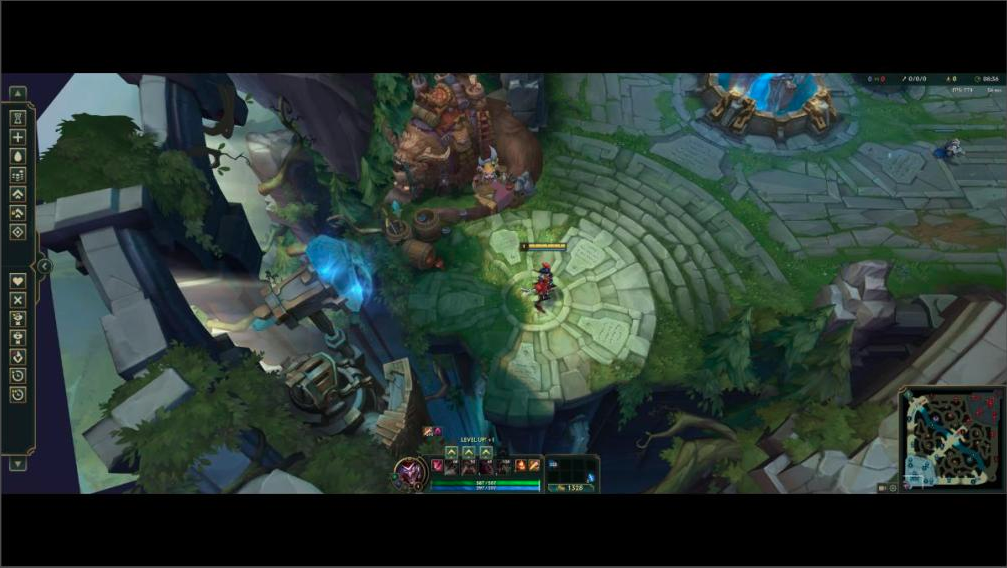
21:9 aspect ratio
shy mountain
@formal grove If your canvas doesn't match your monitor resolution then you will have those black bars.
That being said, Twitch enforces 16:9 resolution. I would suggest to take a look at how this streamer has setup his stream with a ultra wide screen: https://www.twitch.tv/cutedog_
 naive orbit
Hey guys! I have a quick question.
I'm trying to go live through Restream.io to stream on Twitch and Facebook Gaming, but when I go live after connecting Restream, OBS.Live keeps changing my stream to Facebook only, and I can't figure out how to change that. It's getting quite frustrating. I've cleared all of my Facebook credentials out, but it's still doing it. Any thoughts?
steel bladeBOT
Streamelements on top of OBS -> Logout -> login
shy mountain
and make sure to login to your Twitch account
and then go to "settings" -> "stream" and change the service and streamkey to restream.io
naive orbit
Interesting. Thank you! I'll try that!
 void trail
Hey I am having issues with installing plugins using obs.live
shy mountain
What issue exactly are you seeing/getting?
void trail
Well I am installing the plugins directly as instructed but this plugin is not working but the other one I installed is (I installed OBS Shader Filter and it works but StreamFX is not)
void trail
I tried uninstalling and reinstalling OBS .live but it still did not work
shy mountain
I'm not sure I follow on the issue here. @void trail
When you install OBS.Live
does this button show up?
void trail
Yes
shy mountain
Then OBS.Live gets installed
void trail
I am actually checking something
shy mountain
and you need to click it and then click Activity feed and the other docks
void trail
No I am having issues installing the plugin for StreamFX
But it is only when I have the plugin for OBS.live installed
shy mountain
I see the plugin modified the libOBS which handles browser sources
OBS.Live also modifies the libOBS so they are both conflicting most likely
void trail
I guess so
I am trying a work around
I am so sorry it was user error
I had it in my test directory for OBS rather than my real one
shy mountain
👍
 stuck wren
Hi, im having trouble with streamelements activity feed. Test donations doesnt show up and i dont get any alerts on my obs like it used to be, how can i fix it
steel bladeBOT
Please logout of StreamElements at https://streamelements.com/logout and then login again to your account (Twitch/Youtube/Facebook/Mixer)
tender python
also for OBS 🙂
 tranquil swift
hi, so i did use the streamelements and create it with facebook account,
after that i got into website and make one with youtube and add the mixer,twitch account
my question is can i connect it with my facebook with all of them since i've made it the facebook one in the first place
steel bladeBOT
@tranquil swift Account Merging - Please note:
- Merging accounts only allows faster ways to switch between accounts
- Merging accounts does not allow data sharing between accounts - different streaming platforms, different type of events
- Merging accounts allows duplicating/sharing overlays between the accounts
If you understand the limitations of merging and want to proceed, please find the JWT tokens (!jwt) from both accounts you want to merge and you will be directed to DM them to a staff member.
tranquil swift
i've got both of the jwt tokens
shy mountain
DM me
tranquil swift
alright
 glacial fjord
Hi team. Is OBS down right now? I finished my stream not that long ago and now I keep getting a pop-up that "OBS has crashed" and I've restarted my pc and reset my router
steel bladeBOT
@glacial fjord A crash log is required to investigate the cause of your issue. Please upload the last crash log.
- In OBS, click the Help menu
- Select Crash Reports, and then Upload Last Crash Report
- Copy the URL, and paste it to the chat here.
--
If you are not able to follow the above steps, open your file explorer and go here:%appdata%\obs-studio\crashesand provide the last listed file.
glacial fjord
shy mountain
- Uninstall OBS.Live and OBS Studio completely, but leave this UNchecked https://i.imgur.com/LBaHgM1.png
- Download and install OBS Studio from https://obsproject.com/
- If it doesn't crash, install OBS.Live too.
-
It's fixed? Nice!
-
It crashes again?
- Repeat steps 1 and 2
- Duplicate the current "Scene Collection" at the very top of OBS, call it something like "Backup" and remove all browser sources in that backup
- Install OBS.Live and see if it still crashes
- If yes, repeat steps 1 and 2, leave OBS.Live uninstalled, tell us that it didn't work and use your old default scene collection again.

OBS (Open Broadcaster Software) is free and open source software for video recording and live streaming. Stream to Twitch, YouTube and many other providers or record your own videos with high quality H264 / AAC encoding.
glacial fjord
- Uninstall OBS.Live and OBS Studio completely, but leave this UNchecked https://i.imgur.com/LBaHgM1.png
- Download and install OBS Studio from https://obsproject.com/
- If it doesn't crash, install OBS.Live too.
It's fixed? Nice!
It crashes again?
- Repeat steps 1 and 2
- Duplicate the current "Scene Collection" at the very top of OBS, call it something like "Backup" and remove all browser sources in that backup
- Install OBS.Live and see if it still crashes
- If yes, repeat steps 1 and 2, leave OBS.Live uninstalled, tell us that it didn't work and use your old default scene collection again.
@shy mountain
I'll have to do this later today. That's too much to do at 330am when I never changed any settings on my PC.
OBS (Open Broadcaster Software) is free and open source software for video recording and live streaming. Stream to Twitch, YouTube and many other providers or record your own videos with high quality H264 / AAC encoding.
What caused the actual mess up? @shy mountain
shy mountain
most likely one of the browser sources is crashing OBS
glacial fjord
Should I not be using streamelements.com anymore? That's literally all I used and have used.
shy mountain
Does the steps above suggest that?
Cuz I know they suggest something a bit different
glacial fjord
I've had everything the same for a while now, if anything the only thing I changed/updated is what was suggested to me by the team and that was to fix the display time for my stream starting soon countdown. Outside of a sub goal, nothing new has been added in months.
So, bear with me, when you say "browser sources" you don't mean streamelements.com, you mean whatever png or gif or whatever I've had set up has somehow made it crash? I'm not tech savvy like the SE team, which is why I'm asking. Sorry if these are entry level questions
 civic roost
please help me sir. how can i live to my page?
steel bladeBOT
@civic roost Streamelements on top of OBS -> Logout -> login
 calm otter
The stream info/title source has disappeared and I can't seem to locate it to bring back on obs live and therefore unable to update titles and games etc. Assistance please?
steel bladeBOT
@calm otter If you are not seeing the OBS Twitch integrations and have OBS.Live installed, please follow these steps:
- Make sure you are on the latest and greatest version of OBS.Live
- exit OBS (make sure OBS is not running)
- delete %appdata%\obs-studio\plugin_config\obs-browser\obs_profile_cookies
- start OBS.Live
- Settings -> Stream -> disconnect -> connect
calm otter
Already done the above
calm otter
I see them all except the stream info dock
karmic grotto
I see them all except the stream info dock
@calm otter can u send a screenshot just like this one?
shy mountain
I've had everything the same for a while now, if anything the only thing I changed/updated is what was suggested to me by the team and that was to fix the display time for my stream starting soon countdown. Outside of a sub goal, nothing new has been added in months.
So, bear with me, when you say "browser sources" you don't mean streamelements.com, you mean whatever png or gif or whatever I've had set up has somehow made it crash? I'm not tech savvy like the SE team, which is why I'm asking. Sorry if these are entry level questions
@glacial fjord Anything can change and make OBS crash. I suggest trying to step regardless.
steel bladeBOT
If you are not seeing the OBS Twitch integrations and have OBS.Live installed, please follow these steps:
- Make sure you are on the latest and greatest version of OBS.Live
- exit OBS (make sure OBS is not running)
- delete %appdata%\obs-studio\plugin_config\obs-browser\obs_profile_cookies
- start OBS.Live
- Settings -> Stream -> disconnect -> connect
calm otter
I'll do it again but yes originally I did
Looks different than before for other docks but it has fixed it, thanks
 low bolt
It seems hyper scape isn't detected on game capture. Is there a workaround
lilac ocean
are you running obs as an admin? @low bolt
low bolt
I am.
lilac ocean
have you tried a display capture?
low bolt
The issue with display capture is it shows my windows and I prefer not to do so
lilac ocean
if that doesn't work, be sure to ask around the OBS discord, if they have had other issues with this, they probably know more about it with HyperScape
steel bladeBOT
For the best OBS support, please join their Official Discord @ discord.gg/obsproject
 summer pine
I'm having issues with the custom bot name not posting in chat - if I leave the bot turned off all messages appear in chat as normal posted by StreamElements. If I set the bot to post as me (8ounty) no posts, commands, timers etc will post in chat, and sending a test message doesn't work. If I try to set a custom bot name, the Twitch login browser window appears, I got through the login and auth check, and then nothing happens.
I've uninstalled and reinstalled OBS live, I've deleted the cookie folder, I've logged out and in again of OBS, I've disconnected and reconnected the bot on teh SE dashboard - I've run out of ideas?!
lilac ocean
Do you have both StreamElements and the custom bot modded? @summer pine
 wraith mortar
WHen i launch my app, it tells me that it fails authentication how do i fix that?
lilac ocean
@cerulean tide we can't help you with chromebooks since our streaming software cant be used on chromebook
 cerulean tide
ok
would it be okay to stream with a different software
while using the streemelemnts bot
lilac ocean
ChromeBook doesn't really have any software that you can use for streaming
cerulean tide
lightstream?
lilac ocean
it doesnt have impact for a chatbot indeed
cerulean tide
ok
 manic echo
is it possible to set up different sound levels for any app?
steel bladeBOT
@manic echo How to exclude audio sources for a stream or recording: https://obsproject.com/forum/resources/8/
Voicemeeter Banana guide: https://obsproject.com/forum/resources/397/
lilac ocean
try the above ^
steel bladeBOT
@wraith mortar Streamelements on top of OBS -> Logout -> login
lilac ocean
@summer pine we are currently looking at this
can you try the following: OBS.Live Activity Feed Menu -> Stream Settings -> Custom Bot Name -> click Remove Custom Bot Account then re-add the account
if that hasnt worked, try the following:
- Right click on your OBS desktop shortcut -> properties - in the "Target" field add this -> --remote-debugging-port=40404
- Open OBS(or restart if it was open)
- Open your browser and type in "localhost:40404"
- Click on "StreamElements - Activity feed"
- navigate to the Console tab
- type in the console this: store.customBot.removeCustomBotIntegration() and hit enter
- Try setting the custom bot name
summer pine
That fixed it, thank you
lilac ocean
no worries
 lean pecan
Hello, id hate to interrupt anything going on, but my game capture isnt working. Keep in mind, i am VERY new to this type of stuff, my game capture was working fine every time before, and i don't think i changed anything. Feel free to help whenever. 🙂
steel bladeBOT
@lean pecan For the best OBS support, please join their Official Discord @ discord.gg/obsproject
 distant breach
sorry to keep you hanging; but with a source question like that; someone over there will probably be able to help the best
 deft cairn
hey guys. I'm not hearing the twitch stream alert sounds on my obs live. I have a 2 pc stream setup and I would like to hear stream alerts on the game pc as well. please help me!
 midnight mountain
How much ram is needed for OBS.Live? I use it but I have 16 gb of ram and someone asked wanted to know what I use.
 steel mural
OBS.Live is just a plugin for OBS Studio. OBS Studio can run on potato hardware with like 4GB of RAM, but depending on what you want to do, what other plugins you have installed and what's running in the background (Games, Chrome, Discord, Steam etc.) you need more.
 flat geyser
i have a question about OSB.Live i got my Chatbox in the right so i can see the Chat but its White how can i change the Chat color to Black?
distant breach
check the pinned message 🙂
flat geyser
Which pinned message?
distant breach
flat geyser
thx
lilac ocean
also if you dont know where to check, there is a pin in the top right of discord
flat geyser
oh thx
 slate bough
I am having a repeated issue of accidently banning users in chat, since switching to OBS Live I have a single PC setup and I will be playing the game but hitting some keyboard combination that bans users, is there a way to please disable this?
steel bladeBOT
@slate bough For the best OBS support, please join their Official Discord @ discord.gg/obsproject
slate bough
This is an "OBS Live" issue I believe not an OBS issue, as it is occurring within the "OBS Live" plugin
lilac ocean
hotkeys are from OBS.Studios
i only know that you can look at settings -> hotkeys
but i dont have any experience with setting those
I don't believe we offer OBS.Live hotkeys actually
slate bough
@lilac ocean I have no HOT Keys set, nevr have used any, and never had this happen until adding the plugin
distant breach
there is no shortcut or hotkey to ban someone. looking at your screen capture that appears to be an /unban action .... which again there is no way to hotkey or shortcut
 unique lily
Hey guys, quick question, I am using some NOD templates on stream background... everything is set and such... when I open preview on webpage I see the video background run smoothly with FPS it should have, if I am looking at obs.live I see the background with worse FPS, feels laggy... it is fine right after start up of the obs.live but within 5 sec it goes down, do you guys have any advice? slobs was running this fine but it was a local source, not websource obviously ^^ thanks
- update: if I go to properties > open in streamelements overlay editor - it runs smoothly on obs.live preview as well, moment I close it its bad again..
 gilded oasis
Hey guys.. why are my alert sounds not playing on stream (on twitch) but playing on my obs.live program??
my viewers don't hear anything at all
 supple stratus
Can anyone assist with my streamelements bot stopped working
 dry sphinx
Fixed ⬆️
 marble kernel
Morning/Evening depending on where you are - Question how can you test the Credit Roll Widget to see if it is working - I have it set up in my end screen but it is just an empty box
 potent sequoia
Hello. this might not be the correct place to ask this question but hopefully someone can help .. is there any app which i can connect my mic to to add filters then from the app use it as default system mic instead of having to adjust my mic separately in each app i use
 wet swallow
I am trying to make a donation goal show up as text via OBS. How do I do that with Stream Elements? I use to do it with Streamlabs.
lilac ocean
Hey @wet swallow ill go ask around for you
wet swallow
Woohooo @lilac ocean
glacial fjord
My obs is working fine now. Did not so any of the steps (literally nothing lol) and it's working now. GG
lilac ocean
@wet swallow how exactly do you want the goal?
Because I think you could easily make this within our overlay editor, or add the file as a browser source 😁
vapid smelt
Is there a way in obs live to add the twitch chat to be viewable as part of the stream?
steel mural
In the overlay editor, click on the blue plus button at the bottom and search for "Chat"
lilac ocean
Like this @wet swallow
create an overlay -> tip goal -> "Use simple design"
That's in text form but not a text source
cerulean tide
hi
hard karma
Argh..never had a problem with se in the last year but again today my chat commands dont work/timers and announces in chat when someone follows/tip/sub etc...everything else is fine just everything to do with chat
lilac ocean
do you use StreamElements as StreamElements in your chat, as your own username, or a custom bot name? @hard karma
Twitch did a change on the 29th, which could cause issues with reauthorization, so if you can tell me the above, that would be great 😄
hard karma
I renamed the bot to my name @lilac ocean
steel bladeBOT
@hard karma If your commands recently stopped working and you're using OBS.Live and a custom bot name do the following:
1.) In OBS.Live, click on the hamburger menu (three stripes) at the top left of your activity feed
2.) Click on Stream Settings -> Custom bot name
3.) In the "Custom bot name" field select "Set custom bot name", not your already existing username (with capital letters)
Note: If you already connected an account that way, the third entry will show as the account name (see image https://i.imgur.com/sO7fWOX.png)
4.) Scroll a bit down and click on the purple "CONNECT CUSOTM BOT ACCOUNT" button
5.) Log in as usual and "Authorize" the custom bot name
6.) Back in the Activity feed, click on the "SEND TEST MESSAGE" button and check if your custom bot name starts working again
 hard karma
Thankyou its working. Stupid twitch 👀 never had a problem till this week where my total subs wasnt working and now this. Thanks
lilac ocean
Yhea these things come out of nowhere, but luckily we got a quick fix for it! @hard karma
Happy streaming 😄
 jovial lantern
same happened to me, i used the steps above and now it's working, thanks again <3 LuvSign
 raw silo
I'm using OBS and I would like to know how to show donations and subscribers.
Please ping me [@raw silo ]
rugged quail
Hi there, im using obs and my desktop audio stopped working all of a sudden, it was fine yesterday when i streamed and today it just doesnt want to pick up sound, can someone please help me fix it if possible please, thank you ^^
steel bladeBOT
@raw silo We've released our new Overlay Editor revamp. You can check out the changes and how to work with it here: https://youtu.be/X5VzXjqAsjk
Check out our blog post as well: https://blog.streamelements.com/streamelements-overlay-editor-just-got-even-better-c22cb5b4853e

We are thrilled to announce the launch of the remastered StreamElements Overlay editor!
https://p.strms.net/newoverlayyt
Why StreamElements Overlays are better?
😎 Simple: Load your entier setup using only 1 link
⚡ Fast: Cloud-powered Overlays arrive in real-time, say goodb...
 vocal parcel
my followers, donations/supporters stopped showing up in my overalys? I've checked the directories that supposed have alot of files, but all are empty.. what's the process of filling those files with the latest followers and the like, isnt the bot supposed to do that?
 sonic helm
ANY ONE CAN HELP? tried going live and my webcam mic has a high frequency and only way can get it off is by muting it
steel bladeBOT
@sonic helm For the best OBS support, please join their Official Discord @ discord.gg/obsproject
vocal parcel
my question is with OBSLive? isnt that a streamelements version?
 sterile lagoon
having a slight issue where a title, won't scroll on the browser source in OBS, any thoughts? Works fine in the overlay editor.
honest echo
@vocal parcel all labels that you show on your overlay are web-based https://streamelements.com/dashboard/overlays, we don't use any file on your pc
StreamElements
The Ultimate All in One Platform for Streamers
steel bladeBOT
@sterile lagoon Right click on the BrowserSource > Properties > Scroll down a bit > Refresh Cache of current page
 desert spire
Hello guys, i recently downloaded stream elements and selected to import my activity feed from streamlabels, but none of them are showing in OBS for me rn
sterile lagoon
sweet thank you
desert spire
i also imported my overlays from streamlabs obs, do i have to delete and re add my alerts in order for them to automatically update in OBS Studio?
i selected to import all my activity feed from streamlabels, but now in obs my stream elements say there is no activity, somebody please help
 reef swallow
I have problems with desktop audio
OBS does not detect it
Some help?
honest echo
@desert spire check here: https://streamelements.com/dashboard/overlays
StreamElements
The Ultimate All in One Platform for Streamers
steel bladeBOT
@reef swallow For the best OBS support, please join their Official Discord @ discord.gg/obsproject
desert spire
none of my stream activity is showing in my streamelements on obs
i added the chrome extension, and imported my tips and bits from streamlabels, but then they all dissapear after they have been transfered
also, none of my followers/subs transferred over either, i need somebody to help me on how to transfer everything from streamlabs obs, please help
if someone can go into a discord call with me im willing to pay through paypal for some help on how to transfer everything over, please help
 strange sparrow
does anyone know how to get !sr to not mute the songs and just play
marble kernel
Can anyone help with the Credit Roll - by Grot widget?
 rain nova
Does anyone know what i can do with the static with my elgato through obs? I believe that is the only time my sound makes static noises, is when i attach my elgato to my laptop
vocal parcel
Why is it you guys allow importing overlays from Streamlabs, yet after they are imported we have no way of showing them in our dashboard? Is there a way to export/upload the current scene collections/scenes into the dashboard?
steel bladeBOT
@marble kernel Welcome to the helpdesk! Please let us know how we can assist you today and a support volunteer or staff member will assist you as soon as they are available. Thank you for your patience.
honest echo
@vocal parcel What is exactly what you are trying to accomplish maybe i could help you though a workaround
steel bladeBOT
@rain nova For the best OBS support, please join their Official Discord @ discord.gg/obsproject
vocal parcel
So my overlay was purchased at 0wn3d.... so it's not in your themes library.. I have no way to find the latest followers are show them in these scenes because of the inability to get the data from????
i mean my issues sounds just like @desert spire as well
honest echo
You can add labels directly on the overlay editor page
vocal parcel
i had it all in streamlabs and imported it to your software.
honest echo
iirc own3d have their package for StreamElements
vocal parcel
i cant find anywhere to load my current ow3nd stream overlay into streamelements obslive/dashboard online
@honest echo im effin lost
honest echo
Maybe will be better to contact own3d and ask them on how to setup their package on StreamElements, cause last time i saw one of their packages those have some custom code on it
vocal parcel
they said install into streamlabs.. i did, then they say import to streamelements... I did. it was working fine... now new followers and all that stuff no longer shows up even though i have an overlay setup to display it all on screen in the dashboard... how is that an own3d issue.. i mean the bots running because it showed hte new follower in chat, but it didnt do anything on the screen
honest echo
Did you added the overlay to your OBS?
 amber valve
i might have to have someone do the overlays for me its frustrating me quite a bit
vocal parcel
@honest echo everything is in OBS LIve.. with SE... look.
but all alerts and the like are driven from your online dashboard...
so how do i get that info here?
honest echo
@vocal parcel you will need to create an overlay with those labels, you dont need to a new overlay for each label you can create just one and add as much labels as you need
steel bladeBOT
@vocal parcel We've released our new Overlay Editor revamp. You can check out the changes and how to work with it here: https://youtu.be/X5VzXjqAsjk
Check out our blog post as well: https://blog.streamelements.com/streamelements-overlay-editor-just-got-even-better-c22cb5b4853e
We are thrilled to announce the launch of the remastered StreamElements Overlay editor!
https://p.strms.net/newoverlayyt
Why StreamElements Overlays are better?
😎 Simple: Load your entier setup using only 1 link
⚡ Fast: Cloud-powered Overlays arrive in real-time, say goodb...
vocal parcel
@honest echo I did that for the popup that should happen on my screen, but nothing ever showed..
honest echo
now you need to add that overolay in your OBS
steel bladeBOT
@vocal parcel To add your overlays to OBS, add a new browser source in your scene. Paste your overlay URL in the browser source properties, set the dimensions to 1920x1080 (unless you changed them on the website), and ☑ “Shutdown source when not visible” https://youtu.be/KDvLynUqXI4
vocal parcel
to or bottom of list?
When i goto preview this overlay, on any of the action items, nothing is shown..... i think it's broke.
this is from se website directly
steel bladeBOT
@vocal parcel You can test Alerts via the Emulate bell on the lower left side of the Overlay Editor. Simply go to your Dashboard -> My Overlays -> Pencil/edit button on the overlay. Make sure the "Preview LIVE on stream" option is on to see the alert in OBS/Xsplit https://streamable.com/vtulg9
 vocal parcel
is there a way to IMPORT my custom OVERLAY into SE Dashboard?
 narrow ridge
Hello, when I emulate follower events in SE in browser the opacity changes just fine. But in Obs the text got no effects, anyone got any idea?
 sacred pier
I need help fine tuning my settings for my laptop to stream w/ out lagging
i stream through an elgato from my xbox to my laptop
But whenever I stream COD it lags horribly and I have pretty much the lowest settings
 noble sparrow
Hello, my overlays are not appearing in OBS itself. Is there something I am doing wrong?
sacred pier
I can give anyone my laptop specs if needed
@noble sparrow do you have them in there as a source?
noble sparrow
@sacred pier as a browser source. I copy the URL and paste it into the URL box, I've changed the width and height to 1920x1080 as well.
 sand oasis
OLA
sacred pier
@noble sparrow This is how I have mine in OBS
If the eye on the right side has a line through it that means that it will not be visible
noble sparrow
@sacred pier the eye is "open". And I'm trying to use a SE overlay from their Themes gallery.
steel bladeBOT
@noble sparrow OBS -> settings -> advanced -> scroll down -> enable/disable hardware accel.
https://i.imgur.com/ggMe9ZE.png
 keen viper
Hey Renziito, you replied to me on Twitter - thank you.
@honest echo
Don’t know if you’re still around
honest echo

sacred pier
Can anyone help me fine tune my settings so my stream doesn't lag so bad when I play COD??
keen viper
Haha there he is. I am having some issues with The overlay editor recognising WEBM files. I am in the overlay editor, I have clicked upload video and they’re greyed out. When I drag and drop, the supported file formats flash red and nothing else happens.
honest echo
DM me the files 😉
noble sparrow
@steel blade I have that enabled and it still is not showing
honest echo
disable it
narrow ridge
anyone got any ideas for my above request?
 half wyvern
where do i find the media request tab at streamelements obs?>
honest echo
@half wyvern if you have installed obs.live you will find it under the StreamElements menu on the top
@narrow ridge You have a clip of this behavior?
marble kernel
So @honest echo any clue why the Credit Roll - by Grot isnt displaying anything in either the editor or OBS?
honest echo
The credit roll in session based so it will populate with your last session
marble kernel
Ahh that would be it - Thanks I will use the other one which is overall base 😄
narrow ridge
@honest echo
 digital ferry
would anyone know why my obs.live would just close mid stream its happened a couple of times. tia
narrow ridge
as you can see, webcam does not fade away like it does in the browser
shows it a bit better
honest echo
@narrow ridge mind if a play around with your alert a little bit?
narrow ridge
have at it :)!
honest echo
try know
honest echo
!cache
steel bladeBOT
Right click on the BrowserSource > Properties > Scroll down a bit > Refresh Cache of current page
honest echo
and try again
narrow ridge
tried that already 😦
honest echo
i notice that you use custom code on your alerts, try the followers one that's the one i try to emulate the expected behavior with the built-in tools
narrow ridge
built in tools?
 naive venture
is not executing the commands nor as the automatic message, so some options just deleted all of them and put back
steel bladeBOT
@naive venture If your commands recently stopped working and you're using OBS.Live and a custom bot name do the following:
1.) In OBS.Live, click on the hamburger menu (three stripes) at the top left of your activity feed
2.) Click on Stream Settings -> Custom bot name
3.) In the "Custom bot name" field select "Set custom bot name", not your already existing username (with capital letters)
Note: If you already connected an account that way, the third entry will show as the account name (see image https://i.imgur.com/sO7fWOX.png)
4.) Scroll a bit down and click on the purple "CONNECT CUSOTM BOT ACCOUNT" button
5.) Log in as usual and "Authorize" the custom bot name
6.) Back in the Activity feed, click on the "SEND TEST MESSAGE" button and check if your custom bot name starts working again
naive venture
sorry i'm brazilian and i confused my problem and on youtube i found and did it by obs and like this channel and obs i thought that was it
 keen fjord
when i put in the overlay URL on OBS the picture shows up as black
steel bladeBOT
@keen fjord OBS -> settings -> advanced -> scroll down -> enable/disable hardware accel.
https://i.imgur.com/ggMe9ZE.png
 stray dawn
help i just can't play any song
karmic grotto
use links @stray dawn
 versed pagoda
How come when I have the bot name StreamElements it does the command but when I change it to myself it doesnt do the command
steel bladeBOT
@versed pagoda If your commands recently stopped working and you're using OBS.Live and a custom bot name do the following:
1.) In OBS.Live, click on the hamburger menu (three stripes) at the top left of your activity feed
2.) Click on Stream Settings -> Custom bot name
3.) In the "Custom bot name" field select "Set custom bot name", not your already existing username (with capital letters)
Note: If you already connected an account that way, the third entry will show as the account name (see image https://i.imgur.com/sO7fWOX.png)
4.) Scroll a bit down and click on the purple "CONNECT CUSOTM BOT ACCOUNT" button
5.) Log in as usual and "Authorize" the custom bot name
6.) Back in the Activity feed, click on the "SEND TEST MESSAGE" button and check if your custom bot name starts working again
honest echo
Remove the customer bot name and add it again
 drowsy bolt
Sorry i think i posted this in the wrong area earlier, but I am having trouble getting text to show ontop of an image ive uploaded to the overlay editior, Ive selected the text over image option but once i emulate the alert, the image shows but no text. am i overlooking a setting?
kindred fox
@drowsy bolt check the text padding and fiddle with the settings there
drowsy bolt
@kindred fox will do ty!
vocal parcel
hey @honest echo I was able to fix it the way I like by creating a new overlay, adding the static image of the bottom of current animated overlay, then creating layers for each of the followers, dontations, tips, etc. then removed the image and voila.. you're correct.. I get it now 😉
 knotty basalt
my OBS is only trying to go live to Mixer and wont go live on Twitch?
steel bladeBOT
@knotty basalt Streamelements on top of OBS -> Logout -> login
knotty basalt
Ive tried that, but every time i hit start stream, it opens up the "Going live on Mixer" Box and tells me it cant work with my stream key or channel on twitch
versed pagoda
@honest echo Its not its the one that says change to "your Name"
even the send test message doesnt
steel mural
Click on "Set custom bot name" and log in with your normal account, then it'll work. The name you're currently seeing is predefined and buggy
digital ferry
would anyone know why my obs.live would just close mid stream its happened a couple of times. tia
 manic marsh
So silly question, but I tried to use the media request widget, but no one could hear the music. What settings should I check to make sure it works next time?
versed pagoda
thanks!
 keen fiber
I did a stream earlier and OBS Live showed that it was picking up my mic but it didn't record anything during the stream. I did a recording afterwards to test the mic and the test recorded the mic. Has anyone else had this problem before?
It also didn't record my voice while i was talking within the game.
 grim oak
Hey guys so my alert box stopped showing animations on one scene only in the middle of stream
any ideas how to fix
 dreamy marten
so im very new to obs live and streamelemts (Like today new) and im trying to use one of the overlays but it wont show up in obs live
 glossy mountain
Hi Can anyone help with some utput recomendations for obs i have a 2080super with a ryzen 3950x and 32 gb of ram
steel bladeBOT
There are no "best settings".
Please understand that every setup will be very different.
Any guides or videos that claim otherwise are misinforming. Your best option is to start with a base and adjust as necessary.
You can run the OBS auto-configuration tool. To use the auto-config, click on the Tools menu in OBS, select Auto-Configuration Wizard, and then just follow the on-screen directions.
You can use this tool to get baseline settings for your hardware and adjust as necessary from there.
Test, test, and test again. We are happy to offer suggestions for any issues you may be having afterwards, but not a list of settings.
Thank you
@dreamy marten OBS -> settings -> advanced -> scroll down -> enable/disable hardware accel.
https://i.imgur.com/ggMe9ZE.png
@grim oak Right click on the BrowserSource > Properties > Scroll down a bit > Refresh Cache of current page
rugged quail
where do i see chat in obs live
shy mountain
Streamelements on top -> chat
rugged quail
so do i have to have the website up when i stream
shy mountain
What?
rugged quail
or is there a way i can see chat with only obs live open
shy mountain
steel bladeBOT
@rugged quail To add your overlays to OBS, add a new browser source in your scene. Paste your overlay URL in the browser source properties, set the dimensions to 1920x1080 (unless you changed them on the website), and ☑ “Shutdown source when not visible” https://youtu.be/KDvLynUqXI4
 late marsh
My Obs game capture is not working anymore. It was just working the other day and then suddenly out of nowhere it just stopped working? Any help?
steel bladeBOT
@late marsh For the best OBS support, please join their Official Discord @ discord.gg/obsproject
 quasi plinth
the overlay URLs no longer appear to work. I've tried disabling hardware acceleration from within my web brower and OBS Live, updated drivers, windows updates, changed resolution numerous ways. I can add the browser as a source, and manipulate the box, but it's invisible. It just worked yesterday no problem, pls help!
steel bladeBOT
@quasi plinth Right click on the BrowserSource > Properties > Scroll down a bit > Refresh Cache of current page
 sinful vapor
Hi- I'm currently logged into my Facebook artist's page account- is there a way to log out of it and log in and switch to my personal Facebook page? Thanks
steel bladeBOT
@sinful vapor Streamelements on top of OBS -> Logout -> login
sinful vapor
That does not work- it's logged me back in automatically to my artist's page
I am currently logged into my Facebook artist page's account, I want to switch to my personal facebook page. Logging out and then logging back in only logs me back into my artist page's account. Is there a nother way to get streamelements to log into my personal facebook page or switch from my artist page?
quasi plinth
@quasi plinth Right click on the BrowserSource > Properties > Scroll down a bit > Refresh Cache of current page
@steel blade that doesn't work. On occasion the overlay will flash on the preview screen once or twice VERY briefly, but is not displayed or broadcast for recording or stream.
shy mountain
Do you have more then 1 asset on the overlay? @quasi plinth
@sinful vapor Is your personal page set to receive broadcasted stream? As in setup to stream basically?
quasi plinth
Do you have more then 1 asset on the overlay? @quasi plinth
@shy mountain i've tried two differently overlays starting from a blank one I created that worked fine until yesterday. I tried creating them in 1080 and 720. It's just static images and a chat window, but if I add or remove elements it doesn't affect it not appearing anymore. this is super weird and frustrating lol
rugged quail
can you tell me how to delete https://gyazo.com/9a1b73b407e207fa975803d771fbe1dd (5000 from the Stars Goal)
 steel bladeBOT
@rugged quail To reset goals:
- from the overlay editor -> session data on top right (monitor symbol) -> goals tab -> reset progress of desired goal
- from the dashboard -> activity feed on the left -> widget data on the right -> goals tab -> reset progress of desired goal
Note: Goal widgets(progress) only counts up and doesn't go down automatically, if you loose followers/subs
@quasi plinth If you are not seeing the OBS Twitch integrations and have OBS.Live installed, please follow these steps:
- Make sure you are on the latest and greatest version of OBS.Live
- exit OBS (make sure OBS is not running)
- delete %appdata%\obs-studio\plugin_config\obs-browser\obs_profile_cookies
- start OBS.Live
- Settings -> Stream -> disconnect -> connect
shy mountain
@quasi plinth you can do the last part if you want to but try the above
 vivid willow
Hi everyone!
So i just connected my console to GoXLR via 3.5 mm jack. I used a capture card obviously and it works fine, but the sound doubles in OBS with some slight latency. Monitoring is set to off, my microphone does not do that, so it has to be something with either Line In on my GoXLR or something with OBS that i don't know about? :/
Here are my audio settings:
https://i.imgur.com/N920Mk1.png
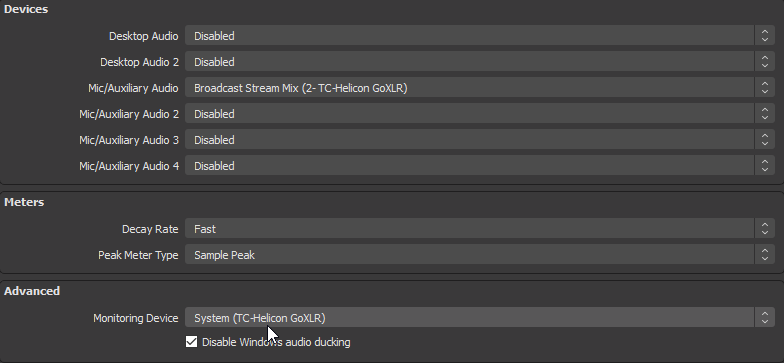 steel bladeBOT
@vivid willow For the best OBS support, please join their Official Discord @ discord.gg/obsproject
vivid willow
hmm, good idea
 bold cloak
Hi Everyone!
I just want to ask if anyone can help me regarding my concern because when I start streaming at 8PM in any day at exactly 9:00 PM it will state that I was disconnected from the stream and will prompt the reconnecting and it will not reconnect back. This occur continuously for 3-4 consecutive days until now. Thank you.
I tried the simple trouble shooting also.
wary dew
Sounds like you have a timer running for when to end the stream
i'll ask around a bit since i forgot where that option is hidden in the menu's in OBS
@bold cloak in OBS go to Tools > Output timer
check if it has something set there
steel mural
@bold cloak Disconnecting shouldn't be related to the output timer. Not that most DSL internet connections reset every 24 hours and you get a new IP. You can try to check your routers / modems settings to see if you can manually change the time where this happens. I have an option in my router where I set it to 5AM - 6AM. You can also provide a log of one of your last streams where it happened (in OBS at the top: Help > Log files > show logfiles). It should tell if it's your internet or the streaming service that cuts the connection.
bold cloak
@steel mural Thank you for letting me know ! I will check on this.
 untold spire
Sorry in advance if this is the wrong channel to ask this, but is there support coming to the Trovo platform?
plain sonnet
no, nothing planned
untold spire
That's a shame, really love streamelements, thank you for the quick response
 manic kraken
Hi, How can I update my Activityfeed in OBSLive ? It only shows me 1 Donation. I switched from StreamLabels to StreamElements and I cant see my followers and Subs in the activity Feed.
steel mural
It's starts from the point where you signed up with us. We don't got those things from the past. If you already got some followers since then, check if you disabled everything but the donations in the filter
manic kraken
Ah So you basically start from scratch. Got you. Thank you. Filter was all enabled
steel mural
Yeah. Imagine if we would store all the information from every user on Twitch, no matter if they'd use SE or not. That'd be a lot of data 
 digital furnace
How do I enable the chat bot on Facebook Gaming?
 warm hound
Stream elements keeps on crashing. It says Woops obs crashed. What should i do?
steel bladeBOT
@warm hound A crash log is required to investigate the cause of your issue. Please upload the last crash log.
- In OBS, click the Help menu
- Select Crash Reports, and then Upload Last Crash Report
- Copy the URL, and paste it to the chat here.
--
If you are not able to follow the above steps, open your file explorer and go here:%appdata%\obs-studio\crashesand provide the last listed file.
 tender kiln
Hey guys is there anyway that i can see how many people are watching when i streaming in facebook live
steel bladeBOT
@tender kiln Please ask your question in one helpdesk channel only. A support volunteer or StreamElements staff member will assist you as soon as they are available. Asking in multiple places will only result in confusion, not faster answers. Thank you for your patience.
 opaque dome
guys i need help how can i make alert box in obs.live?
wary dew
you don't, you do that on the website, then add it as a browser source to OBS
steel bladeBOT
@opaque dome We've released our new Overlay Editor revamp. You can check out the changes and how to work with it here: https://youtu.be/X5VzXjqAsjk
Check out our blog post as well: https://blog.streamelements.com/streamelements-overlay-editor-just-got-even-better-c22cb5b4853e
We are thrilled to announce the launch of the remastered StreamElements Overlay editor!
https://p.strms.net/newoverlayyt
Why StreamElements Overlays are better?
😎 Simple: Load your entier setup using only 1 link
⚡ Fast: Cloud-powered Overlays arrive in real-time, say goodb...
opaque dome
thank you
 dusky ember
hi so i pressed update yet it still says im playing valorant for my stream
 trim mural
Hi, is it possible to use a custom bot name that's not my account name?
steel bladeBOT
@trim mural Currently renaming the bot fully works with OBS.Live.
You can follow this video guide to set it up: https://discordapp.com/channels/141203863863558144/494513233416421386/561516184718278676
If you don't want to use OBS.Live and want to stick with Ground Control, please let us know your Twitch username.
dusky ember
Hi so it says Im playing valorant for my stream on twitch yet I changed my quick settings to Counter Strike and it still says it
nvm fixed it
quasi plinth
@quasi plinth If you are not seeing the OBS Twitch integrations and have OBS.Live installed, please follow these steps:
- Make sure you are on the latest and greatest version of OBS.Live
- exit OBS (make sure OBS is not running)
- delete %appdata%\obs-studio\plugin_config\obs-browser\obs_profile_cookies
- start OBS.Live
- Settings -> Stream -> disconnect -> connect
@steel blade @shy mountain I'm seeing twitch stream chat and everything fine in OBS live, my overlays that i'm creating are no longer visible. I've followed all instructions, most recently deleting cookies, but to no avail. just an invisible box, move to to? invisible. resize, replace the assets? invisible. When I hit refresh cache it flashes very quickly but only in the preview box, then nothing. pls haaaaalp EDIT this happens with the default imagery as well with the obs browser-source URL, it'll flash briefly then not display or broadcast.
 dim acorn
 brazen rose
Hey, I have another problem with my obs. So a few days ago I had a Problem with my OBS that I have solved by the help of a few dc users, but now I have another problem my recording are lagging afterwards and the quality of my videos are realy bad. Can someone help me out?
 winter matrix
I launched an overlay and added it into obs live but it doesnt show up, it's just a black screen, any ideas on what I am doing wrong?
steel bladeBOT
@winter matrix OBS -> settings -> advanced -> scroll down -> enable/disable hardware accel.
https://i.imgur.com/ggMe9ZE.png
 teal garnet
Hello, I'm trying to backup to the cloud which has worked in the past but I keep getting Network Error as soon as it hits 100%
I have logged out, closed OBS, and then logged in twice and it's still the same.
Any ideas?
quasi plinth
@winter matrix OBS -> settings -> advanced -> scroll down -> enable/disable hardware accel.
https://i.imgur.com/ggMe9ZE.png
@steel blade same issue, was given the same advice, it did not work.
winter matrix
Thank you!
 crimson apex
need help with media request
 peak stirrup
if i click "OBS Studio" does it also download obs? and is obs.live just some addons that you could add to obs or is obs.live like a different program thats like obs but a little different
crimson apex
NO ACTIVE WIDGETS WERE DETECTED FOR MEDIA REQUEST and then it says go to overlays. well i go and theres absolutely NOTHING about media request widget anywhere. and it DOES NOT work like the tutorials are showing me
sinful vapor
@sinful vapor Is your personal page set to receive broadcasted stream? As in setup to stream basically?
@shy mountain i have a stream key from my personal page- but the problem is when i logged into the obs.live the first time on facebook i gave it permission to access my artist page, and that's where it's been streaming from. i can't seem to get it to log into my personal account- everytime i log in, it streams from my artist page, not my personal account
peak stirrup
is the random music from obs.live that come up when no one requested a song royalty free?
wary dew
nope
wary dew
i'll ask around
peak stirrup
alright thanks
oh wait no need to i found in settings "backup playlist" thanks for the help though!
wary dew
try adding a picture to it
 rapid magnet
is there a known bug?
wary dew
there are some issues at the moment yes
 sharp mason
hello everyone, my names Elgranfurioso but you can call me furio ^^ . I have a issue with animated overlays i use on streamelements : it work but its like it have 1 fps (if you get what i mean) on the stream and on obs (no problem in direct website preview :C ) . What should i do to fix it ? Thanks in advance
(dont know if i should ask this here sweat)
 stray tree
got a bit of an odd one if any alert box experts are available to help me.
I've uploaded an mp4 for a raid alert, and in the editing window and preview page it plays perfectly fine with no sound issues or visual bugs.
However, in obs.live, the alert seems to pause for a second partially into the video, causing both the audio and video to be off beat.
I've opened the alert box in SLOBS, and it plays perfectly with no skips. Any ideas?
steel bladeBOT
@sharp mason OBS -> settings -> advanced -> scroll down -> enable/disable hardware accel.
https://i.imgur.com/ggMe9ZE.png
stray tree
^^^ this fixed my issue as well! ty!
lilac ocean

sharp mason
it was disable , i enable it , it worked: thaaaaank you , you genius !! 

 upbeat sable
Hello, last night I connected my custom bot account to StreamElementsOBS Activity feed and everything was working properly. But once I closed StreamElementsOBS and reopened the bot disconnected and now I can't reconnect the account. Everytime I press "set custom bot name" and login it sends me a verification code to my email and once I log in successfully and go back to the activity feed the button still shows up as "set custom bot name". I tried relogging in a few times and everytime Twitch sends me a new verification code to log into my account.
Another issue I have is that I can't use my own name as a bot anymore. The bot commands do not send and will only send if I change it back to default "use streamelements" as the bot name. Can someone help me out?
steel bladeBOT
@upbeat sable If your commands recently stopped working and you're using OBS.Live and a custom bot name do the following:
1.) In OBS.Live, click on the hamburger menu (three stripes) at the top left of your activity feed
2.) Click on Stream Settings -> Custom bot name
3.) In the "Custom bot name" field select "Set custom bot name", not your already existing username (with capital letters)
Note: If you already connected an account that way, the third entry will show as the account name (see image https://i.imgur.com/sO7fWOX.png)
4.) Scroll a bit down and click on the purple "CONNECT CUSOTM BOT ACCOUNT" button
5.) Log in as usual and "Authorize" the custom bot name
6.) Back in the Activity feed, click on the "SEND TEST MESSAGE" button and check if your custom bot name starts working again
upbeat sable
It doesn't work. I login successfully and that "set custom bot name" still says "set custom bot name".
last night it said "change to myusername" but after reopening it, it changed back to "set to custom bot name"
steel bladeBOT
2) In the "Target" field, add the following to the very end: --remote-debugging-port=40404
3) Open OBS (or restart if it was open)
4) Open your web browser and type in: localhost:40404
5) Click on "StreamElements - Activity feed"
6) Navigate to the Console tab
7) Type the following into the console and hit enter: store.customBot.removeCustomBotIntegration()
8) Try setting the custom bot name
9) Remove the additional flag in step 2 from your shortcut properties.```try these above steps please ^
upbeat sable
Thank you I will try it as soon as I can!
dreamy marten
what does bitrate do?
rugged quail
Anyone know how I can fully delete my stream elements account, I’ve already unlinked my twitch but want to fully delete my account
steel bladeBOT
@rugged quail Please ask your question in one helpdesk channel only. A support volunteer or StreamElements staff member will assist you as soon as they are available. Asking in multiple places will only result in confusion, not faster answers. Thank you for your patience.
steel bladeBOT
@forest citrus Streamelements on top of OBS -> Logout -> login
 forest citrus
did not fix
honest echo
@forest citrus could you share a screenshot of the whole OBS please
forest citrus
honest echo
press this icon and move the chat around
forest citrus
k thanks
dreamy marten
How do i change the quality of my stream without cropping my display capture?? do i change the bitrate?? if so to what number
 viscid topaz
@dreamy marten what is going on that is making you change the quality?
dreamy marten
the streaming is being a little laggy
viscid topaz
ok then you would change your bitrate and check your encoding, tell me the current bitrate and what encoding method you using either Software (x264) or Hardware or NVenc
dreamy marten
how do i check my encoding?
steel bladeBOT
@dreamy marten Please provide a log from your last stream. To do this, in OBS go to Help > Log Files > Upload Last Log File and paste the link to the log file here.
viscid topaz
@dreamy marten your encoding is under Settings -> Output -> Streaming box -> Video Bitrate and Encoder
wary dew
resolution?
dreamy marten
1920 by 1080 but when i changed the res it cropped my display capture
viscid topaz
@dreamy marten lower your bitrate to 4000 kbps
wary dew
@dreamy marten lower your bitrate to 4000 kbps
@viscid topaz that will make it more laggy
4500-5000 for 720p60fps
1080p is 6000 - 8000
viscid topaz
I stick around 720p because of how things can get laggy
dreamy marten
i made my bitrate 4500 and my res 1080 by 720 but now it only show part of the screen
dreamy marten
oh yeah sorry 1280 by 720
 amber iris
Is the cheers alert bugged in stream elements overlay editor? I can't get it to change animation and sound
wary dew
oh yeah sorry 1280 by 720
@dreamy marten but which one? the base canvas or the output?
base canvas should be the res of the monitor
output can be whatever you want
dreamy marten
oh ok ill fix that
wary dew
no idea
teal garnet
I've submitted an issue via the interface for the cloud saves, hopefully that gets responded to quickly cos i need to back it up by Friday
 ornate snow
My screen capture isn't actually capturing my live screen. I have an integrated and a dedicated GPU and I think it's recognizing the wrong one as being active
same issue even comes up when i take a screenshot...
steel bladeBOT
@ornate snow For the best OBS support, please join their Official Discord @ discord.gg/obsproject
tender python
4500-5000 for 720p60fps
@wary dew Just.. no Ruben, plz
tender python
720p60 = 6000kbps.
wary dew
At least it isn't 3000
tender python
1080p is 6000 - 8000
@wary dew 1080p30 = 6000
wary dew

wary dew
Then make sure you are here all the time to answer
tender python
Then tag me.
wary dew

tender python
😛
wary dew
No, i know you have a busy weekend
 brazen rune
Hey all, I'm trying to import all my streamlabs bot info to streamelements and I can't quite get it to work.
 acoustic pawn
don't work my overlay
 high blaze
 silent prawn
Been having a lot of dropped frames lately, and I'm not sure what else to do. I have between 15 to 20mbps upload speed, and my PC has an RTX 2060 6GB with a Ryzen 7 2700x. This has been happening for a little while now, and I'm running out of ideas of what it could be.
steel bladeBOT
@silent prawn Please provide a log from your last stream. To do this, in OBS go to Help > Log Files > Upload Last Log File and paste the link to the log file here.
upbeat sable
Hello I tried these steps:
- Right click on your OBS desktop shortcut and open the Properties
- In the "Target" field, add the following to the very end: --remote-debugging-port=40404
- Open OBS (or restart if it was open)
- Open your web browser and type in: localhost:40404
- Click on "StreamElements - Activity feed"
- Navigate to the Console tab
- Type the following into the console and hit enter: store.customBot.removeCustomBotIntegration()
- Try setting the custom bot name
- Remove the additional flag in step 2 from your shortcut properties.
Issue on step 7.
I typed and tried copy pasting store.customBot.removeCustomBotIntegration() but I get the error VM127:1 Uncaught ReferenceError: store is not defined
at <anonymous>:1:1
Not sure what to do
honest echo
@upbeat sable Could you please share a screenshot of the browser while you are on the step 6
upbeat sable
@honest echo Thank you I tried it again after restarting my computer and it worked. Not sure why the first time it didn't work.
If this happens again should I repeat those steps above to fix this error?
honest echo
if the bot with custom name isn't working, yes you can try this again, but first i recommend "part and join"
!part
steel bladeBOT
Go to the dashboard -> right side -> part channel -> join channel (https://streamelements.com/dashboard)
 upbeat sable
I have tried !part and join the first time it happened and it didn't solve the problem. Next time I will try all the methods before coming back to this chat.
Thank you ❤️
honest echo
 ruby stone
Hey there, I have created an alert on StreamElements. Emulated a follow, subscriber ect to make sure sounds were working fine. Everything was perfect. I added it to a scene in OBS, replay an old alert - the alert pops up, the alert also appears to be making sound (obs audio) but i cannot hear it and neither can my stream. This is my last resort.
 sinful chasm
I can't seem to get stream labs obs to show my screen at all
steel bladeBOT
@sinful chasm For the best OBS support, please join their Official Discord @ discord.gg/obsproject
silent prawn
 mystic gust
how do i add a widget for the Media request (youtube player) ?
i need to add a layer right?
wary dew
click on the big + icon and then in the search bar: media
mystic gust
yes! thank you i can figure this out now
just one quick question, (its working) how do the user requests work? whats the command in chat?
lilac ocean
you can set the !songrequest in the default commands
people can then request it by typing !sr <youtubelink>, or !sr artist name - song name
@mystic gust ^
mystic gust
ah great thank its 100% working
austere tapir
 chilly tundra
hi guys, anyone any idea why i cant back-up to the cloud,, it says that there is no space but i don't hav ebackups
chilly tundra
damn 😦 to bad
 unkempt prawn
hi, anyone able to help me?
steel bladeBOT
@unkempt prawn Welcome to the helpdesk! Please let us know how we can assist you today and a support volunteer or staff member will assist you as soon as they are available. Thank you for your patience.
unkempt prawn
i just switched from streamlabs. added all my overlay sources to web source throw the website, but i just noticed that obslive is using 20% cpu on idle while with streamlabs is taking only 5%. isn't supposed that obslive must take less cpu or the same at least?🙄
 toxic rivet
hi,
How do I use a custom name in the ground control?
rugged quail
Hi...Guys.
I've just tried to add facebook channel
Buy I am getting this error "Failed to get pages"
any idea?
👀
steel bladeBOT
@toxic rivet Currently renaming the bot fully works with OBS.Live.
You can follow this video guide to set it up: https://discordapp.com/channels/141203863863558144/494513233416421386/561516184718278676
If you don't want to use OBS.Live and want to stick with Ground Control, please let us know your Twitch username.
toxic rivet
@steel blade
where do I name da twitch?
lilac ocean
just in here @toxic rivet
 ruby summit
hola, alg habla español?
wary dew
#🇪🇸︱español << @ruby summit
ruby summit
ok
steel bladeBOT
@cold nest 1) Restart OBS
2) Start your stream/recording for about 30 seconds. Make sure you replicate any issues as best you can, which means having any games/apps open and captured, etc.
3) Stop your stream/recording.
4) Select Help > Log Files > Upload Current Log File. Copy the URL and paste the link here.
(Note: If you do not see an obsproject.com URL, you will need to update OBS Studio to version 22+)
 pearl laurel
I am still having trouble picking the right bitrate to use without dropping some frames. Any help would be appreciated
 full thunderBOT
Hi @cold nest, Please ask your question(s) or describe the problem you're looking to solve so staff or a support volunteer can assist you as soon as they are available.
rugged quail
so i have a little problem.. i want to stream Hyper Scape, but if i select it through Gamecapture it it sees the game but doenst give any screen. its just black
 mighty gorge
Hi, Is it possible to get a chat command to do two things? For example, reply in chat and play a sound. EDIT: This possibly should have gone in helpdesk Twitch. Apologies
distant breach
You could make that with a custom overlay 🙂
ornate snow
Game capture is just giving a blackscreen
lilac ocean
try updating your GPU drivers and running OBS as admin
 cold nest
can someone please explain me why obs.live is resetting my streaming key everytime i click go live?
 elfin river
Can someone please help understand why my bot isn't working?
cold nest
are u using streamelements? @elfin river
elfin river
Yes I am
steel bladeBOT
@cold nest Streamelements on top of OBS -> Logout -> login
@elfin river If your commands recently stopped working and you're using OBS.Live and a custom bot name do the following:
1.) In OBS.Live, click on the hamburger menu (three stripes) at the top left of your activity feed
2.) Click on Stream Settings -> Custom bot name
3.) In the "Custom bot name" field select "Set custom bot name", not your already existing username (with capital letters)
Note: If you already connected an account that way, the third entry will show as the account name (see image https://i.imgur.com/sO7fWOX.png)
4.) Scroll a bit down and click on the purple "CONNECT CUSOTM BOT ACCOUNT" button
5.) Log in as usual and "Authorize" the custom bot name
6.) Back in the Activity feed, click on the "SEND TEST MESSAGE" button and check if your custom bot name starts working again
rugged quail
so i have a little problem.. i want to stream Hyper Scape, but if i select it through Gamecapture it it sees the game but doenst give any screen. its just black
@rugged quail can somebody help me with this>
cold nest
@cold nest Streamelements on top of OBS -> Logout -> login
@steel blade it doesn't work
rugged quail
hey! my alerts emulated show up, but in obs im not recieving the alert or audio
i have copied and pasted the correct browser source link
cold nest
guys u have to put a question mark otherwise none will respond
rugged quail
my bad, am new here
wary dew
guys u have to put a question mark otherwise none will respond
@cold nest not true at all
it's just very busy
cold nest
this is my expirience, i m new as well
rugged quail
hey! my alerts emulated show up, but in obs im not recieving the alert or audio
i have copied and pasted the correct browser source link, help?
kappa
wary dew
and i am saying it's not the case, and i am not new 😛
@cold nest you put it in Settings > Stream every time?
wary dew
ok we are 5 waiting for help, can u help us ? @wary dew
@cold nest i am also responding in other channels and i am a volunteer 😛
yes
@cold nest disconnect it manually there and put it in again
cold nest
i m not in anger wiht u @wary dew i just need support, i can t stream since 5 days
steel bladeBOT
@rugged quail OBS -> settings -> advanced -> scroll down -> enable/disable hardware accel.
https://i.imgur.com/ggMe9ZE.png
wary dew
try disabling that ^
i m not in anger wiht u @wary dew i just need support, i can t stream since 5 days
@cold nest then why did you wait 5 days to get support? 😉 but try that manual disconnect and re-add the stream key
and make sure you are logged in to Twitch in the StreamElements menu as well
cold nest
because someone said i nedd to update windows to may update i only today i was able to 😉
i m gonna try what u said now
rugged quail
@wary dew i have it already disabled captain
wary dew
hmm okay
and you added the browser source as 1920x1080?
and do you use OBS.Live or OBS Studio?
rugged quail
OBS.Live
wary dew
okay good 😄
rugged quail
well nobody is going to help me with that,
wary dew
i think the best thing to do now is to delete the source and add is as a new one again @rugged quail
cold nest
still not live @wary dew
wary dew
@rugged quail might want to ask in the OBS discord
steel bladeBOT
@rugged quail For the best OBS support, please join their Official Discord @ discord.gg/obsproject
wary dew
since that game is new and i've seen more people complain about it
steel bladeBOT
@cold nest Please connect your streaming account (Twitch, YouTube, or Facebook) with Discord by going to ⚙ Settings and then Connections here in Discord. https://streamable.com/eg92w
 cold nest
@cold nest Please connect your streaming account (Twitch, YouTube, or Facebook) with Discord by going to ⚙ Settings and then Connections here in Discord. https://streamable.com/eg92w
@steel blade done
wary dew
no problem 😄
wary dew
that log is empty
pearl laurel
I am still having trouble picking the right bitrate to use without dropping some frames. Any help would be appreciated
steel bladeBOT
@pearl laurel Please provide a log from your last stream. To do this, in OBS go to Help > Log Files > Upload Last Log File and paste the link to the log file here.
cold nest
mm i ll try again
steel bladeBOT
@cold nest 1) Restart OBS
2) Start your stream/recording for about 30 seconds. Make sure you replicate any issues as best you can, which means having any games/apps open and captured, etc.
3) Stop your stream/recording.
4) Select Help > Log Files > Upload Current Log File. Copy the URL and paste the link here.
(Note: If you do not see an obsproject.com URL, you will need to update OBS Studio to version 22+)
pearl laurel
steel bladeBOT
@pearl laurel 1) Restart OBS
2) Start your stream/recording for about 30 seconds. Make sure you replicate any issues as best you can, which means having any games/apps open and captured, etc.
3) Stop your stream/recording.
4) Select Help > Log Files > Upload Current Log File. Copy the URL and paste the link here.
(Note: If you do not see an obsproject.com URL, you will need to update OBS Studio to version 22+)
wary dew
https://obsproject.com/logs/PLBlADFmDe2IRgxj
@cold nest nothing out of the ordinairy to be seen in that log afaik
might want to try it in OBS discord
steel bladeBOT
@cold nest For the best OBS support, please join their Official Discord @ discord.gg/obsproject
pearl laurel
wary dew
cold nest
ok, but i just want to point out that if i disable obs.live the stream is working perfect, so it must be a problem of obs .live
ty @wary dew
wary dew
you can also wait until someone else can take a look at it
@pearl laurel up the bitrate to 5000
pearl laurel
i had it at 5000 and i was still dropping some frames @wary dew
 tall sphinx
hi guys
i have a problem x.x
this week i have a lot of problems w my wifi connections
and.... i dont know where go my mediarequest panel
steel bladeBOT
@tall sphinx Streamelements on top of OBS -> Logout -> login
wary dew
that should fix it
and otherwise you can look in the StreamElements menu > Media Request
wary dew
the relog should fix that issue
wary dew
no problem 😄
 grand pewter
Is there a way to implement my chat into the stream using the StreamElements OBS Studio Plugin ?
wary dew
on an overlay? in OBS itself? or on your screen because you only have 1 monitor?
those are all different things 😛
grand pewter
nvm i found a way to do it im a bit dump today
wary dew
no problem 😄
grand pewter
had to fight so much with my capture card today
wary dew

grand pewter
well basically good for Stream Elements since i switched to it from slobs
wary dew
That is not only good for us, but also good for you in the end 😉
wary dew

 dark briar
Hi guys, since yesterday my streamelements(chat)bot is gone, but I can't find where to activate it again since streamelements dashboard says it's still in my channel.. I tried making it leave and join again but I'm kinda lost because it doesnt work..
fathom cobalt
Is bot modded?
dark briar
Yes it worked like for 6 weeks but since yesterday it's not working anymore
lilac ocean
are you using the chatbot as your own username? @dark briar
steel bladeBOT
@dark briar If your commands recently stopped working and you're using OBS.Live and a custom bot name do the following:
1.) In OBS.Live, click on the hamburger menu (three stripes) at the top left of your activity feed
2.) Click on Stream Settings -> Custom bot name
3.) In the "Custom bot name" field select "Set custom bot name", not your already existing username (with capital letters)
Note: If you already connected an account that way, the third entry will show as the account name (see image https://i.imgur.com/sO7fWOX.png)
4.) Scroll a bit down and click on the purple "CONNECT CUSOTM BOT ACCOUNT" button
5.) Log in as usual and "Authorize" the custom bot name
6.) Back in the Activity feed, click on the "SEND TEST MESSAGE" button and check if your custom bot name starts working again
dark briar
ahhhh thanks! seems to be the issue!!! thank you guys! ❤️
 grizzled slate
Hello! I'm having an issue getting a 1:1 size for streamelements editor to OBS.live. For example, it seems the middle of the screen in my editor isn't the middle of my screen in obs.live. My canvas resolution is 1920x1080, and my rescale is 1600x900. Here's what it looks like:
wary dew
but did you add it as 1920x1080 or 1600x900?
because it seems like the last one
but it should be the first one
grizzled slate
I apologize I don't follow
steel bladeBOT
@grizzled slate The default resolution for StreamElements overlays (theme and custom) is 1920x1080. Please add them in OBS at their full resolution and use CTRL+F to fit to screen if necessary. You can then downscale your stream in OBS settings > Video if you'd like https://i.imgur.com/6bWXxjR.png



 wary dew
you can adjust the place in the overlay editor, hit save and it will shift in OBS
grizzled slate
I know, I was just wondering why it wouldn't be a true 1:1
tulip hamlet
Click save.
grizzled slate
I did I promise haha
Like if I move it leftmost in the streamelements canvas, it isn't leftmost in obs canvas
I can inevitably workaround it and make it work, it's just odd
wary dew
are you 100% sure your base canvas is 1920x1080 then? 😛
grizzled slate
ya base is 1920x1080, output is 1600x900
Ok I seem to have figured it out. The custom css text was absent on the original browser source and caused the mismatch in formatting
wary dew
grizzled slate
Thanks for the help though it's wild out here
 hardy gull
Seriously what is "unique chatters" it never seems to correlate to any statistics or events that I can find?
tulip hamlet
Accounts that are logged in and enter your chat, regardless of whether they send a message or not.
hardy gull
Ohhhhh OK people/bots in the chat not people actually talking
 fossil tapir
Whenever i click my "chatstats" link it just gives me the error 404 page not found?