#helpdesk-selive
1 messages · Page 125 of 1
 steel bladeBOT
 fringe grove
I am trying to Stream via Youtube soon. My bitrate is stabalized (around 4500 kb/s) then it completely drops down to the 200-300s and it sometimes even hits zero.
 odd kraken
@fallen hamlet After you entered the line in console and hit enter, you cannot set the bot name?
 fallen hamlet
let me check again
steel bladeBOT
@fringe grove Please provide a log from your last stream. To do this, in OBS go to Help > Log Files > Upload Last Log File and paste the link to the log file here.
fringe grove
odd kraken
fringe grove
Thank you
odd kraken
What is this screenshot for? This is your activity feed in your browser, not the one in your OBS.
steel bladeBOT
@fallen hamlet Streamelements on top of OBS -> Logout -> login
fallen hamlet
odd kraken
Use the StreamElements activity feed please.
fallen hamlet
that first screen shot is my streamelements activity feed
odd kraken
It is not the Streamelements activity feed in OBS.Live.
In your OBS.Live: select StreamElements > Activity feed.
fallen hamlet
allright i did that
ahh its back
it had session expired
so do i have to do this everytime? or session expires after a certain time?
odd kraken
Should not be needed to do every time. If this keeps happening, come back here please.
fallen hamlet
thank ou for help benno
 split kelp
Anyone know how to fix HDMI audio on PC not going to my headset as it's only playing through my monitor. My stream can hear the sounds but I'm unable to. Every sound setting says it's going to my headset, but when i switch to HDMI i can only hear the sound through my monitor(not sure if this is an obslive issue, but thought i'd ask here as it's possible it could me)
steel bladeBOT
@split kelp For the best OBS support, please join their Official Discord @ discord.gg/obsproject
 wicked plaza
Hello. After i added a gif to my alert my "(name) is now following" text does not show up any longer. Is there a specific reason for this?
odd kraken
Check margins in the advanced text settings.
odd kraken
check the margins in the advanced text settings please.
odd kraken
yes.
 woven hamlet
can someone help me i cant use multiple hotkeys in obs!
steel bladeBOT
@woven hamlet For the best OBS support, please join their Official Discord @ discord.gg/obsproject
 ionic yarrow
so when i shift a source on the can vas to close to the border it pulls everything else the opposite way and re scales it. ITs wasnt doing this before. can anyone help?
 wild hazel
Can someone help me set up the alert box? I'm having issues where my sound isn't playing and the image/gif only shows up for a split second. I've checked my alert duration, changed images, turned off any possible variations
 honest echo
@wild hazel can you share a screenshot of your alertbox?
steel bladeBOT
@ionic yarrow For the best OBS support, please join their Official Discord @ discord.gg/obsproject
 jagged mica
hello, is this the right place for obs.live stream deck stuff? I can't install the plugin for some reason - I click install, the progress bar goes, then nothing happens
nm, I just cleared out the stream deck folder and started fresh, it works now.
honest echo
@wild hazel that's a jpg file
wild hazel
Yeah I was trying different types, but I get the same result with a jpg or gif
I can switch to GIF but it'll still only show it for a split second
If it was a JPG, wouldn't it still remain on for the duration of the alert?
honest echo
@wild hazel delete the alertbox widget and add it again should solve this
 thick wadi
in the process of my switch from s labs to s elements i imported my overlays from streamlabs and my alerts and things like that didnt import
And when i tried to import streamlabs alerts online it said there was an error
honest echo
@thick wadi don't ping people, when somebody is available will jump to answer, please a little patience
thick wadi
okay sorry
honest echo
@thick wadi have you checked https://streamelements.com/dashboard/overlays
thick wadi
its imported but the orientation of everything is off
 crisp glade
Hello, my streamelements doesnt allow me to edit the layout anymore and it's missing the chat/activity feed. I don't see anywhere that allows me to add it back. Seems to have all disappeared after an update.
 rugged quail
my obs moved all assets to the middle of the scene when changing scene
for no apparent reason
honest echo
@Zwompy#6455 sadly, thats its something that could happen i hope you will be able to move things around as you need 👍
steel bladeBOT
@crisp glade Streamelements on top of OBS -> Logout -> login
@rugged quail Right click on the BrowserSource > Properties > Scroll down a bit > Refresh Cache of current page
rugged quail
@steel blade its not just the browser source
its all the sources
camera, alerts, game capture etc
everything moved and duplicated
without any input
just when switching scene, and it affected all scenes
steel bladeBOT
@rugged quail For the best OBS support, please join their Official Discord @ discord.gg/obsproject
 crimson osprey
how can I change my streamelements platform?
rugged quail
I appreciate the support, but OBS' help on that discord is non-existant
steel bladeBOT
@crimson osprey Streamelements on top of OBS -> Logout -> login
honest echo
@rugged quail im sorry to hear that, i never encounter that "duplicated sources on switch scenes" issue
any plugin that maybe doing this? happen everytime that you switch between scenes?
my personal recomendation is to make a fresh install and try then
 karmic jewel
Hello, I am having an issue with my Alerts. I am using the Grey Area super theme. I am streaming to FB live through OBS.live. I get the alert for page follow, but thats it. I am not being notified of shares, video likes, or anything and I don't know why its not communicating.
im sorry i should have put this in facebook maybe. \
honest echo
@karmic jewel yeah, just to keep the order
karmic jewel
posted there, thank you!
 magic carbon
hello, my obs is not showing the transmission information tab
there is also no option in the show menu
where can i enable this tab again?
 light widget
Anyone know how to get this to go away
 sick hedge
does this have a chat box widget?
crimson osprey
@crimson osprey Streamelements on top of OBS -> Logout -> login
I might be stupid but where is this located?
 shy mountain
@sick hedge
yes
@crimson osprey check my screenshot - on the top bar of menu buttons
@light widget View -> docks -> reset ui
shy mountain
sick hedge
oh so there's really no point of adding a chat box in the actual stream now....right?
Could I still use steamlabs chat box widget with this?
I like the chatbox on stream.
 manic robin
 full thunderBOT
Hi @manic robin, Please ask your question(s) or describe the problem you're looking to solve so staff or a support volunteer can assist you as soon as they are available.
 young pewter
anyone know how to add a new dock?
shy mountain
View -> Dock -> Custom browser dock
young pewter
sweet thank you
 trail gale
Hi can someone please help. I am trying to setup the remote control from my Iphone for obs live. But under obs live settings is no remote control so I can scan the qr code?
shy mountain
We do not have a remote control app for OBS.Live
OBS.Live is a plugin for OBS Studio
and what I think you are looking for is SLOBS' thing.
different software
trail gale
But Can I get the SLOBS 😆thing To work?
shy mountain
Ask SL's support
trail gale
Who damn man you are talking to me like I know everything bit more detail please
shy mountain
OK
This is Streamelements Discord.
You are asking about a Streamlabs feature.
We are different companies
conclusion - ask the Streamlabs support or in their discord.
trail gale
Thank You for the assistance
trail gale
This is Streamelements Discord.
You are asking about a Streamlabs feature.
@shy mountain Hi sorry to bother again but this is what I am using look at what I have circled they just send me back to you guys
shy mountain
Because this is OBS.Live
The "remote control" app you have on your phone
is for SLOBS
as in Streamlabs' w/e it is OBS thing
 unkempt cave
the streamlabs remote app only works with streamlabs obs and not with obs studio/obs live
trail gale
the online web thingy? excuse me guys I am still learning please help
unkempt cave
so if you wanted to use that app then you would have to use streamlabs obs which doesn't make sense if you're using streamelements
trail gale
CONFUSED 😕
trail gale
Ok cool I will leave it there but touch portal will work?
 wary dew
touchportal or a stream deck should work yes
trail gale
Thank YOu
 haughty walrus
Does anyone know if there is a way to keybind or macro this action somehow? I sometimes want the video available during media request, but not always. being able to macro it to certain scenes via updeck or at least keybind it's toggle would be fantastic. There isn't a binding for it in OBS.live (the show/hide video just toggles whether the video is visible rather than the source being active or not)
shy mountain
Thats as closest as you can get for it.
The button when clicked checks for the widget if its active in an overlay
so having it being spammed by a hotkey/macro can cause it to timeout
haughty walrus
Ah alright, yeah I figured given the way it seems to work it would be a stretch to be able to automate it further. Perhaps via toggling the source off in different scenes I'd be able to get something close enough, and perhaps a volume fade macro will make it not appear janky. cheers dude!
rugged quail
Hi! I created my stream overlays online, but how do i get them into obs live?
steel bladeBOT
@rugged quail To add your overlays to OBS, add a new browser source in your scene. Paste your overlay URL in the browser source properties, set the dimensions to 1920x1080 (unless you changed them on the website), and ☑ “Shutdown source when not visible” https://youtu.be/KDvLynUqXI4
 lunar quiver
hi, my media player is not showing on stream any more.
In the overlay editor it shows up, but not in OBS, altough the alerts work fine which aro on the same overlay
steel bladeBOT
@lunar quiver Right click on the BrowserSource > Properties > Scroll down a bit > Refresh Cache of current page
lunar quiver
@steel blade I tried it, but no changes
shy mountain
Are you clicking on "show on stream"?
lunar quiver
yes
steel bladeBOT
@lunar quiver Please provide your account ID found at the top of this page: https://streamelements.com/dashboard/account/channels This ID is public info and safe to share here.
lunar quiver
@steel blade 5ea58fea7338324dd3143204
shy mountain
lunar quiver
Yes in the preview it works, but its not showing up in obs
The video and sound of my allerts work, but
steel bladeBOT
@lunar quiver The default resolution for StreamElements overlays (theme and custom) is 1920x1080. Please add them in OBS at their full resolution and use CTRL+F to fit to screen if necessary. You can then downscale your stream in OBS settings > Video if you'd like https://i.imgur.com/6bWXxjR.png
 lunar quiver
@steel blade Tried it but no changes
shy mountain
@lunar quiver show me a screenshot of the entire OBS with the canvas and sources fully visible
and the source that holds the overlay with the MR widget selected
lunar quiver
shy mountain
thats UHD right?
lunar quiver
no 🥺 thanks for your help btw
 lunar quiver
sure no probs
shy mountain
DM ID and PW
rugged quail
hey guys, i got a minor problem, maybe you can help..
my activity feed stopped updating 3 days ago, any idea why this would have happened?
im about to just close out that panel and forget it ever existed...
 fathom cobalt
@rugged quail can you give me your account ID and username?
 tulip thicket
I added a new overlay and updated my OBS and now when i click browser source to add my new overlay nothing is popping up is there a way to fix this?
 brazen sparrow
Hi. I'm in OBS starting to use streamelements, for tips and donations i've already connected via Streamlabs, but obs live asks me to use streamelents, can i avoid that?
steel bladeBOT
@tulip thicket OBS -> settings -> advanced -> scroll down -> enable/disable hardware accel.
https://i.imgur.com/ggMe9ZE.png

 grizzled valley
Hi there!
I try to use media request right now. Works fine, but I'd want it to set its audio output to another device than my main desktop device. Because I use a three-level audio setup :
- Desktop audio (anything that the computer "emits" except a few things)
- Musics & communications (so that I.e. i can have a pause scene where everything's off except music)
- My microphone
I usually have no issue doing that with any other other software, it's just a matter or going in their settings and changing their output device to my voicemeeter auxiliary device I use for musics & coms. But for OBS, I can't find a way to do that?
 pulsar roost
Hi, I was wondering if someone can help me fix my chat addon in my OBS Live. it's stuck on connecting and not in dark mode. I click the settings and it says error
tulip thicket
Hi, I tried to enable/disable hardware accel. and my overlay is still not showing up
steel bladeBOT
@rugged quail Please provide your account ID found at the top of this page: https://streamelements.com/dashboard/account/channels This ID is public info and safe to share here.
rugged quail
account ID: 5e4165764eab48b3230bab3c
grizzled valley
K I found how to manage the output device from the Operating System itself

How-To Geek
Windows 10 now lets you choose which sound output and input devices individual apps use. For example, you could have one app play audio through your headphones and another app play it through your speakers.
tulip thicket
nevermind its working again for me
pulsar roost
Can someone help me with my chat widget, it stuck on connecting to chat?
 dry jungle
how can i change the colour , font etc from the custom donation texts people do, I went through the settings but wasnt succesfull
rugged quail
my activity feed stopped updating 3 days ago, any idea why this would have happened?
steel bladeBOT
@pulsar roost Streamelements on top of OBS -> Logout -> login
pulsar roost
Did not work
odd kraken
Do you have a screenshot of your OBS please.
odd kraken
@dry jungle Change the color of the secondary text in the text settings in the alertbox.
steel bladeBOT
@rugged quail Please connect your streaming account (Twitch, YouTube, or Facebook) with Discord by going to ⚙ Settings and then Connections here in Discord. https://streamable.com/eg92w
 pulsar roost
Can't make head or tails of it
odd kraken
Close and reopen the dock with StreamElements > Chat
reload the dock with the reload in the top left of the dock.
Log out of Settings > Stream and log out of StreamElements > Log out and log back in to both
Restart your OBS
@rugged quail What events are not shown?
rugged quail
nothing new in 3 days... the likes shares follows i have gotten , havent been showing in my alert feed
pulsar roost
@odd kraken Still the same
odd kraken
In the activity feed, press the refresh session button please. @rugged quail
pulsar roost
everything was working fine till this last update
rugged quail
ok, now nothing is displayed in the feed window, even the stuff from 3 days ago is gone
odd kraken
You referring to twitch right?
rugged quail
obs
odd kraken
What plafrom do you stream on?
I just followed you on twitch, do you see my follow in your twitch activity feed?
rugged quail
yep i just got yours, cool thanks! now will it work for facebook alerts also? thats where i normally stream
odd kraken
Try to do the same and log out of your dashboard and log back in.
pulsar roost
Anyway to fix the chat connection?
odd kraken
I asked internally if someone of the other support membes knows.
pulsar roost
ok, I hope there's a fix soon cuz I have a stream later today
My last ditch effort will be uninstall both Streamelements and OBS. Restart and install again
 fierce silo
Not sure if this an OBSLive question, but my Chatbox clears every so often. Anyone know how to stop that?
rugged quail
well crud....
got my old alerts back, but still wont pick up facebook alerts
when i sign out, and it asks me to sign in using twitch, youtube, facebook, or Mixer..... if i log in using twitch, it will show me the alerts that are shown in the twitch dashboard. If i log in using facebook, it shows me all my old alerts, but will not show any thing that has happened for the last 3 days...
odd kraken
Yes, if we missed events, then they will not show.
The relog hopefully refreshed the connection and new events will show up as they happen from now on.
rugged quail
ill have my daughter log in and try to like a video
odd kraken
We do not get the following events from Facebook:
- Shares
- Likes on the stream
rugged quail
i used to get both those....
likes on stream for sure
that was the last thing i got before it all decided to go south
just confirmed shares also
odd kraken
Like said, we do not get past events if we missed them. New events should show up after the relog.
odd kraken
Asked staff internally on your issue.
rugged quail
just created a test stream on my facebook channel, can you please try to send me an alert of somekind
steel bladeBOT
@rugged quail Please connect your streaming account (Twitch, YouTube, or Facebook) with Discord by going to ⚙ Settings and then Connections here in Discord. https://streamable.com/eg92w
 rugged quail
ok i think i did it
odd kraken
@rugged quail I cannot access the linked account.
 vital mauve
I have a question, so I am streaming to a different channel and changed my twitch settings to the new channel, but the activity feed is still connected to the old one. Does anyone have a fix for this?
steel bladeBOT
@vital mauve Streamelements on top of OBS -> Logout -> login
rugged quail
now that is weird, im looking right at it and it is showing both my twitch and facebook accounts...
removed the FB account and re-added it
odd kraken
Just got the info that there might be issues with Facebook events. No ETA on a fix.
pulsar roost
@odd kraken Uninstalling Streamelements Live and OBS Studio and reinstalling them both fixed the issues I was having. The only problem I'm having now is that the chat widget can't be toggled to dark mode
odd kraken
Check pinned messages.
 twilit holly
my obs.live actions on my elgato stream deck dont work and say they are offline... how do I fix this?
steel bladeBOT
@twilit holly - Open %appdata%\Elgato\StreamDeck\Plugins
- Delete the
com.streamelements.obslive.sdplugin folder
rugged quail
i am trying to open OBS Live 64-bit and every time i do i get a pop up saying "failed to load locale" how do i fix this?
odd kraken
Do you have a screenshot of that error message please?
Also have you tried to start it as admin?
odd kraken
Try to reinstall OBS.Live.
rugged quail
okay, reinstalling it, will this delete all my overlays and my settings?
odd kraken
You can save them with copying the %appdata%/obs-studio folder to a save location.
twilit holly
So i deleted the "com.streamelements.obslive.sd"
and redownloaded the obs.live plugin on my elgato stream deck and none of the actions work still... how do i get the skip alerts and media request buttons to work?
fathom cobalt
@twilit holly try Reinstall streamdeck software
twilit holly
that did not work either... any other ideas?
 queen sigil
hello i need help 😮
steel bladeBOT
@queen sigil Welcome to the helpdesk! Please let us know how we can assist you today and a support volunteer or staff member will assist you as soon as they are available. Thank you for your patience.
queen sigil
I use obs live with stream elements. When I stream it does not show when someone follows or anything. I tested this with a friend but it showed nothimg. It works perfectly when ever I emulate though.
twilit holly
is there anyone else that i could talk to for my problem?
 patent delta
Is there a way to give the Streamelements Bot a custom name?
steel bladeBOT
@patent delta Currently renaming the bot fully works with OBS.Live.
You can follow this video guide to set it up: https://discordapp.com/channels/141203863863558144/494513233416421386/561516184718278676
If you don't want to use OBS.Live and want to stick with Ground Control, please let us know your Twitch username.
 astral mason
Hey when every I log onto obs it says wooops and crashes idk what is can anyone help?
patent delta
I use OBS Live and had changed it to StreamElements at some point not knowing what I was doing. The custom bot option is no longer available in the dropdown
astral mason
It says woops obs has crashed
patent delta
@steel blade that link doesn't help me. I selected Streamelements already and want to change it. I use OBS live and the custom option is no longer available
 undone kayak
Alright! I would like to "sync" my stuff from my OBS Live to my other PC with OBS. I saw option for Backup Settings but it does not load for me, what to do?
 foggy cave
I have a problem and it would be nice if someone could help me, until recently I could still grab the camera on a corner and pull it to the size I wanted, but since yesterday it has not been possible for me what can I do ?
 dark grove
I have a widget for sparks. An alert should pop up on the screen when someone sends sparks on mixer but it doesnt work, my other notifications work just not sparks
odd kraken
@dark grove Check pinned messages in #651453660810838026
@patent delta
- Right click on your OBS desktop shortcut -> properties - in the "Target" field add this -> --remote-debugging-port=40404
- Open OBS(or restart if it was open)
- Open your browser and type in "localhost:40404"
- Click on "StreamElements - Activity feed"
- navigate to the Console tab
- type in the console this: store.customBot.removeCustomBotIntegration() and hit enter
- Try setting the custom bot name
- remove the added addition of step 1
@undone kayak Can you ealborate on does not load?
@astral mason Do you have a crash log for us?
undone kayak
I withdraw my request, managed to fix it by forcing update
undone kayak
Next issue, my Capture Card does not seem to transfer sound from gaming PC into stream PC, any ideas what might cause this?
I am sending the sound through HDMI to capture card but it seems to never arrive?
steel bladeBOT
@undone kayak For the best OBS support, please join their Official Discord @ discord.gg/obsproject
 tidal dove
Hi - I'm having issues with Store Redemption widget. The sounds for redemption items plays twice all the time. Sometimes the sounds from the last redeemed item play when a Media Request is made, or when someone Follows. Someone from this support channel tried to help me troubleshoot previously, but without success (he indicated there was a known issue with the redemption widget). Is there anyone that can attempt to assist?
honest echo
@tidal dove Try using gif and audio instead of a video on your store item
tidal dove
@honest echo I deleted all the videos and did just two gifs with audio and seems to be fine for now. Bummer, but at least it's sorted for the moment.
Thanks
 dapper fractal
quick question if anyone can help, for some reason stream elements encounters an error every time i try to import my existing overlay. all my alerts work except the donation alert since its the only one still tied to streamlabs directly where as the rest are just generic and attached to twitch info no matter what
didnt know if maybe a quick fix would be to great an alert box on the overlay that streamelements lets me import and then steal the url from that and replace it in the alertbox url ?
odd kraken
@dapper fractal You can import the alertbox from StreamLabs via OBS.Live.
dapper fractal
i did that but the issue is that the alert box is attached to a streamlabs donation page rather than my streamelements donation page, therefore not registering that it needs to alert me
odd kraken
You would need to use our overlays with the imported alertbox and use our tipping link.
 rocky tulip
hey I've got a problem with my activity feed im getting followers but the notification is not coming through can anyone help ?
dapper fractal
how do i add your tipping link? i just managed to get the alert box to import without an issue but i want to make sure its attached to your tip link and not the streamlabs one anymore before adding it to the overlay again.
odd kraken
@rocky tulip When you replay the event in your activity feed, does the alert pop up in your OBS?
rocky tulip
no
odd kraken
@dapper fractal You can find your tipping link in your tipping settings > tipping settings > panel setup.
steel bladeBOT
@rocky tulip To add your overlays to OBS, add a new browser source in your scene. Paste your overlay URL in the browser source properties, set the dimensions to 1920x1080 (unless you changed them on the website), and ☑ “Shutdown source when not visible” https://youtu.be/KDvLynUqXI4
odd kraken
@rocky tulip Readd the overay with the alertbox like the bot requested.
rocky tulip
dapper fractal
@odd kraken i know where my tip link is, im just wondering how i set that new tip link to the alert box, unless i have to do a seperate alert box for tipping from follows, subs, etc. now
rocky tulip
so everything else except my followers are coming through
odd kraken
@dapper fractal If the tip as made through the link and the event is in your activity feed, the StreamElements alertbox will catch it and play an alert.
@rocky tulip Do you have the follower event enabled in the alertbox settings?
odd kraken
That is your activity feed, not the alertbox in the overlay.
Did you just get an alert?
rocky tulip
wdym
odd kraken
In the screenshot, that is your activity feed.
I meant the follower event in the alertbox, which is emulating the alert in your overlay.
I just followed your twitch channel. Did you get an alert?
steel bladeBOT
@rocky tulip Right click on the BrowserSource > Properties > Scroll down a bit > Refresh Cache of current page
odd kraken
Try to clear the cache like the bot requested and replay a follower event in the activity feed.
Do you hear and/or see the alert in your OBS?
rocky tulip
no i don't hear or see the follower ones but the other ones i do
dapper fractal
any specific reason why when trying to import overlays while in obs.live it gives me failed importing scene collection every time?
odd kraken
@rocky tulip Replay an event from the activity feed? Do you see the alert in your overlay editor?
honest echo
@dapper fractal some big assets or copyright ones
odd kraken
The importer can fail due to one (or more) of these:
- Trying to import copyrighted assets from SLOBS
- There are local files bigger then 100mb
rocky tulip
yeah i do
dapper fractal
odd kraken
@rocky tulip Delete the browser source with the overlay and add it again to your OBS. Then replay the follow in your activity feed.
Does it come up in your OBS?
@dapper fractal Best to contact owned.tv, if they have the overlay ready for StreamElements.
dapper fractal
ok ty
rocky tulip
yeah i did that and it comes up but i need to see if it will for a real follow
odd kraken
Did you get an alert?
rocky tulip
no
odd kraken
Is there a new follow in your activity feed?
rocky tulip
no
steel bladeBOT
@rocky tulip Please logout of StreamElements at https://streamelements.com/logout and then login again to your account (Twitch/Youtube/Facebook/Mixer)
rocky tulip
i already tried this
steel bladeBOT
@rocky tulip Please provide your account ID found at the top of this page: https://streamelements.com/dashboard/account/channels This ID is public info and safe to share here.
honest echo
Try on chrome
steel bladeBOT
@rocky tulip Our Dashboard and Overlay editor are Chromium Optimized. We strongly recommend using Chrome. Opera GX and the new Microsoft Edge Chromium might work closest to Chrome as its also Chromium built. FireFox also works, but some things might look a bit different or not work. We do not recommend using Internet Explorer with our Dashboard as it does not support functions.
If the website doesn’t work on chrome, be sure none of your plugins are blocking our website or clear your cookies. You can try if the website works in a incognito tab.
rocky tulip
where am i putting my account id then
odd kraken
Here please.
honest echo
ok i will take a look
rocky tulip
thxs
hey its came up there that you followed in the activity feed i think it might be fixed
honest echo
👍
rocky tulip
ill let you know if it does it again but thanks guys for you're time
 novel jay
Not sure which one page I'm suppose to select. But the stream elements web page wont load on my computer for some reason just loads to a white screen so it wont allow me to load anything
odd kraken
What do you see when you access the page? Do you have a screeshot?
steel bladeBOT
@novel jay Our Dashboard and Overlay editor are Chromium Optimized. We strongly recommend using Chrome. Opera GX and the new Microsoft Edge Chromium might work closest to Chrome as its also Chromium built. FireFox also works, but some things might look a bit different or not work. We do not recommend using Internet Explorer with our Dashboard as it does not support functions.
If the website doesn’t work on chrome, be sure none of your plugins are blocking our website or clear your cookies. You can try if the website works in a incognito tab.
novel jay
Ok will do. I was using chrome but then for some reason it would just freeze and not load maybe I will try that again. Thank you
Yep chrome worked THANK YIU!!
You**
steel bladeBOT
@pseudo ledge Welcome to the helpdesk! Please let us know how we can assist you today and a support volunteer or staff member will assist you as soon as they are available. Thank you for your patience.
 pseudo ledge
i am having trouble getting obs to capture a webpage as a source
it just captures a black box
odd kraken
Have you started OBS as admin?
What source are you using to capture?
What browser do you use?
pseudo ledge
i assume i have admin
im using chrome
I'm just trying to use a window as a source
i go to add source choose window and then i get a black box the size of the window
sorry im super new to this
steel bladeBOT
@pseudo ledge For the best OBS support, please join their Official Discord @ discord.gg/obsproject
rugged quail
Is there a way to get an alertbox on stream?
steel bladeBOT
@rugged quail New to Stream Elements?
Check out our YouTube channel https://www.youtube.com/c/streamelements/videos
with tutorial videos from setting up the basics, to in depth details on how to use our product.
New to OBS? Here is a 4 step quickstart guide
https://obsproject.com/wiki/OBS-Studio-Quickstart
Want to learn even more? Here is an in-depth overview
https://obsproject.com/wiki/OBS-Studio-Overview
 sinful crescent
Hi guys
Can someone help me with mediashare?
I've added a mediashare source, with my streamelemts link
But somehow when i accept a songrequest or try with !play, it doesnt show up on my stream
im currently live, so maybe better for testing
honest echo
@sinful crescent you need to add the Mediashare widget on your overlay in order to show the video on your stream
sinful crescent
Could you help me?
 tender python
@sinful crescent you need to add the Mediashare widget on your overlay in order to show the video on your stream
@sinful crescent
 tardy void
It may not show if you did not restart / refresh your overlay @sinful crescent
Have had that happen a few times.
 tardy void
Right... But, you need to refresh your overlay my dude.
Actually refresh the source in obs.
With all of my channels and accounts linked, does all of my alerts from each of the channels now show in obs.live other than just my main account?
 placid oar
hi how do i add donation overlays to my stream
i found some templates
but idk how to add to my stream
honest echo
@tardy void we don't support multistreaming, and you will see the alerts of the overlay that you added on OBS
steel bladeBOT
@placid oar To add your overlays to OBS, add a new browser source in your scene. Paste your overlay URL in the browser source properties, set the dimensions to 1920x1080 (unless you changed them on the website), and ☑ “Shutdown source when not visible” https://youtu.be/KDvLynUqXI4
placid oar
ty
tardy void
@honest echo Gotcha. Thank you.
I guess I will just stream to individual platforms then. Probably the best.
honest echo
👍
placid oar
is there a guide to add goal bar?
honest echo
@placid oar something like this?
placid oar
yes?
idk im new
like a follower goal bar
that fills up
i dont even know how im doing what im doing rn xD
honest echo
the followers goal is under Labels > Followers > Goals
steel bladeBOT
@placid oar We've released our new Overlay Editor revamp. You can check out the changes and how to work with it here: https://youtu.be/X5VzXjqAsjk
Check out our blog post as well: https://blog.streamelements.com/streamelements-overlay-editor-just-got-even-better-c22cb5b4853e

We are thrilled to announce the launch of the remastered StreamElements Overlay editor!
https://p.strms.net/newoverlayyt
Why StreamElements Overlays are better?
😎 Simple: Load your entier setup using only 1 link
⚡ Fast: Cloud-powered Overlays arrive in real-time, say goodb...
placid oar
ty
honest echo
maybe you need to take a look at this video
sinful crescent
is it possible my volume changes for viewers?
Like sometimes it sounds loud, sometimes it doesnt
even tho im not changing anything
honest echo
Thats depends on the video, you could use the !volume 20 command
even on youtube some videos are louder than others
sinful crescent
hard to describe
but they say when the bass kicks in
The volume lowers
Is that an obs setting?
placid oar
the latests followers and subscribers are showing random names what should i do?
 austere ibex
Hi! Can I get some help getting a custom alert overlay to work with OBS?
honest echo
@placid oar wdym?
austere ibex
Actually it's getting late, I'll check back in tomorrow
honest echo
@austere ibex a custom alert should be setup on the alertbox widget and then the widget on your overlay
steel bladeBOT
@austere ibex To add your overlays to OBS, add a new browser source in your scene. Paste your overlay URL in the browser source properties, set the dimensions to 1920x1080 (unless you changed them on the website), and ☑ “Shutdown source when not visible” https://youtu.be/KDvLynUqXI4
austere ibex
Yeah, I have done exactly what the bot suggested a dozen times and all I am getting is the audio of the alert. I made sure to set the browser source layer to top and pasted the url of the overlay, set the resolution, and it will not show. I have tested it live on stream half a dozen times with no results.
steel bladeBOT
@austere ibex OBS -> settings -> advanced -> scroll down -> enable/disable hardware accel.
https://i.imgur.com/ggMe9ZE.png
austere ibex
lmao, got it. Thanks yo!
 broken pine
could someone inform me on how to use the chat overlay on my stream? im trying to do like an intermission screen
 plain mason
@broken pine entry Overlay page > create one blank overlay > select the screen resolution (size) > select Stream Tools > Your stream's chat
Or, add this Widget on your Intermission overlay 🙂
 mortal aurora
I wanted to ask if there way any way to view the name of the followers that open the stream like FaceBook does. Right now the chat box inside OBS only displays the name of people that send you a message.
broken pine
thanks! @plain mason
 magic yarrow
heloo, i was gonna ask why does media share say invalid link when i paste a YT url into it??
rugged quail
hello is it possible to set your obs in white instead of dark mode
rugged quail
Hi, how do I enable chat bots?
steel bladeBOT
@rugged quail New to Stream Elements?
Check out our YouTube channel https://www.youtube.com/c/streamelements/videos
with tutorial videos from setting up the basics, to in depth details on how to use our product.
New to OBS? Here is a 4 step quickstart guide
https://obsproject.com/wiki/OBS-Studio-Quickstart
Want to learn even more? Here is an in-depth overview
https://obsproject.com/wiki/OBS-Studio-Overview
 robust fog
hey, any fix for this? ive been googling for an hour and nothing worked
odd kraken
If you have a white screen this is most likely due to a local issue, where something is blocking the connection to StreamElements.
Check firewall settings.
robust fog
already did it and didn't work 😦 @odd kraken
odd kraken
Then something else is blocking the connection.
robust fog
You were right @odd kraken its solved, thank you
odd kraken
Just for records, what was blocking the connection? What have you done to solve this?
robust fog
It was my own connection's problem, i used a VPN and it got solved
 tropic badge
looking for some help if possible i have tried all the basics i was told to do.
steel bladeBOT
@tropic badge Welcome to the helpdesk! Please let us know how we can assist you today and a support volunteer or staff member will assist you as soon as they are available. Thank you for your patience.
tropic badge
need help on a screen that pops up
odd kraken
Can you elaborate please.
tropic badge
when i hit properties over something like alerts and i try to hit the tab "open in streamelements overlay editor" it brings the screen up like its gonna open then says Uh-oh... invalid authorization token
steel bladeBOT
@tropic badge Streamelements on top of OBS -> Logout -> login
 buoyant briar
Hello I have a problem my game is well recognized in full screen and when I am in game the image moves, but you can see it is not displayed on the stage I do not understand why it makes me that with all the games. (you can answer in French if you are it is my native language.)
odd kraken
Press Ctrl + F to make the red boarder of the game capture fit your screen when the source is slected.
buoyant briar
❤️ Thanks
 civic nymph
What is the use of overlay token
odd kraken
It is a token with limited access to some StreamElements API features.
civic nymph
How can i use it
odd kraken
If you want to access some SE API features, like change loyalty points via API you can use that token isntead of your JWT token.
 halcyon kelp
please answer my concern
 vast acorn
when will bingo be settled? is there an indicative date?
odd kraken
No ETA.
 formal bloom
so for some reason my audio from my elgato hd60s runs through the elgato audio feed (not to stream) then through the desktop audio feed (to stream).
up until re-doing my setup yesterday my elgato audio would always go straight to stream, and I never had to use desktop audio. any ideas?
The elgato audio is playing directly into my headset and I can hear it fine. but it doesn't output to the stream.
When i increase the desktop audio, it doesn't do anything for my headset
 swift seal
is it possible to add my custom stinger transition?
steel bladeBOT
@formal bloom For the best OBS support, please join their Official Discord @ discord.gg/obsproject
 crude brook
Hi there! it says invalid authorization token when i select "open in streamelements" to edit a overlay
steel bladeBOT
@crude brook Streamelements on top of OBS -> Logout -> login
crude brook
Omg im an idiot thank you @steel blade !!!!
 autumn hound
Hi, 2 days ago i switched from streamelements to streamlabs because i had to use a macbook pro so i used streamlabs. Yoday i am using again windows and the streamelements bot doesn't work. What can i do?
odd kraken
What platform are you streaming on?
autumn hound
twitch
odd kraken
!logout
steel bladeBOT
Please logout of StreamElements at https://streamelements.com/logout and then login again to your account (Twitch/Youtube/Facebook/Mixer)
odd kraken
!part
steel bladeBOT
Go to the dashboard -> right side -> part channel -> join channel (https://streamelements.com/dashboard)
 odd kraken
^ try this please.
autumn hound
thank you so much man!
sinful crescent
What am i doing wrong?
The redline should be around the mediarequest
Ah lol, within obs i was using a different w/l compared to streamelements
Already fixed
tender python
The elgato audio is playing directly into my headset and I can hear it fine. but it doesn't output to the stream.
When i increase the desktop audio, it doesn't do anything for my headset
@formal bloom
 frank flint
how do i remove a channel owner
steel bladeBOT
@frank flint There is no easy way to unlink 2 owner type accounts from each other. The only way is to make a closure request from here: https://streamelements.com/dashboard/account/security
WARNING: In submitting a closure request you will delete both linked accounts and loose all data from both accounts. This includes overlays, custom commands, timers and past data(tips, subs, etc). You can still relogin with the deleted account, but you are essentially starting fresh.
 spice star
could someone help me with scrolling text? setting it up in overlay editor but then on stream it doesnt scroll
steel bladeBOT
@spice star OBS -> settings -> advanced -> scroll down -> enable/disable hardware accel.
https://i.imgur.com/ggMe9ZE.png
wary dew
disable that *
spice star
thank you!
is there any way to get multiple labels on the same line instead of having multiple lines?
 swift nymph
Is there a "known issue" list anywhere I can read over? I want to make sure the stream chat widget isn't bugged because then I know it's me and not the widget.
odd kraken
There is not. What platform do you stream to?
what issues are you having with the widget?
swift nymph
Twitch, and comments aren't showing up anymore.
I recently built a stream pc and added in all my stuff into OBS and my chat widget doesn't work.
It's on top of my overlay I use for chatting so I know it isn't covered up.
I've removed it, added back, saved the overlay, copied link into OBS as a browser source, type in my chat in OBS, and nothing shows up in the preview of OBS.
 deft aurora
Can anyone DM for help on streamelements OBS and requirements for a stream pc? Just need some advice
steel bladeBOT
@deft aurora Welcome to the helpdesk! Please let us know how we can assist you today and a support volunteer or staff member will assist you as soon as they are available. Thank you for your patience.
odd kraken
@swift nymph What OBS version do you see in the top left?
steel bladeBOT
@swift nymph Streamelements on top of OBS -> Logout -> login
swift nymph
Ok I did that and still nothing.
steel bladeBOT
@swift nymph Right click on the BrowserSource > Properties > Scroll down a bit > Refresh Cache of current page
swift nymph
Negative ghost writer. 😔
odd kraken
For me you haven't even wrote in your twitch chat to test. '
Are you referring to your own account?
steel bladeBOT
@maiden berry Welcome to the helpdesk! Please let us know how we can assist you today and a support volunteer or staff member will assist you as soon as they are available. Thank you for your patience.
swift nymph
Benno, no I'm not on my main. On my ghost for testing the new pc.
If you went to "borrietheblade", yeah, nothing should be there
But someone JUST typed "hello Benno" on my ghost
odd kraken
You also logged in to the accounts overlays? @swift nymph
 maiden berry
is there a way to fix input lag in games when using obs live?p
steel bladeBOT
@maiden berry Please provide a log from your last stream. To do this, in OBS go to Help > Log Files > Upload Last Log File and paste the link to the log file here.
maiden berry
swift nymph
Ah on the website? Aaahhhhhhhh. No. That is my main which now solidified it was me all along haha.
Makes sense Benno.
Yeah. You just said hi didn't you?
wary dew
no me
swift nymph
On my main
wary dew

swift nymph
Oh you? Lol. 😂
Oh my mistake. I see your name now Ruben.
Ok. So I see what I was doing wrong.
maiden berry
is that how you are supposed to it with the log thing?
swift nymph
Thank you again for the help.
maiden berry
odd kraken
swift nymph
 👍
👍
 worn tinsel
hello, the alert does not work in my stream.
odd kraken
What event? And what platform do you stream to?
maiden berry
odd kraken
worn tinsel
I'm broadcasting on twitch
 boreal quiver
Hello i got a Problem with OBS live i just closed the Media share tab and i cant open it up again
and i dont know how
boreal quiver
@odd kraken and how do i open it up in OBS live ?
boreal quiver
Thanks <2
 outer locust
How can I display on my obs the name of the viewers?
odd kraken
What platform do you stream on?
mortal aurora
@odd kraken I wanted to ask the question for Facebook
steel bladeBOT
@mortal aurora Welcome to the helpdesk! Please let us know how we can assist you today and a support volunteer or staff member will assist you as soon as they are available. Thank you for your patience.
rugged quail
how come when i made a theme in stream elements i cannot import it to stream labs
steel bladeBOT
@rugged quail We're not able to troubleshoot issues with using our overlays in StreamLabs OBS (SLOBS) as we don't have the tools to support their software. We recommend using OBS Studio or OBS Studio with our plugin OBS.Live.
 devout wedge
@steel blade when I stream on OBS studio it doesn’t pick up game chat, it only picks up my mic
steel bladeBOT
@devout wedge For the best OBS support, please join their Official Discord @ discord.gg/obsproject
rugged quail
how do i get my stream elements theme to stream labs obs
outer locust
What platform do you stream on?
@odd kraken twtich sorry!
odd kraken
Select the person in the top right of the chat.
outer locust
oh right i'm stupid, thanks!
also I would like to have two "chat box" on my obs, I had it the first time I launched it but I deleted one how can I add it?
Oh found it!
 chilly basalt
hey guys, loving obs live. But My chat box is white and everything else is dark themed. How can I changed that to match?
 tulip hamlet
See pinned messages.
chilly basalt
you guys are fucking legends
i love you
and one last thing, I notice in my OBS in my preview screen it does play as smoothly as it does in StreamElements Overlay editor, is that something I should be concerned about or is that a setting I need to adjust?
odd kraken
You use animated overlays?
chilly basalt
yes sir
odd kraken
Then most likely the PC cannot handle the load of the animations.
chilly basalt
Nah that's not right. I think its a program CPU usage thing, the bigger the preview - the slower the frame rate gets, but I can render a 4k video and play COD in 4k without lag, im confident it's not my CPU.
NBD, as long as my viewers see a clean video im happy
chilly basalt
Ah it was in the video settings, needed to be change to 60FPS, thanks anyways tho!
tender python
 sometimes, sometimes
rugged quail
Hi everyone, does anyone know why my direct with obs live systematically disconnects at exactly 50 minutes, probable setting to change. I tried them all and there are no tutorials about it. Thanks in advance to those who can help me.
 mighty abyss
Okay I've got the store setup and I've had a few people redeem some items, but I can't find out how to see what they input the requirements fields. Is there a way to see that in obs live somewhere?
tulip hamlet

StreamElements
The Ultimate All in One Platform for Streamers
mighty abyss
THANKS!
halcyon kelp
everytime I want to start my streaming
tulip hamlet
Please screenshot your live video settings.
halcyon kelp
how do i get there?
tulip hamlet
The very large button in the center of the right panel in your screenshot.
tulip hamlet
Go Live with Facebook Streamer Dashboard settings instead, and set up your details in Facebook.
 wheat dome
i need help to make my stream less laggy
steel bladeBOT
@wheat dome Please provide a log from your last stream. To do this, in OBS go to Help > Log Files > Upload Last Log File and paste the link to the log file here.
wheat dome
tulip hamlet
 wispy cairn
i need some help importing and overlay to streamelements.
steel bladeBOT
@wispy cairn Welcome to the helpdesk! Please let us know how we can assist you today and a support volunteer or staff member will assist you as soon as they are available. Thank you for your patience.
young pewter
anyone know how to fix this??
tulip hamlet
What is that from?
rugged quail
anyone know how to fix game capture, it just shows blank screen everytime
steel bladeBOT
@rugged quail For the best OBS support, please join their Official Discord @ discord.gg/obsproject
 halcyon pendant
How would i run SRT using OBS?
 late furnace
you can not add that has a docc, for obs does not see you as a streamer nor a mod nor anyone
and that is the que for channel points request
young pewter
so if thats the case that seems like a bug due to the fact we link our obs to our twitchs
late furnace
not a bug, its not a feature that has been added to obs afaik
may have to ask the discords boyz if they have plans to add it or maybe have a work around
steel bladeBOT
@civic nymph New to Stream Elements?
Check out our YouTube channel https://www.youtube.com/c/streamelements/videos
with tutorial videos from setting up the basics, to in depth details on how to use our product.
New to OBS? Here is a 4 step quickstart guide
https://obsproject.com/wiki/OBS-Studio-Quickstart
Want to learn even more? Here is an in-depth overview
https://obsproject.com/wiki/OBS-Studio-Overview
 modern dagger
i cant get my overlays to show in obs live and i dont know why?
steel bladeBOT
@modern dagger The default resolution for StreamElements overlays (theme and custom) is 1920x1080. Please add them in OBS at their full resolution and use CTRL+F to fit to screen if necessary. You can then downscale your stream in OBS settings > Video if you'd like https://i.imgur.com/6bWXxjR.png
modern dagger
i do all that but it still does not show?
steel bladeBOT
@modern dagger OBS -> settings -> advanced -> scroll down -> enable/disable hardware accel.
https://i.imgur.com/ggMe9ZE.png
 thorn blaze
How does one use tip requests?
You tip and the message is !sr song?
(media request tipped requests)
late furnace
go here https://streamelements.com/dashboard/mediarequest/settings and you should see a settings then when in it you should see media request Mode turn on Free Via Tip or ** Both**
that should enable tip on media request for you
thorn blaze
I wanted to know how the tipping for requesting works though
If it's going to the SE donation link, and tipping with the !sr on the message of the donation
 stiff python
Hey all,
Is there a way to switch accounts inside obslive?
I want to use 2 different accounts (not at the same time)
shy mountain
@vital trellis who is he?
stiff python
2 SE accounts
 vital trellis
greekgodx @shy mountain
steel bladeBOT
@stiff python Streamelements on top of OBS -> Logout -> login
stiff python
if ^^^^ that is the only way that's cool but hoped for a nice "change account" feature 🙂
vital trellis
can someone help
 supple owl
Hello, i want to share a overlay with my friend, how to share it?
late furnace
Staff is looking into it @vital trellis
vital trellis
thx
late furnace
@supple owl you can share it by Dm'n the link that the overlay created or you can invite your friend as an editor and he can take the link from there from the overlay dashboard
the same link as if you added it to obs as a browser source
supple owl
i tried that and the overlay is not adding to his "My Overlays" panel
late furnace
which browser are they using?
supple owl
chrome
late furnace
ask them to try the link in incognito?
that youre sharing
if not DM the link to it an ill see if it works on my end
stiff python
ok so i found another way.
Basically what I the situation i:
I have 2 twitch channels i manage.
I want to tipping to be apart from each other.
So that is why i am trying to switch accounts.
Seems that i can just add another channel to my own account and get seperate it inside one SE account.
No further help needed!
 mental egret
My 3 goals that i have made and used for like weeks until today, dont show on the site neither on obs, can someone help me?
 shy mountain
Checking
 hardy tulip
Hi, what is the way to import my files back into obs? I had to reinstall windows but kept files. Can this be done?
shy mountain
If you've kept the scene collection and profile files, then the same way you exported those there is an import button
hardy tulip
I didn't export them , had an iastore.sys error , couldn't back anything up
except for local files which should still be there.
Is there a way to restore them or do i need to begin all over again.
shy mountain
usually profile and scene collection information is stored in "My Documents"
then your other hope is using the backup system we have in OBS.Live if you've used it recently
other than that, no other way
shy mountain
@mental egret goals should be back now - reload the overlay if you have it loaded somewhere
mental egret
yeah they are good now, thanks alot! 🙂 @shy mountain
 stone valve
Guys if i uninstall obs and reinstall it i'll lose all my settings,overlays...?
hardy tulip
Elgato HD 60 S is loosing audio but not video , any ideas? Its a 2 pc setup and fresh copies of windows on it running voicemeeter potato
shy mountain
@stone valve no
steel bladeBOT
@hardy tulip If you are having issues with Streamdeck or Elgato capture cards, its best to ask in their Discord here: https://discord.gg/elgato
 astral terrace
i can't get obs live to start it. if i start streamelements obs live i get put in obs studio but with streamelements options. And i cant find an option to go OBS live
odd kraken
Do you see StreamElements at the top in OBS?
odd kraken
Restart OBS.
odd kraken
When you see StreamElements at the top, select StreamElements > Log in.
If you see Log out, log out and log back in.
odd kraken
What changed?
astral terrace
now i'm in obs live thank you
 jaunty agate
Hello my name is shyraanaa and i wanted to ask somthing. I use streamelements with obs and my activity feed is really strange. Donations are 3 times there. (every donation also counts three times). Can i somehow update my activity feed or the dashboard? It's wrong on obs and my stream elements dashboard. One more thing how can I use alerts in obs ? I can't find it. Thanks for helping and have a nice day 🙂
steel bladeBOT
@jaunty agate To add your overlays to OBS, add a new browser source in your scene. Paste your overlay URL in the browser source properties, set the dimensions to 1920x1080 (unless you changed them on the website), and ☑ “Shutdown source when not visible” https://youtu.be/KDvLynUqXI4
@jaunty agate Streamelements on top of OBS -> Logout -> login
odd kraken
Is the data fixed in the OBS acfivity feed after a relog?
odd kraken
Do you have a screenshot of that please.
jaunty agate
sure
steel bladeBOT
@jaunty agate Please provide your account ID found at the top of this page: https://streamelements.com/dashboard/account/channels This ID is public info and safe to share here.
jaunty agate
this is my account id 5e59a2f56d39bf3ad861a635
odd kraken
Are the tips also not represented in your revenue history?
steel bladeBOT
@jaunty agate Streamelements on top of OBS -> Logout -> login
jaunty agate
U mean this?
odd kraken
I mean this: https://streamelements.com/dashboard/tipping/list
Also try to relog in the dashboard please.
 languid bolt
Does anyone knows why does my OBS opens like 9 processes and those ones EAT my CPU. Anyone who has the same insue?
If you know how to fix it pls hit me up.
https://gyazo.com/105889cf73f802114e5d35f4537e1ace
 tender python
that's not 7 processes
languid bolt
Well they are more
languid bolt
Idk thats why I am asking for help
tender python
so, what's the name say of the process?
tender python
browser sources 🙂
languid bolt
Well is there anything that I can do about that?
tender python
if unneccessary to stay active (on other scene(s))
besides that it's everything browser source(s) related.
tender python
browser source properties
languid bolt
I used to stream with streamlabs but elements its beter
jaunty agate
eh i tried to relog into my dashboard but it didnt help
tender python
dont get me wrong @languid bolt , ill give you an answer and such, but i do promote self understanding of issues before handing out an answer
languid bolt
Well it kinda helped tks
tender python
so, any other sources, high fps, etc
languid bolt
Oh okay no problem :D
odd kraken
@jaunty agate Can you DM me a screenshot of the https://streamelements.com/dashboard/tipping/list please.
odd kraken
@jaunty agate That "multiply" is only for tips or for other events, too?
odd kraken
ok. Thank you. I will forward the data to Staff internally.
jaunty agate
thank you so much
odd kraken
@jaunty agate Most likely you imported your tips multiple times.
We can mass delete the imported tips and you can import them again if you would like.
jaunty agate
i think that sounds good
odd kraken
@jaunty agate Your imported tips have been deleted.
jaunty agate
thanks again!
 burnt horizon
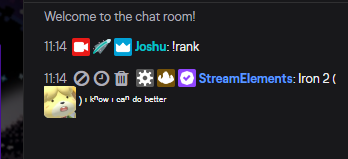
So this is about the 5th time I've done it but every time I update the custom bot name somehow it keeps changing back to "StreamElements" idky
Any ideas?
odd kraken
Mod the StreamElements bot first.
Then try this:
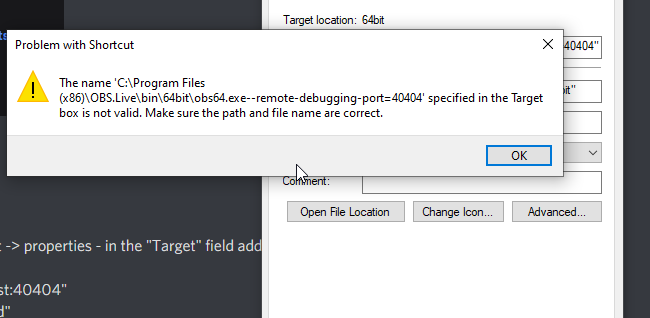
- Right click on your OBS desktop shortcut -> properties - in the "Target" field add this -> --remote-debugging-port=40404
- Open OBS(or restart if it was open)
- Open your browser and type in "localhost:40404"
- Click on "StreamElements - Activity feed"
- navigate to the Console tab
- type in the console this: store.customBot.removeCustomBotIntegration() and hit enter
- Try setting the custom bot name
- remove the added addition of step 1
odd kraken
yes, just add --remote-debugging-port=40404 to it.
 burnt horizon
mhm
lol this is a lot of errors
i think it worked!
thank you!
ok nvm haha
i closed obs and it went back to StreamElements
does it only work when obs.live is open
odd kraken
Settings > Stream
Yes, disable the test mode.
Settings > Stream
Have you disabled the test mode?
Do you have a screenshot of your Settings > Stream page.
At the end of your streamkey, is there something like ?bandwidthtest=true?
steel bladeBOT
@rugged quail For the best OBS support, please join their Official Discord @ discord.gg/obsproject
 merry glacier
hello can someone help me as to why alt wont cut the edges off of a game capture. Its almost zooming in and out instead of cutting it like normal with the green line
steel bladeBOT
@rugged quail Streamelements on top of OBS -> Logout -> login
odd kraken
@merry glacier You can crop with alt and shift.
merry glacier
yeah but alt normall cuts the edges off but it isnt its zooming in and out

like so when using alt
normally it cuts off the edges
steel bladeBOT
@merry glacier For the best OBS support, please join their Official Discord @ discord.gg/obsproject
odd kraken
@rugged quail Then contact the OBS guys.
 low bolt
google isn't helping. How do I add a custom transition?
odd kraken
Add a stinger transition to your transition settings.
tender python
I mean. How do you google?
For all those people who find it more convenient to bother you with their question rather than search it for themselves.
 shadow jungle
hi guys i'm currently having an issue with the alert overlays.
i've attempted a tutorial and i believe that the alerts are still not working
steel bladeBOT
@shadow jungle OBS -> settings -> advanced -> scroll down -> enable/disable hardware accel.
https://i.imgur.com/ggMe9ZE.png
wary dew
disable that
shadow jungle
disabled it but still not working
wary dew
is your overlay set to 1920x1080?
steel bladeBOT
The default resolution for StreamElements overlays (theme and custom) is 1920x1080. Please add them in OBS at their full resolution and use CTRL+F to fit to screen if necessary. You can then downscale your stream in OBS settings > Video if you'd like https://i.imgur.com/6bWXxjR.png
 dawn parrot
So my media request is just blank, is there a way to solve this?
 real wigeon
I have two user accounts. One account I want to use OBS.LIVE for twitch streaming. The other account I use OBS to record and stream to other services and do not want OBS.LIVE. Currently when I launch OBS in both accounts OBS.LIVE loads. Is there a way to deactivate OBS.LIVE in one user account on Windows 10?
 analog fjord
I guess on one OBS Instance that is currently active you go on the Tab "StreamElements" and go to "Switch to OBS Studio" Maybe that helps @real wigeon
 twilit crown
hello. for some reason I am not going live on streamelements, using streamelements-obs. so the bot is not functioning and the partner programs are not tracking.
I have reinstalled the app. I have reconnected the keys. and disconnected and reconnected the bot. what should I do next?
also test messages work just fine, just nothing automated works, everything that was working untill a few days ago
 lusty depot
yh they on it apparently
twilit crown
okay so this is the current issue, not just me?
lusty depot
no been like it for a couple of days for me too all works fine even when i test widgets but soon as i stream nothing updates say if i get a follower
twilit crown
okay, been loosing my mind trying to figure this out, and there is no announcement. Thank you! I am going to go do my thing now.
lusty depot
you on mixer or twitch
twilit crown
twitch
frank flint
how do i add a song to a overlay and get it to play
 wintry kiln
Hello all , A new streamer here ! Hope we are all staying safe I am in need of some OBS.live help
I have a gaming system which consists of : I9 9900kf, RTX 2070 super, 32gb ram and my upload speeds are 20.83 Mbps.
I keep getting bad dropped frames and I am very confused of why it keeps happening, Below are my settings
steel bladeBOT
Please provide a log from your last stream. To do this, in OBS go to Help > Log Files > Upload Last Log File and paste the link to the log file here.
tender python
wintry kiln
Only had 1 running
 steel mural
Also, don't enable "Look Ahead" as it screws with quality in fast paced games and put your B-Frames back to 2.
steel mural
You have to stop the stream or no results will show in the log
wintry kiln
steel mural
That's your last log
steel mural
But there's profiler stuff at the very bottom of the log, meaning that OBS got closed
Also, there's no streaming attempt in it and has your old settings like resolution
20:24:21.813:     base resolution:   1920x1080
20:24:21.813: output resolution: 1600x900```- Restart OBS
- Start your stream/recording for about 30 seconds. Make sure you replicate any issues as best you can, which means having any games/apps open and captured, etc.
- Stop your stream/recording.
- Select Help > Log Files > Upload Current Log File. Copy the URL and paste the link here.
(Note: If you do not see an obsproject.com URL, you will need to update OBS Studio to version 22+)
tender python
^
steel mural
Do this. EVERY step is important
tender python
and, to be 100% sure you're not running multiple instances
 grim forum
im not getting alert on my overlay -.-
steel mural
There's no need to use CMD. Multiple instances were in the old log, not in the current which lacked the stream attempt
tender python
doesn't hurt to be sure 
steel mural
@grim forum Do you have an alert box in your overlay?
wintry kiln
steel mural
No dropped frames in this log
steel mural
How do you knows you have dropped frames?
grim forum
@grim forum Do you have an alert box in your overlay?
@steel mural yea 🙂
wintry kiln
It's on my 3rd monitor
steel mural
What?
wintry kiln
So i can see OBS studio
steel mural
Do you actually see "Dropped Frames" or Rendering / Encoding lag?
grim forum
it work when i "emulate" but not on stream
steel mural
With emulate, you mean in the overlay editor or in OBS?
grim forum
in the editor yes
wintry kiln
Do you actually see "Dropped Frames" or Rendering / Encoding lag?
@steel mural
I actually see dropped frames. I'm just resuming the stream, and i will stop the stream once i get dropped frames again.
wintry kiln
oh i cant remember , literally.
tender python
look at that next time
wintry kiln
I'm just resuming now so we shall see.
steel mural
Do you see that in OBS or do you have your stream open on your third monitor? Because:
tender python
~500 dropped frames (<1%) is nothing to really cause panic about..
steel mural
@grim forum Is this box checked when emulating alerts?
grim forum
@grim forum Is this box checked when emulating alerts?
@steel mural yes
steel bladeBOT
@grim forum OBS -> settings -> advanced -> scroll down -> enable/disable hardware accel.
https://i.imgur.com/ggMe9ZE.png
steel mural
After that restart OBS and try to emulate it again
grim forum
nope, didnt work
steel mural
Please go to Help > Log Files > Upload Current log and paste the link here
grim forum
steel mural
I don't see a problem in your log 🤔
grim forum
:(the "test" come truth but not real sparks
steel mural
So the emulation did work?
grim forum
yea, but the real not work
steel mural
Check the pinned message in #651453660810838026
grim forum
might just go back to streamlabs :/ this seems good but :/
lusty depot
Yh I know what ya mean its been 2 days now not working and no info other that check pinned messages which say they don't work no eta
 light sage
does SE or Ground Control allow for media request txt files? So I can play a scrolling text on song name and requester? (i use SE for things but use SLOBS for obs)
 slim dock
help! stream chat text font isn't translating onto OBS, just in the editor
tulip hamlet
@light sage StreamElements is a cloud-based system that does not ever reference local files. The Now Playing widget can be added to your overlay to display the song name when using media request.
@slim dock If you installed the font while OBS was open, try restarting OBS.
light sage
ok thanks @tulip hamlet
 grizzled veldt
Are the "enter" and "exit" animations operating correctly within the streamelements web site, or am I possibly doing something wrong?
 languid sedge
can i record local gameplay whit obs live? or its is only for live streaming?
tulip hamlet
OBS.Live is just a plugin for OBS Studio, and OBS Studio does of course have a recording function.
languid sedge
thanks!
 open shore
Hi
open shore
can anybody help me?
steel bladeBOT
@open shore Welcome to the helpdesk! Please let us know how we can assist you today and a support volunteer or staff member will assist you as soon as they are available. Thank you for your patience.
open shore
How can I pass streamlabs scenes to Streamelements.
tulip hamlet
open shore
When I open Stream Element it asks me if I want to link the accounts with streamers to pass alerts to pass the scenes AND when the scenes happened. When I see them, nothing comes out, the images or anything do not load me
tulip hamlet
Take a screenshot.
open shore
😫
steel bladeBOT
@open shore Please provide a proper screenshot with the issue visible. If not sure how to take a screenshot, you can check here: https://www.take-a-screenshot.org/
tulip hamlet
Now what exactly is the issue in this image?
open shore
As an arrangement that does not leave me anything neither the colors nor the frame or anything as an arrangement that is already supposed to happen and I only see everything gray
tulip hamlet
Can you try rewriting that a bit more clearly? You're making no sense.
open shore
do you speak Spanish?
tulip hamlet
@open shore Please ask for assistance in the #🇪🇸︱español channel.
 feral lily
When I show the media player in my stream it plays over itself and you hear it twice.
steel bladeBOT
@feral lily Make sure to ☑️ “Shutdown source when not visible” for all browser sources (all OBS scenes). If using studio mode, uncheck “Swap Preview/Output scenes After Transitioning.” Also keep in mind that sound can play from any overlay loaded in the browser (editor or launched). https://i.imgur.com/6bWXxjR.png https://i.imgur.com/yY0wcFl.png

 obsidian thistle
hello can anyone help me on my overlays
steel bladeBOT
@obsidian thistle Welcome to the helpdesk! Please let us know how we can assist you today and a support volunteer or staff member will assist you as soon as they are available. Thank you for your patience.
obsidian thistle
my overlays arent showing up and i tried to use the editor it say invalid authorization token
steel bladeBOT
@obsidian thistle To add your overlays to OBS, add a new browser source in your scene. Paste your overlay URL in the browser source properties, set the dimensions to 1920x1080 (unless you changed them on the website), and ☑ “Shutdown source when not visible” https://youtu.be/KDvLynUqXI4
@obsidian thistle Please ask your question in one helpdesk channel only. A support volunteer or StreamElements staff member will assist you as soon as they are available. Asking in multiple places will only result in confusion, not faster answers. Thank you for your patience.
 half sphinx
I have major fps loss when streaming Valorant. My rig is R7 1700X and GTX 1060 6GB, 16RAM
steel bladeBOT
@half sphinx Please provide a log from your last stream. To do this, in OBS go to Help > Log Files > Upload Last Log File and paste the link to the log file here.
tulip hamlet
@half sphinx Please follow the bot instructions and provide a URL, not a file.
half sphinx
steel bladeBOT
@half sphinx For the best OBS support, please join their Official Discord @ discord.gg/obsproject
half sphinx
Alright, thx!
 quick willow
hey guys, just a quick question, im trying to stream to twitch. ive gone onto the service drop down link and selected twitch, applied it and tried to start streaming and it pops up with a window saying start sdtreaming to facebook? p.s ive just finished a 9.15 hour stream on twitch but wanted to restart the stream
steel bladeBOT
@quick willow Streamelements on top of OBS -> Logout -> login
quick willow
thankyou 😄
 prime blaze
Just wanted to voice that I would greatly appreciate having an option to remove and / or edit the redemption message that plays in chat when something is redeemed from the store.
steel bladeBOT
@prime blaze Check out the StreamElements ideas board: https://strms.net/ideas. You'll be able to add ideas, upvote ideas you agree with, and track their progress with email notifications. Adding and upvoting ideas also helps the staff know which ideas should be prioritized so please take some time to upvote.
 potent nimbus
Hey, i was streaming the other day, and none of my audio was coming through on my vod, it says the output capture was picking up audio
honest echo
@potent nimbus did your viewers mention anything to you?
potent nimbus
i dont get any viewers 🙂
honest echo
do a little recording to test if you actually are getting your audio input
potent nimbus
ok 1 sec
honest echo
Check this on Settings, are your devices correctly selected?
potent nimbus
My, mic was coming through,. but my desktop audio was not
 native shard
My redemptions from Twitch Channel Points isn't showing in the activity feed in OBS.Live
potent nimbus
my desktop audio is set to default
honest echo
@native shard that's normal, twitch channels points aren't connected to StreamElements
steel bladeBOT
@potent nimbus For the best OBS support, please join their Official Discord @ discord.gg/obsproject
potent nimbus
thx support AI
native shard
that's normal, twitch channels points aren't connected to StreamElements
@honest echo Damn, is there a way to get it added to OBS Live? I can't have my browser open while streaming....
honest echo
you could add this urL as custom dock : https://www.twitch.tv/popout/USERNAME/reward-queue (replace USERNAME with your twitch username)
and take a look into this custom made widget :
https://discordapp.com/channels/141203863863558144/457957557470887947/702819359743148072
 honest echo
Did you change the USERNAMEpart of it? try it on your browser first (please be google chrome 😉 )
native shard
I got it figured out, had to do something wonky but it's good now lol
 limpid solstice
Boa noite .... Depois da ultima atualização do OBS minha placa de captura não quer mais funcionar no aplicativo vinda do PS4... Preciso de ajuda
honest echo
@limpid solstice try #🇵🇹︱português 😉
 plain dome
So when i media share, and show on stream, the sound is double. I have already tried different OBS versions, i've tried shutdown when source is not visible. I can't seem to figure it out.  added example
https://www.youtube.com/watch?v=XxMAis9IlWI&feature=youtu.be
 steel bladeBOT
@plain dome Make sure to ☑️ “Shutdown source when not visible” for all browser sources (all OBS scenes). If using studio mode, uncheck “Swap Preview/Output scenes After Transitioning.” Also keep in mind that sound can play from any overlay loaded in the browser (editor or launched). https://i.imgur.com/6bWXxjR.png https://i.imgur.com/yY0wcFl.png
plain dome
^ not working
shy mountain
I'm 99% sure this is the issue - you are missing an overlay with the media request widget in it and using this option on it.
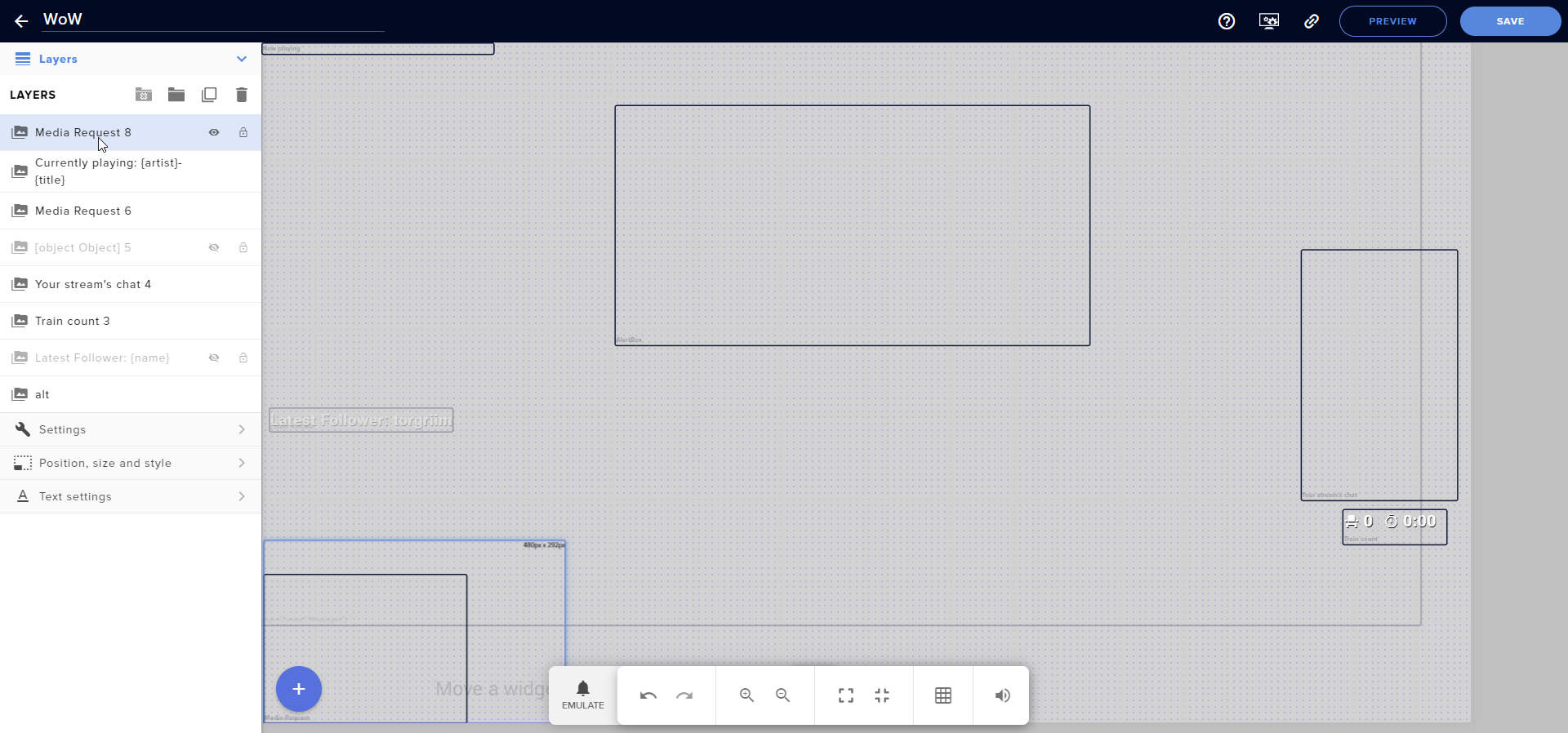
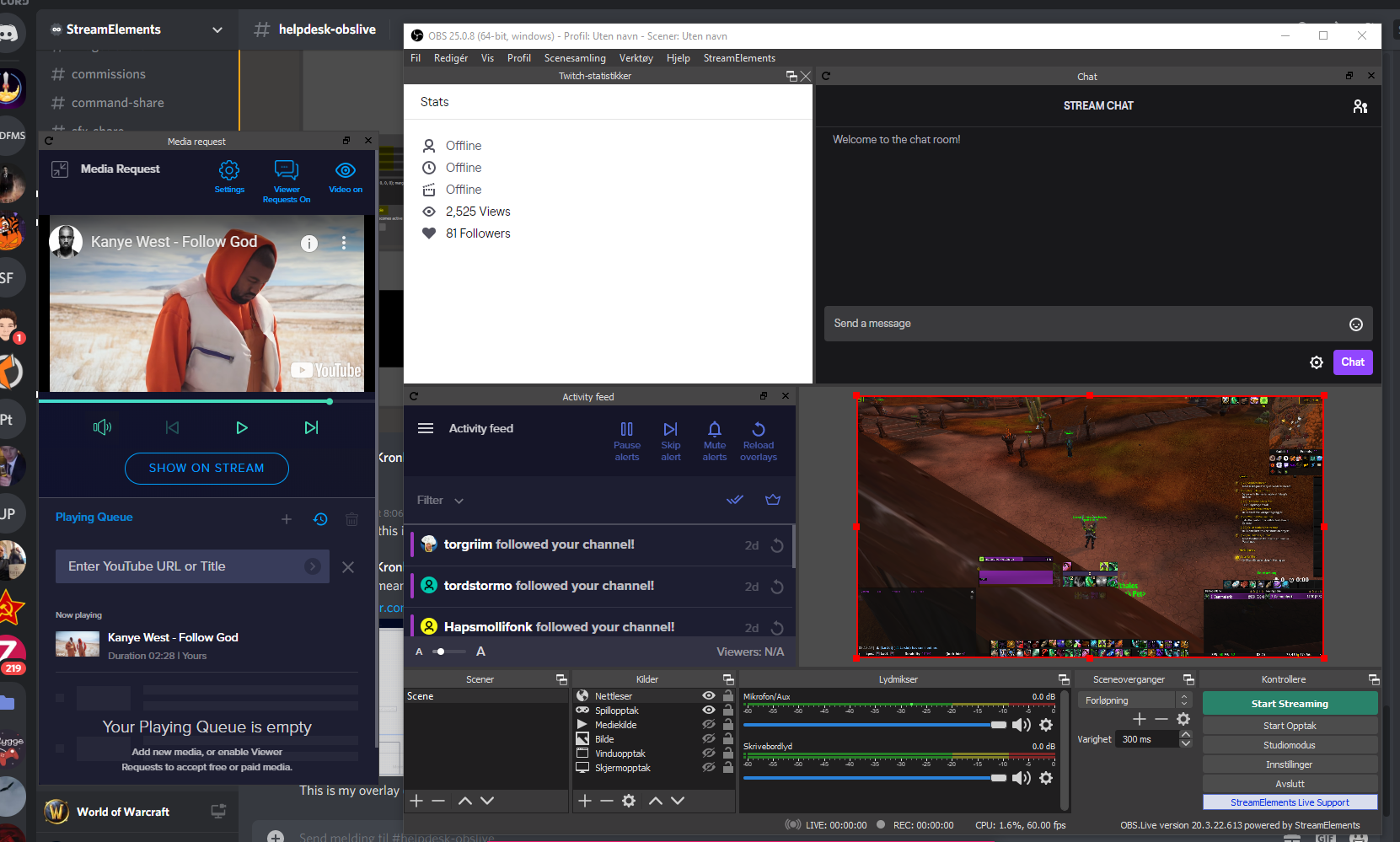 plain dome
the echo happens both in OBS and when using media share in the browser dashboard
shy mountain
so you are using the dashboard MR as well?
plain dome
MR?
shy mountain
Media Request
plain dome
I've tried both, but they are not up at the same time, no
shy mountain
but it happens with both?
meaning, the MR dock in OBS and the dashboard?
the double sound?
plain dome
yeah
shy mountain
do you have the editor open while having the overlay open in OBS?
plain dome
no
and also, in my volume mixer, only OBS is showing as playing
i don't get it really
has been bothering me for days
okay so, i tried disabling the browser source when it was playing
enabling it fixed it, but when i pressed pause and started again it happened
plain dome
OH SHIT
shy mountain
one was smaller and behind the bigger one
i knew i should have taken a look at the overlay sooner 
cuz it didn't make sense to me with just 1 scene and browser source
to hear double
 shy mountain
But this is a first honestly - 2 MR widgets in 1 overlay
shy mountain
hey, you made me note this in case someone else gets it
shy mountain
cuz i've never seen anyone have 2 MR widgets
shy mountain

plain dome
Thanks my dude 
shy mountain

plain dome
one more thing! can you play playlists with MR?
plain dome
ya
shy mountain
via the backup playlist option only
 ashen hull
my OBS is crashing when I try to open it as administrator. if I run it without admin, my scenes don't show up. I've un/reinstalled it, and it's still doing the same thing.
steel bladeBOT
@ashen hull A crash log is required to investigate the cause of your issue. Please upload the last crash log.
- In OBS, click the Help menu
- Select Crash Reports, and then Upload Last Crash Report
- Copy the URL, and paste it to the chat here.
--
If you are not able to follow the above steps, open your file explorer and go here:%appdata%\obs-studio\crashesand provide the last listed file.
 normal heath
my alerts arent showing up in the editor or obs.live
steel bladeBOT
@normal heath You can test Alerts via the bell on the lower right corner of the Overlay Editor. Simply go to your Dashboard -> My Overlays -> Pencil/edit button on the overlay. Make sure the "Preview LIVE on stream" option is on to see the alert in OBS/Xsplit https://streamable.com/vtulg9


 ashen hull
shy mountain
ashen hull
shy mountain
Reinstall OBS.Live and maybe OBS Studio as well.
Meaning, Uninstall obs.live, uninstall OBS Studio, install OBS Studio and then OBS.Live
ashen hull
Already done that
normal heath
yeah that didnt work for my alerts
is there any staff on that could help with alerts?
steel bladeBOT
@ashen hull For the best OBS support, please join their Official Discord @ discord.gg/obsproject