#helpdesk-selive
1 messages · Page 122 of 1
 frigid island
 spiral oriole
I'm having a problem where I changed my desktop audio source, and the audio from my switch (through the capture card) isn't coming through. I opened up the El Gato capture center and the sound comes through there just fine. Also, all the other audio comes through my updated sound fine, just not the switch.
Also, it's picking up audio on the sound mixer, but it isn't coming through my output...and if I switch back to the other output, it appears on the desktop audio like it normally would.
 honest echo
@frigid island all the overlays on StreamElements are cloud-based so just grab it and paste it on your other OBS and you are good to go 😉
Try audio monitoring on "monitor & ouput"
spiral oriole
I've done that as well
I've also restarted OBS, restarted my computer, changed the audio devices back and forth a few times. It works correctly for everything but the output I'm trying to use.
frigid island
@honest echo yeah my overlays aren't the main problem really - because I have lots of custom elements like my own animated borders and graphics stingers etc...
On streamlabs its super easy you just login to your account. I was hoping there was something similar in obs.live land 😄
@spiral oriole elgato sound capture might be the tool you are looking for - I had to use that with my setup
honest echo
@frigid island i see , but have you tried upload your assets into your overlay? that will make everything as simple as copy and paste an URL
spiral oriole
@honest echo OBS live is not actually updating my audio output device when I change it. It will only stay on my bluetooth headset even when I change it to something else.
frigid island
Yeah - I mean that would work for like 30% of my stream - your overlay editior doesnt allow large videos and songs to be recalled by the press of a button because its web based.
spiral oriole
Nevermind. I'm going to try uninstalling and reinstalling OBS live, because el gato sound capture isn't what I need at all.
frigid island
@spiral oriole sorry it didn't help - it works for my switch though
spiral oriole
I've switch the audio output many times before and never had this issue.
frigid island
seems like you've got another bug going.
@honest echo do you know why the Cloud Backup Option doesn't work or has such a low space limit?
 south flint
Hey friends, anyone having issues with the StreamElements plugins making scenes duplicate endlessly in the current OBS build?
 chrome moon
hello everyone
im been searching online but with no luck, maybe someone in hear knows. I stream Apex legends full screen on dual monitors. My main screen is my laptop screen and i Have a second monitor attached via hdmi to vga port adapter. My issue is this when im in game and i click out of it to do mod stuff in obs the game minimizes and its tedious to have to open it up again because it makes everything lag. Is there a fix for this?
 tender python
borderless window
 lost mauve
I am having a problem with my games not showing up at all, no matter if I use window capture or game capture. Can anyone help me?
tender python
Laptop?
 pearl crater
does anyone know how to turn off the follower alert sound? I know how to turn off the follower alerts that have to do with overlays I just don't know how to turn off the sound alert
 floral sphinx
when will mouse pads be available to sell?
i want to be able to have them for on the go moments
honest echo
@floral sphinx what do you mean when? mouse pad are part of the Merch Store since day 1 😉
@pearl crater Remove the sound or lower the volume
floral sphinx
i cant edit them
 rugged quail
how can i delete my account from streamelements? i want to create a new one because i deleted my group on facebook... when i enetr at close account is says that my username is wrong
what can i do
floral sphinx
also this is the first time setting up a merch store
honest echo
@floral sphinx i think you are in the "design" tab, that will be coming soon, your question was "when will be available for sell"
floral sphinx
I want put this on a mouse pad and have it cover the entire surface
like i swiched from streamlabs to this because of someone
honest echo
@floral sphinx that's not possible atm
floral sphinx
this is why i switched in the first place
https://youtu.be/Hfie-LWmnaU
honest echo
@floral sphinx We are working to add more features on our merch stores, but atm is not possible
floral sphinx
@honest echo ok i cant wait for that
rugged quail
can i stream on facebook and twitch with stream elements at the same time?
honest echo
@rugged quail we do not support multistreaming
rugged quail
i understand. thanks
 covert rune
My Obs.live keeps crashing.
 steel bladeBOT
@covert rune A crash log is required to investigate the cause of your issue. Please upload the last crash log.
- In OBS, click the Help menu
- Select Crash Reports, and then Upload Last Crash Report
- Copy the URL, and paste it to the chat here.
--
If you are not able to follow the above steps, open your file explorer and go here:%appdata%\obs-studio\crashesand provide the last listed file.
covert rune
Obs does not stay open long enough fo rme to get a log.
honest echo
If you are not able to follow the above steps, open your file explorer and go here: %appdata%\obs-studio\crashes and provide the last listed file.
covert rune
Is it the last thread that you need?
honest echo
the text file please
covert rune
Where is that? I am new to all of this.
tender python
If you are not able to follow the above steps, open your file explorer and go here: %appdata%\obs-studio\crashes and provide the last listed file.
windows key: type run
or windows key + R
then paste
%appdata%\obs-studio\crashes
hit enter
covert rune
I have obviously done that
lost mauve
@tender python No, desktop.
covert rune
When I do that it brings up the last 4 times it has crashed. When I click to get into it they show many different forms of what I have sent.
honest echo
@covert rune yes upload here the last one
honest echo
upload the last txt file here
covert rune
You keep telling to upload the text file. What is the text file? Is it the last file that has the "thread" in it?
Is this it?
honest echo
literaly drag and drop the last one
honest echo
@covert rune Try to reinstall OBS and OBS.Live
 iron hinge
Hello I've been having problems with Media Request. For some reason I am hearing the audio twice when I show the media on stream for some reason. I don't have my stream pulled up on a browser. It is literally just OBS open.
honest echo
@iron hinge check every browser source on your obs and enable the "shutdown when not visible" option
iron hinge
omg thank you so much I've been having trouble these past two nights
should i do that for any sources that I have or
honest echo
Yes,on every browser source, that will save CPUG/GPU as well
iron hinge
thank you thank you
are there any other tips you can give in terms of saving cpu/gpu?
 vital dew
how do i test my alerts on the obs website?
 rare night
@bleak wyvern the update process for users who have the .Live plugin installed is: prompt appears for OBS studio update, update OBS studio, prompt appears for .Live plugin update, update plugin
current versions for OBS and .Live are:
OBS studio 25.0.4
OBS.Live 20.3.8.603
 bleak wyvern
Oh, lol hello
Yeah so when I install with the latest download from SE
I get not 25.0.4
but 24.0.3
even when installing that - I get no prompt to update OBS
bleak wyvern
correct
rare night
let me check real quick. I think I saw that this will be directing to v25 in the coming days.
bleak wyvern
I appreciate it
From what I can tell - the only way for me to actually install 25.0.4 right now, from a clean install
is to install 24.0.3 OBS.Live, then over-install 25.0.4 OBS
due to when I install 25.0.4 first, I get all sorts of bad juju going on when trying to install OBS.Live
rare night
Odd, the default version of .Live should play nicely with v25 OBS studio
bleak wyvern
(which I quite enjoy btw, regardless of what that other dude said)
rare night
It's what I'm running now
I did get confirmation that
tomorrow we'll be promoting the current "beta" version of .Live
bleak wyvern
I'm running 25.0.4 with OBS.Live on my StreamingPC
rare night
to the default path
bleak wyvern
so I know it's possible
I'm just confused as to the updating/installation process on my GamingPC
rare night
and in turn v25 will be packaged from the site
rare night
Let me make sure I understand
bleak wyvern
timeline wise - I've got lots of setup still to be done lol
bleak wyvern
Super broken
rare night
you can't get back to 25.0.4 ?
rare night
Is there a chance you're on the "stable" release path of OBS.LIve?
bleak wyvern
Initially - it would crash OBS directly.
Now, I've got it into an update loop
I've changed no release pathing options
rare night
You can check at the top of OBS by clicking "StreamElements" > "Release Path"
bleak wyvern
I'd be on default
bleak wyvern
I got it to the update loop by installing 25.0.4, then OBS.Live - ignoring all the "cannot install <x>.dll" errors.
In the update loop I currently have it in, when I click the Yes to the Update Prompt of OBS.Live, it immediately crashes
just to give more information
which may or may not be helpful
(I'm also a dev, so I get it)
rare night
The team who works on the .Live plugin is getting their day started soon so I estimate that the promotion of the beta path to default will be taking place within the next 6 hours
I'll update here once that's done
and we can see if that resolves things
bleak wyvern
oh cool - no worries then. I'll uninstall it all for now and give it a shot in the morning
it's 12.30am for me now, so
rare night
same 😄
bleak wyvern
ayyy Central hype
but yeah - thanks for at least talking it out with me. Plugins are hard
lol
I'll leave it all uninstalled for the time being - I've got my profiles/scene collections exported
rare night
No problem, hope to have that resolved later today for ya
bleak wyvern
If not, I do have the work around
though if the paired obs version is incremented anyway, it should be fine
Thanks again!
 oblique pine
Hello i have a question i have a black screen with obs studio windows 10
disabled accelation in chrome
fixed integrated GC in nvidea
compatibility windows 7
Reinstall
but still doesnt work can someone help me
steel bladeBOT
@oblique pine 1) Restart OBS
2) Start your stream/recording for about 30 seconds. Make sure you replicate any issues as best you can, which means having any games/apps open and captured, etc.
3) Stop your stream/recording.
4) Select Help > Log Files > Upload Current Log File. Copy the URL and paste the link here.
(Note: If you do not see an obsproject.com URL, you will need to update OBS Studio to version 22+)
 shadow geyser
Hi all, I am having an issue where when i stream everything runs perfectly, however when i end the stream, my FPS in games tanks tremendously. Even if i close OBS, my FPS continues to tank. Any ideas?
steel bladeBOT
@shadow geyser 1) Restart OBS
2) Start your stream/recording for about 30 seconds. Make sure you replicate any issues as best you can, which means having any games/apps open and captured, etc.
3) Stop your stream/recording.
4) Select Help > Log Files > Upload Current Log File. Copy the URL and paste the link here.
(Note: If you do not see an obsproject.com URL, you will need to update OBS Studio to version 22+)
 deft spade
how do i get text to speech for my subs and donations?
 obtuse needle
Tweeted at SEsupport on twitter but maybe better and faster to figure it out here.
Is custom bot connection with OBS.live still bugged? For some reason I cannot connect the custom bot (twitch) to appear in OBS.Live.
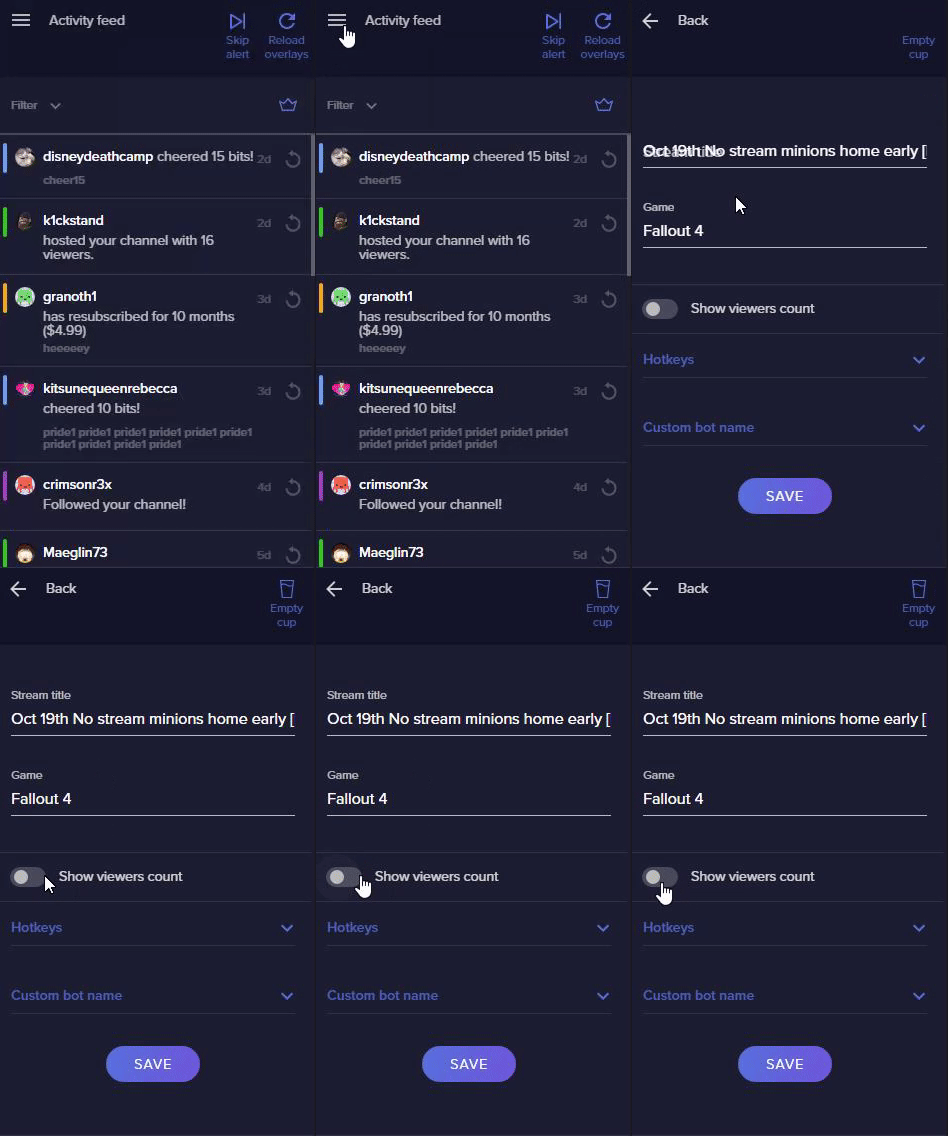
Currently in Ground control there is only one hotkey (skip alerts), in OBS.Live there are 2 (skip alerts & reload overlay). Where/how can I set a hotkey to pause alerts?```
Thank you for your help! odd kraken
@obtuse needle try this:
Right click on your OBS desktop shortcut -> properties - in the "Target" field add this -> --remote-debugging-port=40404
2) Open OBS(or restart if it was open)
3) Open your browser and type in "localhost:40404"
4) Click on "StreamElements - Activity feed"
5) navigate to the Console tab
6) type in the console this: store.customBot.removeCustomBotIntegration() and hit enter
7) Try setting the custom bot name
8) remove the added addition of step 1
 indigo sorrel
good morning i have installed obs live i would like know how get custom name bot
steel bladeBOT
@indigo sorrel Currently renaming the bot fully works with OBS.Live.
You can follow this video guide to set it up: https://discordapp.com/channels/141203863863558144/494513233416421386/561516184718278676
If you don't want to use OBS.Live and want to stick with Ground Control, please let us know your Twitch username.
 pallid sentinel
Hi everybody. I am having an issue that the media request tool in my OBS live is just blank. I ahve the latest version of OBS live but it doesn't seem to work, tried re-opening it or refreshing and such. This has persisted multiple days and even through the latest update that I downloaded today. It works on the website, just not in OBS
steel bladeBOT
@pallid sentinel Streamelements on top of OBS -> Logout -> login
obtuse needle
Thank you @odd kraken ! Worked!
pallid sentinel
That worked! thanks!
 shut bane
What should I do if this message pops up when I press Start Streaming. I am using an AMD CPU and GPU
odd kraken
Make sure your video drivers are up to date.
shut bane
how should I do that?
odd kraken
Use this to get your drivers: https://www.amd.com/de/support
shut bane
Thank you!
indigo sorrel
help me ground control not work
it worked then I accidentally touched something on the key and now it doesn't open anymore
 lilac ocean
have you tried restarting your computer? @indigo sorrel
shut bane
Well i still have the same error message even if I downloaded the newest video drivers on my video card
indigo sorrel
have you tried restarting your computer? @indigo sorrel
@lilac ocean yes
lilac ocean
re-installing might be the best option then
indigo sorrel
i restarted my computer I uninstalled and reinstalled the program but it doesn't open anymore I also uninstalled with revo unistall but it doesn't work
lilac ocean
Okay, I'll ask around for you
indigo sorrel
ty
 uncut zenith
so i just ran the installer and now when i launch obs i get a failed to initialize video. any ideas?
obs was working before the install btw
 vague spindle
I think I must be missing something obvious, but how do I display my count (named rip) into a text box on my overlay? sorry if this is a dumb question but Ive tried everything and been looking for ages
 distant breach
did you make an overlay on https://streamelements.com/dashboard/overlays @vague spindle ? and import that into OBSLive?
lilac ocean
@distant breach he wants to add a widget into the text box in his overlay, not add it to his OBS
@vague spindle ill ask around for you
 fringe lark
IS IT POSSIBLE TO IMPORT "NERDORDIE" OVERLAY SCENES INTO STREAMELEMENTS OBS?
Shot sorry all caps
fringe lark
For me it doesn't. Everytime i go to Streamelements menu->Import from other sources->SLOBS-> It always tells me" Error, Importation failed"
@lilac ocean
vague spindle
Thanks @lilac ocean I have overlays that are fully functional. I just want to display my chat death count on screen
lilac ocean
@fringe lark it might be that you have other SLOBS copyrighted files in there or that the files are bigger than 30mb
fringe lark
Not sure of the file size.... I only import the Scenes and Uplink Overlay
Not sure what im doing wrong...
Are there any videos on these things or like a chat i can talk to someone to further explain what i'm doing?
distant breach
if it's counter, then just {rip} in the overlay @vague spindle
You can use any {counter} with a corresponding bot ${count counter}.
A plain ${count} command will not work, you need to have a name for it.
Example setup:
Mod only command !addwin: "Updated wins to ${count wins}"
Regular command !wins: "Todays wins: ${getcount wins}"
And in the widget: "Todays wins: {wins}"
@fringe lark I will ask around for you who has experience with it!
 tired mountain
Guess this place is as good as any to ask a question... Within the stream elements dashboard, im attempting to edit a background image for a default overlay, However none of the menu shows up on the left of the screen (i cant unlock a layer). i can only select whats on my screen and not locked to edit it. any idea on how to proceed? thank you in advance
lilac ocean
Hey @tired mountain this seems to be an issue at the moment and is reported to the staff
tired mountain
Gotcha! appreciated you taking the time @lilac ocean
lilac ocean
No worries, appreciate that you reported it!
vague spindle
Thanks @distant breach I´ve tried that and various forms of it but without success. I´ll go and try it again as I must be doing something dumb
lilac ocean
@vague spindle otherwise be sure to ask in #dev-chat there are some code guru's of us there 😄
have asked around for you, but its pretty busy at the moment, so sorry for that
 umbral rain
Hello can anyone help me figure out why the stream elements website isn’t loading for me? I click on the page but it’s just a blank white screen. Tried refreshing but nothing works...
steel bladeBOT
@umbral rain Our Dashboard and Overlay editor are Chromium Optimized. We strongly recommend using Chrome. Opera GX and the new Microsoft Edge Chromium might work closest to Chrome as its also Chromium built. FireFox also works, but some things might look a bit different or not work. We do not recommend using Internet Explorer with our Dashboard as it does not support functions.
If the website doesn’t work on chrome, be sure none of your plugins are blocking our website or clear your cookies. You can try if the website works in a incognito tab.
lilac ocean
^if it works via incognito tab, please do log out from there
umbral rain
Alright thanks gonna try that out now!
indigo sorrel
ground control not work
it worked then I accidentally touched something on the key and now it doesn't open anymore i restarted my computer I uninstalled and reinstalled the program but it doesn't open anymore I also uninstalled with revo unistall but it doesn't work someone have any solution?
lilac ocean
@indigo sorrel I have already reported this for you
indigo sorrel
nothing news?
lilac ocean
we are experiencing a big issue at the moment that we are looking into, so it might take some more time, sorry on that
indigo sorrel
@lilac ocean if it can be useful as news when I try to open the app does not open but in the background processes it works
i see process open
lilac ocean
Alright, will note that down for you as well
indigo sorrel
ty
lilac ocean
@indigo sorrel do check if this can be the issue: https://www.howtogeek.com/howto/windows/bring-misplaced-off-screen-windows-back-to-your-desktop-keyboard-trick/

How-To Geek
If you’ve ever had a window somehow get moved off your screen, you know it can be frustrating not being able to drag it back. We’ve got a couple of ways you can move these rogue windows back to your desktop, though.
lilac ocean
okay, then I'll just get back on that
 somber snow
Hi! Is this the right channel to ask for advice regarding the overlay editor? If so, how do I set an animation to repeat when played during a notification? The current video of the animation is 4 seconds, but I would like it to play twice during a 8 second notification.
Sorry to interrupt your current conversation ❤️ @lilac ocean @indigo sorrel
umbral rain
Is there any way to test alerts in stream elements?
somber snow
@umbral rain The bell icon on the bottom bar lets you emulate any desired alert 🙂
 lime agate
Evening all 🙂 I am having issues that my overlay editor menus are not showing up in chrome when I go to edit a widget. All I see is a white screen and the current overlay and assets. Any ideas on a fix?
somber snow
@umbral rain when you're inside the editor, editing the overlay/alert box you wanna test
lilac ocean
The layers in the Overlay Editor should be back now, please do check and if not, refresh the page first
lime agate
@lilac ocean You the best fixed good sir!
umbral rain
@somber snow thanks but I’m trying to see if I can test it on my OBS live. I see the preview live on stream setting but I don’t see it popping up on my obs...
odd kraken
Check the checkbox on top of the emulation bell. @umbral rain
somber snow
@umbral rain I had the same issue recently. I think I solved it by re-adding the alert box to my scene after placing the alert box widget in the top-left corner of the editing window. For some reason it took the size and placement of the widget into account when adding it to obs
@umbral rain if that makes any sense
 fallow ivy
is it possible to link mixer twitch and youtube ? im using restream and i would like to have song request accros al the platforms
fringe lark
I was finally able to get the overlays transferred by the transitions don't work between scenes and the scaling is completely off. I think maybe stream elements look into this to resolve this issue?
odd kraken
@fallow ivy Not possible, as every platform is separate.
@fringe lark Best to contact the OBS Studio discord for transitions issues.
fringe lark
Do you have their discord?
steel bladeBOT
@fringe lark For the best OBS support, please join their Official Discord @ discord.gg/obsproject
umbral rain
@somber snow just fixed it thank you so much!!
somber snow
@umbral rain You're welcome, my pleasure to help out with my own recent problems 😄
fallow ivy
are there any plans maybe in using restream as the login?
lilac ocean
not at the moment @fallow ivy
fallow ivy
or being able to link steaming accounts
lilac ocean
you can use more browser sources in a scene tho
fallow ivy
yeah but like commands like sr only can be used by the accountyour logged in with
lilac ocean
for chats on other platforms
correct, there is no way at the moment to link the accounts in that way
steel bladeBOT
@fallow ivy Check out the StreamElements ideas board: https://strms.net/ideas. You'll be able to add ideas, upvote ideas you agree with, and track their progress with email notifications. Adding and upvoting ideas also helps the staff know which ideas should be prioritized so please take some time to upvote.
 wild tree
How do I change my overlay notification sound effects ?
odd kraken
Edit the alertbox settings.
wild tree
Ok, thanks a lot !
 cold ore
My hot keys dont work
odd kraken
What hotkeys, the ones you set in the OBS Studio settings?
cold ore
Yeah
steel bladeBOT
@cold ore For the best OBS support, please join their Official Discord @ discord.gg/obsproject
 hearty spruce
My OBS window overlaps ANYTHING on the same monitor... I can't get to whatever is behind OBS without manually minimizing the window it's self
odd kraken
Press F11 to get out of fullscreen mode and disable the setting: File > always on top.
uncut zenith
trying to get follow alerts working cant figure it out any tutorial links?
steel bladeBOT
@uncut zenith New to Stream Elements?
Check out our YouTube channel https://www.youtube.com/c/streamelements/videos
with tutorial videos from setting up the basics, to in depth details on how to use our product.
New to OBS? Here is a 4 step quickstart guide
https://obsproject.com/wiki/OBS-Studio-Quickstart
Want to learn even more? Here is an in-depth overview
https://obsproject.com/wiki/OBS-Studio-Overview
 west coral
Hi There,
I am new to this Discord because i am expierencing some problems with OBS.Live. When i start OBS it will go directly into a BlueScreen. Anyone experiencing this aswell?
When i am start obs streamelements uninstaller it wont deinstall its loading forever. The blue screen error is an Page fault in nonpaged area.
Or do i have to contact OBS it self becuase OBS crashes?
Thanks in advance Jeff
 forest valve
Hi, I'm broadcasting to Youtube live . My OBS is broadcasting at 1920x1080 but no matter what I do, Youtube is always capping at 360p. Am I doing something wrong?
 red cove
Hey yall I'm looking for these two plugins here, can't seem to find them, would love some help!
lilac ocean
which 2 plug ins are you referring to? Clip that and run ad?
Those are Twitch plugins, I think you'd have to enable them over at the website
 exotic kraken
How do i get my game content in obslive?
odd kraken
Add a game capture source.
exotic kraken
Doesnt work
odd kraken
What do you see when you added that?
exotic kraken
A gamecapture map that ive added
odd kraken
gamecapture map?
exotic kraken
Ehmm can you call private?
odd kraken
No, you can send a screenshot here.
odd kraken
What game are you trying to capture?
odd kraken
Have you started OBS as admin?
exotic kraken
Idk
odd kraken
Try that.
exotic kraken
I dont know how it works accually
odd kraken
Also you are trying to capture a remote play window?
exotic kraken
Yes
odd kraken
Then game capture will not work. use window or dispaly capture.
exotic kraken
Ok ill try
 sleek bluff
how do i add chat overlay?
odd kraken
Add the your streams chat widget to your overlay and add this to your OBS.
sleek bluff
and where is that?
 proud orchid
hi there, i have an overlay in "My Overlays" but i don't know how to activate it
steel bladeBOT
@proud orchid To add your overlays to OBS, add a new browser source in your scene. Paste your overlay URL in the browser source properties, set the dimensions to 1920x1080 (unless you changed them on the website), and ☑ “Shutdown source when not visible” https://youtu.be/KDvLynUqXI4
@sleek bluff We've released our new Overlay Editor revamp. You can check out the changes and how to work with it here: https://youtu.be/X5VzXjqAsjk
Check out our blog post as well: https://blog.streamelements.com/streamelements-overlay-editor-just-got-even-better-c22cb5b4853e

We are thrilled to announce the launch of the remastered StreamElements Overlay editor!
https://p.strms.net/newoverlayyt
Why StreamElements Overlays are better?
😎 Simple: Load your entier setup using only 1 link
⚡ Fast: Cloud-powered Overlays arrive in real-time, say goodb...
rare night
@bleak wyvern https://i.imgur.com/3CbzpqU.png
 somber sparrow
when installing new update i get some errors
 quiet plaza
same for me guys
idk what happen, but since everytime i install reinstall streamelements, my activity feed doesnt load and obs crashed
yes but my alerts dont work with streamelements live without it works,
basically since 4h, when i have obs studio solo alerts, banners, everything works. but if i open streamelemnts studio, alerts not loading, activity feed not loading, etc
they just stop working
somber sparrow
i click retry then it shows the same read problem, i skip it and it shows another one difrent, i skip all of the errors then i open obs and the update pops up again
well now works... FML, thank you
quiet plaza
i double checked its defo since i got latest update.
without streamelements it all works with it doesnt, any help?
rare night
Yes, your dreamteam account manager Sergei will contact you to assist
quiet plaza
okay, thank you
 grim viper
Well, I loaded up OBS.Live and randomly all the OBS.Live panels are not there randomly
I literally had no problems till it just updated.
rare night
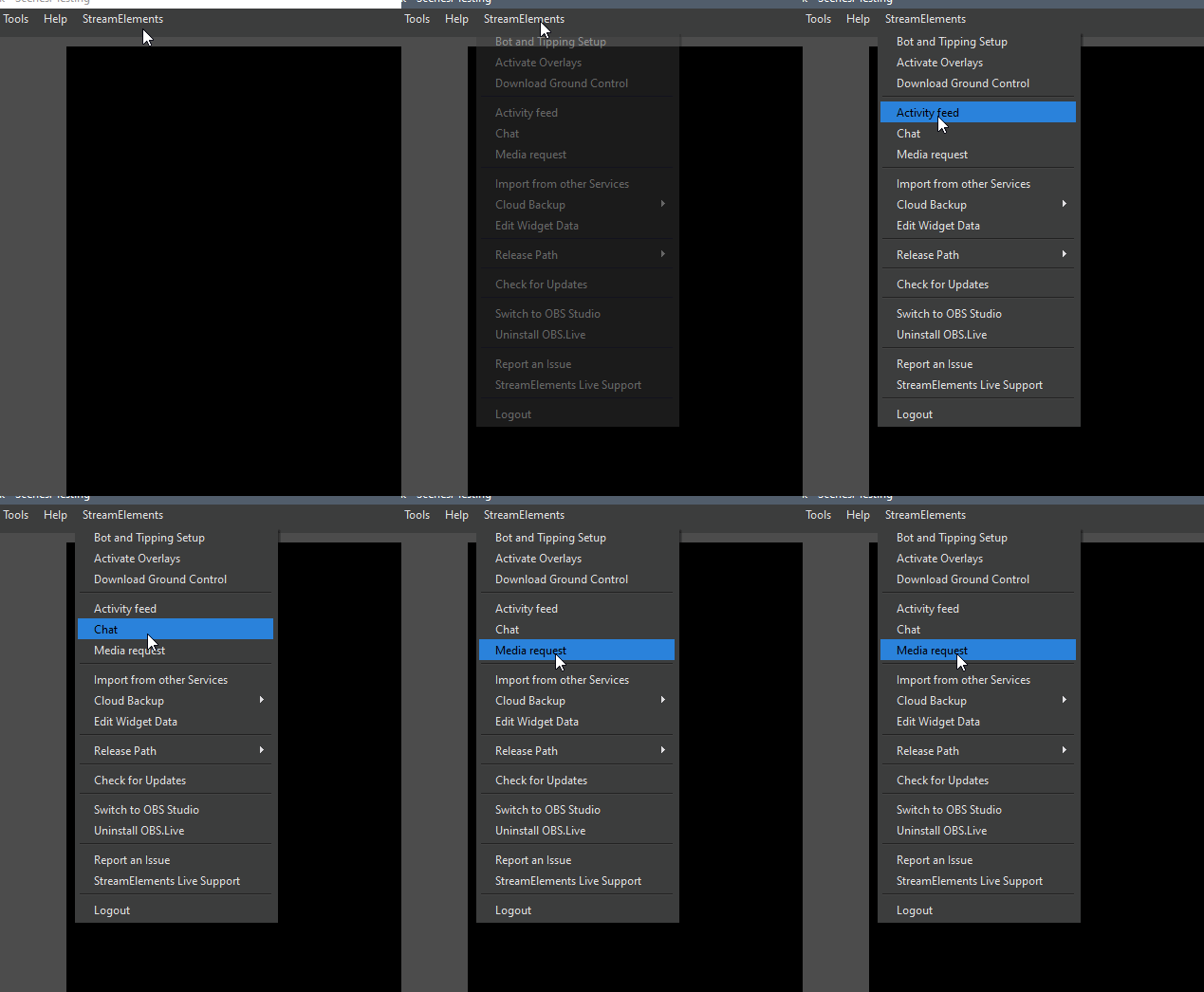
do you see "StreamElements" in the top menu bar @grim viper ?
grim viper
nope, it says OBS version
rare night
Ok, and if you restart OBS?
any popups or does "StreamElements" appear in the top menu bar next to "help" ?
forest valve
Hi, I'm broadcasting to Youtube live . My OBS is broadcasting at 1920x1080 but no matter what I do, Youtube is always capping at 360p. Am I doing something wrong?
rare night
Ok, OBS.Live is not being recognized or was uninstalled
please get it from here https://streamelements.com/obslive

StreamElements
StreamElements is the leading platform for live streamers on Twitch and Youtube. StreamElements includes Overlay management, ChatBot, Tipping, Alerts & Loyalty
grim viper
oh top menu bar, like where you have stuff like File, Edit, etc?
rare night
yes
grim viper
yes, it is there. Soz, I got confused
rare night
Ok, let's select that and then log out
 undone musk
@forest valve is the second of these settings under File>Settings>Video set to 1080p?
rare night
when you log in again your docks should appear
and if they do not you can make them reappear by selecting them in that StreamElements drop-down menu
 grim viper
cool, thanks
undone musk
oh wow, I'm a few versions behind, upgrade time 
rare night
For the general public we currently recommend
OBS Studio 25.0.4
OBS.Live plugin 20.3.22.613
undone musk
I think my .live plugin was old, but OBS had updated since
rare night
shown in the top left and bottom right of the program window 👍
undone musk
all shiny and new now 🙂
 lost halo
ok so my alerts are not working... how do i fix this?
steel bladeBOT
@lost halo You can test Alerts via the bell on the lower right corner of the Overlay Editor. Simply go to your Dashboard -> My Overlays -> Pencil/edit button on the overlay. Make sure the "Show Emulated events on stream" option is on to see the alert in OBS/Xsplit https://streamable.com/h6qgy
 quiet plaza
@rare night
20.3.22 works
- doesnt
@rare night i installed through the link, did u guys change sth or why does it magically work now
 knotty bloom
having an issue where the website is not loading. All i can see is a white screen and a "HELP" option
bleak wyvern
@rare night - thank you!
 wet hare
Hi, i'm using two animated overlays (2 browser source) in my main scene and OBS usage is over 40/45% and during transitions it can reach 60%.
Using the same overlays (labels/goal/chat excluded) as a "Media Source" directly in OBS makes it drop to 25/30%.
Any solutions? Or it's better if I ask on the OBS forum?
I'm already using NVENC (new) and the other settings are ok.
My spec are i7 7700k, 16gb 3200MHz and a 1050ti that will be upgraded to a 2060.
 surreal quail
anyone having issues streaming to twitch? I am dropping frames at 90%
since last update
 low bobcat
I havent streamed today yet, but I have had no issues in the last week with frame drops @surreal quail
surreal quail
I just updated OBS and now I don't have a stable connection
low bobcat
hmm, i didnt have an obs update today. was it an old update?
 rapid epoch
Hi guys. anyone having problems with twitch chat not loading/ blank page ?
i updated to the newest version
surreal quail
OBS v20.3.22.613
 bleak basin
I am relatively new to StreamElements. Spent some time searching/testing, but is there a way to combine follow/sub/cheer alerts with tiltify/extra life donation alerts, in the same widget? Therefore one does not play overtop of the other. Am I just missing something?
wet hare
They go in queue following the feed activity
bleak basin
Thank you. Wasn't sure if emulation was a fair example of what happens live given they do not demonstrate a "queueing" behavior
wet hare
wait, i didn't read the part with tiltify, sorry, in that case i don't know, i think they queue but i'm not sure
bleak basin
Ok, in addition the tiltify blog post from last year states to replace your Alert Box and in emulation, follower alerts do not appear in the Tiltify Widget.
Hence, why I'm curious.
wet hare
I tried with Tiltify, I suppose they don't queue because their input comes from a different system, and for the second question i don't understand what are you curious about (sorry if my English isn't correct, it's not my first language 😅 )
same story with extra life
bleak basin
You understand what I was asking perfectly. Given that they are two separate alert boxes/widgets and likely do not queue based upon testing, at least for charity streams, seems I have to bounce back to another platform. If anyone has a different experience, I would love to hear it. Thanks for the help to confirm.
wet hare
There are no other platform that can queue alerts coming from differents platforms (twitch for classic follow/sub/tip/raids/host and tiltify/extra life from their database)
Or at least this's what i know about.
If you want you can wait someone from the SE.Staff that knows this platform better than me
tender python
Hi, i'm using two animated overlays (2 browser source) in my main scene and OBS usage is over 40/45% and during transitions it can reach 60%.
Using the same overlays (labels/goal/chat excluded) as a "Media Source" directly in OBS makes it drop to 25/30%.
Any solutions? Or it's better if I ask on the OBS forum?
I'm already using NVENC (new) and the other settings are ok.
My spec are i7 7700k, 16gb 3200MHz and a 1050ti that will be upgraded to a 2060.
@wet hare animated overlays (webm/video) require constand hardware power; with hardware accel / decoding enabled, it runs of GPU, if not, it runs on CPU.
Transitions, same story.
Want to reduce it? Lower resolution, fps and/or bitrate of said transition(s)
i run a 3900x and mine still spike to 20-30% but that's 1440p at 60fps.. 
wet hare
The GPU encode is active when i'm not streaming?
tender python
it's still compositing everything together
and, if you have replay buffer on
that will constantly run on your hardware if set to nvenc
wet hare
Thanks, probably i'll try using directly as "Media Source" and use the brwoser source only for alerts and goals, for some reasons they use less cpu
tender python
!accel
steel bladeBOT
OBS -> settings -> advanced -> scroll down -> enable/disable hardware accel.
https://i.imgur.com/ggMe9ZE.png
 wet hare
the replay buffer is already off
wet hare
Are you using H.264/AVC...?
tender python
h264 = nvenc.
x264 = cpu/software
Also, media sources:
"use hardware decoding when available"
unchecked > CPU
checked > GPU (if available)
wet hare
Mine is on NVIDIA Nvenc H.264 (new) and there aren't so many settings
tender python
because you're running the plugin with advanced settings, 99.99% sure of that.
and, unless you know what you're doing, i would'nt recommend diving into any of those settings 🤷♂️
tender python
so then it's other sources
but regardless, the same stands:
Lower cpu % on transitions and or media sources? Lower the resolution(s) and/or framerate(s).
you only have 8 threads to work with, on a 7700k
though it's IPC and max clock per core might be nice, there's no overhead for multi-core work if you're already loading a few cores here and there
wet hare
But the issues is that with the overlay source from SE the cpu load is much higher than using the same videos directly as media source, i was wondering why.
tender python
hardware accel.
wet hare
works better with media source?
tender python
if browser hardware accel is disabled in the advanced tab, it always run on CPU.
media source you can toggle cpu or gpu, with the hardware encoding checkmark.
beyond that, for technical details, the obs crew might be the best to ask if there's that much of a difference, but im guessing they'll say something like: "create a blank scene"
load up media source, check usage
load up browser source, check usage
But, tbh, beyond that, i'd just upgrade to a better multicore setup to not have to worry about this.
wet hare
thanks, i'll try, it would be pointless to use SE for overlays, just alerts
tender python
i mean, if you can locally, why not? 75% of my stuff does as well
wet hare
But, tbh, beyond that, i'd just upgrade to a better multicore setup to not have to worry about this.
@tender python i bought the i7 3+ years ago, in that time i don't even know about twitch and had other plans, only recently i came on this platform and most of the time i'm "working" for friends.
A friend of mine as the same problem with a i7 9700k, so i was checking for both.
 karmic swift
hey having and issue with the facebook login for obs.live desktop
odd kraken
What happens when you log in with facebook?
bleak basin
@wet hare Other platforms do route events through a singular alert mechanism that does queue from different sources. Seems StreamElements does not.
 cosmic copper
I'm trying to copy a link for my overlay to put it in OBS live but every time I do it cuts off a majority of the overlay and all I can see is what's in the top corner. What am I doing wrong?
steel bladeBOT
@cosmic copper The default resolution for StreamElements overlays (theme and custom) is 1920x1080. Please add them in OBS at their full resolution and use CTRL+F to fit to screen if necessary. You can then downscale your stream in OBS settings > Video if you'd like https://i.imgur.com/6bWXxjR.png

 ruby tinsel
has anybody the same problem with a blurry overlay? In StreamElements is the overlay sharp, but in OBS Studio its kinda blurry. Any resolutions?
odd kraken
@ruby tinsel You mean in the preview?
ruby tinsel
no on-stream ^^
steel bladeBOT
@ruby tinsel Please provide a log from your last stream. To do this, in OBS go to Help > Log Files > Upload Last Log File and paste the link to the log file here.
ruby tinsel
steel bladeBOT
@ruby tinsel 1) Restart OBS
2) Start your stream/recording for about 30 seconds. Make sure you replicate any issues as best you can, which means having any games/apps open and captured, etc.
3) Stop your stream/recording.
4) Select Help > Log Files > Upload Current Log File. Copy the URL and paste the link here.
(Note: If you do not see an obsproject.com URL, you will need to update OBS Studio to version 22+)
ruby tinsel
odd kraken
Again no output session in the log. Follow the bots instructions above to get a clean log.
rugged quail
so my alerts i can hear them but no text on obs poppin up 🙂 ?
steel bladeBOT
@rugged quail OBS -> settings -> advanced -> scroll down -> enable/disable hardware accel.
https://i.imgur.com/ggMe9ZE.png
rugged quail
disabled it still the same
ruby tinsel
odd kraken
@rugged quail Are you referring to live alerts, or emulated ones?
odd kraken
@ruby tinsel No sorry.
@rugged quail Are the alerts showing up in your OBS, when you replay them in the activity feed?
ruby tinsel
hmm ok, kinda weird. I'll try it again tomorrow. ^^
rugged quail
wait sorted had to put the window at 1920
 opaque fog
I made an overlay in Blender. It's 3 seconds long, 500x500, a .webm file, and 26KB. When I add the source in OBS my CPU usage goes up 18%. Why does it go up so much?
odd kraken
Every source adds usage to the system.
opaque fog
I agree. That doesn't explain why it goes up 18%.
 novel swift
Hi guys, is the custom bot name working? It's been 2 months and it doesn't work for me no matter what I do, same for !bingo using Twitch emotes.
odd kraken
@novel swift Please only ask your question in one channel. Thank you.
novel swift
@novel swift Please only ask your question in one channel. Thank you.
@odd kraken Sorry, I realized I asked on the wrong one.
opaque fog
When I use the PUBG overlay from the Theme gallery it has way more going on and it's 1920x1080, and that only uses around 9.5% of CPU. I can't see what they use for their animations. Should I not use WebM?
odd kraken
WebM is the recommended format for videos.
opaque fog
Ok. Any ideas on why my puny 3 second animation uses 2x the resources that a full width, multi-animated animation does? Thanks.
cosmic copper
Does stream elements have anything for transitions like vids for stingers?
 dull cave
How do you make the streamelements supertheme alertboxs to work
Basically, where is the link for it lmao
odd kraken
In the top right of the editor, the link icon.
dull cave
But that doesn't seem to work
steel bladeBOT
@dull cave To add your overlays to OBS, add a new browser source in your scene. Paste your overlay URL in the browser source properties, set the dimensions to 1920x1080 (unless you changed them on the website), and ☑ “Shutdown source when not visible” https://youtu.be/KDvLynUqXI4
dull cave
I only need the alertbox from one theme
odd kraken
Then copy the alertbox widget to another overlay with the copy symbol in the layers with the alertbox layer selected.
 oak root
getting a white screen when going to streamelements.com. I've cleared cache/cookies.. any other fix?
odd kraken
Something locally is blocking the connection. Try via incognito chrome tab, disable firewall etc.
dull cave
I am trying to make the alert box work on SLOBS and damn it's hard lol
steel bladeBOT
@dull cave We're not able to troubleshoot issues with using our overlays in StreamLabs OBS (SLOBS) as we don't have the tools to support their software. We recommend using OBS Studio or OBS Studio with our plugin OBS.Live.
rugged quail
im unable to get in my dashboard on the website. when i click it i am taken back to the same screen
steel bladeBOT
@rugged quail Please logout of StreamElements at https://streamelements.com/logout and then login again to your account (Twitch/Youtube/Facebook/Mixer)
dull cave
Guess it's not possible, I just need to add the alertbox as a new source basically
opaque fog
@opaque fog The issue is your file.
@odd kraken What do you mean? Not sure how the issue could be my file.
odd kraken
It could just be that the constant repeating causes the CPU hike.
opaque fog
So a longer animation could be better?
odd kraken
Could be.
opaque fog
Ok. I'll try it out.
opaque fog
It could just be that the constant repeating causes the CPU hike.
@odd kraken You are correct! Thanks a bunch.
 jade dock
i require assistance, my obs wont show bedrock edition of minecraft
odd kraken
Have you started OBS as admin?
jade dock
yes
odd kraken
Are you on a laptop?
jade dock
no
steel bladeBOT
@jade dock For the best OBS support, please join their Official Discord @ discord.gg/obsproject
jade dock
but im on this ones plugin
 pliant ravine
i have an obslive update and after i do the update the program restarts and needs updated again
it ownt finish
odd kraken
What OBS Studio version do you have (top left)?
pliant ravine
24.0.3
odd kraken
Try to download the latest OBS Studio version via their website and then install the OBS.Live plugin again.
 idle oracle
Im currently trying to copy an overlay I have on my Youtube account over to my Twitch overlays. cant seem to figure out how though.
odd kraken
You can import the overlays from other channels you have access via the import button in your overlay section.
idle oracle
It's grayed out. Ive tried going to my settings and linking my accounts but it says the channels are already claimed
steel bladeBOT
@idle oracle Account Merging - Please note:
- Merging accounts only allows faster ways to switch between accounts
- Merging accounts does not allow data sharing between accounts - different streaming platforms, different type of events
- Merging accounts allows duplicating/sharing overlays between the accounts
If you understand the limitations of merging and want to proceed, please find the JWT tokens (!jwt) from both accounts you want to merge and you will be directed to DM them to a staff member.
idle oracle
ok. where am i sending these to?
odd kraken
DM them to me please, I will forward them to staff to merge the accounts.
idle oracle
ok
 hushed ruin
Having issues with splitting sound, ive spent hours and cant work it out... Someone please help
red cove
I'm having an issue with my Game Capture, whenever I load another scene with game capture (like live scene to a transition scene with the game blured) it takes a while to load, sometimes not at all, but if I switch from a scene with no game capture it loads fine, any fix for this?
 woven cobalt
Anyone have any idea why the latest update would render these docks empty?
Chat, Activity, and Stream Info are not working since I updated 20 mins ago
I also had a hell of a time resetting cache on all of my browser sources
I basically had to remove and re-add all browser sources and clear caches
 formal laurel
yo i added chat as source like it should be but it shows nothing in the obs live window as overlay if i write something
but it shows it in the still open overlay editor
eh can it be that i have to close it first cause it dont send the message to both?
eh
okk still no
woven cobalt
Nevermind, I fixed it. I had to close and reopen the docks multiple times to get it to cache
 slow bane
hello guys, I need some help with my overlay settings
I have a label to show the name of the most recent host I got
but it doesn't show people who bring less than 1 viewer
and I can't find the setting to change that
any help?
 fickle violet
so is this yellow line around my window telling me it's being recorded
and if so how do i disable that
tender python
but it doesn't show people who bring less than 1 viewer
@slow bane I think this was filtered out for a reason
 scarlet relic
My stream elements OBS is streaming to the wrong twitch account, it's linked to the right one but streaming to a different one
slow bane
@tender python I know, but I can't find the goddamn setting... even my alert did not show up, even though I set it up to always show up even with 0 viewers
and it doesn't appear in my Twitch event, nor does it appear in my Streamelements event
tender python
yeah, tadpole answered you
rugged quail
is it possible to have the camera source be the same size on all scenes?
I've dragged them and resized them an awful lot at this point and I'd like to have them the same size
tender python
SE doesn't support host of less than 1 viewers @FlyingFish ```@rugged quail duplicate the source
or
make a scene with just that source, and import/scene nest that scene 🙂
tender python

 glossy sorrel
When I use video capture when I’m streaming with game capture my game does not show but my video does what do I do
tender python
what
glossy sorrel
My game does not show up why and how do I make an image show for a few seconds when stream started
My video doesn’t show either
tender python
laptop?
scarlet relic
So I linked my twitch account to the obs, stream elements, and when I go live it streams to a different twitch account
tender python
!logout
steel bladeBOT
Please logout of StreamElements at https://streamelements.com/logout and then login again to your account (Twitch/Youtube/Facebook/Mixer)
formal laurel
@tender python i had also an question ;D
tender python
same for obs
because it doesnt change your streamkey on OBS by just linking accounts @scarlet relic
glossy sorrel
Yeah
tender python
!laptopdisplay
steel bladeBOT
Due to the way laptops are designed, your system must be configured to run OBS on a specific GPU, depending on the type of capture you are trying to do.
For Game Capture and Window Capture (recommended), your system must be configured to run OBS on your laptop’s high performance GPU (default); for Display Capture, your system must be configured to run OBS on your laptop’s power saving GPU (iGPU).
If you are running Windows 10 1903 or newer, use this guide for instructions on how to configure your system: https://github.com/obsproject/obs-studio/wiki/Laptop-GPU-Selection-Windows-10
For instructions on configuring an older version of Windows (you should consider upgrading), use this guide: https://obsproject.com/wiki/Laptop-Troubleshooting
scarlet relic
Where would I edit stream key inside the obs
red cove
Still having an issue with my game capture, can anyone help?
formal laurel
yo i added chat as source like it should be but it shows nothing in the obs live window as overlay if i write something
but it shows it in the still open overlay editor
tender python
Still having an issue with my game capture, can anyone help?
@red cove would be great if you didnt have wierd characters so people could @ you normally
@formal laurel did you save it..
formal laurel
sure
tender python
did you reload the source
red cove
@tender python Sorry, forgot I had that
tender python
all good, just makes tagging easier.
tender python
formal laurel
k
red cove
I come from SLOBS, I've used OBS Studio before and never had this problem until now
tender python
so, what is your problem
red cove
I'm having an issue with my Game Capture, whenever I load another scene with game capture (like live scene to a transition scene with the game blured) it takes a while to load, sometimes not at all, but if I switch from a scene with no game capture it loads fine, any fix for this?
red cove
Nest it?
tender python
create a scene
add game capture
in your new scene
import that scene you just made
red cove
I gotcha
tender python
because it technically tries to recap whatever on, if you have another game cap source in a new scene 🙂
red cove
It works, thank you very much!
tender python

red cove
I can finally start to stream again ❤️
formal laurel
@tender python can it be that just the black backround works?
if i scale the transparent thing will the written test also go transparent?
so i would spend less time if u know that
^^
cause im testing atm
tender python
it shouldn't though @formal laurel
 wind abyss
Hey guys. Hoping this is the right place to ask this. I have an overlay that I use for my goals/new subs/followers. I honest to god forgot where I originally downloaded it from, but it's authored by another creator in the community.
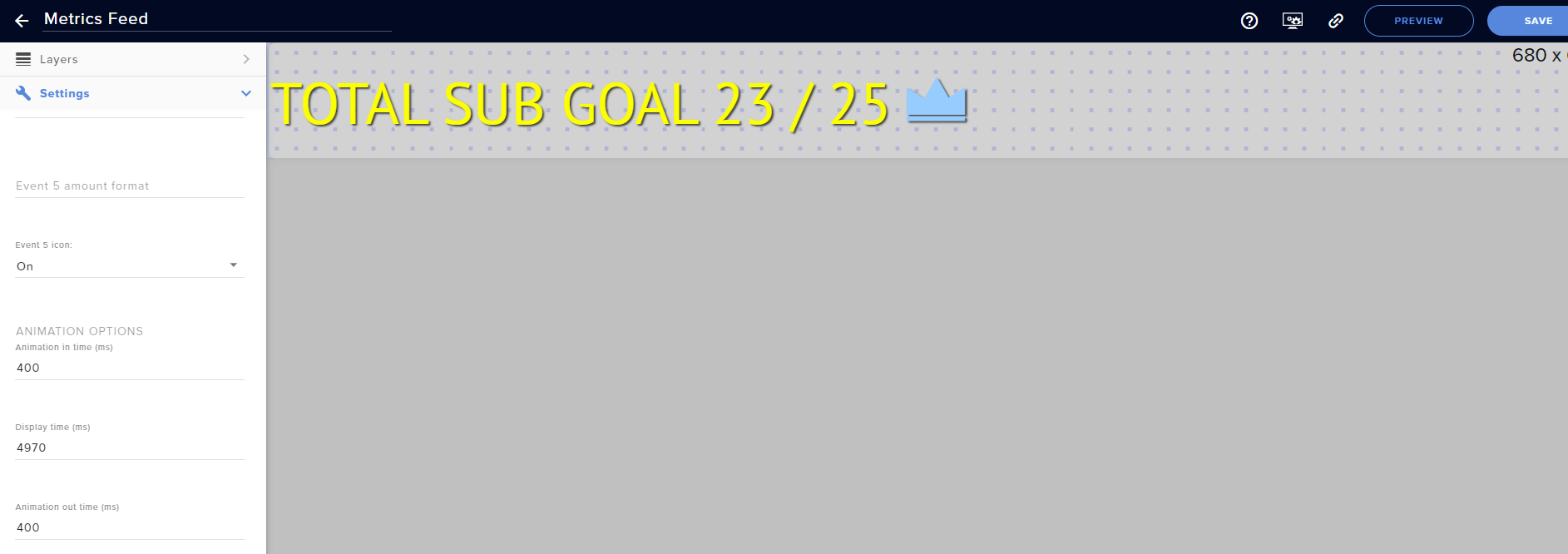
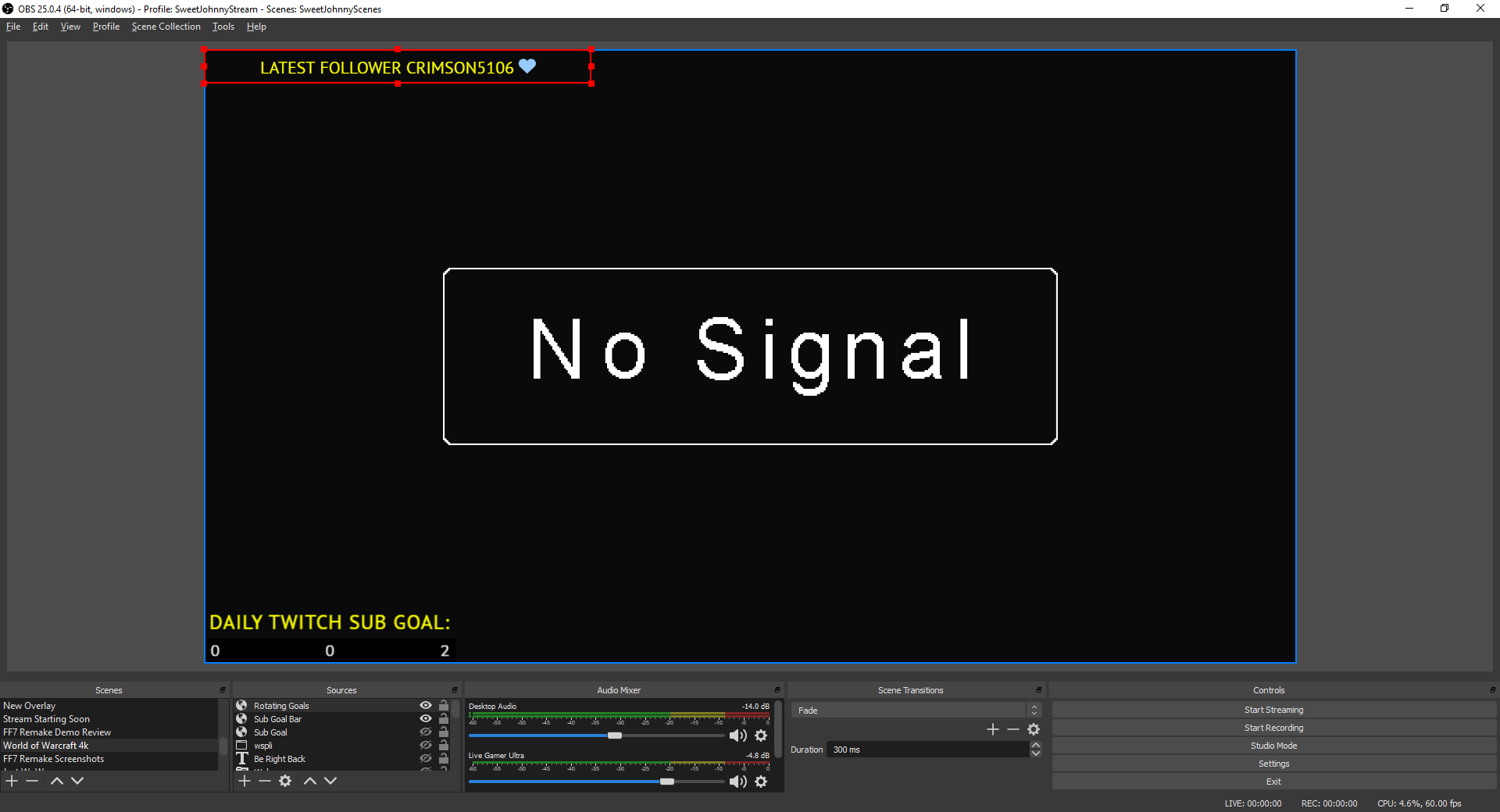
Anyway, I wanted to change the text to be left justified instead of centered. I did that, and it's looking great. The problem is that when I add the element to OBS via Browser Source, the text still appears centered in the bounding box. In the StreamElements editor, it's left justified as it should be. I'll attach a couple imgur screenshots to better illustrate what's happening.
Scene in SE: https://i.imgur.com/JsieXFk.png
Scene in OBS: https://i.imgur.com/1FYwBEf.png
My question is, how do I make it justify to the left in OBS, like it should be?
 wind abyss
I've refreshed the cache a million times in the OBS scene preferences, no change.
tender python
except i see two difference items?
wind abyss
oh its a rotating element. it displays 4 things.
wind abyss
NICE ok this is excellent. i redid the scroll and it's still working
thank you so so much! i was afraid this was going to be a bigger challenge.
tender python
🙂
formal laurel
ok now it works but there was no fault in order or something it just had to be done more then 5 times ez
tender python
sometimes it takes a bit
formal laurel
eh next question i seen on forum a post 2months ago latest one asking for ingame overlay of that chat ;D is that done until now
or in planing or is it there?
tender python
one screen chat?
formal laurel
i mean i can pin my twitch chat box thats ok for me i dont need a usable chat box ingame i have it alredy
yes
one screen chat visible for me
so an ingame overlay for me
tender python
not there yet.
formal laurel
okk
formal laurel
jay
i seen import options from obslive but only alerts and other 2 things dono
unknown ones
could i import that chat overlay
tender python
i know there's a filesize limitation
formal laurel
from obs labs
tender python
you could try restream's chat
if you put that on your screen and not use desktop capture
you're the only one to see it
@formal laurel
formal laurel
ok
i tryed the turn all black pop out and make it vanish like an greenscreen
but they deleted this option i have to find an program that can do the same
tender python
what?
the chat?
download restream's chat program @formal laurel
you can overlay it, make it transparant
and w/ game cap, you wont see it on stream
formal laurel
@tender python k can u send me link
also obslive has 2sec will resteam have 2sec so 4??
tender python
no
formal laurel
ok
tender python

Restream
Read & reply to messages from multiple streaming platforms on one screen. Get started today.
formal laurel
download or open browser??
tender python
download
formal laurel
k
tender python
run local, set transparant
or

reddit
716 votes and 128 comments so far on Reddit
cosmic copper
how can I see my viewer count on obs.live?
tender python
 formal laurel
@tender python atm i have it and i have it transparent and click trough mode but how to connect it i also did an browser source in obslive but the chat still says enable channels here if i click it i came to the connect hp i have made the account and connected twitch but i didnt paste anywhere the twitch token cause the restream has there other tokens alredy in not the twitch one
tender python
you'll always see browser on stream.
formal laurel
so have i to connect twitch aswell? and where to put the token in if yes
formal laurel
ok
so i only connect to twitch no obs
so where to put twitch token in cause there is alredy some token in it
XD
tender python
you using restream or the github app

 fierce rampart
its really towards the stream elements site for some reason i cant access it is there a way to fix that
?
formal laurel
hm i can use it
fierce rampart
If i go to the website its just a white page
formal laurel
try another browser
 timber thunder
Where did the media share dock go in obs?
formal laurel
i want see if its the browser or else
fierce rampart
im trying google chrome now
formal laurel
k
fierce rampart
it was my browers
formal laurel
hehe
formal laurel
did u play around on https block addons like tor
or some ip tunneling
nah maybe u just changed some port
or addon
fierce rampart
maybe an addon i was messing with?
formal laurel
maybe
tender python
sorry, tabbed out @formal laurel
formal laurel
yy
tender python
did you get it to work?
formal laurel
eh well i dono
the thing is
maybe this works
but first if i go online
cause i dont know the program maybe tell me
tender python
!browser
steel bladeBOT
Our Dashboard and Overlay editor are Chromium Optimized. We strongly recommend using Chrome. Opera GX and the new Microsoft Edge Chromium might work closest to Chrome as its also Chromium built. FireFox also works, but some things might look a bit different or not work. We do not recommend using Internet Explorer with our Dashboard as it does not support functions.
If the website doesn’t work on chrome, be sure none of your plugins are blocking our website or clear your cookies. You can try if the website works in a incognito tab.
tender python
@fierce rampart
formal laurel
i like opera
tender python
so, open your twitch page
 fickle palm
Does anyone know how to re-enable the NDI plug in after it somehow is removed when I installed the OBS.Live plug in?
tender python
type in chat
formal laurel
also and first of all the popout
tender python
yes
formal laurel
is it enaugh if i go twitch top right corner and press this switch ? to online
then write?
tender python
i dont get it
just go to your twitch page
chat there
if that shows up in the app
bingo
steel bladeBOT
Download the NDI installer here: https://github.com/Palakis/obs-ndi/releases/tag/4.8.0. If you're not seeing "obs-ndi" folder in C:\Program Files\obs-studio\data\obs-plugins, download the archive and extract and paste both folders (data and obs-plugins) into C:\Program Files\obs-studio.
formal laurel
 formal laurel
 formal laurel
the chat is transparent dont worry just background blackk
formal laurel
ye if i toggle it it goes to first screenshot
formal laurel
it was always
tender python
drop the app
try the other one i sent

GitHub
Twitch chat on top of windowed games for single monitor streamers - baffler/Transparent-Twitch-Chat-Overlay
fwiw, restream's not very intuitive and it's a shame
formal laurel
ok i do that tomorrow good night
tender python
im off too, dont break things people
 half copper
Hello guys new guy here. And I don’t even know if it’s the correct place to post this 😅. Regardless I love the media request feature. I do have an issue That the songs will play on top of each other. I narrowed it down to having the media widget in all my overlays. Is there a way to have it in all the overlays and only play in one of them? Or do I have to manually activate it every time? My best regards
tender python
try nesting the scene(s)
add widget to new scene
add that scene to where you want to use it.
 molten viper
where should i be for website help 😅
 kindred fox
@half copper check the box that says shutdown source when inactive in your overlay properties window of obs
 undone dome
is there a way to get the chat box to be in dark mode instead of the default white
 shy mountain
Check pinned message/video
undone dome
thanks you so much
 sterile rose
hello, i have been getting the "The Elgato Remote Control plugin is missing. Please reinstall Stream Deck, then try again." error. i have uninstalled and reinstalled both the streamdeck software as well as obs live
steel bladeBOT
@sterile rose - Open %appdata%\Elgato\StreamDeck\Plugins
- Delete the
com.streamelements.obslive.sdplugin folder
kindred fox
then re-install the StreamElements integration in the streamdeck software
sterile rose
ok, thank you
how do i go about reinstalling the streamdeck software? just download it again?
kindred fox
inside the streamdeck application, you will need to re-install the StreamElements integration
not re-install the streamdeck application
 steep yacht
so i have a problem iam trying to get my overlay url to go into obs.live but it shows a black screen and ive tried all i can. any help? if some one an help u can @ me Please and thank you
sterile rose
i was able to fix the issue using one of your help forums
 twilit sequoia
How do I add the Live chat to my screen while gaming?
frigid island
Hey guys - Does anyone have any ideas on how I could convert some .mov (with alpha layer) to .webm files so that I could use them on StreamElements?
I currently use Davinci Resolve for my video editing and it doesn't support webm so I'm scratching my head on what other video formats I could try...
ruby tinsel
i updated obs. maybe it'll work now. the overlay is still blurry. xD https://obsproject.com/logs/b2tOPzP_XGpoybnn
 charred oar
@frigid island using ffmpeg. ffmpeg -i input.mov -c:v libvpx-vp9 output.webm
frigid island
@charred oar this was just suggested to me on another forum. Giving it a shot. @charred oar is ffmpeg command line only?
charred oar
@frigid island yep. command line only... and use this line: ffmpeg -i input.mov -c:v libvpx-vp9 output.webm
frigid island
how should i install it @charred oar I'll use that line I understand that part 😄
should I install on command line or get a .exe?
charred oar
@frigid island it's time for Mr. Google helps you with that problem 🙂
frigid island
@charred oar haha of course - thats what I was doing when you messaged me. All good thank you.
I appreciate the help
charred oar
@frigid island you can test some webm with alpha channel over here https://simpl.info/videoalpha/ 😉
frigid island
@charred oar thank you for that - I'll check it out!
 cinder ridge
hello, how to add subscriber counter
 late furnace
@cinder ridge within the overlay hit the blue + then goto labels then subscribers then total & all time then subscriber count
 umbral oyster
good morning , I've an issue with black screen with OBS in Window Capture , I've AMD RADEON 580 rx and version 25.04 (recently changed from 25.08 to check if the version was the problem). In compatibility mode i choose both Win8 and 7 and I've ticked "Run as administrator" also I've unchecked the option Source Hardware Accelaration. Any tips about how to solve this would appreciate, thanks
steel bladeBOT
@umbral oyster For the best OBS support, please join their Official Discord @ discord.gg/obsproject
 latent laurel
I have strange question
 fathom cobalt
Hm?
latent laurel
fonts not changed between web browser streamelements and obs live
latent laurel
obslive showing like that
streamelemtns showing like that
something I missing?
no answers?
 balmy smelt
can anyone help me figure out why obs is making my game feel choppy? it happened after i got obslive, when i was using just obs it was fine but now my games are choppy
steel bladeBOT
@balmy smelt Please provide a log from your last stream. To do this, in OBS go to Help > Log Files > Upload Last Log File and paste the link to the log file here.
odd kraken
@latent laurel Have you restartd OBS after the installation of the font?
balmy smelt
on the stream it doesnt look choppy only on my screen
latent laurel
actually was updated 25 version and I just added new sources - browser and paste link
let me try restart obs
odd kraken
@balmy smelt Please provide a log link of a stream, so we can take a look at it.
latent laurel
oh great  thanks @odd kraken
balmy smelt
@odd kraken https://obsproject.com/logs/BEDSlYWWwduO09xr
odd kraken
rugged quail
the OBS Live update seems to be broken for me. I've done a fresh install of both OBS Studio and the plugin for obs live. the moment I load OBS Live it wants another update and refuses to do it - running as admin also. "error opening file for writing" this is happening on several files within the update.
balmy smelt
@odd kraken is that link for me?
rugged quail
(i've also attempted this several times on multiple hardrives to make sure it wasn't a HDD/SSD issue)
odd kraken
yes. @balmy smelt
latent laurel
i have another question about obs live with chat box
when I clicked any users and I wanted to whisper but nothing happen
balmy smelt
what should my base and output resolutions be because my counterstrike res is 1280x1024 @odd kraken
ruby tinsel
Hello again @odd kraken , i updated obs and restarted my pc. Maybe it's working now. Could you please take a look? (I still got the same issue with the blurry overlay) thx! https://obsproject.com/logs/WMOI91fPH6H5XZCa
odd kraken
https://obsproject.com/analyzer/?url=https%3A%2F%2Fobsproject.com%2Flogs%2FWMOI91fPH6H5XZCa
Again an empty log file. Please follow the steps in the log to get a clean log file.
@balmy smelt The base canvas is your mintor resolution and the output is your output resolution.
balmy smelt
@odd kraken my monitor res is 1920x1080 so what am i doing wrong lol
odd kraken
@balmy smelt Put that in your canvas setting.
balmy smelt
it is, but i think the multiple game captures is what was messing it up
@odd kraken thank you
ruby tinsel
@odd kraken D: https://obsproject.com/logs/lPxiA8T97Fq3RYoY
odd kraken
@ruby tinsel This log seems to have a recording, not a stream from what I see. But there seems to be no isues with the recording.
ruby tinsel
https://obsproject.com/logs/g-M0lwLEIXkVNh47 here's a stream. ^^
odd kraken
There seems to be no issues in that log: https://obsproject.com/analyzer/?url=https%3A%2F%2Fobsproject.com%2Flogs%2Fg-M0lwLEIXkVNh47
tender python
blurry overlay: trying to upscale graphics that's a lower resolution than your canvas resolution.
 dull charm
My Obs Live is asking me to update Obs Stuio ? i am Confused xD and will anything happen if i delete obs studio becouse i have no obs live and studio on my computer or is Live just an application for Studio  ?
?
ruby tinsel
@tender python how can i do this? D:
tender python
get higher resolution graphics
 olive temple
I've got what may be a simple question, I switched from Mixer to Twitch and when I try to start streaming from OBS it asks to connect through Mixer but not my Twitch account. Any pointers or feddback would be greatly appreciated
steel bladeBOT
@olive temple Streamelements on top of OBS -> Logout -> login
 grim mason
 amber laurel
the new update has flaws:
lilac ocean
I'll ask around for you where this error is coming from @amber laurel
amber laurel
Thanks
tender python
hit retry a few times
if not, obs-browser page is still running.
windows key + r (run window)
cmd, hit ctrl + shirt + enter
Type:
taskkill /im obs* /f hit enter.
@amber laurel
amber laurel
Will try later!
 cobalt venture
Hey there! I use to have my OBS live chat with black theme, but since fews update now i cant have it in black it stayed in white. Any siggestions?
odd kraken
Check pinned messages in this channel.
fringe lark
Is there a reason i Cannot "game capture". Nothing shows up when i point it too my game
lilac ocean
Some games after the new obs update refrained people to use game capture for some games, be sure to use a window capture
tender python
laptop?
 chrome birch
hi there sorry to be a bother but i just went to set up OBS for streaming with Twitch and went to use auto configuration wizard and everytime i go to use it i sign in with Twitch and it can't connect to OBS servers any idea why?
fringe lark
@tender python No im on desktop


 fringe lark
Nope it doesn't work
I dont know if its because of the update.... I am just at a complete lost
half copper
@kindred fox Thank you :)
tender python

steel bladeBOT
@fringe lark Please provide a log from your last stream. To do this, in OBS go to Help > Log Files > Upload Last Log File and paste the link to the log file here.
 azure barn
I am seeking help for audio issues
chrome birch
fringe lark
I haven't streamed yet on StreamElements. This will be my first time doing it
I used to use StreamLabs and moving over
azure barn
My game audio is not playing.. but on the avermedia obs (i never use its awful) the audio is working fine.. i didnt do the update.. not sure what happened?
azure barn
are you supposed to @ anyone to get help?
lilac ocean
no
steel bladeBOT
@azure barn Please ask your question in one helpdesk channel only. A support volunteer or StreamElements staff member will assist you as soon as they are available. Asking in multiple places will only result in confusion, not faster answers. Thank you for your patience.
lilac ocean
there is no output session, so we cant check on issues @fringe lark
steel bladeBOT
@fringe lark 1) Restart OBS
2) Start your stream/recording for about 30 seconds. Make sure you replicate any issues as best you can, which means having any games/apps open and captured, etc.
3) Stop your stream/recording.
4) Select Help > Log Files > Upload Current Log File. Copy the URL and paste the link here.
(Note: If you do not see an obsproject.com URL, you will need to update OBS Studio to version 22+)
 lunar quiver
hi guys, I got a problem
I installed the media request yesterday and everything worked fine, but today I can´t audio get muted on my side as soon as I click show on stream, my stream is still hearing the audio but I can´t.
I just can´t find the issue, i tried changing audio divices, but no change
thanks for your help
tender python
monitor audio and mute output
azure barn
@tender python still nothing
tender python
wasnt directed at you
lunar quiver
@tender python thx,but where do do I have to mute the output?
azure barn
tender python
again, not you @azure barn
azure barn
sorry lol
lunar quiver
😄 thank you, do I have make the Track selection too like you?
@tender python
tender python
@lunar quiver no, that's just for multiple audio tracks, track one is streamaudio by default.
@azure barn check default audio output in windows and obs
lunar quiver
all right thx aigain
azure barn
@tender python appreciate you trying to help.. not sure what you mean by check in windows?
azure barn
sorry, all i can select is my speakers this is no other option in the drop down
the audio is fine everywhere.. even on the avermediaObs.. its just not coming through to my headphones, nor the stream with obslive
tender python
so if audio goes to the capture card
im sure it's not going to your main audio
and thus you're not hearing it
azure barn
and in OBSlive i would change this how
i tried adding the capture card as an audio source
fringe lark
So uhmmmm any update on the game capture black screen??
tender python
@azure barn does your audio remoteplay play through your headset at all
or windows, in general
azure barn
yes i have audio in my headset for everything else
tender python
@fringe lark ```Info No Output Session
Your log contains no recording or streaming session. Results of this log analysis are limited. Please post a link to a clean log file.
To make a clean log file, please follow these steps:
- Restart OBS.
- Start your stream/recording for about 30 seconds. Make sure you replicate any issues as best you can, which means having any games/apps open and captured, etc.
- Stop your stream/recording.
- Select Help > Log Files > Upload Current Log File. Send that link via this troubleshooting tool or whichever support chat you are using.```
 daring belfry
hi, does anyone know why i cannot choose in the emoteexplosion from the kappergan widget which emotes should be taken? it simply doesnt work anymore.
tender python
in OBS, @azure barn change output from default to speakers
azure barn
done, nothing 😦
tender python
windows audio = default headset.
you hear game audio, but obs doesnt capture on default audio, correct?
steel bladeBOT
@azure barn Please provide a log from your last stream. To do this, in OBS go to Help > Log Files > Upload Last Log File and paste the link to the log file here.
azure barn
tender python
run as admin
azure barn
@tender python no sir, i am not hearing the audio in my headset and it is not capturing with OBS
tender python

so you are not hearing the audio, in windows at all, in your headset, which is your default audio
azure barn
yes, but i am hearing it if you use the avermedia to stream.. i also hear audio from everything else in windows.. just do not hear anything when using OBS
azure barn
tender python
1: dont stream on wifi
2: dropping frames.
those two issues are related to each other
as for black screen
neither display cap, window or game cap work, correct, @fringe lark ?
 mint rampart
yo jaynius
 wary dew
@lyric kite untick the box that says bandwith testing
tender python
@mint rampart please don't do that, drop your question here
mint rampart
can i DM you @tender python ?
tender python
no.,
mint rampart
oh
okay
i think im just doing something dumb
but in my obg i can hear
obs*
the alert
but it dont show
tender python
@fringe lark that's intriguing as hell, it worked before  ?
?
mint rampart
if i let only the alert it keeps only playing the sound
tender python
!accel
steel bladeBOT
OBS -> settings -> advanced -> scroll down -> enable/disable hardware accel.
https://i.imgur.com/ggMe9ZE.png
tender python
for shits and giggles, can you do that as well @fringe lark ?
fringe lark
This will be the first time i will be trying to connect the game capture because im moving from StreamLabs to Stream Elements
fringe lark
I tried what the bot did and it didnt work
azure barn
sorry for being unclear. so rite now im actually watching something on youtube, hear everything fine. If i open the avermedia program to stream, the audio from gaming console comes right on, hear it perfectly.. when i open obs.. the audio from the console is not coming through to my headset/and not being heard if i throw a stream up
daring belfry
Hrm... is there anyway to fix my kappagen-widget? Or is it broken for everyone currently? I cannot choose my emoteexplosions and they wont trigger.
dull charm
My Obs Live is asking me to update Obs Stuio ? i am Confused xD and will anything happen if i delete obs studio becouse i have no obs live and studio on my computer or is Live just an application for Studio ?
tender python
@azure barn right. Add the capture device to OBS and as an audio source.
fringe lark
Any update Jay
steel bladeBOT
@dull charm OBS.Live is a Plugin for OBS created by StreamElements. You can download OBS.Live here: https://streamelements.com/obslive
Please make sure you have the latest version of OBS installed, Current Version: 25.0.4. You can install OBS here: https://obsproject.com/
tender python
@fringe lark im thinking
 lavish geyser
can get help keep getting error cant make live video on page it was working done update know it not
tender python
i mean, it never hurts to, but im checking in with the others, give us a bit @fringe lark
fringe lark
Okay np,,, thank you
azure barn
@tender python when i go to add audio output capture. only gives me the option to select my headphones
tender python
in obs, rightclick video capture device (the avermedia device), properties
azure barn
lavish geyser
can anyone help me keep getting error when trying go live im due go live in 1 hour need sort it
wary dew
maybe post the error? 😛
tender python
you're playing now right, and no audio is coming through @azure barn
azure barn
correct
tender python
you did this, and this gave you no audio, right?
scroll down in the properties window of the cap card.
what's the audio device option set to
azure barn
tried all 3 options here and nothing worked
that was it... the audio device option... thankyou for being patient @tender python
tender python
🙂
azure barn
if you had a fedora upside down, id throw a tip in there.. just saying
tender python
capcards be like that
@fringe lark can you add a new scene, add a display cap source and set it up on the monitor of choice and see if that works, if not, repeat the log method (30 second stream, etc)
fringe lark
I did it and all it does for me is Open an infinite amount of displays....
tender python
So, that works.
fringe lark
No lol...
tender python
Yes.
because you're capping the display, which caps the display, which caps the display, which caps the display, .... etc.
fringe lark
If i uninstall OBS would all my overlays and alerts/widgets remain?
fringe lark
Yes... It continues capping the display
tender python
infinite loop.
so, nothing wrong there.
You threw me for a loop by saying display cap disn't work..
 plain sonnet
uninstalling will solve nothing
tender python
as in: i understood that was also black 😄
fringe lark
Well the displays do that but whenever i try the game capture, the game doesn't load into the capture
tender python
can you set it up that way and produce a log?
plain sonnet
what is euroscorpe ?
is it an actual game or is it an app?
fringe lark
Sure....
plain sonnet
note, game and app arent the same thing
plain sonnet
you are pointing game capture to something called euroscope, not what you called it
tender python
I understand his logic, @plain sonnet - named it to what he wants to cap -
So, if it is what i think it is
plain sonnet
but the capture wasnt renamed... oh well
tender python
it's a VarSim ?
plain sonnet
use either window or display capture
fringe lark
Yes its a sim