#helpdesk-selive
1 messages · Page 110 of 1
 shy mountain
 woeful coyote
yes I did that and it will not let me close it
shy mountain
or you just get the installer from here: https://obs.live

OBS.Live | Open Broadcaster Software Streaming Knowledge Base
OBS (open broadcaster software) knowledge base for live streaming. Find articles and videos about streaming with OBS.
restart PC
and use the installer
woeful coyote
I have uninstalled both obs and streamelements twice already and it still asked me to update after install
woeful coyote
ok will try again
shy mountain
if our installer gives you "cannot modify X file"
just restart your PC
and run the installer
woeful coyote
Thanks that helped, what it was trying to do is update in the wrong order lol
 radiant ore
 normal carbon
Hi! the activity feed is not showing the account that I´m currently using, it´s using another one, how can I change it? (I´ve already changed the account in the settings in ObsLive)
 keen needle
Hello I need help with the OBS because I streamed yesterday but many said my game is too loud and I don't sound good just idk why and other things write me private thank you in advance
and I speak German 🙂
 kindred fox
@keen needle #🇩🇪︱deutsch
 rugged quail
Don't really need help, a little confused though. For some reason it just pulled up a window telling me that OBS needed to update, and showed the changelogs. I cliked update, then gave me a prompt telling me to click yes or no, im pretty sure i clicked no, (by accident) and OBS is saying there is no update needed.
 fierce light
how do i change my stream name?
 crisp marten
Is there a way to stop the Media Request dock from asking me to take a tour?
 velvet aurora
Hello, I need help someone knows how to create the buttons for Ad ? I guess is a docas ?
 edgy ibex
Well @velvet aurora If you have the streamdeck in the software you can add to run a ad.
 astral grail
how come i can only have my stream information on my original profile for obs.live?
 prisma torrent
quick question. Since I don't have any extra monitors to hook my laptop up to I've been using my actual TV by connecting the two by an HDMI cable. I noticed last night that, for whatever reason, when I had my laptop connected to my TV by HDMI cable it severely impacted the FPS, frames missed and skipped frames.
anyone know if there's a reason for that or if I'm completely wrong and don't know what I'm talking about and it was something else entirely?
 celest pike
So I just tried updating and everything just shit the bed
now OBSlive wont uninstall

 sinful rover
hello im completely new to the se obs live game and added some custom alert sounds and edited the old alert i got. so when i try the alert onSE it works but in the stream wont come any alert. can someone help me? thanks
rugged quail
Show details so you can have details about issue @celest pike
 brittle ermine
i get a follower alert when some one refollows my channel, this is only once per stream
@sinful rover did you add it per browser source?
sinful rover
yes @brittle ermine
brittle ermine
did you saved it?
sinful rover
yes i clickes save several times
 fathom cobalt
@celest pike is this downloaded from website?
 rugged quail
Ran as admin ?
celest pike
I updated OBS and OBS live qnd when i tried updating OBS live i got an error now it wont work, and it wont uninstall so i can re-install
fathom cobalt
@celest pike You can provide screenshot of your task manager?
brittle ermine
@sinful rover are those "real" alert like if a real person follows you? or are those the test alerts from the website?
sinful rover
those are test alerts, but it appeared on my overlay for "last follower" on stream but the alert itself doesnt appears...
likle "Kossi just followed"
celest pike
I redownloaded and re-wrote the files. its working now
this time the updats ran flawlessly
 timid glade
Im having an encoder error and everything else crashs like OBS (games, google, discord)
 wispy tinsel
quick question, can I install the obs.live on the new obs 25.0 version?
 open shore
I had the same issue and ended up doing a clean install of both obs and obs.live
timid glade
thx
 eternal oxide
So i am trying to set up media request on obs.live, I skipped the tour back when i first downloaded and now i can't get the widget/overlay on my obs setup, Where can i find the download for the overlay or how can i get it on there?
kindred fox
add the widget in the overlay editor
then inside OBS.Live you can add the Media Request dock by clicking StreamElements in the Menu >> Media Request
eternal oxide
awesome, thank you so much
 small crane
Hello. I'm trying to update obs.live but it keeps crashing. I got to update it before the crash, but when I did, this message pops up.
 mellow crater
All my drivers are up to date?
eternal oxide
Hi I'm back, I got media request set up and everything on obs now but when I click "Show on stream" the audio is playing twice almost like an echo. I can't figure out where the issue is as it works fine until I press "show on stream" any tips?
mellow crater
@eternal oxide your not hearing it from obslive and the actual stream are you?
eternal oxide
No it's repeating twice through obs
mellow crater
hmm,, not sure
 static shadow
so streamelements won't open anymore in edge. It just pulls up a blank page, and My other browsers are already linked to other family member's streams
rugged quail
@static shadow Please use Chrome as the website is more optimised for Chromium browsers such as Brave and Chrome
static shadow
I just said it's linked to someone else
mellow crater
anyone know how to fix this?? https://discordapp.com/channels/141203863863558144/494513233416421386/690613403177320551
kindred fox
@static shadow you can sign out and sign back in using a different browser
@mellow crater reinstall your gpu drivers over the top
mellow crater
ok
@eternal oxide im getting the same issue now 😐
wait
do you have the overlay editor open @eternal oxide - if so close it
eternal oxide
That's what my thought was too but i couldn't find it open anywhere, i closed the app multiple times and reopened it and it still kept happening too
mellow crater
hmmmm....
kindred fox
Make sure your browser sources are all set to “shut down when inactive”
eternal oxide
I figured it out! If you click "Control audio via obs" it fixes it. It creates a seperate audio track that seems to fix the echo.
kindred fox
That means your overlays are active in other scenes
wispy tinsel
@kindred fox sorry for the tag but only got a quick question.
Do you know if obs.live runs on the new 25.0 obs?
 heavy oak
still having issues with this countdown widget, already refreshed it and remade it but the font still isn't showing correctly
kindred fox
I will, but it isn’t recommended yet
kindred fox
The version of OBS.Live on OBS Studio 24 is stable
heavy oak
yeah that's the obvious question but yes i did
the screenshot i have is from the link of the source
wispy tinsel
obvious, but easy to forget x)
heavy oak
doesn't hurt to make sure right
wispy tinsel
what font is it?
heavy oak
lemon
i even thought it had to be installed on my pc and not only already selectable from the editor
but turns out i had it installed too
wispy tinsel
so.. for me, the image from your obs is the font Lemon in my editor
kindred fox
enable custom font
heavy oak
did, saved and refreshed but still the same issue
wispy tinsel
^that was my next suggestion as well.
https://gyazo.com/e7e28c4f4dfb8385b368d17cfa3b9739
 heavy oak
^that was my next suggestion as well.
https://gyazo.com/e7e28c4f4dfb8385b368d17cfa3b9739
@wispy tinsel ok this is weird
how do i check which font is this then lmao
that's an interesting problem
ok it's a bigger issue with me
because i changed the font and nothing matches
wispy tinsel
so the font won't change?
heavy oak
it changes, but on obs it changes to yet again a different font
some fonts i'm trying here work sometimes, but not all the time too
if i refresh the source it loses track of what i choose
and sometimes without refreshing that same font doesn't work
so i don't know the pattern here
wispy tinsel
hm.. I scrolled thru all google font, could not find anyone similar to the one you want :/
wispy tinsel
@kindred fox like my lemon or his?
kindred fox
hoovR
heavy oak
but why is the name different to begin with
kindred fox
my lemon looks fat and ugly like the one in the screenshot, it looks nothing like the font you're trying to use
heavy oak
yeah i imagined that was the case when @wispy tinsel told the same thing
heavy oak
yeah i don't think that's an issue that we can resolve here
it's something for the dev team
and i wouldn't know what to report to them since i just now know that's a thing
wispy tinsel
is this is the font you want?
https://www.dafont.com/lemon.font?text=12345678900
heavy oak
yup, exactly this one
that's what shows up for me whenever i choose lemon on the editor
wispy tinsel
ok, I will se if I can repliucate
so, installing the font on my pc and restarting my browser I got the same font in the editor
heavy oak
hm, i did that before but it didn't work
wispy tinsel
still have the same old font in obs...
Looking into if you can add custom css to change it
 nimble wharf
Noob question here but in OBS.live how do i get the mixer activity feed up? I know wherte it should be but i dont see it as an option under view<docs
wispy tinsel
have you checked under the tab StreamElements?
kindred fox
@nimble wharf click streamelements in the menu >> log out >> log in with mixer
wispy tinsel
@heavy oak I'm unable to find a work around.. you will have to change font to one on https://fonts.google.com/ I believe they are supported 🙂
 dawn olive
not sure if this is the right tab for this, but my "in game" overlay isn't working? everything else is, but not that one. I've refreshed the cache, refreshed the page in OBS, redone the link in OBS, still nothing
 azure sundial
anyone know where to find the url for a browser source for my chat to appear in obs?
 sour wasp
Hello, for some reason when I stream and use media request to play something and click "show on stream" I get a duplicate of the sound being played from the media request.
 late furnace
do you have the browser open while obs is open?
sour wasp
@late furnace No it was not open while this occured
late furnace
prolly have to shut down the source when not visible
late furnace
we need to shut down the source when not visible or both will play
sour wasp
Sounds good
late furnace
try this
Make sure to ☑️ “Shutdown source when not visible” for all browser sources (all OBS scenes). If using studio mode, uncheck “Swap Preview/Output scenes After Transitioning.” Also keep in mind that sound can play from any overlay loaded in the browser (editor or launched). https://i.imgur.com/FegZJQS.png https://i.imgur.com/yY0wcFl.png

 mellow crater
https://discordapp.com/channels/141203863863558144/494513233416421386/690613403177320551
still having the same issue after reinstalling my driver...
sour wasp
@late furnace Works perfectly, thank you!
late furnace
 You're Welcome
 light anchor
Howdy meowdy again :)
Recurring issue with yet another update, same error returned. I'll manually kill the process, but this is the second hotfix that this happens with again. Just an FYI
rugged quail
Hello Guys, have a little problem, StreamElements obs not capturing game but Streamlabs is.
fathom cobalt
@rugged quail obs is runned as admin?
rugged quail
correct
fathom cobalt
Laptop?
rugged quail
Desktop.
Now its not working for streamlabs aswell.
Just restarted my computer btw
 steep knot
hi. i am having some issues with obs live. when i start my stream it loads it into mixer and not twitch. every time i switch it to twitch the settings goes back to how it was and not sure why. i did a complete reinstall and still not working. any ideas what causing this?
 steel bladeBOT
@steep knot Streamelements on top of OBS -> Logout -> login
kindred fox
What seems to be the issue
 coarse patio
but when i re watch the clip its choppy
i checked all my recording settings and everything should be ok
but i cant figure it out
kindred fox
Are you recording to an ssd or a hard drive?
kindred fox
Where are your recordings saved? The ssd or the hdd?
And can you screenshot your recording settings in obs?
kindred fox
Nope. Screenshots are fine
steel bladeBOT
@coarse patio Please provide a proper screenshot with the issue visible. If not sure how to take a screenshot, you can check here: https://www.take-a-screenshot.org/
coarse patio
should that be off during streaming as well
coarse patio
and look ahead should stay on
coarse patio
its still doing it
i dont know what to do at this point
i cant find any other issues
rugged quail
Hey Guys, So i got the game display to work on stream labs, but on steamelements, it shows the box its red border, but nothing inside. its working for streamlabs but not this.
 acoustic bloom
w
 dull flame
hey guys, i'm a hll of a noob on this stuff, so is there any way that the music on media request is listenable on the stream and not for me?
 lost ginkgo
@proper swift Custom bot name requirements
- StreamElements bot modded and in chat
- Active overlay with alerts
- StreamElements tipping page in the panels below the stream (!panels)
- OBS.Live or Ground Control open
- Create a twitch account for the name you want to use or run the bot under your own name
- Custom bot name doesn't work on Mac
@steel blade I have done these, but going to Ground Control -> Settings there is nothing there except Keybindings/Other
steel bladeBOT
@lost ginkgo Due to a recent change from Twitch API, these features are affected by the change:
- Ground Control does not have Custom Bot Name
- Subscriber count will count the Channel and any other permanent sub you may have (+1 or +2 or +3 on top).
We are working on fixing both issues, but there is no ETA.
OBS.Live still has Custom Bot name working fine in it.
lost ginkgo
Thank you
 shrewd berry
My obs streamelements keeps crashing and will not stay open.. this has been for over 2 weeks. How can we fix this
edgy ibex
@shrewd berry Uninstall and reinstalll
shrewd berry
done it 5 times
shrewd berry
windows 10
edgy ibex
How is your internet?
edgy ibex
Well I recommend you Uninstall OBS and OBS.Live
shrewd berry
done it all.. also visited every youtube video and nothing
shrewd berry
how do i get help from streamelements
edgy ibex
Via email or sometimes they are in chat
shrewd berry
there is no email that I can find
edgy ibex
Let me find it
 north ether
whoever said that I had to open my chat feeds for my chatbox to work you can tell me how to do it
edgy ibex
@shrewd berry https://streamelements.com/contact

StreamElements
StreamElements is the leading platform for live streamers on Twitch and Youtube. StreamElements includes Overlay management, ChatBot, Tipping, Alerts & Loyalty
shrewd berry
thanks @edgy ibex
 wary dew
it's weekend now
edgy ibex
True
wary dew
usually is faster 😛
edgy ibex
Guess what @wary dew
wary dew
but it's usually even faster by asking here
north ether
@wary dew
my cat box fornite I don't understand you tell me how we do
someone can help me please
edgy ibex
I do not understand what you are asking
wary dew
@north ether are you logged in to the platform of your choice in OBS?
 silk cipher
can someone help me with my overlays not showing up please
wary dew
did you update to OBS 25?
north ether
yes
silk cipher
i updated both
wary dew
that could be an issue
edgy ibex
OBS 26 is scuff
north ether
i connect twitch
edgy ibex
25
wary dew
wtf are you talking about? there is no OBS 26
edgy ibex
I do not knoww
silk cipher
then dont type in here
@kindred fox are you available?
why are the browser sources not working?!
 prisma quail
So I just switched over to stream elements from streamlabs. I am using obs.live and it keeps dropping to a 0 bitrate every few minutes. I am using the exact same settings as I did with streamlabs
silk cipher
they are not the same program so not the same settings
prisma quail
I used the auto-configuration tool and it gave me the same issue
silk cipher
<@&382267076632379392>
can we get some help please?
im creating sources but they are not showing up on the list.
and overlays are not showing
 honest echo
@silk cipher MAC or Windows?
honest echo
i see it as a "browser"
honest echo
i see
silk cipher
and the browser sources i have for my overlay are not showing up completely
honest echo
@silk cipher i have it on this version the OBS Studio
and no problems with the browser sources
my obs.live is 20.3.8.603 have you try to close it and open it again?
silk cipher
do you have a link for the update?
ive been closing it and opening it
that is how i got my sources to finally show up that i was adding
im going to obs discord...
prisma quail
I think my issue is my internet now, I have never had issues before with it but all of a sudden.
kindred fox
Yeah ISPs are struggling everywhere
prisma quail
due to everyone being home I'm assuming
kindred fox
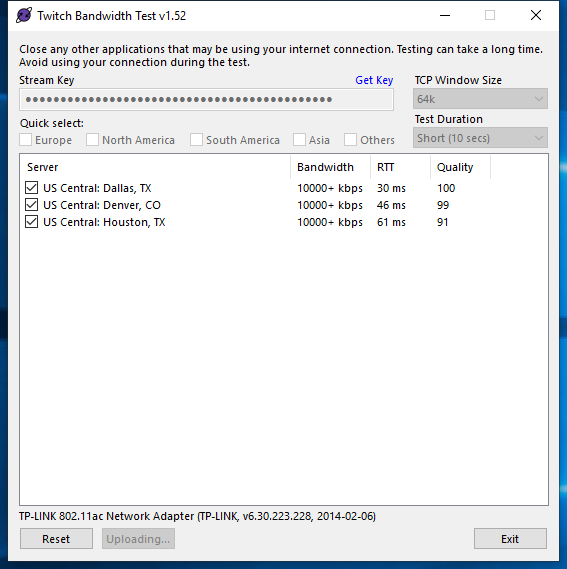
The best way to test your connection to twitch is using the twitch tool
Test your upload bandwidth and connection quality to Twitch
prisma quail
I am switching to fiber monday though, think that will help since it's a direct line?
kindred fox
Should
prisma quail
 silk cipher
@kindred fox do you know why SE overlays are not working?
prisma quail
Here is the test
 jade warren
Hello Guys! How do i add animated overlay from streamelements to my OBS? HELP PLS ❤️
steel bladeBOT
@jade warren To add your overlays to OBS, add a new browser source in your scene. Paste your overlay URL in the browser source properties, set the dimensions to 1920x1080 (unless you changed them on the website), and ☑ “Shutdown source when not visible” https://youtu.be/KDvLynUqXI4
silk cipher
overlay browers arent working,....
jade warren
same....
prisma quail
Mine works
silk cipher
yups
jade warren
nope
prisma quail
The honestly I would just use static for now until it can be fixed
honest echo
@silk cipher weird i have animated ones and work fine
silk cipher
prisma quail
But I'm not support so don't listen to me lol
silk cipher
this works but not in obs
honest echo
maybe check the dimenstions
steel bladeBOT
@silk cipher OBS -> settings -> advanced -> scroll down -> enable/disable hardware accel.
https://i.imgur.com/ggMe9ZE.png
 silk cipher
honest echo
silk cipher
honest echo
Yeah thath littlebird
prisma quail
change it to 1920 by 1080
honest echo
please check that put 1920 and 1080
steel bladeBOT
@silk cipher To add your overlays to OBS, add a new browser source in your scene. Paste your overlay URL in the browser source properties, set the dimensions to 1920x1080 (unless you changed them on the website), and ☑ “Shutdown source when not visible” https://youtu.be/KDvLynUqXI4
silk cipher
shut up bot
wary dew
the bot does not respond out of itself 😛
prisma quail
Just put 1920 x 1080 just to see what it does
silk cipher
i never had issues with my overlays. everytime there is an update it fucks my shit up and have to redo everything
honest echo
@silk cipher we are just trying to help, i understand that maybe you could fell fustrated, but try to stay calm
and try to do what we said
 tender python
@wary dew give it more bnankies
 forest grove
My OBS keeps saying it's missing a "Stream URL" in the settings, but there isn't even an option to add one?
kindred fox
@forest grove obs settings -> stream > disconnect > connect
forest grove
I've already tried disconnecting/reconnecting my Twitch about twice now but still nothing
kindred fox
Inside obs settings?
forest grove
Yeah
kindred fox
Screenshot it for me
forest grove
This here
kindred fox
Yep dats it
steel bladeBOT
@forest grove If you are not seeing the OBS Twitch integrations and have OBS.Live installed, please follow these steps:
- Make sure you are on the latest and greatest version of OBS.Live
- exit OBS (make sure OBS is not running)
- delete %appdata%\obs-studio\plugin_config\obs-browser\obs_profile_cookies
- start OBS.Live
- Settings -> Stream -> disconnect -> connect
kindred fox
Do this ^^^
Then try again
@silk cipher no idea why overlays aren’t loading. What version of obs do you have running?
forest grove
That didn't work
kindred fox
Which version of obs are you running?
forest grove
25.0.1
kindred fox
Asking internally
forest grove
This is all I could find in the logs if it helps
kindred fox
Can you click streamelements in the menu bar, log out, then disconnect via obs settings, then reconnect via obs, then log in via streamelements menu and test again?
 kindred fox
👍
rugged quail
So my stream elements doesnt want to capture my desktop audio all of a sudden any ideas what could be wrong ?
 cloud niche
Why is this happening?
It's happening to multiple files in the download. I even restarted my PC and it's still doing it... This is the second time some "update" goes wrong.
cloud niche
Is there anyone available to help? Or is this being worked on? The entire add-on is not showing up on OBS studio now.
 sacred tangle
having the same problem
kindred fox
Updated to 25.0.1?
 dusky copper
my preview panel broke with 25.0.1
cloud niche
Yes, OBS studio is updated to 25.0.1.
When I try to launch SE Obs.live, it prompts me to update that, and then I get a bunch of error messages in the download.
dusky copper
i'm seeing a lot of: signal_handler_connect: signal 'streamelements_update_settings' not found , in my logs
kindred fox
Obs.live is not currently updated for 25.0.1 yet. You should be able to download obs.live from streamelements.com/obslive and only install OBS.Live plug-in, not the OBS Studio part
It should work right now in 25.0.1 but ymmv
cloud niche
Did that just now, still getting the same errors.
sacred tangle
same
 cosmic trench
I'm trying to test out media share and the media request panel claims that there is no media request widget in the overlay even though there is
kindred fox
Whelp. Next thing would be to uninstall obs.live, uninstall obs studio, then reinstall from https://streamelements.com/obslive
StreamElements
StreamElements is the leading platform for live streamers on Twitch and Youtube. StreamElements includes Overlay management, ChatBot, Tipping, Alerts & Loyalty
And run the full installer with obs studio which should revert it to 24.0.3
cosmic trench
You're talking to Gumpita not me right
cloud niche
This pops up when I try to uninstall.
dusky copper
@kindred fox I tried reinstalling just the plugin, unfortunately my preview panel is still broken
which is odd, because the fullscreen projector preview works fine
kindred fox
@cloud niche reboot and run uninstaller again
sacred tangle
same problem
kindred fox
@cosmic trench reload your overlay
cosmic trench
How do I do that?
kindred fox
@sacred tangle same thing, restart, uninstall obs.live then obs studio
sacred tangle
yeah thats what i tried
kindred fox
@cosmic trench double-click your browser source in the source list >> scroll down and click refresh cache
cloud niche
@kindred fox Same message pops up, won't let me uninstall.
 high ferry
OBS doesent work it wont capture my youtube window and also there isnt a button to auto start recording. Can some1 help me?
@Orsona
@kindred fox
dusky copper
anything I can do about this:
signal_handler_connect: signal 'streamelements_update_settings' not found
cosmic trench
@kindred fox thank you
kindred fox
I'm going to ask internally about the errors you are seeing
high ferry
orsuna can you help me plox 😦
it wont capture my youtube window and also is there a button I can press to auto start and stop recording?
cloud niche
Idk how, but it fixed itself. I no longer get the pop up to update OBS.Live when I launch it, and the add-on is back lol What a roller coaster.
Thank you @kindred fox, I appreciate it. ❤️
high ferry
Why you ignore me :/
kindred fox
there is not a button you can push unless you have a streamdeck. The only option is to create a "hotkey" which starts/stops recording. With regards to the window capture, are you using Window Capture and have hardware acceleration disabled in your browser?
high ferry
hardware acceleration?
sacred tangle
@cloud niche it just started working randomly?
kindred fox
use Google Chrome, go to settings > scroll down and click "Advanced" >> scroll down and disable hardware acceleration
cloud niche
Yep. I tried uninstalling the add-on multiple times, wouldn't work. I tried downloading it again anyway, and this time it worked just fine.
@sacred tangle
Very strange.
sacred tangle
the app or update?
cloud niche
And this is with OBS studio 25.0.1
I didn't do the update. I did the download directly from streamelements.com/obslive
high ferry
How do I create a hotkey
EEEEEEEEE
@kindred fox sry for pinging so much 😦
nvm I figured it out
 warped sequoia
anyone else's overlays not loading?
high ferry
OBS is stupid, I did the recording and stopped, and went to see the recordings, but it didnt show anything and didnt even record it. Seriously what the crap. <@&382267076632379392>
@kindred fox
SOMEONE HELP ME DANG IT -__
 regal matrix
@warped sequoia yup. it was working fine for me earlier... and now; nothing
tender python
calm yourself
it's 3.47 am for some.
IF it recorded, it's in the logs
if it's not, check the folder location in settings.
regal matrix
@warped sequoia - mine's back up now. maybe check to see if yours is working too?
crisp marten
Is there a way to stop the Media Request dock from asking me to take a tour?
honest echo
what exactly happen? @hearty idol
 hearty idol
Alright, so I was going live, and none of my chat popped up which was odd. I also could not see any of my alerts.
I know it was live I checked on youtube.
Its asking me to sign in to Twitch and all kind of stuff.
I also delted the chat section and dont know how to get that back.
honest echo
ok, try this . StreamElements menu > Log out, and then log back in
 tired mountain
Looking for some help here on the most recent update... OBS continues to crash after update. Non of my "Source" overlays will show up.
hearty idol
Alright let me try,.
honest echo
@tired mountain uninstall obs and then install again please
tired mountain
i will give it a shot.. @honest echo
honest echo
Dont say that 😛
hearty idol
lol, have a good one man.
 fierce field
So, at one point I had an overlay set up with OBS Live, but it's gone now and I don't know how to get it back.
tired mountain
@honest echo apon doing the uninstall from "Add remove programs" i got this window..
@honest echo
tried again, i got htis
honest echo
@fierce field check this : https://streamelements.com/dashboard/overlays
StreamElements
The Ultimate All in One Platform for Streamers
tired mountain
@honest echo tried 3 times to uninstall, each time says "aborted"
honest echo
@tired mountain on obs click on remove obs.live and the unistall obs
tired mountain
@honest echo Stream elements is no longer listed in on the OBS platform... should i try to uninstall obs seperate from OBS live?
OBS studio..
 vale dove
hey, so i have an issue with obs, it wont let me stream to twitch despite that being my only connected account, and whenever i press "start streaming" it automatically comes up with the youtube details and i just wanna stream to twitch 😢
vale dove
ill try
honest echo
Yes yeahtoast
 slender lintel
I try to start streaming and it tells me that my output has failed, although all of my drivers are up to date I believe
It also says that My twitch authentication has failed/it can't get token from the remote?
vale dove
it worked! thanks so much 🙂
tired mountain
NP @vale dove
honest echo
@slender lintel logout, and log back in
tired mountain
@honest echo No luck. i Uninstalled OBS, then proceeded to try to uninstall OBS Live. and im back to the same error from my image above
slender lintel
Ok the token is fixed, but it still states my output failed?
nevermind, the token error is back up
tired mountain
@honest echo OBS had been completely uninstalled from my PC. now im just left with stream elements OBS live, but it fails to uninstall
crisp marten
@honest echo Is there a way to stop the Media Request dock from asking me to take a tour?
honest echo
@tired mountain try to install it anyway
tired mountain
@honest echo i'll give it a shot
slender lintel
I have no clue how to fix the output failer, and logging out and back in, I placed in my token, verified it, and then it stated that there is still failure to authenticate
failure*
tired mountain
@slender lintel what is your output?
@honest echo seems to have got my overlay back upp. will test for stability
slender lintel
just my speakers
tired mountain
are you trying to output sound to speakers? within OBS? @slender lintel
honest echo
maybe check this
slender lintel
It just tells me my output failed, I don't honestly know where to look to fix the problem
tired mountain
not to overstep the team here.. Are you just trying to get audio to work to your speakers @slender lintel ?
kindred fox
@slender lintel can you do me a favor and click streamelements > log out > then go into obs settings >> stream > disconnect >> connect >> then click streamelements >> log in?
In that order?
crisp marten
@kindred fox Is there a way to stop the Media Request dock from asking me to take a tour?
crisp marten
You press it. It takes you into it. And then when you close OBS and reopen it. Does the same.
kindred fox
@crisp marten can you right-click the shortcut and select Run as Administrator, then take the tour, close OBS.Live, then re-launch as Administrator and see if it works?
crisp marten
I'll do that when I get back.
shy mountain
Make sure you actually finish the tour
kindred fox

crisp marten
How do I actually finish it? Seeing as all it does is take me into the player. There is nothing else. I've even used it.
 shrewd geyser
having desktop audio problems on obslive. after the update my desktop audio stop's working i get no sound bar's on the mixer
steel bladeBOT
@shrewd geyser For the best OBS support, please join their Official Discord @ discord.gg/obsproject
crisp marten
@shy mountain
 hardy sail
can anybody help me with an uninstall problem?
shy mountain
Yes
Make sure you install OBS Studio
and also install obs.live from here: https://obs.live
OBS.Live | Open Broadcaster Software Streaming Knowledge Base
OBS (open broadcaster software) knowledge base for live streaming. Find articles and videos about streaming with OBS.
then try and uninstall obs.live first
if it gets stuck, screenshot me what you see, before you close the window
hardy sail
shy mountain
And if you navigate to C:/Program Files/obs-studio
is OBS studio installed there?
or do you have it installed somewhere else?
hardy sail
yes, in program files
shy mountain
show me
shy mountain
No it looks fine
hardy sail
ok
shy mountain
what if you run that uninstaller as admin?
the one that is named obs-streamelemenets-uninstaller?
shy mountain
have you tried restarting your PC at any point after reinstalling OBS studio and obs.live? 
hardy sail
no
I guess I'll try that, then attempt to uninstall .live
I'm back! Did not work after restarting
 short tiger
Hey can someone help me please i cant start streming if i hit the start streaming button obs live nothing happens
steel bladeBOT
@short tiger Streamelements on top of OBS -> Logout -> login
shy mountain
@hardy sail would you like to do a team viewer session so that I can take a look at what exactly the uninstaller is giving out as info?
hardy sail
Yeah that would be great
shy mountain
DM me the ID and password
hardy sail
one sec
short tiger
@steel blade doesnt work
shy mountain
Are you getting an error or something? @short tiger
short tiger
No nothing its just starting and a sec after it stops
steel bladeBOT
@short tiger Please provide a log from your last stream. To do this, in OBS go to Help > Log Files > Upload Last Log File and paste the link to the log file here.
short tiger
shy mountain
click "Tools" and then "Output timer" and show me what you see like so
short tiger
shy mountain
untick these 2
 upper osprey
hey, since a few days (since march 11th), I have massive problems with dropped frames while streaming/recording. OBS tells me the encoder is overloaded, I should change/lower streaming settings etc. Really frustrating, every workaround from the web doesn't have much of an impact on the situation 😦
using software encoder or switching to hardware (amd gpu) doesnt change the situation anyways.
steel bladeBOT
@upper osprey Please provide a log from your last stream. To do this, in OBS go to Help > Log Files > Upload Last Log File and paste the link to the log file here.
upper osprey
steel bladeBOT
@upper osprey 1) Restart OBS
2) Start your stream/recording for about 30 seconds. Make sure you replicate any issues as best you can, which means having any games/apps open and captured, etc.
3) Stop your stream/recording.
4) Select Help > Log Files > Upload Current Log File. Copy the URL and paste the link here.
(Note: If you do not see an obsproject.com URL, you will need to update OBS Studio to version 22+)
upper osprey
shy mountain
 plain mist
im trying tio stream to twitch but the mixer pop up comes up?
steel bladeBOT
@plain mist Streamelements on top of OBS -> Logout -> login
shy mountain
Did you logout and login to your twitch?
shy mountain
make sure you are also set to stream on twitch via the Settings -> Stream
shy mountain
Click on "Streamelements" menu and take a screenshot of what you see on the menu
steel bladeBOT
@plain mist Streamelements on top of OBS -> Logout -> login
shy mountain
Please notice what the instructions are saying
It does not mention the dashboard webpage
upper osprey
thx for your support @shy mountain - seems, that I've found some pretty decent settings now. But I'm still wondering that on 9th of March and before everything worked out well with much higher settings 🤔
 stoic axle
Hey, i gonna try a capture card with my 2nd pc, is there a way to show only a game capture?
steel bladeBOT
@stoic axle For the best OBS support, please join their Official Discord @ discord.gg/obsproject
shy mountain
@upper osprey I believe there was a Windows update betweehn 9th march and today, so that can affect stream settings a lot
upper osprey
Yeah, I've read about that several times now. I've also deinstalled the last windows update, that might have inflicted my problems - but it had not that much of an positive effect on my system. Yesterday I've changed some main parts of my system (new cpu, graphics and mainboard and new windows installation) - it halso has no effect on that. So something must be wrong with windows or obs 😉
shy mountain
well, you can troubleshoot with the OBS guys via that discord invite link above 😉
short tiger
Hey again so elgato hd60s+ is freezing after a few minutes the i have to unplug the usb and its working again for a few minutes what can i do so its not freezing again ?
short tiger
Ok thx
upper osprey
well, you can troubleshoot with the OBS guys via that discord invite link above 😉
@shy mountain I will do that, maybe they need that information for future updates. Thx again. Have a nice day 🙂
upper osprey
looks like, they (at obs discord) have plenty more to do 😉
 fringe tangle
I have an issue where I'm showing activity on my audio mixer but on streaming or recording I'm not getting any sound out put from any sources
steel bladeBOT
@fringe tangle If you are hearing your own Alerts, but the stream is not hearing them, or vice versa(you don't hear them but viewers do), then you will have to use the "monitoring" function, in case you are using the "Control Audio in OBS" option on your Browser source.
https://cdn.discordapp.com/attachments/199460642975907840/685371800456134686/unknown.png
 fringe tangle
I love you so much @steel blade
shy mountain
Do you have track 1 and track 2 ticked on for all audio channels?
 lavish pagoda
Hello 🙂 I have obslive + a streamdeck (+obslive's streamdeck plugin) and i don't understand the !kappagen and charge kappagen commands, it does nothing :/
I do have kappagen widget up and running on my overlay (works fine)
Any idea ?
shy mountain
The kappagen will trigger one explosion
if you multi-tap the charge button
it will charge up to 4 taps and provide an appropriate explosion
1 tap is a small explosion
4 is the biggest
lavish pagoda
thing is it doesn't :/
 lavish pagoda
:/
shy mountain
make sure when you check the button in the streamdeck software it says this:
restart OBS or refresh the browser source with the kappagen widget
and then try it
and i think you need the !kappagen chat command to be enabled
lavish pagoda
how do i enable that (the rest is fine)
shy mountain
enable what exactly?
lavish pagoda
the !kappagen command
lavish pagoda
oh ok it's there !
I don't see the command in 'default command' tab, could it be beacause my commands are set in 'french' ? any way it's not realy important ^^
I gtg thanks for the heads up i ll retry later.
fringe tangle
@shy mountain I did, I ended up just remaking all my scenes and that seems to have solved the issue
lavish pagoda
@shy mountain Ohh that's the one ! damm thanks you so much for figuring it out, much appreciated
fringe tangle
Is there a way to set up different transitions between scenes automatically?
kindred fox
Hire a production manager to switch scenes for you
kindred fox
OBS requires some sort of manual trigger to do about everything
short tiger
Can someone help me with my game sound im streaming with my elgato hd60s+ and i am not getting any game sound in my stream what can i do to get game sound in my stream
kindred fox
What are you capturing with your HD60 S+?
 pearl crater
So my obs.live doesnt have the stream info thing anymore so how do I get that back
can anyone help me -thank you
late furnace
on obs.live up top you will see "view" clicc on that then docc and select stream info an you will have the information doc 🙂
due note: must be signed into obs.live via twitch account
@pearl crater sorry for the late reply
 arctic dove
how do you log out of ground control?
arctic dove
thanks
late furnace
Welcome
warped sequoia
I'm trying to reinstall OBS.Live since it bugging out my OBS, but when I try to uninstall it i keep getting "Installation Aborted, Setup was not completed successfully"
can anyone help?
(I have OBS studio installed)
fathom cobalt
@warped sequoia
Reasons the uninstaller might not work:
- OBS Studio was uninstalled before OBS.Live
- Missing OBS Studio
- It might be uninstalled, so tell them to open OBS Studio - if the "Streamelements" menu on top is missing, its uninstalled
warped sequoia
I opened the OBS.live application file and it opens the regular OBS Studio, so it seems like it uninstalled somehow. But the OBS.live app, and all the obs-plugin files (also the obs.live uninstaller) is still lingering in my obs-studio and control panel programs. Is there anyway to get rid of them? @fathom cobalt
@hardy sail @shy mountain did you guys find a fix for that uninstall issue. It may.. be similar to mine
 rocky laurel
Heya. I don't have Nvenc Encoder neither in my OBS or Streamlabs. is there anyway to insta??
Windows 10N Pro
GPU: 1030 Zotac
CPU: i3 9100F
I don't kno who to mention. xD TNX
kindred fox
Which version of obs do you have?
short tiger
@kindred fox im capuring my ps4 screen and the game is apex
rocky laurel
@kindred fox 24.0.3. Streamlabs is up to date
rocky laurel
the version is said is for OBS Btw
kindred fox
@short tiger with your elgato?
@rocky laurel make sure your Nvidia drivers are up to date
Nvenc should be in obs settings >> output
rocky laurel
@kindred fox after updating, I'll report back
warped sequoia
I opened the OBS.live application file and it opens the regular OBS Studio, so it seems like it uninstalled somehow. But the OBS.live app, and all the obs-plugin files (also the obs.live uninstaller) is still lingering in my obs-studio and control panel programs. Is there anyway to get rid of them?
anything for this?
rocky laurel
@kindred fox no change
I updated my OBS + Graphic Driver with GeForce Exp but still no Nvenc Encoder
 digital needle
Hello I seem to have a problem I downloaded overlays from nerd or die and I was adding it to obs and when I do it in 1920x1080 it is too large to fit the screen????
rocky laurel
I updated my OBS + Graphic Driver with GeForce Exp but still no Nvenc Encoder
@kindred fox @fathom cobalt '
 real nexus
Afternoon. Is there a way I can separate what's streamed and what's recorded?
 lavish cedar
Did anyone else install the newest update and now their stream is laggy AF? I didn't change any settings.
 zealous yacht
i keep getting this error
lavish cedar
OBS is telling me that my encoder is being overloaded?
steel bladeBOT
@zealous yacht Streamelements on top of OBS -> Logout -> login
lavish cedar
And I don't think I changed anything
upper osprey
OBS is telling me that my encoder is being overloaded?
@lavish cedar Same problem here. Still trying to solve it.
lavish cedar
@upper osprey I've lowered my encoder preset to Slower and I'm wondering if I need to do anything with my video bitrate?
upper osprey
Which bitrate do you use?
 oak glacier
lavish cedar
oak glacier
lavish cedar
My bitrate that I haven't touched was 6,000
upper osprey
But a good advice, lower your encoder settings more, because slower is one of the highest settings you can choose @lavish cedar
Bitrate is ok
lavish cedar
I popped it down to 5,400 and it didn't make a difference.
Not to flex but I have a i9 processer and a 2080 NVIDA Graphics card and ran everything on my GPU with no problems. I switch it to run off my CPU, lowered my encoder preset, lowered my bitrate and went from get 59.94 fps to about 30
@oak glacier I can't pretend like I know what I'm looking at with that link you sent ha
oak glacier
my computer isn't even getting hit hard like it says my CPU: 0.9%, run at a constant 60fps all the time just every time i start my stream literally crashes in a few minutes. I'm running a wired connection and my internet speed is 600mbps down and 20mbps up. I have never had problems before recently when i streamed before just started recently this last week or so
upper osprey
What helped me out a bit, was changing streaming (scaled) resolution from 1080 to 720p and I also lowered the resolution of Webcam. @lavish cedar
oak glacier
My specs arent shit either i have an i7-8700k, 16gb of 3200mhz ram, rtx 2080 so that shit should not be a problem
lavish cedar
So you had to downgrade and everything else went back to normal?
oak glacier
and im literally just streaming my desktop
bitrate at 5500 was at 6000 but i lowered it to see if it did anything but nope didnt do shit
lavish cedar
I doubt this would help but if I uninstall and reinstall OBS would that do anything?
oak glacier
idk why staff isnt answering tbh
upper osprey
I doubt this would help but if I uninstall and reinstall OBS would that do anything?
@lavish cedar dont think so. Yesterday i did a fresh install of Windows and OBS. Nothing changed
for you @oak glacier , you can take the link you've posted before and put it in here https://obsproject.com/analyzer/
For you @lavish cedar if your OBS is still open you can go to Help -> Log Files -> upload last log file
and then you can also take it to the analyzer site I've posted before
maybe this will help you
but tbh I'm also a user with the encoder overload problem and not from the helpdesk people 😉
lavish cedar
This is hurting my soul lol
upper osprey
the rumours say, that maybe a windows update from last week causes all this problems.
I also took my problems over directly to the obs discord. But I doubt they really recognized it 😦
 vital adder
I am trying to stream to Twitch but when I click "Start Streaming I keep getting a blank popup that says "Start Streaming to YouTube" in the boxes header bar. I have my Twitch settings set properly
steel bladeBOT
@vital adder Streamelements on top of OBS -> Logout -> login
oak glacier
When i analyze my log I dont even get any problems
Its gotta be an internet problem because when my stream goes down my brother also gets kicked out of his destiny game he is currently in. But what confuses the shit outta me is that my spotify is fine and I can still google shit fine just stream dies, and discord dies sorta meaning I can still send messages but if I'm in a call they can't here me when my stream crashes
And I just talked to my internet support and they told me it was a fuckin hardware issue which doesnt make any sense at all
Sorry for the rant lmao
 spice cedar
hi i have an issue with my streamelemnt
it says in my followers goal i have 28/35 but my actual followers it 33
how to fix that?
fathom cobalt
Please don't ping random support members 😉
rocky laurel
no one answered me yet and I dont know who to ping. sorry 😦
lavish cedar
@spice cedar I did the update yesterday for streamelements OBS and now today OBS is telling me that my encoder is overloaded.
oak glacier
Shits wack
lavish cedar
I'd love to @ the roles to get a freakin answer but.....
steel bladeBOT
@lavish cedar Please provide a log from your last stream. To do this, in OBS go to Help > Log Files > Upload Last Log File and paste the link to the log file here.
 hollow orchid
hi i accidentally delete the chat from obs live how do i get it back
fathom cobalt
StreamElements on top > Chat
or View > Docks > Chat
hollow orchid
okok tyty
tender python
@spice cedar I did the update yesterday for streamelements OBS and now today OBS is telling me that my encoder is overloaded.
@lavish cedar more and more people are reporting this, seems like a possible issue with v25 and some windows features, but I am just assuming this. It runs fine here. Worst case , go back to v24.
Unless you really need vulkan capture or the new features.. etc.
 shy lodge
i had issues with obs crashing with the latelest version. Tried everything that was recommended. My FPS would not run at 60 and OBS would crash. I uninstalled and redownloaded from website which is v24 and no issues.
tender python
In which case, the devs will always benefit having the logs as to why it's crashing or doing so
shy lodge
i did save logs where do i find them?
tender python
I think it's help > logs > view logs , doing this out the top of my head
HaggardxGaming#9366 more and more people are reporting this, seems like a possible issue with v25 and some windows features, but I am just assuming this. It runs fine here. Worst case , go back to v24.
@cinder hill
 cinder hill
How do I revert to the last version without reinstalling?:
shy lodge
i sent logs last night and I did a crash report today
tender python
That's all you can do for now, wait on going (back) to v25 or any new (hot)fix untill they know whatsup.
@shy lodge I assume you went from v25 to v24. You just uninstalled and reinstalled v24, correct?
@cinder hill I don't know if this works, you can always try to run the v24 installer, but I'd recommend uninstalling regardless.
shy lodge
@tender python Yeah I backed all my settings up. Uninstalled OBS elements and obs. Then I downleaded from the website which was v24. I reinstalled and declined the update
tender python
New features brings new risks, nothing much we can do about it (here) as this is an Obs issue in it's core, nothing much to do with SE.
If you're weary, take the Adobe approach: never install the latest release.
shy lodge
ok. I will just hold off on update for awhile until they correct it.
or mac approach. haha
tender python
Or windows features 
lavish cedar
@lavish cedar more and more people are reporting this, seems like a possible issue with v25 and some windows features, but I am just assuming this. It runs fine here. Worst case , go back to v24.
@tender python how do I go back to V24? Honestly probably a stupid question but I have no clue.
tender python
Seems like minibard's method seems to work out: backup all settings, uninstall OBS and SE live. Download v24 , install, decline update (s)
 ebon crow
Hi! So i just created a metric for my stream but my "In"- and "Out"-Animations are not working, there is just a plain transition. Can anyone help me? 😦
 charred sleet
Hey so I hit reload overlays
and now none of my overlays are loading
and I can't acess the dashboard on the site
rugged quail
Hey guys, i installed windows on my mac and now the overlays seem to be working much better. I just cant seem to get the chat to work, and i dont know how to test it without starting the stream. pls halp
upper osprey
@ all the people here at helpdesk. The Encoder overload issues are gone, when switching back to obs 24.0.3. - thats finally the best way to solve the problem. Happy me 😄
warped sequoia
do you know if reverting the windows update helps? @upper osprey
upper osprey
which issue do you have? and which version of obs is installed? @warped sequoia
rugged quail
Can anyone here help me with my chat issue? The overlay works fine but the chat doesnt appear at all...
warped sequoia
@upper osprey 25.0.1
my issue is that my obs keeps crashing when it starts up
and when i try to uninstall obs.live it aborts before it finishes
upper osprey
have you had that crashes in older obs versions, too?
warped sequoia
nope, it only happened recently i think after a windows update
everything was working completely fine until yesterday
upper osprey
Have you updated your obs yesterday?
upper osprey
okay, than I'll give you this advice
deinstall obs and obs.live (don't matter if it says the obs.live deinstall is not successful...) - restart your system - look for obs v24.0.3 (make sure it is for windows and not for mac 😅 ) - download and install this and then install obs.live again. Ignore the question of obs to update to the newest version and click "stay at this version" or something similar
Maybe this will help you
I think v25 of obs is bugged in several ways
Can anyone here help me with my chat issue? The overlay works fine but the chat doesnt appear at all...
@rugged quail maybe I can, have you built the chat within the overlay editor?
warped sequoia
thanks, i'll give that a shot
upper osprey
youre welcome 😄
but keep in mind I'm no streamelements staff or volunteer, just doing my best to help you
upper osprey
So, do you have your OBS open? (sorry for the question, but) Have your already tried writing something in your chat? @thedjflake
rugged quail
i have obs open, i have tried using the chat in obs
warped sequoia
I was able to fix the overlays not appearing issue by downgrading to 24.0.3, but installing OBS.live made it crash when i opened it. How I was able to fix the uninstallation aborting of OBS.live was by uninstalling it through the application (and not the uninstaller or control panel) for some ungodly reason. So i'll be sticking with OBS Studio without the plugin until its fixed. Hopefully it's not an issue just for me. Thanks again @upper osprey
upper osprey
i have obs open, i have tried using the chat in obs
@rugged quail and? Nothing appears?
rugged quail
@upper osprey nothing.
upper osprey
Even not the Message you wrote? @rugged quail
I was able to fix the overlays not appearing issue by downgrading to 24.0.3, but installing OBS.live made it crash when i opened it. How I was able to fix the uninstallation aborting of OBS.live was by uninstalling it through the application (and not the uninstaller or control panel) for some ungodly reason. So i'll be sticking with OBS Studio without the plugin until its fixed. Hopefully it's not an issue just for me. Thanks again @upper osprey
@warped sequoia youre welcome
rugged quail
@upper osprey not even my message comes up. even the box is not there
upper osprey
OK. I'll try Something. Jeep an eye in your obs Screen 😉
rugged quail
ok!
upper osprey
Can you see my message there?
upper osprey
Hmm...which background colour has the Chat you want to have in your overlay?
rugged quail
i chose the white one
upper osprey
you didnt get my reply?
@rugged quail sorry im on my Smartphone. I'll have to switch around between the apps
rugged quail
@upper osprey no problem dude!
upper osprey
i chose the white one
@rugged quail have you edited the Text color of your chat?
And have you placed a big enough space for the chat in the editor?
rugged quail
@upper osprey its black, and there is plenty of space.
upper osprey
Hmm...so I don't have a clue at all. Im sorry 😦
rugged quail
thats ok! Thanks for trying to help anyway 🙂
upper osprey
Maybe I could help you better from my PC via Screenshots from your Editor Settings. But on Smartphone it wont work properly I think. But ill give it a try If you want to
rugged quail
omfg i figured out what the problem was!!!!
dude this is something you can tell other rookies like myself.
upper osprey
You havent saved the Settings?
rugged quail
The layer that had the chat on it was marked as invisible. So theres a little eye icon next to the layer indicating if it is on or off. I wasnt aware that the chat eye was switched off.
wary dew

rugged quail
So i could see all the text slightly transparent in the editor, but i thought that was just what it was meant to look like!
upper osprey
Oh. Nice.
wary dew
at least it's fixed now
rugged quail
Yeah! And now you guys can help out other fools like me by teaching them about the layers and the visability hahaha!
thanks anyway for all your time and help guys i appreciate it
upper osprey
🤔
 worn bone
so I'm trying to stream on twitch but I'm using obs just 2 days ago I was able to stream fine and the obs was game capturing my desktop screen but now it's just showing a blank black screen even when I have a game open. anyone know why?
upper osprey
Which Game @worn bone
worn bone
fortnite or runescape just the normal. I've tried a few different ones and all it gives me is a black screen.
upper osprey
Or did you try different ones?
 grand tulip
Why isnt my image showing up on the preview?
upper osprey
I See, youre faster than me @worn bone
worn bone
yeah it was capturing fortnite just 2 days ago than when I tried to stream last night it wouldn't capture the screen I have no clue why
upper osprey
Why isnt my image showing up on the preview?
@grand tulip Editor Preview?
worn bone
upper osprey
yeah it was capturing fortnite just 2 days ago than when I tried to stream last night it wouldn't capture the screen I have no clue why
@worn bone have you updated to a newer obs version in this time?
worn bone
yeah I updated it just barely yesterday
upper osprey
Maybe its a Bug in the latest Version.
worn bone
idk should I uninstall and re install? the only thing about that is I had someone set all this up for me because I honestly didn't know how.
upper osprey
If it worked well before and you didnt Change anything else, i guess this could be the problem
worn bone
my screen is a 1080p and the guy set it up for me with a base resolution of 1920 by 1080
and output resolution of 1920 by 1080 is that right?
on obs
upper osprey
Seems correct. And it worked with this until the last update, right?
worn bone
yes, it was capturing just fine till than.
 sturdy sky
hi im having an issue where when i try to display my media request widget on obs.live on stream it duplicates the audio. i added the request to my overlay and i set it up in the integrated obs.live part.
worn bone
video bitrate is 6000 kbps encoder is amd hardware and audio bitrate is 160
recording format is mp4. I changed that it was at mkv but I don't think that was the problem because it was showing a black screen before I changed that today.
upper osprey
yes, it was capturing just fine till than.
@worn bone then back up your settings (there is an Option for this in OBS) and try going Back to obs v24.0.3
sturdy sky
i fixed my issue disregard my post
worn bone
how do I back it up?
upper osprey
how do I back it up?
@worn bone i cant Tell you right now, im on my Smartphone with no obs in sight 😅
worn bone
oh okay, I just have no clue how to do it. I'm just looking around in obs to try and figure out what's wrong
upper osprey
Maybe SE Staff or the volunteer helpers here can catch up here and help you out with further assistance. im only a user like you @worn bone
worn bone
oh okay, well thanks for at least trying. I'll see of I can figure all this out. just don't want all my overlays and stuff to get taken off because I have no clue how to get them back on if they do come off.
 thorny ember
Cheers. I got a .overlay file from a Fiverr Artist. How do i import it to OBS? Thanks in advance!
 odd kraken
This is a StreamLabs file format. Best to contact them.
odd kraken
Afaik yes.
thorny ember
yikes. rip. but thx
odd kraken
You can try to import it to StreamLabs and use the import tool in OBS.Live to import it to StreamElements.
thorny ember
ay ye will try that
 open barn
Having an issue with this new OBS update (20.3.8.603) where when you click on a source in the Preview area, it doesn't highlight the source you clicked on in the Sources tab, so you don't know whether you're clicking on the one you actually want to work on - previous version automatically highlights the source you clicked on in the Preview in the Sources menu
How to fix this?
Hmm... restarting program seems to have worked... 😐 something to note though
grand tulip
Hello! I am live right now and my alerts are not popping up when someone follows and subscribes
They are not popping up on stream
the sub never came to my activity feed but when people follow the alert does not activate
Can someone please help me asap
steel bladeBOT
@grand tulip Please connect your streaming account (Twitch, YouTube, or Facebook) with Discord by going to ⚙ Settings and then Connections here in Discord. https://streamable.com/eg92w
 honest echo
hi, try log out and log back in please
@grand tulip ⤴️
and if you change your name recently dont forget to part and join the bot then /mod StreamElements and leave here your old and new username 🙂
 rugged garden
Hello everyone. I have a question about the recent update. Before this new update I was able to game capture all my games. I am no longer able to do this. Any remedies?
rugged quail
i cannot record rainbow six but every other game
tender python
Hello everyone. I have a question about the recent update. Before this new update I was able to game capture all my games. I am no longer able to do this. Any remedies?
@rugged garden could be a bug; have you tried re-adding the capture?
if so, dont upgrade back to v25 (assuming you upgraded to v25)
rugged garden
I tried re adding each game and nothing works @tender python
I am doing game capture, specific window, and the specific game. Never had a problem.
How do go back to the previous version?
tender python

back-up settings, uninstall, get V24: https://github.com/obsproject/obs-studio/releases/tag/24.0.5

GitHub
OBS Studio - Free and open source software for live streaming and screen recording - obsproject/obs-studio
grand tulip
@honest echo that did not work
I logged out and logged in on obs and nothing changed
when I refresh a follower it doesnt give a notification on stream that osmeone followed
honest echo
log out and login in the SE site
honest echo
would you please invite me as an editor on SE please
steel bladeBOT
@grand tulip Follow these steps to grant managers/moderators access to your dashboard:
- Click on your Channel Name at the top of the dashboard and select Settings
- Create a new invite at one of three access levels (Bot Supervisor, Editor, Full Control)
- Send this invite to a mod/manager to give them access to your dashboard. The link is one-time-use and expires after 72 hours if not accepted
Video tutorial: https://youtu.be/zl_h-ttZDF0
grand tulip
How do I send it to you without everyone else seeing it? just dm you?
grand tulip
done @honest echo
honest echo
im on it 🙂
 knotty tinsel
webpage won't load, I'm getting a white screen and I deleted the cache and tried the hard refresh and still nothing. Any solutions? Streamlabs OBS is being trash right now and I need something that will load my comments when a follower/viewer comments. I've tried everything, as far as support to fix the problem goes, and still nothing. Is streamelements any better?
knotty tinsel
www.streamelements.com everytime I try to go to the home page to try and download the software it's just a white page.
tender python
So first question would be: did you upgrade (anything) ?
knotty tinsel
no, first time trying to download it.
tender python
what browser you using
knotty tinsel
internet explorer.
tender python
Yeah. Dont.
Chrome or chromium related browsers.
If you want to stick with IE or Edge, get edge chromium .
knotty tinsel
So google chrome would be a better option?
tender python
The site's made for chrome. IE is outdated and will probably not load - or poorly.
Chrome or chromium browsers, yes. I used to rely heavily on Chrome, but since MSedge is chromium based, and actually uses less resources, i prefer it now over Official Chrome 🙂
I magine you have your IE tied into a MS account, so i'd go with https://www.microsoft.com/en-us/edge/

Microsoft Edge
See what's new on the latest version of the Microsoft Edge browser. Explore features, rewards, and more before you download the new browser today.
knotty tinsel
I didn't know that. Like I said it's my first time trying to download it. So, is chromium free to download??
knotty tinsel
Alright thanks brother, I'll give it a try and see if it works,
steel bladeBOT
@grand tulip To add your overlays to OBS, add a new browser source in your scene. Paste your overlay URL in the browser source properties, set the dimensions to 1920x1080 (unless you changed them on the website), and ☑ “Shutdown source when not visible” https://youtu.be/KDvLynUqXI4
honest echo
Just remember this ok? ⤴️
knotty tinsel
@tender python thank you sir, it loaded the webpage and I'm currently downloading the software for StreamElements
tender python
👍
 dreamy cloud
im having an issue with seeing my viewer count i have the new obs.live with streamelements and obs
 tidal yacht
can you change the facebook page associated with the facebook channel?
dreamy cloud
was just wondering if anyone else had the same issue
upper osprey
im having an issue with seeing my viewer count i have the new obs.live with streamelements and obs
@dreamy cloud maybe its a bug in the newest Version. Has it worked properly before ?
tender python
imo, turn it off regardless, but i digress
tender python
can you view through a browser?
if so; use a browsersource.
if you van view through say, VLC, add that as a window source.. so many ways.
 upper jacinth
Thank you I test times let me know who I have problems with, thank you
 delicate sigil
upper jacinth
delicate sigil
upper jacinth
Browser
192.178.63/main.htm
192.168.178.63/live.htm
this is only live picture
192.168.178.63/main.htm sorry
Main= Stream + Confi
Live = only live picture
good
charred sleet
Why does it take forever to load when logging in
I've tried to install many different versions
my firewall is allowing it
tender python
@upper jacinth so whatabout a browser window open, capture that as a window
upper osprey
@charred sleet your internet speed is alright then?
charred sleet
Yes.
upper osprey
How long this problem already sticks with you?
charred sleet
It happened when I hit reload overlays to reset my stream starting soon counter
and then my overlays stopped working
Now nothing loads or I can't login now through obs live
upper osprey
Has it worked with previous obs versions?
charred sleet
Obs live yes
upper jacinth
upper osprey
Have you tried to remove both obs.live and obs and reinstall first obs v24.0.3 and then obs.live again. Then deny the update "invitation" from obs and "stay with this version" or sth similar? @charred sleet
Because there are several bugs occuring in the actual version 25.0.X of obs studio
charred sleet
Am attempting it now hold on
upper osprey
So maybe this will solve your problem
And dont forget to restart after removing and before installing 😉
upper jacinth
I made you a screenshot in the middle is the browser Left side obs live with ipcam settings, does not work in obs live the IP Cam
charred sleet
Okay
@upper osprey
I have obs 24.0.3
now do I just install obs live from streamelements site now?
 fallen hare


 upper osprey
now do I just install obs live from streamelements site now?
@charred sleet yes - and remember dont allow obs to update itself at first time starting
hmm...strange thing.
tender python
@fallen hare fine line, could be considered self-promotion.
tender python
looks fine to me
upper osprey
@charred sleet have you tried to log out and log in again in obs? (maybe youve already done that after installing the older version)
 verbal wolf
Hello, I have this error message: ''fatal: No NVENC capable devices found''
My config:
- Windows 10
- CPU: Intel I9-9900k
- GPU Nvidia 2080 Ti
Tried several things but still not working can anyone help me ?
upper osprey
@verbal wolf when does it happen? any recent updates on obs.live oder obs studio you've installed before?
verbal wolf
I installed OBS.live for the first time yesterday so I can't tell
The source image is coming from an ultrawide monitor frome Samsung
from*
I don't know if it can be a source of problems
tender python
Drivers, @verbal wolf .
upper osprey
@verbal wolf your nvidia gpu drivers are up to date?
@charred sleet - maybe try to log out and log in again to twitch inside obs studio
verbal wolf
@tender python Yeah I installed the latest drivers from the NVIDIA GeForce Experience
@upper osprey Version 442.74 03/19/2020
tender python
V25 or v24 of obs
upper osprey
maybe another bug from obs 🤔
tender python
@verbal wolf V25 or V24 of obs
steel bladeBOT
Please provide a log from your last stream. To do this, in OBS go to Help > Log Files > Upload Last Log File and paste the link to the log file here.
verbal wolf
wary dew
tip 1: always run OBS in admin mode
tender python
09:56:25.232: [NVENC encoder: 'streaming_h264'] Failed to open NVENC codec: Generic error in an external library```Seems like a faulty install, a few options
latest drivers, @wary dew
not the issue.
wary dew
clean instal is not the same as latest drivers though 😛
OBS Forums
If you're experiencing strange issues or errors that might be related to your GPU drivers, one of the easiest potential fixes is a clean driver installation. Follow the instructions below.
- Download the latest version of Display Driver...
tender python
@upper osprey Version 442.74 03/19/2020
@wary dew
wary dew
just in case 😛
upper osprey
also think clean install of drivers is the next step
tender python
tbh, "Generic error in an external library" kinda points that way
upper osprey
because somethings wrong with the library of the encoder