#helpdesk-selive
1 messages · Page 97 of 1
 odd kraken
 livid spindle
test alerts arent working
odd kraken
Check your implementation of the browser source please.
livid spindle
what am i looking for specifically
 steel bladeBOT
@livid spindle To add your overlays to OBS, add a new browser source in your scene. Paste your overlay URL in the browser source properties, set the dimensions to 1920x1080 (unless you changed them on the website), and ☑ “Shutdown source when not visible” https://youtu.be/KDvLynUqXI4
livid spindle
i restarted it. unchecked and rechecked it again and it still didnt work
odd kraken
Are the events emulating in your browser?
livid spindle
im using stream elements to enable the alerts. they are not showing in browser
steel bladeBOT
@livid spindle You can test Alerts via the bell on the lower right corner of the Overlay Editor. Simply go to your Dashboard -> My Overlays -> Pencil/edit button on the overlay. Make sure the "Show Emulated events on stream" option is on to see the alert in OBS/Xsplit https://streamable.com/h6qgy
 livid spindle
yes thats what i am doing
odd kraken
And in the overlay editor there is no alert coming up when you emulate it?
livid spindle
in the editor yes it does.
odd kraken
Can you show me a screenshot of your browser source properties in your OBS please?
livid spindle
odd kraken
are other overlays showing up in OBS?
livid spindle
only the ones i added from my pc to run in obs (local file) but using the streamelements url to show the alerts doesnt seem to work correctly
steel bladeBOT
@livid spindle OBS -> settings -> advanced -> scroll down -> enable/disable hardware accel.
https://i.imgur.com/ggMe9ZE.png
 livid spindle
it is currently enabled
odd kraken
disable it then.
livid spindle
one sec
to clarify i am running obs live
after un checking box the alert does not show up when i emulate it through the stream elements website
odd kraken
Delete the browser source and add it again like the bot described above to your OBS sources. Then emulate an event and make sure the checkbox next to the emulation bell is activated in the overlay editor.
livid spindle
opened the editor. copied the url and pasted it in the the brower source. clicked ok. box is checked in SE website emulator. no dice
steel bladeBOT
Follow these steps to grant managers/moderators access to your dashboard:
- Click on your Channel Name at the top of the dashboard and select Settings
- Create a new invite at one of three access levels (Bot Supervisor, Editor, Full Control)
- Send this invite to a mod/manager to give them access to your dashboard. The link is one-time-use and expires after 72 hours if not accepted
Video tutorial: https://youtu.be/zl_h-ttZDF0
odd kraken
Can you DM me an editor access to your account please.
livid spindle
sent
odd kraken
Got it. Am I allowed to emulate some test events?
livid spindle
yes
odd kraken
Showing just fine for me.
Make sure you have the dimensions set to 1920x1080 and the red boarder of the browser source is fitting the canvas.
livid spindle
i incresed the size in obs to 1920*1080 and centered it on screen.
 kindred fox
When you say you increased the size....how did you do it?
kindred fox
Ok
livid spindle
im assuming that emulating the alert will show in stream correct?
kindred fox
Yes
livid spindle
if so the alerts did not show up in stream
steel bladeBOT
@livid spindle You can test Alerts via the bell on the lower right corner of the Overlay Editor. Simply go to your Dashboard -> My Overlays -> Pencil/edit button on the overlay. Make sure the "Show Emulated events on stream" option is on to see the alert in OBS/Xsplit https://streamable.com/h6qgy
kindred fox
Also make sure that in your obs settings >> advanced that browser hardware acceleration is disabled
livid spindle
yes. when benno was testing the alerts none showed up in stream. the box is unchecked.
the hardware accel is unchecked
kindred fox
Try deleting and re-adding your overlay
kindred fox
Obs
livid spindle
i keep the make source visible box checked correct?
that made it work
Thank you
i wonder why that made a change
if i make a change to the overlay on SE website, which will change the Url, if it does not work again ill delete the obs live alert and make a new one with new url
kindred fox
The url will be the same
 agile mason
I have been test playing World Of Tanks using their 64-bit version and when I tried to stream it, it just shows a black screen but it is getting the desktop audio of the game. Source is set to "Capture Specific Window" and that is set to "[WorldOfTanks.exe] WoT Client". The 32 and 64 bit executable are named the same. It was set to "Match title, otherwise find window of same executable", I have tried changing that to "Match title, otherwise find window of same type". This works with the 32-bit version of WOT.
 sharp tiger
Is thjere a way to have two active overlays with seperate browser links for the ability to switch scenes and have a different layout for your widgets?
 plain sonnet
you can have as many overlays/browser sources as you want
sharp tiger
how do you generate a different browser link within the overlay editor? or if it is a DIFFERENT overlay will it automatically create a new link?
Still very new to stream elements LUL
plain sonnet
every overlay has its own url
just add it to a new browser source in obs
 proper rain
Hey guys, I really need some help.
In OBS.Live, I tried to make a 3D camera by adding 5 source mirrors of my camera and then add a different filter mask on each layer of the camera added.
For some reason, after adding camera nr. 3(sometimes nr.4, sometimes nr.5) the area that is not supposed to show from the mask starts flashing continuesly on all 5 layers.
Is this a known problem? In that case, how can I fix this?
kindred fox
That’s gonna definitely be a question for the OBS guys....
steel bladeBOT
@proper rain For the best OBS support, please join their Official Discord @ discord.gg/obsproject
 wise silo

kindred fox
That is some crazy stuff idk if anyone has ever tried, but the devs would be able to assist
wise silo
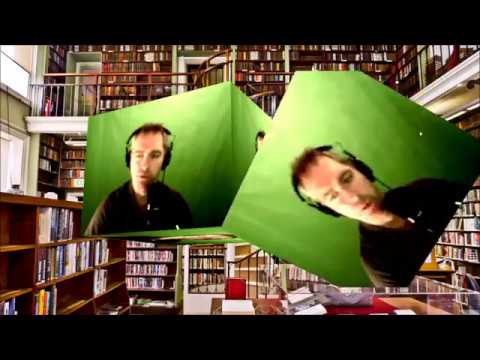
I'm using OBS classic, and using a window source which is a chrome browser with a url in it.
The url displays your webcam on a textured cube using three.js. You can rotate the cube using your mouse.
The web page is hosted at https://seanwasere.gitlab.io/Webcam-as-Texture-us...
Assuming hes doing that Orsuna
proper rain
Not really
It's more like a folded cam for my live twitch
I can make a video on youtube and show what the issue is if it helps, in case you wanna try to figure it out
It's anyways a really cool effect people from here mabye want to use
 normal granite
hey i'm trying to get my chatbot a custom name in obs studios-live. i can't find where to do that.
odd kraken
normal granite
thanks i had dropped the activity feed and there was not anything that said to bring that up first.
 low horizon
Hi two things How do i set up a Daily sub goal on stream elements and also How do i get Alerts for donations to a charity fundraising page to show
 wary dew
you can use a sub goal widget in the overlay editor
and just make it reset every session
wise silo
But how do you use the Overlay Editor? 🤔
wary dew
well, i'm glad you asked @wise silo because we have some very nice tutorials about that
like this one:

StreamElements Overlays are loaded from a single browser source in your streaming software, making streaming easy. https://streamelements.com/
StreamElements overlay editor enables full customization of your overlay, improving stream visibility and an increase of audience in...
 lilac ocean
What just happened
wary dew
no problem 😄 if you ever need anything else, just let us know
low horizon
I assume manually reset it daily?
wise silo
It resets for you
low horizon
Unless i'm missing something which is probably the case!
wise silo
if it doesnt
 rare glade
hi!!! it looks like im having a problem where i cant get the themes i have saved to show up on my OBS studios. i have tried everything and i'm not sure what is going on. can someone help?
steel bladeBOT
To reset goals:
- from the overlay editor -> data on top -> goal tab -> reset progress of desired goal
- from the dashboard -> activity feed on the left -> widget data on the right -> goals tab -> reset progress of desired goal
Note: Goal widgets(progress) only counts up and doesn't go down automatically, if you loose followers/subs
@rare glade To add your overlays to OBS, add a new browser source in your scene. Paste your overlay URL in the browser source properties, set the dimensions to 1920x1080 (unless you changed them on the website), and ☑ “Shutdown source when not visible” https://youtu.be/KDvLynUqXI4
low horizon
Thanks
rare glade
ive done all of that. it still isnt showing up. its like streamlabs isnt fully connected to OBS. and i dont know why,
steel bladeBOT
@rare glade We're not able to troubleshoot issues with using our overlays in StreamLabs OBS (SLOBS) as we don't have the tools to support their software. We recommend using OBS Studio or OBS Studio with our plugin OBS.Live.
rare glade
I am using OBS Studio
wise silo
We cannot trouble issues with streamlabs, as we are not them.
rare glade
omg...im so sorry i ment streamelements..i'm so sorry
steel bladeBOT
@rare glade Please provide a log from your last stream. To do this, in OBS go to Help > Log Files > Upload Last Log File and paste the link to the log file here.
rare glade
I havent streamed yet. i'm trying to get everything set up to stream.
wise silo
Tis fine. Follow the instructions anyways.
rare glade
wise silo
Lets start with running OBS as admin.
rare glade
how do i do that
rare glade
ok now what
wise silo
Now that your OBS is running as admin, are you sure you followed each step in the following?
steel bladeBOT
To add your overlays to OBS, add a new browser source in your scene. Paste your overlay URL in the browser source properties, set the dimensions to 1920x1080 (unless you changed them on the website), and ☑ “Shutdown source when not visible” https://youtu.be/KDvLynUqXI4
low horizon
One other thing how do i set up an alert if someone tips a fundraising page?
wise silo
Which fundraising page?
low horizon
justgiving
rare glade
yes
low horizon
Not one currently on the widgets page
low horizon
Ok thanks for your help
wise silo
Only two we support are Extra life and ?Tiltify? I think it is.
@rare glade Mind right clicking your browser source, clicking Properties, then sending a screenshot of the page that pops up?
rare glade
 Go ahead and delete 'Gameplay' and re-add it.
lilac ocean
Go ahead and delete 'Gameplay' and re-add it.
lilac ocean
we'll ask around for you
rare glade
ok. would it have anything to do with OBS studio?? and should i ask there advice as well?>
steel bladeBOT
@rare glade OBS -> settings -> advanced -> scroll down -> enable/disable hardware accel.
https://i.imgur.com/ggMe9ZE.png
rare glade
thats enabled
wise silo
Then disable it.
rare glade
it workewd
 lilac heart
hey, is there a way to test my alerts on a live stream?(as im live on twitch?)
steel bladeBOT
@lilac heart You can test Alerts via the bell on the lower right corner of the Overlay Editor. Simply go to your Dashboard -> My Overlays -> Pencil/edit button on the overlay. Make sure the "Show Emulated events on stream" option is on to see the alert in OBS/Xsplit https://streamable.com/h6qgy
 rare glade
thank you!!
lilac heart
gotcha, need to pick custom and make sure show on stream thanks
rare glade
ok got the themes working. my next issue is i added /mod streamelements to my twitch, but whenever i try to do ! things...it doesnt work.
wise silo
Part the bot and have it rejoin from your SE Dashboard.
rare glade
what does it mean to part the bot
wary dew
it means the bot will leave your channel
steel bladeBOT
@rare glade Go to the dashboard -> right side -> part channel -> join channel (https://streamelements.com/dashboard)
 wise silo
It will make the bot leave your channel then rejoin it
rare glade
got it! thank you. let me see if there was anything else i was having problems with.
wary dew

wise silo
If you have any issues at all, feel free to ask! With our amazing support team with people like @wary dew , we feed off assisting users!
wary dew

 steel peak
hello! i am having problems setting the webcam on obslive, i can see it only on one scene out of two and i did set up the capture device in the same way for both
odd kraken
Add the cam via the existing source in the second overlay.
 solid tiger
how do i disconnect my youtube from obs? i've connected my twitch account for streaming but every time i hit start streaming it takes me straight to youtube
 honest echo
@solid tiger on obs.live you should click on Streamelements Menu, then logout and log in again
solid tiger
that worked, thank you so much!!
 tight tulip
how do i stream on xbox but fix up and moniter everything on obs
wise silo
Are you looking for the word Capture Card? @tight tulip
 rugged quail
I have a webcam border and when i try to make my facecam as big as the box it doesnt work because it becomes too big or too small, can someone help
 gray gale
can i set my chat box to a dark mode?
 tulip hamlet
@gray gale Please see pinned messages for a guide.
gray gale
thank you
proper rain
Hi guys, I have this weir issue with my Logitech c920.
I'm trying to recreate the 3D Camera on my live stream, and to do that I need to add 5 layers of source mirrors of my camera and add a different filter mask image on each one.
For some reason, after adding a mask image filter on one of these source mirrors, the transparent part wich is supposed to only show the background of the stream starts flashing rapidly showing the rest of my camera.
Have anybody experienced this? If so please help.
I've tried reaching out to OBS Devs, but nobody there have figgured it out.
Thanks in advance ❤️
 severe mulch
g`day ppl , ive just setup my obs live today but i cant save to the cloud , i just get a blank box/window that pops up ?
tulip hamlet
@proper rain Not something we can really help here. This would be a question for OBS Project, but if nobody can assist you with it there, there's not much we can do for you about it here.
severe mulch
anyone with an idea as to what my issue is, thanks
tulip hamlet
@severe mulch Something local is probably preventing the page from loading, perhaps a firewall or antivirus or similar software.
severe mulch
i did wonder, i added streamelements.com to as many whitelists as possible and tun off ghostly and ublock on all browsers
you u know the url it opens up direct in that window ?
agile mason
Reposting:
I have been test playing World Of Tanks using their 64-bit version executable, when I tried to stream it it just shows a black screen in OBS but it is getting the desktop audio of the game.
Source is set to "Capture Specific Window" and that is set to "[WorldOfTanks.exe] WoT Client".
It was set to "Match title, otherwise find window of same executable", I have tried changing that to "Match title, otherwise find window of same type".
The 32 and 64 bit executable are named the same.
This works fine with the 32-bit executable of WOT.
kindred fox
Have you tried capture any full screen application?
rugged quail
umm I tried to start steam and it says invalid path or connection
anyone know how to fix this
kindred fox
Obs settings > stream > disconnect/delete stream key, sign in again
rugged quail
okay thank you
now I have all my scenes ready but when I do the scene that shows the game you cant see the game only the overlay and a black screen
 pearl zephyr
Are you running OBS as admin?
rugged quail
how do I do that
pearl zephyr
right click on the icon, and click "run as admin"
rugged quail
you mean the obs icon
pearl zephyr
Yep. The same one you click to launch it
rugged quail
cause I did that and all it pops up is obs studio 64bit
pearl zephyr
Is it a desktop icon or a task bar icon you are clicking on?
pearl zephyr
then right click on that one as well, and the option will be there
rugged quail
thank you
pearl zephyr

rugged quail
I did that and it still shows a black screen on it
pearl zephyr
Are you using Game Capture? Some games have issues with that. Try using Window Capture instead, or vis versa
wise silo
@rugged quail Are you on a laptop?
rugged quail
NO PC
steel bladeBOT
@rugged quail Please provide a log from your last stream. To do this, in OBS go to Help > Log Files > Upload Last Log File and paste the link to the log file here.
rugged quail
sorry caps
lol it was on caps from playing a game sorry
no im on pc
there it is
wise silo
19:44:18.477: ================================ 19:44:18.478: Warning: OBS is already running! 19:44:18.478: ================================ 19:44:18.478: User is now running multiple instances of OBS!
Close all your OBS clients, open it, and test then.
rugged quail
just closed obs now do I start stream ans see if it works
wise silo
Did you close all of your OBS clients?
rugged quail
i just have obs opened
wise silo
Then check Task Manager.
wise silo
Close all instances of OBS.
wise silo
Are you seeing the game under your overlay in OBS?
You do not need to start stream to see if the issue is there.
Also heads up; according to the log you have sent you don't have any game sources added, only browser sources.
rugged quail
No I don’t see the game in anything all I see is my over lay then a black screen
How do I add the game source
pearl zephyr
Same way you added browser sources, just choose game capture instead
rugged quail
So if I’m streaming league of legends do I copy it’s url and put it into this
rugged quail
I did none of them say anything about my problemb
wise silo
You have no problem.
There is no source, so nothing to broadcast.
I would first watch this video: https://www.youtube.com/watch?v=J5ojeVYsLY4
And follow it up with this one: https://www.youtube.com/watch?v=0hkhWPKSIdw
The first one will go a little indepth on how to add a game capture, display capture, and window capture to OBS.
The second one will explain the differences between each of them and which one you should do and when.
 cobalt whale
Hey guys, i was testing the Energy Flow Animated Alerts which are offered as a premade alerts, and i could not get bits donation Text to Speech to work no matter what.
the rest are working fine, its just this one
and just with bits
tulip hamlet
@cobalt whale Make sure you enable it per variation, not just the main alert.
cobalt whale
but why would others in the same category aka animated work just fine?
i will try it ofc
blue metropolis, spitfire etc, all working by default
@tulip hamlet thank you, it works now 
wise silo
Good good. Now youre seeing something on your OBS?
wise silo
Good to hear.
 shrewd jackal
Hello! I am trying to get scene transition buttons set up in Stream Deck - when I add one (I have installed the OBS.live module already), it allows me to name it, but does not allow me to choose any Collection/Scene info to make the button work.
Anyone have any ideas? 🙂
kindred fox
Make sure obs.live is open
shrewd jackal
OBS.Live is open - I am getting an error below the button input area that says "The elgato remote control plugin is missing"
wise silo
Then youre missing the remote control plugin.
kindred fox
Reinstall the streamdeck app and then the plug-in for streamelements
 bright token
Hi. Does anyone know why mediarequest wouldnt be showing up in my streamelementstab?
wise silo
Click "View" Then "Docks" @bright token
shrewd jackal
Done that, and instead of telling me it's missing (which is what the program already told me) perhaps you could tell me where to reinstall the plugin @wise silo 🙂
wise silo
The same way you installed it.,
shrewd jackal
I did not previously install it - seriously you are being less than not helpful by adding to the frustration.
there was no need to previously install it; according to any tutorial i have watched.
Please don't make me regret my first foray into the helpdesk. 😦
bright token
it doesnt even show in that tab
steel bladeBOT
@bright token Streamelements on top of OBS -> Logout -> login
bright token
but im pretty sure i have it set up
steel bladeBOT
@shrewd jackal Please provide a log from your last stream. To do this, in OBS go to Help > Log Files > Upload Last Log File and paste the link to the log file here.
bright token
thank you
kindred fox
Are you streaming to YouTube @bright token ?
shrewd jackal
I am setting it up fresh. 🙂 Just switched from SLOBS.
The fix:
Close OBS.Live, uninstall Stream Deck, Reinstall Streamdeck, Open StreamDeck, Open OBS.Live.
Thanks for your time. 🙂
tulip hamlet
@bright token The dock isn't currently available for Mixer, but soon.
bright token
okay thank you
kindred fox
You didn’t have to uninstall the streamdeck application, just reinstall it as I stated above @shrewd jackal
Something goes wonky with the streamdeck app sometimes and a reinstall seems to fix whatever is broken
shrewd jackal
Reinstalling it gave me two options: Repair or "Uninstall"
Repairing it did not work. I needed to fully uninstall it.
Perhaps that was just my case though 🙂
kindred fox
That was with the downloaded installer? Interesting
Usually you can reinstall over the top. Elgato must have changed their installer
shrewd jackal
indeed. I'm just glad it's working. I did see an update recently to S.D.
kindred fox
Those are fun....especially when they break things
shrewd jackal
always. thank you for the time again. been a long day setting up!
kindred fox
It’s always rough, but once it’s up and running it is easy! Let us know if you have any other issues!
 spice sinew
Hey guys, I started to have some issues with the obslive some minutes ago: when I start to stream, the plugin change the server from Mixer FTL to a custom Mixer RTMP server, the only way I found to stop this is deactivating the obslive or unistalling it... are there something I can do to avoid this? Worked fine for more than a week since I have started to use it but now it just started to do this and I see no option related to change/fix this issue. Does anyone have a idea of what's is going on and how to fix this?
steel bladeBOT
@spice sinew If your Mixer stream has "Low Latency" greyed out in the player while using OBS.Live, do the following:
- Stop your stream
- Go to your stream settings in OBS and return them to your previous settings, where your service is listed as "Mixer.com - FTL"
- In "live video settings" for OBS.Live on the left-hand side (in the chat window) change the setting on top of the window to "Go Live with Mixer Broadcast Dashboard settings" and press "Go Live!" from there
spice sinew
I just figured out whats the cause of this issue
If I start the stream with this option, the plugin change the server ingest to RTMP 🤦
There are nothing I can do to change this and use this option, just have to use the Mixer Broadcast Dashboard and never use the obslive option ever
kindred fox
If you read above, it explains the issue
 obtuse wraith
I need help getting my video capture device to show up, im using an elgato hd60 but the video wont show up.
spice sinew
If you read above, it explains the issue
@kindred fox Yeah, I was writing when the bot send this msg 🤣
obtuse wraith
nvm
 shy mountain
Please do not post in multiple channels.
 lavish idol
ok sorry
shy mountain
The viewer counter is located in the activity feed -> burger menu button(top left)
if the option is not there, then its not supported for the given platform you are streaming on.
lavish idol
its just wierd that streamlabs has it but regular obs doesnt but thanks for the quick reply
 lethal bear
Can someone help me, I've had this issue in the past
I am playing Siege on PC & it's not only this game that does it, but when playing my OBS drops frames, not network related & says encoder overload.... I have tried A BUNCH of changes & nothing is working
steel bladeBOT
@lethal bear Please provide a log from your last stream. To do this, in OBS go to Help > Log Files > Upload Last Log File and paste the link to the log file here.
shy mountain
Do note that Siege is a beefy game to stream, so if its render or encoder issue, it might due to the game it self and not settings
kindred fox
Also if you’re using nvenc, make sure to disable psycho visual tuning
That eats GPUs
lethal bear
Okay disabled it
Game mode is off
on windows as well
Like in game settings atm it says my NVIDIA GeForce RTS 2070 Video memory has 1699MB used out of 8031MB
kindred fox
As long as psycho visual tuning is disabled see how it runs
lethal bear
Okay I think the Visual Tuning may have been the issue
thanks
🙂
Yeah doesnt say encoder overload but obs still drops frames and my butrate likes to go up
shy mountain
butrate 
steel bladeBOT
@lethal bear Please provide a log from your last stream. To do this, in OBS go to Help > Log Files > Upload Last Log File and paste the link to the log file here.
shy mountain
lets see the new log
lethal bear
shy mountain
lethal bear
Sorry everytime I ctrl tab it pauses and closes my gane
Anything else wrong with my settings??? https://obsproject.com/logs/4AEO6mnOJZfJ9lSE
It's ONLY PC now

 glossy tapir
hi there, i am using a custom widget from here and am trying to get the text field to alight to the right. it does this in the overlay editor, but always to the left in obslive.
shy mountain
Which widget?
glossy tapir
in the forum here, or what i named it in my overlay? 🙂
glossy tapir
shy mountain
so its "recent events"
glossy tapir
yes 🙂
shy mountain
And where have you placed the widget?
glossy tapir
Path of Exile overlay, renamed to Follower Rotator
shy mountain
is your intent to only show followers there?
and only 1 person at a time?
If yes, then there is a simpler widget called "recent followers" which you can use
then to tackle a custom widget
sorry i meant "latest follower"
glossy tapir
i wanted to rotate through prev followers, not just the last.
this is how it appears in obslive
glossy tapir
ok, will try
 boreal fjord
anyone around to help? trying to port over from slobs to elements
i keep doing the "import from other services" feature but it doesn't do it "even when it says it does
steel bladeBOT
@boreal fjord To add your overlays to OBS, add a new browser source in your scene. Paste your overlay URL in the browser source properties, set the dimensions to 1920x1080 (unless you changed them on the website), and ☑ “Shutdown source when not visible” https://youtu.be/KDvLynUqXI4
boreal fjord
can i port over all the scenes i made on streamlabs or do i have to basically restart
shy mountain
Each scene from SLOBS
is made into an overlay
which you can find in "my overlays" and then add them to OBS with the above bot message
boreal fjord
OHHH i got it now.
didnt catch that you were saying "my overlays" on the streamelements website
 whole bison
The fadeout doesn't work for a widget I installed, whats the best way to troubleshoot? Can the widget be hardcoded that the fadeout wont work?
shy mountain
Which widget?
whole bison
It's a custom eventlist, should I link the launcher url?
shy mountain
No - never post your overlay link in public locations
the custom eventlist, if its a coded widget, then any animation should be coded inside of it
whole bison
Ok, yeah the fadeout worked on streamlabs but I think these devs mostly take streamlabs in consideration. I'll contact the devteams
 somber raptor
Hi there guys
I would like some help with something. It`s a problem that comes up regularly now but only started not too long ago. OBS.live keep crashing on me when switching scenes...
shy mountain
There is a crash log folder
steel bladeBOT
@somber raptor Please provide a log from your last stream. To do this, in OBS go to Help > Log Files > Upload Last Log File and paste the link to the log file here.
somber raptor
somber raptor
crash report tab ?
shy mountain
somber raptor
shy mountain
OBS Forums
Yo, I've been having random crashes with all of them blaming w32-pthreads.dll. It usually happens after a lil' while, sometimes it takes longer, sometimes it happens already after 1 min.
Here's the latest crash log:
somber raptor
So is it a media source that causes the crash?
somber raptor
I see. I don`t have any media sources on any of my scenes... In fact, all very basic with the browser sources of the overlays, webcam, mic and game capture
steel bladeBOT
@somber raptor For the best OBS support, please join their Official Discord @ discord.gg/obsproject
somber raptor
thank you
 left cloud
hello friend
I am currently having trouble importing my scenes from Streamlabs
It gets past importing media and fails on importing alerts
lilac ocean
@left cloud are you using any StreamLabs copyrighted alerts or are the files bigger than 30mb?
left cloud
i am not and let me check on the file size
total or individual @lilac ocean ?
well I have deleted some
and now am below 30 mb on all the assets on the alert
and its still failing
lilac ocean
Does it work now, was just about to get back to you
alright
ill contact staff about it
lilac ocean
Ive laid the problem to the staff, someone will be with you when they got time
left cloud
❤️
 stuck maple
So I remember Spotify Integration was taken away last year. Is there any sort of integration that anybody knows so that my stream can see what song I am currently listening to during my streams? Using Spotify that is.
 eternal shadow
Hey, is there a way to reset the Event List/Sub goal after testing them?
Like I emulated follower and subs but I can't get rid of them, since they were fasle you know
 sinful flint
You can reload the overlay and this will do that
sinful flint
Or if you're in the overlay editor you can just refresh the page
But yeah, if you want to reload your overlays use the 'Reload Overlays' button in the activity feed or just hide your overlay (with shutdown source when not visible ticked in the browser source properties window) and then show the overlay again 😃
 lilac ocean
@left cloud are they NerdOrDie alerts?
lilac ocean
okay, passing that on to staff again
 wild cypress
Hello 👋
So recently I have just bought from nerd or die the borderline stream package which is great. The only problem is on one screen it says the stream chat and nothing is coming up on that area is there a way to add a chat box on the overlay 🤷🏻♂️
honest echo
@wild cypress Edit the overlay and add a the widget "ChatBox" 🙂
wild cypress
Thanks very much 😁 I’m very new to it all so it a challenge 😂
honest echo
it may be overwhelm the first 10 minutes.. then you will LOVE all of it
 hoary wharf
I submitted the idea on the StreamElements Community Board but maybe there's already a solution for our request:
Is there a possibility to invert the chat in Streamelements OBS so that the latest chat message is on the first / top line? Or in other words a possibility for the chat to get pushed upwards rather than downwards?
 solid garden
Ok sometimes drop to 0 bitrate and I need to end the task from task manager and start stream again
any fixes
?
 twilit arrow
is there a way to manual change the ingress settings so that I am connecting to the Mixer FTL servers
steel bladeBOT
@twilit arrow If your Mixer stream has "Low Latency" greyed out in the player while using OBS.Live, do the following:
- Stop your stream
- Go to your stream settings in OBS and return them to your previous settings, where your service is listed as "Mixer.com - FTL"
- In "live video settings" for OBS.Live on the left-hand side (in the chat window) change the setting on top of the window to "Go Live with Mixer Broadcast Dashboard settings" and press "Go Live!" from there
twilit arrow
thank you
solid garden
Ok sometimes drop to 0 bitrate and I need to end the task from task manager and start stream again . Help
kindred fox
@solid garden Please refrain from repeating your question in multiple channels. The response you received in #helpdesk-twitch was to check your bitrate settings and the next step will be to have you submit an OBS Log after replicating the error
 knotty thistle
hello. my obs keeps crashing. is there a starting point so i can start trouble shooting
steel bladeBOT
@knotty thistle Please provide a log from your last stream. To do this, in OBS go to Help > Log Files > Upload Last Log File and paste the link to the log file here.
steel bladeBOT
@knotty thistle Please provide a log from your last stream. To do this, in OBS go to Help > Log Files > Upload Last Log File and paste the link to the log file here.
 spare kernel
Hello All , Obs is crashing every time that i toggle a full screen game, do you have the same issue ? happens everytime on PUBG and Escape From Tarkov
 red prairie
running into a real weird issue here starting the output is consistently failing now and my video drivers are all up to date
steel bladeBOT
@red prairie Please provide a log from your last stream. To do this, in OBS go to Help > Log Files > Upload Last Log File and paste the link to the log file here.
@spare kernel Please provide a log from your last stream. To do this, in OBS go to Help > Log Files > Upload Last Log File and paste the link to the log file here.
spare kernel
https://obsproject.com/logs/9qXtWsRaShzdT0si Please note the last file
red prairie
kindred fox
@spare kernel https://obsproject.com/analyzer/?url=https%3A%2F%2Fobsproject.com%2Flogs%2F9qXtWsRaShzdT0si follow the troubleshooting links there to see if that helps
@red prairie https://obsproject.com/analyzer/?url=https%3A%2F%2Fobsproject.com%2Flogs%2FpE4iEtjedsZms9d_
same thing -- follow the instructions ^^
red prairie
none of those fixed the issue
kindred fox
Time for another log
red prairie
kindred fox
steel bladeBOT
@red prairie 1) Restart OBS
2) Start your stream/recording for about 30 seconds. Make sure you replicate any issues as best you can, which means having any games/apps open and captured, etc.
3) Stop your stream/recording.
4) Select Help > Log Files > Upload Current Log File. Copy the URL and paste the link here.
(Note: If you do not see an obsproject.com URL, you will need to update OBS Studio to version 22+)
red prairie
kindred fox
@red prairie run obs as Administrator
red prairie
?
kindred fox
right click the OBS icon on your desktop and select "Run as Administrator"
plain sonnet
13:01:38.286: error:   The minimum required Nvidia driver for nvenc is 390.77 or newer```
try a different encoder@red prairie You're going to have to use x264 due to your computer not meeting the specifications for NVENC Encoding
red prairie
i changed it to that and now everything in my stats bar is red lol
i also have hardeware {QSV} availible
red prairie
ive been running these same settings for 7 months and now all the sudden it doesnt support it.
running auto configured kicks it back to NVENC
steel bladeBOT
@red prairie For the best OBS support, please join their Official Discord @ discord.gg/obsproject
kindred fox
This one is gonna be out of our knowledge level
red prairie
thank you for your time.
spare kernel
Hello !!! i follow the troubleshoot
unfortunately it is not worked
the new log file is this one
kindred fox
Make sure you run OBS as an administrator. Right-click the desktop icon for OBS and select "Run as Administrator"
kindred fox
You need to run OBS as Administrator and let it stream or record for 30 seconds before clicking stop, then click Upload last log
 ancient basin
Hi there i have been having some audio problems with obs live if anybody can help me solve them id be greatly appreciative!
steel bladeBOT
@ancient basin Welcome to the helpdesk! Please let us know how we can assist you today and a support volunteer or staff member will assist you as soon as they are available. Thank you for your patience.
ancient basin
Essentially i'm having problems with getting the sources in the mixer to be connected to the right mixer
steel bladeBOT
@ancient basin For the best OBS support, please join their Official Discord @ discord.gg/obsproject
 acoustic wadi
hello i clicked on dont display msg when i go live but then i check the box to get it back it doesnt work is there a reset
acoustic wadi
sure
when i stream no confirm shows up
its just easer to edit my tital from obs
tulip hamlet
When you click start streaming, does a popup box appear like so?
tulip hamlet
Had you clicked "do not ask me again?"
tulip hamlet
Do you get any kind of popup when you start streaming?
tulip hamlet
Personally I get this, which is kinda weird if you ask me.
acoustic wadi
nothing like that
tulip hamlet
It doesn't look like any kind of popup flashes open and closed?
tulip hamlet
That popup window basically takes the place of that setting in the case of Mixer via OBS.Live.
acoustic wadi
i see
tulip hamlet
Going offline will still show a prompt.
acoustic wadi
yea i have it now agin
i had to remove the chat window
and readd it from streamelements
thanks for the help
 rare pilot
Hey, I updated my GeForce experience today and on Streamelements it made my activity feed and chat box disappear, does anyone know how to get those back..? Thanks!
tulip hamlet
@rare pilot StreamElements menu at the top.
 brittle charm
I changed my name yesterday and now none of my previous chat settings work 😦
not sure what I should do
steel bladeBOT
@brittle charm If you changed your name on Twitch please follow these steps:
🔹 Visit https://streamelements.com/logout and then log in again with by connecting with Twitch.
🔹 On the right side of the dashboard page that opens, select "Join" under bot settings. If it says "Part" select that and then select "Join" to send the bot to the chat. Don't forget to mod the bot by typing /mod streamelements in your channel if you have not already.
🔹 Post your new name here so that we can update your channel's chatstats tracking (must be done by staff).
brittle charm
baedillla is my new name
brittle charm
how will i know when staff updates my channel's chatstats?
 violet musk
Hey guys the streamelements overlays say the destiny 2 stream starting soon how do u get it to reset the timer
tulip hamlet
Reload the overlay, usually by going to a different scene and going back while using "Shutdown source when not visible"
steel bladeBOT
@rugged quail New to Stream Elements?
Check out our YouTube channel https://www.youtube.com/c/streamelements/videos
with tutorial videos from setting up the basics, to in depth details on how to use our product.

wise silo
Anyway you were born in 2008 @rugged quail ? That was the same year my nephew was born 🤔
pearl zephyr
Also just a hwads up @rugged quail , The twitch account you have linked to your discord profile doesn't exist. Might want to update that 👍
wise silo
pearl zephyr
Holy heck that is a tool I have been looking for for ages now
 fiery sphinx
I am having trouble getting my Facerig to show up as a video capture device. It is set up right on Facerig side (I am broadcasting) but hasnt shown up as a source in obs.. :<
Anyone have any advice or tips?
steel bladeBOT
@fiery sphinx For the best OBS support, please join their Official Discord @ discord.gg/obsproject
tulip hamlet
!lazy
steel bladeBOT
I'm a bot, only here to send helpful messages because the helpers are lazy.
 keen egret
I am very new to stream elements and wanted to start recording to yt.
What settings do I use
steel bladeBOT
@keen egret New to Stream Elements?
Check out our YouTube channel https://www.youtube.com/c/streamelements/videos
with tutorial videos from setting up the basics, to in depth details on how to use our product.
 stone coral
Hey everyone. I have 2 webcams. 1 for me and 1 for my doggos. Im trying to figure out how to have twitch chat commands trigger a swap from cam 1 to cam 2. Any ideas? My googlefu is not strong in this search
I also have a stream deck that I could possibly use as well if this helps
pearl zephyr
You could either use your streamdeck to manually switch between the two, else you would most likely need a custom bot listening to your chat that executes a hotkey on your PC when the command is used.
stone coral
I dont mind bots. Do any come to mind by chance?
If not...any idea what to look up?
this has been wrackin my brain hole lol
kindred fox
one that supports websocket
since it would be something that would need to be able to connect to chat and then send a remote command to OBS
not sure if there's an OBS Plug-in on their website
stone coral
websocket and remote command to OBS...thanks I will look down this path...appreciate the ideas
kindred fox
pretty sure that's where you're gonna end up.....but not entirely sure
 whole crane
anybody else having issues with the streamelements website? my overlays arent working
whole crane
my dns server I believe is unavailable
so it wont connect to the stei
site
ill find a fix i think
whole crane
I did but wasnt having an issues before so
tulip hamlet
That never means the DNS server isn't having issues now.
whole crane
weird ill change it and see what happens
kindred fox
I run cloudflare DNS as primary and google as backup
 molten river
hello
kindred fox


 molten river
just want to ask, is there anyway to enable performance mode for obs live?
kindred fox
There is no need to enable performance mode because OBS Studio is already optimized.
It is not a "feature" of the original source code upon which other streaming software was built
molten river
i see
 verbal ravine
one browser source taking 15% cpu, is there any fix ?
shy mountain
I would say thats no were near any concerning levels, but have you tried ending the task and seeing what stops working in OBS?
verbal ravine
that stop the whole animation of overlay
shy mountain
Then your CPU can't handle animated overlays.
verbal ravine
btw i'm using streamlabs obs and my specs i7 4th gen 1080ti
verbal ravine
yes
shy mountain
also we can't help much if you are using SLOBS
verbal ravine
so, should I use obs studio
spare kernel
@kindred fox hello mate, may I know something please, on obs while streaming with x264, how many threads should I allocate for the best performance? I am running on ryzen multi core processor and gaming at the same rig at the same time. Also for the obs that crashing I will check today after work
kindred fox
Tbh it allocated cores itself
spare kernel
TbH? What means?
spare kernel
Yes but if I don't allocate threads the x264 gives crappy output
After I allocated the threads it became crystal clear
steel bladeBOT
@spare kernel For the best OBS support, please join their Official Discord @ discord.gg/obsproject
spare kernel
On the bucket the above
The obs community is not providing live support like the streamelements
That's why I am preferring the obs.live plug in
So if anyone knows how many threads should I allocate it would be perfect :) I am running a threadripper type chip
shy mountain
OBS.Live is a plugin that adds to OBS Studio
You are asking a technical question here that we are not familiar with, unfortunately.
I can tell you as a person who uses ryzen 7 3700x - i have NOT touched any thread manipulation and have left windows and obs decide on their own on this
and its doing OK
 spark sierra
Hi guys.. I'm getting an infinite refreshing screen when I try and use the StreamElements Overlay Editor. I've tried a hard-refresh on the browser. Any other ideas?
lilac ocean
which browser are you currently using?
spark sierra
FF
lilac ocean
Can you try in Google Chrome?
steel bladeBOT
@spark sierra Streamelements on top of OBS -> Logout -> login
shy mountain
That is not opening FireFox, its opening a browser page in OBS.Live - do the above and you should be fine.
spark sierra
Ok thanks, I'll have a crack
Ok, so it works if I edit through the SE website, however it doesn't work if I edit through OBS
shy mountain
Did you logout from OBS>Live and login again?
spark sierra
I logged out of the website and OBS.Live
Oh, I got it working
I logged out again and back in, fixed it this time
shy mountain
👍
spark sierra
Thanks for the help 🙂
 spiral wigeon
Can anyone help me? downloaded streamelements OBS yesterday but in OBS my chat font and activity feed font gets blurred out in some strange way
steel bladeBOT
@spiral wigeon Please follow these steps:
close OBS,
open the Nvidia Control Panel,
in the left menu select "manage 3D settings" and then under the list of options (right panel) press "restore default settings",
Start OBS again.
spiral wigeon
Didnt work its still the same
odd kraken
Do you have a screenshot or a video of the behaviour in OBS?
odd kraken
please send it here.
spiral wigeon
odd kraken
Please follow the steps the bot posted above again. This is the known solution so far.
spiral wigeon
I reseted my nvidia settings but nothing changed
odd kraken
You also closed OBS before and started it afterwards correct?
spiral wigeon
fixed it now by reseting it ones again and restarting my pc, thank you so much for the help 😄
 wide ravine
Sweet, followed the link. Thanks!
 gray bear
how do i get a overlay to work on my obs
steel bladeBOT
@gray bear To add your overlays to OBS, add a new browser source in your scene. Paste your overlay URL in the browser source properties, set the dimensions to 1920x1080 (unless you changed them on the website), and ☑ “Shutdown source when not visible” https://youtu.be/KDvLynUqXI4
 violet gyro
So I normally stream on my Xbox but I just got obs how does it connect to my Xbox on a laptop
kindred fox
Are you streaming to Twitch or to Mixer?
violet gyro
Twitch
kindred fox
You will need a capture card or leverage the xbox app on Windows 10 to stream from your xbox to your laptop, then you will capture the xbox app and stream that to twitch using obs
violet gyro
Ok I don’t think I have windows 10 then because I typed it in on my laptop and nothing came up
lilac ocean
try typing xbox companion console
violet gyro
Ok
lilac ocean
did that work?
 hollow lichen
Hey, my mediashare is louder than my games to me but quieter than the games to my audience. still don't know how to fix this. I have all my computer audio going into "desktop audio" and my voice to "mic"
 runic helm
so how do I get a turn without interrupting anyone
rugged quail
No turns needed, we help everyone as fast as we can
runic helm
ok cool! Im having an issue with my TTS on streamelements, it wont speak.
when i test it!
kindred fox
Where are you trying to use TTS?
spare kernel
Hello. i have my obs keep crashing on launching a full screen game like PUBG and Escape From Tarkov, i am sending the log file
new Log File
same issue is crashing
kindred fox
can you grab the crash log?
steel bladeBOT
@spare kernel A crash log is required to investigate the cause of your issue. Please upload the last crash log.
- In OBS, click the Help menu
- Select Crash Reports, and then Upload Last Crash Report
- Copy the URL, and paste it to the chat here.
spare kernel
@kindred fox https://obsproject.com/logs/oz387sbVVHQ9dJPI
kindred fox
I'm not seeing a crash in that log
spare kernel
one sec
i am sending again
here you are
i have upload the current log and not the last log
sorry
kindred fox
Make sure when you start OBS, that you right-click it and select "Run as Administrator"
spare kernel
yeah i am
kindred fox
spare kernel
one sec
as admin
and still crashes
please note that i have 3 monitors
RTX 2080 ti
kindred fox
Push Start + R >> type: *%appdata%\obs-studio\crashes* and push return
drop the crash log directly in discord
kindred fox
Are you in AppData\Roaming\obs-studio\logs or Appdata\Roaming\obs-studio\crashes?
spare kernel
AppData\Roaming\obs-studio\logs
kindred fox
go back one folder level and go into crashes
spare kernel
on crashes there is nothing
kindred fox
yet OBS closes ?
kindred fox
only those two games?
kindred fox
Are you encoding with that beast of a Ryzen or using your 2080Ti?
kindred fox
do me a favor and switch it to nvenc and see if it crashes
disable the psycho visual tuning before attempting
spare kernel
give me 30 sec in order to run for a while
spare kernel
crashed
kindred fox
no crash log?
kindred fox
That is friggen weird. Have you asked by chance in the OBS Studio discord about it?
This is gonna be one of those things their development team is gonna wanna see
steel bladeBOT
@spare kernel For the best OBS support, please join their Official Discord @ discord.gg/obsproject
spare kernel
obs studio is not taking responisbility they are rude and also sarcastic. in the morning they spoke me very bad and even now because it has obs live plugin they dont take responsibility
kindred fox
But if you run OBS Studio without the plug-in it also crashes
kindred fox
Can you open Event viewer and see if you can find the crash log in there?
@ me when you find it and I'll have you DM it to me
 toxic fern
Windows key + R and type in eventvwr
toxic fern
On the left do windows logs then application
toxic fern
Not that one. Application under windows logs.
That was the correct one and I saw something that did help.
toxic fern
Yup
kindred fox
Uninstall OBS.Live and OBS Studio (in that order), then install the latest version of OBS.Live from https://streamelements.com/obslive

StreamElements
Download StreamElements OBS.Live to makes live streaming on Twitch/YouTube/Facebook/Mixer easy. Live Stream your broadcast from anywhere, save on CPU with StreamElements Open Broadcast Software (OBS) plugin.
spare kernel
should i erase any use settings ?
kindred fox
👍
spare kernel
maybe the Obs studo has a bad installer but why also the Streamlabs OBS is crashing also ??
it currently unistalling
kindred fox
Let's start with a "fresh" install and see what happens
spare kernel
should i need to delete any leftovers ?
spare kernel
i download already from your link the obs, should i stop this one ? it takes more time
kindred fox
That's the correct one
it's fine
is working as expected 😉
let's see what happens
spare kernel
not it says unistalling the obs.live plugin and tries to download the obs studio
should i press cancel and start the installation from the file that i downloaded ?
i have 250 mpbs download but this unistaller it download like a turtle
probably it downloads from a US server or something
its ok now it boosted to 4 mbps
kindred fox
Let it do it’s thing
kindred fox
Go ahead and reboot if it tells you to
spare kernel
ok
i am unistalling the obs now
and i will install the new obs
i reinstall it
with the link provided
i am opening it now
again it crash
@kindred fox
kindred fox
Do me another favor, disable avast for a minute and test again
kindred fox
Lemme ask others
spare kernel
ok mate
kindred fox
Did you disable your Avast Antivirus?
I see from the log Windows Defender was disabled....but not Avast
you'll probably have to disable it via the taskbar icon?
kindred fox
spare kernel
i never had issues with the avast
kindred fox
Only reason I ask
spare kernel
wait i am reseting the graphic settings to defualkt
kindred fox
for the game?
spare kernel
nvidia control panel
kindred fox
ok
kindred fox
Okay, next steps:
Make sure OBS isn't running
Start + R >> type %appdata%
drag the obs-studio folders to your desktop
Re-launch OBS
test again
 fierce mountain
My obs.live wont stop streaming to mixer even though I have signed in with Twitch
reset program and computer
steel bladeBOT
@fierce mountain Streamelements on top of OBS -> Logout -> login
kindred fox
for now, drag both just in case
spare kernel
@kindred fox again it Shuts Down, it got minimized and then closes
kindred fox
did it by chance generate a crash log this time?
spare kernel
@kindred fox yes it generated https://obsproject.com/logs/frUn2ko6f_mPGNPF
kindred fox
Try clicking StreamElements >> log in
sign in with whichever account you're gonna use
spare kernel
i disconnect all the monitors and i left only one, i run it as admin and i have logged in also and still crashes
last log
kindred fox
Okay. Here's what I'm gonna say for next steps. Completely uninstall OBS.Live. Test with just OBS Studio
if it still crashes, uninstall OBS Studio
spare kernel
with just obs strudio it still crashse
crashes
even with streamlabs obs it crashes
spare kernel
ok
maybe i need to wait for another update of OBS ?
it is working normally when i stream without any issues it is only crashing once i change the 2 games..
Linus Tech Tips
Greetings Only recently, when opening games, Tarkov/PUBG, any open or background applications are shut down. Including but not limited to, precision x1, microst edge, corsair link 4, ai suite 3, windows defender, network monitor and geforce experience to name a few. The only ...
Linus Tech Tips
So me and my friend both have this very bizarre issue with PUBG. When we start the game, monitors will flash black for a moment and then any randomly opened application will turn off completely, for example Discord, Steam, OBS, etc... but its usually those 3. We both have com...
so maybe it is my RAM ?
or the windows itself....
Quote
It's most likely the anti-cheat being too aggressive. I've had ARK:Survival evolved crash Firefox and Discord every time I opened it up.
Unquote
maybe i have to update to windows 10 version 1909
i am downloading now and installing now the update
lets see guys fingers crossed
kindred fox
DM'd you as well @spare kernel
 copper pulsar
hi I got an issue with the feed dock on OBS. It disappeared and I cannot find how to make it visible again, I can't find it in view>docks
odd kraken
StreamElements > Activity feed.
copper pulsar
nope not there
odd kraken
Do you see the StreamElements tab at the top in OBS?
copper pulsar
yes
steel bladeBOT
@copper pulsar Streamelements on top of OBS -> Logout -> login
copper pulsar
I just wasn't logged in! thanks a lot for the reactivity it's working now!
 cloud sequoia
so i just read that this fixes crashing^
but i cant seem to put any programs
on top of my OBS
like my OBS is the top layer and i can't fix it
any fixes?
plain sonnet
file > always on top
cloud sequoia
why did it just suddenly start glitching out
i had the crashing problem too
but i read that post above and it fixed
thanks btw that fixed it
wait now my overlays arent loading it lmao
 versed steppe
Hello. I'm noticing the Media Request app thing in OBS isn't loading, it's just blank. What do I do?
steel bladeBOT
@versed steppe Streamelements on top of OBS -> Logout -> login
versed steppe
Thank you ❤️
 queen spindle
My mic audio sounds great when I record it on my pc, but terrible and completely different when I record or try to stream in obslive?
 magic plaza
hey.. first time in server.. my activity feed is stuck on a test account to stream on, and now that i signed into my actual account it wont refresh to my new account
steel bladeBOT
@magic plaza Streamelements on top of OBS -> Logout -> login
wary dew
no
they are competitors and will not work together
it's also a completely different bot system
kindred fox
Streamlabs has deprecated their legacy chatbot and eventually it will cease to function.
 stone quail
got ya
like you can do intro's with it didn't know if some of the functions would be usable with SE
stone quail
someone set it up with a follow a sound effect happens each time they join and type hello or whatnot when they are subs
ah it slobs events section. sorry
kindred fox
Follower alerts are available. The “per-user” commands are currently not. You can see if it’s already posted here: https://strms.net/ideas and upvote it
queen spindle
Re-upping this again "My mic audio sounds great when I record it on my pc, but terrible and completely different when I record or try to stream in obslive?"
steel bladeBOT
@queen spindle For the best OBS support, please join their Official Discord @ discord.gg/obsproject
 muted solar
Hi I was wondering if anyone has used OBS NBI on Mac? When I install the plugin, it doesn't show up in OBS for Mac.
I figured it out
kindred fox
sorry about the lack of response @muted solar ! Glad you were able to get it working!
rugged quail
Im trying to stream on Mixer but my settings say I'm not on FTL and go to custom on the streaming settings. How do I fix this?
steel bladeBOT
@rugged quail If your Mixer stream has "Low Latency" greyed out in the player while using OBS.Live, do the following:
- Stop your stream
- Go to your stream settings in OBS and return them to your previous settings, where your service is listed as "Mixer.com - FTL"
- In "live video settings" for OBS.Live on the left-hand side (in the chat window) change the setting on top of the window to "Go Live with Mixer Broadcast Dashboard settings" and press "Go Live!" from there
muted solar
@kindred fox no worries here’s hoping it works for real!
 fading stag
Hello! New to streaming and StreamElements. I can’t get the overlays to show up. I have a browser source setup and I copied the url then pasted it into the url slot. But nothing is showing up. Not sure what I did wrong.
tulip hamlet
@fading stag Try disabling Browser Source Hardware Acceleration in Settings>Advanced.
fading stag
Still nothing.
tulip hamlet
Please take a screenshot of your browser source properties.
Thank you. The screenshot was deleted to hide your URL.
fading stag
oh ok. I was like where did it go XD
tulip hamlet
Are you using OBS.Live or just vanilla OBS?
fading stag
OBS.Live
tulip hamlet
So you have a StreamElements menu at the top of your window?
fading stag
yes
tulip hamlet
Please screenshot your settings in Settings>Advanced.
tulip hamlet
Okay. And now a screenshot of your main OBS window, with the scene with the browser source the one that's active.
tulip hamlet
🤔
fading stag
thats what it is supposed to look like. but its not showing up.
tulip hamlet
Completely delete and remake the browser source, see if that helps.
tulip hamlet
Uncheck "refresh browser when scene becomes active," and then click "Refresh cache of current page"
tulip hamlet
Out of curiosity, does it load if you open the URL in your browser?
fading stag
yes
tulip hamlet
Completely restart OBS, please?
tulip hamlet
Probably needed the restart after the change to the Hardware Acceleration setting.
¯_(ツ)_/¯
fading stag
all of them are working now. lol well thank you very much for making me restart XD. But for real thank you for the help
now i just need to get my game capture to work.
 vernal sun
Evening! Question for you; I have been trying to close one of my accounts so I can consolidate into one. When I try via the settings menu and follow the steps, it doesn't close my account. Any thoughts?
tulip hamlet
Closing an account is not automatic; it instead sends a request for manual closure.
vernal sun
Ah, I see
tulip hamlet
It is also not necessary for merging accounts.
steel bladeBOT
@vernal sun Account Merging - Please note:
- Merging accounts only allows faster ways to switch between accounts
- Merging accounts does not allow data sharing between accounts - different streaming platforms, different type of events
- Merging accounts allows duplicating/sharing overlays between the accounts
If you understand the limitations of merging and want to proceed, please find the JWT tokens (!jwt) from both accounts you want to merge and you will be directed to DM them to a staff member.
vernal sun
Ok. So this would allow me to consolidate into one account, correct?
tulip hamlet
Please make sure you fully understand what merging does and doesn't do for you.
vernal sun
I understand, thank you.
This looks to be what I need to do.
Would I work with you to do this?
tulip hamlet
Yes.
vernal sun
Ok, I will DM you the info if that works.
tulip hamlet
@vernal sun Your channels have been merged.
vernal sun
Thank you, I appreciate the help!
 lunar forge
Hey there my dudes. Recently switched over to youtube from twitch to the tube, it doesnt seem to be showing chat/events in obs.live
steel bladeBOT
@lunar forge Streamelements on top of OBS -> Logout -> login
lunar forge
Cheers will try that, thx!
 remote hearth
New user. Just found Streamelements a few days ago, and really like superthemes. I've found a few that I like and have them visible in OBSlive. Everything there is working great. My issue is that my canvas in OBS is at 1440 and the superthemes are at 1080p. I can resize the resolution of the theme to 1440, but all of the elements are still tiny. Is there a convenient way, ala lasso tool, to select and resize all of the elements of the supertheme to fit a 1440 canvas, or am I better off starting from scratch and building a 1440 overlay myself? Thanks for any suggestions!
 deep scaffold
How can I play music from YouTube and those in my stream hear it through OBS live?
shy mountain
@remote hearth unfortunately not.
Do note that the assets are meant to be used with 1080p size and best fit in that size.
Also note that twitch enforced 1080p.
@deep scaffold you can use the MR widget - just make sure obs is set to capture your default sound device
remote hearth
That's mostly was I was finding online. Thank you! I will rework my setup around that.
lunar forge
Alright so got my activity feed to work, but the chat in obs just constantly flickers between waiting for stream to go live and start streaming to activate chat
steel bladeBOT
@lunar forge Streamelements on top of OBS -> Logout -> login
lunar forge
Figured it out. Was not that ☝️
Had youtube chat popout still active
Holy smokes its so bright. This thing have a dark mode? lol
 fathom cobalt
Try Ctrl+Shift+R
lunar forge
In obs? Doesnt seem to be doing anything
shy mountain
@lunar forge Follow this:
- Right click on your OBS desktop shortcut -> properties - in the "Target" field add this -> --remote-debugging-port=40404
- Open OBS(or restart if it was open)
- Have the streamer go live and wait for chat to populate
- Open your browser and type in "localhost:40404"
- Click YouTube Chat
- Point the (in browser) URL to https://youtube.com
- Have streamer sign in (top right)
- Select Dark theme option change to ON
- Stop Stream
- Restart OBS
- Have the streamer go live and wait for chat to populate
- Remove --remote-debugging-port=40404 from shortcut
lunar forge
With the -- in target field? In the quotations or no
localhost:40404 gives me a site cant be reached
lunar forge
Ah, its beautiful. Worked perfect, thank you very much!
 granite vessel
How do I switch from slobs to elements and keep everything?
shy mountain
@granite vessel There is an import tool in the obs.live -> streamelements on top menu button -> import from other services
lethal bear
Can't play ANYTHING without it saying encoderoverlaod 😦 https://obsproject.com/logs/e42PlAwgdCuMX2gI
steel bladeBOT
@lethal bear For the best OBS support, please join their Official Discord @ discord.gg/obsproject
 violet ridge
Hey just downloaded OBS.live and was wondering how the overlay system works. I "created" a few overlays on the streamelements.com themes gallery section was wondering if there is a way to export those into obs.live or if i'm off my rocker and can't see the option. Sorry for any inconvenience.
steel bladeBOT
@violet ridge To add your overlays to OBS, add a new browser source in your scene. Paste your overlay URL in the browser source properties, set the dimensions to 1920x1080 (unless you changed them on the website), and ☑ “Shutdown source when not visible” https://youtu.be/KDvLynUqXI4
 lament seal
Heeeeeeeellp
steel bladeBOT
@lament seal Welcome to the helpdesk! Please let us know how we can assist you today and a support volunteer or staff member will assist you as soon as they are available. Thank you for your patience.
lament seal
Don`t know anything about how to respond
shy mountain
What exactly do you need help with?
Please do not post in multiple channels
@lament seal
lament seal
sorry but brandnew
 dim reef
Hey for some reason the text for my sub alerts overlaps itself instead of going a line down and only the sub alerts (and the sub alert variants). Every other alert is fine. I've checked the text settings and I can't see anything that could be causing it. Can I get help as soon as possible please?
shy mountain
Is it only in obs or in the editor as well?
dim reef
Editor as well
shy mountain
twitch?
dim reef
As in does it appear like that on twitch too?
shy mountain
Are you on twitch or youtube or facebook or mixer?
odd kraken
@lament seal What platform are you planning to stream on? What do you need help with exacly?
Getting the bot in your channel? Adding custom commands? Creating an overlay?
shy mountain
Because its not related to OBS.Live exclusively -> its best we move to #helpdesk-twitch
dim reef
ok
dim reef
One last thing, more a query than a problem, is there a way to display a donation goal in Pounds (£) instead of Dollars ($) for us limeys?
shy mountain
I believe that is known issue with the goal bars.
It doesn't take into consideration the currency on your account
dim reef
Aah, I see.
 latent lance
I'm trying to use an overlay I found that I like for MTG Arena. It's telling me to save the link. where do i input the link into OBS ? I tried to save manually and only got one part of the package .
Sorry, not very computer literate so directing me through it may be a little tricky
PM me? 🙂 ❤️
steel bladeBOT
@latent lance To add your overlays to OBS, add a new browser source in your scene. Paste your overlay URL in the browser source properties, set the dimensions to 1920x1080 (unless you changed them on the website), and ☑ “Shutdown source when not visible” https://youtu.be/KDvLynUqXI4
plain sonnet
add the url into a browser source in obs
latent lance
okay, awesome, i've got that working now. Just wondering, how do i edit the in overlay texts? im using the mtg arena one, and beside the social media icons, im having a hard time figuring out how to actually put my social media links.
thank you !
oops, nvmd, think ive figured it out in the editor now. ❤️
 gaunt lynx
Hi how do I set an android device as a webcam on the side of the room with mac os??
honest echo
@gaunt lynx You have to use a third party app, like IPWebcam ...(that give you an ip addres to add as browser source)
and try to keep your questions on 1 channel only 🙂
honest echo
like i say its a third party app, sorry i dont have more information about it
gaunt lynx
Ok np
 sharp orchid
Hi guys, very new to this but can stream elements stream to two channels at same time as in multi stream? Like streamlabs?
odd kraken
No.
sharp orchid
Bummer
kindred fox
You can stream to restream.io, which is the service that provides multi-streaming
OBS by default cannot however send two separate streams to two separate platforms
 turbid minnow
hey so before i had this viewer count in obs live but I've lost where its at..
odd kraken
In OBS.Live in the activity feed > Burger menu > stream settings > activate show viewer count
or in the OBS Twitch panel: in OBS: View > Docks > twitch-stats
turbid minnow
ahh i thought soo.. some reason my twitch-stats aint their anymore. weird..
odd kraken
Are you logged in to OBS Studio with your twitch account in Settings > Stream?
turbid minnow
yeah
odd kraken
Relog please.
turbid minnow
Thank you benno did the trick 🙂
 ornate niche
Is there a way to take all my scenes from slobs to obs.live?
odd kraken
There is an importer in OBS.Live. StreamElements at the top > import from other platforms.
ornate niche
thank you so so much dude,want to try this over streamlabs,heard good things.
ha,It didnt work
odd kraken
Any error?
odd kraken
Are the overlays here: https://streamelements.com/dashboard/overlays ?
ornate niche
yes
steel bladeBOT
@ornate niche To add your overlays to OBS, add a new browser source in your scene. Paste your overlay URL in the browser source properties, set the dimensions to 1920x1080 (unless you changed them on the website), and ☑ “Shutdown source when not visible” https://youtu.be/KDvLynUqXI4
ornate niche
This is more work then slobs,any reason for that?
 cerulean condor
hey so for some reason the overlays don't work on obs any suggestions??