#helpdesk-selive
1 messages · Page 94 of 1
 plain swan
 devout obsidian
yesterday it was all normal, I started today and now it doesn't show up
plain swan
what resolution is it set at patrick?
devout obsidian
2560x1440
 placid thicket
Hey, i have an issue with my stream store items, i set up an item with video and after finishing the alert, it loops again, but without any visual thing(only sound is playing). I searched a bit here and one guy said, that i can use local file in obs, but, if i have more than one item in my store, it will not work for different items(correct me if im wrong), so... idk how to fix it, may be someone know?
placid thicket
yes, both are playing, and after that, sound is playing again once
devout obsidian
yes same resolution.
 kindred fox
@placid thicket
devout obsidian
I will reinstall my obs maybe it will help @plain swan
placid thicket
@kindred fox i set it to 11 seconds, cuz one of my videos are 11 seconds
it can cause this problem?
kindred fox
well there's the issue
Yes
All alerts for store redemptions are controlled via the widget settings. If you have an alert that is 11s and one that is 3s, the one that is 3s will play 3.66 times in that 11 seconds
Is there a reason the one is 11 seconds?
kindred fox
You should standardize the length of your videos and the corresponding audio
placid thicket
and yeah, i don't have 3 seconds long of any items rn
kindred fox
If you need custom lengths for specific videos, you might try something like this: https://discordapp.com/channels/141203863863558144/457957557470887947/619140761971195915
placid thicket
thank you very much! I will try it rn 
@kindred fox one quick question (i didn't understand), i need to crop all my videos to one length or crop it to specific one, like 3 seconds?
i got about audio and video that should be same length
kindred fox
you want to make sure all your audio and video are the same length. So if you want them to be 5 seconds, make them all 5 seconds. Unless you're using that widget, which I believe you can then do whatever you want within the constraints of the widget
placid thicket
okay, now i got it, thank you very much ❤️
 ivory bay
Hi, today I opened Obs studio with integrated obslive and before the screen appears, the program crashes. OBS studio without obslive streamelements works perfectly. when I install obslive streamelements, it crashes instead. He had never given me this problem until yesterday.
I attach the crash report file.
Crash Report
 lilac ocean
could you deliver us the obslog URL please? @ivory bay
 steel bladeBOT
Please provide a log from your last stream. To do this, in OBS go to Help > Log Files > Upload Last Log File and paste the link to the log file here.
ivory bay
OBS LogFile
lilac ocean
but can you paste the URL instead of the txt please?
lilac ocean
no
Help > Log Files > Upload Last Log File and paste the link to the log file here.
click upload last log file
and it will display a link/URL
like a website
kindred fox
Do me a favor
steel bladeBOT
@ivory bay If you are not seeing the OBS Twitch integrations and have OBS.Live installed, please follow these steps:
- Make sure you are on the latest and greatest version of OBS.Live
- exit OBS (make sure OBS is not running)
- delete %appdata%\obs-studio\plugin_config\obs-browser\obs_profile_cookies
- start OBS.Live
- Settings -> Stream -> disconnect -> connect
kindred fox
do me a favor... delete %appdata%\obs-studio and then relaunch it
ivory bay
ok
kindred fox
I needed the command to run to find the path
I believe it defaults to Roaming, so you'll want to go back into the app data folder and go into local and delete any OBS folders in there as well
Then relaunch OBS
ivory bay
done ... deleted, but still obs on startup crashes and creates the report file
kindred fox
At this point, I'd recommend a clean install of OBS.Live to start
Start >> Control Panel >> Programs & Features >> uninstall OBS.Live
might list as StreamElements OBS
uninstall both OBS Studio and OBS.Live
ivory bay
I had already done it ... I just reinstalled it now for you
I try again but you will have to restart the pc again
kindred fox
If it still crashes, I have a feeling I know what it is....but it will require another uninstall of OBS Studio/OBS.Live to fix
ivory bay
ok
kindred fox
then go to C:\Program Data and delete all OBS related folders there as well
I am betting it's a permissions issue on one of the folders in Program Data
ivory bay
also obs studio node server?
kindred fox
yup
ivory bay
ok
kindred fox
anything OBS related
ivory bay
ok
kindred fox
that will ensure that any folders that have incorrect security permissions applied are removed and replaced when you reinstall
 oak bronze
I follow the instructions EXACTLY for overlays on stream elements and the overlay never shows p
ivory bay
ok, done ... reinstall using obslive installer?
oak bronze
i have already reinstalled and it still is doing the same thing
kindred fox
@ivory bay yes
steel bladeBOT
@oak bronze OBS -> settings -> advanced -> scroll down -> enable/disable hardware accel.
https://i.imgur.com/ggMe9ZE.png
 ivory bay
nothing ... obs crashes anyway ..
if i use obs studio without obslive streamelements, it works
I can not understand..
 rugged quail
Anyone on?
Yep, what can I do ya for?
I'm having a hard time trying to stream. When I click start stream the green square at the bottom turns red and my stream stops on twitch.
Try logging out of obs live and then logging back in
Ok brb
Ok it seams to be working, but the box is still red.
but I'm looking at twitch and my stream is dark and quite
and it went offline
ivory bay
someone can help me?
rugged quail
@rugged quail if you disconnect OBS.Live from your OBS studio and try to stream, does it work fine?
@ivory bay you're just getting crashes when you boot up obs with obs live?
ivory bay
obs alone works ... with obslive, crasha ... but until 2 days ago everything worked perfectly
rugged quail
Does it crash when you just turn it on, or when you try streaming?
ivory bay
when i try to open obs, it crashes right away
rugged quail
I'm not sure how to disconnect the two tbh
I can switch between them but I don't see a disconnect
StreamElements tab -> switch to obs studio
Oh ok let me try that brb
Sure
ivory bay
now i have to go to work ... i hope we can solve this problem 😦
rugged quail
@ivory bay for now, please uninstall obs live so you can continue streaming, you can use our Ground Control app as well. I'll ask around and see how to proceed
ivory bay
ok...thanks.
rugged quail
Same problem. it tries to start the light goes red, the stream is black on twitch and It says I went offline.
I restarted my internet and PC already
kindred fox
what is your upload speed?
rugged quail
I'm not sure. Where do I check that
rugged quail
12.76.
Oh wait upload is 0.58
It's not usually that bad. Something must be up with the provider. Thank you guys for your time. I have to go to work. I will try again later. Hopefully my internet will be back to normal
 plain sonnet
0.58mb?
rugged quail
yeah mbps
 muted blade
hello
 wise silo
About?
muted blade
About saving my life 🙂
wise silo
Pardon?
muted blade
I want something but i have no skill for do that
wise silo
Please do not DM me.
muted blade
ohh sorry
wise silo
Your issue can either be discussed here or through emails with SE.
 last loom
Im new to streaming .. I Downloaded OBS Live From Streamelements which i like it and has alot of features.......
Buttt....
wise silo

last loom
I added a scene and then i anded browser under sorse to add my overlay
which worked .... when I added my game capture under it ... the video wouldnt play
only showed overlay
last loom
lol I created a new scene and then a game capture it works tho above it ...cause I created a glitch..lol
but your saying to fix this I make a scene ....then game capture... then the overlay
and my sound is messed up
and I can get twitch to work but not youtube
 proven talon
@last loom In the bottom I have my audio (this is not needed, but I like to have some control) Then over that I have my game/capture card, over that I have my camera and then the overlays. (Just in case I have a overlay that I want to have all over my screen or that non of the overlay is behind my camera) 🙂
proven talon
Audio input is your microphone and Audio output is your headset/speakers
proven talon
That is your Audio Output
 lofty gorge
hey so i have one logitech c920 which i use for streaming and gaming overlays i have a mask filter so it is curved like my webcam but for intermission i have the normal square frame.. i set up two different sources for the two different overlays however once i switch to another scene it does not deactivate and reactivate i have to manually deactivate and reactivate each scene
steel bladeBOT
@lofty gorge For the best OBS support, please join their Official Discord @ discord.gg/obsproject
 frigid rivet
the media request wont allow my viewers to request song
frigid rivet
viewers cant request and when a mod request song it does a raffle
wise silo
Are the commands enabled?
frigid rivet
yes
wise silo
What command are you using?
frigid rivet
!sr for songs and !raffle for raffles
wise silo
@frigid rivet Go ahead and part the bot & have it rejoin.
wise silo
Go to https://streamelements.com/dashboard and click "part Channel" then click "join channel"

StreamElements
The Ultimate All in One Platform for Streamers
frigid rivet
that worked thanks
 dreamy delta
Hi I'm having trouble with browser sources the audio seems to be working but the video isn't visible
steel bladeBOT
@dreamy delta To add your overlays to OBS, add a new browser source in your scene. Paste your overlay URL in the browser source properties, set the dimensions to 1920x1080 (unless you changed them on the website), and ☑ “Shutdown source when not visible” https://youtu.be/KDvLynUqXI4
 pearl yarrow
my obs keeps disconecting and reconnecting any ideas
steel bladeBOT
@pearl yarrow Please provide a log from your last stream. To do this, in OBS go to Help > Log Files > Upload Last Log File and paste the link to the log file here.
pearl yarrow
 tulip hamlet
@pearl yarrow 19:50:05.414: rtmp server requested close
The server you're streaming to is telling the stream to stop.
tulip hamlet
@short badge https://obsproject.com/analyzer/?url=https%3A%2F%2Fobsproject.com%2Flogs%2F3AKBrKYo2FrPmne1
Your internet hates you.
tulip hamlet
This guide contains every piece of dropped frames / disconnect / network related advice we can give. If you really truly honestly super duper actually 100% tried everything in…
 onyx summit
Hello ! I'm new on StreamElements and obs.live. I just finished setting up custom Twitch alerts, and i couldn't find how to auto-pause Media request during an alert then auto-play after. Is there any way to do this ? Custom CSS maybe ?
tulip hamlet
There is not.
Streamers will generally mute alerts while doing media request streams.
tulip hamlet
20:13:35.482: rtmp server requested close
Happened a total of 5 times in your last log.
 short badge
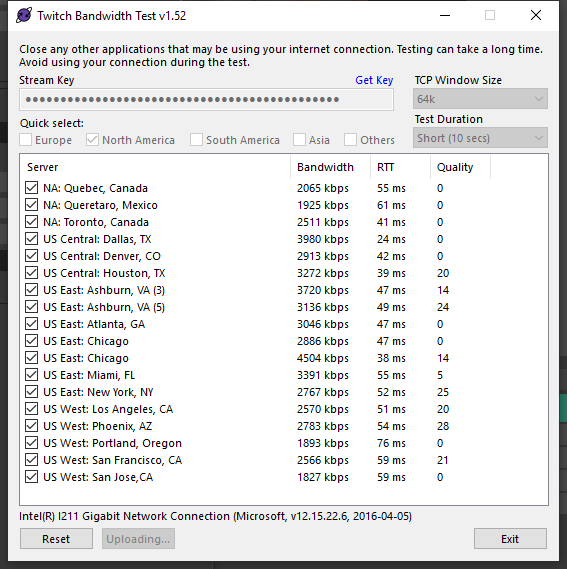
 onyx summit
That's because i will use Media request just for music, is there a hotkey to pause or can you setup one ?
tulip hamlet
@onyx summit You can in OBS.Live.
onyx summit
Tried. Can't find it...
onyx summit
@tulip hamlet Ah thanks i've only looked at the hotkeys in obs settings. Guess a hotkey wil do.
pearl yarrow
@short badge mixer servers are about the same as well
 spiral ravine
Is there a way to set up several random responses to one chat command?
tulip hamlet
While you're still limited by the character limit, the ${random.pick} variable can do that for you.
spiral ravine
Ah, OK. Thanks!
dreamy delta
I still can't get the browser source to appear. The audio is fine and plays on time, but the animation never plays.
tulip hamlet
Screenshot your browser source properties.
dreamy delta
tulip hamlet
Disable Browser Source Hardware Acceleration in Settings>Advanced.
dreamy delta
Done, restarted as admin and same result no animation but the audio plays.
dreamy delta
tulip hamlet
Which overlay is this browser source linking to?
dreamy delta
alert
tulip hamlet
Well, I see it at least.
Recopy your overlay URL.
Double check your settings.
You changed this overlay's resolution on the site.
So it's 720p.
tulip hamlet
At this point I'm not sure what to tell you. I was able to get it working more or less immediately.
Screenshot your Browser Source Hardware Acceleration setting in Settings>Advance to confirm.
dreamy delta
tulip hamlet
Completely delete and redo the browser source from scratch. That's basically the last suggestion I've got.
dreamy delta
It's all good I'll keep trying thanks for your time
 random gale
Hi I just reset my PC but copied my obs-studio folder to a usb
anyway to recover my sources?
 shy mountain
@random gale Source info, profile info and scene collection is not located in the main OBS folder. If you reinstalled Windows its lost.
unfortunately.
random gale

 weary path
Can anyone help me? I've been streaming for a couple of days now, but not game capture isnt picking up my games.
I got it to a black screen with one game, but nothing after that. Ive reinstalled and its still going back to my custom settings, so reinstalling it isnt doing anything.
shy mountain
On a laptop?
weary path
Yes
steel bladeBOT
@weary path Due to the way laptops are designed, your system must be configured to run OBS on a specific GPU, depending on the type of capture you are trying to do.
For Game Capture and Window Capture (recommended), your system must be configured to run OBS on your laptop’s high performance GPU (default); for Display Capture, your system must be configured to run OBS on your laptop’s power saving GPU (iGPU).
If you are running Windows 10 1903 or newer, use this guide for instructions on how to configure your system: https://github.com/obsproject/obs-studio/wiki/Laptop-GPU-Selection-Windows-10
For instructions on configuring an older version of Windows (you should consider upgrading), use this guide: https://obsproject.com/wiki/Laptop-Troubleshooting
weary path
It's blackscreening right now. I've streamed for days and had no problems.
Okay so there is no OBS Studio folder in Program files. Only a streamlabs one, which doesnt have the bin folder I need to get to the exe.
shy mountain
If you are using SLOBS, its best to ask their support.
 toxic ingot
Can someone help me, i have the kappagen widget so when someone types an emote in chat it comes up on screen but only the static ones come up, none that move from bttv
toxic ingot

 inland drift
Hi guys, how do i get both follower and subscriber widgets to appear? Seems i can only get whichever i log into 😔
rugged quail
Hey guys after trying other stuff im back to the best out there. But now i have 1 issue my bot sends 2 messages for the same thing. If anyone able to hop to my channel i can show you
shy mountain
turn off ground control
rugged quail
Where do i do that?
shy mountain
rugged quail
not even at my pc at home at work sorting out currency via webpage
rugged quail
anyone able to assist?
shy mountain

rugged quail
Thanks bud
shy mountain
i assume your PC is not working at home right?
rugged quail
Yea its off
shy mountain
interesting how this happened. First time seeing it without ground control or obs.live working
oh well
rugged quail
Thanks tho man really good response xD
shy mountain
sure
 toxic elbow
hey guys i have a problem i bought lucky spin slot machine alerts from nerdordie and imported the alerts from streamlabs to streamelements and the slot machine is not working is there anyone who can tell me how to fix it
toxic elbow
well they said they did not convert it for SE is there anyone who can change the html code
toxic elbow
these one
shy mountain
No we don't have it as well
toxic elbow
hmm okay and when i import the alerts without the slot machine the tip alert is not working do u maybe know why ?
shy mountain
which alerts package is it?
shy mountain
I'm sure they have that converted and can provide you with the quick install file they have
toxic elbow
but i think i tryed it yesterday it worked fine then i deleted and reimported it again and it stoped working
shy mountain
I fixed it for you just now
reload the editor if you were in it
or check in "my overlays" the most recent updated overlay
toxic elbow
ty u are the best 🙂
so i can use SE tip page now again 🙂 ty ty
what whas the problem if i reload them again will that apear again ?
shy mountain
i just replaced the code
if you don't repload the editor, you won't see th echanged
and if you save, you will overwrite my changes
toxic elbow
well i want to change the vloume of the alert :/
can i do all the stuff and u can replace the code again will that be possible ?
shy mountain
well thats defeating the purpose of me fixing it in the first place
like i said, reload the editor to get the fixed code
then use the volume slider on the left menu - it should work
inland drift
i guess no one was able to help my problem lol
inland drift
when i sign in via youtube i can only use he subscriber widget
but when i log in via twitch only the follower widget appears
plain swan
ah right so you're trying to use
inland drift
so basiclly i cant activate both for an overlay for my streams
plain swan
two different widgets for two different platforms?
inland drift
two different widgets on 1 platform
i use the same overlay for all streams, so i need it to show both widgets on the same stream
 odd kraken
You cannot combine the overlays of different plattforms to one.
You can add both overlays of both platforms to your OBS.
inland drift
but i cant have both twitch follower alert and youtube subscriber alert on one overlay?
odd kraken
no.
inland drift
why not?
odd kraken
Cause these platforms are different.
inland drift
why cant they share data onto my 1 streamelements account?
steel bladeBOT
@inland drift Account Merging - Please note:
- Merging accounts only allows faster ways to switch between accounts
- Merging accounts does not allow data sharing between accounts - different streaming platforms, different type of events
- Merging accounts allows duplicating/sharing overlays between the accounts
If you understand the limitations of merging and want to proceed, please find the JWT tokens (!jwt) from both accounts you want to merge and you will be directed to DM them to a staff member.
shy mountain
You can ignore the last part
But accounts can't share datta because they are from different platforms
inland drift
so i need to basiclly make a blank overlay with a twitch follower widget to then add it via OBS?
shy mountain
yes
rugged quail
Hey, do you mean the dock itself?
 fiery marten
well i just downloaded obs live, and it shows chat and activity feed but not Media requests....and in the options as well it doesnt show.
i checked view-> dock options as well as Streamelements options within obs...am i missing something?
fiery marten
yea @plain swan that doesnt show up...the streamelements drop menu shows...but not the media share
plain swan
alright in that case
go to your dashboard in your browser
and look for it on the left hand side
fiery marten
wait is it not available for mixer yet?
cause i cant see that
either
cause then there wouldnt be a point for using obs live for me
plain swan
it shows up for me when I sign into my mixer account
hmmm try signing out and signing back in
fiery marten
okay i see it now.
i was doing that as you were sending this
but i wont be able to use it through obs live?
odd kraken
Not available on OBS.Live for Mixer at this time.
fiery marten
ah okay !
 worldly dagger
the chatbot customization get removed?
lilac ocean
@worldly dagger are you trying to use the custom bot with Groundcontrol?
worldly dagger
@lilac ocean well I had it setup and renamed, but then today I noticed it's reverted back to StreamElements
lilac ocean
But are you using GroundControl or Obs.live to change the custom name?
worldly dagger
I don't even see the option in ground control
lilac ocean
Because there is a known issue with GC, due to Twitch changing their API
we are working on that but no ETA on a fix yet
however you can also change the bots name in obs.live
worldly dagger
If I don't have OBS Live anymore could that be the issue?
lilac ocean
Here's the vid on how to do it in obs.live, if you are not aware on how to change it over there:
https://discordapp.com/channels/141203863863558144/494513233416421386/561516184718278676
yes, you can only change it with obs.live at the moment
worldly dagger
Any ETA when you'll be able to do it from the internets dashboard?
lilac ocean
no ETA on that, also not planned afaik
you can however bring the idea to the community over at
steel bladeBOT
Check out the StreamElements ideas board: https://strms.net/ideas. You'll be able to add ideas, upvote ideas you agree with, and track their progress with email notifications. Adding and upvoting ideas also helps the staff know which ideas should be prioritized so please take some time to upvote.
worldly dagger
The dashboard is so clean though haha 😄 but thank you
web browser dashboard that is
lilac ocean
No worries! And thanks, we'll hope to get the custom bot name back up asap
 jovial moss
Hopefully this is the right spot to ask this and if not Ill remove it. When I try to add a Game Source it shows nothing but a black screen regardless of what I try and change. Following tutorials on youtube have not fixed it.
lilac ocean
Hey Asheru, this is the right place to ask, what game are you trying to add to Game Source?
Some games do not support Game Source, but you can record them via Window Capture
jovial moss
No games work at all. Dead by Daylight, Facerig, World of Warcraft nothing seems to work with Game Capture.
To stream yesterday I ended up using Window Capture but I could only stream 1 program at a time if I was in Dead by Daylight my facerig would freeze.
lilac ocean
Can you try this for me please?
steel bladeBOT
- Restart OBS
- Start your stream/recording for about 30 seconds. Make sure you replicate any issues as best you can, which means having any games/apps open and captured, etc.
- Stop your stream/recording.
- Select Help > Log Files > Upload Current Log File. Copy the URL and paste the link here.
(Note: If you do not see an obsproject.com URL, you will need to update OBS Studio to version 22+)
jovial moss
Sure thing.
lilac ocean
Log will show us a bit more information, so that would be great, otherwise I'll ask around to the other support members 👌
jovial moss
And of course now its showing up... Darn you Murphy's Law. (I swear it wasnt working yesterday)
lilac ocean
It's always like that isn't it @jovial moss ! I get that over at my IRL IT job as well heheh
jovial moss
Seems it worked after rebooting yesterday. Sorry to have bugged you.
lilac ocean
No worries and not bugging at all!
jovial moss
^_^ Have a good one.
 cunning ice
Any plans to make it possible for DLive streamers able to use StreamElements?
 manic turtle
So my capture card is found by the computer even facebook but when i go into obs studios and add this capture card its not there to pickSo i my capture card is found by the computer even facebook but when i go into obs studios and add this capture card its not there to pick
manic turtle
What a help desk LMAO
steel bladeBOT
For the best OBS support, please join their Official Discord @ discord.gg/obsproject
lilac ocean
@cunning ice nothing planned at the moment but you can always leave your idea at the ideas board!
steel bladeBOT
Check out the StreamElements ideas board: https://strms.net/ideas. You'll be able to add ideas, upvote ideas you agree with, and track their progress with email notifications. Adding and upvoting ideas also helps the staff know which ideas should be prioritized so please take some time to upvote.
lilac ocean
@manic turtle imma ask around for you since I am not very familiar with capture cards! Sorry for the late response, I was out for dinner 
 glossy light
Why are my alerts cut in half
lilac ocean
Do you have your dimensions as 1920x1080 in your browser source @glossy light
manic turtle
Its more the OBS then the card. everything ell picks up the card just not obs
lilac ocean
Yhea I figured, just going to ask around for you anyways since I wouldn't know which settings that would include
manic turtle
Crazzy on ill tell ya. iv never seen this one before lmao
one
Im running zorin os btw
@glossy light you know how to cut your windows right. using control i think maybe you need to just click it and pull down or up with the cuting tool
lilac ocean
Coast, I actually think she has her screen at 800x600, happens sometimes 😁
manic turtle
Ok so normaly you have a black blank box on a new scene. all i get is this red spirl thing
cunning ice
@lilac ocean I don't have permission to post in the ideas section. 😦
lilac ocean
You should follow the link from the bot command
steel bladeBOT
Check out the StreamElements ideas board: https://strms.net/ideas. You'll be able to add ideas, upvote ideas you agree with, and track their progress with email notifications. Adding and upvoting ideas also helps the staff know which ideas should be prioritized so please take some time to upvote.
lilac ocean
The idea that gets posted there by you will then automatically be posted in the #💭︱feedback-and-ideas channel 😄
cunning ice
@lilac ocean i see. Thank you!
 nimble jacinth
Hi. Anyone got an idea why my OBS / OBSlive is randomly starting (and stopping) to record?
steel bladeBOT
@nimble jacinth For the best OBS support, please join their Official Discord @ discord.gg/obsproject
spiral ravine
Media request widget on OBS.live is blank. Reload doesn't do anything. Help?
steel bladeBOT
@spiral ravine Streamelements on top of OBS -> Logout -> login
 stuck needle
hey i got a razer ripsaw capture card and its not allowing me to capture my audio from my consol to my obs how do i fix that?
tulip hamlet
You'll need to contact Razer for that.
stuck needle
i have they tell me they dont support obs studio
only mixer and original obs and i can't use stream elements in obs original
 dry sphinx
If my memory is correct.
OBS.Classic is no longer supported? 
and looking on YouTube Tutorials I see How to set up videos with the Razer Ripsaw with OBS.Studio
stuck needle
i have tried those they get a window that i do not and i have trouble shooted this issue and nothing is working
dry sphinx
 Unfortunate. I never used a Ripsaw before.
stuck needle
well dumb question then can i use stream elements in streamlabs?
steel bladeBOT
@stuck needle We're not able to troubleshoot issues with using our overlays in StreamLabs OBS (SLOBS) as we don't have the tools to support their software. We recommend using OBS Studio or OBS Studio with our plugin OBS.Live.
stuck needle
ok well i can't use obs studio with out being able to capture the audio from my ps4 which for some reason studio wont play if someone can help me with audio issue i can move over to obs studio and be a dedicated user of both studio and stream elements
 ruby yoke
Anybody else getting random "This video isn't available in your country" for all videos in Stream Labs Media Request? Worked fine yesterday.
tulip hamlet
We're not Streamlabs. You'll need to ask them.
ruby yoke
I meant Stream Elements Media Request, sorry about that.
tulip hamlet
Media request is essentially an elaborate YouTube embed.
If YouTube has restricted the video by country, that will show up.
ruby yoke
I tried my own video URL in there and it gave me the same message, yet work fine in a web browser
Here is a screenshot of what I mean
tulip hamlet
Can you restart Ground Control and try to see if it does it again?
ruby yoke
Still the same issue.
tulip hamlet
Are you running a VPN or routing your browser data differently from other programs on your computer?
ruby yoke
No, no vpn or anything. Wouldn't the vpn affect my web browser and most other apps?
tulip hamlet
Some VPNs have split tunneling that lets you have it only affect certain apps.
ruby yoke
Didn't know that, but no vpn
tulip hamlet
There's no reason for it to behave differently in two different places when it's the same connection, and I'm not able to replicate the issue. Does the issue take place if you control it via your StreamElements dashboard instead of Ground Control?
ruby yoke
Issue persists
tulip hamlet
No, on the site, not in OBS.Live.
ruby yoke
Problem persists after restart
rugged quail
Is anyone on that can help with OBS
plain swan
what seems to be the issue? @rugged quail
 golden lodge
Hello does anyone know how to multi stream with twitch and Facebook at the same time ??
shy mountain
rugged quail
My stream only crashes and say's encoder error whenever I stream The new COD
plain swan
Aite lets have a look at your crash log
- In OBS, click the Help menu
- Select Crash Reports, and then Upload Last Crash Report
- Copy the URL, and paste it to the chat here.
rugged quail
rugged quail
Ummm how do I do that
kindred fox
rugged quail
oh gotcha gotcha thank you all
manic turtle
aw i got it, Thats Then reason For Black sceens.. LMAO funny
rugged quail
It's up to date @plain swan
rugged quail
No about 10mins into it
kindred fox
cap your frame rate
rugged quail
Its at 60fps already
kindred fox
it's set within COD?
rugged quail
Yeah its set in there
kindred fox

PSA: COD's bugfix is ready! We identified some pesky issues causing random crashes in NVENC streaming sessions in Call of Duty: Modern Warfare. Bug fix is available on the link below. Thanks for all of your feedback!
Link: https://t.co/BNb28ZaPHS
 Twitter
plain swan
Twitter
plain swan
try lower your settings, and use desktop capture instead of game capture
kindred fox
make sure you're running that build of GPU driver
also make sure your OBS is updated as well 😉
rugged quail
okay ill try it thank you all
golden lodge
why does it cost money to stream on facebbok on restream?
shy mountain
That is a question for restream.io, not us.
golden lodge
truuue
golden lodge
my audio is doubling with my desktop audio the elgato and desktop
are my two audios
shy mountain
 shy mountain
Check and see if you are monitoring the elgato
if you are, then thats the double
try and remove the monitoring off the desktop audio
golden lodge
whens its all off the obs livecan read the audio but i cant hear it
steel bladeBOT
@golden lodge For the best OBS support, please join their Official Discord @ discord.gg/obsproject
golden lodge
will they help?
shy mountain
You are having issues with the audio setup - as much as I would like to help, it can be anything from the Elgato capture to specific settings in OBS, which I'm not that familiar.
And have nothing to do with OBS.Live, unfortunately.
golden lodge
dang okay because it was working the other day all fine so idk why it wont work lol
 brisk osprey
Mediarequest seem to not be functioning in OBS no more... All the other auto-streamelements things work, but Mediarequest is just a blank window...
anyone know anything about this?
lilac ocean
Can you show a screenshot of your obs window?
lilac ocean
have you tried closing the window and re-adding it?
brisk osprey
I tried rebooting, I restarted the program, I logged in on the website (where things work just fine, btw) nothing
brisk osprey
yep
lilac ocean
then to re-add click on the StreamElements menu and then Media Request
steel bladeBOT
@brisk osprey Streamelements on top of OBS -> Logout -> login
lilac ocean
Ah okay, didnt see you said yep to it, try the above for us
shy mountain

lilac ocean
 knotty pagoda
When i change scene and go back to previous scene its scales to only show 1/4 the capture. I have to toggle SCALE in the capture properties a few times to get capture back to showing the full capture.
shy mountain
Are you referring to game capture?
 rustic crescent
could anyone help me get a decent quality stream settings cant get one always looks blurry or hazey . im using a ryzen 3600 with amd rx5700xt pulse and have 18.5 upload speed. I have changed few things a got it a bit better but still not perfect
 dull island
i accidentally blocked a person from donating is there a way i can unblock that person
rugged quail
Hi i wanted to know if there is a option to test your stream settings without going live.
 honest echo
maybe try.. making a recording to test audio and video quality, and then a streaming test with inspector.twitch.tv , on Settings you can check "Enable bandwitch test"
 trail ginkgo
Hi Support, i got issue with my chatbot, i had a custom name on bot, but now it changed back to streamelements and when i try to change the name again it wont? how i fix this
honest echo
@trail ginkgo you are using obs.live?
trail ginkgo
OBS 24.0.3
honest echo
so your trying to change the bot name with Ground Control then, right?
trail ginkgo
i have never used ground controle since it dident do anything more than what streamelements obs can do
i have the option to change it, but when i change it nothing happens
thats my issue
honest echo
i see, let me ask around
honest echo
maybe share a screenshot is more than enought
there is no reports of error within obs.live and renaming the bot
 proud yarrow
need help with media request
i use it for playing music in the backroud with a playlist from youtube
everything worked fine till today
it won't play the videos/music and it does say that they are not allowed in my country
i had the problem before and it fixed itself a couple of days later
anyone can help me with that?
trail ginkgo
hmm maybe i located the issue to my problem.. i recently changed password on my twitch bot account, so maybe thats why it wont connect to it? because i do remember twitch saying small message it would take 30 days or something for a account to work again with 3party programs etc. ?
because i just now easily changed my twitch bot name to my own account, but not the bot account because it doesnt work for now i think :S
can any1 confirm or deny this is actually 100% correct what i said ? 😄 thank so much
oh and im no support in here backslasher, but i think ur issue is from youtubes ends.. has to do with copyright stuff :S
because i have some problem with some videos aswell because blocked on my country
 elfin cloud
How do I get back the activity feed that shows my donations as well
I want the alternate to this ^^^#
proud yarrow
i already checked and they arent blocked from youtube i can watch them without problems thaths why i am confused^^
trail ginkgo
u use vpn ? or something
proud yarrow
nah
trail ginkgo
honently im no expert i hope u find a solution to your issue 🙂 dont wanna confuse u more because again im no support in here.
proud yarrow
yeah no worries 😀 i had this ones before and couldnt find a solution after looking for hours
i was glad it fixed itself a few days later
 wary dew
yeah but now, Youtube changed a few rules
a lot of media-request widget is different since yesterday
no volume slider anymore and stuff like that
proud yarrow
i still got the slider
elfin cloud
how do I get an activity feed that shows donations as well
ivory bay
Hi, I had already written here about the crash problem when starting obs studio with obslive installed. I did other tests and the obslive problem is not the only problem ... I can no longer connect the twitch account to stream, it tells me "open browser" and crashes ... I have slowly installed old versions of obs and I found that with version 23.2.1 everything works (I can't test obslive because it updates me obs if I try) but at this point, it is possible that it is some bug from version 24 onwards that no longer makes me use obslive and connect to twitch? thanks in advance for the help
wary dew
@elfin cloud you activity feed should show all your donations as well by default
go here and see if you have any filters on https://streamelements.com/dashboard/activity
StreamElements
The Ultimate All in One Platform for Streamers
proud yarrow
thats weird because i still got all these things did i miss an update or something
wary dew
ah i see
remove the one you have now
then click on StreamElements in the top bar and then on activity feed
wary dew
you should see it like that now
or do you not have OBS.Live and only regular OBS Studio?
wary dew
i don't think so
because that would show you StreamElements in the bar

OBS.Live | Open Broadcaster Software Streaming Knowledge Base
OBS (open broadcaster software) knowledge base for live streaming. Find articles and videos about streaming with OBS.
 pine kernel
Hi! We have a weird issue with Cheer/Tip-Sounds in OBS. They are somehow broken (not distorted, just... uhm, jaggy?) They sound correct on the PC (and in my overlay) it's not distortion. They just sound wrong when streamed to twitch.
wary dew
@elfin cloud that's just OBS Studio
install the OBS.Live plugin from the site i gave 😉
then you will have the right activity feed in there
elfin cloud
ok thank you
pine kernel
It kinda sounds like an buffer issue?
pine kernel
were not sure how to debug this
honest echo
@pine kernel just this stream? maybe stoping the stream and start again.. or wait to see if the next stream still happen
pine kernel
Nah it occured before. Sometimes it's okay, and then after a while it's not. Other times it's broken from the get-go. Restarting didn't help. All apps are up to date.
 agile epoch
Hi, having issues using the media request feature. It doesn't load up when i click it. It's just a blank page. This happened last night and today as well when i tested it. The media request works fine from streamelements.com but i would like to use it with obs. Its worked perfect for me in the past.
steel bladeBOT
@agile epoch Streamelements on top of OBS -> Logout -> login
agile epoch
it worked. That bot is fire. 
steel bladeBOT
@agile epoch I'm a bot, only here to send helpful messages because the helpers are lazy.
 rich ether
Hi! im having an issue that everytime i click on "start streaming" it doenst start my stream and im connected to the internet. it also shows me that i have 0 Kb/s which i dont understand because the last weeks everything worked perfectly help pls?
steel bladeBOT
@rich ether Speed tests mean very little with regards to streaming and your choice of bitrate. They measure your raw upload speed to a server that's near you (likely run by your local ISP), instead of your stable upload speed to a streaming server. Your stable speed will determine the bitrate you can comfortably stream at.
https://www.speedtest.net/
The stable speed can be estimated as roughly 70-85% of the speed test result in a lot of cases, however this is by no means a perfect estimate. In reality, it may end up being much worse if there's problems between your ISP and the streaming service.
 ruby minnow
Hi! Thanks for the awesome service! I cant seem to get my game to show. I clicked specific window, and i have also tried full screen.
wise silo
Are you on a laptop?
ruby minnow
no
wise silo
Then lets try this route 
steel bladeBOT
@ruby minnow Please provide a log from your last stream. To do this, in OBS go to Help > Log Files > Upload Last Log File and paste the link to the log file here.
 vernal tendon
Are there problems again with the custom bot name? Mine just disappeared
wise silo
With GroundControl, yes. With OBS.Live, no @vernal tendon
ruby minnow
my last stream was on xsplit. I just downloaded and was working with obs to see the difference
wise silo
Then you would need to reach out to XSplit for assistance
ruby minnow
everything was working with xsplit but i wanted to try obs. but for some reason the game wont even show on the obs screen when selected
it shows black
wise silo
Then do a test stream and post the log @ruby minnow
@vernal tendon let me check on that
 kind oasis
hello
steel bladeBOT
@kind oasis Welcome to the helpdesk! Please let us know how we can assist you today and a support volunteer or staff member will assist you as soon as they are available. Thank you for your patience.
vernal tendon
nope, still not working... I got the elements bot
it worked once, now is out again
kind oasis
I need to figure out how to fix my chat on stream elements if anyone can help me do that I tried like refreshing it on the obs app but that didnt work It's annoying bcus I have to always keep a chat popout since it's not working
wise silo
Log out and back in @kind oasis (in obs.live)
wise silo
@vernal tendon Am asking some other nerds and will get back with ya
vernal tendon
cool thanks, so the bot disappeared today mid stream... I'm live
kind oasis
thanks lol
ruby minnow
https://obsproject.com/logs/j-Q9b8zM-2e1lF8M
here is the small test i did
wise silo
ruby minnow
hmmm thats dd the game is very old... ill see what i can do after work. thanks !
 round scarab
round scarab
round scarab
UPDATED GRAPHICS CARD. idk why it keeps crashing as soon as i load up
never happened in the past. been the past week though
 quartz nimbus
2 times my live stream stooped while i was live in facebook. The OBS was still showing the streaming is live but it won't in facebook. can anyone help me out plzz
rugged quail
i need help obs will freeze my streams unless my games are on windowed when its on full screen the stream just freezes but the audio still plays
 reef garden
quick question. i have a window in obs that showed me run time and viewers in chat while streaming on twitch. i streamed on Facebook and when i when back to stream on twitch the window is not there anymore and i cant find it in setting either.
had*
odd kraken
Please do not ping random server members. Thank you.
rugged quail
does staff even help here ughhhh
wary dew
yes they do
rugged quail
well can someone help me</3
steel bladeBOT
@rugged quail Please provide a log from your last stream. To do this, in OBS go to Help > Log Files > Upload Last Log File and paste the link to the log file here.
rugged quail
 limber juniper
@rugged quail check out the sections below here: https://obsproject.com/analyzer/?url=https%3A%2F%2Fobsproject.com%2Flogs%2FPw38_bt34-EM3uCA
Since you are not running in Admin mode, that may be what is preventing you from game capturing correctly
 abstract osprey
I do not know if this is the appropriate place to ask for help with my Razer Ripsaw HD, but I'll ask since Razer support isn't helping very much. I got OBS to allow me to display my desktop to my Razer Blade 15, but now instead of using my native resolution of 1440p on my monitor for gaming, it is using the stream resolution of 1080p. If you can't help no big deal. If you can direct me to the best place that would be great, if not that's cool too.
reef garden
@odd kraken it was not a random person. i tagged a staff member for help, witch i thought what this is for...
rugged quail
how do you run 'admin mode'
limber juniper
right click OBS exe and choose run as administrator
wary dew
@reef garden but that perticular staff members job is not the support department 😉
reef garden
@wary dew roles should be a bit clearer then 👍
wary dew
so the dock you are looking for is no longer under VIEW > Docks?
wary dew
viewer can be seen on the activity feed as well
click on the hamburger menu in the top left of it and then Stream Info
rugged quail
@limber juniper that didnt work either
limber juniper
@rugged quail is it any game in fullscreen or particular ones?
reef garden
@wary dew any way i can use the one i had before i usually don't keep activity feed open it take to much room
wary dew
i don't know what the other dock was, i will ask around internally if someone else knows for you
reef garden
Thanks. It was small and very useful
wary dew
View > Docks > Twitch Stats
wary dew

reef garden
i know
steel bladeBOT
@reef garden If you are not seeing the OBS Twitch integrations and have OBS.Live installed, please follow these steps:
- Make sure you are on the latest and greatest version of OBS.Live
- exit OBS (make sure OBS is not running)
- delete %appdata%\obs-studio\plugin_config\obs-browser\obs_profile_cookies
- start OBS.Live
- Settings -> Stream -> disconnect -> connect
 flint veldt
hey, is there a way to import my alerts i had on another stream platform to another. all my alerts are in the one library, i just want to bring them to another
odd kraken
As the alerboxes are different for every plattform, I assume not.
abstract osprey
I do not know if this is the appropriate place to ask for help with my Razer Ripsaw HD, but I'll ask since Razer support isn't helping very much. I got OBS to allow me to display my desktop to my Razer Blade 15, but now instead of using my native resolution of 1440p on my monitor for gaming, it is using the stream resolution of 1080p. If you can't help no big deal. If you can direct me to the best place that would be great, if not that's cool too.
I'm aware this isn't Razer support. Just wasn't sure if you could help me with a passthrough issue or not.
reef garden
this helped 5) Settings -> Stream -> disconnect -> connect thanks 👍
abstract osprey
✌️
wary dew
i don't think anyone can help you unless they use the same type of hardware unfortunately @abstract osprey as this problem is a very specific one.
You could always try to ask in the OBS discord server as well, just to have a line in a few different places
steel bladeBOT
For the best OBS support, please join their Official Discord @ discord.gg/obsproject
 sonic blade
So I've found an issue with OBS Live, that currently keeps me from making new scene collections.
Basically whenever I try to switch my scene collection while OBS live is installed, my OBS constantly crash.
Is there a fix to this I don't know of?
I uninstalled OBS Live twice to double check, and it seems to be the reason behind my OBS crashing when switching
kindred fox
If you make a brand new scene collection and switch to it, does it crash?
 jovial ridge
I need help, i wanted to change completly my overlay but when I import to OBS.live its not scaled right, its maybe dumb but Im new in all this, could you help me solve this?
 median citrus
Hello, I seem to be having issues trying to use my capture card to stream PS4 into the OBS. Can someone offer some help/advice?
 hollow zinc
stream elements keeps crashing on startup and wont show any of my browser sources after adding the merch alert. pls help.
?help
 round oxideBOT
Help Options
?help commands - Information on commands
?help setup - Information on bot setup
?help faq - Frequently asked questions
hollow zinc
help
wise silo
fuck.
steel bladeBOT
@hollow zinc A crash log is required to investigate the cause of your issue. Please upload the last crash log.
- In OBS, click the Help menu
- Select Crash Reports, and then Upload Last Crash Report
- Copy the URL, and paste it to the chat here.
hollow zinc
!crashlog
steel bladeBOT
A crash log is required to investigate the cause of your issue. Please upload the last crash log.
- In OBS, click the Help menu
- Select Crash Reports, and then Upload Last Crash Report
- Copy the URL, and paste it to the chat here.
wise silo
Mmhmm yep
hollow zinc
how do i get the url?
wise silo
You read what the bot said
hollow zinc
like that?
wise silo
Did you read what the bot said?
Ok.
But did you read what the bot said?
Lets start over.
steel bladeBOT
@hollow zinc A crash log is required to investigate the cause of your issue. Please upload the last crash log.
- In OBS, click the Help menu
- Select Crash Reports, and then Upload Last Crash Report
- Copy the URL, and paste it to the chat here.
steel bladeBOT
A crash log is required to investigate the cause of your issue. Please upload the last crash log.
- In OBS, click the Help menu
- Select Crash Reports, and then Upload Last Crash Report
- Copy the URL, and paste it to the chat here.
hollow zinc
hollow zinc
oh my bad
steel bladeBOT
@hollow zinc I'm a bot, only here to send helpful messages because the helpers are lazy.
@hollow zinc Please provide a log from your last stream. To do this, in OBS go to Help > Log Files > Upload Last Log File and paste the link to the log file here.
hollow zinc
wise silo
Lets start by making sure no Display and Game Capture sources are in the same scene, aswell as running OBS as admin.
wise silo
That would be one way to do it, yeah.
hollow zinc
i removed one, what would be the next step?
wise silo
Run your OBS as admin.
hollow zinc
crashed again
steel bladeBOT
@jovial ridge To add your overlays to OBS, add a new browser source in your scene. Paste your overlay URL in the browser source properties, set the dimensions to 1920x1080 (unless you changed them on the website), and ☑ “Shutdown source when not visible” https://youtu.be/KDvLynUqXI4
hollow zinc
it just closes out completely
kindred fox
@hollow zinc download obs.live from https://streamelements.com/obslive and just reinstall it over the top as admin
See if that fixes it
round scarab
https://obsproject.com/logs/D1iOXCi3xOFQOHRh
UPDATED GRAPHICS CARD. idk why it keeps crashing as soon as i load up
never happened in the past. been the past week though. sometimes it goes fine, other times it will load with no overlays, most of the time crashes on launch
kindred fox
You put in a new graphics card or updated the drivers?
round scarab
updated drivers
kindred fox
@round scarab when you installed obs.live did you install the latest version as an auto-update or clean install?
round scarab
it should auto update. will my overlays and profile wipe when i reinstall?
kindred fox
Tbh I don’t want you to uninstall
I will recommend backing up your profiles to your desktop
Then download the latest version of obs.live from https://streamelements.com/obslive and then right clicking the installer and choosing run as administrator

StreamElements
Download StreamElements OBS.Live to makes live streaming on Twitch/YouTube/Facebook/Mixer easy. Live Stream your broadcast from anywhere, save on CPU with StreamElements Open Broadcast Software (OBS) plugin.
I’m wondering if it’s an installer glitch we are seeing
Also make sure you disable any anti-virus as it tends to cause hiccups with the installer. You can re-enable it when it is done installing and it should be fine after that
hollow zinc
that didnt work
kindred fox
Well poo
 carmine kestrel
having a issue stream keeps getting a viewing error ? and windows says obs keeps disconnecting and reconnecting
round scarab
ok whats up @kindred fox
kindred fox
Create another Administrator account brand new on your PC. It can be username: Test, password: test for all I care. Just any other account. Then try loading obs in that account and see if it crashes on launch
round scarab
ok
kindred fox
@round scarab did it work?
 remote rock
hey uhm my media request isn't showing up. how do i get it back?
wise silo
Log out of OBS.Live and back in
kindred fox
Click StreamElements >> Docks >> Media Request
 gray timber
OKAY sooo
I love SE OBS and all but I'm having 2 issues here
and it's only with this game (one of them)
Link for example: https://www.twitch.tv/videos/541342497
So on my PC it's running perfectly fine in 60/30 fps but on stream it becomes this mess of half good and half wtf
Every other game i play (also years younger games than this one) have 0 issues ever with framerate, but this is just awful to watch... Anyone has an idea why it happens and how i could fix? Someone said turn bitrate from 7000 to 3000, i did that but no change. Really don't wanna turn down the quality, only as a last resort if anything (lemme know if you need a screenshot of my settings)
the 2nd thing is as you can sometimes see, it doesn't pick up my mic always. On discord it's fine since people there talk to me np, but the OBS recording just skips half of it (mic set to max volume in both its settings and obs) it's like the sensitivity of voice detection is nopeing out, if there even is any
So 2 things I need help with please 


kindred fox
What game?
gray timber
Final Fantasy XII Zodiac Age (Steam)
gray timber
Err I always stream at 1080, the game is in window mode though with custom size
Someone said to use window mode for less lag but i've done that from the beginning
gray timber
Don't know if I should try 720? That's what I used for Zelda MM
gray timber
Always? Won't that affect the quality?
gray timber
Well it's only this game
kindred fox
Right
Your gpu can’t handle the heavy lifting
So best advice I can give is to set your obs settings to about 3500kbps, if you’re using NVenc (new) make sure psycho visual tuning is turned off, and you should be able to have your base canvas at 1920x1080 and your stream output as 1280x720
gray timber
Just tested recording, that is also not choppy at all
so it's only live
Yeah i had 3500, lowered to 2500 just now to test but yeah not live anymore now
kindred fox
If it’s only live then it’s most likely an internet thing
What is your upload speed using speedtest.net?
gray timber
But why would it depend so much on the game then if no other one gets this bad fps thing? if it's connected to my internet
and lemme see, german internet is 
gray timber
Up is usually around 6 mbps, at least that's what we booked
says 20 now 
kindred fox
Because having an odd resolution also puts strain on your gpu
gray timber
Ohhh okay
kindred fox
So try to keep it within standard resolutions or a properly scaled resolution for the monitor you are using
That will reduce the work of having to render windows at 1080, and the game at a weird resolution
I’ve done a 540p60 stream on a MacBook once and it actually looked like it was 720
On 2Mbps up
gray timber
Is that stream- or game-related? that it's hard on my gpu
i usually just have custom size so i can read chat (only 1 monitor ==) cause i dont wanna have my phone on twitch just for that
kindred fox
Do you play other games at strange resolutions too?
If you do 720p windowed you should be able to have chat sitting next to the game
On a 1080p monitor
gray timber
Only 1 (golf with your friends) but it's shitty on every person's pc whoever plays lol
gray timber
FF won't let me change the resolution anymore  lol
lol
gray timber
Switch games also 720? those don't lag at all either but i guess switch is 720 anyway?
it was on some shitty 360x600 and now it's like my 1920 wide but 300 high and a white screen
hope i can change the res in some textfile lol cause now game won't start up
kindred fox
FF won't start?
gray timber
Yeah i tried to change res from 360px to whatever came after (weird wide black screen with stretched text) idk why
now when i start i just get this weird window
kindred fox
that's odd... lemme see if a friend of mine has an answer
 kindred fox
that's freaking weird.... i'm asking a friend of mine
 gray timber
Lol
kindred fox
wut da fuq?
gray timber
it's "SettingsLoc.xml"
kindred fox
can you copy/paste the resolution text here?
gray timber
the gibberish?
opened an exe called FFXII_TZA_GameSetting but it gives me the same dumb white window
That settings thing is just the settings text
not the settings themselves i don't think
it's in different languages too
ahahahahhaahhahahaha
what

gray timber
Glad after setting 360 x 600 the next one in line was 19696 x 360
gray timber
But I wanted to test being from the future for a bit
420Head 
Ok now that we solved a problem we made ourselves while trying to fix the main problems.... 
gray timber
it's time to sleep cause it's 4 am 
kindred fox
not a problem! when you wake up 2 hours from now, someone will be here 😄
gray timber
well more like 7
kindred fox
you say that now....
gray timber
You think i will get too many nightmares over this? 
kindred fox
sets a timer
gray timber
! !
kindred fox
nah, you'll sit up and be like "OH! I know what to do!"
gray timber
Ok so in short form
i try 720 on the window mode
and also on OBS? and test?
gray timber
Nah I know nothing lol and i also need to stream to test it since recording is np
kindred fox
I'm betting if we tweak your obs settings for the stream and encoder enough, it won't hiccup and you'll be good to go
gray timber
but nw it's too late
was just bothering me since it's been like this for some days according to chat, but i never saw how bad it was til now
kindred fox
but we can worry about that tomorrow 😄
 kindred fox
we can guide you, but a lot of it is just trial and error because hardware varies so much
gray timber
Yeah np that's basicially what i do usually but this time i was like
hey if it's OBS i might just ask the source

Like SE OBS
kindred fox
well...we aren't the source of OBS....we are just good at troubleshooting 😄
We are the source of the OBS.Live plug-in
the OBS guys get mad if we acknowledge writing that app
which we don't ever do
Because we like them
gray timber
Haha yeah well i'm using it
one of you guys DMed me to use it when i said i'm having trouble with the normal one
so i have been ever since
gray timber
Yeah everything else works great
That was such a weird coincidence tho that one of you guys was in Ennopps chat the second i complained about my normal OBS being messed up for weeks 
kindred fox
wasn't me!
gray timber
like the guy in the dark alleyway opening his jacket
ehy
wanna buy sum SE OBS
kindred fox
but we're like bad pennies... we always turn up



 kindred fox
Np!
kindred fox
@hollow zinc the last person I sent on a test for your same issue never came back....
How comfortable are you with windows?
hollow zinc
Pretty comfortable but i cant do anything right now i gotta go to work but when i get out is it cool if i dm you? @kindred fox
kindred fox
I’ll be asleep...but the other thing to test is a fresh windows account and see if you have the same crash. That gives us a better idea to see if it’s the application or the user account
So if you can create a new testing user and see if obs blows up there it will give us more information
rugged quail
out of nowhere my pc stream started getting freezes and lags but thats never happened before
steel bladeBOT

 AI-StreamElements
Command list
Welcome Module
**!setWelcome <message>:** Change the welcome message, :member: will be replaced with the new member mention.

**!setWelcomeChannel:** Set the channel where the greetings message will be sent to the current channel.

**!deleteWelcome:** Delete the welcome message.


**Custom Commands Module**

**!commandSet <command> <message>:** Set a new custom command that will show the specified message, it will update the command if used again.

**!delCommand <command>:** Delete the specified command

**!cList:** Show all commands
out of nowhere my stream started getting freezes and lags but thats never happened before
@umbral goblet
steel bladeBOT
@rugged quail Please provide a log from your last stream. To do this, in OBS go to Help > Log Files > Upload Last Log File and paste the link to the log file here.
 dry swallow
is there a way to reset Stream Elements OBS? Ive been having major lag issues the past few days, and i thought it might be my internet (it still might be but trying to trouble shoot as much as possible). When i start the program it usually cycles between excellent output to 0 output. I can play games online, with no noticed lag, but when its time to stream, it impossible to watch (on the viewers side) I have tried using other streaming options with the same result (OBS Based)
steel bladeBOT
@dry swallow Please provide a log from your last stream. To do this, in OBS go to Help > Log Files > Upload Last Log File and paste the link to the log file here.
dry swallow
kindred fox
dry swallow
ive been running this way for 2 years. 😦 literally nothing has changed in my setup . maybe my router is going out.
shy mountain
Then follow the analyzer
dry swallow
Thanks @shy mountain for the help. loooks like i gotta keep digging. and try hard wiring to see if that changes anything! Appreciate it! 🙂
rugged quail
im trying to uninstall streamelemnts and it wont let me
shy mountain
Did you uninstall obs studio first?
 surreal marsh
Hi there. Im trying to use ground control for Media Requests, but its not working properly. Its not playing my backup playlist or accepting music at all
shy mountain
Are you getting any errors?
surreal marsh
Nope, just not playing.
I get an error when trying to create a button for streamdeck though that says the OBS.live action is offline
wary dew
usually when you get that, you are not logged in to StreamElements in OBS
surreal marsh
But i am. I can mute alerts and stuff, but the media control isnt working
surreal marsh
Hmmm,
Ive been using it for MR on twitch and controlling it with my streamdeck just fine. Its when i switched to mixer that its giving me this issue
shy mountain
Yea, so MR for Mixer best works via the dashboard
surreal marsh
can i still control it with my streamdeck?
surreal marsh
dashboard isnt working either. entered a link and just have a loading wheel
im an idiot. my playlist was private and it was causing issues
However, i did notice the Media Request option is missing from OBS.live when logged into a mixer account.
odd kraken
There is no MediaRequest on OBS.Live for Mixer at this time.
surreal marsh
oof, guess i have something to request
 mossy oracle
Hey guys, why my bot doesnt appear in Ground Control?
Any ideas? It is just gone and my bot appers just like "StreamElements"
 sinful flint
No problem 👍
 slow tulip
Hey guys! so I've been having an issue wile streaming. It doesn't seem to matter where I am streaming to. but I get an "encoder error" and the stream quits. if I simply hit "start streaming" it will just continue to say "encoder error" until I close obs.live, and restart it. then it will start streaming again. any Ideas what is going on? what I can do to fix it? Unfortunately after it happened, I relaunched obs and continued streaming so its not the "last log file" so I cannot upload it. but I could perhaps upload the file here? Thanks for your help!
steel bladeBOT
@slow tulip Please provide a log from your last stream. To do this, in OBS go to Help > Log Files > Upload Last Log File and paste the link to the log file here.
slow tulip
the error starts at 21:34 in the log
slow tulip
yes, I know. if read my post. I said I streamed again after the error. so the log with the error is not the last log.
dry sphinx
Won't help here then. Can you try running a test stream / record for 30 seconds to get a new log?
slow tulip
the log with the error in it that i uploaded wont help? I guess I'm confused. I mean, i can upload the last log. but the last log had no errors. so I don't know what good it would do?
dry sphinx
 Better than nothing. As need the link for the OBS Analyzer.
slow tulip
dry sphinx
 rancid pine
Hey there. I have a huge problem with my alert sounds. I try to listen to them via monitor through obs, but every time I do that the alerts do not sound correctly. Any idea why that is
slow tulip
https://obsproject.com/logs/BPe0l0ZTBxsCjPLg here is the link to the one with an error
dry sphinx
Yep. If you click the link I mentioned: Shows Killer NIC which you can follow the steps to resolve that.
slow tulip
so it's saying the killer NIC (which I don't even know what that is) i have the killer control center, but that would give me an encoder error?
rancid pine
I made a test alert box with streamlabs and it works fine. So it's not my PC, internet connection or anything. I really don't want to switch to streamlabs though. So please help
We tried to get support about this yesterday but we are just getting ignored :/
 sage ibex
So my obs says its using 10% usage while task Manager says its double that. Any particular reason?
odd kraken
The values in Task Manager also include CPU use from browser sources. If you expand the process, you can see which portion is cef-bootstrap use and which is being used by OBS itself. Not an issue but it's a limit of CEF that we can't show that use in OBS itself.
sage ibex
ahhh okay that makes sence! Thanks @odd kraken
sonic blade
Hi :) So i've set up my overlay through Streamelements, so basically I'm saving a lot of CPU usage and have it all running through a single browser window. However, i've noticed it isn't running all smooth. Is there a way to make it run constant 60fps?
This isn't the only browser windows i've had an issue running on 60fps btw. It's like it limits it to 30 or something
steel bladeBOT
@sonic blade OBS -> settings -> advanced -> scroll down -> enable/disable hardware accel.
https://i.imgur.com/ggMe9ZE.png
 slender ferry
can anyone help my screen and resolution is fit to screen then when is stream on the stream 2 big black bars show up on the side
plain swan
what resolution are you streaming at vs the resolution of your overlays?
wise silo
He already asked in #651453660810838026 
slender ferry
i didnt mean to
and my base and output scale are both 1920x1080
and i dont use overlays
 shadow nest
I am encountering a problem with my alerts not showing up in OBSLive.
I see them just fine in the overlay if I open it normally and I see them in the editor as well.
When I put them in OBSLive, they just never show up.
The sound goes off so I thought it was a layer issue, but that also doesn't seem to be the issue.
steel bladeBOT
@shadow nest OBS -> settings -> advanced -> scroll down -> enable/disable hardware accel.
https://i.imgur.com/ggMe9ZE.png
slender ferry
can i get some help on my question
kindred fox
Can you screenshot your obs window and also a screenshot of your stream output?
steel bladeBOT
@slender ferry https://www.take-a-screenshot.org
wise silo
Lets start off with this.
steel bladeBOT
@slender ferry https://www.take-a-screenshot.org
slender ferry
my clip board is not working\
i've literally tried that 100 times and my mouse just flashes
wise silo
Or download ShareX
kindred fox
snip & sketch is built into windows
wise silo
Alright, Now lets post a screenshot of your output settings.
 glossy dagger
Looking for some help the location of my custom chatbot name moved? It was working and now it is gone... anyone help?
kindred fox
@glossy dagger were you using Ground Control?
glossy dagger
YES
wise silo
@slender ferry Im on mobile, so I cant see your screenshots
Mind double checking all of your outputs?
And making sure they are all set to 1920x1080?
glossy dagger
The options isn't even there anymore
slender ferry
that might be it
kindred fox
Twitch ninja changed the API for custom bot names using Ground Control. If you use OBS.Live you can still use a custom bot name
plain swan
glossy dagger
Twitch Ninja?
 turbid ravine
yo i keep opening up OBs.Live and it keeps crashing can someone help?
slender ferry
thank you all so much for the help
kindred fox
Twitch made a change to their API which broke Ground Control custom bot names
steel bladeBOT
@turbid ravine A crash log is required to investigate the cause of your issue. Please upload the last crash log.
- In OBS, click the Help menu
- Select Crash Reports, and then Upload Last Crash Report
- Copy the URL, and paste it to the chat here.
turbid ravine
bruhhhhh i cant even open it
wise silo
Then navigate to your OBS directory, and send the log file manually
turbid ravine
ight
glossy dagger
@kindred fox oh that's no good
So now i have to research how to do it in OBS.Live
OooF!
turbid ravine
wait so im in my OBs directory and it has 3 folders: bin | data | obs-plugins | and it also has the uninstaller
wise silo
Check under AppData/Roaming/OBS/Logs
wise silo
Send the one over in "Crashes" too in the same folder @turbid ravine
wise silo
Are you in the merch beta?