#helpdesk-selive
1 messages · Page 87 of 1
 cedar pine
 shy mountain
UPDATED 2018 version of The Ultimate Guide to Streaming to Twitch with OBS Studio. In this video, we go through how to setup OBS Studio's server, bitrate, resolution and framerate settings to get you started and streaming to Twitch 👇🏻Timestamps & Links👇🏻
📕 Ful...
for OBS
cedar pine
thank you
shy mountain

YouTube
Need help? Check out our video guides, covering every feature in StreamElements.
for our tools and features
cedar pine
thank you very much
 rocky quail
hello, I been looking for the widget that can show up on obs what Spotify is playing but I'm having a hard time finding it, anybody know how to add this?
 sweet current
Hi there. Sorry if this has been asked before:
I've been setting up the Streamelements Stream Store to enable viewers to redeem sounds which then play on stream. It all works very well - up until now: Couple of weeks later (today) I've been adding two new sounds (.mp3 file format), exactly the same way as before. They also preview fine on Chrome.
However when being online on twitch, those 2 new sounds won't play at all (redemption works though and is acknowledged in chat).
Old sounds still work.
Any ideas what I could try to fix this? Do I need to use a different sound file format?
edit
ps: I've got the store redemption widget loaded up in my overlay (as stated above the initial sounds I've put in to actually play well on stream)
 steel bladeBOT
@rocky quail Spotify has kindly asked us to disable our integration with them, so we complied. This means that the Spotify integration has been removed and the "Now Playing" widget no longer has it as an option.
@sweet current Right click on the BrowserSource > Properties > Scroll down a bit > Refresh Cache of current page
sweet current
@steel blade Thank you. Did that and gave it another spin. Unfortunately still doesn't play the new sounds. Mmh.
@rocky quail I'm using a Browser Source from https://spotify.aidenwallis.co.uk/ for this purpose. Width 350, Height 70. You log in with spotify and it is going to give you a unique https://nowplaying.aidenwallis.co.uk/ URL which you can put into OBS.
Spotify Now Playing tool - Aiden Wallis
Create chat commands and live updating now playing notifications for spotify for your Twitch streams! Simple tool. Can be used without downloading.
shy mountain
@sweet current Which sounds/items?
sweet current
Uuuuh. I just found my mistake. I had the Item type still specified as "Stream perk" instead of Sound effects... Duh.. Stupid me. So sorry for wasting your time guys. Thanks so much for reading through / looking into this though. 🙂
shy mountain
no probs 
 opal breach
These few parts of the program are in Dutch while everything else is in English. How do I change the Dutch parts to English? When I'm on the Twitch site itself everything is in English.
 wary dew
will take care of this in #🇳🇱︱nederlands
 frigid wharf
Any idea why i cant backup my settings to the Cloud i keep getting "Failed to Upload Backup Package. Error: Network Error"
it always fails around 50% to 60% upload
wary dew
let me ask around for you
wary dew
@frigid wharf we haven't seen this error before so they are going to ask around and see what the issue might be
frigid wharf
@wary dew thanks for looking into it for me, much appreciated
 daring geyser
hi guys, my mic layer always peaks even if the mic is muted. why is that?
and I'm gettin weird "hiss" sound on obs.live but not on whatsapp records.
any expert here to fix it before my stream? 😞
 plain sonnet
check settings > audio and make sure your mic is set correctly
if obs mixer is still moving if your mic is muted then it may be set on a different mic
or you have a bad connection causing interference
daring geyser
@plain sonnet This happened on my stream. Problem can be the mic that broken?
https://www.twitch.tv/oxysem/clip/PowerfulSmilingPigMau5?filter=clips&range=7d&sort=time @plain sonnet here is the vid when issue started.
plain sonnet
are you using an interface for you mic?
 naive crest
Does anyone know if there is a way to use a Turtle Beach elite 800x with obs? I called turtle beach first, and they weren't helpful at all. I have my headset on bluetooth and connected to my computer, it seems to work as long as I have the computer mic on too, the problem is the computer mic picks up every little sound, which makes for a terrible stream.
this is how I have my headset, set up in the settings of OBS. I have it set has default in my sounds control panel, and also have it as my input and output on my computer.
 kindred fox
Change all of those to disabled and add your headset as an audio input/output source in your scene
 verbal agate
Hey guys I've spent the last week trying to figure this issue out. I have a dual monitor setup and my PC is powerful enough to handle gaming/streaming but I figured out their is an issue with dual monitor setup 144hz/60hz. Does anyone know a fix to this?
As soon as I open stream elements game starts stuttering and my monitor that is on 144hz changes to 60hz it feels like
kindred fox
What does your monitor setup look like in windows settings?
verbal agate
which settings specifically ?
 warm pewter
It has to do with how Windows handles the refresh rates, and the applications running on them. No real good solution until Microsoft addresses it. You can set both to 60hz, or ask in the OBS discord for other work arounds
steel bladeBOT
For the best OBS support, please join their Official Discord @ discord.gg/obsproject
verbal agate
@warm pewter Thank you
 topaz badger
My music requests/player plays the audio overlapped whenever I show video. Anyone else have that?
wary dew
make sure step 3 is done on all the overlays if you have it on multiple
 agile fiber
How do I put my streamelements overlay on my OBS Live? It takes me to the webpage then takes me to a seperate page when I click launch overlay?
steel bladeBOT
@agile fiber To add your overlays to OBS, add a new browser source in your scene. Paste your overlay URL in the browser source properties, set the dimensions to 1920x1080 (unless you changed them on the website), and ☑ “Shutdown source when not visible” https://youtu.be/KDvLynUqXI4
 bronze smelt
Good Afternoon, so Im having trouble connecting to twitch. I once connected to mixer and after I tried to connect to twitch via connecting my account to it and then trying to go live it'll switch back over to mixer automatically. I'll go back into the stream settings and it'll have a custom link setup. How can I fix that? I've tried uninstalling and nothing
bronze smelt
Awesome! Thanks @plain sonnet
plain sonnet
np 👍
 sweet cradle
I cant get my media Requests to show up and i have the widget in my overlays
 tulip hamlet
The tutorial video will never display. Skip it.
sweet cradle
ok that works but it plays double audio when showing on screen?
steel bladeBOT
@sweet cradle Make sure to ☑ “Shutdown source when not visible” for all browser sources (all OBS scenes). If using studio mode, uncheck “Swap Preview/Output scenes After Transitioning.” Also keep in mind that sound can play from any overlay loaded in the browser (editor or launched). https://i.imgur.com/FegZJQS.png https://i.imgur.com/yY0wcFl.png

 sweet cradle
Ive done that! still no change
i was able to find a fix by selecting the Control audio viva OBS
 green harbor
Hey, when i stream the quality of the stream looks a bit off and there are multiple stutters sometimes. When I start streaming I also saw that it seems that the refresh rate on my main monitor goes down to 60hz from 144hz or it just looks a lot more choppy
tulip hamlet
@green harbor This is a GPU driver issue. Move OBS onto your 144hz monitor or get another one, basically your only choices.
 wheat wasp
I am using Media request on my stream. I was wondering if their is a way to mute the music for me but not my stream with a command?
 wise silo
With a commnad? No
tulip hamlet
No, you need an audio mixer to accomplish something like that.
wise silo
Voice meter Banana? yes.
wheat wasp
Command or a hotkey
wise silo
It is a program to seperate your audio channels
AKA music plays through channel one > everything else channel 2
wheat wasp
oh ok thank you
wise silo
You only hear channel 2, stream hears both.
wheat wasp
@wise silo do you by chance have a few minutes to hop in a call and show me how voicemeeter banana works?
wise silo
To be honest with you
I would be of 0 assistance
that being said
I know quite a few guides that is extremely useful if you want me to link you.
wheat wasp
sure thank you
wise silo
I Sent some links to you
If you have any questions feel free to as here and either I or someone else will do their best.
 left whale
hey all! i keep adding a game capture, and a little red square shows up at the top left hand corner but then i can't make the window bigger. How can I drag it so it covers the background?
tulip hamlet
Do you have a game running?
left whale
yeah, i ran one so i could get it formatted right
tulip hamlet
Is it selected in the game capture source properties?
left whale
yes
tulip hamlet
Try Ctrl+F?
left whale
it's capturing it fine, i just can't make that window in the sources bigger it seems like
tulip hamlet
Try Ctrl+F?

 covert warren
i cant start stream its saying something bout stream key
shy mountain
@covert warren Well what exaclty does it say?
 half dagger
kann mir jemand helfen ich hab ein piepsen auf dem mikrofon und es geht einfach nicht weg
shy mountain
#🇩🇪︱deutsch or english in this channel please.
half dagger
ist doch #🇩🇪︱deutsch
half dagger
oh ok thanks
 dapper dragon
so im trying to set up song request/media request
does it just auto play or do i have to add something to obs
 glad timber
I've been trying for hours to set a custom bot name using ground control and obs live and it won't work under existing instructions here or on the internet. One instruction says you can create a channel for a custom bot name other than your original channel - I've tried connecting to this channel as well and it doesn't work even with that channel modded on twtich and streamelements - please help
steel bladeBOT
@glad timber Custom bot name requirements
- StreamElements bot modded and in chat
- Active overlay with alerts
- StreamElements tipping page in the panels below the stream (!panels)
- OBS.Live or Ground Control open
- Create a twitch account for the name you want to use or run the bot under your own name
- Custom bot name doesn't work on Mac
 steep sphinx
Hi guys, not sure where to post. I was wondering if anyone knows how i could set up an alert box for donations from a just giving page?
 clever berry
I just upgraded my primary monitor to a 1440p monitor but all of my overlays are 1080p. Is there a visual difference between the two, meaning will I need to modify all of my overlays to 1440p for best quality?
I tried to change the resolution of my primary overlay which obviously sized everything down. But it is a pain to size it back up since it's made up of a ton of individual pieces and you can't select multiple widgets simultaneously yet.
So I'm wondering if I can just change the size of the browser source in OBS or will that make it worse quality?
 fierce atlas
if you're not a partner, I think 1080p or lower is still recommended for streaming because only partners get dedicated resolution options for their viewers, streaming higher can mean people on less-than-stellar connections will struggle to watch your streams
clever berry
I am a partner
But that is a good point anyway!
I am talking base canvas resolution by the way
fierce atlas
ah cool, well disregard that point then 
I think that grouping and multiple select was recently added as a feature though, will that help in your effort to resize?
for the overlay editor I mean
fierce atlas
I know it was in the works, I've been out of touch a bit over the holidays and now I'm doubting whether it went out 
but I think it did
clever berry
I just tried again, this time by selecting multiple widgets with SHIFT and it works
fierce atlas
noiceeee
clever berry
Being accustomed to Photoshop I tried CTRL first and concluded it wasn't in yet
fierce atlas
relatable
clever berry
Thank you for the help, Anne!
fierce atlas
for sure!! congrats on the upgrade and I hope the rest of your overlay editing goes smoothly 
clever berry
🤞 Thanks!
 halcyon frost
How can i manually update my obs live? everytime i click the update it says the download fails instantly
plain sonnet
@halcyon frost are you updating obs.live or obs studio?
halcyon frost
dreamteamer, i downloaded studio thinking it was what i needed, but it wasn't i need to update obs live
i can screen shot
@plain sonnet
 plain rose
Kappagen all of a sudden stopped working for me. Is there anything I could have done to break it
naive crest
Okay I’m still having issues with my sounds. Again I’m using a Turtle beach headset, connected Bluetooth to my computer. I set it up in obs as audio input/output. OBS is still picking up the built in mic, when I turn that off OBS doesn’t pick up a mic, and now my game sound isn’t picking up either.
steel bladeBOT
@naive crest For the best OBS support, please join their Official Discord @ discord.gg/obsproject
naive crest
Thank you
 dawn raft
hello.when i click the launch Button and want to test follower and ... alerts it doesn't work to my obs.
steel bladeBOT
@dawn raft To add your overlays to OBS, add a new browser source in your scene. Paste your overlay URL in the browser source properties, set the dimensions to 1920x1080 (unless you changed them on the website), and ☑ “Shutdown source when not visible” https://youtu.be/KDvLynUqXI4
wary dew
Make sure you hit the 'show on stream' button next to the testing bell on the overlay editor
dawn raft
Its fixed.thank you
 hazy jay
shey i have a lot of problems with the sound when trying to talk in obs studio it does not work i have the right settings help me
steel bladeBOT
@hazy jay Please provide a log from your last stream. To do this, in OBS go to Help > Log Files > Upload Last Log File and paste the link to the log file here.
 wise silo
Random guess is that a file would be too big @fringe socket
 fringe socket
i have integrate a 10min video
wary dew
that sounds like a big file
fringe socket
the right way is to wait? right?
wary dew
@fringe socket you can wait yes, but if it's not finished in an hour then do the vid manually
wary dew
he did, but i broke my neck trying to read it
wise silo
Is that what that was?
wise silo
I didnt even recognize it 🤔
wary dew

wise silo
OBS cant access your mic
Run OBS as admin / is your mic configured to allow exlusive access in the sound control panel?
hazy jay
what should I do then ?
 tulip hamlet
@fringe socket The import will fail if you are attempting to import files that are too large or Streamlabs-owned files.
fringe socket
whats the limit?
wary dew
on the website it's 30mb per file, don't know if it's the same on OBS though
fringe socket
ok
 rugged quail
Hey, I imported scenes, and it says it imported successfully but I don't see any of my scenes/sources. I was using DarkMatter by VBI.
 fathom cobalt
@rugged quail import streamlabs >>> streamelements?
rugged quail
I go to StreamElements > Import from Other Sources > StreamLabs > Import Now
fathom cobalt
@rugged quail in OBS.Live or on website?
rugged quail
In OBS.Live
tulip hamlet
So now look in the site. Import goes to the site, not straight into OBS.Live.
rugged quail
Oh okay, how would I get it into OBS.Live?
steel bladeBOT
@rugged quail To add your overlays to OBS, add a new browser source in your scene. Paste your overlay URL in the browser source properties, set the dimensions to 1920x1080 (unless you changed them on the website), and ☑ “Shutdown source when not visible” https://youtu.be/KDvLynUqXI4
rugged quail
I can't seem to figure this out xD
tulip hamlet

StreamElements Overlays are loaded from a single browser source in your streaming software, making streaming easy. https://streamelements.com/
StreamElements overlay editor enables full customization of your overlay, improving stream visibility and an increase of audience in...
rugged quail
Thanks. Figured it out.
 strange widget
cant get the audio from my elgato to pick up
steel bladeBOT
@strange widget For the best OBS support, please join their Official Discord @ discord.gg/obsproject
 thick trench
Is there a feature for selective recording on OBS.Live? I want to stream with music in the background but I dont want to have it in the recording
tulip hamlet
That'd be a feature that'd be added to OBS Studio by the OBS Project team.
thick trench
ah okay
tulip hamlet
OBS.Live is specifically adding controls for StreamElements to OBS Studio.
thick trench
gotcha
 untold nacelle
if i was to download obs live or have to redo all my scenes and sources?
tulip hamlet
No. OBS.Live is a plugin for OBS Studio, not its own software. It won't change your setup in OBS Studio.
rugged quail
help please - i cant get audio to work. i have elgato hd 60s and chat line with xbox
 meager raven
That's is not really an issue related to the StreamElements plug-in, but we can try to troubbleshoot.
Can you post a screenshot of your OBS?
steel bladeBOT
@rugged quail For the best OBS support, please join their Official Discord @ discord.gg/obsproject
 strong vessel
there a way to see viewers in the stream if im using mixer?
meager raven
Do you have this menu icon in OBS.live?
 fleet swallow
do i need ground control for alerts to work if i just use obs studio?
kindred fox
Alerts will play via the overlay assuming that you added one as a browser source in obs
strong vessel
i do not.
kindred fox
@strong vessel you have to click the chatters list in the chat window on mixer or watch on your phone
Mixer unfortunately does not have this feature available yet in obs.live
strong vessel
duly noted thank you
 sinful fulcrum
Double click
 crimson cedar
if you have removed it from the desktop
sinful fulcrum
Have you installed it?
sinful fulcrum
Completed the exe?
crimson cedar
yes
sinful fulcrum
Control panel - programs
I think
I’m not trained to be helping but I just wanted to see if I can help som1
sinful fulcrum
Should be
sinful fulcrum
My assumption is double click but I’m not sure
crimson cedar
no then it asks me to uninstall
crimson cedar
well i cleaned up my desktop
sinful fulcrum
Do you have OBS?
sinful fulcrum
Is that on ur desktop
sinful fulcrum
Pog
crimson cedar
when i search for obs there is 2 called obs
sinful fulcrum
Yep
crimson cedar
they look exactly the same

 crimson cedar

 prisma seal
anyone elses obs crash when trying to use the new backup feature?
wary dew
i think i saw some else with that problem but i can't find it anywhere
do you use OBS in admin mode?
prisma seal
yeah I do. just testing with a smaller profile right now to see if its related to that
wary dew

OBS Studio 24.0.3 and OBS.Live version 19.12.17537 are the most updated version, make sure you're on that as well
prisma seal
ok so it works if I untick ''include scene collections''.
If i change scene collection my obs crashes too so maybe I have a messed up collection
wary dew
🤔 i guess you have to try and find out which one it is
check crash reports, that might help
prisma seal
Good idea. Will check that now
 heady acorn
how do i add a animated "starting soon" in my obs live thing
wise silo
!add
steel bladeBOT
To add your overlays to OBS, add a new browser source in your scene. Paste your overlay URL in the browser source properties, set the dimensions to 1920x1080 (unless you changed them on the website), and ☑ “Shutdown source when not visible” https://youtu.be/KDvLynUqXI4
wary dew
or as a video source if you have a video
wise silo
stream elements overlay editor is the only way
wary dew
hahaha
wise silo
i knew you were gunna say it, so i waited
wary dew

 frail pendant
Is there anyway to export my Library (sounds and images) to my desktop?
wary dew
Profile > Export ?
and for safety you can now use the new cloud backup function from StreamElements as well
 digital gorge
my obs schows black screen, i tried changing my NVIDIA graphics settings
still it shows black screen
wary dew
laptop?
wise silo
chromebook?
digital gorge
lenovo ideapad 320
wary dew
OBS Forums
For Windows 10 1909 update or newer:
Open Settings and search for "Graphics Settings". Select "Classic App" and browse to C:\Program Files\obs-studio\bin\64bit\obs64.exe (or wherever you have installed OBS). Click "Options" (example screenshot).
If you want to use display ca...
wise silo
!laptopdisplay
steel bladeBOT
Laptops need extra setup to use Display Capture.
Due to the way laptops are designed, OBS must run on the Integrated GPU to use Display Capture. This process effectively disables Game Capture and Window Capture. If you would still like to use it, please read this guide and follow the directions for Display Capture: https://obsproject.com/wiki/Laptop-Troubleshooting#configure-your-system-for-display-capture
Please note: we recommend using Game Capture and Window Capture wherever possible. These capture methods get better performance in almost all cases.
wise silo
🤔
digital gorge
ok am trying. thanks
i tried changing it to my integrated graphics, but whenever i launch my obs, it again start run on my nvidia graphics
frail pendant
@wary dew hmm not exactly what I was looking for. I have sounds in one of my Overlays, and I wanted to pull them from that so I can edit them (I can't find them on the web since they were old)
wary dew
ah okay, but does the export function in OBS work for that? or was that also a no-go?
frail pendant
No go, it exported some Adobe after effects files
frail pendant
It's showing "basic" "recordEncoder" "Service" "streamEncoder"
prisma seal
OK so my Camlink 4K needed to be unplugged while changing scene collection and back up worked on a blank collection+profile but not on my main collection. No biggy. my obs files are synced with onedrive anyway. Will wait to see what happens with this feature for now
heady acorn
how do i put my animated "starting soon" thing in my obs
wary dew
is it a video or an overlay?
wary dew
add it as a media source
heady acorn
here add me
wise silo
🤔
heady acorn
ill show you what i see
digital gorge
see everything is fine here, still am getting a black screen
heady acorn
ruben
wary dew
just send a screenshot
heady acorn
idk how
steel bladeBOT
@heady acorn https://www.take-a-screenshot.org
wise silo
^ is more useful then I ever thought it would be
digital gorge
even after setting it on integrated graphics, still it runs on nvidia
steel bladeBOT
@digital gorge Please provide a log from your last stream. To do this, in OBS go to Help > Log Files > Upload Last Log File and paste the link to the log file here.
heady acorn
ok i did
digital gorge
https://obsproject.com/logs/as5E4QNn8vdgrYVP
I don't think much could be found from my log files, cause recently due to this issue i had to uninstall my obs
heady acorn
now how do i put my starting soon screen in
wary dew
when you click on OK it will ask you to pick a file
digital gorge
btw, how to add theme fromstreamelements
wary dew

StreamElements
The Ultimate All in One Platform for Streamers
heady acorn
ok thanks
digital gorge
btw please help me with my previous issues
digital gorge
yes that's what i want to adress
wise silo
let me look into it for a minute, its still technically running on your GPU, but then swaps to your integrated later on and ive no idea why one moment
digital gorge
even after switching to my Int. graphics, it starts running on my GPU
heady acorn
THANK YOU SO MUCH GUYS!!!
steel bladeBOT
@digital gorge 1) Restart OBS
2) Start your stream/recording for about 30 seconds. Make sure you replicate any issues as best you can, which means having any games/apps open and captured, etc.
3) Stop your stream/recording.
4) Select Help > Log Files > Upload Current Log File. Copy the URL and paste the link here.
(Note: If you do not see an obsproject.com URL, you will need to update OBS Studio to version 22+)
digital gorge
my obs version is 24+
wise silo
That is only a note, please follow the other steps
wise silo
Aight lets try this - even if you know you have done a step please replicate every step I list to confirm it was dont properly and at the right stage
Close OBS completely then open your NVIDIA Control Panel
Click on the Manage 3d Settings, then under the program settings tab, click "Add" then click "select a program to customize" - then add both OBS64.exe and OBS32.exe
Once adding them both make sure its selected in the drop down list - then where it says "selected the preferred graphics processor for this program" open that list and select your Integrated Graphics, then hit save and apply
wise silo
Once you do the above, open OBS, delete your current scene
wise silo
WEll, just create a new scene.
Once you created the new Scene, add a new sourdce (display capture) and then see what it does
wise silo
C:\Program Files\obs-studio\bin\64bit
The EXE should be located in that directory - if you dont have 32bit then simply dont add that one
steel bladeBOT
@digital gorge For the best OBS support, please join their Official Discord @ discord.gg/obsproject
wise silo
Theyll be able to further support you as I am entirely unsure what is wrong 😢
wise silo
I have a Lenovo Laptop with 2 GPU's - I already followed these instructions https://obsproject.com/wiki/Laptop-Troubleshooting#configure-your-system-for-display-capture - but my DIsplay Capture still only shows a black screen.
👀
digital gorge
thanks
 fair egret
my camera source is still in my scene but the camera is gone. C920 logitech cam still works, but its nowhere in my scene despite the source still being there. After removing it and adding it and can get it to reappear but every time i restart stream elements its gone
wary dew
try another USB port, preferably in the back of the motherboard
fair egret
I tried that and the issue remains.
This issue started mid stream with the camera on stream freezing. The only change made recently was an update to stream elements
wary dew
SE doesn't affect the cam though
 fathom crater
so i have been trying to stream for the last couple of days and this is what happens
it says starting stream but never actually starts the stream
so confused 
 mortal aspen
Delete the cam from all your scenes. Get it right in one then copy paste it to the other scenes. @fair egret
@fathom crater have you tried logging off and back on?
fair egret
@mortal aspen I did that last night and everything worked. upon restarting stream elements this morning it was gone again.
mortal aspen
@fair egret make sure there isn't a scene with a duplicate source for your cam
fair egret
@mortal aspen verified there is no dupicate source. However when i got into the properties of the cam in the source stream elements crashes
upon restarting the image appearts
steel bladeBOT
@fair egret For the best OBS support, please join their Official Discord @ discord.gg/obsproject
rugged quail
Hello, i have a virtual audio setup running. so only the things i tell are going to the stream. Problem is: Stream Request doesnt let me specify an ouput.
how can i change that ?
or more specific, i wan to hear my browser but obs/twitch should not hear it. also id like to have song request playing and beying able to mute that for me, but not for the stream
 little rock
How do you unfullscreen
jfc
https://i.imgur.com/TKYPS0v.png like the top bar is gone
 wise silo
f11 to un-fullscreen, restart the program to get the bar at the top back
^ez fix atleast
tulip hamlet
Don't need to go that far if you know a fun trick.
wise silo
Teach me Sir Nethyr!
little rock
Yeah i shouldnt of said fullscreen, just the bars gone
tulip hamlet
Alt+Space to bring up menu
M to choose Move
Press an arrow key to bind it to your mouse cursor
Move your mouse
If it doesn't work, press F11 again to get it out of fullscreen interface and then follow the above steps again.
 crimson copper
Merch question. Need some help with merch store. not sure if this is where you post it.
little rock
Oh i just found a better way
If you're on windows 10 go to the multiple desktops screen
right click and snap to left or right
tulip hamlet
That'll also work.
wary dew
@crimson copper did you get the email you were in?
crimson copper
i did.
wary dew
nevermind 😛 i see Nethyr already gave the access 😉
 zenith kiln
Hey everyone! I hope you can help me. I set up all my alerts, but my cheer alert isn't working. Although I changed the picture and the text, it would just show the default image, text and sound when I emulate a cheer (in the overlay editor but in OBS also). I already restarted and tried other pictures, but the settings for the cheer alert don't accept my changes. Greets, Clara.
All my other alerts are working properly though...
zenith kiln
I didn't change anything in variations. Even when I set up a new seperate alert widget just for the cheer alert it just wouldn't accept my changes.
 autumn blaze
do you have multiple alert widgets in that overlay?
tulip hamlet
@zenith kiln There are default variations. You need to make sure you edit them, as they overwrite the main alert when applicable.
zenith kiln
yeah, because I placed them in different places @autumn blaze
autumn blaze
I have mine set to alert with a min amount of 100 for cheers
zenith kiln
Oh wow, yeah that's it!! I had to click on variations and turn off the default settings. THANK YOU!!
That solved my problem <3
zenith kiln
THANK YOOOOOOUUU
autumn blaze
see on mine I have exact amount for 2 variations and then an override for anything above 5001
zenith kiln
Yeah I get it :)
 raven pewter
Hi I'm trying to troubleshoot a dual pc setup with NDI tools and the problem I am having is that the option for NDI is not showing up on the tools menu in obs.live.
tulip hamlet
Try reinstalling the NDI plugin.
raven pewter
I have uninstalled and reinstalled, my computer is up to date, my firewall is letting it through, what am I missing?
I have tried restarting.
tulip hamlet
NDI is not a strong suit of mine personally, let me see if I can locate someone with more personal experience with it.
raven pewter
Excellent thank you very much!
 nova scaffold
Hey. Can i get some data about NDI - how and what did you install and what PC that is (gaming or streaming?)
nova scaffold
Ok, then i need to know - source or receiver PC?
raven pewter
Source
raven pewter
Yes just a sec
nova scaffold
you can send me one via DM. does not need to be a stream, i just want to see what NDI is writing in the log while booting up
raven pewter
Sorry ran out of time to work on my stream and my family is hungry/wanting to go to the park lol.
Will send asap.
 unique elbow
i would like to merge two accounts, made two diferent account by mistake.
Thanks in advance
steel bladeBOT
@unique elbow Account Merging - Please note:
- Merging accounts only allows faster ways to switch between accounts
- Merging accounts does not allow data sharing between accounts - different streaming platforms, different type of events
- Merging accounts allows duplicating/sharing overlays between the accounts
unique elbow
My primary purpose is to have all my social media accounts in one streamelements account
steel bladeBOT
@unique elbow You can find your JWT token on your account channels page ("Show Secrets" to reveal the token): https://streamelements.com/dashboard/account/channels
READ ME:
This is a private security token. Do NOT share this token here or other public places, only with a StreamElements staff member in private.
wary dew
get those for both accounts and DM them to @tulip hamlet
unique elbow
Thanks @wary dew
untold nacelle
hi i needed some help on how do i keep my chat on dark mode when i reopen it, it goes back to white
 hollow parcel
Quick question. Any reason why I would be seeing the encoder was being overloaded? What would be the best thing to do to fix it?
steel bladeBOT
@hollow parcel Please provide a log from your last stream. To do this, in OBS go to Help > Log Files > Upload Last Log File and paste the link to the log file here.
hollow parcel
wary dew
[CoreAudio encoder]: CoreAudio AAC encoder not installed on the system or couldn't be loaded
maybe that has something to do with it
but i am not an audio expert so i can't help you with this problem
hollow parcel
Maybe. I am using Elgato Cam Link for the audio source. I will look into that.
 thorny sparrow
 storm crystal
wondering if someone could help me sometime this week setup my obs live new to it all and just trying to set up my scenes to switch between but cant figure it out
steel bladeBOT
@storm crystal New to Stream Elements?
Check out our YouTube channel https://www.youtube.com/c/streamelements/videos
with tutorial videos from setting up the basics, to in depth details on how to use our product.

 rotund charm
Hi everyone. Happy New YEar! would anybody be able to help me out with something really fast?
steel bladeBOT
@rotund charm Welcome to the helpdesk! Please let us know how we can assist you today and a support volunteer or staff member will assist you as soon as they are available. Thank you for your patience.
rotund charm
I was wondering how to get the low latency mode to work best for mixer? I am streaming from obs live and there is a crazy delay on my stream
tulip hamlet
In Settings>Stream, have FTL selected.
When clicking Start Streaming and getting the popup, use "Go Live with Mixer Broadcast Dashboard Settings"
rotund charm
Will do, thanks! @tulip hamlet and Happy New Year!
 tulip osprey
so i'm using obs and trying to add stream elements overlay link to my live source but the preview never shows up. i followed the instructions 2 times just to be sure. i am using obs24.0.3 and i add it to browser. what am i doing wrong?\
steel bladeBOT
@tulip osprey To add your overlays to OBS, add a new browser source in your scene. Paste your overlay URL in the browser source properties, set the dimensions to 1920x1080 (unless you changed them on the website), and ☑ “Shutdown source when not visible” https://youtu.be/KDvLynUqXI4
tulip osprey
i did that but it still didn't work
tulip hamlet
What is your username?
tulip osprey
one_shorty
tulip hamlet
Disable Browser Source Hardware Acceleration in Settings>Advanced.
 open sleet
Hi there! Anyone able to help?
steel bladeBOT
@open sleet Welcome to the helpdesk! Please let us know how we can assist you today and a support volunteer or staff member will assist you as soon as they are available. Thank you for your patience.
open sleet
Just need help with my audio
I bought a nice headset with a microphone so I didn’t have to buy a microphone separate, it shows my microphone being picked up and my desktop audio. But I cannot hear anything
steel bladeBOT
@open sleet For the best OBS support, please join their Official Discord @ discord.gg/obsproject
 candid crystal
i am getting bad echo from "media request" and im wondering if there is a way i can mute it on my end?
steel bladeBOT
@candid crystal Make sure to ☑ “Shutdown source when not visible” for all browser sources (all OBS scenes). If using studio mode, uncheck “Swap Preview/Output scenes After Transitioning.” Also keep in mind that sound can play from any overlay loaded in the browser (editor or launched). https://i.imgur.com/FegZJQS.png https://i.imgur.com/yY0wcFl.png
candid crystal
can i mute media request on obs but leave it of for my viewers?
steel bladeBOT
@candid crystal How to exclude audio sources for a stream or recording: https://obsproject.com/forum/resources/8/
Voicemeeter Banana guide: https://obsproject.com/forum/resources/397/
 mental cairn
Hopefully someone can help me with this issue: I am having syncing issues with gameplay audio only. My Desktop audio is good (tested with youtube) my microphone is synced perfectly. Only my gameplay (which im using a switch). I have tried Sync Offset which no matter how much i changed it, it did not change anything.
steel bladeBOT
@mental cairn For the best OBS support, please join their Official Discord @ discord.gg/obsproject
candid crystal
how do i mute media request addon.
plain sonnet
there is a volume control in the widget, click the speaker to mute
candid crystal
does that mute it on the stream?
candid crystal
then thats not really what i need
plain sonnet
you asked how to mute it...
candid crystal
i want the stream to hear their requests, but i want to be able to hear my game
steel bladeBOT
@candid crystal How to exclude audio sources for a stream or recording: https://obsproject.com/forum/resources/8/
Voicemeeter Banana guide: https://obsproject.com/forum/resources/397/
candid crystal
and banana cant separate obs widgets.
plain sonnet
if you cant separate it for vm then make an overlay for only for media request and set the browser source audio to be controlled through obs
candid crystal
a separate URL overlay from the URL from streamelements?
no way i think you just fixed it
plain sonnet
have an overlay only with the media request widget, add that overlay url into obs
check the box for "control audio through obs" in the browser properties
candid crystal
you are a hero. they def need to just add a "Mute from streamer" button
plain sonnet
np 👍
if you ever need to hear what is playing,
click on the cog in the audio mixer and go to advanced audio
set the media request overlay to "monitor and output"
to stop listening, set it to "monitor off"
candid crystal
i was just about to say that i can just turn on "monitor" if i wana listen
 neat socket
Im having some issues with the media request echoing. any help?
steel bladeBOT
@neat socket Make sure to ☑ “Shutdown source when not visible” for all browser sources (all OBS scenes). If using studio mode, uncheck “Swap Preview/Output scenes After Transitioning.” Also keep in mind that sound can play from any overlay loaded in the browser (editor or launched). https://i.imgur.com/FegZJQS.png https://i.imgur.com/yY0wcFl.png
neat socket
Thank you
 left zenith
Im using elgato HD 60S for Xbox One. When my headset is plugged into my PC, I have an audio delay from the Xbox game capture. it only seems todo this sometimes. Whats the cause?
left zenith
you're probably right
 crude ginkgo
Why does my stream look laggy but my game isn't lagging for me?
plain sonnet
help > log files > upload current
copy the url and paste it here
 plush herald
hey everyone i tried to install the websocket in obs.live but it dont worked can some one help me?
plain sonnet
is it the newest websocket?
(cant remember the version off the top of my head)
plain sonnet
does it give you any error or reason why it wont start/run
plush herald
nope
plain sonnet
hmmm, im not home so i cant check my websocket
is there anything in the "tools" menu in obs for the websocket?
zenith kiln
Hey everyone <3 I switched now my tipping site from streamlabs to streamelements also. I connected with my paypal account a few days ago and with SE.Pay yesterday. A friend tried already two test donations, yesterday and today, but I wouldn't get any notification of it (it's not shown in the activity feed, neither on streamelements nor in OBS, no alert is playing, no mail...). In my friends paypal is written that it's pending and has to be accepted, but I don't see anything on my paypal. Any idea. what I did wrong? Thanks in advance <3
I am from Germany btw
wary dew
if it's pending on his paypal and you don't see it on yours, it's probably a paypal related issue
you can try to set it up once again with SE or contact PayPal
fierce atlas
most commonly what I've seen in this situation is that there is a typo in your PayPal settings on StreamElements and the payments are going to the wrong email address
zenith kiln
Ok thanks, I'll try to set it up again then
 pearl shale
hello the text scroll work in streamelement but in obslive, the text scroll don't work..help please
fathom cobalt
@pearl shale which text scroll?
pearl shale
when u add a widget, u can active the text scroll and on SE the text move but not in obs
i dont understand
its good obslive need just a restart ahah
zenith kiln
It was really an issue with PayPal! Thank you so much for the help <3 <3 <3
 novel swallow
hey, i have a question
kindred fox
We have lots of answers
novel swallow
cool, happy new year
is there another payment methodes in the tipping page besides paypal
wary dew
SEpay
if you have over 100 followers and live in one of the supported countries
StreamElements
The Ultimate All in One Platform for Streamers
Austria, Belgium, Czech Republic, Finland, France, Germany, Ireland , Italy, Netherlands, Poland, Portugal, Spain, Switzerland, United Kingdom, United States.
novel swallow
😭 no for me .... thank you
 lost bay
Does anyone kno w how to fix this blurry text?
 unique furnace
Minor thing here, but apparently obslive offers the option to give bot a custom name? How does one accomplish that?
steel bladeBOT
@unique furnace Custom bot name requirements
- StreamElements bot modded and in chat
- Active overlay with alerts
- StreamElements tipping page in the panels below the stream (!panels)
- OBS.Live or Ground Control open
- Create a twitch account for the name you want to use or run the bot under your own name
- Custom bot name doesn't work on Mac
unique furnace
Thank you
pearl shale
hello can we read a text from a file in StreamElements ? like in this picture for exemple
plain sonnet
add a text source then click "read from file"
plain sonnet
you dont see the text source or the text file?
plain sonnet
this is in the editor...
you said "like in this picture for example"
that picture is obs
plain sonnet
do you want it in the editor OR obs??
pearl shale
editor
my question i say streamelements
BestinhoAujourd’hui à 18:52
hello can we read a text from a file in StreamElements ? like in this picture for exemple
plain sonnet
2 extremely different things, it will be best to clarify next time to save this from happening again..
anyway, you have added the text file as you can see in your screen shot
so you now just edit it on the left panel
pearl shale
i dont want write on, i want read him from a file....
plain sonnet
then you want to do it from obs as the editor doesnt read from file
pearl shale
ok i understoot that ty man
crude ginkgo
@plain sonnet https://obsproject.com/logs/H8vD00t36RiDRxyZ
 spare stirrup
can i get into a call w someone to help me w this problem????
kindred fox
Until you explain the issue you are having, a call will not resolve it. Most issues can be discussed and solved in chat here @spare stirrup
 rotund bough


 stone lantern
Hi could i get some help my alerts are not fully show on obs.live but are on the editor
rugged quail
So i was told last night on OBS discord i could be having the issue of random audio sounding choppy/underwater due to the OBS.LIVE plugin. Is there a bug that could cause this via OBS.LIVE? i have not tested streaming since they had me uninstall the plugin and uninstall obs and re install it. I will tomorrow though.
kindred fox
@rugged quail what is the audio bitrate in obs? Does it match your mic?
rugged quail
yup both at 48khz
kindred fox
Audio issues like that tend to be because sample rates are not set correctly, or the USB port the mic is connected to has an overloaded bus
rugged quail
and the audio is not just my mic, its the game that im playing as well
kindred fox
Had a friend with a Scarlett 2i2 that did that until he moved the usb cable
So it’s all audio?
rugged quail
yup all audio!
rugged quail
uuuh... no hahaha custom pc i built lol
kindred fox
Does everything sound fine in your headphones/speakers?
And despite what the obs support says, it’s not because of the obs.live plug-in.
stone lantern
Thsnk its seemed to sort out that problem
rugged quail
yeah everything sounds fine on my end, until my viewers tell me it sounds like im robotic/underwater. so i just restart the stream. I check the vod later and see it there
yeah i doubt its the OBS.live plugin
kindred fox
What mic do you use?
rugged quail
Yeti Mic
Plugged in straight to PC
It just started doing this a couple weeks ago and its random.
kindred fox
Does the yeti mess up in discord?
rugged quail
nope Yeti is fine when im on a Discord Call
kindred fox
Then it’s something in OBS most likely.
rugged quail
i uninstalled and reinstalled it so hopefully tomorrow goes well. i also reset my router and modem.
dropped bitrate from 6000 to 3000 and fps from 60 to 30 so hopefully that helps
 mortal island
Hello, so i have a laptop that i stream on, and i know about that thing with obs and laptops when you need to put obs to run on your integrated graphics card so i can stream my desktop, its fine like that but im limited by it, i cannot put overlays, widgets or anything on my stream, images work, webcam works but overlays or other widges wont load, or will load only if i put my obs to use my dedicated graphics card but then i wont be able to use display capture, any help ?
steel bladeBOT
@mortal island Laptops need extra setup to use Display Capture.
Due to the way laptops are designed, OBS must run on the Integrated GPU to use Display Capture. This process effectively disables Game Capture and Window Capture. If you would still like to use it, please read this guide and follow the directions for Display Capture: https://obsproject.com/wiki/Laptop-Troubleshooting#configure-your-system-for-display-capture
Please note: we recommend using Game Capture and Window Capture wherever possible. These capture methods get better performance in almost all cases.
 shy gorge
hello, Im trying to upload my own image onto the stream elements website to use as an overlay on my stream... But the image doesnt upload, ihit the button over and over but nothing responds. attached what Im looking at. thank you
tulip hamlet
Use Chrome.
shy gorge
you can only use chrome?
wise silo
Any browser technically can work, but it works best with Chrome
shy gorge
about a month ago chrome stopped working on my computer, no clue what happened
wise silo
Does it just, not open, or..?
shy gorge
it wont load any pages at all. like it doesnt connect to the internet
wise silo
Open your chrome >> go to chrome://settings/ >> hit advanced >> scroll to the bottom & run both Restore Settings to their orginal defaults & run Clean Up Computer and let me know what it does after
shy gorge
it doesnt even let me goto settings. its stuck on this
wise silo
chrome://settings/resetProfileSettings?origin=userclick
Try going directly there.
If that doesnt work screenshot that "learn more" output
wise silo
Random thought, throw your chrome into Compat mode to win7
shy gorge
Im not sure what that means
kindred fox
I’ve seen that one
wise silo
It was an issue with vers 78 on Windo10
kindred fox
Once
wise silo
Theres no set fix though
kindred fox
I believe uninstalling chrome, removing the %appdata% and installing fresh fixes it
wise silo
Think the most common fix was Revo to completely wipe it and reinstall as the issue stemmed with smething int he regkey
shy gorge
Ive deleted chrome like 3 times
wise silo
Navigate to where your chrome is installed, should be something like C:\Program Files (x86)\Google\Chrome\Application, find chrome.exe, and right click it > properties
Click the compatibility mode, click "run this program in compatbility mode for:" then change it to Windows 7
shy gorge
then just hit apply after that?
wise silo
yup, and try that.
shy gorge
would I have to restart my comp now?
wise silo
shouldnt
shy gorge
its not working
wise silo
 time for the fun fix
shy gorge
lay it on me
wise silo
Download that file & extract it to your desktop
Open the folder then run RevoUPort
once its open, int he top left screen theres a search bar, type in chrome
Right click chrome > uninstall
Itll create a system restore point, just let that fancy stuff run, itll uninstall chrome at this point
once the uninstall is done, click 'advanced' then click 'scan'
Now let this fancy doo-dad run until you get to this page:
Click "select all" then click "delete"
Hit finish > restart your PC
Once your back up boot into another browser, reinstall chrome from https://www.google.com/chrome
shy gorge
ok doing this now, thank you so much for helping me
wise silo
Cant let a fellow memer use a browser that isnt chrome 😉
shy gorge
Its been so hard
after I deleted them. it scanned for left over files, then found a bunch, should I delete those too?
wise silo
ive got two more ideas
the first one, rename your chrome.exe to like, chrom or something
C:\Program Files (x86)\Google\Chrome\Application
shy gorge
do I need to restart after doing that?
wise silo
The program yes, PC no
wise silo
🤷♂️
shy gorge
youre the man Mitch
wise silo
carry on you mad lad
shy gorge
super appreciate you Sir!
 shut scaffold
Hey guys I'm trying to add in one of y'alls overlays that I customized to my obs live however I do not know how to do it could someone help me out??
steel bladeBOT
@shut scaffold To add your overlays to OBS, add a new browser source in your scene. Paste your overlay URL in the browser source properties, set the dimensions to 1920x1080 (unless you changed them on the website), and ☑ “Shutdown source when not visible” https://youtu.be/KDvLynUqXI4
shut scaffold
what should my width and height be on it because rn its like a regular box
wise silo
1920x1080 is generally a safe bet.
wise silo
Yup
storm crystal
i still need help with making a new scene i wnet to youtube channle of stream elements and couldnt find anything to help
tulip hamlet
@storm crystal You can find some basic OBS tutorials at https://obs.live/articles

OBS.Live | Open Broadcaster Software Streaming Knowledge Base
OBS (Open Broadcaster Software) knowledge base for live streaming. OBS.Live is optimized for live streaming, Integrating Twitch with OBS Studio, making your stream management flawless
shut scaffold
thanks for the help @wise silo
 gaunt nest
My chat and alerts wont connect with facebook??
steel bladeBOT
@gaunt nest Streamelements on top of OBS -> Logout -> login
 chrome quartz
Hello I have a problem I been struggling with for a few hours now. Thank you
1.) When i try to open obs threw stream elements it opens then pops up with a crash alerts saying it has crashed. 2/) When i open it from regular obs i dont see any overlays or alerts working.
tulip hamlet
If you can open it fine with OBS Studio, delete all of your browser sources and then go back into OBS.Live and add them back in.
tulip hamlet
Is OBS.Live no longer crashing at least?
chrome quartz
correct
tulip hamlet
Good. Disable Browser Source Hardware Acceleration in Settings>Advanced.
steel bladeBOT
@chrome quartz Streamelements on top of OBS -> Logout -> login
shut scaffold
Hey guys I'm using one of the preset overlays and one of the scenes where the game is supposed to be it is blank. Can anyone help me??
tulip hamlet
Have you added a game capture source to your scene?
tulip hamlet
You can find basic tutorials at https://obs.live/articles
OBS.Live | Open Broadcaster Software Streaming Knowledge Base
OBS (Open Broadcaster Software) knowledge base for live streaming. OBS.Live is optimized for live streaming, Integrating Twitch with OBS Studio, making your stream management flawless
shut scaffold
Okay, I looked through that and have one question @tulip hamlet. How do I get the chat to show on screen?
it fixed everything else I needed to do
tulip hamlet
Which streaming platform?
shut scaffold
twitch
tulip hamlet
Add the "Your stream's chat" widget to your overlay.
shut scaffold
where do I go to find my widgets
wise silo
Overlay Editor
https://streamelements.com/dashboard/overlays >create a blank overlay, or edit an existing one, then at the top click "Widgets' then add "your stream's chat" to it.
StreamElements
The Ultimate All in One Platform for Streamers
tulip hamlet
@shut scaffold https://www.youtube.com/watch?v=LwAfMIR3Cj0
StreamElements Overlays are loaded from a single browser source in your streaming software, making streaming easy. https://streamelements.com/
StreamElements overlay editor enables full customization of your overlay, improving stream visibility and an increase of audience in...
shut scaffold
I see thanks a lot @wise silo @tulip hamlet
 lethal bear
is anyone else having issues with OBS (Streamelements OBS or just in general) with frame drops & not like network frame drops, but actual program frame drops that show next to the CPU%???
wise silo
Nothings been posted yet
steel bladeBOT
@lethal bear Please provide a log from your last stream. To do this, in OBS go to Help > Log Files > Upload Last Log File and paste the link to the log file here.
lethal bear
It randomly does it, I thoguht maybe it was elagto but I am not using the elgato I am playing through PC
wise silo
14:15:24.139: Video stopped, number of skipped frames due to encoding lag: 12/26969 (0.0%)
14:15:24.139: Output 'simple_stream': Number of lagged frames due to rendering lag/stalls: 12 (0.0%)
OBS isnt the issue
https://h4ndy.eu/obslog?url=https%3A%2F%2Fobsproject.com%2Flogs%2FnPZqLqHIgSFMbUXW - for future proofing you do have 3 captures interfering with each other
lethal bear
Okay it happened THIS stream just before next to where it says CPU whatever% it went down to like 54.09 fps
Okay I removed the display capture source
wise silo
I saw your FPS drop from 60 to 56, and jump back almost immediately when you landed in the water in fortnite - which is pretty usual for that game as it can be quite the bugger
lethal bear
& i have everything usually on Disable when not showing etc.
oh you came into my stream or you can see it now??
it's NEVER done that before
wise silo
Twitch Stream Stats
lethal bear
that's the thing
only in the last couple months I've bee having this ussue
so I ca't have a display capture and Game Capture in one Scene??
Ive always had it liek this and there was not an issue
wise silo
Display captures & game capture sources can interfere with each other, not that they will, hence why its future-proofing
Your bitrate drops a wee bit when the FPS drops and you generally drop 2~frames each time so I would assume it would be a network issue.
lethal bear
yeah bitrate is tempremental I dont know how to keep it steady.. but it's not network cause network has 0 frames dropped
kindred fox
screenshot your OBS Settings >> Advanced window and post it here
wise silo
I might be wrong, but rendering lag is frames that your PC is asking OBS to capture, and the game is rendering less than the requested frames
That would be something I would need to look into more before giving a 100%, someone else may know by the time I get a chance to look into it
lethal bear
ok
wise silo
Watch your Fortnite FPS - see if it drops at the same time as OBS
shy mountain
a quick TL'DR' of the issue?
lethal bear
kindred fox
Do you have the option for NVENC (new)? I would use that one if you have it. That might help your issue
lethal bear
no... it use to have that before updated
shy mountain
the NVENC (new) option only shows up in "advanced" mode. Seeing as the option on top is greyed out, the stream needs to be turned off
in order to change to advanced mode and change to the better nvenc encoder
kindred fox
thanks KeiZar
lethal bear
after this gae i'll end stream
shy mountain
 mint scaffold
I have a white screen issue where my docks go blank after a while and I have no idea how I'm supposed to get them running again on OBS Live
mint scaffold
activity feed and chat
steel bladeBOT
@mint scaffold Streamelements on top of OBS -> Logout -> login
shy mountain
You can do this while streaming
mint scaffold
thank you!
rugged quail
When I try to switch scenes on my stream deck it only works for OBS not for OBS.Live how do I fix this?
 last ferry
Hey team. Just wondering why I cant uninstall SE? I get "Installation aborted. Setup was not completed successfully." but Im hitting uninstall, not install...
shy mountain
Did you remove OBS Studio before OBS.Live?
@rugged quail Reinstall the stream deck
or our integration
last ferry
I still have obs
shy mountain
Restart your PC and try the uninstall again
last ferry
Ive been having the problem for a few days now. i havnt touched anything, i jst tried to open it up one day and it wouldnt work. Basically my camera flashes to life and then turns off again and nothing open.s
PC has been reset several times
Is it possible that not having the latest windows update affects things?
shy mountain
Not likely
last ferry
ok phew haha
rugged quail
Do I have to uninstall OBS?
shy mountain
What button are you using?
rugged quail
Change scenes
shy mountain
Are you seeing this?
rugged quail
Yeah
shy mountain
I think it might be best to ask in the Elgato discord for this: https://discord.gg/elgato
@last ferry In the end what are you trying to achieve here? To fix the camera?
If yes, try and plug it in another USB port
last ferry
open obs
shy mountain
Get the OBS Studio installer
and see if that helps
it might reinstall it self and fix any corrupted file if you have any
last ferry
yeah ive done all that a few times. Its like a flat battery in a car lol. It just turns over and then nothing. No crash report, no flicker, nothing.
the only thing that happens is the little light on my camera turns on for a second.
shy mountain
even downloading the installer and using it as is?
last ferry
ive tried with just obs, ive tried the obs live, tried opening with both
shy mountain
And uninstalling OBS.Live doesn't do anything - as in the uninstaller just stops working?
last ferry
Ive managed to get it to uninstall now
shy mountain
@last ferry So everything fine now? Did you manage to reinstall?
last ferry
nah nothing
no crash report, doesnt open, doesnt even flicker.
doesnt show up in task manager. shows in background processes for a second, then stops.
shy mountain
so nothing in %appdata%\obs-studio\crashes?
last ferry
nope
shy mountain
with and without our plugin?
 lost wraith
Can anyone tell me how long these test is gonna take, bandwidth
1o min now, and still not live
10
shy mountain
Bandwith test?
rugged quail
When i open any obs like stream elements streamlabs or just obs it would show my screen when i put a window or a game capture in the captures its just a black screen
lost wraith
yes
rugged quail
i was gonna live stream some drawing but it doesnt show up any capture they are all a black screen
shy mountain
drawing? software or IRL drawing?
rugged quail
drawing software
shy mountain
@lost wraith So assuming its the bandwidth test i linked - the speed it checks servers is based on your internet
unless you are referring to something else that is doing a bandwidth test
@rugged quail Have you tried display capture or window capture?
Because drawing software is not game per say
lost wraith
oh okay
rugged quail
neither of those captures show up either they are all just showing up as a black screen
lost wraith
so i just have to download the zip and run the tests?
rugged quail
steel bladeBOT
@rugged quail For the best OBS support, please join their Official Discord @ discord.gg/obsproject
shy mountain
@lost wraith Are you having internet issues?
shy mountain
Then im not sure what you are trying to do here.
Do you have bandwith test enabled on OBS?
lost wraith
where do enabel that?
lethal bear
😢 Droppign to like 30 fps.... I changed to what you suggested @shy mountain
steel bladeBOT
@lethal bear Please provide a log from your last stream. To do this, in OBS go to Help > Log Files > Upload Last Log File and paste the link to the log file here.
shy mountain
@lost wraith Im still nto sure what you want to achieve here
wary dew
it's there
but if you activate it, you can't go live
you will only run a test as long as that box is checked
lethal bear
lethal bear
I don't have a display capture on this scene anymore
wary dew
is this an old log?
lethal bear
These are the stats from just starting my stream
DURING gameplay I stopped and hid in a bush to have a look and it was down to 30fps
this is current log -->>> https://obsproject.com/logs/T1W7B46eXPevQZni
lethal bear
Yes
wary dew
tip 1: Always run OBS in admin mode
tip 2: Follow the green links in the report to see how you can resolve the issues from the encoding and rendering lag
you can send as many logs as you want, but it's not going to change the result unless you do a new run, like: stop the stream and start again. but i know you probably don't want to do that while live.
so you can do it after the stream
Tip 3: Don't stream in 1080p
it's just a waste of resources when you are not a partner
try 720p 60fps, or 864p 60fps if you must
that will help a lot in performance
lethal bear
okay thanks for your help
 barren minnow
Hi i accidently removed the stream update live widget thingy ( where you can update the game, and stream name ) and cant find it anymore on in streamelements how do you get it back?
wary dew
the one that was in the hamburger menu from the activity feed?
if you deleted the activity feed you can click on Streamelements in the top bar and then on Activity Feed
if it's another dock, go to: View > Docks
 round vault
Hi, I m having problem with m Obs studio not showing audio mixer on the dashboard
round vault
can someone help me with this ?
wary dew
View > Docks > Mixer
rugged quail
So I am new to working with streamelements and recently bought an overlay that I like. Does streamelements have a chat box widget for twitch chat to appear on my streams? Maybe I have to use a custom html code for this or something?
wary dew
in the overlay editor go to Widgets and then look for the 'chat on stream' widget
round vault
still not working
its showing the bar but not the volume mixxers
for desktop and mic
rugged quail
yeah i'm dumb, completed skipped over it and couldn't find anything on google about it.
kindred fox
@round vault what issue are you having?
round vault
@kindred fox I started my obs studio and i was not able to see the mixer volume controls on the tab.
its not showing me for desktop and mic input
i tried restarting my pc but still it wont show
i can send you a screen shot you want me too
kindred fox
Post a screenshot of your obs @round vault
round vault
Sure hold on
 lofty zephyr
Is there any reason OBSlive media request will not load up?
kindred fox
You need to add your audio input source and audio output source to your scene
Or specify them in obs settings >> audio (not recommended)
 elfin cloud
I can't get my active feed back on my obs Live
plain sonnet
elfin cloud
It wont show what is there after I screenshot
Just says Reset UI ---down to--> Stats
rugged quail
when i import an overlay into streamelements obs only half the overlay appears. why is this?
steel bladeBOT
@rugged quail To add your overlays to OBS, add a new browser source in your scene. Paste your overlay URL in the browser source properties, set the dimensions to 1920x1080 (unless you changed them on the website), and ☑ “Shutdown source when not visible” https://youtu.be/KDvLynUqXI4
plain sonnet
try under the sreamelements menu, see if you have it there
if not log out then back in
elfin cloud
@plain sonnet Ineed help getting my Active Feed back
plain sonnet
did you try what i asked?
elfin cloud
I have reset ui and logged out and logged back in
plain sonnet
are you logging in as youtube or twitch?
elfin cloud
twitch
plain sonnet
settings > stream disconnect account
close obs,
start as admin
then log in
rugged quail
next problem i have is that when i am setting up my alert to have "text over image" the text does not show up at all but the other 2 options do show up just find.
elfin cloud
@plain sonnet fixed now ty
 gleaming quiver
for some reason when i try to hit the previous track button when my backup playlist is playing it shows the previous song but immediately goes to the one that was originally playing.
figured it out, if you have "skip backup playlist mid-track upon incoming request" it will do what i mentioned above.
With that option off I can go to a previous track no problem
 lilac ocean
👌
 shut perch
I'm getting some unusual performance issues with StreamElements OBS, and I'm not sure why
I have an i7-8700, upon launch I noticed my StreamElements OBS using anywhere between 25% to 35% CPU
i know it should not be that high, especially considering i don't run anything more than 2 web-based overlays and 2 game capture windows within a scene
however, if I gradually switch between all of the scenes I have, my OBS's CPU usage gradually drops to roughly 10%, which is closer to where I expect it to be
I don't really know why this is happening, best guess I have is that upon launch StreamElements OBS is loading and rendering every single scene I have in the background, and only properly toggles them off after i switch to and off them
although I do have the workaround of toggling between my scenes, any advice for a more permanent solution would be appreciated
steel bladeBOT
@shut perch 1) Restart OBS
2) Start your stream/recording for about 30 seconds. Make sure you replicate any issues as best you can, which means having any games/apps open and captured, etc.
3) Stop your stream/recording.
4) Select Help > Log Files > Upload Current Log File. Copy the URL and paste the link here.
(Note: If you do not see an obsproject.com URL, you will need to update OBS Studio to version 22+)
lilac ocean
can you deliver us one of these please?
shut perch
here you go
https://obsproject.com/logs/Fdyi4TtrZiP8YQqK
do you want me to repeat this after switching my scenes to reduce OBS's CPU load?
lilac ocean
here are the results from the analyzer @shut perch https://h4ndy.eu/obslog?url=https%3A%2F%2Fobsproject.com%2Flogs%2FFdyi4TtrZiP8YQqK
shut perch
would Windows 10's gaming features add CPU load onto OBS rather than just be its own CPU load?
lilac ocean
@echo tartan here is how to import
shut perch
and also, i am running 2 game captures in one scene, although i'm still noticing a drop in OBS's CPU load after i switch between every scene at least once
lilac ocean
click on the StreamElements menu firstly, then import from other Services
@shut perch be sure to follow the steps in the analyzer and see if after that the issue is fixed
 delicate canyon
My chat area has always been dark, but yesterday it turned white... How can I change it back to dark? Did some research but couldnt find anything to fix it
shut perch
i can't not run 2 game captures in that one scene unfortunately, but i'll try to remove the Windows 10 stuff
kindred fox
Also check your obs settings >> advanced >> hardware acceleration is disabled
delicate canyon
Thank you! @wary dew
shut perch
turning off Hardware Acceleration unfortunately reduced the effectiveness of my "switch to every scene a few times" workaround and made the CPU load stay unusually high
kindred fox
Your wut?
 echo tartan
@lilac ocean thanks for helping out
lilac ocean
No worries! Let me know if it worked for you 😄
shut perch
refer up above, alternatively i can copy pasta my performance problem
I'm getting some unusual performance issues with StreamElements OBS, and I'm not sure why
I have an i7-8700, upon launch I noticed my StreamElements OBS using anywhere between 25% to 35% CPU
i know it should not be that high, especially considering i don't run anything more than 2 web-based overlays and 2 game capture windows within a scene
however, if I gradually switch between all of the scenes I have, my OBS's CPU usage gradually drops to roughly 10%, which is closer to where I expect it to be
I don't really know why this is happening, best guess I have is that upon launch StreamElements OBS is loading and rendering every single scene I have in the background, and only properly toggles them off after i switch to and off them
although I do have the workaround of toggling between my scenes, any advice for a more permanent solution would be appreciated
 gilded smelt
so trying to gain sound control of the browser source in obs live, https://prnt.sc/qizyda and im havingg issues its not outputtingg the sound back to my headphones now and if i monitor it defeats the purpose
 kindred fox
When you added your overlays did you check the box that says “shutdown source when not active”?
@shut perch
plain sonnet
@gilded smelt set the monitoring to monitor and output
gilded smelt
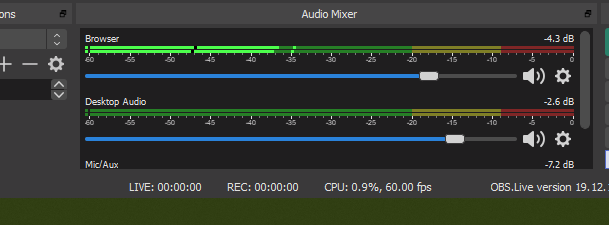 shut perch
no, but i will toggle it now, restart obs, and check its CPU load
gilded smelt
i can see the sound just cant hear it
gilded smelt
https://prnt.sc/qj00i5 i get double audio not 1

so idk
with that active its activating both https://prnt.sc/qj010v

not just the browser source
but when i single out the browser source, it doesnt allow me to hear it
gilded smelt
so i ccan limit the audio if i leave it with obs sound i cant adjust just the music...
your 1% volume is 50% acctive on my desktop audio thru the program
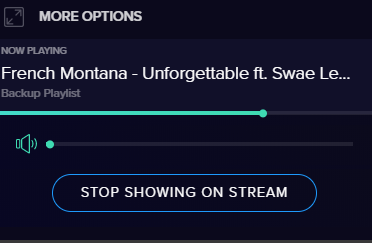
thats my current volume setting and its going up half on my desktop audio
a bit nuts
then i cant you know have my alerts at a decent volume to hear them if i have to drop all of obs to get a decent sound thru
im tryin to single out the audio from desktop audio like i showed, but its not allowing me to hear the playback. so idk may just not use this aggain
shut perch
toggling "shutdown source when not active" seems to have permanently fixed it, thanks
its still kinda strange to me that my workaround was working when it did, and its unfortunate now that whenever i switch scenes there is a 2+- seconds of no overlay
but i can tolerate that
plain sonnet
ok, lets reset...
- remove the media widget from all overlays you have
- make a blank overlay with the media request widget ONLY
- add this to a browser source in obs and select "control via obs"
- add it in 1 scene to start with
- set the source in advanced audio to be monitor and output
gilded smelt
lol this is the first time in 4 months adding this widget back and its only on 1 scene
and again if i set to monitor and output, it feeds it right back into my desktop audio cuz i have no second headset for that stuff
echo tartan
@lilac ocean I am not sure if it failed or was a success but after it finished this is what it shows, overlay is not highlighted.
I am sorry I am a total noob at this
gilded smelt
its like the browser source has no audio output for it, and if i monitor it it feeds it right back into desktop audio activating both
 granite finch
hi
we're having issues since last night
audio from media request is playing twice
if we disable 'show on stream' the audio is still playing
so when we enable it will play twice (with some ms delay)
gilded smelt
@granite finch double check you dont have multiple scenes with the widget active, and make sure that the browser source on each scene has the shutdown source when not visible ticked
granite finch
we've checked, not the case
the problem is that media request audio is streaming even when we have 'show on stream' disabled
when enabled it plays twice
the weird thing is that it was working perfectly before
so my guess would be an update from your side?
our setup is: an overlay with chat and media request
gilded smelt
yea that means you have 2 active sources somewhere in your scenes double check this setting https://prnt.sc/qj0a1z i just solved mine cuz my ending scene had one
 granite finch
again, not the issue
gilded smelt
lol its not checked...
granite finch
it should be?
gilded smelt
thats what you need....on all scenes with that
granite finch
even if so, still same issue
gilded smelt
start screen if has a widget, needs it. play screen if has widget needs it, thats what i mean by scenes
like across start>finish
granite finch
enabled it on all overlays, same issue
gilded smelt
so every browser source containing stream elements that is ticked correct?
granite finch
correct
did you guys change something yesterday?
i've had this exact setup working briliantly up until today
kindred fox
Are you running ground control at all?
granite finch
we're using obs live with the steamelements plugin
kindred fox
Do you have the editor open anywhere?
granite finch
nope
this is our obs window
our stream is outputting the media request audio
while we have it disabled
so only sound, no video
that doesn't make sense right?
kindred fox
So you’re getting two media requests playing on stream?
granite finch
one video stream, 2 audio
kindred fox
And you weren’t using ground control?
granite finch
nope
just obs live
we have 2 webcams installed that are feeding video through obs, rest is streamelements overlay
fun fact, we were using a browser-based clock yesterday which also doens't work anymore today.
kindred fox
So the other sources that you have in that scene, did you by chance check the boxes for shutdown when inactive and refresh on active?