#helpdesk-selive
1 messages · Page 73 of 1
 odd kraken
 potent topaz
oh wow! I missed that left arrow on layer to expand. It was that simple.. thanks so much @odd kraken
 rugged quail
any reason why when i try to add media request or any other obs live options to my stream deck, it tells me "action currently offline?
odd kraken
Try to reinstall the stream deck software.
 vagrant bramble
@fiery lava just realized my starting scene last night popped up and looked just fine.. so can my font/style sheet issue be isolated to one scene ?
rugged quail
no luck on the re-install
 fiery lava
rugged quail
fiery lava
rugged quail
it still asks for me to wait for the action to become available
fiery lava
quite literally all on google and there servers both your start and brb seem to be loading now...
vagrant bramble
hmmm okay thank you!
odd kraken
@rugged quail Can you share a screenshot of that please?
rugged quail
 kindred fox
Do you have the media request panel active in OBS?
rugged quail
yes
kindred fox
and inside the Tools menu of OBS you have the StreamDeck plug-in activated?
 hollow dawn
Hi - SOrry to interupt, is the OBS SLOBS remote for android still able to be used in this version of OBS? I cant seem to get a QR code to sync it... Noob question i know. Thanks
odd kraken
If you are asking about the StreamLabs OBS version, best to ask StreamLabs.
hollow dawn
mmmm ok
rugged quail
@kindred fox yes, everything else for the deck works except obs live actions
hollow dawn
ok thanks
rugged quail
thank you for all available help, unfortunately i have a stream in about 10 minutes, so if i dont reply that is why
fiery lava
only other thing i can think of is try reinstalling obs live from site
im on obs live 511 now and the stream deck buttons for media request are working
kindred fox
my suggestion would be to remove the StreamElements section from Stream Deck app then re-add it
rugged quail
i'll try
 barren spear
why is there a 5 second delay when switching scenes?
odd kraken
Cause the overlays are some sort of website, so they have to load. You can use studiomode to transition after the overlay is fully loaded.
 steel bladeBOT
Check out this tutorial for OBS’ studio mode which allows you to preload scenes before transitioning. https://www.youtube.com/watch?v=W8iWsD2Lq3U
 glossy axle
hello, i just updated obs and obslive and now i dont have the live control available. can i put it next to my activity feed to change stream title, game and so on like before?
steel bladeBOT
@glossy axle If you are not seeing the OBS Twitch integrations and have OBS.Live installed, please follow these steps:
- Make sure you are on the latest and greatest version of OBS.Live
- exit OBS (make sure OBS is not running)
- delete %appdata%\obs-studio\plugin_config\obs-browser\obs_profile_cookies
- start OBS.Live
- Settings -> Stream -> disconnect -> connect
glossy axle
i can see chat and activity feed, but i'll try
fiery lava
to update title and game | obs>activity feed(stream elements) >hamburger menu top left>settings
vagrant bramble
@fiery lava Just went home and confirmed my overlays are still not loading correctly.
On obs\
fiery lava
open them in a web browser as well
vagrant bramble
I'm sorry... how?
 fiery lava
correct
if its broken in web browser chances our you can inspect>console and see the api.google.com.....css error server 403
vagrant bramble
would i be better of creating an entirely new overlay?..
fiery lava
I think you can get away changing just the font on those two overlays | creating a new overlay is not gonna stop google server from pooping
 normal rivet
if my overlay works in the browser but not in obs what should I do?
fiery lava
check hardware acceleration | obs>settings>advanced>scroll down > check/uncheck
normal rivet
that worked thank you!
rugged quail
My text on my overlay is different than the editor. I refreshed the overlay but the text is still different than what is shown on the Editor
 tulip hamlet
Did you use a custom font?
rugged quail
Im using Audiowave
My Starting Soon widget is the correct font but all the others (socials, recent subs,etc) aren't
tulip hamlet
We're aware of the issue and are looking into it.
 hardy tulip
Is there a way to make the chat window set to dark mode? just restarted SE OBS.LIve and it's now showing as a white background in chat.
 plain sonnet
settings cog > non admin mode > dark theme
all other twitch related windows might need to be closed and reopened
hardy tulip
And how to get back to chat screen it is currently browsing twitch ugh
plain sonnet
if you undock it and maximise it you should see a "back" icon in either the top left or right
if not then close obs and it should fix it
hardy tulip
cool thanks @plain sonnet but every restart of obs.live it resets the theme to white . Is this a known issue?
plain sonnet
there is an update issues for docks (settings), i think the recent updates were just to support obs 24
there are plans for it to be fixed
 fiery venture
Hiya! So over the past few weeks I've been streaming Jackbox Party Pack 6, and just recently OBS will not capture JPP6. Game capture results in an entirely black screen, and Window Capture freezes so it displays an image of the game and not the actual moving game.
I'm wondering what should I do to try and fix the issue? I've ran as administrator, tried compatibility mode, tried both fullscreen and windowed mode, all changing nothing.
steel bladeBOT
@fiery venture For the best OBS support, please join their Official Discord @ discord.gg/obsproject
 pine dragon
What do I do if OBS Game Capture won't capture certain games?
tulip hamlet
@pine dragon Run OBS as administrator. But sometimes it just won't work. Some games don't like it. In those cases, you use window or display capture.
 pearl zephyr
Did BTTV support get removed from obs.live? I don't have the bttv menu in my chat widget anymore, and can't see bttv emotes in my chat.
pine dragon
Found out from OBS what the issue is:
] BOTOBS Bot: @DragonTek Bungie has opted to not allow OBS to hook Destiny 2 using Game Capture. See: https://www.bungie.net/en/Help/Article/46101

You will need to run the game in either windowed fullscreen or borderless windowed and use Window Capture instead.
 tender warren
Hi SE fam! I hope all is well. I am running into the "Woops OBS has crashed" error, and I have never received it before. I was literally JUST streaming last night, and now I get this. Any ideas?
tulip hamlet
Can you provide a crash log?
tender warren
Yup, where should I paste it?
tender warren
Ah Ok, let me see if I can grab it
@tulip hamlet Sorry, can you guide me to where I can find (%appdata%/obs-studio/crashesdirectory)
tulip hamlet
Paste that into file explorer, minus the parentheses.
tender warren
I did, and had it search the entire PC, but nothing came up
tender warren
Yup, says Windows cant find that, and to check the spelling and try again
oh ok one sec
Got it
steel bladeBOT
@tender warren Please provide a log from your last stream. To do this, in OBS go to Help > Log Files > Upload Last Log File and paste the link to the log file here.
tender warren
tulip hamlet
https://h4ndy.eu/obslog?url=https%3A%2F%2Fobsproject.com%2Flogs%2F3J-_fCr03MRIGtVh
This log doesn't look like it's from your stream that crashed. No output session.
tender warren
I opened "Show Logs" and its all from today, and my last stream was last night. If it helps, I pulled this from OBS studio and not the SE OBS.LIVE, which I use to stream.
When I open OBS.LIVE, it just crashes immediately. When I open OBS Studio, it doesnt finish loading, but I can access the toolbar.
tulip hamlet
OBS.Live is a plugin for OBS Studio, it's not its own program.
tender warren
Ok just making sure
Again, idk if this helps but none of my overlays or alerts were showing on my last nights stream either, which never happened before. And now this, not sure if its related or not
tulip hamlet
Check to make sure you have Browser Source Hardware Acceleration disabled in Settings>Advanced.
tender warren
Well that's when I can get OBS.Live to stop crashing
tulip hamlet
It's an OBS Studio setting. It applies with or without OBS.Live.
tender warren
Ok I unchecked it
That fixed it! @tulip hamlet
Thank you very much!! @tulip hamlet
 tawdry pelican
Hey i was hoping that there was a way that i can hear what my mic sounds like without going live on my account?
tulip hamlet
Make a recording instead.
 dawn apex
Can someone please review these Logs... I keep getting encoder error: https://obsproject.com/logs/RClYMKM946SA7uxn
 glad wedge
i have a problem with my browser source and was wondering if anyone knew why its not picking up the url?
 bitter dragon
does this software connect to all 3 chats at the same time like restream chat app does? or is it stuck only to twich fb and or yt like one at a time?
 midnight bloom
Is high CPU usage an issue with the latest update?
steel bladeBOT
@glad wedge Right click on the BrowserSource > Properties > Scroll down a bit > Refresh Cache of current page
midnight bloom
@shy mountain I’ll check tomorrow but isn’t it on already by default?
 shy mountain
Not everytime
midnight bloom
Ok I’ll check tomorrow and will report. Thanks.
rugged quail
so i set up a new scene, and added my cam. no picture shows up.
shy mountain
If you've added the webcam to another scene
remove the newly added webcam source
go back to the other source where its active
right click the source -> copy -> go to new scene -> paste
rugged quail
i only get paste reference and if i change settings on the new pasted scene it changes on main scene
shy mountain
Well yea - if you are looking to make the cam bigger/smaller in different scenes you can only resize within the preview
hint: if you want a box VS wide video - ALT + the side dragables in the preview will help
rugged quail
i was hoping to run a black out silhouette in a second scene for easy switch
steel bladeBOT
For the best OBS support, please join their Official Discord @ discord.gg/obsproject
 peak latch
hi
my wife is trying to stream from my PC On her account.
using OBS.live
ive logged out of my account and she has logged into hers
however it is still going live to my chanel and not hers
shy mountain
You need to change the streamkey
Settings -> Stream -> replace streamkey or disconnect
 untold cradle
Hello, My recording screen stays black if I add a game capture or a window capture
shy mountain
run obs as admin
untold cradle
Doesn't work
steel bladeBOT
@untold cradle For the best OBS support, please join their Official Discord @ discord.gg/obsproject
 ocean tinsel
ok, so I made the mistake of updating to get the GPU driver error... so I looked and saw that OBS was on v24 and not v23 (which the download link said was supported) so I uninstalled everything and now the Streamelements installer is picking up 24 and crashing when I try to use it.
Please help
odd kraken
What error do you get?
 night stag
Hi OBSLive team, could you please help. I have set up OBS studio with the Live and have to use the studio mode, due to the time it takes for the overlays to load through. This causes a small problem that when I can a alert the sound is doubled by the preview window and normally out of sync. any advice is greatly appreciated. thanks Ox
ocean tinsel
I think I fixed it... Deleted literally everything and only used the streamelements installer
it apparently DOES work on 24
plain sonnet
@night stag that is expected as you have both scenes open. the best thing is to get or make a stinger transition so you dont have to use studio mode.
there are some free ones out there is you google it
night stag
okay thank you, guess no way to just mute the preview ?
plain sonnet
only if you mute the alerts overlay in the preview screen, then you will need to activate it when you change scenes which isnt really proactive
night stag
damn, thankyou anyway @plain sonnet its a 8 second delay a little long for a stinger
plain sonnet
if its that long then you can cut your overlays into two portions, parts that need to refresh and parts that dont.
things like alerts and labels can be in the "refresh" overlay
chat and the overlay graphics can be in the "non refresh" overlay
this way you are only loading the text and everything else will be stored in your cache and will be shown straight away
 hot siren
The new twitch highlighted messages dont seem to stand out too much in the OBS live chat windows, or is it just me?
odd kraken
The chat should be the same as the normal twitch chat.
hot siren
I'll grab a screenshot next time 😄
ocean tinsel
New issue! after reinstalling, I can only pull like 15 FPS max, down to like 1... Never had an issue before
steel bladeBOT
@ocean tinsel Please provide a log from your last stream. To do this, in OBS go to Help > Log Files > Upload Last Log File and paste the link to the log file here.
ocean tinsel
odd kraken
Here is an analysis of your log file with tips on how to improve: https://h4ndy.eu/obslog?url=https%3A%2F%2Fobsproject.com%2Flogs%2FBN-yxApagu3AyQ1I
ocean tinsel
Why would it not pick up my GPU?
currently on GeForce Game Ready Driver v 441.08 released 10/29/2019
fiery lava
which card do you have
ocean tinsel
1080ti
fiery lava
I was working with a DT member yesterday and the 10/29/19 driver was breaking replay buffer on obs for him so we rolled gpu drivers back one date
ocean tinsel
how should I go about doing that, I havent needed to in the past so idk
fiery lava
Download the latest GeForce drivers to enhance your pc gaming experience and run apps faster. Automatically scan your PC or search the driver database for compatible GPU drivers.
select geforce>10 series > oct 22 date download it
when you go to install it there will be an option to do a clean install use that
after your computer restarts or installs geforce will try to update to the latest you will need to skip that update
ocean tinsel
RIP
kindred fox
is that the WHQL driver?
fiery lava
ok
ocean tinsel
(coming off a long night shift so im a little hazy sorry)
 eager ridge
Hi, I'm trying to add Media Request to my stream, and after I click the "tour" button, it wants me to put in a YouTube URL. I do that and click Add Media, but it says the URL is invalid. Anyone know about a fix?
odd kraken
DM me the url you are trying to enter please.
odd kraken
Reload the dock with the circle at the top left of the dock and try to add the song please.
odd kraken
Try to log out of StreamElements and log back in using StreamElements > Log out at the top in OBS.
eager ridge
Same error
odd kraken
Can you enter the song via the website?
eager ridge
Yes, it works there, the only place it doesn't work is on the "tour" thing.
odd kraken
Select the Leave tour button.
eager ridge
Alright, I did it and now it works perfectly
Guess the tour is bugged? Idk
Thanks for the help!
ocean tinsel
ok, I rolled back my driver and im still seeing 14 some fps
fiery lava
lets see another log now
ocean tinsel
 lament crag
How do I add camera zoom into my scenes?
 modest wharf
Hello there is something wrong with my obslive capturing I search for it It says open the obs.live with intel graph however when obs runs with intel gamecapture won't work
When I run with nvdia Gamecapture works but window capture colapses
Is there any solution for it ?
odd kraken
Are you on a laptop?
odd kraken
Have you started OBS as admin? Normally from my understanding Game and Window capture should work, if one is working.,
modest wharf
I already try it still can't see desktop
odd kraken
Screen capture is different then.
Laptops need extra setup to use Display Capture.
Due to the way laptops are designed, OBS must run on the Integrated GPU to use Display Capture. This process effectively disables Game Capture and Window Capture. If you would still like to use it, please read this guide and follow the directions for Display Capture: https://obsproject.com/wiki/Laptop-Troubleshooting#configure-your-system-for-display-capture
Please note: we recommend using Game Capture and Window Capture wherever possible. These capture methods get better performance in almost all cases.
 stable siren
Hey guys need your help
i try streaming Call of Duty with nvenc(new) and OBS at 720p but all times crash OBS and disconnect. Exist an solution for this?
odd kraken
Are there any crash logs?
stable siren
i thinks not save
steel bladeBOT
@stable siren Please provide a log from your last stream. To do this, in OBS go to Help > Log Files > Upload Last Log File and paste the link to the log file here.
odd kraken
This is the analysis of the log file: https://h4ndy.eu/obslog?url=https://cdn.discordapp.com/attachments/603593664756711424/639523551074058250/2019-10-26_15-21-05.txt
stable siren
The page is temporarily unavailable
odd kraken
stable siren
cpu usage during the gameplay with obs streaming dont pass 50%
with peak on loading screen take a little shot on 60/70%
i try a new test now with this settings... lets see happens
game mod still on ok?
fiery lava
everyone has been having issue with MW no best settings yet
stable siren
i came here just for that. for a fix this problm =/
 thin raven
does streamelements support mixer
steel bladeBOT
@thin raven Soon! Not Blizzard Soon or Valve Soon, sooner then that. 
 mortal burrow
I'm trying to import my obs overlay to stream elements and it doesn't seem to be working it keeps freezing anybody having this issue
thin raven
how long would you say because if its not in like 15 days ill have'to switch to nightbot
mortal burrow
Yeah or regular obs But want to use stream elements and trying to sending my overlay over there and it won't let me
 dry sphinx
If you're importing from Streamlabs: Theimport tool in OBS.Live is designed to import everything to the My Overlays page on our website
As long as it isn't copyrighted material
mortal burrow
Only conquer it on any of my material is my own...and stops importing whenever I try
thin raven
is it possible to add browser on to obs not my stream but to view on obs
odd kraken
Since v24 there is a custom browser dock available.
 plush mason
I'm trying to find a (preferably free) way to select which audio sources are audible on stream. I tend to stream with others in Discord with me and play music. I want to be able to toggle the discord audio while allowing the music/game sound to continue. Has anyone found a reliable work around for this?
Please @ me if you have.
steel bladeBOT
@plush mason How to exclude audio sources for a stream or recording: https://obsproject.com/forum/resources/8/
Voicemeeter Banana guide: https://obsproject.com/forum/resources/397/
 fickle flame
Testing alerts for cheers (excluding testing custom amount) do not appear to be working for me.
rugged quail
Hi! Are you guys planning on integrating mixer?
steel bladeBOT
@rugged quail Soon! Not Blizzard Soon or Valve Soon, sooner then that.
 shell gyro
I love using OBS live the only thing I have a question is how to update my stream title when I start a stream or do I have to keep going to twitch or streamelements site to change the title and game im playing?
odd kraken
In the burger menu in the activity feed you can update the infos.
@fickle flame From my understanding the variations for custom amounts should work live, when they already work while emulating alerts. Have you saved the overlay?
You can also try to readd the overlay to your OBS.
 small galleon
hi ihave a question re obs live. ive been using it for some time and recently had to reinstall im not sure which way i had it set so need to ask........ when opening the programme do i run with nvidia processor (default) or intergrated graphics ? to be clear im not talking about encoder settings inside of the programme i have those all set im just talking about what should i use to open the programme.....thank you in advance
fiery lava
never integrated graphics when you have a gpu
small galleon
thats for opening obs right
fiery lava
can you screen shot the options your talking about
small galleon
i can describe what im doing if that helps
right click on obs live, run with graphics processor and then 2 options, 1 high-performance NVIDIA processor (default) 2 intergrated graphics
im just talking about opening obs live. my settings are fine once open
tulip hamlet
You probably do not want to run it with integrated graphics, especially if you end up using NVENC.
small galleon
i am using the new nvenc encoder
tulip hamlet
Then yeah, avoid your integrated graphics like the plague.
small galleon
so open obs live with nvidia and use new nvenc encoder got it
thank you both for the help 🙂
 violet tinsel
how do you make the game capure
odd kraken
Add a game capture source to your sources list in OBS.
dawn apex
Hi - I keep getting "an encoder error occurred while streaming" error while streaming, crashing the stream. Occurs every time, am at a loss. I turned down Resolution and bitrate and it still occurs. Any help greatly appreciated: https://obsproject.com/logs/RClYMKM946SA7uxn
odd kraken
Here is an analysis of your log file with tips on how to improve: https://h4ndy.eu/obslog?url=https%3A%2F%2Fobsproject.com%2Flogs%2FRClYMKM946SA7uxn#0.9% Encoder Overload
 unique bough
Hey guys, tried to use the overlay importer but it goes to 55 out of 54 and sits at 100% and just stops.. i left it for an hour and nothing.. any thing i am doign wrong?
tulip hamlet
55 out of 54? 
unique bough
exactly
it was importing and it went 1 over and then just sat their it seemed.. odd
tulip hamlet
Well, in a general sense, the import will fail if you're attempting to import assets that are too large or Streamlabs-owned assets.
 vapid gull
hi can anyone help me figure out how to add all the widgets like the chat and whatnot
tulip hamlet

StreamElements Overlays are loaded from a single browser source in your streaming software, making streaming easy. https://streamelements.com/ StreamElements...
vapid gull
i've been using streamlabs forever
 gilded ferry
can someone help me with obs alerts
vapid gull
sick, thank you
gilded ferry
can someone help me with obs alerts and chat box using team / any desk?
tulip hamlet

Learn how to customize your alerts and setup different alerts variations with StreamElements Alertbox ----- Overlay Manager guide: https://youtu.be/X7XrDdRE7...
@gilded ferry Please only ask in one channel. The video above will help you set up alerts.
gilded ferry
okay man thanks
 leaden wigeon
Hi, Ive reinstalled OBS Live now my CPU runs supper hot 94% it never used to do that, before it was at 35%?????
steel bladeBOT
@leaden wigeon Please provide a log from your last stream. To do this, in OBS go to Help > Log Files > Upload Last Log File and paste the link to the log file here.
leaden wigeon
tulip hamlet
https://h4ndy.eu/obslog?url=https%3A%2F%2Fobsproject.com%2Flogs%2FzyJw59C7G8992kwd
No output session. Follow the instructions to get a better log for us to help with.
leaden wigeon
Obs crashes instantly I cant really do much
tulip hamlet
Oh, then I can guess what's going on.
Go to Settings>Advanced and disable Browser Source Hardware Acceleration.
Someone had that problem yesterday.
leaden wigeon
Ok thanks will try this
 shy prawn
Hello I stream on mixer and there is no log in for that just twitch and YouTube dose this mean this is no good for me
steel bladeBOT
@shy prawn Soon! Not Blizzard Soon or Valve Soon, sooner then that.
leaden wigeon
Thank you @tulip hamlet That fixed it
shy prawn
Ok guess I'll wait 😊
leaden wigeon
What is that Browser Source Hardware
tulip hamlet
Browser Source Hardware Acceleration?
leaden wigeon
Yeah
tulip hamlet
It uses your CPU to render browser sources.
leaden wigeon
Damn that killed my OBS lol
leaden wigeon
Q do you guys have classes like I want to learn more about how to implement plugins and use them on stream eg Motion filter plugin
tulip hamlet

YouTube
Official youtube channel for StreamElements tutorials https://StreamElements.com
leaden wigeon
Im thinking more of a commission 1v1 session
tulip hamlet
We don't, no.
leaden wigeon
Fudgeee damn all G thanks tho
I feel a lil weird asking a streamer how they perfected the motion plugin on OBS
and other effects like making myself multicolour
 keen tinsel
Anyone else have issues with obs booting and affecting bluetooth audio output?
steel bladeBOT
@keen tinsel For the best OBS support, please join their Official Discord @ discord.gg/obsproject
 frigid rivet
i should probably copy and past this but i am missing the dock to update my stream
steel bladeBOT
@frigid rivet If you are not seeing the OBS Twitch integrations and have OBS.Live installed, please follow these steps:
- Make sure you are on the latest and greatest version of OBS.Live
- exit OBS (make sure OBS is not running)
- delete %appdata%\obs-studio\plugin_config\obs-browser\obs_profile_cookies
- start OBS.Live
- Settings -> Stream -> disconnect -> connect
frigid rivet
i did all that, its just the one dock is missing
tulip hamlet
If it's not in the Docks menu, follow the above steps in their entirety, in order.
 sonic sparrow
so i just updated all my drivers
and now anytime i have OBS open for 20 mins my whole computer crashes
tulip hamlet
Make sure you have Browser Source Hardware Acceleration disabled in Settings>Advanced.
sonic sparrow
not ALL my drivers
but 4 of them
i will check it thanks
hm that was enabled, what does it do?
tulip hamlet
Other than make my job more difficult? 
sonic sparrow
hahaha have a lot of people had those issues already?
tulip hamlet
Part the bot from your channel, log out of StreamElements, log back in, and join the bot to your channel, see if that does it.
 gaunt citrus
I'm getting an error from the bot when trying to use my store gifs...
StreamElements: @gaunt citrus, internal server error
tulip hamlet
We're aware and are investigating.
gaunt citrus
Ok, just happened during my stream, had them at the beginning but not now, you guys are quick. 🙂
 random gale
That worked, thanks a lot @tulip hamlet 😃
gaunt citrus
Lemme know if you need a live tester @tulip hamlet
shy mountain
What is the issue?
 buoyant bobcat
hey this is a simple question but im to stupid to figure it out but how to i change the twitch chat theme in obs to dark mode?
shy mountain
Cogwheel in the chat dock -> switch to non-mod mode -> dark mode toggle
buoyant bobcat
thank you
gilded ferry
how to change color?
shy mountain
Which color?
 peak osprey
hi jsut joined as having issues with obs and streamdeck
shy mountain
I would suggest to uninstall the streamdeck software entirely
peak osprey
okies
shy mountain
@peak osprey And then install it again and see how it behaves.
@gilded ferry You can't - those are predefined assets of ours.
Unless there is another theme with the same design but different color
peak osprey
thanks 🙂 ill update after tonight
gilded ferry
@shy mountain do i need to update my latest followers name everyday or it does auto?
shy mountain
When you get a new follower, it will update it self.
shy mountain
Are you on facebook?
gilded ferry
yes
shy mountain
Then lets move to #helpdesk-facebook as your questions are not related to OBS.Live
gilded ferry
oh okay
 vagrant pagoda
My recent events panel that shows follows, subs, etc... Disappeared and I can't figure out how to bring it back up.
shy mountain
Streamelements on top -> activity feed
vagrant pagoda
Not seeing the option there
vagrant pagoda
I see streamelements, just not the activity feed option
shy mountain
Then click "logout" and then login again
vagrant pagoda
Ah, okay. Thank you.
rugged quail
i cant lunch obs saying its already running when its not
shy mountain
Open task manager and kill the OBS process.
rugged quail
did
shy mountain
Did you check slowly from up to the bottom?
rugged quail
even did a shut down and reboot.
rugged quail
i also did a uninstall and reinstall
its been doing fun stuff since last update
oay so i just opened it and nothing shows up, but its now running in process
shy mountain
wdym nothing shows up? 
rugged quail
i click it loads in process but i have nothing
shy mountain
do you have the icon on the task bar on the bottom?
rugged quail
nope
shy mountain
when you kill that process can you get it up and running again?
as in only the process?
rugged quail
no
shy mountain
What if you remove obs.live and keep obs studio only?
shy mountain
what version is it?
rugged quail
24.0.3
shy mountain
Ok so installing obs.live will make it not show up now?
shy mountain
long shot
steel bladeBOT
@rugged quail If you are not seeing the OBS Twitch integrations and have OBS.Live installed, please follow these steps:
- Make sure you are on the latest and greatest version of OBS.Live
- exit OBS (make sure OBS is not running)
- delete %appdata%\obs-studio\plugin_config\obs-browser\obs_profile_cookies
- start OBS.Live
- Settings -> Stream -> disconnect -> connect
shy mountain
try this
rugged quail
gold medal for 1000m headshot. it worked!
shy mountain
that was a long and blind shot 
rugged quail
and im up and logged back in and have stream feed

 shy mountain
its 12PM and I recently had lunch
rugged quail
its 6am and i have been up 28 hours
shy mountain
go sleep and stream with full energy 
rugged quail
lol i really should but in 3 hours house work to be done.
thank you for the shot in the dark. it worked
shy mountain
it was worth it
rugged quail
quick question
shy mountain
slow answer 
rugged quail
so i only have one cam, and i have two scenes but when i copy and paste cam onto second scene. i get nothing
 wary dew
add the cam as a source
odd kraken
Add the cam one time to OBS as source and then use the existing source to add.
 radiant pulsar
will obs.live be able to see the new twitch polls?
shy mountain
Have you tried running a new poll?
Because we just embed the chat in a dock, so it should work normally
radiant pulsar
Oh tested it yes the poll shows up in the obs.live chat window nice
shy mountain
 urban forge
Hey everyone, I have what I hope is an easy question
shy mountain
shoot
urban forge
I recently had to reinstall OBS and after I did that, the chat screen is now white and super bright. I cant seem to make it in dark mode again. Anyone have this happening as well?
shy mountain
Cogwheel on chat -> switch to non-mod mode -> toggle for dark mode
urban forge
I was afraid to click that cause I don't know what Non-mod meant, like it will stop moderators/chat bot type stuff
radiant pulsar
Oh and if you type /poll in obs.live chat the window to create a new poll with all the options appears. YAY
urban forge
i did that, hit dark mode and then switched mod mode back on and it stayed dark. Thank you Thank you Thank you
the white was soooo bright haha
shy mountain
 👍
👍
 keen depot
Hello guys! I have a problem with OBS in which when I use the window capture feature some windows shows just a black screen. Anyone could help me solving that? It's weird, because I see lots of people saying chrome has some issues in obs but for me Chrome works just fine with OBS! The problem is with Skype, oculus home, and some others! I would say 50 % of the windows I choose shows the black screen. Would anyone mind helping me please? Thanks in advanced!
shy mountain
Do you run OBS as admin?
keen depot
I tried lots of things today, like running it in administrator mode, compatibity mode, tried disabling the SHARE feature on Nvidia GeForce experience
Updating OBS also didn't work
shy mountain
I'm not sure then. Best place to ask for help on this is in the OBS discord here: https://discord.gg/obsproject
keen depot
This also happens with some games, like Pavlov
On thank you so much
Well isn't this an OBS server?
I thought it was
What is this discord about?
I was searching for solutions to my issue and then I just found something that makes one better
Like a plug-in
keen depot
Oh that's it
shy mountain
but its meant to help for other things and not hinder the capture of OBS Studio
keen depot
What does it do?
steel bladeBOT
OBS.Live is a Plugin for OBS created by StreamElements. You can download OBS.Live here: https://streamelements.com/obslive
Please make sure you have the latest version of OBS installed, Current Version: 23.1.0. You can install OBS here: https://obsproject.com/
keen depot
What other things?
shy mountain
OBS.Live only adds the activity feed, chat and media request we provide as features on our dashboard, but on OBS Studio.
Thats about it
shy mountain
Thats everything there is to OBS.Live
Ooh and custom bot name support instead of using the other software we provide
 fierce atlas
the best way to know is to test it for yourself tbh 🙂 it's easy to install and uninstall
there's not much downside
 vagrant fog
Question: Why does Media Request insist on popping out of its dock every time I turn it on? I can put it back manually, but it seems odd to need to. Also, in my case it pops onto the screen I'm recording, so that's annoying.
shy mountain
streamelements on top -> logout -> login?
maybe that will refresh it a bit
at least its possition saving location
or save its new location
vagrant fog
@shy mountain Nope. It remembered where I had it, but clicking "launch" still pops it out. If it helps, it also always offers me the tour.
shy mountain
well skip the tour
if you press the launch button again, it should return it to its original location and stay there
unless you are saying thats not the case?
vagrant fog
Let me re-verify
Yeah, I don't see a "Skip" button, just "Take a Tour" and "Launch media Request". I use that second one, but that pops it out (and still over my recording screen)
shy mountain
can you show me a screenshot?
vagrant fog
Yep. I just like to be asked so it's not spam 🙂
shy mountain
and when you click the "take a tour" what do you see?
as I believe the next thing you see is the MR dock properly + the skip tour button
vagrant fog
Um, it did the same thing as "Launch..." but with a yellow banner at the top that I didn't read b/c I was reading this
hang on 😛
I have to either restart obs or log out/in to get it back to that state
shy mountain
im confused whats happening 
can you record what you are doing?
you can logout and login while recording/streaming
vagrant fog
Sure. Do you know of anywhere I can shove a stream so we don't have to deal up/downloading files? I'd use my twitch if it didn't notify everybody.
shy mountain
i mean..you can record and toss the file here directly if its short and not too big
or use streamable to quickly upload the file
no need to stream what you are doing 
vagrant fog
Fair enough. I guess Discord's got the space
shy mountain
I'm just in general confused whats happening when you click the stuff, as it sounds like not hte proper way to use the buttons OR the wrong behavior is happening here
well discord has a 50mb limit(100mb if boosted server)
vagrant fog
For sure, I do IT work myself so I feel your pain.
 shut ferry
shy mountain
shut ferry
shy mountain
We support twitch, yt and fb on obs.live
and you can only be logged in into 1
that doesn't mean you can't stream to restream - we just don't have support for it
while obs stuido does
vagrant fog
Please forgive the randomness with the overlays. Still fiddling with that.
vagrant fog
The one and only \
shy mountain
i saw the sub rotation of him as well 
vagrant fog
And yeah, I could, but this discord's here so that you're not the only one I'm bothering 😛
shy mountain
i was about to actually tell him to keep an eye out for you
cuz i want to takea nap before blizzcon 
fiery lava
how can I assist you
shy mountain
yea his shift just about starts and my ends
Weird MR behavior
tour doesn't go away and the dock pops out strangly
fiery lava
watching now
shy mountain
btw theres a button on the MR dock on the top left corner that is the default "return dock"
after you click "take tour"
originally i was referring to that button @vagrant fog
that returns the dock in the previous/original position
and my idea to make it save its new position is, move it somewhere else, then logout and login
and see if that triggers the tour process again
vagrant fog
Yeah, I can try it undocked
I did already move it to an new dock position, though
Anyways, thanks for your help
enjoy the nap
shy mountain
I'm not wanted anymore 
vagrant fog
By all means, work overtime 😛
shy mountain
I can take a hint 
vagrant fog
lol
ya'll are just friendly (no @fiery lava pun intended) and I don't wanna take advantage
 stoic crypt
Hello, i have a few quick questions, any ETA on when streamelements will get Mixer support? I heard shroud said that he was working with both you and mixer to integrate things. Will those integrations roll out site wide? Or are they shroud specific?
fiery lava
yep keep in eye on #announcements
stoic crypt
@fiery lava
Thanks for the info!
rugged quail
I’m trying to record in 1440p 60 or 1080p 60 with ryzen 7 3800x and a 1080ti and it is either choppy no or blurry can anyone help if i use nvenc it is choppy if i use x264 it is burry
steel bladeBOT
@rugged quail There are no "best settings".
Please understand that every setup, will be very different.
Any guides or videos that claim otherwise are misinforming. Your best option is to start with a base and adjust as necessary.
Test, test, and test again. We are happy to offer suggestions for any issues you may be having, but not a list of settings.
 turbid arch
Do we have mixer support yet? Or still incoming? 😄
steel bladeBOT
@turbid arch Soon! Not Blizzard Soon or Valve Soon, sooner then that.
turbid arch
YEET!
 rapid falcon
Any ideas why my streamdeck media share buttons won't connect?
fiery lava
try reinstall obs.live plugin for StreamDeck
rapid falcon
Ok, yeah same thing
I did it with obs.live open this time as well
I'm running obs.live itself as admin if that matters
Ok, tried obs without admin elevation and same thing
fiery lava
obslive version?
rapid falcon
19.10.24.511
It's working now but odd how I had to do it
So I have to enable Media request each time I load obs.live, and it pops out by default. I was dragging it back to docked mode and it wouldn't work.
If I click the "dock" mode icon in the upper left instead, it docks and then the buttons work
Just tested closing and reopening twice and it worked both times to get it going.
fiery lava
was the tour button on your media request each time
rapid falcon
Yes
fiery lava
thanks for the work around
rapid falcon
Thank you!
 minor wave
hello, will stream elements capture chat from both youtube and twitch at the same time since I'm using Restream to stream to both services?
odd kraken
OBS.Live can only show one chat at a time.
steel bladeBOT
@minor wave You can test Alerts via the bell on the lower right corner of the Overlay Editor. Simply go to your Dashboard -> My Overlays -> Pencil/edit button on the overlay. Make sure the "Show Emulated events on stream" option is on to see the alert in OBS/Xsplit https://streamable.com/h6qgy
 minor wave
thx
 haughty wedge
Hi, My new overlay has stopped working on streamlabs OBS, i was usng the browser source, but not for some reason when there is an activity (follow/host) the alert does not play on my stream
it worked when i emulate it but it doesnt work when it actually happens
steel bladeBOT
@haughty wedge We're not able to troubleshoot issues with using our overlays in StreamLabs OBS (SLOBS) as we don't have the tools to support their software. We recommend using OBS Studio or OBS Studio with our plugin OBS.Live.
 river sorrel
Hi! Is there a way that the streamchat can be setup top to bottom?
All the way I mean
hardy tulip
Not sure where to direct this but SE overlay editor when maximised with the browser , one cannot see the save button. You can only see it when you resize the browser window. Is this a visual bug?
odd kraken
@river sorrel Can be made via the custom chat: https://github.com/StreamElements/widgets/tree/master/CustomChat
@hardy tulip Can you sahre a screenshot of that please? Working for me when I maximize the browser window with the overlay editor.
hardy tulip
Oh nvm, it was my taskbar hiding it . All good @odd kraken
river sorrel
Thanks @odd kraken How can I install them? 😛
odd kraken
Create a custom widget in your overlay and replace the tabs with the files provided (JSON > Fields).
river sorrel
Got it, thanks! 🙂
haughty wedge
Hi, My new overlay has stopped working on OBSlive as well , i was usng the browser source, but not for some reason when there is an activity (follow/host) the alert does not play on my stream
it worked when i emulate it but it doesnt work when it actually happens
fiery lava
screen shot?
haughty wedge
of the alerts?
fiery lava
the whole window
haughty wedge
Which bit do you want, streamelemtns, obs, settings?
fiery lava
obs live
haughty wedge
fiery lava
do you see any of the replay events from activity feed
haughty wedge
not at the moment
i downloaded OBS live just now
so it doesnt have the old activity
fiery lava
under streamelements button you should be able to show activity feed
your overlay is working here for me so lets try hardware acceleration | obs>settings>advanced>scroll down> check/uncheck
haughty wedge
When I emulate it, it works
but when someone acxtuly follows or hosts, nothing comes up
fiery lava
do you see me replaying alerts from 5 days ago
haughty wedge
yeah i can see that come up
those ones are coming up.
but when im live, ive got my friend t test the host alert and it doesnt seem to link
😦
steel bladeBOT
@haughty wedge Due to changes to Twitch API, we have filtered out hosts and will only show these ones on your activity feed:
- All hosts coming from an online channel with at least 1+ viewer
- Auto host events with at least 1 viewer - only from a channel that just went offline
Note: If you see "X channel has hosted you" with no viewers on the back, that is considered an offline host or a host with 0 viewers, we do not show these.
haughty wedge
Even Justgiving have a broswer source which doesnt seem to work either, if i donate to my cause the alert doesnt come up
so it doesnt seem to be just SE 😦
but ill try again
river sorrel
For some reason, im hearing my media request double, I have nothing opened in my web browser just obs...
fiery lava
turn off browser sources when not visible
haughty wedge
thank you
steel bladeBOT
@river sorrel To add your overlays to OBS, add a new browser source in your scene. Paste your overlay URL in the browser source properties, set the dimensions to 1920x1080 (unless you changed them on the website), and ☑ “Shutdown source when not visible” https://youtu.be/KDvLynUqXI4
river sorrel
Still the same :/
fiery lava
you have media request widget in more than one overlay
unless you "shutdown source when not visible" it will play in all overlays
you can make media request its on overlay and add it once to obs
and remove the widget from each of your overlays
river sorrel
Thank you, I didnt realise that 😅
 wise lodge
Hi, for no reason (I did not change any setting), I've had a weird bug when streaming that only shows on my twitch channel
 low falcon
Hey, im having problems with my overlay, i've made it, it show up on the greenscreen. But it doesnt show on the link i've been given to paste in my stream?
Please like, the staff i've talked to couldnt help me
So can anyone of you
plain sonnet
@low falcon please dm me your overlay url
low falcon
Yeah, i've done it
steel bladeBOT
@low falcon Follow these steps to grant managers/moderators access to your dashboard:
- Click on your Channel Name at the top of the dashboard and select Settings
- Create a new invite at one of three access levels (Bot Supervisor, Editor, Full Control)
- Send this invite to a mod/manager to give them access to your dashboard. The link is one-time-use and expires after 72 hours if not accepted
Video tutorial: https://youtu.be/zl_h-ttZDF0
@low falcon You can test Alerts via the bell on the lower right corner of the Overlay Editor. Simply go to your Dashboard -> My Overlays -> Pencil/edit button on the overlay. Make sure the "Show Emulated events on stream" option is on to see the alert in OBS/Xsplit https://streamable.com/h6qgy

 serene wharf
I'm having one more issue, when playing spotify music on the background while streaming it keeps on cutting off the music?
steel bladeBOT
@serene wharf For the best OBS support, please join their Official Discord @ discord.gg/obsproject
serene wharf
ty
 dry vale
does anyone know why my stream is randomly closing? it comes an error than shuts down,its obs live and my gear is all good.
odd kraken
What error are you getting? Can you provide a crash log and/or a log file of that session?
dry vale
where do i find crash log?
odd kraken
In OBS: Help > Crash reports > upload last crash report
dry vale
ill find it. 2 sec
doesnt show. but in logs it says alot of weird things. like EOI missing and 12:22:59.: error: unable to decode APP fields: Invalid data found when processing input.
alot of those
steel bladeBOT
@dry vale Please provide a log from your last stream. To do this, in OBS go to Help > Log Files > Upload Last Log File and paste the link to the log file here.
dry vale
like this?
odd kraken
rugged quail
so stream elements is locking up my PC and i have no way of diagnosing it
fiery lava
I would take the overclock back down to 3.8GHz and I would run the log
steel bladeBOT
@rugged quail Please provide a log from your last stream. To do this, in OBS go to Help > Log Files > Upload Last Log File and paste the link to the log file here.
rugged quail
fiery lava
need a log of you starting the stream at least
steel bladeBOT
@rugged quail 1) Restart OBS
2) Start your stream/recording for about 30 seconds. Make sure you replicate any issues as best you can, which means having any games/apps open and captured, etc.
3) Stop your stream/recording.
4) Select Help > Log Files > Upload Current Log File. Copy the URL and paste the link here.
(Note: If you do not see an obsproject.com URL, you will need to update OBS Studio to version 22+)
 neon sable
is there an issue with OBS.live connectins to chat? its just keeps saying connecting
neon sable
oh so it doesnt matter that I am trying to connect to it from obs.live
it connects fine from my dashboard
fiery lava
my twitch chat works fine in obs
rugged quail
fiery lava
just connecting to different chat irc servers
neon sable
I'm glad that yours is connecting - thank you for your support
fiery lava
which encoder are you using @rugged quail in obs>settings>stream
have you tried to reload that dock @neon sable
wise lodge
fixed my bug by reinstalling obs btw
fiery lava
rugged quail
@fiery lava i dont see an encoder choice in stream settings. it just shows service, server and disconnect account
fiery lava
rugged quail
okay sweet hopefully that will stop the problem im having
 stark maple
where should i go for help setting up best settings for obs
steel bladeBOT
@stark maple There are no "best settings".
Please understand that every setup, will be very different.
Any guides or videos that claim otherwise are misinforming. Your best option is to start with a base and adjust as necessary.
Test, test, and test again. We are happy to offer suggestions for any issues you may be having, but not a list of settings.
 dawn narwhal
Im having issue getting audio monitoring to work, got it selected on my mic and elgato but cant hear anything
steel bladeBOT
@dawn narwhal For the best OBS support, please join their Official Discord @ discord.gg/obsproject
peak osprey
@shy mountain It worked thanks 😄
 wispy perch
Good evening I'm looking for the solution to get VST to work?
kindred fox
Right- Click audio source >> filters >> add filter >> VST iirc
wispy perch
once I add VST 2.x Plug-in it doesn't let me select the Plug in
rugged quail
is anyone else's obs crashing on startup even after updating to most recent update?
odd kraken
Can you provide a crash log?
 rare plaza
Hello, I accidentally reset all labels. Now I have no data...anyway to get it back?
odd kraken
Afaik there is not. Sorry.
 calm rose
Anyone around to help?
steel bladeBOT
@calm rose Welcome to the helpdesk! Please let us know how we can assist you today and a support volunteer or staff member will assist you as soon as they are available. Thank you for your patience.
calm rose
Is there a video that shows you how to get your overlay into obs live?
 plucky meteor
Is there a mobile app for the OBS so that I don't have to be on my laptop to run the OBS?
steel bladeBOT
@calm rose Checkout StreamElements Youtube channel, several guides for you!! https://www.youtube.com/channel/UCjerlCIbLPQwSnYlClkjDXg or a list with all the guides https://www.youtube.com/playlist?list=PLCDDKlFdScbEwdx5AntcQIS1InkFJwHtv
kindred fox
@plucky meteor are you asking about switching scenes?
plucky meteor
@kindred fox I’m talking about being able to put the overlay on while streaming from a console
kindred fox
Which console?
Because consoles stream direct to twitch/mixer there’s not a way to intercept the stream unless you stream to mixer and use their lightstream integration
You’d need a capture card
plucky meteor
@kindred fox ps4.
kindred fox
Which does a lot of the encoding
plucky meteor
O
steel bladeBOT
@plucky meteor Here is a guide on how to setup the most essential tools for streaming from your console, while using StreamElements tools without involving a Capture Card! It's easy to do, take 4 minutes to read and 10 to 15 minutes to setup!
Read all about it here: https://blog.streamelements.com/how-to-stream-on-console-7b620b1c46c3
kindred fox
You can do that and see how well it goes
The overlays and stuff require a capture card
 stoic radish
Hi all, trying to get some support as it seems none of my streamelement overlays are populating in OBS or my stream (they were working earlier this week so unsure what changed) - I'm basically getting a black screen in OBS where my overlay should be (though it works fine in the overlay editor and on the steamelements site
kindred fox
@stoic radish go into obs settings >> advanced >> disable hardware acceleration
stoic radish
Perfect, thank you!
kindred fox
👍
 shy mountain
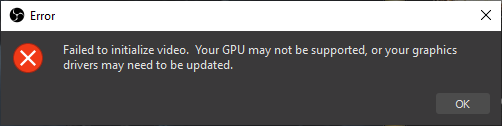
Did you update your graphics drivers as suggested in the error window?
 formal grove
Yup, i got that window right when i updated OBS, so i then updated drivers and restart, same message
shy mountain
Whats your graphics card?
formal grove
2080
shy mountain
And you are on driver version "441.08"?
formal grove
yes
steel bladeBOT
@formal grove For the best OBS support, please join their Official Discord @ discord.gg/obsproject
shy mountain
run obs as admin
 swift pine
Already done
shy mountain
What game?
swift pine
CSGO
shy mountain
Switch game capture to specific application
swift pine
Any other solutions?
steel bladeBOT
@swift pine For the best OBS support, please join their Official Discord @ discord.gg/obsproject
swift pine
Ok thanx for Help @shy mountain
steel bladeBOT
@sharp cloak Please provide a log from your last stream. To do this, in OBS go to Help > Log Files > Upload Last Log File and paste the link to the log file here.
 sharp cloak
Well I uninstalled OBS so only have SE and SLOBS right now.
plain sonnet
dropped frames is always a connection issue
Dropped frames / disconnecting? Follow the troubleshooting steps at: https://obsproject.com/wiki/Dropped-Frames-and-General-Connection-Issues
sharp cloak
But I don't have any issues at all when I stream from the PS4 which is on the same network.
swift pine
After update obs.live. An error popup "Video Initialize error. Your GPU may not be supported
Before updating it was working fine
shy mountain
You need to update your graphics drivers
swift pine
Up to date
shy mountain
nvidia?
swift pine
Yes Nvidia 1050ti
shy mountain
443 drivers?
swift pine
lemme check
shy mountain
swift pine
Yes it is 441.08
steel bladeBOT
@swift pine For the best OBS support, please join their Official Discord @ discord.gg/obsproject
shy mountain
This is a more technical issue, that is unrelated to obs.live(unless proven other wise by the OBS guys at their discord)
obs.live is a plugin for OBS Studio and the best place to ask for the issue, even though you've updated your graphics drivers
as suggested by the error message
swift pine
Ok thanx
sharp cloak
So, while you were talking to Smaira, I went and made sure everything on my side was up to date. And they are. I usually check for driver updates about every 2 weeks. I have to for my job. (I work from home.)
shy mountain
dropping frames suggests internet connection issue.
Either follow the guide provided by tadpole or provide me with a log file.
sharp cloak
We have one of the fastest speeds in our city. And even then it was happening.
Lemme see if I can find the files in SE and SLOBS. Gimme a few.
shy mountain
Having even 1gbps connection, does not guarantee 100% uptime.
plain sonnet
also, its connection, not your internet, it could be anywhere between your pc and twitch.
as you said you have no issues with ps4 but do on pc with 2 different apps, i think you have a place to start
sharp cloak
That's what I'm not understanding though...
I'll play a game on the PC and even though SE/SLOBS will d/c... I have no issues or lag in the game.
shy mountain
games don't require much of a stability, where as OBS needs a stable one.
because OBS provides a constant stream(like a river) of upload of your gameplay
any little interference in the connection is felt by OBS
whilist games can compensate
sharp cloak
Ah, ok. Gotcha.
shy mountain
Now, either provide that log or read this: https://obsproject.com/wiki/Dropped-Frames-and-General-Connection-Issues
This guide contains every piece of dropped frames / disconnect / network related advice we can give. If you really truly honestly super duper actually 100% tried everything in…
if the log file suggests dropping frames, its the same guide
sharp cloak
So even if I upgraded everything in my PC, it would still drop b/c of my connection?
And I'm looking for the log.
steel bladeBOT
@sharp cloak Please provide a log from your last stream. To do this, in OBS go to Help > Log Files > Upload Last Log File and paste the link to the log file here.
sharp cloak
@shy mountain mind if I create a Google Docs and have you look at it that way?
sharp cloak
......I'm in SE..... I stated that a few times.
shy mountain
Lets point out exactly where you are because now you are completely confusing me.
SE as in here: https://streamelements.com
or in OBS.Live?
OBS.Live:
sharp cloak
StreamElements. I don't have OBS.Live on my PC.
I only have SE and SLOBS. That's it.
shy mountain
Then if you are having issues with dropping frames with SLOBS, contact their support.
The only things you can install on your PC provided by us is OBS.Live(packed with OBS Studio) and Ground Control.
Ground Control is not used to stream directly with it.
urban forge
Hey everyone, can anyone help explain how or why I cant seem to insert an image into an overlay?
shy mountain
If you are using Internet Explorer/Edge to upload images - don't - use Chrome(or any other browser)
urban forge
hmm ok ill have to try it. thank you
 narrow mica
steel bladeBOT
narrow mica
steel bladeBOT
@narrow mica Welcome to the helpdesk! Please let us know how we can assist you today and a support volunteer or staff member will assist you as soon as they are available. Thank you for your patience.
@narrow mica To add your overlays to OBS, add a new browser source in your scene. Paste your overlay URL in the browser source properties, set the dimensions to 1920x1080 (unless you changed them on the website), and ☑ “Shutdown source when not visible” https://youtu.be/KDvLynUqXI4
 vale dawn
Hi there I need some quick help. So I decided to use discord as a dock in obs studio with inputting the url for more screen efficiency since I am using 2 monitors. But I have a problem. Usually when you want discord to work in browser it prompts permission for mic usage. So the dock in obs studio does that too. But it instantly fades back and there is no selection for me to permit mic usage. Any help?
steel bladeBOT
@vale dawn For the best OBS support, please join their Official Discord @ discord.gg/obsproject
vale dawn
So is that a way of saying I wont even try to help cause "not my concern"
plain sonnet
no
its a way of saying you are having trouble with obs dockable browsers and the best place for support with OBS is their discord
fiery lava
obs.live is a plugin for obs 24 the capabilities of the new dock feature and their limitations or lack of control for external devices(webcams,mics) would be something only OBS would know
vale dawn
@fiery lava thank you!
fiery lava
No Problem
 north osprey
hi anyone, my viewers cant seem to change/downscale my stream quality.
I remember it being a possibility before,
what setting do i need to alter?
fiery lava
That is on twitch ingest server that you connected to. It has nothing to do with the software you use to upload your content | I would try to manually select your server or another server near by
plain sonnet
north osprey
right, that isnt an option @plain sonnet
and sure @fiery lava i can try,
@fiery lava changed it from auto to my city, i think that's it right?
fiery lava
worth a shot but if that doesnt work its on twitch not you
wary dew
@north osprey that option is Twitch, contact them about it
north osprey
oh okay, well let me test it out and report back, thanks for the assist everyone
thanks guys! that did it
 undone shoal
Hey, I am having trouble setting up obs in general. my overlays etc wont fit to the screen but rather become way to big
wary dew
check these settings on your overlays
plain sonnet
is that your overlay @wary dew
plain sonnet
if that overlay url is active you might want to hide it,
having it public means people can alter it
undone shoal
If I would start a stream now with a overlay active, the twitch is connected. if someone were to follow or donate would it pop up on stream?
wary dew
depends, did you activate the alertbox overlay widget?
undone shoal
where do you do that?
wary dew
go here

StreamElements
The Ultimate All in One Platform for Streamers
and then setup all your alerts in the settings
undone shoal
Thank you!
Haha another question, when livestreaming a game on pc, Do I use a game capture or display capture for better "quality"?
odd kraken
game capture.
undone shoal
Do I need to set it up anyway? Cause I did it but could not see the game come up when playing
Sorry for all these questions
wary dew
it's fine, this is a helpdesk after all 😉
there are people that come in here with weirder stuff than this 
undone shoal
haha
plain sonnet
what game are you trying to capture?
undone shoal
Destiny 2
plain sonnet
Bungie has opted to not allow OBS to hook Destiny 2 using Game Capture. See: https://www.bungie.net/en/Help/Article/46101
You will need to run the game in either windowed fullscreen or borderless windowed and use Window Capture instead.
undone shoal
thx ❤
plain sonnet
np 👍
steel bladeBOT
@silk swift If you are not seeing the OBS Twitch integrations and have OBS.Live installed, please follow these steps:
- Make sure you are on the latest and greatest version of OBS.Live
- exit OBS (make sure OBS is not running)
- delete %appdata%\obs-studio\plugin_config\obs-browser\obs_profile_cookies
- start OBS.Live
- Settings -> Stream -> disconnect -> connect
 silk swift
ok tried it and no 😦 im sorry
 prisma zodiac
Ok, afternoon folks. I have been talking with Sean and KeiZar though the email support tickets trying to solve an issue and was directed here, so here goes.
OBS has started crashing on me at the beginning of the week. From what I can tell it has something to do with trying to add a browser source to a scene. That being said if I try to even launch OBS.live it will crash automatically and not even open the program window. If I uninstall OBS.Live and try just running OBS Studio then it is stable until I try to add the browser source. I have tried OBS.Live, just OBS, and even tried SLOBS to see if the issue is recurrent. Results have been the same every time that I have tried something. OBS.Live just crashes and Studio or SLOBS just crashes upon trying to add the browser source. I will include two crash logs with this. The newest one which I just generated is when trying to launch OBS.Live and the second one is from last night when I had OBS.Live uninstalled and tried to add the browser source through just OBS Studio.
I have done full uninstalls and installs with rebooting in between as well as running the programs in admin and compatibility mode to see if that made a difference which has not seemed to affect the outcome. Please let me know what further Information you require and I will try to promptly provide it.
 sinful flint
Did it not give you a link? For example: https://obsproject.com/logs/_jVWhzKN0dIqPvwA
prisma zodiac
this is the pop-up... just a clip board option... Unless I am misreading it. Apologies for the picture, thought it was the best way to show what I am seeing.
I feel like an idiot for having to ask.... am I missing something here? Should the link show up instead, or does this auto post to OBSProject?
sinful flint
Click on Help -> Upload Last Log File
Then that URL it gives you we can enter into this website: https://h4ndy.eu/obslog?url=
To get an analysis of the log
prisma zodiac
Help in the OBS program, or on one of the sites? Sorry
sinful flint
OBS
prisma zodiac
Give me a minute then... that will require me to uninstall OBS.Live again.... it will not even launch otherwise
this one I just generated from trying to make a scene with a browser source
https://obsproject.com/logs/uD8L34aNP4V0DFR0
steel bladeBOT
@prisma zodiac 1) Restart OBS
2) Start your stream/recording for about 30 seconds. Make sure you replicate any issues as best you can, which means having any games/apps open and captured, etc.
3) Stop your stream/recording.
4) Select Help > Log Files > Upload Current Log File. Copy the URL and paste the link here.
(Note: If you do not see an obsproject.com URL, you will need to update OBS Studio to version 22+)
sinful flint
Try and do this ⤴ otherwise we don't get much info: https://h4ndy.eu/obslog?url=https%3A%2F%2Fobsproject.com%2Flogs%2F9vXc8WXfaw0oTFjw
prisma zodiac
So to make sure I'm understanding this correctly, you want me to start up a stream even though this isn't happening during a stream?
sinful flint
We basically just need to get some information about what's happening. So far it is only pointing to the Windows 10 Gaming Features it mentions
"Warning: Windows 10 Gaming Features
Certain Windows 10 Gaming features are turned on and interfere with OBS by putting additional load on your CPU and GPU. We recommend disabling them when using OBS via these instructions.
These features are designed to provide the most performance to your game by lowering GPU priority of other applications, which would be fine if OBS didn't need a tiny bit of GPU to function."
fiery lava
lets try one other thing let go back to obs 23 and the obs live that goes with it
and the obs live that goes with it
make sure to skip the updates
should be able to install right ontop
prisma zodiac
Ok.... deleting the scenes from the folder so I can relaunch and send you that crash log... one sec
fiery lava
lets try one other thing let go back to obs 23 and the obs live that goes with it
https://drive.google.com/open?id=1VTjX_vwQe124x2BNCKTsyEValCQFMLbe
and the obs live that goes with it
https://drive.google.com/open?id=18M6OPzKQEBqiT2ecZlZ8se9VXcQHWZpp```
make sure to skip the updates
should be able to install right ontop```
prisma zodiac
Gentlemen/Ladies, I thank you very very much. That seems to have taken care of the issue for me. I can load an overlay now. Huzzah!
fiery lava
Huzzah
 strong fulcrum
Any anything i record the video comes out horrible it be at like 15 fps or even 8! what can i do to solve this?
steel bladeBOT
@strong fulcrum Please provide a log from your last stream. To do this, in OBS go to Help > Log Files > Upload Last Log File and paste the link to the log file here.
strong fulcrum
prisma zodiac
@fiery lava @sinful flint Again, thank you two for the help.
fiery lava
@strong fulcrum what ever settings your using for recording are maxing out gpu https://h4ndy.eu/obslog?url=https%3A%2F%2Fobsproject.com%2Flogs%2FP1en5sarxtkUcJ10
strong fulcrum
@fiery lava what can i do? i just wanna record 60 fps on 1080 while playing games
I see i have to enble v sync but when i stream its completely fine
fiery lava
turn down game settings | make sure your not streaming while trying to record | check record settings
best I can tell you with the 8gb ram and amd rx 580
strong fulcrum
Aight aigh thanks!
dry vale
https://gyazo.com/e8d32e2439f23096cbf83d1ce282dcce getting this all the time...
 steel bladeBOT
@dry vale 1) Restart OBS
2) Start your stream/recording for about 30 seconds. Make sure you replicate any issues as best you can, which means having any games/apps open and captured, etc.
3) Stop your stream/recording.
4) Select Help > Log Files > Upload Current Log File. Copy the URL and paste the link here.
(Note: If you do not see an obsproject.com URL, you will need to update OBS Studio to version 22+)
plain sonnet
make sure to start streaming show it shows in the log
plain sonnet
the important part to look at
 charred lava
i just re-installed obs live and now my scene is all white and not showing anything how do i fix this?
odd kraken
Normally this is caused by an antivirus tool, not being able to connect to the StreamElements servers. Do you use an antivirus tool?
charred lava
i think i only have the windows anti-virus
odd kraken
Try to restart OBS, and try to log out of OBS.Live using StreamElements > Log out and try to log in again.
odd kraken
Is the elgato configured properly?
Also it somehow looks to me that your browser source properites may be wrong for the overlay you added.
undone shoal
Hey, ive connected my elgato with my ps4 and pc. And I can hear audio in my headset and my microphone picking up my voice is working, but for some reason the game audio from ps4 doesnt go through the elgato to the stream
charred lava
i dont know what you mean
wary dew
@undone shoal i think you have to set your audio output to HDMI on the ps4
odd kraken
@charred lava The overlay seems to be cut off at one side, which make me think the dimensions are wrong in the browser source. They should be 1920x1080.
Also have you started OBS as admin?
undone shoal
its already set to hdmi
wary dew
one sec, i am firing up my ps4
HDMI OUT and Linear PCM for audio on the ps4 side of things
undone shoal
yeah thats how I have iy
undone shoal
had that off too
wary dew
okay
undone shoal
So everything is working except ps4 audio going into elgato
wary dew
check the elgato capture software
must be something in there that is causing this probably
Elgato Sound Capture probably
undone shoal
where do I find that
wary dew
on your pc, and if you don't have that then you have to download the software from their website
undone shoal
Do I need to download it even though I am streaming through obs live?
wary dew
i think you have to set up some stuff in there in order for your things to work properly after that
i only opened it 3 times when i set everything up
but i'm hardly an expert 😛
if you keep having problems with it you can always ask here:
undone shoal
Alright, thanks
 vale hearth
Hi all,
Is anyone experiencing audio crackling using .webm files as Stingers? The .webm file I'm using plays fine on VLC but on OBS.Live the audio has random crackling noises every time I change scene.
The scene I'm testing are very simple scenes and I'm not even using SE sources yet. The issue happens even transitioning to an empty scene.
Do you know if there is a way to fix it?
CPU: i7-6800K
RAM: 64GB
OBS.Live: 24.0.3 - Ran as an administrator
Stinger: .webm
Duration: 3s
Audio: Yes
Transition Point: 2800ms
Audio Monitoring: Monitor and Output
Audio fade style: Ive tried both "Crossfade" and "Fade out to transition point then fade in"
Many thanks
plain sonnet
that would be either audio peeking (too loud when saving)
or
your pc isnt keeping up rendering the stinger
vale hearth
Hi @plain sonnet
Thanks for your quick reply, the odd thing is the stinger audio is not always crackling in the same point. And sometimes it works fine, it's very random.
CPU sitting nicely at 12%, no spikes when using OBS.Live or when using the transition.
I'll ask the motion designer to confirm the audio is not clipping and let you know how it goes.
Cheers
undone shoal
@wary dew I had the elgato thing downloaded since before. When in obs trying to configure video nothing happens even though I click. I am guessing that it is in there where the issue is
plain sonnet
add the stats box (view > docks > stats) and change scenes a few times.
keep an eye on the frames info on the right side,
when the sound crackles you might see it there.
note that if you do see anything it will be very slight as that represents video frames, however as video is always the first to go, audio will follow it.
@vale hearth
undone shoal
I have it the same way as you
wary dew
🤔
if you click on the cogwheel in the audio mixer and go to Advanced Audio Properties and take a screenshot there
vale hearth
Thanks @plain sonnet
I've gave it a try, played with the scenes a bit and this is the result, it all seems fine? Such an odd issue!
Was I suppose to be streaming or recording?
hardy tulip
Is there music level normalising in the media request widget?
odd kraken
Not that I am aware of.
hardy tulip
This playlist is loud and soft real high and low it's terrible on the speakers and i'm sure it would be ear rape as well in some cases and it's only an acoustic playlist from yt
Really awesome playlist totaly recomend it
Sounds great loud but it's quite loud at the same time on some tracks
Goes through the microphone and i don't usually wear headphones so tis needs that normalising in the audio controls
 brazen ivy
How do you add the overlays from stream elements to obs live?
steel bladeBOT
@brazen ivy To add your overlays to OBS, add a new browser source in your scene. Paste your overlay URL in the browser source properties, set the dimensions to 1920x1080 (unless you changed them on the website), and ☑ “Shutdown source when not visible” https://youtu.be/KDvLynUqXI4
rugged quail
i have had obs for a while now and i used to have a start stream nutton right next to the scene transitions but i updated obs and the button dissapeared is there any way to get it back?
odd kraken
In OBS: View > Docks > Controls
rugged quail
thanks
 raven pewter
I was just wondering if there was a plan for stream elements to.support mixer any time soon. I am interested in dipping my toe in the market there but stream elements is.not supported and I really don't like slobs.
steel bladeBOT
@raven pewter Soon! Not Blizzard Soon or Valve Soon, sooner then that.
raven pewter
Ok how soon is soon? Six months?
odd kraken
Cannot tell you more than the bot told you as I do not know myself.
raven pewter
Ha ha ok thought I might check.
hardy tulip
Do get emails from S.E. about mixer support plans for the future so it's promising that there will be support for it at least.
But meh mixer, happy with my community .. keeps me on my toes
 cosmic solstice
I'm trying to get NDI for skype but it just keep showing up as black screen
kindred fox
@vale hearth what framerate are you streaming at and what framerate are your stingers? If you play your stinger in a web browser like Firefox or in VLC does it play fine?
odd kraken
@cosmic solstice Have you started OBS as admin?
rugged quail
hey sorry don't no where to ask this but can i use your overlay in streamlabs at all please
steel bladeBOT
@rugged quail We're not able to troubleshoot issues with using our overlays in StreamLabs OBS (SLOBS) as we don't have the tools to support their software. We recommend using OBS Studio or OBS Studio with our plugin OBS.Live.
 bleak scroll
is there anyway i can read chat without alt+tab with one monitor
odd kraken
for the chat there's this: https://github.com/baffler/Transparent-Twitch-Chat-Overlay
Not this is not related to StreamElements.
 toxic rivet
I followed all the steps but my obs.live does not connect in custom name
 rancid jasper
https://gyazo.com/092accae13e47831cc828a9edb93cefe i have tried to do this but it not work somehow, so where might be problem?

 kindred fox
@toxic rivet do me a favor and click streamelements in the menu bar and log out and back in. If that doesn’t work, try going into your dashboard on the website and part the bot from your channel and rejoin it
toxic rivet
@kindred fox did but still have same problem
kindred fox
Hrmm
Did you create a twitch account for the bot or are you letting it masquerade as you?
toxic rivet
already tested a new account and same problem already formatted machine
kindred fox
Twitch account for the bot? Or masquerading as you?
If you tell the bot to be you does it work?
toxic rivet
account for the bot
toxic rivet
@kindred fox
I created a bot-only account
kindred fox
I’m not certain how to fix it
toxic rivet
I think it may be some problem with streamelements itself because when I use groud control it works
toxic rivet
not
I made one last attempt I deleted my account with streamelements, let's see what's going on
kindred fox
Someone smarter than I will be around soon
toxic rivet
believe I had to delete my account with streamelemenst and it worked, now I will have to configure everything again kkkkk
 errant sail
i really need some help on something else that isnt stream elements. could anyone possible help me
 radiant ore
I'm having a bit of trouble with my loyalty store widget. Whenever someone redeems something the image stays for a couple minutes even tho i have got it to only show for 10 seconds. How would i fix this??
kindred fox
I believe that’s a known issue. No eta on a fix
radiant ore
no problem! thanks you for letting me know!
 rustic hearth
Can someone tell me where I can set up my custom name for the bot? 
steel bladeBOT
@rustic hearth Custom bot name requirements
- StreamElements bot modded and in chat
- Active overlay with alerts
- StreamElements tipping page in the panels below the stream (!panels)
- OBS.Live or Ground Control open
- Create a twitch account for the name you want to use or run the bot under your own name
- Custom bot name doesn't work on Mac
rustic hearth
Ty bot, you're the best ❤
 grand plank
when is mixer support coming
steel bladeBOT
@grand plank Soon! Not Blizzard Soon or Valve Soon, sooner then that.
plush mason
Has anyone else experienced an issue with their bot not acknowledging commands they type into chat? I've tried to use the song request command to add something to the queue and the bot gives no response.
odd kraken
Have you enabled the command and the in the songrequest the viewer requests?
plush mason
Yes. Viewers can use it, I just can't.
odd kraken
Have you set a points limit to the songrequest?
plush mason
I don't think so
odd kraken
Set the price for requesting a song in the media request settings and not in the command settings. Cause you do not have enough points I think and you do not get an error message cause it is set at the command and not in the songrequest module.
at the command !songrequest there is set a price of 1.
plush mason
That was it. Thank you.
 mellow scarab
I can hear the audio from my alerts in obs but cant hear them on stream any ideas
plush mason
Are you using anything to mix your audio?
Anyone else had the issue where they grab an overlay from the gallery but it gets cut off on the preview? How do you get it to scale correctly?
steel bladeBOT
@plush mason To add your overlays to OBS, add a new browser source in your scene. Paste your overlay URL in the browser source properties, set the dimensions to 1920x1080 (unless you changed them on the website), and ☑ “Shutdown source when not visible” https://youtu.be/KDvLynUqXI4
steel bladeBOT
@forest nimbus Please provide a log from your last stream. To do this, in OBS go to Help > Log Files > Upload Last Log File and paste the link to the log file here.
 forest nimbus
odd kraken
forest nimbus
odd kraken
Here is an analysis of your log file with tips on how to improve: https://h4ndy.eu/obslog?url=https%3A%2F%2Fobsproject.com%2Flogs%2FBURj9_avcZ9uC6LD
forest nimbus
thanks
 hybrid lion
i lost the chat in obs how can i get the chat back into obs??
odd kraken
StreamElements at the top in OBS.Live > chat.
hybrid lion
okay thank you
 snow agate
I see other channels doing Shout outs us !so (username) is this a custom command as I can't seem to find it?
plush mason
Did anyone get their Extra Life widgets to work? Mine never updated
plush mason
@snow agate Yes its custom
snow agate
OK, thanks
 twilit marten
Hey