#helpdesk-selive
1 messages · Page 65 of 1
 plain sonnet
 empty skiff
oh my, it seems I was using another rotating widget
it wasi n the widget share
Recent Events
 By @gloomy badger
seems like it's not the same as the one you're sharing
plain sonnet
gimme sec
empty skiff
damn
plain sonnet
no, that one is just to show single events all in one widget
empty skiff
yeah, guess that's why they wouldn't rotate as I expected
great, where can I find that widget you shared
plain sonnet
empty skiff
thank you so much @plain sonnet !!! you're awesome
empty skiff
haha, I sure will!
plain sonnet
haha
empty skiff
i knew your name was familiar!!!!
plain sonnet

 trail ginkgo
Hi is ther a way to get uptime counter on streamelements overlay? thanks
 tulip hamlet
trail ginkgo
tulip hamlet
trail ginkgo
cheers
 eager barn
@shy mountain I tried to do what u said and still didnt work
might be confused
could anyone help me with doing the uptime counter from #dev-chat ?
eager barn
so i did a custom widget with the instructions at @shy mountain sent me, but does anyone know how to make it bigger?
tulip hamlet
Custom widgets are ultimately your responsibility to maintain. We unfortunately cannot provide coding advice. While you can ask in #dev-chat you're subject to the knowledge and limitations of volunteers willing to assist.
eager barn
@tulip hamlet I see, but i got the coding and it worked, I just dont know how to make it bigger? if u get my question
tulip hamlet
That's more coding. Custom widgets are entirely controlled by coding.
 wooden talon
i keep getting a setup was not intialized properly error when i try to uninstall stream elements obs
tulip hamlet
Are you uninstalling via Windows or via the option in the StreamElements menu in OBS?
And did you already uninstall OBS Studio first?
wooden talon
yes obs is uninstalled, through control panel
tulip hamlet
Install OBS again, then uninstall OBS.Live, then you can uninstall OBS Studio again.
Since OBS.Live is a plugin of OBS Studio. So, it's probably trying to make changes to files that aren't there any more.
tulip hamlet
Click that Show details button?
tulip hamlet
I'm not a developer and I'm attempting to find an answer for you at 5:35 AM. Please be patient with me. 🙂
wooden talon
ok sorry
tulip hamlet
Can you try uninstalling through the option in the StreamElements menu in OBS instead of the control panel?
wooden talon
i dont have the menu
tulip hamlet

My capacity to help with this is going to be fairly limited. I've left a message for the devs to investigate the issue, but unfortunately I can't provide an immediate solution for you.
Though I can ask why you want to uninstall and if you were having trouble with a feature that I could help you with?
wooden talon
could i try to reinstall? i have a birthday stream tomorrow
tulip hamlet
Sure, feel free.
wooden talon
OBS froze and shut down mid stream, keizar suggested unistalling and reinstalling
tulip hamlet
That's interesting. Did you provide a crash log?
wooden talon
yes
tulip hamlet
Would you mind linking me to those logs?
wooden talon
idk how to pull a previous crash log
tulip hamlet
You linked 'em in this chat, correct?
wooden talon
pretty sure
tulip hamlet
I'll find 'em with a search.
wooden talon
its back up after reinstalling, not sure if the issue will happen again though
tulip hamlet
Looks like he instructed you to make sure DirectX was up to date?
Were you able to do that?
wooden talon
yes
tulip hamlet
Okay. If it happens again, please come in with a fresh log and we'll look into it.
wooden talon
ok
 rugged quail
Can i have some help with making overlays please? I'm trying to move my stuff from Streamlabs OBS to Regular OBS and I'm trying to add my gifs i used from SLOBS to this Overlay Editor but i can't see the Gifs I'm adding...
when i emulate the Follow alert only the text pops up.
tulip hamlet
Have you disabled custom CSS?
rugged quail
idk, im new to this xD
tulip hamlet
Here's a full guide on our Overlay Editor: https://www.youtube.com/watch?v=LwAfMIR3Cj0

StreamElements Overlays are loaded from a single browser source in your streaming software, making streaming easy. https://streamelements.com/ StreamElements...
rugged quail
ik the basics of making and adding alerts but the Gif I'm adding isn't popping up at all. should i have CSS on?
tulip hamlet
Not unless you know what you're doing.
 gloomy brook
?A? can i ask somthing bout OBS.LIVE promblem here?
 steel bladeBOT
@gloomy brook Welcome to the helpdesk! Please let us know how we can assist you today and a support volunteer or staff member will assist you as soon as they are available. Thank you for your patience.
gloomy brook
I hav a problem w/donation clip buffer is serious
there is no problem when i use Xsplit XD
tulip hamlet
Can you provide an example of what you're referring to? Because I don't quite follow.
gloomy brook
sorry for not good in eng
here is the example
as you can see, when i play the video donation , there are so much buff w/obs.live
there is no same problem w/ X split or, OBS.
only OBS.Live.
i'm using toonation , and Twip(usually Korean use) , both hav a problem
 hasty basin
how do i change the chat bot name??
 shy mountain
@gloomy brook what version of obs studio are you using?
steel bladeBOT
@hasty basin Custom bot name requirements
- StreamElements bot modded and in chat
- Active overlay with alerts
- StreamElements tipping page in the panels below the stream (!panels)
- OBS.Live or Ground Control open
- Create a twitch account for the name you want to use or run the bot under your own name
- Custom bot name doesn't work on Mac
gloomy brook
24.0.1(64bit)
shy mountain
@gloomy brook obs.live is not updated for obs 24. If you are getting laggy alerts i would suggest to go to settings -> advanced -> scroll down and enable/disable hardware acceleration
gloomy brook
or how bout downgrade OBS to 23 ver ?
shy mountain
@gloomy brook https://github.com/obsproject/obs-studio/releases - scroll down to see the 23.2.1 version
 pastel pulsar
[]
 dreamy notch
i updated my network setting in obs thro auto config...and now my overlay is cut in half any fix tried new source and scene not sure wat to do now tho
steel bladeBOT
@dreamy notch The default resolution for StreamElements overlays (theme and custom) is 1920x1080. Please add them in OBS at their full resolution and use CTRL+F to fit to screen if necessary. You can then downscale your stream in OBS settings > Video if you'd like https://i.imgur.com/6bWXxjR.png

 earnest rain
hi i cannot get ndi to work 😦
steel bladeBOT
@earnest rain For the best OBS support, please join their Official Discord @ discord.gg/obsproject
 gloomy kettle
Hello
steel bladeBOT
@gloomy kettle For the best OBS support, please join their Official Discord @ discord.gg/obsproject
 haughty mason
So i definitely have Sound alerts working on the Overlay page on SE website... but they arn't playing in OBS... ?
shy mountain
Is the sound not playing only or the alert not showing as well?
haughty mason
i use my head set
shy mountain
haughty mason
shy mountain
If your default playback device in the window sound settings is set to headphones
then in OBS its good to set that to match to "default"
as obs will pick up the default one and playback any sounds to that device
 haughty mason
🤦 It was on volume mixer
wtf i never lowered it
sorry 😅 usually im tech savvy with atleast that but i knew i'd never lowered it, i never open volume mixer haha
shy mountain
I never open it as well, but i always check it i don't hear sound
haughty mason
thank you 😅
shy mountain
Windows can be a tricky bitch sometimes 
haughty mason
I mean would we have Windows without its weird bits 😂
shy mountain

haughty mason

 quasi snow
sometimes always
shy mountain
 👍
👍
 odd tulip
henloo, i'm new to stream elements and i cant seem to find the alert box on the webpage, or am i just wrong and there is none 😂
steel bladeBOT
@odd tulip New to Stream Elements?
Check out our YouTube channel https://www.youtube.com/c/streamelements/videos
with tutorial videos from setting up the basics, to in depth details on how to use our product.
rugged quail
@odd tulip create an overlay, if you havent done that -> overlay editor -> widgets -> alert box 🙂 In the overlay editor you can customize your alerts
rugged quail
@wet dune go to your settings in obs -> output -> set it to 720p
rugged quail
@wet dune for bitrate and everything else -> https://stream.twitch.tv/encoding/
rugged quail
@wet dune wait, let me check, maybe i wrote the wrong tab
@wet dune my bad, please go to the tab "Video" in your obs settings
rugged quail
@wet dune for 720p? 60 or 30 FPS?
 wet dune
default was?
not sure what the FPS is
but what would be good for a laptop.
so it wont over do it.
rugged quail
@wet dune frames per secound. You could also run the autoconfigure wizard of obs for the perfect settings tuned to your laptop -> top -> help -> wizard thing
wet dune
if i go to video tab it says: video output is current active. Please turn off any outputs to change video settings.
ok TY sir.
rugged quail
@wet dune you have to stop the recording / stream to change the output quallity
wet dune
ok yup
doing auto configure again now.
its setting the best things including 720p
which was not set there before 🙂
@rugged quail++ Awesome Thank You.
no points system here? i see.
rugged quail
@wet dune open up your streamelements dashboard and head over to Loyalty settings in the Loyalty tab
@wet dune everything is explained at the tab
wet dune
ok thank you.
rugged quail
@wet dune no problem 🙂
 daring gazelle
sometimes when i steram ill lweave for 5 minutes and my headphones turn off which then stops the audio coming throught it from software unless i close down obs and restart it , is there a way to fix this
rugged quail
@daring gazelle have you wireless headphones with a battery saving option?
rugged quail
@daring gazelle does the brand offers a programm for your headphones?
daring gazelle
not that i know its a the turtle beach 500
wet dune
@rugged quail obs crashed, Retrying.
rugged quail
@daring gazelle as the support team of the brand wrote is it not possible to turn off the autoshutdown function, you can only reset the timer by speaking into your microfon or playing audio
daring gazelle
strange because it should be hearing the audio from capture card to stay on
rugged quail
@daring gazelle the issues could be solved by playing some music in your streams (just an idea 🙂 )
daring gazelle
i a;so find it strange that i still have to turn on the power to listen with a cable
rugged quail
@wet dune no problem, helping is my pleasure 😄
 steep sphinx
Hi guys, my OBS.live has suddenly gone from 15% cpu up to 40% , is there a way to get it back down to 15% ? what could be causing the issue
rugged quail
@steep sphinx have you tried disabling Browser source hardware acceleration ? ( OBS -> Settings -> Advanced -> scroll down -> Enable Browser Source Hardware Acceleration uncheck the box -> Apply -> OK)
rugged quail
@steep sphinx if you have multiple scenes, have you checked the box "unload if not visible" in your overlay layer?
rugged quail
@steep sphinx you have to do it per source
steep sphinx
i think thats helped, its definitely pulled it down
rugged quail
@steep sphinx thats great to hear !
steep sphinx
I'll let you know later if its all good when im live 🙂
rugged quail
@steep sphinx alright 😄
 fluid pagoda
It it possible to do Media Request on a 2 PC setup? Aka I have the video and audio play off my main computer, while at the same time having the video play off my streaming PC but with the audio muted
rugged quail
@fluid pagoda sure, you just have to enable media request in your obs.live on the pc you streaming on. also the bot has to be in chat
fluid pagoda
Yea but If I do that then I cannot watch the video, unless I have obs open on my gaming computer as well (Which I dont mind). I then ask, is there a way where I can mute the audio from Media Share on the streaming PC
Because If I mute it on one computer, it mutes it on the other
 sinful flint
You could mute the audio for OBS as a whole on one of the computers in your Windows volume mixer
fluid pagoda
Yea, but Im cheap AF and to record all of my microphone audio I have to use discord on both computers since NDI cannot pick up my microphone. AKA The streaming PC system audio includes my microphone audio from discord on the OBS audio. Therefore If I mute it I have no way of recording my voice.
 opal holly
Is there a way to make my alert bigger inside of Streamelements. I change the size in the position size area of my overlays but that just changes the alert box size not the actual alert
fluid pagoda
But, I found a way around the Media Share audio problem, all I have to do is mute the media share audio in OBS and have it play through the Overlay editor. Thanks though!
 rapid portal
steel bladeBOT
rapid portal
steel bladeBOT
@rapid portal If you are not seeing the OBS Twitch integrations and have OBS.Live installed, please follow these steps:
- Make sure you are on the latest and greatest version of OBS.Live
- exit OBS (make sure OBS is not running)
- delete %appdata%\obs-studio\plugin_config\obs-browser\obs_profile_cookies
- start OBS.Live
- Settings -> Stream -> disconnect -> connect
sinful flint
@opal holly Not currently, at the moment only the text is scalable
That is, by default. Could very well be possible if you use the Custom CSS option I imagine
opal holly
Thank you for the reply. I don’t anything about custom css
But could I hypothetically put it in as a browser source in OBS.live and scale it that way?
sinful flint
Me neither sadly, but our code gurus who hang out in #dev-chat usually have a good idea
opal holly
Not the best solution but something until it gets put in
sinful flint
Yeah, that'd work
 warm stump
can someone help me please i have a tournament in 2 hours and i cant figure out how to get two different device capture on two differnt scenes
plain sonnet
what are you trying to capture
 finite vigil
sorry for asking if this has already been asked but my stream information isnt showing and i believe i have the current version of obs 24.0.1. any help i can get for this?
rugged quail
@finite vigil reconnect your twitch account in your obs settings
finite vigil
ok thank you so much!
daring gazelle
trying to add hype cup but not sure how to add it to obs
rugged quail
@daring gazelle if you want a hype cut, you have to go to your overlay editor and add the widget "Hype Cup"
daring gazelle
if have one saved but its not appearing when i add it as a browser soursce
rugged quail
@daring gazelle have you tried clearing your browser cache of your overlay?
daring gazelle
where is that in settings again
rugged quail
@daring gazelle click on your overlay layer in your obs (rightclick), scroll down -> clear cache
daring gazelle
cant find it any
rugged quail

 thin raven
how do you add extra tools it said you can add browser windows directly to obs to appere on the side
rugged quail
@thin raven you mean the widgets in obs? (Chat, activity feed, media request)
thin raven
yes
rugged quail
@thin raven for that you have to install the obs.live plugin to your obs (https://streamelements.com/obslive)

StreamElements
The Ultimate All in One Platform for Streamers
thin raven
THANKS
rugged quail
@thin raven no problem 🙂
daring gazelle
i dont think i have an overlay just the image i added sepertly for it
rugged quail
@daring gazelle for overlays you have to add them as browser source to work
daring gazelle
ok so i added cup link in broswer souce and have the box checked
rugged quail
@daring gazelle which box checked?
daring gazelle
rugged quail
@daring gazelle thats good, oh now i see i posted the completly wrong picture....
@daring gazelle check also the box "unload when not visible"
daring gazelle
still not visable
rugged quail
@daring gazelle but you added the widget to your overlay (in the editor)?
daring gazelle
ye i added the vup
rugged quail
@daring gazelle and also copy pasted the link of the overlay as browser source in your obs?
daring gazelle
ye
rugged quail
@daring gazelle right click to your overlay source -> https://i.imgur.com/RvEkFez.png
 rugged quail
@daring gazelle that shouldnt be a problem, let me check something real quick
@daring gazelle try emulating a follower / donation / cheer / sub / host / raid event in your overlay editor, is there your hype cub showing?
daring gazelle
no didnt see anything
rugged quail
@daring gazelle then try deleting hype cup and readd it in your overlay editor
daring gazelle
still nothinmg
rugged quail
@daring gazelle have you tried moving around your hype cup? its normally in the bottom right corner
rugged quail
@daring gazelle yeah i faced the same issue when trying to add the cup, i was like huh where is it, i just added it 😄
 chrome salmon
Hello. By any chance is anyone else having a problem getting OBS's browser sources audio to be controlled via OBS only with OBS v24 update? It only seems to work with strictly OBS but not OBS.live.

With obs.live it says reroute audio to obs but the audio tab doesn't come up
 fiery lava
correct volume for the browsers you open with obs are controllable. OBS.live plugin sends the sound AS obs
so you can turn down obs in volume mixer on windows
rugged quail
@wooden flare please check if your gpu / cpu drivers are up to date
@wooden flare help -> log -> upload current log
@wooden flare and post the link in here please
 rugged quail
@wooden flare there are all warning and infos listed -> please work yourself through the list 🙂 (https://h4ndy.eu/obslog?url=https%3A%2F%2Fobsproject.com%2Flogs%2FpXuiafnt1aolXoxY)
@wooden flare if you have any problems following the instructions there, let us know 🙂
 wooden flare
Oki! thanks
 dense wigeon
hay when i press start streaming it brings me to a blank screen
 marble stirrup
When i use media player and have it show on stream i hear the audio twice.
media request* sorry
steel bladeBOT
@marble stirrup Make sure to ☑ “Shutdown source when not visible” for all browser sources (all OBS scenes). If using studio mode, uncheck “Swap Preview/Output scenes After Transitioning.” Also keep in mind that sound can play from any overlay loaded in the browser (editor or launched). https://i.imgur.com/FegZJQS.png https://i.imgur.com/yY0wcFl.png

 marble stirrup
Ah yup, that would be it
i had a rogue source loaded and unchecked lmao
TY <3
10/10 help
 snow wasp
@marble stirrup what music do you stream that after you done streaming won’t get muted????
marble stirrup
I live by what Alpha Gaming once said. if it makes stream quality better dont worry about it being muted.
dont worry about it till you get bigger
and if you are worried look up playlists of royalty free music like NCS
snow wasp
Is this on Spotify
marble stirrup
NCS is on spotify i believe, but im using the media request widget in obslive and i slapped a mix playlist of a song i like from youtube into it on shuffle.
if you get bored of one playlist mix you can switch to another one
snow wasp
Are you using stream labs obs
 fringe yarrow
Need help. My obs live chat is now showing the full twitch website instead of the only the chat box. How can I reset it to only show the chat box?
 placid fjord
@fringe yarrow In OBS, click the Streamelements drop-down menu. Log out then log back in again, re-open the chat module. Might fix it.
 unique snow
Game capture broken for anyone else?
 barren ibex
Sorry, I asked this before but how do I fix webcam delay? It will be good the first hour of streaming, but then it starts to mess up audio & picture.
steel bladeBOT
@barren ibex For the best OBS support, please join their Official Discord @ discord.gg/obsproject
 inner hatch
Clicking Moderator Settings in the Chat dock opens Twitch's normal webpage within the dock. Is there a way to get the chat back without restarting OBS?
 nocturne river
for some reason, my stream info widget is blank
steel bladeBOT
@nocturne river If you are not seeing the OBS Twitch integrations and have OBS.Live installed, please follow these steps:
- Make sure you are on the latest and greatest version of OBS.Live
- exit OBS (make sure OBS is not running)
- delete %appdata%\obs-studio\plugin_config\obs-browser\obs_profile_cookies
- start OBS.Live
- Settings -> Stream -> disconnect -> connect
 kindred fox
@inner hatch did you close the chat panel?
inner hatch
Yes. The browser seems to remain open in the background and just isn't visible, so reopening it doesn't reset the page its on
nocturne river
how do I delete the cookies
kindred fox
Follow the instructions above ^^^
@inner hatch if you click streamelements in the menu bar and click chat does the panel show up
inner hatch
Ah, I think I've missed out some info. Twitch's main webpage is actually open inside the Chat Dock:
So clicking chat inside the Streamelements menu just hides/shows it.
nocturne river
?
steel bladeBOT
@nocturne river If you are not seeing the OBS Twitch integrations and have OBS.Live installed, please follow these steps:
- Make sure you are on the latest and greatest version of OBS.Live
- exit OBS (make sure OBS is not running)
- delete %appdata%\obs-studio\plugin_config\obs-browser\obs_profile_cookies
- start OBS.Live
- Settings -> Stream -> disconnect -> connect
inner hatch
View in OBS? I'm not seeing a 'chat' option there.
kindred fox
@nocturne river Click start >> type “Run” then type in the path for the obs_profile_cookies folder
I’m gonna find out if the new UI borked something @inner hatch
inner hatch
Ahhh, cheers.
kindred fox
you just clicked the moderation settings and closed the panel @inner hatch
?
ffffffffuuuuuuuuuuuu
yeah it's broken with the new UI
nocturne river
perfect
inner hatch
clicking the moderation setting will bring the dock to the actual main twitch website with all the correct moderation options, but there seems to be no way to get back to the normal chat
nocturne river
thank you
inner hatch
Nah no worries, good now that you're aware of it
Its just a worry because it looks to require an OBS restart, so you wouldn't want to do that mid-stream
kindred fox
Nobody apparently uses mod tools in OBS.Live 😆
So if you fire up OBS again it loads correctly?
inner hatch
well yeah, most of the options are under the Activity Feed dock anyway
and yes, it's all good after a restart
kindred fox
oof
yeah that's a big bork
I'll see if I can get it in front of the devs
Not a problem @nocturne river
fringe yarrow
Help.When I type and send a message on twitch chat, I can see it appear in obs live chat & streamelements backend editor, but does not appear in the created Browser Source chat. Logged out & closed OBS, made sure browser source is on the top of the list. Any ideas?
kindred fox
what browser source chat?
Did you add a chat widget to your StreamElements overlay?
or are you trying to capture chat via browser source?
fringe yarrow
Yes i did. And yes I am
kindred fox
If you add the chat widget to your overlay, it will automatically display chat messages from your channel
fringe yarrow
kindred fox
Have you saved your overlay and reloaded the overlay in OBS? Why do you have chat and chat frame? you should be able to put all of that into the editor and only use one browser source.
You can reload the overlay by double-clicking it in the source list and towards the bottom is a button to refresh cache of current source
fringe yarrow
Frame is just the outer white outline. I saved the overlay in streamelements, hit launch, copied url, created browser source, pasted url.
I did clear cache.
kindred fox
And still no chat?
fringe yarrow
Nope
kindred fox
Can you link me your overlay url?
The one that’s used in obs
I'll load it in a browser and in OBS to see if I see chat
@fringe yarrow
 dapper wolf
Have you tried refreshing cache of the browser source in obs?
fringe yarrow
Yes. Ors, any other way. dont want to paste that url.
dapper wolf
uhh
kindred fox
Go ahead and DM it
dapper wolf
isn't that unsafe? to be publicly linking your overlay url...
kindred fox
It’s just a view
I could only see what it is
Can’t manipulate it
@fringe yarrow dm me the url
fringe yarrow
K
I pasted the url in a new tab and it is showing the messages I type. The only place it doesnt show is in the browser source.
kindred fox
Delete the browser source and re-add it
steel bladeBOT
@fringe yarrow To add your overlays to OBS, add a new browser source in your scene. Paste your overlay URL in the browser source properties, set the dimensions to 1920x1080 (unless you changed them on the website), and ☑ “Shutdown source when not visible” https://youtu.be/KDvLynUqXI4
fringe yarrow
Support ai 👍
Dimensions were the issue. I changed the dimensions on the editor and also obs so that they matched, but setting it to 1920 x 1080 worked. Thanks for the help everyone
kindred fox
Glad to help
 soft raptor
Hi, I linked my youtube account to streamelements via obs.live and would like to link my Twitch account instead. I can't get back to the screen to link an account, though.
kindred fox
@soft raptor log into the streamelements website with your YouTube, click in your name in the top left, and then click settings and add your twitch account there. Once it’s added click streamelements in the menu bar and log out and back in with your twitch login
soft raptor
Alright, I will try that. And while I am at it, is there a way to use restream with streamelements?
kindred fox
Yes
soft raptor
When I go to click settings and add my twitch account, it says 'Channel is already claimed'.
kindred fox
Is it not in the list?
When you click your name?
I did the same thing. SE staff has to do a thing on the back end to get your account correctly added to your dashboard.
soft raptor
No... i logged into streamelements via twitch earlier to play with my twitch account settings... ><;
soft raptor
Seems that way.
kindred fox
You should be able to see it when you click on your name in your dashboard
One sec
Crap I can’t do it on mobile
Someone will get to it when the staff are online.
soft raptor
Alright! I'll be patient 🙂
kindred fox
To answer your question about restream yes
You would set up your obs to stream to restream, then load both a YouTube overlay and a twitch overlay in obs. You’d most likely need the restream chat app to see the chats as I’m not sure how obs displays chats when using restream
But having both overlays loaded in a scene will show events from both platforms.
soft raptor
yeah that's what i did in streamlabs too, just would throw the webchat in a panel
kindred fox
I’d recommend putting twitch alerts on one side and YouTube on the other so you know which platform they’re coming from
😉
It’s all about organization
So in the overlay editor just set up like a “restream” overlay for twitch and one for YouTube and put the alert boxes on opposite sides. I wouldn’t recommend an event list or “recent follow/cheer/sub” because it will only pull from whichever platform you’re editing in the dashboard.
soft raptor
alright 🙂
kindred fox
If that makes sense
soft raptor
It does, but it will probably take a bit for me to get the scenes set up again.
kindred fox
Tbh if you’ve got one, it’s just adding the alert box overlay for the other
Once they link the account
soft raptor
Is there anywhere I should be poking a staff like filing a ticket or anything or do I just stick around here? Just want to make sure I'm doing everything I should be.
kindred fox
Go ahead and file a ticket so it’s documented and staff can reach out directly
soft raptor
alright 🙂
dapper wolf
when I open my media share, it goes to a welcome screen everytime
thus I click to continue and the widget pops out everytime
steel bladeBOT
@dapper wolf Streamelements on top of OBS -> Logout -> login
dapper wolf
figured it out, you actually have to click "leave tour" 
kindred fox
No, music in general with live-streams is a liability unless you specifically find public domain music
kindred fox
So I avoid it
dapper wolf

dapper wolf
Inbuilt windows audio routing?
kindred fox
It doesn’t respect windows routing at all or even in-app routing

 tender lance
probably been asked before but, im having the problem where sometimes my overlays load properly from Streamelements to SLOBS but sometimes they dont and its either just a black or white screen. I've made sure the resoulution is 1920x1080 and refreshed the cache but I dunno what to do from here
shy mountain
With the recent update to SLOBS, our overlays sometimes don't load at all in that software and just produce a white screen. We suggest using OBS Studio (preferably paired with our Plugin) for best results.
There is nothing we can do to prevent SLOBS from not loading our overlay.
(Side note - OBS.Live is not updated for OBS Studio 24.0.1 currently, so its best to use our own installer to receive the best stable versions of both OBS Studio and OBS.Live)
soft raptor
I sent in the email, but the first time I spelled my email address wrong. Wheeeeelp.
shy mountain
@soft raptor Done
soft raptor
tysm
steel bladeBOT
@soft raptor Account Merging - Please note:
- Merging accounts only allows faster ways to switch between accounts
- Merging accounts does not allow data sharing between accounts - different streaming platforms, different type of events
- Merging accounts allows duplicating/sharing overlays between the accounts
soft raptor
Can you explain what that second part means? That it doesn't allow data sharing between different streaming platforms, different types of events?
shy mountain
Youtubes have subscribers
which is equivalent to twitch followers
non of the 2 accounts will show each other's data in the activity feed\
or share overlays together
soft raptor
oooh yeah, Orsuna was explaining that I should just have an overlay for both (in the case of using restream)
kindred fox
Because restream is connecting to two separate accounts, having alert boxes for both makes sense
soft raptor
Yeah, was just making sure I wasn't misunderstanding something 🙂
 frigid rivet
When I test an alert is it supposed to show in OBS.Live?
rugged quail
@frigid rivet if you check the box in the bottom "Show on OBS" then yes
steel bladeBOT
@frigid rivet You can test Alerts via the bell on the lower right corner of the Overlay Editor. Simply go to your Dashboard -> My Overlays -> Pencil/edit button on the overlay. Make sure the "Show Emulated events on stream" option is on to see the alert in OBS/Xsplit https://streamable.com/h6qgy
 rugged quail
@frigid rivet have you added your overlay to your obs source?
frigid rivet
as a browser source
rugged quail
@frigid rivet good, try clearing the cache of the overlay source ( right click -> scroll down -> refresh current browser cache )
frigid rivet
ok that worked for just the alert overlay, but the alert system for the phoenix overlay isnt working
rugged quail
@frigid rivet try the same with the phoenix overlay
frigid rivet
ok it works now
rugged quail
@frigid rivet perfect 🙂
 forest laurel
is there any subs history so i will know who is my current subscribe?
rugged quail
@forest laurel in your overlay editor -> top -> widgets -> latest subscriber
 drowsy horizon
can anyone help me i have an i5-8400 1050ti what is the best settings so my stream wont have delay i am new to all this im trying to sort it ready for my 24hour stream for charity
shy mountain
there will always be a delay between you and chat
unless you live right next to the twitch servers and every viewer has 10gbps download speed from the server(thats like a fantasy, not serious here, but still there is a drop of thruth)
rugged quail
@drowsy horizon set your stream delay to real time or something like that, twitch offers a feature in your dashboard, i can sort it out, dont know how its called properly. But this wouldn't eliminate the complet delay
drowsy horizon
i try that know i normally have 30secs delay with game play and that but i will defo try it thanks
 echo tapir
When can we expect an update to OBS.Live so we can actually use the new browser source audio routing feature that we got in OBS 24?
shy mountain
No actual ETA, but we are working on it
echo tapir
alright. hope you publish some announcement when you publish the update because i need the OBS feature more than the OBS.Live so uninstalling for now, hope you will let us know when it is out?
shy mountain
we will
echo tapir
So it fails at uninstalling ? is this because my system runs OBS Studio 24 and not 23
shy mountain
thats a good question
most likely yes
that or you have an anti-virus blocking the uninstaller
echo tapir
running windows essentials
shy mountain
heres a long treck - you might not like it
Get 23.2.1 from here: https://github.com/obsproject/obs-studio/releases
remove 24.0.1
install 23.2.1
then remove obs.live
then update to 24.0.1
echo tapir
will do 🙂
shy mountain
IF the uninstaller for obs.live is still getting stuck
then also run our installer
to refresh the files
echo tapir
at least it will anmswer the "Is it because of OBS 24" question
shy mountain
and then remove
well yesterday i had someone with this issue and it never crossed my mind that it might be due to 24.0.1 
echo tapir
I'm up for testing so I'll do the long route
installed OBS 23.2.1 on top of the latest OBS 24 and when i launched it OBS.Live askedd for an update. Did that and then ran the uninstall, worked like a charm
echo tapir
i just realised, as i run two OBS (using NDI OBS Plugin on game PC), i can just install OBS.Live on that system for now as I don't need the audio routing feature on that system 🙂
 atomic flint
Hey guys still having issues importing from SLOBS anyone have a fix for this ?
rugged quail
@atomic flint everything above 10mb cause an error, also big video files cannot be imported
atomic flint
@rugged quail ok got it to work downloaded does it take a while to show up in the scenes or do you need to restart?
rugged quail
@atomic flint when everything is imported go to your Streamelements Dashboard -> Overlays -> there are your scenes. Per Scene 1 overlay
 steep heart
I think my sub alert might be broken it didn’t go off yesterday for a 2 month resub and I’m not quite sure why considering the day before yesterday it did go off for a 2 month resub!
steel bladeBOT
@steep heart Right click on the BrowserSource > Properties > Scroll down a bit > Refresh Cache of current page
wooden flare
@rugged quail Thanks for the help last night, i just had to change the encoder output 
rugged quail
@wooden flare no problem 🙂
 mellow scarab
Trying to stream xbox through obs while using my turtle beach headphones. how would I get my mic audio from my headset into OBS? also my friends audio into obs rom party chat? thanks
rugged quail
@mellow scarab what are you using to stream from xbox to obs? capture card?
fiery lava
xbox lets you put audio through both headset and speakers
i would put party sound through speakers
you will still hear it if the turtle beach is plugged into the controller and elgato will hear it as well
mellow scarab
it is now set through speakers and obs still isn't picking anything up
fiery lava
can you DM me
mellow scarab
I will later thanks, gotta go for now
 still crane
Hi, I have an issue where everytime I import overlays from Streamlabs it completes to 100% and then nothing shows up in scenes/sources
Any help is greatly appreciated
 hardy minnow
hey, i have been having an issue when streaming, i get a message saying encoder overload but anything i try never helps with this issue, it randomly comes and goes so havent found a specific cause for it
fiery lava
@still crane all of your overlays are here https://streamelements.com/dashboard/overlays
StreamElements
The Ultimate All in One Platform for Streamers
you can click the launch button to bring them into obs as a browser source

 fiery lava
@hardy minnow chances are you're using your graphics card for encoder and the video game
I would turn down the graphics settings in game to save on GPU ram
hardy minnow
@fiery lava thanks for the info 🙂
still crane
Is there a way to test the alert box/notifications for follow, donate etc within obs.live
still crane
frantically looking for blue bell
fiery lava
if you hear double sounds in obs then you have multiple scenes with alert box you will need to right click on those browser sources in obs >properties>disable when not visible
fiery lava
edit the overlay in cloud
fiery lava
yep so you can go to twitch con next year and not need to take your whole pc with you
still crane
Diggin it
 pseudo ivy
Hello, I'm having trouble importing the hearth stone overlay that's in obs live.
fiery lava
screenshote the overlay
still crane
When adding edited/imported overlays from the browser, what is the ideal width and height
Like If I stream downscaled to 720p lancos
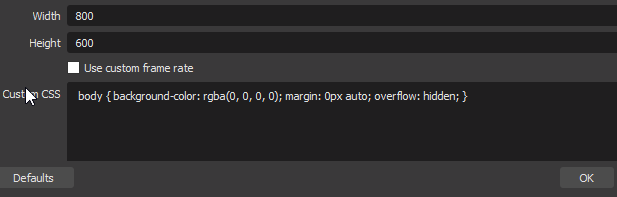
Should we just set to 1920 x 1080 and manually adjust
fiery lava
thats default hight set it manually yep
rugged quail
Hey, if anyone can tell my how to import my layout from slobs to elements i will be Happy 😄
still crane
No question too small tyty
fiery lava
google chrome use these plugins
StreamElements
The Ultimate All in One Platform for Streamers
after import finishes you will see all overlays here
rugged quail
Hmm, there is no plugin to opera maybe?
fiery lava
StreamElements
The Ultimate All in One Platform for Streamers
rugged quail
o, thx
fiery lava
chrome plugin
still crane
When we do all our configurating and importing overlays and adding browsers etc...to profiles...
Do these profiles save to the cloud
Or would they need to be backed up (local file)
For OBS.live I mean
fiery lava
backed up
the scenes/sources do not save to cloud
but the profile can be exported locally
still crane
Do you know which files/folder it is to back up
For example when switching computers, or travel
Oh I see export profile and import profile (file)
fiery lava
obs>profile>export

 keen salmon
hey guys... i have a problem with stream information dock after the last update... it is all black, nothing shows in so i cant use it to quickly change the info about stream :/
 daring geyser
can I stream with Elgate HD60S on stream elements?
steel bladeBOT
@keen salmon If you are not seeing the OBS Twitch integrations and have OBS.Live installed, please follow these steps:
- Make sure you are on the latest and greatest version of OBS.Live
- exit OBS (make sure OBS is not running)
- delete %appdata%\obs-studio\plugin_config\obs-browser\obs_profile_cookies
- start OBS.Live
- Settings -> Stream -> disconnect -> connect
fiery lava
if the elgato hd60s works with obs it will work @daring geyser
keen salmon
@daring geyser you can, but the encoding will be done in OBS, but it is a nice tool to use for streaming stuff from console
daring geyser
I see. @keen salmon thanks!
keen salmon
elgato cards are mostly use in two pc setups, if you have just single pc, it is best to use just obs, less things that can go wrong
plain sonnet
view > docks > stream info
rugged quail
@white crow can you send a screenshot of your dock what tabs are there ?
plain sonnet
settings > stream
disconnect then reconnect
 white crow
Got It, thanks
 unique bay
Top right of my screen is a red dot thats my game capture i remove it and add it back and it still says in that conor i cant move it at all
 rocky echo
rugged quail
rocky echo
rugged quail
@unique bay what is your resolution for your game capture?
unique bay
@rugged quail 1280 X 720
rugged quail
@unique bay try starting a game and select it in the game capture. Is then the dot still showing?
rugged quail
@unique bay but the game is showing in 1280x720?
unique bay
no the game is not showing
rugged quail
@unique bay right click on your game capture source -> properties -> force scaling -> 1280x720
 it worked
rugged quail
it worked
rugged quail
@unique bay perfect 😄
rugged quail
@grizzled flame have you multiple scenes with the same overlay or overlay with an alert widget?
steel bladeBOT
@grizzled flame Make sure to ☑ “Shutdown source when not visible” for all browser sources (all OBS scenes). If using studio mode, uncheck “Swap Preview/Output scenes After Transitioning.” Also keep in mind that sound can play from any overlay loaded in the browser (editor or launched). https://i.imgur.com/FegZJQS.png https://i.imgur.com/yY0wcFl.png
rugged quail
@grizzled flame I'm not familier with obs 24.0.1 you could try, if it works now, let the box checked, if not, uncheck it and retry
 grizzled flame
Ok tyvm 🙂
 blissful marsh
so i need help im trying to stream to Live.me with obs but it keeps reverting to streaming on Youtube how do i fix this
fiery lava
^ if you're using obs.live you may need to click obs>streamelements > switch to obs studio
then stream to live.me
blissful marsh
ive tried that and it still does the same thing
fiery lava
I would also log out of the stream elements | obs>streamelements>logout
 marble kernel
Hey there, my Stream Information-panel's is black now since the last update.
rugged quail
@marble kernel reconnect your twitch account in your obs settings
rugged quail
@marble kernel no problem 🙂
 umbral mural
hello
I'm having an issue with the theme "Force Field"
The video and moving portions are coming across choppy in OBS. I tried using some static portions to see if that would help, but the social icons I left in an my single bar of scrolling text are still coming through choppy.
I checked other scenes I have set up that have moving pieces and they're running perfectly. Nothing on my computer is running poorly either.
Any suggestions?
fiery lava
obs 24.0.1
make sure hardware acceleration is on for browser sources | Obs>settings>advance > scroll down > check on hardware accelerations> restart obs
umbral mural
ok let me check really quick on those
update made it a little better and the accelerations was already enabled for me
fiery lava
if its still giving you issues you may want to roll back to obs 23
umbral mural
rolled backed and it still was choppy.
Turned off the accelerator and restarted and now it's working perfectly
ty for your help 🙂
fiery lava
np
 sinful niche
So I want to stream to mixer using the alerts is there no compatibility at all?
steel bladeBOT
@sinful niche Our goal is to be everywhere our community is so we are regularly in discussions with other platforms. Although we can't comment on our roadmap, your feedback is appreciated.
rugged quail
@sinful niche we dont support mixer yet
sinful niche
Like I use streamlabs obs now but they are terrible when it comes to overlays and I still want to use streamlabs to broadcast I just want mixer alerts is that not possible sorry for my naivness
plain sonnet
if you want to use slobs to stream then you will have issues as they try and block SE overlays as they are competitors
sinful niche
Ok thanks for the help it pisses me off that they charge $20 a month just to use overlays
plain sonnet
yikes
 void quarry
Evening all, I'm having issue with text displaying on my alerts.
I get the alert text if set to below / to the right but not when select "Text over Image"
rugged quail
@void quarry If im not wrong is this a known bug, for now i would suggest using the other options.
void quarry
Ok thanks, thought it should be possible, will use a workaround for now.
rugged quail
@void quarry it will be for sure possible in the future ! 🙂
void quarry
Thanks for the help, appreciated.
daring geyser
there wasn't any drops or lagged frames but my stream suddenly lagged and pixelated do you know what could it be?
rugged quail
@daring geyser wasnt any drops or lags in your game or also not in your obs? is your internet connection stable?
rugged quail
@daring geyser did this happen more often or was it just once?
daring geyser
just once. after I quit apex it seems fixed
rugged quail
@daring geyser could just be a connection spike
daring geyser
if I send you a link to my channel can you check and try to understand what possibly occurred?
rugged quail
@daring geyser i dont have to check it, if it appeared once it was either your or the twitch servers connection issue. probably the twitch servers issue because you have no dropped / skipped frames
daring geyser
I even check the log after the stream there was nothing critical
rugged quail
@daring geyser then it was the twitch servers issues. You cant do anything about it, sometimes it happens
 ebon crypt
hello
fiery lava
👀
ebon crypt
streamelements site doesnt show me songrequest banned people. On your yt video its possible to ban and unban user. plz help ❤
fiery lava
unban takes manual review
fiery lava
you will need to DM me your SE account ID, username of person banned,
ebon crypt
its so stupid but ok
 true crow
Hey! So I'm having an issue where my custom bot name is just my username twice. GC is installed and all the requirements are met, but I'm not getting the option in OBS live, it's as if my custom name is my username and its stuck that way
 lapis sapphire
Hello I'm having an issue trying to upload an image in my overlay editor when I select the image and click upload nothing happens
rugged quail
@true crow have you copy pasted the oauth token of your or of the bots channel in there?
@lapis sapphire is the file format supported ?
lapis sapphire
Jpg
lapis sapphire
I. Sorry its png
rugged quail
@lapis sapphire png is also supported
@lapis sapphire do you get any errors while uploading ?
lapis sapphire
No. I'm able to click the button a hundred times and nothing happens
rugged quail
@lapis sapphire look please in the "All Files" tab of your files. Is your file there?
lapis sapphire
It is not
rugged quail
@lapis sapphire what do you mean with "clicked the button hundread times and nothing happens" which button exacly?
lapis sapphire
The upload button
rugged quail
@lapis sapphire you have to drag the file in when in the upload tab
lapis sapphire
Ended up working in Chrome just wouldn't work in Internet Explorer well Microsoft Edge I should say
That's a little crazy though
rugged quail
@lapis sapphire I don't want to talk badly about microsoft edge, but i would recommend using chrome for your setup, because the overlay system is in obs chromium based. So if it works in chrome it will also work 100% properly in your obs
lapis sapphire
@rugged quail thanks for the heads up
rugged quail
@lapis sapphire no problem 🙂
 high quest
Help! Every time I peak into the microphone I hear my own voice after a slight time delay, its annoying especially during gaming when I have to hear myself in stream and it interferes with in game audio
I can tell its from OBS now that I closed twitch
My headset is a HyperX Cloud ll
my audio setup is that headset with a microphone attached to to
it
 tacit wharf
What can I do if I need token verifications but I requested too many? :C
 dry sphinx
Sounds like your JWT required. Hold on
steel bladeBOT
@tacit wharf You can find your JWT token on your account channels page ("Show Secrets" to reveal the token): https://streamelements.com/dashboard/account/channels
READ ME:
This is a private security token. Do NOT share this token here or other public places, only with a StreamElements staff member in private.
 chilly parcel
Hello...i will import Streamlabs too my obs live but when i click on the buton i get this mess " An error ocurred"
 quaint raven
Any thoughts on why Stream Information would be completely blank in the upper left? https://share.getcloudapp.com/YEuvGA45 I started a stream to see if it would change but it just stayed black.

Shared with CloudApp
steel bladeBOT
@quaint raven If you are not seeing the OBS Twitch integrations and have OBS.Live installed, please follow these steps:
- Make sure you are on the latest and greatest version of OBS.Live
- exit OBS (make sure OBS is not running)
- delete %appdata%\obs-studio\plugin_config\obs-browser\obs_profile_cookies
- start OBS.Live
- Settings -> Stream -> disconnect -> connect
quaint raven
That worked, thanks.
soft raptor
Last night @kindred fox gave the suggestion that I set up a separate alert box for Twitch and youtube since I'm using Restream to stream to both. When adding the widget to the overlay, I don't see any way to say which service each widget belongs to. Unsure if that makes any sense.
kindred fox
You have to be in your YouTube (inside streamelements) overlay and add an alert box there, then switch to your twitch (inside streamelements) overlay and add the alert box there. Once you have both overlays configured, you’ll add both to obs.
soft raptor
OHHH okay!! that makes sense now, thanks! I'm still getting used to how StreamElements handles different services 🙂
kindred fox
Yep yep
soft raptor
also sorry for making you type all of that on mobile
kindred fox
Hehehe
true crow
Sorry, me from earlier had to run to stream, yeah all the authentication is in, and it lets me change it and everything in GC, but doesnt change it in OBSLive. it just lists StreamElements, Change to (my username), change to (my username)
"It" being the current bot tab under Custom Bot Name in OBSLive
true crow
(sorry I know its late) another funny thing, when i set the bot to my username, every message gets sent twice
kindred fox
Are you running obs live and ground control at the same time?
 tacit dock
hi wondering how im able to update my OBS it keeps crashing
 obsidian finch
No clue whats causing this, it looks normal in OBS but once I start recording or streaming the output looks like this. How fix?
 meager obsidian
Can we add a music playlist via url or does it need to be added each song individually?
kindred fox
I believe url works
meager obsidian
Keep getting internal server error each time
 patent path
Does anyone know how to fix the microphone playing back through my desktop speakers while I'm in OBS? It just started doing it today and all my sound settings in Windows are correct.
 dense dust
is there a way to add media share on obs without having to use the browser overlay editor
 dim thorn
Its like this with stats/activity feed
soft raptor
@pooya scroll up to support ai's response to a similar question
rugged quail
@dim thorn have you worked this out yet?
Otherwise, please follow these steps:
- Make sure you are on the latest and greatest version of OBS.Live
- exit OBS (make sure OBS is not running)
- delete %appdata%\obs-studio\plugin_config\obs-browser\obs_profile_cookies
- start OBS.Live
- Settings -> Stream -> disconnect -> connect
true crow
@kindred fox yeah
So @rugged quail I was trying your solution for my issue and I now realize "plugin_config" doesn't seem to exist for me
 frail pendant
When using the widget for alert box, all alerts appear and track correctly. Hosting for whatever reason does not work properly. I do not see it in my events, nor does it pop up. If I run a test on the testing page it does play on the stream... I’m at a loss. I’ve had people host with different amounts.
steel bladeBOT
@frail pendant Due to changes to Twitch API, we have filtered out hosts and will only show these ones on your activity feed:
- All hosts coming from an online channel with at least 1+ viewer
- Auto host events with at least 1 viewer - only from a channel that just went offline
Note: If you see "X channel has hosted you" with no viewers on the back, that is considered an offline host or a host with 0 viewers, we do not show these.
frail pendant
Appreciated!
rugged quail
@frail pendant no problem 🙂
kindred fox
@true crow you don’t really need ground control if you’re running obs.live
true crow
@kindred fox that would explain the input issues, I'll unintstall OC and see if that helps
kindred fox
You don’t need to uninstall it, just don’t launch it
true crow
This is what Im getting so far
rugged quail
@true crow you have to connect your bot account in the custom bot settings
true crow
@rugged quail Aaaahh, that makes since. Thanks!
rugged quail
@true crow no problem 🙂
true crow
*sense oh god
 teal sandal
Ok so I had the "good idea" to raid someone, now the chat is broken, I had to reboot OBS.live to get back my tchat instead of the one being raided, but now my activity feed is gone... help? 
white crow
Hi guys,
Do you know if is possible to give a command for chat to trigger some "alerts" on my stream? For example, when I make a missplay on game, the chat use !salt and i activate my gif of salt over my webcam
rugged quail
@white crow you can do this with store items and then set up a custom command so the users dont have to write !redeem [Items] in the chat but only ![Item]
white crow
Thanks a lot 🙂
dense dust
is there a way to add media share on obs without having to use the browser overlay editor
rugged quail
@dense dust not that i know
dense dust
thats unfortunate
dry sphinx
If you're trying to show the Video on Stream: No other option afaik besides the Media Share Widget for Overlays.
 icy ruin
how can i change my chatbot's name?
steel bladeBOT
@icy ruin Custom bot name requirements
- StreamElements bot modded and in chat
- Active overlay with alerts
- StreamElements tipping page in the panels below the stream (!panels)
- OBS.Live or Ground Control open
- Create a twitch account for the name you want to use or run the bot under your own name
- Custom bot name doesn't work on Mac
rugged quail
@icy ruin do you meet the requirements?
icy ruin
i forgot that panels thing
 molten mountain
I have noticed an issue I am having with OBS.Live. If I have OBS open on my second monitor (60hz) and I am playing on my primary (144hz). My games run at 60FPS, as soon as I minimize OBS.Live I am back up to 144fps. Any ideas why>
rugged quail
@molten mountain have you "lock framerate" enabled in your obs?
molten mountain
Where abouts is that located @rugged quail
rugged quail
@molten mountain let me check
icy ruin
now i did all the things but there is no button for custom bot name anywhere
rugged quail
@molten mountain hmm... obs probably removed it because i cannot find it anymore. If you have vysnc in your games enabled, disable it
@icy ruin obs live or ground control?
molten mountain
Disabled everywhere
So with discord open on my secondary I get 144fps, but when I swap to OBS it drops
icy ruin
carisus ground control
rugged quail
@icy ruin try relaunching the app if all steps done
icy ruin
oh ok
rugged quail
am i able to speak with a tech support about my song request issue?
steel bladeBOT
@rugged quail Welcome to the helpdesk! Please let us know how we can assist you today and a support volunteer or staff member will assist you as soon as they are available. Thank you for your patience.
kindred fox
@rugged quail could you elaborate on your issue a little more? It’s difficult to provide assistance without additional information
rugged quail
i just switch over to streamelements obs, and i cant figure out how to get the songrequest to work
also i cant get my overlays and widgets over from streamlabs obs
@rugged quail have you already watched the streamelements videos ofmedia request? (https://www.youtube.com/watch?v=17eUkoZ6eIs) (https://www.youtube.com/watch?v=ICyqSN3rO18)

StreamElements Media request enables playing songs and videos in your stream. It's an upgrade of StreamElements Song request and Media share features. ----- ...

StreamElements OBS.Live add-on for OBS studio, making stream management easy. Direct download: http://p.strms.net/obslivemryt / Learn more: http://p.strms.ne...
i have not, just woke up and switched lol
@rugged quail these videos are very helpful, streamelements has its own playlist, take a look at it, everything you need will be explained there 🙂 https://www.youtube.com/playlist?list=PLCDDKlFdScbEwdx5AntcQIS1InkFJwHtv

YouTube
Need help? Check out our video guides, covering every feature in StreamElements.
thank you
 south quail
trying to do a stream for my church and for some reason it keeps telling me the stream failed to output and update drivers so I just paid $19.99 to update the drivers now that's complete but still not working so HELP!!!
rugged quail
@south quail you paid money for updating your drivers? are you sure you didnt got scammed?
south quail
no I went through slimware/driver updater
rugged quail
@south quail what error do you get exacly?
steel bladeBOT
@south quail Please provide a log from your last stream. To do this, in OBS go to Help > Log Files > Upload Last Log File and paste the link to the log file here.
rugged quail
hello guys, i have a pb on obs. When I live or rec we hear an echo when my frien speak. Can you help me plz ???
@south quail here are your problems listed -> https://h4ndy.eu/obslog?url=https%3A%2F%2Fobsproject.com%2Flogs%2Fjtof5AatJFkeWBJq -> please work yourself through the list and eliminate every single problem. After that try to stream again
south quail
ok thanks
where would i find the graphic settings? are you saying on the computer or on the obs program?
 clear root
Hello, anyone know how to fix the issue in the picture
dock items stopped showing info and now only show a black screen on all 4
rugged quail
@south quail which problem are you trying to fix?
@clear root streamelements top bar of you obs -> logout -> login
daring geyser
do higher bitrates cause higher cpu or gpu usage?
rugged quail
@daring geyser if you use x264 encoder -> CPU ;;; nvenc encoder -> GPU
clear root
@rugged quail done that. still the same..
steel bladeBOT
@clear root If you are not seeing the OBS Twitch integrations and have OBS.Live installed, please follow these steps:
- Make sure you are on the latest and greatest version of OBS.Live
- exit OBS (make sure OBS is not running)
- delete %appdata%\obs-studio\plugin_config\obs-browser\obs_profile_cookies
- start OBS.Live
- Settings -> Stream -> disconnect -> connect
clear root
@rugged quail Thanks! the @steel blade guide fixed it!
rugged quail
@clear root the support ai just executed my command 😄 I'm happy that it works now
 south quail
so this is the latest problem can someone help?https://obsproject.com/logs/I2MoyVLsGaA6xsBD
rugged quail
@south quail which problem exacly you are facing issues with?
south quail
hello anyone there??????
rugged quail
@south quail yeah me, trying to help you
south quail
I just sent you another link to you
rugged quail
@south quail you want the analyze or help for fixing the problems?
south quail
i need help
 full thunderBOT
Hi @south quail, Please ask your question(s) or describe the problem you're looking to solve so staff or a support volunteer can assist you as soon as they are available.
south quail
rugged quail
@south quail i have reanalyzed them the biggest problem you have is, that your NVENC failed to start
south quail
ok so how do i fix the NVENC issue?
rugged quail
@south quail https://i.imgur.com/PyIS4o1.png

OBS Forums
If you're experiencing strange issues or errors that might be related to your GPU drivers, one of the easiest potential fixes is a clean driver installation. Follow the instructions below.
- Download the latest version of Display Driver...
south quail
ok thanks ill try this
 pallid shoal
Hello, I have the problem that the activity feed is not updating and the alerts are not popping up on my stream.
steel bladeBOT
@pallid shoal Right click on the BrowserSource > Properties > Scroll down a bit > Refresh Cache of current page
pallid shoal
Thanks, I will try that
rugged quail
@pallid shoal for your activity feed -> Top bar of obs -> streamelements -> logout -> login
pallid shoal
Thank you both for the quick answers, but unfortunately non of these steps worked.
rugged quail
@pallid shoal then try this one:
steel bladeBOT
@pallid shoal If you are not seeing the OBS Twitch integrations and have OBS.Live installed, please follow these steps:
- Make sure you are on the latest and greatest version of OBS.Live
- exit OBS (make sure OBS is not running)
- delete %appdata%\obs-studio\plugin_config\obs-browser\obs_profile_cookies
- start OBS.Live
- Settings -> Stream -> disconnect -> connect
pallid shoal
ok, I try, thank you
Inside the OBS profile cookies is a folder.
Do I have to delete the whole folder?
kindred fox
Yeah go ahead
pallid shoal
I tried all the above, but still the alerts (like host etc.) is not popping up. Only if I simulate them they pop up. Also the activity feed is still not updating.
steel bladeBOT
@pallid shoal You can test Alerts via the bell on the lower right corner of the Overlay Editor. Simply go to your Dashboard -> My Overlays -> Pencil/edit button on the overlay. Make sure the "Show Emulated events on stream" option is on to see the alert in OBS/Xsplit https://streamable.com/h6qgy

 fierce atlas
@pallid shoal have you checked the Show Emulated events on stream option as mentioned above?
oh wait  I just read your comment backwards
is host the only alert that isn't showing?
i.e. did you specific test for things besides raids and hosts?
is your Twitch username Deleetia
pallid shoal
I have testet all emulated events and all show up, but on stream they don't appear if they are from another person or random follower. Yes, my Twitch username is Deleetia
fierce atlas
the reason nothing is working is because you did not add StreamElements to your channel
on your StreamElements dashboard you need to join the bot to your channel
and then you need to go to your channel and make it a moderator
the bot is what enables StreamElements to follow activities
pallid shoal
I had the bot on my channel and removed it because I thought that might be the problem.
Three weeks ago everthing was working fine.
fierce atlas
without the bot in your channel none of it will work properly.
pallid shoal
ok
 vagrant palm
how do i change the connected account on my stream elements for obs
pallid shoal
The Bot is moderator, a friend just hosted me for testing, but nothing works 😦
steel bladeBOT
@pallid shoal Due to changes to Twitch API, we have filtered out hosts and will only show these ones on your activity feed:
- All hosts coming from an online channel with at least 1+ viewer
- Auto host events with at least 1 viewer - only from a channel that just went offline
Note: If you see "X channel has hosted you" with no viewers on the back, that is considered an offline host or a host with 0 viewers, we do not show these.
rugged quail
@vagrant palm obs top bar -> streamelements -> logout -> login with youtube/ twitch/ facebook
pallid shoal
Ok, follow is working. I didn't know that hostings from offline channels are not showing up anymore, so sorry to bug you guys for this 
Thank you!
 robust geode
Hello, how do you add the custom bot name in obs live?
steel bladeBOT
@robust geode Custom bot name requirements
- StreamElements bot modded and in chat
- Active overlay with alerts
- StreamElements tipping page in the panels below the stream (!panels)
- OBS.Live or Ground Control open
- Create a twitch account for the name you want to use or run the bot under your own name
- Custom bot name doesn't work on Mac
 snow agate
are we OK to update to the latest OBS yet?
fierce atlas
not yet! you'll know because they'll share a big update in #announcements
🙂
or possibly #270206314561404928
snow agate
OK, thanks
fierce atlas
Soon ™
robust geode
Is the latest version 24.0.1?
I done all the steps @steel blade
Where does the option show up on obs live or is it mandatory to run ground control?
fierce atlas
the latest OBS version is 24.0.1 but OBS.Live doesn't support it yet and there have been some bugs with the overlays as well so it's best just to wait at OBS version 23.X until OBS.Live gets updated to match.
fierce atlas
yeah let me see if I can find the link
packages are available here: https://github.com/obsproject/obs-studio/releases/tag/23.2.1
once that's done OBS.Live should work and you can finish setting up your bot
robust geode
I suppose I should uninstall my current obs first right?
fierce atlas
I don't think you have to? but I'm not 100% on that
robust geode
I'll figure it out thanks 😄 ❤
I need to be logged into the account created for the custom name to work? Cause I had it working, linked the OAuth token then logged back into my own account and it uses my own name now
fierce atlas
if you're using OBS.Live you don't need any of that, that's only for GroundControl
robust geode
I can't seem to find the option at all in OBS.Live though
 odd kraken


 mortal hearth
I was trying to uninstall OBS.live and get the following...any ideas on what to do to finish the removal? Not giving up on the software just need to make several changes to my PC and want a fresh start.
 deep kite
hey guys 🙂 ! My OBS started crashing like at least once a session now, never had any issue for 2 years until now. I asked for some help on the OBS forum and they told me it could be related to the use of OBSlive. It's always happening roughly in the same manner, when I'm switching to a specific scene. But the crash may occur very randomly, it can be fine for 4h and then for no reason it just crashes.
I got the logs if it can help. I'm desperate, as I'm currently pushing for partnership and that it's driving people away BIG time because of those crashes.
Can someone give a hand :/ ?
dry sphinx
What version of OBS.Studio & OBS.Live are you using @deep kite ?
deep kite
both of the latest 19.9.8.457 for obs live, 24.0.1 for obs studio. It was happening to the previous version too (It started crashing before updating them, updates didnt fix it )
I did a 24h marathon this weekend, it crashed 4 times for example. Everytime I got those two lines in common in the logs :
15:51:52.037: User switched to scene '4. Rocksmith Play'
15:51:52.201: MP: av_read_frame failed: Immediate exit requested (-1414092869)
dry sphinx
Googling that last part as maybe someone else may have had that issue. Never seen that before.
So with that same code (-1414092869) most people are saying the stinger is crashing 
Do you have different transitions for certain scenes?
deep kite
I was going to say that I didn't have any stinger but I do have a Fade transition, you know, from OBS
didn't think of that 🤔
dry sphinx
It could be it but not too sure. As 3 forums I found when people attempt to switch scenes.
So something in the transition
deep kite
it's definitely happening on a scene transition for sure, but always on this particular scene, and at random times
will try to remove it for a while and see if it stops the crashes 🙂
dry sphinx
For sure. Hope it's just that 🤞🏻
deep kite
thanks for your help :). Will let you know 🙂
dry sphinx
No problem 
dim thorn
@rugged quail Thanks it worked ❤
 odd maple
so weird question .. i just started stream.. was able to do display capture on monitor 1 then clicked the eye to hide it and when i try to click it again it doesn't do anything.. this has been happening a lot lately ? any suggestions? i have removed and switched scenes and still nothing.
dry sphinx
Can happen. Only temp fix I know of is closing OBS & opening it again.
 stoic summit
So I actually just installed obs.live and when I started it up after the install I got the OBS Studio 24.0.1 update
dry sphinx
Prob best not too as OBS.Live is not up to date with OBS.24 @stoic summit
stoic summit
ok
soft raptor
I just press "skip this version" so that it doesn't warn me every single time 🙂
 tawdry cypress
Hello, anyone can help me please, when i try to login with any account in obs.live, the window goes white like this
steel bladeBOT
@tawdry cypress If you are not seeing the OBS Twitch integrations and have OBS.Live installed, please follow these steps:
- Make sure you are on the latest and greatest version of OBS.Live
- exit OBS (make sure OBS is not running)
- delete %appdata%\obs-studio\plugin_config\obs-browser\obs_profile_cookies
- start OBS.Live
- Settings -> Stream -> disconnect -> connect
tawdry cypress
i just did that and still the same 😦
shy mountain
Is this the custom bot login or normal login?
tawdry cypress
bot? twitch and utube login
shy mountain
Something is blocking the login then, most likely.
Do you have an anti-virus/malware software installed?
tawdry cypress
just window defender
shy mountain
Ok do these steps:
- Right click on your OBS desktop shortcut -> properties - in the "Target" field add this -> --remote-debugging-port=40404
- Open OBS(or restart if it was open)
- Open your browser and type in "localhost:40404"
- Take a screensshot of what is listed in the browser
(Do note - the "target" field has to look like this:"C:\Program Files\obs-studio\bin\64bit\obs64.exe" --remote-debugging-port=40404)
@tawdry cypress
tawdry cypress
alright, here is the ss
shy mountain
Ok, click on that, and then make sure you are looking at the console tab.
Then try the login - it should show something.
shy mountain
Sorry, doing other things as well - click on the login
and see if anything pops up in the console after login.
If you want you can DM me the screenshot.
tawdry cypress
its k, k i will do that
 gentle venture
i keep getting and encoding error when i switch scenes the box says "an error occured while streaming"
steel bladeBOT
@gentle venture Please provide a log from your last stream. To do this, in OBS go to Help > Log Files > Upload Last Log File and paste the link to the log file here.
gentle venture
 spice minnow
Hello. Im trying to get the media share to work for my OBS but when I click on "Take the tour" and enter a youtube URL, it just says "Please enter a valid Youtube URL". No matter what video I try to add there it always says the same...
shy mountain
Just skip the tour
spice minnow
But the tour is suppose to teach me how to activate and make it work. It gives me the widget and everything.
Is there another way to get the mediashare widget?
shy mountain
You still need to manually add the media request widget to your overlay.
you can follow along this video
the MR dock in OBS.Live is essentially this
but a little bit different look
gentle venture
what do i do to resolve my issue
rugged quail
check the link that Keizar sent back to you:
KeiZarToday at 9:22 AM
https://h4ndy.eu/obslog?url=https%3A%2F%2Fobsproject.com%2Flogs%2F1DpvolMLxX_F0f1x
over at info the Encoder start error is explained and there are some solutions for it
gentle venture
yes they were explaind i tried everything that it told me to and it did not change anything
rugged quail
have you updated your graphics driver?
gentle venture
yes it is currently up to date
steel bladeBOT
@gentle venture For the best OBS support, please join their Official Discord @ discord.gg/obsproject
shy mountain
Also did you sent in a ticket? @gentle venture
Because you will get the same response as I'm giving you here.
gentle venture
that is a very rude response i came here for help and this is the responce i get
shy mountain
Ok let me go into more details as to why you will receive the same response:
This issue is more technical and related to OBS Studio then our plugin OBS.Live. its best to ask in the OBS discord for help. As for the same response - if you want to waste time, you can provide me with the log file in the ticket as well, then I will send you the same response with the log analyzed, you will then ask, how exactly to fix it(which by the analyzer it says, you will need to update some drivers), then I will state the obvious solution in the analyzer, you will come back in the ticket saying that didn't help and I will send you again to the OBS discord.
Short version? Contacting us via Discord and our ticket system, can create a lot of confusion, if the person on the ticket system is not paying attention to Discord support as well and if someone else is handling help in the Discord.
 bleak bear
hey team i am having a problem, when i have streamElements obslive open then i open a game it stuff up the game audio have you got an idea on how to fix this? let me know if you need more info
Also when obslive is closed the game sounds are fine
shy mountain
"it stuff up the game audio" - i'm not sure i understand what this mean @bleak bear
bleak bear
when i load up a game when obslive is open the game audio doesnt play sound center of the screen and anything not on screen but will play sounds to the right and left of the camera its very weird cause when obslive is closed and i load a game up the game sounds are normal.
fierce atlas
@bleak bear can you explain what you mean about sounds playing to the center, right, and left of the camera? audio comes through the speakers or headphones, not visually related to the camera so your question is still a bit confusing
bleak bear
yeah sorry i am trying to think of how to explain it through text
fierce atlas
you can also share a screenshot
shy mountain
Ok. Noted. Now if only we had more info to go on
dapper wolf

 steel bladeBOT
@dapper wolf Streamelements on top of OBS -> Logout -> login
dapper wolf
That worked, but my only issue with relogging; is that it resets the layout of my panels every time
Are there any plans to fix this?
bleak bear
i cant screen shot the problem cause its an audio problem is there any way i could voice chat to explain it that way
bleak bear
ok thanks will do
steep sphinx
hi guys, after a recent update my CPU to obslive has gone through the roof. Its near enough doubled its usage. Is there a way to pull it back down?
quasi snow
settings > advanced > disable hardware acceleration
steep sphinx
i've disabled it but it doesnt help that much :/
quasi snow
did you tick shutdown while not visible on all browser sources on all scenes as well?
!add
steel bladeBOT
To add your overlays to OBS, add a new browser source in your scene. Paste your overlay URL in the browser source properties, set the dimensions to 1920x1080 (unless you changed them on the website), and ☑ “Shutdown source when not visible” https://youtu.be/KDvLynUqXI4
steep sphinx
yeah @quasi snow . Having no luck with it 😦
rugged quail
@steep sphinx on which obs version are you on?
shy mountain
and obs studio version
steep sphinx
19.9.8457
rugged quail
@steep sphinx this is probably the obs.live version, look at the top left of you obs window, which version stands there? 24.0.1 or 23.2.1?
steep sphinx
24.0.1
shy mountain
I would strongly recommend downgrading back to 23.2.1 if you want to use OBS.Live
OBS.Live is not updated for 24.0.1
just find 23.2.1 installer
install it and OBS.Live will want an update
but skip the OBS Studio update
steep sphinx
would i need to redo all of my scenes etc?
shy mountain
no
steep sphinx
do i uninstall my current one?
shy mountain
if you want to
but make sure you DON'T choose the option to delete profiele data
i repeat DO NOT CHOOSE THE OPTION!
else all your scenes will be deleted
steep sphinx
right so ive skipped the obs update, do i update the obs live?
shy mountain
yes
steep sphinx
still no luck mate
shy mountain
Now enable hardware accel.
shy mountain
Thats not a real indicator of CPU usage.
steep sphinx
just on my game scene, task manager shows cpu from obs at 46%
shy mountain
whats your CPU?
steep sphinx
intel core i7 7700HQ 2.80GHz
shy mountain
are you on a laptop?