#helpdesk-selive
1 messages · Page 63 of 1
 minor swan
I pressed F11 again, this time it fgrew over the monitor and the white bar with the hidden things appeared again but to see it I had to use mey arrow keys to move it arround x.x
 fiery lava
yeah sounds like a weird obs bug, if you close and open should return to normal title bar
minor swan
the weirdest part was, that pressing F11 the first time after you mentioned it it just "full viewed" it back to the monitor I moved it away fromx x.x
Actually I closed it on tuesday with ALT F4 and opened it today with the title bar being gone :x
and now I also know again what that bar is called laughs thanks
I do not know if this fits in here or somewhere else:
I have a streamdeck and use the OBS controlls with it to turn on/mute my microphones and sound.
It works also for Webcam, but I'd need it to actually "deactivate" the cam in OBS and not just "hide" it
Because when I am streaming stuff like "twitch sings" that tool wants to use the cam too 😄
fiery lava
that's a question better suited for elgato and obs to develop
 umbral sequoia
Hey, is there a problem with the Alert Box's "Videos like" feature? The notification isn't showing up on my screen, I have to look in OBS live to know someone liked my live stream.
fiery lava
Try to refresh that browser source in OBS > right click > properties > refresh cache | then in your activity feed you should be able to replay the alert
 frozen token
Hi, I'm new to the streaming community. I've tried to set up my overlays on obs. I didn't have any problems at first, but now all my URLs are the same on each and every one of my different overlays. Help!!!!
fiery lava
are you saying in OBS they are the same URL
the URLs for each can be reacquired here https://streamelements.com/dashboard/overlays

StreamElements
The Ultimate All in One Platform for Streamers
 rugged quail
you can add those under the sources
choose a audio output and a audio input after clicking on that bottom left +
then choose the device you want to use for it
and they will appear over at the mixer
rugged quail
yes so you have to set it per scene:
you can also do it via settings > audio, add the first desktop audio and first mic audio
rugged quail
no worries, let us know if that worked out for you!
 bold temple
it has
rugged quail
Alright!
rugged quail
Hey all! I got a question! I'm trying to import scenes from the Stream Elements theme gallery to use on my own stream, but I'm not exactly sure how to import them. I have them added to my overlays but that's where I'm lost. I see that I have a link I can copy and paste, but unsure where to paste it.
 steel bladeBOT
@rugged quail To add your overlays to OBS, add a new browser source in your scene. Paste your overlay URL in the browser source properties, set the dimensions to 1920x1080 (unless you changed them on the website), and ☑ “Shutdown source when not visible” https://youtu.be/KDvLynUqXI4
 slate shoal
hello, in obs live's chat there is an option to favorite emotes, i did it once but i forgot how to do it. could anyone please tell me how to favorite and also unfavorite emotes? and is there an option to switch keys for this? i appreciate you.
 odd kraken
slate shoal
odd kraken
slate shoal
@odd kraken thank you, i appreciate you 🙂
 raven basin
anybody have any ideawhy my game isnt being captured but audio is?
steel bladeBOT
@raven basin For the best OBS support, please join their Official Discord @ discord.gg/obsproject
 spice canopy
what is up with the media songrequest again?
 tulip hamlet
I don't know. What's up with it?
steel bladeBOT
@spice canopy Please connect your streaming account (Twitch, YouTube, or Facebook) with Discord by going to ⚙ Settings and then Connections here in Discord. https://streamable.com/eg92w

 junior fulcrum
Would anyone know what causes Frankerz emotes to show up like this? I thought it was supported with the jar
 wraith goblet
"No active widgets were detected for media request"
Trying to get the media request to show on stream, but I kept getting the above message
tulip hamlet
Did you add a media request widget to your overlay? Note that "show on stream" is only used to show the video to your viewers. It's not required if you just want to play the music.
wraith goblet
How do I add a media request widget to my overlay?
tulip hamlet
Edit your overlay and add it using the widgets tab at the top.
wraith goblet
Thank you very much.
I love how quickly I got a response. That is quality support.
11/10 would bang
 cedar helm
when will the new obs update come to obs.live?
wraith goblet
what's the command for somebody to request a song using the request media widget?
tulip hamlet
!songrequest or !sr
 echo karma
Hola, will someone please direct me to the right url to check my log file please? "https://obsproject.com/logs/9UZXQrWAIdqVXXHx"
 neat glen
Hello, I have a goxlr and an elgato for my ps4. Lately, Whenever I stream, there's an echo.
umbral sequoia
@fiery lava , so I've tried that out, it still did not work when a viewer likes my video. I went into the dashboard to look at the widget, nothing seems to be displayed in my Editor. I tried clicking on the notification tester and only the event: Videolike alert, does not work. What should I do?
neat glen
If I turn off monitoring from the elgato and the goxlr, I can't hear the game, but the stream can. If I turn on monitoring for the elgato = echo
steel bladeBOT
@neat glen For the best OBS support, please join their Official Discord @ discord.gg/obsproject
neat glen
Ok, thanks!
 wooden talon
i have the 8th tech coming out to try to figure out why my internet isnt working properly
thanks @tulip hamlet
 clear scarab
Hello I hope this is the right place. I need some help with my alerts. I have added custom alerts and they work fine except the cheer. It still showing the default when I have added custom. I have taken it out and put it back in and still nothing. Pls help
tulip hamlet
Edit the variations.
clear scarab
What do you mean by that
tulip hamlet
Edit cheer alerts, open the variations menu, and edit those.
clear scarab
but why would the rest work just fine except for this one?
tulip hamlet
Because you didn't edit the variations yet.
clear scarab
@tulip hamlet thanks for the help it works now!
 solar galleon
Am I dumb? It seems so random but with updates here and there my Twitch Stats and Stream Info just disappear from OBS live...
steel bladeBOT
@solar galleon If you are not seeing the OBS Twitch integrations and have OBS.Live installed, please follow these steps:
- Make sure you are on the latest and greatest version of OBS.Live
- exit OBS (make sure OBS is not running)
- delete %appdata%\obs-studio\plugin_config\obs-browser\obs_profile_cookies
- start OBS.Live
- Settings -> Stream -> disconnect -> connect
solar galleon
Welp. There we go. Time to try that.
I see some of them, which is the weird thing. Thanks! Going to try now
 buoyant dock
tulip hamlet
buoyant dock
tulip hamlet
Because OBS Project disabled it while working on bug fixes. So you should ask them.
steel bladeBOT
@buoyant dock For the best OBS support, please join their Official Discord @ discord.gg/obsproject
 white lodge
Hey guys, when I go to pubg to stream the screen is black with a red dot in the corner, but I do live 2 other good games, as I fix
 zinc lark
Try restarting OBS and run as Administrator. If that doesn't work (I am assuming you are using Game Capture), then the capture is being blocked because of an Anti-cheat system built into the game. If this happens, use window capture
 robust shadow
Hello! I have come over from the OBS Studio discord for help with their newest update, which added browser source audio control... but it hasn't been working for me. They told me that because I have OBS.Live installed, that may be why I'm not seeing the feature. Has OBS.Live been updated to support the browser source audio controls? If not, will it be?
@ me if you respond, please, cuz I'll be off server for a bit
 wet tinsel
Good day, I hope this is an easy fix. I have spent the past 3 hours setting up all of my alerts and when I test them in OBS (Offline using the replay alert function in my activity feed) ALL of my alerts are clipped off tot he right of the alert box, but they appear centered and perfect in the widget editor. How can I fix this?
 upper moon
can you mute media request on your comp but still have it play in the channel?
zinc lark
@robust shadow We have not updated the plugin yet to support the new release of OBS
steel bladeBOT
@wet tinsel To add your overlays to OBS, add a new browser source in your scene. Paste your overlay URL in the browser source properties, set the dimensions to 1920x1080 (unless you changed them on the website), and ☑ “Shutdown source when not visible” https://youtu.be/KDvLynUqXI4
robust shadow
Is there a timeframe for when it might be? Cuz I’m gonna have to ditch the plugin until it is... this feature is a crucial fix to an issue I’ve been having for a while
zinc lark
@upper moon I have used a program called "Audio Router" to send my music to a different audio channel (like one I am not using), then capture that audio channel in OBS
@robust shadow I personally don't know the timeline, but we work as fast as possible as soon as the new OBS versions release. One thing we might be waiting for is that OBS is working out a few bugs that are causing big issues right now
robust shadow
Thank you for your help ☺️ I’ll keep an eye out!
zinc lark

 atomic prairie
I am really sorry, I've imported some scene collections from streamlabs, but how do I now use them?
Ive looked arround but dont know where to go to find what i've imported.
 shy mountain
@atomic prairie Dashboard -> my overlays
wet tinsel
@steel blade thank you; that's cleared up, but now I have a couple of alerts that will not clear off the screen until i refresh the cache of the page; I have the settings that were recommended in my previous post.
shy mountain
Have you set the alert duration to be long?
I believe 30 seconds was the max duration
wet tinsel
one is set at 30 secs the other is set for 12 secs
shy mountain
When waiting for an alert to go away - 30 seconds feels like minutes
 frigid rivet
i was wondering if there is a way to auto stop your stream after X min when you get to the ending stream scene
shy mountain
OBS Forums
I run a 12 hour radio stream daily, and would like for OBS to automatically end the stream at 11 hours and 55 minutes. YouTube does not archive the broadcast if the stream goes over 12 hours, hence why I would like this automated feature just in case I'm not at home to end it...
@wet tinsel Is that the full song as a sub alert?
ooh nvm
it just went away
wet tinsel
no
it's the raid alert
the long alert works fine, but the 30 second one stay s on screen and won't be dismissed
the two that are staying are the host and raid alerts
shy mountain
What concerns me in your overlay
is that you have so many alert widgets
even the ones placed in the same spot
I understand the cheer one being on the left, but theres no real point in having every other alert type on its own alert widget
when they are placed in the same spot
wet tinsel
I followed a tutorial vid to get them set up and that's how the dude had them separated; so if I'm understanding you, they can all be on one layer? even if they use different vid and sound fiels?
files*
shy mountain
I'm testing on my overlay to see whats going on
ugh ok, its not something on your side @wet tinsel
Its something on our side
shy mountain
no im not
So a workaround for you is:
- after a raid/host - use the "Skip alert" button to clear the image
- merge the alerts into 1 alert widget, that way if there is an alert right after the host/raid alert, it will clear the stuck image
wet tinsel
okay, I'll work on merging them all in the morning; thank you for your time and help
shy mountain
@wet tinsel Ok I tested a bit more with my own assets
it seems the dancing boba fet is so dapper, the alert gets stuck after the video ends
frigid rivet
i checked out what you showed me, that would be great if i wasn't at my pc and i was streaming reruns or something, but if i am streaming and i hit the button on my streamdeck for the end of the stream and i would like to have it end after 2 min, is there a way to set it up??
frigid rivet
so it would be in multi action , 1 would be end stream scene 2 stream deck delay 3 end stream
shy mountain
yes
shy mountain
@wet tinsel I figured out the issue on your raid and host alert. Its partially out fault, but also something you can fix for your self.
Make sure you have at least 1 second set in the animation tabs for the host and raid animations
Else the alert widget doesn't have enough time to clear the image at 0 seconds.
 austere ibex
I am setting up custom commands but rather than my links being separated on the response they are just listed as one long text how do I separate each to be on separate lines?
shy mountain
Twitch Chat doesn't support separate new lines
So suggestion for separation - | this line or / or \
as examples
 blazing helm
Hi, does anyone know how to fix a problem with media sources not playing automatically? I have a short animation that I want to play when a scene is switched to, but it doesn't play. If I set it to loop, that works, but it won't play by itself.
shy mountain
What do you mean play automatically? After the transition, the video is not on the overlay/stream and you have to click on "Show on stream"?
blazing helm
So when I switch to a scene, most media sources begin playing automatically, play once and then stop until I switch scene and it activates again
blazing helm
Ah sorry
shy mountain
i think there is a "loop" option in the media source
blazing helm
Yes and that makes the source play, but i dont want it to actually loop
shy mountain
blazing helm
It won't play at all unless I select loop
shy mountain
do you have the "close file when inactive"?
because when you switch scenes it can become active and play
shy mountain
as like the 2nd option that states "restar playback when source becomes active"
blazing helm
Yea I have that ticked, that works for everything else
steel bladeBOT
@blazing helm For the best OBS support, please join their Official Discord @ discord.gg/obsproject
blazing helm
Ahh ok, no worries thanks for your help
 nimble raven
Hi, need some help, When i press play on media request, then show the video on screen. for some reason i keep hearing double...
i'm hearing the music play over itself.. like having a double bass tone. or singing double. but if i click "do not show on stream" the double tone is gone.
fiery lava
@nimble raven make sure on your other scenes you have them disabled when not visible | more than likely you have media request on multiple overlays
nimble raven
ah thats it. i cant find the disable when not visible. do you mean the whole overlay?
fiery lava
right click on your browser sources > properties > disable when not visible
nimble raven
Thanks. because the media request is set in the overlay, i have to turn off the whole overlay itself. i switch between 2 overlays often. and kinda have to wait a milisec for the overlay to load..
thanks anyway. i'll just remove the widget from the overlay
fiery lava
@umbral sequoia I just checked with the Dev team and currently all alerts in the alert box are only configured for PAGE LIKES not Video Likes
@nimble raven you can also set media request up as it's own overlay and in OBS a scene called MR then in each of your two scenes add a source>Scene>MR
nimble raven
ohhhh......
umbral sequoia
I see. Thank you for letting me know. The default kinda works, but the when I make some changes to it, it breaks.
 steep sphinx
hi guys. my docks for stream stats, stream info, view count etc have stopped working after the latest update, is there a fix?
 daring ember
Hello. I ve had problems lately with activity feed, i am wondering if anyone could follow me to test if its working. Feel free to unfillow when you have followed. Thanks
steel bladeBOT
@steep sphinx If you are not seeing the OBS Twitch integrations and have OBS.Live installed, please follow these steps:
- Make sure you are on the latest and greatest version of OBS.Live
- exit OBS (make sure OBS is not running)
- delete %appdata%\obs-studio\plugin_config\obs-browser\obs_profile_cookies
- start OBS.Live
- Settings -> Stream -> disconnect -> connect
daring ember
@fiery lava thanks i htink that worked but my chat alerts dont seem to be working
fiery lava
if this is turned on try to PART the bot and JOIN the bot
daring ember
still no dice
for some reason your follow @fiery lava worked
but anything after that didnt
fiery lava
yea and parting the bot and joining other commands/modules work
I'm wondering if twitch is being stingy with api notifications
@daring ember I see the twitch follower count went up when I refreshed
fiery lava
on you twitch page I see the follows are increasing so twitch does see them
fiery lava
checked out bugs board seems to be an off and on issue we are looking into @daring ember
daring ember
the two accont you followed me on after does not appear
ok thanks ill used StreamLabs stream labels for now then
 midnight bloom
Hi guys. Do I have to manually update OBS studio to 24.0.0? Cause my OBS live still shows as 23.2.1 even though there was an auto update the other day?
rugged quail
@midnight bloom I have checked myself my OBS.Live version. As i clicked on search for updates there were no updates shown. Maybe OBS.Live doesnt support 24.0.0 as for now, because the new OBS version got released only few days ago. You could try updating your OBS manually and see if OBS.Live is still compatible. But as StreamElements has an updater included in OBS.Live I would guess its not compatible yet.
midnight bloom
@rugged quail Thank you. I thought that could be the reason. I guess I’ll wait since everything is working as it should right now and I don’t want to break anything 🙂
rugged quail
To elaborate what @rugged quail is saying, @midnight bloom at the moment we dont have a update for 24 ye6t, which could indeed cause some bugs, there are some fixes for them, but its easier to wait until we come out with the next update! 😄
 paper stirrup
hey guys! i am having an issue with my OBS browser sourse (my overlays) lagging in obs. my cpu usage is only like 30 percent or so as per HWMonitor
fiery lava
^ OBS>Settings>Advance> scroll down | disable hard acceleration for browser sources
paper stirrup
thank you so much! ive never had that problem before LOL
 rustic blade

 gleaming quiver
@shy mountain any news on the sound effects that are sub only being redeemable by non subs? Cause there is apparently another sound that is sub only that can be redeemed.
Nvm ist all sub only sound effects can be redeemed by non subs
steel bladeBOT
@rustic blade Make sure to ☑ “Shutdown source when not visible” for all browser sources (all OBS scenes). If using studio mode, uncheck “Swap Preview/Output scenes After Transitioning.” Also keep in mind that sound can play from any overlay loaded in the browser (editor or launched). https://i.imgur.com/FegZJQS.png https://i.imgur.com/yY0wcFl.png


 dry sphinx
Also if you have OBS.Live open & Media request web browser open close the web browser.
 real oyster
Is obs studio v24 supported with obs.live?
fiery lava
Not yet, working on it working fully
 wraith lodge
subscriber alert wont show custom image. custom audio works. i have tried everything even clearing chache if that for some dumb reason would work
 azure heart
Hello people!
I have a question and I don't know if it goes here.
I explain the point and if it goes somewhere plz tell me.
The point is I'm a Mac user.
I use OBS studio to stream from my Xbox because I have no way to run obs.live on Mac Os.
I use the overlays from the Stream Elements platform and playing with some of it's functionalities as I discover them.
I'm pretty interested on use Media Request to sow some Youtube video sometimes during my talk streams but when I set up everything, create some overlay with the video and add it to the scene on OBS from a navigator source and it works great with the video but with no sound and I could not find anything about this...
Anyone have some idea about where I can start looking for a solution (if it exists)
Thanks in advance for your help
wraith goblet
Stream Information dock isn't displaying anything.
 compact dock
Any bug reports of OBS Live not sending voice to stream? Microphone shows that it's detecting and receiving sound from my headset but not sending the sound to stream?
umbral sequoia
How do I fix this chat window problem? Popping it out and docking it both have the same issue
 brazen imp
hey guys,
is it possible that the import for the scenecollection of streamlabs obs isnt working?
i tried it a couple time, but it never went through.
 steel mural
There are two main reasons for the importer failing:
You're using assets owned by SL (sounds / animations from them) or your own assets are bigger than 10MB.
Also, the importer doesn't import your SLOBS scenes to OBS Studio / OBS.Live, it imports your assets to our service so recreating your alerts etc. is a bit easier. But I'm also in the OBS team so I can tell your that an importer for scenes and sources is in the works. 😄
And don't forget that there's also the #🇩🇪︱deutsch channel in case you prefer German support 
 nova scaffold
@brazen imp Nabend Nils
brazen imp
nah nvm than. rebuild it by myself again. thank you
nova scaffold
willkommen bei uns aufm Server und ja, wir helfen dir alles zu übertragen @brazen imp
brazen imp
alles gut. bin schon fertig 😄
nova scaffold
Ich hab da noch was interessantes für dich, aber DM sind zu, darf man dir schreiben? @brazen imp
brazen imp
friendrequest und feuer
nova scaffold
Schon unterwegs
 proper rivet
hey anyone know what you have to do to get the fonts you choose in the streamelements editor to show up as the same font in OBS?
I've been at this for hours its driving me crazy
steel bladeBOT
@proper rivet Google Fonts
More than 900 google fonts are supported at this time. You can preview them here: https://fonts.google.com/
Custom Fonts
Steps:
- Install the font on the streaming PC or choose a pre-installed windows font.
- In the overlay widget settings, select Text Settings
- Enable Custom Font
- Type the name of the font as it appears in the windows font directory (This is usually
C:\Windows\Fonts)
Note: After installing fonts, the browser and OBS must be restarted for the font to appear.
steel mural
Because a human triggered it
proper rivet
well thanks to them
 rose vault
Not sure if this is the right channel but I cant get sound effects to trigger from the loyality store. In chat it says its been redeemed but no sound plays. I tested the sound file in the preview in the loyalty store and it works. Not sure whats going on
shy mountain
Have you added the redemption widget to an overlay?
rose vault
didnt realize I had to
 thin quartz
Can someone help me
shy mountain
What is the issue you are facing? @thin quartz
thin quartz
My single screen won’t show only studio mode
shy mountain
Right click anywhere on the grey area -> enable preview
thin quartz
Tysm
 frosty shell
hey good morning 🙂 I have a question about OBS Live and Media Request
shy mountain
what is the question?
frosty shell
everytime i start media request on stream, i hear it twice...
and i have no idea why 😦
steel bladeBOT
@frosty shell Make sure to ☑ “Shutdown source when not visible” for all browser sources (all OBS scenes). If using studio mode, uncheck “Swap Preview/Output scenes After Transitioning.” Also keep in mind that sound can play from any overlay loaded in the browser (editor or launched). https://i.imgur.com/FegZJQS.png https://i.imgur.com/yY0wcFl.png
frosty shell
and the viewer do hear it wtice as well
ohhhhh^^^so it was active in anothe scene^^ ... ha... thx 😉 happy weekend everyone
hmmm not working 😦
shy mountain
Is this only when you use "show on stream" or?
frosty shell
yes
shy mountain
then i'm 99% sure you've missed an overlay/scene
frosty shell
i have a boc ticket "reroute audio to OBS" could that be a problem as well?... not sure what it is for^^
shy mountain
OBS 24.0.0?
frosty shell
23.2.1
shy mountain
i'm not sure what that option is then
rose vault
@shy mountain thanks for that, works like a champ
 gentle parcel
Anyone available to fix an issue?
frosty shell
ok... i have removed all scenes now, only one is left where media request is in
still
double
shy mountain
Then either you've started OBS twice, or have the dashboard media request open as well.
but that should not produce double sound
or you have the widget added twice
@gentle parcel What is the issue?
gentle parcel
My game capture source isn't showing at all when I add it to my scene.
shy mountain
what game are you trying to capture?
gentle parcel
Apex Legends
shy mountain
run OBS as admin
gentle parcel
Not working. I've added a source of Game Capture, then set to capture a specific window, then set to capture my PS4 Remote Play window.
shy mountain
apex legends, from a console, via remote play, on your PC?
frosty shell
thx @shy mountain
shy mountain
👍
gentle parcel
Correct
 gentle parcel
Because I don't have a capture card. Window Capture doesn't even show the Remote Play window as an option.
shy mountain
I've used Remote play
and had window capture work perfectly on it
but opted in using Display capture
as it captured the PS4 overlay when i had it open(not that it mattered)
gentle parcel
Now it shows, swear on my life I've been trying for 20 minutes and it wouldn't show as an option.
 gentle parcel
It's working, thanks
shy mountain
What is the issue you are facing?
thin quartz
My Widgets are getting cropped when I load them in and they’re not cropped at all
steel bladeBOT
@thin quartz The default resolution for StreamElements overlays (theme and custom) is 1920x1080. Please add them in OBS at their full resolution and use CTRL+F to fit to screen if necessary. You can then downscale your stream in OBS settings > Video if you'd like https://i.imgur.com/6bWXxjR.png
 thin quartz
Ohhhh
 vivid cloak
hi there. Could anyone explain me why my OBS instance ist streaming just a quater of the image? There is only 1/4 of the complete image in the stream. the rest is just green but in the preview i have the full screen showing :/
vivid cloak
shy mountain
You are most likely not scaling the source you want to show properly
vivid cloak
wait a minute. im making a screenie from obs 😉
settings are FHD in / out
note: this is a relay instance
 shadow basin
Apologies if this has been said already but I can't see anything in the obvious places. Is OBS.Live compatible with the new OBS updates (24.0 and 24.0.1)?
shy mountain
Just to point out something, but it shouldn't affect the output - OBS.Live is not updated for 24.0.0 OBS Studio @vivid cloak
And I don't know why that is like that
shadow basin
ah thanks for confirming my question 🙂
vivid cloak
Is there a possibility to revoke the update?
vivid cloak
Wow thx. Works fine again 😄
 slow charm
when i try to actualize the obs live, the app cant download, now i cant stream anymore 😦 what i do?
shy mountain
- Something is blocking the download
- OBS.Live is not updated for OBS Studio 24.0.X
slow charm
obs studio is already at 24.0 , but obs live cant update ;-;
shy mountain
You have 2 options:
- Download OBS.Live from here: https://obs.live
- Downgrade OBS Studio back to 23.2.1 as OBS.Live is not updated to work with OBS Studio 24.0.1
 molten glen
anybody know how to fix the twitch stats box, just updated to 24.0.1
rugged quail
@molten glen at the moment OBS.Live isnt compatible with 24.0.1 , this could cause issues like yours
molten glen
ah, is there any way to downgrade
rugged quail
@molten glen you could uninstall your obs and redownload OBS.Live on their website, their installer will install the latest compatible version (23.2.1)
 plain sonnet
Need an older version of OBS? Go to https://github.com/obsproject/obs-studio/releases for OBS Studio versions back to 0.2.4
molten glen
ty
 glacial void
Is there an issue with connecting to the server today with SteamElements OBS? I'm getting the error that either my stream key is messed up (which I checked/re-entered/reset and then re-entered) or an issue connecting to the server.
rugged quail
@glacial void you can easily check the status of Twitch at this website: https://twitchstatus.com/ ; maybe is the server down you are trying to connect with
glacial void
hmmm, looks likee everything is working fine with servers, they are all online
rugged quail
@glacial void have you already tried connecting twitch with obs? OBS selects automaticlly the best server and also pasting the needed key in
glacial void
Yeah, I haven't changed anything since my stream yesterday, but went to go live and it's not starting. So I reapplied my stream key/reconnected my twitch account and still no luck. I'm going to try a comp restart quick and see what comes of that.
Still not working
Hmmm
rugged quail
@glacial void what error do you get?
 empty scroll
same here it just says starting the out put failed
rugged quail
@empty scroll @glacial void do you use the nvidia encoder?
empty scroll
yeah i just updated my drivers and it works
glacial void
will try
glacial void
@rugged quail Just checked my drivers and says all up to date. Not really sure where to check if I am using NVIDIA encoder. Still not connecting for me.
rugged quail
@glacial void in your Settings in OBS you have a Tab called output, there you should find your encoder
glacial void
Says Hardware (NVENC) I'm using a GeForce 2080 Ti so I assume it's probably nvidia
rugged quail
@glacial void just let me check something
glacial void
kk
rugged quail
@glacial void on which OBS version you are on?
glacial void
OBS 24.0.1 (64-bit, windows)
rugged quail
@glacial void probably without the OBS.Live plugin?
glacial void
says in the bottom right corner - OBS.Live version 19.9.8.457 powered by StreamElements
rugged quail
@glacial void I would suggest you downgrading to OBS 23.3.1 because the current OBS.Live Plugin doesnt support OBS 24.0.1, if you want to use OBS.Live without any issues you should downgrade or just use instead the normal OBS
glacial void
kk lemme give that a shot
 fickle flame
I cannot seem to adjust the text size for the chat. Looks like it's using FrankerFaceZ and when I go to Chat > Appearance > Font size it changes the line size but not the actual text.
 placid iron
Guys I just updated the OBS.Live, and from yesterday and today randomly shows this error and stop streaming, I was streaming the new COD btw, if it helps ins something
rugged quail
@placid iron which OBS Version do you have?
placid iron
19.9.8.457
fiery lava
@fickle flame trying to replicate can you tell me if you talking about chat widget in overlay?
placid iron
I just updated my graphic driver (because obs asked to) and was streaming COD: MW
rugged quail
@placid iron have you restarted your pc after updating your driver?
placid iron
Hm, I think I didn't, I always put it to sleep
Gonna do this right now to see if fix it :D
fickle flame
@fiery lava The dock.
fiery lava
can you control panel and tell me which version of obs.live @fickle flame
fiery lava
are you hitting enter after you enter the number
fickle flame
Yes.
fiery lava
fickle flame
Before
fiery lava
try control panel uninstall obs.live then reinstall | the font size increaed for me
fickle flame
I'll give it a shot
fiery lava
ok
fickle flame
After just for reference.
fiery lava
yeah i see
molten glen
how do you get those settings for the chat box?
 echo tapir
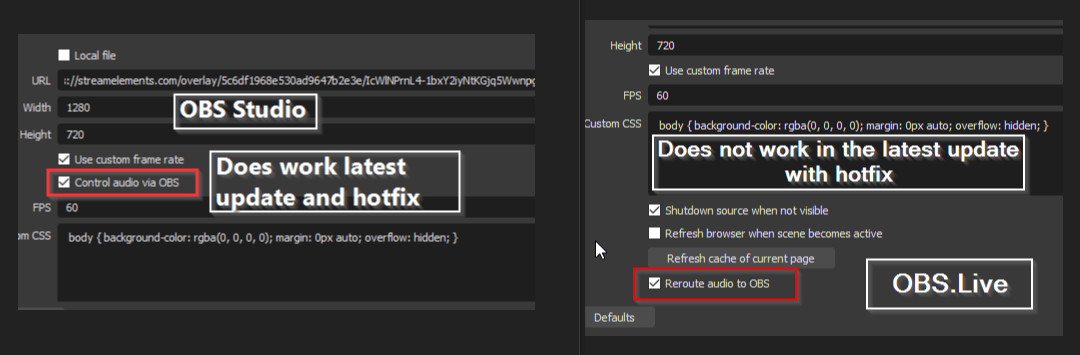
any one with a solution to this, can't use the new audio reroute feature https://i.imgur.com/NMZWd8u.png
 fickle flame
@molten glen Gear > Switch to Non-Mod view > FrankerFaceZ Control Panel
molten glen
ty
fiery lava
I have rolled back until an official obs.live plugin is pushed for obs 24.0.1
echo tapir
true was just wondering as i got the 24 and hotfix in one and then OBS.Live asked to update, so i thought it was tested for latest hotfix
rugged quail
Why is that whenever I update OBS Live, the stream information dock stops working
at all

@rugged quail have you tried disabling and enabling it again?
How do you disable it?
echo tapir
well i don't have any streams planned so it might get fixed before my next stream, you guys are always so fast to push updates anyway. It wasn't a complain, just me wondering as my user experience was OBS 24 and hotfix update and then OBS.Live wants to update so i assumed that it was all ready to go
rugged quail
@rugged quail Top Left of OBS -> View -> Dock -> Stream information -> clicking on it -> disabling -> clicking on it again -> enabled again
Yes
I did that
echo tapir
relog in setting. it's not a SE issue, it's an OBS Twitch issue
rugged quail
Ah disconnect account?
fiery lava
also try to use just stream key instead of logging in
I never get that window because I only use stream key
echo tapir
i use that window so i need to login, i guess it's kinda the samme reason
fiery lava
if you dont need it
echo tapir
prob should do a bug report to OBS
because it is every version update that this happens
 signal vale
@sullen narwhal I'm not the only one with the same issue too, after I updated OBS. But yeah I had to disconnect twitch and use my stream key again and it worked
 wicked grail
Can anyone help with a stream key error?
 marsh ore
Hello, I'm having an issue with the obs live installer/uninstall
marsh ore
Well I downloaded the exe from the obs.live new! link on streamelements.. upon launching it , it froze my explorer.exe. ie. c drive folders i couldnt click on anything
so i restarted explorer via task manager and launched it as admin , it worked
now I wanted to do a fresh reinstall so I tried uninstalling it, it refuses
even as admin it just says its aborted
wicked grail
When I try to start streaming I get the "Could not access the specified channel or stream key error. I went to settings and selected "settings", then "stream", and then chose twitch, but I can not enter the stream key anywhere?
rugged quail
@marsh ore have you any antivirus software or anything else that could block the installtion?
@wicked grail did you tried connection to your twitch account through obs?
marsh ore
@rugged quail yes I do in fact the installer was marked as a trojan when I first downloaded it about 4 days back. But re downloaded it and scanned it again and it was clean
rugged quail
@marsh ore you could try disabling your antivirus and activate it again if the installtion was successful
rugged quail
@marsh ore false flag, probably because this program modifies data from your pc, antiviruses are pretty unpredictable
marsh ore
I just closed down my anti virus and tried I'm getting the same sequence as the pics above
@rugged quail at the moment the only remnant of streamelements is in the add remove program list that refuses to go lol
wicked grail
Yes, I did that when I first logged in. All my overlays and everything are in there and I can see my stream, but when I try and start streaming, I get the error message.
plain sonnet
try restarting your pc, then try removing obs.live plugin again
rugged quail
@marsh ore have you run the installer as admin?
marsh ore
I did try a restart
marsh ore
@rugged quail I initially installed it as admin yes, it wouldn't work through regularly opening the .exe . I also tried manually running the uninstall from the folder as admin it went the same way as the above
rugged quail
@marsh ore have you complete removed the uninstalled files? often some of them are left in the installtion directory
marsh ore
@rugged quail after a few attempts through add/add remove I manually deleted them. even the .dll stuff in x32 x64 folders. Everything in my temp folder as well
From what I understand it's trying to redownload and install obs when I run the uninstaller
Or thats what i says
rugged quail
@marsh ore stupid question but are you the only one using this pc? maybe your Windows Account dont have the permissions to install programs?
marsh ore
yup this is my personal computer, I have admin access which i used earlier to install it in the first place
wicked grail
Yes @plain sonnet
rugged quail
@marsh ore have you any other instances of obs which could lead to this issue?
marsh ore
@rugged quail launching the installer was a buggy mess btw, it froze up my screen and wouldn't launch. Then I went through admin to do it
I've removed obs studio as well just to make sure there isn't anything lingering from .live
only other obs i have is slobs and its been closed during all this
rugged quail
@marsh ore did you choose different installtion folders for obs live and slobs?
plain sonnet
@wicked grail disconnect your account, then close and reopen obs, then log back in. try a different server, if it works try going back to auto server
wicked grail
Ok I will try that, ty @plain sonnet
marsh ore
@rugged quail I just checked slobs is in program files, this was in program filesx86. I just auto pilot clicked next next , the elements uninstaller was in the obs folder
 potent smelt
Good afternoon! I have a problem. I put (all on the guide)Theme, but sometimes they fall off. For example, yesterday the Theme on the obs worked great, today there is simply no image on the stream. Tell me how to solve it.
rugged quail
@marsh ore that could be the issue, just create a new folder where you install obs live
@potent smelt did you checked the url for the overlay?
marsh ore
@rugged quail Will try that thanks
potent smelt
@rugged quail i have many overlay. okay https://streamelements.com/overlay/5d865ae792577e746d680477/fevbu5hDOezReel8RVESzMD0VmsCflS8gskQ9Jpo65LalRHd
StreamElements
The Ultimate All in One Platform for Streamers
rugged quail
@marsh ore you can tell me if its works or not, when not we will look further into that
marsh ore
@rugged quail should I disable anti virus or just run it as admin like bfore
rugged quail
@potent smelt is the source activated on obs?
marsh ore
Okay will let u know in a few minutes
rugged quail
@marsh ore i would to be safe disabled antivirus, run as admin and see if it works
potent smelt
@rugged quail yep
rugged quail
@potent smelt did you tried refreshing the overlay in your obs live?
potent smelt
@rugged quail today i create new scenes in obs with new game with new overlay
and now all my old overlays in not work in obs and stream
rugged quail
@potent smelt you didnt changed the resolution in obs, right?
@potent smelt your hight and width is in obs live 1920x1080 or 1280x720 for the overlay?
wicked grail
Ok, I reset everything and restarted everything including my xbox and it seems to be working now!! Thanks so much for the help! @plain sonnet
plain sonnet
np 👍
potent smelt
@rugged quail i find. I need to update cache in obs settings in browser source.
rugged quail
@potent smelt thats great, this would be my next guess 😄
potent smelt
@rugged quail everytime. otherwise the overlay is not displayed
rugged quail
@potent smelt are you on obs 24.0.1?
potent smelt
streamlabs obs v 0.17.1
marsh ore
@rugged quail So I restarted and re installed it, with anti virus off and uninstalling gives me the same aborted msg as above
I have obs-studio, obs live and slobs in different folders
rugged quail
@marsh ore thats bad, let me think about it, what could cause this issue
marsh ore
But the installation went smooth, not buggy as before
rugged quail
@marsh ore same screen as before? (the pictures you posted)
marsh ore
Yes exactly the same @rugged quail
rugged quail
@marsh ore thats weird because its telling thats its uninstalling and not even installing if i read that right
@marsh ore did you run the uninstaller in your programs list or the one in the folder?
steel bladeBOT
@potent smelt We're not able to troubleshoot issues with using our overlays in StreamLabs OBS (SLOBS) as we don't have the tools to support their software. We recommend using OBS Studio or OBS Studio with our plugin OBS.Live.
marsh ore
@rugged quail i tried both, the one in the folder as admin
potent smelt
@steel blade
I’ll go crazy. If I transfer everything to another program)
rugged quail
@marsh ore stupid question but you have enough space on your hard drive to install that program, even if its that small?
marsh ore
@rugged quail it says installation aborted at the top, and in the middle during the cancel confirmation it says do you want to stop download?
I have about 180 gb free ssd
rugged quail
@marsh ore im sorry to say that, but you have an issue which i havent faced yet so i could only guess
marsh ore
It also executes stuff that goes into temp, during the uninstallation
@rugged quail no problem , thanks for looking at it
rugged quail
@marsh ore are you on windows 10 or 7?
marsh ore
10
@rugged quail also, about 20% into the uninstall it says connecting.. below the bar with a cancel option. Not sure what that is
rugged quail
@marsh ore i can only guess, maybe clearing your temp folder of this ssd? (right click on properties on your ssd -> cleaning)
marsh ore
@rugged quail see it says downloading obs studio and when I click cancel it only asks if I want to stop downloading obs. If i let it go, it goes to aborted install like above
rose vault
Ok I added an event list from a package I purchased on NerdorDie, how can I make the event list fade away after 30 seconds of no activity?
rugged quail
@rose vault in obs there is a setting called, unload if not needed or something like that, maybe this solve your problem
rose vault
I did that, but that only unloads if I change scene or make it not visible
rugged quail
@rose vault have you checked the settings in streamelements overlay if there are any helpful?
fiery lava
@rose vault custom widgets provided by third parties (NerdorDie) require custom coding check in #code-gurus or ask NerdorDie how to customize
rose vault
@fiery lava thank you
 white crow
Hi guys, i cant start streaming using "NVENC", and obs said to i look at log... I did and I found this error: Driver does not support the required nvenc API version. Required: 9.0 Found: 8.1
But this started today after I uptaded obs, someone can help me plese? My drivers are ok
rugged quail
@white crow have you the latest geforce experince driver?
white crow
Yes
rugged quail
@white crow have you checked in your geforce experince that you have your latest grafic driver?
 daring eagle
Can I add my chat to my scenes
rugged quail
@daring eagle you can add your chat to your overlay
daring eagle
I dont follow?
rugged quail
@daring eagle you cant add only the chat as browser source, you need to add the chat extension to your overlay of streamelements and configure it there
daring eagle
oh ok thx for your help
rugged quail
@daring eagle extensions are the wrong word, widget is the better one
daring eagle
k thx
rugged quail
@daring eagle no problem 🙂
rose vault
is there a shortcut key or a way I can add a custom command in stream deck to reload overlays?
rugged quail
@rose vault i am not familer with stream deck but i think not, its just a button in obs and not a program / music / etc. but you could try, could you maybe sent an image shown how to configure keys in stream deck?
rose vault
I can add a website, if I only knew the link for when the reload button was pressed.
rose vault
Doesn't look like its possible then.
Ok I know I'm asking a lot of questions in here, (thanks for taking the time to respond) but is there anyway to add a countdown timer in the overlay editor "easily"?
fiery lava
 leaden fog
^^
fiery lava
@rugged quail you almost beat me
rugged quail
@fiery lava maybe next time 😄
@fiery lava but sending screenshots instead of text is a good choice, i will notice that for the future 😄
leaden fog
our boy Carisus has been doing some mad support today  👍
👍
rugged quail
@leaden fog thank you <3, you too, both of us were beaten for support 😄
leaden fog
as I know what I'm like I'm going to carry this conversation over #general-chat 
rugged quail
Hello, can anyone help me out please, does StreamElements have Alerts ? And does the chat bot have custom commands?
@rugged quail yes and yes, go to your dashboard and then to overlays, if you created an overlay you can add widgets as alert box and custimize them in there, if you go down on the left side you see BOT, in the tab chat commands you can add custom commands
 lunar valve
who do i talk to for help here.?
rugged quail
@lunar valve anyone that wants to help 😄
Thank you @rugged quail just looking to switch from SLOBS try something new that’s all
 brittle flare
I need help
 full thunderBOT
Hi @brittle flare, Please ask your question(s) or describe the problem you're looking to solve so staff or a support volunteer can assist you as soon as they are available.
lunar valve
oh. lol.
rugged quail
@rugged quail if you pc isnt the best streamelements is your choice
@rugged quail also stream elements offers nice things which are only avalible there
I have a decent PC just SLOBS uses alot of CPU so hard to game and stream on same PC @rugged quail
lunar valve
idk how to explain it.
i hooked my mobile device up last night to OBS and i could see the game... cool.
this morning i hook my Playstation back up and the screen size of my phone is on all of my sources now... and its stuck on "one moment please."
brittle flare
My twitch channel called bergburrachaofficial and recently I changed to CaraAvulso. But when I go to see the top chatters, it doesn't appear to me anymore
@full thunder
My twitch channel called bergburrachaofficial and recently I changed to CaraAvulso. But when I go to see the top chatters, it doesn't appear to me anymore
white crow
@rugged quail I reinstalled and worked
Thanks 🙂
rugged quail
@rugged quail thats why you should choose streamelements, it doesnt affect your cpu/gpu in any way
Does it support Mixer?
@rugged quail as for now only youtube/twitch/facebook
steel bladeBOT
@rugged quail Our goal is to be everywhere our community is so we are regularly in discussions with other platforms. Although we can't comment on our roadmap, your feedback is appreciated.
brittle flare
Somebody to help me?
rugged quail
@brittle flare for that you need to contact a staff, it will change your old account name to the new one
Damn that’s a shame I’m a mixer streamer 😦
brittle flare
@rugged quail ok
rugged quail
@RioBambino4TC#8300 is your obs output set to 1920x1080 or 1280x720?
Well @rugged quail thank you for your help I’m be about to keep up to date with when mixer will be supported
@rugged quail sadly i dont know when or if mixer is ever getting supportet, you just have to wait, maybe you have luck and in the future its getting supported
steel bladeBOT
@rugged quail Our goal is to be everywhere our community is so we are regularly in discussions with other platforms. Although we can't comment on our roadmap, your feedback is appreciated.
 fallen stream
ughh i just want to delete it but it says Setup was not successfully completed every timee
what do i doo
rugged quail
@fallen stream with uninstalling or installing obs live?
fallen stream
uninstalling
rugged quail
@fallen stream do you use the offical uninstaller ?
fallen stream
wtf theres 2
obs-streamelements-uninstaller
and uninstaller
oh, uninstall is for obs
rugged quail
@fallen stream the obs-streamlabs-uninstaller is for the plugin and the uninstaller for obs itself
fallen stream
yeah wheni run the "obs-streamlabs... it says installation aborted
rugged quail
@fallen stream do you have a seperate folder for streamelemts or did you installed it on your only obs version?
rugged quail
are all instances of obs closed?
fallen stream
yes
rugged quail
@fallen stream did you run the uninstaller as admin?
rugged quail
@fallen stream could you maybe post a screenshot?
fallen stream
rugged quail
@fallen stream could you please post another screenshot with "show details" ?
fallen stream
rugged quail
@fallen stream and its stuck there?
rugged quail
@fallen stream do you have any software (such as antivirus) that could potentially block the program in its function?
rugged quail
@fallen stream you could uninstall obs, delete the folder and reinstall obs for a new, clean OBS version
rugged quail
@fallen stream ?
rugged quail
@fallen stream i would first uninstall obs studio (normal uninstaller) for a new clean obs version. After that delete the whole OBS folder and reinstall obs studio
 tender falcon
wont connect my bot account for custom bot name
 shell wind
hi im using obs live and every time someone does a song or video request a completely diffrent video that is deffenitly against tos starts playing dm me if anyone has any fixes
 granite kernel
alguem pode me ajudar
faco tudo direitinho na hora do teste la no site as notificacoes de teste chega mais quando alguem me segue de verdade eu nao recebo nada
nao aparece la nos feed no site
recebo doacao tb nao aparece nos feed nem no overlay
nao aparece nada
 placid fjord
Not sure if I'm blind or is there not a way to have obs.live chat read my FFZ settings? I see the functionality being there, but not updated from when i made changes days ago. And i can't find a FFZ button anywhere to import settings.
 small sonnet
just out of curiosity, i use cqp for recording, i've been told that the lower the cq value the better it looks but when i started lowering it it got worse  anyone got any idea how to get better quality out of obs
 kind wharf
Hello?
I am having issues with the NDI plugin on one of my machines.
The NDI Output Settings will not show up in my tools.
rugged quail
having trouble with my stream lag
fallen stream
how do you get the media player window?
or media share
wait, how do i get the media share widget?
 dapper wolf
add the media request widget to your overlay
rugged quail
i need help my window capture just shows black
 stone quail
hello i just installed the SE live OBS update 24.0.1 and i'm now missing Twitch Stream Information
rugged quail
@stone quail Same for me. I also have two chat docks
I also tried going back to OBS 23.x.x and that didn't solve it
stone quail
hmm
 merry urchin
@stone quail have you tried re-authorizing/ relogin to twitch?
stone quail
let me try it again
rugged quail
Ah that worked for me. Must not have "Apply"ed the first time I tried. THANKS!
it works with 23.x.x at least
I haven't tried with 24.0.1
stone quail
just re-authorizing/relogin to twitch didn't work 😦
rugged quail
It worked for me with 24.0.1 and latest OBS.live 😐
Even though it wasn't working just an hour ago
strange
stone quail
hmm i can't even uninstall obs.live to reinstall
fallen stream
Hey, so when i use fullscreen projector i cant play my game or use my monitor.
is that intended?
or is there a differnent way to have chat and everything on my screen
stone quail
well when i reinstalled obs to 24 everything works but when i update it to 24.0.1 i lose my stream information
 tacit gorge
 kindred fox
Could you be a little more specific @tacit gorge
stone quail
is there a way to roll back to obs 24 from 0.1?
kindred fox
You’d need to download the 24.0 installer from OBS
@stone quail log out of twitch in the OBS settings and log back in for the stream stats thing
If that doesn’t fix it, you’ll have to ask in the OBS discord as it’s not a streamelements bug
stone quail
ah got ya thanks!
kindred fox
!obshelp
steel bladeBOT
For the best OBS support, please join their Official Discord @ discord.gg/obsproject
 upper glacier
Also, a heads up on the 24.0.1 OBS, the new "Control Audio via OBS" option is missing on the browser sources when OBS.live is installed.
kindred fox
OBS.Live has not been updated for OBS 24 yet. 
 solid gate
My stream elements and obs just updated and now I cant get my stream information to load to obs anymore
rose vault
Has anyone else noticed an audio video desync since the last update?
kindred fox
@solid gate go into OBS settings >> stream >> log out. Then log back in
stone quail
ok i reinstalled and relinked obs.live and obs and i'm missing the dock for stream information. where you edit your stream title
lol i'm still silly thanks should have read up a couple of post.
i re-auth my account i got stream info back but its blank
 desert bloom
@stone quail This has more to do with ObsLive. They're working on an update so that it is compatible with OBS v24.
kindred fox
That isn’t an OBS.Live issue. It’s an OBS issue that’s never been fixed. That portion of OBS isn’t part of the plug-in.
Only Media Request, Activity Feed and chat are part of OBS.Live
 void nymph
I need assistance
desert bloom
According to OBS, it is.
 topaz sage
i really need help
after im done playing a game
display capture is black
display capture works before playing any game'
rugged quail
@topaz sage have you tried game capture instead of display capture?
topaz sage
i use game capture for the games
but after i play the game
i like to react to vids on stream
but display capture wont work anymore after
rugged quail
@topaz sage you can also choose browser in game capture if im not wrong, could you try this?
rugged quail
@topaz sage have you selected your right monitor in display capture?
topaz sage
yes
i can display capture my 2nd monitor no problem after playin a game
but i cant display my main
rugged quail
@topaz sage do you have an elgato or something like that?
topaz sage
no
rugged quail
@topaz sage on which obs version are you on?
@topaz sage for testing that you have to open a browser, does it show up in your list?
topaz sage
wait i might of got it to work
is it cause i had display capture in other scenes
now i deleted the other ones
now its working POGGERS
rugged quail
@topaz sage perfect
topaz sage
ye thanks
placid fjord
Not sure if I'm blind or is there not a way to have obs.live chat update my FFZ settings? I see the functionality being there, but not updated from when i made changes days ago. And i can't find a FFZ button anywhere to import settings.
rugged quail
@placid fjord what do you mean with ffz settings/button ?
rugged quail
hey i just started with obs
is it possible with help config ?
@rugged quail what do you mean with help with configuration? how do you have to set up your obs correctly?
yes i have bit problem with stream its not playing clear have lags a bit
@rugged quail do you use nvec or x264 encodeR?
have you done the auto configuration?
steel bladeBOT
@rugged quail Please provide a log from your last stream. To do this, in OBS go to Help > Log Files > Upload Last Log File and paste the link to the log file here.
plain sonnet
https://h4ndy.eu/obslog?url=https%3A%2F%2Fobsproject.com%2Flogs%2FvJ_lFZ-NOG6plwaF report here
there are how-to links inside for your CPU overload
rugged quail
i changed now from 264 to x264
its means my computer cant hold it ?
@rugged quail sadly your gpu doesnt support nvec encoder and your cpu isnt the best, as @plain sonnet said it could be a cpu overload which causes lagging
plain sonnet
rugged quail
What CPU do you have?
rugged quail
gpu overload how i can understood that ;d
GPU = graphics card
wait i send u my pc
plain sonnet
dry sphinx
With that CPU & GPU I'm not sure if 1920x1080 resolution is possible.
rugged quail
ok
so need to change for lower ?
its nottthe best pc
but new will come in few weeks
changed for 1280 its little bit better maybe so other setting to make it nice ?
@rugged quail you could disable the windows 10 gaming features, such as dvr, when im correct with the spelling
how to do it ?
@rugged quail search in your windows for "gaming mode" and disable it
plain sonnet
everything is in the report that was sent
 daring geyser
hi, can anyone guide me (via call) to setup my staff from slobs to se?
rugged quail
@daring geyser if you go on your dashboard there exists a feature called import (top right corner) there you have the ability to import your streamlabs things, or are you facing issues with that?
daring geyser
@rugged quail No. Just newbie on this platform and IDK where to import tbh
rugged quail
@daring geyser on the top right corner of your dashboard exsistr a tab called "Import" if you click on it you can choose "Streamlabs"
rugged quail
@daring geyser these are all your scenes from streamlabs ( as overlays)
daring geyser
@rugged quail you can call me if you want I have so many questions now
how can I put them here?
rugged quail
@daring geyser use a browser source and paste the link in there you get from streamelements -> streamelements -> overlay -> open overlay -> paste the link in there
daring geyser
@rugged quail ok we are getting there
@rugged quail some of my overlays there is a spotify overlay. but I can see that obs didn't get that one. Do you know how can I add that?
rugged quail
@daring geyser you mean that your spotify overlay doesnt show up in your obs? does it show up in the streamelements overlay editor?
rugged quail
@daring geyser that means if it doesnt show up in the editor, that its broken
@daring geyser if you dont need it, just delete it 😄
rugged quail
@daring geyser then you have to create it manually, sadly
daring geyser
where from the editor or local?
rugged quail
@daring geyser from the editor
daring geyser
@rugged quail ok it a browser source already so I nailed it lovely
rugged quail
@daring geyser thats nice ! 😄
daring geyser
@rugged quail ok this time we have real problem here
rugged quail
@daring geyser whats the issue 🙂 ?
daring geyser
my latest donator and sub and the follower data is broken by it's import 😦
do you now how I can fix that?
it shows random subs etc.
rugged quail
@daring geyser streamelements only uses data that it fetches since you are member at se
daring geyser
oh I see but as I can see that latest follower an sub is true. we have a problem with dono could be the my local dono service that I didn't integrated yet?
rugged quail
@daring geyser your local donation service 😄 ? if you didnt integrated that in your streamlabs overlay it wouldn't show in streamelements
daring geyser
@rugged quail yeah I'm living in Istanbul we can't use foreign payment services such as paypal etc. so could be related that I guess
rugged quail
@daring geyser thats bad
daring geyser
@rugged quail yeah it is. but you live you learn. so is there anyway that I can chance my tippin currency to TL(TurkishLira) cuz it's with $ in default.
rugged quail
@daring geyser in your tipping settings, scroll down under your payments -> settings for this site, there you can change your currency
@daring geyser but TL isnt supported as I see
daring geyser
@rugged quail ok I found TL in the advanced settings. now I want to check the widget but IDK how and where
rugged quail
@daring geyser have you setup an alert widget in your overlay ?
 tawdry frigate
Would y'all mind helping me out? I'm trying to transition to using streamelements but whenever I run the streamelements setup, it bricks my obs preview, only showing a black screen. Without streamelements all my captures work fine, I've tried swapping up all my captures, reinstalling, I only have 1 gpu so its not that, drivers etc. are all up to date
rugged quail
@tawdry frigate have you tried installing obs.live in a different folder?
tawdry frigate
they were both initially in programfilesx86 but i reinstalled both into my standard program files
daring geyser
@rugged quail yeah I guess there is a alert overlay too but I didn't integrated with the obs yet.
rugged quail
@daring geyser if you didnt integrate the alert widget in your overlay you cant test it out
@tawdry frigate i would seperatly install them, for the it worked great having 2 versions of obs, the original one and the one with the obs.live plugin
tawdry frigate
Alright im installing obs.live + standard obs in a separate folder and ill clear my original obs folder of the streamelements stuff
rugged quail
@tawdry frigate then it should work fine
tawdry frigate
Nope, still broken lol. The individual obs folder runs fine but the obs.live iteration still has a black preview screen
rugged quail
@tawdry frigate have you tried the automatic configuration of obs?
tawdry frigate
Like resetting everything to default in my obs.live?
and then working from there?
rugged quail
@tawdry frigate no, obs offers an automatic configuration for the best possible streaming quallity, sometimes it fixes bugs like that also
tawdry frigate
Where would I find that?
rugged quail
@tawdry frigate i think on the top in the Help tab
tawdry frigate
Nope that didn't change anything; however in the top tabs under streamelements I can switch back to standard obs studio and my screen looks normal, but i take it i have to be in obs.live for all the overlay functionality and what not?
 steel hazel
Just downloaded OBS.live and I noticed that the twitch chat size is just way too small to read? Is there any way to increase it?
rugged quail
@steel hazel in your overlay editor you can customize the size and the font of you chat
@tawdry frigate thats weird, sadly I dotn know any solution to your problem
steel hazel
Are you referring to one that I would display on screen or the one in the client that's available for me to view? Because I'm referring to the one in the client
rugged quail
@steel hazel ahh, you arent talking about the widget in your overlay?
steel hazel
Yeah the widget
rugged quail
@steel hazel so you are talking about the widget?
steel hazel
Yes sorry for the confusion lol
rugged quail
@steel hazel for the widget, as I wrote, you have to open your dashboard head over to the overlay you want to edit, click on edit, choose the chat widget and configure the size of the widget itself and the size of the text in the chat
steel hazel
Oh, on the actual streamlabs site?
rugged quail
@steel hazel yes, on the streamelements site
rugged quail
@steel hazel no problem 🙂
steel hazel
Sorry for the repeat questions, but I'm still confused. I need to increase the size of chat in OBS directly. I don't have any overlays set up for chat.
rugged quail
@steel hazel this is not possible, you can only adjust the size of the chat in your overlay editor
steel hazel
Okay.
rugged quail
@daring geyser use as template custom, background will be transparent
rugged quail
@daring geyser you found it?
daring geyser
@rugged quail yeah thanks
rugged quail
@daring geyser no problem 😄
 brisk breach
Hello i have an interesting problem with my Alerts . When i test my alert it pops out normally but at the end of it stays like an overlay .
The question is : Is there any chance to make it , because i can't make it with the animation fade outs ?
@bright thicket Sorry for bothering u .. do u have any idea how can i fix my problem ?
rugged quail
@west tiger can you explain how it lags? the overlay itself or because your cpu is overloaded?
 snow agate
when I click "start streaming" it pops up "Starting the output failed" what's wrong?
rugged quail
@snow agate do you use a streamkey or did you log in into your twitch in obs?
@west tiger have you tried clearing your browser cache in obs of the overlay?
 west tiger
This is a fresh start. switched from a different software
rugged quail
@west tiger Have you disabled browser source hardware acceleration in Settings>Advanced?
@west tiger right click on the overlay, scroll down until you see "cache of the browser" or something like that, clear this
west tiger
Let me try it
snow agate
I just opened them as usual, OBD Live did update earlier today
rugged quail
@snow agate on which version are you on?
west tiger
That fixed it! Thanks!
rugged quail
no worries!
snow agate
latest version
rugged quail
@snow agate 24.0.1 or 23.2.1?
snow agate
24.0.1
snow agate
can I go back then?
rugged quail
@snow agate sure there you go -> https://github.com/obsproject/obs-studio/releases

GitHub
OBS Studio - Free and open source software for live streaming and screen recording - obsproject/obs-studio
wraith goblet
Stream Information Dock isn't displaying anything
rugged quail
@wraith goblet on the top -> view -> dock -> stream information -> click on it -> enabled
wraith goblet
where is enable at?
rugged quail
@wraith goblet just by clicking on it it will enable
kindred fox
@wraith goblet click settings > stream > disconnect from Twitch and log back in.
rugged quail
@wraith goblet is it black or isnt event showing up?
rugged quail
@wraith goblet try @kindred fox instructions
wraith goblet
ok
tulip hamlet
@wraith goblet What version of OBS Studio in the top left?
wraith goblet
24.0.1
rugged quail
@wraith goblet 24.0.1 isnt compatible yet with obs.live
kindred fox
It’s an OBS issue, not OBS.Live
rugged quail
@wraith goblet not streamelements, its a bug of obs, obs has to work on it
kindred fox
You’re signed in to twitch inside OBS
If you sign out and sign back in and it’s still blank there’s another thing you can do
rugged quail
@wraith goblet but reconnecting your twitch account in obs should normally help to get it to work again, as @kindred fox wrote
steel bladeBOT
@wraith goblet If you are not seeing the OBS Twitch integrations and have OBS.Live installed, please follow these steps:
- Make sure you are on the latest and greatest version of OBS.Live
- exit OBS (make sure OBS is not running)
- delete %appdata%\obs-studio\plugin_config\obs-browser\obs_profile_cookies
- start OBS.Live
- Settings -> Stream -> disconnect -> connect
kindred fox
Try that if logging in/out doesn’t work ^^
snow agate
ok, thanks, sorted
daring geyser
hey guys, I have 1 little problem here
rugged quail
@daring geyser whats the problem?
daring geyser
I setup the overlay resolution to 1920x1080 but there is a still black blank space on my obs
rugged quail
@daring geyser did you maybe moved your overlay 1 pixel up in the editor?
dry sphinx
You press Ctrl+F to fit to screen?
daring geyser
I cheked the editor but IDK what's wrong.
can someone call me so I can share my screen
@dry sphinx I did. but didn't help
tulip hamlet
@daring geyser Remove the top and left position adjustments.
dry sphinx
 Clutch Nethyr
 daring geyser
I would like to get sub goal but I can't define the dates and it gives me the number of all the subs I had before 😦
rugged quail
@daring geyser you can manually change the number to 0 if it helps
daring geyser
how?
rugged quail
@daring geyser if you go in your overlay editor on data and then on goal you can change the number
daring geyser
but I would like to see my current subs. with a goal that I'm aiming to get in IDK 1-2 months
rugged quail
@daring geyser i think you can only see your current sub counter in your twitch dashboard if im not wrong
daring geyser
no I mean like as a overlay
rugged quail
@daring geyser I think a widget exists with total subs
daring geyser
see this is weird 😦
I would like to see my current subs on the left. and the right one that I'm aiming to get
rugged quail
@daring geyser ah okay, let me check something real quick
daring geyser
perfect @rugged quail thanks again.
rugged quail
@daring geyser which widget are you using ?
daring geyser
subscriber goal from the stream goals
if this thing shows 30 here there must be place to change that manually I guess?
so If I chance manually as my current subs. it will be ok to use after all
rugged quail
@daring geyser is 30 the number you got currently or you aiming at?
daring geyser
no 30 I think that's the number of all subs that I've got in months.
but lately I have only 6 subs.
west tiger
Hey! When i enter my lastest Sub is does not show a name
rugged quail
@daring geyser so you have to change the number 30
daring geyser
indeed
rugged quail
@daring geyser i think you could do this by changing your sub goal in the data tab
rugged quail
@daring geyser no problem 🙂
daring geyser
I hope it will count on it
rugged quail
@west tiger do you add the name manually or does your latest sub doesnt show in your alerts/bar etc?
west tiger
When i add it from the widgets
rugged quail
@west tiger have you saved your changes?
west tiger
Yes i have
rugged quail
@west tiger have you tried refreshing the cache of your overlay in obs?
west tiger
Yes
rugged quail
@west tiger is your latest sub showing in your overlay editor?
west tiger
Its not
rugged quail
@west tiger so the problem is probabaly in the data tab thats it not saving
@west tiger but in the data tab the name you put in is showing up?
daring geyser
@rugged quail I've a problem by showing my desktop screen as in overlays
rugged quail
@daring geyser do you run obs as admin?
rugged quail
@daring geyser do you run obs as admin?
daring geyser
sorry I nailed it. for one moment I thought I will use that thing also as a browser source lol

rugged quail
@daring geyser haha no problem 😄
daring geyser
in streamlabs we have something like chat text size
can I make it bigger as in obs.live?
rugged quail
@daring geyser yes you can adjust the size of the text shown in the chatbox widget
 daring gazelle
when i try to import from slobs it gets stuck on importing alertsd at 50%
rugged quail
@daring geyser I dont know any settings where you could adjust the size of the obs widget
daring geyser
I have a playsound option on streamlabs. can we also manage here in se? people can play my sounds by using commends and points
 thin umbra
Hi there, using two pc's with NDI to stream, my audio does not seem to be streaming , while I can see the audio is displaying in my mixer? ANy advice please?
 eager barn
Everytime i switch scenes my overlays disappear and i have to click their web source and hit ok for them to appear back up, does anyone know why or how to fix this?
kindred fox
Do you have the boxes checked in the properties for “shutdown when inactive” and “reload when scene becomes active”? @eager barn
eager barn
not that i believe
kindred fox
@daring geyser there is not currently a soundboard widget for the overlays, however you can use store redemptions to accomplish this
Check the boxes @eager barn
kindred fox
Yes
eager barn
Thank u good sir
odd kraken
 rain dirge
my obs.live wont show me my stream info or my stream stats its just a purple panel?
steel bladeBOT
@rain dirge If you are not seeing the OBS Twitch integrations and have OBS.Live installed, please follow these steps:
- Make sure you are on the latest and greatest version of OBS.Live
- exit OBS (make sure OBS is not running)
- delete %appdata%\obs-studio\plugin_config\obs-browser\obs_profile_cookies
- start OBS.Live
- Settings -> Stream -> disconnect -> connect
thin umbra
@kindred fox I mean I can see the audio bars moving in OBS mixer when I stream but the audio doesn't stream out to multistream
steel bladeBOT
@thin umbra For the best OBS support, please join their Official Discord @ discord.gg/obsproject
 pearl elk
Hello!
I just I just updated OBS live for my stream on Twitch tonight. I play nature content I've recorded as a Media source on my stream, and today I am experiencing an issue I have never encountered before. The video plays as if it were skipping, and it has a jittery/choppy look and sound to it. When I play the media in another program it plays fine. It only does this on StreamElements OBS. I am not sure where to start, I have already restarted, and deleted and added the media source.
tulip hamlet
@pearl elk We haven't released an update for OBS.Live yet. Do you mean you've updated OBS Studio to 24.0.1?
pearl elk
Yes I’m sorry obs studio 24.0.1 does that mean I’ve asked in the wrong channel?
tulip hamlet
No, it means that's a possible cause of the issue, since OBS.Live doesn't support it yet.
tulip hamlet
So, without OBS.Live?
Yeah, sounds like an issue with OBS Studio then. You can ask them in their Discord or otherwise you'll probably want to roll back to OBS 23.2.1.
steel bladeBOT
@pearl elk For the best OBS support, please join their Official Discord @ discord.gg/obsproject
pearl elk
Ok thank you very much
steel bladeBOT
@viral rampart Please follow our community rules:
- No advertisement or stream promotion
- Respect ALL server members
- No NSFW/NSFL
Thank you
 viral rampart
 royal parcel
I am having issues with OBS Live that I'm getting random spikes in my avg render time though it looks like only with WoW Classic, yet Bordelands 3 plays fine. Suggestions?
steel bladeBOT
@royal parcel For the best OBS support, please join their Official Discord @ discord.gg/obsproject
 timber flare
after updating I have this mumbo jumbo going on? I can't even preview my scenes and its been loading for a lil bit now, any idea why or how to fix it?
and now when I decided to relaunch it flashes everything back into existence nevermind xD
 odd maple
so i just updated and now my stream information section is blank?
tried shutting down logging out and back in
and now just blank
any ideas?
steel bladeBOT
@odd maple If you are not seeing the OBS Twitch integrations and have OBS.Live installed, please follow these steps:
- Make sure you are on the latest and greatest version of OBS.Live
- exit OBS (make sure OBS is not running)
- delete %appdata%\obs-studio\plugin_config\obs-browser\obs_profile_cookies
- start OBS.Live
- Settings -> Stream -> disconnect -> connect
odd maple
thanks that worked appreciate that.. i will save this to my desktop for future
 prisma rivet
So im having problems with my overlays, on obs and my recordings they dont run nearly as smooth as they do on my overlay dashboard
tulip hamlet
Disable browser source hardware acceleration in Settings>Advanced.
prisma rivet
thanks it worked
 full arrow
Hi, I am getting a insufficient disk space warning when I go to record but I have plenty of space on my HDD. Please halp.
steel bladeBOT
@full arrow For the best OBS support, please join their Official Discord @ discord.gg/obsproject
full arrow
nvm I realized it was because I moved the folder and forgot to update the file path
 full isle
Hello~
I'm having an issue with the "stream information" panel being blank, not sure if there is an easy fix, happened after the update, tried admin, need some assistance 
steel bladeBOT
@full isle If you are not seeing the OBS Twitch integrations and have OBS.Live installed, please follow these steps:
- Make sure you are on the latest and greatest version of OBS.Live
- exit OBS (make sure OBS is not running)
- delete %appdata%\obs-studio\plugin_config\obs-browser\obs_profile_cookies
- start OBS.Live
- Settings -> Stream -> disconnect -> connect
full isle
thank you, that fixed it~
 clear prism
Hello. Is the file nstAAE3.tmp.exe a file related to OBS.Live?
shy mountain
I'm not sure, most likely not.
placid fjord
Since this weekend was rather dead on support members.. let's try this again :P
Not sure if I'm blind, or is there not a way to have obs.live chat read my FFZ settings? I see the functionality being there, but not been updated from when i made changes from a week ago? And i can't find a FFZ button anywhere to import my settings file.
shy mountain
Usually the settings are pulled from your browser's settings.
Whats the issue exactly?
placid fjord
Yeah, normally. However it seem to not do that anymore and i cant figure out the cause of it. Changes are taking affect in the browser, but the obs chat doesn't seem to recognize them and uses old preset.
This reminds me of the issue i had a while back with white mode being stuck for event list and not properly updating.
 placid fjord
Yeah, had a look in both the obslive chat and obs chat dock.
Hard to make changes when there's no option for it 😛
shy mountain
click on "Switch to non-mode view" and you will see the FFZ control center
but for the BTTV settings..i have no idea where it is
placid fjord
That made it appear indeed. Weird seeing how ffz is meant for moderation. Having to turn of the mod view for it to appear ^^
shy mountain
blame twitch
placid fjord
Couldn't SE implement an option to bring up the FFZ and BTTV settings in the drop-down menu?
shy mountain
We used to have our own chat, but it was buggy and broke really easily, so we started embeding the chat from twitch directly
faster and easier to maintain that way
placid fjord
Understandable, but SL managed to implement both the extensions in a nice and accessible way in their slobs settings. I'd see it being useful to have it added in a similar way for obslive. Quick access through the menu https://i.imgur.com/IyDo3wm.png
I guess that would be something i could open up a suggestion for.
steel bladeBOT
@placid fjord Check out the StreamElements ideas board: https://strms.net/ideas. You'll be able to add ideas, upvote ideas you agree with, and track their progress with email notifications. Adding and upvoting ideas also helps the staff know which ideas should be prioritized so please take some time to upvote.
placid fjord
Yepp, was just about to 😛
Well problem was fixed and my settings are updated now, thanks.
 gilded osprey
im having a issue alerts will not show in obs they work and come on on streamelements site but when put into browser source they dont come up when testing
steel bladeBOT
@gilded osprey You can test Alerts via the bell on the lower right corner of the Overlay Editor. Simply go to your Dashboard -> My Overlays -> Pencil/edit button on the overlay. Make sure the "Show Emulated events on stream" option is on to see the alert in OBS/Xsplit https://streamable.com/h6qgy


 gilded osprey
another question i am hearing double of alerts even if i cut audio in obs
steel bladeBOT
@gilded osprey Make sure to ☑ “Shutdown source when not visible” for all browser sources (all OBS scenes). If using studio mode, uncheck “Swap Preview/Output scenes After Transitioning.” Also keep in mind that sound can play from any overlay loaded in the browser (editor or launched). https://i.imgur.com/FegZJQS.png https://i.imgur.com/yY0wcFl.png
 fierce atlas
you will also hear double alerts if you have the StreamElements editor up in the background
 tired badge
Hello!
I just downloaded an animated overlay but it is lagging really hard... My GPU and CPU are at 10% max . Any ideas why this is happening? thanks