#helpdesk-selive
1 messages · Page 57 of 1
 rugged quail
 kindred fox
That one is beyond the knowledge that I currently possess. Someone will pop in shortly with a better answer. They’re usually lurking around somewhere
rugged quail
k
 still pollen
log analyzer ? link?
 sterile stream
i just setup the bot to have a custom name and now whenever i do a command it responds to that command like 10 times
 valid owl
is the follow alert in chat automatic?
sterile stream
it's not only that though, it's everything
but i figured it was because ground control and obs.live was on. but now i'm stuck with the issue that i cannot change the name of the actual bot anymore.. i can only change it to my actual account and i don't want that
 vital violet
Hi all, I've got a basic question that I am currently unable to figure out. Is there a way to transfer my scenes from StreamLabs OBS to OBS.Live/OBS Studio? Sorry if it is a stupid question.
I've been wanting to switch and I was hoping to bring my scenes with me.
 stray mesa
It is still taking forever to load my overlays. I used to not have this problem.\
 winter ruin
Hi Guys,
I have created in the store an item that activates TTS, however, the TTS will only read the 1st word even though the sentence has multiple words.
 meager raven
@vital violet
We have import tools that can help you with that.
You can access it from your dashboard or OBS.Live
vital violet
I've tried that, Streamlabs creates an .overlay file and OBS.Live does not accept that.
meager raven
The aim of the import tool is to recreate your overlays in StreamElements.
We use cloud-base overlays; after they're create, you'll get a normal web-page URL from the dashboard to enter into a Browser source. This is not a local file on your computer.
 olive temple
hey hey, in the stream store, when you set an item to 5 available when does that reset? every stream or do you have to manually reset it?
 turbid arch
The newest update of obs live is freezing when closing
meager raven
@turbid arch we're aware of the issue, please uninstall OBS.Live and reinstall.
rugged quail
@meager raven hey Icel i did what ur email said buts not working
 frosty cedar
@olive temple the item quantity doesn't reset automatically, you'll need to adjust the values yourself
meager raven
@rugged quail
Did you download the install file again from our site?
rugged quail
@meager raven which file?
meager raven
The setup file for OBS Live
rugged quail
ground control?
meager raven
No, OBS Live itself. Download it again from this page:
https://streamelements.com/obslive

StreamElements
Download StreamElements OBS.Live to makes live streaming on Twitch/YouTube/Facebook easy.Live Stream your broadcast from anywhere, save on CPU with StreamElements Open Broadcast Software (OBS) plugin.
rugged quail
ok i redownload it
 fading glen
Hello, how am i able to make the main application able to switch screens i have two monitors and for some reason OBSlive is locked to screen 1
 plain sonnet
make sure obs isnt in F11 mode then just drag it over
 stuck light
Is this the right place to ask for a problem with streamelements alerts or its just for obslive problems?
plain sonnet
ask away
stuck light
I have a pretty weird thing occuring atm with stream elements alerts,On obs and browser i get sound but on the stream there is no sound.The image displays correctly(gif) on obs browser and stream
plain sonnet
if you get sound in obs then it will (should) be put through to the stream
do you have a clip of it not working?
stuck light
https://clips.twitch.tv/EncouragingRespectfulWhaleTBTacoRight sorry took me a while
 steel bladeBOT
@stuck light Follow these steps to grant managers/moderators access to your dashboard:
- Click on your Channel Name at the top of the dashboard and select Settings
- Create a new invite at one of three access levels (Bot Supervisor, Editor, Full Control)
- Send this invite to a mod/manager to give them access to your dashboard. The link is one-time-use and expires after 72 hours if not accepted
Video tutorial: https://youtu.be/zl_h-ttZDF0
plain sonnet
can you pm me the link from this please
rugged quail
Uhhh when I full screen my game while streaming it just goes black on stream
And all you can see is my cursor
plain sonnet
make sure obs is running as admin, if that doesnt work then please upload a log of that session
steel bladeBOT
@rugged quail Please provide a log from your last stream. To do this, in OBS go to Help > Log Files > Upload Last Log File and paste the link to the log file here.
plain sonnet
are you on a laptop?
rugged quail
Yes
plain sonnet
If you're using a laptop and get a black screen with a capture source, check the guide for laptop troubleshooting here: https://obsproject.com/wiki/Laptop-Troubleshooting
winter ruin
Hi Guys,
I have created in the store an item that activates TTS, however, the TTS will only read the 1st word even though the sentence has multiple words.
 outer kettle
Greetings all! I want to stream poker and trying to use game capture > nothing shows. Tried using window capture but capture stays at top left corner ( 1.both base/output are the same // 2. tried Ctrl+F and nothing changed either )
plain sonnet
are you on a laptop?
outer kettle
yes and using an external monitor
plain sonnet
If you're using a laptop and get a black screen with a capture source, check the guide for laptop troubleshooting here: https://obsproject.com/wiki/Laptop-Troubleshooting
outer kettle
ok @plain sonnet I tried that and cant get it to capture in game mode ( on my external monitor. Laptop monitor, yes ). In window mode , OBS captures it but it scales it real small and on the top left corner?
One way of doing it, is to resize and drag the red box to fit all that black screen. Would this have any impact while streaming though?
This started showing up
 quiet stream
hello i change mi chanel name and in obs dont work chat how can i repair ?
on my dasboard too i change from Samael_Benny to samaelbenny
plain sonnet
@outer kettle click on the source and press ctrl+r then ctrl+f
if that doesnt work then you would need to ask in the obs discord
@quiet stream log out of the SE dashboard then log back in
do the same in obs in settings > stream and streamelements > logout
rugged quail
I was watching my most recent vod and realized my animated background on one of my scenes seems to be lagging. It looks like I'm getting low fps ok the animation but everything else looks fine. Does anyone know what cause the background animation to lag? I am running a browser source for that overlay.
 thorn perch
im recording in streamlabs to listen to what i sound like b4 i go live idk where the stuff goes
streamelements
plain sonnet
please dont post in multiple channels
thorn perch
u just told me to post in their channel....
thorn perch
ive been here for literally 20 minutes all ive learned is that u dont want me messaging in multiple chat....
plain sonnet
thats all youve learned because you post in multiple chats, i have already answered you in #helpdesk-twitch
 lament ocean
does the stuff you can do for overlays etc in twich work in mixer as well?
steel bladeBOT
@lament ocean Our goal is to be everywhere our community is so we are regularly in discussions with other platforms. Although we can't comment on our roadmap, your feedback is appreciated.
lament ocean
sorry I'm quite new to obs, wanted to make my channel look more interesting and I have no idea where to start.
 leaden prairie
Hey guys. I can't for the life of my find the page that lets you 'install' pre-made overlays. I installed a few awhile ago but I can't recall how.
plain sonnet
leaden prairie
Oh man, I must be tired haha. Thanks 🙂
 haughty raven
Hello, the host alerts are not working.
 plush wedge
Trying to change brower soucre font with custom css and the enable custom font family option, nothing works, any ides?
winter ruin
Hi Guys,
I have created in the store an item that activates TTS, however, the TTS will only read the 1st word even if there is a whole sentence
 tulip hamlet
Did you make a custom command with the ${redeem} variable to use it, or are you using !redeem?
winter ruin
im using !redeem tts and the sentence
the thing is my friend has the same config as me and his sounds perfectly fine
turbid arch
What do I do after I uninstall? Reinstall
plush wedge
Could anyone point me in the right direction, Trying to change brower soucre font with custom css and the enable custom font family option, nothing works, any ides?
tulip hamlet
You don't change the font with the browser source CSS. Widgets have a custom font option.
Write the name of the font exactly as it appears in C:\Windows\Fonts
 median mica
@neon fern I was told by Latte that you're the one to talk to... I keep getting Form Submission Failed when I try to add my bank account to SE Pay. I'm not using autofill, just manually putting everything in. Any suggestions?
 mortal bone
guys i can not connect to my stream elements via obslive it says my session is expired which is not the case
A: I never logged out
B: If i log in now i get upstream connect error or disconnect/reset before headers. reset reason: connection failure
C: or i get this
https://cdn.discordapp.com/attachments/494513233416421386/615275492572004394/unknown.png

now I get this
and it keeps reloading every time i want to connect
plain sonnet
We're aware of issues with logging in and accessing your account and we're currently investigating. We'll provide updates as soon as we can.
mortal bone
but i want to stream 😦
mortal bone
It works again
 versed mica
RIP because I need to change overlays before I can stream
mortal bone
well problem is i need the fucntion I rely completly on stream elements
plain sonnet
function?
mortal bone
I use it for media for my activity feeds everything
versed mica
it appears to be fixed now
mortal bone
@versed mica yes it seems to work again
turbid arch
I uninstalled it's but still in OBS?!
versed mica
aaand not working again haha
plain sonnet
We're aware of issues with logging in and accessing your account and we're currently investigating. We'll provide updates as soon as we can.
 cerulean bison
Does this mean Media Request is also Offline?
It's kind of a large part of my stream.
mortal bone
@oak depot as long if you have loaded obslive with streamelements functions it will work tho
as long if you do not close it
@cerulean bison read the above
turbid arch
@plain sonnet So it stays disconnected right now?
plain sonnet
We're aware of issues with logging in and accessing your account and we're currently investigating. We'll provide updates as soon as we can.
winter ruin
Hi Guys,
I have created in the store an item that activates TTS, however, the TTS will only read the 1st word even if there is a whole sentence
 dim cave
i recently changed my name on twitch and when i went to start my stream today my chat box in obslive isnt working i cant read chat and cant send messages in chat through obslive i dont know if my name change had anything to do with it or not but now i have to have another window up just to read chat
kindred fox
We're aware of issues with logging in and accessing your account and we're currently investigating. We'll provide updates as soon as we can.
plain sonnet
name changes need to be updated manually
there are currently some issues with the website so these can be done when its back up.
log out of the SE dashboard then log back in
log out of obs in settings > stream and streamelements > log out then log back in
@dim cave
dim cave
thank you
plush wedge
@tulip hamlet Text only changes between unknow types, nothing to do with the font name I type
 pure dawn
Hey, im trying to put an existing overlay with my League Client Lobby into stream Element overlay editor and it wont upload into it so I can edit it its a .png file
tulip hamlet
The service issues have been resolved. Thank you for your patience. If you continue to experience issues, please don't hesitate to reach out.

Please note that giveaway functionality has been disabled at this time while we continue to investigate. We will provide an update as soon as it is active again.
Hi please i create giwewaf in stream elements but if someone give !ticket or !enter he is not in giweway styll is 0 people in . but in chat bot type @SamaelBenny, you successfully bought 50 tickets!
tulip hamlet
Read the bright green message immediately above yours.
quiet stream
where ? 🙂
tulip hamlet
pure dawn
In the StreamElement editor is it possible to change everything to a specific colour? even if the overlay says blue?
tulip hamlet
What do you mean?
pure dawn
the overlay im currently on says blue the top layers etc I can only change the text to a certain colour but not everything else
 copper zephyr
Hi, I've just switched from streamlabs to using stream elements and I must say I like it alot.
However, using custom themes I was wondering what I can do to keep my chat box from resetting between each scene? Is there an option I'm missing somewhere?
Also sorry if already asked, but I didn't see anything about it
plain sonnet
the best option is to make an overlay just for the chat and set it to not shutdown in obs browser properties
copper zephyr
Ok thanks
rugged quail
Anybody know an answer to my question from earlier??
plain sonnet
animation overlays always take up more resources,
you can try disabling browser accell in settings
 atomic stag
It says it successfully imported the alerts, 13 scenes, etc from Streamlabs.. But then nothing is actually updated in the program. Even after I closed and reopened it. Any ideas?
plain sonnet
in the program? you mean obs?
rugged quail
@plain sonnet but I am using the streamelements overlay editor to create it and just using a browser source to use it in OBS.live. It shouldn't lag doing it that way well that's what I thought
atomic stag
yes OBS sorry
plain sonnet
the alerts and overlays will be here
https://streamelements.com/dashboard/overlays
as far as im aware, actual scenes cant be imported
@rugged quail yes, but your pc still needs to render it, normal (static) overlays are fine as they are just images,
the animated ones require more processing power as they move
atomic stag
Okay thank you @plain sonnet
plush wedge
still having troble withthe font wiht custom enable font not working
steel bladeBOT
@plush wedge Google Fonts
More than 900 google fonts are supported at this time. You can preview them here: https://fonts.google.com/
Custom Fonts
Steps:
- Install the font on the streaming PC or choose a pre-installed windows font.
- In the overlay widget settings, select Text Settings
- Enable Custom Font
- Type the name of the font as it appears in the windows font directory (This is usually
C:\Windows\Fonts)
Note: After installing fonts, the browser and OBS must be restarted for the font to appear.
plain sonnet
have you gone through this?
plush wedge
yes
plain sonnet
and what is the issue you have now?
plain sonnet
can you send a screenshot of the name you put in the widget
and a screenshot of the font in C:\Windows\Fonts
pure dawn
you know the sreamelements editor, it wont add by image my pre existing overlay
doesnt want to upload
tulip hamlet
Are you using Chrome?
pure dawn
microsoft Edge
tulip hamlet
Edge is missing a lot of functionality that other modern browsers have.
Use Chrome.
pure dawn
alrtight thanks
steel bladeBOT
@pure dawn You can test Alerts via the bell on the lower right corner of the Overlay Editor. Simply go to your Dashboard -> My Overlays -> Pencil/edit button on the overlay. Make sure the "Show Emulated events on stream" option is on to see the alert in OBS/Xsplit https://streamable.com/h6qgy

 weak yew
My Media request player wont load
tulip hamlet
Can you take a screenshot of the behavior?
weak yew
tulip hamlet
Can you log out and back in with the StreamElements menu at the top?
steel bladeBOT
@weak yew Please send in an issue report so our team can investigate using the program's logs:
Report an Issue
▫ Select "StreamElements" at the top of OBS
▫ Select "Report an Issue"
▫ Please write a detailed description of the issue you are facing:
What is happening/not happening? What happened that led to this issue appearing? When did you first notice this issue? Descriptions that help us to to reproduce the issue on our end very often result in quick fixes.
▫ Select "Send to StreamElements"
rugged quail
it wont let me download
tulip hamlet
What won't let you download what? Please be specific.
 primal summit
hello i can't find where i can change the bot name on obs 😦
 forest stirrup
did you check the pinned messages?
tulip hamlet
@primal summit
primal summit
thx 😉
 signal quest
!gc
steel bladeBOT
You can download our Desktop App Ground Control here: https://streamelements.com/groundcontrol
primal summit
i just install gc but i don't have to option to change the bot name in stream settings
tulip hamlet
You asked about the settings in OBS.Live and we showed them to you. Why ask about Ground Control now?
tulip hamlet
Anyway, you don't meet the requirements for it yet.
steel bladeBOT
@primal summit Custom bot name requirements
- StreamElements bot modded and in chat
- Active overlay with alerts
- StreamElements tipping page in the panels below the stream (!panels)
- OBS.Live or Ground Control open
- Create a twitch account for the name you want to use or run the bot under your own name
- Custom bot name doesn't work on Mac
rugged quail
Hello I am Currently Trying to set up twitch and etc for streaming and I keep getting an error and when I do game capture it doesnet show up I have and Acer With Raedon and AMD
steel bladeBOT
@rugged quail For the best OBS support, please join their Official Discord @ discord.gg/obsproject
cerulean bison
Media Request on OBSLive is blank. It this a Stream Elements problem, an OBSLive Issues, or do I need to do something to reconnect it?
tulip hamlet
What version in the bottom right?
cerulean bison
19.7.14.421
tulip hamlet
Can you try logging out in the StreamElements menu at the top and logging back in?
 west cloak
My game capture is like going out of the picture everytime and i do not know how to fix it.
cerulean bison
@tulip hamlet doing this has totally FUBARed my OBS live.
tulip hamlet
Screenshot please? What do you mean?
cerulean bison
Logging back In Reset EVERYTHING in the top half
Awesome. This led me Streamelements UNINSTALLING itself.
tulip hamlet
Logging out won't cause it to uninstall.
Did you log back in with one of the buttons listed?
cerulean bison
Yes. It reset everything to Default.
I then "activated" OBS live.... and it uninstalled itself.
tulip hamlet
Yes, unfortunately logging out and in doesn't preserve window positions at this time.
west cloak
tulip hamlet
@west cloak Select your capture and press Ctrl+F.
tulip hamlet
Ctrl+F fits it to the canvas. If it's making things blurry then your capture is smaller than your canvas, which you shouldn't do.
west cloak
How do i fix that?
tulip hamlet
What resolution is your screen?
west cloak
Like my monitor or like in the obs?
tulip hamlet
Monitor.
west cloak
1080p
tulip hamlet
And your canvas in OBS?
west cloak
I do not know how to check that.
west cloak
800x600
tulip hamlet
So you have a tiny canvas and a 1080p monitor.
tulip hamlet
You can find some starter tutorials at obs.live/articles
Your canvas should match your monitor resolution. Output depends on what your computer is capable of.
west cloak
I got it! Thanks! just gotta go fix my resolution now.
 rough oxide
Hello, I have been having an issue for a couple months now and can't find a solution. After changing my password for my Bot account, I have not been able to connect the custom bot account in OBS live. I am able to log into the bot account through OBS live, and after authorizing, the tab closes and the custom bot name is not in the drop down list. I have tried uninstalling OBS live, and changing the password. Is this a known issue? Thank you for any help.
 shy mountain
Try this:
2) Open OBS(or restart if it was open)
3) Open your browser and type in "localhost:40404"
4) Click on "StreamElements - Activity feed"
5) navigate to the Console tab
6) type in the console this: store.customBot.removeCustomBotIntegration() and hit enter
7) Try setting the custom bot name```wow thank you for the ultra fast response, I will attempt that.
shy mountain
Can you let me know if it worked? @rough oxide
 ocean mist
Who is the owner?
shy mountain
What can we assist you with?
ocean mist
I want to make a moderation bot for this server
shy mountain
Right, you just joined our server. I don't think we can trust you for this, but we already have our own Discord bots that help moderate the server.
 sharp tulip
hey guys, my media request isnt loading.. any ideas? i tried new install 😭
steel bladeBOT
@sharp tulip Streamelements on top of OBS -> Logout -> login
sharp tulip
thanks bot 😄 😄 ❤
rough oxide
@shy mountain Do you know how I input the first portion of your instructions? I'm obviously not inputting the --remote-debugging-port=40404 properly in the target line.
In the OBS.Live properties
shy mountain
in the target field: "C:\Program Files\obs-studio\bin\64bit\obs64.exe" --remote-debugging-port=40404
obviously the path to my obs exe is on my PC
but it has to look like that
rough oxide
says not valid with my own file location, hmmm.
shy mountain
Just make sure --remote-debugging-port=40404 is added after the quote marks in the target
 bright gust
Hi, I have a problem, I ran ccleaner on my pc and now the givwaway feature is not working. I can run the giveaway but it's not showing the entrants on it.
shy mountain
Giveaways have been disabled while we work out some issues discovered last night.
bright gust
Oh, thanks for the quick answer, I thought it was a problem on my config.
turbid arch
Has there been a obslive update?
shy mountain
there was, but it was reverted
turbid arch
Can I check if I got the reverted one?
shy mountain
yes
turbid arch
Thanks
rough oxide
I can't thank @shy mountain enough for spending so much time with me on a concern that I had with my bot. This individual was so kind and patient with me on this matter, and went well beyond expectations for service and kindness. HUGE THANK YOU and much ❤
vital violet
Hi, is there a way to test my alerts before I start streaming?
steel bladeBOT
@vital violet You can test Alerts via the bell on the lower right corner of the Overlay Editor. Simply go to your Dashboard -> My Overlays -> Pencil/edit button on the overlay. Make sure the "Show Emulated events on stream" option is on to see the alert in OBS/Xsplit https://streamable.com/h6qgy
 rugged quail
anyone that can help me out i have a elgato and a elgato chat link to record my game sound but obs still dont get my game sound or chat sounds
steel bladeBOT
@rugged quail For the best OBS support, please join their Official Discord @ discord.gg/obsproject
shy mountain
This isn't elgato support, unfortunately. This is support for our plugin for OBS Studio - OBS.Live
So its either OBS Studio's discord or elgatos support.
stray mesa
Still takes very long to load my overlays. uwu
steel bladeBOT
@stray mesa Check out this tutorial for OBS’ studio mode which allows you to preload scenes before transitioning. https://www.youtube.com/watch?v=W8iWsD2Lq3U
rugged quail
Can anyone help with "Media request" - when adding it to stream (Showing it) the sound doubles
steel bladeBOT
@rugged quail Make sure to ☑ “Shutdown source when not visible” for all browser sources (all OBS scenes). If using studio mode, uncheck “Swap Preview/Output scenes After Transitioning.” Also keep in mind that sound can play from any overlay loaded in the browser (editor or launched). https://i.imgur.com/FegZJQS.png https://i.imgur.com/yY0wcFl.png

 versed mica
so I have timers set through streamelements to send the messages into my chat. They're enabled and set to go off every 15 minutes, but they never went off in a 2 hour stream. What am I doing wrong? :/
 arctic carbon
im here
 fiery lava
disable hardware acceleration in google chrome
arctic carbon
thats it??
fiery lava
yep
arctic carbon
omg what a genius 😂
fiery lava
No Problem
 edgy finch
is there a way to add shuffle to your Media Request playlist? Or will it always be in the order of adding
 frozen vapor
Hi All, I recently made the switch from streamlabs to OSB.Live/Elements
Everything is the same, such as my output,audio,same scenes, etc, ONE MAJOR SETTING that I changed was to move all my overlays(videos) into URL via element overlay portal, However, my CPU is much higher within OBS.live/Elements? Then streamlabs? Anyone care to help, please?
OBS: 17.9 CPU
STREAMLABS: 10.0
Update: I simply muted all my overlays and now my CPU is next to nothing, surely overlays are less usage within URL format? then local file right?
frozen vapor
This has been fixed - one overlay was giving 17 CPU which is crazy (it's only social media icons spinning) 
steel bladeBOT
@daring crypt Please provide a log from your last stream. To do this, in OBS go to Help > Log Files > Upload Last Log File and paste the link to the log file here.
plain sonnet
you still dont have any output data in your logs
https://h4ndy.eu/obslog?url=https%3A%2F%2Fobsproject.com%2Flogs%2FLXnG9AZmcJZ3CcBm
 daring crypt
i ran my stream for 2 minutes then resent the log
plain sonnet
go through these steps 1 at a time
A clean log file is required to help fix your issue. To make a clean log file, please follow these steps:
- Restart OBS
- Start your stream/recording for about 30 seconds. Make sure you replicate any issues as best you can, which means having any games/apps open and captured, etc.
- Stop your stream/recording.
- Select Help > Log Files > Upload Current Log File. Copy the URL and paste it here.
daring crypt
i did
 steep heart
Ive installed the OBSlive addon but the stream button and scene buttons dont work! so just manually edit the Data
daring crypt
i legit just ran my stream again and played a game and watched my bitrate drop and frames drop
plain sonnet
if you are positive you did everything correctly then you need to ask in obs discord as there is still no output data
steel bladeBOT
@daring crypt For the best OBS support, please join their Official Discord @ discord.gg/obsproject
steep heart
sorry i should be more clear I was redirected here due to having problems with stream deck escpecailly with the StreamelementsOBSlive Addon
plain sonnet
you would have to see if slobs has an importer
daring crypt
this is dumb. This happens every month. its not my internet
 dry sphinx
It's something. That's for sure. 
With those logs. Are those after turning off the stream or during?
daring crypt
after
dry sphinx
Okay. Try again but this time get the Log while you're live.
daring crypt
kk
dry sphinx
At least a minute should be fine.
 stoic grove
plain sonnet
stoic grove
plain sonnet
this is from the 1 log you uploaded in obs
dry sphinx
Oh
plain sonnet
what is your upload speed and what is your obs set to?
dry sphinx
That's Internet 
daring crypt
upload is 25 and bitrate is at 6500
plain sonnet
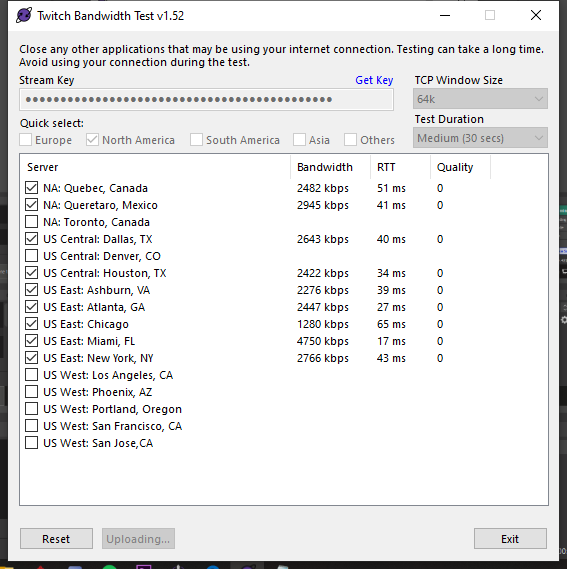
Use the Twitch Bandwidth Test to find the best Twitch server to stream to. Set Duration to Medium. You can uncheck any regions you're not near. After the test completes, click the Share Result button to upload a screenshot, which can then be copied and pasted here. Get TwitchTest from https://r1ch.net/projects/twitchtest
 errant bane
how to show viewers count on obs?
daring crypt
running that test now
will this show if its my interet
cause they are saying its not the internet but i dont like them anyways
dry sphinx
@errant bane Click the Burger Menu (3 lines) in the OBS.Live Activity Feed -> Stream Settings -> enable Viewer count slider
daring crypt
@errant bane i recommend not having that on! seeing how many viewers you have can get in your head. stream with the energy you would for 1000 people the same as 1
 dry sphinx
Internet Service Provider (ISP)
daring crypt
spectrum LOL
dry sphinx
 Dangit Spectrum.
daring crypt
🤢
 spiral cosmos
Hello there,!
I can no longer connect my twitch account that I made for the custom bot name .
I had recently changed the Password of my twitch bot account and tried to reauthorize it, it simply doesnt work with OBS.Live
even if I connect it successfully with a successful login, it doesn't want to work.
Ground Control works but I dont want to run ground control and want it to work with OBS.Live like it previously did.
I changed my password days ago so it can't be a sync issue.
I've been battling with this for days and it bothers me a lot because this account has a lifetime subscription on it.
The Send Test Message remains grey after that and only streamelements bot triggers when I type commands into chat
If this can't be resolved .. am not sure if I want to stay with elements because it was one of the selling points for me.. as OBS.Live is so nice compared to Streamlabs
rugged quail
How do I import overlays from your website to StreamElementsOBS?
steel bladeBOT
@rugged quail To add your overlays to OBS, add a new browser source in your scene. Paste your overlay URL in the browser source properties, set the dimensions to 1920x1080 (unless you changed them on the website), and ☑ “Shutdown source when not visible” https://youtu.be/KDvLynUqXI4
spiral cosmos
@dry sphinx Yes, Chrome is my default Browser and I am currently logged into it there. on Edge I am logged with my bot acc. Do I have to be logged on it on Chrome for it to 100% authorize?
daring crypt
once again spectrum said nothing is wrong on their end 😄
dry sphinx
Yes. Try Chrome log out of your bot account & sign in with it on Twitch.Tv, Keep your main account signed in with OBS.Live & see if that works to use for the Custom Bot Name.
@spiral cosmos
spiral cosmos
@dry sphinx Doesn't work as well...

it shows as connected but OBS.Live just ignores that fact I guess
I've already tested many things such as disconnection the connection on twitch and trying it again and stuff.
Nothing seems to want to work. Probably a problem with your app atm. Can't think of anything else.
I hope we can find a fix or I will be forced to move to another platform. My lifetime bot subscription is on that account. :s
dry sphinx
@spiral cosmos That is weird 
On OBS.Live can you can streamelements -> Report Issue? That would be the best way for our Dev to tackle that to see what's going on.
spiral cosmos
Done... :/
 twilit hornet
rugged quail
twilit hornet
rugged quail
how do i put my overlay on stream made from the obs thing
 torpid quail
Anyone having trouble with their stream chat atm?
 opal cliff
trying to figure out how to enable analog audio from the source tab tried everything and it pulls up with out it
 wet cliff
Hey! Question: When I go live to stream via Steam, my OBS Live randomly just cuts the stream, and my viewers say it dies then I have to go back an hit start streaming again. any idea as to why?
 swift pier
hey can anyone help me out?
steel bladeBOT
@swift pier Welcome to the helpdesk! Please let us know how we can assist you today and a support volunteer or staff member will assist you as soon as they are available. Thank you for your patience.
swift pier
I just started using SE and there is no option to login with mixer so i can get overlays
does anyone know how i could do that
steel bladeBOT
@swift pier Our goal is to be everywhere our community is so we are regularly in discussions with other platforms. Although we can't comment on our roadmap, your feedback is appreciated.
 warm flower
can anyone help me with a long analasis? i thought i fixed the problem but it would suddenly dissconnect and then after 2 tries reconnect 🙂
tulip hamlet
warm flower
tried i keep getting contact the administrator 🙂

 lost needle
So Twitch chat isn't updating on my OBS screen and it is saying it has an error loading when I try to go to the chat settings in the chat module.
warm flower
sooo no? lol it would happen every 30 minutes or so
tulip hamlet
@lost needle What's your Twitch username?
lost needle
KaitoBG
tulip hamlet
When did you rename your Twitch?
lost needle
Last night
tulip hamlet
That'd do it. Can you log out and back in to the site, and same in OBS?
Won't interrupt your stream.
Promise.
steel bladeBOT
@warm flower For the best OBS support, please join their Official Discord @ discord.gg/obsproject
tulip hamlet
I can see it doing it in your log, but I couldn't tell you why. They might have some insight.
wet cliff
nvrmind i fixed it!
lost needle
Really appreciate it, was throwing me off for a while.
warm flower
Thank you Nethyr
 dusky brook
If I have my mixer(go xlr) mute or turn down the volume on a certain channel will it turn it down on stream even though it is showing as its still registering the sound?
dusky brook
nvm got it fixed
 jaunty elk
Hey @everyone I was wondering how to send a log in from my stream to see what is going on. I am dropping a ton of network frames
jaunty elk
And on top of all this. My chat signs me out every day I stream
steel bladeBOT
@jaunty elk For the best OBS support, please join their Official Discord @ discord.gg/obsproject
shy mountain
The signing out of chat is most likely due to what is causing the dropped frames - internet issues
jaunty elk
Is this not a stream elements thing?
shy mountain
This guide contains every piece of dropped frames / disconnect / network related advice we can give. If you really truly honestly super duper actually 100% tried everything in…
OBS.Live is just a plugin for OBS Studio.
We add 3 docks to OBS Studio
Dropped frames is an internet issue detected by OBS.
jaunty elk
Oh ok. So just sent the logs to them
jaunty elk
Oh ok thank you
 cedar flower
so i am trying to import my from stream labs and it keep telling me failed importing scene collection why
steel bladeBOT
@cedar flower Please provide a log from your last stream. To do this, in OBS go to Help > Log Files > Upload Last Log File and paste the link to the log file here.
cedar flower
shy mountain
This log doesn't have the failed import attempts
cedar flower
so i when i got to stream elements > import from other service > streamlabs > import overlays > failed importing scene collection
shy mountain
So provide me with a log file after the import fails
so that I can see what the issue was
Usually there are several things that can go wrong:
- Copyrighted assets (the default ones from SLOBS)
- custom coded widgets that are really big(the code is really long and big)
- Assets over 10MB
cedar flower
shy mountain
This log file also doesn't have the failed attempts
cedar flower
this keep popping up
shy mountain
Open the log file folder from the Help menu
and see which log file has a big file size
and provide me with that log file
cedar flower
this is the biggest file
shy mountain
Although the log file has more stuff in it - it still doesn't have the failed attempts
Do you have SLOBS installed?
cedar flower
yes i trying to change form slobs to obs live
shy mountain
Have SLOBS open as well and run OBS.Live as admin @cedar flower
cedar flower
still say the same things lol well it looks like i am starting all over lol
shy mountain
Open the log file folder again and provide the last log - last try i guess
at this point im not sure whats happening.
cedar flower
spiral cosmos
So OBSLive had an update today, hoped it woutl solve the custom bot connection, but nope :/
daring crypt
My camlink is showing my camera as pink
i just replaced the wire and no settings are changed
is it my camlink?
 cloud tiger
Hi, just had the update and now all my text files related to streamlabels are broken and dont show on my overlay... I tried to reconnect them one by one but still invisible.. 🙄
All my texts are now in weird shapes and invisible sno matter how i deform them
 quasi snow
@daring crypt try changing it color input/options
@cloud tiger streamlabels isn't from StreamElements or am I missing something
daring crypt
@quasi snow nothing is changed
cloud tiger
I though i was in the right place since its called helpdesk-obslive 🤔 but thanks
steel bladeBOT
@daring crypt For the best OBS support, please join their Official Discord @ discord.gg/obsproject
spiral cosmos
@shy mountain I am here and still have the issue :/
quasi snow
is it a new problem or ?
I know there's a color setting among obs, try changing it, also make sure u run obs as admin
@daring crypt
daring crypt
It’s not just in obs
quasi snow
?
oh right
you mean it's not just on camera but also in game capture
check color settings in OBS, range or something am not home don't recall exactly the name
Change YUV to "601" and "Partial"
quasi snow
@daring crypt
@cloud tiger did u try compatibility mode for it or changing other options?
I'm not familiar with it though
 fleet umbra
Question: My donation link doen't work for some reason. People who donated yesterday didn't recieve a popup on my stream. I've ensured that it is the correct link in the donation bar
 tough flicker
Hi. I just installed obs.live and suddenly some of my obs docks are plain white. Im running the latest version of obs (23.2.1).
 neon fern
@tough flicker please open the StreamElements menu at the top and use Send a Report
 tight garnet
hi guys, i have a problem... if i use media request in stream elements and i click on "show on stream" i hear it tiwce... is there any one who can help me
greetings
rugged quail
just updated to the new obs live and now it wont log in, it keepos giving me the error try again later, could not reach server
err_name_resolution_failed
 wispy pebble
cant log in either, takes forever to get my token key to log in via twitch
neon fern
do you have the StreamElements menu at the top? If so please send a report.
rugged quail
i submitted a report, but i am scheduled to go live in 1 hour\
wispy pebble
just sent a report as well
neon fern
did you use OBS.Live previously?
rugged quail
yes for over 2 months now
the big question i have is this issue of not being able to log in going to mess up my overlay and not update follows bits etc
whatever you guys did on your end, i was able to log in
thank you!
wispy pebble
i was able to log in as well thanks! now to try and fix my migrating streamlabs problem
 plain bear
? For my notifications I have setup, I keep seeing a shark dancing around and I don't know how to get rid of it 😬 and I'll go into the settings and can't find the shark to delete it
 sinful flint
@plain bear Variation Settings
plain bear
Ok cool thank you I'll check that
 muted peak
How's it going @everyone ? I was wondering if anyone else has had issues importing streamlabs overlay on OBS Live. Mine seems to stop at 32%. I've attempted on both my gaming and streaming PC with no luck.
wispy pebble
this is my log file for trying to import my streamlabs into SE. i kinda went through it but im unsure what it is frozen at migrating over
muted peak
It's been freezing for me as well @wispy pebble
sinful flint
If you're having OBS.Live issues with freezing for example you should click on StreamElements at the top and then Report an Issue
wispy pebble
I sent it
winter ruin
Hi Guys,
I have created in the store an item that activates TTS, however, the TTS will only read the 1st word even if there is a whole sentence


got a friend with the same settings and works perfectly fine
 flat swift
After Latest OBS.Live Update
and now when in normal obs mode, my browser sources dont show up
@tough flicker My firewall seemed to be causing my issue, it was blocking the browser source executable for OBS, once I allowed it through, it worked fine
tough flicker
@flat swift thanks very much. problem solved.
 crystal tundra
so today's Update seems to have caused a stutter on all my overlays.. every settings seems as they were prior to the update working perfectly.. thoughts?
 rapid portal
why cant i enable the scene box?
 broken sky
u must go on website click right button and have box
plain sonnet
@rapid portal view > docks > scenes
steel bladeBOT
@broken sky Welcome to the helpdesk! Please let us know how we can assist you today and a support volunteer or staff member will assist you as soon as they are available. Thank you for your patience.
broken sky
thank you
rapid portal
@plain sonnet Cheers Dude
plain sonnet
np 👍
 empty scroll
hey, my obs.live wont update any suggestions
plain sonnet
do you get an error message?
plain sonnet
restart your pc then try downloading from here
https://streamelements.com/obslive
run it as admin when installing
empty scroll
that did the job thank you
plain sonnet
np 👍
wispy pebble
hey tadpole, are you familiar with the log files? ive been having an issue all day trying to migrate my slobs to SE
plain sonnet
are you using the transfer option in obs?
plain sonnet
im not savvy on those issues in the log file but if you do the import and get the log i will have a look and see if anything stands out
if i cant, i will pass it on internally
wispy pebble
this is the most recent one, i did submit an issue in SE but i havnt heard anything back yet
crystal tundra
so today's Update seems to have caused a stutter on all my overlays.. every settings seems as they were prior to the update working perfectly.. thoughts?
plain sonnet
@wispy pebble can you log into the SL dashboard and keep it open while you try it again
these are the only errors coming up that i can see
mine seem ok @crystal tundra
but if they actually stutter while streaming/recording you can make a report in obs
plain sonnet
overlay editor then click on the widget section
wispy pebble
@plain sonnet ill try again when i get home, was working remotely and shut my computer down to give it a rest
plain sonnet
cool, no worries
 true lark
Hello everyone!
Not sure if this is the right chat to ask the question.
So, I'm using StreamElements OBS.live plugin and the Ground Control program to change the bot's name.
I was wondering if there is an options to combine the Ground Control bot's naming option into the OBS.live plugin?
You are already able to use the Activity Feed, Stream Settings and Media Request settings from OBS plugin so why not the Bot naming function.
I often forget to turn the Ground Control software on so i would be very convenient.
I look forward to the answer!
true lark
Really xD
true lark
Am i that stupid...
@tulip hamlet Thank you very much! I honestly mist that option.
Yep works like a charm! Again Thank you very much!
crystal tundra
@plain sonnet yeah not sure what is was fine 5 minutes prior to update bad after.. the overlays just stutter the streams fine game capture camera etc. just the streamelements overlays I've used for a few years.?
 slow ember
So this has happened since the last update. I sent a report a few hours ago and have been messing with it since. Allowing everything through the firewall / having the firewall off doesn't seem to help. I can switch to OBS Studio to get my previews back but none of the StreamElements overlays will function. I also cannot login.
 jade sluice
hello, can i ask a question about streamlabs?
tulip hamlet
I mean technically you can ask any question you want. Whether we're able to answer is another story entirely. 
Mostly 'cause we're not Streamlabs. So we don't have tools to troubleshoot their stuff.
jade sluice
you guys cant fix black screen? i test on obs as well
and my display is only black
i mean
tulip hamlet
Yeah, you'll have to ask them.
tulip hamlet
OBS.Live is a plugin for OBS Studio, and doesn't affect display capture. So, probably send you to OBS's Discord if there wasn't a simple fix.
jade sluice
can send me their discord?
steel bladeBOT
@jade sluice For the best OBS support, please join their Official Discord @ discord.gg/obsproject
tulip hamlet
They won't be able to help with SLOBS either, though.
SLOBS is a fork of their source code. The edits Streamlabs does are out of their control.
jade sluice
ok thank you anyway
 candid vault


 tulip hamlet
Uh. Can you screenshot what you see?
 supple owl
Hi guys i want to switch to Stream Elements but i want to know if there is a possibility to remote access to my scenes and sources as StreamLabs have done? as i dont have a StreamDeck
tulip hamlet
@supple owl Just to make sure. Define "remote access" here. Don't wanna assume.
supple owl
I want to use my Android Phone to change scenes and toggle sources
tulip hamlet
Oh, that. No, there's no app control of it. You can easily set hotkeys, though.
supple owl
ah ok, is that maybe a considerable upgrade to the stream elements app in the future?
steel bladeBOT
@supple owl Check out the StreamElements ideas board: https://strms.net/ideas. You'll be able to add ideas, upvote ideas you agree with, and track their progress with email notifications. Adding and upvoting ideas also helps the staff know which ideas should be prioritized so please take some time to upvote.
 pure tundra
someone knows why when i click show on stream the music on media quest starts to play 2 times with a delay like a eco
steel bladeBOT
@pure tundra Make sure to ☑ “Shutdown source when not visible” for all browser sources (all OBS scenes). If using studio mode, uncheck “Swap Preview/Output scenes After Transitioning.” Also keep in mind that sound can play from any overlay loaded in the browser (editor or launched). https://i.imgur.com/FegZJQS.png https://i.imgur.com/yY0wcFl.png
 placid fjord
I noticed there was an update being pushed today. But i can't find any notes on what was done.. could someone direct me to them perhaps? 😛
tulip hamlet
placid fjord
I had hopes that my issue with the obslive theme being stuck in white mode would been fixed. Still cant get it in dark 😦
Ahh there is it! Looked right after the update but wan't posted yet i guess.
crystal tundra
@plain sonnet and all UPDATE: after the update today we've had the odd stutter only on the overlays not he game screen or over all effecting the FPS of the stream, just he overlays from Stream Elements were/are stuttering on or off the air. Yet when we disable OBS.LIVE it stops... small steps small fixes
tulip hamlet
Have you enabled/disabled hardware acceleration for browser sources, whichever is the opposite of how you've currently set it?
crystal tundra
when we re logged-in for around 10 seconds it was smooth then stuttering again... @tulip hamlet I shall check again, just wondering what happened was fine stopped show updated re-started then this..
tulip hamlet
I didn't say anything about relogging.
crystal tundra
looking for that setting now
tulip hamlet
It's in Settings>Advanced.
tulip hamlet
Because the update was basically just "we support hardware acceleration now." Which can help or hurt, depending on your setup. So switching it to the opposite setting is probably the best check you can do right now.
crystal tundra
K looking through that now Thanks
not seeing anything about browser sources in that section yet
tulip hamlet
crystal tundra
ah found it re booting it now
I'm odd and never mind issues more so if I can learn and or help test through the issues so fingers crossed and as always thanks to all of the team over there
fixed it 
 strange pike
After this new update all of a sudden im having tons of dropped frames issues. This has never happeneed before
tulip hamlet
Have you enabled/disabled hardware acceleration for browser sources, whichever is the opposite of how you've currently set it?
strange pike
yes
steel bladeBOT
@strange pike Please provide a log from your last stream. To do this, in OBS go to Help > Log Files > Upload Last Log File and paste the link to the log file here.
tulip hamlet
Read the instructions again and please provide a URL.
strange pike
tulip hamlet
https://h4ndy.eu/obslog?url=https%3A%2F%2Fobsproject.com%2Flogs%2FJTeEG_K8J8UrNdKC
Looks like internet mostly.
strange pike
Ok thank you, ill just reset my router then. I appreciate your time and help
dusky brook
so i just did the update for OBS Love and now none of my overlays or anything are showing up its all black screens
this is all browser sources it seems like
tulip hamlet
Have you enabled/disabled hardware acceleration for browser sources, whichever is the opposite of how you've currently set it?
dusky brook
where would i find that?
tulip hamlet
Settings>Advanced
 thorn iris
having a weird problem where my obs live won't show bottom/ it's cut off and I it's full windowed ? Also now my mixer won't dock
wispy pebble
https://obsproject.com/logs/felJET87OjUtG4q1
so im logged into SLOBS and SEobs dashboards on firefox and chrome and i still cant import my slobs overlays into seobs
tulip hamlet
You don't need a browser open for that. And a log doesn't help that, either.
If it's not completing, it's usually because either your assets are too large to upload or you're trying to import Streamlabs-owned assets.
Also, there's no such thing as SEOBS. OBS.Live is a plugin for OBS Studio, not its own version of OBS.
wispy pebble
gotcha
 earnest egret
probably a quick question, is OBS Live able to stream to mixer at all?
tulip hamlet
StreamElements does not have Mixer support at this time.
earnest egret
Darn I keep hearing good things about OBS live and I wanted to try it out but I do both twitch and mixer streams. I make or will be making most of my own integration stuff cause that is my thing so bots and widgets almost don't matter as much for me. I do like the idea of browser source overlay setup though lol.
 winter rapids
Hey Guys I just did the OBS.Live update and now it keeps giving me a crash log error
 mellow goblet
is there a help for discord?
 deep crystal
Any idea as to why plugins are giving me an error that the DLL isn't found?
steel bladeBOT
@deep crystal For the best OBS support, please join their Official Discord @ discord.gg/obsproject
shy mountain
@mellow goblet not in this server
@winter rapids help -> crash logs -> show last crash log
 wraith juniper
hello. my stream keeps disconnecting and reconnecting
and i cant figure out how to fix it
steel bladeBOT
@wraith juniper Please provide a log from your last stream. To do this, in OBS go to Help > Log Files > Upload Last Log File and paste the link to the log file here.
wraith juniper
wraith juniper
?
 little terrace
so i accidently exited out the chat how do i get that box back ?
shy mountain
Streamelements on top -> chat
little terrace
ah thank you!
 wet kite
Hi every one, have some issue from literally a few hours ago after updating OBS.Live when ever i have Chrome open i get massive FPS drops. This also happens while not live as well while monitoring "Stats". Here is my log https://obsproject.com/logs/TG6Aqy-X08QWpb-k
Edit: When ever I hav chrome open and viewing a video
shy mountain
wet kite
Hmm seems to be that windows game mode is on
shy mountain
And theres rendering lag and encoding overload
wet kite
Im going to disable windows game mode thing and see if that fixes the rest. Thank you very much KeiZar.
wet kite
That seems to have fixed some of the fps drops that are new after i ran the update. It might be back to normal it feels. Thank you !
shy mountain
👍
 fleet ibex
I just downloaded the new OBS Live update and now I'm getting crashes everytime I exit OBS. qt5widgets.dll seems to be the issue every time
I've tried re-installing both the plugin and OBS itself
shy mountain
Ty for the crash report. I'll send it right away to our devs
fleet ibex
Thank you. The crash also manifests even if I select the "Switch to OBS Studio" button from the StreamElements menu.
Also I've never been able to download updates from the plugin itself. I have to download the exe from the SE website every time. I'm not sure why that is
shy mountain
Something is blocking OBS from downloading the update
 earnest cobalt
this new OBS.Live / Stream Elements update is causing my animated overlay to play at what seems to be around 10 frames a second, it's all jittery... what happened?
shy mountain
right click the browser source -> properties -> set the FPS there
and then restart OBS, just in case
earnest cobalt
It's already set to 30 FPS.
Already restarted multiple times
I believe it has something to do with the Browser Source part of the update. I did a test. I imported the same overlay has a media source into OBS which had no issues with frame rate or any jitters. However, when putting it back as a browser source it started having those issues again.
earnest cobalt
Intermission
shy mountain
@fleet ibex you from twitter?
earnest cobalt
Oh, I also checked in the overlay editor and there seem to be no issues there.
earnest cobalt
Let me try re launching the overlay with a different link
Tried it, still having the issue.
shy mountain
If you remove the custom fps option?
earnest cobalt
Yes, if I remove the custom FPS option the issue still stands
fleet ibex
@shy mountain Yes that's me
shy mountain
ok, good to know - have to correct my info towards the devs
@earnest cobalt What are you PC specs?
earnest cobalt
CPU: AMD Ryzen Threadripper 1920x
Motherboard: ASUS ROG Zenith Extreme X399
Graphics Card: NVIDIA GeForce GTX1080Ti
RAM: CORSAIR Vengeance 32GB DDR4 2400mhz
Cooler: Thermaltake Floe Triple Riing RGB 360 TT
shy mountain
What other sources do you have the in the scene?
earnest cobalt
Just these
earnest cobalt
As a browser source still? Or just as a media source?
earnest cobalt
Still the same issue. And I meant just put the file straight into OBS as a media source, because it works fine when I do that, I just don't want to take up more CPU.
shy mountain
I'm really not sure what can cause this
Do you have hardware accell on?
Settings -> advnaced -> bottom -> Sources -> hardware acell on?
earnest cobalt
Yes, I do.
shy mountain
turn it off?
earnest cobalt
Welp, that fixed it...
shy mountain
now turn it on again?

for the sake of testing
which is weird as it should help, not hinder
shy mountain
The update introduced hardware accel, because it was requested for so long, as our plugin didn't support it before.
Thats the thing - the option should help you, not hinder you
which is weird
earnest cobalt
Right. Definitely weird. Is there anything else that could possibly be changed (even outside of OBS and SE) that would affect this?
shy mountain
You can try something for me
Uninstall OBS.Live
and then turn on hardware accel
and see if the issue persists
wraith juniper
@shy mountain thank you! I think its fixed
shy mountain
ofc - killer nic is nasty
earnest cobalt
@shy mountain Ok I'm back. The issue is no longer there with OBS.Live uninstalled.
Would you like me to reinstall it?
shy mountain
did you turn on HWA back on?
earnest cobalt
Yessir
steel bladeBOT
OBS.Live is a Plugin for OBS created by StreamElements. You can download OBS.Live here: https://streamelements.com/obslive
Please make sure you have the latest version of OBS installed, Current Version: 23.1.0. You can install OBS here: https://obsproject.com/
earnest cobalt
On it
shy mountain
well i need to update that command it seems
earnest cobalt
Oh, is that not the right link?
shy mountain
no it is
i just see that the command says OBS Studio is 23.1.0
but its 23.2.1
i need to update that bit in the command
earnest cobalt
Ok, OBS.Live is installed the issue is back.
earnest cobalt
Agreed.
Thank you for the help
For now I will keep hardware accel off. Can you let me know when the bug is fixed?
shy mountain
I don't even know if its a bug
earnest cobalt
I mean, whatever it is, it's definitely an issue with the update.
 coarse sail
is there any tips to have two obs live at once? so i can have my yt and twitch feed and chat running on OBS ?
shy mountain
Use Ground control for one account and obs.live for the other
as for chat - popout the twitch chat
or popout the YT chat
coarse sail
using GC, i see.. i just lazy to use the GC, that's why i asked if it can run simultaneously, hahaha.. i think i will keep restream docks for the chat panel, it relay all chats. Thank you man
 spiral glen
So I updated OBS Live today, the stream after the update failed to work properly. Every time I tried to change scene, it would stop the stream and this error message came up. I re-started my PC and no change, any ideas on resolving this issue? Thanks.
shy mountain
Uninstall OBS.Live only and see if the error persists
spiral glen
So I uninstalled OBS live and restarted PC again.. Ran OBS Studio and the problem is exactly the same
shy mountain
So this issue is not related to our plugin
steel bladeBOT
@spiral glen For the best OBS support, please join their Official Discord @ discord.gg/obsproject
 distant gazelle
any idea how big is the update?
shy mountain
Usually updated to OBS.Live are small.
distant gazelle
hmm.. strange.. it's taking me very long to update. i have 100mbps down
shy mountain
Stop the installer and start it again I guess
shy mountain
Is it getting stuck?
distant gazelle
should i close down obs live entirely?
shy mountain
its an update to the plugin, which adds stuff to OBS Studio
so it should be closed
I updated my OBS today and it closed on its own.
shy mountain
Ooh so this

OBS.Live | Open Broadcaster Software Streaming Knowledge Base
OBS (open broadcaster software) knowledge base for live streaming. Find articles and videos about streaming with OBS.
download the installer here
i would recommend first removing obs.live
and then using the installer
distant gazelle
alright, thanks KeiZar
sorry KeiZar, quick question. what's wrong with my current obs live again?
distant gazelle
right i see.. if the download is working then my current version is fine?
shy mountain
well it should be
 formal kernel
Hello! I am new here and I need some assistance settings up my OBS?
 sudden fossil
I updated my OBS live today and now I'm stuck looking at this with no idea how to fix it. Anyone got any suggestions?
steel bladeBOT
If you are not seeing the OBS Twitch integrations and have OBS.Live installed, please follow these steps:
- Make sure you are on the latest and greatest version of OBS.Live ( 19.7.14.421 )
- exit OBS (make sure OBS is not running)
- delete %appdata%\obs-studio\plugin_config\obs-browser\obs_profile_cookies
- start OBS.Live
- Settings -> Stream -> disconnect -> connect
 vital parcel
hi I am having an issue in OBS live where if I add a Browser source for my intro scene, it will start at 60fps then go down to a very low fps and my cpu usage on OBS goes down also
quasi snow
@vital parcel go to advanced settings and turn off hardware acceleration, see if it helps
vital parcel
It worked bro thanks a lot 👍
quasi snow
also don't forget to turn on "shutdown source when not visible" on all browser sources
vital parcel
ok ok I got you thanks again chief
quasi snow
great 
@formal kernel here's a quick setup https://support.streamelements.com/hc/en-us/articles/115003424812-Quick-Start-Guide
and more guides if you need other info https://support.streamelements.com/hc/en-us/categories/115000044291-Guides
 fallow island
Hi I am having problems with my tip link im testing it out but its not working for some reason
 chrome trellis
Any ideas why?
 fierce bone
I need to know something, is it normal for the Plugin to reset everytime there is an update? Like not OBS in itself but the plugin update! It kinda gets annoying to always needing to set all together again and again!
plain sonnet
@fierce bone what do you mean the plugin reset? are you talking about the panels?
@chrome trellis you are using slobs, they try and block parts of SE as they are competitors
steel bladeBOT
@fierce bone If you are not seeing the OBS Twitch integrations and have OBS.Live installed, please follow these steps:
- Make sure you are on the latest and greatest version of OBS.Live ( 19.7.14.421 )
- exit OBS (make sure OBS is not running)
- delete %appdata%\obs-studio\plugin_config\obs-browser\obs_profile_cookies
- start OBS.Live
- Settings -> Stream -> disconnect -> connect
chrome trellis
Really?^^ Anything i can do?
plain sonnet
apart from not using slobs? nope.
it has always been that way
fierce bone
I mean the plugin itself loads and all the panels load...but like...media panel is default hidden for me, but once a update occured all my closed panels that i dont need are back on the default position and need reorganizing
plain sonnet
aaaahh, yeh thats to make sure everything from the SE plugin is working
sorry, i thought you meant eveytime you open obs
fierce bone
No No 😄
The Plugin once setup is complete works perfectly fine, not an Issue!
It's just my curiosity to know if it's intended that everything defaults back to the state like it's my first time opening the Plugin, once a update comes out for OBS.Live!
Cause if that is a setting i can change i would love to activate it lol
plain sonnet
i can ask about it internally, but the last i heard its to make sure that the plugin is functioning correctly and is able to load everything
 gleaming fjord
I have also a Problem, since the new Update. The Twitch Statistics and Title Change Menu gone completely..
plain sonnet
log out of settings > stream then log back in,
then view > docks > reset ui
that should bring it back
fierce bone
If it's intended by the devs it's not an issue for me! Just wanted to be sure if i had some setting unchecked lol Thanks for the feedback!
gleaming fjord
were the docks again?
plain sonnet
view
main menu at the top
fierce bone
gleaming fjord
Nope, the two things not came back
plain sonnet
hmmmm, ok long winded attempt
do the same as before log out,
then log out of streamelements > logout
close obs, reopen it as admin
then log back into both
plain sonnet
hmmm, you might have to ask in the obs discord then im afraid.
the stats and title docks get populated when you log in with your twitch account
steel bladeBOT
@gleaming fjord For the best OBS support, please join their Official Discord @ discord.gg/obsproject
wispy pebble
is there anyway to upload a .overlay file to SE?
tulip hamlet
Not specifically, no. That's a Streamlabs-specific export file using their own extension. Rather, you need to use the built in import in OBS.Live, in the StreamElements menu at the top.
wispy pebble
copy, ill try it out when i get home, was working on it on the website
 wary basalt
I've been having an issue with my chat on OBS... and it getting really horrificly blurry...
tulip hamlet
That's not the chat we provide. You can tell by the lack of a refresh button in the top left. I'd recommend closing that one and getting the one out of the StreamElements menu instead.
wary basalt
ok, how do you do that? I've been simply using the view-dock-chat so far.. never had this issue til recently
tulip hamlet
X that chat, click StreamElements at the top, and click Chat in there.
tulip hamlet
Log out and log back in through that menu.
wary basalt
via the login correct? Cause if thats the case... there is no log in to mixer option. Only twitch, yt, fb
tulip hamlet
Because we don't support Mixer at this time.
wary basalt
😐
 reef matrix
how do i add a custom transition in obs.live?
tulip hamlet
Transitions are an OBS Studio functionality, OBS.Live doesn't change it or touch it, since we can't do cloud-based transitions.
reef matrix
o i see
tulip hamlet
So it's the same way as regular OBS Studio.
rugged quail
hi
 frank shard
when i start streaming it does not go to my twitch even tho it says i am streaming msg me answers
 rose hollow
how can i see the Users in Chat with the chat dock it doesn't show at the top on the chat like on my page
rose hollow
i just downloaded the new version
tulip hamlet
Still missing the top bar.
tulip hamlet
You can try logging out and logging back in with the StreamElements menu.
rose hollow
it pops up for a second then goes away could frankzerface z or bttv be causing it?
tulip hamlet
Honestly not sure, never seen that happen before. It's made to use BTTV and FFZ.
rose hollow
it's been like this since twitch updated the button from the bottom to the top
 pastel urchin
Cant log into OBS.Live with my twitch after update today
 potent nimbus
so i logged into youtube to check it out. can i log out and back to twitch?
potent nimbus
what?
tulip hamlet
@potent nimbus Yes. In the StreamElements menu at the top.
steel bladeBOT
@bright kindle Please provide a log from your last stream. To do this, in OBS go to Help > Log Files > Upload Last Log File and paste the link to the log file here.
 bright kindle
what do u mean like lol
because i have it on obs already
but its animation its laggy
potent nimbus
@tulip hamlet there is no option to log in/out of a service (youtube, twitch, facebook)
potent nimbus
oh thanks, im blind lol
tulip hamlet
@bright kindle Follow the instructions you were provided.
potent nimbus
it might be your computer. @bright kindle
bright kindle
its not =))
the support told me to provide logs
i didnt stream
i try to make the overlays to start stream
after i put it in the animations are animated like 10 fps
tulip hamlet
 orchid pebble
is anyone else obs suddenly lagging during rendering after update today?
tulip hamlet
Have you tried enabling/disabling hardware acceleration for browser sources, whichever is the opposite of how you've currently set it?
steel bladeBOT
@orchid pebble Please provide a log from your last stream. To do this, in OBS go to Help > Log Files > Upload Last Log File and paste the link to the log file here.
 green maple
portuguese support?
tulip hamlet
#🇵🇹︱português
green maple
how do i import overlay from site to obs?
steel bladeBOT
@green maple To add your overlays to OBS, add a new browser source in your scene. Paste your overlay URL in the browser source properties, set the dimensions to 1920x1080 (unless you changed them on the website), and ☑ “Shutdown source when not visible” https://youtu.be/KDvLynUqXI4
orchid pebble
 green heron
Help
steel bladeBOT
@green heron Welcome to the helpdesk! Please let us know how we can assist you today and a support volunteer or staff member will assist you as soon as they are available. Thank you for your patience.
green heron
I need help importing scenes
tulip hamlet
@orchid pebble https://h4ndy.eu/obslog?url=https%3A%2F%2Fobsproject.com%2Flogs%2F3pQNAtVYUXQezxaK
Those steps will get you started but you should generate a log with an output session.
@green heron Can you be more specific about what you need?
green heron
@tulip hamlet when I try to use the import scene collection from slobs to obs live it always stops working
tulip hamlet
@green heron Either your assets are too large to upload or you're trying to upload Streamlabs-owned assets.
green heron
if I remove the assets the streamlabs owned assets can I transfer it then?
tulip hamlet
Assuming you don't also have assets that are too large, yes.
orchid pebble
tulip hamlet
That log is basically identical to the previous one.
 timber patio
can anyone tell me how to get chat to show back up on the right side of obs? it was there and i clicked something and it went to my twitch and not showing chat anymore
tulip hamlet
@timber patio Chat option in the StreamElements menu at the top?
timber patio
its clicked...still showing my channel were the chat was
tulip hamlet
Log out and log back in through that menu.
orchid pebble
ok i fixed everything request and uninstalled KIC and obs is still having frames missed due to rendering lag any ideas?
never had issue before today
timber patio
thank you! that fixed it
green heron
Does the stream deck work with OBS Live @tulip hamlet
tulip hamlet
Yes.
green heron
I figured it out
Nope
it's not working
it just says the elgato remote control plugin is missing
@tulip hamlet
tulip hamlet

StreamElements OBS.Live add-on makes stream management easy, integrating Twitch Chat, activity feed and Media request into OBS studio. Download it here: http...
tulip hamlet
What version of OBS is in the top left?
tulip hamlet
Probably need to reach out to Elgato at this point then.
 cloud elk
Is there a way to track current viewers with OBS.live?
tulip hamlet
Yes, you can enable the viewer count in the settings menu in the top left of the activity feed.
cloud elk
@tulip hamlet settings under file drop down in OBS? The only thing in the top left of my activity feed is the reload widget
cloud elk
I'm in OBS right now. That is from the website no?
cloud elk
I just updated and mine doesn't have that
tulip hamlet
Take a screenshot of your full OBS window?
cloud elk
Best I can do at the moment
tulip hamlet
Oh, I see, you're logged in with Facebook.
 whole goblet
need help with browser sources, when I add them they take the whole screen and just a part of the overlay appears
tulip hamlet
Viewer count, and that menu for that matter, is only when you're logged in with Twitch.
@whole goblet Ctrl+F to fit to screen.
And make sure the properties are set to 1920x1080.
tulip hamlet
Couldn't tell you, but we've been working with Facebook to get more from their API.
cloud elk
Thanks
 wraith kiln
I am setting up media request and when I show on stream with the media request widget I am getting double audio, can someone please tell me there is an easy fix for this that I am missing.
 agile zodiac
i need help
 full thunderBOT
Hi @agile zodiac, Please ask your question(s) or describe the problem you're looking to solve so staff or a support volunteer can assist you as soon as they are available.
steel bladeBOT
@wraith kiln Make sure to ☑ “Shutdown source when not visible” for all browser sources (all OBS scenes). If using studio mode, uncheck “Swap Preview/Output scenes After Transitioning.” Also keep in mind that sound can play from any overlay loaded in the browser (editor or launched). https://i.imgur.com/FegZJQS.png https://i.imgur.com/yY0wcFl.png
agile zodiac
i'm getting high encoding errors when i stream bl2 idk how to fix it
steel bladeBOT
@agile zodiac Please provide a log from your last stream. To do this, in OBS go to Help > Log Files > Upload Last Log File and paste the link to the log file here.
shy mountain
wraith kiln
I have made sure all browser sources are shutdown when not visible, All that is running is the Media Request dock and the media request widget on the browser source active on the scene
agile zodiac
wait you can make the browser sources stop when your not on that scene o.o
shy mountain
@agile zodiac yes
@wraith kiln Then you have the same overlay with the media request widget added twice to the same scene
agile zodiac
what scene
 edgy jacinth
Hiya fam! I am trying to add a second webcam to my stream in OBS Studio. When I switch out the webcams on my main source it works fine. When I try to make a new scene just for that one specific webcam, nothing shows up. I had it working 2 days ago and now it isnt doing anything. Ideas?
shy mountain
You are not paying attention to your own problem it seems. Open this: https://h4ndy.eu/obslog?url=https%3A%2F%2Fobsproject.com%2Flogs%2FOMXzfAX0S8v-atBO and read on the issues @agile zodiac
@edgy jacinth Copy the video source and paste it as reference to the other scene.
agile zodiac
oh ok
wraith kiln
I promise you I do not have it added twice
agile zodiac
i'll see what i can do thank you
shy mountain
@wraith kiln With so many scenes, you've missed an overlay. I'm 98% sure.
wraith kiln
Now I can hear the music while no shown on stream from the docked media request in obs.live all the time, that is where the double audio is coming from, I only get it from that scene and that source when active
shy mountain
If you click "Show on stream" the video and sound stop from the MR dock and start showing on ALL active media request widgets in the active overlays.
edgy jacinth
@shy mountain I have 2 completely different webcams I want to use. I want to use my logitech webcam for my live and chat scenes. My Spedal webcam for my workout scene. They should be 2 completely different sources.
wraith kiln
no that is what I am saying it does not stop from the dock
shy mountain
This is the first time i've heard that the MR dock is playing twice audio
steel bladeBOT
@edgy jacinth For the best OBS support, please join their Official Discord @ discord.gg/obsproject
wraith kiln
I have it showing on the stream while I am on a separate scene and I am getting audio from the MR dock
 sharp nexus
got media request setup but nothing was added to my sound mixer? dont understand how its capturing audio
agile zodiac
ok the render lag par tis weird cause i set all the settings in BL2 to low as posable
possible
shy mountain
@wraith kiln Maybe im not understanding what you are trying to explain. Are you hearing double sound when NOT using "show on stream" or only when you ARE using it?
@sharp nexus the MR dock defaults to the default sound channel - the desktop audio
@agile zodiac Just follow the analyzer and the guides there
sharp nexus
so just add an audio output capture use desktop audio/default and im good to go?
shy mountain
wraith kiln
From what you have said the way I understand this is that the MR dock should stop putting out an active audio signal, it is still putting out an audio signal when I have it showing on stream. I am getting audio from the MR dock and the MR widget on the scene. If I switch scenes to any other one the audio from the MR widget of course goes away, I am not seeing any way to stop the audio from the MR dock
shy mountain
Unless you are using the 24.0.0rc of OBS studio and our plugin(which afaik, current obs.live doesn't work properly with 24.0.0rc), then the MR dock will not produce sound when using "show on stream"