#helpdesk-selive
1 messages · Page 54 of 1
 elfin flame
Sorry for being so rude
Is there a location where StreamElements stores the OBS.live data? Then I could automate the process everytime I start OBS as I have with profiles
 tight valley
Any tips for me on how to do the streaming and where i need to look out for if i stream? I'm new with streaming and i accept tips or help even
 tulip hamlet
@tight valley You can find basic tutorials at https://obs.live/articles

OBS.Live | Open Broadcaster Software Streaming Knowledge Base
OBS (Open Broadcaster Software) knowledge base for live streaming. OBS.Live is optimized for live streaming, Integrating Twitch with OBS Studio, making your stream management flawless
elfin flame
Hi @tulip hamlet , could you please help me with my query?
tight valley
@tulip hamlet thank you
tulip hamlet
@elfin flame Yes, you have to log out and back in.
elfin flame
@tulip hamlet do you know where the program stores the current log in data loccaly on our machines?
*locally
tulip hamlet
It's an OBS plugin. It's in the OBS folders.
elfin flame
Program Files OBS folders?
tulip hamlet
Somewhere in there, maybe. I'm not a dev.
elfin flame
Oh okay understood. Thanks. Any chance I could get in touch with one?
tulip hamlet
They're a bit busy being asleep. It's 12:30 AM.
elfin flame
Okay I'll shout tomorrow then. Thank you
tulip hamlet
Even then, devs don't generally provide support.
 hexed wagon
My OBS is stuck in OBS studio and is showing my scenes twice on my computer how do i get it back to just one again?
tulip hamlet
Click the Studio Mode button? I'm assuming that's what you're talking about, anyway.
hexed wagon
LOL newb streamer probs.. THANKS!
 sour shell
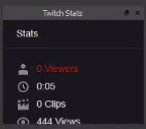
On obs I used to be able to see stats like how many viewers i have, how many total views, how many clips were taken etc. It disappeared and I cant see to get it back does anyone know how?
 deep birchBOT
@sour shell If you are not seeing the OBS Twitch integrations and have OBS.Live installed, please follow these steps:
- Make sure you are on the latest and greatest version of OBS.Live ( 19.7.14.421 )
- exit OBS (make sure OBS is not running)
- delete %appdata%\obs-studio\plugin_config\obs-browser\obs_profile_cookies
- start OBS.Live
- Settings -> Stream -> disconnect -> connect
 tulip hamlet
 olive temple
Hey hey, I’ve added a custom transition into OBS live, it works for so long then seems to get stuck in the animation, only way I’ve found to fix it is opening the settings and closing it again. refreshing the overlays doesn’t work. anyone know a trick?
deep birchBOT
@olive temple For the best OBS support, please join their Official Discord @ discord.gg/obsproject
tulip hamlet
@olive temple OBS.Live doesn't touch transitions, they can't go through our cloud based system.
tulip hamlet
OBS.Live is a plugin for OBS Studio and doesn't affect transition behavior at all. That functionality is still handled by OBS Studio itself.
olive temple
One the other staff members has started investigating.
 kindred fox
Yeah, we don’t handle transitions here. Since we just handle the scene overlays, we can’t assist with cool stuff like fade-ins on webcams like I have on my twitch
Which btw was a pita to set up
 sonic sparrow
hi im having issues with my computer getting encoder errors while i stream
I am not sure what the issue is, i feel like my hardware is fine
CORSAIR SF600 600 watt power
MSI Pro series Intel Coffee Lake H310 Mini ITX Motherboard
EVGA GEFORCE RTX 2060
Intel i7-8700 CPU
deep birchBOT
@sonic sparrow Please provide a log from your last stream. To do this, in OBS go to Help > Log Files > Upload Last Log File and paste the link to the log file here.
sonic sparrow
tulip hamlet
Need a log from a stream.
sonic sparrow
isnt that what that is
tulip hamlet
No, this log has no output session.
tulip hamlet
Just follow these instructions: https://h4ndy.eu/obslog?url=https%3A%2F%2Fobsproject.com%2Flogs%2FEsePpbcVSLw8RJln
sonic sparrow
i opened the stream, it ran for 10 seconds, then i recreated the crash when i opened youtube
tulip hamlet
https://h4ndy.eu/obslog?url=https%3A%2F%2Fobsproject.com%2Flogs%2Fg4fEnX1gnUrgzNW_
Some info in there might help out.
sonic sparrow
what is cpu overload
 midnight bloom
Can please somebody help? I log out and log back in. It’s good until I want to restart OBS live again. Thanks.
midnight bloom
Tried it on my laptop with Windows 7 on it and wifi vs my desktop with wired connection(Windows 10). It works flawlessly on my laptop. I’m at an impasse to find a solution 😦
tulip hamlet
Sounds like something on your desktop is blocking the connection. Is there something you have on there that you don't have on your laptop, like an antivirus or similar that might be throwing up a false positive?
midnight bloom
All I can think of is the default Windows firewall on my desktop on Windows 10 but I put the OBS.exe in the exceptions
I don’t have any other antivirus programs installed.
midnight bloom
Connected laptop using wired and that’s working too. Something on my desktop is intermittently preventing it from connecting to the Streamelements servers. What could it be? Would flushing DNS cache help?
tulip hamlet
Couldn't really tell you, but you'll need to identify what's doing it.
 karmic helm
I have a problem where when i try to do a transition, a custom stinger one, that half way through the transition, it cuts out. And there is no way for me to make the transition time longer. What do I do?
deep birchBOT
@karmic helm For the best OBS support, please join their Official Discord @ discord.gg/obsproject
 rugged quail
Hi, Im getting 200% dropped frames trying to stream to mixer currently
tulip hamlet
StreamElements doesn't have Mixer support at this time.
Also, 200% isn't even possible 
rugged quail
well 200% is what im getting
also I don't know how I ended up on this discord instead of actual obs support
deep birchBOT
@rugged quail For the best OBS support, please join their Official Discord @ discord.gg/obsproject
 dawn apex
lost my chat window, how do i get it back in OBS live
kindred fox
click StreamElements in the menu >> Chat
 round kettle
Error message pops up when trying to go live. "Can't connect to server."
 shy mountain
Check your stream key
kindred fox
There’s a setting somewhere for that.....
I remember seeing it once
One sec, I’m not at my pc
shy mountain

 jaunty elk
Hey everyone, So I am a twitch streamer that is trialing some mixer streams. Got the stream key in obs, but It is still showing my twitch stuff. Can I not use stream elements with Mixer and if so, how do I do my overlays over to Mixer?
jaunty elk
Oh ok. Thank you for the heads up
 bleak plume
can i split discord audio from the stream? so my viewers can't hear the conversation i'm having throw discord ? ( without using 3rd party software )
deep birchBOT
@bleak plume How to exclude audio sources for a stream or recording: https://obsproject.com/forum/resources/8/
<Voicemeeter Banana guide: https://obsproject.com/forum/resources/397/>
 wispy hatch
hey guys, thanks for the awesome development.
quick question: has there been a change recently regarding sound effect redemption cooldowns?
The sounds in my channel used to be able to play simultaneously if two viewers redeemed them, but now there seems to be a delay of about 1 second for each redeem command
shy mountain
Redemption sounds/alerts should be queued as normal alerts are queued.
If 2 sounds played at the same time, most likely you had another overlay with the redemption widget open
in another scene
wispy hatch
but it was possible to play seemingly an unlimited amount at the same time?
shy mountain
If before it was doing it, most likely it was changed. People usually reports double sounds
Its not intended to play multiple sounds at the same time.
wispy hatch
do you know if that was an intentional change though?
for example, I sometimes play a song and viewers try to match a portion of the song with the actual song. But that only works if the sound redemptions can over lap
can i post a twitch clip here as an example?
shy mountain
If you are playing a song via MR or YT, and you have teh same song as a store item
I don't see why it shouldn't overlap
the redemption widget doesn't care if a song is playing
it cares if there is currently a redemption alert playing
hence an alert queue
wispy hatch
i mean multiple sound redemptions at the saem time
shy mountain
Multiple sound redemptions was never intended.
If it was doing it before and now its not doing - it has been fixed from our side.
wispy hatch
ah i see. no option to have that possible at this stage?
deep birchBOT
@wispy hatch Check out the StreamElements ideas board: https://strms.net/ideas. You'll be able to add ideas, upvote ideas you agree with, and track their progress with email notifications. Adding and upvoting ideas also helps the staff know which ideas should be prioritized so please take some time to upvote.
rugged quail
Heyo, where should I look to get the custom bot name?
deep birchBOT
@rugged quail Custom bot name requirements
- StreamElements bot modded and in chat
- Active overlay with alerts
- StreamElements tipping page in the panels below the stream (!panels)
- OBS.Live or Ground Control open
- Create a twitch account for the name you want to use or run the bot under your own name
- Custom bot name doesn't work on Mac
shy mountain
rugged quail
Thank you!
 static lantern
Can Media Request be linked to a youtube or spotify or apple music playist?
 dry sphinx
Media Request with YouTube.
static lantern
awesome thanks!
rugged quail
Hello!
I am having a issue with SEOBS.
I am logged in, however it is stuck on this menu: https://gyazo.com/a88fce0f6fbcdca031f062fee5cff79f

And I haven't been able to stream for 2 days because of it.
Any help?
 rough mulch
I am trying to get an alert box from a custom overlay to obs but when i test it doesnt show up. ive looked everywhere for a setting that mightve disabled this but i cant find it.
my chatboxes show up just fine so im really confused
rugged quail
I legit cannot even stream, with my bug.. 😦
Just use Twitch Dashboard, for chat.
Until the bug gets fixed..
or someone helps you out.
rough mulch
it was working 10 minutes ago
rugged quail
Quickly setup Stream Labs Widgit
Its not as good at StreamElements.
However, it will get you by till someone can help.
rough mulch
i just moved from streamlabs
rugged quail
Well use the widgits then.,l
 sinful flint
@rugged quail Hey you tried StreamElements > Logout > Logging back in?
sinful flint
Was just checking when we actually released the latest update for OBS.Live, seems to be longer than 2 days ago so it wouldn't seem to be due to an update
rugged quail
Okay.
sinful flint
Have you put in an overlay URL into OBS.Live? If so, could you DM me the link?
sinful flint
Your StreamElements overlay URL, yeah
 mystic holly
I can't seem to control Media Request with Stream Deck anymore.
sinful flint
Are you using the most up-to-date version of everything? Just tested and it is working, if you are on the latest version of everything you could try re-installing
sinful flint
If you're sure you are using the right option in the Stream Deck software then perhaps try reinstalling in this case, as it is operational 😃 https://gyazo.com/f51743e44df577de6aa9d86c59b8723f
 mystic holly
reinstall what?
sinful flint
Stream Deck software, just a suggestion, seeing as I can't replicate the issue
mystic holly
Ill try it
mystic holly
Reinstalling the StreamElements tools in Stream Deck fixed it. Thank you.
 fallow root
My obs.live doesn't seem to like update the stream information it just stuck on "updating" and trying to exit the program makes it crash?
sinful flint
No it was because you posted it in two channels which isn't necessary
 unborn nacelle
ive never been here before and its an obs question so it goes here...
sinful flint
1 channel is enough
sinful flint
@fallow root Seeing as you're experiencing crashes you should click on StreamElements at the top menu and then Report an Issue, this will send a report directly to our OBS.Live developers
fallow root
The crashes stopped but i lost the whole 'menu' or that movable box
where i could easily change the stream name and stuff, i still can do it via activity feed
sinful flint
Yes it was put into the activity feed menu in Stream Settings
fallow root
Oh ok so why did it work yesterday 😄
sinful flint
It has been in there for quite some time, longer than a day for sure, did you update yesterday?
fallow root
I have not updated for weeks
after that last crash it just disappeared so thats the reason why i was wondering
Anyway if that is updated to be like that, then issue solved 🤔
 nova lily
is there someone who can help me
 fading glen
Hello
nova lily
where i can find resolution of this
nova lily
i marked it
 steel mural
Why do you need the res of that space?
nova lily
what are u talking about? @steel mural
 plain sonnet
its a 16:9 area, you can always resize whatever you want to put there in obs
steel mural
where i can find resolution of this
You can just resize every window to fit them into it.
nova lily
yea but where i can find exactly correct resolution of it
kindred fox
The aspect ratio is more important than the resolution. If you create an image or graphic or video that's 16:9 aspect ratio, it will scale and fit in the space
nova lily
i would like to fit it
fading glen
Any that speaks English i'm in the Voice Support channel. I have a question real fast for making my custom stinger work.
steel mural
Just resize it
 main swift
is there any place where you can change mixer settings on obs live, i want to delay my mic but im not sure how
plain sonnet
@main swift mixer is not supported on obs.live
 buoyant badge
So I know I can use the stream store to setup viewer-trigger-able sounds, but is there a way do have those trigger without the redemption message? (i.e. no "@user, you have successfully redeemed <cmd> for X points." or edit that message?
(or is there another way to add sound and video triggers?)
plain sonnet
no not currently
kindred fox
Not officially no
kindred fox
I’m not a lawyer like @ashen vapor who might know where to find such a thing.....
rugged quail
helo i uninstalled obs and streamelements obs add on doesnt get off
i keep hitting uninstall and it doesnt work
 cloud raft
hello im trying to get the chat and activity feed back onto my obs somehow it got removed and I cant figure out how to get it back on
plain sonnet
@uneven hedge click the download button??
 serene loom
How do I rename the streamelements bot? It says that I can do it on the website but I havent been able to find the feature
deep birchBOT
@serene loom Custom bot name requirements
- StreamElements bot modded and in chat
- Active overlay with alerts
- StreamElements tipping page in the panels below the stream (!panels)
- OBS.Live or Ground Control open
- Create a twitch account for the name you want to use or run the bot under your own name
- Custom bot name doesn't work on Mac
serene loom
o ok
cloud raft
can I get a reply?
plain sonnet
streamelements > activity feed
cloud raft
im trying to get it on the "OBS" not on the web browser
plain sonnet
@cloud raft yes, menu at the top
streamelements > activity feed
@uneven hedge click the cog next to follower in the alert box then you can upload images and sounds from there
cloud raft
i dont see " activity feed" closest thing i have to that is "active overlays" ill keep looking tho
plain sonnet
can you show me the drop down for the streamelements menu in obs
cloud raft
i think i found the problem.... i just finished setting up the "tipping page"... after that both screens came up like they usually do for me... not sure why but i got it fixed somehow
 uneven hedge
How do I put the overlay on my stream?
deep birchBOT
@uneven hedge To add your overlays to OBS, add a new browser source in your scene. Paste your overlay URL in the browser source properties, set the dimensions to 1920x1080 (unless you changed them on the website), and ☑ “Shutdown source when not visible” https://youtu.be/KDvLynUqXI4
uneven hedge
oh jeez
 austere garnet
Helllooooo! I'm having a weird issue with my custom bot. My bot is using my streaming account as well as bot when I activate a command. Halp?
plain sonnet
so if you do a !command the se and another bots replies?
austere garnet
I actually am just an idiot.
I had the bot connected to Ground Control as well and it was mega confused.
Thank you @plain sonnet ❤
plain sonnet
haha, np i guess 👍
 quartz forge
Hey, I was wondering if any of you AMAZING support people could help me? For some reason, OBS isn't picking up audio from my mic. It's detecting the device, there's no audio input. Both Discord and Audacity are getting audio, so I know it's specific to OBS.live. Any ideas?
 ashen vapor
@buoyant badge I have a widget that you set up for triggering videos or gifs.
 scarlet pagoda
What's the latest version of streamelents?
I just downloaded yesterday and watched some videos and my obs live dashboard is not the same as a video of it from last month
quartz forge
@scarlet pagoda I'm running version 23.3.1 . If your dashboard is different, it might be because the dashboard is configurable and whatever video you saw had a different configuration than the default
scarlet pagoda
@quartz forge how would I find that ?
 compact valve
Hello. I have a problem concerning me not being able to connect to my streaming server for youtube
buoyant badge
@ashen vapor I would love more info on that! How can I get that?
ashen vapor

GitHub
Contribute to mrboost/eventwidget development by creating an account on GitHub.
quartz forge
It'll tell you across the top of the application while it's running. Check for updates by running OBS, click on Help at the top left center > click on check for updates @scarlet pagoda
buoyant badge
Awesome, thank you @ashen vapor!
ashen vapor
np
 junior marlin
are you able to connect streamelements to mixer?
 vernal pulsar
Any chance to see StreamElements/OBSLive on MacOS one day ?
sonic sparrow
@junior marlin click settings under start streaming and look in the service box there are a few options
deep birchBOT
@sonic sparrow For the best OBS support, please join their Official Discord @ discord.gg/obsproject
shy mountain
@vernal pulsar no plans currently for mac support
vernal pulsar
@shy mountain that's a bad news ... but thanks for replying !
junior marlin
@sonic sparrow yea i know that you can stream from there to mixer but if i want to log into stream elements in the internet there is no option to connect with mixer
 thin idol
Hello out of nowhere 4 days ago I've been dropping frames in OBS but my internet and my pc is more than quick enough to handle the bitrate I have it at and I have no idea what to do at this point
deep birchBOT
@thin idol Please provide a log from your last stream. To do this, in OBS go to Help > Log Files > Upload Last Log File and paste the link to the log file here.
shy mountain
In the dropped frames errors, there is a linked wiki/guide page with this:
I recommend doing this.
speed testing your internet is not enough
thin idol
@shy mountain Thank you for the response and I used twitch test and the bandwidth was good but the connection wasn't
thin idol
Hmm I see because the closest server to me is the Miami one and everything was good for months until a few days ago so I wonder if something is going on with their server currently
shy mountain
There are 2 possibilities:
- The server is having issues
- Your ISP is having an issue
If the twitch server tester has shown lower then 100 quality on all twitch servers
then its an ISP issue
and you will have to call them and explain in details what you are doing
thin idol
Oh ok I see thank you sm @shy mountain
shy mountain
Just to be safe, follow the guide: https://obsproject.com/wiki/Dropped-Frames-and-General-Connection-Issues
This guide contains every piece of dropped frames / disconnect / network related advice we can give. If you really truly honestly super duper actually 100% tried everything in…
and if you have to - the last step
thin idol
Ok I gotcha ty for the help
 limber spire
Hi there! I am using the media share widget on my stream, but when someone in my chat links a video it links a completely different video. Does anyone know how to fix this?
shy mountain
Does it come up as "fuck off the world" or something similar?
limber spire
No, it links a completely random video. So each new video links a different video from youtube
shy mountain
Any chance I can see this in action?
limber spire
yes
shy mountain
name was enough
limber spire
sorry
shy mountain
@limber spire https://www.twitch.tv/dashboard/settings/moderation
The "block hyperlinks" should be toggled off
limber spire
Thank you so much
 spice socket
does obs live work on mixer
deep birchBOT
@spice socket Our goal is to be everywhere our community is so we are regularly in discussions with other platforms. Although we can't comment on our roadmap, your feedback is appreciated.
 digital mountain
hello i want to test live on youtube but i am a facebook streamer and i have log in to my facebook account in obs but when i copy the keys of my youtube channel and start stream it automatically starts stream on my facebook page
is there is any way that i can test stream
shy mountain
OBS.Live doesn't touch the stream keys or stream servers you choose.
OBS.Live is highly dependent on what type of account you are logged into with
digital mountain
im logged to my facebook account but i want to run a test stream on my youtube now
shy mountain
The activity feed and chat from OBS.Live will show your facebook account data
not your Youtube
thats what I wanted to say
digital mountain
how do i unlink my facebook account from obs?
shy mountain
From OBS.Live -> streamelements on top -> logout
digital mountain
owh thanks bro 😃 @shy mountain
 boreal zodiac
Hello, I'm trying to figure out what's causing my OBS to crash, is there a place where I can send a crash log?
plain sonnet
if you have a crash log you can post it here, if we cant see what the issue is you might be redirected to the obs discord
boreal zodiac
shy mountain
OBS Forums
I have been trying to stream and/or record using for the past couple of months and sometimes when I am trying to do this I get crashes. Weird thing is that sometimes my game crash and sometimes OBS crashes. I've tried to TS my machine and check my raid and sdds and my ram b...
If that thread doesn't help, visit the OBS Discord here: https://discord.gg/obsproject
 silk vale
Got no sound coming from elgato
 heavy wharf
Hi StreamElements folks! I've got OBS Live installed over my version of OBS 64-Bit. I'd like to disable the StreamElements Bot from responding to ! commands in my chat. I use a separate bot for chat commands, but the SE bot always responds with its own sets of commands when a viewer types !Commands.
Is there a way to disabled the SE Bot after installing OBS Live?
dry sphinx
You can type in your Twitch chat !bot part
 rancid crest
how do i get media requests to play the music in my stream and not to just me?
heavy wharf
Thanks @dry sphinx!
sinful flint
@rancid crest That happens if you set the correct audio device in your OBS audio settings, if you're using an audio mixer you would also need to set that up correctly
 hidden cloak
Hey so I was wondering, would it be possible to: When someone follows their text would be typed out letter by letter until the whole thing is typed out? I'm trying to make it similar to how old YouTube 2009 tutorials with notepad typed it out etc etc.
https://i.gyazo.com/b2ad032eb8eb2a8acc89ed6c335c300f.mp4 SOmething like this
hidden cloak
Many thank will move it over there
 dusk scarab
is there a way to make the media request audio a seperate track from the desktop audio so that i can make the music volume lower than the game audio?
rancid crest
@sinful flint yea i changed the output, but the media request player itself is very quiet. Anyway to make it louder???
i have the same question as @dusk scarab but i want to make it louder
sinful flint
You have a volume slider in Media Request
Doesn't require anything fancy, you just use that 😃
dusk scarab
the slider is all the way down but it is still too loud
sinful flint
Then check your Windows volume mixer
dusk scarab
if i change that then the audio from the game also gets quieter
sinful flint
Your game audio is already separate from your Media Request audio
dusk scarab
for some reason when using the capture card the audio comes through my desktop slider instead of the capture card
sinful flint
I'm not sure about that sorry, never used a capture card
dusk scarab
i figured it out. i just needed to download the ground control thing and use the windows mixer to turn the volume down. made it a lot quieter.
 little plover
Hey, just downloaded streamelements and really want to use it, but every time I go to StreamElements > Import from Other Services > Streamlabs and try importing my scenes, it says its successful when done but then nothing shows in streamelements still
 odd kraken
The overlays are imported to your overlay section in your SE dashboard here: https://streamelements.com/dashboard/overlays
little plover
Ah, I see it now, thanks!
 reef fog
Hello all. New to OBS Live. I just installed it and my first question is: I had some Media Sources in my old OBS that I linked the gif and sound together.... I can no longer hear them ...is it because I need to add those in streamelements?
 dawn spire
@reef fog you should be able to add a media source but the playback doesn’t come through to you but should to stream, run a test stream and check to see if the alert plays
reef fog
hmm
Thanks for the feedback @dawn spire. Are you saying that it wont play sound to me even when I select its source to play as: Monitor and Output? Is that obs live intentional?
dawn spire
Well I have a intro video which I set as media source which doesn’t play in my headset but does on stream!
So is the alert via a command or triggered by yourself?
reef fog
yeah, triggered by self. I had uploaded the sound and gif animation in OBS, both hot keyed to Num Pad 1
animation still pops up, but not the sound
@dawn spire you rock good sir. I just did a test stream and the sound effect is still linked to stream. Thank you
dawn spire
No problem dude any time 
dusk scarab
i can hear the media request music but is it possible for me to not hear it but the stream can?
 white crow
Hi, guys, someone know how to change the bot anme ?
dusk scarab
i think that if you download the ground control app then in the settings you can change the name not 100% though
dawn spire
@white crow you need to download ground control and create a secondary account which the bot will use on twitch
sinful flint
It is also possible through OBS.Live in the activity feed menu -> Stream Settings -> Custom bot name
 small sonnet
Yo, I've got a question. I've recently switched to OBS live  but none of my paypal donos come through, bits, follows, subs are perfectly fine but Paypal just doesnt wanna come through
  someone know how?
dry sphinx
@small sonnet What's your Twitch account? Your Twitch profile is outdated in your Discord account.
dry sphinx
Is your Paypal account verified?
small sonnet
You mean as in it has a phone connected and all that?
sinful flint
small sonnet
Right, but i haven't had that issue on SLOBS, is this like a new thing paypal has or is it a thing that Obs Live just requires to have?
dry sphinx
That's all PayPal.
small sonnet
new i reckon then right?
dry sphinx
Not really. I haven't used Slobs before so 
small sonnet
Haha, fair enough (i wouldnt advise you too lol)
sinful flint
We have required this for as long as I can remember, just a different way of doing it than them I guess 😃
small sonnet
Aaah i see, this link seems outdated though. i can't see some of the steps they tell me to take
sinful flint
Weird, I can see them all just fine, using Chrome
small sonnet
That's odd, using Vivaldi which is like a cousin to regular Chrome
 rustic plinth
Hi how do i add overlays into my stream i cant seem to find a help guide on your website
deep birchBOT
@rustic plinth To add your overlays to OBS, add a new browser source in your scene. Paste your overlay URL in the browser source properties, set the dimensions to 1920x1080 (unless you changed them on the website), and ☑ “Shutdown source when not visible” https://youtu.be/KDvLynUqXI4
 tough yew
any1 knows how to make a scroll text that doesnt fill with blank space until itss run off ?
( viva streamelements overlay ) endlesss text
rustic plinth
thank you
 limpid hornet
ok so does each browser have its own scene or how does that work? i preiously just used streamlabs obs and made my own lil tiny scene thing.
kindred fox
Scenes are configured with sources. Overlays are added to scenes as browser sources. If you are using pre-built overlay templates then you simply add the corresponding overlay to your scene as a browser source
 feral stream
yesterday had a issue where title and games wouldn't change saying "network error" thats not fixed but now getting my streamdeck say i need to "login"
 ebon dove
I cant launch my stream. It says:
there was an error starting recording. please check the text entry for more details.
note: if you are using an NVENC or AMD encoder, make sure you are using the latest version of the graphics driver. My graphics driver is actual. I dont know what to do. please help
white crow
@dawn spire thanks
deep birchBOT
@ebon dove For the best OBS support, please join their Official Discord @ discord.gg/obsproject
dawn spire
@white crow no problem dude
 cinder beacon
is there a way to get stats window in OBS along with all the other windows? You know, like viewer count and stuff? So that I don't have to have a web browser popup open along with OBS taking up RAM resources.
It's for Twitch BTW.
Nevermind, I found it by right clicking on the widgets. Sorry to bother you all. Have a nice day 😃
dawn spire
@cinder beacon never a bother it’s why we are here
olive temple
welp clicked the wrong channel before
does anyone know the cooldown for the !weather command chat have broke it we're getting :
[ERROR: MANDATORY COOLDOWN IN EFFECT DUE TO EXCESSIVE USAGE.]
or how to reset it?
 wise silo
im assuming thats the specific api youre using that has the cooldown @olive temple
https://api.scorpstuff.com/weather.php?units=metric&city=$msg for weather and https://api.scorpstuff.com/forecast.php?units=metric&city=$ms for forecast are equally good api's
 frank ferry
how to take off test mode to live stream on twitch
olive temple
thanks @wise silo
dry sphinx
Are you using your CPU (x264) or GPU (NVENC) for the encoding?
Should be fine then. As YouTube recommends 2,250-6,000 Kbps for 720p 60FPS.
 ashen spruce
hi peeps. quick question about obs vs obs live. I use 2 things that connect with websocket (chatbot for essential overlay scripts and touch point - streamdeck kinda software). I have them working in obs without issue, just wondering if they will work the same in obs live?
kindred fox
I’d back up all your settings as a precaution
ashen spruce
or option 2...test on my 2nd utility pc 💡
general upgrading from obs to live - will it wipe settings?
 sharp elk
can someone help me with this, how do i ad twitch chat to my obs live?
i dont really want to run twitch in my browser since that takes up processing power thats not really needed
dry sphinx
If you have OBS.Live already you should be good. Make sure Chat has a checkmark: @sharp elk
 gray harness
So once upon a time I had to do a fresh reinstall of windows on my PC. After redownloading OBS and stream elements I logged in and all my themes and overlays were gone! I'm not sure if there is a way I can get them back or not. I thought that stream elements used a cloud based platform and things would be saved. Am I misunderstanding? If so that's ok just curious before I put all the work back in to building it up again.
kindred fox
The overlays won’t persist inside OBS
They will still be in your streamelements dashboard
You’ll need to add all of your scenes and sources back to OBS
cinder beacon
--EDIT--
Nevermind folks. Turns out the browser sources were causing a pretty good spike in CPU usage at idle, I guess even with all the assets being offloaded to SE, the complexity of my scenes are a bit much for it and was causing my CPU usage to be up into 25-30% usage range. It's unfortunate since I was under the impression that I wouldn't have to deal with such a thing using SE and offloading all the scene action to the site with a browser source, but oh well. I guess I'll either have to live with it, or redesign my scenes to be more basic and simple.
feral stream
yesterday had a issue where title and games wouldn't change saying "network error" thats not fixed but now getting my streamdeck say i need to "login" https://cdn.discordapp.com/attachments/494513233416421386/609812843487035434/unknown.png

 placid sparrow
Hey guys, for some reason Media Request is no longer docked into my OBS and I can't seem to find it anywhere to slot in back.
Any ideas? Thank you.
kindred fox
@placid sparrow streamelements in the OBS.live window and click media request
gray harness
When I hit the streaming button in stream elements it comes up with an error that says Invalid Path. Any Ideas on how to fix this?
 knotty thicket
for my alert box im trying to change my cheer text but it wont change. All my other Alerts text i can change.
 tulip birch
need help
any one there
any one know why obslive keeps closing with vst's
it just closes
knotty thicket
i fixed my issue
tulip birch
i never fixed my issue
obs closes
or crashes
cause of its limited to pluguns 64bit should of fixed this
kindred fox
If you’re having issues with OBS crashing while using VST plug-ins, have you verified the plug-ins are 64-bit?
 fallow cave
will streamelements have a connection for Mixer?
 fierce rapids
hi how can i transfer my overlays from Stream labs obs to obs.live i got the .overlay file
kindred fox
!mixer
deep birchBOT
Our goal is to be everywhere our community is so we are regularly in discussions with other platforms. Although we can't comment on our roadmap, your feedback is appreciated.
kindred fox
Upvote it on the ideas board @fallow cave
I believe you’d need to ensure they’re synced to the cloud and then import using the import tool in the streamelements dashboard. (I could be wrong as I haven’t used the tool and will probably be corrected by someone with more knowledge)
fierce rapids
i just downloaded this i have no idea about cloud xD Slobs was lagging a lot so i decided to transfer
fierce rapids
ye
kindred fox
Slobs is the next step up from the new twitch live app or whatever it’s called
OBS is the big leagues
steel mural
SLOBS 
fierce rapids
trying to figure out this thing xD
i imported alerts from stream labs
but don't know how to set them up here
kindred fox
It’s like slobs only not as poorly written. Create your scene, then add your sources. Your overlays/alerts should show up in the streamelements website and you should be able to add them as browser sources to your scene
There’s a command somewhere that explains all that somewhere but I haven’t memorized them yet 😉
fierce rapids
hmm okay thanks for help 😃
fierce rapids
ok
tulip birch
I already verifyed they are 64bit
they are 64bit
i run Audified, CFA-Sound, Softtube,

The brandnew GRIP valve drive compressor by CFA-Sound is a powerful dynamic processor, which delivers compression with character!
Audified
Audified is a software company specialized in multimedia development. We create audio effects, host applications and provide with special solutions.
kindred fox
I run izotope RX and never had an issue. Umm are you running OBS as admin?
tulip birch

yes
but howmany plugins is allowed
I think the bridge is the issue
i am running the audified saturator
kindred fox
The bridge?
tulip birch
look up jbridge
why not use somthing solid
this just cannot handel all these vst effects
kindred fox
So you’re adding the VSTs before your audio gets into OBS?
kindred fox
And you’re adding all your VSTs in OBS studio? Not outside OBS?
kindred fox
My suggestion would be to ask the OBS devs
tulip birch
i have
no reply
nothing
so i am done with this
i am moving to xsplit
as much as i love vst plugins i am sick of the crashing and closing
tulip birch
you talking regular not ptr
kindred fox
Yes
tulip birch
I use PTR
well if devs can fix this i will stay on obs
to fix this i am to run max 3 vst's
kindred fox
I’ve run 4
tulip birch
lol thats pushing it
kindred fox
But again, mine are all from izotope
tulip birch
or else it will close exit or woops
kindred fox
And I think one from waves
Mine ran fine
I had to adjust the audio sync but that was it
tulip birch
the plugins aint the issue
its the fact we cannot run more than 4/5
also the the fact obs closes on its own
kindred fox
Have you tried reinstalling OBS?
kindred fox
So what is your cpu/ram?
 main charm
So I just installed OBS.Live and went to activate the media request, but it didn't install it on my overlay and I can't find a link to manually add it as a browser source. Any suggestions?
kindred fox
Media request?
There’s a button somewhere in the media request panel to play on stream, but you also have to have the media request widget added to your streamelements overlay
rugged quail
I changed my chat setting through the widget on the right, and it went to the settings page, how do I get it back to chat?
 random gale
how can I make it so if someone posts a certain emote, the bot replies with the same emote, what I tried was !command add EmoteName but it automatically makes it into !EmoteName
rugged quail
To my previous question, restarting OBS fixed it
 green vessel
Hello 😃 I need some help pls, any1 here?
When I switch my scenes in obs manuel and via streamdeck, it shows up and error with "An encoding error occurred while streaming" and it begins to record the stream but it looks like obs crashes same time.. what can I do?
fierce rapids
how can i use a custom event list which is in SLOBS and transfer it to obs.live
dawn spire
@random gale you should be able to make a command with a alias of the emote name but you will have to understand that the bot will pick up the emote even if it’s used in a sentence this is in the advance settings of the command when you create it.
Like I have my bot looking for the word Lurk so if is !lurk it says my lurk command or even in a sentence like “I’m going to lurk now” it I’ll see lurk and reply
random gale
Where can I find advanced settings for a command? The emote I'm trying to use it with is usually only used by itself anyway
 sly forge
How do I keep my Chat Live while switching scenes?
dawn spire

StreamElements
The Ultimate All in One Platform for Streamers
there is a section where you log into streamelements called chat commands
@sly forge it should be set to show chat permanently when you add the chat widget, did you uncheck that at all?
 marsh storm
Will you consider adding mixer now when "the ninja" has been done ? ^^
Alot of smaller streamers are moving over.
dawn spire
@marsh storm There is a plan to get onto mixer, if this get upvoted they will look to push this out faster so make sure you comment and upvoat this:
marsh storm
oh, oki, to compete whit slobs that is the only good option atm i th ink thios needs a thumb 😄
dawn spire
indeed i agree
random gale
Thanks @dawn spire works like a charm!
fierce rapids
How to make connections like for this scene to other scene a stinger and for other scene to different scene other stingee
 halcyon widget
Is there a set date for Streamlabs OBS for Mac?
dawn spire
@random gale no problem my guy
 robust python
Why does it say 5 in the middle when I currently have 15 followers?
dawn spire
@robust python its a follower goal so it would have counted 1 every time since you added the follower goal, as its just a counter goal it wont show your excat followers it will just be from when you started,. does that make sense?
feral stream
yesterday had a issue where title and games wouldn't change saying "network error" thats not fixed but now getting my streamdeck say i need to "login" https://cdn.discordapp.com/attachments/494513233416421386/609812843487035434/unknown.png
 meager raven
@robust python
You can check your widget data on this screen and change it if need be.
https://streamelements.com/dashboard/session
fierce rapids
@meager raven can u help me too? :)
meager raven
I can certainly try! How can I help?
robust python
oh yeah thanks
dawn spire
@fierce rapids are you asking how to add a custom stinger transition?
fierce rapids
I am trying to add different stingers for different scenes
Like 1--> 2 something and 3---> 4 something else
dawn spire
yea so if you right click on the scene you would like to have a different transition for you should have a choice for "Transition Override" which will allow you to have different transitions for different scenes
fierce rapids
Oh okay that's what I was wondering I am trying this first time thanks for help :)
dawn spire
@fierce rapids No problem my man any time
meager raven
😃 GJ
dawn spire
robust python
What's the quickest way to test stream alerts?
Currently i'm in the overlay editor but was just wondering if there's an option on the front page somewhere
odd kraken
You can either use the overlay editor, or replay an alert in your activity feed.
 zealous trench
Hello, how can i insert my custom transition in obs.live?
deep birchBOT
@zealous trench For the best OBS support, please join their Official Discord @ discord.gg/obsproject
 abstract blaze
how to resolve this?
deep birchBOT
@abstract blaze Make sure to ☑ “Shutdown source when not visible” for all browser sources (all OBS scenes). If using studio mode, uncheck “Swap Preview/Output scenes After Transitioning.” Also keep in mind that sound can play from any overlay loaded in the browser (editor or launched). https://i.imgur.com/FegZJQS.png https://i.imgur.com/yY0wcFl.png

 abstract blaze
thanks
rugged quail
Hey, I tried streaming using OBS.Live and it was super laggy, I have streamed using OBS.Live before and never had this issue.
My friend is also having this issue and I haven't changed any settings and I have the same applications running as usual, is there a way to fix it?
deep birchBOT
@rugged quail Please provide a log from your last stream. To do this, in OBS go to Help > Log Files > Upload Last Log File and paste the link to the log file here.
 buoyant minnow
hello, I was streaming with obslive but my chat wasnt working all the time... didnt see that... I tryed to refresh but its still not working...
fierce rapids
@dawn spire I ran into a problem like from 1--> 2 I need something that's happening but for 3-- > 2 it's same too I don't want that
dry sphinx
@buoyant minnow Have you tried logging out of OBS.Live then sign back in?
rugged quail
hi, may i know if theres a media request panel on obs.live? if so, where is it?
 hollow merlin
@rugged quail top bar next to Help, StreamElements -> Click "Media Request"
rugged quail
Arr ! got it ! thank you ❤
 hollow crystal
I think I might have found an issue./bug where is the best place to report it?
 river escarp
i need help
 full thunderBOT
Hi @river escarp, Please ask your question(s) or describe the problem you're looking to solve so staff or a support volunteer can assist you as soon as they are available.
river escarp
i cannot change my description or title of my stream anymore. It will auto generate the last thing i put and i do no know where to find it or get it back!
 blazing plume
Not sure where to put this but is stream deck integration not working for anyone else?
 bold dove
Hey guys! Is it possible to add the Chat to the Stream?
 misty cradle
i used obslive for youtube livestream, now even after changing the stream settings to twitch or restream, when i click start streaming i get prompt for youtube stream, cant stream on other platform
 worn elbow
Hi, I'm working on my commands and have a question. Can i make !redeem (something) into shorter command like !(something)?
dry sphinx
@worn elbow You can do the custom command: ${redeem item}
So for example: You have a store item named song. Custom command name is !song. Command response is ${redeem song}
misty cradle
i have to logout everytime from streamelements from menu bar and then login to another platform
dry sphinx
Right You will have to log out & sign in with your Twitch account to use when streaming on Twitch.
buoyant minnow
@dry sphinx thanks, I relogged and it worked!
rugged quail
Hello, i still have a problem with connection to obs Live
i was sent an issue a week ago, but nothing happens, can someone help?
 vapid lance
Hello, the "bind to ip" feature is not working anymore. ( windows 10 1903 )
 livid siren
@olive temple yes, the
[ERROR: MANDATORY COOLDOWN IN EFFECT DUE TO EXCESSIVE USAGE.]
message you are seeing is a feature, not a bug (scorpstuff is my website). The mandatory cooldown is specific to your channel and will appear if the command is used excessively (here defined as more than 15 times in the last 15 minutes). The faster it is spammed, the longer your cooldown will be. You can typically avoid seeing it by doing one or more of the following:
- implement a per-user cooldown of your own
2)implement a global cooldown of your own
3)don't search for non-existent cities like "my house" - use the correct formatting eg. "london, GB" - city name COMMA Country code (not state, it gives worldwide weather info)
worn elbow
@dry sphinx thanks
 sonic yew
anyone know why my host alerts never go off unless i trigger them? even when comboed with a raid and a host only the raid alert goes
 tired forum
My OBS is not recording anything. The display capture showsa blank screen and says the picture is @ 0,0 How do I fix this?
sonic yew
what GPU do you have @tired forum
deep birchBOT
@sonic yew Due to changes to Twitch API, we have filtered out hosts and will only show these ones on your activity feed:
- All manual host events (0 hosts included and if filter set to 0)
- All hosts coming from an online channel. If the hosting channel has been offline, we do not show it
- All auto host events with at least 1 viewer
Note: An offline host is when you see "X channel has just hosted you" - with no viewer numbers on the back
tired forum
Does the graphics card make that?
 lament garnet
Someone mind giving me the link to test a stream before going live? Thanks
rugged quail
Is there a way to copy layers from one overlay theme to another? For example if I wanted the alertbox from one onto another?
tulip hamlet
Select the widget and click the duplicate button in the bottom left, with the red star icon.
 slow basalt
Hi, I just installed StreamElements addon for OBS Studio, and it looks like half of my filters are now missing. How can I get them back?
tulip hamlet
Not sure I understand. What do you mean?
slow basalt
Before installing the addon, many of my sources had various filters (like Crop, Color Correction, etc...) After installing the addon, many of those filters are gone. Some remain, but many no longer show in the filters list for the various sources.
tulip hamlet
These? They still show up in mine without issue. Are you up to date on both OBS Studio and OBS.Live?
slow basalt
It also looks like many of my settings (stream bitrate, recording location) have defaulted back to standard.
Yep, up to date on both
tulip hamlet
What versions appear in top left and bottom right?
slow basalt
It seems that some settings and some filters just didn't make the transition, for some reason.
23.2.1 and 19.7.14.421
And yes, those types of filters.
tulip hamlet
Screenshot what you see when attempting to apply a filter?
slow basalt
This source carried them over...
This one did not.
I can add filters, but it'll be a lot of work to rebuild the missing ones from scratch.
I don't remember many of the specific values I had for them.
tulip hamlet
Oh, so that's what you mean. I thought you meant the filters themselves could no longer be used.
 brittle ermine
i have a problem write now im streaming and every now and then the bitrate dropes to 0
deep birchBOT
@brittle ermine Please provide a log from your last stream. To do this, in OBS go to Help > Log Files > Upload Last Log File and paste the link to the log file here.
plain sonnet
Dropped frames / disconnecting? Follow the troubleshooting steps at: https://obsproject.com/wiki/Dropped-Frames-and-General-Connection-Issues
brittle ermine
thank u
slow basalt
Correct, some filters just didn't transfer over from OBS Studio to OBS.Live. Also, my settings have reverted to default.
brittle ermine
so i have another problem that i connot update the video setting plus the bitrate error log: https://obsproject.com/logs/nOPBbbJztHDc9HLZ
brittle ermine
i looked in task manager ther is only 1 instance running
 mystic token
I was wondering if i can use StreamElements with Mixer?
deep birchBOT
@mystic token Our goal is to be everywhere our community is so we are regularly in discussions with other platforms. Although we can't comment on our roadmap, your feedback is appreciated.
 slim skiff
one of my cameras isnt recording and my audio isnt picking up. any idea what's going on?
deep birchBOT
@slim skiff For the best OBS support, please join their Official Discord @ discord.gg/obsproject
brittle ermine
i just rebootet everything and its still says that an video output is activ log :https://obsproject.com/logs/Z4vIKjgdT_uf3Oon
plain sonnet
this is the report from your log
https://h4ndy.eu/obslog?url=https%3A%2F%2Fobsproject.com%2Flogs%2FZ4vIKjgdT_uf3Oon
what error are you talking about?
brittle ermine
this
plain sonnet
hmmm seems to be an error with either your obs maybe,
i havent seen it before.
best thing to do is ask in obs discord
deep birchBOT
@brittle ermine For the best OBS support, please join their Official Discord @ discord.gg/obsproject
brittle ermine
ok thanks anyway have a nice day/night
plain sonnet
you too
 raw yew
Hello Everyone! I have a quick question I'm sure that has been asked hundreds of times but I cant find it very well. I am having trouble finding where importing the currency file from streamlabs.
 idle lantern
Hello, I'm currently having an issue trying to connect to my Twitch account with StreamElements OBS. When I try to connect to Twitch, the page loads then goes blank/white screen. I also have a couple other issues but that's the main one I want to fix ;x
tulip hamlet
@raw yew Import menu in the top right on the site. Not in OBS.Live.
raw yew
Im sorry
i wasnt clear
I cant find where to get the currency.csv file from
@tulip hamlet
tulip hamlet

StreamElements
Importing other tools into your StreamElements account is really quick and simple.
Use this guide to learn how to import: Streamlabs, Nightbot, Ankhbot/Streamlabs Chatbot, CSV files, Deepbot, Stre...
raw yew
Thank you so much!! @tulip hamlet
 magic girder
Hey Team!
Was hoping I could get some direction on the following as I'm having trouble getting my head through it all:
How to capture recording at 1080p/60fps with a bitrate that looks decent. Some basic settings to work off would be amazing if possible. Need to capture multi audio tracks too btw.
(Video in the guides listing didnt quite give me what I needed)
Thanks!
raw yew
@tulip hamlet it didnt work
I cant get it to export a .csv file only the xlsx
Everything else transferred but the points and ranks did not
tulip hamlet
@magic girder There's no such thing as basic settings. It's all dependent on your computer, your internet, the game you're playing, and your game's settings.
@raw yew If your points are being handled by their extension and not the local program there's nothing we can do about that, they don't have an export for those.
magic girder
@tulip hamlet I may not have explained myself well there.
For streaming, everything looks sweet.
This is for purely recording purposes only. i.e. to a hard drive, for editing later. Sorry if I caused confusion there.
My understanding is that internet should not effect that. It would be just a settings config that I need to find that balances the desired res/fps at a bitrate that doesnt compress too much.
random gale
would using 6500 bitrate for 720p60fps0 affect the quality in a bad way?
tulip hamlet
Well, Twitch doesn't like you going past 6000 to begin with.
random gale
Its just cause no matter how much i mess with settings, if I try to stream csgo its super pixelated
deep birchBOT
@random gale For the best OBS support, please join their Official Discord @ discord.gg/obsproject
slow basalt
@tulip hamlet Were you able to find a way for me to restore my missing filters and settings? Not a huge problem if not, I suppose, but it would save a lot of time.
raw yew
Open Ankhbot/Streamlabs Chatbot says it right there. Chatbot for streamlabs is their extension. But my loyalty points are the same on the back end of both and I cant get a csv file to export. Only the instructions for exporting from the extension. I can not get my viewer list over to SE
@tulip hamlet
tulip hamlet
They're not the same. Within the local program there's the option to handle it locally or through their extension. If it's through their extension, the data is not saved locally and cannot be exported.
raw yew
Is there a way to give all of my viewers bulk points at once?
if I cant import them, I can give them some to start out with
tulip hamlet
Only viewers currently in your chat, through !addpoints all ###
 vivid wyvern
I have a question does obs-live connect with mixer ?
deep birchBOT
@vivid wyvern Our goal is to be everywhere our community is so we are regularly in discussions with other platforms. Although we can't comment on our roadmap, your feedback is appreciated.
rugged quail
will this ever get mixer support?
deep birchBOT
@rugged quail Our goal is to be everywhere our community is so we are regularly in discussions with other platforms. Although we can't comment on our roadmap, your feedback is appreciated.
rugged quail
oki
fierce rapids
as soon as i m hitting start stream my webcam lags out anyone please help
deep birchBOT
@fierce rapids For the best OBS support, please join their Official Discord @ discord.gg/obsproject
 little crane
@shy mountain @vernal pulsar that's too bad. I would love some mac love. Elgato just released support for Mac via their Mac Link. I am a content creator and I make my content on the Mac. Would be great to add this to my tools. But I understand resources are limited. Thanks for all you guys do!
vernal pulsar
@little crane Maybe OBSLive/StreamElements will be supported on MacOS, Let's cross our fingers
little crane
it would be a thing of beauty! 😃
kindred fox
Ground control somewhat works though right? So same functionality just a little extra work?
 summer geyser
Hi, I have a problem when I want to capture a window from Firefox, it's all white, can't see anything. Can someone help me ?
deep birchBOT
@summer geyser For the best OBS support, please join their Official Discord @ discord.gg/obsproject
rugged quail
So yesterday, I was running my stream really good.
At 720P 60FPS
at 6000 kbps
then today, I go to start my stream.. and its suddenly encoding overload.
I am going to restart my computer, to reboot the graphics card.. but any help?
I am using a RX 570
with Ryzen 3 200g.
2200g*
Using AMD hardware to encode..
always have.
deep birchBOT
@rugged quail Please provide a log from your last stream. To do this, in OBS go to Help > Log Files > Upload Last Log File and paste the link to the log file here.
odd kraken
This is an analysis of your log file with tips on how to improve: https://h4ndy.eu/obslog?url=https%3A%2F%2Fobsproject.com%2Flogs%2FMZixLlvuC4I3fxh4
rugged quail
Okay, but like why has it changed overnight?
I am littearly running the same settings.
Doesn't make sense, playing R6S
same game I was last night
dawn spire
@rugged quail have you checked to see if your GPU needs an update?
 harsh shard
Is there any easy way to disable to song request video in OBS Live? I see option in web browser dashboard, but when I exit dashboard it comes back in OBS live.
sinful flint
@harsh shard Do you see the eye symbol? That hides the video from the Media Request widget the same way the Hide Video button does
harsh shard
like, that will hide the video on OBS?
I dont have the widget on my overlay, I just want to hide the video in OBS
I dont know if how im saying that makes sense
sinful flint
It hides it from your viewers but not from you
harsh shard
Right is there anyway I can hide that? aside from making it so small I can't see queue?
issue is I have a dual monitor setup with different refresh rates, while some games are fine, I'd like to disable it and be able to use SR without the video causing issues
sinful flint
You can have it out of sight if you scroll down to only show the queue, but you can't stop it from showing out of sight if that makes sense
harsh shard
I think I just got it to work actually
just added widget to my overall
then disabled video, seems good
sinful flint
👍
 tardy rain
does OBS.Live have a youtube chat plugin yet?
 wild bough
Hey I have a bit of an issue. The first time I tried using Obslive I thought I had everything correctly setup to stream. When I did my first stream there I noticed that my desktop audio and mic audio wouldn't work at the same time. I could get them to work but only individually. Any ideas on what I can do to fix it?
tardy rain
you could try running in admin mode
wild bough
Would I have to do that every time I open Obslive or only once?
tardy rain
if you set it up in properties, then you only have to enable it the one time
 prime olive
Hi guys my OBS.live causes my pc to freeze for a couple of seconds but does not do ity on slobs
wild bough
Oh btw, I set each one to its own channel for desktop audio and mic audio.
Yea running as administrator didn't work.
 livid frigate
I have a key question here.
I have an imported AlertBox and I created an overlay. How can I use the imported AlertBox in my newly created overlay to save it as one link instead of using two browser sources
tardy rain
do you have monitor/output set correctly @wild bough ? Sorry, but I do have to ask
@prime olive have you monitored task manager to see if your CPU is maxing out when you open it? You might have a lot of sources activating
wild bough
Well, in streamlabs I have everything working perfectly fine, but then when I put the same settings in stream elements it didn't work
But, to answer your question let me check
wild bough
Ok. So, when I go to advanced properties for the audio section, it shows the different tracks and the monitor off/ on and stuff. I have the desktop audio on track 1 with monitor off, mic audio for track 2 and monitor off, and for track 3 I have video capture device I have it for monitor and output.
tardy rain
and you said on your playback, you only hear desktop when you are not talking, and only mic when you are talking?
wild bough
Yea when I streamed and recorded I could only hear my mic audio. But I had also gotten it to hear the desktop audio but not the mic audio.
prime olive
@tardy rain it went to 42% and +2000mb
tardy rain
can you send me a vod with timestamps for those occurrences @wild bough ?
wild bough
Yea how would I do that?
tardy rain
@prime olive that isn't enough to make your PC freeze, is it your whole PC or just the app that is unresponsive?
@wild bough on your Twitch channel, do you save your past streams?
wild bough
Well, there are videos that stay there for at least 14 for vod reviews since I'm not affiliate. So they are saved until the time is up to review them.
I still have the video though that I can send
Ok
Should I send you the link to the vod?
prime olive
@tardy rain yes
wild bough
ok

I didn't know that the whole time I streamed I couldn't hear the game audio on stream lol
But in streamlabs it works perfectly fine.
tardy rain
what is your gain on desktop audio Turfs?
wild bough
Idk actually
tardy rain
in the mixer, there is a slider underneath. A white box, with a blue line to the left, grey to the right
wild bough
It shows -6.1 dB
tardy rain
and the speaker has waves coming out of it, or a red speaker with an x?
just gotta cover our bases here
wild bough
Yea I'm listening to music right now and it's showing green wave lengths on the bar.
I think I said that right lol.
So I don't really know why it's not working even though it shows a green wave length.
tardy rain
have you tested any other games?
wild bough
No I haven't, but that wouldn't need to be an issue since I have music on from my browser and if it's only desktop audio, then it should hear the music playing.
So testing another game wouldn't really help there.
tardy rain
I haven't heard any desktop audio so far in the vod, go to settings ->Audio -> Devices. Check Desktop Audio and see if that is your problem. It might be set to a different device
wild bough
But if it works fine in stream labs shouldn't be the same for Obs live?
tardy rain
ideally yes, but they are two different programs.
wild bough
True.
tardy rain
did you check your desktop audio device in ObsLive?
 main token
hey, when i try to record/stream with this, the full screen of the game is being cropped
OBS LIVE: http://prntscr.com/orsu52
actual game: http://prntscr.com/orsuhs

 prime olive
SLOBS uses less cpu went to 30% then straight down
main token
any way to fix?
deep birchBOT
@wild bough Please provide a log from your last stream. To do this, in OBS go to Help > Log Files > Upload Last Log File and paste the link to the log file here.
wild bough
Ok
tardy rain
@main token what kind of capture are you using?
main token
http://prntscr.com/orsvre
currently, game capture is active
 tardy rain
is the capture source off the screen? Might need to resize it in OBS
main token
its only one screen
wild bough
are you talking about game capture or video capture?
 warm pewter
Your source clearly does not fit the canvas
wild bough
because I have the game capture to 1920 by 1080
tardy rain
when you have game capture highlighted as a source, do you see the a red box?
wild bough
yea
main token
no
warm pewter
@main token Your source clearly does not fit the canvas
warm pewter
@wild bough Only thing that stands out as far as audio goes in this log really is that you have configured your realtek digital output device as a monitor device, possibly this is causing a conflict Audio monitoring device: 16:27:05.729: name: Realtek Digital Output (Realtek(R) Audio) 16:27:05.729: id: {0.0.0.00000000}.{7d9e7c2c-992b-431a-86a4-8ace8ad18274}
wild bough
Oh?
I thought I set that up to be the yeti microphone.
I do have desktop audio set to default
warm pewter
The properties of the "Desktop Audio" source are just the source its going to use, so if you have default, it will use whatever is marked as default in Windows. The monitoring is all set in the advanced audio options, so it might be a beneficial test to turn all monitoring off
wild bough
So turn desktop, mic, and video capture all off for monitoring?
wild bough
I think I might have gotten it to work properly but I still need to run a stream test. It works fine now for the recording.
 weary jay
 minor ivy
Does streamelements support restream?
kindred fox
You can stream to restream with or without streamelements. Just point OBS at restream’s servers
 gaunt citrus
I can't kappagen my own emote.... Anyone have any suggestions for a fix?
gaunt citrus
Yes, all show up except for my own twitch emote, and channels I've subbed to.
I'm live now, I can show you.
kindred fox
Did you change your twitch name recently?
gaunt citrus
Nope
I can't get any emote to work from my twitch subs, but the generic ones and the bttv ones work.
None of my sub emotes are showing up for the single chat emote part either.
Did twitch break something with another API change?
kindred fox
That's above my knowledge
gaunt citrus
I always find the weird problems... 😃
kindred fox
there's sometimes a lot of weird problems
if it worked perfectly, it still wouldn't be right 😉
lament garnet
I have an alert train setup on the website, and when I test it - it works on the site, but won't show on OBS.Live?
gaunt citrus
@kindred fox Especially since there's like 3 or 4 different APIs talking to each other.
@lament garnet Did you save the overlay?
lament garnet
Yes
gaunt citrus
Did the overlay link change?
lament garnet
Dont know, but I redid the link anyway.
kindred fox
Did you refresh the cache of the overlay in OBS?
double-click overlay source, scroll down and click refresh cache
lament garnet
Yea nvm, guy who made it got back to me. Told me it was broken at the moment, so he is trying to fix it. Thanks!
kindred fox
👍
dawn apex
How do I allow youtube links for Song requests but no other links with StreamElements?
 cold rapids
I cant get my Overlays to work properly can anyone help me out
shy mountain
@dawn apex https://streamelements.com/dashboard/bot/filters -> link protection -> white list tab -> add https://youtube.com
deep birchBOT
@cold rapids The default resolution for StreamElements overlays (theme and custom) is 1920x1080. Please add them in OBS at their full resolution and use CTRL+F to fit to screen if necessary. You can then downscale your stream in OBS settings > Video if you'd like https://i.imgur.com/6bWXxjR.png
 cold rapids
Not helpful unfortunately, i have done that but it only show a small portion of the overlay
shy mountain
Well provide a bit more details then "i can't get the overlays to work".
Is sound not playing? is the images not showing? Does it look cut out or something?
cold rapids
It only shows the part of the overlay on the stream is there something that i need to do differently, i set it up the way the instructions online from stream elements but it only shows a small portion of the the overlay on the stream
shy mountain
"It only shows the part of the overlay" - what part? which part?
It sounds like you didn't follow the instructions above.
cold rapids
i did follow the instructions, it only shows where my chat box would be and part of starting soon along with the top where i can put my social media.
This is happening on all my overlays
shy mountain
What is your OBS canvas resolution?
cold rapids
Okay got that part fixed no how do i get it to take up the screen i have empty black space now, by that i mean it shows my over lay but there is black space on top and bottom as well as the sides
1080
sorry resolution is 1280x1024
shy mountain
show me a screenshot of:
- OBS canvas resolution
- one of the overlays properties (right click the browser sources -> properties)
- What you see in the canvas
dawn apex
With the Spam filters, is there an option for a first warning?
cold rapids
Do i need to hit the eye next to the overlay till i want that over lay? also do i need to resize my webcam every time i switch the to the different overlays?
shy mountain
@dawn apex no
@cold rapids You can have multiple scenes with multiple sources in it
with different sizes.
cold rapids
@shy mountain thankyou for your help, one last question should eave of these be a different scene to work properly?
shy mountain
Im not sure I understand
cold rapids
so for some reason i have to hit the eye on mine or they try to be right on top of each other but i would like it set up so that i can just click on the one i want, example if i am starting i would like to have it set up so that my timer counts down then i can click on chatting and have it switch from the source starting to chatting ( or do the all need to be different scenes to make this work the best instead of one scene and multiple sources)
shy mountain
UPDATED 2018 version of The Ultimate Guide to Streaming to Twitch with OBS Studio. In this video, we go through how to setup OBS Studio's server, bitrate, re...
I would suggest to take a look at this video
cold rapids
Thank you
I havent seen this one and this has changed since the last time i used obs
 lunar iron
What is better obs or stream labs obs
shy mountain

Want more FPS while streaming? This video compares in-game performance while streaming Fortnite, CSGO or PUBG with OBS Studio to SLOBS and OBS.live. SLOBS is...
 tired falcon
can anyone help me I am trying to make my instant replays play back in my live scene with one touch like I can do in SLOBS
shy mountain
tired falcon
Nope I need to be able to save the clips on my computer this goes through twitch and is a nightmare to set up
shy mountain
We don't have such function on our plugin for OBS Studio
tired falcon
I want so badly to be able to use streamelements but man it is so difficult to use
shy mountain
Well I can't help you if you don't tell me with what you are struggling.
At the moment I can tell you, we don't have teh function to make and download clips for you.
tired falcon
I hit one button on SLOBS it records the last 20 seconsd and plays it back in my live scene and saves trhe clip to my file
shy mountain
we don't have the function to make and download clips for you.
@tired falcon I was just pointed out that OBS Studio(and not our plugin OBS.Live) has the function built in:
 floral wind
Since I'm not really sure where to ask, don't Stream Elements support mixer? Are there instructions on how to set up? I couldn't find any?
sinful flint
We don't support Mixer currently. We will be sure to let everyone know if we introduce Mixer integration though 😃
kindred fox
You can upvote it here so it gains more traction and shows it is a priority for users https://strms.net/ideas
 spring creek
Not exactly sure if this is the right place to ask this but, When I first started out importing my things from streamlabs to stream elements I had some difficulties and the end result was multiple copies of my imported information. The problem I'm having is getting accurate information now from my tips history. Since it was imported multiple times its tripled the amount people have actually donated as a total. I've already removed the extra copies of tips but that has not fixed the information. Is there something else I can do?
sinful flint
Go to Activity Feed > Widget Data > Settings > Save Changes. This will manually update your totals
spring creek
I did that and unfortunately its still incorrect. I can also show an example of what Im talking about.
It weird because its showing up correctly in the revenue history. But not on the dashboard
sinful flint
Did you remember to set the start period of your Revenue History back far enough to see all tips?
spring creek
Yes.
sinful flint
Then yes, feel free to DM me with information about the issue
 torpid swan
Hey I have a question my video is working fine but I have no game or voice audio (streaming with a capture card PC to PC)
minor ivy
I want to use twitch and youtube alerts with OBS. Live using restream. Could that work and what would I need to login with?
sinful flint
@torpid swan I'm afraid I've never used a capture card personally, but have you checked the different audio devices within your OBS audio settings to see if that does it?
@minor ivy If you want alerts for both you'll need to add an overlay/browser source for each platform, it isn't possible to have 1 overlay/browser source with both alert boxes inside it, but you could add 2 overlays/browser sources to the same OBS scene
torpid swan
Anyone who streams PC to PC please let me know I have a question
Send me a DM
tired falcon
Anyone know how to load a script in to OBS
I am trying to find this script and load it instant-replay.lua
 bitter rivet
So having an interesting problem I haven't come across before. I've been streaming for a year and the past couple weeks if I'm streaming on my pc and my gf opens her laptop my bitrate drops to 0 and stays that way, she disconnected her laptop from wifi and my bitrate goes back up to normal but the stream drops all frames and OBS.live won't let me end stream I have to close app completely. Any ideas what the issue could be? She's been on her laptop before while I was streaming and hasn't caused me any issues.
I'm on ethernet btw.
deep birchBOT
@bitter rivet For the best OBS support, please join their Official Discord @ discord.gg/obsproject
 tulip bridge
Hey team! I just installed OBS live and am importing my SLOBS overlays and alerts. It says everything worked.... i can't find where to actually access these. Any help would be appreciated!
tulip hamlet
On the site. It does not automatically put it into OBS.
tulip bridge
@tulip hamlet on the streamelements site?
tulip hamlet
Yes. In your account.
tulip bridge
I'm still having issues with the extension importing. I had this the other day and figured it would just be easier to just start using OBS live since the ext was not working in my favor. @tulip hamlet
tulip hamlet
What issue? Looking at your account it's imported multiple times.
tulip bridge
On my end it says error
tulip hamlet
Screenshot the error please.
tulip bridge
tulip hamlet
You need to be logged into your Streamlabs account, not on your donation page.
Those are two very different pages.
tulip bridge
I was.. i tried logging out and then back in. But forgot to get back in. Thank you!
Sorry for the simple fix.. but I appreciate your help! @tulip hamlet
tired falcon
is there a place for live support
deep birchBOT
@tired falcon Welcome to the helpdesk! Please let us know how we can assist you today and a support volunteer or staff member will assist you as soon as they are available. Thank you for your patience.
 cerulean epoch
I am in need of help brothers!
deep birchBOT
@cerulean epoch Welcome to the helpdesk! Please let us know how we can assist you today and a support volunteer or staff member will assist you as soon as they are available. Thank you for your patience.
cerulean epoch
When I make a scene for ingame, and an source of my game, captured by window nothing shows but a black screen. I'm moving to stream elements from Streamlabs.
tulip hamlet
Are you running OBS as an administrator?
 blissful elm
any word on Mixer support?
deep birchBOT
@blissful elm Our goal is to be everywhere our community is so we are regularly in discussions with other platforms. Although we can't comment on our roadmap, your feedback is appreciated.
kindred fox
Keep upvoting it on the ideas board
deep birchBOT
@blissful elm Check out the StreamElements ideas board: https://strms.net/ideas. You'll be able to add ideas, upvote ideas you agree with, and track their progress with email notifications. Adding and upvoting ideas also helps the staff know which ideas should be prioritized so please take some time to upvote.
 plain bear
? in order to make my own alert sounds. Do I need to not have alerts setup on my overlays?
tulip hamlet
Alerts are only done in overlays. You customize the alertbox there.
plain bear
Okay cool! I have one more thing to ask. I'm having issues trying to upload audio files. My files are .OGG but still will not allow me to upload/
tulip hamlet
What browser are you using?
tulip hamlet
Use Chrome.
plain bear
to uplaod?
tulip hamlet
In general. We're optimized for Chromium to be in line with OBS's browser sources. And IE/Edge is kinda... 💩
plain bear
ok cool thank you I didnt know that 😃
tulip hamlet
Thankfully they recognize that fact and are reworking it to use Chromium too. So here's hoping for improvements.
plain bear
shweet! I came from slobs hoping for a better quality an less cpu usage so far its been great


 rugged quail
hello! I'm trying to capture my gameplay but it's not capturing anything but a black screen. I've already tried restarting the platform and running it as administrator with no luck
deep birchBOT
@rugged quail For the best OBS support, please join their Official Discord @ discord.gg/obsproject
tulip hamlet
There is an import option in the StreamElements menu at the top of OBS.Live.
 flint fractal
I already imported them but I can't see the Scenes there..
"Successfully imported from StreamLabs"
tulip hamlet
The scenes don't automatically add to OBS. They're in your account on the site.
 livid condor
is there a way to get custom scene/overlays From OBS Studio to Streamelements?
shy mountain
What do you mean custom scene from obs?
livid condor
like non-streamelements overlays in OBS studio, would like that to be imported in to Streamelemtns
 old crane
if an overlay is created on obs studio (e.g. with images), no you cannot import that scene into a StreamElements overlay
livid condor
anything from Obs studio cannot be import into Streamelements?
old crane
are you talking about StreamElements or OBS.Live?
livid condor
OBS studio to Streamelements.
old crane
No. OBS Studio Scenes cannot be imported to StreamElements as an overlay.
livid condor
i conviced one of my friend to get Streamelements 😃
old crane
StreamElements be #1 ;D
livid condor
#masterrace 😄
old crane
So you would need to create the overlays in StreamElements; then add them as a browser source on OBS
kindred fox
Can’t be imported, but you could upload assets and recreate them in streamelements
livid condor
yup explained that to my friend. she will need to create them in overlays in streamelements
 bronze dust
Hey - I've been using StreamElements for my Mixer stream but suddenly today I can't log in to the Chat via Microsoft Login (for Mixer). It just hangs and wants to install an application "About" which does not exist, of course.
kindred fox
Streamelements doesn’t do mixer. Are you asking a question about OBS?
bronze dust
Yeah it has worked fine with OBS Live / Streamelements until today. 😦 But okay, too bad about Mixer, I guess.
shy mountain
Our docks that add stuff to OBS Studio do not work with mixer and will not show you recent events or proper chat.(there are 2 chat docks basically)
So what ever you had before is most likely related to the OBS Studio integration
deep birchBOT
@bronze dust For the best OBS support, please join their Official Discord @ discord.gg/obsproject
 edgy quail
Hi! When i'm running OBS Live - the default OBS is running.
shy mountain
Do you have "Streamelements" on the top menu?
edgy quail
Yes
edgy quail
I can logout onky
shy mountain
Then logout and login again
rugged quail
I'm having an issue with my SE overlays.
I am making an overlay in my browser, with a webm as the overlay. Everything works fine at the start but after a few minutes the overlay just vanishes and all i get on my stream is a black screen
Only way i can get it back is by editing my overlay, swapping the video, and then swapping it back
shy mountain
.webms do not loop unless you are using the media widget
and set the video to loop in the option on the left
rugged quail
So in order to use my webm overlays i need to add them via a widget instead?
rugged quail
my pause screen is working without issues, but it seems to be the ones where i have an overlay as webm file and then game capture
In this case it would be titan from own3d
rugged quail
Oh, i just imported those to see if they have the same issue
shy mountain
so that I can take a look
rugged quail
bottom ones, Ending, talking screen and starting soon
those are the ones that keep giving me the issues
shy mountain
Aah I think I see the issue
rugged quail
I could be in the middle of editing in the overlay editor and then suddenly the overlay vanishes and just gioves me a green screen, or in obs itself the overlay dissapears and only shows my game capture
deep birchBOT
@rugged quail Make sure to ☑ “Shutdown source when not visible” for all browser sources (all OBS scenes). If using studio mode, uncheck “Swap Preview/Output scenes After Transitioning.” Also keep in mind that sound can play from any overlay loaded in the browser (editor or launched). https://i.imgur.com/FegZJQS.png https://i.imgur.com/yY0wcFl.png
shy mountain
its because the video isn't active and you are looking at something else(another tab or it hides the widget)
it tries to loop, but doesn't loop while not being the active window
so it just stops dead in its tracks
shy mountain
well ask the query 
digital mountain
hello my cpu is core i7 4790K and I stream on 720p 60 and if i keep CPU usage preset to very fast obs takes 50-60% cpu and if i put veryfast i dont get the enough quality
shy mountain
Whats your GPU?
digital mountain
so is there is any way that obs will take 20-30% cpu with better quality
my gpu is amd radeon sapphire 360
shy mountain
ugh if only it was nVidia i would recommend to use the new NVENC encoder
for CPU usage and good quality, my only suggestion would be to stream at 30FPS instead of 60FPS
but its best to ask in the OBS discord for this
deep birchBOT
@digital mountain For the best OBS support, please join their Official Discord @ discord.gg/obsproject
rugged quail
i cant use my streamdeck on streamelements obs .... any idea
shy mountain
I think there is an issue with the latest Streamdeck version
and OBS in general
so if you can find the 4.2 version and install that
you should be able to connect streamdeck and obs
rugged quail
idk whare to find older versions XD
shy mountain
Then either reinstall/repair the streamdeck software or contact Elgato support
wise silo
elgato support just says to downgrade atm
 turbid arch
Hi, I wanna ask would by chance say runningOBS on my second Har Drive be better and cause a lot less frame loss when streaming cause obs and my games are on the same Hard drive?
abstract blaze
obs keeps disconnecting and connecting?
warm pewter
@turbid arch No, this is not really how OBS works. Everything is done on the GPU in a frame buffer as far as the rendering of the scene goes. It also depends greatly on what you mean by "frame loss". OBS is very specific with its terms. Dropped frames are 100% a networking issue. If you are seeing render lag, this is your GPU, and if you see the encoder overloading, this will be the fault of either the CPU or GPU depending on the encoding used.
turbid arch
Well I can turn on the display and it works better on Fortnite @warm pewter
warm pewter
I have no idea what you mean by that
turbid arch
I turn oiff the obs display
warm pewter
ok, cool, has nothing to do with the HDD
warm pewter
its going to be your CPU and/or your GPU in that case
 next copper
Hi. Media Request is playing with an echo or doubled audio when I click show on stream.
deep birchBOT
@next copper Make sure to ☑ “Shutdown source when not visible” for all browser sources (all OBS scenes). If using studio mode, uncheck “Swap Preview/Output scenes After Transitioning.” Also keep in mind that sound can play from any overlay loaded in the browser (editor or launched). https://i.imgur.com/FegZJQS.png https://i.imgur.com/yY0wcFl.png
turbid arch
Alright ty @warm pewter I was not sure is Hard Drive was being overused