#helpdesk-selive
1 messages · Page 53 of 1
 brazen charm
so its pretty basic to just add text to an overlay and whatnot and there are tons of options for color and shadows and all that jazz...
anyway, there is a button that says enable custom fonts
^^^ so i click that and then im not sure where to go from here
 pallid trench
@real oyster I saw a blog post about it but I was looking for a way to increase the count without using a command and only using the command to display the current number. I used it before but didn't like the idea of my chat being spammed with commands and messages about the counter increasing. I was looking for just the number being displayed in a command without the increase too.
brazen charm
 deep birchBOT
@brazen charm Google Fonts
More than 900 google fonts are supported at this time. You can preview them here: https://fonts.google.com/
Custom Fonts
Steps:
- Install the font on the streaming PC or choose a pre-installed windows font.
- In the overlay widget settings, select Text Settings
- Enable Custom Font
- Type the name of the font as it appears in the windows font directory (This is usually
C:\Windows\Fonts)
Note: After installing fonts, the browser and OBS must be restarted for the font to appear.
brazen charm
that's what im looking @
ahhh
thanks @deep birch, ill give the browser a restart
im betting thats it
 kindred fox
So check Font Book on your mac so you have the name of the font and you should be good
brazen charm
should have tried that already honestly... just being lazy i guess
ill report back in a min
 real oyster
@pallid trench If you use the ${getcount counternamehere} variable (i think variable is the right word) then the bot would display only the number without increasing
For example i have a !wins command that shows this " /me King has won ${count wins} games today" increases by 1 and shows the state and then i have a !getwins command that shows "King has won ${getcount wins} game(s) today!" which only shows the number of wins and doesnt increase
brazen charm
boom, it worked
thanks guys
love your stuff, keep up the great work
i run a small streaming business and i couldnt do with ya
pallid trench
@real oyster Do you know of a way to increase the count without a command though? I'm looking to do it in a way that doesn't flood the chat. I'm guessing the bot can't read from a text file then?
 ivory tiger
I did my first stream yesterday switching from StreamLabs to SEOBSLive and I was really impressed that it used hardly any CPU power. I have one issue. When I tried to put something into chat, I had to log in. which is fine (annoying thanks to 2-factor authentication) but fine. But I have to relog into twitch everytime I launch it. - can this be fixed, or am I missing something?
real oyster
@pallid trench I do not believe the bot can but i could be wrong, I know it can read a pastebin though.
 pastel tendon
Hi, so for some reason, with the SE plugin my CPU usage is constantly pretty high, and when there's an alert, it goes up to 30-50% usage which absolutely lags my whole computer
deep birchBOT
@pastel tendon Please provide a log from your last stream. To do this, in OBS go to Help > Log Files > Upload Last Log File and paste the link to the log file here.
pastel tendon
Yeah so I just uninstalled the plugin and for some reason my CPU usage still goes up to 20% when there's an alert
 still burrow
como eu coloco chat no obs.live??
pastel tendon
and it doesn't happen with others
 dry sphinx
He's the result of the log. https://h4ndy.eu/obslog?url=https%3A%2F%2Fobsproject.com%2Flogs%2FEDpCB0s4oRC-EGa5
still burrow
dry sphinx
#🇵🇹︱português ?
pastel tendon
Yeah well integrated GPU shouldn't affect things that much since I'm still on x264
Besides, I'm getting my GTX 1060 back soon
and OBS just broke now
wth
dry sphinx
Still with Integrated is what helps with running the game + OBS for streaming which doesn't have enough power like the 1060 does.
So when you get your 1060 back. Should be running a LOT smoother.
 quasi snow
@still burrow ve o canal #🇵🇹︱português por favor
pastel tendon
True that, obviously I can't stream with my integrated gpu right now, but the fact that my PC already struggles with the alerts worries me
Because when there's an alert, everything lags, the alert lags, OBS lags, my PC lags
and I don't think my 1060 is able to fix that. if I'm streaming and have an alert, my PC is basically gonna freeze everytime there's an alert
dry sphinx
Yeah. If it still occurs with the 1060. A log again will be the best to see what's going on.
pastel tendon
Alright
 lethal lance
My alert for whatever reason have stopped working in OBSlive. when I test them in streamelelments. They show up fine in streamelements but nothing comes up at the obs end. I haven't changed anything so not sure whats happened.
 random fable
Hey, I am having issues with my chat box, it shows up in the overlay editor but it wont show up in the browser source
dry sphinx
@lethal lance Can you check if you have this checked?
lethal lance
You absolute legend lol
I've been calling my computer every bad word under the sun trying to figure this out lol Thank you so much
 rugged quail
my game capture has a black screen now, was working fine for weeks now all of the sudden its a black screen
pls help :((((
dry sphinx
@rugged quail Close OBS & try running it as administrator.
rugged quail
it already is :((
dry sphinx
Are you using a Laptop by chance?
rugged quail
no sir
dry sphinx
Also if you haven't tried these steps in this: Can give it a shot: https://www.obs.live/articles/2019/3/20/how-to-fix-the-obs-capture-window-black-issue

OBS.Live | Open Broadcaster Software Streaming Knowledge Base
Fixing the OBS capture window black issue is easier than you might think! Read our step by step guide to find out how to get your windows to display correctly.
rugged quail
hello, i have a problem with OBS Live. Please check my attached image.
 neon fern
@rugged quail where are you from in the world?
rugged quail
@neon fern Poland
neon fern
ok, can you open our website?
rugged quail
it's open
neon fern
and everything works well there?
rugged quail
yes
 nova scaffold
We mean OBS.Live - it has StreamElements in the top menu
log out there, try to log in again
rugged quail
ok, i can log in because i have same issue "oops! we were unable to reach Streamelemens servers ERR_Proxy_connection_Failed
i clicked reload but nothing happens
nova scaffold
Ok. Can you get us some data? Your IP, your internet provider and your twitch username?
Or twitch channel.
deep birchBOT
@rugged quail Please send in an issue report so our team can investigate using the program's logs:
Report an Issue
▫ Select "StreamElements" at the top of OBS
▫ Select "Report an Issue"
▫ Please write a detailed description of the issue you are facing:
What is happening/not happening? What happened that led to this issue appearing? When did you first notice this issue? Descriptions that help us to to reproduce the issue on our end very often result in quick fixes.
▫ Select "Send to StreamElements"
neon fern
Ok, please do whats written above to send us a report @rugged quail
rugged quail
it was sent minute ago
 thick thistle
Hello - question about SE streamstore, redeeming sound: is there a way for the bot to not respond in chat? I tried "whisper" , but it has the same effect as "say".
Syntax I use: !command -> $(redeem sounditem)
(also, if this is the wrong channel for this question, apologies - point me to the right one 😃 )
 solar crown
hello support, with obs.live im looking to add "?bandwidthtest=true" to my stream key for some testing, but for the life of me i can't find my streamkey with obs.live
rugged quail
I have had this problem for a long time, my screen is black, I've tried to go on youtube but nothing helps...what should I do?
 upbeat crane
there are two specific issues I have with obslive that keep me from using it to stream that I'd like some help with whenever one of you on here are free. They might be simple issues I can remedy given the right guidance.
 versed sequoia
anyone online who can help me troubleshoot some issues?
 sinful flint
@thick thistle If the item is redeemed via chat then the bot will post the response message as confirmation that it was successfully received, the only way to avoid the successfully redeemed message at the moment is for the redemption to be done via the store page instead
versed sequoia
@deep birch im having an issue with your application and pre-made overlays. I'm in voice support and would really like to be able to get this resolved and not have to go back to streamlabs.
sinful flint
Please explain your issue
versed sequoia
Well, when i turn overlay on my fps drops by over 40 immediately
both static, and animated.
sinful flint
@solar crown You can click on Settings > Stream > Use Stream Key
@versed sequoia What kind of hardware are you using?
versed sequoia
@sinful flint let me post specs to you, 1 sec
sinful flint
@upbeat crane Best to describe your issue here 😃
thick thistle
@sinful flint thanks for your answer, confirming at the moment is not possible.
Another question, this is for obslive 100%: I have a dual pc streaming setup with NDI. For some reason, OBS on streaming pc constantly disconnect from twitch at every reboot and I have to reauthenticate - which is quite annoying.
The gaming pc OBS never loses connection.
Yes, I tick "remember this pc" when logging every time on streaming pc. What am I doing wrong?
deep birchBOT
@thick thistle If you are not seeing the OBS Twitch integrations and have OBS.Live installed, please follow these steps:
- Make sure you are on the latest and greatest version of OBS.Live ( 19.7.14.421 )
- exit OBS (make sure OBS is not running)
- delete %appdata%\obs-studio\plugin_config\obs-browser\obs_profile_cookies
- start OBS.Live
- Settings -> Stream -> disconnect -> connect
 sweet shell
How do I get to the OBS discord? I dont think my question is meant for this channel?
My plugins arent showing up basically in the "tools" section.
deep birchBOT
@sweet shell For the best OBS support, please join their Official Discord @ discord.gg/obsproject
 blazing sedge
My stream deck does not allow me to add scenes because "The elgato plugin is missing"
upbeat crane
obslive glitches for me all the time with the fullscreen, like it's permanently stuck in F11 no matter how many times I click that or try to disable it under the view tab
also the streamelements chat plugin doesn't work properly or efficiently for me. if I try to edit moderator settings under it, it turns into a twitch web browser that I can't get out of. the only solution for both of these problems for me are to completely shut down my stream and restart obs
 dawn apex
So I just installed OBS.Live, just so I understand, every time I make a change to my overlays at StreamElements dashboard and save, it automatically sends over to my OBS.Live? Or do I need to update the URL every time?
dry sphinx
Every time you make a change in the Overlay Editor that is also in your OBS: It automatically updates.
 glad marsh
I need help
 full thunderBOT
Hi @glad marsh, Please ask your question(s) or describe the problem you're looking to solve so staff or a support volunteer can assist you as soon as they are available.
glad marsh
I updated OBS live and now my cam wont work
dawn apex
Does obs.live work with mixer? or strictly twitch?
dry sphinx
Twitch & Facebook currently. No ETA for Mixer.
glad marsh
How can I fix my cam?
 deft narwhal
I am no longer able to move sources around. Any help would be awesome
 plain sonnet
is the source unlocked and above all other sources?
deft narwhal
Yes
plain sonnet
can you send a screen shot of the source you want to edit.
you can also edit it this way
right click on the source and click transform > edit transform
deft narwhal
Here is what I see. I cant get the preview screen to reset like it was when I started obs
@ @plain sonnet
plain sonnet
you wont be able to click and drag because its not on top, you still have a browser source above it.
only unlock what you want to move, keep the others locked
deft narwhal
I left the overlay name as browser.one copied from streamelements
 snow aurora
So.... It says I'm streaming but I'm actually not?
 tulip hamlet
What says you're streaming?
snow aurora
Obs
tulip hamlet
Screenshot your OBS window please.
snow aurora
tulip hamlet
Screenshot. Not phone picture.
I can't see anything like that.
And not just a portion. The full window.
tulip hamlet
Now screenshot your stream settings.
snow aurora
wait...
its set to youtube
im a grade A idioit
im going to hope changing it to twitch helps
its just weird cuz it asked for me to login to twitch before startup and i did
tulip hamlet
That's in the OBS.Live plugin. Not OBS Studio.
deft narwhal
@tulip hamlet any idea on why I cant move any of my sources? Trying to move my cam to where I need it and I cant select it
deft narwhal
The others are locked
tulip hamlet
Okay, then if it's below your other sources, and your other sources are locked, then you can't move them out of the way, and can't reach the source you do want to move.
deft narwhal
It's at the top
tulip hamlet
Screenshot your OBS setup please. And no phone picture. Actual screenshot.
tulip hamlet
What are you trying to move?
deft narwhal
Cam
plain sonnet
did you try the other transform options i gave you
deft narwhal
Yes. It moves the source off the screen
plain sonnet
then move it the other way, you also have up and down
plain sonnet
do you have team viewer?
 steel mural
Right click your preview and make sure "Lock Preview" is unchecked
steel mural
TeamViewer is a program that lets someone else control your PC so they can take a look at it by themselves and not just via screenshots. You're still in full control of your PC and you can end the session anytime.
plain sonnet
pm me your id and password when installed
deft narwhal
@steel mural thank you. Found out I did indeed have that checked. Thanks to @plain sonnet we figured it out.
 trim hearth
I'm trying to make a sub train and the number for the sub train comes in random.. how do I fix this
glad marsh
Can someone help me with my issue?
deep birchBOT
@glad marsh For the best OBS support, please join their Official Discord @ discord.gg/obsproject
 whole crane
I find my overlay really effects my in game fps. what would be the reason for this? because its a browser source would it be the lack of ram i have in my computer? or should I try and optimize my overlay as best as possible and what would anybody recommend to do that
deep birchBOT
@whole crane Please provide a log from your last stream. To do this, in OBS go to Help > Log Files > Upload Last Log File and paste the link to the log file here.
whole crane
deft narwhal
If you download a theme will you linked account auto populate with the themes?
deep birchBOT
@deft narwhal To add your overlays to OBS, add a new browser source in your scene. Paste your overlay URL in the browser source properties, set the dimensions to 1920x1080 (unless you changed them on the website), and ☑ “Shutdown source when not visible” https://youtu.be/KDvLynUqXI4
whole crane
@tulip hamlet I get "no critical issues" and warning " non-standard framerate" I had it at 29.97 but put it to 30 and didnt really notice much change. I believe its my cpu is a little too weak for my overlays and or i dont have enough ram. I plan to overclock my cpu soon and upgrade my ram from 8gb to 16gb and that should help support the browser soources better i believe
tulip hamlet
Provide a log with an output session.
 pseudo gull
after I finish importing from streamlabs obs where can i find it to use?
tulip hamlet
Your account on the site.
 glacial thunder
how do i let streamelements bot change the stream title so that when i say "change the stream title to _____"
tulip hamlet
The default !settitle command.
deft narwhal
Where do you go in obs to change goals? I.e. dates
tulip hamlet
Goals are controlled on the site, not in OBS.
deft narwhal
Ok. What tab?
tulip hamlet
Goals themselves are edited in the overlay editor by clicking on the goal widget.
Progress is controlled at https://streamelements.com/dashboard/session

StreamElements
The Ultimate All in One Platform for Streamers
deep birchBOT
@deft narwhal To add your overlays to OBS, add a new browser source in your scene. Paste your overlay URL in the browser source properties, set the dimensions to 1920x1080 (unless you changed them on the website), and ☑ “Shutdown source when not visible” https://youtu.be/KDvLynUqXI4
tulip hamlet
Ctrl+F. You have a small canvas.
deft narwhal
this is going to take me a long time to figure out.. how do I know if it is in small?
tulip hamlet
You're focusing on the wrong part of my response.
Select the overlay and press Ctrl+F.
deft narwhal
I did, it worked. just asking for furtuer
tulip hamlet
Your canvas is set to 720p. You put a 1080p overlay on a 720p canvas. So of course it didn't fit.
Ctrl+F is Fit to Canvas.
deft narwhal
ok. I saw in my overlays where I could make them 720p. Will change them. Thank you
tulip hamlet
No, you don't want to change the overlays.
That'll cause more problems.
Just fit them to canvas with Ctrl+F.
deft narwhal
ok
now everything is completely out of place. sorry for all the questions, just trying to understand what I need to do.
dry sphinx
What's out of place? Are they suppose to be touching the side of the screen?
deft narwhal
yes
dry sphinx
You may have to go back to the Overlay Editor and move them to touch the ends. As you may have to scroll right on the Overlay Editor to do so.
deft narwhal
Since it is a theme over from the website that is going to be hard to do.. Thanks
dawn apex
Can I use Streamlabs OBS (SLOBS) over OBS.Live with StreamElements? I guess what would be the benefit of using OBS.Live? Thank you
tulip hamlet
OBS.Live is a plugin for OBS Studio, which means it stays up to date with the most recent releases, whereas SLOBS has to take those releases and make them work with their edited code.
While you can use SLOBS with StreamElements, we can't recommend it, nor can we provide support for it should it argue with our systems.
dawn apex
Appreciate the info Nethyr!
Since I am already in SLOBS, is there a way to carry over all my Alerts from SLOBS into the My Overlay Editor / OBS.Live?
Alerts / settings
tulip hamlet
While not the settings since OBS Studio actually offers more settings than SLOBS does, you can import your alerts, tipping history, and scenes into StreamElements using the importer in OBS.Live or the Chrome extension (that one will only do alerts and tips).
dawn apex
hi do i add my webcam in streamelements overlay editor or in OBS?
 shy mountain
In obs as video source
dawn apex
TYVM
 remote rover
does OBS live activity feed section work with Mixer?
dry sphinx
Does not.
Can upvote for more exposure https://streamelements.helprace.com/i532-add-mixer-account
@remote rover
remote rover
will do
 errant bear
heello
anyonee that caan help me i will lovee u
my sttreeamelemeents obs is using 20% CPU
deep birchBOT
@errant bear Please provide a log from your last stream. To do this, in OBS go to Help > Log Files > Upload Last Log File and paste the link to the log file here.
shy mountain
Tbh, 20% usage of OBS is good, not sure why its so problematic. I thought you said on Twitter that you were dropping frames.
shy mountain
Check the things in blue and the 2 things in yellow.
There are instructions on how to fix them
output resolution: 1920x1080 - don't stream in 1080p60fps
unless you are on a 2PC setup
go 720p30fps or 60fps
or 900p if you want to
and as I see it, you are encoding with your CPU, so its normal for OBS to take more CPU %
errant bear
thatts weird because ivee always had it like tthat and it wwould use only 2%
so i should u ssofttware instteead of hardware
shy mountain
ooh i always mix them up
you are using the nvenc encoder
I would strongly suggest to use something like this
errant bear
yea nvenc
shy mountain
don't use simple mode
this will allow the RTX card to encode only.
But still, don't stream on 1080p - not always encoders are available for your streams, so that viewers can change quality if they are on mobile or have bad internet
errant bear
how do i chaange itt from 1080 to 720 or 900
shy mountain
In the video options
errant bear
hey brotheer thank u so much ill see if this all works hopefully it does @shy mountain
 green tartan
can we not use Spotify anymore on streamelements??
deep birchBOT
@green tartan Spotify has kindly asked us to disable our integration with them, so we complied. This means that the Spotify integration has been removed and the "Now Playing" widget no longer has it as an option.
 coarse stag
Im not able to get my Song Request to work in my stream? Have tried Enableing/Disableing, Changing every setting I can think of but no luck so far
Nvm, I appear to have fixed it...
deep birchBOT
@jovial apex To add your overlays to OBS, add a new browser source in your scene. Paste your overlay URL in the browser source properties, set the dimensions to 1920x1080 (unless you changed them on the website), and ☑ “Shutdown source when not visible” https://youtu.be/KDvLynUqXI4
 hallow wasp
Hello
I didn't try it yet but I am wondering if it is possible to add a live streaming (music) to the media request
shy mountain
What do you mean live streaming music?
hallow wasp
can i share links?Ü
shy mountain
Like a live YT channel?
hallow wasp
exactly
shy mountain
I don't think so
hallow wasp
Alright, thank you
It is possible to do it via Teamspeak+ sinusbot, if you can implement it to obs.live that would be so cool
deep birchBOT
@hallow wasp Check out the StreamElements ideas board: https://strms.net/ideas. You'll be able to add ideas, upvote ideas you agree with, and track their progress with email notifications. Adding and upvoting ideas also helps the staff know which ideas should be prioritized so please take some time to upvote.
hallow wasp
done:)
 oblique ginkgo
Using the site i get this error after logging in "{"status":401,"message":"invalid csrf token"}"
Also i logged in only once in youtube but now i cannot stream on twitch but only youtube
shy mountain
Make sure you allow all cookies in Chrome
 worn elbow
Hi, I have a question. Can i go back to my chat after raid without going live?
shy mountain
Streamelements on top -> logout -> login
worn elbow
thank you ❤
deep birchBOT
@rugged quail How to exclude audio sources for a stream or recording: https://obsproject.com/forum/resources/8/
<Voicemeeter Banana guide: https://obsproject.com/forum/resources/397/>
oblique ginkgo
@shy mountain Yes, and im still struggeling with it :/
shy mountain
@oblique ginkgo https://get.todoist.help/hc/en-us/articles/208951085-CSRF-token-error-messages try these steps, but instead of todoist - type in [*].streamelemnets and skip the cloudfront part
 dark verge
Hi! Just wondering if you can help me I’ve not changed anything with my stream or obs settings and the internet is still running at the same speed as it was before.yet last night I was dropping frames everywhere even after I lowered bitrate.already uninstalled everything and reinstalled it yet I still have the same problem? Please help
deep birchBOT
@dark verge Please provide a log from your last stream. To do this, in OBS go to Help > Log Files > Upload Last Log File and paste the link to the log file here.
quasi snow
that was probably twitch server if nothing changed on your side
dark verge
Ok I will do this when I’m home.but I did a few tests after so is there a way to grab the stream I need or shall I just try the stream again tomo and see how it goes?
quasi snow
you'll have the stream log files still there afaik, just gotta find the right one, but I do suggest trying another server next time, but also showing us the log file will help to check if there's something wrong
dark verge
Yeah I will try another server I’m from uk so always on the London one but might try Amsterdam or something
quasi snow

dark verge
Thank you @quasi snow
quasi snow
you're welcome mate, I always set my server to auto, when I get dropped frames, quick stop and start stream, it changes server and most times prob solved
dark verge
Yeah I did set it to auto same problem
 hard haven
hey ppl! Im here to see if ayone can help me, i trying to put custom bot name on OBSlive but it simple doesnt work now.. was working 2 months ago and i dont know what to do to make it work again, Thanks you
 green barn
Hey when i click start stream or start recording i get this however my graphics card is up to date and was able to record yesterday???
 sand spindle
You may have other software actively using NVENC. Only one program can utilize an encoder at a time
For example: a video editor
sinful flint
@hard haven Try this:
2) Open OBS(or restart if it was open)
3) Open your browser and type in "localhost:40404"
4) Click on "StreamElements - Activity feed"
5) navigate to the Console tab
6) type in the console this: store.customBot.removeCustomBotIntegration() and hit enter
7) Try setting the custom bot name```that makes sense i have after effects annd media encoder open
 hot rose
i use streamelements obs does anybody know how to edit the overlay you choose
plain sonnet
https://streamelements.com/dashboard/overlays
then click on the pencil icon under the overlay
plain sonnet
the overlays are only editable though the dashboard above
hot rose
wth
plain sonnet
??
hot rose
ye i use the obs and then i copy the link from streamelements themes and then i paste the scene but i want to edit the scene
plain sonnet
if you want to edit the overlays then do it though above
if you want to edit the scenes then use the box in obs if you dont have the scene box then go to view > docks > scene
 unique ice
Any ETA on when you guys are integrating mixer? Currently in-between both and would love only have one place (obs.live) to do that
sinful flint
!mixer
deep birchBOT
no ETA
 grand cave
Hello, I have 2 scenes that get their layouts from SL. When I switch from one to the other there is a half a second when the source is loading in that creates a black flash every time I switch scenes. How do I get rid of that?
sinful flint
@grand cave You asked in a support ticket and on twitter, I answered the support ticket and told you on twitter too that I did this 😄
grand cave
Sorry I didn't think your responses would be that fast. Thank you
 copper oyster
I am trying to set up my overlay for twitch streaming but I am a complete n00b, can you help me?
deep birchBOT
@copper oyster Welcome to the helpdesk! Please let us know how we can assist you today and a support volunteer or staff member will assist you as soon as they are available. Thank you for your patience.
 bronze quail
Hey guys! So since a week or so my OBS is refusing to showing my game (World of warcraft) and I've tried added it in so many different ways now but nothing is helping, tried running OBS as an admin as well but nothing is helping, the screen just stays black. What can I do?
deep birchBOT
@bronze quail For the best OBS support, please join their Official Discord @ discord.gg/obsproject
 heavy flare
Guys,
My host alerts aren't showing. Any help please?
deep birchBOT
@heavy flare Due to changes to Twitch API, we have filtered out hosts and will only show these ones on your activity feed:
- All manual host events (0 hosts included and if filter set to 0)
- All hosts coming from an online channel. If the hosting channel has been offline, we do not show it
- All auto host events with at least 1 viewer
Note: An offline host is when you see "X channel has just hosted you" - with no viewer numbers on the back
copper oyster
Is it possible to have someone open a voice chat with me to talk me through setting it up, step by step? Sorry to be a nuisance
 jovial apex
I've got an issue with attempting to start my stream with OBS Live, it says Failed to connect to server - Hostname found but no data of the requested type
And it's not allowing me to go in and change my Network settings
copper oyster
Can I get someone to PM me, to talk me through sorting out my overlays and stuff onto Twitch?
 harsh magnet
I just got a new laptop and it will not show my monitor when I try to select it in display capture. I have both a GTX 1660 graphics card and intel integrated graphics. I tried changing the preferred graphics processor to auto select depending on the application in the NVIDIA Control Panel but it didn't help. Is there any adivce you can give me to fix this?
 odd kraken
Laptops need extra setup to use Display Capture.
Due to the way laptops are designed, OBS must run on the Integrated GPU to use Display Capture. This process effectively disables Game Capture and Window Capture. If you would still like to use it, please read this guide and follow the directions for Display Capture: https://obsproject.com/wiki/Laptop-Troubleshooting#configure-your-system-for-display-capture
Please note: we recommend using Game Capture and Window Capture wherever possible. These capture methods get better performance in almost all cases.
 lone turret
Hope someone can help - since I've started using OBS.Live every time I open OBS and try to type in the chat box it tells me to sign in, even if remember me has been clicked - any help? 😃
 hoary condor
Any ETA on OBS.Live Mixer integration?
 manic pivot
Is there anyway to change the associated email with my streamelements account?
steel mural
@hoary condor No ETA
sinful flint
@manic pivot We use the email associated with your streaming account, so if you change it on the relevant website and then relog
manic pivot
Thank you!
 gloomy quest
Really did not know were to ask for help so i try here.
When using Stream store, and when you add a item and get them to trigger.
I added sounds off all sorts, but to trigger them one has to use !redeem haha to get the laughing sound. Is there a way to only type "haha" and the sound would play
Thanks in advance
sinful flint
@gloomy quest If you make a command called !haha and you have the response as ${redeem haha} that would redeem the haha sound item, you could also go into the advanced options of the command and make a Command Keyword of this command to be just "haha" without the ! if you wish
gloomy quest
Thanks for the help. Ill give it a try 😃
rugged quail
Every time i try to stream i get a pop-up message saying i am in Bandwith testing mode, how do i disable this so i can stream please
plain sonnet
Settings -> Stream
turn off bandwidth mode
 tulip hull
hey there is someone who can help me with Chat Alerts module?
dry sphinx
What's up @tulip hull ?
tulip hull
hi @dry sphinx happens than the bot don't say anything when y recieve an raid or host
deep birchBOT
@tulip hull Due to changes to Twitch API, we have filtered out hosts and will only show these ones on your activity feed:
- All manual host events (0 hosts included and if filter set to 0)
- All hosts coming from an online channel. If the hosting channel has been offline, we do not show it
- All auto host events with at least 1 viewer
Note: An offline host is when you see "X channel has just hosted you" - with no viewer numbers on the back
dry sphinx
Raids = host. Like if they go offline then raid.
tulip hull
yeah, i read it but twitch in the control panel, warn me about that
rugged quail
is it possible to have chat from both YT and Twitch and how do i set that up?
tulip hull
i only use twitch
there are a couple of test raids, but i have some of 10+ viewers and anything
you can see here another raids while i'm streaming
but the first one 20h ago, 10 viewers, don't warn to me
rugged quail
how do i make it so i can stream on both YT and Twitch? i am using Restream, but i want the alerts from both YT and Twitch and also the chat, how do i fix that?
I want to use 2 OBS, one for yt and one for twitch is that possible, would like to use 2 obs because of new update if possible
kindred fox
You can use the same OBS for both. You simply need to create a profile for Twitch and a Profile for YouTube inside OBS and set each up accordingly
rugged quail
thats good to know
kindred fox
@rugged quail you'll need to add both overlays to your OBS
rugged quail
how?
kindred fox
well you'll need to go into streamelements dashboard and log in via Twitch. from there, you'll need to go to your settings, add your YouTube account. Then once you have both added, you'll need to create overlays using the overlay editor. Once you have the overlays created, you'll need to add them to OBS as a browser source
rugged quail
but when i try to add my YT it says there is already a account on YT linked, but i need to delete the YT one in order to do that and i dont know how
kindred fox
ooh
that's beyond my abilities. They'll have to remove your YT. @sinful flint can you assist?
 pallid shadow
is there any way to overlay facebook live comments in live stream?
 torpid jay
My store redemtion alerts recently stopped working. I have created an overlay for store redemptions and added it to obs as a brouwser source, but the alerts and sound effects dont seem to be working anymore. Any help appreicated!
hard haven
@sinful flint I cant even change "target" field, i keepin getting error when i do, im using Windows10 btw
 modern elbow
I used to stream with streamlabs and 10 sources and now I use streamelement and I have only 1 source but I have more Lags. My cpu usage is higher than before : 3% against 20% !! Need Help !
 daring shoal
Does anyone here have any update on the issue with the obs.live plugin causing strange scene duplication issues? Support in the OBS studio discord recommended disuse of the obs.live plugin and I haven't had this issue since. It was terrible to deal with.
The screenshot is how many scenes I ended up with in a single scene collection. I promise I would have remembered duplicating those 😂
dawn apex
how come when I change the width of an image in Overlay Editor, the height of the image "changes" as well (the pixel height of the box stays the same but the height of the image changes)?
kindred fox
because the aspect ratio of the image is locked. When you expand the width, the height will also increase to ensure the image doesn't distort. You can set a manual height/width via the editor if you need to
dawn apex
I dont know, am I missing something? I changed W: 1182 H: 60 to W: 700 H: 60 and the image is barely visible. The height remains 60 but is tiny now. Is there any way to shut off that feature?
kindred fox
What size is the actual image?
dawn apex
It is one of the Prebuilt overlays, looks like 1182x60.
 timber skiff
@kindred fox hey, can you please help me with my issues with my alerts, when you're done with what you're working on? I've been trying to get help for awhile now, and I feel like it's a simple issue, but no one is even acknowledging my issue.
kindred fox
i don't know what your issues are @timber skiff
So are you just trying to crop it @dawn apex
you should be able to drag the sides instead of just the corner
timber skiff
I'm having issues with my alerts not popping in stream. I use streamlabs for my alerts, but I have it exported to streamelements, to show in obs.live, and it stopped working a few days ago. I've tried everything under the sun to get it working again, but to no avail. I got one of my alerts earlier today, but it hasn't worked for a few days now, other than that one alert
kindred fox
@timber skiff if you go into the editor, and you have OBS open.... if you trigger an alert does it show up in the editor and on OBS?
dawn apex
Yeah exactly, it sounds so easy @kindred fox lol but it only allows to crop from the right side of the image (where the little black dot is), which is bonkers because that is not the side I am trying to crop. It won't allow me to crop from left to right, and when I crop from right to left, it shrinks the image as previously discussed. Makes no sense to me, but I guess that is just how it works 😦
kindred fox
hmm
lemme do my usual die in 30 seconds in this Apex round and I'll see if I can look
which overlay are you using kevbot?
dawn apex
Hahahah appreciate all the help! Super Grey Area
kindred fox
 server connection issue
timber skiff
It shows in the editor, but not in obs
dawn apex
classic Apex
timber skiff
Yes it is
kindred fox
grey area super theme kevbot?
@timber skiff make sure your Overlay URL is correct
in-game one kev?
timber skiff
Ok, I updated it but now it's only showing part of the alert animation. It's cut off on the side, instead of being centered.
dawn apex
I was trying to Shrink the Top Bar, but it literally wont allow me to reduce the box width without MEGA Shrinking the image... I could be stupid, it could be my browser
kindred fox
Do you have the image size set to auto or scaled?
dawn apex
Scaled
 cosmic sparrow
my OBS Live program only shows up on my monitor in Maxed Out Window
kindred fox
@timber skiff i'm not sure about yours.
cosmic sparrow
anyone else having this issue?
kindred fox
@cosmic sparrow resize your taskbar hitting start button
timber skiff
IDK how to check that.
cosmic sparrow
i'll try that
kindred fox
mine does it too 😉
dawn apex
Is it working for you when you set to Scaled?
kindred fox
@timber skiff when you imported your alerts, did you import them via the browser or via OBS.Live?
idk
cosmic sparrow
no, that doesn't work
timber skiff
via the browser. I don't know how to import via obs.
cosmic sparrow
it completely covers the window, like in permanent Full Screen mode
only way to "minimize" it is by clicking my Desktop button / shortcut
cosmic sparrow
i have taskbar on this display, and on my 2nd and 3rd screens
kindred fox
@timber skiff it's gonna be something someone else will need to look at. I know a lot of stuff, but not enough to fix yours. I'm going to bet that someone will be on soon enough
hmm
cosmic sparrow
this happens with this program from time to time...where it goes "full screen mode" all by itself
kindred fox
unsure @cosmic sparrow. When mine does it, I usually resize the taskbar and leave it for a minute before putting it back to normal and the window resizes correctly
cosmic sparrow
oh, also...it's not sending audio signal to Twitch for my stream. it's muted for some reason 😦
kindred fox
if you right-click the taskbar and select "Cascade windows" does it resize?
timber skiff
Could it have something to do with me changing my username on Twitch last week?
kindred fox
i'm not entirely sure @timber skiff. I know more of the front-end than the back-end stuff that makes it all work
wait so I got it?
woot!
cosmic sparrow
but it did it automatically, in my defense!!! 😃
dawn apex
do you hold any other buttons?
kindred fox
you might use the bottom bar, duplicate it, rotate it, and see if you can transform that bar to do what you're looking for kevbot. That might actually be easier
nope
i went from the side, and not the corner
dawn apex
Yeah no luck for me, it shrinks the height, even when set to scaled
kindred fox
i can't get the height to stay, but I can get the color opacity
it's probably not an image that will scale the way you want to 😦
dawn apex
@kindred fox I appreciate all the help, I think it might just be an oversight with the tool
Wait but actually
might still be only mine because I cant even get the image to sit like that in the outer box
kindred fox
¯_(ツ)_/¯
dawn apex
Do I have to save it after setting to Scaled/
dawn apex
Chrome
kindred fox
I did mine in firefox.....but idk. it's supposed to work best in chrome
dawn apex
let me try to google it, I am at a complete loss
@kindred fox do you know any other channels for support / support hours?
kindred fox
This is pretty much it
dawn apex
I tried a new Overlay and same thing
dawn apex
So up and down works, but left and right like you did doesn't. Sounds good. Thanks again!
dawn apex
Let me try another browser
timber skiff
@kindred fox I figured it out. I didn't realize in the overlay editor, that I can move the location of the alert.
dawn apex
I tried it al Orsuna, I tried changing the Image to Scaled, Changed the browser, Rotated the image... I just cant crop the image without completely shrinking the image lol just gonna have to wait
 wise silo
@pure helm mind posting your OBS logs? HELP > Log Files > Upload Current Log File
kindred fox
@pure helm so your discord settings need to match the inputs/outputs you are capturing in OBS. So if you're game audio is playing through a headset, then you need to set your discord output to your headset. Whatever mic you're capturing for stream, you'll need to set the same mic in discord. That should allow you to capture all of the audio and then you just make sure that those sources are added to OBS
 pure helm
oh hey sorry missed this
pretty sure my discord output is through the headset, i mean i hear it there
same thing for the mic
i just find the audio inputs to be very confusing in OBS. Currently, OBS is capturing my game sound and my mic sound, but nothing else. I just don't know which of the other "sources" is applicable
i keep reading about adding a desktop audio input or something similar but it's not in the list of options
kindred fox
disable all of the default audio settings in OBS
then add your audio sources manually
pure helm
ye i did
pure helm
it is
oh
okay wait
ye i can do that, currently my only audio output is my game
that makes sense, one minute
kindred fox
and you went into discord and set the default output to your headphones and your default input to your mic?
kindred fox
your game won't actually generate audio inside OBS unless there's a source. Usually it's the default audio source (windows system default)
pure helm
i think this might be working now
i feel like its a bit suboptimal and i probably have some redundant stuff but it's working :p
thank you, i think i figured out the mistake
kindred fox
No problem
pure helm
different issue now. I did a test-stream and things seemed okay, had a buddy watching from his account to confirm. However, i clicked Stop stream now in OBS, and its staying on "stopping stream" for minutes already now
i guess it's uploading the vid to my twitch library or something?
what else could make "stopping stream" take ages?
wise silo
Id assume that would be your delay?
pure helm
my delay? it's been 15 minutes now or something, unsure if i understand you
kindred fox
no, not delay
I've seen OBS hang before
but it usually stops after a while
what version of obs/OBS.Live are you on?
pure helm
newest i guess, i patched it today and downloaded obslive today
wise silo
if its been 15 minutes that would probably be your encoder
kindred fox
Does it ever stop? or does it sit there for 10 minutes
pure helm
it's said "stopping stream" for about 20 mins now
wise silo
Your encoder is probably frozen then
 magic girder
Hi Everyone, not sure if what I'm trying to do is possible, but would really appreciate any assistance with this one.
Query:
Media share option that is integrated into the OBS.live window. Can I set this to it own audio source? Or will it always present as audio on Desktop sound?
kindred fox
^
wise silo
OBS wont end a stream until a keyframe appears and since your encoder isnt returning the first frame its not ending
pure helm
@wise silo how do i check that?
wise silo
youre ok to just force close OBS
pure helm
okay
kindred fox
I believe it is stuck
wise silo
its not something you can 'check' or fix, just something youll have to deal with
pure helm
testing
kindred fox
unless you play it on stream, then it's output to stream and you don't hear it... i think
wise silo
what I said is a known fix @kindred fox and should be fixed shortly
kindred fox
okie dokie
wise silo
It was supposed to be fixed in 23.2.1 but I believe that patch to be out so I assume its not fixed yet
magic girder
@kindred fox both I and stream can hear it. I just want to have it on its own track so I can remove music for video edits
magic girder
Haha cheers mate
magic girder
This is very true. It would just be absolutely PRIME if it could. Would save me having to run another app to play music
wise silo
You need a mixer @magic girder
something like Banana to seperate your audio channels into different virtual drivers
magic girder
Hey @wise silo thanks man, already running discord through that currently.
Didnt think I could get the integrated media share to output through that though.
 inland bison
I can't seem to get my bot to have a custom name. I'm using OBS.Live, but I don' think theres a place in there to change the bot name. So I downloaded ground control and I've put in my custom bot name, but it just shows up as my regular twitch account name? Super confusing. It's not changing it.
kindred fox
click the hamburger menu in OBS.Live
on the Activity Feed
follow the steps under "Custom Bot Name"
wise silo
Youre only wanting to record certain audio outputs @magic girder ? Then just have your recording software setup to only record mic/game audio and have your music going through a different channel
magic girder
@wise silo which was my original question, can I get media share widget thingo to report to its own source or will need to run another app for that?
I think I get what you're saying though, in using another app for recording? I was hoping to use OBS.live to record AND stream at the same time if I can get the widget to report to its own source.
inland bison
So when it says custom name, i can't just make it a name I want at any time? It is actually just a Twitch account? Am I understanding that correctly?
wise silo
Yes its a twitch account @inland bison
inland bison
HEEEEELLOOO
wise silo
And hrm im afraid thats above my knowledge @magic girder
inland bison
thanks
magic girder
All good mate @wise silo! Thanks for your help dude
wise silo
Thres a freindly(i think he bites tho, be careful) guy named @shy mountain that frequents these parts and he might know
magic girder
Fingers crossed!
 frigid urchin
Are there any overlays recommended for outdoor live streams?
Im using a RTMP so Ill be using my home PC OBS to send stream to twitch
shy mountain
@frigid urchin each supertheme and theme has little priview. There isnt a specifc IRL overlay.
@wise silo who do i need to answer? 
frigid urchin
Thanks @shy mountain
magic girder
@shy mountain I think he was meaning my query with regards to getting media share to report to its own audio source.
shy mountain
Afaik the MR dock is like a browser source and the browser source in OBS defaults to the desktop audio. There is nothing we can do until the OBS guys implement a way to separate the audio souce from the browser source
They have a github branch for that but no idea if its experimental or not.
@steel mural can give more info
magic girder
Thanks mate, much appreciated
rugged quail
is there any1 in the SE.STAFF that can help me with deleting my YT account so i can connect my YT and Twitch together?
shy mountain
DM me your JWT token from both YT and Twitch accounts. @rugged quail
deep birchBOT
@rugged quail You can find your JWT token on your account channels page ("Show Secrets" to reveal the token): https://streamelements.com/dashboard/account/channels
READ ME:
This is a private security token. Do NOT share this token here or other public places, only with a StreamElements staff member in private.
rugged quail
DMed you
rugged quail
can i get help with setting up obs
can only hear mic on left ear and will not play any other auido
deep birchBOT
@rugged quail For the best OBS support, please join their Official Discord @ discord.gg/obsproject
 hexed rose
how can i Import my overlays to obs.live
deep birchBOT
@hexed rose To add your overlays to OBS, add a new browser source in your scene. Paste your overlay URL in the browser source properties, set the dimensions to 1920x1080 (unless you changed them on the website), and ☑ “Shutdown source when not visible” https://youtu.be/KDvLynUqXI4
steel mural
@magic girder Regarding the MR dock and own audio source:
KeiZar is right. The code exists but it's rather experimental. I'm not sure about the audio source as a dock but if you show it on-stream via the browser source, sound gets played through that and this'll give you an extra audio track. I was able to test it with a custom version of OBS and I can say that it worked pretty good but it still needs some testing. You can try one of the custom versions here https://github.com/pkviet/obs-studio/releases but please be aware that the new browser docks only work with a workaround and there's absolutely zero support for this version, neither here nor on the OBS Discord. If anything breaks, your completely on your own. Tbh. I don't even know if OBS.Live works with this version of OBS.
 dawn spire
@hexed rose where are you importing them from?
 daring ember
Hi I just downloaded obs live and started using it but my activity feed is empty how do it get it to update ?
sinful flint
It is empty because you haven't received any events since you signed up to us yesterday
When you do, they will go into your activity feed 😃
daring ember
@sinful flint thanks, so it will not populate with activity before i signed up ?
sinful flint
Correct
daring ember
thanks
hexed rose
@dawn spire it’s already done
 neon sable
Hey there, I have a PS4 pro and a Elgato HD60 capture device, but there appears to be a delay between it obs.live - is there a way to remedy this
kindred fox
You would need the HD60 S for near-zero latency
neon sable
ok
 simple bridge
Hello, i am considering a switch from streamlabs to OBS Live. I am using the "Import from other services" option and it says it completed the task but either it didnt actually import everything or i dont know where to get it from. Any idea what to do?
sinful flint
@simple bridge Visit our website and go to My Overlays
simple bridge
Will do. thanks
 blazing plume
I have a problem with OBS Live. Every time I try to resize the window, it disappears. If I right click it in the taskbar, I can maximize it, but I don't want it maximized. I want it to only be on most of the monitor.
I screen captured my issue so you can see what I'm talking about if anyone can help
plain sonnet
if you can send a screenshot of the window that would be great
blazing plume
I can't really just screenshot it. You'd have to see how I'm moving it to see what the issue is
can I PM you?
plain sonnet
currently at work
you can record it and gif it
or just have the recording under 8mb : )
blazing plume
converting now, ty
If I click the top to drag it down to resize, it disappears
If I cascade windows, it's the only window that won't cascade
plain sonnet
what chat box are you using?
streamelements > chat or view > docks > chat
blazing plume
streamelements > chat
plain sonnet
close that, and try resizing
plain sonnet
if you want chat you can use the view > docks > chat
if you are logged in to your twitch under settings > stream
i will report this to the admin
blazing plume
ty, yeah that's super weird, I'm not sure why that would cause that problem but that seems to have fixed it, tysm!
plain sonnet
np 👍
blazing plume
do you know why that's happening?
plain sonnet
nope, theres been a few others (myself included) with the chat issue, but it cant be reproduce on the admin side
its just taking a while to find the cause
blazing plume
uh ok so I logged into my twitch account, the window went back to what it was doing before, streamelements > chat is still disabled
plain sonnet
and are you using the view > docks chat window?
blazing plume
I don't have that open atm
plain sonnet
ooooh, thats interesting
blazing plume
I disabled activity feed and media share and I can resize it but I can't shrink it vertically smaller than 1080
plain sonnet
so if you log out its perfectly fine?
blazing plume
nope, logging out does nothing
plain sonnet
ok, close down obs and open it again while not having the chat open
blazing plume
I can resize no problem but it says I'm logged in but when I try to type in chat, it says I need to log in
I logged out and logged back in and we're back to not being able to resize
plain sonnet
ok, as a last try before i head home. log into obs again, close the chat window then close and open obs
blazing plume
closing and reopening re-enables chat, activity feed, and media share under streamelements
deep birchBOT
If you are not seeing the OBS Twitch integrations and have OBS.Live installed, please follow these steps:
- Make sure you are on the latest and greatest version of OBS.Live ( 19.7.14.421 )
- exit OBS (make sure OBS is not running)
- delete %appdata%\obs-studio\plugin_config\obs-browser\obs_profile_cookies
- start OBS.Live
- Settings -> Stream -> disconnect -> connect
rugged quail
need help keep losing sound in the middle of my stream.. I've done all adjustments possible
plain sonnet
try that, then follow the steps i gave above
blazing plume
I disabled media share but kept chat enabled and I can resize it now
plain sonnet
hmmm, ok. i will pass this on also
blazing plume
you're legendary dude, that fixed it
I'll let you know if I have any more problems but I think we're all good now
rugged quail
good afternoon I am here to see if there is a fix to the issue I keep having lately.. During my live dj set the stream from the mixer loses sound.. I have gon online and checked and set accordingly and still not good
torpid jay
Please help --- My store redemtion alerts recently stopped working. I have created an overlay for store redemptions and added it to obs as a brouwser source, but the alerts and sound effects dont seem to be working anymore. Any help appreicated!
 mighty atlas
Hi! Quick question, and I already got the answer before but the problem is back and I cannot google the correct result.
I'm using obslive, and now after updating I do not see the native twitch docks in obs, what do I need to clear and where so that I don't have to reconnect to twitch every time I restart obs, thanks
 gusty jetty
Hey I'm not sure if this is an obs live thing or needs to be made as a suggestion but is there any way that using media requests the video could be turned off in OBS Live for the streamer?
sinful flint
@torpid jay Am I alright to test? Also, do you use OBS.Live or Xsplit?
@mighty atlas I think this is what you mean:
If you are not seeing the OBS Twitch integrations and have OBS.Live installed, please follow these steps:
- Make sure you are on the latest and greatest version of OBS.Live ( 19.7.14.421 )
- exit OBS (make sure OBS is not running)
- delete %appdata%\obs-studio\plugin_config\obs-browser\obs_profile_cookies
- start OBS.Live
- Settings -> Stream -> disconnect -> connect
@gusty jetty There is an eye symbol in the Media Request section which hides the video, is that not what you mean?
gusty jetty
@sinful flint I hit that, it STILL plays and shows the video
heavy flare
Host alerts still aren't showing. Someone help
Didn't understand the bot yesterday so need advanced help
I have my minimum amount set to 0 and yesterday still alerts didn't show
sinful flint
@gusty jetty Should look like this: https://gyazo.com/fd83bb17580c6d2db58234e24f00133a
 gusty jetty
I mean in the media request viewer within OBS so what I'd see
not what the viewer sees
mighty atlas
Thanks ❤
sinful flint
As soon as you click on Show on Stream the video is hidden from the Media Request section
Or if you scroll down to the queue, you don't see it either
gusty jetty
OOH so if I click show on stream, does it matter if I don't have the widget there to show on stream?
Cause I just find the videos lag my PC
sinful flint
@gusty jetty You can do this from the website or OBS.Live or Ground Control, either is fine, whichever works best for you
gusty jetty
thank you
 woven onyx
hey! in my chat how do i trigger a follow? Like showing someone followed me text in my chat?
sinful flint
Modules > Chat Alerts
 placid fjord
Hi! I just recently downloaded the obs live so that i wont have to use the ground control and have it all in the same place. But for some reason both the activity feed and media controller are in white, and i cant find a dark option button for it like in ground control. Did i miss something?
woven onyx
do I need to be live to access modules? They wont load
sinful flint
@placid fjord Have you got our site set to dark mode?
@woven onyx No you don't need to be live to access modules
placid fjord
It's dark on SE, got a dark theme on OBS.
woven onyx
okay when i click on modules nothing loads
sinful flint
@woven onyx Have you got cookies enabled in your browser?
 slate garnet
should i be using streamelements obs over default/streamlabs obs?
woven onyx
no i have dont block cookies on
sinful flint
@placid fjord Seems to be a bug, it is meant to use the mode you've got selected from our site. I'm told our devs have a task for this. I'll find out where we're at with it and get back to you
placid fjord
Appretiate that. Tried everything i could think of on my end, coming here was a last resort hoping i just missed something. 🙂
torpid jay
@sinful flint If it can help I am down for anything! I use SLOBS.
 small meteor
hey guys i have been having laggy stream sessions lately, the game is fine and i am on 1GB internet. I can list my build if needeed. i feel it might be bitrate and res issues but i am not familiar with those, anyone familiar?
heavy flare
Host alerts still aren't showing. Someone help
Didn't understand the bot yesterday so need advanced help
I have my minimum amount set to 0 and yesterday's hosts alerts still didn't show
deep birchBOT
@heavy flare Due to changes to Twitch API, we have filtered out hosts and will only show these ones on your activity feed:
- All manual host events (0 hosts included and if filter set to 0)
- All hosts coming from an online channel. If the hosting channel has been offline, we do not show it
- All auto host events with at least 1 viewer
Note: An offline host is when you see "X channel has just hosted you" - with no viewer numbers on the back
tulip hamlet
@heavy flare To summarize:
If they were offline, the host won't show. No exceptions.
heavy flare
what do you mean with offline?
tulip hamlet
Not live.
heavy flare
thanks
 icy mountain
Is there a Restream chat you can attach to OBS/SLOBS like you would have for Twitch/YT?
icy mountain
TY sooo much!
kindred fox
You can add a donation goal to your overlay
if you add the overlay as browser source, then yes
 timid vine
Hello folks, I'm having some serious encoding issues as of wednesday. Anytime I'm playing a game obs live CPU usage SKYROCKETS to 80/90% and I start dropping about 90%+ frames due to encoding overload. Any ideas what could be causing this? Just started happening randomly out of the blue. https://obsproject.com/logs/xTd9EuqH7OtfXpx_
 unreal owl
can obs.live dock stuff inside obs for mixer like it does for twitch?
tulip hamlet
StreamElements does not have Mixer support at this time.
unreal owl
thanks neth
timid vine
So i've been attempting to troubleshoot. When I'm ingame the cpu usage skyrockets. It says it's an older version, but I did update my OBS live to the latest version Wednesday when I started having issues thinking that may have been an issue.
Very very strange. I just did a small test stream and my cpu usage stayed steady at 2.5% while I was live
 echo tapir
it could be the way you capture the game, try different methods @timid vine
some games can be captured using both game capture and window capture (GTA 5 is one) and one will kill some systems while the other barely have an impact
timid vine
@echo tapir The thing with it is is that I stream the same game. Used the same settings/hardware for 2 months now. And all of a sudden wednesday OBS live has some sort of CPU issue? Wednesday I had the same thing. I had to play around with obs live opening/closing changed a few settings and it all of a sudden stabalized
echo tapir
could be an update to the game / windows that have an impact, only way to figure it out is to try and remove the game, and readd the game in different capture mothods, game, window or screen capture
timid vine
I ended my stable stream, restarted. and now the issue has persisted
There's a new log after playing a game normally for about 3 minutes
magic girder
@steel mural thanks for the tip above mate. Really appreciate it!
steel mural
You're welcome! 
echo tapir
@timid vine are you gaming on the encoder PC because you are asking waaay too much of you CPU with those x264 settings not only are you scaling and encoding on the CPU while gaming , but you are using slower preset, it might be a 9900K (i have one myself) but that is waaaay too tasking for the CPU while also gaming on it
i can send you a profile you can import and see if you don't get a better result
or i can show you the settings
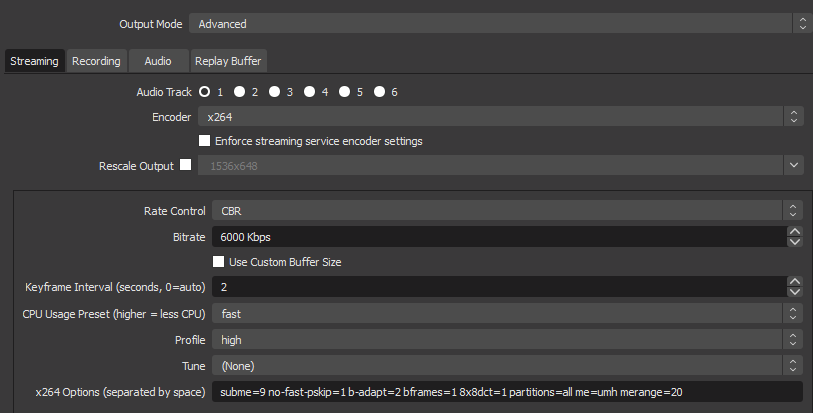

here is the options: subme=9 no-fast-pskip=1 b-adapt=2 bframes=1 8x8dct=1 partitions=all me=umh merange=20
that was the "Output" then in "Video" setting your base should ofc. be your screen resolution and then output should be 720p or at max 900p for fast pased games
these settings will do the scaling of the video on the GPU and then do the encoding on the CPU.
With your current settings you scale from 2560*1440 til 1920*1080 on the GPU, then you scale 1920*1080 to 1280*720 on the CPU and then encode on the CPU
@timid vine Hope you get a better result with the above
 midnight bloom
@deep birch Hi. New here. I’m having a problem using OBS Live randomly dropping connection to the StreamElements servers when I first open it. Sometimes it loads fine. When it doesn’t work, It shows me an ERR_LOAD or something to similar error message and also informing me that I can’t connect to StreamElements server. The overlays don’t load, widgets don’t load. Sometimes the icons in the widgets don’t load either. Have any idea what would be causing this?
 shell sparrow
where can i find browser source on OBS.live? did the download but its not appearing
deep birchBOT
@shell sparrow To add your overlays to OBS, add a new browser source in your scene. Paste your overlay URL in the browser source properties, set the dimensions to 1920x1080 (unless you changed them on the website), and ☑ “Shutdown source when not visible” https://youtu.be/KDvLynUqXI4
shell sparrow
so studio has browser source, i dont need it on .live ?
tulip hamlet
OBS.Live is a plugin for OBS Studio.
tulip hamlet
I don't understand what you mean.
tulip hamlet
What about it?
shell sparrow
i cant find it 😦
steel mural
It's called "Browser"
shell sparrow
is that the same ?
steel mural
Yes. It's a "Browser" source
shell sparrow
maybe thats why there is no browser ''source'' anymore
i guess its updated
thanks fellas!
steel mural
The things you add on OBS to display stuff are "sources". And now you have to add a "Browser" source. If we would only say Browser, people would think we mean a web browser like Google Chrome.
dawn apex
If I want to stream in 720p do I change Base Canvas or Output? Or both?
placid fjord
@dawn apex Your base is what you have you main resolution set at and is what you will see in OBS. The output is what will be shown on stream, so you need to change that for it to be downscaled.
placid fjord
That i'm unable to tell you. From own experience i stream using the GPU, to make sure minimum load is put on the CPU, and i can then have a higher quality preset.
But i dont think your base canvas would have a noticable impact on the CPU, you can always to a test using a "burner account" if you stream to Twitch. Good for testing things, and none of your followers will tune in to see it 😛
 mild lynx
Hey guys! New to streaming.
Question though!
I ran my stream last night on streamelements/obs.live and I had significant fps issues.
anyone have any possible solutions to try?
 frank grail
Hello, am I able to stream to multiple platforms at once?
tulip hamlet
StreamElements doesn't support multistreaming at this time. All channels are kept separate even when accounts are merged.
frank grail
That's really unfortunate. Thank you for the info
 sterile bronze
trying to figure out how to add my chat
not the the live stream for people to see but like the chat i see likein the "deck" option
solar crown
quick question, unsure if someone already has or knows how to.. but is it possible to have a command in the elements bot to play a gif file in a location i set for a specific amount of time, lets say 60 seconds then deactivate?
kindred fox
You could use a store redemption to play the gif
solar crown
is there any way to remove the message in chat when it appears?
or when its redeemed it should say
also max time is 20s, would like to know if its possible to increase that to 60s
 leaden quarry
Does obs.live work for MacOS?
shy mountain
Unfortunately, no.
leaden quarry
What options does a Mac user have for stream alerts?
shy mountain
@sterile bronze Click on "Streamelements" on the top menu buttons in OBS -> chat
@leaden quarry Overlays still work, what doesn't work is our plugin for OBS Studio.
You will have to popout our activity feed from the Dashboard, to make it easier to track
leaden quarry
Ok so have to use the old browser source method. Got it thanks.
shy mountain
@solar crown You will have to have a custom widget for that type of function.
solar crown
thought so, ty
shy mountain
The preview of the stream in OBS? Afaik, the preview can't be moved.
but you can adjust the various docks around it
 random gale
Am I able to drag my chat to go down to the left of the preview window without it squishing it down?
shy mountain
I'm not sure I fully understand what you mean, but as mentioned, you can move all docks anywhere around the preview window.
sterile bronze
Is there not a mixer chat?
shy mountain
We don't have Mixer support.
shy mountain
We never had Mixer support.
sterile bronze
When I click stream in the setting and use my mixer stream key than I mixer chat will pop up
Than a*
shy mountain
What you see as a chat, might be an OBS Studio integration.
OBS.Live(our plugin) does not have mixer support.
shy mountain
deck settings?
sterile bronze
Dock
shy mountain
Im still not 100% sure what you mean.
sterile bronze
One sec turning my pc back on
Yes literally says docks
Click view > docks > (shows what option I have to choose from
Before in these setting when I sign in with mixer it shows mixer chat
But if I change the stream source to let’s say twitch or custom the mixer chat goes away
My problem is I’m now using a custom source and the mixer chat isn’t there now
deep birchBOT
@sterile bronze If you are not seeing the OBS Twitch integrations and have OBS.Live installed, please follow these steps:
- Make sure you are on the latest and greatest version of OBS.Live ( 19.7.14.421 )
- exit OBS (make sure OBS is not running)
- delete %appdata%\obs-studio\plugin_config\obs-browser\obs_profile_cookies
- start OBS.Live
- Settings -> Stream -> disconnect -> connect
shy mountain
I don't know if OBS Studio in general has mixer integration on their own to be honest
sterile bronze
I mean I can sign back in with the mixer key and take a pic and show you
Through obs it pops one up
shy mountain
Follow the instructions above.
sterile bronze
See signed into mixer through the stream key and now there’s a mixer chat
Right next to the twitch one
sterile bronze
When I switch to a custom stream key it goes away
deep birchBOT
@sterile bronze For the best OBS support, please join their Official Discord @ discord.gg/obsproject
rugged quail
ok so im trying to uplode a picture to streamelements but it will not let me upload it it is in a .png format
shy mountain
What browser are you using?
rugged quail
explorer
shy mountain
User anything else but explorer
recommending Chrome as our site is optimized for it
 torn talon
Heya! I am trying to set up a capture of my phone via PC. I connected the PC and the Phone, so I can see what I am doing on the monitor. (via Windows Connect). Now, when I try to capture the window, all I see is a black screen. Any idea why?(using Window Capture)
quasi snow
I never tried that but are you running OBS as admin?
torn talon
Umm, not sure, lemme check
quasi snow
normally that is what causes black screens, inability to capture due to limited access
but since it's something I never tried I don't know if it's possible 😄
torn talon
It wasn't on admin, added it to always run it as admin. But I still got the black screen.
quasi snow
seems like you'll need an app for that
 static tapir
hiya 😃 I'm did a test stream and everything looked OK in the obslive dashboard, but on stream it was blurry. I was using restream and it looks like it was broadcasted to all the streaming sites like that
shy mountain
We don't have restream support for OBS.Live so best place to ask is in the OBS Discord here: https://discord.gg/obsproject
static tapir
oh ok, thanks 😃
rugged quail
ok so i am have videos and sounds in place for my alerts but it is not wanting to work any suggestions?
 remote sail
Hey, quick question, is there a way to let someone trigger a picture on an overlay using a command in chat?
shy mountain
Steps to make a command trigger sound on stream:
- Go to Stream Store page here: https://streamelements.com/dashboard/store/items
- Add an item that has these settings on it:
- Stream Perk
- Loyalty settings to your desire
- (Next step) Add contents (image and/or sound you want to play)
- "Redeeming this item shows an alert
- Redemable via chat
- Skip Requirements
- Get the item name/command from the 2nd creation page
- Go to commands page here: https://streamelements.com/dashboard/bot/commands/custom
- Add command with desired name and have response for command as:
${redeem item_name_here} - Go to your overlays and edit the overlay you use.
- Click on "widgets" and add "Store redemptions" widget. Click save and you should be golden.
- Test your own command in chat and have OBS or editor open to hear sound
- ???
- Profit in viewer interaction and that dosh

this applies for pictures only as well
@rugged quail Sorry I must have missed the ping from the channel. Can you elaborate?
remote sail
thanks, is there a way to hide that response that comes along with the $redeem?
shy mountain
Not right now.
There are talks to have it open for editing, but not right now
and no ETA
remote sail
ok thanks
deep birchBOT
@rugged quail Spotify has kindly asked us to disable our integration with them, so we complied. This means that the Spotify integration has been removed and the "Now Playing" widget no longer has it as an option.
 slim yoke
Hey guys! Is there someone who can help me to set my OBS, since I tried many options and none of them worked for me?
sinful flint
@rugged quail There isn't Soundcloud integration atm
slim yoke
@rugged quail I7 8700k 16GB DDR4 3200Mhz GTX 1070
sinful flint
Media Request is YouTube
slim yoke
@rugged quail I mainly stream CS:GO but the quality of the stream is always blurry for some reason.
@rugged quail 2500 Kbps
Doesn't it depend also on the internet connection?
49 mbps
720p
 sick cloak
Can i use streamelements to get a sound notification in OBS so i know if someone joins or follow my stream?
quasi snow
push it to 6k, see if it handles fine, if you have encoding options for your viewers that is @slim yoke
@sick cloak yes, use overlays here https://streamelements.com/dashboard/overlays add alertbox and configure the alerts, sound etc you want
deep birchBOT
@sick cloak To add your overlays to OBS, add a new browser source in your scene. Paste your overlay URL in the browser source properties, set the dimensions to 1920x1080 (unless you changed them on the website), and ☑ “Shutdown source when not visible” https://youtu.be/KDvLynUqXI4
sick cloak
Thanks.
slim yoke
@quasi snow What about the remaining setting as per rescaling, presets?
quasi snow
I'm assuming you are also using 60 fps, if not you can go lower than 6k
slim yoke
No I'm using 30 FPS
quasi snow
ahh
slim yoke
I guess afraid to try cause of the internet xd
quasi snow
take a look at this guide https://stream.twitch.tv/encoding/
well, 60 fps looks a lot more fluid
slim yoke
I know and I have the setup to run it at 1080p
slim yoke
I think the main issue is my lack of knowledge at this area and my internet connection
quasi snow
720p @ 60 fps will look a lot better than 1080p @ 30 fps
quasi snow
ahh ok
slim yoke
That article is very useful, much appreciated, mate!
quasi snow
you're welcome, it is a great guideline, then keep implementing small changes if you are still not happy
slim yoke
will do so 😃
rugged quail
also you can easily run your internet connection before stream on likespeedtest.net
so you can like determine your upload for your bitrate
slim yoke
Well my upload like i said is 50 mbps
rugged quail
then it should be fine to stream at 60fps 1080p 5000 bitrate tbh
slim yoke
I'll go for 720p 60fps 4500bitrate
rugged quail
that's also good, i also like to sit a bit under what twitch says you can do
slim yoke
Go for lower bitrate?
kindred fox
I'm just gonna leave that for you to read
remember that you also have to take into account your hardware
slim yoke
Yeah, I know it is not a problem.
quasi snow
I stream at 720p 6k bitrate and 60 fps but I do make sure that viewers have encoding options so I don't kill their phones etc
kindred fox
I'm a 720p60/3000-3500 bitrate person myself
1080p60 looks so much cleaner though
but I'm not going to hinder my gameplay just to route my 144hz display through my elgato card
slim yoke
Is it possible to PM me your video settings on OBS?
quasi snow
me?
 mild blade
i have 51 followers, but my follower goal says 0, any fix?
steel mural
@rugged quail That's like following some of those "best settings" videos on youtube. The settings of other users are pretty useless for you because every system, every use case is different.
quasi snow
slide viewer requests to on
top left
the command is a default one that gets enabled once you enable that

slim yoke
I have tried couple of settings again but the stream is still blurry , ughhh
steel mural
The stream will always be a bit blurry because you're streaming in 720p. Raising the resolution could mean pixelation which is much worse. The stream will never look like the picture you're seeing while playing the game @slim yoke
quasi snow
@mild blade sorry almost missed ur question, go here https://streamelements.com/dashboard/session goals tab and set it to what you want or need
you will need to have 1 of the 3 @rugged quail OBS.Live plugin or site open on media request or Ground Control to play and listen music
only youtube is supported atm, sorry
if I'm not mistaken
kindred fox
I believe it would, but I have never used dubtrack
Whatever is playing via that service should display in the widget
quasi snow
yeah same here, was in reply to soundcloud hehe, can't enter urls from there on media page at least

kindred fox
Very nice
rugged quail
@shy mountain sorry i fell asleep lol im trying to set up Sub alerts and cheer alerts i have the picture and the sound uploaded but when i test them they are not working
odd kraken
Check your variations.
rugged quail
@odd kraken thanks that worked
 nova lily
Is there someone who could help me how to set up the music name which is going on in the background in obs?
kindred fox
Which service are you using for music @nova lily
nova lily
@kindred fox spotify/youtube
and how to add chat to this tab? or it will show manually when i will start stream?
rugged quail
@steel mural Dont ask
nova lily
plain sonnet
why below?
its fine where it is
its there by default for a reason
no it doesnt, you can see the chat box
its not touching the overlay
steel mural
@rugged quail Do me a favor. It's the same like it is on the OBS Discord. Please make sure to stay on topic in each channel. Avoid cluttering up the support channels when people are seeking assistance and do not give advice on topics or features you are not qualified to help with.
simple bridge
Anyone know how to add a custom scene transition?
kindred fox
That’s called a stinger
You can add it via the transitions options next to the mixer in the OBS window
daring shoal
Does anyone here have any update on the issue with the obs.live plugin causing strange scene duplication issues? Support in the OBS studio discord recommended disuse of the obs.live plugin and I haven't had this issue since. It was terrible to deal with.
The screenshot is how many scenes I ended up with in a single scene collection. I promise I would have remembered duplicating those. I'd love to use obs.live plugin, but I can't risk this again. Any help?
 dreamy mural
help
ok i stream on stream labs and i am makeing the switch to stream elements how do i put all my stuff from stream labs to obs live
simple bridge
@kindred fox Thx!
dawn spire
@dreamy mural https://support.streamelements.com/hc/en-us/articles/115000405371-Import-other-platforms-into-StreamElements

StreamElements
Importing other tools into your StreamElements account is really quick and simple.
Use this guide to learn how to import: Streamlabs, Nightbot, Ankhbot/Streamlabs Chatbot, CSV files, Deepbot, Stre...
rugged quail
hello, my stream information is not working in obs streamelements
steel mural
@rugged quail There is no StreamElements OBS. OBS.Live is just a plugin.
Restart OBS. Twitch just fixed it.
 static basalt
Is there no way to setup a giveaway in advance (save it)? In other words, I want to create a Giveaway today and launch it tomorrow....
wise silo
to where people can start joining it now, but it not roll for a winner untilt ommorrow?
static basalt
no, I don't even want to start it until later, there is no SAVE button which seems very odd to me.
wise silo
not sure why you would need to setup a giveaway before youre ready to launch it
kindred fox
Well, if you have a steam gift card that is a regular giveaway item on your stream, it would be nice to have a template that you can activate at any time instead of having to recreate the entire giveaway
static basalt
so that I don't have to take the time away from my live stream to set up a giveaway
dreamy mural
how do i get a face cam up
wise silo
if your cam is plugged in right click your sources, add new, video capture device
static basalt
and I had 5 different giveaways to do yesterday and I had to create them all while live,
wise silo
@static basalt https://chrome.google.com/webstore/detail/simple-twitch-giveaways/aacnakggjhpkobmgcbngbljobfaejaoi?hl=en

Simple Twitch Extension for Giveaways
kindred fox
^^ that's why it's important for templates. I would suggest putting it on the ideas board in #💭︱feedback-and-ideas and tell everyone to upvote it
static basalt
would have been awesome if I could have done them all the night before and launched them when I was ready for each to ru n
dreamy mural
i did all that @wise silo but how do i get it on the screen into the facecam box
kindred fox
Are you talking about putting the camera with your overlay?
dreamy mural
ya
wise silo
🤔 add it to your scene then drag it under the overlay
or over /shrug depending on what you want
dreamy mural
it just covers the hole screen
wise silo
resize it
if you double click the camera a red box will appear
that will allow you to resize
will look similar to this
that red border just click drag to the size you want
dreamy mural
it is saying the base and output resolutions will be resized to the size of the current source ever time
wise silo
hi
dreamy mural
what do i do after crop thing
wise silo

Here's a quick and easy guide on how to crop your webcam in OBS Studio. Also works if you want to crop images as well. Please LIKE and SUBSCRIBE if the video...
 main solar
Anyone know about camera filters? I tried adding color correction to my camera source, and when I tried to select a color the entire source just filled with that color.
wise silo
are you right clicking the video capture device, or the scene?
dreamy mural
i tryed both
main solar
The video capture source
wise silo
that video is all i know to try @dreamy mural if that odesnt work youll have to wait for someone more experienced 😢
not him though
he bites
daring shoal
Does anyone have help for the issue I posted above today?
wise silo
mind reposting the question
wise silo
@main solar im not sure why if you are right clicking just the video capture device and editing the color on that everything else is changing colors 👀 maybe try adding a new video capture device and edit that one?
kindred fox
I don't have enough knowledge on it
daring shoal
Does anyone here have any update on the issue with the obs.live plugin causing strange scene duplication issues? Support in the OBS studio discord recommended disuse of the obs.live plugin and I haven't had this issue since. It was terrible to deal with.
The screenshot is how many scenes I ended up with in a single scene collection. I promise I would have remembered duplicating those. I'd love to use obs.live plugin, but I can't risk this again. Any help?
kindred fox
tbh, i doubt it was OBS.Live that did that
daring shoal
Right @kindred fox that is a list of scenes within one scene collection
kindred fox
You could export your source lists and scene collections and then if it happens again you can just delete them all and import from the exports
that would be the simple fix
daring shoal
And just export every time I change something I suppose. The only reason I thought it could be obs.live is because the OBS studio discord seemed to act as if they've seen it before and it has always been obs.live somehow. I'm not knowledgeable enough to explain what they said the cause was, but something regarding the plugin changing the browser...something...in OBS lol
kindred fox
You would only have to export once
You're simply exporting your complete list of scenes and sources once so you have a master backup copy of them
then when you install OBS.Live if it breaks, you simply delete the source collection and import your master set
daring shoal
Right. I just meant when I edit them, I would have to export again to have a copy of the changes. Sorry for the confusion
kindred fox
well best practice is to save and save often
So you'd just be following DR best practices
DR=Disaster Recovery
You could simply export them to OneDrive for cloud backup and mark them with dates /changes in the folder names so you can separate them
daring shoal
That is what I will do.
I did also have an issue with it replacing scenes in some collections with scenes from other collections, but this was less common. The duplications happened about 4 times before I got rid of the plugin then it never happened again. I'm not saying with certainty it was obs.live, but is there a way anywhere to file some type of bug report so that there is record of this at least? That way if it is the plugin, a pattern can be seen and it might get fixed.
dry sphinx
@daring shoal You can always download the OBS.Live plugin again. If it still does it -> Click StreamElements on OBS -> Report an issue.
daring shoal
Thanks! @dry sphinx
kindred fox
That’s why he’s paid the big bucks
main solar
@wise silo I tried that. Problem persists. I truly don't understand why >>
 karmic glen
Quick question, I want to stream on YouTube some days and on Twitch other days, is there an easy way with .live to switch between the two?
tulip hamlet
Log out with the StreamElements menu at the top and log in with the other account.
karmic glen
Is OBS.Live for YouTube a different program than the one for Twitch?
kindred fox
You can configure a profile and scene collection inside OBS that will allow you to switch to YT, and a Scene collection will allow you to load scenes specific to YT
So you'll need to configure a new profile from the Profiles menu for YouTube, then create a scene collection for your YT Scenes
karmic glen
Right I already have done all that, but when I switch to my YouTube profile the Twitch chat is still on the side
kindred fox
did you go into the settings for that profile and sign out of Twitch and into YT?
karmic glen
Yeah, but is it a different download, I tried to update and it said I'm up to date
kindred fox
shouldn't be?
wise silo
^
karmic glen
brb testing
kindred fox
@tulip hamlet Is that logging out via SE menu item to swap to your SE YT account info?
Follow what Nethyr said
too
karmic glen
Okay, I see now, I have to change my profile AND log out and back in to swap
kindred fox
yep
The profile/Scene collection will give you control over your YT overlays, the login/logout is to pull the YT data into OBS.Live
karmic glen
Gotcha, thanks
 elfin flame
I was just about to ask about profiling. So we have to switch profile and then Log out and In of the StreamElements when changing services?