#helpdesk-selive
1 messages · Page 50 of 1
 dry sphinx

 rugged quail
lol

 cyan adder
ty
rugged quail
dry sphinx
 Gotta ask a Dev about that. Never seen that before.
rugged quail
where do i ask a dev
 plain sonnet
https://discordapp.com/channels/141203863863558144/494513233416421386/602731013009047584
-Most likely anti-virus is blocking OBS
- Firewall is also blocking OBS
err_timed_out - most likely your internet is trying to connect to our servers, but is being timed out by something or isn't able to connect at al
cyan adder
when my stream crashes i get a message saying ''error occurropted while streaming'' is anyone familiar with that ? (been having this problem for over the past 3 days)
 spice hedge
hey I need you help. I have a Nikon D5300 and a AverMedia Capture Card. The Card has a delay, i think 1000ms so now i have to give my mic a delay of 1000ms but in streamlabs and OBS Studio is no filter for delay
 deep birchBOT
@spice hedge For the best OBS support, please join their Official Discord @ discord.gg/obsproject
spice hedge
ok
 real oyster
does obs.live really use a lot less resources than SLOBS? Currently getting about 10-22% usage on a 9700K during streaming and wondering if it's worth switch for a lower margin
dry sphinx
It does use less. Let's see what's' up.
deep birchBOT
@real oyster Please provide a log from your last stream. To do this, in OBS go to Help > Log Files > Upload Last Log File and paste the link to the log file here.
real oyster
@dry sphinx Ill give a test stream this week and see what happens, the idle margin is still the same, but wondering if i can sneak the cpu usage down to 10-15% margin
 dense merlin
is it safe to post OBS logs here?
 odd kraken
yes, best post the log link here.
dense merlin
ty
I keep dropping frames, i'm on an ethernet connection and the bandwidth test set me up with a 6k bitrate at 1080p. Tried tweaking a whole bunch of settings today while both on stream and off with no improvements, i'm not sure what else to try, here are my logs for my last quick 30 minute trial stream:
https://obsproject.com/logs/4fcwrD1FxEJU2uYT
odd kraken
The log says you are wi-fi streaming: https://h4ndy.eu/obslog?url=https%3A%2F%2Fobsproject.com%2Flogs%2F4fcwrD1FxEJU2uYT
dense merlin
oh weird i have the cable plugged in and disconnected from the wifi source but i just manually shut my wifi off so hopefully that fixes that part
rugged quail
I need help with setting up obs, I using the game and display settings, but my screen is just black, ive searched up some vids but they wont work.
deep birchBOT
@rugged quail For the best OBS support, please join their Official Discord @ discord.gg/obsproject
 wintry rock
im having trouble importing from streamlabs obs. it keeps coming back saying it has failed?
 unborn trench
Hi there, is there a way to add my twitch and youtube activity feeds and streamchats into obs.live?
 tulip hamlet
Not both at once. StreamElements doesn't have multistreaming support.
unborn trench
Ok
So I can only choose one?
Is there a way I can switch it from my twitch to yt?
tulip hamlet
Switch what?
tulip hamlet
OBS.Live doesn't support YouTube at this time.
wintry rock
this is what i have on my screen. i have tried to import from streamlabs obs how ever it keeps saying failed
 noble wedge
I am having black borders in my stream left and right
rugged quail
How do you import scenes from streamlabs obs to obs live (tag me in answer please) 😃
I have been trying for a bit and can't seem to get the songrequest command to work.
tulip hamlet
@wintry rock Check your scene collections for something you wouldn't be allowed to import, or things like paid options, that kind of thing. Something in there isn't agreeing with the import.
@rugged quail StreamElements menu at the top of OBS.Live.
@rugged quail More details please.
rugged quail
It says I can't turn it on because it says it is controlled by a module, I have "viewer requests" enabled.
wintry rock
@tulip hamlet ok thank you i will have a look, but im sure it is all ok to be imported
@tulip hamlet so i have the file on my laptop and obs.live lets me load them up 1by1 but wont let me import
do i have to have them as a collection on streamlabs before hand?
tulip hamlet
Yes, the import doesn't use a file, it takes it directly from SLOBS.
wintry rock
oh ok. any idea how i make them a collection on streamlabs?
wintry rock
@tulip hamlet i have checked and i have re tried but still on joy. im not sure what things cant be imported over
as far as i know it all should be able to be imported
when you say i cant import files, if my overlay is made up of different files is there any way around this?
tulip hamlet
Anything that belongs to Streamlabs, and any large files, can cause the import to fail.
 ruby chasm
my audio while i'm streaming sounds like it's coming from the left side but in game its fine. does anyone know how to fix this?
deep birchBOT
@ruby chasm For the best OBS support, please join their Official Discord @ discord.gg/obsproject
wintry rock
@tulip hamlet ok that fine , so my next question is. how to i use an overlay from streamelements?
deep birchBOT
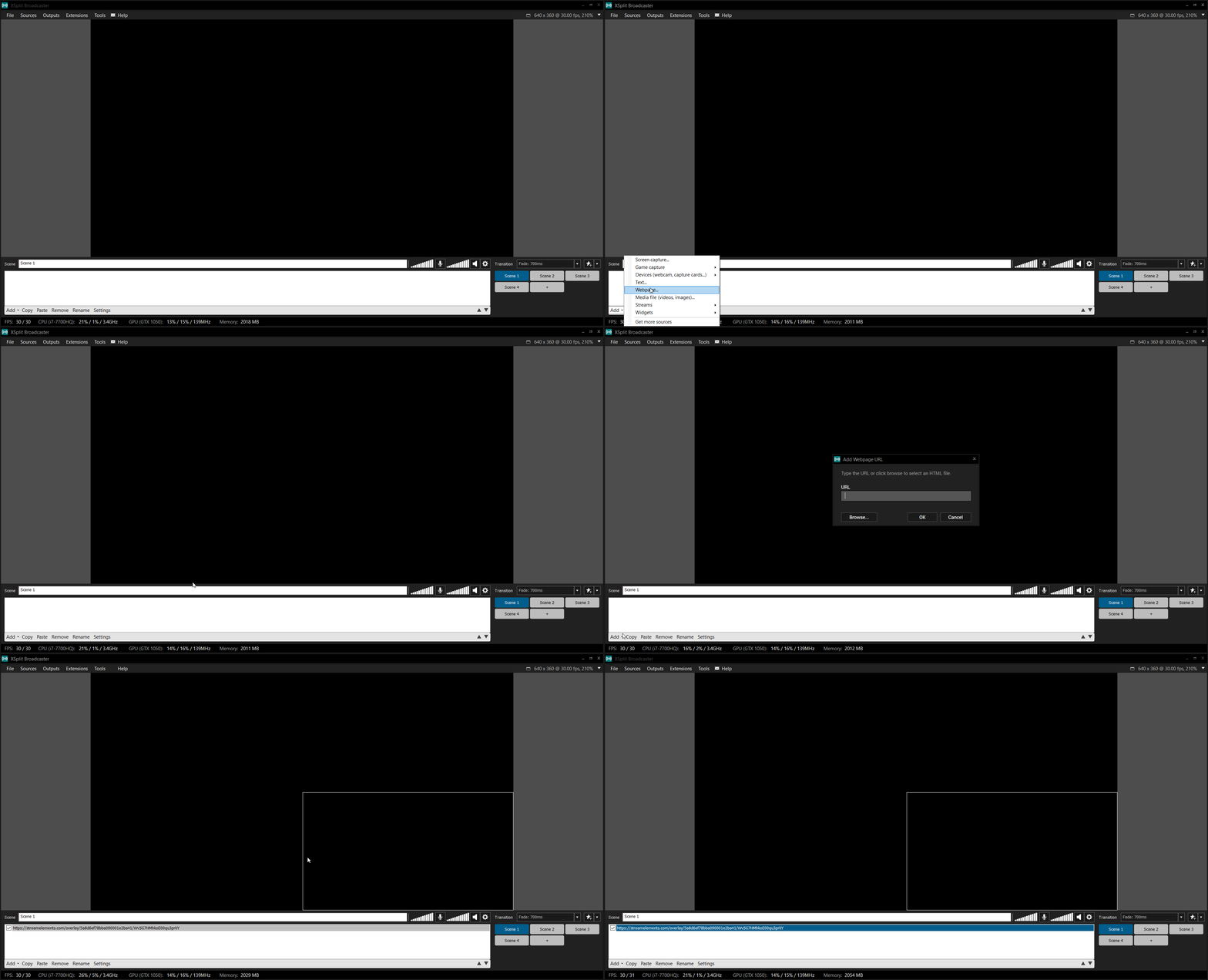
@wintry rock To add your overlays to OBS, add a new browser source in your scene. Paste your overlay URL in the browser source properties, set the dimensions to 1920x1080 (unless you changed them on the website), and ☑ “Shutdown source when not visible” https://youtu.be/KDvLynUqXI4
wintry rock
cool
 silk thunder
I just noticed in the StreamElements introduction and initial setup blog it says you should download the newest version of OBS Studio still. I feel like you should change it to recommend OBS.live. https://blog.streamelements.com/1-minute-twitch-stream-setup-89a6c73c85b9
 ripe light
rugged quail
ripe light
rugged quail
can I get someone is voice support please?
deep birchBOT
@rugged quail Welcome to the helpdesk! Please let us know how we can assist you today and a support volunteer or staff member will assist you as soon as they are available. Thank you for your patience.
rugged quail
Ok ❤
tulip hamlet
@rugged quail Nobody is available for voice. Please write your question.
rugged quail
Ok, so i've used vsync already. But when i'm in game, if i don't cap my fps below my refresh rate, way lower. Then the stream will stutter.
Is there a setting I can use to make it to were it won't overload and skip frames in obs
deep birchBOT
@rugged quail Please provide a log from your last stream. To do this, in OBS go to Help > Log Files > Upload Last Log File and paste the link to the log file here.
rugged quail
 warm herald
Why do my alerts not show up on my live stream?
the test always works but earlier today it didn't show up when i got a follow at all
 ornate agate
I imported some things from streamlabs into obs live, where do i find them?
tulip hamlet
You're not importing into OBS.Live, you're importing into your StreamElements account. It's on the site, it's not automatically added to OBS.
warm herald
Does anyone have alerts that won't show up on a live stream when triggered?
 soft radish
says my account isnt eligible for G2a pay?
deep birchBOT
@soft radish Please connect your streaming account (Twitch, YouTube, or Facebook) with Discord by going to ⚙ Settings and then Connections here in Discord. https://streamable.com/eg92w
 soft radish
ok i did that
tulip hamlet
G2A Pay requires a minimum of 10 followers.
soft radish
tyvm
ornate agate
okay don't know if i'm being an idiot or what but i have no idea how to put an overlay from onsite into obslive
deep birchBOT
@ornate agate To add your overlays to OBS, add a new browser source in your scene. Paste your overlay URL in the browser source properties, set the dimensions to 1920x1080 (unless you changed them on the website), and ☑ “Shutdown source when not visible” https://youtu.be/KDvLynUqXI4
rugged quail
Ok so the stuttering issue is only on one scene, when i tried an empty scene with only gamecapture it's entirely gone, does any 1 issue cause this?
 ocean jungle
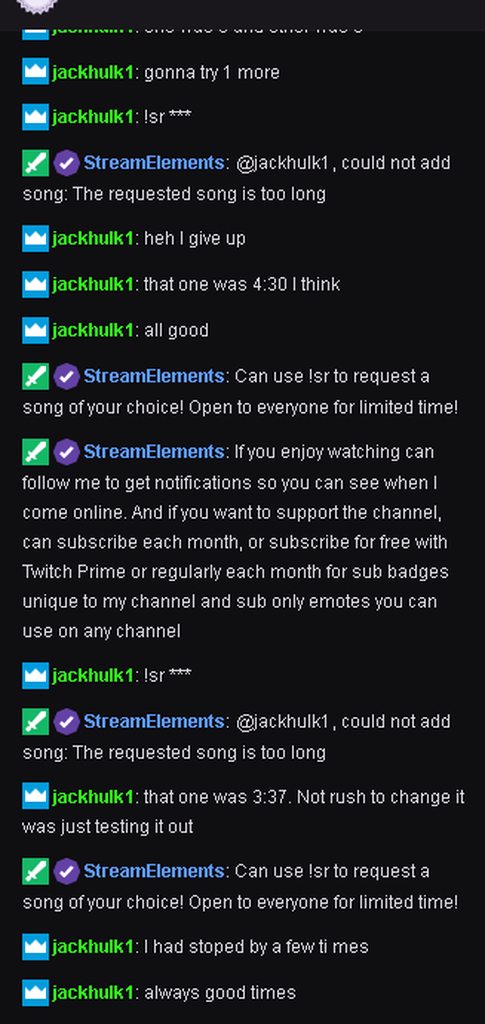
any help it says media request from a viewer is too long and the video is only like 2 mins
tulip hamlet
Screenshot the error please.
ocean jungle
 tulip hamlet
You have a Twitch setting enabled that disallows links from being posted in your chat, and changes them to ***. The bot then uses *** as a search query.
Not the song they attempted to link. The bot never sees that link.
ocean jungle
still not working even with permit
rugged quail
No matter what encoder, or bitrate, my stream is stuttering, it says "overload" when i check the website even if i use 50 bitrate, my task manager doesn't show any proof of high % for cpu, i lowered my game settings, capped fps, and enabled vsync. I've tried 30fps streaming too
rugged quail
i know, i've tried every bitrate, that software said i was 100 quality for atlanta, which is the server im using, i can easily do 6000, but it stutters still
tulip hamlet
Because this has nothing to do with your bitrate.
rugged quail
my pc specs are 1070 sli, 8700k 5.1 ghz
720p 60fps is my prefered streaming quality
tulip hamlet
You're overloading your CPU and GPU. Apex is notorious for this. You need to cap your FPS.
rugged quail
i did
at 60, and lowered the game settings
its not just for apex
it does this for every game
tulip hamlet
You also need to understand that a single PC setup has its limits, and those specs don't mean you can do anything.
https://h4ndy.eu/obslog?url=https%3A%2F%2Fobsproject.com%2Flogs%2FU4dPLYZm2hpyRgOX
This has some links to guides to help you out.
 prime girder
why is everyone currently maxing out OBS render
also Apex doesn't use SLI I think so might as well render on your slave
@rugged quail can you launch OBS (don't do anything) but keep your regular scenes active then sort task manager by CPU? Make sure process name is added, like this
rugged quail
it only uses about 4 even while streaming using nvenc
while using x264 it uses 10% average
prime girder
the % OBS reports doesn't include its plugins
which is why I had to say task manager
can you do something for me
turn off "enforce streaming service settings" and turn off "look ahead"
for your NVENC settings
tulip hamlet
You realize NVENC is a GPU encoder, right? That's why it doesn't use as much CPU.
prime girder
and I would use lanczos for your downscale filter
rugged quail
it's already turned off
@tulip hamlet Yea, that's why i put a description for both
"10% while using x264" "4% while streaming with nvenc"
prime girder
your logfile says look ahead is turned on
prime girder
old NVENC is completely worse unless you want to downscale after the first resolution pass
rugged quail
i removed every source except game capture too
prime girder
so you're getting an encoder overload no matter what
can I see your output settings page?
rugged quail
I've decreased it, i can stream and run around for a few minutes and upload the log if you need it
prime girder
I just wanna see your settings page really
rugged quail
rugged quail
explain
rugged quail
I have a nvidia bridge idk what exactly
i can reinstall my drivers
could be an issue
prime girder
Can I get you to roll back
rugged quail
i've tried vsync, gysync, capping fps, the whole lot
Yea i can
I was using an older driver anyway
but someone else told me to update
prime girder
yeah ignore anyone who says just update to latest
Nvidia breaks more drivers than they fix
prime girder
the last known good driver off the top of my head is the WHQL Sekiro driver
419.67
there is probably a later one
but I don't know it
please DDU and clean/restart in safe mode before installing that
and try it without SLI enabled first
If you still have an issue, and reinstalling OBS fresh (not using any previous settings/saved files) doesn't fix it, I'm simply gonna have to say the problem might be windows
Because Windows 10. BREAKS. A lot.
rugged quail
ok im downloading the driver now
prime girder
all right
rugged quail
The thing is
It was fine
Until my system had to wipe bc some stupid dark web virus
So I started fresh and it's all screwed up
also, it doesn't matter what gpu i use, it still does it
rugged quail
all my drives and ssds were wiped, had a clean install
prime girder
oh
mmm
honestly
could be windows installed badly
I've had it happen
fresh install, some options in control panel and with updates grayed out
rugged quail
i can fresh start on my pc
prime girder
clean installs are the only way to get rid of broken windows
if nothing you can do fixes it, you simply will have to reinstall
it's a pain, but it's how it is
so far you've copied settings I know to be fine, so the problem likely isn't inherently related to OBS
rugged quail
i don't think it's my pc maxing itself out, so it's just annoying
i installed the driver
time to test
prime girder
you DDU'd the old in safe mode right
rugged quail
Idk why it says two
i closed it via task manager and it still says that
that was 30fps im gonna try 60 now
prime girder
ok
prime girder
oy hold up
you turned off game mode and stuff right
disabled fullscreen optimisation on OBS too?
prime girder
Still bothers me that you have any encoding lag at all, but if it's better that's good
rugged quail
that was offline though, will playing online affect anything?
prime girder
Not likely
rugged quail
yea idk why i have encoding lag
it was maybe a some stuttering every once and a while
but not ever other frame for like 2 seconds
it was just a pain bc i was in the middle of a child health foundation charity stream and it was stuttering so bad people would leave
prime girder
does it happen for other games or black screen recording?
 warm tide
Does anyone happen to have a Roxio Game Cap HD or am I the only one with this trash lmao
 proper cargo
Hey, my audio in OBS tends to stay in the high greens in all the sources but when i listen to it on Twitch (i am live streaming) it is extra quiet
rugged quail
@prime girder yea it does happen in other games, i don't record though so idk abou thtat
prime girder
even after the new driver install?
 shy mountain
@proper cargo check your windows sound mixer if youve lowered obs there
@warm tide if that is a game capture then i assume you have an issue of sorts with it - best ti ask in the obs discord.
deep birchBOT
For the best OBS support, please join their Official Discord @ discord.gg/obsproject
proper cargo
@shy mountain OBS is at max
deep birchBOT
@proper cargo For the best OBS support, please join their Official Discord @ discord.gg/obsproject
 mystic hull
My SE bot has seemed to left my chat and i cant figure how to get it back in my chat
shy mountain
Go here: https://streamelements.com/dashboard -> join channel on the right
mystic hull
thanks i had to make it part and rejoin
rugged quail
Why dosent it work?
odd kraken
The imported overlays are in your overlay section at the StreamElements dashboard: https://streamelements.com/dashboard/overlays
You need to add them as browser source to your OBS.
 hardy tulip
Hi, whenever i change profiles from 1 to another it crashes obs but when i do the reverse it's ok. I only have 2 profiles. Any ideas? OBS crashes without any reports generated the program just closes
 sinful flint
The best thing to do would be to click on StreamElements at the top of OBS.Live and then Report an Issue, this will allow you to inform our OBS.Live developers while also providing them with some important details to diagnose
odd kraken
Any error message when you hit start streaming?
odd kraken
Please post a screenshot of the error message here.
 carmine valve
im on wifi and nothing blocking it
ok
idk what my firewall not blocking it
im connect to my wifi
deep birchBOT
@carmine valve For the best OBS support, please join their Official Discord @ discord.gg/obsproject
 forest summit
hello! i need some assistance with obs.live. whenever i run it, any game i play stuffers sudden lagspikes. if i run the streamlabs version everything is fine, not sure what could be the issue
deep birchBOT
@forest summit Please provide a log from your last stream. To do this, in OBS go to Help > Log Files > Upload Last Log File and paste the link to the log file here.
forest summit
odd kraken
In the log is no output session. Please provide a log of a stream session.
forest summit
@odd kraken Hello benno! That's the thing, I don't even have to be streaming, I get huge performance loss in any game just by having OBS Live running in the background, no streaming, no recording
With other OBS variants I don't have such problems
odd kraken
Have you set all the overlay browser sources to shutdown when not visible in the browser source properties? Do you use the kappagen widget in one of your overlays?
forest summit
I'll check as soon as I can and get back to you, thanks!
forest summit
@odd kraken I have set every source to shutdown when not visible and I am not using kappagen widget, the problem prersists unfortunately
 tropic lichen
Hi there. I messed up somehow while setting up OBSLive, and I'm sure it's all my fault, but the tipping settings in OBSLive lead to an incorrect channel name, even though my settings in StreamElements look fine. Is there a way to change the channel name used in OBSLive?
Everything else looks fine -- right Twitch key, connected to the right account, right info is coming up. It's just the tipping bot.
odd kraken
You should be able to log out using StreamElements at the top in OBS.Live > Log out and log back in.
odd kraken
@forest summit Do you play Apex? Do you have issues there?
forest summit
Both Apex and DayZ show same issues @odd kraken
cyan adder
Hello i need some to help me with the settnings so i can stream and not crash. Now when i start streaming theres a light on bottom right and it is sometimes red/orange etc and my frames dropps are big. is there anyone that could possiblly help me out ?
plain sonnet
that would be showing your bitrate, indicating your stream "health" or connection to the streaming servers
deep birchBOT
@cyan adder Please provide a log from your last stream. To do this, in OBS go to Help > Log Files > Upload Last Log File and paste the link to the log file here.
cyan adder
this is the last log file https://obsproject.com/logs/voNph-Cr5WNWTwLo
deep birchBOT
@forest summit Since Apex Legends doesn't have optimized GPU drivers yet, it tends to take up all your GPU resources, leaving nothing for OBS. If you're having OBS performance issues, you'll likely need to limit the game somehow. The easiest way to do this is to enable Vsync in the game, or use a frame limiter. You can limit the game to 60fps by adding `+fps_max 60` to the game's launch properties in Origin.
https://twitter.com/OBSProject/status/1093974215877951493

If you stream @PlayApex and are having FPS issues with OBS due to a maxed-out GPU, you'll need to reduce GPU usage so that OBS can run as well. The quickest way to do this is to enable Vsync with triple buffering and disable Windows 10 Game Mode. https://t.co/FOPmDyJMNx
Retweets
471
Likes
1348
 Twitter
cyan adder
Twitter
cyan adder
the dropped frames keeps going up i dont know if thats a good or bad thing
i've been live for 30min and have 9742 frames dropped (9.2%)
plain sonnet
@cyan adder is that the log from when the light went to orange/red? because there is nothing in the log file for connection issues.
all thats there is your GPU and CPU
https://h4ndy.eu/obslog?url=https%3A%2F%2Fobsproject.com%2Flogs%2FvoNph-Cr5WNWTwLo
turn off psycho_visual tuning in encoding settings
set b-frames to 2
this isnt part of your frame drops, but you have 3 microphone inputs, is this correct?
cyan adder
@plain sonnet no
im streaming right now and saw it change colors. should i end the stream and send that log file ?
 warm pewter
read the link I just posted, dropped frames are 100% a networking problem
cyan adder
and just now my stream crashed
i never had these problems in my life sens 3 days ago thats weird
warm pewter
When you say crash, did OBS actually crash, or did you just lose connection because of your networking issues?
cyan adder
no i just got an message saying ''an encorder error occurred while streaming''
log file when stream ended or whatever
warm pewter
If the nvenc encoder caused a problem, that is nothing we can help with, you would need to get support from OBS for that specifically
Dropped frames are entirely a networking issue, if it was fine until 3 days ago, then either something changed with your network, or your ISP changed something, and either way you would need to resolve any problems with your network, or work with your ISP if they changed something
cyan adder
ok thanks for your time
 coarse fiber
Hey guys :)
When you install OBS Live first time and connect your Twitch account it opens with the Twitch chat to the right of the editing window, your activity feed to the left and then your broadcasting settings to the top.
I accidentally dragged the chat around and now I can't get it to go back to the way it was. I tried resetting the UI and now it just won't work at all. What do I do? I liked it the way it was when I first installed lol
plain sonnet
will the docks dock anywhere or not at all?
coarse fiber
they only lock into above the editing window now :(
so they're all cramped side by side
plain sonnet
try close to the edge on the side
coarse fiber
You are a gem thank you :) <3
plain sonnet
ah cool : )
 timid cairn
Is there any fix for streamlabs import yet? Every time I try to import it says An error occurred 
tulip hamlet
@timid cairn This is usually caused by one of two things, if it stops at scene import:
- You're trying to import Streamlabs-owned assets.
- There's a file in your scenes that's too big to upload.
timid cairn
@tulip hamlet I don't even get to that part I think
I can't even start the process itself
I installed the chrome extension but the button doesn't change from install to import now
so I can't even import the items themselves
timid cairn
ohh is there a different way of doing it?
tulip hamlet
Have one tab open and logged in to SE, one tab open and logged in to SL, then run the extension. 😃
rugged quail
Hey there. I'm new to OBS Live. I have .webm files that I'd used on SL for Alertbox animations/sounds - how do I integrate that into this?
timid cairn
oh great, is there another way of doing it since you talked about something else? @tulip hamlet 😄
tulip hamlet
There's an import in OBS.Live. You're in the channel for it, which is why I thought you were using that one. 😛
timid cairn
ohhh I see, thank you 😄
tulip hamlet
@rugged quail Welcome to the world of cloud-based overlays. Have a full guide: https://www.youtube.com/watch?v=LwAfMIR3Cj0

StreamElements Overlays are loaded from a single browser source in your streaming software, making streaming easy. https://streamelements.com/ StreamElements...
rugged quail
I'm trying to figure out how to import the alertbox from SL to here  I feel so dumb. I had it already set up on SL before lol
tulip hamlet
For the alertbox, you can use the Chrome extension just like Graceful above.
To get it, check the import menu in the top right of your StreamElements dashboard on the site.
rugged quail
hmm okay i'll take a look
brb
I get the response An Error Occurred 😦
Do I have to be in SL as well?
tulip hamlet
Have one tab open and logged in to SE, one tab open and logged in to SL, then run the extension. :smiley:
rugged quail
okie dokie i'll give that a go 😃
okay that imported
so i then take the link for the overlay to the browser source right?
oh crap it doesn't have the custom sound
@tulip hamlet So the webm's that I had include sound - I remove the default sound from the overlay, but I don't hear the video's sound when I test it (although I have it at 80% video volume). Am I missing something?
tulip hamlet
This in your alertbox?
rugged quail
yeah
tulip hamlet
Which alert type?
rugged quail
All of them are having the same problem
tulip hamlet
Isn't this a Nerd or Die alert?
rugged quail
Yes sir
tulip hamlet
Just importing those from Streamlabs doesn't always work. They're specifically coded. Check the package and their site for StreamElements installation instructions, but if they don't have them, you'll need to manually fix the coding.
rugged quail
the sound is embeeded within the video file
Ah. I have the local file. Maybe that would work if I reupload it?
tulip hamlet
The file isn't the issue. It's the custom CSS that makes their alerts run.
 untold knoll
Any hopes for a Mac version of OBS LIve?
tulip hamlet
We will be sure to let folks know if we introduce Mac support for OBS.Live.
untold knoll
For sure, but just curious if its in the roadmap for say the next 3-6 months?
 split jay
How to set up sound commands
tulip hamlet
Sound effects can be done through the Stream store.
split jay
Is there a more detailed guide somewhere i can follow. I set it up but the sound doesnt play
tulip hamlet
Did you add a Store redemption widget to your overlay?
split jay
I did
tulip hamlet
To which overlay?
split jay
All of them lol
tulip hamlet
I'm looking through your overlays and so far none of them have it.
split jay
It shows a like a present when added right?
tulip hamlet
Pardon?
split jay
When you add the widget does it show like a 🎁
tulip hamlet
The default image for it has a giftbox gif, yes, but I've gone through all of your overlays and none of them have the widget. Perhaps you forgot to save?
 winged gust
I'm still having problems with the OBS.live stream deck thing not connecting right with the obs.live program
just gives me a green/yellow error triangle looking thing
 quaint warren
Can I get some help with saving my overlays under my profile?
noble wedge
I stream and for some reason I have black borders I have a 1680 by 1050 and this has never happened before this is brand new everything is filled up but still shows border
 blazing idol
When i stream fortnite it makes my game laggy and my stream even laggier. How do i fix this
deep birchBOT
@blazing idol Please provide a log from your last stream. To do this, in OBS go to Help > Log Files > Upload Last Log File and paste the link to the log file here.
blazing idol
tulip hamlet
@noble wedge Make sure your overlays are accommodating your 16:10 aspect ratio and OBS is properly set up for it as well.
warm herald
Can anyone help with an alerts issue of them not appearing on streram?
tulip hamlet
@warm herald Can you be more specific?
blazing idol
every time i stream my whole pc goes laggy
tulip hamlet
@blazing idol You were provided a link to an analysis of your log that includes tips for you to follow.
blazing idol
i followed them and nothing helped
it said nothing was criticaly wrong but their obviously is
tulip hamlet
That's a ranking of severity based on percentage. Follow the tips here: https://obsproject.com/wiki/General-Performance-and-Encoding-Issues
Encoding video is a very CPU-intensive operation, and OBS is no exception. OBS uses the best open source video encoding library available, x264, to encode video. However, some…
 marble cradle
how do i add a overlay for twitch
deep birchBOT
@marble cradle To add your overlays to OBS, add a new browser source in your scene. Paste your overlay URL in the browser source properties, set the dimensions to 1920x1080 (unless you changed them on the website), and ☑ “Shutdown source when not visible” https://youtu.be/KDvLynUqXI4
 white crow
Are there some overlays on StreamElements that are build to work on 1366 x 768 dimensions? Is really hard to edit overlays to fix on my monitors dimensions haha
tulip hamlet
All premade themes are designed at 1920x1080.
white crow
:c ok, thanks
rugged quail
Disabling sli, and using my second gpu as an encoder was the best decision i ever made, who ever said I was bottlenecked was also wrong, i've checked. 1080p 60fps 8000 bitrate. Thanks to @prime girder For the info also
noble wedge
There are black borders on the left and in the right on stream but not obs
Need pics tell me
prime girder
what is your canvas resolution in OBS @noble wedge
noble wedge
1680 by 1050
 dapper laurel
my obslive wont update so i cant get it working
anyone have the same issue? manual patch?
first time installing it
this, followed by other similar ones until it finishes, then asks to update each time I launch OBS, rinse repeat
shy mountain
@dapper laurel restart pc and run the installer as admin
warm herald
@tulip hamlet I had alerts set to obs from a guy who had them coded and uses on his streams, but every time I live stream it doesn't show the alert at all. I've sized it like I should, re did the source and uninstalled and reinstalled obs.live and nothing has worked
shy mountain
Which overlay is that? I see you have different overlays for followers raids and donations which I'm not sure why it is that way.
shy mountain
@hardy tulip Hey. I took a look at the report card you sent. The last crash log in the report card was from the 16th July. Can you please click on "Help" -> "Crash logs" -> upload latest or open the folder and provide me with the last one in the folder.
hardy tulip
@shy mountain https://obsproject.com/logs/5BcSoWo2RKAkcC2n
Hope this helps
shy mountain
Fault address: 7FFF412AAA6D (c:\program files\obs-studio\obs-plugins\64bit\obs-outputs.dll)
i saw the exact same thing from the 16th log
I don't think this has anything to do with our plugin.
hardy tulip
ok thanks for your troubles, i have their discord details thanks
 empty musk
Where can i find plugins in streamelements OBS?
 sleek shoal
ive tried everything to remove a flicker which appears every few seconds across obs live. followed you tube tutoruial but it wont go. any suggestions pls?
odd kraken
 stable siren
Hey guys, please anyone can help with webcam? I save custom settings, disable autofocus and other stuffs, but all times change scene the webcam lose all settings that had change.
deep birchBOT
@stable siren For the best OBS support, please join their Official Discord @ discord.gg/obsproject
 hidden vault
i just started using obs I tried adding an overlay but its not showing my whole overlay its showing like a corner of the screen only
deep birchBOT
@hidden vault To add your overlays to OBS, add a new browser source in your scene. Paste your overlay URL in the browser source properties, set the dimensions to 1920x1080 (unless you changed them on the website), and ☑ “Shutdown source when not visible” https://youtu.be/KDvLynUqXI4
hidden vault
tried that it looks like the scene is going over the dimensions. Like the black screen you see before you add the scene is too small or something
odd kraken
The overlays are made for a base canvas resoution fo 1920x1080. If you have this resolution, add the overlay as described above and it should fit perfectly.
You can also select the overlay browser source and hit CRTL + F to make it fit your screen if the source is not locked.
hidden vault
control f worked thank you
hidden vault
sorry for all the questions this is my first time using obs and I am literally streaming right now.. I thinkmy stream is lagging do I need to change some settings in obs to prevent that
odd kraken
When you ended your stream don't close OBS and upload your current log file link via Help > Upload current log file here for an analysis.
hidden vault
got it thank u
 placid cliff
Where can i find the change notes ?
real oyster
Not sure where to post this but any reason why the SE site won't let me rename an overlay?
Everytime i press submit it stays the same
 quasi snow
just tried and it works fine, are you using chrome?
real oyster
Yes
doesnt work on firefox either
i imported stuff, edited and want to the change the name but cant
 subtle terrace
tried following the video on youtube but it doesnt allow me to activate audience requests
 gleaming quiver
Curious what was the update to obs live for?
 drowsy lantern
Hi. I am making the transition from Streamlabs OBS to OBSLive. I am trying to recreate my alert box. I have managed to find the overlay where i do this, however when i try to upload my OGG audio files im getting "upload failed" i know these files work however. Any ideas?
wavs will upload but my OGG's are all failing.
gleaming quiver
uh I can no longer drag any of the windows up like I used to be able to do.
Its like they are being stopped now or stuck.
https://gyazo.com/cc0187c9688b1cf822fe1010c2ca12e3

 slate girder
Hi, I'm looking to switch to OBS.Live from Streamlabs OBS. How do I import my overlays from SLOBS to OBS.Live? I exported the overlay files from SLOBS but I don't know how to import them into OBS.Live.
 cerulean bison
Custom Chat Bot Name still fails to work. Any news on this?
sinful flint
I'll ask my colleague who you spoke to previously @cerulean bison
@slate girder There's an option for this in the StreamElements menu at the top
@gleaming quiver Can't seem to replicate that, they drag here just fine. Still having the issue after a restart of the program?
@drowsy lantern Try with Chrome if you're not already, also what size are the files?
drowsy lantern
@sinful flint they were only small, i ended up converting them to wavs - i was using Firefox mind.
rugged quail
I'm having an issue enabling the song request command.
gleaming quiver
@sinful flint yep i restarted and still can't drag them
i'm live right now so i can't do much with it until i'm offline
is this new https://gyazo.com/9f60b2c5b19a0bd9f774e1e7e2721a94
I just noticed this tab thing if both windows are the same size over one another
 deep birchBOT
@rugged quail Please connect your streaming account (Twitch, YouTube, or Facebook) with Discord by going to ⚙ Settings and then Connections here in Discord. https://streamable.com/eg92w
 rugged quail
uh
sinful flint
@gleaming quiver Seeing as I can't replicate the issue I'd suggest clicking on StreamElements at the top and then clicking on 'Report an Issue' so you can send a report directly to the OBS.Live developers
rugged quail
i did it but why do i have to do it?
gleaming quiver
@sinful flint its not an issue anymore cause of the tab feature now like I took a screenshot of haha
sinful flint
@rugged quail So we can find your channel username to diagnose the problem
rugged quail
oki
sinful flint
@rugged quail Your song request command is enabled, the problem is that you haven't joined the bot to your channel yet

StreamElements
The Ultimate All in One Platform for Streamers
rugged quail
tyty
 queen kernel
hay i need help with obs.live
i want to use widgets for my youtube streams but i can only add bots and widgets to twitch or facebook does anyone know how to add alerts to youtube stream on obs live
sinful flint
Alerts are within Widgets just like for Twitch or YouTube on our site
slate girder
thank you sean!
subtle terrace
@sinful flint did you see my question?? Can’t get my que to start up in obs live
sinful flint
Your screenshot shows Nightbot, not StreamElements
 celest echo
Was there just a recent update ?
I was running fine before an update and now I cannot stream , and all the settings are the same ?
gleaming quiver
@sinful flint is the tab things with the windows on obs live what the update thing was?
 cunning nova
I have Acer Aspire E1-572g and I bought yesterday a new laptop and Im getting Asus Predator Helios 300 2019
https://www.acer.com/ac/en/US/content/predator-model/NH.Q5MAA.001?fbclid=IwAR2s3ws4gspKofEflBaR_gwlKeqp5qCwUvaEcNNY6IJ9wm0u3pJgHhlBx-8
What do you think? it will be enough for emails and streams? 😄

Acer
Discover more about Predator PH315-52-78VL. Windows 10 Home - 2.60 GHz - NVIDIA® - GeForce® GTX 1660Ti - 15.6" - 1920 x 1080 - 16 GB - 1 x 256 GB - 256 GB - Yes - 3 - Yes - Intel® Core™ i7-9750H processor Hexa-core 2.60 GHz - NVIDIA® GeForce® GTX 1660Ti with 6 GB dedic...
sinful flint
The update was various things, I don't see that one being mentioned in the internal release notes though @gleaming quiver
drowsy lantern
is there a hotkey to stand the hypecup back up? or do i need to go all the way into the scene and find it and press the button when it gets knocked over?
 arctic echo
sooo any ideas on what the update was?
 ruby sleet
I'm still searching for support on the custom bot name. I was hoping the update would fix this, but I still get stuck on this screen. (See pic) After the first time I try again and this blank window appears briefly then closes after I login and authorize the bot account.
subtle terrace
@sinful flint I have obs and use the stream elements live
 low palm
Hey guys, with the new obs.live update, my webcam no longer is showing up.
tulip hamlet
@subtle terrace You realize that's Nightbot responding to you in your chat and not StreamElements, right?
low palm
The green block should be my cam but it's not.
tulip hamlet
Please update OBS Studio. That version has a broken autoupdater.
You'll need to get the newest version from their site.
low palm
Thank you!!! It worked!
 radiant cosmos
Hello guys, why i cant put the chat where i want???
since the update from today 😦
tulip hamlet
What do you mean?
radiant cosmos
hmm its gonna be hard to explain but before the update from today, i moved the chat to the middle of the OBS and now its like in a windows it doesnt attach to the OBS itself.
tulip hamlet
You mean like this?
radiant cosmos
Exactly... now it doesnt move the preview windows to the bottom like before.
tulip hamlet
What do you mean by move the preview window?
radiant cosmos
its exactly the way you showed me on the picture.
i cant move the chat windows to the middle of the OBS live. without being in a popup.
plain sonnet
drag it all the way to the left or right so it docks, then move it from there
 limber oar
i installed se obs and my push-to-talk keybind doesn't work but it worked on previous obs
tulip hamlet
Screenshot your hotkey settings?
limber oar
rugged quail
Is there a way to set text to speech before videos play on streamelements?
it seems to play donation text at the same time as vids
 lofty kettle
i need help
it keeps stopping my stream
and i keep starting it it will go for like 30min- 1hr and strop
tulip hamlet
@lofty kettle Do not tag people. When someone is available, you will be answered.
real oyster
@quasi snow I tried on firefox and chrome, still cant change the name on imported overlays
lofty kettle
any help???
deep birchBOT
@lofty kettle For the best OBS support, please join their Official Discord @ discord.gg/obsproject
tulip hamlet
@rugged quail You mean at the same time as media request? Yeah, media request won't pause for alerts.
 bold hare
sorry about the plug
tulip hamlet
Again without the link please. 😃
bold hare
trying to help a friend integrate to elements from labs but the extention keeps erroring out
not sure whats causeing it
tulip hamlet
Have a tab open and logged in to SE, a tab open and logged in to SL, and then run it.
real oyster
is there anyway to have an image + text combination work in the asset rotator or something of that sort?
IE i wanna rotate my social media in one widget
 flat crest
OBS cannot detect my blue yetti nano mic
deep birchBOT
@flat crest For the best OBS support, please join their Official Discord @ discord.gg/obsproject
odd kraken
 deft narwhal
Can anyome help me with this... it was full screen. I closed off of it and now.it wont show the whole obs.live again. And any help with getting the preview and program into one?
real oyster
@odd kraken you are amazing ❤
rugged quail
hi can anyone tell me why obs live or obs gos to 8fps when im streaming pubg but on streamlabs its 60fps? i have same settings
deep birchBOT
@rugged quail Please provide a log from your last stream. To do this, in OBS go to Help > Log Files > Upload Last Log File and paste the link to the log file here.
rugged quail

dunno if its the newest one
the game im streaming is pubg lite i run it over 60fps
tulip hamlet
https://h4ndy.eu/obslog?url=https%3A%2F%2Fpastebin.com%2F6e50zbhc
...I don't even know where to begin. 😂
rugged quail
lol why
tulip hamlet
Look at the analysis.
tulip hamlet
Would be a good start. But there's a lot more going on than just your game.
tulip hamlet
Tell you what. Save that site: https://h4ndy.eu/obslog
Start doing fixes, do a test stream, grab a new log, and toss it into there to get a fresh analysis.
rugged quail
okay so what ill do is
tulip hamlet
Take it one step at a time.
rugged quail
Is there a way to get an older version of the software...?
remove game bar and set my game to 60fps and stuff
and test?
tulip hamlet
If you can get on ethernet that'd also be for the best.
tulip hamlet
You may wish to look into a powerline adapter then. They're handy little things.
rugged quail
are they long
tulip hamlet
Long?
rugged quail
yeh
tulip hamlet
Look up what it is, it'll blow your mind. 😛
tulip hamlet
@rugged quail No.
rugged quail
...damn.
o
they blow ma mind
This software can't run on my old graphics card/gpu
ill get this tho nethyr
Thanks y'all I'll uninstall this then
tulip hamlet
@rugged quail How so? OBS Studio still runs on Windows 7 computers.
rugged quail
nice and big 😛
tulip hamlet
Be sure not to trip over it.
tulip hamlet
Oh, I'm betting it's that AMD thing again.
rugged quail
I'm not dismantling my pc to try and replace something, I already tried and almost broke my comp
the what...?
tulip hamlet
AMD graphics card have a hardware encoder called AMF or AMD Media Framework.
tulip hamlet
You can start by reinstalling your graphics drivers, or OBS Project's volunteers might be able to help with the error.
deep birchBOT
@rugged quail For the best OBS support, please join their Official Discord @ discord.gg/obsproject
rugged quail
How..?
tulip hamlet
And then one lucky dude had it fixed by restarting their computer.
rugged quail
ok imma do a test stream and give you the new log okay
tulip hamlet
I can't help you reinstall your graphics drivers. That you'll need to Google.
@rugged quail OBS settings aren't my strong suit, best rely on https://h4ndy.eu/obslog until someone with a bit more knowledge on that wakes up. 😃
rugged quail
"Lucky"?
Ok but I have one question, does any of that involve taking apart my pc or sticking some chip in a new slot
okay and one question
tulip hamlet
@rugged quail No.
deft narwhal
Any help with getting obs to fullscreen?
tulip hamlet
@rugged quail Because reasons? Thing's weird, but it shouldn't affect anything. ¯_(ツ)_/¯
rugged quail
oh ok
tulip hamlet
@deft narwhal What do you mean?
deft narwhal
tulip hamlet
Turn off Studio Mode.
deft narwhal
Ok.
tulip hamlet
That what you're looking for?
deft narwhal
I'll try it tomorrow. Have to go to bed. I'll let you know if it worls
Woks*
Works.... I hate phones..
 prime rain
I am sure this has been asked already, but I just updated OBS.live and my camera only shows green now 😦
Is there a fix for this?
 river venture
Can I roll back to the version of obs live before the latest update? About to start the stream and this is what I'm stuck with after connecting to twitch.
shy mountain
@river venture restart as admin or click on Streamelemens on top kigout and login again
@prime rain we dont touch the video source - try removing it and adding it again
river venture
I had aready done that but turns out third time's a charm haha, thanks @shy mountain
shy mountain

gleaming quiver
@shy mountain does your obs live look like this if you put 2 windows over each other? I was told earlier that it wasn't included in the notes for the update that happen today.
shy mountain
Yes - they get tabs on the bottom
This has always been a thing
So not sure whst notes besides the update being facrbook side related
gleaming quiver
okay cause i had never seen this before since i would just always have my windows like this.
But since I can't seem to drag the windows up or down anymore I did the tab thing now. https://gyazo.com/cbd67e560325c69971acbf55ce541a1e
 shy mountain
To explains - the docks can do this even on the default oba without our plugin and we add socs as well
Mosr likely a minimuk height was set on the activity fees
Feed*
gleaming quiver
i can't drag the window if the media request is below chat either
shy mountain
Hmm
gleaming quiver
yeah not quite sure why it won't let me, but i've tried restarting and logging in and out of streamelements on obs live. Didn't seem to do anything lol
shy mountain
I will check it out in a few minutes
gleaming quiver
no problem
shy mountain
Ok weird - i didn't update my obs.live, was able to squish the the window, then something bugged out big time with my OBS, after restart I was not able to squish the docks 
gleaming quiver
@shy mountain so you didn't update at all and it bugged for you like it is with me?
gleaming quiver
Okay well whenever that happens could you possibly DM if I'm not online?
shy mountain
i guess
gleaming quiver
Or I'll just check back to see if there was any confirmation in some days
 marble quiver
Cannot connect to the server.
Hostname found, but no data of the expected type.
This can happen if you have bound to an IPv6 Address, and your streaming service only has IPv4 addresses. is there a way to change it?
deep birchBOT
@marble quiver For the best OBS support, please join their Official Discord @ discord.gg/obsproject
 leaden cipher
Is it not possible to have the stream information panel with OBS Live? https://i.imgur.com/0AxKQjD.png
 deep birchBOT
@leaden cipher If you are not seeing the OBS Twitch integrations and have OBS.Live installed, please follow these steps:
- Make sure you are on the latest and greatest version of OBS.Live ( 19.6.26.414 )
- exit OBS (make sure OBS is not running)
- delete %appdata%\obs-studio\plugin_config\obs-browser\obs_profile_cookies
- start OBS.Live
- Settings -> Stream -> disconnect -> connect
 craggy lance
For some reason I can't connect custom bot account, is there in connections (You have authorized these apps to use your Twitch account) the StreamElements - Custom Bot. But it's not showing up in chat. Is there a solution?
shy mountain
Follow along the pinned video for the custom bot in this channel.
If thats exactly what you did and its still not working let me know
craggy lance
did all that still nothing
shy mountain
Can you record a quick snippet of what you are doing?
I assume when you login with your 2nd account, the popup goes away and the bot is not set, correct?
shy mountain
Yes, sorry - had to do something.
are you able to do a team viewer session so that I can take a look at OBS.Live's debug options?
craggy lance
Im lost lol
shy mountain
Can we do a teamveiwer session?
craggy lance
sure
shy mountain
Great - when ready, DM me the ID and password
limber oar
my microphone push-to-talk keybind doesn't work, pls help me
deep birchBOT
@limber oar For the best OBS support, please join their Official Discord @ discord.gg/obsproject
limber oar
i posted there too but no one want help me
shy mountain
Run OBS as admin or remove the keybinding and set it again.
limber oar
already did it
shy mountain
If those don't help - your best bet is to ask in the OBS discord.
This has nothing to do with our plugin, unfortunately.
limber oar
ok sorry then
 smoky birch
hey i am not sure were to post something like this but i posted in a diff part of this discord but i have elgato mobile stream deck and i can't get audio file to play with obs while i am live any ideas
shy mountain
I answered in #helpdesk-twitch that it depends on the issue. This particular issue doesn't seem related to our integration, so it might be best to contact Elgato support.
or googling the error.
craggy lance
is there another way of you seeing my debug options without TeamViewer? You want to see my log files is that it?
shy mountain
Log files won't work
I mean I can give you full instructions on what to do
where to click and so on
but it will take longer
craggy lance
thats okay
 plucky atlas
i can not hear my alerts sound from me streampc on my game pc with voicemeeter patato
 primal minnow
Hey everyone. I've noticed that after installing OBS Live every Browser Source that I'm using (especially the one used for Alerts) gets a pretty significant performance hit and framerate loss. It works flawlessly without Live. Animations look choppy and CPU usage skyrockets. Any fixes for this?
sinful flint
!obslog
deep birchBOT
Please provide a log from your last stream. To do this, in OBS go to Help > Log Files > Upload Last Log File and paste the link to the log file here.
primal minnow
I'm pretty sure aspect ratio doesn't have anything to do with it since it works perfectly fine without OBS Live. Same goes for the output session.
WIthout OBS LIve my alert animations run smoothy at 60fps or 30fps and my CPU usage doesn't go beyond 8%. With OBS Live tho... animations look choppy and CPU usage skyrockets to 21%.
I'm pretty sure it has to do with the browser source plugin or something.
Since OBS Live seems to overwrite the one OBS Studio comes with.
warm pewter
Then use OBS Studio, you have an i5 and a 970, that is pretty low end to expect to use as a single PC streaming setup
Sounds like the HW acceleration on the browser source is helping your lower spec system
primal minnow
That's weird, because I've been using it for streaming for over a year without any issues. Even SLOBS, which is way worse when it comes to performance, runs those animations pretty smoothly.
 twilit magnet
hi there I have these settings on my obs live as I want to use my GPU to encode but every time I try to record it gives me an error and I am unable to record.. are my settings right here? my gpu is asus 2080ti using new nvenc
sinful flint
Your bitrate is rather high, is that intentional?
twilit magnet
yes
deep birchBOT
@twilit magnet For the best OBS support, please join their Official Discord @ discord.gg/obsproject
twilit magnet
my comp should be able to handle.. i9900k and 2080ti
primal minnow
So... don't use OBS Live? That's the definitive answer for my issue?
plain sonnet
@twilit magnet turn off advanced mode for recording
primal minnow
There. Thought I might save you the trouble to put the link into the Log Analyzer yourself this time 😃 Do you need any other log or something? @sinful flint
sinful flint
No this is fine, so this log is telling us that there's no notable issues with the recording. Did you test any of the animations which you say are choppy during the recording?
primal minnow
Yes. Like 4 o 5 times.
sinful flint
And yet the log analyser says no issues occurred during the recording, interesting 🤔
Could you DM me with the overlay URL you're using?
I'll put it into my OBS.Live and we'll do some animations, I'll record them and we'll see if they're choppy for me too
primal minnow
Sure.
 past moth
Hi I did and update on obs live today and now I see my stream chat but there’s no bar for me to chat. What do I do? I need this. If I open another window I lag out
I found the issue never mind
 sand spindle
is there any way to have the app remember window placement upon updating? It's kinda annoying to have to replace every window as I want it when I update it. Wouldn't be all that big of a deal, but the range to select the corner of the windows to expand them is so tiny that it takes a good 20-30 seconds sometimes to actually place things back where I want them. A simple thing remembering how they were all laid out would be super helpful
sinful flint
Definitely something we want to implement, already had talks with our OBS.Live devs about this 😃
sand spindle
Thanks!
BTW: Still having alert sounds problems.
Adjusting them in the template online helped for a bit, but it still does it. -- Perhaps with this latest update it wont
Don't know
 olive seal
Hey. Seems like my Streamelements bot doesn't work after a name change, also doesn't want to display my loyalty leaderboards. Any quick fixes for this?
sinful flint
We'll see, might be worth deleting the browser source in OBS and making a new one with the same overlay URL
When you rename you should do the following: Click on Part Channel on the dashboard, click on Sign Out, sign back in and then click on Join Channel on the dashboard
olive seal
I changed name ages ago.
sinful flint
Still, if you haven't done this you need to
olive seal
Leaderboards still isnt working for my viewers.
They tell me it is still the old username
sinful flint
What is your old and new username?
olive seal
Old: fruityl0l
New: fruity
sinful flint
Should be good now 👍
olive seal
Thanks, I'll ask some of viewers to check out
Looks to be working, thanks for the quick help.

sinful flint
No problem 
cerulean bison
Now for my next question:
Any word on the Custom Bot Name working? Currently you link the second account and nothing happens. The account doesn't populate in the "Current bot names"?
 lost linden
Sorted widget for Media Request, when i add songs they play locally but nothing is shown on stream, just title and track but no sound, any suggestions?
sinful flint
@lost linden Make sure you're following this guide fully: https://www.youtube.com/watch?v=17eUkoZ6eIs
cerulean bison
☑ as is, "yes, there is some news" or ☑"I acknowledge that I saw your post"?
sinful flint
I DM'd you a solution 6 minutes ago, the ☑ was to inform my colleagues that as I have told you the solution your issue is being resolved by me
lost linden
@sinful flint sorted audio issue meanwhile. But I have another question; is there possibility to play music on stream but to be able to mute it locally so i don't hear it or tune it down ? EDIT: Issue was that i was dumb and didn't add audio source ^^
sinful flint
@lost linden Only if you use an audio mixer, which we don't provide support for so you'd need to research that
lost linden
ah ok, thx for fast reply, will make some workaround.
sinful flint
No problem
ruby sleet
@cerulean bison and @sinful flint what is the fix? I am having the same issue.
sinful flint
I'll DM you
cerulean bison
@sinful flint I was just about to do the same, only i realized your response may have been specific to my channel. I'n not sure.
Thanks for helping @ruby sleet . We've been at this for over a week. Its nice to have it work now.
ruby sleet
I DM'd you @cerulean bison.
sinful flint
All sorted ⤴
cerulean bison
Media Request: "Show on Stream" function now doubles the Audio creating an Echo Effect.
deep birchBOT
@cerulean bison Make sure to ☑ “Shutdown source when not visible” for all browser sources (all OBS scenes). If using studio mode, uncheck “Swap Preview/Output scenes After Transitioning.” Also keep in mind that sound can play from any overlay loaded in the browser (editor or launched). https://i.imgur.com/FegZJQS.png https://i.imgur.com/yY0wcFl.png

 cerulean bison
@sinful flint Thank you for being here today! You have solved MANY headaches and been truly helpful.
noble wedge
WHAT DOES THE stream elements update have
tulip hamlet
Updates will usually have bug fixes and lay the groundwork for future additions. If there's any big additions, we'll be sure to announce them in the... #270206314561404928 channel I think? Pretty sure that one.
rugged quail
uhm another question
how to make a chat specific for youtube only?
a chat that is visable in stream but youtube chat only
odd kraken
OBS.Live is not available for youtube at this time.
rugged quail
i think i got the wrong chat lmao
leaden cipher
Trying to switch my scene collection in OBS Live and its causing it to not respond then crash
 shy kindle
for some reason I can stream wolfenstein youngblood, it doesnt show up in obs
deep birchBOT
@leaden cipher For the best OBS support, please join their Official Discord @ discord.gg/obsproject
tulip hamlet
@shy kindle Are you running OBS as admin?
shy kindle
never had to that before ill try that now
tulip hamlet
Always do that.
deep birchBOT
@shy kindle For the best OBS support, please join their Official Discord @ discord.gg/obsproject
shy kindle
its only wolfenstein lol
tulip hamlet
Some games like to argue. The volunteers in the OBS discord will be able to give the best advice for situations like this.
shy kindle
ok thanks : )
 tardy rain
I've searched for solutions, but it appears they only are given in DMs. Could I please get help with the Custom Bot Name? The bot name works with Ground Control no problem, but OBS.Live has made GC obsolete. What steps do I need to do in OBS.Live please?
tulip hamlet
The bot rename option is in the hamburger menu in the top left of the activity feed in OBS.Live.
tardy rain
tyvm!
 green loom
How do you make a Custom Bot Name in OBS.Live?
odd kraken
tulip hamlet
Look two messages above yours.
green loom
thanks
rugged quail
@rugged quail Refresh the overlay and activity feed
 woeful comet
hiya, im currently trying to import my streamlabs stuff to streamelements and i download the app on chrome but im getting nothing but errors when trying to import. any ideas?
tulip hamlet
Have one tab open and logged into SE, one tab open and logged into SL, and then run it.
woeful comet
gotcha
rugged quail
my latest follower and my latest subscriber scrolling text has stopped too, and the text isnt there and every time i refresh it, it eventually goes away in like 5 mins, any ideas you think could help?
in the stream elements overylays
@tulip hamlet
odd kraken
When you open the overlay editor, does it also happen in the editor?
rugged quail
Yes
in the editor it stops
as you can see text scrolling is enabled but at the top under latest follower theres no words appearing, *earlier it was working though.
do you know why this would happen?
odd kraken
No. I know that it has to scroll through totally to start the new round. Try to disable the custom font and see if the issue is coming up with a dafault font please.
When you close and open the overlay editor, it is scrolling again?
rugged quail
What do you mean close and open the overlay editor?
odd kraken
Select exit on the top right in the overlay editor and open the overlay again.
rugged quail
now i see the text, but it does not scroll, i will try with a default font now
its working currently, i will report back if it happens again
does anyone suggest a nice font?
default font
tulip hamlet
Review them all at https://fonts.google.com/

 steel mural
I like "Comfortaa" a lot.
rugged quail
any bold looking ones? and are all these supported by stream elements
steel mural
They are supported, yes. Those are exactly the ones we use because Google allows it
If you need bold ones, play a bit with the "Font Properties":
rugged quail
ahh, i found one i like 😃 thank you for the help
@odd kraken i have realised whats been causing it, its when i go to the widgets window and come back to the editor, it stops
do you know if it will stop this once im finished?
odd kraken
What do you mean with once you are finished? Once you have set up your overlay?
I cnnot reproduce this behaviour on my account. Wehn I switch to widgets tab and back it has scrolled in the meantime and is still scrolling.
deep birchBOT
@rugged quail To add your overlays to OBS, add a new browser source in your scene. Paste your overlay URL in the browser source properties, set the dimensions to 1920x1080 (unless you changed them on the website), and ☑ “Shutdown source when not visible” https://youtu.be/KDvLynUqXI4
rugged quail
i accidentally changed my resolution on my overlay and now half of my items are gone..
odd kraken
Have you changed it on the website?
odd kraken
Best to change it back, or try to add the same resolution in the browser source of the overlay and hit crtl + f.
rugged quail
ok thank you, but do you know any way on how to put the text on the alert box?
in layout i put text over image but it doesnt work
odd kraken
Use the margin settings in the advanced text settings.
rugged quail
thank you
 serene loom
Hello! I am currently trying to make the switch from SLOBS to Obs.live, but while trying to import my overlays it doesn't work. It says that everything is imported and all good, but none of my scenes or overlays are there :/
tulip hamlet
It does not directly import into OBS Studio. The scenes are imported into your account on the site.
serene loom
oooooo ok thanks
Now when i try to export it though it says an error occured
Everything still isnt working even when doing it from the site
tulip hamlet
If you're trying with the Chrome extension, have one tab open and logged into SE, one tab open and logged into SL, and then run it.
serene loom
I did, still didn't work :/
real oyster
if we use multiple overlay browser sources in a theme could that give us insane CPU usage? IE 30%+ compared to SLOBS giving 20% on the same game
also what could cause an alert audio to have a weird echo?
shy mountain
@real oyster depends on how many and how many vudeo files those overlays gave
 green raven
any one knows how to fix this color issue on game capture?
shy mountain
What color issr?
green raven
look at the game
there's some weird green
colors
also blue
blending
the ui should be looking like this
deep birchBOT
@green raven For the best OBS support, please join their Official Discord @ discord.gg/obsproject
 feral field
I'm in trouble whenever I close the OBS, he loses the statistics of twitch and live information, can anyone solve?
deep birchBOT
@feral field If you are not seeing the OBS Twitch integrations and have OBS.Live installed, please follow these steps:
- Make sure you are on the latest and greatest version of OBS.Live ( 19.6.26.414 )
- exit OBS (make sure OBS is not running)
- delete %appdata%\obs-studio\plugin_config\obs-browser\obs_profile_cookies
- start OBS.Live
- Settings -> Stream -> disconnect -> connect
shy mountain
follow this
hardy tulip
Hi, i think the SR command just died or the media request isn't working for GC
shy mountain
Restart GC as admin.
green raven
how to change my streaming app site?
everytime i start stream it always go on fb live even tho im logged in into twitch
 tough frigate
I cannot figure out how to change bot name.
deep birchBOT
@tough frigate Custom bot name requirements
- StreamElements bot modded and in chat
- Active overlay with alerts
- StreamElements tipping page in the panels below the stream (!panels)
- OBS.Live or Ground Control open
- Create a twitch account for the name you want to use or run the bot under your own name
- Custom bot name doesn't work on Mac
tough frigate
got all those
 plush axle
any 1 able to help me with my stream Elements ?
shy mountain
What is the issue?
shy mountain
Click on Streamelements on top -> chat
plush axle
?
shy mountain
What is it?
shy mountain
Ok, so you are saying that you lost your chat box, correct?
So Im telling you in OBS.Live, click on "Streamelements" on top and then tclick on "Chat".
plush axle
ok
thx
got it
now how about the box to the left that shows you has followed you? how do i get that back ?
shy mountain
Same menu -> activity feed
plush axle
that is not on there
shy mountain
show me a screenshot of your OBS
plush axle
shy mountain
and when you click on "Streamelements" it doesn't list "activity feed"?
plush axle
nope
shy mountain
then click on the menu -> logout and login again
 true flare
hey, i need some help with setting up my alerts.
- i cant use my webm files as the background of the alerts.
- Custom css for that webm file breaks it completely, when it works on streamlabs
shy mountain
The custom css that SL uses is different then what it should be with us.
not a whole lot different, but different regardless
true flare
in all of them
shy mountain
I need to take a look at the webm and what is breaking
true flare
i think its on starting
shy mountain
ok yea so only starting overlay has the alertw idget
true flare
right now yeah
i was moving all my overlays over
then i was going to do the alert box last
shy mountain
which alert package is that?
true flare
dark matter
shy mountain
from NoD right?
true flare
@shy mountain i can send you the custom css if it helps
shy mountain
@pallid parrot would be more suited to help on that part
 pallid parrot
Oh. I don't have this package unfortunately.
Maybe if you try to import that alertbox via alertbox import ( https://chrome.google.com/webstore/detail/streamlabs-export-to-stre/micpdieddpifbgnnlbelgamnfpeonkpe ) it will work. It is worth giving a shot

Export your Donations and Alerts from Streamlabs straight to StreamElements
plucky atlas
don't hear me alert sound when im using a stream pc with voicemeeter patato
deep birchBOT
@plucky atlas For the best OBS support, please join their Official Discord @ discord.gg/obsproject
real oyster
@shy mountain 3 web sources, one being a social media rotation widget, another being a recent supporter rotation widget, and alerts.
real oyster
I have a 9700K and the exact same stream settings between SLOBS and OBS.live and the CPU usage diffference was huge
 sinful flint
If you feel that you're having problems then the advice it gives is pretty spot on for how to remedy the issue
 wide trout
hello. im having trouble putting my media request into my sources so my viewers can hear my music on stream. please help
wide trout
its not. i cant get media requests into my sorces on obs
odd kraken
Have you added the media request widget to your overlay?
wide trout
yes.
odd kraken
Have you added this overlay as a browser source with 1920x1080 to your OBS Studio?
wide trout
yes i have
odd kraken
When you hit show on stream now in the media request section in OBS.Live or on the website. What is happening then? Any error message?
wide trout
no. it plays. i can hear it on my computer and headphones but when i go on twitch and watch my stream its not playing. its playing on everything but the stream
dry sphinx
@wide trout Real quick you have OBS.Studio open?
wide trout
yes
dry sphinx
Great. Go to the area I forget what it's called that have the audio meters show.
Like this for example. Click the cog & select audio properties.
It should show all options for audio. I believe what would should be working is Monitor & output if I remember correctly. I'm not at home so I can't double check.
dry sphinx
 Huzzah!
 frozen dust
Speaking of media share
The command aint working for me
Any ideas?
I had nightbots on before, its off now
still no luck
odd kraken
Have you enabled the viewer requests in the media request settings?
frozen dust
Yeah 😦
dry sphinx
Hmmmm....
odd kraken
Invite the bot to your channel on your dashboard.
frozen dust
Wait what


 frozen dust
How do i invite the streamelements bot?
Done 😄
GOnna try commands now
cheers mate
odd kraken
Also I recommend to mod the bot.
dry sphinx
Should also remove Nightbot since it's deleting your shish
 rocky sluice
hello someone helf me
deep birchBOT
@rocky sluice Welcome to the helpdesk! Please let us know how we can assist you today and a support volunteer or staff member will assist you as soon as they are available. Thank you for your patience.
 cerulean thistle
since this update i cant use nvenc encoder my frames drop in fortnite from 60 to 58 all the way down to 14 which is not good but when i use x264 it works but when it i use that encoder fortnite hitches
 weak mango
How to import mikuia to streamelements?
real oyster
@nova coyote what troubles exactly?
 nova coyote
@real oyster So the mic is picking up my pc fan, my mic makes me sound kinda of robotic and i could be in the other corner of my room and click my fingers and it'll pick it up too
mystic hull
I use Voice Meeter for as my audio mixer, is there a way to make it so fun have Media Request player play the audio through that on a separate channel as at the moment I am being deafened by media request just making it so my music is heard in stream?
real oyster
@nova coyote use a noise gate filter and noise suppression filter in obs.live
nova coyote
@real oyster and just keep recording and adjusting?
real oyster
@nova coyote you can test it without recording or being live
nova coyote
oh?
real oyster
as you adjust see if the volume meter is picking things up
deep birchBOT
@nova coyote For the best OBS support, please join their Official Discord @ discord.gg/obsproject
 spark walrus
hello
how do i show recent subscriber, subcount, and recent donator like you can in streamlabs obs
because i am now using obs.live
 vital rapids
hello can anyone give me an example of how can i set a command for mods only ?
odd kraken
@spark walrus
Create an overlay here https://streamelements.com/dashboard/overlays, add the widgets you want to have to this overlay and add the overlay to your OBS. You can also choose from a list of overlays from our gallery: https://streamelements.com/dashboard/overlays
vital rapids
nvm
 kind pond
I closed the events dock. How do I get it back? I don't see it as a "dock" under the "view" menu
flat crest
Media Request feature isnt working properly. While using the ground control it'll play the music in the spot i added the media request widget to but when using obs live it says "no active widgets were detected".
I need it through obs live because if i do it through ground control it plays the song with a little echo behind. Can anyone help?
green raven
anyone knows how to fix this? im stuck with interacting i can't link my fb alerts to my obs
 lime venture
can i have a link to the ndi help video ?
 robust hound
Hello i have my chat on my streamelements but nothinng is popping up
nvm im a genius
odd kraken
@kind pond In OBS.Live select StreamElements at the top > Activity feed.
@flat crest Please try to close groundcontrol and readd the overlay to your OBS. Then try to show the video on stream.
deep birchBOT
@green raven To add your overlays to OBS, add a new browser source in your scene. Paste your overlay URL in the browser source properties, set the dimensions to 1920x1080 (unless you changed them on the website), and ☑ “Shutdown source when not visible” https://youtu.be/KDvLynUqXI4
 orchid mortar
I recently got obs live and for some reason the song request command isn't working anymore. Is there a fix for this?
real oyster
any reason why widgets stop working properly as soon as i go live?
IE they either look completely off or just function improperly, they look fine before to starting stream
real oyster
@shy mountain Yes
im using two overlay widgets
and they look fine prior to going live
but when i go live they dont function properly
shy mountain
Which widhets and why are you asking an obs.live question in #helpdesk-twitch and a general widgets one here? Both provlens can flip location 
real oyster
@shy mountain Well the twitch one was about twitch chat and this was a more specific obs.live question i guess 
ill link them for you
It's the Co6Studio custom event rotator
and the social media rotation widget by @odd kraken
The custom event rotator just doesn't start or starts sporadically and the social media widget doesnt rotate
both work flawlessly prior to going live
shy mountain
Being live has nothing to do with the widgets actually working.
Reload the overlays.
and the 'twitch chat' is an additional dock provided by our plugin for OBS.
So its OBS.Live related, not twitch related.
and the widgets are twitch related, not OBS.Live related.
real oyster
oh
shy mountain
reload the overlays.
In the activtiy feed in OBS.Live
there is a swivel/circle like arrow
real oyster
okay twitch chat is back in the dock properly
and the overlays are back to working properly, but the issue isn't present when im not live. it's when i go live that they suddenly don't load properly
shy mountain
So you want to tell me that you see the widgets loaded in OBS, but when you click "Start streaming" they just stop working all of a sudden?
real oyster
Yes
shy mountain
This is the first time i've heard something like this.