#helpdesk-selive
1 messages · Page 47 of 1
 edgy ridge
 odd kraken
@edgy ridge This is an analysis of your log file with tips on how to improve: https://h4ndy.eu/obslog?url=https%3A%2F%2Fobsproject.com%2Flogs%2FcgdqeZEKGMoaZXDs
edgy ridge
When i use stream labs, i dont run into any of these issues, im rocking a 32gb of ram, an i9900k, and a 2080ti. I just ran the Setup wizard so hopefully that fixes the issue.
thank you for your time
 plain sonnet
i would say try the following:
use the NVENC (new) encoder, then turn off look-ahead and psycho-visual tuning
turn off game DVR
and turn off browser hardware accell in settings
do these and go through the report above,
do a clean log after and come back here with it
 rugged quail
Hello
 deep birchBOT
@rugged quail Welcome to the support channel! Please let us know how we can assist you today and a member of the support staff will be with you as soon as possible.
rugged quail
Hi there I'm having trouble on my streams on Facebook , if i stay still im fine but when I start making movement too much or getting into big build battles this cloudy/foggy maybe know as pixelated effect appears on streams. I'm streaming from my pc which is Intel Core I5 2500 3.30ghz 4 cores, 1060 3GB GTX Geforce 12gb ram I'm aware I haven't the best pc but I'm managing Fortnite decent
deep birchBOT
@rugged quail Please provide a log from your last stream. To do this, in OBS go to Help > Log Files > Upload Last Log File and paste the link to the log file here.
rugged quail
Sure give me 2 minutes if thats okay?
Here you go: https://obsproject.com/logs/qNA7SydTenF7CCdO
 radiant pulsar
We really need an on/off button on the obs.live or on streamdeck for the scrolling 'now playing' widget. I'm tired of turning off music because of an intense cut scene and having it keep scrolling even when the song isn't playing.
deep birchBOT
@radiant pulsar Check out the new ideas board https://strms.net/ideas. You'll be able to add your ideas, upvote others that you like, and track their progress with email notifications. Adding and upvoting ideas also helps the staff know which ideas should be prioritized so please take some time to upvote the features that you’d like. The #💭︱feedback-and-ideas channel is best used for discussing ideas already on the board.
rugged quail
and btw it doesnt show any log files on Facebook's side by everything is perfect.
like 'event logs' even*
plain sonnet
here is your report https://h4ndy.eu/obslog?url=https%3A%2F%2Fobsproject.com%2Flogs%2FqNA7SydTenF7CCdO
how-to links inside
i would suggest the following:
use the NVENC (new) encoder, turn off look-ahead and psycho-visual tuning
keep your output canvas at 1280 if your bitrate is around 3K
work through the report and above then do a clean log and paste it here
rugged quail
which bitrate should i use im on 17.5mbps speed
or should i do a re test i tested it yesterday?
plain sonnet
rule of thumb is 75-80% of your total upload speed, but you need to check what facebooks limit is
plain sonnet
something like facebook livestrem bitrate limit
rugged quail
lol
rugged quail
limit for 720p?
for 1080
or*
acebook livestrem bitrate limit 720p or 180p or without either
1080(
plain sonnet
i have no idea what their limit is,
they wont have one for resolution, just bitrate (i would imagine)
rugged quail
I found a link you might yourself sir understand it clearer https://www.facebook.com/help/1534561009906955?helpref=faq_content
To live stream on Facebook, you can follow our recommended guidelines.
@plain sonnet do you think my pc can handle streaming 1080p or use 720?
plain sonnet
for now use 720, if you can do the above and get the errors/warnings down i dont see why you cant stream at 1080
just note, if the 4k bitrate for fb is true, the quality wont be amazing : )
rugged quail
and my issue is im confused there is different bitrates on my obs in advance and also simple would it be possible to give remote acss you would be a life safer to sort that out
they are all different settings ect.. bit confusing if you ask me.
@plain sonnet i dont get any event logs on fb side with 1080 either
Please could u remote assist? 😃
plain sonnet
we dont support remote access really,
its best to use simple mode and make the changes there
if you are not really sure you can always use the auto wizard to give a benchmark for your pc
rugged quail
okay so shall i just remove ands tehn reinstall then do the auto configuration follow from there and use simple mode make changes after following your steps also and confirm?
but dont interfear with advance mode also?
plain sonnet
you can just switch it back to simple mode, make the changes above and do a new log, then we can go from there
rugged quail
ah right thanks saves the hassle I guess.
@plain sonnet streaming birate is currently 10k change it to 4k or?
plain sonnet
yeh, if fb max is 4 then theres no point going over it
rugged quail
Facebook requires H264 encoded video but no option on simple mode in (streaming) only options are hadware (nvence) and (x264) @plain sonnet
advance mode has it but not sure
odd kraken
x264 is the encoder; h264 is the codec.
rugged quail
so do i pick x264 even though i got recommend to use my 1060 gfx as that because im using 2nd intel core
1060 for nvenc*
500W 80+
psu
odd kraken
I would still recommen to render on the NVENC encoder. If you are on simple mode you can just use the NVENC. No need to change to advanced if you don't know what you are doing when changing the settings.
When you use the NVENC in the simple mode, it will get the New NVENC when available, otherwise the "old" NVENC.
But as usual: Try out what gives you the best result.
rugged quail
Thank you 😃
jusy tryna possibly live a dream u know 😛
ordered a 1080 cam with a micrphone as well for streams might increase fan base.
do i untick or tick 'Enable Advance Encoder Settings' ?
 jaunty herald
hello, do you guys have any idea how to create a twitch account that has the phrase 'bot' in the username? I can't seem to be able to create an account because of that (the usernames I tried aren't taken)
I'm trying to create it for the special bot name feature in obs.live
odd kraken
@rugged quail I think when you not tick it OBS uses the veryfast which for the majority of cases is the best balance between CPU usage and video quality. You can edit it when using the advacned encode settings.
rugged quail
so leave it unticked?
if im going to stream on 1080p what should my resolution be im on 1920x1080 is my original resolution btw @odd kraken 😮
odd kraken
@jaunty herald I can create a username with bot in it. So most likely your names you tried are all taken. We can't give info on why. Best to ask twitch on this why the account is taken, but there is no account.
@rugged quail When you want to stream on 1080p I recommend using your monitor resolution.
rugged quail
and what about the resolution on fortnite ingame the same? and fps is currently opn 60 in game and runs smooth
jaunty herald
@odd kraken thanks a lot for the reply. I'll either ask twitch or go for another name 😃
rugged quail
fortnite feels a touch better while playing if im doing 720 res ingame settings though, hmm?
odd kraken
@rugged quail These are questions best to ask the real guys at the OBS discord. I am not too savy with these settings.
rugged quail
can i send over my event logs if i do a quick stream test to see if my pixelation loss in game goes?
odd kraken
You can always analyse your logs with this tool yourself: https://h4ndy.eu/obslog
rugged quail
alright thank you what shall i use bicubic loncoz ect? and i was speaking to another person have u followed up what in the begining my issuse was about sir?
odd kraken
The downscale filters are needed when your canvas is 1080p and your stream output is 720 for example, then you are downscaling.
More quality costs more CPU. Bilinear is cheapest. Lanczos is most expensive.
And yes, I know tadpole but could not follow your issue cause of having to deal with other things. But I guarantee you he gives out pretty good advises and is definetly also savy in his advices.
For more advise I recommend joining the OBS Studio discord, as it is their software, they know best how to set everything up.
rugged quail
The downscale filters are needed what do ineed to change then? and what shall i use bilinear, lncoz or?
odd kraken
Whatevery your system can handle. More quality costs more CPU. Bilinear is cheapest. Lanczos is most expensive.
odd kraken
That would be a perfect question for the OBS discord, as I don't know what the difference is myself.
rugged quail
can u give me a link to the obs discord exactly please
deep birchBOT
@rugged quail For the best OBS support, please join their Official Discord @ discord.gg/obsproject
rugged quail
thankyou
 stoic grove
Yo I struggle a little with setting up the custom name for the bot, did everything as described but cant even get the option to change the name 
odd kraken
You use OBS.Live to set the custom bot name? What happens when you try to set it up in OBS.Live?
stoic grove
Yes I do, it doesnt show the option to change the name in the ground ground control thingie.
he is modded in my chat, i have an active overlay and alerts, the tipping page is updated and i even part him from the channel and restarded everything again.
also it works for my friend which did the exact same
plain sonnet
can you show a screenshot of where you are stuck in ground control
 midnight matrix
Hey, I've got issues with my audio. I've just bought an Avermedia capture card and when I try to use my headset with the mic either the mic doesn't work or it works but the audio also comes through into my own headphones. Any ideas?
stoic grove
plain sonnet
the part where you try and change the name for the bot
stoic grove
thats the problem, it doesnt even give me the option to change it
deep birchBOT
@midnight matrix For the best OBS support, please join their Official Discord @ discord.gg/obsproject
plain sonnet
@stoic grove we will pass this to the admin as they need to do some back door stuff
thats sounds dirty...
they need to check some settings
stoic grove
Thats how my friends settings look like
Thanks, I appreciate it ^^
no need to hurry i just got my PC today and im trying to set up some stuff 
plain sonnet
@stoic grove quick question, whats the custom bots account name?
stoic grove
I didnt make a second account for the bot yet cause i cant set it up anyways as shown in the screenhot (the second one is not mine)
plain sonnet
ok, best to make an account now and mod it so it will be easier for the admins
plain sonnet
awesome, i will update the message
stoic grove
would be awesome! thanks ^^
 compact goblet
Hi there, I can't seem to find where I can change my bots name? Thank you
odd kraken
Take a look at this manual: https://discordapp.com/channels/141203863863558144/494513233416421386/561516184718278676
compact goblet
Thank you so much! ❤
 scarlet ferry
Hello! I'm having troubles with connecting with twitch, it's going into a infinite loop of loading. I've waited for like 30 minutes and it still didn't connect, I've seen a window pop up (which is probably where we authorise) but it instantly closes.
^ also tried running as admin, didn't change a thing
odd kraken
What version of OBS studio and OBS.Live are you on?
Do you have any anti virus tool running?
scarlet ferry
My OBS version is 23.2.1, not sure about obslive version but I just downloaded it today so it's probably the latest one and yes I have a antivirus running, let me try authorizing the program through there
It still didn't work although I couldn't find where streamelements' main exe was located, I just allowed through streamelements shortcut and I don't know if that matters
Okay I found it, let me try from the main exe
It still didn't work.
odd kraken
Can you log in on the StreamElements website just fine?
scarlet ferry
Yes, I can.
https://gyazo.com/02e5ed3b6a24de7bb1bb837b94052b64 quick gif of what it looks like

and I'm sure that window isn't in the background
odd kraken
When you select StreamElements at the top: Does it say log in at the bottom?
scarlet ferry
Yes it does
odd kraken
When you try to log in usign this, does the same happen?
scarlet ferry
it still doesn't log in but it's different, hold on let me take a gif again

this is what happens
I've also found out that there are browser pages open in obs when I looked at task manager

but they don't show up
odd kraken
Sorry. I am out of ideas. Maybe try to reinstall OBS.Live and OBS Studio? Ofc save your profiles and scene collections first.
scarlet ferry
can you help me on how to save them?
odd kraken
Select Profile > Export ; and select scene collection > Export
scarlet ferry
will I lose my settings though?
odd kraken
They should all be saved in the profiles save.
scarlet ferry
Okay so I won't lose anything it seems like
I'll be trying that, thanks
It did not work, it's sad because I wanted to use that stream management thingy. I'll keep looking for solutions and if you ever find new ideas be sure to tag me!
Have a nice day/night
 rare night
@scarlet ferry Hello, if you're willing to do a short teamviewer remote connect session with me I will try to investigate further
scarlet ferry
of course I can do that.
rare night
ok I will DM you
scarlet ferry
Problem solved, apparently it's caused by twitch having "Always on top" enabled. To disable this, navigate to File and check the "Always on Top" tick off. Thanks for the support!
 warm marten
How I'm having a constant issue with my audio output not working, can I get some help ?
 umbral solstice
Hello! I am trying to stream and my Twitch connection says i'm not dropping any frames but OBS is being extremely stuttery
deep birchBOT
@warm marten For the best OBS support, please join their Official Discord @ discord.gg/obsproject
@umbral solstice Please provide a log from your last stream. To do this, in OBS go to Help > Log Files > Upload Last Log File and paste the link to the log file here.
umbral solstice
 rocky tartan
I needed some help, I have configured everything on stream elements, but my tips, host and raids, doesn't show any alert, and doesn't even appear in activity feed, does anyone knows how to fix this?
odd kraken
Is the alert played in OBS in the canvas when you emulate a test alert with the checkbox next to the emulation bell being checked?
rocky tartan
I have tested in streamelements, and it appears on the obs
odd kraken
Was the tip made through your streamelements tip link?
rocky tartan
Yes, but I have the same problem in hosts and raids
deep birchBOT
Due to changes to Twitch API, we have filtered out hosts and will only show these ones on your activity feed:
- All manual host events (0 hosts included and if filter set to 0)
- All hosts coming from an online channel. If the hosting channel has been offline, we do not show it
- All auto host events with at least 1 viewer
Note: An offline host is when you see "X channel has just hosted you" - with no viewer numbers on the back
odd kraken
Did you recieve a confirmation mail that someone tipped you and the money is in your paypal?
rocky tartan
yes
watch that, I've tested with other account and with my friends account, and the host and raid doesn't appear too

It tells piscafps is hosting you and elchapokills is hosting you, but the alert, and activity feed doesn't do nothing
rare night
The bot explained it above
Note: An offline host is when you see "X channel has just hosted you" - with no viewer numbers on the back
We do not receive these from Twitch
Twitch shows it in chat. We do not receive these host events from Twitch.
 left lynx
can you help me
deep birchBOT
@left lynx Welcome to the support channel! Please let us know how we can assist you today and a member of the support staff will be with you as soon as possible.
@rocky tartan Please provide your account ID found at the top of this page: https://streamelements.com/dashboard/account/channels This ID is public info and safe to share here.
left lynx
How can I add my private card number for support? I want to learn
rare night
@left lynx private card number?
left lynx
Yes
rare night
I don't know what you are referring to
left lynx
Thank you
rocky tartan
Thanks for the help, i ve fixed it
deep birchBOT
@merry hamlet Please only ask your question in one channel and so that the support team can provide you with the best support. Asking in multiple places will only result in confusion, not faster answers.
stoic grove
@plain sonnet I have no idea how but I managed to set up the bots name, thanks regardless!
 gleaming sparrow
Hello, i have a problem with loading overlay on site, it keeps buffering and only shows top settings bar. This only happens with my old overlay, if i create a new one its all okay. I tried hard reload, duplicating it and renaming, doesnt help. Thank you!
..and cleared cache.
 shy mountain
Loading in browser or in OBS?
gleaming sparrow
browser
deep birchBOT
@gleaming sparrow Please connect your streaming account (Twitch, YouTube, or Facebook) with Discord by going to ⚙ Settings and then Connections here in Discord. https://streamable.com/eg92w
 shy mountain
@gleaming sparrow So did you connect your twitch?
gleaming sparrow
to discord? no
shy mountain
Then give me your username
gleaming sparrow
Skifin
shy mountain
@gleaming sparrow One of the 3 overlays is completely empty.
the other 2 overlays im able to load just fine in OBS and browser
shy mountain
show me what you see
gleaming sparrow
 gleaming sparrow
still buffers
shy mountain
open the dev console (f12), navigate to the console tab and then refresh the editor
then screenshot the console tab and show me
gleaming sparrow
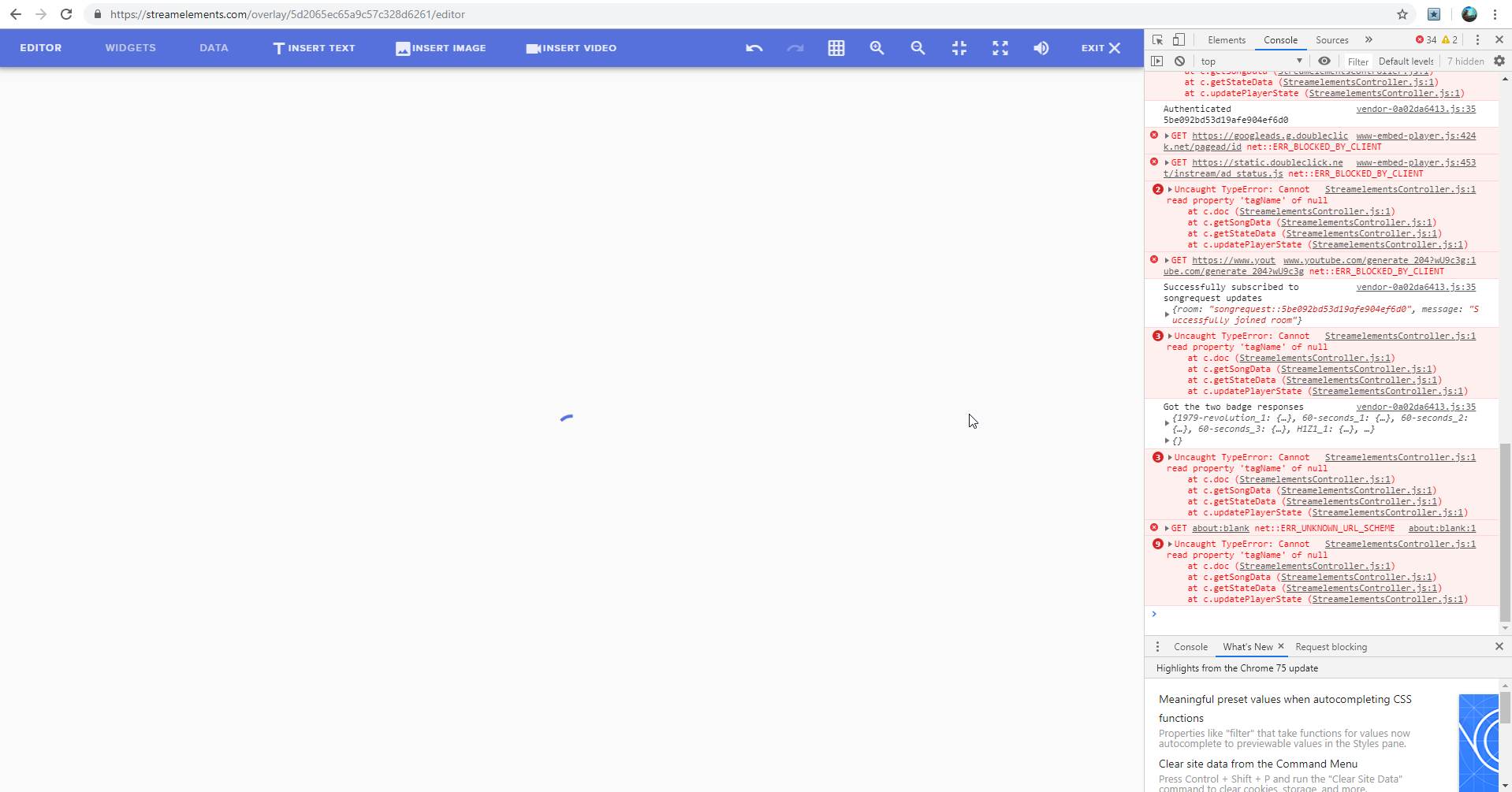 shy mountain
Asking devs and hoping they come back to me today 
gleaming sparrow
thanks for helping! c:
gleaming sparrow
somehow its fixed now, didnt do anything.. i think 😄 maybe your boys did something, thank you anyway 😃
 hollow fjord
deep birchBOT
hollow fjord
deep birchBOT
@hollow fjord Welcome to the helpdesk! Please let us know how we can assist you today and a support volunteer or staff member will assist you as soon as they are available. Thank you for your patience.
hollow fjord
@deep birch
as i post the photo of my issue
i wan't an answer
 leaden fog
@hollow fjord you just posting a photo doesn't tell us what your problem is so it bit hard to give you a answer 
hollow fjord
@leaden fog
I have problem because i wan't to see only one big picture and then that appears.
I try to find fix on youtube and around the internet but no luck
Can i please get any help
odd kraken
Is this a picture of your canvas on OBS Studio? What source have you added to the scene this happens?
odd kraken
What sources have you added to your active scene? What OBS Studio version are you on (top left) and what OBS.Live version are you on (lower right)?
hollow fjord
@odd kraken
i have game capture for games and a capture of webcam
I have standard obs program
odd kraken
Do you use OBS.Live? The StreamElements plugin?
deep birchBOT
@hollow fjord Please provide a log from your last stream. To do this, in OBS go to Help > Log Files > Upload Last Log File and paste the link to the log file here.
hollow fjord

 hallow wasp
okay thanks
 dry sphinx
No worries 
deep birchBOT
@hollow fjord For the best OBS support, please join their Official Discord @ discord.gg/obsproject
hollow fjord
i'm also inside on that server
rugged quail
I might be dumb or stupid, but somehow i miss some options about changing the title and that kind of stuff which i had before....
odd kraken
What OBS Studio version (top left) are you on?
rugged quail
23.2.1
odd kraken
Are logged in to OBS Studio?
rugged quail
Eh... 😛
odd kraken
When you select View > Docks > Stream Information, can you activate that?
rugged quail
don't know.. never did that on purpose... 😛
well, its in dutch, but i don't have it
Only scenes, sources, mixer, transitions, controls, statistics and chat
deep birchBOT
@rugged quail If you are not seeing the OBS Twitch integrations and have OBS.Live installed, please follow these steps:
- Make sure you are on the latest and greatest version of OBS.Live ( 19.5.27.394 )
- exit OBS (make sure OBS is not running)
- delete
%appdata%\obs-studio\plugin_config\obs-browser\obs_profile_cookies - start OBS.Live
- Settings -> Stream -> disconnect -> connect
 supple wharf
Hey, guys I need help, basically when i record or stream everything is fine but the audio from my mic gives off static and you can hear my voice in the background, it doesnt happen when talking online so could it be my mic or is it just something i didnt do or did do
plain sonnet
going over you log, do you have mic audio input in your scenes? if so remove it and set it up on the mixer only @supple wharf
supple wharf
@plain sonnet do you want me to send you my stream log?
plain sonnet
if you have updated it since the last post then yes please
supple wharf
plain sonnet
are any of these an added mic inpput?
supple wharf
I dont think so, I mean these had been there when i downloaded it but i did have it previously downloaded so it may be an added input from back when i tried to stream
If thats what you mean
plain sonnet
if you arent using them (and dont know what they are) its best to remove it, just in case.
so first thing to check is that the correct mic is set to obs and not something else,
settings > audio > mic
then look at maybe adding filters to the mic such as a noise suppression
right click on the mic in the mixer and select filters
supple wharf
yup, found the noise suppression
plain sonnet
what sort of mic do you have?
supple wharf
Well its a microphone thats part of a headset, its a turtle beach recon X60 im pretty sure
plain sonnet
ah ok
may want to look at a noise gate filter also
you can set your mic to monitor out (make sure the sound is set to your headset) so you can hear it while you adjust.
just remember to turn it off after
supple wharf
Yo that worked XD Thanks man! Once i put the noise gate in it completely stopped and yup i've been using that monitor thing to figure out how to stop it
Thank you so much @plain sonnet !
 true mason
my error pls help me?
plain sonnet
log out of obs.live then log back in
true mason
did not work
 real pewter
hello?
plain sonnet
do you have any activity on the se dashboard?
deep birchBOT
@real pewter Welcome to the helpdesk! Please let us know how we can assist you today and a support volunteer or staff member will assist you as soon as they are available. Thank you for your patience.
plain sonnet
check?
plain sonnet
ok, asking internally for you
plain sonnet
you really dont have to keep tagging me
im asking the other staff members if they know a solution to try
real pewter
Question.. how can I get my stream to stop lagging?
deep birchBOT
@real pewter Please provide a log from your last stream. To do this, in OBS go to Help > Log Files > Upload Last Log File and paste the link to the log file here.
true mason
help plsssssss
plain sonnet
you said you had activity in the dashboard....
odd kraken
Just followed you.
true mason
thank you gutys
 mossy pier
hey guys
i have problem
i setup for stream, i made for 4 tables , streaming poker and i see only one table, when i try to change again same.. i move table out with coursor and then see other table..
i see in properties with right click , obs recognise tables
obs live
plain sonnet
can you screen shot please
plain sonnet
snip doesnt work?
plain sonnet
or printscreen?
plain sonnet
we dont support teamviewer
mossy pier
ok
wait
Im on phone now
when i try 1 2 3 4 same table... but in properties i see exe tables
what to do?
plain sonnet
can you send a log
deep birchBOT
@mossy pier Please provide a log from your last stream. To do this, in OBS go to Help > Log Files > Upload Last Log File and paste the link to the log file here.
mossy pier
plain sonnet
im not sure what is more up-to-date, the log or the images.
the log says you have the background at the top but the images show it at the bottom
what i can see is that all of the captures are fighting over the same source,
try using display capture if you want to do this.
mossy pier
ok thanx i will try
 narrow thistle
Hello, i have a friend who doesn't have the Streamelements Tab located on the top left of OBS next to the Help button. Is this something that can be resolved?
odd kraken
Try to restart OBS. If it is still not there, install OBS.Live.
 exotic yacht
hello
i have set up obs and i adjusted the screen size by mistake and now i just have a black screen on my preview
how can i get the game screen back
odd kraken
Select the game screen source and hit crtl + F to make the source fit the canvas.
 prime girder
hellooo
deep birchBOT
@prime girder Welcome to the helpdesk! Please let us know how we can assist you today and a support volunteer or staff member will assist you as soon as they are available. Thank you for your patience.
prime girder
Okay. I'm just starting up with obs.live, I was told by many people that I could see/hear actual alerts without having my preview open
I may be dunce, but I can't seem to figure out how to do this so far
odd kraken
You should be able to hear the alert itself, like your stream does then. Also you can look at your activity feed to see the past events.
When you disable your preview you cannot see your alert in OBS.Live.
prime girder
ah so once the browser source is in it plays the audio directly to me
is there a way I can test alerts then?
deep birchBOT
@prime girder You can test Alerts via the bell on the lower right corner of the Overlay Editor. Simply go to your Dashboard -> My Overlays -> Pencil/edit button on the overlay. Make sure the "Show Emulated events on stream" option is on to see the alert in OBS/Xsplit https://streamable.com/h6qgy
 prime girder
ahh
 lament garnet
How do I change email and delete my youtube channel attached to StreamElements?
lament garnet
Getting many errors trying to update info? Any helpers available? Profile page not updating, also need to change email and remove 1 connected youtube account.... thanks!
prime girder
@edgy ridge what're your encoding settings and what're you trying to stream
lament garnet
Still looking for help, Profile wont update, trying to delete 1 of the 2 youtube channels.... thanks!
 vivid shadow
Is there any way to get my windows framed more like I drew in the picture? Or will it always split like that
lament garnet
Yes, if you select them you can drag them around
 static night
Can Someone please tell me how to setup the section for About me as i've been looking everywhere & cant find it
 fierce atlas
@static night are you talking about your Twitch panels on your channel page?
static night
On the channel for others to read about you do
deep birchBOT
@static night Twitch's official help guide for Panels: https://help.twitch.tv/customer/portal/articles/2416760-how-to-edit-info-panels
static night
thanks for that
 sly citrus
how to you get out of bandwidth mode on obs
odd kraken
in OBS: Settings > Stream either delete the test definition at teh end of your streamKey or disable the checkbox: Enable Bandwith Test Mode
 quaint haven
quaint haven
quaint haven
THANKS!
 gleaming quiver
think i found a bug in obs live. If you have hotkeys set up in media requests but the widget isn't even checked to show on obs live they still play if you use the hotkeys.
dry sphinx
@placid iron What version of OBS.Live are you using? Bottom right of OBS.
 placid iron
19.6.26.414
And sorry to post on the wrong session I completely forgot the obslive chat
dry sphinx
No worries.
Have you tried restarting your computer already? If so: will be best to report the issue to the Devs with the 'Report Issue' in OBS.
deep birchBOT
@placid iron Please send in an issue report so our team can investigate using the program's logs:
Report an Issue
▫ Select "StreamElements" at the top of OBS
▫ Select "Report an Issue"
▫ Please write a detailed description of the issue you are facing:
What is happening/not happening? What happened that led to this issue appearing? When did you first notice this issue? Descriptions that help us to to reproduce the issue on our end very often result in quick fixes.
▫ Select "Send to StreamElements"
placid iron
Not yet, i can try this, if doesn't work I'll do the report, thank you for now American
gonna restart here <3
dry sphinx
Sounds good
placid iron
Didn't worked, gonna do the report :)
dry sphinx
Understood. For the best to look further into that 
 somber walrus
does anyone know how to fix an activity feed
it just stopped working for me and i dont know what to do
deep birchBOT
@somber walrus Each of the OBS.Live docks have a reload button (top left) and a close button (top right) https://www.youtube.com/watch?v=0GtLCnhR_-M
somber walrus
thanks but i already tried that i think i will just do the uninstall reinstall trick but thank you
its weird because it doesnt even say in chat
like if someone follows
hallow wasp
hello, the "hide video" button is not working, I click on it but the video from youtube is still showing,!
(media request)
odd kraken
@somber walrusIs there no entry on your activity feed or a chat announcement on a follow, like every follow now and then?
@hallow wasp Do you just use OBS.Live at this time? Do you press the hide video button in the OBS.Live MediaRequest dock?
rare night
@hallow wasp "Hide video" refers to the video in the overlay widget (on stream), not the video in the media request dock (where you control media request)
just want to make sure we're talking about the same thing
somber walrus
@odd kraken its been fine untill now streamelments doesnt say when a new follow comes in chat or anything else such as bits. Its the same in the OBS. i used streamelments for a while and i never had a problem. i did all the basic tricks like refresh and relog to streamelments so i dont know what is up
odd kraken
Have you tried to part the bot in your dashboard on the right, log out of the dashboard, log back in and invite the bot back to your channel?
Also are the cheer events in your activity feed?
hallow wasp
@odd kraken yes, i use obs.live but i don't use the widget on the stream
@rare night is there any way to hide the video playback from the obs.live?
lament garnet
Trying to get help! Profile Page on Elements will not update. Keeps saying "error update profiles"
"there was an error updating your settings" - ?
Anyone?
plain sonnet
in obs.live or on the se dashboard?
lament garnet
in the elements dashboard
plain sonnet
will let the admins know
lament garnet
So nothing I can do about it? Because it's old info, my social media info has changed....
plain sonnet
not yet, btw, what browser are you using?
lament garnet
I have tried: IE, Opera, Firefox, and GC
plain sonnet
hmmm ok, i have let them know, hope to get back to you soon
rare night
@hallow wasp There is not
deep birchBOT
@lament garnet On the page that gives an error, press F12 to open Developer Tools. Navigate to “Network” at the top and then Select “XHR” in the filter section. Try the action again that gave the error and note in the network tab any red text. Please copy and paste the error information that is given when clicking on this red text.
plain sonnet
could you post the screen shot of the error here
lament garnet
I think I may have just found the issue, I will if this does not work.
plain sonnet
ok
lament garnet
Request URL:https://api.streamelements.com/kappa/v2/channels/5d12c03ebaf8ff4642dc59c4/profile
Request method:PUT
Remote address:104.20.30.192:443
Status code:
400
Version:HTTP/2.0
Referrer Policy:strict-origin-when-cross-origin
There is no read text under XHR
No red text under "all"
 long bloom
when i try to activate overlay my browser doesn't load all the way
rugged quail
Hiy'all!! Little color bug.. when buying tickets for a giveaway from the weg page... it's white on white...
in the last one there's a number typed in the buy tickets field!
hi
 tulip hamlet
The what page now?
rugged quail
how to delete obslive
tulip hamlet
@rugged quail There's an uninstall option in the StreamElements menu at the top of OBS.
rugged quail
thanks
 gritty elm
why does it look like that i want the full pic to show up
rugged quail
cant seem to get game capture to capture my game
deep birchBOT
@gritty elm Please connect your streaming account (Twitch, YouTube, or Facebook) with Discord by going to ⚙ Settings and then Connections here in Discord. https://streamable.com/eg92w
 tulip hamlet
@rugged quail Are you running OBS as an administrator?
gritty elm
guys i connected my acc what do i do next?
deep birchBOT
@gritty elm To add your overlays to OBS, add a new browser source in your scene. Paste your overlay URL in the browser source properties, set the dimensions to 1920x1080 (unless you changed them on the website), and ☑ “Shutdown source when not visible” https://youtu.be/KDvLynUqXI4
 sharp wren
hey i can vc if its easier , my cpu is giving me a small percentage and my stream is lagging anyhting i csn do to fix ?
deep birchBOT
@sharp wren Please provide a log from your last stream. To do this, in OBS go to Help > Log Files > Upload Last Log File and paste the link to the log file here.
sharp wren
shy mountain
@sharp wren
sharp wren
shy mountain
Im still seeing the same thing in the analyzer and looking at the log file it self I don't see the start stream part. Please go to your log files folder and zip every log file that has today's date and DM the zip file.
rugged quail
anyone on to help me with a question without sending me to the obs page that will not help me or answer my question's lol
shy mountain
Depending on the nature of the question.
We are not full OBS support here and try and help as much as we know.
And best place for OBS Studio help is their discord.
rugged quail
ik i joined it asked my question for like 3 days in a row and never saw a single mod or anyone else who wanted to help so wanted to try my luck here
shy mountain
Looking at the question you asked, I doubt we can help either.
Maybe you didn't ask at the proper time in the OBS discord.
rugged quail
ok so i use the elgato hd60 s and in my mixer it is not picking up my game sound i have talked to elgato and tried to talk to the obs people and no one can figure out where my sound is going lol
shy mountain
Ok here goes.
Have you checked the audio channels in OBS?
Maybe you need to place elgato here somewhere?
Or maybe its playing in the desktop audio and you are not capturing it properly.
Thats all I can think off.
rugged quail
thanks i shall take a look i have had like 4 people who build computers and or stream that i know try and take a look and they cant even figure it out so was just going to test my luck and see if anyone here would know, was worth a shot but honestly thanks @shy mountain for trying, maybe one day i shall see you in the dreamteam, gotta grow more
 wise onyx
Ok hubby cant login to his obslive from my machine his is broken atm how do we do that
odd kraken
What do you see when they want to log in to your OBS.Live? Any error message?
wise onyx
I hit the logout and then when the website opens he hits the login it auto logs my account in on my machine
odd kraken
Do you also have your account connected in the OBS settings as for example for the streamKey?
wise onyx
'yes
odd kraken
Best to log out of there, too, as you maybe want to stream to the same account as well as you want to use the OBS.Live docks.
wise onyx
Ok so to log his account in on my machine we have to use his streamkey in the OBS settings Boy i sound like a newb Shakes Head*
odd kraken
If you want to stream on your account, log in to both with your account. If you want to stream on their account, log in to both with their credentials.
wise onyx
OK tyvm highly embrassed*
odd kraken
No need to be embarrassed. We are here to support you. 
 clear mesa
hi there, looking for some help. Using obs live and new subs are not showing up in the activity feed and alerts are not working. any ideas?
odd kraken
Is it just for subscribers or only for follows?
clear mesa
@odd kraken its everything but follows are showing up in the activity feed atleast
odd kraken
When you emulate an event in the overlay editor, is this coming up in OBS when you have the checkbox next to the emulation bell activated?
clear mesa
i imported my alerts from streamlabs obs. so im not quite sure what you are meaning
deep birchBOT
You can test Alerts via the bell on the lower right corner of the Overlay Editor. Simply go to your Dashboard -> My Overlays -> Pencil/edit button on the overlay. Make sure the "Show Emulated events on stream" option is on to see the alert in OBS/Xsplit https://streamable.com/h6qgy
 clear mesa
@odd kraken yes just went and checked and the check box next to the bell for emulation is active
odd kraken
Please emulate an event, to see if the emuatled event is coming up in your OBS Studio please.
clear mesa
@odd kraken so when i do this it shows up in the editor but not on my stream
odd kraken
When you checked the little check box it should come up in your OBS, too. Best to check your settings of your alertbox and your overlay with the alertbox in OBS.
deep birchBOT
To add your overlays to OBS, add a new browser source in your scene. Paste your overlay URL in the browser source properties, set the dimensions to 1920x1080 (unless you changed them on the website), and ☑ “Shutdown source when not visible” https://youtu.be/KDvLynUqXI4
clear mesa
@odd kraken okay sounds good thank you i will try to figure it out. but do you know why it would not show up in my live activity feed though?
i noticed it only works all the time for followers. a lot of times for hosts and subs it wont show up in the activity feed
odd kraken
For followers there is an issue with twitch not sending us every follower here and there. For hosts, I will link you something. Not sure why the subs are not showing up in the ActivityFeed. Make sue you have the filters set correctly in your activity feed.
deep birchBOT
Due to changes to Twitch API, we have filtered out hosts and will only show these ones on your activity feed:
- All manual host events (0 hosts included and if filter set to 0)
- All hosts coming from an online channel. If the hosting channel has been offline, we do not show it
- All auto host events with at least 1 viewer
Note: An offline host is when you see "X channel has just hosted you" - with no viewer numbers on the back
dry sphinx
Are the Subs Twitch Prime?
clear mesa
@dry sphinx yes subs are twitch prime
deep birchBOT
@clear mesa Twitch prime (new and resub) and paid subscriptions (resub only) must be shared in chat manually by the person subscribing in order for the subscription information to be sent to StreamElements. For twitch prime, the user needs to have sharing enabled on https://www.twitch.tv/settings/prime. For paid subs, if the share box doesn't show up immediately it will when they refresh the page. https://i.imgur.com/VNJN0Uv.gif https://i.imgur.com/2297EA7.png

 clear mesa
thank you guys for your help, i will see if i can fix my issues with alerts and such not going off!
 opaque pagoda
Hello! Can anyone help me please? I am new to SE OBS.Live and I have issues when I log in with my Facebook page: I can't set up my alerts and stuff... Can anyone help?
tulip hamlet
OBS.Live is only a companion plugin. Setup is done on the site.
opaque pagoda
@tulip hamlet I tried but I can't do anything. Even under "Alerts" when I'm logged in with FB it shows "no themes".
rugged quail
HI!
deep birchBOT
@rugged quail Welcome to the helpdesk! Please let us know how we can assist you today and a support volunteer or staff member will assist you as soon as they are available. Thank you for your patience.
 ebon parcel
Hey guys, so basically my problem is that the game feels choppy and there is a lot of input lag when I stream. The FPS is fine, it is well over 100 but it feels very laggy and not smooth. The stream also looks fine.
I'm streaming at 1280x720, 60fps, 5000 bitrate using x264 encoder
deep birchBOT
@ebon parcel Please provide a log from your last stream. To do this, in OBS go to Help > Log Files > Upload Last Log File and paste the link to the log file here.
ebon parcel
tulip hamlet
ebon parcel
oh yeah i disabled all that but i recently had to reset my pc so my settings and stuff reset if orgot about that
plain sonnet
so there are 2 issues, render lag and dropped frames
here is your report, how-to links inside https://h4ndy.eu/obslog?url=https%3A%2F%2Fobsproject.com%2Flogs%2Fs2V5icqNvXNrDHJx
i would reccomend changing your encoder to NVENC (new) and turn off look-ahead and psycho-visual tuning in encoder settings
also you cant capture chrome or and browser with a game capture,
you would need either display or window capture.
make sure vsync is turned on in your game settings
ebon parcel
thanks
i don't like using NVENC cuz it drops my quality by a lot and it looks a lot more pixelated
plain sonnet
ok
tulip hamlet
@opaque pagoda The Themes gallery is a set of premade themes designed by our team. You don't necessarily have to use them, but what's there is what's there. You can set up everything on your own instead by going to My overlays and creating your own.
 paper harness
Hello I am trying to link my Spotify to my obs live and have no idea how. Already have it linked to my stream elements but it’s not showing anywhere. Can anyone help me please??
tulip hamlet
Once it's linked, you add a Now playing widget to your overlay and set it to reference your Spotify. There's no section in OBS.Live for Spotify. You just play it as normal and the widget reads your account and sees what's currently being played.
paper harness
Ok perfect thank you
tulip hamlet
Any reason you'd prefer G2A Pay over SE.Pay?
 plain compass
@tulip hamlet Okay, I have chosen SE.Pay now. What is the difference between business and individual bank account type?
tulip hamlet
Generally, you'd know if you opened a business account.
tulip hamlet
Yeah, this is strictly about your bank account.
plain compass
oh
plain compass
Is there a way to adjust my alert volume in a very quick way in obs or somewhere else while I am streaming? I do not want to adjust the volume of each and every single alert in the overlay panel.
tulip hamlet
Each alert type and variation has to have its volume manually adjusted. Which is an important thing considering most people use different sounds for different variations.
plain compass
Yes I know this, but I see other streamers adjust their volumes just in time. And I dont know how they are doing it
This might not be streamelements related
tulip hamlet
Could just be within OBS itself, couldn't tell you for sure.
plain compass
First off, I really like the concept of streamelements. This is why I am changing
More options and so on. Keep it up!
 peak roost
Hello, for the past week my bit rate has been going from what I have it set at to 0 every 30 seconds on and off stream for obs.live. This also causes my frames to drop (average of 25% per stream). I have checked my internet connection as well as my connection to the server and they are both good. Any help would be appreciated.
deep birchBOT
@peak roost Please provide a log from your last stream. To do this, in OBS go to Help > Log Files > Upload Last Log File and paste the link to the log file here.
peak roost
obs log
tulip hamlet
Please read the instructions and provide a link.
 light gorge
So every time I try to connect with twitch on OBS live, it does not log me in. It attempts to log me in and the window just closes. Anyone else having this issue?
peak roost
tulip hamlet
peak roost
Sorry about that
 inner hare
Quick question, how does one add a streamelements alert overlay to streamlabs obs I've tried adding it as a browser source.
deep birchBOT
@inner hare To add your overlays to OBS, add a new browser source in your scene. Paste your overlay URL in the browser source properties, set the dimensions to 1920x1080 (unless you changed them on the website), and ☑ “Shutdown source when not visible” https://youtu.be/KDvLynUqXI4
inner hare
Didn't work, when I launch the overlay the page is just white
tulip hamlet
If there's no active graphics, of course it'll look white in the browser. But it's in fact transparent, and the "white" is the browser's background.
light gorge
So every time I try to connect with twitch on OBS live, it does not log me in. It attempts to log me in and the window just closes.
 bright geyser
So I went to import my themes and alertbox from streamlabs but I'm not sure if it is working. It has been going for about 10-15 minutes and I cant minimize the tab
dry sphinx
Check for me: https://streamelements.com/dashboard/overlays
Does it show imported Alert box?

StreamElements
The Ultimate All in One Platform for Streamers
 zenith copper
Hello, I have a question about my cameras on stream elements....am I in the right place?Not overlays. It is not recognizing my cameras at all. I used to have 4 set up. Then randomly it stopped recognizing 1 of them and now it wont recognize 2 of them. I need 4 to stream
opaque pagoda
Hi guys! Me once again! Can someone help please? First I use "BLUE METROPOLIS ANIMATED SUPER THEME" as my theme with its alerts. On the "Starting soon" screen I have a chatbox but it doesn't show anything. On the other scenes I don't have any issues. Second, when I try to do a test for a stream on Twitch ( ?bandwidthtest=true) It always starts to stream on Facebook although Twitch was selected with my streamkey. Help please 😦
dry sphinx
Depends. Do you mean Overlay borders for the camera?
bright geyser
It says Importing from streamlabs on my obs app
I cant get a picture because I cant open stuff over it
 potent path
Hey guys. Anybody know if you need to login to Twitch everytime you use the chat in OBS Live? Seems everytime I launch OBSlive and try type in chat it asks me to login to twitch
zenith copper
Not overlays. It is not recognizing my cameras at all. I used to have 4 set up. Then randomly it stopped recognizing 1 of them and now it wont recognize 2 of them. I need 4 to stream
deep birchBOT
@zenith copper For the best OBS support, please join their Official Discord @ discord.gg/obsproject
tulip hamlet
@potent path It should retain the login. You might have to clear out your OBS cookies.
potent path
@tulip hamlet Even if I restart my PC? I have connected my Twitch account to OBS
tulip hamlet
Yes, even if you restart your PC.
bright geyser
Nethyr do you know what I should do to fix my problem?
deep birchBOT
@opaque pagoda Please connect your streaming account (Twitch, YouTube, or Facebook) with Discord by going to ⚙ Settings and then Connections here in Discord. https://streamable.com/eg92w
 bright geyser
My obslive has been stuck on this for over an hour while trying to import
 dusky herald
hey, could you help me? i think it gonna be fast
deep birchBOT
@dusky herald Welcome to the helpdesk! Please let us know how we can assist you today and a support volunteer or staff member will assist you as soon as they are available. Thank you for your patience.
potent path
Any idea how to fix my follower count displaying incorrectly in Streamelements. It is correct on Streamlabs/streamlabels. Do I need to unsync with streamlabs or something?
tulip hamlet
Your total follower count appears to be correct.
potent path
Its displaying 0 for me
tulip hamlet
You're trying to use a goal widget, aren't you?
Goals and goal progress are independent of totals.
Goal progress is controlled at https://streamelements.com/dashboard/session
StreamElements
The Ultimate All in One Platform for Streamers
potent path
No... referring to my total follower count on Streamelements
 plush solar
hello guys! i'm herr with another problem... when i use obs live and some1 follows it doesn't aprear in my activity feed and alson don't pop up on stream screen
potent path
It's showing 0 for me in my dashboard though
tulip hamlet
@potent path Screenshot please.
plush solar
what it didn't work 2 mion ago and 3 dfays aago 0.0
still the guy who followed me 8 min ago isn't in there and didn't apear at all :/
tulip hamlet
@potent path Please keep everything in the public channels. Thank you.
potent path
tulip hamlet
You'll notice those are not all time numbers.
Also, you've only just connected to StreamElements.
We don't get a channel history from the Twitch API.
No retroactive activity.
 soft pelican
i needed to know if you are able to see the media share without being in obs streamelements without a duel monitor
potent path
@tulip hamlet Thanks
Would you mind explaining how to reset cookies in OBS... Still having to log in to twitch to use the chat plugin from Streamelements
deep birchBOT
@potent path If you are not seeing the OBS Twitch integrations and have OBS.Live installed, please follow these steps:
- Make sure you are on the latest and greatest version of OBS.Live ( 19.5.27.394 )
- exit OBS (make sure OBS is not running)
- delete
%appdata%\obs-studio\plugin_config\obs-browser\obs_profile_cookies - start OBS.Live
- Settings -> Stream -> disconnect -> connect
gritty elm
guys i have an overlay on but how do i make the chat show up in her place
 tropic geyser
my G2A pay want connect properly
tulip hamlet
@tropic geyser Screenshot what you see. If you're allowing it to autofill, don't.
tropic geyser
tulip hamlet
Screenshot how you filled out the form.
Thank you. You can delete the screenshot if you'd like.
I've forwarded the error to our devs to look into. Unfortunately, I cannot provide you with an immediate solution.
tropic geyser
thanks for your help
 steel remnant
Saludos. Tengo un problema con el Media Request. ¿Puedo pedirles ayuda por aquí?
bright geyser
Can someone please help, I have asked twice, why won't it let me import my scenes and alerts from streamlabs into obslive
shy mountain
@bright geyser does it get stuck or it faild?
bright geyser
I might have fixed it
The problem was it opened another window under it and I could not tab out
It said I imported it but I cant get my alert box to work
plush solar
@tulip hamlet sometimes it pops up but sometimes it doesn't can it be a pc problem? (fthe event list)
shy mountain
@bright geyser the imported stuff from SLOBS is in my overlays in our dashboard.
@plush solar if you have issues with follower events its a twitch issue unfortunately
We are working with them on fixing it but no ETA
plush solar
@shy mountain oh thank you because i was looking for the issue but couldn't find anything so i was getting frustrated 😂
bright geyser
Thank you keizar, I found out what to do
bright geyser
Ok so, I have a i7 7700k 4.20 ghz, 16 gigs of ram, and a gtx 1070, 240hz monitor and 60hz monitor (2 monitors not sure if this is important) and no matter what I do my stream will never get 60 fps even at 720p does anyone know good settings for me? I have been trying for hours and can't get anything to work.
shy mountain
Having 2 different monitors at different Hz can lag your stream actually.
bright geyser
Oh
shy mountain
Just to be on the safe side
deep birchBOT
@bright geyser Please provide a log from your last stream. To do this, in OBS go to Help > Log Files > Upload Last Log File and paste the link to the log file here.
bright geyser
bright geyser
Do you have any recommendations to stop the lag?
bright geyser
Should I use game capture instead of display capture?
shy mountain
Some games like Destiny 2 doesn't like Game capture
bright geyser
And is there any chance my scene is affecting it alot?
shy mountain
I think having a 240hz and a 60hz monitor is affecting more then anything else to be honest
GPUs don't like it both monitors have different Hz
did you do everything in the analyzer?
bright geyser
I am right now
It says browser sources are performance killers, should I get rid of the browser source that adds my theme?
shy mountain
How many browser sources do you have?
bright geyser
one
shy mountain
Then don't remove it
bright geyser
ok
shy mountain
as it has your overlay.
If you have multiple and its affecting your CPU greatly then yes
bright geyser
well I did some things, I'll test it now
shy mountain
but in this case no
bright geyser
Still having fps drops, it says encoding overloaded
shy mountain
GPUs don't like it both monitors have different Hz```Should I try using x264?
ok
Thanks for being patient with me, sorry for bothering you
 slow bolt
Trying to stream xbox one but use obs on laptop. its not connecting the stream for me to be able to use obs. please help
shy mountain
Posting the same question in multiple channels won't help you get a solution faster. I've also given you a discord invite link to the OBS Discord as this is not something we can help with.
slow bolt
mahalo
vivid shadow
My stream elements overlay editor isn't displaying the right number of follows or subscribers, will it display correctly when I'm actually streaming?
shy mountain
I see that the totals we have are showing correct follower number.
What type of widget have you added?
vivid shadow
Ive added both a follow goal and sub goal, and both are displaying the number of subs and follows I've gotten since swapping, not the total amount I have
Swapping to stream elements that is
shy mountain
Well that is correct. Goal progression is only tracked from the moment you sign up with us.
vivid shadow
is there any way to fix this? @shy mountain
shy mountain
From the overlay editor -> data on top -> goal tab
from the dashboard -> activity feed on the left -> widget data on the right -> goals tab
vivid shadow
appreciated, and after fixing that all additional follows and subs will be added?
shy mountain
yes
vivid shadow
I really appreciate it @shy mountain
shy mountain
But do note that the goal widgets do not track totals, only progression up
vivid shadow
So will the sub goal count for lost subs?
shy mountain
But do note that the goal widgets do not track totals, only progression up
vivid shadow
okay, I missed that in the phrasing, thank you
so that will need to be manually changed as it happens
shy mountain
To an extent yes
What you can use instead is
the total followers and total subscriber count widgets
vivid shadow
so what would you reccomend is the best way to set up a better functioning goal widget? I've seen others do this better in the past
vivid shadow
okay, perfect, thank you
It wasn't clear to me at first, but I think I get it now, thank you @shy mountain
 serene charm
Stream Deck isn't working with SE actions. Any idea how to fix this?
It keeps telling me to open OBS Live but I already have OBS open.
odd kraken
Try to Reinstall/Repair the StreamDeck software.
serene charm
Repaired and fixed. Thanks Benno.
 cursive jay
I got a weird bugg i think. I clicked on the chat and then i see my Twitch page but i cant get it back
deep birchBOT
@steep dagger Please follow our community rules:
- No advertisement or stream promotion
- Respect ALL server members
- No NSFW/NSFL
Thank you
odd kraken
@cursive jay Select StrreamElements > Log otu at the top in OBS and log back in please.
cursive jay
Thank you!
deep birchBOT
@steep dagger Please follow our community rules:
- No advertisement or stream promotion
- Respect ALL server members
- No NSFW/NSFL
Thank you
 winged gust
hello whenever i try to show video on media request it plays double sound
deep birchBOT
@winged gust Make sure to ☑ “Shutdown source when not visible” for all browser sources (all OBS scenes). If using studio mode, uncheck “Swap Preview/Output scenes After Transitioning.” Also keep in mind that sound can play from any overlay loaded in the browser (editor or launched). https://i.imgur.com/FegZJQS.png https://i.imgur.com/yY0wcFl.png


 thorny mica
Hey guys my friend is having such a weird thing happening with his obs window. We just want to get it moveable from monitor to monitor but it isnt in a normal window mode it seems. I dont know how it started up like this but it's been like that since I set it up for him.
odd kraken
Is it in fulscreen mode? Press F11 to get it to windowed again.
thorny mica
plz hold
okay so testing it on my computer, it changed it to that problem but when I press f11 again to take it out, it doesnt take it out entirely. goes from full screen to then just displaying the taskbar
odd kraken
Select the icon in the task bar > hit alt + space > (at the top left should be a menu then) > select the first entry.
 kindred fox
you can also drag the bottom of the window up and it will show the menu bar again
opaque pagoda
@deep birch I connected my Twitch to Discord. My "Starting Soon" screen doesn't seem to work yet. Can't find out what the problem is. I used a premade Overlay on SE.
deep birchBOT
@opaque pagoda To add your overlays to OBS, add a new browser source in your scene. Paste your overlay URL in the browser source properties, set the dimensions to 1920x1080 (unless you changed them on the website), and ☑ “Shutdown source when not visible” https://youtu.be/KDvLynUqXI4
odd kraken
Also what OBS Studio version (top left) are you on? @opaque pagoda
dry sphinx
Top left 

odd kraken
oops. you are right. The version number is in the top left of OBS Studio.
opaque pagoda
@odd kraken I'm on the new OBS Live from SE. My chatwindow in other scenes work perfectly but only in "Starting soon" it doens't work. When I go to edit the scene on SE the chatwindow is there so I don't know what is wrong.
odd kraken
Have you added it like described by the bot above?
thorny mica
I had another question too. Is there a way i can update my friends obs from my computer, say like fortnitetracker wins/kd overlay. i dont think so since its a direct change to obs and would have to be on his pc
opaque pagoda
I added a new browser source with the link of the overlay by SE.
I did it with all of them this way and the others work
odd kraken
Please delete the browser source and readd it to OBS.
odd kraken
@thorny mica You can edit an overlay when you have got an editor access to their streamelements account.
deep birchBOT
@opaque pagoda To add your overlays to OBS, add a new browser source in your scene. Paste your overlay URL in the browser source properties, set the dimensions to 1920x1080 (unless you changed them on the website), and ☑ “Shutdown source when not visible” https://youtu.be/KDvLynUqXI4
thorny mica
@odd kraken so if i wanted to add a new overlay or whatever i could if i have that enabled for them?
odd kraken
They need to enter the overlay url themselves to their OBS.
thorny mica
okay thats what i thought
odd kraken
You could then edit the overlay with an editor access to their account.
thorny mica
right right
opaque pagoda
@odd kraken I readd the browser source. Still not doing anything.
@odd kraken Could you help me with something else, yesterday I wanted to test a stream on Twitch. Even though I had the streamkey and the key for bandwith test set up, he switched to Facebook Live. I can't figure out what happend
odd kraken
Why don't u use the log in feature of OBS Studio? So you don't need the StreamKey any more.
Also can you give me via PM an editor access to your StreamElements bot so I can take a look at your starting scene overlay?
opaque pagoda
I will try the log in feature. I tell you in one minute if it works
@odd kraken I've set it up, when I push "Start Stream" I get a window pop up for Facebook Live, although I was signed in with Twitch
odd kraken
Can you please log out of OBS Studio and OBS.Live and log in with both your twitch account. Something seems to be not right here.
deep birchBOT
@opaque pagoda Follow these steps to grant managers/moderators access to your dashboard:
- Click on your Channel Name at the top of the dashboard and select Settings
- Create a new invite at one of three access levels (Bot Supervisor, Editor, Full Control)
- Send this invite to a mod/manager to give them access to your dashboard. The link is one-time-use and expires after 72 hours if not accepted
Video tutorial: https://youtu.be/zl_h-ttZDF0
 finite crest
hi i was wondering if i can have some help uploading a overlay on my obs live.
deep birchBOT
@finite crest To add your overlays to OBS, add a new browser source in your scene. Paste your overlay URL in the browser source properties, set the dimensions to 1920x1080 (unless you changed them on the website), and ☑ “Shutdown source when not visible” https://youtu.be/KDvLynUqXI4
finite crest
thx
opaque pagoda
@odd kraken This is what I get when I want to launch the stream on Twitch
odd kraken
And you are logged in to OBS Studio and OBS.Live with your twitch account?
opaque pagoda
when I want to launch OBS Studio it is the Live that opens up.
on OBS Live I am logged in with the feature you told me.
odd kraken
Please make sure you are logged in to Twitch in
- OBS.Live using StreamElements > Log out > Log back in with twitch
- OBS Studio: Settings > Stream > Disconnect account > connect account > log in with your twitch
opaque pagoda
In OBS Live I clicked on "switch to OBS Studio". I went to "settings" and then "stream" and logged in with my twitch account and did the same with OBS Live. Still same problem.
tulip hamlet
Use the StreamElements menu at the top to log out, and then log back in using Twitch.
opaque pagoda
On the website of StreamElements I am logged in with Twitch.
 rapid portal
odd kraken
rapid portal
odd kraken
You can disable it on stream, but it will alawys be playing when the MR dock is open in the MR dock.
opaque pagoda
@tulip hamlet I think it is almost working. Now it says that there is an error because apparently I am using IPv6 but the stream only has IPv4 info. When I go to the "advanced settings" I can't click where the IP is. Can't change anything there
odd kraken
Can you share a screenshot of the error message please?
tulip hamlet
🤔
I think this is the...
Do you have 2FA enabled on your Twitch account?
It's required to stream.
opaque pagoda
2FA?
tulip hamlet
Two Factor Authentication.
opaque pagoda
I think so I receive now a text when I want to log in to twitch
I read the article. I don't have it. I will try it out and come to you afterwards
It seems that I already had the 2FA. I installed the app anyway. Still not able to test my stream. I've shut down my pc as well but nothing seems to work
 tired ermine
anyone else having a problem with the overlay editor and alert boxes
odd kraken
Can you elaborate please?
tired ermine
When I edit the alert boxes, especially the cheers one, they don't change
odd kraken
Check the variations.
tired ermine
like for the sub I set it up with settings and removed the video of the shark but it still played it
Ill check the variations
 steel mural
@opaque pagoda In OBS, go to Settings > Advanced and make sure this option is set to default:
opaque pagoda
@odd kraken I finally found it. I had issues with OBS live itself because I couldn't set IP to default, I did now and I am testing my stream with bandwith tester
Thanks to all of you that helped me! Really appreciate it!
steel mural
Please, never change anything in the advanced section. There aren't any settings that are necessary for streaming or recording that have to be changed.
And if a tutorial tells you to change something, close the video.
tulip hamlet
⤴ OBS Project volunteer support. Knows what he's talking about. ❤ @steel mural
opaque pagoda
Ok thank you! But other issue, Twitch doesn't show anything with its "inspector" although in streamkey I am logged in with Twitch and selected bandwithtest
Twitch dashboard doens't show anything?
steel mural
Wait... Did you use your stream key or did you use the connect button?
Both at the same time doesn't work
opaque pagoda
connect button, sorry I meant "under the stream section"
steel mural
And you checked the "Bandwith test mode" box?
opaque pagoda
So: I am connected with Twitch via the login feature, but in my Twitch dashboard with the inspector it doens't show anything
yes
I checked that box but it doens't show anything
steel mural
Then go to https://inspector.twitch.tv/
opaque pagoda
Haha dude I feel so stupid 😂
I seem to have some lose there... My bitrate is in the settings set to 3000 but with inspector I see about 2400
Or is it normal that it shows less bitrate?
steel mural
That's normal. The number isn't always perfect. Fluctiations are expected.
+-2000
Depending on your settings
opaque pagoda
Ok cool, I've set my stream to scale down to 720p 60 fps and only a CPU usage of about 6%, I am so happy that I made the step to this! This is dope bro
 hollow sedge
i fixed this a while ago but it is happening again. Everytime i open obslive it asks me to log in and i forgot how to fix it
deep birchBOT
@hollow sedge If you are not seeing the OBS Twitch integrations and have OBS.Live installed, please follow these steps:
- Make sure you are on the latest and greatest version of OBS.Live ( 19.5.27.394 )
- exit OBS (make sure OBS is not running)
- delete
%appdata%\obs-studio\plugin_config\obs-browser\obs_profile_cookies - start OBS.Live
- Settings -> Stream -> disconnect -> connect
odd kraken
tulip hamlet
Here is a video: https://www.youtube.com/watch?v=17eUkoZ6eIs
odd kraken
You don't need a stream key this times. You just can log in with your twitch credentials into OBS Studio.
 weak palm
ok
odd kraken
Add the widget Your stream's chats to the overlay.
gritty elm
ok thx
rugged quail
My recent followers and stuff aren't showing up anymore since I got a new banner and can't seem to get it to work.
odd kraken
Are they not updating or completely not showing up?
rugged quail
Not showing up at all.
odd kraken
Are they showing up in the overlay editor?
rugged quail
Well, this is my first custom one, I used to have a premade on
odd kraken
Can you share a screenshot of what you are looking at and explain what is wrong on this one, so I understand what you are trying to achieve.
rugged quail
 odd kraken
You would need to add the widgets for the recent sub and the recent follower to your overlay in the overlayeditor.
rugged quail
Okay, I'll give that a shot, thanks.
 hidden zinc
I applied the "Danger Zone" theme to my OBS Studio and am using Stream Elements to edit overlays. However, it has little animations on loops for each scene, and whenever I go to edit these overlays, I get a "laggy" experience and the animations slow down and I have to wait for the computer to respond
odd kraken
What browser are you using?
deep birchBOT
@hidden zinc Please provide a log from your last stream. To do this, in OBS go to Help > Log Files > Upload Last Log File and paste the link to the log file here.
hidden zinc
odd kraken
There is no output session in there. Was hoping to see some issues there.
How much CPU load do you have when you have OBS open and try to edit the overlay?
hidden zinc
@odd kraken fluctuates b/w 11.7 and 14.3%
odd kraken
Can you try to edit the overlay in chrome and see if you are still getting these issues?
hidden zinc
Wait one
@odd kraken It spiked to 12.5 to 15% and StreamElements is taking too long to load
odd kraken
What internet connection do you have? upload and download?
hidden zinc
Download 104.83
Upload 10.09
odd kraken
From what I see you should be good. No idea why the overlay is lagging when you stream. Maybe with your stream running you are maxing out your GPU or CPU and you can't have the browser open next to the stream.
hidden zinc
@odd kraken You might be right. Will check again after my next one tonight
rugged quail
https://gyazo.com/29202b70be70170a76cabf21bf17f40e @odd kraken This is the best I can do, any tips?
 odd kraken
I recommend trying to make the text color black. Also I would try to make the picture fit to an 1920x1080 overlay fully at the bottom, to get the best result when adding it to OBS.
rugged quail
I'm going to have to have my friend help me with that, thanks. ❤
 summer pumice
can you tell me were the settings are in OBS Live
tulip hamlet
You can find a lot of them in the hamburger menu in the top left of the activity feed.
The rest, in the StreamElements menu at the top.
steel mural
Not an Elgato, a capture card in general, yes.
steel mural
"Elgato" is just a brand and tbh, I wouldn't buy a capture card from them. If you want something high quality, look for stuff from "Blackmagic Design" and "Magewell". It will cost more but is more reliable.
 novel karma
Ok cool. Another question, will obs work with windows 8
steel mural
It does, but I'd recommend you to update to Window 10 sooner or later because the older windows version start to loose support. The "new" NVENC version for example, doesn't work on Windows 7 because it lacks some features. Same thing could happen with Windows 8 and 8.1.
novel karma
Ok thanks
 brittle lance
anyone alive?
im looking for voice help with setting up tips in obs?
im new to obs
shy mountain
What kind of tips?
brittle lance
money tips for streaming? I've tried to connect to G2A like obs tells you too as i have an account with them but it gives and error
shy mountain
What kind of error
shy mountain
Can you still login to the account?
brittle lance
yes I can access my account on Firefox yes
I put all the info into the box it asks for and gives me this error
shy mountain
Try connedting your g2a pay account from the dqshboard
brittle lance
dashboard of Streamlabs? @shy mountain ?
shy mountain
This is Streamelements Discord and you are using OBS.Live.
So the answer is no, not SL dashboard. Our dashboard :)
When you enter our dashboard click on tipping settings on the left.
shy mountain
Open the dev console of the browser with F12, navigate to the console tab, refresh the page and do the form again.
After the error shows up from the form screenshit the console and lets see the error there
shy mountain
I will have to ask the devs on this as Im not sure what that error code 500 meant
brittle lance
ok, can you please? I can try paypal, but i would have to setup a new account? Which is easier for you?
shy mountain
Personally? I don't use G2A Pay
 last wagon
Ok so I switched over to Streamelements a few weeks back and I have been having majkor issues with my alerts not popping up from followers. In my Twitch feed I see that I get a follow, ins my statistics after the stream these followers count. But for some darned reason they do NOT pop up in the OBS live feed hence, not trigger the alert for a follower. Can someone please help me what is going on, because Ive asked my most experienced friends and they dont even know so Iam turning to you. Does anyone know what the heck is going on and why the follows wont go into my OBS Live etc. or trigger the follower alert?
shy mountain
There is an issue with the follower events and we are working with Twitch on fixing it, but no ETA on when its going to be fully fixed.
last wagon
So its a known issue thank god, I thought the problem was on my side. and there is nothing I can do to fix it right?
last wagon
Thank you
 spiral lagoon
hello
i'm new here
i dont get my alert box in obs live
odd kraken
You need to create an overlay with an alerbox widget and add this overlay url into OBS.
deep birchBOT
To add your overlays to OBS, add a new browser source in your scene. Paste your overlay URL in the browser source properties, set the dimensions to 1920x1080 (unless you changed them on the website), and ☑ “Shutdown source when not visible” https://youtu.be/KDvLynUqXI4
spiral lagoon
is it possible to test alerts?
deep birchBOT
@spiral lagoon To test/emulate alerts, hover over the blue bell at the bottom of the overlay editor. From here you can select the type of event and the amount to test.
You can test Alerts via the bell on the lower right corner of the Overlay Editor. Simply go to your Dashboard -> My Overlays -> Pencil/edit button on the overlay. Make sure the "Show Emulated events on stream" option is on to see the alert in OBS/Xsplit https://streamable.com/h6qgy


 placid iron
Guys, any idea what this can be?
I can't send the test message, and it's the chat widget
odd kraken
Try to select StreamElements at the top in OBS > Log ot and log back in.
placid iron
You're a god @odd kraken lol
I recently changed my username, relogged from every source possible to relog and didn't fixed, but from OBS worked like a charm
mossy pier
i have one comp one monitor, how to see poker tables one by one? i made in sources 4 but i see all 😦 help?
odd kraken
Where are you trying to capture these from? Are they all in different tabs in your browser or are they in one programm next to each other?
mossy pier
pokerstars
odd kraken
Can you show me a screenshot of the things you want to capture?
odd kraken
here.
odd kraken
You could create 4 scenes with a capture of the 4 tables, set up hotkeys to switch to these scenes, minimize OBS and see all the four tables in your programm and then hit the number to switch to the scene with the table you want to show while seeing all 4 on your own screen.
mossy pier
Does that mean I do not have to re-source tables again? and that means again to make scene for table 1 2 3 4?
odd kraken
Create a source for each table and add a screen capture or game capture or window capture part of the table you want to show in this scene as source. Then set a hotkey to these 4 scenes and the viewer will see whatevery ou switch to and you can see the 4 tables on your screen.
mossy pier
thqnx i wil try now
mossy pier
i do that and i see now table by table.But i must make again my cam seeing ond other things or somewhere copy ?
odd kraken
Create your cam one time and then use the add existing function when you add the cam source.
mossy pier
yes but in new scenes i dont have cam and my tittle
odd kraken
You can add the source in this scene.
mossy pier
ok i see now thanx
 edgy jacinth
Hiya! I exported a QuickTime.mov with a transparent background but when I load it on as a video for an alert it shows as a black background. Shows as transparent in AE and Premier.
Ideas?
odd kraken
Try to convert it to .webm.
edgy jacinth
Ohhhh I will try that tonight. Thanks!
mossy pier
hmm i open now 4 tables but i see old lol
odd kraken
I though you can see all 4 tables in your programm with OBS minimized, and switch to the table you want to show on stream with your hotkey. So the stream will only see the scene with the table you created and you see all 4 in the programm itself, not OBS.
mossy pier
im tired i make all god and now again i see only one table in all 4 scenes
odd kraken
The preview is what the stream will see. You won't be able to see all 4 tables and the stream will only see one in your OBS.
mossy pier
I understand this, but I did everything you told me and only one I see again, the same and when I switch to 1 2 3 4
i make mistake somewhere
odd kraken
I think when you just haev got 1 monitor then you can't have the game open with all 4 tables and have OBS open at the same time with only showing one table. You need to look at the game itself to see all 4 tables and just broadcast with the minimized OBS the table you want to be broadcastet. Then you can switch through the tables with your hotkeys. But you won't see a preview, cause OBS is minimised.
mossy pier
ok thanx i will try
peak roost
Hello, I posted here recently and gave my recent stream log and was told it was a network issue on my part. I've flushed dns, set static ip, checked ping -t, re-installed chipset and graphics drivers, changed bit rates and had my ISP come out and check for themselves and can assure it isn't a network issue on my part. The issue at hand is every 30 seconds, my bit rate drops to zero resulting in frame drops. I monitor my connection throughout the drops and even have tried it on many servers but they all react the same. Here is my most recent log. https://obsproject.com/logs/-WvpFuYqHzi6ffgz
odd kraken
There is no output session in this log? Are the frame drops always when you perform a specific action?
peak roost
No the frames drop regardless of what I am doing.
deep birchBOT
@peak roost For the best OBS support, please join their Official Discord @ discord.gg/obsproject
 wintry schooner
Is there any particular reason why overlays wouldnt update? (yes I clicked on Save)
odd kraken
Clear the browser source cache in the properties of your browser source in OBS.
wintry schooner
I see -- should 'Refresh browser when scene becomes active' be check?
odd kraken
when you don't have issues without checking it, I would not check it.
wintry schooner
ok -- thank you
 grim trail
Hello, I was looking around and didnt find answer to my question. Is there any way to see viewer count in OBS.LIVE for Facebook streaming?
odd kraken
Not that I am aware of.
grim trail
Shame, cause that's the only reason to leave browser open during the game 😛
 torn talon
Hello. I am trying to set up the Media Request widget. For some reason, i can hear the song normally then with a delay it duplicates. Any idea what might be the problem?
deep birchBOT
@torn talon Make sure to ☑ “Shutdown source when not visible” for all browser sources (all OBS scenes). If using studio mode, uncheck “Swap Preview/Output scenes After Transitioning.” Also keep in mind that sound can play from any overlay loaded in the browser (editor or launched). https://i.imgur.com/FegZJQS.png https://i.imgur.com/yY0wcFl.png
torn talon
love you ❤
 spice kernel
I need help with OBS-Live and the Stream Deck, I want to install the OBS-Live App on my Stream Deck and it's just not working. I press install, the loading bar progresses and then the button is just back to "Install".
The new Stream-Deck Update didn't help me.
Windows 10, all updates.
OBS 23.1.0 with OBS-live.
Streamdeck-Version: 4.4.1.11285 (newest).
If you need any more information, please contact me.
hidden zinc
trying to edit my text overlays but re-centering them is a pain since I have to keep resizing them and they always snap upwards.. Is there an easier way to do this?
odd kraken
I am not sure what you mean with snapping upwards, but you can use the position, size and style card when you have the text widget selected to give precise data where the widgets posiotion is.
@spice kernel There is a newer version of OBS Studio (latest version: 23.2.1) and then most likely OBS.Live (latest version: 19.6.26.414) available. Best to update these and try again.
hidden zinc
@odd kraken Every time I try to center it (left) it will snap upwards (right) and then I have to resize each individual box until I have them centered
odd kraken
I recommend using the position and size options of the widgets to align them properly and not dragging them around, cause this may make them move not as precisely as you would be able to do with entering the numbers.
Also in the advanced text settings you can edit the margin of the text.
hidden zinc
gotcha, thanks
 hearty carbon
is there a way to mute discord sound comming into obs?
odd kraken
Put yourself on do not disturb or edit the message sounds in discord.
hearty carbon
i mean like if im in a call with other ppl but i want the stream to hear me but no the guys talking in discord
odd kraken
You would need to route the discord audio and exclude it from your OBS input. There are some softwares out there, which can do this for you like virtual audio cable, but we can't support you with the setup.
hearty carbon
alright thanks anyway 😃
 blazing idol
how do i get downloaded overlays onto my stream
odd kraken
No need to download the overlays. StreamElements is all cloud based so your overlays are stored in the cloud and are added as browser source to your stream.
deep birchBOT
To add your overlays to OBS, add a new browser source in your scene. Paste your overlay URL in the browser source properties, set the dimensions to 1920x1080 (unless you changed them on the website), and ☑ “Shutdown source when not visible” https://youtu.be/KDvLynUqXI4
blazing idol
ok Has anyone got any suggestions for a simple overlay
odd kraken
There are premade overlays you can use. Best to browse through our overlay gallery: https://streamelements.com/dashboard/themes
blazing idol
i know but i am wondering if there is any good themes i could search
odd kraken
I really like the TRIGON STATIC SUPER THEME myself.
blazing idol
ok thank you
 bold hare
how come im not getting chat messages in my chat box on obs but i can see them in the twitch dashboard
odd kraken
Select StreamElements at the top in OBS, log out and log back in.
bold hare
dude thank you
 sullen light
is there a way to install obs live on linux or just windows?
odd kraken
Afaik there is only a download for windows available.
 urban fractal
good afternoon. I stream from my xbox using an legato hd60s. Im having issues capturing the game video and audio for multiple scenes
deep birchBOT
@urban fractal For the best OBS support, please join their Official Discord @ discord.gg/obsproject
urban fractal
thanks bot!
 devout vortex
I can;t connect to the servers - error says it can't find my channel but i disconnected and reconnected with no change
odd kraken
Can you share a screenshot fo the error please?
 echo folio
Anyone having issues when launching obslive? As soon as I launch it, immediate studdering and lag. started yesterday
deep birchBOT
@echo folio Please provide a log from your last stream. To do this, in OBS go to Help > Log Files > Upload Last Log File and paste the link to the log file here.
devout vortex
odd kraken
Have you disconnected in the settings of OBS Studio?
tulip hamlet
@echo folio https://obsproject.com/logs/mG49iqX8knoY7FvTs/mG49iqX8knoY7FvT
Some starting notes there but better to get a log with an output session.
echo folio
that's part of the issue @tulip hamlet, I cant. rediculous frame drops and completely bogs down my pc. everything is fine until I launch obs
tulip hamlet
Running as administrator should be the first thing you do. You always want to do that.
echo folio
possibly due to SLI cards?
 warm pewter
SLI can cause performance problems, especially if the cards are only using 8x pcie
 nocturne rain
Hey, I'm using OBS.Live and Streamelements overlays and it's giving me huge fps drops without recording or streaming. I've got the sources to shutdown on inactive and dropped the fps of them to 15 but it tanks my fps. Without the scenes or the overlays I barely get any fps impact. Is there a fix for this?
odd kraken
Do you use a widget like kappagen or an animated overlay?
nocturne rain
One of the streamelements animated super themes
Without it my game fps is around 160 while streaming, with the overlay I drop to 60-80 without streaming or recording
Seems like the overlay is just chugging frames despite it being a browser source
 spring pewter
Can't seem to get OBS to pick up a specific game that runs full screen on a second monitor. Any suggestions?
echo folio
@nocturne rain i'm having very very similar issues
nocturne rain
Glad to know it's not just me then haha
odd kraken
@nocturne rain Can you try a non animated overlay? Does it have the same effect?
@spring pewter Have you started OBS Studio as admin?
spring pewter
@odd kraken I run everything on admin
deep birchBOT
@spring pewter For the best OBS support, please join their Official Discord @ discord.gg/obsproject
nocturne rain
@odd kraken Static overlay gives me roughly 170fps constant. Animated overlay drops it to 80fps and stutters my game hard. I tried to eliminate any variables by playing the same map, character and take the same path during my test
deep birchBOT
@nocturne rain Please provide a log from your last stream. To do this, in OBS go to Help > Log Files > Upload Last Log File and paste the link to the log file here.
nocturne rain
I don't have a log from the stream, the overlay stutters my game with OBS just being open
odd kraken
What CPU and GPU do you have?
nocturne rain
Ryzen 5 1600 and an RTX 2060
Using the new Nvenc encoder
This issue only happens with the animated overlay
odd kraken
Do you have the browser source hardware acceleration enabled in the advanced settings in OBS?
odd kraken
try that please.
nocturne rain
Disabled it but it hasn't changed anything
odd kraken
Then I am out of ideas here, I am sorry. Maybe another supporter who has a better knowledge of the settings in OBS has any idea on this.
soft pelican
so im having trouble with the media request because it is playing overlaping in my headphones and on my stream plz help
deep birchBOT
@soft pelican Make sure to ☑ “Shutdown source when not visible” for all browser sources (all OBS scenes). If using studio mode, uncheck “Swap Preview/Output scenes After Transitioning.” Also keep in mind that sound can play from any overlay loaded in the browser (editor or launched). https://i.imgur.com/FegZJQS.png https://i.imgur.com/yY0wcFl.png
 twin bay
preciso de ajuda nao consigo mudar o encoder para placa de video rx570
tulip hamlet
@twin bay 🖱 ➡ #🇪🇸︱español
twin bay
I need help I can not change encoder for rx570 video card
deep birchBOT
@twin bay For the best OBS support, please join their Official Discord @ discord.gg/obsproject
 jolly fiber
HELP ME PLEASE
 full thunderBOT
Hi @jolly fiber, Please ask your question(s) or describe the problem you're looking to solve so staff or a support volunteer can assist you as soon as they are available.
jolly fiber
So ive been trying to stream recently and ive ran into the problem of having my mic audio in stream really quiet. but in obs my mic audio is maxing out. i tested my mic through the windows sound setting and its coming out in the really low end.
gritty elm
guys how do i change the stream name?
tulip hamlet
@jolly fiber This sounds like more to do with how Windows is handling your microphone than anything to do with OBS or StreamElements. While someone might be able to help you if you're lucky, in general it's not something we can really assist with here.
@gritty elm Hamburger menu in the top left of the activity feed.
gritty elm
in the web?
tulip hamlet
In OBS.Live.
tulip hamlet
That means there's no information for tipper or tip in the time frame the widget is set to look at.
gritty elm
So there are no problems?
tulip hamlet
Not necessarily.
 thick hound
hi , can u change all the social media info in all the overlays together ??
 real cliff
can i use obs.live with youtube?
shy mountain
@real cliff Its planned, but no ETA.
real cliff
alright ty
shy mountain
@thick hound Unfortunately, no. They are generated based on your username when creating the theme from the themes gallery.
rugged quail
im streaming on another twitch channel but i cant see the activity feed from that account, its stuck on the channel i was usually streaming on, how do i change it
shy mountain
Streamelements on top -> logout -> login with the other account
you can do this while live as well
rugged quail
thankss
 dusty otter
Hello anyone here to help me with importing overlays from SLOBS? - receiving following message since yesterday (1st day of Selements) "Import failed. Please try again later"
odd kraken
Be aware that we can't import overlays with files bigger than 10mb and containing default StreamLabs assets.
dusty otter
ok mine is much bigger due to video in background and webcam etc.
there is no way to import it other way? I really liked to give selements a try, but redoing allll those scenes seems like a hell to me.
odd kraken
You could try to create a new overlay on StreamLabs side without teh big video files and try to import this one.