#helpdesk-selive
1 messages · Page 43 of 1
 blazing forum
 lone linden
@blazing forum In your activity feed, hit the 3 bars at the top left and 'stream settings' should be it
blazing forum
Thanks! @lone linden
lone linden
👍
 ashen vapor
Mine say on the default @lone linden
 gleaming basin
hmm my stream stats and i some other stuff keeps on missing whenever i exit obs
I have disconnected and reconnected my twitch account but if i close obs it goes again
 deep birchBOT
@gleaming basin If you are not seeing the OBS Twitch integrations and have OBS.Live installed, please follow these steps:
- Make sure you are on the latest and greatest version of OBS.Live ( 19.5.27.394 )
- exit OBS (make sure OBS is not running)
- delete
%appdata%\obs-studio\plugin_config\obs-browser\obs_profile_cookies - start OBS.Live
- Settings -> Stream -> disconnect -> connect
 warped abyss
Can someone help me?
I'm live rn and my stream is green with streamelements Overlay on it but on obs it shows fine
 plain sonnet
@warped abyss try Settings > Advanced > In Video > Colour format = i420
warped abyss
hmm i uninstalled and will reinstall again
if that works its fine otherwise Ill try! 😃
 mental goblet
Hello, I am trying to switch to StreamElements Obs Live today from StreamLabs OBS but everytime I try to click Start Recording or Start Stream, it completely crashes
I made sure I allowed OBS through my windows defender, I have reinstalled twice, tried lowering resolution and bitrate. I have no idea what the issue is. I could stream 1080p 60fps on StreamLabs OBS no problem.
 odd kraken
What OBS Studio version are you on (top left)?
mental goblet
23.2.1
I could click Start Recording this morning without it crashing, i am not sure what changed..
odd kraken
Have you tried to start as admin? Is there any error message when it crashes? What happens when it crashes, does it only close the program?
mental goblet
Yes I always run as admin
I get an error that says Whoops, OBS has crashed and then it shuts off the program
Attached is the error log
deep birchBOT
@mental goblet For the best OBS support, please join their Official Discord @ discord.gg/obsproject
 inner osprey
New here and dont even have stream Elements YET... but am wanting to swtich from SLOBS to ELements. I am stilll learning about streaming software ...ANYWAYS if i have Streamelement and OB.live do i also nee OBS or is it all in one in OBS.live?
odd kraken
OBS.Live is a Plugin for OBS created by StreamElements. You can download OBS.Live here: https://streamelements.com/obslive
Please make sure you have the latest version of OBS installed, Current Version: 23.2.1. You can install OBS here: https://obsproject.com/
inner osprey
so basically i would need OBS, StreamElements and OBS.live...all three?
odd kraken
You would need OBS Studio and then install the plugin OBS.Live developed by StreamElements.
 untold tartan
hi can i get some help with the live app. im a real nub e lolol
deep birchBOT
@untold tartan Welcome to the support channel! Please let us know how we can assist you today and a member of the support staff will be with you as soon as possible.
inner osprey
okay thanks @odd kraken
gleaming basin
what help you looking for?
untold tartan
ok mainly wanted to know how to know if i have correvt settings and if the stream is even working
all i really wanted was to be able to broadcast with a chatbox and camera my game without lagging and ensuring people are seeing these
 gritty forum
I have performance issues while using NDI plugin and would love some help
plain sonnet
@untold tartan you can add overlays (browser source) and camera (video capture) and game (game capture) in the source section of obs.
the first thing to do is do a speed test, set your bitrate to 75 - 80% of your total upload speed.
then do a twitch inspector test.
if its laggy then you can do a log after
deep birchBOT
@untold tartan Please provide a log from your last stream. To do this, in OBS go to Help > Log Files > Upload Last Log File and paste the link to the log file here.
 hallow haven
aftyer downloading the new obs /streamelements i no longer have game sound . running with obs i had sound but now using this new system i no longer have game audio
plain sonnet
@gritty forum NDI isnt the best, i think obs had some updates to it tho, you can provide a log and we will take a look
deep birchBOT
@gritty forum Please provide a log from your last stream. To do this, in OBS go to Help > Log Files > Upload Last Log File and paste the link to the log file here.
gritty forum
Do you want a log from Game PC or stream PC?
untold tartan
plain sonnet
do you know where the issues are coming from, before the streaming pc or after?
gritty forum
When i play on my Game PC OBS really destroyes my framerate in-game, it works finde outside game and on browsers, i have a GTX 1080TI and it doesn't make sense how a NDI plugin can kill my framerate fown to 40 FPS. Should i upload the log file here or a link?
plain sonnet
@hallow haven are you audio settings still correct for obs? right click desktop audio in the mixer and select properties, the device should reflect what audio device you are using at the time (default in control panel)
@untold tartan bit of bad news buddy https://h4ndy.eu/obslog?url=https%3A%2F%2Fobsproject.com%2Flogs%2FA5rQGuUZNk5Nhg35
your hardware isnt up to scratch, you can give it a try but an upgrade might be in order
gritty forum
gritty forum
No from stream
plain sonnet
ok
gritty forum
That is the newest log tho (don't know if it changes anything) restarted OBS a couple of times but didn't change any settings
untold tartan
i c tadpole figures lol
plain sonnet
@gritty forum so theres a few issues to look at, updating obs would be the first thing
https://h4ndy.eu/obslog?url=https%3A%2F%2Fobsproject.com%2Flogs%2Fe77j2vgxbGjB4Xl_
i see you also have an old GPU, if it can handle it, try the NVENC (new) encoder,
turn off look-ahead and psycho-visual tuning in the encoder settings (they will overload your gpu)
how-to links in the report above
gritty forum
The stream is smooth that is not my problem, it is on the other end with my Game PC where OBS that is sending the video is slaughtering my FPS
plain sonnet
can you get a log from that pc?
gritty forum
Yes, give me a minute
plain sonnet
👍
gritty forum
plain sonnet
same (ish) issues, if you could do a recording and make a new log on the pc as there is no output data in this log
https://h4ndy.eu/obslog?url=https%3A%2F%2Fobsproject.com%2Flogs%2FpNwpKbxriYjyq_ts
gritty forum
I have a 4k monitor that i play on, i tried playing R6S with a 1080p resolution and i got 40 fps which concerns me a lot considering the GPU is high end
I'll do that
 rancid sand
Hey I used to be have a panel in my stream elements obs that would show my dashboard allowing my to change the stream title and going live announcement and such, but now it's gone. Could anyone tell me how to get it back? lol sorry I know it may sound like a noobish question.
plain sonnet
there are some NDI warnings, i dont know enough to guide properly so you might want to ask in obs discord for these
@rancid sand log out of obs then log back in
settings > stream
rancid sand
@plain sonnet Worked perfectly, thank you very much you're awesome.
plain sonnet
np 👍
gritty forum
I recorded for 5 seconds and then stopped and pressed upload last log file: https://obsproject.com/logs/xAZgaNHLMBzTsz1F
plain sonnet
still the same, no output data
https://h4ndy.eu/obslog?url=https%3A%2F%2Fobsproject.com%2Flogs%2FxAZgaNHLMBzTsz1F
maybe try a clean log
- Restart OBS
- Start your stream/recording for about 30 seconds. Make sure you replicate any issues as best you can, which means having any games/apps open and captured, etc.
- Stop your stream/recording.
- Select Help > Log Files > Upload Current Log File. Copy the URL and paste it here.
gritty forum
Alright i'll do that BRB
OBS on my game PC doesn't stream or record when i stream it just transmits to the stream PC with NDI, don't know if that can affect the log files in anyway?
 spice dome
Is there a way to get my discord on the streamelement OBS like how twitch chat feed is?
plain sonnet
hmmm, it should still be able to record, do you have recording set up in the settings?
@spice dome do you mean like an overlay or the chat box in obs?
gritty forum
Yes i do, I'm working on it, OBS is a little **** at the moment and keeps freezing
gritty forum
plain sonnet
there is no discord integration for obs atm
for overlay there are settings in discord for overlaying peoples icons (whos speaking will light up in green) on the game which obs can pick up
spice dome
ok
was hoping to be able to have discord as part of my obs so i dont have to have 100 things open but thats ok
plain sonnet
rendering lag https://h4ndy.eu/obslog?url=https%3A%2F%2Fobsproject.com%2Flogs%2FT8L3Ewovoh1NFamX
sorting this out might stabilize over NDI for your stream pc
how-to links in the report
gritty forum
See that's the thing I'm playing 1080p on a GTX 1080TI and OBS manage to choke my PC, (no bottle neck issus) Is there anything besides than stop playing that game i can do, i play Rainbow Six Siege on medium settings at 1080p and i get 20-40 FPS while OBS is just open
spice dome
Is your output at 1080 as well?
gritty forum
Yes it is
spice dome
maybe try to go 720 and if your bitrate is over 2500 drop it to 2500
plain sonnet
looking through theres 2 things you can try:
-
NVENC (new) encoder (as mentioned before)
-
turn off Browser Hardware Acceleration
you also need to make sure v-sync is on in game
failing that obs discord would be the best place to ask
gritty forum
Alright I'll try it, I'm going to hit the hay, It's pretty late, I'll try it out tomorrow and come with a update, thanks for the help!
plain sonnet
np 👍
 acoustic venture
Anyone having issues with NVENC "average time to render frame" being on the higher side? Causes frame drop to unwatchable levels. Games graphics are on the lower settings, framerate is locked.
deep birchBOT
@acoustic venture Please provide a log from your last stream. To do this, in OBS go to Help > Log Files > Upload Last Log File and paste the link to the log file here.
acoustic venture
odd kraken
There is no output session in this log file. Please provide a log file with an output session.
 acoustic venture
@odd kraken meaning an actual stream and not a bandwidthtest stream?
odd kraken
Either make a real stream, or provide a link to a log of a stream, where the issue happened.
 sweet shell
@odd kraken Can you assist me by chance.
Im having these issues right now and im live atm.
odd kraken
What issues?
sweet shell
My game capture isnt working at all, and now half of my scenes arent working. The display capture isnt even registering my second monitor at all. This happened right after OBS updated.
@odd kraken
odd kraken
Can you send in the link to your current log of your stream please?
Please use the upload function for the current log.
sweet shell
deep birchBOT
@sweet shell For the best OBS support, please join their Official Discord @ discord.gg/obsproject
acoustic venture
@odd kraken https://obsproject.com/logs/7_VFbpLU0q985fTq Recent, short stream
odd kraken
This is an analysis of your log, with ideas on how to improve: https://h4ndy.eu/obslog?url=https%3A%2F%2Fobsproject.com%2Flogs%2F7_VFbpLU0q985fTq#Killer NIC
acoustic venture
@odd kraken I've read through that before and made changes to no avail
This is something quite new that happened because I was just streaming OW which isn't really all that GPU crazy on lower settings
deep birchBOT
@acoustic venture For the best OBS support, please join their Official Discord @ discord.gg/obsproject
 slow hinge
You need to fix your binaries on uninstalling OBS.Live. It currently is aborting through the uninstall process.
On top of that during the aborted uninstall it corrupted my regular OBS. I had to re-install OBS to get it to work. I would recommend against anyone right now using OBS.Live
 versed pagoda
Hi so someone just hosted me and my alert didnt come up and I have it all set up anyreason why?
deep birchBOT
@versed pagoda Due to changes to Twitch API, we have filtered out hosts and will only show these ones on your activity feed:
- All manual host events (0 hosts included and if filter set to 0)
- All hosts coming from an online channel. If the hosting channel has been offline, we do not show it
- All auto host events with at least 1 viewer
versed pagoda
so they have to have viewers?
odd kraken
Yes and they have to be online when hosting.
 verbal berry
Hey everyone, i noticed today that I hear my follow/host/sub sound twice whenever it triggers and I cannot seem to figure out why.
deep birchBOT
@verbal berry Make sure to ☑ “Shutdown source when not visible” for all browser sources (all OBS scenes). If using studio mode, uncheck “Swap Preview/Output scenes After Transitioning.” Also keep in mind that sound can play from any overlay loaded in the browser (editor or launched). https://i.imgur.com/FegZJQS.png https://i.imgur.com/yY0wcFl.png

 odd kraken
Here to help 
 frank roost
Hey! Just updated to 23.2.1 and I'm missing a dock that I cannot remember the name of. It showed 5 pieces of info: viewers/followers/clips/#4/afifththing. Can't find it listed under docks, hence cannot recall name. Any thoughts you lovely people?
odd kraken
Go to Settings > Stream Log out and log back in please.
verbal berry
Oh @odd kraken I'm trying to locate that last image in obs live. I figured it would be the cogwheel underneath Scene Transitions but the option 'swap preview etc' is not there.
odd kraken
What do you mean by last image in OBS.Live?
odd kraken
Do you use Studio mode?
verbal berry
ahhh 😅 now I get it.
Okay so I ONLY need to do that when using studio mode. Yeah i'm not using that.
odd kraken
yes.
 worn trout
Hello. I tried to stream Terraria today and the stream was pretty bad. My computer ran the game fine, but my viewers reported back terrible video quality. Is there anything I can do to fix that?
frank roost
No change to my issue, and I've found another missing dock for updating stream info like title and such.
deep birchBOT
@worn trout Please provide a log from your last stream. To do this, in OBS go to Help > Log Files > Upload Last Log File and paste the link to the log file here.
@frank roost If you are not seeing the OBS Twitch integrations and have OBS.Live installed, please follow these steps:
- Make sure you are on the latest and greatest version of OBS.Live ( 19.5.27.394 )
- exit OBS (make sure OBS is not running)
- delete
%appdata%\obs-studio\plugin_config\obs-browser\obs_profile_cookies - start OBS.Live
- Settings -> Stream -> disconnect -> connect
frank roost
Will do!
 rugged quail
I was looking back at my recent stream and noticed there was a delay when I was singing with the music. I use VM banana as a mixer and I use media requests for the music
worn trout
odd kraken
@worn trout There is no output session in this log file. Please provide a log file with an output session. But you are running an old version of OBS Studio. Please update the version to v 23.2.1.
worn trout
Ok, thanks
frank roost
TY @odd kraken and @deep birch bot! Ficksed and good to gooo
 stray timber
Im stuck in fullscreen streamelements OBS. i cant minimize my screen
odd kraken
Hit F11.
 soft venture
I am having an issue where my bot is double posting messages. messages. Not sure what I have on or wrong :/
odd kraken
Do you use a custom bot name?
soft venture
@odd kraken Yep.
odd kraken
Via Ground control?
soft venture
yep
odd kraken
Please close GroundControl and kill all bot.exe in the task manager. Then start GroundControl again.
soft venture
I do not see anything bot.exe in task manager
odd kraken
Then kill all instances of GroundControl and restart the tool please.
soft venture
with GC closed the bot only does 1 line. reopened GC and it double posts again
odd kraken
Do you use any other tool like OBS.Live?
soft venture
nope
hmmm if I turn custom bot name slider off it only posts once with GC open. but if I turn it on back to double.
ah think I solved it. I have a the bot setting both in obs.live and groundcontrol. removed the obs.live one and its single now
odd kraken
I recommend only using one tool at a time, either GroundControl or OBS.Live.
soft venture
okay cool. Thanks a ton for your assistance 😃
 topaz thunder
Hi everybody. I was wondering how to get the window to change the stream title and game?
 glossy dagger
@topaz thunder there is "update information" button that the bottom of stream information window
topaz thunder
@glossy dagger I don't see. Sorry.
 vivid moat
uhh yes I was wondering my alerts wont work on my stream or my activity feed doesn't work in my obs how do I fix this?
 umbral raft
using OBS.live or the ground control when i click the "show on stream" button for a media request it will show the video and the audio will play but the audio will play twice with about 1/2 of a second between the two recordings making it INSANLY hard to watch any youtube videos because of all the sounds happening twice. I have tried reloading everything and with multiple videos and it still happens
both of the audio tracks are coming from obs and the audio works normally when just the music is playing or the video is not being shown on stream
glossy dagger
@topaz thunder still here?
@topaz thunder in OBS... View > Docks > Stream Information check it off. And this dock I think is only there if you're logged into your twitch
Good Luck
glossy dagger
Still just setting up this OBS.Live setup is "Frames missed due to rendering lag" bad? I've not even gone live yet.
(switching over from SLOBS)
 regal timber
Hi, I seem to be having trouble getting stinger transitions' settings window to come up, is it broken in obs live?
 dry sphinx
Stinger is from OBS.Studio.
Is it only giving you the transition options like Fade, Cut?
regal timber
That is correct
Well, no it has the option for stinger, but it doesn't allow me to put in a stinger transition of any kind
so it only is letting me use fade/cut/etc
dry sphinx
You should be able to select Stinger & go into Properties to add the file for the Stinger you have downloaded in your PC.
 languid vale
Hello, i just moved from streamlabs obs to obs.live, but im trying to import my overlays and its not working, can anyone help me
regal timber
Where are properties for the stinger? @dry sphinx
dry sphinx
@languid vale You're using the import tool within OBS correct?
Also I'm sure there's a little cog button next to the Transition, Lemon that you can click then Properties.
regal timber
https://gyazo.com/37df26875ed736ad6172cc6a5e479714 used to be 😄 but doesn't seem to be anymore. I thought perhaps it was moved?
 languid vale
Yeah, when i click there, it let me select streamlabs obs and it does all the "importing interacction thing" but when I finish no scenes are on obs.live
regal timber
https://gyazo.com/7a5bf9ade9110c2624054a88ca7b08c8 nor is there one in the drop down here
 dry sphinx
Lemon, what about on the bottom right of OBS?
Where the Start Streaming / Start Recording area is.
I'm not at home and forget exactly where it is 
languid vale
This is what it looks like when I finish importing
dry sphinx
I see. I'm going to ask internally about that as the import feature is new to me & have to double check if additional steps need to be done.
languid vale
Also, I tried exporting directly from streamlabs obs and then trying importing manually with obs.live but apparently the extension file is not detected on obs.live
regal timber
YES @dry sphinx thank you. I had the transitions dock hidden, and it doesn't work from the one between the studio windows. I turned the view back on and was able to select properties from down there. Thank you for your help - hosting a tournament this afternoon for a pretty large group and this was going to be a huge issue haha.
languid vale
Best of luck
languid vale
Alright, thx
dry sphinx
Question @languid vale
Do you have both the StreamElements Dashboard & StreamLabs Dashboard open?
languid vale
You mean, the obs programs, or like dashboard open on a webpage?
Cause i have both stream apps open when im doing it
dry sphinx
I am talking about both dashboards open in a webpage.
languid vale
Ok i dont, let me try that
dry sphinx

languid vale
ok, so when both dashboard open, import normally?
dry sphinx
Yes. Have them both open & try again please.
dry sphinx
Darn. Is it a Nerd or Die Overlay by chance?
languid vale
Let me get you the name
As far as I know, the scene was name automaticalle to auxiliary
got it from their gallery
Ok God knows how and why but all my overlays just appared
Appeared*
dry sphinx
 Just needed a swift kick maybe.
languid vale
Wait, i think i false hyped
They on my stream elements theme gallery, on the website but not on obs
dry sphinx
Okay that's perfect.
deep birchBOT
@languid vale To add your overlays to OBS, add a new browser source in your scene. Paste your overlay URL in the browser source properties, set the dimensions to 1920x1080 (unless you changed them on the website), and ☑ “Shutdown source when not visible” https://youtu.be/KDvLynUqXI4
dry sphinx
@rugged quail Did you recently update OBS.Studio & OBS.Live?
rugged quail
yes
dry sphinx
Try logging out of Streamelements in OBS.Live then sign back in.
languid vale
Thats not gonna work, it exported the whole thing as 1 single image, i had everything separate, so i could hide cam when im not using it and stuff like that
cam frame*
dry sphinx
You can create a Blank Overlay & duplicate your Cam frame to the Blank Overlay if you want. So it's separate.
languid vale
The problem its that i have everything on a single image, if i duplicate i will duplicate the same image lol, and i cant get just the cam frame scene on obs cause its a streamlabs overlay, i dont know if im explaining myself
rugged quail
thx @dry sphinx
dry sphinx
Nyse, can I get a screenshot of that please? Including the layers that are on the bottom left of of the Overlay Editor.
languid vale
like, my in game overlay has a header/champion bar/cam frame separetly so i could hide when needed, when it all imported to obs.live all those separate stuff i had is just one big image
DM @dry sphinx ?

 topaz thunder
@glossy dagger This what I see.
 carmine shell
Hello everyone how do i update obs without uninstalling obs.live ? it says "an outpout is currently active" when i try, i'm pretty sure it's from streamelements ty
 hardy raft
Hi, I need some help with OBS/Streaming. Essentially, I've had issues with my PC the last few days, where via ethernet, I cannot get more than an unstable 5000kbps. However, via a laptop, on the same network, using the same cable, I get a stable 10000kbps+ (using the twitch bandwith test from r-1.ch) I cannot diagnose this for shit, any one savy with networking that can help ?
 neon sable
Are there any known issues with OBS live and nvida graphic cards since the last update, keep crashing my machine.
dry sphinx
@sly tangle If you haven't already: Try signing out of OBS.Live then Sign back in.
deep birchBOT
@hardy raft For the best OBS support, please join their Official Discord @ discord.gg/obsproject
dry sphinx
Not that I know of, inwils.
 I'm at work right now so I can't check.
ashen vapor
I just updated both Nvidia driver's and obs and haven't had any issues
neon sable
Ok, it must be graphics card which is on its way out then 😦
ashen vapor
Did u just update Nvidia driver's and it start happening?
neon sable
Time checked, it said I hade the up to date drivers
Sorry, i checked in the nvidia experience and it said they were up to date, currently my machine just keeps shutting down and restarting
Can’t stream or anything
ashen vapor
When u saying "shutting down" are you getting a bsod?
neon sable
Sorry not sure what bsod means
ashen vapor
Blue screen of death
neon sable
Nope everything goes blank and then reboots, then it takes ages to boot up and then it crashes again
ashen vapor
Yea sounds like you have some kind of hardware issue going on
neon sable
It only started to happen after I upgraded OBS.live yesterday so trying to eliminate things
ashen vapor
Normally if there is a fault in windows, you will get a bsod with a description of the error
neon sable
Nope nothing like that
ashen vapor
Becomes the process of elimination at that point because there isn't doing to be any dump file to see what the error is
neon sable
Yep, I’m just reinstalling the graphic drivers
ashen vapor
Alot of times with graphic driver's, if there is a error. Reinstalling does fix it. I recommend downloading 3dguru's DDU. It will fully uninstall all over your video driver's and allow you to install fresh ones
Doesn't fix it
neon sable
Thank you, I’ll try, it has just crashed again and rebooted so think I’m not winning 😢😢😢😢
ashen vapor
Make sure to download the newest driver's from nvidias website before you run DDU
neon sable
I can write a blog post but have no idea about computers lol
 fiery ivy
Hey, does anyone know how to get the media request on the obs app once it was closed ?
 No worries
 olive temple
where is the hide when inactive option for a layer in the Editor?
ashen vapor
For a browser source?
olive temple
i'm in the Streamelements website for the overlay editor
olive temple
on the website the Alert box and the Redemption widget both have hidden when inactive set, i want to set that to another layer i have.
this is what i mean
dry sphinx
I believe that's automatically applied in the Overlay Editor. As when you enter the Browser Source in OBS -> You'll just have to make sure the "Shutdown source when not visible" is checked.
olive temple
that would affect the whole source though, so there's no way to set it manually on a layer?
olive temple
the layer is the widget, if that clears things up maybe the terminology isn’t correct?
 sweet jungle
Hi! I just started using StreamElements via OBS.Live and I've got a problem. I'm getting about 75% dropped frames
and a pretty low kb/s: dipping below 500
dry sphinx
I believe dropped frames is for Internet connection?
What's your upload speed?
 upper pike
so im having a problem where my cam is on in 1 scene but if i change scenes its off and i have to turn off the cam in the other scene just for it to show up in the other? plz help :C
neon sable
@ashen vapor I have fitted an old graphics card and it has sorted the problem, thanks for your help earlier
ashen vapor
@neon sable no problem man
umbral raft
using OBS.live or the ground control when i click the "show on stream" button for a media request it will show the video and the audio will play but the audio will play twice with about 1/2 of a second between the two recordings making it INSANLY hard to watch any youtube videos because of all the sounds happening twice. I have tried reloading everything and with multiple videos and it still happens
both of the audio tracks are coming from obs and the audio works normally when just the music is playing or the video is not being shown on stream
sweet jungle
@dry sphinx Upload speed is ~20mbps everything is fine in a different OBS tool.
plain sonnet
you need to make sure you have the media widget on 1 overlay, or you have the other overlays set to shutdown when not in use @umbral raft
you also need to make sure your stream is muted if you are watching it live
sweet jungle
Just restarted OBSlive and no more dropped frames as of now. fingers crossed it holds
 thick thistle
my OBS.Live on streaming PC lost the "stream information" dock. Is not even available in View -> Docks -> stream information.
On gaming pc it still there.
Both on the same version, 19.5.27.394
Any ideas?
plain sonnet
log out of obs then log back in
settings > stream
 raw garnet
Does anyone know how or where to add new stuff to the bottom area of OBS? like i know there is a live stats preview and some other stuff
raw garnet
Yeah stats and the other stuff
ashen vapor
raw garnet
Thanks dude!
upper pike
any info on my issue @ashen vapor ?
raw garnet
You have to go onto the scene with the cam and rightclick on it and copy and paste it on every other scene
You can resize it after its all done
upper pike
i cant use same scaling on the scenes becuz they are different size for the cam spots, when i resize one it resizes the other even if i lock it
one is 800x600 the other 800x448
if i change one it changes the other :C
raw garnet
If you copy it from your source then past (refrence) onto the new scene it will work
you can change the size
raw garnet
Rightclick on the cam go to the top where it says copy then paste it as a refrence onto the new scene
copy it not add as a new source
upper pike
i did now the cam wont turn on
raw garnet
rightclick on it and click disable then enable again
raw garnet
do you wanna voice call so i can help you quicky
upper pike
sure
plain sonnet
@upper pike when you add a source, use "add existing"
 tulip hamlet
This log doesn't have an output session. As in, it's not the log from your stream.
worn trout
Ok how do i get the output session
tulip hamlet
To make a clean log file, please follow these steps:
- Restart OBS.
- Start your stream/recording for about 30 seconds. Make sure you replicate any issues as best you can, which means having any games/apps open and captured, etc.
- Stop your stream/recording.
- Select Help > Log Files > Upload Current Log File. Send that link here.
worn trout
Is this it? https://obsproject.com/logs/c2DAi12TWy_QY-dm
worn trout
Thanks
 unborn sleet
help me please
if i recorded something on OBS and i open the file it wont show me what i recorded at all
what do i do?
deep birchBOT
@unborn sleet For the best OBS support, please join their Official Discord @ discord.gg/obsproject
 little terrace
I am having issues uploading an image into the overlay creator
tulip hamlet
@little terrace What browser are you using?
little terrace
edge
tulip hamlet
Use Chrome.
little terrace
ok thanks
 covert helm
ever since the OBS/OBS Live update my scenes from stream elements are super distorted, everything else looks fine. is anyone else having this issue?
overlays
left is the website
right is the actual obs/ twitch
rebooted several times, tried reloading them
same thing
tulip hamlet
Try setting the color format in OBS to i420.
OBS: Settings > Advanced > Video > Color format = i420
covert helm
any other suggestions?
tulip hamlet
Check for updates for your graphics driver.
ashen vapor
does it only do it with browser source?
covert helm
yes, everything else works from what I can see
 raven summit
i have an issue where my game is completely fine as i play it, but whenever i record it, the mp4 file ends up extremely choppy and you can barely see movement. It stays on the same frame for close to 10 seconds. If it helps, the game is Splitgate Arena Warfare
deep birchBOT
@raven summit For the best OBS support, please join their Official Discord @ discord.gg/obsproject
 hasty tartan
Can someone please help me get my gameplay to show with my elgato
tulip hamlet
Please do not @ everyone.
Your best bet is to contact Elgato support or ask in the OBS Discord. You can see a link just above.
hasty tartan
I was sent here @tulip hamlet
tulip hamlet
By who?
 mortal notch
Hello I have a question. Is it normal for a blank activity feed that reads "You have no Stream activity" in my dashboard?
 shy mountain
Yes. I don't see any activity in the dashboard as well.
mortal notch
Okay it's been like that for a few days
shy mountain
Now there is something.
mortal notch
LOL thank's I see it now
glossy dagger
OBS.Live - "Frames Missed Due To Rendering Lag" anything to be concerned about? What's the usual resolve?
currently 0.2%
shy mountain
0.2% is Ok usually.
glossy dagger
Is that the overlay?
shy mountain
Heres me just opening my OBS and having it load my starting soon overlay.
It takes a little bit
but thought out a 4 hour stream
those missed frames for my PC can go up to 200-250 missed frames
out of A LOT
so 0.1-0.2% missed render frames is you turning on the game or just OBS
and it loading stuff
glossy dagger
okay. is that RAM, CPU, inadequate?
shy mountain
rendering = GPU
glossy dagger
what improves that
okay thank you again!
Guy's I'm promoting OBS.Live to everyone!! My PC was at 60-80% with SLOBS / SLOB Chat Bot so far I've been setting up OBS.Live and working on this PC around 34% !!!!! So awesome!
"CPU"
deep birchBOT
Please provide a log from your last stream. To do this, in OBS go to Help > Log Files > Upload Last Log File and paste the link to the log file here.
shy mountain
as long as the render lag/fps drops is not constant then you are OK
 candid shadow
I need help with media request. Noone can use it
shy mountain
Have you enabled viewer requests?
shy mountain
That is not our Media Request.
candid shadow
That would be the prob then haha
shy mountain
Our Media Request doesn't have an extension for Twitch
Its either in the Dashboard, OBS.Live or Ground Control.
candid shadow
Okay that's why I was so confused I see now its says streamlabs.
Okay so I use ground control
I got it now thanks. So embarrassing
 rain grail
i need some help can any1 help me
shy mountain
@rain grail Posting in multiple channels can lead to confusion.
rain grail
sorry i was in the wrong channel
shy mountain
Then state your problem.
 cursive patrol
Any news on mixer support?
 fierce atlas
I still believe there is no ETA. when there's an update it will most probably be in either #announcements or #270206314561404928 😃
 fresh citrus
Yup, Mixer integration is what I'm waiting for too. I loved SE when I was on Twitch and got so sad that the support for Mixer was non existent. They've repeated the same message about wanting to hear from more Mixer streamers over and over, and I hope our voices are getting heard.
 warm sigil
We talk about it.
 robust python
Is there a setting to always show events from all time?
I don’t know what the default setting is but all my events from the past are not showing
shy mountain
What do you mean all time setting?
robust python
I mean for example with streamlabs it shows my events from 2 years ago
shy mountain
The activity feed can show a lot of events, but only as far as either 2 months or infinitely until the day you registered with us
robust python
Oh
shy mountain
the infinity scroll until the day you register with us works only if there is no more then 60 days gap between today and the last event you got.
robust python
I thought it fetched the events from twitch
shy mountain
No. We don't force track everyone on Twitch
only with accounts connected to us.
and from that day forward.
until the connection is severed for example
regal timber
Hi, I got a fun problem 😄 So I am hosting an event next weekend and I will be hosting two feeds from other streamers doing a competition, and hopefully playing them on my stream. I thought the easiest way to do this would be to put in the twitch video source address as a browser source, and slap them in. Well, both competitors have the mature warning on their streams, which requires you to click "start watching" to start their feeds.
I am likely just going to have them turn that off for the event, but is there any way to bypass this? drag a cookie from my chrome folders over to an OBS folder or something so it doesn't ask?
Odd question, I know. Thank you for your time.
ashen vapor
You could use a multi stream serivce and display capture both streams in one window
And if u did a browser source, u can right click the source, go to properties, then "interact" and click the warning
regal timber
😮 you're a hero. I'll check both out, thank you
ashen vapor
No problem cap'n
warped abyss
I have a problem with my twitch account. Having to relogin all the time... I can't change my title and game and see my viewers that why, or I got to relogin everytime I restart OBS.live
can someone help me with this?
deep birchBOT
@warped abyss If you are not seeing the OBS Twitch integrations and have OBS.Live installed, please follow these steps:
- Make sure you are on the latest and greatest version of OBS.Live ( 19.5.27.394 )
- exit OBS (make sure OBS is not running)
- delete
%appdata%\obs-studio\plugin_config\obs-browser\obs_profile_cookies - start OBS.Live
- Settings -> Stream -> disconnect -> connect
warped abyss
thx
rugged quail
after relogging it still doesnt show my stream dashboard...
odd kraken
When you followed the steps above closely the twitch panels should be back.
rugged quail
what do i need to delete, only the cookies folder or the full plugin?
odd kraken
only all folders inside the obs_profile_cookies folder.
rugged quail
thx @odd kraken <3
verbal berry
This technically is not the best place to ask but I didn't know where else to ask. Is there a way to filter out bots from my leaderboard?
plain sonnet
there is, gimme a sec
verbal berry
Thanks! 😃
plain sonnet
go here https://streamelements.com/dashboard/loyalty and add the bots name to the list
then you can go here https://streamelements.com/dashboard/leaderboard/current and delete the bots from the board
plain sonnet
np 👍
 flat quartz
importing from streamlabs fails. any suggestions?
dry sphinx
Do you have both the StreamLabs Dashboard & StreamElements Dashboard in your Web browser open?
flat quartz
i do not. just obs.live
tulip hamlet
@dry sphinx Sounds like the OBS.Live importer.
dry sphinx
I was told it works that way. 
As after to check the My Overlays & should show there.
flat quartz
it tells me during importing that it fails
tulip hamlet
Can you screenshot the error?
flat quartz
yep. one sec to run it again
1st box. it gets all the way to the last file then this.
then this one
little terrace
so I'm trying to build an overlay. what is the full dimensions to fit something to the border?
plain sonnet
default is 1920x1080
 regal pawn
this is kind of a weird question doesn't have to do with streamelements obs but with obs in general..is it possible that you make some kind of effect to slowly zoom in, in obs when switching to a certain scene?
plain sonnet
as far as im aware having a certain transition for a certain scene cant be done.
as for the zoomy thing, best to ask in obs discord, they would know any plugins or work arounds for both of these
deep birchBOT
@regal pawn For the best OBS support, please join their Official Discord @ discord.gg/obsproject
regal pawn
@plain sonnet thanks didn't know where to properly ask this
plain sonnet
np 👍
covert helm
so i fixed my browser sources showing up as corrupted
the most recent update of OBS.live installed wrong and corrupted my OBS
so i had to reinstall everything
unfortunately I lost my stingers
dry sphinx
Your Stingers should be someone saved in your computer 🤔
If my memory is correct as it needs a file to use in your computer.
 cosmic gyro
hello, ive got an audio problem, obs will pick up game audio fine ( im using recording to test mainly) but ive just tried to stream and the audio from youtube i was playing as intro music isnt being ppicked up
the mixer shows OBS can see that my pc is making noise , but it isnt coming through on the other end
this is currently holding me up from going live
deep birchBOT
@cosmic gyro For the best OBS support, please join their Official Discord @ discord.gg/obsproject
little terrace
are there any pre made themes for an overlay not using a cam
odd kraken
You can just use an overlay with a cam and disable/delete the cam border widget.
covert helm
@dry sphinx I was storing them in the OBS install folder
they were pointing at a directory that got axed
 harsh wadi
Got a question for anyone that wants to help an idiot...
deep birchBOT
@harsh wadi Welcome to the support channel! Please let us know how we can assist you today and a member of the support staff will be with you as soon as possible.
harsh wadi
Need help with an overlay whenever anyone has a second
tulip hamlet
Just ask your question.
tulip hamlet
You don't specifically add music to your overlay or anything like that. Rather, you just play it, and OBS should pick it up as desktop audio.
deep birchBOT
@harsh wadi Please abide by our server rules:
- No advertisement or stream promotion
- Respect ALL server members
- No NSFW/NSFL
 zinc bison
is there any way for me to hear the volume of media share as stream hears it? i have my Desktop audio reduced in OBS but the media share is always super loud for me. even at volume 2. turning down the pc audio just means i cant hear my game or alerts 😦 please help
 ripe jewel
Hi there, was wondering how i'm supposed to put my media request into my stream, as to how itis showing what songs that are currently being played and how to implement onto my twitch so people can actually request songs (I know it sound stupid)
shy mountain
@zinc bison juat lower the obs specific volume in the volume mixer or windows but not you may have to increqse general desktop audio for the stream
@ripe jewel there is a chat command !song thst show current song. If you want to show the video then you need to have to add the media request widget to your overlay and then click show on stream
ripe jewel
ah thx a bunch! 😄
 static sinew
I’m new to using OBS.I don’t no how to set my scenes perfectly NEED HELP
shy mountain
What do you mean by "set scenes perfectly"?
 polar whale
im having an issue where my dashboard is deleting everytime i start my obs how do i stop this from occuring ? i hate disconecting and reconecting my twitch account
deep birchBOT
@polar whale If you are not seeing the OBS Twitch integrations and have OBS.Live installed, please follow these steps:
- Make sure you are on the latest and greatest version of OBS.Live ( 19.5.27.394 )
- exit OBS (make sure OBS is not running)
- delete
%appdata%\obs-studio\plugin_config\obs-browser\obs_profile_cookies - start OBS.Live
- Settings -> Stream -> disconnect -> connect
polar whale
thankyou
 oblique lotus
Hey guys
I need help adding my overlay on my stream from streamelements
Anyone minds helping me
deep birchBOT
@oblique lotus To add your overlays to OBS, add a new browser source in your scene. Paste your overlay URL in the browser source properties, set the dimensions to 1920x1080 (unless you changed them on the website), and ☑ “Shutdown source when not visible” https://youtu.be/KDvLynUqXI4
 fickle marten
how do i enable song request 
says to enable it through module settings but it's not there
odd kraken
Enable it here https://streamelements.com/dashboard/mediarequest/general
 twilit venture
so you dont have the Streamelements tab? @fickle marten
fickle marten
ye i do
twilit venture
So what happens if you click it?
can you show eventlist, mediarequest etc?
maybe also try to log out and back in if the options dont come back?
fickle marten
it's back now
that was weird
i opened the tipping setup again
and now it's all back
twilit venture
you maybe disabled the windows or something
twilit venture
but I am glad its back 
 twilit venture
 no problem
 restive venture
How do I capture screens? I was planning on to stream VR but I really don't know how to
twilit venture
@restive venture dislay capture
restive venture
And then?
twilit venture
then you are capturing your whole display wich seems to what you wanted
 radiant pulsar
Is there a way to deactivate the Spotify widget through obs.live or through streamdeck plugin?
odd kraken
Not that I am aware of. My idea to try out would be to only create a scene with an overlay with the spotify widget and control this via the OBS scenes hide feature. I think you can also make this a streamDeck button.
zinc bison
@shy mountain i dont see how that would fix it? wouldnt that just have the same result?
 fast sluice
jesterday all work fine, and now live again, no one commands work more. weird, also afther restart streamelemenst obs. commands dead, also all timers dead
odd kraken
Do you use a custom bot name?
olive temple
ey hey, recently OBS using live plugin keeps warning me about a overload, but I've been using the same set up for weeks now, never had it before. anything i can change encoder wise? i asked in obs discord but seemed to get a generic response that didn't help much
fast sluice
Yep benno it works always fine, but today it say no, timmer will never work.
odd kraken
Please disconnect the custom bot name, so switch to StreamElements and see if it is working with this.
The response you got in the OBS discord is most likely the way to fix your encoder overload.
 cosmic kestrel
Is there a way to stop obs.live from showing the separate stats panel every time it opens? 
olive temple
@odd kraken all they said was its because i'm capturing multi games, but ive been doing that since i started using OBS live to stream weeks ago, its only happened today.
dry sphinx
@cosmic kestrel You mean the ones provided by Twitch?
As I think I unchecked those in the Docks but I'm not at my home computer 
odd kraken
@olive temple Maybe a single bit changed in the background you didn't noticeed and it causes your issue now. Best to follow the steps provided by the OBS guys to improve your setup, although you didn't have any problems in the past.
olive temple
@odd kraken thats the problem they didn't give steps they just said its because multi capture
 rancid trellis
HALP. How do I change channel logins for OBS Live? I tried detaching my old account in settings under my account (by the stream key settings) and logging into another one but my media request and activity feed are still on another account >_>;;
odd kraken
Then remove the multi captures in the your sources list, till you only have one capture sourcce in one scene.
@rancid trellis At the top in OBS.Live select StreamElements > Log out and log back in with the other account.
rancid trellis
pffft....i dont know why i didnt see that before. THANK YOU HAHA
I've been away for like 6 months...SO MANY NEW THINGS. ❤
odd kraken
Welcome back then. 😄
cosmic kestrel
@dry sphinx ah no, not the twitch ones. the obs ones :c i have them in my panels and such already, but they open a second panel outside of that whenever i start obs ;n;
it's not a huge problem, but i never keep it open so it's worth asking if there's a way to turn that off
dry sphinx
Can I see a screenshot of the stat thing you're seeing?
As I never seen it myself. Only the Activity Feed, Chat & Media Request.
cosmic kestrel
yeah hold on a second
fast sluice
@odd kraken you can not Dc obs bot, so far, may i am must use deepbot for back up commands. on moment live i see afther stream
cosmic kestrel
@dry sphinx this is what pops up. it usually opens on my other monitor (which is my main display), but i moved it xD
odd kraken
Select the burger menu in the activity feed > stream Settings > custom bot name
You can do this in OBS.Live while being Live.
fast sluice
@odd kraken disconnect bot standard streamelements also dead
dry sphinx
Ah. That's an OBS.Studio thing. Not OBS.Live for those stats 
I'm not sure where you can disable but has to be somewhere in the settings. Gonna ask to be sure.
odd kraken
Make the bot leave from your channel here: https://streamelements.com/dashboard, log out of your dashboard, log back in and make it join your channel agein please.
cosmic kestrel
Okie dokie! It's not too terribly bad, just figured I'd ask if there's a way to stop it 😃
plain sonnet
@cosmic kestrel the stats can be turned off from here. if they constantly turn on after then you may have to delete obs cookies
dry sphinx

plain sonnet

cosmic kestrel
that removes it from my panels as well, though 😦
odd kraken
Select View > Stats.
dry sphinx
I believe Benno's referring to View -> Stats below Status Bar.
Not the View -> Docks - Stats
olive temple
@odd kraken i'v stripped the stream back to the over lay and one game still getting overloaded messages
deep birchBOT
@olive temple Please provide a log from your last stream. To do this, in OBS go to Help > Log Files > Upload Last Log File and paste the link to the log file here.
olive temple
dry sphinx
Aw. Darn. Guess would be the only option but at a cost 
cosmic kestrel
Hmm,, how do I do the cookies thing then? I'll try that
plain sonnet
close obs, reopen then add it again, it may be opening twice from 1 option
cosmic kestrel
u right
odd kraken
@olive temple Take a look at the log analysis . There are a few ways to improve in there: https://h4ndy.eu/obslog?url=https%3A%2F%2Fobsproject.com%2Flogs%2FsfYOfcVfH73Qc5pk
cosmic kestrel
wow go figure it didn't open this time xD
olive temple
k thanks will have to do it after streamcant do anything without it freezeing up
dry sphinx
Hooray for not opening this time!
plain sonnet
cosmic kestrel
gimme the cookies instruction anyway pls xD
deep birchBOT
@cosmic kestrel If you are not seeing the OBS Twitch integrations and have OBS.Live installed, please follow these steps:
- Make sure you are on the latest and greatest version of OBS.Live ( 19.5.27.394 )
- exit OBS (make sure OBS is not running)
- delete
%appdata%\obs-studio\plugin_config\obs-browser\obs_profile_cookies - start OBS.Live
- Settings -> Stream -> disconnect -> connect
cosmic kestrel
i gotta try fixing my other stuff not showing and i remember being told that that helps with this
did someone just accidentally move introductions  and thank u
Do I delete the obs_profile_cookies folder itself or the folder inside of it?
pfft never mind that channel was new
fast sluice
@odd kraken thats is working
dry sphinx
Only all folders inside the obs_profile_cookies folder.
cosmic kestrel
okay wish me luck with this potential fix
bless u guys, it worked
now let's just hope it stays
plain sonnet
odd kraken
@fast sluice So the bot is back answering with the custom bot name?
olive temple
@odd kraken when it says Killer is that just a generic warning, cause i don't have that installed or at least cant find it in programs https://h4ndy.eu/obslog?url=https://obsproject.com/logs/wa023quZs7hw2Me3#Killer NIC
 split lily
while using the obs media request tool to stream my playlist if I have it on show on stream it will cause the music to echo almost like it is playing from a second window a second or two later. any idea why it would be doing this?
odd kraken
@olive temple Yeah, the killer Nic is just an info.
deep birchBOT
@split lily Make sure to ☑ “Shutdown source when not visible” for all browser sources (all OBS scenes). If using studio mode, uncheck “Swap Preview/Output scenes After Transitioning.” Also keep in mind that sound can play from any overlay loaded in the browser (editor or launched). https://i.imgur.com/FegZJQS.png https://i.imgur.com/yY0wcFl.png
split lily
had to do both even though I am not using studio but it worked thank you very much
 spring storm
I just noticed the new Spotify integration, but isn't it against Spotify's TOS to stream/broadcast tracks from their service?
Specifically the first statement of section 9:
copying, redistributing, reproducing, “ripping,” recording, transferring, performing or displaying to the public, broadcasting, or making available to the public any part of the Spotify Service or the Content, or otherwise making any use of the Spotify Service or the Content which is not expressly permitted under the Agreements or applicable law or which otherwise infringes the intellectual property rights (such as copyright) in the Spotify Service or the Content or any part of it;
Spotify is all the music you’ll ever need.
 pale wyvern
Hello Streamelement I need some help my alertbox doesnt give me alerts doesnt show anything 😦
 fiery gate
.
QarthyyToday at 21:26
Hello Streamelement I need some help my alertbox doesnt give me alerts doesnt show anything 😦
odd kraken
@pale wyvern @fiery gate Is it when testing, or when Live? Have you added the overlay with the alerts to your OBS Studio?
pale wyvern
Its when i live stream
fiery gate
@odd kraken i'm not saying the question @pale wyvern is
odd kraken
@fiery gate Yes, I know. Why are you repeating it? What is your issue then?
fiery gate
nothing
lol
i thought u did not see
because your probably an auto generated machine.
odd kraken
@pale wyvern Have you added the overlay url with the alertbox to your OBS? Is the alert showing when you try to emulate one? Is it not showing when you are Live for all alert types?
pale wyvern
Yes for al alerts if i test it in streamelemnts it wil so good but not when i am offline
odd kraken
Are the Live events showing up in your activity feed?
 hearty locust
Hi so I am having problem with OBSLive cause everytime I end My stream and close the application the stream info panel keeps disappering and it doesn't show the twitch stream info no more
deep birchBOT
@hearty locust If you are not seeing the OBS Twitch integrations and have OBS.Live installed, please follow these steps:
- Make sure you are on the latest and greatest version of OBS.Live ( 19.5.27.394 )
- exit OBS (make sure OBS is not running)
- delete
%appdata%\obs-studio\plugin_config\obs-browser\obs_profile_cookies - start OBS.Live
- Settings -> Stream -> disconnect -> connect
odd kraken
Make the bot leave via your dashboard, log out of the dashboard, log back in and invite the bot back to your chanel please.
hearty locust
How do I findout which version Of OBSLIVE I have?
pale wyvern
I will try
odd kraken
In the lower right. @hearty locust
 wild drift
I have an issue detecting a game as a window. When I window or game capture it just shows a black screen. I change it to run as windows 8, it shows but the fps is drastically reduced. I need the fps to play the game on my potato. can someone help?
odd kraken
Have you started OBS as admin?
wild drift
yes
pale wyvern
How do i let de bot leave and come back? xD
odd kraken
On your dashboard on the right side are two buttons. One to leave/join the bot and one to mute/unmte it.
deep birchBOT
@wild drift For the best OBS support, please join their Official Discord @ discord.gg/obsproject
wild drift
ill take a gander
hearty locust
I am a little confuse on how to solve my problem😅
pale wyvern
Owh thx!
hearty locust
I am still a little lost is there a way I can talk to someone vita Voicechat?
plain sonnet
bottom right of obs
olive temple
@odd kraken did a bit of researching and stuff, changed a few settings and now got obs live working like a dream with no overload.
tulip hamlet
You're deleting the entire folder you have highlighted in blue in the screenshot.
hearty locust
Thank you that fixed my problem
 fiery wave
How can I set a full theme?
odd kraken
Can you elaborate what you are referring to? You can add the overlay urls as browser sources to different scenes.
 lapis bluff
hello, i have this problem the screen is always black and i couldn't find a solution for it
odd kraken
Have you started OBS as admin?
odd kraken
Restart OBS and start it as admin.
deep birchBOT
@lapis bluff For the best OBS support, please join their Official Discord @ discord.gg/obsproject
ashen vapor
@lapis bluff have you selectes the game you want to capture?
 warm pewter
OBS has docs on black screen for capture, could be a number of things, example, you are on a laptop and the game is running on a different GPU than OBS
rugged quail
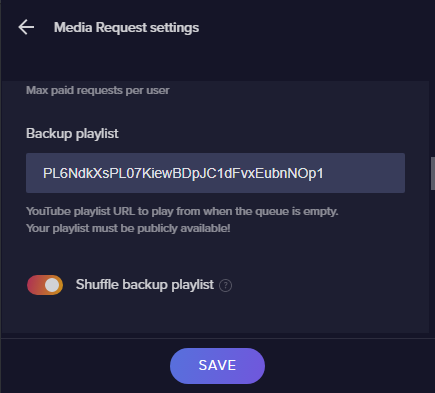
Hey guys, not sure if this is the right channel but I have my media requests setup to play a backup playlist https://i.imgur.com/rfmsuRx.png but it NEVER starts that playlist
 odd kraken
Try to add it as the whole url with https://www.youtube.com/playlist?list=
odd kraken
can you DM me the playlist you want to add please?
rugged quail
Sure 😃
odd kraken
The first video is at least not available in my coutry (germany). If I skip this, the playlist is working for me. Added as https://www.youtube.com/playlist?list=PL6NdkXsPL07KiewBDpJC1dFvxEubnNOp1
rugged quail
Let me test with that URL
hm nothing
let me record what happens
Just uploading the gif
 ashen vapor
i like that playlist lol
rugged quail
yeah it's a chill streaming playlist
ashen vapor
playlist works fine for me
rugged quail
hmmm I wonder why I can't get it to play
ashen vapor
once u play a song, hit next
rugged quail
nope, still nothing
ashen vapor
what does it do when u hit next?
rugged quail
sec just uploading gif
plain sonnet
you are playing/searching for songs on youtube, not the playlist. gimme a sec
rugged quail
No rush at all, thanks guys.
https://gfycat.com/SnoopyOrderlyGadwall this is what happens for reference
 ashen vapor
in order for me to start a new playlist, i have to play a new song first, then hit next
rugged quail
ignore my failing to click the box lol
odd kraken
what version of OBS Studio and what version of OBS.Live are you on? Do you use GroundControl or the website in the background, too?
rugged quail

I don't use ground control or the website, just whatever is in the client
Just tested using ground control, not working using that either
odd kraken
Can you add a backup playlist and control it through the website?
rugged quail
Let me test, two seconds.
plain sonnet
so i just added a random video from youtube (on the se website) then clicked next and your backup playlist started, try that instead of something from the list
rugged quail
It seems like doing it through the website is working! 😃
I guess it's a bug with ground control/obs.live
Is there somewhere I can report that?
From what I've seen the obs.live media request box seems to have issues retaining settings a lot of the time so maybe it's related to that
the website is working buttery smooth
plain sonnet
we can do that, maybe try logging out of obs
streamelements > logout
close obs
open it back up and log back in
if its still the same we will let the admins know
rugged quail
Sure, give me a minute and I'll try. At least it seems to be working for the time being.
Tried swapping out a new playlist, didn't save that playlist despite saying it was (I checked the site and it still had the old one), updated in site and it doesn't reflect in the client but works
plain sonnet
thanks for that, we will pass it on
rugged quail
Thanks a lot of the help everyone, have a lovely day.
plain sonnet
you too
 vale sage
Hi!
I'm having issues with OBS Live - the software is not showing my latest subs anymore, and i get an error when i start the App "Failed to authtenticate with twitch" - "Failed to get token "
"failed to get token from Remote"
I already tried logging out and in again but it does nothing.
odd kraken
Do you have Two Factor Authentication enabled?
vale sage
Hi Benno!, don't think so, where can i activate this
should it be activated or deactivated
odd kraken
It should be activated. I think you can activate it where you get your stream key on twitch
vale sage
Ok let me check this out, do you think that when i get it to work OBS Live should update my latest Follower?
or it will start working once i get a new follower
odd kraken
It should be showing your activity Feed like in the Browser. And when you get a new Follower it should be Displayed.
vale sage
Ok, i Activated two factor Auth -
And it solved the problem from the Screenshot.. but it is still showing old info ( not the newest followers for eexample)
The activity Feed is not showing the same info as the browser.
odd kraken
Can you reload the OBS Dock please with the small reload arrow at its top?
vale sage
ok, on it*
i just noticed that the broswer (SE ) doesn't show the info updated also
ok, hitted the reload button but it didn't help
odd kraken
Please make the bot Part your Channel, log out of the SE Dashboard on the Website, log back in and invited the bot back to your Channel. After that all new activities should Show up from now on.
vale sage
Ok, already did that just now 😦 but it didn't help.
Twitch site shows info ok, but SE site on browser, or the OBS Live App doesn't show this latest info yet.
odd kraken
Twitch sends is the Info ohne Time. If we didn‘t catch it, we can‘t Show it. be parting and rejoin the bot, we refreshed the connection for Future Events to be displayed.
vale sage
Ok, so it won't show probably because of the login error, so SE didn't Catch it.
but this doesn't mean i won't get the New Followers ( From now on )
right? so i guess i'll try streaming and report back
Thanks @odd kraken @charred oar
frank roost
Hey again amazing team! I still cannot get Twitch Integrations to show, and just did a full reinstall of both OBS and OBS Live. My custom named bot works fine, but i do not have the required folder for cookies to delete. Any suggestions? Those two missing panels were the best!!
The StreamBot instructions worked once to restore my missing panels, but they disappeared again, and I can't get them back....
frank roost
i do!
Activity Feed/Media Request are available, but I had two panels previously: one had viewers/follwers/etc, the other had stream update info (change title, etc) <-- these two panels are no longer showing, and I had thought they were part of OBS Live
if they are just OBS Studio, i'll go bug those kind folk instead
ashen vapor
is "activity feed" checked?
frank roost
tis, and in use
ashen vapor
can u see your activity?
frank roost
i can
ashen vapor
if u want to change titles... click the hamburger icon in the top left... i have it circled in the photo
frank roost
we'll do, thanks!
ashen vapor
no problem
 scarlet wharf
For the life of me I can not get my chat to load.
 ancient gulch
hey can anyone help with obs just showing a black screen when i try source a stream from game capture
shy mountain
@scarlet wharf Streamelements on top -> logout -> login
@ancient gulch Run OBS as admin
 unreal mango
Forgive me, I can't find documentation or other comments for this, but using OBS.Live and trying to change the custom bot name is giving me trouble. I cannot figure out how the 'Set custom bot name' option from the drop-down box (that also has Streamelements and my channel name as options) actually lets me set a different name. It doesn't appear to be interactable, and the 'Learn more' link in the text above it does not seem to link anywhere.
shy mountain
Check the pinned video in this channel for how to rename the bot.
unreal mango
Okay, thank you 😃 Is that 'Learn more' link normally unresponsive or is that just me?
shy mountain
Which learn more link?
unreal mango
In the Activity Feed window just above the drop-down box for 'Current bot name' is a bit of text that says 'Change the bot name on your Twitch channel chat. Learn more' and the last bit behaves like it's a hyperlink if you mouseover, but clicking it doesn't appear to do anything, nor does right-clicking give any option (e.g. to copy it, go to it, etc)
 unreal mango
Heh, okay thanks. So long as I'm not crazy
 hardy tulip
Hi, Alerts are echoing only with this one scene that i have, any ideas? I've checked that the scene is not duplicated or anything and that the others are set to shutdown when not active. idk...
ancient gulch
@shy mountain and just like that it worked, thank you
 tawny shard
hi i have an issue- my computer keeps telling me error messages and randomly ending my streamwhile i stream on obs live... any fix?
deep birchBOT
@tawny shard Please provide a log from your last stream. To do this, in OBS go to Help > Log Files > Upload Last Log File and paste the link to the log file here.
shy mountain
Link is incomplete.
 steel mural
But that already shows us that you're on an old version of OBS. Links being incomplete is the exact reason why we changed the log uploader.
 rain magnet
any guide to make subscriber - donater - follower bars that can show the 3 - 5 latest peaopel
odd kraken
There are the recent followers/tips/subscribers widgets to do so.
 fallow root
So i have an issue not necessarily in the obs.live but in the alertbox, all i do it don't seem to change the default animation of cheers to something custom i've made? any ideas?
All the other alerts work just fine
odd kraken
Have you checked the variations of the cheer alert?
 gleaming garden
Hello, all. Any ideas why my alerts aren't working on stream? Someone just hosted me but nothing showed up on stream.
 viscid river
This is maybe just a general OBS question, but maybe someone here can still help me.
Anyone know if you can use a hotkey to toggle a camera mask on and off?
deep birchBOT
@viscid river For the best OBS support, please join their Official Discord @ discord.gg/obsproject
rugged quail
when trying to add a background in MP4 format it wont show in my overlay when putting it in :/
converted it into a WEBM and it works now XD
 snow nebula
i need help with web cam lag
deep birchBOT
@snow nebula For the best OBS support, please join their Official Discord @ discord.gg/obsproject
 cloud elk
Does obs.live work with facebook?
odd kraken
Not at this time, no ETA.
cloud elk
but is it in the works?
odd kraken
We have plans.
glossy dagger
Need some advise on use / settings I am using *.webm file for my alert and sometimes it seems to lag, skip, and not play the whole alert even though adequate time is set in the dashboard for the alert to play. Any feedback or advise that we could do to resolve this?
 signal crown
did Stream Elements remove the option to change the Language and Message from the Activity Feed?
 lapis field
i'm having a problem with obslive not capturing video or sound
glossy dagger
Anyone finding if *.mov video files work better than *.webm files?
ashen vapor
Webm files will put less stress on your stream then mov will
 rose folio
Hey guys - quick thing - are there drafts saved of our overlays?
tulip hamlet
No, you'll need to create duplicates if you wanna toy with multiple iterations. The only save is the manual save button to overwrite your current open overlay.
 rare night
🚧 We are recovering from some server/database downtime. Thank you for your patience. We will keep everyone updated. 🚧
✅ UPDATE: We should be 100% recovered now. Thank you and apologies for the momentary issues.
 dark ferry
hello! My obs.live stopped loading in to my OBS Studio. might there be a fix for that? I cant find anywhere to turn it back on either.
rare night
@dark ferry hi Kara at the top left of each dock within OBS there is a reload icon
please try this button and let us know if that helps
@dark ferry If you don't see this please take a screenshot of your OBS program and share here 😃
tulip hamlet
@dark ferry Please close OBS. Do you have a shortcut specifically for "StreamElements OBS.Live?"
dark ferry
i'm using the obs.live shortcut. I'm not sure why it is gone.
i got a little message in the bottom left saying there is an update available
but cant find anywhere to update it
dark ferry
yep - i'll reopen it and see if i can snap a screenshot of it
rare night
👍
dark ferry
rare night
Interesting..
There should be a white popup window
I'm unsure why it seems to have disappeared for you but reinstalling the add-on from https://strms.net/obslive will fix this
dark ferry
that's just what I was about to try 😃
That did the trick. Just not sure why it decided to uninstall all by itself
 rotund jolt
I lost the panel that I use to edit my stream title and such. Dunno how to get it back
dry sphinx
On OBS.Studio: Click Streamelements -> Log out -> Sign back in.
rotund jolt
@dry sphinx if you meant me I did so just now and the panel that looks exactly like the dashboard on twitch is still missing. I forget how I turned it on last time. I believe the panel is "dashboard" but cant remember.
or rather "stream information" maybe
deep birchBOT
@rotund jolt If you are not seeing the OBS Twitch integrations and have OBS.Live installed, please follow these steps:
- Make sure you are on the latest and greatest version of OBS.Live ( 19.5.27.394 )
- exit OBS (make sure OBS is not running)
- delete
%appdata%\obs-studio\plugin_config\obs-browser\obs_profile_cookies - start OBS.Live
- Settings -> Stream -> disconnect -> connect
rotund jolt
oh cool ill try this
rugged quail
how do i get back the windows from my twitch dashboard ( stream information, stats )?
tulip hamlet
Look two messages up.
rugged quail
thank you
 delicate bone
I there,
I wonder if it's possible to set a chat command for my moderators that triggers an alert box in my overlay? thx
(or maybe another simple way within stream element/obs live to install an alert sound triggered from chat...)
shy mountain
The only way that comes to mind is Stream Store items.
Steps to make a command trigger sound on stream:
- Go to Stream Store page here: https://streamelements.com/dashboard/store/items
- Add an item that has these settings on it:
- Stream Perk
- Loyalty settings to your desire
- (Next step) Add contents (image and/or sound you want to play)
- "Redeeming this item shows an alert
- Redemable via chat
- Skip Requirements
- Get the item name/command from the 2nd creation page
- Go to commands page here: https://streamelements.com/dashboard/bot/commands/custom
- Add command with desired name and have response for command as:
${redeem item_name_here} - Go to your overlays and edit the overlay you use.
- Click on "widgets" and add "Store redemptions" widget. Click save and you should be golden.
- Test your own command in chat and have OBS or editor open to hear sound
- ???
- Profit in viewer interaction and that dosh

I think you can set the command for moderators only, but the items can be redeemed via subs if you lock it, but you can't set the items to be moderator only, just subs only.
 quartz maple
@vale sage OBS live failed to send me the alert for new follower last night too. Did you get it fixed? I see a new follower from today but not the ones from last night in the activity feed
shy mountain
Can you show me the missed followers?
 dense canyon
Hi all. Is anyone else having an issue with no host sounds coming through? I’m using obs live. I have set everything up in my overlays and all other alerts appear to be working correctly. I am aware others are saving a similar issue. Txs
deep birchBOT
@dense canyon Due to changes to Twitch API, we have filtered out hosts and will only show these ones on your activity feed:
- All manual host events (0 hosts included and if filter set to 0)
- All hosts coming from an online channel. If the hosting channel has been offline, we do not show it
- All auto host events with at least 1 viewer
Note: An offline host is when you see "X channel has just hosted you" - with no viewer numbers on the back
 stoic prawn
Hello, I have a custom chatbot on obslive setup. when I click the send test message it will work and say something in chat. but when I go to type in a command nothing pops up.. How do I fix that
shy mountain
is the custom name modded?
shy mountain
What is the command you are trying to use?
stoic prawn
Any command I have set up
shy mountain
I believe your commands are set to work only when online
shy mountain
You need to set them to "Both" instead of "Online" if you want them to work while not live/streaming
stoic prawn
gotcha!
Is there a way too change all at once?
Wait all of these are already on Both, and still not working
stoic prawn
Omg thank you so much! looks like its working!
 misty lake
Hey my chat is not working in streamelements obs
shy mountain
What exactly are you seeing?
shy mountain
Click on Streamelements on top -> logout and login
misty lake
wait so my obs is not working with game capture on destiny 2
all i see is a black screen
shy mountain
Destiny 2 blocks game capture.
do a window capture
and have Destiny 2 in window mode

Bungie.net
To help ensure that every player will have a fair shot at fun and glory in Destiny 2 on PC, we resist attempts by third-party applications to insert code into the game client. This may result in incom
fiery gate
is anyone here?i would need help
shy mountain
No, i'm not here 
What is the issue you are facing?
fiery gate
game capture is blank.always.
shy mountain
run OBS as admin
shy mountain
Better performance depending on the game
fiery gate
ok
misty lake
yeah running d2 in windowed causes input lag :/
shy mountain
Can't help with that.
As Bungie also posted on how to capture the game: https://www.bungie.net/en/Help/Article/46101
Bungie.net
To help ensure that every player will have a fair shot at fun and glory in Destiny 2 on PC, we resist attempts by third-party applications to insert code into the game client. This may result in incom
This is the only way.
shy mountain
fiery gate
thank you so very much!i would pay you if i met you!
shy mountain
No
 olive temple
Hey hey, I’m trying to get the time.GMT command to show the correct time the command shows 08:39 but the actually time is 09:39 how do you include day light savings? I’ve tried +1 and UnitedKingdom/Scotland both showing a wrong time.
olive temple
The Ireland/London times are all out by one hour.
olive temple
well I can show you the command and the results
shy mountain
Show me how you've setup the command
olive temple
shy mountain
There - now showing correct time
olive temple
So why was it an hour out? Even though I had obs running all night?
shy mountain
OBS has nothing to do with this
Bot got cached so it needed to be parted and joined again, after changing the command to the proper variable
olive temple
fair enough, would have been easier to know that lol.
shy mountain
Well, until I saw that you changed teh command and it still responded with the old setting
it just a last thing to try to refresh the bot.
 trim hawk
None of my commands are working when I type them in to chat, but they do when my Mods type them in ( !so = shoutout, !kappagen, etc). Would anyone be able to help me work this out please?
twilit venture
@trim hawk log out and back in via the "StreamElements" Pannel on top
rugged quail
after reinstalling my pc i cant see my bot with its name and i cant login with it on streamelements :? it only apear as stream eelements :/
twilit venture
You loged out and back in yet? @rugged quail
delicate bone
Don't know why but it don't work...
I named my item : "alerte"
so I saw this :
and I've create a command :
maybe I misunderstood this :
I put this in my overlay through the store redemption widget
I saved it
and when I try !alerte in my chat, nothing happened
(I tried this too : !acheter {!alerte})
(and this : !acheter alerte)
nothing never happened
@shy mountain
rain magnet
i know i asked yesterday but im afraid i didnt get an answer i understand. im looking for a way to get the past 10 subs/followers/cheers to show on my stream i only get 1
 sinful flint
When you're editing your overlay and you click on Widgets you want to use the 'Recent' widgets for this, such as Recent Subs, Recent Followers, Recent Cheers. It will ask you with a slide bar how many visible items you want, if you want to show the past 10 you set that to 10 and click Save in the bottom left 👍
rain magnet
@sinful flint ill try
rugged quail
How to i change the Streamelements bot name :?
also the link in OBS.live is broken for the SteamElements Live Support tho 😃
sinful flint
@rugged quail Are you trying to change it in OBS.Live? If so, you just click on the menu icon in Activity Feed, then Stream Settings, then look for the Custom Bot Name section
rugged quail
ohh there thanks @sinful flint 😄
sinful flint
No problem 👍
fickle marten
is the command cooldown on streamelements in seconds or minutes?
it doesn't specify...
5 what?
ashen vapor
Mins
fickle marten
ty
 fathom cobalt
@fickle marten Seconds, afaik
fickle marten
two different answers 
ok i tested
it is seconds
i could spam it with it set to 1 but not with 10
ty
fathom cobalt
🙂
fickle marten
to set a custom bot name do i have to make a new Twitch account just for the bot?
fathom cobalt
Yes
fickle marten
ah ok ty
fathom cobalt
!rename
deep birchBOT
Custom bot name requirements
- StreamElements bot modded and in chat
- Active overlay with alerts
- StreamElements tipping page in the panels below the stream (!panels)
- OBS.Live or Ground Control open
- Create a twitch account for the name you want to use or run the bot under your own name
- Custom bot name doesn't work on Mac
fickle marten
could i have help with this
it's confusing me
i've changed the name
but it doesn't actually use the bot now
it just uses the account i made
?
it no longer has the bot badge next to it's name
and i had to manually mod the custom name i made?
warm pewter
Bot rename uses the name of the twitch account that you specify for the rename. You can't just rename the bot to anything. It needs that account to be able to post to chat. That is why you need to mod that account, and it will have whatever badges that account has
 green python
hey´
is there anyway of rotating things in obs? like making my webcam rotate 180º to be upside down?
plain sonnet
right click on your webcam, transform, rotate
 plush mason
I have a weird issue. When i use my normal obs studio i have no lag everything works fine but when i use obs.live i lose about a 100 fps in Overwatch and other games.
 zealous seal
any help with how to use this with mixer?
fickle marten
@warm pewter can i give an account the bot badge?
warm pewter
No
blazing forum
Is there any way to stay logged into your twitch channel for the chat? Each time I start OBS.Live I have to sign into the chat again. The rest of the setting stay logged in and I can even start a stream without logging into the chat so I know its not the broadcast settings.
deep birchBOT
@blazing forum If you are not seeing the OBS Twitch integrations and have OBS.Live installed, please follow these steps:
- Make sure you are on the latest and greatest version of OBS.Live ( 19.5.27.394 )
- exit OBS (make sure OBS is not running)
- delete
%appdata%\obs-studio\plugin_config\obs-browser\obs_profile_cookies - start OBS.Live
- Settings -> Stream -> disconnect -> connect
green python
if im streaming at 30 fps, do i need to cap my game at 30 or can i play at 60?
shy mountain
you can play at 60. If you feel the game lagging or the stream starting to lag, start lowering the cap of teh game
but this depends on your PC most of the time
and sometimes the game(coughApex Legendscough)
green python
hahahhaa ok
 proper spear
Hey, I got OBS.Live recently (cause I got a computer recently as well). However, I am having some issues with some of the sources. For what I’m planning to do, I need to use ‘Window Capture’ as I would like to record / stream applications which does not have the full screen feature and I do not want to use ‘Display Capture’. However, I get a black output when I select my source (this has occurred on all except one occasion). Can someone help me fix this issue?
odd kraken
Best to read through this article: https://www.obs.live/articles/2019/3/20/how-to-fix-the-obs-capture-window-black-issue
proper spear
Thanks.
 wintry path
ah, didnt see this. okay so what's happening is after Login using twitch and grant permission to let obs live use the bot, the bot doesn't even show up for me to use.
I have tried:
- Unmodding and modding stream elements and the bot itself
- refreshing obs.live
- Trying another account to be the bot.
none of these worked
dry sphinx
It shows all requirements with a green checkmark when you click the Custom Bot name right?
wintry path
yes, all check marks are green
I can use my own account as the bot, but not other ones
dry sphinx
When you click Custom Bot Name: Does it show you that?
When trying to add a new one that is.
dry sphinx
Then when you try to sign in with your 2nd Twitch Account (Bot Account) it doesn't show up?
wintry path
Gives me this. Do I need to sign out of twitch on the computer?
I click accept and then goes away like nothing happened.
Tried signing out of twitch to do it...doesn't work
dry sphinx
Gonna ask more about this. As that's weird as it's working perfectly fine for me.
dry sphinx
@wintry path Got notice your bot is not a moderator. Can you try to add it to be a moderator & try again? 🙂
wintry path
see, I tried that. he already is.....
I thought that was the problem as well so I unmod and modded the bot account and stream elements just to make sure. neither worked
fiery gate
i need help
deep birchBOT
@fiery gate Welcome to the support channel! Please let us know how we can assist you today and a member of the support staff will be with you as soon as possible.
dry sphinx
@wintry path I would try using the "Report Issue" Under the StreamElements Tab. As I'm not sure what else would make that occur & may need further devs to look into that 
@fiery gate Can you show a screenshot what you're talking about?
Cause I don't understand what you mean by different.


