#helpdesk-selive
1 messages · Page 39 of 1
 shy mountain
 rugged quail
How I can do if i would use two of my channels on it? :/
shy mountain
If you want to switch accounts -> streamelements on the top menu -> logout -> login with the other account
rugged quail
Oh.. But is not possible to add this feature in a next release of OBS.Live?
rugged quail
Yeah i know, is not common to use 2 accounts. But for example for me is little difference :/
shy mountain
This has not been requested so far and it isn't that hard to switch between accounts.
rugged quail
Yeah i know, but maybe i have a solution. If i use an overlay from second account, chat and alerts is inherited from it? Or use always chat and alerts from account connected at OBS.Live in that moment?
shy mountain
chat won't be inherited, but the overlay will show alerts from that account.
activity feed will show alerts from the current connected account.
rugged quail
so if i switch overlay (on second account), the chat of it show second account chat?
shy mountain
what chat are you talking about?
rugged quail
Chat inside overlay
shy mountain
that will show the chat from the 2nd account
rugged quail
Oh ok
 barren quarry
OBS keeps crashing on me :\
Trying to test video recording, the initial settings I tried were pretty choppy and laggy (without even playing the game - im just testing by browsing the web/youtube)
Then I changed the settings again and clicked start recording and the whole thing froze. Had to end task on task manager
Any help in figuring out how to prevent that/what settings I need to run to record a youtube video?
 deep birchBOT
@barren quarry For the best OBS support, please join their Official Discord @ discord.gg/obsproject
 static lantern
Is there a work for stream deck and obs.live? I use to use streamlabs and I could use my stream deck with it
 fierce atlas
@static lantern Yes. https://blog.streamelements.com/streamelements-obs-live-elgato-stream-deck-the-perfect-match-85c194bf894a

StreamElements - Legendary Live Streaming
StreamElements OBS.Live add-on makes stream management easy. The add-on is fully integrated with OBS Studio and allows you to declutter…
static lantern
Awesome thx
barren quarry
Noooooo
I made a new 'profile' for recording. And renamed my original profile which I had all the scenes and everything set up
And just switched back to the original profile now (for streaming) and it's basically all gone, looks the same as the new (recording) profile
Why the heck did that happen?
fierce atlas
I think you are confusing the function of profiles v.s. scene collections 😦
(but also just as an FYI, this is unrelated to StreamElements' OBS.live plugin, it is part of the regular OBS software)
barren quarry
ahhh ffs man
i assumed a 'profile' would essentially save the settings and scenes etc individually to one another
So I have to re-do my entire set up again right? 😦
fierce atlas
I agree that is not intuitive as I've made the same error in the past 😦
I think so but feel free to hit up the official OBS discord to see if there's any other way
deep birchBOT
@barren quarry For the best OBS support, please join their Official Discord @ discord.gg/obsproject
barren quarry
thanks
yh its super frustrating
took me 3 days to finally finish doing those scenes lmao and all gone just like that
fierce atlas
oof yeah I feel you!! best of luck getting that fixed!
 gilded moth
How does OBS.Live handle profile switching?
fierce atlas
It doesn’t. The OBS software does. Feel free to ask for more information at the official Discord above! 😃
If you’re talking about the same profiles, that is.
 meager raven
Profiles in OBS (which OBS Live is a plugin of) are used to switch between different settings. For example, switching between streaming to Twitch and YouTube. While Scene Collections are used to save scenes for different uses.
gilded moth
So when logged into your Twitch on OBS.Live and you switch to a different profile, are you supposed to be logged into the twitch associated with that profile?
Like I have Profile A and it's signed into Twitch. Then I switch to Profile B and get prompted to sign into Twitch. After signing into Profile B's Twitch. Will Profile A still be signed in if I switch back?
meager raven
I have not tried doing that in the past, so I suggest asking at the official OBS discord.
gilded moth
So OBS handles the Twitch sign-in.
Okie doke. I'll try there.
Wait, it even handles the Chat Window from Streamelements?
I have no issues switching profiles and streaming. It's the chat window that prompts for the sign-in.
meager raven
No. The Chat window is a feature of SE and is determines by the login with your SE account.
gilded moth
Okay. That makes sense.
Then is the SE account supposed to switch when switching profiles?
meager raven
No, switching OBS profile should not affect your SE login
gilded moth
Is SE supposed to prompt for login everytime after starting OBS?
meager raven
No, is that the case with your setup at the moment?
gilded moth
Yep! I start OBS. I click in the chat window and try to send a message and it prompt me to sign-in.
I also have 2FA turned on btw.
meager raven
Got it, a moment while I look into it.
 sinful flint
- Make sure you are on the latest and greatest version of OBS.Live
- exit OBS (make sure OBS is not running)
- delete %appdata%\obs-studio\plugin_config\obs-browser\obs_profile_cookies
- start OBS.Live
- Settings -> Stream -> disconnect -> connect
gilded moth
Are these the steps after reinstalling OBS and OBS.Live
Actually, yeah I'll give that a shot.
deep birchBOT
@tulip parrot Custom bot name requirements
- StreamElements bot modded and in chat
- Active overlay with alerts
- StreamElements tipping page in the panels below the stream (!panels)
- Create a twitch account for the name you want to use
- Ground Control app must be running
Steps to enable custom name
- Sign in to https://twitch.tv with the bot account
- Install and run Ground Control (!gc for download)
- Visit https://twitchapps.com/tmi/ and generate an oAUTH token
- Copy/paste everything in the box to Ground Control oAuth settings and enter the name for the bot account
- Restart Ground Control (custom name may take a few minutes to take effect)
Mac does not currently support renaming the bot.
 tulip parrot
ty
 sinful flint
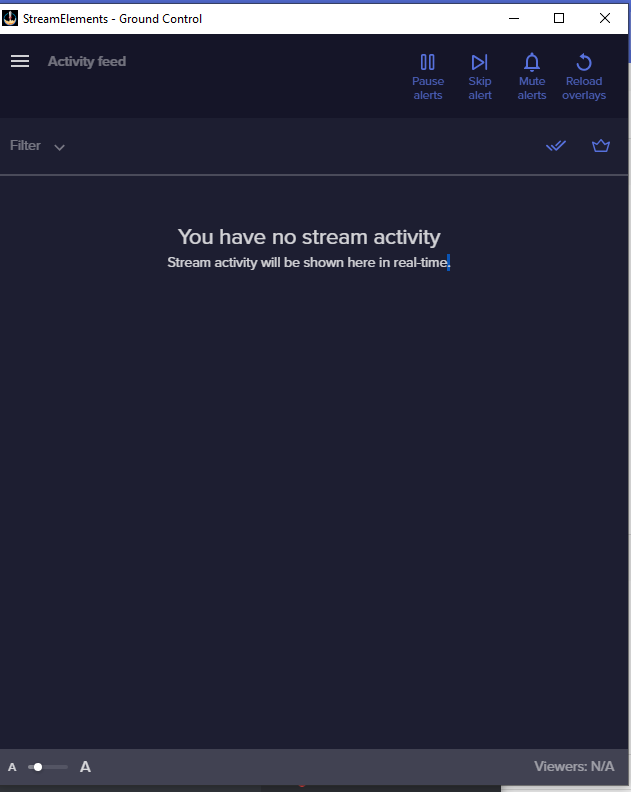
Click on the menu icon next to Activity Feed in the top left, then Settings
Then look at the 'Custom bot name' section
tulip parrot
I don't see custom bot in settings https://i.imgur.com/AzZ8DAj.png
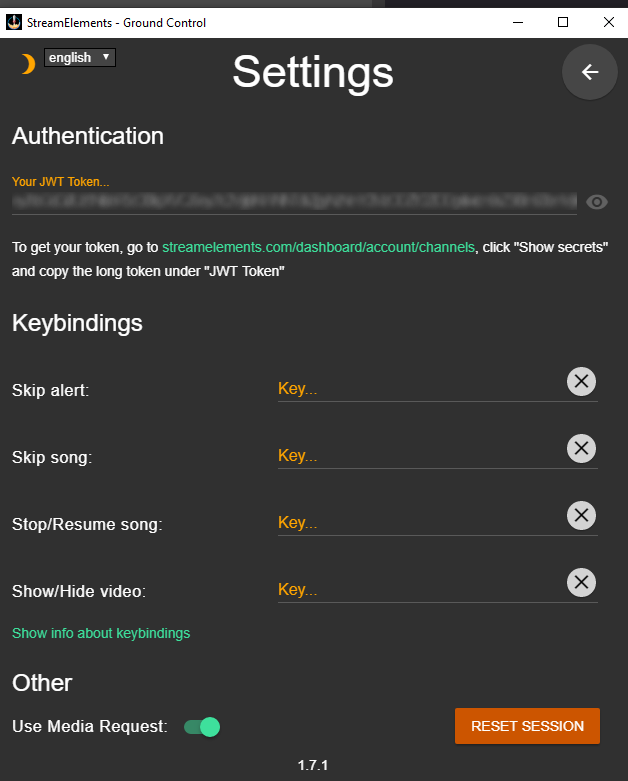
I just watched a youtube video and they have custom bot option down there
but I don't
weird
Is there any link to a previous version?
meager raven
Have you made sure to fulfil all custom bot name requirements?
sinful flint
You don't have a tipping panel, so you haven't fulfilled this requirement: "StreamElements tipping page in the panels below the stream (!panels)"
The option appears in your settings when you meet all of the requirements
!rename
deep birchBOT
Custom bot name requirements
- StreamElements bot modded and in chat
- Active overlay with alerts
- StreamElements tipping page in the panels below the stream (!panels)
- Create a twitch account for the name you want to use
- Ground Control app must be running
Steps to enable custom name
- Sign in to https://twitch.tv with the bot account
- Install and run Ground Control (!gc for download)
- Visit https://twitchapps.com/tmi/ and generate an oAUTH token
- Copy/paste everything in the box to Ground Control oAuth settings and enter the name for the bot account
- Restart Ground Control (custom name may take a few minutes to take effect)
Mac does not currently support renaming the bot.
 cosmic gorge
Is there a way to have alerts on all scenes without them echoing?
deep birchBOT
@cosmic gorge Make sure to ☑ “Shutdown source when not visible” for all browser sources (all OBS scenes). If using studio mode, uncheck “Swap Preview/Output scenes After Transitioning.” Also keep in mind that sound can play from any overlay loaded in the browser (editor or launched). https://i.imgur.com/FegZJQS.png https://i.imgur.com/yY0wcFl.png


 steep knot
hi i have a problem.. when i copy the streamelements overlay link to browser in obs.live, when i start the stream up it shows up in green blank screen. so i went to research any information about how to fix it and couldnt find anything. is there a way to fix it?
 tulip hamlet
Set the color format in OBS to i420. In OBS: Settings > Advanced > Video > Color format = i420.
steep knot
Thank You!
 ancient flax
@tulip hamlet https://h4ndy.eu/obslog?url=https%3A%2F%2Fobsproject.com%2Flogs%2FcPNi16g14O-tgUzP
I solved most of the issues, how do i fix the audio buffering? I tried a lot of things, CPU usage doesn't go above 95% or so
tonight's stream btw
deep birchBOT
@ancient flax For the best OBS support, please join their Official Discord @ discord.gg/obsproject
ancient flax
👍 i'll join later
 queen compass
Hey, i want to ask if there is any way to upload bigger files then 30mb? Cause my Intro etc. are way higher then 30mb and i can't use it in stream.. (Yes they are animated) Or should i simply use them directly in OBS?
 neon fern
yea its probably best to keep the intro on OBS 😃
 vestal badger
Hello im trying to record and OBS gives me this error "an unspecified error occured while recording." can somenone help me?
gilded moth
Btw, @ Legendary/Sean that mostly worked. It stays logged in and everything sticks when switching profiles. If I switch back to a previously active profile, it crashes but I can live with that.
 granite forum
hi does anyone know how i can enable tts for chat on the overlay editor
tulip hamlet
There's no TTS for chat, only for alerts.
 finite wedge
Hi all, I'm having an issue with a stinger transition lagging out really bad when in game. It's a webm file (1440p 7.58mb) and CPU hits 100% when triggered. Should I be using a different file type or do I need to throw this 6700k in the bin? Thanks in advance
deep birchBOT
@finite wedge For the best OBS support, please join their Official Discord @ discord.gg/obsproject
 dreamy tendon
What is an encoder setting?
shy mountain
this
dreamy tendon
what does it mean to make it faster?
 olive crest
how can i give my mods the ability to switch my scenes in obs?
deep birchBOT
@dreamy tendon For the best OBS support, please join their Official Discord @ discord.gg/obsproject
shy mountain
@olive crest Unless you want them to enter via TeamViewer and take control of your PC when you want a scene switched, you can't give them access
deep birchBOT
@thorny bone Please provide a log from your last stream. To do this, in OBS go to Help > Log Files > Upload Last Log File and paste the link to the log file here.
 thorny bone
Sadly I don't have it, my last OBS.Live broadcast was a long time ago I've just been using obs studio
shy mountain
Well 
rugged quail
Hi, are widgets automatically added from the website to the stream? also, is there a test widget button?
@shy mountain \
shy mountain
You need to add the widgets manually to the overlay and then add the overlay to OBS.
deep birchBOT
@rugged quail To add your overlays to OBS, add a new browser source in your scene. Paste your overlay URL in the browser source properties, set the dimensions to 1920x1080 (unless you changed them on the website), and ☑ “Shutdown source when not visible” https://youtu.be/KDvLynUqXI4
@rugged quail You can test Alerts via the bell on the lower right corner of the Overlay Editor. Simply go to your Dashboard -> My Overlays -> Pencil/edit button on the overlay. Make sure the "Show Emulated events on stream" option is on to see the alert in OBS/Xsplit https://streamable.com/h6qgy
 rugged quail
thanks a ton !
 wooden talon
last time i was in here a mod had me post that to test my stream?
shy mountain
Please do not post your overlay link in public locations!
wooden talon
sorry! my copy must not have taken! ty for catching that!
shy mountain
I see last time we spoke, but I don't remember asking for an overlay.
wooden talon
@shy mountain which log is it to test my cpu and GPU? your absolutely right, it was an accident. i was trying to post my crash report i think>
deep birchBOT
@wooden talon Please provide a log from your last stream. To do this, in OBS go to Help > Log Files > Upload Last Log File and paste the link to the log file here.
wooden talon
wooden talon
i was just streaming....
i came back cuz i didnt have any issues at all tonight. same laptop and everything
shy mountain
if you didn't had issues, then what is the problem 
wooden talon
some nights it works. some nights it doesnt. was seeing if this test showed the same issues or something different to help figure out why its so hit and miss
shy mountain
wooden talon
right, i was 100% just streaming
shy mountain
did you restart OBS afterwards?
 ivory pulsar
Any way to fix my overlay from refreshing itself as I change scenes?
 plain sonnet
@ivory pulsar make sure these are off in the browser properties
ivory pulsar
That needs to be fixed asap. I've already checked "shutdown source when not visible" before.
plain sonnet
uncheck
ivory pulsar
Okay, I will give it a try and see if they work.
All my soundbytes will echo when I test them, though.
via custom text commands + store redemptions together.
plain sonnet
if you dont want the overlay to refresh then you have 3 options, use studio mode to pre load the scenes, have a transition that covers the loading or make a blank template and only have it for the overlay so that it doesnt refresh
ivory pulsar
I tried the first option. That might work.
 waxen wind
i have installed obs.live i have had it in the past but the plugin blocks me from game capture my games, so i cant use it anymore someone got a link to a older version? because it worked before
 odd kraken
Have you started OBS as admin?
 rare night
@waxen wind are you using version 23.1.0 of OBS Studio?
rare night
What game are you attempting to capture?
Which other sources do you have in this particular scene?
waxen wind
I think it's a problem with the anti cheat of fortnite and pubg
rare night
That could be, games these days have become increasingly difficult to hook into for the game capture because of anticheat
Are these your GC settings?
waxen wind
Capture specific window on mode but yes
I've disabled use anti cheat compatibility hook and that didn't fix it neither
rare night
I wonder if there is anything in the logs.. try going to Help > Log Files > Upload current log file and share with me here or in DM
rare night
Running as admin did the trick 
 dry wolf
It would appear as though my bot through OBS.Live isn't doing anything. It used to, but hasn't done anything for a while now. I don't think I have changed anything that should have resulted in its inactivity. Please advise?
fierce atlas
Is the StreamElements bot responsive at all, or has your custom name stopped showing up in chat? @dry wolf
dry wolf
Other than posting the title of my stream and the name of the game, the StreamElements bot seems to have become completely unresponsive as far as the timers are concerned. It does respond to chat commands though. Furthermore, the custom name is not showing up either.
fierce atlas
Have you double checked how long your timers are set for and whether they are currently enabled for "Online"? 😃
As for the custom name, you should be able to reconnect the same way you first connected the custom bot name.
dry wolf
I think it's set to "Online." So should I remove the bot from my list of mods in the online Dashboard and readd it? IIRC, when I tried looking into the bot problem in OBS.Live it just told me that everything as all set up. To which my response was like, "Uh. Okay."
deep birchBOT
@wicked carbon Please abide by our server rules:
- No advertisement or stream promotion
- Respect ALL server members
- No NSFW/NSFL
fierce atlas
@dry wolf I would disconnect and reconnect it in the OBS.live interface 🤔
dry wolf
I'll try that again when I get home today.
fierce atlas
you can also part and re-join the bot generally from the StreamElements dashboard
 green python
how does ground control work and what does it do??
fierce atlas
@green python Ground Control is a dedicated app to help you manage StreamElements while you are streaming. You can also use it to rename the bot.
You would download it from the StreamElements website and install it like any regular application on your computer 😃
green python
is it like the activity feed on obs live overlay in obs??'
fierce atlas
if you are using OBS.live you probably don't need it, as it offers very similar functionality!
green python
oh ok thx, another question, is there anyway to download any external alerts to my obs.live/SE?? or even make my own and import it
fierce atlas
there are a lot of customization options on the existing alert widget, but you can also use the custom widget to create your own using HTML, CSS, and JavaScript 😃
green python
ok thank u very much @fierce atlas
fierce atlas
no problem! 
 tough yew
Hello. Is the obs.live currently bugged? On obs.live my browsersource for streamelements is using like 14% cpu usage while when i remove obs.live its only 1%
deep birchBOT
@tough yew Please provide a log from your last stream. To do this, in OBS go to Help > Log Files > Upload Last Log File and paste the link to the log file here.
 frail furnace
Currently trying to stream rocket league, and although the game is running smoothly, the stream seems to be extremely laggy and I dont know how to resolve this
running at 6000 bits, as my upload can handle this
odd kraken
Can you share your current log link please?
frail furnace
odd kraken
In many cases, wireless connections can cause issues because of their unstable nature. Streaming really requires a stable connection. Often wireless connections are fine, but if you have problems, the first troubleshooting step would be to switch to wired. We highly recommend streaming on wired connections.
frail furnace
Ahhhhh, yeah I'll have to get a longer ethernet cable then xD thankyou for the help with that one, such a simple one
new to this but thankyou
 livid condor
trying to figure out how to get overlays from SE site into OBS live. any thoughts?
deep birchBOT
@livid condor To add your overlays to OBS, add a new browser source in your scene. Paste your overlay URL in the browser source properties, set the dimensions to 1920x1080 (unless you changed them on the website), and ☑ “Shutdown source when not visible” https://youtu.be/KDvLynUqXI4
livid condor
thanks!
 hot socket
I'm having issues getting my Logitech Brio working with OBS.LIVE
deep birchBOT
@hot socket For the best OBS support, please join their Official Discord @ discord.gg/obsproject
rugged quail
When I test my alerts, they work on my obs live, but when I am streaming live, they do not show up. Can you assist me without me going live?
fierce atlas
the test alerts aren't showing live, or regular alerts like an actual follow?
rugged quail
The test alerts are showing when I do a test. But when I am streaming live, they do not show up.
deep birchBOT
@rugged quail You can test Alerts via the bell on the lower right corner of the Overlay Editor. Simply go to your Dashboard -> My Overlays -> Pencil/edit button on the overlay. Make sure the "Show Emulated events on stream" option is on to see the alert in OBS/Xsplit https://streamable.com/h6qgy
 rugged quail
Thanks, I will give that a try.
tough yew
In obs.live the browser source from stream elements (even in preview only) use 14% cpu. When i deinstall obs.live and use the normal obs i got only 1% usage. Is there any way to fix it?
( source = the link to my widgets/animations)
deep birchBOT
@tough yew Please provide a log from your last stream. To do this, in OBS go to Help > Log Files > Upload Last Log File and paste the link to the log file here.
fierce atlas
we can't get the information we need to give you any advice or help without a log
tough yew
Guess i will make a few sec stream when i get home tdy. Do you need the obs.live log + the obs only log ?
fierce atlas
there is only one type of log, OBS.live is simply a plugin for OBS 😃
also, I think a bandwidth test stream will suffice
tough yew
It even acted like that when i recorded local. The plugin mess with something that tells obs how to read browser sources? Guess there was some acceleration update. Before that i never had any problems
But yea im at work atm so i cant test it.
fierce atlas
no problem, hopefully the logs help out
keep in mind that there is 1) OBS, not a StreamElements software, and 2) OBS.live, which is a plugin that StreamElements makes to add on monitoring, chat, etc. options within OBS
tough yew
Yea all chat, monitore sources are under 1%
Just the one source from streamelements goes over 10% while the plugin is installed. When i deinstall the plugin the usage for that one is also rlly low.
tough yew
@fierce atlas https://obsproject.com/logs/0SIXUR52TDGa-yLK
its the streamelements.com/overlay/xxxxxxxx source browser thats high ONLY when i use the obs.live plugin
 steel mural
My guess is that it's because OBS.Live doesn't have hardware acceleration yet. That means graphical stuff in browser sources e.g. overlays, YT videos etc. get processed by the CPU and not the GPU. It is being worked on but I can't give you an ETA.
 latent barn
Hey, new OBS.live user. My wife and I are both streamers and have separate profiles in OBS studio. When we switch to her profile in OBS, it still displays the alerts and chat for my channel. Is there any way to switch those to display from a different Twitch profile?
odd kraken
Select StreamElements at the top in OBS and then log out and back in.
 oblique void
I hit a button and now my display screen is stuck like this how can I get it to show the entire scene again
plain sonnet
click on the overlay in the source tab and press ctrl+f
oblique void
thank you
plain sonnet
np 👍
 tepid hawk
I am missing my box that lets me update the title of my stream and the little box that tells me how many viewers I have in the obs live app. How do I get them back and to stay there?
deep birchBOT
@tepid hawk If you are not seeing the OBS Twitch integrations and have OBS.Live installed, please follow these steps:
- Make sure you are on the latest and greatest version of OBS.Live ( 19.5.8.388 )
- exit OBS (make sure OBS is not running)
- delete
%appdata%\obs-studio\plugin_config\obs-browser\obs_profile_cookies - start OBS.Live
- Settings -> Stream -> disconnect -> connect
 toxic coral
So, I kind of have a long issue that I'm trying to solve to better my stream, I'm not sure if I should go to this helpdesk thread or the twitch thread. Long story short, I'm in the boat of whatever settings I use to encode, my stream remains somewhat blocky. It's not pixelated, but when quick movement occurs, even slightly fast movement, the image quality suffers. I have tried seemingly countless combinations of encoders, bitrates, resolutions, etc. and none seem to work with helping blurry motion. Essentially, I am needing help finding some kind of sweet spot for my stream. Also before the questions are asked, I have plenty of processing power and upload speed for the stream quality I am wanting to put out. I have found many optimal settings that have no encoding or rendering lag, but I'm surprised to find how bad my stream looks at 1600x900 resolution. If curious I have moved away from NVENC as it did not seem as good as x264 despite the efficiency, and the latest settings I've tried have been 900p60fps, 500kbps, faster, keyframe 2, yet the quality is still very blocky, again with no frame dropping issues. Is there something I'm missing when it comes to enhancing quality? I've been frustrated with this for weeks now.
deep birchBOT
@toxic coral Please provide a log from your last stream. To do this, in OBS go to Help > Log Files > Upload Last Log File and paste the link to the log file here.
toxic coral
In regards to this log file, I started and ended my stream at least 10 times. The final and most recent log, starting around 19:25 is the stream that seemed to have the best quality, but remains blocky during movement. In other words, the last one would be the one to look at.
odd kraken
Here is an analysis with tips on how to improve of your log file: https://h4ndy.eu/obslog?url=https%3A%2F%2Fobsproject.com%2Flogs%2FJ8zysD6_MUaBZWEP
toxic coral
@odd kraken I did everything that was recommended, and while there may be some stability improvement, the quality (At least when I moved up to veryfast) is worse than what I had before. Are there any other ways to eliminate blockiness?
 lost zenith
hey i jjust installed the extenstion of stream elements and now when i try to launch a stream i get green screen confirmed its to do with the recent download as of im able to stream it on obs labs just fine how ever through to obs/streamelements I can not
shy mountain
@lost zenith what graphics card do you have and have you updated your drivers recently?
 shell gyro
anyone having issues when changing transitions that your webcam isn't availablne
shy mountain
Remove your webcam from any scenes - add it to one 1 scene
then copy that source and paste as reference
At least that worked for me, else you'll have to use the shutdown source/webcam option
deep birchBOT
@toxic coral For the best OBS support, please join their Official Discord @ discord.gg/obsproject
 sonic temple
Hello guys, I build my entire overlay on OBS Studio, and now I got to the part where I want to add alerts and other stuffs using streamelements, is there any way to import my OBS Studio overlay into streamelements website so I can add the widgets too? or how exactly does it work?
 past pelican
My Webcam is being chopping and freezing a lot when I play higher output games on my PC like Overwatch. Is there any way for me to fix this through the OBS? Is there a setting I can adjust?
 manic cape
can someone help me with a really dumb an simple issue?
deep birchBOT
@past pelican For the best OBS support, please join their Official Discord @ discord.gg/obsproject
shy mountain
@manic cape What is the issue?
manic cape
mind if I dm, dont want to spam chat
shy mountain
We prefer here, unless you are going to show your account ID or JWT token
or leak your streamkey
shy mountain
We prefer here, cuz people can search the channel for common issues 😃
manic cape
so, i just switched from obs/streamlabs to streamelements obslive
with the layout of all the stuff we see, the chat, act feed, controls etc
is there a way to have chat take up the full top to bottom of the window?
dont know how to explain it better btw, sorry if i dont make a lot of sense
manic cape
percisely what i was after, how do you do that? 🤔
shy mountain
shy mountain
shoot 
manic cape
is there a way to set up something similar to streamlabs stream labels in SE? such as "recent sub" and "top dono" w/e ?
shy mountain
Yes - the overlay and overlay editor - https://www.youtube.com/watch?v=LwAfMIR3Cj0&list=PLCDDKlFdScbEwdx5AntcQIS1InkFJwHtv&index=5&t=0s
manic cape
Hi, me again 😅
Is there a way to import loyalty points from streamlabs to SE?
I wanna switch them all over to use them with SE chatbot but dont wanna sit and add them all individually xD
odd kraken
Choose an import tool from here: https://streamelements.com/dashboard/account/import
manic cape
It doesn't have the loyalty points, only alerts and tips
odd kraken
The tool to import from Ankhbot/Streamlabs can import points.
 heavy sedge
i have question please my Activity feed in streamelements OBS is gone. how i could bring it back ?
 dry sphinx
This would be the best to ask @heavy sedge
On OBS Studio -> Click Streamelements -> Click Activity Feed.
If it doesn't show up still -> Click the logout button instead & sign back in OBS.Live.
heavy sedge
ohh now is see it @dry sphinx
Thanks a lot you are amazing

 woeful mist
Hello everyone
I have problem with my pc
My gpu usage is low
I usually run Overwatch for example on 150 fps
While my gpu usage is on 40%
I could be getting a lot more fps
deep birchBOT
@woeful mist Please provide a log from your last stream. To do this, in OBS go to Help > Log Files > Upload Last Log File and paste the link to the log file here.
lost zenith
hey i jjust installed the extenstion of stream elements and now when i try to launch a stream i get green screen confirmed its to do with the recent download as of im able to stream it on obs labs just fine how ever through to obs/streamelements I can not
sinful flint
Can you post what you see? Not sure I understand
lost zenith
 sinful flint
Which extension did you install? I've never actually seen this before
lost zenith
stream elemnts obs

i was fine before it using obs studio now however when i hit "start stream" in stream i get green screen. using streamlabs is fine however i can confirm that has nothing to do with the drivers triple checked
sinful flint
Try this: Set the color format in OBS to i420. In OBS: Settings > Advanced > Video > Color format = i420
lost zenith
eeey ur a legend !
i assume it has changed by installing the stream elements could you breifly explain what does colour format do for me or why it might be useful ?
sinful flint
There some information here about it I believe: https://obsproject.com/forum/resources/obs-studio-color-space-color-format-color-range-settings-guide-test-charts.442/ - I just saw that a colleague suggested this recently and it worked so I thought we should give it a go 👍
lost zenith
amazing thanks for the help !
 trail steppe
Hello! I have a problem! I can't update my OBS live, i don't know why, pls help!
That's all whats it says
odd kraken
@trail steppe Please try to downoad and install the plugin OBS.Live again.
Please make sure to save your profiles and scenes before, to have a backup, if anything goes wrong.
 wet cloak
i just download stream elements obs live for the first time and was wondering how to use it along with streamlabs. I would like to use the donations/store and bot from stream elements and integrate it with my streamlabs streams. How can i do this?
i still want it to be fully accessible through streamlabs alerts, like if i get donated something, my streamlabs alert plays
odd kraken
You can set up the tipping service in StreamElements and try to add the alerts from StreamLabs into OBS Studio with the plugin OBS.Live. Be aware that for iusues with the StreamLabs alerts on OBS.Live you have to contact StreamLabs, as we don't have the tools to support their features.
wet cloak
ok thanks
 wide moon
I'm having some difficulties getting the media requests to work properly. It will not play any of the songs requested or my back up playlist. It was working great before the newest update. As well, it logs me out every time I shut down OBS for the night.
Oh and I've uninstalled and reinstalled OBS.Live as well
wet cloak
how do i change my streamelements bot name??
deep birchBOT
@wide moon If you are not seeing the OBS Twitch integrations and have OBS.Live installed, please follow these steps:
- Make sure you are on the latest and greatest version of OBS.Live ( 19.5.8.388 )
- exit OBS (make sure OBS is not running)
- delete
%appdata%\obs-studio\plugin_config\obs-browser\obs_profile_cookies - start OBS.Live
- Settings -> Stream -> disconnect -> connect
odd kraken
@wide moon For the MediaRequest, try to clear the playlist and the backup plalist and add a new video to the playlist. Also do not try to play the streamelements example video.
@wet cloak Take a look at the pinned messages in this channel.
 fathom radish
Need help with Media Requests. I always hear the song over itself. so I hear it double. once in the OBS StreamElements add on and again in the StreamElements scene via web broswer.
@here can anyone help me?
 lethal tinsel
Hi, I'm having a problem with the StreamElements Alert Box. For some reason I can't remove the default shark image from the subscriber alerts only.
Does anyone have any ideas as to why this is?
 silent star
anyone that can walk me through using my stream deck with obslive and using my overlays?
 late karma
Is there ANY way that i can use any obs system on a tablet
fierce atlas
@late karma not that I'm aware of, no, but I am sure a bit of Googling will help if it's at all possible 😃
@silent star Try this page! 😃 https://support.streamelements.com/hc/en-us/articles/115003424812-Quick-Start-Guide

StreamElements
StreamElements introduction and initial overlay setup
(scroll down for overlay setup guide) StreamElements is the ultimate platform for streamers, a powerhouse of interconnected tools made to enh...
@lethal tinsel Be sure to check all of your variations!
@fathom radish don't keep the overlay editor open, or mute that tab to keep the double sounds from happening
wet cloak
how do i remove streamelements bot from my channel
 earnest valley
how do i enable bandwidth test mode obs
 lyric hinge
meager raven
lyric hinge
meager raven
@wet cloak on your SE dashboard, click part channel
@earnest valley are you using Twitch account connection, or stream key?
Hey @lyric hinge , can you please elaborate?
deep birchBOT
@lyric hinge To add your overlays to OBS, add a new browser source in your scene. Paste your overlay URL in the browser source properties, set the dimensions to 1920x1080 (unless you changed them on the website), and ☑ “Shutdown source when not visible” https://youtu.be/KDvLynUqXI4
fierce atlas
@earnest valley if you are directly connected to Twitch using your account, you can check the "Bandwidth test" option under the "Disconnect" button. Otherwise follow the instructions on your Twitch dashboard for adding the bandwidth flag onto your stream key.
(Not currently where I can look at the specifics)
meager raven
Going to https://inspector.twitch.tv/, logging with your account, and clicking "run test stream" which will pop up a message with instructions.
rugged quail
Hi, my stream is working for streamlabs obs, but i want to use streamelements' version, but every time i start it up, it ends shortly after. no warning, nothing
deep birchBOT
@rugged quail Please provide a log from your last stream. To do this, in OBS go to Help > Log Files > Upload Last Log File and paste the link to the log file here.
fierce atlas
I believe so! just a moment please
rugged quail
rip 24hr to celebrate affiliate 
fierce atlas
okay, my apologies for the wait, this is my first time handling logs myself 😃 it looks like you might be having some conflict with your capture sources
running OBS as administrator also often fixes a lot of issues for streamers
meager raven
Ccongrats @rugged quail 
rugged quail
@meager raven @fierce atlas thanks a ton 😃 guarantee i wouldn't have been able to get it w/out streamelements. it actually flows so much better than streamlabs, and the donations actually pop up, unlike streamlabs hehe. got a $50 one today 😮
 merry orchid
hey all! does it matter if i use the obs studio that was installed with the streamelements?
fierce atlas
it's all the same @merry orchid 😃
merry orchid
Okay awesome 😄 as the desktop icon for the streamelements obs has vanished and i cant find it anyone on my C drive 😂
"anymore"
meager raven
Our plugin basically sits "on top" of regular OBS Studio.
merry orchid
Is there anyway to lock my webcam to a overlay i've made on the streamelements website so when i need to move my cam in game if its blocking something i can move the cam / border together? or do i have to keep going to my overlays on the site to move it?
 nova geode
you can group your overlay and your cam in OBS
merry orchid
No idea how to do that
nova geode
mark them, right click, http://voidsmind.com/s/2019-05-26_15-39-28.png
 merry orchid
I have no option called group selected items in obs
fierce atlas
make sure you are using the latest version of OBS
merry orchid
version is 19.5.8.388
meager raven
Latest is 23.1
merry orchid
this is the version that installed when i downloaded it from the streamelements site yesterday lol
fierce atlas
are you sure you're not looking at the StreamElements version then?
or was OBS installed before you downloaded StreamElements?
merry orchid
oh yeah i was my bad lol its 21.1.2
meager raven
Try running the update anyway. From the help menu
merry orchid
its downloading something lets see
fierce atlas
oohh good
nova geode

fathom radish
How do I mute one of the other? The browser isnt open, its the browser add-on in the scene. I can't figure out how to mute it. If I mute the plug-in widget it mutes them both.
There seems to be no way to mute the widget within overlay I crate in Streamlabs. but seems to me that would be the one I would want o, so there isnt lag between my OBS sound and the video playing in the stream.
nova geode
i am unsure what exactly you are trying to do @fathom radish
are you using StreamElements? since you said StreamLabs. also what do you want to mute?
fathom radish
I meant StreamElements. my apologies
nova geode
and what widget do you want to mute?
fathom radish
okay. when I play a song with MediaShare I hear the song double. The add-on widget within OBSLive or whatever the stream elements version is called, plays a sound, as well as the wideget I added into my stream on StreamElements overlay page. I have to gave it in the overlay page to show on my stream, but because the overlay widget plays the sound as well as the OBS widget, I hear it twitce.
If I mute the OBS widget, it mutes both. If I delete the widget and use Media Share in Stream Elements website, same thing happens.
nova geode
that is not the case. it seems you have the media request widget on other overlays as well, in other scenes. you need to shut them off if not used if thats the case.
deep birchBOT
@fathom radish Make sure to ☑ “Shutdown source when not visible” for all browser sources (all OBS scenes). If using studio mode, uncheck “Swap Preview/Output scenes After Transitioning.” Also keep in mind that sound can play from any overlay loaded in the browser (editor or launched). https://i.imgur.com/FegZJQS.png https://i.imgur.com/yY0wcFl.png
fathom radish
i dont see those options
oh.... found it
nope, still doing it
can I start my stream and show you what Im talking about?
 proud fjord
Idk why this is happening but I only get the audio of my alert but no visual what so ever
nova geode
@fathom radish reload your media request part in obs.live with the little reload arrow on top
@proud fjord select the browser source and hit ctrl + f.
fathom radish
i think I got it, thank you
proud fjord
No diffrent
nova geode
and make sure its above other full screen windows you might be showing
proud fjord
it still no visual
nova geode
open your overlay editor, make sure the alert box is visible (the eye icon)
proud fjord
it is visible in the editior
ok
somehow it only work with real people subbing or donation
but i can not test it
 quartz forge
Okay, so I have a question about the docks. The Stream Information dock won't stay put. If I close OBS.live, I have to delete %appdata%\obs-studio\plugin_config\obs-browser\obs_profile_cookies, then disconnect and reconnect to my Twitch account in settings. Is there a way to prevent that dock from disappearing? I've tried locking the UI, but none of my dock settings save between sessions. ALso, thanks to @shy mountain for yet again helping to solve my initial problem
odd kraken
Normally following these steps, the plugin should stay after a restart:
deep birchBOT
If you are not seeing the OBS Twitch integrations and have OBS.Live installed, please follow these steps:
- Make sure you are on the latest and greatest version of OBS.Live ( 19.5.8.388 )
- exit OBS (make sure OBS is not running)
- delete
%appdata%\obs-studio\plugin_config\obs-browser\obs_profile_cookies - start OBS.Live
- Settings -> Stream -> disconnect -> connect
 cold rune
CANT CONNECT ELGATO STREAM DECK, it does not show in tools menu ???
odd kraken
Try to repair or reinstall your StreamDeck Software.
 obsidian apex
so how do u rename the SE bot ?
tulip hamlet
Check pinned messages.
 hardy tulip
Is there something the matter with MR? It doesn't seem to be loading after i refresh it
tulip hamlet
No known issues. Looks fine on my end.
hardy tulip
hmmm ok
 light anchor
Are there any plans to have the Activity Feed snap-in have the full functionality of Ground Control?
Also are there plans on having the client export activity feed data to a text file like how Stream Labels does? ex: export new followers/subs/bits cheered/donations
shy mountain
What do you mean by snap-in?
light anchor
In OBS, the OBSLive little window thingy named Activity feed
shy mountain
Ok, I know what you are referring to, but what do you mean by "snap-in"?
light anchor
Ah, disregard the terminology please. I mean with OBSLive Activity window thingy
shy mountain
😃
what do you mean by "snap-in"? What is it suppose to do? what is the behavior you are referring to? 😄
I'm trying to understand that, in order to give you a proper answer 😃
usually Ground Control was updated to the activity feed from OBS.Live
light anchor
In the OBSLive OBS extension, you can choose which OBSLive options to have showing. Like Activity Feed (which acts and looks like Ground Control), Media Requests, Chat, etc. The Activity Feed (Ground Control looking window thingy) does not have the entire functionality of Ground Control. So instead of having both Activity feed window thingy in OBSLive and ground Control running together, it would be nice to have the Activity Feed window thingy in OBSLive to have all the functionality of Ground Control within OBSLive extension
And the second part would be an inquiry as to exporting recent event to a text file, like how Stream Labels does
shy mountain
What you see in Ground Control (Activity feed + Media request + custom bot) was originally fully implemented within the addon. What I mean by this is, the activity feed and MR you see in Ground Control originally first came from OBS.Live
Its on purpose for all 2 widgets in OBS.Live to be separate.
light anchor
I'm not asking after the origin of the application, but the functionality
light anchor
OBSLive Activity Feed looks and acts like Ground Control, but it does not have the full functionality of Ground Control, and I wanted to know if that particular window option thingy will ever have Ground Control's full functionality
shy mountain
Ok, what exactly is it missing then? What i'm trying to say here is - both activity feeds are the same version.
As for the aggregates info, we don't have a tool built for exporting that information to plain text files.
But we do have an API that, if you know a coder friend to make you that export function, then in a way we have.
light anchor
So for the second part, there are no plans to integrate an events export functionality?
shy mountain
I don't see a difference, when its intended for MR to be separate from the OBS.Live Activity feed window
light anchor
Fair enough 😃
shy mountain
so to avoid having to open 2 windows when opening ground control, MR is just implemented into Ground Control
and its easier to setup the custom bot via OBS.Live thenin Ground Control
 royal perch
^
shy mountain
but both things are the same version. Only difference is the dashboard, doesn't have the updated MR yet and you can't setup custom bot name via the Dashboard(main site)
shy mountain
As for the export thing - its intended to have the aggregates cloud based, so that you don't have to download anything external.
And most things like text formatting and shiny things can be done via the overlya editor and the widgets.
light anchor
A local source is easier for the system than multiple browser sources. I use those exported text files to make my own recent activity overlay instead of using resources for a browser source events overlay
shy mountain
You can have everything in 1 overlay and it won't use any extra resources
light anchor
Still would be a browser source
 twilit venture
but then you don't have it in the cloud. when Your PC dies or you want to stream from a different system you have to rebuild it or have a save of the scenes. With SE and 1 Browser-source 70% of the work is done/restored. 
 zealous trench
Hello, why my alerts showing like that?
twilit venture
@zealous trench did you cut or resized the source?
zealous trench
@twilit venture No, I just reinstalled the OS and just copying my overlays
twilit venture
check the properties
zealous trench
@twilit venture Yes, i forgot about that, Thank you!
twilit venture
no problem
dry sphinx
@keen ice On the top of OBS.Studio -> Click Streamelements -> Click Media Request.
If that doesn't work -> Streamelements -> Log off -> sign back in.
 keen ice
dry sphinx
keen ice
dry sphinx

 dull oak
Can I use obs live as a mod while a stream is running?
twilit venture
not really since cou would need to log into the Twitch account of your streamer and this could bring complications @dull oak
its better to use the Site and manage from there
dull oak
can you manage overlays and things like that from there?
dry sphinx
No. That'll be through the Streamelements Website.
OBS.Live is for the Activity Feed for notifications (Follows/subs/cheers/tips/hosts/raids), viewing Twitch Chat & Media Request.
twilit venture
@dull oak yes if you log in through the StreamElements site and use the managing tool for your streamer you can correct stuff on there overlays and such.
but OBS.Live is not a remote controll mirroring of the OBS of your streamer where you can move the camsource or anything like it.
dull oak
so they just add the link for an overlay and I can edit it realtime?
twilit venture
yes
you edit it. press safe and it will refresh on the streamers end
with the changes you applied.
twilit venture
yes. just elements and widgets in the STreamelements overlay can be moved.
stuff like the Alertbox or the cam border.

 sour cloud
Hello, I've noticed that sometimes my OBS stutters and drops frames while I'm streaming, even though I have my game settings on Medium to Low to ease the GPU load. Is there something I need to change to make it smoother?
twilit venture
can you provide a log of a stream of yours where this is happening?
it could be your CPU
Could be your GPU
Could be your Internet
Could be your bitrate.
important is a log from a stream
not one that just gets created now when you open OBS
sour cloud
Let me see if the data is still there
deep birchBOT
@sour cloud Please provide a log from your last stream. To do this, in OBS go to Help > Log Files > Upload Last Log File and paste the link to the log file here.
sour cloud
@deep birch wilco. https://obsproject.com/logs/aLR7A1Ehjv9YCpNJ
sour cloud
Give it to me straight Doc, how long do I have?
twilit venture
so you seem to stream with Wifi according to the log.
Wifi rarely is a stable source for a bitrate or to transmit a stream
so that can cause Transmition issues wich translates to "droped frames" wich comes of as studdering.
sour cloud
Even though I'm less than 10 feet away from the source?
twilit venture
yes its wifi . but we can ignore this for now if you wish. If you only are 10 feet away then you should be able to plug a cable in too.
sour cloud
Interesting...
twilit venture
other issue (which is probably more likely to cause this) is 5.0% Render Lag
sour cloud
I will dig around and fetch an Ethernet cord.
twilit venture
meaning your GPU cant handle rendering the stream
twilit venture
what GPU do you have? and on what settings do you stream?
x264 or NVEC ?
twilit venture
GTX 1060 Max-Q seems to be the chip
sour cloud
NVEC
twilit venture
set it to x264
this means that the CPU will encode the stream
not the GPU
meaning the GPU can focus on rendering the graphics
and the CPU on the stream
sour cloud
Oooohhh, okay
twilit venture
oh hmmm
but
the next issue on the list
is
5.6% Encoder Overload on your CPU
sour cloud
Yeah, been trying to see what was causing that overload
twilit venture
meaning even though you stream via NVEC your CPU cant handle the stream
and last but not least your Windows 10 gaming suit is activated wich can cause harm in streaming
we advice to turn this off
twilit venture
also you try streaming in FullHD???
turn it down to 720
you can keep your canvas size like it is
but change the output size to 1080x720
sour cloud
Okay
twilit venture
then you can set your bitrate down to 3500-5000 (higher isn't always better I advise something like 3500-4000 since you stream with WIFI.
sour cloud
You mean 1280x70?
twilit venture
yes
sorry
what you do with forcing FullHD and 6000 bitrate is you force the viewers to be able to watch your stream in full HD and require them to have that bitrate.
Many viewers watch streams on mobile devices.
Only partnered streamers have the ability to change quality. there for its pretty pointless streaming in anything above 720.
with those changes your Laptop maybe able to handle steaming better but I still would keep an eye on it. maybe have your stream open on a second screen or your phone to see if there are more issues
twilit venture
no problem love to help 
sour cloud
Okay, another dumb question. How to get my overlays and scene cards down to 1280x720? LOL
plain sonnet
both the resolution on the SE editor and in obs needs to be the same
sour cloud
AH, there it is. THANKS!
plain sonnet
np 👍
sour cloud
Well, actually, that does solve one problem. Now one of my card scenes is cut off from what would be the whole card. I only see a quarter of it while the rest is gone.
Ah, never mind. Found it!
 sturdy nest
hello, im having trouble getting my stream deck to work with seOBSlive, stream deck extension does not recognize scenes
dry sphinx
Try to reinstall or repair the streamDeck software please.
dry sphinx
You too!
 fallen crown
Where do i find my Jwt token for importer on streamlabs obs
deep birchBOT
@fallen crown You can find your JWT token on your account channels page: https://streamelements.com/dashboard/account/channels
(Don't forget to click on "Show Secrets")
 rose elm
hello
 shadow dune
I am trying to find help as to why my stream kept dropping every hour almost to the exact same time. Example 12:43 and then again 1:44
plain sonnet
@shadow dune there was something like this in the obs discord, try thi:
Dropped frames / disconnecting? Follow the troubleshooting steps at: https://obsproject.com/wiki/Dropped-Frames-and-General-Connection-Issues
shadow dune
@plain sonnet Thank you! I'll take a look at it
 stark ridge
Hello, stream elements community.
hope you guys have an amazing day.
I have a little issue with OBS live.
Can anyone help? :/
deep birchBOT
@stark ridge Welcome to the support channel! Please let us know how we can assist you today and a member of the support staff will be with you as soon as possible.
stark ridge
I wanted to set a custom bot name today, and so I did. I created a new account with a new name that I found suitable, and it was okay. After the setup, I normally started the stream. During the beginning of the stream I realized (as I was talking with the viewers that we're waiting for the starting countdown to end) that I would chat in the name of the account made for the custom bot name (my ttv name is Hellyn, the custom bot acc was Hellish_bot). I have tried changing the name back to StreamElements or back to the bot using my name, but I still chat in the name of that acc. I even deactivated the account and I am still having the same issue (except that now twitch also tells me that the acc has been suspended). what should I do?
plain sonnet
if its been suspended you can make make a new one, follow these steps and let us know if you have any issues
deep birchBOT
@stark ridge Custom bot name requirements
- StreamElements bot modded and in chat
- Active overlay with alerts
- StreamElements tipping page in the panels below the stream (!panels)
- Create a twitch account for the name you want to use
- Ground Control app must be running
Steps to enable custom name
- Sign in to https://twitch.tv with the bot account
- Install and run Ground Control (!gc for download)
- Visit https://twitchapps.com/tmi/ and generate an oAUTH token
- Copy/paste everything in the box to Ground Control oAuth settings and enter the name for the bot account
- Restart Ground Control (custom name may take a few minutes to take effect)
Mac does not currently support renaming the bot.
plain sonnet
if its been suspended you can make make a new one, follow these steps and let us know if you have any issues
deep birchBOT
You can download our Desktop App Ground Control here: https://streamelements.com/groundcontrol
 short parrot
Hello I need help. I keep getting below 30 fps when I try to stream any game. Specs i7-8700k, 2080ti, 32gb 3200mHz. I don't know what to do
deep birchBOT
@short parrot Please provide a log from your last stream. To do this, in OBS go to Help > Log Files > Upload Last Log File and paste the link to the log file here.
plain sonnet
report here https://h4ndy.eu/obslog?url=https%3A%2F%2Fobsproject.com%2Flogs%2FTAKQ_D5FpfKDd_6N
how-to links in the report
short parrot
Thank you so much that really helped out
 hardy trellis
so im streaming my xbox through internal elgato and have game audio but no voice is coming through. im using my headset plugged into controller,will this not work?
 acoustic wadi
hello im trying to get from studio back to live how can i do this plz
and also i need to change it to teen friendly i cant find were that is
tulip hamlet
If you still have it installed, restarting OBS should bring back OBS.Live, or using the OBS.Live shortcut should work too.
Maturity setting is in your Twitch account, not with us.
acoustic wadi
ok thanks so much
 gaunt bronze
My activity feed and alerts stopped working yesterday I javent changed anything. I get email alerts and sub count will go up though can anyone help?
tulip hamlet
Please don't ask your question in multiple channels. One is enough.
Haven't had any other reports of activity feed or alert issues.
What do you mean by email alerts?
gaunt bronze
Sorry wasnt sure which to post in. I get emails from twitch if I have a new follower but nothing in my activity feed or alerts. Same with subs and bits. But they are technically coming though as my sub and follow count I can see goes up
I have changed anything. Everything worked totally fine up until yesterday
*havent
tulip hamlet
@gaunt bronze Everything appears to be working as expected.
gaunt bronze
So weird. Thank you testing it for me still doesnt explain the other subs and follows. But I appreciate the help
 upper crane
Can I use my streamdeck?
tulip hamlet
Yes.
tulip hamlet
StreamElements does, yes. OBS.Live is a plugin that gives you extra tools in OBS for monitoring things.
upper crane
Okay thanks again
rugged quail
How do i change the bot name
upper crane
what does it mean when it says access denied?
tulip hamlet
@rugged quail Check pinned messages.
@upper crane Where does it say that? Screenshot please.
upper crane
Okay 1 minute
rugged quail
Thanks
upper crane
it just needed to update sorry
upper crane
I have a timer for my stream to start how do I reset it?
sturdy nest
cannot get my scene switching to work in stream elements obs live version 21.1.0
removed and reinstalled software for stream deck
stream deck not recognizing scenes
Says this version of obs studio not supported
tulip hamlet
Update OBS.
sturdy nest
thank you
rugged quail
umm hello
i wanted to know i have facebook game partnernship can i use streamelements service on facebook pls ?
shy mountain
if you are asking about Facebook for OBS.Live - I'm not sure if its planned, but we do have Facebook planned.
rugged quail
i see
thanks
thing is i face problem in streaming cause i do solo stream i dont have a team
thats why i choose facebook platform
ty for replay
 warm basalt
The alerts for store redemptions cant be re displayed on the stream like follows or tips can is this a glitch or intentional?
rugged quail
Is there a way to get the default sound for the alerts back?
I think I accidentally deleted it  just need it back for the raid alert
twilit venture
@warm basalt did you add the "store Redemption" widget?
odd kraken
rugged quail
fully derped, thought you meant i posted in the wrong chat, thank you @odd kraken ! 
 wicked locust
Question guys I have a 144hz monitor when I am using obs on my second 60hz to stream the stream is stuttering. What do you think if buy a second 144hz monitor Le me know the best solution guys
shy mountain
Best solutions:
- buy a 2nd 144hz monitor
- lower the 1st monitor to match the 2nd monitor
- have OBS minimized or hide the preview or move OBS in the 144hz monitor
But has more to do with the GPU drivers and not OBS
wicked locust
I always update my drivers I think I’ll buy a second 144hz monitor
But what is the first and best solution
warm basalt
@twilit venture yes i have it all setup to show up on screen and that works its just i cant re-trigger a redemption
twilit venture
yeah thats not possible via the activity feed @warm basalt
warm basalt
ah ok was just confused because it has the re trigger button
twilit venture
yeah , store items are just way too specific and finicky to retrigger them properly
 mint hill
hello guys I'm having a problem with recording! https://hastebin.com/lacehigiba here is the log
Streaming works fine!
Ohh I think I fixed it, did almost nothing exept changed the Settings>Output(advanced)>Recording>Type - from Standard to Custom Output
I'm not 100% sure it works fine, but I didnt get the popup
 plush inlet
It would be amazing if OBS.live could update without totally resetting the layout of the different parts.
 indigo holly
I dont seem to be able to update OBS.Live?
 ebon coral
fierce atlas
ebon coral
fierce atlas
be sure to check/disable your firewalls first 😃 if that doesn't fix it, I think you should be able to download the new update from https://obs.live and re-install the plugin that way without any issues. of course I always recommend making a backup before running updates or re-installing anything, but it shouldn't affect the rest of your OBS installation.

OBS.Live | Open Broadcaster Software Streaming Knowledge Base
OBS (open broadcaster software) knowledge base for live streaming. Find articles and videos about streaming with OBS.
indigo holly
I think I figured out what I did wrong, thanks!
neon fern
@indigo holly what was it?
indigo holly
I didnt select OBS Studio to install, I didn't realise it wouldnt install by default
I think that was the problem anyway, I selected it and now it works
neon fern
ah ok
indigo holly
¯_(ツ)_/¯
 safe sundial
why do none of the modules or preview show up everytime I update? how do i reset the layout?
 small briar
can anyone tell me how to start streaming with streamelements obs.live and i click start streaming but when i go on my twitch channel it does not show me live
 hidden wind
Hey guys hope you are doing well, quick question, sometimes my hosts are not popping up through the activity feed, although I see them in the chat, anything I'm not doing right ?
 eager island
hey, just updated obs.live, and now my custom bot name has reset/i'm back on streamelements as my bot name, and when i try to add my custom bot name, it just uses my normal name and doesn't provide me with an option to log into the custom bot name's account to allow obs.live to use that accounts name... help? :')
rare night
When you click "connect custom bot account" it is going to popup using your account
Click where it says "not you?"
and login with the bot account
@eager island
eager island
ah right, thx for the quick response 👍
@rare night why do some things still reset on updates though? maybe look into that in regards of the bot name resetting ^^
rare night
Noted
There may be an issue with custom bot account at this time. We are investigating.
rugged quail
Hi! I am still just wondering how to change the bot name for my Twitch channel with OBS.Live? Like what is the process to do this?
dry sphinx
@rugged quail Check the pinned messages 😄
rugged quail
Where is "Connect Custom Bot Account"?
eager island
in the activity feed window, open the menu (three-bar-icon at the top left), click on settings, scroll down a bit
 twilit sequoia
Hello!
Sorry, tryiong to make an import from StreamLabs into SE from inside the OBS.Live it fails on step 2 I think
media files are copied ok, and I think I can for a split second see something about alertbox and then it switches to error message "Import failed. Please try again later"
rare night
@rugged quail If you don't see custom bot account under Stream Settings then you likely do not meet the requirements.
!rename
deep birchBOT
Custom bot name requirements
- StreamElements bot modded and in chat
- Active overlay with alerts
- StreamElements tipping page in the panels below the stream (!panels)
- Create a twitch account for the name you want to use
- Ground Control app must be running
Steps to enable custom name
- Sign in to https://twitch.tv with the bot account
- Install and run Ground Control (!gc for download)
- Visit https://twitchapps.com/tmi/ and generate an oAUTH token
- Copy/paste everything in the box to Ground Control oAuth settings and enter the name for the bot account
- Restart Ground Control (custom name may take a few minutes to take effect)
Mac does not currently support renaming the bot.
rare night
ignore the steps shown here ⬆
rugged quail
Oh ... thanks! I don't meet the requirements! That is why! Thank you so much! I will fix it right now! @rare night
What is the ground control app?
eager island
@rare night my hotkeys for both the activity feed and media request's settings recently reset as well btw, might not've been on the latest update though... weren't those supposed to stay according to some changelog? take some more notes if needed ^^
sinful flint
@rugged quail https://streamelements.com/groundcontrol

StreamElements
StreamElements is the leading platform for live streamers on Twitch and Youtube. StreamElements includes Overlay management, ChatBot, Tipping, Alerts & Loyalty
rugged quail
Okay! I have that then 😃 @sinful flint
sinful flint
😃
eager island
oh and yeahn regards of the ground control app: are there any features in it that aren't part of obs.live yet that are worth installing it for?
rugged quail
Thank You Everyone For Helping Me! I Greatly Appreciate It! 😃
rugged quail
I have OBS Studio and StreamElements OBS.Live
twilit sequoia
anything with regards to my query earlier?
 spice kernel
Hello :),
I bought the Stream Deck today and the Kappagen button is not working, any help with it?
 stable siren
hey guys! you recommend any app that make possible control obs.live remote from smartphone?
 leaden fog
@steel mural Yoo man You free need help ASAP 
steel mural
Depends on the problem. I'd need two more hands to to get everything done atm. 
leaden fog
Obs not play my desktop audio 😂
steel mural
Check that 
leaden fog
It’s on default
steel mural
And what's the default device in Windows?
leaden fog
it’s my default device - speakers high definition audio device
steel mural

deep birchBOT
@leaden fog Please provide a log from your last stream. To do this, in OBS go to Help > Log Files > Upload Last Log File and paste the link to the log file here.
 leaden fog
 robust python
Does obslive work with portable obs?
steel mural
@leaden fog Try changing it manually to your high definition audio device. Seems like something went wrong after initializing. 
leaden fog
i did try that XD
steel mural
I see that you have a lot audio buffering. Is your CPU overloaded by any chance?
leaden fog
cpu looks good for me man
steel mural
There's a lot of audio stuff going on in this log.
18:49:39.314: WASAPI: Device 'Speakers (High Definition Audio Device)' initialized
18:54:42.078: Device 'Speakers (High Definition Audio Device)' invalidated.  Retrying
18:54:45.118: WASAPI: Device 'Speakers (High Definition Audio Device)' initialized
```Not much I can do about that. Chances are that your audio drivers are going nuts. I'd try to restart OBS and see if that fixes it. If not, try to reinstall your drivers.Ok so restart fix it thx @steel mural 😃
steel mural
leaden fog
Obs
 unkempt coyote
hectic has been helping me ...i think we as a team have my issue fixed:)
hectic...its fixed:)
upper crane
How do I get custom alerts?
sinful flint
Do you have custom alerts already prepared to add?
unkempt coyote
anyone having update issues to a white screen...
 radiant pulsar
Help requested:
Elgato StreamDeck did an update. It removed the add on app for OBS.LIVE and when I attempt to reinstall it nothing happens.
radiant pulsar
I even did a computer restart, still won't reinstall
 craggy lance
having update issues to a white screen...
 devout tangle
need help with overlay
radiant pulsar
@devout tangle this channel is only for help with OBS.Live
Is it regarding getting it running, or creating the overlay in general
craggy lance
where's link to the previous obs.live update?
 slow fog
Hey, so I just tried to install OBS.Live, but it's trying to get me to install another copy of OBS Studio... not sure what to do here
....wait I take it back
Sorry lol
craggy lance
having update issues to a white screen on OBS.live when I uninstall obs.live works perfectly, no white screen on browser source. Need link to the previous obs.live update.
neon fern
@craggy lance when seeing a white screen, can you send us a report from the StreamElements menu at the top?
craggy lance
@neon fern I send the report
@neon fern Do you have a link to the previous obs.live update?
neon fern
not handy, no 😦 sorry
 verbal tiger
hello, my stream is pretty fuzzy and would like some help configuring the settings
 chrome willow
my obs is bugging out, it not showing my sources but only just showing a white screen
 graceful plover
hi im trying to install a plugin and i dont see the plugin folder in obs.live folder
??
 frozen kestrel
Hi I am trying to figure out how to get my donations notification to go off on stream
 dapper laurel
Hello, is any support active to help with login screen i want login into youtube tho
radiant pulsar
If we don't get answers today ask again tomorrow. It's late for lots of volunteers.
dapper laurel
i'm understand that but why streamelemenets dont support login of youtube
when someone wants add stuff themes or chat into youtube using streamelement
 honest wagon
Whenever I open OBS and not stream, FPS drops majorly. Anyone have a solution because it makes the games unplayable...
deep birchBOT
@honest wagon For the best OBS support, please join their Official Discord @ discord.gg/obsproject
 mild cedar
so i have the stream elements obs live plugin for my elgato stream deck and it comes up as un supported... i have made sure both my stream deck and the obs software have been updated. what am i doing wrong?
shy mountain
Where are you seeing this "unsupported"?
shy mountain
Well what version of OBS Studio do you have?
mild cedar
shy mountain
Well OBS Studio is on 23.1.0
but 21.1.0's auto updater is broken so you need to download the latest OBS version from their site.
 delicate bone
rugged quail
delicate bone
rugged quail
why do i suddenly drop 11% frames after updating
deep birchBOT
@rugged quail Please provide a log from your last stream. To do this, in OBS go to Help > Log Files > Upload Last Log File and paste the link to the log file here.
shy mountain
Please don't post in multiple channels. The issue is specific to OBS and maybe OBS.Live so this is the right channel to query about the issue.
shy mountain
Ok, so now give me that log file.
rugged quail
rugged quail
?
shy mountain
Click on that and then follow the instructions present in the analyzer boxes
shy mountain
lets first rule out those issues listed there.
our plugin does not touch anything in OBS - it only adds 2/3 extra docks
that should not affect performance
rugged quail
havent even done anything , its just acting really stupid suddenly , i tried following the steps
shy mountain
downdetector.com
Real-time status and problems for Twitch. Can't log in, or stream videos? Here you see what is going on.
This might actually explain it
rugged quail
smh
shy mountain
I don't think its you, but Twitch servers in general
rugged quail
but i mean
theres nothing where im from , only a few places further
not at my exact spot
city*
shy mountain
The server you are trying to connect is located where the spot is.
its used by viewers and streamers
shy mountain
Well, lets say yes, but it might not be them but something else outside their control as well
Can't say with certainty, but we do see that Twitch is down in some regions
 sage meadow
I was having the same issues last night in the US. South Carolina more specifically. My home network was fine. I thought it might’ve been the OBS update
radiant pulsar
I never got an answer from my question yesterday. Stream deck did an update and no longer will allow the OBS.live plug-in to be installed
 astral hound
Are you receiving an error?
radiant pulsar
After the update it deleted the obs plugin. When I click ‘install’ it starts to install but then stops. I even rebooted the computer and still it won’t install.
It literally worked fine on Monday but then yesterday it did an update and now when I install the plug-in won’t install on the screen deck.
astral hound
One moment
 placid thunder
Hey i have a problem where the whole window of obs live is completly white, stream works but most sources as alerts and chatwindow plugins wont work. Happend to me this morning after the update... Anyone with some tips? or similar problems?
 south ocean
What's going on guys i got a issue while streaming all of a sudden, out of nowhere my streams are becoming laggy and now i am getting an encoding issue
i had adjusted my settings but it still seems to mess up
 austere quest
Is my Custom Bot allowed to have 2FA enabled??
I changed the username to my bot account yesterday and now I cannot get it to connect again after I changed the username, and enabled 2fa on it
 nova scaffold

radiant pulsar
Any updates on my question?
astral hound
@radiant pulsar Sorry about the delay, our expert on the subject matter left for the day so seeing if I can find a different answer.
radiant pulsar
Oh ok no worries! I understand everyone has personal lives 😜
livid condor
why is there no... undo button/selection? 😃
rare night
In OBS?
We don't make OBS so feedback/requests for OBS features should be directed to them 😃
!obshelp
deep birchBOT
For the best OBS support, please join their Official Discord @ discord.gg/obsproject
rugged quail
I am having a issue with streamelements obslive media request, whenever i am using media request the audio and everything is fine but when i choose to show on stream, the video does go onto stream but also the audio doubles but with a delay on the doubled audio so i dont know how to fix this 😄any possible fixes?
deep birchBOT
@rugged quail Make sure to ☑ “Shutdown source when not visible” for all browser sources (all OBS scenes). If using studio mode, uncheck “Swap Preview/Output scenes After Transitioning.” Also keep in mind that sound can play from any overlay loaded in the browser (editor or launched). https://i.imgur.com/FegZJQS.png https://i.imgur.com/yY0wcFl.png


 high tree
Hello. I just started digging in to the custom bot name using ground control. I did all the steps with the oath key but the bot uses my channel name not the custom name.
deep birchBOT
@high tree Custom bot name requirements
- StreamElements bot modded and in chat
- Active overlay with alerts
- StreamElements tipping page in the panels below the stream (!panels)
- OBS.Live or Ground Control open
- Create a twitch account for the name you want to use or run the bot under your own name
 fallow jay
I have no idea if this is the right place i should be but I am running a two pc stream setup and there is this random noise in the background that gets louder and louder until I mute everything on my second pc
not my gaming pc
deep birchBOT
@fallow jay For the best OBS support, please join their Official Discord @ discord.gg/obsproject
 proper canopy
Donation alert not showing in activity feed or overlay. However, I do see the donation in my paypal. Help?
shy mountain
@proper canopy How do you know you got a tip?
i'm blind you said you see it in your paypal 
If you go look at the tip it self in PayPal, in the description of the tip is there a "Thanks for the tip" text?
proper canopy
@shy mountain I got an email from paypal saying "Tip-Thanks for Tipping". It shows the user and how much they tipped in the email.
I found the fix. Thanks anyway!
 stiff quartz
Is there a way to hide or turn off the viewcount in the activity feed?
shy mountain
stiff quartz
OMG... I did look in that window, but I totally overlooked that. No idea how though 🤦🏼
Thank you
shy mountain
👍
 surreal notch
Any help on updating? seems i have to uninstall and download it evey update since when i press update i just get the following error
fierce atlas
Have you checked your firewalls?
 serene charm
Hello helpful OBS people. I saw the popup about NDI and I have a second PC I'm considering turning into the stream PC. It does hinge on whether you think a 780 Ti has the beans to pick up the encoding part. Thoughts?
I know it's not the strongest card anymore but as it won't be rending my gameplay as well would it have a happier time of it?
steel mural
@serene charm NVENC is already really light on the system so using it in a 2-PC setup isn't very efficient.
 fresh shoal
is there a recommended beginner tutorial on setting up a stream? like make overlays, shortcuts, handy settings, tip 'n tricks ?
fierce atlas
there are tons of YouTube tutorials, what's best for you will really depend on what you're setting up
steel mural
@serene charm The card would be powerful enough but you'd have to check for the quality though. The NVENC chips produce better quality with each new generation. Getting a GTX 1050ti would probably make the job better
fresh shoal
i kinda want to make it all nice and understandable for me before i even attempt to stream
fierce atlas
there are tons of YouTube tutorials, what's best for you will really depend on what you're setting up
steel mural
@serene charm The card would be powerful enough but you'd have to check for the quality though. The NVENC chips produce better quality with each new generation. Getting a GTX 1050ti would probably make the job better
fierce atlas
and there's this for StreamElements overlays 😃 https://support.streamelements.com/hc/en-us/articles/115003424812-Quick-Start-Guide
StreamElements
StreamElements introduction and initial overlay setup
(scroll down for overlay setup guide) StreamElements is the ultimate platform for streamers, a powerhouse of interconnected tools made to enh...
honestly for me (in my experience) the best way to learn how to stream and what you need is to just... do it and learn as you go
fresh shoal
yeah but leaving a good first impression is very handy
so being organised from the beginning
have it all set up neatly
steel mural
@fresh shoal Regarding your high CPU usage:
Could you open your task manager and check which process is hogging your CPU? (OBS itself or one of the browser sources)
fresh shoal
@steel mural i just checked and its not hogging it anymore 😮 i saw it at 70-80% earlier
@steel mural i just checked and its not hogging it anymore 😮 i saw it at 70-80% earlier
steel mural
With or without streaming?
fresh shoal
rocket league itself is using 65% now tho 😛
steel mural
With or without streaming?
fresh shoal
when i click it i see my screen
when i say okay, it wont show it as preview in obs
its just the black screen you see on the right in the first picture
steel mural
If a game is set to run in full-screen mode, when you alt+tab out the game, it will stop rendering. This means that you will not see the game in OBS while it is minimized.
fresh shoal
i havent changed any game settings and it used to show a preview here
also focus on game -> obs other monitor
still no preview
im sure im missing a very simple setting :c
steel mural
Set the game capture properties to "Capture any fullscreen application" like it was before
fresh shoal
should i always ahve it set that way when playing/streaming full screen games?
not specific on the game
steel mural
Well it makes things easier when e.g. switching games.
fresh shoal
ok now i got it to show, like before
but on a diff scene i cant load the same game
on 1 it shows the preview
on the other its just black
steel mural
Did you add another game capture or did you select "Add existing"?
Add existing is the way to go
fresh shoal
i deleted them both
and made fresh ones
without any edits
now it works when i click on my game
it then shows a previews
i did do new ones for both
steel mural
You added two game captures?
fresh shoal
should i use existing when i want to use the same screen for multiple scenes?
i think i added 2 captures :x
steel mural
Yes. There's no need two capture your game two times. Add it once and if you need more add the already existing one
steel mural
Same goes for stuff like pictures, videos etc.
steel mural
Jep. This works with all kinds of sources.
fresh shoal
and later when i got all scenes made i can just switch to them by pressing a button?
lets say for when i need to go to the toilet etc
steel mural
You have to set some hotkeys for that. Settings > Hotkeys
steel mural
You're welcome
fresh shoal
@steel mural one more thing, if you dont mind, when i switch scenes by clicking them etc, it all loads in pretty slow
is that just the preview
or would it also be the same on livestream
steel mural
You mean your overlays?
fresh shoal
yes
since i copied the game source that stays loaded
but the rest goes black then kinda slowly loads in
steel mural
You checked "Shutdown source when not visible" in the sources properties, right? That's necessary so the alerts aren't echoing. In this case you have to use studio mode.
deep birchBOT
Check out this tutorial for OBS’ studio mode which allows you to preload scenes before transitioning. https://www.youtube.com/watch?v=W8iWsD2Lq3U
fresh shoal
yes i click that and switched them all to 60fps
where i will be streaming in
thats exaclty it
ill continue the vid, thanks
steel mural
Like I mentioned. Use studio mode to preload your scenes and overlays
fresh shoal
why shouldn't i just download all my overlays btw?
now its opening them on the internet all the time
seems odd to me 😛
fierce atlas
what do you mean?
fresh shoal
right now i have some overlays with the source being the streamlabs overlay page
fierce atlas
streamlabs, or streamelements?
steel mural
Because you won't have stuff like your last follower etc, no alerts and because it's not allowed (when you're using our overlays, as they're property of streamelements)
livid condor
you clicked on "launch overlay" right?
steel mural
Launch overlay is just to get the link without having to enter the editor. 😄
livid condor
i just use the webaddress (get it from the address bar after launching it> use that as browser source within OBS.Live 😃
steel mural
Leave it as it is. That's by default
steel mural
Rule 1 for OBS: If you don't know what it does, don't touch it. I know a lot of people who messed up so hard that it was easier to just reset everything and start from scratch instead of fixing it.
fresh shoal
yikes..
also, its hogging up some more
is this just because i got the studio open?
so 2 windows instead of 1?
steel mural
Are you using animated Overlays?
fresh shoal
yes
steel mural
Now you know why. Animated overlays are very heavy on resources.
steel mural
Rather recommended for beefier systems or dedicated streaming rigs.
fresh shoal
guess ill test run it and maybe switch to static
for now, thanks a ton for all the help and patience
imma head to the store before it closes
steel mural
If your CPU will be at 80%+, switch to static. It's always good to have some more headroom.
livid condor
in term of Animated overlay vs static, static loads faster in term of transition between static overlays correct?
steel mural
I never tested it but there's a good chance that that's the case
fresh shoal
that shouldnt really matter when uding the studio to switch, right
steel mural
Jep
livid condor
just a thought came to me, fabi 😃
steel mural
Jep
Well it would make sense as that static ones are lighter on the resources. ^^
But I don't use the "Shutdown source when not visible" option. I made a separate overlay just for my alerts so I can have one alert scene that gets mirrored in all my other scenes.
Via the "Add existing" option
livid condor
too bad, cant Group them together, make it easier to move (unless i am missing something... heh)
http://prntscr.com/nvhisq

oh thats good idea, fabi
basicallt remove alerts panel from stock overlays? and create your own new overlays, just for alerts?
(within streamelements)
(within streamelements)
steel mural
100% right. In my case I just took the predefined "In game" overlay and removed everything but the alert box so I can keep the alert box design. And no there's no option to group layers :/
fresh shoal
do you recommend what you did? or just keep it like normal
seems a lot easier to just leave it as is 😛
steel mural
Are prefer my method because my second monitor isn't big enough to use studio mode and being able to recognize everything in the preview. Also, when I want to change my alerts audio for example, I have to change it once and not like 5 times for every overlay.
steel mural
not sure what you mean with that
fresh shoal
does that drain much? or is it not even noticable
you said you dont close the sources
which you should, because alerts keep going otherwise
but you removed the alerts
so yuo keep them open
im sorry im trying to explain myself
steel mural
ouu. They aren't animated so they drain less to nothing. Here's my screenshot from earlier again
fresh shoal
i think ill have to settle with not animated ones aswell xD
things like the chatbox are totally empty right now, not even black, just backgroudn of overlay
when i actually start streaming it will get those loaded, right
steel mural
Well I don't use animated ones because I like a clean log. I don't have a gaming overlay at all. Just a little pikachu gif in one corner
fresh shoal
cute 😛
steel mural
and a little discord widget that contains my discord servers name, picture and invite link but that's all
fresh shoal
saw a little dancing bulbasaur before on someones screen