#helpdesk-selive
1 messages · Page 10 of 1
 arctic jetty
 dry sphinx
I would try logging out & logging in again to see if that works. As well are you using OBS.Studio 22.0.2?
 raw trellis
Thanks @warm pewter I sorted it but ran into another issue. My obs is only capturing a portion of my full screen game on my other monitor. It’s about 1/4 of the size of the screen located in the top left, help?
arctic jetty
that did the trick (i totally forgot there was a login section) Thanks @dry sphinx
now if only isp trouble shooting was as easy 🤔
dry sphinx
Glad that worked 🤘🏼 Yeah login is OP 😎
 crystal salmon
Hey, I'm watching a video on setting up an overlay and they told me to click BrowserSource but the new version doesn't have it, what did they rename it as?
dry sphinx
@crystal salmon The new version doesn't have it? Are you referring to OBS Studio?
crystal salmon
Yeah OBS, sorry @dry sphinx
 deep birchBOT
@crystal salmon To add your overlays to OBS, add a new browser source in your scene. Paste your overlay URL in the browser source properties, set the dimensions to 1920x1080 (unless you changed them on the website), and :ballot_box_with_check: “Shutdown source when not visible” https://youtu.be/KDvLynUqXI4
dry sphinx
Are you using OBS 22.0.2 as well?
dry sphinx
Should be on the bottom left or right corner of OBS that shows the version.
crystal salmon
yep OBS 22.0.2
dry sphinx
If you don't see the browser in the sources add menu, then update your OBS or reinstall OBS
crystal salmon
I see media source, but its a little different
dry sphinx
Yeah. Has to be Browser.
 zinc lark
@crystal salmon if you don't see the browser source (or just browser), then you need to reinstall, and not unselect it
it is an optional plugin when you install OBS
crystal salmon
ok
raw trellis
Anyone able to tell me why my webcam source loads before my overlays? It’s one of the last tweaks I need to make
deep birchBOT
@raw trellis Check out this tutorial for OBS’ studio mode which allows you to preload scenes before transitioning. https://www.youtube.com/watch?v=W8iWsD2Lq3U
raw trellis
Do you have to be in studio mode for the transition hotkeys to work?
dry sphinx
Correct.
 trail ermine
Having trouble with choppy gameplay. Im using OBS and remote play i dont have a capture card yet. Is there anyway i can stream with the gameplay better
dry sphinx
@trail ermine This would be the correct place would be getting a capture card for better quality.
Maybe faster upload speeds as well for more bitrate as well.
deep birchBOT
@trail ermine For the best OBS support, please join their discord where OBS devs and support volunteers are available all the time discord.gg/obsproject
 distant walrus
Hello Jesus People my name is macca and i'm having a problem with my Streamelements OBS live. My streams are fine but when a alert happens it disconnects me from the stream and stops it
 shy mountain
What are your PC specs and also internet speed?
Looking at your name, I assume you stream with console gameplay. Do you use a capture card?
deep birchBOT
@distant walrus Can you please provide a log from your last stream. You can find this log in " %appdata%/obs-studio/logs " OR Help > Log Files > Show Log Files. You can simply drag and drop the log file into Discord.
distant walrus
internet speed 47 download, 18 upload speed
log files aint showing
found log files, do u need all of them
shy mountain
Just the last one
shy mountain
I don't think I need to manually look into the log on this one.
Don't stream on WiFi - unless you are next to the router and it provides a stable 100mbps down and upload via WiFi on a 5GHz network
17:12:36.945:     output resolution: 1092x614```
Also I'm not sure what resolution this is but I'd suggest to use some standard output resolutionHere are some guidelines: https://stream.twitch.tv/encoding/
I'd also suggest to use a twitch tester to see your actual connection towards twitch
distant walrus
thanks
 flint gust
 ancient zodiac
define "obs issue"
shy mountain
I think it was mostly sorted in #helpdesk-twitch
 oblique crypt
I just have an question how do i use Obs Live with Streamdeck, it says for me "start obs" at streamdeck
shy mountain
afaik you can still use it, but you will need to install Streamdeck after installing OBS(and OBS.Live)
oblique crypt
So i have to reinstall Streamdeck software?
 warm pewter
Reinstall or repair the existing installation of the Stream Deck software
oblique crypt
I did already but havent changed actually
warm pewter
Was OBS open when you did this? As that can cause problems
warm pewter
ok, stop spamming this question, you were given a reply in the #helpdesk-twitch you originally asked this in 
 south grotto
Anybody else been having a patchy stream since the OBSlive update?
Myt frames use to be 60 and now they are jumping between 20-30
warm pewter
The last OBS.Live update was a simple fix to the installer to prevent a false positive with Windows Defender, nothing else changed
 placid flare
Anyone know why specific hosts might not work? Two people have tried to host me on different occasions but no notification has come up at all nor in the activity feed? Yes, i do have hosts set to 0 so all hosts will show.
shy mountain
We filter out 0 hosts by default, regardless of settings.
You may still see them in the activity feed, but not as an alert.
placid flare
Right, but if they don't show in the activity feed at all is it possible there is some other problem?
thanks for answering as well @shy mountain
shy mountain
Not really.
placid flare
Ok, thanks.
shy mountain
We should be showing the following host related events in the activity feed:
- All manual host events
- All auto host events with at least 1 viewer
placid flare
Righto. Both of these hosts were manual, so i found it odd they weren't even appearing in activity feed
shy mountain
And how many viewers did those have? If they were 0 viewers, I guess they weren't added to the activity feed
placid flare
right, they confirmed they were 0 veiwers. So, at any point anyone who hosts with 0 viewers will now not get at least activity feed notifications? when did that change?
shy mountain
@placid flare We resubbed your host webhook to see if this re-allows manual 0 host viewers to show in activity feed.
Let us know if it doesn't help
placid flare
Ok thank you, I am unable to test it right now but will get back to you after the next time i stream. Thank you for your support and help @shy mountain
shy mountain

 karmic marlin
hi when is the studio mode gonna be ready
shy mountain
Have you tried clicking on the "Studio Mode" button?
 nova geode
i use it all the time
karmic marlin
yeah does not work
nova geode
the display doesnt change to show 2 windows next to each other?
karmic marlin
nope tryed everything
shy mountain
nova geode
that sounds like an OBS bug. if keizar has no other idea i'd say deinstall OBS and reinstall again
shy mountain
Did you try going full screen on OBS and running it as admin?
karmic marlin
yes i did
shy mountain
Reinstall OBS
and then install the plugin
But before doing that, what OBS version are you on?
karmic marlin
thge latest version of obs studio
shy mountain
Ok, then reinstall
karmic marlin
ok thanks for the info i will try later
 spark sapphire
hello
is someone else having problems with obs live?
since last update i cant use it xd
shy mountain
can you elaborate?
Does it crash? Does it not start at all?
Last update only fixed a false-positive for virus scans
spark sapphire
if i run obs normally, without login to SL it works alright
but if i login, the obs just doest work
it stays like this, let me screen
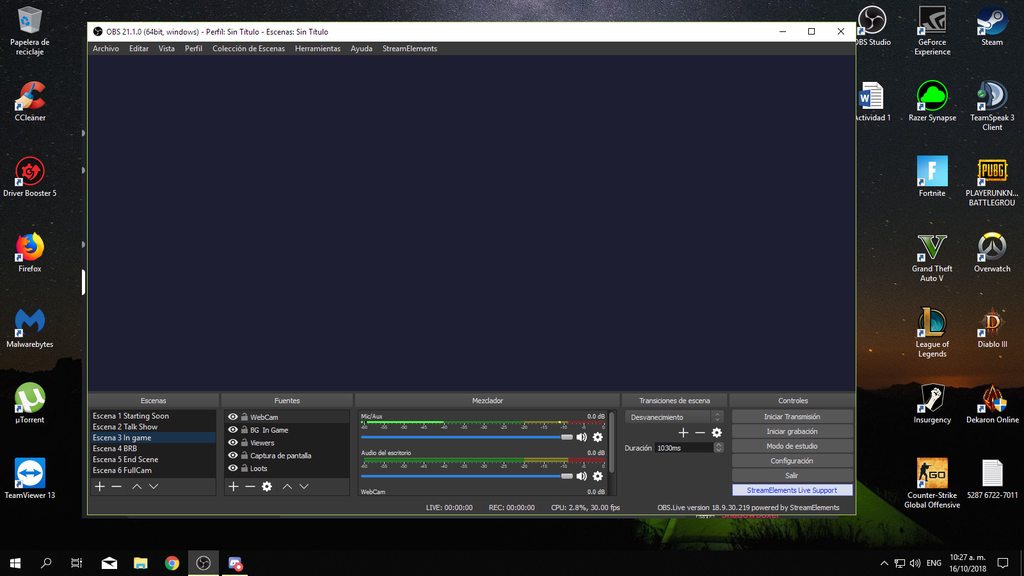
it works, but just stays like that
 tired turret
Have you tried updating to the latest version of OBS? I think its v22
spark sapphire
yeah, im using the last version
warm pewter
You are not on the latest version
tired turret
In your screencap you are on version 21.1.0
spark sapphire
oh
warm pewter
22.0.2 is the latest, you need to get the latest version from OBS site and update
spark sapphire
i pressed the "check for updates" button and it said there was no new one
guess its for obs live
now i get it, i ll try updating it to the last version
i didnt work
haha
shall i re-install the obs live?
shy mountain
@spark sapphire Get the latest from the website, not updater
so in the end its a reinstall of OBS
 flat atlas
Hey! I just downloaded streamelements obs and i dont have any preview.. How do I fix that?
flat atlas
tried that
i cant even get the options
its like im in the tipping setup but nothing is coming up
shy mountain
Did you skip the tipping settings?
flat atlas
i never had the settings
shy mountain
OR you are permanently in the auto setup?
flat atlas
I guess..
shy mountain
Can you screenshot it and share?
flat atlas
 warm pewter
StreamElements > logout, then log back in
flat atlas
lol.. i can login ,then i login, it says 'well done ur already using our bot' and then it goes back to this
and now it logged me out again
got it working by quickly skipping the donation settings
spark sapphire
same
shy mountain
So is it working properly now?
 rotund bough
👌
nova geode
@haughty sandal OBS.live is being updated at the moment, if some error occurs please try again in a while.
i read your post in #helpdesk-twitch
 haughty sandal
ah okey good 😃
flat atlas
anyone know why my chat doesnt autoscroll down in streamlabs obs?
 quasi snow
streamlabs obs?
quasi snow
oh xD
flat atlas
i somehow mix them up
nova geode
its a bug that can occur when you have set your windows dpi to over 100%
nova geode

 timid schooner
deep birchBOT
timid schooner
deep birchBOT
@timid schooner The app is currently in closed beta, and is expected to be available to the public by mid October.
If you'd like to assist with beta testing, please fill out this form: https://goo.gl/forms/3DaiLckKDjeMAeVt2
timid schooner
Thanks!
warm pewter
 This channel is for OBS.Live support, not the mobile app
 cloud oak
Is there any way to get OBS.Live to remember my window placement/sizes between updates? Everytime I update it resets it back to the defaults
well, actually.. on closer inspection, the sizes are kept the same, it's just the placement it resets
 coarse tiger
Hmm, it should still keep placements. I will check with the team 😃
 nova scaffold
For me it breaks, but i have a rare usecase - OBS in portrait mode, 1080x1920 😄
So i have to move the plugins around every time, this happens not only on updates, but also on crashes or unexpected shutdowns.
cloud oak
if it helps you troubleshoot it, I have my screens laid out like this
and when I update it resets to look like this
so while the chat screen looks massive on the second screenshot.. when I drag the activity feed so it's back to the left of the chat, it looks like the first screenshot without any resizing needed
coarse tiger
@cloud oak Thank you! I've alerted the devs and we should be tackling this issue!
 charred oriole
hi
 sour wasp
Hello i'm wondering how I can Export Scenes from Streamlabs OBS to StreamElements OBS
I don't exactly know where to find my scenes from Streamlabs OBS and import them over to Streamelements
charred oriole
???????????
dry sphinx
Did any pop up occur why the download stopped?
 limber idol
Hello, I've been trying to connect my OBS live to my twitch account, and it just gets stuck in an endless loop trying to login
In addition to this, i can't even access the stream elements website. It directs me to fill out a CAPTCHA, and when I do, it takes me to a blank white page.
charred oriole
no
dry sphinx
@limber idol Are you currently on OBS Studio Version 22.0.2?
Gonna ask internally to see what may be causing that @charred oriole 🤔
limber idol
Yes, the latest version
It only happens with stream elements for some reason. I'm on the phone with my ISP right now to see if they can resolve
nova geode
@charred oriole what exactly are you trying to do?
dry sphinx
Looks to be trying to download OBS.Live but got an error.
charred oriole
opera
deep birchBOT
You can find your JWT token on your account channels page: https://streamelements.com/dashboard/account/channels
(Don't forget to click on "Show Secrets")
nova geode
whoops
 rugged quail
❤
charred oriole
?
nova geode
@charred oriole what browsers have you tried so far?
dry sphinx
@charred oriole Currently looking into it still. Take a breath & we'll get through this 😃
charred oriole
google chrome . opera . mozilla .
dry sphinx
@limber idol Have you tried clearing the cache on OBS?
charred oriole
yes
charred oriole
nova geode
@charred oriole we are still in talks internally to see what may be the problem with your download. please be patient.
charred oriole
ok
deep birchBOT
@limber idol Right click on the BrowserSource > Properties > Scroll down a bit > Refresh Cache of current page
limber idol
Thank you guys 🙏🏽
dry sphinx
No problem. Please let us know if that works. 🤞🏼
charred oriole
version number 0.3 ??
nova geode
yes, it is still in beta.
@charred oriole i also have to ask you to be patient and to stop spamming your questions in multiple boards
dry sphinx
That would be your 2nd warning about spamming in multiple channels.
charred oriole
ok
dry sphinx
Still looking. As this is pretty rare situation with getting an error with the setup.exe 🤔
warm pewter
Do the failed download messages look the same in other browsers, or do you see anything that is saying its being blocked? From the screenshot provided it looks like a generic download failure which looks like something in your environment might be blocking it.
nova geode
@charred oriole ⤴
warm pewter
That still does not answer the question at all
limber idol
Where can I find the browser source?
warm pewter
Its "Browser" in the sources. If you do not have that in your sources, that would mean you deselected the browser plugin when you installed OBS Studio, and you will need to reinstall it and not deselect that option
nova geode
@limber idol you said you refreshed the cache of your browser sources before. those are your browsers sources.
the things where you put in the URL for your overlays
warm pewter
@charred oriole I am trying to ask you what the message was in the other browsers like Chrome. I am trying to determine if something blocked it like anti-virus, or if the connection is failing due to something in your environment. saying "StreamElements no download" does not answer that at all, or help us to help you try to resolve the problem
 tardy trail
Why cant i get up my chat and recent events after the newest update?
tardy trail
where the chat and recents events usually is. it is grey
but i havent deleted anything
ignore me. it all just popped straight back up. that was weird
it was like it for 2 hours
warm pewter
If it happens again, I would recommend trying going into the StreamElements menu, and logging out and back in. Usually fixes issues like that
cloud oak
I can't get the new custom bot name feature working in OBS.Live. I logged into the bot account through the activity feed but it still puts out messages as "StreamElements"
cloud oak
Ok.. actually, it's a little more complicated than I thought.. I got it working with the test message.. but now none of my chat commands work, until I change the name setting back to "StreamElements", then everything works again
warm pewter
I cant test to verify until I get home from work later 
Does it work if you choose your account?
cloud oak
work 
I guess more accurately would be that it works intermittently, doesn't seem to stable
warm pewter
Do you have ground control open also?
cloud oak
nope, closed, I did have it open once when testing it earlier and it doubled up lol
I guess i'll keep testing it for now (as it's a great feature) and keep an eye on it, seeing as sometimes it's working and sometimes it isn't
warm pewter
I will test it once I get home later, but that wont be for almost 3 hours
shy mountain
@cloud oak I experienced the exact same issue with bot not responding to commands and just reported it internally as to how it all happened and how I made it work again. In short, I changed the name back and hit save and it started responding again.
cloud oak
cool, thanks for the update @shy mountain 😃 i'll try that next time i'm streaming and keep an eye on it, hopefully fixes the issue
limber idol
@warm pewter @dry sphinx so in the browser source all it had was the default obsliveproject browser linked
i refreshed the the cache and it stil does not work properly
deep birchBOT
To add your overlays to OBS, add a new browser source in your scene. Paste your overlay URL in the browser source properties, set the dimensions to 1920x1080 (unless you changed them on the website), and :ballot_box_with_check: “Shutdown source when not visible” https://youtu.be/KDvLynUqXI4
limber idol
i know, but i cannot even go into the stream elements website without it giving me the captcha error
warm pewter
We just connect via twitch, so that could be a problem with your twitch account
limber idol
i refreshed my steam key, updated my password
😦
still asks for captcha and then a blank white screen
i'll try and contact twitch about it
warm pewter
!obslog @mortal terrace
deep birchBOT
@mortal terrace Can you please provide a log from your last stream. You can find this log in " %appdata%/obs-studio/logs " OR Help > Log Files > Show Log Files. You can simply drag and drop the log file into Discord.
 mortal terrace
Any help with dropped frames in OBS? This happened just today with no changes except update.
warm pewter
Look at the message above you that you were tagged in
 steel mural
Well dropped frames are always a connection issue.
mortal terrace
Doing it now TY
warm pewter
 dropped frames are not always a connection issue
frames can be dropped from the GPU rendering the canvas, or the encoder being overloaded. the log will say exactly what dropped the frames
steel mural
dropped frames = connenction issue. What you mean is rendering / encoding lag.
warm pewter

steel mural
Dropped frames have a very special meaning in OBS' case.
steel mural
In this case he has rendering lag, not dropped frames.
Quote from the OBS Bot from OBS' discord:
"Running a game without vertical sync or a frame rate limiter will frequently cause performance issues (both your game and OBS) because your GPU will be maxed out. Enable vsync or set a reasonable frame rate limit that your GPU can handle without hitting 100% usage. If that's not enough you may also need to turn down some of the video quality options in the game.
For more technical details and alternate fixes, see our guide: https://obsproject.com/wiki/GPU-overload-issues"
mortal terrace
I'll try. But I didn't change anything. Weird
warm pewter
The only thing the update added was the bot rename option, our plugin does not touch the renderer or the encoder. This shows its on the GPU not being able to render all the frames
18:04:45.300: Output 'adv_stream': Total frames output: 1450
18:04:45.300: Output 'adv_stream': Total drawn frames: 1078 (1521 attempted)
18:04:45.300: Output 'adv_stream': Number of lagged frames due to rendering lag/stalls: 443 (29.1%)
and why are you using NVENC with a 2700x
mortal terrace
OK I'll mess with settings again
warm pewter
I would set it to x264, you can start with medium preset, main profile. This way the GPU is only going to be handling the gameplay, and rendering the canvas before sending it to the encoder. If you are still dropping frames, then make sure to trying things like vsync, limiting framerate, and turning down some graphics options
mortal terrace
Tried all options but only got worse
I finally diabled my browser overlay and everything is running solid at 60 fps no drops and all my video setting are set to high
I only had a few widgets.
and two .gifs
mortal terrace
Still running solid at 60 fps. trying to use the x264 was not good at all for me
down to 20 fps
cloud oak
@warm pewter and @shy mountain, just an update on the chat bot implementation problems i've been having
i've been sat with OBS open making adjustments to some scenes and at first the bot was correctly sending out a timed command (30m timer) as my custom bot name. 30m later, when it went to call the command again, the bot has gone back to "StreamElements". Now if I go into the custom bot name settings and try to hit "send test message", nothing happens
 rare night
@cloud oak We are working on a hotfix right now for the custom bot name bugs
cloud oak
cool, hope you guys can figure it out, thanks for the updates
for now i'll keep working with ground control until it's fixed 😃
raw trellis
I can’t get my webcam to display in obs since the update, help? It was working in multiple scenes before the update
 tulip mauve
my layovers arnt showing up? they just disapeared
deep birchBOT
@tulip mauve Right click on the BrowserSource > Properties > Scroll down a bit > Refresh Cache of current page
tulip mauve
still not showing up on stream
it says its hthere and shows in previews, but doesnt show on obs view or my stream
warm pewter
Are you sure its visible, or not behind another source then, because if you see it in the browser source, it will show in the OBS preview unless its hidden or behind another source
raw trellis
I ran a bunch of test and reinstalled the hardware so that it shows up now, thanks. Is there a way to adjust the camera scale? Right now mine is super wide screen (Logitech C920)
tulip mauve
when i go to the website to edit the layover, it also does doesnt show up to edit
 dim drum
so i have a overlays on streamelements, how do i bring it down to stream elements OBS Live?
deep birchBOT
@dim drum To add your overlays to OBS, add a new browser source in your scene. Paste your overlay URL in the browser source properties, set the dimensions to 1920x1080 (unless you changed them on the website), and :ballot_box_with_check: “Shutdown source when not visible” https://youtu.be/KDvLynUqXI4
dim drum
well darn i really didnt want to do it as a browser source that eats up bandwidth
steel mural
If you're that limited on bandwidth I'm not sure if your internet is capable for streaming since browser sources don't take up that much.
 keen wren
How do I enable the visual alert of sound effects. I added store redemptions and set it all up, it shows up on on the editor side but its greyed out, dosent show up on obs I just get one emote from kappa gen
The sound works fine but I dont know what am missing to enable the visual
 tulip hamlet
Did you set the item as a sound effect or stream perk?
keen wren
Sound effect I think
tulip hamlet
Sound effect doesn't display an image or gif. You need to use stream perk for that.
 untold trail
Hey there, im trying to use my elgato with the obs live but it wont work, it does nothing but say one moment please
 narrow hollow
Excuse me I am trying to start to use stream elements on obs and found an app for stream elements and obs but I can't seem to open it
deep birchBOT
@untold trail For the best OBS support, please join their discord where OBS devs and support volunteers are available all the time discord.gg/obsproject
ancient zodiac
make sure obs is up to date, then install our app @narrow hollow
narrow hollow
It is up to date I installed and uninstalled 2 times
warm pewter
What exactly is happening when you launch OBS
narrow hollow
It says something like failed to load and then it says if I want to save it to an error list or something
I just tried obs and I'm not too good at this type of stuff
warm pewter
what does it say exactly? If it is directing you to save a log, or a crash log, provide the log
narrow hollow
I can't check what it exactly said cause it's 11pm but I can tell you it tomorrow
shy mountain
Oooh you want feedback?
I thought you had feedback for the plugin. Well here is a TL'DR' info: activity feed and chat in OBS it self - this means no more dashboard and twitch chat open, custom bot name soon, media share soon, hotkeys work for skipping alerts at the moment.
tired turret
@placid iron Loving it so far! Has the reliability and support of OBS + the added chat + alerts of StreamElements. Works well together if you ask me.
shy mountain
moveable chat and activity feed.
 placid iron
Yeah Keizar haha
I'm actualy using SLOBS because i have a Nerd or Die overlay and they have a auto setup thing that make things more simple to me
But i love Streamelements in so many ways, design, donation page
shy mountain
Well if you tell me which alerts you are using from Nerd or Die
I may have them ready for our overlays 😉
as long as you have the .webm files and sounds
placid iron
I'm using Apex right now
shy mountain
Heck. Well thats one of the alerts we don't have ready afaik.
placid iron
haha, no problem <3
Why did you guys don't make some partnership with Nerd or Die?
Is the only thing that makes me use Stream Labs 
shy mountain

We can implement the alerts and all for our overlays, but its a manual process at the moment.
I can give it a shot but I will be able to take a look in around 6 or 7 hours, if you send me the code in DMs
placid iron
Sure, when i come back from school I DM you, our time zone will be a little weird but i think we can make it <3
shy mountain
its 11:36AM for me, so I won't be going to bed in the next 12 hours if thats your concern
placid iron
Sure, for me it's 5:30 AM haha
When i come back, we talk then :3
And before i forget, thank you so much for the help i know that can be complicated
=/
raw trellis
Hey, I’m getting major lag on my stream today, can anyone walk me through any settings I need to change? Been trying to solve it myself for a while now
deep birchBOT
@raw trellis Can you please provide a log from your last stream. You can find this log in " %appdata%/obs-studio/logs " OR Help > Log Files > Show Log Files. You can simply drag and drop the log file into Discord.
 lapis garden
Hey there. My Windows Bitdefender seems to hate your uninstaller. It says that there is an Trojaner in your uninstaller O.o
shy mountain
uninstaller?
use the control panel if you want to uninstall.
@lapis garden Ok I can confrim that my windows defender also caught the uninstaller as a trojan. Its a false-positive most likely but I just reported it, as we recently had the same issue with the installer
lapis garden
I didn't want to uninstall it. My Systems will be checked everyday when i sleep and then the System will be shutdown after finish the search. So the Uninstaller had been found as a trojan 😄
shy mountain
@lapis garden Interesting that bitdefender says its clean but not the first result here: https://www.virustotal.com/#/file/eb8106bb7e23cc4026b71cc65af69ea34dd92050549457ae99be2d6c62181356/detection
I've still reported it
mortal terrace
@hallow vector Good morning! Just replying to your tweet. I'm having massive frame drops when browser element is turned on in OBS. If I have it off I can stream perfectly no drops with everything turned on high.
deep birchBOT
@mortal terrace Can you please provide a log from your last stream. You can find this log in " %appdata%/obs-studio/logs " OR Help > Log Files > Show Log Files. You can simply drag and drop the log file into Discord.
 bot?
mortal terrace
shy mountain
bot?
mortal terrace
shy mountain
it would be nice to have the log file from the moment you saw the lag
or at least the session with it
mortal terrace
That was the last session prior to me changing anything per SE sggestions
Let me get latest to share.
mortal terrace
OK and TY
shy mountain
18:04:45.300: Output 'adv_stream': Number of lagged frames due to rendering lag/stalls: 443 (29.1%)
Whats your internet speed?
You've got the CPU and GPU, but what bothers me is that maybe you are trying to stream BlackOps4 and I've seen plenty of streamers struggling with it, or at least the game/stream lags, unless they have a dual pc setup 🤷
shy mountain
upload is reasonable.
mortal terrace
yeah it could be better but it's the only thing they offer.
Not sure if more would even help though
It's just weird that if I disable the browser overlay all runs fine without any drops
shy mountain
Let me just remember if x264 encoding was CPU or GPU
mortal terrace
x264 should be CPU
shy mountain
aah right.
mortal terrace
I changed but that only made things worse. My GPU should handle it fine and tends to render better
shy mountain
do you feel the game slugish while expericing this lag and what do you have in your overlay - as in widgets?
2700x is better
then the GPU
or so I'm told that CPU rendering is better and the ryzen 2700x is better then an i7-8700k
mortal terrace
I know the 2700x is better, but when I select it for rendering it is worse.
tired turret
I have the 1700, had to set the affinity of OBS as it was default to only 4 threads. Thought I would mention it in case it isnt getting fully utilised.
mortal terrace
How do you set affinity of OBS?
Just seems I shouldn't have to do this if it's the overlay causing the problem
tired turret
Good point. It is weird that its just when the overlay is enabled it caused issues.
shy mountain
@mortal terrace Open task manager, find OBS, right click it and then you can set its affinity there
Or so I remember it was that way 
tired turret
In windows 10 you have to go to the "Go to details" option first. Then in there, right click on the .exe and set affinity. (no idea why they moved it)
mortal terrace
I'm cleaning up my overlay and only leaving one widget "alertbox" and see what happens.
shy mountain
Usually hypecup and kappagen adds lag to the PC, but with your setup you should not have any problems
For some reason I can't set the afinity of my own programs atm on my work laptop...stupid macs with their "single" core processor 
shy mountain
@mortal terrace Here is a thing that poped up to try - can you check if the browser source that has the overlay, the option for hardware acceleration is turned off?
Actually its not the browser source but OBS settings
shy mountain
make a recording for example
or after your next stream or when ever you are getting that lag
 cursive orbit
Just want to say this is amazing 😄
tulip hamlet
@cursive orbit 
 granite dew
So trying to rename bot name
tried through ground control and didnt work
i checked the settings in obs.live and it only comes with 3 predefined names
- streamelements
- sukatoninception
- SukatonInception
also the learn more link inside obs.live to learnmore about changing bots name isnt working
so im at a dead end after even going through reddit
warm pewter
You have 3 options. Use StreamElements, your Twitch name, or provide another Twitch account that it will use the name of
warm pewter
Yes, you cant simply just give the bot a name, its needs to use another account like a proxy to post to the chat with a different name
granite dew
Oh okay after I create the new account all i have to do is supply ground control the account name?
warm pewter
No. If you are using Ground Control you need the oauth for that account. If you are using OBS.Live you need to connect that account to it in the custom bot name options
Since you see your name twice in OBS.Live that would indicate you connected your main Twitch account where you would connect the bot account
granite dew
So i would have to part se from my channel and connect it to my bot channel?
deep birchBOT
Custom bot name requirements
- StreamElements bot modded and in chat
- Active overlay with alerts
- StreamElements tipping page in the panels below the stream (!panels)
- Create a twitch account for the name you want to use
- Ground Control app must be running
Steps to enable custom name
- Sign in to https://twitch.tv with the bot account
- Install and run Ground Control (!gc for download)
- Visit https://twitchapps.com/tmi/ and generate an oAUTH token
- Copy/paste everything in the box to Ground Control oAuth settings and enter the name for the bot account
- Restart Ground Control (custom name may take a few minutes to take effect)
Mac does not currently support renaming the bot.
warm pewter
⤴ that is what you do if using Ground Control
If you are using OBS.Live, that is what this option is for, so you can connect the bot account
granite dew
oh the very last option has remove custoim bot command
thank you for helping me find this ❤
cloud oak
the update you guys just pushed, is this the custom bot name hot fix? 🙂
warm pewter
Should be 
cloud oak
nice, you guys work fast 👌
giving it some testing now, seems to be working between a few obs restarts so.. fingers crossed it's all gravy now 😃
 gleaming quiver
curious why there have been so many obs.live updates or is it just me?
warm pewter
Hot fixes needed to be pushed for some false positives caused by some antivirus
gleaming quiver
thought i was going crazy. I had obs open, closed it down for a little and then opened it now and boom. OBS.live needs to update.
o_0 I was thinking huh didn't i just do one today
warm pewter
Yeah, can confirm you are not going crazy, there have been a few client updates in the paste couple of days, should be good now though, until the next actual release
gleaming quiver
👍
cloud oak
one thing I wouldn't mind seeing if it's possible for you guys to implement..
on the installer for a new update, maybe a small box with a list of the changes for that update? just so we know what's coming along with the new version 😃
warm pewter
The changes usually get posted here in #270206314561404928 , I think this version did not have that post yet because of the few issues getting ironed out
cloud oak
sure, i'm happy it's somewhere so I can read it, but putting something on the installer might stop people getting confused like @gleaming quiver has 🙂 not super necessary, but would be cool
gleaming quiver
@warm pewter yeah last update posted in #update was the hypecup update
warm pewter
You can add the idea here https://streamelements.helprace.com/s1-streamelements/ideas/hot/c34-obs-live just make sure to select OBS.Live for the category (or whatever the term is)
cloud oak
will do 👌
warm pewter


cloud oak
https://streamelements.helprace.com/i1156-update-changelog-in-the-installer-window <-- posted, if you want to vote it up for your use case @gleaming quiver feel free 🙂
granite dew
Thanks guys that was so easy especially with the awesome and quick support
warm pewter
cloud oak
thoroughly tested the custom bot chat name stuff in OBS.Live for the last 2+ hours, works perfectly 👌 good job on the quick hotfix guys!
tulip hamlet
 grizzled seal
Anylne here
 mystic dragon
Hello, is anyone available to assist with OBS audio settings.
deep birchBOT
@mystic dragon For the best OBS support, please join their discord where OBS devs and support volunteers are available all the time discord.gg/obsproject
mystic dragon
Nevermind I have fixed the issue
 placid cliff
@warm pewter Waiit so OBSLive now has bot support 😮 ?

 shy mountain
just update to the latest and greatest obs.live version
tap on the burger menu in the activity feed
placid cliff

shy mountain
and then you should see bot settings
placid cliff
Man OBS opens alot of CEF Bootstraps >.<


 placid cliff
Its case sensitive....
shy mountain
was about to test that
placid cliff
I only changed the C and K to lower case and it works now
 placid cliff
you welcome BB ❤
shy mountain
Reported
placid cliff
#BugDetector 😄
placid cliff
Ok so my OBS Crashed upon doing the initial setup page and now nothing from OBSLive is loading ?
deep birchBOT
@placid cliff Can you please provide a log from your last stream. You can find this log in " %appdata%/obs-studio/logs " OR Help > Log Files > Show Log Files. You can simply drag and drop the log file into Discord.
placid cliff
it created 3 but the 3rd is 0kb >.<
nvm it just finished writing it :/
Its just booting OBS into OBS Studio 😦
Hmm got it to load OBSLive but had to click "SE > Tip & Bot Settings" to get OBSLive to show up after the crash.
shy mountain
if this happens again, we would need a windows log of the crash
placid cliff
where would i find that ?
placid cliff
oka thanks 😃
 twilit venture
Well what's your default audio I put device in the windows audio mixer
twilit venture
 okay
okay
mortal terrace
Hey gang!
I think I have it worked out. I played a solid day with maintaining 60 fps. Problem is, I'm not sure what I did.
😦
shy mountain
did you turn off hardware acceleration ?
 mint lance
I can't update my stream title through SE OBS. I can log in to twitch through the menu just fine, but when I try to update my title, I get a 403 error and a button to connect to twitch. Clicking it does nothing.
mint lance
The title I am trying to update to is "Painting, Vassal, and Warmahordes?! !SSC" and the game is set to Warmachine and Hordes.
shy mountain
I'd suggest to click on "Streamelements" on top then "Logout" and login again.
mint lance
done that three times now.
shy mountain
error 403 is a website type error, nothing to do with what title you are placing.
deep birchBOT
@mint lance Can you please provide a log from your last stream. You can find this log in " %appdata%/obs-studio/logs " OR Help > Log Files > Show Log Files. You can simply drag and drop the log file into Discord.
shy mountain
Then lets see if the log has to say anything about that.
mint lance
last successful stream? or most recent log whether from a stream or not?
I have three logs from today even though I have yet to stream.
mint lance
shy mountain
Log doesn't tell me anything. I'll poke internally
mint lance
Seems any title mentioning Vassal is not allowed!
It is against Twitch's moderation policy.
I did not know that.
But SE doesn't understand that the moderation policy is blocking the title, so it gives a 403 error.
@shy mountain
shy mountain
I just reported the finding as well
mint lance
Cool. Thanks for the help.
shy mountain
I will keep it in mind and most likely, since its v0.4 and not fully released, this may be properly implemented
@mint lance Where exactly did you see in the twitch tos that Vassal is banned?
Asking if we can see the list and adapt it
mortal terrace
Gaming a little bit but also working on some overlays as well. Help spice things up a bit.
Hype, what's your twitter?
Just wanted to show thanks.
shy mountain
Hype is a trend/meme we are doing in the diacord 
twilit venture
shy mountain
I think i have it connected to my discord
mortal terrace
Ah
twilit venture
nah dude its a religion now
shy mountain
We recently added HypeBoss widget
twilit venture
Its an insider dont worry about it
mint lance
It's possible that Twitches profanity moderation may be flagging it, but Vassal is a tabletop emulation software that technically allows people to play board games without owning them... therefore, twitch may have it flagged as piracy.
shy mountain
@mint lance i googled vassal and its a medival word foe person owning debts to a lord or something
So im conflicted my self on why its banned
Contact them on the matter really
warm pewter
Playing simulated tabletop games, that would be copyright protected, that you don't own. Oof. Twitch will not actively monitor that, but if you are reported, you can get banned for it. Exact same with playing emulators
mint lance
And I totally understand the thought process behind that. But I own the ruleset for warmachine, I own the cards, I own the models. It is just easier to stream it via Vassal, than to try to get internet access at my LGS and cart my rig out there so I can try to stream a game. In this circumstance, though, someone on my chat mentioned having trouble setting up a game in Vassal and I thought I would help them out on stream.
Nope. Lol.
 pale cypress
I noticed that I got two updates to OBS live yesterday. Are there any changelogs posted anywhere?
nova geode
those were hotfixes for some minor bugs. @pale cypress
pale cypress
Ah ok
cloud oak
@shy mountain I mean.. this would be incredibly stupid.. but "Vassal" might be banned because it has "ass" in it
shy mountain

warm pewter

cloud oak
appropriate reaction
oh, and i'm about to post this in the ideas board (if I can't find it there already) but have you guys looked into adding the ability to edit the new twitch tags in obs.live?
annnnd never mind, I just saw it in the ideas board haha
warm pewter
Tags stuff is being looked into in general, I think the problem right now is that Twitch has not exposed an API or anything for third parties to use them
cloud oak
I guess it'll come with a new API update, hopefully
shy mountain
@cloud oak like Jaina said once upon a time in Warcraft 3: "shush im thinking" but rephrasing it am thinking of how to pitch this idea to implement a standard profanity filter for obs.live unless already planned.
Most likely already planned but will ask later as not home
cloud oak
haha, very good 
 honest pumice
Something i posted on reddit but in case no one answers me there ill post here just in case
So basically im trying to start streaming and recording gameplay for videos with OBS, i have an Elgato HD and recently learned i can connect the device to my OBS so i dont gotta use the actual Elgato application. But for some reason it wont comnect to it at all, it shows up in the Capture Device but all i get is a black screen. If someone could help me that would help a lot since looking it up online seems to be ineffective at the moment
deep birchBOT
@honest pumice For the best OBS support, please join their discord where OBS devs and support volunteers are available all the time discord.gg/obsproject
honest pumice
Thanks ill head there now
 queen palm
hey guys, installed the latest update, and windows defender went nuts saying it was a virus: Trojan:Win32/Zpevdo.A is this just a false positive?
warm pewter
What file did it flag? We have been fighting false positives for the past few days, and last we tested defender was no longer flagging anything
queen palm
flaged several i'll copy paste for you
containerfile: C:\Program Files (x86)\obs-studio\obs-streamelements-uninstaller.exe
file: C:\Program Files (x86)\obs-studio\obs-streamelements-uninstaller.exe->(nsis-1-?\obs-probe-libobs-version-32.exe)
regkey: HKLM\SOFTWARE\Wow6432Node\MICROSOFT\WINDOWS\CURRENTVERSION\UNINSTALL\StreamElements OBS.Live
uninstall: HKLM\SOFTWARE\Wow6432Node\MICROSOFT\WINDOWS\CURRENTVERSION\UNINSTALL\StreamElements OBS.Live
thats it
warm pewter
Yeah, those are all false positives, I am going to test to see if I can replicate it again, as all recent tests it was just some obscure AV that was still flagging some of the files.
queen palm
well, if it helps im running the latest win10 build and windows defender
no other AV or firewall
warm pewter
latest build as in you are on 1809?
queen palm
not sure, the windows updater updated the other day though, and there's no other updates available. so i assume so
sorry im not that techy enabled 😄
warm pewter
You can run winver from a PowerShell or CMD window to see. They have not pushed 1809 through Windows update yet
I am updating a VM right now to test
queen palm
says im running 1803 (OS Build 17134.345)
warm pewter

queen palm
warm pewter
I just did a quick scan on the folder, and no threats were found, doing a full scan now. Win 10 and Defender are fully up to date. What is the OBS.Live version you are on?
@queen palm Can you confirm the OBS.Live version you are on, because it seems that this is coming from the release that had issues, and not the latest release
queen palm
on a different version of it now, as i launched it a few mins ago and said there was a new update, so just installed that
warm pewter
ok, so the flags had to be from the previous release
queen palm
yes they were from early this morning. just literally a few mins ago installed the new update
warm pewter
ok cool, this version should not have any flags with Defender
queen palm
awesome! sorry to have wasted your time. didnt realise there was a new build
warm pewter
No worries
 sharp reef
Hi, so I'm using obs.live and I've seen a lot of times that the chat stops scrolling so the new ones aren't loading and I have to manually scroll the chat to see new ones!
zinc lark
@sharp reef do you scale windows (like zoom in)
sharp reef
@zinc lark like the obs.live window?
zinc lark
in general. The only times we have seen this issue is when someone scales windows to zoom in (like 125-150%)
sharp reef
oh yea i have it to 125%
do i need to set it to default?
the recommended for me its 150% should i change it to that?
sharp reef
ummm so what should I do? I have it at 125%
zinc lark
To fix the problem, you would have to go back to 100%
right now, that is the only known solution
sharp reef
everything looks so small tho xD
zinc lark
xD
sharp reef
@zinc lark Ty for the help tho ill give it a try and see if that fixed it!
 proud ruin
Gahhh, I need help
zinc lark
ask the question, or we can't help @proud ruin
 twin zenith
how to get invite code
sharp reef
@zinc lark It works switching the scale worked ty so much!
deep birchBOT
@twin zenith The StreamElements Mobile IRL streaming app is currently in closed beta.
If you'd like to assist with testing when public beta testing becomes available, please fill out this form: https://goo.gl/forms/3DaiLckKDjeMAeVt2
twin zenith
i did it but didnt get code
zinc lark
Then you need to wait until someone contacts you. Don't forget, we can't have everyone testing right now, plus there are tons of others that have signed up. When we need more people, we reach out. Just be patient
 prime hull
After been inactive for a year and come back to what? 😄 i miss going in to the website make ur overlay and put it in obs 😄 is their any tutorial how to make averything from scratch whit OBSLIVE?
shy mountain
@prime hull Welcome back! 
You still have to make your overlays in the website editor and then add them as per usual to OBS.Live. The plugin only adds an activity feed and chat to the layout of OBS. Now we even support custom bot name with the plugin.
prime hull
okey cause i put in on of my old intermissions but cant figure out how to put in the follower text widgets and donations.
shy mountain
Here is a guide on the overlay editor: https://www.youtube.com/watch?v=LwAfMIR3Cj0&index=17&list=PLCDDKlFdScbEwdx5AntcQIS1InkFJwHtv&t=0s
prime hull
ok thxs man
shy mountain
prime hull
@shy mountain dont know if its my bad memory now but why cant i get the full overlay just the corner?
shy mountain
Set the overlay resolution to 1920x1080. Also why are you using SLOBS when you mentioned the interest in OBS.Live?
SLOBS tends to block some of our widgets.
prime hull
haha saw that now started the sons 😄 3 streamers on one pc here 😄
deep birchBOT
@prime hull The default resolution for StreamElements overlays (theme and custom) is 1920x1080. Please add them in OBS at their full resolution and use CTRL+F to fit to screen if necessary. You can then downscale your stream in OBS settings > Video if you'd like https://i.imgur.com/6bWXxjR.png
 shy mountain
Ok, so make sure you set the overlay to 1080p and the shutdown when in active.
prime hull
ok 😃
 shy gazelle
Hello anyone available?
shy mountain
Yes
shy gazelle
okay so I clicked on someones name in my chat on obs live and now it shows their twitch channel where my chat should be
how do i fixed that
shy mountain
Click on "Streamelements" on top bar then click on "Chat". Repeat to show it again. This should reset it.
If not, let me know.
This should have been fixed afaik - on what OBS.Live version are you? (number is on the bottom left corner)
shy gazelle
let me see
shy mountain
Sorry, bottom right corner
shy mountain
and OBS version?
shy mountain
Top left corner
shy gazelle
22.0.2
shy mountain
Well this is interesting. I tried replicating and it opened a new tab in my browser.
But to reset, you will have to click on Streamelements again and click "Logout" and then login again. @shy gazelle
shy mountain
Sure.
shy gazelle
so what I did was click on someone name and then when it opened a new little window next to their name the name was clickable so I used my scroll button to click it and thats when it did that
just so you know exactly how I did it
Thanks a bunch!
deep birchBOT
@candid moon Can you please provide a log from your last stream. You can find this log in " %appdata%/obs-studio/logs " OR Help > Log Files > Show Log Files. You can simply drag and drop the log file into Discord.
shy mountain
@candid moon Also don't post your VODs like that. We have any spam protection on the server
 candid moon
My tip link is different in obs.live compared to my tip link on streamelements website?
@shy mountain would you like me to c+p them here or upload
shy mountain
No.
Don't paste them. How are they different?
Aah I see. Well I clicked on the one in your channel and it showed me your page, so it should be fine.
Wait.
candid moon
well the one link is jonny4789/tip in obs.live under bot settings the correct on according to the site is jonny4789--9432/tip
shy mountain
the -9432 one is your twitch account
while the short version is your yt tube account
shy mountain
toss it here
candid moon
candid moon
yeah last time i streamed
there this one but thats just opening obs
if easier i will be able to do a 30 min test stream a little later after a meeting i must go to now, so i will check for a reply when back thanks in advance
shy mountain
@candid moon Better run the 30 minute test stream and provide the log then.
the fresher the better
rugged quail
So i have a problem/question
iif i use x264 enconding at 3.5k bitrate, it always goes over
and reaches up to 10k
but if i use it on streamlabs obs, it doesnt pass
anyone know a reason for this ?
or even if i use simple settings instead of advanced
warm pewter
Is your rate control set to CBR? And do you have enforce streaming service encoder settings set?
warm pewter
You can try disabling enforce streaming service encoder settings, and if that does not work you can try to set a custom buffer size, setting it to about half of your bitrate. If that does not work, you might want to pop over to the OBS Discord and ask there, as this is not something I have come across before, and would not be an issue related to our plugin
 minor loom
hey i have a quesetion what is an overlay 1020 x what?
deep birchBOT
@minor loom To add your overlays to OBS, add a new browser source in your scene. Paste your overlay URL in the browser source properties, set the dimensions to 1920x1080 (unless you changed them on the website), and :ballot_box_with_check: “Shutdown source when not visible” https://youtu.be/KDvLynUqXI4
warm pewter
Our overlays are default 1920x1080, unless you changed them. The only other time they would not fit is if your canvas is not the same size or 16:9 aspect ratio
minor loom
oh Good Morning @warm sigil Can you show me how to make sure on that aspect ration it's been a while since i have used Elmements
warm pewter
Your canvas is an OBS thing, it's in settings > video
minor loom
Thanks 😃
I feel silly i using this new OBS LIVE maybe i just need to go back to plain old obs
😃
warm pewter
OBS.live adds chat, activity feed, and a few other options, everything else is still core OBS, like the canvas settings
minor loom
Thanks Hype
queen palm
@warm pewter just finished a full system scan and can confirm that the new build isnt flagging as a virus 👌
warm pewter

 mellow goblet
I have a question about obs live
warm pewter
It's best to just ask the question
mellow goblet
So the overlays for obs.live that you can get, how to i alter them? like if i dont want the youtube and facebook links on there because im not going to be sharing that info, how do i remove them? also, if i wanted to put in my own follower and subscriber things to pop up when someone does so, how do i input it to where it will pop up on the stream as an alert and stuff?
warm pewter
You go to the overlays section from the SE dashboard, click the large pencil icon on the overlay you want to modify, and modify it within the overlay editor
mellow goblet
In the editor how can i change the color of the text?
warm pewter
mellow goblet
Thanks!
 vocal sun
So, I have been using OBS.Live since it was released and I noticed this within the last 2 days of streaming, but I have gotten no notifications through it since the 5th of Oct. If I have my twitch dashboard open, the Activity Feed and Chat work. I can go to my SE Dashboard and manually "test" alerts, but the SE OBS.Live plugin doesn't seem to update the Activity Feed, but the chat part works
Should I uninstall SE OBS.Live extension and reinstall it, or is there something I may be missing.
Thanks for the help in advanced!
warm pewter
Testing an alert will not update the activity feed, only real events would be expected to update the activity feed
vocal sun
Right, just thought I would include my track of thought there lulz
warm pewter
So your alerts are not working from like an overlay?
vocal sun
Not from the overlay, nor from the Activity Feed extenstion. All the manual hosts and follows since the 5th haven't shown up in SE OBS.Live Activity Feed and SE says I only have 17 followers when I have 27 Followers. Just small things I have noticed too.
warm pewter
Do you see them in the activity feed on the site? and where exactly are you looking at the follower count? The sites dashboard does not show total followers, only the followers you have gotten in the time selected, which is per month by default
vocal sun
Nope not on the site either. As far as the follower count, now it shows 22 but I select year for the follower count (wont be accurate later, but only starting streaming earlier this year)
mellow goblet
This is gonna sound stupid but, i have a dual monitor setup and i cant drag obs to my second monitor which i normally have my stream up on?
nvm i figured it out
vocal sun
@mellow goblet So OBS is on say screen 1 and your want it on screen 2, but can't manually move it to screen 2? Is that right?
Cuz you can use the Windows Key + Shift then left or right to switch an app between monitors @mellow goblet
 fickle hawk
Hello guys, lately i have a problem with obs.live chat, after sometimes it gets frozen and the only way i can get it back to work is to restart obs (and the stream), i already tried to reinstall obs and obs.live and deleting the cache folder but no luck... this started happening after twitch changed my username, any ideas?
warm pewter
We only track the follows you have gotten from when you signed up, if you check the totals from the total follower widget, or from activity feed > widget data > totals, this is pulled from Twitch and should be accurate. If you are not getting follower alerts anymore, that would be an indication of an issue with the Twitch webhook, and I will poke someone from staff to resub your webhooks @vocal sun
mellow goblet
@vocal sun yeah i figured it out l9ol thank you!
warm pewter
@fickle hawk Go to the main SE site dashboard, part the bot, log out, log back in, and then join the bot. After this, from OBS.Live go to StreamElements > Logout, then log back in. This should get a fresh token from twitch with your new name
fickle hawk
ok thanks i'm going to try it now!
Yesterday when i reinstalled all, it asked me for new token, it wasnt enough?
it asked me to relogin and new token on obs interface in obs.live configuration i mean
warm pewter
If the main site still has an out of date token from Twitch, I would expect there to be conflicts
fickle hawk
ahhh ok i understand, i will try your method now thanks again!
rugged quail
Hey my emotesplosions arent going off when im streaming at all Kelzar helped me fix it but now its broken again literally not even an hour later and none of my hosts are in my activity feed 😢
warm pewter
This would not be an issue related to OBS.Live, you will want to ask in #helpdesk-twitch
rugged quail
ok i did as well sorry for posting in wrong place
warm pewter
click the burger menu on the activity feed, and go into the stream settings
 pearl flower
Notifications do not come up in chat, like subs and such.
Thanks @warm pewter Last question...
I use a web socket plugin that only works on OBS Studio and not OBS.Live, is there any reasoning for that?
I use it to keybind scènes on my gaming pc and it sends it to the streaming pc
warm pewter
Not really sure, I would expect it to work, unless that plugin uses the OBS Browser plugin for anything, and its conflicting with the browser plugin used by OBS.Live
The web socket plugin I found does say it only works with OBS 22 and above, and if it relies on the browser plugin, that would be the only thing I could think of that would cause it to not work with OBS.Live
twin zenith
CAN I GET A CODE I WANT TO TRY STREAM FROM MOBILE
warm pewter
This channel is for support with OBS.Live
deep birchBOT
@twin zenith The StreamElements Mobile IRL streaming app is currently in closed beta.
If you'd like to assist with testing when public beta testing becomes available, please fill out this form: https://goo.gl/forms/3DaiLckKDjeMAeVt2
twin zenith
I DID IT 3000000 TIMES
warm pewter
Then wait, and dont spam channels asking for a code, it will not help your chances
mellow goblet
Is there somewhere to test the notifications? i want to see what they look like when they pop up
warm pewter
In the overlay editor, there is the blue bell in the lower left
 solemn kindle
Anyone have an issue with OBS.Live where they can get the TM client to display but not this one. (picture attached for screen that wont display.)
mellow goblet
thanks hype, also, is there a way to make the commands for followers only? i see it says everyone, regular, subscriber, etc.. i am going to be doing a giveaway but i dont want people who arent following the channel to be able to enter
warm pewter
Pretty sure you need to use window capture for that, as well as making sure you run OBS as admin @solemn kindle
solemn kindle
HOLY SHIT IM SO DUMB! Thanks for the help Hype XD
warm pewter
@mellow goblet that is not possible, as there are limitations with Twitch, it is not really straight forward to query if the user is a follower, like it is with subs
mellow goblet
okay gotcha thank you! one more question for now lol. Is there a good site that i can get or download new tones/alert noises from? I.E parts of songs, rings, other sounds, etc
nova geode
@mellow goblet we have the board #426825216887619594 , maybe you can find something you like there
mellow goblet
Awesome thanks, only issue is that when i clear the default ding and upload my own it still has the ding before the new sound is played
Idk if that will be how it is on live stream?
warm pewter
could be another overlay if you do not have shutdown when not visible checked on all your browser sources in all of your scenes
!multi
deep birchBOT
Make sure to :ballot_box_with_check: “Shutdown source when not visible” for all browser sources (all OBS scenes). If using studio mode, uncheck “Swap Preview/Output scenes After Transitioning.” Also keep in mind that sound can play from any overlay loaded in the browser (editor or launched). https://i.imgur.com/FegZJQS.png https://i.imgur.com/yY0wcFl.png

 mellow goblet
im in the overlay editor though
warm pewter
Do you have OBS open also?
ancient zodiac
do you have obs open as well? because it will play through the site and obs.
mellow goblet
yes
warm pewter
its playing sounds from both then
if you have not saved the overlay, OBS will be using the pervious sound
mellow goblet
oh shoot. gotcha. i actually have to delete the overlay on obs then add the new saved one?
warm pewter
nope, if you save it will update it
solemn kindle
Im having trouble getting the countdown overlay to work. No matter what i adjust the time to, it wont animate it counting down
warm pewter
The countdown will start when the overlay becomes active. The overlay needs to be shutdown or reloaded to reset the countdown
solemn kindle
do i need to keep the original text in the message block? {hours}:{minutes}:{seconds} i think is what iis in it.
warm pewter
yes, those variables would need to be there for it to work
solemn kindle
and that is where i made my mistake. Thank you!
warm pewter
 vital onyx
who can help me here
warm pewter
Works best if you say what you need help with
vital onyx
i am seeing a white screen when i open obs and it just started happeniong
warm pewter
What version of OBS Studio and OBS.Live are you on
vital onyx
obs live is 18.10.17.237 and obs idk bc i cant see anything
warm pewter
OBS version in on the title bar in the upper left
vital onyx
21.1.2 ?
warm pewter
Try going into the StreamElements menu, and logout, then log back in
vital onyx
where is stream elements im kind of new to this
warm pewter
vital onyx
oh in the live got it
the live is not the problem. when i open regular stream labs obs, its come up for a second and then it turns white
nova geode
You are using OBS.live in SLOBS?
warm pewter
SLOBS is not the "regular" OBS
nova geode
That is not recommended
warm pewter
its not possible to install live into SLOBS
vital onyx
like i said im new to this.
warm pewter
Can you give a screenshot of exactly what you see
vital onyx
im on my computer
the 2 apps i have are streamlabs and stream lab elements
which one should is stream from
warm pewter
 There is no Stream lab elements. We are StreamElements, and StreamLabs is a competitor of ours
We recommend using OBS Studio, or OBS Studio with our plugin OBS.Live. We would never recommend using SLOBS
vital onyx
okay then your app works but i still have a problem going live
warm pewter
and what would that problem be? the white screen thing, or something else?
vital onyx
white screen is slobs so nvm that
getting a message that says, "could not access the specified channel or stream key..." messagew
ancient zodiac
get a new stream key from twitch
vital onyx
i have done that like 10 times
ancient zodiac
 contact twitch
mellow goblet
Ive noticed a delay from the time the notification sound starts and when the actual alert pops up on screeen when im live? why is this and how can i fix it
rugged quail
Hm, I'm trying to get support with OBS but they say that I have to uninstall the obs.live plugin and then reinstall obs completely because it interferes with their log files. Maybe you guys can help me with my issue.
I'm trying to get display window source to work.
"Hello! I can't get my obs to show my 2nd display. Smetimes when I remake a new display source it works but then it stops working."
"I switch in between alot of art programs while streaming
And the window or game capture doesn't capture all the windows the programs have
Like photoshop has alot of external windows that don't show up.
Blender, Unity. Etc.
So it's easier to use display capture"
Also, sometimes when I'm streaming obs.live causes obs to crash when I get donations, or bits.
deep birchBOT
@rugged quail Can you please provide a log from your last stream. You can find this log in " %appdata%/obs-studio/logs " OR Help > Log Files > Show Log Files. You can simply drag and drop the log file into Discord.
warm pewter
Based on the log, it looks like you are using a StreamLabs alert box, and any issues with that, we cant really help with. As for the display capture issue not really sure on that, I did not see anything in the log related to that, and that would be something with OBS Studio itself, not OBS.Live
If you have an actual crash log, that might be more useful, but if the crash is coming from StreamLabs alerts, I cant make any promises that there is anything we can do about it
rugged quail
I use both SL & SE for alerts and the crash comes from obs.live conflicting with something. It stops crashing when I disable the SE plug-in. Is it possible to get a crash log? Thank you for the support
warm pewter
%appdata%\obs-studio\crashes
warm pewter
yeah, that log just shows open vr crashing
rugged quail
OOF.. Yah. The 2nd display started working once I uninstall OBS.Live. :<
warm pewter
That does not make much sense, as our plugin does not touch anything related to the different capture sources. the only source it touches is the browser plugin
 raw remnant

My Windows Defender ( The default anti-virus for windows.) Picked this guy up today when I turned my comp on
warm pewter
there were false positives in a previous version, this is an indication that you are not on the latest version
raw remnant
What do you mean I updated my OBS LIVE Two days ago
warm pewter
what version does it say in the lower right
because the latest version does not get flagged
warm pewter
again, what version OBS.Live are you on
 lusty quarry
The newest
warm pewter
I would like to know the actual version


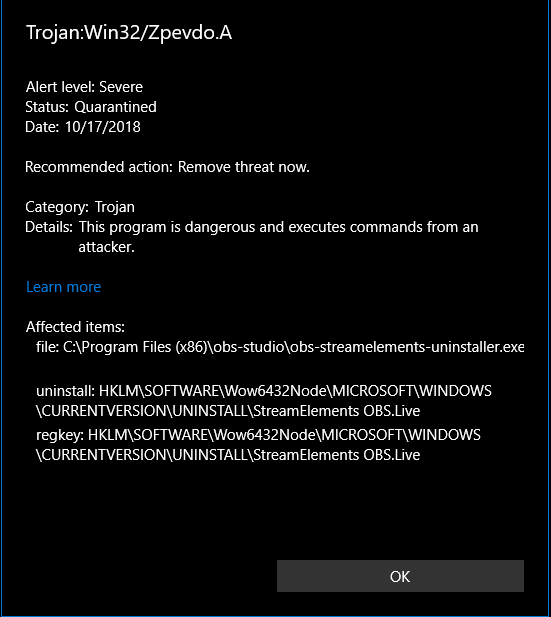 warm pewter
Yeah, that is the latest version, is you defender completely up to date, it looks like I have some new definitions to DL, so I am installing and retesting after the update
lusty quarry
There are multiple software programs getting the same Trojan horse warning apperantly. dating back to june.
Probably some dumb bug of windows
warm pewter
yeah, we have been trying to get rid of the false positive, the next update is removing some other things that can cause the flag, it comes down to some of the files used by the Nullsoft Script Installer that is used for the installation package
updated my definitions, and its still not flagging for me 
 frigid fable
Hello can anyone help me with a problem I’m having with twitch alert notifications and obs?
If anyone can help me please dm me it would greatly and I mean GREATLY be appreciated I haven’t slept all night cause of this problem and I’m so annoyed with this
mortal terrace
@frigid fable are you referring to notifications on your stream (e.g. new followers)?
frigid fable
Yes
I’ve been trying to find alerts and what not all night and I haven’t slept abit ): I’ve been trying to get everything situated with my stream elements and what not if you could tell me how to put alerts in obs studio and how to get them to actually work that’d be great
mortal terrace
OK. I'll try to do my best and help you set up overlay with alerts.
frigid fable
Okay thank you so much
mortal terrace
Sent you video in DM.
 pine tangle
Windows Defender Find Obs.Live has a malware trojan. Precisely inside a uninstaller.
Zpevdo.A inside a uninstaller.
Maybe is a exploit+Malware injector.
 unique osprey
hey how can I find my jtw token I cant find it on dashboard
warm pewter
@pine tangle Its a false positive, what version of OBS.Live do you have installed?
pine tangle
I use the lastest
warm pewter
@unique osprey This channel is for support with OBS.Live itself, in the future, try to ask in the appropriate help desk
deep birchBOT
@unique osprey You can find your JWT token on your account channels page: https://streamelements.com/dashboard/account/channels
(Don't forget to click on "Show Secrets")
pine tangle
But where?
warm pewter
but where what?
pine tangle
Where i can call for help in appropriat object.
warm pewter
Where you tagged in that message? It was not for you. I already told you the flag is a false positive
pine tangle
False Positive?
warm pewter
steel mural
Windows Defender says there is a virus but there isn't
pine tangle
Whats is that?!
That doesn't make sense
Maybe Windows 10 needs a fix.
But is not possible.
steel mural
Welcome to the world of IT
pine tangle
Okay i scanned the uninstaller and no theats in there.
warm pewter
false positives are completely possible and a thing. This exact flag has occurred on other installers
warm pewter
There was no trojan, but you can think that if you want
pine tangle
All is safe. That was the most important.
Idk how the trojan was inside this uninstaller. (Maybe sure that was a exploit that needs to be fixed.)
steel mural
There's no trojan at all. Anti virus programs aren't perfect. They can be wrong too.
warm pewter
Further measures have been taken for the next release that should help to prevent false positive flags.
pine tangle
Okay thx for help.
unique osprey
how can I put my chatbox and other thing obs live ?
warm pewter
What do you mean exactly
unique osprey
I mean how can I use the chat box on obs
warm pewter
Install OBS.Live
warm pewter
If you installed it then you should see chat and your activity feed, unless you disabled them
unique osprey
No I mean I want to add the chat on live stream on the screen
warm pewter
That has nothing to do with OBS.Live. You would need to add the chat widget to your overlay
unique osprey
how can I use the overlay on obs.live ?
warm pewter
!add
deep birchBOT
To add your overlays to OBS, add a new browser source in your scene. Paste your overlay URL in the browser source properties, set the dimensions to 1920x1080 (unless you changed them on the website), and :ballot_box_with_check: “Shutdown source when not visible” https://youtu.be/KDvLynUqXI4
unique osprey
but its normal obs I want to use it on obs.live
warm pewter
Overlays are added in the same way, OBS.Live is simply a plugin for OBS Studio
unique osprey
but there is no browser source in obs.live ?
warm pewter
That means when you installed OBS Studio, you deselected the Browser plugin when you installed it. You will need to uninstall OBS Studio, and reinstall it making sure you have not deselected the browser plugin
steel mural
Or you're tripping over the name. The browser source is called "browser" without the "source"
unique osprey
one last question where can I test the donations ?
warm pewter
You can test alerts from within the overlay editor if that is what you are referring to
unique osprey
ok thx
 viral plover
Hey how doni get invite code mobile stream element
dry sphinx
@viral plover This is not the right place for that as this is for questions with OBS.Live
deep birchBOT
@viral plover The StreamElements Mobile IRL streaming app is currently in closed beta.
If you'd like to assist with testing when public beta testing becomes available, please fill out this form: https://goo.gl/forms/3DaiLckKDjeMAeVt2
 heady elbow
is there a chat on here for se.pay? trying to transfer from paypal to se.pay.
nvm on se.pay. just realized i need 100 followers 😉
 junior sundial
Hey all, My OBS.Live has been acting a lil funky lately
First off, I cant reload my overlays. I have to do it manually by refreshing the sources which is getting a bit frustrating
Secondly, I cant select any emojis. When i do, the chat panel freezes then cuts to a white screen and is only fixed on a reload. I am also unable to "replay" anything from the activity panel
Just a quick FYI, this was never the case. These problems only occurred after the the most recent update of OBS.Live. The update didnt downloaded correctly for first couple of times then didnt install correctly the first couple of times. I want to reinstall OBS and OBS.Live but I am afraid of losing settings and plugins
warm pewter
The only thing the most recent update did was address some issues with a false positive flag from the installer. From what you have described, it sounds like there might be a problem with the browser source cache, and deleting the current cache might help.
junior sundial
How do I do that?
warm pewter
Make sure OBS is closed, go to %appdata%\obs-studio\plugin_config and delete the obs-browser folder
junior sundial
Even after the delete, I'm still getting the same problems
I'll just reinstall OBS. If I uninstall is there an option to keep my settings?
ancient zodiac
Yes
When uninstalling obs it prompts you during uninstall what to save
Leave it unchecked
junior sundial
Reinstalling didn't fix anything 😦 Is there anything else I can do?
mellow goblet
Ive noticed a delay from the time the notification sound starts and when the actual alert pops up on screeen when im live? why is this and how can i fix it
nova geode
are you using the OBS window as preview? and how long is the delay?
narrow hollow
When is the app getting available for everybody on mobile
warm pewter
This channel is for support with OBS.Live, nothing to do with the mobile app, which there is no ETA for the public release
narrow hollow
Well I didn't know where to go
rugged quail
Greetings, any idea how can i show recent tips from streamelements into my obs?
shy mountain
You will need to add "Recent tips" widget to your overlay and then add the overlay to OBS.
rugged quail
thanks a lot @shy mountain i've got it now
 patent cove
Hi, Anyone know why i run overwatch at max (300fps no drops) when i am not streaming, but i can barely run 150 fps stable with obs open and streaming
i have 120-140ish fps when streaming
and its unbareable
my pc should easily be taking this
cpu usage in obs goes to 6% when streaming
deep birchBOT
@patent cove Can you please provide a log from your last stream. You can find this log in " %appdata%/obs-studio/logs " OR Help > Log Files > Show Log Files. You can simply drag and drop the log file into Discord.
shy mountain
Usually this looks like a general OBS issue most likely or PC, but since you are here.
patent cove
is there anything that people cna get out of these files
other wise il pm it to u and delete it
shy mountain
your PC specs, nothing too serious as far as I see
Quick analysis of the log file
patent cove
i used to stream black desert online, one of the most graphic intensive mmorpgs out there on 200 fps no problem
shy mountain
Well ok, but I don't know how you are even able to see a difference between 300 fps and 150 fps
shy mountain
but looking at the log result - you are capturing the game multiple times most likely - run as admin
patent cove
shy mountain
Ok, since we are not actual OBS support, I'd suggest going to their discord and asking there. And let me tell you from now, its not related to our plugin and they will try to send you back here OR tell you to remove OBS.Live
deep birchBOT
@patent cove For the best OBS support, please join their discord where OBS devs and support volunteers are available all the time discord.gg/obsproject
 sick wadi
First thing to be aware of your CPU is 6 years old, that CPU was released in 2012.
Are you also streaming from the same PC you game on?
shy mountain
8 year old CPU? Damn my own i5-4440 ain't that old..I think
yet it can't run OW at 300fps with a 1060GTX
sick wadi
Streaming is and always will be intensive... I'm running a Ryzen 2700x and a 970 and I doubt i'd get close to 100 out of OW
patent cove
i mean its weird how a not intensive game as overwatch has so much trouble compared to one of the hardest to run mmos out there
shy mountain
BDO is a 2014 game while OW is a 2016 game
sick wadi
OW has a much faster pace that and OW is frequently tweaked
shy mountain
Each new year that passes, old CPUs can't handle the needed minimum requirements for games
patent cove
bdo got updated 2 months ago by same engine as battlefield to a new ultra remastered mode
making it the most intensive game to run atm
sick wadi
OW has most likely moved past it's OG specs now
shy mountain
Crysis 1 has a fairly old engine, but it can still burn down a high spec rig as well
sick wadi
^ I still remember the pain that game caused
shy mountain
Anyway - so your CPU is fairly old and I'm really not sure how you are even able to get OW in 300fps without streaming with a 980 card and if you want to stable the FPS drops, I'd go ask in OBS discord
sick wadi
I'm pretty sure the answer will be similar but I hope they can help you 😃
shy mountain
OBS Support doesn't look at logs directly - they see what the bot says as a result(what I showed) and say how to fix it
or at least thats how I've noticed them doing it 😃
 echo apex
Is there anyway to get the chat roll automaticly? For me it just sticks and says "more messages below"
warm pewter
There is an issue if you have your display scaling set above 100% where the chat will not scroll
echo apex
where can i change that scaling?
warm pewter