#helpdesk-youtube
1 messages · Page 58 of 1
 versed tangle
 runic sierra
how can I confirm this? I downloaded the obs.live installer, but in the app in the header it just says OBS 26.1.1
versed tangle
do you have StreamElements tools in your obs?
runic sierra
yes, it's the last tab after help
versed tangle
good stuff
let's start by logging out of both obs.live and then website
then log back into both
and see if that helps
runic sierra
ok
 lime walrus
enabled
versed tangle
much appreciated
runic sierra
still nothing
 past beacon
runic sierra
still nothing
past beacon
runic sierra
still nothing
can you screen shot your scenes and sources set up?
runic sierra
 versed tangle
is the stream public?
runic sierra
 runic sierra
versed tangle
is the stream public?
runic sierra
versed tangle
is the stream public?
I've set it to private to not confuse the few subscribers I have 😅
versed tangle
I don't think we'll be able to pick up chat activity from a private stream, that's a known issue
runic sierra

ok, I'll try switching to public and see if it makes a difference. (Yesterday when the issue first occured, it was public)
still no text showing up
runic sierra
past beacon
can you screen shot your scenes and sources set up?
are these the screenshots you need?
past beacon
runic sierra
are these the screenshots you need?
just wanted to check something.
runic sierra
anyways, I appreciate the effort, I need to go to work now unfortunately, I'll follow up later when I get back. Sorry for wasting your time 😓
versed tangle
no time wasted, when you've got time, we'll certainly want another crack at it
runic sierra
versed tangle
no time wasted, when you've got time, we'll certainly want another crack at it
thank you! Much appreciated
 noble bluff
Hey all... just getting started. Stream Elements is looking awesome
I activated the Chat Bot and attempted a custom command
I typed !uptime
and on my Youtube chat it said

I'll keep working on it but any tips would be great thx
versed tangle
Is your stream public?
 hexed dirge
Bro
 sage lantern
noble bluff
Could I paste the stream here?
sage lantern
noble bluff
Could I paste the stream here?
No
noble bluff
haha cool
sage lantern
Maybe want to catch up on the server rules :P
noble bluff
that's why I asked
The only reason I even asked was because I was asked if the stream was public.... to help debug the issue I asked if I should paste the link incase it would help to see the messages and debug the problem. Alternatively I will try to solve it myself and use something else if I can't 😛
 main vector
Your channel is linked so that's not necessary.
noble bluff
... yet the issue remains...

 vast lion
i csnt close my account
sage lantern
Do you want to close it so you can link it to another account? @vast lion
If yes, then there is a faster way
 eager lilyBOT
Account Merging - Please note:
- Merging accounts only allows faster ways to switch between accounts
- Merging accounts does not allow data sharing between accounts - different streaming platforms, different type of events
- Merging accounts allows duplicating/sharing overlays between the accounts
If you understand the limitations of merging and want to proceed, please find the JWT tokens (!jwt) from both accounts you want to merge and you will be directed to DM them to a staff member
You can find your JWT token on your account channels page (Show Secrets to reveal the token): https://streamelements.com/dashboard/account/channels
READ ME: This is a private security token. Do NOT share this token here or other public places, only with a StreamElements staff member in private.
sage lantern
If you want that then you can DM both of the JWT tokens to @versed tangle and he can merge the accounts for you @@vast lion
 shell elbow
Can anyone help me with my streamelements alerts for YT? i am using custom alert on streamelements and they work fine when i test it but when someone subs my channel i see his notification on yt but his name doesn't pop in the streamelements dashboard and my alerts are not triggered 😦
past beacon
shell elbow
Can anyone help me with my streamelements alerts for YT? i am using custom alert...
See pinned message
past beacon
shell elbow
Can anyone help me with my streamelements alerts for YT? i am using custom alert...
also it can depend on the privacy settings of the sub user
shell elbow
past beacon
See pinned message
as i said , i see the subscriber's name on youtube but his name doesn't show in the streamelements dashboard
 vague stirrup
hello when i try to add my youtube channel it me but CHANNEL IS ALREADY CLAIMED is that someone can help me please
past beacon
vague stirrup
hello when i try to add my youtube channel it me but CHANNEL IS ALREADY CLAIMED ...
are to trying to add it to your other account?
vague stirrup
past beacon
are to trying to add it to your other account?
that is to say
past beacon
vague stirrup
that is to say
whats your account id please?
vague stirrup
past beacon
whats your account id please?
5ead401558f4b84b1942ea6d
vague stirrup
past beacon
whats your account id please?
here is me id of my account
vague stirrup
past beacon
whats your account id please?
vous aller essayer de me debloquer le probleme avec mon id de mon compte ou pas
vague stirrup
past beacon
whats your account id please?
but also I connected with my youtube account is it will be because of its that I can not add it
past beacon
vague stirrup
but also I connected with my youtube account is it will be because of its that I...
if you wish, i can merge the accounts
vague stirrup
past beacon
if you wish, i can merge the accounts
yes I don't mind it will be great
past beacon
vague stirrup
yes I don't mind it will be great
pls DM me the JWT token for both accounts and the account id
lime walrus
@vague stirrup Unless you want to loose your account, stop posting the JWT token in public and read what Maya requested
vague stirrup
sorry
vague stirrup
past beacon
pls DM me the JWT token for both accounts and the account id
I did not understand everything for what I should do
vast lion
sage lantern
If you want that then you can DM both of the JWT tokens to <@456226577798135808>...
Done
eager lilyBOT
@versed tangle SE.PAY is available for streamers who are at least 18 years old, with bank account under their name in one of the following countries and have at least 101 follower (Twitch) / 101 subscribers (YouTube):
Austria, Belgium, Czech Republic, Denmark, Finland, France, Germany, Ireland , Italy, Netherlands, Poland, Portugal, Slovakia, Spain, Sweden, Switzerland, United Kingdom, United States.
If you meet these criteria and don’t see SE.Pay, let us know.
For information on SE.Pay payment methods, their fees and settlement times see https://streamelements.com/dashboard/tipping/fees
 pallid urchin
Hello. I need some help.
I'm trying to close the account linked with my YouTube but I can't close it as it appears I have no email linked to it: https://gyazo.com/82f74ed6874a2019794fefe4bd103608

I need to close it or unlink my YouTube so I can create or link it to a new account. Please help 🙂
@tall sun ?
Anyone can help?
runic sierra
versed tangle
no time wasted, when you've got time, we'll certainly want another crack at it
Good afternoon - I'm back from work for round two 😄
runic sierra
I was trying to figure out why my stream chat layer suddenly stopped working.
versed tangle
Ive been reading a lot here. The issue I have is that I cannot see my alerts on stream, but they work when I test them. Really not sure what to do? Also the Activity doesnt show up on Obs.live. Thank you.
 main jasper
Hello. I live stream games on Youtube and I cannot find loyalty settings on StreamElements. Please help.
Here's the screenshot. I can't find the loyalty system settings. Where is it?

 strong surge
main jasper
Here's the screenshot. I can't find the loyalty system settings. Where is it?
strong surge
main jasper
Here's the screenshot. I can't find the loyalty system settings. Where is it?
There is not a loyalty setting for YouTube.
 final depot
the stream chat still doesn't work?
lime walrus
Its been fixed for a few months
final depot
it's not working for me, i mean the chat box you can put on your stream
lime walrus
Is your stream public?
runic sierra
@versed tangle good morning - oddly enough chat seems to be working today, without even being online with the stream yet. I can only assume what caused the issue is that I had multiple streams scheduled that all use the same streamkey.
eager lilyBOT
@worldly basin To set up the bot for your YouTube stream, please follow these steps:
- Make sure your stream is public. The bot cannot join a private/unlisted stream.
- Your stream must be live for the bot to join the chat.
- Go to https://studio.youtube.com/, click on Settings > Community and add https://youtube.com/c/streamelements or https://www.youtube.com/channel/UCjerlCIbLPQwSnYlClkjDXg as a Moderator.
- When live, be sure to look at Live chat instead of Top chat, as Top chat will hide the bot messages.

 lime walrus
Then explain the first screenshot
 worldly basin
I have my youtube stream settings set to public
lime walrus
The stream that I just caught you having on was unlisted and the only way i saw it was via Discord
worldly basin
 lime walrus
I'm trying to go back to the stream
lime walrus
and its no longer available because i assume you ended it
 worldly basin
15 to 30 minutes?
lime walrus
Yes
worldly basin
I just had a 2 hour stream but at the end the bot still wasn't working
it was public I know, because I had random people join me
 lime walrus
Only once
worldly basin
jeez how did I overlook such a major thing
prolly should add that step to the guide for idiots like me lol
ty so much
also, any idea how long it'll be until the API thing will be fixed? with sub notifications?
it's not on StreamElements right? so you guys prolly don't know
lime walrus
there is nothing to fix here for the delay in new subscribers
its an intended behavior from Youtube
 sly lion
Hey anyone knows when the loyalty system is coming to YouTube ??
I really want it badly.
lime walrus
No plans to introduce loyalty to YT, due to API restrictions from them.
lime walrus
How Streamlabs offers loyalty points is different then how we would prefer and like to implement it
because the way we want is not present, we have not added the same system that is on Twitch, to be active on Youtube
because of said API restrictions
sly lion
cool then.
 sick cedar
It seems like Youtube is making it harder and harder for third party providers to do anything these days.
@lime walrus Are Youtube going to make it possible, or have they just shut the door? Or maybe they're working on a similar system themselves?
lime walrus
I don't know the answer to any of those questions
Those more seem like questions for Youtube directly
sick cedar
Found the answer I was looking for en these posts rights here 🙂 searching for if Streamelements was any closer to a Loyalty system for Youtube 🙂
lime walrus
We are not any closer, because we don't have it planned at this point. We were looking into implementing but we stopped pushing Youtube to open up the APIs
Would they open the doors? Only they know.
Are they working on similar system? only they know
 supple marlin
Any reason why during live stream the chat dock isn't signed in? If I try to sign in, I get an error "this browser is not safe/supported" so I can't have the chat dock.
@lime walrus

 narrow moss
hello! I added My YT channel in streamelements a few days ago, but now I've changed the name of the channel on YT and I dont know how to change it in streamelements too. Pls, help!
narrow moss
Anyone that had same problem?
 hollow venture
Hey I was just wondering if anyone could help me be more efficient? I am trying to be a VTuber but currently I have no pc so I’m having to do it all on mobile and iPad and it makes it difficult, I know I need a pc but if you have any tips that could help make using mobile easier until I can get a pc that would be amazing
eager lilyBOT
@narrow moss Please logout of StreamElements at https://streamelements.com/logout and then login again to your account (Twitch/YouTube/Facebook).
 fathom hatch
How do you uninstall OBS live, I cant find the file anywhere
strong surge
fathom hatch
How do you uninstall OBS live, I cant find the file anywhere
You should be able to uninstall this as you would a normal program
main vector
@sharp berry not possible. It's not available for YouTube.
Never existed.
If anything it's a bug.
But in short not possible.
No way around it.
Twitch yes. Not YouTube.
 storm sage
Hello,
How do I activate SE Pay for my channel?
main vector
Do you meet these requirements?
eager lilyBOT
SE.PAY is available for streamers who are at least 18 years old, with bank account under their name in one of the following countries and have at least 101 follower (Twitch) / 101 subscribers (YouTube):
Austria, Belgium, Czech Republic, Denmark, Finland, France, Germany, Ireland , Italy, Netherlands, Poland, Portugal, Slovakia, Spain, Sweden, Switzerland, United Kingdom, United States.
If you meet these criteria and don’t see SE.Pay, let us know.
For information on SE.Pay payment methods, their fees and settlement times see https://streamelements.com/dashboard/tipping/fees
storm sage
yes
eager lilyBOT
Please provide your account ID found at the top of this page: https://streamelements.com/dashboard/account/channels This ID is public info and safe to share here.
storm sage
5dc33dc50352914de58b642e
strong surge
storm sage
5dc33dc50352914de58b642e
Should be all set
 agile vault
Hello, I don't think this is related to obs/streamelements, but if someone can help me please! My Tipeee doesn't react to anything happening on youtube. Simulated alerts do trigger, but the tracking of followers, subs etc. doesn't work, ergo no alerts get triggered(when not simulated). You could say Tipeee is blind at the moment and doesn't see what happens on Youtube. Logically I'd try to un- and relink Youtube and Tipeee, but I have no idea how to do so, but I refreshed all chaches+ verified if the link from browser source is correct. Moreover, is it okey if when I open the "Alert box v2" widget link to not have a green screen background?(Like the one to the chat). Also, I can't reload alerts from the mini activity feed from StreamElements, the one that is implemented in OBS( they will not appear). Any advice what the problem might be?
lime walrus
If you are having issues with Tipeestream, you will have to ask their support
That being said
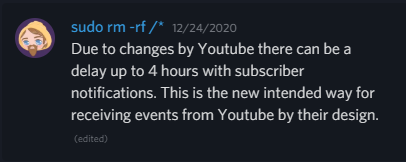
every platform is affected by this: Due to changes by Youtube there can be a delay up to 4 hours with subscriber notifications. This is the new intended way for receiving events from Youtube by their design.
agile vault
lime walrus
If you are having issues with Tipeestream, you will have to ask their support
Thank you!
 delicate basalt
Hello, I need help.
eager lilyBOT
@delicate basalt Welcome to the helpdesk! Please let us know how we can assist you today and a support volunteer or staff member will assist you as soon as they are available. Thank you for your patience.
delicate basalt
Alright.
So i am using OBS Studios to livestream on yt and i watched a couple of tutorials on how to use a stream elements overlay subscriber count
I put it into OBS and it works but the sub count doesn't update.
sage lantern
that is probably due to this:
delicate basalt
Does somebody have to subscribe to me live on stream?
sage lantern
 sage lantern
And their account needs to be set to public as well or it won't show at all
Yeah that is the way YouTube thinks it's best
delicate basalt
sage lantern
And their account needs to be set to public as well or it won't show at all
Could you explain that more?
sage lantern
It's really shitty
eager lilyBOT
Users can choose to make the channels that they subscribe to public or private. By default, all settings are set to private.
Private: When a user's subscriptions are set to private, no other user can see what channels they subscribe to. A user's account does not show in a channel's Subscribers List, even if they are subscribed.
Public: When users subscriptions are set to public, another user can see what channels they subscribe to. User subscriptions are listed on their channel page and their account is listed in the Subscribers List for any channel they subscribe to.
If a user has it set to Private they will not show up in the activity feed. More info: https://support.google.com/youtube/answer/7280190
sage lantern
this ^^
delicate basalt
Oh i get what you mean.
is it also the same for the alerts where i don't recieve them?
sage lantern
yes, if StreamElements doesn't get the sub signal from youtube it can't show the alert
youtube really killed sub alerts
sage lantern
Sure 😄
delicate basalt
Is the Stream Elements bot supposed to actually talk in my stream?
sage lantern
Only if your channel is live and set to public
delicate basalt
I see
so if i am live and i say a command like "!commands"
it will reply?
because i use night bot and it's pretty reliable
sage lantern
It should reply yes
sage lantern
No problem 😄
sage lantern
delicate basalt
Wait, one more thing.
sage lantern

delicate basalt
In order for the Stream Elements bot to join my livestream
i have to go to the dashboard?
eager lilyBOT
To set up the bot for your YouTube stream, please follow these steps:
- Make sure your stream is public. The bot cannot join a private/unlisted stream.
- Your stream must be live for the bot to join the chat.
- Go to https://studio.youtube.com/, click on Settings > Community and add https://youtube.com/c/streamelements or https://www.youtube.com/channel/UCjerlCIbLPQwSnYlClkjDXg as a Moderator.
- When live, be sure to look at Live chat instead of Top chat, as Top chat will hide the bot messages.
delicate basalt
and press join stream?
sage lantern
yes
sage lantern

 heady hornet
how do i disconnect an account?
strong surge
heady hornet
how do i disconnect an account?
Are you trying to close/delete an account?
strong surge
So you can close accounts, but closing one closes all accounts connected to it
heady hornet
i just want to disconnect a youtube account
strong surge
Is it connected to other accounts you want open?
strong surge
So you won't be able to close the youtube one without closing the twitch one with it
strong surge
heady hornet
how do i close it
You can do that here: https://streamelements.com/dashboard/account/security
heady hornet
where am i supposed to find my username at if i signed in with twitch or youtube?
 dusky marsh
can somebody help? Urgent question. My stream disconnects from Youtube, here is the log file https://obsproject.com/logs/GBvPI97WkIBYOf9q
It just stops sending data, why is that?
 steady light
Hi, quick question, if I integrate StreamElements with my OBS will I then be able to stream to both YouTube and Facebook simultaneously?
main vector
no
 brazen bison
TRYING TO ADD ALL MY CHANNELS TOGETHER BUT ITS SAYING MY TWITCH CHANNEL IS ALREADY CLAIMED
 coral axle
Hello folks. I finished streaming just now, but I couldn't use the chat feature in OBS because I had to log in, and Google prevented it because the browser was "insecure".
versed tangle
Question about alerts: I have 3 donation alerts 0-49, 50-99, 100+. I want different things to happen on screen for each.
- If I use the same alert box I can use variations to achieve my goal BUT each alert needs to be a different size. So if I use 1 alert box with variations, I need to know how to resize the box for each individual variation.
if that's not possible:
- I can use multiple alert boxes but I need to know how to set a MAX range on donation alerts. I see how to set 'AT LEAST" on donation amounts, but I don't know how to tell an alert box to do nothing if a donation is over a certain amount. When a $50 donation hits, I don't want the 0-49 alert going off too.
 spring tusk
Hey I stream on YouTube how could I look at my live viewer count on OBS Live?
 narrow locust
spring tusk
Hey I stream on YouTube how could I look at my live viewer count on OBS Live?
narrow locust
spring tusk
Hey I stream on YouTube how could I look at my live viewer count on OBS Live?
there's no way to do this natively atm
versed tangle
Hi, trying to use revenue history for a user's channel i manage and when clicking it, it takes me to the streamelements homepage to login.
narrow locust
versed tangle
Hi, trying to use revenue history for a user's channel i manage and when clickin...
only full control access has access to tipping
versed tangle
i have full control access, which is what was confusing me
 mental heart
is stream elements working on fb ??
 lofty valley
I have started streaming and have everything setup for twitch and the chat and activity feed through streamelements work but when i try to stream on facebook the chat and activity doesnt switch over to my youtube stream, it stays on twitch even though im not streaming on twitch, i cant figure out why that is, any help is appreciated!
eager lilyBOT
StreamElements menu, on top of OBS > Logout > Login
lofty valley
Thank you Bot!!!! your a lifesaver!
 gilded wharf
Hi
I came across stream elements this week while searching for chatbots to add to my stream and signed up and connected my YouTube account to it and added the bot but when I go to the moderators list and paste the URL of stream elements it says no users found
I tried to add it to twitch and it works
eager lilyBOT
To set up the bot for your YouTube stream, please follow these steps:
- Make sure your stream is public. The bot cannot join a private/unlisted stream.
- Your stream must be live for the bot to join the chat.
- Go to https://studio.youtube.com/, click on Settings > Community and add https://youtube.com/c/streamelements or https://www.youtube.com/channel/UCjerlCIbLPQwSnYlClkjDXg as a Moderator.
- When live, be sure to look at Live chat instead of Top chat, as Top chat will hide the bot messages.
gilded wharf
eager lily
To set up the bot for your YouTube stream, please follow these steps:
1) Make s...
Shouldn't I be adding the link that shows up when I click get link in the stream elements website?
gilded wharf
eager lily
To set up the bot for your YouTube stream, please follow these steps:
1) Make s...
The links in this message does show stream elements when I paste it in the moderators list
Anyone??
gilded wharf
Oh ok
I'm just concerned about security
Should I continue with the link in the above message? @versed tangle
versed tangle
Yes
gilded wharf
👍🏻
Thanks for the help 😀

getting this error after connecting to yt and starting stream
past beacon
gilded wharf
has it worked before? Also have you added OBS to the firewall permissions?
gilded wharf
past beacon
has it worked before? Also have you added OBS to the firewall permissions?
No I didn't stream before
past beacon
ok, try opening the obs as admin but also check your firewall (if havent installed any look for windows firewall) and see if obs is listed there just incase
gilded wharf
I didn't install any firewall
Just a sec I'll check it
@past beacon could you guide me through the process
Or link the guide ?
Idk how to do it
past beacon
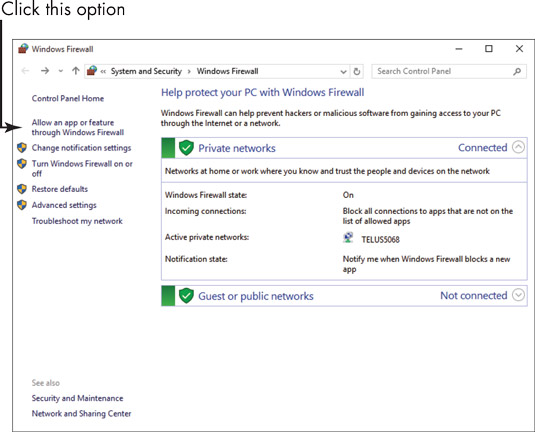
When you have a firewall active on your Windows 10 laptop, you can allow certain programs to communicate through that firewall. For example, you might want to allow live apps such as Weather or Video to send information or content to your computer. In the Start menu click Settings, and then enter Firewall in the […]
gilded wharf
Thanks 👍🏻
gilded wharf
@past beacon hey
The obs doesn't show up in the list so I clicked allow another app
So no I select the stream elements obs right ?
past beacon
open it as admin and try login in with your YT account
gilded wharf
After adding it right ? @past beacon
past beacon
ye
gilded wharf
Ok👍🏻
I'm already logged in
Is a system restart needed to apply the firewall settings ?
past beacon
you dont need to restart the sys
 past beacon
gilded wharf
Oh ok
past beacon
gilded wharf
Oh ok
then i recommend you should try contacting OBS
gilded wharf
👍🏻
eager lilyBOT
Obs.live is a plugin for OBS Studio for the best OBS support, please join their Official Discord @ discord.gg/obsproject
gilded wharf
👍🏻
 loud kernel
When I record in OBS the recording comes out with a lot of lags and I can not fix the problem, I tried everything.
@past beacon
eager lilyBOT
@loud kernel Obs.live is a plugin for OBS Studio for the best OBS support, please join their Official Discord @ discord.gg/obsproject
versed tangle
Hello, I am trying to unlink my YouTube account so that I can merge it with my Twitch account on SE. Can anyone assist?
 tardy cloud
@versed tangle you don't need to unlink it, we can merge them for you
eager lilyBOT
@versed tangle Account Merging - Please note:
- Merging accounts only allows faster ways to switch between accounts
- Merging accounts does not allow data sharing between accounts - different streaming platforms, different type of events
- Merging accounts allows duplicating/sharing overlays between the accounts
If you understand the limitations of merging and want to proceed, please find the JWT tokens (!jwt) from both accounts you want to merge and you will be directed to DM them to a staff member
versed tangle
Excellent yes, that is what I would like 🙂
tardy cloud
DM me those tokens and i'll help you
versed tangle
Thank you very much
 lost pagoda
Yo guys. I am new here but can anyone help me with the bot commands
eager lilyBOT
@lost pagoda Welcome to the helpdesk! Please let us know how we can assist you today and a support volunteer or staff member will assist you as soon as they are available. Thank you for your patience.
lost pagoda
I would like to add a list command to add there username to a list. Is this possible or do I need a 3rd party software. Thanks for the help.
tardy cloud
lost pagoda
I would like to add a list command to add there username to a list. Is this poss...
We have one for twitch, i'm not sure if you can duplicate it on YT #widget-share message
versed tangle
I have a question if someone donates via PayPal, for example, do I have to pay taxes on the donations myself or are there any costs for me?
eager lilyBOT
@versed tangle Please ask your question in one helpdesk channel only. A support volunteer or StreamElements staff member will assist you as soon as they are available. Asking in multiple places will only result in confusion, not faster answers. Thank you for your patience.
 plucky bear
Hi, I hope I'm in the right place. I'm setting up a new overaly for streaming to youtube and for some reason I cannot find labels for members. I can add them for subscribers and superchats, but not members. The options is just not there. Is this normal?
tardy cloud
@plucky bear iirc its under sponsors
plucky bear
tyvm!!!
 heady pier
Not sure if this is the right channel, but here's the problem I'm having.... I'm experiencing an error on my Stream Elements account that when I try and duplicate overlays or import them from one of my channels to another, it gets stuck in an infinite loading wheel and never actually completes the duplication. I'm experiencing the problem across multiple browsers... Any help on a fix would be greatly appreciated!
eager lilyBOT
@heady pier Please provide your account ID found at the top of this page: https://streamelements.com/dashboard/account/channels This ID is public info and safe to share here.
heady pier
eager lily
<@!565804737312718858> Please provide your account ID found at the top of this p...
It's showing a separate account ID for each of my platforms. I'm not sure if there's a specific one you need or not. Here's one of them: 5f9b9f7dabecf9620b17abf0
narrow locust
heady pier
It's showing a separate account ID for each of my platforms. I'm not sure if the...
whats the overlay you're trying to duplicate?
heady pier
narrow locust
whats the overlay you're trying to duplicate?
At this point, any of them. I've tried it with multiple different ones across the different platforms, and I encounter the same problem each time no matter which I pick. It used to work perfectly without any issue, but it randomly started happening about a month ago or so
heady pier
I just tried importing an overlay from SLOBS through OBS.Live to test if that was working, and that is also giving me a "Failed to import" error, which is wasn't before. Not sure if that's related to the same cause as my problem with being unable to duplicate overlays, or a whole other issue entirely...
narrow locust
@heady pier I think the duplicate action was failing because the overlay didn't have a game in their properties, I tried with your just chatting overlay from twitch to youtube and now it works
heady pier
Awesome. Thank you so much for your help!
main jasper
Hi. I tried to add emotes (kappagen) to youtube but there isn't any available emotes. I guess emotes aren't available for Youtube?
 velvet geyser
hey im trying to change text in the streamelements overlay editor and for some reason it wont let me
main vector
I assume this is what you wanna do #helpdesk-twitch message
velvet geyser
im trying to use one of the premade overlays and the text box is stuck saying "your name here" and im trying to change that
main vector
Click my link then.
velvet geyser
goated my friend. i clicked it and i think i scrolled straight past the video so thats my bad
supple marlin
Any reason why during live stream the chat dock isn't signed in? If I try to sign in, I get an error "this browser is not safe/supported" so I can't have the chat dock.
lime walrus
Update OBS.Live

 supple marlin
To be honest, not sure. I just downloaded OBS.Live from the website again and reinstalled so it's now on the same as yours.
I'll give it a shot and update you @lime walrus
Also, a different question - I'm pretty sure this one isn't related to StreamElements but YouTube API, but the subscribers do not show anymore in the activity feed. I mean, it doesn't update but then a few hours later boom 50 new subscribers show.
lime walrus
Check pinned message
also if you are on the same obs.live version, make sure your obs studio is also 26.1.1
supple marlin
OBS is indeed 26.1.1, thank you.
lime walrus
@lean shadow check transaction tab -> click transaction -> if payment method is paysafecard -> pending period can last from 16 up to 21 days
 lean shadow
I dont see option to check if it's paysafecard I only see that it's SE.Pay
lime walrus
 lean shadow
I see now, thanks.
 mystic tinsel
Hello, I use Streamelements for donations on Youtube. Is it normal that people can only donate using PayPal? Because I don't find any options where I can add the rest.
eager lilyBOT
@mystic tinsel SE.PAY is available for streamers who are at least 18 years old, with bank account under their name in one of the following countries and have at least 101 follower (Twitch) / 101 subscribers (YouTube):
Austria, Belgium, Czech Republic, Denmark, Finland, France, Germany, Ireland , Italy, Netherlands, Poland, Portugal, Slovakia, Spain, Sweden, Switzerland, United Kingdom, United States.
If you meet these criteria and don’t see SE.Pay, let us know.
For information on SE.Pay payment methods, their fees and settlement times see https://streamelements.com/dashboard/tipping/fees
 near stag
If you are in the correct region but do not see SE.Pay - we can enable that for you manually @mystic tinsel
mystic tinsel
Yes, I am older than 18 and I am from Germany. Do you need something from me?
near stag
mystic tinsel
Yes, I am older than 18 and I am from Germany. Do you need something from me?
Your account ID so i can find you in the system and enable it.
Account ID is on that page:
https://streamelements.com/dashboard/account/channels

StreamElements
The Ultimate All in One Platform for Streamers
mystic tinsel
My ID is: 5fe32984c230693184ec779f
near stag
mystic tinsel
My ID is: 5fe32984c230693184ec779f
Please refresh our site, you should see SE.Pay now
mystic tinsel
Yes I can see it. Thank you! 🙂
 twilit summit
Im in the uk but have over 100 subs, why cant i access SE.Pay?
near stag
twilit summit
Im in the uk but have over 100 subs, why cant i access SE.Pay?
youtube sometimes fails to detect the subscriber count needed for it. can you provide us your account ID so we can enable this for you manually?
twilit summit
sure, is the id the hyper link thing, i just want to give the right information
UC1NVM5FYOTXsChMte-RXuFw
near stag
twilit summit
sure, is the id the hyper link thing, i just want to give the right information
that does not look like our account ID
https://streamelements.com/dashboard/account/channels
Please copy the account ID from here^
StreamElements
The Ultimate All in One Platform for Streamers
twilit summit
i thaught you meant YT id, sorry
6057b6c5920fec2468e39663
near stag
twilit summit
i thaught you meant YT id, sorry
6057b6c5920fec2468e39663
Refresh the page now, check if that works 🙂
versed tangle
I got donated via SEPAY but it was not added to Pending Balance. How long will it take to update this?
near stag
versed tangle
I got donated via SEPAY but it was not added to Pending Balance. How long will i...
Can you check your tip history for that tip and make sure it is done via SE.Pay?
Should show up as pending pretty much instantly
versed tangle
Yes this is Sepay. A donor is shown, but this donation is not on the Pending Balance list
near stag
versed tangle
Yes this is Sepay. A donor is shown, but this donation is not on the Pending Bal...
Then give it some time, depending on the payment method there might be a delay.
versed tangle
visastandarddebit
near stag
If you give me your account ID, i could check.
The account ID is here:
https://streamelements.com/dashboard/account/channels
StreamElements
The Ultimate All in One Platform for Streamers
And please give me the amount aswell, so i can find it.
versed tangle
5f9abd0a7b39550d2bf82ffb
near stag
versed tangle
5f9abd0a7b39550d2bf82ffb
I see there is an internal error with displaying current transactions. Please give it some time, might be a delay involved
versed tangle
Ok thanks for your help
 hollow ivy
is there a way to pull data from multiple channels (ie Twitch and YouTube) into one overlay?
sage lantern
nope
hollow ivy
That's what it seemed like, but wasn't sure...thx @sage lantern
 lapis cloud
So when my stream tries to donate to me through streamelements it says "seller restriction" is anyone else having that problem or know how to fix it?
tardy cloud
@lapis cloud you need to check your paypal account
lapis cloud
@tardy cloud what would be the problem specifically? Sorry for the questions :]
tardy cloud
lapis cloud
<@!487269278207311873> what would be the problem specifically? Sorry for the que...
unfortunately that's the whole response "seller restriction" you may need to call paypal support about it
lapis cloud
ok thank you!
 zenith cloud
thanks
what do u use to rec ur cam and desktop and computer audio i cant find one thanks
lofty valley
Hi, so im currently streaming and notifications are not popping up when someone subscribes to my channel, i have the overlays saved properly i believe any ideas?
past beacon
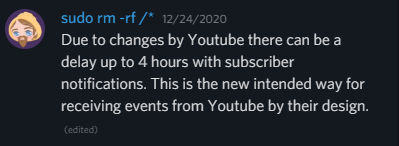
Due to changes by Youtube there can be a delay up to 4 hours with subscriber notifications. This is the new intended way for receiving events from Youtube by their design.
lofty valley
oooooh, well thats smart for their buisness but that sucks big time!!! thank you for the quick reply
past beacon
np 🙂
 robust sequoia
Hi, I had an offline donation flagged from my Twitch link. I'm about to enable tipping on the youtube side, can I expect the same issues when people donate offline on my YouTube as well?
main vector
If it's via SE.Pay yes. Those require you to be live to receive them without issue.
There's still other possibilities it'll be flagged but being online while receiving it is the only firm requirement.
robust sequoia
Thank you for the information
 analog bough
Can someone please help me with the chatbot for YouTube? I've tried everything and I can't get it to work for the life of me
eager lilyBOT
@analog bough To set up the bot for your YouTube stream, please follow these steps:
- Make sure your stream is public. The bot cannot join a private/unlisted stream.
- Your stream must be live for the bot to join the chat.
- Go to https://studio.youtube.com/, click on Settings > Community and add https://youtube.com/c/streamelements or https://www.youtube.com/channel/UCjerlCIbLPQwSnYlClkjDXg as a Moderator.
- When live, be sure to look at Live chat instead of Top chat, as Top chat will hide the bot messages.
analog bough
I have done all of those things, and it doesn't work
The commands don't work, the timers don't trigger, nothing
eager lilyBOT
@analog bough Go to the Dashboard > Right side > Part channel > Join channel(https://streamelements.com/dashboard)

 fresh zenith
Make sure your stream is public
fresh zenith

analog bough
Seriously? So you need to hope that people click live chat instead of top chat to see the bot messages? That's brutal, no one's going to do that
UGGH damn you YouTube! I assume there's no way around this y'all have found?
And the bot can't send clickable links?
main vector
No and I'd like to hope nobody does as that's a security risk.
versed tangle
need help
eager lilyBOT
Welcome to the helpdesk! Please let us know how we can assist you today and a support volunteer or staff member will assist you as soon as they are available. Thank you for your patience.
analog bough
main vector
No and I'd like to hope nobody does as that's a security risk.
What do you mean?
main vector
Can't tell if a link points to an ipgrabber or malware if you can't see the link.
 fossil stump
Hello, my news subs did not show in my activity feed and they did not get the alert on stream?
fresh zenith
Check the pinned messages
 tulip thunder
I checked out Mercury thinking it would let me edit and cut/split videos into new videos.
It doesn't do that at all, so does anyone know something that does?
I need it to be done completely online,
as my internet's too slow for uploading hd video in what I consider to be a reasonable amount of time.
wouldn't be needed as much if Twitch's "auto split to 15 minute segments" feature on exporting to youtube actually worked.
 hollow sphinx
Is there any way to set up some kind of Loyalty Points / Currency for my YouTube Live streams through StreamElements? I'm pretty sure the Twitch side of stream elements has this functionality, but after a lot of googling and searching in vain I can't find it on the YouTube side.
fresh zenith
there is no loyalty for YouTube
hollow sphinx
Is there any particular reason why, or do you know if they plan on adding it in the future?
I'd just really rather not have to use Stream Labs for anything if I can help it.
fresh zenith
hollow sphinx
Is there any particular reason why, or do you know if they plan on adding it in ...
hollow sphinx
Ah, I see. Same reason the Sub alerts aren't consistent at all iirc.
I think I'd rather do without stream loyalty points than use Stream Labs. But I think they should reconsider getting loyalty points working on Youtube. I get asked for them a lot in the chat. Thanks for the help Daniii_
 urban sable
My youtube activity feed doesn't show when someone becomes a subscriber, is there a problem?
 urban sable
ohhh, ty!
 white wave
it wont let me login to chat
 hearty hill
Is chatbot meant to take 20 seconds to respond to commands?
twilit summit
Im having issues with the SE.Pay ID confermation and being in the UK
eager lilyBOT
@twilit summit Please contact us via email for support with SE.Pay. You can use our contact form here: https://streamelements.com/contact Thank you.
twilit summit
eager lily
<@!706921692441739326> Please contact us via email for support with SE.Pay. You ...
sorry
 surreal karma
how can i see my youtube chat on stream elements obs
strong surge
surreal karma
how can i see my youtube chat on stream elements obs
Google currently doesn't let the browsers of OBS complete logins to youtube chat
 sharp tusk
My primary screen is black and not showing the camera or any sources for that matter. Not sure what changed, it just started showing black one day.
eager lilyBOT
@sharp tusk Obs.live is a plugin for OBS Studio for the best OBS support, please join their Official Discord @ discord.gg/obsproject
 pastel remnant
I'm looking for a subathon style timer that would work with YouTube for superchats, I've looked everywhere and I've yet to find one. Does something like this exist?
 alpine solstice
i need help to make a Banner image
main vector
@lament scroll This channel is for support using our services. Not that.
versed tangle
My alertbox are not working at all, whenever i simulate a test its working perfectly fine but when i start streaming, donations or subscribers are not working and its getting frustrating, how to fix this???
main vector
@versed tangle pinned messages
 elder garden
Hey folks, quick question for you all, when I set a member/sub goal it seems to choose a random number? For example I have 52K Subs, but the /60,000 value is like 700?
likewise with channel members, I have over 100, but it says 7
 lean sail
Has anyone had an issue with youtube stats just not showing up in stream elements?
I've gained a few subs but stream elements doesn't show anything from my yt channel for the last few months.
strong surge
So there are delays on YouTube end that delay/prevent alerts and events from reaching us. Also, depending on when you added SE it YouTube, it might not pull every event
lean sail
interesting, it's literally showing no activity though so I wonder if there is any solution then XD
strong surge
By their design, there isn't much we can do for the alerts/events
lean sail
it's funny as I mention it and refresh the dash I see one update XD
makes sense. I figured it was more a youtube issue than streamelements just because yt does odd things anyway lol
strong surge
Right aha. They may come in delayed like that one, or just not at all. No real way to tell
lean sail
Hmm not sure if I should even fool with it at that point then. I'm using restream.io to multi-stream but if the alerts on youtube aren't even real-time there is little benefit imo...interesting. Thanks for the info.
eager lilyBOT
@gilded wharf To set up the bot for your YouTube stream, please follow these steps:
- Make sure your stream is public. The bot cannot join a private/unlisted stream.
- Your stream must be live for the bot to join the chat.
- Go to https://studio.youtube.com/, click on Settings > Community and add https://youtube.com/c/streamelements or https://www.youtube.com/channel/UCjerlCIbLPQwSnYlClkjDXg as a Moderator.
- When live, be sure to look at Live chat instead of Top chat, as Top chat will hide the bot messages.
gilded wharf
Hey
So I'm finally able to stream to YouTube using streamelements
But after I start the stream the chat box appears on the right side but it won't let me chat without signing in to YouTube
How do I sign in to YouTube from stream elements without starting my stream
eager lilyBOT
@gilded wharf StreamElements menu, on top of OBS > Logout > Login
 fair urchin
can someone help me because my alert box on youtube doesn't work ... i tried everything ... logout/login, i also tried to copy one more time my url alert box but still not work
lime walrus
Due to changes by Youtube there can be a delay up to 4 hours with subscriber notifications. This is the new intended way for receiving events from Youtube by their design.
elder garden
Everything else beyond subs works fine
I can confirm that
Any chance anybody could answer my previous query?
Hey folks, quick question for you all, when I set a member/sub goal it seems to choose a random number? For example I have 52K Subs, but the /60,000 value is like 700?
lime walrus
which overlay?
elder garden
When I select the subscriber or sponsor goal overlays, the data it draws seems to be random
It says I have 5 members, 20K subs 😅
eager lilyBOT
To reset goals:
- from the Overlay Editor > Session data on top right (monitor symbol) > Goals tab > reset progress of desired goal
- from the Dashboard > Activity feed on the left > Widget data on the right > Goals tab -> reset progress of desired goal
Note: Goal widgets (progress) only counts up and doesn't go down automatically, if you lose followers/subs.
 twilit creek
Hi, I got an overlay from Nerd or Die and emported to my overlays and the chat widget isn't working, is that a Nerd or Die or a Stream Elements side of thing?
supple marlin
@lime walrus I tried, still doesn't work.

OBS.Live version 21.3.8.729, OBS version 26.1.1
lime walrus
The only thing i can suggest is,when you go live, just popout the chat window from the stream it self.
supple marlin
That's what I'm doing, but it used to work and It's way more comfortable when it's built-in the OBS
I'm wondering why it happens
 wheat wraith
I have a question about a YT video idea. Is there a program that you can use to work like the webcam program Facerig but it's free and you can use to make yt video with?
 pliant crag
I am having a issue when streaming. This issue only started recently. Basically what happens my bitrate will not go to the amount I set only half and I have 100 mb upload and download but it will not go to the set 5500 bitrate only 2000-3700. Another thing is that I stream to youtube and the bitrate was always fine up till recently.
 worthy badge
how do you stop vod audio for soundtrack by twitch from coming up when you open obs
eager lilyBOT
@worthy badge Obs.live is a plugin for OBS Studio for the best OBS support, please join their Official Discord @ discord.gg/obsproject
versed tangle
I'm not able to update to new version of obs.live, not sure what the issue is as I've never run into this before
 versed tangle
^^^ issue resolved. If anyone else has this problem you just need to go to https://support.microsoft.com/en-us/topic/the-latest-supported-visual-c-downloads-2647da03-1eea-4433-9aff-95f26a218cc0 and download/update whichever C++ visual file you need (it says in the error message). In my case I needed the file circled in this pic. But I had to restart my computer first, download the file, I chose the REPAIR option, then restarted my computer again and it worked fine
This article lists the download links for the latest versions of Visual C++.
 heady pier
Anyone ever encounter a bug like the one in this tweet? https://twitter.com/MagicianJaso/status/1380752448860483585

Anyone ever experience this weird bug while streaming?
The @StreamElements home page randomly popped up as an overlay... I don't have that set as an overlay in any scene, nor do I have a browser or window source set up for it to pull from... 😕 #streaming #twitchstreamer https://t.co/Hx1Gq611PI
 Twitter
·
Twitter
·
A random overlay of the Stream Elements landing page popped up while I was streaming. That overlay doesn't exist in any of my scenes, nor was there any browser or window sources to capture it. I'm at a loss on how it popped up
eager lilyBOT
@heady pier Right click on the BrowserSource > Properties > Scroll down a bit > Refresh cache of current page
heady pier
eager lily
<@!565804737312718858> Right click on the BrowserSource > **Properties** > Scrol...
Thanks for the quick response! It looks like it fixed itself when I relaunched OBS. I had never seen it do anything like that before so I was confused. Now I know what to do if it ever happens again. Thanks for the help!
 boreal pelican
I attempted to get the commands to work in my YouTube live chat but it is not working whatsoever. I type in my custom command !fc and it does not send any results.
eager lilyBOT
@boreal pelican To set up the bot for your YouTube stream, please follow these steps:
- Make sure your stream is public. The bot cannot join a private/unlisted stream.
- Your stream must be live for the bot to join the chat.
- Go to https://studio.youtube.com/, click on Settings > Community and add https://youtube.com/c/streamelements or https://www.youtube.com/channel/UCjerlCIbLPQwSnYlClkjDXg as a Moderator.
- When live, be sure to look at Live chat instead of Top chat, as Top chat will hide the bot messages.
lime walrus
No - custom bot is not supported on YT
sly lion
SED
 tardy summit
I am having an issue with getting a notification for new subs My total count will go up but it will not play my overlay.
lime walrus
Check pinned message
eager lilyBOT
@nimble oyster Obs.live is a plugin for OBS Studio for the best OBS support, please join their Official Discord @ discord.gg/obsproject
 nimble oyster
@eager lily thank you
 icy talon
Hi, how do I connect my Stream elements OBS to a specific scheduled live stream on my youtube channel?
 sand terrace
Hi im checking some settings and also the dashboard on streamelements. i connected my twitch and youtube account. I have a few followers on my youtube account, but on my streamelements dashboards it shows 0...any idea why?
 mental owl
Hi I am unable to put loyalty/giveaway since there is not option. Please help me i will be thankful..
sage lantern
there is no loyalty for yt
sly lion
hey, could someone help me with streamlabels.
i setup two labels, one with recent sub and another with recent superchat.
and i applied scrolling for the superchat one but in OBS it doesn't scroll whereas on streamelements website it does.
anyhelp ?
!!?
eager lilyBOT
@sly lion OBS > Settings > Advanced > Scroll down > Enable or disable Browser Source Hardware Acceleration, depending on its current state > Restart OBS
https://i.imgur.com/ggMe9ZE.png
 sly lion
it is enabled
sage lantern
then disable it
sly lion
cool
disabled it
but it isn't smooth now.
it goes halfway and then restarts again
it ain't completing it path completely
now i'm getting this
 sly lion
anyhelp ?
 waxen raft
That error means that either OBS was running in the background and you started another instance of it, or another program is occupying port 4444. Close all instances of OBS (check with task manager) and open it again. If that doesn't fix it, restart your PC
sly lion
ok
 vagrant crescent
Can I get some help? I am having issues with the live chat in obs.live when I am streaming on Youtube. The chat appears but to type something in the chat directly from obs it wants me to sign in and no matter what email I use, it wont sign me in. Says the app or browser may be unsupported.
narrow locust
vagrant crescent
Can I get some help? I am having issues with the live chat in obs.live when I am...
Google is blocking logins from the OBS browser, nothing we can do about it at the moment
vagrant crescent
Ah, ty
 modest schooner
I keep getting failed to connect to server i checked and its got the right server
 raven kraken
Does the stream have to be public to test out the chat widget and the bot?
main vector
Yes
 cerulean scroll
hello
versed tangle
Hey
 boreal swift
Hi everyone. I got this, maybe odd question with easy answer but I need help... 😅
I've been having my login in webpage connected to my TWITCH account. Now I want to stream through YouTube instead.
Question 1: Do I need to login with my YouTube account on Streamelements Webpage for the "Follower" connections to work?
Question 2: If so, can I "transfer" the Theme I use on the TWITCH login to my YouTube login?
I've been strugling with this for a long period now. I can't find the theme I usually use when I login with YouTube... 😅
near stag
boreal swift
Hi everyone. I got this, maybe odd question with easy answer but I need help... ...
-
you need to log in with Youtube in all our tools including OBS.Live to use it (or it will be linked to Twitch).
-
transferring a theme could work, but platforms are wastly different, so i would suggest picking a new theme or rebuilding the one you like from scratch
Since nothing is compatible between Twitch and YT
boreal swift
@near stag Hi! Thanks for the quick response! amazing! 😃
The thing is that there isn't that many themes to choose from like it is when I connect with TWITCH and I have been having the same theme for a while.
If I would like to transfer my theme to YouTube login, how can I try that?
And if that doesn't work. Is there a possibility to get hold of the animations so I can rebuild it?
Thanks again. 🙂
near stag
boreal swift
<@!149255081194160129> Hi! Thanks for the quick response! amazing! 😃
The thin...
Are your accounts linked together?
You can add your account here:
https://streamelements.com/dashboard/account/channels
StreamElements
The Ultimate All in One Platform for Streamers
But only if you have not logged in already with your YT, otherwise we would need to manually link them.
Then you can transfer
But in general animations are different for YT and Twitch - stuff like symbols for superchat etc.
boreal swift
@near stag
Yeah, I have already logged in, sry. 😅 What do you need to help me out?
Well, I can try it out, since I really love the theme I use. And if it doesn't work later on I can change, if it is ok?
eager lilyBOT
@boreal swift Account Merging - Please note:
- Merging accounts only allows faster ways to switch between accounts
- Merging accounts does not allow data sharing between accounts - different streaming platforms, different type of events
- Merging accounts allows duplicating/sharing overlays between the accounts
If you understand the limitations of merging and want to proceed, please find the JWT tokens (!jwt) from both accounts you want to merge and you will be directed to DM them to a staff member
near stag
^ This is what i need, please DM me with the tokens
boreal swift
@near stag send you a DM. 🙂
 wild rose
I have the same problem as SwedishGhost. Previously logged into a YouTube when I thought I was adding it to my Twitch SE account; need them linked together if you’d be so kind.
eager lilyBOT
@wild rose Account Merging - Please note:
- Merging accounts only allows faster ways to switch between accounts
- Merging accounts does not allow data sharing between accounts - different streaming platforms, different type of events
- Merging accounts allows duplicating/sharing overlays between the accounts
If you understand the limitations of merging and want to proceed, please find the JWT tokens (!jwt) from both accounts you want to merge and you will be directed to DM them to a staff member
near stag
Please do this^ And then DM me with the tokens
wild rose
DMd, thank you.
 cursive oyster
Hi! I'm trying to close my youtube account and link it to my other account. I'm trying to close it and it doesn't recognize my email. Thank you!
eager lilyBOT
@cursive oyster If you changed your name on Twitch, please follow these steps:
- Visit https://streamelements.com/logout and then log in again by connecting with Twitch.
- On the right side of the dashboard page that opens, select Join under bot settings. If it says Part select that and then select Join to send the bot to the chat. Don't forget to mod the bot by typing /mod streamelements in your channel if you have not already.
- Post your old and your new name here so that we can update your channel's chatstats tracking (must be done by staff).
cursive oyster
eager lily
<@!523021734002163720> If you changed your name on Twitch, please follow these s...
Thank you!
 lilac scroll
Can I ask, why is the YouTube activity feed so bad with Stream Elements? It's always breaking
That and the sub count is never accurate
If it doesn't work please just remove it, or find some way to optimise it
 sinful trench
hi
strong surge
lilac scroll
Can I ask, why is the YouTube activity feed so bad with Stream Elements? It's al...
As far as I know, the YouTube API either works on a delay or just doesn't send things to the SE activity feed. Not entirely sure what the next steps are, but the dev team is aware of that
sinful trench
Why does the software not show the subs live and only after I close the live does it show me on the screen and on the side?
lilac scroll
It's been like it for 6 months
strong surge
That's valid. I personally don't have the answers for the backend, but it's something I can pose to the teams that deal with it.
lilac scroll
If you could that would be amazing
If you're able to do stuff with Mercury and such it feels like there's some capability
sinful trench
i can help?
strong surge
@lilac scroll Sure thing! I know not having all the proper counts/activity is pretty important, and I know they're constantly trying to improve mercury so that input may give good insight
strong surge
sinful trench
Why does the software not show the subs live and only after I close the live doe...
There is a delay on the live alerts based on YouTubes API design, unfortunately
lilac scroll
YouTube did just do a new sub counter in their backend, might be worth looking to see if there's API for that
strong surge
That's sounds pretty helpful to me, I'll include that in my message. Thanks for the heads up on that!
versed tangle
Hello Guys, I guess I messed up... I Already have twitch channel all set, and I wanted to link my youtube but istead it seems i create another account for youtube..
eager lilyBOT
@versed tangle Account Merging - Please note:
- Merging accounts only allows faster ways to switch between accounts
- Merging accounts does not allow data sharing between accounts - different streaming platforms, different type of events
- Merging accounts allows duplicating/sharing overlays between the accounts
If you understand the limitations of merging and want to proceed, please find the JWT tokens (!jwt) from both accounts you want to merge and you will be directed to DM them to a staff member
You can find your JWT token on your account channels page (Show Secrets to reveal the token): https://streamelements.com/dashboard/account/channels
READ ME: This is a private security token. Do NOT share this token here or other public places, only with a StreamElements staff member in private.
versed tangle
okay i have both jwt tokens
strong surge
You can send those to me
 small mountain
Hilarious that when I come on here to troubleshoot some alert issues on YouTube, one of the men who I most trust with learning how to do all this stuff is on here with the exact same problem. Cheers Sam! You are fighting the good fight before I knew I needed to fight it
 dense nymph
Hello. Is there any way to enable other tip methods than PayPal account for YouTube stream ? I can't see SE Pay too. Probably because i am not from US.
main vector
@dense nymph Is it for the account linked to your discord?
main vector
You unfortunately don't meet the requirements
eager lilyBOT
SE.PAY is available for streamers who are at least 18 years old, with bank account under their name in one of the following countries and have at least 101 follower (Twitch) / 101 subscribers (YouTube):
Austria, Belgium, Czech Republic, Denmark, Finland, France, Germany, Ireland , Italy, Netherlands, Poland, Portugal, Slovakia, Spain, Sweden, Switzerland, United Kingdom, United States.
If you meet these criteria and don’t see SE.Pay, let us know.
For information on SE.Pay payment methods, their fees and settlement times see https://streamelements.com/dashboard/tipping/fees
dense nymph
Oh okay now it is clear for me. Cause i saw only the twitch criteria before so i was unsure if i need 101 subs too. Thank you for helping 🙂
main vector
It's across all platforms.
dense nymph
@main vector My friend (yt channel link: https://www.youtube.com/channel/UC_igWivpdNdvT__NSS5dnyw). is trying to enable se pay too but same think happens. He have 300+ subs.
near stag
dense nymph
<@!66043140208857088> My friend (yt channel link: https://www.youtube.com/channe...
Can you get us his account ID?
From that page:
https://streamelements.com/dashboard/account/channels
Finding youtube channels on our system is really tricky due do different channel names
StreamElements
The Ultimate All in One Platform for Streamers
near stag
dense nymph
6073731186b109f3a5551057
Enabled it for him, let him know - refresh the page please.
 white briar
Hello everyonne!
I'm having a problem, cannot import overlays from streamlabs into stream elements
can some one guide or help me?
showing this error every time!
 near stag
white briar
can some one guide or help me?
near stag
white briar
can some one guide or help me?
Check that you do not import files larger than 30MB, this is our limit
white briar
its 3.9 mb only
near stag
white briar
its 3.9 mb only
Check all the files on all imported scenes
white briar
can i import the overlay through overlay file?
near stag
white briar
can i import the overlay through overlay file?
No. Import only works for scenes in Streamlabs OBS or directly the alertbox via browser extension import
 rapid escarp
hello, for some reason after a couple of months I'm still being detected as jonenso-8812, though my youtube channel is www.youtube.com/madjon

I'm trying to move out to youtube (this is a second time and I might have to leave Streamelements because of this 😦 )
even the tipping panel is fixed to this: https://streamelements.com/jonenso-8812/tip
why this happens? -_- I just want to use my new handle (which is being used for over a year
main vector
Unfortunately your twitch has it.
I can have this special man handle the swapping of links if you want that to be done.
And by special I mean cryonic 
rapid escarp
please do so. ❤️ if possible just make the twitch one like something madjonEXE
if possible of course, would greatly help out
near stag
rapid escarp
please do so. ❤️ if possible just make the twitch one like something madjonEXE
Hi
This can be done manually by our developers
rapid escarp
would love that quite a lot, as it was infuriating that no notifications was thrown (nor I was able to edit it  )
)
near stag
rapid escarp
would love that quite a lot, as it was infuriating that no notifications was thr...
Ok, what is the name you would like to have?
rapid escarp
youtube.com/madjon - madjon
twitch.tv/madjon - madjonEXE
near stag
Let me check first
rapid escarp
for sure 👍
near stag
rapid escarp
for sure 👍
Need the account ID for your youtube channel, please copy it from here:
https://streamelements.com/dashboard/account/channels
StreamElements
The Ultimate All in One Platform for Streamers
near stag
rapid escarp
where should I drop it? <@!149255081194160129>
here
 near stag
rapid escarp
5aca40f92bc4e7ec45272511
near stag
rapid escarp
5aca40f92bc4e7ec45272511
Ok, i will make a task and developers will swap the aliases in a few business days
rapid escarp
thank you 🙇♂️
near stag
rapid escarp
thank you 🙇♂️
Check in 2-3 days if the links have changed for both profiles
if not, ping us
 timber ruin
Hi, just wondering what the difference is between members and subscribers.
main vector
see my reply in general
 prime stump
Hello! I was wondering if stream elements supports channel points for youtube streamers?
main vector
no as no such thing exists.
prime stump
main vector
no as no such thing exists.
As in no such thing exists on stream elements?
main vector
with youtube
prime stump
main vector
with youtube
ah interesting. I've been using channel points with stream labs on my youtube live stream. I'm wondering this because I'm trying to decided if I should switch to se
main vector
we have no such thing for youtube.
prime stump
main vector
we have no such thing for youtube.
ah okay. Thanks for clarifying
 short quail
is there a way that i can actually talk in the Chat Dock from Stream Elements in OBS?
Everytime I try to, it makes me login and then it tells me the browser is unsupported
I have logged out and logged in multiple times, and that is not the issue
main vector
What version of OBS and OBS.live do you have?
short quail
OBS 26.1.1 - OBS.Live 21.3.8.729
 sly grotto
I cant seem to do two things with YouTube chat. One it wont show up on the overlay. Two, when I try to login on the right side to be able to chat directly from obslive it says that it does not recognize the browser.
short quail
sly grotto
I cant seem to do two things with YouTube chat. One it wont show up on the overl...
I have the same #2 issue.
 flat prawn
Hello, Im in the process of moving from twitch to youtube. How do I do that in streamelements so that all my overlays etc is available for youtube?
 torpid plume
Hello. I am preparing to switch from Twitch to YouTube for a streaming service. I accidentally claimed my YouTube channel with a new SE account instead of just adding the channel to my existing Twitch account - how can I move ownership of that YouTube channel onto my main, actual SE account?
 jovial junco
hello. I accidentally created a new SE profile wit the YouTube channel I need on my main account. Is there a way to move it or unlink it from my new profile?
and I titally didn't see the message before mine lol
flat prawn
I did the same thing as @torpid plume
torpid plume
We all here for the same problem lmao
I put in a contact support email message thing before coming here so hopefully we'll have an answer soon
flat prawn
thanks @torpid plume
eager lilyBOT
@flat prawn Account Merging - Please note:
- Merging accounts only allows faster ways to switch between accounts
- Merging accounts does not allow data sharing between accounts - different streaming platforms, different type of events
- Merging accounts allows duplicating/sharing overlays between the accounts
If you understand the limitations of merging and want to proceed, please find the JWT tokens (!jwt) from both accounts you want to merge and you will be directed to DM them to a staff member
narrow locust
@torpid plume @jovial junco ^
flat prawn
Sounds perfect
 lofty marten
Heyo! Quick question: I have used streamelements for a while now, but I'm switching my stream over to YouTube and am thus redoing all of my overlays. If I recall correctly, I used to be able to right click a widget and tell it to center horizontally, but now I can't get that to work. Am I missing something? Thanks!
narrow locust
lofty marten
Heyo! Quick question: I have used streamelements for a while now, but I'm switch...
click the widget layer, then position, size and style, then center widget, it will be fully centered but you can take note of the left px number
torpid plume
i meant o come back and say that sk1ll got me covered in the ticket system lol
thanks again, Sk1ll
 mystic gulch
Wondering if someone can help. I (by accident) setup two SE accounts, I've had one for a while with Twitch, however I am looking to switch to youtube. I went to add accounts in SE and I created the youtube account by mistake, must have been around the same time. I am trying to "Unclaim" my Youtube account so that I can just pickup where I've left off on the Twitch profile. Creating the alert widgets and whatnot will take a lot of time to re-do. Any help is greatly appreciated. Feel free to DM me about this too, if easier.
Thanks a ton!
eager lilyBOT
@mystic gulch Account Merging - Please note:
- Merging accounts only allows faster ways to switch between accounts
- Merging accounts does not allow data sharing between accounts - different streaming platforms, different type of events
- Merging accounts allows duplicating/sharing overlays between the accounts
If you understand the limitations of merging and want to proceed, please find the JWT tokens (!jwt) from both accounts you want to merge and you will be directed to DM them to a staff member
mystic gulch
Thank you @eager lily
heady pier
Anyone know if there's a way to group a set of personal overlays on the stream elements site? Like how the pre-designed overlay packs they offer come separated into their own group by game, is there a way to do that with the ones I make from scratch?
lime walrus
@heady pier not possible
 hybrid haven
i cant get subscribe alert on stream
main vector
Pinned messages
eager lilyBOT
You can find your JWT token on your account channels page (Show Secrets to reveal the token): https://streamelements.com/dashboard/account/channels
READ ME: This is a private security token. Do NOT share this token here or other public places, only with a StreamElements staff member in private.
flat prawn
I would like to merge my two SE accounts please. Who can help me with that?
 tender flume
anybody know how to change currency in widget?
 whole parcel
i got 375views on a video but mywatch time is 0.9 how can i change that?
short quail
I am following up from yesterday - is there a way that i can actually talk in the Chat Dock from Stream Elements in OBS? Everytime I try to, it makes me login and then it tells me the browser is unsupported I have logged out and logged in multiple times, and that is not the issue.
sand terrace
any staff member able to help with the twitch/youtube merge?
 eager stump
I need help
 elfin wadi
can anyone help me my problem is that followage is not in the default commands
main vector
Because that information is not possible with YouTube.
flat prawn
@sand terrace did any staff member help you yet?
short quail
Can anyone help me out with my issue? I've exhausted all the Google searches I can do.
 analog ice
guys can someone pls tell me why my stream looks so bad when am streaming on 1080p 60fps and 9000kbps
it looks like 1080p 60fps but on 4000 or 5000kbps
sand terrace
flat prawn
<@!429304522209230848> did any staff member help you yet?
nope
flat prawn
dang
 tough fern
-- moved this to #helpdesk-twitch
 gaunt slate
I wasn't too sure where to ask this but I guess it has something to do with youtube so. I have added my activity feed as a browser dock on OBS but it doesn't give me the option to log in with youtube. What should I do?
 eager lilyBOT
@gaunt slate StreamElements menu, on top of OBS > Logout > Login
gaunt slate
I'm not using OBS.Live, I am using normal OBS
 last herald
hello obs picture add I added but I can't resize streamelements also
I could not make the width and length, can you help me?
 chrome garden
Can anyone help me fix this issue, since i have installed streamelements it is just showing one subscriber which subcribed me 2 days ago and today i got 4 new subs but it is still showing that guy's name only how can i update it and why it is not working please help me fix it, Also my Alert is also not working
 flat prawn
@sand terrace I sent a request to merge the accounts thru "contact us" on the webpage and it was done very shortly.
strong surge
chrome garden
Can anyone help me fix this issue, since i have installed streamelements it is j...
YouTube alerts/subs are delayed/not being received by SE due to YouTube's API design
chrome garden
So how will alerts works ? on the next stream?
Alerts means i can know who subscribed me isn't it?
but how will i know if it doesn't even works?
strong surge
Unfortunately, This is the new intended way for receiving events from Youtube by their design.
chrome garden
so there is no use of alerts now?
strong surge
The alerts still have the potential to play, but there isn't much we can do on our end.
eager lilyBOT
@versed tangle Read and follow our server rules:
- We do not tolerate toxicity! Treat the community team, staff and all members with respect.
- No advertisement or channel promotion, anywhere on the server.
- No NSFW/NSFL
- No unsolicited DMs or friend requests to server members
Make sure to read the #welcome in any server you join.
 mighty lichen
Hi Guys,
I am thinking about moving from twitch to YouTube. Can I still use my same settings as for twitch: scenes, overlays, alerts, etc or are there some changes to be made?
And what are your experiences streaming thru YouTube.
Thanks in advance
lime walrus
You can move your overlays, but not bot settings.
Its different in a way that some times are limited, like no Loyalty points system.
and some specific "issues" - check pinned message
mighty lichen
@lime walrus thanks for the info!
 tepid dew
stream elements says that i am offline but obs and youtube both show that i am live. wwhat can i do?
lime walrus
Is your stream unlisted/private?
tepid dew
its private. i am test streaming
lime walrus
we do not see private streams
tepid dew
o ok thank you i will try again as public
 wanton summit
Hi guys I have a problem with my widget data for my total subscribers. Is there any way to change this or is that fixed?
lime walrus
What exactly is the issue?
wanton summit
it is showing the wrong number (Showing 175, it is 483)
eager lilyBOT
@wanton summit Please provide your account ID found at the top of this page: https://streamelements.com/dashboard/account/channels This ID is public info and safe to share here.
wanton summit
5ef1c7ae06c968329bdb90f1
lime walrus
Fixed
wanton summit
Thank you I just saw
wanton summit
Does it only update the total subs while you stream or how does it work because I see that if I gain subs on YT it doesn't update there
near stag
wanton summit
Does it only update the total subs while you stream or how does it work because ...
Subs on YT are delayed, please check pinned messages. Might be related to it.
wanton summit
thank you
sand terrace
near stag
Subs on YT are delayed, please check pinned messages. Might be related to it.
what if...
- YT subs stays 0 even after 2 days?
- all privacy settings are off so all is visible..
and YT stats still doesnt show up on dashboard?
near stag
sand terrace
what if...
- YT subs stays 0 even after 2 days?
- all privacy settings are off...
The privacy settings from the users have to be public aswell, not just your settings.
And we get that data from Youtube - what ever we get, is displayed there.
 glacial bane
Hey on mercury is there a way to make the automatic donations widget work with the streamelements tipping link instead. So basically have it have the donation widget during live streams
 tawny patio
Does bitrate affect viewer latency?
 near island
Are there any updates on the YouTube chatbot having loyalty points? Also, other tipping platforms? Paypal doesn't like me 😂
main vector
No to currency and where do you live?
eager lilyBOT
@near island Please provide your account ID found at the top of this page: https://streamelements.com/dashboard/account/channels This ID is public info and safe to share here.
 viral plinth
i'm having issues with the build in chat with youtube, it keeps saying please log in to chat and won't log in because the browser is insecure
 final gate
Hi, i just configure streamelement overlays in obs such as alerts, subs count. But when an actual person subscribes to the channel, the alerts are popping up very late. there's delay in alerts. Need support.
sage lantern
check the pinned messages
final gate
Aah thats so sad :/. Is there any other way out?
sage lantern
No, because youtube made it like that
 gleaming hawk
Hi! Does the chat widget work on YT? I tried a streaming test 2 or 3 days ago but no chat message was displayed in my SE widget on OBS and the stream.
strong surge
The YT chat widget currently won't take logins through OBS due to Google policies.
gleaming hawk
I see. Thanks, TraffyDLaw.
 carmine surge
hey so im having issued connecting streamelements activity feed with my youtube channel i used to use stream elements with twitch but now ive switched to youtube but the only option it gives me is to connect with twitch and says "session expired please connect" and it doesnt give the option for yt
 night rover
Is there a list of the "commands" we can use for the messages (like the {name}, {amount}, etc)?
strong surge
night rover
Is there a list of the "commands" we can use for the messages (like the {name}, ...
You should be able to see that here: https://streamelements.com/dashboard/bot-commands/variables
eager lilyBOT
@carmine surge StreamElements menu, on top of OBS > Logout > Login
night rover
strong surge
You should be able to see that here: https://streamelements.com/dashboard/bot-co...
Thanks 🙂
night rover
strong surge
You should be able to see that here: https://streamelements.com/dashboard/bot-co...
I already checked it... And I don't see even the {name} or {amount} variables there.
If I get it right, those are for the chat.
strong surge
night rover
I already checked it... And I don't see even the {name} or {amount} variables th...
Oh you're looking for the ones the alertbox uses?
night rover
strong surge
Oh you're looking for the ones the alertbox uses?
Yup
strong surge
I don't think there's a specific page for that, as the variables that can be used are listed under the "Alert Message" line in the editor
night rover
I see. Thanks, anyways 🙂
carmine surge
eager lily
<@!678306552179982337> **StreamElements** menu, on top of OBS **> Logout > Login...
I’ve tried it and it doesn’t work because i use the pop out from the browser and try inserting it on obs with the url as a custom browser dock but it only allows me to connect with twitch and not youtube
 viral oasis
Do I need to setup "tipping" on stream elements - Even though my viewers do superchat and memberships?
im sorry i dont believe this is the right # apologies
strong surge
viral oasis
Do I need to setup "tipping" on stream elements - Even though my viewers do supe...
Well Superchats and Tips are separate, so it depends on how you plan to receive donations
viral oasis
perfect, thank you 🙂
viral oasis
I guess i should have read more in detail - tipping doesnt take a cut but superchat and whatnot does.. no reason not to activate it lol
 distant canopy
hello i need help
my chat bot does not come when i start streaming i waited 20 minutes and still did not come and i connected it to my channel
can you help please
eager lilyBOT
@distant canopy To set up the bot for your YouTube stream, please follow these steps:
- Make sure your stream is public. The bot cannot join a private/unlisted stream.
- Your stream must be live for the bot to join the chat.
- Go to https://studio.youtube.com/, click on Settings > Community and add https://youtube.com/c/streamelements or https://www.youtube.com/channel/UCjerlCIbLPQwSnYlClkjDXg as a Moderator.
- When live, be sure to look at Live chat instead of Top chat, as Top chat will hide the bot messages.
distant canopy
thank you i did what u said
 median spear
Hey is it possible to show Alerts for each plattform eg. yt and twitch simultaneously when multistreaming, if I add a youtube channel and a twitch channel to my streamelements account?
main vector
@median spear no. Everything is kept separately.
median spear
main vector
<@177784296487124993> no. Everything is kept separately.
Yeah I know, the settings are kept separately.
But what if I setup alerts for twitch and youtube on se
And them include them both as a browser source in my obs scene
Then start streaming with restream
SE should collect all data independently from youtube and twitch
And in my obs scene the alert shows up, which came in first - no matter if youtube or twitch
Or do I understand it wrong?
main vector
That is correct though unlike twitch YouTube has a smaller chance of triggering due to shitty dev decisions.
And do note our activity feed only supports one at a time as well.
median spear
main vector
And do note our activity feed only supports one at a time as well.
Okay I understand. And creating two completely separate SE Accounts is not allowed, isn't it?
main vector
If you mean one for twitch and one for YouTube that's perfectly fine.
median spear
main vector
If you mean one for twitch and one for YouTube that's perfectly fine.
And there are no problems with terms of service of streamelements?
and then my plan should work properly fine i think🤔
main vector
Not if you're affiliate. That becomes a twitch issue.
median spear
main vector
Not if you're affiliate. That becomes a twitch issue.
Yeah i know
main vector
But yeah otherwise I see nothing wrong.
median spear
main vector
But yeah otherwise I see nothing wrong.
Okay perfect, then it should work to have alerts for both plattforms in one stream i think🤔
median spear
main vector
But yeah otherwise I see nothing wrong.
Thanks for your help appreciate it
 feral minnow
how do I add streamelements BOT to youtube, with the same commands as twitch?
main vector
You don't. You have to manually copy and add them.
 alpine plank
Hi, can anybody help me please? My SE is not updating probably what's happening on my channel, for example, during a livestream I get some followers but it's not updating on my streamelements account, therefore the alerts won't show, the same thing happens for super chats/new members. Sometimes it works and sometimes it doesn't
lime walrus
Check pinned message
alpine plank
The message says about a delay, but some of the subscribers never really show, I am not sure why. Is there anything I can do to make it update better? I feel like some weeks ago it was updating better
eager lilyBOT
@alpine plank Users can choose to make the channels that they subscribe to public or private. By default, all settings are set to private.
Private: When a user's subscriptions are set to private, no other user can see what channels they subscribe to. A user's account does not show in a channel's Subscribers List, even if they are subscribed.
Public: When users subscriptions are set to public, another user can see what channels they subscribe to. User subscriptions are listed on their channel page and their account is listed in the Subscribers List for any channel they subscribe to.
If a user has it set to Private they will not show up in the activity feed. More info: https://support.google.com/youtube/answer/7280190
alpine plank
Ohhhhhhhhhhh I see, okay thanks!!
 wraith moon
Are there any way to change my profile address?
Maybe due to the name of my channel includes Japanese character, my SE profile is games-452 .
I don't want it and change it to alphabetical name if possible.
Any help are welcome. Thanks in advance. 😉
main vector
@wraith moon because the system can't handle anything beyond a-z/0-9 your first part was ignored and it simply took games. Because someone else already had games as their username elsewhere it did that.
As far as changing lemme ask around regarding that.
wraith moon
main vector
<@350988416353042433> because the system can't handle anything beyond a-z/0-9 yo...
Thank you for your immediate support!
As I imagined, the games has been taken for so many people.
main vector
Fill out this form with the accountID and the desired username you want. You can get the accountID here. It's the letters and numbers by where your email would normally be.
https://streamelements.com/contact
https://streamelements.com/dashboard/account/channels
wraith moon
main vector
Fill out this form with the accountID and the desired username you want. You can...
Thanks!
I just send my request from the form now.
median spear
When do you unlock SE Pay with streaming on youtube?
eager lilyBOT
@median spear SE.PAY is available for streamers who are at least 18 years old, with bank account under their name in one of the following countries and have at least 101 follower (Twitch) / 101 subscribers (YouTube):
Austria, Belgium, Czech Republic, Denmark, Finland, France, Germany, Ireland , Italy, Netherlands, Poland, Portugal, Slovakia, Spain, Sweden, Switzerland, United Kingdom, United States.
If you meet these criteria and don’t see SE.Pay, let us know.
For information on SE.Pay payment methods, their fees and settlement times see https://streamelements.com/dashboard/tipping/fees
 worldly radish
Hi.
I am using StreamElements for my youtube alerts.
However, the dashboard does not update the new members (Membership).
Today I got 3 new members and the alert didnt show.
In addition, when I checked the dashboard it didnt show that I got any new members.
What to do?
 solid nacelle
worldly radish
Hi.
I am using StreamElements for my youtube alerts.
However, the dashboard does...
solid nacelle
worldly radish
Hi.
I am using StreamElements for my youtube alerts.
However, the dashboard does...
Same here
 oblique depot
worldly radish
Hi.
I am using StreamElements for my youtube alerts.
However, the dashboard does...
oblique depot
worldly radish
Hi.
I am using StreamElements for my youtube alerts.
However, the dashboard does...
same here, but my dashboard isnt updating or alerting me off anything, even subscribers
 glacial surge
How do i change the color of peoples names for my chatbox??
 dense nymph
Hello. I have reached the subs limits, but still I can't see the SE Pay page. Can you please enable it for me? My Stream Elements user id: 60737023d2233c58f9dd3d30
@main vector
 viscid hull
I spent 4 hours trying to set up stream elements and still I can't get any activity feed informations. I tried to set up stream labs and it shows all recent subs, than again I try to set up stream elements and again I don't get any informations and alerts don't work
dense nymph
viscid hull
I spent 4 hours trying to set up stream elements and still I can't get any activ...
Are you logged in streamlabs with correct account ?
Cause i am using OBS.live for obs and everything is fine
dense nymph
viscid hull
You mean stream elements?
No, i mean the whatever app you are using for streaming

This is what you want to see right ?
 dense nymph
StreamElements -> Log Out and log in again
Btw you won't see any activity taht happend before you connected your channel with streamelements
that*
viscid hull
yes and when i sub with other channel i dont get anything in activity feed and alerts dont pop
dense nymph
And do anything happen whe you emulate sub/tip event in preview on streamelements webpage ?
viscid hull
If i open overlay edit and click to emulate sub alert shows on my obs preview
But when I actually sub from other channel it doesn't trigger alert and doesn't show up in activity feed
I made sure that subscription is not set to private on channels I subscribe from
dense nymph
Well, it may take some time before it will appear
I mean
It tooke almost 24hrs between i got sub and it appeared on recent activity feed
Idk why.
But tips works fine
Bruhh where is @main vector whe we need him 😄
viscid hull
That is weird because I would like to thank everyone for subscribing, can't do that 24h later 😂
dense nymph
Haha yeah
viscid hull
I used stream elements 1year ago on twitch and it was flawless
strong surge
YouTube has implemented a design where alerts are coming in delayed/not at all, so that's likely why you're not seeing things populate.
viscid hull
Now I'm trying to set up youtube for 4 hours without succes
Oh thank you @strong surge
dense nymph
strong surge
YouTube has implemented a design where alerts are coming in delayed/not at all, ...
Why would they do that lol?
It is so dumb
strong surge
Couldn't tell you aha
dense nymph
I mean it totally smells like something that google would do.. But why xD
@strong surge are you from streamelements staff? Or just normal user ?
strong surge
Staff
dense nymph
Well great. I need your help then.
I have reached the subs limits, but still I can't see the SE Pay page. Can you please enable it for me? My Stream Elements user id: 60737023d2233c58f9dd3d30
Dang it i scarred him 
strong surge
I can check it out in a moment, bouncing around aha
dense nymph
Okay thank you 🙂
worldly radish
Hi.
I am using StreamElements for my youtube alerts.
However, the dashboard does not update the new members (Membership).
Today I got 3 new members and the alert didnt show.
In addition, when I checked the dashboard it didnt show that I got any new members.
What to do?
strong surge
dense nymph
Okay thank you 🙂
Based on the page, it looks like you need a couple more subscribers before that can be enabled!
strong surge
worldly radish
Hi.
I am using StreamElements for my youtube alerts.
However, the dashboard does...
YouTube Alerts are on delay/not appearing due to YouTube's design
dense nymph
strong surge
Based on the page, it looks like you need a couple more subscribers before that ...
Dang. It was 101 just a while ago 😄
strong surge
Sorry! Let us know when it gets back and we should be able to get you going.
dense nymph
Okay, Thanks 🙂
worldly radish
strong surge
YouTube Alerts are on delay/not appearing due to YouTube's design
Do you know if it will be fixed soon?
worldly radish
😦
I need those alerts
 steep flame
Hey is there a way to transfer stuff from streamelements twitch channel to a Youtube channel? or better yet sync them?
lime walrus
Only thing you can transfer is the overlays
anything else you will need to "move" manually
versed tangle
my dashboard in streamelements for youtube says I have 0 subscribers
it makes my sub goal progress 0 also
eager lilyBOT
@versed tangle Users can choose to make the channels that they subscribe to public or private. By default, all settings are set to private.
Private: When a user's subscriptions are set to private, no other user can see what channels they subscribe to. A user's account does not show in a channel's Subscribers List, even if they are subscribed.
Public: When users subscriptions are set to public, another user can see what channels they subscribe to. User subscriptions are listed on their channel page and their account is listed in the Subscribers List for any channel they subscribe to.
If a user has it set to Private they will not show up in the activity feed. More info: https://support.google.com/youtube/answer/7280190
versed tangle
cant it just like show the number of subscribers i have in my channel
i just want the sub goal not the alerts
lime walrus
the main dashboard page only shows your weekly gain, not your total subscriber amount
You can check your totals here: https://streamelements.com/dashboard/session and the current goal progress from the goals tab.
StreamElements
The Ultimate All in One Platform for Streamers
eager lilyBOT
@versed tangle To reset goals:
- from the Overlay Editor > Session data on top right (monitor symbol) > Goals tab > reset progress of desired goal
- from the Dashboard > Activity feed on the left > Widget data on the right > Goals tab -> reset progress of desired goal
Note: Goal widgets (progress) only counts up and doesn't go down automatically, if you lose followers/subs.
 crude vector
Getting this in the chat window on obs.live after going live with a stream
 lime walrus
Make sure OBS Studio is on 26.1.1 and OBS.Live is on 21.3.8.729
crude vector
There are no updates, but i could tell it to use the latest beta version, would that help?
lime walrus
What are the current versions shown? Top left and bottom right?
crude vector
The ones you mentioned
eager lilyBOT
@crude vector StreamElements menu, on top of OBS > Logout > Login
lime walrus
beta verseion won't help as its not meant to fix this
eager lilyBOT
@crude vector Please provide a log from your last stream. To do this, in OBS go to Help > Log Files > Upload Last Log File and paste the link to the log file here.
eager lilyBOT
Please provide your account ID found at the top of this page: https://streamelements.com/dashboard/account/channels This ID is public info and safe to share here.
crude vector
Someone had posted running obs.live as a super user, do i took that off and now i get “somethingt went wrong” in the chat window. What level should i be running obs.lice at?
lime walrus
always as admin
crude vector
How do i send you the log?
lime walrus
Please provide a log from your last stream. To do this, in OBS go to Help > Log Files > Upload Last Log File and paste the link to the log file here.
crude vector
Ah
@lime walrus https://obsproject.com/logs/eevfXzNMSOhlz3F5
@lime walrus 60774c86f427305bc4fb26ce is the one for YouTube
is it normal for viewing the logs to cause OBS.Live to become unresponsive for small periods of time?
lime walrus
I'm viewing the log in my browser and I have no issues right now
idk how you are viewing it
I've reported the issue to the devs and they will look into the log
For now I would recommend to popout the chat window from the stream it self.
crude vector
I used the internal viewing option, I am running a test stream so I don't know if that's a bad time to mess with logs
lime walrus
stream page*
crude vector
yeah ive been using the popout chat for the time being
 raven tundra
hello, kinda big yter here, is the problem fixed? Can i do something like custom animations in real time now? or animations as a thanks for a superchat? or text ot speech superchats?
oh sorry for the ping
main vector
Yt no send
raven tundra
rip
near stag
raven tundra
hello, kinda big yter here, is the problem fixed? Can i do something like custom...
Sub alerts are still delayed, everything else like superchat and members are instant
raven tundra
oh really?
main vector
Yup
raven tundra
i do i know its not on se
but i mean yt is trying to get better at streaming so i guess it takes time
wouldve just been nice
thanks for the help!
near stag
raven tundra
but i mean yt is trying to get better at streaming so i guess it takes time
Yeah we hope that will be solved soon. Currently only subscriber events are affected. Feel free to set up alerts for everything else tho like superchat and members.
 open dust
Anyone know how to get YouTube Live subcount into stream elements
 lament frigate
Hi, please help me how i can change my nickname in this place
 near stag
lament frigate
Hi, please help me how i can change my nickname in this place
near stag
lament frigate
Hi, please help me how i can change my nickname in this place
On Youtube we can manually change the name for you. It is not automated.
This would be done through developers and is not easy.
The tipping link is separated from that, it has to have a unique URL for that name
so if the name is taken, we can't apply the changes to the URL
lament frigate
@near stag That doesn't tell me much so i can't change it in anyway?
near stag
lament frigate
<@!149255081194160129> That doesn't tell me much so i can't change it in anyway?
You as a user can't change it yourself.
We can change it.
But we also need to know if you want your tipping link to be changed and we need to check if that one is not already in use.
lament frigate
@near stag Ooh so I want to change everywhere nickname to "Snadris", in the tip link too
u can change it for me?
near stag
lament frigate
<@!149255081194160129> Ooh so I want to change everywhere nickname to "Snadris",...
Yes we can do it, but not me, the developers will do it. Can you provide us the account ID from that page?
https://streamelements.com/dashboard/account/channels
So we know which channel needs the namechange?
StreamElements
The Ultimate All in One Platform for Streamers
lament frigate
@near stag Ye ye account ID: 603e620b06b78043dcff745c
near stag
lament frigate
<@!149255081194160129> Ye ye account ID: 603e620b06b78043dcff745c
Made a task for our developers, it should be done in a few business days.
lament frigate
@near stag Okey ty soo much! <3
 near stag
 heavy sluice
I need help when ever i try to stream this pops up. its always blank
heavy sluice
I need help when ever i try to stream this pops up. its always blank
Log out and log back in with Youtube into OBS.Live.
Top menu > StreamElements > Logout
That should help
heavy sluice
ok
 agile basin
Is there any way to work around not being able to capture Destiny 2?
I am currently trying all options that used to work and cant figure out if I am missing something?
fresh zenith
agile basin
Is there any way to work around not being able to capture Destiny 2?
Bungie has opted to not allow OBS to hook Destiny 2 using Game Capture. See: https://www.bungie.net/en/Help/Article/46101
You will need to run the game in either windowed fullscreen or borderless windowed and use Window Capture instead.
fresh zenith

agile basin
wait so the capture with hotkey doesnt work?
hmm why the HELL were they still this restrictive never did get the issue as it hurts not helps and there are many ways they can manage any "botting" issues that may arise?
fresh zenith
agile basin
wait so the capture with hotkey doesnt work?
use window capture
agile basin
NVM!
Yep
got it
ty! >_< forgot it wasnt in that dropdown but a seperate choice in + menu
fresh zenith

 atomic shard
<@&382267076632379392> How would I be able to merge a account on stream elements?
eager lilyBOT
@atomic shard Account Merging - Please note:
- Merging accounts only allows faster ways to switch between accounts
- Merging accounts does not allow data sharing between accounts - different streaming platforms, different type of events
- Merging accounts allows duplicating/sharing overlays between the accounts
If you understand the limitations of merging and want to proceed, please find the JWT tokens (!jwt) from both accounts you want to merge and you will be directed to DM them to a staff member
near stag
DM me with tokens^
atomic shard
ok thank you
 unique sandal
hey! 🙂 any reason I don't get subscriber alerts on my youtube live?
fresh zenith
unique sandal
hey! 🙂 any reason I don't get subscriber alerts on my youtube live?
Check the pinned messages
 patent junco
Is there a way to merge my youtube account to the primary I use for stream elements so I have access to the mall under one account?
eager lilyBOT
@patent junco Account Merging - Please note:
- Merging accounts only allows faster ways to switch between accounts
- Merging accounts does not allow data sharing between accounts - different streaming platforms, different type of events
- Merging accounts allows duplicating/sharing overlays between the accounts
If you understand the limitations of merging and want to proceed, please find the JWT tokens (!jwt) from both accounts you want to merge and you will be directed to DM them to a staff member
You can find your JWT token on your account channels page (Show Secrets to reveal the token): https://streamelements.com/dashboard/account/channels
READ ME: This is a private security token. Do NOT share this token here or other public places, only with a StreamElements staff member in private.
patent junco
Yep sounds about what I am looking to do.
 tired linden
My livestream chat (in both OBS live and Youtube) are just the basic, no frills youtube chat. The StreamElements bot, tips and games in the chat are not active at all. Is there something simple that I'm missing, as far as the basic setup? My tips page, Merch page and overlays all seem to be working, it's just the chat. It's not any different from the standard Youtube chat...bot, commands and everything else are not active in it. Please help.
eager lilyBOT
@tired linden To set up the bot for your YouTube stream, please follow these steps:
- Make sure your stream is public. The bot cannot join a private/unlisted stream.
- Your stream must be live for the bot to join the chat.
- Go to https://studio.youtube.com/, click on Settings > Community and add https://youtube.com/c/streamelements or https://www.youtube.com/channel/UCjerlCIbLPQwSnYlClkjDXg as a Moderator.
- When live, be sure to look at Live chat instead of Top chat, as Top chat will hide the bot messages.
 atomic marlin
Hi, can you activate me SE.PAY? YouTube Erxy 9k subs, 21yo, bank in poland.
eager lilyBOT
@atomic marlin Please provide your account ID found at the top of this page: https://streamelements.com/dashboard/account/channels This ID is public info and safe to share here.
atomic marlin
eager lily
<@!249617609287270400> Please provide your account ID found at the top of this p...
607b6265162a7343bda0708e
sage lantern
done, refresh dashboard
atomic marlin
Nice thanks 
 fervent igloo
I want to switch from facebook to youtube but when I try to go live, it just keeps trying to use facebook settings...
eager lilyBOT
@fervent igloo StreamElements menu, on top of OBS > Logout > Login
fervent igloo
holy smokes! my brain was melting. thank you!
 fresh shell
versed tangle
fresh shell
versed tangle
Where do I put my theme URL?
eager lilyBOT
New to StreamElements?
Check out our YouTube channel https://www.youtube.com/c/streamelements/videos
with tutorial videos from setting up the basics, to in-depth details on how to use our product.
New to OBS? Here is a 4 step quick start guide
https://obsproject.com/wiki/OBS-Studio-Quickstart
Want to learn even more? Here is an in-depth overview
https://obsproject.com/wiki/OBS-Studio-Overview
 loud kelp
So each twitch users, their identifier is their user ID. For each youtube user, what is their identifier called?
 eager lilyBOT
The default resolution for StreamElements overlays (theme and custom) is 1920x1080. Please add them in OBS at their full resolution and use CTRL+F to fit to screen if necessary. You can then downscale your stream in OBS settings > Video if you'd like https://i.imgur.com/6bWXxjR.png



 loud kelp
Can streamelements retrieve a YouTube user's user ID?
past beacon
the SE user id? and retrieve for what?
loud kelp
Their YouTube user ID
When someone changes their YouTube channel name (the one that appears in the chat) I'm assuming streamelements doesn't think it's a different user just because their name changed. I'm assuming each person on the backend has a YouTube user ID, that's what I've been told. How would I see it, like display it in the chat
versed tangle
it isn't displayed in chat, it's internal
 distant yoke
does the youtube subcriber animation work ?
versed tangle
Am i allowed to make tiktoks about streamelements widgets?
sage lantern
I don't see why you can't, but from my experience they won't get a lot of views
people who want to know how widgets works usually search on youtube for it
sage lantern
distant yoke
does the youtube subcriber animation work ?
yes
distant yoke
sage lantern
yes
which option is it on the streamelement because i cant find the right one as most of them are for ttv subscribtion
sage lantern
if you are logged in to your yt account it will only show yt things
 prime helm
hi, i kinda messed up linking my youtube account to a new streamelements account instead of the one i actually use, some solution please? thanks in advance
eager lilyBOT
@prime helm Account Merging - Please note:
- Merging accounts only allows faster ways to switch between accounts
- Merging accounts does not allow data sharing between accounts - different streaming platforms, different type of events
- Merging accounts allows duplicating/sharing overlays between the accounts
If you understand the limitations of merging and want to proceed, please find the JWT tokens (!jwt) from both accounts you want to merge and you will be directed to DM them to a staff member
@prime helm You can find your JWT token on your account channels page (Show Secrets to reveal the token): https://streamelements.com/dashboard/account/channels
READ ME: This is a private security token. Do NOT share this token here or other public places, only with a StreamElements staff member in private.
sage lantern
I'll look for a staff member which you can DM them too
 static hornet
Hi Guys, could you activate my SE.PAY? I can't see this bookmark. Polish youtube channel around 1k subs, 21yo, my id on your page 607b0ed3a96aaf7eb42f143d
prime helm
sage lantern
I'll look for a staff member which you can DM them too
kay, thanks a lot
sage lantern
@prime helm DM the tokens from both accounts to @peak sage and he can merge them when he has time 😄
sage lantern
static hornet
Hi Guys, could you activate my SE.PAY? I can't see this bookmark. Polish youtube...
I've send it to staff
 devout skiff
wait we can activate our SE pay outside of USA?
i didnt know it
xd
i really wanna switch to SE Pay
but it aint available in my country
eager lilyBOT
@devout skiff SE.PAY is available for streamers who are at least 18 years old, with bank account under their name in one of the following countries and have at least 101 follower (Twitch) / 101 subscribers (YouTube):
Austria, Belgium, Czech Republic, Denmark, Finland, France, Germany, Ireland , Italy, Netherlands, Poland, Portugal, Slovakia, Spain, Sweden, Switzerland, United Kingdom, United States.
If you meet these criteria and don’t see SE.Pay, let us know.
For information on SE.Pay payment methods, their fees and settlement times see https://streamelements.com/dashboard/tipping/fees
devout skiff
oh