#helpdesk-youtube
1 messages · Page 38 of 1
 versed tangle
versed tangle
versed tangle
mr Murdock
 quiet pond
@versed tangle what can we help you with?
versed tangle
Well... Ive been using emails back and forth with your support but could not fix the problem when i stream live and someone subs it dosent show the bot popup and i even made sure that the sub was made public so it definatly shows and it still didnt
Same thing with donations as well
quiet pond
resubs dont get counted, so have you been trying that with other accounts?
Also are you seeing those on the website activity feed?
versed tangle
Yes i know that they dont count as resubs it was a completely new acc
I have seen old subs on my account but not r=the new one
And i even made sure they were oubli
public
quiet pond
are they also not showing on the website activity feed?
quiet pond
both subs and donations?
quiet pond
ah okay, so those havent showed at all, since you didnt have had donations yet
I'll ask around on the subscribers
versed tangle
OK the older subs show but not the newer ones
And we can completely mark donations off the list becasue i havent had any
Are you there?
quiet pond
im asking around for you if anyone knows what the problem could be
quiet pond
@versed tangle please be patient
versed tangle
Ok
versed tangle
Bordeoux are you still working on it
quiet pond
I have asked around and have not gotten a reply on it yet
please refrain from asking a lot of times about it
versed tangle
k
versed tangle
Bordeaux is there any way this problem can be fixed today or tomorrow?
quiet pond
@versed tangle how did you make sure the subs were public?
did you receive an email from YouTube as well that they subscribed?
versed tangle
Well i went to my privacy settings to see if they were made public and they were
But... I get a stream report from StreamElements
quiet pond
@versed tangle the other users should put their subscriptions on public
if they still have it on private themselves it wont show for you
so this is not something you set for other people
and I don't mean a stream report
you get a email from YouTube when someone publicly subscribes to you
versed tangle
Oh ok thank you!
versed tangle
Bordeux?
I made another YT account and made sure subscriptions are made public and it still didnt work
 languid dove
Is there a way to turn on the points/loyalty system on mobile?
I’ve looked but it isn’t there
 idle dune
no loyalty system for youtube
 eager mural
when trying to add my youtube channel, its says its already added but i dont see it in my list of connected channels
 idle saffronBOT
@eager mural Account Merging - Please note:
- Merging accounts only allows faster ways to switch between accounts
- Merging accounts does not allow data sharing between accounts - different streaming platforms, different type of events
- Merging accounts allows duplicating/sharing overlays between the accounts
If you understand the limitations of merging and want to proceed, please find the JWT tokens (!jwt) from both accounts you want to merge and you will be directed to DM them to a staff member.
eager mural
ok but how does that help me?
 fickle pagoda
Because you logged in with your YouTube channel separately before attempting to add it to your existing account, thereby making it its own account.
fickle pagoda
If you understand the limitations, yes, DM me the JWT tokens from both accounts, clearly labeling which is which.
 small acorn
I need to know that why do you ask for the permission to view edit delete my youtube videos???? and why do you ask for viewing my email address??
 lime walrus
For email - so that we can send you a report card.
For veiw/edit/delete - streams are essentially videos - without that permission the bot will not be able to join your active stream and edit chat(which are comments essentially) messages when moderating
small acorn
Oh. But that also means that you might be able to view my sensitive data. Right?
lime walrus
no? i can't even think of what sensitive data we can
we only need those permissions for what i mentioned
we also gather sub data, super chats, etc. events as needed in order to show alerts and stuff
small acorn
ok. Thank You Very Much. I was just feeling uneasy to use obs.;ive or stream elements. Thanks.
Now I can use it freely.
 hoary iris
How to change the resolution of the whole overlay from 1920x1080 to 1280x720?
because this happends
idle saffronBOT
@hoary iris The default resolution for StreamElements overlays (theme and custom) is 1920x1080. Please add them in OBS at their full resolution and use CTRL+F to fit to screen if necessary. You can then downscale your stream in OBS settings > Video if you'd like https://i.imgur.com/6bWXxjR.png
 hoary iris
thank you very much
 orchid zephyr
Hello, is it possible to add a link to my image? For example link to my discord channel, twitter etc.
quiet pond
Where exactly do you mean? @orchid zephyr
If you mean a hyperlink in your overlay, that is not possible
orchid zephyr
@quiet pond Oh i see, thank you very much
 harsh oar
help potugues bro pls
lime walrus
#🇵🇹︱português @harsh oar
 mighty ruin
Is not possible to have the loyalty system also in a youtube channel? I can't find It on streamelements
lime walrus
loyalty is not available due to restrictions from Youtube
mighty ruin
Thx, Is there any kind of command that could allows my viewers to request a media? (not included on youtube - NO SR)
 torpid copper
I havent been able to sign in with my account
 normal tulip
Due to YT policy there's no media request for YT. But you can create a queue you can manage using https://thefyrewire.com/docs/api/twitch/queue/#required-parameters Or you can have plug.dj and use ${plugdj_current.your_plug_dj_room} in bot command response
torpid copper
to streamelements
normal tulip
@torpid copper what do you see after clicking "Youtube" button on main page?
torpid copper
sorry an error has occured please try again later
but i tried signing in with my other account and it worked fine
normal tulip
Have you tried relogin from your Google account?
torpid copper
how do you do that
normal tulip
Just logout from gmail and login back. This could prevent you from logging into SE with YT account
normal tulip
Yay! That is great. Have an amazing day
torpid copper
you too!
 manic belfry
I have 2 questions. The first is how do I disconnect a youtube channel from streamelements?
2) it possible to use the chat overlay for multiple channels at a time for multistreaming?
 balmy ridge
I connected my YouTube channel to the wrong stream elements account and i cant unlink it, anyway I can merge the account with my YouTube too the account with my twitch??
idle saffronBOT
@balmy ridge Account Merging - Please note:
- Merging accounts only allows faster ways to switch between accounts
- Merging accounts does not allow data sharing between accounts - different streaming platforms, different type of events
- Merging accounts allows duplicating/sharing overlays between the accounts
If you understand the limitations of merging and want to proceed, please find the JWT tokens (!jwt) from both accounts you want to merge and you will be directed to DM them to a staff member.
 grave timber
is there mediashare support for youtube?
 shy quail
Not available on youtube.
shy quail
on twitch and mixer.
 rich cape
Hello! I'm here with a question. I'm interested on how to setup donations?
idle saffronBOT
@rich cape New to Stream Elements?
Check out our YouTube channel https://www.youtube.com/c/streamelements/videos
with tutorial videos from setting up the basics, to in depth details on how to use our product.
New to OBS? Here is a 4 step quickstart guide
https://obsproject.com/wiki/OBS-Studio-Quickstart
Want to learn even more? Here is an in-depth overview
https://obsproject.com/wiki/OBS-Studio-Overview
rich cape
Tnx
 sage lantern
why are you asking in the youtube helpdesk? 😛
 quiet flicker
I mean YouTube*
For some reason typed Twitch (prob cause i stream to both platforms)
I need SEbot link to add him
sage lantern
StreamElements is the ultimate platform for streamers, now available on YouTube live! Watch this video guide to get started.
StreamElements features include Overlay manager, Alerts, Tipping, SuperThemes and Stream reports.
Join our discord for live support: discord.gg...
quiet flicker
Could you send link? I skipped to 6:50 she didn't said a word about link
No link in description either
SE bot supports being mod, right? I won't give all users ability to post links just to allow this bot post links with commands
quiet flicker
Found myself by registering new account. Such an unfinished product, so many troubles
Here is bot link in case someone needs it https://www.youtube.com/streamelements

YouTube
Official youtube channel for StreamElements tutorials https://StreamElements.com
 edgy kelp
I joined just to ask how to add a Credit Card if I don't have a PayPal?
idle saffronBOT
@edgy kelp SE.PAY is available for streamers who are atleast 18 years old, with bank account under their name in one of the following countries and have at least 101 Follower (Twitch) / 101 Subscribers (Youtube):
Austria, Belgium, Czech Republic, Denmark, Finland, France, Germany, Ireland , Italy, Netherlands, Poland, Portugal, Slovakia, Spain, Sweden, Switzerland, United Kingdom, United States.
If you meet these criteria and don’t see SE.Pay, let us know.
For information on SE.Pay payment methods, their fees, and settlement times see https://streamelements.com/dashboard/tipping/fees.
edgy kelp
Okay.
 arctic girder
if i have youtube and twitch on streamelements connected and i logged in seperatly now i want to link them so i can easily copy paste overlay how to do that!
copy overlays on yt profile to twitch
idle saffronBOT
@arctic girder Account Merging - Please note:
- Merging accounts only allows faster ways to switch between accounts
- Merging accounts does not allow data sharing between accounts - different streaming platforms, different type of events
- Merging accounts allows duplicating/sharing overlays between the accounts
If you understand the limitations of merging and want to proceed, please find the JWT tokens (!jwt) from both accounts you want to merge and you will be directed to DM them to a staff member.
 left ore
I am having trouble setting stream elements up as a moderator for my YouTube channel
 spice lily
Can someone help me out with stream elements on my YouTube channel? It says bot active when I start a LIVE STREAM.. but doesn't so nothing else. How do I set this up
idle saffronBOT
@spice lily To set up the bot for your YouTube stream, please follow these steps:
- Make sure your stream is public. The bot cannot join a private/unlisted stream.
- Your stream must be live for the bot to join the chat.
- Add https://youtube.com/c/streamelements as a Comment Moderator at https://www.youtube.com/comment_management
- When live, be sure to look at Live chat instead of Top chat, as Top chat will hide the bot messages.
spice lily
Yeah I do that
idle saffronBOT
@spice lily Go to the dashboard -> right side -> part channel -> join channel (https://streamelements.com/dashboard)
 spice lily
This has me baffled
spice lily
Do I need to type in the commands at first
lime walrus
In order for the Bot to function, it needs moderator access. To add StreamElements as a moderator, visit youtube.com/comment_management and paste "https://www.youtube.com/streamelements" into the Moderators list.
YouTube
Official youtube channel for StreamElements tutorials https://StreamElements.com
spice lily
It has mod access
lime walrus
Then make sure its not a private/unlisted stream @spice lily
and the bot will join the stream when live
spice lily
@lime walrus thank you
 half glade
Good day esteemed staff and SE community. I hope someone maybe able to assist me please. I streamed in May 2020 and a subscriber tipped but nothing happened, alerts didn't go off nor did the report show it but the subscriber did send a screen shot as proof. This was embarrassing as I didn't say thank you or acknowledge their gift. I would love to get a head of this for future streams. Thanks..
lime walrus
How did they tip you?
half glade
Using my Link in the description
lime walrus
So I assume PayPal
if you go into your paypal account do you see the transaction(tip)?
lime walrus
Ok, so if you have a screenshot of the transaction from them, get the transaction ID and contact paypal support and ask them if they can find the transaction
or have the tipper contact them
lime walrus
No because i don't need it
half glade
Ok
It just has my tip page in the background and a note at the top in green that says: "you have successfully tipped [channel name]"
lime walrus
Ask the tipper to provide you with the transaction ID then
half glade
Ok will do thanks you were very helpful
manic belfry
2 of us here with the question. How do we disconnect a youtube account?
I have 2 questions. The first is how do I disconnect a youtube channel from streamelements?
2) it possible to use the chat overlay for multiple channels at a time for multistreaming?
@manic belfry
I connected my YouTube channel to the wrong stream elements account and i cant unlink it, anyway I can merge the account with my YouTube too the account with my twitch??
@balmy ridge
lime walrus
In what way disconnect?
 unreal magnet
Oi sou nova aqui, alguma dica para Iniciante?
versed tangle
guys how do i make the alerts automatically pop up?
 feral needle
Hi there, we have 3 live events on your youtube channel but the bot and timers are only working on 1 of these live. What should we do to have it on all lives?
please kindly help
 nova anchor
Oi sou nova aqui, alguma dica para Iniciante?
@unreal magnet por favor use os canais destinados a cada lingua (no caso #🇵🇹︱português), os canais helpdesk devem manter-se em ingles apenas, obrigado ❤️
guys how do i make the alerts automatically pop up?
@versed tangle they already does it
Hi there, we have 3 live events on your youtube channel but the bot and timers are only working on 1 of these live. What should we do to have it on all lives?
@feral needle streaming 3 live streams simultaneously ?
feral needle
@feral needle streaming 3 live streams simultaneously ?
@nova anchor yes absolutely
 dusty current
How do I deleted account
nova anchor
can't guarantee, but probably due to limitations, u can't use more then 1 unit of the SE resources
that would create a lot of server stress tbh
feral needle
ah ok 😦
 robust mango
I have asked our devs just to be sure, I'll update you via our email chain when I get a response
versed tangle
Hello! I am having problems with my Top donatios updates, it doesn't update at all. The person uses the same name and card, as before, but from yesterday it just stopped at 15 euros, even tho he donated more, still says 15 euros. Altho the widget notification shows and the Last donation updates normaly.
 velvet thunder
Hey. Is there a way to put a music player on my obs.live ? Cuz i dont have anything else besides the activity feed and chat
 wheat bough
Hi I need some help I have 4 channels on my main account and I like to remove one pls how do I do it... please private message me.
 tired token
How do I remove My Youtube? I clicked on it by accident under "Add Channel" is there any way to remove it?
tired token
@wheat bough I just got an email saying it's impossible to do that unless You delete Your account entirely.
idle saffronBOT
@wheat bough There is no easy way to unlink 2 owner type accounts from each other. The only way is to make a closure request from here: https://streamelements.com/dashboard/account/security
WARNING: In submitting a closure request you will delete both linked accounts and loose all data from both accounts. This includes overlays, custom commands, timers and past data(tips, subs, etc). You can still relogin with the deleted account, but you are essentially starting fresh.
 loud rock
how do i use the overlays
nova anchor
https://youtu.be/UuweQah3v00 @loud rock

We have an updated initial setup guide: https://www.youtube.com/watch?list=PLCDDKlFdScbH7j6W7OXQQScfFunxed1tP&v=EpA4eDLMW_I
Setting up StreamElements is easy, learn how to in this video, hosted by Twitch Partner GIRLvsDUMB
Got any questions, or just want to say "Hey"? Joi...
idle saffronBOT
@loud rock To add your overlays to OBS, add a new browser source in your scene. Paste your overlay URL in the browser source properties, set the dimensions to 1920x1080 (unless you changed them on the website), and ☑ “Shutdown source when not visible” https://youtu.be/KDvLynUqXI4
 wild musk
stream elements says it didnt download properly and when i delete it and re install it does the same thing
versed tangle
Can i use my own overlay like previous i been used in slobs in stream elements obs
idle saffronBOT
@versed tangle We're not able to troubleshoot issues with using our overlays in StreamLabs OBS (SLOBS) as we don't have the tools to support their software. We recommend using OBS Studio or OBS Studio with our plugin OBS.Live.
versed tangle
I had created my own overlay in Adobe after effects can i use that in your stream elements obs
 finite ridge
Hey, my channel just got memberships feature but StreamElements doesn't show any member alerts or activity feed.
 split lotus
hey, how can I set up loyalty?
shy quail
Loyalty is not available for youtube.
split lotus
I mean, !points
shy quail
That is not available for youtube.
quiet pond
we don't offer that service for YouTube, so best guess would be to google about that.
I see either Gleam.io or commentpicker that you could use
split lotus
???
 waxen raft
@split lotus Not the best idea to advertise a competitor of ours.
 trail tiger
@quiet pond i need something that can detects bots or multiple users
quiet pond
We dont have any ETA at the moment for a StreamElements discord bot
split lotus
ok, can any dms be sent to me when it is, I'm waiting for one of my yt bots to be able to join my server other than nightbot. ||@quiet pond||
quiet pond
Just be sure to check our social accounts like twitter, if there is going to be a Discord bot, it will be announced
split lotus
ok thanks
 drowsy agate
how do i us the overlays on my stream
idle saffronBOT
@drowsy agate To add your overlays to OBS, add a new browser source in your scene. Paste your overlay URL in the browser source properties, set the dimensions to 1920x1080 (unless you changed them on the website), and ☑ “Shutdown source when not visible” https://youtu.be/KDvLynUqXI4
 cerulean osprey
Hello! I am a channel moderator. Can I add any commands, or only person, to whom this channel belong can add commands?
Please, I really need help with this
quiet pond
@cerulean osprey I'm checking for you
cerulean osprey
Thank you
quiet pond
if they made you Bot Supervisor, you can edit the commands
cerulean osprey
So I need to ask the YouTuber to make me Bot Supervisor. Ok, thank you for help
 rapid shoal
Is there a way to combine super-chats and donation thorough the streamelements website to one label? @quiet pond
quiet pond
So I need to ask the YouTuber to make me Bot Supervisor. Ok, thank you for help
@cerulean osprey correct, they can do this if they click on their channel icon top left -> Settings -> check bot supervisor and send you the link
 naive flare
I am trying to use a StreamElements overlay timer and I never found a way where I can actually control when the timer starts or stops, does anyone know a way I can actually control those types of things?
quiet pond
alright o7
 wide vapor
Have a good evening together.
I recently came across Streamlabs and saw that layouts can be used here. Unfortunately for me the chat boxes always disappear from the overlays :-(
What is it?
quiet pond
@wide vapor are you meaning Streamlabs or StreamElements?
We can't run any Streamlabs copyrighted stuff and the other way around, we are competitors
some things can be imported, but do be clear on your questions 😄
wide vapor
Streamelements! Sorry this was a Translater, because my English is so bad
fickle pagoda
@wide vapor Please hide overlay URLs when providing screenshots, for your own protection.
wide vapor
Thanks for the warning
This is the overlay that i want using
And this is how it looks now in OBS-Studio, unfortunately the chatbox is missing. Why is that?
fickle pagoda
YouTube cannot display the chat in the overlay.
 young mason
Hello, I need to unlink my YouTube account from StreamElements, how do I do it?
idle saffronBOT
@young mason There is no easy way to unlink 2 owner type accounts from each other. The only way is to make a closure request from here: https://streamelements.com/dashboard/account/security
WARNING: In submitting a closure request you will delete both linked accounts and loose all data from both accounts. This includes overlays, custom commands, timers and past data(tips, subs, etc). You can still relogin with the deleted account, but you are essentially starting fresh.
 wet canyon
Hello, I was wondering how do I copy my alert box over from one scene to another in the Streamelements editor?
fickle pagoda
Select the alertbox and use the duplicate button.
idle saffronBOT
@charred oar To set up the bot for your YouTube stream, please follow these steps:
- Make sure your stream is public. The bot cannot join a private/unlisted stream.
- Your stream must be live for the bot to join the chat.
- Add https://youtube.com/c/streamelements as a Comment Moderator at https://www.youtube.com/comment_management
- When live, be sure to look at Live chat instead of Top chat, as Top chat will hide the bot messages.
 charred oar
Thanks
versed tangle
How do I get more than one alert bot and how do I do overlays for console
idle saffronBOT
@versed tangle Consoles do not have native support for overlays. You would need a capture card and a PC with OBS in order to have Overlays over your console gameplay.
We have an blog post about how to setup console streaming with our essential tools: https://blog.streamelements.com/how-to-stream-on-console-7b620b1c46c3
versed tangle
How do I get more than one alert bot for subs and donos
idle saffronBOT
@versed tangle New to Stream Elements?
Check out our YouTube channel https://www.youtube.com/c/streamelements/videos
with tutorial videos from setting up the basics, to in depth details on how to use our product.
New to OBS? Here is a 4 step quickstart guide
https://obsproject.com/wiki/OBS-Studio-Quickstart
Want to learn even more? Here is an in-depth overview
https://obsproject.com/wiki/OBS-Studio-Overview
 unique gale
How do I set up loyalty points in YouTube?
fickle pagoda
Loyalty is not available for YouTube.
versed tangle
how do I close my account if I signed up with youtube and have no email in account settings? when i try to close account it requires email
 brave solstice
Try type your mail.
 willow estuary
Is it still possible to queue a YouTube upload? Thanks!
lime walrus
Probably. Thats a Youtube option, not something we can help with.
 bleak cloud
I'm testing my alerts from the browser and looking at the "enabled preview" part of obs, but I'm hearing no sounds from OBS but I do see the animation
its weird because I can hear the volume and animation from the browser
everything was fine in twitch so im wondering why it isnt for youtube
lime walrus
Do you use a different profile in OBS when switcing to Youtube?
bleak cloud
I reinstalled OBS and OBSlive because the newest update was messing me up
so im not sure
Im guessing it is because I didn't ssave anything when I was asked during the uninstall process
lime walrus
then check this and see if its set to default
here is me after i changed my scene collection
lime walrus
and if you test your twitch alerts, do you hear those?
bleak cloud
um let me go back to it real quick
lime walrus
Ok so let me know what you are changing atm
if its just an overlay link, then thats OK
bleak cloud
yeah ima just change the link
huh well damn
i cant hear twitch alerts anymore either
is there a way i can fix this
lime walrus
Something in your sound settings most likely
either OBS and/or windows
check those thoroughly
bleak cloud
alright il keep messing with stuff and hopefully get it to work
 summer folio
Hi,
Alert box does not appear when someone subscribes to my channel, what to do??
idle saffronBOT
@summer folio Users can choose to make the channels that they subscribe to public or private. By default, all settings are set to private.
Private: When a users subscriptions are set to private, no other user can see what channels they subscribe to. A user's account does not show in a channel's Subscribers List, even if they are subscribed.
Public: When users subscriptions are set to public, another user can see what channels they subscribe to. User subscriptions are listed on their channel page, and their account is listed in the Subscribers List for any channel they subscribe to.
If a user has it set to Private they will not show up in the activity feed. More info: https://support.google.com/youtube/answer/7280190
summer folio
Its not about user or their subscription,
When m streaming on YouTube, there are people who subscribe to my channel and when that happens alertbox is supposed to popup on the screen, and thats what is not working
lime walrus
Are they showing up in the activity feed that they are subbing?
summer folio
Yes
idle saffronBOT
@summer folio To add your overlays to OBS, add a new browser source in your scene. Paste your overlay URL in the browser source properties, set the dimensions to 1920x1080 (unless you changed them on the website), and ☑ “Shutdown source when not visible” https://youtu.be/KDvLynUqXI4
summer folio
Also i get an email about subs
@lime walrus i did paste the browser source again for the overlay and still its not working bro
I use streamlab obs, main force theme of stream elements
idle saffronBOT
@summer folio We're not able to troubleshoot issues with using our overlays in StreamLabs OBS (SLOBS) as we don't have the tools to support their software. We recommend using OBS Studio or OBS Studio with our plugin OBS.Live.
summer folio
Its ok i thought of asking as it works fine on my 2nd youtube channel with same settings and doesn't work on other
quiet flicker
Hello! Is it possible to change chatbot name for YT stream? I logged into my Twitch acc, and changed it, but bot-button for my YT acc does not show up...
lime walrus
The bot cannot be renamed on YT unfortunately.
quiet flicker
Thanks for the answer. Will this feature be added in future?
lime walrus
No plans currently.
quiet flicker
Okay...
 gritty surge
NOT SE RELATED (MORE FOR YOUTUBE HELP)
So im still kinda new with uploading to youtube if my video has swearing in do i have to mark it as mature or something i really confused about the rules/laws they added in few months ago could anyone give me some helpful info here? 😄
balmy ridge
i conected my youtube to the wrong streamelements account, can i unlink it and link it to my main one?
 spark sun
I need help can someone please help me
idle saffronBOT
@spark sun Welcome to the helpdesk! Please let us know how we can assist you today and a support volunteer or staff member will assist you as soon as they are available. Thank you for your patience.
spark sun
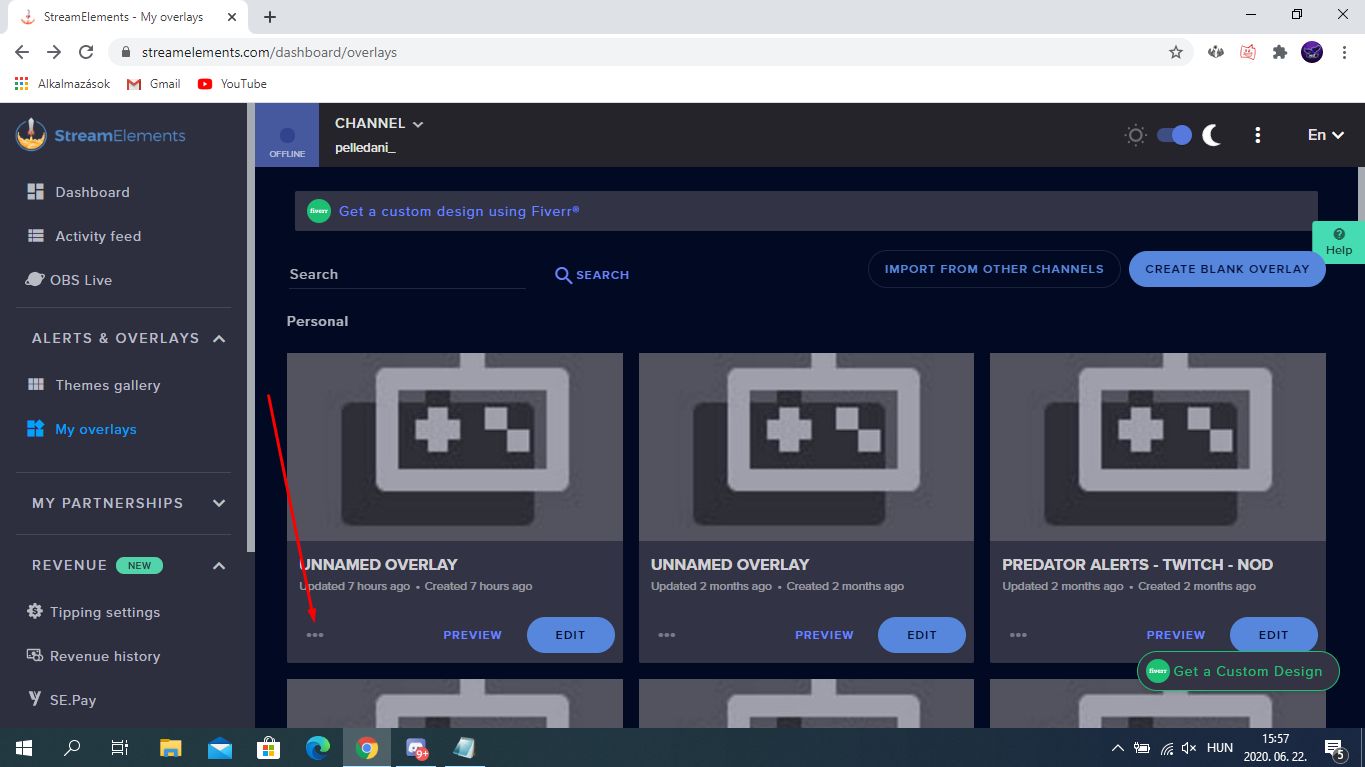
How do you change the resolution on an overlay as my overlay is 1080p and i need it to be 720p
 fresh zenith
@spark sun Go here-> https://streamelements.com/dashboard/overlays and you can i click that 3 points then properties https://prnt.sc/t4cwjm

StreamElements
The Ultimate All in One Platform for Streamers
 spark sun
@fresh zenith Thank You So Much. I am new to Streamlabs by the way
fresh zenith
This is StreamElements but no problem 😄
balmy ridge
how can I merge accounts
fresh zenith
You can here-> https://streamelements.com/dashboard/account/channels
StreamElements
The Ultimate All in One Platform for Streamers
balmy ridge
anyway i can unlink my youtube from a streamelements account?
idle saffronBOT
@balmy ridge There is no easy way to unlink 2 owner type accounts from each other. The only way is to make a closure request from here: https://streamelements.com/dashboard/account/security
WARNING: In submitting a closure request you will delete both linked accounts and loose all data from both accounts. This includes overlays, custom commands, timers and past data(tips, subs, etc). You can still relogin with the deleted account, but you are essentially starting fresh.
balmy ridge
I have 2 accounts, one with my twitch and one with my YouTube. all i want is both on my main account which is the one with twitch
fresh zenith
@balmy ridge So you what have connected? Or what to need merge? youtube or twitch?
balmy ridge
I wanna merge the account with youtube to the account with twitch
I want twitch to stay my main
fresh zenith
Okay so if login with Twitch then go here -> https://streamelements.com/dashboard/account/channels and connect youtube channel?
StreamElements
The Ultimate All in One Platform for Streamers
balmy ridge
it says its already claimed. I accidently made a new account with the youtube instead of adding it to my main
unique gale
Why are my commands not working even though they are active
quiet pond
have you done the following @unique gale ?
idle saffronBOT
To set up the bot for your YouTube stream, please follow these steps:
- Make sure your stream is public. The bot cannot join a private/unlisted stream.
- Your stream must be live for the bot to join the chat.
- Add https://youtube.com/c/streamelements as a Comment Moderator at https://www.youtube.com/comment_management
- When live, be sure to look at Live chat instead of Top chat, as Top chat will hide the bot messages.
unique gale
How do I set it as a moderator
unique gale
Thanks
 deft cipher
hey, I accidentally hide stream elements on my live chat, when i noticed, i reverted that, but still i can add stream elements as my chat mod...
can someone help me on this???
quiet pond
To set up the bot for your YouTube stream, please follow these steps:
- Make sure your stream is public. The bot cannot join a private/unlisted stream.
- Your stream must be live for the bot to join the chat.
- Add https://youtube.com/c/streamelements as a Comment Moderator at https://www.youtube.com/comment_management
- When live, be sure to look at Live chat instead of Top chat, as Top chat will hide the bot messages.
@idle saffron check steps above @deft cipher
deft cipher
@idle saffron check steps above @deft cipher
@quiet pond i m at the link https://www.youtube.com/comment_management
here i can change my mods & blocked words...
but how can i add stream elements. stream elements is not visible there.
Share your videos with friends, family, and the world.
oh sorry, i got it...
thamx for the help bro
quiet pond
No worries o7
deft cipher
one more i help i need...
stream elements gives timeout to spammers...
how can i change the timeout time.
liked "xyz" got timed out fot 300 secs.
i qant to change this time...
 frail swift
Yo my streamelements isnt coming up in chat and im doing ! Still not working
quiet pond
To set up the bot for your YouTube stream, please follow these steps:
- Make sure your stream is public. The bot cannot join a private/unlisted stream.
- Your stream must be live for the bot to join the chat.
- Add https://youtube.com/c/streamelements as a Comment Moderator at https://www.youtube.com/comment_management
- When live, be sure to look at Live chat instead of Top chat, as Top chat will hide the bot messages.
@idle saffron have you followed above steps? @frail swift
frail swift
On mobile *
frail swift
Would it work on a mac
frail swift
Ty
idle saffronBOT
@karmic robin Streamelements on top of OBS -> Logout -> login
 karmic robin
thank u
idle dune
laptop?
 oblique kayak
pc
idle dune
help > log files > upload current
past the url here
versed tangle
do chat commands work for yt
idle saffronBOT
@versed tangle To set up the bot for your YouTube stream, please follow these steps:
- Make sure your stream is public. The bot cannot join a private/unlisted stream.
- Your stream must be live for the bot to join the chat.
- Add https://youtube.com/c/streamelements as a Comment Moderator at https://www.youtube.com/comment_management
- When live, be sure to look at Live chat instead of Top chat, as Top chat will hide the bot messages.
 compact rapids
How can I add my youtube channel to my stream elements account. When i try to add it it says channel is already claimed.
idle saffronBOT
@compact rapids Account Merging - Please note:
- Merging accounts only allows faster ways to switch between accounts
- Merging accounts does not allow data sharing between accounts - different streaming platforms, different type of events
- Merging accounts allows duplicating/sharing overlays between the accounts
If you understand the limitations of merging and want to proceed, please find the JWT tokens (!jwt) from both accounts you want to merge and you will be directed to DM them to a staff member.
compact rapids
who do i DM them to?
fickle pagoda
Please DM me both JWT tokens, clearly labeling which is which.
 gilded spruce
Hi Everyone, Ive had a look online and unable to find the answer to this.
In Stream Elements is it possible to copy my twitch account overlays and paste them onto my youtube account within Stream Elements?
idle saffronBOT
@gilded spruce Account Merging - Please note:
- Merging accounts only allows faster ways to switch between accounts
- Merging accounts does not allow data sharing between accounts - different streaming platforms, different type of events
- Merging accounts allows duplicating/sharing overlays between the accounts
If you understand the limitations of merging and want to proceed, please find the JWT tokens (!jwt) from both accounts you want to merge and you will be directed to DM them to a staff member.
fickle pagoda
@gilded spruce Your accounts have been merged.
gilded spruce
Thank you @fickle pagoda
deft cipher
one more i help i need...
stream elements gives timeout to spammers...
how can i change the timeout time.
liked "xyz" got timed out fot 300 secs.
@deft cipher PLZ HELP ME ON THIS
lime walrus
@deft cipher in the spam filters
 azure tinsel
Hello, I accidently linked the wrong youtube account and I need to either have it unlinked or merged with the right one
idle saffronBOT
@azure tinsel There is no easy way to unlink 2 owner type accounts from each other. The only way is to make a closure request from here: https://streamelements.com/dashboard/account/security
WARNING: In submitting a closure request you will delete both linked accounts and loose all data from both accounts. This includes overlays, custom commands, timers and past data(tips, subs, etc). You can still relogin with the deleted account, but you are essentially starting fresh.
azure tinsel
did it, how long do I have to wait for the closure to happen?
I am trying to close it but it keeps telling me wrong username
I think, I have found it but the page just closes without closing the account
So, i do everything right to close my account but it doesn't close....
lime walrus
If there are 2 linked accounts
its a manual request for the devs to process
so its gonna take a day or two
but note that you will loose everything on your Twitch accounts like overlays and custom commands
azure tinsel
that is fine, when it is closed, I will reopen and start that process all over again. Luckly, I joined today and haven't spent to much time messing with the systems. Thank you.
 rich quartz
on my screen the game is fine but if i check my stream as a viewer the screen is cutting off but the sound isnt
idle saffronBOT
@rich quartz For the best OBS support, please join their Official Discord @ discord.gg/obsproject
 mint condor
Hello i need assistance regarding adding streamlabs in my Youtube
 main vector
@mint condor You'd have to speak with streamlabs about that
idle saffronBOT
To set up the bot for your YouTube stream, please follow these steps:
- Make sure your stream is public. The bot cannot join a private/unlisted stream.
- Your stream must be live for the bot to join the chat.
- Add https://youtube.com/c/streamelements as a Comment Moderator at https://www.youtube.com/comment_management
- When live, be sure to look at Live chat instead of Top chat, as Top chat will hide the bot messages.
versed tangle
My bot doesnt type in chat when i go in ps menu and go to comments i see that bot is typing messages but in normal chat he did not type anything
 undone junco
I recently added my YouTube channel to stream content, but I notice that my challenges only show up if I've "selected" my original Twitch channel. Are stream challenges only able to be fulfilled by the original stream channel or tied specifically to one platform?
main vector
@olive wigeon SR is not available for youtube.
idle saffronBOT
@versed tangle To set up the bot for your YouTube stream, please follow these steps:
- Make sure your stream is public. The bot cannot join a private/unlisted stream.
- Your stream must be live for the bot to join the chat.
- Add https://youtube.com/c/streamelements as a Comment Moderator at https://www.youtube.com/comment_management
- When live, be sure to look at Live chat instead of Top chat, as Top chat will hide the bot messages.
 olive wigeon
@main vector okay thx
 barren pelican
idle saffronBOT
barren pelican
idle saffronBOT
@barren pelican We're not able to troubleshoot issues with using our overlays in StreamLabs OBS (SLOBS) as we don't have the tools to support their software. We recommend using OBS Studio or OBS Studio with our plugin OBS.Live.
 keen hedge
Hello, I have a question, How can you make streamelements repeat the same thing every 5 minutes?
idle saffronBOT
@keen hedge Please ask your question in one helpdesk channel only. A support volunteer or StreamElements staff member will assist you as soon as they are available. Asking in multiple places will only result in confusion, not faster answers. Thank you for your patience.
keen hedge
Yea but I had answered the question on the wrong help desk
sage lantern
but still you already got the answer there
 subtle adder
Seems like a lot of people are having this issue, but don't see a fix here.
WebM exported alert, exported alert is smooth. In the preview on stream elements it is laggy? I can play the alert where it is uploaded and it looks perfect but testing the alert on browser is laggy..
Hardware acceleration disabled
 pallid furnace
Hello, I'm trying to link my Youtube to my account that I already put things together in that is signed in via twitch, but it tells me the youtube channel is already claimed? How can I fix this?
Okay found my answer, I assumed that closing my account would close it forever, like an Apple account would do
BOT
Today at 3:49 AM
@crazy_shong There is no easy way to unlink 2 owner type accounts from each other. The only way is to make a closure request from here: https://streamelements.com/dashboard/account/security
WARNING: In submitting a closure request you will delete both linked accounts and loose all data from both accounts. This includes overlays, custom commands, timers and past data(tips, subs, etc). You can still relogin with the deleted account, but you are essentially starting fresh.```Account Merging - Please note:
- Merging accounts only allows faster ways to switch between accounts
- Merging accounts does not allow data sharing between accounts - different streaming platforms, different type of events
- Merging accounts allows duplicating/sharing overlays between the accounts
If you understand the limitations of merging and want to proceed, please find the JWT tokens (!jwt) from both accounts you want to merge and you will be directed to DM them to a staff member.
nova anchor
@pallid furnace
nova anchor
@fickle pagoda
 stiff tapir
how do i get my streamelements to show up on console ?
idle saffronBOT
@stiff tapir Consoles do not have native support for overlays. You would need a capture card and a PC with OBS in order to have Overlays over your console gameplay.
We have an blog post about how to setup console streaming with our essential tools: https://blog.streamelements.com/how-to-stream-on-console-7b620b1c46c3
pallid furnace
Nethyr hasn't dm'ed me and I know it's only been an hour but I don't want to forget that I'm trying to get this done
 tardy cloud
@pallid furnace DM the tokens 😉
 lean walrus
@tardy cloud my problem hasn’t been fixed yet😑
tardy cloud
@lean walrus Could you please remove the bot of your channel and then ⤵️
idle saffronBOT
@lean walrus To set up the bot for your YouTube stream, please follow these steps:
- Make sure your stream is public. The bot cannot join a private/unlisted stream.
- Your stream must be live for the bot to join the chat.
- Add https://youtube.com/c/streamelements as a Comment Moderator at https://www.youtube.com/comment_management
- When live, be sure to look at Live chat instead of Top chat, as Top chat will hide the bot messages.
lean walrus
I did that😑
That name still hasn’t been changed 🤦🏽♂️
For my bot to have the name I want you guys have to change that
fickle pagoda
That name is meaningless, as you were told.
Things displayed in your account have no bearing on what is seen on stream or in your chat.
lean walrus
It clearly means something Bc that’s still the bot name
If I change my yt name that should change as well
fickle pagoda
No, it won't.
Again: there is no correlation between what name you see in your account and what your stream shows.
lean walrus
So if the name is changed quote on quote y when I do a command in my stream it says alwaysinactionn?
When I do !uptime?
fickle pagoda
What that reads is not at all correlated to the name that is displayed. The name that is displayed in your account is meaningless.
fickle pagoda
There is nothing for you to do but be patient.
lean walrus
What do you mean be patient
fickle pagoda
As stated last time, coming and bugging us will not expedite the solution.
lean walrus
I been patient way to long
Yk what I’m just not going to use the bot that’s it Bc if u guys can’t do one simple issue that I have and I been patient since June 11 and is June 23rd
 limpid shoal
lately im facing a issue in streaming.... my network is good and running in 100 mbps but the bits are not going to my stream... so my stream is looking sooo lagee and gets more buffer and framee.. please help me with this issue
idle saffronBOT
@limpid shoal Please provide a log from your last stream. To do this, in OBS go to Help > Log Files > Upload Last Log File and paste the link to the log file here.
rapid shoal
Has the ${user} been fixed?
lime walrus
I don't think so
lime walrus
no due to restrictions from Youtube
rapid shoal
Ok
subtle adder
$20/$200 for instane
 odd ruin
hi, i would like to close my youtube streamelements account because im not using yt anymore. but when filled everything in and i click on "close my account" the pop-up disappears and i still have that account
quiet pond
$20/$200 for instane
@subtle adder what is your question?
limpid shoal
idle saffronBOT
@limpid shoal 1) Restart OBS
2) Start your stream/recording for about 30 seconds. Make sure you replicate any issues as best you can, which means having any games/apps open and captured, etc.
3) Stop your stream/recording.
4) Select Help > Log Files > Upload Current Log File. Copy the URL and paste the link here.
(Note: If you do not see an obsproject.com URL, you will need to update OBS Studio to version 22+)
limpid shoal
quiet pond
versed tangle
how do i setup sfx on my subscriber alert?
idle saffronBOT
@versed tangle New to Stream Elements?
Check out our YouTube channel https://www.youtube.com/c/streamelements/videos
with tutorial videos from setting up the basics, to in depth details on how to use our product.
New to OBS? Here is a 4 step quickstart guide
https://obsproject.com/wiki/OBS-Studio-Quickstart
Want to learn even more? Here is an in-depth overview
https://obsproject.com/wiki/OBS-Studio-Overview
 fossil pier
I'm trying to remove my streamelements from my youtube account so I can add it to a pre-existing twitch account.
In the process of removing the account, it tells me I put in a invalid email. I can confirm the email I put in is valid.
In the settings the email section of my account is blank and I can't close this account. Any help?
 lofty ravine
hi pepole tip me and its not show in my live why someone can help me
versed tangle
I clicked on my Live Video Sttings But there is just a black screen.
quiet pond
@lofty ravine are they using the streamelements tippng page?
idle saffronBOT
@versed tangle Streamelements on top of OBS -> Logout -> login
versed tangle
Oh! thanks!
quiet pond
try if that helps
 midnight vigil
I changed my name on YouTube and I am no longer getting Activity Alerts
fickle pagoda
Log out of StreamElements and log back in.
midnight vigil
@fickle pagoda Done that no change
And my name in SE Dashboard still shows as the old one.
fickle pagoda
The name in the dashboard is meaningless.
idle saffronBOT
@midnight vigil Users can choose to make the channels that they subscribe to public or private. By default, all settings are set to private.
Private: When a users subscriptions are set to private, no other user can see what channels they subscribe to. A user's account does not show in a channel's Subscribers List, even if they are subscribed.
Public: When users subscriptions are set to public, another user can see what channels they subscribe to. User subscriptions are listed on their channel page, and their account is listed in the Subscribers List for any channel they subscribe to.
If a user has it set to Private they will not show up in the activity feed. More info: https://support.google.com/youtube/answer/7280190
idle saffronBOT
@midnight vigil Please follow our community rules:
- No advertisement or stream promotion
- Respect ALL server members
- No NSFW/NSFL
Thank you
fickle pagoda
Nobody said your name is meaningless. The display on the dashboard is meaningless and doesn't indicate anything.
midnight vigil
it doesnt work on SE but on Streamlabs it does so obviously something is broken here and I am just asking for you to help fix it?
fickle pagoda
Be patient. Thank you.
midnight vigil
@fickle pagoda Ok
fickle pagoda
What activities in particular are not appearing? Subscriptions appear to be fine, provided they are public as explained above.
midnight vigil
I do not see an y SUBS from YT in my activity feed at all?
midnight vigil
Okay you are right I am sorry, I see my issue, I moved here from StreamLabs and all platforms activites showed up in one Activity Feed, I didn't realize here their are separate feeds, is there any way to see them all in one?
fickle pagoda
There is not. Channels are completely separate.
midnight vigil
ok than it is my fault I am sorry, is there any way to update my name in the dashboard so it matches?
fickle pagoda
The name in the top right will never change, it's just based on what it was when you first connected. The name in the top left matches.
midnight vigil
Ok got it, is there a place to submit a feature request like combing the activity feeds?
idle saffronBOT
@midnight vigil Check out the StreamElements ideas board: https://strms.net/ideas. You'll be able to add ideas, upvote ideas you agree with, and track their progress with email notifications. Adding and upvoting ideas also helps the staff know which ideas should be prioritized so please take some time to upvote.
 quiet sable
Hello can someone say me how I can change my StreamElements account name?
idle saffronBOT
@quiet sable Please ask your question in one helpdesk channel only. A support volunteer or StreamElements staff member will assist you as soon as they are available. Asking in multiple places will only result in confusion, not faster answers. Thank you for your patience.
idle saffronBOT
@wind bone Account Merging - Please note:
- Merging accounts only allows faster ways to switch between accounts
- Merging accounts does not allow data sharing between accounts - different streaming platforms, different type of events
- Merging accounts allows duplicating/sharing overlays between the accounts
If you understand the limitations of merging and want to proceed, please find the JWT tokens (!jwt) from both accounts you want to merge and you will be directed to DM them to a staff member.
 wind bone
@idle saffron ok
 normal gazelle
i have obslive and ive been having problems seeing chat and stream alerts on it. it says that i have no stream activity. im logged into streamelements on the website and ive already tried uninstalling and redownloading obslive but nothing changes. does anyone know whats wrong?
this is what it looks like
idle saffronBOT
@normal gazelle Streamelements on top of OBS -> Logout -> login
normal gazelle
that worked, thanks
wind bone
I logged in previously with my YouTube account without knowing that I could link it right inside my Twitch account, and now I can't import the overlays from my Twitch account because when I try to link my YouTube channel, it says that the user was already claimed. Same in the inverse. Can someone help when you have time please?
idle saffronBOT
@wind bone Account Merging - Please note:
- Merging accounts only allows faster ways to switch between accounts
- Merging accounts does not allow data sharing between accounts - different streaming platforms, different type of events
- Merging accounts allows duplicating/sharing overlays between the accounts
If you understand the limitations of merging and want to proceed, please find the JWT tokens (!jwt) from both accounts you want to merge and you will be directed to DM them to a staff member.
lime walrus
DM me the tokens
wind bone
Ok. I'm ready
 floral thicket
I need help i dont know how to make him mod from the app
lime walrus
In order for the Bot to function, it needs moderator access. To add StreamElements as a moderator, visit youtube.com/comment_management and paste "https://www.youtube.com/streamelements" into the Moderators list.
YouTube
Official youtube channel for StreamElements tutorials https://StreamElements.com
half glade
Hi, hope your all in good health with all that is befalling us... straight to it then, I started out with a particular name then rebrand but all my links are in the old name I fear this could seem misleading especially with the tip and merch links. Thanks in advance esteemed SE agents.
 austere horizon
i am not able change my account name. can u please help me regarding this
lime walrus
Youtube doesn't send us an event that you've changed your name. We can only update you alias/profile link(the one with the tipping page)
 narrow plinth
Hey does anyone know when youtube Streamelements will get things like a Sound effect store and usage?
main vector
@narrow plinth unfortunately as that's tied to loyalty that would be required first. ATM we're not allowed to do that.
limpid shoal
im having a good ping network but still this happens please help me
idle saffronBOT
@limpid shoal Dropped Frames usually means that you have a bad connection with the streaming service(Twitch/Youtube/Mixer/Facebook) and most likely something related to your ISP not handling the connection properly.
Speed tests usually cannot help solve this problem and its best to use this guide: https://obsproject.com/wiki/Dropped-Frames-and-General-Connection-Issues
idle dune
as the bot says, its down to the connection, NOT the speed
 cyan lake
@limpid shoal in OBS, go to View and Stats. This shoudl give a breakdown of where those frames are dropping. It could be a combination of network and hardware latency
 brisk bridge
HI! My subscriber count is not updating in dashboard. I tried to login in again then also its not updating in dashboard.! Any help...? Thanks in advance,,,!
 regal geyser
I have a question about he Stream Bot it doesnt wkred i made the timer to 5Mins Lines 15 what do i nee to take care that it works
 trail bloom
The bot isn’t working on my channel
 mossy lagoon
I had the same problem with NightBot so I switched to this @trail bloom
idle saffronBOT
@trail bloom To set up the bot for your YouTube stream, please follow these steps:
- Make sure your stream is public. The bot cannot join a private/unlisted stream.
- Your stream must be live for the bot to join the chat.
- Add https://youtube.com/c/streamelements as a Comment Moderator at https://www.youtube.com/comment_management
- When live, be sure to look at Live chat instead of Top chat, as Top chat will hide the bot messages.
quiet pond
have you followed above steps?
trail bloom
@mossy lagoon I ended up switching to stream labs again because it just didn’t work for me
 zenith vessel
Any reason I cant link my youtube? When I try I get an error message but it will let me link my twitch
tardy cloud
Could you share screenshot of the error?
 rose vigil
Hello! I am trying to do a couple different things. Can not get OBS to stream to FB after entering all of the proper info and hitting Apply and okay. it defaults to YT. Also Can not work on my tip scene/ page because the fivver button is in the way of uploading anything.
idle saffronBOT
@rose vigil Streamelements on top of OBS -> Logout -> login
@zenith vessel Please provide a proper screenshot with the issue visible. If not sure how to take a screenshot, you can check here: https://www.take-a-screenshot.org/
 wicked pivot
ok so when using obs and pressing start stream it doesnt display my computer screem
idle saffronBOT
@wicked pivot New to Stream Elements?
Check out our YouTube channel https://www.youtube.com/c/streamelements/videos
with tutorial videos from setting up the basics, to in depth details on how to use our product.
New to OBS? Here is a 4 step quickstart guide
https://obsproject.com/wiki/OBS-Studio-Quickstart
Want to learn even more? Here is an in-depth overview
https://obsproject.com/wiki/OBS-Studio-Overview
 old pelican
Hi there! I'm trying to make a new streamlabs account using a brand new youtube account. I keep getting an error saying "Something went wrong, please try again later"
nova anchor
streamlabs or streamelements @old pelican ?
old pelican
oops. streamelements
and i think i figured it out. despite it being a brand new account, google immediately deactivated it. So I'm working with their support right now. Sorry for the trouble
nova anchor
np, if u somehow made two accounts by accident then we can assist you with it too @old pelican
!mergeaccounts
idle saffronBOT
Account Merging - Please note:
- Merging accounts only allows faster ways to switch between accounts
- Merging accounts does not allow data sharing between accounts - different streaming platforms, different type of events
- Merging accounts allows duplicating/sharing overlays between the accounts
If you understand the limitations of merging and want to proceed, please find the JWT tokens (!jwt) from both accounts you want to merge and you will be directed to DM them to a staff member.
old pelican
ok thanks a lot man
half glade
@lime walrus I will take what I can get.. Thank you how do I proceed
 severe breach
how do i get a strem key on youtube
mossy lagoon
Go to stream dashboard @severe breach
brisk bridge
My activity feed is not updating
idle saffronBOT
@brisk bridge Users can choose to make the channels that they subscribe to public or private. By default, all settings are set to private.
Private: When a users subscriptions are set to private, no other user can see what channels they subscribe to. A user's account does not show in a channel's Subscribers List, even if they are subscribed.
Public: When users subscriptions are set to public, another user can see what channels they subscribe to. User subscriptions are listed on their channel page, and their account is listed in the Subscribers List for any channel they subscribe to.
If a user has it set to Private they will not show up in the activity feed. More info: https://support.google.com/youtube/answer/7280190
brisk bridge
Subscribers names and recent subs are not showing in activity feed... its completely empty. no updates
 ocean star
Hello! I am trying to make stream elements mod in my chat but when I put the link in the Approved users it comes up with not found
idle saffronBOT
@ocean star To set up the bot for your YouTube stream, please follow these steps:
- Make sure your stream is public. The bot cannot join a private/unlisted stream.
- Your stream must be live for the bot to join the chat.
- Add https://youtube.com/c/streamelements as a Comment Moderator at https://www.youtube.com/comment_management
- When live, be sure to look at Live chat instead of Top chat, as Top chat will hide the bot messages.
ocean star
Ok thanks you very much god bless
idle saffronBOT
@brisk bridge Users can choose to make the channels that they subscribe to public or private. By default, all settings are set to private.
Private: When a users subscriptions are set to private, no other user can see what channels they subscribe to. A user's account does not show in a channel's Subscribers List, even if they are subscribed.
Public: When users subscriptions are set to public, another user can see what channels they subscribe to. User subscriptions are listed on their channel page, and their account is listed in the Subscribers List for any channel they subscribe to.
If a user has it set to Private they will not show up in the activity feed. More info: https://support.google.com/youtube/answer/7280190
 mortal thicket
hi i wanted to ask if there is a way of seeing your donation messages for people who dont have alerts
quiet pond
you mean for yourself, or for your chat?
for yourself you can see the donation messages within the activity feed
mortal thicket
@quiet pond for my chat
quiet pond
@mortal thicket go here https://streamelements.com/dashboard/bot-modules and turn the chat alerts on
StreamElements
The Ultimate All in One Platform for Streamers
Like this:
mortal thicket
@quiet pond thank you
also i wanted to ask how do u see your donator's message whenever he/she donates??
quiet pond
okay so if you go to the tips section of the chat alerts
fill in this: {user} just tipped {currency}{amount} {msg}!
if you have {msg} in the line, {msg} will show the message
@mortal thicket
quiet pond
you'll have to fill that in yourself yhea @mortal thicket
 carmine mason
i did change name of my channel but it is not updating on streamelements page
carmine mason
name of my streamelements account is not changing
quiet pond
but what for which page isnt it? @carmine mason
are you meaning for your tipping link
because then, you'll have to follow these steps:
idle saffronBOT
To change your tippinglink, please get your current name, account ID & your desired name.
You can submit a request for the change via https://streamelements.com/contact or have a Support Hero request a staff member.
Your account ID is public and safe to share.
StreamElements
StreamElements is the leading platform for live streamers on Twitch and Youtube. StreamElements includes Overlay management, ChatBot, Tipping, Alerts & Loyalty
versed tangle
Hi guys, I am moving from streamlabs to streamelements and have some issues with importing tips history. Please can someone help me with it? Thanks
 tall ibex
Hey My stream elements account is linked to my youtube account and a old twitch which is not being used so now i want to unlink my youtube from my stream elemnts account how do i do this?
idle saffronBOT
@tall ibex There is no easy way to unlink 2 owner type accounts from each other. The only way is to make a closure request from here: https://streamelements.com/dashboard/account/security
WARNING: In submitting a closure request you will delete both linked accounts and loose all data from both accounts. This includes overlays, custom commands, timers and past data(tips, subs, etc). You can still relogin with the deleted account, but you are essentially starting fresh.
tall ibex
So I Click Close my account but it still doesnt work after i put in details as says username is wrong when its not
shy quail
Please send the same details as the closure form requires to our CTO Reem here: reem@streamelements.com - he will close your account.
@versed tangle Check that you entered the correct stream key to your OBS.
versed tangle
o bot não está a funcionar nas lives o que faço
pls help
idk how to stream
someone help how to stream
idle dune
settings > stream
connect your account
if you have the obs.live plugin
then also
streamelements > log out > log in
 cerulean stream
can anyone tell me if this is a good video to get views?
 spring socket
Hai
idle saffronBOT
@cerulean stream Please follow our community rules:
- No advertisement or stream promotion
- Respect ALL server members
- No NSFW/NSFL
Thank you
cerulean stream
i was asking if it was good this is called youtube help desk, i was asking for help.
oh wait ur a bot lol
sage lantern
you can ask for help, but not post your channel or vids
cerulean stream
well the help i was asking for is if this is good and needs stuff to help me get better.
quiet pond
this is not the place to ask @cerulean stream
sage lantern
yeah, this is not really the 'do i have a good vid' kinda helpdesk
this is a helpdesk for streaming issues with StreamElements
cerulean stream
well where do i ask for that
sage lantern
might want to try another server where self promo is allowed or something like reddit
idle saffronBOT
@main vector mass deleted 2 messages.
versed tangle
the bot is not working in lives what does
idle saffronBOT
@versed tangle To set up the bot for your YouTube stream, please follow these steps:
- Make sure your stream is public. The bot cannot join a private/unlisted stream.
- Your stream must be live for the bot to join the chat.
- Add https://youtube.com/c/streamelements as a Comment Moderator at https://www.youtube.com/comment_management
- When live, be sure to look at Live chat instead of Top chat, as Top chat will hide the bot messages.
versed tangle
thank you
versed tangle
I'm not able to use overlay when I put it on the obs for broser only half appears
idle saffronBOT
@versed tangle To add your overlays to OBS, add a new browser source in your scene. Paste your overlay URL in the browser source properties, set the dimensions to 1920x1080 (unless you changed them on the website), and ☑ “Shutdown source when not visible” https://youtu.be/KDvLynUqXI4
idle dune
your canvas
idle dune
and no need fore the caps
idle saffronBOT
@versed tangle New to Stream Elements?
Check out our YouTube channel https://www.youtube.com/c/streamelements/videos
with tutorial videos from setting up the basics, to in depth details on how to use our product.
New to OBS? Here is a 4 step quickstart guide
https://obsproject.com/wiki/OBS-Studio-Quickstart
Want to learn even more? Here is an in-depth overview
https://obsproject.com/wiki/OBS-Studio-Overview

 late zinc
How can I add Streamelements to my Moderators list?
lime walrus
In order for the Bot to function, it needs moderator access. To add StreamElements as a moderator, visit youtube.com/comment_management and paste "https://www.youtube.com/streamelements" into the Moderators list.

YouTube
Official youtube channel for StreamElements tutorials https://StreamElements.com
late zinc
Okay thanks
 dusty tree
Afternoon, I've tried to link my Youtube account to SE however constantly getting an error, also tried another account , just in case I had selected the incorrect address and it states thats already been claimed? can you help ?Thank
lime walrus
I can link the accounts for you, but I will need the JWT token from both accounts.
Do note:
- Merging accounts only allows faster ways to switch between them
- Merging accounts does not allow data sharing between accounts - different streaming platforms, different type of events
- Merging accounts allows duplicating overlays between the accounts
You can find your JWT token on your account channels page ("Show Secrets" to reveal the token): https://streamelements.com/dashboard/account/channels
StreamElements
The Ultimate All in One Platform for Streamers
dusty tree
Thanks, however as the account has not linked I do not have a JWT token for the youtube account, unless I'm missing something, I can however confirm that I have received a notification from google stating that I have given access to SE to my google (youtube) account
lime walrus
Then logout and login to the different account
dusty tree
I only have the one account
lime walrus
Where are you seeing the "already claimed"?
dusty tree
I'll double check and make sure I havent used another email address
within SE when trying to add the account
lime walrus
If you are already logged into our dashboard
and using the "add channel" button for Youtube, you are most likely trying to add the same account you are currently logged in as
dusty tree
I have my twitch , mixer and facebook all linked to the same account
lime walrus
Then from which account are you trying to add the YT one?
lime walrus
Then from which account are you trying to add the YT one?
Ok let me ask it a different way
Are you logged in currently with your Twitch account?
dusty tree
I've tried that but I'll do it now while we are talking
I get the message "something went wrong", So i tried my branded channel and that seemed to work , I'll get the JWT now for you
Although I'm getting the feeling this isnt the correct account but I'm sure I'll find out eventually
I've sent in a DM
 worldly oracle
Hi, I'm trying to do the same as BongEye, ironically, and merge my YouTube account to my Twitch account. I decided to try to simply Delete my YouTube account in StreamElements and properly link it through the Twitch login's Dashboard, but it's asking for an Email address, which there is none due to the YouTube login. But the Deletion prompt won't allow me leave the email textbox blank. Is it possible to also simply provide a JWT Code for each account to have them merged? Thanks in advance. 🙂
quiet pond
If you get both the JWT codes ready, I can request for a staff member @worldly oracle
worldly oracle
I have both ready, @quiet pond .
I'd like to make sure I keep all of my Twitch account's settings in-tact, as it's been much more setup than my YouTube account.
idle saffronBOT
There is no easy way to unlink 2 owner type accounts from each other. The only way is to make a closure request from here: https://streamelements.com/dashboard/account/security
WARNING: In submitting a closure request you will delete both linked accounts and loose all data from both accounts. This includes overlays, custom commands, timers and past data(tips, subs, etc). You can still relogin with the deleted account, but you are essentially starting fresh.
quiet pond
like that ^
worldly oracle
Gotcha. I understand. 🙂
Then yeah, I am ready to merge with both JWT codes, whenever is convenient for staff.
 slate elbow
How do I get stream elements on my stream
versed tangle
Hi guys, I am moving from streamlabs to streamelements and have some issues with importing tips history. Please can someone help me with it? Thanks
quiet pond
What problem are you encountering? @versed tangle
idle saffronBOT
@slate elbow To set up the bot for your YouTube stream, please follow these steps:
- Make sure your stream is public. The bot cannot join a private/unlisted stream.
- Your stream must be live for the bot to join the chat.
- Add https://youtube.com/c/streamelements as a Comment Moderator at https://www.youtube.com/comment_management
- When live, be sure to look at Live chat instead of Top chat, as Top chat will hide the bot messages.
versed tangle
@quiet pond Let's say that I have around 400 tips and when I am transferring Tips history from streamlabs to streamelements it's transferring only 78. Thanks
 rancid cairn
sub and donation
donation aint showing up
when i do a test it shows up but when donations tick in nothing, tryed to replay them no reaction
quiet pond
that is apart, try the following for me
idle saffronBOT
@rancid cairn Go to the dashboard -> right side -> part channel -> join channel (https://streamelements.com/dashboard)
quiet pond
also, for subscriptions, if some come through and some don't
idle saffronBOT
Users can choose to make the channels that they subscribe to public or private. By default, all settings are set to private.
Private: When a users subscriptions are set to private, no other user can see what channels they subscribe to. A user's account does not show in a channel's Subscribers List, even if they are subscribed.
Public: When users subscriptions are set to public, another user can see what channels they subscribe to. User subscriptions are listed on their channel page, and their account is listed in the Subscribers List for any channel they subscribe to.
If a user has it set to Private they will not show up in the activity feed. More info: https://support.google.com/youtube/answer/7280190
versed tangle
@quiet pond may I ask is there any solution or do it manually? Thanks
quiet pond
well for the dono's like i said, try parting and rejoining
and the subscription sutff is on the viewers side
they will have to set it to public, if a alert is going to pop up
versed tangle
How do i sign out of twitch on the stream elements obs program
sage lantern
streamelements menu in the top bar > logout
versed tangle
oh, i did not see that lol. thx
 tight dragon
Hi can someone tell me how to connect my paypal to streamlabs pls
sage lantern
this is StreamElements
but for us it should be done here
StreamElements
The Ultimate All in One Platform for Streamers
 solid mauve
Is the loyalty store available for youtube or just twitch?
idle dune
can you not
 candid pewter
On my youtube
solid mauve
🤦♂️
versed tangle
is Loyalty on youtube
solid mauve
Thats what Im trying to find out
versed tangle
exactly
idle dune
no loyalty for yt
solid mauve
Dang
candid pewter
Can i get paid with a credit card
solid mauve
I need to go back to streamlabs obs
candid pewter
On my channel
worldly oracle
Hi, I'm still looking to merge my YouTube and Twitch accounts. I have both of my JWT Tokens ready. 🙂
 frank knot
Hi so I am trying to get obs working but the game caputre isnt working I tried all methods on youtube and not a single one worked
tardy cloud
@worldly oracle DM me those
idle saffronBOT
@frank knot For the best OBS support, please join their Official Discord @ discord.gg/obsproject
 hoary dirge
please tell what this means
[count] and Subscriber Count : No data
I am not able to understand
will it show my sub count once i Strart streaming?
start*
sage lantern
are you sure you are logged in to your YT account?
hoary dirge
yes
sage lantern
when did you join StreamElements?
hoary dirge
about a month ago or maybe before
hoary dirge
okay
wait
it dosent have a all time option
it has 2 options
7 days and 30 days
sage lantern
take the 30 days
hoary dirge
okay
sage lantern
does it show a number after you do that?
sage lantern
not sure, things work a bit different on YT side
versed tangle
can i get loyalty ponts for youtube? 😄
sage lantern
nope, youtube doesn't support it
versed tangle
oh ok how about how those points work on ytube? 🙂
versed tangle
like !points?
versed tangle
damn
thx anyways :9
how does those giveaway cmmands work? like !jin or something like that
versed tangle
cannt use that on utube?
quiet pond
giveaway is indeed tied to the loyalty system
versed tangle
damn i start to hate youtube lool
quiet pond
Loyalty isnt available due to YT's restricted API
but you have some other parties that you can do giveaways with, just be sure to look on google
versed tangle
ok good to know
idle saffronBOT
@thorny wing Welcome to the helpdesk! Please let us know how we can assist you today and a support volunteer or staff member will assist you as soon as they are available. Thank you for your patience.
 glass panther
Hey guys, is it possible to integrate Spotify into my youtube stream?
shy quail
No. At least there is no widget for the overlay.
shy quail
On twitch we only support the YT Media Request.
glass panther
I got this overlay, I'm quite confused:
How is it going to fish for the music I'm playing?
shy quail
What platform are you on now?
glass panther
Youtube
Or is this going to display the game I'm playing
I haven't thought about that
hmm
shy quail
Then you should have the possibility to select the music source in the widgets settings.
glass panther
Countdown is stuck at 0
shy quail
Do not share overlay urls.
shy quail
Loop?
If the countdown is over, it either stays at 00:00 or the text you told the widget to show.
Make the source shutdown when not visible in OBS and switch scenes away and back, to start the countdown again.
idle saffronBOT
To add your overlays to OBS, add a new browser source in your scene. Paste your overlay URL in the browser source properties, set the dimensions to 1920x1080 (unless you changed them on the website), and ☑ “Shutdown source when not visible” https://youtu.be/KDvLynUqXI4
glass panther
What I meant is: Isn't it supposed to restart the countdown whenever I start the stream?
I'll try this
Cheers.
 fallow kite
how i do the command !watchtime to my youtube channel? @everyone <@&364840891023622144> <@&382267076632379392>
nova anchor
how i do the command !watchtime to my youtube channel? @everyone <@&364840891023622144> <@&382267076632379392>
@fallow kite don't use tags, the channels are already mean to be for supporters.
fallow kite
sry
versed tangle
The command is not available on YouTube @fallow kite 🙂
sage lantern
holy shit
fallow kite
oh but on twitch or
versed tangle
yeah 🙂
idle dune
twitch yes, in here (youtube) no
fallow kite
why not on youtube 😦
sage lantern
because youtube doesn't want it
normal tulip
Due to limitations with youtube API we are not able to get any data we could use to provide valid watchtime for users.
charred oar
Hi, how do i can use the chat bot in two youtube streams at the same time, or choose in what stream I want the bot running?
quiet pond
You would have to seperatly log in to the bot with the two YouTube accounts
charred oar
I am streaming in the same account two live streams
How i can choose in what live stream i want the chatbot in the chat
or use it on both
quiet pond
I actually dont know how you can do two live streams from one account
charred oar
24/7 live streams
In a YouTube account
the problem is that the bot only works in one and I can't choose in which one I want it
quiet pond
ill ask around about that 
versed tangle
Has the $(user) been fixed yet? 🤔
 fallen parcel
 worn spindle
Hello, by mistake I connected my youtube acc with streamelements but I already have a twitch acc linked and I wanted to have them both on the same acc. How can I go back and join my twitch and youtube acc in the same profile? Can anyone help me?
charred oar
Hello, can you help me please?
 chrome river
help me please
 eager lilyBOT
Hi @chrome river, Please ask your question(s) or describe the problem you're looking to solve so staff or a support volunteer can assist you as soon as they are available.
 granite flax
Hello, I've been searchingbut I found nothing...is there a way to export chat bot settings (modules, commands etc) from my twitch profile to my youtube profile?
quiet pond
hey @granite flax that is not possible, you would have to manually set commands, timers and modules for each streaming platform
granite flax
ouch...thank you
versed tangle
Hello dear people, I need help.
My ex profile name was zDowleMan, and I connected with that name on StreamElements, like year and a half ago, I changed my name to ZeuuS, and my link for tips contains zdowleman (in link).
So, I have been wondering, can I change that username on StreamElements?
idle saffronBOT
@versed tangle To change your tippinglink, please get your current name, account ID & your desired name.
You can submit a request for the change via https://streamelements.com/contact or have a Support Hero request a staff member.
Your account ID is public and safe to share.
StreamElements
StreamElements is the leading platform for live streamers on Twitch and Youtube. StreamElements includes Overlay management, ChatBot, Tipping, Alerts & Loyalty
quiet pond
^please follow the above
versed tangle
my real name?
quiet pond
no, the usernames you gave above, only thing we need is the accountID then
you can find that over here:
idle saffronBOT
Please provide your account ID found at the top of this page: https://streamelements.com/dashboard/account/channels This ID is public info and safe to share here.
 raven sonnet
Hi
quiet pond
No worries o7
worn spindle
Hello, by mistake I connected my youtube acc with streamelements but I already have a twitch acc linked and I wanted to have them both on the same acc. How can I go back and join my twitch and youtube acc in the same profile? Can anyone help me?
idle saffronBOT
@worn spindle Account Merging - Please note:
- Merging accounts only allows faster ways to switch between accounts
- Merging accounts does not allow data sharing between accounts - different streaming platforms, different type of events
- Merging accounts allows duplicating/sharing overlays between the accounts
If you understand the limitations of merging and want to proceed, please find the JWT tokens (!jwt) from both accounts you want to merge and you will be directed to DM them to a staff member.
fickle pagoda
@rancid cairn
quiet pond
@vocal cradle please do describe your issue
 vocal cradle
im trying to improt animaited Scenes from streamlabs
quiet pond
Are they from StreamLabs their overlays?
vocal cradle
yes
quiet pond
if that is so, you cant import streamlabs copyrighted overlays
vocal cradle
why not?
vocal cradle
ok how do i get a free overlay for OBS
quiet pond
you can via here: https://streamelements.com/dashboard/themes
StreamElements
The Ultimate All in One Platform for Streamers
after that, to add it in OBS, follow these steps:
idle saffronBOT
To add your overlays to OBS, add a new browser source in your scene. Paste your overlay URL in the browser source properties, set the dimensions to 1920x1080 (unless you changed them on the website), and ☑ “Shutdown source when not visible” https://youtu.be/KDvLynUqXI4
vocal cradle
ok
quiet pond
don't share the overlay links tho
vocal cradle
ok why not?
quiet pond
theyre private to you
quiet pond
I can't make your overlays sorry
idle saffronBOT
@vocal cradle We've released our new Overlay Editor revamp. You can check out the changes and how to work with it here: https://youtu.be/X5VzXjqAsjk
Check out our blog post as well: https://blog.streamelements.com/streamelements-overlay-editor-just-got-even-better-c22cb5b4853e

We are thrilled to announce the launch of the remastered StreamElements Overlay editor!
https://p.strms.net/newoverlayyt
Why StreamElements Overlays are better?
😎 Simple: Load your entier setup using only 1 link
⚡ Fast: Cloud-powered Overlays arrive in real-time, say goodb...
quiet pond
^check this video out
quiet pond
To add your overlays to OBS, add a new browser source in your scene. Paste your overlay URL in the browser source properties, set the dimensions to 1920x1080 (unless you changed them on the website), and ☑ “Shutdown source when not visible” https://youtu.be/KDvLynUqXI4
@idle saffron ^
vocal cradle
quiet pond
"set the dimensions to 1920x1080"
also you will have to edit the overlays firstly like i said
vocal cradle
yes i did but it didnt work it jsut stayed the same
ok yes but it wont let me edit them when i edit then they dont change
quiet pond
you need to edit the text, not the layer name
quiet pond
No worries, good luck on the editing, im going to sign off, but there are others online that can come in to help you o7
fickle pagoda
@vocal cradle No. Only when the overlay is reloaded will the countdown start over.
vocal cradle
how do i make it so its innfinant
fickle pagoda
Pardon?
vocal cradle
how do i get the timer so it never ever runs out
fickle pagoda
You can't. The point of a countdown is to go to 0.
vocal cradle
ik
 visual trench
hello
so is there any work around for having media donations on stream elements mobile app for youtube?
fickle pagoda
Asking in a different channel isn't going to make us suddenly say "oh okay sorry you can use it now."
visual trench
lul
fickle pagoda
Media request is not available for YouTube streams.
visual trench
has it ever been?
fickle pagoda
No.
visual trench
jesus
 river wave
unable to find loyality points in stream elements dashboard please help me out.
river wave
how to enable sound command with loyality points please?in chat box
 ivory pumice
like for a store redemption? https://streamelements.com/dashboard/store/items
river wave
no with the loyality points.
like if i have 300 coins/points
if i use !gg there should be a voice which i put and he/she should lose that coins or points
ivory pumice
right. so you want to set up a redemption in the store; like the screen shot above. Add a sound effect and give it a cost/cooldown. then create a command to clain that redemption.
river wave
ok fine.thx a lot but am not getting the loyality points
how to remove the command !redeem (command) and make it to !(command)
ivory pumice
There should be an 'item cost' like i have in my screenshot. those are the points it will cost to make.
river wave
i am not getting the loyality points
ivory pumice
so give it a name, gg with work. then you want to create a custom command with ${redeem gg} as a variable
river wave
i dont want redeem command only want !gg
ivory pumice
I will ask about the points (i don't have a youtube account so that setting might be different)
save your gg redemption.
river wave
can you help me?
i have a video how to works
ivory pumice
once your redemption is saved you want to create a custom command: https://streamelements.com/dashboard/bot-commands/custom-commands
${redeem gg}
river wave
i need help to do this stuff..
ivory pumice
ya. so you want to create a redemption for all of those. then make a command like i did above for all of those. i'd make 1 first then and test. then build the rest
river wave
ya. so you want to create a redemption for all of those. then make a command like i did above for all of those. i'd make 1 first then and test. then build the rest
@ivory pumice ok..so i should continue doing what you have told to all the commands
how to change the coins name?
ivory pumice
"points" name is set here
ivory pumice
Sorry @river wave. I was incorrect. there is no loyalty on YouTube
river wave
but why?
where else can i do it?
my commands dont work offline??i dont know why i want to check if it is working..pls help
@ivory pumice
ivory pumice
Is there an option in the commands for online/offline/both in the advanced settings?
again; sorry but I don't have YouTube and can not check these for myself. If it is not there, we will need to wait for someone with YouTube knowledge to explain it to both of us.
river wave
again; sorry but I don't have YouTube and can not check these for myself. If it is not there, we will need to wait for someone with YouTube knowledge to explain it to both of us.
@ivory pumice its not working offline..help please
ivory pumice
Let me see if I can find an support member around with more YouTube knowledge.
main vector
@river wave Loyalty is nor available for YouTube.
river wave
@river wave Loyalty is nor available for YouTube.
@main vector got to know..but the commands is not working offline.
main vector
I'd say that's an issue of that option being there as the bot only works when connected to a stream.
So offline is pointless.
river wave
Is there an option in the commands for online/offline/both in the advanced settings?
@ivory pumice said it . works offline also..
should i add stream elements as a moderator?if yes how can i?
idle saffronBOT
To set up the bot for your YouTube stream, please follow these steps:
- Make sure your stream is public. The bot cannot join a private/unlisted stream.
- Your stream must be live for the bot to join the chat.
- Add https://youtube.com/c/streamelements as a Comment Moderator at https://www.youtube.com/comment_management
- When live, be sure to look at Live chat instead of Top chat, as Top chat will hide the bot messages.
ivory pumice
Sorry for the confusion @river wave I am logged in a Twitch account and sent the wrong screen shot.
river wave
fine thx
 granite briar
when i stream with stream elements obs stream activity doesn't register neither does my overlays
 steady kernel
I have a question does stream elements tell me when someone subs or likes?
 faint hazel
It does in the activity feed that adds into your obs once you've installed it, you can also create an alert box on the editor on the website to make your alert show up on your stream.
steady kernel
O ok ty
faint hazel
I have a question with that though, I'm having an issue where when I'm making a custom alert in the editor using stream elements, and its only when using the text over image layout option. It just removes the text, but if I select the layout column then it shows up under the video..
ivory pumice
go the the Text settings-> advanced and give it a positive margin
the default pushes it off* screen 🤣 .... and what i have is extreme down, so start with about 1/2 the image/video (container) size
faint hazel
You my good sir are a legend! XD thank you very much
 robust phoenix
Hi all. Maybe someone knows how to disconnect an account? Not log out.
idle saffronBOT
@robust phoenix Streamelements on top of OBS -> Logout -> login
 naive pollen
no loyalty points for YT?
Also, my streamelements can't see subs on YT, how to fix?
quiet pond
Correct due to Youtubes restricted API there is no loyalty for Youtube @naive pollen
And for the subs, do have the people set their privacy on public
idle saffronBOT
Users can choose to make the channels that they subscribe to public or private. By default, all settings are set to private.
Private: When a users subscriptions are set to private, no other user can see what channels they subscribe to. A user's account does not show in a channel's Subscribers List, even if they are subscribed.
Public: When users subscriptions are set to public, another user can see what channels they subscribe to. User subscriptions are listed on their channel page, and their account is listed in the Subscribers List for any channel they subscribe to.
If a user has it set to Private they will not show up in the activity feed. More info: https://support.google.com/youtube/answer/7280190
naive pollen
@quiet pond Thank you for fast response!
quiet pond
No worries o7
vocal cradle
i need some help from the fantastic BordeauxPrime
quiet pond

vocal cradle
how do i get it so when i change Scenes it has transitiond beetween them
quiet pond
Click on the View menu -> Docks -> scene transistioning if that isnt already having a check mark
if it has a checkmark, it should be a window in your obs
vocal cradle
quiet pond
here
quiet pond

vocal cradle


 vocal cradle
Hpw do i get a custom Alert box if someone subscribes or Donates
idle saffronBOT
@vocal cradle New to Stream Elements?
Check out our YouTube channel https://www.youtube.com/c/streamelements/videos
with tutorial videos from setting up the basics, to in depth details on how to use our product.
New to OBS? Here is a 4 step quickstart guide
https://obsproject.com/wiki/OBS-Studio-Quickstart
Want to learn even more? Here is an in-depth overview
https://obsproject.com/wiki/OBS-Studio-Overview
vocal cradle
?
quiet pond
Over at the youtube we have a bunch of videos on FAQ that can help you out o7
vocal cradle
is that the subscribe thing
versed tangle
because you are not looking at $ {user} instead of showing the username of the people who do the command $ {user} appears
steady kernel
Can I have something like I don’t need any themes or anything just the alert that says thanks for subscribing (user) pop up on my str3am when someone subs.
Oh no forget it I found out
quiet pond
is that the subscribe thing
@vocal cradle correct
vocal cradle
thx
quiet pond
You mean the loyalty points? @fallow kite
Loyalty points are not available for YouTube due to their Restricted API
 drowsy light
hi its not letting me click activate for the chat bot
quiet pond
What browser are you using?
quiet pond
can you try this for me?
idle saffronBOT
@drowsy light Please logout of StreamElements at https://streamelements.com/logout and then login again to your account (Twitch/Youtube/Facebook/Mixer)
quiet pond
after relogging, it should be fixed, if it still continues
drowsy light
i tried logging out already
quiet pond
please press F12, go to the console when you clicked on activate and see if you get any errors
drowsy light
press f12?
it didnt do anything when i pressed it
hello can i get some help please 😦
its showing 25% complete but i havent activated the chatbot
support ai please help!
quiet pond
looking into it, if you press f12 in Chrome it will show a console
did you have the bot join your channel?
if you scroll down to the dashboard there is a Join Channel button @drowsy light
drowsy light
yes it already says its joined the channel
so does it mean its done
thing is i havent copied the link
quiet pond
be sure to do these steps:
idle saffronBOT
To set up the bot for your YouTube stream, please follow these steps:
- Make sure your stream is public. The bot cannot join a private/unlisted stream.
- Your stream must be live for the bot to join the chat.
- Add https://youtube.com/c/streamelements as a Comment Moderator at https://www.youtube.com/comment_management
- When live, be sure to look at Live chat instead of Top chat, as Top chat will hide the bot messages.
drowsy light
thats where its going wrong
it says oops something went wrong on youtube studio
ill try internet explorer
quiet pond
are you getting an error moderating youtube as comment moderator?
drowsy light
im getting an error as soon as i click the link you sent me