#helpdesk-youtube
1 messages · Page 29 of 1
 solar solar
 formal gyro
Pro Tip: if timers stop working, just adjust the intervals and save. That seems to wake them up.
 late vigil
How do i refund a donation with streamelements?
How do i refund a donation with streamelements?
 wicked raptor
obs is showing a black screen, and all of the things ive tried do not work. the ones ive tried are: run with integrated graphics, disable game mode, run as administrator, restart computer, restart obs, use different resolution, uninstall and reinstall obs, maximize settings, lowest settings, and a bunch of others. can someone please help me?
 idle saffronBOT
@wicked raptor Due to the way laptops are designed, your system must be configured to run OBS on a specific GPU, depending on the type of capture you are trying to do.
For Game Capture and Window Capture (recommended), your system must be configured to run OBS on your laptop’s high performance GPU (default); for Display Capture, your system must be configured to run OBS on your laptop’s power saving GPU (iGPU).
If you are running Windows 10 1903 or newer, use this guide for instructions on how to configure your system: https://github.com/obsproject/obs-studio/wiki/Laptop-GPU-Selection-Windows-10
For instructions on configuring an older version of Windows (you should consider upgrading), use this guide: https://obsproject.com/wiki/Laptop-Troubleshooting
 lime walrus
@late vigil send us an email at support@streamelements.com
idle saffronBOT
@solar solar Streamelements on top of OBS -> Logout -> login
lime walrus
@hardy rover i domt think hypecup is implemented for YT
 hardy rover
@KeiZar is it going to be? And are youtube video likes goin to be implemented?
lime walrus
I just reread what you asked forr
Are you referring to the Thumbs up and down?
Because I don't think YT has a "Likes" button
hardy rover
Yes, it counts them as likes and dislikes @KeiZar
lime walrus
We don't receive those as events at all, afaik
hardy rover
It would be awesome feature and really really helpful for viewer engagement
lime walrus
Unfortunately, that is dependent on Youtube and their API, which over time proved to be limited.
hardy rover
Well i've seen some likes counter websites and widgets from other platforms, maybe just that would also help
hardy rover
I can't be the only one interested in this 🤔
idle saffronBOT
@hardy rover Check out the StreamElements ideas board: https://strms.net/ideas. You'll be able to add ideas, upvote ideas you agree with, and track their progress with email notifications. Adding and upvoting ideas also helps the staff know which ideas should be prioritized so please take some time to upvote.
 mint bone
jow to i activate the message when someone subbed?
lime walrus
https://streamelements.com/dashboard/bot-modules -> activate chat alerts
solar solar
Hi, i have trouble my alerts don't work, i get information that someone subscribed but allert does not appear
lime walrus
Did you add an alert widget to an overlay and then add the overlay to OBS?
lime walrus
Do you get a notification in the activity feed?
solar solar
yes
lime walrus
but no alert?
idle saffronBOT
@solar solar Please provide your account ID found at the top of this page: https://streamelements.com/dashboard/account/channels This ID is public info and safe to share here.
solar solar
5e1f9767cf54185ceeb81f8a
lime walrus
solar solar
???
lime walrus
You have 2 accounts.
with us
The one account ID you gave me has no activity feed but has overlays in it
the other one i see has an activity feed but doesn't have overlays.
Link me your channel
solar solar
i use overlays in this one
here is my current strem it is unlisted for testign
testing
lime walrus
I can't open it
but it seems you are not logged into the right account in our Dashboard
On the dashboard -> click on "logout" on the top right -> login again
lime walrus
I assume you did logout and login again and the overlays are missing, correct?
lime walrus
Upon logging in - did the login process prompt you to choose between 2 acounts?
solar solar
yes
idle saffronBOT
Follow these steps to grant managers/moderators access to your dashboard:
- Click on your Channel Name at the top of the dashboard and select Settings
- Create a new invite at one of three access levels (Bot Supervisor, Editor, Full Control)
- Send this invite to a mod/manager to give them access to your dashboard. The link is one-time-use and expires after 72 hours if not accepted
Video tutorial: https://youtu.be/zl_h-ttZDF0
solar solar
no acctually not
lime walrus
and then..........
solar solar
i activated
some branding option on youtube
and this is what you get 😄
thank you
for help
lime walrus
Interesting. So in the end you did not have a choice between the accounts?
solar solar
YES
when i try to add this other channel i get message that channel is already claimed
so i did this
i logged into my first account with overlays
 sage lantern
yes, a staff member can merge those accounts for you
idle saffronBOT
@solar solar Account Merging - Please note:
- Merging accounts only allows faster ways to switch between accounts
- Merging accounts does not allow data sharing between accounts - different streaming platforms, different type of events
- Merging accounts allows duplicating/sharing overlays between the accounts
solar solar
can you do that for me???
sage lantern
let me ask if someone from staff is available right now 😉
solar solar
ok
sage lantern
you need to get the two JWT tokens from the accounts to do it, i'll let you know to who you can DM them ( do not post them here! )
idle saffronBOT
@solar solar You can find your JWT token on your account channels page ("Show Secrets" to reveal the token): https://streamelements.com/dashboard/account/channels
READ ME:
This is a private security token. Do NOT share this token here or other public places, only with a StreamElements staff member in private.
sage lantern
you can DM them to @robust mango and make sure you say which token is for which account 😉
 brave solstice
@surreal rune run obs as admin
brave solstice
@surreal rune which game?
brave solstice
Display Capture is working for pubg lite?
 surreal rune
idk will check wait
brave solstice
Not all games can be captured with a Game Capture source. If it's not working, you can try running OBS as an administrator, but otherwise, you must instead use a Window Capture source.
brave solstice
Which game do you have in the game capture properties?
brave solstice
Screenshot, please
surreal rune
brave solstice
Display Capture is working?
surreal rune
yes it is

check it,
if i use display it shows the game but not when its on game cap, wven when its that
 junior kayak
I have a question. if you want to start the stream you will be asked if you want to stream via yt dashboard or stream elements. how can I add a custom thumbnail to streamelements?
surreal rune
now its not showing the game in display mode too =-=
 plain kiln
Are you on a laptop?
surreal rune
PC
idle saffronBOT
@surreal rune Please provide a log from your last stream. To do this, in OBS go to Help > Log Files > Upload Last Log File and paste the link to the log file here.
plain kiln
Reread what the bot said.
plain kiln
Re-read it, but slower this time.
idle saffronBOT
@surreal rune Please provide a log from your last stream. To do this, in OBS go to Help > Log Files > Upload Last Log File and paste the link to the log file here.
plain kiln
Read it again, but even slower than the last time.
plain kiln
 junior iris
How does recording on stream elements work? where does the recording go? I'm real new to it
plain kiln
Recording on OBS.Live works the same as on OBS>
If you click Settings then go to Output, you can change where your recorded videos go, aswell as the formate it says and the qualtiy.
surreal rune
man the display capture isn't capturing the game help
idle saffronBOT
@surreal rune Please provide a log from your last stream. To do this, in OBS go to Help > Log Files > Upload Last Log File and paste the link to the log file here.
plain kiln
From the log you just posted.
09:56:03.466: - scene 'Scene':
09:56:03.466:     - source: 'Display Capture' (monitor_capture)
09:56:03.466:     - source: 'Overlay' (browser_source)
09:56:03.466: - source: 'Game Capture' (game_capture)```can u check and see this one?
 nocturne summit
brave solstice
nocturne summit
brave solstice
@nocturne summit what is your problem?
brave solstice
 novel galleon
guys i need some help i cant find nvenc on obs i have a nvida gt 1030
can anyone help
sage lantern
i'm pretty sure the gt 1030 doesn't have the nvenc chip, this is a very low end gpu
idle saffronBOT
@novel galleon Please provide a log from your last stream. To do this, in OBS go to Help > Log Files > Upload Last Log File and paste the link to the log file here.
novel galleon
i dont stream
sage lantern
hmm only record for youtube?
novel galleon
yh
sage lantern
let me ask around internally
sage lantern
click on the link i send you
it says all the things that are messing it up
it has some tips for each problem and you can click the green links as well for extra information
is this a laptop by any chance?
 idle dune
Dont use cbr for recording
Set it to lossless or indistinguishable
surreal rune
My cpu is ryzen 5 3600x + 8*2 ram 3200mhz
I dont kniw why it isn't capturing it now, coz before it did
 zinc nova
game capture or window capture?
surreal rune
Game isn't working, even when selecting specific window
Display was capturing the game, but not its not
Using the nvidia to stream 😑
 snow lake
i have a question
idle saffronBOT
@snow lake Welcome to the helpdesk! Please let us know how we can assist you today and a support volunteer or staff member will assist you as soon as they are available. Thank you for your patience.
snow lake
how do i create a overlay
sage lantern

StreamElements Overlays are loaded from a single browser source in your streaming software, making streaming easy. https://streamelements.com/
StreamElements overlay editor enables full customization of your overlay, improving stream visibility and an increase of audience in...
snow lake
what do alerts do?
sage lantern
alerts show people that subscribe and donate and such
snow lake
does that work for youtube?
sage lantern
yes
snow lake
how do you set it up?
sage lantern

YouTube
Need help? Check out our video guides, covering every feature in StreamElements.
there are tutorials for everything in that playlist 😉
sage lantern
submit what?
snow lake
an overlay
 merry flax
@surreal rune try to reinstall the graphic or capture card drivers
 fresh flint
hello help mi to streamelement donate connect paypal streamelement and no show donate obs? no recent help me
 fickle pagoda
Pardon?
idle saffronBOT
@spring idol Please follow our community rules:
- No advertisement or stream promotion
- Respect ALL server members
- No NSFW/NSFL
Thank you
 spring idol
Ok
surreal rune
@merry flax reinstalling is too much man. 😢
merry flax
Which obs u are using @surreal rune
surreal rune
The latest one
 vocal stirrup
hey how do you change the bot name to something else
lime walrus
YT doesn't support custom bot name.
lime walrus
Just click on the "Start Streaming" button @versed tangle
 topaz tartan
Hey I need help how do I set commands in my chat?
 quiet pond
You can set commands via the website a bit easier https://streamelements.com/dashboard/bot-commands/custom-commands

StreamElements
The Ultimate All in One Platform for Streamers
 rare dove
Hello
sage lantern

rare dove
my StreamElements bot doesn't come to my streams
rare dove
any help?
 elder jetty
900 bitrate out of 6k ??
 north zodiac
who do I need to talk to about the merch beta? I got an email about it today
idle saffronBOT
@rare dove To set up the bot for your YouTube stream, please follow these steps:
- Make sure your stream is public. The bot cannot join a private/unlisted stream.
- Your stream must be live for the bot to join the chat.
- Add https://youtube.com/c/streamelements as a Comment Moderator at https://www.youtube.com/comment_management
- When live, be sure to look at Live chat instead of Top chat, as Top chat will hide the bot messages.
rare dove
@idle saffron i tried that , it didn't work
brave solstice
@rare dove you are live?
rare dove
@brave solstice nope I've been live past 4 months and the bot still doesn't work
brave solstice
@rare dove Bot only works if you're live.
 versed tangle
I want to join but I cannot use PayPal to accept donations. is there another option?
versed tangle
Yes I went through that but is says to attach your paypal
PayPal banned me for opposing ethnic cleansing in Palestine
versed tangle
is there any option besides paypal?
 deep tendon
Anyone know how to add watchtime for youtube is it possible
plain kiln
Nope.
deep tendon
Sorry that I asked in 2 channels lol I asked in both at same time for fast response
plain kiln
Yeah, dont do that.
deep tendon
Ok
 deft gull
Hey hey, Not sure if the right section. Downloading a font and trying to use it on Streamelelements. The font works in my editing software, Just not stream elements?
idle saffronBOT
@deft gull Google Fonts
More than 900 google fonts are supported at this time. You can preview them here: https://fonts.google.com/
Custom Fonts
Steps:
- Install the font on the streaming PC or choose a pre-installed windows font.
- In the overlay widget settings, select Text Settings
- Enable Custom Font
- Type the name of the font as it appears in the windows font directory (This is usually
C:\Windows\Fonts)
Note: After installing fonts, the browser and OBS must be restarted for the font to appear.
versed tangle
Hii I am not able to connect to my YouTube account by the app it's showing browser not supported
lime walrus
Which app?
versed tangle
Stream element
lime walrus
is it the dashboard? obs.live? ground control? the mobile app?
versed tangle
Mobile app
lime walrus
Do you have 2FA on your YT account?
versed tangle
How to check it
lime walrus
its basically on your google account
lime walrus
Latest version of the app I assume?
versed tangle
Yes
lime walrus
phone model?
lime walrus
Ok I will give this info to our QA and see what we can do
versed tangle
Okk
lime walrus
Here is a video guide for the tipping settings: https://www.youtube.com/watch?v=eLzxRkq7tJo&list=PLCDDKlFdScbEwdx5AntcQIS1InkFJwHtv&index=3&t=0s and how to add an alert boxhttps://www.youtube.com/watch?v=8LVRd2X4HvU&list=PLCDDKlFdScbEwdx5AntcQIS1InkFJwHtv&index=6
lime walrus
@versed tangle Have you previously went live with the app?
lime walrus
with the app?
versed tangle
And a bot of the app was there
lime walrus
with our app?
versed tangle
That's because I logged in the app by my chrome browser
lime walrus
I don't understand
lime walrus
So you didn't stream via our app then
versed tangle
Yes I streamed by streamlabs
lime walrus
Right ok
quiet pond
We are not StreamLabs Brayden 😅
 blazing panther
I cant find the mediashare widget anywhere
 shy quail
Not available on youtube.
blazing panther
bruh
 tepid lotus
Someone tipped me and it hasn't come through can anyone help me
 robust mango
@tepid lotus Sure
Want to DM me regarding this?
Lets keep the discussion in 1 channel
 clever apex
hi! basiclly i need help linking my YT to my Twitch+facebook streamelements account
ive accidently made two stream element accounts and now i cant link them together
sage lantern
you can let them be merged by a staff member
clever apex
and where can i find a staff member?
sage lantern
i'll find one for you, just a sec 😉
idle saffronBOT
@clever apex Account Merging - Please note:
- Merging accounts only allows faster ways to switch between accounts
- Merging accounts does not allow data sharing between accounts - different streaming platforms, different type of events
- Merging accounts allows duplicating/sharing overlays between the accounts
@clever apex You can find your JWT token on your account channels page ("Show Secrets" to reveal the token): https://streamelements.com/dashboard/account/channels
READ ME:
This is a private security token. Do NOT share this token here or other public places, only with a StreamElements staff member in private.
sage lantern
get those tokens from both accounts and DM them to @robust mango and please say which token is for which account 😉
clever apex
@sage lantern i believe this is done 🙂
 tight cloud
I don’t have a paypal
 strange roost
hello guys. there is a way, or even a tutorial of how to merge 2 streamelements accounts?
idle saffronBOT
@strange roost Account Merging - Please note:
- Merging accounts only allows faster ways to switch between accounts
- Merging accounts does not allow data sharing between accounts - different streaming platforms, different type of events
- Merging accounts allows duplicating/sharing overlays between the accounts
fickle pagoda
!lazy
idle saffronBOT
I'm a bot, only here to send helpful messages because the helpers are lazy.
strange roost
i'm trying to close my account, but my email is empty.
there is no email registered
 signal canopy
I can’t figure out how to make my chat box show up on my screen
strange roost
plain kiln
Mind me asking why youre trying to delete your account?
plain kiln
Weve got a nifty little trick for that 
strange roost
fickle pagoda
!mergeaccounts
idle saffronBOT
Account Merging - Please note:
- Merging accounts only allows faster ways to switch between accounts
- Merging accounts does not allow data sharing between accounts - different streaming platforms, different type of events
- Merging accounts allows duplicating/sharing overlays between the accounts
If you understand the limitations of merging and want to proceed, please find the JWT tokens (!jwt) from both accounts you want to merge and you will be directed to DM them to a staff member.
fickle pagoda
@strange roost
strange roost
i sent it to @plain kiln , need to send to you too? Just asking.
fickle pagoda
@strange roost Your account(s) are not being deleted, only merged. Please send me the JWT tokens for both accounts, and surround each JWT token with a ` on both sides of the token so they display correctly.
fickle pagoda
@strange roost Not with quotation marks, with this: `
It results in the token being displayed like so.
@strange roost Your channels have been merged.
strange roost
thank you Nethyr
 cloud dust
Hello,
I have recently added the "Latest super chat" display to my stream overlay, but the text "€0 - " is permanently displayed there.
All data has been reset. Therefore the problem cannot be caused by this.
If you simulate a super chat donation, the display is updated normally. The problem exists only at the beginning until the first super chat donation.
How can I fix this problem or is it not fixable?
 kindred prairie
I have this error and I can't remove it!
What I can do?
idle saffronBOT
@kindred prairie Streamelements on top of OBS -> Logout -> login
lime walrus
@cloud dust Can you show me if you have any recent data in the "Data" tab?
kindred prairie
where can i see the data?
@idle saffron I'm already logged in with my twitch account
lime walrus
The data thing is not for you - check who I'm pinging
Are you trying to stream to Youtube or twitch?
kindred prairie
twitch
cloud dust
@cloud dust Can you show me if you have any recent data in the "Data" tab?
@lime walrus http://img.bantor.de/27910/5e27f36d57daa.png
 lime walrus
@kindred prairie Then make sure you are logged into obs.live with your twitch account.
kindred prairie
it has done
idle saffronBOT
@kindred prairie Streamelements on top of OBS -> Logout -> login
kindred prairie
do you need this?
lime walrus
Dude
Please, pay attention
The things I'm telling you to do, are tagged for you.
If you want to stream on Twitch with OBS.Live, follow the bot instructions.
and login wtih your twitch account in OBS.Live
@cloud dust I will see if I can speak with our QA on this, as it seems like a familiar case.
cloud dust
Ok, thank you!
kindred prairie
its already done dude , ty
 fierce estuary
hi, i cant get se to stream to youtube. everytime i enter my key information and hit start stream, it ends up switching it to old info automatically somehow. anyone ever have this issue?
idle saffronBOT
@fierce estuary Streamelements on top of OBS -> Logout -> login
versed tangle
Uhmm How to Edit the size example the Overlay had 1990x1700 but i need to make it 1280x1024
lime walrus
lime walrus
You still need to edit the assets inside the overlay
They are not resized or repositioned automatically
 earnest stone
I suggest, putting back old resolution on overlay and on OBS press control+f on the browser source, have it adjusted to screen
saves you from editing everything
quiet pond
@versed tangle you know windows 7 is not supported anymore right?
like by Windows itself
quiet pond
wont he be more angry if you get hacked?
thats basically what you are going to experience on a non-supported Windows
there are no more security updates whatsoever for Windows 7
versed tangle
Its an computer shop means we play here used the pc for a time and go paid for the time we used all pc is currently window 7 ultimate
 compact wave
why cant i stream with asus rog strix scar3 laptop
I tried the steps
But nothing works out
I need help
 eager lilyBOT
Hi @compact wave, Please ask your question(s) or describe the problem you're looking to solve so staff or a support volunteer can assist you as soon as they are available.
idle saffronBOT
@compact wave For the best OBS support, please join their Official Discord @ discord.gg/obsproject
earnest stone
you already were told what to do
asking in different channels will get the same reply 🙂
compact wave
but thats not working out
Rippz0r
thats why i am asking the same question
I tried going to graphics settings and giving power saving mode
for display capture
but still nothing!!!
earnest stone
windows 1903?
compact wave
yes
earnest stone
you are running OBS as admin right?
compact wave
you mean stream elements?
earnest stone
OBS or OBS.Live yes, it's just a plug-in for OBS anyway 🙂
earnest stone
do you want display or game capture?
earnest stone
compact wave
i have done the steps
compact wave
Rippz0r thats exactly where i need the help
is it like selecting the option for obs.exe
- for display capture Power saving mode
- for Window/game capture High
earnest stone
go with High Performance
and on OBS make sure you capture game with game/window capture not display
also don't forget to run it as admin
@compact wave ?
strange roost
hello guys, i wish to change my username and streamelements url. Can i do this?
 tame pelican
Hi guys I am trying to logout of my twitch in obs and go to YouTube in obs x xx an anyone help me plz
tame pelican
K thank you
plain kiln
and then ye log in as YouTube
tame pelican
I don’t see it
tame pelican
When I press record it says plz check the log for details we’re is that
idle saffronBOT
@tame pelican Please provide a log from your last stream. To do this, in OBS go to Help > Log Files > Upload Last Log File and paste the link to the log file here.
tame pelican
Simply just record for a YouTube video
plain kiln
Start off by running your OBS as admin, and see if that fixes it.
tame pelican
how do i make him admin
lime walrus
@tame pelican Right click the OBS shortcut and then choose "Run as Administrator"
 sand sierra
How to start
lime walrus
@sand sierra How to start what?
versed tangle
not sure where to post this but im trying to use dashboard and getting blank pages
 lime walrus
refresh the page
versed tangle
hard refreshed a lot of times, cleared cache
same thing
changed browsers as well
lime walrus
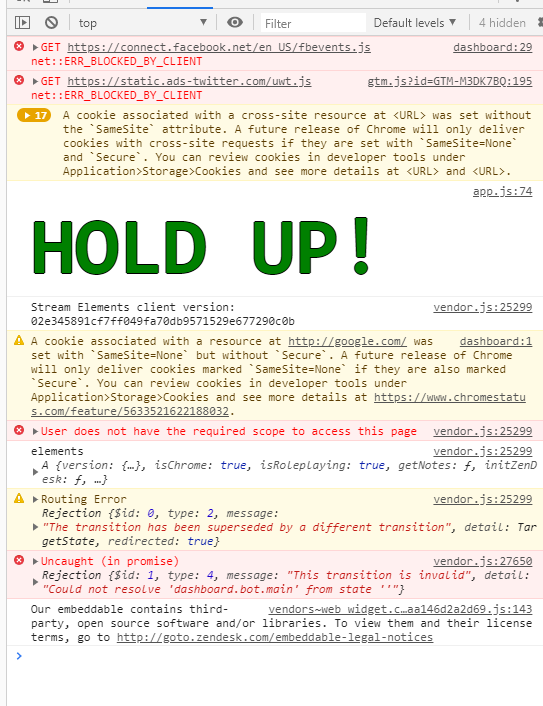
open dev console and refresh again
look into the console it self for errors
screenshot and show
versed tangle
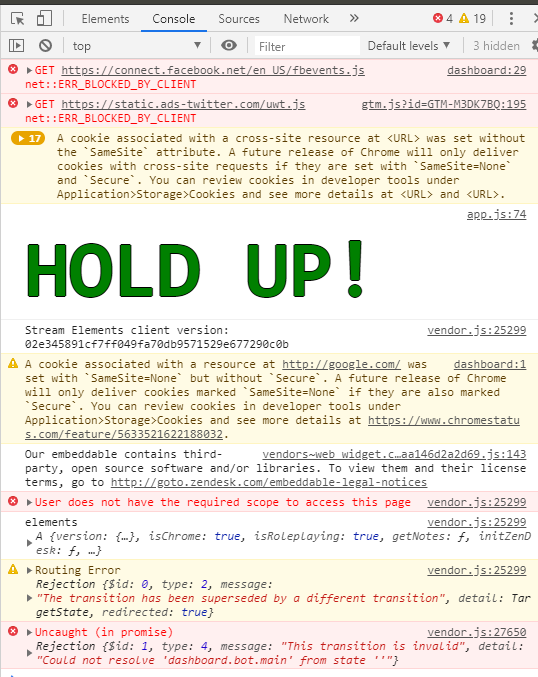 lime walrus

versed tangle
lime walrus
whats your username?
versed tangle
wink_wink_wink
lime walrus
if you are on twitch, why are you asking in #helpdesk-youtube 
 versed tangle
i do
lime walrus
click o nthe login with twitch
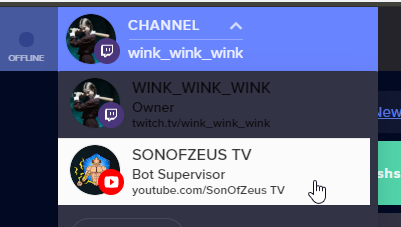 versed tangle
i tried to relog just now and got blank page on the main page
as well
of the dashboard
idk
versed tangle
the channel name im a supervisor?
lime walrus
yes
versed tangle
SonOfZeus TV
lime walrus
refresh now
versed tangle
 versed tangle
if someone knows, how do i try things on youtube stream chat when the streamer is offline
commands etc.
like twitch
 warm girder
Hello. I cannot connect to Twitch to save my life. I am not sure why. Here is the last log. Please help. https://obsproject.com/logs/Y1C1UC43W0NgTAin
 tardy cloud
versed tangle
tardy cloud
versed tangle
Hello. Can someone please help me. I have one overlay that I've used for over a year or so now. I hadn't streamed in a while until last night but my overlay wasn't working properly. It was showing fine in the editor, but not when launch. It wouldn't show the animations, but play the audio. I've looked into it but can't figure out what is wrong. I use Xsplit and stream on YouTube as always.
Nevermind, looks like I have to redo the whole thing. No clue why. It worked last time I streamed just fine. Thanks.
versed tangle
Hello - how i can close my Youtube account ? Did not work from Dashboard because of missing email.
quiet pond
Are you meaning your StreamElements account or your normal youtube account?
versed tangle
Stream Elements account
quiet pond
if we close your account you will lose all progress and linked accounts, are you aware of that?
versed tangle
Yes - there is no content
will claim it with my other account
did a mistake - created a new one instead of claim it with my other
idle saffronBOT
@versed tangle Account Merging - Please note:
- Merging accounts only allows faster ways to switch between accounts
- Merging accounts does not allow data sharing between accounts - different streaming platforms, different type of events
- Merging accounts allows duplicating/sharing overlays between the accounts
If you understand the limitations of merging and want to proceed, please find the JWT tokens (!jwt) from both accounts you want to merge and you will be directed to DM them to a staff member.
versed tangle
!jwt
idle saffronBOT
You can find your JWT token on your account channels page ("Show Secrets" to reveal the token): https://streamelements.com/dashboard/account/channels
READ ME:
This is a private security token. Do NOT share this token here or other public places, only with a StreamElements staff member in private.
versed tangle
OK - who is responsible for account merging ?
lime walrus
DM me the tokens
 atomic quest
Hello i'm from poland
 low fulcrum
i am streaming on youtube and it says i need to connect to twitch in my status bar? any help ?
 weak trellis
My donation link brings me to a 404 error page
idle saffronBOT
@weak trellis Please connect your streaming account (Twitch, YouTube, or Facebook) with Discord by going to ⚙ Settings and then Connections here in Discord. https://streamable.com/eg92w
 weak trellis
okay its done
sage lantern
hmm i see, let me ask around for you 😉
@weak trellis that account it not on the SE site at all
did you change your display name?
sage lantern
hmm okay, so after the change right?
and set up the tipping here? https://streamelements.com/dashboard/tipping-settings
StreamElements
The Ultimate All in One Platform for Streamers
what was your old name?
weak trellis
RepzyLN or repeatsLN
sage lantern
okay, asking internally about it
weak trellis
thank you
versed tangle
i part channel, inviting stream elements bot and making it mod but it doesnt show up on my chat
robust mango
Do you mean Join Channel? Part Channel makes it leave
 wet canyon
Hello!
My membership alerts are not popping up on my overlays or in my Dashboard.
Any help appreciated
robust mango
Is this a recent issue you've started to experience?
wet canyon
Yes
robust mango
Alright, we will look into it. Thank you for letting us know
wet canyon
Could you guys get a feature for memberships similar to the Resub feature on Twitch.
So I can thank people for the support every month?
StreamLabs have it currently but its poorly optimised
robust mango
That's a nice idea, will see what we can do
wet canyon
Thanks!
weak trellis
Any news @sage lantern
sage lantern
no, i'll ask again, it was a bit busy as well
weak trellis
Okay no problem
robust mango
I checked to see if I could find a tip page using any of the names you gave me but it doesn't seem that any of them show a tip page, so we'll need to ask our developers to look into it, this like means it'll take a little bit to get a resolution, but we should with their help be able to figure it out
sage lantern
@weak trellis that's for you ^^
 errant scaffold
Correct. Loyalty points on YouTube is currently not supported
errant scaffold
Yep. That's it currently for YouTube
weak trellis
Okay about how long do you think before its fixed? @sage lantern @robust mango
robust mango
Not possible to say, depends on how quickly we can get a developer to take a look
 slim grail
at media request there is a way to limit the songs request just from my list??
using ground control
why when i change things in the overlay editor i dont see them in obs?
plain kiln
Did you save?
slim grail
yes
even when i open it from obs i can see all the changes but it doesnt show in pbs itself?
obs itself
someone?
idle saffronBOT
@slim grail OBS -> settings -> advanced -> scroll down -> enable/disable hardware accel.
https://i.imgur.com/ggMe9ZE.png
 plain kiln
then disable it.
idle dune
make sure the resolutions are set to 1920 x 1080 and restart obs after turning off hardware accel
slim grail
slim grail
how do i change it?
sage lantern
rightclick on the browser source
then click on properties
and in OBS settings do the following if you want to stream on 720p: Settings > Video > Base canvas 1920x1080 and output 1280x720
slim grail
tthanks alot i will check it
sage lantern
because the default overlay res is 1080p from StreamElements, so if you have your base canvas at that too it will fit nicely. and it will scale back to 720p automatically when you are going to stream 😉
 slim grail
@sage lantern thanks alot man you are the king
what about choosing song request from a closed
list is it possible?
i mean the viewers ofcourse
sage lantern
as far as i know Media Request doesn't work for YT streams
slim grail
i saw it on ground control?? doesnt work also?'
shy quail
no, not for YT.
slim grail
is there's a way to test all the bot comands before streaming?
@shy quail thanks
like something that simulate a chat?
shy quail
Not that I am aware of. The bot will join only online and public streams.
 magic ridge
how can i get a chat box overlay for live streams
plain kiln
@versed tangle GeForce GTX 1050 Ti - the Asus Phoenix I believe is onsale currently for 139.
@magic ridge To my knowledge you can only have super chats displayed on strema.
@slim grail You would use the "Train Count" widget and set it to Subscriber.
It is the best graphics card you will get new for 140$.
clever apex
Hi. Just wondering why none of my new subscribers have shown up on my streamelements page? 🤔
 pallid bobcat
Umm hello, I need help making a coin and gambling system
@thorn wedge can you help me grt the roulette module and the coin system?
plain kiln
How about we dont tag random staff members, and we wait patiently to receive assistance?
plain kiln
As soon as someone has a moment to assist you, they will. We have other users that have shown up first with issues we are troubleshooting and will assist you as soon as we are capable.
pallid bobcat
Legit about 3 people are bring assisted
That’s no where near the amount of free staff there is
clever apex
@pallid bobcat ive been waiting longer then you, dont see me kicking up a fuss
versed tangle
hi, I need help
please
I have a mac computer and I open the stream elements through the chrome browser and I chose an overlay save the link I put it in my obs and only a small part is seen not all the overlay could help me
I send a video to see
idle saffronBOT
@versed tangle The default resolution for StreamElements overlays (theme and custom) is 1920x1080. Please add them in OBS at their full resolution and use CTRL+F to fit to screen if necessary. You can then downscale your stream in OBS settings > Video if you'd like https://i.imgur.com/6bWXxjR.png



 lime walrus
There is no way to add a gambling system with via us
for Youtube.
Due to limitations
lime walrus
@clever apex Highly dependable of the privacy settings of the subscriber - if their activity feed is set to private, we won'treceive the event for that.
@pallid bobcat Non come to mind.
pallid bobcat
Ok, well thanks for the information, bye
clever apex
@lime walrus ah dam okay thanks 👍
 loud charm
hi, sponsor notifications aren't coming through at all since yesterday. logged in again through youtube hoping to reset my session since doing it from the panel didn't help, and still no luck. any ideas?
versed tangle
^same question. Sponsor notifs not showing up even in the activity feed. But the new subs are appearing. 
 nova ibex
Hey, I want to move my donators data from my youtube to the twitch channel, is there an easy way to do that ?
wet canyon
Hey! I'm still having an issue where Members are not showing in my Activity Feed or
on my Overlays - My Member Count is also not updating!
wet canyon
Hopefully!
Its 100% Stream Elements as StreamLabs is working and updating the information fine!
wet canyon
Have you tried out the new 'Re-Member' feature similar to the 'Re-sub' on Twitch?
through streamlabs
loud charm
nope
wet canyon
You can add the information manually btw thats the work around
loud charm
not really ideal
robust mango
We are looking into it
loud charm

nova ibex
Hey, I want to move my donators data from my youtube to the twitch channel, is there an easy way to do that ?
robust mango
You could try exporting it to another site and then importing it back to SE
nova ibex
I'll try. thanks!
idle saffronBOT
@versed tangle To add your overlays to OBS, add a new browser source in your scene. Paste your overlay URL in the browser source properties, set the dimensions to 1920x1080 (unless you changed them on the website), and ☑ “Shutdown source when not visible” https://youtu.be/KDvLynUqXI4
 outer thistle
Goodnight. Help me please. I need to untie the YouTube channel, then to tie the Twitch channel
plain kiln
We can have staff merge your accounts if you would like
idle saffronBOT
@outer thistle Account Merging - Please note:
- Merging accounts only allows faster ways to switch between accounts
- Merging accounts does not allow data sharing between accounts - different streaming platforms, different type of events
- Merging accounts allows duplicating/sharing overlays between the accounts
If you understand the limitations of merging and want to proceed, please find the JWT tokens (!jwt) from both accounts you want to merge and you will be directed to DM them to a staff member.
outer thistle
No, I just need to untie my YouTube channel account
sage lantern
can't do that
you would have to delete the whole StreamElements account
or are you talking about OBS?
you can add as many accounts to your exsisting one as you want, so just hook up that Twitch account to this one
or did you already make a seperate one?
then merger is the only option like Mitch said
outer thistle
No, it’s about the service, so I’ll do it, as you said, thanks)
it will be easier to create a new account and import commands from another bot
 limpid night
hi there i am trying to stream, to twitch but it keeps trying to stream to youtube?? i have even removed my youtube account and it still does it?
plain kiln
Did you change your account over to Twitch in OBS.Live?
limpid night
i think so
limpid night
ok done that it must not have done it correctly last time thank you
versed tangle
wait wait wait, merch is out? 0_0
versed tangle
a ok 🙂
idle saffronBOT
@weak chasm Please follow our community rules:
- No advertisement or stream promotion
- Respect ALL server members
- No NSFW/NSFL
Thank you
quiet pond
@versed geyser what seems to be the exact problem, what is mirroring while streaming?
 brittle fiber
Hello, is there a way I could set up a giveaway for youtube?
quiet pond
@brittle fiber be sure to use #dreamteam for your questions 😄
Staff will be able to help you faster over there
 wicked knot
<@&382267076632379392> I logged teitch, and yt as different acc without knowing that, now i can't link the yt in my twitch one :v
help pls
I don't know what to do
idle saffronBOT
@wicked knot Account Merging - Please note:
- Merging accounts only allows faster ways to switch between accounts
- Merging accounts does not allow data sharing between accounts - different streaming platforms, different type of events
- Merging accounts allows duplicating/sharing overlays between the accounts
If you understand the limitations of merging and want to proceed, please find the JWT tokens (!jwt) from both accounts you want to merge and you will be directed to DM them to a staff member.
brave solstice
@wicked knot ^ this?
idle saffronBOT
You can find your JWT token on your account channels page ("Show Secrets" to reveal the token): https://streamelements.com/dashboard/account/channels
READ ME:
This is a private security token. Do NOT share this token here or other public places, only with a StreamElements staff member in private.
brave solstice
Please DM me the JWT token of both accounts and I will forward them to staff to merge them.
And note:channels cannot be unmerged
sage lantern
you cannot do it yourself, so send the tokens to him and say from which account they are
versed tangle
still broken
fickle pagoda
@wicked knot Your channels have been merged. Let us know if you need anything else.
 dusky rune
my stream looks low quality when the screen is moving a lot
fickle pagoda
You likely need a higher bitrate, then.
 tight ermine
Hi guys does anyone know how to make an intro or somethings like that for a moible android device?
plain kiln
What kind of intro?
tight ermine
Roblox themed
plain kiln
tight ermine
?
 odd silo
Good day, notifications of sponsorship subscriptions have ceased to come. In the list of events on the site, it also does not display about new sponsors - for comparison, streamlabs as before are still visible sponsorship resubs and new sponsors.
fickle pagoda
@odd silo Sponsors are listed in your activity feed as members.
odd silo
@fickle pagoda Yesterday I had a new sponsor, plus another spectator resumed sponsorship. This is not in the event stream - as well as there no notification about it.
In general, in the new year there was not a single of a notification about a new sponsor, and this not displayed in the event stream.
fickle pagoda
Can you provide specific examples?
odd silo
There is a live broadcast, in the chat on YouTube I see a reflection about the emergence of a new sponsor. Usually after a few seconds an alerts . But now, only notifications from the super chat and about simple subscriptions.
fickle pagoda
Can you provide a screenshot example?
odd silo
fickle pagoda
I'd recommend filtering out subscribers as they can easily push out other activities you're looking for.
odd silo
although in the creative studio on YouTube I have completely another data regarding sponsors for the previous day]
fickle pagoda
Can you provide a specific comparison of a name that appears on YouTube's end but not in your activity feed?
odd silo
Sailos, -Miesor -, Vladimir Воландеморт
and more after 2 weeks
I can show how the activity tape on streamlabs looks for comparison
fickle pagoda
No, please provide screenshots from YouTube of this list. We need the specific comparison. Streamlabs is irrelevant.
loud charm
^ this was reported by 3 people on Saturday
they said they were looking into it
still no fix, members aren't appearing in the feed
including myself, hope we can have everything working soon
 drowsy bough
So I changed my youtube channel name and the owner is still the previous name of my channel not the new one on streamelements site. Does it change?
loud charm
@drowsy bough I've had that for months and it worked fine
streamelements still shows my old channel username from like 2008
drowsy bough
oh okay but what about the profile page? still the old one? also the tipping page
loud charm
no clue, I don't use tipping on se
 digital anchor
I'm generating a link to mod streamelements and it's not finding it when I try to put it as mod anything I can do to resolve that?
loud charm
pretty sure there's a name field you can change for that though
drowsy bough
@loud charm okay, thanks
digital anchor
Anything anyone knows?
lime walrus
@drowsy bough If its a link update, DM me the old and new name, preferably with your account ID
idle saffronBOT
@drowsy bough Please provide your account ID found at the top of this page: https://streamelements.com/dashboard/account/channels This ID is public info and safe to share here.
lime walrus
For the members issue, since the above screenshot is in English, what exactly is the issue per say? Is it super chat users?
loud charm
I don't use super chat
but members/sponsors
aren't going through at all
for any of us YouTube lot it seems
lime walrus
If I can get a proper screenshot in english and explanation on whats going on, I will poke the devs right away.
loud charm
no notification, no update in the data section of the overlay editor
And in the feed on the main se thing
no update
digital anchor
I can send a screenshot of my problem
loud charm
last activity there for sponsors is one from Wednesday
and I've gotten like 20 new ones since friday
subs work fine
argones was just showing his YouTube sponsors - he has one since 0 days and it's not on his SE
lime walrus
@digital anchor I'm not sure what issue you are referring to here. What link?
@loud charm Are you able to provide such a screenshot as well?
lime walrus
As long as you tag me
digital anchor
@lime walrus I've generated a link to made streamelements mod and went to paste the link and it says it invalid?
quiet pond
We're here all day Graf 😄
lime walrus
@digital anchor paste to where?
digital anchor
YouTube to make streamelements mod
So I copy the link and paste it and it searches to see if it finds streamelements but it says its invalid
lime walrus
In order for the Bot to function, it needs moderator access. To add StreamElements as a moderator, visit youtube.com/comment_management and paste "https://www.youtube.com/streamelements" into the Moderators list.

YouTube
Official youtube channel for StreamElements tutorials https://StreamElements.com
digital anchor
@lime walrus by the way that's not what I'm trying to do I've been trying to resolve the issue of my recent Subscribers coming up in chat
And the link generator doesn't work?
Not sure why the chat bot doesn't work
lime walrus
Where are you pasting that link?
That link is used to inviate managers to your Streamelements account
not your Youtube account.
digital anchor
Oh right so how do I activate the chatbots cause it shows that it's not active and I've enabled it from the module section
lime walrus
In order for the Bot to function, it needs moderator access. To add StreamElements as a moderator, visit youtube.com/comment_management and paste "https://www.youtube.com/streamelements" into the Moderators list.
YouTube
Official youtube channel for StreamElements tutorials https://StreamElements.com
And then make sure on the main dashboard page you click/tap on "Join Channel"
lime walrus
Are you currently live?
digital anchor
I did go live to test it and it didnt work I waiting for a minute to come up nothing
lime walrus
is the live stream private/unlisted?
digital anchor
Public
idle saffronBOT
@digital anchor Please provide your account ID found at the top of this page: https://streamelements.com/dashboard/account/channels This ID is public info and safe to share here.
digital anchor
5e2bc830a0a7ba2ee2c2c3f1
lime walrus
I don't see any live stream currently.
digital anchor
Should be live now and will let you know when the bot comes
Bots come on and it dont work still mate
digital anchor
I've activated the bot to thank people for subscribing but that's not coming up
lime walrus
Subscriber events are dependable on the person's activity feed - if its set to private, we won't see them subbing to you.
Youtube subscription privacy settings: https://support.google.com/youtube/answer/7280190?hl=
How to change your subscription privacy settings
You can choose to make the channels that you subscribe to public or private. By default, all settings are set
It will also not work if someone recently subbed to you, we've detected them and they unsub and resub
digital anchor
We tried that but also there new people
digital anchor
So what can I do?
lime walrus
Hope that new subscribers have that option as public
digital anchor
I've done what you said
lime walrus
Its not you who needs to set that setting to public
Its the person who is subscribing to you
digital anchor
Oh right
loud charm
@lime walrus
i've had over 10 sponsors since Xist, but he's the most recent one
new sponsors haven't been showing in the activity feed since thurs-friday
lime walrus
So the last column is and the one before it are periods of?
loud charm
and in the overlay editor _> data -> session data
lime walrus
I was hoping I'd get the column meanings
loud charm
ah yeah go on
1 sec sorry
more people who've become sponsors
i didn't get a Sponsor Alert for them, recent sponsor hasn't been updated
it's like SE doesn't see them whatsoever
i opened up StreamLabs' old desktop panel, they work fine there
and subscribers show up normally in SE
so it's a sponsor issue likely, YT might've changed their API (?)
slim grail
when i press on start streaming on obs and than i press on go live with youtube livestram dashboard settings 'nothing happens' some one pls help me?
if i choose Create a new YouTube Live Video with these settings it start but there is a big dealy and also it doesnt take the thumbnail??
some one have a clue? what is going on?
lime walrus
@slim grail Delay can be because of your internet provider and settings in OBS -> settings -> advanced
@loud charm Sorry for no response from me, as I had to deal with something important. Will poke the devs right now.
loud charm
 finally can get back to normal sponsor amounts
 wild oak
Is there any way to add my custom widget into a pre existing overlay? I have both of them in my personal overlays, I just can't figure out how to combine them into one.
digital anchor
My chat alerts are still not working even when the bot comes in the chat
 novel latch
i am switching from twitch to youtube. when i pull up elements obs it only loads twitch i cant get it to pull up youtube anyone know how to switch this? TYIA
idle saffronBOT
@novel latch Streamelements on top of OBS -> Logout -> login
novel latch
ok i will try that ty
versed tangle
Hi i need help with streaming on my pc im trying to stream league of legends but it is only showing a black screen what do i do to fix that
my youtube is subject_cyber so you can see yourself
can somebody please help me
@everyone hello?
fickle pagoda
@versed tangle Tagging everyone doesn't work, but wouldn't have been appreciated if it did.
idle saffronBOT
@versed tangle Please provide a log from your last stream. To do this, in OBS go to Help > Log Files > Upload Last Log File and paste the link to the log file here.
fickle pagoda
@versed tangle https://obsproject.com/analyzer/?url=https%3A%2F%2Fobsproject.com%2Flogs%2FIfF-o4qPMubZzO-X
Looks like you have some outdated drivers.
fickle pagoda
Please click the link and read the analysis.
wild oak
do the youtube alerts only work if I'm live? if I have obs open and someone subs or joins will my alert go off in obs assuming I have the alert widget in that scene?
fickle pagoda
It should work for any valid event; it's only your chat that appears only while live.
wild oak
yeah I have something wrong here then ):
any ideas on where I should trouble shoot. It works when I test the alert but I created 2 youtube accounts to sub to me and test it, and had another friend do the same. never got those alerts.
idle saffronBOT
@wild oak By default, YouTube accounts are set to keep subscriptions private. This means that subscriptions will not trigger alerts, the event will not appear in your activity feed, and their account will not appear in any channel's subscriber list. Users must change this setting themselves in their YouTube account.
wild oak
yeah I checked that first
fickle pagoda
Not your setting. The viewer's setting.
wild oak
correct
I made 2 new youtube accounts to test
I changed that setting prior
also had a code guru try it on here for me and no alert
fickle pagoda
Well, mine went through.
Bear in mind that it takes a minute. You can't sub and unsub in a few seconds and expect it to happen.
wild oak
yeah no alert on my end
fickle pagoda
YouTube is slow.
wild oak
yep ok I appreciate it, I'll see how it goes during the stream. thanks again.
wild oak
alrighty so I just did a few hours of a stream and had a new member and the alert never showed up, and it also doesn't show up on my stream elements dashboard. but it shows in youtube chat and they have the green name/symbol.
lime walrus
Known issue. Reported to the devs
wild oak
ok thanks KeiZar. do you know does this only affect member alerts or are their issues with tips/superchats/subs
lime walrus
only members so far
 random vortex
hey guys. im switching from twitch to youtube and therefore i wanted to link my youtoube account to my existing streamelements account, but instead i created a new account. When i now want to close it to be egilible to claim it on my main account, i have to enter a e-mail-adress, which is empty but cannot be empty. any advice would be highly appreciated.
robust mango
Hey, you don't need to close any accounts for this, we can merge them together for you
Could you DM me? I need to ask for a couple of things from you to be able to merge them together
 raven eagle
If you are merging accounts is it possible to create one overlay, which will catch all the alert events on all the channels, like StreamLabs does ?
 main vector
@raven eagle No. Alerts are limited to a single platform.
So you'd need multiple overlays technically.
 last nexus
Hi im looking for recording overlays
idle dune
 tawny ruin
hey i just need help in genral
i cant control anything in streamlabs its just all blank on the sides how do i fix please help
idle saffronBOT
@tawny ruin We're not able to troubleshoot issues with using our overlays in StreamLabs OBS (SLOBS) as we don't have the tools to support their software. We recommend using OBS Studio or OBS Studio with our plugin OBS.Live.
tawny ruin
i use obs live
i can use overlays and that but i cant use and make cammonds for my chatbots
sage lantern
StreamElements
The Ultimate All in One Platform for Streamers
tawny ruin
how do i get it on my side bar because i cant control anything
That’s my side bar how do I get stuff on it
shy quail
Try it in chrome please.
 neon shell
I usually use twitch but I wanted to try steaming on YouTube how to I get the YouTube activity and YouTube chat on my obs instead of the twitch stuff
idle saffronBOT
@neon shell Streamelements on top of OBS -> Logout -> login
 ivory swallow
I NEED HELP
eager lilyBOT
Hi @ivory swallow, Please ask your question(s) or describe the problem you're looking to solve so staff or a support volunteer can assist you as soon as they are available.
ivory swallow
I will have a Overlay for YouTube, but I can't find something to download or to istallating
ivory swallow
yes
idle saffronBOT
@ivory swallow To add your overlays to OBS, add a new browser source in your scene. Paste your overlay URL in the browser source properties, set the dimensions to 1920x1080 (unless you changed them on the website), and ☑ “Shutdown source when not visible” https://youtu.be/KDvLynUqXI4
versed tangle
i need help
eager lilyBOT
Hi @versed tangle, Please ask your question(s) or describe the problem you're looking to solve so staff or a support volunteer can assist you as soon as they are available.
versed tangle
i updated my windows and amd drivers but it still shows a black screen
shy quail
@ivory swallow Take a look here for premade overlays: https://streamelements.com/dashboard/themes
versed tangle
how do i fix the black screen
shy quail
started OBS as admin?
versed tangle
how
they sent me this as the problem yesterday and i fixed all the warning things
i think the admin thing is the only problem how do i fix that
shy quail
google that for your oparting system.
versed tangle
?
versed tangle
it still wont work
shy quail
What game are you trying to catpure? have you added the game capture source in the correct order to your sources?
versed tangle
yeah im trying to stream league of legends
but it keeps showing blackscreen
i re opened obs as administrator
shy quail
What are you trying to capture? the launcher, or the game itslef?
versed tangle
the game
idle saffronBOT
@versed tangle For the best OBS support, please join their Official Discord @ discord.gg/obsproject
 languid herald
How can I remove an old YouTube channel from my SE account?
shy quail
Not possible without deleting the whole StreamElements account with all the connected channels.
languid herald
oh ok
 carmine fiber
how do i change the name of my stream elements account
lime walrus
Can you elaborate?
carmine fiber
i changed the name of my youtube account recently so i wanted to change the name of my stream elements account. when i sign in it says im flyfluffysavage and my channel is czake
lime walrus
We can update the link alias, but the name will stay the original in the dashboard.
Have you sent in a ticket as well?
lime walrus
Did you send in an email to our support email or have you used our contact page?
carmine fiber
i sent an email
lime walrus
Ok I will contact you again on it in a bit for more information.
carmine fiber
ok
carmine fiber
you done?
lime walrus
Please be patient, as I'm trying to clear more important tickets currently. Plus the change of the link will not happen within 5 minutes as it needs to be changed by the devs.
versed tangle
New members are still not showing up in the notification, activity feed and event list. Thanks
versed tangle
aight.. thank you. 
last nexus
hi, can i have help? when i say go live it says it couldnt create thread. can anyone help?
versed tangle
How can I steal from streamelements that you can donate with paysafe
quiet pond
@versed tangle I will ask around for you
digital anchor
Anyone know why my chat bot isnt saying anything when someone subscribes
 elfin rover
my stream is not showing up on youtube after i press start streaming
idle saffronBOT
@nova hearth Please follow our community rules:
- No advertisement or stream promotion
- Respect ALL server members
- No NSFW/NSFL
Thank you
quiet pond
please don't try to tag people, there will be someone with you in a moment
 finite idol
can you use tips if you do not have paypal
 fallen dune
is groundcontrol only for twitch or yt aswell?
cuz when i go in stream setting of gc its jnust blank
wild oak
are we still having issues with alerts and stream elements for youtube?
fickle pagoda
What issues, specifically?
@fallen dune There's no stream settings available for YouTube, that's all. It otherwise still functions.
 fast void
I can't access to create my merch
idle saffronBOT
@fast void SE.Merch is only available on Twitch right now. If you stream on another platform please help us prioritize this integration by filling out this form: https://forms.gle/YQWtXcTN6ufq69318

Google Docs
SE.Merch is now in Open Beta for Twitch channels. If you stream on other platforms please fill out this form and help us prioritize this feature on our roadmap.
 zealous bison
Hello!
I might slightly have screwed up. I just realized that I could've logged into twitch, gone to "settings", and "add youtube channel" instead of having signed in via the youtube channel separately. I can no longer "claim" it since it's already been claimed, and have to logout/re-login every time I want to switch platform/etc.
I can see the benefits of having ownership of both channels under one user - is this something that could be fixed somehow?
idle saffronBOT
@zealous bison Account Merging - Please note:
- Merging accounts only allows faster ways to switch between accounts
- Merging accounts does not allow data sharing between accounts - different streaming platforms, different type of events
- Merging accounts allows duplicating/sharing overlays between the accounts
If you understand the limitations of merging and want to proceed, please find the JWT tokens (!jwt) from both accounts you want to merge and you will be directed to DM them to a staff member.
zealous bison
!jwt
idle saffronBOT
You can find your JWT token on your account channels page ("Show Secrets" to reveal the token): https://streamelements.com/dashboard/account/channels
READ ME:
This is a private security token. Do NOT share this token here or other public places, only with a StreamElements staff member in private.
zealous bison
gotcha! Thanks AI! Whenever any staff is available 🙌
fickle pagoda
!lazy
idle saffronBOT
I'm a bot, only here to send helpful messages because the helpers are lazy.
fickle pagoda
@zealous bison Please keep all communication in the public channels and limit DMs to only requested information.
Please find the JWT tokens (!jwt) from both accounts you want to merge.
zealous bison
I guess I misinterpret the messages, then
I got them, the bot said I'd be directed to DM a staff member, hence asking whenever staff is available, hence DM'ing you to check the situation after seeing you reply in the channel. Is there a specific staff member I should DM? Sorry for apparently getting it wrong!
fickle pagoda
Questions should be asked publicly so others can benefit from them, that's all. Please DM me the JWT tokens, clearly labeling which is for which account.
zealous bison
Gotcha'! Thank you. 🙌
fickle pagoda
Your channels have been merged.
zealous bison
Thank you very much! Incredibly quickly! Appreciate it
 heavy ivy
Hello guys! 🙂 Is there a way to see how much you've earned in a specific year? I asked in the general-chat and apparently you can't check that if you stream on YouTube...
lime walrus
Unfortunately, for Youtube, we had to change the periods showed due to new compliance requirements from them.
heavy ivy
Oh I see 😦 that sucks
 empty wind
anyone here?
idle saffronBOT
@empty wind If you would like help from the StreamElements support volunteers/staff please post your question in one of the helpdesk channels and someone will assist you as soon as they are available
#helpdesk-twitch | #helpdesk-youtube | #helpdesk-facebook | #helpdesk-mobile | #helpdesk-selive | #651453660810838026 | #helpdesk-merch
Thank you for being patient.
 gaunt glade
Hello how can i activate paysafecard method there ?
shy quail
You need SE.Pay for this.
SE.Pay is available for streamers with more than 100 followers, with a bank account in one of the following countries: Austria, Belgium, Czech Republic, Finland, France, Germany, Ireland , Italy, Netherlands, Poland, Portugal, Spain, Switzerland, United Kingdom, United States. If you meet these criteria and don’t see SE.Pay, we'll look into it.
gaunt glade
Seems romania isnt there so i think isn't accepted ?
shy quail
Afaik that is correct.
gaunt glade
Shit