#helpdesk-youtube
1 messages · Page 10 of 1
 cyan lake
 proper flame
Thank you @upbeat furnace
 glossy heath
if anyone is available - think im having an issue where its mixing accounts cause we've "logged in with twitch" and logged in with a local streamelements account
glossy heath
yeah im reasonably sure that theres two seperate accounts managing the same youtube/twitch account
 near stag
@glossy heath yes, this is normal when you log in with twitch&youtube instead of adding one of them as a secondary account. this can be fixed, but we have to do it manually
@glossy heath please link both YT and twitch here or even better - add them to your discord profile so we can actually find those and merge em together
nah, i only see youtube
 polar caveBOT
Please connect your Twitch and/or YouTube channel with Discord by going to ⚙ Settings and then Connections here in Discord.
glossy heath
!connect
polar caveBOT
Please connect your Twitch and/or YouTube channel with Discord by going to ⚙ Settings and then Connections here in Discord.
near stag
it is there
glossy heath
😣
near stag
this is the yt gaming logo
glossy heath
ok done
near stag
ok, i forward both channels and your discord to somebody who has access. can take a while.
glossy heath
pick a random "SE staff" ?
cyan lake
no, he said that HE forwarded the information
near stag
should be done in the next hours, you do not have to do anything at this point.
glossy heath
appreciated - ok.. so 1 more thing if you dont mind.. the youtube "subscriber" and twitch "follower" for Overlays... im noticing that i either dont have the option... to put both on 1 overlay? or when i switch on the top drop down.. the overlays are different?
example:
when i switch from one to the other
only one is available?
for sub alerts
near stag
Yes, overlays for Twitch and Youtube are separate, you need two and you can have as many as you want.
glossy heath
ahhhh ok so i do need two
near stag
Yeah, if you have the YT logo on the twitch overlay, use plain text etc from YT
glossy heath
ok .. was beating my head against it going... WHY U NO WORK
near stag
well, twitch overlay has no idea what happens to your youtube, different API 😛
glossy heath
i was under the misunderstanding that streamelements merged the two for ease of use
like pulled the data from both
near stag
Nah, we keep them separate.
glossy heath
ok tyvm for the info
 native shell
i think merging them could be useful if thats something youre interested in working on. just a suggestion. I know this stuff's complicated.
near stag
@native shell well, there are not many streamers who use both twitch and youtube at the same time. and if they do, they are fully aware of all the tricks to have X platforms combined into an overlay setup that looks like one single piece. and that could be tricky and unstable. having multiple overlays and just work with pixels for positions is way easier.
native shell
that makes sense
near stag
@glossy heath we actually need a bit more than just the account names
@glossy heath if you are around, i would need some data from you and this data is personal, so it is best handled in DMs or via access to the accounts.
 tall heart
In the "banned words" spam filter: Is there a way to ban a user forever? Timeout = -1 or something like that?
 upbeat furnace
No, it was decided not to allow the bot to permanently ban as mistakes can happen (especially when wildcards or regex are involved.) We feel that permanent bans should only be handed out manually by moderators.
tall heart
Fair enough. Thanks
tall heart
Is there a page the describes the differences between the different level of filters? (Balanced mode, quality chat, etc.) The spam filters page on the support is pretty sparse and makes it look like the last three levels are all the same.
 plucky patio
<@&364840891023622144> <@&382267076632379392> Where can I report a bug?
near stag
@plucky patio this is a pretty good place for it
plucky patio
I checked my "Activity feed" to check my recent YouTube subscribers, but all links goes to Twitch instead, which also makes all the links broken. There's an error there for sure.
near stag
Are you logged in with YT or twitch?
plucky patio
I logged in with YouTube, and all the subscribers is for sure from YouTube and not Twitch
The names is not even possible on Twitch
near stag
I would suggest re-logging with YT to make sure it is not a one time strange issue
plucky patio
I literally just logged in
near stag
actually i can confirm that
near stag
clicking on the names from the activity feed under YT leads to twitch links
plucky patio
Yeah
near stag
got that, reproduceable, we fix that as soon as possible. workaround for now - copy&paste names into youtube manually if you need their channel
the names are from Youtube, do not worry, it is just the URL that is broken
plucky patio
Yeye, I know how to find them. I am just lazy as fuck
 plucky patio
I am 100% sure that this bug is the reason why I don't get 1000 subscribers a day though
near stag

 limber spear
Question : I'm setting up a super theme for Youtube. (Specifically Blue Stream - moonstone animated). Right now I'm working on the Talk scene, and the tip has the title at the beginning and then at the bottom 'ended 4 months ago'.. I want to adjust that but can't figure out how
cyan lake
If it's similar to twitch side, click the widget, and there will be an end date field. If you can't seem to get the right widget, check the layers for the tip goal widget
limber spear
Yea, i found it.. but that helped, thank you
 visual swallow
It's best to just post your problem or question
visual swallow
you only have a browser source added, you need to add additional sources to capture what you want, like window, game, or display
You might want to take the time to look up some OBS tutorials
 wheat minnow
ok tnx
 frosty mountain
wheres my twitch key
 thorn wedge
Hello @frosty mountain are you referring Twitch or Youtube?
limber spear
Fun filled question, is there any way to bring over variations from one lay out to another?
 errant scaffold
To duplicate it? There is in the Overlay Editor I believe. Let me check
limber spear
Yea, I like my set up for my super chats when it comes to the variations and i was just going to copy and paste that across all the themes
errant scaffold
Hmm I think you can specifically for alerts. I'm doing this all off phone so may be a bit 
 lapis shard
its okay I am helping him in DM's thank you 
errant scaffold
No worries 😄
frosty mountain
i figured out how 2 live stream my ps4 gameplay and have an overlay!
 gray roost
Good Morning, I am writing for advice in using the live chat overlay from YouTube. I am a veteran gamer of many years on both Twitch and YouTube, so know I have experience.
However, this is the first time using StreamElements in YouTube. My question for needing advice is how does the overlay show the chat? Previously I had to setup live streaming events for XSplit to see the video and chat to be brought in. How is this accomplished in the overlay?
lapis shard
Hello fellow Xsplit user 
in the Overlay Editor of StreamElements you can implement many diffrent widgets like Alert Boxes, labels and also Chat !
once you done designing your overlay you simply input the URL of the Overlay into XSplit as a browser source
make sure to set the Resolution right 
 versed tangle
My commands is not working
On youtube livestreams and i have modded stream elements
 alpine temple
The total subscribers widget seems to be off today. It's stuck at 36 when it should be 437. (In overlay editor it's a random number but in OBS it's just 36)
near stag
@alpine temple make sure you have the correct number in the overlay first and then refresh the cache of the overlay in OBS to force update the overlay in case it get's stuck.
gray roost
@lapis shard I’m aware of the features as I use StreamElements on Twitch, but this the first on my YouTube platform. How do I implement the live stream event chat into the overlay?
lapis shard
The exact same way as you would with twitch
visual swallow
I am not too familiar with the YouTube stuff, but I thought that the chat widget was not available for YouTube 
 visual swallow
I didnt think so, but I dont have a YouTube account linked to SE to check
gray roost
@visual swallow thanks for letting me know of this. I will look into an alternative solution.
gray roost
Update: StreamElements does run as a moderator for you. However, there’s no chat with the overlay even with the change from Twitch to YouTube. Hopefully this can be resolved soon!!
 hearty grail
getting set up w yoyutube is hard work
lapis shard
agreed 
lapis shard
what seems to be your problem?
lapis shard
@hearty grail https://www.youtube.com/watch?v=X7XrDdRE7Fk

Create an amazing overlay with StreamElements, watch our video guide to learn how. ----- Tipping page setup: https://youtu.be/eLzxRkq7tJo Add KappaGen to you...
 nocturne blade
watch the above video
lapis shard

Tutorial #1 - Adding StreamElements Overlays to OBS Studio ----------------------------------------------------------------------- 🚀 StreamElements 🚀 -------...
@hearty grail
polar caveBOT
@hearty grail Make sure to :ballot_box_with_check: “Shutdown source when not visible” for all browser sources (all OBS scenes). If using studio mode, uncheck “Swap Preview/Output scenes After Transitioning.” Also keep in mind that sound can play from any overlay loaded in the browser (editor or launched). https://i.imgur.com/FegZJQS.png https://i.imgur.com/yY0wcFl.png


@hearty grail The default resolution for StreamElements overlays (theme and custom) is 1920x1080. Please add them in OBS at their full resolution and use CTRL+F to fit to screen if necessary. You can then downscale your stream in OBS settings > Video if you'd like https://i.imgur.com/6bWXxjR.png
 hearty grail
ye
ty
so if some one subs does it show up bottam right ?
same w donations
?
lapis shard
where ever you placed the Alert Box yes 😃
visual swallow
You can also emulate events to see it
lapis shard
^
hearty grail
where ever you placed the Alert Box yes
I used a template i don't know what the alert box is lmao
You can also emulate events to see it
and wot
@lapis shard
ty 4 ur help btw 😛
lapis shard
if you are in the Overlay Editor of StreamElements there is a little blue bell on the bottom left
there you can test events and there fore see where the alert is placed
hearty grail
can u have a sus of dis so if it's working, try subing I wanna see if it pobs up
Can I send u a link in pm?
@lapis shard
lapis shard
@hearty grail like I said you can test Subs/donations/SuperChat in the Overlay Editor of StreamElements by hovering over the Blue little bell in the bottom left corner and selecting a Event you want to test
lapis shard
I will not sub to your channel so you can "test" it.
if you tested it with the bell its also gonna work for real Subs/follows etc
hearty grail
thx 4 ur help
lapis shard
no problem
 dark sail
When is song request and loyalty rewards coming for the YouTube version
lapis shard

hearty grail
what is the best way to set up music?
lapis shard
spotify or something like it till Media Request comes to youtube
 onyx tide
Hey, Can anyone help me out with the chatbot?
visual swallow
first thing is to ensure you followed all the setup steps, including allowing StreamElements to manage your account https://blog.streamelements.com/streamelements-complete-guide-for-youtube-streamers-9e97c05eba64 You also will need to be doing a live public stream for the bot to join, and it can take it a few min to join
 long oak
Hello. So we are encountering a bug with Stream Elements. We have Text to Speech enabled on our streams whenever we get a YouTube Superchat. However our Voice is stuck on Céline. We have attempted to change the voice many times to almost every single voice AND it shows that any new voice we select has been changed after we saved it. However we are only hearing Céline's French-American voice.
polar caveBOT
@long oak Please connect your Twitch and/or YouTube channel with Discord by going to ⚙ Settings and then Connections here in Discord. https://streamable.com/eg92w
 cyan lake
@long oak Once you connect your youtube, I will be able to check into the issue
long oak
@cyan lake Connected
long oak
It's a channel that our network has had for many years. It became TGN Squadron like 5 years ago.
cyan lake
hmmm, its weird because I don't see an account by that name in our system
long oak
cyan lake
ok. Lets try something different
first time I have ever had to ask someone for this, lol. But log into StreamElements.com, click on your username in the top right, and generate me an access link
make sure you sign in to SE using the account you are streaming to
 pseudo trellis
why im hear my sub and dono alert twice
 lime walrus
!multi
polar caveBOT
Make sure to :ballot_box_with_check: “Shutdown source when not visible” for all browser sources (all OBS scenes). If using studio mode, uncheck “Swap Preview/Output scenes After Transitioning.” Also keep in mind that sound can play from any overlay loaded in the browser (editor or launched). https://i.imgur.com/FegZJQS.png https://i.imgur.com/yY0wcFl.png
lime walrus
Then either you have multiple alert boxes in 1 overlay or you need to recheck every browser source in every scene
no other explanation, really 
pseudo trellis
ok
lime walrus
Ooh and don't have your overlay editor open while streaming - this also causes double(if not triple) sounds
visual swallow
Twitch clip in the YouTube support channel 
 tight anvil
versed tangle
tight anvil
versed tangle
I'm having issues with the bot coming into youtube chat... It has been like 26 minutes and it has yet to come in
upbeat furnace
Tag me the next time you go live please and we'll monitor it @versed tangle
versed tangle
okay
 grand turret
okie so i signed up to stream elements thingy and added my youtube/twitch, overlay etc now how would i get this to work?
 ionic current
What recording program can i use to stream
cyan lake
@ionic current we recommend OBS
 prime forge
where do i find my "JWT"? can't find it
polar caveBOT
@prime forge You can find your JWT token on your account channels page: https://streamelements.com/dashboard/account/channels
(Don't forget to click on "Show Secrets")
ionic current
@cyan lakethx
cyan lake
@prime forge nope
prime forge
i can't see anything or something in the "app"
cyan lake
can you give more information about what you are trying to do? @prime forge
prime forge
i don't know how to use the app haha
 dull adder
I need help with the tippin
 dim drift
There are Google tutorials for that @versed tangle please use that.
 wary owl

 late fox
 fresh stirrup
same
lime walrus
@fresh stirrup @late fox I suggest taking a look at this video: https://www.youtube.com/watch?v=X7XrDdRE7Fk&list=PLCDDKlFdScbEwdx5AntcQIS1InkFJwHtv&index=3 it may be a bit outdated but still helps. If you have anymore questions about the overlay, feel free to ask
prime forge
how do i use the desktop app? i can only see music
 open olive
help
 fluid hamlet
Question i have and this is just more curious if this works with it being youtube which i know can be a royal pain. will chat appear in the chat boxs on xsplit or do i still have to use youtube element to make the chat appear in the boxs in my scene?
cyan lake
At the moment, I believe we don't have a youtube Chat widget for the overlay
fluid hamlet
thanks @cyan lake scalper thats help a lot
cyan lake

fluid hamlet
@cyan lake im going to assume also the recent donations, recent followers and recent subscribers also dont work on youtube yet?
cyan lake
Those are fine. Its just that with youtube chat, it takes up API requests (which are limited with youtube)
followers=subscribers, subscribers = sponsors on youtube
fluid hamlet
oh right so they will appear on the screen great 😃
fluid hamlet
all i done @cyan lake used one of the stream elements overlays when i first signed up. I watched the video of how to set up but with it being based on twitch i was not sure if it would still work on youtube
cyan lake
yeah. It should all work fine on youtube, as long as you are using the youtube side
(logged into SE via your youtube account)
fluid hamlet
yeah you mean linked up
cyan lake
logged in = linked up if you have two accounts. Some people don't use twitch, but do youtube
fluid hamlet
yeah got you now yes i have done that already linked SE to my youtube account sorry wasnt sure then thats what you ment 😃
cyan lake
there is a difference though once you link them. If you look at your name at the top left, does it show a youtube icon, or a twitch icon
You have to be on the youtube one to make sure you are getting the right information to the overlay
fluid hamlet
ahhh thanks for that warning @cyan lake i never realised that and was still in twitch instead of youtube account
cyan lake
yeah, then in that cause you were just getting twitch events xD
fluid hamlet
<<<as you can see im totally new to using streamelements on youtube 😉
@cyan lake i had better load pick them overlays again while in youtube then i know they be workign XD
versed tangle
Where do I input my full control invite for a youtube streamelement account?
visual swallow
You give it to the person you want to have that control
versed tangle
I had received one but do I add the URL too?
visual swallow
nothing, you just open in a browser
versed tangle
Thank you @visual swallow
visual swallow

 severe elm
My stream report email never came through. Any way to fix?
lapis shard
@severe elm DM me the Email adress you connected to your Youtube Account and I can check with the devs what happend.
Maybe it's in spam/junk and maybe your Email Providers Memory is too full
near stag
@severe elm we had a short outage for the stream reports, so it was possibly lost in that time. It is fixed, if you do not receive reports in 15min. after the stream - contact us please.
severe elm
@near stagthank you!
versed tangle
How long does it take to get the bot in a youtube stream?
Streaming on youtube and my bot wont come in... help
cyan lake
Is your stream public?
versed tangle
Yes it is @cyan lake
cyan lake
hmmm, that is about as far as I know when it comes to youtube. maybe @near stag can help more
near stag
Mh let me see
The bot should pop in withhin 1-2 minutes after the initial join request
versed tangle
ive been streaming for 17 minutes now
near stag
did you press "join" in the dashboard?
near stag
press part and tell the bot to join again
versed tangle
i did that like 5 tiems
near stag
ok, not much i can say here. the channel is correct, subscribers are getting through
near stag
the bot should appear in the participants list even if not modded (which is a requirement on YT)
versed tangle
1 min
near stag
is the bot added as moderator on youtube?
near stag
nah, let us fix it
versed tangle
I need it done asap
near stag
working on it, let me see what we can do
 strong palm
how can i create a command where people can see how long they have been in my streams on youtube
versed tangle
@near stag Bot started working like 30 mins into the stream
severe elm
@near stagstreamed again tonight and the report never went through. Any ideas?
near stag
@severe elm let me tag the right person. @tropic atlas reports missing in action, need help 
 tropic atlas
@severe elm can you dm me your email address please? (the one you normally get reports sent to)
 sudden bane
Hello! I use CSS on a browser source in OBS to have YouTube live chat shown on my stream screen. Recently, YouTube updated the chat so the creator's messages stand out more, with a highlighted name and a GREY background instead of white, which broke my CSS. Does anyone know
- How to revert to the old-style chatbox
or 2) A new method of displaying my chat on my stream screen using a Stream elements feature? I am using OBS Studio if that helps. Thanks!
versed tangle
I need help unlinking an account that i can no longer gain access to lol 😉 Anyhelp
 woeful sedge
Where do I get JWT token?
polar caveBOT
@woeful sedge You can find your JWT token on your account channels page: https://streamelements.com/dashboard/account/channels
(Don't forget to click on "Show Secrets")
woeful sedge
What program should I use in order to start a stream?
 late vine
@woeful sedge Discord. Do you need help? I can help you via chat if you would like bud?
OBS is the program you use to stream btw.
woeful sedge
Thanks.
versed tangle
@woeful sedge Assuming it's your first time trying to stream?
woeful sedge
Yes, it is.
versed tangle
@woeful sedge Do you need any help with setting it up?
woeful sedge
I would appreciate help.
P.S. Can I somehow unlink my YouTube channel, and link it to my Twitch?
polar caveBOT
Please refrain from using [at]everyone or [at]here
visual swallow
spamming the word help in other channels is not going to help either, especially if you dont use the platform you are asking for help in
 grand cape
How come whenever I paste the link for stream elements to be a mod it dosent show it being mod?
upbeat furnace
https://i.imgur.com/l4xa88Y.gifv @grand cape
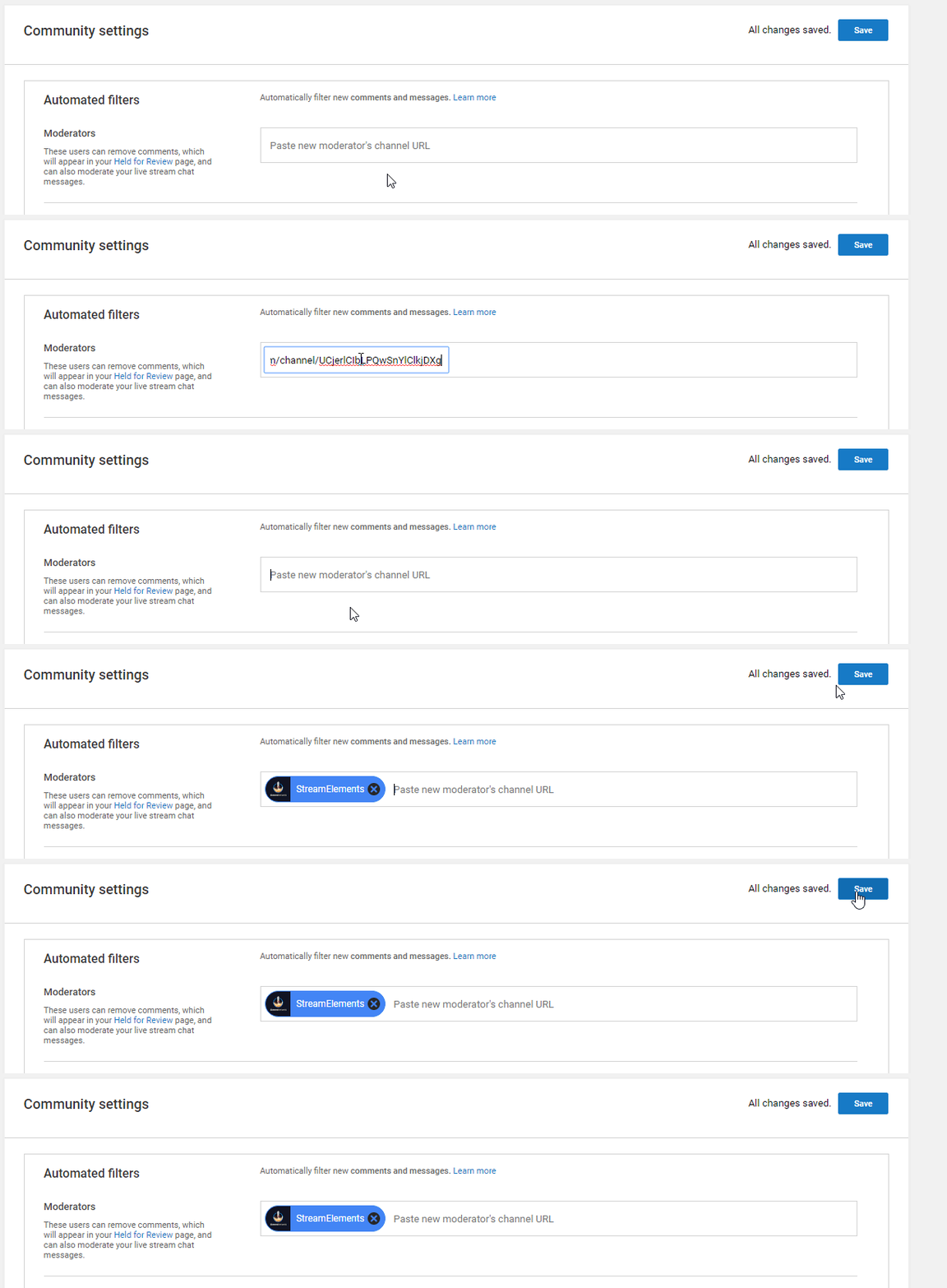
 stuck aurora
@near stag Hey how do i turn of the cloud sync? It's been going for ages because i have some pretty large videos in my scene's
 plucky condor
Hi StreamElements support desk.... 2 Questions I need help with:
- I have had 3 new subscribers on my stream but none of them have triggered the subscriber event for my hypecup... any idea what I am doing wrong? The test works great but only tips/donations continue to fill up my cup in real time on stream!
- Why does the latest subscriber widget not always truly display the latest subscriber to my channel?
Any info would be great! Really enjoying switching over from Streamlabs!
stuck aurora
Hey how do i turn of the cloud sync? It's been going for ages because i have some pretty large videos in my scene's? I asked this quite a while earlier today and still have had no response
upbeat furnace
@stuck aurora Cloud sync never turns off. We are 100% cloud-based
@plucky condor Are those 3 subscribers showing in your StreamElements activity feed? Did alerts show for them?
plucky condor
@upbeat furnace Thank you for the reply! The 3 subs do show in my activity feed but alerts did not show on stream...
upbeat furnace
@plucky condor What happens when you replay them from the feed?
plucky condor
@upbeat furnace Just replayed them and they work fine!
stuck aurora
@upbeat furnace so how long can i expect the upload to take? It's been uploading for 5 hours? I have 20mbps upload speed
upbeat furnace
What are you uploading?
stuck aurora
I have three scenes. My intro and brb scene both have a videos on them
upbeat furnace
🤔
stuck aurora
In total just over a gb of data
upbeat furnace
Where are you uploading these?
stuck aurora
Fuck knows.
upbeat furnace
Are you using SLOBS?
stuck aurora
There is a little thing at the bottom of the stream lab software saying cloud back up my meda sources are being synced with the cloud
What is SLOBS? sorry
upbeat furnace
We are not Streamlabs. We are StreamElements, a completely separate company.
upbeat furnace
No problem
cyan lake
@stuck aurora 
 wheat shuttle
hi, need help, anyone here?
cyan lake
@wheat shuttle we are only here if there is a question to be answered, make use it's a good one ;)
plucky condor
@upbeat furnace now when I replay my subscriber events it does shows up in the alert box but no subscriber variation falls into the hype cup. Any idea why or what I need to change/fix in my settings?
 stoic crane
So I got a Contest on Streamelements which I want to get it into My YouTube stream chat so my Viewers can Bet to enter the contest ? How do I do that ?
nocturne blade
currently there are no loyalty features on youtube @stoic crane
stoic crane
then Is there are any alternative to contest on youtube @nocturne blade other than StreamElements ?
nocturne blade
not that I know of, sorry
stoic crane
Thankyou, have a Great Day!
 sacred nexus
@dim drift Ik heb een vraag, zou je me misschien kunnen helpen?
Can someone help me?
I stream with my PS4 fortnite but my overlay does not work at my stream
cyan lake
correct. The only way to get overlays on a console is to use a capture card, or some system that gets your game onto a PC, and use a broadcasting software like OBS @sacred nexus
sacred nexus
Okay, thank you! @cyan lake
dim drift
@sacred nexus good read too https://blog.streamelements.com/how-to-stream-on-console-7b620b1c46c3

StreamElements - Legendary Live Streaming
The beginners guide to streaming on PS4 / Xbox
 dire pilot
Is SE still working on points being earned for viewers on YouTube as it is on Twitch? Are there any ways for YouTube viewers to earn points somehow? Would be great to have YouTube and Twitch all-in-one integration for those who multi-stream.
near stag
@dire pilot no, there is no loyalty points system for Youtube right now. This will be developed sooner or later, but no ETA on that. And it will most likely be separate from Twitch.
cyan lake
The big problem is getting viewer lists from youtube
 iron plinth
Hi is anyone able to help me with commands right now?
plucky condor
Real life Subscriber event alerts do not show up in my hypecup but the new subs to my channel are present in my activity feed. Testing works but any idea on what I need to change to fix this problem for real sub events??
upbeat furnace
Do you have more than one token for subscriber? There can only be one variation. It allows more than one to be added but that is a bug.
It's working here when using one variation only
 spiral saffron
im not getting notified when people posted new vids
 ocean rune
I need to activate loyalty features to my youtube live chat like giveaway through tickets. Streamelements does not support it as of now on Youtube. Does anyone know a alternative?
iron plinth
Hi! I need help, Is there a way to not have moderators trigger bot commands with keywords of the command?
iron plinth
oh, even with regular expressions?
cyan lake
correct
iron plinth
okay thank you! also I dont have the user managements tab , how do I get it?
under bot on the left
cyan lake
youtube is limited as we work with youtube to get certain features that can be used with that
iron plinth
@cyan lake oh allright and im sorry suddendly the bot stopped working, after i manually input my channel name in place of $(channel) for !commands
in the url for the browser (not in the commands)
iron plinth
@near stag sorry, my bot isn't responding and parting channel did not work (it stopped responding after i manually input my channel name in place of $(channel) for !commands in the url for the browser (not in the commands)
near stag
@iron plinth well how about you revert the changes you made to the commands first and test it?
iron plinth
i didnt make any changes
what i meant is
i did !commands
and the response should be
You can find a list of all Commands here https://streamelements.com/$(channel)/commands

StreamElements
The Ultimate All in One Platform for Streamers
but instead when i click on that link
in the stream chat
it takes me to an error 404 page
of stream elements
so i copied https://streamelements.com/$(channel)/commands
StreamElements
The Ultimate All in One Platform for Streamers
iron plinth
and deleted $(channel)
and put Silem instead
so that it could bring me to my commands page
on my browser URL
it did
but then when i went to test out another command
1 min later
all of a sudden the bot doesnt respond to anything anymore
near stag
the URL will of course not work when you use a command variable there
but this is NOT related to the bot, it is just the URL to your page
iron plinth
yea its just that - after that it stopped responding and its the only thing i did differently
it was responding right before
and its not blocked from my channel i checked
near stag
make sure the bot is modded on youtbe
near stag
and it is in the participants list
iron plinth
its not and parting channel doesnt make it join either
near stag
@iron plinth remember, no bot in the offline chat. you have to stream to have an active bot
iron plinth
it says sucessfully joined but its not there
near stag
because it is youtube, this is how the chat works
iron plinth
and i did live stream for 20 min and it never joined
near stag
no, it has to be public
iron plinth
allright
near stag
make sure you set your streams to public
iron plinth
im opening live so give it 1 min
near stag
no, but youtube allows users to see the player page when offline
do not set that to unlisted, we can't help if we can't even get to the chat
near stag
now i see the page
iron plinth
okay it should be live in 20 seconds
near stag
if you set that to unlisted, it will prevent the bot from joining, so keep it public
 simple furnace
hey so I am having trouble streaming and I was wondering what are the best settings for obs
iron plinth
thanks cryonic! it works now 😄
 potent magnet
This isn't OBS. @simple furnace
potent magnet

visual swallow
tons of people just OBS, but you cant just say something like, what are the best settings for OBS
visual swallow
there are too many factors involved, like your system specs, that will determine what the best settings are for you
potent magnet
Huh?
visual swallow
saying stuff like, "I have a high end computer" helps just as much as not giving any details. System specifics, like CPU, GPU, and RAM are kind of important, and that will determine what kind of encoding you can use
potent magnet
There's an OBS Discord server.
simple furnace
ok
polar caveBOT
For the best OBS support, please join their discord where OBS devs and support volunteers are available all the time discord.gg/obsproject
simple furnace
thx sry
 crude halo
i need help
cyan lake
@crude halo ask your question, and the answer will soon follow
plucky condor
Real life Subscriber event alerts do not show up in my hypecup but the new subs to my channel are present in my activity feed. Testing works but any idea on what I need to change to fix this problem for real sub events?? @upbeat furnace you or someone have any advice so I can get youtube subs to drop in my hypecup?
polar caveBOT
@plucky condor Please connect your Twitch and/or YouTube channel with Discord by going to ⚙ Settings and then Connections here in Discord. https://streamable.com/eg92w
 upbeat furnace
let me know when you've done this and I'll take a look
versed tangle
uhmm... I've been trying to figure out for days how to make the "loyalty settings" appear on my dashboard. I just added the !points command in the "chat commands" thinking it would make it appear. 😅 It did not. 😃
Is there a requirement for that to appear? Thanks 😃
lime walrus
I'm not sure my self, but afaik, Loyalty points are not supported for YouTube, because we are unable as of yet to pull active chatter list.
versed tangle
hmmm.. I see, that is why I cannot do it on my YouTube. Thank you 😃
 safe gyro
hello i had an issues, when people suscribed to my channel the alert pop-up but when they unsuscribed and suscribed again the alert pop-up again, can anyone help me i only want to the alert pop up on the first time suscribe.
plucky condor
@upbeat furnace I have connected my youtube to discord so let me know what else you need from me!
upbeat furnace
@plucky condor Nothing else at this time. The problems you're experiencing with the cup are bugs that have been noted and we will address as soon as we can.
 silent spear
hi, i have a question i made my stream elements accoutn withmy old Youtube name, ive changed it but my stream elements profile page still has my old name
anyone know how to fix this?
silent spear
??
lapis shard
did you try loging in an out again?
 livid jungle
how much % does streamelements take from tips?
errant scaffold
@livid jungle $0.00
 placid spoke
As a new streamer what are the most vital things I should be concerned with? Thank you in advance for any help offered.
plucky condor
@upbeat furnace Thank you so much!
 sly scaffold
@placid spoke https://support.streamelements.com/hc/en-us/articles/115002453351-Becoming-a-Twitch-Affiliate-and-Partner-guide

StreamElements
Passion and struggle explains the road to Twitch Affiliate then on to Twitch Partner.
Remember you just hit “New Game” on what you want to do in life. There will be plenty of ups and downs. Bein...
placid spoke
@sly scaffold sorry I should have mentioned I am on Youtube. Not sure if that makes a huge difference?
dim drift
@placid spoke https://twitter.com/LatteMotte/status/965235542907637763 Network, network, network 😉

Want to grow your #twitch #livestreaming channel but 'never have time'.. Yeah, heard that one before 😎 Here's a guideline how to prep & spend your time wisely. Plan ahead! 🚀
Likes
147

 Twitter
placid spoke
Twitter
placid spoke
@dim drift Thank you. I am very small right now. 39 subs, and my Twitter is even less. I am active in other streams but I do not want to self promote. But I will use your tools now and as I continue to grow. Thanks again.
livid jungle
@errant scaffold What are their payment schedule?
visual swallow
there is no payment schedule with SE, all tips go directly into your account you have set up, SE does not touch the money at all
livid jungle
@visual swallow yes but I have checked my paypal and it's not send there.
visual swallow
If there is nothing in your paypal then make sure it is setup with the right account. What indication do you have that you received a donation?
livid jungle
I can see it in my revenue history.
visual swallow
If you see it in your tipping list, but not your paypal, then you will need to contact paypal. The only way you should see that is if there was a successful transaction, and SE simply uses the paypal API's. SE never touches the money, and will only know about it if paypal API returns a success
livid jungle
What should I ask them? they going to ask me more details.
visual swallow
well, provide them as much information as you can, like date and time, and let them know someone sent you money and you dont see it in your account. Before you do this make sure to double check the email you entered for StreamElements, and make sure you dont have anything from paypal that says the transaction is pending
livid jungle
IT is correct.
I mean, I don't have any information of this because I have no logs of anything.
visual swallow
and just to make sure, they tipped you via paypal and not G2A?
visual swallow
then it should be in your G2A wallet, not paypal
visual swallow
idk, i dont use G2A, but if they tipped you through G2A, thats where the money will be
cyan lake
Yeah
With G2A, there is a delay, especially depending on the type of payment received. Make sure to understand what it all is, all we do is connect to it
versed tangle
Hi! I can not find loyalty settings in my dashboard. can someone help me please?
OH! know what... nevermind,...I see that's for twitch.... oops!
livid jungle
Also another question
Why is there no "top super chat' widget?
There is top tipper, latest super chat but
not Top Super Chat
plucky condor
When I reopen OBS and it goes to populate streamelements (more specifically my hype cup) the tokens come flying in and bounce right out! Even though when I go into the hypecup settings they have like 0 bounce etc.... any idea why that happens upon startup??
silent spear
@lapis shard yes i did, doesnt work
versed tangle
How can i unlink my youtube account from my stream elements people.
versed tangle
??
 earnest vessel
Anyone else having issues with Overlay elements not completely loading up? Backrounds etc
visual swallow
Where are you seeing the problem, in the overlay editor, broadcasting software, or both?
earnest vessel
Overlay Editor
visual swallow
can you post a screen shot of what are you seeing?
earnest vessel
Kite: just figured out it was a browser issue, was using safari on my macbook - seems to be fine with chrome
one thing i did notice though, when using scroll text, it shows at a smooth 60fps within the overlay editor, but goes down to 30fps within OBS Studio - regardless of having the source set to 60fps
visual swallow
Is your video settings in OBS set to 30fps
visual swallow
ok, so I dont see that when I try to recreate it. I made an overlay with scrolling text and added it as 2 separate browser sources, one at 60 and one at 30. The bottom one is the 30, and it might not be too noticeable to most people, but the 30 fps is clearly not as smooth as the 60 indicating that there is a frame rate difference. Unfortunately I could only render this gif at 33fps, but the bottom is clearly more jittery than the top, which I would expect from the difference in FPS
near stag
@visual swallow so far i know, OBS has no real support for 60FPS browser source. Xsplit has, try that if you want to see the difference
visual swallow
yeah, i am not installing xsplit for that. Even if the browser source is not truly running at 60 FPS, I can still see a pretty clear difference between 60 and 30, with the 60 looking better. Its not a massive difference, but its there.
but at the end of the day, it will be a CEF limitation, nothing that SE can do about that
near stag
@visual swallow yeah this is why some streamers go the extra mile and create video overlays. even a hard compressed webm 30fps one looks way better 😃
 blissful nexus
How do you get the bot to say pre wrote msgs
near stag
@blissful nexus check the timers section if you want to have the bot to send messages from time to time
 brisk ocean
Do you need to have a certain amount of subscribers to be able to activate/use the loyalty settings?
visual swallow
there is no loyalty for YouTube at this time
visual swallow
there is a loyalty system for Twitch, not YouTube
visual swallow
There will hopefully be one for YouTube Soon™ but it is not currently possible right now
brisk ocean
Okay 🤞
 spiral spear
How do i find my donation link?
visual swallow
you dont need to post your question in another channel, 1 min after you first post it. Be patient, someone will answer
 west tartan
How do I switch the account it directs me to for me to set my moderator I have more than one YouTubes and it redirected me to the wrong one
???
 warped bough
how do I start making streamelements to start commentating in the chat
versed tangle
same for me
 fallen copper
I just want to confirm yesterday I set up me paypal and everything and I want to to cinfirm that streamelements does not take any part of the donations like youtube does right?
 wispy oyster
For youtube live-streaming, how do I get the scenes to show up while I am streaming? Such as a brb screen, stream ended screen, etc.?
lime walrus
@west tartan Have you tried this?
@warped bough @versed tangle I'm not sure if it works for youtube, but have you looked into the bot modules?
@fallen copper No we don't take any fees or any amount from Tips/donations! Only PayPal does. https://streamelements.com/dashboard/tipping/fees
@wispy oyster You may want to use OBS for that. It allows multiple scenes that can have the different overlays(brb, gaming, offline, starting soon)
 main siren
i cant add my youtube channel to stream elements https://www.youtube.com/watch?v=qvmztqxQmQA&feature=youtu.be
cyan lake
@main siren did you already sign in via the YouTube account separately
main siren
waht do you mean
near stag
@main siren did you log in with youtube into streamelements? if yes, it has created a separate login, preventing you from adding the youtube account to the login with the twitch data.
 static pagoda
I'm online but the bot is not in the chat?
and it is showing that I'm offline for some reason, but I'm online at the moment
near stag
@static pagoda youtube takes a few minutes sometimes to register as online and for the bot to show up. Should be faster tho. Let me see
@static pagoda ну и по русски можешь если умеете)
near stag
yeah i see the stream, the chat etc right now.
static pagoda
yas
near stag
can you part the bot in our dashboard and press join again?
near stag
ok. not much we can do right now. let me tag someone who has more ideas @cobalt flare
static pagoda
Appreciated
main siren
i needed to go for a bit but i still dont know why i cant acces my acount within streamelements
near stag
@main siren ok, i repeat - did you log in with youtube into streamelements before? if yes, you will not be able to add the youtube account to a different login (with yout twitch data etc.)
main siren
no i havent with the acount that im trying to use but i have before with a diffrent acount
and i havent connected the channel to anything yet as far i know
@near stag
near stag
@main siren in that case you should be able to add the youtube channel to your account. So log in into StreamElements and go to account settings and add that. If you log in with youtube, you will create a login for that channel alone.
main siren
can we go into a call so you can show me what to do?
because i cant acces my dashbord if thats where it is
near stag
@main siren yes this is in the dashboard. and no, a call would not help here. You should be able to log in into StreamElements to make it work.
main siren
i cant do
near stag
@main siren let me tag someone who can look into that
main siren
okay
near stag
@tropic atlas ⬆ not able to log into SE, need your assistance.
main siren
when i try to go to my dashbord it says that i need to add my YT channel
the rest is the same as in the video
near stag
@main siren you logged in with a google account. then you need to select the YOUTUBE account that is related to that google account (you can have multiple, this is why).
main siren
i log in using the same account as i used to add the channel
does youtube have their seperate acounts?
near stag
You need to log in with the youtube channel, so when you select the google account, select the youtube account after that
main siren
okay
let me see
it should be the same acount
because when i log in to youtube when im in incocnito i sing in to the youtube acount im trying to connect
near stag
@main siren disable the incognito mode please
main siren
okay and then?
near stag
just log in with your youtube account. you should always select the account that has been used for StreamElements before
main siren
(only used incognito to check if im using the right acount)
but i havent used streamelements with the acount before
near stag
then you the account that you want to register on streamelements
once done, it will be automated
without icognito and with saved cookies, it is instant
main siren
incognito isnt the problem
i used it to check if i am using the right acount by logging into youtube
near stag
@main siren like i said, once you log into streamelements with an actual youtube account, it will work without any issues. please do not mix up google and youtube accounts
main siren
how can i choose they use the same gmail+the same pw
near stag
@main siren it will ask you for a youtube account which you want to use, then for permissions and if you agree, it is done.
near stag
@main siren and what is going wrong here? i still do not get the error, what is broken
main siren
i dont know
when im loggin in it show the logo i selected and when i have logged in its shows a j
but your google acount is the same as your youtube acount right
near stag
@main siren let me DM you some stuff.
main siren
sure
fallen copper
@lime walrus thx a lot I got a donation of 1 dollar an paypal took 36 cent out of it lol
near stag
@fallen copper paypal takes 0.30$USD + 2,9%. from every donation, be it 1$ or 1000$. Raise your limit higher if you want to avoid many small donations, but this is risky.
static pagoda
@near stag the bot just started without me doing anything, just letting u know
near stag
@static pagoda  ok, thanks for the update. how long di you stream at that point, like 45min?
polar caveBOT
@versed tangle You can find your JWT token on your account channels page: https://streamelements.com/dashboard/account/channels
(Don't forget to click on "Show Secrets")
versed tangle
thanks
 torn prairie
hello, my stream elements bot isnt appearing in chat
it says live and everything but none of my commands or timers are working.
upbeat furnace
@torn prairie is your stream public? how long have you been live?
torn prairie
it is public and i have been live for like 20 mins
upbeat furnace
There's not much we can do at this moment but I will mention it to our lead bot developer in the morning. YouTube unfortunately doesn't make it easy for 3rd party tools (especially when it comes to chatbots but we do the best we can.
The bot will eventually join your channel
We're seeing large spreads variance in the time it takes
Sometimes the bot joins in 5 minutes sometimes 30+ minutes.
torn prairie
ok
 fierce nebula
Hi @polar cave My Bot Isn’t Working In My YouTube Chat (TBB - iTzOscar)
upbeat furnace
@fierce nebula is your stream public? how long have you been live?
fierce nebula
Yes My Stream Is Always Public But Right Now I’m Not Streaming
upbeat furnace
the bot can only join live streams
torn prairie
same ^
fierce nebula
Ok well I’ll be streaming in two hours
 granite bison
Hello! Someone donated to my stream tonight and even sent me a screenshot saying that they successfully tipped but no notification was received. Could you please help? thanks 😃
fierce nebula
I’m now streaming but there’s no bot ..
@upbeat furnace
@polar cave The bots not in my stream
 timid cipher
I am ready to use the new chat, blacklist word replacement feature. How do I get it and are their instructions? Thank you.
I need it badly.
fallen copper
I am using the fortnite overlay but when sombody tips the message does not appear on screen why?
lime walrus
Did they tip using the SE Tipping page you have?
 brittle rock
Is they a point or coin system for YT?
near stag
@brittle rock not yet. This will probably be implemented sooner or later, but no ETA on that.
 wind cliff
Hi
sly scaffold
@wind cliff hi
wind cliff
Can i have robux now pls
lime walrus
We are fresh out of robux, sorry.
sly scaffold

 robust mango
We'll put some more in the oven 
fallen copper
@lime walrus Yes they did and I could see the message on my revenue page but not on stream
robust mango
Sounds like you're not using the {message} variable in your alert box tip alert settings
 tired dagger
hooow
 south dawn
Uhh
I just started using this
How do i get the chat on my screen like streamlabs
and how does like a donator or Subscriber pop up when they do it on the screen
When they Donate or subscribe
@exotic lagoon
Scuse me?
@sly scaffold @prisma steppe
Help please
@tropic atlas @obsidian edge @robust mango
._.
tropic atlas
heyo, there's no way to show chat just yet
tropic atlas
and for showing the donator an subscriber popup you're looking for the alertbox widget
in the overlay
south dawn
How do i use the overlay
tropic atlas
here's the tutorial video for the overlay manager: https://www.youtube.com/watch?v=X7XrDdRE7Fk
Create an amazing overlay with StreamElements, watch our video guide to learn how. ----- Tipping page setup: https://youtu.be/eLzxRkq7tJo Add KappaGen to you...
and specifically about the alertbox widget: https://www.youtube.com/watch?v=8LVRd2X4HvU

Learn how to customize your alerts and setup different alerts variations with StreamElements Alertbox ----- Overlay Manager guide: https://youtu.be/X7XrDdRE7...
 full pendant
how do i find my jwt token?
robust mango
Click on your username in the top right corner of the dashboard and then tick show secrets
full pendant
thank you
robust mango
No problem
 haughty iron
Can i get robux now?
sly scaffold
@haughty iron can you give me some robux please?
haughty iron
No i Can not
sly scaffold

sly scaffold
robust mango
I have no robux
versed tangle
Hallo
robust mango
Hello
versed tangle
i subscribed with my alt account and in obs i didn't get the alert
it only works when im in live ?
robust mango
@versed tangle Should still alert if you're offline, did you perhaps have your sub info set to private on that alt account?
robust mango
Excellent
fallen copper
@robust mango I dixed I was using the fortnite already made overlay and I just had to click show messages
robust mango

versed tangle
its possible to use media share in youtube ???
nocturne blade
not currently
versed tangle
:c
main siren
if i connect a youtube and a twitch channel to the same acount do they share alerts ect?
sly scaffold
Do you mean overlays?
You can copy overlays over to your other account if that's what you're asking
fallen copper
Does anybody know when loyality points will come to Youtbe streamers too?
there are some bots already that have it for Youtube
thorn wedge
Hello @fallen copper , We are working on it
versed tangle
when somebody subscirber it does a sound i already put a music but the sound still how i disable that sound ?
sly scaffold
@versed tangle Not yet, we're working on it
 vital girder
Your ace live streaming I can't purchase anything (pro)
 long prawn
Hello, I can't find where can i activate the chatbox for youtube
sly scaffold
@long prawn You mean the bot?
@vital girder ace streaming is outdated, we're currently working on a new app that will be released soon ™
visual swallow
There is no chat widget for youtube at this time
long prawn
o i activate the bot but when someone say something, i can't see on obs
ok thank @visual swallow
vital girder
@sly scaffold oh ok
main siren
@sly scaffold no i mean if someone subs on twitch or youtube that they will display in the same alert box
sly scaffold
That is not possible as they're two seperate platforms with no connection
main siren
isnt that creatable by conecting twitch and yt then comebining the alerts to the same box
?
@sly scaffold
visual swallow
no, you would need a separate alert widget for each platform, so one overlay with twitch alerts, and one overlay with youtube alerts
visual swallow
kind of. You would have one overlay that has your twitch alerts, and one overlay that has your youtube alerts, then you add both of these to OBS
main siren
okay il use that then thx
visual swallow
fallen copper
When somebody donates do they see my paypal e-mail or no?
thorn wedge
@fallen copper You can always create a Paypal account only for the stream if you do not want people to know your personal one.
main siren
where can i acces the chat or facecam video so i can use it in diffrent templates
in the template
thorn wedge
Hello @main siren you can find the chat on your Dashboard on Youtube, and what do you mean by facecam templates?
thorn wedge
So you can copy it into your overlay on the different scene 😃
main siren
buts its an vid? how do i do that
thorn wedge
You need to go to your overlay editor: https://streamelements.com/dashboard/overlays
And you will find there all the widgets cam boarders etc
StreamElements
The Ultimate All in One Platform for Streamers
cyan lake
Click on the widget, then in the layers tab, there is a duplicate button. That will allow you to get it to other overlays @main siren
main siren
ok
 jagged berry
My Widgets don't work.
When someone subs nothing happens.
Also, I don't have loyalty settings, how do I get those?
robust mango
Loyalty settings aren't available for YouTube yet, but sub alerts will work if you have the alert box in your overlay and the user subbing has their privacy settings set to share their subs publicly
jagged berry
Yeah, I tried with a different account I have, but the sub still didn’t show up.
I’ll go to twitch instead, I was gonna do that anyways. Thank you for your time!
thorn wedge
@jagged berry Did you made sure on the overlay editor that the sub alert works before adding into the OBS?
thorn wedge
And does it show on the emulator?
thorn wedge
Cool so it should work fine when someone subs
livid jungle
Can you guys please add Top Superchat option in widgets?
They already have lastest superchat and stuff but why is this missing? I really need it.
This is the only thing that keeping me using Streamlabs
visual swallow
When you click this link it will add an overlay to your overlays that contains the widget, but most of these are written for twitch, I do not know if there is support for a custom event list widget for YouTube
fallen copper
Thx
 normal tulip
If you are able to check it on YT, let me know if this works for you @fallen copper
I think it should
Just like regular widgets
fallen copper
I can not sorry I might tell you tomorrow or later in the week
 lament coral
Is it possible to disconnect your YouTube from streamelements and add it to your Twitch SE account?
I keep getting the notification that I can't because there is already an account that exists. thx!
 obsidian adder
If you have seperate accounts for youtube and twitch contact @upbeat furnace @lament coral He will help you out
brittle rock
Anybody got Instagram?
And y’all rlly need to add loyalty points for YT y’all will blow up of u do
jagged berry
Yeah.
thorn wedge
Hello @brittle rock Yeah we are working on the Loyalty for YT:)
And who doesn't have IG now days 😛
normal tulip
@thorn wedge I don't have instagram, snapchat nor roblox account. I am an ancient mystery.
 torn turtle
I tried to test the subscriber alert, it worked on the emulator, but not on the real thing
and also the bot didnt want to connect into the stream
fierce nebula
Umm how do I get the commands ? I’m Live right now
thorn wedge
@fierce nebula please make sure you added the bot to the channel : https://streamelements.com/dashboard
StreamElements
The Ultimate All in One Platform for Streamers
@torn turtle Did you change your name recently?
torn turtle
Nope
thorn wedge
@torn turtle Please make sure the Bot is a mod on your channel
iron plinth
Hi! Is there a way to transfer my Youtube stream elements chat commands to my twitch stream elements chat commands?
or to just sync everything from my Youtube stream elements to my twitch stream elements channel?
torn turtle
i did check that
near stag
@iron plinth you can transfer some commands. but manually. reason: twitch and youtube have different functions and features, so there are different commands.
torn turtle
iron plinth
@near stag okay thank you cryonic! 🙂
 long moss
@robust mango Thanks for your time today.
robust mango
No problem
versed tangle
Is the chatbot's change name feature in ground control not available for youtube? Thank you! 😃
thorn wedge
Helllo @versed tangle at the moment the Custom name does not work for Youtube, we are working on it to add this feature:)
fallen copper
How do I get on the sellout?
sly scaffold
If you are streaming with StreamElements
- Chat bot (modded and in chat)
- Tipping service (link in panels below stream)
- Alerts
Please fill out the form at https://strms.net/sellout .
After you have submitted the form, your channel will be verified and you will be added to the NowLive bot announcements if your channel meet the requirements. Thanks! :SE:
https://strms.net/nowlive lists all channels that have been approved and are setup to be announced in #402919550066229250.

Google Docs
Are you interested in having your twitch stream promoted in the community discord when you go live? Please fill out this application. Your application will be manually reviewed and if you meet the 3 requirements you will be added to the stream announcements in the #sellout di...
fallen copper
I just filled it and I met all of the requirments does that mean now I will see my.channel on sellout
nocturne blade
it takes a few hours
versed tangle
Oh I see, that's why. Thanks. 😃
lament coral
@obsidian adder Thank you!
 harsh swift
Can someone understand how song request works with youtube?
upbeat furnace
@harsh swift There is no mediarequest for YouTube streaming at this time
versed tangle
Quick Question , how do i copy alert box from streamelements website into obs ?
 knotty forum
StreamElemants wont join my youtube channel
polar caveBOT
@versed tangle To add your overlays to OBS, add a new browser source in your scene. Paste your overlay URL in the browser source properties, set the dimensions to 1920x1080 (unless you changed them on the website), and :ballot_box_with_check: “Shutdown source when not visible” https://youtu.be/KDvLynUqXI4
upbeat furnace
@knotty forum Is your stream public? How long have you been live?
earnest vessel
Hey guys, just thought i'd like you know about this bug - for some reason, sometimes it will show, and also display two notifications on stream alert box for a new subscriber. This happens maybe 1 out of 10 times. Is this a current known issue?
knotty forum
yes.ive been live for 34 minutes
upbeat furnace
@knotty forum please connect your youtube account with discord and I will look into it
polar caveBOT
Please connect your Twitch and/or YouTube channel with Discord by going to ⚙ Settings and then Connections here in Discord. https://streamable.com/eg92w
 robust mango
@upbeat furnace He's live, the bot is in his channel Moderators, we've parted the bot, logged out, logged back in and then joined the bot. His stream is definitely public, out of ideas 😄
knotty forum
ok i connected them
upbeat furnace
@earnest vessel We've not seen this reported yet. Has this happened during multiple streams?
earnest vessel
Yea my most recent 2 streams.
upbeat furnace
@knotty forum We're looking into it
earnest vessel
K, it's not major, just a tad annoying for the multiple notifications
knotty forum
now its working
upbeat furnace
@earnest vessel You receive two alerts?
earnest vessel
Yea
upbeat furnace
OK, we will monitor this. Please let us know when/if this occurs again.
earnest vessel
Will do :] thanks guys
also: looking foward to the Loyalty program on the YT side of things so I can rid of Streamlabs Chatbot
fallen copper
@earnest vessel happens to me too but I think the just subs then unsubs and sub again
Because they want to see their name twice on atream
earnest vessel
@fallen copper makes sense, i guess it captures the sub immediately twice instead of adding a small delay?
might be something for these dudes to look into
fallen copper
Maybe idk
I have done it too just want to see my name twice on stream lol @earnest vessel
Can somebody please tell me if I am accepted for the sellout?
visual swallow
There is no promotion of any kind allowed in this discord, thanks
cyan lake
@fallen copper give it time. Spamming the channel about it won't get it reviewed faster
severe elm
does the loyalty system work with YouTube Live Streaming?
lime walrus
@severe elm Unfortunately, the loyalty system does not work for Youtube at this current moment. I think its being worked on, but no ETA on it.
severe elm
ok thanks!
 thin meadow
hello
may i ask for some help pls?
im on my widgets and i cant see any chat widget for my stream
visual swallow
youtube does not have a chat widget at this time
thin meadow
oh ok
uhh
my stream overlay wont do the control f thing
it only shows a quarter of the overlay
visual swallow
check the resolution you have it set to, its probably set too low
thin meadow
i tried setting it to my screen resolution its still a quarter of the steam overlay
visual swallow
Something does not match then between your canvas resolution, the overlay resolution, and the browser source resolution
The other scenario would be you made an overlay at 1080p and later changed its size to 720p
cyan lake
@thin meadow default overlay size is 1920x1080. If you did not change it when creating it, then it will be this. Open the browser source settings, change width to 1920, height to 1080, hit save, then hit Ctrl+f
torn turtle
i tried again with the bot and its not showing up 😮
idk why it doesnt want to work, neither with the alerts widget
fallen copper
I tried the widget share and most of them are only for twitch 😦
lapis shard
sadly :(
have to wait on youtube to unlock our features fo Youtube
long moss
Anyone have any ideas on this? Tried multiple devices and browsers. https://youtu.be/DtzI--nZa1o
 versed tangle
When i am trying to link my youtube channel it says its already linked but that is not even possible?!
thorn wedge
@versed tangle try to login with your Youtube channel, usually people create an account and forget about it.
 gloomy creek
hi
timid cipher
Okay. I have a Bot, modules, twitter... question.
Only off and on does my SE bot deliver the requested twitter posts to my time-line. Is there a way to jump start or nudge it somehow?
Also can I engage a color if the tweet includes a certain word or phrase?
( I will be on and off the discord and hope someone can help answer ) thank you so much. ~Beauty
brittle rock
Yo
Whenever someone tips to me I check my PayPal and it says pending
How can I receive it right away
obsidian adder
I'm not 100% sure but I think switching to a business paypal would help @brittle rock
@timid cipher I'm not sure there is a way to jumpstart it, hopefully youtube becomes easier for us to work with in the future so there isn't as spotty. As for the color request I don't believe that is an option at this time
 dim inlet
@brittle rock @obsidian adder Having a business PayPal would definitely help Also having a business account Help protect your identity As when people send you tips it will only show your business account name Only other thing I could say is if you do all that and it's still pending #1 If it has an option to accept it Try clicking it #2 If a person is from outside of your country's currency it might take PayPal A few hours or days to sort that out or #3 It's just PayPal being PayPal [ Well all of that is based off personal experience But hope it helps 
cyan lake
If you have to accept the transaction, then you are missing information in your account. Make sure you are fully verified, and have filled out all the personal details. If it still doesn't work, call PayPal support and ask, they will tell you what is missing
 golden hamlet
I recieved a $5.00 donation and I have my paypal linked why haven’t I received my donation yet?
visual swallow
is it in your paypal, or did you receive an email from paypal about the donation
golden hamlet
No someone donated through stream elements and it hasn’t came into my paypal wallet yet
I’m sorry for double text in different chats
visual swallow
Is it in your activity feed?
If they donated using PayPal you would get an email from PayPal, if that did not happen, the transaction did not happen. If they used g2a pay from your tipping page then you need to transfer from your g2a pay wallet to PayPal
golden hamlet
So look this is was happened I told people to use the !donate command they used it and someone donated after the stream I looked and I can’t find it in my PayPal
Where did the donation go?
near stag
@golden hamlet did you add G2APay options? If yes, check that
near stag
additional payment options next to paypal. not available in some areas
visual swallow
Did you get an email from PayPal about the transaction
golden hamlet
No
near stag
and check if you have tipping moderation enabled in the tipping settings - this would prevent the donation from getting anywhere
because you have to approve it
golden hamlet
I checked my alt gmail and I found it but I said my PayPal isn’t verified and that I have to link a bank account to it
Thank you guys for HELPING SOOOO MUCH
visual swallow


timid cipher
Thank you so much @obsidian adder
fallen copper
I submitted my request for sellout a couple days ago but got no response and I can not see my self on the sellout
upbeat furnace
@fallen copper It can take up to a week
 knotty pecan
way the bot is not working in my channle?
lapis shard
Is the bot moded?
It also only joins your channel when you are live
cyan lake
and it has to be a public stream
cyan lake
how long have you been live (are you live right now?)
cyan lake
There are some issues right now with our maintenance that we are working to fix. We appreciate your patience
 cerulean silo
Ok thank you
 onyx hollow
Is anyone else having issues with adding Chat Commands to the bot? Keep getting "An error occurred.
Could not fetch commands"
cyan lake
@onyx hollow thank you for reporting it. Can you try a hard refresh? (ctrl+shift+r on chrome)
tropic atlas
@onyx hollow on the website, or through the chat?
onyx hollow
Thru the website & I'll try a hard refresh now.
No dice.
Seems to be working again! Cheers 👍
tropic atlas
great, thanks!
fallen copper
The chat bot was not on my channel and 2 hours later on my stream it said in the chat stream eleme ts bot running why?
It was working perfectly fine up till today
cyan lake
there was some issues earlier today (see #announcements) that could have caused that
 spice sigil
Hey guys i just started using stream elements, i can't see the loyalty program on my dashboard anybody knows why it isn't there?
cyan lake
@spice sigil at the current moment, there is no loyalty for youtube. it is something we are waiting on features from youtube before we launch it
 bright remnant
Hello is there any way to change my Youtube streamelements profile name to reflect what my current and actual YouTube channel name is?
 cerulean mica
my YT total subs thing is stuck at one number and wont change
thorn wedge
Hello @bright remnant The name will change automatically when you log in with the youtube account
@cerulean mica Did you try to sign out from the site and sign back in?
pseudo trellis
I NEED HELP
lapis shard
whats up no need to yell 
pseudo trellis
my alertbox sub-donation wont show up in obs
i copied the alerts url to broswer source in obs and it doesn't work
lapis shard
did you set the resolution right?
lapis shard
!multi
polar caveBOT
Make sure to :ballot_box_with_check: “Shutdown source when not visible” for all browser sources (all OBS scenes). If using studio mode, uncheck “Swap Preview/Output scenes After Transitioning.” Also keep in mind that sound can play from any overlay loaded in the browser (editor or launched). https://i.imgur.com/FegZJQS.png https://i.imgur.com/yY0wcFl.png
lapis shard
you also cant hear them?
pseudo trellis
yes
lapis shard
@visual swallow OBS god could you think of a reason why he doesnt see and HEAR the alert?
pseudo trellis
and see the alerts
lapis shard
yes I said that its fine
visual swallow
If you cant see them then the overlay is either not added correctly, behind another source, or the cache is borked. For not hearing it, assuming the overlay was added properly, then you are either not capturing the default audio source of windows, or you have muted OBS
pseudo trellis
now im hearing the alerts in very big delay
very big
and see the alerts lagging
visual swallow
what are your system specs? cpu, gpu, ram
pseudo trellis
I7 7700K GTX1070 16RAM 3000MHZ
visual swallow
that should be plenty unless you are trying to do something insane like doing x264 encoding on slow preset on a single PC. I cant replicate any delay issues, but I dont have a YouTube account, only Twitch, so I cant properly test this to see if its a platform specific issue
lapis shard
@pseudo trellis whats your settings for OBS?
pseudo trellis
Encorder: nvenc h.264
Rate control: CBR
bitrate:1900
preset defalut
profile: main
level: auto
i can send you the url link and you test it on your obs?


 lime walrus
@shell mirage No self-promoting, buddy!
polar caveBOT
@shell mirage Are you a StreamElements all-in-one streamer and interested in stream promotion when you go live? Please fill out this application https://strms.net/sellout and if you meet the 3 requirements posted in the :pushpin: pinned message in #welcome you will be added to the stream announcements.
 fallen river
howdy, I somehow got two different streamelements accounts, one for my twitch and one for my youtube. I'm trying to unlink the youtube one but when I follow the steps on myaccount.google.com/permissions to revoke access the access just comes right back in a minute and the twitch account with you isn't able to add the channel.
thorn wedge
Hello @fallen river Please DM me your JWT tokens of both accounts
And the names I will merge them:)
thorn wedge
You are welcome!
cyan lake
@slate perch can you explain what is happening and/or give screenshots?
 slate perch
@cyan lake Whenever i try to open my dashboard the whole screen gets white and never loads up
Although the help button is there
Oh wow nvm it works now
Thanks in advance though
cyan lake
 paper rover
I want to login with twitch but I'm already logged in with YouTube, how can I change this
 radiant marten
how do i set up my loyalty system if i stream on ps4?
visual swallow
Loyalty is only available for twitch at this time
visual swallow
no
radiant marten
lol
obsidian adder
@paper rover Are you saying you have a seperate SE account for youtube and twitch?
 civic rapids
hi i need help
 stone egret
i need help
i cant find the loyalty button
im trying to add the coins system to my youtube streams but i cant find the button
oh bloody hell, i just scrolled up and saw that its only available for twitch rn
screw this dumb shit lmfao
paper rover
@obsidian adder I figured it how I have streamelements linked to my twitch and youtube
lime walrus
@KodKilla#8649 The loyalty system does not work for Youtube. Its in the works, but no ETA.
obsidian adder
There is no way for us to have loyalty and we hope youtube allows us to in the future.
 acoustic estuary
How do I disconnect my Youtube channel from streamelements so I can add it to my other SE account which manages my Twitch account?
acoustic estuary
I went to add my YT channel to StreamElements, followed a StreamElements link instead of doing it from inside my SE account, and it created another SE account for the Youtube channel...
 spark meadow
why i am not getting loyalty setting in my dashboard o
lime walrus
@spark meadow
thorn wedge
Hello @jaunty falcon how may i Help you?
 jaunty falcon
กดติดตาม
thorn wedge
Hello @acoustic estuary just DM me your JWT of both accounts and I will merge them:)
thorn wedge
If you have questions regarding our platform I would gladly help you.
 sand zephyr
Hello
I was sent over here by streamelements live chat for help
Anyone here ?
Someone plz help me
cyan lake
@sand zephyr can't help if you don't tell us what the issue is
sand zephyr
Sorry but can u assist me
cyan lake
Like I said, only if you tell us what the issue is
sand zephyr
Okay so i just made a youtube channel and streamelements isnt talking in chat and my commands dont work
Neither does nightbot
cyan lake
I can't help with nightbot, but are you currently live?
cyan lake
Ok, you need to be live, and public for the bot to join YouTube, and it takes about 5-10 minutes
sand zephyr
I was live for 1 hr waiting
Anf y dont the commands work
Such as !sr
And alot more
cyan lake
There is no song request system for youtube
sand zephyr
And im not mod
cyan lake
I can't help you while you are not live
cyan lake
I will try my best. Go live, make sure the stream is public, and wait 5 minutes, then DM me stream link
sand zephyr
Okay