#dev-chat
1 messages · Page 5 of 1
 warped tusk
 broken coyote
emulated events dont get stored to session data
warped tusk
broken coyote
emulated events dont get stored to session data
could i implement something that the credit roll reacts to emulated events?
broken coyote
you could. but i dont see the point in why you would?
warped tusk
broken coyote
you could. but i dont see the point in why you would?
i edited the credit roll with resub, subgift ...... and i wont to test it.I would like to test it because I don't know if my changes work that way
broken coyote
i could be wrong. but i dont think you can throw that info in manually.
my 2 cents would be to worry about it when you can actually get subs
warped tusk
broken coyote
my 2 cents would be to worry about it when you can actually get subs
so i have to solve the problem in some weeks.. and i try to learn how it works. the creator must have tested it somehow, right? sry for my stupid questions but i got some basic skills in c++ and its hard to go through js and this writing way.
broken coyote
i mean, thats just my opinion. take it with a grain of salt.
warped tusk
for my understanding, to test it with emulated events is it nessasary to act with the api?
 proud kiln
Can I change a user's points via the API?
 severe shell
proud kiln
Can I change a user's points via the API?
severe shell
proud kiln
Can I change a user's points via the API?
You can
https://dev.streamelements.com/docs/api-docs/54472038d5274-channel
"mode" can be "set" or "add"
"add" you gonna add points to what the viewer already have
"set" you gonna... well, set the exact amount
Bulk add/set points to users Powered by Stoplight.
 steady cave
So I need to be able to manually loop video clips seamlessly but there's randomly a stutter or gap that's ruins the smoothness of the loop.
I loop them by checking the "ended" and "play" events.
I'm using the script from "Reboot0" to manage the queue for events. So at the end of the clip if there a queued notification it'll play the corresponding clip then go back to an idle animation. This part is working perfectly just having the issue with clips not starting instantly or stuttering a few frames at the start
 gusty leaf
I was editing the alerts. However, when I clicked the "Emulate" button for testing, it looped. The warning started working continuously on the OBS side. I also deleted the Streamelements alert overlay. But after that the alerts didn't work again.
The link on OBS is up to date.
Error: "Emulation sent, but alerts are paused in the activity feed"
broken coyote
steady cave
So I need to be able to manually loop video clips seamlessly but there's randoml...
I made a looper for nerd or die. It's free. you can see if it will work for you. There is stream elements version included in it. I wouldn't recommend the local version
steady cave
broken coyote
I made a looper for nerd or die. It's free. you can see if it will work for you....
So the looping of a single clip is not the issue, basically I'm trying to loop 1 idle video and if an alert comes in, it going into a queue and a soon as the idle animation end the alert animation should start. But there's random stutters and delays that are noticeable enough to mess with the smoothness
broken coyote
ahhh so something like manvsgame
steady cave
Not sure who that is. The client showed me a clip from Mizkif's little frog guy
You made the social media looper right?
broken coyote
yea
steady cave
Ah neat. But yeah they want something like the frog from mizkif. It all works but I know html is poop at being accurate with manually looping video, but the person doing the animations is making the clips frame perfect.
There's is a 1 second overlap but again html not the most accurate specially to the millisecond
broken coyote
my assumption would be the end frame and beginning frame aren't the same. other wise, there should be no studder. but without seeing it. its hard for me to tell
severe shell
gusty leaf
I was editing the alerts. However, when I clicked the "Emulate" button for testi...
https://streamelements.com/dashboard/activity
Click on the play button:
 steady cave
Well in their software the frames are perfect let me see if I can record something and catch it
broken coyote
just stuff to sit here and suggest things without having hands on it. onEnded and then triggering the alert video should work fine in theory
steady cave
broken coyote
my assumption would be the end frame and beginning frame aren't the same. other ...
Yeah that's what I thought too. I'll also double check the clips again just to see if there's any wierd issue
Could webm cause an issue? Even tho it's recommended over mp4?
broken coyote
shouldnt be. give me a few and i'll toss something together you can try
steady cave
Thank you so much, take your time
steady cave
broken coyote
shouldnt be. give me a few and i'll toss something together you can try
Also I don't think that the Queue I'm using from Reboot0 could be an issue because I'm just checking for the end and start of the clips with normal eventemitters
broken coyote
you will more than likely want the 2nd video pre-loaded and waiting. here is how i would do it

thats for the transition from the 1st to 2nd. just a rough mock up. i dont have your webm's so i cant complete build it
steady cave
I'll give that a try. I've tried hiding/showing the clips with just opacity and using the hidden attribute
steady cave
broken coyote
thats for the transition from the 1st to 2nd. just a rough mock up. i dont have ...
Seems like using just block and none helped, its the same but the small stutter definitely is less noticeable. I also moved around where in the code the clips get shown or hidden and that also helped.
Does the order of showing, hiding and playing matter right?
  tip.addEventListener('ended', () => {
     if(Queue.length() <= 1 && idleAni.ended) {
       tip.style.display = "none";
       idleAni.style.display = "block";
       idleAni.play()
     }
  })
it response
{
  statusCode: 403,
  error: 'Forbidden',
  message: 'Not allowed to perform this operation'
}
I have to use the SE JWT token, right?
severe shell
proud kiln
it response
```
{
statusCode: 403,
error: 'Forbidden',
message: 'Not allow...
Right
proud kiln
why does it say forbidden then
gusty leaf
severe shell
https://streamelements.com/dashboard/activity
Click on the play button:
it didn't work.
severe shell
proud kiln
why does it say forbidden then
Where it says channel, you probably typed the channel name. But on the page it explains it should be the channel ID, aka account ID
severe shell
gusty leaf
it didn't work.
I didn't understand what you wanted to do, but the error you informed ("Emulation sent, but alerts are paused in the activity feed") is because the activity feed has the alerts paused. Clicking on the button will get the alerts appearing again.
gusty leaf
gusty leaf
it didn't work.
Thank you, it's fixed.
severe shell
proud kiln
why does it say forbidden then
You have to use the SE account ID
It is on the same place you have your JWT token
proud kiln
oh, i used the twitch channel id...
okay, it works, but it says
FetchError: invalid json response body at https : //api . streamelements . com/kappa/v2/points/CHANNELID reason: Unexpected token C in JSON at position 0
at C:\Users\USER\Desktop\Twitch Bot\node_modules\node-fetch\lib\index.js:273:32
at process.processTicksAndRejections (node:internal/process/task_queues:95:5) {
type: 'invalid-json'
}
is this critical ?
i mean, it changes the points...
broken coyote
steady cave
Seems like using just block and none helped, its the same but the small stutter ...
for your queue time. are you just throwing a time in? or are you grabbing the duration of the video?
Also, if you are using "loop" in html. i dont believe the ended listener works. could be wrong though. thats why i ask about the queue time
steady cave
broken coyote
for your queue time. are you just throwing a time in? or are you grabbing the du...
Let me check again. i forgot to go back to using the listener and was testing using the queue itself.
also Yes, if you use the Loop attribute those events wont fire
steady cave
broken coyote
for your queue time. are you just throwing a time in? or are you grabbing the du...
So even using the event ended there's randomly a little stutter
  tip.addEventListener('ended', () => {
     if(Queue.length() <= 1 && idleAni.ended) {
       tip.style.display = "none";
       idleAni.style.display = "block";
       idleAni.play()
     }
  })
Also this is what the queue triggers:
async function toggle(data) {
  return new Promise( async ( resolve ) => {
    let video

    switch(data.type) {
      case 'tip':
        video = tip
        break
      case 'subscriber':
        video = subscriber
        break
      case 'raid':
        video = raid
        break
    }


    video.style.display = "block";
    idleAni.style.display = "none";
    video.play()

    await waitOnVideos( video, 'ended' )

    resolve();
  })
}
and because i want to wait for the video to end and there is going to be multiple clips in the future i made this:
function waitOnVideos( video, event ) {
  return new Promise(( resolve ) => {
    const listener = (data) => {
      video.removeEventListener( event, listener )
      resolve()
    }
      video.addEventListener( event, listener )
  })
}
It is because the response is not a JSON format (as it is wrongly shown in the documentation), it is plain text. So, instead of .then(response => response.json()) use .then(response => response.text())
proud kiln
severe shell
It is because the response is not a JSON format (as it is wrongly shown in the d...
okay, thank you
 tribal zenith
steady cave
Also this is what the queue triggers:
```js
async function toggle(data) {
retu...
tribal zenith
steady cave
Also this is what the queue triggers:
```js
async function toggle(data) {
retu...
Hi, setting the CSS display value of any element to none will tell the browser to stop rendering it. If you set it back to block the browser has to re-render and reload the video, which takes a bit of time and might cause your stuttering.
If you want an easy approach, try changing the opacity instead. That will keep all videos in memory tho, so keep that in mind.
Another option might be to set the preload="none" attribute on the video tag(s) and see if it helps with the stuttering.
steady cave
tribal zenith
Hi, setting the CSS display value of any element to `none` will tell the browser...
Ill try the preload="none" because i got the same issue with the hidden attribute and using opacity
tribal zenith
opacity shouldn't stutter, since there is nothing new that has to be loaded in first
steady cave
Yeah that's why I've asked here because it should work but it hasn't. Like i said ill try the opacity and preload again. also why preload to none? shouldn't it be set to true in widget load to its ready from the start?
tribal zenith
it would be loaded on the first load then, but once you set it to display: none; it will be unloaded again. So next time you change the display value, it has to be preloaded again
the visiblity CSS prop might also be an alternative to changing the display value
steady cave
That's what i was trying to remember, i knew there was one that kept things loaded. Let me do some testing and hopefully it work
steady cave
tribal zenith
the `visiblity` CSS prop might also be an alternative to changing the display va...
So i still get the random stutters with visibility prop. could the order cause the issue?
This is the function triggered by the queue:
async function toggle(data) {
  return new Promise( async ( resolve ) => {
    let video

    switch(data.type) {
      case 'tip':
        video = tip
        break
      case 'subscriber':
        video = subscriber
        break
      case 'raid':
        video = raid
        break
    }


    video.style.visibility = "visible";
    idleAni.style.visibility = "hidden";
    video.play()

    await waitOnVideos( video, 'ended' )

    resolve();
  })
}
This is the onWidgetLoad:
function onWidgetLoad(obj) {
  tip.preload="none"
  subscriber.preload="none"
  raid.preload="none"


  tip.style.visibility = "hidden";
  subscriber.style.visibility = "hidden";
  raid.style.visibility = "hidden";


  idleAni.addEventListener('ended', () => {
    if(Queue.empty() && idleAni.ended) idleAni.play()
    if(!Queue.empty()) Queue.processEach(toggle, 0, true);
  })

  idleAni.addEventListener('play', () => {
    if(!Queue.empty()) {
      Queue.processEach(toggle, 0, true);
    }
    if(Queue.empty() && idleAni.ended) {
      idleAni.play()
    }
  })

  tip.addEventListener('ended', () => {
     if(Queue.length() <= 1 && idleAni.ended) {
       tip.style.visibility = "hidden";
       idleAni.style.visibility = "visible";
       idleAni.play()
     }
  })

  subscriber.addEventListener('ended', () => {
     if(Queue.length() <= 1 && idleAni.ended) {
       subscriber.style.visibility = "hidden";
       idleAni.style.visibility = "visible";
       idleAni.play()
     }
  })

  raid.addEventListener('ended', () => {
     if(Queue.length() <= 1 && idleAni.ended) {
       raid.style.visibility = "hidden";
       idleAni.style.visibility = "visible";
       idleAni.play()
     }
  })
}
what's in the idleAni object?
steady cave
tribal zenith
what's in the idleAni object?
Its the clips:
let idleAni = document.getElementById('idleAni')
let tip = document.getElementById('tipAni')
let subscriber = document.getElementById('subAni')
let raid = document.getElementById('raidAni')
I think you can abstract the play-and-wait-for-end functionality and just call it on demand.
You can send me the full code if you want and I'll take a look tomorrow
steady cave
That would be great!
 crimson turtle
thanks!
 whole mural
I think this might be better asked here, is there a way to create a countdown/timer as a command?
 fresh reef
hey repeated crashes all day untill i logged out of elments from obs whare do u want the obs logs?
elements is not usable for me on obs
 proud spade
fresh reef
hey repeated crashes all day untill i logged out of elments from obs whare do u...
proud spade
fresh reef
hey repeated crashes all day untill i logged out of elments from obs whare do u...
#helpdesk-selive proably
fresh reef
ok i figure someone wants em
its a new error on new obs
posted question on selive thanks
 neon yoke
Does anyone know why the websocket connection would be receiving events correctly for test events but not for real ones? I am using JWT token and plain javascript + socket.io if that helps
neon yoke
do I need an oauth token to receive actual events?
 candid portal
hi, do the giveaway endpoints work? I'm getting only 404 responses from them. I'm using information (channel id, token) that work for other endpoints
severe shell
neon yoke
do I need an oauth token to receive actual events?
No, you can use JWT for that and it is working fine. Not sure if there were any issues by the time you tested, but it is working fine at the moment.
severe shell
candid portal
hi, do the giveaway endpoints work? I'm getting only 404 responses from them. I'...
It seems the /v2/ is not working. Try to change the URL to /v3/
 rose lagoon
I got a problem. My !addpoints command doesn’t work. I have it turned on in SE but everytime I try to use it, nothing. I have to go into the SE website and manually add the points. I made a ticket and was told to use the Discord in an email by SE
severe shell
rose lagoon
I got a problem. My !addpoints command doesn’t work. I have it turned on in SE b...
How are you sending the command exactly? Do you have any response when you send it?
Can you also send a screenshot of the command configuration from SE dashboard?

 severe shell
rose lagoon
severe shell
rose lagoon
Try to logout from Streamelements and login again from this page:
https://streamelements.com/logout
Test the !addpoints command again and let me know if that works.

StreamElements
The Ultimate All in One Platform for Streamers
candid portal
severe shell
It seems the /v2/ is not working. Try to change the URL to /v3/
yes, the v3 versions work, except for the .../joined endpoint. I was trying to get a list of entrants to a giveaway, along with how many tickets each one bought
 ripe sentinel
Can someone help with this problem please, sorry if it's in the wrong channel
rose lagoon
severe shell
Try to logout from Streamelements and login again from this page:
https://strea...
still not working
severe shell
ripe sentinel
Can someone help with this problem please, sorry if it's in the wrong channel
Check in #helpdesk-facebook, they can help you better in there
severe shell
rose lagoon
still not working
Just as a test, change the User Level from "Broadcaster" to "Moderator" and try again. If still not working, try to change to "Everyone" and let us know is any of them worked for you
severe shell
candid portal
yes, the v3 versions work, except for the `.../joined` endpoint. I was trying to...
URL: https://api.streamelements.com/kappa/v3/giveaways/ACCOUNT_ID/GIVEAWAY_ID/entries?limit=10
Method: GET
Headers:
Authorization: Bearer JWT
Accept: application/json
candid portal
ok I figured it out, there's an endpoint .../entries
severe shell
candid portal
ok I figured it out, there's an endpoint `.../entries`
Yep
candid portal
thanks 🙂
 merry badger
it was suggested i come here to ask my problem: for "multichannel chat for twitch", the widget that displays your chat on screen, it only ever shows 4 messages max. so after a new message, the fourth one at the top will disappear from the screen even though it hasn't reached the designated top of the border yet. how to i fix this for the messages to have no display limit, and only disappear after they have reached the top of the border of the chat box as designated in StreamElements settings? thank you!
severe shell
merry badger
it was suggested i come here to ask my problem: for "multichannel chat for twitc...
There is an option on the left called "Messages limit", and the default value is 4... Just change it to whatever you want.
merry badger
severe shell
There is an option on the left called "Messages limit", and the default value is...
thanks a lot! i didn't look close enough at the small font to notice it.
 unique dune
Hi! Import from DonationAlerts unavailable almost 1 year, and no one gonna fix it, I suppose. Maybe devs can send us here that deleted Chrome extension as file? Thanks!
 quartz eagle
How do I get emotes for YouTube messages? The emotes property seems to always be empty and nowhere else in the data lists anything related to emotes from what I can see
 icy swan
Hi! @broken coyote do you plan adding 4K support to your awesome horizontal chat? I can't make it work at that resolution. Thanks!
broken coyote
icy swan
Hi! <@143185429846425600> do you plan adding 4K support to your awesome horizont...
My guess is probably not. not supported by twitch and i dont have a 4k monitor to even test on
 wicked scroll
Hi, I need help with a command for StreamElements bot for Twitch. So whenever someone says I'm/I am/Im the command will say something like "Hi, {Whatever was said besides the 1st word), I'm dad" Is there a way to make it so it only says anything that was said after the first I am/I'm/Im ?
I want it to only say what comes after I am/I'm/Im
 hardy walrus
I can get it with I'm/Im but may need to use Regex to get I am.
Simply set those as keywords like here and have the spot where their message would go with ${1:} https://streamelements.is-serious.business/2x3N3Ts.jpg

 wicked scroll
The problem I am having is something like this sentence I am using now will result in it saying
"Hi, problem I am having is something like this sentence I am using now will result in it saying, I'm Dad"
I just want it to say
"Hi, Having is something like this sentence I am using now will result in it saying, I'm Dad"
hardy walrus
Yeah. That part would probably fall under the regex portion as well.
wicked scroll
Right now we are using ${1:} but is there a way to make it so it only says stuff after I'm/I am/Im
wicked scroll
hardy walrus
Yeah. That part would probably fall under the regex portion as well.
Ah ok
I want it so if Im (variants) are used at the start or middle of a sentence that it will only repeat from after I'm (variants) to the end of the sentence
I will look into regex
It's not really working.. I think I need the ${1:} to only repeat anything said after Im (variants)

But I don't know hot to make it to only use what is said after... Unless there is some RegEx thing I am not understanding
hardy walrus
Unfortunately this is where I'd have to leave it to someone else to look at the needed sequence to catch as you like.
wicked scroll
I want it to also work if Im (Variants) is said in the middle of a sentence like I am here
with the result being only
"Hi, here, I am dad"
wicked scroll
hardy walrus
Unfortunately this is where I'd have to leave it to someone else to look at the ...
Ok thank you for trying tho! ❤️
icy swan
broken coyote
My guess is probably not. not supported by twitch and i dont have a 4k monitor t...
Ok, ty MrBoost for answering and for your awesome horizontal chat. Though I have to say that twitch does support 4K streaming. I use it myself
hardy walrus
Depends on what you mean by support.
Support as in have your stream settings match that of 4k yes.
Support as in function to most user standards it definitely does not.
 coarse hull
is there an API endpoint to skip alerts (follow, sub, etc)? like, if I wanted to code something to, say, skip follow alerts automatically based on some condition? (without creating an "alert box" widget from scratch, I mean. looking for an API analogue to the "skip alert" button in the activity feed)
have done a bit of searching here and browsed the api docs, but haven't found anything documented
coarse hull
coarse hull
is there an API endpoint to skip alerts (follow, sub, etc)? like, if I wanted to...
I see there's an endpoint to mute/unmute (https://dev.streamelements.com/docs/api-docs/e8fbde6ebad51-channel-action-action )...it'd be kind of a blunt instrument, but does the queue keep "playing" when muted? like, if I muted for roughly the duration of an alert, then unmuted, would that have the effect of "skipping"?
severe shell
coarse hull
I see there's an endpoint to mute/unmute (https://dev.streamelements.com/docs/ap...
That endpoint is not working. If you want an enpoint that mute/unmute alerts, you can use this one:
#dev-chat message
If you want to skip, change the body to {"action":"skip"}
coarse hull
severe shell
If you want to skip, change the body to `{"action":"skip"}`
that seems perfect, thank you!
it's just like the activity feed "skip" button, right? like, it will just skip whatever alert is active? a 'skip' endpoint that took a specific event id would be great for the case where the alert queue is running behind, but this is still helpful
severe shell
coarse hull
it's just like the activity feed "skip" button, right? like, it will just skip w...
Exactly. It works like you had clicked on the skip button on Activity feed
coarse hull
severe shell
Exactly. It works like you had clicked on the skip button on Activity feed
just to make sure I'm understanding my implementation options, if the action is 'mute', do alerts keep processing (silently) for their normal duration in the background?
or is it something like an immediate stop+clear queue+skip new events?
severe shell
coarse hull
just to make sure I'm understanding my implementation options, if the action is ...
Mute will keep the alerts going but will not trigger any sound.
coarse hull
severe shell
Mute will keep the alerts going but will not trigger any sound.
thanks for your help 🙂
wicked scroll
Hi, I need help with a command for StreamElements bot for Twitch. So right now whenever someone says I'm/I am/Im at any point in a sentence the command will say something like "Hi, {Whatever was said besides the 1st word), I'm dad"
Is there a way to make it so it only says anything that was said after the first I am/I'm/Im ?
coarse hull
odd question--is there any way to disable the protection that SE seems to have against unfollow/follow spam? or manually reset the follows SE knows about? so that it will emit an alert for a re-follow? I'm trying to debug some code, but since "emulated" follows don't emit data in the same format as real ones, I can only get one test per account 😆
severe shell
wicked scroll
Hi, I need help with a command for StreamElements bot for Twitch. So right now w...
Unfortunately, this would not be possible with Streamelements bot. That would need eval support to get the position of the word and return what comes after the word.
I saw that regex was suggested, but regex would only search for the word/expression, it isn’t possible to return anything that comes after.
So your options are: either a custom API that would get that information and return what you want or a bot that supports eval for that.
wicked scroll
Ok thank you
 mystic jewel
Hello! I am trying to add a new section in the code from the streamelements custom chat area and I cannot figure out what I am doing wrong in regards to the HTML. DO I need to remake the HTML map?https://github.com/StreamElements/widgets/tree/master/CustomChat
 severe shell
coarse hull
odd question--is there any way to *disable* the protection that SE seems to have...
severe shell
coarse hull
odd question--is there any way to *disable* the protection that SE seems to have...
I believe that is not possible. I tried some options, like blocking and unblocking the user, send events via Websockets, but none of them worked. I think the best thing it to copy the real object emitted when a real follow happens and test that.
 frigid dagger
hey! I'm creating custom alerts using css, someone know how can I make the text expand the box in top instead of bottom?
 buoyant ravine
Anywhere to check the status of my oAuth Application? I assumed i would be reached out to via email but never received anything like a confirmation from the form. It's been little over a week i think since submitting it.
mystic jewel
Hi! I am trying to create my chat widget and I am not too sure why the pink small box (looks like a line) is not under the text and traveling inside of the small red boxes. The code editor is showing it looking like this and I would like some assistance if that's possible. This is my code: https://pastebin.com/3XvdUpPv


 foggy bone
Can I get the value of default variables by .js? (.lastseen, .lastmessage and .lastactive)
To put them in the overlay without using a command in the chat.
 scenic kiln
Hey, how do I make my fields be able to accept any media instead of only video, audio or pictures?
severe shell
foggy bone
Can I get the value of default variables by .js? (.lastseen, .lastmessage and .l...
Hey Pafon, no, they are not available to catch via JS, unfortunately. Maybe you could suggest that in #1063154790831501395
severe shell
scenic kiln
Hey, how do I make my fields be able to accept any media instead of only video, ...
For files, you will always need to specify which type of file is going to be used (image, video or sound). It is not possible to create a field that accepts any file.
 icy hound
Is there a way to use SE Variables (${title} ${game}) on the Auto Twitter Announcement?
hardy walrus
It is not possible.
icy hound
Oh I see thanks for the reply ❤️
 tepid kernel
Any chance of integrating SE with KICK?
hardy walrus
If and when they provide an API to do so.
 rich temple
Hey, I am trying to create a custom widget, but when I emulate an event, it emulates it like 6 times and as a result some of my variables are undefined, is it normal to emulate the event 6 times?
 wet mauve
@rich temple Are you using Widgets2.0?
rich temple
I'm not sure, probably not
 wet mauve
StreamElements
StreamElements is the leading platform for live streaming on Twitch,Youtube and Facebook gaming. StreamElements features include Overlays, Tipping, Chatbot, Alerts, merchandise, stream integrated and cloud-based.
rich temple
wet mauve
https://streamelements.com/?widgets-v2=true
Interesting, but I am trying to create my own widget, with html/css/js, not trying to use premade alert box.
wet mauve
Ahh gotcha, filling out a support ticket might help you then!
 uneven oxideBOT
Please create a support ticket by filling out the form here: https://streamelements.com/contact This will ensure staff can track and resolve your issue in a timely manner.
rich temple
Thanks
severe shell
rich temple
Hey, I am trying to create a custom widget, but when I emulate an event, it emul...
It depends on what you are emulating... Many events trigger many objects. For example, a follower event would trigger follower-latest, follower-session, follower-month, follower-goal... to be captured by onSessionUpdate and onEventReceived. You can just ignore the ones you don't want and put your code to work only with the ones you want.
What exactly are you having as undefined?
rich temple
severe shell
What exactly are you having as undefined?
For example when I emulate follower event, and try to set the follower's name to html, it firstly shows undefined and than it sets the name correctly. I'm still trying it but, I think I found the solution - still don't know what caused it but I moved the code that sets the html out of the event listener and created separate function for it and it seems to work.
rich temple
Can I change the "DATA" file with JS? If not, is there any way how to store progress?
severe shell
rich temple
Can I change the "DATA" file with JS? If not, is there any way how to store prog...
You can use SE_API.store.get() and SE_API.store.set() to store values. Have a read at the documentation in this channel description
rich temple
severe shell
You can use SE_API.store.get() and SE_API.store.set() to store values. Have a re...
Thanks
 covert ferry
Hey Guys,
I'm trying to change the visibility of a widget within a given overlay using the REST API of Streamelements. For testing purpose I use Postman.
Since it is not a productive SE account I'm sharing the complete URL:
Using a GET Request on "https://api.streamelements.com/kappa/v2/overlays/616356b2c5f0eb073768a2c6/63c5cc189c4521138b6623ea" I get a response with all Widgets used within the Overlay (see screenshot). I want to change the visible attribute of the first widget from true to false by using a PUT request. I tried several URLs, but none of them worked. Here is one example: "https://api.streamelements.com/kappa/v2/overlays/616356b2c5f0eb073768a2c6/63c5cc189c4521138b6623ea/widgets/1" using visible=false in the body in the request. Response is always HTTP 404 with message "Cannot PUT /kappa/v2/overlays/616356b2c5f0eb073768a2c6/63c5cc189c4521138b6623ea/widgets/1" Any idea anyone? I think I'm not to far away from the solution. Thanks in advance for your support!
 severe shell
covert ferry
Hey Guys,
I'm trying to change the visibility of a widget within a given overlay...
severe shell
covert ferry
Hey Guys,
I'm trying to change the visibility of a widget within a given overlay...
I'm not sure who or where you got the second endpoint, but I'm not sure it exists. If you want to change an overlay widget, you need to send a PUT request to the same endpoint you did the GET before.
Collect the output from the GET request, change what you want and send the same output (with your change) to the same endpoint as a body, but using PUT request. This will update the overlay.
You need to send the whole overlay in the body, and not only the part you want to change.
covert ferry
Okay, that makes sense. I'll try that. Thanks! Actually I don't know anymore where the second endpoint came from. I think it was a wrong assumption while playing around with The API.
 leaden tartan
Hello everyone! I made a code in streamlabs and I'm trying to import it into streamelements, but it doesn't seem to work. I coded a custom chat-box for twitch chat
I added the HTML code, the CSS code, and the JS code .Any ideas of what I could be doing wrong? ;v;
covert ferry
severe shell
I'm not sure who or where you got the second endpoint, but I'm not sure it exist...
works fine! Thanks! 😃
severe shell
leaden tartan
Hello everyone! I made a code in streamlabs and I'm trying to import it into str...
First of all, the listeners are different. In Streamelements you have onEventReceived, onWidgetLoad and onSessionUpdate. Also, the variables from obj probably are not the same either
Streamlabs should have something similar, but with other names.
I’m pretty sure that it is possible to make the conversion, but I’m not aware of Streamlabs variables and listeners.
broken coyote
leaden tartan
Hello everyone! I made a code in streamlabs and I'm trying to import it into str...
If you send me the code I’ll convert it to SE
 soft pasture
Would someone be kind enough to look over my JS and clean it up for me possibly please 🙂
 unkempt rapids
Hi! I have a question about creating a custom goal widget but not entirely sure where to ask it. Was just wondering if there was a way to edit the html/css/js for the goal widget used with tips through streamelements. I tried just creating a regular custom widget but it doesn't seem to be registering the test donations.
I'm not a coder 😅 I commissioned someone to make this widget for me & now i'm just trying to implement it
broken coyote
unkempt rapids
I'm not a coder 😅 I commissioned someone to make this widget for me & now i'm j...
they made a widget, but not the JS part?
unkempt rapids
no they made the js part too!
broken coyote
im confused then. lol you paid for a widget, and it doesnt work? Or was it made for SL?
unkempt rapids
It was made for SLOBS :/ & it's been some time since the commission otherwise i would ask him
Maybe I'll just reach out to him lskdjfhg
broken coyote
you can send it to me, i'll convert it.
unkempt rapids
oh wow, thank you! should I just dm you?
broken coyote
sure
broken coyote
soft pasture
Would someone be kind enough to look over my JS and clean it up for me possibly ...
const settings = {
  global: {
    internal_clock: 1000,
    stats_clock: 60000,
  },
};

const state = {
  stats: {
    followers: {
      count: 0,
    },
    subs: {
      count: 0,
    },
  },
  latest: {
    donation: {
      name: "",
      amount: 0,
      empty: "",
    },
  },
  train: {
    type: "follower-latest",
    duration: 30, // Seconds
    width: 0,
    count: 0,
  },
};

let channelName = "";
let currency = "";

const $statsContainerText = $(".stats-container .text");
const $train = $(".train");
const $trainBar = $(".train-bar");
const $latestContainerText = $(".latest-container .text");
const $latestContainerAccent = $(".latest-container .accent");

const initTrainWidget = () => {
  $train.html(state.train.count);
  $trainBar.width(`${state.train.width}%`);

  setInterval(() => {
    state.train.width -= (settings.global.internal_clock / (state.train.duration * 1000)) * 100;

    if (state.train.width < 0) {
      state.train.width = 0;
      state.train.count = 0;
      $train.html(state.train.count);
    }

    $trainBar.width(`${state.train.width}%`);
  }, settings.global.internal_clock);
};

const updateLatestDonation = () => {
  $latestContainerText.html(`${state.latest.donation.name.toUpperCase()} <span class='accent'>${currency}${state.latest.donation.amount.toFixed(2)}</span>`);
};

const updateStats = () => {
  $statsContainerText.html(state.stats.followers.count);
};

window.addEventListener("onWidgetLoad", (obj) => {
  const fieldData = obj.detail.fieldData;
  currency = obj.detail.currency.symbol;
  if (!channelName) {
    channelName = obj.detail.channel.username;
  }
  state.train.duration = fieldData.train_length;
  state.train.type = fieldData.train_type;

  state.stats.followers.count = obj.detail.session.data["follower-total"].count;
  updateStats();

  if (obj.detail.session.data["tip-latest"].name) {
    state.latest.donation.name = obj.detail.session.data["tip-latest"].name;
    state.latest.donation.amount = obj.detail.session.data["tip-latest"].amount;
    updateLatestDonation();
  }

  initTrainWidget();
});

window.addEventListener("onSessionUpdate", (obj) => {
  if (state.latest.donation) {
    state.latest.donation.name = obj.detail.session["tip-latest"].name;
    state.latest.donation.amount = obj.detail.session["tip-latest"].amount;
    updateLatestDonation();
  }
});

window.addEventListener("onEventReceived", (obj) => {
  if (obj.detail.listener === state.train.type) {
    state.train.width = 100;
    state.train.count++;
    $train.html(state.train.count);
  }

  if (obj.detail.listener === "follower-latest") {
    state.stats.followers.count++;
    updateStats();
  }
});
Thank you @broken coyote quick question should my tip update Be under session update or event Recieved. I had tried under even Recieved before but didn't work so moved to session update
broken coyote
doing test events wont update session amount. you will need to manually enter them in your settings
soft pasture
Ah so thats why when I sent test event for tip when was under event Recieved nothing happened
Thank you for help 🙂
 rigid root
Howdy, I'm trying to modify my chatbox to use a local webfont in OBS via custom css and my font is not changing. However, when I do it in my web browser by using developer tools it does work.
hardy walrus
Do you have the font installed locally?
rigid root
I do
i have a woff and woff2 file
I have a local html file for a separate component that's using that very web font and it's working just fine
using !important has no impact
hardy walrus
 That answers that internal question
rigid root
haha
rigid root
so, I have a chatbox from streamelements in OBS as a browser source
and I want to use my own font to replace all of the text in the chatbot
hardy walrus
I think you're mixing chatbox and chatbot up 
rigid root
.........
I am
lmao
chatBOX
sorry haha
hmm, maybe i'll try just using a remote font first and see if that changes it
hardy walrus
Is it a google font by chance or nope?
rigid root
it is not
hardy walrus
I'd suggest try using one of the custom widgets in #widget-share and see how it goes with one of those using the name.
If it doesn't work with that then it possibly may not work.
rigid root
hmmm ok, yeah i should clarify i'm not using the standard chatbox
@hardy walrus I figured it out haha
Instead of using obs browser source custom css I did it in streamelements editor instead
hardy walrus
Yeah. That would defo make a differrence 
broken coyote
yea. you call just call the local font right in css
broken coyote
@hardy walrus


 jaunty flare
For some reason my !so Shoutout command now doesn't show the person's twitch link, just the image and text and music when it is triggered. Any ideas?
soft pasture
Hey @broken coyote sorry to bother you. the updated js you provided i have a issued that when follower event is triggered it sets off the accent and shows up at $0.00
 broken coyote
Is this a publicity available widget?
broken coyote
If you would like. I can take a gander at it tomorrow
 light sand
Hello, I would like to ask for your help, I made a template in streamelements and I want to share it with a friend so that he can edit it to his liking, how do I share my template with him? I hope you can help me, thank you so much!
broken coyote
light sand
Hello, I would like to ask for your help, I made a template in streamelements an...
You will have to be a editor on their channel. Or, send them all 4 fields of the code and have them create it
 hollow olive
@broken coyote im sorry to tag you, but i was wondering if there is Minimal Chat widget for YouTube
broken coyote
hollow olive
<@143185429846425600> im sorry to tag you, but i was wondering if there is Minim...
there is. you can get it from my website
hollow olive
broken coyote
there is. you can get it from my website
can i have the link
broken coyote
Widgets made for streamers.
Twitch and Youtube widgets created for streamers. Improve your stream with some awesome widgets. And just Easy ONE CLICK installs!
hollow olive
thank you 
 finite pollen
Hi everyone o7
I'm looking for someone who can help me to edit/customize "Events Rotator - Last Event Rotator By CO6STUDIOS"
light sand
broken coyote
You will have to be a editor on their channel. Or, send them all 4 fields of the...
you mean the ccs html and the others?
actually i can enter in my friends account, actually i am helping him with the layout and i want to share one that i already have but there is no "share layer" thing so you recommend to copy paste the codes?
proud spade
light sand
actually i can enter in my friends account, actually i am helping him with the l...
Copying would be the best way
light sand
thanks
 shrewd copper
Hey everybody,
I am Ram, a product manager at streamelements. We are looking for some feedback on our new SDK coming up. Will you be willing to have a short conversation with me in which I will be showing you some really cool things we plan and get your feedback on it?
 flint portal
Hey I customized my credits roll a bit, but I'm having an issue here. I got an influx of subs last night and it ended up breaking my credits roll by looping. Anyone have an idea as to how I could fix this? Hopefully this is the right place to ask this

Its also hard to test if its fixed or not from tweaks I make because I cant shove in test data to see what it looks like filled out
 pulsar willow
Hey are chatcommands down right now
 lapis trail
pulsar willow
Hey are chatcommands down right now
lapis trail
pulsar willow
Hey are chatcommands down right now
No they work, is the bot in the channels chat?
proud spade
pulsar willow
It’s in my twitch channel
 latent coral
hello! sorry if this isn't quite the right chat but i'm just working with the subathon/marathon timer in #widget-share and i was wondering if there is a way that i can implement a feature to add a custom amount of time after it is already going or if there is already a feature to do that?
 sacred holly
Does anyone know a way to adjust the "Marathon Stream Timer" from the widget gallery on the site to make it add time for donations through Twitch's Charity Tool? Also a way to adjust it to be able to change the max time of the stream without having to reset the timer?
 silver bison
Is there a way to export other overlays into streamelements overlay/widget?
Example, throne wishlist progress overlay. Instead of putting it into OBS or any streaming app, I want to put the overlay link into streamelements overlay and just make it 1 overlay and just have it compiled all in 1 link.
pulsar willow
I need some help with some code involving my chat
 marsh meteor
silver bison
Is there a way to export other overlays into streamelements overlay/widget?
Exa...
marsh meteor
silver bison
Is there a way to export other overlays into streamelements overlay/widget?
Exa...
If you open up the overlay section in stream elements you can place an already existing overlay into it and then put labels like (followers,subs, etc) over it.
broken coyote
pulsar willow
I need some help with some code involving my chat
What’s up
 pure elbow
Hey there, after latest OBS update i have noticed huge impact on performance
 proud spade
pure elbow
Hey there, after latest OBS update i have noticed huge impact on performance
proud spade
pure elbow
Hey there, after latest OBS update i have noticed huge impact on performance
#tech-talk would probably be better for that.
pulsar willow
broken coyote
What’s up
Granted, I havent tested out this particular code, and I don't know if I need to be live for it to work. But the purpose of my code is for it to display a message whenever someone connects to my chat and give a greeting. It had not worked for my previous codes. So I was wondering if there may be something Im overlooking.
broken coyote
pulsar willow
Granted, I havent tested out this particular code, and I don't know if I need to...
Connects or first message?
pulsar willow
broken coyote
Connects or first message?
Connects
broken coyote
pulsar willow
Connects
Just my 2 cents. But I wouldn’t call out lurkers
pulsar willow
broken coyote
Just my 2 cents. But I wouldn’t call out lurkers
I really wouldn't call them out, just to say hi. And if they dont wanna say anything, that's fine. I wont push it or anything.
broken coyote
I mean. That’s calling them out lol.
Something to do that you would need to connect to twitch api
pulsar willow
broken coyote
Something to do that you would need to connect to twitch api
Oh yeah I know that
broken coyote
But you don’t need to be live to see who’s in your channel
pulsar willow
broken coyote
But you don’t need to be live to see who’s in your channel
That's exactly what I was thinking at first
 hybrid merlin
not sure if this is the correct channel.
i have a SE bot in the twitch channel and today all of a sudden the bot can't send /announce messages anymore. it worked before and today they stopped working for timers and custom commands. is this a known issue?
 young shard
hybrid merlin
not sure if this is the correct channel.
i have a SE bot in the twitch channel...
hybrid merlin
young shard
https://discuss.dev.twitch.tv/t/deprecation-of-chat-commands-through-irc/40486
young shard
hybrid merlin
not sure if this is the correct channel.
i have a SE bot in the twitch channel...
hybrid merlin
young shard
https://discuss.dev.twitch.tv/t/deprecation-of-chat-commands-through-irc/40486
thanks, i wasn't aware of this. but isn't this some migration that stream elements has to do? i mean i'm just using stream elements and the command in question. if i understand this correctly i can't use /announce in commands and timers anymore and if i want to have announcements posted by the bot i have to do it through an overlay to do API interactions?
young shard
hybrid merlin
thanks, i wasn't aware of this. but isn't this some migration that stream elemen...
pretty much yea, bots can no longer use slash commands, it now needs to be done thru authenticated endpoints
which makes sense it's more secure
hybrid merlin
young shard
pretty much yea, bots can no longer use slash commands, it now needs to be done ...
do you happen to have an SE examples of how to call this endpoint from the JS code in the overlay?
young shard
hybrid merlin
do you happen to have an SE examples of how to call this endpoint from the JS co...
that's out of my scope I don't know how it'd work
 still juniper
but isn't this some migration that stream elements has to do?
Exactly. Twitch making changes isn't an excuse for SE not updating their bot. They had plenty of time to keep supporting /announce and the rest of commands like every other 3rd party dev/bot (if that's the issue)
which makes sense it's more secure
and btw, the change is not related to security. Sending chat messages via IRC also requires authentication (and authorization for commands restricted to mods)
 hot trout
it's a little bit related to security in the sense that the new system allows a more granular permissions structure, whereas sending commands through irc is all-or-nothing (you're either a mod or not, and if you're a mod you can do all the related things)
that's not to say such a system could not be implemented using irc of course
 lusty breach
Hi, so I have a overlay that's a bit buggy. The rotation kinda messes up and I originally had someone who was helping me with it/commissioned for.
What I need is someone to check the code and if it can be resolved. 
Preview of example from overlay. https://media.discordapp.net/attachments/963100346429882409/1070042386098565261/image.png?width=960&height=460
hybrid merlin
hot trout
it's a little bit related to security in the sense that the new system allows a ...
i agree that this has a security scope, but i still feel like this should have been prepared by SE to handle or better communicated to the SE users beforehand
 white horizon
Hi, I need to talk to developer support about API
proud spade
white horizon
Hi, I need to talk to developer support about API
🕵️ API documentation: https://dev.streamelements.com/docs/api-docs/bcd899e16ac9a-se-api-docs
🕵️ API Connection Guides: https://dev.streamelements.com/docs/api-docs/ZG9jOjYxMzcxNTY-connecting-via-websocket-using-o-auth2
📄 Overlay Editor documentation https://dev.streamelements.com/docs/api-docs/775038fd4f4a9-stream-elements-custom-widgets
If you have a nice widget you want to share with people, fill out this form: https://strms.net/codeshare and we will get back to you
If you have a specific question, please ask it and someone who has an answer will respond when they are able.
white horizon
I need to post a donation to display it on user's widget, how to do it? I've checked the API documentation and haven't found information about that
white horizon
proud spade
🕵️ API documentation: <https://dev.streamelements.com/docs/api-docs/bcd899e16ac...
Can I send a POST request to display donation on user's widget?
proud spade
white horizon
Can I send a POST request to display donation on user's widget?
I have no idea
white horizon
are you a team member of streamelements?
proud spade
Not everyone knows everything about every part of StreamElements.
white horizon
yeah, I understand just curious who to talk to in order to understand how it works
proud spade
At 8:30am US/EST on a Sunday? Probably nobody that's awake.
still juniper
white horizon
I need to post a donation to display it on user's widget, how to do it? I've che...
severe shell
hybrid merlin
not sure if this is the correct channel.
i have a SE bot in the twitch channel...
/announceis still working for a bot command and timers, even after the Twitch announcement.

The migration was done some time ago
hybrid merlin
severe shell
`/announce`is still working for a bot command and timers, even after the Twitch ...
i tried it yesterday and it didn't work. neither as timer nor custom cmd
severe shell
hybrid merlin
i tried it yesterday and it didn't work. neither as timer nor custom cmd
Is it working today for you?
hybrid merlin
severe shell
Is it working today for you?
yes, today it works. and i didn't change anything
severe shell
Yeah, maybe there was some issue on the SE servers by the time.
hybrid merlin
i guess so. thanks for the help 🙂
flint portal
flint portal
Hey I customized my credits roll a bit, but I'm having an issue here. I got an i...
hoping someone can help me with this, I feel like there is an issue with the CSS
 cyan fulcrum
has anyone the same problem as me, i updated today but my stream has been going offline for 5 times in 3 hours.
My internet was oke, only the stream stopped every time.
white horizon
still juniper
<https://dev.streamelements.com/docs/api-docs/7e632a4cecfe1-channel>
thank you so much!
silver bison
marsh meteor
If you open up the overlay section in stream elements you can place an already e...
this is incorrect advice and doesn't apply to my question
severe shell
silver bison
this is incorrect advice and doesn't apply to my question
If all the overlays are from Streamelements, open the overlay editor, select the widget and click on the square icon next to the trash icon. Then select the overlay you want to duplicate it and done!
 hasty dawn
is there a way I can export the Hype cup code so that I can Customize it fully with the all the code
 severe shell
hasty dawn
is there a way I can export the Hype cup code so that I can Customize it fully w...
severe shell
hasty dawn
is there a way I can export the Hype cup code so that I can Customize it fully w...
No, the default widgets do not have the code available, unfortunately.
silver bison
severe shell
If all the overlays are from Streamelements, open the overlay editor, select the...
They are not from streamelements. They are not from streamlabs, they are not from nightbot. They are external.
hardy walrus
You can not integrate external overlays into SE. You can add widgets but not actual overlays.
silver bison
Will it ever be possible in the future or is this something that is not possible at all?
hardy walrus
Not possible
 opaque wasp
is it possible to give priority to an external emote addon to streamelements chat? 7tv emotes get replaced by default bttv ones
hardy walrus
Overlay or chatbox?
hasty dawn
severe shell
No, the default widgets do not have the code available, unfortunately.
Well is it possible to progrsm them in tbrough the code editor ?
hardy walrus
There is an option to use custom code for it yes using this https://overlays.thefyrewire.com/tools/pype/

But that's about it outside of what you have in the menu.
hasty dawn
I know that website all I really wanted is to have the ball physics and interaction code so that I may use it in other programing languages maybe
If thats not possible thank you for sparing me the trouble of finding that
severe shell
hasty dawn
I know that website all I really wanted is to have the ball physics and interact...
I really don't know if that will help in any way, but looking at the console, I see that there is a something related to Phaser, maybe it is used to create the Hype cup physics or the game itself, not sure.
Phaser CE v2.9.2 | Pixi.js | Canvas | WebAudio http://phaser.io ♥♥♥
But yeah, unfortunately, there is no code to be able to copy or check on the Hype cup widget. The only things available are the fields on the left when you add the widget to the overlay.
opaque wasp
hardy walrus
Overlay or chatbox?
I'm working on some custom alerts
hasty dawn
severe shell
I really don't know if that will help in any way, but looking at the console, I ...
Thank you I'm just trying to make something that doesn't require you to use streamelemts to use stuff only obs and stream program like sammi streamer bot etc., only hype cup for now since I know of somebody that has issues with streamelements and wanted to help him
hybrid merlin
and again /announce is not working via bot commands or timers.
 rare canopy
hello the !addpoints all its not working?
i make for examle !addpoints all 10, and it says 10 points has been added to 0 users, although I have like 50 viewers
severe shell
It is working. I have just tested it and it sent points to the users on the channel.
Try to do a logout and login to refresh your token. https://streamelements.com/logout
severe shell
hybrid merlin
and again `/announce` is not working via bot commands or timers.
I recommend that you open a ticket with the support so they can check if your account is having any problem, as it is the second time it happened. Go to https://support.streamelements.com, click on the blue question mark on bottom left and go to Support Ticket.
hybrid merlin
severe shell
I recommend that you open a ticket with the support so they can check if your ac...
i tried, but all i get is this

i even ran this on a private browser session with no addons to interfere
severe shell
hybrid merlin
i even ran this on a private browser session with no addons to interfere
Send an email to support@streamelements.com. That will automatically open a ticket as well 🙂
hybrid merlin
ok
crimson turtle
This is to any who might know the answer but replying to this for context. I made a widget that displays the monthly accumulation of tips in a goal bar. It progresses and shows accumulation in relation to the calendar month, but the Month Total on the Dashboard has a different number than the goal bar. Is it showing total money instead of just tips? Or is something buggy? Is there a way to only grab just tip data if that's the case? Thanks!

 mystic jewel
I was wondering why these options weren't working, I wanted to let users customise the border corners of my chat widget, is there something else I should be doing?
leaving this in removes the fields for me in the editor (I fixed the value to a correct value)
 young shard
mystic jewel
leaving this in removes the fields for me in the editor (I fixed the value to a ...
young shard
mystic jewel
leaving this in removes the fields for me in the editor (I fixed the value to a ...
you have an extra comma at the end of the options object, making the JSON invalid
mystic jewel
young shard
you have an extra comma at the end of the options object, making the JSON invali...
thank you so much for your response Zaytri! I love your chat bubbles so much and they inspired me to learn how to make custom widgets.
young shard
any time the fields just completely disappear, check for a stray comma, happens to me all the time
SE just does that instead of giving any kind of error
mystic jewel
young shard
any time the fields just completely disappear, check for a stray comma, happens ...
Thank you! I'll keep an eye out for those. I really appreciate the help
 amber sable
[Quick JSON, HTML, CSS question] I have a stack of books that represent my chat. When the limit of messages is reached, the lowest book slides down and the new message falls onto the stack. My question is (assuming the books are different sizes) how do I move all of the above books to slide down relative to the height of the bottom book? Because if they were all the same size of would just transform them all by 100%
 pulsar willow
Anyone know how to change campaign link?
 untold tide
does anyone know how to make a widget and turn it on with channel points not follows ect
 proven hatch
Hi all, Similar to how we can create and start a new giveaway via API calls, is it possible to start a new raffle using the API instead of only chat commands (!sraffle or !raffle)?
Giveaway API: https://dev.streamelements.com/docs/api-docs/2f4b1eadde6cb-channel
severe shell
untold tide
does anyone know how to make a widget and turn it on with channel points not fol...
Custom widgets will only be able to read channel points if the redemption has a text message, otherwise it will not be possible to show anything. The option to turn the widget on, could be done. You will also need to get the ID of the channel point redemption. A simple example:
HTML
<div id="text" class="text">This is a message</div>
CSS
.text {
  font-size: 3em;
  visibility: hidden;
}
JS
window.addEventListener('onEventReceived', async (obj) => {
  if(obj.detail.listener !== 'message') return
  if(obj.detail.event.data.tags["custom-reward-id"] !== CHANNEL_POINT_ID) return
  document.getElementById('text').style.visibility = "visible"
})
Not possible, there is no endpoint for that
 oblique ermine
Im trying to make a math command but for some reason I cant get it to work. I grabbed an api being used with nightbot that works as intended. ${urlfetch http://twitch.center/customapi/math?expr=${pathescape ${1:}}} is what I have so far(i tweaked it from the nightbot one) and it multiplys, subtracts, and divides perfectly but it cant add? I cant figure out why. Im guessing it has something to do with the + sign but I dont know how to fix that
hardy walrus
oblique ermine
Im trying to make a math command but for some reason I cant get it to work. I gr...
%2B
oblique ermine
the %2b works if I type it in manually into the url but it doesnt work from the command

 pulsar willow
Is there any way to rename the Bot?
uneven oxideBOT
@pulsar willow ⤵️
Currently renaming the bot fully works with SE.Live plug-in for OBS. You can follow this video guide to set it up in your activity feed dock: https://imgur.com/a/CY8P0oc
SE.Live is a Plugin for OBS created by StreamElements. You can download SE.Live here: https://streamelements.com/selive
Please make sure you have the latest version of OBS installed, Current Version: 28.0.1. You can install OBS here: https://obsproject.com/download
flint portal
Im using the credit roll widget, and I noticed that there is an entry for every cheer, rather than every person and what they cheered. So if one person cheers like 5 times, they get 5 entries on the credits roll. Anyone have an idea of how to change this?
 modest narwhal
hi
ive created a little minigame custom widget and want to share it
how do i create the link that lets ppl immediatly add it to their overlays?
severe shell
oblique ermine
Im trying to make a math command but for some reason I cant get it to work. I gr...
Change pathescape to queryescape
pathescape is to be used in a URL path segment, for example: https://streamelements.com/path/path/path
queryescape is used for a URL query string (things that come after the ? ), for example: https://streamelements.com/path?query=string
opaque wasp
amber sable
**[Quick JSON, HTML, CSS question]** I have a stack of books that represent my c...
There probably is a more efficient way using just CSS, but I'd get last book element height via JS and use that to create the animation.
opaque wasp
modest narwhal
hi
ive created a little minigame custom widget and want to share it
how do i cr...
The channel description states the following If you have a nice widget you want to share with people, fill out this form: https://strms.net/codeshare and we will get back to you ;)
severe shell
flint portal
Im using the credit roll widget, and I noticed that there is an entry for every ...
Probably there is a better way, but let's try this one:
1 - Take a backup of the code:
Open the overlay, select the Credit Roll widget > Settings > Open Editor > JS tab and copy everything in that tab to a notepad in your computer, just in case.
2 - Replace the current code with the one attached and click on Done.
3 - Check if that works for you
4 - In case it does not work, copy back the original code and let us know.
I created an array for cheer and tip, and added the name of the user to that array. In case the user appears again, it will not be added to the array and it will show only a single instance
oblique ermine
severe shell
Change `pathescape` to `queryescape`
`pathescape` is to be used in a URL path s...
THANK YOU! Its working now! I couldve sworn I tried queryescape but maybe I misspelled it or something
modest narwhal
opaque wasp
The channel description states the following *If you have a nice widget you want...
thank you and sorry, should have read the description first
untold tide
severe shell
Custom widgets will only be able to read channel points if the redemption has a ...
How do I find the ID of the channel point redemption please? It is because i'm not a programmer you see.
severe shell
Try this and it will show on console
JS
window.addEventListener('onEventReceived', async (obj) => {
  if(obj.detail.listener !== 'message') return
  console.log(obj.detail.event.data.tags)
  if(obj.detail.event.data.tags["custom-reward-id"] !== CHANNEL_POINT_ID) return
  document.getElementById('text').style.visibility = "visible"
})
The tipping goal data refers to last 28 days and the dashboard number refers to a specific month. You can change the way the goal data behaves in the session data page
amber sable
Can someone please explain to me how to play a .mp3 sound whenever a chat is received? I got the .mp3 into streamelelements but am unsure what the correct path would be
hardy walrus
amber sable
Can someone please explain to me how to play a .mp3 sound whenever a chat is rec...
amber sable
hardy walrus
https://discord.com/channels/141203863863558144/457957557470887947/7043537961001...
thank you so much!
flint portal
severe shell
Probably there is a better way, but let's try this one:
1 - Take a backup of th...
Thanks, I was trying to do the same thing but my JS is rusty. Ill see if this works
Will it total the amount though? Im not sure I see a spot in the code for adding the total of all cheers together
severe shell
flint portal
Will it total the amount though? Im not sure I see a spot in the code for adding...
It will not sum the cheers.
 hexed trout
hello, please make it possible to synchronize words in the blacklist if, for example, I have not only YouTube but also twitch, trovo, etc.
hardy walrus
Not possible.
untold tide
severe shell
Try this and it will show on console
JS
```js
window.addEventListener('onEventR...
What console please?
severe shell
untold tide
What console please?
Browser console (F12).
The code example I sent is only to show how to get the channel point ID and to show the message "This is a message" when it is redeemed. In case you need a espcific solution, then you will need to have someone to code a widget for you.
Or you can use Triggerfyre, it has entire channel points support:
https://overlays.thefyrewire.com/widgets/triggerfyre/
 stone gust
Hi, I'm completely new to StreamElements and its API. Is there a development environment setup that I can use or will the built in editor be the best tool?
hardy walrus
stone gust
Hi, I'm completely new to StreamElements and its API. Is there a development env...
GitHub
Contribute to tehbasshunter/localdev development by creating an account on GitHub.
stone gust
Ahh, thanks, but the thing I'm trying to make is a custom chat widget which isn't supported

Although I couldn't figure out how to send a chat event in the built-in editor, either...
hardy walrus
There's a few custom chat widgets in #widget-share you might be able to work off of.
stone gust
yeah, I saw a video recommend one and their solution felt janky ngl
Boxed chat by Cocahh
hexed trout
please add a whitelist because the bot bans those who are not needed
hexed trout
in the language I speak there are words normal and offensive and they start the same way
proud spade
 fleet gull
Is there a way too add streamelements too kick.com?
fleet gull
Is there a way too add streamelements too kick.com?
Nothing has been done for Kick integration with StreamElements. It might be possible, but you would be doing everything from scratch.
fleet gull
Concidering the popularity for kick has grown even faster than twitch itself. Hopefully it will be done soon
hardy walrus
It's all on them unfortunately.
broken coyote
Twitch also came out years ago and there was a FRACTION of the amount of people streaming games then compared to now
 bright lagoon
cna i have help please
hot trout
kick won't exist for long
if it becomes popular they'll shut it down
it exists only to promote online casinos
once it costs them more money to run it than it makes it's gone
broken coyote
They user pusher for their chat api. I’m sure the amount of calls is costing them a ton
 covert patio
Is there a way to add a counter and make it so I can SET the counter to a specified value?
I looked through #command-share and found

but that looks like it's predetermined values.. that are set in the command itself
I wanna be able to just set it or change it as needed
proud spade
If you have the counter, you should be able to do ${count countername ${1}} I think.
Then if you don't give a value, I believe it will set it to 0


 covert patio

yes?
there
got it
I think maybe I didn't save it correctly the 1st time
❤️ Semi
proud spade
The bot was down earlier and is still recovering, probably just took a minute
proud spade
Glad we could get it working
covert patio

 crude island
Why does ["subscriber-total"] in onSessionUpdate not return the total subscriber count like ["follower-total"] does?
young shard
crude island
Why does `["subscriber-total"]` in `onSessionUpdate` not return the total subscr...
might be using amount instead of count or vice versa, it's not very consistent
 vivid needle
crude island
Why does `["subscriber-total"]` in `onSessionUpdate` not return the total subscr...
vivid needle
crude island
Why does `["subscriber-total"]` in `onSessionUpdate` not return the total subscr...
It's ["subscriber-total"]["count"]
I'm not sure why as "count" is the only key, but if I had to guess it's because there were plans to have other information available from subscriber total (for example totals for each tier)
 dull pike
Hello!
I've just started to make my custom chat widget. I want to make a chat with a glass blur effect, on StreamElements it works perfectly but when I use the browser source to watch the render on my OBS the glass effect doesn't show up. I guess it's because the effect doesn't know which background to apply because my webcam is not the background of the browser source. Is there a way to apply this effect and have it work even through the source browser?
I used this code on the .main-container (the structure is only body>div.main-container>div.message and so on)
.main-container{
    box-sizing: border-box;
    background: rgba(255, 255, 255, 0.26);
    border-radius: 16px;
    box-shadow: 0 4px 30px rgba(0, 0, 0, 0.1);
    backdrop-filter: blur(8.3px);
    -webkit-backdrop-filter: blur(8.3px);
  }
If anyone has a solution, thank you!

 young shard
dull pike
Hello!
I've just started to make my custom chat widget. I want to make a chat w...
young shard
dull pike
Hello!
I've just started to make my custom chat widget. I want to make a chat w...
like you said, it doesn't know what to blur because the browser source is independent of the rest of the sources, so it's just blurring transparency
instead use a blur plug-in for OBS, I think StreamFX has that capability
hardy walrus
Would want this https://github.com/prgmitchell/blur-filter#readme
GitHub
The blur filter from the StreamFX plugin packaged on its own. - GitHub - prgmitchell/blur-filter: The blur filter from the StreamFX plugin packaged on its own.
crude island
vivid needle
It's `["subscriber-total"]["count"]`
I'm not sure why as `"count"` is the only k...
thank you! it's annoying that the emulated data isn't equal to the real data. on emulated events it always returns 1
dull pike
Thanks for your answers, ok I will try it directly with StreamFx but I wonder if it will works in a nested scene for the same reasons as the browser source, I'll see
hardy walrus
Unfortunately SFX is only updated to an older version of OBS and not the latest without paying the dev more or less.
dull pike
Oh yes I saw that, but the link you sent is probably enough for the effect from what I've seen with the realease 1.0.0 that I installed and I'm testing it
 plush salmon
greetings! just a quick question. Is it possible to receive in real time live messages from youtube stream using Stremelements API?
vivid needle
Not as far as I know, but Google have an API for that
plush salmon
vivid needle
Not as far as I know, but Google have an API for that
I know about youtube API, but it have big limitations in amount of requests, so it's not good for me. Thank you for reply! If anyone knows any method to do it, let me know please 🥲
young shard
plush salmon
greetings! just a quick question. Is it possible to receive in real time live me...
youtube chat will always be in batches because the youtube stream api relies on the client constantly polling for data, limited by a poll rate
opaque wasp
It seems like I'm experiencing some issues when updating SE_API.store quickly, it mess up with values
 marble wren
Hello, does anyone know how to make a custom command from
!top points into something else
i can't seem to find the connecting variables
 knotty heath
hey does anyone know how to edit a twitch subathon addon to add youtube superchats to it?
 fathom hamlet
Hii!
I'm stuck on combining field values for CSS.
If I have one input field with type text "rgb(255,255,255) 1px 1px 1px" and just one value in CSS {textShadow} it works as expected.
But when I divide the values into one color-part and then the shadow-settings-part, it stops working.
Any idea as to why it's not working?


 hot trout
if that is in the css field directly, just put text-shadow: {{ textShadowColor }} {{ textShadow1 }}
fathom hamlet
hot trout
if that is in the css field directly, just put `text-shadow: {{ textShadowColor ...
THANK YOU!!
plush salmon
young shard
youtube chat will always be in batches because the youtube stream api relies on ...
Ah, I see! Do you know approximately with what regularity you can request batches? (I'm pretty new in programming, so if I understood it right you can get information with chat messages only in blocks with multiple amount, fix me if I'm wrong) And can you receive this batches with streamelements api?
young shard
plush salmon
Ah, I see! Do you know approximately with what regularity you can request batche...
unsure, i do know that when you authenticate and have the client send a request to start polling, youtube gives you the poll rate, so it could be dynamic or dependent on authentication level
SE provides all the messages as individual message events, and you have to be publicly live to recieve any message event
plush salmon
young shard
unsure, i do know that when you authenticate and have the client send a request ...
So technically you can sort messages out from your stream with SE API and load them for example into a text file at reasonable rate? Am I understanding you right?
young shard
plush salmon
So technically you can sort messages out from your stream with SE API and load t...
should be possible with a node.js project yea
plush salmon
young shard
should be possible with a node.js project yea
thank you a lot, it was helpful information! 
fleet gull
Who do i need too talk too about stuff not registering on raid shadow legends sponsorship?
My own account is now level 26. Not counting. Spent over $40. Not counting
uneven oxideBOT
@fleet gull ⤵️
Please go to https://support.streamelements.com/, click the big blue question mark on the bottom left and select SE.Sponsorships Form. Fill that form to submit a Sponsorship related ticket and wait for our Support Team to get back to you. Please do not fill the form multiple times, as that will not speed up the response time.
fathom hamlet
Is there a way to have the CSS style for the usernames in the CSS file instead? So the contents of the <style> tag in the CSS.
This is for the custom chat widget.
Or how would one otherwise go about creating a pseudo-element? I want to achieve the same function an :after selector would in CSS. Is there a way to use the :after selector in a <style> tag?
 severe shell
marble wren
Hello, does anyone know how to make a custom command from
!top points into some...
severe shell
marble wren
Hello, does anyone know how to make a custom command from
!top points into some...
There is no variables for top users. But how would you like to be shown on chat, for example? Maybe with customapi it would be possible, as the leaderboard is public.
severe shell
fathom hamlet
Is there a way to have the CSS style for the usernames in the CSS file instead? ...
You can create a class in CSS tab and use that class on your <span class="YOUR_CLASS">
marble wren
severe shell
There is no variables for top users. But how would you like to be shown on chat,...
i would like to copy command the same as !top points & renaming it to !leaderboards
i believe !top + !points are different commands but i can't find the variables
by adding !top points together shows the public leaderboards correct
fathom hamlet
severe shell
You can create a class in CSS tab and use that class on your `<span class="YOUR_...
ohh, that sounds smart! Thank you! I'll try
severe shell
marble wren
i believe !top + !points are different commands but i can't find the variables
Yeah, there are no variable for that.
If I understood correctly, you want to run !leaderboards and have the same output as !top points, like this, correct?
Top 5 gold: 1. user1 (5500), 2. user2 (5000), 3. user3 (5000), 4. user4 (2000), 5. user5 (840)
severe shell
marble wren
correct
Ok, I will try to do something like that for you later (I'm still working, just took a break) and get back with a response. I let you know whether I got it or failed
marble wren
No worries thank you!
severe shell
marble wren
No worries thank you!
Can you try and let me know if it works for you?
${customapi.https://seapi.c4ldas.com.br/top/YOUR_CHANNEL?amount=5&points=true}
You can specify the amount of users shown in amount=NUMBER
In case you just want to show the users but no points, change points to false
 marble wren
the response is an error
severe shell
Did you change the YOUR_CHANNEL to your channel?
marble wren
Yes
severe shell
What is the channel, so I can have a look at it?
severe shell
Fixed! It was just the channel name. In case anyone else wants to use it, just replace YOUR_CHANNEL for your Twitch username
tribal zenith
fathom hamlet
Is there a way to have the CSS style for the usernames in the CSS file instead? ...
also maybe this helps you:
https://reboot0-de.github.io/se-tools/tutorial-ChatMessage.html
fathom hamlet
tribal zenith
also maybe this helps you:
https://reboot0-de.github.io/se-tools/tutorial-ChatMe...
ohh, that was a very helpful site! Thank you! Do you know if there's a way to print line debug in the streamelements editor?
tribal zenith
fathom hamlet
ohh, that was a very helpful site! Thank you! Do you know if there's a way to pr...
you mean like console.log?
just to be clear, that is a 3rd-party script, that integrates into SE event-handling. So you need to include the script once in your HTMl to get the functionality injected 😄
mystic jewel
Hello! How do I add more CSS classes in the HTML that move with the chatboxes? I am using custom chat by LX as a base for my project and I just want to make a chatbox "wrapper" with about 5 elements inside. I've attached my CSS and HTML.

 fathom hamlet
tribal zenith
you mean like `console.log`?
just to be clear, that is a 3rd-party script, that ...
fathom hamlet
tribal zenith
you mean like `console.log`?
just to be clear, that is a 3rd-party script, that ...
Yes! But where do you see the console.log? Just in the inspector like a normal website?
A very convenient 3rd party script is seems! Thanks for the heads up!
tribal zenith
fathom hamlet
Yes! But where do you see the console.log? Just in the inspector like a normal w...
yes, in the overlay-editor you can just press F12 (in Chrome) to open the dev-tools and then click on the console tab
mystic jewel
mystic jewel
Hello! How do I add more CSS classes in the HTML that move with the chatboxes? I...
Can I just rewrite the HTML or is it more work than that?
fathom hamlet
tribal zenith
yes, in the overlay-editor you can just press F12 (in Chrome) to open the dev-to...
Perfect! Thank you!
mystic jewel
mystic jewel
Can I just rewrite the HTML or is it more work than that?
This is my third time asking this, can I please get an answer this time? I really need help and there's no documentation at all online that's useful.
severe shell
mystic jewel
This is my third time asking this, can I please get an answer this time? I reall...
Unfortunately, I saw all the times you asked, but it is out of my CSS knowledge to do what you want exactly.
It is hard to answer that question as it is not related to how to program the widget itself, but more specific to CSS/JS in general, more web development. It would need someone who knows CSS to suggest what you can do.
But answering your question, based on the widget you are trying to modify, you won't add anything on HTML tab because all code is sent via JS.
To add more CSS classes, you just need to go to CSS tab and add it there. Then in the JS code, check where the chat message is sent and add the CSS class to that div/span/whatever tag is in there.
Probably it is from line 198 to 202 in JS tab
    const element = $.parseHTML(`
    <div data-sender="${uid}" data-msgid="${msgId}" class="message-row {animationIn} animated" id="msg-${totalMessages}">
        <div class="user-box ${actionClass}">${badges}${username}</div>
        <div class="user-message ${actionClass}">${message}</div>
        <div class="your-class-bla-bla-bla">WHATEVER YOU WANT HERE</div>
    </div>`);
CSS tab
.your-class-bla-bla-bla {
  border: solid;
  border-color: black;
}
What do you mean "that move with the chat boxes"? Like a background? Or other graphical element?
mystic jewel
severe shell
Unfortunately, I saw all the times you asked, but it is out of my CSS knowledge ...
Thank you so much! I really appreciate the help I am looking into that now.
mystic jewel
fathom hamlet
What do you mean "that move with the chat boxes"? Like a background? Or other gr...
Another graphical element is what I would love to add. I want to make something like the photo I sent. I can use a SVG for the side moon piece because it doesn't matter if the dots get cut off (it's preferred) but for the chat box I need to use CSS so the corners can be rounded. I'm just having a bit of trouble getting it to work.
 fathom hamlet
mystic jewel
Another graphical element is what I would love to add. I want to make something ...
fathom hamlet
mystic jewel
Another graphical element is what I would love to add. I want to make something ...
how many chat messages do you want in the box? Or one message per box?
mystic jewel
fathom hamlet
how many chat messages do you want in the box? Or one message per box?
one message per box
fathom hamlet
mystic jewel
one message per box
I'm not sure if we have the same base code, do you have an "addMessage" function in your javascript?

@mystic jewel Because if it's structured that way. You can add a class or id to the outer div in the message function, and then you can access it like normal in the css.
It's also best to assume that people aren't answering because they don't know the answer, or because they don't understand what you're asking. It's usually better to rephrase the question than be upset that no one answered. As far as I know most people answering here are in no way getting paid and are doing so on their free time☺️


 mystic jewel
fathom hamlet
I'm not sure if we have the same base code, do you have an "addMessage" function...
mystic jewel
fathom hamlet
I'm not sure if we have the same base code, do you have an "addMessage" function...
checking
Thank you so much for the response. We aren't using the same base code however, I do have that function, just looks a bit different.
 mystic jewel
fathom hamlet
<@444282514979291149> Because if it's structured that way. You can add a class ...
mystic jewel
fathom hamlet
<@444282514979291149> Because if it's structured that way. You can add a class ...
You're 100% right, thank you for saying this.
fathom hamlet
mystic jewel
Thank you so much for the response. We aren't using the same base code however, ...
Great if it’s working!
broken coyote
mystic jewel
Thank you so much for the response. We aren't using the same base code however, ...
Because the function she posted is farther down.
 lucid juniper
Is it possible to have the sub goal label auto-update? i.e. start at 25, once 25 is reached up the goal to 50 and so on?
Or does anything like this already exist?
severe shell
lucid juniper
Is it possible to have the sub goal label auto-update? i.e. start at 25, once 25...
Yes, this one you can choose the amount to increment once it is reached.
https://streamelements.com/dashboard/overlays/share/60e1a82a4e3e3bbf9b651685
StreamElements
The Ultimate All in One Platform for Streamers
lucid juniper
severe shell
Yes, this one you can choose the amount to increment once it is reached.
https:/...
Much appreciated!
 potent hornet
Question on some events - didn't find an answer searching the channel, although I think one person asked about it previously.
The docs on widget events mentions events for subscriber-gifted-latest, subscriber-new-latest and subscriber-resub-latest, but I can't seem to figure out a way to test fire those events from the emulator in the overlay editor. Are those events deprecated, or do they just not have a way to test offline? Thanks!
stone gust
hardy walrus
https://github.com/tehbasshunter/localdev
I just tried using it. Should it look like this?

I've made no changes
hardy walrus
No clue. I only uploaded it.
hardy walrus
One of our "code-gurus" aka someone who understands the API.
stone gust
am I allowed to ping them?
hardy walrus
@mild cipher ^^^^^
stone gust
thanks
severe shell
potent hornet
Question on some events - didn't find an answer searching the channel, although...
You don't fire those from the emulator. They are send when you load the widget with onWidgetLoad. I also believe the same is sent in onSessionUpdate, but I'm not sure right now.
window.addEventListener('onWidgetLoad', (obj) => {
  const data = obj["detail"]["session"]["data"];

  console.log("Subscriber gifted latest: ", data["subscriber-gifted-latest"])
  console.log("Subscriber new latest: ", data["subscriber-new-latest"])
  console.log("Subscriber resub latest: ", data["subscriber-resub-latest"])
})```

You can check those on your browser console.Awesome, thanks, that helps clarify things a bit. I have never handled onSessionUpdate before, I'm guessing that fires whenever the session state changes (another cheer, sub, gift sub, resub, etc ..)
severe shell
potent hornet
Awesome, thanks, that helps clarify things a bit. I have never handled onSession...
Exactly!
stone gust
What's the data tab? It's not mentioned at all in the docs
 hot trout
that's where the settings from the fields are stored
stone gust
then what are the fields for?
hot trout
defining the settings
suppose you make a field, bgColour, type colour picker, and in the UI you set that to black
then in the data you will get something along the lines of {bgColour: "rgb(0,0,0)"}
stone gust
oh, so data is where the values are saved?
hot trout
ya
stone gust
ah, thanks
stone gust
where can I find the docs for the different events? I want to see how emojis are meant to be parsed and displayed from a message in a chatbox
severe shell
stone gust
where can I find the docs for the different events? I want to see how emojis are...
In this channel title description > "Overlay Editor documentation"
stone gust
oh, I was trying to search using the search bar at the top and it gave me nothing
fathom hamlet
severe shell
In this channel title description > "Overlay Editor documentation"
I'm sorry, can you specify where that is? In the server? In the API documentation?
Edit: Nvm just found it!
broken coyote
stone gust
where can I find the docs for the different events? I want to see how emojis are...
Just look at the chat widget in the GitHub
stone gust
I prefer to read the docs
broken coyote
I don’t think there is any information on getting emotes on there
young shard
stone gust
where can I find the docs for the different events? I want to see how emojis are...
 zinc nest
do you guys know if its possible to add a browser source widget inside streamelements overlay? basically I got a widget that has my game stats live update but i have to add them as a second browser source which starts stacking up per stat, so i use a lot of CPU power on that and want to save CPU power since im kind of a fps junkie
and since valorant is a shit game with terrible optimization
hardy walrus
Not possible.
zinc nest
hardy walrus
Not possible.
ah damn, well thanks for letting me know! much appreciated
 hearty aurora
Yo I'm trying to make an API request using the JWT token but I'm getting a 401 error
severe shell
hearty aurora
Yo I'm trying to make an API request using the JWT token but I'm getting a 401 e...
401 means unauthorized... Which endpoint are you trying to access?
hearty aurora
Alright so this may sound dumb, but is it possible to do widget development inside VSC instead of streamelement's custom widget editor? Bc I couldn't find how to access channel events from SE's api.
What I'm trying to say is suppose I'm building a chat widget, so I wanna access the event obj from vsc, instead of just doing it from streamelement's overlay editor. Is it possible or am i just dumb?
hardy walrus
GitHub
Contribute to tehbasshunter/localdev development by creating an account on GitHub.
Perhaps this?
And before you ask I just uploaded to github for easier retrieval.
severe shell
hearty aurora
What I'm trying to say is suppose I'm building a chat widget, so I wanna access ...
It is possible from the package above, but you won't have the chat support as far as I'm aware.
hearty aurora
severe shell
It is possible from the package above, but you won't have the chat support as fa...
Yeah i just read that

Atleast it's still useful for other event types
severe shell
I believe the lack of support for chat is because SE websocket doesn't register chat messages.
hearty aurora
Oh I see, doing it from tmi is just extra work
severe shell
hearty aurora
Oh I see, doing it from tmi is just extra work <:PepeHands:938559243253080114>
Yeah, a lot
hearty aurora
Anyways, thanks for suggesting the package
mystic jewel
fathom hamlet
<@444282514979291149> Because if it's structured that way. You can add a class ...
I just wanted to thank you so much! I was able to make a custom chat using your advice. ❤️
fathom hamlet
mystic jewel
I just wanted to thank you so much! I was able to make a custom chat using your ...
SO happy that it helped!!
 unreal mesa
For the devs in here. Is it currently possible to setup a custom widget that would allow the expenditure of loyalty points? Looking for a way to add a random dice mechanic where users could spend loyalty points and have a chance at seeing a random alert?
I thought it would have been as simple as using the same vairance system that alerts have but for some reason stream items don't have that option.
opaque wasp
unreal mesa
For the devs in here. Is it currently possible to setup a custom widget that wou...
 pastel bay
Does anyone know what string templating implementation is used in the overlay editor?
I know some string templating engines support escape sequences or even basic conditional logic.
I'd love to be able to add an HTML element, or a CSS rule, only if a field is not undefined/empty.
I know I can accomplish this with JS, if I have to, but it makes the code more indirect and brittle, as well as becoming very complicated if multiple conditions might interact.
hot trout
afaik it's just a simple regexp and not a full-fledged templating engine
pastel bay
That's kind of what I expected, but figured it was worth asking.
unreal mesa
opaque wasp
custom widget + https://dev.streamelements.com/docs/api-docs/53837315c2a7f-chann...
Lol small world! Asked before reaching out to you - robinhood
 real summit
Hi! I'm doing a charity event via donordrive and was inquiring if there is a way for the stream elements chatbot to post a message when a donation is received. maybe something like a $readapi
well i guess it would have to be a module, which doesn't exist
 tepid sigil
Hello!
I want to know how you can add an animated or static object to the message box, which will be inside the box or in another way, for example outside the box?
For example I attach two pictures that more clearly show what I mean. In the first option for example I want to add animation with the appearing line on the left of the message, I have a file with animation, how do I add it inside the box?
And the second option with adding for example an element that will go outside the box but also attached to it.
Please tell me at least where to look for tips on how to do it
In short - how do I add an additional object which will be associated with the box and which I will be able to customize in code


 nova hedge
Is there any recommended way to differentiate a replay vs a real alert from the SE api. There are slight differences, but it seems like every few months the schemas change and then it messes up the alerts for our users
mystic jewel
tepid sigil
Hello!
I want to know how you can add an animated or static object to the messa...
go to the java script part and scroll all the way down to like line 220, the CSS is there. just add a new css child under message row.
 heady tusk
hi guys, how can I contact and author of a theme for twitch?
 kind tusk
where and how can i change the values/session data for the fields of "Last 30 days top tip"? i wanna test some stuff and cant find a way to emulate an event that does change the field "Last 30 days top tip".
mystic jewel
I was wondering how I could change the badges on a custom chat message. I'm using the Java script from Custom Chat by LX.
severe shell
kind tusk
where and how can i change the values/session data for the fields of "Last 30 da...
Tips are registered in Streamelements Revenue History menu. You can add tips in there and they will reflect on overlays. If you want to trigger a tip alert, check the “imported tip” option when creating the tip.
Also, you can check the session data to see if the value you want to modify is there.
severe shell
mystic jewel
I was wondering how I could change the badges on a custom chat message. I'm usin...
The badges are sent by Twitch, as far as I know. If you want to change them, you will need to get the part of the code that shows the badge and replace with a code that checks the user role and assign a badge for them.
mystic jewel
severe shell
The badges are sent by Twitch, as far as I know. If you want to change them, you...
Thank you!
 ebon flare
Hello everyone! I wanted to set up a credits screen for my stream and I'm having a bit of trouble. I can't seem to find the functionality I need, and I don't know enough about the coding side of things to be able to add it myself. Any help would be greatly appreciated
I'm currently using this: https://strms.net/cinematic_credits-by_lx
But I would like it to also include people who chatted in the stream, and instead of last 100 events, I'd like it to be restricted to the current stream.
Is that possible?
 gusty cedar
Hi there,
I have been so lucky that I have got API access now.
I am unfortunately having some issues with the integration.
I am trying to use the OAuth2:
https://api.streamelements.com/oauth2/authorize?client_id=<ClientID>&redirect_uri=https://website.com/login/streamelements/callback&scope=channel%3Aread%2Ctips%3Awrite&response_type=code
- Keep getting the error on the picture.
I am being suspicious, that it might be the redirect that is wrong, maybe it is not set to the correct callback URL, so I have emailed StreamElements to check if the correct domain is whitelisted and the re-check if the redirect URL is correct as well.
Even thought I don't know if that is how it works with StreamElements.
Do you have any recommendations or leads towards something I can try.
I am using Laravel with Socialite driver, as shown here:
Socialite::driver('streamelements')->scopes(['channel:read', 'tips:write'])->redirect();
 kind tusk
severe shell
Tips are registered in Streamelements Revenue History menu. You can add tips in ...
kind tusk
severe shell
Tips are registered in Streamelements Revenue History menu. You can add tips in ...
Thank you very much @severe shell have a nice one.
severe shell
gusty cedar
Hi there,
I have been so lucky that I have got API access now.
I am unfortunate...
First thing I can see you are using comma to separate scopes (%2C), when should be using space (%20)
gusty cedar
severe shell
First thing I can see you are using comma to separate scopes (%2C), when should ...
Ohh, let me just see if that does the trick.
It would be very weird if that was a problem since the link is generated by Socialite library:
Socialite::driver('streamelements')->scopes(['channel:read', 'tips:write'])->redirect();
Constructs the actual link:
https://api.streamelements.com/oauth2/authorize?client_id=<ClientID>&redirect_uri=https://website.com/login/streamelements/callback&scope=channel%3Aread%2Ctips%3Awrite&response_type=code
Then I might submit an issue on their project.
gusty cedar
severe shell
First thing I can see you are using comma to separate scopes (%2C), when should ...
It can be that it is also an issue, but doesn't change anything in this case, isolated. I will remember this and try this together with other possible solutions.
severe shell
gusty cedar
It can be that it is also an issue, but doesn't change anything in this case, is...
If you try that on browser, does it work?
Or on Postman, Imsonia, etc
gusty cedar
severe shell
If you try that on browser, does it work?
No.
gusty cedar
severe shell
Or on Postman, Imsonia, etc
Just tried in Postman, doesn't work. But aren't the domain name whitelisted and the redirect link must be set form StreamElements side, right?
Like on other OAuth systems, there is a redirect whitelisted link, I am kinda suspecting that is the problem.
severe shell
gusty cedar
Just tried in Postman, doesn't work. But aren't the domain name whitelisted and ...
Yes, did you get the email from SE with the Client ID and Client Secret?
Did you apply for it, by the way?
https://strms.net/oauth2_request
 serene gulch
How long does it usually take to review the oauth request? It's been a month now and I received no feedback
 vital ruin
can you trigger an overlay using api
still juniper
serene gulch
How long does it usually take to review the oauth request? It's been a month now...
for whatever reason, it takes months, plural
opaque wasp
vital ruin
can you trigger an overlay using api
Kind of, you can update keys inside SE_API.store and listen for such updates via custom widget's event listener
serene gulch
still juniper
for whatever reason, it takes months, plural
guess I'll keep waiting then 😕 thanks
gusty cedar
severe shell
Yes, did you get the email from SE with the Client ID and Client Secret?
Yes, I have got an email from StreamElements with the client and secret.
gusty cedar
severe shell
Did you apply for it, by the way?
https://strms.net/oauth2_request
I have the API access, but so I have to separately apply for OAuth access as well?
severe shell
gusty cedar
Yes, I have got an email from StreamElements with the client and secret.
In the email, they send the Client ID, Client Secret and the Redirect URI
If you have received the email, then it your Redirect URI should be fine as well.
vital ruin
opaque wasp
Kind of, you can update keys inside SE_API.store and listen for such updates via...
creating another widget with listener then trigger required overaly inside created widget?
ebon flare
ebon flare
Hello everyone! I wanted to set up a credits screen for my stream and I'm having...
Bump
opaque wasp
ebon flare
Hello everyone! I wanted to set up a credits screen for my stream and I'm having...
Yeah it's possible
opaque wasp
vital ruin
creating another widget with listener then trigger required overaly inside creat...
how are you willing to interact with APIs?
ebon flare
opaque wasp
Yeah it's possible
Nice!
Could you point me to the right direction regarding how I can add that functionality?
opaque wasp
ebon flare
Nice!
Could you point me to the right direction regarding how I can add that fu...
Do you have any coding experience? It would be needed, unless you're willing to find someone that will do it for you
ebon flare
opaque wasp
Do you have any coding experience? It would be needed, unless you're willing to ...
I'm pretty fluent in C#
vital ruin
opaque wasp
how are you willing to interact with APIs?
to trigger an overlay when a command is used. (call api in custom command response )
opaque wasp
vital ruin
to trigger an overlay when a command is used. (call api in custom command respon...
Then you can easily listen to chat messages for that command using onEventReceived event into a custom widget. Put the overlay inside the custom widget and display it using JS when needed
opaque wasp
ebon flare
Nice!
Could you point me to the right direction regarding how I can add that fu...
I don't think C# can help you much in this scenario, however
stream chatters -> simply listen to chat messages and store usernames the first time you see em
limit recent events to current stream -> recent events have a createdAt attribute, you can filter them out with that or as for chatters simply store usernames when events come your way
ebon flare
opaque wasp
I don't think C# can help you much in this scenario, however
stream chatters -> ...
Is there documentation or something I could look at? Since the editor doesn't seem to have autocomplete or similar, so finding the right words is gonna be a challenge
opaque wasp
ebon flare
Is there documentation or something I could look at? Since the editor doesn't se...
Yeah for sure, check out this channel description or click here https://dev.streamelements.com/docs/api-docs/775038fd4f4a9-stream-elements-custom-widgets
vital ruin
opaque wasp
Then you can easily listen to chat messages for that command using *onEventRecei...
any sample code / object method to display overlay by name . i cant find in docs
ebon flare
opaque wasp
Yeah for sure, check out this channel description or click here https://dev.stre...
So I'm looking at the docs and I'm looking at the thing I'm editing...
It has 2 functions:
window.addEventListener('onEventReceived', function(obj) {
And
window.addEventListener('onWidgetLoad', function(obj) {
In the onWidgetLoad function, it's doing
const recents = obj.detail.recents.sort((a,b) => a.createdAt > b.createdAt);;
So I'm guessing that that's what's reading the activity log for events that happened before the stream began.
So if I remove onWidgetLoad, and just keep onEventReceived then theoretically it'll only add events that happened during the current session. Correct?
opaque wasp
vital ruin
any sample code / object method to display overlay by name . i cant find in docs
https://dev.streamelements.com/docs/api-docs/af02de52998ec-channel-overlay-id
https://dev.streamelements.com/docs/api-docs/e8fbde6ebad51-channel-action-action
but I've seen people stating that these endpoints aren't working
#dev-chat message here they are muting/unmuting overlay, you should be able to hide/show overlays with something similar
opaque wasp
ebon flare
So I'm looking at the docs and I'm looking at the thing I'm editing...
It has 2 ...
It seems like the credits start scrolling as soon as the widget get visible, you'd need to prevent that too otherwise onEventReceived will add events happened while showing credits and not the ones from the whole stream. Into onWidgetLoad the widget read activity log for events that happened before that specific moment, not before the stream began.
ebon flare
opaque wasp
It seems like the credits start scrolling as soon as the widget get visible, you...
Interesting...
So,
if (obj.detail.recents[eventIndex].type === 'follower' && obj.detail.recents[eventIndex].createdAt < uhhhhhhhhh
How do I fetch the current date/time?
I printed out the .createdAt and it's giving date and time, but I'm not sure how to compare that and keep it within the last 16 ish hours?
vital ruin
document.getElementById('widget-2').style.display ='none';
gives undefined error in overlay
works fine when executed through inspect element.
is it because dom load time ? any proper way to implement ?
i am trying to hide a widget in overlay using javascript
fathom hamlet
Hi!
I would want to change the default badges to my own. I was thinking just basic if, else-if. But I'm struggling to find the "badge-type" format. When I console log, the test messages won't even send anymore, no idea why. And I haven't been able to find an API/list that shows the different badge types.
Any idea where I should look? Or why the console log is breaking the chat box?
 young shard
fathom hamlet
Hi!
I would want to change the default badges to my own. I was thinking just bas...
young shard
fathom hamlet
Hi!
I would want to change the default badges to my own. I was thinking just bas...
remove the curly brackets {} from the badge.type console log, or do { type: badge.type }
fathom hamlet
young shard
remove the curly brackets {} from the badge.type console log, or do `{ type: bad...
thank you so much!
ebon flare
ebon flare
Interesting...
So,
`if (obj.detail.recents[eventIndex].type === 'follower' && o...
Bump
 eternal adder
I had someone help me with this before. It works perfectly for me. But im trying to make a command for a friend where I clips the last 30 seconds of the stream. But for some reason when I type my command into theirs to add it it will just say "an error occurred"
severe shell
eternal adder
I had someone help me with this before. It works perfectly for me. But im trying...
He has clips for only followers, ask them to disable that on Twitch settings
eternal adder
severe shell
He has clips for only followers, ask them to disable that on Twitch settings
sorry for the late reply, also hello again 😄
eternal adder
severe shell
He has clips for only followers, ask them to disable that on Twitch settings
we just fixed it though! i guess it was something that was not authenticated for twitch
severe shell
vital ruin
`document.getElementById('widget-2').style.display ='none'; `
gives undefined er...
Each widget will only interact with its own, it is not possible to send data or modify another one unless you are using the SE_API for that.
But inside the widget you want to hide, you can simply create a container wrapping everything and then use a chat command to set the visibility to none
HTML
<div class="container" id="container">
<!-- your html code here -->
</div>
CSS
.container {
  visibility: visible;
}
JS
window.addEventListener('onEventReceived', (obj) => {
  if(obj.detail.message == 'YOUR_HIDE_COMMAND'){
    document.getElementById('container').style.visibility = 'hidden'
    return
  }
  if(obj.detail.message == 'YOUR_SHOW_COMMAND'){
    document.getElementById('container').style.visibility = 'visible'
    return
  }
}
But in case you really want to use one widget to control another one, you can proceed that way (let's say you want to hide widget2 running a command for widget1 (something like this, I'm not able to test the code right now):
widget1
window.addEventListener('onEventReceived', (obj) => {
  if(obj.detail.message == 'YOUR_HIDE_COMMAND'){
    SE_API.store.set('widget2', { visible: hidden })
    return
  }
  if(obj.detail.message == 'YOUR_SHOW_COMMAND'){
    SE_API.store.set('widget2', { visible: visible })
    return
  }
}
widget2
window.addEventListener('onEventReceived', (obj) => {
  if(obj.detail.listener != 'kvstore:update' || obj.detail.event.data.key != 'customWidget.widget2') return
  SE_API.store.get('widget2').then( key => {
    document.getElementById('container').style.visibility = key.visible
  })
}
bump...
severe shell
ebon flare
Interesting...
So,
`if (obj.detail.recents[eventIndex].type === 'follower' && o...
.createdAt in Streamelements is in ISO String. If you want to know the current time in the same format, you can use
new Date().toISOString()
ebon flare
severe shell
.createdAt in Streamelements is in ISO String. If you want to know the current t...
So
Date().toISOString() - obj.detail.recents[eventIndex].createdAt < 16
Would return true for less than 16 hours passed?
severe shell
ebon flare
So
`Date().toISOString() - obj.detail.recents[eventIndex].createdAt < 16`
Would ...
new Date(), not only Date.
And no, it will not work because the format is Year-Month-Day T Hour:Minute:Seconds:Milisseconds Z (ignore the space, it is just for visual explanation). Comparing time and date is one of the worst things in Javascript. I would recommend to convert .createdAt to Unix epoch timestamp (i.e.: 1679202296) using Date.parse(<dateVariable>), it will generate a number and it is easier to compare numbers, in my opinion
createdAt = Date.parse(obj.detail.recents[eventIndex].createdAt) // createdAt variable in epoch timestamp
currentTime = Date.now() // current time in epoch timestamp
sixteenHours = 16 * 60 * 60 * 1000 // This is how much is 16 hours: 57600000
```Then you can check it using:

`currentTime - createdAt < sixteenHours`However... You need to check if the Date.now() is generated locally or UTC, I don't remember exactly, so you will need to make some research.
ebon flare
severe shell
However... You need to check if the Date.now() is generated locally or UTC, I do...
As long as both Date.now() and .createdAt use the same timezone, it doesn't matter?
severe shell
ebon flare
As long as both Date.now() and .createdAt use the same timezone, it doesn't matt...
If they are in the same time zone, then it is fine
ebon flare
severe shell
If they are in the same time zone, then it is fine
What time zone is .createdAt?
severe shell
ebon flare
What time zone is .createdAt?
I think it is UTC, but I'm not sure. You can check for a value in your activity feed (latest follow, maybe) and compare if it says the same on Recents array
ebon flare
severe shell
I think it is UTC, but I'm not sure. You can check for a value in your activity ...
Alright thank you. There's just one more thing I'd like to add so if you can help there too that'd be a godsend.
So the thing I'm editing is reading followers, subs, etc. but it doesn't include people who chatted during the stream. thekillgfx suggested listening to chat messages and storing usernames the first time they're seen, but I'm not sure how to do that. I checked out the api-docs link they provided and it didn't have anything regarding listening to chat. Would you be able to help? Here's what I've got so far:
window.addEventListener('onWidgetLoad', function(obj) {
  const recents = obj.detail.recents.sort((a,b) => a.createdAt > b.createdAt);;
  userCurrency = obj.detail.currency;

  var currentTime = Date.now() // current time in epoch timestamp
  var sixteenHours = 16 * 60 * 60 * 1000 // This is how much is 16 hours: 57600000

  for (eventIndex in recents){
      const event = recents[eventIndex];

      var createdAt = Date.parse(event.createdAt) // createdAt variable in epoch timestamp

      if (currentTime - createdAt < sixteenHours) {
          if (event.type === 'follower') {
              addEvent('follower', 'following my channel', event.name);
          } else if (event.type === 'redemption') {
              //addEvent('redemption', 'Redeemed', event.name);
          } else if (event.type === 'subscriber') {
              addEvent('sub', `subbing me for ${event.amount} months`, event.name);
          } else if (event.type === 'host') {
            if (event.amount>2) addEvent('host', `hosting me with ${event.amount.toLocaleString()} viewers`, event.name);

          } else if (event.type === 'cheer') {
              addEvent('cheer', `cheering with ${event.amount.toLocaleString()} Bits`, event.name);
          } else if (event.type === 'tip') {
              addEvent('tip', `tipping me ${userCurrency.symbol}${event.amount.toLocaleString()}`, event.name);
          } else if (event.type === 'raid') {
              addEvent('raid', `raiding me with ${event.amount.toLocaleString()} viewers`, event.name);
          }
        }
  }
});```Listening to chat is just:
window.addEventListener('onEventReceived', function(obj) => {
  if(obj.detail.listener !== "message") return
  console.log(obj)
})
Everything it isn't a message will be ignored.
ebon flare
severe shell
Listening to chat is just:
```js
window.addEventListener('onEventReceived', fun...
obj.detail.event.sender would give me the name?
severe shell
ebon flare
`obj.detail.event.sender` would give me the name?
I think so, I don't remember the exact key right now and cannot test it. But you can open the browser console on the Overlay Editor and send a message on the Twitch chat. The message obj will be shown in the console with the code I sent above.
ebon flare
severe shell
I think so, I don't remember the exact key right now and cannot test it. But you...
I'm in the OE but I don't see an option to open a console?
severe shell
ebon flare
I'm in the OE but I don't see an option to open a console?
What is OE?
ebon flare
severe shell
What is OE?
Overlay Editor
severe shell
ebon flare
Overlay Editor
The browser console... F12 or CTRL + SHIFT + i
ebon flare
severe shell
The browser console... `F12` or `CTRL + SHIFT + i`
Ah ok I see it...
It seems to be...
obj.detail.event.data.nick
Does that seem right to you?
 severe shell
ebon flare
Ah ok I see it...
It seems to be...
`obj.detail.event.data.nick`
Does that seem ...
severe shell
ebon flare
Ah ok I see it...
It seems to be...
`obj.detail.event.data.nick`
Does that seem ...
It looks right. You can also right-click on nick and select Copy property path and then CTRL + V in your code. It will always give you the complete path so you don't need to worry if you missed a key. Just add obj before it. 🙂
ebon flare
severe shell
It looks right. You can also right-click on `nick` and select `Copy property pat...
I had to manually type it in @.@ I tried the right click method in the console and it doesn't seem to show the copy property path option. Unless I'm not clicking in the right place? It shows Copy message
@severe shell oh there's a problem! And I don't know how to fix it. So the chat listener only seems to work when the widget is active, when I need it to run even before that, during the duration of the stream
severe shell
ebon flare
<@282327953864523776> oh there's a problem! And I don't know how to fix it. So t...
Yes, on OBS you have load the scene you have the overlay and make sure the option "Shutdown source when not visible" is disabled.

(ignore the windows error, it is an overlay I'm creating that simulates the BSOD)
And also disable to refresh when scene become active
ebon flare
severe shell
Yes, on OBS you have load the scene you have the overlay and make sure the optio...
So, what I'm making is a credits screen right? So during the stream I'll be on a different scene, and then when stream is about to end then I'll switch to the credits scene. But the Shutdown source when not visible would require the credits scene to be running, yes?
severe shell
ebon flare
So, what I'm making is a credits screen right? So during the stream I'll be on a...
Exactly, during the stream, another scene is running, no problem. At the end the stream, you will change to the scene with the credits screen and the values will be there.
As long the both options mentioned are DISABLED in the credit screen overlay on OBS. So make sure they are disabled, otherwise it will not capture the events during the stream.
I'm not sure if I understood your mesage correctly, but just keep both options disabled (shutdown source when not visible / refresh browser when scene become active) on the credit screen overlay and you will be fine.
ebon flare
severe shell
I'm not sure if I understood your mesage correctly, but just keep both options d...
Awesome! Yeah I just wanted to know if it'll be ok when the credits is on a different scene!
broken coyote
severe shell
Yes, on OBS you have load the scene you have the overlay and make sure the optio...
Haha love it. I made old school bsod alerts
severe shell
broken coyote
Haha love it. I made old school bsod alerts
I wanted to submit it, but I'm to lazy too record a video with the instructions. Also gave up after seeing how long it is taking to release widgets on #widget-share.
broken coyote
I’ve gotten to the point now that I like to keep some stuff for my self and never release it lol
severe shell
It's on github, by the way. I used a friends stream to record the preview
https://github.com/c4ldas/streamelements-widgets/tree/main/windows-activation-prank
potent hornet
Question regarding chat messages on Twitch and custom widgets - is the chat message by a user already posted to the streamer's IRC channel before an SE custom widget handles it? I have a custom widget that parses chat messages to determine if they are commands the custom widget should handle, but if at all possible I'd like for them to not show up / be posted in the actual chat channel.
hot trout
think about this one for a bit
the widget gets its data from twitch chat
so how would that work?
potent hornet
lol, right, fair enough
I was hoping someone would have something a little more interesting or creative, like the message could be removed without any moderator message being reposted in its place
But thanks anyways 🙂
hot trout
nope that's not possible
the closest you can get is to use a chat delay and to immediately remove the message which would prevent people who don't have ffz/7tv/bttv from seeing it
but people who do have those extensions (which I expect is most people these days) would still see the deleted message
there is no way in twitch chat to prevent a message from showing at all, but to still receive it in a widget
potent hornet
By the way, it is possible, I know that simply because Twitch has a feature to set a user to restricted, their messages are displayed to moderators and the broadcaster, but not to the rest of chat. I guess that functionality is not opened up for developers to utilize though.
hot trout
That’s not the same though
Also, I said that it is not possible to do that and still receive it in a widget
There are others ways that prevent messages from showing, like automod
But widgets don’t get those messages
potent hornet
I get what you are saying but that's just splitting hairs. Thanks for your reply!
hot trout
I mean I tried to limit things to your use case but you went and came with the moderation options
The point is: what you want is not possible with twitch chat as it is at this moment
And tbh I doubt they’ll ever add that
potent hornet
That may be true, but again, I was looking for perhaps some creative ideas, and tbh preventing a chat post from being displayed to everyone (or anyone) is possible, just because the use case today is just for moderation purposes doesn't mean it has to be restricted to that. I was looking for an outside the box response like that.
Anyways, thanks again!
young shard
potent hornet
That may be true, but again, I was looking for perhaps some creative ideas, and ...
you could make something that reads whispers to a specific user, but that's outside the scope of SE's widget events
potent hornet
young shard
you could make something that reads whispers to a specific user, but that's outs...
Thanks! That's quite interesting, I'm going to marinate on that one a bit, looking at Twitch Dev docs
soft pasture
Would someone be willing to help me with a starting boilerplate just the js. That simply on widget load it get the last 2 followers user names and saved them to a const.
soft pasture
to be more specific i would like to take this little script i built and then on widget load get the last 2 followers
      const imagesContainer = document.querySelector("#images-container");

      for (let i = 0; i < followers.length; i++) {
        const follower = followers[i];
        const apiUrl = `https://decapi.me/twitch/avatar/${follower}`;

        fetch(apiUrl)
          .then((response) => response.text())
          .then((data) => {
            const img = document.createElement("img");
            img.src = data;
            const container = document.querySelector(`#image-container-${i}`);
            container.appendChild(img);
          })
          .catch((error) => console.error(error));
      }
 cobalt forge
How do I share an overlay? Using the URL method seems to just log the user out. Is this still something that is possible?
hardy walrus
It is limited to certain users/brands. It is not publicly available.
cobalt forge
How do I get access?
uneven oxideBOT
One-Click Overlay Sharing Application
Use this link to submit an application: https://strms.net/shareoverlay_request
 hollow ledge
{
    "access_token": "redacted",
    "expires_in": 2592000,
    "refresh_token": "redacted",
    "scope": "channel:read tips:read tips:write activities:read activities:write overlays:read overlays:write",
    "token_type": "Bearer"
}
i am unsure the issue here? i have all the overlay scopes but it wont let me do anything with overlays.

channel ID is correct per /validate
severe shell
hollow ledge
```json
{
"access_token": "redacted",
"expires_in": 2592000,
"refres...
When you make requests on API webpage, it uses the Bearer token (99% of times), which will be your JWT. As you want to use your access token token, you need to change that from "Bearer" to "oauth" (or "oauth2").
But you don't have that option on the API webpage, so the quickest option is to get the Request sample (right below that error) in Javascript/Fetch, open the browser console (F12 or CTRL + SHIFT + i) and paste it in there.
For that specific endpoint, also remove the body: 'false' part

Or... You can also change the Auth part to OAuth 2.0, just remembered that!
 hollow ledge
https://i.imgur.com/eqUgGdU.png
Tried that :/ @severe shell
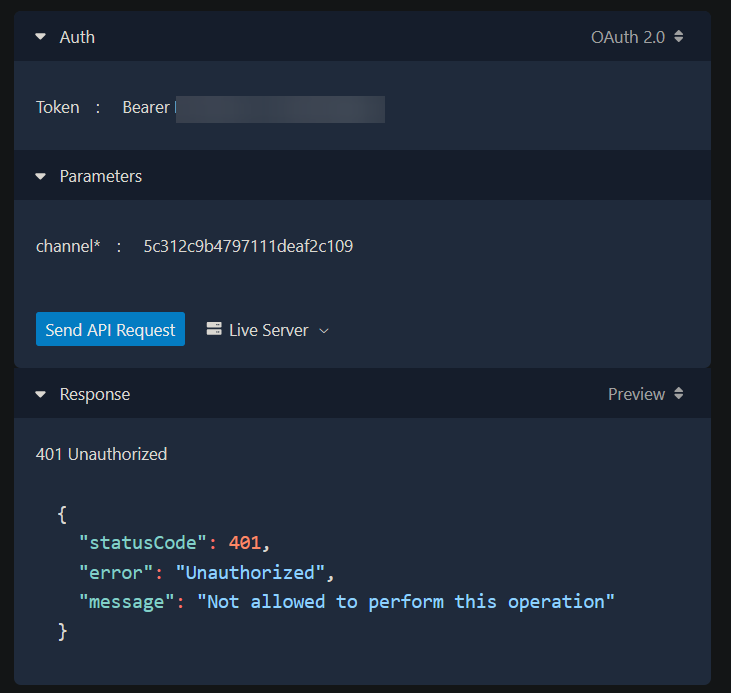


Ah
Got it.
"Authorization": "OAuth xxxxxx"
Not Bearer
mystic jewel
Hi, I'm working on creating this chat. I can't get the badges to space out. I was wondering if someone could help me space them out? justify-content: space-evenly isn't working for me

 severe shell
mystic jewel
Hi, I'm working on creating this chat. I can't get the badges to space out. I wa...
severe shell
mystic jewel
Hi, I'm working on creating this chat. I can't get the badges to space out. I wa...
Is the .badges the white/pink rectangle?
What is {{displayBadges}}?
cobalt forge
Is there a recommended way to filter out cheermotes in overlays without having to use the Twitch API?
 gray furnace
my sound for scene transitions dissappeared. how do i get it bak?
severe shell
cobalt forge
Is there a recommended way to filter out cheermotes in overlays without having t...
You can use SE_API.cheerFilter:
https://dev.streamelements.com/docs/widgets/186263f447d1d-custom-widget#se-api
cobalt forge
Thank you
severe shell
gray furnace
my sound for scene transitions dissappeared. how do i get it bak?
This is on OBS, right? Go to the folder you have the sound, check if it is there and then add again on your OBS transition.
hollow ledge
@severe shell Sorry for the ping, but, do you know the flow for refreshing an OAuth token? Tried a few things but
{
    "error": "invalid_grant",
    "error_description": "The provided authorization grant (e.g., authorization code, resource owner credentials) or refresh token is invalid, expired, revoked, does not match the redirection URI used in the authorization request, or was issued to another client."
}
idk how to do that. im using overlays from own3d on obs and it has always been automatic
severe shell
gray furnace
idk how to do that. im using overlays from own3d on obs and it has always been a...
Better ask own3d for support, then.
gray furnace
ok ty
severe shell
hollow ledge
<@282327953864523776> Sorry for the ping, but, do you know the flow for refreshi...
What is the URL you are trying to refresh the token?
hollow ledge
I was just using the auth url - there's no URL listed in the docs
severe shell
hollow ledge
I was just using the auth url - there's no URL listed in the docs
Yeah, there is no refresh part in the documentation. But this will work for you:
Method: POST
URL: https://api.streamelements.com/oauth2/token
Content-Type: application/x-www-form-urlencoded
grant_type=refresh_token
client_id=YOUR_CLIENT_ID
client_secret=YOUR_CLIENT_SECRET
refresh_token=CURRENT_REFRESH_TOKEN
Using curl would be like this:
curl -X POST "https://api.streamelements.com/oauth2/token" -H "Content-Type: application/x-www-form-urlencoded" -d "grant_type=refresh_token&client_id=YOUR_CLIENT_ID&client_secret=YOUR_CLIENT_SECRET&refresh_token=CURRENT_REFRESH_TOKEN"
mystic jewel
severe shell
Is the `.badges` the white/pink rectangle?
What is {{displayBadges}}?
Thank you so much for the response! I was able to space things out with column-gap: 17px but {{display badges}} is display: none; and it works to hide the badges
mystic jewel
Also, color: white; isnt working on the username, any fixes?
severe shell
mystic jewel
Also, color: white; isnt working on the username, any fixes?
It is working
cobalt forge
Is a sub/resub/prime sub all the same event "subscriber" under obj.detail.event ?
Also, is it possible to have a checkbox in a field checked? I don't see anything in the documentation to make it default checked
severe shell
cobalt forge
Also, is it possible to have a checkbox in a field checked? I don't see anything...
Add "value": true
"checkboxName": {
"type":"checkbox",
"value": true,
"label": "This is a checkbox"
}```
Not sure about your first question, cannot test it now to confirm. mortal wagon
did SE change anything in terms of there API, My current OVERLAY is in and out of working because of what ever the recent changes were... One side of my bar refuses to load sometimes and iv ZERO clue why.
http://shared.cynocl.es/20230322025240.png
Worked fine up until about 5 days ago.
Has any of this changed.

  tip = data['tip-month'].amount > 0 ? data['tip-weekly-top-donation'] : {amount: 0};
  cheer = data['cheer-month'].amount > 0 ? data['cheer-weekly-top-donation'] : {amount: 0};
  if (tip.amount === 0 && cheer.amount === 0) {
    $('.cheer-tip').append(`<span class="cheer-tip-event">{{noCheerTipText}}<span class="bullet"></span></span>`);
  } else if (cheer.amount >= tip.amount*100) {
    $('.cheer-tip').append(`<span class="cheer-tip-event">${cheer.name} <span class="bullet">•</span> <img class="cheer-img" src="${getBitURL(cheer.amount)}"/> ${cheer.amount}</span>`);
  } else {
    $('.cheer-tip').append(`<span class="cheer-tip-event">${tip.name} <span class="bullet">•</span> ${parseAmount(tip.amount)}</span>`);
  }
});
as its the tip/cheer side that aint working 100% its intermittent
severe shell
mortal wagon
did SE change anything in terms of there API, My current OVERLAY is in and out o...
It looks fine to me... What is not working exactly on your side? Is there any error on browser console?
I tested this way:
When I put cheer.amount and tip.amount as 0, enters on the first "if"
When I put cheer.amount = 101 and tip.amount = 1, it enters on the "else if"
If I put cheer.amount = 90 and tip.amount = 1, it will enter on the last "else"
mortal wagon
severe shell
It looks fine to me... What is not working exactly on your side? Is there any er...
want me to send you all the code to look over it ?
Its just being temperamental and iv zero clue why.
Or I can add you as an editor
 tribal sleet
Hi
I'm making an overlay on SE using the JS editor and I don't know how I can emulate a channel reward redemption
I'm not affiliate (I'm making this overlay for someone else) that's why I need to emulate the channel reward
is there a way to do it?
hardy walrus
Not supported unfortunately.
We have one via #widget-share but only works with ones requiring text input.
tribal sleet
Oh too bad
Thanks
gusty cedar
@severe shell Thank you very much for your help. It was just a human error. StreamElements forgot to activate my account, which was why everything I did was unauthorised. 😄
But after that, you were totally right about the comma -> space issue with the scope.
GitHub issue created here and shoutout to you: https://github.com/SocialiteProviders/Providers/issues/997
severe shell
gusty cedar
<@282327953864523776> Thank you very much for your help. It was just a human err...
Oh, so it wouldn't work even if we tried our best 😄
As regards the github issue, they already fixed it! So quick!
severe shell
mortal wagon
want me to send you all the code to look over it ?
You can upload your code here (you can remove any private information and anything you don't want to share) and more people can have a look at it.
I am not a developer, just a curious guy who knows some basic things, so better people can check your code here and give you some better ideas.
pulsar willow
Hello! so I'm currently working on updating/creating(if need be) chat widgets to include a custom image behind messages for a friend of mine. I've tried 2 of the widgets that are in widget share (Yet another Chat widget by AaroniusH and the Twtich Chat by JCracingg widget) , but no matter what I do i'm unable to set an image to appear behind the chat messages. I have a passing familiarity with CSS (used to do it back in college). Would anyone know a good location for tutorials on what i'm lookin for?
 shy portal
Hi I’m in need of help! Ever since downloaded the SE.live for Obs my camera isn’t working. It’s active but black. I’ve tried moving the camera source to the top and still nothing. I’m not happy about this as I’m scheduled for a stream.
severe shell
shy portal
Hi I’m in need of help! Ever since downloaded the SE.live for Obs my camera isn’...
This channel is for custom widgets/API/commands and coding... For issues with SE.Live you can check if someone can help you on #helpdesk-selive
severe shell
pulsar willow
Hello! so I'm currently working on updating/creating(if need be) chat widgets to...
I'm not sure where you can find tutorials related to custom widgets, but the overlay editor documentation is on this channel description.
📄 Overlay Editor documentation https://dev.streamelements.com/docs/api-docs/775038fd4f4a9-stream-elements-custom-widgets
What have you tried so far to have it working?
In each of paragraph you will find information, what variables you can use, to achieve expected result. Powered by Stoplight.
severe shell
When you say "only half of it is loading", what you mean exactly? Half the code, the items are appearing only half of what is supposed to be... I don't get it. When I tested your code it appeared
"Be first cheer/tip" and "Be first sub"
When I tested the donate and sub, I got this:
 ebon flare
```javascript
window.addEventListener('onWidgetLoad', function(obj) {
const re...
ebon flare
ebon flare
```javascript
window.addEventListener('onWidgetLoad', function(obj) {
const re...
RE: this hunk of code
Anyone know how I can add gifted subs to this?
mortal wagon
severe shell
When you say "only half of it is loading", what you mean exactly? Half the code,...
On mine only half of the info loads the right side as shown in the video sent to you.
mortal wagon
severe shell
When you say "only half of it is loading", what you mean exactly? Half the code,...
Here's an example of what it looks like now when not live and then a reload WHILE live and how its meant to look all the time.
https://clips.twitch.tv/InquisitiveBadCheetahWow-FRwYK15hq8mPijYJ
 severe shell
mortal wagon
Here's an example of what it looks like now when not live and then a reload WHIL...
severe shell
mortal wagon
Here's an example of what it looks like now when not live and then a reload WHIL...
Probably your overlay is broken. Try to create a new overlay with the same code and test it.
It worked fine for me
mortal wagon
Hmm how does it just break then
severe shell
mortal wagon
Hmm how does it just break then
No idea, but I have seen people who that kind of issue and it was solved creating a new overlay.
Sometimes I have overlays with lot of red messages in console, with no changes. Once I recreate a new overlay with the same code, the issue disappears. It seems to be something on the Streamelements side.
mortal wagon
buncha dookie lol xD
ebon flare
ebon flare
RE: this hunk of code
Anyone know how I can add gifted subs to this?
@severe shell you were the absolute legend who helped me out last time. I hope you don't mind if I ping you
cobalt forge
Is there a list of events for the SE Socket API?
 young marsh
I was wondering if anyone knows if it's possible to integrate Twitch-specific commands into a SE widget? I've been playing around with a shoutout pop-up widget, and I thought it would be cool if users had the option to use the Twitch '/shoutout' command to trigger the widget since the Twitch command has that handy Follow button feature that appears at the top of chat and is probably the preferred method for shouting people out now.
The widget provides the option to set your command that triggers the alert, however it doesn't recognize Twitch commands. (i.e. if I set the widget to trigger when '/shoutout' is typed in the chat, it doesn't work)
Would I need to make use of the Twitch API in order for this to work? Is it even possible? I'm very much a beginner in regards to APIs, and really not sure how I would go about this. Any insights would be greatly appreciated!
 potent halo
cobalt forge
Is there a list of events for the SE Socket API?
potent halo
cobalt forge
Is there a list of events for the SE Socket API?
I'm guessing you mean the SocketIO endpoint?
Here is the Docs on that https://dev.streamelements.com/docs/api-docs/5a84cc101a9c5-connecting-via-websocket-using-o-auth2
Regarding a list of events.. I found it to be very confusing as well.
Here is what I found:
class EventName(Enum):
    connect = "connect"
    disconnect = "disconnect"
    authenticated = "authenticated"
    test_event = "event:test"
    update_event = "event:update"
    event = "event"

class EventType(Enum):
    subscriber = "subscriber"
    donation = "donation"
    follow = "follow"
    cheer = "cheer"
    raid = "raid"
EventName are the actual SocketIO topics.
EventType are the possible values for on("event") -Event's event[<type>]
There are more Events for event:update like <type>-latest or <type>-total
But SE Docs do not recommend event:update for most cases
Note: Due to complexity of object in
onSessionUpdateaonEventReceivedevent listener will be the best way to use for most of scenarios (easier to implement and better performance).
So to get (for example) any subscribtion you would need to:
# listen to the "event" topic
@sio.on("event")
# event provides eventinfo and socketinfo; only eventinfo will be of importance
def on_event(event, socketinfo):
    # get the eventtype and filter
    if event["type"] == "subscriber":
        # do your stuff here
        log.info(f"{event["data"]["displayName"]} subbed with a {event["data"]["tier"]} sub")
Hope that helps
cobalt forge
potent halo
I'm guessing you mean the SocketIO endpoint?
Here is the Docs on that https://d...
Wow, thanks for the incredible explanation, more than I expected to get 😅
potent halo
Well I felt the frustration
potent halo
ebon flare
RE: this hunk of code
Anyone know how I can add gifted subs to this?
https://dev.streamelements.com/docs/widgets/6707a030af0b9-custom-widget-events#on-event
This lists the fields you need.
In your case .gifted would be the one. So smth like this.
[...]
} else if (event.type === 'subscriber') {
    if(event.gifted) addEvent('giftsub', `lol gift ${event.amount}`, event.name); // do your stuff here
    else addEvent('sub', `subbing me for ${event.amount} months`, event.name);
} [...]
Also may I implore you to use switch statements? In your case it would make the code much cleaner/readable.
switch (event.type) {
  case "follower":
    addEvent('follower', 'following my channel', event.name);
    break;
  case "redemption":
    [...]
}
You can read up on them here. https://www.w3schools.com/js/js_switch.asp
And yes they use strict comparison (===)
potent halo
young marsh
I was wondering if anyone knows if it's possible to integrate Twitch-specific co...
Twitch EventSub would be the thing to use
https://dev.twitch.tv/docs/eventsub/eventsub-subscription-types/#channelshoutoutreceive
young marsh
potent halo
Twitch EventSub would be the thing to use
https://dev.twitch.tv/docs/eventsub/ev...
Thank you very much, I’ll look through this. I appreciate your help 🙂
flint portal
My credits suddenly had random old cheers on it for some reason and I have no idea what would have caused it.
flint portal
severe shell
Probably there is a better way, but let's try this one:
1 - Take a backup of th...
I used this snippet of code
So Im going to open up the question again: Is there any way to get TOTALS for cheers and tips from each tipper and cheerer on my credits?
The snippet provided only stops duplicates, it doesnt have a count
I also find the lack of any tools for testing to be inanely tedious, I dont understand why there isnt a capability to mimic data for testing
uneven oxideBOT
@earnest stirrup ⤵️
Read and follow our server rules:
- We do not tolerate toxicity! Treat the community team, staff, and all members with respect.
- No advertisement or channel promotion, anywhere on the server.
- No NSFW/NSFL
- No unsolicited DMs or friend requests to server members
Make sure to read the #welcome in any server you join.
severe shell
flint portal
The snippet provided only stops duplicates, it doesnt have a count
Exactly, you asked to remove the duplicates, we demonstrated how it could be done.
To get the total amount of each user, you will need to collect each value they sent during the streaming session and sum them.
flint portal
severe shell
Exactly, you asked to remove the duplicates, we demonstrated how it could be don...
Any idea what could have caused random cheers from months ago to show up, but not all of them, only a select few?
They weren't there before the stream started and went away after the 15 minute session clear
Not sure if my session data just messed up or what
Also I was aware of what the code did and was fine with it, I was just asking again if anyone had a solution that also added up the totals for each cheerer/tipper
potent halo
getting ```
requests.exceptions.ConnectionError: HTTPSConnectionPool(host='api.streamelements.com', port=443): Max retries exceeded with url: /oauth2/validate (Caused by NewConnectionError('<urllib3.connection.VerifiedHTTPSConnection object at 0x7f4d9c2247c0>: Failed to establish a new connection: [Errno -3] Temporary failure in name resolution'))
is the api currently down or should I look into my dns?
nvm. works in insomnia, but not on the server.. looking into dns config now
 slate latch
I have a stupid question, now Im not asking HOW to do this, just if its possible. I was thinking about using teespring for merch, they have purchase alerts built in just for the "other guys", so I have a lone alert box over there just for merch. Is it possible via JS maybe, to listen/get the alert event, and trigger the merch action over here
 novel stone
hi everyone
does anyone have C# adding youtube links to the media request queue?
i want add c# in streamer.bot and associate with rewards. so that viewers can order music through twitch rewards without command
severe shell
novel stone
i want add c# in streamer.bot and associate with rewards. so that viewers can or...
Maybe this is what you want, not sure. The description says "Get songrequest queue", but as it is a POST request (and knowing how SE API is), I strongly believe it actually adds song to the queue.
https://dev.streamelements.com/docs/api-docs/6f44b5bf0036c-channel-queue
Get songrequest queue Powered by Stoplight.
novel stone
severe shell
Maybe this is what you want, not sure. The description says "Get songrequest que...
thx. i try it. but my SE API knowledge is very small XD
severe shell
novel stone
thx. i try it. but my SE API knowledge is very small XD
There is an option to generate a code sample in the language you want. Maybe that can help you.

"Token" and "channel" are your JWT Token and Account ID, respectively. You can get both values here (click on "Show secrets"):
https://streamelements.com/dashboard/account/channels
Take care of your JWT, as it is a private information and you should not leak it. Treat it as your password.
novel stone
i know this
but
i dont understand what address to send the add request to. the queue playlist must be linked to the account.
need to figure out what address it is
severe shell
novel stone
i dont understand what address to send the add request to. the queue playlist mu...
If you mean the URL to add to the song to the queue, it is shown in the code generated
https://api.streamelements.com/kappa/v2/songrequest/ACCOUNT_ID/queue
novel stone
hm
severe shell
slate latch
I have a stupid question, now Im not asking HOW to do this, just if its possible...
When you say "other guys", you mean Streamlabs, right?! Yeah, Streamlabs API is open for everyone, so anyone can make integrations, whereas Streamelements needs application for it, unfortunately. I heard that was changing, but no idea when that will happen.
Anyway, I took a look at teespring and could not find any option that would send information to Streamelements. Maybe if they had a websocket that we could connect and wait for updates, that would help. But it seems they don't have it available. So based on what I saw, I think that would not be possible.
Maybe if you contact them and ask if they have something you could integrate yourself, they give something extra? Maybe they have a hidden API, who knows?
slate latch
It’s under integrations, just makes u authorize spring to connect to sl, no other options or anything
I figure it sends a trigger when a sale happens, I just thought there might be a way to make that trigger a script, instead of going to stream, it goes to se, then se triggers live alert
Like a script in sl for the alert, instead of THE alert
severe shell
slate latch
It’s under integrations, just makes u authorize spring to connect to sl, no othe...
Well, there was a time I was connecting to SL inside Streamelements overlay using websockets, but it was totally custom. It was because there is a service like Paypal in my country which was very popular and it only integrates with SL.
So I integrated it with SL, and in Streamelements overlay, I created a widget to connect to SL via websockets. Once the donation was received on SL, I registered the same on Streamelements and it would take care of sending the default donation alert.
But the problem was that I was using my token from SL and SE in an overlay, so after some time I just ended up giving up of that idea.
slate latch
talking out my butt, not a good coder (i was in and out before cause i was working) what if we did the in between script in an obs(lua), so no dangerous keys are out on the web?
severe shell
slate latch
talking out my butt, not a good coder (i was in and out before cause i was worki...
Well, you can always create a local code and run it on your machine, that way it won't leak it anywhere. I don't have experience on Lua, my coding knowledge is based on Javascript (and a basic one, to be honest). You can use the example below. I don't know whether the event sent by teesprint is a donation or another one:
const seAccountId = 'kjihgfedcba'
const seToken = 'zyxwvutsrqponmlkjihgfedcba';
const slToken = 'abcdefghijklmnopqrstuvwxyz';

// Connect to SL socket
const sl = io(`https://sockets.streamlabs.com?token=${slToken}`, {transports: ['websocket']});

sl.on('connect', function onConnect(data) {
  console.log('Successfully connected to SL via websockets');
})

// Listening to events on SL
sl.on('event', (eventData) => {
  // Checking if the event is a donation
  if(eventData.type == 'donation'){

    // Check the object and create the variables based on that
    console.log(eventData)

    // Create the variables to use on SE (I don't have the values here, the part below is just an example, check the console for eventData)
    const username = eventData.sender
    const message = eventData.message
    const amount = eventData.amount
    // const etc etc etc etc

    // Create the same donation on SE. Remember to get the correct values from eventData to use on body
    // This will trigger the default tip alert on Streamelements widget.
    fetch(`https://api.streamelements.com/kappa/v2/tips/${seAccountId}`, {
      "method": "POST",
      "headers": {
        "Content-Type": "application/json",
        "Authorization": `Bearer ${seToken}`
      },
      "body": `{\"user\": \"userId\":\"${id}\",\"username\":\"${username}\",\"email\":\"${email}\"},\"provider\":\"${provider}\",\"message\":\"${donateMessage}\",\"amount\":${amount},\"currency\":\"USD\",\"imported\":true}`
      })
  }
})
To get SL token, you will need to check their documentation.
One more thing, you have to have socket.io for that
<script src="https://cdnjs.cloudflare.com/ajax/libs/socket.io/2.2.0/socket.io.js" ></script>
mortal wagon
severe shell
Probably your overlay is broken. Try to create a new overlay with the same code ...
Made a new overlay and its still broken AF 😦
Heres a video on stream of it actually breaking.
Iv a feeling its something to do with how SE is now now displaying no stats
https://www.twitch.tv/videos/1777527192

As this only broke after the new Activity feed announcement.
mortal wagon
Any experienced web DEV here willing to look at my code and see why it broke 
potent halo
mortal wagon
Made a new overlay and its still broken AF 😦
Heres a video on stream of it actu...
While I am not big into the whole widget thing I'd suggest debugging with the tools obs is providing.
Start obs with parameters --remote-debugging-port=9222
And open your preferred browser at http://localhost:9222/
Select the broken overlay and voila.. you can now see logs in the console, responses in the networking tab and much more helpful stuff.
Hopefully it helps getting a concrete error
severe shell
mortal wagon
Made a new overlay and its still broken AF 😦
Heres a video on stream of it actu...
The suggestion from @potent halo is perfect to analyse what is going on your OBS.
But, as it is now not working on overlay editor either, I would recommend to open the browser console (F12) when you are coding in there and check if there is any error.
I know when we reset the session data, some keys are removed from session data. Maybe that is what is happening, probably you are testing a key that does not exist anymore when you reset the session data.
There are some custom widgets created by the community (especially goal bars) that take that into consideration and they set a value when the key does not exist.
I cannot test it right now (as it is very late here), but I will try to check your code again when I have some time tomorrow. I am almost convinced that is the issue.
 honest igloo
Is there a way to save/write data to a file or something? My overlay collects data from a particular thing, but when my streamer changes scene or between streams, the data is lost because all of the variables are reinitialised when the overlay reloads
opaque wasp
honest igloo
Is there a way to save/write data to a file or something? My overlay collects da...
SE_API.store.get() and SE_API.store.set()
https://dev.streamelements.com/docs/api-docs/775038fd4f4a9-stream-elements-custom-widgets#se-api
In each of paragraph you will find information, what variables you can use, to achieve expected result. Powered by Stoplight.
severe shell
mortal wagon
Made a new overlay and its still broken AF 😦
Heres a video on stream of it actu...
Just looked at your code again, it looks normal and works on my side.
Check if you have the values of what you are testing. Add those on line 6 and open the browser console:
console.log('Tip month amount: ', data['tip-month'].amount)
console.log('Tip Weekly top donation: ', data['tip-weekly-top-donation'])
console.log('Cheer month amount: ', data['cheer-month'].amount)
console.log('Cheer weekly top donation: ', data['cheer-weekly-top-donation'])
See if any value appears on each of them
 lyric tinsel
Just wanted to make sure I'm on the right path. Is the webhook "GET https://api.streamelements.com/kappa/v2/activities/{channel}" only for OAuth 2.0? I'm using the JWT token for now, so would be unfortunate, but it is what it is if it is. If it isn't, what is the query parameter "origin"? I assumed "youtube" or "twitch" based on the platform, but wasn't certain.
severe shell
lyric tinsel
Just wanted to make sure I'm on the right path. Is the webhook "GET https://api....
You can use the JWT for that, and use your Account ID for the channel part
origin is feed
URL: https://api.streamelements.com/kappa/v2/activities/ACCOUNT_ID
Method: GET
Headers:
Authorization: Bearer JWT_TOKEN
Accept: application/json
Possible parameters (all optional, send as query strings):
limit: 100
origin: feed
types: follow | subscriber | tip | cheer | raid | merch | redemption | purchase | attribution | event | event:external
minsub=0
mintip=0
mincheer=0
minhost=0
before=2023-03-28T14:37:38.248Z
after=2016-01-01T00:00:00.000Z
Example:
https://api.streamelements.com/kappa/v2/activities/ACCOUNT_ID?limit=100&types=follow&types=subscriber&types=tip&types=cheer&types=host&types=raid&types=merch&types=redemption&types=purchase&types=attribution&types=event:external&types=event&minsub=0&mintip=0&mincheer=0&minhost=0&origin=feed&before=2023-03-28T14:37:38.248Z&after=2016-01-01T00:00:00.000Z
mortal wagon
Says cannot connect... did I do something wrong adding it to the target path ?
"C:\Program Files (x86)\obs-studio\bin\64bit\obs64.exe" --remote-debugging-port=9222

Nvm its loading now.
mortal wagon
severe shell
Just looked at your code again, it looks normal and works on my side.
Check if y...
I went back to using the OLD Activity feed and it seems to be working fine again and iv zero idea why...
Shits scuffed
XD
mortal wagon
severe shell
The suggestion from <@200295250021974016> is perfect to analyse what is going on...
Also if it was a token issue BOTH sides when returning a Zero value should not display but its only breaking on one side so I dont think its a session token issue tbh.
lyric tinsel
severe shell
You can use the JWT for that, and use your Account ID for the channel part
origi...
Ohhh, I was using the parameters wrong. I put them in the header instead of the path. Thanks for the help 
 hexed thicket
Hello. My tips link is broken. Shows a 404 page when someone or I click it.
 ivory glen
honest igloo
ivory glen
honest igloo
The editor is gone for me, tried logging in & out, tried restarting computer, still not there. The place where the button should be does say this in the source still:
<button class="md-primary md-button" type="button" ng-transclude="" ng-click="vm.openCssEditor()"></button>
 honest igloo
All my other overlays are fine and when I duplicate this particular overlay, the duplicate also has no editor
hardy walrus
@honest igloo someone else had the same exact issue but my mobile app is busted and using search via desktop mode in web app isnt working properly.
Definitely find the fix in here.
pulsar willow
Hello! I would like to ask if there are keywords in the documentation for the new "Artist" role for twitch? Thanks!
since verified is "partner" whats artist
 knotty thorn
I think artist is for emote artists - could be wrong, look up twitch docs
pulsar willow
thanks ill give it a look
honest igloo
In case any of the people in charge are wondering, it was a problem with my fields that caused the thing to go missing. I followed sudo's tutorial on how to get my code back from the broken overlay and html was fine, css was fine, js was fine, but as soon as I copied the json the editor disappeared again
potent halo
I'm working with the socketio endpoint using oauth2 atm.
Twitch let's you disconnect your integration on their site. (/settings/connections)
Is there any way to do that with the SE API?
If not, is it fine to POST /oauth2/token/revoke (don't know the method; just assuming it's rfc7009) if the user dc's the twitch integration?
Also what happens to the socketio connection when it is disconnected? There is no info on that in the docs (https://dev.streamelements.com/docs/api-docs/5a84cc101a9c5-connecting-via-websocket-using-o-auth2)
- Is there an additional event for that?
- Does it silently stop sending events belonging to that user?
And if nothing happens how do you stop receiving user specific events?
Likeemit('authenticate', {method: 'oauth2', token: accessToken})for registering, is there something for unregistering?
Guys.. There is no Token Revokation endpoint?

Although the docs say so. https://dev.streamelements.com/docs/api-docs/cd02cda5171ea-o-auth2
Also GET, PUT, PATCH don't work either (I was just testing)
potent halo
Okay so..
The endpoint is NOT /oauth2/token/revoke as the docs say but actually /oauth2/revoke
Pls update the docs.
That being said. I don't seem to nail the request.
{
    "statusCode": 400,
    "error": "Bad Request",
    "message": "missing oauth token"
}
x-www-form-urlencoded data I tried is token (as per rfc), client_id, client_secret, and Authorization
Values with and without OAuth and Bearer
Same for headers. Nothing.
potent halo
It's in the query..
Found the pull request by c4ldas
curl -X POST "https://api.streamelements.com/oauth2/revoke" \
-H "Content-Type: application/x-www-form-urlencoded" \
-d "client_id=9d5422b8ff529d420" \
-d "token=<access token>"
Yeah, that's the request, but I believe it is not working correctly either. I informed the dev team to check that and I was informed it was passed along, but not sure if it was fixed already
potent halo
it is working tho
severe shell
potent halo
I'm working with the socketio endpoint using oauth2 atm.
Twitch let's you discon...
SE does not have a place to remove the integration, unfortunately. I believe revoking the token you have from the user would be enough, but as the revoke option is not working, we have not much to do at the moment, it seems.
severe shell
potent halo
it is working tho
Is it? It still says "missing oauth token" on my side.
potent halo
Try as query instead of body
https://api.streamelements.com/oauth2/revoke?client_id=<clientid>&token=<token>
severe shell
potent halo
`https://api.streamelements.com/oauth2/revoke?client_id=<clientid>&token=<token>...
Time to update the pull request 🙂
potent halo
should I?
severe shell
I'm doing it right now 🙂
potent halo
Well.. Almost got my desired logic. Now to that Question:
And if nothing happens how do you stop receiving user specific events?
Likeemit('authenticate', {method: 'oauth2', token: accessToken})for registering, is there something for unregistering?
Couldn't find anything in the Docs and trial and error like before is not really possible.
My one way around this would just be to ignore all events from a particular id. Kinda bad solution imo.
severe shell
potent halo
Well.. Almost got my desired logic. Now to that Question:
> And if nothing happe...
I'm not very experienced with socket.io, and probably there should have a better option. But what I tried here was create a new connection for each channel.
When you want to stop receiving events for that user, you can use connectionName.disconnect()
potent halo
severe shell
I'm not very experienced with socket.io, and probably there should have a better...
welp I'm in python using python-socketio (synchronous client). Each Connection would have to have it's own thread, which would quickly lead to problems in production, since every user with running obs also has their own thread (websocket).
Also asyncio isn't really an option, because the asynchronous implementation for python-socketio seems to have problems right now.
Tried using normal websockets to connect to socketio, but I seem to fail in getting the protocol just right. 🤷♂️
severe shell
potent halo
Tried using normal websockets to connect to socketio, but I seem to fail in gett...
severe shell
potent halo
Well.. Almost got my desired logic. Now to that Question:
> And if nothing happe...
@viral patrol Do you have any idea that you could suggest here for SE websocket?
Let's hope he appears here to help us 🙂
potent halo
🙏
I already implemented the "Ignore Events" stuff yesterday btw. It works as far as I can tell, but hey you're technically still getting events 
 radiant halo
Hey all! I do not know a lick of javascript. I'm wondering how to change this so that the data is guaranteed to show three numbers for currency? Like $1.20 instead of $1.2. Right now it's displaying $1.2 if the last number is 0.
$("#new-tip").text(data["tip-latest"]["name"]+" "+currencyCode+data["tip-latest"]["amount"]);
potent halo
radiant halo
Hey all! I do not know a lick of javascript. I'm wondering how to change this so...
To literally do what you just said just append .toFixed(2).slice(-4) to whatever number you want to have 3 digits like <digit>.<digit><digit>.
That would also do something like converting 20.1 to 0.10. Like you said
guaranteed to show three numbers
But I highly doubt you want to do that and instead want to limit/fill the decimal places to 2 digits. In that case only.toFixed(2)is needed.
Sodata["tip-latest"]["amount"].toFixed(2)should do the trick just fine.
radiant halo
potent halo
To _**literally**_ do what you just said just append `.toFixed(2).slice(-4)` to ...
Thank you so much! That did it.
 ancient lynx
hey guys, I just want to make sure I understood something about events in se. When we have a sub event, we have something like obj.detail.event, and then we have some properties. So, the event.sender is the name of the person that gifted a sub, this happens everytime a sub is gifted right? then, event.bulkgifted is when someone gives away more than one sub, right? so for example, if I gift 5 subs, this property will be true? or which is its value? and then I can access event.sender which would be my name as the gifter, and event.amount as the amount of subs I gifted, right? So basically I'm a bit confused about event.bulkgifted and when this triggers, if anyone can clarify this please, and thanks in advance
lyric tinsel
severe shell
You can use the JWT for that, and use your Account ID for the channel part
origi...
Sorry to ask a question while there's an unanswered question
If a user subscribes for multiple months, how does the data look with this GET request? Trying to understand the data a bit better  Thanks in advanced
lyric tinsel
I'm assuming it has something to do with the quantity value in data In either case, I'll see what I can find in the meantime
potent halo
ancient lynx
hey guys, I just want to make sure I understood something about events in se. Wh...
On my phone right now so I can't test anything, but according to the docs you are right. To clarify...
.bulkGifted- if it is INITIAL event of community gift (${event.sender} gifted ${event.amount} subs to community)
bulkGiftedis a boolean value. Meaning it doesn't "trigger". It is set to true ONLY ONCE (initial) in the moment a person gifts multiple subs.
- Event triggers
- You check the type for subscription with details.listener
- You check what type of sub by looking at gifted, bulkGifted, isCommunityGift and playedAsCommunityGift. The meaning of amount changes according to this.
potent halo
lyric tinsel
~~Sorry to ask a question while there's an unanswered question~~
If a user subs...
Activity endpoint gives an embarrassing total of 5 pieces of information on a sub in activities.
Amount could be either months of the subscription or how long someone is subscribed for. There really is no telling with the way the docs are structured right now.
I'll test it as soon as I get home.
In case the activity endpoint really does only contain that little info, you would be better off using the twitch api for that info.
lyric tinsel
I know "amount" is the amount of months subscribed, so many quantity has the info
In either case for my application, I should be okay if it isn't in the SE api. Just a nice to have rather than a need to have
 latent vortex
Hey I'm new into SE coding, html etc. I want to code an alert that display the every first message from a user and if I'm doing a new session (new stream) stats are reset. Is it possible? Some advices?
 shrewd hedge
is this a good spot to ask some questions im stuck on a couple things
potent halo
latent vortex
Hey I'm new into SE coding, html etc. I want to code an alert that display the e...
Don't know about sessions, but there is a date header you could look at. If that date marks the beginning of the session you got yourself an relatively easy implementation.
So basically you get the current session date (/sessions/{channel}) and save it using se_api.store (https://dev.streamelements.com/docs/api-docs/775038fd4f4a9-stream-elements-custom-widgets#se-api)
Check the storage if the date is different. If truthy your session changed. Else it didn't.
All of this assumes that the date given by the session endpoint actually represents the sessions' starting date and time.
Otherwise I don't see any other obvious solutions. :/
potent halo
shrewd hedge
is this a good spot to ask some questions im stuck on a couple things
Don't ask to ask, just ask.
I'd send a nice link to the website explaining why, but it would probably just get filtered by the bot again. So if you don't understand why I've written that, just Google the phrase.
potent halo
Actually not the right channel or server for your problem. Any SE.Live problems in #helpdesk-selive. In your case (assuming OBS) you would ask on the OBS Discord Server.
Regardless.. Using OBS you could use vlc media source which allows you to setup a video playlist.
- Download VLC for Windows 64bit
- Restart OBS
- Add new Source "vlc media source"
And again if that doesn't solve it, ask the question in the obs discord.
 dim hound
How do i get access to one-click overlay sharing?
 knotty basin
https://developer.mozilla.org/en-US/docs/Web/CSS/CSS_Motion_Path
is that supported in Custom overlays? I'm assuming not, as it doesn't seem to want to work
dim hound
dim hound
How do i get access to one-click overlay sharing?
form.asana isnt working
severe shell
knotty basin
https://developer.mozilla.org/en-US/docs/Web/CSS/CSS_Motion_Path
is that suppor...
It should as the compatibility table shows support since 2015 on Chrome and 2020 on Edge.
I’m not able to test it right now, but will try to check later to see if it works on my side
knotty basin
hmm, good to know, thank you. I must be doing something wrong then
severe shell
dim hound
form.asana isnt working
Thanks for pointing that out. I’m going to let the staff know, just tested here and it isn’t working either.
knotty basin
severe shell
It should as the compatibility table shows support since 2015 on Chrome and 2020...
okay, it does work. tried creating a separate custom widget just for it
severe shell
knotty basin
okay, it does work. tried creating a separate custom widget just for it
Great, thanks for letting me know 😊
knotty basin
that was kinda odd, but with some tweaking, managed to get it working in the actual widget I was working on
 fathom thistle
Hi devs! I'm creating a new widget and I have a question about it. there's a way to test it localy (without copy/paste the code to SE)?
hardy walrus
fathom thistle
Hi devs! I'm creating a new widget and I have a question about it. there's a way...
GitHub
Contribute to tehbasshunter/localdev development by creating an account on GitHub.
knotty basin
oh, that's neat. saving it for future ref ❤️
ancient lynx
quick question again. When creating a new field, is there a built-in way to limit chars for a text input? Or I need to do it with js?
ancient lynx
potent halo
On my phone right now so I can't test anything, but according to the docs you ar...
Btw, thanks for previous answer
severe shell
ancient lynx
quick question again. When creating a new field, is there a built-in way to limi...
According to the HTML reference (and the SE documentation claims it supports all of HTML5 input types), it should be maxlength for "type":"text", but it seems the custom widget does not have support for that. I have just tried some options, but none of them worked.
So I would say go for JS
ancient lynx
severe shell
According to the HTML reference (and the SE documentation claims it supports all...
Cool, thanks!
potent halo
btw is this channel now about all things development or still just se related? I've been wondering since it's called #dev-chat now and not #helpdesk-developer anymore
severe shell
potent halo
btw is this channel now about all things development or still just se related? I...
Helpdesk-* channels will be archived in the near future, so we asked to keep this channel because it has a lot of tips, code examples, undocumented endpoints for SE and things like that.
But there is no problem to talk about other things related to development.
potent halo
ah good to know thanks :)
wicked scroll
Command: !hug ${sender} just hugged ${touser}. ❤️ This user has been hugged ${count ${touser}} times. ❤️
Question: is there a way to make ${count ${touser}} have the same Variable with @ and without @
Example: !hug ShiKai -> having it be the same as -> !hug @ ShiKai
I want the Variables to be the same with or without the @ (is it possible?)
Srry for the @ other ShiKai :\
severe shell
wicked scroll
Command: !hug ${sender} just hugged ${touser}. ❤️ This user has been hugged ${co...
I believe if you change ${touser} to ${user} it will add to the same variable, as ${user} is related to the display name.
wicked scroll
Doesn't ${user} only accept @ 's though?
wicked scroll
severe shell
I believe if you change `${touser}` to `${user}` it will add to the same variabl...
Or does it accept both?
severe shell
wicked scroll
Or does it accept both?
It accepts both
wicked scroll
Ok Thanks!
 minor elbow
hello would there be any possibility that in the future streamelements had an option to include in their commands or modules to search for information as if it were chatGPT?
potent halo
search for information as if it were chatGPT
ChatGPT is, in essence, a Chatbot. It generates syntactically fitting responses on inputs using it's vast training base.
It is NOT for search on any Topic. It is allowed to respond with complete bogus answers.
That being said.. It is very possible to create a chatcommand that allows you to get a response from gpt.
Getting the message from the user should be pretty straight forward using se.
Google "OpenAI Docs" to get to the Documentation on how to connect to and send/recv requests for gpt.
Have fun coding your chatgpt command! 🙂
ancient lynx
Anyone know if cheers are working normally? I am trying to access a cheer event using obj.detail.event.amount to try to get how many bits were donated but I keep receiving undefined, or maybe I'm missing something?
Nevermind, it was my bad hahaha I was missing a field in my code in order to properly access the obj
 craggy wadi
Guys, I've looked and cant find anything on this but I'm probably missing some obvious reference.
Is it possible to implement TTS in a custom widget ?
 quaint gulch
Hi i wanted to make widget that shows subscriber name for 3 sec and slides up to show subscriber text that is scrolling (i made fast visualization in Photoshop)
PS: I don't know how to program so I'm relying on you
severe shell
craggy wadi
Guys, I've looked and cant find anything on this but I'm probably missing some o...
Do a GET request to https://api.streamelements.com/kappa/v2/speech?voice=VOICENAME&text=Text%20Example
The list of voices can be checked here: https://api.streamelements.com/kappa/v2/speech?voice... Some of them do not work, but you need to test to confirm.
OBS: This is an undocumented endpoint, so there is no guarantee in its functionality. It can be changed or stop working anytime without notice
still juniper
Fair advice, although documented endpoints also stop working or malfunctioning without notice too, so not really a difference to be honest 
 floral badger
Hello, I am looking for someone who want to help me creating a widget that connects Streamerbot via websocket to a stream elements widget.
Then streamerbot could send tekst and it will be visible in the widget.
(this would be just the start tho)
I am a console streamer, and i am not able to work with OBS, and streaming directly from the playstation. Using lightstream as 3rd party service to be able to have overlays (from Stream Elements) on my stream.
It would be cool if i can let streamerbot connect to a widget in SE, to for example show tekst on screen.
If we have a connection working a lot more would be possible
https://wiki.streamer.bot/en/Servers-Clients

Streamer.bot Wiki
Configure communications to/from Streamer.bot using WebSockets, HTTP, or UDP connections
severe shell
floral badger
Hello, I am looking for someone who want to help me creating a widget that con...
In order to change a single element in a widget, you would need to do the following:
1 - Get the ID of the overlay you want to change from your overlay list
https://dev.streamelements.com/docs/api-docs/b642d46bee583-channel
2 - Get the details of your specific overlay
https://dev.streamelements.com/docs/api-docs/af02de52998ec-channel-overlay-id
3 - Modify what you want from the code you obtained from step above and send it back (Same endpoint as above, but using PUT request)
- Send the whole overlay information (with your modified data) as the body of the request
https://dev.streamelements.com/docs/api-docs/af02de52998ec-channel-overlay-id
4 - Reload the overlay (this is optional)
https://dev.streamelements.com/docs/api-docs/8727ec48e284e-channel-reload
If you want to do it via websocket, send the body to overlay:update, like:
socket.emit('overlay:update', entireOverlayModified)
I would recommend that you try it in a test overlay to see how it works, in order not to corrupt your original one.
mystic jewel
Hi! I was wondering how to make emotes big when there’s no text in an emote message.
 sturdy wagon
So when I set a custom font, the vertical align of the badges isn't correct anymore..
Can I add css to correct that without having to make a completely custom widget? Thanks!
 severe shell
sturdy wagon
So when I set a custom font, the vertical align of the badges isn't correct anym...
severe shell
sturdy wagon
So when I set a custom font, the vertical align of the badges isn't correct anym...
If you are using the default chat widget, the only way would be adding CSS to OBS.
Click twice on the browser source on OBS and add this to Custom CSS field (adjust to your needs and play with the value):
.badge {
  position: relative;
  top: -5px;
}
Ohh forgot thats an option! vertical-align: middle; does the trick.
Thank you a lot 
sturdy wagon
shush
 uncut wigeon
hello guys, do u got a custom donation bar i can use for my stream free ? (streamelements widget)
floral badger
severe shell
In order to change a single element in a widget, you would need to do the follow...
I tested it on the site and i think this is exactly what i need. Now i need this in #C code that streamerbot can use it. I just dont know how to. Thanks you helped a lot
severe shell
floral badger
I tested it on the site and i think this is exactly what i need. Now i need thi...
If you click on Request Sample, you will find some languages to get a snippet, including C#. However, it will need some knowledge on the language to load any library or piece of code needed. It is not just as simple as a copy-paste
 floral badger
severe shell
If you click on Request Sample, you will find some languages to get a snippet, i...
floral badger
severe shell
If you click on Request Sample, you will find some languages to get a snippet, i...
sadly i found out its not working with copy and past 😦 so now i am hoping someone on the Streambot discord can step it.
however when we got this working i can use the SE site to get the whole body i need.
Thanks again.
 surreal geyser
Hi, i'm having some issues with the widget beta
 celest cypress
Hy everybody,
is it possible to display the top subgifter (Twitch) of the month in the overlay?
Thanks
Tad
severe shell
surreal geyser
Hi, i'm having some issues with the widget beta
Try asking here:
#elements-editor-widgets20
 sharp isle
Mornin' i've add streamelements to my twitch account because it have awesome commands, i've see the deafult commands have some verbal issues after translate them to my native language, its is possible somehow to change the time of follow to real time? ive see line $user always shows nickname of person who use that command, but how can i set time of account age/follow age ect to real time users info?
 floral badger
@severe shell thanks again for the API input we got it working!!
Why is the PUT command not being documented?
severe shell
floral badger
<@282327953864523776> thanks again for the API input we got it working!!
Why ...
I have no idea. There are many endpoints that are not in there, others that aren't working, as well as others that are not well explained.
Many endpoints we find how to use from the dashboard with the console open to understand how they work.
severe shell
sharp isle
Mornin' i've add streamelements to my twitch account because it have awesome com...
Could you give us an example? I didn't understand your question. What do you mean by real time user info?
!accountage shows how long the account was created on Twitch

Would you like it to show c4ldas was created in 7 February 2012? If so, it is not possible to change the output of the default commands
sharp isle
okay so i will try again explain cuz my eng is sometimes rip
i want make same command as accountage, but i want edit text because text in deafult command is so boring, it is possible to do that?
ive see command accountage have at start $user, but then there is only text, there is no any $ and when im make it as a custom command it shows text of time that i type
for exaple command watchtime is more developed like
${user} has spent ${user.time_online|'0 seconds'} watching ${channel}
severe shell
sharp isle
i want make same command as accountage, but i want edit text because text in dea...
Hmm, okay. No, it is not possible to change the text response of default commands.
What you could do is create a new command, but using another API, like decapi for account age:
${customapi.https://decapi.me/twitch/accountage/$(touser)?precision=6}
precision value can be anything from 1 to 6, where 6 will show until seconds and 1 shows only the first value (year or month)
Same for followage:
${customapi.https://decapi.me/twitch/followage/$(channel)/$(touser)?precision=4}
You can also add a language of your choice, for example:
${customapi.https://decapi.me/twitch/followage/$(channel)/$(touser)?precision=4&lang=fr}
sharp isle
ohhhhhh thats all is so complicated, im not programmer
i will check that what You send to me, give me a sec
severe shell
celest cypress
Hy everybody,
is it possible to display the top subgifter (Twitch) of the month...
Unfortunately, this option is not available as a default widget. I also didn't find any for that.
 slim junco
Hi
severe shell
floral badger
<@282327953864523776> thanks again for the API input we got it working!!
Why ...
By the way, I saw your conversation in Streamer.bot discord, good to have it working 🙂
sharp isle
severe shell
You can also add a language of your choice, for example:
`${customapi.https://d...
it works great but i change language to my native (pl) and its still in english, any ideas?
but Your command help me a lot, thank You so much ❤️
hardy walrus
If you mean the length then unfortunately that is not possible.
The person who I've spoken that owns that website doesn't intend to do translations.
severe shell
sharp isle
it works great but i change language to my native (pl) and its still in english,...
Hmm, Polish language is not availabe. Only the languages below are ready to use:
https://github.com/Decicus/DecAPI/tree/master/resources/lang
sharp isle
uhhh nvm then, i will look for help in polish community, it will be more easier for me but really, really thank You c4ldas for Your help
severe shell
sharp isle
uhhh nvm then, i will look for help in polish community, it will be more easier ...
Well, you can help with the translation if you want... It would be nice to have the Polish language in the API, by the way.
In case you are interested in that, here is the discord: https://links.decapi.me/discord
 obtuse isle
Is there some way to clean up SE_API store? Or at least see what is there at the current moment without need to know the keys?
severe shell
obtuse isle
Is there some way to clean up SE_API store? Or at least see what is there at the...
Clean up is not possible. To check the keys, you need the API key. This should work for you inside a custom widget (result will be shown in browser console):
window.addEventListener('onWidgetLoad', async function (obj){
  const apiToken = obj.detail.channel.apiToken
  const id = obj.detail.channel.id

  // Get a value from a key on SE_API using KVStore
  const seAPIFetch = await fetch(`https://kvstore.streamelements.com/v2/channel/${id}/customWidget`, {
    method: 'GET',
    headers: {
      'Accept': 'application/json',
      'Authorization': `apikey ${apiToken}`
    }
  })
  const seAPIResponse = await seAPIFetch.json()
  console.log(seAPIResponse)
})```Thanks, good enough. I just set them to null.
@severe shell Actually... is there some other hidden stuff that I could use in place of POST /:channel/socket? I need to send some live events in between of widgets on one overlay but using this emits my event to all overlays + multiple times if overlay is open in multiple places...
 hot sparrow
Hello there! I am currently moderating for a friend of mine, and he's doing a subathon. We are using the Streamelements marathon timer, and I've set it up so subs, bits and donations should make the timer go up but it isn't changing. Is it because the code is out of date or any problem on Streamelements side?
severe shell
hot sparrow
Hello there! I am currently moderating for a friend of mine, and he's doing a su...
Hmm, you can try these ones to check if they work for you?
#widget-share message
#widget-share message
severe shell
obtuse isle
Thanks, good enough. I just set them to null.
You cannot send an event only to one widget or overlay. Any event that you send goes to all overlays. And if you have many custom widgets in the same overlay, it is going to send x amount of widgets you have
obtuse isle
severe shell
You cannot send an event only to one widget or overlay. Any event that you send ...
That kind of suck… Maybe let me explain my problem in depth I could be over complicating stuff, I have 2 widgets on one overlay. One of them is called EventEmitter and it’s job is to get twitch socket stuff and propagate events to rest of widgets (receivers) on that overlay. Problem with usage of “SE socket endpoint” comes when I have open that overlay multiple times (let’s say edit view and overlay itself) cause emitter is active multiple times sending duplicates of events. This is why I’m looking for some “in overlay” solution. (Creating customEvent would be perfect but I tried that already and it did not work)
severe shell
There is a key called isEditorMode in onWidgetLoad that is set to true when you have the overlay editor open. You can just ignore all events when you have it open. The overlay will continue working on OBS or whatever place it is, but will be silent on overlay Editor.
window.addEventListener('onWidgetLoad', async (obj) => {
  isEditorMode = obj.detail.overlay.isEditorMode
  if(isEditorMode) return
  // rest of your code
})

window.addEventListener('onEventReceived', async (obj) => {
  if(isEditorMode) return
  // rest of your code
})

window.addEventListener('onSessionUpdate', async (obj) => {
  if(isEditorMode) return
  // rest of your code
})
Would that work for you?
It will not trigger twice if you have the overlay open
obtuse isle
I considered that already actually . It solves the problem of in-editor so for that it’s perfect. I’m kind of worried about scenarios when i would have it open for testing and person for who I’m integrating twitch eventsub stuff would have it open. I plan to warn them nevertheless but having it “permafixed” would be better. Still thanks! (Gonna need to see if I can move socket stuff to private external service running on render (cause it’s free and o don’t wanna set up server), then I will have it open a web socket by itself and have all the code to handle stuff under one script file then I may just do a customEvent and it available only in that widget)
severe shell
obtuse isle
I considered that already actually . It solves the problem of in-editor so for t...
Well, the only thing I can think for you now would be creating a pixel div that you could use to click and activate what you want.
Overlays on OBS are usually not clickable, but if you open the preview page on Streamelements editor, you can click as much as you want and activate whatever you need.
<div id='secret-pixel'>.</div>
secretPixel = document.querySelector('#secret-pixel')

secretPixel.addEventListener('click', () => {
  console.log('Secret Pixel clicked')
})
Sure, you would need to change the code and make the idea to work on your logic, but this would be exclusive for the overlay. You could position the secret-pixel in some place that would not interfere on the stream, like bottom right of the screen (or anywhere you want, it is just a dot).
 foggy osprey
Does anyone know how I can add a !time command to check the time for anywhere?
 void cape
Hey, I want to send a custom donation alert using API so how should I do that? Any Idea!
severe shell
void cape
Hey, I want to send a custom donation alert using API so how should I do that? A...
/:channel Powered by Stoplight.
void cape
severe shell
https://dev.streamelements.com/docs/api-docs/7e632a4cecfe1-channel
I went through that but I am getting 403!
What is the channel id there
severe shell
void cape
I went through that but I am getting 403!
Channel ID is you account ID. You can find it here:
https://streamelements.com/dashboard/account/channels
severe shell
foggy osprey
Does anyone know how I can add a !time command to check the time for anywhere?
${customapi.https://decapi.me/misc/time?timezone=Australia/Melbourne}
You can change Australia/Melbourne for anything from this list:
https://en.wikipedia.org/wiki/List_of_tz_database_time_zones

This is a list of time zones from release 2023c of the tz database.
 stark rune
Working on a custom widget, any idea why this isn't being called when somebody subscribes?
window.addEventListener('onSessionUpdate', function (obj) {
  console.log("Updating tracker");
});
I can see the session data updating (session subscriber count goes up), but this function doesn't get called
ok, I guess updating the session data in the overlay editor doesn't trigger an "onSessionUpdate" event. The only way to test it is live
 prisma wren
heyo ^^
i added this one just now #widget-share message i can't seem to find an option anywhere to make the animations/mascots larger. i've tried searching in the CSS too but i can't figure it out. does anyone here know how to do it?
 bronze coral
Does anyone know if a widget could transition from a goal to goal. So like a follow goal is there then 15 seconds later it fades into a bit goal etc
obtuse isle
severe shell
Well, the only thing I can think for you now would be creating a pixel div that ...
In the end I ended up setting up a free web service on render dot com (I had to do some magic to prevent it from sleeping after 15min and killing WebSocket after 5min) that captures twitch events and emits them via internal WebSocket (no limit of 3 WebSockets like on Twitch EventSub). Still need some work and more refined process to refresh twitch token but works.
 cobalt pasture
Hi! Wondering if it's possible to access tip provider or currency inside a custom widget's JS code. According to the custom widget documentation (https://dev.streamelements.com/docs/widgets/6707a030af0b9-custom-widget-events) you can only get the name, amount and message from the latest tip, but in the SE API (https://dev.streamelements.com/docs/api-docs/727d2de51d028-channel-tip-id) tips have a bunch more data, such as the provider and the currency which I'd like to have in the widget. How should I go about getting it? Maybe there's some example I could reference?
My main issue is that I need to handle receiving tips in multiple currencies from multiple providers, which apparently isn't supported by existing widgets. I do know for a fact though that tips from one provider will always be in the same currency.
severe shell
prisma wren
heyo ^^
i added this one just now https://discord.com/channels/14120386386355814...
I took a look at it, and it seems the CSS is generated at the moment the character is created. But you can scale it in .clippy, .clippy-balloon. Just pay attention to the position of the item as well (left and top can help you on that):
.clippy, .clippy-balloon {
  position: fixed;
  z-index: 1000;
  cursor: pointer;
  transform: scale(1.5);
  left: 300px;
  top: 300px;
}```
Or you can create a new one in CSS called .clippy and set the parameters individually for the mascot.Okay so. i should add the transform to make it larger. and left and top for the position. correct? 
severe shell
prisma wren
Okay so. i should add the transform to make it larger. and left and top for the ...
Yes! 🙂
prisma wren
Thank you! 💖
severe shell
cobalt pasture
Hi! Wondering if it's possible to access tip provider or currency inside a custo...
You can access the currency on obj.detail.event.data.currency from onEventReceived
window.addEventListener('onEventReceived', (obj) => {
  if(obj.detail.listener == 'event' && obj.detail.event.type == 'tip'){
    console.log(obj.detail.event.data.currency)
  }
})```
For some reason, provider in this event is always being shown as "Twitch", don't know why (maybe a bug). If we request the details from the API, it shows the correct provider.Hm, I haven't tried it with obj.detail.event, in my case I'm accessing latest tips through obj.detail.session.data["tip-latest"], and objects in that array don't have a "currency" field. Does this mean I can only access the currency when the event is received, not when I dig it up from already existing events?
severe shell
Hmm, you are trying to access it from onWidgetLoad, got it. Yeah, that doesn't have currency for each one, unfortunately
cobalt pasture
Is it possible to call the web API from the widget code then?
severe shell
cobalt pasture
Is it possible to call the web API from the widget code then?
Yes, but you would need to put your JWT in the widget, which is really not recommended
 keen silo
Hey everyone, hope you doing good! It's probably going to be a super noob question, but I'm new to coding stuff in SE 😳
How do I add a custom webm video source here in the HTML code? Do i have to upload it to somewhere and then create a link for it?
<div class="text-container"> <div class="video-container"> <video src="?????.webm" autoplay="true" loop="false"></video> </div> <div> <div class="awsome-text-container"> <span id="username-container"></span> TEXT </div> </div>
Thanks in advance people
severe shell
keen silo
Hey everyone, hope you doing good! It's probably going to be a super noob questi...
Go to FIELDS tab, and create a new entry in there. In case it is empty, wrap everything between { }
"thisIsYourVideoVariable": {
  "type": "video-input",
  "label": "Your video here",
  "value": ""
}```
Then it will appear a new item on the left side of the widget editor.

In your HTML video tag, you can put `src="{{thisIsYourVideoVariable}}"` and remove the .webm partThank you so much! I'll give it a try asap 
Managed to set the video inside the FIELD but sadly it doesn't play it out 🥹 I'll try to fix it, thanks tho @severe shell
severe shell
keen silo
Managed to set the video inside the FIELD but sadly it doesn't play it out 🥹 I...
Sorry, forgot to put the variable name into quotes. I edited the code again. Try that and let me know
keen silo
severe shell
Sorry, forgot to put the variable name into quotes. I edited the code again. Try...
Still not working
I got this in the FIELDS section:
{ "thisIsYourVideoVariable": { "type": "video-input", "label": "Your video here", "value": "" } }
and this one in the HTLM one:
<video src="{{thisIsYourVideoVariable}}"> </video>
severe shell
keen silo
Still not working
I got this in the FIELDS section:
`{
"thisIsYourVideoVariable"...
I have exactly the same code here and it is working for me:
 keen silo
severe shell
I have exactly the same code here and it is working for me:
keen silo
severe shell
I have exactly the same code here and it is working for me:
I'm using a default alert box widget with "enable CSS" ON but I don't think that's a problem right?
severe shell
keen silo
I'm using a default alert box widget with "enable CSS" ON but I don't think that...
Ohhh, so it is different! Let me test here, just a moment
severe shell
keen silo
I'm using a default alert box widget with "enable CSS" ON but I don't think that...
It wasn't working for me either, so I deleted the alert box, added a new one, open CSS Editor for Follower Alert and removed the code from all tabs.
Then, I added the HTML and FIELDS code
Set the video on left panel, emulate a new follower and it worked. Go figure...
keen silo
severe shell
It wasn't working for me either, so I deleted the alert box, added a new one, op...
Still doesn't work for me, I guess I'll try to find another solution at this point
keen silo
Managed to make it works! Added just the "autoplay" command inside the HTML but I feel like it was kinda buggy 🥹 thank you so much tho @severe shell
 cyan valve
Is it possible to send chat messages via the bot using the intigrated SE_API in the overlay?
severe shell
cyan valve
Is it possible to send chat messages via the bot using the intigrated SE_API in ...
Nope
cyan valve
Hmm. Is there a documentation about what the intigrated SE_API can do?
severe shell
cyan valve
Hmm. Is there a documentation about what the intigrated SE_API can do?
This is the most powerful tool in SE Overlay editor. You can do a lot of things within this widget using HTML/CSS/JavaScript and accessing variables
Note: Powered by Stoplight.
cyan valve
And what would i need to send a bot message in the overlay?
 distant garnet
ok, i'm too stupid to figure this out, but wanna learn this before i love patience and cave in to peer pressure... how do i make it so i can create command that counts down to specific date?
my specific current need is something like !when and it would reply in chat in form of It will happen in [x] days
severe shell
distant garnet
ok, i'm too stupid to figure this out, but wanna learn this before i love patien...
${customapi.https://decapi.me/misc/time-difference?first=2023-05-01&precision=1}
You can change precision from 1 to 6 to have more details. And change first to the date you want
distant garnet
neat, i will try to mess with this. is there documentation on whole customapi thing? I'm completely new to SE and have so many ideas, but I don't even know where to start (for example, i want to do a better slots/gamble bot, but how?)
seems precision 3-6 give me same thing. but it does work and does what i was looking for (kinda, was looking more for day count, but it will do for sure)
severe shell
customapi will output the plain text requested by a third party API. There is not a list of APIs, each developer can create their own API to be used by chat bots. The one I sent to you is the decapi API, you can find the documentation here:
https://docs.decapi.me/
Documentation for the project DecAPI, a custom API provider intended for Twitch chatbots.
severe shell
distant garnet
seems precision 3-6 give me same thing. but it does work and does what i was loo...
If you change the date to a longer date you will have year, month, weeks, days, hours, minutes and seconds
distant garnet
i see... that's very convenient...
now, to more complicated topic, where should i start if i wanted to make my own iteration of !slots? you know, more customisable (roll line of 3, 5, 10...) and with more logic than just 3 matching emotes for a payout.
severe shell
distant garnet
now, to more complicated topic, where should i start if i wanted to make my own ...
You don't... Default commands are not customizable
distant garnet
yeah, i mean more like making !slots2 for example, not editing existing one
mystic jewel
I was wondering if anyone knew why these bubbles would look like this on a friends screen (left) but (right) this on mine?

 severe shell
distant garnet
yeah, i mean more like making !slots2 for example, not editing existing one
severe shell
distant garnet
yeah, i mean more like making !slots2 for example, not editing existing one
You would need to find an API that does that... I don't believe it would exist, to be honest
potent halo
The magic of making your own api 
distant garnet
severe shell
You would need to find an API that does that... I don't believe it would exist, ...
so... technically... if i would make it myself... but then, how would it handle giving rewards to winners?
severe shell
mystic jewel
I was wondering if anyone knew why these bubbles would look like this on a frien...
Considering it is the same code, it could be different browsers, different versions of OBS, different resolutions, different aspect ratios... It can be a lot of things, hard to know only giving two pieces of image.
severe shell
distant garnet
so... technically... if i would make it myself... but then, how would it handle ...
You can use Streamelements API for that.
https://dev.streamelements.com/docs/api-docs/28b81292df03d-channel-user-amount
distant garnet
neat, will skim through that, see if it's worth effort. does api also allow removing points from user?
severe shell
distant garnet
neat, will skim through that, see if it's worth effort. does api also allow remo...
I wouldn't ask that before opening the page 😄