#helpdesk-twitch
1 messages · Page 920 of 1
 robust tulip
Hello guys im new just wondering i got a sponsorship opportunity for raid shadow legends and im wondering what is the time frame for that as im trying to secure a laptop to stream from
 keen wigeon
 ornate merlin
Will I need to do this before every stream though?
ornate merlin
Will I need to do this before every stream though?
You shouldn't, no. I'll admit that using your own username as the custom bot name seems to lead to some unexpected results sometimes, to it's useful to have this fix handy for the next time you encounter issues. In any case, you shouldn't have to do this every stream.
keen wigeon
robust tulip
Hello guys im new just wondering i got a sponsorship opportunity for raid shadow...
You have a while, at least a few weeks.
 rotund coyote
Hello guys, is there any way to get a chat alert regardless of the tip amount? I mean, I can create many alerts for any kind of tip but if someone tips another amount of money? Many thanks.
 worldly escarp
rotund coyote
Hello guys, is there any way to get a chat alert regardless of the tip amount? I...
worldly escarp
rotund coyote
Hello guys, is there any way to get a chat alert regardless of the tip amount? I...
you can add variations to the tip alert
rotund coyote
What do you mean?
 stoic rivet
hello. i had problems with alerts on my stream. messages showed up in chat but the alerts didnt appear. when i used the test mode they worked perfectly fine. is there a possibility to test, if a real follow works as well?
 crude pecanBOT
@lament blade, posting suspicious links will result in not being able to post again.
worldly escarp
stoic rivet
hello. i had problems with alerts on my stream. messages showed up in chat but t...
you cant see or hear them on your OBS?
stoic rivet
worldly escarp
you cant see or hear them on your OBS?
only when i trigger them with streamelemtents, not when someone follows me on twitch
i watched a video from a guy having the same problem. i tried his steps but dont have the opportunity to try if it works
the guy says you have to insert the source in 1080p. is that also the case if my canvas in OBS is set to 1440p?
 vocal sail
Helo!
I'm not able to reset at €50, I've already gone to the top top icon in the widgets edit to reset, but nothing happens.

3 times....
Thank you for your support @worldly escarp
 dark yarrow
It seems like overlays aren't saving 
keen wigeon
dark yarrow
It seems like overlays aren't saving <a:aPES_Hmmm:505715252462092289>
What's the issue / error when you're trying to save an overlay?
crude pecanBOT
@vocal sail ⤵️
To reset goals:
- from the Overlay Editor > Session data on top right (monitor symbol) > Goals tab > reset progress of desired goal
- from the Dashboard > Activity feed on the left > Widget data on the right > Goals tab -> reset progress of desired goal
Note: Goal widgets (progress) only counts up and doesn't go down automatically, if you lose followers/subs.
 half imp
Yes I’ve done that I want to stream the overlay and game capture but only record the game capture
 ionic kelp
There is no native way to do this however you can with an OBS plugin. 1 sec.
OBS Forums
Download
Plugin for OBS Studio to add a filter that allows you to record a source.
Add "Source Record" filter to your source.
Installation
Copy and merge the folders that are in the download zip to the OBS folder for example:
C:\Program...
half imp
Awesome
rotund coyote
worldly escarp
you can add variations to the tip alert
what do you mean with "you can add variations to the tip alert"? I can set many kind of alerts (1,5,10,15€) but I'm looking for a way to create an alert which works with every amount of money, there is one? Maybe setting the amount to 0? I find strange that it's possible to create alerts based only on presets, what if someone donates a strange amount of money like 1,08€ or simply 14€? Many thanks again for your help.
vocal sail
crude pecan
<@545339595647090700> ⤵️
It didn't work, it doesn't reset
 ebon forum
rotund coyote
what do you mean with "you can add variations to the tip alert"? I can set many ...
ebon forum
rotund coyote
what do you mean with "you can add variations to the tip alert"? I can set many ...
If you have only one alert, it will work for all amounts. Variations are designed to have multiple alerts based on amounts etc.
rotund coyote
@ebon forum oh ok, thanks, now everything is more clear. That single alert should be set as default amount 1?
ebon forum
rotund coyote
<@!149255081194160129> oh ok, thanks, now everything is more clear. That single ...
Yep, that should work.
rotund coyote
Many thanks @ebon forum
 bold yew
Greetings! My "Host" and "Raid" notifications are going off at the same time no matter if the person is raiding or hosting. Can someone help me find out why that is? Thanks in advance ♥
 hard blade
Hi guys, how are you? listen I have a small problem with the social media rotator, in practice when I select the entry and exit animations I do not see any change, the default animation persists or the one called "none" can you help me? thanks for your time!
 lament blade
hard blade
Hi guys, how are you? listen I have a small problem with the social media rotato...
lament blade
hard blade
Hi guys, how are you? listen I have a small problem with the social media rotato...
as far as I know there are no animation variants for the rotator, those animation you've mentioned are with regard to the text itself, hence, not relevant to the widget
hard blade
lament blade
as far as I know there are no animation variants for the rotator, those animatio...


 pine cloud
can anybody answer why streamelements is sending my stream statistic emails to the wrong address? I can't find any fields to fix it.
lament blade
the one that would make any change would be the ones on the first screenshot you sent @hard blade
lament blade
pine cloud
can anybody answer why streamelements is sending my stream statistic emails to t...
we send it to the address that's bound to the streaming platform you used to sign in
hard blade
lament blade
the one that would make any change would be the ones on the first screenshot you...
I have now tried to insert another type of animation but nothing does not work
 placid raptor
bold yew
Greetings! My "Host" and "Raid" notifications are going off at the same time no...
placid raptor
bold yew
Greetings! My "Host" and "Raid" notifications are going off at the same time no...
I'll get clarification on the expected behavior and let you know once I have more details
did you happen to check with the hoster or raider what exactly they're doing?
and by 'notifications going off at the same time' you mean to say you see both of the events in the activity feed? or that both alerts are triggered?
bold yew
placid raptor
I'll get clarification on the expected behavior and let you know once I have mor...
Both of the alerts are triggered at the same time as well as in the feed.
placid raptor
if they're both from the same alertbox it shouldn't be possible that they'll play at the same time as events that trigger alerts are queued within that alertbox and one must finish for the next one to be displayed
you mean they're played one right after the other?
bold yew
The both pop up at the same time. I can find where it shows in my stream and clip it for you
*they
placid raptor
yeah for sure clip it and DM me the URL
bold yew
okay
placid raptor
but do you have two separate alertboxes and browser sources for them?
bold yew
Yes I do
placid raptor
that would explain how they're triggered at the same time
I see, so that's expected
what's not is why we get to two events at the same time
and we're 100% that the raider or hoster only triggered one of them?
bold yew
Well, if it happened only once, then I wouldn't be so concerned. But, it happens every time I'm raided
hard blade
Is there really no one who can help me with my problem? I am also looking on the net but the only post with a similar problem to mine was closed with the redirection to the discord server of streamelements.
lament blade
hard blade
Is there really no one who can help me with my problem? I am also looking on the...
what exactly are you changing?
hard blade
lament blade
what exactly are you changing?
animation in and animation out
 supple slate
Hello, please, could you tell me how to get the 50 Fortnite object codes? I am a content creator on twhitch
lament blade
hard blade
animation in and animation out
I'm playing with the animations on your account and there are changes
I would recommend closing the editor and then going back in
lament blade
supple slate
Hello, please, could you tell me how to get the 50 Fortnite object codes? I am a...
what is your twitch username?
hard blade
lament blade
I'm playing with the animations on your account and there are changes
 ok i try
hard blade
lament blade
what is your twitch username?
Benny100295
i tried but nothing is changed, I also tried to change animation again by inserting "flipin" and "flipout"
lament blade
in only works for the animation in and animation out
not the other ones
add the source to your obs and save every time you'll change animations
you'll see how it works
hard blade
I also tried the preview but nothing there are no animations that I have selected
preview on chrome obv
lament blade
you need to save for the animations to catch
hard blade
that's what I did before seeing the preview
supple slate
lament blade
what is your twitch username?
yanopuedomha
 topaz viper
hey so quick question does the banned words filter support regex? If it does which version of regex is it?
ionic kelp
@topaz viper yes but not sure which flavor offhand.
topaz viper
Thats just it i need to know the flavour aswell
ionic kelp
Golang
topaz viper
it is case sensitive or insensitive

 topaz viper
well i need to know i dont want people to bypass the n word filter just cuz they capitalised a character
topaz viper
yup its case sensitive
that makes things difficoult
it really should be changed to insensitive
crude pecanBOT
Check out the StreamElements ideas board: https://strms.net/ideas. You'll be able to add ideas, upvote ideas you agree with and track their progress with email notifications. Adding and upvoting ideas also helps the staff know which ideas should be prioritized so please take some time to upvote.
hard blade
lament blade
you'll see how it works
i tried on streamlabs but nothing, the animation is not working
 quiet drift
Hey, can anyone tell me why my emotes doesnt show up in the Kappagen Settings
crude pecanBOT
@quiet drift ⤵️
There is currently an on-going development investigation regarding an issue with KappaGen causing Twitch channel emotes to be unavailable. Unfortunately there is no ETA for a resolution at the moment.
crude pecanBOT
@quiet drift ⤵️
Go to the Dashboard > Right side > Part channel > Join channel (https://streamelements.com/dashboard) https://i.imgur.com/uYVb8OK.png
quiet drift
ty
 pearl echo
I asked this before, but I don't think I got a reply.
Hello team! I'm not sure if this is the best channel to ask this.. but when ppl donate/tip on my stream, PayPal holds the money. It says I can provide more information about the sale. Currently, I have it where if someone tips me a certain amount, I use it to buy a coffee and put their name on it. So I have entered the dates that I have fulfilled that by having the coffee. It says it sent the user an email. Do the people who tipped have to like confirm this? Is it going to do this every time?
ionic kelp
Have you confirmed your email with PP and what kind of account type do you have (Personal/Business)?
pearl echo
Yes I've confirmed my email. I assume I have a personal account. It says I'm a new seller so it can take time be build a positive reputation. But like, I'm not selling anything lol.
lament blade
I may have bot streamelements in my twitch account
pearl echo
It only does it through stream elements, not when people just send me money, of course.
ionic kelp
What does it say there?
topaz viper
I have a problem with timed messages the message never triggered. I attached a ss of my settings for it below it never trigger the stream has been going for the last 50 minutes
 ionic kelp
Do you have at least 10 chat lines trigger within a 35ish minute period?
topaz viper
yes
pearl echo
It doesn't give me a type of account. but it says I can upgrade to a business account
ionic kelp
In that case I would.
 faint bronze
Won't won't the modules use my channel emotes, for roulette or slots? PogChamp and Kappa work by my emotes just come through as text
I have done !emotes update
ionic kelp
Is the bot subbed?
topaz viper
ok how does the chat lines even work
ionic kelp
literal number of messages
topaz viper
in what timespan
ionic kelp
Based on yours 35. There's a small window in addition to your time frame.
topaz viper
yeah a message enver happened
i checked back there has been way more than 10 messages in the 1st 30 minutes of the stream
 stray parrot
Okay so my follow alert from streamelements shows the name backwards on stream, the rest of the text is fine
does anyone know what to do
faint bronze
ionic kelp
Is the bot subbed?
Duh, of course not. That explains it.
lol, I would have to gift it a sub
Is this why Kappagen also does not use my emotes?
topaz viper
I still have no explanation why the timer never triggered
 ebon crypt
I don't see a Trovo helpdesk, so pardon me for asking in here.
I can't seem to get my Trovo JWT token to work with Ground Control. Is that not working currently?
 nimble dune
@ebon crypt >> #beta_trovo <<
ebon crypt
Thank you! 🙂
ionic kelp
@faint bronze That's another ongoing issue with no ETA for a fix.
@topaz viper Which channel is this for? I'm not seeing a VOD on yours to look at. No links.
faint bronze
ok, thanks
topaz viper
ionic kelp
<@!372072039361806338> Which channel is this for? I'm not seeing a VOD on yours ...
prolly should have mentioned that im not the streamer im the mod
ionic kelp

topaz viper
the channel is PassiveRuski
 snow sleet
Hi, I used my own name for my SE bot which worked fine until now 😦 for some reason as of today as my commands werent working anymore. checked everything, reinstalled obs and rejoined the bot to the channel but as soon as I change my bots name he is not working anymore. Did something change re the custom bot name? thank you in advance
crude pecanBOT
@snow sleet ⤵️
If your commands recently stopped working and you're using OBS.Live and a custom bot name do the following:
- In OBS.Live, click on the hamburger menu (three stripes) at the top left of your activity feed
- Click on Stream Settings > Custom bot name
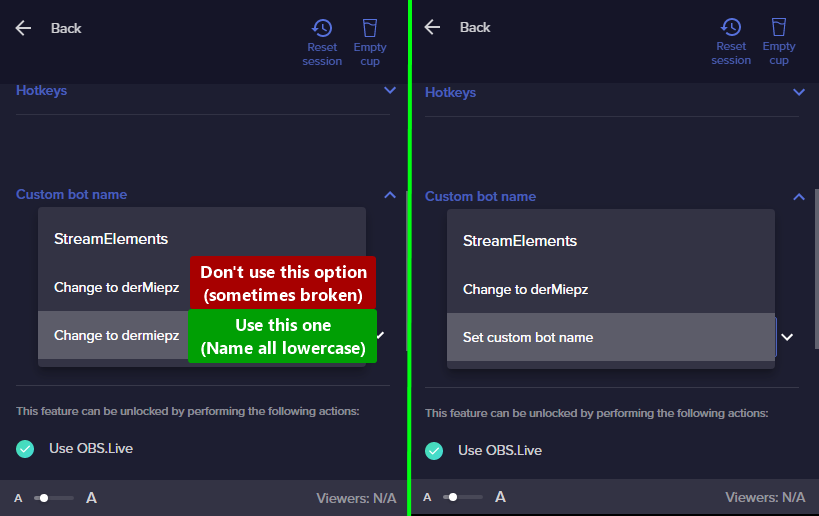
- In the Custom bot name field select Set custom bot name, not your already existing username (with capital letters). Note: If you already connected an account that way, the third entry will show as the account name (see image https://i.imgur.com/re4theQ.png).
- Scroll a bit down and click on the purple Connect Custom Bot Account button
- Log in as usual and Authorize the custom bot name
- Back in the Activity feed, click on the Send Test Message button and check if your custom bot name starts working again
snow sleet
crude pecan
<@469816017925963776> ⤵️
am I understanding it right that I cannot use my own username as my bots name?
nimble dune
snow sleet
am I understanding it right that I cannot use my own username as my bots name?
Did you choose the 3rd option?
 nimble dune
You're welcome!
snow sleet
hero of the day ❤️
 merry apex
Does anyone know how to actually contact streamelements bc I need them to reset my account name. I changed my twitch user and now it doesn’t work so I need them to change those details. Any idea how to contact them???
crude pecanBOT
@merry apex ⤵️
If you changed your name on Twitch, please follow these steps:
- Visit https://streamelements.com/logout and then log in again by connecting with Twitch.
- On the right side of the dashboard page that opens, select Join under bot settings. If it says Part select that and then select Join to send the bot to the chat. Don't forget to mod the bot by typing /mod streamelements in your channel if you have not already.
- Post your old and your new name here so that we can update your channel's chatstats tracking (must be done by staff).
ebon forum
merry apex
Does anyone know how to actually contact streamelements bc I need them to reset ...
Follow the guide from the bot^ Almost everything will change automatically, only the merch store URL is not automated.
merry apex
Ok so I post here
It was it kryptic37 but now it is teqkzz
Shoot I meant itzkryptic37 and now it is teqkzz
ebon forum
merry apex
It was it kryptic37 but now it is teqkzz
Chatstats are fixed. For everything else - log out and log back in
merry apex
Ok thanks
I have spent a total of 12 hours trying to figure it out and all it took was 2 minutes
ebon forum
Well if you get stuck somewhere, ask us, we fix it or show you the way
merry apex
Ok thanks
ionic kelp
@stray parrot Looking at your VODs and your follows I'm not seeing anything like your issue. Only actual alert I saw was from Kappamon and that was fine.
@topaz viperLooked at their VOD and it definitely should've triggered twice within the first 30 minutes. I've passed it to staff to look at.
lament blade
twitch wont log in via OBS
ionic kelp
@topaz viper Which timer was that from the screenshot?
 inner shore
Hello folks, I got an issue with my activity feed. It doesn't register new subs and my alerts dont go off as a consequence
Is this the right channel for help regarding that issue?
I haven't had this happen to me before
merry apex
It still says that the bot failed to join
Did u make sure it was teqkzz
I click join bot and it says successfully joined bot, but then it still gives me the choice to join the bot again so I click it and then it says failed to join bot
ionic kelp
Bot is showing in userlist for your channel.
merry apex
Ya
Does anyone know how to fix this bc I have been trying for agaves and I do not think there is anything left that I can do
ionic kelp
The bot is in the channel. Try with commands.
merry apex
I have but it doesn’t work
ionic kelp
Disable follower mode
merry apex
Ok
There
I had it on with streamelements before but then I changed my name and it doesn’t work
ionic kelp
Still in follower mode for me.
merry apex
I just disabled it
lament blade
My commands doesn't work, you can solve my problem?
crude pecanBOT
@lament blade ⤵️
Go to the Dashboard > Right side > Part channel > Join channel (https://streamelements.com/dashboard) https://i.imgur.com/uYVb8OK.png
ionic kelp
Still showing on both mobile and desktop
ionic kelp
Could you try /unblock streamelements
merry apex
Did that
ionic kelp
The thing is Nightbot should for sure respond to the !commands command though
merry apex
It did
I tried with my other account and it did not work
So certain ones do not work
lament blade
because when I write !watchtime you always see 0 seconds
crude pecanBOT
The !watchtime command is directly tied to the Loyalty system. The Loyalty system must be enabled for viewers' watchtime to count up.
To enable Loyalty, please go to the Loyalty section of your account: https://streamelements.com/dashboard/loyalty
Watchtime counts up every 10 minutes alongside Loyalty points, and only while the stream is live. Reruns will not be counted.
Please note that watchtime is not tracked by Twitch and there is no way to retroactively apply past watchtime to viewers.
merry apex
@lament blade check your loyalty settings
 fiery briar
I have just updated my username on Twitch. I got streamelements to work in chat and I just need it updated for my stat tracking. Old username: gunth_of_the_month New Username: gunthofthemonth
ionic kelp
I've passed it along to staff to fix
merry apex
That you
Maybe when they changed the details then they spelt my new or old name wrong
ionic kelp
@fiery briarFixed.
stray parrot
ionic kelp
<@!531748904971010050> Looking at your VODs and your follows I'm not seeing anyt...
on my alerts, when someone starts following me
ionic kelp
@merry apex Try again
ebon forum
merry apex
Ya I did
Pinged our developers, we are on it, might take longer
merry apex
Ok
 merry apex
That’s not good
ebon forum
we get that fixed, do not worry, but we need our developers for it
ebon forum
merry apex
Oh ok
One question, did you try to set the custom bot name to your channel name?
merry apex
No
ebon forum
Let's try that fix just in case
crude pecanBOT
- Right-click on your OBS desktop shortcut and open the Properties
- In the Target field, add the following to the very end:
--remote-debugging-port=40404(don't forget to add a space before the current path) - Open OBS (or restart if it was open)
- Open your web browser and type in:
localhost:40404 - Click on StreamElements - Activity feed
- Navigate to the Console tab
- Type the following into the console and hit enter:
store.customBot.removeCustomBotIntegration() - Try setting the custom bot name
- Remove the additional flag in step 2 from your shortcut properties.
merry apex
I do not think I did
ebon forum
If you use OBS.live
nimble dune

 unkempt sail
hello new here
crude pecanBOT
@unkempt sail ⤵️
Welcome to the helpdesk! Please let us know how we can assist you today and a support volunteer or staff member will assist you as soon as they are available. Thank you for your patience.
unkempt sail
thank you
 proven plover
Is there selective recording on streamelements?
ionic kelp
That would be something for OBS Studio and is planned but no ETA atm.
HOWEVER
OBS Forums
Download
Plugin for OBS Studio to add a filter that allows you to record a source.
Add "Source Record" filter to your source.
Installation
Copy and merge the folders that are in the download zip to the OBS folder for example:
C:\Program...
ionic kelp
They added it themselves without adding it back towards OBS.
proven plover
ahh
 slim walrus
hi im making the switch from streamLabs OBS... where i used to build certain overlays and alerts on the laptop app then actually put them to use on my mobile device to stream from using OBS mobile app.
I added some goals and Alert box to stream elements url /dashboard
"MOBILE - MOBILE ALERTS - PURPLE WAVE ALERTS STATIC" using this overlay ^^
but im unable to see or manage them from the streamElements app on my mobile that i stream from ... any clues ?
many thanks
edit ive linked my twitch account to mobile and web based platform
 foggy heart
slim walrus
hi im making the switch from streamLabs OBS... where i used to build certain ove...
foggy heart
slim walrus
hi im making the switch from streamLabs OBS... where i used to build certain ove...
You won't be able to edit/manage overlays from the phone app, you'd have to go through the online website editor
slim walrus
thanks^^ but they should appear on the mobile if i select audience view ?
because im testing all the alert triggers and getting nothing but generic alerts and the sub goals / labels are not visable
foggy heart
slim walrus
thanks^^ but they should appear on the mobile if i select audience view ?
You won't be able to see the overlay within the app, i'd suggest viewing the overlay in the "preview" option within the online editor (using a new tab)
slim walrus
cool thanks 🙂... yep got it

 drowsy egret
 wanton trail
posted in wrong channel... How do I set the custom bot name in ground control?
wanton trail
posted in wrong channel... How do I set the custom bot name in ground control?
we need to enable the option for you, whats your account id? (can be found here: https://streamelements.com/dashboard/account/channels)
 scenic forge
Not entirely sure where to post this, but considering I'm a twitch streamer, here will do.
So whenever I load the website (streamelements.com) I click My Dashboard and get a white page. Nothing else there, nothing to click. Refreshed, restarted browser, deleted cookies and cache multiple times. I need access to my overlay and other information and I can't seem to access anything
drowsy egret
scenic forge
Not entirely sure where to post this, but considering I'm a twitch streamer, her...
what browser are you using?
scenic forge
Firefox, which I've used before. I've recently reinstalled windows entirely, could be a factor
I get to the normal page where I log in with Twitch, then the page with the "My Dashboard" button, but when I click it, white page
drowsy egret
can you try with chrome? our website is not fully optimized for other browsers
scenic forge
I can give it a download and try, just a moment
wanton trail
drowsy egret
we need to enable the option for you, whats your account id? (can be found here:...
|| 5c990dc8e2918740cafd658f ||
scenic forge
Alright that seems to have worked. I'll remember to use this in future, I thank you for the assistance
drowsy egret
wanton trail
|| 5c990dc8e2918740cafd658f ||
you should now see the option to enable the custom bot name option name
drowsy egret
scenic forge
Alright that seems to have worked. I'll remember to use this in future, I thank ...
nice!
 stark marten
Can someone turn on SE.pay for me?
@drowsy egret hey, could you turn on SE.Pay for me?
i meet the qualifications for SE.Pay
545? followers on twitch
wanton trail
thank you!
stark marten
?
drowsy egret
stark marten
<@!131420870244564992> hey, could you turn on SE.Pay for me?
where are you from?
stark marten
Romania
drowsy egret
stark marten
Romania
se.pay is only available in the following countries: Austria, Belgium, Czech Republic, Denmark, Finland, France, Germany, Ireland, Italy, Netherlands, Poland, Portugal, Slovakia, Spain, Sweden, Switzerland, United Kingdom, United States.
topaz viper
ionic kelp
<@!372072039361806338> Which timer was that from the screenshot?
Sry for late reply was a bit busy. Its the only one we have the discord timer
 hushed crystal
Hi! I just did the stream sponsored for raid shadow legends but for some reason it didnt go through, I just finished it so I would like to know what happened and if you guys could update the info 
crude pecanBOT
@hushed crystal ⤵️
Please contact us via email for support with your campaign or sponsorship. You can use our contact form here: https://streamelements.com/contact Thank you.
lament blade
How do I change the !join alias for sraffle/raffle? Appreciate any assist.
drowsy egret
hushed crystal
Hi! I just did the stream sponsored for raid shadow legends but for some reason ...
try refreshing the page
drowsy egret
lament blade
How do I change the **!join** alias for sraffle/raffle? Appreciate any assist.
thats one of the default commands so you can add aliases form the chat commands section, but you wont be able to customize what the message says so you'd have to add aliases instead of changing the default command name
 mossy stirrup
Hello! Trying to use the bingo command for twitch, but the bot says no emotes found when I try to do !bingo twitch (number). Any idea how to fix this?
By the way, bttv works. Just not twitch emotes
 elfin sparrow
mossy stirrup
Hello! Trying to use the bingo command for twitch, but the bot says no emotes fo...
elfin sparrow
mossy stirrup
Hello! Trying to use the bingo command for twitch, but the bot says no emotes fo...
The bot has to be subbed to use channel emotes. I believe you can get around that by giving the bot your name?
mossy stirrup
elfin sparrow
The bot has to be subbed to use channel emotes. I believe you can get around th...
So the bingo isn't for twitches global emotes? I was under the assumption that it was for all of twitches global emotes so people didn't have to be subbed to me to win points.
Thank you for the fast response too!
elfin sparrow
Oh it should be able to use global for sure, nobody should have to be subbed to use the command
I thought you meant you wanted your bot to spam your channel emotes, that’s my b
mossy stirrup
So does the bot still have to be subbed as well even to use global emotes?
elfin sparrow
Nah, that shouldn’t make a difference at all
mossy stirrup
Okay thanks!
drowsy egret
there's an issue regarding the twitch api so emotes are not working for kappagen and bingo at the moment
mossy stirrup
@drowsy egret Okay so it isn't working for now, but may in the future?
drowsy egret
mossy stirrup
<@!131420870244564992> Okay so it isn't working for now, but may in the future?
for sure, devs are on it but it could take a while to get fixed
mossy stirrup
drowsy egret
for sure, devs are on it but it could take a while to get fixed
Perfect thank you!
 wicked rivet
Text Scrolling is completely missing under Text Settings on a brand new label. Am I missing something?
 ornate zinc
Is there a way to turn SE Tipping Page from Paypal from "Goods and Services" to "Friends/Family" so that there's no wait time/fee removed from tips?
 dry nymph
Hi - I keep getting a whitescreen when trying to log on to SE on firefox. Cleared cookies/cache not helping... any ideas?
elfin sparrow
dry nymph
Hi - I keep getting a whitescreen when trying to log on to SE on firefox. Cleare...
I think it’s optimized for chrome. I know edge works well. Maybe try the same thing on a different browser?
dry nymph
Yeah edge is fine 🙂 ok!
elfin sparrow
wicked rivet
Text Scrolling is completely missing under Text Settings on a brand new label. A...
Text scrolling is a toggle if you scroll aaaaalllllllll the way down in text settings
wicked rivet
elfin sparrow
Text scrolling is a toggle if you scroll aaaaalllllllll the way down in text set...
Thanks. Yeah I went all the way down and the last thing is "Text Shadow". Scroll bar is all the way to the bottom so there's nothing underneath.
elfin sparrow
wicked rivet
Thanks. Yeah I went all the way down and the last thing is "Text Shadow". Scroll...
 proven plover
Hey,
Source record seems to sometimes work and sometimes not.... Is there a limit to the amount of items in a scene?
wicked rivet
elfin sparrow
 elfin sparrow
what kind of label is it, i'll give it a go on my end
 worthy turret
Im confused on how to import my overlay into streamlabs
wicked rivet
elfin sparrow
what kind of label is it, i'll give it a go on my end
All labels for me. This one specifically was latest sub with default settings.
drowsy egret
wicked rivet
All labels for me. This one specifically was latest sub with default settings.
can you give me your account ID so we can look into this? you can find that here: https://streamelements.com/dashboard/account/channels
elfin sparrow
worthy turret
Im confused on how to import my overlay into streamlabs
in the overlay editor, you can click the little chain link next to preview to copy the overlay url, then in OBS create a browser source and paste your link into the URL spot. change the settings to 1920x1080 and save
worthy turret
thats what i did it didnt work
lament blade
drowsy egret
thats one of the default commands so you can add aliases form the chat commands ...
Appreciate that
wicked rivet
drowsy egret
can you give me your account ID so we can look into this? you can find that here...
So this is a channel that I was invited Full Access to. Interestingly enough under my own channel the Text Scrolling is enabled. It appears to be an issue specifically with non-owners of the channel. With this new information you may not need the ID, but if you do I can reach out to the channel owner and get it for you.
elfin sparrow
worthy turret
thats what i did it didnt work
did you save changes in the overlay editor as well?
worthy turret
i believe
drowsy egret
wicked rivet
So this is a channel that I was invited Full Access to. Interestingly enough und...
it could certainly be a missing option from being an editor, give me your own account id as well just to see if its also missing from my end
wicked rivet
drowsy egret
it could certainly be a missing option from being an editor, give me your own ac...
60adc7b430975111089bb1f4
proven plover
Anyone used source record?
elfin sparrow
worthy turret
i believe
so if you've saved it on the editor and in OBS you should be able to see the overlay on your OBS if the browser source layer is above your game source
proven plover
Seems that audio with source record is broken?
elfin sparrow
proven plover
Seems that audio with source record is broken?
somebody on the source record forum is saying the same thing. what are you trying to do? maybe there is a round about way of getting it done?
drowsy egret
wicked rivet
60adc7b430975111089bb1f4
whats the name of the channel you're doing this for?
wicked rivet
drowsy egret
whats the name of the channel you're doing this for?
BebyTheBeast
proven plover
elfin sparrow
somebody on the source record forum is saying the same thing. what are you tryi...
Record gameplay audio with the gameplay footage
Just doesnt record when audio is turned on
drowsy egret
wicked rivet
BebyTheBeast
I do see the text scrolling when adding a label on their overlays
 vapid summit
i need help
elfin sparrow
proven plover
Record gameplay audio with the gameplay footage
i have no idea what i'm looking at with that source code but you can record audio/gameplay without the extra plugin with a game capture or window capture source.
proven plover
Yeah thats what I'm having to do now
elfin sparrow
proven plover
Yeah thats what I'm having to do now
seems the simplest option lol
elfin sparrow
vapid summit
i need help
what's up?
vapid summit
my chat is not popping up in my overylay
wicked rivet
@drowsy egret Thanks for checking. It appears some labels don't support this, such as a Bot Counter Label, is that correct? I swear it wasn't showing up for any of the sub labels, but they are now.
elfin sparrow
vapid summit
my chat is not popping up in my overylay
and you have the chat widget added to your overlay?
drowsy egret
wicked rivet
<@!131420870244564992> Thanks for checking. It appears some labels don't support...
yeah, some don't have this option
vapid summit
yea
elfin sparrow
vapid summit
yea
if you go into settings > stream, have you connected your twitch account?
wicked rivet
drowsy egret
yeah, some don't have this option
Ok. Thanks again.
merry apex
Has ant staff gotten to my problem, I do not mean to be rushing but i do not know if you can do it while I stream and I am about to start.
vapid summit
nvm
 inner rampart
CAN SOMEBODY HELP ME ?
WHEN I CREATE A SCENE WITH MY GAME WINDOW
ITS DOESNT APPEAR IN THE STREAM
drowsy egret
merry apex
Has ant staff gotten to my problem, I do not mean to be rushing but i do not kno...
how can we help?
drowsy egret
inner rampart
WHEN I CREATE A SCENE WITH MY GAME WINDOW
if you're in studio mode you will have to actually switch to that scene
merry apex
I need to get the name reset again bc I changed my name. I am not sure if it just didn’t work last time or what but the old name was:
Itzkryptic37
The new name is:
Teqkzz
inner rampart
drowsy egret
if you're in studio mode you will have to actually switch to that scene
Im already into the scene 😦
crude pecanBOT
@merry apex ⤵️
If you changed your name on Twitch, please follow these steps:
- Visit https://streamelements.com/logout and then log in again by connecting with Twitch.
- On the right side of the dashboard page that opens, select Join under bot settings. If it says Part select that and then select Join to send the bot to the chat. Don't forget to mod the bot by typing /mod streamelements in your channel if you have not already.
- Post your old and your new name here so that we can update your channel's chatstats tracking (must be done by staff).
drowsy egret
inner rampart
Im already into the scene 😦
what doesnt appear on stream? the scene or the game
merry apex
Also the person I was talking to earlier said I had a rare glitch where the broadcaster couldn’t use the commands only the viewers could
drowsy egret
inner rampart
if i open the live, can you help me ?
you can post a screenshot if you want
merry apex
I did that
 elfin sparrow
inner rampart
elfin sparrow
inner rampart
try window capture instead
see if that fixes it. i have to switch between the 2 depending on the game
elfin sparrow
can you change the in-game settings to be windowed instead of fullscreen then try both sources again?
merry apex
Ok sk1ll I am done that
The thing is that it gives me the option to rejoin the bot and then just says failed to join bot
drowsy egret
merry apex
The thing is that it gives me the option to rejoin the bot and then just says fa...
did you logout and login again?
merry apex
Yup
 bright shale
Hey, I am really struggling with my Stream Elements alerts. For the past few months alerts just wont come through. They work on the emulator. And they will work if I spam click the replay button on the dashboard. I have tried logging out and back in and everything I can think of to fix this issue. My twitch is the same as my Discord name. Some help would really be appreciated.
elfin sparrow
bright shale
Hey, I am really struggling with my Stream Elements alerts. For the past few mon...
i'd try duplicating your alertbox to keep all the settings then mute the first one and see if the 2nd alertbox works as intended. hard to test though since you said it emulates just fine
you could also go into your browser source and refresh the cache of the current page and that might help fix any weird stuff like that
bright shale
I did those as well. And nothing seems to be working.
elfin sparrow
bright shale
I did those as well. And nothing seems to be working.
but clicking the replay button in your activity feed plays the alert?
bright shale
Sometimes after 1 click and sometimes after the 10th click
Then once it finally goes through on the 10th click it will play all 10 times 🥲
elfin sparrow
bright shale
Then once it finally goes through on the 10th click it will play all 10 times 🥲
do you have any "appearance delay" under animation settings for your alerts? it sounds like its just super latent for some reason
 vocal sequoia
@viscid pebble I'm having the exact same issue as @bright shale
Is there some kind of internal issue on SE's end that would be causing this?
worthy turret
elfin sparrow
so if you've saved it on the editor and in OBS you should be able to see the ove...
homie im lost is it possible that we can hop in a call?
 sonic sand
@viscid pebble I am also having this issue. I have done everything under the sun I can think of as well as my streamer friends and the general internet. My follow alerts work most of the time and sometimes my sub alerts work but my cheer bits hosts and raids have never worked not even once yet they emulate perfectly fine on the browers and obs
elfin sparrow
worthy turret
homie im lost is it possible that we can hop in a call?
lol yeah man, i'm not doing anything. hit me up
sonic sand
we can get a call with yall on tech support??
drowsy egret
sonic sand
<@!155149108183695360> I am also having this issue. I have done everything under...
I figured out your problem, it's a very specific one lol
you changed your username right?
bright shale
drowsy egret
I figured out your problem, it's a very specific one lol
I changed my username. That's what I was just looking at
sonic sand
drowsy egret
I figured out your problem, it's a very specific one lol
i did but it was wayyyyy before i became a streamer
i didnt have a streamelements account until i had my current username
drowsy egret
sonic sand
i did but it was wayyyyy before i became a streamer
it looks like you took the name from someone that already had an account with us so events are mixed up between these 2 accounts
sonic sand
the name was available? what do I do becuase my viewers are really getting upset with this
@drowsy egret
drowsy egret
sonic sand
the name was available? what do I do becuase my viewers are really getting upset...
I mean, someone with your twitch username created an account a few years ago, that username was made available and you took it when you changed your name
I can request our dev team to delete the old account and your events are going to start working again
crude pecanBOT
@sonic sand ⤵️
Please provide your account ID found at the top of this page: https://streamelements.com/dashboard/account/channels This ID is public info and safe to share here.
sonic sand
that would be amazing ! the SE ID is 6077bca120debc180d19dabb
bright shale
@drowsy egret Is this something that I could do as well?
drowsy egret
bright shale
<@!131420870244564992> Is this something that I could do as well?
give me a moment and I'll check your specific case
bright shale
drowsy egret
give me a moment and I'll check your specific case
Thank you
sonic sand
what do i need to do next? @drowsy egret
drowsy egret
sonic sand
what do i need to do next? <@!131420870244564992>
you will need to wait until the old account is deleted, I responded to an email from you a few days ago
I'll update you from that same email
sonic sand
i never got the email response
drowsy egret
oh, no idea what happened there
I'll ping you over discord then
or better yet, dm me your actual email, I now see that we replied to a weird address
sonic sand
i even just checked my junk email that its attached to and nothing. sure i can send you another one
 muted sphinx
im having a problem that when i stream some users are not able to see it just shows a black screen
i cant tell if this is a OBSlive problem or a twitch at this point
bright shale
@muted sphinx Only some can't see?
muted sphinx
weirdly enough ya only some people cant i tried reconnecting my twitch account on OBS live still didnt fix it
elfin sparrow
if it was obs, nobody would be able to see it. you can check vods and see what it looks like
bright shale
If it's only some, sounds like their internet might not be good enough for your resolution? Or they have selected Audio only lol
drowsy egret
@bright shale alright, can you quickly remind me what was your issue? 😄
muted sphinx
ill check i have a friend that is one of them that can't ill have them check if i lower my resolution and see if they have audio only on thanks!
bright shale
drowsy egret
<@!107639986697814016> alright, can you quickly remind me what was your issue? �...
The same as DrSavvy is what it sounded like. I am really struggling with my Stream Elements alerts. For the past few months alerts just wont come through. They work on the emulator. And they will work if I spam click the replay button on the dashboard. I have tried logging out and back in and everything I can think of to fix this issue. My twitch is the same as my Discord name. Some help would really be appreciated.
elfin sparrow
you're not by chance using slobs are you?
bright shale
No OBS studio
elfin sparrow
whew
drowsy egret
bright shale
The same as DrSavvy is what it sounded like. I am really struggling with my Str...
does the event appear in your activity feed?
bright shale
Yes
drowsy egret
I assume they do since you can replay them
bright shale
If I click replay event 1-10 times it will display it
bright shale
drowsy egret
I'll follow to see if it shows up my follow alert
I see your follow but no alert
crude pecanBOT
OBS > Settings > Advanced > Scroll down > Enable or disable Browser Source Hardware Acceleration, depending on its current state > Restart OBS
https://i.imgur.com/ggMe9ZE.png
bright shale
drowsy egret
because it did for me
This is currently on
drowsy egret
bright shale
This is currently on
try turning it off
bright shale
It is off
drowsy egret
replay my alert now
 humble umbra
i'm trying to sign out of my account on streamelements.com, to sign-in with another account but i can't get the website to "forget" my account
bright shale
drowsy egret
replay my alert now
I replayed it and it worked.
drowsy egret
bright shale
I replayed it and it worked.
nice 😄
elfin sparrow
humble umbra
i'm trying to sign out of my account on streamelements.com, to sign-in with anot...
delete yo cookies
 buoyant wyvern
Someone told me that there was a marathon timer here, where's it at?
buoyant wyvern
Ty
bright shale
drowsy egret
try turning it off
Someone just cheered and same issue happened PepeHands
drowsy egret
bright shale
Someone just cheered and same issue happened PepeHands
I saw the alert myself (still have the source added to my obs)
you can try reinstalling obs to see if that helps
bright shale
drowsy egret
I saw the alert myself (still have the source added to my obs)
That's what I was trying to explain. The alerts are working only sometimes.
drowsy egret
bright shale
That's what I was trying to explain. The alerts are working only sometimes.
but it did show up in my obs
vocal sequoia
But it didn't show up on his stream? So would this be a cached issue in OBS?
On his machine?
drowsy egret
it could be, he can try refreshing the source cache or reinstalling to see if it helps but if I see all the alerts it means the alerts are working
 dull quail
Hi 
I'm trying to create a custom command that creates a specific emotesplosion... I set it up to have StreamElements use !kappagen comman, but does some reason it doesnt work when StreamElements says it...
vocal sequoia
@drowsy egret Aight, I'll work with him an try to fix it after his stream today. ty
bright shale
drowsy egret
it could be, he can try refreshing the source cache or reinstalling to see if it...
Thanks again for the help 🙂
drowsy egret
dull quail
Hi <:Hi:824000415174492170>
I'm trying to create a custom command that creates...
what do you mean by this? you're trying to make the bot trigger it?
dull quail
drowsy egret
what do you mean by this? you're trying to make the bot trigger it?
essentially, yes
drowsy egret
dull quail
essentially, yes
the bot can't trigger its own commands, it needs to be triggered by a different account
dull quail
drowsy egret
the bot can't trigger its own commands, it needs to be triggered by a different ...
is there another way to go about creating a specific custom command that triggers a specific emotesplosion
drowsy egret
dull quail
is there another way to go about creating a specific custom command that trigger...
I don't think so 
elfin sparrow
dull quail
is there another way to go about creating a specific custom command that trigger...
you could gift your bot a sub and then set up a custom command that uses your emotes and then the emotes would bounce across the screen?
but someone else would still have to trigger it probably
dull quail
i'm just having it spam BTTV emotes.. they pop up but dont explode thats all
elfin sparrow
yeah, for emotes in chat (non event related) the only options you have are zoom, bubble, blur, bounce, or random
merry apex
Staff r u guys able to or no bc if not then I will just give up bc I have spent so much time in trying to figure it out
 dry hare
merry apex
Staff r u guys able to or no bc if not then I will just give up bc I have spent ...
dry hare
merry apex
Staff r u guys able to or no bc if not then I will just give up bc I have spent ...
What seems to be the issue?
Possibly?
 tawny pike
how can I enable/disable commands from chat?
I tried:
!cmd options givepoints -enable
it didn't work
elfin sparrow
 rugged spindle
I think se.sponsorship disapeared from my profile
rugged spindle
I think se.sponsorship disapeared from my profile
is it not under Revenue?

 shell ivy
how do u change the tittle
tawny pike
shell ivy
how do u change the tittle
!settitle "The title"
dry hare
tawny pike
how can I enable/disable commands from chat?
I tried:
`!cmd options givepoints ...
It’s !addpoints
tawny pike
dry hare
It’s !addpoints
when an user wants to give points to another user, is !givepoints
dry hare
Correct. Make sure the command is enabled
tawny pike
I want to enable it from chat
dry hare
If you want to enable/disable it you need to do it from the dashboard
Only way to disable commands
 honest wraith
how do you reset goals to their correct percentage
crude pecanBOT
@honest wraith ⤵️
To reset goals:
- from the Overlay Editor > Session data on top right (monitor symbol) > Goals tab > reset progress of desired goal
- from the Dashboard > Activity feed on the left > Widget data on the right > Goals tab -> reset progress of desired goal
Note: Goal widgets (progress) only counts up and doesn't go down automatically, if you lose followers/subs.
honest wraith
thanks!
dull quail
drowsy egret
I don't think so <:Sadge:763516532130316299>
I figured it out.. I made a custom bot, and connected streamelements to it, and !kappagen works when used by custom bot too.. WOOO 
not only do i have a cooler bot, but it can use commands too 
 vital swift
Hello, I'm trying to do a game capture on Valorant but i cannot see anything but a black screen. What do i do to fix this
crude pecanBOT
@vital swift ⤵️
Obs.live is a plugin for OBS Studio for the best OBS support, please join their Official Discord @ https://discord.gg/obsproject
 granite echo
Hey so I have my twitch account setup on obs but when I click start streaming stream elements pulls up stream to youtube even though its not linked
crude pecanBOT
@granite echo ⤵️
StreamElements menu, on top of OBS > Logout > Login
granite echo
I see I see thank you
 patent matrix
Hi!, i will be streaming genshin impact, i wonder , is there way to see my chat while in game?
crude pecanBOT
@patent matrix ⤵️
If you have one monitor and/or would like the chat overlay on the screen, please look at the link below.
Please note this is not a plugin for OBS and not maintained by SE.
https://github.com/baffler/Transparent-Twitch-Chat-Overlay
patent matrix
Oh, thank you so much!
patent matrix
patent matrix
Hi!, i will be streaming genshin impact, i wonder , is there way to see my chat ...
i did the recommended process, does this only work on windowed? is there a way to get an overlay on a fullscreened game?
ionic kelp
There is not.
topaz viper
topaz viper
Sry for late reply was a bit busy. Its the only one we have the discord timer
@ionic kelp (sry for ping) i kinda got buried
ebon crypt
Is there any specific reason why "Text to speech activation delay" is limited to a max value of 10 seconds?
My animation is 14 seconds with audio and I'd like the TTS to start after the animation.

 zenith widget
the delay starts counting AFTER the sound/video stops playing
so its going to play 10 second after your sound/video plays
as there is a queue process for the TTS that it waits for all sounds to stop playing from alerts (normal and redemption alerts) before playing TTS
and then the next Alert if there is a queue waits for the TTS to finish and then plays its sound and its TTS
ebon crypt
Ahh I see, the problem for me is that I have to separate my Animation and TTS layer.
Because I have the TTS say something different than the text that appears on the screen, if there was a option like:
- "Text to display: "
- "Text for TTS: "
Then I'd be able to do what I want with no problems 🙂

My Alert TTS - does not have anything visible on screen, it's just TTS
 weak marten
Is there a command to remove points from someone, like if I wanna remove 500 points from someone? Or is it only setpoints that works?
 prisma relic
-points 😉
weak marten
!setpoints name -500 for example?
weak marten
Oh so addpoints can be used with - ?
Sorry lol
ionic kelp
to deduct x amount yes
prisma relic
it should; yup
weak marten
Great, thank you!
 silk wharf
I'm super new to this Twitch/streaming world and want to get some help about a streamelements extension. Is here the place to ask questions?
zenith widget
What exactly you need help with?
silk wharf
it's with an extension called streamelements leaderboards
it doens't show up on mobile nor updates anything (but subs)
zenith widget
Afaik, the twitch app doesn't show any extensions or panels under the channel.
silk wharf
oh, didn't know that
and about the updating, any ideas?
it tracks subs, but nothing else
crude pecanBOT
@silk wharf ⤵️
Prime Gaming (new and resub) and paid subscriptions (resub only) must be shared in chat manually by the person subscribing in order for the subscription information to be sent to StreamElements. For Prime Gaming, the user needs to have sharing enabled on https://www.twitch.tv/settings/prime. For paid subs, if the share box doesn't show up immediately it will when they refresh the page. https://i.imgur.com/VNJN0Uv.gif https://i.imgur.com/2297EA7.png
ionic kelp
zenith widget
Afaik, the twitch app doesn't show any extensions or panels under the channel.
However it does show just under the video on android

Those 3 icons.
silk wharf
didn't know that also 😛
zenith widget
TIL
 zenith widget
Your loyalty system is not turned on, so no one is getting points.
silk wharf
is the loyalty system the same as channel points, or an alternative?
zenith widget
The Twitch Channel points and our Loyalty points are 2 different point systems that are not connected to each other and do not share any points or redemptions notifications.
silk wharf
oh, I see...I thought they were the same thing. Gonna disable that tab them.
And the Chat Stats? Is that also another thing I need to enable?
zenith widget
thats different
crude pecanBOT
@silk wharf ⤵️
If you changed your name on Twitch, please follow these steps:
- Visit https://streamelements.com/logout and then log in again by connecting with Twitch.
- On the right side of the dashboard page that opens, select Join under bot settings. If it says Part select that and then select Join to send the bot to the chat. Don't forget to mod the bot by typing /mod streamelements in your channel if you have not already.
- Post your old and your new name here so that we can update your channel's chatstats tracking (must be done by staff).
silk wharf
zenith widget
thats different
in which way?
silk wharf
Sure...I'm just asking if there is any reason for them not to update
crude pecanBOT
@sterile zodiac ⤵️
Welcome to the helpdesk! Please let us know how we can assist you today and a support volunteer or staff member will assist you as soon as they are available. Thank you for your patience.
prisma relic
please don't ping staff. or anyone.
 sterile zodiac
my camera isnt working on obs live
prisma relic
Camera question might be better in #helpdesk-selive
crude pecanBOT
@tulip panther, posting multiple links will result in not being able to post again.
 echo schooner
Hello
prisma relic
hey @echo schooner; welcome! did you have a question?
echo schooner
Yes
prisma relic
🤞 i can help
echo schooner
Is there a way that I could see donos in chat and not an alert, if ever somebody does? Cause I stream on base console, so I can't tell if somebody donos.
prisma relic

i have mine off @echo schooner ; but you can toggle the on and it will post to chat as long as the SE bot is in your channel and a Mod
 unique geode
@placid raptor Hello again. He did those steps you told us to do. but the bot still wont respond to my commands
echo schooner
prisma relic
i have mine off <@!837302672469655592> ; but you can toggle the on and it will p...
Oh so it's like the follow chat alert?
prisma relic
the Bot will post to chat when you get followers or Tips in chat if you turn it on. The image there is showing a "follower" example
prisma relic
unique geode
<@!360074950838714368> Hello again. He did those steps you told us to do. but th...
z3 might not be online for a while. Are you having an issue with the bot not speaking in your chat?
unique geode
@prisma relic It speaks but It wont respond to !settitle. We get this message: something went wrong while trying to update the title.
we followed z3 steps but did not work
echo schooner
prisma relic
the Bot will post to chat when you get followers or Tips in chat if you turn it ...
Oh ok. Thanks very much! 
prisma relic
echo schooner
Oh ok. Thanks very much! <:TRONPOG:857877051851669534>
no problem; do note that in the image i posted that i have it off; you'd want this purple to turn it on
 echo schooner
prisma relic
no problem; do note that in the image i posted that i have it off; you'd want th...
echo schooner
prisma relic
no problem; do note that in the image i posted that i have it off; you'd want th...
Yep, I have it turned on. Thanks again!
prisma relic
unique geode
<@!229122038294380545> It speaks but It wont respond to !settitle. We get this ...
is the bot a mod/editor?
unique geode
prisma relic
is the bot a mod/editor?
Its mod yes
unique geode
to change title?
prisma relic
yup yup
 stuck meteor
Anyone having issues with their alerts atm?
unique geode
prisma relic
yup yup
did now
prisma relic
i don't see it in your channel
prisma relic
stuck meteor
Anyone having issues with their alerts atm?
on the website editor or live OBS? what is the issue?
unique geode
prisma relic
i don't see it in your channel
oh. its not in my channel 🙂
I helping another. I have full control of streamelements and supermod in his chat
stuck meteor
live OBS, I have no alerts showing on stream currently except for resubscriber variant. The alerts are showing in the editor
prisma relic
unique geode
oh. its not in my channel 🙂
I helping another. I have full control of streamele...
try in your own chat on Twitch.
unique geode
prisma relic
try in your own chat on Twitch.
it works in my chat. I am helping another guy
 strong pier
Hiye  Sorry am new, I was directed here because I'd like a twitch channel point overlay on my stream, and someone said that there was a widget in this Discord for it, I just can't find it. To clarity I'm using Twitch channel points, not Streamelements.
prisma relic
stuck meteor
live OBS, I have no alerts showing on stream currently except for resubscriber v...
when you test the events on the overlay; only the resub is working?
stuck meteor
Correct, also when I replay the a resub even from my activity feed it will work but no other alert will
prisma relic
strong pier
Hiye <:Wave:851195594654744577> Sorry am new, I was directed here because I'd li...
there is no integration for Twitch Points with SE
strong pier
prisma relic
there is no integration for Twitch Points with SE
Alrite thanks for letting me know. 💕
prisma relic
stuck meteor
Correct, also when I replay the a resub even from my activity feed it will work ...
can you try to great a new blank alert box and try some alerts?
stuck meteor
Yeah I tried with the same issue, I tried disconnecting my twitch account via twitch and reconnecting issue persists
prisma relic
unique geode
it works in my chat. I am helping another guy
put their channel in your chat room and i'll check over there
@unique geode can you disable followers mode
unique geode
prisma relic
<@!165531832098619394> can you disable followers mode
did now
prisma relic
i see followers mode only still
unique geode
prisma relic
i see followers mode only still
what about now?
unique geode
prisma relic
thanks; yup. something isn't right.
yup. we tried z3 steps but still did not work
stuck meteor
I imagine that could be why my alerts are dodgy too?
unique geode
so idk
prisma relic
stuck meteor
I imagine that could be why my alerts are dodgy too?
the alerts when tested should work 100% of the time
prisma relic
unique geode
yup. we tried z3 steps but still did not work
i'm out of debugs for this; i'll see if someone else has an idea for this.
 lucid sun
Does anyone know how i can have viewers request songs for my stream?
unique geode
prisma relic
i'm out of debugs for this; i'll see if someone else has an idea for this.
Okey
stuck meteor
prisma relic
the alerts when tested should work 100% of the time
Yeah they show on the editor, they don't show on the preview or in the stream
prisma relic
stuck meteor
Yeah they show on the editor, they don't show on the preview or in the stream
are you sure you've imported the overlay correctly?
prisma relic
lucid sun
Does anyone know how i can have viewers request songs for my stream?
for song requests, you will need to set up the 'media share'
stuck meteor
prisma relic
are you sure you've imported the overlay correctly?
I've used overlays plenty before and never had any issues. I've tried multiple different overlays I feel like the issue is related to my account
lucid sun
prisma relic
for song requests, you will need to set up the 'media share'
How do i do that ?
stuck meteor
Like the resubscribe variation will show on stream but not in the preview. It seems so irregular.
prisma relic
lucid sun
How do i do that ?

 neon minnow
Does Elements have any developer tools that could allow me to get the winner of a raffle?
lucid sun
I have it set up I have music playing there and a queue but how can my viewers suggest songs? is there something in my overlay that i need to do?
prisma relic
stuck meteor
Like the resubscribe variation will show on stream but not in the preview. It se...
if you do a specific test alert for that variation does it work? .... the test alerts should be working 100% of the time. if you see it in the editor the website it will mirror in OBS.
lucid sun
IM dumb never mind, just !sr
stuck meteor
prisma relic
if you do a specific test alert for that variation does it work? .... the test a...
I understand what you are saying but when testing it is not mirroring in obs. I can show you live rn. I test the alert it shows in the editor but nothing in stream. But there is the one alert that will show on stream regardless
lucid sun
Im stupid sorry for wasting your time
prisma relic
lucid sun
I have it set up I have music playing there and a queue but how can my viewers s...
you need to have the media request widget in your overlay and then enable the !sr command. there is a video on that page that walks through the set up
stuck meteor
I know how stupid this sounds and thats why im chasing support hey its got me braindead
lucid sun
prisma relic
you need to have the media request widget in your overlay and then enable the !s...
Im stupid sorry for wasting your time
I just did not read
prisma relic
no worries; that's what we are here for 🙂
lucid sun
Have an amazing day
prisma relic
stuck meteor
I know how stupid this sounds and thats why im chasing support hey its got me br...
make sure the top box is checked

 prisma relic
grrr... hahah
prisma relic
are you live?
stuck meteor
Sure am
prisma relic
channel name? ... no link
stuck meteor
Rychurd
prisma relic
got it 😉
 modest wyvern
Can you ask about bot commands here? o-o
elfin sparrow
modest wyvern
Can you ask about bot commands here? o-o
Yeah, #tech-talk is also a good place for bot stuff
modest wyvern
Oo ok, I'll try here first 😄 - So after a command to work so if someone says "what's the discord" for example we can do !discord @usernamehere and it'll send a message like @usernamehere the discord is ....... but if someone just puts !discord it just shows the message without the mention, is this possible?
 weak delta
Hello there.
elfin sparrow
modest wyvern
Oo ok, I'll try here first 😄 - So after a command to work so if someone says "w...
I’m sure that’s doable but my mod is better at scripting than i am 😅
 subtle osprey
hi
prisma relic
modest wyvern
Oo ok, I'll try here first 😄 - So after a command to work so if someone says "w...
${1:|' '} Discord LINK is here.
prisma relic
unique geode
Okey
try these 3 steps? # 1 part the bot don't rejoin yet, #2 logout, #3 rejoin bot
crude pecanBOT
Go to the Dashboard > Right side > Part channel > Join channel (https://streamelements.com/dashboard) https://i.imgur.com/uYVb8OK.png
Please logout of StreamElements at https://streamelements.com/logout and then login again to your account (Twitch/YouTube/Facebook).
unique geode
prisma relic
try these 3 steps? # 1 part the bot **don't rejoin yet**, #2 logout, #3 rejoin b...
We have already tried that
prisma relic
but in that order? part -> log out ->log in -> rejoin
unique geode
prisma relic
but in that order? part -> log out ->log in -> rejoin
Yes
neon minnow
I want to have a panel where it shows the latest raffle winner for quality purposes
Is that possible?
prisma relic
neon minnow
Is that possible?
raffle, contest, or giveaway? i get these 3 mixed up all the time
neon minnow
raffle
It's that command where people can do !join
I want to display the raffle winner from StreamElements to StreamLabs
prisma relic
i see the schema in the Docs https://dev.streamelements.com/docs/kappa/api.yaml/components/schemas/Raffle @neon minnow
but i am not sure it gets a trigger when completed and also the SE code is no compatible with labs
crude pecanBOT
@subtle osprey ⤵️
If you would like help from the StreamElements support volunteers/staff, please post your question in one of the helpdesk channels and someone will assist you as soon as they are available #helpdesk-twitch | #helpdesk-youtube | #helpdesk-facebook | #helpdesk-mobile | #helpdesk-selive | #helpdesk-merch
Helpdesk channels are only for requesting support! Thank you for being patient.
unique geode
prisma relic
but in that order? part -> log out ->log in -> rejoin
yes
 bright hawk
Hola, estoy teniendo algunos problemas con el leaderboard de streamelements. No me actualizan los chatstats y no se que podría estar pasando.
crude pecanBOT
@bright hawk ⤵️
Welcome to the helpdesk! The regular helpdesk channels are in English but we do provide multi-language support in the following channels: #🇩🇪︱deutsch | #🇫🇷︱français | #🇪🇸︱español | #🇵🇹︱português | #🇳🇱︱nederlands | #🇮🇹︱italiano | #🇵🇱︱polski | #🇨🇳︱中文語言服務區-chinese | #🇯🇵︱日本語-japanese | #🇭🇺︱magyar | #🇰🇷︱한국어-korean | #🇹🇭︱ไทย-thai | #🇷🇺︱русский | #🇺🇦︱українська | #🇨🇿︱czech
 rare cairn
I am having some issues with overlays. I am trying to consolidate everything to i don't have all these sources in my obs. So when i try to take one item and copy it to another overlay. Not all of the overlays show up in the list
is there a way to fix that?
modest wyvern
prisma relic
`${1:|' '} Discord LINK is here.`
Oh sorry never saw this, I'll try it, thank you!
Works amazing, thank you!
stray parrot
Okay so my follow alert from streamelements shows the name backwards on stream, the rest of the text is fine
please someone help me, ive waited for days but nothing help
helps
 reef oxide
Hey, how can I color my overlay for a few seconds when the alert comes?
 north gorge
Thanks so much for your help so far! Any updates with kappagen and using the personalized twitch emotes?
crude pecanBOT
@north gorge ⤵️
There is currently an on-going development investigation regarding an issue with KappaGen causing Twitch channel emotes to be unavailable. Unfortunately there is no ETA for a resolution at the moment.
north gorge
Thanks for the update!
reef oxide
crude pecan
<@184990345556131840> ⤵️
help me :C
 oblique maple
 rain crypt
Yo, is there any way to skip all alerts? I've been followbot spammed and its kind of annoying if I: dont turn the alerts off
crude pecanBOT
@jaunty jolt ⤵️
Go to the Dashboard > Right side > Part channel > Join channel (https://streamelements.com/dashboard) https://i.imgur.com/uYVb8OK.png
 sharp gazelle
Hi! I just changed my Twitch username and my commands and timers are no longer working on my stream. What do I need to do to fix it? Thanks!
crude pecanBOT
@sharp gazelle ⤵️
If you changed your name on Twitch, please follow these steps:
- Visit https://streamelements.com/logout and then log in again by connecting with Twitch.
- On the right side of the dashboard page that opens, select Join under bot settings. If it says Part select that and then select Join to send the bot to the chat. Don't forget to mod the bot by typing /mod streamelements in your channel if you have not already.
- Post your old and your new name here so that we can update your channel's chatstats tracking (must be done by staff).
nimble dune
@jaunty jolt And also mod the bot type /mod StreamElements in your chat
 jaunty jolt
thankssssssss
nimble dune
You're welcome!
sharp gazelle
crude pecan
<@695482542509260862> ⤵️
Where do I find the bot settings? I don't see it on my dashboard
crude pecanBOT
@sharp gazelle ⤵️
Go to the Dashboard > Right side > Part channel > Join channel (https://streamelements.com/dashboard) https://i.imgur.com/uYVb8OK.png
sharp gazelle
Thank you!!
rain crypt
Argh, anyone that can clear my alert queue? I've been follow bot spammed and I want to re-enable my alerts :/
nimble dune
sharp gazelle
Thank you!!
No problem!
 lean rivet
Hello, i have some problems with the media request, I can’t show videos in my stream, neither the sound
Can anyone help me? :c
nimble dune
lean rivet
Hello, i have some problems with the media request, I can’t show videos in my st...
Do you have the media request widget in your overlays?
lean rivet
how?
nimble dune
@lean rivet
 rugged spindle
Same question.
I don't have SE.Sponsorships. I had it, but it disapeared 2 days ago
after the gui update
nimble dune
@lean rivet In the overlay editor engagement > media request
nimble dune
rugged spindle
Same question.
I don't have SE.Sponsorships. I had it, but it disapeared 2 days ...
It should be under revenue
 reef oxide
Hey, how can I color my overlay for a few seconds when the alert comes?
 nimble dune
rugged spindle
<@!403056372373258252> ye i know, but it's not there
nimble dune
rugged spindle
<@!403056372373258252> ye i know, but it's not there
Hmm 
lean rivet
nimble dune
<@!688507709674487847> In the overlay editor engagement > media request
yes i have it just like that
rugged spindle
It was there 2 days ago 
 rugged spindle
Still nothing
nimble dune
lean rivet
yes i have it just like that
Good, then delete the browser source in OBS and re-add the overlay
crude pecanBOT
@lean rivet ⤵️
To add your overlays to OBS, add a new browser source in your scene. Paste your overlay URL in the browser source properties, set the dimensions to 1920x1080 (unless you changed them on the website) and check Shutdown source when not visible. https://youtu.be/KDvLynUqXI4
@rugged spindle ⤵️
Please contact us via email for support with your campaign or sponsorship. You can use our contact form here: https://streamelements.com/contact Thank you.
lean rivet
nimble dune
Good, then delete the browser source in OBS and re-add the overlay
okok thanks 😄
nimble dune
rugged spindle
Still nothing
If you use this link (https://streamelements.com/dashboard/partnerships/sponsorships) can you access to the sponsorships page?
nimble dune
lean rivet
okok thanks 😄
Is the video now showing in OBS?
crude pecanBOT
@tame birch ⤵️
To reset goals:
- from the Overlay Editor > Session data on top right (monitor symbol) > Goals tab > reset progress of desired goal
- from the Dashboard > Activity feed on the left > Widget data on the right > Goals tab -> reset progress of desired goal
Note: Goal widgets (progress) only counts up and doesn't go down automatically, if you lose followers/subs.
 tame birch
thanks!
nimble dune
No problem! 
lean rivet
nimble dune
Is the video now showing in OBS?
im doing something else ill do it a little bit late but thanks 😄
tame birch
wait I'm confused, now it says 0 instead not my current count xd @nimble dune
 tribal prism
I'm having issues setting up SE.Pay
It keeps saying submission failed when all the correct information is plugged in
nimble dune
tame birch
wait I'm confused, now it says 0 instead not my current count xd <@!334412925739...
You need to edit not reset. Go to the goals portion of that page (https://streamelements.com/dashboard/session) subscription goal progress and adjust that to reflect the number you want to show.
crude pecanBOT
@tribal prism ⤵️
Please contact us via email for support with SE.Pay. You can use our contact form here: https://streamelements.com/contact Thank you.
tribal prism
Thank you
 warm jungle
Is it possible to apply for the SE.Sponsorships?
Or send an email to the relevant gaming companies?
Or that Streamelements can manually add me there?
 balmy wedge
hello
i need help with the !time command
I need to change the time 1 hour ahead of what is right now
to a greek timezone
so it automatically tells the local greek time
 drifting silo
hey guys does anyone know how to get streamelements bot to show current song being played on spotify ?>
through a command **
 drowsy linden
balmy wedge
to a greek timezone
drowsy linden
balmy wedge
to a greek timezone
try this variable $(time . GMT+3) without any space (just avoiding another mute 😂 )
balmy wedge
i write that in twitch chat?
i need help asap i asked for help at different people
like other twitch mods from diff stream but nothing works
drowsy linden
balmy wedge
i write that in twitch chat?
type !cmd add greektime $(time . GMT+3)
drowsy linden
yep!
 little herald
why is it even when I save my cheer overlay, it doesn't work. But with absolutely every other alert, it works just fine?
nimble dune
little herald
why is it even when I save my cheer overlay, it doesn't work. But with absolutel...
Did you check the cheer variations?
And what doesn't work with the cheer alert?
balmy wedge
i need help with the !time command
I need to change the time 1 hour ahead of what is right now
to a greek timezone
so it automatically tells the local greek time
little herald
nimble dune
Did you check the cheer variations?
that's what it was. I only have one alert for all. So I'll just turn off the variants.
balmy wedge
can you help Danii im clueless right now
I am trying to change it for like an hour and asked different people/mods in twitch they dont know why it doesnt work
i tried using !cmd edit time $(time.GMT+3) but it shows the wrong time
@nimble dune please
 minor pebble
Hey all i need help. i switched twitch names and when i try to add myself as a Mod in the bot commands etc on stream elements it won't let me.
nimble dune
-.-
drifting silo
re login
nimble dune
balmy wedge
<@!334412925739728918> please
try ${time . Europe/Athens} without space
minor pebble
drifting silo
re login
i tried and it didn't work.
drowsy linden
nimble dune
try ${time . Europe/Athens} without space
looking around here, i found the same answer. I think it's right
rugged spindle
nimble dune
If you use this link (<https://streamelements.com/dashboard/partnerships/sponsor...
i can
nimble dune
warm jungle
Is it possible to apply for the SE.Sponsorships?
Or send an email to the releva...
SE.Sponsorships is invite only.
 steep whale
hello, general question. I have two twitch accounts. I want to copy over one overlay to the other twitch account, can I do that?
nimble dune
rugged spindle
i can
Nice, but send a ticket about the issue, you had the option under revenue, but now it's dissapeard.
 hushed wadi
How do I make it so it’s tell me my current time
nimble dune
balmy wedge
highly appreciated
You're welcome
hushed wadi
Danii
nimble dune
hushed wadi
How do I make it so it’s tell me my current time
Command?
nimble dune
You want to create a !time command, right?
hushed wadi
Yes
nimble dune
You can follow this #helpdesk-twitch message
lament blade
hey @nimble dune ive made custom alerts for my stream elements but it wont show up on stream elements
ive uploaded them, and the sound and everything works, but I when I place it as a subscriber/tip alert, the default alerts show up on stream elements
 inner badger
Hi my dashboard is showing all 0 can anyone help please?
lament blade
here is a quick 7 second video on what happens
I change te subscriber alert to a custom one I made > press emulate > subscriber event > DEFAULT streamelements subscriber alert pops up
nimble dune
@lament blade after you change the sound and video hit save, and then emulate
Also check your variations
lament blade
I have
hit save, and it still shows default man 😦
and variations
im on it right now
ahh
got it
thank you
youre a STUD
nimble dune
You're welcome! 
lament blade
❤️
 dusky mortar
i have a question for anyone who can help me
my kappagen wont show any of my channel emotes, all it shows are BTTV emotes, did i do something wrong or somehow remove them?
crude pecanBOT
@dusky mortar ⤵️
There is currently an on-going development investigation regarding an issue with KappaGen causing Twitch channel emotes to be unavailable. Unfortunately there is no ETA for a resolution at the moment.
dusky mortar
thank you !
 mint garnet
hey, does anyone knows if it is possible to make an user-specific command?
 jagged haven
Hi everyone!
Im having an issue with host notification on twitch, not sure if this is the place to ask or if is some known issue
stray parrot
Please someone, everyone is ignoring my message
 coral juniper
hey, i started a giveaway through streamelements and for some reason no one in my chat can purchase tickets? it keeps saying "Error! You don't have enough points to buy tickets." but i know that most people in chat have well over a thousand+ channel points. can anyone help me with this?
 pure umbra
Hi, can anyone help me to get the !Bingo command to work, I type in chat !bingo twitch 100 and it says no emotes found
elfin sparrow
coral juniper
hey, i started a giveaway through streamelements and for some reason no one in m...
twitch channel points are different than streamelements loyalty points. do you have loyalty enabled in loyalty settings on you SE dashboard?
coral juniper
elfin sparrow
twitch channel points are different than streamelements loyalty points. do you ...
i do have loyalty settings enable, but i just activated it maybe last week?? im guessing they can only use the points their earn on there and not their twitch channel points?
elfin sparrow
coral juniper
i do have loyalty settings enable, but i just activated it maybe last week?? im...
yeah exactly, they'll have to use the SE loyalty points to redeem tickets
you can go to leaderboard to see their current points though if that helps
coral juniper
elfin sparrow
yeah exactly, they'll have to use the SE loyalty points to redeem tickets
okay so im just dumn lol, thank you man!! I shouldve done a bit more research. Thank you!! 🙂
elfin sparrow
coral juniper
okay so im just dumn lol, thank you man!! I shouldve done a bit more research. T...
don't even worry about it brother!
elfin sparrow
jagged haven
Im having an issue with host notification on twitch, not sure if this is the pla...
what's going on with your host alerts?
jagged haven
elfin sparrow
what's going on with your host alerts?
hey, my hosts alerts arent showing on overlays or even in the activity feed
but I read recently that the issue may be with the 1/0 viewer hosts and something that changed in the twitch backend
elfin sparrow
jagged haven
hey, my hosts alerts arent showing on overlays or even in the activity feed
yeah i think twitch changed it to where hosts of less than (5 maybe?) don't give notifications
jagged haven
because I had a 30 viewers host notification that worked in the past
elfin sparrow
30 viewers was most likely a raid notification and those go off no matter how many viewers there are
jagged haven
it was a raid notification than gone wrong and only worked as a host
but I saw it registered in the activity feed
Well, that clarifies things. Thanks for the help.
Theres is no way currently to get host alerts on 1 viewer right?
 dusk rivet
Hia, can someone here help me with disabled payouts? It worked last month but now it's turned off 🤔
elfin sparrow
not that i'm aware of? it used to give notifications for that but i'm pretty sure something changed on twitches end for that
 ornate patio
i am having an issue with my voice being heard during a switch stream anyone have any help they could give?
apparently the game volume is louder than me but idk how to change that
elfin sparrow
ornate patio
apparently the game volume is louder than me but idk how to change that
easy fix is to turn the game sounds down in game. there are also programs like voicemeeter that can help you separate your desktop audio sources
ornate patio
hm ill check the first one out thank you
 tardy ice
hi, I changed my nickname on twitch and now the bot is no longer working on my channel. How do I fix this?


 abstract hemlock
@lament blade please don't ask the same question on more than 1 channel
 terse magnet
Hi, I have a problem, when I try to use the Media request, it don't works
I have tried it offstream
I only cand add videos on the streamelements page
I have tried with: !sr, !songrequest, !mediarequest, !request, !s, !r
I've tried it off stream, maybe onstream works, I will update you
I have streamelemens bot as moderator, It have to be editor, or both, or just one?
 calm flare
Hi. I need some help from the S.E. Staff.
I changed my Twitch Channel's name, and since then my SE bot stopped workirng. When I tried to logout and login, nothing changed.
And someone gave me a tutorial that contains the step "On the right side of the dashboard page that opens, select Join under bot settings. If it says Part select that and then select Join to send the bot to the chat." ... the problem is... I can't find that Join ou Part options. Any of them.
And I need to do this step in order to someone from Staff to update my channel's name.
Could someone help me?
tardy ice
calm flare
Hi. I need some help from the S.E. Staff.
I changed my Twitch Channel's name, an...
The same with me
ionic kelp
@calm flare @tardy ice What browser are you using?
tardy ice
Opera Gx
ionic kelp
Could you try with chrome just to indulge me?
calm flare
ionic kelp
<@!417390585285050379> <@!245347255991664640> What browser are you using?
I was using Microsoft Edge. I'll try with Chrome right now.
Yep, nothing changed here too, with Google Chrome.
 light oracle
anyone available to possibly solve an issue im having?
 amber birch
my !kappagen command to trigger an emotesplosion is not working. please help
merry apex
Have u guys fixed my twitch bot yet??
 drifting sluice
I'm getting the dreaded 404 on my chatstats page, anyone able to help me out?
foggy heart
drifting sluice
I'm getting the dreaded 404 on my chatstats page, anyone able to help me out?
any username changes recently?
drifting sluice
I did about 6 months ago, I changed it to better_times
foggy heart
What was the old one?
amber birch
ionic kelp
<@417390585285050379> Could you try in incognito?
I’m sorry I don’t understand
drifting sluice
foggy heart
What was the old one?
I honestly don't remember, I didn't use it to stream (at the time). Potentially it is though
foggy heart
drifting sluice
I honestly don't remember, I didn't use it to stream (at the time). Potentially ...
Should be up now
drifting sluice
thank you so much!
 cyan breach
im streaming right now and my game capture wont capture the game im playing. Can anyone help?
crude pecanBOT
@cyan breach ⤵️
Obs.live is a plugin for OBS Studio for the best OBS support, please join their Official Discord @ https://discord.gg/obsproject
 outer cloak
Hello there.
I'm from Germany.
I've got a question: What do i need to do if i don't want my tipping page (PayPal and SE.Pay) via StreamElements?
Simply delete my account or do i have to delete those things separately?
Thanks
zenith widget
You can remove your paypal from the tipping settings and that will essentially disable the ability for people to tip you via our link.
and then you can remove it from your channel if you so desire
outer cloak
Okay, thanks a lot 😄
echo schooner
Hello
 cold carbon
any idea why my media request page isnt working?
zenith widget
The page it self on the dashboard?
echo schooner
May I ask a question?
crude pecanBOT
@echo schooner ⤵️
Welcome to the helpdesk! Please let us know how we can assist you today and a support volunteer or staff member will assist you as soon as they are available. Thank you for your patience.
echo schooner
So I need to connect my paypal to streamelements, so the tip chat alert can activate? If ever somebody tips?
crude pecanBOT
@echo schooner ⤵️
Check out this playlist https://youtube.com/playlist?list=PLCDDKlFdScbEwdx5AntcQIS1InkFJwHtv with tutorial videos from setting up the basics to in-depth details on how to use our product.
New to OBS? Here is a 4 step quick start guide https://obsproject.com/wiki/OBS-Studio-Quickstart
Want to learn even more? Here is an in-depth overview https://obsproject.com/wiki/OBS-Studio-Overview
 dim crypt
SE bot is not working when I am live but it's working when I am offline? I parted the bot and rejoined the bot. I also made sure se had mod role
crude pecanBOT
@dim crypt ⤵️
If your commands recently stopped working and you're using OBS.Live and a custom bot name do the following:
- In OBS.Live, click on the hamburger menu (three stripes) at the top left of your activity feed
- Click on Stream Settings > Custom bot name
- In the Custom bot name field select Set custom bot name, not your already existing username (with capital letters). Note: If you already connected an account that way, the third entry will show as the account name (see image https://i.imgur.com/re4theQ.png).
- Scroll a bit down and click on the purple Connect Custom Bot Account button
- Log in as usual and Authorize the custom bot name
- Back in the Activity feed, click on the Send Test Message button and check if your custom bot name starts working again
dim crypt
Thank you!
 high yacht
hi guys! I need help with the StreamElements Leaderboard Extension... The issue is no matter how many times I uninstall and reinstall (or logout and login to StreamElements)... the stats arent showing for past subs / cheerers, it just says no data...
 dawn saffron
I'm looking for the tipping images i just clicked through them but i want to use one of them, any tips?
zenith widget
high yacht
hi guys! I need help with the StreamElements Leaderboard Extension... The issue ...
To get any data shown, the extension needs to be added first, and then the events like sharing a sub and cheering should be made.
That being said, to get some data into the extension, you can change the cheer leaderboard on your chat to all-time, give it like 10-20 minutes for the extension to populate its data and then switch it to the weekly leaderboard again.
As for subs - people need to share their subs in order to show up on it.
zenith widget
dawn saffron
I'm looking for the tipping images i just clicked through them but i want to use...
what images are you referring to?
dawn saffron
zenith widget
what images are you referring to?
The tipping images the ones it prompts you to download when you open up the tipping section
zenith widget
The default ones that we provide?
dawn saffron
Yes


 dawn saffron
Thank you so much
high yacht
zenith widget
To get any data shown, the extension needs to be added first, and then the event...
Hi, just to confirm, do you mean that any activity before I add the extension will or wont be counted? I understand that Subs need to be shared, but surely things like chat activity or more importantly Cheers would still be counted even if I add the extension after the activity itself?
 glad pike
Any1 know how to get affiliate
zenith widget
@high yacht I see that you have 54 followers, which I assume you've recently gained the sub button as well. In that case, go to our dashboard -> logout -> login again - this will update your account with us, which will allow us to track sub events properly from your account which should also help the extension help track events.
zenith widget
glad pike
Any1 know how to get affiliate
high yacht
zenith widget
<@!775351952841375775> I see that you have 54 followers, which I assume you've r...
Yes I have already done this (please see my original post). I have logged out logged in, unistalled reinstalled the extension too.
 high yacht
zenith widget
high yacht
zenith widget
oh, interesting... can you share the URL for where to get there? (i wasnt aware I ever logged into anything that looks quite like that but will give it a go 🙂 )
zenith widget
https://streamelements.com/dashboard -> click on your avatar on the top right -> logout

StreamElements
The Ultimate All in One Platform for Streamers
and login again
high yacht
zenith widget
When I go to https://streamelements.com/ for example I am not logged in (should I just login with Twitch and that will do?)
zenith widget
yes
high yacht
zenith widget
yes
ok , done. Do I now have to uninstall and reinstall the Extension?
zenith widget
no
high yacht
zenith widget
no
Refresh Twitch, but no Cheers showing on the Extension still. Any advice on what to try next is appreciated 😄
zenith widget
I will refer back to what I originally suggested about the cheers:
 high yacht
zenith widget
I will refer back to what I originally suggested about the cheers:
high yacht
zenith widget
I will refer back to what I originally suggested about the cheers:
when you say 'change the cheer leaderboard' do you mean change the default view in the extension settings, or simply click on the week option when viewing the extension on the twitch channel (and then wait etc.)?
 high yacht
zenith widget
high yacht
zenith widget
done! guess I wait 20 min and see if that works 🙂
lament blade
Hey Guys im trying to manage a channel on the website how can i switch to that channel theres no button to switch to it like u used to be able to any tips?
ionic kelp
Top right corner.
ionic kelp
What happens when you try to?
lament blade
https://gyazo.com/d193f4dfd7d7a855323f1e2602879b0c i see this and i try to click on it and nothing happens
high yacht
zenith widget
fixed, thanks for your help.
zenith widget
@lament blade
high yacht
zenith widget
Only thing left that isnt working (I know its small) but the location displayed on the extension below the channel still says Australia/Sydney, despite me updating it to Australia/Tasmania in the Extension Config. Any ideas?
zenith widget
are the both in the same timezone?
From what I can tell yes, so its picking the main general Timezone name which is Australia/Sydney

This is a list of time zones from release 2021a of the tz database.
the timezones we use are based on this basically
high yacht
zenith widget
are the both in the same timezone?
They are yes. It just seems odd to give me each state in the extension config settings, if you are only going to display the first in the list per actual timezone. Feedback to pass on I guess would be either have the dropdown in config show the actual options available to choose between, or more preferably keep as is and display the actual timezone I select. Annoying to display to viewers I am in Sydney when I am not (or maybe give the ability to not show the timezone at all.
 quartz holly
Good morning from Austria, I have a question. I cannot use my channel-emotes in the kappagen-widget anymore in order to trigger an explosion as soon as someone raids or follows? It worked previously, any suggestions? 😦
crude pecanBOT
There is currently an on-going development investigation regarding an issue with KappaGen causing Twitch channel emotes to be unavailable. Unfortunately there is no ETA for a resolution at the moment.
quartz holly
ah nice, thanks. I am new to Discord, so I guess I have to find those announcements on my own. Thanks very much! 🙂
 terse pagoda
Hello. I accidentally made two accounts, and the one i want to use has numbers in the link.... (streamelements.com/xenuryne-3221). The good link is on the other account. (streamelements.com/xenuryne). Is there a way for me to delete the old account and use the non-number link for my new one?
ionic kelp
@terse pagoda that happens when you connect mmultiple platforms that carry the same username. First one grabs the desired one while the next gets numbered. There is no way around this if you wanna connect multiple accounts.
As far as switching over the link name that can be done via our ticket system.
terse pagoda
Thanks for the answer. When I try to connect my twitch the the old account, it said it is already claimed.
ionic kelp
You can merge them but do note these.
crude pecanBOT
Account Merging - Please note:
- Merging accounts only allow faster ways to switch between accounts
- Merging accounts does not allow data sharing between accounts - different streaming platforms, different type of events
- Merging accounts allows duplicating/sharing overlays between the accounts
If you understand the limitations of merging and want to proceed, please find the JWT tokens (!jwt) from both accounts you want to merge and fill out the form here: https://streamelements.com/contact with each token correctly labelled
terse pagoda
My old account is connected to a youtube channel that I do not want. Can I just delete the old one, and change the link of the new one?
ionic kelp
Can just leave it as is and have the link swapped between them.
crude pecanBOT
You can find your JWT token on your account channels page (Show Secrets to reveal the token): https://streamelements.com/dashboard/account/channels
READ ME: This is a private security token. Do NOT share this token here or other public places, only with a StreamElements staff member in private.
ionic kelp
Grab that, fill out the form from that first bot response, and say wanna swap the links between username a and username b indicating which token is for which.
terse pagoda
The username is the link right?
ionic kelp
The end bit
terse pagoda
yeah nice. Thank you so much :))
 craggy jungle
Hello! I have been trying to navigate in streamelements site for the last days but unfortunately no matter what I do the page always is blank , is there any fix on this ?
 crude pecanBOT
@craggy jungle ⤵️
Please logout of StreamElements at https://streamelements.com/logout and then login again to your account (Twitch/YouTube/Facebook).
craggy jungle
crude pecan
<@541040422298976266> ⤵️
I have done that several times
nimble dune
Try using chrome
crude pecanBOT
Our Dashboard and Overlay Editor are Chromium Optimized. We strongly recommend using Chrome. Opera GX and the new Microsoft Edge Chromium might work closest to Chrome as its also Chromium built. Firefox also works, but some things might look a bit different or not work. We do not recommend using Internet Explorer with our Dashboard as it does not support functions.
If the website doesn’t work on chrome, be sure none of your plugins is blocking our website or clear your cookies. You can try if the website works in an incognito tab.
 fallen cape
Is there a "Skip All Alerts" command? (For example, getting bot-followed, is there a way to skip all of those alerts with just one key-click - or combination of key-clicks)?
nimble dune
craggy jungle
Thanks!
No problem!
craggy jungle
nimble dune
No problem!
Nice it worked! Thank you a lot! Very much appreciated!
ionic kelp
@fallen cape icon in top right of the feed.
fallen cape
ionic kelp
<@192022830920105985> icon in top right of the feed.
nods I know that's there .. but whenever I click that icon, it only skips one alert at a time. I'm hoping to be able to skip all active incoming alerts without having to turn everything off.
ionic kelp
It should do for all if you have remaining ones.
fallen cape
ionic kelp
It should do for all if you have remaining ones.
hmmm .. okay, I'll give it another look the next time it happens and see if there's something that I'm missing. Appreciate the help 🙂
ionic kelp
Click the ☑️ then the skip.
 fallen cape
ionic kelp
Click the ☑️ then the skip.
fallen cape
ionic kelp
Click the ☑️ then the skip.
nods I think that's the step I'm missing. 🙂 Thank you again, should be the answer I'm looking for!
stray parrot
please someone :(
crude pecanBOT
@stray parrot ⤵️
Welcome to the helpdesk! Please let us know how we can assist you today and a support volunteer or staff member will assist you as soon as they are available. Thank you for your patience.
stray parrot
i already told a dozens time but the names of the viewer doing a certain thing on my alerts show backwards
the name only
and now my alerts dont show in streamelements or obs anymore only the sound
zenith widget
I noticed your alert widget being a bit too..wide

I assume that 7 is a mistake so i removed it for you
As for the name being backwards, this text option is being used
 stray parrot
zenith widget
I noticed your alert widget being a bit too..wide
stray parrot
zenith widget
I noticed your alert widget being a bit too..wide
oh im dumb
how can u see mine?
zenith widget
wdym?
light oracle
@zenith widget anyway you could help me with an alert widget problem i am havng
stray parrot
can mods login to other people their alerts?
crude pecanBOT
Chat/Bot Levels
100 - Viewer
250 - Subscriber (Twitch subscribers automatically placed at this level)
300 - Regular
400 - VIP (Twitch VIP automatically placed at this level)
500 - Moderator (Twitch chat moderators automatically placed at this level)
1000 - Super Moderator__
1500 - Broadcaster
Dashboard Manager Levels
Bot Supervisor
Editor
Full Access
Owner
https://i.imgur.com/s61Liry.png
@stray parrot ⤵️
Follow these steps to grant managers/moderators access to your dashboard:
- Click on your channel name at the top of the dashboard
- Create a new invite at one of three access levels (Bot Supervisor, Editor, Full Control)
- Send this invite to a mod/manager to give them access to your dashboard. The link is one-time-use and expires after 72 hours if not accepted
Video tutorial: https://youtu.be/zl_h-ttZDF0
zenith widget
light oracle
<@!120611700993949696> anyway you could help me with an alert widget problem i a...
what is the issue? I don't have much time
light oracle
so I created a command that is suppose to trigger audio and a gif but the audio is the only thing playing
zenith widget
Steps to make a command trigger sound on stream:
- Go to Stream Store page here: https://streamelements.com/dashboard/store/items
- Add an item that has these settings on it:
- Stream Perk
- Loyalty settings to your desire
- (Next step) Add contents (image and/or sound you want to play)
- "Redeeming this item shows an alert
- Redemable via chat
- Skip Requirements
- Get the item name/command from the 2nd creation page
- Go to commands page here: https://streamelements.com/dashboard/bot-commands/custom-commands
- Add command with desired name and have response for command as:
${redeem item_name_here} - Go to your overlays and edit the overlay you use.
- Click on "widgets" and add "Store redemptions" widget. Click save and you should be golden.
- Test your own command in chat and have OBS or editor open to hear sound
light oracle
did all that made it the overlay in stream store but the gif just isnt triggering
im using lightstream
crude pecanBOT
@light oracle ⤵️
Please provide your account ID found at the top of this page: https://streamelements.com/dashboard/account/channels This ID is public info and safe to share here.
light oracle
@zenith widget where do i put my account id?
zenith widget
This ID is public info and safe to share here.
zenith widget
thats not the account ID but ok
light oracle
5ecdcc83d2268d18c298cead


 zenith widget
So if you leave it as sound perk, no gif will play from the widget
light oracle
so do i have to allso click stream perk?
is that the way to have the gif and the sound effect to play at the same time?
light oracle
so unslect sound effect and select stream perk.....or select both?