#helpdesk-twitch
1 messages · Page 912 of 1
 foggy heart
 green flame
I don't have chrome installed.
foggy heart
Other browsers are known to have issues with our website, so you may see issues like the blank page
green flame
Hmm I think they are updating the website. I cleared cache again and now im getting a new interface on the site.
But when I try to stop moderating this channel back to white page.

 lament blade
do you guys know how to pay the least fees with donations?
foggy heart
Take a look at your host timer command, it looks like that one has the "response message" left in it
 signal yoke
I just hit a new issue today that seemed to come out of nowhere.
Commands have been working fine for the last several years. Today I set up some more Custom !commands on streamelements, all of which work totally fine. The new issue is, as soon as I boot OBS.live none of the commands work anymore. Close OBS.live and they're all working. Open it again and nothing goes off. Any idea what might be causing this?
Woah, okay nvm I found the fix. For some reason OBS had changed my Current Bot Name to my Streamer Tag. Setting it back to StreamElements solved the issue.
 ionic kelp
@signal yoke you can actually fix that
 crude pecanBOT
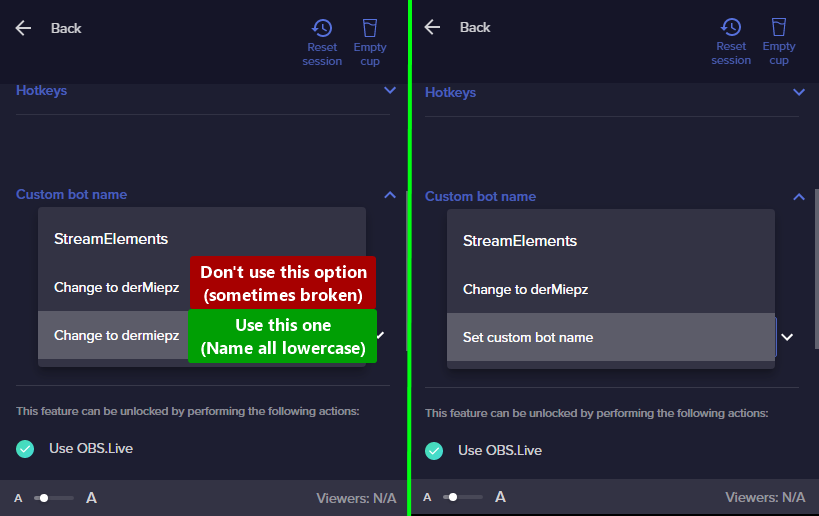
If your commands recently stopped working and you're using OBS.Live and a custom bot name do the following:
- In OBS.Live, click on the hamburger menu (three stripes) at the top left of your activity feed
- Click on Stream Settings > Custom bot name
- In the Custom bot name field select Set custom bot name, not your already existing username (with capital letters). Note: If you already connected an account that way, the third entry will show as the account name (see image https://i.imgur.com/re4theQ.png).
- Scroll a bit down and click on the purple Connect Custom Bot Account button
- Log in as usual and Authorize the custom bot name
- Back in the Activity feed, click on the Send Test Message button and check if your custom bot name starts working again
 vapid pendant
ok so i have a problem where the only alert of mine in my alert box that dosent work is my tip alert and all the others work ive tried to disable / enable browser source hardware acceleration it did absolutely nothing
foggy heart
vapid pendant
ok so i have a problem where the only alert of mine in my alert box that dosent...
Does it work when you test it through emulation?
crude pecanBOT
@vapid pendant ⤵️
Please provide your account ID found at the top of this page: https://streamelements.com/dashboard/account/channels This ID is public info and safe to share here.
foggy heart
Yes, that's fine
vapid pendant
5d91798b334e0ebb7b2bacfe
crude pecanBOT
@vapid pendant ⤵️
If a viewer tipped through PayPal but no information appears in your StreamElements account, this generally means PayPal has held the tip for verification.
Until PayPal clears the tip and sends back a confirmation to your StreamElements account, no information will appear there and no alert will play, as that confirmation is the only way for us to be aware of a successful transaction.
There is a posibility that the tip may have been sent as an eCheque/eCheck - these tips can take from 7 up to 21+ days to show up on our side. Tippers can usually cancel these.
If you believe there may be an issue with the transaction, you'll need to contact PayPal support as StreamElements is only a passthrough service and never actually gets involved with the transaction or touches the money
 sudden gull
Is there a way to make an Overlay custom widget so when someone buys something on my website it will pop up on stream with a alert
vapid pendant
thanks ill have to hope the next person uses osko to make sure it is actually working
 solemn blade
how do i edit my bank info for se.pay??? i was trying to do it, thought i was about to fix it and instead ended up sending a payment to an account that no longer exists.
crude pecanBOT
@solemn blade ⤵️
Please contact us via email for support with SE.Pay. You can use our contact form here: https://streamelements.com/contact Thank you.
 white cradle
I've done it, still not working
also, i found a bug with account switcher, when u add another channel, it wont appear on the account switcher until you clear the cache

 zenith widget
Interesting will have to check that
white cradle
thanks
zenith widget
So the original issue is related to this bug?
white cradle
zenith widget
So the original issue is related to this bug?
i dont think so, since when i clear the cache, the channel appers
When i tries to go to that channel
it shows a white page
crude pecanBOT
Please logout of StreamElements at https://streamelements.com/logout and then login again to your account (Twitch/YouTube/Facebook).
zenith widget
ask the user to use this
zenith widget
What browser are they using?

Would be nice if they can come here so that we can troubleshoot properly.
white cradle
i think chrome
 narrow verge
Hi
white cradle
zenith widget
Would be nice if they can come here so that we can troubleshoot properly.
he is here
narrow verge
Um
zenith widget
@narrow verge Can you try and login to the dashboard with incognito mode?
zenith widget
so? white page or you managed to log in normally?
narrow verge
I successfully logged in to the dashboard
zenith widget
Ok, so what is the issue right now?
white cradle
zenith widget
Ok, so what is the issue right now?
i see a blank screen while i tried to access his account
and i keep getting errors
 crude pecanBOT
@white cradle ⤵️
Please logout of StreamElements at https://streamelements.com/logout and then login again to your account (Twitch/YouTube/Facebook).
white cradle
i did it many times😅
zenith widget
can you open your DMs please?
white cradle
ok
white cradle
zenith widget
can you open your DMs please?
done
 waxen tundra
Hey guys need help with an sponsorship email I've received, weather it's legit or not, cheers
crude pecanBOT
@waxen tundra ⤵️
Please contact us via email for support with your campaign or sponsorship. You can use our contact form here: https://streamelements.com/contact Thank you.
 slender anvil
Hey quick question really quick. I don't know if anyone here would know the answer but I am using vmix which is an production software i use for streaming however when i add my alerts as a browser source, the audio gets all weird and the animation breaks a little bit. Any idea of a way to fix this?
 wooden pelican
foggy heart
Take a look at your host timer command, it looks like that one has the "response...
wooden pelican
foggy heart
Take a look at your host timer command, it looks like that one has the "response...
Omg thanks!!!! I've never noticed that before. You superstar 🤩
 pearl dune
Hello, I have a question, when I want to share a google screen, I do not get the option, what do I have to do?
zenith widget
What do you mean share a google srcreen?
@slender anvil I don't think anyone here is familiar with that software. We usually recommend OBS Studio to be used.
pearl dune
I want to share screen
zenith widget
Share screen where? what exactly do you want to share?
slender anvil
zenith widget
<@!102432974531735552> I don't think anyone here is familiar with that software....
well then what would cause a browser source to have weird audio and visual alerts?
 astral swift
Hi all! I connected stream elements to my Twitch account for the bot and for the alerts. But when there is an activity in my dream like I follow, Stream element is not picking up the information like also in the activity Feed there no new follower entry therefore there will no alert triggered and no chat notification will be generated from the stream element bot please help
zenith widget
slender anvil
well then what would cause a browser source to have weird audio and visual alert...
One thing that comes to mind - unoptimized browser source addon/plugin. Do you know what the software uses? OBS uses CEF/Chromium
crude pecanBOT
@astral swift ⤵️
Please provide your account ID found at the top of this page: https://streamelements.com/dashboard/account/channels This ID is public info and safe to share here.
astral swift
crude pecan
<@266888368246226944> ⤵️
5fc3d2afbc6de9f7f582b49c
slender anvil
zenith widget
One thing that comes to mind - unoptimized browser source addon/plugin. Do you k...
They use the chromium embedded framework
zenith widget
Which version?
zenith widget
astral swift
5fc3d2afbc6de9f7f582b49c
should be good now
New events should show now
astral swift
zenith widget
New events should show now
Thx man!
slender anvil
I cant find a specific version unfortunately
zenith widget
In my opinion, it might be best to contact their support and to see if they can do something about the distortion or suggest anything to generally fix it.
 tulip gulch
why the bot streamelements is not online anymore?
crude pecanBOT
@tulip gulch ⤵️
Go to the Dashboard > Right side > Part channel > Join channel (https://streamelements.com/dashboard) https://i.imgur.com/uYVb8OK.png
slender anvil
zenith widget
In my opinion, it might be best to contact their support and to see if they can ...
👍 thank you
 sly tulip
Anyone know if there's a list of HTML that works in an SE overlay text source?
Like <b> or <strong> don't seem to work for example
 worthy bough
!ticket 1 is not working for me or others
I also checked "first ticket free"
I also checked "bot to reply in chat"
And Loyalty is on. Please help ❤️ Thank you in advance!
ionic kelp
It's !ticket 1
worthy bough
and that is what I typed first 2 words
worthy bough
❤️
ionic kelp
1 ssec
ionic kelp
You need to enable the enter/ticket command.
worthy bough
? oh dear
ionic kelp
That's why it won't work.
ionic kelp

StreamElements
The Ultimate All in One Platform for Streamers
worthy bough
and,.. now my page loads like this XD

all the tabs are blakc like this

lets see if signing out works
https://streamelements.com/dashboard/bot-commands/default-commands only this link works your does not?
ionic kelp
What browser you using?
worthy bough
@ionic kelp found it! TY OMG how did I miss this 3 times XD
 ionic kelp

worthy bough
here is a e-Hug for you HUG
tulip gulch
how to add !weather command to streamelements?
ionic kelp
1 sec
Scorpstuff.com hosts APIs designed for use with Scorpbot and other chatbots on Mixer and Twitch.
tulip gulch
ok thanks
lament blade
@crude pecan Hey. Just wondering if any update to this? Cheers.
 ebon forum
lament blade
<@603953048129110031> Hey. Just wondering if any update to this? Cheers.
ebon forum
lament blade
<@603953048129110031> Hey. Just wondering if any update to this? Cheers.
Chatstats are fixed:
https://stats.streamelements.com/c/mrrustyy_
lament blade
ebon forum
Chatstats are fixed:
https://stats.streamelements.com/c/mrrustyy_
Thank you my dude!
 lofty shuttle
hey there's a secret !donate command
I can't disable it anywhere in my bot dashboard
lofty shuttle
oh bugger
thank you for catching that so fast
can i see the other aliases and manage them anywhere?
ionic kelp
You'd have to expand each command and look closer.
lofty shuttle
ah okay, thanks
 frail comet
Hey, I have a problem. I was about to stream but I dont have an option for Twitch streaming only YT streaming in obs. Does anyone know how I can fix that?
crude pecanBOT
@frail comet ⤵️
StreamElements menu, on top of OBS > Logout > Login
frail comet
thank you 😙
 nimble dune
You're welcome!
 loud anvil
Is there a way to configure Kappagen Emotesplosions to use your channel's custom emotes? Because i've been trying to find a way to do so for the last 2 days (i even configured the custom emotes on Kappagen already) but apparently there's no way to do so.
ebon forum
loud anvil
Is there a way to configure Kappagen Emotesplosions to use your channel's custom...
There is currently a bug that prevents Kappagen from using channel emotes in that case. It will be fixed, but there is no ETA on when.
 tropic turtle
Isnt there a way to setup different sound effects for different donation amounts? I cant figure out how to set it up
nimble dune
tropic turtle
Isnt there a way to setup different sound effects for different donation amounts...
Yes, variations

You can set the requirement amount

 nimble dune
lament blade
nimble dune
lament blade
Disconnect and reconnect account in OBS Settings > Stream
and also try this:
crude pecanBOT
StreamElements menu, on top of OBS > Logout > Login
lament blade
i did this
tropic turtle
@nimble dune thank you for the help. I'll try it out when I get home.
lament blade
also this pops up when i start obs
 nimble dune
tropic turtle
<@334412925739728918> thank you for the help. I'll try it out when I get home.
nimble dune
tropic turtle
<@334412925739728918> thank you for the help. I'll try it out when I get home.
No problem
lament blade
i´m so bad at english
nimble dune
lament blade
also this pops up when i start obs
Disconnect and reconnect account in OBS Settings > Stream
 lament blade
okey thx
nimble dune
that should fix it
nimble dune
lament blade
okey thx
there is also a German channel here 🖱️ > #🇩🇪︱deutsch
nimble dune
lament blade
Thx
I'm not a staff 
nimble dune
np, I'm just helping here 😅
 hallow vault
In the StreamElements overlay creator, is there a way to show Item Redemptions only from a certain Category?

This would let me put Shout-Out videos/item redemptions to a different location vs Regular / General Category item redemptions.
ionic kelp
Anything enabled and redeemable will show.
 elder turtle
Hi! Can someone remind where I can find the module for the sub marathons?
Thanks in advance!
ionic kelp
 reef agate
hi there i am needing some help with the step goal widget
lament blade
How do i disable the tweet that goes out from stream elements when i go live?
nimble dune
lament blade
How do i disable the tweet that goes out from stream elements when i go live?
You can disable it here: https://streamelements.com/dashboard/social-media
lament blade
Amazing thank you @nimble dune
nimble dune
reef agate
HOW DO I TRIGGER THE GOALS OF THE STEP GOAL WIDGET
Like test the goal?
Just emulate event

 crude pecanBOT
@reef agate ⤵️
The default resolution for StreamElements overlays (theme and custom) is 1920x1080. Please add them in OBS at their full resolution and use CTRL+F to fit to screen if necessary. You can then downscale your stream in OBS settings > Video if you'd like https://i.imgur.com/6bWXxjR.png
reef agate
but i want to know how to test it
before my subathon happens
to see if it’ll actually work
reef agate
nothings happening when i click on it
nimble dune
Make sure you set the browser source resolution to 1920x1080
reef agate
still not working
 jade remnant
please send a screenshot of your highlighted overlay in obs (so we can see the red outline)
 wispy junco
I have a question regarding the changing of the bot name, for my channel.stream.
crude pecanBOT
@wispy junco ⤵️
Currently renaming the bot fully works with OBS.Live. You can follow this video guide to set it up: https://discordapp.com/channels/141203863863558144/494513233416421386/561516184718278676
 wispy junco
crude pecan
<@598671569015013378> ⤵️
wispy junco
crude pecan
<@598671569015013378> ⤵️
i don't have obs.live i only have studio.
wispy junco
in what menu?
ionic kelp
The menu at the top of OBS.
 ionic kelp
@wispy junco then you cant change the bot name.
crude pecanBOT
@unique torrent ⤵️
Please logout of StreamElements at https://streamelements.com/logout and then login again to your account (Twitch/YouTube/Facebook).
 unique torrent
Ty!
wispy junco
ionic kelp
<@598671569015013378> then you cant change the bot name.
ok, thank you.
 vapid sundial
Hey
crude pecanBOT
@vapid sundial ⤵️
Welcome to the helpdesk! Please let us know how we can assist you today and a support volunteer or staff member will assist you as soon as they are available. Thank you for your patience.
 proper hound
Hi, maybe someone knows why my Streamelemnts Subs and Raids are not recognized by Streamelemts, the alerts don't go either but the Follows work perfectly.
 placid parcel
Can you put a message next to the commercial timer?
proper hound
i do it later
 sacred narwhal
kappagen still broken whats upp ?
 sacred narwhal
nimble dune
Yep <:FeelsBadMan:274697004372983808>
sacred narwhal
nimble dune
Yep <:FeelsBadMan:274697004372983808>
why are others streamers it works fine ?
 torn crane
hello
i have question
i dont know how to get my game capture for minecrat and dont know how to add overlays
crude pecanBOT
@torn crane ⤵️
To add your overlays to OBS, add a new browser source in your scene. Paste your overlay URL in the browser source properties, set the dimensions to 1920x1080 (unless you changed them on the website) and check Shutdown source when not visible. https://youtu.be/KDvLynUqXI4
 pearl echo
Hello team! I'm not sure if this is the best channel to ask this.. but when ppl donate/tip on my stream, PayPal holds the money. It says I can provide more information about the sale. Currently, I have it where if someone tips me a certain amount, I use it to buy a coffee and put their name on it. So I have entered the dates that I have fulfilled that by having the coffee. It says it sent the user an email. Do the people who tipped have to like confirm this? Is it going to do this every time?
nimble dune
sacred narwhal
why are others streamers it works fine ?
I checked my account and it's not working on mine either.
 sweet spoke
Is there anyway to make a text box overlay editable via chat command?
lament blade
how can i uninstall obs.live
 broken grotto
Hi when adding a kappagen overlay to my stream it no longer lets me add any of my Twitch channel emotes or Twitch Global emotes only BTTV an Frankerfacz why is this happening? They have completely disappeared in the overlay emotesplosions option. Thanks
 nimble dune
broken grotto
Hi when adding a kappagen overlay to my stream it no longer lets me add any of m...
nimble dune
broken grotto
Hi when adding a kappagen overlay to my stream it no longer lets me add any of m...
Known issue being worked on.
nimble dune
lament blade
how can i uninstall obs.live
Control panel -> programs -> uninstall StreamElements OBS.Live
broken grotto
nimble dune
Known issue being worked on.
Hi Daniii any idea how long it will take as its been like this for couple of months now. My wife's overlays are fine and we are using same OBS on same laptop. Obviously different accounts which we sign out of when other person streams. Just seems odd hers are fine and mine aren't. Thanks! 🙂
nimble dune
No ETA
 compact jewel
tts is giving me a bit of a headache rn. I' m trying to add it as a part of one of my redemptions and it works fine when testing from the overlay menu, but actually trying the command in chat causes only the first word typed in to be read out
is this a resolution issue or something else
 chrome remnant
Hello does anyone know how to make the game light up with this?
foggy heart
chrome remnant
Hello does anyone know how to make the game light up with this?
What do you mean by making the "game light up"?
chrome remnant
o my i typed that wrong 😆
line up right
i meant
like the follower name comes out with the alert
foggy heart
Are you trying to have the follower name animated like the video there, or just have them display at the same time?
chrome remnant
display them at the same time
 vocal verge
Could anyone help with what im trying to do with giveaways?
I do 2 and want each winners name to show in 2 separate boxes
foggy heart
chrome remnant
display them at the same time
If you create an alert, you can use the video as the alert image and have the text announce the name separately but at the same time, if that's what you mean
 mossy crescent
Hi, TTs for my alerts is not working, and its been like this like a month and I've tried everything and dont know what to do
chrome remnant
@foggy heart see how the name is not coming out the animation

 real roost
Hello, I finished the Raid: Shadow Legends campaign and I saw the article that you will be contacted by e-mail for payment. On average, when is communication achieved?
foggy heart
mossy crescent
Hi, TTs for my alerts is not working, and its been like this like a month and I'...
Is there a specific voice that isn't working? Can you create a new overlay and test tts with a couple voices?
mossy crescent
foggy heart
Is there a specific voice that isn't working? Can you create a new overlay and t...
Well i have it with sofia in spanish, i havent test other voices
foggy heart
real roost
Hello, I finished the Raid: Shadow Legends campaign and I saw the article that y...
The entire process can take up to 30 days after the campaign, but i'd advise sending an email in if you have deeper questions!
foggy heart
chrome remnant
<@!801850149260886118> see how the name is not coming out the animation
So you want the name itself to be a part of that animation?
mossy crescent
@foggy heart i tested with Enrique in spanish, and its not working either
real roost
Wow, I thought it would be short. Thanks anyway, got it. Have a nice day.
foggy heart
mossy crescent
<@!801850149260886118> i tested with Enrique in spanish, and its not working eit...
Can you try Brian, or other languages?
mossy crescent
Okay let me try
well it looks like sofia and Enrique voices are not working for spanish
i've tested with Miguel voice and its working
 frozen lark
Hey I cant see the Chat Stats on Streamelements. It says 404 - Page Not Found. I think its because the Streamer changed the Name recently. Can you help me with that?
foggy heart
mossy crescent
i've tested with Miguel voice and its working
Some of the voices on TTS are having issues, which is what you're likely seeing there
crude pecanBOT
@frozen lark ⤵️
If you changed your name on Twitch, please follow these steps:
- Visit https://streamelements.com/logout and then log in again by connecting with Twitch.
- On the right side of the dashboard page that opens, select Join under bot settings. If it says Part select that and then select Join to send the bot to the chat. Don't forget to mod the bot by typing /mod streamelements in your channel if you have not already.
- Post your old and your new name here so that we can update your channel's chatstats tracking (must be done by staff).
 still grove
👋 Hello I wanted to inquire about a small audio issue i am having
frozen lark
crude pecan
<@629681795943890955> ⤵️
Step 1 and 2 is already done. The old name is: peter_muenchen and the new name is: peter__muenchen
 river acorn
Can I use the overlays for my stream on phone through streamelements
 tacit skiff
@crude pecan I’m having the same problem as @frozen lark but I’m also not getting anything through my activity feed either.
I have already completed those steps as well
It just randomly stopped working
still grove
I am currently using Wave link and a Wave 3 micophone for streaming. However while in OBS I have found that my alert audio is not being picked up while live on twitch.
Please see below for my current audio settings on stream elements.
How should I go about fixing this audio issue? Thank you.
 foggy heart
frozen lark
Step 1 and 2 is already done. The old name is: **peter_muenchen** and the new na...
foggy heart
frozen lark
Step 1 and 2 is already done. The old name is: **peter_muenchen** and the new na...
Your chatstats page should now be up
foggy heart
river acorn
Can I use the overlays for my stream on phone through streamelements
There is a mobile app that let's you use our overlays
foggy heart
tacit skiff
<@603953048129110031> I’m having the same problem as <@629681795943890955> but I...
What are you not seeing in your activity feed?
crude pecanBOT
@still grove ⤵️
Obs.live is a plugin for OBS Studio for the best OBS support, please join their Official Discord @ https://discord.gg/obsproject
frozen lark
foggy heart
Your chatstats page should now be up
Thank you very much my brother
still grove
crude pecan
<@424405854591254529> ⤵️
👍 Thank you!
lament blade
hi, i need some help...
my followers counter doesn't work if someone follows, but if I do a test it already works
 crimson cloak
can i get some quick help pretty please?
crude pecanBOT
@crimson cloak ⤵️
Welcome to the helpdesk! Please let us know how we can assist you today and a support volunteer or staff member will assist you as soon as they are available. Thank you for your patience.
@lament blade ⤵️
Please provide your account ID found at the top of this page: https://streamelements.com/dashboard/account/channels This ID is public info and safe to share here.
tacit skiff
foggy heart
What are you not seeing in your activity feed?
I’m not seeing anything in my activity feed. No subs, no bits, no followers nothing. And my not isn’t working on my channel. Wasn’t even on the channel when I looked. I tried my custom commands and nothing. I’ve made the bot part with channel and even joined it again and nothing
 jaunty surge
I'm having some trouble with the "Streamelements leaderboard" extension on Twitch. I've linked StreamElements to my Twitch, Invited the bot to my stream, gave It moderator, even enabled loyalty settings, but whenever I go to Install the extension and hit "configure" nothing ever loads, It's just a blank screen.
crimson cloak
i got a 1500$ donation yesterday and after it was available for withdraw, i got a message saying in the se pay section that my bank details were invalid. i have not changed any info prior to this donation and the donations i got before this were withdrawn with no issues, so im wondering why now, it decided to give me this message.
crude pecanBOT
@crimson cloak ⤵️
Please contact us via email for support with SE.Pay. You can use our contact form here: https://streamelements.com/contact Thank you.
foggy heart
crimson cloak
i got a 1500$ donation yesterday and after it was available for withdraw, i got ...
I believe I see an email you sent to us, so you should see an email back shortly
crude pecanBOT
@jaunty surge ⤵️
Please provide your account ID found at the top of this page: https://streamelements.com/dashboard/account/channels This ID is public info and safe to share here.
 split cedar
is there a way to make custom commands available to mods only?
jaunty surge
Account Id: 60d6540026d2850b75c412d5
 graceful falcon
split cedar
is there a way to make custom commands available to mods only?
graceful falcon
split cedar
is there a way to make custom commands available to mods only?
Yep, just change this dropdown to 'Moderator'

 gentle kelp
Hi! Was wondering if there is any way to create scrolling tickers for donators and subscribers in StreamElements?
 forest wyvern
Hi, I am trying to find out why my sub and follower amount is showing the wrong amount on the overlay. It shows the correct amount in https://streamelements.com/dashboard/session but it shows the wrong amount on the goal bars overlay. Anyone able to help with this problem?
 hexed juniper
how come I don't see my sub emotes in kappagen anymore? or, actually... any Twitch emotes for that matter (other than BetterTTV, etc.)
this is all I see...

 wanton jetty
Is streamelements dead for anyone else, the bot is refusing to work in my channel :/
 abstract hemlock
is working fine on my end @wanton jetty but i needed to logout and log back in on obs.live
foggy heart
For?
sudden gull
So is there no longer an area for the widget quesrtions?
lament blade
I was wondering if someone could point me in the right direction on how to go about setting up a custom api that I can plug streamelements into to display a message, randomly, from a list of messages. I have some coding background but I'm completely new to this area of things
foggy heart
sudden gull
So is there no longer an area for the widget quesrtions?
Anything specific? Might be able to check the helpdesk-developers channel
@lament blade that might be a good place for you to look too
lament blade
We were wanting to setup something similar to !advice and !dadjoke (scorpstuff), but with our own list of random responses
and I completely missed that channel when I scrolled through, sorry about that
 brisk spade
crude pecanBOT
brisk spade
crude pecanBOT
@brisk spade ⤵️
Welcome to the helpdesk! The regular helpdesk channels are in English but we do provide multi-language support in the following channels: #🇩🇪︱deutsch | #🇫🇷︱français | #🇪🇸︱español | #🇵🇹︱português | #🇳🇱︱nederlands | #🇮🇹︱italiano | #🇵🇱︱polski | #🇨🇳︱中文語言服務區-chinese | #🇯🇵︱日本語-japanese | #🇭🇺︱magyar | #🇰🇷︱한국어-korean | #🇹🇭︱ไทย-thai | #🇷🇺︱русский | #🇺🇦︱українська | #🇨🇿︱czech
sudden gull
foggy heart
Anything specific? Might be able to check the helpdesk-developers channel
i went ahead and posted the quesiton in Dev
 calm tiger
I have a problem with the stats of streamelements
foggy heart
calm tiger
I have a problem with the stats of streamelements
What problem are you having?
 spring plinth
I think he has the same problem as me

404 - Page Not Found
Maybe he changed his name recently
@calm tiger Have you changed your name recently?
spring plinth
ok that must be the problem
 obsidian hornet
Hi there! I'm currently trying to transition from Streamlabs to StreamElements and am having trouble getting my data/latest followers & subscribers to show up as per the image here

 sacred schooner
Someone donatec to me last night but i didnt get the donation nor the pop up
 sand solstice
Hello! I am setting up my loyalty points and when doing a test it says 'item not found'. It then redirects me to the store through a link. when i redeem through the store it says that my 'Current points 0'. when i !points it says i have 320 points. Is this because I'm not currently streaming or should i be able to test this even offline?
 dry hare
obsidian hornet
Hi there! I'm currently trying to transition from Streamlabs to StreamElements a...
dry hare
obsidian hornet
Hi there! I'm currently trying to transition from Streamlabs to StreamElements a...
Unfortunately historical data won’t populate. The only data that is displayed there is data that has been captured since you started using streamelements
 idle panther
I'm having the same issues as @hexed juniper is having. KappaGen is not showing Twitch nor Sub emotes, just BTTV & FFZ emotes.
obsidian hornet
dry hare
Unfortunately historical data won’t populate. The only data that is displayed th...
Thanks for a response. Is there an application Incan use to import historical data or anything?
dry hare
obsidian hornet
Thanks for a response. Is there an application Incan use to import historical da...
Not that I know of
crude pecanBOT
@spring plinth ⤵️
If you changed your name on Twitch, please follow these steps:
- Visit https://streamelements.com/logout and then log in again by connecting with Twitch.
- On the right side of the dashboard page that opens, select Join under bot settings. If it says Part select that and then select Join to send the bot to the chat. Don't forget to mod the bot by typing /mod streamelements in your channel if you have not already.
- Post your old and your new name here so that we can update your channel's chatstats tracking (must be done by staff).
calm tiger
Old name: IsRaXyLOL New name: RaXysZ
dry hare
calm tiger
Old name: IsRaXyLOL New name: RaXysZ
Give it a few
 west lantern
i changed my name on youtube and it wont update on stream elements how do i fix
old channel: esportstigerman
New channel: OGTigerman
how do I fix it to work in the Stream Elements???
dry hare
west lantern
old channel: esportstigerman
New channel: OGTigerman
how do I fix it to work in...
Give it a few
west lantern
its been several weeks since I changed the name and it still shows up wrong in the overlays
i'm sad
dry hare
west lantern
its been several weeks since I changed the name and it still shows up wrong in t...
In the overlays that text is manual
sand solstice
Hello! I am setting up my loyalty points and when doing a test it says 'item not found'. It then redirects me to the store through a link. when i redeem through the store it says that my 'Current points 0'. when i !points it says i have 320 points. Is this because I'm not currently streaming or should i be able to test this even offline?
My twitch channel is WeTriedGaming_
west lantern
dry hare
In the overlays that text is manual
if I can change my username that should fix it
 charred knoll
hey, can someone help me with why whenever i do the givepoints command with the @ before username it works. but whenever i'm doing the addpoints with the @ before username, it says that "___ is not found"
zenith widget
Because one command doesn't accept the [at] symbol and is trying to find a username that actually has a the symbol in its name
charred knoll
so when using the adding points command, i always have to do it without the @ symbol??
zenith widget
If you have BTTV/FFZ installed, you can use tab completion on the username without [at]
dry hare
west lantern
if I can change my username that should fix it
Edit the overlay and change the text
charred knoll
zenith widget
If you have BTTV/FFZ installed, you can use tab completion on the username witho...
i just enabled it but it doesn't actually complete the username i'm typing
i mean the only one i saw was "tab completion emote priority"
zenith widget
The person needs to have spoken in chat as well in order for tab completion of their name to work
 cerulean helm
I need help. So I linked twitch to my OBS studios and when I try to stream it says that its trying to stream to youtube, and I made sure to disconnect my Youtube and put my twitch instead?
crude pecanBOT
StreamElements menu, on top of OBS > Logout > Login
cerulean helm
forgot to mention something with a stream key
zenith widget
Check "Scene collection" on top
OBS.Live does not touch the scene collection upon loging in and out into different accounts
crude pecanBOT
@late dagger ⤵️
Read and follow our server rules:
- We do not tolerate toxicity! Treat the community team, staff, and all members with respect.
- No advertisement or channel promotion, anywhere on the server.
- No NSFW/NSFL
- No unsolicited DMs or friend requests to server members
Make sure to read the #welcome in any server you join.
 stoic jacinth
hey is anyone else having problems with the bot? none of my commands are working, I've parted and rejoined the bot to chat, still nothing
crude pecanBOT
@stoic jacinth ⤵️
If your commands recently stopped working and you're using OBS.Live and a custom bot name do the following:
- In OBS.Live, click on the hamburger menu (three stripes) at the top left of your activity feed
- Click on Stream Settings > Custom bot name
- In the Custom bot name field select Set custom bot name, not your already existing username (with capital letters). Note: If you already connected an account that way, the third entry will show as the account name (see image https://i.imgur.com/re4theQ.png).
- Scroll a bit down and click on the purple Connect Custom Bot Account button
- Log in as usual and Authorize the custom bot name
- Back in the Activity feed, click on the Send Test Message button and check if your custom bot name starts working again
stoic jacinth
okay i tried but I dont have 'set custom bot name' only my existing custom bot name
maybe im misunderstanding
ionic kelp
Choose option 3 and set as the one you want.
stoic jacinth
I did that and even removed and reauthed the account but still nothing 😦
crude pecanBOT
- Right-click on your OBS desktop shortcut and open the Properties
- In the Target field, add the following to the very end:
--remote-debugging-port=40404(don't forget to add a space before the current path) - Open OBS (or restart if it was open)
- Open your web browser and type in:
localhost:40404 - Click on StreamElements - Activity feed
- Navigate to the Console tab
- Type the following into the console and hit enter:
store.customBot.removeCustomBotIntegration() - Try setting the custom bot name
- Remove the additional flag in step 2 from your shortcut properties.
 bronze heath
could someone dm me by chance? I am starting over from FB to twitch and I am using the OBS
zenith widget
We prefer handling questions here, unless you are going to share personal information.
bronze heath
that is fine.. why is it that I cant see what I am adding to the scenes?
or see what my live scene looks like?
crude pecanBOT
@pearl vigil ⤵️
Welcome to the helpdesk! The regular helpdesk channels are in English but we do provide multi-language support in the following channels: #🇩🇪︱deutsch | #🇫🇷︱français | #🇪🇸︱español | #🇵🇹︱português | #🇳🇱︱nederlands | #🇮🇹︱italiano | #🇵🇱︱polski | #🇨🇳︱中文語言服務區-chinese | #🇯🇵︱日本語-japanese | #🇭🇺︱magyar | #🇰🇷︱한국어-korean | #🇹🇭︱ไทย-thai | #🇷🇺︱русский | #🇺🇦︱українська | #🇨🇿︱czech
zenith widget
@bronze heath Are you not seeing the OBS preview window? Can you show a screenshot of what you are seeing?
bronze heath
zenith widget
<@!836027851454414910> Are you not seeing the OBS preview window? Can you show a...
trying to figure out screen shot sorry
crude pecanBOT
Please provide a proper screenshot with the issue visible. If not sure how to take a screenshot, you can check here: https://www.take-a-screenshot.org
bronze heath
 zenith widget
Click on "Do it later" on the top right
bronze heath
zenith widget
<@!836027851454414910> Are you not seeing the OBS preview window? Can you show a...
OMG duhhh ty
 tacit briar
Hi, I livestream on twitch but am unable to see my statistics on stream elements due to me changing my twitch handle awhile ago. Is there any way I can fix this?
crude pecanBOT
@tacit briar ⤵️
If you changed your name on Twitch, please follow these steps:
- Visit https://streamelements.com/logout and then log in again by connecting with Twitch.
- On the right side of the dashboard page that opens, select Join under bot settings. If it says Part select that and then select Join to send the bot to the chat. Don't forget to mod the bot by typing /mod streamelements in your channel if you have not already.
- Post your old and your new name here so that we can update your channel's chatstats tracking (must be done by staff).
tacit briar
Old name was OpulentTooth157 New name is WolfSSSGaming
zenith widget
Fixed the chatstats page
tacit briar
TY!!!
 olive oasis
Hello, I use a Goxlr and I'd love to be able to have my media requests play on my music slider. The only way I can think to do this is via setting OBS onto my music, but I'd really like to keep my other OBS sounds separate.
I WAS doing it through ground control but the app isn't working at all now
 ornate ridge
I was wondering how to re enable the report summaries through email because I wasn't getting them anymore so I unsubscribed and was looking where to re sub the emails.
crude pecanBOT
@olive oasis ⤵️
How to separate Media Request (MR) audio in OBS:
MUTE MR FOR YOURSELF, STREAM CAN HEAR
- Make a new overlay in the editor, ONLY add the Media Request widget.
- Add a new browser source in OBS, add the URL and set the dimensions correctly.
- Tick the box for Control audio via OBS
- Go to Edit > Advanced Audio, set your MR overlay to Monitor Off. Note: This will play through the Desktop Audio, if you mute your desktop audio, it will mute the MR.
CONTROL AUDIO SEPARATELY FROM YOU AND STREAM
- For this you will need a VAC (use command
!vac). - Run your MR either in Chrome or in Ground Control (use command
!gc). Note: Do NOT click on SHOW ON STREAM. - Set Chrome or GC in the VAC as an audio input and output.
- Add the audio output from VAC as an audio input in OBS. Note: This will not be able to show the video in OBS.
@ornate ridge ⤵️
Please provide your account ID found at the top of this page: https://streamelements.com/dashboard/account/channels This ID is public info and safe to share here.
 silk shale
Is this the place to get help for some chat bot stuffs or is it a different channel?
ionic kelp
If you use twitch yes.
silk shale
Awesome.
I need a bit of help displaying a google excel spreadsheet cell in a streamelements chat command
silk shale
Roger that
ionic kelp
I've see it asked for other reasons on another server but basically due to no actual (if even easy at all) way to do it you can't.
silk shale
ok
olive oasis
In regards to that I can separate the audio by doing those things, but then I have no video
silk shale
tragedy
olive oasis
Ground control is working again funnily enough, I can get audio and video if i window capture the video on ground control, but that gives awful quality video
ionic kelp
Use the media request widget.
olive oasis
If I use the media request widget, I have to select "show on stream" in ground control whcih then cuts the audio from ground control and plays it directly through OBS
I use a goxlr. I want video to show on stream, but audio to play through ground control (as its the onlyw ay I can figure out how to put that on a different audio channel in my Goxlr)
 pearl vigil
Hello how can I reset all settings of streamelements so all overlays, etc.?
sweet spoke
Is there anyway to make a text box overlay editable via chat command?
sweet spoke
Thank you! I’ll check it out
 scarlet tiger
pearl vigil
Hello how can I reset all settings of streamelements so all overlays, etc.?
scarlet tiger
pearl vigil
Hello how can I reset all settings of streamelements so all overlays, etc.?
As i am aware, this is possible only via account deletion, then re-creation.
pearl vigil
Did you mean the twich account?
scarlet tiger
No, streamelements account deletion in settings > security tab.
But it will delete all data related to your account, like goals, commands, etc.
pearl vigil
That's not a problem
pearl vigil
scarlet tiger
But it will delete **all** data related to your account, like goals, commands, e...
i would like that
What is a JWT Token
?
crude pecanBOT
You can find your JWT token on your account channels page (Show Secrets to reveal the token): https://streamelements.com/dashboard/account/channels
READ ME: This is a private security token. Do NOT share this token here or other public places, only with a StreamElements staff member in private.
 hushed palm
 vivid siren
Hi I recently changed my name on Twitch and my bots stopped working any reason why?
crude pecanBOT
@vivid siren ⤵️
If you changed your name on Twitch, please follow these steps:
- Visit https://streamelements.com/logout and then log in again by connecting with Twitch.
- On the right side of the dashboard page that opens, select Join under bot settings. If it says Part select that and then select Join to send the bot to the chat. Don't forget to mod the bot by typing /mod streamelements in your channel if you have not already.
- Post your old and your new name here so that we can update your channel's chatstats tracking (must be done by staff).
vivid siren
Old name probiemsolving new name kythehero
 modest sinew
Any reason my twich emotes are not on the selection list of the Kappagen feature when I go to select the Emote explosion??
ionic kelp
Known issue being worked on.
river acorn
foggy heart
There is a mobile app that let's you use our overlays
Can I stream on Xbox and manage my stream from streamelements mobile app
zenith widget
No, the mobile app is used for IRL streaming
proper hound
Does anyone know why my ground control is not showing subs, raids and bits?
crude pecanBOT
Consoles do not have native support for overlays. You would need a capture card, PS4 remote play or Xbox companion app and a PC with OBS in order to have overlays over your console gameplay.
We have a blog post about how to set up console streaming with our essential tools: https://blog.streamelements.com/how-to-stream-on-console-7b620b1c46c3
river acorn
Thanks
proper hound
yes but there are subs bits and raids on
 strong tree
Heyo, why are my chat stats not working. https://stats.streamelements.com/c/bloodycomedyy
proper hound
And on the website nothing is displayed in the dashboard, but follows are displayed and all filters are on.
 prisma relic
strong tree
Heyo, why are my chat stats not working. https://stats.streamelements.com/c/bloo...
prisma relic
strong tree
Heyo, why are my chat stats not working. https://stats.streamelements.com/c/bloo...
have you changed your name on Twitch?
strong tree
no
prisma relic
👍 i'll have someone take a look
strong tree
thanks ❤️
prisma relic
all set @strong tree 🙂
strong tree
Thanks. Is past data not showing yet?
zenith widget
Past data is lost unfortunately
strong tree
ah ok. ty anyways 🙂
 zinc flax
heyyy, quick question, i was able to change my the title of my stream in obs but now for some reason i cant see that popout box anymore
how do i get it backkk
zenith widget
Activitiy feed -> burger menu button -> stream settings -> title settings there
 timber shore
im trying to do a giveaway thru streamelements, i want to use a specific word as a keyword to enter the giveaway but i cant figure out how to change it
zenith widget
The default command for giveaways is "!enter"
 tawny dove
Hey guys! I was wondering, I have custom sound alerts for my subscribers and they can have their own sound alert. Now one of my viewers has changed his username and the redemption keeps saying like only subscribers can redeem it but he is subscribed. He's the only person with this problem. Anyone who is subscribed can redeem these sounds so his own sound works for everyone but him after the name change. Is there anything I can do to fix this? Any idea how this could have happened?
prisma relic
tawny dove
Hey guys! I was wondering, I have custom sound alerts for my subscribers and the...
have them type !rename old name in your chat
..... where 'old name' is there old twitch name
timber shore
zenith widget
The default command for giveaways is "!enter"
ooooo so you just change the default comman.. thanks youre great
tawny dove
prisma relic
..... where 'old name' is there old twitch name
And then it should work?
prisma relic
tawny dove
And then it should work?
🤞 🙂
tawny dove
Alright I will ask them to try it next time, thank you very much for the qucik reply!
prisma relic
...it's linked to "userID" .... but there is some weird reason that the name doesn't link to ID ..... it'll work 🙂
 glacial trout
streamelements bot stop working due to change name :c
sashagris <previous name
sashaisanangel <new name
please help 🙏
crude pecanBOT
@glacial trout ⤵️
If you changed your name on Twitch, please follow these steps:
- Visit https://streamelements.com/logout and then log in again by connecting with Twitch.
- On the right side of the dashboard page that opens, select Join under bot settings. If it says Part select that and then select Join to send the bot to the chat. Don't forget to mod the bot by typing /mod streamelements in your channel if you have not already.
- Post your old and your new name here so that we can update your channel's chatstats tracking (must be done by staff).
 radiant arrow
Hi, I need you to help me. Basically when they asked me to log in with the twitch account I put the wrong account, but when I log out and click on Twitch it automatically puts me that account. What can I do? (i used google translate)
 dense sparrow
Hi
My cheer alert doesn't work but is the same of the other alert
I don't understand how to resolve
I hope my english is good, I'm italian ahah
dense sparrow
lol
radiant arrow
scrivi in chat italiano
nimble dune
@dense sparrow @radiant arrow 🖱️ > #🇮🇹︱italiano
glacial trout
old name sashagris new name sashaisanangel
 proven perch
buongiorno a tutti, sono un pò ignorante, sapete come mettere un overlay da streamelements su obs studio? ovvero, copio l'url ma poi dove devo incollarlo?
crude pecanBOT
@proven perch ⤵️
Welcome to the helpdesk! The regular helpdesk channels are in English but we do provide multi-language support in the following channels: #🇩🇪︱deutsch | #🇫🇷︱français | #🇪🇸︱español | #🇵🇹︱português | #🇳🇱︱nederlands | #🇮🇹︱italiano | #🇵🇱︱polski | #🇨🇳︱中文語言服務區-chinese | #🇯🇵︱日本語-japanese | #🇭🇺︱magyar | #🇰🇷︱한국어-korean | #🇹🇭︱ไทย-thai | #🇷🇺︱русский | #🇺🇦︱українська | #🇨🇿︱czech
proven perch
oh sorry, can someone help me with the setup of an overlay from streamelements to obs studio? I copy the URL and then?
crude pecanBOT
@proven perch ⤵️
To add your overlays to OBS, add a new browser source in your scene. Paste your overlay URL in the browser source properties, set the dimensions to 1920x1080 (unless you changed them on the website) and check Shutdown source when not visible. https://youtu.be/KDvLynUqXI4
nimble dune
^^
proven perch
thank youuu
nimble dune
glacial trout
but want to change the broadcaster name, just that
You mean the chatstats? Is the bot working now?
glacial trout
the bot dont work and I can't find the thingy, + I don't want to change its name xd just want to change the broadcaster name to my current name, that should make it work again right?
ionic kelp
Nor sure what you mean by that.
glacial trout
hmm
crude pecanBOT
@glacial trout ⤵️
Go to the Dashboard > Right side > Part channel > Join channel (https://streamelements.com/dashboard) https://i.imgur.com/uYVb8OK.png
glacial trout
ok it says that successfully join the channel, but I type commands on chat and nothing happens, do I need to be live?
nimble dune
glacial trout
ok it says that successfully join the channel, but I type commands on chat and n...
Part the bot from your dashboard > logout of StreamElements at https://streamelements.com/logout > log in again > join channel
glacial trout
nimble dune
Part the bot from your dashboard > logout of StreamElements at <https://streamel...
tysm btw
nimble dune
glacial trout
but the broadcaster still my old name
where?
glacial trout
on the streamelements page
nimble dune
glacial trout
old name sashagris new name sashaisanangel
also can a staff fix the chatstats?
 glacial trout
nimble dune
also can a staff fix the chatstats?
glacial trout
nimble dune
also can a staff fix the chatstats?
I have to do something?
nimble dune
glacial trout
I mean that
Oh, I'm not sure 
glacial trout

sacred narwhal
can someone say why kappgen not work here and in the rest of the world its ok ? strange things
glacial trout
nimble dune
Oh, I'm not sure <a:aPES_Think:493353113332219924>
I'm doomed I think 
 simple tulip
Hey! Why is StreamElements not showing my followers? It say 0. Thx
 twin sentinel
How many followers are listed here in your account?: https://streamelements.com/dashboard/session > totals?
simple tulip
Hi Benno, 0, same
crude pecanBOT
@simple tulip ⤵️
Please connect your streaming account (Twitch, YouTube, or Facebook) with Discord by going to Settings and then Connections here in Discord. https://streamable.com/eg92w
twin sentinel
Can you please connect your twitch stream with your discord?
Also have you just recently signed up and not streamed after that by chance?
simple tulip
connected Benno
nimble dune
nimble dune
also can a staff fix the chatstats?
@twin sentinel can you send it to staff to fix it? Thanks
simple tulip
yesterday i signed up. Maybe its to early for sync with Twitch?
twin sentinel
@simple tulip Correct. The update can take up to 5 minutes after you streamed the first time after you signed up.
simple tulip
Thx Benno! So i will wait a bit. If it doesnt work i will call you again 😉 Have a nice day Benno
twin sentinel
@nimble dune Forwarded to staff.
crude pecanBOT
@fluid flame ⤵️
Read and follow our server rules:
- We do not tolerate toxicity! Treat the community team, staff, and all members with respect.
- No advertisement or channel promotion, anywhere on the server.
- No NSFW/NSFL
- No unsolicited DMs or friend requests to server members
Make sure to read the #welcome in any server you join.
twin sentinel
@simple tulip Thank you, have a nice day too. Please come back here, if that did not update after while after your first stream.
simple tulip
thx!
twin sentinel
@glacial trout Your chat stats have been fixed.
 sand fractal
yo @placid raptor would you be able to DM me please and thanks? 😄
glacial trout
twin sentinel
<@!667861340395929631> Your chat stats have been fixed.
ty, but I want to be the broadcaster :c
ionic kelp
@sand fractal He's not here today. Is there something another staff could help with?
sand fractal
ionic kelp
<@285492083089997834> He's not here today. Is there something another staff coul...
ah ok thanks for letting me know and yeah another staff could probably help, if they could DM me please and thanks 🙂
twin sentinel
@glacial trout You are automatically the broadcaster, even if you are not listed there. You can feel free to remove that line with your old name.
glacial trout
twin sentinel
<@!667861340395929631> You are automatically the broadcaster, even if you are no...
oh ok tysm
sacred narwhal
anyone help me please my sub isons not in the list
 twin sentinel
@sacred narwhal This is a known issue that devs are aware of. No ETA on a fix.
sacred narwhal
@twin sentinel Replying to
@sacred narwhal
Strange, Kappagen works everywhere, there are no regional things that can prevent it from working in that country - otherwise every overlay would stop working if there was some. Please give more details and we fix it.^Cryo
sacred narwhal
twin sentinel
<@!533371519397789746> This is a known issue that devs are aware of. No ETA on a...
i cant follow it anymore
twin sentinel
I will try and get hold of cryo. One sec.
ebon forum
sacred narwhal
i cant follow it anymore
Replied to your Tweet too
This is still a bug that affects everyone worldwide, you need to wait for a fix. It has nothing to do with your location
sacred narwhal
@ebon forum i have 4 streamers in my list there live and kappagen work there so what is the problem than ?
 grand ferry
please Can someone help me? I´ve already connect mi streamelements account with mi twitch account and i give mod role to stream elements on my chat. I have nightbot too connected with my twitch account. Well mi
[15:58]
Well the commands chat of streamelements not run
ebon forum
sacred narwhal
<@!149255081194160129> i have 4 streamers in my list there live and kappagen wor...
Let me explain - Kappagen works, but only channel emotes do not work with the Emotesplosion. And this is a bug.
nimble dune
grand ferry
please Can someone help me? I´ve already connect mi streamelements account with ...
Please part the bot from your dashboard https://i.imgur.com/uYVb8OK.png > logout of StreamElements at https://streamelements.com/logout > log in again > re-invite the bot (join channel) > mod it (make sure it's not muted).
sacred narwhal
@ebon forum ok thanks
grand ferry
nimble dune
Please part the bot from your dashboard <https://i.imgur.com/uYVb8OK.png> > logo...
Oh my God i´m so stupid. Thanks guy
 raw quarry
can someone help me with a problem#
crude pecanBOT
@raw quarry ⤵️
Welcome to the helpdesk! Please let us know how we can assist you today and a support volunteer or staff member will assist you as soon as they are available. Thank you for your patience.
raw quarry
i collected a bonus from the Streamelements store and collected it on the wrong email. is there any way of getting it to the other email where i registered with deusace affiliate link?
twin sentinel
This is about an item a streamer offers in their StreamElements stream store? Do you have a link to that store by chance?
sand solstice
Hello! I am setting up my loyalty points and when doing a test it says 'item not found'. It then redirects me to the store through a link. when i redeem through the store it says that my 'Current points 0'. when i !points it says i have 320 points. Is this because I'm not currently streaming or should i be able to test this even offline?
My twitch channel is WeTriedGaming_
 naive kelp
Hey everyone, real simple one (i think) I'm trying to create a scroller that shows latest cheer, latest sub, latest follow and latest dono, is this possible?
ebon forum
naive kelp
Hey everyone, real simple one (i think) I'm trying to create a scroller that sho...
Yes, most widgets have the scrolling option in the text settings.
naive kelp
@ebon forum Aye I got that far, but when I type "Last Sub: {name} Last Tip: {name} - {currency}{amount}" it's not registering the second one an action?
ebon forum
naive kelp
<@!149255081194160129> Aye I got that far, but when I type "Last Sub: {name} L...
You are trying to get multiple events in a widget?
naive kelp
Correct
ebon forum
I would suggest checking out the Event list widget or check the channel for #widget-share - there should be 2-3 widgets that can display multiple events.
radiant arrow
Hi, I need you to help me. Basically when they asked me to log in with the twitch account I put the wrong account, but when I log out and click on Twitch it automatically puts me that account. What can I do?
twin sentinel
Log out of your twitch account on the web browser and log out of the StreamElements dashboard.
 scenic cedar
how do i test the alerts
crude pecanBOT
@scenic cedar ⤵️
You can test alerts via the Emulate bell on the lower left side of the Overlay Editor. Simply go to your Dashboard > My Overlays > pencil/edit button on the overlay. Make sure the Preview LIVE on stream option is on to see the alert in OBS/XSplit** https://streamable.com/vtulg9
nimble dune

 peak parrot
I remember there being a widget that shows the cover of the current game you're playing on twitch?
Just can't seem to find it
nimble dune
peak parrot
I remember there being a widget that shows the cover of the current game you're ...
Maybe this? > #widget-share message I'm not sure
peak parrot
nimble dune
Maybe this? > https://discord.com/channels/141203863863558144/457957557470887947...
Yessss that's the one! Thank you ❤️
scenic cedar
how do u set up a stream label
nimble dune
peak parrot
Yessss that's the one! Thank you ❤️
Wait! Themes gallery > widgets > current game label this is the same widget
 scenic cedar
so it says at the top who has subbed
nimble dune
scenic cedar
so it says at the top who has subbed
In the overlay editor > labels
 peak parrot
nimble dune
~~Wait! Themes gallery > widgets > current game label~~ this is the same widget<...
peak parrot
nimble dune
~~Wait! Themes gallery > widgets > current game label~~ this is the same widget<...
Wow! Where can I find that?!
ionic kelp
@peak parrot Overlay library tab on dashboard then Widgets tab.
peak parrot
Thank you so so much ❤️
 fleet halo
good day all hope you are all doing well today and having a great day i have a question maybe someone knows how to help me
my game capture on obs is not working ive been searching far and wide for a fix but have come up empty handed
nimble dune
fleet halo
my game capture on obs is not working ive been searching far and wide for a fix ...
Hey  what game are you trying to capture?
fleet halo
hey hey there hope youre well
im trying to capture apex legends it was working but then just stopped all of a sudden
nimble dune
Are you on a laptop or desktop?
fleet halo
im on desktop see now its working but for the life of me i cant figure out why i get the black screen and im sure its gonna happen again like i set it up last night it was working jump on today and it wasnt working im so confused 🤣
nimble dune

fleet halo
nimble dune
<:SeemsGood:706499739801223182>
thanks for assisting me appreciate you reaching out
nimble dune
No problem, make sure you run OBS as admin always.
fleet halo
will remember to do that thank you for the heads up
 buoyant spoke
Hello, I'm looking for a way to set up a game queue system for viewers that they can join. Is there a chat command for this? Thanks so much!! :)
ionic kelp
@buoyant spoke https://thefyrewire.com/docs/api/twitch/queue/#setup

 near quiver
why does my leader board not work. it says i have no one that has typed or done anything, what do i do
 forest sentinel
I need help with the media requests
I have setup everything including the viewer request button located in the settings of media requests and still the !sr command within my chat dose not enter any song or link into the media pool
sand solstice
I need help with the loyalty points.
I am setting up my loyalty points and when doing a test it says 'item not found'. It then redirects me to the store through a link. when i redeem through the store it says that my 'Current points 0'. when i !points it says i have 320 points. Is this because I'm not currently streaming or should i be able to test this even offline?
ionic kelp
@forest sentinel Appears you don't even have MR enabled from what I see.
@sand solstice channel name? No links.
sand solstice
WeTriedGaming_
forest sentinel
how does one enable it
i want it in my stream but I do not want to show the video...
if thats possible
ionic kelp
Depending on which dashboard version you have: scroll down to the bottom set of tabs and look for media request. Choose the settings as you like and add a media request widget to an overlay. You can either set the size to super small or leave as is and have it on another scene without it set to hide when it's not active.
Otherwise chatbot tab then media request.
You tried !singsong?

@sand solstice
sand solstice
Yep, I tried ' !singsong ' by itself and ' !redeem !singsong ' and both didn't work
ionic kelp
Try !redeem singsong
 fluid quest
I'm sure this is a repeat question, but I am having issues with alerts not showing up in OBS when testing them in SE. They used to work just fine, and I haven't changed anything that I know of. Anyone else have this issue?
sand solstice
thank you! wrong command.
crude pecanBOT
@fluid quest ⤵️
OBS > Settings > Advanced > Scroll down > Enable or disable Browser Source Hardware Acceleration, depending on its current state > Restart OBS
https://i.imgur.com/ggMe9ZE.png
fluid quest
Yea, i tried that @crude pecan still no luck.
sand solstice
One more thing please. the chatter leaderboard continues to say 'no data'. how can i link this properly, please?
crude pecanBOT
@fluid quest ⤵️
The default resolution for StreamElements overlays (theme and custom) is 1920x1080. Please add them in OBS at their full resolution and use CTRL+F to fit to screen if necessary. You can then downscale your stream in OBS settings > Video if you'd like https://i.imgur.com/6bWXxjR.png
 deft basin
Hi, this is such a childish question but what do the mods have to put in to get rid of the bugs that ask if you want to be famous?? Help please??
crude pecanBOT
@forest sentinel ⤵️
To add your overlays to OBS, add a new browser source in your scene. Paste your overlay URL in the browser source properties, set the dimensions to 1920x1080 (unless you changed them on the website) and check Shutdown source when not visible. https://youtu.be/KDvLynUqXI4
twin sentinel
Make sure the browser source has properties of 1920x1080 set
forest sentinel
!sr command in chat isent working even tho I do have media requests added to my stream overlays
 tranquil raven
guys did anyone make custom widget for leaderboard loyality ?
twin sentinel
@forest sentinel Make sure the bot is joined your channel via the dashboard and modded in twitch chat.
Also make sure the view requests are enabled here: https://streamelements.com/dashboard/mediarequest/general
fluid quest
I have also tried that last suggestion @crude pecan About the only thing I have not tried is uninstalling OBS and reinstalling it. lol
 wooden basin
How do I leave my bot as a subscriber to my channel? I see multiple channels on twitch and the bot is subscribed to the channel!
forest sentinel
still cant get !sr in chat to work after makeing sure bot was modded aswell as view requests being enabled
i added the song into the place where you can enter a youtube url and it works but when I try to use the command i get nothing
twin sentinel
@forest sentinel Is the songrequest command enabled here? https://streamelements.com/dashboard/bot-commands/default-commands
tranquil raven
nimble dune
https://discord.com/channels/141203863863558144/457957557470887947/6263659627734...
thank you alot! it updates in realtime?
twin sentinel
@tranquil raven Please only ask your questions in one channel. Thank you.
forest sentinel
tranquil raven
twin sentinel
<@!435135128390336514> Please only ask your questions in one channel. Thank you.
okay, sorry
forest sentinel
it is
wooden basin
How do I leave my bot as a subscriber to my channel? I see multiple channels on twitch and the bot is subscribed to the channel!
twin sentinel
@wooden basin You can gift the bot a sub or use your channel name as custom bot name so it can use your emotes.
crude pecanBOT
@forest sentinel ⤵️
Please connect your streaming account (Twitch, YouTube, or Facebook) with Discord by going to Settings and then Connections here in Discord. https://streamable.com/eg92w
twin sentinel
Glad you figured that out.
sand solstice
Hi, the chatter leaderboard continues to say 'no data'. how can i link this properly, please?
twin sentinel
Have you renamed your twitch channel leately?
sand solstice
no, I'm only a month old and i put the extension on a week ago and it's never worked
crude pecanBOT
@sand solstice ⤵️
Please connect your streaming account (Twitch, YouTube, or Facebook) with Discord by going to Settings and then Connections here in Discord. https://streamable.com/eg92w
twin sentinel
After you connected your twitch with discord, staff can create a fresh page for you. Please let me know after you connected the two.
sand solstice
ok, it's connected
 red cargo
Who can I complain to about SE PAY... I've already done chat and support tickets I need to talk to someone with a lil more brains.
twin sentinel
@sand solstice Your chat stats should be up.
foggy heart
red cargo
Who can I complain to about SE PAY... I've already done chat and support tickets...
Feel free to DM me your question, and I can try to help as best I can.
sand solstice
That's amazing! so when will the chatter leaderboard start working next stream or will it update now/
?
twin sentinel
It should be functional by now.
twin sentinel
Try to readd the widget.
foggy heart
sand solstice
I readded the widget and it still says no data
The page is new, so no data has been recorded yet. Once you start getting chat data, like in your next stream, that data will populate
 tacit shoal
Hi, i'm trying to do a giveaway with Streamelements. Yesterday i did one and the Subscriber luck was there. Today, it does't shows the option. Anyone can help me?
sand solstice
I see, so it'll start working from mt next stream! thank all so much for the help!
 sand solstice
Fantastic! thank you!
crude pecanBOT
@tacit shoal ⤵️
Please connect your streaming account (Twitch, YouTube, or Facebook) with Discord by going to Settings and then Connections here in Discord. https://streamable.com/eg92w
twin sentinel
@tacit shoal Please connect your new channel with discord.
tacit shoal
@twin sentinel done dude
twin sentinel
Do you have a screenshot of the giveaways page please?
 crude pecanBOT
@tacit shoal ⤵️
Please logout of StreamElements at https://streamelements.com/logout and then login again to your account (Twitch/YouTube/Facebook).
twin sentinel
Please try to log out and log back in. This should refresh the connection to twitch. Maybe you are able to see that slider after that.
tacit shoal
it worked logging out and in again, TY!!!!
 cosmic bloom
my emotes on twitch doesnt show up when I try to add them on the kappagen emote explosion, how can I straighten this out?
twin sentinel
This is a known issue. Devs are aware. No ETA on a fix.
 misty plover
I have the bot active on my channel, but I can't use the commands, can you help me?
twin sentinel
Do you use a custom bot name via OBS.Live? Is the bot modded in your channel?
crude pecanBOT
@misty plover ⤵️
Please connect your streaming account (Twitch, YouTube, or Facebook) with Discord by going to Settings and then Connections here in Discord. https://streamable.com/eg92w
misty plover
twin sentinel
Do you use a custom bot name via OBS.Live? Is the bot modded in your channel?
I don't think so, I activated it on the site with a normal name, I did a step-by-step tutorial, but it didn't work.
twin sentinel
What commands exactly cannot be used?
misty plover
so I started using /mod streamelements to moderate and activated the bot on the site, I used a command to test !acountage, but it didn't work, besides others too
twin sentinel
Seems to be working for me in your channel.
 misty plover
I'm Brazilian, forgive me for the English I'm in the translator
bro, it was bad then, but it wasn't working
obrigado pela ajuda
Thank you for your help
 brisk nacelle
Hello, this person has changed her name mid stream and now she is 2 times in the streamelements leaderboard extension, can I fix this?

 sly escarp
Hey, all! Got an issue with using StreamElements bot on Twitch.; When I clicked the "join channel" button, I got a "successfully joined your chat" message but it still says the bot is not in my chat. Then when I click "join channel" again, it appears to have joined but I received a message saying "failed to join bot." In both instances, commands/timers did not work. Also tried this in an incognito window. Any advice?

 foggy heart
sly escarp
Hey, all! Got an issue with using StreamElements bot on Twitch.; When I clicked ...
foggy heart
sly escarp
Hey, all! Got an issue with using StreamElements bot on Twitch.; When I clicked ...
Is the bot blocked/banned in your chat?
 vast gorge
When will affiliate emotes not showing up in kappagen emotesplosion be fixed? its been over a month since ive had this problem 
sly escarp
foggy heart
Is the bot blocked/banned in your chat?
Negative
crude pecanBOT
@sly escarp ⤵️
Please provide your account ID found at the top of this page: https://streamelements.com/dashboard/account/channels This ID is public info and safe to share here.
sly escarp
crude pecan
<@140897915068612610> ⤵️
5c1d57d7406bc3775b8f0597
foggy heart
sly escarp
5c1d57d7406bc3775b8f0597
I see the bot is in your chat now, is there something it wasn't responding too?
sly escarp
foggy heart
I see the bot is in your chat now, is there something it wasn't responding too?
Any commands that my chat or myself typed in and timers were not showing up
crude pecanBOT
@sly escarp ⤵️
If your commands recently stopped working and you're using OBS.Live and a custom bot name do the following:
- In OBS.Live, click on the hamburger menu (three stripes) at the top left of your activity feed
- Click on Stream Settings > Custom bot name
- In the Custom bot name field select Set custom bot name, not your already existing username (with capital letters). Note: If you already connected an account that way, the third entry will show as the account name (see image https://i.imgur.com/re4theQ.png).
- Scroll a bit down and click on the purple Connect Custom Bot Account button
- Log in as usual and Authorize the custom bot name
- Back in the Activity feed, click on the Send Test Message button and check if your custom bot name starts working again
sly escarp
Do I need to use a custom bot name?
foggy heart
You don't have to use a custom name, but it looks like the custom bot name feature is enabled for your chat
sly escarp
Oops, never mind! It was set to my own username for some reason. I had never touched that section at all beforehand. Regardless, thank you so much for your help!
foggy heart
sly escarp
Oops, never mind! It was set to my own username for some reason. I had never tou...
No problem!
 plain wren
Where can I get free emotes for my Channel 😋
 vital fern
any update on when emotes will be fixed for the hype cup?
vast gorge
When will affiliate emotes not showing up in kappagen emotesplosion be fixed?
foggy heart
The emote issues are being looked into currently but no ETA as of yet
 sudden lichen
Is there anything I can do as a moderator for a streamer's channel regarding laggy alerts?
Basically, if someone subs or gifts a sub, it will either show up VERY delayed, or not at all
Is that more of an issue that is related to OBS, or StreamElements?
foggy heart
sudden lichen
Is that more of an issue that is related to OBS, or StreamElements?
That might be more related to their OBS settings. You can have them try this
crude pecanBOT
OBS > Settings > Advanced > Scroll down > Enable or disable Browser Source Hardware Acceleration, depending on its current state > Restart OBS
https://i.imgur.com/ggMe9ZE.png
 quartz star
Need help
I already tried 100 different ways but OBS does not capture the game yet, idk what else i can do
 rugged maple
not sure which chat this would go in cause its both a YouTube and twitch issue>
Essentially i used to stream to YouTube for a while, but it want to switch to twitch. I connected my twitch account and put in my twitch stream key, but when i hit start stream it says "start streaming to YouTube"
Nothing pops up though because i disconnected my YouTube account already.
rugged maple
quartz star
I already tried 100 different ways but OBS does not capture the game yet, idk wh...
you on a laptop?
quartz star
Yes, i already watched different videos of what the problem might be
but is still not working
rugged maple
i had this same issue
imma post a link to the fix
remember you have to restart after for it to go into effect
crude pecanBOT
@rugged maple ⤵️
StreamElements menu, on top of OBS > Logout > Login
quartz star
rugged maple
remember you have to restart after for it to go into effect
restart the computer not just the program_
?
rugged maple
yes
because your changing how your pc deals with power saving and shit
it worked for me after i restarted
rugged maple
crude pecan
<@320955892927561731> ⤵️
omg thank you for whoever did this. legit could not find this fix anywhere online
quartz star
ok i will restart now and hopefully it will work
rugged maple
lemme know if it does
 vital trellis
Hi, what do you do when !bingo twitch command stops working and it says no emotes found? It’s been like this for a few days
 verbal tangle
why am i in the red doing 1080 30 fps
 quaint tendon
Im trying to set up media request
i think i got it all setup, but videos wont play when people request them
wont show up

show on stream
foggy heart
quaint tendon
show on stream
Do you have the widget added to your overlay?
quaint tendon
foggy heart
Do you have the widget added to your overlay?
yeah
people can send request, but they wont play
it is set to this aswell
 foggy heart
Do you see a queue being made when they request?
 quaint tendon
foggy heart
Do you see a queue being made when they request?
quaint tendon
foggy heart
Do you see a queue being made when they request?
you know what i can do to fix this?
i have seen a button called [Showed on Stream] and that isnt here
foggy heart
let me take a look
crude pecanBOT
@quaint tendon ⤵️
Please provide your account ID found at the top of this page: https://streamelements.com/dashboard/account/channels This ID is public info and safe to share here.

 torn karma
Is it possible to make the Text to Speech activation delay longer than 10 seconds?
quaint tendon
@foggy heart sorry to @ you but yeah you find out whats up?
 dusky pike
so im really knew to this and I am on xbox. I made an overlay for my stream but when I stream it wont show up? the chat bot works and everything just not the overlay. thanks for the help
foggy heart
quaint tendon
<@!801850149260886118> sorry to @ you but yeah you find out whats up?
I see the "Show on Stream" button when I checked it, do you still not see it?
quaint tendon
foggy heart
I see the "Show on Stream" button when I checked it, do you still not see it?
yeah
let me restart google
also, i am a full accsess moderator, so that may be a reason
 foggy heart
quaint tendon
foggy heart
quaint tendon
So you're a mod on this account, not the account holder?
quaint tendon
yeah
foggy heart
Can you have the account holder check it out?
 dapper jungle
hi
 merry bronze
I can't seem to get cheer to work with a custom video
I upload the video as a follower notification and it works just fine
but cheers show the default and broken
ah hold up I'm an idiot
nevermind, thanks
and this, ladies and gentlemen, is why you always try google first

 frail ocean
I'm getting updates about Valentine's features in the last week of June. Don't know if this was intended, just kinda wanted to report it. ✌️💜🎮
 lament blade
Uhhh, bit of a Design error.
 ionic kelp
Flip horizontal.
lament blade
Alrighty
vital fern
can i end a contest from the chat?
 foggy heart
vital fern
can i end a contest from the chat?
foggy heart
vital fern
can i end a contest from the chat?
Believe you will need to control this through the dashboard
 meager wren
Does anyone know why when I do a shout out it doesn't show the link? it just shows..."StreamElements: Check out restlessn8tv, they are playing Call of Duty: Warzone at ***"
foggy heart
 fierce aurora
You should be able to go to the Streamelements Menu > OBS.Live Docks > "chat" (if you aren't using OBS.Live, then: View > Docks > "chat").
vital fern
foggy heart
Believe you will need to control this through the dashboard
so there's a bug; i deleted the contest from the dashboard, but it didn't end...
crude pecanBOT
@meager wren ⤵️
If links in chat are appearing as ***** either mod the bot or disable block hyperlinks in your twitch channel settings: https://dashboard.twitch.tv/settings/moderation
fierce aurora
its check
 foggy heart
fierce aurora
its check
foggy heart
fierce aurora
its check
Oh, the overlay. Did you add it as a 1920x1080?
fierce aurora

its working ow
now
now now working again when i use custom in the settings

not
whats good font for twitch chat
crude pecanBOT
@stone comet ⤵️
Read and follow our server rules:
- We do not tolerate toxicity! Treat the community team, staff, and all members with respect.
- No advertisement or channel promotion, anywhere on the server.
- No NSFW/NSFL
- No unsolicited DMs or friend requests to server members
Make sure to read the #welcome in any server you join.
torn karma
Does anyone know...
Is it possible to make the Text to Speech activation delay longer than 10 seconds?
seems to be the maximum allotted time but just wanted to make sure
dry hare
fierce aurora
whats good font for twitch chat
Comic sans
 cursive finch
Is bot down? Been inactive in stream for past 2 days
lament blade
cursive finch
Is bot down? Been inactive in stream for past 2 days
changed your name recently?
cursive finch
I have, but never had an issue til now
lament blade
please part the bot, then log out of the website, log back into the website, add the bot back and mod the bot
that should solve it
cursive finch
ok ill try it now
 restive spade
Hello
 keen wigeon
restive spade
Hello
keen wigeon
restive spade
Hello
Hi, how may we help you?
 thorny escarp
Hi, the streamelements bot in a channel I am watching now is currently spamming the same two notifications(a sub and a death counter) the exact same message. It's doing it every 5 or so seconds. What could be causing this?
keen wigeon
thorny escarp
Hi, the streamelements bot in a channel I am watching now is currently spamming ...
What's the channel's name?
thorny escarp
xerenite
keen wigeon
I'll take a look.
thorny escarp
Thank you!
crude pecanBOT
@thorny escarp ⤵️
If your commands recently stopped working and you're using OBS.Live and a custom bot name do the following:
- In OBS.Live, click on the hamburger menu (three stripes) at the top left of your activity feed
- Click on Stream Settings > Custom bot name
- In the Custom bot name field select Set custom bot name, not your already existing username (with capital letters). Note: If you already connected an account that way, the third entry will show as the account name (see image https://i.imgur.com/re4theQ.png).
- Scroll a bit down and click on the purple Connect Custom Bot Account button
- Log in as usual and Authorize the custom bot name
- Back in the Activity feed, click on the Send Test Message button and check if your custom bot name starts working again
keen wigeon
She needs to do this.
thorny escarp
She's not using OBS.live
keen wigeon
Oh. Is she using Ground Control?
thorny escarp
I believe just the website. Since updating to OBS 27 she had to rip out OBS.live.
keen wigeon
So... How does she have a custom bot name?
thorny escarp
She had OBS.live in the past
keen wigeon
Did she have one before uninstalling OBS.Live?
keen wigeon
Did OBS.Live cause any specific issues that forced her to uninstall?
thorny escarp
OBS would not start when it was updated to OBS 27.0. Uninstalling OBS.live fixed it as I recall.
keen wigeon
I see.
thorny escarp
I had to stop using OBS.live too, sadly, but that's another story. So is there any way to do your steps above without obs.live?
Ohhh she does have the custom dock
I will forward the instructions
lament blade
Hello, if I have received donations by credit card, when will I be able to withdraw them? They are blocked for now.
thorny escarp
He nuked the bot from the channel
 outer marsh
Hi hi. I use the streamelements bot in my channel on twitch. My mod created custom commands to switch the game category.
!jc -> Category changed to ${setgame "<Just Chatting>"}
When we tried to do the same for Minecraft, the game keeps switching to Minicraft instead of Minecraft.
!mc -> Category changed to ${setgame "<Minecraft>"}
Just wondering if you know how we could get it to change to Minecraft instead?
keen wigeon
lament blade
Hello, if I have received donations by credit card, when will I be able to withd...
Credit/debit card payments usually take 1-3 days to settle.
 sour locust
Hello. I changed my channel name and now I cannot see chat statistics (https://stats.streamelements.com/c/ayangenius). My old name is Ayan_Ischanov, and the new AyanGenius
 torn karma
Is there a limit on the amount of variations you can have in a widget? I can’t seem to add any variations for my bit alerts and haven’t been able to for some time (posted in here twice about this issue to no avail). I don’t know if giving an error code would help (through dev tools in browser)
lament blade
keen wigeon
Credit/debit card payments usually take 1-3 days to settle.
PSC how long does it take?
ionic kelp
@torn karma is it returning a 413?
@lament blade that's a decent bit longer unfortunately.
ionic kelp
torn karma
Is there a limit on the amount of variations you can have in a widget? I can’t s...
But to answer regarding the widget "limit": yes.
 trail kindle
hello
keen wigeon
outer marsh
Hi hi. I use the streamelements bot in my channel on twitch. My mod created cust...
When you input the ${setgame "<Minecraft>"} command manually into chat, what happens?
 sharp stream
hello
someone tipped me using the streamelements tip page and my name showed up instead of his, how do i fix this?
 ionic kelp
What username did the alert show?
outer marsh
keen wigeon
When you input the `${setgame "<Minecraft>"}` command manually into chat, what h...
it switches to Minecraft. it's only when we tried to make the custom that it switches it to Minicraft.
sorry, I was mistaken. It also switches to minicraft when i tried to use that variable in a cmd. if i use the default setgame command that the bot has set up then it'll change to Minecraft


not sure if this helps^^
keen wigeon
Thank you. I actually just replicated this myself.
fierce aurora
hi friends who have free chat overlay
keen wigeon
outer marsh
sorry, I was mistaken. It also switches to minicraft when i tried to use that va...
I'll forward this to our developers.
Can you please contact us here: https://streamelements.com/contact and specify the issue so that we can better keep track of it?
Thank you.
outer marsh
No problems^^ Thanks for the assistance~
torn karma
ionic kelp
<@285577808296542220> is it returning a 413? <:OpieOP:353038543846637569>
if I'm reading it correctly then yes, it's 413. Is there a fix for this?
torn karma
ionic kelp
But to answer regarding the widget "limit": yes.
Is there a number ... or ... is it just like, sometimes you can have 20 variations and sometimes you can have 3.
ionic kelp
It's more along the lines of how customized the variations are. The heavier the settings the lower threshold of what you can use.
torn karma
Okay. So in regards to the 413 error? I haven’t received any info on that
Would refactoring code help in this situation? Or cutting back on unnecessary lines?
ionic kelp
That's basically saying "this too much shit".
So stripping extra code/options would help increase chanced for more variations.
torn karma
Okay, thanks. I’ll give that a shot
fierce aurora


help in stream elements theirs addng but not in obs
now its adding another problem how to remove the white
 keen wigeon
fierce aurora
now its adding another problem how to remove the white
keen wigeon
fierce aurora
now its adding another problem how to remove the white
The white box is part of the video that you uploaded as the alert media. You need to make it transparent.
 cosmic cove
Hi there, I had a problem appearing yesterday for me and various small streamers I know.
When using OBS to stream the Switch from an Avermedia Live Gamer Mini, there is some weird text popping up : "Device is occupied by idle(0)". You'll have the screenshot down there.
It stops us from streaming and we couldn't find any answer. I tried rebooting, updating drivers, turning everything on and off again, changing sources, etc...
We officially know the problem doesn't come from the Live Gamer Mini as it happened for us all the same day (Friday 25/06/2021) and everything works well in ReCentral 4.
If anyone could help us, as we've been forced to stop streaming, which is a huge pain for us...
 lament blade
@cosmic cove would you be able to send us a log file from your OBS?
cosmic cove
Don't move i'm trying
fierce aurora
keen wigeon
The white box is part of the video that you uploaded as the alert media. You nee...
where do i need to make it transparent because this is i do. 1.use unscreen.com 2. convert it to webm. 3. use loop image and 4. upload
cosmic cove
@lament blade
lament blade
I'll have a look at that in a second
cosmic cove
Thank you very much !
keen wigeon
fierce aurora
where do i need to make it transparent because this is i do. 1.use unscreen.com ...
I never used unscreen. How do you convert the video to webm? What's the tool / command you're using?
fierce aurora
unscreen make your clip .gif then i search in google convert gif to webm theres many to pick from
keen wigeon
fierce aurora
unscreen make your clip .gif then i search in google convert gif to webm theres ...
My guess is that the conversion tool you use just adds the white background where it should be transparent.
I would first make sure that unscreen really does create a transparent background, then, if it does, I would do the conversion using ffmpeg.
fierce aurora
ahhh thankyou sir now i know thank you thanks
lament blade
cosmic cove
Thank you very much !
Looking at the log, it seems like OBS doesn't really get that it just needs to use the capture device
I would recommend mulling over the settings for a while to make sure everything there fits and that the switch capture device is the device that's being monitored
cosmic cove
@lament blade I don't know what "mulling" the settings over mean, sorry I'm French.
lament blade
going over them, I mean
cosmic cove
I've went thru them like 20 times and redone them from scratch, but it doesn't seem to change anything, i'll check over again.
Yep, checked again and recreated from scratch but displays again the same message everytime. It's like OBS detects it being displayed elsewhere while it's actually not...
cosmic cove
lament blade
going over them, I mean
And it only does that in OBS too, nowhere else...
Was there an update 2 days ago maybe that changed something ?
lament blade
I'm actually looking through the AverMedia website, that could be it
sure. let's try what they're saying
you're using Win10, right?
lament blade
https://www.avermedia.com/us/support/faq/faq_us_669 try following these instructions
AVerMedia
AVerMedia strives to create cutting-edge technology. In terms of content creation, video collaboration, and Edge AI, AVerMedia provides a variety of products including capture cards, webcams, microphones, embedded systems, and more.
let me know if it helps
cosmic cove
lament blade
https://www.avermedia.com/us/support/faq/faq_us_669 try following these instruct...
Nope still the same problem, and the solution there is for the message displayed in ReCentral 4, but mine is fine, the message only shows in OBS...
I'll still try updating GC drivers, lemme check.
lament blade
Sure
cosmic cove
All my drivers are uptodate, nothing to install...
 cosmic cove
lament blade
Sure
cosmic cove
lament blade
Sure
Sorry forgot to ping you
 eternal willow
I'm trying to add an alert into the overlay editor which is 10 seconds long. The alert slides off of the screen in the last second in the video I added but when I use the alertbox it just fades away at the end. I've tried making the alert duration longer but no success
lament blade
cosmic cove
Sorry forgot to ping you
to be honest, I'd recommend shooting their support a message and see if they can help
cosmic cove
Shooting OBS support via mail ? The support sent me there from the website
lament blade
you can go to their discord, do you have it?
cosmic cove
No, didn't know there was one, is it also on there website ?
@lament blade Found it, thank you very much !
lament blade
it should be
cosmic cove
I'll try over there, have a nice day, thanks for the help.
eternal willow
is there anything I can do if my alerts are stuttering a lot?
should I reduce the framerate/resolution of the alert?
keen wigeon
eternal willow
is there anything I can do if my alerts are stuttering a lot?
All the alerts?
eternal willow
yes
keen wigeon
Do they stutter when you emulate them as well, or only when live?
eternal willow
both
crude pecanBOT
@eternal willow ⤵️
Please provide your account ID found at the top of this page: https://streamelements.com/dashboard/account/channels This ID is public info and safe to share here.
keen wigeon
Happy to hear. 🙂
eternal willow
I have a few more issues though
I can't seem to sync the text appearing with the alert
I want the name to appear at the same time the text does which is at exactly one second
keen wigeon
I'll take a look.
Ok, I changed the size of the alert box, and reduced the margin (under text settings -> advanced) to 120 and now the text appears right where you want it (I think).
Please resize the alertbox so that it's where and how you want it, and then play around with the margin, and the other text settings until it looks just the way you want.
eternal willow
how can I make the text appear at the same time as the other text?
 near sonnet
i need help importing from streamelements into obs or streamlab. is there a video or something like that?
keen wigeon
near sonnet
i need help importing from streamelements into obs or streamlab. is there a vide...
keen wigeon
eternal willow
how can I make the text appear at the same time as the other text?
In "Animation settings", change "text appearance delay"
To 1 second.
keen wigeon
Scroll to the bottom under Text settings, change highlight color.
cosmic cove
@lament blade well, they couldn't help me neither, so I'll try a workaround...
keen wigeon
eternal willow
it is not for me
Looks different in OBS and in the editor for some reason. After I changed it to 1.4s, it now appears wrong in the editor and right in OBS.
I would recommend leaving it at 1.4s until the next time you're live, and then playing around with it a bit, adding or subtracting 0.2s each time until it's perfect.
eternal willow
I might try to downscale from 4k to 1080 and see if it runs better
because I am still getting some lag with it
 radiant tusk
 lament blade
If i Start OBS and try to change my overlay directly in Streamelements using the link in "Eigenschaften" fenster, i received an error Invalid authorzation. Last days I have no problems had. What should I do?
crude pecanBOT
@radiant tusk ⤵️
To reset goals:
- from the Overlay Editor > Session data on top right (monitor symbol) > Goals tab > reset progress of desired goal
- from the Dashboard > Activity feed on the left > Widget data on the right > Goals tab -> reset progress of desired goal
Note: Goal widgets (progress) only counts up and doesn't go down automatically, if you lose followers/subs.
placid parcel
Somebody could help me? I am having a problem with a StreamElements command ...
I have the command "!Promo (channel)", that when I put it it makes a promotion to that channel, the problem is that it only works if I write it to the command, if it is used by a moderator or super moderator, it does not work. And I have configured so that the minimum level to use the command is Moderator.
 ancient moat
Please help me, i have problem with streamelements like i cant see texts of command what i do on another Twitch channels. For example i use !points and i cant see how much i have and streamelements didnt work. I just see written !points thats all 😦
lament blade
placid parcel
Somebody could help me? I am having a problem with a StreamElements command ...
...
Is that a custom command you made?
placid parcel
Yes
lament blade
it could clash with an existing default command
that's what I think is at play here
placid parcel
lament blade
Is that a custom command you made?
Yes, I am testing and none of the custom commands are working.
lament blade
Do default commands work?
fleet halo
hey hey looks like my problem with the game capture not working in obs is still an issue it worked yesterday but when i shut down my pc and restarted it today when to check if it was still picking up like yesterday it gives me black screen again anyone know how to fix this or what the issue may be
placid parcel
lament blade
it could clash with an existing default command
The problem is:
If I write the command YO (broadcaster) it works.
If my moderators (or the bot) do it it doesn't work.
lament blade
fleet halo
hey hey looks like my problem with the game capture not working in obs is still ...
Please reach out to OBS over their discord regarding this issue
fleet halo
ok thank you
lament blade
placid parcel
The problem is:
If I write the command YO (broadcaster) it works.
If my moderato...
does that apply for all of your custom commands, or just that one?
placid parcel
lament blade
does that apply for all of your custom commands, or just that one?
All of them customized. Y the commands by default do not work. So when I write the broadcaster.
For example, the "!watchtime" command (which is by default) does not work.
lament blade
watchtime will not work unless you have loyalty enabled on your account
placid parcel
Yes, it is, it has been activated, it always worked, now no.
lament blade
have you recently changed your name?

 ionic kelp
Try this.
crude pecanBOT
If links in chat are appearing as ***** either mod the bot or disable block hyperlinks in your twitch channel settings: https://dashboard.twitch.tv/settings/moderation
lament blade
You're using a custom bot name?
placid parcel
Yes
placid parcel
lament blade
You're using a custom bot name?
I already answered you in the chat.
 balmy granite
Hey im trying to get a overlay to other channel
How do i make it to appear in the other account? The 1st channel got the permisions of the 2nd channel
 worldly escarp
balmy granite
How do i make it to appear in the other account? The 1st channel got the permisi...
worldly escarp
balmy granite
How do i make it to appear in the other account? The 1st channel got the permisi...
you can merge the accounts
 chrome cradle
I'm having a problem.
I created a command a while ago that changes the title to whatever I write after, using a template.
I've used this command for years now, and now it won't work.

 gritty lake
Hey guys! Is there a way to get this event list in streamelements?

 terse herald
Im looking to get my chat stats back after a name change how do i fix?
 patent star


 dusky nimbus
I need help helping a friend whose !watchtime isnt counting time for viewers it only shows 0 secs please advise as how to fix this issue .
crude pecanBOT
@dusky nimbus ⤵️
The !watchtime command is directly tied to the Loyalty system. The Loyalty system must be enabled for viewers' watchtime to count up.
To enable Loyalty, please go to the Loyalty section of your account: https://streamelements.com/dashboard/loyalty
Watchtime counts up every 10 minutes alongside Loyalty points, and only while the stream is live. Reruns will not be counted.
Please note that watchtime is not tracked by Twitch and there is no way to retroactively apply past watchtime to viewers.
dusky nimbus
Thank You
 tribal light
Hi please can someone help me? I was doing a sponsorship for Raid Shadow Legends and now the dashboard for this area has gone missing. I cannot complete the campaign.
worldly escarp
tribal light
Hi please can someone help me? I was doing a sponsorship for Raid Shadow Legends...
you mean you cant see the sponsorship tab?
tribal light
Yeah the tab is gone
 blissful lake
I got the same @tribal light was just joining here to ask about that
tribal light
 worldly escarp
let me check
tribal light
Thank you
 wispy solar
I need help my sponsorship is gone and i dont know why ps im german
blissful lake
Looks like multiple people have that issue, @worldly escarp is looking into it as far as i know
 harsh plaza
^^^I actually just came here to say the same thing! Sponsorship tab is gone and I'm doing a sponsored stream tonight 😦
harsh plaza
Glad it's not just me 😄 Thought I did something wrong while I was halfway through setting up lol
 bold swan
Hello I'm with friend close to a dam and I'm using Steam Elements application right now to wanna make a stream " Traveling and Outdoors "and with tile "Chilling and caching fishes around the dam". I have problem cuz' it's appearing a red bar that something is wrong with 'title' or type of stream I mean"Traveling and Outdoors"
 placid raptor
if you're experiencing that issue of missing SE.Sponsorships tab please post your account ID
crude pecanBOT
Please provide your account ID found at the top of this page: https://streamelements.com/dashboard/account/channels This ID is public info and safe to share here.
placid raptor
like 
tribal light
5a6389c36f08520001eb2f54
wispy solar
5f1e99ed06d97b5fadc4afda
blissful lake
Let me check, it's for a channel i manage/have full control one, not my own
harsh plaza
5eea9b2a60b8961742c08159
 finite echo
placid raptor
if you're experiencing that issue of missing SE.Sponsorships tab please post you...
finite echo
placid raptor
if you're experiencing that issue of missing SE.Sponsorships tab please post you...
I'm having this issue at the moment. Here is my Id: 5c8bddc2c142b62809fb8ddd
blissful lake
6027ee2576f50e1db64f78e1
placid raptor
we reported this to dev and they're looking into it
I believe the fix will result in it being fixed for everyone
we'll update here
wispy solar
but i am running out of time
tribal light
Thank you @placid raptor for the update. 🙂
blissful lake
Thanks for the update
harsh plaza
Thank you!
wispy solar
thankss
tribal light
Unfortunately these things happen and I'm sure the team & dev will do what they can to fix it asap.
wispy solar
@placid raptor is my goal than reseted?
 river vortex
placid raptor
if you're experiencing that issue of missing SE.Sponsorships tab please post you...
river vortex
placid raptor
if you're experiencing that issue of missing SE.Sponsorships tab please post you...
im also having this issue here is my account ID 5d3b783ddd05e6f594fbbad7
real roost
i think something is missing over there?
 harsh plaza
Sponsorship tab is back for me!
tribal light
Same here
real roost
Where is mine 😄