#helpdesk-twitch
1 messages · Page 868 of 1
 wary halo
but why not copy the first spaghetti image widget a couple of times? since it has the correct settings

 fickle ravine
If you play the same game it's no issue, but if you planned variety streaming where you change games, one game may be fine but you'd have to move around the PSD file, save as PNG, reupload every time
 hearty fjord
wary halo
but why not copy the first spaghetti image widget a couple of times? since it ha...
hearty fjord
wary halo
but why not copy the first spaghetti image widget a couple of times? since it ha...
no that was just an example of what happens. I dont need any more of those images
it was the first image in my load
wary halo
gotcha
hearty fjord
fickle ravine
If you play the same game it's no issue, but if you planned variety streaming wh...
or I could just add multiple browser sources for each game
that would just take a while lol
hearty fjord
hearty fjord
or I could just add multiple browser sources for each game
then just hide or unhide as needed
 ember iron
Hello! I've been having a probelm ever since I "re-branded" myself on twitch. When I say problem I mean my bits people donate to me do NOT show up in my activity feed. I went ahead a logged-out/re-installed both OBS and stream elements, un-linking and re-linking accounts but still don't see the bits in my activity feed. I know I came here yesterday and a very kind staff member said they found the issue and was working on it however I just don't know if it's fixed yet because there's no way for me to test that.
 ebon forum
ember iron
Hello! I've been having a probelm ever since I "re-branded" myself on twitch. Wh...
ebon forum
ember iron
Hello! I've been having a probelm ever since I "re-branded" myself on twitch. Wh...
Well it is a weekend here, so if the issue was a bug, it will take a big longer. Expect the update from the person that took the bug report.
fickle ravine
ember iron
Hello! I've been having a probelm ever since I "re-branded" myself on twitch. Wh...
If you've got an overlay with an alert box you can test at the bottom while editing the overlay
wary halo
fickle ravine
If you've got an overlay with an alert box you can test at the bottom while edit...
this has nothing to do with that 😉
ember iron
thank you Cryonic, appreciate it! and @fickle ravine I appreciate it as well. Although, I test the actual alert and that works no probelm. The problem lies with StreamElements not picking up the bit transaction from twitch (I think)
wary halo
@fickle ravine it's not a good idea to show your overlay URL in public
fickle ravine
wary halo
<@!188698597762531328> it's not a good idea to show your overlay URL in public
Have I annoyed ya somehow?
wary halo
no, it's a security thing for your own safety
just trying to avoid your account being compromised
 charred gulch
Evening, How can I sync my emotes to add the correct emotes to the emote bomb widget? I just uploaded a new emote but it is showing the old one.
ebon forum
try that command: !emote update
charred gulch
where?
 jade hazel
There are two tokens? But I don’t have stream elements connected to my twitch yet, so I only have the JWT and overlay tokens for my YouTube, unless you mean I send the JWT and overlay tokens connected to my YouTube on SE to that staff member
 viscid pebbleBOT
@jade hazel Account Merging - Please note:
- Merging accounts only allows faster ways to switch between accounts
- Merging accounts does not allow data sharing between accounts - different streaming platforms, different type of events
- Merging accounts allows duplicating/sharing overlays between the accounts
If you understand the limitations of merging and want to proceed, please find the JWT tokens (!jwt) from both accounts you want to merge and you will be directed to DM them to a staff member
@jade hazel You can find your JWT token on your account channels page (Show Secrets to reveal the token): https://streamelements.com/dashboard/account/channels
READ ME: This is a private security token. Do NOT share this token here or other public places, only with a StreamElements staff member in private.
wary halo
get those tokens for both accounts and DM them to @ebon forum
he will merge the accounts
 gritty ivy
Hello sorry for disrupting can anyone help me with this issue?
 jade hazel
wary halo
get those tokens for both accounts and DM them to <@!149255081194160129>
jade hazel
wary halo
get those tokens for both accounts and DM them to <@!149255081194160129>
I used stream
ah shoot, my message glitched
I’m sorry, one second
viscid pebbleBOT
@gritty ivy StreamElements menu, on top of OBS > Logout > Login
jade hazel
Do you mean that I send the JWT token and overlay token from my YouTube channel on SE to that staff member? Because my twitch isn’t connected to SE yet because of the “this channel is already claimed” problem
wary halo
if your channel is claimed, it is connected to SE already, but you need to logout and log in with twitch to get that token
viscid pebbleBOT
Please logout of StreamElements at https://streamelements.com/logout and then login again to your account (Twitch/YouTube/Facebook).
jade hazel
Ohh, I see! Thanks!
wary halo
gritty ivy
Hello sorry for disrupting can anyone help me with this issue?
you got that message after clicking on connect with twitch?
if so, try this first:
viscid pebbleBOT
StreamElements menu, on top of OBS > Logout > Login
gritty ivy
tried to logout and now i can't log in
 wary halo
log out on Twitch and log back in there
then try again
sounds like your twitch token expired
gritty ivy
Did that in obs and even in web browser still nothing
i tried to even cancel authorize from stream elements and to authorize it again, still nothing can't log in obs
wary halo
And on the website everything is still fine?
gritty ivy
ye
wary halo
I'm going to check around internally if anyone has seen this before
gritty ivy
Thanks, thinking about obs reinstall maybe?
wary halo
yeah that is what I am thinking too
gritty ivy
ill try that ^_^
wary halo


 wary halo
which version of OBS.Live are you on?
gritty ivy
newest one
wary halo
number is in the bottom right
gritty ivy
21.3.8.729
wary halo
thanks
viscid pebbleBOT
@gritty ivy Please provide a log from your last stream. To do this, in OBS go to Help > Log Files > Upload Last Log File and paste the link to the log file here.
gritty ivy
wary halo
When you try to log in with twitch, does it show you the login screen?
or do you get the loading circle immediately?
gritty ivy
it show this, i log in with acc than i get email with verification code and endless circle begin, after it fails i can try again without results

opening obs with admin privilegies
jade hazel
Just another quick question: do I have to create an overlay on the SE dashboard to use the pre made alerts on my streams?
wary halo
pre made alerts from StreamElements are already on an overlay. you need to add that to OBS before it will show on stream
viscid pebbleBOT
To add your overlays to OBS, add a new browser source in your scene. Paste your overlay URL in the browser source properties, set the dimensions to 1920x1080 (unless you changed them on the website) and check Shutdown source when not visible. https://youtu.be/KDvLynUqXI4
jade hazel
Gotcha
 little hemlock
Issue: Is there a way to create a Recent Followers widget that scrolls through the most recent 5 instead of just the single most recent? Same for subscribers & cheers? The Donations do it automatically, I just can't figure out how to do it for the others. Thank you!
gritty ivy
@wary halo i tried delete cache in browser, deauthorize streamelements in twitch and authorize again, same with stream key, no issues with site , but obs can sign me up ._.

 gritty ivy
Yeah i don't get it i can log into accounts in settings but can't log in obs.live software

 lament blade
How do i find this? I'm on the loyality settings and i can't find this specific opt

 lament blade
refreshed 9x already
 wary halo
lament blade
refreshed 9x already
wary halo
lament blade
refreshed 9x already
are you affiliate yet?
lament blade
Yeah, and got my first sub today, thought it would count
wary halo
because the bits option is also missing there
viscid pebbleBOT
@lament blade Please logout of StreamElements at https://streamelements.com/logout and then login again to your account (Twitch/YouTube/Facebook).
wary halo
try that
 hazy idol
Does not "continuing gifted sub" appear in the activity feed? Someone continued their sub on my stream the other day, but it doesn't show in the activity feed in Streamelements.
viscid pebbleBOT
Prime Gaming (new and resub) and paid subscriptions (resub only) must be shared in chat manually by the person subscribing in order for the subscription information to be sent to StreamElements. For Prime Gaming, the user needs to have sharing enabled on https://www.twitch.tv/settings/prime. For paid subs, if the share box doesn't show up immediately it will when they refresh the page. https://i.imgur.com/VNJN0Uv.gif https://i.imgur.com/2297EA7.png

 hazy idol
Ahh ok... Because the alert appeared on screen and in chat, but not in the activity feed.
 native adder
Hi! one question, there is any way to add a source browser to streamelements overlay? 😄
lament blade
worked, tyvm :^)
wary halo
native adder
Hi! one question, there is any way to add a source browser to streamelements ove...
No it's not possible to add browser sources or URL's to the overlay
native adder
thanks! @wary halo will try other way 😄
wary halo

 wicked ice
hi, i put all of my overlays and everything to youtube but i wanna start on twitch now, is there a easy way to switch it all to twitch
wary halo
click the 3 dots, then click duplicate and select your twitch account

only works if the accounts are all linked to the same StreamElements account
 trim wyvern
Hi again have issue with twitch alerts
looks like not working again
I had the same issue few month back
wicked ice
wary halo
click the 3 dots, then click duplicate and select your twitch account
i did that for all of them but on obs it says stream on youtube when i press start streaming after changing the stream thing to twitch on obs
 halcyon jackal
Hello
I need help with the JL new Theme from StreamElements
The Purchase alert, from Alert box doesn't work
viscid pebbleBOT
@wicked ice StreamElements menu, on top of OBS > Logout > Login
wicked ice
viscid pebble
<@!473911253103017995> **StreamElements** menu, on top of OBS **> Logout > Login...
okay thank you
 wispy crag
What size are the overlays
wary halo
default is 1920x1080
wispy crag
Thank you
 errant zenith
I need help fixing my please refresh the browser source in OBS
viscid pebbleBOT
@errant zenith Right click on the BrowserSource > Properties > Scroll down a bit > Refresh cache of current page
 subtle bone
i have a problem with skipped frames out of nowere it was working fine for month snow no matter what i do it skipps even in menus and stuff
viscid pebbleBOT
@subtle bone Dropped Frames means that you have a bad connection between your device and the streaming platform and most likely something related to your ISP not handling the connection properly.
Speed tests usually cannot help solve this problem and its best to use this guide: https://obsproject.com/wiki/Dropped-Frames-and-General-Connection-Issues
If you stream to twitch, use the !twitchtest command and do a connection test to your regional servers.
viscid pebbleBOT
@subtle bone Use the Twitch Bandwidth Test to find the best Twitch server to stream to. Set Duration to Medium. You can uncheck any regions you're not near.
After the test completes, click the Share Result button to upload a screenshot, which can then be copied and pasted here.
Get Twitch Test from https://r1ch.net/projects/twitchtest.
errant zenith
I’m still lost
subtle bone
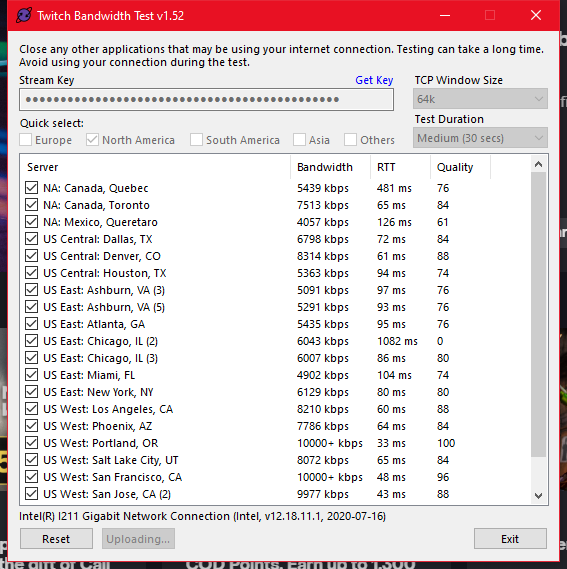 trim wyvern
Hi again have issue with twitch alerts
looks like not working again
 desert minnow
For some reason my game audio is not showing up on my stream
 vapid finch
whats the command to give every some points?
 spice lily
how do i show my activity feed and chat i accidentally closed them
 rain jacinth
When i go to setup bot and tipping it just flickers and then my obs just crashes, like it reopens and closes my activity and chat every 0.1 seconds before crashing
errant zenith
I am still having trouble with my refresh the browser source in OBS I have refreshed it twice now and it keeps giving me the same pop up
 foggy heart
trim wyvern
Hi again have issue with twitch alerts
looks like not working again
foggy heart
trim wyvern
Hi again have issue with twitch alerts
looks like not working again
Is there a specific thing not working with the alerts?
viscid pebbleBOT
@desert minnow If you are not hearing your alerts and/or Media Request, you are most likely using the Control Audio via OBS option in your browser source properties.
To make sure you hear the alerts and the stream also hears them, follow along the screenshot bellow.
https://cdn.discordapp.com/attachments/199460642975907840/685371800456134686/unknown.png
 trim wyvern
foggy heart
Is there a specific thing not working with the alerts?
trim wyvern
foggy heart
Is there a specific thing not working with the alerts?
I had new follower and my alert didn't came by obs
foggy heart
vapid finch
whats the command to give every some points?
You should be able to use !addpoints all for that
foggy heart
spice lily
how do i show my activity feed and chat i accidentally closed them
In OBS? Click StreamElements at the top left, then go to OBS.Live Docks, then click the ones you want
viscid pebbleBOT
@rain jacinth StreamElements menu, on top of OBS > Logout > Login
errant zenith
Will this interfere with anything I’m doing? Or is it just so I can hear the alerts?
rain jacinth
It worked! Thank you
 trim flare
What can I do if when I put the command in the chat with the streamelements bot the bot doesn't say anything?
@viscid pebble
 tight seal
Hi! I have a question please  I'm curious about sound effects that are mod only... I'm adding sound effects through the store but I don't see a user level limitation. Is there a way for a mod to do !whatevercommand in chat and it will trigger the sound effect, but not if anyone else does it?
errant zenith
viscid pebble
<@!267467063100964864> If you are not hearing your alerts and/or Media Request, ...
Will this interfere with anything I’m doing? Or is it just so I can hear the alerts?
tight seal
https://streamelements.helprace.com/i866-mod-only-store-redemption-sound - I've seen this, and that it was discussed in this server a long time ago. The reason why I'm asking is that I'm seeing it being done in a stream atm, the mods say it's via SE, but I just can't get it to work that way. Other than that the mods are ignoring my questions, you know how mods are 
 dusty bridge
Hi there!
Could someone please point me in the right direction for assistance on SE Pay not accepting my bank details.
Thanks!
 grizzled rampart
Hi I'm new here I need help with OBS, I accidently deleted a source which had my custom overlay on and I can't seem to get it back on
viscid pebbleBOT
@trim flare Go to the Dashboard > Right side > Part channel > Join channel(https://streamelements.com/dashboard)

@dusty bridge Please contact us via email for support with SE.Pay. You can use our contact form here: https://streamelements.com/contact Thank you.
@grizzled rampart To add your overlays to OBS, add a new browser source in your scene. Paste your overlay URL in the browser source properties, set the dimensions to 1920x1080 (unless you changed them on the website) and check Shutdown source when not visible. https://youtu.be/KDvLynUqXI4
grizzled rampart
Okay thanks, I'll give that a try now and get back to you
foggy heart
errant zenith
Will this interfere with anything I’m doing? Or is it just so I can hear the ale...
The audio controls control everything audio that comes through OBS. If you're having an issue with game audio, we don't exactly have support for it, but we would suggest looking at these settings
 grave quest
hey is in obs streamelements a music "widget"
trim flare
viscid pebble
<@!708820064685785159> Go to the Dashboard > Right side > **Part channel** > **J...
In that it is fine, but it does not send the messages that it should send with (!)
foggy heart
tight seal
Hi! I have a question please <a:OH_peepoShy:774072850914738196> I'm curious abou...
It might be based on how that streamer set things up. They may have a custom command set that only mods can use, but isn't the default
trim flare
My account id: 5ff7d1e6ab474fff88c5244c
foggy heart
trim flare
In that it is fine, but it does not send the messages that it should send with (...
What do you mean it's fine in that?
tight seal
foggy heart
It might be based on how that streamer set things up. They may have a custom com...
Alright, could you maybe give me a rough guideline of how to set up a widget to respond with a sound effect on the overlay from a command? So that I can set it up to be mod only?
trim flare
What I'm trying to say is that I send something with !Commands and it doesn't send anything
grave quest
hey is in obs streamelements a music "widget"?
trim flare
The bot is on my channel
foggy heart
trim flare
The bot is on my channel
The suggestion is to try removing the bot from the channel, then to re-add it and try the commands again.
 hardy wigeon
Is there a way to run test "Chat Alerts" ? I'm finding the Host and Raid alert messages in chat don't seem to be working. Don't have Subs so cannot test that.
trim flare
foggy heart
The suggestion is to try removing the bot from the channel, then to re-add it an...
I already did, I removed it and re-integrated it to the bot, also with the commands, I removed them and put them back
foggy heart
tight seal
Alright, could you maybe give me a rough guideline of how to set up a widget to ...
I don't have a rough guideline on that, just because I haven't done it myself. I would guess they created a custom command here: https://streamelements.com/dashboard/bot-commands/custom-commands, and made it Mod only. That command may call a redemption from the store.
tight seal
I see, that's 5head. Thank you @foggy heart appreciate your assistance. And good luck with all these questions!! ❤️
grizzled rampart
viscid pebble
<@!248679990852452352> To add your overlays to OBS, add a new browser source in ...
Worked like charm! I was tearing my hair out trying to get this thing to work lol
foggy heart
hardy wigeon
Is there a way to run test "Chat Alerts" ? I'm finding the Host and Raid alert...
You can test the graphical alerts, but I don't believe the chat messages will work unless it's a live event. How are they not working?
foggy heart
trim flare
I already did, I removed it and re-integrated it to the bot, also with the comma...
Does this bot have a custom name?
trim flare
foggy heart
Does this bot have a custom name?
Yes
Well I'm not sure, it's called after me
viscid pebbleBOT
@trim flare If your commands recently stopped working and you're using OBS.Live and a custom bot name do the following:
- In OBS.Live, click on the hamburger menu (three stripes) at the top left of your activity feed
- Click on Stream Settings > Custom bot name
- In the Custom bot name field select Set custom bot name, not your already existing username (with capital letters). Note: If you already connected an account that way, the third entry will show as the account name (see image https://i.imgur.com/sO7fWOX.png).
- Scroll a bit down and click on the purple Connect Custom Bot Account button
- Log in as usual and Authorize the custom bot name
- Back in the Activity feed, click on the Send Test Message button and check if your custom bot name starts working again
 grizzled rampart
I don't know if this is Streamelements related but how do I set the base canvas and output right for people watching on phones or computers? I did a quick short live stream just to test things out and the resolution doesn't seem to be quite right 😫
I have those black rectangle boxes at the top and bottom of the screen and my overlay and game merged in the middle, I need it to be the width and height of the screen if that makes sense?
hardy wigeon
foggy heart
You can test the graphical alerts, but I don't believe the chat messages will wo...
They haven’t been showing. I know all the History on the Hosts events not working (tho the SLOBS doesn’t seem to have same issue, but if the Raid requirement is at the minimum what does it take for it to fire?
 midnight tartan
Why cant I transfer my Tipee alerts to streamelements? The extension says done but theres nothing
grizzled rampart
This is an example...
 trim flare
viscid pebble
<@!708820064685785159> If your commands recently stopped working and you're usin...
trim flare
viscid pebble
<@!708820064685785159> If your commands recently stopped working and you're usin...
Thanks!!
@foggy heart Thanks for the help
 static agate
I have a question about overlays!
Is it possible to have one/more layers rotate out when an alert happens? For example, I'd like to show latest sub & tip on screen, then have those be replaced by the alert temporarily.
viscid pebbleBOT
@grizzled rampart The default resolution for StreamElements overlays (theme and custom) is 1920x1080. Please add them in OBS at their full resolution and use CTRL+F to fit to screen if necessary. You can then downscale your stream in OBS settings > Video if you'd like https://i.imgur.com/6bWXxjR.png
 foggy heart
hardy wigeon
They haven’t been showing. I know all the History on the Hosts events not worki...
foggy heart
hardy wigeon
They haven’t been showing. I know all the History on the Hosts events not worki...
Are the chat message moduels enabled?
foggy heart
static agate
I have a question about overlays!
Is it possible to have one/more layers rotate...
I think you can probably get that to work within one overlay, but that may involve some custom widgets and such to work how you want it
static agate
darn, okay
I was kinda hoping you could link layers within the web interface
thanks though!
trim wyvern
Hi again have issue with twitch alerts
looks like not working again
I had the same issue few month back, can someone check this please
 mortal iron
For some reason my commands stopped working and the bot is still in my channel. I tried removing and rejoining my channel and it didn't work. I also tried unmodded the bot and remodded it and still nothing. My donate command isnt working for me my mids or viewers. Please if you coukd help it would be greatly appreciated. Thank you.
viscid pebbleBOT
@trim wyvern Please provide your account ID found at the top of this page: https://streamelements.com/dashboard/account/channels This ID is public info and safe to share here.
@mortal iron If your commands recently stopped working and you're using OBS.Live and a custom bot name do the following:
- In OBS.Live, click on the hamburger menu (three stripes) at the top left of your activity feed
- Click on Stream Settings > Custom bot name
- In the Custom bot name field select Set custom bot name, not your already existing username (with capital letters). Note: If you already connected an account that way, the third entry will show as the account name (see image https://i.imgur.com/sO7fWOX.png).
- Scroll a bit down and click on the purple Connect Custom Bot Account button
- Log in as usual and Authorize the custom bot name
- Back in the Activity feed, click on the Send Test Message button and check if your custom bot name starts working again
trim wyvern
5be4ba126eb9531518ec955f
mortal iron
AWESOME!!! i changed the bot back to stream elements and not custom and its working again!! Thank you for your help! Omg such a relief you have no idea. I appreciate this help so very much. And thank u for responding so quickly.
 devout topaz
Is there anyway you to modify overlays and stuff without a pc?
Does stream elements have a iOS app?
foggy heart
devout topaz
Does stream elements have a iOS app?
I do not believe so
 worldly ether
Hello
 idle flame
Is there a way to set the bot up to run commercials, say every 15 minutes. But if a commercial is ran out will reset the timer?
lament blade
Hey everyone how are you
I need some help of knowing how to stop people from botting accounts on twitch. Its been annoying some people close to me
 ivory plank
hey, I'm trying to set up my bot commands. I've created one command for viewers to trigger sounds on stream but when I test it, bot replies with "item not found" when in fact the item has already been created. Any idea on how to fix it? Thanks in advance
 sly basin
Hello, I changed my twitch name and now the bot is not working well. And its not recognizing the new name as the broadcaster
 solar tulip
hey guys, im new to streaming and need help linking alerts into my obs
foggy heart
idle flame
Is there a way to set the bot up to run commercials, say every 15 minutes. But i...
Check out this page for help: https://support.streamelements.com/hc/en-us/articles/360019048960-How-to-run-ads-using-the-StreamElements-bot
viscid pebbleBOT
@sly basin If you changed your name on Twitch, please follow these steps:
- Visit https://streamelements.com/logout and then log in again by connecting with Twitch.
- On the right side of the dashboard page that opens, select Join under bot settings. If it says Part select that and then select Join to send the bot to the chat. Don't forget to mod the bot by typing /mod streamelements in your channel if you have not already.
- Post your old and your new name here so that we can update your channel's chatstats tracking (must be done by staff).
devout topaz
Is it someway to modify overlays without a pc?:(
lament blade
is there a way to setup cheer 100 til 109 and next one start from 110 til 119
foggy heart
devout topaz
Is it someway to modify overlays without a pc?:(
Unfortunately, you'd need a PC
foggy heart
lament blade
is there a way to setup cheer 100 til 109 and next one start from 110 til 119
You can set up variations in the overlay editor for different bit amounts
lament blade
how can i do that?
foggy heart
 foggy heart
lament blade
how can i do that?
foggy heart
lament blade
how can i do that?
You can change them in the options, like above.
lament blade
gotcha
 uneven heath
just a noob here what is bot activation and how long should that take?
foggy heart
By bot activation, do you mean the chatbot? You should just be able to join it to your channel through the dashboard
 rich valley
so i just opened up OBS today and for some reason my chat window and my status window are not showing up?
uneven heath
i mean in OBS i opened it and its saying bot activation
rich valley
and they're not in the dock section anymore
uneven heath
what do I do now?
rich valley
and i don't know where to go now to have those windows open?
does anyone know what happened to these windows?
foggy heart
uneven heath
what do I do now?
So this is the setup for the chatbot, You can chose to complete that setup, but it is not required to use SE
 teal cobalt
I'm sorry, but how do I change the user level of a command from chat for a command?
lament blade
i wait since 20.03
 teal cobalt
Nevermind!
 tropic flume
Hello! I was wondering (sorry if this has already been asked and answered), is it possible to just disable people from redeeming their loyalty points from the redemption store and only allow them to redeem it via chat but still have everything shown on the store website?
Basically sometimes people will spam redeem things with the store website.
 pallid epoch
Yes @tropic flume when creating the redemtion in your SE dashboard once you title and add that stuff click next at the bottom then where it says "Redeemable via website" turn that off then check on the via chat
Screenshot of the second page when you press next
 tropic flume
Aweesome! Thanks @pallid epoch
tropic flume
For sure
Oh one more question, is there a way to add a spam protection filter so people can't spam redeem?
tropic flume
1 User
Or even just the ability to see who redeemed what that way if somebody is spamming way too much I can deal with the individual
pallid epoch
here is all the cooldowns
 tropic flume
Okay thanks so much! @pallid epoch
pallid epoch
Not a problem
idle flame
@foggy heart yeah i have that set up. i was just hoping there was a way to automatically reset the cooldown if you manually run an ad. im kinda guessing there isnt
foggy heart
idle flame
<@!801850149260886118> yeah i have that set up. i was just hoping there was a wa...
Gotcha, yeah there isn't an automated way at the time
idle flame
@foggy heart okay, didnt think so. thank you. have a good one!
 acoustic ivy
hi! is it possible to copy widgets between overlays on stream elements?
ex. if i have a widget on one of my overlay editors would it be possible to move/copy it over to another of my overlays?
 desert forge
qucik question so the alerts i have in my overly aren't working when i test it in obs studio, what should i do?
pallid epoch
desert forge
qucik question so the alerts i have in my overly aren't working when i test it ...
Does it work when you press emulate in the streamelements overlay editor
sly basin
viscid pebble
<@!254291557509890050> If you changed your name on Twitch, please follow these s...
old name: b_lievee
new name: beelievee
desert forge
pallid epoch
Does it work when you press emulate in the streamelements overlay editor
yes
desert forge
pallid epoch
Does it work when you press emulate in the streamelements overlay editor
it doesn't work in obs though
pallid epoch
how are you testing the alerts @desert forge
desert forge
by going to activity feed and replaying the alert
pallid epoch
ok it should be working then idk why sorry
desert forge
rip
foggy heart
acoustic ivy
hi! is it possible to copy widgets between overlays on stream elements?
You can duplicate overlays, but I don't believe you can move an individual widget back and forth.
viscid pebbleBOT
@desert forge OBS > Settings > Advanced > Scroll down > Enable or disable Browser Source Hardware Acceleration, depending on its current state > Restart OBS
https://i.imgur.com/ggMe9ZE.png
 desert forge
viscid pebble
<@!618917437441835018> OBS > **Settings** > **Advanced** > Scroll down > Enable ...
desert forge
viscid pebble
<@!618917437441835018> OBS > **Settings** > **Advanced** > Scroll down > Enable ...
Do I turn it back on after I restarted it?
 worldly escarp
desert forge
Do I turn it back on after I restarted it?
worldly escarp
desert forge
Do I turn it back on after I restarted it?
yes
desert forge
It didn't work
worldly escarp
desert forge
It didn't work
assuming you've added the overlay as a browser, try opening the obs as admin
desert forge
worldly escarp
assuming you've added the overlay as a browser, try opening the obs as admin
it didnt work
 tawdry junco
Hello!
I got a question haha
Is there a way I can export an StreamElements overlay, and share it to a friend or the real account, so I can import it from that account?
Import it from the other StreamElements of the real account*
lament blade
tawdry junco
Hello!
I got a question haha
Is there a way I can export an StreamElements overl...
would you like to do it for one person or en mass?
tawdry junco
No, the case is that I was using an account to setting up the overlay that I want to use in my original account. Now, I want to know how I can export and import that overlay to my original account, so that way in my original account, I can get the alerts and all the features. Thank you!
@lament bladeIs there a way?
lament blade
If that channel is yours, you can connect it to your other channel through our dashboard and then duplicate the overlay to that channel
 rose anvil
 why is the !emotes command scuffed? I had the command set to mods only, which prevents people from using the !emotes command, but if they do !emotes BTTV or !emotes FFZ, it spits them all out in chat.
Trying to fix this, I set it to broadcaster only, still the same issue, everyone can do !emotes BTTV/!emotes FFZ.
This is really annoying, since the !emotes command has to be activated to !emotes update BTTV/FFZ.
 rose anvil
When someone does !emotes BTTV, it spits out all the bttv emotes even tho the !emotes command is set to mod only
even when !emotes is set to broadcaster only
look here's a video if you don't understand what I mean, using my alt account that I don't have mod with https://i.nuuls.com/SlN1L.mp4
lament blade
Ah, got it
rose anvil
yeah really weird
lament blade
It really is, so much so that I don't really have a ready made answer
let me ask around
rose anvil
 no real rush, I think for the meantime I'll just set the cost really high, and give myself a lot of points for when I have to update it.
 cinder olive
rose anvil
When someone does !emotes BTTV, it spits out all the bttv emotes even tho the !e...
cinder olive
rose anvil
When someone does !emotes BTTV, it spits out all the bttv emotes even tho the !e...
The command is not currently set to mod, super mod, or broadcaster only
Ah wait, youre not trying to edit your account, are you?
rose anvil
 it is set to mod, in the video I set it to broadcaster, yet I could still do it with my pleb account
it's for channel "Cyr" I mod for
full dashboard access
cinder olive
Im in the chat 
tawdry junco
@lament blade Hey! Thanks, that worked!
Now, I got another question! Haha, I've been trying to resize an image from an overlay, but I cannot change the height, does this depends only from the source image, or is there a way to resize it with the StreamElements tools?
lament blade
you can either resize it in the overlay editor, or resize the entire overlay through obs
tawdry junco
I'm not using OBS do, I'm using the StreamElements with LightStream, that's why I need to do the changes in the SE' tools
@lament blade
lament blade
then you can resize the image in the editor, for sure
 glacial pelican
hello could you help me? on the Stream element site I can no longer withdraw the money from donations on sepay?
Personal Information Invalid. Contact Support
Your bank details are being verified. This process takes up to 7 business days.
lament blade
@glacial pelican please DM me with your account ID
 pearl hedge
So I was streaming earlier today and I noticed that my Follow alert would go off, TTS would kick in, then after a few seconds, the follower alert sound would repeat one more time. Any idea why it goes off a second time?
 fathom zodiac
Question mates! Is there a leaderboard for tips that we can add to the panels?
lament blade
pearl hedge
So I was streaming earlier today and I noticed that my Follow alert would go off...
does that happen for all alerts or just the follower one?
lament blade
fathom zodiac
Question mates! Is there a leaderboard for tips that we can add to the panels?
that leaderboard exists specifically on your tipping page
pearl hedge
lament blade
does that happen for all alerts or just the follower one?
Just follower so far
My follower alert sound is just a second long, as well, if that helps
Other alert sounds are like 5 seconds long
lament blade
that could be it, in combination with the TTS
try disabling TTS for follower alerts and let me know if that still happens
 mint lintel
I know this isnt a question necessarily for twitch but how do I remove people from my donation leaderboard? I donated to myself to test my alerts but dont want to be competing in donations with my viewers lol
fathom zodiac
@lament blade but theres no way to add that to the twitch panels correcct?
lament blade
fathom zodiac
<@456226577798135808> but theres no way to add that to the twitch panels correcc...
not that I recall no
fathom zodiac
Thanks!
mint lintel
donation link for reference: https://streamelements.com/popehudunkachud/tip
fathom zodiac
Thanks. yea I know how to get the list. That leaderboard to the side though. wanted to know if there was a way to get that in twitch panels. Currently there isn't but thanks 🙂
worldly escarp
mint lintel
I know this isnt a question necessarily for twitch but how do I remove people fr...
you cant really remove them but you can put them in the ignore list, but you do that to your own user
mint lintel
@fathom zodiac oh sorry I was dropping that link for my question.
mint lintel
@worldly escarp where exactly do I go to do that? And if I put it on the ignore list, will they go away on the leaderboard? Or could someone at SE do it manually on your end?
It's really just a bad look having it on there and don't want any viewers thinking I'm trying to get them to beat me/take away the excitement of donating if they will be below me
worldly escarp
mint lintel
<@689904735917965342> where exactly do I go to do that? And if I put it on the i...
you can add user to ignore using the loyalty settings at the bottom you'll see it.
mint lintel
But will that remove them from the list? Not sure if you saw the second part of my question
worldly escarp
mint lintel
But will that remove them from the list? Not sure if you saw the second part of...
it should remove them yes
mint lintel
hmm so I did try that and it didn't seem to work. popehudunkachud was already ignored from the beginning and both are still appearing. Appreciate you going through this with me!

 lament blade
Oh, you wanted to remove them from the leaderboard on the page?
 subtle meadow
HELO
 peak epoch
Hey, for some reason my nightbot commands wont import into SE
 brazen ether
any tips on how to get your overlays to fit to your screen easier?
viscid pebbleBOT
@brazen ether The default resolution for StreamElements overlays (theme and custom) is 1920x1080. Please add them in OBS at their full resolution and use CTRL+F to fit to screen if necessary. You can then downscale your stream in OBS settings > Video if you'd like https://i.imgur.com/6bWXxjR.png
 keen wigeon
If the resolution is set correctly and you have a more specific issue, feel free to ask here.
brazen ether
this was great help thank yall so much
brazen ether
How would i move a group of layouts? like if theres a camera icon that has a social icons ect from one side to another side. Hopefully i made sense of that
like moving the box with everything on it from the left to the right
 brazen ether
How do i attatch them to make a group?
worldly escarp

 rancid lodge
So it seems that StreamElements picked up the alert for my new sub tonight, but it's not updating in the goal widget I made for it, along with not being in the session/goal totals. It got picked up in the same widget in StreamLabs though. Any idea how I can fix that in SE?
charred gulch
Anyone know how I can sync new Twitch emotes to Streamelements ?
wary halo
by typing that command in your twitch chat 😉
charred gulch
didnt work
lament blade
hello friends, i changed my twitch name and now my leaderboard is broken (no data)....can you help me? 😄
viscid pebbleBOT
@lament blade If you changed your name on Twitch, please follow these steps:
- Visit https://streamelements.com/logout and then log in again by connecting with Twitch.
- On the right side of the dashboard page that opens, select Join under bot settings. If it says Part select that and then select Join to send the bot to the chat. Don't forget to mod the bot by typing /mod streamelements in your channel if you have not already.
- Post your old and your new name here so that we can update your channel's chatstats tracking (must be done by staff).
lament blade
ouuuuu thx bro
Old name: Skret_666 new name: PanSkret
thx again
let me know if that worked for you
oh yes....its ok now... thank you my man! 😗

viscid pebbleBOT
@lament blade Read and follow our server rules:
- We do not tolerate toxicity! Treat the community team, staff and all members with respect.
- No advertisement or channel promotion, anywhere on the server.
- No NSFW/NSFL
- No unsolicited DMs or friend requests to server members
Make sure to read the #welcome in any server you join.
 boreal mural
Hello, have a problem with alerts, when i hit emulate in streamelemens web brouser it trigers the notification and everything seems to work perfectly but when actual action is happening then it dont show up, i made another twitch acount and push the follow on my stream while i was live and nothing happened, no allert no nothing... but on twitch i can see follow count +1. where is the problem? plz help me
lament blade
Sure, may I please have your account ID?
boreal mural
Strielkus on twitch i just made a short test stream for that p[roblem to solve and u can watch the video
viscid pebbleBOT
Please provide your account ID found at the top of this page: https://streamelements.com/dashboard/account/channels This ID is public info and safe to share here.
lament blade
It should be fixed now
 eager frigate
Hi, the streamer i'm helping has issues with mediarequest, requests get automatically skipped for no reason. While it previously worked fine.
boreal mural
lament blade
It should be fixed now
ok i go to test it again
lament blade
check if it's not under manual approval @eager frigate
eager frigate
I should provided more info my bad, queue moderation is disabled.
boreal mural
lament blade
It should be fixed now
its working finaly, thank you very much!
 tender wagon
I need HELP!
I don't know why my mediarequest can't auto play next song.
I set backup palylist but I play one song it's can't auto play next song.
I have to manual click next song.
It's confuses me for a long time 。・゚・(つд`゚)・゚・
My English is poor sorry.😭
worldly escarp
add the docks > go to streamelements tab > obs.live docks
worldly escarp
lament blade
HOW I CAN MAKEBLACKSCREEN ON TWITCH
what do mean black screen?
eager frigate
I tried a few things and here are my observations:
When a song comes into the queue regardless if it comes into moderation queue or not, it gets skipped and continues the backup playlist. The setting skip backup list mid-track upon incoming request didn't changed anything.
https://i.gyazo.com/36799bd3042ba9423225b77b8e4fd8c1.gif (gif does not show the song being removed due the limited of time i could record, but you can see the backup list kicking in right away)

 sand steppe
Hello. I noticed that if my stream cuts out due to net issues and re connects, my SE bot commands do not work once the stream connects again. Is there a way to connect it again and have the commands work?
Only way I've found to get it to work again is to click stop streaming and then start streaming again.
Apologies if this is meant to go under OBS and not twitch help btw.
Any help is appreciated 🙂
worldly escarp
sand steppe
Hello. I noticed that if my stream cuts out due to net issues and re connects, m...
We noticed you've also created a case for that matter and you will be replied there 🙂
sand steppe
I did. Sorry. I forgot discord existed for a second. Brain stopped working :/
 cerulean belfry
hi. i set up follow/sub/raid overlays on streamelements and they have never worked. nothing comes up when someone follows my channel. also i set up a tipping page, and i have a streamlabs donation bar overlay but is it possible to connect the two? at the moment i have to manually update the donation bar which i can't do during the stream
 ionic kelp
@lament blade we don't have one. You'd have to look on Google for one to use.
keen wigeon
cerulean belfry
hi. i set up follow/sub/raid overlays on streamelements and they have never work...
- Do you see the alerts in OBS?
- Do you see the events in your activity feed?
- Our tipping page is operated by us. You can use any image you like as the Twitch panel and tipping page banner, background etc.
 robust gyro
Afternoon all, I can't access the SE dashboard?
cerulean belfry
keen wigeon
1. Do you see the alerts in OBS?
2. Do you see the events in your activity feed?...
i see the events in my activity feed, but the alerts don't show up on the stream itself. yeah i have a streamelements tipping page, but can't figure out how to set up an overlay to show my tips building up. and since the other streamelements overlays didn't work i tried making an overlay on streamlabs instead but now that doesn't work because i can't do a streamlabs tipping page without getting streamlabs plus which will cost more than i get in tips.
worldly escarp
robust gyro
Afternoon all, I can't access the SE dashboard?
what are you getting?
robust gyro
worldly escarp
what are you getting?
I'm just being sent back to streamelements.com, the blue thing with the streamer montage in the background, that's been happening for 2 days or so now
worldly escarp
try this https://streamelements.com/logout

StreamElements
The Ultimate All in One Platform for Streamers
 tepid lagoon
rancid lodge
So it seems that StreamElements picked up the alert for my new sub tonight, but ...
tepid lagoon
rancid lodge
So it seems that StreamElements picked up the alert for my new sub tonight, but ...
Make sure your goal end date isn't in the past.
robust gyro
Oh that worked, thanks @worldly escarp
worldly escarp
robust gyro
Oh that worked, thanks <@!689904735917965342>
👍
robust gyro
Happy Easter guys
 lapis vault
yoyo, happy easter to everyone. Little question: is the emulation tool broken for everybody?
tepid lagoon
lapis vault
yoyo, happy easter to everyone. Little question: is the emulation tool broken fo...
Nope, works fine (tested)
ionic kelp
Define broken.
lapis vault
It doesn't work. Not in the panel and in stream
 ember salmon
Couple quick questions. I have a custom gifted sub alert set up but for some reason SE keeps reading the action when I don't have TTS enabled. It will read off who gifted, who to, and how many they have gifted in the channel. Where am i going wrong here?
Also, some of my custom alerts lag, is there a reason with this? The alert will run at around 2 FPS and look very blurry and laggy.
lapis vault
however alerts work fine
I mean, the real events work fine. Just anything I try to emulate doesn't come up
worldly escarp
ember salmon
Couple quick questions. I have a custom gifted sub alert set up but for some rea...
Have you checked the alerts variations?
lapis vault
Its not working even with a brand new alert box, so its not a setting of my actual alert box
AH, interesting. its not working in this browser
ember salmon
@worldly escarp Yep, double checked all of them. I have TTS for some of the variations but the action is unchecked for all of them. If that is what you are referring to.
tender wagon
eager frigate
I tried a few things and here are my observations:
When a song comes into the q...
My gif
 lapis vault
weird
cerulean belfry
so can anyone help me please? how do i get my overlays to actually work when they're supposed to?
keen wigeon
Do you see the alerts in OBS?
ember salmon
Yep. Both things I listed up above. Sometimes the lag, sometimes they dont. Sometimes SE reads off the action, sometimes it doesn't. Its strange. But yes, I see the alerts in obs when they run.
keen wigeon
@ember salmon I actually asked @cerulean belfry that 🙂
ember salmon
My badddd
worldly escarp
ember salmon
My badddd
which over are u using?
tepid lagoon
ember salmon
Yep. Both things I listed up above. Sometimes the lag, sometimes they dont. Some...
Without seeing your overlays, it seems like you have an alert variation somewhere that requires a specific amount on gifted subs before triggering, and that has the "announce action" still on.
ember salmon
@tepid lagoon For all my alert variations for sub, all of them have it off. Could another random alert have it and bork it?
@worldly escarp I use my own custom overlays
worldly escarp
ember salmon
My badddd
you have variation called TTS and its enabled
ember salmon
TTS is enabled for some and not for others. But the "action" box is unchecked on all
worldly escarp
it is
ember salmon
What is?
worldly escarp
ember salmon
What is?
your tip alert variations is checked and so are the TTS
cerulean belfry
keen wigeon
<@!125855664655433728> I actually asked <@!694285050044219392> that 🙂
@keen wigeon yeah i answered above as well but then a bunch of other questions happened. the alerts don't appear in OBS but i get the events on my activity feed
ember salmon
If the "announce action" is unchecked for all variations though should SE still read off that "user gifted a sub to user2 and has gifted 30 subs in this channel"?
@worldly escarp
ember salmon
Alright, that is the problem I am running into. It is still reading it off. It will do it occasionally when I first fire the stream up and the longer I go and the more gifts that come through it will all of a sudden stop reading it.
 neon chasm
Hey guys! How do I get my stream labels to work? I imported my overlays/scenes from Streamlabs but I have only just realised that the labels from Streamlabs do not work on Elements! Any ideas?
cerulean belfry
hey so for the third time can anyone help me fix my overlays??
viscid pebbleBOT
@dim yacht Read and follow our server rules:
- We do not tolerate toxicity! Treat the community team, staff and all members with respect.
- No advertisement or channel promotion, anywhere on the server.
- No NSFW/NSFL
- No unsolicited DMs or friend requests to server members
Make sure to read the #welcome in any server you join.
cerulean belfry
like how does this work? do people actually work here or are the people answering questions just random kind souls who happen to know the answers? because like i don't know if anyone is ever gonna read my question or help so do i sit here for hours waiting or should i just give up?
i'm just really confused as to what is supposed to happen here
neon chasm
@cerulean belfry Bear in mind mate, it is the weekend, someone will be in touch as soon as poss
viscid pebbleBOT
@cerulean belfry Please provide your account ID found at the top of this page: https://streamelements.com/dashboard/account/channels This ID is public info and safe to share here.
cerulean belfry
@neon chasm yeah but i originally asked an hour ago and other people's questions have been answered since then but for some reason mine haven't been. am i doing something wrong?
cerulean belfry
viscid pebble
<@!694285050044219392> Please provide your account ID found at the top of this p...
602d8212dba8f7f36d991166
 inland knoll
hey there, is there a way to ensure that the winner of the giveaway is a follower?
Also - can you set a time for it so it counts down on the screen so people know how many minutes are left - did some for a chairty stream yesterday and couldnt find these options
ionic kelp
@cerulean belfry So follow/sub/raids don't fire the alertbox but do in the activity feed?
cerulean belfry
ionic kelp
<@694285050044219392> So follow/sub/raids don't fire the alertbox but do in the ...
@ionic kelp yeah
i have another question now... why doesn't this command work? "${count tune 87}" I have a command for the number of times i tune my guitar. i'm trying to set a starting value of 87, but it just counts up from 1 and the value won't change using this command. but i copied the command from streamelements variables list.
(and my rhetorical question is... why does nothing ever work for me 😢 )
ionic kelp
@inland knoll definitely a no on the 2nd one. Not sure if there's a way via the API to do that. 1 I'm not sure of without looking and can't atm.
 arctic valley
Hi can you make a command that will send you a private message? stg like /w @${user} test
 tardy magnet
hi everyone! im so sorry for the dumb question: regarding the leaderboard panel; do gifted subs count towards the sub bonus? or nah?
mint lintel
lament blade
Oh, you wanted to remove them from the leaderboard on the page?
Yes exactly, how can I go about doing this?
lament blade
Hello, how do i un-decline a sponsorship offer through streamelements 😦
viscid pebbleBOT
@lament blade Please contact us via email for support with your campaign or sponsorship. You can use our contact form here: https://streamelements.com/contact Thank you.
 neon helm
Twitch uabaubs😢😢
 modest pendant
hello, how do i fix this issue? when i trigger my alerts using Emulate Alert, it shows up on my OBS, but when actual followers follow/sub/raid, there were no alerts. 😦
viscid pebbleBOT
@modest pendant Please provide your account ID found at the top of this page: https://streamelements.com/dashboard/account/channels This ID is public info and safe to share here.
 placid raptor
@inland knoll no way to make sure winner is a follower at the moment. you can limit the command to regulars user level [which is somewhat of a workaround  ]
]
and currently the giveaway widget has only the 'time running' timer which counts up, no countdown
@cerulean belfry regarding the alerts, was it working before? did it start happening after you saw it working live? or is this the first time you're setting this up?
were alerts imported from another profile or something like that? @modest pendant plz answer this question too when you provide your account ID
@arctic valley you should be able to set that up in the advanced settings of the custom command, choose if the bot 'replies' 'says' or 'whispers'
@lament blade I'm not sure what you're trying to describe here
@tardy magnet the loyalty points go to the gifter (x the amount of gifted subs), not the person that was gifted
@mint lintel you can edit or remove any entry in your leaderboard - https://streamelements.com/dashboard/leaderboard/current (this is current, you have all time and watchtime too)
@lament blade I replied to your ticket 👍
@neon helm what?
StreamElements
The Ultimate All in One Platform for Streamers
modest pendant
5ff189728fc4bd482cbf5705
placid raptor
@modest pendant were these alert types working normally before? did it start happening after you saw it working live? or is this the first time you're setting this up?
were alerts imported from another profile or something like that? and do you see them in your activity feed?
modest pendant
it was working before i changed my overlays. after that, it doesnt work anymore
mint lintel
@placid raptor Seems like theres some sort of bug because on this page is says there is no entry
 modest pendant
yes, i see them in my activity feed
cerulean belfry
@placid raptor its the first time setting it up, it has never worked
 fervent rover
Hello 🙂
placid raptor
@modest pendant what do you mean by 'change the overlays'?
@mint lintel either no loyalty stats were generated or this was reset manually (the loyalty system must be enabled for anything to show there)
fervent rover
Was wondering if someone could help me out
placid raptor
@cerulean belfry are you able to emulate events and do they show in OBS as well as the editor?
fervent rover
Of course I'll wait until someone's not busy 😛
cerulean belfry
placid raptor
<@!694285050044219392> are you able to emulate events and do they show in OBS as...
they only emulate in the editor not in OBS
placid raptor
did you create the browser source to add the overlay?
viscid pebbleBOT
The default resolution for StreamElements overlays (theme and custom) is 1920x1080. Please add them in OBS at their full resolution and use CTRL+F to fit to screen if necessary. You can then downscale your stream in OBS settings > Video if you'd like https://i.imgur.com/6bWXxjR.png
mint lintel
@placid raptor They still show up though on the leaderboard
 placid raptor
that's tips.. not shown in the loyalty leaderboards
the loyalty leaderboard shows loyalty stats
so if some1 tipped you and the loyalty system is not enabled, they won't get loyalty points for the tip
and won't be shown in the leaderboard
fervent rover
could i ask a question or two as you wait for fox to respond?
So I tend to get between 1k and 2k viewers, and have always used SE for my alerts.
Yesterday though I had a massive amount of gifted subs, 500+
and I can't find a single way to get multipel gifted subs to come as one single alert
it was 90+ minutes of sub alerts straight
@placid raptor
is there any solution for this other than muting my alerts for over an hour?
ideally, to make special alerts for anyoen gifting 2+/10+/50+ subs
etc.
ionic kelp
Make it a community gift.
wary halo
Yeah then it will just say person x donated xx amount of subs to the community
fervent rover
do i have to tick off "pick an alert randomly when more than oen ma tches"?
how will it know whether to pick the 10+ of the 2+, if it is say 40 gifted
does it go in order?
wary halo
you need to set it to at least 2 at least 10 etc. etc.
fervent rover
but if it's 30 gifted, both at least 2, and at least 10
match
how does SE choose which one to play
wary halo
then you should indeed deselect the pick random
set the chance to 100% for those specific alerts
mint lintel
@placid raptor right so what im asking is how do I remove the two entries from my tip leaderboard (Pope and popehudunkachud)? Not sure how far back into my message thread you saw cause Ive worked with a few people on this so I feel like some info is getting lost. I don't want to shut off the tip leaderboard, just want to specifically remove 2 entries.
placid raptor
are you not able to use these functions?

 blissful egret
Hey guys, I've started streaming wow classic (mostly just to keep the vods)
I've got a gtx 1050ti & i5 10400F
I have been streaming 1080p with x264 on the recommended settings obs gave me & 4750 bitrate.
Still my stream seems a tad blurry, should I keep using x264 or switch over to NVENC?
 slender mulch
${random.1-${touser}} why does this kindof work but not really
I want to make a command that displays a random number between 1 and the choice of a mod
So !random 100 is 1-100
mint lintel
placid raptor
are you not able to use these functions?
That actually worked thank you! I tried that last night and I think it might be a little buggy because I deleted a few but the entries didnt change. I just deleted all of them and it lowered the amount but they are still showing up. must be a glitch of some sorts.
 restive forge
Hey, I got 48 euros to withdrawl waiting but it says not enough balance to withdrawl but last time I did withdrawl it was 10 euros and that was enough 🤔
cerulean belfry
placid raptor
did you create the browser source to add the overlay?
yeah i did create the browser source. i can see the box where the alert should appear. it just doesn't appear
cerulean belfry
there's no audio on my alerts @placid raptor
slender mulch
Changed my command to ${random.1-${1}} and it still doesnt work
 minor bear
can some1 help me? got this donation 2 weeks ago
 modest pendant
placid raptor
<@!438303687106887680> what do you mean by 'change the overlays'?
<@!54364129730...
modest pendant
placid raptor
<@!438303687106887680> what do you mean by 'change the overlays'?
<@!54364129730...
i updated my overlay >< (like change the image when it pops up etc)
minor bear
 scarlet tiger
It can take 16-21 or more days.
scarlet tiger
It can take 16-21 or more days.
ok ty
 loud moon
Hi!
Someone can help me?
my !duel command is not working for my viewers
It says the viewer has 0 points ... but they do have it
 upper leaf
Help
 lament blade
I cant load a overlay (browser source)
 candid lion
Hey I have a question I have noticed the past few times I’ve stream my webcam is delayed. Is there a way to fix it?
 quiet wren
My sub count isn't correctly showing on my overlay, can someone help please?
viscid pebbleBOT
@lament blade OBS > Settings > Advanced > Scroll down > Enable or disable Browser Source Hardware Acceleration, depending on its current state > Restart OBS
https://i.imgur.com/ggMe9ZE.png
 nimble dune
upper leaf
Help
nimble dune
upper leaf
Help
make sure you have the media request widget in the overlay.
viscid pebbleBOT
@candid lion Obs.live is a plugin for OBS Studio for the best OBS support, please join their Official Discord @ discord.gg/obsproject
lament blade
hey im new sorry if this is a obvious question BUT HOW do i fix this?

 random plank
I'm experiencing an issue with StreamElements chatbot while running Restream in OBS. The chatbot commands aren't working when OBS is running and the Restream bot is in the chat. So !points won't get a reply from the bot while I have OBS open, but will trigger a reply when I quit OBS and the Restream bot leaved the chat.
viscid pebbleBOT
If your commands recently stopped working and you're using OBS.Live and a custom bot name do the following:
- In OBS.Live, click on the hamburger menu (three stripes) at the top left of your activity feed
- Click on Stream Settings > Custom bot name
- In the Custom bot name field select Set custom bot name, not your already existing username (with capital letters). Note: If you already connected an account that way, the third entry will show as the account name (see image https://i.imgur.com/sO7fWOX.png).
- Scroll a bit down and click on the purple Connect Custom Bot Account button
- Log in as usual and Authorize the custom bot name
- Back in the Activity feed, click on the Send Test Message button and check if your custom bot name starts working again
random plank
I'll try that. !goodbot
upper leaf
@nimble dune its like this
 viscid pebbleBOT
@upper leaf StreamElements menu, on top of OBS > Logout > Login
nimble dune
try this
nimble dune
 ebon fulcrum
When my commands stop working is there a reset hotfix I can do while live streaming?
 limber marsh
Hi, is there a way to upload my own icons to an Event list widget or is there a collection of icons I can browse from?
viscid pebbleBOT
@ebon fulcrum Go to the Dashboard > Right side > Part channel > Join channel(https://streamelements.com/dashboard)
 tame mauve
How do I play a overlay
viscid pebbleBOT
@tame mauve New to StreamElements?
Check out our YouTube channel https://www.youtube.com/c/streamelements/videos
with tutorial videos from setting up the basics, to in-depth details on how to use our product.
New to OBS? Here is a 4 step quick start guide
https://obsproject.com/wiki/OBS-Studio-Quickstart
Want to learn even more? Here is an in-depth overview
https://obsproject.com/wiki/OBS-Studio-Overview
lament blade
Hello! My follower/sub goal numbers are wrong. Is there a way to fix this?
 wicked lichen
Gostaria de tirar o streamelements da minha conta
viscid pebbleBOT
@lament blade To reset goals:
- from the Overlay Editor > Session data on top right (monitor symbol) > Goals tab > reset progress of desired goal
- from the Dashboard > Activity feed on the left > Widget data on the right > Goals tab -> reset progress of desired goal
Note: Goal widgets (progress) only counts up and doesn't go down automatically, if you lose followers/subs.
@wicked lichen Welcome to the helpdesk! The regular helpdesk channels are in English but we do provide multi-language support in the following channels: #🇩🇪︱deutsch | #🇫🇷︱français | #🇪🇸︱español | #🇵🇹︱português | #🇳🇱︱nederlands | #🇮🇹︱italiano | #🇵🇱︱polski | #🇨🇳︱中文語言服務區-chinese | #🇯🇵︱日本語-japanese | #🇭🇺︱magyar | #🇰🇷︱한국어-korean | #🇹🇭︱ไทย-thai | #🇷🇺︱русский | #🇺🇦︱українська | #🇨🇿︱czech
 buoyant bolt
Hoping someone can help me out, I'm hoping and assuming it's just something simple that I'm missing. I've rather new to this. When I do a shout out, instead of a link to the person, I'm getting a *** instead.
 lament blade
@buoyant bolt make sure command looks like this 😄
 viscid pebbleBOT
@buoyant bolt If links in chat are appearing as ***** either mod the bot or disable block hyperlinks in your twitch channel settings: https://dashboard.twitch.tv/settings/moderation
wicked lichen
Como tira o streamelements da minha conta twitvh
viscid pebbleBOT
@wicked lichen Welcome to the helpdesk! The regular helpdesk channels are in English but we do provide multi-language support in the following channels: #🇩🇪︱deutsch | #🇫🇷︱français | #🇪🇸︱español | #🇵🇹︱português | #🇳🇱︱nederlands | #🇮🇹︱italiano | #🇵🇱︱polski | #🇨🇳︱中文語言服務區-chinese | #🇯🇵︱日本語-japanese | #🇭🇺︱magyar | #🇰🇷︱한국어-korean | #🇹🇭︱ไทย-thai | #🇷🇺︱русский | #🇺🇦︱українська | #🇨🇿︱czech
trim wyvern
Hi again have issue with twitch alerts
looks like not working again
I had the same issue few month back, can someone check this please
 blazing grotto
how do i connect all my channels it says already claimed
 stark marten
Help me my display capture aint working
@foggy fox where are alert boxes cant find em
 shut jackal
Is there a way to display the prices of my !items when somebody types it in my chat?
Rather then them clicking the link
viscid pebbleBOT
@stark marten Not all staff are able to assist with support issues. Please refrain from pinging them or sending them DMs unless asked to.
@stark marten New to StreamElements?
Check out our YouTube channel https://www.youtube.com/c/streamelements/videos
with tutorial videos from setting up the basics, to in-depth details on how to use our product.
New to OBS? Here is a 4 step quick start guide
https://obsproject.com/wiki/OBS-Studio-Quickstart
Want to learn even more? Here is an in-depth overview
https://obsproject.com/wiki/OBS-Studio-Overview
wary halo
shut jackal
Is there a way to display the prices of my !items when somebody types it in my c...
not possible
limber marsh
is there a way on the SimpleHUB widget to remove this black outline?
 wary halo
I believe that is just the widget outline in the editor, won't show on the actual screen
limber marsh
youre right, thanks!
wanna try adding my own icons but not sure thats possible
or add some sort of box behind the icon
viscid pebbleBOT
@stark marten New to StreamElements?
Check out our YouTube channel https://www.youtube.com/c/streamelements/videos
with tutorial videos from setting up the basics, to in-depth details on how to use our product.
New to OBS? Here is a 4 step quick start guide
https://obsproject.com/wiki/OBS-Studio-Quickstart
Want to learn even more? Here is an in-depth overview
https://obsproject.com/wiki/OBS-Studio-Overview
 hardy crypt
Hello , So i today i went from 468 subs to 418, but my widget is still showing 468 and didnt get updated. what should i do ? isnt automatic ?
viscid pebbleBOT
@hardy crypt To reset goals:
- from the Overlay Editor > Session data on top right (monitor symbol) > Goals tab > reset progress of desired goal
- from the Dashboard > Activity feed on the left > Widget data on the right > Goals tab -> reset progress of desired goal
Note: Goal widgets (progress) only counts up and doesn't go down automatically, if you lose followers/subs.
wary halo
Brian
stark marten
tank
mint lintel
can you set a character limit on TTS for bits?
 merry jewel
could anyone help with tip alerts not showing up on stream or on the tipping page?
viscid pebbleBOT
@merry jewel If a viewer tipped through PayPal but no information appears in your StreamElements account, this generally means PayPal has held the tip for verification.
Until PayPal clears the tip and sends back a confirmation to your StreamElements account, no information will appear there and no alert will play, as that confirmation is the only way for us to be aware of a successful transaction.
There is a posibility that the tip may have been sent as an eCheque/eCheck - these tips can take from 7 up to 21+ days to show up on our side. Tippers can usually cancel these.
If you believe there may be an issue with the transaction, you'll need to contact PayPal support as StreamElements is only a passthrough service and never actually gets involved with the transaction or touches the money
 thorn thorn
Hello there! I want to make sertain languages unable to be shown in my chat ,ive seen messages that contain a diffrent language get deleted by the bot in other channels too and i was wondering how i can aply that myself, this is a big isse in my chat and i would love to hav some help with it! THANKYOU in advance! 🙏❤🌈 plz @ me if u can help!
 opaque girder
Hello, I have been receiving tips from viewers but suddenly it asked me for a bank statement. I uploaded it, it says it has to be reviewed and approved manually within approx 7 business days, fine, but it still says that my personal info is invalid and I have to contact support. This is in SE PAY
(how do i fix this, i cant withdraw any money and it says it needs to be fixed before may 12th otherwise tips will be refunded)
viscid pebbleBOT
@opaque girder Please contact us via email for support with SE.Pay. You can use our contact form here: https://streamelements.com/contact Thank you.
opaque girder
thank you
 dense knoll
Hi! Is there any way to ejecute commands from a Channel Points Reward? Even with a Third Party app/web?
 flint bolt
for some reason my streamelements dashboard shows 0 subs in april and nothing in the activity feed, even though i got 2 subs yesterday. the subs also aren't showing in the activity feed
 drowsy egret
flint bolt
for some reason my streamelements dashboard shows 0 subs in april and nothing in...
drowsy egret
flint bolt
for some reason my streamelements dashboard shows 0 subs in april and nothing in...
I answered your email
stark marten
Question. Can you select an overlay and edit it
wait no
scene
can you select a scene
and edit it
or export it?
 neat sparrow
is there any one who can help me get an overlay working on twitch studios ?
 wise relic
okay, my songrequest alias is not working how do i fix this
 brittle marten
how do I default my chat bot module for chat alerts? I accidentally deleted all the messages and now nothing shows.
 compact cypress
@viscid pebble ive recently switched my chat bot and trying to close my streamelements account. When filling out the form to close it keeps saying either invalid username email or problem with the site. Ive tried just disconnecting from my twitch but streamelements still shows up in my chat. I already turned off all commands and timers
drowsy egret
compact cypress
<@!155149108183695360> ive recently switched my chat bot and trying to close my ...
if you want to close your account you can email us at support@streamelements.com with the following information:
Username:
Email:
Account ID:
JWT Token:
Reason for closure:
Error when using the closure form:
compact cypress
drowsy egret
if you want to close your account you can email us at support@streamelements.com...
email sent. thanks
 sharp scaffold
My friend is a console player and I have full control over his streamelements to help him.
Is it possible to replay chat alerts?
Going to the activity feed seems to only do it on stream itself, and since he streams on console it doesn't show up.
 next rose
Hello there I changed my Twitch name from "TheGoodGuTomTV" To "Tomolitic" can a stuff member reset it please thanks
 neat gyro
i think this was mentioned already before but i think I need to let someone know that I changed my username from cakeTuonto to Tuonto on twitch so I can resync my channel chat stats, maybe i'm just supposed to say it here?
drowsy egret
neat gyro
i think this was mentioned already before but i think I need to let someone know...
stats moved to your new username
drowsy egret
next rose
Hello there I changed my Twitch name from "TheGoodGuTomTV" To "Tomolitic" can a ...
what is it that you want to reset?
next rose
drowsy egret
what is it that you want to reset?
I mean chatstats tracking and when people sub nothing shows up no alerts only followers for some odd reason
viscid pebbleBOT
@next rose Please logout of StreamElements at https://streamelements.com/logout and then login again to your account (Twitch/YouTube/Facebook).
drowsy egret
I've moved your chat stats
next rose
thank you very much ❤️
neat gyro
drowsy egret
stats moved to your new username
thank u!
 tender wave
!command
drowsy egret
the email is not instant, it usually arrives within 7 days
 broken radish
How do I get my overlay to work?
viscid pebbleBOT
@broken radish To add your overlays to OBS, add a new browser source in your scene. Paste your overlay URL in the browser source properties, set the dimensions to 1920x1080 (unless you changed them on the website) and check Shutdown source when not visible. https://youtu.be/KDvLynUqXI4
tender wave
!commands
broken radish
How do I make my overlay work on my twitch livestream?
drowsy egret
broken radish
How do I make my overlay work on my twitch livestream?
read the previous message
broken radish
Ok
 sharp badger
@broken radish what you need? i stream on twitch and i use streamelements
tender wave
how do i see the commands for mods like! command add, command edit ...
sharp badger
for bot?
tender wave
yes
tender wave
Thanks
sharp badger
chat commands
tender wave
Where is bot?
sharp badger
you are on streamelements web?
tender wave
No
tender wave
I I mean the commands I know create by writing in chat as moderators
sharp badger
what you need?
cinder olive
tender wave
I I mean the commands I know create by writing in chat as moderators
Are you looking to find out how to add commands on the dashboard?
tender wave
how do i make a command that is sent a message to only the subs of the channel
 dry scaffold
yo, sorry to barge in, but is there a way to deactivate the snap in the overlay editor?
broken radish
@sharp badger I’m just trying to get overlays to work but I needed to update
viscid pebbleBOT
@tender wave You can add, remove and make changes to custom commands in chat with !command/!cmd flags:
!command add (commandname) (commandresponse) - allows you **to add **a new custom command
!command remove (commandname) - allows you to delete a custom command
!command edit (commandname) (commandresponse) - allows you to edit an existing custom command
!command show (commandname) - allows you to see the raw response of a command before variables are used
!command options (commandname) -(flag) - allows you to change settings for an existing custom command
!command alias basecommand - Shows the alias commands for !basecommand
!command alias add basecommand aliascommand1 aliascommand2 - Adds alias commands !aliascommand1 and !aliascommand2 for command !basecommand
!command alias remove basecommand aliascommand1 - Removes alias command !aliascommand1 from command !basecommand
Valid flags for !cmd options include: -enable -disable -cd (number in seconds) -usercd (number in seconds) -cost (number) -level (number) -type (say, whisper or reply) -count (number)
Syntax example: !cmd options twitter -usercd 60 -type reply -level 250
tender wave
Yeah this, thanks
sharp badger
there you go
cinder olive
broken radish
<@230468438760357888> I’m just trying to get overlays to work but I needed to u...
You create a overlay in our overlay editor then add them to your OBS following these rules:
viscid pebbleBOT
@broken radish To add your overlays to OBS, add a new browser source in your scene. Paste your overlay URL in the browser source properties, set the dimensions to 1920x1080 (unless you changed them on the website) and check Shutdown source when not visible. https://youtu.be/KDvLynUqXI4
cinder olive
dry scaffold
yo, sorry to barge in, but is there a way to deactivate the snap in the overlay ...
There is  theres a fancy little button
drowsy egret
^


 elder shell
any advice for getting game and/or video capture to work?
lament blade
Hi guys. Can someone help with this issue

I’m putting this label in. But it’s showing blank after it says “latest subsriber”
Latest follower works. If I emulate a new sub it works. Just not showing my actual latest sub
Is there a limit on how far back it goes? It’s been a little bit since I had a new sub
 unique crypt
Hey everybody, could somebody please point me to the SEPAY support? The SE website just points to this server but I don't see any SEPAY related channels. I am trying to move funds I collected through a charity stream.
elder shell
ive tried in my gaming scene to capture my xbox companion app while streaming my console and i only get black screen...
viscid pebbleBOT
@unique crypt Please contact us via email for support with SE.Pay. You can use our contact form here: https://streamelements.com/contact Thank you.
cinder olive
elder shell
ive tried in my gaming scene to capture my xbox companion app while streaming my...
I do not understand what you are asking here
cinder olive
lament blade
Hi guys. Can someone help with this issue
<shouldnt> go to https://streamelements.com/dashboard/session and reset your labels
StreamElements
The Ultimate All in One Platform for Streamers
 long ice
how do i fix my sub animation?
lament blade
cinder olive
<shouldnt> go to https://streamelements.com/dashboard/session and reset your lab...
Now it shows nothing
And on my “sub goal” it shows 0/10
But I have 8
 vagrant valve
does the overlay work while streaming on xbox
viscid pebbleBOT
@vagrant valve Consoles do not have native support for overlays. You would need a capture card, PS4 remote play or Xbox companion app and a PC with OBS in order to have overlays over your console gameplay.
We have a blog post about how to set up console streaming with our essential tools: https://blog.streamelements.com/how-to-stream-on-console-7b620b1c46c3
 sturdy lintel
Hello, everyone. I've been having an issue with OBS.Live dipping the bitrate on a near consistent basis before eventually disconnecting. Any idea what's causing this based on my log? Troubleshooting tips already taken:
- Restarted modem
- Plugged directly into modem
- Streaming at a reasonable bitrate, antivirus allowing OBS and firewall allowing TCP outbound port 1935.
- Network drivers are updated.
viscid pebbleBOT
@sturdy lintel Obs.live is a plugin for OBS Studio for the best OBS support, please join their Official Discord @ discord.gg/obsproject
 quiet phoenix
how do I delete my account, or merge two together?
how do I delete my account, or merge two together?
long ice
how do i fix my sub animation?
cinder olive
long ice
how do i fix my sub animation?
Undo whatever you did to break it
viscid pebbleBOT
@quiet phoenix Account Merging - Please note:
- Merging accounts only allows faster ways to switch between accounts
- Merging accounts does not allow data sharing between accounts - different streaming platforms, different type of events
- Merging accounts allows duplicating/sharing overlays between the accounts
If you understand the limitations of merging and want to proceed, please find the JWT tokens (!jwt) from both accounts you want to merge and you will be directed to DM them to a staff member
long ice
cinder olive
Undo whatever you did to break it
i dont know how i broke it. so how can i reset it?
cinder olive
long ice
i dont know how i broke it. so how can i reset it?
delete it and re-add it
long ice
cinder olive
delete it and re-add it
what do you mean?
tardy magnet
placid raptor
<@!130643416206934016> no way to make sure winner is a follower at the moment. y...
so do the gifted subs get included in the "sub bonus" category? for instance, if the sub bonus is 100 points, if someone gifts 4 subs they get 400 points?
drowsy egret
tardy magnet
so do the gifted subs get included in the "sub bonus" category? for instance, if...
I don't think so, in that case the giftees will be granted those points
tardy magnet
drowsy egret
I don't think so, in that case the giftees will be granted those points
oh no D: cuz i wanted to reward the people actually spending the money, not the people just receiving them for free; that's why i thought that the person gifting the subs would be the one to receive the loyalty points :c
drowsy egret
tardy magnet
oh no D: cuz i wanted to reward the people actually spending the money, not the ...
you can always manually add the points if needed
tardy magnet
drowsy egret
you can always manually add the points if needed
thank you!
drowsy egret
@tardy magnet actually, I was wrong
the gifter is the one that receives the bonus points for gifting subs
 foggy slate
my chatbox is always saying "connecting to chat" but it's never connected, how do i fix that.
viscid pebbleBOT
@foggy slate StreamElements menu, on top of OBS > Logout > Login
foggy slate
POG TY BOT
 fickle plover
Is there a way to connect an already claimed channel with two other channels if so how
viscid pebbleBOT
@fickle plover Account Merging - Please note:
- Merging accounts only allows faster ways to switch between accounts
- Merging accounts does not allow data sharing between accounts - different streaming platforms, different type of events
- Merging accounts allows duplicating/sharing overlays between the accounts
If you understand the limitations of merging and want to proceed, please find the JWT tokens (!jwt) from both accounts you want to merge and you will be directed to DM them to a staff member
fickle plover
Who do I send them with its a pain o got 3 accounts 2 together and 1 by itself and its a pain to logout just to go to the other one
Who do I send my jwt to
lament blade
Send it to me please
cinder olive
That.. would be the staff member that the bot tells you to dm..
fickle plover
How do I know that this is all new to me
fickle plover
It doesn't do anything
ionic kelp
 fickle plover
Oh k I see thanks guy
@lament blade I want to join my twitch with my Facebook and YouTube what jwt do you need
fickle plover
K thx
lament blade
is there any reason why streamelements would not update off of twitch?? i can't seem to get any alerts (bits, subs, etc.)
Please give me your account ID
 narrow nebula
hi, someone can help me for one twitch command?
lament blade
What seems to be the issue?
pearl hedge
lament blade
try disabling TTS for follower alerts and let me know if that still happens
I'm super late, but I'll try it next stream! I'll come back to you if it hasn't changed Lol
 plush river
is there help here
it just keeps saying obs disconnecting, reconnecting.
Then it says it successfully reconnected and the rinse repeat
lament blade
does that happen on OBS.Live or OBS Studio?
narrow nebula
lament blade
What seems to be the issue?
I want to use a command on twitch to take clips automatically and it sends me an error, and to other fellow streamers if it allows them to use it without problems
lament blade
Make a Clip Command With StreamElements. StreamElements Twitch Clip Command lets your viewers make a clip on your Twitch channel by using a command. This will automatically clip the last 30 seconds of your stream.
Get your API link here: https://thefyrewire.com/auth/-/twitch/clips/create
Every week Trui will make a new video that will help you...
narrow nebula
Thanks
 languid notch
how do i rename the bot in obs.live?
viscid pebbleBOT
Currently renaming the bot fully works with OBS.Live.
You can follow this video guide to set it up: https://discordapp.com/channels/141203863863558144/494513233416421386/561516184718278676
If you don't want to use OBS.Live and want to stick with Ground Control, please let us know your Twitch username.
languid notch
thx, my usename is allhouserecords, my bot account name on twitch on djlovehouse
my streaming account is allhouserecords, i created djlovehouse to be the bot name.
can you add it for regular obs.. i am trying to use obs.live, we will see if it makes my compute use more power or if it's the same i will keep using it.
 proper slate
just curious why isn't there an eval available in streamelements' bot?
ionic kelp
Outside of "security" reasons no reason in particular really.
I had specifically asked about it a couple or so months ago.
 mighty badger
How can I share my custom widget/overlay with someone?
ionic kelp
Singular person or many?
mighty badger
Singular
viscid pebbleBOT
"Follow these steps to grant managers/moderators access to your dashboard:
- Click on your channel name at the top of the dashboard
- Create a new invite at one of three access levels (Bot Supervisor, Editor, Full Control)
- Send this invite to a mod/manager to give them access to your dashboard. The link is one-time-use and expires after 72 hours if not accepted
Video tutorial: https://youtu.be/zl_h-ttZDF0"
ionic kelp
Have them create it for editor.
mighty badger
But I am looking for an option to export one, so that they can use it in their streams
ionic kelp
That's the only way. The link method is restricted to certain individuals/companies.
mighty badger
So I won't be able to widget share like the people in #widget-share?
ionic kelp
Correct
mighty badger
Okay, got it to duplicate to her, thank you!
 wanton jetty
So my friend uses this command on Nightbot
How do i convert it to work for SE
!addcom !codes $(eval let r=$(urlfetch json https://a.roguetrader.com/graphql?query=%7BdashboardSummary(type:%22nukecodes%22)%7Bid%20results%7D%7D).data.dashboardSummary.results;let s=new Date(r.range[0]);let e=new Date(r.range[1]);"Codes for "+(s.getMonth()+1)+"/"+s.getDate()+"-"+(e.getMonth()+1)+"/"+e.getDate()+" Alpha: "+ r.codes[0].alpha +" Bravo: "+ r.codes[1].bravo +" Charlie: " + r.codes[2].charlie+"")
@ me if ya reply pls
 dire sky
Hello. I recently realised that some of my follow alerts are just people refollowing. I got 2 or 3 alerts. Was that a bug or a setting. Do i need to check some settings for that not to happen?
 limpid cape
how do i grow
 sweet maple
Hey guys I would like to know how to reset my personal information in SEPAY. Thanks
viscid pebbleBOT
@sweet maple Please contact us via email for support with SE.Pay. You can use our contact form here: https://streamelements.com/contact Thank you.
 wintry eagle
The watchtime command does not work and chatstats doesn't work either . After typing, has spent 0 seconds watching . how to fix it?
viscid pebbleBOT
@wintry eagle The !watchtime command is directly tied to the Loyalty system. The Loyalty system must be enabled for viewers' watchtime to count up.
To enable Loyalty, please go to the Loyalty section of your account: https://streamelements.com/dashboard/loyalty
Watchtime counts up every 10 minutes alongside Loyalty points, and only while the stream is live. Reruns will not be counted.
Please note that watchtime is not tracked by Twitch and there is no way to retroactively apply past watchtime to viewers.
StreamElements
The Ultimate All in One Platform for Streamers
@wintry eagle If you changed your name on Twitch, please follow these steps:
- Visit https://streamelements.com/logout and then log in again by connecting with Twitch.
- On the right side of the dashboard page that opens, select Join under bot settings. If it says Part select that and then select Join to send the bot to the chat. Don't forget to mod the bot by typing /mod streamelements in your channel if you have not already.
- Post your old and your new name here so that we can update your channel's chatstats tracking (must be done by staff).
 true lichen
hey guys. looking to speak to someone about a command that i'm trying to figure out. hope this is the right spot?
ionic kelp
If you use twitch yes
true lichen
yes i do 🙂
trying to make a command where the chatbot randomly selects an entry from a list that i've made
ionic kelp
Where is the list stored?
true lichen
well that was going to be my next question ... if it's doable then do i make the list on streamelements / save it as a notepad on my desktop / drop box ... etc etc
 vital tide
help my bot write nothing in chat. if i write a command he dont answer what i told him too
viscid pebbleBOT
@vital tide If your commands recently stopped working and you're using OBS.Live and a custom bot name do the following:
- In OBS.Live, click on the hamburger menu (three stripes) at the top left of your activity feed
- Click on Stream Settings > Custom bot name
- In the Custom bot name field select Set custom bot name, not your already existing username (with capital letters). Note: If you already connected an account that way, the third entry will show as the account name (see image https://i.imgur.com/sO7fWOX.png).
- Scroll a bit down and click on the purple Connect Custom Bot Account button
- Log in as usual and Authorize the custom bot name
- Back in the Activity feed, click on the Send Test Message button and check if your custom bot name starts working again
 frosty prairie
my overlay does not show sub count its on 0 can someone help me fast pls?
 rotund fable
How can I grow my twitch channel
vital tide
thx
true lichen
did anyone have any idea on whether my chat command idea is possible please? 🙂
 simple folio
hi all new here
I want to know if anyone ever had a problem where a overlay is not showing as browser source in obs and what did you do to solve it
have tried a few things on the forums but no luck
viscid pebbleBOT
@idle carbon Read and follow our server rules:
- We do not tolerate toxicity! Treat the community team, staff and all members with respect.
- No advertisement or channel promotion, anywhere on the server.
- No NSFW/NSFL
- No unsolicited DMs or friend requests to server members
Make sure to read the #welcome in any server you join.
@simple folio The default resolution for StreamElements overlays (theme and custom) is 1920x1080. Please add them in OBS at their full resolution and use CTRL+F to fit to screen if necessary. You can then downscale your stream in OBS settings > Video if you'd like https://i.imgur.com/6bWXxjR.png
simple folio
awesome I will check it out quick
ionic kelp
@true lichen local files no. There is a 3rd party api that might work but can't grab atm.
true lichen
think i may have found a solution in 'command-share' using pastbin and fyrewire ?
simple folio
@viscid pebble thank you working, it is showing now
 rustic shuttle
Hi, hopefully this is the right channel to ask in.
I'm having an issue with a ghost command, that I can neither see in any menu, nor remove. Is there any way to resolve this?
The SE bot isn't responding to any commands to delete it, and the command doesn't show in the list of custom commands. However, I can still run it in my chat.
It's also worth noting that trying to add the same command again results in a "command already exists" error.
ionic kelp
C@true lichen yup
arctic valley
Hi can you make a command that will send you a private message? stg like /w @${user} test
ionic kelp
To my knowledge it won't behave due to how finicky whispers are along with how twitch handles them.
arctic valley
ok, ty
 subtle hemlock
can i import my settings from streamlabs to streamelements?
 naive magnet
Hi guys, i'll stream for Vikings, new accounts need to be create or accounts already created with RAID work ?
 fast igloo
the build a community achievement is not working for me. I have 60 followers but it says i have 48/50. Does anyone know why this is happening?
 eager ore
Guys I need to know why do I have two "equal" store items, but one has a higher volume than the other, using the same sound, which is the standard one.
Both outputs in the same alert
long ice
is there a way i can reset the sub animation to the default settings
 radiant moth
I have the problem that overlays are muted after a while in stream helpme pls
viscid pebbleBOT
@naive magnet Please contact us via email for support with your campaign or sponsorship. You can use our contact form here: https://streamelements.com/contact Thank you.
@fast igloo To reset goals:
- from the Overlay Editor > Session data on top right (monitor symbol) > Goals tab > reset progress of desired goal
- from the Dashboard > Activity feed on the left > Widget data on the right > Goals tab -> reset progress of desired goal
Note: Goal widgets (progress) only counts up and doesn't go down automatically, if you lose followers/subs.
 half ridge
My Chat Stats dont work. Can somebody help Maybe ?
viscid pebbleBOT
@half ridge If you changed your name on Twitch, please follow these steps:
- Visit https://streamelements.com/logout and then log in again by connecting with Twitch.
- On the right side of the dashboard page that opens, select Join under bot settings. If it says Part select that and then select Join to send the bot to the chat. Don't forget to mod the bot by typing /mod streamelements in your channel if you have not already.
- Post your old and your new name here so that we can update your channel's chatstats tracking (must be done by staff).
half ridge
viscid pebble
<@!818322444733382696> If you changed your name on Twitch, please follow these s...
i never changed my name . ferdii67 it still doesnt work
 craggy mirage
Everyone, do you know why payment who someone did throught paysafecard did not came to me and is in "pending payment" ? I am waiting 14 days and still pending, so i dont know, who to conntact for take this payment to me.
viscid pebbleBOT
@craggy mirage Please contact us via email for support with SE.Pay. You can use our contact form here: https://streamelements.com/contact Thank you.
wary halo
paysafecard can even take up to 21 days in the worst case
craggy mirage
Thats crazy then - there was written 2-3 days max.
wary halo
StreamElements
The Ultimate All in One Platform for Streamers
it says 16-21 days here clearly though
craggy mirage
Okay, so i am going to wait, thank you. 🙂
wary halo
 scenic sequoia
hey guys does anyone how how to get a tipping leader board in a panel section on twitch
 twin sentinel
As you have a StreamLabs tipping link in your panels in the linked twitch account with discord, I recommend to contact them.
For StreamElements there is no automatic tipping learderboard for the panels section.
scenic sequoia
right im a mod/ designer for someone else's channel and in the process of switching over
ionic kelp
There is none to my understanding. You'd have to manual have something done.
 limpid wraith
Good afternoon. I am using the StreamElements Leaderboard extension on Twitch. All categories update except for location. Any ideas?
radiant moth
:"C
 gusty yacht
Hi, during my last stream the SE webpage kept opening up during the stream. I use OBS Studio with OBS Live. Does anyone know why, or how to keep that from happening?
viscid pebbleBOT
@gusty yacht Please ask your question in one helpdesk channel only. A support volunteer or StreamElements staff member will assist you as soon as they are available. Asking in multiple places will only result in confusion, not faster answers. Thank you for your patience.
vital tide
hi can the bot give random more answers and how do i create that
 languid sparrow
my chat stats doesn't seem to work, i changed my name not a while ago but it wasn't working even then
 scenic shell
Hello i was told that my donation didnt work... something about restriction of paypal or what... but i normaly pay by paypal or get money... what should be issue?
wary halo
You need to contact paypal to ask that question
viscid pebbleBOT
@languid sparrow If you changed your name on Twitch, please follow these steps:
- Visit https://streamelements.com/logout and then log in again by connecting with Twitch.
- On the right side of the dashboard page that opens, select Join under bot settings. If it says Part select that and then select Join to send the bot to the chat. Don't forget to mod the bot by typing /mod streamelements in your channel if you have not already.
- Post your old and your new name here so that we can update your channel's chatstats tracking (must be done by staff).
scenic shell
Well test donation by friend went thought tho
viscid pebbleBOT
@scenic shell If a viewer tipped through PayPal but no information appears in your StreamElements account, this generally means PayPal has held the tip for verification.
Until PayPal clears the tip and sends back a confirmation to your StreamElements account, no information will appear there and no alert will play, as that confirmation is the only way for us to be aware of a successful transaction.
There is a posibility that the tip may have been sent as an eCheque/eCheck - these tips can take from 7 up to 21+ days to show up on our side. Tippers can usually cancel these.
If you believe there may be an issue with the transaction, you'll need to contact PayPal support as StreamElements is only a passthrough service and never actually gets involved with the transaction or touches the money
scenic shell
I was told ny person donating that it didnt work
wary halo
And we can't help you with that, only paypal can
scenic shell
Okay
languid sparrow
viscid pebble
<@!290820916051705868> If you changed your name on Twitch, please follow these s...
my old username is cievershadow, new one is clevershadow_
 kind palm
Where do i go to speak to someone about an issue with a sponsorship? I can't find the link to get the helkp
viscid pebbleBOT
@kind palm Please contact us via email for support with your campaign or sponsorship. You can use our contact form here: https://streamelements.com/contact Thank you.
kind palm
Ty!
 merry grotto
Greetings, I have tried searching for a potential solution for this but I am coming up short.
I am using gifs as announcements but I am having problem making the gif start from the beginning and not looping. I know I can create a webm file to avoid this but I have a few gifs I am struggling to make webm.
Is there a setting or a code line I can use to force that on each activation the gifs plays from stat to finish and doesn’t loop?
 echo pecan
Hey guys, can streamelements commands somehow interact with Twitch channel points rewards? Thanks!
wary halo
nope
limpid wraith
Good afternoon. I am using the StreamElements Leaderboard extension on Twitch. All categories update except for location. Any ideas?
 distant arch
Hi there, I need to change my bank account that is linked to my SE Pay. How can I do this?
vital tide
which chatsynonym for giving or lossing points in games needed
viscid pebbleBOT
@distant arch Please contact us via email for support with SE.Pay. You can use our contact form here: https://streamelements.com/contact Thank you.
 obtuse vector
i just got 2000 follow bots, does anyone know what do do about this?
i know this probably isnt the place to ask this, but this seems like the best first place to ask
nimble dune
obtuse vector
i know this probably isnt the place to ask this, but this seems like the best fi...
You can try this https://twitch-tools.rootonline.de/follower_remover.php

Twitch tools by @CommanderRoot
Manage your Twitch follower list, for example to remove follow bots
obtuse vector
nimble dune
You can try this https://twitch-tools.rootonline.de/follower_remover.php
okay, thank you
obtuse vector
nimble dune
You can try this https://twitch-tools.rootonline.de/follower_remover.php
thanks again, im back to my normal follow count 🙂
 soft tiger
Hello, could tell me how to change the command text without entering the bot, directly from the chat (!editcommand don`t work or i didnt activate this?)
viscid pebbleBOT
You can add, remove and make changes to custom commands in chat with !command/!cmd flags:
!command add (commandname) (commandresponse) - allows you **to add **a new custom command
!command remove (commandname) - allows you to delete a custom command
!command edit (commandname) (commandresponse) - allows you to edit an existing custom command
!command show (commandname) - allows you to see the raw response of a command before variables are used
!command options (commandname) -(flag) - allows you to change settings for an existing custom command
!command alias basecommand - Shows the alias commands for !basecommand
!command alias add basecommand aliascommand1 aliascommand2 - Adds alias commands !aliascommand1 and !aliascommand2 for command !basecommand
!command alias remove basecommand aliascommand1 - Removes alias command !aliascommand1 from command !basecommand
Valid flags for !cmd options include: -enable -disable -cd (number in seconds) -usercd (number in seconds) -cost (number) -level (number) -type (say, whisper or reply) -count (number)
Syntax example: !cmd options twitter -usercd 60 -type reply -level 250
soft tiger
thanks a lot
 shut peak
obtuse vector
thanks again, im back to my normal follow count 🙂
shut peak
obtuse vector
thanks again, im back to my normal follow count 🙂
This may be a naive question, but how did you figure out which were bots?
wary halo
they usually all come together at the same time 😛
like from 100 to 2100 followers in a couple of minutes
that doesn't happen without a huge ass raid from a big streamer
shut peak
It sounds like an STD (streaming transmitted disease) LOL
 drowsy hearth
hi when someone follow or host or whatever there are two sound coming from obs an old sound that i used to use and the new one so i need a solution for the alerts
shut peak
ok- but there isn't a "bot detector" or "bot assessment" tool, rather, use observed timing of mass arrival and behavior...
wary halo
shut peak
ok- but there isn't a "bot detector" or "bot assessment" tool, rather, use obser...
nope
Twitch is lazy
they don't want to build such a tool
wary halo
drowsy hearth
hi when someone follow or host or whatever there are two sound coming from obs a...
sounds like you either have multiple alertboxes on one overlay, or multiple overlays with alertboxes on at the same time
shut peak
Good morning and thank to all who have been helpful thus far. I have added a second camera and have created scenes with either one camera or the other, as well as the second camera inset with the first. My question this morning is this: How can (can I?) create a process/setting/? that will automatically switch between cameras/scenes as I am playing guitar (hands are occupied at that point). I appreciate any guidance or pointing to the best information/tutorials for this. Thanks!
obtuse vector
shut peak
This may be a naive question, but how did you figure out which were bots?
cause i didnt get any follows this stream so i filtered it to remove all followers i got today
obtuse vector
shut peak
ok- but there isn't a "bot detector" or "bot assessment" tool, rather, use obser...
oh u mean that, yeah i thanked a follow, and noticed i went from 106 to like 2085 followers in 2 minutes so it was pretty clear. also very bot-like names


 vital tide
no answer too my question
soft tiger
and 1 more question, does streamelements have integration with last fm or another service to track the music you listen to? and how can this be configured?

 strong cosmos
How do i set up my loyalty points so my viewers can gamble
wary halo
StreamElements
The Ultimate All in One Platform for Streamers
roulette modules once you have turned on the loyalty system
 abstract hemlock
soft tiger
and 1 more question, does streamelements have integration with last fm or anothe...
abstract hemlock
soft tiger
and 1 more question, does streamelements have integration with last fm or anothe...
you can use this: $(customapi.https://onslaught.ca/api/lastfm/?username=YOURUSERNAME) replace with your username and it will output Artist - Song
soft tiger
abstract hemlock
you can use this: `$(customapi.https://onslaught.ca/api/lastfm/?username=YOURUSE...
thank you very much, now I can completely switch to StreamElements bot
 unreal arrow
#helpdesk-twitch
I am getting the 404 error when looking at Chatstats on streamelements.com - I changed my Twitch username a few months ago and did not realize there was a correlation. I've followed the instructions elsewhere in the channel related to logging out, rejoining the channel and running the appropriate join command
old twitch username: watoza
new twitch username: iamwatoza
Can I get some help reactivating my Chatstats page please ?
 haughty ice
stuck on this screen
 abstract hemlock
@haughty ice try with the "Do it later" button
haughty ice
doesn't work nothing happens
abstract hemlock
unreal arrow
<#199460642975907840>
I am getting the 404 error when looking at Chatstats on s...
i wasn't able to find any chatstat page under your usernames i created a new one
abstract hemlock
haughty ice
doesn't work nothing happens
restart OBS and make sure that you open it again with admin rights
unreal arrow
abstract hemlock
i wasn't able to find any chatstat page under your usernames i created a new one
thank you so much for your help today!
 clever marsh
Hi! My alerts for followers/subs/etc are not showing up in obs.live or my stream itself, but the rest of my stream elements overlay shows up (follower goal, latest follower). It is set as visible in stream elements and works in the browser when I emulate an event but does not show up in obs.live or on stream.
Help?
viscid pebbleBOT
@clever marsh Please provide your account ID found at the top of this page: https://streamelements.com/dashboard/account/channels This ID is public info and safe to share here.
clever marsh
5fbb06af4bb34381f06f02c5
abstract hemlock
clever marsh
5fbb06af4bb34381f06f02c5
i'll look into it.. 1 sec
viscid pebbleBOT
@clever marsh The default resolution for StreamElements overlays (theme and custom) is 1920x1080. Please add them in OBS at their full resolution and use CTRL+F to fit to screen if necessary. You can then downscale your stream in OBS settings > Video if you'd like https://i.imgur.com/6bWXxjR.png
clever marsh
Okay perfect! Thank you so much
 fallow stratus
Hello, who would I need to get in contact with regards to getting paid for a sponsorship I completed? I forgot to finish the email set up for the payout as work got busy at the hospital.
 glass pollen
Hi, I originally set up streamelements to stream via fb however i'm trying to switch it to twitch and while it allows me to add the twitch account whenever i try to start a live stream it brings up the fb gaming strat sequence
viscid pebbleBOT
@fallow stratus Please contact us via email for support with your campaign or sponsorship. You can use our contact form here: https://streamelements.com/contact Thank you.
fallow stratus
ty
viscid pebbleBOT
@glass pollen StreamElements menu, on top of OBS > Logout > Login
 weak nebula
Is there any way to see how many girls/boys are in my channel? Sorted by %?
 gilded berry
Hello, the stream elements does not connect to my stream, how do I fix it?
viscid pebbleBOT
@gilded berry Go to the Dashboard > Right side > Part channel > Join channel(https://streamelements.com/dashboard)
 ivory gyro
Hi, when I press twitch login it says "Oops! We were unable to reach StreamElements servers" but it only happens when i press twitch login
viscid pebbleBOT
@ivory gyro StreamElements menu, on top of OBS > Logout > Login
ivory gyro
Is that the only solution? Because it still does not work for me.
 static depot
my overlays arent loading
 coarse temple
i withdraw money from se.pay and i dont see my money. how can i find it?
 crimson vessel
Sooo... I have a fully working Alert pack from Nerd or die. And it worked previously. But now whenever somebody subs or gifts a sub. The alert aren't even showing up. I tried replaying the alert in the Alertbox multiple times. But with no luck. Any other alert is working as it should.
 tiny niche
Can some1 send me on priv overlay with animated camera frame plz?
 tender oriole
hello i have chnaged my username on twitch and my alerts dont work
anymore
can soemone help please
nimble dune
Ask Streamlabs
 cerulean merlin
I mean stream elements
viscid pebbleBOT
@coarse temple Please contact us via email for support with SE.Pay. You can use our contact form here: https://streamelements.com/contact Thank you.
cerulean merlin
How do I disable my steam elements acc
nimble dune
You mean delete?
viscid pebbleBOT
@tender oriole If you changed your name on Twitch, please follow these steps:
- Visit https://streamelements.com/logout and then log in again by connecting with Twitch.
- On the right side of the dashboard page that opens, select Join under bot settings. If it says Part select that and then select Join to send the bot to the chat. Don't forget to mod the bot by typing /mod streamelements in your channel if you have not already.
- Post your old and your new name here so that we can update your channel's chatstats tracking (must be done by staff).
cerulean merlin
nimble dune
You mean delete?
Yeah
nimble dune
cerulean merlin
Yeah
Sorry, close the account? https://streamelements.com/dashboard/account/security
StreamElements
The Ultimate All in One Platform for Streamers
 brazen locust
Hello since a few days my streamelements bot stopped working (it is set to use my own channel to send messages). He can't send any messages and don't even send the "test message". If I change it back to Streamelements bot it does work though. Any idea what to do?
viscid pebbleBOT
@brazen locust If your commands recently stopped working and you're using OBS.Live and a custom bot name do the following:
- In OBS.Live, click on the hamburger menu (three stripes) at the top left of your activity feed
- Click on Stream Settings > Custom bot name
- In the Custom bot name field select Set custom bot name, not your already existing username (with capital letters). Note: If you already connected an account that way, the third entry will show as the account name (see image https://i.imgur.com/sO7fWOX.png).
- Scroll a bit down and click on the purple Connect Custom Bot Account button
- Log in as usual and Authorize the custom bot name
- Back in the Activity feed, click on the Send Test Message button and check if your custom bot name starts working again
 tacit granite
Is there a way to play a sound effect and have the bot display a message at the same time in chat? For example if someone does !lurk in the chat, then can the bot say "user is lurking." and at the same time play a sound effect?
crimson vessel
My gifted and paid sub alerts are not showing up anymore in my alertbox from my activity feed. It worked fine for some months ago. But whenever I hit the replay button on the alert nothing absolutely happens.
cerulean merlin
Thank you @nimble dune
nimble dune
You're welcome!
brazen locust
thanks for the support 
nimble dune
tender oriole
Is there a video on this
 marble finch
hey i recently changed my username from izzafn_ to shamoolii and all my commands work except for ! set title and ! set game help me please
viscid pebbleBOT
@marble finch If you changed your name on Twitch, please follow these steps:
- Visit https://streamelements.com/logout and then log in again by connecting with Twitch.
- On the right side of the dashboard page that opens, select Join under bot settings. If it says Part select that and then select Join to send the bot to the chat. Don't forget to mod the bot by typing /mod streamelements in your channel if you have not already.
- Post your old and your new name here so that we can update your channel's chatstats tracking (must be done by staff).
@crimson vessel Please provide your account ID found at the top of this page: https://streamelements.com/dashboard/account/channels This ID is public info and safe to share here.
crimson vessel
597866c07831815e3d3a2a88
wary halo
Thanks, I'll let staff take a look
tender oriole
that didnt work
tacit granite
tacit granite
Is there a way to play a sound effect and have the bot display a message at the ...
anybody know this?
crimson vessel
Thank you. It just seemed a bit off tbh. 😂
tender oriole
my bot is not working
viscid pebbleBOT
@tender oriole If your commands recently stopped working and you're using OBS.Live and a custom bot name do the following:
- In OBS.Live, click on the hamburger menu (three stripes) at the top left of your activity feed
- Click on Stream Settings > Custom bot name
- In the Custom bot name field select Set custom bot name, not your already existing username (with capital letters). Note: If you already connected an account that way, the third entry will show as the account name (see image https://i.imgur.com/sO7fWOX.png).
- Scroll a bit down and click on the purple Connect Custom Bot Account button
- Log in as usual and Authorize the custom bot name
- Back in the Activity feed, click on the Send Test Message button and check if your custom bot name starts working again
nimble dune
tender oriole
i chnaged my username on tiwtch followed ur insctuions but didnt work
Channel name? No links
tender oriole
sir_mizkif_deedo_on_deddo
 brazen bloom
Is there a way for the streamer to give a Mod access to the stream elements commands tabs? I know I can edit commands and such in the Twitch chat field - is there a way to change existing commands to mod only without using the Stream Elements tab?
tender oriole
@nimble dune that is my channel name
wary halo
crimson vessel
Thank you. It just seemed a bit off tbh. 😂
They have resubbed your webhooks (basically the connection between twitch and StreamElements) so it should be good again!
nimble dune
tender oriole
<@!334412925739728918> that is my channel name
Try this:
viscid pebbleBOT
Go to the Dashboard > Right side > Part channel > Join channel(https://streamelements.com/dashboard)
tacit granite
How do I sound alert via command????
wary halo
tacit granite
How do I sound alert via command????
https://youtu.be/HYEQOIJc9Ds you need to set up a stream store like that
crimson vessel
Should it take affect asap? Or should I wait a bit, because rn nothing really happened on my problem.
tacit granite
wary halo
<https://youtu.be/HYEQOIJc9Ds> you need to set up a stream store like that
Great. How about play a sound at the same time when bot gives feedback message? For example if someone does !lurk in the chat, then can the bot say "user is lurking." and at the same time play a sound effect?
wary halo
tacit granite
Great. How about play a sound at the same time when bot gives feedback message? ...
there is nothing for that
tacit granite
ok. maybe something streamelements could work on in the future.
nimble dune
viscid pebble
Go to the Dashboard > Right side > **Part channel** > **Join channel**(<https://...
@tender oriole
viscid pebbleBOT
@tacit granite Check out the StreamElements ideas board: https://strms.net/ideas. You'll be able to add ideas, upvote ideas you agree with and track their progress with email notifications. Adding and upvoting ideas also helps the staff know which ideas should be prioritized so please take some time to upvote.
crimson vessel
Should it take affect asap? Or should I wait a bit, because rn nothing really happened on my problem.
tacit granite
apparently people been asking for custom messages with SFX for 2 years and still nothing.. what a joke
wary halo
crimson vessel
Should it take affect asap? Or should I wait a bit, because rn nothing really ha...
did you get a new sub already?
wary halo
I was told we needed to wait for a new sub to see if it works now
crimson vessel
Aight, I'll let you know then. 🙂
wary halo
marble finch
hey i recently changed my username from izzafn_ to shamoolii and all my commands work except for ! set title and ! set game help me please
 mortal patio
I'm having a problem with alerts not working that a part of an overlay, I've tried a lot of things within the 6 hours I've been trying to fix this. I use normal OBS btw.
The alerts just don't show up, I hear them and see them in logs but I don't see them as does stream ^
viscid pebbleBOT
@mortal patio The default resolution for StreamElements overlays (theme and custom) is 1920x1080. Please add them in OBS at their full resolution and use CTRL+F to fit to screen if necessary. You can then downscale your stream in OBS settings > Video if you'd like https://i.imgur.com/6bWXxjR.png
mortal patio
Update: Still doesn't work, hear them but don't see them. I've tried all those settings mentioned as well. I've tried different overlays including alerts as well and it's same result.
And it isn't below gameplay or anything else, It's at the very top of sources.
viscid pebbleBOT
@mortal patio OBS > Settings > Advanced > Scroll down > Enable or disable Browser Source Hardware Acceleration, depending on its current state > Restart OBS
https://i.imgur.com/ggMe9ZE.png
wary halo
disable that
 wary halo
disable it
wary halo
You can hear it but not see it, that can mean 3 things:
- Resolution (it falls outside the box) which you said isn't the problem
- Hardware acceleration (which you now turned off so that isn't the problem either)
- It's on a layer underneath something else

 wary halo
well that doesn't look like 1920x1080 to me
the red square needs to be the whole preview
viscid pebbleBOT
The default resolution for StreamElements overlays (theme and custom) is 1920x1080. Please add them in OBS at their full resolution and use CTRL+F to fit to screen if necessary. You can then downscale your stream in OBS settings > Video if you'd like https://i.imgur.com/6bWXxjR.png
wary halo
check those settings again please
mortal patio
Yea, I put it back to the size I had it before, I'll move it back and recheck
Quick thing, I put it back at the right dimensions and it went WAY over.
 wary halo
Settings > Video... what is your base canvas size there?
 desert patrol
Hello, im having a little issue with TTS.
I currently allow users to withdraw TTS messages to appear during the stream for more interactions.
but sometimes it gets abused when they send for example 1min worth of zeroes to be read.
Since im a small streamer i rather not ban anyone so i just laugh it off or disable the audio until its done.
Is there a way to limit the amount of text it can be read or limit the duration of each message?
i use streamelements widget for it and didnt see the option for it, only to set a minimum to be shown
 wary halo
none of this makes sense
mortal patio
Nvm It fixed itself the 3rd time I did ctrl + f
But I'm just not sure it still works
Ayyyy let's go, I see it now.
wary halo

mortal patio
Don't know what I did to screw it up but thank you a ton



 mortal patio
What still confuses me is that I did CTRL + F earlier and it did absolutely nothing with the alerts but dimensions were fine 🧐
wary halo
that was because we also disabled the hardware accel now 😉
desert patrol
wary halo
that was because we also disabled the hardware accel now 😉
Hey ruben, could you help me out as well?
desert patrol
Thats what i currently do, but sometimes it isnt possible.
But thanks for the reply
 patent valve
who can help - my chat doesnt show up in twitch stream - other elements showing up
viscid pebbleBOT
@patent valve Please provide a proper screenshot with the issue visible. If not sure how to take a screenshot, you can check here: https://www.take-a-screenshot.org
 slow ore
Hello! Can I get a template for custom shoutout
Because I typed it out and it didn’t work. I don’t know how I can fix this
wary halo
${1} is awesome and deserves a follow. Check them out at https://twitch.tv/${channel ${1}} where they were last seen playing ${game ${1}}
 heavy scarab
slow ore
Hello! Can I get a template for custom shoutout
heavy scarab
slow ore
Hello! Can I get a template for custom shoutout
If you go to Add new command there is a template
slow ore
Oh you’re totally right didn’t see that at first!
Thank you guys sooo much!❤️
What if it still doesn’t work☹️☹️
abstract hemlock
slow ore
What if it still doesn’t work☹️☹️
which part doesn't work?
 cunning dragon
I’m having an issue where I get kicked out of stream elements whenever I click the revenue history link for a channel I have Full Control on. I have logged out and back in, cleared my cache and tried a restart of the whole pc - no love. Been like this a few days. Any ideas?
 stray wigeon
Hie there. I got a problem where my text stops scrolling sometimes, when i switch scenes, or save a change in the overlay. (i do not have shutdown when not visible option on) Any idea how to fix it ? sometimes i have to save the overlay multiple times to fix it
when i go to preview on SE it's scrolling, but not on OBS. while all the video animations are all still rolling, including alerts etc
drowsy egret
cunning dragon
I’m having an issue where I get kicked out of stream elements whenever I click t...
ask the streamer to revoke perms on your account and grant you access again
 velvet chasm
I changed the name of my channel on twitch and now the streamelements bot is no longer responding on live, how to solve it?
viscid pebbleBOT
@velvet chasm Go to the Dashboard > Right side > Part channel > Join channel(https://streamelements.com/dashboard)
slow ore
abstract hemlock
which part doesn't work?
The command on the whole doesn’t work lol
velvet chasm
thanks
viscid pebbleBOT
@slow ore Please provide your account ID found at the top of this page: https://streamelements.com/dashboard/account/channels This ID is public info and safe to share here.
 crystal apex
I have a question 😅. So if someone follows you or subs to you on twitch how can you make stream elements say thank you for the follow or sub and then the persons name. Like in chat?
drowsy egret
crystal apex
I have a question 😅. So if someone follows you or subs to you on twitch how can...
we have a chat module for this, its called chat alerts
crystal apex
Ok thank you!
 stark furnace
Heya - Has the minimum that can be withdrawn from SEPAY been changed please ?
I ask because the page says "Available balance to withdraw is below minimum amount" yet my previous withdrawal was LESS than the current balence
slow ore
viscid pebble
<@!713308613845712937> Please provide your account ID found at the top of this p...
601b62f7ff8ad8751dce8492
abstract hemlock
@slow ore
 viscid pebbleBOT
@stark furnace Please contact us via email for support with SE.Pay. You can use our contact form here: https://streamelements.com/contact Thank you.