#helpdesk-twitch
1 messages · Page 825 of 1
 nimble dune
 green spindle
yeah i have tried that
nimble dune
Are you using custom bot name?
 zealous kelp
I wasnt able to complete step 4. Says that the site cant be reached. Im not using a firewall or anything
 untold crest
Have you started OBS from that shortcut you edited?
 fathom radish
I changed my username on twitch and now my streamelements bot isn´t working
can someone help me pls
 peak spade
Ok, I need help with sound fx for an overlay that I downloaded from SE. I changed the sounds and animations for every alert. For some reason, the subscriber one always uses the default ones even though I changed them.
 wary halo
fathom radish
I changed my username on twitch and now my streamelements bot isn´t working
wary halo
fathom radish
I changed my username on twitch and now my streamelements bot isn´t working
If you changed your name on Twitch, please follow these steps:
- Visit https://streamelements.com/logout and then log in again by connecting with Twitch.
- On the right side of the dashboard page that opens, select Join under bot settings. If it says Part select that and then select Join to send the bot to the chat. Don't forget to mod the bot by typing /mod streamelements in your channel if you have not already.
- Post your old and your new name here so that we can update your channel's chatstats tracking (must be done by staff).
fathom radish
wary halo
If you changed your name on Twitch, please follow these steps:
1) Visit https:/...
thanks a lot you saved my life and my new username is lucsono1
and my old name was lucsonoperu
zealous kelp
@untold crest Yes, I did
 grand hill
I am having an issue with the events rotator widget. It will show the number of new followers this month but I cannot get it to show the total number of followers
zealous kelp
Ope, I just retried it and it worked this time. Idk what the issue was the first time.
That worked! Thank you!
 patent sleet
Hello Support, I noticed there are no challenges for Magic: The Gathering Creator Program to complete (has been that way since earlier this month and I assumed it would roll over?) Additionally, I did the sign up for the only 1 active coming soon challenge but never got a comfirmation my info was processed and the box still says "accept this challenge"
Thank you for the help! : D
 lament blade
what bot commands would u recommend for twitch
 livid ruin
Hi, my alerts, hype cup, and activity log have not been working on stream or off of stream. I am quite new to streaming so I haven't been sure what's been wrong, whether it was my pc or obs or streamelements itself. I only have followers right now but it still says that I've gotten 0 this month. Thank you for providing this service, and any help you may give <3
 ebon forum
@livid ruin should be fixed now, check your activity feed 🙂
livid ruin
Thank you so much ;w;
 grim elm
Hello together
I was looking for a !nuke command for moderators in twitchchat. Unfortunately I could not find anything. I know that there is such a cmd that works with " !nuke 'phrase' 'pastLength' 'timeoutLength'", but I don't know how to add it to the chatbot.
Thanks for the help in advance
 patent galleon
Hello everyone  I'm having a problem with the StreamElements Leaderborad Extension. "Top Chatters" says "No data", "Top Emotes" isn't showing anything at all and my "Store Items" is showing only white boxes, but not the pics I added at the Stream Shop. Reinstalling didn't help. Help? :c
 trim summit
🎬 Instant Replay Widget Not Working
my replay widget is broken in my streamelements overlay, and its always worked great, any ideas how to fix this?
 trim ermine
I just setup my alerts and it only shows half the alert image with the users name on the image. How can i fix?
 viscid pebbleBOT
@trim ermine The default resolution for StreamElements overlays (theme and custom) is 1920x1080. Please add them in OBS at their full resolution and use CTRL+F to fit to screen if necessary. You can then downscale your stream in OBS settings > Video if you'd like https://i.imgur.com/6bWXxjR.png
 lament blade
Issue with 2 commands. !commands only displays this message "You can find a list of all Commands here ***" does not provide link. And !bttvemotes does not display active bttvemotes. Both commands from SE default command llist
trim ermine
@viscid pebble that ddint work
I fixed the image but the name and the currency shows on the alert image
 vocal plover
Hello
I recently have changed my name and now face problems with commands no longer. Can someone help with the problem? @viscid pebble
viscid pebbleBOT
@nimble drum Read and follow our server rules:
- We do not tolerate toxicity! Treat the community team, staff and all members with respect.
- No advertisement or channel promotion, anywhere on the server.
- No NSFW/NSFL
- No unsolicited DMs or friend requests to server members
Make sure to read the #welcome in any server you join.
@vocal plover If you changed your name on Twitch, please follow these steps:
- Visit https://streamelements.com/logout and then log in again by connecting with Twitch.
- On the right side of the dashboard page that opens, select Join under bot settings. If it says Part select that and then select Join to send the bot to the chat. Don't forget to mod the bot by typing /mod streamelements in your channel if you have not already.
- Post your old and your new name here so that we can update your channel's chatstats tracking (must be done by staff).
 torn lark
hello Guys, short question: My alerts doesnt work in my stream. But everything else is fine.
 half tangle
i need hep
vocal plover
@viscid pebble Old Name: ObeeLnDataLand New name: ObeeInDataLand
viscid pebbleBOT
@half tangle Welcome to the helpdesk! Please let us know how we can assist you today and a support volunteer or staff member will assist you as soon as they are available. Thank you for your patience.
 abstract hemlock
@torn lark could you elaborate a little bit more? isn't working real events? isn't working when you emulate them?
 raw crest
Hey everyone, sorry to bother you all but when I'm running obs trying to steam on twitch for some reason the game picture won't show up, anyone able to help by any chance?
torn lark
@abstract hemlock when emulated, everythings fine. But in OBS and when im live, no Alerts and Events are showing up (like New Follower, Sub, ...) and no sound is played
viscid pebbleBOT
@raw crest Obs.live is a plugin for OBS Studio for the best OBS support, please join their Official Discord @ discord.gg/obsproject
@torn lark Please provide your account ID found at the top of this page: https://streamelements.com/dashboard/account/channels This ID is public info and safe to share here.
half tangle
im in chill chat it easier just for me to stream it than explain it if someone could meet me in there
chit chat
 shrewd pollen
Who can help me..This is my first time using twitch and I don't know how to set up bot moderators
If anyone knows how to work well with that I would like them to contact me in a private chat
abstract hemlock
@torn lark everything should be good for now on
viscid pebbleBOT
@shrewd pollen Go to the Dashboard > Right side > Part channel > Join channel(https://streamelements.com/dashboard)
 torn lark
@abstract hemlock you are now shown in the overlay as the latest follower. Thank you very much my guy. 🙂
What was the problem? :/
 median cove
how can i get a sound for free for my alert boxs
 strong kernel
median cove
how can i get a sound for free for my alert boxs
strong kernel
median cove
how can i get a sound for free for my alert boxs
You can check #426825216887619594 for sounds shared by the community.
strong kernel
half tangle
im in chill chat it easier just for me to stream it than explain it if someone c...
We do not provide 1 on 1 voice/screen share support. Please describe your issue in text here.
 loud locust
So to get help on an issue do i need to keep posting it here until its resolved or there an email or what?
viscid pebbleBOT
@loud locust Welcome to the helpdesk! Please let us know how we can assist you today and a support volunteer or staff member will assist you as soon as they are available. Thank you for your patience.
loud locust
#helpdesk-twitch message
☝️ here is my question from this morning....
lament blade
Ok so I use Obs Studio and im trying to use an overlay for my streams. I figured out how to put them on my obs but how do I customize social links?
viscid pebbleBOT
@lament blade We've released our new Overlay Editor revamp. You can check out the changes and how to work with it here: https://youtu.be/X5VzXjqAsjk
Check out our blog post as well: https://blog.streamelements.com/streamelements-overlay-editor-just-got-even-better-c22cb5b4853e
lament blade
why thank you SE.Support
strong kernel
loud locust
https://discord.com/channels/141203863863558144/199460642975907840/8018898360709...
loud locust
If i had that switched off it shouldnt still be going correct? Should i just delete it entirely?
viscid pebbleBOT
@loud locust Go to the Dashboard > Right side > Part channel > Join channel(https://streamelements.com/dashboard)
loud locust
perfect, thanks for the help!
grand hill
I am having an issue with the events rotator widget. It will show the number of new followers this month but I cannot get it to show the total number of followers
 worldly olive
hey I have a question ~ is there a way to change the text that bot sends during a contest? Cause it says something about winning which kind of doesn't fit when we're betting who'll die first
strong kernel
worldly olive
hey I have a question ~ is there a way to change the text that bot sends during ...
Not possible at this time.
lament blade
hi, i need a hand. I can't put overlays on OBS. Everyone shows that it's very easy, but it just doesn't work for me. I copy the URL and paste it on the browser source, but nothing, nothing is seen.
viscid pebbleBOT
@lament blade Please provide a proper screenshot with the issue visible. If not sure how to take a screenshot, you can check here: https://www.take-a-screenshot.org
lament blade
viscid pebbleBOT
@lament blade OBS > Settings > Advanced > Scroll down > Enable or disable Browser Source Hardware Acceleration, depending on its current state > Restart OBS (This does not apply for OBS on Mac)
https://i.imgur.com/ggMe9ZE.png
 lament blade
thank you so much
 dapper elm
I got same problem with Eisen and it didnt fix is there any other solution?
grand hill
I am having an issue with the events rotator widget. It will show the number of new followers this month but I cannot get it to show the total number of followers
dapper elm
It shows like that,all of them. Any helps?
viscid pebbleBOT
@dapper elm The default resolution for StreamElements overlays (theme and custom) is 1920x1080. Please add them in OBS at their full resolution and use CTRL+F to fit to screen if necessary. You can then downscale your stream in OBS settings > Video if you'd like https://i.imgur.com/6bWXxjR.png
 drowsy nimbus
For some reason the URL for all of my twitch overlays have the same URL. Is there something I can do to fix that? It's from an auto import of an overlay pack.
dapper elm
Fixed! ❤️
strong kernel
drowsy nimbus
For some reason the URL for all of my twitch overlays have the same URL. Is ther...
Overlay URLs change in the middle section, not the end. It can be deceptive at first.
drowsy nimbus
Thank you @strong kernel. Can you explain a bit more?
strong kernel
drowsy nimbus
Thank you <@!107215138561478656>. Can you explain a bit more?
X changes for each of your overlays. Y does not.
dapper elm
Do I need to use a alertbox after a overlay with showing last follower etc etc.
drowsy nimbus
@strong kernel Thanks. Both of mine are exactly the same for every overlay in my account.
strong kernel
I can assure you they are not.
drowsy nimbus
You are right. I guess they are the same for two overlays that have the exact same data. 😆
strong kernel
Also not the case. Every overlay has a unique URL.
 crystal moss
i need help i am dropping frams but my internet is good
viscid pebbleBOT
@crystal moss Dropped Frames means that you have a bad connection between your device and the streaming platform and most likely something related to your ISP not handling the connection properly.
Speed tests usually cannot help solve this problem and its best to use this guide: https://obsproject.com/wiki/Dropped-Frames-and-General-Connection-Issues
If you stream to twitch, use the !twitchtest command and do a connection test to your regional servers.
dapper elm
dapper elm
Do I need to use a alertbox after a overlay with showing last follower etc etc.
any1 help for this please,I'm new for these things
viscid pebbleBOT
@dapper elm New to StreamElements?
Check out our YouTube channel https://www.youtube.com/c/streamelements/videos
with tutorial videos from setting up the basics, to in-depth details on how to use our product.
New to OBS? Here is a 4 step quick start guide
https://obsproject.com/wiki/OBS-Studio-Quickstart
Want to learn even more? Here is an in-depth overview
https://obsproject.com/wiki/OBS-Studio-Overview
grand hill
Is anyone able to help with this issue, I am having an issue with the events rotator widget. It will show the number of new followers this month but I cannot get it to show the total number of followers
strong kernel
grand hill
Is anyone able to help with this issue, I am having an issue with the events rot...
Custom widgets are your responsibility to get running.
Even community ones provided in #widget-share or the Widgets section of the Themes gallery.
grand hill
@strong kernel , thank you for someone now responding. I will just scrap it as i clue about it
 sudden rune
hey i just created an overlay how do i apply
green spindle
hey i am working on customer widget how do i change the transparency or move the text on top of the image
viscid pebbleBOT
@sudden rune To add your overlays to OBS, add a new browser source in your scene. Paste your overlay URL in the browser source properties, set the dimensions to 1920x1080 (unless you changed them on the website) and check Shutdown source when not visible. https://youtu.be/KDvLynUqXI4
 clear yew
How do I make it so that streamelements says welcome to new followers and also thanks to subscribers??
strong kernel
clear yew
How do I make it so that streamelements says welcome to new followers and also t...
You can enable Chat alerts in the Modules section of your account.
 neat tide
Hello Guys
First of all sorry my English is not the best i am from Germany ^^
Yesterday i read that i can reactivate my "Ground Control" Custom Bot Name settings when i ask here !?
i don't want use OBS.Live i only use Standard OBS.
My Twitch name is the same like here FLOMIUM.
hope you guys can reactivate it for me. thx
strong kernel
neat tide
Hello Guys
First of all sorry my English is not the best i am from Germany ^^
Y...
Restart Ground Control.
neat tide
yay that was fast ❤️ thx 😄
clear yew
strong kernel
You can enable Chat alerts in the Modules section of your account.
I'm sorry where is that
 candid gyro
Hi, so Ground Control is...broken? I installed it, it loaded into the chat before finishing installation, with a blue bar above that said to finish said installation and a button that didn't do anything. A progress bar at 0% and an X to close the bar. I closed it for the moment so I could focus on the reason I was there, BUT I can't do anything with it that the internet things says this software does. So I have to assume that the whole progress bar and button to resume that never worked was how to get it to work, but I have no way to get it back, anytime I uninstall completely and reinstall it is as if it was never uninstalled at all. So I have no way to start from zero, and now I am just frustrated as all get out.
 trim wyvern
Hi guys I have issues with my alerts basically all of them, I can here sound but imagine doesn't appear. When I run test it's fine but when I got new followers nothing happened. And my sub notification are not working at all.
 calm vigil
I have recently changed my Twitch channel name. But I have the old channel name stuck in my User management. Even when i delete it it comes back.
viscid pebbleBOT
@candid gyro Please provide a proper screenshot with the issue visible. If not sure how to take a screenshot, you can check here: https://www.take-a-screenshot.org
@trim wyvern Please provide your account ID found at the top of this page: https://streamelements.com/dashboard/account/channels This ID is public info and safe to share here.
candid gyro
It's hard to take a screenshot of something that isn't there, you know? But I guess I could circle where it was?
trim wyvern
Account ID
5be4ba126eb9531518ec955f
candid gyro
Blue bar with a Complete Setup button was there, but didn't respond to clicks, so never "completed setup" and no way to get it back and complete setup.
strong kernel
candid gyro
Blue bar with a Complete Setup button _was_ there, but didn't respond to clicks,...
It's irrelevant. It's just helping you join the bot to your channel and set up tipping.
candid gyro
strong kernel
It's irrelevant. It's just helping you join the bot to your channel and set up t...
Ok, so I guess I am confused to why I can't do the whole "bot name change" thing that I was told was in this app?
viscid pebbleBOT
@candid gyro Currently renaming the bot fully works with OBS.Live.
You can follow this video guide to set it up: https://discordapp.com/channels/141203863863558144/494513233416421386/561516184718278676
If you don't want to use OBS.Live and want to stick with Ground Control, please let us know your Twitch username.
candid gyro
Ah. I see. I use StreamLabs OBS, and I'd rather not have to change just for a bot name setting. I guess I will just consider different options. Thanks.
strong kernel
You did read the third line, right?
candid gyro
I did, but it didn't make sense to me, it's pantspending
trim wyvern
Ok I provided ID what else I needed to do to find solution for my issues?
strong kernel
candid gyro
I did, but it didn't make sense to me, it's pantspending
"If you want to stick with Ground control, please let us know your Twitch username" didn't make sense?
strong kernel
trim wyvern
Ok I provided ID what else I needed to do to find solution for my issues?
Your webhooks have been resubscribed and you should resume receiving follower alerts moving forward.
candid gyro
What didn't make sense was how knowing my twitch name would change anything in any of my settings.
trim wyvern
strong kernel
Your webhooks have been resubscribed and you should resume receiving follower al...
Amazing ;) my sound annoying but will this appear on my screen with messages like thanks for following/ subscription etc?
strong kernel
Not subscribing. Just following. Subscriber alerts are handled in a different way, and won't have been broken.
trim wyvern
So what is solution for subs?
trim wyvern
strong kernel
Not subscribing. Just following. Subscriber alerts are handled in a different wa...
If they are not broken why doesn't appear on chat at least or any sound. Is anything what I need to repair? Or how I can fix this?
calm vigil
Can anyone help me with the User Management issue here on the Bot tab or am i asking in the wrong place?
 minor scroll
Hey, I've been having trouble with trying to get alerts like when I get a new follower. I just feel like it's a lot to set up and I need some help setting it up. And also like adding overlays
viscid pebbleBOT
@minor scroll New to StreamElements?
Check out our YouTube channel https://www.youtube.com/c/streamelements/videos
with tutorial videos from setting up the basics, to in-depth details on how to use our product.
New to OBS? Here is a 4 step quick start guide
https://obsproject.com/wiki/OBS-Studio-Quickstart
Want to learn even more? Here is an in-depth overview
https://obsproject.com/wiki/OBS-Studio-Overview
calm vigil
Is there way to change default announcement text for things like giveaways from the bot?
candid gyro
Ok, so I guess my new question, since the naming thing is out, is how do I fully uninstall all the files to Ground Control? Every time I've tried to uninstall while troubleshooting the whole name thing it never fully went away and just carried my "settings" over. How do I get rid of all of it?
strong kernel
candid gyro
Ok, so I guess my new question, since the naming thing is out, is how do I fully...
The naming thing isn't out.
You need to give us your Twitch username. As stated.
strong kernel
calm vigil
Is there way to change default announcement text for things like giveaways from ...
There is not.
candid gyro
strong kernel
You need to give us your Twitch username. As stated.
I had, in my response to you before, but I understand if that got lost in translation, there is definitely a lot going on in this chat. It's pantspending. Can I ask what that does on your end?
strong kernel
candid gyro
I had, in my response to you before, but I understand if that got lost in transl...
Restart Ground Control.
calm vigil
Is there anyway to remove this old user? It was my old twitch account but i cannot remove it for some reason
Well Every time I delete it It comes back.
candid gyro
strong kernel
Restart Ground Control.
Huh, that's something. Now I'm really curious how that worked. Thanks.
 drifting geode
Not Twitch specific but regarding the SE profile page (ie: streamelements.com/username) is there a way to disable the 'tabs'/modules in the top right altogether? In this case I am not planning to make use of the Media Request tool at all and would just like to remove it from all user visible locations. So far I've disabled as much as I can in settings and the bot commands, but can't find out how to remove it from the public profile.
 heavy sentinel
hi
 rigid eagle
can someone tell me what it means on OBS live when it says i can not stream because i need to update my drivers?
 random goblet
Is there any possible way to add a follower goal widget and sound alerts w/o OBS live? I was wondering this bc I thought I figured it out but I guess what I did didnt work so I came to you.
viscid pebbleBOT
@random goblet New to StreamElements?
Check out our YouTube channel https://www.youtube.com/c/streamelements/videos
with tutorial videos from setting up the basics, to in-depth details on how to use our product.
New to OBS? Here is a 4 step quick start guide
https://obsproject.com/wiki/OBS-Studio-Quickstart
Want to learn even more? Here is an in-depth overview
https://obsproject.com/wiki/OBS-Studio-Overview
@rigid eagle Obs.live is a plugin for OBS Studio for the best OBS support, please join their Official Discord @ discord.gg/obsproject
 scenic dust
Is there a way to make the heist mini game without using the one on #widget-share ? I dont want to bother the streamer to do all those things
strong kernel
scenic dust
Is there a way to make the heist mini game without using the one on <#4579575574...
There is not.
 jaunty shoal
@viscid pebble I went to dashboard on streamelements, parted channel and rejoined. Streamelements is still not connecting to my twitch channel
viscid pebbleBOT
@jaunty shoal If your commands recently stopped working and you're using OBS.Live and a custom bot name do the following:
- In OBS.Live, click on the hamburger menu (three stripes) at the top left of your activity feed
- Click on Stream Settings > Custom bot name
- In the Custom bot name field select Set custom bot name, not your already existing username (with capital letters). Note: If you already connected an account that way, the third entry will show as the account name (see image https://i.imgur.com/sO7fWOX.png).
- Scroll a bit down and click on the purple Connect Custom Bot Account button
- Log in as usual and Authorize the custom bot name
- Back in the Activity feed, click on the Send Test Message button and check if your custom bot name starts working again
 jaunty shoal
awesome that was the fix i needed, thanks for the lightning fast response!!
 dry tree
Hello !watchtime show only 0 sec in my stream. What is the problem?
viscid pebbleBOT
@dry tree 10 minutes of watch time is given to those in chat when the loyalty points are handed out (every 10 minutes). Therefore, loyalty must be enabled to watch time to work properly.
There is no direct link between watch time and all-time points.
It can’t be calculated from the number of all-time points a user has because subs may earn points at a faster rate and !bonus all command increases all-time points for users in the chat at that time.
Giving points to a single user do not affect all-time, only when giving to all in chat.
 tender salmon
Due to some tool making a tiktok vid about spamming fake donations across Twitch, any chance SE could add a fake donation option to the spam filters?
Would need to look for /me donated x
I'm adding it manually to my custom filters, but would be nice to have it built in
 rich topaz
is there a manual online that I can follow?
viscid pebbleBOT
@rich topaz New to StreamElements?
Check out our YouTube channel https://www.youtube.com/c/streamelements/videos
with tutorial videos from setting up the basics, to in-depth details on how to use our product.
New to OBS? Here is a 4 step quick start guide
https://obsproject.com/wiki/OBS-Studio-Quickstart
Want to learn even more? Here is an in-depth overview
https://obsproject.com/wiki/OBS-Studio-Overview
rich topaz
Thank you
 lean quartz
Hi. I'm trying to create a custom messages for when somebody cheers me 1 bit. Is this possible? If so, how?
strong kernel
lean quartz
Hi. I'm trying to create a custom messages for when somebody cheers me 1 bit. Is...
Chat alerts module in the Modules section of your account.
 sturdy karma
here is a a question that I have not been able to correctly google. Multi line alert overlays for example a resub or any of those kind of alerts. I have a graphic that I want the text to fit in side of but I don't want to make the text uber small less than 20. Any idea how to do that?
strong kernel
sturdy karma
here is a a question that I have not been able to correctly google. Multi line a...
Press enter while writing the message.
lean quartz
strong kernel
Chat alerts module in the Modules section of your account.
I used that and for amount put "1" and it is happening on cheers from 1 to 101
sturdy karma
strong kernel
Press enter while writing the message.
... legit the one thing I haven't tried will check it in a moment.
strong kernel
lean quartz
I used that and for amount put "1" and it is happening on cheers from 1 to 101
Well, yes, that's minimum amount. Covers everything above it. If you want something for any other amount, make another message for 2.
lean quartz
strong kernel
Well, yes, that's minimum amount. Covers everything above it. If you want someth...
ahhhhhhh great! Thanks so much.
sturdy karma
strong kernel
Press enter while writing the message.
I never thought to hit enter... I suppose because it just looks like a single line text area...
I mean not that you needed the validation that it works but it does so thanks 😁😁
 feral mango
is there a way to have it send a tweet on twitter when you go live? i know some other programs have this, and just wondering if this one does
 balmy arch
hello, is there a way to get any better than 30 fps??
lament blade
Hello i need help with something
When im in the game then i switch back to stream elements my game keep crashing
 upbeat shard
not sure if i'm in the correct channel but need a little help - new to streaming and the whole thing. I got an overlay from a different site but want to use it with streamelements - is this possible? In the my overlays I see an import from other sites but it's greyed out and I can't click on it. Thanks
 zinc wyvern
Hey, I was just streaming and noticed my alerts and chat weren't working
 waxen tree
I'm having an issue with the SE dashboard not recording stream stats. It's shows no activity whatsoever and lists 0 followers, 0 subscribers etc. My account will appear as 'live' in the top left but nothing is shown at all. I've tried logging out, clearing cache and logging back in but that hasn't solved the issue.
 zenith widget
feral mango
is there a way to have it send a tweet on twitter when you go live? i know some ...
viscid pebbleBOT
zenith widget
feral mango
is there a way to have it send a tweet on twitter when you go live? i know some ...
viscid pebbleBOT
@balmy arch There are no "best settings".
Please understand that every setup will be very different.
Any guides or videos that claim otherwise are misinforming. Your best option is to start with a base and adjust as necessary.
You can run the OBS auto-configuration tool. To use the auto-config, click on the Tools menu in OBS, select Auto-Configuration Wizard, and then just follow the on-screen directions.
You can use this tool to get baseline settings for your hardware and adjust as necessary from there.
Test, test, and test again. We are happy to offer suggestions for any issues you may be having afterward, but not a list of settings.
Thank you
@lament blade Obs.live is a plugin for OBS Studio for the best OBS support, please join their Official Discord @ discord.gg/obsproject
zenith widget
@upbeat shard import from other sites? where are you seeing this exactly?
viscid pebbleBOT
Please provide your account ID found at the top of this page: https://streamelements.com/dashboard/account/channels This ID is public info and safe to share here.
zenith widget
@zinc wyvern @waxen tree ⤴️
 wraith copper
Hi there my links are still using my old user name, such as my merch link, how do i update?
 ionic kelp
wraith copper
Hi there my links are still using my old user name, such as my merch link, how d...
ionic kelp
wraith copper
Hi there my links are still using my old user name, such as my merch link, how d...
It would require starting entirely over (Having any items deleted). Would you like to continue?
wraith copper
ionic kelp
It would require starting entirely over (Having any items deleted). Would you li...
yes
ionic kelp
Have you logged back into the website since changing your name?
ionic kelp
Alright lemme have this and I'll have staff handle it.
viscid pebbleBOT
Please provide your account ID found at the top of this page: https://streamelements.com/dashboard/account/channels This ID is public info and safe to share here.
zenith widget
store reset
 light estuary
I have a big issue with my stream elements gifs. They overlap when I want to use a chat command in my twitch. for example, I will type in ALEX and 2 gifs will trigger when i only want the one to. any help???
ionic kelp
Do you have multiple widgets of the same kind in the overlay?
light estuary
yes but i tried to make a separate overlay and the same instance would occur. So I would have 2 different overlays triggering the same command.
ionic kelp
That's intended by design. You cant have multiple copies of a widget without it "echoing" what it's doing.
 thorny escarp
Hello I am having a really strange problem. I am trying to set a sound for a follower alert, but an old sound keeps playing over the sound i have selected. I deleted the sound from my overlays, deleted the whole overlay and started again and yet every time I hit emulate Follower it plays that old sound. Where is this sound hiding?
ionic kelp
You hit save?
thorny escarp
Yes, but never do things while tired....I feel dumb. It was coming from OBS which for whatever reason wasn't catching the saves. Closing and reopening OBS solved it.
Is there some additional trick to get the Connect Custom Bot Acount button to appear? I've set the bot up, made it a mod, linked a paypal account and that was yesterday and the button still isn't there. I imagine I did something stupid again, but this time I can't figure it out.
ionic kelp
Do you have OBS.Live installed?
thorny escarp
Yes
ionic kelp
You have the streamelements activity feed visible?
thorny escarp
Yes
ionic kelp
3 bars in top left then settings. All the way down.
thorny escarp
Yup, did all that, on the Custom Bot page.
ionic kelp
Had you previously set it up?
thorny escarp
When I scroll down the connect custom bot account button is not there. Just Send Test Message
Had I previously set up what?
ionic kelp
In the dropdown do you just have the streamelements option and yours with the 3rd option set to "Set custom bot name"?
 trim flare
Hello, I have a small problem, when I am live and someone follows me, the follower alert does not appear, what can I do?
thorny escarp
No. I have Stream Elements, and change to ehrie listed twice.
ionic kelp
Choose option 3.
thorny escarp
Ah that did it, must have misclicked at some point. Thank you
trim flare
O
viscid pebbleBOT
Please provide your account ID found at the top of this page: https://streamelements.com/dashboard/account/channels This ID is public info and safe to share here.
trim flare
Did the link send it here?
trim flare
so full control?
ionic kelp
Could you please copy that.
trim flare
5ff7d1e6ab474fff88c5244c
ionic kelp
You should get them from now on. Anything prior won't be alerted for.
 compact ridge
Good Morning. i want to welcome every single twitch viewer with a message when they join my chanel. But i cant find any option for it
ionic kelp
Not possible.
trim flare
ionic kelp
You should get them from now on. Anything prior won't be alerted for.
Ok, thanks!!
compact ridge
not possible ?
zenith widget
We do not have anything that supports welcoming new viewers
compact ridge
ok thx.
 glacial sonnet
I am setting up my stream chat as an overlay, and I want to block my custom name bot from appearing in the chat.
The name of my custom name bot is 'LogiqueBot'. But it doesn't seem to work. It keeps appearing in the chat when I test it.
zenith widget
place the name in lower case
glacial sonnet
I'll try that right now
WOW, it worked. Thank you very much. To think that such a simple thing actually prevented it from happening.
Extra question: Is it possible to block commands from appearing in chat too? Like when people type !gamble for example.
zenith widget
glacial sonnet
Extra question: Is it possible to block commands from appearing in chat too? Lik...
unfortunately no
glacial sonnet
ok np! Thank you!
 cinder crest
Hey, just a quick question. Is it really capped on how many channels you can moderate?
zenith widget
If you mean on Twitch - no you can be a moderator on all existing channels on twitch
if you mean here - also no, you can an editor to a lot of channels
cinder crest
i mean on streamelements, sry for not explaining.. I keep getting errors when i try to accept the invite tho. and i tested removing one channel, and it worked right away.
ionic kelp
Click stop in top right.
cinder crest
oh god, am i really that stupid smh. then i guess i learned taht you cant accept invites, when you are moderating anoither channel
Thanks tho @ionic kelp @zenith widget
 grand thunder
i need help with the overlays when i import a video to the overlay it freezes
its only on obs
viscid pebbleBOT
@grand thunder OBS > Settings > Advanced > Scroll down > Enable or disable Browser Source Hardware Acceleration, depending on its current state > Restart OBS (This does not apply for OBS on Mac)
https://i.imgur.com/ggMe9ZE.png
grand thunder
its already disabled
and doesnt work when enabled
nvm fixed it had to logout and log back in
 severe panther
how can I activate my overlays?
viscid pebbleBOT
@severe panther To add your overlays to OBS, add a new browser source in your scene. Paste your overlay URL in the browser source properties, set the dimensions to 1920x1080 (unless you changed them on the website) and check Shutdown source when not visible. https://youtu.be/KDvLynUqXI4
severe panther
thanks
 humble iron
calm vigil
humble iron
calm vigil
Hello I am trying to remove a account from the bot panel under user management tab. It was my old twitch name. But every time I do it comes back
zenith widget
Thats remnant thing - it doesn't mean or do anything
 novel marten
hi, about media request. I have this set up in my obs with songs, but when i played the music in my twitch stream there was no audio from the music. the audio mixer panel showed 'desktop audio' with the indicator showing music was playing. thanks for your help in advance.
 sick iris
How do I make the streamelements bot whisper command responses back in chat? Like i don't need everyone to see !watchtime commands
viscid pebbleBOT
@novel marten If you are not hearing your alerts and/or Media Request, you are most likely using the Control Audio via OBS option in your browser source properties.
To make sure you hear the alerts and the stream also hears them, follow along the screenshot bellow.
https://cdn.discordapp.com/attachments/199460642975907840/685371800456134686/unknown.png
 zenith widget
@sick iris default commands cannot be set to whisper mode, only custom ones
 sacred harbor
can anyone help with tips?
sick iris
so disable the default and remake the !watchtime command as my own?
sacred harbor
so im testting the tipping and i got my mate to send a £1 and its not come through to my paypal yet is there a process?>
zenith widget
verify your paypal account
sacred harbor
done
zenith widget
Then everything should be fine
if the tip is still not showing up on your paypal account
then its on hold and you still haven't verified your account
or need to contact their support
sick iris
KeiZar I did the custom command and it will reply and say the command response but it won't whisper it back
Even when i select whisper then the command just doesn't do anythign
sacred harbor
thanks mate 🙂
zenith widget
Twitch's whispers are a bit buggy
as in, if you've received 1 whisper, you may need to refresh the page
in order to see any new whispers
also having your whispers disabled, may prevent the bot from responding to you
sick iris
strange, any advice keeping commands from not being spammy but letting people still use em?
sick iris
how do i make sure whispers are enabled?
zenith widget
 fervent fiber
How can I clear Top Chatters in SE Leaderboards widget?
 fresh relic
How can I turn off the public loyalty leaderboard
zenith widget
@fresh relic You can't.
@fervent fiber chatstats cannot be cleared individually, but I can make you a fresh page if you'd want
fervent fiber
Would be nice
zenith widget
should be good now
 torn mountain
hello guys
 ocean sandal
Hey
fervent fiber
Thanks
 acoustic fractal
Hello! So I'm trying out streamelements instead of streamlabs so I'm very new to this. I somehow don't get the alert to be centered in my altert box, so part of it doesn't show. What could be the problem?
viscid pebbleBOT
@acoustic fractal The default resolution for StreamElements overlays (theme and custom) is 1920x1080. Please add them in OBS at their full resolution and use CTRL+F to fit to screen if necessary. You can then downscale your stream in OBS settings > Video if you'd like https://i.imgur.com/6bWXxjR.png
acoustic fractal
Thank you MR bot, it worked 🙂
 slate sinew
Hello everyone, i'm trying to use a webm video file for my alertbox, everything is working fine in streamelements overlay editor, but when i test the alert, the animation is not playing in my obs preview, how can i fix this ?
waxen tree
zenith widget
<@!210121614841479178> <@!485026282841571329> ⤴️
5ff79007be772b5d85f00869
 ancient cairn
hello i was wondering how to get my screen from black to my mine craft screen
 tepid glacier
Hello,
Is there a way to move my Twitch account to another Streamelements account?
ancient cairn
@tepid glacier i had the same proplame and what i did was logged out and made a new acc i hope this helps
tepid glacier
thank you i will try
zenith widget
waxen tree
5ff79007be772b5d85f00869
fixed
 steady bronze
invalid authorization token ? whats it mean and how do i fix it so my alerts will play . please help :/
zenith widget
@ancient cairn run obs as admin
@steady bronze please don't post in multiple channels.
That out of the way, are you on Youtube or Twitch? Where do you see this token error?
waxen tree
zenith widget
fixed
Thank you! Appears that my alerts have now been fixed as well.
ancient cairn
im on twich
steady bronze
twitch
ancient cairn
@zenith widget how do i do that exactly
steady bronze
i posted in there by mistake ooops its end of the world lol
zenith widget
steady bronze
i posted in there by mistake ooops its end of the world lol
Where do you see this token error?
ancient cairn
@zenith widget i ran obs as a admin and my screen still comes up black
viscid pebbleBOT
@ancient cairn Obs.live is a plugin for OBS Studio for the best OBS support, please join their Official Discord @ discord.gg/obsproject
 vagrant ingot
bietet streamelements ein overlay um sich den chat auch ingame anzeigen zu lassen?
ionic kelp
Sprechen inglish bitte or #🇩🇪︱deutsch
 upper flume
hey you all, is anyone having problems with the watchtime not increasing? I manually transfered my viewers watchtime from Streamlabs to streanelements. It worked for a couple of days and then it stopped
@vagrant ingot yes, if you create ur overlay u can put ur chat on display
viscid pebbleBOT
10 minutes of watch time is given to those in chat when the loyalty points are handed out (every 10 minutes). Therefore, loyalty must be enabled to watch time to work properly.
There is no direct link between watch time and all-time points.
It can’t be calculated from the number of all-time points a user has because subs may earn points at a faster rate and !bonus all command increases all-time points for users in the chat at that time.
Giving points to a single user do not affect all-time, only when giving to all in chat.
upper flume
so basically if i disable loyalty with its points i disable the watchtime itself?
ionic kelp
Points = loyalty = watchtime
calm vigil
zenith widget
Thats remnant thing - it doesn't mean or do anything
Can it be removed permenantly?
zenith widget
Unfortunately no
upper flume
Thank you very much! @viscid pebble @ionic kelp
 zenith plover
So, I guess that now that we're all back from vacations, this will work... By mistake, I created two separate accounts for YouTube and Twitch... But I would like to merge my Twitch account to my YouTube one. I was told that a rep would contact me to do it... Can someone help, please? Thanks!
zenith widget
We never went on vacation 🙂
viscid pebbleBOT
@zenith plover Account Merging - Please note:
- Merging accounts only allows faster ways to switch between accounts
- Merging accounts does not allow data sharing between accounts - different streaming platforms, different type of events
- Merging accounts allows duplicating/sharing overlays between the accounts
If you understand the limitations of merging and want to proceed, please find the JWT tokens (!jwt) from both accounts you want to merge and you will be directed to DM them to a staff member
zenith plover
viscid pebble
<@!649188334966669317> Account Merging - __Please note:__
- Merging accounts onl...
ok
 solar juniper
Hi, we tried to add follower count to an overlay. However the amount of followers stays at 0 the whole time. Any idea?
viscid pebbleBOT
@fresh herald Account Merging - Please note:
- Merging accounts only allows faster ways to switch between accounts
- Merging accounts does not allow data sharing between accounts - different streaming platforms, different type of events
- Merging accounts allows duplicating/sharing overlays between the accounts
If you understand the limitations of merging and want to proceed, please find the JWT tokens (!jwt) from both accounts you want to merge and you will be directed to DM them to a staff member
@solar juniper Please provide your account ID found at the top of this page: https://streamelements.com/dashboard/account/channels This ID is public info and safe to share here.
solar juniper
@viscid pebble 5ff76b81dc4aefdee87cbc07
zenith widget
me
zenith widget
Yes, you can DM me
 fresh herald
Thank you 🙂
viscid pebbleBOT
To reset goals:
- from the Overlay Editor > Session data on top right (monitor symbol) > Goals tab > reset progress of desired goal
- from the Dashboard > Activity feed on the left > Widget data on the right > Goals tab -> reset progress of desired goal
Note: Goal widgets (progress) only counts up and doesn't go down automatically, if you lose followers/subs.
fathom radish
Every time my bot sends a command with a link, the link appears like this: ***
Pls help
viscid pebbleBOT
If links in chat are appearing as ***** either mod the bot or disable block hyperlinks in your twitch channel settings: https://dashboard.twitch.tv/settings/moderation
 balmy orbit
it is not just for streamelements but nun of my mods respond when someone puts a command in the chat
ionic kelp
Same place but automod.
 wispy jay
iv scrolled through https://support.streamelements.com/hc/en-us/articles/115000373852-Chat-Commands- but can't find the information about setting user level when you use !command add !command dfhkj
i do have this link too https://i.imgur.com/llcs6G1.png
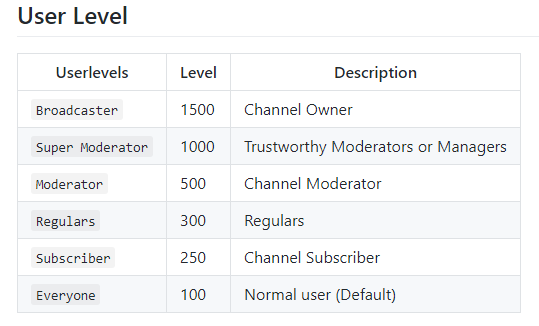
but how do i add it into the command
viscid pebbleBOT
You can add, remove and make changes to custom commands in chat with !command/!cmd flags:
!command add (commandname) (commandresponse) - allows you **to add **a new custom command
!command remove (commandname) - allows you to delete a custom command
!command edit (commandname) (commandresponse) - allows you to edit an existing custom command
!command show (commandname) - allows you to see the raw response of a command before variables are used
!command options (commandname) -(flag) - allows you to change settings for an existing custom command
!command alias basecommand - Shows the alias commands for !basecommand
!command alias add basecommand aliascommand1 aliascommand2 - Adds alias commands !aliascommand1 and !aliascommand2 for command !basecommand
!command alias remove basecommand aliascommand1 - Removes alias command !aliascommand1 from command !basecommand
Valid flags for !cmd options include: -enable -disable -cd (number in seconds) -usercd (number in seconds) -cost (number) -level (number) -type (say, whisper or reply) -count (number)
Syntax example: !cmd options twitter -usercd 60 -type reply -level 250
wispy jay
!cmd add !death ${count death} -level 250 would create the count command and it'd be subscriber and above?
wispy jay
sorry, you gave both possible answers
ionic kelp
Not !death but just death.
 boreal stirrup
hey im a new streamer and i need to make a list of blacklisted words so i dont get banned. i cannot find a specific list of words that are bannable though can anyone help?
wispy jay
i tried !cmd add death ${count death} -level 500 and it just adds -500 to the command output
 subtle meadow
can someone help explain why elements isnt recognizing followers in activity feed during live streams or for statistics after stream all i can see is my total follower count
wispy jay
ionic kelp
Not !death but just death.
sorry, that is what i wrote !command add getdied xyz has died ${getcount died} many times since StreamElements was brought in 22/01/2021. -level 500
and the initial count for just died
or should the -level be added immediately after !cmd add died -level 500 ......
or am i doing it wrong and meant to do !cmd options died -level 500 to set level
ionic kelp
No idea. I'll see if someone a little more familiar can answer.
zenith widget
!cmds
viscid pebbleBOT
You can add, remove and make changes to custom commands in chat with !command/!cmd flags:
!command add (commandname) (commandresponse) - allows you **to add **a new custom command
!command remove (commandname) - allows you to delete a custom command
!command edit (commandname) (commandresponse) - allows you to edit an existing custom command
!command show (commandname) - allows you to see the raw response of a command before variables are used
!command options (commandname) -(flag) - allows you to change settings for an existing custom command
!command alias basecommand - Shows the alias commands for !basecommand
!command alias add basecommand aliascommand1 aliascommand2 - Adds alias commands !aliascommand1 and !aliascommand2 for command !basecommand
!command alias remove basecommand aliascommand1 - Removes alias command !aliascommand1 from command !basecommand
Valid flags for !cmd options include: -enable -disable -cd (number in seconds) -usercd (number in seconds) -cost (number) -level (number) -type (say, whisper or reply) -count (number)
Syntax example: !cmd options twitter -usercd 60 -type reply -level 250
zenith widget
So when you add a command with
!cmd add commandName commandText
you then do !cmd options commandName -level 500
wispy jay
thank you, i just worked it out
zenith widget
you don't do it while adding the command, but afterwards
viscid pebbleBOT
@subtle meadow Please provide your account ID found at the top of this page: https://streamelements.com/dashboard/account/channels This ID is public info and safe to share here.
zenith widget
@boreal stirrup you can use our standard profanity filter in the tipping settings to catch most common profanity words on all alerts.
subtle meadow
@viscid pebble 5ff739988c12c3dfe6fe1f97
 celest panther
may I get help my friend donated money to see if it works and I went to the dashboard to see if they did and its not showing it
viscid pebbleBOT
@celest panther Please provide your account ID found at the top of this page: https://streamelements.com/dashboard/account/channels This ID is public info and safe to share here.
zenith widget
subtle meadow
<@!155149108183695360> 5ff739988c12c3dfe6fe1f97
fixed
wispy jay
zenith widget
you don't do it while adding the command, but afterwards
what is the difference between -type say and -type reply
i assume -type whisper literally whispers it on twitch?
subtle meadow
@zenith widget My hero thank you 🙂
zenith widget
wispy jay
what is the difference between `-type say` and `-type reply`
i assume say is for the bot to just respond in the chat, while reply its going to tag the person using the command
wispy jay
thought it might be, thanks
lament blade
ye, say its like "hello world" reply its "hello world Username" and whisper its in your twitch dms :3
more or less 😛
lament blade
zenith widget
i assume `say` is for the bot to just respond in the chat, while `reply` its goi...
hi my follower counter still not working, can you help me please?
zenith widget
Developers have still not looked into your account
No ETA one when its going to be fixed
lament blade
ok, thanks
 urban parcel
Hi there.
I wanted to rename the StreamElements Bot in my Channel and found the Help Thread about renaming it using OBS.Live mentioning to reach out on Discord it you want to rename it using Ground Control. So Hi Discord, I would like to do so! :D
wispy jay
is there a way to have streamelements run a commercial on twitch?
 knotty barn
Dear SE community, I am sorry to approach you like this but I am desperately looking for a solution on SE. I am looking for this everywhere and cannot find a way to add points to only ACTIVE users in chat.
Is there a way to achieve this?
wispy jay
knotty barn
Dear SE community, I am sorry to approach you like this but I am desperately loo...
so, not to lurkers?
knotty barn
yes
wispy jay
im not sure if thats how it works
knotty barn
just people that have been chatting
I can do so with Streamlabs Chatbot with no issues
viscid pebbleBOT
@wispy jay To have StreamElements run ads for you, do the following:
- The bot StreamElements is added as an Editor to your Twitch channel here: https://dashboard.twitch.tv/community/roles
2.a) To create a Timer, go here: https://streamelements.com/dashboard/bot-timers - add a timer with a response /commercial <30|60|90|120|150|180> to indicate the ad duration and also select the time interval that the response will be sent while you are online. Example: /commercial 30 and timer every 10 minutes (online interval).
2.b) To create a Custom command, go here: https://streamelements.com/dashboard/bot-commands/custom-commands and add command with the response /commercial <30|60|90|120|150|180> to indicate the ad duration. Example: !ads command with response /commercial 30
wary halo
knotty barn
just people that have been chatting
Not possible
knotty barn
crap...
😦
streamlabs have a command for that that only provides points to those active in chat and works nicely...
but i am an SE fan really
lament blade
Hi sorry to interrupt, I am a bit confused.. I have imported some streamlabs overylays on OBS with SE extension, but can't seem to actually set them up? any ideas how to do this? I'm on Mac.. thank you for your time 🙂
ebon forum
@lament blade have you looked at the imported overlays here?
https://streamelements.com/dashboard/overlays
This is where they should land after importing, so you can edit them and grab the URLs for the browser source.

StreamElements
The Ultimate All in One Platform for Streamers
lament blade
yes I've been trying to do this but every time I open them in the editor the position size and style changes sorry if this is a dumb question ahaha
ebon forum
lament blade
yes I've been trying to do this but every time I open them in the editor the pos...
if you had custom CSS on your Streamlabs overlays, the code might not be compatible and needs to be fixed.
And positions etc. can be adjusted, a 1:1 import without problems is not always possible
lament blade
oh I see thank you 🙂
I was up til 2 am trying to figure this out before i said screw it and went to bed. I can't figure out why the default sound alert plays alongside my custom sound alerts. I even saved after every little thing i did including deleting the original sound alert and it still plays.
ebon forum
lament blade
I was up til 2 am trying to figure this out before i said screw it and went to b...
There could be multiple reasons.
- make sure there are no other alertboxes with the same alerts/variations anywhere else
- refresh the cache of the browser sources
and 3) check on our editor if you get the sounds too and not just in OBS while emulating
 silk violet
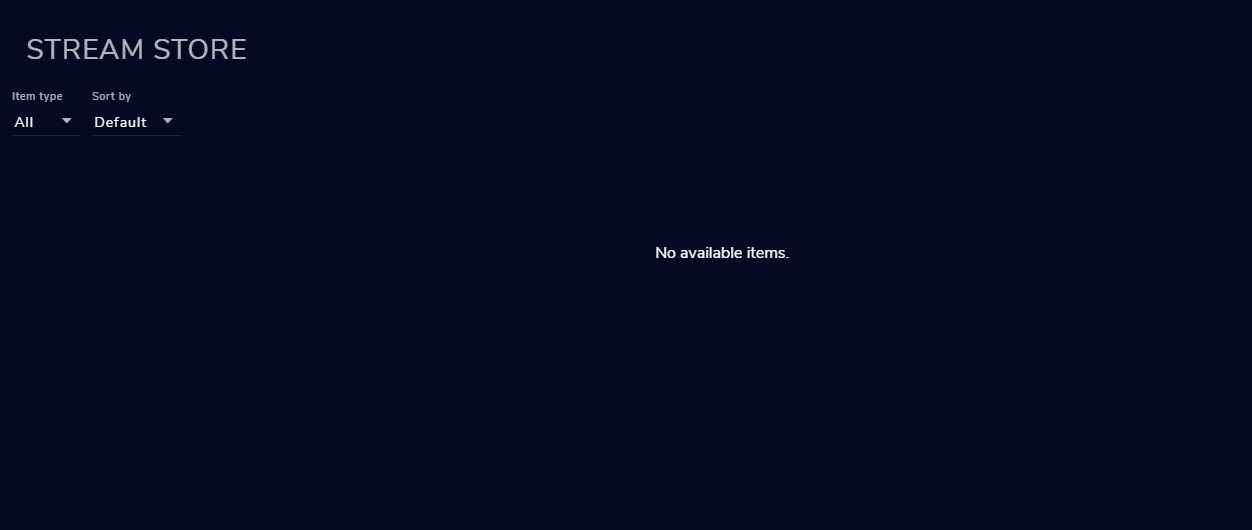
hey guys i have a prob , i set up in streamelement store and its not showing up saying this https://prnt.sc/xg7u8j
 ebon forum
@silk violet it says - no items, have you published any items?
silk violet
yes. do this one is right? https://prnt.sc/xg7xk2
 ebon forum
Can you give me your channel name so i can doublecheck?
silk violet
twitch?
ebon forum
Yes
silk violet
arturox
ebon forum
Just name, no links pls
silk violet
sry
silk violet
oooo ty mate big big ty 🙂
ebon forum

silk violet
yeeee it works 🙂
lament blade
that's where i am is in the editor as i am creating an overlay and the sound is not on any other overlay as i deleted them and I just cleared the cache and the original still plays.
ebon forum
@lament blade can you give me your channel name?
lament blade
Empire_Racing
ebon forum
@lament blade opened the first overlay - there are 3 (!) alertboxes.
All with enabled alerts. One is invisible.
This is NOT how it works, of course you get default sounds playing, all alertboxes on our system on ALL overlays are going off.
ebon forum
👍
boreal stirrup
zenith widget
<@!514487656625995778> you can use our standard profanity filter in the tipping ...
i meant for chat but ill do that too ty
urban parcel
Hi there.
I wanted to rename the StreamElements Bot in my Channel and found the Help Thread about renaming it using OBS.Live mentioning to reach out on Discord it you want to rename it using Ground Control. So Hi Discord, I would like to do so, send Help.
ebon forum
urban parcel
Hi there.
I wanted to rename the StreamElements Bot in my Channel and found the ...
Ground Control is outdated, we recommend using OBS.Live for this feature.
upbeat shard
zenith widget
<@!123951686707314690> import from other sites? where are you seeing this exactl...
In the my overlays page
ebon forum
upbeat shard
In the my overlays page
Can you provide us the channel name and we check it?
upbeat shard
ebon forum
Can you provide us the channel name and we check it?
Sorry not sure what you mean? I have an overlay from a different site but I can't add it in the SE overlays page - here let me show you hang on
like i bought a streaming package from another site
ebon forum
upbeat shard
Sorry not sure what you mean? I have an overlay from a different site but I can'...
From which site is the overlay?
upbeat shard
but i want to use it in SE - hopefully i can
ebon forum
This should come with instructions how to install it.
upbeat shard
uhh hang on
it did with a one click install option but that doesn't seem to appear on your site
hang on sorry i'm at work now so i'm just trying to go back to the email to find it
Visuals by Impluse
ebon forum
VBI usually provides a share link for StreamElements that works with 1 click. Make sure you download the one for StreamElements, not for Streamlabs and then make sure you are logged into our website before using the share link
upbeat shard
yea I did that 😐 maybe I'm not doing something right
ebon forum
Well let's doublecheck that the link is actually for StreamElements.
upbeat shard
ok I don't have OBS on my work computer or anything but I can check emails and log into your site?
ebon forum
Yeah you can do it. You do not need OBS for that
upbeat shard
but i'll need to download the package I purchased right
ebon forum
Yes. So log into the VBI page and check what you download first
upbeat shard
hang on crappy work internet - be about 3 minutes
ebon forum
they should have multiple links in the package or multiple packages .
upbeat shard
it's in a folder that says streamelements when I download it
so i assume it's the correct one
ebon forum
Should be. You can send me the files via DM and i check em
upbeat shard
ebon forum
Should be. You can send me the files via DM and i check em
I'm stupid nvm lol
yikes
i'm gonna go with I was paying attention properly last night 😐
upbeat shard
yes lol but apparently I only downloaded an alerts one....
i thought it was a package - which came with an ingame overlay - but it's not
do you have any recommendations of where to get a nice overlay? I saw the ones on the site and I wasn't a huge fan
I'm just starting out so I don't want to pay a ton but ya
ebon forum
upbeat shard
do you have any recommendations of where to get a nice overlay? I saw the ones o...
If you do not like our premade themes, you can check out Nerd or die, Own3dtv etc.
VBI is pretty expensive usually
upbeat shard
which would you recommend?
ebon forum
This is highly personal, check out what you like. Most people order custom stuff on fiverr when it comes to overlays.
For the premade ones - i already mentioned a few.
upbeat shard
I just want something with my camera box in the bottom right corner cuz all I play is NHL
 dusky fjord
Hi my followers are not showing on dashboard or overlays. Can someone help?
upbeat shard
all the ones I find the camera box isn't in the right spot
ebon forum
@dusky fjord Hi. can you provide us your channel name on twitch? We can fix it.
ebon forum
upbeat shard
all the ones I find the camera box isn't in the right spot
Once you add overlays to our system, you can move things around as you please, since they are modular.
upbeat shard
ok so once it's in I can move the cam box to wherever I'd like?
ebon forum
upbeat shard
ok so once it's in I can move the cam box to wherever I'd like?
yep. try it out, you can use our premade themes for it.
upbeat shard
ebon forum
yep. try it out, you can use our premade themes for it.
see I thought I did try that with your blue royal theme or whatever but it wouldn't allow me to move the cam box - there was like a no smoking sign on it kinda thing - only let me move the bottom portion of it
 fierce oar
https://github.com/StreamElements/widgets/blob/master/CustomCode.md Why is the variable {{someDropDown}} not working in the official example?

GitHub
Contribute to StreamElements/widgets development by creating an account on GitHub.
dusky fjord
@ebon forum yeah its JustrileyWasTaken. Do you need also need my acount id?
ebon forum
upbeat shard
see I thought I did try that with your blue royal theme or whatever but it would...
make sure the items are not locked and i would suggest looking up a few videos on how to use our overlay editor, those will help.
@dusky fjord Nope, found you without the account ID.
check if you get real events from now on.
upbeat shard
@ebon forum thanks for your help
 willow moth
Hello! I recently changed my Twitch username from Apelsipi to ItsAleksiLuv and as a result my streamelements bot has stopped working. Tried to look for a fix already but couldn't find anything (that works, that is), some help would be appreciated! 🙏
viscid pebbleBOT
If you changed your name on Twitch, please follow these steps:
- Visit https://streamelements.com/logout and then log in again by connecting with Twitch.
- On the right side of the dashboard page that opens, select Join under bot settings. If it says Part select that and then select Join to send the bot to the chat. Don't forget to mod the bot by typing /mod streamelements in your channel if you have not already.
- Post your old and your new name here so that we can update your channel's chatstats tracking (must be done by staff).
dusky fjord
@ebon forum What do you mean by check if you get real events from now on?
willow moth
I did find that bot message's instructions on reddit already, but I couldn't follow them, since I can't find that join/part on the dashboard for some reason?
ebon forum
@dusky fjord that means i have deployed a small fix, check if you get real follower, subscriber etc. events in the activity feed.
fierce oar
is there any good documentation on custom widgets? besides this crappy github page which examples are broken? TIA https://github.com/StreamElements/widgets/blob/master/CustomCode.md
GitHub
Contribute to StreamElements/widgets development by creating an account on GitHub.
dusky fjord
@ebon forum Oh ok 🙂
ebon forum
willow moth
I did find that bot message's instructions on reddit already, but I couldn't fol...
On there right side there is a button here:
https://streamelements.com/dashboard
It is either named "Join channel" (if the bot is not in your chat) or "Part channel".
ebon forum
fierce oar
is there any good documentation on custom widgets? besides this crappy github pa...
this is a question that i would post in the #dev-chat channel.
dusky fjord
@ebon forum no its still blank.
fierce oar
ebon forum
this is a question that i would post in the <#259680142459142144> channel.
Ohh, im sorry, havent seent hat channel. thanks 😉
willow moth
Omg I'm stupid, I hadn't moved on from the "welcome" screen haha, thanks, now I got it @ebon forum
ebon forum
dusky fjord
<@!149255081194160129> no its still blank.
Check for new/upcoming events. The fix was deployed few minutes ago.
willow moth
Okay yeah now it's working, thank you so much, I really am blind when it comes to these things
and if you still needed the usernames the old one was Apelsipi, current one is ItsAleksiLuv
 shy forge
Hey guys. Just looking for help with the SE Chat bot. It just stopped working suddenly. No name change or anything, it just stopped. Searched and tried a few solutions, but no results for now. Thanks! 🙂
ebon forum
shy forge
Hey guys. Just looking for help with the SE Chat bot. It just stopped working su...
Are you using the custom bot name function?
shy forge
Yes. I changed it to my username.
ebon forum
Try to disable the custom bot name function and test it.
You might need to reconnect it.
dusky fjord
@ebon forum It showing my followers that followed after the fix. but not the followers that followed before the fix?
@ebon forum I've figured a way to fix that. Thanks for the help 🙂
ebon forum
dusky fjord
<@!149255081194160129> It showing my followers that followed after the fix. but ...
Nice. Anything else we can do for you?
dusky fjord
@ebon forum no nothing else. Thanks 🙂
 balmy charm
Hello Streamelements, I would like some advise as my stream elements account is not picking up my followers on twitch. I can add the Twitch Activity feed to my OBS however the Stream Elements website still show 0 followers. Can you advise why this is as obviously it doesnt connect to my alerts on OBS.
 unkempt lynx
So I'm kinda limited knowledge wise when it comes to the fancier side of it all haha I was wondering if I'm able to use StreamElements to create an overlay for my twitch but I broadcast from my XBOX one. I use my laptop for updating stream info and chat etc but the gameplay broadcast is from my xbox. I did use another Overlay but it can only be seen by people watching on PC
 arctic ore
Top Tipper of All time is not an option to place into a layer? Can someone please explain howto add a TOP DONATE ALL TIME in place?
I figured it out by using the TOP TIPS LIST and choosing show only 1 item.
 grave basin
hi, someone help me?
ebon forum
unkempt lynx
So I'm kinda limited knowledge wise when it comes to the fancier side of it all ...
No, you would need to stream from a PC/laptop with a capture card, capturing the live signal from your console.
grave basin
i live for three days and already set up my chat commands. Yesterday I hit 50 followers and everything went really well, but today when I started the live, no chat command worked. Someone help me?
ebon forum
grave basin
i live for three days and already set up my chat commands. Yesterday I hit 50 fo...
Hi. 2 questions:
Did you rename your channel?
Are you using the custom bot name function?
viscid pebbleBOT
If you changed your name on Twitch, please follow these steps:
- Visit https://streamelements.com/logout and then log in again by connecting with Twitch.
- On the right side of the dashboard page that opens, select Join under bot settings. If it says Part select that and then select Join to send the bot to the chat. Don't forget to mod the bot by typing /mod streamelements in your channel if you have not already.
- Post your old and your new name here so that we can update your channel's chatstats tracking (must be done by staff).
ebon forum
Please follow that ^
 dull shell
Does StreamElements give overlays for OBS? Or straight to twitch?
ebon forum
of course we have overlays for browser source for the streaming software of your choice.
dull shell
So if I wanted to stream straight through twitch, that's how I would do it?
OR does it need to be through a streaming software?
grave basin
i dont speeak english. my translator dont help me good
lament blade
i have a text box that i want to transfer to another widget, but it goes behind the widget. How can I do this if possible?
grave basin
viscid pebble
If you changed your name on Twitch, please follow these steps:
1) Visit <https:...
my past name is Tarikow10 and now is BossTarikow
i dont find the bot settings
lament blade
I need some help. My Activitys are not showing up in my feed. I already loged out and in again
ebon forum
grave basin
my past name is Tarikow10 and now is BossTarikow
Please follow the instruction, the bot settings are in the dashboard.
ebon forum
lament blade
I need some help. My Activitys are not showing up in my feed. I already loged ou...
can you provide us your account ID, found here:
https://streamelements.com/dashboard/account/channels
lament blade
5ff855fd7ca157bccc97bd20
ebon forum
@lament blade should be fixed now. look out for new events coming in
grave basin
ebon forum
Please follow the instruction, the bot settings are in the dashboard.
I'm following the translation of what you asked for but I'm not getting it
im from brazil
ebon forum
grave basin
I'm following the translation of what you asked for but I'm not getting it
Ok let me write it down like that:
Part channel (remove bot)
Log out
Log back in
Join bot (send bot to channel).
That will do it.
ionic kelp
#🇵🇹︱português
grave basin
sorry my stupidity, i dont understand that part. Part channel (remove bot)
grave basin
ebon forum
Ok let me write it down like that:
Part channel (remove bot)
Log out
Log back i...
sorry my stupidity, i dont understand that part. Part channel (remove bot)
ionic kelp
Clique no botão de peça no painel de instrumentos e, em seguida, aguarde alguns segundos antes de clicar em "join".
ebon forum
grave basin
sorry my stupidity, i dont understand that part. Part channel (remove bot)
The button literally says "Part channel".
Of course it will be in portuguese.
grave basin
ebon forum
The button literally says "Part channel".
Of course it will be in portuguese.
I swear you don't have that button for me. In Portuguese it must be another name
ionic kelp
Canal da peça
viscid pebbleBOT
Go to the Dashboard > Right side > Part channel > Join channel(https://streamelements.com/dashboard)
grave basin
my screen
ebon forum
@grave basin this is NOT the dashboard, go back to the dashboard 🙂
You are in the account settings now
ebon forum
@grave basin scroll down, you have some welcome messages there.
ionic kelp
Fazer depos
grave basin
ionic kelp
Clique fazer depos
grave basin
ionic kelp
Fazer depos
yeeeeeeeeeeees
 fickle shore
I'm working in bot modules for Twitch, and the chat alerts option keeps unchecking itself randomly. Also, it says it saves my new bot messages that I added but then the whole thing resets once it turns itself off. Anything I'm missing??
grave basin
yeeeeeeeeeeeeeees, you did it
thnks
you are amazing
i love you
thanks
lindos
amo voces
 velvet spoke
that';s.. something we dont need to know
 cinder olive
In the top right it says 'layers'
Click it, find the layer you are editing, and click the lock icon to unlock it.
lament blade
Is there an issue with "hosting"? I don't get alerts
cinder olive
lament blade
Is there an issue with "hosting"? I don't get alerts
Elaborate further please?
cinder olive
fickle shore
I'm working in bot modules for Twitch, and the chat alerts option keeps unchecki...
What browser are you using?
 marsh kettle
cinder olive
In the top right it says 'layers'
marsh kettle
cinder olive
In the top right it says 'layers'
thnks bro sorry for my english
fickle shore
cinder olive
What browser are you using?
chrome 🙂
lament blade
cinder olive
Elaborate further please?
If someone is hosting me, there is no alert. with raids it wortks. my amount is blank
 sweet yacht
Is there a way to separate Discord from OBS where I can still hear it and people can hear music?
ebon forum
@sweet yacht Yes, ideal way would be - get a second audio interface and a mixer and split the output of the discord and OBS to different devices.
sweet yacht
Is there a good website to show me how to do that. I'm a redneck from SE kansas, not computer literate. Lol.
ebon forum
Google or youtube. There are many ways, from free to expensive, from software to hardware. So you need to find what fits your setup and your requirements @sweet yacht
lament blade
Hola
Tengo un problema con StreamElements, y es que cuando alguien me da "Seguir" en el Overlay prediseñado no sale la alerta en pantalla. Alguien me podría ayudar para saber que pasa? Gracias.
Y cuando le doy a emular, si funciona.
viscid pebbleBOT
@lament blade Welcome to the helpdesk! The regular helpdesk channels are in English but we do provide multi-language support in the following channels: #🇩🇪︱deutsch | #🇫🇷︱français | #🇪🇸︱español | #🇵🇹︱português | #🇳🇱︱nederlands | #🇮🇹︱italiano | #🇵🇱︱polski | #🇨🇳︱中文語言服務區-chinese | #🇯🇵︱日本語-japanese | #🇭🇺︱magyar | #🇰🇷︱한국어-korean | #🇹🇭︱ไทย-thai | #🇷🇺︱русский | #🇺🇦︱українська | #🇨🇿︱czech
 stark arch
so when I paste a full youtube link for media share all links get redirected to one certain video right now all video links get changed to "The End of The F***ing World 2 Bloopers | Netflix" and sometimes that video changes every 3-4 days any reason why?
its not on a backup playlist either
viscid pebbleBOT
If links in chat are appearing as ***** either mod the bot or disable block hyperlinks in your twitch channel settings: https://dashboard.twitch.tv/settings/moderation
ionic kelp
Do that.
 vapid scroll
I'm having trouble with my chat stats, I have no data in my leaderbaord.
stark arch
that worked thank you couldn't find any info anywhere
lament blade
this most likely got lost in the sea of questions, but is it possible to move text box from one widget to another? Every time i try the text box goes behind the widget i want to move it too.
 sharp mortar
Heyy
Im having trouble removing/unlinking StreamElements from my OBS
Ive deactivated and removed it from all panels
but it still creates announcements as if it was still active in my twitch stream
 stuck verge
hello, I am having an issue where my top tipper is not showing correctly.. ( I have had a twitch username change few months ago and everything was ok after the name change ) but now I found out the current top tipper in tipping history is not matching the one in my overlay. old username Mamaciita new username Mamacita
 bright latch
When I create an overlay on streamelements, using a free overlay they offer, it only shows a part of the overlay when I add it to OBS live as a browser source...
ebon forum
bright latch
When I create an overlay on streamelements, using a free overlay they offer, it ...
Make sure you adjust the resolution, our overlays are 1920x1080 by default.
bright latch
Thats exactly what it was, thanks so much
sick iris
I added a bunch of new commands and they work but whenever I open OBS they stop working and I also am unable to change the bot name despite selecting the custom bot name in the OBS activity feed section
 reef bramble
I can't access the site ... I've already logged out and logged in again but it always happens the same, I click on My Dashboard and go back to the main page ...
 mortal parrot
Hello.. I have a problem..
I created several overlays, which are follows, Tip, Cheers, Sub, Host, Raid, Goals (tips), latest Follow, latest Tip, text messages in scrolling, and chat..
I have create all this and they got it perfectly, and but overnight, when I turned on my computer, it wasn't working.. everything stopped working out of nowhere. :/
The resolutions on obs.live and StreamElements are 1920x1080, I don't know what could have happened.. someone can help me?.. please
sick iris
mortal parrot
Hello.. I have a problem..
I created several overlays, which are follows, Tip, ...
logout and backin on obs
mortal parrot
sick iris
logout and backin on obs
I already relogated, I tried to uninstall and install too
 spice mural
Media request in streamelements dashboard isn't working for me; I'm only getting playback errors with the youtube video that is currently queued for playing. No ad blockers are running, any ideas?
ebon forum
sick iris
I added a bunch of new commands and they work but whenever I open OBS they stop ...
Please disable the custom bot name function in OBS.Live and test it.
 wary depot
can i setup an alert for donations that plays an animation but the text doesnt appear for say 3 seconds that says who donated
so the animation can play then the text shows once the anhimation is stopped stationary
sick iris
ebon forum
Please disable the custom bot name function in OBS.Live and test it.
It works when its not a custom in OBS but the second it becomes custom it breaks all commands
ebon forum
sick iris
It works when its not a custom in OBS but the second it becomes custom it breaks...
Have you tried to reconnect the custom bot function alltogether?
reef bramble
can someone help me? 🙏
ebon forum
reef bramble
I can't access the site ... I've already logged out and logged in again but it a...
please use that link and log back in:
https://streamelements.com/logout
sick iris
ebon forum
Have you tried to reconnect the custom bot function alltogether?
Well im just using my twitch username the second default option... should i link my twitch and select the user that appears when i do that
ebon forum
sick iris
Well im just using my twitch username the second default option... should i link...
Yes just try to reconnect everything including reconnecting your twitch acc to OBS entirely
sick iris
ebon forum
Yes just try to reconnect everything including reconnecting your twitch acc to O...
awesome got it, it appears the "use username" part of the bot doesn't work but the adding a custom bot account part fixed it
Thanks!
ebon forum
👍
lament blade
hi, i'm having trouble with points. I'm trying to give myself and others my currency but !givepoints doesn't seem to do anything?
mortal parrot
mortal parrot
Hello.. I have a problem..
I created several overlays, which are follows, Tip, ...
@ebon forum Help me?
ebon forum
mortal parrot
<@!149255081194160129> Help me?
Can you provide me your account ID?
It is here:
https://streamelements.com/dashboard/account/channels
StreamElements
The Ultimate All in One Platform for Streamers
mortal parrot
ebon forum
Can you provide me your account ID?
It is here:
https://streamelements.com/dashb...
5f094a8e8e421c7790153ec9
 opaque trench
my friends bot keeps saying 0 seconds spend watching and he has loyalty enabled\
ebon forum
mortal parrot
5f094a8e8e421c7790153ec9
Check if you get NEW events from now on.
opaque trench
my friend @red folio is here and when i do the command !watchtime in his stream it says 0 seconds
mortal parrot
ebon forum
Check if you get NEW events from now on.
Nothings, Still not working
lament blade
lament blade
hi, i'm having trouble with points. I'm trying to give myself and others my curr...
anyone have a solution for this? 😦
ebon forum
mortal parrot
Nothings, Still not working
just followed you, works fine.
 frigid silo
Yo anyone know how to link my discord server to my twitch channel at @frigid silo
viscid pebbleBOT
@frigid silo Please connect your streaming account (Twitch, YouTube, or Facebook) with Discord by going to Settings and then Connections here in Discord. https://streamable.com/eg92w
 frigid silo
Yeah I already did that bit
opaque trench
my friend @red folio is here and when i do the command !watchtime in his stream it says 0 seconds
frigid silo
What do I do next
mortal parrot
ebon forum
just followed you, works fine.
It works in Elements, but not in obs, the image does not appear, only the sound.
frigid silo
After connecting it
wary halo
!watchtime @opaque trench
frigid silo
After connecting it
viscid pebbleBOT
@opaque trench 10 minutes of watch time is given to those in chat when the loyalty points are handed out (every 10 minutes). Therefore, loyalty must be enabled to watch time to work properly.
There is no direct link between watch time and all-time points.
It can’t be calculated from the number of all-time points a user has because subs may earn points at a faster rate and !bonus all command increases all-time points for users in the chat at that time.
Giving points to a single user do not affect all-time, only when giving to all in chat.
ebon forum
mortal parrot
It works in Elements, but not in obs, the image does not appear, only the sound.
Please refresh the cache of the browser source in OBS.
wary halo
oooh
that is something completely different
you need to make a panel and put the invite link to your server in it
viscid pebbleBOT
@frigid silo Twitch's official help guide for Panels: https://help.twitch.tv/customer/portal/articles/2416760-how-to-edit-info-panels
wary halo
no idea, might want to ask Twitch support
mortal parrot
ebon forum
Please refresh the cache of the browser source in OBS.
😦 nothing
ebon forum
mortal parrot
😦 nothing
I see no errors on our end. Have you logged out of OBS.Live and logged back in?
 torpid igloo
anyone else having a problem with the SE chat bot? I've tried parting and joining, muting and unmuting, to no avail
ebon forum
torpid igloo
anyone else having a problem with the SE chat bot? I've tried parting and joinin...
2 questions:
Was your twitch channel renamed recently?
Do you use custom bot name?
mortal parrot
ebon forum
I see no errors on our end. Have you logged out of OBS.Live and logged back in?
Yeah.. idk what happening.. :c
All of this happened out of nowhere, just yesterday it was working
viscid pebbleBOT
@mortal parrot Please provide a log from your last stream. To do this, in OBS go to Help > Log Files > Upload Last Log File and paste the link to the log file here.
ebon forum
Yep an OBS log could help to see if there is anything wrong.
We tried all the general fixes already.
stuck verge
stuck verge
hello, I am having an issue where my top tipper is not showing correctly.. ( I h...
can I get some help regarding this issue??
mortal parrot
viscid pebble
<@!268991150759608320> Please provide a log from your last stream. To do this, i...
cinder olive
Immediately always run your OBS as admin
arctic ore
is it possible to do all of my MERCH using my main NAME and not my twitch name? Twitch doesn't use same name as my Youtube. So is there a way to make the merch one of the three linked accounts instead of all of them being different?? Better yet, is there a way to sell MERCH from ONE account linked for all??
cinder olive
@mortal parrot once you get OBS running as admin, try and create a new source and re-add your alert
mortal parrot
cinder olive
<@!268991150759608320> once you get OBS running as admin, try and create a new s...
nothings happens too..
cinder olive
One sec
Ive just DM'd you a test overlay, let me know when youve got that one added
mortal parrot
cinder olive
Ive just DM'd you a test overlay, let me know when youve got that one added
will appear here?
 indigo drum
hello i need some help i am recieving the erorr code htp 400
cinder olive
indigo drum
hello i need some help i am recieving the erorr code htp 400
Please screenshot the errorr
indigo drum
invalid token
mortal parrot
cinder olive
Add it like you would any other overlay
oh, I added now
 cinder olive
Ima emulate the alert now, let me know if you can see it.
cinder olive
Do you have it at the top of your 'sources' list?
Browser being the alerts source
If you have it above, it will show
mortal parrot
cinder olive
Do you have it at the top of your 'sources' list?
yeah
cinder olive
If you have below, it will not
cinder olive
indigo drum
https://i.gyazo.com/thumb/1200/c8e9cb82fb18e798518477c931a67076-png.jpg
Restart your PC real quick and try again
indigo drum
already have did that
cinder olive
indigo drum
already have did that
if so get your stream key from twitch and reinput it.
cinder olive
mortal parrot
Send me your OBS log again
indigo drum
where do i put my key at in stream elements
mortal parrot
cinder olive
Send me your OBS log again
cinder olive
16:22:33.050: Running as administrator: false
Youve gotta run your OBS as admin man
mortal parrot
Help > Log Files > Upload Last Log File
All right?
indigo drum
mitch thank you sooooooo much all set
cinder olive
No.
You need to run your OBS as admin.
As in administrator, giving it elevated permissions in your windows OS.
mortal parrot
cinder olive
You need to run your OBS as admin.
but it's admin, I just closed and started with adm again
cinder olive
Based off the log you just sent me, it is not being ran in admin.
mortal parrot
This is my Current Log Files in obs
mortal parrot
mortal parrot
https://obsproject.com/logs/QkYLsFMX4iPpWLzi
this is my Last Log Files
cinder olive
Lets test that alert again, simply for GP reasons and see if it works now
mortal parrot
Just the sound again 😦
 lone shard
Hi all, A graphic designer has made me a starting soon and stream ending animated . On the loop playback, It's horrible for when it restarts again. I see other streams dont have this issue, Theirs is nice and smooth like it's just constantly playing without it stopping.?
wary halo
ask your designer to make it loop better then
mortal parrot
cinder olive
Lets test that alert again, simply for GP reasons and see if it works now
you know what is ''TeamViewer'' ?
cinder olive
@mortal parrot Lets do something weird and try adding a random image as a browser source to see if it shows up.
Try adding https://i.imgur.com/NLgzI3G.png as a browser source and see if it shows up
 cinder olive
And you can only hear, but not see, the alert I just played?
mortal parrot
just sound
lone shard
wary halo
ask your designer to make it loop better then
How tho ?
cinder olive
Lets manually clear your browser cache real quick
Head over to C:\Users\Your username\AppData\Roaming\obs-studio\plugin_config\obs-browser and copy the folder to your desktop, and then delete the orginal.
wary halo
lone shard
How tho ?
no idea, you said it looks horrible, let him fix the animation then
mortal parrot
cinder olive
Lets manually clear your browser cache real quick
If you want, you can use the '' TeamViewer '' app, you could access my pc and use it from your home
mortal parrot
cinder olive
Head over to C:\Users\Your username\AppData\Roaming\obs-studio\plugin_config\obs...
ok, i'll try
 sweet notch
hey, my chatstats stop working today, can you help me ?
 hidden girder
Can I get some help merging channels? It says 'channel is already claimed' when trying to add my twitch to my account
mortal parrot
cinder olive
Head over to C:\Users\Your username\AppData\Roaming\obs-studio\plugin_config\obs...
ok
cinder olive
Try your alert again.
mortal parrot
cinder olive
Try your alert again.
nothing.. bro, what's going on?
 rancid furnace
my activity feed doesnt show any new activity, i recently changed my name on twitch could that be the reason why. i have had a couple of people subcribe to me and no alert came up nor did it come up on the activity feed . help !
cinder olive
mortal parrot
nothing.. bro, what's going on?
Lets go to your OBS Settings, Advanced, then disable your browser hardware acceleration. If its enabled, disable it. If its disabled, enable it.
Then re-test again
viscid pebbleBOT
@hidden girder Account Merging - Please note:
- Merging accounts only allows faster ways to switch between accounts
- Merging accounts does not allow data sharing between accounts - different streaming platforms, different type of events
- Merging accounts allows duplicating/sharing overlays between the accounts
If you understand the limitations of merging and want to proceed, please find the JWT tokens (!jwt) from both accounts you want to merge and you will be directed to DM them to a staff member
@hidden girder You can find your JWT token on your account channels page (Show Secrets to reveal the token): https://streamelements.com/dashboard/account/channels
READ ME: This is a private security token. Do NOT share this token here or other public places, only with a StreamElements staff member in private.
wary halo
DM those tokens to @ebon forum and he can merge them for you @hidden girder
hidden girder
thanks!
ebon forum
hidden girder
thanks!
Yep awaiting DM 🙂
viscid pebbleBOT
@rancid furnace If you changed your name on Twitch, please follow these steps:
- Visit https://streamelements.com/logout and then log in again by connecting with Twitch.
- On the right side of the dashboard page that opens, select Join under bot settings. If it says Part select that and then select Join to send the bot to the chat. Don't forget to mod the bot by typing /mod streamelements in your channel if you have not already.
- Post your old and your new name here so that we can update your channel's chatstats tracking (must be done by staff).
sweet notch
hey, my chatstats stop working today, can you help me ?
wary halo
 halcyon meteor
My Chat box is cut in half not showing in full on OBS Live
halcyon meteor
My Chat box is cut in half not showing in full on OBS Live
drag it more to the left, you just made it very small
wary halo
sweet notch
hey, my chatstats stop working today, can you help me ?
i'll let someone take a look
might just be a small hiccup in the system
usually fixes itself
sweet notch

rancid furnace
old twitch name :gamingdfc, new twitch name: SimplyDFC
halcyon meteor
thank you @wary halo
lament blade
Hello! My Twitch follows do not appear on activity feed of stremelements. I have test it this with a friend.
viscid pebbleBOT
@lament blade Please provide your account ID found at the top of this page: https://streamelements.com/dashboard/account/channels This ID is public info and safe to share here.
lament blade
5ffa37682b83e3e6dd616d6e
mortal parrot
cinder olive
Lets go to your OBS Settings, Advanced, then disable your browser hardware accel...
Nothing again
wary halo
lament blade
5ffa37682b83e3e6dd616d6e
i've reported it to staff, should be fixed soon
rancid furnace
still dont see anything new pop in my activity feed
cinder olive
mortal parrot
Nothing again
One last thing I know to try, right click your OBS, and go to properties.
Under where it says 'target' add --disable-gpu to the end
rancid furnace
viscid pebble
<@!566432619483627521> If you changed your name on Twitch, please follow these s...
old twitch name :gamingdfc, new twitch name: SimplyDFC
lament blade
wary halo
i've reported it to staff, should be fixed soon
Thank you very much
cinder olive
mortal parrot
Nothing again
Should look similar to "C:\Program Files\obs-studio\bin\64bit\obs64.exe" --disable-gpu
wary halo
rancid furnace
old twitch name :gamingdfc, new twitch name: SimplyDFC
already reported it
did you do all the other steps too?
rancid furnace
yes
 timid ocean
this the right channel to ask for some regex guidance on a spam filter banned phrase?
mortal parrot
cinder olive
Should look *similar* to `"C:\Program Files\obs-studio\bin\64bit\obs64.exe" --di...
Ok.. I'll try now
mortal parrot
cinder olive
Should look *similar* to `"C:\Program Files\obs-studio\bin\64bit\obs64.exe" --di...
nothing too.. 😦
idk, this problem is impossible
cinder olive
I sent a message to a ole mate of mine, he might know
mortal parrot
oh.. okay dude, thanks for the help you're giving me
rancid furnace
no luck still 😦
frigid silo
I have finally done it
I've linked my discord on my twitch thank you for the help
Have you refreshed your browser
Or twitch
ebon forum
Did deploy a small fix, check if you get new events.
check for NEW events once they come in.
not past events
fix was deployed 3min ago.
viscid pebbleBOT
@cinder crater Read and follow our server rules:
- We do not tolerate toxicity! Treat the community team, staff and all members with respect.
- No advertisement or channel promotion, anywhere on the server.
- No NSFW/NSFL
- No unsolicited DMs or friend requests to server members
Make sure to read the #welcome in any server you join.
lament blade
@ebon forum Im having the same issue as @lofty spear
my activity isnt showing anything but new item redemptions. no follows
been like this all day
 teal atlas
I’m having an issue setting up a tip panel on twitch. When i go to set up the panel it says something went wrong try again. Has anyone else had this issue
 tribal bough
Hello! My streamelements dashboard doesn't reflect any of my followers! Please help
viscid pebbleBOT
@tribal bough Please provide your account ID found at the top of this page: https://streamelements.com/dashboard/account/channels This ID is public info and safe to share here.
tribal bough
@viscid pebble 5ff9e5527ca15720d1a02086
tribal bough
viscid pebble
<@!324749835980767232> Please provide your account ID found at the top of this p...
Account ID 5ff9e5527ca15720d1a02086
abstract hemlock
@tribal bough everything should be good for now on
tribal bough
Thank you sooooooooo much!
spice mural
Media request in streamelements dashboard isn't working for me; I'm only getting playback errors with the youtube video that is currently queued for playing. No ad blockers are running, any ideas?
 leaden cliff
Chat stats stopped working
StreamElements
Description Chat Stats tracks emote usage on Twitch in real time. See which emotes are the most popular on every Twitch channel
*fixed
 noble spoke
Hi i wrote yesterday asking about streamelements timers, mine still are not going off and i cant figure why .
 pure patio
Hi there. I am trying to send an overlay to another streamer but I'm not sure how I would go about doing that since there does not seem to be a way
cinder olive
@mortal parrot The only response ive been able to come across is to attempt either a) a fresh install of OBS, or b) create a new windows user, install OBS there, and test it on that user.
cinder olive
pure patio
Hi there. I am trying to send an overlay to another streamer but I'm not sure ho...
Cant transfer overlays between accounts, but you can send them your overlay link to use if you would really like (alertboxes and such wouldnt work!)
cinder olive
noble spoke
Hi i wrote yesterday asking about streamelements timers, mine still are not goin...
Arnt timers supposed to go off?
teal atlas
Hello! Any idea why it will not allow me to add a tip pannel to twitch
cinder olive
teal atlas
Hello! Any idea why it will not allow me to add a tip pannel to twitch
Are you receiving an error? How are you trying to add the panel?
noble spoke
cinder olive
Arnt timers supposed to go off?
When i mean go off i mean enable after the time you specify
cinder olive
noble spoke
When i mean go off i mean enable after the time you specify
It works by having the timer. Say the timer is 5 minutes. After 5 minutes it checks to see if the chat messages number has been reached. If it has not, it will not post and will start another 5 minute timer.
teal atlas
cinder olive
Are you receiving an error? How are you trying to add the panel?
It’s saying something went wrong try again
cinder olive
That would be a twitch issue, but what browser are you using?
noble spoke
cinder olive
It works by having the timer. Say the timer is 5 minutes. After 5 minutes it che...
Ahh i thought they were two separate spec. either the timer or the lines. Thats probably why, thank you
cinder olive
teal atlas
Crome
Welp, try it on Firefox or IE, if it doesnt work their either give your PC a quick restart. If it still doesnt work try on another device/contact twitch support
 pine ravine
Hello! I have problems with my alert box. When I emulate a follow, sub or donation, it works perfectly fine. If somebody really follows or donates on my stream there is no entry alert. there is no activity feed aswell about it. I have modded the bot. I have signed out and in again. I disconnected and reconnected streamelements to my twitch but I can't make it work somehow...
my accountID: 5ff67a9fd6bf7a6c1a9d8a38
cinder olive
@pine ravine Known issue for select few and have poked staff about it 👍
pine ravine
ty! Will wait and pray 🙂
cinder olive
@pine ravine Should be fixed now! Past events wont show, but future ones will
pine ravine
Coming through now like water under the bridge, perfect! ty so much
 devout grotto
can someone walk me through moving overlays from stream elements to ops
viscid pebbleBOT
@devout grotto To add your overlays to OBS, add a new browser source in your scene. Paste your overlay URL in the browser source properties, set the dimensions to 1920x1080 (unless you changed them on the website) and check Shutdown source when not visible. https://youtu.be/KDvLynUqXI4
devout grotto
got it! Thank you!
 crude crypt
anyone know the solution to black screen with an AMD A8?
cinder olive
What kind of black screen? Twitch black? OBS black? Game black?
 wise cliff
hello there... i am not entirely sure where should i post this, mainly because of the fact that i cannot find exactly what the issue is, but i hope this is a good place to ask for help for it: i am having an overlay that i can manipulate with chat commands on my twitch channel. in the overlay editor and also the browser source in the browser itself (both chrome and firefox latest versions) everything works just fine, but once i add the browser source to my obs and try the command in my chat in wont change anything... anybody any idea what might be the problem?
NOTE: i already made another overlay that is manipulated with chat commands and that works just fine...
timid ocean
In /bot-spam-filters I'm trying to match both cases for banned word:
example string want banned: "donated 20$" (where 20 could be any number) and dollar sign is after the number.
Tried a few regex for that but nothing's working... lil rusty on my regex.
Thoughts?
fierce oar
When im using the "Total Subscribers" label, and emulate a comunity subgift of 10 gifted subs, the counter only counts 1 new sub...is this a bug? 🤔
mortal parrot
cinder olive
<@!268991150759608320> The only response ive been able to come across is to atte...
I tried to download another one, and I also tried to log into another account on the pc .. both went wrong: / @cinder olive
cinder olive
DM me your Teamviewer information
mortal parrot
ok
spice mural
Streamelements, still not loading the songrequest video properly; No ad-blockers are present, the song request features have been fully set up, and you can even queue music. The music itself, however, doesn't play and I get a playback error on the youtube side of things. Third time asking, there are no common sense solutions I can try to cook up, ideas anyone?
 azure socket
When I try to preview animated alerts in a browser the browser that loads is just a white page and when I "emulate" an alert it doesn't appear on OBS in the programme viewer(or the preview but I don't think it should appear there anyway) how would I go about fixing this?
 clear ivy
This is more of Streamelements web. It shows that i have j8 followers but on twitch i have 10 followers. I know before i streamed for the first time i got two followers. Do you know streamelements doesnt show my two first followers?
 pine mortar
my problem is it doesnt show when people follow or when i go live and my raffles arent working
viscid pebbleBOT
@pine mortar Please provide your account ID found at the top of this page: https://streamelements.com/dashboard/account/channels This ID is public info and safe to share here.
pine mortar
wym
 languid sparrow
Hello! I have problems with my alert box. When I emulate a follow, sub or donation, it works perfectly fine. If somebody really follows or donates on my stream there is no entry alert. there is no activity feed aswell about it. I have modded the bot. I have signed out and in again. I disconnected and reconnected streamelements to my twitch but I can't make it work somehow...
my accountID: 5ff8e01c51165ddfb3964c38
 rustic wagon
having a problem with bot spam with SE connection
 sullen dock
just opened my obs and my top tipper list won't load. refreshed cache multiple times so i went to my overlays on the site. it isn't working there. i try creating a new one to see if it's just not working at all and it didn't work, any tips?
 silk mantle
hi
 stray perch
follower alert not working but my tips working
viscid pebbleBOT
@stray perch Please provide your account ID found at the top of this page: https://streamelements.com/dashboard/account/channels This ID is public info and safe to share here.
 rustic maple
Tips field does not detect "5,00" (5,00 EU) as the proper amount. It incorrectly puts a "." at the end of the amount creating a false tip of "$500.00".
This creates a problem for the people donation and an inconvenience to the streamers getting the bad tip.
StreamElements needs to support international and local formats to avoid this issue.
abstract hemlock
@rustic maple i just received your ticket less than a minute ago
rustic maple
That ticket is from a friend of mine that has had this happen two times so far. Thank you.
stray perch
rustic maple
Tips field does not detect "5,00" (5,00 EU) as the proper amount. It incorrectly...
no my follower alerts doesent work
but my donations do
viscid pebbleBOT
@stray perch Please provide your account ID found at the top of this page: https://streamelements.com/dashboard/account/channels This ID is public info and safe to share here.
 topaz roost
Good evening, i recently changed my twitch name and am unable to get streamelements to correctly work with my chat. What steps after logging out and loggin in do i need to take? 5fd44be49f65218027448019
viscid pebbleBOT
@topaz roost If you changed your name on Twitch, please follow these steps:
- Visit https://streamelements.com/logout and then log in again by connecting with Twitch.
- On the right side of the dashboard page that opens, select Join under bot settings. If it says Part select that and then select Join to send the bot to the chat. Don't forget to mod the bot by typing /mod streamelements in your channel if you have not already.
- Post your old and your new name here so that we can update your channel's chatstats tracking (must be done by staff).
topaz roost
5fd44be49f65218027448019 Changed Twitch name. Old name: Nickolai279 New Name: TeneckiTerrible
 cinder basin
hi sorry i dont wanna interrupt but idk when there would be an opening. im getting the after stream stats email to my old email and idk how to change it. its changed on the streamelements page
 outer flax
@abstract hemlock goodevening i am the one that @rustic maple is talking about, i am from Netherlands and overhere the halfstop is used between a euro and cents a fullstop is only used between thousand and hundreds, so i tried to donate the streamer 5 dollars which had to be bit fast also as it was for a hypetrain. I got my paypal setup it is a 2 click payment so i didnt see it before i saw the mentioning in the stream. The streamer is aware of the mistake i made, how can i change this best???
abstract hemlock
@stray perch fixed
stray perch
thx man love you i see it on streamlabs thx best man thx for support @abstract hemlock
outer flax
@gaunt basiniito ty i just saw your mail. ty for responding
 tall nexus
hey do i come here for twitch bot help?
viscid pebbleBOT
@tall nexus Welcome to the helpdesk! Please let us know how we can assist you today and a support volunteer or staff member will assist you as soon as they are available. Thank you for your patience.
 deft plank
hi, i cant manage to make the custom bot name to work :/
nor my own account work as bot name
 bitter escarp
hello
viscid pebbleBOT
@deft plank StreamElements menu, on top of OBS > Logout > Login
tall nexus
my bot just wont work. ive tired parting it and getting it to join but it says it joins then does nothing
viscid pebbleBOT
@tall nexus StreamElements menu, on top of OBS > Logout > Login
deft plank
reloggin did nothing
abstract hemlock
@deft plank i'll look into it
lament blade
On the Moonstone Animated "Just Talking" Overlay the alerts are green not blue, is there a way i can change it to the color it should be.
zinc wyvern
Hi, my overlay doesn't seem to show up on my stream. here's my acct id 5fb58ce963d44087695d01ed
 leaden birch
How do i get the !points to work
ionic kelp
Enable loyalty.
leaden birch
How
lament blade
Nvm I just saved the video alerts from another overlay and replaced the green with the blue.
 sullen timber
hi everyone! is there a way to unlink a youtube or twitch account that i no longer want to use?
 distant schooner
hi everyone
when im streaming it shows my game but only shows my webcam feed for like a second
i neeed hellpppp
viscid pebbleBOT
@distant schooner Obs.live is a plugin for OBS Studio for the best OBS support, please join their Official Discord @ discord.gg/obsproject
@sullen timber There is no easy way to unlink 2 owner-type accounts from each other. The only way is to make a closure request from here: https://streamelements.com/dashboard/account/security
WARNING: In submitting a closure request, all linked channels within the account will be deleted and you will lose all associated data. This includes overlays, custom commands, timers and past data (tips, subs, etc). You can still reconnect with the deleted account, but you are essentially starting fresh.
halcyon meteor
so right now on obs my cam overlay isn't there but it's on
on streamelements as a overlay in my editor too. Everything is fine there
but when I switch scenes and go back to my gameplay scene the cam overlay that's animated on Loop would disappear
viscid pebbleBOT
@halcyon meteor Right click on the BrowserSource > Properties > Scroll down a bit > Refresh cache of current page
rustic wagon
@viscid pebble my bot feature is spamming up what do I need to do? I have had to ban the bot for now to get it to stop
viscid pebbleBOT
@rustic wagon Please provide a proper screenshot with the issue visible. If not sure how to take a screenshot, you can check here: https://www.take-a-screenshot.org
rustic wagon
I will have to do that when I get back live. Can't see chat history that far back
 vale cargo
How do the bot timera work?
Timer*
@viscid pebble How do the bot timers look like and how they work?
ionic kelp
Pinned messages here.
 carmine gale
My overlays do not seem to be showing on stream. My Account ID is 5ee98f79d1a9032b93313ad9
 late cove
so my bot not working anymore I told it to leave the channel and come back any ideas whats going on?
 true marsh
viscid pebbleBOT
true marsh
viscid pebbleBOT
@late cove Go to the Dashboard > Right side > Part channel > Join channel(https://streamelements.com/dashboard)
late cove
i did that it didnt work
viscid pebbleBOT
@late cove StreamElements menu, on top of OBS > Logout > Login
 zealous orchid
Is there a way to loop alerts.
 regal marsh
Good night streamers, I need your help, when I try to be an affiliate I get this notice, is it normal?
zenith widget
@regal marsh I assume that means "Unless you have a time machine, the channel doesn't exist", correct?
viscid pebbleBOT
@graceful totem Obs.live is a plugin for OBS Studio for the best OBS support, please join their Official Discord @ discord.gg/obsproject
drowsy nimbus
I'm using OBS Live and have changed to a custom bot name, but it won't send a test message. It works fine when I change it to StreamElements. The tipping link is on my Twitch panel. Any idea why it wouldn't work?
viscid pebbleBOT
@drowsy nimbus If your commands recently stopped working and you're using OBS.Live and a custom bot name do the following:
- In OBS.Live, click on the hamburger menu (three stripes) at the top left of your activity feed
- Click on Stream Settings > Custom bot name
- In the Custom bot name field select Set custom bot name, not your already existing username (with capital letters). Note: If you already connected an account that way, the third entry will show as the account name (see image https://i.imgur.com/sO7fWOX.png).
- Scroll a bit down and click on the purple Connect Custom Bot Account button
- Log in as usual and Authorize the custom bot name
- Back in the Activity feed, click on the Send Test Message button and check if your custom bot name starts working again
drowsy nimbus
@viscid pebble I tried that with no luck. I disconnected and reconnected the custom bot account and reauthorized but still no test message sends.
drowsy nimbus
Have one more issue I can't figure out. I'm using Kappagen and I've selected my own emotes to use for explosions. However when someone cheers it uses random emotes that I haven't selected. Am I overlooking something?
viscid pebbleBOT
@drowsy nimbus Please provide your account ID found at the top of this page: https://streamelements.com/dashboard/account/channels This ID is public info and safe to share here.
 lost osprey
hello for my activity feed its not picking up any followers causing me to get zero follower alerts? please help account id: 5ff7600719a3ad81ed84d902
i use streamelements obs
zenith widget
fixed
 errant citrus
heyo
I can't get my gif to play when emulating an alert
have custom CSS turned off
viscid pebbleBOT
@errant citrus You can test alerts via the Emulate bell on the lower left side of the Overlay Editor. Simply go to your Dashboard > My Overlays > pencil/edit button on the overlay. Make sure the Preview LIVE on stream option is on to see the alert in OBS/XSplit** https://streamable.com/vtulg9
 errant citrus
^ am doing the above but it's not working
zenith widget
What are you seeing and what are you expecting?
lament blade
<@&364840891023622144> I need help my account isnt logging followers either, should i send my id?
zenith widget
Please don't tag roles like that
No need to tag 20+ people just for an issue that can fixed easily. Thank you
viscid pebbleBOT
@lament blade Please provide your account ID found at the top of this page: https://streamelements.com/dashboard/account/channels This ID is public info and safe to share here.
lament blade
I tried to reach out earlier and no one reached out to me, my apologies
5fc8e12265812ac728caf677
errant citrus
@zenith widget I added a gif and a sound clip for follower alert, and the sound plays but the gif is stationary
could it be because the gif is shorter than the alert duration?
zenith widget
@lament blade added your account to a list for the devs to take a look at
viscid pebbleBOT
@errant citrus Please provide your account ID found at the top of this page: https://streamelements.com/dashboard/account/channels This ID is public info and safe to share here.
errant citrus
thank you @zenith widget 600a111a2926f226fe981354
zenith widget
The gif is not set to loop
it stops
so once its loaded and cached by the browser/obs
errant citrus
how do i set it to loop?
zenith widget
it won't loop when played again
errant citrus
oh i see
lament blade
okay thanks @zenith widget
errant citrus
oh im guessing it's something i do to the file and reupload to SE
zenith widget
yes
errant citrus
thank you for your help!!
 glass quail
Hi, is there a way to add cusom JS to my chat widget when a new message is typed? I want to play a sound when a new message appears. I don't want to use 3rd party apps. Thanks you!
ionic kelp
@Toni#9999 There's actually something in #widget-share that can do that entirely for you.
@glass quail since my discord is being  atm.
atm.
glass quail
I will take a look. Thank you
ionic kelp
Assuming it got the right one #widget-share message
glass quail
Seems to be the right one. Thank you so much. I will play with it
 rough quiver
Hola no me anda el comando !watchtime aparece o seconds siempre aunque haya mirado más si me puede decir como solucionarlo lo agradeceria
viscid pebbleBOT
@rough quiver 10 minutes of watch time is given to those in chat when the loyalty points are handed out (every 10 minutes). Therefore, loyalty must be enabled to watch time to work properly.
There is no direct link between watch time and all-time points.
It can’t be calculated from the number of all-time points a user has because subs may earn points at a faster rate and !bonus all command increases all-time points for users in the chat at that time.
Giving points to a single user do not affect all-time, only when giving to all in chat.
 strange sandal
So not sure where to post. I can't get to my dashboard on the website, it juust keeps redirecting me to the streamelements homepage.
viscid pebbleBOT
Please logout of StreamElements at https://streamelements.com/logout and then login again to your account (Twitch/YouTube/Facebook).
strange sandal
Thank you. That worked!
ionic kelp
Depends on what it entails.
 empty lake
Hi guys, how can i set alerts for specific subs ( founders ) ?
zenith widget
There is no variable for founders
empty lake
i saw couple of streamers doing alerts for specific names , like when i sub, a special alert just made for me show up
zenith widget
You can set the variation trigger to be a specific name, yes
but not the actual founder's badge holders
empty lake
so i have to do it manually , thank you so much ❤️
 lyric sleet
Same problem. Did you get a solution?
zenith widget
What browser are you using?
 leaden glacier
I hope im right here, how can I make the bot simulate line break in commands ?
 twin sentinel
Not possible.
twin sentinel
No.
twin sentinel
If you resize the chat window like pop it out, it still won't be a line break.
leaden glacier
hmm and the dots will just be out of place
I see
I let the bot send multiple messages then to simulate it
 tame glacier
Im new to streaming
viscid pebbleBOT
@tame glacier New to StreamElements?
Check out our YouTube channel https://www.youtube.com/c/streamelements/videos
with tutorial videos from setting up the basics, to in-depth details on how to use our product.
New to OBS? Here is a 4 step quick start guide
https://obsproject.com/wiki/OBS-Studio-Quickstart
Want to learn even more? Here is an in-depth overview
https://obsproject.com/wiki/OBS-Studio-Overview
tame glacier
I need help with bots :(
I've seen people add !socials and these kinda commands
How does one do that
twin sentinel
Create a custom command here: https://streamelements.com/dashboard/bot-commands/custom-commands and make the bot join your stream via the StreamElements dashbard and mod the bot in your twitch chat.
tame glacier
Do I have to go to my twitch.tv dashboard to mod the bot? As I have check marked the bot rn
Appreciate your help benno
 topaz meadow
Hi All: I set up my twitch with StreamElements. All seems to work except that I do not seem to get any data from like followers from my twitch account. So none of my alerts work. Any ideas what I am missing?
viscid pebbleBOT
@topaz meadow Please provide your account ID found at the top of this page: https://streamelements.com/dashboard/account/channels This ID is public info and safe to share here.
topaz meadow
5ff70a0887f472de11ce5fcb
zenith widget
Fixed
zenith widget
no, it was on our side
 eager garden
Hi guys
 dire aurora